03스티커 배지 카드 격자
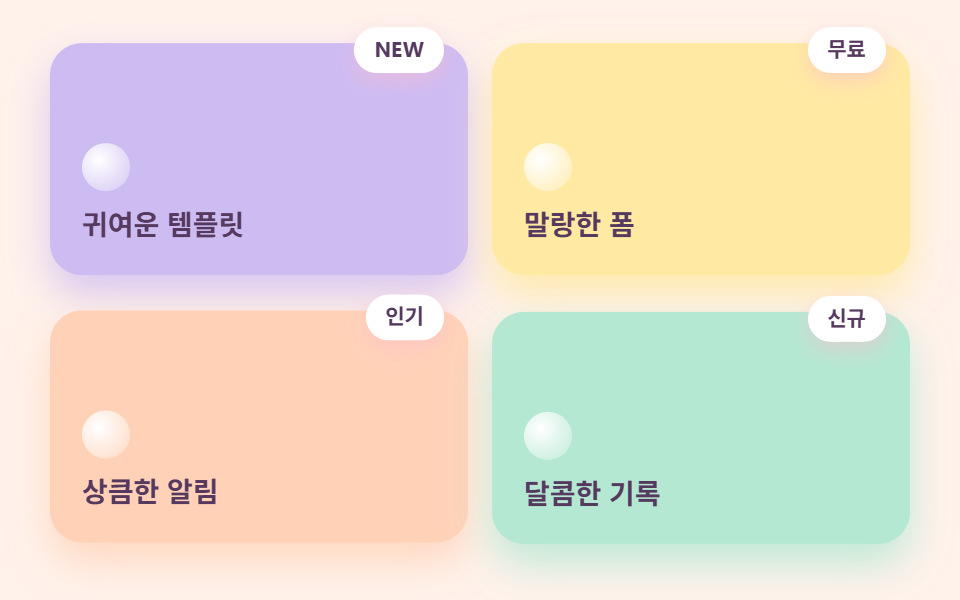
카드마다 라벤더·레몬·피치·민트 저마다 다른 파스텔 바탕에 같은 색으로 물든 그림자를 얹고, 모서리에는 점선 테두리 스티커 배지가 붙습니다. 네 카드가 순서대로 살짝씩 들썩입니다.
쓰임기능 소개 격자, 메뉴·상품 카드
색별 그림자점선 스티커 배지2열→1열
<main class="stage">
  <div class="gridcandy">
    <div class="gridcandy__card gridcandy__card--lav">
      <span class="gridcandy__badge">NEW</span>
      <span class="gridcandy__dot" aria-hidden="true"></span>
      <p class="gridcandy__name">귀여운 템플릿</p>
    </div>
    <div class="gridcandy__card gridcandy__card--lem">
      <span class="gridcandy__badge">무료</span>
      <span class="gridcandy__dot" aria-hidden="true"></span>
      <p class="gridcandy__name">말랑한 폼</p>
    </div>
    <div class="gridcandy__card gridcandy__card--pea">
      <span class="gridcandy__badge">인기</span>
      <span class="gridcandy__dot" aria-hidden="true"></span>
      <p class="gridcandy__name">상큼한 알림</p>
    </div>
    <div class="gridcandy__card gridcandy__card--min">
      <span class="gridcandy__badge">신규</span>
      <span class="gridcandy__dot" aria-hidden="true"></span>
      <p class="gridcandy__name">달콤한 기록</p>
    </div>
  </div>
</main>
@use "../../../../site/static/demo-tokens" as *;
$duration: $dur-loop; // 카드 네 장이 한 바퀴 들썩이는 주기
$easing: $ease-spring;
$color: $stage-ink; // 글자 기본(토큰) — 베리 잉크로 덮는다
// 캔디 팔레트 — 값은 tailwind.config.js · tokens.css 와 같다
$candy-cream: #fff6f0;
$candy-bubble: #ffb9cf;
$candy-peach: #ffd2b8;
$candy-lemon: #ffe9a3;
$candy-mint: #b5e8d2;
$candy-lavender: #cdbcf2;
$candy-berry: #55395e;
// 무대 — 피치 물색
@include stage(mix($candy-peach, $stage-paper, 28%));
.gridcandy {
box-sizing: border-box;
width: clamp(280px, 92vw, 430px);
display: grid;
grid-template-columns: repeat(auto-fit, minmax(clamp(120px, 40vw, 160px), 1fr));
gap: $sp-3;
}
.gridcandy__card {
position: relative;
box-sizing: border-box;
min-height: clamp(92px, 26vw, 116px);
display: flex;
flex-direction: column;
justify-content: flex-end;
gap: $sp-2;
padding: $sp-4;
border-radius: $r-card;
animation: cardWave $duration $easing infinite;
}
.gridcandy__card--lav {
background: $candy-lavender;
box-shadow: 0 10px 20px rgba($candy-lavender, .8);
}
.gridcandy__card--lem {
background: $candy-lemon;
box-shadow: 0 10px 20px rgba($candy-lemon, .85);
animation-delay: calc($duration / -4);
}
.gridcandy__card--pea {
background: $candy-peach;
box-shadow: 0 10px 20px rgba($candy-peach, .85);
animation-delay: calc($duration / -2);
}
.gridcandy__card--min {
background: $candy-mint;
box-shadow: 0 10px 20px rgba($candy-mint, .85);
animation-delay: calc($duration / -4 * 3);
}
.gridcandy__badge {
position: absolute;
top: calc($sp-2 * -1);
right: $sp-3;
padding: $sp-1 $sp-2;
border: 2px dashed $stage-paper;
border-radius: $r-pill;
background: $stage-paper;
color: $candy-berry;
font-weight: 700; font-size: clamp(9px, 2.2vw, 11px); line-height: 1;
box-shadow: 0 4px 10px rgba($candy-bubble, .5);
}
.gridcandy__dot {
width: $sp-6;
aspect-ratio: 1;
border-radius: 50%;
background: radial-gradient(circle at 35% 35%, $stage-paper, rgba($stage-paper, .35) 75%);
}
.gridcandy__name {
margin: 0;
color: $candy-berry;
font-weight: 700; font-size: clamp(12px, 3vw, 14px); line-height: 1.3;
}
// 데모: 네 카드가 시작 시각을 1/4 주기씩 어긋내 순서대로 들썩인다
@keyframes cardWave {
0%, 100% { transform: translateY(0); }
30% { transform: translateY(-8px); }
}
// 반응형: 320×200 처럼 세로가 짧은 화면에선 카드 속을 줄인다(BD9)
@media (max-width: 340px), (max-height: 220px) {
.gridcandy { gap: $sp-2; }
.gridcandy__card { min-height: 64px; padding: $sp-2 $sp-3; gap: $sp-1; }
.gridcandy__badge { display: none; }
.gridcandy__dot { width: $sp-4; }
.gridcandy__name { font-size: 11px; }
}
@media (prefers-reduced-motion: reduce) {
.gridcandy__card { animation: none !important; transform: none; }
}html, body {
margin: 0;
overflow: hidden;
}
.stage {
box-sizing: border-box;
min-height: 100vh;
display: grid;
place-items: center;
margin: 0;
background: rgb(100%, 95.0588235294%, 92.2039215686%);
font-family: -apple-system, "Segoe UI", "Noto Sans KR", sans-serif;
padding: clamp(8px, 4vw, 24px);
}
.gridcandy {
box-sizing: border-box;
width: clamp(280px, 92vw, 430px);
display: grid;
grid-template-columns: repeat(auto-fit, minmax(clamp(120px, 40vw, 160px), 1fr));
gap: 12px;
}
.gridcandy__card {
position: relative;
box-sizing: border-box;
min-height: clamp(92px, 26vw, 116px);
display: flex;
flex-direction: column;
justify-content: flex-end;
gap: 8px;
padding: 16px;
border-radius: 16px;
animation: cardWave 2s cubic-bezier(0.2, 0.8, 0.2, 1) infinite;
}
.gridcandy__card--lav {
background: #cdbcf2;
box-shadow: 0 10px 20px rgba(205, 188, 242, 0.8);
}
.gridcandy__card--lem {
background: #ffe9a3;
box-shadow: 0 10px 20px rgba(255, 233, 163, 0.85);
animation-delay: -0.5s;
}
.gridcandy__card--pea {
background: #ffd2b8;
box-shadow: 0 10px 20px rgba(255, 210, 184, 0.85);
animation-delay: -1s;
}
.gridcandy__card--min {
background: #b5e8d2;
box-shadow: 0 10px 20px rgba(181, 232, 210, 0.85);
animation-delay: -1.5s;
}
.gridcandy__badge {
position: absolute;
top: -8px;
right: 12px;
padding: 4px 8px;
border: 2px dashed #ffffff;
border-radius: 999px;
background: #ffffff;
color: #55395e;
font-weight: 700;
font-size: clamp(9px, 2.2vw, 11px);
line-height: 1;
box-shadow: 0 4px 10px rgba(255, 185, 207, 0.5);
}
.gridcandy__dot {
width: 24px;
aspect-ratio: 1;
border-radius: 50%;
background: radial-gradient(circle at 35% 35%, #ffffff, rgba(255, 255, 255, 0.35) 75%);
}
.gridcandy__name {
margin: 0;
color: #55395e;
font-weight: 700;
font-size: clamp(12px, 3vw, 14px);
line-height: 1.3;
}
@keyframes cardWave {
0%, 100% {
transform: translateY(0);
}
30% {
transform: translateY(-8px);
}
}
@media (max-width: 340px), (max-height: 220px) {
.gridcandy {
gap: 8px;
}
.gridcandy__card {
min-height: 64px;
padding: 8px 12px;
gap: 4px;
}
.gridcandy__badge {
display: none;
}
.gridcandy__dot {
width: 16px;
}
.gridcandy__name {
font-size: 11px;
}
}
@media (prefers-reduced-motion: reduce) {
.gridcandy__card {
animation: none !important;
transform: none;
}
}import type { CSSProperties } from "react";
import styles from "./CardGridCandy.module.scss";
export type CardGridCandyProps = {
cards?: { name: string; badge: string }[];
/** 한 주기(기본 2000ms) */
duration?: number;
easing?: string;
color?: string;
};
type Vars = CSSProperties & { "--duration"?: string; "--easing"?: string; "--color"?: string };
const TONE = ["lav", "lem", "pea", "min"] as const;
export default function CardGridCandy({
cards = [
{ name: "귀여운 템플릿", badge: "NEW" },
{ name: "말랑한 폼", badge: "무료" },
{ name: "상큼한 알림", badge: "인기" },
{ name: "달콤한 기록", badge: "신규" },
],
duration = 2000,
easing = "cubic-bezier(.2,.8,.2,1)",
color = "#ffb9cf",
}: CardGridCandyProps) {
const vars: Vars = { "--duration": `${duration}ms`, "--easing": easing, "--color": color };
return (
<div className={styles.gridcandy} style={vars}>
{cards.map((c, i) => (
<div key={c.name} className={`${styles.card} ${styles[TONE[i % 4]]}`}>
<span className={styles.badge}>{c.badge}</span>
<span className={styles.dot} aria-hidden="true" />
<p className={styles.name}>{c.name}</p>
</div>
))}
</div>
);
}03 스티커 배지 카드 격자 — 측정 누적면적 18.565% · 움직인 프레임 23/23GODRICH 원작 · zip 에 SCSS·React 포함 · 파스텔 톤 디자인 랜딩 UI 키트, 캔디 색 섹션 9개
이 데모가 속한 글
 파스텔 톤 디자인 랜딩 UI 키트, 캔디 색 섹션 9개파스텔 톤 디자인은 크림색 바탕 위에 버블검 핑크·피치·레몬·민트·라벤더의 연한 색을 얹고, 그림자까지 회색 대신 같은 계열의 파스텔로 그려 사탕처럼 말랑하고 상큼하게 보이게 만드는 스타일입니다. 디저트 가게나 뷰티 이 글의 데모 전부 보기