08액체 글자 — 텍스트 픽셀에서 태어나 흐르는 모핑
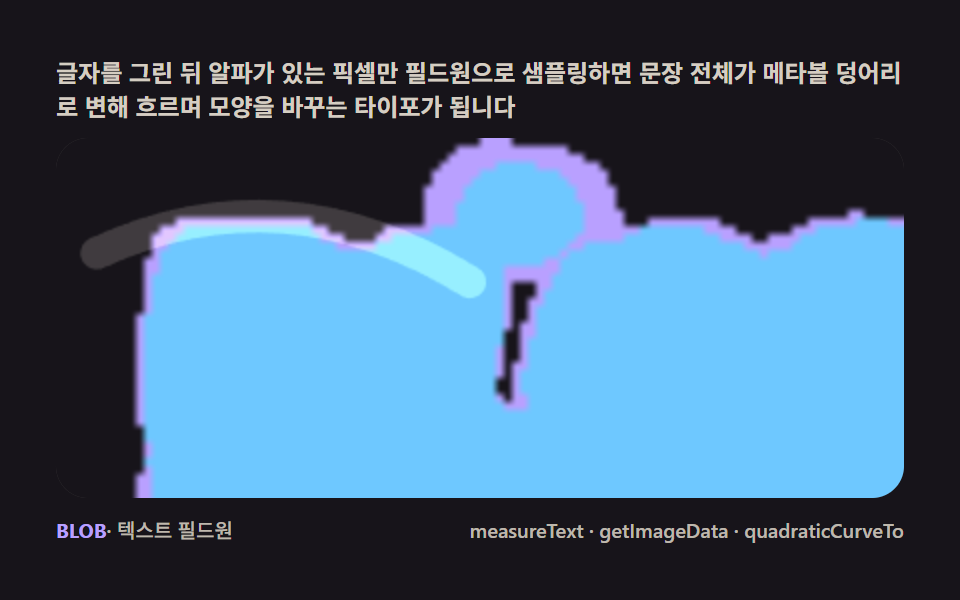
글자를 그린 뒤 getImageData 로 알파가 있는 픽셀만 필드원으로 샘플링하면, 문장이 통째로 메타볼 덩어리로 변해 흘러다니며 모양을 바꾸는 타이포 인트로가 됩니다.
쓰임히어로 헤드라인·편지 모핑
measureTextgetImageDataquadraticCurveTo
<main class="stage">
<div class="cd is-demo" id="cdRoot">
  <p class="cd__hint">
    <span>글자를 그린 뒤 알파가 있는 픽셀만 필드원으로 샘플링하면 문장 전체가 메타볼 덩어리로 변해 흐르며 모양을 바꾸는 타이포가 됩니다</span>
  </p>
  <div class="cd__field" id="cdField" role="application" aria-label="액체 글자 메타볼 실험판" tabindex="0">
    <canvas class="cd__cv" id="cdCv"></canvas>
  </div>
  <div class="cd__bar">
    <span class="cd__meta"><b class="cd__val" id="cdN">BLOB</b>· 텍스트 필드원</span>
    <span class="cd__meta cd__meta--dim">measureText · getImageData · quadraticCurveTo</span>
  </div>
</div>
</main>
@use "../../../../site/static/demo-tokens" as *;
// 액체 글자(08). @keyframes 없음 — 텍스트 필드원(measureText+getImageData) + rAF 시뮬레이션뿐.
// 무대는 잉크. 편 공통 파스텔 팔레트를 --mb-* 로 (07~09 동일 계열, 항목마다 무대만 다름).
$duration: $dur-loop;
$easing: $ease-spring;
$color: $subject-lilac;
@include stage($stage-ink);
// ── 편 공통 파스텔 팔레트 ──
$mb-stage: $stage-ink;
$mb-edge: $subject-lilac; // 액체 몸통(테두리 임계값)
$mb-core: $subject-sky; // 안쪽 밝은 코어
$mb-gloss: $subject-cream; // 표면을 훑는 광택 스윕
$mb-text: $subject-cream;
.cd {
--mb-stage: #{$mb-stage};
--mb-edge: #{$mb-edge};
--mb-core: #{$mb-core};
--mb-gloss: #{$mb-gloss};
display: flex; flex-direction: column; gap: $sp-2;
width: 100%; max-width: 424px;
}
.cd__hint {
display: flex; align-items: center; gap: $sp-1; margin: 0;
font-weight: 700; font-size: clamp(10px, 2.8vw, 12px); line-height: 1.35;
color: rgba($mb-text, .82);
}
.cd__field {
position: relative; height: 180px;
border-radius: $r-card; overflow: hidden;
background: $mb-stage;
box-shadow: inset 0 0 0 1px rgba($mb-gloss, .16);
}
.cd__field:focus-visible { outline: 2px solid $mb-edge; outline-offset: 2px; }
.cd__cv { display: block; width: 100%; height: 100%; }
.cd__bar { display: flex; align-items: baseline; justify-content: space-between; gap: $sp-2; }
.cd__meta { font-size: 10px; font-weight: 500; color: rgba($mb-text, .72); }
.cd__val { color: $mb-edge; font-weight: 700; }
.cd__meta--dim { font-size: 10px; }
@media (max-width: 340px) {
.cd { gap: $sp-1; }
.cd__field { height: 100px; }
.cd__meta--dim { display: none; }
}
// reduce — rAF 를 돌리지 않고 액체 한 장만 남는다.
@media (prefers-reduced-motion: reduce) {
.cd.is-still .cd__field { cursor: default !important; }
}html, body {
margin: 0;
overflow: hidden;
}
.stage {
box-sizing: border-box;
min-height: 100vh;
display: grid;
place-items: center;
margin: 0;
background: #17141a;
font-family: -apple-system, "Segoe UI", "Noto Sans KR", sans-serif;
padding: clamp(8px, 4vw, 24px);
}
.cd {
--mb-stage: #17141a;
--mb-edge: #b9a0ff;
--mb-core: #6ec8ff;
--mb-gloss: #fff7e6;
display: flex;
flex-direction: column;
gap: 8px;
width: 100%;
max-width: 424px;
}
.cd__hint {
display: flex;
align-items: center;
gap: 4px;
margin: 0;
font-weight: 700;
font-size: clamp(10px, 2.8vw, 12px);
line-height: 1.35;
color: rgba(255, 247, 230, 0.82);
}
.cd__field {
position: relative;
height: 180px;
border-radius: 16px;
overflow: hidden;
background: #17141a;
box-shadow: inset 0 0 0 1px rgba(255, 247, 230, 0.16);
}
.cd__field:focus-visible {
outline: 2px solid #b9a0ff;
outline-offset: 2px;
}
.cd__cv {
display: block;
width: 100%;
height: 100%;
}
.cd__bar {
display: flex;
align-items: baseline;
justify-content: space-between;
gap: 8px;
}
.cd__meta {
font-size: 10px;
font-weight: 500;
color: rgba(255, 247, 230, 0.72);
}
.cd__val {
color: #b9a0ff;
font-weight: 700;
}
.cd__meta--dim {
font-size: 10px;
}
@media (max-width: 340px) {
.cd {
gap: 4px;
}
.cd__field {
height: 100px;
}
.cd__meta--dim {
display: none;
}
}
@media (prefers-reduced-motion: reduce) {
.cd.is-still .cd__field {
cursor: default !important;
}
}// 액체 글자(08). 오프스크린에 글자를 크게 그리고(measureText 로 폭을 재 캔버스에 맞춤) getImageData 로
// 알파 있는 픽셀만 격자 간격으로 샘플링해 필드원(seed) 목록을 만든다. 매 프레임 각 seed 를 살짝 흔들고
// (liquid jitter) 전체를 숨쉬듯 스케일해, 저해상도 필드 캔버스에 가산 원으로 찍은 뒤 임계값 두 단(테두리·
// 코어)으로 나눠 확대하면 글자가 통째로 출렁이는 메타볼 덩어리가 된다. 표면엔 quadraticCurveTo 로 그린
// 하이라이트 곡선이 시간에 따라 훑고 지나가며 광택을 낸다.
(function () {
// ── 변형 상수 블록 — 아래 값 하나만 바꿔 변형을 만든다 ──
var TEXT = 'BLOB'; // 'LIQUID' 로 바꾸면 더 긴 변형
var STRIDE = 7; // seed 샘플 간격(px, 텍스트 캔버스 기준) — 작을수록 촘촘하고 느림
var JITTER = 3.6; // 액체 흔들림 진폭(px)
// ────────────────────────────────────────────────────
var root = document.getElementById('cdRoot');
var field = document.getElementById('cdField');
var cv = document.getElementById('cdCv');
var ctx = cv.getContext('2d');
var css = getComputedStyle(root);
function tok(name) { return css.getPropertyValue(name).trim(); }
var C_STAGE = tok('--mb-stage');
var C_EDGE = tok('--mb-edge');
var C_CORE = tok('--mb-core');
var C_GLOSS = tok('--mb-gloss');
var reduce = window.matchMedia('(prefers-reduced-motion: reduce)').matches;
var W = 0, H = 0;
var LOWW = 0, LOWH = 0, SCALE = 4;
var fieldCv = document.createElement('canvas');
var fieldCtx = fieldCv.getContext('2d');
var bandCv = document.createElement('canvas');
var bandCtx = bandCv.getContext('2d');
var txtCv = document.createElement('canvas');
var txtCtx = txtCv.getContext('2d');
var raf = 0, t0 = -1;
var seeds = [];
function makeRand(seed) {
var st = seed >>> 0;
return function () {
st = (st + 0x6D2B79F5) >>> 0;
var t = st;
t = Math.imul(t ^ (t >>> 15), t | 1);
t ^= t + Math.imul(t ^ (t >>> 7), t | 61);
return ((t ^ (t >>> 14)) >>> 0) / 4294967296;
};
}
var rand = makeRand(0x317A08);
// ── 텍스트 → 필드원 샘플링 (measureText + getImageData) ──
function buildSeeds() {
txtCv.width = W; txtCv.height = H;
txtCtx.clearRect(0, 0, W, H);
var fontSize = Math.round(H * 0.94);
txtCtx.font = '900 ' + fontSize + 'px -apple-system, "Segoe UI", sans-serif';
var m = txtCtx.measureText(TEXT);
var targetW = W * 0.92;
if (m.width > 0) fontSize = Math.max(24, Math.round(fontSize * (targetW / m.width)));
txtCtx.font = '900 ' + fontSize + 'px -apple-system, "Segoe UI", sans-serif';
m = txtCtx.measureText(TEXT);
var asc = m.actualBoundingBoxAscent || fontSize * 0.72;
var desc = m.actualBoundingBoxDescent || fontSize * 0.18;
var cx = W / 2, cy = H / 2 + (asc - desc) / 2;
txtCtx.textAlign = 'center';
txtCtx.textBaseline = 'alphabetic';
txtCtx.fillStyle = '#fff';
txtCtx.fillText(TEXT, cx, cy);
var img = txtCtx.getImageData(0, 0, W, H);
var d = img.data;
seeds = [];
for (var y = 4; y < H - 4; y += STRIDE) {
for (var x = 4; x < W - 4; x += STRIDE) {
var a = d[(y * W + x) * 4 + 3];
if (a > 120) {
seeds.push({ x: x, y: y, ph: rand() * Math.PI * 2, sp: 0.8 + rand() * 1.6 });
}
}
}
}
function fit() {
var r = field.getBoundingClientRect();
W = r.width; H = r.height;
cv.width = Math.round(W); cv.height = Math.round(H);
LOWW = Math.max(48, Math.round(W / SCALE));
LOWH = Math.max(30, Math.round(H / SCALE));
fieldCv.width = LOWW; fieldCv.height = LOWH;
bandCv.width = LOWW; bandCv.height = LOWH;
ctx.imageSmoothingEnabled = true;
buildSeeds();
}
function drawField(t) {
fieldCtx.clearRect(0, 0, LOWW, LOWH);
fieldCtx.fillStyle = '#000';
fieldCtx.fillRect(0, 0, LOWW, LOWH);
fieldCtx.globalCompositeOperation = 'lighter';
var breathe = 1 + Math.sin(t * 0.7) * 0.11; // 숨쉬듯 전체 스케일
var r = 6.4 + Math.sin(t * 0.5) * 0.7;
// 문장 전체가 천천히 필드를 가로지러 흐른다(타이포가 자리를 바꾸며 모양을 다시 만든다)
var driftX = Math.sin(t * 0.33) * LOWW * 0.22 + Math.sin(t * 0.11) * LOWW * 0.08;
var driftY = Math.cos(t * 0.26) * LOWH * 0.20;
function blob(px, py, rad) {
var g = fieldCtx.createRadialGradient(px, py, 0, px, py, rad);
g.addColorStop(0, 'rgba(255,255,255,0.95)');
g.addColorStop(1, 'rgba(255,255,255,0)');
fieldCtx.fillStyle = g;
fieldCtx.fillRect(px - rad, py - rad, rad * 2, rad * 2);
}
for (var i = 0; i < seeds.length; i++) {
var s = seeds[i];
var jx = Math.sin(t * s.sp + s.ph) * JITTER;
var jy = Math.cos(t * s.sp * 1.2 + s.ph) * JITTER;
var px = ((s.x + jx) / SCALE - LOWW / 2) * breathe + LOWW / 2 + driftX;
var py = ((s.y + jy) / SCALE - LOWH / 2) * breathe + LOWH / 2 + driftY;
blob(px, py, r);
}
// 위성 방울 — 글자 주위를 돌며 스쳐 병합하는 메타볼(모양이 더 크게 바뀐다)
var SAT = [[0.9, 0.5, 0.16], [0.6, 0.85, 0.21], [1.25, 0.32, 0.13], [0.45, 0.15, 0.12], [1.05, 0.72, 0.17]];
for (var k = 0; k < SAT.length; k++) {
var o = SAT[k];
var ox = LOWW / 2 + Math.sin(t * o[0] + k * 2.1) * LOWW * 0.42 + driftX * 0.4;
var oy = LOWH / 2 + Math.cos(t * o[1] + k * 1.4) * LOWH * 0.38 + driftY * 0.4;
blob(ox, oy, r * 1.5);
}
fieldCtx.globalCompositeOperation = 'source-over';
}
function classify() {
var img = fieldCtx.getImageData(0, 0, LOWW, LOWH);
var d = img.data;
for (var y = 0; y < LOWH; y++) {
for (var x = 0; x < LOWW; x++) {
var v = d[(y * LOWW + x) * 4] / 255;
var col = v > 0.56 ? C_CORE : (v > 0.15 ? C_EDGE : C_STAGE);
bandCtx.fillStyle = col;
bandCtx.fillRect(x, y, 1, 1);
}
}
}
function gloss(t) {
// 광택 스윕 — quadraticCurveTo 로 그린 곡선이 시간에 따라 왼쪽에서 오른쪽으로 훑는다
var u = (t * 0.28) % 1.4 - 0.2;
var x0 = -W * 0.2 + u * W, y0 = H * 0.32;
var cx1 = x0 + W * 0.22, cy1 = H * 0.08;
var x1 = x0 + W * 0.44, y1 = H * 0.4;
ctx.save();
ctx.globalCompositeOperation = 'lighter';
ctx.strokeStyle = C_GLOSS;
ctx.lineWidth = Math.max(10, H * 0.09);
ctx.lineCap = 'round';
ctx.globalAlpha = 0.16;
ctx.beginPath();
ctx.moveTo(x0, y0);
ctx.quadraticCurveTo(cx1, cy1, x1, y1);
ctx.stroke();
ctx.restore();
}
function draw(t) {
drawField(t);
classify();
ctx.clearRect(0, 0, W, H);
ctx.fillStyle = C_STAGE;
ctx.fillRect(0, 0, W, H);
ctx.drawImage(bandCv, 0, 0, LOWW, LOWH, 0, 0, W, H);
gloss(t);
}
function stillFrame() { draw(0.35); }
function frame(now) {
if (t0 < 0) t0 = now;
var t = (now - t0) / 1000;
draw(t);
raf = requestAnimationFrame(frame);
}
window.addEventListener('resize', function () {
fit();
if (reduce) stillFrame();
});
fit();
if (reduce) {
stillFrame();
root.classList.add('is-still');
} else {
raf = requestAnimationFrame(frame);
}
})();// LiquidText — vanilla 판(run/317/demo/08-metaball-text-liquid-fillet/index.html) 의 React 포트.
// 액체 글자 — 오프스크린에 글자를 measureText 로 재 맞춰 그리고 getImageData 로 알파 픽셀만
// 필드원으로 샘플링해, 저해상도 가산 필드 + 두 단 임계값으로 글자 전체가 출렁이는 메타볼 타이포를 만든다.
// 표면을 quadraticCurveTo 곡선 광택이 주기적으로 훑는다.
import { useEffect, useRef, useState } from "react";
import type { CSSProperties } from "react";
import styles from "./LiquidText.module.scss";
export type LiquidTextProps = {
duration?: string;
easing?: string;
color?: string;
text?: string; // 모핑 원본 문장
stride?: number; // seed 샘플 간격(px) — 작을수록 촘촘
jitter?: number; // 액체 흔들림 진폭(px)
};
type Vars = CSSProperties & { "--duration"?: string; "--easing"?: string; "--color"?: string };
type Box<T> = { current: T };
type Seed = { x: number; y: number; ph: number; sp: number };
const FIELD_LABEL = "액체 글자 메타볼 실험판";
const SCALE = 4;
function makePRNG(seed: number): () => number {
let s = seed >>> 0;
return function () {
s = (s + 0x6d2b79f5) >>> 0;
let t = s;
t = Math.imul(t ^ (t >>> 15), t | 1);
t ^= t + Math.imul(t ^ (t >>> 7), t | 61);
return ((t ^ (t >>> 14)) >>> 0) / 4294967296;
};
}
export default function LiquidText({
duration = "2s",
easing = "cubic-bezier(.2, .8, .2, 1)",
color = "#b9a0ff",
text = "BLOB",
stride = 7,
jitter = 3.6,
}: LiquidTextProps) {
const rootRef = useRef<HTMLDivElement | null>(null);
const fieldRef = useRef<HTMLDivElement | null>(null);
const cvRef = useRef<HTMLCanvasElement | null>(null);
const ctxRef = useRef<CanvasRenderingContext2D | null>(null);
const sizeRef = useRef({ w: 0, h: 0 }) as Box<{ w: number; h: number }>;
const lowRef = useRef({ w: 0, h: 0 }) as Box<{ w: number; h: number }>;
const fieldCvRef = useRef<HTMLCanvasElement | null>(null);
const bandCvRef = useRef<HTMLCanvasElement | null>(null);
const txtCvRef = useRef<HTMLCanvasElement | null>(null);
const fieldCtxRef = useRef<CanvasRenderingContext2D | null>(null);
const bandCtxRef = useRef<CanvasRenderingContext2D | null>(null);
const colRef = useRef<{ stage: string; edge: string; core: string; gloss: string } | null>(null);
const seedsRef = useRef<Seed[]>([]) as Box<Seed[]>;
const strideRef = useRef(stride) as Box<number>;
const jitterRef = useRef(jitter) as Box<number>;
const rafRef = useRef(0) as Box<number>;
const [label, setLabel] = useState(text);
const [still, setStill] = useState(false);
const vars: Vars = { "--duration": duration, "--easing": easing, "--color": color };
function reduced(): boolean {
return window.matchMedia("(prefers-reduced-motion: reduce)").matches;
}
// ── 텍스트 → 필드원 샘플링 (measureText + getImageData) ──
function buildSeeds(): void {
const txtCv = txtCvRef.current;
const { w: W, h: H } = sizeRef.current;
if (!txtCv || W <= 0) return;
const txtCtx = txtCv.getContext("2d");
if (!txtCtx) return;
txtCv.width = W; txtCv.height = H;
txtCtx.clearRect(0, 0, W, H);
let fontSize = Math.round(H * 0.94);
const font = (fs: number) => `900 ${fs}px -apple-system, "Segoe UI", sans-serif`;
txtCtx.font = font(fontSize);
let m = txtCtx.measureText(text);
const targetW = W * 0.92;
if (m.width > 0) fontSize = Math.max(24, Math.round(fontSize * (targetW / m.width)));
txtCtx.font = font(fontSize);
m = txtCtx.measureText(text);
const asc = m.actualBoundingBoxAscent || fontSize * 0.72;
const desc = m.actualBoundingBoxDescent || fontSize * 0.18;
const cy = H / 2 + (asc - desc) / 2;
txtCtx.textAlign = "center";
txtCtx.textBaseline = "alphabetic";
txtCtx.fillStyle = "#fff";
txtCtx.fillText(text, W / 2, cy);
const img = txtCtx.getImageData(0, 0, W, H);
const d = img.data;
const rand = makePRNG(0x317a08);
const arr: Seed[] = [];
const st = strideRef.current;
for (let y = 4; y < H - 4; y += st) {
for (let x = 4; x < W - 4; x += st) {
const a = d[(y * W + x) * 4 + 3];
if (a > 120) arr.push({ x, y, ph: rand() * Math.PI * 2, sp: 0.8 + rand() * 1.6 });
}
}
seedsRef.current = arr;
}
function drawField(t: number): void {
const fieldCtx = fieldCtxRef.current;
const { w: lw, h: lh } = lowRef.current;
if (!fieldCtx) return;
fieldCtx.globalCompositeOperation = "source-over";
fieldCtx.fillStyle = "#000";
fieldCtx.fillRect(0, 0, lw, lh);
fieldCtx.globalCompositeOperation = "lighter";
const breathe = 1 + Math.sin(t * 0.7) * 0.11;
const r = 6.4 + Math.sin(t * 0.5) * 0.7;
// 문장 전체가 천천히 필드를 가로지러 흐른다(타이포가 자리를 바꾸며 모양을 다시 만든다)
const driftX = Math.sin(t * 0.33) * lw * 0.22 + Math.sin(t * 0.11) * lw * 0.08;
const driftY = Math.cos(t * 0.26) * lh * 0.2;
const blob = (px: number, py: number, rad: number): void => {
const g = fieldCtx.createRadialGradient(px, py, 0, px, py, rad);
g.addColorStop(0, "rgba(255,255,255,0.95)");
g.addColorStop(1, "rgba(255,255,255,0)");
fieldCtx.fillStyle = g;
fieldCtx.fillRect(px - rad, py - rad, rad * 2, rad * 2);
};
const seeds = seedsRef.current;
for (let i = 0; i < seeds.length; i++) {
const s = seeds[i];
const jx = Math.sin(t * s.sp + s.ph) * jitterRef.current;
const jy = Math.cos(t * s.sp * 1.2 + s.ph) * jitterRef.current;
const px = ((s.x + jx) / SCALE - lw / 2) * breathe + lw / 2 + driftX;
const py = ((s.y + jy) / SCALE - lh / 2) * breathe + lh / 2 + driftY;
blob(px, py, r);
}
// 위성 방울 — 글자 주위를 돌며 스쳐 병합하는 메타볼(모양이 더 크게 바뀐다)
const SAT: Array<[number, number, number]> = [[0.9, 0.5, 0.16], [0.6, 0.85, 0.21], [1.25, 0.32, 0.13], [0.45, 0.15, 0.12], [1.05, 0.72, 0.17]];
for (let k = 0; k < SAT.length; k++) {
const o = SAT[k];
const ox = lw / 2 + Math.sin(t * o[0] + k * 2.1) * lw * 0.42 + driftX * 0.4;
const oy = lh / 2 + Math.cos(t * o[1] + k * 1.4) * lh * 0.38 + driftY * 0.4;
blob(ox, oy, r * 1.5);
}
fieldCtx.globalCompositeOperation = "source-over";
}
function classify(): void {
const fieldCtx = fieldCtxRef.current;
const bandCtx = bandCtxRef.current;
const col = colRef.current;
const { w: lw, h: lh } = lowRef.current;
if (!fieldCtx || !bandCtx || !col) return;
const img = fieldCtx.getImageData(0, 0, lw, lh);
const d = img.data;
for (let y = 0; y < lh; y++) {
for (let x = 0; x < lw; x++) {
const v = d[(y * lw + x) * 4] / 255;
bandCtx.fillStyle = v > 0.56 ? col.core : (v > 0.15 ? col.edge : col.stage);
bandCtx.fillRect(x, y, 1, 1);
}
}
}
function gloss(t: number): void {
const ctx = ctxRef.current;
const col = colRef.current;
const { w: W, h: H } = sizeRef.current;
if (!ctx || !col) return;
const u = (t * 0.28) % 1.4 - 0.2;
const x0 = -W * 0.2 + u * W, y0 = H * 0.32;
const cx1 = x0 + W * 0.22, cy1 = H * 0.08;
const x1 = x0 + W * 0.44, y1 = H * 0.4;
ctx.save();
ctx.globalCompositeOperation = "lighter";
ctx.strokeStyle = col.gloss;
ctx.lineWidth = Math.max(10, H * 0.09);
ctx.lineCap = "round";
ctx.globalAlpha = 0.16;
ctx.beginPath();
ctx.moveTo(x0, y0);
ctx.quadraticCurveTo(cx1, cy1, x1, y1);
ctx.stroke();
ctx.restore();
}
function draw(t: number): void {
const ctx = ctxRef.current;
const col = colRef.current;
const bandCv = bandCvRef.current;
const { w: W, h: H } = sizeRef.current;
const { w: lw, h: lh } = lowRef.current;
if (!ctx || !bandCv || !col) return;
drawField(t);
classify();
ctx.clearRect(0, 0, W, H);
ctx.fillStyle = col.stage;
ctx.fillRect(0, 0, W, H);
ctx.drawImage(bandCv, 0, 0, lw, lh, 0, 0, W, H);
gloss(t);
}
function fit(): void {
const field = fieldRef.current;
const cv = cvRef.current;
if (!field || !cv) return;
const ctx = cv.getContext("2d");
if (!ctx) return;
const r = field.getBoundingClientRect();
sizeRef.current.w = r.width;
sizeRef.current.h = r.height;
cv.width = Math.round(r.width);
cv.height = Math.round(r.height);
const lw = Math.max(48, Math.round(r.width / SCALE));
const lh = Math.max(30, Math.round(r.height / SCALE));
lowRef.current = { w: lw, h: lh };
const fc = fieldCvRef.current as HTMLCanvasElement; fc.width = lw; fc.height = lh;
const bc = bandCvRef.current as HTMLCanvasElement; bc.width = lw; bc.height = lh;
fieldCtxRef.current = fc.getContext("2d");
bandCtxRef.current = bc.getContext("2d");
ctx.imageSmoothingEnabled = true;
ctxRef.current = ctx;
buildSeeds();
}
function stillFrame(): void { draw(0.35); }
let t0 = -1;
function frame(now: number): void {
if (t0 < 0) t0 = now;
const t = (now - t0) / 1000;
draw(t);
rafRef.current = requestAnimationFrame(frame);
}
useEffect(() => {
const root = rootRef.current;
if (!root) return;
strideRef.current = stride;
jitterRef.current = jitter;
const cs = getComputedStyle(root);
const tok = (name: string) => cs.getPropertyValue(name).trim();
colRef.current = {
stage: tok("--mb-stage"),
edge: tok("--mb-edge"),
core: tok("--mb-core"),
gloss: tok("--mb-gloss"),
};
fit();
setLabel(text);
function onResize(): void {
fit();
if (reduced()) stillFrame();
}
window.addEventListener("resize", onResize);
if (reduced()) {
stillFrame();
setStill(true);
} else {
rafRef.current = requestAnimationFrame(frame);
}
return () => {
window.removeEventListener("resize", onResize);
cancelAnimationFrame(rafRef.current);
};
// eslint-disable-next-line react-hooks/exhaustive-deps
}, [text, stride, jitter]);
const rootCls = still ? `${styles.root} ${styles.isStill}` : styles.root;
return (
<main className={styles.stage}>
<div className={rootCls} ref={rootRef} style={vars}>
<p className={styles.hint}>
<span>글자를 그린 뒤 알파가 있는 픽셀만 필드원으로 샘플링하면 문장 전체가 메타볼 덩어리로 변해 흐르며 모양을 바꾸는 타이포가 됩니다</span>
</p>
<div
className={styles.field}
ref={fieldRef}
role="application"
aria-label={FIELD_LABEL}
tabIndex={0}
>
<canvas className={styles.cv} ref={cvRef}></canvas>
</div>
<div className={styles.bar}>
<span className={styles.meta}><b className={styles.val}>{label}</b>· 텍스트 필드원</span>
<span className={styles.metaDim}>measureText · getImageData · quadraticCurveTo</span>
</div>
</div>
</main>
);
}08 액체 글자 — 텍스트 픽셀에서 태어나 흐르는 모핑 — 측정 누적면적 30.161% · 움직인 프레임 23/23GODRICH 원작 · zip 에 SCSS·React 포함 · 캔버스 메타볼 효과 9종 — 마칭 스퀘어로 합체하는 액체 덩어리
이 데모가 속한 글
 캔버스 메타볼 효과 9종 — 마칭 스퀘어로 합체하는 액체 덩어리메타볼 효과는 여러 덩어리가 가까워지면 하나로 녹아 붙고 멀어지면 갈라지는, 액체처럼 굴러가는 캔버스 장면입니다. 필드 값이 임계값을 넘는 경계를 격자 칸마다 잇는 마칭 스퀘어 하나로 블롭이 스며들듯 합쳐졌다 갈라집 이 글의 데모 전부 보기