013중 활동 링
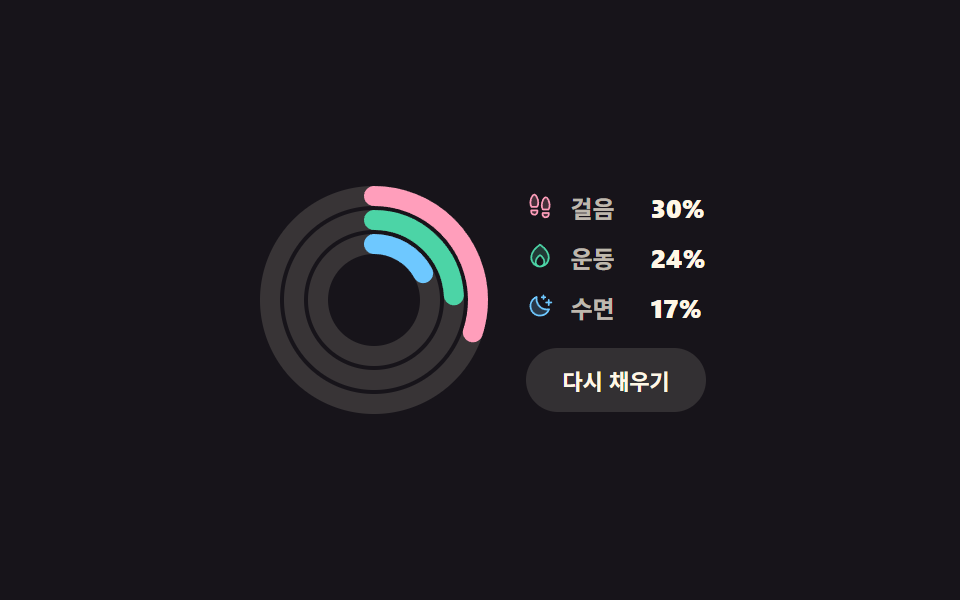
동심원 세 개가 각자 다른 속도로 실제로 채워지고, '다시 채우기'를 누르면 세 값이 새로 뽑혀 링이 그 자리까지 다시 감깁니다.
쓰임걸음·운동·수면처럼 지표 셋을 카드 하나에 겹쳐 보여주는 건강·습관 대시보드
stroke-dashoffset3 circlesclick

<main class="stage">
  <div class="ar is-demo">
    <svg class="ar__svg" viewBox="0 0 120 120" width="120" height="120" role="img" aria-label="활동 링 세 개">
      <g class="ar__track">
        <circle cx="60" cy="60" r="52"/>
        <circle cx="60" cy="60" r="40"/>
        <circle cx="60" cy="60" r="28"/>
      </g>
      <g class="ar__vals">
        <circle class="ar__ring ar__ring--move" cx="60" cy="60" r="52"/>
        <circle class="ar__ring ar__ring--burn" cx="60" cy="60" r="40"/>
        <circle class="ar__ring ar__ring--rest" cx="60" cy="60" r="28"/>
      </g>
    </svg>
    <div class="ar__side">
      <ul class="ar__legend">
        <li class="ar__item ar__item--move">
          <span class="ar__ic" aria-hidden="true"><svg viewBox="0 0 256 256" width="14" height="14"><g fill="currentColor"><path d="M152 192h56v12a28 28 0 0 1-56 0ZM48 180a28 28 0 0 0 56 0v-12H48ZM76 24c-24.52 0-51.46 80-25.26 112h50.52c26.2-32-.74-112-25.26-112m129.26 136c26.2-32-.74-112-25.26-112s-51.46 80-25.26 112Z" opacity=".2"/><path d="M208.06 184H152a8 8 0 0 0-8 8v12a36 36 0 0 0 72.05 0v-12a8 8 0 0 0-7.99-8m-8 20a20 20 0 0 1-40 0v-4h40ZM104 160H48a8 8 0 0 0-8 8v12a36 36 0 0 0 72 0v-12a8 8 0 0 0-8-8m-8 20a20 20 0 0 1-40 0v-4h40ZM76 16c-11.64 0-22.93 10.31-31.8 29c-13.93 29.38-18.56 73 .29 96a8 8 0 0 0 6.2 2.93h50.55a8 8 0 0 0 6.2-2.93c18.85-23 14.22-66.65.29-96C98.85 26.31 87.57 16 76 16m21.15 112H54.78c-11.4-18.1-7.21-52.7 3.89-76.11C65.14 38.22 72.17 32 76 32s10.82 6.22 17.3 19.89c11.06 23.41 15.25 58.01 3.85 76.11m57.61 40h50.55a8 8 0 0 0 6.2-2.93c18.85-23 14.22-66.65.29-96C202.93 50.31 191.64 40 180 40s-22.89 10.31-31.77 29c-13.93 29.38-18.56 73 .29 96a8 8 0 0 0 6.24 3m8-92.11C169.22 62.22 176.25 56 180 56s10.81 6.22 17.29 19.89c11.1 23.41 15.29 58 3.89 76.11h-42.33c-11.4-18.1-7.21-52.7 3.89-76.11Z"/></g></svg></span>
          <span class="ar__name">걸음</span>
          <b class="ar__pct ar__pct--move"></b>
        </li>
        <li class="ar__item ar__item--burn">
          <span class="ar__ic" aria-hidden="true"><svg viewBox="0 0 256 256" width="14" height="14"><g fill="currentColor"><path d="M208 144a80 80 0 0 1-77.94 80A40 40 0 0 0 168 184c0-40-40-64-40-64s-40 24-40 64a40 40 0 0 0 37.94 40A80 80 0 0 1 48 144c0-72 80-120 80-120s80 48 80 120" opacity=".2"/><path d="M173.79 51.48a221.3 221.3 0 0 0-41.67-34.34a8 8 0 0 0-8.24 0a221.3 221.3 0 0 0-41.67 34.34C54.59 80.48 40 112.47 40 144a88 88 0 0 0 176 0c0-31.53-14.59-63.52-42.21-92.52M96 184c0-27.67 22.53-47.28 32-54.3c9.48 7 32 26.63 32 54.3a32 32 0 0 1-64 0m77.27 15.93A47.8 47.8 0 0 0 176 184c0-44-42.09-69.79-43.88-70.86a8 8 0 0 0-8.24 0C122.09 114.21 80 140 80 184a47.8 47.8 0 0 0 2.73 15.93A71.88 71.88 0 0 1 56 144c0-34.41 20.4-63.15 37.52-81.19A216.2 216.2 0 0 1 128 33.54a215.8 215.8 0 0 1 34.48 29.27C193.49 95.5 200 125 200 144a71.88 71.88 0 0 1-26.73 55.93"/></g></svg></span>
          <span class="ar__name">운동</span>
          <b class="ar__pct ar__pct--burn"></b>
        </li>
        <li class="ar__item ar__item--rest">
          <span class="ar__ic" aria-hidden="true"><svg viewBox="0 0 256 256" width="14" height="14"><g fill="currentColor"><path d="M210.69 158.18A88 88 0 1 1 97.82 45.31A96.08 96.08 0 0 0 192 160a97 97 0 0 0 18.69-1.82" opacity=".2"/><path d="M240 96a8 8 0 0 1-8 8h-16v16a8 8 0 0 1-16 0v-16h-16a8 8 0 0 1 0-16h16V72a8 8 0 0 1 16 0v16h16a8 8 0 0 1 8 8m-96-40h8v8a8 8 0 0 0 16 0v-8h8a8 8 0 0 0 0-16h-8v-8a8 8 0 0 0-16 0v8h-8a8 8 0 0 0 0 16m72.77 97a8 8 0 0 1 1.43 8A96 96 0 1 1 95.07 37.8a8 8 0 0 1 10.6 9.06a88.07 88.07 0 0 0 103.47 103.47a8 8 0 0 1 7.63 2.67m-19.39 14.88c-1.79.09-3.59.14-5.38.14A104.11 104.11 0 0 1 88 64c0-1.79 0-3.59.14-5.38a80 80 0 1 0 109.24 109.24Z"/></g></svg></span>
          <span class="ar__name">수면</span>
          <b class="ar__pct ar__pct--rest"></b>
        </li>
      </ul>
      <button class="ar__btn" type="button">다시 채우기</button>
    </div>
  </div>
</main>@use "../../../../site/static/demo-tokens" as *;
$duration: $dur-loop;
$easing: $ease-spring;
$color: $subject-pink;
@include stage($stage-ink);
// 등록하지 않은 커스텀 속성은 keyframes 안에서 보간되지 않는다 — 45% 에서 툭 끊긴다
@property --p1 { syntax: "<integer>"; inherits: true; initial-value: 0; }
@property --p2 { syntax: "<integer>"; inherits: true; initial-value: 0; }
@property --p3 { syntax: "<integer>"; inherits: true; initial-value: 0; }
.ar {
--p1: 82;
--p2: 64;
--p3: 45;
box-sizing: border-box;
display: flex;
align-items: center;
gap: $sp-4;
color: $subject-cream;
font-family: -apple-system, "Segoe UI", "Noto Sans KR", sans-serif;
transition: --p1 $dur-enter $easing, --p2 $dur-enter $easing, --p3 $dur-enter $easing;
}
.ar__svg {
width: clamp(104px, 30vw, 120px);
height: clamp(104px, 30vw, 120px);
flex: 0 0 auto;
transform: rotate(-90deg);
}
.ar__track circle {
fill: none;
stroke: rgba(255, 247, 230, .14);
stroke-width: 10;
}
.ar__ring {
fill: none;
stroke-width: 10;
stroke-linecap: round;
}
// 둘레 C = 2πr 를 통째로 점선 한 칸으로 쓰고, 안 채운 만큼을 offset 으로 민다
.ar__ring--move { stroke: $color; stroke-dasharray: 326.726; stroke-dashoffset: calc(326.726 * (1 - var(--p1) / 100)); }
.ar__ring--burn { stroke: $subject-mint; stroke-dasharray: 251.327; stroke-dashoffset: calc(251.327 * (1 - var(--p2) / 100)); }
.ar__ring--rest { stroke: $subject-sky; stroke-dasharray: 175.929; stroke-dashoffset: calc(175.929 * (1 - var(--p3) / 100)); }
.ar__side { display: grid; gap: $sp-3; }
.ar__legend { list-style: none; margin: 0; padding: 0; display: grid; gap: $sp-2; }
.ar__item {
display: flex;
align-items: center;
gap: $sp-2;
font-size: 12px;
font-weight: 600;
color: rgba(255, 247, 230, .72);
}
.ar__ic { display: inline-flex; }
.ar__item--move .ar__ic { color: $color; }
.ar__item--burn .ar__ic { color: $subject-mint; }
.ar__item--rest .ar__ic { color: $subject-sky; }
.ar__name { min-width: 32px; }
.ar__pct { font-variant-numeric: tabular-nums; color: $subject-cream; font-size: 13px; }
.ar__pct--move::after { counter-reset: p var(--p1); content: counter(p) "%"; }
.ar__pct--burn::after { counter-reset: p var(--p2); content: counter(p) "%"; }
.ar__pct--rest::after { counter-reset: p var(--p3); content: counter(p) "%"; }
.ar__btn {
border: 0;
border-radius: $r-pill;
background: rgba(255, 247, 230, .12);
color: $subject-cream;
font-family: inherit;
font-size: 11px;
font-weight: 700;
padding: $sp-2 $sp-3;
cursor: pointer;
transition: background $dur-quick $ease-out;
}
.ar__btn:hover, .ar__btn:focus-visible { background: rgba(255, 247, 230, .24); }
// ── 자동 루프: 감았다 푼다. 끝에서 처음으로 튀지 않게 다시 0 으로 돌아온다 ──
.ar.is-demo { animation: ar-wind $duration $easing infinite; }
@keyframes ar-wind {
0% { --p1: 0; --p2: 0; --p3: 0; }
45%, 55% { --p1: 82; --p2: 64; --p3: 45; }
100% { --p1: 0; --p2: 0; --p3: 0; }
}
@media (max-width: 340px) {
.ar { gap: $sp-3; }
.ar__item { font-size: 11px; }
.ar__name { min-width: 28px; }
}
@media (prefers-reduced-motion: reduce) {
.ar.is-demo { animation: none !important; }
.ar, .ar__btn { transition: none; }
}html, body {
margin: 0;
overflow: hidden;
}
.stage {
box-sizing: border-box;
min-height: 100vh;
display: grid;
place-items: center;
margin: 0;
background: #17141a;
font-family: -apple-system, "Segoe UI", "Noto Sans KR", sans-serif;
padding: clamp(8px, 4vw, 24px);
}
@property --p1 {
syntax: "<integer>";
inherits: true;
initial-value: 0;
}
@property --p2 {
syntax: "<integer>";
inherits: true;
initial-value: 0;
}
@property --p3 {
syntax: "<integer>";
inherits: true;
initial-value: 0;
}
.ar {
--p1: 82;
--p2: 64;
--p3: 45;
box-sizing: border-box;
display: flex;
align-items: center;
gap: 16px;
color: #fff7e6;
font-family: -apple-system, "Segoe UI", "Noto Sans KR", sans-serif;
transition: --p1 600ms cubic-bezier(0.2, 0.8, 0.2, 1), --p2 600ms cubic-bezier(0.2, 0.8, 0.2, 1), --p3 600ms cubic-bezier(0.2, 0.8, 0.2, 1);
}
.ar__svg {
width: clamp(104px, 30vw, 120px);
height: clamp(104px, 30vw, 120px);
flex: 0 0 auto;
transform: rotate(-90deg);
}
.ar__track circle {
fill: none;
stroke: rgba(255, 247, 230, 0.14);
stroke-width: 10;
}
.ar__ring {
fill: none;
stroke-width: 10;
stroke-linecap: round;
}
.ar__ring--move {
stroke: #ff9ebb;
stroke-dasharray: 326.726;
stroke-dashoffset: calc(326.726 * (1 - var(--p1) / 100));
}
.ar__ring--burn {
stroke: #4cd4a6;
stroke-dasharray: 251.327;
stroke-dashoffset: calc(251.327 * (1 - var(--p2) / 100));
}
.ar__ring--rest {
stroke: #6ec8ff;
stroke-dasharray: 175.929;
stroke-dashoffset: calc(175.929 * (1 - var(--p3) / 100));
}
.ar__side {
display: grid;
gap: 12px;
}
.ar__legend {
list-style: none;
margin: 0;
padding: 0;
display: grid;
gap: 8px;
}
.ar__item {
display: flex;
align-items: center;
gap: 8px;
font-size: 12px;
font-weight: 600;
color: rgba(255, 247, 230, 0.72);
}
.ar__ic {
display: inline-flex;
}
.ar__item--move .ar__ic {
color: #ff9ebb;
}
.ar__item--burn .ar__ic {
color: #4cd4a6;
}
.ar__item--rest .ar__ic {
color: #6ec8ff;
}
.ar__name {
min-width: 32px;
}
.ar__pct {
font-variant-numeric: tabular-nums;
color: #fff7e6;
font-size: 13px;
}
.ar__pct--move::after {
counter-reset: p var(--p1);
content: counter(p) "%";
}
.ar__pct--burn::after {
counter-reset: p var(--p2);
content: counter(p) "%";
}
.ar__pct--rest::after {
counter-reset: p var(--p3);
content: counter(p) "%";
}
.ar__btn {
border: 0;
border-radius: 999px;
background: rgba(255, 247, 230, 0.12);
color: #fff7e6;
font-family: inherit;
font-size: 11px;
font-weight: 700;
padding: 8px 12px;
cursor: pointer;
transition: background 220ms ease-out;
}
.ar__btn:hover, .ar__btn:focus-visible {
background: rgba(255, 247, 230, 0.24);
}
.ar.is-demo {
animation: ar-wind 2s cubic-bezier(0.2, 0.8, 0.2, 1) infinite;
}
@keyframes ar-wind {
0% {
--p1: 0;
--p2: 0;
--p3: 0;
}
45%, 55% {
--p1: 82;
--p2: 64;
--p3: 45;
}
100% {
--p1: 0;
--p2: 0;
--p3: 0;
}
}
@media (max-width: 340px) {
.ar {
gap: 12px;
}
.ar__item {
font-size: 11px;
}
.ar__name {
min-width: 28px;
}
}
@media (prefers-reduced-motion: reduce) {
.ar.is-demo {
animation: none !important;
}
.ar, .ar__btn {
transition: none;
}
}// 실제 동작: 세 값을 새로 뽑아 --p1 --p2 --p3 을 바꾼다. 링과 숫자가 같은 변수를 읽으므로 둘이 어긋나지 않는다.
var ar = document.querySelector('.ar');
ar.querySelector('.ar__btn').addEventListener('click', function () {
ar.classList.remove('is-demo');
for (var i = 1; i <= 3; i++) {
ar.style.setProperty('--p' + i, String(25 + Math.floor(Math.random() * 74)));
}
});import { useState } from "react";
import type { CSSProperties } from "react";
import styles from "./TripleActivityRings.module.scss";
export type TripleActivityRingsProps = {
duration?: number;
easing?: string;
color?: string;
};
type Vars = CSSProperties & {
"--duration"?: string;
"--easing"?: string;
"--color"?: string;
"--p1"?: number;
"--p2"?: number;
"--p3"?: number;
};
function roll(): number {
return 25 + Math.floor(Math.random() * 74);
}
export default function TripleActivityRings({
duration = 600,
easing = "cubic-bezier(.2,.8,.2,1)",
color = "#ff9ebb",
}: TripleActivityRingsProps) {
const [p, setP] = useState<[number, number, number]>([82, 64, 45]);
const vars: Vars = {
"--duration": `${duration}ms`,
"--easing": easing,
"--color": color,
"--p1": p[0],
"--p2": p[1],
"--p3": p[2],
};
return (
<div className={styles.ar} style={vars}>
<svg
className={styles.svg}
viewBox="0 0 120 120"
width="120"
height="120"
role="img"
aria-label="Three activity rings"
>
<g className={styles.track}>
<circle cx="60" cy="60" r="52" />
<circle cx="60" cy="60" r="40" />
<circle cx="60" cy="60" r="28" />
</g>
<g>
<circle className={`${styles.ring} ${styles.ringMove}`} cx="60" cy="60" r="52" />
<circle className={`${styles.ring} ${styles.ringBurn}`} cx="60" cy="60" r="40" />
<circle className={`${styles.ring} ${styles.ringRest}`} cx="60" cy="60" r="28" />
</g>
</svg>
<div className={styles.side}>
<ul className={styles.legend}>
<li className={styles.item}>
<span className={`${styles.ic} ${styles.icMove}`} aria-hidden="true">
<svg viewBox="0 0 256 256" width="14" height="14">
<g fill="currentColor">
<path
d="M152 192h56v12a28 28 0 0 1-56 0ZM48 180a28 28 0 0 0 56 0v-12H48ZM76 24c-24.52 0-51.46 80-25.26 112h50.52c26.2-32-.74-112-25.26-112m129.26 136c26.2-32-.74-112-25.26-112s-51.46 80-25.26 112Z"
opacity=".2"
/>
<path d="M208.06 184H152a8 8 0 0 0-8 8v12a36 36 0 0 0 72.05 0v-12a8 8 0 0 0-7.99-8m-8 20a20 20 0 0 1-40 0v-4h40ZM104 160H48a8 8 0 0 0-8 8v12a36 36 0 0 0 72 0v-12a8 8 0 0 0-8-8m-8 20a20 20 0 0 1-40 0v-4h40ZM76 16c-11.64 0-22.93 10.31-31.8 29c-13.93 29.38-18.56 73 .29 96a8 8 0 0 0 6.2 2.93h50.55a8 8 0 0 0 6.2-2.93c18.85-23 14.22-66.65.29-96C98.85 26.31 87.57 16 76 16m21.15 112H54.78c-11.4-18.1-7.21-52.7 3.89-76.11C65.14 38.22 72.17 32 76 32s10.82 6.22 17.3 19.89c11.06 23.41 15.25 58.01 3.85 76.11m57.61 40h50.55a8 8 0 0 0 6.2-2.93c18.85-23 14.22-66.65.29-96C202.93 50.31 191.64 40 180 40s-22.89 10.31-31.77 29c-13.93 29.38-18.56 73 .29 96a8 8 0 0 0 6.24 3m8-92.11C169.22 62.22 176.25 56 180 56s10.81 6.22 17.29 19.89c11.1 23.41 15.29 58 3.89 76.11h-42.33c-11.4-18.1-7.21-52.7 3.89-76.11Z" />
</g>
</svg>
</span>
<span className={styles.name}>Steps</span>
<b className={`${styles.pct} ${styles.pctMove}`} />
</li>
<li className={styles.item}>
<span className={`${styles.ic} ${styles.icBurn}`} aria-hidden="true">
<svg viewBox="0 0 256 256" width="14" height="14">
<g fill="currentColor">
<path
d="M208 144a80 80 0 0 1-77.94 80A40 40 0 0 0 168 184c0-40-40-64-40-64s-40 24-40 64a40 40 0 0 0 37.94 40A80 80 0 0 1 48 144c0-72 80-120 80-120s80 48 80 120"
opacity=".2"
/>
<path d="M173.79 51.48a221.3 221.3 0 0 0-41.67-34.34a8 8 0 0 0-8.24 0a221.3 221.3 0 0 0-41.67 34.34C54.59 80.48 40 112.47 40 144a88 88 0 0 0 176 0c0-31.53-14.59-63.52-42.21-92.52M96 184c0-27.67 22.53-47.28 32-54.3c9.48 7 32 26.63 32 54.3a32 32 0 0 1-64 0m77.27 15.93A47.8 47.8 0 0 0 176 184c0-44-42.09-69.79-43.88-70.86a8 8 0 0 0-8.24 0C122.09 114.21 80 140 80 184a47.8 47.8 0 0 0 2.73 15.93A71.88 71.88 0 0 1 56 144c0-34.41 20.4-63.15 37.52-81.19A216.2 216.2 0 0 1 128 33.54a215.8 215.8 0 0 1 34.48 29.27C193.49 95.5 200 125 200 144a71.88 71.88 0 0 1-26.73 55.93" />
</g>
</svg>
</span>
<span className={styles.name}>Move</span>
<b className={`${styles.pct} ${styles.pctBurn}`} />
</li>
<li className={styles.item}>
<span className={`${styles.ic} ${styles.icRest}`} aria-hidden="true">
<svg viewBox="0 0 256 256" width="14" height="14">
<g fill="currentColor">
<path
d="M210.69 158.18A88 88 0 1 1 97.82 45.31A96.08 96.08 0 0 0 192 160a97 97 0 0 0 18.69-1.82"
opacity=".2"
/>
<path d="M240 96a8 8 0 0 1-8 8h-16v16a8 8 0 0 1-16 0v-16h-16a8 8 0 0 1 0-16h16V72a8 8 0 0 1 16 0v16h16a8 8 0 0 1 8 8m-96-40h8v8a8 8 0 0 0 16 0v-8h8a8 8 0 0 0 0-16h-8v-8a8 8 0 0 0-16 0v8h-8a8 8 0 0 0 0 16m72.77 97a8 8 0 0 1 1.43 8A96 96 0 1 1 95.07 37.8a8 8 0 0 1 10.6 9.06a88.07 88.07 0 0 0 103.47 103.47a8 8 0 0 1 7.63 2.67m-19.39 14.88c-1.79.09-3.59.14-5.38.14A104.11 104.11 0 0 1 88 64c0-1.79 0-3.59.14-5.38a80 80 0 1 0 109.24 109.24Z" />
</g>
</svg>
</span>
<span className={styles.name}>Sleep</span>
<b className={`${styles.pct} ${styles.pctRest}`} />
</li>
</ul>
<button
type="button"
className={styles.btn}
onClick={() => setP([roll(), roll(), roll()])}
>
Refill
</button>
</div>
</div>
);
}01 3중 활동 링 — 측정 누적면적 7.207% · 움직인 프레임 18/23GODRICH 원작 · zip 에 SCSS·React 포함 · 원형 프로그레스바 css 스탯 링 위젯 9종 — 숫자가 진짜 올라가는
이 데모가 속한 글
 원형 프로그레스바 css 스탯 링 위젯 9종 — 숫자가 진짜 올라가는원형 프로그레스바 css 는 막대 대신 원을 따라 값을 채우는 진행 표시이고, SVG 원 하나에 stroke-dasharray 와 stroke-dashoffset 두 속성만 주면 만들 수 있습니다. 아홉 개 모두 버 이 글의 데모 전부 보기