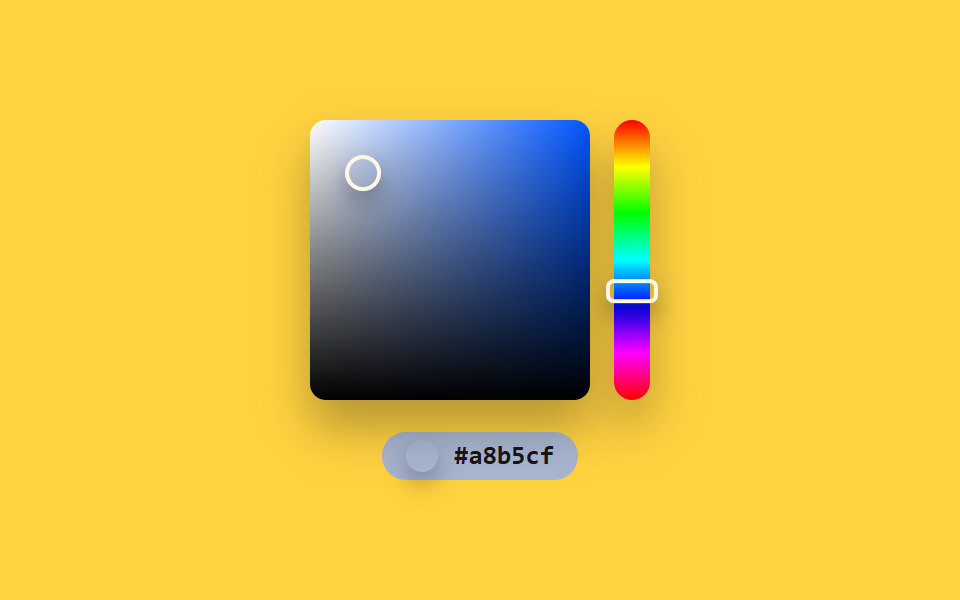
03Windows 스펙트럼 — 2차원 위치를 채도·명도로 나눠 구하는 컬러피커
사각 영역 안 한 지점의 가로·세로 위치 비율을 채도와 명도 값으로 각각 다시 구하고, 옆 색조 막대의 값과 합쳐 최종 색을 매번 다시 계산하는 컬러피커입니다.
쓰임그래픽 편집기 색상 선택창, 브랜드 컬러 지정 화면
hsvToRgbpointAtaria-valuetext
<main class="stage">
<section class="panel">
  <div class="board">
    <div class="square" id="square" style="--hue:0" role="slider" aria-label="채도·명도 영역" aria-valuemin="0" aria-valuemax="100" aria-valuenow="0" aria-valuetext="">
      <div class="squareMarker" id="squareMarker"></div>
    </div>
    <div class="hueStrip" id="hueStrip" role="slider" aria-label="색조" aria-valuemin="0" aria-valuemax="360" aria-valuenow="0">
      <div class="hueMarker" id="hueMarker"></div>
    </div>
  </div>
  <div class="readout" id="readout">
    <span class="swatch" id="swatch"></span>
    <span class="hex" id="hex">#000000</span>
  </div>
</section>
</main>
@use "../../../../site/static/demo-tokens" as *;
@include stage($stage-yellow);
.panel {
display: flex;
flex-direction: column;
align-items: center;
gap: $sp-4;
}
.board {
display: flex;
gap: $sp-3;
}
.square {
position: relative;
width: 140px;
height: 140px;
border-radius: $r-sm;
box-shadow: $shadow-raised;
background:
linear-gradient(to top, #000000 0%, rgba(0, 0, 0, 0) 100%),
linear-gradient(to right, #ffffff 0%, hsl(var(--hue) 100% 50%) 100%);
}
.squareMarker {
position: absolute;
top: 0;
left: 0;
width: 14px;
height: 14px;
border-radius: $r-pill;
border: 2px solid $subject-cream;
box-shadow: $shadow-press;
}
.hueStrip {
position: relative;
width: 18px;
height: 140px;
border-radius: $r-pill;
box-shadow: $shadow-raised;
background: linear-gradient(
to bottom,
hsl(0, 100%, 50%), hsl(60, 100%, 50%), hsl(120, 100%, 50%),
hsl(180, 100%, 50%), hsl(240, 100%, 50%), hsl(300, 100%, 50%), hsl(360, 100%, 50%)
);
}
.hueMarker {
position: absolute;
top: 0;
left: 50%;
width: 22px;
height: 8px;
border-radius: $r-xs;
border: 2px solid $subject-cream;
box-shadow: $shadow-press;
}
.readout {
display: flex;
align-items: center;
gap: $sp-2;
padding: $sp-1 $sp-3;
border-radius: $r-pill;
color: $subject-cream;
&.is-ink {
color: $subject-ink;
}
}
.swatch {
width: 16px;
height: 16px;
border-radius: $r-pill;
box-shadow: $shadow-press;
}
.hex {
font-family: "Space Mono", ui-monospace, monospace;
font-weight: 700;
font-size: 13px;
line-height: 1.3;
}
@media (max-width: 340px) {
.square { width: 108px; height: 108px; }
.hueStrip { height: 108px; }
}
@media (prefers-reduced-motion: reduce) {
.squareMarker,
.hueMarker { transition: none; }
}html, body {
margin: 0;
overflow: hidden;
}
.stage {
box-sizing: border-box;
min-height: 100vh;
display: grid;
place-items: center;
margin: 0;
background: #ffd23f;
font-family: -apple-system, "Segoe UI", "Noto Sans KR", sans-serif;
padding: clamp(8px, 4vw, 24px);
}
.panel {
display: flex;
flex-direction: column;
align-items: center;
gap: 16px;
}
.board {
display: flex;
gap: 12px;
}
.square {
position: relative;
width: 140px;
height: 140px;
border-radius: 8px;
box-shadow: 0 14px 24px rgba(23, 20, 26, 0.32);
background: linear-gradient(to top, #000000 0%, rgba(0, 0, 0, 0) 100%), linear-gradient(to right, #ffffff 0%, hsl(var(--hue), 100%, 50%) 100%);
}
.squareMarker {
position: absolute;
top: 0;
left: 0;
width: 14px;
height: 14px;
border-radius: 999px;
border: 2px solid #fff7e6;
box-shadow: 0 6px 12px rgba(23, 20, 26, 0.32);
}
.hueStrip {
position: relative;
width: 18px;
height: 140px;
border-radius: 999px;
box-shadow: 0 14px 24px rgba(23, 20, 26, 0.32);
background: linear-gradient(to bottom, hsl(0, 100%, 50%), hsl(60, 100%, 50%), hsl(120, 100%, 50%), hsl(180, 100%, 50%), hsl(240, 100%, 50%), hsl(300, 100%, 50%), hsl(0, 100%, 50%));
}
.hueMarker {
position: absolute;
top: 0;
left: 50%;
width: 22px;
height: 8px;
border-radius: 4px;
border: 2px solid #fff7e6;
box-shadow: 0 6px 12px rgba(23, 20, 26, 0.32);
}
.readout {
display: flex;
align-items: center;
gap: 8px;
padding: 4px 12px;
border-radius: 999px;
color: #fff7e6;
}
.readout.is-ink {
color: #17141a;
}
.swatch {
width: 16px;
height: 16px;
border-radius: 999px;
box-shadow: 0 6px 12px rgba(23, 20, 26, 0.32);
}
.hex {
font-family: "Space Mono", ui-monospace, monospace;
font-weight: 700;
font-size: 13px;
line-height: 1.3;
}
@media (max-width: 340px) {
.square {
width: 108px;
height: 108px;
}
.hueStrip {
height: 108px;
}
}
@media (prefers-reduced-motion: reduce) {
.squareMarker,
.hueMarker {
transition: none;
}
}// Windows 스펙트럼(03) — 사각 영역 안 지점의 가로·세로 비율을 채도·명도로, 옆 막대 값을 색조로
// 각각 다시 구해 매 프레임 최종 색을 합성한다. 실키·실서버 요청 없음.
(function () {
var squareEl = document.getElementById('square');
var squareMarkerEl = document.getElementById('squareMarker');
var hueStripEl = document.getElementById('hueStrip');
var hueMarkerEl = document.getElementById('hueMarker');
var readoutEl = document.getElementById('readout');
var swatchEl = document.getElementById('swatch');
var hexEl = document.getElementById('hex');
if (!squareEl || !squareMarkerEl || !hueStripEl || !hueMarkerEl || !readoutEl || !swatchEl || !hexEl) return;
var reduce = window.matchMedia('(prefers-reduced-motion: reduce)').matches;
var CYCLE_MS = 2400;
var SQUARE_W = 140;
var SQUARE_H = 140;
var STRIP_H = 140;
var WAYPOINTS = [
{ x: .15, y: .85 },
{ x: .85, y: .15 },
{ x: .5, y: .5 },
{ x: .15, y: .15 },
{ x: .85, y: .85 },
{ x: .15, y: .85 }
];
var SEG_MS = CYCLE_MS / (WAYPOINTS.length - 1);
function pointAt(t) {
var idx = Math.min(WAYPOINTS.length - 2, Math.floor(t / SEG_MS));
var frac = (t % SEG_MS) / SEG_MS;
var a = WAYPOINTS[idx];
var b = WAYPOINTS[idx + 1];
return { x: a.x + (b.x - a.x) * frac, y: a.y + (b.y - a.y) * frac };
}
function hsvToRgb(h, s, v) {
s /= 100; v /= 100;
var c = v * s;
var x = c * (1 - Math.abs(((h / 60) % 2) - 1));
var m = v - c;
var r, g, b;
if (h < 60) { r = c; g = x; b = 0; }
else if (h < 120) { r = x; g = c; b = 0; }
else if (h < 180) { r = 0; g = c; b = x; }
else if (h < 240) { r = 0; g = x; b = c; }
else if (h < 300) { r = x; g = 0; b = c; }
else { r = c; g = 0; b = x; }
return [Math.round((r + m) * 255), Math.round((g + m) * 255), Math.round((b + m) * 255)];
}
function toHex(n) {
return n.toString(16).padStart(2, '0');
}
function apply(t) {
var p = (t / CYCLE_MS) % 1;
var pt = pointAt(t);
var hue = p * 360;
var sat = pt.x * 100;
var val = (1 - pt.y) * 100;
var rgb = hsvToRgb(hue, sat, val);
var hex = '#' + toHex(rgb[0]) + toHex(rgb[1]) + toHex(rgb[2]);
var brightness = (rgb[0] * 299 + rgb[1] * 587 + rgb[2] * 114) / 1000;
var ink = brightness > 150;
squareEl.style.setProperty('--hue', hue.toFixed(1));
squareMarkerEl.style.transform = 'translate(-50%, -50%) translate(' + (pt.x * SQUARE_W).toFixed(2) + 'px, ' + (pt.y * SQUARE_H).toFixed(2) + 'px)';
hueMarkerEl.style.transform = 'translate(-50%, -50%) translateY(' + ((hue / 360) * STRIP_H).toFixed(2) + 'px)';
swatchEl.style.background = hex;
readoutEl.style.background = hex;
readoutEl.classList.toggle('is-ink', ink);
hexEl.textContent = hex;
squareEl.setAttribute('aria-valuenow', String(Math.round(val)));
squareEl.setAttribute('aria-valuetext', hex);
hueStripEl.setAttribute('aria-valuenow', String(Math.round(hue)));
}
if (reduce) {
apply(0);
return;
}
var start = null;
function loop(ts) {
if (start === null) start = ts;
var t = (ts - start) % CYCLE_MS;
apply(t);
requestAnimationFrame(loop);
}
requestAnimationFrame(loop);
})();import { useEffect, useRef } from "react";
import styles from "./ColorPickerWindowsSpectrum.module.scss";
// Windows 스펙트럼 — 사각 영역 안 지점의 가로·세로 비율을 채도·명도로, 옆 막대 값을 색조로
// 각각 다시 구해 매 프레임 최종 색을 합성한다. 실키·실서버 요청 없음.
const CYCLE_MS = 2400;
const SQUARE_W = 140;
const SQUARE_H = 140;
const STRIP_H = 140;
const WAYPOINTS = [
{ x: .15, y: .85 },
{ x: .85, y: .15 },
{ x: .5, y: .5 },
{ x: .15, y: .15 },
{ x: .85, y: .85 },
{ x: .15, y: .85 },
];
const SEG_MS = CYCLE_MS / (WAYPOINTS.length - 1);
function pointAt(t: number) {
const idx = Math.min(WAYPOINTS.length - 2, Math.floor(t / SEG_MS));
const frac = (t % SEG_MS) / SEG_MS;
const a = WAYPOINTS[idx];
const b = WAYPOINTS[idx + 1];
return { x: a.x + (b.x - a.x) * frac, y: a.y + (b.y - a.y) * frac };
}
function hsvToRgb(h: number, s: number, v: number): [number, number, number] {
s /= 100;
v /= 100;
const c = v * s;
const x = c * (1 - Math.abs(((h / 60) % 2) - 1));
const m = v - c;
let r: number, g: number, b: number;
if (h < 60) { r = c; g = x; b = 0; }
else if (h < 120) { r = x; g = c; b = 0; }
else if (h < 180) { r = 0; g = c; b = x; }
else if (h < 240) { r = 0; g = x; b = c; }
else if (h < 300) { r = x; g = 0; b = c; }
else { r = c; g = 0; b = x; }
return [Math.round((r + m) * 255), Math.round((g + m) * 255), Math.round((b + m) * 255)];
}
function toHex(n: number) {
return n.toString(16).padStart(2, "0");
}
export default function ColorPickerWindowsSpectrum() {
const squareRef = useRef<HTMLDivElement>(null);
const squareMarkerRef = useRef<HTMLDivElement>(null);
const hueStripRef = useRef<HTMLDivElement>(null);
const hueMarkerRef = useRef<HTMLDivElement>(null);
const readoutRef = useRef<HTMLDivElement>(null);
const swatchRef = useRef<HTMLSpanElement>(null);
const hexRef = useRef<HTMLSpanElement>(null);
useEffect(() => {
const square = squareRef.current;
const squareMarker = squareMarkerRef.current;
const hueStrip = hueStripRef.current;
const hueMarker = hueMarkerRef.current;
const readout = readoutRef.current;
const swatch = swatchRef.current;
const hexEl = hexRef.current;
if (!square || !squareMarker || !hueStrip || !hueMarker || !readout || !swatch || !hexEl) return;
const reduce = window.matchMedia("(prefers-reduced-motion: reduce)").matches;
function apply(t: number) {
const p = (t / CYCLE_MS) % 1;
const pt = pointAt(t);
const hue = p * 360;
const sat = pt.x * 100;
const val = (1 - pt.y) * 100;
const rgb = hsvToRgb(hue, sat, val);
const hex = "#" + toHex(rgb[0]) + toHex(rgb[1]) + toHex(rgb[2]);
const brightness = (rgb[0] * 299 + rgb[1] * 587 + rgb[2] * 114) / 1000;
const ink = brightness > 150;
square!.style.setProperty("--hue", hue.toFixed(1));
squareMarker!.style.transform = `translate(-50%, -50%) translate(${(pt.x * SQUARE_W).toFixed(2)}px, ${(pt.y * SQUARE_H).toFixed(2)}px)`;
hueMarker!.style.transform = `translate(-50%, -50%) translateY(${((hue / 360) * STRIP_H).toFixed(2)}px)`;
swatch!.style.background = hex;
readout!.style.background = hex;
readout!.classList.toggle(styles.isInk, ink);
hexEl!.textContent = hex;
square!.setAttribute("aria-valuenow", String(Math.round(val)));
square!.setAttribute("aria-valuetext", hex);
hueStrip!.setAttribute("aria-valuenow", String(Math.round(hue)));
}
if (reduce) {
apply(0);
return;
}
let start: number | null = null;
let raf = 0;
function loop(ts: number) {
if (start === null) start = ts;
const t = (ts - start) % CYCLE_MS;
apply(t);
raf = requestAnimationFrame(loop);
}
raf = requestAnimationFrame(loop);
return () => cancelAnimationFrame(raf);
}, []);
return (
<div className={styles.stage}>
<section className={styles.panel}>
<div className={styles.board}>
<div
className={styles.square}
ref={squareRef}
role="slider"
aria-label="채도·명도 영역"
aria-valuemin={0}
aria-valuemax={100}
aria-valuenow={0}
aria-valuetext=""
>
<div className={styles.squareMarker} ref={squareMarkerRef} />
</div>
<div className={styles.hueStrip} ref={hueStripRef} role="slider" aria-label="색조" aria-valuemin={0} aria-valuemax={360} aria-valuenow={0}>
<div className={styles.hueMarker} ref={hueMarkerRef} />
</div>
</div>
<div className={styles.readout} ref={readoutRef}>
<span className={styles.swatch} ref={swatchRef} />
<span className={styles.hex} ref={hexRef}>#000000</span>
</div>
</section>
</div>
);
}03 Windows 스펙트럼 — 2차원 위치를 채도·명도로 나눠 구하는 컬러피커 — 측정 누적면적 15.937% · 움직인 프레임 23/23GODRICH 원작 · zip 에 SCSS·React 포함 · 컬러피커 UI 디자인 9종 — 휠부터 최근 색상까지
이 데모가 속한 글
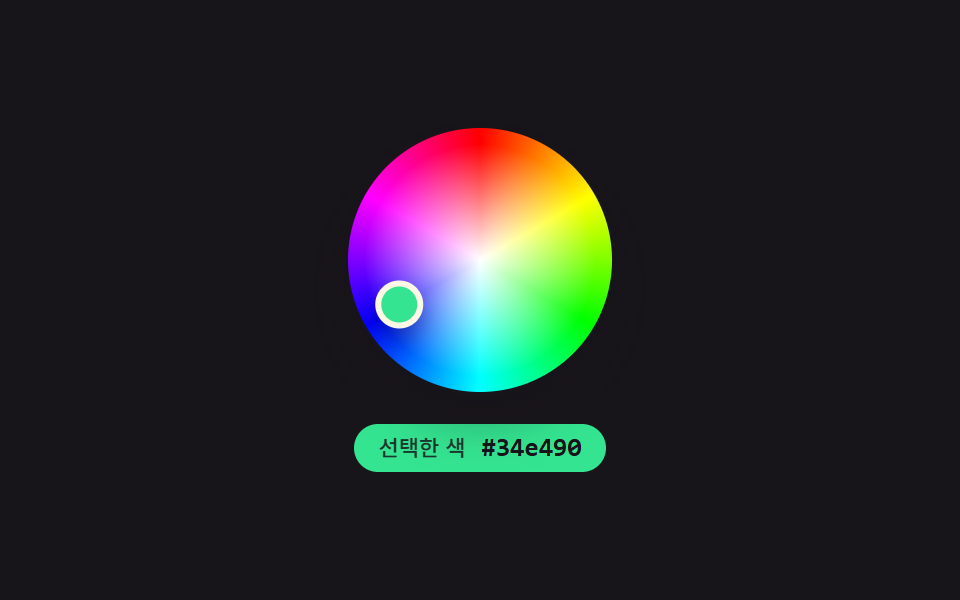 컬러피커 UI 디자인 9종 — 휠부터 최근 색상까지선택 지점의 각도가 색상값으로 다시 계산되고, 스와치 밝기 값에 따라 체크 아이콘 색이 뒤바뀌고, 최근 색상 사이 거리가 계산되어 가까운 색끼리 합쳐지는 컬러피커 UI 9종입니다. 아홉 화면 전부 속성 값 바꾸기로 이 글의 데모 전부 보기