08화면 한가운데 큰 입력칸
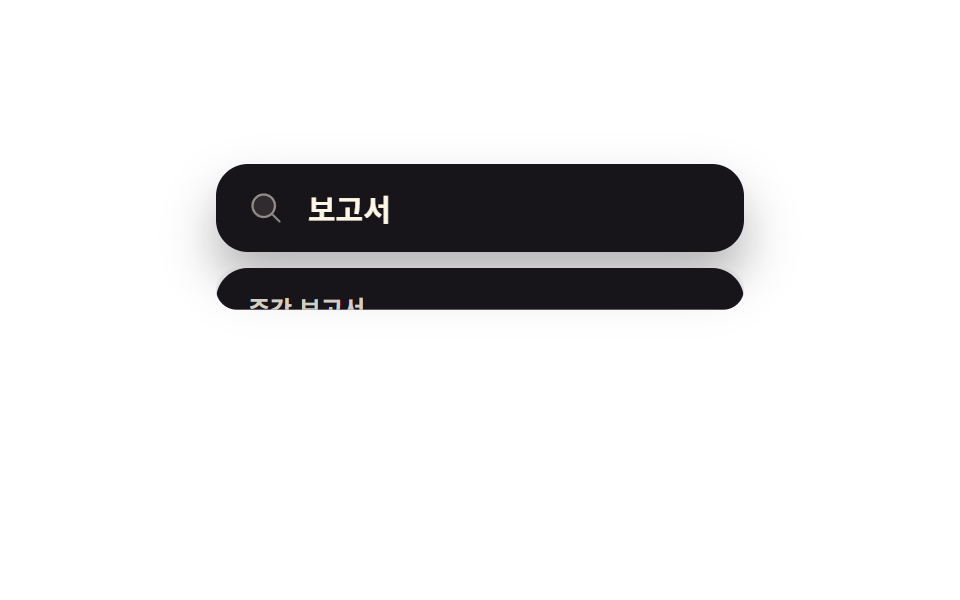
처음엔 큰 입력칸 하나만 가운데 떠 있다가, 글자를 치는 순간 아래로 결과 줄이 펼쳐지며 상자가 위 모서리를 축으로 길어집니다.
쓰임명령이 아니라 검색 자체가 주인공이라 빈 목록을 미리 보여줄 이유가 없는 전역 검색을 붙일 때
steps(1, end)clip-path: inset()$ease-spring
<main class="stage">
  <div class="sp is-demo is-open" role="dialog" aria-modal="true" aria-label="전체 검색">
    <div class="sp__field">
      <span class="sp__mag" aria-hidden="true"><svg viewBox="0 0 256 256" width="18" height="18"><g fill="currentColor"><path d="M192 112a80 80 0 1 1-80-80a80 80 0 0 1 80 80" opacity=".2"/><path d="m229.66 218.34l-50.06-50.06a88.21 88.21 0 1 0-11.32 11.31l50.06 50.07a8 8 0 0 0 11.32-11.32M40 112a72 72 0 1 1 72 72a72.08 72.08 0 0 1-72-72"/></g></svg></span>
      <input class="sp__input" id="q" type="text" role="combobox" aria-expanded="true" aria-controls="list" aria-label="전체 검색" placeholder="전체 검색" autocomplete="off">
      <span class="sp__ghost" aria-hidden="true">보고서</span>
    </div>
    <div class="sp__panel">
      <span class="sp__sheet" aria-hidden="true"></span>
      <div class="sp__rows" id="list" role="listbox" aria-label="검색 결과">
        <div class="sp__opt" id="o1" role="option" aria-selected="false" tabindex="-1">주간 보고서</div>
        <div class="sp__opt" id="o2" role="option" aria-selected="false" tabindex="-1">분기 보고서</div>
        <div class="sp__opt" id="o3" role="option" aria-selected="false" tabindex="-1">보고서 서식</div>
      </div>
    </div>
  </div>
</main>
@use "../../../../site/static/demo-tokens" as *;
$duration: $dur-base;
$easing: $ease-spring;
$color: $subject-cream;
@include stage($stage-paper);
.sp {
box-sizing: border-box;
width: min(264px, 88vw);
font-family: -apple-system, "Segoe UI", "Noto Sans KR", sans-serif;
color: $color;
}
.sp__field {
position: relative;
box-sizing: border-box;
height: 44px;
display: flex; align-items: center; gap: $sp-3;
padding: 0 $sp-4;
border-radius: $r-card;
background: $subject-ink;
box-shadow: $shadow-raised;
}
.sp__mag { display: inline-flex; color: rgba(255, 247, 230, .5); }
.sp__input {
flex: 1 1 auto;
min-width: 0;
border: 0; background: transparent;
font-family: inherit;
font-size: 15px; font-weight: 600;
color: $color;
}
.sp__input::placeholder { color: rgba(255, 247, 230, .4); }
.sp__input:focus-visible { outline: 2px solid $subject-blue; outline-offset: 4px; border-radius: $r-sm; }
// 자동 루프는 친 글자를 고스트로 겹쳐 보여주므로, 루프 동안에는 placeholder 를 비운다
.sp.is-demo .sp__input::placeholder { color: transparent; }
.sp__ghost {
position: absolute;
left: 46px; top: 50%;
transform: translateY(-50%);
font-size: 15px; font-weight: 700;
color: $color;
opacity: 0;
pointer-events: none;
}
// 패널 자리는 늘 잡아 두고(레이아웃이 흔들리지 않게) 위 모서리부터 잘라 보여준다.
// scaleY 로 줄였더니 글자까지 같이 눌려 납작해졌다 — clip-path 는 그린 것을 그대로 두고 잘라내기만 한다
.sp__panel {
position: relative;
box-sizing: border-box;
height: 84px;
margin: $sp-2 0 0;
clip-path: inset(0 0 100% 0 round 16px);
}
.sp__sheet {
position: absolute;
inset: 0;
border-radius: $r-card;
background: $subject-ink;
box-shadow: $shadow-press;
}
.sp__rows {
position: relative;
box-sizing: border-box;
padding: $sp-2;
}
.sp.is-open .sp__panel { clip-path: inset(0 0 0 0 round 16px); }
.sp__opt {
box-sizing: border-box;
height: 22px;
display: flex; align-items: center;
padding: 0 $sp-2;
border-radius: $r-sm;
font-size: 12px; font-weight: 600;
color: rgba(255, 247, 230, .82);
white-space: nowrap;
cursor: pointer;
}
.sp__opt.is-at { background: rgba(255, 247, 230, .12); }
// ── 자동 루프: 글자가 들어오면 패널이 위 모서리부터 펴지고, 글자가 지워지면 같은 자리로 접힌다 ──
// 접힘·펴짐이 둘 다 위 모서리 기준이라 한 바퀴 끝에 자리가 튀지 않는다
.sp.is-demo .sp__panel { animation: panel-open $dur-loop $easing infinite; }
.sp.is-demo .sp__ghost { animation: ghost-cut $dur-loop steps(1, end) infinite; }
@keyframes panel-open {
0%, 42% { clip-path: inset(0 0 0 0 round 16px); }
58%, 74% { clip-path: inset(0 0 100% 0 round 16px); }
90%, 100% { clip-path: inset(0 0 0 0 round 16px); }
}
@keyframes ghost-cut {
0%, 49% { opacity: 1; }
50%, 87% { opacity: 0; }
88%, 100% { opacity: 1; }
}
@media (prefers-reduced-motion: reduce) {
.sp.is-demo .sp__panel,
.sp.is-demo .sp__ghost { animation: none !important; }
.sp__ghost { opacity: 0; }
}html, body {
margin: 0;
overflow: hidden;
}
.stage {
box-sizing: border-box;
min-height: 100vh;
display: grid;
place-items: center;
margin: 0;
background: #ffffff;
font-family: -apple-system, "Segoe UI", "Noto Sans KR", sans-serif;
padding: clamp(8px, 4vw, 24px);
}
.sp {
box-sizing: border-box;
width: min(264px, 88vw);
font-family: -apple-system, "Segoe UI", "Noto Sans KR", sans-serif;
color: #fff7e6;
}
.sp__field {
position: relative;
box-sizing: border-box;
height: 44px;
display: flex;
align-items: center;
gap: 12px;
padding: 0 16px;
border-radius: 16px;
background: #17141a;
box-shadow: 0 14px 24px rgba(23, 20, 26, 0.32);
}
.sp__mag {
display: inline-flex;
color: rgba(255, 247, 230, 0.5);
}
.sp__input {
flex: 1 1 auto;
min-width: 0;
border: 0;
background: transparent;
font-family: inherit;
font-size: 15px;
font-weight: 600;
color: #fff7e6;
}
.sp__input::placeholder {
color: rgba(255, 247, 230, 0.4);
}
.sp__input:focus-visible {
outline: 2px solid #2f6df6;
outline-offset: 4px;
border-radius: 8px;
}
.sp.is-demo .sp__input::placeholder {
color: transparent;
}
.sp__ghost {
position: absolute;
left: 46px;
top: 50%;
transform: translateY(-50%);
font-size: 15px;
font-weight: 700;
color: #fff7e6;
opacity: 0;
pointer-events: none;
}
.sp__panel {
position: relative;
box-sizing: border-box;
height: 84px;
margin: 8px 0 0;
clip-path: inset(0 0 100% 0 round 16px);
}
.sp__sheet {
position: absolute;
inset: 0;
border-radius: 16px;
background: #17141a;
box-shadow: 0 6px 12px rgba(23, 20, 26, 0.32);
}
.sp__rows {
position: relative;
box-sizing: border-box;
padding: 8px;
}
.sp.is-open .sp__panel {
clip-path: inset(0 0 0 0 round 16px);
}
.sp__opt {
box-sizing: border-box;
height: 22px;
display: flex;
align-items: center;
padding: 0 8px;
border-radius: 8px;
font-size: 12px;
font-weight: 600;
color: rgba(255, 247, 230, 0.82);
white-space: nowrap;
cursor: pointer;
}
.sp__opt.is-at {
background: rgba(255, 247, 230, 0.12);
}
.sp.is-demo .sp__panel {
animation: panel-open 2s cubic-bezier(0.2, 0.8, 0.2, 1) infinite;
}
.sp.is-demo .sp__ghost {
animation: ghost-cut 2s steps(1, end) infinite;
}
@keyframes panel-open {
0%, 42% {
clip-path: inset(0 0 0 0 round 16px);
}
58%, 74% {
clip-path: inset(0 0 100% 0 round 16px);
}
90%, 100% {
clip-path: inset(0 0 0 0 round 16px);
}
}
@keyframes ghost-cut {
0%, 49% {
opacity: 1;
}
50%, 87% {
opacity: 0;
}
88%, 100% {
opacity: 1;
}
}
@media (prefers-reduced-motion: reduce) {
.sp.is-demo .sp__panel,
.sp.is-demo .sp__ghost {
animation: none !important;
}
.sp__ghost {
opacity: 0;
}
}// 실제 동작: 글자를 치면 결과 패널이 위 모서리를 축으로 펼쳐지고, 지우거나 Escape 를 치면 같은 축으로 접힌다.
var sp = document.querySelector('.sp');
var input = document.getElementById('q');
var opts = [].slice.call(document.querySelectorAll('.sp__opt'));
var at = -1;
function open(on) {
sp.classList.remove('is-demo');
sp.classList.toggle('is-open', on);
input.setAttribute('aria-expanded', String(on));
if (!on) { opts.forEach(function (o) { o.classList.remove('is-at'); }); at = -1; }
}
input.addEventListener('input', function () { open(input.value.trim().length > 0); });
document.addEventListener('keydown', function (e) {
if (e.key === 'ArrowDown' || e.key === 'ArrowUp') {
if (!sp.classList.contains('is-open')) return;
sp.classList.remove('is-demo');
at = Math.max(0, Math.min(at + (e.key === 'ArrowDown' ? 1 : -1), opts.length - 1));
opts.forEach(function (o, k) { o.classList.toggle('is-at', k === at); });
input.setAttribute('aria-activedescendant', opts[at].id);
e.preventDefault();
} else if (e.key === 'Enter' && opts[at]) {
opts.forEach(function (o) { o.setAttribute('aria-selected', String(o === opts[at])); });
e.preventDefault();
} else if (e.key === 'Escape') {
input.value = ''; open(false); input.focus({ preventScroll: true });
}
});
opts.forEach(function (o, i) {
o.addEventListener('mousemove', function () {
sp.classList.remove('is-demo');
at = i; opts.forEach(function (x, k) { x.classList.toggle('is-at', k === i); });
});
});import { useRef, useState } from "react";
import type { CSSProperties } from "react";
import styles from "./SpotlightSearch.module.scss";
export type SpotlightSearchProps = {
placeholder?: string;
results?: string[];
duration?: number;
easing?: string;
color?: string;
};
type Vars = CSSProperties & { "--duration"?: string; "--easing"?: string; "--color"?: string };
type KeyEvt = { key: string; preventDefault: () => void };
type ChangeEvt = { target: { value: string } };
export default function SpotlightSearch({
placeholder = "Search all",
results = ["Weekly report", "Quarterly report", "Report template"],
duration = 300,
easing = "cubic-bezier(.2,.8,.2,1)",
color = "#fff7e6",
}: SpotlightSearchProps) {
const [query, setQuery] = useState("");
const [at, setAt] = useState(-1);
const [picked, setPicked] = useState<string | null>(null);
const inputRef = useRef<HTMLInputElement>(null);
const vars: Vars = { "--duration": `${duration}ms`, "--easing": easing, "--color": color };
// 결과 자리는 늘 잡아 두고 위 모서리부터 잘라 보여준다 — scaleY 로 줄이면 글자까지 눌린다
const open = query.trim().length > 0;
return (
<div className={styles.sp} style={vars} role="dialog" aria-modal="true" aria-label={placeholder}>
<div className={styles.field}>
<span className={styles.mag} aria-hidden="true">
<svg viewBox="0 0 256 256" width="18" height="18">
<g fill="currentColor">
<path d="M192 112a80 80 0 1 1-80-80a80 80 0 0 1 80 80" opacity=".2" />
<path d="m229.66 218.34l-50.06-50.06a88.21 88.21 0 1 0-11.32 11.31l50.06 50.07a8 8 0 0 0 11.32-11.32M40 112a72 72 0 1 1 72 72a72.08 72.08 0 0 1-72-72" />
</g>
</svg>
</span>
<input
ref={inputRef}
className={styles.input}
type="text"
role="combobox"
aria-expanded={open}
aria-controls="sl-list"
aria-activedescendant={at >= 0 ? `sl-o${at}` : undefined}
aria-label={placeholder}
placeholder={placeholder}
autoComplete="off"
value={query}
onChange={(e: ChangeEvt) => { setQuery(e.target.value); setAt(-1); }}
onKeyDown={(e: KeyEvt) => {
if (!open) return;
if (e.key === "ArrowDown" || e.key === "ArrowUp") {
e.preventDefault();
setAt((a) => Math.max(0, Math.min(a + (e.key === "ArrowDown" ? 1 : -1), results.length - 1)));
} else if (e.key === "Enter" && at >= 0) {
e.preventDefault();
setPicked(results[at]);
} else if (e.key === "Escape") {
setQuery(""); setAt(-1);
inputRef.current?.focus({ preventScroll: true });
}
}}
/>
</div>
<div className={`${styles.panel} ${open ? styles.isOpen : ""}`}>
<span className={styles.sheet} aria-hidden="true" />
<div className={styles.rows} id="sl-list" role="listbox" aria-label="Results">
{results.map((label, i) => (
<div
key={label}
id={`sl-o${i}`}
className={`${styles.opt} ${i === at ? styles.isAt : ""}`}
role="option"
aria-selected={label === picked}
tabIndex={-1}
onMouseMove={() => setAt(i)}
onClick={() => setPicked(label)}
>
{label}
</div>
))}
</div>
</div>
</div>
);
}08 화면 한가운데 큰 입력칸 — 측정 누적면적 15.516% · 움직인 프레임 9/23GODRICH 원작 · zip 에 SCSS·React 포함 · css 검색창 디자인 9종 — Cmd+K로 열리는 팔레트
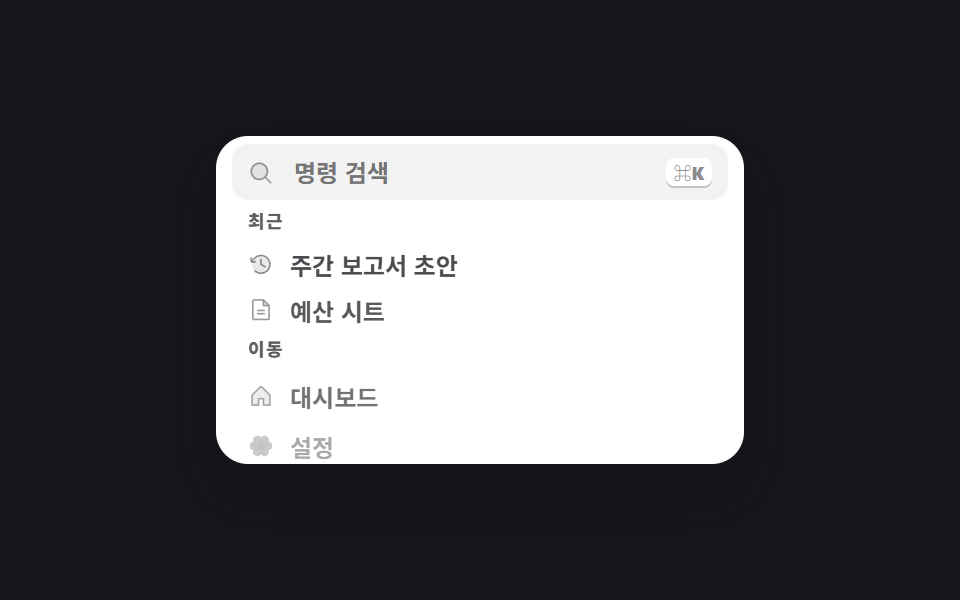
이 데모가 속한 글
 css 검색창 디자인 9종 — Cmd+K로 열리는 팔레트css 검색창 디자인 가운데 커맨드 팔레트는 화면 위에 떠서 명령과 문서를 한 칸에서 찾게 하는 오버레이입니다. 여기 아홉 개 중 하나는 결과가 하나도 없을 때 오히려 줄이 늘어나고, 다른 하나는 목록 없이 입력칸만 이 글의 데모 전부 보기