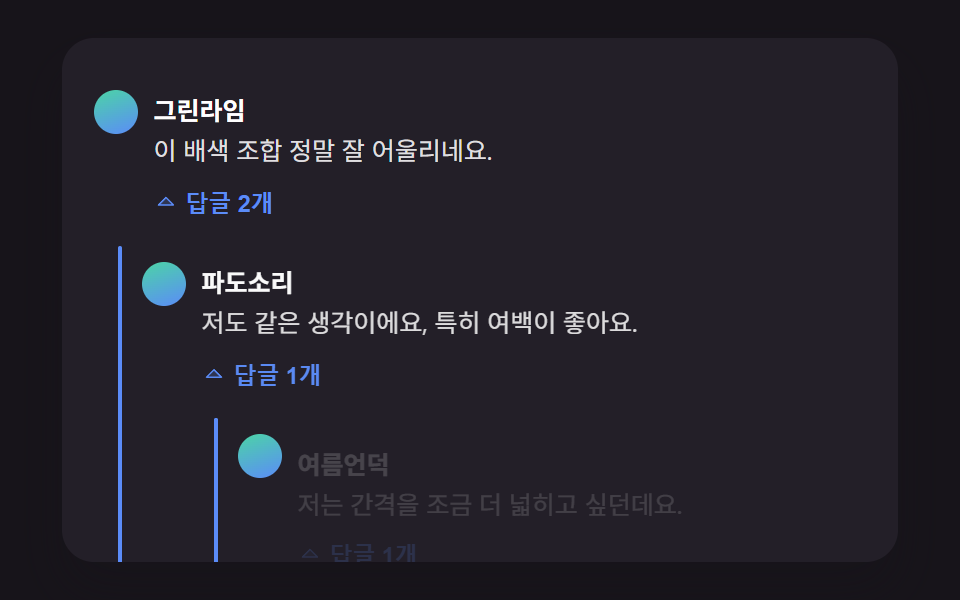
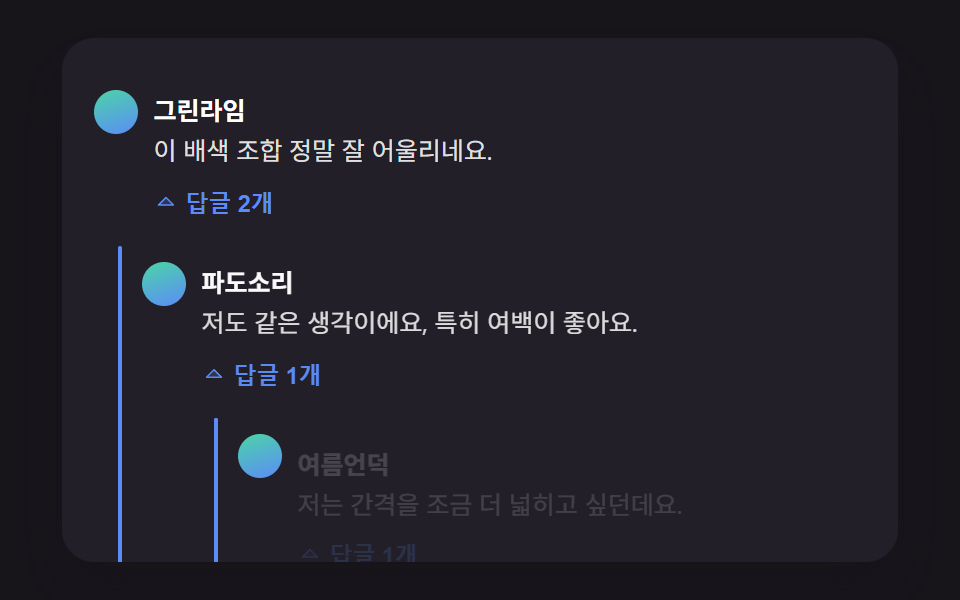
01깊이 단계를 계산해 들여쓰기 폭을 정하는 대댓글 인덴트
답글이 몇 단계 아래에 달렸는지 계산해 그 단계만큼 들여쓰기 폭을 정하고, 펼칠 때마다 세로 안내선이 위에서 아래로 그려지며 부모 댓글과 이어진다.
쓰임블로그 글 아래 대댓글 스레드
REPLY_INDENT_STEP_PXcmt__guideopenGroup
<main class="stage">
<div class="cmt is-demo" id="cmtRoot">
  <ul class="cmt__list" role="list" id="cmtList">
    <li class="cmt__item" data-depth="0">
      <div class="cmt__row">
        <span class="cmt__avatar" aria-hidden="true"></span>
        <div class="cmt__body">
          <p class="cmt__meta"><strong class="cmt__name">그린라임</strong></p>
          <p class="cmt__text">이 배색 조합 정말 잘 어울리네요.</p>
          <button type="button" class="cmt__toggle" id="toggle1" aria-expanded="false" aria-controls="replies1">
            <svg class="cmt__toggleIcon" viewBox="0 0 256 256" aria-hidden="true"><g fill="currentColor"><path d="m208 96l-80 80l-80-80Z" opacity=".2"/><path d="M215.39 92.94A8 8 0 0 0 208 88H48a8 8 0 0 0-5.66 13.66l80 80a8 8 0 0 0 11.32 0l80-80a8 8 0 0 0 1.73-8.72M128 164.69L67.31 104h121.38Z"/></g></svg>
            <span class="cmt__toggleLabel">답글 2개</span>
          </button>
        </div>
      </div>
      <ul class="cmt__replies" role="list" id="replies1">
        <li class="cmt__item" data-depth="1">
          <span class="cmt__guide" aria-hidden="true"></span>
          <div class="cmt__row">
            <span class="cmt__avatar" aria-hidden="true"></span>
            <div class="cmt__body">
              <p class="cmt__meta"><strong class="cmt__name">파도소리</strong></p>
              <p class="cmt__text">저도 같은 생각이에요, 특히 여백이 좋아요.</p>
              <button type="button" class="cmt__toggle" id="toggle1a" aria-expanded="false" aria-controls="replies1a">
                <svg class="cmt__toggleIcon" viewBox="0 0 256 256" aria-hidden="true"><g fill="currentColor"><path d="m208 96l-80 80l-80-80Z" opacity=".2"/><path d="M215.39 92.94A8 8 0 0 0 208 88H48a8 8 0 0 0-5.66 13.66l80 80a8 8 0 0 0 11.32 0l80-80a8 8 0 0 0 1.73-8.72M128 164.69L67.31 104h121.38Z"/></g></svg>
                <span class="cmt__toggleLabel">답글 1개</span>
              </button>
            </div>
          </div>
          <ul class="cmt__replies" role="list" id="replies1a">
            <li class="cmt__item" data-depth="2">
              <span class="cmt__guide" aria-hidden="true"></span>
              <div class="cmt__row">
                <span class="cmt__avatar" aria-hidden="true"></span>
                <div class="cmt__body">
                  <p class="cmt__meta"><strong class="cmt__name">여름언덕</strong></p>
                  <p class="cmt__text">저는 간격을 조금 더 넓히고 싶던데요.</p>
                  <button type="button" class="cmt__toggle" id="toggle1a1" aria-expanded="false" aria-controls="replies1a1">
                    <svg class="cmt__toggleIcon" viewBox="0 0 256 256" aria-hidden="true"><g fill="currentColor"><path d="m208 96l-80 80l-80-80Z" opacity=".2"/><path d="M215.39 92.94A8 8 0 0 0 208 88H48a8 8 0 0 0-5.66 13.66l80 80a8 8 0 0 0 11.32 0l80-80a8 8 0 0 0 1.73-8.72M128 164.69L67.31 104h121.38Z"/></g></svg>
                    <span class="cmt__toggleLabel">답글 1개</span>
                  </button>
                </div>
              </div>
              <ul class="cmt__replies" role="list" id="replies1a1">
                <li class="cmt__item" data-depth="3">
                  <span class="cmt__guide" aria-hidden="true"></span>
                  <div class="cmt__row">
                    <span class="cmt__avatar" aria-hidden="true"></span>
                    <div class="cmt__body">
                      <p class="cmt__meta"><strong class="cmt__name">그린라임</strong></p>
                      <p class="cmt__text">넓히는 것도 좋을 것 같아요, 다음에 반영할게요.</p>
                    </div>
                  </div>
                </li>
              </ul>
            </li>
          </ul>
        </li>
      </ul>
    </li>
    <li class="cmt__item" data-depth="0">
      <div class="cmt__row">
        <span class="cmt__avatar" aria-hidden="true"></span>
        <div class="cmt__body">
          <p class="cmt__meta"><strong class="cmt__name">민트페이지</strong></p>
          <p class="cmt__text">버튼 크기도 지금이 딱 좋아요.</p>
          <button type="button" class="cmt__toggle" id="toggle2" aria-expanded="false" aria-controls="replies2">
            <svg class="cmt__toggleIcon" viewBox="0 0 256 256" aria-hidden="true"><g fill="currentColor"><path d="m208 96l-80 80l-80-80Z" opacity=".2"/><path d="M215.39 92.94A8 8 0 0 0 208 88H48a8 8 0 0 0-5.66 13.66l80 80a8 8 0 0 0 11.32 0l80-80a8 8 0 0 0 1.73-8.72M128 164.69L67.31 104h121.38Z"/></g></svg>
            <span class="cmt__toggleLabel">답글 1개</span>
          </button>
        </div>
      </div>
      <ul class="cmt__replies" role="list" id="replies2">
        <li class="cmt__item" data-depth="1">
          <span class="cmt__guide" aria-hidden="true"></span>
          <div class="cmt__row">
            <span class="cmt__avatar" aria-hidden="true"></span>
            <div class="cmt__body">
              <p class="cmt__meta"><strong class="cmt__name">파도소리</strong></p>
              <p class="cmt__text">맞아요, 누르기 편해졌어요.</p>
            </div>
          </div>
        </li>
      </ul>
    </li>
  </ul>
  <p class="cmt__sr" id="cmtStatus" aria-live="polite"></p>
</div>
</main>@use "../../../../site/static/demo-tokens" as *;
@include stage($stage-ink);
.cmt {
position: relative;
width: min(92vw, calc(160vh - 12.8vw));
aspect-ratio: 480 / 300;
margin: 0 auto;
border-radius: $r-card;
overflow: hidden;
box-shadow: $shadow-raised;
background: $tick-panel;
padding: $sp-4;
box-sizing: border-box;
font-family: -apple-system, "Segoe UI", "Noto Sans KR", sans-serif;
}
.cmt__list,
.cmt__replies {
list-style: none;
margin: 0;
padding: 0;
}
.cmt__replies {
margin-top: $sp-2;
}
.cmt__item {
position: relative;
margin-left: var(--depth-indent, 0px);
padding-top: $sp-2;
}
.cmt__item[data-depth="0"] + .cmt__item[data-depth="0"] {
margin-top: $sp-3;
padding-top: $sp-3;
border-top: 1px solid rgba(255, 255, 255, .08);
}
.cmt__guide {
position: absolute;
left: -12px;
top: 2px;
bottom: 2px;
width: 2px;
background: $subject-blue-light;
border-radius: $r-xs;
transform-origin: top;
transform: scaleY(0);
}
.cmt__row {
display: flex;
align-items: flex-start;
gap: $sp-2;
}
.cmt__avatar {
flex: none;
width: 22px;
height: 22px;
border-radius: 50%;
background: linear-gradient(160deg, $subject-mint, $subject-blue-light);
margin-top: 4px;
}
.cmt__body {
min-width: 0;
}
.cmt__meta {
margin: 0 0 4px;
}
.cmt__name {
color: #fff;
font-size: 12.5px;
font-weight: 700;
}
.cmt__text {
margin: 0 0 4px;
color: rgba(255, 255, 255, .86);
font-size: 12.5px;
line-height: 1.5;
}
.cmt__toggle {
display: inline-flex;
align-items: center;
gap: 4px;
border: 0;
background: transparent;
color: $subject-blue-light;
font-size: 11.5px;
font-weight: 600;
padding: $sp-1 $sp-2 $sp-1 0;
cursor: pointer;
border-radius: $r-xs;
}
.cmt__toggle:focus-visible {
outline: 2px solid $subject-blue-light;
outline-offset: 2px;
}
.cmt__toggleIcon {
width: 12px;
height: 12px;
transition: transform $dur-quick $ease-out;
}
.cmt__toggle[aria-expanded="true"] .cmt__toggleIcon {
transform: rotate(180deg);
}
.cmt__sr {
position: absolute;
width: 1px;
height: 1px;
overflow: hidden;
clip: rect(0 0 0 0);
white-space: nowrap;
}
@media (max-width: 340px) {
.cmt { padding: $sp-3; }
.cmt__text, .cmt__name { font-size: 11.5px; }
}
@media (prefers-reduced-motion: reduce) {
.cmt__guide,
.cmt__body,
.cmt__toggleIcon {
transition: none !important;
}
}html, body {
margin: 0;
overflow: hidden;
}
.stage {
box-sizing: border-box;
min-height: 100vh;
display: grid;
place-items: center;
margin: 0;
background: #17141a;
font-family: -apple-system, "Segoe UI", "Noto Sans KR", sans-serif;
padding: clamp(8px, 4vw, 24px);
}
.cmt {
position: relative;
width: min(92vw, 160vh - 12.8vw);
aspect-ratio: 480/300;
margin: 0 auto;
border-radius: 16px;
overflow: hidden;
box-shadow: 0 14px 24px rgba(23, 20, 26, 0.32);
background: #231f28;
padding: 16px;
box-sizing: border-box;
font-family: -apple-system, "Segoe UI", "Noto Sans KR", sans-serif;
}
.cmt__list,
.cmt__replies {
list-style: none;
margin: 0;
padding: 0;
}
.cmt__replies {
margin-top: 8px;
}
.cmt__item {
position: relative;
margin-left: var(--depth-indent, 0px);
padding-top: 8px;
}
.cmt__item[data-depth="0"] + .cmt__item[data-depth="0"] {
margin-top: 12px;
padding-top: 12px;
border-top: 1px solid rgba(255, 255, 255, 0.08);
}
.cmt__guide {
position: absolute;
left: -12px;
top: 2px;
bottom: 2px;
width: 2px;
background: #5b8cf8;
border-radius: 4px;
transform-origin: top;
transform: scaleY(0);
}
.cmt__row {
display: flex;
align-items: flex-start;
gap: 8px;
}
.cmt__avatar {
flex: none;
width: 22px;
height: 22px;
border-radius: 50%;
background: linear-gradient(160deg, #4cd4a6, #5b8cf8);
margin-top: 2px;
}
.cmt__body {
min-width: 0;
}
.cmt__meta {
margin: 0 0 2px;
}
.cmt__name {
color: #fff;
font-size: 12.5px;
font-weight: 700;
}
.cmt__text {
margin: 0 0 4px;
color: rgba(255, 255, 255, 0.86);
font-size: 12.5px;
line-height: 1.5;
}
.cmt__toggle {
display: inline-flex;
align-items: center;
gap: 4px;
border: 0;
background: transparent;
color: #5b8cf8;
font-size: 11.5px;
font-weight: 600;
padding: 4px 8px 4px 0;
cursor: pointer;
border-radius: 4px;
}
.cmt__toggle:focus-visible {
outline: 2px solid #5b8cf8;
outline-offset: 2px;
}
.cmt__toggleIcon {
width: 12px;
height: 12px;
transition: transform 220ms ease-out;
}
.cmt__toggle[aria-expanded=true] .cmt__toggleIcon {
transform: rotate(180deg);
}
.cmt__sr {
position: absolute;
width: 1px;
height: 1px;
overflow: hidden;
clip: rect(0 0 0 0);
white-space: nowrap;
}
@media (max-width: 340px) {
.cmt {
padding: 12px;
}
.cmt__text, .cmt__name {
font-size: 11.5px;
}
}
@media (prefers-reduced-motion: reduce) {
.cmt__guide,
.cmt__body,
.cmt__toggleIcon {
transition: none !important;
}
}(function () {
// 기법: 각 항목의 data-depth 값을 REPLY_INDENT_STEP_PX 와 곱해 들여쓰기 폭을 계산해
// CSS 변수로 꽂는다(레이아웃은 고정, 애니메이션 대상 아님). 펼침 애니메이션은 세로 안내선의
// scaleY 와 답글 내용의 opacity/translateY 두 가지 transform·opacity 속성만 움직인다.
var REPLY_INDENT_STEP_PX = 24;
var root = document.getElementById('cmtRoot');
var list = document.getElementById('cmtList');
var status = document.getElementById('cmtStatus');
var items = list.querySelectorAll('.cmt__item[data-depth]');
for (var i = 0; i < items.length; i += 1) {
var depth = parseInt(items[i].getAttribute('data-depth'), 10) || 0;
items[i].style.setProperty('--depth-indent', (depth * REPLY_INDENT_STEP_PX) + 'px');
}
var reduce = window.matchMedia('(prefers-reduced-motion: reduce)').matches;
if (reduce) root.classList.remove('is-demo');
function groupParts(ulId) {
var ul = document.getElementById(ulId);
var kids = ul.querySelectorAll(':scope > .cmt__item');
var guides = [];
var bodies = [];
for (var i = 0; i < kids.length; i += 1) {
var g = kids[i].querySelector(':scope > .cmt__guide');
var b = kids[i].querySelector(':scope > .cmt__row .cmt__body');
if (g) guides.push(g);
if (b) bodies.push(b);
}
return { ul: ul, guides: guides, bodies: bodies };
}
function openGroup(ulId, toggleId, delayMs, durMs) {
var parts = groupParts(ulId);
var toggle = document.getElementById(toggleId);
if (toggle) toggle.setAttribute('aria-expanded', 'true');
if (reduce) {
parts.ul.style.setProperty('--reveal', '1');
for (var i = 0; i < parts.guides.length; i += 1) parts.guides[i].style.transform = 'scaleY(1)';
for (var j = 0; j < parts.bodies.length; j += 1) { parts.bodies[j].style.opacity = '1'; parts.bodies[j].style.transform = 'translateY(0)'; }
return;
}
for (var gi = 0; gi < parts.guides.length; gi += 1) {
parts.guides[gi].animate(
[{ transform: 'scaleY(0)' }, { transform: 'scaleY(1)' }],
{ duration: durMs, delay: delayMs, easing: 'cubic-bezier(.2,.7,.2,1)', fill: 'forwards' }
);
}
for (var bi = 0; bi < parts.bodies.length; bi += 1) {
parts.bodies[bi].animate(
[{ opacity: 0, transform: 'translateY(6px)' }, { opacity: 1, transform: 'translateY(0)' }],
{ duration: durMs, delay: delayMs + 60, easing: 'ease-out', fill: 'forwards' }
);
}
}
function closeGroupInstant(ulId, toggleId) {
var parts = groupParts(ulId);
var toggle = document.getElementById(toggleId);
if (toggle) toggle.setAttribute('aria-expanded', 'false');
for (var i = 0; i < parts.guides.length; i += 1) parts.guides[i].style.transform = 'scaleY(0)';
for (var j = 0; j < parts.bodies.length; j += 1) { parts.bodies[j].style.opacity = '0'; parts.bodies[j].style.transform = 'translateY(6px)'; }
}
closeGroupInstant('replies1', 'toggle1');
closeGroupInstant('replies1a', 'toggle1a');
closeGroupInstant('replies1a1', 'toggle1a1');
closeGroupInstant('replies2', 'toggle2');
function playSequence() {
closeGroupInstant('replies1', 'toggle1');
closeGroupInstant('replies1a', 'toggle1a');
closeGroupInstant('replies1a1', 'toggle1a1');
closeGroupInstant('replies2', 'toggle2');
openGroup('replies1', 'toggle1', 200, 460);
openGroup('replies2', 'toggle2', 200, 460);
openGroup('replies1a', 'toggle1a', 560, 460);
openGroup('replies1a1', 'toggle1a1', 920, 460);
status.textContent = '깊이 3단계까지 답글이 펼쳐졌습니다.';
}
function bindToggle(toggleId, ulId) {
var toggle = document.getElementById(toggleId);
toggle.addEventListener('click', function () {
root.classList.remove('is-demo');
var open = toggle.getAttribute('aria-expanded') === 'true';
if (open) {
closeGroupInstant(ulId, toggleId);
} else {
openGroup(ulId, toggleId, 0, reduce ? 0 : 260);
}
});
toggle.addEventListener('keydown', function (e) {
if (e.key === 'Enter' || e.key === ' ') {
e.preventDefault();
toggle.click();
}
});
}
bindToggle('toggle1', 'replies1');
bindToggle('toggle1a', 'replies1a');
bindToggle('toggle1a1', 'replies1a1');
bindToggle('toggle2', 'replies2');
if (reduce) {
openGroup('replies1', 'toggle1', 0, 0);
openGroup('replies2', 'toggle2', 0, 0);
openGroup('replies1a', 'toggle1a', 0, 0);
openGroup('replies1a1', 'toggle1a1', 0, 0);
} else {
playSequence();
window.setInterval(function () {
if (!root.classList.contains('is-demo')) return;
playSequence();
}, 2400);
}
})();import { useEffect, useRef } from "react";
import styles from "./CommentThreadReplyIndentDepth.module.scss";
const REPLY_INDENT_STEP_PX = 24;
const CARET_PATH = (
<g fill="currentColor">
<path d="m208 96l-80 80l-80-80Z" opacity=".2" />
<path d="M215.39 92.94A8 8 0 0 0 208 88H48a8 8 0 0 0-5.66 13.66l80 80a8 8 0 0 0 11.32 0l80-80a8 8 0 0 0 1.73-8.72M128 164.69L67.31 104h121.38Z" />
</g>
);
type GroupRefs = { ul: HTMLUListElement | null; toggle: HTMLButtonElement | null };
export default function CommentThreadReplyIndentDepth() {
const rootRef = useRef<HTMLDivElement>(null);
const statusRef = useRef<HTMLParagraphElement>(null);
const g1 = useRef<HTMLUListElement>(null);
const g1a = useRef<HTMLUListElement>(null);
const g1a1 = useRef<HTMLUListElement>(null);
const g2 = useRef<HTMLUListElement>(null);
const t1 = useRef<HTMLButtonElement>(null);
const t1a = useRef<HTMLButtonElement>(null);
const t1a1 = useRef<HTMLButtonElement>(null);
const t2 = useRef<HTMLButtonElement>(null);
useEffect(() => {
const root = rootRef.current;
const status = statusRef.current;
if (!root || !status) return;
const items = root.querySelectorAll<HTMLElement>("[data-depth]");
items.forEach((el) => {
const depth = parseInt(el.getAttribute("data-depth") || "0", 10) || 0;
el.style.setProperty("--depth-indent", `${depth * REPLY_INDENT_STEP_PX}px`);
});
const reduce = window.matchMedia("(prefers-reduced-motion: reduce)").matches;
if (reduce) root.classList.remove("is-demo");
function parts(group: GroupRefs) {
const ul = group.ul;
const guides: HTMLElement[] = [];
const bodies: HTMLElement[] = [];
if (ul) {
ul.querySelectorAll<HTMLElement>(":scope > li").forEach((li) => {
const guide = li.querySelector<HTMLElement>(":scope > .guide");
const body = li.querySelector<HTMLElement>(":scope > .row .body");
if (guide) guides.push(guide);
if (body) bodies.push(body);
});
}
return { guides, bodies };
}
function closeInstant(group: GroupRefs) {
const { guides, bodies } = parts(group);
if (group.toggle) group.toggle.setAttribute("aria-expanded", "false");
guides.forEach((g) => { g.style.transform = "scaleY(0)"; });
bodies.forEach((b) => { b.style.opacity = "0"; b.style.transform = "translateY(6px)"; });
}
function open(group: GroupRefs, delayMs: number, durMs: number) {
const { guides, bodies } = parts(group);
if (group.toggle) group.toggle.setAttribute("aria-expanded", "true");
if (reduce) {
guides.forEach((g) => { g.style.transform = "scaleY(1)"; });
bodies.forEach((b) => { b.style.opacity = "1"; b.style.transform = "translateY(0)"; });
return;
}
guides.forEach((g) => {
g.animate(
[{ transform: "scaleY(0)" }, { transform: "scaleY(1)" }],
{ duration: durMs, delay: delayMs, easing: "cubic-bezier(.2,.7,.2,1)", fill: "forwards" }
);
});
bodies.forEach((b) => {
b.animate(
[{ opacity: 0, transform: "translateY(6px)" }, { opacity: 1, transform: "translateY(0)" }],
{ duration: durMs, delay: delayMs + 60, easing: "ease-out", fill: "forwards" }
);
});
}
const groups: Record<string, GroupRefs> = {
replies1: { ul: g1.current, toggle: t1.current },
replies1a: { ul: g1a.current, toggle: t1a.current },
replies1a1: { ul: g1a1.current, toggle: t1a1.current },
replies2: { ul: g2.current, toggle: t2.current }
};
function playSequence() {
Object.values(groups).forEach(closeInstant);
open(groups.replies1, 200, 460);
open(groups.replies2, 200, 460);
open(groups.replies1a, 560, 460);
open(groups.replies1a1, 920, 460);
if (status) status.textContent = "깊이 3단계까지 답글이 펼쳐졌습니다.";
}
function bind(group: GroupRefs, key: string) {
const toggle = group.toggle;
if (!toggle) return;
const onActivate = () => {
if (!root) return;
root.classList.remove("is-demo");
const isOpen = toggle.getAttribute("aria-expanded") === "true";
if (isOpen) closeInstant(group);
else open(group, 0, reduce ? 0 : 260);
};
toggle.addEventListener("click", onActivate);
toggle.addEventListener("keydown", (e) => {
if (e.key === "Enter" || e.key === " ") { e.preventDefault(); onActivate(); }
});
}
Object.entries(groups).forEach(([key, g]) => bind(g, key));
let timer: number | undefined;
if (reduce) {
Object.values(groups).forEach((g) => open(g, 0, 0));
} else {
playSequence();
timer = window.setInterval(() => {
if (!root.classList.contains("is-demo")) return;
playSequence();
}, 2400);
}
return () => { if (timer) window.clearInterval(timer); };
}, []);
return (
<main className={styles.stage}>
<div className={`${styles.cmt} is-demo`} ref={rootRef}>
<ul className={styles.cmt__list} role="list">
<li className={styles.cmt__item} data-depth="0">
<div className={`row ${styles.cmt__row}`}>
<span className={styles.cmt__avatar} aria-hidden="true" />
<div className={`body ${styles.cmt__body}`}>
<p className={styles.cmt__meta}><strong className={styles.cmt__name}>그린라임</strong></p>
<p className={styles.cmt__text}>이 배색 조합 정말 잘 어울리네요.</p>
<button type="button" className={styles.cmt__toggle} ref={t1} aria-expanded="false" aria-controls="replies1">
<svg className={styles.cmt__toggleIcon} viewBox="0 0 256 256" aria-hidden="true">{CARET_PATH}</svg>
<span>답글 2개</span>
</button>
</div>
</div>
<ul className={styles.cmt__replies} role="list" id="replies1" ref={g1}>
<li className={styles.cmt__item} data-depth="1">
<span className={`guide ${styles.cmt__guide}`} aria-hidden="true" />
<div className={`row ${styles.cmt__row}`}>
<span className={styles.cmt__avatar} aria-hidden="true" />
<div className={`body ${styles.cmt__body}`}>
<p className={styles.cmt__meta}><strong className={styles.cmt__name}>파도소리</strong></p>
<p className={styles.cmt__text}>저도 같은 생각이에요, 특히 여백이 좋아요.</p>
<button type="button" className={styles.cmt__toggle} ref={t1a} aria-expanded="false" aria-controls="replies1a">
<svg className={styles.cmt__toggleIcon} viewBox="0 0 256 256" aria-hidden="true">{CARET_PATH}</svg>
<span>답글 1개</span>
</button>
</div>
</div>
<ul className={styles.cmt__replies} role="list" id="replies1a" ref={g1a}>
<li className={styles.cmt__item} data-depth="2">
<span className={`guide ${styles.cmt__guide}`} aria-hidden="true" />
<div className={`row ${styles.cmt__row}`}>
<span className={styles.cmt__avatar} aria-hidden="true" />
<div className={`body ${styles.cmt__body}`}>
<p className={styles.cmt__meta}><strong className={styles.cmt__name}>여름언덕</strong></p>
<p className={styles.cmt__text}>저는 간격을 조금 더 넓히고 싶던데요.</p>
<button type="button" className={styles.cmt__toggle} ref={t1a1} aria-expanded="false" aria-controls="replies1a1">
<svg className={styles.cmt__toggleIcon} viewBox="0 0 256 256" aria-hidden="true">{CARET_PATH}</svg>
<span>답글 1개</span>
</button>
</div>
</div>
<ul className={styles.cmt__replies} role="list" id="replies1a1" ref={g1a1}>
<li className={styles.cmt__item} data-depth="3">
<span className={`guide ${styles.cmt__guide}`} aria-hidden="true" />
<div className={`row ${styles.cmt__row}`}>
<span className={styles.cmt__avatar} aria-hidden="true" />
<div className={`body ${styles.cmt__body}`}>
<p className={styles.cmt__meta}><strong className={styles.cmt__name}>그린라임</strong></p>
<p className={styles.cmt__text}>넓히는 것도 좋을 것 같아요, 다음에 반영할게요.</p>
</div>
</div>
</li>
</ul>
</li>
</ul>
</li>
</ul>
</li>
<li className={styles.cmt__item} data-depth="0">
<div className={`row ${styles.cmt__row}`}>
<span className={styles.cmt__avatar} aria-hidden="true" />
<div className={`body ${styles.cmt__body}`}>
<p className={styles.cmt__meta}><strong className={styles.cmt__name}>민트페이지</strong></p>
<p className={styles.cmt__text}>버튼 크기도 지금이 딱 좋아요.</p>
<button type="button" className={styles.cmt__toggle} ref={t2} aria-expanded="false" aria-controls="replies2">
<svg className={styles.cmt__toggleIcon} viewBox="0 0 256 256" aria-hidden="true">{CARET_PATH}</svg>
<span>답글 1개</span>
</button>
</div>
</div>
<ul className={styles.cmt__replies} role="list" id="replies2" ref={g2}>
<li className={styles.cmt__item} data-depth="1">
<span className={`guide ${styles.cmt__guide}`} aria-hidden="true" />
<div className={`row ${styles.cmt__row}`}>
<span className={styles.cmt__avatar} aria-hidden="true" />
<div className={`body ${styles.cmt__body}`}>
<p className={styles.cmt__meta}><strong className={styles.cmt__name}>파도소리</strong></p>
<p className={styles.cmt__text}>맞아요, 누르기 편해졌어요.</p>
</div>
</div>
</li>
</ul>
</li>
</ul>
<p className={styles.cmt__sr} ref={statusRef} aria-live="polite" />
</div>
</main>
);
}01 깊이 단계를 계산해 들여쓰기 폭을 정하는 대댓글 인덴트 — 측정 누적면적 5.21% · 움직인 프레임 11/23GODRICH 원작 · zip 에 SCSS·React 포함 · 댓글 ui 9가지 — 대댓글 깊이부터 삭제 뒤 빈 자리까지 계산하는 목록
이 데모가 속한 글
 댓글 ui 9가지 — 대댓글 깊이부터 삭제 뒤 빈 자리까지 계산하는 목록댓글 ui는 대댓글이 몇 단계 깊이인지, 지워진 칸의 높이가 얼마인지, 고정된 뒤 얼마나 시간이 지났는지를 계산해 화면에 반영하는 댓글 목록이다. 지워진 댓글 칸이 차지했던 픽셀 값을 그대로 이어받아 아래 댓글들이 이 글의 데모 전부 보기