06스펙이 자라는 제품 카드
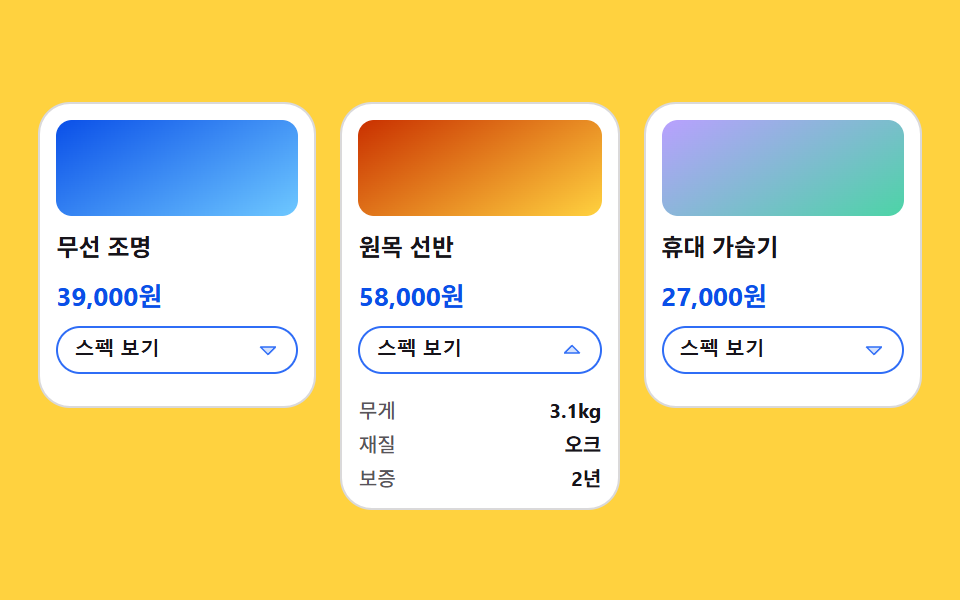
제품 카드 한 장이 grid-template-rows 0fr 에서 1fr 로 열리며 숨어 있던 스펙 표가 밀려 내려오고 옆 카드는 밀리지 않는다.
쓰임제품 비교 목록, 요금 옵션 상세
grid-template-rowsminmaxoverflow
<main class="stage">
<svg class="sg__defs" aria-hidden="true" xmlns="http://www.w3.org/2000/svg"><symbol id="sgCaret" viewBox="0 0 256 256"><g fill="currentColor"><path d="m208 96l-80 80l-80-80Z" opacity=".2"/><path d="M215.39 92.94A8 8 0 0 0 208 88H48a8 8 0 0 0-5.66 13.66l80 80a8 8 0 0 0 11.32 0l80-80a8 8 0 0 0 1.73-8.72M128 164.69L67.31 104h121.38Z"/></g></symbol></svg>

<div class="sg is-demo" id="sg">
  <article class="sg__card">
    <span class="sg__thumb sg__thumb--a" aria-hidden="true"></span>
    <p class="sg__name">무선 조명</p>
    <p class="sg__price">39,000원</p>
    <button class="sg__more" type="button" aria-expanded="false" aria-label="무선 조명 스펙 보기">
      <span class="sg__label">스펙 보기</span>
      <svg class="sg__caret" aria-hidden="true"><use href="#sgCaret"/></svg>
    </button>
    <div class="sg__grow">
      <div class="sg__inner">
        <dl class="sg__spec">
          <div class="sg__pair"><dt class="sg__key">무게</dt><dd class="sg__val">420g</dd></div>
          <div class="sg__pair"><dt class="sg__key">전원</dt><dd class="sg__val">USB-C</dd></div>
          <div class="sg__pair"><dt class="sg__key">보증</dt><dd class="sg__val">1년</dd></div>
        </dl>
      </div>
    </div>
  </article>

  <article class="sg__card sg__card--pick">
    <span class="sg__thumb sg__thumb--b" aria-hidden="true"></span>
    <p class="sg__name">원목 선반</p>
    <p class="sg__price">58,000원</p>
    <button class="sg__more" type="button" aria-expanded="false" aria-label="원목 선반 스펙 보기">
      <span class="sg__label">스펙 보기</span>
      <svg class="sg__caret" aria-hidden="true"><use href="#sgCaret"/></svg>
    </button>
    <div class="sg__grow">
      <div class="sg__inner">
        <dl class="sg__spec">
          <div class="sg__pair"><dt class="sg__key">무게</dt><dd class="sg__val">3.1kg</dd></div>
          <div class="sg__pair"><dt class="sg__key">재질</dt><dd class="sg__val">오크</dd></div>
          <div class="sg__pair"><dt class="sg__key">보증</dt><dd class="sg__val">2년</dd></div>
        </dl>
      </div>
    </div>
  </article>

  <article class="sg__card">
    <span class="sg__thumb sg__thumb--c" aria-hidden="true"></span>
    <p class="sg__name">휴대 가습기</p>
    <p class="sg__price">27,000원</p>
    <button class="sg__more" type="button" aria-expanded="false" aria-label="휴대 가습기 스펙 보기">
      <span class="sg__label">스펙 보기</span>
      <svg class="sg__caret" aria-hidden="true"><use href="#sgCaret"/></svg>
    </button>
    <div class="sg__grow">
      <div class="sg__inner">
        <dl class="sg__spec">
          <div class="sg__pair"><dt class="sg__key">무게</dt><dd class="sg__val">260g</dd></div>
          <div class="sg__pair"><dt class="sg__key">용량</dt><dd class="sg__val">300ml</dd></div>
          <div class="sg__pair"><dt class="sg__key">보증</dt><dd class="sg__val">1년</dd></div>
        </dl>
      </div>
    </div>
  </article>
</div>
</main>@use "../../../../site/static/demo-tokens" as *;
// 스펙이 자라는 제품 카드 — 숨은 표를 max-height 로 여닫으면 늘 "적당히 큰 값"을 짐작해야 하고
// 내용이 길어지면 잘린다. 여기서는 칸 자체를 grid-template-rows: 0fr → 1fr 로 키운다.
// 0fr 칸은 높이가 0 이지만 자식은 자기 크기를 그대로 들고 있으므로, 자식 쪽에
// overflow: hidden + min-height: 0 이 없으면 접혀도 내용이 삐져나온다.
// 칸이 세로로만 자라고 옆 카드가 안 밀리는 건 바깥 격자의 align-items: start 덕이다 —
// stretch 였다면 한 줄의 카드 높이가 같이 늘어난다.
$duration: $dur-enter;
$easing: $ease-spring;
$color: $subject-blue;
$hair: rgba($subject-ink, .16);
$dim: rgba($subject-ink, .72);
@include stage($stage-yellow);
.sg__defs { position: absolute; width: 0; height: 0; }
.sg {
box-sizing: border-box; width: 100%;
// 무대가 가운데 정렬이라, 보드 높이가 변하면 열 때마다 세 칸이 통째로 위로 올라간다
// (실측 -25.5px — 옆 카드가 안 밀린다는 이 항목의 주장이 화면에서는 거짓이 된다).
// 보드를 무대 높이만큼 늘려 놓고 줄은 위에서부터 쌓으면, 자라는 건 가운데 칸 하나뿐이다.
align-self: stretch; align-content: start;
padding-top: $sp-8;
display: grid;
// minmax(0, 1fr) — 0 을 최소로 못 박지 않으면 칸의 최소 크기가 내용 폭이라 긴 이름 하나가 칸을 넓힌다
grid-template-columns: repeat(3, minmax(0, 1fr));
gap: $sp-3;
align-items: start;
}
.sg__card {
box-sizing: border-box;
display: flex; flex-direction: column; gap: $sp-2;
padding: $sp-2; border: 1px solid $hair; border-radius: $r-card;
background: $stage-paper;
}
.sg__thumb { display: block; height: 48px; border-radius: $r-sm; }
.sg__thumb--a { background: linear-gradient(150deg, $subject-blue-deep, $subject-sky); }
.sg__thumb--b { background: linear-gradient(150deg, $subject-orange-deep, $stage-yellow); }
.sg__thumb--c { background: linear-gradient(150deg, $subject-lilac, $subject-mint); }
.sg__name { margin: 0; color: $subject-ink; font-weight: 700; font-size: 12px; line-height: 1.3; }
.sg__price { margin: 0; color: $subject-blue-deep; font-weight: 700; font-size: 13px; line-height: 1.2; }
// 버튼에 제품 이름이 들어 있다(aria-label) — 카드 전체를 클릭 영역으로 만들지 않는다
.sg__more {
width: 100%; box-sizing: border-box;
display: flex; align-items: center; justify-content: space-between; gap: $sp-1;
padding: $sp-1 $sp-2; border: 1px solid $color; border-radius: $r-control;
background: $stage-paper; color: $subject-ink; cursor: pointer;
}
.sg__more:focus-visible { outline: 2px solid $subject-ink; outline-offset: 2px; }
.sg__label { font-weight: 700; font-size: 10px; line-height: 1.4; }
.sg__caret {
flex: 0 0 auto; width: 12px; height: 12px; color: $color;
rotate: 0deg;
transition: rotate $duration $easing;
}
// ── 여닫는 칸. 0fr 에서 1fr 로 자란다
.sg__grow {
display: grid;
grid-template-rows: 0fr;
transition: grid-template-rows $duration $easing;
}
// 0fr 칸에서 실제로 접히게 하는 두 줄 — 이게 없으면 표가 그대로 보인다
.sg__inner { overflow: hidden; min-height: 0; }
.sg__card.is-open .sg__grow { grid-template-rows: 1fr; }
.sg__card.is-open .sg__caret { rotate: 180deg; }
.sg__spec { display: flex; flex-direction: column; gap: $sp-1; margin: 0; padding-top: $sp-1; }
.sg__pair { display: flex; align-items: baseline; justify-content: space-between; gap: $sp-1; }
.sg__key { color: $dim; font-weight: 500; font-size: 10px; line-height: 1.3; }
.sg__val { margin: 0; color: $subject-ink; font-weight: 700; font-size: 10px; line-height: 1.3; }
// ── 격자 미리보기: 가운데 카드만 열린다. 옆 두 칸이 제자리인 것이 이 항목의 주제다
// 열림은 **13~16% 한 칸에 컷**한다(24프레임 샘플은 12.5% 와 16.67% 이므로 그 사이에 통째로 들어간다).
// 부드럽게 열면 poster 로 뽑히는 장이 늘 "24px 만 열린 중간" 이라 스펙 둘째 줄이 잘린 채 대표 이미지가
// 된다 — 프레임당 변화가 가장 큰 장이 poster 이고, 스프링 이징은 앞쪽에서 제일 크게 움직이기 때문이다
// (실측: 열림을 8~30% 로 두면 poster 가 프레임 3, 패널 높이 24.3/51.0). 컷으로 바꾸면 그 장이
// **완전히 열린 카드**가 된다. 닫힘(58~90%)만 느리게 흘려 표가 다시 말려 올라가는 걸 보인다.
// ⛔ 이건 미리보기 전용이다 — 사람이 버튼을 누르는 실제 경로는 위 .sg__grow 의 transition 그대로 부드럽다
.sg.is-demo .sg__card--pick .sg__grow,
.sg.is-demo .sg__card--pick .sg__caret {
animation-duration: $dur-loop;
animation-timing-function: $easing;
animation-iteration-count: infinite;
}
.sg.is-demo .sg__card--pick .sg__grow { animation-name: sgGrow; }
.sg.is-demo .sg__card--pick .sg__caret { animation-name: sgTurn; }
@keyframes sgGrow {
0%, 13% { grid-template-rows: 0fr; }
16%, 58% { grid-template-rows: 1fr; }
90%, 100% { grid-template-rows: 0fr; }
}
@keyframes sgTurn {
0%, 13% { rotate: 0deg; }
16%, 58% { rotate: 180deg; }
90%, 100% { rotate: 0deg; }
}
// ── 좁은 화면: 칸은 셋 그대로, 썸네일과 글자만 줄인다
@media (max-width: 340px) {
.sg { gap: $sp-2; padding-top: 0; }
.sg__card { gap: $sp-1; padding: $sp-1; }
.sg__thumb { height: 32px; }
.sg__name { font-size: 10px; }
.sg__price { font-size: 11px; }
.sg__more { padding-top: 0; padding-bottom: 0; padding-left: $sp-1; padding-right: $sp-1; }
.sg__label { font-size: 9px; }
.sg__caret { width: 10px; height: 10px; }
.sg__key, .sg__val { font-size: 9px; }
}
@media (prefers-reduced-motion: reduce) {
.sg.is-demo .sg__card--pick .sg__grow,
.sg.is-demo .sg__card--pick .sg__caret {
animation: none !important;
}
.sg__grow, .sg__caret { transition: none !important; }
}html, body {
margin: 0;
overflow: hidden;
}
.stage {
box-sizing: border-box;
min-height: 100vh;
display: grid;
place-items: center;
margin: 0;
background: #ffd23f;
font-family: -apple-system, "Segoe UI", "Noto Sans KR", sans-serif;
padding: clamp(8px, 4vw, 24px);
}
.sg__defs {
position: absolute;
width: 0;
height: 0;
}
.sg {
box-sizing: border-box;
width: 100%;
align-self: stretch;
align-content: start;
padding-top: 32px;
display: grid;
grid-template-columns: repeat(3, minmax(0, 1fr));
gap: 12px;
align-items: start;
}
.sg__card {
box-sizing: border-box;
display: flex;
flex-direction: column;
gap: 8px;
padding: 8px;
border: 1px solid rgba(23, 20, 26, 0.16);
border-radius: 16px;
background: #ffffff;
}
.sg__thumb {
display: block;
height: 48px;
border-radius: 8px;
}
.sg__thumb--a {
background: linear-gradient(150deg, #0a4fe8, #6ec8ff);
}
.sg__thumb--b {
background: linear-gradient(150deg, #c93000, #ffd23f);
}
.sg__thumb--c {
background: linear-gradient(150deg, #b9a0ff, #4cd4a6);
}
.sg__name {
margin: 0;
color: #17141a;
font-weight: 700;
font-size: 12px;
line-height: 1.3;
}
.sg__price {
margin: 0;
color: #0a4fe8;
font-weight: 700;
font-size: 13px;
line-height: 1.2;
}
.sg__more {
width: 100%;
box-sizing: border-box;
display: flex;
align-items: center;
justify-content: space-between;
gap: 4px;
padding: 4px 8px;
border: 1px solid #2f6df6;
border-radius: 12px;
background: #ffffff;
color: #17141a;
cursor: pointer;
}
.sg__more:focus-visible {
outline: 2px solid #17141a;
outline-offset: 2px;
}
.sg__label {
font-weight: 700;
font-size: 10px;
line-height: 1.4;
}
.sg__caret {
flex: 0 0 auto;
width: 12px;
height: 12px;
color: #2f6df6;
rotate: 0deg;
transition: rotate 600ms cubic-bezier(0.2, 0.8, 0.2, 1);
}
.sg__grow {
display: grid;
grid-template-rows: 0fr;
transition: grid-template-rows 600ms cubic-bezier(0.2, 0.8, 0.2, 1);
}
.sg__inner {
overflow: hidden;
min-height: 0;
}
.sg__card.is-open .sg__grow {
grid-template-rows: 1fr;
}
.sg__card.is-open .sg__caret {
rotate: 180deg;
}
.sg__spec {
display: flex;
flex-direction: column;
gap: 4px;
margin: 0;
padding-top: 4px;
}
.sg__pair {
display: flex;
align-items: baseline;
justify-content: space-between;
gap: 4px;
}
.sg__key {
color: rgba(23, 20, 26, 0.72);
font-weight: 500;
font-size: 10px;
line-height: 1.3;
}
.sg__val {
margin: 0;
color: #17141a;
font-weight: 700;
font-size: 10px;
line-height: 1.3;
}
.sg.is-demo .sg__card--pick .sg__grow,
.sg.is-demo .sg__card--pick .sg__caret {
animation-duration: 2s;
animation-timing-function: cubic-bezier(0.2, 0.8, 0.2, 1);
animation-iteration-count: infinite;
}
.sg.is-demo .sg__card--pick .sg__grow {
animation-name: sgGrow;
}
.sg.is-demo .sg__card--pick .sg__caret {
animation-name: sgTurn;
}
@keyframes sgGrow {
0%, 13% {
grid-template-rows: 0fr;
}
16%, 58% {
grid-template-rows: 1fr;
}
90%, 100% {
grid-template-rows: 0fr;
}
}
@keyframes sgTurn {
0%, 13% {
rotate: 0deg;
}
16%, 58% {
rotate: 180deg;
}
90%, 100% {
rotate: 0deg;
}
}
@media (max-width: 340px) {
.sg {
gap: 8px;
padding-top: 0;
}
.sg__card {
gap: 4px;
padding: 4px;
}
.sg__thumb {
height: 32px;
}
.sg__name {
font-size: 10px;
}
.sg__price {
font-size: 11px;
}
.sg__more {
padding-top: 0;
padding-bottom: 0;
padding-left: 4px;
padding-right: 4px;
}
.sg__label {
font-size: 9px;
}
.sg__caret {
width: 10px;
height: 10px;
}
.sg__key, .sg__val {
font-size: 9px;
}
}
@media (prefers-reduced-motion: reduce) {
.sg.is-demo .sg__card--pick .sg__grow,
.sg.is-demo .sg__card--pick .sg__caret {
animation: none !important;
}
.sg__grow, .sg__caret {
transition: none !important;
}
}// 버튼 하나가 자기 카드만 연다 — 격자가 align-items: start 라 옆 칸은 그대로 있는다.
var sg = document.getElementById('sg');
sg.addEventListener('click', function (ev) {
var btn = ev.target.closest('.sg__more');
if (!btn) return;
sg.classList.remove('is-demo');
var open = btn.parentElement.classList.toggle('is-open');
btn.setAttribute('aria-expanded', open ? 'true' : 'false');
});// SpecGrowCard — vanilla 판(run/081/demo/06-content-card-spec-grow/index.html) 의 React 포트.
// 여닫이 칸은 grid-template-rows 0fr → 1fr 로 자라고, 자식의 overflow: hidden + min-height: 0 이
// 접힌 상태를 실제로 0 높이로 만든다. 옆 카드가 안 밀리는 건 바깥 격자의 align-items: start 덕이다.
// @keyframes 본문은 vanilla 와 같은 글자다 (값을 다시 타이핑하지 않는다).
import { useState } from "react";
import type { CSSProperties } from "react";
import styles from "./SpecGrowCard.module.scss";
export type SpecGrowCardProps = {
duration?: number;
easing?: string;
color?: string;
};
type Vars = CSSProperties & {
"--duration"?: string;
"--easing"?: string;
"--color"?: string;
};
type Spec = { key: string; val: string };
type Product = { name: string; price: string; more: string; thumb: string; spec: Spec[] };
const PRODUCTS: Product[] = [
{
name: "무선 조명",
price: "39,000원",
more: "무선 조명 스펙 보기",
thumb: "thumbA",
spec: [{ key: "무게", val: "420g" }, { key: "전원", val: "USB-C" }, { key: "보증", val: "1년" }],
},
{
name: "원목 선반",
price: "58,000원",
more: "원목 선반 스펙 보기",
thumb: "thumbB",
spec: [{ key: "무게", val: "3.1kg" }, { key: "재질", val: "오크" }, { key: "보증", val: "2년" }],
},
{
name: "휴대 가습기",
price: "27,000원",
more: "휴대 가습기 스펙 보기",
thumb: "thumbC",
spec: [{ key: "무게", val: "260g" }, { key: "용량", val: "300ml" }, { key: "보증", val: "1년" }],
},
];
const LABEL = "스펙 보기";
const PICK = 1; // 미리보기 루프에서 열리는 칸 — 가운데여야 양옆이 제자리인 게 보인다
export default function SpecGrowCard({
duration = 600,
easing = "cubic-bezier(.2, .8, .2, 1)",
color = "#2f6df6",
}: SpecGrowCardProps) {
const [open, setOpen] = useState<number[]>([]);
const [preview, setPreview] = useState(true);
const vars: Vars = {
"--duration": duration + "ms",
"--easing": easing,
"--color": color,
};
const toggle = (i: number) => {
setPreview(false);
setOpen((prev) => (prev.indexOf(i) >= 0 ? prev.filter((x) => x !== i) : prev.concat([i])));
};
return (
<main className={styles.stage}>
<svg className={styles.defs} aria-hidden="true" xmlns="http://www.w3.org/2000/svg">
<symbol id="sgCaret" viewBox="0 0 256 256">
<g fill="currentColor">
<path d="m208 96l-80 80l-80-80Z" opacity=".2" />
<path d="M215.39 92.94A8 8 0 0 0 208 88H48a8 8 0 0 0-5.66 13.66l80 80a8 8 0 0 0 11.32 0l80-80a8 8 0 0 0 1.73-8.72M128 164.69L67.31 104h121.38Z" />
</g>
</symbol>
</svg>
<div className={styles.board + (preview ? " " + styles.isDemo : "")} style={vars}>
{PRODUCTS.map((p, i) => {
const isOpen = open.indexOf(i) >= 0;
return (
<article
className={
styles.card + (isOpen ? " " + styles.isOpen : "") + (i === PICK ? " " + styles.isPick : "")
}
key={p.name}
>
<span className={styles.thumb + " " + styles[p.thumb]} aria-hidden="true" />
<p className={styles.name}>{p.name}</p>
<p className={styles.price}>{p.price}</p>
<button
className={styles.more}
type="button"
aria-expanded={isOpen}
aria-label={p.more}
onClick={() => toggle(i)}
>
<span className={styles.label}>{LABEL}</span>
<svg className={styles.caret} aria-hidden="true">
<use href="#sgCaret" />
</svg>
</button>
<div className={styles.grow}>
<div className={styles.inner}>
<dl className={styles.spec}>
{p.spec.map((s) => (
<div className={styles.pair} key={s.key}>
<dt className={styles.key}>{s.key}</dt>
<dd className={styles.val}>{s.val}</dd>
</div>
))}
</dl>
</div>
</div>
</article>
);
})}
</div>
</main>
);
}06 스펙이 자라는 제품 카드 — 측정 누적면적 5.152% · 움직인 프레임 9/23GODRICH 원작 · zip 에 SCSS·React 포함 · CSS 카드 디자인 9종 — 도시·팀원·바로가기부터
이 데모가 속한 글
 CSS 카드 디자인 9종 — 도시·팀원·바로가기부터CSS 카드 디자인은 화면에 내용을 담아 나열하는 가장 기본적인 그릇을 짜는 일입니다. 클릭은 카드 전체가 아니라 링크에 맡기는 게 이 편의 원칙이고, 도시 소개·팀원·바로가기·자기소개 탭·후기·제품 스펙·이벤트·인 이 글의 데모 전부 보기