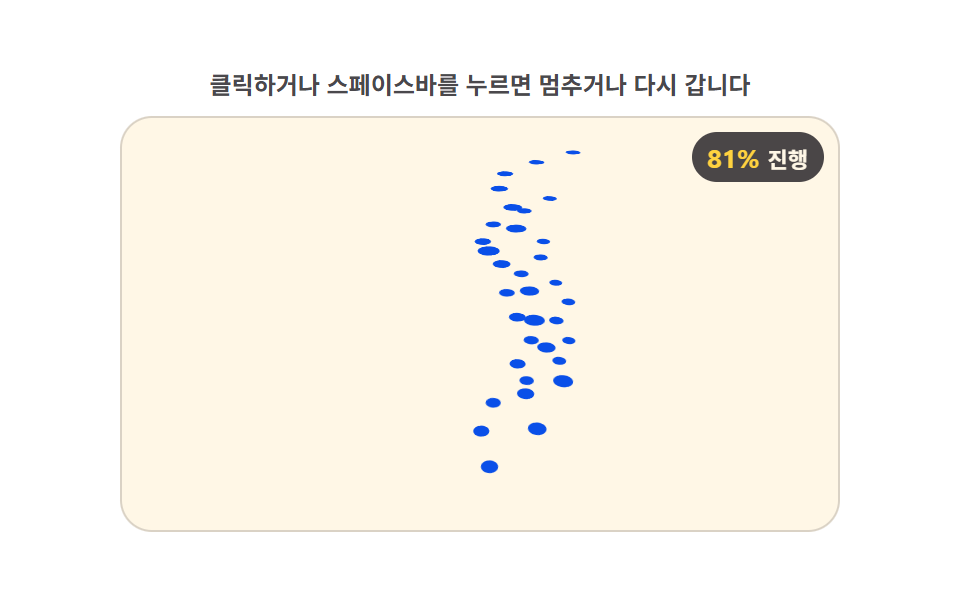
08격자점이 값만큼 솟아 지형처럼 보이는 원근 로더
평평한 격자점마다 높이 값을 0 으로 두었다가 진행률 값이 오르는 비율만큼 각 점의 높이를 끌어올리고, 화면과 가까운 점은 크게 먼 점은 작게 그려 지형처럼 입체감이 생긴다.
쓰임지도 데이터 불러오기, 대시보드 초기 로딩 배경
GRID_COLSHEIGHT_SCALETILT
<main class="stage">
<div class="ld" id="ld">
  <p class="ld__hint">클릭하거나 스페이스바를 누르면 멈추거나 다시 갑니다</p>
  <div class="ld__field" id="field" role="application" aria-label="지형 격자 원근 진행 실험판" tabindex="0">
    <div class="c3__scene">
      <div class="c3__grid" id="grid"></div>
    </div>
    <b class="ld__badge" aria-hidden="true"><span class="ld__badgeNum" id="pct">0%</span><span class="ld__badgeUnit">진행</span></b>
  </div>
</div>
</main>
@use "../../../../site/static/demo-tokens" as *;
// 지형 격자 원근 로더 — 격자점마다 고정된(무작위 없음) 높이 가중치를 갖고 있다가, 진행률 값이
// 오르는 비율만큼 각 점의 높이를 끌어올린다. 점들은 카메라와의 거리(Z)가 다른 자리에 미리 배치돼
// 있어 CSS 원근 투영이 가까운 점은 크게, 먼 점은 작게 그려 지형처럼 입체감을 만든다.
// 01(문턱 인덱스 스왑)·02(정점 좌표 보간)·03(연속 순환 랭크)·04(고리별 개별 기울기)·05(구면 중심 수렴)
// ·06(면별 독립 문턱 램프)·07(회전각+거리 깊이 순위) 과 다른 축 — 고정 가중치 필드 값을 원근 투영과 결합한다.
$duration: $dur-loop;
$easing: linear;
$color: $subject-blue-deep;
@include stage($stage-paper);
.ld { display: flex; flex-direction: column; gap: $sp-2; width: 100%; max-width: 360px; }
.ld__hint {
margin: 0;
font-weight: 700; font-size: clamp(10px, 2.8vw, 12px); line-height: 1.35;
color: rgba($subject-ink, .78);
text-align: center;
}
.ld__field {
position: relative; height: 208px;
border-radius: $r-card; overflow: hidden;
background: $subject-cream;
box-shadow: inset 0 0 0 1px rgba($subject-ink, .16);
cursor: pointer;
}
.ld__field:focus-visible { outline: 2px solid $subject-blue-light; outline-offset: 2px; }
.c3__scene { position: absolute; inset: 0; perspective: clamp(280px, 60vw, 420px); }
.c3__grid { position: absolute; left: 50%; top: 62%; width: 0; height: 0; transform-style: preserve-3d; }
.c3__pt {
position: absolute; left: 0; top: 0;
width: 7px; height: 7px; margin: -3.5px 0 0 -3.5px;
border-radius: 50%;
background: $color;
will-change: transform;
}
.ld__badge {
position: absolute; right: $sp-2; top: $sp-2;
display: flex; align-items: baseline; gap: $sp-1;
padding: $sp-1 $sp-2; border-radius: $r-pill;
background: rgba($subject-ink, .78);
color: $subject-cream; font-weight: 700; font-size: 11px;
}
.ld__badgeNum { font-size: 13px; color: $stage-yellow; }
.ld__badgeUnit { font-weight: 700; }
@media (max-width: 340px) {
.ld { gap: $sp-1; }
.ld__field { height: 124px; }
.ld__badge { font-size: 10px; padding: 0 $sp-1; }
.ld__badgeNum { font-size: 11px; }
}
@media (prefers-reduced-motion: reduce) {
.ld.is-still .ld__field { cursor: default !important; }
.ld.is-still .ld__badge { opacity: .92 !important; }
}html, body {
margin: 0;
overflow: hidden;
}
.stage {
box-sizing: border-box;
min-height: 100vh;
display: grid;
place-items: center;
margin: 0;
background: #ffffff;
font-family: -apple-system, "Segoe UI", "Noto Sans KR", sans-serif;
padding: clamp(8px, 4vw, 24px);
}
.ld {
display: flex;
flex-direction: column;
gap: 8px;
width: 100%;
max-width: 360px;
}
.ld__hint {
margin: 0;
font-weight: 700;
font-size: clamp(10px, 2.8vw, 12px);
line-height: 1.35;
color: rgba(23, 20, 26, 0.78);
text-align: center;
}
.ld__field {
position: relative;
height: 208px;
border-radius: 16px;
overflow: hidden;
background: #fff7e6;
box-shadow: inset 0 0 0 1px rgba(23, 20, 26, 0.16);
cursor: pointer;
}
.ld__field:focus-visible {
outline: 2px solid #5b8cf8;
outline-offset: 2px;
}
.c3__scene {
position: absolute;
inset: 0;
perspective: clamp(280px, 60vw, 420px);
}
.c3__grid {
position: absolute;
left: 50%;
top: 62%;
width: 0;
height: 0;
transform-style: preserve-3d;
}
.c3__pt {
position: absolute;
left: 0;
top: 0;
width: 7px;
height: 7px;
margin: -3.5px 0 0 -3.5px;
border-radius: 50%;
background: #0a4fe8;
will-change: transform;
}
.ld__badge {
position: absolute;
right: 8px;
top: 8px;
display: flex;
align-items: baseline;
gap: 4px;
padding: 4px 8px;
border-radius: 999px;
background: rgba(23, 20, 26, 0.78);
color: #fff7e6;
font-weight: 700;
font-size: 11px;
}
.ld__badgeNum {
font-size: 13px;
color: #ffd23f;
}
.ld__badgeUnit {
font-weight: 700;
}
@media (max-width: 340px) {
.ld {
gap: 4px;
}
.ld__field {
height: 124px;
}
.ld__badge {
font-size: 10px;
padding: 0 4px;
}
.ld__badgeNum {
font-size: 11px;
}
}
@media (prefers-reduced-motion: reduce) {
.ld.is-still .ld__field {
cursor: default !important;
}
.ld.is-still .ld__badge {
opacity: 0.92 !important;
}
}(function () {
'use strict';
var root = document.getElementById('ld');
var field = document.getElementById('field');
var pctEl = document.getElementById('pct');
var grid = document.getElementById('grid');
var GRID_COLS = 7;
var GRID_ROWS = 5;
var COL_GAP = 20;
var ROW_GAP = 24;
var HEIGHT_SCALE = 54;
var ROT_TURNS = 0.35;
var TILT = 58;
// 격자점마다 고정된 높이 가중치를 결정적으로 계산한다(무작위 없음) — 두 개의 sin/cos 물결을 겹친 값.
function weightOf(col, row) {
return (Math.sin(col * 1.1 + row * 0.6) + Math.cos(row * 1.3 - col * 0.4) + 2) / 4;
}
var pts = [];
var base = [];
for (var row = 0; row < GRID_ROWS; row++) {
for (var col = 0; col < GRID_COLS; col++) {
var x = (col - (GRID_COLS - 1) / 2) * COL_GAP;
var z = row * ROW_GAP;
var w = weightOf(col, row);
base.push([x, z, w]);
var el = document.createElement('div');
el.className = 'c3__pt';
el.style.zIndex = String(row);
grid.appendChild(el);
pts.push(el);
}
}
var reduce = window.matchMedia('(prefers-reduced-motion: reduce)').matches;
var LOOP = 2;
var REDUCE_P = 0.7;
var t0 = 0, raf = 0, paused = false, lastP = 0;
function render(p) {
lastP = p;
var rotY = (p * 360 * ROT_TURNS) % 360;
grid.style.transform = 'rotateX(' + TILT + 'deg) rotateZ(' + rotY + 'deg)';
for (var i = 0; i < pts.length; i++) {
var b = base[i];
var rise = b[2] * p * HEIGHT_SCALE;
pts[i].style.transform = 'translate3d(' + b[0] + 'px,' + (-rise) + 'px,' + b[1] + 'px)';
}
pctEl.textContent = Math.round(p * 100) + '%';
}
function frame(now) {
if (!paused) { var t = (now - t0) / 1000; render((t % LOOP) / LOOP); }
raf = requestAnimationFrame(frame);
}
function togglePause() {
paused = !paused;
root.classList.toggle('is-paused', paused);
render(reduce ? REDUCE_P : lastP);
}
function restart() {
t0 = performance.now();
render(reduce ? REDUCE_P : 0);
}
field.addEventListener('click', function () { togglePause(); });
field.addEventListener('keydown', function (e) {
if (e.key === ' ' || e.key === 'Enter') { e.preventDefault(); togglePause(); }
else if (e.key === 'r' || e.key === 'R') { e.preventDefault(); restart(); }
});
window.addEventListener('resize', function () {
if (paused || reduce) render(reduce ? REDUCE_P : lastP);
});
t0 = performance.now();
if (reduce) {
root.classList.add('is-still');
render(REDUCE_P);
} else {
raf = requestAnimationFrame(frame);
}
})();// TerrainGridRisePerspective — vanilla 판(run/399/demo/08-loader-3d-terrain-grid-rise-perspective/index.html) 의 React 포트.
// 격자점마다 고정된(무작위 없음) 높이 가중치를 결정적으로 계산해 진행률만큼 끌어올리고,
// 점마다 다른 Z 값을 CSS 원근 투영에 맡겨 가까운 점은 크게 먼 점은 작게 보이게 한다.
// 01~07 과 다른 축 — 고정 가중치 필드 값을 원근 투영과 결합한다.
import { useEffect, useRef } from "react";
import type { CSSProperties } from "react";
import styles from "./TerrainGridRisePerspective.module.scss";
export type TerrainGridRisePerspectiveProps = {
duration?: string;
easing?: string;
color?: string;
};
type Vars = CSSProperties & { "--duration"?: string; "--easing"?: string; "--color"?: string };
type Box<T> = { current: T };
type KeyEvt = { key: string; preventDefault(): void };
const GRID_COLS = 7;
const GRID_ROWS = 5;
const COL_GAP = 20;
const ROW_GAP = 24;
const HEIGHT_SCALE = 54;
const ROT_TURNS = 0.35;
const TILT = 58;
const LOOP = 2;
const REDUCE_P = 0.7;
const FIELD_LABEL = "지형 격자 원근 진행 실험판";
function weightOf(col: number, row: number): number {
return (Math.sin(col * 1.1 + row * 0.6) + Math.cos(row * 1.3 - col * 0.4) + 2) / 4;
}
const BASE: { x: number; z: number; w: number; row: number }[] = [];
for (let row = 0; row < GRID_ROWS; row++) {
for (let col = 0; col < GRID_COLS; col++) {
const x = (col - (GRID_COLS - 1) / 2) * COL_GAP;
const z = row * ROW_GAP;
BASE.push({ x, z, w: weightOf(col, row), row });
}
}
export default function TerrainGridRisePerspective({
duration = "2s",
easing = "linear",
color = "#0a4fe8",
}: TerrainGridRisePerspectiveProps) {
const rootRef = useRef<HTMLDivElement | null>(null);
const fieldRef = useRef<HTMLDivElement | null>(null);
const gridRef = useRef<HTMLDivElement | null>(null);
const pctRef = useRef<HTMLSpanElement | null>(null);
const ptsRef = useRef<(HTMLDivElement | null)[]>(new Array(BASE.length).fill(null)) as Box<(HTMLDivElement | null)[]>;
const pausedRef = useRef(false) as Box<boolean>;
const lastPRef = useRef(0) as Box<number>;
const t0Ref = useRef(0) as Box<number>;
const rafRef = useRef(0) as Box<number>;
const vars: Vars = { "--duration": duration, "--easing": easing, "--color": color };
function reduced(): boolean {
return window.matchMedia("(prefers-reduced-motion: reduce)").matches;
}
function render(p: number): void {
lastPRef.current = p;
const rotY = (p * 360 * ROT_TURNS) % 360;
const grid = gridRef.current;
if (grid) grid.style.transform = "rotateX(" + TILT + "deg) rotateZ(" + rotY + "deg)";
const pts = ptsRef.current;
for (let i = 0; i < BASE.length; i++) {
const el = pts[i];
if (!el) continue;
const b = BASE[i];
const rise = b.w * p * HEIGHT_SCALE;
el.style.transform = "translate3d(" + b.x + "px," + (-rise) + "px," + b.z + "px)";
}
if (pctRef.current) pctRef.current.textContent = Math.round(p * 100) + "%";
}
function togglePause(): void {
pausedRef.current = !pausedRef.current;
const root = rootRef.current;
if (root) root.classList.toggle("is-paused", pausedRef.current);
render(reduced() ? REDUCE_P : lastPRef.current);
}
function restart(): void {
t0Ref.current = performance.now();
render(reduced() ? REDUCE_P : 0);
}
function onKey(e: KeyEvt): void {
if (e.key === " " || e.key === "Enter") { e.preventDefault(); togglePause(); }
else if (e.key === "r" || e.key === "R") { e.preventDefault(); restart(); }
}
function onClick(): void {
togglePause();
}
function onResize(): void {
if (pausedRef.current || reduced()) render(reduced() ? REDUCE_P : lastPRef.current);
}
function frame(now: number): void {
if (!pausedRef.current) {
const t = (now - t0Ref.current) / 1000;
render((t % LOOP) / LOOP);
}
rafRef.current = requestAnimationFrame(frame);
}
useEffect(() => {
t0Ref.current = performance.now();
window.addEventListener("resize", onResize);
if (reduced()) {
const root = rootRef.current;
if (root) root.classList.add("is-still");
render(REDUCE_P);
} else {
rafRef.current = requestAnimationFrame(frame);
}
return () => {
window.removeEventListener("resize", onResize);
cancelAnimationFrame(rafRef.current);
};
}, []);
return (
<main className={styles.stage}>
<div className={styles.root} ref={rootRef} style={vars}>
<p className={styles.hint}>클릭하거나 스페이스바를 누르면 멈추거나 다시 갑니다</p>
<div
className={styles.field}
ref={fieldRef}
role="application"
aria-label={FIELD_LABEL}
tabIndex={0}
onClick={onClick}
onKeyDown={onKey}
>
<div className={styles.scene}>
<div className={styles.grid} ref={gridRef}>
{BASE.map((b, i) => (
<div key={i} className={styles.pt} style={{ zIndex: b.row }} ref={(el: HTMLDivElement | null) => { ptsRef.current[i] = el; }} />
))}
</div>
</div>
<b className={styles.badge} aria-hidden="true"><span className={styles.badgeNum} ref={pctRef}>0%</span><span className={styles.badgeUnit}>진행</span></b>
</div>
</div>
</main>
);
}08 격자점이 값만큼 솟아 지형처럼 보이는 원근 로더 — 측정 누적면적 7.95% · 움직인 프레임 23/23GODRICH 원작 · zip 에 SCSS·React 포함 · css 로딩바 애니메이션 9가지 — 3D 계산형 로더
이 데모가 속한 글
 css 로딩바 애니메이션 9가지 — 3D 계산형 로더css 로딩바 애니메이션도 아홉 개 모두 트윈이 아니라 계산으로 돕니다. 로딩이 시작되는 첫 프레임에는 평평한 정면 한 장만 보이지만, 값이 문턱을 넘을 때마다 정육면체 면이 넘어가고 와이어프레임 정점이 제자리로 모 이 글의 데모 전부 보기