07끝단 당김 잠금 — 목록 끝에서 배경까지 같이 튕기지 않게 막는 스크롤
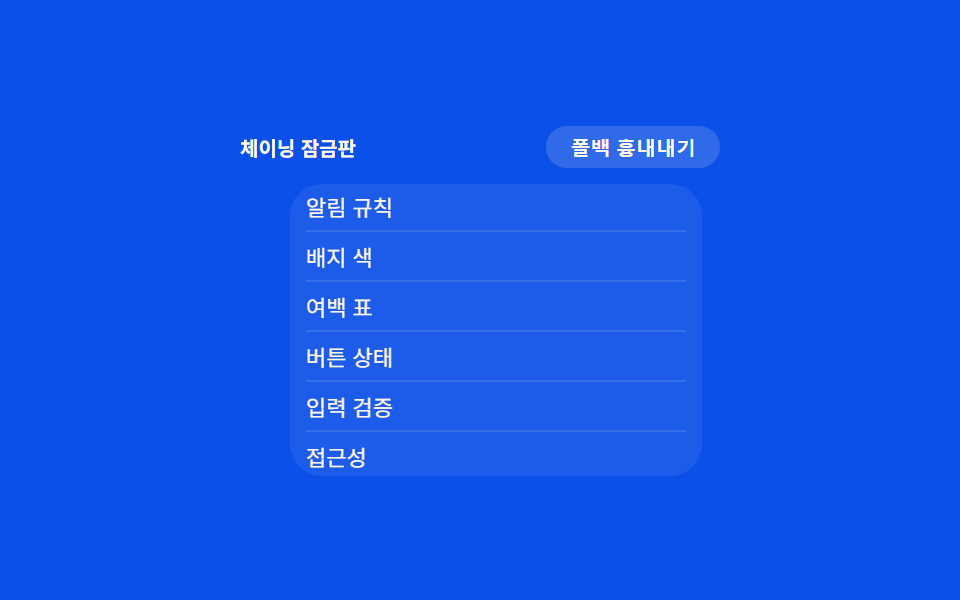
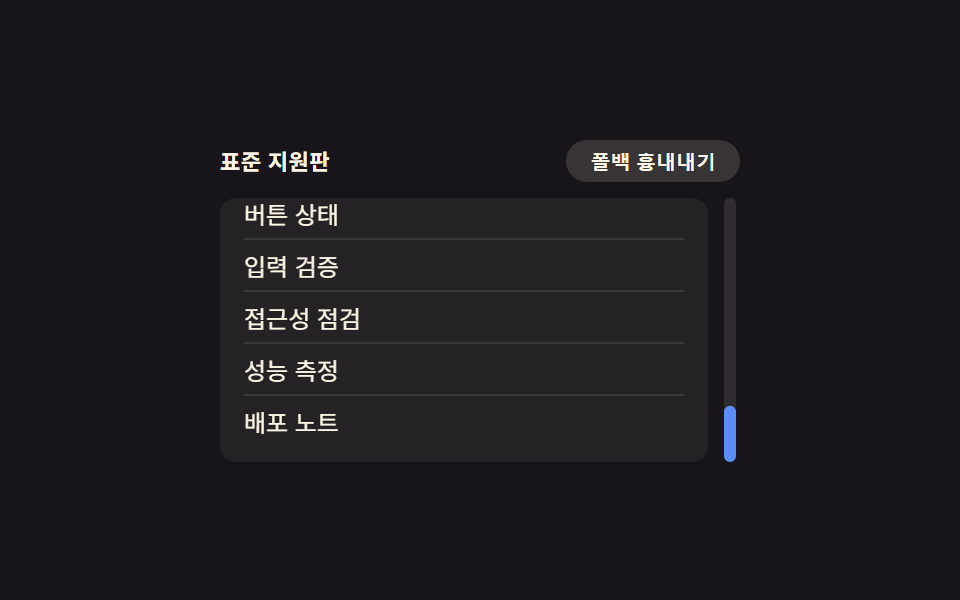
목록을 끝까지 당겨도 뒤 배경 화면은 같이 흔들리지 않고, 당김은 목록 안에서만 멈춥니다.
쓰임무한 스크롤 피드, 모달 안 목록 스크롤
overscroll-behavior@supportswheel
<main class="stage">
<div class="wrap is-demo" id="wrap">
  <div class="head">
    <span class="modeLabel" id="modeLabel">체이닝 잠금판</span>
    <button class="simToggle" id="simToggle" type="button" aria-pressed="false">폴백 흉내내기</button>
  </div>
  <div class="panelWrap">
    <ul class="panel" id="panel">
      <li>알림 규칙</li>
      <li>배지 색</li>
      <li>여백 표</li>
      <li>버튼 상태</li>
      <li>입력 검증</li>
      <li>접근성</li>
      <li>성능 측정</li>
      <li>배포 노트</li>
    </ul>
    <div class="pullCap" id="pullCap"></div>
  </div>
</div>
</main>
@use "../../../../site/static/demo-tokens" as *;
// 계산 겹은 index.html 의 setPull() 에 있다 — 실제 wheel 델타를 OVERSCROLL_LOCK_PX 안으로 눌러
// 담고 scaleY 로 당김 캡을 늘인다. 여기는 패널 모양과 당김 캡의 원점(아래 변)만 맡는다.
@include stage($subject-blue-deep);
.wrap {
width: 240px;
display: flex;
flex-direction: column;
align-items: center;
gap: $sp-2;
}
.head {
display: flex;
align-items: center;
justify-content: space-between;
width: 100%;
}
.modeLabel {
color: $subject-cream;
font-size: 10px;
font-weight: 700;
}
.simToggle {
appearance: none;
border: none;
border-radius: $r-pill;
background: rgba($subject-cream, .16);
color: $subject-cream;
padding: $sp-1 $sp-3;
font-size: 10px;
font-weight: 600;
cursor: pointer;
transition: transform $dur-instant $ease-out;
&:active { transform: scale(.96); }
&[aria-pressed="true"] { background: $subject-orange-deep; }
&:focus-visible { outline: 2px solid $subject-blue-light; outline-offset: 2px; }
}
.panelWrap {
position: relative;
width: 190px;
}
.panel {
margin: 0;
padding: $sp-2;
list-style: none;
width: 100%;
height: 130px;
overflow-y: auto;
border-radius: $r-card;
background: rgba($subject-cream, .08);
// 폴백: 표준 속성을 모르는 환경에서도 JS 당김 잠금이 경계를 막는다 — 항상 동작, 아래 @supports 는 보조일 뿐
overscroll-behavior: auto;
}
@supports (overscroll-behavior: contain) {
.wrap:not(.force-fallback) .panel {
overscroll-behavior: contain;
}
}
// 시뮬레이션: 표준 속성이 있어도 강제로 꺼서(auto) 체이닝이 새는 환경을 흉내 — JS 당김 잠금만으로 막히는지 보여준다
.force-fallback .panel {
overscroll-behavior: auto;
}
.panel li {
padding: $sp-1 0;
color: $subject-cream;
font-size: 11px;
border-bottom: 1px solid rgba($subject-cream, .12);
&:last-child { border-bottom: none; }
}
.pullCap {
position: absolute;
left: $sp-2;
right: $sp-2;
bottom: 2px;
height: 6px;
border-radius: $r-pill;
background: $subject-orange-deep;
transform-origin: center bottom;
transform: scaleY(0);
transition: transform $dur-instant $ease-out;
}
@media (max-width: 340px) {
.wrap { width: 208px; }
.panelWrap { width: 168px; }
.panel { height: 112px; }
}
@media (prefers-reduced-motion: reduce) {
.pullCap { transition: none; }
.simToggle { transition: none; }
}html, body {
margin: 0;
overflow: hidden;
}
.stage {
box-sizing: border-box;
min-height: 100vh;
display: grid;
place-items: center;
margin: 0;
background: #0a4fe8;
font-family: -apple-system, "Segoe UI", "Noto Sans KR", sans-serif;
padding: clamp(8px, 4vw, 24px);
}
.wrap {
width: 240px;
display: flex;
flex-direction: column;
align-items: center;
gap: 8px;
}
.head {
display: flex;
align-items: center;
justify-content: space-between;
width: 100%;
}
.modeLabel {
color: #fff7e6;
font-size: 10px;
font-weight: 700;
}
.simToggle {
appearance: none;
border: none;
border-radius: 999px;
background: rgba(255, 247, 230, 0.16);
color: #fff7e6;
padding: 4px 12px;
font-size: 10px;
font-weight: 600;
cursor: pointer;
transition: transform 140ms ease-out;
}
.simToggle:active {
transform: scale(0.96);
}
.simToggle[aria-pressed=true] {
background: #c93000;
}
.simToggle:focus-visible {
outline: 2px solid #5b8cf8;
outline-offset: 2px;
}
.panelWrap {
position: relative;
width: 190px;
}
.panel {
margin: 0;
padding: 8px;
list-style: none;
width: 100%;
height: 130px;
overflow-y: auto;
border-radius: 16px;
background: rgba(255, 247, 230, 0.08);
overscroll-behavior: auto;
}
@supports (overscroll-behavior: contain) {
.wrap:not(.force-fallback) .panel {
overscroll-behavior: contain;
}
}
.force-fallback .panel {
overscroll-behavior: auto;
}
.panel li {
padding: 4px 0;
color: #fff7e6;
font-size: 11px;
border-bottom: 1px solid rgba(255, 247, 230, 0.12);
}
.panel li:last-child {
border-bottom: none;
}
.pullCap {
position: absolute;
left: 8px;
right: 8px;
bottom: 2px;
height: 6px;
border-radius: 999px;
background: #c93000;
transform-origin: center bottom;
transform: scaleY(0);
transition: transform 140ms ease-out;
}
@media (max-width: 340px) {
.wrap {
width: 208px;
}
.panelWrap {
width: 168px;
}
.panel {
height: 112px;
}
}
@media (prefers-reduced-motion: reduce) {
.pullCap {
transition: none;
}
.simToggle {
transition: none;
}
}(function () {
var OVERSCROLL_LOCK_PX = 24; // 경계에서 더 당길 수 있는 최대치 — 변형 목표: 24 → 48
var reduce = window.matchMedia('(prefers-reduced-motion: reduce)').matches;
var wrap = document.getElementById('wrap');
var panel = document.getElementById('panel');
var pullCap = document.getElementById('pullCap');
var simToggle = document.getElementById('simToggle');
var modeLabel = document.getElementById('modeLabel');
var isDemo = true;
function human() { if (isDemo) { wrap.classList.remove('is-demo'); isDemo = false; } }
var pull = 0;
var releaseTimer = null;
function atBottom() {
return panel.scrollTop + panel.clientHeight >= panel.scrollHeight - 1;
}
function atTop() { return panel.scrollTop <= 0; }
function setPull(px) {
pull = Math.max(0, Math.min(OVERSCROLL_LOCK_PX, px));
pullCap.style.transform = 'scaleY(' + (pull / OVERSCROLL_LOCK_PX) + ')';
}
function release() {
setPull(0);
}
// 실제 wheel 리스너 — 경계에 닿은 뒤의 남는 델타만 당김으로 흡수하고 스크롤 전파(체이닝)를 막는다
panel.addEventListener('wheel', function (e) {
human();
if (e.deltaY > 0 && atBottom()) {
e.preventDefault();
setPull(pull + e.deltaY * 0.4);
if (releaseTimer) clearTimeout(releaseTimer);
releaseTimer = setTimeout(release, 220);
} else if (e.deltaY < 0 && atTop() && pull > 0) {
e.preventDefault();
setPull(pull + e.deltaY * 0.4);
if (releaseTimer) clearTimeout(releaseTimer);
releaseTimer = setTimeout(release, 220);
}
}, { passive: false });
panel.addEventListener('scroll', function () { if (pull > 0 && !atBottom()) release(); });
var simOn = false;
function setSim(on) {
simOn = on;
wrap.classList.toggle('force-fallback', on);
simToggle.setAttribute('aria-pressed', String(on));
modeLabel.textContent = on ? '체이닝 새는판' : '체이닝 잠금판';
}
simToggle.addEventListener('click', function () { human(); setSim(!simOn); });
var last = 0;
var STEP_MS = 70;
var dir = 1;
var holdUntil = 0;
function autoAdvance(ts) {
if (ts - last < STEP_MS) return;
last = ts;
if (ts < holdUntil) {
// 경계에서 더 당기는 구간 — 실제 wheel 이 하는 것과 같은 setPull 호출
setPull(pull + (dir > 0 ? 6 : -6));
return;
}
var max = panel.scrollHeight - panel.clientHeight;
var next = panel.scrollTop + dir * 10;
if (next >= max) { panel.scrollTop = max; holdUntil = ts + 360; dir = -1; }
else if (next <= 0) { panel.scrollTop = 0; holdUntil = ts + 360; dir = 1; }
else { panel.scrollTop = next; }
}
function loop(ts) {
if (!last) last = ts;
if (isDemo && !reduce) autoAdvance(ts);
if (isDemo && !reduce && pull > 0 && ts > holdUntil + 40) setPull(0);
requestAnimationFrame(loop);
}
requestAnimationFrame(loop);
})();// OverscrollBounce — vanilla 판(run/375/demo/07-compat-overscroll-bounce/index.html) 의 React 포트.
// 경계에 닿은 뒤의 남는 wheel 델타만 OVERSCROLL_LOCK_PX 안으로 눌러 담아 당김 캡을 늘이고, 스크롤 전파를 막는다.
import { useEffect, useRef } from "react";
import styles from "./OverscrollBounce.module.scss";
type Box<T> = { current: T };
const OVERSCROLL_LOCK_PX = 24; // 경계에서 더 당길 수 있는 최대치 — 변형 목표: 24 → 48
const STEP_MS = 70;
export default function OverscrollBounce() {
const rootRef = useRef(null) as unknown as Box<HTMLDivElement>;
const panelRef = useRef(null) as unknown as Box<HTMLUListElement>;
const pullCapRef = useRef(null) as unknown as Box<HTMLDivElement>;
const simToggleRef = useRef(null) as unknown as Box<HTMLButtonElement>;
const modeLabelRef = useRef(null) as unknown as Box<HTMLSpanElement>;
const rafRef = useRef(0) as unknown as Box<number>;
const timerRef = useRef(0) as unknown as Box<number>;
useEffect(() => {
const reduce = window.matchMedia("(prefers-reduced-motion: reduce)").matches;
const wrap = rootRef.current;
const panel = panelRef.current;
const pullCap = pullCapRef.current;
const simToggle = simToggleRef.current;
const modeLabel = modeLabelRef.current;
if (!wrap || !panel || !pullCap || !simToggle || !modeLabel) return;
let isDemo = true;
function human() { if (isDemo) { wrap!.classList.remove(styles.isDemo); isDemo = false; } }
let pull = 0;
let releaseTimer = 0;
function atBottom() {
return panel!.scrollTop + panel!.clientHeight >= panel!.scrollHeight - 1;
}
function atTop() { return panel!.scrollTop <= 0; }
function setPull(px: number) {
pull = Math.max(0, Math.min(OVERSCROLL_LOCK_PX, px));
pullCap!.style.transform = "scaleY(" + (pull / OVERSCROLL_LOCK_PX) + ")";
}
function release() {
setPull(0);
}
// 실제 wheel 리스너 — 경계에 닿은 뒤의 남는 델타만 당김으로 흡수하고 스크롤 전파(체이닝)를 막는다
function onWheel(e: WheelEvent) {
human();
if (e.deltaY > 0 && atBottom()) {
e.preventDefault();
setPull(pull + e.deltaY * 0.4);
window.clearTimeout(releaseTimer);
releaseTimer = window.setTimeout(release, 220);
} else if (e.deltaY < 0 && atTop() && pull > 0) {
e.preventDefault();
setPull(pull + e.deltaY * 0.4);
window.clearTimeout(releaseTimer);
releaseTimer = window.setTimeout(release, 220);
}
}
panel.addEventListener("wheel", onWheel, { passive: false });
function onScroll() { if (pull > 0 && !atBottom()) release(); }
panel.addEventListener("scroll", onScroll);
let simOn = false;
function setSim(on: boolean) {
simOn = on;
wrap!.classList.toggle(styles.forceFallback, on);
simToggle!.setAttribute("aria-pressed", String(on));
modeLabel!.textContent = on ? "체이닝 새는판" : "체이닝 잠금판";
}
function onSimClick() { human(); setSim(!simOn); }
simToggle.addEventListener("click", onSimClick);
let last = 0;
let dir = 1;
let holdUntil = 0;
function autoAdvance(ts: number) {
if (ts - last < STEP_MS) return;
last = ts;
if (ts < holdUntil) {
// 경계에서 더 당기는 구간 — 실제 wheel 이 하는 것과 같은 setPull 호출
setPull(pull + (dir > 0 ? 6 : -6));
return;
}
const max = panel!.scrollHeight - panel!.clientHeight;
const next = panel!.scrollTop + dir * 10;
if (next >= max) { panel!.scrollTop = max; holdUntil = ts + 360; dir = -1; }
else if (next <= 0) { panel!.scrollTop = 0; holdUntil = ts + 360; dir = 1; }
else { panel!.scrollTop = next; }
}
function loop(ts: number) {
if (!last) last = ts;
if (isDemo && !reduce) autoAdvance(ts);
if (isDemo && !reduce && pull > 0 && ts > holdUntil + 40) setPull(0);
rafRef.current = requestAnimationFrame(loop);
}
rafRef.current = requestAnimationFrame(loop);
return () => {
panel!.removeEventListener("wheel", onWheel);
panel!.removeEventListener("scroll", onScroll);
simToggle!.removeEventListener("click", onSimClick);
window.clearTimeout(releaseTimer);
cancelAnimationFrame(rafRef.current);
};
}, []);
return (
<main className={styles.stage}>
<div className={styles.wrap + " " + styles.isDemo} ref={rootRef}>
<div className={styles.head}>
<span className={styles.modeLabel} ref={modeLabelRef}>체이닝 잠금판</span>
<button className={styles.simToggle} ref={simToggleRef} type="button" aria-pressed="false">폴백 흉내내기</button>
</div>
<div className={styles.panelWrap}>
<ul className={styles.panel} ref={panelRef}>
<li>알림 규칙</li>
<li>배지 색</li>
<li>여백 표</li>
<li>버튼 상태</li>
<li>입력 검증</li>
<li>접근성</li>
<li>성능 측정</li>
<li>배포 노트</li>
</ul>
<div className={styles.pullCap} ref={pullCapRef}></div>
</div>
</div>
</main>
);
}07 끝단 당김 잠금 — 목록 끝에서 배경까지 같이 튕기지 않게 막는 스크롤 — 측정 누적면적 9.72% · 움직인 프레임 19/23GODRICH 원작 · zip 에 SCSS·React 포함 · css 브라우저 호환 9종 — 실제로 쓰는 폴백 트릭 모음
이 데모가 속한 글
 css 브라우저 호환 9종 — 실제로 쓰는 폴백 트릭 모음아홉 개의 css 브라우저 호환 트릭 중 하나는 주소창이 접히고 펼쳐질 때마다 전체 화면 높이 값이 다시 계산되고, 하나는 입력 필드에 포커스를 줘도 화면이 확대되지 않게 잠그고, 하나는 목록을 끝까지 당겨도 뒤 배 이 글의 데모 전부 보기