09길게 눌러 확인
누르고 있는 동안 배경이 차오르고, 다 차면 실행된다.
쓰임삭제·탈퇴처럼 실수하면 안 되는 동작. 확인 모달 대신
1.2s빠르게 0.8s세로로
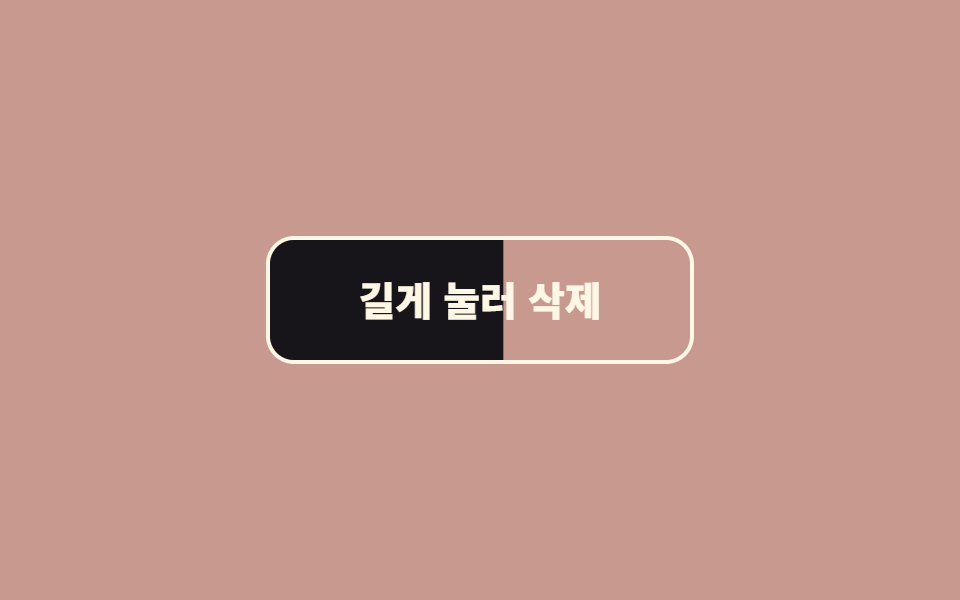
<main class="stage"><button class="btn is-demo" type="button"><span class="btn__fill" aria-hidden="true"></span><span class="btn__label">길게 눌러 삭제</span></button></main>// ── 변수 3개 ──────────────────────────────────────────
$hold: 1.2s; // 이만큼 누르고 있어야 실행된다
$color: #fff7e6;
$fill: #17141a;
html, body { margin: 0; overflow: hidden; } // iframe 안에서 스크롤바가 생기지 않게 (실측 2026-09-09: body 여백 8px 이 100vh 를 넘겼다)
.stage { min-height: 100vh; display: grid; place-items: center; margin: 0; background: #c89a8f; font-family: -apple-system, "Segoe UI", "Noto Sans KR", sans-serif; }
.btn {
position: relative;
overflow: hidden;
isolation: isolate;
border: 2.5px solid $color;
border-radius: 14px;
padding: 20px 44px;
font-weight: 800;
font-size: 20px;
line-height: 1;
font-family: inherit;
color: $color;
background: transparent;
cursor: pointer;
user-select: none;
-webkit-user-select: none;
touch-action: none; // 모바일에서 길게 누를 때 스크롤·메뉴가 안 뜨게
&__fill {
position: absolute; inset: 0;
background: $fill;
transform: scaleX(0);
transform-origin: left; // 왼쪽에서 차오른다. 세로면 bottom + scaleY
z-index: -1;
transition: transform 200ms ease-out; // 떼면 되돌아가는 속도
}
&.is-holding &__fill { animation: fill $hold linear forwards; }
&.is-done &__fill { transform: scaleX(1); }
&.is-done { color: $color; }
&__label { position: relative; }
&.is-demo &__fill { animation: fill-loop 2s linear infinite; }
}
@keyframes fill { from { transform: scaleX(0); } to { transform: scaleX(1); } }
@keyframes fill-loop { 0%, 10% { transform: scaleX(0); } 70%, 85% { transform: scaleX(1); } 100% { transform: scaleX(0); } }
@media (prefers-reduced-motion: reduce) {
.btn__fill { transition: none; }
.btn.is-demo .btn__fill { animation: none; }
.btn.is-holding .btn__fill { animation-duration: $hold; } // 길게 누르기 자체는 유지 — 안전장치라 뺄 수 없다
}html, body {
margin: 0;
overflow: hidden;
}
.stage {
min-height: 100vh;
display: grid;
place-items: center;
margin: 0;
background: #c89a8f;
font-family: -apple-system, "Segoe UI", "Noto Sans KR", sans-serif;
}
.btn {
position: relative;
overflow: hidden;
isolation: isolate;
border: 2.5px solid #fff7e6;
border-radius: 14px;
padding: 20px 44px;
font-weight: 800;
font-size: 20px;
line-height: 1;
font-family: inherit;
color: #fff7e6;
background: transparent;
cursor: pointer;
user-select: none;
-webkit-user-select: none;
touch-action: none;
}
.btn__fill {
position: absolute;
inset: 0;
background: #17141a;
transform: scaleX(0);
transform-origin: left;
z-index: -1;
transition: transform 200ms ease-out;
}
.btn.is-holding .btn__fill {
animation: fill 1.2s linear forwards;
}
.btn.is-done .btn__fill {
transform: scaleX(1);
}
.btn.is-done {
color: #fff7e6;
}
.btn__label {
position: relative;
}
.btn.is-demo .btn__fill {
animation: fill-loop 2s linear infinite;
}
@keyframes fill {
from {
transform: scaleX(0);
}
to {
transform: scaleX(1);
}
}
@keyframes fill-loop {
0%, 10% {
transform: scaleX(0);
}
70%, 85% {
transform: scaleX(1);
}
100% {
transform: scaleX(0);
}
}
@media (prefers-reduced-motion: reduce) {
.btn__fill {
transition: none;
}
.btn.is-demo .btn__fill {
animation: none;
}
.btn.is-holding .btn__fill {
animation-duration: 1.2s;
}
}// 누르고 있는 동안 채워진다. 끝까지 차면 실행. 중간에 떼면 되돌아간다.
var b = document.querySelector('.btn'), label = b.querySelector('.btn__label'), done = false;
function start(e) { if (done) return; b.classList.remove('is-demo'); b.classList.add('is-holding'); }
function stop() { if (!done) b.classList.remove('is-holding'); }
b.addEventListener('pointerdown', start);
b.addEventListener('pointerup', stop); b.addEventListener('pointerleave', stop); b.addEventListener('pointercancel', stop);
b.querySelector('.btn__fill').addEventListener('animationend', function (e) {
if (e.animationName !== 'fill') return;
done = true; label.textContent = '삭제됨'; b.classList.add('is-done');
setTimeout(function () { done = false; label.textContent = '길게 눌러 삭제'; b.classList.remove('is-done', 'is-holding'); }, 1400);
});import { useState } from "react";
import type { CSSProperties, ReactNode } from "react";
import styles from "./HoldButton.module.scss";
export type HoldButtonProps = { children: ReactNode; doneLabel?: ReactNode; hold?: number; color?: string; fill?: string; onConfirm: () => void };
/** 누르고 있는 동안 차오르고, 다 차면 onConfirm. 중간에 떼면 되돌아간다. */
export default function HoldButton({ children, doneLabel = "완료", hold = 1200, color = "#fff7e6", fill = "#17141a", onConfirm }: HoldButtonProps) {
const [holding, setHolding] = useState<boolean>(false);
const [done, setDone] = useState<boolean>(false);
const vars = { "--hold": `${hold}ms`, "--color": color, "--fill": fill } as CSSProperties;
const cls = `${styles.btn} ${holding ? styles.holding : ""} ${done ? styles.done : ""}`;
return (
<button type="button" className={cls} style={vars}
onPointerDown={() => !done && setHolding(true)} onPointerUp={() => setHolding(false)} onPointerLeave={() => setHolding(false)} onPointerCancel={() => setHolding(false)}>
<span className={styles.fill} aria-hidden="true" onAnimationEnd={() => { if (holding) { setDone(true); onConfirm(); } }} />
<span className={styles.label}>{done ? doneLabel : children}</span>
</button>
);
}09 길게 눌러 확인 — 측정 누적면적 8.162% · 움직인 프레임 18/23GODRICH 원작 · zip 에 SCSS·React 포함 · CSS 버튼 애니메이션 9종 — 복붙하면 되는 SCSS + React
이 데모가 속한 글
 CSS 버튼 애니메이션 9종 — 복붙하면 되는 SCSS + ReactCSS 버튼 애니메이션 아홉 개를 한 번에 모았습니다. 호버, 클릭, 로딩, 실패, 확인까지 버튼 하나가 겪는 상황을 아홉 장면으로 나눠 하나씩 담았고, 전부 transform과 opacity만 움직입니다. 격자에서 이 글의 데모 전부 보기