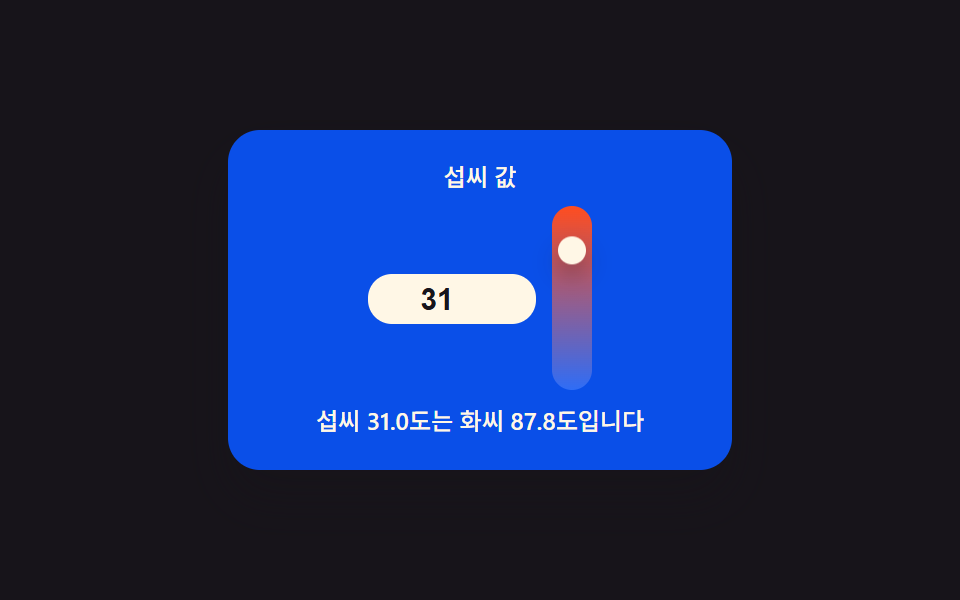
01온도 값이 채워가는 그라디언트 온도계 인풋
입력한 섭씨 값을 화씨로 함께 계산해 보여주면서, 그 값의 위치를 그라디언트 눈금 위 손잡이로 옮겨 온도계처럼 보이게 하는 인풋이다.
쓰임날씨 위젯·요리 레시피 온도 표시
LERP_RATEcelsiusToFahrenheitrenderedT

<main class="stage">
<div class="tc is-demo" id="tc">
  <label class="tc__cap" for="tcC">섭씨 값</label>
  <div class="tc__body">
    <input class="tc__input" id="tcC" type="number" inputmode="decimal" step="0.5" min="-10" max="40" value="22" aria-label="섭씨 값을 입력하면 화씨로 함께 계산해 눈금 손잡이를 옮깁니다" aria-describedby="tcReadout">
    <div class="tc__scale" aria-hidden="true">
      <div class="tc__track"></div>
      <div class="tc__handle" id="tcHandle"></div>
    </div>
  </div>
  <p class="tc__readout" id="tcReadout" role="status" aria-live="polite"></p>
</div>
</main>
@use "../../../../site/static/demo-tokens" as *;
// 계산 겹(섭씨->화씨, 위치 산출)은 index.html 의 celsiusToFahrenheit()/applyValue() 에 있다. 여기는 무대·레이아웃만.
$duration: $dur-loop;
$easing: $ease-spring;
$color: $subject-cream;
@include stage($stage-ink);
.tc {
display: flex;
flex-direction: column;
align-items: center;
gap: $sp-2;
width: min(220px, 84vw);
background: $subject-blue-deep;
border-radius: $r-card;
padding: $sp-4;
box-shadow: $shadow-raised;
}
.tc__cap {
margin: 0;
color: $color;
font-size: 12px;
font-weight: 500;
line-height: 1.2;
}
.tc__body {
display: flex;
align-items: center;
gap: $sp-2;
}
.tc__input {
width: 68px;
border: 0;
border-radius: $r-control;
padding: $sp-1 $sp-2;
background: $subject-cream;
color: $subject-ink;
font-weight: 700;
font-size: 15px;
text-align: center;
}
.tc__input:focus-visible {
outline: 2px solid $color;
outline-offset: 2px;
}
.tc__scale {
position: relative;
width: 20px;
height: 92px;
border-radius: $r-pill;
}
.tc__track {
position: absolute;
inset: 0;
border-radius: $r-pill;
background: linear-gradient(to top, $subject-blue, $stage-orange);
}
.tc__handle {
position: absolute;
top: 0;
left: 50%;
width: 14px;
height: 14px;
margin-left: -7px;
border-radius: 50%;
background: $subject-cream;
box-shadow: $shadow-press;
transition: box-shadow $duration $easing;
will-change: transform;
}
.tc__readout {
margin: 0;
color: $color;
font-size: 12px;
font-weight: 500;
line-height: 1.3;
text-align: center;
}
@media (max-width: 340px) {
.tc { padding: $sp-3; gap: $sp-1; width: min(200px, 84vw); }
.tc__cap { font-size: 10px; }
.tc__body { gap: $sp-1; }
.tc__input { width: 56px; padding: $sp-1; font-size: 13px; }
.tc__scale { height: 56px; width: 16px; }
.tc__handle { width: 12px; height: 12px; margin-left: -6px; }
.tc__readout { font-size: 10px; }
}
@media (prefers-reduced-motion: reduce) {
.tc__handle { transition: none; }
}html, body {
margin: 0;
overflow: hidden;
}
.stage {
box-sizing: border-box;
min-height: 100vh;
display: grid;
place-items: center;
margin: 0;
background: #17141a;
font-family: -apple-system, "Segoe UI", "Noto Sans KR", sans-serif;
padding: clamp(8px, 4vw, 24px);
}
.tc {
display: flex;
flex-direction: column;
align-items: center;
gap: 8px;
width: min(220px, 84vw);
background: #0a4fe8;
border-radius: 16px;
padding: 16px;
box-shadow: 0 14px 24px rgba(23, 20, 26, 0.32);
}
.tc__cap {
margin: 0;
color: #fff7e6;
font-size: 12px;
font-weight: 500;
line-height: 1.2;
}
.tc__body {
display: flex;
align-items: center;
gap: 8px;
}
.tc__input {
width: 68px;
border: 0;
border-radius: 12px;
padding: 4px 8px;
background: #fff7e6;
color: #17141a;
font-weight: 700;
font-size: 15px;
text-align: center;
}
.tc__input:focus-visible {
outline: 2px solid #fff7e6;
outline-offset: 2px;
}
.tc__scale {
position: relative;
width: 20px;
height: 92px;
border-radius: 999px;
}
.tc__track {
position: absolute;
inset: 0;
border-radius: 999px;
background: linear-gradient(to top, #2f6df6, #ff4d1f);
}
.tc__handle {
position: absolute;
top: 0;
left: 50%;
width: 14px;
height: 14px;
margin-left: -7px;
border-radius: 50%;
background: #fff7e6;
box-shadow: 0 6px 12px rgba(23, 20, 26, 0.32);
transition: box-shadow 2s cubic-bezier(0.2, 0.8, 0.2, 1);
will-change: transform;
}
.tc__readout {
margin: 0;
color: #fff7e6;
font-size: 12px;
font-weight: 500;
line-height: 1.3;
text-align: center;
}
@media (max-width: 340px) {
.tc {
padding: 12px;
gap: 4px;
width: min(200px, 84vw);
}
.tc__cap {
font-size: 10px;
}
.tc__body {
gap: 4px;
}
.tc__input {
width: 56px;
padding: 4px;
font-size: 13px;
}
.tc__scale {
height: 56px;
width: 16px;
}
.tc__handle {
width: 12px;
height: 12px;
margin-left: -6px;
}
.tc__readout {
font-size: 10px;
}
}
@media (prefers-reduced-motion: reduce) {
.tc__handle {
transition: none;
}
}(function () {
var root = document.getElementById('tc');
var input = document.getElementById('tcC');
var handle = document.getElementById('tcHandle');
var scale = handle.parentElement;
var readout = document.getElementById('tcReadout');
var reduce = window.matchMedia('(prefers-reduced-motion: reduce)').matches;
var isDemo = true;
function human() { if (isDemo) { root.classList.remove('is-demo'); isDemo = false; } }
var MIN_C = -10, MAX_C = 40;
// 계산 한 겹 — 섭씨 -> 화씨, 그리고 눈금 위 위치(0~1)
function celsiusToFahrenheit(c) { return c * 9 / 5 + 32; }
function clamp01(v) { return v < 0 ? 0 : v > 1 ? 1 : v; }
var SENT_PREFIX = '섭씨 ', SENT_MID = '도는 화씨 ', SENT_SUFFIX = '도입니다';
var targetT = 0, renderedT = 0;
var LERP_RATE = 0.14; // 변형 01: 낮추면 손잡이가 값 변화를 더 천천히 뒤따라간다
function readValue() {
var c = parseFloat(input.value);
return isNaN(c) ? 0 : c;
}
function applyValue(c) {
var f = celsiusToFahrenheit(c);
targetT = clamp01((c - MIN_C) / (MAX_C - MIN_C));
readout.textContent = SENT_PREFIX + c.toFixed(1) + SENT_MID + f.toFixed(1) + SENT_SUFFIX;
if (reduce) { renderedT = targetT; paint(); }
}
function paint() {
var trackH = scale.clientHeight - handle.offsetHeight;
var y = (1 - renderedT) * trackH;
handle.style.transform = 'translateY(' + y.toFixed(1) + 'px)';
}
input.addEventListener('input', function () { human(); applyValue(readValue()); });
input.addEventListener('change', function () { human(); applyValue(readValue()); });
var DEMO_VALUES = [-4, 8, 22, 31, 38, 14];
var DRIVE_PERIOD_MS = 2000; // 렌더 캐처 창(설정 초=2.0)과 같은 주기 — 시연 전용
var driveStart = 0, lastIdx = -1;
function driveTick(now) {
if (!driveStart) driveStart = now;
if (isDemo) {
var frac = ((now - driveStart) % DRIVE_PERIOD_MS) / DRIVE_PERIOD_MS;
var idx = Math.floor(frac * DEMO_VALUES.length);
if (idx !== lastIdx) {
lastIdx = idx;
input.value = DEMO_VALUES[idx];
applyValue(DEMO_VALUES[idx]);
}
}
requestAnimationFrame(driveTick);
}
function frame() {
renderedT += (targetT - renderedT) * LERP_RATE;
paint();
requestAnimationFrame(frame);
}
window.addEventListener('resize', paint);
applyValue(readValue());
if (!reduce) {
requestAnimationFrame(driveTick);
requestAnimationFrame(frame);
}
})();import { useEffect, useRef } from "react";
import styles from "./GradientThermometer.module.scss";
export default function GradientThermometer() {
const rootRef = useRef<HTMLDivElement | null>(null);
const inputRef = useRef<HTMLInputElement | null>(null);
const handleRef = useRef<HTMLDivElement | null>(null);
const readoutRef = useRef<HTMLParagraphElement | null>(null);
useEffect(() => {
const root = rootRef.current;
const input = inputRef.current;
const handle = handleRef.current;
const readout = readoutRef.current;
if (!root || !input || !handle || !readout) return;
const scale = handle.parentElement as HTMLDivElement;
const reduce = window.matchMedia("(prefers-reduced-motion: reduce)").matches;
let isDemo = true;
function human() {
if (isDemo) {
root!.classList.remove("is-demo");
isDemo = false;
}
}
const MIN_C = -10;
const MAX_C = 40;
function celsiusToFahrenheit(c: number) {
return (c * 9) / 5 + 32;
}
function clamp01(v: number) {
return v < 0 ? 0 : v > 1 ? 1 : v;
}
const SENT_PREFIX = "섭씨 ";
const SENT_MID = "도는 화씨 ";
const SENT_SUFFIX = "도입니다";
let targetT = 0;
let renderedT = 0;
const LERP_RATE = 0.14;
function readValue() {
const c = parseFloat(input!.value);
return isNaN(c) ? 0 : c;
}
function applyValue(c: number) {
const f = celsiusToFahrenheit(c);
targetT = clamp01((c - MIN_C) / (MAX_C - MIN_C));
readout!.textContent = SENT_PREFIX + c.toFixed(1) + SENT_MID + f.toFixed(1) + SENT_SUFFIX;
if (reduce) {
renderedT = targetT;
paint();
}
}
function paint() {
const trackH = scale.clientHeight - handle!.offsetHeight;
const y = (1 - renderedT) * trackH;
handle!.style.transform = "translateY(" + y.toFixed(1) + "px)";
}
function onInput() {
human();
applyValue(readValue());
}
input.addEventListener("input", onInput);
input.addEventListener("change", onInput);
const DEMO_VALUES = [-4, 8, 22, 31, 38, 14];
const DRIVE_PERIOD_MS = 2000;
let driveStart = 0;
let lastIdx = -1;
let rafDrive = 0;
function driveTick(now: number) {
if (!driveStart) driveStart = now;
if (isDemo) {
const frac = ((now - driveStart) % DRIVE_PERIOD_MS) / DRIVE_PERIOD_MS;
const idx = Math.floor(frac * DEMO_VALUES.length);
if (idx !== lastIdx) {
lastIdx = idx;
input!.value = String(DEMO_VALUES[idx]);
applyValue(DEMO_VALUES[idx]);
}
}
rafDrive = requestAnimationFrame(driveTick);
}
let rafFrame = 0;
function frame() {
renderedT += (targetT - renderedT) * LERP_RATE;
paint();
rafFrame = requestAnimationFrame(frame);
}
window.addEventListener("resize", paint);
applyValue(readValue());
if (!reduce) {
rafDrive = requestAnimationFrame(driveTick);
rafFrame = requestAnimationFrame(frame);
}
return () => {
input.removeEventListener("input", onInput);
input.removeEventListener("change", onInput);
window.removeEventListener("resize", paint);
if (rafDrive) cancelAnimationFrame(rafDrive);
if (rafFrame) cancelAnimationFrame(rafFrame);
};
}, []);
return (
<div ref={rootRef} className={`${styles.tc} is-demo`}>
<label className={styles.cap} htmlFor="tcCReact">
섭씨 값
</label>
<div className={styles.body}>
<input
ref={inputRef}
className={styles.input}
id="tcCReact"
type="number"
inputMode="decimal"
step={0.5}
min={-10}
max={40}
defaultValue={22}
aria-label="섭씨 값을 입력하면 화씨로 함께 계산해 눈금 손잡이를 옮깁니다"
aria-describedby="tcReadoutReact"
/>
<div className={styles.scale} aria-hidden="true">
<div className={styles.track} />
<div ref={handleRef} className={styles.handle} />
</div>
</div>
<p ref={readoutRef} className={styles.readout} id="tcReadoutReact" role="status" aria-live="polite" />
</div>
);
}01 온도 값이 채워가는 그라디언트 온도계 인풋 — 측정 누적면적 2.117% · 움직인 프레임 23/23GODRICH 원작 · zip 에 SCSS·React 포함 · 계산기 디자인 9종 — 인풋 박스 디자인이 값을 그리는 방식
이 데모가 속한 글
 계산기 디자인 9종 — 인풋 박스 디자인이 값을 그리는 방식css 계산기 디자인 아홉 가지 가운데 하나는 입력한 텍스트 값을 격자 값으로 바꿔 캔버스에 QR 모양을 직접 그리고, 하나는 생년월일 값으로 남은 날수를 계산해 링 게이지를 채우며, 하나는 입력한 시각 값 하나로 이 글의 데모 전부 보기