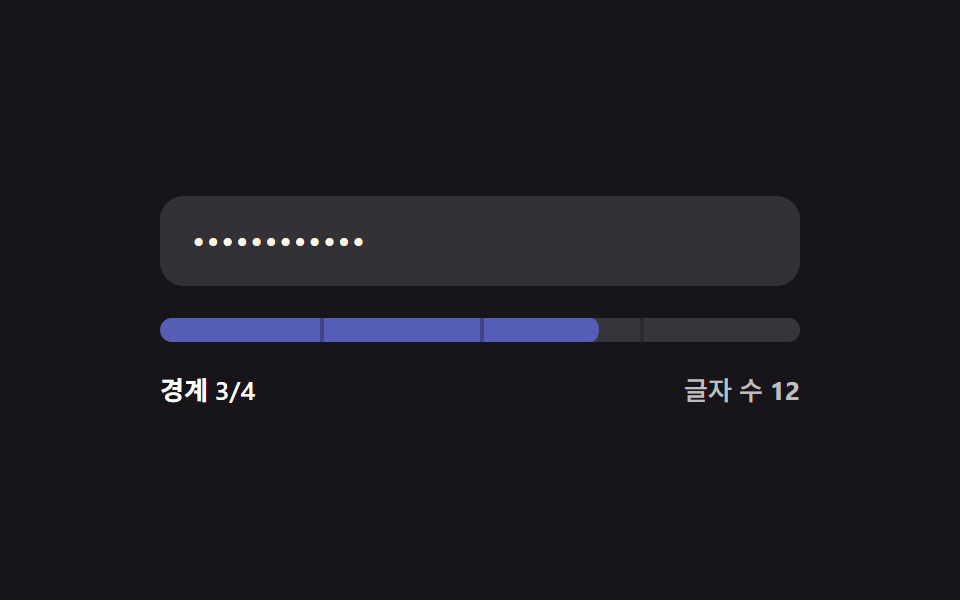
01글자 수 경계 채움 — 입력 값의 글자 수가 정해진 여러 경계 값을 넘을 때마다 강도 값이 다음 단계로 오르는 방식
입력된 값의 글자 수가 정해진 여러 경계 값을 넘을 때마다 강도 값이 다음 단계로 올라갑니다.
쓰임회원가입 폼의 기본 비밀번호 입력, 최소 길이 기준을 안내하는 계정 설정
THRESHOLDS = [4,8,12,16]stageOf(len)STAGE_CLASS

<main class="stage">
<div class="pw is-demo" id="pw">
  <label class="pw__field">
    <input class="pw__input" id="pwInput" type="text" autocomplete="off" spellcheck="false" value="">
  </label>
  <div class="pw__track" id="pwTrack">
    <span class="pw__tick" style="--tick-at:25%"></span>
    <span class="pw__tick" style="--tick-at:50%"></span>
    <span class="pw__tick" style="--tick-at:75%"></span>
    <div class="pw__fill" id="pwFill"></div>
  </div>
  <div class="pw__readout">
    <span class="pw__label" id="pwLabel">경계 0/4</span>
    <span class="pw__len">글자 수 <b id="pwLen">0</b></span>
  </div>
</div>
</main>
@use "../../../../site/static/demo-tokens" as *;
// 계산 겹: 글자 수 값이 4개 경계(4·8·12·16)를 넘을 때마다 강도 단계(0~4)가 오르고,
// 그 단계에 맞는 토큰 색으로 막대와 글자색이 함께 바뀐다 — 트윈은 채움 비율(scaleX)뿐이다.
@include stage($stage-ink);
.pw {
width: 100%;
max-width: 320px;
display: grid;
gap: $sp-4;
}
.pw__field { display: block; }
.pw__input {
width: 100%;
box-sizing: border-box;
padding: $sp-3 $sp-4;
border-radius: $r-control;
border: 0;
background: rgba($stage-paper, .12);
color: $subject-cream;
font: 500 16px/1.3 -apple-system, "Segoe UI", "Noto Sans KR", sans-serif;
letter-spacing: .04em;
-webkit-text-security: disc; // 마스킹: type=text 유지 + 브라우저 저장 프롬프트 회피
&:focus { outline: 2px solid $subject-blue-light; outline-offset: 2px; }
}
.pw__track {
position: relative;
height: $sp-3;
border-radius: $r-sm;
background: rgba($stage-paper, .14);
overflow: hidden;
}
.pw__fill {
position: absolute;
inset: 0;
border-radius: $r-sm;
background: $error;
transform: scaleX(0);
transform-origin: left center; // 채움 막대 — 시작 변에서 자란다
transition: transform $dur-base $ease-out, background-color $dur-base $ease-out;
}
.pw--s1 .pw__fill { background: $error; }
.pw--s2 .pw__fill { background: $subject-orange-deep; }
.pw--s3 .pw__fill { background: $subject-blue; }
.pw--s4 .pw__fill { background: $subject-mint; }
.pw__tick {
position: absolute;
top: 0;
left: var(--tick-at);
width: 2px;
height: 100%;
background: rgba($stage-ink, .35);
z-index: 1;
}
.pw__readout {
display: flex;
justify-content: space-between;
align-items: center;
font: 600 13px/1.2 -apple-system, "Segoe UI", "Noto Sans KR", sans-serif;
color: $stage-paper;
}
.pw__len { color: rgba($stage-paper, .72); font-weight: 500; }
.pw__len b { font-variant-numeric: tabular-nums; }
@media (max-width: 340px) {
.pw { max-width: 260px; }
.pw__input { padding: $sp-2 $sp-3; font-size: 14px; }
.pw__readout { font-size: 12px; }
}
@media (prefers-reduced-motion: reduce) {
.pw__fill { transition: none; }
}html, body {
margin: 0;
overflow: hidden;
}
.stage {
box-sizing: border-box;
min-height: 100vh;
display: grid;
place-items: center;
margin: 0;
background: #17141a;
font-family: -apple-system, "Segoe UI", "Noto Sans KR", sans-serif;
padding: clamp(8px, 4vw, 24px);
}
.pw {
width: 100%;
max-width: 320px;
display: grid;
gap: 16px;
}
.pw__field {
display: block;
}
.pw__input {
width: 100%;
box-sizing: border-box;
padding: 12px 16px;
border-radius: 12px;
border: 0;
background: rgba(255, 255, 255, 0.12);
color: #fff7e6;
font: 500 16px/1.3 -apple-system, "Segoe UI", "Noto Sans KR", sans-serif;
letter-spacing: 0.04em;
-webkit-text-security: disc;
}
.pw__input:focus {
outline: 2px solid #5b8cf8;
outline-offset: 2px;
}
.pw__track {
position: relative;
height: 12px;
border-radius: 8px;
background: rgba(255, 255, 255, 0.14);
overflow: hidden;
}
.pw__fill {
position: absolute;
inset: 0;
border-radius: 8px;
background: #c2361a;
transform: scaleX(0);
transform-origin: left center;
transition: transform 300ms ease-out, background-color 300ms ease-out;
}
.pw--s1 .pw__fill {
background: #c2361a;
}
.pw--s2 .pw__fill {
background: #c93000;
}
.pw--s3 .pw__fill {
background: #2f6df6;
}
.pw--s4 .pw__fill {
background: #4cd4a6;
}
.pw__tick {
position: absolute;
top: 0;
left: var(--tick-at);
width: 2px;
height: 100%;
background: rgba(23, 20, 26, 0.35);
z-index: 1;
}
.pw__readout {
display: flex;
justify-content: space-between;
align-items: center;
font: 600 13px/1.2 -apple-system, "Segoe UI", "Noto Sans KR", sans-serif;
color: #ffffff;
}
.pw__len {
color: rgba(255, 255, 255, 0.72);
font-weight: 500;
}
.pw__len b {
font-variant-numeric: tabular-nums;
}
@media (max-width: 340px) {
.pw {
max-width: 260px;
}
.pw__input {
padding: 8px 12px;
font-size: 14px;
}
.pw__readout {
font-size: 12px;
}
}
@media (prefers-reduced-motion: reduce) {
.pw__fill {
transition: none;
}
}(function () {
var root = document.getElementById('pw');
var input = document.getElementById('pwInput');
var fill = document.getElementById('pwFill');
var label = document.getElementById('pwLabel');
var lenEl = document.getElementById('pwLen');
// 계산 겹: 글자 수 값이 이 경계 값들을 넘을 때마다 강도 값(0~4)이 한 단계씩 오른다.
var THRESHOLDS = [4, 8, 12, 16];
var STAGE_CLASS = ['pw--s0', 'pw--s1', 'pw--s2', 'pw--s3', 'pw--s4'];
function stageOf(len) {
var s = 0;
for (var i = 0; i < THRESHOLDS.length; i++) { if (len >= THRESHOLDS[i]) s = i + 1; }
return s;
}
function paint(value) {
var len = value.length;
var stage = stageOf(len);
var ratio = stage / THRESHOLDS.length;
fill.style.transform = 'scaleX(' + ratio + ')';
STAGE_CLASS.forEach(function (c) { root.classList.remove(c); });
root.classList.add(STAGE_CLASS[stage]);
label.textContent = '경계 ' + stage + '/4';
lenEl.textContent = String(len);
}
input.addEventListener('input', function () {
root.classList.remove('is-demo');
stopAutoplay();
paint(input.value);
});
paint(input.value);
// 자동 루프: 시드 고정 문자열 배열로 글자 수를 늘렸다 줄이며 네 경계를 오간다.
var SEQ = ['', 'ab', 'abcd', 'abcdef', 'abcdefgh', 'abcdefghij', 'abcdefghijkl',
'abcdefghijklmn', 'abcdefghijklmnop', 'abcdefghijklmn', 'abcdefghij',
'abcdefgh', 'abcd', ''];
var si = 0;
var autoTimer = null;
function autoTick() { input.value = SEQ[si]; paint(SEQ[si]); si = (si + 1) % SEQ.length; }
function stopAutoplay() { if (autoTimer) { clearInterval(autoTimer); autoTimer = null; } }
var reduce = window.matchMedia('(prefers-reduced-motion: reduce)').matches;
if (!reduce) { autoTimer = setInterval(autoTick, 320); autoTick(); }
})();import { useEffect, useRef } from "react";
import styles from "./ThresholdBar.module.scss";
type Box<T> = { current: T };
const THRESHOLDS = [4, 8, 12, 16];
const STAGE_CLASS = ["pw--s0", "pw--s1", "pw--s2", "pw--s3", "pw--s4"];
export default function ThresholdBar() {
const rootRef = useRef(null) as unknown as Box<HTMLDivElement | null>;
const inputRef = useRef(null) as unknown as Box<HTMLInputElement | null>;
const fillRef = useRef(null) as unknown as Box<HTMLDivElement | null>;
const labelRef = useRef(null) as unknown as Box<HTMLSpanElement | null>;
const lenRef = useRef(null) as unknown as Box<HTMLElement | null>;
useEffect(() => {
const root = rootRef.current;
const input = inputRef.current;
const fill = fillRef.current;
const label = labelRef.current;
const lenEl = lenRef.current;
if (!root || !input || !fill || !label || !lenEl) return;
// 계산 겹: 글자 수 값이 4개 경계(4·8·12·16)를 넘을 때마다 강도 단계(0~4)가 오른다.
function stageOf(len: number) {
let s = 0;
for (let i = 0; i < THRESHOLDS.length; i++) { if (len >= THRESHOLDS[i]) s = i + 1; }
return s;
}
function paint(value: string) {
const len = value.length;
const stage = stageOf(len);
const ratio = stage / THRESHOLDS.length;
fill!.style.transform = "scaleX(" + ratio + ")";
STAGE_CLASS.forEach((c) => root!.classList.remove(styles[c]));
root!.classList.add(styles[STAGE_CLASS[stage]]);
label!.textContent = "경계 " + stage + "/4";
lenEl!.textContent = String(len);
}
function onInput() {
root!.classList.remove(styles["is-demo"]);
stopAutoplay();
paint(input!.value);
}
input.addEventListener("input", onInput);
paint(input.value);
// 자동 루프: 시드 고정 문자열 배열로 글자 수를 늘렸다 줄이며 네 경계를 오간다.
const SEQ = ["", "ab", "abcd", "abcdef", "abcdefgh", "abcdefghij", "abcdefghijkl",
"abcdefghijklmn", "abcdefghijklmnop", "abcdefghijklmn", "abcdefghij",
"abcdefgh", "abcd", ""];
let si = 0;
let autoTimer: number | null = null;
function autoTick() { input!.value = SEQ[si]; paint(SEQ[si]); si = (si + 1) % SEQ.length; }
function stopAutoplay() { if (autoTimer !== null) { window.clearInterval(autoTimer); autoTimer = null; } }
const reduce = window.matchMedia("(prefers-reduced-motion: reduce)").matches;
if (!reduce) { autoTimer = window.setInterval(autoTick, 320); autoTick(); }
return () => {
stopAutoplay();
input.removeEventListener("input", onInput);
};
}, []);
return (
<div ref={rootRef} className={`${styles.stage} ${styles.pw} ${styles["is-demo"]} ${styles["pw--s0"]}`}>
<label className={styles.field}>
<input ref={inputRef} className={styles.input} type="text" autoComplete="off" spellCheck={false} defaultValue="" />
</label>
<div className={styles.track}>
<span className={styles.tick} style={{ left: "25%" }} />
<span className={styles.tick} style={{ left: "50%" }} />
<span className={styles.tick} style={{ left: "75%" }} />
<div ref={fillRef} className={styles.fill} />
</div>
<div className={styles.readout}>
<span ref={labelRef} className={styles.label}>경계 0/4</span>
<span className={styles.len}>글자 수 <b ref={lenRef}>0</b></span>
</div>
</div>
);
}01 글자 수 경계 채움 — 입력 값의 글자 수가 정해진 여러 경계 값을 넘을 때마다 강도 값이 다음 단계로 오르는 방식 — 측정 누적면적 3.317% · 움직인 프레임 15/23GODRICH 원작 · zip 에 SCSS·React 포함 · 비밀번호 강도 UI 9종 — 강도 값이 계산되는 아홉 가지 방식
이 데모가 속한 글
 비밀번호 강도 UI 9종 — 강도 값이 계산되는 아홉 가지 방식비밀번호 강도는 입력한 값이 얼마나 뚫기 쉬운지를 점수나 막대로 보여주는 계산인데, 아홉 개 중 하나는 문자 종류 값이 몇 가지 섞였는지에 따라 강도 값이 정해지고, 하나는 흔한 값 목록과 같은 상태가 되면 강도 값 이 글의 데모 전부 보기