01양 끝이 투명하게 사라지는 기본 구분선
가운데는 진하고 양 끝은 투명한 그라디언트 한 줄로, 선이 갑자기 잘려 보이는 끝을 없앤다.
쓰임css 구분선의 계산 뼈대
FADE_PCTLINE_H_PX
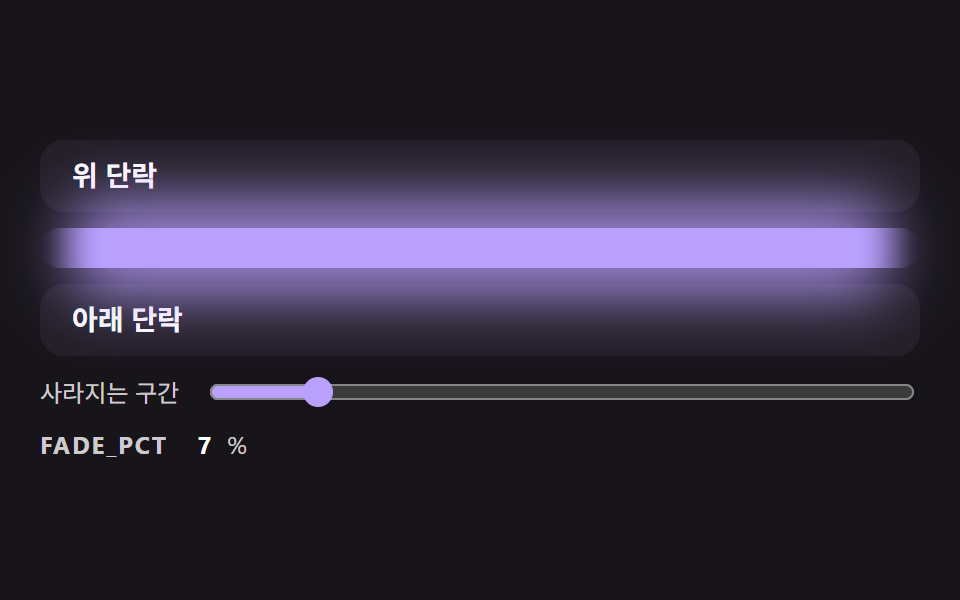
<main class="stage">
<div class="dv is-demo" id="dvRoot">
  <p class="dv__block">위 단락</p>
  <div class="dv__rail">
    <div class="dv__glow" id="dvGlow"></div>
    <div class="dv__line" id="dvLine" role="separator"></div>
  </div>
  <p class="dv__block">아래 단락</p>
  <label class="dv__ctrl">
    <span>사라지는 구간</span>
    <input type="range" id="dvRange" min="0" max="50" value="30">
  </label>
  <p class="dv__meta"><span class="dv__tag">FADE_PCT</span> <b id="dvPct">30</b>%</p>
</div>
</main>
@use "../../../../site/static/demo-tokens" as *;
// 핵심: 선 색의 알파를 양 끝 FADE_PCT% 구간에서만 smoothstep 곡선으로 올린다.
// 정지점은 JS 가 계산해 background 에 넣는다 (직선 보간보다 끝이 자연스럽다).
$line-h: 20px;
$line-color: $subject-lilac;
@include stage($stage-ink);
.dv {
width: min(100%, 440px);
display: grid;
gap: $sp-2;
}
.dv__block {
box-sizing: border-box;
margin: 0;
height: 36px;
padding: 0 $sp-4;
display: flex;
align-items: center;
border-radius: $r-control;
background: $tick-panel;
color: $stage-paper;
font-size: 14px;
font-weight: 700;
line-height: 20px;
}
.dv__rail {
position: relative;
height: $line-h;
}
.dv__glow {
position: absolute;
left: 0;
right: 0;
top: -14px;
bottom: -14px;
border-radius: $r-pill;
opacity: .8;
filter: blur(14px);
}
.dv__line {
position: relative;
height: $line-h;
border-radius: $r-pill;
background: $line-color;
}
.dv__ctrl {
display: flex;
align-items: center;
gap: $sp-3;
font-size: 12px;
line-height: 16px;
color: rgba($stage-paper, .78);
}
.dv__ctrl input { flex: 1; min-width: 0; accent-color: $line-color; }
.dv__meta {
margin: 0;
display: flex;
align-items: baseline;
gap: $sp-2;
font-size: 12px;
line-height: 16px;
color: rgba($stage-paper, .78);
}
.dv__tag { font-weight: 700; letter-spacing: .08em; }
.dv__meta b { min-width: 2ch; text-align: right; font-variant-numeric: tabular-nums; color: $stage-paper; }
@media (prefers-reduced-motion: reduce) {
.dv__line { transition: none; }
}html, body {
margin: 0;
overflow: hidden;
}
.stage {
box-sizing: border-box;
min-height: 100vh;
display: grid;
place-items: center;
margin: 0;
background: #17141a;
font-family: -apple-system, "Segoe UI", "Noto Sans KR", sans-serif;
padding: clamp(8px, 4vw, 24px);
}
.dv {
width: min(100%, 440px);
display: grid;
gap: 8px;
}
.dv__block {
box-sizing: border-box;
margin: 0;
height: 36px;
padding: 0 16px;
display: flex;
align-items: center;
border-radius: 12px;
background: #231f28;
color: #ffffff;
font-size: 14px;
font-weight: 700;
line-height: 20px;
}
.dv__rail {
position: relative;
height: 20px;
}
.dv__glow {
position: absolute;
left: 0;
right: 0;
top: -14px;
bottom: -14px;
border-radius: 999px;
opacity: 0.8;
filter: blur(14px);
}
.dv__line {
position: relative;
height: 20px;
border-radius: 999px;
background: #b9a0ff;
}
.dv__ctrl {
display: flex;
align-items: center;
gap: 12px;
font-size: 12px;
line-height: 16px;
color: rgba(255, 255, 255, 0.78);
}
.dv__ctrl input {
flex: 1;
min-width: 0;
accent-color: #b9a0ff;
}
.dv__meta {
margin: 0;
display: flex;
align-items: baseline;
gap: 8px;
font-size: 12px;
line-height: 16px;
color: rgba(255, 255, 255, 0.78);
}
.dv__tag {
font-weight: 700;
letter-spacing: 0.08em;
}
.dv__meta b {
min-width: 2ch;
text-align: right;
font-variant-numeric: tabular-nums;
color: #ffffff;
}
@media (prefers-reduced-motion: reduce) {
.dv__line {
transition: none;
}
}(function () {
// 기법: 선 색의 알파를 양 끝 FADE_PCT% 구간에서만 0 에서 1 로 올린다.
// 직선 보간은 선이 시작하는 곳에 띠가 보여서 smoothstep(3t^2 - 2t^3) 곡선으로 8단계 정지점을 직접 만든다.
var FADE_PCT = 30;
var LINE_H_PX = 20;
var STEPS = 8;
var CYCLE_MS = 2000;
var LOW_PCT = 6;
var HIGH_PCT = 50;
var RGB = '185,160,255';
var root = document.getElementById('dvRoot');
var line = document.getElementById('dvLine');
var glow = document.getElementById('dvGlow');
var range = document.getElementById('dvRange');
var pctEl = document.getElementById('dvPct');
var reduce = window.matchMedia('(prefers-reduced-motion: reduce)').matches;
function gradientOf(pct) {
var stops = [];
var i;
for (i = 0; i <= STEPS; i += 1) {
var t = i / STEPS;
var a = t * t * (3 - 2 * t);
stops.push('rgba(' + RGB + ',' + a.toFixed(3) + ') ' + (pct * t).toFixed(2) + '%');
}
for (i = STEPS; i >= 0; i -= 1) {
var u = i / STEPS;
var b = u * u * (3 - 2 * u);
stops.push('rgba(' + RGB + ',' + b.toFixed(3) + ') ' + (100 - pct * u).toFixed(2) + '%');
}
return 'linear-gradient(90deg,' + stops.join(',') + ')';
}
function paint(pct) {
var g = gradientOf(pct);
line.style.background = g;
glow.style.background = g;
pctEl.textContent = String(Math.round(pct));
range.value = String(Math.round(pct));
}
function stopDemo() { root.classList.remove('is-demo'); }
range.addEventListener('input', function () {
stopDemo();
FADE_PCT = Number(range.value);
paint(FADE_PCT);
});
var t0 = null;
function tick(ts) {
if (t0 === null) t0 = ts;
if (root.classList.contains('is-demo')) {
var phase = ((ts - t0) % CYCLE_MS) / CYCLE_MS;
var wave = 0.5 - 0.5 * Math.cos(phase * Math.PI * 2);
paint(LOW_PCT + (HIGH_PCT - LOW_PCT) * wave);
}
requestAnimationFrame(tick);
}
line.style.height = LINE_H_PX + 'px';
paint(FADE_PCT);
if (reduce) {
stopDemo();
} else {
requestAnimationFrame(tick);
}
})();// FadeDivider — vanilla 판(01-divl-gradient-fade-ends-line) 의 React 포트.
// 선 색의 알파를 양 끝 FADE_PCT% 구간에서만 smoothstep 곡선으로 올린다. 정지점은 JS 가 계산한다.
import { useEffect, useRef } from "react";
import styles from "./FadeDivider.module.scss";
type Box<T> = { current: T };
const LINE_H_PX = 20;
const STEPS = 8;
const CYCLE_MS = 2000;
const LOW_PCT = 6;
const HIGH_PCT = 50;
const RGB = "185,160,255";
function gradientOf(pct: number): string {
const stops: string[] = [];
for (let i = 0; i <= STEPS; i += 1) {
const t = i / STEPS;
const a = t * t * (3 - 2 * t);
stops.push("rgba(" + RGB + "," + a.toFixed(3) + ") " + (pct * t).toFixed(2) + "%");
}
for (let i = STEPS; i >= 0; i -= 1) {
const u = i / STEPS;
const b = u * u * (3 - 2 * u);
stops.push("rgba(" + RGB + "," + b.toFixed(3) + ") " + (100 - pct * u).toFixed(2) + "%");
}
return "linear-gradient(90deg," + stops.join(",") + ")";
}
export default function FadeDivider() {
const lineRef = useRef<HTMLDivElement | null>(null) as Box<HTMLDivElement | null>;
const glowRef = useRef<HTMLDivElement | null>(null) as Box<HTMLDivElement | null>;
const rangeRef = useRef<HTMLInputElement | null>(null) as Box<HTMLInputElement | null>;
const pctRef = useRef<HTMLElement | null>(null) as Box<HTMLElement | null>;
useEffect(() => {
const line = lineRef.current;
const glow = glowRef.current;
const range = rangeRef.current;
const pctEl = pctRef.current;
if (!line || !glow || !range || !pctEl) return;
const reduce = window.matchMedia("(prefers-reduced-motion: reduce)").matches;
let demo = !reduce;
let t0: number | null = null;
let raf = 0;
const paint = (pct: number): void => {
const g = gradientOf(pct);
line.style.background = g;
glow.style.background = g;
pctEl.textContent = String(Math.round(pct));
range.value = String(Math.round(pct));
};
const onInput = (): void => {
demo = false;
paint(Number(range.value));
};
range.addEventListener("input", onInput);
function tick(ts: number): void {
if (t0 === null) t0 = ts;
if (demo) {
const phase = ((ts - t0) % CYCLE_MS) / CYCLE_MS;
const wave = 0.5 - 0.5 * Math.cos(phase * Math.PI * 2);
paint(LOW_PCT + (HIGH_PCT - LOW_PCT) * wave);
}
raf = requestAnimationFrame(tick);
}
line.style.height = LINE_H_PX + "px";
paint(30);
if (!reduce) raf = requestAnimationFrame(tick);
return () => {
cancelAnimationFrame(raf);
range.removeEventListener("input", onInput);
};
}, []);
return (
<div className={styles.dv}>
<p className={styles.block}>위 단락</p>
<div className={styles.rail}>
<div className={styles.glow} ref={glowRef} />
<div className={styles.line} ref={lineRef} role="separator" />
</div>
<p className={styles.block}>아래 단락</p>
<label className={styles.ctrl}>
<span>사라지는 구간</span>
<input type="range" min={0} max={50} defaultValue={30} ref={rangeRef} />
</label>
<p className={styles.meta}>
<span className={styles.tag}>FADE_PCT</span> <b ref={pctRef}>30</b>%
</p>
</div>
);
}01 양 끝이 투명하게 사라지는 기본 구분선 — 측정 누적면적 20.444% · 움직인 프레임 23/23GODRICH 원작 · zip 에 SCSS·React 포함 · css 구분선 9가지 — 양 끝이 사라지고 글자 폭에 맞춰 선이 나뉘는 구분선 장면
이 데모가 속한 글
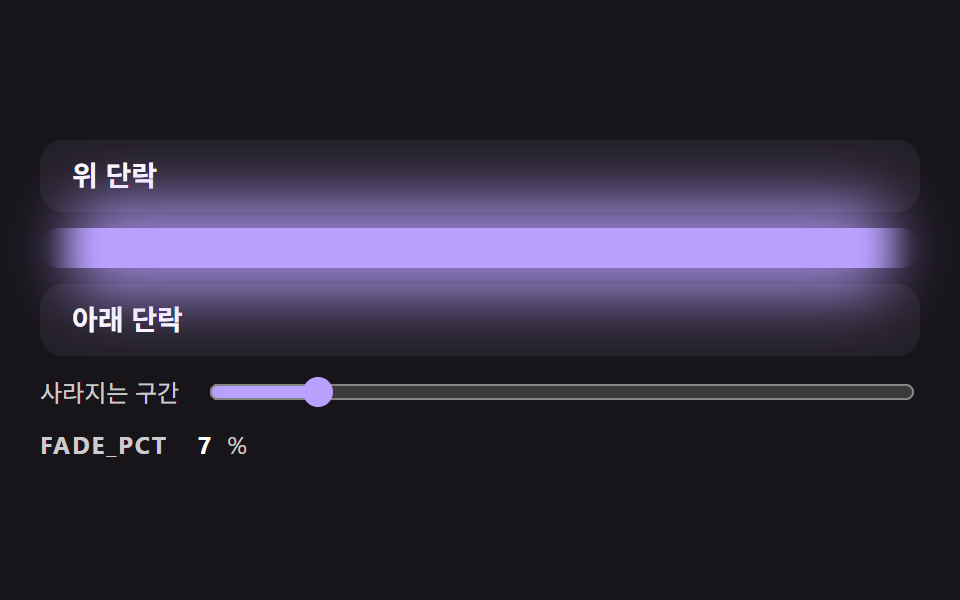 css 구분선 9가지 — 양 끝이 사라지고 글자 폭에 맞춰 선이 나뉘는 구분선 장면css 구분선은 선 한 줄이면 될 것 같지만, 양 끝이 뚝 잘려 어색하고 가운데 글자 폭에 선 길이가 안 맞고 섹션 경계가 직선이라 밋밋하다 — 01번·02번·04번이 하나씩 푼다. 이 편의 아홉 구분선은 선의 모양 이 글의 데모 전부 보기