css 구분선 9가지 — 양 끝이 사라지고 글자 폭에 맞춰 선이 나뉘는 구분선 장면
css 구분선은 선 한 줄이면 될 것 같지만, 양 끝이 뚝 잘려 어색하고 가운데 글자 폭에 선 길이가 안 맞고 섹션 경계가 직선이라 밋밋하다 — 01번·02번·04번이 하나씩 푼다. 이 편의 아홉 구분선은 선의 모양을 값으로 계산해 그린다.
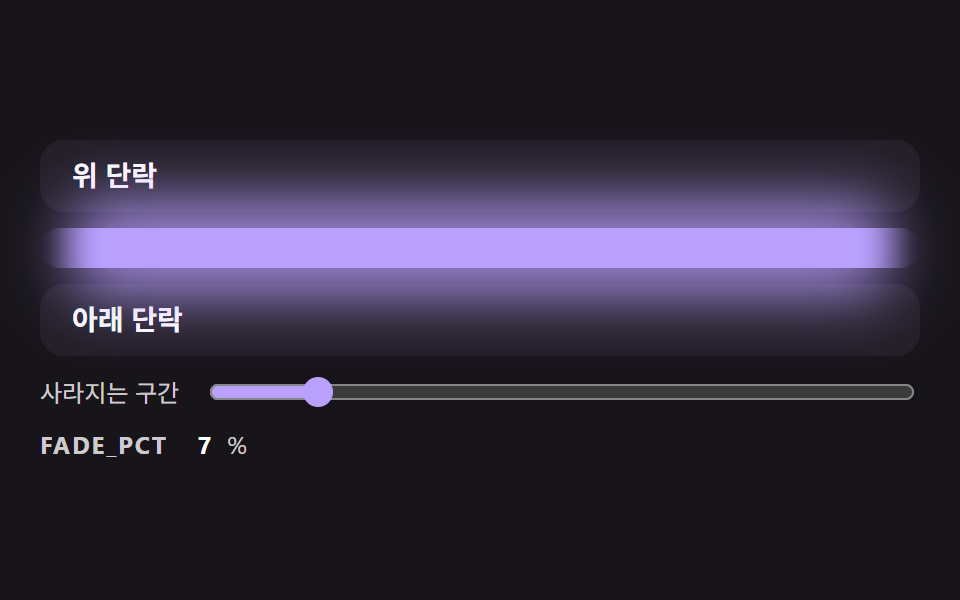 01 divl-gradient-fade-ends-line
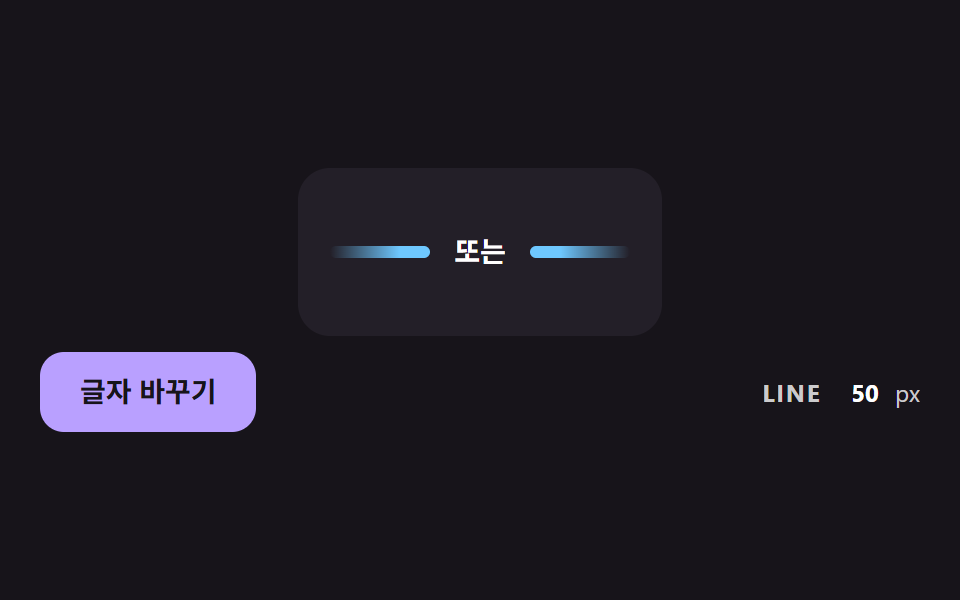 02 divl-centered-label-flex-lines
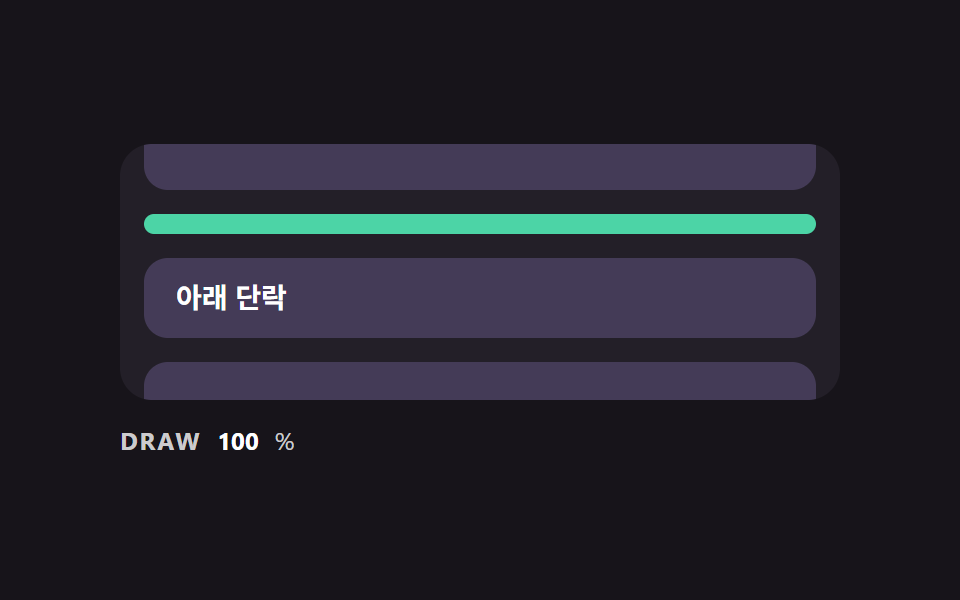 03 divl-scroll-draw-from-center
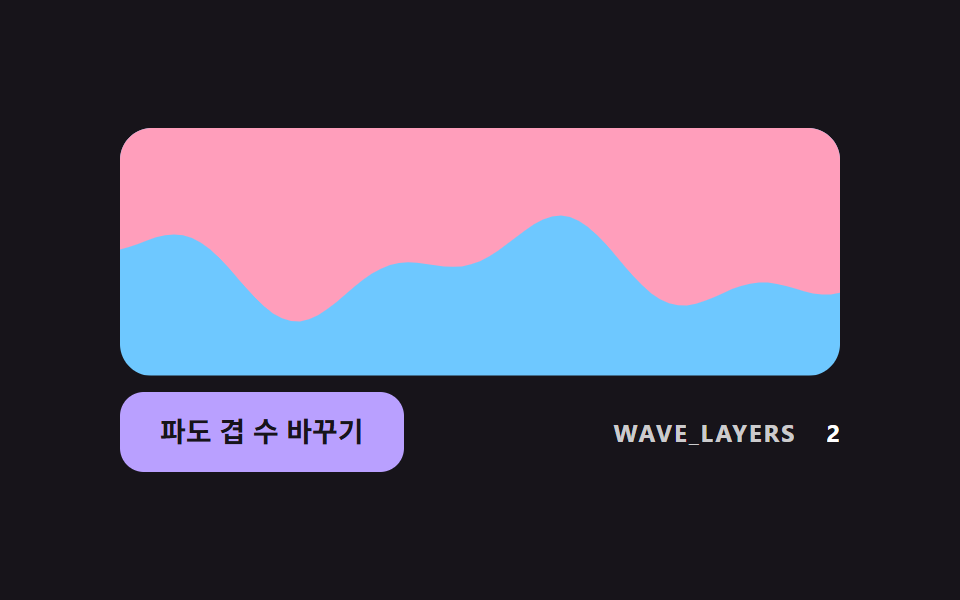 04 divl-sine-wave-section-edge
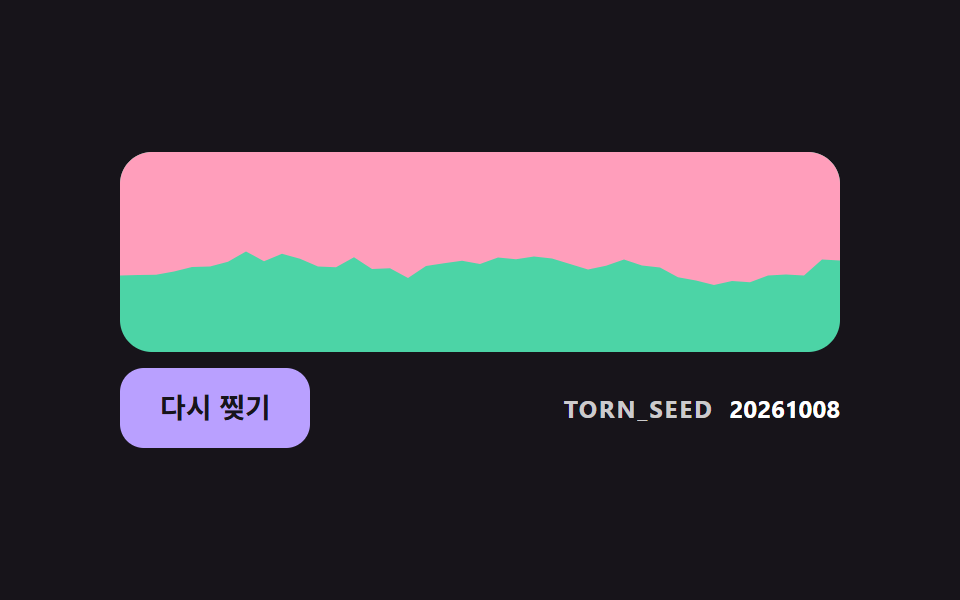 05 divl-torn-edge-seeded-noise
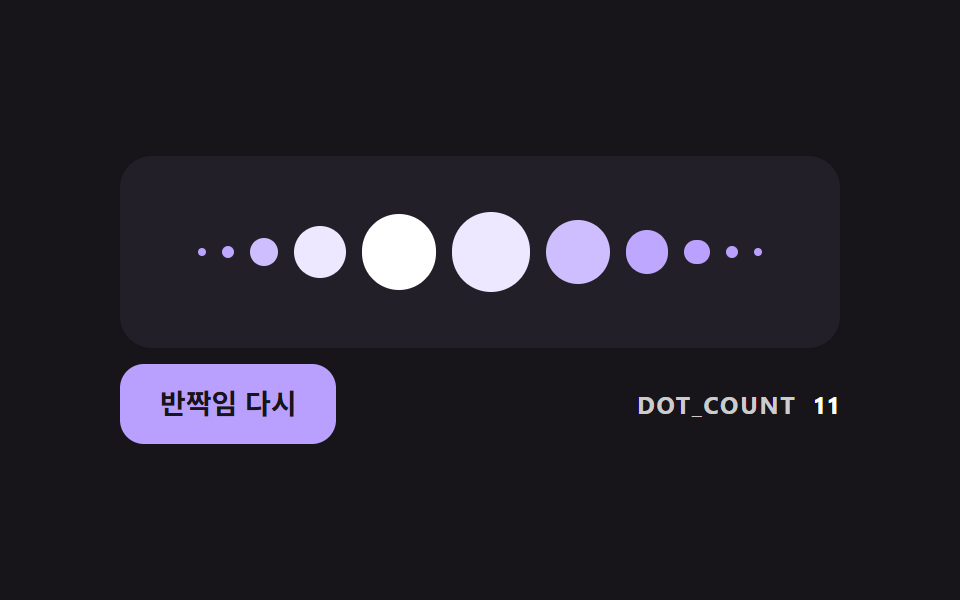 06 divl-dot-bell-curve-glint
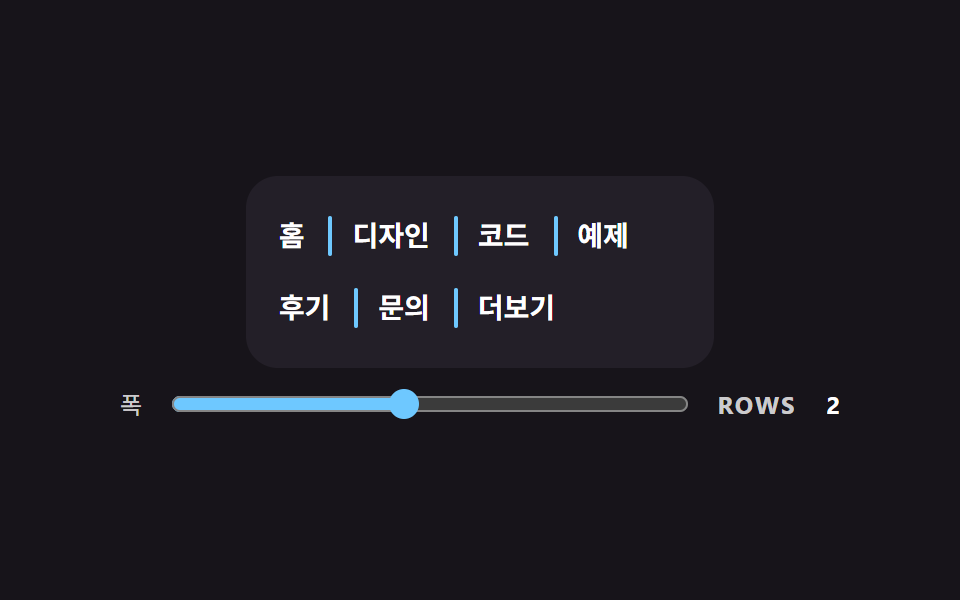 07 divl-vertical-wrap-aware-separator
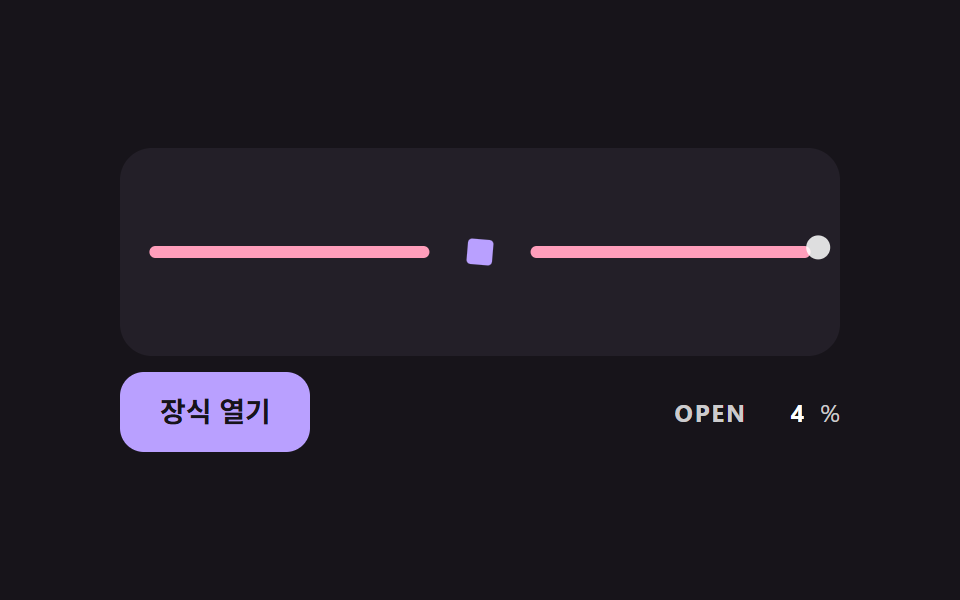 08 divl-ornament-proximity-open
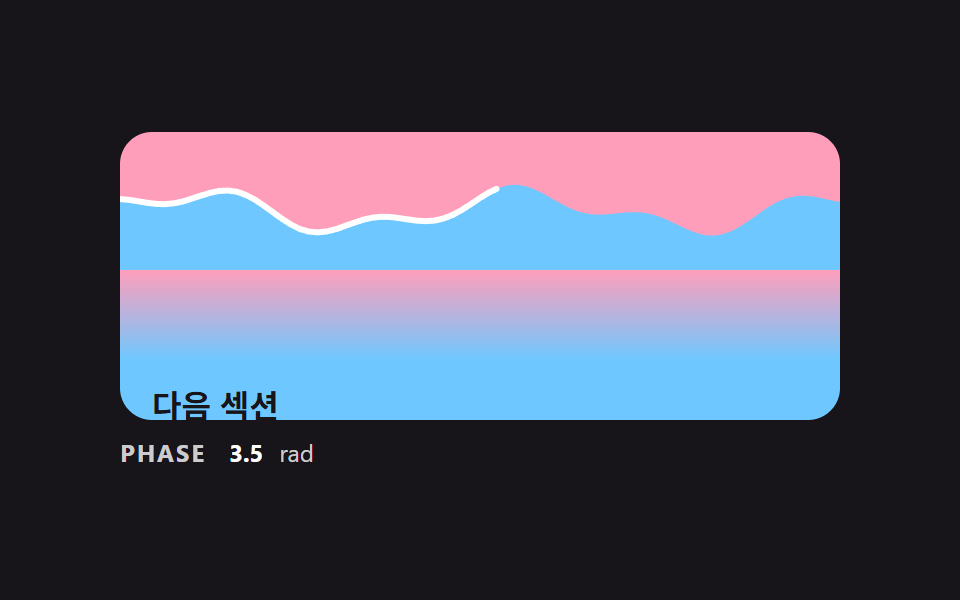 09 divl-section-handoff-wave-scene
자동 재생 · 눌러서 해당 항목으로 · 전부 한 zip
- 01 양 끝이 투명하게 사라지는 기본 구분선
- 02 가운데 글자 폭에 맞춰 양쪽 선이 나뉘는 구분선
- 03 스크롤 위치에 따라 가운데에서 양쪽으로 그려지는 구분선
- 04 사인 두 겹을 더해 만든 파도 섹션 경계
- 05 고정 시드 노이즈로 들쭉날쭉하게 자른 찢긴 종이 경계
- 06 가운데가 가장 큰 점 구분선과 한 번 지나가는 반짝임
- 07 줄이 바뀌어도 맨 앞에 남지 않는 세로 구분선
- 08 마우스가 가까워질수록 장식이 열리며 선이 벌어지는 구분선
- 09 두 섹션이 파도 경계로 넘겨지는 구분선 장면
css 구분선 9가지 — 선 모양을 계산해야 끝이 어색하지 않다
아홉 장면은 계산이 단순한 것부터 놓았다. 01 은 양 끝 알파 곡선 하나, 02 는 글자 폭을 뺀 길이 나누기, 03 은 스크롤 거리 비율이고, 04 와 05 는 사인과 시드 노이즈로 섹션 경계를 그린다. 06 은 점 크기의 종 곡선, 07 은 줄바꿈 판정, 08 은 포인터 거리, 09 는 스크롤 하나로 파도·선·번짐을 함께 움직이는 장면이다.
이런 화면에서 쓴다
랜딩 페이지의 섹션 사이는 01·04·09 가, 로그인 화면의 「또는」 줄처럼 글자가 끼는 자리는 02 가 맡는다. 메뉴나 태그 목록 사이의 css 세로 구분선은 07 이 다룬다. css after 구분선 처럼 가상 요소에 선을 맡기면 줄이 바뀐 항목 앞에도 선이 남는데, 07 은 ::before 선을 JS 판정으로 숨겨서 푼다. 글 읽기 화면은 03, 장식이 있는 소개 페이지는 06·08 이 어울린다.
이웃 편과 무엇이 다른가
멤피스 디자인 패턴 랜딩 키트, 점·물결 섹션 9개는 점과 물결 무늬를 한 장의 디자인으로 얹는 편이고, 이 편은 선과 경계의 모양을 숫자로 정한다. 화면이 바뀌는 순간을 다루는 CSS 화면 전환 효과 9종 — 화면이 바뀌는 순간 모음과 스크롤로 장면을 잇는 스크롤 스토리텔링 섹션 9종 — 복붙하는 CSS 장면 구성은 구분선을 한 요소로 쓰지 않는다.
기법별 코드로 보는 구분선
코드는 라이브러리 없이 일반 JS 와 CSS 로만 쓰였고, 03·09 의 스크롤 반응은 scroll 이벤트로 받는다. 03 은 getBoundingClientRect 로, 09 는 scrollTop 으로 진행도를 구하고 어느 장면도 IntersectionObserver 는 쓰지 않는다. 아래에는 각 장면에서 모양을 정하는 계산 구간만 소스 그대로 옮겼다.
01양 끝이 투명하게 사라지는 기본 구분선
양 끝 30% 구간에서만 알파가 0 에서 1 로 오르고, 직선 보간 대신 smoothstep 곡선을 쓰므로 선이 시작하는 자리에 띠가 생기지 않게 한다. 정지점을 위아래로 아홉 개씩 문자열로 만들어 같은 그라디언트를 선과 그 뒤의 번짐에 함께 준다. 시연 중 FADE_PCT 가 6 에서 50 사이를 오가며 움직인 프레임은 23개 중 23개다.
<main class="stage">
<div class="dv is-demo" id="dvRoot">
  <p class="dv__block">위 단락</p>
  <div class="dv__rail">
    <div class="dv__glow" id="dvGlow"></div>
    <div class="dv__line" id="dvLine" role="separator"></div>
  </div>
  <p class="dv__block">아래 단락</p>
  <label class="dv__ctrl">
    <span>사라지는 구간</span>
    <input type="range" id="dvRange" min="0" max="50" value="30">
  </label>
  <p class="dv__meta"><span class="dv__tag">FADE_PCT</span> <b id="dvPct">30</b>%</p>
</div>
</main>
@use "../../../../site/static/demo-tokens" as *;
// 핵심: 선 색의 알파를 양 끝 FADE_PCT% 구간에서만 smoothstep 곡선으로 올린다.
// 정지점은 JS 가 계산해 background 에 넣는다 (직선 보간보다 끝이 자연스럽다).
$line-h: 20px;
$line-color: $subject-lilac;
@include stage($stage-ink);
.dv {
width: min(100%, 440px);
display: grid;
gap: $sp-2;
}
.dv__block {
box-sizing: border-box;
margin: 0;
height: 36px;
padding: 0 $sp-4;
display: flex;
align-items: center;
border-radius: $r-control;
background: $tick-panel;
color: $stage-paper;
font-size: 14px;
font-weight: 700;
line-height: 20px;
}
.dv__rail {
position: relative;
height: $line-h;
}
.dv__glow {
position: absolute;
left: 0;
right: 0;
top: -14px;
bottom: -14px;
border-radius: $r-pill;
opacity: .8;
filter: blur(14px);
}
.dv__line {
position: relative;
height: $line-h;
border-radius: $r-pill;
background: $line-color;
}
.dv__ctrl {
display: flex;
align-items: center;
gap: $sp-3;
font-size: 12px;
line-height: 16px;
color: rgba($stage-paper, .78);
}
.dv__ctrl input { flex: 1; min-width: 0; accent-color: $line-color; }
.dv__meta {
margin: 0;
display: flex;
align-items: baseline;
gap: $sp-2;
font-size: 12px;
line-height: 16px;
color: rgba($stage-paper, .78);
}
.dv__tag { font-weight: 700; letter-spacing: .08em; }
.dv__meta b { min-width: 2ch; text-align: right; font-variant-numeric: tabular-nums; color: $stage-paper; }
@media (prefers-reduced-motion: reduce) {
.dv__line { transition: none; }
}html, body {
margin: 0;
overflow: hidden;
}
.stage {
box-sizing: border-box;
min-height: 100vh;
display: grid;
place-items: center;
margin: 0;
background: #17141a;
font-family: -apple-system, "Segoe UI", "Noto Sans KR", sans-serif;
padding: clamp(8px, 4vw, 24px);
}
.dv {
width: min(100%, 440px);
display: grid;
gap: 8px;
}
.dv__block {
box-sizing: border-box;
margin: 0;
height: 36px;
padding: 0 16px;
display: flex;
align-items: center;
border-radius: 12px;
background: #231f28;
color: #ffffff;
font-size: 14px;
font-weight: 700;
line-height: 20px;
}
.dv__rail {
position: relative;
height: 20px;
}
.dv__glow {
position: absolute;
left: 0;
right: 0;
top: -14px;
bottom: -14px;
border-radius: 999px;
opacity: 0.8;
filter: blur(14px);
}
.dv__line {
position: relative;
height: 20px;
border-radius: 999px;
background: #b9a0ff;
}
.dv__ctrl {
display: flex;
align-items: center;
gap: 12px;
font-size: 12px;
line-height: 16px;
color: rgba(255, 255, 255, 0.78);
}
.dv__ctrl input {
flex: 1;
min-width: 0;
accent-color: #b9a0ff;
}
.dv__meta {
margin: 0;
display: flex;
align-items: baseline;
gap: 8px;
font-size: 12px;
line-height: 16px;
color: rgba(255, 255, 255, 0.78);
}
.dv__tag {
font-weight: 700;
letter-spacing: 0.08em;
}
.dv__meta b {
min-width: 2ch;
text-align: right;
font-variant-numeric: tabular-nums;
color: #ffffff;
}
@media (prefers-reduced-motion: reduce) {
.dv__line {
transition: none;
}
}(function () {
// 기법: 선 색의 알파를 양 끝 FADE_PCT% 구간에서만 0 에서 1 로 올린다.
// 직선 보간은 선이 시작하는 곳에 띠가 보여서 smoothstep(3t^2 - 2t^3) 곡선으로 8단계 정지점을 직접 만든다.
var FADE_PCT = 30;
var LINE_H_PX = 20;
var STEPS = 8;
var CYCLE_MS = 2000;
var LOW_PCT = 6;
var HIGH_PCT = 50;
var RGB = '185,160,255';
var root = document.getElementById('dvRoot');
var line = document.getElementById('dvLine');
var glow = document.getElementById('dvGlow');
var range = document.getElementById('dvRange');
var pctEl = document.getElementById('dvPct');
var reduce = window.matchMedia('(prefers-reduced-motion: reduce)').matches;
  function gradientOf(pct) {
    var stops = [];
    var i;
    for (i = 0; i <= STEPS; i += 1) {
      var t = i / STEPS;
      var a = t * t * (3 - 2 * t);
      stops.push('rgba(' + RGB + ',' + a.toFixed(3) + ') ' + (pct * t).toFixed(2) + '%');
    }
    for (i = STEPS; i >= 0; i -= 1) {
      var u = i / STEPS;
      var b = u * u * (3 - 2 * u);
      stops.push('rgba(' + RGB + ',' + b.toFixed(3) + ') ' + (100 - pct * u).toFixed(2) + '%');
    }
    return 'linear-gradient(90deg,' + stops.join(',') + ')';
  }
function paint(pct) {
var g = gradientOf(pct);
line.style.background = g;
glow.style.background = g;
pctEl.textContent = String(Math.round(pct));
range.value = String(Math.round(pct));
}
function stopDemo() { root.classList.remove('is-demo'); }
range.addEventListener('input', function () {
stopDemo();
FADE_PCT = Number(range.value);
paint(FADE_PCT);
});
var t0 = null;
function tick(ts) {
if (t0 === null) t0 = ts;
if (root.classList.contains('is-demo')) {
var phase = ((ts - t0) % CYCLE_MS) / CYCLE_MS;
var wave = 0.5 - 0.5 * Math.cos(phase * Math.PI * 2);
paint(LOW_PCT + (HIGH_PCT - LOW_PCT) * wave);
}
requestAnimationFrame(tick);
}
line.style.height = LINE_H_PX + 'px';
paint(FADE_PCT);
if (reduce) {
stopDemo();
} else {
requestAnimationFrame(tick);
}
})();// FadeDivider — vanilla 판(01-divl-gradient-fade-ends-line) 의 React 포트.
// 선 색의 알파를 양 끝 FADE_PCT% 구간에서만 smoothstep 곡선으로 올린다. 정지점은 JS 가 계산한다.
import { useEffect, useRef } from "react";
import styles from "./FadeDivider.module.scss";
type Box<T> = { current: T };
const LINE_H_PX = 20;
const STEPS = 8;
const CYCLE_MS = 2000;
const LOW_PCT = 6;
const HIGH_PCT = 50;
const RGB = "185,160,255";
function gradientOf(pct: number): string {
const stops: string[] = [];
for (let i = 0; i <= STEPS; i += 1) {
const t = i / STEPS;
const a = t * t * (3 - 2 * t);
stops.push("rgba(" + RGB + "," + a.toFixed(3) + ") " + (pct * t).toFixed(2) + "%");
}
for (let i = STEPS; i >= 0; i -= 1) {
const u = i / STEPS;
const b = u * u * (3 - 2 * u);
stops.push("rgba(" + RGB + "," + b.toFixed(3) + ") " + (100 - pct * u).toFixed(2) + "%");
}
return "linear-gradient(90deg," + stops.join(",") + ")";
}
export default function FadeDivider() {
const lineRef = useRef<HTMLDivElement | null>(null) as Box<HTMLDivElement | null>;
const glowRef = useRef<HTMLDivElement | null>(null) as Box<HTMLDivElement | null>;
const rangeRef = useRef<HTMLInputElement | null>(null) as Box<HTMLInputElement | null>;
const pctRef = useRef<HTMLElement | null>(null) as Box<HTMLElement | null>;
useEffect(() => {
const line = lineRef.current;
const glow = glowRef.current;
const range = rangeRef.current;
const pctEl = pctRef.current;
if (!line || !glow || !range || !pctEl) return;
const reduce = window.matchMedia("(prefers-reduced-motion: reduce)").matches;
let demo = !reduce;
let t0: number | null = null;
let raf = 0;
const paint = (pct: number): void => {
const g = gradientOf(pct);
line.style.background = g;
glow.style.background = g;
pctEl.textContent = String(Math.round(pct));
range.value = String(Math.round(pct));
};
const onInput = (): void => {
demo = false;
paint(Number(range.value));
};
range.addEventListener("input", onInput);
function tick(ts: number): void {
if (t0 === null) t0 = ts;
if (demo) {
const phase = ((ts - t0) % CYCLE_MS) / CYCLE_MS;
const wave = 0.5 - 0.5 * Math.cos(phase * Math.PI * 2);
paint(LOW_PCT + (HIGH_PCT - LOW_PCT) * wave);
}
raf = requestAnimationFrame(tick);
}
line.style.height = LINE_H_PX + "px";
paint(30);
if (!reduce) raf = requestAnimationFrame(tick);
return () => {
cancelAnimationFrame(raf);
range.removeEventListener("input", onInput);
};
}, []);
return (
<div className={styles.dv}>
<p className={styles.block}>위 단락</p>
<div className={styles.rail}>
<div className={styles.glow} ref={glowRef} />
<div className={styles.line} ref={lineRef} role="separator" />
</div>
<p className={styles.block}>아래 단락</p>
<label className={styles.ctrl}>
<span>사라지는 구간</span>
<input type="range" min={0} max={50} defaultValue={30} ref={rangeRef} />
</label>
<p className={styles.meta}>
<span className={styles.tag}>FADE_PCT</span> <b ref={pctRef}>30</b>%
</p>
</div>
);
}01 · 양 끝이 투명하게 사라지는 기본 구분선 — 측정 누적면적 20.444% · 움직인 프레임 23/23GODRICH 원작 · zip 에 SCSS·React 포함 · 비밀번호 보기
function gradientOf(pct) {
var stops = [];
var i;
for (i = 0; i <= STEPS; i += 1) {
var t = i / STEPS;
var a = t * t * (3 - 2 * t);
stops.push('rgba(' + RGB + ',' + a.toFixed(3) + ') ' + (pct * t).toFixed(2) + '%');
}
for (i = STEPS; i >= 0; i -= 1) {
var u = i / STEPS;
var b = u * u * (3 - 2 * u);
stops.push('rgba(' + RGB + ',' + b.toFixed(3) + ') ' + (100 - pct * u).toFixed(2) + '%');
}
return 'linear-gradient(90deg,' + stops.join(',') + ')';
}
02가운데 글자 폭에 맞춰 양쪽 선이 나뉘는 구분선
글자 폭을 getBoundingClientRect 로 재고, 줄 폭에서 글자 폭과 글자 양옆 간격 12px 씩을 뺀 나머지를 반으로 갈라 두 선의 width 로 준다. 글자가 바뀌어도 선이 한쪽으로 쏠리지 않고 카드 폭이 180 에서 420 사이를 오가도 매 프레임 다시 계산한다. 움직인 프레임은 23/23 이다.
<main class="stage">
<div class="dv is-demo" id="dvRoot">
  <div class="dv__card" id="dvCard">
    <div class="dv__row" id="dvRow" role="separator">
      <span class="dv__side" id="dvLeft"></span>
      <span class="dv__label" id="dvLabel">또는</span>
      <span class="dv__side dv__side--right" id="dvRight"></span>
    </div>
  </div>
  <div class="dv__bar">
  <button class="dv__btn" id="dvBtn" type="button">글자 바꾸기</button>
  <p class="dv__meta"><span class="dv__tag">LINE</span> <b id="dvPx">0</b><span>px</span></p>
  </div>
</div>
</main>
@use "../../../../site/static/demo-tokens" as *;
// 핵심: 가운데 글자 폭을 재서 양쪽 선 폭을 (줄 폭 - 글자 폭 - 간격 * 2) / 2 로 직접 계산한다.
$line-h: 6px;
$label-gap: 12px;
$line-color: $subject-sky;
@include stage($stage-ink);
.dv {
width: min(100%, 440px);
display: grid;
gap: $sp-2;
justify-items: center;
}
.dv__card {
box-sizing: border-box;
width: 420px;
max-width: 100%;
padding: $sp-8 $sp-4;
border-radius: $r-card;
background: $tick-panel;
}
.dv__row {
display: flex;
align-items: center;
gap: $label-gap;
}
.dv__side {
display: block;
flex: none;
height: $line-h;
border-radius: $r-pill;
background: linear-gradient(90deg, rgba($line-color, 0), $line-color 70%);
}
.dv__side--right { background: linear-gradient(270deg, rgba($line-color, 0), $line-color 70%); }
.dv__label {
flex: none;
color: $stage-paper;
font-size: 14px;
font-weight: 700;
line-height: 20px;
white-space: nowrap;
}
.dv__btn {
box-sizing: border-box;
height: 40px;
padding: 0 $sp-5;
border: 0;
border-radius: $r-control;
background: $subject-lilac;
color: $subject-ink;
font-family: inherit;
font-size: 14px;
font-weight: 700;
line-height: 20px;
cursor: pointer;
}
.dv__btn:focus-visible { outline: 3px solid $stage-paper; outline-offset: 3px; }
.dv__meta {
margin: 0;
display: flex;
flex-wrap: wrap;
align-items: baseline;
gap: $sp-2;
font-size: 12px;
line-height: 16px;
color: rgba($stage-paper, .78);
}
.dv__tag { font-weight: 700; letter-spacing: .08em; }
.dv__meta b { min-width: 3ch; text-align: right; font-variant-numeric: tabular-nums; color: $stage-paper; }
@media (prefers-reduced-motion: reduce) {
.dv__btn { transition: none; }
}
.dv__bar { box-sizing: border-box; width: 100%; display: flex; flex-wrap: wrap; align-items: center; justify-content: space-between; gap: $sp-2 $sp-3; }html, body {
margin: 0;
overflow: hidden;
}
.stage {
box-sizing: border-box;
min-height: 100vh;
display: grid;
place-items: center;
margin: 0;
background: #17141a;
font-family: -apple-system, "Segoe UI", "Noto Sans KR", sans-serif;
padding: clamp(8px, 4vw, 24px);
}
.dv {
width: min(100%, 440px);
display: grid;
gap: 8px;
justify-items: center;
}
.dv__card {
box-sizing: border-box;
width: 420px;
max-width: 100%;
padding: 32px 16px;
border-radius: 16px;
background: #231f28;
}
.dv__row {
display: flex;
align-items: center;
gap: 12px;
}
.dv__side {
display: block;
flex: none;
height: 6px;
border-radius: 999px;
background: linear-gradient(90deg, rgba(110, 200, 255, 0), #6ec8ff 70%);
}
.dv__side--right {
background: linear-gradient(270deg, rgba(110, 200, 255, 0), #6ec8ff 70%);
}
.dv__label {
flex: none;
color: #ffffff;
font-size: 14px;
font-weight: 700;
line-height: 20px;
white-space: nowrap;
}
.dv__btn {
box-sizing: border-box;
height: 40px;
padding: 0 20px;
border: 0;
border-radius: 12px;
background: #b9a0ff;
color: #17141a;
font-family: inherit;
font-size: 14px;
font-weight: 700;
line-height: 20px;
cursor: pointer;
}
.dv__btn:focus-visible {
outline: 3px solid #ffffff;
outline-offset: 3px;
}
.dv__meta {
margin: 0;
display: flex;
flex-wrap: wrap;
align-items: baseline;
gap: 8px;
font-size: 12px;
line-height: 16px;
color: rgba(255, 255, 255, 0.78);
}
.dv__tag {
font-weight: 700;
letter-spacing: 0.08em;
}
.dv__meta b {
min-width: 3ch;
text-align: right;
font-variant-numeric: tabular-nums;
color: #ffffff;
}
@media (prefers-reduced-motion: reduce) {
.dv__btn {
transition: none;
}
}
.dv__bar {
box-sizing: border-box;
width: 100%;
display: flex;
flex-wrap: wrap;
align-items: center;
justify-content: space-between;
gap: 8px 12px;
}(function () {
// 기법: 글자 폭을 getBoundingClientRect 로 재고, 양쪽 선 폭 = (줄 폭 - 글자 폭 - LABEL_GAP * 2) / 2 를 직접 계산해 width 로 준다.
// 데모는 카드 폭을 시간에 따라 줄였다 늘리고 글자를 돌려 가며 매 프레임 다시 계산한다.
var LABEL_GAP = 12;
var LINE_H_PX = 6;
var CYCLE_MS = 2000;
var NARROW_PX = 180;
var WIDE_PX = 420;
var LABELS = ['또는', '다른 방법으로 계속', '여기까지 읽은 내용'];
var root = document.getElementById('dvRoot');
var card = document.getElementById('dvCard');
var row = document.getElementById('dvRow');
var left = document.getElementById('dvLeft');
var right = document.getElementById('dvRight');
var label = document.getElementById('dvLabel');
var btn = document.getElementById('dvBtn');
var pxEl = document.getElementById('dvPx');
var reduce = window.matchMedia('(prefers-reduced-motion: reduce)').matches;
var labelIndex = 0;
  function layout() {
    var rowW = row.getBoundingClientRect().width;
    var labelW = label.getBoundingClientRect().width;
    var side = Math.max(0, (rowW - labelW - LABEL_GAP * 2) / 2);
    left.style.width = side.toFixed(1) + 'px';
    right.style.width = side.toFixed(1) + 'px';
    pxEl.textContent = String(Math.round(side));
  }
function setLabel(i) {
labelIndex = i;
label.textContent = LABELS[i];
}
function stopDemo() { root.classList.remove('is-demo'); }
btn.addEventListener('click', function () {
stopDemo();
setLabel((labelIndex + 1) % LABELS.length);
layout();
});
var t0 = null;
function tick(ts) {
if (t0 === null) t0 = ts;
if (root.classList.contains('is-demo')) {
var now = ts - t0;
var phase = (now % CYCLE_MS) / CYCLE_MS;
var wave = 0.5 - 0.5 * Math.cos(phase * Math.PI * 2);
card.style.width = (NARROW_PX + (WIDE_PX - NARROW_PX) * wave).toFixed(1) + 'px';
var i = Math.floor(now / CYCLE_MS * 3) % LABELS.length;
if (i !== labelIndex) setLabel(i);
layout();
}
requestAnimationFrame(tick);
}
left.style.height = LINE_H_PX + 'px';
right.style.height = LINE_H_PX + 'px';
layout();
if (reduce) {
stopDemo();
} else {
requestAnimationFrame(tick);
}
})();// LabelDivider — vanilla 판(02-divl-centered-label-flex-lines) 의 React 포트.
// 가운데 글자 폭을 재서 양쪽 선 폭을 (줄 폭 - 글자 폭 - LABEL_GAP * 2) / 2 로 직접 계산한다.
import { useEffect, useRef } from "react";
import styles from "./LabelDivider.module.scss";
type Box<T> = { current: T };
const LABEL_GAP = 12;
const LINE_H_PX = 6;
const CYCLE_MS = 2000;
const NARROW_PX = 180;
const WIDE_PX = 420;
const LABELS: string[] = ["또는", "다른 방법으로 계속", "여기까지 읽은 내용"];
export default function LabelDivider() {
const cardRef = useRef<HTMLDivElement | null>(null) as Box<HTMLDivElement | null>;
const rowRef = useRef<HTMLDivElement | null>(null) as Box<HTMLDivElement | null>;
const leftRef = useRef<HTMLSpanElement | null>(null) as Box<HTMLSpanElement | null>;
const rightRef = useRef<HTMLSpanElement | null>(null) as Box<HTMLSpanElement | null>;
const labelRef = useRef<HTMLSpanElement | null>(null) as Box<HTMLSpanElement | null>;
const btnRef = useRef<HTMLButtonElement | null>(null) as Box<HTMLButtonElement | null>;
const pxRef = useRef<HTMLElement | null>(null) as Box<HTMLElement | null>;
useEffect(() => {
const card = cardRef.current;
const row = rowRef.current;
const left = leftRef.current;
const right = rightRef.current;
const label = labelRef.current;
const btn = btnRef.current;
const pxEl = pxRef.current;
if (!card || !row || !left || !right || !label || !btn || !pxEl) return;
const reduce = window.matchMedia("(prefers-reduced-motion: reduce)").matches;
let demo = !reduce;
let labelIndex = 0;
let t0: number | null = null;
let raf = 0;
const layout = (): void => {
const rowW = row.getBoundingClientRect().width;
const labelW = label.getBoundingClientRect().width;
const side = Math.max(0, (rowW - labelW - LABEL_GAP * 2) / 2);
left.style.width = side.toFixed(1) + "px";
right.style.width = side.toFixed(1) + "px";
pxEl.textContent = String(Math.round(side));
};
const setLabel = (i: number): void => {
labelIndex = i;
label.textContent = LABELS[i];
};
const onClick = (): void => {
demo = false;
setLabel((labelIndex + 1) % LABELS.length);
layout();
};
btn.addEventListener("click", onClick);
const tick = (ts: number): void => {
if (t0 === null) t0 = ts;
if (demo) {
const now = ts - t0;
const phase = (now % CYCLE_MS) / CYCLE_MS;
const wave = 0.5 - 0.5 * Math.cos(phase * Math.PI * 2);
card.style.width = (NARROW_PX + (WIDE_PX - NARROW_PX) * wave).toFixed(1) + "px";
const i = Math.floor((now / CYCLE_MS) * 3) % LABELS.length;
if (i !== labelIndex) setLabel(i);
layout();
}
raf = requestAnimationFrame(tick);
};
left.style.height = LINE_H_PX + "px";
right.style.height = LINE_H_PX + "px";
layout();
if (!reduce) raf = requestAnimationFrame(tick);
return () => {
cancelAnimationFrame(raf);
btn.removeEventListener("click", onClick);
};
}, []);
return (
<div className={styles.dv}>
<div className={styles.card} ref={cardRef}>
<div className={styles.row} ref={rowRef} role="separator">
<span className={styles.side} ref={leftRef} />
<span className={styles.label} ref={labelRef}>또는</span>
<span className={styles.sideRight} ref={rightRef} />
</div>
</div>
<div className={styles.bar}>
<button className={styles.btn} ref={btnRef} type="button">글자 바꾸기</button>
<p className={styles.meta}>
<span className={styles.tag}>LINE</span> <b ref={pxRef}>0</b>
<span>px</span>
</p>
</div>
</div>
);
}02 · 가운데 글자 폭에 맞춰 양쪽 선이 나뉘는 구분선 — 측정 누적면적 15.208% · 움직인 프레임 23/23GODRICH 원작 · zip 에 SCSS·React 포함 · 비밀번호 보기
function layout() {
var rowW = row.getBoundingClientRect().width;
var labelW = label.getBoundingClientRect().width;
var side = Math.max(0, (rowW - labelW - LABEL_GAP * 2) / 2);
left.style.width = side.toFixed(1) + 'px';
right.style.width = side.toFixed(1) + 'px';
pxEl.textContent = String(Math.round(side));
}
03스크롤 위치에 따라 가운데에서 양쪽으로 그려지는 구분선
스크롤 이벤트가 올 때마다 선이 영역 바닥에서 올라온 거리를 재서 80px 로 나누고, 그 비율만큼 clip-path 를 양쪽에서 연다. 선이 가운데에서 양옆으로 그려지고 위로 되돌리면 다시 줄어든다. 시연에서는 코드가 scrollTop 을 움직였고 움직인 프레임은 23/23 이다.
<main class="stage">
<div class="dv is-demo" id="dvRoot">
  <div class="dv__scroller" id="dvScroller" tabindex="0" aria-label="스크롤 영역">
    <div class="dv__block">위 단락</div>
    <div class="dv__block dv__block--tall">위 단락</div>
    <div class="dv__line" id="dvLine" role="separator"></div>
    <div class="dv__block">아래 단락</div>
    <div class="dv__block dv__block--tall">아래 단락</div>
  </div>
  <p class="dv__meta"><span class="dv__tag">DRAW</span> <b id="dvPct">0</b>%</p>
</div>
</main>
@use "../../../../site/static/demo-tokens" as *;
// 핵심: 스크롤로 올라온 거리(DRAW_RANGE_PX 기준)를 clip-path inset 으로 바꿔 선이 가운데에서 양쪽으로 열린다.
$line-h: 10px;
$line-color: $subject-mint;
@include stage($stage-ink);
.dv {
width: min(100%, 360px);
display: grid;
gap: $sp-3;
}
.dv__scroller {
box-sizing: border-box;
height: 128px;
overflow-y: auto;
scrollbar-width: none;
display: grid;
gap: $sp-3;
align-content: start;
padding: $sp-3;
border-radius: $r-card;
background: $tick-panel;
}
.dv__scroller::-webkit-scrollbar { display: none; }
.dv__scroller:focus-visible { outline: 3px solid $stage-paper; outline-offset: 3px; }
.dv__block {
box-sizing: border-box;
height: 40px;
padding: 0 $sp-4;
display: flex;
align-items: center;
border-radius: $r-control;
background: rgba($subject-lilac, .22);
color: $stage-paper;
font-size: 14px;
font-weight: 700;
line-height: 20px;
}
.dv__block--tall { height: 72px; }
.dv__line {
flex: none;
height: $line-h;
background: $line-color;
clip-path: inset(0 50% 0 50% round 6px);
}
.dv__meta {
margin: 0;
display: flex;
align-items: baseline;
gap: $sp-2;
font-size: 12px;
line-height: 16px;
color: rgba($stage-paper, .78);
}
.dv__tag { font-weight: 700; letter-spacing: .08em; }
.dv__meta b { min-width: 3ch; text-align: right; font-variant-numeric: tabular-nums; color: $stage-paper; }
@media (prefers-reduced-motion: reduce) {
.dv__line { transition: none; }
}html, body {
margin: 0;
overflow: hidden;
}
.stage {
box-sizing: border-box;
min-height: 100vh;
display: grid;
place-items: center;
margin: 0;
background: #17141a;
font-family: -apple-system, "Segoe UI", "Noto Sans KR", sans-serif;
padding: clamp(8px, 4vw, 24px);
}
.dv {
width: min(100%, 360px);
display: grid;
gap: 12px;
}
.dv__scroller {
box-sizing: border-box;
height: 128px;
overflow-y: auto;
scrollbar-width: none;
display: grid;
gap: 12px;
align-content: start;
padding: 12px;
border-radius: 16px;
background: #231f28;
}
.dv__scroller::-webkit-scrollbar {
display: none;
}
.dv__scroller:focus-visible {
outline: 3px solid #ffffff;
outline-offset: 3px;
}
.dv__block {
box-sizing: border-box;
height: 40px;
padding: 0 16px;
display: flex;
align-items: center;
border-radius: 12px;
background: rgba(185, 160, 255, 0.22);
color: #ffffff;
font-size: 14px;
font-weight: 700;
line-height: 20px;
}
.dv__block--tall {
height: 72px;
}
.dv__line {
flex: none;
height: 10px;
background: #4cd4a6;
clip-path: inset(0 50% 0 50% round 6px);
}
.dv__meta {
margin: 0;
display: flex;
align-items: baseline;
gap: 8px;
font-size: 12px;
line-height: 16px;
color: rgba(255, 255, 255, 0.78);
}
.dv__tag {
font-weight: 700;
letter-spacing: 0.08em;
}
.dv__meta b {
min-width: 3ch;
text-align: right;
font-variant-numeric: tabular-nums;
color: #ffffff;
}
@media (prefers-reduced-motion: reduce) {
.dv__line {
transition: none;
}
}(function () {
// 기법: scroll 이벤트마다 선의 위치를 getBoundingClientRect 로 재서 진행도를 구하고, 그 값만큼 clip-path 를 양쪽에서 연다.
// IntersectionObserver 는 쓰지 않는다. 진행도 = 선이 영역 바닥을 지나 올라온 거리 / DRAW_RANGE_PX 이다.
var DRAW_RANGE_PX = 80;
var DRAW_MIN_PCT = 0;
var CYCLE_MS = 2000;
var root = document.getElementById('dvRoot');
var scroller = document.getElementById('dvScroller');
var line = document.getElementById('dvLine');
var pctEl = document.getElementById('dvPct');
var reduce = window.matchMedia('(prefers-reduced-motion: reduce)').matches;
  function update() {
    var box = scroller.getBoundingClientRect();
    var lineBox = line.getBoundingClientRect();
    var risen = box.bottom - lineBox.top;
    var p = Math.min(1, Math.max(0, risen / DRAW_RANGE_PX));
    var pct = DRAW_MIN_PCT + (100 - DRAW_MIN_PCT) * p;
    var edge = (100 - pct) / 2;
    line.style.clipPath = 'inset(0 ' + edge.toFixed(2) + '% 0 ' + edge.toFixed(2) + '% round 6px)';
    pctEl.textContent = String(Math.round(pct));
  }
function stopDemo() { root.classList.remove('is-demo'); }
scroller.addEventListener('scroll', update);
scroller.addEventListener('wheel', stopDemo, { passive: true });
scroller.addEventListener('pointerdown', stopDemo);
scroller.addEventListener('keydown', stopDemo);
var t0 = null;
function tick(ts) {
if (t0 === null) t0 = ts;
if (root.classList.contains('is-demo')) {
var max = scroller.scrollHeight - scroller.clientHeight;
var phase = ((ts - t0) % CYCLE_MS) / CYCLE_MS;
var tri = phase < 0.5 ? phase * 2 : 2 - phase * 2;
scroller.scrollTop = max * tri;
}
requestAnimationFrame(tick);
}
if (reduce) {
stopDemo();
scroller.scrollTop = (scroller.scrollHeight - scroller.clientHeight) / 2;
update();
} else {
update();
requestAnimationFrame(tick);
}
})();// ScrollDrawDivider — vanilla 판(03-divl-scroll-draw-from-center) 의 React 포트.
// scroll 이벤트마다 선의 위치를 getBoundingClientRect 로 재서 진행도를 구하고 clip-path 를 양쪽에서 연다.
import { useEffect, useRef } from "react";
import styles from "./ScrollDrawDivider.module.scss";
type Box<T> = { current: T };
const DRAW_RANGE_PX = 80;
const DRAW_MIN_PCT = 0;
const CYCLE_MS = 2000;
export default function ScrollDrawDivider() {
const scrollerRef = useRef<HTMLDivElement | null>(null) as Box<HTMLDivElement | null>;
const lineRef = useRef<HTMLDivElement | null>(null) as Box<HTMLDivElement | null>;
const pctRef = useRef<HTMLElement | null>(null) as Box<HTMLElement | null>;
useEffect(() => {
const scroller = scrollerRef.current;
const line = lineRef.current;
const pctEl = pctRef.current;
if (!scroller || !line || !pctEl) return;
const reduce = window.matchMedia("(prefers-reduced-motion: reduce)").matches;
let demo = !reduce;
let t0: number | null = null;
let raf = 0;
const update = (): void => {
const box = scroller.getBoundingClientRect();
const lineBox = line.getBoundingClientRect();
const risen = box.bottom - lineBox.top;
const p = Math.min(1, Math.max(0, risen / DRAW_RANGE_PX));
const pct = DRAW_MIN_PCT + (100 - DRAW_MIN_PCT) * p;
const edge = (100 - pct) / 2;
line.style.clipPath = "inset(0 " + edge.toFixed(2) + "% 0 " + edge.toFixed(2) + "% round 6px)";
pctEl.textContent = String(Math.round(pct));
};
const stopDemo = (): void => { demo = false; };
scroller.addEventListener("scroll", update);
scroller.addEventListener("wheel", stopDemo, { passive: true });
scroller.addEventListener("pointerdown", stopDemo);
scroller.addEventListener("keydown", stopDemo);
const tick = (ts: number): void => {
if (t0 === null) t0 = ts;
if (demo) {
const max = scroller.scrollHeight - scroller.clientHeight;
const phase = ((ts - t0) % CYCLE_MS) / CYCLE_MS;
const tri = phase < 0.5 ? phase * 2 : 2 - phase * 2;
scroller.scrollTop = max * tri;
}
raf = requestAnimationFrame(tick);
};
if (reduce) {
scroller.scrollTop = (scroller.scrollHeight - scroller.clientHeight) / 2;
update();
} else {
update();
raf = requestAnimationFrame(tick);
}
return () => {
cancelAnimationFrame(raf);
scroller.removeEventListener("scroll", update);
scroller.removeEventListener("wheel", stopDemo);
scroller.removeEventListener("pointerdown", stopDemo);
scroller.removeEventListener("keydown", stopDemo);
};
}, []);
return (
<div className={styles.dv}>
<div className={styles.scroller} ref={scrollerRef} tabIndex={0} aria-label="스크롤 영역">
<div className={styles.block}>위 단락</div>
<div className={styles.blockTall}>위 단락</div>
<div className={styles.line} ref={lineRef} role="separator" />
<div className={styles.block}>아래 단락</div>
<div className={styles.blockTall}>아래 단락</div>
</div>
<p className={styles.meta}>
<span className={styles.tag}>DRAW</span> <b ref={pctRef}>0</b>%
</p>
</div>
);
}03 · 스크롤 위치에 따라 가운데에서 양쪽으로 그려지는 구분선 — 측정 누적면적 29.984% · 움직인 프레임 23/23GODRICH 원작 · zip 에 SCSS·React 포함 · 비밀번호 보기
function update() {
var box = scroller.getBoundingClientRect();
var lineBox = line.getBoundingClientRect();
var risen = box.bottom - lineBox.top;
var p = Math.min(1, Math.max(0, risen / DRAW_RANGE_PX));
var pct = DRAW_MIN_PCT + (100 - DRAW_MIN_PCT) * p;
var edge = (100 - pct) / 2;
line.style.clipPath = 'inset(0 ' + edge.toFixed(2) + '% 0 ' + edge.toFixed(2) + '% round 6px)';
pctEl.textContent = String(Math.round(pct));
}
04사인 두 겹을 더해 만든 파도 섹션 경계
주기 190 과 83 인 사인 두 개를 더해 경계 높이를 정하고, 4px 간격으로 찍은 점을 이어 SVG path 의 d 를 직접 만든다. 두 주기가 약분되지 않아 합친 곡선은 화면 폭 안에서 같은 모양이 되풀이되지 않고, 버튼으로 파도 겹이 1 에서 3 까지 바뀐다. 움직인 프레임은 23/23 이다.
<main class="stage">
<div class="dv is-demo" id="dvRoot">
  <svg class="dv__svg" id="dvSvg" viewBox="0 0 320 110" aria-hidden="true" focusable="false">
    <rect class="dv__under" x="0" y="0" width="320" height="110"></rect>
    <path class="dv__over" id="dvPath" d="M0 0H320V55H0Z"></path>
  </svg>
  <div class="dv__bar">
  <button class="dv__btn" id="dvBtn" type="button">파도 겹 수 바꾸기</button>
  <p class="dv__meta"><span class="dv__tag">WAVE_LAYERS</span> <b id="dvLayers">2</b></p>
  </div>
</div>
</main>
@use "../../../../site/static/demo-tokens" as *;
// 핵심: 경계선 높이를 주기가 다른 사인 WAVE_LAYERS 개의 합으로 계산해 SVG path 로 그린다.
$over-color: $subject-pink;
$under-color: $subject-sky;
@include stage($stage-ink);
.dv {
width: min(100%, 360px);
display: grid;
gap: $sp-2;
justify-items: center;
}
.dv__svg {
display: block;
width: 100%;
height: auto;
border-radius: $r-card;
overflow: hidden;
}
.dv__under { fill: $under-color; }
.dv__over { fill: $over-color; }
.dv__btn {
box-sizing: border-box;
height: 40px;
padding: 0 $sp-5;
border: 0;
border-radius: $r-control;
background: $subject-lilac;
color: $subject-ink;
font-family: inherit;
font-size: 14px;
font-weight: 700;
line-height: 20px;
cursor: pointer;
}
.dv__btn:focus-visible { outline: 3px solid $stage-paper; outline-offset: 3px; }
.dv__meta {
margin: 0;
display: flex;
align-items: baseline;
gap: $sp-2;
font-size: 12px;
line-height: 16px;
color: rgba($stage-paper, .78);
}
.dv__tag { font-weight: 700; letter-spacing: .08em; }
.dv__meta b { min-width: 2ch; text-align: right; font-variant-numeric: tabular-nums; color: $stage-paper; }
@media (prefers-reduced-motion: reduce) {
.dv__btn { transition: none; }
}
.dv__bar { box-sizing: border-box; width: 100%; display: flex; flex-wrap: wrap; align-items: center; justify-content: space-between; gap: $sp-2 $sp-3; }html, body {
margin: 0;
overflow: hidden;
}
.stage {
box-sizing: border-box;
min-height: 100vh;
display: grid;
place-items: center;
margin: 0;
background: #17141a;
font-family: -apple-system, "Segoe UI", "Noto Sans KR", sans-serif;
padding: clamp(8px, 4vw, 24px);
}
.dv {
width: min(100%, 360px);
display: grid;
gap: 8px;
justify-items: center;
}
.dv__svg {
display: block;
width: 100%;
height: auto;
border-radius: 16px;
overflow: hidden;
}
.dv__under {
fill: #6ec8ff;
}
.dv__over {
fill: #ff9ebb;
}
.dv__btn {
box-sizing: border-box;
height: 40px;
padding: 0 20px;
border: 0;
border-radius: 12px;
background: #b9a0ff;
color: #17141a;
font-family: inherit;
font-size: 14px;
font-weight: 700;
line-height: 20px;
cursor: pointer;
}
.dv__btn:focus-visible {
outline: 3px solid #ffffff;
outline-offset: 3px;
}
.dv__meta {
margin: 0;
display: flex;
align-items: baseline;
gap: 8px;
font-size: 12px;
line-height: 16px;
color: rgba(255, 255, 255, 0.78);
}
.dv__tag {
font-weight: 700;
letter-spacing: 0.08em;
}
.dv__meta b {
min-width: 2ch;
text-align: right;
font-variant-numeric: tabular-nums;
color: #ffffff;
}
@media (prefers-reduced-motion: reduce) {
.dv__btn {
transition: none;
}
}
.dv__bar {
box-sizing: border-box;
width: 100%;
display: flex;
flex-wrap: wrap;
align-items: center;
justify-content: space-between;
gap: 8px 12px;
}(function () {
// 기법: 경계 높이 y(x) = BASE_Y + 각 겹(진폭 * sin(2π x / 주기 + 위상 * 속도배수))의 합. 두 주기를 일부러 서로 약분되지 않게 잡아 반복이 덜 보인다.
// 점을 STEP_PX 간격으로 찍어 SVG path 의 d 를 직접 만든다.
var WAVE_LAYERS = 2;
var WAVE_AMP = [16, 9, 5];
var WAVE_PERIOD = [190, 83, 47];
var WAVE_SPEED = [1, 1.7, 2.3];
var BASE_Y = 62;
var VIEW_W = 320;
var STEP_PX = 4;
var RATE_RAD_PER_S = 2.4;
var root = document.getElementById('dvRoot');
var pathEl = document.getElementById('dvPath');
var btn = document.getElementById('dvBtn');
var layersEl = document.getElementById('dvLayers');
var reduce = window.matchMedia('(prefers-reduced-motion: reduce)').matches;
var phase = 0;
  function edgeY(x) {
    var y = BASE_Y;
    for (var i = 0; i < WAVE_LAYERS; i += 1) {
      y += WAVE_AMP[i] * Math.sin(2 * Math.PI * x / WAVE_PERIOD[i] + phase * WAVE_SPEED[i]);
    }
    return y;
  }
  function draw() {
    var d = 'M0 0H' + VIEW_W + 'V' + edgeY(VIEW_W).toFixed(1);
    for (var x = VIEW_W - STEP_PX; x >= 0; x -= STEP_PX) d += 'L' + x + ' ' + edgeY(x).toFixed(1);
    d += 'L0 ' + edgeY(0).toFixed(1) + 'Z';
    pathEl.setAttribute('d', d);
    layersEl.textContent = String(WAVE_LAYERS);
  }
function stopDemo() { root.classList.remove('is-demo'); }
btn.addEventListener('click', function () {
WAVE_LAYERS = WAVE_LAYERS % 3 + 1;
draw();
});
var lastTs = null;
function tick(ts) {
var dt = lastTs === null ? 0.016 : Math.min(0.05, (ts - lastTs) / 1000);
lastTs = ts;
if (root.classList.contains('is-demo')) {
phase += RATE_RAD_PER_S * dt;
draw();
}
requestAnimationFrame(tick);
}
draw();
if (reduce) {
stopDemo();
} else {
requestAnimationFrame(tick);
}
})();// WaveEdge — vanilla 판(04-divl-sine-wave-section-edge) 의 React 포트.
// 경계 높이를 주기가 다른 사인 WAVE_LAYERS 개의 합으로 계산해 SVG path 의 d 를 직접 만든다.
import { useEffect, useRef } from "react";
import styles from "./WaveEdge.module.scss";
type Box<T> = { current: T };
const WAVE_AMP: number[] = [16, 9, 5];
const WAVE_PERIOD: number[] = [190, 83, 47];
const WAVE_SPEED: number[] = [1, 1.7, 2.3];
const BASE_Y = 62;
const VIEW_W = 320;
const STEP_PX = 4;
const RATE_RAD_PER_S = 2.4;
export default function WaveEdge() {
const pathRef = useRef<SVGPathElement | null>(null) as Box<SVGPathElement | null>;
const btnRef = useRef<HTMLButtonElement | null>(null) as Box<HTMLButtonElement | null>;
const layersRef = useRef<HTMLElement | null>(null) as Box<HTMLElement | null>;
useEffect(() => {
const pathEl = pathRef.current;
const btn = btnRef.current;
const layersEl = layersRef.current;
if (!pathEl || !btn || !layersEl) return;
const reduce = window.matchMedia("(prefers-reduced-motion: reduce)").matches;
let demo = !reduce;
let layers = 2;
let phase = 0;
let lastTs: number | null = null;
let raf = 0;
const edgeY = (x: number): number => {
let y = BASE_Y;
for (let i = 0; i < layers; i += 1) {
y += WAVE_AMP[i] * Math.sin((2 * Math.PI * x) / WAVE_PERIOD[i] + phase * WAVE_SPEED[i]);
}
return y;
};
const draw = (): void => {
let d = "M0 0H" + VIEW_W + "V" + edgeY(VIEW_W).toFixed(1);
for (let x = VIEW_W - STEP_PX; x >= 0; x -= STEP_PX) d += "L" + x + " " + edgeY(x).toFixed(1);
d += "L0 " + edgeY(0).toFixed(1) + "Z";
pathEl.setAttribute("d", d);
layersEl.textContent = String(layers);
};
const onClick = (): void => {
layers = (layers % 3) + 1;
draw();
};
btn.addEventListener("click", onClick);
function tick(ts: number): void {
const dt = lastTs === null ? 0.016 : Math.min(0.05, (ts - lastTs) / 1000);
lastTs = ts;
if (demo) {
phase += RATE_RAD_PER_S * dt;
draw();
}
raf = requestAnimationFrame(tick);
}
draw();
if (!reduce) raf = requestAnimationFrame(tick);
return () => {
demo = false;
cancelAnimationFrame(raf);
btn.removeEventListener("click", onClick);
};
}, []);
return (
<div className={styles.dv}>
<svg className={styles.svg} viewBox="0 0 320 110" aria-hidden="true" focusable="false">
<rect className={styles.under} x="0" y="0" width="320" height="110" />
<path className={styles.over} ref={pathRef} d="M0 0H320V55H0Z" />
</svg>
<div className={styles.bar}>
<button className={styles.btn} ref={btnRef} type="button">파도 겹 수 바꾸기</button>
<p className={styles.meta}>
<span className={styles.tag}>WAVE_LAYERS</span> <b ref={layersRef}>2</b>
</p>
</div>
</div>
);
}04 · 사인 두 겹을 더해 만든 파도 섹션 경계 — 측정 누적면적 11.55% · 움직인 프레임 23/23GODRICH 원작 · zip 에 SCSS·React 포함 · 비밀번호 보기
function edgeY(x) {
var y = BASE_Y;
for (var i = 0; i < WAVE_LAYERS; i += 1) {
y += WAVE_AMP[i] * Math.sin(2 * Math.PI * x / WAVE_PERIOD[i] + phase * WAVE_SPEED[i]);
}
return y;
}
function draw() {
var d = 'M0 0H' + VIEW_W + 'V' + edgeY(VIEW_W).toFixed(1);
for (var x = VIEW_W - STEP_PX; x >= 0; x -= STEP_PX) d += 'L' + x + ' ' + edgeY(x).toFixed(1);
d += 'L0 ' + edgeY(0).toFixed(1) + 'Z';
pathEl.setAttribute('d', d);
layersEl.textContent = String(WAVE_LAYERS);
}
05고정 시드 노이즈로 들쭉날쭉하게 자른 찢긴 종이 경계
고정 시드 20261008 을 직접 만든 난수 함수에 넣어 256칸 값 표를 한 번 만들고, 큰 굴곡과 칸별 잔떨림을 섞어 꼭짓점 높이를 정한 뒤 clip-path polygon 으로 시트를 자른다. 같은 폭에서는 새로고침해도 같은 모양이 나온다. 찢김이 200 에서 1600ms 사이에 끝나고 그 뒤 정지해서 움직인 프레임은 19/23 이다.
<main class="stage">
<div class="dv is-demo" id="dvRoot">
  <div class="dv__paper" role="separator">
    <div class="dv__sheet" id="dvSheet"></div>
  </div>
  <div class="dv__bar">
  <button class="dv__btn" id="dvBtn" type="button">다시 찢기</button>
  <p class="dv__meta"><span class="dv__tag">TORN_SEED</span> <b id="dvSeed">0</b></p>
  </div>
</div>
</main>
@use "../../../../site/static/demo-tokens" as *;
// 핵심: 시드 고정 노이즈로 높이를 정한 꼭짓점을 clip-path polygon 으로 이어 종이 아래 경계를 찢는다.
$sheet-color: $subject-pink;
$base-color: $subject-mint;
@include stage($stage-ink);
.dv {
width: min(100%, 360px);
display: grid;
gap: $sp-2;
}
.dv__paper {
box-sizing: border-box;
height: 100px;
border-radius: $r-card;
background: $base-color;
overflow: hidden;
}
.dv__sheet {
height: 100px;
background: $sheet-color;
clip-path: polygon(0 0, 100% 0, 100% 58px, 0 58px);
}
.dv__bar {
box-sizing: border-box;
width: 100%;
display: flex;
flex-wrap: wrap;
align-items: center;
justify-content: space-between;
gap: $sp-2 $sp-3;
}
.dv__btn {
box-sizing: border-box;
height: 40px;
padding: 0 $sp-5;
border: 0;
border-radius: $r-control;
background: $subject-lilac;
color: $subject-ink;
font-family: inherit;
font-size: 14px;
font-weight: 700;
line-height: 20px;
cursor: pointer;
}
.dv__btn:focus-visible { outline: 3px solid $stage-paper; outline-offset: 3px; }
.dv__meta {
margin: 0;
display: flex;
align-items: baseline;
gap: $sp-2;
font-size: 12px;
line-height: 16px;
color: rgba($stage-paper, .78);
}
.dv__tag { font-weight: 700; letter-spacing: .08em; }
.dv__meta b { font-variant-numeric: tabular-nums; color: $stage-paper; }
@media (prefers-reduced-motion: reduce) {
.dv__btn { transition: none; }
}html, body {
margin: 0;
overflow: hidden;
}
.stage {
box-sizing: border-box;
min-height: 100vh;
display: grid;
place-items: center;
margin: 0;
background: #17141a;
font-family: -apple-system, "Segoe UI", "Noto Sans KR", sans-serif;
padding: clamp(8px, 4vw, 24px);
}
.dv {
width: min(100%, 360px);
display: grid;
gap: 8px;
}
.dv__paper {
box-sizing: border-box;
height: 100px;
border-radius: 16px;
background: #4cd4a6;
overflow: hidden;
}
.dv__sheet {
height: 100px;
background: #ff9ebb;
clip-path: polygon(0 0, 100% 0, 100% 58px, 0 58px);
}
.dv__bar {
box-sizing: border-box;
width: 100%;
display: flex;
flex-wrap: wrap;
align-items: center;
justify-content: space-between;
gap: 8px 12px;
}
.dv__btn {
box-sizing: border-box;
height: 40px;
padding: 0 20px;
border: 0;
border-radius: 12px;
background: #b9a0ff;
color: #17141a;
font-family: inherit;
font-size: 14px;
font-weight: 700;
line-height: 20px;
cursor: pointer;
}
.dv__btn:focus-visible {
outline: 3px solid #ffffff;
outline-offset: 3px;
}
.dv__meta {
margin: 0;
display: flex;
align-items: baseline;
gap: 8px;
font-size: 12px;
line-height: 16px;
color: rgba(255, 255, 255, 0.78);
}
.dv__tag {
font-weight: 700;
letter-spacing: 0.08em;
}
.dv__meta b {
font-variant-numeric: tabular-nums;
color: #ffffff;
}
@media (prefers-reduced-motion: reduce) {
.dv__btn {
transition: none;
}
}(function () {
// 기법: 직접 구현한 시드 난수(mulberry32)로 값 표를 한 번 만들고, 큰 굴곡(4칸마다 보간)과 칸별 잔떨림을 섞어 꼭짓점 높이를 정한다.
// 같은 TORN_SEED 이면 새로고침해도 같은 모양이다. 찢김은 왼쪽에서 오른쪽으로 progress 만큼 진행한다.
var TORN_SEED = 20261008;
var TORN_STEP = 9;
var TORN_AMP = 20;
var BASE_Y = 48;
var START_MS = 200;
var TEAR_MS = 1400;
var CYCLE_MS = 2000;
var root = document.getElementById('dvRoot');
var sheet = document.getElementById('dvSheet');
var btn = document.getElementById('dvBtn');
var seedEl = document.getElementById('dvSeed');
var reduce = window.matchMedia('(prefers-reduced-motion: reduce)').matches;
  function mulberry32(seed) {
    var a = seed >>> 0;
    return function () {
      a = (a + 0x6D2B79F5) >>> 0;
      var t = a;
      t = Math.imul(t ^ (t >>> 15), t | 1);
      t ^= t + Math.imul(t ^ (t >>> 7), t | 61);
      return ((t ^ (t >>> 14)) >>> 0) / 4294967296;
    };
  }
  var rand = mulberry32(TORN_SEED);
var table = [];
var i;
for (i = 0; i < 256; i += 1) table.push(rand());
function smooth(t) { return t * t * (3 - 2 * t); }
  function noiseAt(k) {
    var big = k / 4;
    var i0 = Math.floor(big);
    var f = smooth(big - i0);
    var coarse = table[i0 % 256] * (1 - f) + table[(i0 + 1) % 256] * f;
    var fine = table[(k * 7 + 3) % 256];
    return 0.65 * coarse + 0.35 * fine;
  }
var progress = 0;
function paint() {
var count = Math.max(8, Math.ceil(sheet.clientWidth / TORN_STEP));
var pts = ['0 0', '100% 0'];
var edge = [];
for (var k = 0; k <= count; k += 1) {
var xr = k / count;
var y = xr <= progress ? BASE_Y + TORN_AMP * noiseAt(k) : BASE_Y + TORN_AMP * 0.5;
edge.push((xr * 100).toFixed(2) + '% ' + y.toFixed(1) + 'px');
}
edge.reverse();
sheet.style.clipPath = 'polygon(' + pts.concat(edge).join(',') + ')';
}
function stopDemo() { root.classList.remove('is-demo'); }
var restartAt = null;
btn.addEventListener('click', function () {
stopDemo();
if (reduce) { progress = 1; paint(); return; }
restartAt = -1;
});
var t0 = null;
function tick(ts) {
if (t0 === null) t0 = ts;
var local = null;
if (restartAt === -1) restartAt = ts;
if (root.classList.contains('is-demo')) local = (ts - t0) % CYCLE_MS;
else if (restartAt !== null) local = ts - restartAt;
if (local !== null) {
progress = Math.min(1, Math.max(0, (local - START_MS) / TEAR_MS));
paint();
}
requestAnimationFrame(tick);
}
seedEl.textContent = String(TORN_SEED);
if (reduce) {
stopDemo();
progress = 1;
paint();
} else {
paint();
requestAnimationFrame(tick);
}
})();// TornEdge — vanilla 판(05-divl-torn-edge-seeded-noise) 의 React 포트.
// 직접 구현한 시드 난수로 꼭짓점 높이를 정해 clip-path polygon 으로 종이 아래 경계를 찢는다. 같은 시드는 같은 모양이다.
import { useEffect, useRef } from "react";
import styles from "./TornEdge.module.scss";
type Box<T> = { current: T };
const TORN_SEED = 20261008;
const TORN_STEP = 9;
const TORN_AMP = 20;
const BASE_Y = 48;
const START_MS = 200;
const TEAR_MS = 1400;
const CYCLE_MS = 2000;
function mulberry32(seed: number): () => number {
let a = seed >>> 0;
return () => {
a = (a + 0x6d2b79f5) >>> 0;
let t = a;
t = Math.imul(t ^ (t >>> 15), t | 1);
t ^= t + Math.imul(t ^ (t >>> 7), t | 61);
return ((t ^ (t >>> 14)) >>> 0) / 4294967296;
};
}
const smooth = (t: number): number => t * t * (3 - 2 * t);
export default function TornEdge() {
const sheetRef = useRef<HTMLDivElement | null>(null) as Box<HTMLDivElement | null>;
const btnRef = useRef<HTMLButtonElement | null>(null) as Box<HTMLButtonElement | null>;
useEffect(() => {
const sheet = sheetRef.current;
const btn = btnRef.current;
if (!sheet || !btn) return;
const reduce = window.matchMedia("(prefers-reduced-motion: reduce)").matches;
const rand = mulberry32(TORN_SEED);
const table: number[] = [];
for (let i = 0; i < 256; i += 1) table.push(rand());
const noiseAt = (k: number): number => {
const big = k / 4;
const i0 = Math.floor(big);
const f = smooth(big - i0);
const coarse = table[i0 % 256] * (1 - f) + table[(i0 + 1) % 256] * f;
const fine = table[(k * 7 + 3) % 256];
return 0.65 * coarse + 0.35 * fine;
};
let demo = !reduce;
let progress = reduce ? 1 : 0;
let restartAt: number | null = null;
let t0: number | null = null;
let raf = 0;
const paint = (): void => {
const count = Math.max(8, Math.ceil(sheet.clientWidth / TORN_STEP));
const edge: string[] = [];
for (let k = 0; k <= count; k += 1) {
const xr = k / count;
const y = xr <= progress ? BASE_Y + TORN_AMP * noiseAt(k) : BASE_Y + TORN_AMP * 0.5;
edge.push((xr * 100).toFixed(2) + "% " + y.toFixed(1) + "px");
}
edge.reverse();
sheet.style.clipPath = "polygon(" + ["0 0", "100% 0"].concat(edge).join(",") + ")";
};
const onClick = (): void => {
demo = false;
if (reduce) {
progress = 1;
paint();
return;
}
restartAt = -1;
};
btn.addEventListener("click", onClick);
function tick(ts: number): void {
if (t0 === null) t0 = ts;
let local: number | null = null;
if (restartAt === -1) restartAt = ts;
if (demo) local = (ts - t0) % CYCLE_MS;
else if (restartAt !== null) local = ts - restartAt;
if (local !== null) {
progress = Math.min(1, Math.max(0, (local - START_MS) / TEAR_MS));
paint();
}
raf = requestAnimationFrame(tick);
}
paint();
if (!reduce) raf = requestAnimationFrame(tick);
return () => {
cancelAnimationFrame(raf);
btn.removeEventListener("click", onClick);
};
}, []);
return (
<div className={styles.dv}>
<div className={styles.paper} role="separator">
<div className={styles.sheet} ref={sheetRef} />
</div>
<div className={styles.bar}>
<button className={styles.btn} ref={btnRef} type="button">다시 찢기</button>
<p className={styles.meta}>
<span className={styles.tag}>TORN_SEED</span> <b>{TORN_SEED}</b>
</p>
</div>
</div>
);
}05 · 고정 시드 노이즈로 들쭉날쭉하게 자른 찢긴 종이 경계 — 측정 누적면적 0.949% · 움직인 프레임 19/23GODRICH 원작 · zip 에 SCSS·React 포함 · 비밀번호 보기
function mulberry32(seed) {
var a = seed >>> 0;
return function () {
a = (a + 0x6D2B79F5) >>> 0;
var t = a;
t = Math.imul(t ^ (t >>> 15), t | 1);
t ^= t + Math.imul(t ^ (t >>> 7), t | 61);
return ((t ^ (t >>> 14)) >>> 0) / 4294967296;
};
}
var rand = mulberry32(TORN_SEED);
function noiseAt(k) {
var big = k / 4;
var i0 = Math.floor(big);
var f = smooth(big - i0);
var coarse = table[i0 % 256] * (1 - f) + table[(i0 + 1) % 256] * f;
var fine = table[(k * 7 + 3) % 256];
return 0.65 * coarse + 0.35 * fine;
}
06가운데가 가장 큰 점 구분선과 한 번 지나가는 반짝임
점 지름을 종 모양 가우스 곡선으로 정해 가운데 점이 32px 로 가장 크고 양 끝은 4px 로 줄어든다. 그 위로 밝은 점 하나가 한 번 지나가며 점마다 흰색을 섞고 최대 30% 키운다. 반짝임이 200 에서 1600ms 에만 있어 움직인 프레임은 19/23 이다.
<main class="stage">
<div class="dv is-demo" id="dvRoot">
  <div class="dv__card">
    <div class="dv__dots" id="dvDots" role="separator"></div>
  </div>
  <div class="dv__bar">
  <button class="dv__btn" id="dvBtn" type="button">반짝임 다시</button>
  <p class="dv__meta"><span class="dv__tag">DOT_COUNT</span> <b id="dvCount">0</b></p>
  </div>
</div>
</main>
@use "../../../../site/static/demo-tokens" as *;
// 핵심: 점 지름은 가우스 곡선(가운데가 최대)으로, 반짝임은 점 줄을 한 번 훑는 가우스 띠로 계산한다.
@include stage($stage-ink);
.dv {
width: min(100%, 360px);
display: grid;
gap: $sp-2;
}
.dv__card {
box-sizing: border-box;
height: 96px;
display: grid;
place-items: center;
border-radius: $r-card;
background: $tick-panel;
}
.dv__dots {
display: flex;
align-items: center;
gap: $sp-2;
}
.dv__dot {
flex: none;
display: block;
border-radius: $r-pill;
background: $subject-lilac;
}
.dv__bar {
box-sizing: border-box;
width: 100%;
display: flex;
flex-wrap: wrap;
align-items: center;
justify-content: space-between;
gap: $sp-2 $sp-3;
}
.dv__btn {
box-sizing: border-box;
height: 40px;
padding: 0 $sp-5;
border: 0;
border-radius: $r-control;
background: $subject-lilac;
color: $subject-ink;
font-family: inherit;
font-size: 14px;
font-weight: 700;
line-height: 20px;
cursor: pointer;
}
.dv__btn:focus-visible { outline: 3px solid $stage-paper; outline-offset: 3px; }
.dv__meta {
margin: 0;
display: flex;
align-items: baseline;
gap: $sp-2;
font-size: 12px;
line-height: 16px;
color: rgba($stage-paper, .78);
}
.dv__tag { font-weight: 700; letter-spacing: .08em; }
.dv__meta b { min-width: 2ch; text-align: right; font-variant-numeric: tabular-nums; color: $stage-paper; }
@media (prefers-reduced-motion: reduce) {
.dv__btn { transition: none; }
}html, body {
margin: 0;
overflow: hidden;
}
.stage {
box-sizing: border-box;
min-height: 100vh;
display: grid;
place-items: center;
margin: 0;
background: #17141a;
font-family: -apple-system, "Segoe UI", "Noto Sans KR", sans-serif;
padding: clamp(8px, 4vw, 24px);
}
.dv {
width: min(100%, 360px);
display: grid;
gap: 8px;
}
.dv__card {
box-sizing: border-box;
height: 96px;
display: grid;
place-items: center;
border-radius: 16px;
background: #231f28;
}
.dv__dots {
display: flex;
align-items: center;
gap: 8px;
}
.dv__dot {
flex: none;
display: block;
border-radius: 999px;
background: #b9a0ff;
}
.dv__bar {
box-sizing: border-box;
width: 100%;
display: flex;
flex-wrap: wrap;
align-items: center;
justify-content: space-between;
gap: 8px 12px;
}
.dv__btn {
box-sizing: border-box;
height: 40px;
padding: 0 20px;
border: 0;
border-radius: 12px;
background: #b9a0ff;
color: #17141a;
font-family: inherit;
font-size: 14px;
font-weight: 700;
line-height: 20px;
cursor: pointer;
}
.dv__btn:focus-visible {
outline: 3px solid #ffffff;
outline-offset: 3px;
}
.dv__meta {
margin: 0;
display: flex;
align-items: baseline;
gap: 8px;
font-size: 12px;
line-height: 16px;
color: rgba(255, 255, 255, 0.78);
}
.dv__tag {
font-weight: 700;
letter-spacing: 0.08em;
}
.dv__meta b {
min-width: 2ch;
text-align: right;
font-variant-numeric: tabular-nums;
color: #ffffff;
}
@media (prefers-reduced-motion: reduce) {
.dv__btn {
transition: none;
}
}(function () {
// 기법: i 번째 점 지름 = DOT_MAX_PX * exp(-(i - 중심)^2 / (2 * 시그마^2)) (가우스 곡선). 지름은 DOT_MIN_PX 밑으로 내려가지 않는다.
// 반짝임은 위치 g 가 점 줄을 한 번 훑는 값이고, 점마다 exp(-(i - g)^2 / (2 * GLINT_WIDTH^2)) 만큼 밝아지고 커진다.
var DOT_COUNT = 11;
var DOT_MAX_PX = 32;
var DOT_MIN_PX = 4;
var GLINT_WIDTH = 1.3;
var GLINT_MS = 1400;
var START_MS = 200;
var CYCLE_MS = 2000;
var BASE = [185, 160, 255];
var LIGHT = [255, 255, 255];
var root = document.getElementById('dvRoot');
var host = document.getElementById('dvDots');
var btn = document.getElementById('dvBtn');
var countEl = document.getElementById('dvCount');
var reduce = window.matchMedia('(prefers-reduced-motion: reduce)').matches;
var center = (DOT_COUNT - 1) / 2;
var sigma = DOT_COUNT / 5;
var dots = [];
var sizes = [];
var i;
  for (i = 0; i < DOT_COUNT; i += 1) {
    var d = document.createElement('span');
    d.className = 'dv__dot';
    host.appendChild(d);
    dots.push(d);
    var gauss = Math.exp(-Math.pow(i - center, 2) / (2 * sigma * sigma));
    sizes.push(Math.max(DOT_MIN_PX, DOT_MAX_PX * gauss));
  }
countEl.textContent = String(DOT_COUNT);
  function paint(g) {
    for (var k = 0; k < DOT_COUNT; k += 1) {
      var b = g === null ? 0 : Math.exp(-Math.pow(k - g, 2) / (2 * GLINT_WIDTH * GLINT_WIDTH));
      var px = sizes[k] * (1 + 0.3 * b);
      var c = [0, 1, 2].map(function (n) { return Math.round(BASE[n] + (LIGHT[n] - BASE[n]) * b); });
      var el = dots[k];
      el.style.width = px.toFixed(1) + 'px';
      el.style.height = px.toFixed(1) + 'px';
      el.style.background = 'rgb(' + c.join(',') + ')';
    }
  }
function glintAt(local) {
var p = (local - START_MS) / GLINT_MS;
if (p < 0 || p > 1) return null;
return -2 + p * (DOT_COUNT + 3);
}
function stopDemo() { root.classList.remove('is-demo'); }
var restartAt = null;
btn.addEventListener('click', function () {
stopDemo();
restartAt = -1;
});
var t0 = null;
function tick(ts) {
if (t0 === null) t0 = ts;
if (restartAt === -1) restartAt = ts;
if (root.classList.contains('is-demo')) paint(glintAt((ts - t0) % CYCLE_MS));
else if (restartAt !== null) paint(glintAt(ts - restartAt + START_MS));
requestAnimationFrame(tick);
}
if (reduce) {
stopDemo();
paint(center);
} else {
paint(null);
requestAnimationFrame(tick);
}
})();// BellDots — vanilla 판(06-divl-dot-bell-curve-glint) 의 React 포트.
// 점 지름은 가우스 곡선(가운데가 최대)으로, 반짝임은 점 줄을 한 번 훑는 가우스 띠로 계산한다.
import { useEffect, useRef } from "react";
import styles from "./BellDots.module.scss";
type Box<T> = { current: T };
const DOT_COUNT = 11;
const DOT_MAX_PX = 32;
const DOT_MIN_PX = 4;
const GLINT_WIDTH = 1.3;
const GLINT_MS = 1400;
const START_MS = 200;
const CYCLE_MS = 2000;
const BASE: number[] = [185, 160, 255];
const LIGHT: number[] = [255, 255, 255];
const CENTER = (DOT_COUNT - 1) / 2;
const SIGMA = DOT_COUNT / 5;
const INDEXES: number[] = Array.from({ length: DOT_COUNT }, (_, i) => i);
const SIZES: number[] = INDEXES.map((i) =>
Math.max(DOT_MIN_PX, DOT_MAX_PX * Math.exp(-Math.pow(i - CENTER, 2) / (2 * SIGMA * SIGMA)))
);
function glintAt(local: number): number | null {
const p = (local - START_MS) / GLINT_MS;
if (p < 0 || p > 1) return null;
return -2 + p * (DOT_COUNT + 3);
}
export default function BellDots() {
const hostRef = useRef<HTMLDivElement | null>(null) as Box<HTMLDivElement | null>;
const btnRef = useRef<HTMLButtonElement | null>(null) as Box<HTMLButtonElement | null>;
useEffect(() => {
const host = hostRef.current;
const btn = btnRef.current;
if (!host || !btn) return;
const reduce = window.matchMedia("(prefers-reduced-motion: reduce)").matches;
const dots = Array.from(host.children) as HTMLElement[];
let demo = !reduce;
let restartAt: number | null = null;
let t0: number | null = null;
let raf = 0;
const paint = (g: number | null): void => {
for (let k = 0; k < DOT_COUNT; k += 1) {
const b = g === null ? 0 : Math.exp(-Math.pow(k - g, 2) / (2 * GLINT_WIDTH * GLINT_WIDTH));
const px = SIZES[k] * (1 + 0.3 * b);
const c = [0, 1, 2].map((n) => Math.round(BASE[n] + (LIGHT[n] - BASE[n]) * b));
const el = dots[k];
el.style.width = px.toFixed(1) + "px";
el.style.height = px.toFixed(1) + "px";
el.style.background = "rgb(" + c.join(",") + ")";
}
};
const onClick = (): void => {
demo = false;
restartAt = -1;
};
btn.addEventListener("click", onClick);
function tick(ts: number): void {
if (t0 === null) t0 = ts;
if (restartAt === -1) restartAt = ts;
if (demo) paint(glintAt((ts - t0) % CYCLE_MS));
else if (restartAt !== null) paint(glintAt(ts - restartAt + START_MS));
raf = requestAnimationFrame(tick);
}
if (reduce) {
paint(CENTER);
} else {
paint(null);
raf = requestAnimationFrame(tick);
}
return () => {
cancelAnimationFrame(raf);
btn.removeEventListener("click", onClick);
};
}, []);
return (
<div className={styles.dv}>
<div className={styles.card}>
<div className={styles.dots} ref={hostRef} role="separator">
{INDEXES.map((i) => (
<span key={i} className={styles.dot} />
))}
</div>
</div>
<div className={styles.bar}>
<button className={styles.btn} ref={btnRef} type="button">반짝임 다시</button>
<p className={styles.meta}>
<span className={styles.tag}>DOT_COUNT</span> <b>{DOT_COUNT}</b>
</p>
</div>
</div>
);
}06 · 가운데가 가장 큰 점 구분선과 한 번 지나가는 반짝임 — 측정 누적면적 4.761% · 움직인 프레임 19/23GODRICH 원작 · zip 에 SCSS·React 포함 · 비밀번호 보기
for (i = 0; i < DOT_COUNT; i += 1) {
var d = document.createElement('span');
d.className = 'dv__dot';
host.appendChild(d);
dots.push(d);
var gauss = Math.exp(-Math.pow(i - center, 2) / (2 * sigma * sigma));
sizes.push(Math.max(DOT_MIN_PX, DOT_MAX_PX * gauss));
}
function paint(g) {
for (var k = 0; k < DOT_COUNT; k += 1) {
var b = g === null ? 0 : Math.exp(-Math.pow(k - g, 2) / (2 * GLINT_WIDTH * GLINT_WIDTH));
var px = sizes[k] * (1 + 0.3 * b);
var c = [0, 1, 2].map(function (n) { return Math.round(BASE[n] + (LIGHT[n] - BASE[n]) * b); });
var el = dots[k];
el.style.width = px.toFixed(1) + 'px';
el.style.height = px.toFixed(1) + 'px';
el.style.background = 'rgb(' + c.join(',') + ')';
}
}
07줄이 바뀌어도 맨 앞에 남지 않는 세로 구분선
각 항목 앞에 세로 선을 ::before 로 달고, JS 가 offsetTop 을 앞 항목과 비교해 줄이 바뀐 항목에 is-first 를 붙여 선을 숨긴다. 줄 맨 앞인 항목은 CSS 가 아니라 JS 가 가려내므로 폭이 바뀔 때마다 다시 판정한다. 카드 폭이 150 에서 336 사이를 오가며 움직인 프레임은 23/23 이다.
<main class="stage">
<div class="dv is-demo" id="dvRoot">
  <div class="dv__card" id="dvCard">
    <ul class="dv__list" id="dvList">
      <li class="dv__item">홈</li>
      <li class="dv__item">디자인</li>
      <li class="dv__item">코드</li>
      <li class="dv__item">예제</li>
      <li class="dv__item">후기</li>
      <li class="dv__item">문의</li>
      <li class="dv__item">더보기</li>
    </ul>
  </div>
  <label class="dv__ctrl">
    <span>폭</span>
    <input type="range" id="dvRange" min="150" max="336" value="336">
    <span class="dv__meta"><span class="dv__tag">ROWS</span> <b id="dvRows">1</b></span>
  </label>
</div>
</main>
@use "../../../../site/static/demo-tokens" as *;
// 핵심: 항목 앞 세로 선은 줄 맨 앞 항목(is-first)에서만 JS 판정으로 숨긴다.
$sep-gap: 12px;
$sep-h: 20px;
@include stage($stage-ink);
.dv {
width: min(100%, 360px);
display: grid;
gap: $sp-2;
justify-items: center;
}
.dv__card {
box-sizing: border-box;
width: 336px;
max-width: 100%;
min-height: 96px;
padding: $sp-4;
display: grid;
align-content: center;
border-radius: $r-card;
background: $tick-panel;
}
.dv__list {
margin: 0;
padding: 0;
list-style: none;
display: flex;
flex-wrap: wrap;
gap: $sp-3 0;
}
.dv__item {
position: relative;
padding: 0 var(--sep-gap, #{$sep-gap});
color: $stage-paper;
font-size: 14px;
font-weight: 700;
line-height: 24px;
}
.dv__item::before {
content: "";
position: absolute;
left: 0;
top: 50%;
width: 2px;
height: var(--sep-h, #{$sep-h});
border-radius: $r-pill;
background: $subject-sky;
transform: translateY(-50%);
}
.dv__item.is-first { padding-left: 0; }
.dv__item.is-first::before { opacity: 0; }
.dv__ctrl {
box-sizing: border-box;
width: 100%;
display: flex;
align-items: center;
gap: $sp-3;
font-size: 12px;
line-height: 16px;
color: rgba($stage-paper, .78);
}
.dv__ctrl input { flex: 1; min-width: 0; accent-color: $subject-sky; }
.dv__meta { display: flex; align-items: baseline; gap: $sp-2; }
.dv__tag { font-weight: 700; letter-spacing: .08em; }
.dv__meta b { min-width: 2ch; text-align: right; font-variant-numeric: tabular-nums; color: $stage-paper; }
@media (prefers-reduced-motion: reduce) {
.dv__item::before { transition: none; }
}html, body {
margin: 0;
overflow: hidden;
}
.stage {
box-sizing: border-box;
min-height: 100vh;
display: grid;
place-items: center;
margin: 0;
background: #17141a;
font-family: -apple-system, "Segoe UI", "Noto Sans KR", sans-serif;
padding: clamp(8px, 4vw, 24px);
}
.dv {
width: min(100%, 360px);
display: grid;
gap: 8px;
justify-items: center;
}
.dv__card {
box-sizing: border-box;
width: 336px;
max-width: 100%;
min-height: 96px;
padding: 16px;
display: grid;
align-content: center;
border-radius: 16px;
background: #231f28;
}
.dv__list {
margin: 0;
padding: 0;
list-style: none;
display: flex;
flex-wrap: wrap;
gap: 12px 0;
}
.dv__item {
position: relative;
padding: 0 var(--sep-gap, 12px);
color: #ffffff;
font-size: 14px;
font-weight: 700;
line-height: 24px;
}
.dv__item::before {
content: "";
position: absolute;
left: 0;
top: 50%;
width: 2px;
height: var(--sep-h, 20px);
border-radius: 999px;
background: #6ec8ff;
transform: translateY(-50%);
}
.dv__item.is-first {
padding-left: 0;
}
.dv__item.is-first::before {
opacity: 0;
}
.dv__ctrl {
box-sizing: border-box;
width: 100%;
display: flex;
align-items: center;
gap: 12px;
font-size: 12px;
line-height: 16px;
color: rgba(255, 255, 255, 0.78);
}
.dv__ctrl input {
flex: 1;
min-width: 0;
accent-color: #6ec8ff;
}
.dv__meta {
display: flex;
align-items: baseline;
gap: 8px;
}
.dv__tag {
font-weight: 700;
letter-spacing: 0.08em;
}
.dv__meta b {
min-width: 2ch;
text-align: right;
font-variant-numeric: tabular-nums;
color: #ffffff;
}
@media (prefers-reduced-motion: reduce) {
.dv__item::before {
transition: none;
}
}(function () {
// 기법: 항목마다 앞에 세로 선(::before)을 두고, 줄이 바뀐 항목은 JS 가 offsetTop 을 앞 항목과 비교해 is-first 를 붙여 선을 숨긴다.
// 폭이 바뀔 때마다 다시 판정하므로 어느 폭에서도 줄 맨 앞에 선이 남지 않는다. (CSS 만으로는 줄 시작을 알 수 없다.)
var SEP_GAP = 12;
var SEP_H_PX = 20;
var CYCLE_MS = 2000;
var NARROW_PX = 150;
var WIDE_PX = 336;
var root = document.getElementById('dvRoot');
var card = document.getElementById('dvCard');
var list = document.getElementById('dvList');
var range = document.getElementById('dvRange');
var rowsEl = document.getElementById('dvRows');
var items = Array.prototype.slice.call(list.children);
var reduce = window.matchMedia('(prefers-reduced-motion: reduce)').matches;
  function mark() {
    var rows = 0;
    var lastTop = null;
    items.forEach(function (li) {
      var top = li.offsetTop;
      var first = lastTop === null || top !== lastTop;
      if (first) rows += 1;
      li.classList.toggle('is-first', first);
      lastTop = top;
    });
    rowsEl.textContent = String(rows);
  }
function setWidth(px) {
card.style.width = px.toFixed(1) + 'px';
range.value = String(Math.round(px));
mark();
}
function stopDemo() { root.classList.remove('is-demo'); }
range.addEventListener('input', function () {
stopDemo();
setWidth(Number(range.value));
});
var t0 = null;
function tick(ts) {
if (t0 === null) t0 = ts;
if (root.classList.contains('is-demo')) {
var phase = ((ts - t0) % CYCLE_MS) / CYCLE_MS;
var wave = 0.5 + 0.5 * Math.cos(phase * Math.PI * 2);
setWidth(NARROW_PX + (WIDE_PX - NARROW_PX) * wave);
}
requestAnimationFrame(tick);
}
card.style.setProperty('--sep-gap', SEP_GAP + 'px');
card.style.setProperty('--sep-h', SEP_H_PX + 'px');
setWidth(WIDE_PX);
if (reduce) {
stopDemo();
} else {
requestAnimationFrame(tick);
}
})();// WrapSeparator — vanilla 판(07-divl-vertical-wrap-aware-separator) 의 React 포트.
// 항목 앞 세로 선은 줄 맨 앞 항목(is-first)에서만 JS 가 offsetTop 비교로 숨긴다.
import { useEffect, useRef } from "react";
import styles from "./WrapSeparator.module.scss";
type Box<T> = { current: T };
const SEP_GAP = 12;
const SEP_H_PX = 20;
const CYCLE_MS = 2000;
const NARROW_PX = 150;
const WIDE_PX = 336;
const LABELS: string[] = ["홈", "디자인", "코드", "예제", "후기", "문의", "더보기"];
export default function WrapSeparator() {
const cardRef = useRef<HTMLDivElement | null>(null) as Box<HTMLDivElement | null>;
const listRef = useRef<HTMLUListElement | null>(null) as Box<HTMLUListElement | null>;
const rangeRef = useRef<HTMLInputElement | null>(null) as Box<HTMLInputElement | null>;
const rowsRef = useRef<HTMLElement | null>(null) as Box<HTMLElement | null>;
useEffect(() => {
const card = cardRef.current;
const list = listRef.current;
const range = rangeRef.current;
const rowsEl = rowsRef.current;
if (!card || !list || !range || !rowsEl) return;
const reduce = window.matchMedia("(prefers-reduced-motion: reduce)").matches;
const items = Array.from(list.children) as HTMLElement[];
const firstClass = styles.first;
let demo = !reduce;
let t0: number | null = null;
let raf = 0;
const mark = (): void => {
let rows = 0;
let lastTop: number | null = null;
items.forEach((li) => {
const top = li.offsetTop;
const first = lastTop === null || top !== lastTop;
if (first) rows += 1;
li.classList.toggle(firstClass, first);
lastTop = top;
});
rowsEl.textContent = String(rows);
};
const setWidth = (px: number): void => {
card.style.width = px.toFixed(1) + "px";
range.value = String(Math.round(px));
mark();
};
const onInput = (): void => {
demo = false;
setWidth(Number(range.value));
};
range.addEventListener("input", onInput);
function tick(ts: number): void {
if (t0 === null) t0 = ts;
if (demo) {
const phase = ((ts - t0) % CYCLE_MS) / CYCLE_MS;
const wave = 0.5 + 0.5 * Math.cos(phase * Math.PI * 2);
setWidth(NARROW_PX + (WIDE_PX - NARROW_PX) * wave);
}
raf = requestAnimationFrame(tick);
}
card.style.setProperty("--sep-gap", SEP_GAP + "px");
card.style.setProperty("--sep-h", SEP_H_PX + "px");
setWidth(WIDE_PX);
if (!reduce) raf = requestAnimationFrame(tick);
return () => {
cancelAnimationFrame(raf);
range.removeEventListener("input", onInput);
};
}, []);
return (
<div className={styles.dv}>
<div className={styles.card} ref={cardRef}>
<ul className={styles.list} ref={listRef}>
{LABELS.map((label) => (
<li key={label} className={styles.item}>{label}</li>
))}
</ul>
</div>
<label className={styles.ctrl}>
<span>폭</span>
<input type="range" min={150} max={336} defaultValue={336} ref={rangeRef} />
<span className={styles.meta}>
<span className={styles.tag}>ROWS</span> <b ref={rowsRef}>1</b>
</span>
</label>
</div>
);
}07 · 줄이 바뀌어도 맨 앞에 남지 않는 세로 구분선 — 측정 누적면적 29.527% · 움직인 프레임 23/23GODRICH 원작 · zip 에 SCSS·React 포함 · 비밀번호 보기
function mark() {
var rows = 0;
var lastTop = null;
items.forEach(function (li) {
var top = li.offsetTop;
var first = lastTop === null || top !== lastTop;
if (first) rows += 1;
li.classList.toggle('is-first', first);
lastTop = top;
});
rowsEl.textContent = String(rows);
}
08마우스가 가까워질수록 장식이 열리며 선이 벌어지는 구분선
포인터와 장식 중심 사이 거리를 120px 로 나눠 목표 열림을 만들고, 현재 열림은 매 프레임 남은 거리의 일부씩만 따라가 포인터보다 조금 늦게 열린다. 열림에 따라 선 두 쪽이 양옆으로 벌어지고 장식은 돌면서 커진다. 가상 포인터가 좌우로 오가는 시연에서 움직인 프레임은 23/23 이다.
<main class="stage">
<div class="dv is-demo" id="dvRoot">
  <div class="dv__field" id="dvField">
    <div class="dv__row" id="dvRow" role="separator">
      <span class="dv__line dv__line--left" id="dvLeft"></span>
      <span class="dv__orn" id="dvOrn"></span>
      <span class="dv__line dv__line--right" id="dvRight"></span>
    </div>
    <span class="dv__ghost" id="dvGhost"></span>
  </div>
  <div class="dv__bar">
  <button class="dv__btn" id="dvBtn" type="button" aria-pressed="false">장식 열기</button>
  <p class="dv__meta"><span class="dv__tag">OPEN</span> <b id="dvOpen">0</b>%</p>
  </div>
</div>
</main>
@use "../../../../site/static/demo-tokens" as *;
// 핵심: 포인터와 장식 사이 거리를 NEAR_RANGE 로 정규화한 값이 열림이 되고, 열림은 매 프레임 일부씩 따라가며 선을 벌린다.
$orn-size: 24px;
@include stage($stage-ink);
.dv {
width: min(100%, 360px);
display: grid;
gap: $sp-2;
}
.dv__field {
position: relative;
box-sizing: border-box;
height: 104px;
display: grid;
align-items: center;
padding: 0 $sp-4;
border-radius: $r-card;
background: $tick-panel;
overflow: hidden;
}
.dv__row {
display: flex;
align-items: center;
justify-content: center;
gap: $sp-3;
}
.dv__line {
flex: 1;
height: 6px;
border-radius: $r-pill;
background: $subject-pink;
}
.dv__orn {
flex: none;
display: block;
width: $orn-size;
height: $orn-size;
border-radius: $r-xs;
background: $subject-lilac;
transform: scale(.5);
}
.dv__ghost {
position: absolute;
left: 0;
top: 0;
width: 12px;
height: 12px;
border-radius: $r-pill;
background: rgba($stage-paper, .85);
opacity: 0;
pointer-events: none;
}
.dv__bar {
box-sizing: border-box;
width: 100%;
display: flex;
flex-wrap: wrap;
align-items: center;
justify-content: space-between;
gap: $sp-2 $sp-3;
}
.dv__btn {
box-sizing: border-box;
height: 40px;
padding: 0 $sp-5;
border: 0;
border-radius: $r-control;
background: $subject-lilac;
color: $subject-ink;
font-family: inherit;
font-size: 14px;
font-weight: 700;
line-height: 20px;
cursor: pointer;
}
.dv__btn[aria-pressed="true"] { background: $subject-pink; }
.dv__btn:focus-visible { outline: 3px solid $stage-paper; outline-offset: 3px; }
.dv__meta {
margin: 0;
display: flex;
align-items: baseline;
gap: $sp-2;
font-size: 12px;
line-height: 16px;
color: rgba($stage-paper, .78);
}
.dv__tag { font-weight: 700; letter-spacing: .08em; }
.dv__meta b { min-width: 3ch; text-align: right; font-variant-numeric: tabular-nums; color: $stage-paper; }
@media (prefers-reduced-motion: reduce) {
.dv__btn { transition: none; }
}html, body {
margin: 0;
overflow: hidden;
}
.stage {
box-sizing: border-box;
min-height: 100vh;
display: grid;
place-items: center;
margin: 0;
background: #17141a;
font-family: -apple-system, "Segoe UI", "Noto Sans KR", sans-serif;
padding: clamp(8px, 4vw, 24px);
}
.dv {
width: min(100%, 360px);
display: grid;
gap: 8px;
}
.dv__field {
position: relative;
box-sizing: border-box;
height: 104px;
display: grid;
align-items: center;
padding: 0 16px;
border-radius: 16px;
background: #231f28;
overflow: hidden;
}
.dv__row {
display: flex;
align-items: center;
justify-content: center;
gap: 12px;
}
.dv__line {
flex: 1;
height: 6px;
border-radius: 999px;
background: #ff9ebb;
}
.dv__orn {
flex: none;
display: block;
width: 24px;
height: 24px;
border-radius: 4px;
background: #b9a0ff;
transform: scale(0.5);
}
.dv__ghost {
position: absolute;
left: 0;
top: 0;
width: 12px;
height: 12px;
border-radius: 999px;
background: rgba(255, 255, 255, 0.85);
opacity: 0;
pointer-events: none;
}
.dv__bar {
box-sizing: border-box;
width: 100%;
display: flex;
flex-wrap: wrap;
align-items: center;
justify-content: space-between;
gap: 8px 12px;
}
.dv__btn {
box-sizing: border-box;
height: 40px;
padding: 0 20px;
border: 0;
border-radius: 12px;
background: #b9a0ff;
color: #17141a;
font-family: inherit;
font-size: 14px;
font-weight: 700;
line-height: 20px;
cursor: pointer;
}
.dv__btn[aria-pressed=true] {
background: #ff9ebb;
}
.dv__btn:focus-visible {
outline: 3px solid #ffffff;
outline-offset: 3px;
}
.dv__meta {
margin: 0;
display: flex;
align-items: baseline;
gap: 8px;
font-size: 12px;
line-height: 16px;
color: rgba(255, 255, 255, 0.78);
}
.dv__tag {
font-weight: 700;
letter-spacing: 0.08em;
}
.dv__meta b {
min-width: 3ch;
text-align: right;
font-variant-numeric: tabular-nums;
color: #ffffff;
}
@media (prefers-reduced-motion: reduce) {
.dv__btn {
transition: none;
}
}(function () {
// 기법: 포인터와 장식 중심 사이 거리를 NEAR_RANGE 로 정규화해 목표 열림(0~1)을 만들고, 현재 열림은 매 프레임 남은 거리의 일부(OPEN_RATE)만 따라간다.
// 선 두 쪽은 OPEN_MAX_PX 만큼 벌어지고 장식은 열림에 따라 회전·확대된다. 데모는 가상 포인터(유령 점)가 좌우로 오간다.
var NEAR_RANGE = 120;
var OPEN_RATE = 9;
var OPEN_MAX_PX = 72;
var CYCLE_MS = 2000;
var root = document.getElementById('dvRoot');
var field = document.getElementById('dvField');
var orn = document.getElementById('dvOrn');
var left = document.getElementById('dvLeft');
var right = document.getElementById('dvRight');
var ghost = document.getElementById('dvGhost');
var btn = document.getElementById('dvBtn');
var openEl = document.getElementById('dvOpen');
var reduce = window.matchMedia('(prefers-reduced-motion: reduce)').matches;
var open = 0;
var pointer = null;
var pinned = false;
var lastTs = null;
var t0 = null;
  function smooth(t) { return t * t * (3 - 2 * t); }
  function paint() {
    var half = OPEN_MAX_PX * open / 2;
    left.style.transform = 'translateX(' + (-half).toFixed(2) + 'px)';
    right.style.transform = 'translateX(' + half.toFixed(2) + 'px)';
    orn.style.transform = 'rotate(' + (open * 135).toFixed(1) + 'deg) scale(' + (0.5 + open * 0.9).toFixed(3) + ')';
    openEl.textContent = String(Math.round(open * 100));
  }
  function goalOf() {
    if (pinned) return 1;
    if (!pointer) return 0;
    var box = orn.getBoundingClientRect();
    var dx = pointer.x - (box.left + box.width / 2);
    var dy = pointer.y - (box.top + box.height / 2);
    var dist = Math.sqrt(dx * dx + dy * dy);
    return smooth(Math.min(1, Math.max(0, 1 - dist / NEAR_RANGE)));
  }
function stopDemo() { root.classList.remove('is-demo'); ghost.style.opacity = '0'; }
document.addEventListener('pointermove', function (e) {
stopDemo();
pointer = { x: e.clientX, y: e.clientY };
if (reduce) { open = goalOf(); paint(); }
});
document.addEventListener('pointerleave', function () {
pointer = null;
if (reduce) { open = goalOf(); paint(); }
});
btn.addEventListener('click', function () {
stopDemo();
pinned = !pinned;
btn.setAttribute('aria-pressed', String(pinned));
if (reduce) { open = goalOf(); paint(); }
});
function tick(ts) {
if (t0 === null) t0 = ts;
var dt = lastTs === null ? 0.016 : Math.min(0.05, (ts - lastTs) / 1000);
lastTs = ts;
if (root.classList.contains('is-demo')) {
var fb = field.getBoundingClientRect();
var ob = orn.getBoundingClientRect();
var phase = ((ts - t0) % CYCLE_MS) / CYCLE_MS * Math.PI * 2;
var gx = ob.left + ob.width / 2 + 170 * Math.cos(phase);
var gy = ob.top + ob.height / 2 + 22 * Math.sin(phase);
pointer = { x: gx, y: gy };
ghost.style.transform = 'translate(' + (gx - fb.left - 6).toFixed(1) + 'px,' + (gy - fb.top - 6).toFixed(1) + 'px)';
}
var k = 1 - Math.exp(-dt * OPEN_RATE);
open += (goalOf() - open) * k;
paint();
requestAnimationFrame(tick);
}
if (reduce) {
stopDemo();
paint();
} else {
ghost.style.opacity = '1';
requestAnimationFrame(tick);
}
})();// ProximityOrnament — vanilla 판(08-divl-ornament-proximity-open) 의 React 포트.
// 포인터와 장식 사이 거리를 NEAR_RANGE 로 정규화한 값이 열림이 되고, 열림은 매 프레임 일부(OPEN_RATE)씩 따라간다.
import { useEffect, useRef, useState } from "react";
import styles from "./ProximityOrnament.module.scss";
type Box<T> = { current: T };
type Point = { x: number; y: number };
const NEAR_RANGE = 120;
const OPEN_RATE = 9;
const OPEN_MAX_PX = 72;
const CYCLE_MS = 2000;
const smooth = (t: number): number => t * t * (3 - 2 * t);
export default function ProximityOrnament() {
const fieldRef = useRef<HTMLDivElement | null>(null) as Box<HTMLDivElement | null>;
const ornRef = useRef<HTMLSpanElement | null>(null) as Box<HTMLSpanElement | null>;
const leftRef = useRef<HTMLSpanElement | null>(null) as Box<HTMLSpanElement | null>;
const rightRef = useRef<HTMLSpanElement | null>(null) as Box<HTMLSpanElement | null>;
const ghostRef = useRef<HTMLSpanElement | null>(null) as Box<HTMLSpanElement | null>;
const openRef = useRef<HTMLElement | null>(null) as Box<HTMLElement | null>;
const pinnedRef = useRef(false) as Box<boolean>;
const stopRef = useRef<() => void>(() => undefined) as Box<() => void>;
const [pinned, setPinned] = useState(false);
useEffect(() => {
const field = fieldRef.current;
const orn = ornRef.current;
const left = leftRef.current;
const right = rightRef.current;
const ghost = ghostRef.current;
const openEl = openRef.current;
if (!field || !orn || !left || !right || !ghost || !openEl) return;
const reduce = window.matchMedia("(prefers-reduced-motion: reduce)").matches;
let demo = !reduce;
let open = 0;
let pointer: Point | null = null;
let lastTs: number | null = null;
let t0: number | null = null;
let raf = 0;
const paint = (): void => {
const half = (OPEN_MAX_PX * open) / 2;
left.style.transform = "translateX(" + (-half).toFixed(2) + "px)";
right.style.transform = "translateX(" + half.toFixed(2) + "px)";
orn.style.transform = "rotate(" + (open * 135).toFixed(1) + "deg) scale(" + (0.5 + open * 0.9).toFixed(3) + ")";
openEl.textContent = String(Math.round(open * 100));
};
const goalOf = (): number => {
if (pinnedRef.current) return 1;
if (!pointer) return 0;
const box = orn.getBoundingClientRect();
const dx = pointer.x - (box.left + box.width / 2);
const dy = pointer.y - (box.top + box.height / 2);
const dist = Math.sqrt(dx * dx + dy * dy);
return smooth(Math.min(1, Math.max(0, 1 - dist / NEAR_RANGE)));
};
const stopDemo = (): void => {
demo = false;
ghost.style.opacity = "0";
};
stopRef.current = () => {
stopDemo();
if (reduce) {
open = goalOf();
paint();
}
};
const onMove = (e: { clientX: number; clientY: number }): void => {
stopDemo();
pointer = { x: e.clientX, y: e.clientY };
if (reduce) {
open = goalOf();
paint();
}
};
const onLeave = (): void => {
pointer = null;
if (reduce) {
open = goalOf();
paint();
}
};
document.addEventListener("pointermove", onMove);
document.addEventListener("pointerleave", onLeave);
const tick = (ts: number): void => {
if (t0 === null) t0 = ts;
const dt = lastTs === null ? 0.016 : Math.min(0.05, (ts - lastTs) / 1000);
lastTs = ts;
if (demo) {
const fb = field.getBoundingClientRect();
const ob = orn.getBoundingClientRect();
const phase = (((ts - t0) % CYCLE_MS) / CYCLE_MS) * Math.PI * 2;
const gx = ob.left + ob.width / 2 + 170 * Math.cos(phase);
const gy = ob.top + ob.height / 2 + 22 * Math.sin(phase);
pointer = { x: gx, y: gy };
ghost.style.transform = "translate(" + (gx - fb.left - 6).toFixed(1) + "px," + (gy - fb.top - 6).toFixed(1) + "px)";
}
const k = 1 - Math.exp(-dt * OPEN_RATE);
open += (goalOf() - open) * k;
paint();
raf = requestAnimationFrame(tick);
};
paint();
if (!reduce) {
ghost.style.opacity = "1";
raf = requestAnimationFrame(tick);
}
return () => {
cancelAnimationFrame(raf);
document.removeEventListener("pointermove", onMove);
document.removeEventListener("pointerleave", onLeave);
};
}, []);
const toggle = (): void => {
pinnedRef.current = !pinnedRef.current;
setPinned(pinnedRef.current);
stopRef.current();
};
return (
<div className={styles.dv}>
<div className={styles.field} ref={fieldRef}>
<div className={styles.row} role="separator">
<span className={styles.line} ref={leftRef} />
<span className={styles.orn} ref={ornRef} />
<span className={styles.line} ref={rightRef} />
</div>
<span className={styles.ghost} ref={ghostRef} />
</div>
<div className={styles.bar}>
<button className={styles.btn} type="button" aria-pressed={pinned} onClick={toggle}>장식 열기</button>
<p className={styles.meta}>
<span className={styles.tag}>OPEN</span> <b ref={openRef}>0</b>%
</p>
</div>
</div>
);
}08 · 마우스가 가까워질수록 장식이 열리며 선이 벌어지는 구분선 — 측정 누적면적 2.326% · 움직인 프레임 23/23GODRICH 원작 · zip 에 SCSS·React 포함 · 비밀번호 보기
function smooth(t) { return t * t * (3 - 2 * t); }
function paint() {
var half = OPEN_MAX_PX * open / 2;
left.style.transform = 'translateX(' + (-half).toFixed(2) + 'px)';
right.style.transform = 'translateX(' + half.toFixed(2) + 'px)';
orn.style.transform = 'rotate(' + (open * 135).toFixed(1) + 'deg) scale(' + (0.5 + open * 0.9).toFixed(3) + ')';
openEl.textContent = String(Math.round(open * 100));
}
function goalOf() {
if (pinned) return 1;
if (!pointer) return 0;
var box = orn.getBoundingClientRect();
var dx = pointer.x - (box.left + box.width / 2);
var dy = pointer.y - (box.top + box.height / 2);
var dist = Math.sqrt(dx * dx + dy * dy);
return smooth(Math.min(1, Math.max(0, 1 - dist / NEAR_RANGE)));
}
09두 섹션이 파도 경계로 넘겨지는 구분선 장면
스크롤 위치 하나가 파도 위상을 밀고, 같은 값의 비율이 경계선을 그려 나가며, 위 섹션 색이 아래로 번지는 높이도 정한다. 03 처럼 scroll 이벤트로 움직이고, 시연에서는 코드가 scrollTop 을 스크롤 가능 길이의 62% 까지만 움직인다. 움직인 프레임은 23/23 이다.
<main class="stage">
<div class="dv is-demo" id="dvRoot">
  <div class="dv__scroller" id="dvScroller" tabindex="0" aria-label="스크롤 영역">
    <section class="dv__sec dv__sec--a">
      <p class="dv__title">첫 섹션</p>
    </section>
    <svg class="dv__wave" id="dvWave" viewBox="0 0 320 72" preserveAspectRatio="none" aria-hidden="true" focusable="false">
      <path class="dv__fill" id="dvFill" d="M0 0H320V36H0Z"></path>
      <path class="dv__edge" id="dvEdge" d="M0 36H320" pathLength="1"></path>
    </svg>
    <section class="dv__sec dv__sec--b">
      <div class="dv__bleed" id="dvBleed"></div>
      <p class="dv__title">다음 섹션</p>
    </section>
  </div>
  <p class="dv__meta"><span class="dv__tag">PHASE</span> <b id="dvPhase">0</b><span>rad</span></p>
</div>
</main>
@use "../../../../site/static/demo-tokens" as *;
// 핵심: scrollTop 하나가 파도 위상, 경계선이 그려진 길이, 위 섹션 색이 번진 높이를 한꺼번에 정한다.
$sec-a: $subject-pink;
$sec-b: $subject-sky;
@include stage($stage-ink);
.dv {
width: min(100%, 360px);
display: grid;
gap: $sp-2;
}
.dv__scroller {
box-sizing: border-box;
height: 144px;
overflow-y: auto;
scrollbar-width: none;
border-radius: $r-card;
background: $sec-b;
}
.dv__scroller::-webkit-scrollbar { display: none; }
.dv__scroller:focus-visible { outline: 3px solid $stage-paper; outline-offset: 3px; }
.dv__sec {
position: relative;
box-sizing: border-box;
display: grid;
align-items: center;
padding: 0 $sp-4;
}
.dv__sec--a { height: 64px; background: $sec-a; }
.dv__sec--b { height: 136px; background: $sec-b; overflow: hidden; }
.dv__title {
position: relative;
margin: 0;
color: $subject-ink;
font-size: 16px;
font-weight: 700;
line-height: 24px;
}
.dv__wave {
display: block;
width: 100%;
height: 56px;
background: $sec-b;
}
.dv__fill { fill: $sec-a; }
.dv__edge {
fill: none;
stroke: $stage-paper;
stroke-width: 3;
stroke-linecap: round;
vector-effect: non-scaling-stroke;
}
.dv__bleed {
position: absolute;
left: 0;
right: 0;
top: 0;
height: 0;
background: linear-gradient(180deg, $sec-a, rgba($sec-a, 0));
}
.dv__meta {
margin: 0;
display: flex;
align-items: baseline;
gap: $sp-2;
font-size: 12px;
line-height: 16px;
color: rgba($stage-paper, .78);
}
.dv__tag { font-weight: 700; letter-spacing: .08em; }
.dv__meta b { min-width: 3ch; text-align: right; font-variant-numeric: tabular-nums; color: $stage-paper; }
@media (prefers-reduced-motion: reduce) {
.dv__bleed { transition: none; }
}html, body {
margin: 0;
overflow: hidden;
}
.stage {
box-sizing: border-box;
min-height: 100vh;
display: grid;
place-items: center;
margin: 0;
background: #17141a;
font-family: -apple-system, "Segoe UI", "Noto Sans KR", sans-serif;
padding: clamp(8px, 4vw, 24px);
}
.dv {
width: min(100%, 360px);
display: grid;
gap: 8px;
}
.dv__scroller {
box-sizing: border-box;
height: 144px;
overflow-y: auto;
scrollbar-width: none;
border-radius: 16px;
background: #6ec8ff;
}
.dv__scroller::-webkit-scrollbar {
display: none;
}
.dv__scroller:focus-visible {
outline: 3px solid #ffffff;
outline-offset: 3px;
}
.dv__sec {
position: relative;
box-sizing: border-box;
display: grid;
align-items: center;
padding: 0 16px;
}
.dv__sec--a {
height: 64px;
background: #ff9ebb;
}
.dv__sec--b {
height: 136px;
background: #6ec8ff;
overflow: hidden;
}
.dv__title {
position: relative;
margin: 0;
color: #17141a;
font-size: 16px;
font-weight: 700;
line-height: 24px;
}
.dv__wave {
display: block;
width: 100%;
height: 56px;
background: #6ec8ff;
}
.dv__fill {
fill: #ff9ebb;
}
.dv__edge {
fill: none;
stroke: #ffffff;
stroke-width: 3;
stroke-linecap: round;
vector-effect: non-scaling-stroke;
}
.dv__bleed {
position: absolute;
left: 0;
right: 0;
top: 0;
height: 0;
background: linear-gradient(180deg, #ff9ebb, rgba(255, 158, 187, 0));
}
.dv__meta {
margin: 0;
display: flex;
align-items: baseline;
gap: 8px;
font-size: 12px;
line-height: 16px;
color: rgba(255, 255, 255, 0.78);
}
.dv__tag {
font-weight: 700;
letter-spacing: 0.08em;
}
.dv__meta b {
min-width: 3ch;
text-align: right;
font-variant-numeric: tabular-nums;
color: #ffffff;
}
@media (prefers-reduced-motion: reduce) {
.dv__bleed {
transition: none;
}
}(function () {
// 기법: 스크롤 위치 scrollTop 이 파도 위상(scrollTop * WAVE_PHASE_PER_PX)을 밀고, 같은 값의 비율이 경계선을 그려 나간다(stroke-dashoffset).
// 위 섹션 색은 아래 섹션 높이의 BLEED_PCT% 까지 투명해지며 번지고, 번지는 정도도 같은 진행도(0~1)에서 나온다.
var WAVE_PHASE_PER_PX = 0.07;
var BLEED_PCT = 60;
var SCROLL_SHARE = 0.62;
var DRAW_RANGE_PX = 90;
var WAVE_AMP = [11, 6];
var WAVE_PERIOD = [150, 61];
var WAVE_SPEED = [1, 1.6];
var BASE_Y = 34;
var VIEW_W = 320;
var STEP_PX = 4;
var CYCLE_MS = 2000;
var root = document.getElementById('dvRoot');
var scroller = document.getElementById('dvScroller');
var wave = document.getElementById('dvWave');
var fill = document.getElementById('dvFill');
var edge = document.getElementById('dvEdge');
var bleed = document.getElementById('dvBleed');
var phaseEl = document.getElementById('dvPhase');
var reduce = window.matchMedia('(prefers-reduced-motion: reduce)').matches;
  function edgeY(x, phase) {
    var y = BASE_Y;
    for (var i = 0; i < WAVE_AMP.length; i += 1) {
      y += WAVE_AMP[i] * Math.sin(2 * Math.PI * x / WAVE_PERIOD[i] + phase * WAVE_SPEED[i]);
    }
    return y;
  }
function pathOf(phase) {
var pts = [];
for (var x = 0; x <= VIEW_W; x += STEP_PX) pts.push(x + ' ' + edgeY(x, phase).toFixed(1));
return pts;
}
  function update() {
    var top = scroller.scrollTop;
    var phase = top * WAVE_PHASE_PER_PX;
    var pts = pathOf(phase);
    fill.setAttribute('d', 'M0 0H' + VIEW_W + 'V' + pts[pts.length - 1].split(' ')[1] + 'L' + pts.slice().reverse().join('L') + 'Z');
    var line = 'M' + pts.join('L');
    edge.setAttribute('d', line);
    var drawn = Math.min(1, Math.max(0, top / DRAW_RANGE_PX));
    edge.style.strokeDasharray = '1';
    edge.style.strokeDashoffset = String(1 - drawn);
    bleed.style.height = (BLEED_PCT * drawn).toFixed(1) + '%';
    phaseEl.textContent = phase.toFixed(1);
  }
function stopDemo() { root.classList.remove('is-demo'); }
scroller.addEventListener('scroll', update);
scroller.addEventListener('wheel', stopDemo, { passive: true });
scroller.addEventListener('pointerdown', stopDemo);
scroller.addEventListener('keydown', stopDemo);
var t0 = null;
function tick(ts) {
if (t0 === null) t0 = ts;
if (root.classList.contains('is-demo')) {
var max = scroller.scrollHeight - scroller.clientHeight;
var phase = ((ts - t0) % CYCLE_MS) / CYCLE_MS;
var tri = phase < 0.5 ? phase * 2 : 2 - phase * 2;
scroller.scrollTop = max * SCROLL_SHARE * tri;
}
requestAnimationFrame(tick);
}
if (reduce) {
stopDemo();
scroller.scrollTop = (scroller.scrollHeight - scroller.clientHeight) * SCROLL_SHARE / 2;
update();
} else {
update();
requestAnimationFrame(tick);
}
})();// WaveHandoff — vanilla 판(09-divl-section-handoff-wave-scene) 의 React 포트.
// scrollTop 하나가 파도 위상, 경계선이 그려진 길이, 위 섹션 색이 번진 높이를 한꺼번에 정한다.
import { useEffect, useRef } from "react";
import styles from "./WaveHandoff.module.scss";
type Box<T> = { current: T };
const WAVE_PHASE_PER_PX = 0.07;
const BLEED_PCT = 60;
const SCROLL_SHARE = 0.62;
const DRAW_RANGE_PX = 90;
const WAVE_AMP: number[] = [11, 6];
const WAVE_PERIOD: number[] = [150, 61];
const WAVE_SPEED: number[] = [1, 1.6];
const BASE_Y = 34;
const VIEW_W = 320;
const STEP_PX = 4;
const CYCLE_MS = 2000;
function edgeY(x: number, phase: number): number {
let y = BASE_Y;
for (let i = 0; i < WAVE_AMP.length; i += 1) {
y += WAVE_AMP[i] * Math.sin((2 * Math.PI * x) / WAVE_PERIOD[i] + phase * WAVE_SPEED[i]);
}
return y;
}
export default function WaveHandoff() {
const scrollerRef = useRef<HTMLDivElement | null>(null) as Box<HTMLDivElement | null>;
const fillRef = useRef<SVGPathElement | null>(null) as Box<SVGPathElement | null>;
const edgeRef = useRef<SVGPathElement | null>(null) as Box<SVGPathElement | null>;
const bleedRef = useRef<HTMLDivElement | null>(null) as Box<HTMLDivElement | null>;
const phaseRef = useRef<HTMLElement | null>(null) as Box<HTMLElement | null>;
useEffect(() => {
const scroller = scrollerRef.current;
const fill = fillRef.current;
const edge = edgeRef.current;
const bleed = bleedRef.current;
const phaseEl = phaseRef.current;
if (!scroller || !fill || !edge || !bleed || !phaseEl) return;
const reduce = window.matchMedia("(prefers-reduced-motion: reduce)").matches;
let demo = !reduce;
let t0: number | null = null;
let raf = 0;
const update = (): void => {
const top = scroller.scrollTop;
const phase = top * WAVE_PHASE_PER_PX;
const pts: string[] = [];
let lastY = BASE_Y;
for (let x = 0; x <= VIEW_W; x += STEP_PX) {
lastY = edgeY(x, phase);
pts.push(x + " " + lastY.toFixed(1));
}
fill.setAttribute("d", "M0 0H" + VIEW_W + "V" + lastY.toFixed(1) + "L" + pts.slice().reverse().join("L") + "Z");
edge.setAttribute("d", "M" + pts.join("L"));
const drawn = Math.min(1, Math.max(0, top / DRAW_RANGE_PX));
edge.style.strokeDasharray = "1";
edge.style.strokeDashoffset = String(1 - drawn);
bleed.style.height = (BLEED_PCT * drawn).toFixed(1) + "%";
phaseEl.textContent = phase.toFixed(1);
};
const stopDemo = (): void => { demo = false; };
scroller.addEventListener("scroll", update);
scroller.addEventListener("wheel", stopDemo, { passive: true });
scroller.addEventListener("pointerdown", stopDemo);
scroller.addEventListener("keydown", stopDemo);
const tick = (ts: number): void => {
if (t0 === null) t0 = ts;
if (demo) {
const max = scroller.scrollHeight - scroller.clientHeight;
const phase = ((ts - t0) % CYCLE_MS) / CYCLE_MS;
const tri = phase < 0.5 ? phase * 2 : 2 - phase * 2;
scroller.scrollTop = max * SCROLL_SHARE * tri;
}
raf = requestAnimationFrame(tick);
};
if (reduce) {
scroller.scrollTop = ((scroller.scrollHeight - scroller.clientHeight) * SCROLL_SHARE) / 2;
update();
} else {
update();
raf = requestAnimationFrame(tick);
}
return () => {
cancelAnimationFrame(raf);
scroller.removeEventListener("scroll", update);
scroller.removeEventListener("wheel", stopDemo);
scroller.removeEventListener("pointerdown", stopDemo);
scroller.removeEventListener("keydown", stopDemo);
};
}, []);
return (
<div className={styles.dv}>
<div className={styles.scroller} ref={scrollerRef} tabIndex={0} aria-label="스크롤 영역">
<section className={styles.secA}>
<p className={styles.title}>첫 섹션</p>
</section>
<svg className={styles.wave} viewBox="0 0 320 72" preserveAspectRatio="none" aria-hidden="true" focusable="false">
<path className={styles.fill} ref={fillRef} d="M0 0H320V36H0Z" />
<path className={styles.edge} ref={edgeRef} d="M0 36H320" pathLength={1} />
</svg>
<section className={styles.secB}>
<div className={styles.bleed} ref={bleedRef} />
<p className={styles.title}>다음 섹션</p>
</section>
</div>
<p className={styles.meta}>
<span className={styles.tag}>PHASE</span> <b ref={phaseRef}>0</b>
<span>rad</span>
</p>
</div>
);
}09 · 두 섹션이 파도 경계로 넘겨지는 구분선 장면 — 측정 누적면적 25.993% · 움직인 프레임 23/23GODRICH 원작 · zip 에 SCSS·React 포함 · 비밀번호 보기
function edgeY(x, phase) {
var y = BASE_Y;
for (var i = 0; i < WAVE_AMP.length; i += 1) {
y += WAVE_AMP[i] * Math.sin(2 * Math.PI * x / WAVE_PERIOD[i] + phase * WAVE_SPEED[i]);
}
return y;
}
function update() {
var top = scroller.scrollTop;
var phase = top * WAVE_PHASE_PER_PX;
var pts = pathOf(phase);
fill.setAttribute('d', 'M0 0H' + VIEW_W + 'V' + pts[pts.length - 1].split(' ')[1] + 'L' + pts.slice().reverse().join('L') + 'Z');
var line = 'M' + pts.join('L');
edge.setAttribute('d', line);
var drawn = Math.min(1, Math.max(0, top / DRAW_RANGE_PX));
edge.style.strokeDasharray = '1';
edge.style.strokeDashoffset = String(1 - drawn);
bleed.style.height = (BLEED_PCT * drawn).toFixed(1) + '%';
phaseEl.textContent = phase.toFixed(1);
}
값이 장면을 바꾸는 곳 — 사라지는 구간·파도 겹 수·반응 범위
세 상수가 선이 사라지는 폭과 경계의 높낮이, 장식이 열리는 거리를 거의 다 정한다. 아래 표의 수치는 아홉 장면을 각각 렌더해 23개 프레임 간격마다 잰 값이다.
사라지는 구간이 선의 진한 폭을 정한다
FADE_PCT 가 30 이면 smoothstep 은 구간 중간인 15% 지점에서 알파가 절반이 된다. 10 으로 줄이면 선이 끝에서 10% 안쪽부터 거의 진해지고, 50 으로 올리면 두 구간이 가운데에서 만나 한 점만 가장 진하다.
파도 겹 수가 경계의 높낮이를 정한다
WAVE_LAYERS 가 2 이면 진폭 합이 25 라 경계가 y 37 에서 87 사이를 오가고, 3 이면 30 이라 32 에서 92 사이로 넓어진다. 세 번째 겹은 주기가 47 이라 4px 표본 간격에서 한 주기에 표본이 열한 개 남짓 놓인다.
반응 범위가 장식이 열리는 거리를 정한다
NEAR_RANGE 가 120 이면 포인터가 장식에서 60px 일 때 목표 열림이 절반이고 90px 일 때 16% 쯤이며, 120px 이상에서는 닫힌 채다. 200 으로 넓히면 같은 90px 에서 훨씬 더 열린다.
| 항목 | 누적면적 % | 강도 평균 | 움직인 프레임 |
|---|---|---|---|
| 01 양 끝 사라지는 선 | 20.4% | 54.5 | 23/23 |
| 02 글자 폭 맞춤 | 15.2% | 34.0 | 23/23 |
| 03 스크롤 그리기 | 30.0% | 75.1 | 23/23 |
| 04 사인 파도 경계 | 11.6% | 113.9 | 23/23 |
| 05 찢긴 종이 | 0.9% | 138.8 | 19/23 |
| 06 점 종 곡선 | 4.8% | 94.3 | 19/23 |
| 07 세로 구분선 | 29.5% | 104.8 | 23/23 |
| 08 장식 열림 | 2.3% | 159.9 | 23/23 |
| 09 파도 넘김 | 26.0% | 82.1 | 23/23 |
누적면적이 10% 아래인 것은 05·06·08 셋이고, 선과 점이 얇아 면적이 작게 나온다. 05 와 06 이 19/23 인 것은 시연이 200 에서 1600ms 안에 끝나고 쉬기 때문이다.
어디서 깨지는가 — 줄바꿈·좁은 화면·읽히지 않는 구분 글자
슬라이더가 50 을 넘으면 사라지는 구간이 꼬인다
왼쪽 구간 끝과 오른쪽 구간 시작이 50% 에서 만나는 것이 한계다. 50 을 넘기면 정지점 순서가 거꾸로 되어 중간이 어색해지므로 슬라이더 최대를 50 으로 막아 두었다.
글자가 길면 양쪽 선이 0px 이 된다
02 에서 글자 폭에 양옆 간격 24px 를 더한 값이 줄 폭을 넘으면 두 선의 폭이 0 이 되고 글자가 줄 밖으로 넘친다. 글자에 white-space: nowrap 을 준 탓이라, 좁은 화면에서는 글자를 줄이거나 줄바꿈을 허용해야 한다.
표본 간격보다 촘촘한 파는 계단이 된다
04 는 점을 4px 간격으로 찍으므로 주기가 8 이하인 파를 더하면 표본이 파를 놓쳐 계단이 생긴다. 겹을 더할 때는 가장 짧은 주기를 8 이상으로 둔다.
같은 시드라도 폭이 다르면 찢김 모양이 다르다
05 는 점 개수가 시트 폭을 9 로 나눈 값이라 폭이 다르면 같은 시드의 노이즈가 늘거나 줄어 다른 모양이 나온다. 같은 폭에서만 새로고침해도 같은 모양이다.
폭이 바뀌었는데 판정을 안 부르면 옛 선이 남는다
07 은 폭이 바뀔 때마다 mark() 를 불러 줄 맨 앞을 다시 가린다. 창 크기만 바뀌고 이 함수가 안 불리면 옛 판정이 남고, 항목 높이가 서로 다르면 같은 줄에서도 offsetTop 이 달라 판정이 틀린다.
아홉 장면의 HTML 과 SCSS 를 통째로 받아 값을 바꿔 보고 싶다면 아래 압축 파일을 비밀번호 ntadr22m 으로 열면 된다.
변형 세 가지와 접근성
| 항목 | 상수 | 값 | 느낌 |
|---|---|---|---|
| 01 | FADE_PCT | 30 → 10 | 선이 끝에 가까운 곳까지 진하게 보이고, 50 이면 가운데 한 점만 가장 진하다 |
| 04 | WAVE_LAYERS | 2 → 3 | 주기 47 의 잔물결이 얹혀 반복이 더 줄고 진폭 합이 25 에서 30 으로 커진다 |
| 08 | NEAR_RANGE | 120 → 200 | 장식이 중심에서 200px 떨어진 곳부터 열려 같은 위치에서도 더 많이 열린다 |
버튼이 있는 장면은 02·04·05·06·08 다섯이고 01·07 은 슬라이더, 03·09 는 tabindex 를 준 스크롤 영역이라 화살표 키와 PageDown 으로 닿는다. prefers-reduced-motion 이 reduce 이면 시연 루프를 돌리지 않는다. 그래서 01 은 30 에, 04 는 위상 0 에 멈추고 05 는 찢긴 모양을 바로 그리며, 03 은 스크롤 가능 길이의 중간, 09 는 31% 지점에 놓고 한 번만 그린다. getBoundingClientRect 로 재는 값은 입력이 오는 즉시 반영된다.
css 구분선은 border 한 줄이면 충분한가?
색과 두께가 일정한 직선이면 border 한 줄로 충분하다. 다만 그 한 줄은 끝을 지우지 못하고 글자 폭에도 맞추지 못하며 섹션 경계를 곡선으로 만들지도 못해서, 01·02·04 처럼 그 틈이 보이는 자리에서만 계산을 얹으면 된다.
css 구분선을 쓰기 전에 자주 묻는 질문
css 구분선 넣기는 글자가 들어가도 같은 방법인가요?
글자가 끼면 선 두 개가 글자 폭을 뺀 나머지를 나눠 가져야 해서 02 처럼 폭을 재서 계산하는 쪽이 안정적이다. 글자가 항상 한 가지로 정해져 있다면 flex 로 선 두 개가 남는 폭을 같게 받도록 둬도 된다.
구분선이 섹션 경계가 되려면 무엇이 달라지나요?
선이 아니라 섹션의 색 면 가장자리를 곡선으로 그려야 해서 04 처럼 SVG path 를 만들거나 05 처럼 clip-path 로 자른다. 09 는 거기에 스크롤 값을 얹어 위 섹션 색이 아래로 번지게 한다.
구분선 장면을 스크롤이나 포인터에 반응하게 해도 되나요?
된다. 03·09 는 scroll 이벤트로, 08 은 포인터 거리로 움직이고, 어느 쪽이든 입력이 없을 때는 모양이 바뀌지 않게 두면 된다.
이런 글이랑 어울려요
 전환메가 메뉴 ui 9종 — 링크 나열이 아니라 사이트 지도
 전환이미지 전환 효과 9종 — 캔버스 픽셀 계산으로 완성되는 리빌
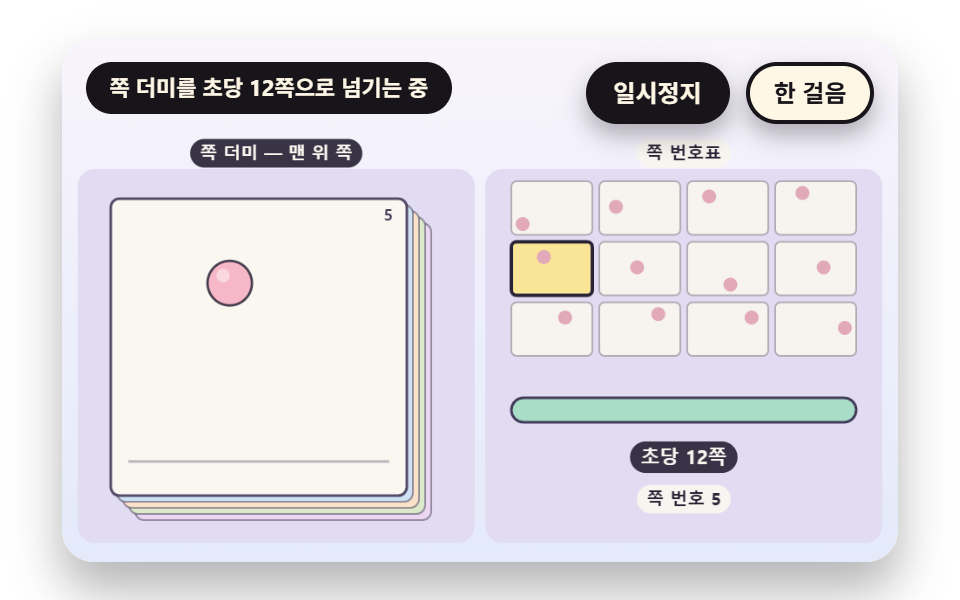 전환플립북 애니메이션 9종 — 쪽 넘기는 속도부터 양파 껍질과 중간 쪽까지
 전환CSS 모달 팝업 애니메이션 9종 — JS 최소, @starting-style로
 전환필터 UI 9종 — 패널 슬라이드부터 칩 제거까지
 전환장바구니 담기 UI 9종 — 스프링부터 배지 관성까지
 전환컨텍스트 메뉴 UI 9종 — 클릭 좌표 값이 메뉴 위치를 정하는 방식
 전환모바일 하단 탭바 9종 — 상태 값으로 바뀌는 아홉 가지 전환
 전환캐러셀 슬라이드 예제 9종 — 관성 드래그부터 3D 원근까지
 전환글리치 전환 효과 9가지 — css 글리치 효과 모음