플립북 애니메이션 9종 — 쪽 넘기는 속도부터 양파 껍질과 중간 쪽까지
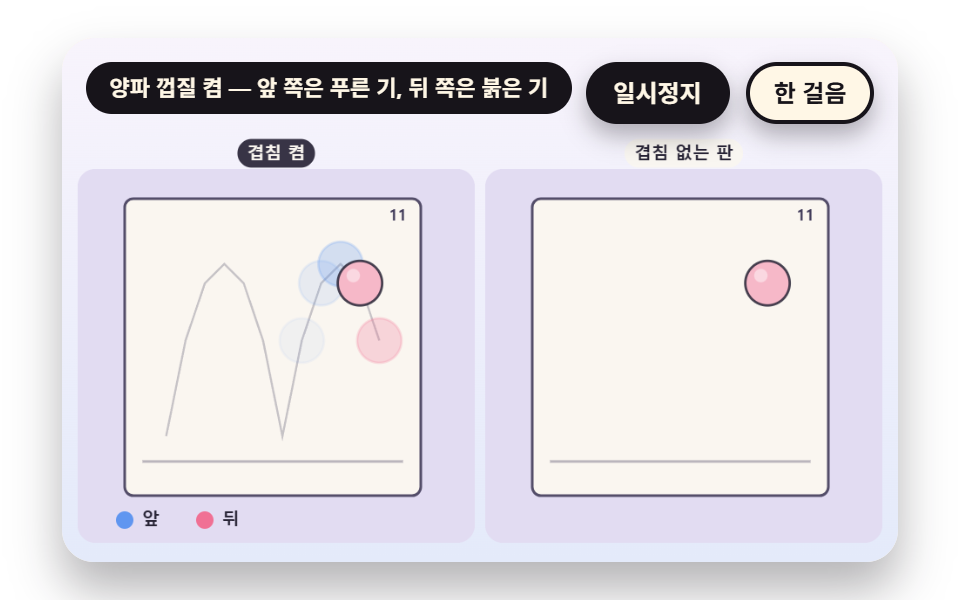
플립북은 그림 몇 장으로 어떻게 움직임을 만들까 — 02번은 앞뒤 쪽을 옅게 겹쳐 점의 길을 보이고, 05번은 넘기는 속도가 어디서 한 줄로 합쳐지는지 재며, 09번은 두 장만 그려도 중간 쪽을 계산으로 채운다.
플립북은 종이 한 장마다 그림을 그리는 일이 아니라, 쪽 번호를 시간에 맞춰 올리고 앞뒤 쪽과의 위치 차이를 눈에 맡기는 계산이다 — 플립북 만들기는 쪽수와 넘기는 속도를 먼저 정하는 데서 시작한다
 01 fb-frame-stack-riffle-rate
 02 fb-onion-skin-neighbor-ghost
 03 fb-spine-bend-fan-projection
 04 fb-ease-spacing-chart-twelve
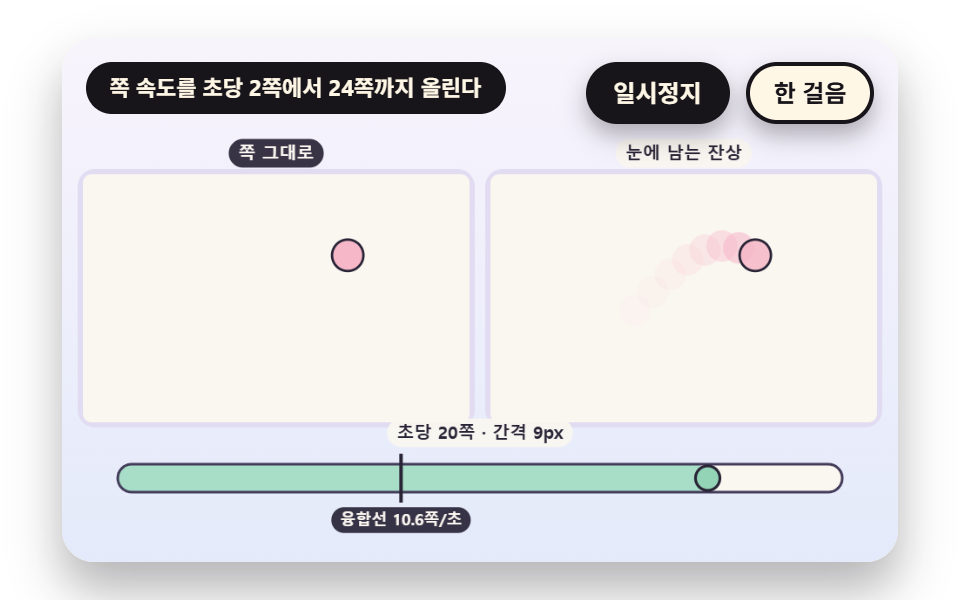 05 fb-persistence-fusion-threshold
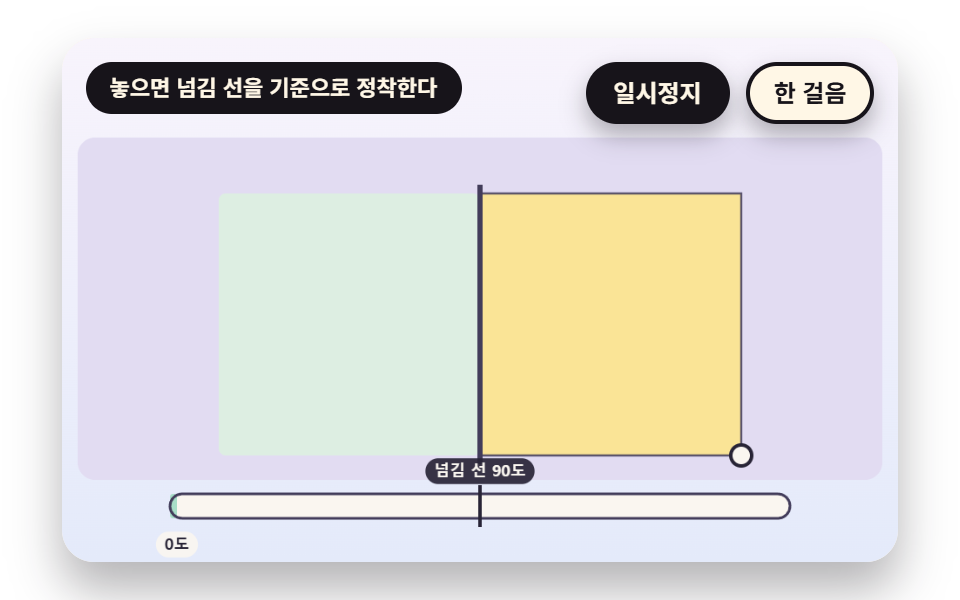 06 fb-corner-drag-snap-settle
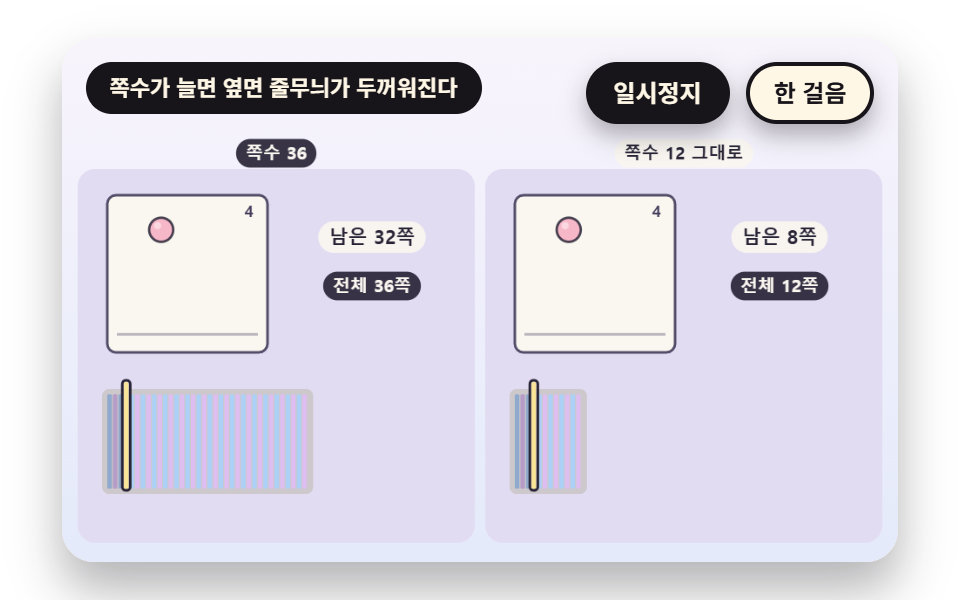 07 fb-edge-stripe-page-count
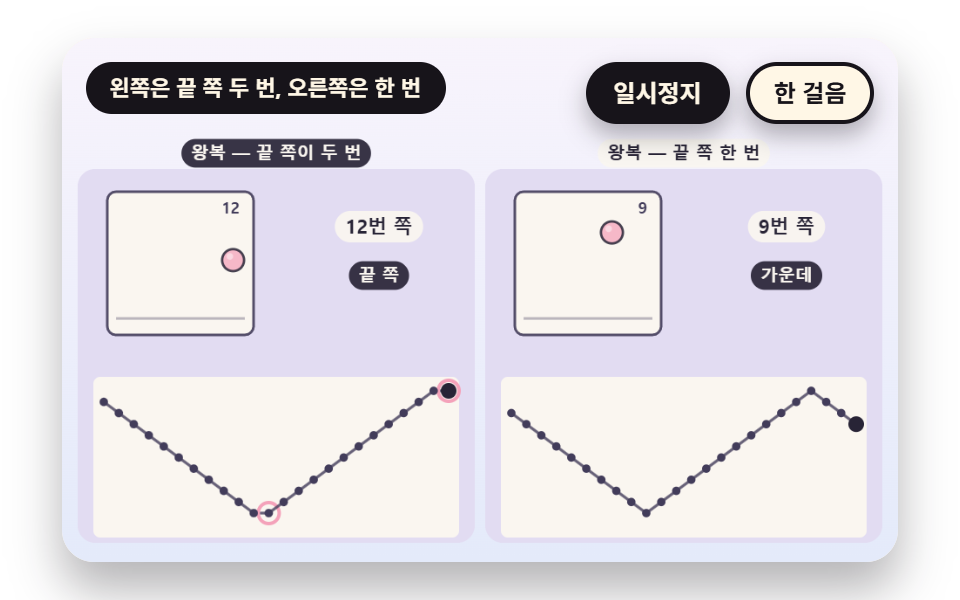 08 fb-loop-pingpong-reverse-index
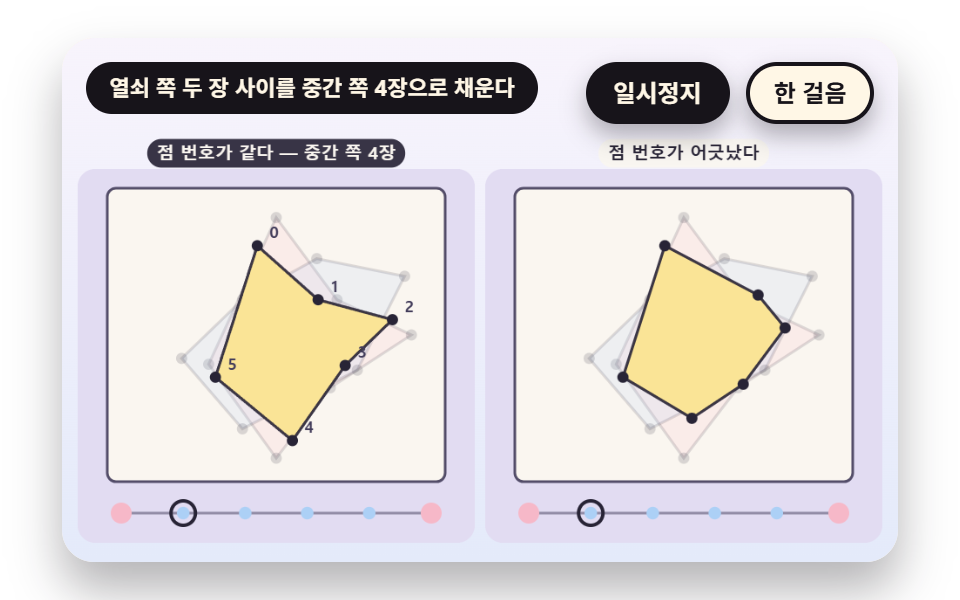 09 fb-inbetween-keyframe-lerp
자동 재생 · 눌러서 해당 항목으로 · 전부 한 zip
- 01 엄지로 쪽을 넘기는 속도
- 02 앞뒤 쪽이 비쳐 보이는 양파 껍질
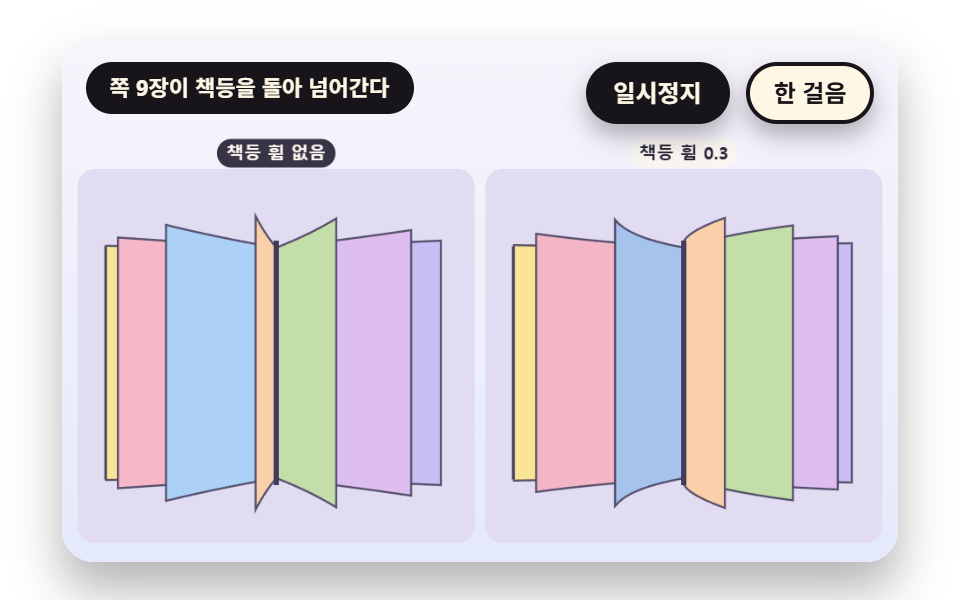
- 03 책등에 묶인 쪽이 휘어 넘어가는 부채꼴
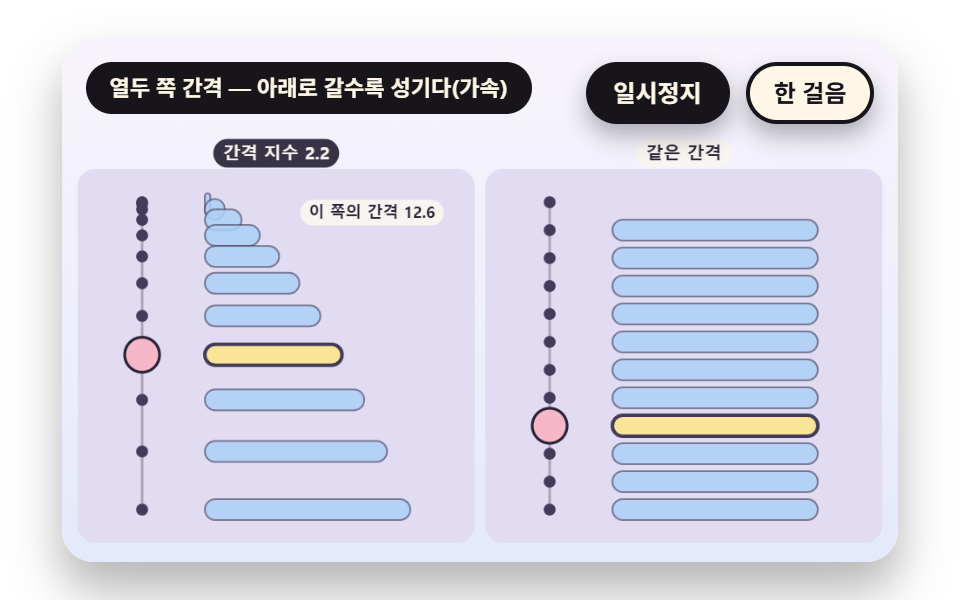
- 04 쪽마다 간격을 달리하는 타이밍 표
- 05 깜박임이 하나의 움직임으로 합쳐지는 속도
- 06 모서리를 끌다 놓으면 한 쪽씩 안착
- 07 쪽수가 두께와 옆면 줄무늬로 보이는 책 옆
- 08 되감기와 왕복에서 쪽 번호 고르기
- 09 두 장 사이의 중간 쪽을 자동으로 채우기
아홉 장면이 같이 쓰는 설계는 하나다. 쪽 그림은 PAGES 배열에 든 열두 장이고, 한 쪽에는 공 하나의 가로·세로·눌림 값만 있으며 공은 열두 쪽에 걸쳐 두 번 튄다.
    function makePages(n) {
        const out = [];
        for (let i = 0; i < n; i += 1) {
            // 두 번 튀므로 한 번 튀는 사이는 반 바퀴 — b 는 한 번 튀는 안의 위치 0~1, h 는 높이(포물선)
            const b = (i * 2 / n) % 1;
            const h = 4 * b * (1 - b);
            const sy = 0.8 + 0.2 * Math.min(1, h * 3);
            out.push({ x: 0.14 + 0.72 * (i / (n - 1)), y: FLOOR_Y - h * HOP_H, sx: 2 - sy, sy: sy });
        }
        return out;
    }
    const PAGES = makePages(FRAME_COUNT);
쪽 번호는 소수 위상에서 정수 부분만 떼어 쓴다
wrapIdx 는 위상에서 정수 부분을 떼어 쪽 번호로 돌려주고, 01·02·04·07 이 이 함수를 쓴다. 시계는 장면 시계 하나이고 아홉 소스 어디에서도 Date 와 Math.random 을 부르지 않으며 외부 이미지도 쓰지 않는다.
쪽 수와 넘기는 속도를 먼저 정한다
플립북이란 쪽을 넘기면 그림이 움직여 보이게 만든 책이고, 코드에서는 쪽 번호가 시간을 따라 오르며 배열을 읽는 일이다. 쪽 수는 FRAME_COUNT 12 이고 속도는 01 의 FLIP_HZ 12 처럼 초당 쪽 수로 적는다.
플립북 애니메이션 9종 — 엄지로 쪽 넘기는 속도·양파 껍질 겹침·책등에 묶여 휘는 부채꼴·쪽마다 다른 간격 타이밍·깜박임이 합쳐지는 속도·모서리 끌어 넘기기·두께와 옆면 줄무늬·되감기와 왕복 번호·중간 쪽 자동 채우기
직접 만들어 볼 순서는 속도에서 시작해 겹침·휨·간격을 지나 눈의 잔상과 손으로 끌기, 책의 두께, 번호 계산, 중간 쪽 채우기로 간다. 01~05 는 시간표가 쪽을 넘기고 06 은 손으로 끌며 07~09 는 쪽 수와 번호와 그림 자체를 만진다.
마지막 전체 렌더로 잰 아홉 장면의 면적·프레임·강도
표의 값은 측정.json 에서 옮겼다. 누적면적이 가장 큰 것은 06 의 32.8% 와 03 의 32.6% 이고 가장 작은 것은 05 의 6.8% 이며, 움직임이 23/23 인 장면은 01 과 05 뿐이다.
| 장면 | 누적면적 | 움직인 프레임 | 강도 평균 |
|---|---|---|---|
| 01 넘기는 속도 | 15.6% | 23/23 | 86.4 |
| 02 양파 껍질 | 7.3% | 7/23 | 69.1 |
| 03 책등 부채 | 32.6% | 12/23 | 52.7 |
| 04 간격 타이밍 표 | 25.8% | 17/23 | 80.2 |
| 05 잔상 융합 | 6.8% | 23/23 | 68.5 |
| 06 모서리 끌기 | 32.8% | 18/23 | 58.6 |
| 07 옆면 줄무늬 | 10.6% | 20/23 | 84.5 |
| 08 되풀이·왕복 번호 | 17.4% | 16/23 | 99.5 |
| 09 중간 쪽 채우기 | 12.2% | 9/23 | 85.9 |
01엄지로 쪽을 넘기는 속도
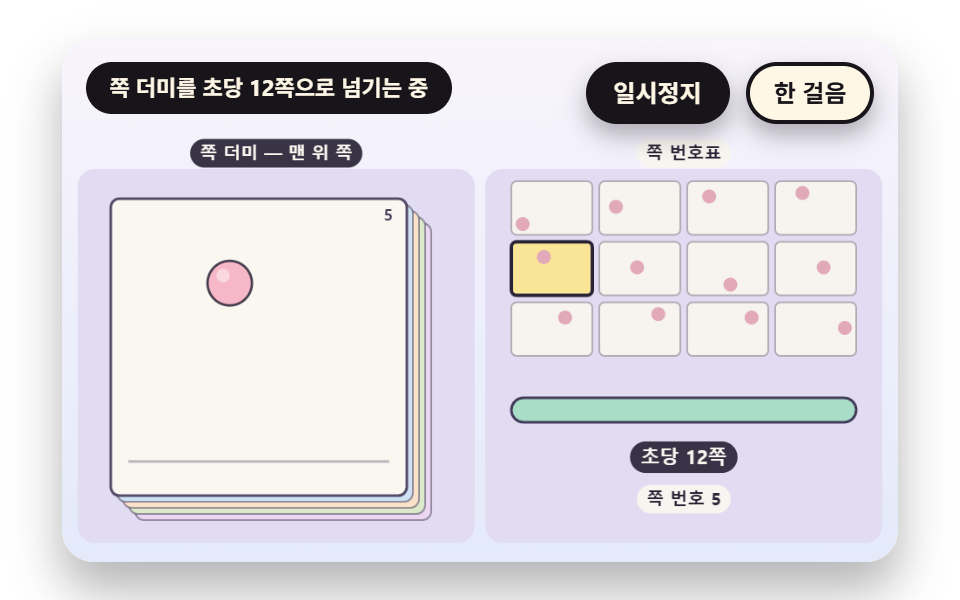
phase 에 속도 rate 곱하기 시간을 쌓고 그 정수 부분이 pageIndex 이며, rate 는 목표 속도를 지수로 따라가 갑자기 서지 않는다. 쪽 너비 170px 기준으로 12쪽 한 바퀴는 FLIP_HZ 12 에서 1.0초, 3 에서 4.0초이고 쪽 사이 공은 평균 33.5px(최대 55.9px)를 옮겨 간다. 누적면적 15.6% 에 23/23 프레임에서 움직임이 잡혔다.
<main class="stage">
<div class="vj is-demo" id="vj">
  <div class="vj__pad" data-role="pad" tabindex="0" role="application" aria-label="플립북 시연 무대 — 왼쪽·오른쪽 방향키와 Space 로 쪽 넘기기, Enter 로 일시정지, N 으로 한 걸음, R 로 처음부터">
    <canvas class="vj__canvas" data-role="canvas" width="480" height="300" role="img" aria-label="왼쪽에는 열두 쪽 낱장 더미의 맨 위 쪽이, 오른쪽에는 열두 칸 쪽 번호표가 있다. 쪽 번호가 초당 열두 쪽 속도로 오르면 공이 두 번 튀며 지나가고, 칸의 밝은 표시가 쪽을 따라 옮겨 간다. 아래 막대가 넘기는 속도를 채우다가 초당 세 쪽으로 느려지면 쪽이 하나씩 따로 읽힌다"></canvas>
  </div>
  <p class="vj__status" data-role="status" aria-live="off">플립북 시연</p>
  <div class="vj__ctrl">
    <button class="vj__pause" data-role="pause" type="button" aria-pressed="false">일시정지</button>
    <button class="vj__step" data-role="step" type="button">한 걸음</button>
  </div>
  <p class="vj__done" data-role="done" role="status" aria-live="polite"></p>
</div>
</main>
@use "../../../../site/static/demo-tokens" as *;
@include stage($stage-paper);
.vj {
position: relative;
width: min(92vw, calc(160vh - 12.8vw));
aspect-ratio: 480 / 300;
margin: 0 auto;
border-radius: $r-card;
overflow: hidden;
box-shadow: $shadow-raised;
background: $subject-cream;
}
// 무대 상자 — 여기서 시작한 터치만 쪽 넘기기·모서리 끌기로 읽는다(touch-action: none 은 이 상자에만). 무대 밖 터치는 페이지 스크롤 그대로
.vj__pad {
position: absolute;
inset: 0;
border-radius: inherit;
outline: none;
touch-action: none;
cursor: pointer;
}
// 바깥 .vj 가 넘침을 자르므로 포커스 테두리는 안쪽으로 들인다
.vj__pad:focus-visible {
outline: 3px solid $subject-ink;
outline-offset: -3px;
}
.vj__canvas {
position: absolute;
inset: 0;
display: block;
width: 100%;
height: 100%;
}
.vj__ctrl {
position: absolute;
right: $sp-3;
top: $sp-3;
display: flex;
gap: $sp-2;
}
.vj__pause,
.vj__step {
padding: $sp-1 $sp-3;
border: 2px solid $subject-ink;
border-radius: $r-pill;
background: $subject-ink;
color: $subject-cream;
font-family: inherit;
font-weight: 700;
font-size: 12px;
line-height: 1.6;
cursor: pointer;
box-shadow: $shadow-press;
transition: transform $dur-quick $ease-spring;
}
.vj__step {
background: $subject-cream;
color: $subject-ink;
}
// 스크린리더에만 읽히는 완료 알림
.vj__done {
position: absolute;
width: 1px;
height: 1px;
margin: 0;
overflow: hidden;
clip-path: inset(50%);
white-space: nowrap;
}
// 눌린 상태(멈춤) — 바탕과 글자색을 뒤집어 aria-pressed 가 눈에도 보이게
.vj__pause[aria-pressed="true"] {
background: $subject-cream;
color: $subject-ink;
}
.vj__pause:hover,
.vj__step:hover {
transform: translateY(-2px);
}
.vj__pause:active,
.vj__step:active {
transform: translateY(1px);
}
.vj__pause:focus-visible,
.vj__step:focus-visible {
outline: 3px solid $subject-ink;
outline-offset: 3px;
}
// 상태 줄 — 지금 장면의 수치를 글자로. 시연 중에는 aria-live off, 사람이 처음 손대면 polite
.vj__status {
position: absolute;
left: $sp-3;
top: $sp-3;
max-width: calc(100% - 190px);
margin: 0;
padding: $sp-1 $sp-3;
border-radius: $r-pill;
background: $subject-ink;
color: $subject-cream;
font-weight: 700;
font-size: 11px;
line-height: 1.6;
white-space: nowrap;
overflow: hidden;
text-overflow: ellipsis;
pointer-events: none;
}
@media (max-width: 340px) {
.vj__pause,
.vj__step,
.vj__status { font-size: 10px; padding: 0 $sp-2; }
}
// 움직임 줄이기 — 장면은 스크립트가 정지 장면 한 장으로 멈춘다. 버튼도 떠오르지 않게
@media (prefers-reduced-motion: reduce) {
.vj__pause,
.vj__step { transition: none !important; }
.vj__pause:hover,
.vj__pause:active,
.vj__step:hover,
.vj__step:active { transform: none !important; }
}html, body {
margin: 0;
overflow: hidden;
}
.stage {
box-sizing: border-box;
min-height: 100vh;
display: grid;
place-items: center;
margin: 0;
background: #ffffff;
font-family: -apple-system, "Segoe UI", "Noto Sans KR", sans-serif;
padding: clamp(8px, 4vw, 24px);
}
.vj {
position: relative;
width: min(92vw, 160vh - 12.8vw);
aspect-ratio: 480/300;
margin: 0 auto;
border-radius: 16px;
overflow: hidden;
box-shadow: 0 14px 24px rgba(23, 20, 26, 0.32);
background: #fff7e6;
}
.vj__pad {
position: absolute;
inset: 0;
border-radius: inherit;
outline: none;
touch-action: none;
cursor: pointer;
}
.vj__pad:focus-visible {
outline: 3px solid #17141a;
outline-offset: -3px;
}
.vj__canvas {
position: absolute;
inset: 0;
display: block;
width: 100%;
height: 100%;
}
.vj__ctrl {
position: absolute;
right: 12px;
top: 12px;
display: flex;
gap: 8px;
}
.vj__pause,
.vj__step {
padding: 4px 12px;
border: 2px solid #17141a;
border-radius: 999px;
background: #17141a;
color: #fff7e6;
font-family: inherit;
font-weight: 700;
font-size: 12px;
line-height: 1.6;
cursor: pointer;
box-shadow: 0 6px 12px rgba(23, 20, 26, 0.32);
transition: transform 220ms cubic-bezier(0.2, 0.8, 0.2, 1);
}
.vj__step {
background: #fff7e6;
color: #17141a;
}
.vj__done {
position: absolute;
width: 1px;
height: 1px;
margin: 0;
overflow: hidden;
clip-path: inset(50%);
white-space: nowrap;
}
.vj__pause[aria-pressed=true] {
background: #fff7e6;
color: #17141a;
}
.vj__pause:hover,
.vj__step:hover {
transform: translateY(-2px);
}
.vj__pause:active,
.vj__step:active {
transform: translateY(1px);
}
.vj__pause:focus-visible,
.vj__step:focus-visible {
outline: 3px solid #17141a;
outline-offset: 3px;
}
.vj__status {
position: absolute;
left: 12px;
top: 12px;
max-width: calc(100% - 190px);
margin: 0;
padding: 4px 12px;
border-radius: 999px;
background: #17141a;
color: #fff7e6;
font-weight: 700;
font-size: 11px;
line-height: 1.6;
white-space: nowrap;
overflow: hidden;
text-overflow: ellipsis;
pointer-events: none;
}
@media (max-width: 340px) {
.vj__pause,
.vj__step,
.vj__status {
font-size: 10px;
padding: 0 8px;
}
}
@media (prefers-reduced-motion: reduce) {
.vj__pause,
.vj__step {
transition: none !important;
}
.vj__pause:hover,
.vj__pause:active,
.vj__step:hover,
.vj__step:active {
transform: none !important;
}
}(function () {
const root = document.getElementById("vj");
if (!root) return;
// 무대 좌표 — 캔버스 안 계산은 늘 480×300. 화면에 보이는 크기와 상관없다
const W = 480;
const H = 300;
const TAU = Math.PI * 2;
function clamp(v, lo, hi) { return v < lo ? lo : (v > hi ? hi : v); }
function lerp(a, b, k) { return a + (b - a) * k; }
function ease(x) { const c = clamp(x, 0, 1); return c * c * (3 - 2 * c); }
// 파스텔 팔레트 — 면은 연한 색, 글자는 늘 진한 잉크
const BG_TOP = [248, 244, 252];
const BG_BOT = [228, 234, 250];
const BED = [226, 220, 242];
const INK = [40, 36, 54];
const INK2 = [66, 60, 90];
const PAPER = [250, 246, 240];
const ROSE = [244, 162, 186];
const MINT = [148, 212, 182];
const SKY = [172, 208, 246];
const BALL = [246, 184, 200];
const TILES = [
[200, 190, 244], [168, 222, 200], [250, 228, 150], [246, 184, 200],
[172, 208, 246], [250, 208, 170], [196, 222, 170], [222, 190, 240],
];
function mix(a, b, k) { return [lerp(a[0], b[0], k), lerp(a[1], b[1], k), lerp(a[2], b[2], k)]; }
function rgba(c, a) {
return 'rgba(' + Math.round(clamp(c[0], 0, 255)) + ',' + Math.round(clamp(c[1], 0, 255)) + ',' + Math.round(clamp(c[2], 0, 255)) + ',' + clamp(a, 0, 1).toFixed(3) + ')';
}
// 장면 시계(초)·판 반복 번호·시간표 — 시간표는 (시각, 할 일) 목록이고 시각이 지나면 한 번씩 부른다
let sceneT = 0;
let lap = 0;
let script = [];
let evAt = 0;
// 문구 틀의 {a}·{b} 자리에 값을 끼운다 — 화면 문구는 늘 이 틀 한 줄로 두고 로케일 사전이 통째로 바꾼다
function fill(s, a, b) { return s.replace('{a}', a).replace('{b}', b === undefined ? '' : b); }
function r1(v) { return String(Math.round(v * 10) / 10); }
// 읽어 주는 문장은 사람이 직접 하거나 멈춘 때만 숫자를 싣는다 — 자동으로 흐르는 동안은 한 줄이 그대로여서 스크린리더가 매 프레임 읽지 않는다
function calm() { return !(paused || manual || still); }
const FRAME_COUNT = 12;
const FLOOR_Y = 0.8;
const HOP_H = 0.58;
function makePages(n) {
const out = [];
for (let i = 0; i < n; i += 1) {
// 두 번 튀므로 한 번 튀는 사이는 반 바퀴 — b 는 한 번 튀는 안의 위치 0~1, h 는 높이(포물선)
const b = (i * 2 / n) % 1;
const h = 4 * b * (1 - b);
const sy = 0.8 + 0.2 * Math.min(1, h * 3);
out.push({ x: 0.14 + 0.72 * (i / (n - 1)), y: FLOOR_Y - h * HOP_H, sx: 2 - sy, sy: sy });
}
return out;
}
const PAGES = makePages(FRAME_COUNT);
// 한 쪽의 종이 — 흰 바탕과 바닥 선
function paperBox(R, a, edge) {
box(R.x, R.y, R.w, R.h, 5, PAPER, a);
outline(R.x, R.y, R.w, R.h, 5, 1.5, edge, 0.9 * a);
const fy = R.y + R.h * (FLOOR_Y + 0.085);
line(R.x + R.w * 0.06, fy, R.x + R.w * 0.94, fy, 1.5, mix(PAPER, INK2, 0.35), a);
}
// 쪽 안의 공 한 개 — 눌림은 바닥에 닿은 쪽에서 가로로 퍼진다
function pageBall(R, p, c, a, edge, shine) {
if (a <= 0.01) {
return;
}
const rr = R.w * 0.075;
const cx = R.x + R.w * p.x;
const cy = R.y + R.h * p.y;
ctx.save();
ctx.translate(cx, cy);
ctx.scale(p.sx, p.sy);
ctx.beginPath();
ctx.arc(0, 0, rr, 0, TAU);
ctx.fillStyle = rgba(c, a);
ctx.fill();
ctx.lineWidth = 1.4 / Math.max(p.sx, p.sy);
ctx.strokeStyle = rgba(edge, 0.85 * a);
ctx.stroke();
if (shine) {
ctx.beginPath();
ctx.arc(-rr * 0.3, -rr * 0.34, rr * 0.3, 0, TAU);
ctx.fillStyle = rgba([255, 255, 255], 0.45 * a);
ctx.fill();
}
ctx.restore();
}
// 한 쪽을 통째로 — 종이·공·쪽 번호
function drawPage(R, i, a, label) {
paperBox(R, a, INK2);
pageBall(R, PAGES[i], BALL, a, INK, true);
if (label) {
text(String(i + 1), R.x + R.w - 8, R.y + 10, INK2, a, 9, 700, 'right');
}
}
// 정수부 — 쪽 번호는 늘 이 함수를 지난다(소수 쪽 번호가 그려지지 않게)
function wrapIdx(n, count) { return ((Math.floor(n + 1e-9) % count) + count) % count; }
// 쪽 번호 띠 — 작은 칸 count 개, 지금 쪽이 밝다
function thumbs(R, count, cols, cur) {
const rows = Math.ceil(count / cols);
const gap = 4;
const cw = (R.w - gap * (cols - 1)) / cols;
const ch = (R.h - gap * (rows - 1)) / rows;
for (let i = 0; i < count; i += 1) {
const cell = { x: R.x + (i % cols) * (cw + gap), y: R.y + Math.floor(i / cols) * (ch + gap), w: cw, h: ch };
const on = i === cur;
box(cell.x, cell.y, cell.w, cell.h, 3, on ? TILES[2] : PAPER, on ? 1 : 0.9);
outline(cell.x, cell.y, cell.w, cell.h, 3, on ? 2 : 1, on ? INK : mix(PAPER, INK2, 0.4), 1);
const p = PAGES[i % PAGES.length];
disc(cell.x + cell.w * p.x, cell.y + cell.h * p.y, Math.min(cell.w, cell.h) * 0.13, mix(BALL, INK, 0.1), 1);
}
}
const SEG = 8;
const PERSP = 0.0022;
function edgeProject(spineX, a, len, bendRad) {
const out = [{ x: spineX, z: 0, s: 1 }];
let x = spineX;
let z = 0;
const dl = len / SEG;
for (let k = 1; k <= SEG; k += 1) {
const ph = a - bendRad * Math.sin(a) * (k / SEG);
x += dl * Math.cos(ph);
z += dl * Math.sin(ph);
out.push({ x: x, z: z, s: 1 / (1 - z * PERSP) });
}
return out;
}
// 투영한 쪽 한 장을 윗변·아랫변을 따라 다각형으로 칠한다. 칠한 쪽의 평균 깊이를 돌려준다(그리는 순서 정렬용)
function flapPath(pts, cy, hp) {
ctx.beginPath();
ctx.moveTo(pts[0].x, cy - hp / 2 * pts[0].s);
for (let k = 1; k < pts.length; k += 1) {
ctx.lineTo(pts[k].x, cy - hp / 2 * pts[k].s);
}
for (let k = pts.length - 1; k >= 0; k -= 1) {
ctx.lineTo(pts[k].x, cy + hp / 2 * pts[k].s);
}
ctx.closePath();
}
function drawFlap(pts, cy, hp, c, a) {
// 모서리가 앞을 향할수록(옆으로 누울수록) 밝고, 책등 쪽으로 서서 얇아질수록 어둡다
const span = Math.abs(pts[pts.length - 1].x - pts[0].x);
const lit = clamp(span / (pts.length > 1 ? Math.max(1, Math.abs(pts[0].x - pts[1].x) * SEG) : 1), 0, 1);
flapPath(pts, cy, hp);
ctx.fillStyle = rgba(mix(c, [120, 110, 160], 0.4 * (1 - lit)), a);
ctx.fill();
ctx.lineWidth = 1.2;
ctx.strokeStyle = rgba(INK2, 0.85 * a);
ctx.stroke();
}
function meanZ(pts) {
let s = 0;
for (const p of pts) {
s += p.z;
}
return s / pts.length;
}
const canvasEl = root.querySelector('[data-role="canvas"]');
const padEl = root.querySelector('[data-role="pad"]');
const pauseEl = root.querySelector('[data-role="pause"]');
const statusEl = root.querySelector('[data-role="status"]');
const stepEl = root.querySelector('[data-role="step"]');
const doneEl = root.querySelector('[data-role="done"]');
const ctxRaw = canvasEl ? canvasEl.getContext('2d') : null;
if (!canvasEl || !ctxRaw || !pauseEl || !padEl || !stepEl || !doneEl) {
return;
}
const cv = canvasEl;
const ctx = ctxRaw;
const pauseBtn = pauseEl;
const stepBtn = stepEl;
const doneP = doneEl;
const pad = padEl;
// 외부 웹폰트는 부르지 않는다 — 기기에 있는 글꼴 목록만
const FONT_STACK = 'system-ui, -apple-system, "Segoe UI", "Noto Sans KR", sans-serif';
let dpr = 1;
function fitCanvas() {
// 배율은 2 에서 자른다 — 배율 3 기기에서 화소가 2.25배로 늘지 않게
dpr = Math.min(window.devicePixelRatio || 1, 2);
cv.width = Math.round(W * dpr);
cv.height = Math.round(H * dpr);
ctx.setTransform(dpr, 0, 0, dpr, 0, 0);
}
function skyFill(top, bot) {
const g = ctx.createLinearGradient(0, 0, 0, H);
g.addColorStop(0, rgba(top, 1));
g.addColorStop(1, rgba(bot, 1));
ctx.fillStyle = g;
ctx.fillRect(0, 0, W, H);
}
function disc(x, y, r, c, a) {
if (r <= 0.2 || a <= 0) {
return;
}
ctx.beginPath();
ctx.arc(x, y, r, 0, TAU);
ctx.fillStyle = rgba(c, a);
ctx.fill();
}
function box(x, y, w, h, r, c, a) {
if (w <= 0.2 || h <= 0.2 || a <= 0) {
return;
}
ctx.beginPath();
ctx.roundRect(x, y, w, h, Math.max(0, Math.min(r, w / 2, h / 2)));
ctx.fillStyle = rgba(c, a);
ctx.fill();
}
function outline(x, y, w, h, r, width, c, a) {
if (w <= 0.2 || h <= 0.2 || a <= 0) {
return;
}
ctx.beginPath();
ctx.roundRect(x, y, w, h, Math.max(0, Math.min(r, w / 2, h / 2)));
ctx.lineWidth = width;
ctx.strokeStyle = rgba(c, a);
ctx.stroke();
}
function text(s, x, y, c, a, px, weight, align) {
ctx.font = weight + ' ' + px + 'px ' + FONT_STACK;
ctx.textAlign = align;
ctx.textBaseline = 'middle';
ctx.fillStyle = rgba(c, a);
ctx.fillText(s, x, y);
}
// 글자 이름표 — 바탕 알약 위에 글자
function tag(s, x, y, bg, fg, px, align) {
ctx.font = '700 ' + px + 'px ' + FONT_STACK;
const w = ctx.measureText(s).width + px * 1.1;
const left = align === 'center' ? x - w / 2 : (align === 'right' ? x - w : x);
box(left, y - px * 0.82, w, px * 1.64, px * 0.82, bg, 0.92);
text(s, left + w / 2, y + 0.5, fg, 1, px, 700, 'center');
}
// 판 자리 — 왼쪽 판·오른쪽 판(대비판)·한 판짜리 히어로. 위쪽은 상태 줄·버튼 자리
const PANEL_L = { x: 12, y: 78, w: 222, h: 208 };
const PANEL_R = { x: 246, y: 78, w: 222, h: 208 };
const PANEL_ONE = { x: 12, y: 60, w: 456, h: 228 };
// 판 바닥 — 판 둘레로 비치는 연보라
function bed(R) {
box(R.x - 3, R.y - 3, R.w + 6, R.h + 6, 10, BED, 1);
}
function panelTags(a, b) {
tag(a, PANEL_L.x + PANEL_L.w / 2, 66, INK, PAPER, 10, 'center');
tag(b, PANEL_R.x + PANEL_R.w / 2, 66, PAPER, INK, 10, 'center');
}
// 공 한 개 — 면, 왼쪽 위 하이라이트, 옅은 윤곽
function orb(x, y, r, c, a) {
if (r <= 0.3 || a <= 0) {
return;
}
disc(x, y, r, c, a);
if (r > 5) {
disc(x - r * 0.28, y - r * 0.32, r * 0.42, [255, 255, 255], 0.3 * a);
}
ctx.beginPath();
ctx.arc(x, y, r, 0, TAU);
ctx.lineWidth = 1;
ctx.strokeStyle = rgba(mix(c, INK, 0.28), 0.55 * a);
ctx.stroke();
}
function line(x0, y0, x1, y1, width, c, a) {
if (a <= 0) {
return;
}
ctx.beginPath();
ctx.moveTo(x0, y0);
ctx.lineTo(x1, y1);
ctx.lineWidth = width;
ctx.strokeStyle = rgba(c, a);
ctx.stroke();
}
function ring(x, y, r, width, c, a) {
if (r <= 0.3 || a <= 0) {
return;
}
ctx.beginPath();
ctx.arc(x, y, r, 0, TAU);
ctx.lineWidth = width;
ctx.strokeStyle = rgba(c, a);
ctx.stroke();
}
let shownStatus = '';
function pushStatus(s) {
if (!statusEl || s === shownStatus) {
return;
}
shownStatus = s;
statusEl.textContent = s;
}
let paused = false;
const reduceQuery = window.matchMedia('(prefers-reduced-motion: reduce)');
// 페이지를 연 채 움직임 줄이기 설정을 바꿔도 change 리스너가 다시 읽는다
let still = reduceQuery.matches;
// 자동 시연 표시 — 사람이 처음 손대면 떼고 상태 줄을 polite 로 켠다
let demo = root.classList.contains('is-demo');
const off = new AbortController();
// 사람이 직접 하는 중이면 시간표는 멈추고 애니메이션만 흐른다
let manual = false;
function wake() {
if (!demo) {
return;
}
demo = false;
root.classList.remove('is-demo');
if (statusEl) {
statusEl.setAttribute('aria-live', 'polite');
}
}
function takeOver() {
if (manual) {
return;
}
manual = true;
onTake();
wake();
}
// 한 판 시연이 끝났음을 스크린리더에 한 번만 알린다 — 판이 되풀이돼도 다시 읽지 않는다
let doneSaid = false;
function checkDone() {
if (!manual && !doneSaid && sceneT >= LAP_S - 0.6) {
doneSaid = true;
doneP.textContent = statusText();
}
}
function advance(dt) {
sceneT += dt;
if (!manual) {
while (evAt < script.length && script[evAt].t <= sceneT) {
const ev = script[evAt];
evAt += 1;
ev.f();
}
if (sceneT >= LAP_S) {
lap += 1;
begin();
return;
}
}
update(dt);
}
// 첫 판은 START_S 만큼 앞서 시작한다 — 장면이 이미 움직이는 중인 장면에서 보인다
function runTo(t) {
while (sceneT < t - 1e-6) {
advance(Math.min(1 / 30, t - sceneT));
}
}
function begin() {
sceneT = 0;
evAt = 0;
script = [];
build();
if (lap === 0 && !still) {
runTo(START_S);
}
}
const DT_MAX = 0.05;
const SETTLE_FRAMES = 8;
const SETTLE_DT = 0.04;
function showNow() {
draw();
pushStatus(statusText());
checkDone();
}
let rafId = 0;
let lastTs = -1;
function frame(ts) {
if (still || paused) {
rafId = 0;
return;
}
if (lastTs < 0) {
lastTs = ts;
}
const dt = Math.min((ts - lastTs) / 1000, DT_MAX);
lastTs = ts;
if (dt > 0) {
advance(dt);
}
showNow();
rafId = window.requestAnimationFrame(frame);
}
function startLoop() {
if (rafId) {
return;
}
// 멈췄던 사이의 시간을 첫 프레임 dt 로 넘기지 않는다
lastTs = -1;
rafId = window.requestAnimationFrame(frame);
}
function stopLoop() {
if (rafId) {
window.cancelAnimationFrame(rafId);
rafId = 0;
}
}
// 움직임 줄이기 — 루프 없이 처음 판의 정지 장면 한 장
function showRest() {
stopLoop();
lap = 0;
sceneT = 0;
evAt = 0;
script = [];
build();
runTo(REST_S);
showNow();
}
// 움직임 줄이기이거나 멈춘 채 입력이 들어오면 애니메이션 없이 곧바로 끝 상태로 — 시간을 3초 흘려 움직임을 다 끝낸다
function settleStill() {
for (let k = 0; k < 90; k += 1) {
sceneT += 1 / 30;
update(1 / 30);
}
}
function play() {
begin();
showNow();
if (!paused) {
startLoop();
}
}
function togglePause() {
paused = !paused;
pauseBtn.setAttribute('aria-pressed', paused ? 'true' : 'false');
wake();
if (paused) {
stopLoop();
}
else if (!still) {
startLoop();
}
}
function restart() {
manual = false;
doneSaid = false;
lap += 1;
begin();
for (let k = 0; k < SETTLE_FRAMES; k += 1) {
update(SETTLE_DT);
}
showNow();
}
// 한 걸음 — 멈춘 채 시간표의 다음 일 하나를 부른다. 더 부를 일이 없거나 직접 하던 중이면 다음 판을 연다
function stepOnce() {
wake();
if (!paused) {
paused = true;
pauseBtn.setAttribute('aria-pressed', 'true');
stopLoop();
}
if (manual || evAt >= script.length) {
restart();
return;
}
sceneT = Math.max(sceneT, script[evAt].t);
advance(0);
for (let k = 0; k < SETTLE_FRAMES; k += 1) {
sceneT += SETTLE_DT;
update(SETTLE_DT);
}
showNow();
}
pauseBtn.addEventListener('click', togglePause, { signal: off.signal });
stepBtn.addEventListener('click', stepOnce, { signal: off.signal });
// 쪽 넘기기 — 사람이 손대면 시간표는 멈추고 쪽만 바뀐다. 멈춘 채·움직임 줄이기에서도 한 번의 입력이 화면에 바로 반영되게 한다
function navPage(d) {
takeOver();
onNav(d);
if (still || paused) {
settleStill();
}
showNow();
}
// 키보드 — 무대에 포커스가 있을 때만. 왼쪽·위 = 앞 쪽, 오른쪽·아래·Space = 다음 쪽, Enter·P = 일시정지, N = 한 걸음, R = 처음부터
pad.addEventListener('keydown', function (e) {
if (e.altKey || e.ctrlKey || e.metaKey) {
return;
}
const k = e.key;
if (k === 'ArrowLeft' || k === 'ArrowUp') {
e.preventDefault();
navPage(-1);
}
else if (k === 'ArrowRight' || k === 'ArrowDown' || k === ' ') {
e.preventDefault();
navPage(1);
}
else if (k === 'Enter' || k === 'p' || k === 'P') {
e.preventDefault();
togglePause();
}
else if (k === 'n' || k === 'N') {
stepOnce();
}
else if (k === 'r' || k === 'R') {
restart();
}
}, { signal: off.signal });
// 마우스·터치 — 무대를 누르면 다음 쪽(06 은 모서리 끌기라 따로 받는다)
pad.addEventListener('click', function () {
if (!CLICK_NAV) {
return;
}
navPage(1);
}, { signal: off.signal });
// 탭이 숨으면 멈추고, 돌아오면 시계를 다시 맞춰 시작 — 숨은 동안의 몇 초가 한 프레임에 몰리지 않게
document.addEventListener('visibilitychange', function () {
if (document.hidden) {
stopLoop();
}
else if (!paused && !still) {
startLoop();
}
}, { signal: off.signal });
// 설정이 바뀌면 — 켜지면 정지 장면 한 장, 꺼지면 다시 움직인다
reduceQuery.addEventListener('change', function () {
still = reduceQuery.matches;
if (still) {
showRest();
}
else {
lap = 0;
play();
}
}, { signal: off.signal });
window.addEventListener('resize', function () {
fitCanvas();
showNow();
}, { signal: off.signal });
// 01 — 쪽 번호 pageIndex 는 쏟아낸 쪽 수 phase 의 정수 부분이다. phase 는 초당 rate 쪽씩 오르고 rate 는 FLIP_HZ 를 향해 오른다
const FLIP_HZ = 12;
const frameCount = FRAME_COUNT;
const LAP_S = 9.6;
const START_S = 3.2;
const REST_S = 4.0;
const CLICK_NAV = true;
const BOOK_R = { x: 28, y: 92, w: 170, h: 170 };
const GRID_R = { x: 258, y: 82, w: 198, h: 100 };
let phase = 0;
let rate = 0;
let rateTgt = 0;
let pageIndex = 0;
function setRate(v) { rateTgt = v; }
function build() {
phase = 0;
rate = 0;
rateTgt = 0;
pageIndex = 0;
script.push({ t: 0.3, f: function () { setRate(FLIP_HZ); } });
script.push({ t: 5.2, f: function () { setRate(3); } });
script.push({ t: 8.2, f: function () { setRate(0); } });
}
    function update(dt) {
        if (dt <= 0) {
            return;
        }
        rate += (rateTgt - rate) * (1 - Math.exp(-6 * dt));
        if (!manual) {
            phase += rate * dt;
        }
        pageIndex = wrapIdx(phase, frameCount);
    }
function drawStack() {
// 맨 위 쪽 뒤로 낱장 더미의 옆면이 비친다
for (let k = 4; k >= 1; k -= 1) {
box(BOOK_R.x + k * 3.5, BOOK_R.y + k * 3.5, BOOK_R.w, BOOK_R.h, 5, mix(PAPER, TILES[(k + 3) % 8], 0.55), 1);
outline(BOOK_R.x + k * 3.5, BOOK_R.y + k * 3.5, BOOK_R.w, BOOK_R.h, 5, 1, INK2, 0.5);
}
drawPage(BOOK_R, pageIndex, 1, true);
}
function draw() {
skyFill(BG_TOP, BG_BOT);
panelTags('쪽 더미 — 맨 위 쪽', '쪽 번호표');
bed(PANEL_L);
bed({ x: GRID_R.x - 12, y: PANEL_R.y, w: PANEL_R.w, h: PANEL_R.h });
drawStack();
thumbs(GRID_R, frameCount, 4, pageIndex);
// 넘기는 속도 막대 — FLIP_HZ 를 가득 찬 길이로
const bx = 258;
const bw = 198;
box(bx, 206, bw, 14, 7, PAPER, 1);
box(bx, 206, bw * clamp(rate / FLIP_HZ, 0, 1), 14, 7, TILES[1], 1);
outline(bx, 206, bw, 14, 7, 1.5, INK2, 1);
tag(fill('초당 {a}쪽', r1(rate)), bx + bw / 2, 240, INK, PAPER, 11, 'center');
tag(fill('쪽 번호 {a}', String(pageIndex + 1)), bx + bw / 2, 264, PAPER, INK, 10, 'center');
}
function statusText() {
if (calm()) {
return fill('쪽 더미를 초당 {a}쪽으로 넘기는 중', String(FLIP_HZ));
}
return fill('{b}쪽 중 {a}쪽', String(pageIndex + 1), String(frameCount));
}
// 한 쪽씩 직접 넘긴다 — 속도는 0
function onNav(d) {
rate = 0;
rateTgt = 0;
phase = Math.floor(phase + 1e-9) + d;
pageIndex = wrapIdx(phase, frameCount);
}
function onTake() { rateTgt = 0; }
fitCanvas();
if (still) {
showRest();
}
else {
play();
}
return function () {
stopLoop();
off.abort();
};
})();// FrameStackRiffleRate - 같은 항목 vanilla index.html 의 React 판. 같은 계산을 useEffect 안에서 돌린다
import { useEffect, useRef } from "react";
import styles from "./FrameStackRiffleRate.module.scss";
const cx = (s: string): string => s.split(" ").map((n) => styles[n] ?? n).join(" ");
export default function FrameStackRiffleRate() {
const rootRef = useRef<HTMLDivElement | null>(null);
useEffect(() => {
const rootEl = rootRef.current;
if (!rootEl) return;
const root: HTMLElement = rootEl;
type RGB = [number, number, number];
type RGBA = [number, number, number, number];
// 무대 좌표 — 캔버스 안 계산은 늘 480×300. 화면에 보이는 크기와 상관없다
const W = 480;
const H = 300;
const TAU = Math.PI * 2;
function clamp(v: number, lo: number, hi: number): number { return v < lo ? lo : (v > hi ? hi : v); }
function lerp(a: number, b: number, k: number): number { return a + (b - a) * k; }
function ease(x: number): number { const c = clamp(x, 0, 1); return c * c * (3 - 2 * c); }
// 파스텔 팔레트 — 면은 연한 색, 글자는 늘 진한 잉크
const BG_TOP: RGB = [248, 244, 252];
const BG_BOT: RGB = [228, 234, 250];
const BED: RGB = [226, 220, 242];
const INK: RGB = [40, 36, 54];
const INK2: RGB = [66, 60, 90];
const PAPER: RGB = [250, 246, 240];
const ROSE: RGB = [244, 162, 186];
const MINT: RGB = [148, 212, 182];
const SKY: RGB = [172, 208, 246];
const BALL: RGB = [246, 184, 200];
const TILES: RGB[] = [
[200, 190, 244], [168, 222, 200], [250, 228, 150], [246, 184, 200],
[172, 208, 246], [250, 208, 170], [196, 222, 170], [222, 190, 240],
];
function mix(a: RGB, b: RGB, k: number): RGB { return [lerp(a[0], b[0], k), lerp(a[1], b[1], k), lerp(a[2], b[2], k)]; }
function rgba(c: RGB, a: number): string {
return 'rgba(' + Math.round(clamp(c[0], 0, 255)) + ',' + Math.round(clamp(c[1], 0, 255)) + ',' + Math.round(clamp(c[2], 0, 255)) + ',' + clamp(a, 0, 1).toFixed(3) + ')';
}
// 장면 시계(초)·판 반복 번호·시간표 — 시간표는 (시각, 할 일) 목록이고 시각이 지나면 한 번씩 부른다
let sceneT = 0;
let lap = 0;
type Ev = { t: number; f: () => void };
let script: Ev[] = [];
let evAt = 0;
type Rect = { x: number; y: number; w: number; h: number };
// 문구 틀의 {a}·{b} 자리에 값을 끼운다 — 화면 문구는 늘 이 틀 한 줄로 두고 로케일 사전이 통째로 바꾼다
function fill(s: string, a: string, b?: string): string { return s.replace('{a}', a).replace('{b}', b === undefined ? '' : b); }
function r1(v: number): string { return String(Math.round(v * 10) / 10); }
// 읽어 주는 문장은 사람이 직접 하거나 멈춘 때만 숫자를 싣는다 — 자동으로 흐르는 동안은 한 줄이 그대로여서 스크린리더가 매 프레임 읽지 않는다
function calm(): boolean { return !(paused || manual || still); }
// ── 쪽 그림 ───────────────────────────────────────────────
// 한 쪽에 그린 그림 = 공 하나의 (가로·세로 위치 0~1, 눌림). 12쪽이 한 번의 튀어 오름 두 번을 이룬다
type Pg = { x: number; y: number; sx: number; sy: number };
const FRAME_COUNT = 12;
const FLOOR_Y = 0.8;
const HOP_H = 0.58;
function makePages(n: number): Pg[] {
const out: Pg[] = [];
for (let i = 0; i < n; i += 1) {
// 두 번 튀므로 한 번 튀는 사이는 반 바퀴 — b 는 한 번 튀는 안의 위치 0~1, h 는 높이(포물선)
const b = (i * 2 / n) % 1;
const h = 4 * b * (1 - b);
const sy = 0.8 + 0.2 * Math.min(1, h * 3);
out.push({ x: 0.14 + 0.72 * (i / (n - 1)), y: FLOOR_Y - h * HOP_H, sx: 2 - sy, sy: sy });
}
return out;
}
const PAGES: Pg[] = makePages(FRAME_COUNT);
// 한 쪽의 종이 — 흰 바탕과 바닥 선
function paperBox(R: Rect, a: number, edge: RGB): void {
box(R.x, R.y, R.w, R.h, 5, PAPER, a);
outline(R.x, R.y, R.w, R.h, 5, 1.5, edge, 0.9 * a);
const fy = R.y + R.h * (FLOOR_Y + 0.085);
line(R.x + R.w * 0.06, fy, R.x + R.w * 0.94, fy, 1.5, mix(PAPER, INK2, 0.35), a);
}
// 쪽 안의 공 한 개 — 눌림은 바닥에 닿은 쪽에서 가로로 퍼진다
function pageBall(R: Rect, p: Pg, c: RGB, a: number, edge: RGB, shine: boolean): void {
if (a <= 0.01) { return; }
const rr = R.w * 0.075;
const cx = R.x + R.w * p.x;
const cy = R.y + R.h * p.y;
ctx.save();
ctx.translate(cx, cy);
ctx.scale(p.sx, p.sy);
ctx.beginPath();
ctx.arc(0, 0, rr, 0, TAU);
ctx.fillStyle = rgba(c, a);
ctx.fill();
ctx.lineWidth = 1.4 / Math.max(p.sx, p.sy);
ctx.strokeStyle = rgba(edge, 0.85 * a);
ctx.stroke();
if (shine) {
ctx.beginPath();
ctx.arc(-rr * 0.3, -rr * 0.34, rr * 0.3, 0, TAU);
ctx.fillStyle = rgba([255, 255, 255], 0.45 * a);
ctx.fill();
}
ctx.restore();
}
// 한 쪽을 통째로 — 종이·공·쪽 번호
function drawPage(R: Rect, i: number, a: number, label: boolean): void {
paperBox(R, a, INK2);
pageBall(R, PAGES[i], BALL, a, INK, true);
if (label) { text(String(i + 1), R.x + R.w - 8, R.y + 10, INK2, a, 9, 700, 'right'); }
}
// 정수부 — 쪽 번호는 늘 이 함수를 지난다(소수 쪽 번호가 그려지지 않게)
function wrapIdx(n: number, count: number): number { return ((Math.floor(n + 1e-9) % count) + count) % count; }
// 쪽 번호 띠 — 작은 칸 count 개, 지금 쪽이 밝다
function thumbs(R: Rect, count: number, cols: number, cur: number): void {
const rows = Math.ceil(count / cols);
const gap = 4;
const cw = (R.w - gap * (cols - 1)) / cols;
const ch = (R.h - gap * (rows - 1)) / rows;
for (let i = 0; i < count; i += 1) {
const cell: Rect = { x: R.x + (i % cols) * (cw + gap), y: R.y + Math.floor(i / cols) * (ch + gap), w: cw, h: ch };
const on = i === cur;
box(cell.x, cell.y, cell.w, cell.h, 3, on ? TILES[2] : PAPER, on ? 1 : 0.9);
outline(cell.x, cell.y, cell.w, cell.h, 3, on ? 2 : 1, on ? INK : mix(PAPER, INK2, 0.4), 1);
const p = PAGES[i % PAGES.length];
disc(cell.x + cell.w * p.x, cell.y + cell.h * p.y, Math.min(cell.w, cell.h) * 0.13, mix(BALL, INK, 0.1), 1);
}
}
// ── 책등 투영 ─────────────────────────────────────────────
// 책등(세로 선) 에서 시작하는 쪽 한 장을 SEG 조각으로 잇는다. 쪽 각도 a 는 0 이 오른쪽에 누운 때, π 가 왼쪽에 누운 때.
// 조각 k 의 방향은 a 에서 끝쪽일수록 bendRad × sin(a) 만큼 뒤처진다(책등에 묶인 안쪽이 먼저 돌고 가장자리가 따라온다).
// x 는 방향의 코사인, z(보는 사람 쪽 깊이)는 사인을 쌓은 값이고, 가까울수록(z 가 클수록) 위아래가 PERSP 만큼 커진다
type Pt = { x: number; z: number; s: number };
const SEG = 8;
const PERSP = 0.0022;
function edgeProject(spineX: number, a: number, len: number, bendRad: number): Pt[] {
const out: Pt[] = [{ x: spineX, z: 0, s: 1 }];
let x = spineX;
let z = 0;
const dl = len / SEG;
for (let k = 1; k <= SEG; k += 1) {
const ph = a - bendRad * Math.sin(a) * (k / SEG);
x += dl * Math.cos(ph);
z += dl * Math.sin(ph);
out.push({ x: x, z: z, s: 1 / (1 - z * PERSP) });
}
return out;
}
// 투영한 쪽 한 장을 윗변·아랫변을 따라 다각형으로 칠한다. 칠한 쪽의 평균 깊이를 돌려준다(그리는 순서 정렬용)
function flapPath(pts: Pt[], cy: number, hp: number): void {
ctx.beginPath();
ctx.moveTo(pts[0].x, cy - hp / 2 * pts[0].s);
for (let k = 1; k < pts.length; k += 1) { ctx.lineTo(pts[k].x, cy - hp / 2 * pts[k].s); }
for (let k = pts.length - 1; k >= 0; k -= 1) { ctx.lineTo(pts[k].x, cy + hp / 2 * pts[k].s); }
ctx.closePath();
}
function drawFlap(pts: Pt[], cy: number, hp: number, c: RGB, a: number): void {
// 모서리가 앞을 향할수록(옆으로 누울수록) 밝고, 책등 쪽으로 서서 얇아질수록 어둡다
const span = Math.abs(pts[pts.length - 1].x - pts[0].x);
const lit = clamp(span / (pts.length > 1 ? Math.max(1, Math.abs(pts[0].x - pts[1].x) * SEG) : 1), 0, 1);
flapPath(pts, cy, hp);
ctx.fillStyle = rgba(mix(c, [120, 110, 160], 0.4 * (1 - lit)), a);
ctx.fill();
ctx.lineWidth = 1.2;
ctx.strokeStyle = rgba(INK2, 0.85 * a);
ctx.stroke();
}
function meanZ(pts: Pt[]): number {
let s = 0;
for (const p of pts) { s += p.z; }
return s / pts.length;
}
const canvasEl = root.querySelector('[data-role="canvas"]') as HTMLCanvasElement | null;
const padEl = root.querySelector('[data-role="pad"]') as HTMLElement | null;
const pauseEl = root.querySelector('[data-role="pause"]') as HTMLButtonElement | null;
const statusEl = root.querySelector('[data-role="status"]') as HTMLElement | null;
const stepEl = root.querySelector('[data-role="step"]') as HTMLButtonElement | null;
const doneEl = root.querySelector('[data-role="done"]') as HTMLElement | null;
const ctxRaw = canvasEl ? canvasEl.getContext('2d') : null;
if (!canvasEl || !ctxRaw || !pauseEl || !padEl || !stepEl || !doneEl) { return; }
const cv: HTMLCanvasElement = canvasEl;
const ctx: CanvasRenderingContext2D = ctxRaw;
const pauseBtn: HTMLButtonElement = pauseEl;
const stepBtn: HTMLButtonElement = stepEl;
const doneP: HTMLElement = doneEl;
const pad: HTMLElement = padEl;
// 외부 웹폰트는 부르지 않는다 — 기기에 있는 글꼴 목록만
const FONT_STACK = 'system-ui, -apple-system, "Segoe UI", "Noto Sans KR", sans-serif';
let dpr = 1;
function fitCanvas(): void {
// 배율은 2 에서 자른다 — 배율 3 기기에서 화소가 2.25배로 늘지 않게
dpr = Math.min(window.devicePixelRatio || 1, 2);
cv.width = Math.round(W * dpr);
cv.height = Math.round(H * dpr);
ctx.setTransform(dpr, 0, 0, dpr, 0, 0);
}
function skyFill(top: RGB, bot: RGB): void {
const g = ctx.createLinearGradient(0, 0, 0, H);
g.addColorStop(0, rgba(top, 1));
g.addColorStop(1, rgba(bot, 1));
ctx.fillStyle = g;
ctx.fillRect(0, 0, W, H);
}
function disc(x: number, y: number, r: number, c: RGB, a: number): void {
if (r <= 0.2 || a <= 0) { return; }
ctx.beginPath();
ctx.arc(x, y, r, 0, TAU);
ctx.fillStyle = rgba(c, a);
ctx.fill();
}
function box(x: number, y: number, w: number, h: number, r: number, c: RGB, a: number): void {
if (w <= 0.2 || h <= 0.2 || a <= 0) { return; }
ctx.beginPath();
ctx.roundRect(x, y, w, h, Math.max(0, Math.min(r, w / 2, h / 2)));
ctx.fillStyle = rgba(c, a);
ctx.fill();
}
function outline(x: number, y: number, w: number, h: number, r: number, width: number, c: RGB, a: number): void {
if (w <= 0.2 || h <= 0.2 || a <= 0) { return; }
ctx.beginPath();
ctx.roundRect(x, y, w, h, Math.max(0, Math.min(r, w / 2, h / 2)));
ctx.lineWidth = width;
ctx.strokeStyle = rgba(c, a);
ctx.stroke();
}
function text(s: string, x: number, y: number, c: RGB, a: number, px: number, weight: number, align: CanvasTextAlign): void {
ctx.font = weight + ' ' + px + 'px ' + FONT_STACK;
ctx.textAlign = align;
ctx.textBaseline = 'middle';
ctx.fillStyle = rgba(c, a);
ctx.fillText(s, x, y);
}
// 글자 이름표 — 바탕 알약 위에 글자
function tag(s: string, x: number, y: number, bg: RGB, fg: RGB, px: number, align: CanvasTextAlign): void {
ctx.font = '700 ' + px + 'px ' + FONT_STACK;
const w = ctx.measureText(s).width + px * 1.1;
const left = align === 'center' ? x - w / 2 : (align === 'right' ? x - w : x);
box(left, y - px * 0.82, w, px * 1.64, px * 0.82, bg, 0.92);
text(s, left + w / 2, y + 0.5, fg, 1, px, 700, 'center');
}
// 판 자리 — 왼쪽 판·오른쪽 판(대비판)·한 판짜리 히어로. 위쪽은 상태 줄·버튼 자리
const PANEL_L: Rect = { x: 12, y: 78, w: 222, h: 208 };
const PANEL_R: Rect = { x: 246, y: 78, w: 222, h: 208 };
const PANEL_ONE: Rect = { x: 12, y: 60, w: 456, h: 228 };
// 판 바닥 — 판 둘레로 비치는 연보라
function bed(R: Rect): void {
box(R.x - 3, R.y - 3, R.w + 6, R.h + 6, 10, BED, 1);
}
function panelTags(a: string, b: string): void {
tag(a, PANEL_L.x + PANEL_L.w / 2, 66, INK, PAPER, 10, 'center');
tag(b, PANEL_R.x + PANEL_R.w / 2, 66, PAPER, INK, 10, 'center');
}
// 공 한 개 — 면, 왼쪽 위 하이라이트, 옅은 윤곽
function orb(x: number, y: number, r: number, c: RGB, a: number): void {
if (r <= 0.3 || a <= 0) { return; }
disc(x, y, r, c, a);
if (r > 5) { disc(x - r * 0.28, y - r * 0.32, r * 0.42, [255, 255, 255], 0.3 * a); }
ctx.beginPath();
ctx.arc(x, y, r, 0, TAU);
ctx.lineWidth = 1;
ctx.strokeStyle = rgba(mix(c, INK, 0.28), 0.55 * a);
ctx.stroke();
}
function line(x0: number, y0: number, x1: number, y1: number, width: number, c: RGB, a: number): void {
if (a <= 0) { return; }
ctx.beginPath();
ctx.moveTo(x0, y0);
ctx.lineTo(x1, y1);
ctx.lineWidth = width;
ctx.strokeStyle = rgba(c, a);
ctx.stroke();
}
function ring(x: number, y: number, r: number, width: number, c: RGB, a: number): void {
if (r <= 0.3 || a <= 0) { return; }
ctx.beginPath();
ctx.arc(x, y, r, 0, TAU);
ctx.lineWidth = width;
ctx.strokeStyle = rgba(c, a);
ctx.stroke();
}
let shownStatus = '';
function pushStatus(s: string): void {
if (!statusEl || s === shownStatus) { return; }
shownStatus = s;
statusEl.textContent = s;
}
let paused = false;
const reduceQuery = window.matchMedia('(prefers-reduced-motion: reduce)');
// 페이지를 연 채 움직임 줄이기 설정을 바꿔도 change 리스너가 다시 읽는다
let still = reduceQuery.matches;
// 자동 시연 표시 — 사람이 처음 손대면 떼고 상태 줄을 polite 로 켠다
let demo = root.classList.contains('is-demo');
const off = new AbortController();
// 사람이 직접 하는 중이면 시간표는 멈추고 애니메이션만 흐른다
let manual = false;
function wake(): void {
if (!demo) { return; }
demo = false;
root.classList.remove('is-demo');
if (statusEl) { statusEl.setAttribute('aria-live', 'polite'); }
}
function takeOver(): void {
if (manual) { return; }
manual = true;
onTake();
wake();
}
// 한 판 시연이 끝났음을 스크린리더에 한 번만 알린다 — 판이 되풀이돼도 다시 읽지 않는다
let doneSaid = false;
function checkDone(): void {
if (!manual && !doneSaid && sceneT >= LAP_S - 0.6) {
doneSaid = true;
doneP.textContent = statusText();
}
}
function advance(dt: number): void {
sceneT += dt;
if (!manual) {
while (evAt < script.length && script[evAt].t <= sceneT) {
const ev = script[evAt];
evAt += 1;
ev.f();
}
if (sceneT >= LAP_S) { lap += 1; begin(); return; }
}
update(dt);
}
// 첫 판은 START_S 만큼 앞서 시작한다 — 장면이 이미 움직이는 중인 장면에서 보인다
function runTo(t: number): void {
while (sceneT < t - 1e-6) { advance(Math.min(1 / 30, t - sceneT)); }
}
function begin(): void {
sceneT = 0;
evAt = 0;
script = [];
build();
if (lap === 0 && !still) { runTo(START_S); }
}
const DT_MAX = 0.05;
const SETTLE_FRAMES = 8;
const SETTLE_DT = 0.04;
function showNow(): void {
draw();
pushStatus(statusText());
checkDone();
}
let rafId = 0;
let lastTs = -1;
function frame(ts: number): void {
if (still || paused) { rafId = 0; return; }
if (lastTs < 0) { lastTs = ts; }
const dt = Math.min((ts - lastTs) / 1000, DT_MAX);
lastTs = ts;
if (dt > 0) { advance(dt); }
showNow();
rafId = window.requestAnimationFrame(frame);
}
function startLoop(): void {
if (rafId) { return; }
// 멈췄던 사이의 시간을 첫 프레임 dt 로 넘기지 않는다
lastTs = -1;
rafId = window.requestAnimationFrame(frame);
}
function stopLoop(): void {
if (rafId) { window.cancelAnimationFrame(rafId); rafId = 0; }
}
// 움직임 줄이기 — 루프 없이 처음 판의 정지 장면 한 장
function showRest(): void {
stopLoop();
lap = 0;
sceneT = 0;
evAt = 0;
script = [];
build();
runTo(REST_S);
showNow();
}
// 움직임 줄이기이거나 멈춘 채 입력이 들어오면 애니메이션 없이 곧바로 끝 상태로 — 시간을 3초 흘려 움직임을 다 끝낸다
function settleStill(): void {
for (let k = 0; k < 90; k += 1) { sceneT += 1 / 30; update(1 / 30); }
}
function play(): void {
begin();
showNow();
if (!paused) { startLoop(); }
}
function togglePause(): void {
paused = !paused;
pauseBtn.setAttribute('aria-pressed', paused ? 'true' : 'false');
wake();
if (paused) { stopLoop(); } else if (!still) { startLoop(); }
}
function restart(): void {
manual = false;
doneSaid = false;
lap += 1;
begin();
for (let k = 0; k < SETTLE_FRAMES; k += 1) { update(SETTLE_DT); }
showNow();
}
// 한 걸음 — 멈춘 채 시간표의 다음 일 하나를 부른다. 더 부를 일이 없거나 직접 하던 중이면 다음 판을 연다
function stepOnce(): void {
wake();
if (!paused) {
paused = true;
pauseBtn.setAttribute('aria-pressed', 'true');
stopLoop();
}
if (manual || evAt >= script.length) {
restart();
return;
}
sceneT = Math.max(sceneT, script[evAt].t);
advance(0);
for (let k = 0; k < SETTLE_FRAMES; k += 1) { sceneT += SETTLE_DT; update(SETTLE_DT); }
showNow();
}
pauseBtn.addEventListener('click', togglePause, { signal: off.signal });
stepBtn.addEventListener('click', stepOnce, { signal: off.signal });
// 쪽 넘기기 — 사람이 손대면 시간표는 멈추고 쪽만 바뀐다. 멈춘 채·움직임 줄이기에서도 한 번의 입력이 화면에 바로 반영되게 한다
function navPage(d: number): void {
takeOver();
onNav(d);
if (still || paused) { settleStill(); }
showNow();
}
// 키보드 — 무대에 포커스가 있을 때만. 왼쪽·위 = 앞 쪽, 오른쪽·아래·Space = 다음 쪽, Enter·P = 일시정지, N = 한 걸음, R = 처음부터
pad.addEventListener('keydown', function (e: KeyboardEvent): void {
if (e.altKey || e.ctrlKey || e.metaKey) { return; }
const k = e.key;
if (k === 'ArrowLeft' || k === 'ArrowUp') {
e.preventDefault();
navPage(-1);
} else if (k === 'ArrowRight' || k === 'ArrowDown' || k === ' ') {
e.preventDefault();
navPage(1);
} else if (k === 'Enter' || k === 'p' || k === 'P') {
e.preventDefault();
togglePause();
} else if (k === 'n' || k === 'N') {
stepOnce();
} else if (k === 'r' || k === 'R') {
restart();
}
}, { signal: off.signal });
// 마우스·터치 — 무대를 누르면 다음 쪽(06 은 모서리 끌기라 따로 받는다)
pad.addEventListener('click', function (): void {
if (!CLICK_NAV) { return; }
navPage(1);
}, { signal: off.signal });
// 탭이 숨으면 멈추고, 돌아오면 시계를 다시 맞춰 시작 — 숨은 동안의 몇 초가 한 프레임에 몰리지 않게
document.addEventListener('visibilitychange', function (): void {
if (document.hidden) { stopLoop(); } else if (!paused && !still) { startLoop(); }
}, { signal: off.signal });
// 설정이 바뀌면 — 켜지면 정지 장면 한 장, 꺼지면 다시 움직인다
reduceQuery.addEventListener('change', function (): void {
still = reduceQuery.matches;
if (still) { showRest(); } else { lap = 0; play(); }
}, { signal: off.signal });
window.addEventListener('resize', function (): void {
fitCanvas();
showNow();
}, { signal: off.signal });
// 01 — 쪽 번호 pageIndex 는 쏟아낸 쪽 수 phase 의 정수 부분이다. phase 는 초당 rate 쪽씩 오르고 rate 는 FLIP_HZ 를 향해 오른다
const FLIP_HZ = 12;
const frameCount = FRAME_COUNT;
const LAP_S = 9.6;
const START_S = 3.2;
const REST_S = 4.0;
const CLICK_NAV = true;
const BOOK_R: Rect = { x: 28, y: 92, w: 170, h: 170 };
const GRID_R: Rect = { x: 258, y: 82, w: 198, h: 100 };
let phase = 0;
let rate = 0;
let rateTgt = 0;
let pageIndex = 0;
function setRate(v: number): void { rateTgt = v; }
function build(): void {
phase = 0;
rate = 0;
rateTgt = 0;
pageIndex = 0;
script.push({ t: 0.3, f: function (): void { setRate(FLIP_HZ); } });
script.push({ t: 5.2, f: function (): void { setRate(3); } });
script.push({ t: 8.2, f: function (): void { setRate(0); } });
}
function update(dt: number): void {
if (dt <= 0) { return; }
rate += (rateTgt - rate) * (1 - Math.exp(-6 * dt));
if (!manual) { phase += rate * dt; }
pageIndex = wrapIdx(phase, frameCount);
}
function drawStack(): void {
// 맨 위 쪽 뒤로 낱장 더미의 옆면이 비친다
for (let k = 4; k >= 1; k -= 1) {
box(BOOK_R.x + k * 3.5, BOOK_R.y + k * 3.5, BOOK_R.w, BOOK_R.h, 5, mix(PAPER, TILES[(k + 3) % 8], 0.55), 1);
outline(BOOK_R.x + k * 3.5, BOOK_R.y + k * 3.5, BOOK_R.w, BOOK_R.h, 5, 1, INK2, 0.5);
}
drawPage(BOOK_R, pageIndex, 1, true);
}
function draw(): void {
skyFill(BG_TOP, BG_BOT);
panelTags('쪽 더미 — 맨 위 쪽', '쪽 번호표');
bed(PANEL_L);
bed({ x: GRID_R.x - 12, y: PANEL_R.y, w: PANEL_R.w, h: PANEL_R.h });
drawStack();
thumbs(GRID_R, frameCount, 4, pageIndex);
// 넘기는 속도 막대 — FLIP_HZ 를 가득 찬 길이로
const bx = 258;
const bw = 198;
box(bx, 206, bw, 14, 7, PAPER, 1);
box(bx, 206, bw * clamp(rate / FLIP_HZ, 0, 1), 14, 7, TILES[1], 1);
outline(bx, 206, bw, 14, 7, 1.5, INK2, 1);
tag(fill('초당 {a}쪽', r1(rate)), bx + bw / 2, 240, INK, PAPER, 11, 'center');
tag(fill('쪽 번호 {a}', String(pageIndex + 1)), bx + bw / 2, 264, PAPER, INK, 10, 'center');
}
function statusText(): string {
if (calm()) { return fill('쪽 더미를 초당 {a}쪽으로 넘기는 중', String(FLIP_HZ)); }
return fill('{b}쪽 중 {a}쪽', String(pageIndex + 1), String(frameCount));
}
// 한 쪽씩 직접 넘긴다 — 속도는 0
function onNav(d: number): void {
rate = 0;
rateTgt = 0;
phase = Math.floor(phase + 1e-9) + d;
pageIndex = wrapIdx(phase, frameCount);
}
function onTake(): void { rateTgt = 0; }
fitCanvas();
if (still) { showRest(); } else { play(); }
return function (): void {
stopLoop();
off.abort();
};
}, []);
return (
<div className={cx("vj") + " is-demo"} ref={rootRef}>
<div className={cx("vj__pad")} data-role="pad" tabIndex={0} role="application" aria-label={'플립북 시연 무대 — 왼쪽·오른쪽 방향키와 Space 로 쪽 넘기기, Enter 로 일시정지, N 으로 한 걸음, R 로 처음부터'}>
<canvas className={cx("vj__canvas")} data-role="canvas" width={480} height={300} role="img" aria-label={'왼쪽에는 열두 쪽 낱장 더미의 맨 위 쪽이, 오른쪽에는 열두 칸 쪽 번호표가 있다. 쪽 번호가 초당 열두 쪽 속도로 오르면 공이 두 번 튀며 지나가고, 칸의 밝은 표시가 쪽을 따라 옮겨 간다. 아래 막대가 넘기는 속도를 채우다가 초당 세 쪽으로 느려지면 쪽이 하나씩 따로 읽힌다'}></canvas>
</div>
<p className={cx("vj__status")} data-role="status" aria-live="off">{'플립북 시연'}</p>
<div className={cx("vj__ctrl")}>
<button className={cx("vj__pause")} data-role="pause" type="button" aria-pressed="false">{'일시정지'}</button>
<button className={cx("vj__step")} data-role="step" type="button">{'한 걸음'}</button>
</div>
<p className={cx("vj__done")} data-role="done" role="status" aria-live="polite"></p>
</div>
);
}01 · 엄지로 쪽을 넘기는 속도 — 측정 누적면적 15.619% · 움직인 프레임 23/23GODRICH 원작 · zip 에 SCSS·React 포함 · 비밀번호 보기
function update(dt) {
if (dt <= 0) {
return;
}
rate += (rateTgt - rate) * (1 - Math.exp(-6 * dt));
if (!manual) {
phase += rate * dt;
}
pageIndex = wrapIdx(phase, frameCount);
}
02앞뒤 쪽이 비쳐 보이는 양파 껍질
지금 쪽 위에 앞 쪽의 공은 푸른 기, 뒤 쪽의 공은 붉은 기로 겹치고 거리 한 칸마다 알파가 반으로 줄어 0.25·0.125·0.0625 가 된다. 쪽 번호가 범위 밖이면 그리지 않아 한 바퀴 이음새에서는 처음 쪽이 끝 쪽 뒤에 비치지 않고, 오른쪽 판은 겹침 없이 같은 쪽을 보여 준다. 누적면적 7.3% 에 7/23 프레임에서 움직임이 잡혔다.
<main class="stage">
<div class="vj is-demo" id="vj">
  <div class="vj__pad" data-role="pad" tabindex="0" role="application" aria-label="플립북 시연 무대 — 왼쪽·오른쪽 방향키와 Space 로 쪽 넘기기, Enter 로 일시정지, N 으로 한 걸음, R 로 처음부터">
    <canvas class="vj__canvas" data-role="canvas" width="480" height="300" role="img" aria-label="같은 열두 쪽 플립북을 두 판으로 나란히 보인다. 왼쪽 판은 지금 쪽 위에 앞 쪽의 공을 푸른 기로, 뒤 쪽의 공을 붉은 기로 거리마다 절반으로 옅게 겹쳐 그리고 점이 지나는 길을 가는 선으로 잇는다. 겹침을 끄면 지금 쪽만 남고 오른쪽 판은 늘 겹침 없이 보인다"></canvas>
  </div>
  <p class="vj__status" data-role="status" aria-live="off">플립북 시연</p>
  <div class="vj__ctrl">
    <button class="vj__pause" data-role="pause" type="button" aria-pressed="false">일시정지</button>
    <button class="vj__step" data-role="step" type="button">한 걸음</button>
  </div>
  <p class="vj__done" data-role="done" role="status" aria-live="polite"></p>
</div>
</main>
@use "../../../../site/static/demo-tokens" as *;
@include stage($stage-paper);
.vj {
position: relative;
width: min(92vw, calc(160vh - 12.8vw));
aspect-ratio: 480 / 300;
margin: 0 auto;
border-radius: $r-card;
overflow: hidden;
box-shadow: $shadow-raised;
background: $subject-cream;
}
// 무대 상자 — 여기서 시작한 터치만 쪽 넘기기·모서리 끌기로 읽는다(touch-action: none 은 이 상자에만). 무대 밖 터치는 페이지 스크롤 그대로
.vj__pad {
position: absolute;
inset: 0;
border-radius: inherit;
outline: none;
touch-action: none;
cursor: pointer;
}
// 바깥 .vj 가 넘침을 자르므로 포커스 테두리는 안쪽으로 들인다
.vj__pad:focus-visible {
outline: 3px solid $subject-ink;
outline-offset: -3px;
}
.vj__canvas {
position: absolute;
inset: 0;
display: block;
width: 100%;
height: 100%;
}
.vj__ctrl {
position: absolute;
right: $sp-3;
top: $sp-3;
display: flex;
gap: $sp-2;
}
.vj__pause,
.vj__step {
padding: $sp-1 $sp-3;
border: 2px solid $subject-ink;
border-radius: $r-pill;
background: $subject-ink;
color: $subject-cream;
font-family: inherit;
font-weight: 700;
font-size: 12px;
line-height: 1.6;
cursor: pointer;
box-shadow: $shadow-press;
transition: transform $dur-quick $ease-spring;
}
.vj__step {
background: $subject-cream;
color: $subject-ink;
}
// 스크린리더에만 읽히는 완료 알림
.vj__done {
position: absolute;
width: 1px;
height: 1px;
margin: 0;
overflow: hidden;
clip-path: inset(50%);
white-space: nowrap;
}
// 눌린 상태(멈춤) — 바탕과 글자색을 뒤집어 aria-pressed 가 눈에도 보이게
.vj__pause[aria-pressed="true"] {
background: $subject-cream;
color: $subject-ink;
}
.vj__pause:hover,
.vj__step:hover {
transform: translateY(-2px);
}
.vj__pause:active,
.vj__step:active {
transform: translateY(1px);
}
.vj__pause:focus-visible,
.vj__step:focus-visible {
outline: 3px solid $subject-ink;
outline-offset: 3px;
}
// 상태 줄 — 지금 장면의 수치를 글자로. 시연 중에는 aria-live off, 사람이 처음 손대면 polite
.vj__status {
position: absolute;
left: $sp-3;
top: $sp-3;
max-width: calc(100% - 190px);
margin: 0;
padding: $sp-1 $sp-3;
border-radius: $r-pill;
background: $subject-ink;
color: $subject-cream;
font-weight: 700;
font-size: 11px;
line-height: 1.6;
white-space: nowrap;
overflow: hidden;
text-overflow: ellipsis;
pointer-events: none;
}
@media (max-width: 340px) {
.vj__pause,
.vj__step,
.vj__status { font-size: 10px; padding: 0 $sp-2; }
}
// 움직임 줄이기 — 장면은 스크립트가 정지 장면 한 장으로 멈춘다. 버튼도 떠오르지 않게
@media (prefers-reduced-motion: reduce) {
.vj__pause,
.vj__step { transition: none !important; }
.vj__pause:hover,
.vj__pause:active,
.vj__step:hover,
.vj__step:active { transform: none !important; }
}html, body {
margin: 0;
overflow: hidden;
}
.stage {
box-sizing: border-box;
min-height: 100vh;
display: grid;
place-items: center;
margin: 0;
background: #ffffff;
font-family: -apple-system, "Segoe UI", "Noto Sans KR", sans-serif;
padding: clamp(8px, 4vw, 24px);
}
.vj {
position: relative;
width: min(92vw, 160vh - 12.8vw);
aspect-ratio: 480/300;
margin: 0 auto;
border-radius: 16px;
overflow: hidden;
box-shadow: 0 14px 24px rgba(23, 20, 26, 0.32);
background: #fff7e6;
}
.vj__pad {
position: absolute;
inset: 0;
border-radius: inherit;
outline: none;
touch-action: none;
cursor: pointer;
}
.vj__pad:focus-visible {
outline: 3px solid #17141a;
outline-offset: -3px;
}
.vj__canvas {
position: absolute;
inset: 0;
display: block;
width: 100%;
height: 100%;
}
.vj__ctrl {
position: absolute;
right: 12px;
top: 12px;
display: flex;
gap: 8px;
}
.vj__pause,
.vj__step {
padding: 4px 12px;
border: 2px solid #17141a;
border-radius: 999px;
background: #17141a;
color: #fff7e6;
font-family: inherit;
font-weight: 700;
font-size: 12px;
line-height: 1.6;
cursor: pointer;
box-shadow: 0 6px 12px rgba(23, 20, 26, 0.32);
transition: transform 220ms cubic-bezier(0.2, 0.8, 0.2, 1);
}
.vj__step {
background: #fff7e6;
color: #17141a;
}
.vj__done {
position: absolute;
width: 1px;
height: 1px;
margin: 0;
overflow: hidden;
clip-path: inset(50%);
white-space: nowrap;
}
.vj__pause[aria-pressed=true] {
background: #fff7e6;
color: #17141a;
}
.vj__pause:hover,
.vj__step:hover {
transform: translateY(-2px);
}
.vj__pause:active,
.vj__step:active {
transform: translateY(1px);
}
.vj__pause:focus-visible,
.vj__step:focus-visible {
outline: 3px solid #17141a;
outline-offset: 3px;
}
.vj__status {
position: absolute;
left: 12px;
top: 12px;
max-width: calc(100% - 190px);
margin: 0;
padding: 4px 12px;
border-radius: 999px;
background: #17141a;
color: #fff7e6;
font-weight: 700;
font-size: 11px;
line-height: 1.6;
white-space: nowrap;
overflow: hidden;
text-overflow: ellipsis;
pointer-events: none;
}
@media (max-width: 340px) {
.vj__pause,
.vj__step,
.vj__status {
font-size: 10px;
padding: 0 8px;
}
}
@media (prefers-reduced-motion: reduce) {
.vj__pause,
.vj__step {
transition: none !important;
}
.vj__pause:hover,
.vj__pause:active,
.vj__step:hover,
.vj__step:active {
transform: none !important;
}
}(function () {
const root = document.getElementById("vj");
if (!root) return;
// 무대 좌표 — 캔버스 안 계산은 늘 480×300. 화면에 보이는 크기와 상관없다
const W = 480;
const H = 300;
const TAU = Math.PI * 2;
function clamp(v, lo, hi) { return v < lo ? lo : (v > hi ? hi : v); }
function lerp(a, b, k) { return a + (b - a) * k; }
function ease(x) { const c = clamp(x, 0, 1); return c * c * (3 - 2 * c); }
// 파스텔 팔레트 — 면은 연한 색, 글자는 늘 진한 잉크
const BG_TOP = [248, 244, 252];
const BG_BOT = [228, 234, 250];
const BED = [226, 220, 242];
const INK = [40, 36, 54];
const INK2 = [66, 60, 90];
const PAPER = [250, 246, 240];
const ROSE = [244, 162, 186];
const MINT = [148, 212, 182];
const SKY = [172, 208, 246];
const BALL = [246, 184, 200];
const TILES = [
[200, 190, 244], [168, 222, 200], [250, 228, 150], [246, 184, 200],
[172, 208, 246], [250, 208, 170], [196, 222, 170], [222, 190, 240],
];
function mix(a, b, k) { return [lerp(a[0], b[0], k), lerp(a[1], b[1], k), lerp(a[2], b[2], k)]; }
function rgba(c, a) {
return 'rgba(' + Math.round(clamp(c[0], 0, 255)) + ',' + Math.round(clamp(c[1], 0, 255)) + ',' + Math.round(clamp(c[2], 0, 255)) + ',' + clamp(a, 0, 1).toFixed(3) + ')';
}
// 장면 시계(초)·판 반복 번호·시간표 — 시간표는 (시각, 할 일) 목록이고 시각이 지나면 한 번씩 부른다
let sceneT = 0;
let lap = 0;
let script = [];
let evAt = 0;
// 문구 틀의 {a}·{b} 자리에 값을 끼운다 — 화면 문구는 늘 이 틀 한 줄로 두고 로케일 사전이 통째로 바꾼다
function fill(s, a, b) { return s.replace('{a}', a).replace('{b}', b === undefined ? '' : b); }
function r1(v) { return String(Math.round(v * 10) / 10); }
// 읽어 주는 문장은 사람이 직접 하거나 멈춘 때만 숫자를 싣는다 — 자동으로 흐르는 동안은 한 줄이 그대로여서 스크린리더가 매 프레임 읽지 않는다
function calm() { return !(paused || manual || still); }
const FRAME_COUNT = 12;
const FLOOR_Y = 0.8;
const HOP_H = 0.58;
function makePages(n) {
const out = [];
for (let i = 0; i < n; i += 1) {
// 두 번 튀므로 한 번 튀는 사이는 반 바퀴 — b 는 한 번 튀는 안의 위치 0~1, h 는 높이(포물선)
const b = (i * 2 / n) % 1;
const h = 4 * b * (1 - b);
const sy = 0.8 + 0.2 * Math.min(1, h * 3);
out.push({ x: 0.14 + 0.72 * (i / (n - 1)), y: FLOOR_Y - h * HOP_H, sx: 2 - sy, sy: sy });
}
return out;
}
const PAGES = makePages(FRAME_COUNT);
// 한 쪽의 종이 — 흰 바탕과 바닥 선
function paperBox(R, a, edge) {
box(R.x, R.y, R.w, R.h, 5, PAPER, a);
outline(R.x, R.y, R.w, R.h, 5, 1.5, edge, 0.9 * a);
const fy = R.y + R.h * (FLOOR_Y + 0.085);
line(R.x + R.w * 0.06, fy, R.x + R.w * 0.94, fy, 1.5, mix(PAPER, INK2, 0.35), a);
}
// 쪽 안의 공 한 개 — 눌림은 바닥에 닿은 쪽에서 가로로 퍼진다
function pageBall(R, p, c, a, edge, shine) {
if (a <= 0.01) {
return;
}
const rr = R.w * 0.075;
const cx = R.x + R.w * p.x;
const cy = R.y + R.h * p.y;
ctx.save();
ctx.translate(cx, cy);
ctx.scale(p.sx, p.sy);
ctx.beginPath();
ctx.arc(0, 0, rr, 0, TAU);
ctx.fillStyle = rgba(c, a);
ctx.fill();
ctx.lineWidth = 1.4 / Math.max(p.sx, p.sy);
ctx.strokeStyle = rgba(edge, 0.85 * a);
ctx.stroke();
if (shine) {
ctx.beginPath();
ctx.arc(-rr * 0.3, -rr * 0.34, rr * 0.3, 0, TAU);
ctx.fillStyle = rgba([255, 255, 255], 0.45 * a);
ctx.fill();
}
ctx.restore();
}
// 한 쪽을 통째로 — 종이·공·쪽 번호
function drawPage(R, i, a, label) {
paperBox(R, a, INK2);
pageBall(R, PAGES[i], BALL, a, INK, true);
if (label) {
text(String(i + 1), R.x + R.w - 8, R.y + 10, INK2, a, 9, 700, 'right');
}
}
// 정수부 — 쪽 번호는 늘 이 함수를 지난다(소수 쪽 번호가 그려지지 않게)
function wrapIdx(n, count) { return ((Math.floor(n + 1e-9) % count) + count) % count; }
// 쪽 번호 띠 — 작은 칸 count 개, 지금 쪽이 밝다
function thumbs(R, count, cols, cur) {
const rows = Math.ceil(count / cols);
const gap = 4;
const cw = (R.w - gap * (cols - 1)) / cols;
const ch = (R.h - gap * (rows - 1)) / rows;
for (let i = 0; i < count; i += 1) {
const cell = { x: R.x + (i % cols) * (cw + gap), y: R.y + Math.floor(i / cols) * (ch + gap), w: cw, h: ch };
const on = i === cur;
box(cell.x, cell.y, cell.w, cell.h, 3, on ? TILES[2] : PAPER, on ? 1 : 0.9);
outline(cell.x, cell.y, cell.w, cell.h, 3, on ? 2 : 1, on ? INK : mix(PAPER, INK2, 0.4), 1);
const p = PAGES[i % PAGES.length];
disc(cell.x + cell.w * p.x, cell.y + cell.h * p.y, Math.min(cell.w, cell.h) * 0.13, mix(BALL, INK, 0.1), 1);
}
}
const SEG = 8;
const PERSP = 0.0022;
function edgeProject(spineX, a, len, bendRad) {
const out = [{ x: spineX, z: 0, s: 1 }];
let x = spineX;
let z = 0;
const dl = len / SEG;
for (let k = 1; k <= SEG; k += 1) {
const ph = a - bendRad * Math.sin(a) * (k / SEG);
x += dl * Math.cos(ph);
z += dl * Math.sin(ph);
out.push({ x: x, z: z, s: 1 / (1 - z * PERSP) });
}
return out;
}
// 투영한 쪽 한 장을 윗변·아랫변을 따라 다각형으로 칠한다. 칠한 쪽의 평균 깊이를 돌려준다(그리는 순서 정렬용)
function flapPath(pts, cy, hp) {
ctx.beginPath();
ctx.moveTo(pts[0].x, cy - hp / 2 * pts[0].s);
for (let k = 1; k < pts.length; k += 1) {
ctx.lineTo(pts[k].x, cy - hp / 2 * pts[k].s);
}
for (let k = pts.length - 1; k >= 0; k -= 1) {
ctx.lineTo(pts[k].x, cy + hp / 2 * pts[k].s);
}
ctx.closePath();
}
function drawFlap(pts, cy, hp, c, a) {
// 모서리가 앞을 향할수록(옆으로 누울수록) 밝고, 책등 쪽으로 서서 얇아질수록 어둡다
const span = Math.abs(pts[pts.length - 1].x - pts[0].x);
const lit = clamp(span / (pts.length > 1 ? Math.max(1, Math.abs(pts[0].x - pts[1].x) * SEG) : 1), 0, 1);
flapPath(pts, cy, hp);
ctx.fillStyle = rgba(mix(c, [120, 110, 160], 0.4 * (1 - lit)), a);
ctx.fill();
ctx.lineWidth = 1.2;
ctx.strokeStyle = rgba(INK2, 0.85 * a);
ctx.stroke();
}
function meanZ(pts) {
let s = 0;
for (const p of pts) {
s += p.z;
}
return s / pts.length;
}
const canvasEl = root.querySelector('[data-role="canvas"]');
const padEl = root.querySelector('[data-role="pad"]');
const pauseEl = root.querySelector('[data-role="pause"]');
const statusEl = root.querySelector('[data-role="status"]');
const stepEl = root.querySelector('[data-role="step"]');
const doneEl = root.querySelector('[data-role="done"]');
const ctxRaw = canvasEl ? canvasEl.getContext('2d') : null;
if (!canvasEl || !ctxRaw || !pauseEl || !padEl || !stepEl || !doneEl) {
return;
}
const cv = canvasEl;
const ctx = ctxRaw;
const pauseBtn = pauseEl;
const stepBtn = stepEl;
const doneP = doneEl;
const pad = padEl;
// 외부 웹폰트는 부르지 않는다 — 기기에 있는 글꼴 목록만
const FONT_STACK = 'system-ui, -apple-system, "Segoe UI", "Noto Sans KR", sans-serif';
let dpr = 1;
function fitCanvas() {
// 배율은 2 에서 자른다 — 배율 3 기기에서 화소가 2.25배로 늘지 않게
dpr = Math.min(window.devicePixelRatio || 1, 2);
cv.width = Math.round(W * dpr);
cv.height = Math.round(H * dpr);
ctx.setTransform(dpr, 0, 0, dpr, 0, 0);
}
function skyFill(top, bot) {
const g = ctx.createLinearGradient(0, 0, 0, H);
g.addColorStop(0, rgba(top, 1));
g.addColorStop(1, rgba(bot, 1));
ctx.fillStyle = g;
ctx.fillRect(0, 0, W, H);
}
function disc(x, y, r, c, a) {
if (r <= 0.2 || a <= 0) {
return;
}
ctx.beginPath();
ctx.arc(x, y, r, 0, TAU);
ctx.fillStyle = rgba(c, a);
ctx.fill();
}
function box(x, y, w, h, r, c, a) {
if (w <= 0.2 || h <= 0.2 || a <= 0) {
return;
}
ctx.beginPath();
ctx.roundRect(x, y, w, h, Math.max(0, Math.min(r, w / 2, h / 2)));
ctx.fillStyle = rgba(c, a);
ctx.fill();
}
function outline(x, y, w, h, r, width, c, a) {
if (w <= 0.2 || h <= 0.2 || a <= 0) {
return;
}
ctx.beginPath();
ctx.roundRect(x, y, w, h, Math.max(0, Math.min(r, w / 2, h / 2)));
ctx.lineWidth = width;
ctx.strokeStyle = rgba(c, a);
ctx.stroke();
}
function text(s, x, y, c, a, px, weight, align) {
ctx.font = weight + ' ' + px + 'px ' + FONT_STACK;
ctx.textAlign = align;
ctx.textBaseline = 'middle';
ctx.fillStyle = rgba(c, a);
ctx.fillText(s, x, y);
}
// 글자 이름표 — 바탕 알약 위에 글자
function tag(s, x, y, bg, fg, px, align) {
ctx.font = '700 ' + px + 'px ' + FONT_STACK;
const w = ctx.measureText(s).width + px * 1.1;
const left = align === 'center' ? x - w / 2 : (align === 'right' ? x - w : x);
box(left, y - px * 0.82, w, px * 1.64, px * 0.82, bg, 0.92);
text(s, left + w / 2, y + 0.5, fg, 1, px, 700, 'center');
}
// 판 자리 — 왼쪽 판·오른쪽 판(대비판)·한 판짜리 히어로. 위쪽은 상태 줄·버튼 자리
const PANEL_L = { x: 12, y: 78, w: 222, h: 208 };
const PANEL_R = { x: 246, y: 78, w: 222, h: 208 };
const PANEL_ONE = { x: 12, y: 60, w: 456, h: 228 };
// 판 바닥 — 판 둘레로 비치는 연보라
function bed(R) {
box(R.x - 3, R.y - 3, R.w + 6, R.h + 6, 10, BED, 1);
}
function panelTags(a, b) {
tag(a, PANEL_L.x + PANEL_L.w / 2, 66, INK, PAPER, 10, 'center');
tag(b, PANEL_R.x + PANEL_R.w / 2, 66, PAPER, INK, 10, 'center');
}
// 공 한 개 — 면, 왼쪽 위 하이라이트, 옅은 윤곽
function orb(x, y, r, c, a) {
if (r <= 0.3 || a <= 0) {
return;
}
disc(x, y, r, c, a);
if (r > 5) {
disc(x - r * 0.28, y - r * 0.32, r * 0.42, [255, 255, 255], 0.3 * a);
}
ctx.beginPath();
ctx.arc(x, y, r, 0, TAU);
ctx.lineWidth = 1;
ctx.strokeStyle = rgba(mix(c, INK, 0.28), 0.55 * a);
ctx.stroke();
}
function line(x0, y0, x1, y1, width, c, a) {
if (a <= 0) {
return;
}
ctx.beginPath();
ctx.moveTo(x0, y0);
ctx.lineTo(x1, y1);
ctx.lineWidth = width;
ctx.strokeStyle = rgba(c, a);
ctx.stroke();
}
function ring(x, y, r, width, c, a) {
if (r <= 0.3 || a <= 0) {
return;
}
ctx.beginPath();
ctx.arc(x, y, r, 0, TAU);
ctx.lineWidth = width;
ctx.strokeStyle = rgba(c, a);
ctx.stroke();
}
let shownStatus = '';
function pushStatus(s) {
if (!statusEl || s === shownStatus) {
return;
}
shownStatus = s;
statusEl.textContent = s;
}
let paused = false;
const reduceQuery = window.matchMedia('(prefers-reduced-motion: reduce)');
// 페이지를 연 채 움직임 줄이기 설정을 바꿔도 change 리스너가 다시 읽는다
let still = reduceQuery.matches;
// 자동 시연 표시 — 사람이 처음 손대면 떼고 상태 줄을 polite 로 켠다
let demo = root.classList.contains('is-demo');
const off = new AbortController();
// 사람이 직접 하는 중이면 시간표는 멈추고 애니메이션만 흐른다
let manual = false;
function wake() {
if (!demo) {
return;
}
demo = false;
root.classList.remove('is-demo');
if (statusEl) {
statusEl.setAttribute('aria-live', 'polite');
}
}
function takeOver() {
if (manual) {
return;
}
manual = true;
onTake();
wake();
}
// 한 판 시연이 끝났음을 스크린리더에 한 번만 알린다 — 판이 되풀이돼도 다시 읽지 않는다
let doneSaid = false;
function checkDone() {
if (!manual && !doneSaid && sceneT >= LAP_S - 0.6) {
doneSaid = true;
doneP.textContent = statusText();
}
}
function advance(dt) {
sceneT += dt;
if (!manual) {
while (evAt < script.length && script[evAt].t <= sceneT) {
const ev = script[evAt];
evAt += 1;
ev.f();
}
if (sceneT >= LAP_S) {
lap += 1;
begin();
return;
}
}
update(dt);
}
// 첫 판은 START_S 만큼 앞서 시작한다 — 장면이 이미 움직이는 중인 장면에서 보인다
function runTo(t) {
while (sceneT < t - 1e-6) {
advance(Math.min(1 / 30, t - sceneT));
}
}
function begin() {
sceneT = 0;
evAt = 0;
script = [];
build();
if (lap === 0 && !still) {
runTo(START_S);
}
}
const DT_MAX = 0.05;
const SETTLE_FRAMES = 8;
const SETTLE_DT = 0.04;
function showNow() {
draw();
pushStatus(statusText());
checkDone();
}
let rafId = 0;
let lastTs = -1;
function frame(ts) {
if (still || paused) {
rafId = 0;
return;
}
if (lastTs < 0) {
lastTs = ts;
}
const dt = Math.min((ts - lastTs) / 1000, DT_MAX);
lastTs = ts;
if (dt > 0) {
advance(dt);
}
showNow();
rafId = window.requestAnimationFrame(frame);
}
function startLoop() {
if (rafId) {
return;
}
// 멈췄던 사이의 시간을 첫 프레임 dt 로 넘기지 않는다
lastTs = -1;
rafId = window.requestAnimationFrame(frame);
}
function stopLoop() {
if (rafId) {
window.cancelAnimationFrame(rafId);
rafId = 0;
}
}
// 움직임 줄이기 — 루프 없이 처음 판의 정지 장면 한 장
function showRest() {
stopLoop();
lap = 0;
sceneT = 0;
evAt = 0;
script = [];
build();
runTo(REST_S);
showNow();
}
// 움직임 줄이기이거나 멈춘 채 입력이 들어오면 애니메이션 없이 곧바로 끝 상태로 — 시간을 3초 흘려 움직임을 다 끝낸다
function settleStill() {
for (let k = 0; k < 90; k += 1) {
sceneT += 1 / 30;
update(1 / 30);
}
}
function play() {
begin();
showNow();
if (!paused) {
startLoop();
}
}
function togglePause() {
paused = !paused;
pauseBtn.setAttribute('aria-pressed', paused ? 'true' : 'false');
wake();
if (paused) {
stopLoop();
}
else if (!still) {
startLoop();
}
}
function restart() {
manual = false;
doneSaid = false;
lap += 1;
begin();
for (let k = 0; k < SETTLE_FRAMES; k += 1) {
update(SETTLE_DT);
}
showNow();
}
// 한 걸음 — 멈춘 채 시간표의 다음 일 하나를 부른다. 더 부를 일이 없거나 직접 하던 중이면 다음 판을 연다
function stepOnce() {
wake();
if (!paused) {
paused = true;
pauseBtn.setAttribute('aria-pressed', 'true');
stopLoop();
}
if (manual || evAt >= script.length) {
restart();
return;
}
sceneT = Math.max(sceneT, script[evAt].t);
advance(0);
for (let k = 0; k < SETTLE_FRAMES; k += 1) {
sceneT += SETTLE_DT;
update(SETTLE_DT);
}
showNow();
}
pauseBtn.addEventListener('click', togglePause, { signal: off.signal });
stepBtn.addEventListener('click', stepOnce, { signal: off.signal });
// 쪽 넘기기 — 사람이 손대면 시간표는 멈추고 쪽만 바뀐다. 멈춘 채·움직임 줄이기에서도 한 번의 입력이 화면에 바로 반영되게 한다
function navPage(d) {
takeOver();
onNav(d);
if (still || paused) {
settleStill();
}
showNow();
}
// 키보드 — 무대에 포커스가 있을 때만. 왼쪽·위 = 앞 쪽, 오른쪽·아래·Space = 다음 쪽, Enter·P = 일시정지, N = 한 걸음, R = 처음부터
pad.addEventListener('keydown', function (e) {
if (e.altKey || e.ctrlKey || e.metaKey) {
return;
}
const k = e.key;
if (k === 'ArrowLeft' || k === 'ArrowUp') {
e.preventDefault();
navPage(-1);
}
else if (k === 'ArrowRight' || k === 'ArrowDown' || k === ' ') {
e.preventDefault();
navPage(1);
}
else if (k === 'Enter' || k === 'p' || k === 'P') {
e.preventDefault();
togglePause();
}
else if (k === 'n' || k === 'N') {
stepOnce();
}
else if (k === 'r' || k === 'R') {
restart();
}
}, { signal: off.signal });
// 마우스·터치 — 무대를 누르면 다음 쪽(06 은 모서리 끌기라 따로 받는다)
pad.addEventListener('click', function () {
if (!CLICK_NAV) {
return;
}
navPage(1);
}, { signal: off.signal });
// 탭이 숨으면 멈추고, 돌아오면 시계를 다시 맞춰 시작 — 숨은 동안의 몇 초가 한 프레임에 몰리지 않게
document.addEventListener('visibilitychange', function () {
if (document.hidden) {
stopLoop();
}
else if (!paused && !still) {
startLoop();
}
}, { signal: off.signal });
// 설정이 바뀌면 — 켜지면 정지 장면 한 장, 꺼지면 다시 움직인다
reduceQuery.addEventListener('change', function () {
still = reduceQuery.matches;
if (still) {
showRest();
}
else {
lap = 0;
play();
}
}, { signal: off.signal });
window.addEventListener('resize', function () {
fitCanvas();
showNow();
}, { signal: off.signal });
// 02 — 지금 쪽 위에 앞 쪽은 푸른 기, 뒤 쪽은 붉은 기로 겹쳐 그린다. 알파는 GHOST_ALPHA 에서 거리 한 칸마다 반으로 줄어 ghostSpan 칸까지
const GHOST_ALPHA = 0.25;
const ghostSpan = 3;
const tint = [[96, 150, 240], [240, 112, 148]];
const STEP_HZ = 2.4;
const LAP_S = 9.6;
const START_S = 3.0;
const REST_S = 4.2;
const CLICK_NAV = true;
const BOOK_L = { x: 36, y: 92, w: 170, h: 170 };
const BOOK_R = { x: 270, y: 92, w: 170, h: 170 };
let phase = 0;
let onion = true;
let gv = 1;
let pageIndex = 0;
function build() {
phase = 0;
onion = true;
gv = 1;
pageIndex = 0;
script.push({ t: 4.8, f: function () { onion = false; } });
script.push({ t: 7.0, f: function () { onion = true; } });
}
function update(dt) {
if (dt <= 0) {
return;
}
gv += ((onion ? 1 : 0) - gv) * (1 - Math.exp(-9 * dt));
if (!manual) {
phase += STEP_HZ * dt;
}
pageIndex = wrapIdx(phase, FRAME_COUNT);
}
    // 겹침 — 거리 d(1 부터)의 쪽은 알파 GHOST_ALPHA × 0.5^(d-1). 한 바퀴 끝에서 처음으로 돌아가는 이음새는 겹치지 않는다
    function ghosts(R, amount) {
        for (let d = ghostSpan; d >= 1; d -= 1) {
            const a = GHOST_ALPHA * Math.pow(0.5, d - 1) * amount;
            for (let s = 0; s < 2; s += 1) {
                const j = s === 0 ? pageIndex - d : pageIndex + d;
                if (j < 0 || j >= FRAME_COUNT) {
                    continue;
                }
                pageBall(R, PAGES[j], tint[s], a, tint[s], false);
            }
        }
    }
// 점이 지나온 길 — 모든 쪽의 점을 잇는 가는 선
function route(R, a) {
ctx.beginPath();
for (let i = 0; i < FRAME_COUNT; i += 1) {
const x = R.x + R.w * PAGES[i].x;
const y = R.y + R.h * PAGES[i].y;
if (i === 0) {
ctx.moveTo(x, y);
}
else {
ctx.lineTo(x, y);
}
}
ctx.lineWidth = 1.2;
ctx.strokeStyle = rgba(INK2, a);
ctx.stroke();
}
function draw() {
skyFill(BG_TOP, BG_BOT);
tag(onion ? '겹침 켬' : '겹침 끔', PANEL_L.x + PANEL_L.w / 2, 66, onion ? INK : PAPER, onion ? PAPER : INK, 10, 'center');
tag('겹침 없는 판', PANEL_R.x + PANEL_R.w / 2, 66, PAPER, INK, 10, 'center');
bed(PANEL_L);
bed(PANEL_R);
paperBox(BOOK_L, 1, INK2);
route(BOOK_L, 0.28 * gv);
ghosts(BOOK_L, gv);
pageBall(BOOK_L, PAGES[pageIndex], BALL, 1, INK, true);
text(String(pageIndex + 1), BOOK_L.x + BOOK_L.w - 8, BOOK_L.y + 10, INK2, 1, 9, 700, 'right');
drawPage(BOOK_R, pageIndex, 1, true);
// 색 안내 — 앞 쪽·뒤 쪽
disc(PANEL_L.x + 24, 276, 5, tint[0], 1);
text('앞', PANEL_L.x + 34, 276, INK, 1, 10, 700, 'left');
disc(PANEL_L.x + 70, 276, 5, tint[1], 1);
text('뒤', PANEL_L.x + 80, 276, INK, 1, 10, 700, 'left');
}
function statusText() {
if (calm()) {
return onion ? '양파 껍질 켬 — 앞 쪽은 푸른 기, 뒤 쪽은 붉은 기' : '양파 껍질 끔 — 지금 쪽만 보인다';
}
return fill('{b}쪽 중 {a}쪽', String(pageIndex + 1), String(FRAME_COUNT));
}
function onNav(d) {
phase = Math.floor(phase + 1e-9) + d;
pageIndex = wrapIdx(phase, FRAME_COUNT);
}
function onTake() { return; }
fitCanvas();
if (still) {
showRest();
}
else {
play();
}
return function () {
stopLoop();
off.abort();
};
})();// OnionSkinNeighborGhost - 같은 항목 vanilla index.html 의 React 판. 같은 계산을 useEffect 안에서 돌린다
import { useEffect, useRef } from "react";
import styles from "./OnionSkinNeighborGhost.module.scss";
const cx = (s: string): string => s.split(" ").map((n) => styles[n] ?? n).join(" ");
export default function OnionSkinNeighborGhost() {
const rootRef = useRef<HTMLDivElement | null>(null);
useEffect(() => {
const rootEl = rootRef.current;
if (!rootEl) return;
const root: HTMLElement = rootEl;
type RGB = [number, number, number];
type RGBA = [number, number, number, number];
// 무대 좌표 — 캔버스 안 계산은 늘 480×300. 화면에 보이는 크기와 상관없다
const W = 480;
const H = 300;
const TAU = Math.PI * 2;
function clamp(v: number, lo: number, hi: number): number { return v < lo ? lo : (v > hi ? hi : v); }
function lerp(a: number, b: number, k: number): number { return a + (b - a) * k; }
function ease(x: number): number { const c = clamp(x, 0, 1); return c * c * (3 - 2 * c); }
// 파스텔 팔레트 — 면은 연한 색, 글자는 늘 진한 잉크
const BG_TOP: RGB = [248, 244, 252];
const BG_BOT: RGB = [228, 234, 250];
const BED: RGB = [226, 220, 242];
const INK: RGB = [40, 36, 54];
const INK2: RGB = [66, 60, 90];
const PAPER: RGB = [250, 246, 240];
const ROSE: RGB = [244, 162, 186];
const MINT: RGB = [148, 212, 182];
const SKY: RGB = [172, 208, 246];
const BALL: RGB = [246, 184, 200];
const TILES: RGB[] = [
[200, 190, 244], [168, 222, 200], [250, 228, 150], [246, 184, 200],
[172, 208, 246], [250, 208, 170], [196, 222, 170], [222, 190, 240],
];
function mix(a: RGB, b: RGB, k: number): RGB { return [lerp(a[0], b[0], k), lerp(a[1], b[1], k), lerp(a[2], b[2], k)]; }
function rgba(c: RGB, a: number): string {
return 'rgba(' + Math.round(clamp(c[0], 0, 255)) + ',' + Math.round(clamp(c[1], 0, 255)) + ',' + Math.round(clamp(c[2], 0, 255)) + ',' + clamp(a, 0, 1).toFixed(3) + ')';
}
// 장면 시계(초)·판 반복 번호·시간표 — 시간표는 (시각, 할 일) 목록이고 시각이 지나면 한 번씩 부른다
let sceneT = 0;
let lap = 0;
type Ev = { t: number; f: () => void };
let script: Ev[] = [];
let evAt = 0;
type Rect = { x: number; y: number; w: number; h: number };
// 문구 틀의 {a}·{b} 자리에 값을 끼운다 — 화면 문구는 늘 이 틀 한 줄로 두고 로케일 사전이 통째로 바꾼다
function fill(s: string, a: string, b?: string): string { return s.replace('{a}', a).replace('{b}', b === undefined ? '' : b); }
function r1(v: number): string { return String(Math.round(v * 10) / 10); }
// 읽어 주는 문장은 사람이 직접 하거나 멈춘 때만 숫자를 싣는다 — 자동으로 흐르는 동안은 한 줄이 그대로여서 스크린리더가 매 프레임 읽지 않는다
function calm(): boolean { return !(paused || manual || still); }
// ── 쪽 그림 ───────────────────────────────────────────────
// 한 쪽에 그린 그림 = 공 하나의 (가로·세로 위치 0~1, 눌림). 12쪽이 한 번의 튀어 오름 두 번을 이룬다
type Pg = { x: number; y: number; sx: number; sy: number };
const FRAME_COUNT = 12;
const FLOOR_Y = 0.8;
const HOP_H = 0.58;
function makePages(n: number): Pg[] {
const out: Pg[] = [];
for (let i = 0; i < n; i += 1) {
// 두 번 튀므로 한 번 튀는 사이는 반 바퀴 — b 는 한 번 튀는 안의 위치 0~1, h 는 높이(포물선)
const b = (i * 2 / n) % 1;
const h = 4 * b * (1 - b);
const sy = 0.8 + 0.2 * Math.min(1, h * 3);
out.push({ x: 0.14 + 0.72 * (i / (n - 1)), y: FLOOR_Y - h * HOP_H, sx: 2 - sy, sy: sy });
}
return out;
}
const PAGES: Pg[] = makePages(FRAME_COUNT);
// 한 쪽의 종이 — 흰 바탕과 바닥 선
function paperBox(R: Rect, a: number, edge: RGB): void {
box(R.x, R.y, R.w, R.h, 5, PAPER, a);
outline(R.x, R.y, R.w, R.h, 5, 1.5, edge, 0.9 * a);
const fy = R.y + R.h * (FLOOR_Y + 0.085);
line(R.x + R.w * 0.06, fy, R.x + R.w * 0.94, fy, 1.5, mix(PAPER, INK2, 0.35), a);
}
// 쪽 안의 공 한 개 — 눌림은 바닥에 닿은 쪽에서 가로로 퍼진다
function pageBall(R: Rect, p: Pg, c: RGB, a: number, edge: RGB, shine: boolean): void {
if (a <= 0.01) { return; }
const rr = R.w * 0.075;
const cx = R.x + R.w * p.x;
const cy = R.y + R.h * p.y;
ctx.save();
ctx.translate(cx, cy);
ctx.scale(p.sx, p.sy);
ctx.beginPath();
ctx.arc(0, 0, rr, 0, TAU);
ctx.fillStyle = rgba(c, a);
ctx.fill();
ctx.lineWidth = 1.4 / Math.max(p.sx, p.sy);
ctx.strokeStyle = rgba(edge, 0.85 * a);
ctx.stroke();
if (shine) {
ctx.beginPath();
ctx.arc(-rr * 0.3, -rr * 0.34, rr * 0.3, 0, TAU);
ctx.fillStyle = rgba([255, 255, 255], 0.45 * a);
ctx.fill();
}
ctx.restore();
}
// 한 쪽을 통째로 — 종이·공·쪽 번호
function drawPage(R: Rect, i: number, a: number, label: boolean): void {
paperBox(R, a, INK2);
pageBall(R, PAGES[i], BALL, a, INK, true);
if (label) { text(String(i + 1), R.x + R.w - 8, R.y + 10, INK2, a, 9, 700, 'right'); }
}
// 정수부 — 쪽 번호는 늘 이 함수를 지난다(소수 쪽 번호가 그려지지 않게)
function wrapIdx(n: number, count: number): number { return ((Math.floor(n + 1e-9) % count) + count) % count; }
// 쪽 번호 띠 — 작은 칸 count 개, 지금 쪽이 밝다
function thumbs(R: Rect, count: number, cols: number, cur: number): void {
const rows = Math.ceil(count / cols);
const gap = 4;
const cw = (R.w - gap * (cols - 1)) / cols;
const ch = (R.h - gap * (rows - 1)) / rows;
for (let i = 0; i < count; i += 1) {
const cell: Rect = { x: R.x + (i % cols) * (cw + gap), y: R.y + Math.floor(i / cols) * (ch + gap), w: cw, h: ch };
const on = i === cur;
box(cell.x, cell.y, cell.w, cell.h, 3, on ? TILES[2] : PAPER, on ? 1 : 0.9);
outline(cell.x, cell.y, cell.w, cell.h, 3, on ? 2 : 1, on ? INK : mix(PAPER, INK2, 0.4), 1);
const p = PAGES[i % PAGES.length];
disc(cell.x + cell.w * p.x, cell.y + cell.h * p.y, Math.min(cell.w, cell.h) * 0.13, mix(BALL, INK, 0.1), 1);
}
}
// ── 책등 투영 ─────────────────────────────────────────────
// 책등(세로 선) 에서 시작하는 쪽 한 장을 SEG 조각으로 잇는다. 쪽 각도 a 는 0 이 오른쪽에 누운 때, π 가 왼쪽에 누운 때.
// 조각 k 의 방향은 a 에서 끝쪽일수록 bendRad × sin(a) 만큼 뒤처진다(책등에 묶인 안쪽이 먼저 돌고 가장자리가 따라온다).
// x 는 방향의 코사인, z(보는 사람 쪽 깊이)는 사인을 쌓은 값이고, 가까울수록(z 가 클수록) 위아래가 PERSP 만큼 커진다
type Pt = { x: number; z: number; s: number };
const SEG = 8;
const PERSP = 0.0022;
function edgeProject(spineX: number, a: number, len: number, bendRad: number): Pt[] {
const out: Pt[] = [{ x: spineX, z: 0, s: 1 }];
let x = spineX;
let z = 0;
const dl = len / SEG;
for (let k = 1; k <= SEG; k += 1) {
const ph = a - bendRad * Math.sin(a) * (k / SEG);
x += dl * Math.cos(ph);
z += dl * Math.sin(ph);
out.push({ x: x, z: z, s: 1 / (1 - z * PERSP) });
}
return out;
}
// 투영한 쪽 한 장을 윗변·아랫변을 따라 다각형으로 칠한다. 칠한 쪽의 평균 깊이를 돌려준다(그리는 순서 정렬용)
function flapPath(pts: Pt[], cy: number, hp: number): void {
ctx.beginPath();
ctx.moveTo(pts[0].x, cy - hp / 2 * pts[0].s);
for (let k = 1; k < pts.length; k += 1) { ctx.lineTo(pts[k].x, cy - hp / 2 * pts[k].s); }
for (let k = pts.length - 1; k >= 0; k -= 1) { ctx.lineTo(pts[k].x, cy + hp / 2 * pts[k].s); }
ctx.closePath();
}
function drawFlap(pts: Pt[], cy: number, hp: number, c: RGB, a: number): void {
// 모서리가 앞을 향할수록(옆으로 누울수록) 밝고, 책등 쪽으로 서서 얇아질수록 어둡다
const span = Math.abs(pts[pts.length - 1].x - pts[0].x);
const lit = clamp(span / (pts.length > 1 ? Math.max(1, Math.abs(pts[0].x - pts[1].x) * SEG) : 1), 0, 1);
flapPath(pts, cy, hp);
ctx.fillStyle = rgba(mix(c, [120, 110, 160], 0.4 * (1 - lit)), a);
ctx.fill();
ctx.lineWidth = 1.2;
ctx.strokeStyle = rgba(INK2, 0.85 * a);
ctx.stroke();
}
function meanZ(pts: Pt[]): number {
let s = 0;
for (const p of pts) { s += p.z; }
return s / pts.length;
}
const canvasEl = root.querySelector('[data-role="canvas"]') as HTMLCanvasElement | null;
const padEl = root.querySelector('[data-role="pad"]') as HTMLElement | null;
const pauseEl = root.querySelector('[data-role="pause"]') as HTMLButtonElement | null;
const statusEl = root.querySelector('[data-role="status"]') as HTMLElement | null;
const stepEl = root.querySelector('[data-role="step"]') as HTMLButtonElement | null;
const doneEl = root.querySelector('[data-role="done"]') as HTMLElement | null;
const ctxRaw = canvasEl ? canvasEl.getContext('2d') : null;
if (!canvasEl || !ctxRaw || !pauseEl || !padEl || !stepEl || !doneEl) { return; }
const cv: HTMLCanvasElement = canvasEl;
const ctx: CanvasRenderingContext2D = ctxRaw;
const pauseBtn: HTMLButtonElement = pauseEl;
const stepBtn: HTMLButtonElement = stepEl;
const doneP: HTMLElement = doneEl;
const pad: HTMLElement = padEl;
// 외부 웹폰트는 부르지 않는다 — 기기에 있는 글꼴 목록만
const FONT_STACK = 'system-ui, -apple-system, "Segoe UI", "Noto Sans KR", sans-serif';
let dpr = 1;
function fitCanvas(): void {
// 배율은 2 에서 자른다 — 배율 3 기기에서 화소가 2.25배로 늘지 않게
dpr = Math.min(window.devicePixelRatio || 1, 2);
cv.width = Math.round(W * dpr);
cv.height = Math.round(H * dpr);
ctx.setTransform(dpr, 0, 0, dpr, 0, 0);
}
function skyFill(top: RGB, bot: RGB): void {
const g = ctx.createLinearGradient(0, 0, 0, H);
g.addColorStop(0, rgba(top, 1));
g.addColorStop(1, rgba(bot, 1));
ctx.fillStyle = g;
ctx.fillRect(0, 0, W, H);
}
function disc(x: number, y: number, r: number, c: RGB, a: number): void {
if (r <= 0.2 || a <= 0) { return; }
ctx.beginPath();
ctx.arc(x, y, r, 0, TAU);
ctx.fillStyle = rgba(c, a);
ctx.fill();
}
function box(x: number, y: number, w: number, h: number, r: number, c: RGB, a: number): void {
if (w <= 0.2 || h <= 0.2 || a <= 0) { return; }
ctx.beginPath();
ctx.roundRect(x, y, w, h, Math.max(0, Math.min(r, w / 2, h / 2)));
ctx.fillStyle = rgba(c, a);
ctx.fill();
}
function outline(x: number, y: number, w: number, h: number, r: number, width: number, c: RGB, a: number): void {
if (w <= 0.2 || h <= 0.2 || a <= 0) { return; }
ctx.beginPath();
ctx.roundRect(x, y, w, h, Math.max(0, Math.min(r, w / 2, h / 2)));
ctx.lineWidth = width;
ctx.strokeStyle = rgba(c, a);
ctx.stroke();
}
function text(s: string, x: number, y: number, c: RGB, a: number, px: number, weight: number, align: CanvasTextAlign): void {
ctx.font = weight + ' ' + px + 'px ' + FONT_STACK;
ctx.textAlign = align;
ctx.textBaseline = 'middle';
ctx.fillStyle = rgba(c, a);
ctx.fillText(s, x, y);
}
// 글자 이름표 — 바탕 알약 위에 글자
function tag(s: string, x: number, y: number, bg: RGB, fg: RGB, px: number, align: CanvasTextAlign): void {
ctx.font = '700 ' + px + 'px ' + FONT_STACK;
const w = ctx.measureText(s).width + px * 1.1;
const left = align === 'center' ? x - w / 2 : (align === 'right' ? x - w : x);
box(left, y - px * 0.82, w, px * 1.64, px * 0.82, bg, 0.92);
text(s, left + w / 2, y + 0.5, fg, 1, px, 700, 'center');
}
// 판 자리 — 왼쪽 판·오른쪽 판(대비판)·한 판짜리 히어로. 위쪽은 상태 줄·버튼 자리
const PANEL_L: Rect = { x: 12, y: 78, w: 222, h: 208 };
const PANEL_R: Rect = { x: 246, y: 78, w: 222, h: 208 };
const PANEL_ONE: Rect = { x: 12, y: 60, w: 456, h: 228 };
// 판 바닥 — 판 둘레로 비치는 연보라
function bed(R: Rect): void {
box(R.x - 3, R.y - 3, R.w + 6, R.h + 6, 10, BED, 1);
}
function panelTags(a: string, b: string): void {
tag(a, PANEL_L.x + PANEL_L.w / 2, 66, INK, PAPER, 10, 'center');
tag(b, PANEL_R.x + PANEL_R.w / 2, 66, PAPER, INK, 10, 'center');
}
// 공 한 개 — 면, 왼쪽 위 하이라이트, 옅은 윤곽
function orb(x: number, y: number, r: number, c: RGB, a: number): void {
if (r <= 0.3 || a <= 0) { return; }
disc(x, y, r, c, a);
if (r > 5) { disc(x - r * 0.28, y - r * 0.32, r * 0.42, [255, 255, 255], 0.3 * a); }
ctx.beginPath();
ctx.arc(x, y, r, 0, TAU);
ctx.lineWidth = 1;
ctx.strokeStyle = rgba(mix(c, INK, 0.28), 0.55 * a);
ctx.stroke();
}
function line(x0: number, y0: number, x1: number, y1: number, width: number, c: RGB, a: number): void {
if (a <= 0) { return; }
ctx.beginPath();
ctx.moveTo(x0, y0);
ctx.lineTo(x1, y1);
ctx.lineWidth = width;
ctx.strokeStyle = rgba(c, a);
ctx.stroke();
}
function ring(x: number, y: number, r: number, width: number, c: RGB, a: number): void {
if (r <= 0.3 || a <= 0) { return; }
ctx.beginPath();
ctx.arc(x, y, r, 0, TAU);
ctx.lineWidth = width;
ctx.strokeStyle = rgba(c, a);
ctx.stroke();
}
let shownStatus = '';
function pushStatus(s: string): void {
if (!statusEl || s === shownStatus) { return; }
shownStatus = s;
statusEl.textContent = s;
}
let paused = false;
const reduceQuery = window.matchMedia('(prefers-reduced-motion: reduce)');
// 페이지를 연 채 움직임 줄이기 설정을 바꿔도 change 리스너가 다시 읽는다
let still = reduceQuery.matches;
// 자동 시연 표시 — 사람이 처음 손대면 떼고 상태 줄을 polite 로 켠다
let demo = root.classList.contains('is-demo');
const off = new AbortController();
// 사람이 직접 하는 중이면 시간표는 멈추고 애니메이션만 흐른다
let manual = false;
function wake(): void {
if (!demo) { return; }
demo = false;
root.classList.remove('is-demo');
if (statusEl) { statusEl.setAttribute('aria-live', 'polite'); }
}
function takeOver(): void {
if (manual) { return; }
manual = true;
onTake();
wake();
}
// 한 판 시연이 끝났음을 스크린리더에 한 번만 알린다 — 판이 되풀이돼도 다시 읽지 않는다
let doneSaid = false;
function checkDone(): void {
if (!manual && !doneSaid && sceneT >= LAP_S - 0.6) {
doneSaid = true;
doneP.textContent = statusText();
}
}
function advance(dt: number): void {
sceneT += dt;
if (!manual) {
while (evAt < script.length && script[evAt].t <= sceneT) {
const ev = script[evAt];
evAt += 1;
ev.f();
}
if (sceneT >= LAP_S) { lap += 1; begin(); return; }
}
update(dt);
}
// 첫 판은 START_S 만큼 앞서 시작한다 — 장면이 이미 움직이는 중인 장면에서 보인다
function runTo(t: number): void {
while (sceneT < t - 1e-6) { advance(Math.min(1 / 30, t - sceneT)); }
}
function begin(): void {
sceneT = 0;
evAt = 0;
script = [];
build();
if (lap === 0 && !still) { runTo(START_S); }
}
const DT_MAX = 0.05;
const SETTLE_FRAMES = 8;
const SETTLE_DT = 0.04;
function showNow(): void {
draw();
pushStatus(statusText());
checkDone();
}
let rafId = 0;
let lastTs = -1;
function frame(ts: number): void {
if (still || paused) { rafId = 0; return; }
if (lastTs < 0) { lastTs = ts; }
const dt = Math.min((ts - lastTs) / 1000, DT_MAX);
lastTs = ts;
if (dt > 0) { advance(dt); }
showNow();
rafId = window.requestAnimationFrame(frame);
}
function startLoop(): void {
if (rafId) { return; }
// 멈췄던 사이의 시간을 첫 프레임 dt 로 넘기지 않는다
lastTs = -1;
rafId = window.requestAnimationFrame(frame);
}
function stopLoop(): void {
if (rafId) { window.cancelAnimationFrame(rafId); rafId = 0; }
}
// 움직임 줄이기 — 루프 없이 처음 판의 정지 장면 한 장
function showRest(): void {
stopLoop();
lap = 0;
sceneT = 0;
evAt = 0;
script = [];
build();
runTo(REST_S);
showNow();
}
// 움직임 줄이기이거나 멈춘 채 입력이 들어오면 애니메이션 없이 곧바로 끝 상태로 — 시간을 3초 흘려 움직임을 다 끝낸다
function settleStill(): void {
for (let k = 0; k < 90; k += 1) { sceneT += 1 / 30; update(1 / 30); }
}
function play(): void {
begin();
showNow();
if (!paused) { startLoop(); }
}
function togglePause(): void {
paused = !paused;
pauseBtn.setAttribute('aria-pressed', paused ? 'true' : 'false');
wake();
if (paused) { stopLoop(); } else if (!still) { startLoop(); }
}
function restart(): void {
manual = false;
doneSaid = false;
lap += 1;
begin();
for (let k = 0; k < SETTLE_FRAMES; k += 1) { update(SETTLE_DT); }
showNow();
}
// 한 걸음 — 멈춘 채 시간표의 다음 일 하나를 부른다. 더 부를 일이 없거나 직접 하던 중이면 다음 판을 연다
function stepOnce(): void {
wake();
if (!paused) {
paused = true;
pauseBtn.setAttribute('aria-pressed', 'true');
stopLoop();
}
if (manual || evAt >= script.length) {
restart();
return;
}
sceneT = Math.max(sceneT, script[evAt].t);
advance(0);
for (let k = 0; k < SETTLE_FRAMES; k += 1) { sceneT += SETTLE_DT; update(SETTLE_DT); }
showNow();
}
pauseBtn.addEventListener('click', togglePause, { signal: off.signal });
stepBtn.addEventListener('click', stepOnce, { signal: off.signal });
// 쪽 넘기기 — 사람이 손대면 시간표는 멈추고 쪽만 바뀐다. 멈춘 채·움직임 줄이기에서도 한 번의 입력이 화면에 바로 반영되게 한다
function navPage(d: number): void {
takeOver();
onNav(d);
if (still || paused) { settleStill(); }
showNow();
}
// 키보드 — 무대에 포커스가 있을 때만. 왼쪽·위 = 앞 쪽, 오른쪽·아래·Space = 다음 쪽, Enter·P = 일시정지, N = 한 걸음, R = 처음부터
pad.addEventListener('keydown', function (e: KeyboardEvent): void {
if (e.altKey || e.ctrlKey || e.metaKey) { return; }
const k = e.key;
if (k === 'ArrowLeft' || k === 'ArrowUp') {
e.preventDefault();
navPage(-1);
} else if (k === 'ArrowRight' || k === 'ArrowDown' || k === ' ') {
e.preventDefault();
navPage(1);
} else if (k === 'Enter' || k === 'p' || k === 'P') {
e.preventDefault();
togglePause();
} else if (k === 'n' || k === 'N') {
stepOnce();
} else if (k === 'r' || k === 'R') {
restart();
}
}, { signal: off.signal });
// 마우스·터치 — 무대를 누르면 다음 쪽(06 은 모서리 끌기라 따로 받는다)
pad.addEventListener('click', function (): void {
if (!CLICK_NAV) { return; }
navPage(1);
}, { signal: off.signal });
// 탭이 숨으면 멈추고, 돌아오면 시계를 다시 맞춰 시작 — 숨은 동안의 몇 초가 한 프레임에 몰리지 않게
document.addEventListener('visibilitychange', function (): void {
if (document.hidden) { stopLoop(); } else if (!paused && !still) { startLoop(); }
}, { signal: off.signal });
// 설정이 바뀌면 — 켜지면 정지 장면 한 장, 꺼지면 다시 움직인다
reduceQuery.addEventListener('change', function (): void {
still = reduceQuery.matches;
if (still) { showRest(); } else { lap = 0; play(); }
}, { signal: off.signal });
window.addEventListener('resize', function (): void {
fitCanvas();
showNow();
}, { signal: off.signal });
// 02 — 지금 쪽 위에 앞 쪽은 푸른 기, 뒤 쪽은 붉은 기로 겹쳐 그린다. 알파는 GHOST_ALPHA 에서 거리 한 칸마다 반으로 줄어 ghostSpan 칸까지
const GHOST_ALPHA = 0.25;
const ghostSpan = 3;
const tint: RGB[] = [[96, 150, 240], [240, 112, 148]];
const STEP_HZ = 2.4;
const LAP_S = 9.6;
const START_S = 3.0;
const REST_S = 4.2;
const CLICK_NAV = true;
const BOOK_L: Rect = { x: 36, y: 92, w: 170, h: 170 };
const BOOK_R: Rect = { x: 270, y: 92, w: 170, h: 170 };
let phase = 0;
let onion = true;
let gv = 1;
let pageIndex = 0;
function build(): void {
phase = 0;
onion = true;
gv = 1;
pageIndex = 0;
script.push({ t: 4.8, f: function (): void { onion = false; } });
script.push({ t: 7.0, f: function (): void { onion = true; } });
}
function update(dt: number): void {
if (dt <= 0) { return; }
gv += ((onion ? 1 : 0) - gv) * (1 - Math.exp(-9 * dt));
if (!manual) { phase += STEP_HZ * dt; }
pageIndex = wrapIdx(phase, FRAME_COUNT);
}
// 겹침 — 거리 d(1 부터)의 쪽은 알파 GHOST_ALPHA × 0.5^(d-1). 한 바퀴 끝에서 처음으로 돌아가는 이음새는 겹치지 않는다
function ghosts(R: Rect, amount: number): void {
for (let d = ghostSpan; d >= 1; d -= 1) {
const a = GHOST_ALPHA * Math.pow(0.5, d - 1) * amount;
for (let s = 0; s < 2; s += 1) {
const j = s === 0 ? pageIndex - d : pageIndex + d;
if (j < 0 || j >= FRAME_COUNT) { continue; }
pageBall(R, PAGES[j], tint[s], a, tint[s], false);
}
}
}
// 점이 지나온 길 — 모든 쪽의 점을 잇는 가는 선
function route(R: Rect, a: number): void {
ctx.beginPath();
for (let i = 0; i < FRAME_COUNT; i += 1) {
const x = R.x + R.w * PAGES[i].x;
const y = R.y + R.h * PAGES[i].y;
if (i === 0) { ctx.moveTo(x, y); } else { ctx.lineTo(x, y); }
}
ctx.lineWidth = 1.2;
ctx.strokeStyle = rgba(INK2, a);
ctx.stroke();
}
function draw(): void {
skyFill(BG_TOP, BG_BOT);
tag(onion ? '겹침 켬' : '겹침 끔', PANEL_L.x + PANEL_L.w / 2, 66, onion ? INK : PAPER, onion ? PAPER : INK, 10, 'center');
tag('겹침 없는 판', PANEL_R.x + PANEL_R.w / 2, 66, PAPER, INK, 10, 'center');
bed(PANEL_L);
bed(PANEL_R);
paperBox(BOOK_L, 1, INK2);
route(BOOK_L, 0.28 * gv);
ghosts(BOOK_L, gv);
pageBall(BOOK_L, PAGES[pageIndex], BALL, 1, INK, true);
text(String(pageIndex + 1), BOOK_L.x + BOOK_L.w - 8, BOOK_L.y + 10, INK2, 1, 9, 700, 'right');
drawPage(BOOK_R, pageIndex, 1, true);
// 색 안내 — 앞 쪽·뒤 쪽
disc(PANEL_L.x + 24, 276, 5, tint[0], 1);
text('앞', PANEL_L.x + 34, 276, INK, 1, 10, 700, 'left');
disc(PANEL_L.x + 70, 276, 5, tint[1], 1);
text('뒤', PANEL_L.x + 80, 276, INK, 1, 10, 700, 'left');
}
function statusText(): string {
if (calm()) { return onion ? '양파 껍질 켬 — 앞 쪽은 푸른 기, 뒤 쪽은 붉은 기' : '양파 껍질 끔 — 지금 쪽만 보인다'; }
return fill('{b}쪽 중 {a}쪽', String(pageIndex + 1), String(FRAME_COUNT));
}
function onNav(d: number): void {
phase = Math.floor(phase + 1e-9) + d;
pageIndex = wrapIdx(phase, FRAME_COUNT);
}
function onTake(): void { return; }
fitCanvas();
if (still) { showRest(); } else { play(); }
return function (): void {
stopLoop();
off.abort();
};
}, []);
return (
<div className={cx("vj") + " is-demo"} ref={rootRef}>
<div className={cx("vj__pad")} data-role="pad" tabIndex={0} role="application" aria-label={'플립북 시연 무대 — 왼쪽·오른쪽 방향키와 Space 로 쪽 넘기기, Enter 로 일시정지, N 으로 한 걸음, R 로 처음부터'}>
<canvas className={cx("vj__canvas")} data-role="canvas" width={480} height={300} role="img" aria-label={'같은 열두 쪽 플립북을 두 판으로 나란히 보인다. 왼쪽 판은 지금 쪽 위에 앞 쪽의 공을 푸른 기로, 뒤 쪽의 공을 붉은 기로 거리마다 절반으로 옅게 겹쳐 그리고 점이 지나는 길을 가는 선으로 잇는다. 겹침을 끄면 지금 쪽만 남고 오른쪽 판은 늘 겹침 없이 보인다'}></canvas>
</div>
<p className={cx("vj__status")} data-role="status" aria-live="off">{'플립북 시연'}</p>
<div className={cx("vj__ctrl")}>
<button className={cx("vj__pause")} data-role="pause" type="button" aria-pressed="false">{'일시정지'}</button>
<button className={cx("vj__step")} data-role="step" type="button">{'한 걸음'}</button>
</div>
<p className={cx("vj__done")} data-role="done" role="status" aria-live="polite"></p>
</div>
);
}02 · 앞뒤 쪽이 비쳐 보이는 양파 껍질 — 측정 누적면적 7.299% · 움직인 프레임 7/23GODRICH 원작 · zip 에 SCSS·React 포함 · 비밀번호 보기
// 겹침 — 거리 d(1 부터)의 쪽은 알파 GHOST_ALPHA × 0.5^(d-1). 한 바퀴 끝에서 처음으로 돌아가는 이음새는 겹치지 않는다
function ghosts(R, amount) {
for (let d = ghostSpan; d >= 1; d -= 1) {
const a = GHOST_ALPHA * Math.pow(0.5, d - 1) * amount;
for (let s = 0; s < 2; s += 1) {
const j = s === 0 ? pageIndex - d : pageIndex + d;
if (j < 0 || j >= FRAME_COUNT) {
continue;
}
pageBall(R, PAGES[j], tint[s], a, tint[s], false);
}
}
}
03책등에 묶인 쪽이 휘어 넘어가는 부채꼴
edgeProject 는 쪽 단면을 SEG 8조각으로 이어 조각의 방향이 끝으로 갈수록 bendRad × sin(a) 만큼 뒤처지게 하고, 가까운 쪽은 1/(1 - z × PERSP) 로 위아래를 키운다. 왼쪽 판은 휨 0 이라 판판하게 서고 오른쪽 판은 BEND_K × BEND_SPAN 만큼 가장자리가 따라와 부채처럼 휜다. 누적면적 32.6% 로 둘째로 크고 12/23 프레임에서 움직임이 잡혔다.
<main class="stage">
<div class="vj is-demo" id="vj">
  <div class="vj__pad" data-role="pad" tabindex="0" role="application" aria-label="플립북 시연 무대 — 왼쪽·오른쪽 방향키와 Space 로 쪽 넘기기, Enter 로 일시정지, N 으로 한 걸음, R 로 처음부터">
    <canvas class="vj__canvas" data-role="canvas" width="480" height="300" role="img" aria-label="쪽 아홉 장이 책등을 돌아 오른쪽에서 왼쪽으로 차례로 넘어갔다가 되돌아온다. 왼쪽 판은 쪽이 판판하게 서서 넘어가고, 오른쪽 판은 가장자리가 책등에 묶인 안쪽보다 늦게 따라와 휘는 부채꼴이며 가까워질수록 위아래가 커진다"></canvas>
  </div>
  <p class="vj__status" data-role="status" aria-live="off">플립북 시연</p>
  <div class="vj__ctrl">
    <button class="vj__pause" data-role="pause" type="button" aria-pressed="false">일시정지</button>
    <button class="vj__step" data-role="step" type="button">한 걸음</button>
  </div>
  <p class="vj__done" data-role="done" role="status" aria-live="polite"></p>
</div>
</main>
@use "../../../../site/static/demo-tokens" as *;
@include stage($stage-paper);
.vj {
position: relative;
width: min(92vw, calc(160vh - 12.8vw));
aspect-ratio: 480 / 300;
margin: 0 auto;
border-radius: $r-card;
overflow: hidden;
box-shadow: $shadow-raised;
background: $subject-cream;
}
// 무대 상자 — 여기서 시작한 터치만 쪽 넘기기·모서리 끌기로 읽는다(touch-action: none 은 이 상자에만). 무대 밖 터치는 페이지 스크롤 그대로
.vj__pad {
position: absolute;
inset: 0;
border-radius: inherit;
outline: none;
touch-action: none;
cursor: pointer;
}
// 바깥 .vj 가 넘침을 자르므로 포커스 테두리는 안쪽으로 들인다
.vj__pad:focus-visible {
outline: 3px solid $subject-ink;
outline-offset: -3px;
}
.vj__canvas {
position: absolute;
inset: 0;
display: block;
width: 100%;
height: 100%;
}
.vj__ctrl {
position: absolute;
right: $sp-3;
top: $sp-3;
display: flex;
gap: $sp-2;
}
.vj__pause,
.vj__step {
padding: $sp-1 $sp-3;
border: 2px solid $subject-ink;
border-radius: $r-pill;
background: $subject-ink;
color: $subject-cream;
font-family: inherit;
font-weight: 700;
font-size: 12px;
line-height: 1.6;
cursor: pointer;
box-shadow: $shadow-press;
transition: transform $dur-quick $ease-spring;
}
.vj__step {
background: $subject-cream;
color: $subject-ink;
}
// 스크린리더에만 읽히는 완료 알림
.vj__done {
position: absolute;
width: 1px;
height: 1px;
margin: 0;
overflow: hidden;
clip-path: inset(50%);
white-space: nowrap;
}
// 눌린 상태(멈춤) — 바탕과 글자색을 뒤집어 aria-pressed 가 눈에도 보이게
.vj__pause[aria-pressed="true"] {
background: $subject-cream;
color: $subject-ink;
}
.vj__pause:hover,
.vj__step:hover {
transform: translateY(-2px);
}
.vj__pause:active,
.vj__step:active {
transform: translateY(1px);
}
.vj__pause:focus-visible,
.vj__step:focus-visible {
outline: 3px solid $subject-ink;
outline-offset: 3px;
}
// 상태 줄 — 지금 장면의 수치를 글자로. 시연 중에는 aria-live off, 사람이 처음 손대면 polite
.vj__status {
position: absolute;
left: $sp-3;
top: $sp-3;
max-width: calc(100% - 190px);
margin: 0;
padding: $sp-1 $sp-3;
border-radius: $r-pill;
background: $subject-ink;
color: $subject-cream;
font-weight: 700;
font-size: 11px;
line-height: 1.6;
white-space: nowrap;
overflow: hidden;
text-overflow: ellipsis;
pointer-events: none;
}
@media (max-width: 340px) {
.vj__pause,
.vj__step,
.vj__status { font-size: 10px; padding: 0 $sp-2; }
}
// 움직임 줄이기 — 장면은 스크립트가 정지 장면 한 장으로 멈춘다. 버튼도 떠오르지 않게
@media (prefers-reduced-motion: reduce) {
.vj__pause,
.vj__step { transition: none !important; }
.vj__pause:hover,
.vj__pause:active,
.vj__step:hover,
.vj__step:active { transform: none !important; }
}html, body {
margin: 0;
overflow: hidden;
}
.stage {
box-sizing: border-box;
min-height: 100vh;
display: grid;
place-items: center;
margin: 0;
background: #ffffff;
font-family: -apple-system, "Segoe UI", "Noto Sans KR", sans-serif;
padding: clamp(8px, 4vw, 24px);
}
.vj {
position: relative;
width: min(92vw, 160vh - 12.8vw);
aspect-ratio: 480/300;
margin: 0 auto;
border-radius: 16px;
overflow: hidden;
box-shadow: 0 14px 24px rgba(23, 20, 26, 0.32);
background: #fff7e6;
}
.vj__pad {
position: absolute;
inset: 0;
border-radius: inherit;
outline: none;
touch-action: none;
cursor: pointer;
}
.vj__pad:focus-visible {
outline: 3px solid #17141a;
outline-offset: -3px;
}
.vj__canvas {
position: absolute;
inset: 0;
display: block;
width: 100%;
height: 100%;
}
.vj__ctrl {
position: absolute;
right: 12px;
top: 12px;
display: flex;
gap: 8px;
}
.vj__pause,
.vj__step {
padding: 4px 12px;
border: 2px solid #17141a;
border-radius: 999px;
background: #17141a;
color: #fff7e6;
font-family: inherit;
font-weight: 700;
font-size: 12px;
line-height: 1.6;
cursor: pointer;
box-shadow: 0 6px 12px rgba(23, 20, 26, 0.32);
transition: transform 220ms cubic-bezier(0.2, 0.8, 0.2, 1);
}
.vj__step {
background: #fff7e6;
color: #17141a;
}
.vj__done {
position: absolute;
width: 1px;
height: 1px;
margin: 0;
overflow: hidden;
clip-path: inset(50%);
white-space: nowrap;
}
.vj__pause[aria-pressed=true] {
background: #fff7e6;
color: #17141a;
}
.vj__pause:hover,
.vj__step:hover {
transform: translateY(-2px);
}
.vj__pause:active,
.vj__step:active {
transform: translateY(1px);
}
.vj__pause:focus-visible,
.vj__step:focus-visible {
outline: 3px solid #17141a;
outline-offset: 3px;
}
.vj__status {
position: absolute;
left: 12px;
top: 12px;
max-width: calc(100% - 190px);
margin: 0;
padding: 4px 12px;
border-radius: 999px;
background: #17141a;
color: #fff7e6;
font-weight: 700;
font-size: 11px;
line-height: 1.6;
white-space: nowrap;
overflow: hidden;
text-overflow: ellipsis;
pointer-events: none;
}
@media (max-width: 340px) {
.vj__pause,
.vj__step,
.vj__status {
font-size: 10px;
padding: 0 8px;
}
}
@media (prefers-reduced-motion: reduce) {
.vj__pause,
.vj__step {
transition: none !important;
}
.vj__pause:hover,
.vj__pause:active,
.vj__step:hover,
.vj__step:active {
transform: none !important;
}
}(function () {
const root = document.getElementById("vj");
if (!root) return;
// 무대 좌표 — 캔버스 안 계산은 늘 480×300. 화면에 보이는 크기와 상관없다
const W = 480;
const H = 300;
const TAU = Math.PI * 2;
function clamp(v, lo, hi) { return v < lo ? lo : (v > hi ? hi : v); }
function lerp(a, b, k) { return a + (b - a) * k; }
function ease(x) { const c = clamp(x, 0, 1); return c * c * (3 - 2 * c); }
// 파스텔 팔레트 — 면은 연한 색, 글자는 늘 진한 잉크
const BG_TOP = [248, 244, 252];
const BG_BOT = [228, 234, 250];
const BED = [226, 220, 242];
const INK = [40, 36, 54];
const INK2 = [66, 60, 90];
const PAPER = [250, 246, 240];
const ROSE = [244, 162, 186];
const MINT = [148, 212, 182];
const SKY = [172, 208, 246];
const BALL = [246, 184, 200];
const TILES = [
[200, 190, 244], [168, 222, 200], [250, 228, 150], [246, 184, 200],
[172, 208, 246], [250, 208, 170], [196, 222, 170], [222, 190, 240],
];
function mix(a, b, k) { return [lerp(a[0], b[0], k), lerp(a[1], b[1], k), lerp(a[2], b[2], k)]; }
function rgba(c, a) {
return 'rgba(' + Math.round(clamp(c[0], 0, 255)) + ',' + Math.round(clamp(c[1], 0, 255)) + ',' + Math.round(clamp(c[2], 0, 255)) + ',' + clamp(a, 0, 1).toFixed(3) + ')';
}
// 장면 시계(초)·판 반복 번호·시간표 — 시간표는 (시각, 할 일) 목록이고 시각이 지나면 한 번씩 부른다
let sceneT = 0;
let lap = 0;
let script = [];
let evAt = 0;
// 문구 틀의 {a}·{b} 자리에 값을 끼운다 — 화면 문구는 늘 이 틀 한 줄로 두고 로케일 사전이 통째로 바꾼다
function fill(s, a, b) { return s.replace('{a}', a).replace('{b}', b === undefined ? '' : b); }
function r1(v) { return String(Math.round(v * 10) / 10); }
// 읽어 주는 문장은 사람이 직접 하거나 멈춘 때만 숫자를 싣는다 — 자동으로 흐르는 동안은 한 줄이 그대로여서 스크린리더가 매 프레임 읽지 않는다
function calm() { return !(paused || manual || still); }
const FRAME_COUNT = 12;
const FLOOR_Y = 0.8;
const HOP_H = 0.58;
function makePages(n) {
const out = [];
for (let i = 0; i < n; i += 1) {
// 두 번 튀므로 한 번 튀는 사이는 반 바퀴 — b 는 한 번 튀는 안의 위치 0~1, h 는 높이(포물선)
const b = (i * 2 / n) % 1;
const h = 4 * b * (1 - b);
const sy = 0.8 + 0.2 * Math.min(1, h * 3);
out.push({ x: 0.14 + 0.72 * (i / (n - 1)), y: FLOOR_Y - h * HOP_H, sx: 2 - sy, sy: sy });
}
return out;
}
const PAGES = makePages(FRAME_COUNT);
// 한 쪽의 종이 — 흰 바탕과 바닥 선
function paperBox(R, a, edge) {
box(R.x, R.y, R.w, R.h, 5, PAPER, a);
outline(R.x, R.y, R.w, R.h, 5, 1.5, edge, 0.9 * a);
const fy = R.y + R.h * (FLOOR_Y + 0.085);
line(R.x + R.w * 0.06, fy, R.x + R.w * 0.94, fy, 1.5, mix(PAPER, INK2, 0.35), a);
}
// 쪽 안의 공 한 개 — 눌림은 바닥에 닿은 쪽에서 가로로 퍼진다
function pageBall(R, p, c, a, edge, shine) {
if (a <= 0.01) {
return;
}
const rr = R.w * 0.075;
const cx = R.x + R.w * p.x;
const cy = R.y + R.h * p.y;
ctx.save();
ctx.translate(cx, cy);
ctx.scale(p.sx, p.sy);
ctx.beginPath();
ctx.arc(0, 0, rr, 0, TAU);
ctx.fillStyle = rgba(c, a);
ctx.fill();
ctx.lineWidth = 1.4 / Math.max(p.sx, p.sy);
ctx.strokeStyle = rgba(edge, 0.85 * a);
ctx.stroke();
if (shine) {
ctx.beginPath();
ctx.arc(-rr * 0.3, -rr * 0.34, rr * 0.3, 0, TAU);
ctx.fillStyle = rgba([255, 255, 255], 0.45 * a);
ctx.fill();
}
ctx.restore();
}
// 한 쪽을 통째로 — 종이·공·쪽 번호
function drawPage(R, i, a, label) {
paperBox(R, a, INK2);
pageBall(R, PAGES[i], BALL, a, INK, true);
if (label) {
text(String(i + 1), R.x + R.w - 8, R.y + 10, INK2, a, 9, 700, 'right');
}
}
// 정수부 — 쪽 번호는 늘 이 함수를 지난다(소수 쪽 번호가 그려지지 않게)
function wrapIdx(n, count) { return ((Math.floor(n + 1e-9) % count) + count) % count; }
// 쪽 번호 띠 — 작은 칸 count 개, 지금 쪽이 밝다
function thumbs(R, count, cols, cur) {
const rows = Math.ceil(count / cols);
const gap = 4;
const cw = (R.w - gap * (cols - 1)) / cols;
const ch = (R.h - gap * (rows - 1)) / rows;
for (let i = 0; i < count; i += 1) {
const cell = { x: R.x + (i % cols) * (cw + gap), y: R.y + Math.floor(i / cols) * (ch + gap), w: cw, h: ch };
const on = i === cur;
box(cell.x, cell.y, cell.w, cell.h, 3, on ? TILES[2] : PAPER, on ? 1 : 0.9);
outline(cell.x, cell.y, cell.w, cell.h, 3, on ? 2 : 1, on ? INK : mix(PAPER, INK2, 0.4), 1);
const p = PAGES[i % PAGES.length];
disc(cell.x + cell.w * p.x, cell.y + cell.h * p.y, Math.min(cell.w, cell.h) * 0.13, mix(BALL, INK, 0.1), 1);
}
}
const SEG = 8;
const PERSP = 0.0022;
    function edgeProject(spineX, a, len, bendRad) {
        const out = [{ x: spineX, z: 0, s: 1 }];
        let x = spineX;
        let z = 0;
        const dl = len / SEG;
        for (let k = 1; k <= SEG; k += 1) {
            const ph = a - bendRad * Math.sin(a) * (k / SEG);
            x += dl * Math.cos(ph);
            z += dl * Math.sin(ph);
            out.push({ x: x, z: z, s: 1 / (1 - z * PERSP) });
        }
        return out;
    }
// 투영한 쪽 한 장을 윗변·아랫변을 따라 다각형으로 칠한다. 칠한 쪽의 평균 깊이를 돌려준다(그리는 순서 정렬용)
function flapPath(pts, cy, hp) {
ctx.beginPath();
ctx.moveTo(pts[0].x, cy - hp / 2 * pts[0].s);
for (let k = 1; k < pts.length; k += 1) {
ctx.lineTo(pts[k].x, cy - hp / 2 * pts[k].s);
}
for (let k = pts.length - 1; k >= 0; k -= 1) {
ctx.lineTo(pts[k].x, cy + hp / 2 * pts[k].s);
}
ctx.closePath();
}
function drawFlap(pts, cy, hp, c, a) {
// 모서리가 앞을 향할수록(옆으로 누울수록) 밝고, 책등 쪽으로 서서 얇아질수록 어둡다
const span = Math.abs(pts[pts.length - 1].x - pts[0].x);
const lit = clamp(span / (pts.length > 1 ? Math.max(1, Math.abs(pts[0].x - pts[1].x) * SEG) : 1), 0, 1);
flapPath(pts, cy, hp);
ctx.fillStyle = rgba(mix(c, [120, 110, 160], 0.4 * (1 - lit)), a);
ctx.fill();
ctx.lineWidth = 1.2;
ctx.strokeStyle = rgba(INK2, 0.85 * a);
ctx.stroke();
}
function meanZ(pts) {
let s = 0;
for (const p of pts) {
s += p.z;
}
return s / pts.length;
}
const canvasEl = root.querySelector('[data-role="canvas"]');
const padEl = root.querySelector('[data-role="pad"]');
const pauseEl = root.querySelector('[data-role="pause"]');
const statusEl = root.querySelector('[data-role="status"]');
const stepEl = root.querySelector('[data-role="step"]');
const doneEl = root.querySelector('[data-role="done"]');
const ctxRaw = canvasEl ? canvasEl.getContext('2d') : null;
if (!canvasEl || !ctxRaw || !pauseEl || !padEl || !stepEl || !doneEl) {
return;
}
const cv = canvasEl;
const ctx = ctxRaw;
const pauseBtn = pauseEl;
const stepBtn = stepEl;
const doneP = doneEl;
const pad = padEl;
// 외부 웹폰트는 부르지 않는다 — 기기에 있는 글꼴 목록만
const FONT_STACK = 'system-ui, -apple-system, "Segoe UI", "Noto Sans KR", sans-serif';
let dpr = 1;
function fitCanvas() {
// 배율은 2 에서 자른다 — 배율 3 기기에서 화소가 2.25배로 늘지 않게
dpr = Math.min(window.devicePixelRatio || 1, 2);
cv.width = Math.round(W * dpr);
cv.height = Math.round(H * dpr);
ctx.setTransform(dpr, 0, 0, dpr, 0, 0);
}
function skyFill(top, bot) {
const g = ctx.createLinearGradient(0, 0, 0, H);
g.addColorStop(0, rgba(top, 1));
g.addColorStop(1, rgba(bot, 1));
ctx.fillStyle = g;
ctx.fillRect(0, 0, W, H);
}
function disc(x, y, r, c, a) {
if (r <= 0.2 || a <= 0) {
return;
}
ctx.beginPath();
ctx.arc(x, y, r, 0, TAU);
ctx.fillStyle = rgba(c, a);
ctx.fill();
}
function box(x, y, w, h, r, c, a) {
if (w <= 0.2 || h <= 0.2 || a <= 0) {
return;
}
ctx.beginPath();
ctx.roundRect(x, y, w, h, Math.max(0, Math.min(r, w / 2, h / 2)));
ctx.fillStyle = rgba(c, a);
ctx.fill();
}
function outline(x, y, w, h, r, width, c, a) {
if (w <= 0.2 || h <= 0.2 || a <= 0) {
return;
}
ctx.beginPath();
ctx.roundRect(x, y, w, h, Math.max(0, Math.min(r, w / 2, h / 2)));
ctx.lineWidth = width;
ctx.strokeStyle = rgba(c, a);
ctx.stroke();
}
function text(s, x, y, c, a, px, weight, align) {
ctx.font = weight + ' ' + px + 'px ' + FONT_STACK;
ctx.textAlign = align;
ctx.textBaseline = 'middle';
ctx.fillStyle = rgba(c, a);
ctx.fillText(s, x, y);
}
// 글자 이름표 — 바탕 알약 위에 글자
function tag(s, x, y, bg, fg, px, align) {
ctx.font = '700 ' + px + 'px ' + FONT_STACK;
const w = ctx.measureText(s).width + px * 1.1;
const left = align === 'center' ? x - w / 2 : (align === 'right' ? x - w : x);
box(left, y - px * 0.82, w, px * 1.64, px * 0.82, bg, 0.92);
text(s, left + w / 2, y + 0.5, fg, 1, px, 700, 'center');
}
// 판 자리 — 왼쪽 판·오른쪽 판(대비판)·한 판짜리 히어로. 위쪽은 상태 줄·버튼 자리
const PANEL_L = { x: 12, y: 78, w: 222, h: 208 };
const PANEL_R = { x: 246, y: 78, w: 222, h: 208 };
const PANEL_ONE = { x: 12, y: 60, w: 456, h: 228 };
// 판 바닥 — 판 둘레로 비치는 연보라
function bed(R) {
box(R.x - 3, R.y - 3, R.w + 6, R.h + 6, 10, BED, 1);
}
function panelTags(a, b) {
tag(a, PANEL_L.x + PANEL_L.w / 2, 66, INK, PAPER, 10, 'center');
tag(b, PANEL_R.x + PANEL_R.w / 2, 66, PAPER, INK, 10, 'center');
}
// 공 한 개 — 면, 왼쪽 위 하이라이트, 옅은 윤곽
function orb(x, y, r, c, a) {
if (r <= 0.3 || a <= 0) {
return;
}
disc(x, y, r, c, a);
if (r > 5) {
disc(x - r * 0.28, y - r * 0.32, r * 0.42, [255, 255, 255], 0.3 * a);
}
ctx.beginPath();
ctx.arc(x, y, r, 0, TAU);
ctx.lineWidth = 1;
ctx.strokeStyle = rgba(mix(c, INK, 0.28), 0.55 * a);
ctx.stroke();
}
function line(x0, y0, x1, y1, width, c, a) {
if (a <= 0) {
return;
}
ctx.beginPath();
ctx.moveTo(x0, y0);
ctx.lineTo(x1, y1);
ctx.lineWidth = width;
ctx.strokeStyle = rgba(c, a);
ctx.stroke();
}
function ring(x, y, r, width, c, a) {
if (r <= 0.3 || a <= 0) {
return;
}
ctx.beginPath();
ctx.arc(x, y, r, 0, TAU);
ctx.lineWidth = width;
ctx.strokeStyle = rgba(c, a);
ctx.stroke();
}
let shownStatus = '';
function pushStatus(s) {
if (!statusEl || s === shownStatus) {
return;
}
shownStatus = s;
statusEl.textContent = s;
}
let paused = false;
const reduceQuery = window.matchMedia('(prefers-reduced-motion: reduce)');
// 페이지를 연 채 움직임 줄이기 설정을 바꿔도 change 리스너가 다시 읽는다
let still = reduceQuery.matches;
// 자동 시연 표시 — 사람이 처음 손대면 떼고 상태 줄을 polite 로 켠다
let demo = root.classList.contains('is-demo');
const off = new AbortController();
// 사람이 직접 하는 중이면 시간표는 멈추고 애니메이션만 흐른다
let manual = false;
function wake() {
if (!demo) {
return;
}
demo = false;
root.classList.remove('is-demo');
if (statusEl) {
statusEl.setAttribute('aria-live', 'polite');
}
}
function takeOver() {
if (manual) {
return;
}
manual = true;
onTake();
wake();
}
// 한 판 시연이 끝났음을 스크린리더에 한 번만 알린다 — 판이 되풀이돼도 다시 읽지 않는다
let doneSaid = false;
function checkDone() {
if (!manual && !doneSaid && sceneT >= LAP_S - 0.6) {
doneSaid = true;
doneP.textContent = statusText();
}
}
function advance(dt) {
sceneT += dt;
if (!manual) {
while (evAt < script.length && script[evAt].t <= sceneT) {
const ev = script[evAt];
evAt += 1;
ev.f();
}
if (sceneT >= LAP_S) {
lap += 1;
begin();
return;
}
}
update(dt);
}
// 첫 판은 START_S 만큼 앞서 시작한다 — 장면이 이미 움직이는 중인 장면에서 보인다
function runTo(t) {
while (sceneT < t - 1e-6) {
advance(Math.min(1 / 30, t - sceneT));
}
}
function begin() {
sceneT = 0;
evAt = 0;
script = [];
build();
if (lap === 0 && !still) {
runTo(START_S);
}
}
const DT_MAX = 0.05;
const SETTLE_FRAMES = 8;
const SETTLE_DT = 0.04;
function showNow() {
draw();
pushStatus(statusText());
checkDone();
}
let rafId = 0;
let lastTs = -1;
function frame(ts) {
if (still || paused) {
rafId = 0;
return;
}
if (lastTs < 0) {
lastTs = ts;
}
const dt = Math.min((ts - lastTs) / 1000, DT_MAX);
lastTs = ts;
if (dt > 0) {
advance(dt);
}
showNow();
rafId = window.requestAnimationFrame(frame);
}
function startLoop() {
if (rafId) {
return;
}
// 멈췄던 사이의 시간을 첫 프레임 dt 로 넘기지 않는다
lastTs = -1;
rafId = window.requestAnimationFrame(frame);
}
function stopLoop() {
if (rafId) {
window.cancelAnimationFrame(rafId);
rafId = 0;
}
}
// 움직임 줄이기 — 루프 없이 처음 판의 정지 장면 한 장
function showRest() {
stopLoop();
lap = 0;
sceneT = 0;
evAt = 0;
script = [];
build();
runTo(REST_S);
showNow();
}
// 움직임 줄이기이거나 멈춘 채 입력이 들어오면 애니메이션 없이 곧바로 끝 상태로 — 시간을 3초 흘려 움직임을 다 끝낸다
function settleStill() {
for (let k = 0; k < 90; k += 1) {
sceneT += 1 / 30;
update(1 / 30);
}
}
function play() {
begin();
showNow();
if (!paused) {
startLoop();
}
}
function togglePause() {
paused = !paused;
pauseBtn.setAttribute('aria-pressed', paused ? 'true' : 'false');
wake();
if (paused) {
stopLoop();
}
else if (!still) {
startLoop();
}
}
function restart() {
manual = false;
doneSaid = false;
lap += 1;
begin();
for (let k = 0; k < SETTLE_FRAMES; k += 1) {
update(SETTLE_DT);
}
showNow();
}
// 한 걸음 — 멈춘 채 시간표의 다음 일 하나를 부른다. 더 부를 일이 없거나 직접 하던 중이면 다음 판을 연다
function stepOnce() {
wake();
if (!paused) {
paused = true;
pauseBtn.setAttribute('aria-pressed', 'true');
stopLoop();
}
if (manual || evAt >= script.length) {
restart();
return;
}
sceneT = Math.max(sceneT, script[evAt].t);
advance(0);
for (let k = 0; k < SETTLE_FRAMES; k += 1) {
sceneT += SETTLE_DT;
update(SETTLE_DT);
}
showNow();
}
pauseBtn.addEventListener('click', togglePause, { signal: off.signal });
stepBtn.addEventListener('click', stepOnce, { signal: off.signal });
// 쪽 넘기기 — 사람이 손대면 시간표는 멈추고 쪽만 바뀐다. 멈춘 채·움직임 줄이기에서도 한 번의 입력이 화면에 바로 반영되게 한다
function navPage(d) {
takeOver();
onNav(d);
if (still || paused) {
settleStill();
}
showNow();
}
// 키보드 — 무대에 포커스가 있을 때만. 왼쪽·위 = 앞 쪽, 오른쪽·아래·Space = 다음 쪽, Enter·P = 일시정지, N = 한 걸음, R = 처음부터
pad.addEventListener('keydown', function (e) {
if (e.altKey || e.ctrlKey || e.metaKey) {
return;
}
const k = e.key;
if (k === 'ArrowLeft' || k === 'ArrowUp') {
e.preventDefault();
navPage(-1);
}
else if (k === 'ArrowRight' || k === 'ArrowDown' || k === ' ') {
e.preventDefault();
navPage(1);
}
else if (k === 'Enter' || k === 'p' || k === 'P') {
e.preventDefault();
togglePause();
}
else if (k === 'n' || k === 'N') {
stepOnce();
}
else if (k === 'r' || k === 'R') {
restart();
}
}, { signal: off.signal });
// 마우스·터치 — 무대를 누르면 다음 쪽(06 은 모서리 끌기라 따로 받는다)
pad.addEventListener('click', function () {
if (!CLICK_NAV) {
return;
}
navPage(1);
}, { signal: off.signal });
// 탭이 숨으면 멈추고, 돌아오면 시계를 다시 맞춰 시작 — 숨은 동안의 몇 초가 한 프레임에 몰리지 않게
document.addEventListener('visibilitychange', function () {
if (document.hidden) {
stopLoop();
}
else if (!paused && !still) {
startLoop();
}
}, { signal: off.signal });
// 설정이 바뀌면 — 켜지면 정지 장면 한 장, 꺼지면 다시 움직인다
reduceQuery.addEventListener('change', function () {
still = reduceQuery.matches;
if (still) {
showRest();
}
else {
lap = 0;
play();
}
}, { signal: off.signal });
window.addEventListener('resize', function () {
fitCanvas();
showNow();
}, { signal: off.signal });
// 03 — 책등(spineX)에서 쪽 아홉 장이 차례로 넘어간다. 왼쪽 판은 휨 0, 오른쪽 판은 BEND_K 만큼 가장자리가 뒤처진다
const BEND_K = 0.3;
const BEND_SPAN = 2.2;
const FAN_N = 9;
const FLIP_S = 1.3;
const STAGGER_S = 0.16;
const PAGE_LEN = 98;
const PAGE_HT = 132;
const LAP_S = 9.0;
const START_S = 1.45;
const REST_S = 3.9;
const CLICK_NAV = true;
let leaves = [];
function build() {
leaves = [];
for (let j = 0; j < FAN_N; j += 1) {
leaves.push({ q: 0, want: 0, delay: 0 });
}
script.push({ t: 0.4, f: function () { flipAll(1); } });
script.push({ t: 4.9, f: function () { flipAll(0); } });
}
// 모든 쪽을 차례로 — 넘길 때는 맨 위 쪽부터, 되돌릴 때는 맨 아래 쪽부터
function flipAll(to) {
for (let j = 0; j < FAN_N; j += 1) {
leaves[j].want = to;
leaves[j].delay = (to === 1 ? j : FAN_N - 1 - j) * STAGGER_S;
}
}
function update(dt) {
if (dt <= 0) {
return;
}
for (const lf of leaves) {
if (lf.delay > 0) {
lf.delay = Math.max(0, lf.delay - dt);
continue;
}
const step = dt / FLIP_S;
lf.q = lf.want > lf.q ? Math.min(lf.want, lf.q + step) : Math.max(lf.want, lf.q - step);
if (still) {
lf.q = lf.want;
}
}
}
function flipped() {
let n = 0;
for (const lf of leaves) {
if (lf.want === 1 && lf.q >= 0.999) {
n += 1;
}
}
return n;
}
// 한 판 — 판 가운데에 책등을 세우고 쪽을 깊이 순서로 칠한다. 오른쪽에 누운 쪽은 j 가 큰 것부터, 왼쪽에 누운 쪽은 작은 것부터 쌓는다
function drawFan(R, bend) {
const spineX = R.x + R.w / 2;
const cy = R.y + R.h / 2 + 4;
const items = [];
for (let j = 0; j < FAN_N; j += 1) {
const a = Math.PI * ease(leaves[j].q);
const pts = edgeProject(spineX, a, PAGE_LEN, bend * BEND_SPAN);
items.push({ j: j, pts: pts, key: meanZ(pts) * 100 + (a < Math.PI / 2 ? -j : j) * 0.01 });
}
items.sort(function (p, q) { return p.key - q.key; });
for (const it of items) {
drawFlap(it.pts, cy, PAGE_HT, TILES[it.j % 8], 1);
}
line(spineX, cy - PAGE_HT / 2 - 4, spineX, cy + PAGE_HT / 2 + 4, 3, INK2, 1);
}
function draw() {
skyFill(BG_TOP, BG_BOT);
tag('책등 휨 없음', PANEL_L.x + PANEL_L.w / 2, 66, INK, PAPER, 10, 'center');
tag(fill('책등 휨 {a}', r1(BEND_K)), PANEL_R.x + PANEL_R.w / 2, 66, PAPER, INK, 10, 'center');
bed(PANEL_L);
bed(PANEL_R);
drawFan(PANEL_L, 0);
drawFan(PANEL_R, BEND_K);
}
function statusText() {
if (calm()) {
return fill('쪽 {a}장이 책등을 돌아 넘어간다', String(FAN_N));
}
return fill('{b}쪽 중 {a}쪽 넘김', String(flipped()), String(FAN_N));
}
// 한 장 넘기기 — 앞으로는 아직 안 넘긴 맨 위 쪽, 뒤로는 넘긴 쪽 가운데 맨 위
function onNav(d) {
if (d > 0) {
for (let j = 0; j < FAN_N; j += 1) {
if (leaves[j].want === 0) {
leaves[j].want = 1;
leaves[j].delay = 0;
return;
}
}
}
else {
for (let j = FAN_N - 1; j >= 0; j -= 1) {
if (leaves[j].want === 1) {
leaves[j].want = 0;
leaves[j].delay = 0;
return;
}
}
}
}
function onTake() { return; }
fitCanvas();
if (still) {
showRest();
}
else {
play();
}
return function () {
stopLoop();
off.abort();
};
})();// SpineBendFanProjection - 같은 항목 vanilla index.html 의 React 판. 같은 계산을 useEffect 안에서 돌린다
import { useEffect, useRef } from "react";
import styles from "./SpineBendFanProjection.module.scss";
const cx = (s: string): string => s.split(" ").map((n) => styles[n] ?? n).join(" ");
export default function SpineBendFanProjection() {
const rootRef = useRef<HTMLDivElement | null>(null);
useEffect(() => {
const rootEl = rootRef.current;
if (!rootEl) return;
const root: HTMLElement = rootEl;
type RGB = [number, number, number];
type RGBA = [number, number, number, number];
// 무대 좌표 — 캔버스 안 계산은 늘 480×300. 화면에 보이는 크기와 상관없다
const W = 480;
const H = 300;
const TAU = Math.PI * 2;
function clamp(v: number, lo: number, hi: number): number { return v < lo ? lo : (v > hi ? hi : v); }
function lerp(a: number, b: number, k: number): number { return a + (b - a) * k; }
function ease(x: number): number { const c = clamp(x, 0, 1); return c * c * (3 - 2 * c); }
// 파스텔 팔레트 — 면은 연한 색, 글자는 늘 진한 잉크
const BG_TOP: RGB = [248, 244, 252];
const BG_BOT: RGB = [228, 234, 250];
const BED: RGB = [226, 220, 242];
const INK: RGB = [40, 36, 54];
const INK2: RGB = [66, 60, 90];
const PAPER: RGB = [250, 246, 240];
const ROSE: RGB = [244, 162, 186];
const MINT: RGB = [148, 212, 182];
const SKY: RGB = [172, 208, 246];
const BALL: RGB = [246, 184, 200];
const TILES: RGB[] = [
[200, 190, 244], [168, 222, 200], [250, 228, 150], [246, 184, 200],
[172, 208, 246], [250, 208, 170], [196, 222, 170], [222, 190, 240],
];
function mix(a: RGB, b: RGB, k: number): RGB { return [lerp(a[0], b[0], k), lerp(a[1], b[1], k), lerp(a[2], b[2], k)]; }
function rgba(c: RGB, a: number): string {
return 'rgba(' + Math.round(clamp(c[0], 0, 255)) + ',' + Math.round(clamp(c[1], 0, 255)) + ',' + Math.round(clamp(c[2], 0, 255)) + ',' + clamp(a, 0, 1).toFixed(3) + ')';
}
// 장면 시계(초)·판 반복 번호·시간표 — 시간표는 (시각, 할 일) 목록이고 시각이 지나면 한 번씩 부른다
let sceneT = 0;
let lap = 0;
type Ev = { t: number; f: () => void };
let script: Ev[] = [];
let evAt = 0;
type Rect = { x: number; y: number; w: number; h: number };
// 문구 틀의 {a}·{b} 자리에 값을 끼운다 — 화면 문구는 늘 이 틀 한 줄로 두고 로케일 사전이 통째로 바꾼다
function fill(s: string, a: string, b?: string): string { return s.replace('{a}', a).replace('{b}', b === undefined ? '' : b); }
function r1(v: number): string { return String(Math.round(v * 10) / 10); }
// 읽어 주는 문장은 사람이 직접 하거나 멈춘 때만 숫자를 싣는다 — 자동으로 흐르는 동안은 한 줄이 그대로여서 스크린리더가 매 프레임 읽지 않는다
function calm(): boolean { return !(paused || manual || still); }
// ── 쪽 그림 ───────────────────────────────────────────────
// 한 쪽에 그린 그림 = 공 하나의 (가로·세로 위치 0~1, 눌림). 12쪽이 한 번의 튀어 오름 두 번을 이룬다
type Pg = { x: number; y: number; sx: number; sy: number };
const FRAME_COUNT = 12;
const FLOOR_Y = 0.8;
const HOP_H = 0.58;
function makePages(n: number): Pg[] {
const out: Pg[] = [];
for (let i = 0; i < n; i += 1) {
// 두 번 튀므로 한 번 튀는 사이는 반 바퀴 — b 는 한 번 튀는 안의 위치 0~1, h 는 높이(포물선)
const b = (i * 2 / n) % 1;
const h = 4 * b * (1 - b);
const sy = 0.8 + 0.2 * Math.min(1, h * 3);
out.push({ x: 0.14 + 0.72 * (i / (n - 1)), y: FLOOR_Y - h * HOP_H, sx: 2 - sy, sy: sy });
}
return out;
}
const PAGES: Pg[] = makePages(FRAME_COUNT);
// 한 쪽의 종이 — 흰 바탕과 바닥 선
function paperBox(R: Rect, a: number, edge: RGB): void {
box(R.x, R.y, R.w, R.h, 5, PAPER, a);
outline(R.x, R.y, R.w, R.h, 5, 1.5, edge, 0.9 * a);
const fy = R.y + R.h * (FLOOR_Y + 0.085);
line(R.x + R.w * 0.06, fy, R.x + R.w * 0.94, fy, 1.5, mix(PAPER, INK2, 0.35), a);
}
// 쪽 안의 공 한 개 — 눌림은 바닥에 닿은 쪽에서 가로로 퍼진다
function pageBall(R: Rect, p: Pg, c: RGB, a: number, edge: RGB, shine: boolean): void {
if (a <= 0.01) { return; }
const rr = R.w * 0.075;
const cx = R.x + R.w * p.x;
const cy = R.y + R.h * p.y;
ctx.save();
ctx.translate(cx, cy);
ctx.scale(p.sx, p.sy);
ctx.beginPath();
ctx.arc(0, 0, rr, 0, TAU);
ctx.fillStyle = rgba(c, a);
ctx.fill();
ctx.lineWidth = 1.4 / Math.max(p.sx, p.sy);
ctx.strokeStyle = rgba(edge, 0.85 * a);
ctx.stroke();
if (shine) {
ctx.beginPath();
ctx.arc(-rr * 0.3, -rr * 0.34, rr * 0.3, 0, TAU);
ctx.fillStyle = rgba([255, 255, 255], 0.45 * a);
ctx.fill();
}
ctx.restore();
}
// 한 쪽을 통째로 — 종이·공·쪽 번호
function drawPage(R: Rect, i: number, a: number, label: boolean): void {
paperBox(R, a, INK2);
pageBall(R, PAGES[i], BALL, a, INK, true);
if (label) { text(String(i + 1), R.x + R.w - 8, R.y + 10, INK2, a, 9, 700, 'right'); }
}
// 정수부 — 쪽 번호는 늘 이 함수를 지난다(소수 쪽 번호가 그려지지 않게)
function wrapIdx(n: number, count: number): number { return ((Math.floor(n + 1e-9) % count) + count) % count; }
// 쪽 번호 띠 — 작은 칸 count 개, 지금 쪽이 밝다
function thumbs(R: Rect, count: number, cols: number, cur: number): void {
const rows = Math.ceil(count / cols);
const gap = 4;
const cw = (R.w - gap * (cols - 1)) / cols;
const ch = (R.h - gap * (rows - 1)) / rows;
for (let i = 0; i < count; i += 1) {
const cell: Rect = { x: R.x + (i % cols) * (cw + gap), y: R.y + Math.floor(i / cols) * (ch + gap), w: cw, h: ch };
const on = i === cur;
box(cell.x, cell.y, cell.w, cell.h, 3, on ? TILES[2] : PAPER, on ? 1 : 0.9);
outline(cell.x, cell.y, cell.w, cell.h, 3, on ? 2 : 1, on ? INK : mix(PAPER, INK2, 0.4), 1);
const p = PAGES[i % PAGES.length];
disc(cell.x + cell.w * p.x, cell.y + cell.h * p.y, Math.min(cell.w, cell.h) * 0.13, mix(BALL, INK, 0.1), 1);
}
}
// ── 책등 투영 ─────────────────────────────────────────────
// 책등(세로 선) 에서 시작하는 쪽 한 장을 SEG 조각으로 잇는다. 쪽 각도 a 는 0 이 오른쪽에 누운 때, π 가 왼쪽에 누운 때.
// 조각 k 의 방향은 a 에서 끝쪽일수록 bendRad × sin(a) 만큼 뒤처진다(책등에 묶인 안쪽이 먼저 돌고 가장자리가 따라온다).
// x 는 방향의 코사인, z(보는 사람 쪽 깊이)는 사인을 쌓은 값이고, 가까울수록(z 가 클수록) 위아래가 PERSP 만큼 커진다
type Pt = { x: number; z: number; s: number };
const SEG = 8;
const PERSP = 0.0022;
function edgeProject(spineX: number, a: number, len: number, bendRad: number): Pt[] {
const out: Pt[] = [{ x: spineX, z: 0, s: 1 }];
let x = spineX;
let z = 0;
const dl = len / SEG;
for (let k = 1; k <= SEG; k += 1) {
const ph = a - bendRad * Math.sin(a) * (k / SEG);
x += dl * Math.cos(ph);
z += dl * Math.sin(ph);
out.push({ x: x, z: z, s: 1 / (1 - z * PERSP) });
}
return out;
}
// 투영한 쪽 한 장을 윗변·아랫변을 따라 다각형으로 칠한다. 칠한 쪽의 평균 깊이를 돌려준다(그리는 순서 정렬용)
function flapPath(pts: Pt[], cy: number, hp: number): void {
ctx.beginPath();
ctx.moveTo(pts[0].x, cy - hp / 2 * pts[0].s);
for (let k = 1; k < pts.length; k += 1) { ctx.lineTo(pts[k].x, cy - hp / 2 * pts[k].s); }
for (let k = pts.length - 1; k >= 0; k -= 1) { ctx.lineTo(pts[k].x, cy + hp / 2 * pts[k].s); }
ctx.closePath();
}
function drawFlap(pts: Pt[], cy: number, hp: number, c: RGB, a: number): void {
// 모서리가 앞을 향할수록(옆으로 누울수록) 밝고, 책등 쪽으로 서서 얇아질수록 어둡다
const span = Math.abs(pts[pts.length - 1].x - pts[0].x);
const lit = clamp(span / (pts.length > 1 ? Math.max(1, Math.abs(pts[0].x - pts[1].x) * SEG) : 1), 0, 1);
flapPath(pts, cy, hp);
ctx.fillStyle = rgba(mix(c, [120, 110, 160], 0.4 * (1 - lit)), a);
ctx.fill();
ctx.lineWidth = 1.2;
ctx.strokeStyle = rgba(INK2, 0.85 * a);
ctx.stroke();
}
function meanZ(pts: Pt[]): number {
let s = 0;
for (const p of pts) { s += p.z; }
return s / pts.length;
}
const canvasEl = root.querySelector('[data-role="canvas"]') as HTMLCanvasElement | null;
const padEl = root.querySelector('[data-role="pad"]') as HTMLElement | null;
const pauseEl = root.querySelector('[data-role="pause"]') as HTMLButtonElement | null;
const statusEl = root.querySelector('[data-role="status"]') as HTMLElement | null;
const stepEl = root.querySelector('[data-role="step"]') as HTMLButtonElement | null;
const doneEl = root.querySelector('[data-role="done"]') as HTMLElement | null;
const ctxRaw = canvasEl ? canvasEl.getContext('2d') : null;
if (!canvasEl || !ctxRaw || !pauseEl || !padEl || !stepEl || !doneEl) { return; }
const cv: HTMLCanvasElement = canvasEl;
const ctx: CanvasRenderingContext2D = ctxRaw;
const pauseBtn: HTMLButtonElement = pauseEl;
const stepBtn: HTMLButtonElement = stepEl;
const doneP: HTMLElement = doneEl;
const pad: HTMLElement = padEl;
// 외부 웹폰트는 부르지 않는다 — 기기에 있는 글꼴 목록만
const FONT_STACK = 'system-ui, -apple-system, "Segoe UI", "Noto Sans KR", sans-serif';
let dpr = 1;
function fitCanvas(): void {
// 배율은 2 에서 자른다 — 배율 3 기기에서 화소가 2.25배로 늘지 않게
dpr = Math.min(window.devicePixelRatio || 1, 2);
cv.width = Math.round(W * dpr);
cv.height = Math.round(H * dpr);
ctx.setTransform(dpr, 0, 0, dpr, 0, 0);
}
function skyFill(top: RGB, bot: RGB): void {
const g = ctx.createLinearGradient(0, 0, 0, H);
g.addColorStop(0, rgba(top, 1));
g.addColorStop(1, rgba(bot, 1));
ctx.fillStyle = g;
ctx.fillRect(0, 0, W, H);
}
function disc(x: number, y: number, r: number, c: RGB, a: number): void {
if (r <= 0.2 || a <= 0) { return; }
ctx.beginPath();
ctx.arc(x, y, r, 0, TAU);
ctx.fillStyle = rgba(c, a);
ctx.fill();
}
function box(x: number, y: number, w: number, h: number, r: number, c: RGB, a: number): void {
if (w <= 0.2 || h <= 0.2 || a <= 0) { return; }
ctx.beginPath();
ctx.roundRect(x, y, w, h, Math.max(0, Math.min(r, w / 2, h / 2)));
ctx.fillStyle = rgba(c, a);
ctx.fill();
}
function outline(x: number, y: number, w: number, h: number, r: number, width: number, c: RGB, a: number): void {
if (w <= 0.2 || h <= 0.2 || a <= 0) { return; }
ctx.beginPath();
ctx.roundRect(x, y, w, h, Math.max(0, Math.min(r, w / 2, h / 2)));
ctx.lineWidth = width;
ctx.strokeStyle = rgba(c, a);
ctx.stroke();
}
function text(s: string, x: number, y: number, c: RGB, a: number, px: number, weight: number, align: CanvasTextAlign): void {
ctx.font = weight + ' ' + px + 'px ' + FONT_STACK;
ctx.textAlign = align;
ctx.textBaseline = 'middle';
ctx.fillStyle = rgba(c, a);
ctx.fillText(s, x, y);
}
// 글자 이름표 — 바탕 알약 위에 글자
function tag(s: string, x: number, y: number, bg: RGB, fg: RGB, px: number, align: CanvasTextAlign): void {
ctx.font = '700 ' + px + 'px ' + FONT_STACK;
const w = ctx.measureText(s).width + px * 1.1;
const left = align === 'center' ? x - w / 2 : (align === 'right' ? x - w : x);
box(left, y - px * 0.82, w, px * 1.64, px * 0.82, bg, 0.92);
text(s, left + w / 2, y + 0.5, fg, 1, px, 700, 'center');
}
// 판 자리 — 왼쪽 판·오른쪽 판(대비판)·한 판짜리 히어로. 위쪽은 상태 줄·버튼 자리
const PANEL_L: Rect = { x: 12, y: 78, w: 222, h: 208 };
const PANEL_R: Rect = { x: 246, y: 78, w: 222, h: 208 };
const PANEL_ONE: Rect = { x: 12, y: 60, w: 456, h: 228 };
// 판 바닥 — 판 둘레로 비치는 연보라
function bed(R: Rect): void {
box(R.x - 3, R.y - 3, R.w + 6, R.h + 6, 10, BED, 1);
}
function panelTags(a: string, b: string): void {
tag(a, PANEL_L.x + PANEL_L.w / 2, 66, INK, PAPER, 10, 'center');
tag(b, PANEL_R.x + PANEL_R.w / 2, 66, PAPER, INK, 10, 'center');
}
// 공 한 개 — 면, 왼쪽 위 하이라이트, 옅은 윤곽
function orb(x: number, y: number, r: number, c: RGB, a: number): void {
if (r <= 0.3 || a <= 0) { return; }
disc(x, y, r, c, a);
if (r > 5) { disc(x - r * 0.28, y - r * 0.32, r * 0.42, [255, 255, 255], 0.3 * a); }
ctx.beginPath();
ctx.arc(x, y, r, 0, TAU);
ctx.lineWidth = 1;
ctx.strokeStyle = rgba(mix(c, INK, 0.28), 0.55 * a);
ctx.stroke();
}
function line(x0: number, y0: number, x1: number, y1: number, width: number, c: RGB, a: number): void {
if (a <= 0) { return; }
ctx.beginPath();
ctx.moveTo(x0, y0);
ctx.lineTo(x1, y1);
ctx.lineWidth = width;
ctx.strokeStyle = rgba(c, a);
ctx.stroke();
}
function ring(x: number, y: number, r: number, width: number, c: RGB, a: number): void {
if (r <= 0.3 || a <= 0) { return; }
ctx.beginPath();
ctx.arc(x, y, r, 0, TAU);
ctx.lineWidth = width;
ctx.strokeStyle = rgba(c, a);
ctx.stroke();
}
let shownStatus = '';
function pushStatus(s: string): void {
if (!statusEl || s === shownStatus) { return; }
shownStatus = s;
statusEl.textContent = s;
}
let paused = false;
const reduceQuery = window.matchMedia('(prefers-reduced-motion: reduce)');
// 페이지를 연 채 움직임 줄이기 설정을 바꿔도 change 리스너가 다시 읽는다
let still = reduceQuery.matches;
// 자동 시연 표시 — 사람이 처음 손대면 떼고 상태 줄을 polite 로 켠다
let demo = root.classList.contains('is-demo');
const off = new AbortController();
// 사람이 직접 하는 중이면 시간표는 멈추고 애니메이션만 흐른다
let manual = false;
function wake(): void {
if (!demo) { return; }
demo = false;
root.classList.remove('is-demo');
if (statusEl) { statusEl.setAttribute('aria-live', 'polite'); }
}
function takeOver(): void {
if (manual) { return; }
manual = true;
onTake();
wake();
}
// 한 판 시연이 끝났음을 스크린리더에 한 번만 알린다 — 판이 되풀이돼도 다시 읽지 않는다
let doneSaid = false;
function checkDone(): void {
if (!manual && !doneSaid && sceneT >= LAP_S - 0.6) {
doneSaid = true;
doneP.textContent = statusText();
}
}
function advance(dt: number): void {
sceneT += dt;
if (!manual) {
while (evAt < script.length && script[evAt].t <= sceneT) {
const ev = script[evAt];
evAt += 1;
ev.f();
}
if (sceneT >= LAP_S) { lap += 1; begin(); return; }
}
update(dt);
}
// 첫 판은 START_S 만큼 앞서 시작한다 — 장면이 이미 움직이는 중인 장면에서 보인다
function runTo(t: number): void {
while (sceneT < t - 1e-6) { advance(Math.min(1 / 30, t - sceneT)); }
}
function begin(): void {
sceneT = 0;
evAt = 0;
script = [];
build();
if (lap === 0 && !still) { runTo(START_S); }
}
const DT_MAX = 0.05;
const SETTLE_FRAMES = 8;
const SETTLE_DT = 0.04;
function showNow(): void {
draw();
pushStatus(statusText());
checkDone();
}
let rafId = 0;
let lastTs = -1;
function frame(ts: number): void {
if (still || paused) { rafId = 0; return; }
if (lastTs < 0) { lastTs = ts; }
const dt = Math.min((ts - lastTs) / 1000, DT_MAX);
lastTs = ts;
if (dt > 0) { advance(dt); }
showNow();
rafId = window.requestAnimationFrame(frame);
}
function startLoop(): void {
if (rafId) { return; }
// 멈췄던 사이의 시간을 첫 프레임 dt 로 넘기지 않는다
lastTs = -1;
rafId = window.requestAnimationFrame(frame);
}
function stopLoop(): void {
if (rafId) { window.cancelAnimationFrame(rafId); rafId = 0; }
}
// 움직임 줄이기 — 루프 없이 처음 판의 정지 장면 한 장
function showRest(): void {
stopLoop();
lap = 0;
sceneT = 0;
evAt = 0;
script = [];
build();
runTo(REST_S);
showNow();
}
// 움직임 줄이기이거나 멈춘 채 입력이 들어오면 애니메이션 없이 곧바로 끝 상태로 — 시간을 3초 흘려 움직임을 다 끝낸다
function settleStill(): void {
for (let k = 0; k < 90; k += 1) { sceneT += 1 / 30; update(1 / 30); }
}
function play(): void {
begin();
showNow();
if (!paused) { startLoop(); }
}
function togglePause(): void {
paused = !paused;
pauseBtn.setAttribute('aria-pressed', paused ? 'true' : 'false');
wake();
if (paused) { stopLoop(); } else if (!still) { startLoop(); }
}
function restart(): void {
manual = false;
doneSaid = false;
lap += 1;
begin();
for (let k = 0; k < SETTLE_FRAMES; k += 1) { update(SETTLE_DT); }
showNow();
}
// 한 걸음 — 멈춘 채 시간표의 다음 일 하나를 부른다. 더 부를 일이 없거나 직접 하던 중이면 다음 판을 연다
function stepOnce(): void {
wake();
if (!paused) {
paused = true;
pauseBtn.setAttribute('aria-pressed', 'true');
stopLoop();
}
if (manual || evAt >= script.length) {
restart();
return;
}
sceneT = Math.max(sceneT, script[evAt].t);
advance(0);
for (let k = 0; k < SETTLE_FRAMES; k += 1) { sceneT += SETTLE_DT; update(SETTLE_DT); }
showNow();
}
pauseBtn.addEventListener('click', togglePause, { signal: off.signal });
stepBtn.addEventListener('click', stepOnce, { signal: off.signal });
// 쪽 넘기기 — 사람이 손대면 시간표는 멈추고 쪽만 바뀐다. 멈춘 채·움직임 줄이기에서도 한 번의 입력이 화면에 바로 반영되게 한다
function navPage(d: number): void {
takeOver();
onNav(d);
if (still || paused) { settleStill(); }
showNow();
}
// 키보드 — 무대에 포커스가 있을 때만. 왼쪽·위 = 앞 쪽, 오른쪽·아래·Space = 다음 쪽, Enter·P = 일시정지, N = 한 걸음, R = 처음부터
pad.addEventListener('keydown', function (e: KeyboardEvent): void {
if (e.altKey || e.ctrlKey || e.metaKey) { return; }
const k = e.key;
if (k === 'ArrowLeft' || k === 'ArrowUp') {
e.preventDefault();
navPage(-1);
} else if (k === 'ArrowRight' || k === 'ArrowDown' || k === ' ') {
e.preventDefault();
navPage(1);
} else if (k === 'Enter' || k === 'p' || k === 'P') {
e.preventDefault();
togglePause();
} else if (k === 'n' || k === 'N') {
stepOnce();
} else if (k === 'r' || k === 'R') {
restart();
}
}, { signal: off.signal });
// 마우스·터치 — 무대를 누르면 다음 쪽(06 은 모서리 끌기라 따로 받는다)
pad.addEventListener('click', function (): void {
if (!CLICK_NAV) { return; }
navPage(1);
}, { signal: off.signal });
// 탭이 숨으면 멈추고, 돌아오면 시계를 다시 맞춰 시작 — 숨은 동안의 몇 초가 한 프레임에 몰리지 않게
document.addEventListener('visibilitychange', function (): void {
if (document.hidden) { stopLoop(); } else if (!paused && !still) { startLoop(); }
}, { signal: off.signal });
// 설정이 바뀌면 — 켜지면 정지 장면 한 장, 꺼지면 다시 움직인다
reduceQuery.addEventListener('change', function (): void {
still = reduceQuery.matches;
if (still) { showRest(); } else { lap = 0; play(); }
}, { signal: off.signal });
window.addEventListener('resize', function (): void {
fitCanvas();
showNow();
}, { signal: off.signal });
// 03 — 책등(spineX)에서 쪽 아홉 장이 차례로 넘어간다. 왼쪽 판은 휨 0, 오른쪽 판은 BEND_K 만큼 가장자리가 뒤처진다
const BEND_K = 0.3;
const BEND_SPAN = 2.2;
const FAN_N = 9;
const FLIP_S = 1.3;
const STAGGER_S = 0.16;
const PAGE_LEN = 98;
const PAGE_HT = 132;
const LAP_S = 9.0;
const START_S = 1.45;
const REST_S = 3.9;
const CLICK_NAV = true;
type Leaf = { q: number; want: number; delay: number };
let leaves: Leaf[] = [];
function build(): void {
leaves = [];
for (let j = 0; j < FAN_N; j += 1) { leaves.push({ q: 0, want: 0, delay: 0 }); }
script.push({ t: 0.4, f: function (): void { flipAll(1); } });
script.push({ t: 4.9, f: function (): void { flipAll(0); } });
}
// 모든 쪽을 차례로 — 넘길 때는 맨 위 쪽부터, 되돌릴 때는 맨 아래 쪽부터
function flipAll(to: number): void {
for (let j = 0; j < FAN_N; j += 1) {
leaves[j].want = to;
leaves[j].delay = (to === 1 ? j : FAN_N - 1 - j) * STAGGER_S;
}
}
function update(dt: number): void {
if (dt <= 0) { return; }
for (const lf of leaves) {
if (lf.delay > 0) { lf.delay = Math.max(0, lf.delay - dt); continue; }
const step = dt / FLIP_S;
lf.q = lf.want > lf.q ? Math.min(lf.want, lf.q + step) : Math.max(lf.want, lf.q - step);
if (still) { lf.q = lf.want; }
}
}
function flipped(): number {
let n = 0;
for (const lf of leaves) { if (lf.want === 1 && lf.q >= 0.999) { n += 1; } }
return n;
}
// 한 판 — 판 가운데에 책등을 세우고 쪽을 깊이 순서로 칠한다. 오른쪽에 누운 쪽은 j 가 큰 것부터, 왼쪽에 누운 쪽은 작은 것부터 쌓는다
function drawFan(R: Rect, bend: number): void {
const spineX = R.x + R.w / 2;
const cy = R.y + R.h / 2 + 4;
const items: { j: number; pts: Pt[]; key: number }[] = [];
for (let j = 0; j < FAN_N; j += 1) {
const a = Math.PI * ease(leaves[j].q);
const pts = edgeProject(spineX, a, PAGE_LEN, bend * BEND_SPAN);
items.push({ j: j, pts: pts, key: meanZ(pts) * 100 + (a < Math.PI / 2 ? -j : j) * 0.01 });
}
items.sort(function (p: { key: number }, q: { key: number }): number { return p.key - q.key; });
for (const it of items) { drawFlap(it.pts, cy, PAGE_HT, TILES[it.j % 8], 1); }
line(spineX, cy - PAGE_HT / 2 - 4, spineX, cy + PAGE_HT / 2 + 4, 3, INK2, 1);
}
function draw(): void {
skyFill(BG_TOP, BG_BOT);
tag('책등 휨 없음', PANEL_L.x + PANEL_L.w / 2, 66, INK, PAPER, 10, 'center');
tag(fill('책등 휨 {a}', r1(BEND_K)), PANEL_R.x + PANEL_R.w / 2, 66, PAPER, INK, 10, 'center');
bed(PANEL_L);
bed(PANEL_R);
drawFan(PANEL_L, 0);
drawFan(PANEL_R, BEND_K);
}
function statusText(): string {
if (calm()) { return fill('쪽 {a}장이 책등을 돌아 넘어간다', String(FAN_N)); }
return fill('{b}쪽 중 {a}쪽 넘김', String(flipped()), String(FAN_N));
}
// 한 장 넘기기 — 앞으로는 아직 안 넘긴 맨 위 쪽, 뒤로는 넘긴 쪽 가운데 맨 위
function onNav(d: number): void {
if (d > 0) {
for (let j = 0; j < FAN_N; j += 1) { if (leaves[j].want === 0) { leaves[j].want = 1; leaves[j].delay = 0; return; } }
} else {
for (let j = FAN_N - 1; j >= 0; j -= 1) { if (leaves[j].want === 1) { leaves[j].want = 0; leaves[j].delay = 0; return; } }
}
}
function onTake(): void { return; }
fitCanvas();
if (still) { showRest(); } else { play(); }
return function (): void {
stopLoop();
off.abort();
};
}, []);
return (
<div className={cx("vj") + " is-demo"} ref={rootRef}>
<div className={cx("vj__pad")} data-role="pad" tabIndex={0} role="application" aria-label={'플립북 시연 무대 — 왼쪽·오른쪽 방향키와 Space 로 쪽 넘기기, Enter 로 일시정지, N 으로 한 걸음, R 로 처음부터'}>
<canvas className={cx("vj__canvas")} data-role="canvas" width={480} height={300} role="img" aria-label={'쪽 아홉 장이 책등을 돌아 오른쪽에서 왼쪽으로 차례로 넘어갔다가 되돌아온다. 왼쪽 판은 쪽이 판판하게 서서 넘어가고, 오른쪽 판은 가장자리가 책등에 묶인 안쪽보다 늦게 따라와 휘는 부채꼴이며 가까워질수록 위아래가 커진다'}></canvas>
</div>
<p className={cx("vj__status")} data-role="status" aria-live="off">{'플립북 시연'}</p>
<div className={cx("vj__ctrl")}>
<button className={cx("vj__pause")} data-role="pause" type="button" aria-pressed="false">{'일시정지'}</button>
<button className={cx("vj__step")} data-role="step" type="button">{'한 걸음'}</button>
</div>
<p className={cx("vj__done")} data-role="done" role="status" aria-live="polite"></p>
</div>
);
}03 · 책등에 묶인 쪽이 휘어 넘어가는 부채꼴 — 측정 누적면적 32.601% · 움직인 프레임 12/23GODRICH 원작 · zip 에 SCSS·React 포함 · 비밀번호 보기
function edgeProject(spineX, a, len, bendRad) {
const out = [{ x: spineX, z: 0, s: 1 }];
let x = spineX;
let z = 0;
const dl = len / SEG;
for (let k = 1; k <= SEG; k += 1) {
const ph = a - bendRad * Math.sin(a) * (k / SEG);
x += dl * Math.cos(ph);
z += dl * Math.sin(ph);
out.push({ x: x, z: z, s: 1 / (1 - z * PERSP) });
}
return out;
}
04쪽마다 간격을 달리하는 타이밍 표
frameY(i, p) 는 (i/11) 의 p 제곱이고 spacing 은 이웃 쪽과의 높이 차다. 지수 2.2 에서 첫 간격 0.0051 과 마지막 간격 0.1892 는 37배 벌어지고, 같은 간격 판(지수 1)은 0.0909 로 일정하며 지수 0.5 는 0.3015 에서 0.0465 로 뒤집힌다. 누적면적 25.8% 에 17/23 프레임에서 움직임이 잡혔다.
<main class="stage">
<div class="vj is-demo" id="vj">
  <div class="vj__pad" data-role="pad" tabindex="0" role="application" aria-label="플립북 시연 무대 — 왼쪽·오른쪽 방향키와 Space 로 쪽 넘기기, Enter 로 일시정지, N 으로 한 걸음, R 로 처음부터">
    <canvas class="vj__canvas" data-role="canvas" width="480" height="300" role="img" aria-label="열두 쪽에서 공이 떨어지는 높이를 세로 줄에 점으로 찍고, 이웃 쪽 사이 간격을 옆의 막대로 보인다. 왼쪽 판은 지수 2.2 라 아래로 갈수록 간격이 성기고 오른쪽 판은 모든 간격이 같다. 지수가 0.5 로 바뀌면 왼쪽 판의 간격이 위로 갈수록 성긴 모양으로 뒤집힌다"></canvas>
  </div>
  <p class="vj__status" data-role="status" aria-live="off">플립북 시연</p>
  <div class="vj__ctrl">
    <button class="vj__pause" data-role="pause" type="button" aria-pressed="false">일시정지</button>
    <button class="vj__step" data-role="step" type="button">한 걸음</button>
  </div>
  <p class="vj__done" data-role="done" role="status" aria-live="polite"></p>
</div>
</main>
@use "../../../../site/static/demo-tokens" as *;
@include stage($stage-paper);
.vj {
position: relative;
width: min(92vw, calc(160vh - 12.8vw));
aspect-ratio: 480 / 300;
margin: 0 auto;
border-radius: $r-card;
overflow: hidden;
box-shadow: $shadow-raised;
background: $subject-cream;
}
// 무대 상자 — 여기서 시작한 터치만 쪽 넘기기·모서리 끌기로 읽는다(touch-action: none 은 이 상자에만). 무대 밖 터치는 페이지 스크롤 그대로
.vj__pad {
position: absolute;
inset: 0;
border-radius: inherit;
outline: none;
touch-action: none;
cursor: pointer;
}
// 바깥 .vj 가 넘침을 자르므로 포커스 테두리는 안쪽으로 들인다
.vj__pad:focus-visible {
outline: 3px solid $subject-ink;
outline-offset: -3px;
}
.vj__canvas {
position: absolute;
inset: 0;
display: block;
width: 100%;
height: 100%;
}
.vj__ctrl {
position: absolute;
right: $sp-3;
top: $sp-3;
display: flex;
gap: $sp-2;
}
.vj__pause,
.vj__step {
padding: $sp-1 $sp-3;
border: 2px solid $subject-ink;
border-radius: $r-pill;
background: $subject-ink;
color: $subject-cream;
font-family: inherit;
font-weight: 700;
font-size: 12px;
line-height: 1.6;
cursor: pointer;
box-shadow: $shadow-press;
transition: transform $dur-quick $ease-spring;
}
.vj__step {
background: $subject-cream;
color: $subject-ink;
}
// 스크린리더에만 읽히는 완료 알림
.vj__done {
position: absolute;
width: 1px;
height: 1px;
margin: 0;
overflow: hidden;
clip-path: inset(50%);
white-space: nowrap;
}
// 눌린 상태(멈춤) — 바탕과 글자색을 뒤집어 aria-pressed 가 눈에도 보이게
.vj__pause[aria-pressed="true"] {
background: $subject-cream;
color: $subject-ink;
}
.vj__pause:hover,
.vj__step:hover {
transform: translateY(-2px);
}
.vj__pause:active,
.vj__step:active {
transform: translateY(1px);
}
.vj__pause:focus-visible,
.vj__step:focus-visible {
outline: 3px solid $subject-ink;
outline-offset: 3px;
}
// 상태 줄 — 지금 장면의 수치를 글자로. 시연 중에는 aria-live off, 사람이 처음 손대면 polite
.vj__status {
position: absolute;
left: $sp-3;
top: $sp-3;
max-width: calc(100% - 190px);
margin: 0;
padding: $sp-1 $sp-3;
border-radius: $r-pill;
background: $subject-ink;
color: $subject-cream;
font-weight: 700;
font-size: 11px;
line-height: 1.6;
white-space: nowrap;
overflow: hidden;
text-overflow: ellipsis;
pointer-events: none;
}
@media (max-width: 340px) {
.vj__pause,
.vj__step,
.vj__status { font-size: 10px; padding: 0 $sp-2; }
}
// 움직임 줄이기 — 장면은 스크립트가 정지 장면 한 장으로 멈춘다. 버튼도 떠오르지 않게
@media (prefers-reduced-motion: reduce) {
.vj__pause,
.vj__step { transition: none !important; }
.vj__pause:hover,
.vj__pause:active,
.vj__step:hover,
.vj__step:active { transform: none !important; }
}html, body {
margin: 0;
overflow: hidden;
}
.stage {
box-sizing: border-box;
min-height: 100vh;
display: grid;
place-items: center;
margin: 0;
background: #ffffff;
font-family: -apple-system, "Segoe UI", "Noto Sans KR", sans-serif;
padding: clamp(8px, 4vw, 24px);
}
.vj {
position: relative;
width: min(92vw, 160vh - 12.8vw);
aspect-ratio: 480/300;
margin: 0 auto;
border-radius: 16px;
overflow: hidden;
box-shadow: 0 14px 24px rgba(23, 20, 26, 0.32);
background: #fff7e6;
}
.vj__pad {
position: absolute;
inset: 0;
border-radius: inherit;
outline: none;
touch-action: none;
cursor: pointer;
}
.vj__pad:focus-visible {
outline: 3px solid #17141a;
outline-offset: -3px;
}
.vj__canvas {
position: absolute;
inset: 0;
display: block;
width: 100%;
height: 100%;
}
.vj__ctrl {
position: absolute;
right: 12px;
top: 12px;
display: flex;
gap: 8px;
}
.vj__pause,
.vj__step {
padding: 4px 12px;
border: 2px solid #17141a;
border-radius: 999px;
background: #17141a;
color: #fff7e6;
font-family: inherit;
font-weight: 700;
font-size: 12px;
line-height: 1.6;
cursor: pointer;
box-shadow: 0 6px 12px rgba(23, 20, 26, 0.32);
transition: transform 220ms cubic-bezier(0.2, 0.8, 0.2, 1);
}
.vj__step {
background: #fff7e6;
color: #17141a;
}
.vj__done {
position: absolute;
width: 1px;
height: 1px;
margin: 0;
overflow: hidden;
clip-path: inset(50%);
white-space: nowrap;
}
.vj__pause[aria-pressed=true] {
background: #fff7e6;
color: #17141a;
}
.vj__pause:hover,
.vj__step:hover {
transform: translateY(-2px);
}
.vj__pause:active,
.vj__step:active {
transform: translateY(1px);
}
.vj__pause:focus-visible,
.vj__step:focus-visible {
outline: 3px solid #17141a;
outline-offset: 3px;
}
.vj__status {
position: absolute;
left: 12px;
top: 12px;
max-width: calc(100% - 190px);
margin: 0;
padding: 4px 12px;
border-radius: 999px;
background: #17141a;
color: #fff7e6;
font-weight: 700;
font-size: 11px;
line-height: 1.6;
white-space: nowrap;
overflow: hidden;
text-overflow: ellipsis;
pointer-events: none;
}
@media (max-width: 340px) {
.vj__pause,
.vj__step,
.vj__status {
font-size: 10px;
padding: 0 8px;
}
}
@media (prefers-reduced-motion: reduce) {
.vj__pause,
.vj__step {
transition: none !important;
}
.vj__pause:hover,
.vj__pause:active,
.vj__step:hover,
.vj__step:active {
transform: none !important;
}
}(function () {
const root = document.getElementById("vj");
if (!root) return;
// 무대 좌표 — 캔버스 안 계산은 늘 480×300. 화면에 보이는 크기와 상관없다
const W = 480;
const H = 300;
const TAU = Math.PI * 2;
function clamp(v, lo, hi) { return v < lo ? lo : (v > hi ? hi : v); }
function lerp(a, b, k) { return a + (b - a) * k; }
function ease(x) { const c = clamp(x, 0, 1); return c * c * (3 - 2 * c); }
// 파스텔 팔레트 — 면은 연한 색, 글자는 늘 진한 잉크
const BG_TOP = [248, 244, 252];
const BG_BOT = [228, 234, 250];
const BED = [226, 220, 242];
const INK = [40, 36, 54];
const INK2 = [66, 60, 90];
const PAPER = [250, 246, 240];
const ROSE = [244, 162, 186];
const MINT = [148, 212, 182];
const SKY = [172, 208, 246];
const BALL = [246, 184, 200];
const TILES = [
[200, 190, 244], [168, 222, 200], [250, 228, 150], [246, 184, 200],
[172, 208, 246], [250, 208, 170], [196, 222, 170], [222, 190, 240],
];
function mix(a, b, k) { return [lerp(a[0], b[0], k), lerp(a[1], b[1], k), lerp(a[2], b[2], k)]; }
function rgba(c, a) {
return 'rgba(' + Math.round(clamp(c[0], 0, 255)) + ',' + Math.round(clamp(c[1], 0, 255)) + ',' + Math.round(clamp(c[2], 0, 255)) + ',' + clamp(a, 0, 1).toFixed(3) + ')';
}
// 장면 시계(초)·판 반복 번호·시간표 — 시간표는 (시각, 할 일) 목록이고 시각이 지나면 한 번씩 부른다
let sceneT = 0;
let lap = 0;
let script = [];
let evAt = 0;
// 문구 틀의 {a}·{b} 자리에 값을 끼운다 — 화면 문구는 늘 이 틀 한 줄로 두고 로케일 사전이 통째로 바꾼다
function fill(s, a, b) { return s.replace('{a}', a).replace('{b}', b === undefined ? '' : b); }
function r1(v) { return String(Math.round(v * 10) / 10); }
// 읽어 주는 문장은 사람이 직접 하거나 멈춘 때만 숫자를 싣는다 — 자동으로 흐르는 동안은 한 줄이 그대로여서 스크린리더가 매 프레임 읽지 않는다
function calm() { return !(paused || manual || still); }
const FRAME_COUNT = 12;
const FLOOR_Y = 0.8;
const HOP_H = 0.58;
function makePages(n) {
const out = [];
for (let i = 0; i < n; i += 1) {
// 두 번 튀므로 한 번 튀는 사이는 반 바퀴 — b 는 한 번 튀는 안의 위치 0~1, h 는 높이(포물선)
const b = (i * 2 / n) % 1;
const h = 4 * b * (1 - b);
const sy = 0.8 + 0.2 * Math.min(1, h * 3);
out.push({ x: 0.14 + 0.72 * (i / (n - 1)), y: FLOOR_Y - h * HOP_H, sx: 2 - sy, sy: sy });
}
return out;
}
const PAGES = makePages(FRAME_COUNT);
// 한 쪽의 종이 — 흰 바탕과 바닥 선
function paperBox(R, a, edge) {
box(R.x, R.y, R.w, R.h, 5, PAPER, a);
outline(R.x, R.y, R.w, R.h, 5, 1.5, edge, 0.9 * a);
const fy = R.y + R.h * (FLOOR_Y + 0.085);
line(R.x + R.w * 0.06, fy, R.x + R.w * 0.94, fy, 1.5, mix(PAPER, INK2, 0.35), a);
}
// 쪽 안의 공 한 개 — 눌림은 바닥에 닿은 쪽에서 가로로 퍼진다
function pageBall(R, p, c, a, edge, shine) {
if (a <= 0.01) {
return;
}
const rr = R.w * 0.075;
const cx = R.x + R.w * p.x;
const cy = R.y + R.h * p.y;
ctx.save();
ctx.translate(cx, cy);
ctx.scale(p.sx, p.sy);
ctx.beginPath();
ctx.arc(0, 0, rr, 0, TAU);
ctx.fillStyle = rgba(c, a);
ctx.fill();
ctx.lineWidth = 1.4 / Math.max(p.sx, p.sy);
ctx.strokeStyle = rgba(edge, 0.85 * a);
ctx.stroke();
if (shine) {
ctx.beginPath();
ctx.arc(-rr * 0.3, -rr * 0.34, rr * 0.3, 0, TAU);
ctx.fillStyle = rgba([255, 255, 255], 0.45 * a);
ctx.fill();
}
ctx.restore();
}
// 한 쪽을 통째로 — 종이·공·쪽 번호
function drawPage(R, i, a, label) {
paperBox(R, a, INK2);
pageBall(R, PAGES[i], BALL, a, INK, true);
if (label) {
text(String(i + 1), R.x + R.w - 8, R.y + 10, INK2, a, 9, 700, 'right');
}
}
// 정수부 — 쪽 번호는 늘 이 함수를 지난다(소수 쪽 번호가 그려지지 않게)
function wrapIdx(n, count) { return ((Math.floor(n + 1e-9) % count) + count) % count; }
// 쪽 번호 띠 — 작은 칸 count 개, 지금 쪽이 밝다
function thumbs(R, count, cols, cur) {
const rows = Math.ceil(count / cols);
const gap = 4;
const cw = (R.w - gap * (cols - 1)) / cols;
const ch = (R.h - gap * (rows - 1)) / rows;
for (let i = 0; i < count; i += 1) {
const cell = { x: R.x + (i % cols) * (cw + gap), y: R.y + Math.floor(i / cols) * (ch + gap), w: cw, h: ch };
const on = i === cur;
box(cell.x, cell.y, cell.w, cell.h, 3, on ? TILES[2] : PAPER, on ? 1 : 0.9);
outline(cell.x, cell.y, cell.w, cell.h, 3, on ? 2 : 1, on ? INK : mix(PAPER, INK2, 0.4), 1);
const p = PAGES[i % PAGES.length];
disc(cell.x + cell.w * p.x, cell.y + cell.h * p.y, Math.min(cell.w, cell.h) * 0.13, mix(BALL, INK, 0.1), 1);
}
}
const SEG = 8;
const PERSP = 0.0022;
function edgeProject(spineX, a, len, bendRad) {
const out = [{ x: spineX, z: 0, s: 1 }];
let x = spineX;
let z = 0;
const dl = len / SEG;
for (let k = 1; k <= SEG; k += 1) {
const ph = a - bendRad * Math.sin(a) * (k / SEG);
x += dl * Math.cos(ph);
z += dl * Math.sin(ph);
out.push({ x: x, z: z, s: 1 / (1 - z * PERSP) });
}
return out;
}
// 투영한 쪽 한 장을 윗변·아랫변을 따라 다각형으로 칠한다. 칠한 쪽의 평균 깊이를 돌려준다(그리는 순서 정렬용)
function flapPath(pts, cy, hp) {
ctx.beginPath();
ctx.moveTo(pts[0].x, cy - hp / 2 * pts[0].s);
for (let k = 1; k < pts.length; k += 1) {
ctx.lineTo(pts[k].x, cy - hp / 2 * pts[k].s);
}
for (let k = pts.length - 1; k >= 0; k -= 1) {
ctx.lineTo(pts[k].x, cy + hp / 2 * pts[k].s);
}
ctx.closePath();
}
function drawFlap(pts, cy, hp, c, a) {
// 모서리가 앞을 향할수록(옆으로 누울수록) 밝고, 책등 쪽으로 서서 얇아질수록 어둡다
const span = Math.abs(pts[pts.length - 1].x - pts[0].x);
const lit = clamp(span / (pts.length > 1 ? Math.max(1, Math.abs(pts[0].x - pts[1].x) * SEG) : 1), 0, 1);
flapPath(pts, cy, hp);
ctx.fillStyle = rgba(mix(c, [120, 110, 160], 0.4 * (1 - lit)), a);
ctx.fill();
ctx.lineWidth = 1.2;
ctx.strokeStyle = rgba(INK2, 0.85 * a);
ctx.stroke();
}
function meanZ(pts) {
let s = 0;
for (const p of pts) {
s += p.z;
}
return s / pts.length;
}
const canvasEl = root.querySelector('[data-role="canvas"]');
const padEl = root.querySelector('[data-role="pad"]');
const pauseEl = root.querySelector('[data-role="pause"]');
const statusEl = root.querySelector('[data-role="status"]');
const stepEl = root.querySelector('[data-role="step"]');
const doneEl = root.querySelector('[data-role="done"]');
const ctxRaw = canvasEl ? canvasEl.getContext('2d') : null;
if (!canvasEl || !ctxRaw || !pauseEl || !padEl || !stepEl || !doneEl) {
return;
}
const cv = canvasEl;
const ctx = ctxRaw;
const pauseBtn = pauseEl;
const stepBtn = stepEl;
const doneP = doneEl;
const pad = padEl;
// 외부 웹폰트는 부르지 않는다 — 기기에 있는 글꼴 목록만
const FONT_STACK = 'system-ui, -apple-system, "Segoe UI", "Noto Sans KR", sans-serif';
let dpr = 1;
function fitCanvas() {
// 배율은 2 에서 자른다 — 배율 3 기기에서 화소가 2.25배로 늘지 않게
dpr = Math.min(window.devicePixelRatio || 1, 2);
cv.width = Math.round(W * dpr);
cv.height = Math.round(H * dpr);
ctx.setTransform(dpr, 0, 0, dpr, 0, 0);
}
function skyFill(top, bot) {
const g = ctx.createLinearGradient(0, 0, 0, H);
g.addColorStop(0, rgba(top, 1));
g.addColorStop(1, rgba(bot, 1));
ctx.fillStyle = g;
ctx.fillRect(0, 0, W, H);
}
function disc(x, y, r, c, a) {
if (r <= 0.2 || a <= 0) {
return;
}
ctx.beginPath();
ctx.arc(x, y, r, 0, TAU);
ctx.fillStyle = rgba(c, a);
ctx.fill();
}
function box(x, y, w, h, r, c, a) {
if (w <= 0.2 || h <= 0.2 || a <= 0) {
return;
}
ctx.beginPath();
ctx.roundRect(x, y, w, h, Math.max(0, Math.min(r, w / 2, h / 2)));
ctx.fillStyle = rgba(c, a);
ctx.fill();
}
function outline(x, y, w, h, r, width, c, a) {
if (w <= 0.2 || h <= 0.2 || a <= 0) {
return;
}
ctx.beginPath();
ctx.roundRect(x, y, w, h, Math.max(0, Math.min(r, w / 2, h / 2)));
ctx.lineWidth = width;
ctx.strokeStyle = rgba(c, a);
ctx.stroke();
}
function text(s, x, y, c, a, px, weight, align) {
ctx.font = weight + ' ' + px + 'px ' + FONT_STACK;
ctx.textAlign = align;
ctx.textBaseline = 'middle';
ctx.fillStyle = rgba(c, a);
ctx.fillText(s, x, y);
}
// 글자 이름표 — 바탕 알약 위에 글자
function tag(s, x, y, bg, fg, px, align) {
ctx.font = '700 ' + px + 'px ' + FONT_STACK;
const w = ctx.measureText(s).width + px * 1.1;
const left = align === 'center' ? x - w / 2 : (align === 'right' ? x - w : x);
box(left, y - px * 0.82, w, px * 1.64, px * 0.82, bg, 0.92);
text(s, left + w / 2, y + 0.5, fg, 1, px, 700, 'center');
}
// 판 자리 — 왼쪽 판·오른쪽 판(대비판)·한 판짜리 히어로. 위쪽은 상태 줄·버튼 자리
const PANEL_L = { x: 12, y: 78, w: 222, h: 208 };
const PANEL_R = { x: 246, y: 78, w: 222, h: 208 };
const PANEL_ONE = { x: 12, y: 60, w: 456, h: 228 };
// 판 바닥 — 판 둘레로 비치는 연보라
function bed(R) {
box(R.x - 3, R.y - 3, R.w + 6, R.h + 6, 10, BED, 1);
}
function panelTags(a, b) {
tag(a, PANEL_L.x + PANEL_L.w / 2, 66, INK, PAPER, 10, 'center');
tag(b, PANEL_R.x + PANEL_R.w / 2, 66, PAPER, INK, 10, 'center');
}
// 공 한 개 — 면, 왼쪽 위 하이라이트, 옅은 윤곽
function orb(x, y, r, c, a) {
if (r <= 0.3 || a <= 0) {
return;
}
disc(x, y, r, c, a);
if (r > 5) {
disc(x - r * 0.28, y - r * 0.32, r * 0.42, [255, 255, 255], 0.3 * a);
}
ctx.beginPath();
ctx.arc(x, y, r, 0, TAU);
ctx.lineWidth = 1;
ctx.strokeStyle = rgba(mix(c, INK, 0.28), 0.55 * a);
ctx.stroke();
}
function line(x0, y0, x1, y1, width, c, a) {
if (a <= 0) {
return;
}
ctx.beginPath();
ctx.moveTo(x0, y0);
ctx.lineTo(x1, y1);
ctx.lineWidth = width;
ctx.strokeStyle = rgba(c, a);
ctx.stroke();
}
function ring(x, y, r, width, c, a) {
if (r <= 0.3 || a <= 0) {
return;
}
ctx.beginPath();
ctx.arc(x, y, r, 0, TAU);
ctx.lineWidth = width;
ctx.strokeStyle = rgba(c, a);
ctx.stroke();
}
let shownStatus = '';
function pushStatus(s) {
if (!statusEl || s === shownStatus) {
return;
}
shownStatus = s;
statusEl.textContent = s;
}
let paused = false;
const reduceQuery = window.matchMedia('(prefers-reduced-motion: reduce)');
// 페이지를 연 채 움직임 줄이기 설정을 바꿔도 change 리스너가 다시 읽는다
let still = reduceQuery.matches;
// 자동 시연 표시 — 사람이 처음 손대면 떼고 상태 줄을 polite 로 켠다
let demo = root.classList.contains('is-demo');
const off = new AbortController();
// 사람이 직접 하는 중이면 시간표는 멈추고 애니메이션만 흐른다
let manual = false;
function wake() {
if (!demo) {
return;
}
demo = false;
root.classList.remove('is-demo');
if (statusEl) {
statusEl.setAttribute('aria-live', 'polite');
}
}
function takeOver() {
if (manual) {
return;
}
manual = true;
onTake();
wake();
}
// 한 판 시연이 끝났음을 스크린리더에 한 번만 알린다 — 판이 되풀이돼도 다시 읽지 않는다
let doneSaid = false;
function checkDone() {
if (!manual && !doneSaid && sceneT >= LAP_S - 0.6) {
doneSaid = true;
doneP.textContent = statusText();
}
}
function advance(dt) {
sceneT += dt;
if (!manual) {
while (evAt < script.length && script[evAt].t <= sceneT) {
const ev = script[evAt];
evAt += 1;
ev.f();
}
if (sceneT >= LAP_S) {
lap += 1;
begin();
return;
}
}
update(dt);
}
// 첫 판은 START_S 만큼 앞서 시작한다 — 장면이 이미 움직이는 중인 장면에서 보인다
function runTo(t) {
while (sceneT < t - 1e-6) {
advance(Math.min(1 / 30, t - sceneT));
}
}
function begin() {
sceneT = 0;
evAt = 0;
script = [];
build();
if (lap === 0 && !still) {
runTo(START_S);
}
}
const DT_MAX = 0.05;
const SETTLE_FRAMES = 8;
const SETTLE_DT = 0.04;
function showNow() {
draw();
pushStatus(statusText());
checkDone();
}
let rafId = 0;
let lastTs = -1;
function frame(ts) {
if (still || paused) {
rafId = 0;
return;
}
if (lastTs < 0) {
lastTs = ts;
}
const dt = Math.min((ts - lastTs) / 1000, DT_MAX);
lastTs = ts;
if (dt > 0) {
advance(dt);
}
showNow();
rafId = window.requestAnimationFrame(frame);
}
function startLoop() {
if (rafId) {
return;
}
// 멈췄던 사이의 시간을 첫 프레임 dt 로 넘기지 않는다
lastTs = -1;
rafId = window.requestAnimationFrame(frame);
}
function stopLoop() {
if (rafId) {
window.cancelAnimationFrame(rafId);
rafId = 0;
}
}
// 움직임 줄이기 — 루프 없이 처음 판의 정지 장면 한 장
function showRest() {
stopLoop();
lap = 0;
sceneT = 0;
evAt = 0;
script = [];
build();
runTo(REST_S);
showNow();
}
// 움직임 줄이기이거나 멈춘 채 입력이 들어오면 애니메이션 없이 곧바로 끝 상태로 — 시간을 3초 흘려 움직임을 다 끝낸다
function settleStill() {
for (let k = 0; k < 90; k += 1) {
sceneT += 1 / 30;
update(1 / 30);
}
}
function play() {
begin();
showNow();
if (!paused) {
startLoop();
}
}
function togglePause() {
paused = !paused;
pauseBtn.setAttribute('aria-pressed', paused ? 'true' : 'false');
wake();
if (paused) {
stopLoop();
}
else if (!still) {
startLoop();
}
}
function restart() {
manual = false;
doneSaid = false;
lap += 1;
begin();
for (let k = 0; k < SETTLE_FRAMES; k += 1) {
update(SETTLE_DT);
}
showNow();
}
// 한 걸음 — 멈춘 채 시간표의 다음 일 하나를 부른다. 더 부를 일이 없거나 직접 하던 중이면 다음 판을 연다
function stepOnce() {
wake();
if (!paused) {
paused = true;
pauseBtn.setAttribute('aria-pressed', 'true');
stopLoop();
}
if (manual || evAt >= script.length) {
restart();
return;
}
sceneT = Math.max(sceneT, script[evAt].t);
advance(0);
for (let k = 0; k < SETTLE_FRAMES; k += 1) {
sceneT += SETTLE_DT;
update(SETTLE_DT);
}
showNow();
}
pauseBtn.addEventListener('click', togglePause, { signal: off.signal });
stepBtn.addEventListener('click', stepOnce, { signal: off.signal });
// 쪽 넘기기 — 사람이 손대면 시간표는 멈추고 쪽만 바뀐다. 멈춘 채·움직임 줄이기에서도 한 번의 입력이 화면에 바로 반영되게 한다
function navPage(d) {
takeOver();
onNav(d);
if (still || paused) {
settleStill();
}
showNow();
}
// 키보드 — 무대에 포커스가 있을 때만. 왼쪽·위 = 앞 쪽, 오른쪽·아래·Space = 다음 쪽, Enter·P = 일시정지, N = 한 걸음, R = 처음부터
pad.addEventListener('keydown', function (e) {
if (e.altKey || e.ctrlKey || e.metaKey) {
return;
}
const k = e.key;
if (k === 'ArrowLeft' || k === 'ArrowUp') {
e.preventDefault();
navPage(-1);
}
else if (k === 'ArrowRight' || k === 'ArrowDown' || k === ' ') {
e.preventDefault();
navPage(1);
}
else if (k === 'Enter' || k === 'p' || k === 'P') {
e.preventDefault();
togglePause();
}
else if (k === 'n' || k === 'N') {
stepOnce();
}
else if (k === 'r' || k === 'R') {
restart();
}
}, { signal: off.signal });
// 마우스·터치 — 무대를 누르면 다음 쪽(06 은 모서리 끌기라 따로 받는다)
pad.addEventListener('click', function () {
if (!CLICK_NAV) {
return;
}
navPage(1);
}, { signal: off.signal });
// 탭이 숨으면 멈추고, 돌아오면 시계를 다시 맞춰 시작 — 숨은 동안의 몇 초가 한 프레임에 몰리지 않게
document.addEventListener('visibilitychange', function () {
if (document.hidden) {
stopLoop();
}
else if (!paused && !still) {
startLoop();
}
}, { signal: off.signal });
// 설정이 바뀌면 — 켜지면 정지 장면 한 장, 꺼지면 다시 움직인다
reduceQuery.addEventListener('change', function () {
still = reduceQuery.matches;
if (still) {
showRest();
}
else {
lap = 0;
play();
}
}, { signal: off.signal });
window.addEventListener('resize', function () {
fitCanvas();
showNow();
}, { signal: off.signal });
// 04 — 열두 쪽의 점 높이 frameY(i) = (i / 11) 의 EASE_POW 제곱. 간격 spacing(i) 은 이웃 쪽 높이 차이이고 지수가 1 이면 같은 간격, 크면 위가 촘촘하고 아래가 성기다
const EASE_POW = 2.2;
const SLOW_POW = 0.5;
const TRACK_HZ = 5;
const LAP_S = 9.6;
const START_S = 2.6;
const REST_S = 3.8;
const CLICK_NAV = true;
let phase = 0;
let powNow = EASE_POW;
let powTgt = EASE_POW;
let pageIndex = 0;
function build() {
phase = 0;
powNow = EASE_POW;
powTgt = EASE_POW;
pageIndex = 0;
script.push({ t: 4.6, f: function () { powTgt = SLOW_POW; } });
script.push({ t: 7.6, f: function () { powTgt = EASE_POW; } });
}
    function update(dt) {
        if (dt <= 0) {
            return;
        }
        powNow += (powTgt - powNow) * (1 - Math.exp(-5 * dt));
        if (!manual) {
            phase += TRACK_HZ * dt;
        }
        pageIndex = wrapIdx(phase, FRAME_COUNT);
    }
    function frameY(i, p) { return Math.pow(i / (FRAME_COUNT - 1), p); }
    function spacing(i, p) { return i <= 0 ? 0 : frameY(i, p) - frameY(i - 1, p); }
// 한 판 — 왼쪽 줄은 열두 쪽 점의 높이, 오른쪽 막대는 그 쪽과 앞 쪽 사이 간격
function drawTrack(R, p) {
const top = R.y + 16;
const bot = R.y + R.h - 16;
const tx = R.x + 34;
let gmax = 0;
for (let i = 1; i < FRAME_COUNT; i += 1) {
gmax = Math.max(gmax, spacing(i, p));
}
line(tx, top, tx, bot, 1.5, INK2, 0.35);
for (let i = 0; i < FRAME_COUNT; i += 1) {
const y = top + (bot - top) * frameY(i, p);
const on = i === pageIndex;
if (i > 0) {
const gw = 118 * spacing(i, p) / Math.max(gmax, 1e-6);
box(R.x + 70, y - 6, Math.max(gw, 2), 12, 6, on ? TILES[2] : TILES[4], on ? 1 : 0.85);
outline(R.x + 70, y - 6, Math.max(gw, 2), 12, 6, on ? 2 : 1, INK2, on ? 1 : 0.6);
}
disc(tx, y, on ? 10 : 3.4, on ? BALL : INK2, 1);
if (on) {
ring(tx, y, 10, 1.6, INK, 1);
}
}
}
function draw() {
skyFill(BG_TOP, BG_BOT);
tag(fill('간격 지수 {a}', r1(powNow)), PANEL_L.x + PANEL_L.w / 2, 66, INK, PAPER, 10, 'center');
tag('같은 간격', PANEL_R.x + PANEL_R.w / 2, 66, PAPER, INK, 10, 'center');
bed(PANEL_L);
bed(PANEL_R);
drawTrack(PANEL_L, powNow);
drawTrack(PANEL_R, 1);
const g = spacing(Math.max(pageIndex, 1), powNow);
tag(fill('이 쪽의 간격 {a}', r1(g * 100)), PANEL_L.x + PANEL_L.w - 56, PANEL_L.y + 22, PAPER, INK, 9, 'center');
}
function statusText() {
if (calm()) {
return powTgt > 1 ? '열두 쪽 간격 — 아래로 갈수록 성기다(가속)' : '열두 쪽 간격 — 위로 갈수록 성기다(감속)';
}
return fill('{b}쪽 중 {a}쪽', String(pageIndex + 1), String(FRAME_COUNT));
}
function onNav(d) {
phase = Math.floor(phase + 1e-9) + d;
pageIndex = wrapIdx(phase, FRAME_COUNT);
}
function onTake() { return; }
fitCanvas();
if (still) {
showRest();
}
else {
play();
}
return function () {
stopLoop();
off.abort();
};
})();// EaseSpacingChartTwelve - 같은 항목 vanilla index.html 의 React 판. 같은 계산을 useEffect 안에서 돌린다
import { useEffect, useRef } from "react";
import styles from "./EaseSpacingChartTwelve.module.scss";
const cx = (s: string): string => s.split(" ").map((n) => styles[n] ?? n).join(" ");
export default function EaseSpacingChartTwelve() {
const rootRef = useRef<HTMLDivElement | null>(null);
useEffect(() => {
const rootEl = rootRef.current;
if (!rootEl) return;
const root: HTMLElement = rootEl;
type RGB = [number, number, number];
type RGBA = [number, number, number, number];
// 무대 좌표 — 캔버스 안 계산은 늘 480×300. 화면에 보이는 크기와 상관없다
const W = 480;
const H = 300;
const TAU = Math.PI * 2;
function clamp(v: number, lo: number, hi: number): number { return v < lo ? lo : (v > hi ? hi : v); }
function lerp(a: number, b: number, k: number): number { return a + (b - a) * k; }
function ease(x: number): number { const c = clamp(x, 0, 1); return c * c * (3 - 2 * c); }
// 파스텔 팔레트 — 면은 연한 색, 글자는 늘 진한 잉크
const BG_TOP: RGB = [248, 244, 252];
const BG_BOT: RGB = [228, 234, 250];
const BED: RGB = [226, 220, 242];
const INK: RGB = [40, 36, 54];
const INK2: RGB = [66, 60, 90];
const PAPER: RGB = [250, 246, 240];
const ROSE: RGB = [244, 162, 186];
const MINT: RGB = [148, 212, 182];
const SKY: RGB = [172, 208, 246];
const BALL: RGB = [246, 184, 200];
const TILES: RGB[] = [
[200, 190, 244], [168, 222, 200], [250, 228, 150], [246, 184, 200],
[172, 208, 246], [250, 208, 170], [196, 222, 170], [222, 190, 240],
];
function mix(a: RGB, b: RGB, k: number): RGB { return [lerp(a[0], b[0], k), lerp(a[1], b[1], k), lerp(a[2], b[2], k)]; }
function rgba(c: RGB, a: number): string {
return 'rgba(' + Math.round(clamp(c[0], 0, 255)) + ',' + Math.round(clamp(c[1], 0, 255)) + ',' + Math.round(clamp(c[2], 0, 255)) + ',' + clamp(a, 0, 1).toFixed(3) + ')';
}
// 장면 시계(초)·판 반복 번호·시간표 — 시간표는 (시각, 할 일) 목록이고 시각이 지나면 한 번씩 부른다
let sceneT = 0;
let lap = 0;
type Ev = { t: number; f: () => void };
let script: Ev[] = [];
let evAt = 0;
type Rect = { x: number; y: number; w: number; h: number };
// 문구 틀의 {a}·{b} 자리에 값을 끼운다 — 화면 문구는 늘 이 틀 한 줄로 두고 로케일 사전이 통째로 바꾼다
function fill(s: string, a: string, b?: string): string { return s.replace('{a}', a).replace('{b}', b === undefined ? '' : b); }
function r1(v: number): string { return String(Math.round(v * 10) / 10); }
// 읽어 주는 문장은 사람이 직접 하거나 멈춘 때만 숫자를 싣는다 — 자동으로 흐르는 동안은 한 줄이 그대로여서 스크린리더가 매 프레임 읽지 않는다
function calm(): boolean { return !(paused || manual || still); }
// ── 쪽 그림 ───────────────────────────────────────────────
// 한 쪽에 그린 그림 = 공 하나의 (가로·세로 위치 0~1, 눌림). 12쪽이 한 번의 튀어 오름 두 번을 이룬다
type Pg = { x: number; y: number; sx: number; sy: number };
const FRAME_COUNT = 12;
const FLOOR_Y = 0.8;
const HOP_H = 0.58;
function makePages(n: number): Pg[] {
const out: Pg[] = [];
for (let i = 0; i < n; i += 1) {
// 두 번 튀므로 한 번 튀는 사이는 반 바퀴 — b 는 한 번 튀는 안의 위치 0~1, h 는 높이(포물선)
const b = (i * 2 / n) % 1;
const h = 4 * b * (1 - b);
const sy = 0.8 + 0.2 * Math.min(1, h * 3);
out.push({ x: 0.14 + 0.72 * (i / (n - 1)), y: FLOOR_Y - h * HOP_H, sx: 2 - sy, sy: sy });
}
return out;
}
const PAGES: Pg[] = makePages(FRAME_COUNT);
// 한 쪽의 종이 — 흰 바탕과 바닥 선
function paperBox(R: Rect, a: number, edge: RGB): void {
box(R.x, R.y, R.w, R.h, 5, PAPER, a);
outline(R.x, R.y, R.w, R.h, 5, 1.5, edge, 0.9 * a);
const fy = R.y + R.h * (FLOOR_Y + 0.085);
line(R.x + R.w * 0.06, fy, R.x + R.w * 0.94, fy, 1.5, mix(PAPER, INK2, 0.35), a);
}
// 쪽 안의 공 한 개 — 눌림은 바닥에 닿은 쪽에서 가로로 퍼진다
function pageBall(R: Rect, p: Pg, c: RGB, a: number, edge: RGB, shine: boolean): void {
if (a <= 0.01) { return; }
const rr = R.w * 0.075;
const cx = R.x + R.w * p.x;
const cy = R.y + R.h * p.y;
ctx.save();
ctx.translate(cx, cy);
ctx.scale(p.sx, p.sy);
ctx.beginPath();
ctx.arc(0, 0, rr, 0, TAU);
ctx.fillStyle = rgba(c, a);
ctx.fill();
ctx.lineWidth = 1.4 / Math.max(p.sx, p.sy);
ctx.strokeStyle = rgba(edge, 0.85 * a);
ctx.stroke();
if (shine) {
ctx.beginPath();
ctx.arc(-rr * 0.3, -rr * 0.34, rr * 0.3, 0, TAU);
ctx.fillStyle = rgba([255, 255, 255], 0.45 * a);
ctx.fill();
}
ctx.restore();
}
// 한 쪽을 통째로 — 종이·공·쪽 번호
function drawPage(R: Rect, i: number, a: number, label: boolean): void {
paperBox(R, a, INK2);
pageBall(R, PAGES[i], BALL, a, INK, true);
if (label) { text(String(i + 1), R.x + R.w - 8, R.y + 10, INK2, a, 9, 700, 'right'); }
}
// 정수부 — 쪽 번호는 늘 이 함수를 지난다(소수 쪽 번호가 그려지지 않게)
function wrapIdx(n: number, count: number): number { return ((Math.floor(n + 1e-9) % count) + count) % count; }
// 쪽 번호 띠 — 작은 칸 count 개, 지금 쪽이 밝다
function thumbs(R: Rect, count: number, cols: number, cur: number): void {
const rows = Math.ceil(count / cols);
const gap = 4;
const cw = (R.w - gap * (cols - 1)) / cols;
const ch = (R.h - gap * (rows - 1)) / rows;
for (let i = 0; i < count; i += 1) {
const cell: Rect = { x: R.x + (i % cols) * (cw + gap), y: R.y + Math.floor(i / cols) * (ch + gap), w: cw, h: ch };
const on = i === cur;
box(cell.x, cell.y, cell.w, cell.h, 3, on ? TILES[2] : PAPER, on ? 1 : 0.9);
outline(cell.x, cell.y, cell.w, cell.h, 3, on ? 2 : 1, on ? INK : mix(PAPER, INK2, 0.4), 1);
const p = PAGES[i % PAGES.length];
disc(cell.x + cell.w * p.x, cell.y + cell.h * p.y, Math.min(cell.w, cell.h) * 0.13, mix(BALL, INK, 0.1), 1);
}
}
// ── 책등 투영 ─────────────────────────────────────────────
// 책등(세로 선) 에서 시작하는 쪽 한 장을 SEG 조각으로 잇는다. 쪽 각도 a 는 0 이 오른쪽에 누운 때, π 가 왼쪽에 누운 때.
// 조각 k 의 방향은 a 에서 끝쪽일수록 bendRad × sin(a) 만큼 뒤처진다(책등에 묶인 안쪽이 먼저 돌고 가장자리가 따라온다).
// x 는 방향의 코사인, z(보는 사람 쪽 깊이)는 사인을 쌓은 값이고, 가까울수록(z 가 클수록) 위아래가 PERSP 만큼 커진다
type Pt = { x: number; z: number; s: number };
const SEG = 8;
const PERSP = 0.0022;
function edgeProject(spineX: number, a: number, len: number, bendRad: number): Pt[] {
const out: Pt[] = [{ x: spineX, z: 0, s: 1 }];
let x = spineX;
let z = 0;
const dl = len / SEG;
for (let k = 1; k <= SEG; k += 1) {
const ph = a - bendRad * Math.sin(a) * (k / SEG);
x += dl * Math.cos(ph);
z += dl * Math.sin(ph);
out.push({ x: x, z: z, s: 1 / (1 - z * PERSP) });
}
return out;
}
// 투영한 쪽 한 장을 윗변·아랫변을 따라 다각형으로 칠한다. 칠한 쪽의 평균 깊이를 돌려준다(그리는 순서 정렬용)
function flapPath(pts: Pt[], cy: number, hp: number): void {
ctx.beginPath();
ctx.moveTo(pts[0].x, cy - hp / 2 * pts[0].s);
for (let k = 1; k < pts.length; k += 1) { ctx.lineTo(pts[k].x, cy - hp / 2 * pts[k].s); }
for (let k = pts.length - 1; k >= 0; k -= 1) { ctx.lineTo(pts[k].x, cy + hp / 2 * pts[k].s); }
ctx.closePath();
}
function drawFlap(pts: Pt[], cy: number, hp: number, c: RGB, a: number): void {
// 모서리가 앞을 향할수록(옆으로 누울수록) 밝고, 책등 쪽으로 서서 얇아질수록 어둡다
const span = Math.abs(pts[pts.length - 1].x - pts[0].x);
const lit = clamp(span / (pts.length > 1 ? Math.max(1, Math.abs(pts[0].x - pts[1].x) * SEG) : 1), 0, 1);
flapPath(pts, cy, hp);
ctx.fillStyle = rgba(mix(c, [120, 110, 160], 0.4 * (1 - lit)), a);
ctx.fill();
ctx.lineWidth = 1.2;
ctx.strokeStyle = rgba(INK2, 0.85 * a);
ctx.stroke();
}
function meanZ(pts: Pt[]): number {
let s = 0;
for (const p of pts) { s += p.z; }
return s / pts.length;
}
const canvasEl = root.querySelector('[data-role="canvas"]') as HTMLCanvasElement | null;
const padEl = root.querySelector('[data-role="pad"]') as HTMLElement | null;
const pauseEl = root.querySelector('[data-role="pause"]') as HTMLButtonElement | null;
const statusEl = root.querySelector('[data-role="status"]') as HTMLElement | null;
const stepEl = root.querySelector('[data-role="step"]') as HTMLButtonElement | null;
const doneEl = root.querySelector('[data-role="done"]') as HTMLElement | null;
const ctxRaw = canvasEl ? canvasEl.getContext('2d') : null;
if (!canvasEl || !ctxRaw || !pauseEl || !padEl || !stepEl || !doneEl) { return; }
const cv: HTMLCanvasElement = canvasEl;
const ctx: CanvasRenderingContext2D = ctxRaw;
const pauseBtn: HTMLButtonElement = pauseEl;
const stepBtn: HTMLButtonElement = stepEl;
const doneP: HTMLElement = doneEl;
const pad: HTMLElement = padEl;
// 외부 웹폰트는 부르지 않는다 — 기기에 있는 글꼴 목록만
const FONT_STACK = 'system-ui, -apple-system, "Segoe UI", "Noto Sans KR", sans-serif';
let dpr = 1;
function fitCanvas(): void {
// 배율은 2 에서 자른다 — 배율 3 기기에서 화소가 2.25배로 늘지 않게
dpr = Math.min(window.devicePixelRatio || 1, 2);
cv.width = Math.round(W * dpr);
cv.height = Math.round(H * dpr);
ctx.setTransform(dpr, 0, 0, dpr, 0, 0);
}
function skyFill(top: RGB, bot: RGB): void {
const g = ctx.createLinearGradient(0, 0, 0, H);
g.addColorStop(0, rgba(top, 1));
g.addColorStop(1, rgba(bot, 1));
ctx.fillStyle = g;
ctx.fillRect(0, 0, W, H);
}
function disc(x: number, y: number, r: number, c: RGB, a: number): void {
if (r <= 0.2 || a <= 0) { return; }
ctx.beginPath();
ctx.arc(x, y, r, 0, TAU);
ctx.fillStyle = rgba(c, a);
ctx.fill();
}
function box(x: number, y: number, w: number, h: number, r: number, c: RGB, a: number): void {
if (w <= 0.2 || h <= 0.2 || a <= 0) { return; }
ctx.beginPath();
ctx.roundRect(x, y, w, h, Math.max(0, Math.min(r, w / 2, h / 2)));
ctx.fillStyle = rgba(c, a);
ctx.fill();
}
function outline(x: number, y: number, w: number, h: number, r: number, width: number, c: RGB, a: number): void {
if (w <= 0.2 || h <= 0.2 || a <= 0) { return; }
ctx.beginPath();
ctx.roundRect(x, y, w, h, Math.max(0, Math.min(r, w / 2, h / 2)));
ctx.lineWidth = width;
ctx.strokeStyle = rgba(c, a);
ctx.stroke();
}
function text(s: string, x: number, y: number, c: RGB, a: number, px: number, weight: number, align: CanvasTextAlign): void {
ctx.font = weight + ' ' + px + 'px ' + FONT_STACK;
ctx.textAlign = align;
ctx.textBaseline = 'middle';
ctx.fillStyle = rgba(c, a);
ctx.fillText(s, x, y);
}
// 글자 이름표 — 바탕 알약 위에 글자
function tag(s: string, x: number, y: number, bg: RGB, fg: RGB, px: number, align: CanvasTextAlign): void {
ctx.font = '700 ' + px + 'px ' + FONT_STACK;
const w = ctx.measureText(s).width + px * 1.1;
const left = align === 'center' ? x - w / 2 : (align === 'right' ? x - w : x);
box(left, y - px * 0.82, w, px * 1.64, px * 0.82, bg, 0.92);
text(s, left + w / 2, y + 0.5, fg, 1, px, 700, 'center');
}
// 판 자리 — 왼쪽 판·오른쪽 판(대비판)·한 판짜리 히어로. 위쪽은 상태 줄·버튼 자리
const PANEL_L: Rect = { x: 12, y: 78, w: 222, h: 208 };
const PANEL_R: Rect = { x: 246, y: 78, w: 222, h: 208 };
const PANEL_ONE: Rect = { x: 12, y: 60, w: 456, h: 228 };
// 판 바닥 — 판 둘레로 비치는 연보라
function bed(R: Rect): void {
box(R.x - 3, R.y - 3, R.w + 6, R.h + 6, 10, BED, 1);
}
function panelTags(a: string, b: string): void {
tag(a, PANEL_L.x + PANEL_L.w / 2, 66, INK, PAPER, 10, 'center');
tag(b, PANEL_R.x + PANEL_R.w / 2, 66, PAPER, INK, 10, 'center');
}
// 공 한 개 — 면, 왼쪽 위 하이라이트, 옅은 윤곽
function orb(x: number, y: number, r: number, c: RGB, a: number): void {
if (r <= 0.3 || a <= 0) { return; }
disc(x, y, r, c, a);
if (r > 5) { disc(x - r * 0.28, y - r * 0.32, r * 0.42, [255, 255, 255], 0.3 * a); }
ctx.beginPath();
ctx.arc(x, y, r, 0, TAU);
ctx.lineWidth = 1;
ctx.strokeStyle = rgba(mix(c, INK, 0.28), 0.55 * a);
ctx.stroke();
}
function line(x0: number, y0: number, x1: number, y1: number, width: number, c: RGB, a: number): void {
if (a <= 0) { return; }
ctx.beginPath();
ctx.moveTo(x0, y0);
ctx.lineTo(x1, y1);
ctx.lineWidth = width;
ctx.strokeStyle = rgba(c, a);
ctx.stroke();
}
function ring(x: number, y: number, r: number, width: number, c: RGB, a: number): void {
if (r <= 0.3 || a <= 0) { return; }
ctx.beginPath();
ctx.arc(x, y, r, 0, TAU);
ctx.lineWidth = width;
ctx.strokeStyle = rgba(c, a);
ctx.stroke();
}
let shownStatus = '';
function pushStatus(s: string): void {
if (!statusEl || s === shownStatus) { return; }
shownStatus = s;
statusEl.textContent = s;
}
let paused = false;
const reduceQuery = window.matchMedia('(prefers-reduced-motion: reduce)');
// 페이지를 연 채 움직임 줄이기 설정을 바꿔도 change 리스너가 다시 읽는다
let still = reduceQuery.matches;
// 자동 시연 표시 — 사람이 처음 손대면 떼고 상태 줄을 polite 로 켠다
let demo = root.classList.contains('is-demo');
const off = new AbortController();
// 사람이 직접 하는 중이면 시간표는 멈추고 애니메이션만 흐른다
let manual = false;
function wake(): void {
if (!demo) { return; }
demo = false;
root.classList.remove('is-demo');
if (statusEl) { statusEl.setAttribute('aria-live', 'polite'); }
}
function takeOver(): void {
if (manual) { return; }
manual = true;
onTake();
wake();
}
// 한 판 시연이 끝났음을 스크린리더에 한 번만 알린다 — 판이 되풀이돼도 다시 읽지 않는다
let doneSaid = false;
function checkDone(): void {
if (!manual && !doneSaid && sceneT >= LAP_S - 0.6) {
doneSaid = true;
doneP.textContent = statusText();
}
}
function advance(dt: number): void {
sceneT += dt;
if (!manual) {
while (evAt < script.length && script[evAt].t <= sceneT) {
const ev = script[evAt];
evAt += 1;
ev.f();
}
if (sceneT >= LAP_S) { lap += 1; begin(); return; }
}
update(dt);
}
// 첫 판은 START_S 만큼 앞서 시작한다 — 장면이 이미 움직이는 중인 장면에서 보인다
function runTo(t: number): void {
while (sceneT < t - 1e-6) { advance(Math.min(1 / 30, t - sceneT)); }
}
function begin(): void {
sceneT = 0;
evAt = 0;
script = [];
build();
if (lap === 0 && !still) { runTo(START_S); }
}
const DT_MAX = 0.05;
const SETTLE_FRAMES = 8;
const SETTLE_DT = 0.04;
function showNow(): void {
draw();
pushStatus(statusText());
checkDone();
}
let rafId = 0;
let lastTs = -1;
function frame(ts: number): void {
if (still || paused) { rafId = 0; return; }
if (lastTs < 0) { lastTs = ts; }
const dt = Math.min((ts - lastTs) / 1000, DT_MAX);
lastTs = ts;
if (dt > 0) { advance(dt); }
showNow();
rafId = window.requestAnimationFrame(frame);
}
function startLoop(): void {
if (rafId) { return; }
// 멈췄던 사이의 시간을 첫 프레임 dt 로 넘기지 않는다
lastTs = -1;
rafId = window.requestAnimationFrame(frame);
}
function stopLoop(): void {
if (rafId) { window.cancelAnimationFrame(rafId); rafId = 0; }
}
// 움직임 줄이기 — 루프 없이 처음 판의 정지 장면 한 장
function showRest(): void {
stopLoop();
lap = 0;
sceneT = 0;
evAt = 0;
script = [];
build();
runTo(REST_S);
showNow();
}
// 움직임 줄이기이거나 멈춘 채 입력이 들어오면 애니메이션 없이 곧바로 끝 상태로 — 시간을 3초 흘려 움직임을 다 끝낸다
function settleStill(): void {
for (let k = 0; k < 90; k += 1) { sceneT += 1 / 30; update(1 / 30); }
}
function play(): void {
begin();
showNow();
if (!paused) { startLoop(); }
}
function togglePause(): void {
paused = !paused;
pauseBtn.setAttribute('aria-pressed', paused ? 'true' : 'false');
wake();
if (paused) { stopLoop(); } else if (!still) { startLoop(); }
}
function restart(): void {
manual = false;
doneSaid = false;
lap += 1;
begin();
for (let k = 0; k < SETTLE_FRAMES; k += 1) { update(SETTLE_DT); }
showNow();
}
// 한 걸음 — 멈춘 채 시간표의 다음 일 하나를 부른다. 더 부를 일이 없거나 직접 하던 중이면 다음 판을 연다
function stepOnce(): void {
wake();
if (!paused) {
paused = true;
pauseBtn.setAttribute('aria-pressed', 'true');
stopLoop();
}
if (manual || evAt >= script.length) {
restart();
return;
}
sceneT = Math.max(sceneT, script[evAt].t);
advance(0);
for (let k = 0; k < SETTLE_FRAMES; k += 1) { sceneT += SETTLE_DT; update(SETTLE_DT); }
showNow();
}
pauseBtn.addEventListener('click', togglePause, { signal: off.signal });
stepBtn.addEventListener('click', stepOnce, { signal: off.signal });
// 쪽 넘기기 — 사람이 손대면 시간표는 멈추고 쪽만 바뀐다. 멈춘 채·움직임 줄이기에서도 한 번의 입력이 화면에 바로 반영되게 한다
function navPage(d: number): void {
takeOver();
onNav(d);
if (still || paused) { settleStill(); }
showNow();
}
// 키보드 — 무대에 포커스가 있을 때만. 왼쪽·위 = 앞 쪽, 오른쪽·아래·Space = 다음 쪽, Enter·P = 일시정지, N = 한 걸음, R = 처음부터
pad.addEventListener('keydown', function (e: KeyboardEvent): void {
if (e.altKey || e.ctrlKey || e.metaKey) { return; }
const k = e.key;
if (k === 'ArrowLeft' || k === 'ArrowUp') {
e.preventDefault();
navPage(-1);
} else if (k === 'ArrowRight' || k === 'ArrowDown' || k === ' ') {
e.preventDefault();
navPage(1);
} else if (k === 'Enter' || k === 'p' || k === 'P') {
e.preventDefault();
togglePause();
} else if (k === 'n' || k === 'N') {
stepOnce();
} else if (k === 'r' || k === 'R') {
restart();
}
}, { signal: off.signal });
// 마우스·터치 — 무대를 누르면 다음 쪽(06 은 모서리 끌기라 따로 받는다)
pad.addEventListener('click', function (): void {
if (!CLICK_NAV) { return; }
navPage(1);
}, { signal: off.signal });
// 탭이 숨으면 멈추고, 돌아오면 시계를 다시 맞춰 시작 — 숨은 동안의 몇 초가 한 프레임에 몰리지 않게
document.addEventListener('visibilitychange', function (): void {
if (document.hidden) { stopLoop(); } else if (!paused && !still) { startLoop(); }
}, { signal: off.signal });
// 설정이 바뀌면 — 켜지면 정지 장면 한 장, 꺼지면 다시 움직인다
reduceQuery.addEventListener('change', function (): void {
still = reduceQuery.matches;
if (still) { showRest(); } else { lap = 0; play(); }
}, { signal: off.signal });
window.addEventListener('resize', function (): void {
fitCanvas();
showNow();
}, { signal: off.signal });
// 04 — 열두 쪽의 점 높이 frameY(i) = (i / 11) 의 EASE_POW 제곱. 간격 spacing(i) 은 이웃 쪽 높이 차이이고 지수가 1 이면 같은 간격, 크면 위가 촘촘하고 아래가 성기다
const EASE_POW = 2.2;
const SLOW_POW = 0.5;
const TRACK_HZ = 5;
const LAP_S = 9.6;
const START_S = 2.6;
const REST_S = 3.8;
const CLICK_NAV = true;
let phase = 0;
let powNow = EASE_POW;
let powTgt = EASE_POW;
let pageIndex = 0;
function build(): void {
phase = 0;
powNow = EASE_POW;
powTgt = EASE_POW;
pageIndex = 0;
script.push({ t: 4.6, f: function (): void { powTgt = SLOW_POW; } });
script.push({ t: 7.6, f: function (): void { powTgt = EASE_POW; } });
}
function update(dt: number): void {
if (dt <= 0) { return; }
powNow += (powTgt - powNow) * (1 - Math.exp(-5 * dt));
if (!manual) { phase += TRACK_HZ * dt; }
pageIndex = wrapIdx(phase, FRAME_COUNT);
}
function frameY(i: number, p: number): number { return Math.pow(i / (FRAME_COUNT - 1), p); }
function spacing(i: number, p: number): number { return i <= 0 ? 0 : frameY(i, p) - frameY(i - 1, p); }
// 한 판 — 왼쪽 줄은 열두 쪽 점의 높이, 오른쪽 막대는 그 쪽과 앞 쪽 사이 간격
function drawTrack(R: Rect, p: number): void {
const top = R.y + 16;
const bot = R.y + R.h - 16;
const tx = R.x + 34;
let gmax = 0;
for (let i = 1; i < FRAME_COUNT; i += 1) { gmax = Math.max(gmax, spacing(i, p)); }
line(tx, top, tx, bot, 1.5, INK2, 0.35);
for (let i = 0; i < FRAME_COUNT; i += 1) {
const y = top + (bot - top) * frameY(i, p);
const on = i === pageIndex;
if (i > 0) {
const gw = 118 * spacing(i, p) / Math.max(gmax, 1e-6);
box(R.x + 70, y - 6, Math.max(gw, 2), 12, 6, on ? TILES[2] : TILES[4], on ? 1 : 0.85);
outline(R.x + 70, y - 6, Math.max(gw, 2), 12, 6, on ? 2 : 1, INK2, on ? 1 : 0.6);
}
disc(tx, y, on ? 10 : 3.4, on ? BALL : INK2, 1);
if (on) { ring(tx, y, 10, 1.6, INK, 1); }
}
}
function draw(): void {
skyFill(BG_TOP, BG_BOT);
tag(fill('간격 지수 {a}', r1(powNow)), PANEL_L.x + PANEL_L.w / 2, 66, INK, PAPER, 10, 'center');
tag('같은 간격', PANEL_R.x + PANEL_R.w / 2, 66, PAPER, INK, 10, 'center');
bed(PANEL_L);
bed(PANEL_R);
drawTrack(PANEL_L, powNow);
drawTrack(PANEL_R, 1);
const g = spacing(Math.max(pageIndex, 1), powNow);
tag(fill('이 쪽의 간격 {a}', r1(g * 100)), PANEL_L.x + PANEL_L.w - 56, PANEL_L.y + 22, PAPER, INK, 9, 'center');
}
function statusText(): string {
if (calm()) { return powTgt > 1 ? '열두 쪽 간격 — 아래로 갈수록 성기다(가속)' : '열두 쪽 간격 — 위로 갈수록 성기다(감속)'; }
return fill('{b}쪽 중 {a}쪽', String(pageIndex + 1), String(FRAME_COUNT));
}
function onNav(d: number): void {
phase = Math.floor(phase + 1e-9) + d;
pageIndex = wrapIdx(phase, FRAME_COUNT);
}
function onTake(): void { return; }
fitCanvas();
if (still) { showRest(); } else { play(); }
return function (): void {
stopLoop();
off.abort();
};
}, []);
return (
<div className={cx("vj") + " is-demo"} ref={rootRef}>
<div className={cx("vj__pad")} data-role="pad" tabIndex={0} role="application" aria-label={'플립북 시연 무대 — 왼쪽·오른쪽 방향키와 Space 로 쪽 넘기기, Enter 로 일시정지, N 으로 한 걸음, R 로 처음부터'}>
<canvas className={cx("vj__canvas")} data-role="canvas" width={480} height={300} role="img" aria-label={'열두 쪽에서 공이 떨어지는 높이를 세로 줄에 점으로 찍고, 이웃 쪽 사이 간격을 옆의 막대로 보인다. 왼쪽 판은 지수 2.2 라 아래로 갈수록 간격이 성기고 오른쪽 판은 모든 간격이 같다. 지수가 0.5 로 바뀌면 왼쪽 판의 간격이 위로 갈수록 성긴 모양으로 뒤집힌다'}></canvas>
</div>
<p className={cx("vj__status")} data-role="status" aria-live="off">{'플립북 시연'}</p>
<div className={cx("vj__ctrl")}>
<button className={cx("vj__pause")} data-role="pause" type="button" aria-pressed="false">{'일시정지'}</button>
<button className={cx("vj__step")} data-role="step" type="button">{'한 걸음'}</button>
</div>
<p className={cx("vj__done")} data-role="done" role="status" aria-live="polite"></p>
</div>
);
}04 · 쪽마다 간격을 달리하는 타이밍 표 — 측정 누적면적 25.848% · 움직인 프레임 17/23GODRICH 원작 · zip 에 SCSS·React 포함 · 비밀번호 보기
function update(dt) {
if (dt <= 0) {
return;
}
powNow += (powTgt - powNow) * (1 - Math.exp(-5 * dt));
if (!manual) {
phase += TRACK_HZ * dt;
}
pageIndex = wrapIdx(phase, FRAME_COUNT);
}
function frameY(i, p) { return Math.pow(i / (FRAME_COUNT - 1), p); }
function spacing(i, p) { return i <= 0 ? 0 : frameY(i, p) - frameY(i - 1, p); }
05깜박임이 하나의 움직임으로 합쳐지는 속도
공은 초당 190px 로 일정하게 가고 쪽이 넘어가는 순간의 자리만 hist 에 쌓으며, 한 쪽 건너 움직인 거리 stepPx 는 BALL_V / h 라서 초당 2쪽에서 95px, 24쪽에서 7.9px 이다. 간격이 공 지름 18px 과 같아지는 fuseLine 은 초당 10.56쪽(3.61초 지점)이고 이 속도를 넘으면 눈에 남는 잔상 판의 점이 한 줄로 이어진다. 누적면적 6.8% 로 가장 작지만 23/23 프레임에서 움직임이 잡혔다.
<main class="stage">
<div class="vj is-demo" id="vj">
  <div class="vj__pad" data-role="pad" tabindex="0" role="application" aria-label="플립북 시연 무대 — 왼쪽·오른쪽 방향키와 Space 로 쪽 넘기기, Enter 로 일시정지, N 으로 한 걸음, R 로 처음부터">
    <canvas class="vj__canvas" data-role="canvas" width="480" height="300" role="img" aria-label="쪽 속도를 초당 2쪽에서 24쪽까지 올리는 동안 같은 공의 길을 두 판으로 보인다. 왼쪽 판은 쪽이 바뀐 순간의 공 하나만 보이고, 오른쪽 판은 지난 쪽들이 눈의 잔상처럼 옅게 남는다. 아래 줄에는 간격이 공 지름보다 작아지는 융합선이 있고 속도 표시가 그 선을 넘으면 점들이 한 줄로 이어진다"></canvas>
  </div>
  <p class="vj__status" data-role="status" aria-live="off">플립북 시연</p>
  <div class="vj__ctrl">
    <button class="vj__pause" data-role="pause" type="button" aria-pressed="false">일시정지</button>
    <button class="vj__step" data-role="step" type="button">한 걸음</button>
  </div>
  <p class="vj__done" data-role="done" role="status" aria-live="polite"></p>
</div>
</main>
@use "../../../../site/static/demo-tokens" as *;
@include stage($stage-paper);
.vj {
position: relative;
width: min(92vw, calc(160vh - 12.8vw));
aspect-ratio: 480 / 300;
margin: 0 auto;
border-radius: $r-card;
overflow: hidden;
box-shadow: $shadow-raised;
background: $subject-cream;
}
// 무대 상자 — 여기서 시작한 터치만 쪽 넘기기·모서리 끌기로 읽는다(touch-action: none 은 이 상자에만). 무대 밖 터치는 페이지 스크롤 그대로
.vj__pad {
position: absolute;
inset: 0;
border-radius: inherit;
outline: none;
touch-action: none;
cursor: pointer;
}
// 바깥 .vj 가 넘침을 자르므로 포커스 테두리는 안쪽으로 들인다
.vj__pad:focus-visible {
outline: 3px solid $subject-ink;
outline-offset: -3px;
}
.vj__canvas {
position: absolute;
inset: 0;
display: block;
width: 100%;
height: 100%;
}
.vj__ctrl {
position: absolute;
right: $sp-3;
top: $sp-3;
display: flex;
gap: $sp-2;
}
.vj__pause,
.vj__step {
padding: $sp-1 $sp-3;
border: 2px solid $subject-ink;
border-radius: $r-pill;
background: $subject-ink;
color: $subject-cream;
font-family: inherit;
font-weight: 700;
font-size: 12px;
line-height: 1.6;
cursor: pointer;
box-shadow: $shadow-press;
transition: transform $dur-quick $ease-spring;
}
.vj__step {
background: $subject-cream;
color: $subject-ink;
}
// 스크린리더에만 읽히는 완료 알림
.vj__done {
position: absolute;
width: 1px;
height: 1px;
margin: 0;
overflow: hidden;
clip-path: inset(50%);
white-space: nowrap;
}
// 눌린 상태(멈춤) — 바탕과 글자색을 뒤집어 aria-pressed 가 눈에도 보이게
.vj__pause[aria-pressed="true"] {
background: $subject-cream;
color: $subject-ink;
}
.vj__pause:hover,
.vj__step:hover {
transform: translateY(-2px);
}
.vj__pause:active,
.vj__step:active {
transform: translateY(1px);
}
.vj__pause:focus-visible,
.vj__step:focus-visible {
outline: 3px solid $subject-ink;
outline-offset: 3px;
}
// 상태 줄 — 지금 장면의 수치를 글자로. 시연 중에는 aria-live off, 사람이 처음 손대면 polite
.vj__status {
position: absolute;
left: $sp-3;
top: $sp-3;
max-width: calc(100% - 190px);
margin: 0;
padding: $sp-1 $sp-3;
border-radius: $r-pill;
background: $subject-ink;
color: $subject-cream;
font-weight: 700;
font-size: 11px;
line-height: 1.6;
white-space: nowrap;
overflow: hidden;
text-overflow: ellipsis;
pointer-events: none;
}
@media (max-width: 340px) {
.vj__pause,
.vj__step,
.vj__status { font-size: 10px; padding: 0 $sp-2; }
}
// 움직임 줄이기 — 장면은 스크립트가 정지 장면 한 장으로 멈춘다. 버튼도 떠오르지 않게
@media (prefers-reduced-motion: reduce) {
.vj__pause,
.vj__step { transition: none !important; }
.vj__pause:hover,
.vj__pause:active,
.vj__step:hover,
.vj__step:active { transform: none !important; }
}html, body {
margin: 0;
overflow: hidden;
}
.stage {
box-sizing: border-box;
min-height: 100vh;
display: grid;
place-items: center;
margin: 0;
background: #ffffff;
font-family: -apple-system, "Segoe UI", "Noto Sans KR", sans-serif;
padding: clamp(8px, 4vw, 24px);
}
.vj {
position: relative;
width: min(92vw, 160vh - 12.8vw);
aspect-ratio: 480/300;
margin: 0 auto;
border-radius: 16px;
overflow: hidden;
box-shadow: 0 14px 24px rgba(23, 20, 26, 0.32);
background: #fff7e6;
}
.vj__pad {
position: absolute;
inset: 0;
border-radius: inherit;
outline: none;
touch-action: none;
cursor: pointer;
}
.vj__pad:focus-visible {
outline: 3px solid #17141a;
outline-offset: -3px;
}
.vj__canvas {
position: absolute;
inset: 0;
display: block;
width: 100%;
height: 100%;
}
.vj__ctrl {
position: absolute;
right: 12px;
top: 12px;
display: flex;
gap: 8px;
}
.vj__pause,
.vj__step {
padding: 4px 12px;
border: 2px solid #17141a;
border-radius: 999px;
background: #17141a;
color: #fff7e6;
font-family: inherit;
font-weight: 700;
font-size: 12px;
line-height: 1.6;
cursor: pointer;
box-shadow: 0 6px 12px rgba(23, 20, 26, 0.32);
transition: transform 220ms cubic-bezier(0.2, 0.8, 0.2, 1);
}
.vj__step {
background: #fff7e6;
color: #17141a;
}
.vj__done {
position: absolute;
width: 1px;
height: 1px;
margin: 0;
overflow: hidden;
clip-path: inset(50%);
white-space: nowrap;
}
.vj__pause[aria-pressed=true] {
background: #fff7e6;
color: #17141a;
}
.vj__pause:hover,
.vj__step:hover {
transform: translateY(-2px);
}
.vj__pause:active,
.vj__step:active {
transform: translateY(1px);
}
.vj__pause:focus-visible,
.vj__step:focus-visible {
outline: 3px solid #17141a;
outline-offset: 3px;
}
.vj__status {
position: absolute;
left: 12px;
top: 12px;
max-width: calc(100% - 190px);
margin: 0;
padding: 4px 12px;
border-radius: 999px;
background: #17141a;
color: #fff7e6;
font-weight: 700;
font-size: 11px;
line-height: 1.6;
white-space: nowrap;
overflow: hidden;
text-overflow: ellipsis;
pointer-events: none;
}
@media (max-width: 340px) {
.vj__pause,
.vj__step,
.vj__status {
font-size: 10px;
padding: 0 8px;
}
}
@media (prefers-reduced-motion: reduce) {
.vj__pause,
.vj__step {
transition: none !important;
}
.vj__pause:hover,
.vj__pause:active,
.vj__step:hover,
.vj__step:active {
transform: none !important;
}
}(function () {
const root = document.getElementById("vj");
if (!root) return;
// 무대 좌표 — 캔버스 안 계산은 늘 480×300. 화면에 보이는 크기와 상관없다
const W = 480;
const H = 300;
const TAU = Math.PI * 2;
function clamp(v, lo, hi) { return v < lo ? lo : (v > hi ? hi : v); }
function lerp(a, b, k) { return a + (b - a) * k; }
function ease(x) { const c = clamp(x, 0, 1); return c * c * (3 - 2 * c); }
// 파스텔 팔레트 — 면은 연한 색, 글자는 늘 진한 잉크
const BG_TOP = [248, 244, 252];
const BG_BOT = [228, 234, 250];
const BED = [226, 220, 242];
const INK = [40, 36, 54];
const INK2 = [66, 60, 90];
const PAPER = [250, 246, 240];
const ROSE = [244, 162, 186];
const MINT = [148, 212, 182];
const SKY = [172, 208, 246];
const BALL = [246, 184, 200];
const TILES = [
[200, 190, 244], [168, 222, 200], [250, 228, 150], [246, 184, 200],
[172, 208, 246], [250, 208, 170], [196, 222, 170], [222, 190, 240],
];
function mix(a, b, k) { return [lerp(a[0], b[0], k), lerp(a[1], b[1], k), lerp(a[2], b[2], k)]; }
function rgba(c, a) {
return 'rgba(' + Math.round(clamp(c[0], 0, 255)) + ',' + Math.round(clamp(c[1], 0, 255)) + ',' + Math.round(clamp(c[2], 0, 255)) + ',' + clamp(a, 0, 1).toFixed(3) + ')';
}
// 장면 시계(초)·판 반복 번호·시간표 — 시간표는 (시각, 할 일) 목록이고 시각이 지나면 한 번씩 부른다
let sceneT = 0;
let lap = 0;
let script = [];
let evAt = 0;
// 문구 틀의 {a}·{b} 자리에 값을 끼운다 — 화면 문구는 늘 이 틀 한 줄로 두고 로케일 사전이 통째로 바꾼다
function fill(s, a, b) { return s.replace('{a}', a).replace('{b}', b === undefined ? '' : b); }
function r1(v) { return String(Math.round(v * 10) / 10); }
// 읽어 주는 문장은 사람이 직접 하거나 멈춘 때만 숫자를 싣는다 — 자동으로 흐르는 동안은 한 줄이 그대로여서 스크린리더가 매 프레임 읽지 않는다
function calm() { return !(paused || manual || still); }
const FRAME_COUNT = 12;
const FLOOR_Y = 0.8;
const HOP_H = 0.58;
function makePages(n) {
const out = [];
for (let i = 0; i < n; i += 1) {
// 두 번 튀므로 한 번 튀는 사이는 반 바퀴 — b 는 한 번 튀는 안의 위치 0~1, h 는 높이(포물선)
const b = (i * 2 / n) % 1;
const h = 4 * b * (1 - b);
const sy = 0.8 + 0.2 * Math.min(1, h * 3);
out.push({ x: 0.14 + 0.72 * (i / (n - 1)), y: FLOOR_Y - h * HOP_H, sx: 2 - sy, sy: sy });
}
return out;
}
const PAGES = makePages(FRAME_COUNT);
// 한 쪽의 종이 — 흰 바탕과 바닥 선
function paperBox(R, a, edge) {
box(R.x, R.y, R.w, R.h, 5, PAPER, a);
outline(R.x, R.y, R.w, R.h, 5, 1.5, edge, 0.9 * a);
const fy = R.y + R.h * (FLOOR_Y + 0.085);
line(R.x + R.w * 0.06, fy, R.x + R.w * 0.94, fy, 1.5, mix(PAPER, INK2, 0.35), a);
}
// 쪽 안의 공 한 개 — 눌림은 바닥에 닿은 쪽에서 가로로 퍼진다
function pageBall(R, p, c, a, edge, shine) {
if (a <= 0.01) {
return;
}
const rr = R.w * 0.075;
const cx = R.x + R.w * p.x;
const cy = R.y + R.h * p.y;
ctx.save();
ctx.translate(cx, cy);
ctx.scale(p.sx, p.sy);
ctx.beginPath();
ctx.arc(0, 0, rr, 0, TAU);
ctx.fillStyle = rgba(c, a);
ctx.fill();
ctx.lineWidth = 1.4 / Math.max(p.sx, p.sy);
ctx.strokeStyle = rgba(edge, 0.85 * a);
ctx.stroke();
if (shine) {
ctx.beginPath();
ctx.arc(-rr * 0.3, -rr * 0.34, rr * 0.3, 0, TAU);
ctx.fillStyle = rgba([255, 255, 255], 0.45 * a);
ctx.fill();
}
ctx.restore();
}
// 한 쪽을 통째로 — 종이·공·쪽 번호
function drawPage(R, i, a, label) {
paperBox(R, a, INK2);
pageBall(R, PAGES[i], BALL, a, INK, true);
if (label) {
text(String(i + 1), R.x + R.w - 8, R.y + 10, INK2, a, 9, 700, 'right');
}
}
// 정수부 — 쪽 번호는 늘 이 함수를 지난다(소수 쪽 번호가 그려지지 않게)
function wrapIdx(n, count) { return ((Math.floor(n + 1e-9) % count) + count) % count; }
// 쪽 번호 띠 — 작은 칸 count 개, 지금 쪽이 밝다
function thumbs(R, count, cols, cur) {
const rows = Math.ceil(count / cols);
const gap = 4;
const cw = (R.w - gap * (cols - 1)) / cols;
const ch = (R.h - gap * (rows - 1)) / rows;
for (let i = 0; i < count; i += 1) {
const cell = { x: R.x + (i % cols) * (cw + gap), y: R.y + Math.floor(i / cols) * (ch + gap), w: cw, h: ch };
const on = i === cur;
box(cell.x, cell.y, cell.w, cell.h, 3, on ? TILES[2] : PAPER, on ? 1 : 0.9);
outline(cell.x, cell.y, cell.w, cell.h, 3, on ? 2 : 1, on ? INK : mix(PAPER, INK2, 0.4), 1);
const p = PAGES[i % PAGES.length];
disc(cell.x + cell.w * p.x, cell.y + cell.h * p.y, Math.min(cell.w, cell.h) * 0.13, mix(BALL, INK, 0.1), 1);
}
}
const SEG = 8;
const PERSP = 0.0022;
function edgeProject(spineX, a, len, bendRad) {
const out = [{ x: spineX, z: 0, s: 1 }];
let x = spineX;
let z = 0;
const dl = len / SEG;
for (let k = 1; k <= SEG; k += 1) {
const ph = a - bendRad * Math.sin(a) * (k / SEG);
x += dl * Math.cos(ph);
z += dl * Math.sin(ph);
out.push({ x: x, z: z, s: 1 / (1 - z * PERSP) });
}
return out;
}
// 투영한 쪽 한 장을 윗변·아랫변을 따라 다각형으로 칠한다. 칠한 쪽의 평균 깊이를 돌려준다(그리는 순서 정렬용)
function flapPath(pts, cy, hp) {
ctx.beginPath();
ctx.moveTo(pts[0].x, cy - hp / 2 * pts[0].s);
for (let k = 1; k < pts.length; k += 1) {
ctx.lineTo(pts[k].x, cy - hp / 2 * pts[k].s);
}
for (let k = pts.length - 1; k >= 0; k -= 1) {
ctx.lineTo(pts[k].x, cy + hp / 2 * pts[k].s);
}
ctx.closePath();
}
function drawFlap(pts, cy, hp, c, a) {
// 모서리가 앞을 향할수록(옆으로 누울수록) 밝고, 책등 쪽으로 서서 얇아질수록 어둡다
const span = Math.abs(pts[pts.length - 1].x - pts[0].x);
const lit = clamp(span / (pts.length > 1 ? Math.max(1, Math.abs(pts[0].x - pts[1].x) * SEG) : 1), 0, 1);
flapPath(pts, cy, hp);
ctx.fillStyle = rgba(mix(c, [120, 110, 160], 0.4 * (1 - lit)), a);
ctx.fill();
ctx.lineWidth = 1.2;
ctx.strokeStyle = rgba(INK2, 0.85 * a);
ctx.stroke();
}
function meanZ(pts) {
let s = 0;
for (const p of pts) {
s += p.z;
}
return s / pts.length;
}
const canvasEl = root.querySelector('[data-role="canvas"]');
const padEl = root.querySelector('[data-role="pad"]');
const pauseEl = root.querySelector('[data-role="pause"]');
const statusEl = root.querySelector('[data-role="status"]');
const stepEl = root.querySelector('[data-role="step"]');
const doneEl = root.querySelector('[data-role="done"]');
const ctxRaw = canvasEl ? canvasEl.getContext('2d') : null;
if (!canvasEl || !ctxRaw || !pauseEl || !padEl || !stepEl || !doneEl) {
return;
}
const cv = canvasEl;
const ctx = ctxRaw;
const pauseBtn = pauseEl;
const stepBtn = stepEl;
const doneP = doneEl;
const pad = padEl;
// 외부 웹폰트는 부르지 않는다 — 기기에 있는 글꼴 목록만
const FONT_STACK = 'system-ui, -apple-system, "Segoe UI", "Noto Sans KR", sans-serif';
let dpr = 1;
function fitCanvas() {
// 배율은 2 에서 자른다 — 배율 3 기기에서 화소가 2.25배로 늘지 않게
dpr = Math.min(window.devicePixelRatio || 1, 2);
cv.width = Math.round(W * dpr);
cv.height = Math.round(H * dpr);
ctx.setTransform(dpr, 0, 0, dpr, 0, 0);
}
function skyFill(top, bot) {
const g = ctx.createLinearGradient(0, 0, 0, H);
g.addColorStop(0, rgba(top, 1));
g.addColorStop(1, rgba(bot, 1));
ctx.fillStyle = g;
ctx.fillRect(0, 0, W, H);
}
function disc(x, y, r, c, a) {
if (r <= 0.2 || a <= 0) {
return;
}
ctx.beginPath();
ctx.arc(x, y, r, 0, TAU);
ctx.fillStyle = rgba(c, a);
ctx.fill();
}
function box(x, y, w, h, r, c, a) {
if (w <= 0.2 || h <= 0.2 || a <= 0) {
return;
}
ctx.beginPath();
ctx.roundRect(x, y, w, h, Math.max(0, Math.min(r, w / 2, h / 2)));
ctx.fillStyle = rgba(c, a);
ctx.fill();
}
function outline(x, y, w, h, r, width, c, a) {
if (w <= 0.2 || h <= 0.2 || a <= 0) {
return;
}
ctx.beginPath();
ctx.roundRect(x, y, w, h, Math.max(0, Math.min(r, w / 2, h / 2)));
ctx.lineWidth = width;
ctx.strokeStyle = rgba(c, a);
ctx.stroke();
}
function text(s, x, y, c, a, px, weight, align) {
ctx.font = weight + ' ' + px + 'px ' + FONT_STACK;
ctx.textAlign = align;
ctx.textBaseline = 'middle';
ctx.fillStyle = rgba(c, a);
ctx.fillText(s, x, y);
}
// 글자 이름표 — 바탕 알약 위에 글자
function tag(s, x, y, bg, fg, px, align) {
ctx.font = '700 ' + px + 'px ' + FONT_STACK;
const w = ctx.measureText(s).width + px * 1.1;
const left = align === 'center' ? x - w / 2 : (align === 'right' ? x - w : x);
box(left, y - px * 0.82, w, px * 1.64, px * 0.82, bg, 0.92);
text(s, left + w / 2, y + 0.5, fg, 1, px, 700, 'center');
}
// 판 자리 — 왼쪽 판·오른쪽 판(대비판)·한 판짜리 히어로. 위쪽은 상태 줄·버튼 자리
const PANEL_L = { x: 12, y: 78, w: 222, h: 208 };
const PANEL_R = { x: 246, y: 78, w: 222, h: 208 };
const PANEL_ONE = { x: 12, y: 60, w: 456, h: 228 };
// 판 바닥 — 판 둘레로 비치는 연보라
function bed(R) {
box(R.x - 3, R.y - 3, R.w + 6, R.h + 6, 10, BED, 1);
}
function panelTags(a, b) {
tag(a, PANEL_L.x + PANEL_L.w / 2, 66, INK, PAPER, 10, 'center');
tag(b, PANEL_R.x + PANEL_R.w / 2, 66, PAPER, INK, 10, 'center');
}
// 공 한 개 — 면, 왼쪽 위 하이라이트, 옅은 윤곽
function orb(x, y, r, c, a) {
if (r <= 0.3 || a <= 0) {
return;
}
disc(x, y, r, c, a);
if (r > 5) {
disc(x - r * 0.28, y - r * 0.32, r * 0.42, [255, 255, 255], 0.3 * a);
}
ctx.beginPath();
ctx.arc(x, y, r, 0, TAU);
ctx.lineWidth = 1;
ctx.strokeStyle = rgba(mix(c, INK, 0.28), 0.55 * a);
ctx.stroke();
}
function line(x0, y0, x1, y1, width, c, a) {
if (a <= 0) {
return;
}
ctx.beginPath();
ctx.moveTo(x0, y0);
ctx.lineTo(x1, y1);
ctx.lineWidth = width;
ctx.strokeStyle = rgba(c, a);
ctx.stroke();
}
function ring(x, y, r, width, c, a) {
if (r <= 0.3 || a <= 0) {
return;
}
ctx.beginPath();
ctx.arc(x, y, r, 0, TAU);
ctx.lineWidth = width;
ctx.strokeStyle = rgba(c, a);
ctx.stroke();
}
let shownStatus = '';
function pushStatus(s) {
if (!statusEl || s === shownStatus) {
return;
}
shownStatus = s;
statusEl.textContent = s;
}
let paused = false;
const reduceQuery = window.matchMedia('(prefers-reduced-motion: reduce)');
// 페이지를 연 채 움직임 줄이기 설정을 바꿔도 change 리스너가 다시 읽는다
let still = reduceQuery.matches;
// 자동 시연 표시 — 사람이 처음 손대면 떼고 상태 줄을 polite 로 켠다
let demo = root.classList.contains('is-demo');
const off = new AbortController();
// 사람이 직접 하는 중이면 시간표는 멈추고 애니메이션만 흐른다
let manual = false;
function wake() {
if (!demo) {
return;
}
demo = false;
root.classList.remove('is-demo');
if (statusEl) {
statusEl.setAttribute('aria-live', 'polite');
}
}
function takeOver() {
if (manual) {
return;
}
manual = true;
onTake();
wake();
}
// 한 판 시연이 끝났음을 스크린리더에 한 번만 알린다 — 판이 되풀이돼도 다시 읽지 않는다
let doneSaid = false;
function checkDone() {
if (!manual && !doneSaid && sceneT >= LAP_S - 0.6) {
doneSaid = true;
doneP.textContent = statusText();
}
}
function advance(dt) {
sceneT += dt;
if (!manual) {
while (evAt < script.length && script[evAt].t <= sceneT) {
const ev = script[evAt];
evAt += 1;
ev.f();
}
if (sceneT >= LAP_S) {
lap += 1;
begin();
return;
}
}
update(dt);
}
// 첫 판은 START_S 만큼 앞서 시작한다 — 장면이 이미 움직이는 중인 장면에서 보인다
function runTo(t) {
while (sceneT < t - 1e-6) {
advance(Math.min(1 / 30, t - sceneT));
}
}
function begin() {
sceneT = 0;
evAt = 0;
script = [];
build();
if (lap === 0 && !still) {
runTo(START_S);
}
}
const DT_MAX = 0.05;
const SETTLE_FRAMES = 8;
const SETTLE_DT = 0.04;
function showNow() {
draw();
pushStatus(statusText());
checkDone();
}
let rafId = 0;
let lastTs = -1;
function frame(ts) {
if (still || paused) {
rafId = 0;
return;
}
if (lastTs < 0) {
lastTs = ts;
}
const dt = Math.min((ts - lastTs) / 1000, DT_MAX);
lastTs = ts;
if (dt > 0) {
advance(dt);
}
showNow();
rafId = window.requestAnimationFrame(frame);
}
function startLoop() {
if (rafId) {
return;
}
// 멈췄던 사이의 시간을 첫 프레임 dt 로 넘기지 않는다
lastTs = -1;
rafId = window.requestAnimationFrame(frame);
}
function stopLoop() {
if (rafId) {
window.cancelAnimationFrame(rafId);
rafId = 0;
}
}
// 움직임 줄이기 — 루프 없이 처음 판의 정지 장면 한 장
function showRest() {
stopLoop();
lap = 0;
sceneT = 0;
evAt = 0;
script = [];
build();
runTo(REST_S);
showNow();
}
// 움직임 줄이기이거나 멈춘 채 입력이 들어오면 애니메이션 없이 곧바로 끝 상태로 — 시간을 3초 흘려 움직임을 다 끝낸다
function settleStill() {
for (let k = 0; k < 90; k += 1) {
sceneT += 1 / 30;
update(1 / 30);
}
}
function play() {
begin();
showNow();
if (!paused) {
startLoop();
}
}
function togglePause() {
paused = !paused;
pauseBtn.setAttribute('aria-pressed', paused ? 'true' : 'false');
wake();
if (paused) {
stopLoop();
}
else if (!still) {
startLoop();
}
}
function restart() {
manual = false;
doneSaid = false;
lap += 1;
begin();
for (let k = 0; k < SETTLE_FRAMES; k += 1) {
update(SETTLE_DT);
}
showNow();
}
// 한 걸음 — 멈춘 채 시간표의 다음 일 하나를 부른다. 더 부를 일이 없거나 직접 하던 중이면 다음 판을 연다
function stepOnce() {
wake();
if (!paused) {
paused = true;
pauseBtn.setAttribute('aria-pressed', 'true');
stopLoop();
}
if (manual || evAt >= script.length) {
restart();
return;
}
sceneT = Math.max(sceneT, script[evAt].t);
advance(0);
for (let k = 0; k < SETTLE_FRAMES; k += 1) {
sceneT += SETTLE_DT;
update(SETTLE_DT);
}
showNow();
}
pauseBtn.addEventListener('click', togglePause, { signal: off.signal });
stepBtn.addEventListener('click', stepOnce, { signal: off.signal });
// 쪽 넘기기 — 사람이 손대면 시간표는 멈추고 쪽만 바뀐다. 멈춘 채·움직임 줄이기에서도 한 번의 입력이 화면에 바로 반영되게 한다
function navPage(d) {
takeOver();
onNav(d);
if (still || paused) {
settleStill();
}
showNow();
}
// 키보드 — 무대에 포커스가 있을 때만. 왼쪽·위 = 앞 쪽, 오른쪽·아래·Space = 다음 쪽, Enter·P = 일시정지, N = 한 걸음, R = 처음부터
pad.addEventListener('keydown', function (e) {
if (e.altKey || e.ctrlKey || e.metaKey) {
return;
}
const k = e.key;
if (k === 'ArrowLeft' || k === 'ArrowUp') {
e.preventDefault();
navPage(-1);
}
else if (k === 'ArrowRight' || k === 'ArrowDown' || k === ' ') {
e.preventDefault();
navPage(1);
}
else if (k === 'Enter' || k === 'p' || k === 'P') {
e.preventDefault();
togglePause();
}
else if (k === 'n' || k === 'N') {
stepOnce();
}
else if (k === 'r' || k === 'R') {
restart();
}
}, { signal: off.signal });
// 마우스·터치 — 무대를 누르면 다음 쪽(06 은 모서리 끌기라 따로 받는다)
pad.addEventListener('click', function () {
if (!CLICK_NAV) {
return;
}
navPage(1);
}, { signal: off.signal });
// 탭이 숨으면 멈추고, 돌아오면 시계를 다시 맞춰 시작 — 숨은 동안의 몇 초가 한 프레임에 몰리지 않게
document.addEventListener('visibilitychange', function () {
if (document.hidden) {
stopLoop();
}
else if (!paused && !still) {
startLoop();
}
}, { signal: off.signal });
// 설정이 바뀌면 — 켜지면 정지 장면 한 장, 꺼지면 다시 움직인다
reduceQuery.addEventListener('change', function () {
still = reduceQuery.matches;
if (still) {
showRest();
}
else {
lap = 0;
play();
}
}, { signal: off.signal });
window.addEventListener('resize', function () {
fitCanvas();
showNow();
}, { signal: off.signal });
// 05 — 공은 일정한 빠르기 BALL_V 로 가고, 쪽이 넘어가는 순간의 자리만 그린다. 한 쪽 건너 움직인 거리 stepPx = BALL_V / 초당 쪽 수.
// 눈에는 EYE_TAU 초 남는 잔상이 있어 지난 쪽들이 옅게 겹쳐 보이고, 간격이 공 지름보다 작아지는 쪽 속도 fuseLine 부터 한 줄로 이어 보인다
const BALL_V = 190;
const BALL_R = 9;
const EYE_TAU = 0.12;
const HZ_MIN = 2;
const HZ_MAX = 24;
const fuseLine = BALL_V / (BALL_R * 2);
const LAP_S = 9.6;
const START_S = 4.3;
const REST_S = 5.0;
const CLICK_NAV = true;
const BOX_L = { x: 12, y: 78, w: 222, h: 142 };
const BOX_R = { x: 246, y: 78, w: 222, h: 142 };
let hist = [];
let phase = 0;
let flips = 0;
let hz = HZ_MIN;
let manHz = -1;
function build() {
hist = [];
phase = 0;
flips = 0;
hz = HZ_MIN;
manHz = -1;
}
// 쪽이 넘어간 시각 t 에 공이 있던 자리 — 시계 하나(sceneT)에서만 나온다
    function ballX(t, R) { return R.x + 18 + (BALL_V * t) % (R.w - 36); }
    function ballY(x, R) { return R.y + R.h / 2 + 30 * Math.sin((x - R.x) * 0.035); }
    // 한 쪽 건너 공이 움직인 거리(화면 픽셀)
    function stepPx(h) { return BALL_V / h; }
    function hzAt(t) { return lerp(HZ_MIN, HZ_MAX, ease((t - 0.8) / 6.6)); }
    function update(dt) {
        if (dt <= 0) {
            return;
        }
        hz = manHz > 0 ? manHz : hzAt(sceneT);
        phase += hz * dt;
        while (flips < Math.floor(phase)) {
            flips += 1;
            hist.push({ t: sceneT - (phase - flips) / hz, x: 0 });
        }
        while (hist.length > 0 && hist[0].t < sceneT - 0.6) {
            hist.shift();
        }
    }
function drawHeld(R) {
// 왼쪽 판 — 쪽이 바뀐 순간의 공 하나만
if (hist.length === 0) {
return;
}
const m = hist[hist.length - 1];
const x = ballX(m.t, R);
disc(x, ballY(x, R), BALL_R, BALL, 1);
ring(x, ballY(x, R), BALL_R, 1.4, INK, 1);
}
function drawEye(R) {
// 오른쪽 판 — 눈에 남는 잔상: 지난 쪽일수록 e^(-경과/EYE_TAU) 로 옅게
for (const m of hist) {
const a = Math.exp(-(sceneT - m.t) / EYE_TAU);
if (a < 0.03) {
continue;
}
const x = ballX(m.t, R);
disc(x, ballY(x, R), BALL_R, BALL, a);
}
if (hist.length > 0) {
const x = ballX(hist[hist.length - 1].t, R);
ring(x, ballY(x, R), BALL_R, 1.4, INK, 1);
}
}
function drawMeter() {
const x0 = 36;
const x1 = 444;
const y = 252;
const pos = function (v) { return lerp(x0, x1, (v - HZ_MIN) / (HZ_MAX - HZ_MIN)); };
box(x0 - 4, y - 8, x1 - x0 + 8, 16, 8, PAPER, 1);
box(x0 - 4, y - 8, pos(hz) - x0 + 4, 16, 8, hz >= fuseLine ? TILES[1] : TILES[5], 1);
outline(x0 - 4, y - 8, x1 - x0 + 8, 16, 8, 1.5, INK2, 1);
line(pos(fuseLine), y - 14, pos(fuseLine), y + 14, 2, INK, 1);
tag(fill('융합선 {a}쪽/초', r1(fuseLine)), pos(fuseLine), y + 24, INK, PAPER, 9, 'center');
disc(pos(hz), y, 7, hz >= fuseLine ? MINT : ROSE, 1);
ring(pos(hz), y, 7, 1.6, INK, 1);
}
function draw() {
skyFill(BG_TOP, BG_BOT);
panelTags('쪽 그대로', '눈에 남는 잔상');
bed(BOX_L);
bed(BOX_R);
box(BOX_L.x, BOX_L.y, BOX_L.w, BOX_L.h, 5, PAPER, 1);
box(BOX_R.x, BOX_R.y, BOX_R.w, BOX_R.h, 5, PAPER, 1);
drawHeld(BOX_L);
drawEye(BOX_R);
drawMeter();
tag(fill('초당 {a}쪽 · 간격 {b}px', r1(hz), String(Math.round(stepPx(hz)))), 240, 226, PAPER, INK, 10, 'center');
}
function statusText() {
if (calm()) {
return fill('쪽 속도를 초당 {a}쪽에서 {b}쪽까지 올린다', String(HZ_MIN), String(HZ_MAX));
}
return fill('초당 {a}쪽 · 간격 {b}px', r1(hz), String(Math.round(stepPx(hz))));
}
// 속도를 초당 2쪽씩 직접 바꾼다
function onNav(d) {
manHz = clamp((manHz > 0 ? manHz : hz) + d * 2, HZ_MIN, HZ_MAX);
hz = manHz;
}
function onTake() { manHz = hz; }
fitCanvas();
if (still) {
showRest();
}
else {
play();
}
return function () {
stopLoop();
off.abort();
};
})();// PersistenceFusionThreshold - 같은 항목 vanilla index.html 의 React 판. 같은 계산을 useEffect 안에서 돌린다
import { useEffect, useRef } from "react";
import styles from "./PersistenceFusionThreshold.module.scss";
const cx = (s: string): string => s.split(" ").map((n) => styles[n] ?? n).join(" ");
export default function PersistenceFusionThreshold() {
const rootRef = useRef<HTMLDivElement | null>(null);
useEffect(() => {
const rootEl = rootRef.current;
if (!rootEl) return;
const root: HTMLElement = rootEl;
type RGB = [number, number, number];
type RGBA = [number, number, number, number];
// 무대 좌표 — 캔버스 안 계산은 늘 480×300. 화면에 보이는 크기와 상관없다
const W = 480;
const H = 300;
const TAU = Math.PI * 2;
function clamp(v: number, lo: number, hi: number): number { return v < lo ? lo : (v > hi ? hi : v); }
function lerp(a: number, b: number, k: number): number { return a + (b - a) * k; }
function ease(x: number): number { const c = clamp(x, 0, 1); return c * c * (3 - 2 * c); }
// 파스텔 팔레트 — 면은 연한 색, 글자는 늘 진한 잉크
const BG_TOP: RGB = [248, 244, 252];
const BG_BOT: RGB = [228, 234, 250];
const BED: RGB = [226, 220, 242];
const INK: RGB = [40, 36, 54];
const INK2: RGB = [66, 60, 90];
const PAPER: RGB = [250, 246, 240];
const ROSE: RGB = [244, 162, 186];
const MINT: RGB = [148, 212, 182];
const SKY: RGB = [172, 208, 246];
const BALL: RGB = [246, 184, 200];
const TILES: RGB[] = [
[200, 190, 244], [168, 222, 200], [250, 228, 150], [246, 184, 200],
[172, 208, 246], [250, 208, 170], [196, 222, 170], [222, 190, 240],
];
function mix(a: RGB, b: RGB, k: number): RGB { return [lerp(a[0], b[0], k), lerp(a[1], b[1], k), lerp(a[2], b[2], k)]; }
function rgba(c: RGB, a: number): string {
return 'rgba(' + Math.round(clamp(c[0], 0, 255)) + ',' + Math.round(clamp(c[1], 0, 255)) + ',' + Math.round(clamp(c[2], 0, 255)) + ',' + clamp(a, 0, 1).toFixed(3) + ')';
}
// 장면 시계(초)·판 반복 번호·시간표 — 시간표는 (시각, 할 일) 목록이고 시각이 지나면 한 번씩 부른다
let sceneT = 0;
let lap = 0;
type Ev = { t: number; f: () => void };
let script: Ev[] = [];
let evAt = 0;
type Rect = { x: number; y: number; w: number; h: number };
// 문구 틀의 {a}·{b} 자리에 값을 끼운다 — 화면 문구는 늘 이 틀 한 줄로 두고 로케일 사전이 통째로 바꾼다
function fill(s: string, a: string, b?: string): string { return s.replace('{a}', a).replace('{b}', b === undefined ? '' : b); }
function r1(v: number): string { return String(Math.round(v * 10) / 10); }
// 읽어 주는 문장은 사람이 직접 하거나 멈춘 때만 숫자를 싣는다 — 자동으로 흐르는 동안은 한 줄이 그대로여서 스크린리더가 매 프레임 읽지 않는다
function calm(): boolean { return !(paused || manual || still); }
// ── 쪽 그림 ───────────────────────────────────────────────
// 한 쪽에 그린 그림 = 공 하나의 (가로·세로 위치 0~1, 눌림). 12쪽이 한 번의 튀어 오름 두 번을 이룬다
type Pg = { x: number; y: number; sx: number; sy: number };
const FRAME_COUNT = 12;
const FLOOR_Y = 0.8;
const HOP_H = 0.58;
function makePages(n: number): Pg[] {
const out: Pg[] = [];
for (let i = 0; i < n; i += 1) {
// 두 번 튀므로 한 번 튀는 사이는 반 바퀴 — b 는 한 번 튀는 안의 위치 0~1, h 는 높이(포물선)
const b = (i * 2 / n) % 1;
const h = 4 * b * (1 - b);
const sy = 0.8 + 0.2 * Math.min(1, h * 3);
out.push({ x: 0.14 + 0.72 * (i / (n - 1)), y: FLOOR_Y - h * HOP_H, sx: 2 - sy, sy: sy });
}
return out;
}
const PAGES: Pg[] = makePages(FRAME_COUNT);
// 한 쪽의 종이 — 흰 바탕과 바닥 선
function paperBox(R: Rect, a: number, edge: RGB): void {
box(R.x, R.y, R.w, R.h, 5, PAPER, a);
outline(R.x, R.y, R.w, R.h, 5, 1.5, edge, 0.9 * a);
const fy = R.y + R.h * (FLOOR_Y + 0.085);
line(R.x + R.w * 0.06, fy, R.x + R.w * 0.94, fy, 1.5, mix(PAPER, INK2, 0.35), a);
}
// 쪽 안의 공 한 개 — 눌림은 바닥에 닿은 쪽에서 가로로 퍼진다
function pageBall(R: Rect, p: Pg, c: RGB, a: number, edge: RGB, shine: boolean): void {
if (a <= 0.01) { return; }
const rr = R.w * 0.075;
const cx = R.x + R.w * p.x;
const cy = R.y + R.h * p.y;
ctx.save();
ctx.translate(cx, cy);
ctx.scale(p.sx, p.sy);
ctx.beginPath();
ctx.arc(0, 0, rr, 0, TAU);
ctx.fillStyle = rgba(c, a);
ctx.fill();
ctx.lineWidth = 1.4 / Math.max(p.sx, p.sy);
ctx.strokeStyle = rgba(edge, 0.85 * a);
ctx.stroke();
if (shine) {
ctx.beginPath();
ctx.arc(-rr * 0.3, -rr * 0.34, rr * 0.3, 0, TAU);
ctx.fillStyle = rgba([255, 255, 255], 0.45 * a);
ctx.fill();
}
ctx.restore();
}
// 한 쪽을 통째로 — 종이·공·쪽 번호
function drawPage(R: Rect, i: number, a: number, label: boolean): void {
paperBox(R, a, INK2);
pageBall(R, PAGES[i], BALL, a, INK, true);
if (label) { text(String(i + 1), R.x + R.w - 8, R.y + 10, INK2, a, 9, 700, 'right'); }
}
// 정수부 — 쪽 번호는 늘 이 함수를 지난다(소수 쪽 번호가 그려지지 않게)
function wrapIdx(n: number, count: number): number { return ((Math.floor(n + 1e-9) % count) + count) % count; }
// 쪽 번호 띠 — 작은 칸 count 개, 지금 쪽이 밝다
function thumbs(R: Rect, count: number, cols: number, cur: number): void {
const rows = Math.ceil(count / cols);
const gap = 4;
const cw = (R.w - gap * (cols - 1)) / cols;
const ch = (R.h - gap * (rows - 1)) / rows;
for (let i = 0; i < count; i += 1) {
const cell: Rect = { x: R.x + (i % cols) * (cw + gap), y: R.y + Math.floor(i / cols) * (ch + gap), w: cw, h: ch };
const on = i === cur;
box(cell.x, cell.y, cell.w, cell.h, 3, on ? TILES[2] : PAPER, on ? 1 : 0.9);
outline(cell.x, cell.y, cell.w, cell.h, 3, on ? 2 : 1, on ? INK : mix(PAPER, INK2, 0.4), 1);
const p = PAGES[i % PAGES.length];
disc(cell.x + cell.w * p.x, cell.y + cell.h * p.y, Math.min(cell.w, cell.h) * 0.13, mix(BALL, INK, 0.1), 1);
}
}
// ── 책등 투영 ─────────────────────────────────────────────
// 책등(세로 선) 에서 시작하는 쪽 한 장을 SEG 조각으로 잇는다. 쪽 각도 a 는 0 이 오른쪽에 누운 때, π 가 왼쪽에 누운 때.
// 조각 k 의 방향은 a 에서 끝쪽일수록 bendRad × sin(a) 만큼 뒤처진다(책등에 묶인 안쪽이 먼저 돌고 가장자리가 따라온다).
// x 는 방향의 코사인, z(보는 사람 쪽 깊이)는 사인을 쌓은 값이고, 가까울수록(z 가 클수록) 위아래가 PERSP 만큼 커진다
type Pt = { x: number; z: number; s: number };
const SEG = 8;
const PERSP = 0.0022;
function edgeProject(spineX: number, a: number, len: number, bendRad: number): Pt[] {
const out: Pt[] = [{ x: spineX, z: 0, s: 1 }];
let x = spineX;
let z = 0;
const dl = len / SEG;
for (let k = 1; k <= SEG; k += 1) {
const ph = a - bendRad * Math.sin(a) * (k / SEG);
x += dl * Math.cos(ph);
z += dl * Math.sin(ph);
out.push({ x: x, z: z, s: 1 / (1 - z * PERSP) });
}
return out;
}
// 투영한 쪽 한 장을 윗변·아랫변을 따라 다각형으로 칠한다. 칠한 쪽의 평균 깊이를 돌려준다(그리는 순서 정렬용)
function flapPath(pts: Pt[], cy: number, hp: number): void {
ctx.beginPath();
ctx.moveTo(pts[0].x, cy - hp / 2 * pts[0].s);
for (let k = 1; k < pts.length; k += 1) { ctx.lineTo(pts[k].x, cy - hp / 2 * pts[k].s); }
for (let k = pts.length - 1; k >= 0; k -= 1) { ctx.lineTo(pts[k].x, cy + hp / 2 * pts[k].s); }
ctx.closePath();
}
function drawFlap(pts: Pt[], cy: number, hp: number, c: RGB, a: number): void {
// 모서리가 앞을 향할수록(옆으로 누울수록) 밝고, 책등 쪽으로 서서 얇아질수록 어둡다
const span = Math.abs(pts[pts.length - 1].x - pts[0].x);
const lit = clamp(span / (pts.length > 1 ? Math.max(1, Math.abs(pts[0].x - pts[1].x) * SEG) : 1), 0, 1);
flapPath(pts, cy, hp);
ctx.fillStyle = rgba(mix(c, [120, 110, 160], 0.4 * (1 - lit)), a);
ctx.fill();
ctx.lineWidth = 1.2;
ctx.strokeStyle = rgba(INK2, 0.85 * a);
ctx.stroke();
}
function meanZ(pts: Pt[]): number {
let s = 0;
for (const p of pts) { s += p.z; }
return s / pts.length;
}
const canvasEl = root.querySelector('[data-role="canvas"]') as HTMLCanvasElement | null;
const padEl = root.querySelector('[data-role="pad"]') as HTMLElement | null;
const pauseEl = root.querySelector('[data-role="pause"]') as HTMLButtonElement | null;
const statusEl = root.querySelector('[data-role="status"]') as HTMLElement | null;
const stepEl = root.querySelector('[data-role="step"]') as HTMLButtonElement | null;
const doneEl = root.querySelector('[data-role="done"]') as HTMLElement | null;
const ctxRaw = canvasEl ? canvasEl.getContext('2d') : null;
if (!canvasEl || !ctxRaw || !pauseEl || !padEl || !stepEl || !doneEl) { return; }
const cv: HTMLCanvasElement = canvasEl;
const ctx: CanvasRenderingContext2D = ctxRaw;
const pauseBtn: HTMLButtonElement = pauseEl;
const stepBtn: HTMLButtonElement = stepEl;
const doneP: HTMLElement = doneEl;
const pad: HTMLElement = padEl;
// 외부 웹폰트는 부르지 않는다 — 기기에 있는 글꼴 목록만
const FONT_STACK = 'system-ui, -apple-system, "Segoe UI", "Noto Sans KR", sans-serif';
let dpr = 1;
function fitCanvas(): void {
// 배율은 2 에서 자른다 — 배율 3 기기에서 화소가 2.25배로 늘지 않게
dpr = Math.min(window.devicePixelRatio || 1, 2);
cv.width = Math.round(W * dpr);
cv.height = Math.round(H * dpr);
ctx.setTransform(dpr, 0, 0, dpr, 0, 0);
}
function skyFill(top: RGB, bot: RGB): void {
const g = ctx.createLinearGradient(0, 0, 0, H);
g.addColorStop(0, rgba(top, 1));
g.addColorStop(1, rgba(bot, 1));
ctx.fillStyle = g;
ctx.fillRect(0, 0, W, H);
}
function disc(x: number, y: number, r: number, c: RGB, a: number): void {
if (r <= 0.2 || a <= 0) { return; }
ctx.beginPath();
ctx.arc(x, y, r, 0, TAU);
ctx.fillStyle = rgba(c, a);
ctx.fill();
}
function box(x: number, y: number, w: number, h: number, r: number, c: RGB, a: number): void {
if (w <= 0.2 || h <= 0.2 || a <= 0) { return; }
ctx.beginPath();
ctx.roundRect(x, y, w, h, Math.max(0, Math.min(r, w / 2, h / 2)));
ctx.fillStyle = rgba(c, a);
ctx.fill();
}
function outline(x: number, y: number, w: number, h: number, r: number, width: number, c: RGB, a: number): void {
if (w <= 0.2 || h <= 0.2 || a <= 0) { return; }
ctx.beginPath();
ctx.roundRect(x, y, w, h, Math.max(0, Math.min(r, w / 2, h / 2)));
ctx.lineWidth = width;
ctx.strokeStyle = rgba(c, a);
ctx.stroke();
}
function text(s: string, x: number, y: number, c: RGB, a: number, px: number, weight: number, align: CanvasTextAlign): void {
ctx.font = weight + ' ' + px + 'px ' + FONT_STACK;
ctx.textAlign = align;
ctx.textBaseline = 'middle';
ctx.fillStyle = rgba(c, a);
ctx.fillText(s, x, y);
}
// 글자 이름표 — 바탕 알약 위에 글자
function tag(s: string, x: number, y: number, bg: RGB, fg: RGB, px: number, align: CanvasTextAlign): void {
ctx.font = '700 ' + px + 'px ' + FONT_STACK;
const w = ctx.measureText(s).width + px * 1.1;
const left = align === 'center' ? x - w / 2 : (align === 'right' ? x - w : x);
box(left, y - px * 0.82, w, px * 1.64, px * 0.82, bg, 0.92);
text(s, left + w / 2, y + 0.5, fg, 1, px, 700, 'center');
}
// 판 자리 — 왼쪽 판·오른쪽 판(대비판)·한 판짜리 히어로. 위쪽은 상태 줄·버튼 자리
const PANEL_L: Rect = { x: 12, y: 78, w: 222, h: 208 };
const PANEL_R: Rect = { x: 246, y: 78, w: 222, h: 208 };
const PANEL_ONE: Rect = { x: 12, y: 60, w: 456, h: 228 };
// 판 바닥 — 판 둘레로 비치는 연보라
function bed(R: Rect): void {
box(R.x - 3, R.y - 3, R.w + 6, R.h + 6, 10, BED, 1);
}
function panelTags(a: string, b: string): void {
tag(a, PANEL_L.x + PANEL_L.w / 2, 66, INK, PAPER, 10, 'center');
tag(b, PANEL_R.x + PANEL_R.w / 2, 66, PAPER, INK, 10, 'center');
}
// 공 한 개 — 면, 왼쪽 위 하이라이트, 옅은 윤곽
function orb(x: number, y: number, r: number, c: RGB, a: number): void {
if (r <= 0.3 || a <= 0) { return; }
disc(x, y, r, c, a);
if (r > 5) { disc(x - r * 0.28, y - r * 0.32, r * 0.42, [255, 255, 255], 0.3 * a); }
ctx.beginPath();
ctx.arc(x, y, r, 0, TAU);
ctx.lineWidth = 1;
ctx.strokeStyle = rgba(mix(c, INK, 0.28), 0.55 * a);
ctx.stroke();
}
function line(x0: number, y0: number, x1: number, y1: number, width: number, c: RGB, a: number): void {
if (a <= 0) { return; }
ctx.beginPath();
ctx.moveTo(x0, y0);
ctx.lineTo(x1, y1);
ctx.lineWidth = width;
ctx.strokeStyle = rgba(c, a);
ctx.stroke();
}
function ring(x: number, y: number, r: number, width: number, c: RGB, a: number): void {
if (r <= 0.3 || a <= 0) { return; }
ctx.beginPath();
ctx.arc(x, y, r, 0, TAU);
ctx.lineWidth = width;
ctx.strokeStyle = rgba(c, a);
ctx.stroke();
}
let shownStatus = '';
function pushStatus(s: string): void {
if (!statusEl || s === shownStatus) { return; }
shownStatus = s;
statusEl.textContent = s;
}
let paused = false;
const reduceQuery = window.matchMedia('(prefers-reduced-motion: reduce)');
// 페이지를 연 채 움직임 줄이기 설정을 바꿔도 change 리스너가 다시 읽는다
let still = reduceQuery.matches;
// 자동 시연 표시 — 사람이 처음 손대면 떼고 상태 줄을 polite 로 켠다
let demo = root.classList.contains('is-demo');
const off = new AbortController();
// 사람이 직접 하는 중이면 시간표는 멈추고 애니메이션만 흐른다
let manual = false;
function wake(): void {
if (!demo) { return; }
demo = false;
root.classList.remove('is-demo');
if (statusEl) { statusEl.setAttribute('aria-live', 'polite'); }
}
function takeOver(): void {
if (manual) { return; }
manual = true;
onTake();
wake();
}
// 한 판 시연이 끝났음을 스크린리더에 한 번만 알린다 — 판이 되풀이돼도 다시 읽지 않는다
let doneSaid = false;
function checkDone(): void {
if (!manual && !doneSaid && sceneT >= LAP_S - 0.6) {
doneSaid = true;
doneP.textContent = statusText();
}
}
function advance(dt: number): void {
sceneT += dt;
if (!manual) {
while (evAt < script.length && script[evAt].t <= sceneT) {
const ev = script[evAt];
evAt += 1;
ev.f();
}
if (sceneT >= LAP_S) { lap += 1; begin(); return; }
}
update(dt);
}
// 첫 판은 START_S 만큼 앞서 시작한다 — 장면이 이미 움직이는 중인 장면에서 보인다
function runTo(t: number): void {
while (sceneT < t - 1e-6) { advance(Math.min(1 / 30, t - sceneT)); }
}
function begin(): void {
sceneT = 0;
evAt = 0;
script = [];
build();
if (lap === 0 && !still) { runTo(START_S); }
}
const DT_MAX = 0.05;
const SETTLE_FRAMES = 8;
const SETTLE_DT = 0.04;
function showNow(): void {
draw();
pushStatus(statusText());
checkDone();
}
let rafId = 0;
let lastTs = -1;
function frame(ts: number): void {
if (still || paused) { rafId = 0; return; }
if (lastTs < 0) { lastTs = ts; }
const dt = Math.min((ts - lastTs) / 1000, DT_MAX);
lastTs = ts;
if (dt > 0) { advance(dt); }
showNow();
rafId = window.requestAnimationFrame(frame);
}
function startLoop(): void {
if (rafId) { return; }
// 멈췄던 사이의 시간을 첫 프레임 dt 로 넘기지 않는다
lastTs = -1;
rafId = window.requestAnimationFrame(frame);
}
function stopLoop(): void {
if (rafId) { window.cancelAnimationFrame(rafId); rafId = 0; }
}
// 움직임 줄이기 — 루프 없이 처음 판의 정지 장면 한 장
function showRest(): void {
stopLoop();
lap = 0;
sceneT = 0;
evAt = 0;
script = [];
build();
runTo(REST_S);
showNow();
}
// 움직임 줄이기이거나 멈춘 채 입력이 들어오면 애니메이션 없이 곧바로 끝 상태로 — 시간을 3초 흘려 움직임을 다 끝낸다
function settleStill(): void {
for (let k = 0; k < 90; k += 1) { sceneT += 1 / 30; update(1 / 30); }
}
function play(): void {
begin();
showNow();
if (!paused) { startLoop(); }
}
function togglePause(): void {
paused = !paused;
pauseBtn.setAttribute('aria-pressed', paused ? 'true' : 'false');
wake();
if (paused) { stopLoop(); } else if (!still) { startLoop(); }
}
function restart(): void {
manual = false;
doneSaid = false;
lap += 1;
begin();
for (let k = 0; k < SETTLE_FRAMES; k += 1) { update(SETTLE_DT); }
showNow();
}
// 한 걸음 — 멈춘 채 시간표의 다음 일 하나를 부른다. 더 부를 일이 없거나 직접 하던 중이면 다음 판을 연다
function stepOnce(): void {
wake();
if (!paused) {
paused = true;
pauseBtn.setAttribute('aria-pressed', 'true');
stopLoop();
}
if (manual || evAt >= script.length) {
restart();
return;
}
sceneT = Math.max(sceneT, script[evAt].t);
advance(0);
for (let k = 0; k < SETTLE_FRAMES; k += 1) { sceneT += SETTLE_DT; update(SETTLE_DT); }
showNow();
}
pauseBtn.addEventListener('click', togglePause, { signal: off.signal });
stepBtn.addEventListener('click', stepOnce, { signal: off.signal });
// 쪽 넘기기 — 사람이 손대면 시간표는 멈추고 쪽만 바뀐다. 멈춘 채·움직임 줄이기에서도 한 번의 입력이 화면에 바로 반영되게 한다
function navPage(d: number): void {
takeOver();
onNav(d);
if (still || paused) { settleStill(); }
showNow();
}
// 키보드 — 무대에 포커스가 있을 때만. 왼쪽·위 = 앞 쪽, 오른쪽·아래·Space = 다음 쪽, Enter·P = 일시정지, N = 한 걸음, R = 처음부터
pad.addEventListener('keydown', function (e: KeyboardEvent): void {
if (e.altKey || e.ctrlKey || e.metaKey) { return; }
const k = e.key;
if (k === 'ArrowLeft' || k === 'ArrowUp') {
e.preventDefault();
navPage(-1);
} else if (k === 'ArrowRight' || k === 'ArrowDown' || k === ' ') {
e.preventDefault();
navPage(1);
} else if (k === 'Enter' || k === 'p' || k === 'P') {
e.preventDefault();
togglePause();
} else if (k === 'n' || k === 'N') {
stepOnce();
} else if (k === 'r' || k === 'R') {
restart();
}
}, { signal: off.signal });
// 마우스·터치 — 무대를 누르면 다음 쪽(06 은 모서리 끌기라 따로 받는다)
pad.addEventListener('click', function (): void {
if (!CLICK_NAV) { return; }
navPage(1);
}, { signal: off.signal });
// 탭이 숨으면 멈추고, 돌아오면 시계를 다시 맞춰 시작 — 숨은 동안의 몇 초가 한 프레임에 몰리지 않게
document.addEventListener('visibilitychange', function (): void {
if (document.hidden) { stopLoop(); } else if (!paused && !still) { startLoop(); }
}, { signal: off.signal });
// 설정이 바뀌면 — 켜지면 정지 장면 한 장, 꺼지면 다시 움직인다
reduceQuery.addEventListener('change', function (): void {
still = reduceQuery.matches;
if (still) { showRest(); } else { lap = 0; play(); }
}, { signal: off.signal });
window.addEventListener('resize', function (): void {
fitCanvas();
showNow();
}, { signal: off.signal });
// 05 — 공은 일정한 빠르기 BALL_V 로 가고, 쪽이 넘어가는 순간의 자리만 그린다. 한 쪽 건너 움직인 거리 stepPx = BALL_V / 초당 쪽 수.
// 눈에는 EYE_TAU 초 남는 잔상이 있어 지난 쪽들이 옅게 겹쳐 보이고, 간격이 공 지름보다 작아지는 쪽 속도 fuseLine 부터 한 줄로 이어 보인다
const BALL_V = 190;
const BALL_R = 9;
const EYE_TAU = 0.12;
const HZ_MIN = 2;
const HZ_MAX = 24;
const fuseLine = BALL_V / (BALL_R * 2);
const LAP_S = 9.6;
const START_S = 4.3;
const REST_S = 5.0;
const CLICK_NAV = true;
const BOX_L: Rect = { x: 12, y: 78, w: 222, h: 142 };
const BOX_R: Rect = { x: 246, y: 78, w: 222, h: 142 };
type Mark = { t: number; x: number };
let hist: Mark[] = [];
let phase = 0;
let flips = 0;
let hz = HZ_MIN;
let manHz = -1;
function build(): void {
hist = [];
phase = 0;
flips = 0;
hz = HZ_MIN;
manHz = -1;
}
// 쪽이 넘어간 시각 t 에 공이 있던 자리 — 시계 하나(sceneT)에서만 나온다
function ballX(t: number, R: Rect): number { return R.x + 18 + (BALL_V * t) % (R.w - 36); }
function ballY(x: number, R: Rect): number { return R.y + R.h / 2 + 30 * Math.sin((x - R.x) * 0.035); }
// 한 쪽 건너 공이 움직인 거리(화면 픽셀)
function stepPx(h: number): number { return BALL_V / h; }
function hzAt(t: number): number { return lerp(HZ_MIN, HZ_MAX, ease((t - 0.8) / 6.6)); }
function update(dt: number): void {
if (dt <= 0) { return; }
hz = manHz > 0 ? manHz : hzAt(sceneT);
phase += hz * dt;
while (flips < Math.floor(phase)) {
flips += 1;
hist.push({ t: sceneT - (phase - flips) / hz, x: 0 });
}
while (hist.length > 0 && hist[0].t < sceneT - 0.6) { hist.shift(); }
}
function drawHeld(R: Rect): void {
// 왼쪽 판 — 쪽이 바뀐 순간의 공 하나만
if (hist.length === 0) { return; }
const m = hist[hist.length - 1];
const x = ballX(m.t, R);
disc(x, ballY(x, R), BALL_R, BALL, 1);
ring(x, ballY(x, R), BALL_R, 1.4, INK, 1);
}
function drawEye(R: Rect): void {
// 오른쪽 판 — 눈에 남는 잔상: 지난 쪽일수록 e^(-경과/EYE_TAU) 로 옅게
for (const m of hist) {
const a = Math.exp(-(sceneT - m.t) / EYE_TAU);
if (a < 0.03) { continue; }
const x = ballX(m.t, R);
disc(x, ballY(x, R), BALL_R, BALL, a);
}
if (hist.length > 0) {
const x = ballX(hist[hist.length - 1].t, R);
ring(x, ballY(x, R), BALL_R, 1.4, INK, 1);
}
}
function drawMeter(): void {
const x0 = 36;
const x1 = 444;
const y = 252;
const pos = function (v: number): number { return lerp(x0, x1, (v - HZ_MIN) / (HZ_MAX - HZ_MIN)); };
box(x0 - 4, y - 8, x1 - x0 + 8, 16, 8, PAPER, 1);
box(x0 - 4, y - 8, pos(hz) - x0 + 4, 16, 8, hz >= fuseLine ? TILES[1] : TILES[5], 1);
outline(x0 - 4, y - 8, x1 - x0 + 8, 16, 8, 1.5, INK2, 1);
line(pos(fuseLine), y - 14, pos(fuseLine), y + 14, 2, INK, 1);
tag(fill('융합선 {a}쪽/초', r1(fuseLine)), pos(fuseLine), y + 24, INK, PAPER, 9, 'center');
disc(pos(hz), y, 7, hz >= fuseLine ? MINT : ROSE, 1);
ring(pos(hz), y, 7, 1.6, INK, 1);
}
function draw(): void {
skyFill(BG_TOP, BG_BOT);
panelTags('쪽 그대로', '눈에 남는 잔상');
bed(BOX_L);
bed(BOX_R);
box(BOX_L.x, BOX_L.y, BOX_L.w, BOX_L.h, 5, PAPER, 1);
box(BOX_R.x, BOX_R.y, BOX_R.w, BOX_R.h, 5, PAPER, 1);
drawHeld(BOX_L);
drawEye(BOX_R);
drawMeter();
tag(fill('초당 {a}쪽 · 간격 {b}px', r1(hz), String(Math.round(stepPx(hz)))), 240, 226, PAPER, INK, 10, 'center');
}
function statusText(): string {
if (calm()) { return fill('쪽 속도를 초당 {a}쪽에서 {b}쪽까지 올린다', String(HZ_MIN), String(HZ_MAX)); }
return fill('초당 {a}쪽 · 간격 {b}px', r1(hz), String(Math.round(stepPx(hz))));
}
// 속도를 초당 2쪽씩 직접 바꾼다
function onNav(d: number): void {
manHz = clamp((manHz > 0 ? manHz : hz) + d * 2, HZ_MIN, HZ_MAX);
hz = manHz;
}
function onTake(): void { manHz = hz; }
fitCanvas();
if (still) { showRest(); } else { play(); }
return function (): void {
stopLoop();
off.abort();
};
}, []);
return (
<div className={cx("vj") + " is-demo"} ref={rootRef}>
<div className={cx("vj__pad")} data-role="pad" tabIndex={0} role="application" aria-label={'플립북 시연 무대 — 왼쪽·오른쪽 방향키와 Space 로 쪽 넘기기, Enter 로 일시정지, N 으로 한 걸음, R 로 처음부터'}>
<canvas className={cx("vj__canvas")} data-role="canvas" width={480} height={300} role="img" aria-label={'쪽 속도를 초당 2쪽에서 24쪽까지 올리는 동안 같은 공의 길을 두 판으로 보인다. 왼쪽 판은 쪽이 바뀐 순간의 공 하나만 보이고, 오른쪽 판은 지난 쪽들이 눈의 잔상처럼 옅게 남는다. 아래 줄에는 간격이 공 지름보다 작아지는 융합선이 있고 속도 표시가 그 선을 넘으면 점들이 한 줄로 이어진다'}></canvas>
</div>
<p className={cx("vj__status")} data-role="status" aria-live="off">{'플립북 시연'}</p>
<div className={cx("vj__ctrl")}>
<button className={cx("vj__pause")} data-role="pause" type="button" aria-pressed="false">{'일시정지'}</button>
<button className={cx("vj__step")} data-role="step" type="button">{'한 걸음'}</button>
</div>
<p className={cx("vj__done")} data-role="done" role="status" aria-live="polite"></p>
</div>
);
}05 · 깜박임이 하나의 움직임으로 합쳐지는 속도 — 측정 누적면적 6.82% · 움직인 프레임 23/23GODRICH 원작 · zip 에 SCSS·React 포함 · 비밀번호 보기
function ballX(t, R) { return R.x + 18 + (BALL_V * t) % (R.w - 36); }
function ballY(x, R) { return R.y + R.h / 2 + 30 * Math.sin((x - R.x) * 0.035); }
// 한 쪽 건너 공이 움직인 거리(화면 픽셀)
function stepPx(h) { return BALL_V / h; }
function hzAt(t) { return lerp(HZ_MIN, HZ_MAX, ease((t - 0.8) / 6.6)); }
function update(dt) {
if (dt <= 0) {
return;
}
hz = manHz > 0 ? manHz : hzAt(sceneT);
phase += hz * dt;
while (flips < Math.floor(phase)) {
flips += 1;
hist.push({ t: sceneT - (phase - flips) / hz, x: 0 });
}
while (hist.length > 0 && hist[0].t < sceneT - 0.6) {
hist.shift();
}
}
06모서리를 끌다 놓으면 한 쪽씩 안착
놓을 때 각도가 SNAP_ANGLE(90도)을 넘었으면 목표가 180도이고 아니면 0도이며, 스프링은 가속도 -K(ang - tgtAng) - C × vel 을 1/240초 조각으로 적분한다. K 140·C 16 은 감쇠비 0.676 이라 2.7라디안에서 놓으면 90% 도달 0.217초, 목표를 5.1% 넘쳤다가 0.5도 안에 서는 데 0.496초가 걸린다. 누적면적 32.8% 로 가장 크고 18/23 프레임에서 움직임이 잡혔으며, 직접 끌 때는 pointerdown 에서 setPointerCapture 를 걸어 포인터가 캔버스를 벗어나도 pointermove 를 받는다.
<main class="stage">
<div class="vj is-demo" id="vj">
  <div class="vj__pad" data-role="pad" tabindex="0" role="application" aria-label="플립북 모서리 끌기 무대 — 모서리를 끌어 쪽 넘기기, 방향키로 앞뒤 쪽, Enter 로 일시정지, N 으로 한 걸음, R 로 처음부터">
    <canvas class="vj__canvas" data-role="canvas" width="480" height="300" role="img" aria-label="책 한 권의 오른쪽 쪽 모서리를 끌어 넘긴다. 작게 끌었다 놓으면 쪽이 제자리로 돌아오고, 넘김 선인 90도를 넘겨 놓으면 쪽이 왼쪽으로 정착하며 한 번 살짝 넘쳤다 자리를 잡는다. 반대로 끌면 되돌아온다. 아래 줄이 지금 각도와 넘김 선을 보인다"></canvas>
  </div>
  <p class="vj__status" data-role="status" aria-live="off">플립북 시연</p>
  <div class="vj__ctrl">
    <button class="vj__pause" data-role="pause" type="button" aria-pressed="false">일시정지</button>
    <button class="vj__step" data-role="step" type="button">한 걸음</button>
  </div>
  <p class="vj__done" data-role="done" role="status" aria-live="polite"></p>
</div>
</main>
@use "../../../../site/static/demo-tokens" as *;
@include stage($stage-paper);
.vj {
position: relative;
width: min(92vw, calc(160vh - 12.8vw));
aspect-ratio: 480 / 300;
margin: 0 auto;
border-radius: $r-card;
overflow: hidden;
box-shadow: $shadow-raised;
background: $subject-cream;
}
// 무대 상자 — 여기서 시작한 터치만 쪽 넘기기·모서리 끌기로 읽는다(touch-action: none 은 이 상자에만). 무대 밖 터치는 페이지 스크롤 그대로
.vj__pad {
position: absolute;
inset: 0;
border-radius: inherit;
outline: none;
touch-action: none;
cursor: pointer;
}
// 바깥 .vj 가 넘침을 자르므로 포커스 테두리는 안쪽으로 들인다
.vj__pad:focus-visible {
outline: 3px solid $subject-ink;
outline-offset: -3px;
}
.vj__canvas {
position: absolute;
inset: 0;
display: block;
width: 100%;
height: 100%;
}
.vj__ctrl {
position: absolute;
right: $sp-3;
top: $sp-3;
display: flex;
gap: $sp-2;
}
.vj__pause,
.vj__step {
padding: $sp-1 $sp-3;
border: 2px solid $subject-ink;
border-radius: $r-pill;
background: $subject-ink;
color: $subject-cream;
font-family: inherit;
font-weight: 700;
font-size: 12px;
line-height: 1.6;
cursor: pointer;
box-shadow: $shadow-press;
transition: transform $dur-quick $ease-spring;
}
.vj__step {
background: $subject-cream;
color: $subject-ink;
}
// 스크린리더에만 읽히는 완료 알림
.vj__done {
position: absolute;
width: 1px;
height: 1px;
margin: 0;
overflow: hidden;
clip-path: inset(50%);
white-space: nowrap;
}
// 눌린 상태(멈춤) — 바탕과 글자색을 뒤집어 aria-pressed 가 눈에도 보이게
.vj__pause[aria-pressed="true"] {
background: $subject-cream;
color: $subject-ink;
}
.vj__pause:hover,
.vj__step:hover {
transform: translateY(-2px);
}
.vj__pause:active,
.vj__step:active {
transform: translateY(1px);
}
.vj__pause:focus-visible,
.vj__step:focus-visible {
outline: 3px solid $subject-ink;
outline-offset: 3px;
}
// 상태 줄 — 지금 장면의 수치를 글자로. 시연 중에는 aria-live off, 사람이 처음 손대면 polite
.vj__status {
position: absolute;
left: $sp-3;
top: $sp-3;
max-width: calc(100% - 190px);
margin: 0;
padding: $sp-1 $sp-3;
border-radius: $r-pill;
background: $subject-ink;
color: $subject-cream;
font-weight: 700;
font-size: 11px;
line-height: 1.6;
white-space: nowrap;
overflow: hidden;
text-overflow: ellipsis;
pointer-events: none;
}
@media (max-width: 340px) {
.vj__pause,
.vj__step,
.vj__status { font-size: 10px; padding: 0 $sp-2; }
}
// 움직임 줄이기 — 장면은 스크립트가 정지 장면 한 장으로 멈춘다. 버튼도 떠오르지 않게
@media (prefers-reduced-motion: reduce) {
.vj__pause,
.vj__step { transition: none !important; }
.vj__pause:hover,
.vj__pause:active,
.vj__step:hover,
.vj__step:active { transform: none !important; }
}html, body {
margin: 0;
overflow: hidden;
}
.stage {
box-sizing: border-box;
min-height: 100vh;
display: grid;
place-items: center;
margin: 0;
background: #ffffff;
font-family: -apple-system, "Segoe UI", "Noto Sans KR", sans-serif;
padding: clamp(8px, 4vw, 24px);
}
.vj {
position: relative;
width: min(92vw, 160vh - 12.8vw);
aspect-ratio: 480/300;
margin: 0 auto;
border-radius: 16px;
overflow: hidden;
box-shadow: 0 14px 24px rgba(23, 20, 26, 0.32);
background: #fff7e6;
}
.vj__pad {
position: absolute;
inset: 0;
border-radius: inherit;
outline: none;
touch-action: none;
cursor: pointer;
}
.vj__pad:focus-visible {
outline: 3px solid #17141a;
outline-offset: -3px;
}
.vj__canvas {
position: absolute;
inset: 0;
display: block;
width: 100%;
height: 100%;
}
.vj__ctrl {
position: absolute;
right: 12px;
top: 12px;
display: flex;
gap: 8px;
}
.vj__pause,
.vj__step {
padding: 4px 12px;
border: 2px solid #17141a;
border-radius: 999px;
background: #17141a;
color: #fff7e6;
font-family: inherit;
font-weight: 700;
font-size: 12px;
line-height: 1.6;
cursor: pointer;
box-shadow: 0 6px 12px rgba(23, 20, 26, 0.32);
transition: transform 220ms cubic-bezier(0.2, 0.8, 0.2, 1);
}
.vj__step {
background: #fff7e6;
color: #17141a;
}
.vj__done {
position: absolute;
width: 1px;
height: 1px;
margin: 0;
overflow: hidden;
clip-path: inset(50%);
white-space: nowrap;
}
.vj__pause[aria-pressed=true] {
background: #fff7e6;
color: #17141a;
}
.vj__pause:hover,
.vj__step:hover {
transform: translateY(-2px);
}
.vj__pause:active,
.vj__step:active {
transform: translateY(1px);
}
.vj__pause:focus-visible,
.vj__step:focus-visible {
outline: 3px solid #17141a;
outline-offset: 3px;
}
.vj__status {
position: absolute;
left: 12px;
top: 12px;
max-width: calc(100% - 190px);
margin: 0;
padding: 4px 12px;
border-radius: 999px;
background: #17141a;
color: #fff7e6;
font-weight: 700;
font-size: 11px;
line-height: 1.6;
white-space: nowrap;
overflow: hidden;
text-overflow: ellipsis;
pointer-events: none;
}
@media (max-width: 340px) {
.vj__pause,
.vj__step,
.vj__status {
font-size: 10px;
padding: 0 8px;
}
}
@media (prefers-reduced-motion: reduce) {
.vj__pause,
.vj__step {
transition: none !important;
}
.vj__pause:hover,
.vj__pause:active,
.vj__step:hover,
.vj__step:active {
transform: none !important;
}
}(function () {
const root = document.getElementById("vj");
if (!root) return;
// 무대 좌표 — 캔버스 안 계산은 늘 480×300. 화면에 보이는 크기와 상관없다
const W = 480;
const H = 300;
const TAU = Math.PI * 2;
function clamp(v, lo, hi) { return v < lo ? lo : (v > hi ? hi : v); }
function lerp(a, b, k) { return a + (b - a) * k; }
function ease(x) { const c = clamp(x, 0, 1); return c * c * (3 - 2 * c); }
// 파스텔 팔레트 — 면은 연한 색, 글자는 늘 진한 잉크
const BG_TOP = [248, 244, 252];
const BG_BOT = [228, 234, 250];
const BED = [226, 220, 242];
const INK = [40, 36, 54];
const INK2 = [66, 60, 90];
const PAPER = [250, 246, 240];
const ROSE = [244, 162, 186];
const MINT = [148, 212, 182];
const SKY = [172, 208, 246];
const BALL = [246, 184, 200];
const TILES = [
[200, 190, 244], [168, 222, 200], [250, 228, 150], [246, 184, 200],
[172, 208, 246], [250, 208, 170], [196, 222, 170], [222, 190, 240],
];
function mix(a, b, k) { return [lerp(a[0], b[0], k), lerp(a[1], b[1], k), lerp(a[2], b[2], k)]; }
function rgba(c, a) {
return 'rgba(' + Math.round(clamp(c[0], 0, 255)) + ',' + Math.round(clamp(c[1], 0, 255)) + ',' + Math.round(clamp(c[2], 0, 255)) + ',' + clamp(a, 0, 1).toFixed(3) + ')';
}
// 장면 시계(초)·판 반복 번호·시간표 — 시간표는 (시각, 할 일) 목록이고 시각이 지나면 한 번씩 부른다
let sceneT = 0;
let lap = 0;
let script = [];
let evAt = 0;
// 문구 틀의 {a}·{b} 자리에 값을 끼운다 — 화면 문구는 늘 이 틀 한 줄로 두고 로케일 사전이 통째로 바꾼다
function fill(s, a, b) { return s.replace('{a}', a).replace('{b}', b === undefined ? '' : b); }
function r1(v) { return String(Math.round(v * 10) / 10); }
// 읽어 주는 문장은 사람이 직접 하거나 멈춘 때만 숫자를 싣는다 — 자동으로 흐르는 동안은 한 줄이 그대로여서 스크린리더가 매 프레임 읽지 않는다
function calm() { return !(paused || manual || still); }
const FRAME_COUNT = 12;
const FLOOR_Y = 0.8;
const HOP_H = 0.58;
function makePages(n) {
const out = [];
for (let i = 0; i < n; i += 1) {
// 두 번 튀므로 한 번 튀는 사이는 반 바퀴 — b 는 한 번 튀는 안의 위치 0~1, h 는 높이(포물선)
const b = (i * 2 / n) % 1;
const h = 4 * b * (1 - b);
const sy = 0.8 + 0.2 * Math.min(1, h * 3);
out.push({ x: 0.14 + 0.72 * (i / (n - 1)), y: FLOOR_Y - h * HOP_H, sx: 2 - sy, sy: sy });
}
return out;
}
const PAGES = makePages(FRAME_COUNT);
// 한 쪽의 종이 — 흰 바탕과 바닥 선
function paperBox(R, a, edge) {
box(R.x, R.y, R.w, R.h, 5, PAPER, a);
outline(R.x, R.y, R.w, R.h, 5, 1.5, edge, 0.9 * a);
const fy = R.y + R.h * (FLOOR_Y + 0.085);
line(R.x + R.w * 0.06, fy, R.x + R.w * 0.94, fy, 1.5, mix(PAPER, INK2, 0.35), a);
}
// 쪽 안의 공 한 개 — 눌림은 바닥에 닿은 쪽에서 가로로 퍼진다
function pageBall(R, p, c, a, edge, shine) {
if (a <= 0.01) {
return;
}
const rr = R.w * 0.075;
const cx = R.x + R.w * p.x;
const cy = R.y + R.h * p.y;
ctx.save();
ctx.translate(cx, cy);
ctx.scale(p.sx, p.sy);
ctx.beginPath();
ctx.arc(0, 0, rr, 0, TAU);
ctx.fillStyle = rgba(c, a);
ctx.fill();
ctx.lineWidth = 1.4 / Math.max(p.sx, p.sy);
ctx.strokeStyle = rgba(edge, 0.85 * a);
ctx.stroke();
if (shine) {
ctx.beginPath();
ctx.arc(-rr * 0.3, -rr * 0.34, rr * 0.3, 0, TAU);
ctx.fillStyle = rgba([255, 255, 255], 0.45 * a);
ctx.fill();
}
ctx.restore();
}
// 한 쪽을 통째로 — 종이·공·쪽 번호
function drawPage(R, i, a, label) {
paperBox(R, a, INK2);
pageBall(R, PAGES[i], BALL, a, INK, true);
if (label) {
text(String(i + 1), R.x + R.w - 8, R.y + 10, INK2, a, 9, 700, 'right');
}
}
// 정수부 — 쪽 번호는 늘 이 함수를 지난다(소수 쪽 번호가 그려지지 않게)
function wrapIdx(n, count) { return ((Math.floor(n + 1e-9) % count) + count) % count; }
// 쪽 번호 띠 — 작은 칸 count 개, 지금 쪽이 밝다
function thumbs(R, count, cols, cur) {
const rows = Math.ceil(count / cols);
const gap = 4;
const cw = (R.w - gap * (cols - 1)) / cols;
const ch = (R.h - gap * (rows - 1)) / rows;
for (let i = 0; i < count; i += 1) {
const cell = { x: R.x + (i % cols) * (cw + gap), y: R.y + Math.floor(i / cols) * (ch + gap), w: cw, h: ch };
const on = i === cur;
box(cell.x, cell.y, cell.w, cell.h, 3, on ? TILES[2] : PAPER, on ? 1 : 0.9);
outline(cell.x, cell.y, cell.w, cell.h, 3, on ? 2 : 1, on ? INK : mix(PAPER, INK2, 0.4), 1);
const p = PAGES[i % PAGES.length];
disc(cell.x + cell.w * p.x, cell.y + cell.h * p.y, Math.min(cell.w, cell.h) * 0.13, mix(BALL, INK, 0.1), 1);
}
}
const SEG = 8;
const PERSP = 0.0022;
function edgeProject(spineX, a, len, bendRad) {
const out = [{ x: spineX, z: 0, s: 1 }];
let x = spineX;
let z = 0;
const dl = len / SEG;
for (let k = 1; k <= SEG; k += 1) {
const ph = a - bendRad * Math.sin(a) * (k / SEG);
x += dl * Math.cos(ph);
z += dl * Math.sin(ph);
out.push({ x: x, z: z, s: 1 / (1 - z * PERSP) });
}
return out;
}
// 투영한 쪽 한 장을 윗변·아랫변을 따라 다각형으로 칠한다. 칠한 쪽의 평균 깊이를 돌려준다(그리는 순서 정렬용)
function flapPath(pts, cy, hp) {
ctx.beginPath();
ctx.moveTo(pts[0].x, cy - hp / 2 * pts[0].s);
for (let k = 1; k < pts.length; k += 1) {
ctx.lineTo(pts[k].x, cy - hp / 2 * pts[k].s);
}
for (let k = pts.length - 1; k >= 0; k -= 1) {
ctx.lineTo(pts[k].x, cy + hp / 2 * pts[k].s);
}
ctx.closePath();
}
function drawFlap(pts, cy, hp, c, a) {
// 모서리가 앞을 향할수록(옆으로 누울수록) 밝고, 책등 쪽으로 서서 얇아질수록 어둡다
const span = Math.abs(pts[pts.length - 1].x - pts[0].x);
const lit = clamp(span / (pts.length > 1 ? Math.max(1, Math.abs(pts[0].x - pts[1].x) * SEG) : 1), 0, 1);
flapPath(pts, cy, hp);
ctx.fillStyle = rgba(mix(c, [120, 110, 160], 0.4 * (1 - lit)), a);
ctx.fill();
ctx.lineWidth = 1.2;
ctx.strokeStyle = rgba(INK2, 0.85 * a);
ctx.stroke();
}
function meanZ(pts) {
let s = 0;
for (const p of pts) {
s += p.z;
}
return s / pts.length;
}
const canvasEl = root.querySelector('[data-role="canvas"]');
const padEl = root.querySelector('[data-role="pad"]');
const pauseEl = root.querySelector('[data-role="pause"]');
const statusEl = root.querySelector('[data-role="status"]');
const stepEl = root.querySelector('[data-role="step"]');
const doneEl = root.querySelector('[data-role="done"]');
const ctxRaw = canvasEl ? canvasEl.getContext('2d') : null;
if (!canvasEl || !ctxRaw || !pauseEl || !padEl || !stepEl || !doneEl) {
return;
}
const cv = canvasEl;
const ctx = ctxRaw;
const pauseBtn = pauseEl;
const stepBtn = stepEl;
const doneP = doneEl;
const pad = padEl;
// 외부 웹폰트는 부르지 않는다 — 기기에 있는 글꼴 목록만
const FONT_STACK = 'system-ui, -apple-system, "Segoe UI", "Noto Sans KR", sans-serif';
let dpr = 1;
function fitCanvas() {
// 배율은 2 에서 자른다 — 배율 3 기기에서 화소가 2.25배로 늘지 않게
dpr = Math.min(window.devicePixelRatio || 1, 2);
cv.width = Math.round(W * dpr);
cv.height = Math.round(H * dpr);
ctx.setTransform(dpr, 0, 0, dpr, 0, 0);
}
function skyFill(top, bot) {
const g = ctx.createLinearGradient(0, 0, 0, H);
g.addColorStop(0, rgba(top, 1));
g.addColorStop(1, rgba(bot, 1));
ctx.fillStyle = g;
ctx.fillRect(0, 0, W, H);
}
function disc(x, y, r, c, a) {
if (r <= 0.2 || a <= 0) {
return;
}
ctx.beginPath();
ctx.arc(x, y, r, 0, TAU);
ctx.fillStyle = rgba(c, a);
ctx.fill();
}
function box(x, y, w, h, r, c, a) {
if (w <= 0.2 || h <= 0.2 || a <= 0) {
return;
}
ctx.beginPath();
ctx.roundRect(x, y, w, h, Math.max(0, Math.min(r, w / 2, h / 2)));
ctx.fillStyle = rgba(c, a);
ctx.fill();
}
function outline(x, y, w, h, r, width, c, a) {
if (w <= 0.2 || h <= 0.2 || a <= 0) {
return;
}
ctx.beginPath();
ctx.roundRect(x, y, w, h, Math.max(0, Math.min(r, w / 2, h / 2)));
ctx.lineWidth = width;
ctx.strokeStyle = rgba(c, a);
ctx.stroke();
}
function text(s, x, y, c, a, px, weight, align) {
ctx.font = weight + ' ' + px + 'px ' + FONT_STACK;
ctx.textAlign = align;
ctx.textBaseline = 'middle';
ctx.fillStyle = rgba(c, a);
ctx.fillText(s, x, y);
}
// 글자 이름표 — 바탕 알약 위에 글자
function tag(s, x, y, bg, fg, px, align) {
ctx.font = '700 ' + px + 'px ' + FONT_STACK;
const w = ctx.measureText(s).width + px * 1.1;
const left = align === 'center' ? x - w / 2 : (align === 'right' ? x - w : x);
box(left, y - px * 0.82, w, px * 1.64, px * 0.82, bg, 0.92);
text(s, left + w / 2, y + 0.5, fg, 1, px, 700, 'center');
}
// 판 자리 — 왼쪽 판·오른쪽 판(대비판)·한 판짜리 히어로. 위쪽은 상태 줄·버튼 자리
const PANEL_L = { x: 12, y: 78, w: 222, h: 208 };
const PANEL_R = { x: 246, y: 78, w: 222, h: 208 };
const PANEL_ONE = { x: 12, y: 60, w: 456, h: 228 };
// 판 바닥 — 판 둘레로 비치는 연보라
function bed(R) {
box(R.x - 3, R.y - 3, R.w + 6, R.h + 6, 10, BED, 1);
}
function panelTags(a, b) {
tag(a, PANEL_L.x + PANEL_L.w / 2, 66, INK, PAPER, 10, 'center');
tag(b, PANEL_R.x + PANEL_R.w / 2, 66, PAPER, INK, 10, 'center');
}
// 공 한 개 — 면, 왼쪽 위 하이라이트, 옅은 윤곽
function orb(x, y, r, c, a) {
if (r <= 0.3 || a <= 0) {
return;
}
disc(x, y, r, c, a);
if (r > 5) {
disc(x - r * 0.28, y - r * 0.32, r * 0.42, [255, 255, 255], 0.3 * a);
}
ctx.beginPath();
ctx.arc(x, y, r, 0, TAU);
ctx.lineWidth = 1;
ctx.strokeStyle = rgba(mix(c, INK, 0.28), 0.55 * a);
ctx.stroke();
}
function line(x0, y0, x1, y1, width, c, a) {
if (a <= 0) {
return;
}
ctx.beginPath();
ctx.moveTo(x0, y0);
ctx.lineTo(x1, y1);
ctx.lineWidth = width;
ctx.strokeStyle = rgba(c, a);
ctx.stroke();
}
function ring(x, y, r, width, c, a) {
if (r <= 0.3 || a <= 0) {
return;
}
ctx.beginPath();
ctx.arc(x, y, r, 0, TAU);
ctx.lineWidth = width;
ctx.strokeStyle = rgba(c, a);
ctx.stroke();
}
let shownStatus = '';
function pushStatus(s) {
if (!statusEl || s === shownStatus) {
return;
}
shownStatus = s;
statusEl.textContent = s;
}
let paused = false;
const reduceQuery = window.matchMedia('(prefers-reduced-motion: reduce)');
// 페이지를 연 채 움직임 줄이기 설정을 바꿔도 change 리스너가 다시 읽는다
let still = reduceQuery.matches;
// 자동 시연 표시 — 사람이 처음 손대면 떼고 상태 줄을 polite 로 켠다
let demo = root.classList.contains('is-demo');
const off = new AbortController();
// 사람이 직접 하는 중이면 시간표는 멈추고 애니메이션만 흐른다
let manual = false;
function wake() {
if (!demo) {
return;
}
demo = false;
root.classList.remove('is-demo');
if (statusEl) {
statusEl.setAttribute('aria-live', 'polite');
}
}
function takeOver() {
if (manual) {
return;
}
manual = true;
onTake();
wake();
}
// 한 판 시연이 끝났음을 스크린리더에 한 번만 알린다 — 판이 되풀이돼도 다시 읽지 않는다
let doneSaid = false;
function checkDone() {
if (!manual && !doneSaid && sceneT >= LAP_S - 0.6) {
doneSaid = true;
doneP.textContent = statusText();
}
}
function advance(dt) {
sceneT += dt;
if (!manual) {
while (evAt < script.length && script[evAt].t <= sceneT) {
const ev = script[evAt];
evAt += 1;
ev.f();
}
if (sceneT >= LAP_S) {
lap += 1;
begin();
return;
}
}
update(dt);
}
// 첫 판은 START_S 만큼 앞서 시작한다 — 장면이 이미 움직이는 중인 장면에서 보인다
function runTo(t) {
while (sceneT < t - 1e-6) {
advance(Math.min(1 / 30, t - sceneT));
}
}
function begin() {
sceneT = 0;
evAt = 0;
script = [];
build();
if (lap === 0 && !still) {
runTo(START_S);
}
}
const DT_MAX = 0.05;
const SETTLE_FRAMES = 8;
const SETTLE_DT = 0.04;
function showNow() {
draw();
pushStatus(statusText());
checkDone();
}
let rafId = 0;
let lastTs = -1;
function frame(ts) {
if (still || paused) {
rafId = 0;
return;
}
if (lastTs < 0) {
lastTs = ts;
}
const dt = Math.min((ts - lastTs) / 1000, DT_MAX);
lastTs = ts;
if (dt > 0) {
advance(dt);
}
showNow();
rafId = window.requestAnimationFrame(frame);
}
function startLoop() {
if (rafId) {
return;
}
// 멈췄던 사이의 시간을 첫 프레임 dt 로 넘기지 않는다
lastTs = -1;
rafId = window.requestAnimationFrame(frame);
}
function stopLoop() {
if (rafId) {
window.cancelAnimationFrame(rafId);
rafId = 0;
}
}
// 움직임 줄이기 — 루프 없이 처음 판의 정지 장면 한 장
function showRest() {
stopLoop();
lap = 0;
sceneT = 0;
evAt = 0;
script = [];
build();
runTo(REST_S);
showNow();
}
// 움직임 줄이기이거나 멈춘 채 입력이 들어오면 애니메이션 없이 곧바로 끝 상태로 — 시간을 3초 흘려 움직임을 다 끝낸다
function settleStill() {
for (let k = 0; k < 90; k += 1) {
sceneT += 1 / 30;
update(1 / 30);
}
}
function play() {
begin();
showNow();
if (!paused) {
startLoop();
}
}
function togglePause() {
paused = !paused;
pauseBtn.setAttribute('aria-pressed', paused ? 'true' : 'false');
wake();
if (paused) {
stopLoop();
}
else if (!still) {
startLoop();
}
}
function restart() {
manual = false;
doneSaid = false;
lap += 1;
begin();
for (let k = 0; k < SETTLE_FRAMES; k += 1) {
update(SETTLE_DT);
}
showNow();
}
// 한 걸음 — 멈춘 채 시간표의 다음 일 하나를 부른다. 더 부를 일이 없거나 직접 하던 중이면 다음 판을 연다
function stepOnce() {
wake();
if (!paused) {
paused = true;
pauseBtn.setAttribute('aria-pressed', 'true');
stopLoop();
}
if (manual || evAt >= script.length) {
restart();
return;
}
sceneT = Math.max(sceneT, script[evAt].t);
advance(0);
for (let k = 0; k < SETTLE_FRAMES; k += 1) {
sceneT += SETTLE_DT;
update(SETTLE_DT);
}
showNow();
}
pauseBtn.addEventListener('click', togglePause, { signal: off.signal });
stepBtn.addEventListener('click', stepOnce, { signal: off.signal });
// 쪽 넘기기 — 사람이 손대면 시간표는 멈추고 쪽만 바뀐다. 멈춘 채·움직임 줄이기에서도 한 번의 입력이 화면에 바로 반영되게 한다
function navPage(d) {
takeOver();
onNav(d);
if (still || paused) {
settleStill();
}
showNow();
}
// 키보드 — 무대에 포커스가 있을 때만. 왼쪽·위 = 앞 쪽, 오른쪽·아래·Space = 다음 쪽, Enter·P = 일시정지, N = 한 걸음, R = 처음부터
pad.addEventListener('keydown', function (e) {
if (e.altKey || e.ctrlKey || e.metaKey) {
return;
}
const k = e.key;
if (k === 'ArrowLeft' || k === 'ArrowUp') {
e.preventDefault();
navPage(-1);
}
else if (k === 'ArrowRight' || k === 'ArrowDown' || k === ' ') {
e.preventDefault();
navPage(1);
}
else if (k === 'Enter' || k === 'p' || k === 'P') {
e.preventDefault();
togglePause();
}
else if (k === 'n' || k === 'N') {
stepOnce();
}
else if (k === 'r' || k === 'R') {
restart();
}
}, { signal: off.signal });
// 마우스·터치 — 무대를 누르면 다음 쪽(06 은 모서리 끌기라 따로 받는다)
pad.addEventListener('click', function () {
if (!CLICK_NAV) {
return;
}
navPage(1);
}, { signal: off.signal });
// 탭이 숨으면 멈추고, 돌아오면 시계를 다시 맞춰 시작 — 숨은 동안의 몇 초가 한 프레임에 몰리지 않게
document.addEventListener('visibilitychange', function () {
if (document.hidden) {
stopLoop();
}
else if (!paused && !still) {
startLoop();
}
}, { signal: off.signal });
// 설정이 바뀌면 — 켜지면 정지 장면 한 장, 꺼지면 다시 움직인다
reduceQuery.addEventListener('change', function () {
still = reduceQuery.matches;
if (still) {
showRest();
}
else {
lap = 0;
play();
}
}, { signal: off.signal });
window.addEventListener('resize', function () {
fitCanvas();
showNow();
}, { signal: off.signal });
// 06 — 모서리를 끌어 쪽을 넘긴다. 놓은 순간의 각도 a 가 SNAP_ANGLE 를 넘었으면 반대편(π)으로, 아니면 제자리(0)로 스프링이 끌고 간다.
// 스프링은 가속도 = -K × (a - 목표) - C × 속도, 작은 조각(1/240초)으로 적분한다
const SNAP_ANGLE = Math.PI / 2;
const K = 140;
const C = 16;
const SUB = 1 / 240;
const PAGE_LEN = 150;
const PAGE_HT = 150;
const LAP_S = 10.4;
const START_S = 1.7;
const REST_S = 3.4;
const CLICK_NAV = false;
const SPINE_X = 240;
const MID_Y = 164;
let ang = 0;
let vel = 0;
let held = false;
let dragTo = 0;
let tgtAng = 0;
let pointerId = -1;
function build() {
ang = 0;
vel = 0;
held = false;
dragTo = 0;
tgtAng = 0;
// 작게 끌었다 놓기(제자리) → 크게 끌어 넘기기 → 반대로 끌어 되돌리기
script.push({ t: 0.4, f: function () { grab(0.9); } });
script.push({ t: 2.2, f: function () { release(); } });
script.push({ t: 3.8, f: function () { grab(2.7); } });
script.push({ t: 5.4, f: function () { release(); } });
script.push({ t: 7.4, f: function () { grab(1.0); } });
script.push({ t: 9.0, f: function () { release(); } });
}
function grab(to) { held = true; dragTo = to; }
function release() {
held = false;
tgtAng = ang > SNAP_ANGLE ? Math.PI : 0;
}
    function update(dt) {
        if (dt <= 0) {
            return;
        }
        if (held) {
            ang += (dragTo - ang) * (1 - Math.exp(-7 * dt));
            vel = 0;
            return;
        }
        if (still) {
            ang = tgtAng;
            vel = 0;
            return;
        }
        let left = dt;
        while (left > 1e-9) {
            const h = Math.min(SUB, left);
            vel += (-K * (ang - tgtAng) - C * vel) * h;
            ang += vel * h;
            left -= h;
        }
    }
// 끌고 있는 모서리 — 쪽 아랫변 바깥 끝
function corner() {
const pts = edgeProject(SPINE_X, ang, PAGE_LEN, 0);
const e = pts[pts.length - 1];
return { x: e.x, y: MID_Y + PAGE_HT / 2 * e.s };
}
function draw() {
skyFill(BG_TOP, BG_BOT);
bed({ x: 12, y: 60, w: 456, h: 190 });
// 밑에 깔린 두 쪽 — 오른쪽 쪽은 아직 안 넘긴 면, 왼쪽은 넘긴 면
box(SPINE_X, MID_Y - PAGE_HT / 2, PAGE_LEN, PAGE_HT, 4, PAPER, 1);
box(SPINE_X - PAGE_LEN, MID_Y - PAGE_HT / 2, PAGE_LEN, PAGE_HT, 4, mix(PAPER, TILES[1], 0.35), 1);
pageBall({ x: SPINE_X, y: MID_Y - PAGE_HT / 2, w: PAGE_LEN, h: PAGE_HT }, PAGES[7], BALL, 0.9, INK, true);
drawFlap(edgeProject(SPINE_X, ang, PAGE_LEN, 0.25 * Math.sin(ang)), MID_Y, PAGE_HT, TILES[2], 1);
line(SPINE_X, MID_Y - PAGE_HT / 2 - 5, SPINE_X, MID_Y + PAGE_HT / 2 + 5, 3, INK2, 1);
const c = corner();
disc(c.x, c.y, held ? 9 : 6, held ? ROSE : PAPER, 1);
ring(c.x, c.y, held ? 9 : 6, 2, INK, 1);
// 각도 줄 — 가운데가 SNAP_ANGLE
const x0 = 66;
const x1 = 414;
const y = 268;
box(x0 - 4, y - 7, x1 - x0 + 8, 14, 7, PAPER, 1);
box(x0 - 4, y - 7, (x1 - x0) * clamp(ang / Math.PI, 0, 1) + 4, 14, 7, held ? TILES[5] : TILES[1], 1);
outline(x0 - 4, y - 7, x1 - x0 + 8, 14, 7, 1.5, INK2, 1);
const sx = lerp(x0, x1, SNAP_ANGLE / Math.PI);
line(sx, y - 12, sx, y + 12, 2, INK, 1);
tag(fill('넘김 선 {a}도', String(Math.round(SNAP_ANGLE * 180 / Math.PI))), sx, y - 20, INK, PAPER, 9, 'center');
tag(fill('{a}도', String(Math.round(ang * 180 / Math.PI))), lerp(x0, x1, clamp(ang / Math.PI, 0, 1)), y + 22, PAPER, INK, 9, 'center');
}
function statusText() {
if (calm()) {
return held ? '모서리를 끄는 중' : '놓으면 넘김 선을 기준으로 정착한다';
}
return fill('각도 {a}도 · {b}', String(Math.round(ang * 180 / Math.PI)), tgtAng > 0 ? '넘긴 쪽' : '제자리');
}
// 키보드 — 앞뒤로 한 쪽
function onNav(d) {
held = false;
tgtAng = d > 0 ? Math.PI : 0;
}
function onTake() { held = false; }
// 모서리 끌기 — 포인터 이벤트와 setPointerCapture. 끌고 있는 동안 각도는 포인터의 가로 위치에서 acos 로 구한다
function canvasPoint(e) {
const r = cv.getBoundingClientRect();
return { x: (e.clientX - r.left) / r.width * W, y: (e.clientY - r.top) / r.height * H };
}
function angleAt(px) { return Math.acos(clamp((px - SPINE_X) / PAGE_LEN, -1, 1)); }
pad.addEventListener('pointerdown', function (e) {
const p = canvasPoint(e);
const c = corner();
if (Math.hypot(p.x - c.x, p.y - c.y) > 44) {
return;
}
takeOver();
pointerId = e.pointerId;
pad.setPointerCapture(e.pointerId);
held = true;
dragTo = angleAt(p.x);
ang = dragTo;
showNow();
}, { signal: off.signal });
pad.addEventListener('pointermove', function (e) {
if (e.pointerId !== pointerId || !held) {
return;
}
dragTo = angleAt(canvasPoint(e).x);
ang = dragTo;
if (still || paused) {
showNow();
}
}, { signal: off.signal });
function endDrag(e) {
if (e.pointerId !== pointerId) {
return;
}
pointerId = -1;
release();
if (still || paused) {
settleStill();
}
showNow();
}
pad.addEventListener('pointerup', endDrag, { signal: off.signal });
pad.addEventListener('pointercancel', endDrag, { signal: off.signal });
fitCanvas();
if (still) {
showRest();
}
else {
play();
}
return function () {
stopLoop();
off.abort();
};
})();// CornerDragSnapSettle - 같은 항목 vanilla index.html 의 React 판. 같은 계산을 useEffect 안에서 돌린다
import { useEffect, useRef } from "react";
import styles from "./CornerDragSnapSettle.module.scss";
const cx = (s: string): string => s.split(" ").map((n) => styles[n] ?? n).join(" ");
export default function CornerDragSnapSettle() {
const rootRef = useRef<HTMLDivElement | null>(null);
useEffect(() => {
const rootEl = rootRef.current;
if (!rootEl) return;
const root: HTMLElement = rootEl;
type RGB = [number, number, number];
type RGBA = [number, number, number, number];
// 무대 좌표 — 캔버스 안 계산은 늘 480×300. 화면에 보이는 크기와 상관없다
const W = 480;
const H = 300;
const TAU = Math.PI * 2;
function clamp(v: number, lo: number, hi: number): number { return v < lo ? lo : (v > hi ? hi : v); }
function lerp(a: number, b: number, k: number): number { return a + (b - a) * k; }
function ease(x: number): number { const c = clamp(x, 0, 1); return c * c * (3 - 2 * c); }
// 파스텔 팔레트 — 면은 연한 색, 글자는 늘 진한 잉크
const BG_TOP: RGB = [248, 244, 252];
const BG_BOT: RGB = [228, 234, 250];
const BED: RGB = [226, 220, 242];
const INK: RGB = [40, 36, 54];
const INK2: RGB = [66, 60, 90];
const PAPER: RGB = [250, 246, 240];
const ROSE: RGB = [244, 162, 186];
const MINT: RGB = [148, 212, 182];
const SKY: RGB = [172, 208, 246];
const BALL: RGB = [246, 184, 200];
const TILES: RGB[] = [
[200, 190, 244], [168, 222, 200], [250, 228, 150], [246, 184, 200],
[172, 208, 246], [250, 208, 170], [196, 222, 170], [222, 190, 240],
];
function mix(a: RGB, b: RGB, k: number): RGB { return [lerp(a[0], b[0], k), lerp(a[1], b[1], k), lerp(a[2], b[2], k)]; }
function rgba(c: RGB, a: number): string {
return 'rgba(' + Math.round(clamp(c[0], 0, 255)) + ',' + Math.round(clamp(c[1], 0, 255)) + ',' + Math.round(clamp(c[2], 0, 255)) + ',' + clamp(a, 0, 1).toFixed(3) + ')';
}
// 장면 시계(초)·판 반복 번호·시간표 — 시간표는 (시각, 할 일) 목록이고 시각이 지나면 한 번씩 부른다
let sceneT = 0;
let lap = 0;
type Ev = { t: number; f: () => void };
let script: Ev[] = [];
let evAt = 0;
type Rect = { x: number; y: number; w: number; h: number };
// 문구 틀의 {a}·{b} 자리에 값을 끼운다 — 화면 문구는 늘 이 틀 한 줄로 두고 로케일 사전이 통째로 바꾼다
function fill(s: string, a: string, b?: string): string { return s.replace('{a}', a).replace('{b}', b === undefined ? '' : b); }
function r1(v: number): string { return String(Math.round(v * 10) / 10); }
// 읽어 주는 문장은 사람이 직접 하거나 멈춘 때만 숫자를 싣는다 — 자동으로 흐르는 동안은 한 줄이 그대로여서 스크린리더가 매 프레임 읽지 않는다
function calm(): boolean { return !(paused || manual || still); }
// ── 쪽 그림 ───────────────────────────────────────────────
// 한 쪽에 그린 그림 = 공 하나의 (가로·세로 위치 0~1, 눌림). 12쪽이 한 번의 튀어 오름 두 번을 이룬다
type Pg = { x: number; y: number; sx: number; sy: number };
const FRAME_COUNT = 12;
const FLOOR_Y = 0.8;
const HOP_H = 0.58;
function makePages(n: number): Pg[] {
const out: Pg[] = [];
for (let i = 0; i < n; i += 1) {
// 두 번 튀므로 한 번 튀는 사이는 반 바퀴 — b 는 한 번 튀는 안의 위치 0~1, h 는 높이(포물선)
const b = (i * 2 / n) % 1;
const h = 4 * b * (1 - b);
const sy = 0.8 + 0.2 * Math.min(1, h * 3);
out.push({ x: 0.14 + 0.72 * (i / (n - 1)), y: FLOOR_Y - h * HOP_H, sx: 2 - sy, sy: sy });
}
return out;
}
const PAGES: Pg[] = makePages(FRAME_COUNT);
// 한 쪽의 종이 — 흰 바탕과 바닥 선
function paperBox(R: Rect, a: number, edge: RGB): void {
box(R.x, R.y, R.w, R.h, 5, PAPER, a);
outline(R.x, R.y, R.w, R.h, 5, 1.5, edge, 0.9 * a);
const fy = R.y + R.h * (FLOOR_Y + 0.085);
line(R.x + R.w * 0.06, fy, R.x + R.w * 0.94, fy, 1.5, mix(PAPER, INK2, 0.35), a);
}
// 쪽 안의 공 한 개 — 눌림은 바닥에 닿은 쪽에서 가로로 퍼진다
function pageBall(R: Rect, p: Pg, c: RGB, a: number, edge: RGB, shine: boolean): void {
if (a <= 0.01) { return; }
const rr = R.w * 0.075;
const cx = R.x + R.w * p.x;
const cy = R.y + R.h * p.y;
ctx.save();
ctx.translate(cx, cy);
ctx.scale(p.sx, p.sy);
ctx.beginPath();
ctx.arc(0, 0, rr, 0, TAU);
ctx.fillStyle = rgba(c, a);
ctx.fill();
ctx.lineWidth = 1.4 / Math.max(p.sx, p.sy);
ctx.strokeStyle = rgba(edge, 0.85 * a);
ctx.stroke();
if (shine) {
ctx.beginPath();
ctx.arc(-rr * 0.3, -rr * 0.34, rr * 0.3, 0, TAU);
ctx.fillStyle = rgba([255, 255, 255], 0.45 * a);
ctx.fill();
}
ctx.restore();
}
// 한 쪽을 통째로 — 종이·공·쪽 번호
function drawPage(R: Rect, i: number, a: number, label: boolean): void {
paperBox(R, a, INK2);
pageBall(R, PAGES[i], BALL, a, INK, true);
if (label) { text(String(i + 1), R.x + R.w - 8, R.y + 10, INK2, a, 9, 700, 'right'); }
}
// 정수부 — 쪽 번호는 늘 이 함수를 지난다(소수 쪽 번호가 그려지지 않게)
function wrapIdx(n: number, count: number): number { return ((Math.floor(n + 1e-9) % count) + count) % count; }
// 쪽 번호 띠 — 작은 칸 count 개, 지금 쪽이 밝다
function thumbs(R: Rect, count: number, cols: number, cur: number): void {
const rows = Math.ceil(count / cols);
const gap = 4;
const cw = (R.w - gap * (cols - 1)) / cols;
const ch = (R.h - gap * (rows - 1)) / rows;
for (let i = 0; i < count; i += 1) {
const cell: Rect = { x: R.x + (i % cols) * (cw + gap), y: R.y + Math.floor(i / cols) * (ch + gap), w: cw, h: ch };
const on = i === cur;
box(cell.x, cell.y, cell.w, cell.h, 3, on ? TILES[2] : PAPER, on ? 1 : 0.9);
outline(cell.x, cell.y, cell.w, cell.h, 3, on ? 2 : 1, on ? INK : mix(PAPER, INK2, 0.4), 1);
const p = PAGES[i % PAGES.length];
disc(cell.x + cell.w * p.x, cell.y + cell.h * p.y, Math.min(cell.w, cell.h) * 0.13, mix(BALL, INK, 0.1), 1);
}
}
// ── 책등 투영 ─────────────────────────────────────────────
// 책등(세로 선) 에서 시작하는 쪽 한 장을 SEG 조각으로 잇는다. 쪽 각도 a 는 0 이 오른쪽에 누운 때, π 가 왼쪽에 누운 때.
// 조각 k 의 방향은 a 에서 끝쪽일수록 bendRad × sin(a) 만큼 뒤처진다(책등에 묶인 안쪽이 먼저 돌고 가장자리가 따라온다).
// x 는 방향의 코사인, z(보는 사람 쪽 깊이)는 사인을 쌓은 값이고, 가까울수록(z 가 클수록) 위아래가 PERSP 만큼 커진다
type Pt = { x: number; z: number; s: number };
const SEG = 8;
const PERSP = 0.0022;
function edgeProject(spineX: number, a: number, len: number, bendRad: number): Pt[] {
const out: Pt[] = [{ x: spineX, z: 0, s: 1 }];
let x = spineX;
let z = 0;
const dl = len / SEG;
for (let k = 1; k <= SEG; k += 1) {
const ph = a - bendRad * Math.sin(a) * (k / SEG);
x += dl * Math.cos(ph);
z += dl * Math.sin(ph);
out.push({ x: x, z: z, s: 1 / (1 - z * PERSP) });
}
return out;
}
// 투영한 쪽 한 장을 윗변·아랫변을 따라 다각형으로 칠한다. 칠한 쪽의 평균 깊이를 돌려준다(그리는 순서 정렬용)
function flapPath(pts: Pt[], cy: number, hp: number): void {
ctx.beginPath();
ctx.moveTo(pts[0].x, cy - hp / 2 * pts[0].s);
for (let k = 1; k < pts.length; k += 1) { ctx.lineTo(pts[k].x, cy - hp / 2 * pts[k].s); }
for (let k = pts.length - 1; k >= 0; k -= 1) { ctx.lineTo(pts[k].x, cy + hp / 2 * pts[k].s); }
ctx.closePath();
}
function drawFlap(pts: Pt[], cy: number, hp: number, c: RGB, a: number): void {
// 모서리가 앞을 향할수록(옆으로 누울수록) 밝고, 책등 쪽으로 서서 얇아질수록 어둡다
const span = Math.abs(pts[pts.length - 1].x - pts[0].x);
const lit = clamp(span / (pts.length > 1 ? Math.max(1, Math.abs(pts[0].x - pts[1].x) * SEG) : 1), 0, 1);
flapPath(pts, cy, hp);
ctx.fillStyle = rgba(mix(c, [120, 110, 160], 0.4 * (1 - lit)), a);
ctx.fill();
ctx.lineWidth = 1.2;
ctx.strokeStyle = rgba(INK2, 0.85 * a);
ctx.stroke();
}
function meanZ(pts: Pt[]): number {
let s = 0;
for (const p of pts) { s += p.z; }
return s / pts.length;
}
const canvasEl = root.querySelector('[data-role="canvas"]') as HTMLCanvasElement | null;
const padEl = root.querySelector('[data-role="pad"]') as HTMLElement | null;
const pauseEl = root.querySelector('[data-role="pause"]') as HTMLButtonElement | null;
const statusEl = root.querySelector('[data-role="status"]') as HTMLElement | null;
const stepEl = root.querySelector('[data-role="step"]') as HTMLButtonElement | null;
const doneEl = root.querySelector('[data-role="done"]') as HTMLElement | null;
const ctxRaw = canvasEl ? canvasEl.getContext('2d') : null;
if (!canvasEl || !ctxRaw || !pauseEl || !padEl || !stepEl || !doneEl) { return; }
const cv: HTMLCanvasElement = canvasEl;
const ctx: CanvasRenderingContext2D = ctxRaw;
const pauseBtn: HTMLButtonElement = pauseEl;
const stepBtn: HTMLButtonElement = stepEl;
const doneP: HTMLElement = doneEl;
const pad: HTMLElement = padEl;
// 외부 웹폰트는 부르지 않는다 — 기기에 있는 글꼴 목록만
const FONT_STACK = 'system-ui, -apple-system, "Segoe UI", "Noto Sans KR", sans-serif';
let dpr = 1;
function fitCanvas(): void {
// 배율은 2 에서 자른다 — 배율 3 기기에서 화소가 2.25배로 늘지 않게
dpr = Math.min(window.devicePixelRatio || 1, 2);
cv.width = Math.round(W * dpr);
cv.height = Math.round(H * dpr);
ctx.setTransform(dpr, 0, 0, dpr, 0, 0);
}
function skyFill(top: RGB, bot: RGB): void {
const g = ctx.createLinearGradient(0, 0, 0, H);
g.addColorStop(0, rgba(top, 1));
g.addColorStop(1, rgba(bot, 1));
ctx.fillStyle = g;
ctx.fillRect(0, 0, W, H);
}
function disc(x: number, y: number, r: number, c: RGB, a: number): void {
if (r <= 0.2 || a <= 0) { return; }
ctx.beginPath();
ctx.arc(x, y, r, 0, TAU);
ctx.fillStyle = rgba(c, a);
ctx.fill();
}
function box(x: number, y: number, w: number, h: number, r: number, c: RGB, a: number): void {
if (w <= 0.2 || h <= 0.2 || a <= 0) { return; }
ctx.beginPath();
ctx.roundRect(x, y, w, h, Math.max(0, Math.min(r, w / 2, h / 2)));
ctx.fillStyle = rgba(c, a);
ctx.fill();
}
function outline(x: number, y: number, w: number, h: number, r: number, width: number, c: RGB, a: number): void {
if (w <= 0.2 || h <= 0.2 || a <= 0) { return; }
ctx.beginPath();
ctx.roundRect(x, y, w, h, Math.max(0, Math.min(r, w / 2, h / 2)));
ctx.lineWidth = width;
ctx.strokeStyle = rgba(c, a);
ctx.stroke();
}
function text(s: string, x: number, y: number, c: RGB, a: number, px: number, weight: number, align: CanvasTextAlign): void {
ctx.font = weight + ' ' + px + 'px ' + FONT_STACK;
ctx.textAlign = align;
ctx.textBaseline = 'middle';
ctx.fillStyle = rgba(c, a);
ctx.fillText(s, x, y);
}
// 글자 이름표 — 바탕 알약 위에 글자
function tag(s: string, x: number, y: number, bg: RGB, fg: RGB, px: number, align: CanvasTextAlign): void {
ctx.font = '700 ' + px + 'px ' + FONT_STACK;
const w = ctx.measureText(s).width + px * 1.1;
const left = align === 'center' ? x - w / 2 : (align === 'right' ? x - w : x);
box(left, y - px * 0.82, w, px * 1.64, px * 0.82, bg, 0.92);
text(s, left + w / 2, y + 0.5, fg, 1, px, 700, 'center');
}
// 판 자리 — 왼쪽 판·오른쪽 판(대비판)·한 판짜리 히어로. 위쪽은 상태 줄·버튼 자리
const PANEL_L: Rect = { x: 12, y: 78, w: 222, h: 208 };
const PANEL_R: Rect = { x: 246, y: 78, w: 222, h: 208 };
const PANEL_ONE: Rect = { x: 12, y: 60, w: 456, h: 228 };
// 판 바닥 — 판 둘레로 비치는 연보라
function bed(R: Rect): void {
box(R.x - 3, R.y - 3, R.w + 6, R.h + 6, 10, BED, 1);
}
function panelTags(a: string, b: string): void {
tag(a, PANEL_L.x + PANEL_L.w / 2, 66, INK, PAPER, 10, 'center');
tag(b, PANEL_R.x + PANEL_R.w / 2, 66, PAPER, INK, 10, 'center');
}
// 공 한 개 — 면, 왼쪽 위 하이라이트, 옅은 윤곽
function orb(x: number, y: number, r: number, c: RGB, a: number): void {
if (r <= 0.3 || a <= 0) { return; }
disc(x, y, r, c, a);
if (r > 5) { disc(x - r * 0.28, y - r * 0.32, r * 0.42, [255, 255, 255], 0.3 * a); }
ctx.beginPath();
ctx.arc(x, y, r, 0, TAU);
ctx.lineWidth = 1;
ctx.strokeStyle = rgba(mix(c, INK, 0.28), 0.55 * a);
ctx.stroke();
}
function line(x0: number, y0: number, x1: number, y1: number, width: number, c: RGB, a: number): void {
if (a <= 0) { return; }
ctx.beginPath();
ctx.moveTo(x0, y0);
ctx.lineTo(x1, y1);
ctx.lineWidth = width;
ctx.strokeStyle = rgba(c, a);
ctx.stroke();
}
function ring(x: number, y: number, r: number, width: number, c: RGB, a: number): void {
if (r <= 0.3 || a <= 0) { return; }
ctx.beginPath();
ctx.arc(x, y, r, 0, TAU);
ctx.lineWidth = width;
ctx.strokeStyle = rgba(c, a);
ctx.stroke();
}
let shownStatus = '';
function pushStatus(s: string): void {
if (!statusEl || s === shownStatus) { return; }
shownStatus = s;
statusEl.textContent = s;
}
let paused = false;
const reduceQuery = window.matchMedia('(prefers-reduced-motion: reduce)');
// 페이지를 연 채 움직임 줄이기 설정을 바꿔도 change 리스너가 다시 읽는다
let still = reduceQuery.matches;
// 자동 시연 표시 — 사람이 처음 손대면 떼고 상태 줄을 polite 로 켠다
let demo = root.classList.contains('is-demo');
const off = new AbortController();
// 사람이 직접 하는 중이면 시간표는 멈추고 애니메이션만 흐른다
let manual = false;
function wake(): void {
if (!demo) { return; }
demo = false;
root.classList.remove('is-demo');
if (statusEl) { statusEl.setAttribute('aria-live', 'polite'); }
}
function takeOver(): void {
if (manual) { return; }
manual = true;
onTake();
wake();
}
// 한 판 시연이 끝났음을 스크린리더에 한 번만 알린다 — 판이 되풀이돼도 다시 읽지 않는다
let doneSaid = false;
function checkDone(): void {
if (!manual && !doneSaid && sceneT >= LAP_S - 0.6) {
doneSaid = true;
doneP.textContent = statusText();
}
}
function advance(dt: number): void {
sceneT += dt;
if (!manual) {
while (evAt < script.length && script[evAt].t <= sceneT) {
const ev = script[evAt];
evAt += 1;
ev.f();
}
if (sceneT >= LAP_S) { lap += 1; begin(); return; }
}
update(dt);
}
// 첫 판은 START_S 만큼 앞서 시작한다 — 장면이 이미 움직이는 중인 장면에서 보인다
function runTo(t: number): void {
while (sceneT < t - 1e-6) { advance(Math.min(1 / 30, t - sceneT)); }
}
function begin(): void {
sceneT = 0;
evAt = 0;
script = [];
build();
if (lap === 0 && !still) { runTo(START_S); }
}
const DT_MAX = 0.05;
const SETTLE_FRAMES = 8;
const SETTLE_DT = 0.04;
function showNow(): void {
draw();
pushStatus(statusText());
checkDone();
}
let rafId = 0;
let lastTs = -1;
function frame(ts: number): void {
if (still || paused) { rafId = 0; return; }
if (lastTs < 0) { lastTs = ts; }
const dt = Math.min((ts - lastTs) / 1000, DT_MAX);
lastTs = ts;
if (dt > 0) { advance(dt); }
showNow();
rafId = window.requestAnimationFrame(frame);
}
function startLoop(): void {
if (rafId) { return; }
// 멈췄던 사이의 시간을 첫 프레임 dt 로 넘기지 않는다
lastTs = -1;
rafId = window.requestAnimationFrame(frame);
}
function stopLoop(): void {
if (rafId) { window.cancelAnimationFrame(rafId); rafId = 0; }
}
// 움직임 줄이기 — 루프 없이 처음 판의 정지 장면 한 장
function showRest(): void {
stopLoop();
lap = 0;
sceneT = 0;
evAt = 0;
script = [];
build();
runTo(REST_S);
showNow();
}
// 움직임 줄이기이거나 멈춘 채 입력이 들어오면 애니메이션 없이 곧바로 끝 상태로 — 시간을 3초 흘려 움직임을 다 끝낸다
function settleStill(): void {
for (let k = 0; k < 90; k += 1) { sceneT += 1 / 30; update(1 / 30); }
}
function play(): void {
begin();
showNow();
if (!paused) { startLoop(); }
}
function togglePause(): void {
paused = !paused;
pauseBtn.setAttribute('aria-pressed', paused ? 'true' : 'false');
wake();
if (paused) { stopLoop(); } else if (!still) { startLoop(); }
}
function restart(): void {
manual = false;
doneSaid = false;
lap += 1;
begin();
for (let k = 0; k < SETTLE_FRAMES; k += 1) { update(SETTLE_DT); }
showNow();
}
// 한 걸음 — 멈춘 채 시간표의 다음 일 하나를 부른다. 더 부를 일이 없거나 직접 하던 중이면 다음 판을 연다
function stepOnce(): void {
wake();
if (!paused) {
paused = true;
pauseBtn.setAttribute('aria-pressed', 'true');
stopLoop();
}
if (manual || evAt >= script.length) {
restart();
return;
}
sceneT = Math.max(sceneT, script[evAt].t);
advance(0);
for (let k = 0; k < SETTLE_FRAMES; k += 1) { sceneT += SETTLE_DT; update(SETTLE_DT); }
showNow();
}
pauseBtn.addEventListener('click', togglePause, { signal: off.signal });
stepBtn.addEventListener('click', stepOnce, { signal: off.signal });
// 쪽 넘기기 — 사람이 손대면 시간표는 멈추고 쪽만 바뀐다. 멈춘 채·움직임 줄이기에서도 한 번의 입력이 화면에 바로 반영되게 한다
function navPage(d: number): void {
takeOver();
onNav(d);
if (still || paused) { settleStill(); }
showNow();
}
// 키보드 — 무대에 포커스가 있을 때만. 왼쪽·위 = 앞 쪽, 오른쪽·아래·Space = 다음 쪽, Enter·P = 일시정지, N = 한 걸음, R = 처음부터
pad.addEventListener('keydown', function (e: KeyboardEvent): void {
if (e.altKey || e.ctrlKey || e.metaKey) { return; }
const k = e.key;
if (k === 'ArrowLeft' || k === 'ArrowUp') {
e.preventDefault();
navPage(-1);
} else if (k === 'ArrowRight' || k === 'ArrowDown' || k === ' ') {
e.preventDefault();
navPage(1);
} else if (k === 'Enter' || k === 'p' || k === 'P') {
e.preventDefault();
togglePause();
} else if (k === 'n' || k === 'N') {
stepOnce();
} else if (k === 'r' || k === 'R') {
restart();
}
}, { signal: off.signal });
// 마우스·터치 — 무대를 누르면 다음 쪽(06 은 모서리 끌기라 따로 받는다)
pad.addEventListener('click', function (): void {
if (!CLICK_NAV) { return; }
navPage(1);
}, { signal: off.signal });
// 탭이 숨으면 멈추고, 돌아오면 시계를 다시 맞춰 시작 — 숨은 동안의 몇 초가 한 프레임에 몰리지 않게
document.addEventListener('visibilitychange', function (): void {
if (document.hidden) { stopLoop(); } else if (!paused && !still) { startLoop(); }
}, { signal: off.signal });
// 설정이 바뀌면 — 켜지면 정지 장면 한 장, 꺼지면 다시 움직인다
reduceQuery.addEventListener('change', function (): void {
still = reduceQuery.matches;
if (still) { showRest(); } else { lap = 0; play(); }
}, { signal: off.signal });
window.addEventListener('resize', function (): void {
fitCanvas();
showNow();
}, { signal: off.signal });
// 06 — 모서리를 끌어 쪽을 넘긴다. 놓은 순간의 각도 a 가 SNAP_ANGLE 를 넘었으면 반대편(π)으로, 아니면 제자리(0)로 스프링이 끌고 간다.
// 스프링은 가속도 = -K × (a - 목표) - C × 속도, 작은 조각(1/240초)으로 적분한다
const SNAP_ANGLE = Math.PI / 2;
const K = 140;
const C = 16;
const SUB = 1 / 240;
const PAGE_LEN = 150;
const PAGE_HT = 150;
const LAP_S = 10.4;
const START_S = 1.7;
const REST_S = 3.4;
const CLICK_NAV = false;
const SPINE_X = 240;
const MID_Y = 164;
let ang = 0;
let vel = 0;
let held = false;
let dragTo = 0;
let tgtAng = 0;
let pointerId = -1;
function build(): void {
ang = 0;
vel = 0;
held = false;
dragTo = 0;
tgtAng = 0;
// 작게 끌었다 놓기(제자리) → 크게 끌어 넘기기 → 반대로 끌어 되돌리기
script.push({ t: 0.4, f: function (): void { grab(0.9); } });
script.push({ t: 2.2, f: function (): void { release(); } });
script.push({ t: 3.8, f: function (): void { grab(2.7); } });
script.push({ t: 5.4, f: function (): void { release(); } });
script.push({ t: 7.4, f: function (): void { grab(1.0); } });
script.push({ t: 9.0, f: function (): void { release(); } });
}
function grab(to: number): void { held = true; dragTo = to; }
function release(): void {
held = false;
tgtAng = ang > SNAP_ANGLE ? Math.PI : 0;
}
function update(dt: number): void {
if (dt <= 0) { return; }
if (held) {
ang += (dragTo - ang) * (1 - Math.exp(-7 * dt));
vel = 0;
return;
}
if (still) { ang = tgtAng; vel = 0; return; }
let left = dt;
while (left > 1e-9) {
const h = Math.min(SUB, left);
vel += (-K * (ang - tgtAng) - C * vel) * h;
ang += vel * h;
left -= h;
}
}
// 끌고 있는 모서리 — 쪽 아랫변 바깥 끝
function corner(): { x: number; y: number } {
const pts = edgeProject(SPINE_X, ang, PAGE_LEN, 0);
const e = pts[pts.length - 1];
return { x: e.x, y: MID_Y + PAGE_HT / 2 * e.s };
}
function draw(): void {
skyFill(BG_TOP, BG_BOT);
bed({ x: 12, y: 60, w: 456, h: 190 });
// 밑에 깔린 두 쪽 — 오른쪽 쪽은 아직 안 넘긴 면, 왼쪽은 넘긴 면
box(SPINE_X, MID_Y - PAGE_HT / 2, PAGE_LEN, PAGE_HT, 4, PAPER, 1);
box(SPINE_X - PAGE_LEN, MID_Y - PAGE_HT / 2, PAGE_LEN, PAGE_HT, 4, mix(PAPER, TILES[1], 0.35), 1);
pageBall({ x: SPINE_X, y: MID_Y - PAGE_HT / 2, w: PAGE_LEN, h: PAGE_HT }, PAGES[7], BALL, 0.9, INK, true);
drawFlap(edgeProject(SPINE_X, ang, PAGE_LEN, 0.25 * Math.sin(ang)), MID_Y, PAGE_HT, TILES[2], 1);
line(SPINE_X, MID_Y - PAGE_HT / 2 - 5, SPINE_X, MID_Y + PAGE_HT / 2 + 5, 3, INK2, 1);
const c = corner();
disc(c.x, c.y, held ? 9 : 6, held ? ROSE : PAPER, 1);
ring(c.x, c.y, held ? 9 : 6, 2, INK, 1);
// 각도 줄 — 가운데가 SNAP_ANGLE
const x0 = 66;
const x1 = 414;
const y = 268;
box(x0 - 4, y - 7, x1 - x0 + 8, 14, 7, PAPER, 1);
box(x0 - 4, y - 7, (x1 - x0) * clamp(ang / Math.PI, 0, 1) + 4, 14, 7, held ? TILES[5] : TILES[1], 1);
outline(x0 - 4, y - 7, x1 - x0 + 8, 14, 7, 1.5, INK2, 1);
const sx = lerp(x0, x1, SNAP_ANGLE / Math.PI);
line(sx, y - 12, sx, y + 12, 2, INK, 1);
tag(fill('넘김 선 {a}도', String(Math.round(SNAP_ANGLE * 180 / Math.PI))), sx, y - 20, INK, PAPER, 9, 'center');
tag(fill('{a}도', String(Math.round(ang * 180 / Math.PI))), lerp(x0, x1, clamp(ang / Math.PI, 0, 1)), y + 22, PAPER, INK, 9, 'center');
}
function statusText(): string {
if (calm()) { return held ? '모서리를 끄는 중' : '놓으면 넘김 선을 기준으로 정착한다'; }
return fill('각도 {a}도 · {b}', String(Math.round(ang * 180 / Math.PI)), tgtAng > 0 ? '넘긴 쪽' : '제자리');
}
// 키보드 — 앞뒤로 한 쪽
function onNav(d: number): void {
held = false;
tgtAng = d > 0 ? Math.PI : 0;
}
function onTake(): void { held = false; }
// 모서리 끌기 — 포인터 이벤트와 setPointerCapture. 끌고 있는 동안 각도는 포인터의 가로 위치에서 acos 로 구한다
function canvasPoint(e: PointerEvent): { x: number; y: number } {
const r = cv.getBoundingClientRect();
return { x: (e.clientX - r.left) / r.width * W, y: (e.clientY - r.top) / r.height * H };
}
function angleAt(px: number): number { return Math.acos(clamp((px - SPINE_X) / PAGE_LEN, -1, 1)); }
pad.addEventListener('pointerdown', function (e: PointerEvent): void {
const p = canvasPoint(e);
const c = corner();
if (Math.hypot(p.x - c.x, p.y - c.y) > 44) { return; }
takeOver();
pointerId = e.pointerId;
pad.setPointerCapture(e.pointerId);
held = true;
dragTo = angleAt(p.x);
ang = dragTo;
showNow();
}, { signal: off.signal });
pad.addEventListener('pointermove', function (e: PointerEvent): void {
if (e.pointerId !== pointerId || !held) { return; }
dragTo = angleAt(canvasPoint(e).x);
ang = dragTo;
if (still || paused) { showNow(); }
}, { signal: off.signal });
function endDrag(e: PointerEvent): void {
if (e.pointerId !== pointerId) { return; }
pointerId = -1;
release();
if (still || paused) { settleStill(); }
showNow();
}
pad.addEventListener('pointerup', endDrag, { signal: off.signal });
pad.addEventListener('pointercancel', endDrag, { signal: off.signal });
fitCanvas();
if (still) { showRest(); } else { play(); }
return function (): void {
stopLoop();
off.abort();
};
}, []);
return (
<div className={cx("vj") + " is-demo"} ref={rootRef}>
<div className={cx("vj__pad")} data-role="pad" tabIndex={0} role="application" aria-label={'플립북 모서리 끌기 무대 — 모서리를 끌어 쪽 넘기기, 방향키로 앞뒤 쪽, Enter 로 일시정지, N 으로 한 걸음, R 로 처음부터'}>
<canvas className={cx("vj__canvas")} data-role="canvas" width={480} height={300} role="img" aria-label={'책 한 권의 오른쪽 쪽 모서리를 끌어 넘긴다. 작게 끌었다 놓으면 쪽이 제자리로 돌아오고, 넘김 선인 90도를 넘겨 놓으면 쪽이 왼쪽으로 정착하며 한 번 살짝 넘쳤다 자리를 잡는다. 반대로 끌면 되돌아온다. 아래 줄이 지금 각도와 넘김 선을 보인다'}></canvas>
</div>
<p className={cx("vj__status")} data-role="status" aria-live="off">{'플립북 시연'}</p>
<div className={cx("vj__ctrl")}>
<button className={cx("vj__pause")} data-role="pause" type="button" aria-pressed="false">{'일시정지'}</button>
<button className={cx("vj__step")} data-role="step" type="button">{'한 걸음'}</button>
</div>
<p className={cx("vj__done")} data-role="done" role="status" aria-live="polite"></p>
</div>
);
}06 · 모서리를 끌다 놓으면 한 쪽씩 안착 — 측정 누적면적 32.812% · 움직인 프레임 18/23GODRICH 원작 · zip 에 SCSS·React 포함 · 비밀번호 보기
function update(dt) {
if (dt <= 0) {
return;
}
if (held) {
ang += (dragTo - ang) * (1 - Math.exp(-7 * dt));
vel = 0;
return;
}
if (still) {
ang = tgtAng;
vel = 0;
return;
}
let left = dt;
while (left > 1e-9) {
const h = Math.min(SUB, left);
vel += (-K * (ang - tgtAng) - C * vel) * h;
ang += vel * h;
left -= h;
}
}
07쪽수가 두께와 옆면 줄무늬로 보이는 책 옆
쪽수 pageCount 를 두께로 바꿔 쪽마다 STRIPE_W 3.2px 줄무늬 한 줄을 세우고, 지금 쪽 currentBand 는 솟아오르며 왼쪽은 읽은 쪽, 오른쪽은 남은 쪽이다. 쪽수 12·24·36·60 에서 띠 너비는 38.4·76.8·115.2·192px 로 쪽수에 비례해 늘고, shownN 이 목표 쪽수를 지수로 따라가 숫자가 갑자기 바뀌지 않는다. 누적면적 10.6% 에 20/23 프레임에서 움직임이 잡혔다.
<main class="stage">
<div class="vj is-demo" id="vj">
  <div class="vj__pad" data-role="pad" tabindex="0" role="application" aria-label="플립북 시연 무대 — 왼쪽·오른쪽 방향키와 Space 로 쪽 넘기기, Enter 로 일시정지, N 으로 한 걸음, R 로 처음부터">
    <canvas class="vj__canvas" data-role="canvas" width="480" height="300" role="img" aria-label="책 두 권의 쪽 그림과 옆면 줄무늬 띠를 위아래로 보인다. 왼쪽 책은 쪽수가 12에서 24, 36, 60으로 늘며 띠가 길어지고, 오른쪽 책은 12쪽 그대로다. 지금 쪽의 줄무늬는 솟아올라 밝게 보이고 왼쪽은 읽은 쪽, 오른쪽은 남은 쪽이며 남은 쪽 수가 글자로 적힌다"></canvas>
  </div>
  <p class="vj__status" data-role="status" aria-live="off">플립북 시연</p>
  <div class="vj__ctrl">
    <button class="vj__pause" data-role="pause" type="button" aria-pressed="false">일시정지</button>
    <button class="vj__step" data-role="step" type="button">한 걸음</button>
  </div>
  <p class="vj__done" data-role="done" role="status" aria-live="polite"></p>
</div>
</main>
@use "../../../../site/static/demo-tokens" as *;
@include stage($stage-paper);
.vj {
position: relative;
width: min(92vw, calc(160vh - 12.8vw));
aspect-ratio: 480 / 300;
margin: 0 auto;
border-radius: $r-card;
overflow: hidden;
box-shadow: $shadow-raised;
background: $subject-cream;
}
// 무대 상자 — 여기서 시작한 터치만 쪽 넘기기·모서리 끌기로 읽는다(touch-action: none 은 이 상자에만). 무대 밖 터치는 페이지 스크롤 그대로
.vj__pad {
position: absolute;
inset: 0;
border-radius: inherit;
outline: none;
touch-action: none;
cursor: pointer;
}
// 바깥 .vj 가 넘침을 자르므로 포커스 테두리는 안쪽으로 들인다
.vj__pad:focus-visible {
outline: 3px solid $subject-ink;
outline-offset: -3px;
}
.vj__canvas {
position: absolute;
inset: 0;
display: block;
width: 100%;
height: 100%;
}
.vj__ctrl {
position: absolute;
right: $sp-3;
top: $sp-3;
display: flex;
gap: $sp-2;
}
.vj__pause,
.vj__step {
padding: $sp-1 $sp-3;
border: 2px solid $subject-ink;
border-radius: $r-pill;
background: $subject-ink;
color: $subject-cream;
font-family: inherit;
font-weight: 700;
font-size: 12px;
line-height: 1.6;
cursor: pointer;
box-shadow: $shadow-press;
transition: transform $dur-quick $ease-spring;
}
.vj__step {
background: $subject-cream;
color: $subject-ink;
}
// 스크린리더에만 읽히는 완료 알림
.vj__done {
position: absolute;
width: 1px;
height: 1px;
margin: 0;
overflow: hidden;
clip-path: inset(50%);
white-space: nowrap;
}
// 눌린 상태(멈춤) — 바탕과 글자색을 뒤집어 aria-pressed 가 눈에도 보이게
.vj__pause[aria-pressed="true"] {
background: $subject-cream;
color: $subject-ink;
}
.vj__pause:hover,
.vj__step:hover {
transform: translateY(-2px);
}
.vj__pause:active,
.vj__step:active {
transform: translateY(1px);
}
.vj__pause:focus-visible,
.vj__step:focus-visible {
outline: 3px solid $subject-ink;
outline-offset: 3px;
}
// 상태 줄 — 지금 장면의 수치를 글자로. 시연 중에는 aria-live off, 사람이 처음 손대면 polite
.vj__status {
position: absolute;
left: $sp-3;
top: $sp-3;
max-width: calc(100% - 190px);
margin: 0;
padding: $sp-1 $sp-3;
border-radius: $r-pill;
background: $subject-ink;
color: $subject-cream;
font-weight: 700;
font-size: 11px;
line-height: 1.6;
white-space: nowrap;
overflow: hidden;
text-overflow: ellipsis;
pointer-events: none;
}
@media (max-width: 340px) {
.vj__pause,
.vj__step,
.vj__status { font-size: 10px; padding: 0 $sp-2; }
}
// 움직임 줄이기 — 장면은 스크립트가 정지 장면 한 장으로 멈춘다. 버튼도 떠오르지 않게
@media (prefers-reduced-motion: reduce) {
.vj__pause,
.vj__step { transition: none !important; }
.vj__pause:hover,
.vj__pause:active,
.vj__step:hover,
.vj__step:active { transform: none !important; }
}html, body {
margin: 0;
overflow: hidden;
}
.stage {
box-sizing: border-box;
min-height: 100vh;
display: grid;
place-items: center;
margin: 0;
background: #ffffff;
font-family: -apple-system, "Segoe UI", "Noto Sans KR", sans-serif;
padding: clamp(8px, 4vw, 24px);
}
.vj {
position: relative;
width: min(92vw, 160vh - 12.8vw);
aspect-ratio: 480/300;
margin: 0 auto;
border-radius: 16px;
overflow: hidden;
box-shadow: 0 14px 24px rgba(23, 20, 26, 0.32);
background: #fff7e6;
}
.vj__pad {
position: absolute;
inset: 0;
border-radius: inherit;
outline: none;
touch-action: none;
cursor: pointer;
}
.vj__pad:focus-visible {
outline: 3px solid #17141a;
outline-offset: -3px;
}
.vj__canvas {
position: absolute;
inset: 0;
display: block;
width: 100%;
height: 100%;
}
.vj__ctrl {
position: absolute;
right: 12px;
top: 12px;
display: flex;
gap: 8px;
}
.vj__pause,
.vj__step {
padding: 4px 12px;
border: 2px solid #17141a;
border-radius: 999px;
background: #17141a;
color: #fff7e6;
font-family: inherit;
font-weight: 700;
font-size: 12px;
line-height: 1.6;
cursor: pointer;
box-shadow: 0 6px 12px rgba(23, 20, 26, 0.32);
transition: transform 220ms cubic-bezier(0.2, 0.8, 0.2, 1);
}
.vj__step {
background: #fff7e6;
color: #17141a;
}
.vj__done {
position: absolute;
width: 1px;
height: 1px;
margin: 0;
overflow: hidden;
clip-path: inset(50%);
white-space: nowrap;
}
.vj__pause[aria-pressed=true] {
background: #fff7e6;
color: #17141a;
}
.vj__pause:hover,
.vj__step:hover {
transform: translateY(-2px);
}
.vj__pause:active,
.vj__step:active {
transform: translateY(1px);
}
.vj__pause:focus-visible,
.vj__step:focus-visible {
outline: 3px solid #17141a;
outline-offset: 3px;
}
.vj__status {
position: absolute;
left: 12px;
top: 12px;
max-width: calc(100% - 190px);
margin: 0;
padding: 4px 12px;
border-radius: 999px;
background: #17141a;
color: #fff7e6;
font-weight: 700;
font-size: 11px;
line-height: 1.6;
white-space: nowrap;
overflow: hidden;
text-overflow: ellipsis;
pointer-events: none;
}
@media (max-width: 340px) {
.vj__pause,
.vj__step,
.vj__status {
font-size: 10px;
padding: 0 8px;
}
}
@media (prefers-reduced-motion: reduce) {
.vj__pause,
.vj__step {
transition: none !important;
}
.vj__pause:hover,
.vj__pause:active,
.vj__step:hover,
.vj__step:active {
transform: none !important;
}
}(function () {
const root = document.getElementById("vj");
if (!root) return;
// 무대 좌표 — 캔버스 안 계산은 늘 480×300. 화면에 보이는 크기와 상관없다
const W = 480;
const H = 300;
const TAU = Math.PI * 2;
function clamp(v, lo, hi) { return v < lo ? lo : (v > hi ? hi : v); }
function lerp(a, b, k) { return a + (b - a) * k; }
function ease(x) { const c = clamp(x, 0, 1); return c * c * (3 - 2 * c); }
// 파스텔 팔레트 — 면은 연한 색, 글자는 늘 진한 잉크
const BG_TOP = [248, 244, 252];
const BG_BOT = [228, 234, 250];
const BED = [226, 220, 242];
const INK = [40, 36, 54];
const INK2 = [66, 60, 90];
const PAPER = [250, 246, 240];
const ROSE = [244, 162, 186];
const MINT = [148, 212, 182];
const SKY = [172, 208, 246];
const BALL = [246, 184, 200];
const TILES = [
[200, 190, 244], [168, 222, 200], [250, 228, 150], [246, 184, 200],
[172, 208, 246], [250, 208, 170], [196, 222, 170], [222, 190, 240],
];
function mix(a, b, k) { return [lerp(a[0], b[0], k), lerp(a[1], b[1], k), lerp(a[2], b[2], k)]; }
function rgba(c, a) {
return 'rgba(' + Math.round(clamp(c[0], 0, 255)) + ',' + Math.round(clamp(c[1], 0, 255)) + ',' + Math.round(clamp(c[2], 0, 255)) + ',' + clamp(a, 0, 1).toFixed(3) + ')';
}
// 장면 시계(초)·판 반복 번호·시간표 — 시간표는 (시각, 할 일) 목록이고 시각이 지나면 한 번씩 부른다
let sceneT = 0;
let lap = 0;
let script = [];
let evAt = 0;
// 문구 틀의 {a}·{b} 자리에 값을 끼운다 — 화면 문구는 늘 이 틀 한 줄로 두고 로케일 사전이 통째로 바꾼다
function fill(s, a, b) { return s.replace('{a}', a).replace('{b}', b === undefined ? '' : b); }
function r1(v) { return String(Math.round(v * 10) / 10); }
// 읽어 주는 문장은 사람이 직접 하거나 멈춘 때만 숫자를 싣는다 — 자동으로 흐르는 동안은 한 줄이 그대로여서 스크린리더가 매 프레임 읽지 않는다
function calm() { return !(paused || manual || still); }
const FRAME_COUNT = 12;
const FLOOR_Y = 0.8;
const HOP_H = 0.58;
function makePages(n) {
const out = [];
for (let i = 0; i < n; i += 1) {
// 두 번 튀므로 한 번 튀는 사이는 반 바퀴 — b 는 한 번 튀는 안의 위치 0~1, h 는 높이(포물선)
const b = (i * 2 / n) % 1;
const h = 4 * b * (1 - b);
const sy = 0.8 + 0.2 * Math.min(1, h * 3);
out.push({ x: 0.14 + 0.72 * (i / (n - 1)), y: FLOOR_Y - h * HOP_H, sx: 2 - sy, sy: sy });
}
return out;
}
const PAGES = makePages(FRAME_COUNT);
// 한 쪽의 종이 — 흰 바탕과 바닥 선
function paperBox(R, a, edge) {
box(R.x, R.y, R.w, R.h, 5, PAPER, a);
outline(R.x, R.y, R.w, R.h, 5, 1.5, edge, 0.9 * a);
const fy = R.y + R.h * (FLOOR_Y + 0.085);
line(R.x + R.w * 0.06, fy, R.x + R.w * 0.94, fy, 1.5, mix(PAPER, INK2, 0.35), a);
}
// 쪽 안의 공 한 개 — 눌림은 바닥에 닿은 쪽에서 가로로 퍼진다
function pageBall(R, p, c, a, edge, shine) {
if (a <= 0.01) {
return;
}
const rr = R.w * 0.075;
const cx = R.x + R.w * p.x;
const cy = R.y + R.h * p.y;
ctx.save();
ctx.translate(cx, cy);
ctx.scale(p.sx, p.sy);
ctx.beginPath();
ctx.arc(0, 0, rr, 0, TAU);
ctx.fillStyle = rgba(c, a);
ctx.fill();
ctx.lineWidth = 1.4 / Math.max(p.sx, p.sy);
ctx.strokeStyle = rgba(edge, 0.85 * a);
ctx.stroke();
if (shine) {
ctx.beginPath();
ctx.arc(-rr * 0.3, -rr * 0.34, rr * 0.3, 0, TAU);
ctx.fillStyle = rgba([255, 255, 255], 0.45 * a);
ctx.fill();
}
ctx.restore();
}
// 한 쪽을 통째로 — 종이·공·쪽 번호
function drawPage(R, i, a, label) {
paperBox(R, a, INK2);
pageBall(R, PAGES[i], BALL, a, INK, true);
if (label) {
text(String(i + 1), R.x + R.w - 8, R.y + 10, INK2, a, 9, 700, 'right');
}
}
// 정수부 — 쪽 번호는 늘 이 함수를 지난다(소수 쪽 번호가 그려지지 않게)
function wrapIdx(n, count) { return ((Math.floor(n + 1e-9) % count) + count) % count; }
// 쪽 번호 띠 — 작은 칸 count 개, 지금 쪽이 밝다
function thumbs(R, count, cols, cur) {
const rows = Math.ceil(count / cols);
const gap = 4;
const cw = (R.w - gap * (cols - 1)) / cols;
const ch = (R.h - gap * (rows - 1)) / rows;
for (let i = 0; i < count; i += 1) {
const cell = { x: R.x + (i % cols) * (cw + gap), y: R.y + Math.floor(i / cols) * (ch + gap), w: cw, h: ch };
const on = i === cur;
box(cell.x, cell.y, cell.w, cell.h, 3, on ? TILES[2] : PAPER, on ? 1 : 0.9);
outline(cell.x, cell.y, cell.w, cell.h, 3, on ? 2 : 1, on ? INK : mix(PAPER, INK2, 0.4), 1);
const p = PAGES[i % PAGES.length];
disc(cell.x + cell.w * p.x, cell.y + cell.h * p.y, Math.min(cell.w, cell.h) * 0.13, mix(BALL, INK, 0.1), 1);
}
}
const SEG = 8;
const PERSP = 0.0022;
function edgeProject(spineX, a, len, bendRad) {
const out = [{ x: spineX, z: 0, s: 1 }];
let x = spineX;
let z = 0;
const dl = len / SEG;
for (let k = 1; k <= SEG; k += 1) {
const ph = a - bendRad * Math.sin(a) * (k / SEG);
x += dl * Math.cos(ph);
z += dl * Math.sin(ph);
out.push({ x: x, z: z, s: 1 / (1 - z * PERSP) });
}
return out;
}
// 투영한 쪽 한 장을 윗변·아랫변을 따라 다각형으로 칠한다. 칠한 쪽의 평균 깊이를 돌려준다(그리는 순서 정렬용)
function flapPath(pts, cy, hp) {
ctx.beginPath();
ctx.moveTo(pts[0].x, cy - hp / 2 * pts[0].s);
for (let k = 1; k < pts.length; k += 1) {
ctx.lineTo(pts[k].x, cy - hp / 2 * pts[k].s);
}
for (let k = pts.length - 1; k >= 0; k -= 1) {
ctx.lineTo(pts[k].x, cy + hp / 2 * pts[k].s);
}
ctx.closePath();
}
function drawFlap(pts, cy, hp, c, a) {
// 모서리가 앞을 향할수록(옆으로 누울수록) 밝고, 책등 쪽으로 서서 얇아질수록 어둡다
const span = Math.abs(pts[pts.length - 1].x - pts[0].x);
const lit = clamp(span / (pts.length > 1 ? Math.max(1, Math.abs(pts[0].x - pts[1].x) * SEG) : 1), 0, 1);
flapPath(pts, cy, hp);
ctx.fillStyle = rgba(mix(c, [120, 110, 160], 0.4 * (1 - lit)), a);
ctx.fill();
ctx.lineWidth = 1.2;
ctx.strokeStyle = rgba(INK2, 0.85 * a);
ctx.stroke();
}
function meanZ(pts) {
let s = 0;
for (const p of pts) {
s += p.z;
}
return s / pts.length;
}
const canvasEl = root.querySelector('[data-role="canvas"]');
const padEl = root.querySelector('[data-role="pad"]');
const pauseEl = root.querySelector('[data-role="pause"]');
const statusEl = root.querySelector('[data-role="status"]');
const stepEl = root.querySelector('[data-role="step"]');
const doneEl = root.querySelector('[data-role="done"]');
const ctxRaw = canvasEl ? canvasEl.getContext('2d') : null;
if (!canvasEl || !ctxRaw || !pauseEl || !padEl || !stepEl || !doneEl) {
return;
}
const cv = canvasEl;
const ctx = ctxRaw;
const pauseBtn = pauseEl;
const stepBtn = stepEl;
const doneP = doneEl;
const pad = padEl;
// 외부 웹폰트는 부르지 않는다 — 기기에 있는 글꼴 목록만
const FONT_STACK = 'system-ui, -apple-system, "Segoe UI", "Noto Sans KR", sans-serif';
let dpr = 1;
function fitCanvas() {
// 배율은 2 에서 자른다 — 배율 3 기기에서 화소가 2.25배로 늘지 않게
dpr = Math.min(window.devicePixelRatio || 1, 2);
cv.width = Math.round(W * dpr);
cv.height = Math.round(H * dpr);
ctx.setTransform(dpr, 0, 0, dpr, 0, 0);
}
function skyFill(top, bot) {
const g = ctx.createLinearGradient(0, 0, 0, H);
g.addColorStop(0, rgba(top, 1));
g.addColorStop(1, rgba(bot, 1));
ctx.fillStyle = g;
ctx.fillRect(0, 0, W, H);
}
function disc(x, y, r, c, a) {
if (r <= 0.2 || a <= 0) {
return;
}
ctx.beginPath();
ctx.arc(x, y, r, 0, TAU);
ctx.fillStyle = rgba(c, a);
ctx.fill();
}
function box(x, y, w, h, r, c, a) {
if (w <= 0.2 || h <= 0.2 || a <= 0) {
return;
}
ctx.beginPath();
ctx.roundRect(x, y, w, h, Math.max(0, Math.min(r, w / 2, h / 2)));
ctx.fillStyle = rgba(c, a);
ctx.fill();
}
function outline(x, y, w, h, r, width, c, a) {
if (w <= 0.2 || h <= 0.2 || a <= 0) {
return;
}
ctx.beginPath();
ctx.roundRect(x, y, w, h, Math.max(0, Math.min(r, w / 2, h / 2)));
ctx.lineWidth = width;
ctx.strokeStyle = rgba(c, a);
ctx.stroke();
}
function text(s, x, y, c, a, px, weight, align) {
ctx.font = weight + ' ' + px + 'px ' + FONT_STACK;
ctx.textAlign = align;
ctx.textBaseline = 'middle';
ctx.fillStyle = rgba(c, a);
ctx.fillText(s, x, y);
}
// 글자 이름표 — 바탕 알약 위에 글자
function tag(s, x, y, bg, fg, px, align) {
ctx.font = '700 ' + px + 'px ' + FONT_STACK;
const w = ctx.measureText(s).width + px * 1.1;
const left = align === 'center' ? x - w / 2 : (align === 'right' ? x - w : x);
box(left, y - px * 0.82, w, px * 1.64, px * 0.82, bg, 0.92);
text(s, left + w / 2, y + 0.5, fg, 1, px, 700, 'center');
}
// 판 자리 — 왼쪽 판·오른쪽 판(대비판)·한 판짜리 히어로. 위쪽은 상태 줄·버튼 자리
const PANEL_L = { x: 12, y: 78, w: 222, h: 208 };
const PANEL_R = { x: 246, y: 78, w: 222, h: 208 };
const PANEL_ONE = { x: 12, y: 60, w: 456, h: 228 };
// 판 바닥 — 판 둘레로 비치는 연보라
function bed(R) {
box(R.x - 3, R.y - 3, R.w + 6, R.h + 6, 10, BED, 1);
}
function panelTags(a, b) {
tag(a, PANEL_L.x + PANEL_L.w / 2, 66, INK, PAPER, 10, 'center');
tag(b, PANEL_R.x + PANEL_R.w / 2, 66, PAPER, INK, 10, 'center');
}
// 공 한 개 — 면, 왼쪽 위 하이라이트, 옅은 윤곽
function orb(x, y, r, c, a) {
if (r <= 0.3 || a <= 0) {
return;
}
disc(x, y, r, c, a);
if (r > 5) {
disc(x - r * 0.28, y - r * 0.32, r * 0.42, [255, 255, 255], 0.3 * a);
}
ctx.beginPath();
ctx.arc(x, y, r, 0, TAU);
ctx.lineWidth = 1;
ctx.strokeStyle = rgba(mix(c, INK, 0.28), 0.55 * a);
ctx.stroke();
}
function line(x0, y0, x1, y1, width, c, a) {
if (a <= 0) {
return;
}
ctx.beginPath();
ctx.moveTo(x0, y0);
ctx.lineTo(x1, y1);
ctx.lineWidth = width;
ctx.strokeStyle = rgba(c, a);
ctx.stroke();
}
function ring(x, y, r, width, c, a) {
if (r <= 0.3 || a <= 0) {
return;
}
ctx.beginPath();
ctx.arc(x, y, r, 0, TAU);
ctx.lineWidth = width;
ctx.strokeStyle = rgba(c, a);
ctx.stroke();
}
let shownStatus = '';
function pushStatus(s) {
if (!statusEl || s === shownStatus) {
return;
}
shownStatus = s;
statusEl.textContent = s;
}
let paused = false;
const reduceQuery = window.matchMedia('(prefers-reduced-motion: reduce)');
// 페이지를 연 채 움직임 줄이기 설정을 바꿔도 change 리스너가 다시 읽는다
let still = reduceQuery.matches;
// 자동 시연 표시 — 사람이 처음 손대면 떼고 상태 줄을 polite 로 켠다
let demo = root.classList.contains('is-demo');
const off = new AbortController();
// 사람이 직접 하는 중이면 시간표는 멈추고 애니메이션만 흐른다
let manual = false;
function wake() {
if (!demo) {
return;
}
demo = false;
root.classList.remove('is-demo');
if (statusEl) {
statusEl.setAttribute('aria-live', 'polite');
}
}
function takeOver() {
if (manual) {
return;
}
manual = true;
onTake();
wake();
}
// 한 판 시연이 끝났음을 스크린리더에 한 번만 알린다 — 판이 되풀이돼도 다시 읽지 않는다
let doneSaid = false;
function checkDone() {
if (!manual && !doneSaid && sceneT >= LAP_S - 0.6) {
doneSaid = true;
doneP.textContent = statusText();
}
}
function advance(dt) {
sceneT += dt;
if (!manual) {
while (evAt < script.length && script[evAt].t <= sceneT) {
const ev = script[evAt];
evAt += 1;
ev.f();
}
if (sceneT >= LAP_S) {
lap += 1;
begin();
return;
}
}
update(dt);
}
// 첫 판은 START_S 만큼 앞서 시작한다 — 장면이 이미 움직이는 중인 장면에서 보인다
function runTo(t) {
while (sceneT < t - 1e-6) {
advance(Math.min(1 / 30, t - sceneT));
}
}
function begin() {
sceneT = 0;
evAt = 0;
script = [];
build();
if (lap === 0 && !still) {
runTo(START_S);
}
}
const DT_MAX = 0.05;
const SETTLE_FRAMES = 8;
const SETTLE_DT = 0.04;
function showNow() {
draw();
pushStatus(statusText());
checkDone();
}
let rafId = 0;
let lastTs = -1;
function frame(ts) {
if (still || paused) {
rafId = 0;
return;
}
if (lastTs < 0) {
lastTs = ts;
}
const dt = Math.min((ts - lastTs) / 1000, DT_MAX);
lastTs = ts;
if (dt > 0) {
advance(dt);
}
showNow();
rafId = window.requestAnimationFrame(frame);
}
function startLoop() {
if (rafId) {
return;
}
// 멈췄던 사이의 시간을 첫 프레임 dt 로 넘기지 않는다
lastTs = -1;
rafId = window.requestAnimationFrame(frame);
}
function stopLoop() {
if (rafId) {
window.cancelAnimationFrame(rafId);
rafId = 0;
}
}
// 움직임 줄이기 — 루프 없이 처음 판의 정지 장면 한 장
function showRest() {
stopLoop();
lap = 0;
sceneT = 0;
evAt = 0;
script = [];
build();
runTo(REST_S);
showNow();
}
// 움직임 줄이기이거나 멈춘 채 입력이 들어오면 애니메이션 없이 곧바로 끝 상태로 — 시간을 3초 흘려 움직임을 다 끝낸다
function settleStill() {
for (let k = 0; k < 90; k += 1) {
sceneT += 1 / 30;
update(1 / 30);
}
}
function play() {
begin();
showNow();
if (!paused) {
startLoop();
}
}
function togglePause() {
paused = !paused;
pauseBtn.setAttribute('aria-pressed', paused ? 'true' : 'false');
wake();
if (paused) {
stopLoop();
}
else if (!still) {
startLoop();
}
}
function restart() {
manual = false;
doneSaid = false;
lap += 1;
begin();
for (let k = 0; k < SETTLE_FRAMES; k += 1) {
update(SETTLE_DT);
}
showNow();
}
// 한 걸음 — 멈춘 채 시간표의 다음 일 하나를 부른다. 더 부를 일이 없거나 직접 하던 중이면 다음 판을 연다
function stepOnce() {
wake();
if (!paused) {
paused = true;
pauseBtn.setAttribute('aria-pressed', 'true');
stopLoop();
}
if (manual || evAt >= script.length) {
restart();
return;
}
sceneT = Math.max(sceneT, script[evAt].t);
advance(0);
for (let k = 0; k < SETTLE_FRAMES; k += 1) {
sceneT += SETTLE_DT;
update(SETTLE_DT);
}
showNow();
}
pauseBtn.addEventListener('click', togglePause, { signal: off.signal });
stepBtn.addEventListener('click', stepOnce, { signal: off.signal });
// 쪽 넘기기 — 사람이 손대면 시간표는 멈추고 쪽만 바뀐다. 멈춘 채·움직임 줄이기에서도 한 번의 입력이 화면에 바로 반영되게 한다
function navPage(d) {
takeOver();
onNav(d);
if (still || paused) {
settleStill();
}
showNow();
}
// 키보드 — 무대에 포커스가 있을 때만. 왼쪽·위 = 앞 쪽, 오른쪽·아래·Space = 다음 쪽, Enter·P = 일시정지, N = 한 걸음, R = 처음부터
pad.addEventListener('keydown', function (e) {
if (e.altKey || e.ctrlKey || e.metaKey) {
return;
}
const k = e.key;
if (k === 'ArrowLeft' || k === 'ArrowUp') {
e.preventDefault();
navPage(-1);
}
else if (k === 'ArrowRight' || k === 'ArrowDown' || k === ' ') {
e.preventDefault();
navPage(1);
}
else if (k === 'Enter' || k === 'p' || k === 'P') {
e.preventDefault();
togglePause();
}
else if (k === 'n' || k === 'N') {
stepOnce();
}
else if (k === 'r' || k === 'R') {
restart();
}
}, { signal: off.signal });
// 마우스·터치 — 무대를 누르면 다음 쪽(06 은 모서리 끌기라 따로 받는다)
pad.addEventListener('click', function () {
if (!CLICK_NAV) {
return;
}
navPage(1);
}, { signal: off.signal });
// 탭이 숨으면 멈추고, 돌아오면 시계를 다시 맞춰 시작 — 숨은 동안의 몇 초가 한 프레임에 몰리지 않게
document.addEventListener('visibilitychange', function () {
if (document.hidden) {
stopLoop();
}
else if (!paused && !still) {
startLoop();
}
}, { signal: off.signal });
// 설정이 바뀌면 — 켜지면 정지 장면 한 장, 꺼지면 다시 움직인다
reduceQuery.addEventListener('change', function () {
still = reduceQuery.matches;
if (still) {
showRest();
}
else {
lap = 0;
play();
}
}, { signal: off.signal });
window.addEventListener('resize', function () {
fitCanvas();
showNow();
}, { signal: off.signal });
// 07 — 쪽수 pageCount 가 두께를 정한다. 옆면에는 쪽마다 줄무늬 한 줄(너비 STRIPE_W)이 서고,
// 지금 쪽(currentBand)은 밝은 칸으로 솟아 오르며 그 왼쪽은 읽은 쪽, 오른쪽은 남은 쪽이다
const STRIPE_W = 3.2;
const PAGE_HZ = 7;
const COUNT_STEPS = [12, 24, 36, 60];
const LAP_S = 9.6;
const START_S = 5.2;
const REST_S = 6.2;
const CLICK_NAV = true;
let phase = 0;
let pageCount = COUNT_STEPS[0];
let shownN = COUNT_STEPS[0];
let pageNow = 0;
function build() {
phase = 0;
pageCount = COUNT_STEPS[0];
shownN = COUNT_STEPS[0];
pageNow = 0;
script.push({ t: 1.6, f: function () { pageCount = COUNT_STEPS[1]; } });
script.push({ t: 3.6, f: function () { pageCount = COUNT_STEPS[2]; } });
script.push({ t: 5.6, f: function () { pageCount = COUNT_STEPS[3]; } });
script.push({ t: 8.4, f: function () { pageCount = COUNT_STEPS[0]; } });
}
    function update(dt) {
        if (dt <= 0) {
            return;
        }
        shownN += (pageCount - shownN) * (1 - Math.exp(-5 * dt));
        if (!manual) {
            phase += PAGE_HZ * dt;
        }
        pageNow = wrapIdx(phase, Math.max(1, Math.round(shownN)));
    }
    // 쪽 i 의 옆면 줄무늬 왼쪽 끝 — 쪽마다 STRIPE_W 씩 옆으로 선다
    function edgeStripe(i) { return i * STRIPE_W; }
// 한 권 — 위쪽에 지금 쪽 그림, 아래쪽에 옆면 줄무늬 띠
function drawBook(R, n, cur) {
const currentBand = cur;
const art = { x: R.x + 14, y: R.y + 12, w: 92, h: 90 };
drawPage(art, cur % FRAME_COUNT, 1, true);
tag(fill('남은 {a}쪽', String(n - 1 - cur)), R.x + R.w - 56, R.y + 36, PAPER, INK, 11, 'center');
tag(fill('전체 {a}쪽', String(n)), R.x + R.w - 56, R.y + 64, INK, PAPER, 10, 'center');
const bx = R.x + 14;
const by = R.y + 126;
const bh = 54;
box(bx - 3, by - 3, n * STRIPE_W + 6, bh + 6, 4, mix(PAPER, INK2, 0.25), 1);
for (let i = 0; i < n; i += 1) {
const read = i < currentBand;
const on = i === currentBand;
const c = on ? TILES[2] : mix(TILES[i % 2 === 0 ? 4 : 7], INK, read ? 0.22 : 0);
const lift = on ? 7 : 0;
box(bx + edgeStripe(i), by - lift, STRIPE_W - 0.6, bh + lift, 1, c, 1);
}
outline(bx + edgeStripe(currentBand) - 1, by - 8, STRIPE_W + 1.4, bh + 9, 2, 1.5, INK, 1);
}
function draw() {
skyFill(BG_TOP, BG_BOT);
tag(fill('쪽수 {a}', String(Math.round(shownN))), PANEL_L.x + PANEL_L.w / 2, 66, INK, PAPER, 10, 'center');
tag('쪽수 12 그대로', PANEL_R.x + PANEL_R.w / 2, 66, PAPER, INK, 10, 'center');
bed(PANEL_L);
bed(PANEL_R);
const nL = Math.max(1, Math.round(shownN));
drawBook(PANEL_L, nL, pageNow);
drawBook(PANEL_R, COUNT_STEPS[0], wrapIdx(phase, COUNT_STEPS[0]));
}
function statusText() {
if (calm()) {
return '쪽수가 늘면 옆면 줄무늬가 두꺼워진다';
}
return fill('{b}쪽 중 {a}쪽', String(pageNow + 1), String(Math.round(shownN)));
}
function onNav(d) {
phase = Math.floor(phase + 1e-9) + d;
pageNow = wrapIdx(phase, Math.max(1, Math.round(shownN)));
}
function onTake() { return; }
fitCanvas();
if (still) {
showRest();
}
else {
play();
}
return function () {
stopLoop();
off.abort();
};
})();// EdgeStripePageCount - 같은 항목 vanilla index.html 의 React 판. 같은 계산을 useEffect 안에서 돌린다
import { useEffect, useRef } from "react";
import styles from "./EdgeStripePageCount.module.scss";
const cx = (s: string): string => s.split(" ").map((n) => styles[n] ?? n).join(" ");
export default function EdgeStripePageCount() {
const rootRef = useRef<HTMLDivElement | null>(null);
useEffect(() => {
const rootEl = rootRef.current;
if (!rootEl) return;
const root: HTMLElement = rootEl;
type RGB = [number, number, number];
type RGBA = [number, number, number, number];
// 무대 좌표 — 캔버스 안 계산은 늘 480×300. 화면에 보이는 크기와 상관없다
const W = 480;
const H = 300;
const TAU = Math.PI * 2;
function clamp(v: number, lo: number, hi: number): number { return v < lo ? lo : (v > hi ? hi : v); }
function lerp(a: number, b: number, k: number): number { return a + (b - a) * k; }
function ease(x: number): number { const c = clamp(x, 0, 1); return c * c * (3 - 2 * c); }
// 파스텔 팔레트 — 면은 연한 색, 글자는 늘 진한 잉크
const BG_TOP: RGB = [248, 244, 252];
const BG_BOT: RGB = [228, 234, 250];
const BED: RGB = [226, 220, 242];
const INK: RGB = [40, 36, 54];
const INK2: RGB = [66, 60, 90];
const PAPER: RGB = [250, 246, 240];
const ROSE: RGB = [244, 162, 186];
const MINT: RGB = [148, 212, 182];
const SKY: RGB = [172, 208, 246];
const BALL: RGB = [246, 184, 200];
const TILES: RGB[] = [
[200, 190, 244], [168, 222, 200], [250, 228, 150], [246, 184, 200],
[172, 208, 246], [250, 208, 170], [196, 222, 170], [222, 190, 240],
];
function mix(a: RGB, b: RGB, k: number): RGB { return [lerp(a[0], b[0], k), lerp(a[1], b[1], k), lerp(a[2], b[2], k)]; }
function rgba(c: RGB, a: number): string {
return 'rgba(' + Math.round(clamp(c[0], 0, 255)) + ',' + Math.round(clamp(c[1], 0, 255)) + ',' + Math.round(clamp(c[2], 0, 255)) + ',' + clamp(a, 0, 1).toFixed(3) + ')';
}
// 장면 시계(초)·판 반복 번호·시간표 — 시간표는 (시각, 할 일) 목록이고 시각이 지나면 한 번씩 부른다
let sceneT = 0;
let lap = 0;
type Ev = { t: number; f: () => void };
let script: Ev[] = [];
let evAt = 0;
type Rect = { x: number; y: number; w: number; h: number };
// 문구 틀의 {a}·{b} 자리에 값을 끼운다 — 화면 문구는 늘 이 틀 한 줄로 두고 로케일 사전이 통째로 바꾼다
function fill(s: string, a: string, b?: string): string { return s.replace('{a}', a).replace('{b}', b === undefined ? '' : b); }
function r1(v: number): string { return String(Math.round(v * 10) / 10); }
// 읽어 주는 문장은 사람이 직접 하거나 멈춘 때만 숫자를 싣는다 — 자동으로 흐르는 동안은 한 줄이 그대로여서 스크린리더가 매 프레임 읽지 않는다
function calm(): boolean { return !(paused || manual || still); }
// ── 쪽 그림 ───────────────────────────────────────────────
// 한 쪽에 그린 그림 = 공 하나의 (가로·세로 위치 0~1, 눌림). 12쪽이 한 번의 튀어 오름 두 번을 이룬다
type Pg = { x: number; y: number; sx: number; sy: number };
const FRAME_COUNT = 12;
const FLOOR_Y = 0.8;
const HOP_H = 0.58;
function makePages(n: number): Pg[] {
const out: Pg[] = [];
for (let i = 0; i < n; i += 1) {
// 두 번 튀므로 한 번 튀는 사이는 반 바퀴 — b 는 한 번 튀는 안의 위치 0~1, h 는 높이(포물선)
const b = (i * 2 / n) % 1;
const h = 4 * b * (1 - b);
const sy = 0.8 + 0.2 * Math.min(1, h * 3);
out.push({ x: 0.14 + 0.72 * (i / (n - 1)), y: FLOOR_Y - h * HOP_H, sx: 2 - sy, sy: sy });
}
return out;
}
const PAGES: Pg[] = makePages(FRAME_COUNT);
// 한 쪽의 종이 — 흰 바탕과 바닥 선
function paperBox(R: Rect, a: number, edge: RGB): void {
box(R.x, R.y, R.w, R.h, 5, PAPER, a);
outline(R.x, R.y, R.w, R.h, 5, 1.5, edge, 0.9 * a);
const fy = R.y + R.h * (FLOOR_Y + 0.085);
line(R.x + R.w * 0.06, fy, R.x + R.w * 0.94, fy, 1.5, mix(PAPER, INK2, 0.35), a);
}
// 쪽 안의 공 한 개 — 눌림은 바닥에 닿은 쪽에서 가로로 퍼진다
function pageBall(R: Rect, p: Pg, c: RGB, a: number, edge: RGB, shine: boolean): void {
if (a <= 0.01) { return; }
const rr = R.w * 0.075;
const cx = R.x + R.w * p.x;
const cy = R.y + R.h * p.y;
ctx.save();
ctx.translate(cx, cy);
ctx.scale(p.sx, p.sy);
ctx.beginPath();
ctx.arc(0, 0, rr, 0, TAU);
ctx.fillStyle = rgba(c, a);
ctx.fill();
ctx.lineWidth = 1.4 / Math.max(p.sx, p.sy);
ctx.strokeStyle = rgba(edge, 0.85 * a);
ctx.stroke();
if (shine) {
ctx.beginPath();
ctx.arc(-rr * 0.3, -rr * 0.34, rr * 0.3, 0, TAU);
ctx.fillStyle = rgba([255, 255, 255], 0.45 * a);
ctx.fill();
}
ctx.restore();
}
// 한 쪽을 통째로 — 종이·공·쪽 번호
function drawPage(R: Rect, i: number, a: number, label: boolean): void {
paperBox(R, a, INK2);
pageBall(R, PAGES[i], BALL, a, INK, true);
if (label) { text(String(i + 1), R.x + R.w - 8, R.y + 10, INK2, a, 9, 700, 'right'); }
}
// 정수부 — 쪽 번호는 늘 이 함수를 지난다(소수 쪽 번호가 그려지지 않게)
function wrapIdx(n: number, count: number): number { return ((Math.floor(n + 1e-9) % count) + count) % count; }
// 쪽 번호 띠 — 작은 칸 count 개, 지금 쪽이 밝다
function thumbs(R: Rect, count: number, cols: number, cur: number): void {
const rows = Math.ceil(count / cols);
const gap = 4;
const cw = (R.w - gap * (cols - 1)) / cols;
const ch = (R.h - gap * (rows - 1)) / rows;
for (let i = 0; i < count; i += 1) {
const cell: Rect = { x: R.x + (i % cols) * (cw + gap), y: R.y + Math.floor(i / cols) * (ch + gap), w: cw, h: ch };
const on = i === cur;
box(cell.x, cell.y, cell.w, cell.h, 3, on ? TILES[2] : PAPER, on ? 1 : 0.9);
outline(cell.x, cell.y, cell.w, cell.h, 3, on ? 2 : 1, on ? INK : mix(PAPER, INK2, 0.4), 1);
const p = PAGES[i % PAGES.length];
disc(cell.x + cell.w * p.x, cell.y + cell.h * p.y, Math.min(cell.w, cell.h) * 0.13, mix(BALL, INK, 0.1), 1);
}
}
// ── 책등 투영 ─────────────────────────────────────────────
// 책등(세로 선) 에서 시작하는 쪽 한 장을 SEG 조각으로 잇는다. 쪽 각도 a 는 0 이 오른쪽에 누운 때, π 가 왼쪽에 누운 때.
// 조각 k 의 방향은 a 에서 끝쪽일수록 bendRad × sin(a) 만큼 뒤처진다(책등에 묶인 안쪽이 먼저 돌고 가장자리가 따라온다).
// x 는 방향의 코사인, z(보는 사람 쪽 깊이)는 사인을 쌓은 값이고, 가까울수록(z 가 클수록) 위아래가 PERSP 만큼 커진다
type Pt = { x: number; z: number; s: number };
const SEG = 8;
const PERSP = 0.0022;
function edgeProject(spineX: number, a: number, len: number, bendRad: number): Pt[] {
const out: Pt[] = [{ x: spineX, z: 0, s: 1 }];
let x = spineX;
let z = 0;
const dl = len / SEG;
for (let k = 1; k <= SEG; k += 1) {
const ph = a - bendRad * Math.sin(a) * (k / SEG);
x += dl * Math.cos(ph);
z += dl * Math.sin(ph);
out.push({ x: x, z: z, s: 1 / (1 - z * PERSP) });
}
return out;
}
// 투영한 쪽 한 장을 윗변·아랫변을 따라 다각형으로 칠한다. 칠한 쪽의 평균 깊이를 돌려준다(그리는 순서 정렬용)
function flapPath(pts: Pt[], cy: number, hp: number): void {
ctx.beginPath();
ctx.moveTo(pts[0].x, cy - hp / 2 * pts[0].s);
for (let k = 1; k < pts.length; k += 1) { ctx.lineTo(pts[k].x, cy - hp / 2 * pts[k].s); }
for (let k = pts.length - 1; k >= 0; k -= 1) { ctx.lineTo(pts[k].x, cy + hp / 2 * pts[k].s); }
ctx.closePath();
}
function drawFlap(pts: Pt[], cy: number, hp: number, c: RGB, a: number): void {
// 모서리가 앞을 향할수록(옆으로 누울수록) 밝고, 책등 쪽으로 서서 얇아질수록 어둡다
const span = Math.abs(pts[pts.length - 1].x - pts[0].x);
const lit = clamp(span / (pts.length > 1 ? Math.max(1, Math.abs(pts[0].x - pts[1].x) * SEG) : 1), 0, 1);
flapPath(pts, cy, hp);
ctx.fillStyle = rgba(mix(c, [120, 110, 160], 0.4 * (1 - lit)), a);
ctx.fill();
ctx.lineWidth = 1.2;
ctx.strokeStyle = rgba(INK2, 0.85 * a);
ctx.stroke();
}
function meanZ(pts: Pt[]): number {
let s = 0;
for (const p of pts) { s += p.z; }
return s / pts.length;
}
const canvasEl = root.querySelector('[data-role="canvas"]') as HTMLCanvasElement | null;
const padEl = root.querySelector('[data-role="pad"]') as HTMLElement | null;
const pauseEl = root.querySelector('[data-role="pause"]') as HTMLButtonElement | null;
const statusEl = root.querySelector('[data-role="status"]') as HTMLElement | null;
const stepEl = root.querySelector('[data-role="step"]') as HTMLButtonElement | null;
const doneEl = root.querySelector('[data-role="done"]') as HTMLElement | null;
const ctxRaw = canvasEl ? canvasEl.getContext('2d') : null;
if (!canvasEl || !ctxRaw || !pauseEl || !padEl || !stepEl || !doneEl) { return; }
const cv: HTMLCanvasElement = canvasEl;
const ctx: CanvasRenderingContext2D = ctxRaw;
const pauseBtn: HTMLButtonElement = pauseEl;
const stepBtn: HTMLButtonElement = stepEl;
const doneP: HTMLElement = doneEl;
const pad: HTMLElement = padEl;
// 외부 웹폰트는 부르지 않는다 — 기기에 있는 글꼴 목록만
const FONT_STACK = 'system-ui, -apple-system, "Segoe UI", "Noto Sans KR", sans-serif';
let dpr = 1;
function fitCanvas(): void {
// 배율은 2 에서 자른다 — 배율 3 기기에서 화소가 2.25배로 늘지 않게
dpr = Math.min(window.devicePixelRatio || 1, 2);
cv.width = Math.round(W * dpr);
cv.height = Math.round(H * dpr);
ctx.setTransform(dpr, 0, 0, dpr, 0, 0);
}
function skyFill(top: RGB, bot: RGB): void {
const g = ctx.createLinearGradient(0, 0, 0, H);
g.addColorStop(0, rgba(top, 1));
g.addColorStop(1, rgba(bot, 1));
ctx.fillStyle = g;
ctx.fillRect(0, 0, W, H);
}
function disc(x: number, y: number, r: number, c: RGB, a: number): void {
if (r <= 0.2 || a <= 0) { return; }
ctx.beginPath();
ctx.arc(x, y, r, 0, TAU);
ctx.fillStyle = rgba(c, a);
ctx.fill();
}
function box(x: number, y: number, w: number, h: number, r: number, c: RGB, a: number): void {
if (w <= 0.2 || h <= 0.2 || a <= 0) { return; }
ctx.beginPath();
ctx.roundRect(x, y, w, h, Math.max(0, Math.min(r, w / 2, h / 2)));
ctx.fillStyle = rgba(c, a);
ctx.fill();
}
function outline(x: number, y: number, w: number, h: number, r: number, width: number, c: RGB, a: number): void {
if (w <= 0.2 || h <= 0.2 || a <= 0) { return; }
ctx.beginPath();
ctx.roundRect(x, y, w, h, Math.max(0, Math.min(r, w / 2, h / 2)));
ctx.lineWidth = width;
ctx.strokeStyle = rgba(c, a);
ctx.stroke();
}
function text(s: string, x: number, y: number, c: RGB, a: number, px: number, weight: number, align: CanvasTextAlign): void {
ctx.font = weight + ' ' + px + 'px ' + FONT_STACK;
ctx.textAlign = align;
ctx.textBaseline = 'middle';
ctx.fillStyle = rgba(c, a);
ctx.fillText(s, x, y);
}
// 글자 이름표 — 바탕 알약 위에 글자
function tag(s: string, x: number, y: number, bg: RGB, fg: RGB, px: number, align: CanvasTextAlign): void {
ctx.font = '700 ' + px + 'px ' + FONT_STACK;
const w = ctx.measureText(s).width + px * 1.1;
const left = align === 'center' ? x - w / 2 : (align === 'right' ? x - w : x);
box(left, y - px * 0.82, w, px * 1.64, px * 0.82, bg, 0.92);
text(s, left + w / 2, y + 0.5, fg, 1, px, 700, 'center');
}
// 판 자리 — 왼쪽 판·오른쪽 판(대비판)·한 판짜리 히어로. 위쪽은 상태 줄·버튼 자리
const PANEL_L: Rect = { x: 12, y: 78, w: 222, h: 208 };
const PANEL_R: Rect = { x: 246, y: 78, w: 222, h: 208 };
const PANEL_ONE: Rect = { x: 12, y: 60, w: 456, h: 228 };
// 판 바닥 — 판 둘레로 비치는 연보라
function bed(R: Rect): void {
box(R.x - 3, R.y - 3, R.w + 6, R.h + 6, 10, BED, 1);
}
function panelTags(a: string, b: string): void {
tag(a, PANEL_L.x + PANEL_L.w / 2, 66, INK, PAPER, 10, 'center');
tag(b, PANEL_R.x + PANEL_R.w / 2, 66, PAPER, INK, 10, 'center');
}
// 공 한 개 — 면, 왼쪽 위 하이라이트, 옅은 윤곽
function orb(x: number, y: number, r: number, c: RGB, a: number): void {
if (r <= 0.3 || a <= 0) { return; }
disc(x, y, r, c, a);
if (r > 5) { disc(x - r * 0.28, y - r * 0.32, r * 0.42, [255, 255, 255], 0.3 * a); }
ctx.beginPath();
ctx.arc(x, y, r, 0, TAU);
ctx.lineWidth = 1;
ctx.strokeStyle = rgba(mix(c, INK, 0.28), 0.55 * a);
ctx.stroke();
}
function line(x0: number, y0: number, x1: number, y1: number, width: number, c: RGB, a: number): void {
if (a <= 0) { return; }
ctx.beginPath();
ctx.moveTo(x0, y0);
ctx.lineTo(x1, y1);
ctx.lineWidth = width;
ctx.strokeStyle = rgba(c, a);
ctx.stroke();
}
function ring(x: number, y: number, r: number, width: number, c: RGB, a: number): void {
if (r <= 0.3 || a <= 0) { return; }
ctx.beginPath();
ctx.arc(x, y, r, 0, TAU);
ctx.lineWidth = width;
ctx.strokeStyle = rgba(c, a);
ctx.stroke();
}
let shownStatus = '';
function pushStatus(s: string): void {
if (!statusEl || s === shownStatus) { return; }
shownStatus = s;
statusEl.textContent = s;
}
let paused = false;
const reduceQuery = window.matchMedia('(prefers-reduced-motion: reduce)');
// 페이지를 연 채 움직임 줄이기 설정을 바꿔도 change 리스너가 다시 읽는다
let still = reduceQuery.matches;
// 자동 시연 표시 — 사람이 처음 손대면 떼고 상태 줄을 polite 로 켠다
let demo = root.classList.contains('is-demo');
const off = new AbortController();
// 사람이 직접 하는 중이면 시간표는 멈추고 애니메이션만 흐른다
let manual = false;
function wake(): void {
if (!demo) { return; }
demo = false;
root.classList.remove('is-demo');
if (statusEl) { statusEl.setAttribute('aria-live', 'polite'); }
}
function takeOver(): void {
if (manual) { return; }
manual = true;
onTake();
wake();
}
// 한 판 시연이 끝났음을 스크린리더에 한 번만 알린다 — 판이 되풀이돼도 다시 읽지 않는다
let doneSaid = false;
function checkDone(): void {
if (!manual && !doneSaid && sceneT >= LAP_S - 0.6) {
doneSaid = true;
doneP.textContent = statusText();
}
}
function advance(dt: number): void {
sceneT += dt;
if (!manual) {
while (evAt < script.length && script[evAt].t <= sceneT) {
const ev = script[evAt];
evAt += 1;
ev.f();
}
if (sceneT >= LAP_S) { lap += 1; begin(); return; }
}
update(dt);
}
// 첫 판은 START_S 만큼 앞서 시작한다 — 장면이 이미 움직이는 중인 장면에서 보인다
function runTo(t: number): void {
while (sceneT < t - 1e-6) { advance(Math.min(1 / 30, t - sceneT)); }
}
function begin(): void {
sceneT = 0;
evAt = 0;
script = [];
build();
if (lap === 0 && !still) { runTo(START_S); }
}
const DT_MAX = 0.05;
const SETTLE_FRAMES = 8;
const SETTLE_DT = 0.04;
function showNow(): void {
draw();
pushStatus(statusText());
checkDone();
}
let rafId = 0;
let lastTs = -1;
function frame(ts: number): void {
if (still || paused) { rafId = 0; return; }
if (lastTs < 0) { lastTs = ts; }
const dt = Math.min((ts - lastTs) / 1000, DT_MAX);
lastTs = ts;
if (dt > 0) { advance(dt); }
showNow();
rafId = window.requestAnimationFrame(frame);
}
function startLoop(): void {
if (rafId) { return; }
// 멈췄던 사이의 시간을 첫 프레임 dt 로 넘기지 않는다
lastTs = -1;
rafId = window.requestAnimationFrame(frame);
}
function stopLoop(): void {
if (rafId) { window.cancelAnimationFrame(rafId); rafId = 0; }
}
// 움직임 줄이기 — 루프 없이 처음 판의 정지 장면 한 장
function showRest(): void {
stopLoop();
lap = 0;
sceneT = 0;
evAt = 0;
script = [];
build();
runTo(REST_S);
showNow();
}
// 움직임 줄이기이거나 멈춘 채 입력이 들어오면 애니메이션 없이 곧바로 끝 상태로 — 시간을 3초 흘려 움직임을 다 끝낸다
function settleStill(): void {
for (let k = 0; k < 90; k += 1) { sceneT += 1 / 30; update(1 / 30); }
}
function play(): void {
begin();
showNow();
if (!paused) { startLoop(); }
}
function togglePause(): void {
paused = !paused;
pauseBtn.setAttribute('aria-pressed', paused ? 'true' : 'false');
wake();
if (paused) { stopLoop(); } else if (!still) { startLoop(); }
}
function restart(): void {
manual = false;
doneSaid = false;
lap += 1;
begin();
for (let k = 0; k < SETTLE_FRAMES; k += 1) { update(SETTLE_DT); }
showNow();
}
// 한 걸음 — 멈춘 채 시간표의 다음 일 하나를 부른다. 더 부를 일이 없거나 직접 하던 중이면 다음 판을 연다
function stepOnce(): void {
wake();
if (!paused) {
paused = true;
pauseBtn.setAttribute('aria-pressed', 'true');
stopLoop();
}
if (manual || evAt >= script.length) {
restart();
return;
}
sceneT = Math.max(sceneT, script[evAt].t);
advance(0);
for (let k = 0; k < SETTLE_FRAMES; k += 1) { sceneT += SETTLE_DT; update(SETTLE_DT); }
showNow();
}
pauseBtn.addEventListener('click', togglePause, { signal: off.signal });
stepBtn.addEventListener('click', stepOnce, { signal: off.signal });
// 쪽 넘기기 — 사람이 손대면 시간표는 멈추고 쪽만 바뀐다. 멈춘 채·움직임 줄이기에서도 한 번의 입력이 화면에 바로 반영되게 한다
function navPage(d: number): void {
takeOver();
onNav(d);
if (still || paused) { settleStill(); }
showNow();
}
// 키보드 — 무대에 포커스가 있을 때만. 왼쪽·위 = 앞 쪽, 오른쪽·아래·Space = 다음 쪽, Enter·P = 일시정지, N = 한 걸음, R = 처음부터
pad.addEventListener('keydown', function (e: KeyboardEvent): void {
if (e.altKey || e.ctrlKey || e.metaKey) { return; }
const k = e.key;
if (k === 'ArrowLeft' || k === 'ArrowUp') {
e.preventDefault();
navPage(-1);
} else if (k === 'ArrowRight' || k === 'ArrowDown' || k === ' ') {
e.preventDefault();
navPage(1);
} else if (k === 'Enter' || k === 'p' || k === 'P') {
e.preventDefault();
togglePause();
} else if (k === 'n' || k === 'N') {
stepOnce();
} else if (k === 'r' || k === 'R') {
restart();
}
}, { signal: off.signal });
// 마우스·터치 — 무대를 누르면 다음 쪽(06 은 모서리 끌기라 따로 받는다)
pad.addEventListener('click', function (): void {
if (!CLICK_NAV) { return; }
navPage(1);
}, { signal: off.signal });
// 탭이 숨으면 멈추고, 돌아오면 시계를 다시 맞춰 시작 — 숨은 동안의 몇 초가 한 프레임에 몰리지 않게
document.addEventListener('visibilitychange', function (): void {
if (document.hidden) { stopLoop(); } else if (!paused && !still) { startLoop(); }
}, { signal: off.signal });
// 설정이 바뀌면 — 켜지면 정지 장면 한 장, 꺼지면 다시 움직인다
reduceQuery.addEventListener('change', function (): void {
still = reduceQuery.matches;
if (still) { showRest(); } else { lap = 0; play(); }
}, { signal: off.signal });
window.addEventListener('resize', function (): void {
fitCanvas();
showNow();
}, { signal: off.signal });
// 07 — 쪽수 pageCount 가 두께를 정한다. 옆면에는 쪽마다 줄무늬 한 줄(너비 STRIPE_W)이 서고,
// 지금 쪽(currentBand)은 밝은 칸으로 솟아 오르며 그 왼쪽은 읽은 쪽, 오른쪽은 남은 쪽이다
const STRIPE_W = 3.2;
const PAGE_HZ = 7;
const COUNT_STEPS = [12, 24, 36, 60];
const LAP_S = 9.6;
const START_S = 5.2;
const REST_S = 6.2;
const CLICK_NAV = true;
let phase = 0;
let pageCount = COUNT_STEPS[0];
let shownN = COUNT_STEPS[0];
let pageNow = 0;
function build(): void {
phase = 0;
pageCount = COUNT_STEPS[0];
shownN = COUNT_STEPS[0];
pageNow = 0;
script.push({ t: 1.6, f: function (): void { pageCount = COUNT_STEPS[1]; } });
script.push({ t: 3.6, f: function (): void { pageCount = COUNT_STEPS[2]; } });
script.push({ t: 5.6, f: function (): void { pageCount = COUNT_STEPS[3]; } });
script.push({ t: 8.4, f: function (): void { pageCount = COUNT_STEPS[0]; } });
}
function update(dt: number): void {
if (dt <= 0) { return; }
shownN += (pageCount - shownN) * (1 - Math.exp(-5 * dt));
if (!manual) { phase += PAGE_HZ * dt; }
pageNow = wrapIdx(phase, Math.max(1, Math.round(shownN)));
}
// 쪽 i 의 옆면 줄무늬 왼쪽 끝 — 쪽마다 STRIPE_W 씩 옆으로 선다
function edgeStripe(i: number): number { return i * STRIPE_W; }
// 한 권 — 위쪽에 지금 쪽 그림, 아래쪽에 옆면 줄무늬 띠
function drawBook(R: Rect, n: number, cur: number): void {
const currentBand = cur;
const art: Rect = { x: R.x + 14, y: R.y + 12, w: 92, h: 90 };
drawPage(art, cur % FRAME_COUNT, 1, true);
tag(fill('남은 {a}쪽', String(n - 1 - cur)), R.x + R.w - 56, R.y + 36, PAPER, INK, 11, 'center');
tag(fill('전체 {a}쪽', String(n)), R.x + R.w - 56, R.y + 64, INK, PAPER, 10, 'center');
const bx = R.x + 14;
const by = R.y + 126;
const bh = 54;
box(bx - 3, by - 3, n * STRIPE_W + 6, bh + 6, 4, mix(PAPER, INK2, 0.25), 1);
for (let i = 0; i < n; i += 1) {
const read = i < currentBand;
const on = i === currentBand;
const c = on ? TILES[2] : mix(TILES[i % 2 === 0 ? 4 : 7], INK, read ? 0.22 : 0);
const lift = on ? 7 : 0;
box(bx + edgeStripe(i), by - lift, STRIPE_W - 0.6, bh + lift, 1, c, 1);
}
outline(bx + edgeStripe(currentBand) - 1, by - 8, STRIPE_W + 1.4, bh + 9, 2, 1.5, INK, 1);
}
function draw(): void {
skyFill(BG_TOP, BG_BOT);
tag(fill('쪽수 {a}', String(Math.round(shownN))), PANEL_L.x + PANEL_L.w / 2, 66, INK, PAPER, 10, 'center');
tag('쪽수 12 그대로', PANEL_R.x + PANEL_R.w / 2, 66, PAPER, INK, 10, 'center');
bed(PANEL_L);
bed(PANEL_R);
const nL = Math.max(1, Math.round(shownN));
drawBook(PANEL_L, nL, pageNow);
drawBook(PANEL_R, COUNT_STEPS[0], wrapIdx(phase, COUNT_STEPS[0]));
}
function statusText(): string {
if (calm()) { return '쪽수가 늘면 옆면 줄무늬가 두꺼워진다'; }
return fill('{b}쪽 중 {a}쪽', String(pageNow + 1), String(Math.round(shownN)));
}
function onNav(d: number): void {
phase = Math.floor(phase + 1e-9) + d;
pageNow = wrapIdx(phase, Math.max(1, Math.round(shownN)));
}
function onTake(): void { return; }
fitCanvas();
if (still) { showRest(); } else { play(); }
return function (): void {
stopLoop();
off.abort();
};
}, []);
return (
<div className={cx("vj") + " is-demo"} ref={rootRef}>
<div className={cx("vj__pad")} data-role="pad" tabIndex={0} role="application" aria-label={'플립북 시연 무대 — 왼쪽·오른쪽 방향키와 Space 로 쪽 넘기기, Enter 로 일시정지, N 으로 한 걸음, R 로 처음부터'}>
<canvas className={cx("vj__canvas")} data-role="canvas" width={480} height={300} role="img" aria-label={'책 두 권의 쪽 그림과 옆면 줄무늬 띠를 위아래로 보인다. 왼쪽 책은 쪽수가 12에서 24, 36, 60으로 늘며 띠가 길어지고, 오른쪽 책은 12쪽 그대로다. 지금 쪽의 줄무늬는 솟아올라 밝게 보이고 왼쪽은 읽은 쪽, 오른쪽은 남은 쪽이며 남은 쪽 수가 글자로 적힌다'}></canvas>
</div>
<p className={cx("vj__status")} data-role="status" aria-live="off">{'플립북 시연'}</p>
<div className={cx("vj__ctrl")}>
<button className={cx("vj__pause")} data-role="pause" type="button" aria-pressed="false">{'일시정지'}</button>
<button className={cx("vj__step")} data-role="step" type="button">{'한 걸음'}</button>
</div>
<p className={cx("vj__done")} data-role="done" role="status" aria-live="polite"></p>
</div>
);
}07 · 쪽수가 두께와 옆면 줄무늬로 보이는 책 옆 — 측정 누적면적 10.568% · 움직인 프레임 20/23GODRICH 원작 · zip 에 SCSS·React 포함 · 비밀번호 보기
function update(dt) {
if (dt <= 0) {
return;
}
shownN += (pageCount - shownN) * (1 - Math.exp(-5 * dt));
if (!manual) {
phase += PAGE_HZ * dt;
}
pageNow = wrapIdx(phase, Math.max(1, Math.round(shownN)));
}
// 쪽 i 의 옆면 줄무늬 왼쪽 끝 — 쪽마다 STRIPE_W 씩 옆으로 선다
function edgeStripe(i) { return i * STRIPE_W; }
08되감기와 왕복에서 쪽 번호 고르기
쪽 번호는 되풀이하는 걸음 수 n 에서 나오고, loopMode 가 loop 이면 12 로 나눈 나머지이며 pingpong 이면 triWave 로 접는다. 왼쪽 판은 주기 24 식이라 끝 쪽(lastPage, 11번)과 첫 쪽이 한 주기에 같은 번호로 이어지는 곳이 2곳이고, 오른쪽 판은 주기 22 식이라 0곳이다. 누적면적 17.4% 에 16/23 프레임이고 강도 평균 99.5 는 아홉 장면 가운데 가장 크다.
<main class="stage">
<div class="vj is-demo" id="vj">
  <div class="vj__pad" data-role="pad" tabindex="0" role="application" aria-label="플립북 시연 무대 — 왼쪽·오른쪽 방향키와 Space 로 쪽 넘기기, Enter 로 일시정지, N 으로 한 걸음, R 로 처음부터">
    <canvas class="vj__canvas" data-role="canvas" width="480" height="300" role="img" aria-label="쪽 번호가 되풀이로 오르다가 왕복으로 바뀐다. 왼쪽 판은 끝 쪽이 두 번 이어 보이는 어설픈 삼각파라 번호 그래프에 평평한 자리가 생기고 장미색 고리가 붙는다. 오른쪽 판은 끝 쪽을 한 번만 보여 매끈한 지그재그가 된다"></canvas>
  </div>
  <p class="vj__status" data-role="status" aria-live="off">플립북 시연</p>
  <div class="vj__ctrl">
    <button class="vj__pause" data-role="pause" type="button" aria-pressed="false">일시정지</button>
    <button class="vj__step" data-role="step" type="button">한 걸음</button>
  </div>
  <p class="vj__done" data-role="done" role="status" aria-live="polite"></p>
</div>
</main>
@use "../../../../site/static/demo-tokens" as *;
@include stage($stage-paper);
.vj {
position: relative;
width: min(92vw, calc(160vh - 12.8vw));
aspect-ratio: 480 / 300;
margin: 0 auto;
border-radius: $r-card;
overflow: hidden;
box-shadow: $shadow-raised;
background: $subject-cream;
}
// 무대 상자 — 여기서 시작한 터치만 쪽 넘기기·모서리 끌기로 읽는다(touch-action: none 은 이 상자에만). 무대 밖 터치는 페이지 스크롤 그대로
.vj__pad {
position: absolute;
inset: 0;
border-radius: inherit;
outline: none;
touch-action: none;
cursor: pointer;
}
// 바깥 .vj 가 넘침을 자르므로 포커스 테두리는 안쪽으로 들인다
.vj__pad:focus-visible {
outline: 3px solid $subject-ink;
outline-offset: -3px;
}
.vj__canvas {
position: absolute;
inset: 0;
display: block;
width: 100%;
height: 100%;
}
.vj__ctrl {
position: absolute;
right: $sp-3;
top: $sp-3;
display: flex;
gap: $sp-2;
}
.vj__pause,
.vj__step {
padding: $sp-1 $sp-3;
border: 2px solid $subject-ink;
border-radius: $r-pill;
background: $subject-ink;
color: $subject-cream;
font-family: inherit;
font-weight: 700;
font-size: 12px;
line-height: 1.6;
cursor: pointer;
box-shadow: $shadow-press;
transition: transform $dur-quick $ease-spring;
}
.vj__step {
background: $subject-cream;
color: $subject-ink;
}
// 스크린리더에만 읽히는 완료 알림
.vj__done {
position: absolute;
width: 1px;
height: 1px;
margin: 0;
overflow: hidden;
clip-path: inset(50%);
white-space: nowrap;
}
// 눌린 상태(멈춤) — 바탕과 글자색을 뒤집어 aria-pressed 가 눈에도 보이게
.vj__pause[aria-pressed="true"] {
background: $subject-cream;
color: $subject-ink;
}
.vj__pause:hover,
.vj__step:hover {
transform: translateY(-2px);
}
.vj__pause:active,
.vj__step:active {
transform: translateY(1px);
}
.vj__pause:focus-visible,
.vj__step:focus-visible {
outline: 3px solid $subject-ink;
outline-offset: 3px;
}
// 상태 줄 — 지금 장면의 수치를 글자로. 시연 중에는 aria-live off, 사람이 처음 손대면 polite
.vj__status {
position: absolute;
left: $sp-3;
top: $sp-3;
max-width: calc(100% - 190px);
margin: 0;
padding: $sp-1 $sp-3;
border-radius: $r-pill;
background: $subject-ink;
color: $subject-cream;
font-weight: 700;
font-size: 11px;
line-height: 1.6;
white-space: nowrap;
overflow: hidden;
text-overflow: ellipsis;
pointer-events: none;
}
@media (max-width: 340px) {
.vj__pause,
.vj__step,
.vj__status { font-size: 10px; padding: 0 $sp-2; }
}
// 움직임 줄이기 — 장면은 스크립트가 정지 장면 한 장으로 멈춘다. 버튼도 떠오르지 않게
@media (prefers-reduced-motion: reduce) {
.vj__pause,
.vj__step { transition: none !important; }
.vj__pause:hover,
.vj__pause:active,
.vj__step:hover,
.vj__step:active { transform: none !important; }
}html, body {
margin: 0;
overflow: hidden;
}
.stage {
box-sizing: border-box;
min-height: 100vh;
display: grid;
place-items: center;
margin: 0;
background: #ffffff;
font-family: -apple-system, "Segoe UI", "Noto Sans KR", sans-serif;
padding: clamp(8px, 4vw, 24px);
}
.vj {
position: relative;
width: min(92vw, 160vh - 12.8vw);
aspect-ratio: 480/300;
margin: 0 auto;
border-radius: 16px;
overflow: hidden;
box-shadow: 0 14px 24px rgba(23, 20, 26, 0.32);
background: #fff7e6;
}
.vj__pad {
position: absolute;
inset: 0;
border-radius: inherit;
outline: none;
touch-action: none;
cursor: pointer;
}
.vj__pad:focus-visible {
outline: 3px solid #17141a;
outline-offset: -3px;
}
.vj__canvas {
position: absolute;
inset: 0;
display: block;
width: 100%;
height: 100%;
}
.vj__ctrl {
position: absolute;
right: 12px;
top: 12px;
display: flex;
gap: 8px;
}
.vj__pause,
.vj__step {
padding: 4px 12px;
border: 2px solid #17141a;
border-radius: 999px;
background: #17141a;
color: #fff7e6;
font-family: inherit;
font-weight: 700;
font-size: 12px;
line-height: 1.6;
cursor: pointer;
box-shadow: 0 6px 12px rgba(23, 20, 26, 0.32);
transition: transform 220ms cubic-bezier(0.2, 0.8, 0.2, 1);
}
.vj__step {
background: #fff7e6;
color: #17141a;
}
.vj__done {
position: absolute;
width: 1px;
height: 1px;
margin: 0;
overflow: hidden;
clip-path: inset(50%);
white-space: nowrap;
}
.vj__pause[aria-pressed=true] {
background: #fff7e6;
color: #17141a;
}
.vj__pause:hover,
.vj__step:hover {
transform: translateY(-2px);
}
.vj__pause:active,
.vj__step:active {
transform: translateY(1px);
}
.vj__pause:focus-visible,
.vj__step:focus-visible {
outline: 3px solid #17141a;
outline-offset: 3px;
}
.vj__status {
position: absolute;
left: 12px;
top: 12px;
max-width: calc(100% - 190px);
margin: 0;
padding: 4px 12px;
border-radius: 999px;
background: #17141a;
color: #fff7e6;
font-weight: 700;
font-size: 11px;
line-height: 1.6;
white-space: nowrap;
overflow: hidden;
text-overflow: ellipsis;
pointer-events: none;
}
@media (max-width: 340px) {
.vj__pause,
.vj__step,
.vj__status {
font-size: 10px;
padding: 0 8px;
}
}
@media (prefers-reduced-motion: reduce) {
.vj__pause,
.vj__step {
transition: none !important;
}
.vj__pause:hover,
.vj__pause:active,
.vj__step:hover,
.vj__step:active {
transform: none !important;
}
}(function () {
const root = document.getElementById("vj");
if (!root) return;
// 무대 좌표 — 캔버스 안 계산은 늘 480×300. 화면에 보이는 크기와 상관없다
const W = 480;
const H = 300;
const TAU = Math.PI * 2;
function clamp(v, lo, hi) { return v < lo ? lo : (v > hi ? hi : v); }
function lerp(a, b, k) { return a + (b - a) * k; }
function ease(x) { const c = clamp(x, 0, 1); return c * c * (3 - 2 * c); }
// 파스텔 팔레트 — 면은 연한 색, 글자는 늘 진한 잉크
const BG_TOP = [248, 244, 252];
const BG_BOT = [228, 234, 250];
const BED = [226, 220, 242];
const INK = [40, 36, 54];
const INK2 = [66, 60, 90];
const PAPER = [250, 246, 240];
const ROSE = [244, 162, 186];
const MINT = [148, 212, 182];
const SKY = [172, 208, 246];
const BALL = [246, 184, 200];
const TILES = [
[200, 190, 244], [168, 222, 200], [250, 228, 150], [246, 184, 200],
[172, 208, 246], [250, 208, 170], [196, 222, 170], [222, 190, 240],
];
function mix(a, b, k) { return [lerp(a[0], b[0], k), lerp(a[1], b[1], k), lerp(a[2], b[2], k)]; }
function rgba(c, a) {
return 'rgba(' + Math.round(clamp(c[0], 0, 255)) + ',' + Math.round(clamp(c[1], 0, 255)) + ',' + Math.round(clamp(c[2], 0, 255)) + ',' + clamp(a, 0, 1).toFixed(3) + ')';
}
// 장면 시계(초)·판 반복 번호·시간표 — 시간표는 (시각, 할 일) 목록이고 시각이 지나면 한 번씩 부른다
let sceneT = 0;
let lap = 0;
let script = [];
let evAt = 0;
// 문구 틀의 {a}·{b} 자리에 값을 끼운다 — 화면 문구는 늘 이 틀 한 줄로 두고 로케일 사전이 통째로 바꾼다
function fill(s, a, b) { return s.replace('{a}', a).replace('{b}', b === undefined ? '' : b); }
function r1(v) { return String(Math.round(v * 10) / 10); }
// 읽어 주는 문장은 사람이 직접 하거나 멈춘 때만 숫자를 싣는다 — 자동으로 흐르는 동안은 한 줄이 그대로여서 스크린리더가 매 프레임 읽지 않는다
function calm() { return !(paused || manual || still); }
const FRAME_COUNT = 12;
const FLOOR_Y = 0.8;
const HOP_H = 0.58;
function makePages(n) {
const out = [];
for (let i = 0; i < n; i += 1) {
// 두 번 튀므로 한 번 튀는 사이는 반 바퀴 — b 는 한 번 튀는 안의 위치 0~1, h 는 높이(포물선)
const b = (i * 2 / n) % 1;
const h = 4 * b * (1 - b);
const sy = 0.8 + 0.2 * Math.min(1, h * 3);
out.push({ x: 0.14 + 0.72 * (i / (n - 1)), y: FLOOR_Y - h * HOP_H, sx: 2 - sy, sy: sy });
}
return out;
}
const PAGES = makePages(FRAME_COUNT);
// 한 쪽의 종이 — 흰 바탕과 바닥 선
function paperBox(R, a, edge) {
box(R.x, R.y, R.w, R.h, 5, PAPER, a);
outline(R.x, R.y, R.w, R.h, 5, 1.5, edge, 0.9 * a);
const fy = R.y + R.h * (FLOOR_Y + 0.085);
line(R.x + R.w * 0.06, fy, R.x + R.w * 0.94, fy, 1.5, mix(PAPER, INK2, 0.35), a);
}
// 쪽 안의 공 한 개 — 눌림은 바닥에 닿은 쪽에서 가로로 퍼진다
function pageBall(R, p, c, a, edge, shine) {
if (a <= 0.01) {
return;
}
const rr = R.w * 0.075;
const cx = R.x + R.w * p.x;
const cy = R.y + R.h * p.y;
ctx.save();
ctx.translate(cx, cy);
ctx.scale(p.sx, p.sy);
ctx.beginPath();
ctx.arc(0, 0, rr, 0, TAU);
ctx.fillStyle = rgba(c, a);
ctx.fill();
ctx.lineWidth = 1.4 / Math.max(p.sx, p.sy);
ctx.strokeStyle = rgba(edge, 0.85 * a);
ctx.stroke();
if (shine) {
ctx.beginPath();
ctx.arc(-rr * 0.3, -rr * 0.34, rr * 0.3, 0, TAU);
ctx.fillStyle = rgba([255, 255, 255], 0.45 * a);
ctx.fill();
}
ctx.restore();
}
// 한 쪽을 통째로 — 종이·공·쪽 번호
function drawPage(R, i, a, label) {
paperBox(R, a, INK2);
pageBall(R, PAGES[i], BALL, a, INK, true);
if (label) {
text(String(i + 1), R.x + R.w - 8, R.y + 10, INK2, a, 9, 700, 'right');
}
}
// 정수부 — 쪽 번호는 늘 이 함수를 지난다(소수 쪽 번호가 그려지지 않게)
function wrapIdx(n, count) { return ((Math.floor(n + 1e-9) % count) + count) % count; }
// 쪽 번호 띠 — 작은 칸 count 개, 지금 쪽이 밝다
function thumbs(R, count, cols, cur) {
const rows = Math.ceil(count / cols);
const gap = 4;
const cw = (R.w - gap * (cols - 1)) / cols;
const ch = (R.h - gap * (rows - 1)) / rows;
for (let i = 0; i < count; i += 1) {
const cell = { x: R.x + (i % cols) * (cw + gap), y: R.y + Math.floor(i / cols) * (ch + gap), w: cw, h: ch };
const on = i === cur;
box(cell.x, cell.y, cell.w, cell.h, 3, on ? TILES[2] : PAPER, on ? 1 : 0.9);
outline(cell.x, cell.y, cell.w, cell.h, 3, on ? 2 : 1, on ? INK : mix(PAPER, INK2, 0.4), 1);
const p = PAGES[i % PAGES.length];
disc(cell.x + cell.w * p.x, cell.y + cell.h * p.y, Math.min(cell.w, cell.h) * 0.13, mix(BALL, INK, 0.1), 1);
}
}
const SEG = 8;
const PERSP = 0.0022;
function edgeProject(spineX, a, len, bendRad) {
const out = [{ x: spineX, z: 0, s: 1 }];
let x = spineX;
let z = 0;
const dl = len / SEG;
for (let k = 1; k <= SEG; k += 1) {
const ph = a - bendRad * Math.sin(a) * (k / SEG);
x += dl * Math.cos(ph);
z += dl * Math.sin(ph);
out.push({ x: x, z: z, s: 1 / (1 - z * PERSP) });
}
return out;
}
// 투영한 쪽 한 장을 윗변·아랫변을 따라 다각형으로 칠한다. 칠한 쪽의 평균 깊이를 돌려준다(그리는 순서 정렬용)
function flapPath(pts, cy, hp) {
ctx.beginPath();
ctx.moveTo(pts[0].x, cy - hp / 2 * pts[0].s);
for (let k = 1; k < pts.length; k += 1) {
ctx.lineTo(pts[k].x, cy - hp / 2 * pts[k].s);
}
for (let k = pts.length - 1; k >= 0; k -= 1) {
ctx.lineTo(pts[k].x, cy + hp / 2 * pts[k].s);
}
ctx.closePath();
}
function drawFlap(pts, cy, hp, c, a) {
// 모서리가 앞을 향할수록(옆으로 누울수록) 밝고, 책등 쪽으로 서서 얇아질수록 어둡다
const span = Math.abs(pts[pts.length - 1].x - pts[0].x);
const lit = clamp(span / (pts.length > 1 ? Math.max(1, Math.abs(pts[0].x - pts[1].x) * SEG) : 1), 0, 1);
flapPath(pts, cy, hp);
ctx.fillStyle = rgba(mix(c, [120, 110, 160], 0.4 * (1 - lit)), a);
ctx.fill();
ctx.lineWidth = 1.2;
ctx.strokeStyle = rgba(INK2, 0.85 * a);
ctx.stroke();
}
function meanZ(pts) {
let s = 0;
for (const p of pts) {
s += p.z;
}
return s / pts.length;
}
const canvasEl = root.querySelector('[data-role="canvas"]');
const padEl = root.querySelector('[data-role="pad"]');
const pauseEl = root.querySelector('[data-role="pause"]');
const statusEl = root.querySelector('[data-role="status"]');
const stepEl = root.querySelector('[data-role="step"]');
const doneEl = root.querySelector('[data-role="done"]');
const ctxRaw = canvasEl ? canvasEl.getContext('2d') : null;
if (!canvasEl || !ctxRaw || !pauseEl || !padEl || !stepEl || !doneEl) {
return;
}
const cv = canvasEl;
const ctx = ctxRaw;
const pauseBtn = pauseEl;
const stepBtn = stepEl;
const doneP = doneEl;
const pad = padEl;
// 외부 웹폰트는 부르지 않는다 — 기기에 있는 글꼴 목록만
const FONT_STACK = 'system-ui, -apple-system, "Segoe UI", "Noto Sans KR", sans-serif';
let dpr = 1;
function fitCanvas() {
// 배율은 2 에서 자른다 — 배율 3 기기에서 화소가 2.25배로 늘지 않게
dpr = Math.min(window.devicePixelRatio || 1, 2);
cv.width = Math.round(W * dpr);
cv.height = Math.round(H * dpr);
ctx.setTransform(dpr, 0, 0, dpr, 0, 0);
}
function skyFill(top, bot) {
const g = ctx.createLinearGradient(0, 0, 0, H);
g.addColorStop(0, rgba(top, 1));
g.addColorStop(1, rgba(bot, 1));
ctx.fillStyle = g;
ctx.fillRect(0, 0, W, H);
}
function disc(x, y, r, c, a) {
if (r <= 0.2 || a <= 0) {
return;
}
ctx.beginPath();
ctx.arc(x, y, r, 0, TAU);
ctx.fillStyle = rgba(c, a);
ctx.fill();
}
function box(x, y, w, h, r, c, a) {
if (w <= 0.2 || h <= 0.2 || a <= 0) {
return;
}
ctx.beginPath();
ctx.roundRect(x, y, w, h, Math.max(0, Math.min(r, w / 2, h / 2)));
ctx.fillStyle = rgba(c, a);
ctx.fill();
}
function outline(x, y, w, h, r, width, c, a) {
if (w <= 0.2 || h <= 0.2 || a <= 0) {
return;
}
ctx.beginPath();
ctx.roundRect(x, y, w, h, Math.max(0, Math.min(r, w / 2, h / 2)));
ctx.lineWidth = width;
ctx.strokeStyle = rgba(c, a);
ctx.stroke();
}
function text(s, x, y, c, a, px, weight, align) {
ctx.font = weight + ' ' + px + 'px ' + FONT_STACK;
ctx.textAlign = align;
ctx.textBaseline = 'middle';
ctx.fillStyle = rgba(c, a);
ctx.fillText(s, x, y);
}
// 글자 이름표 — 바탕 알약 위에 글자
function tag(s, x, y, bg, fg, px, align) {
ctx.font = '700 ' + px + 'px ' + FONT_STACK;
const w = ctx.measureText(s).width + px * 1.1;
const left = align === 'center' ? x - w / 2 : (align === 'right' ? x - w : x);
box(left, y - px * 0.82, w, px * 1.64, px * 0.82, bg, 0.92);
text(s, left + w / 2, y + 0.5, fg, 1, px, 700, 'center');
}
// 판 자리 — 왼쪽 판·오른쪽 판(대비판)·한 판짜리 히어로. 위쪽은 상태 줄·버튼 자리
const PANEL_L = { x: 12, y: 78, w: 222, h: 208 };
const PANEL_R = { x: 246, y: 78, w: 222, h: 208 };
const PANEL_ONE = { x: 12, y: 60, w: 456, h: 228 };
// 판 바닥 — 판 둘레로 비치는 연보라
function bed(R) {
box(R.x - 3, R.y - 3, R.w + 6, R.h + 6, 10, BED, 1);
}
function panelTags(a, b) {
tag(a, PANEL_L.x + PANEL_L.w / 2, 66, INK, PAPER, 10, 'center');
tag(b, PANEL_R.x + PANEL_R.w / 2, 66, PAPER, INK, 10, 'center');
}
// 공 한 개 — 면, 왼쪽 위 하이라이트, 옅은 윤곽
function orb(x, y, r, c, a) {
if (r <= 0.3 || a <= 0) {
return;
}
disc(x, y, r, c, a);
if (r > 5) {
disc(x - r * 0.28, y - r * 0.32, r * 0.42, [255, 255, 255], 0.3 * a);
}
ctx.beginPath();
ctx.arc(x, y, r, 0, TAU);
ctx.lineWidth = 1;
ctx.strokeStyle = rgba(mix(c, INK, 0.28), 0.55 * a);
ctx.stroke();
}
function line(x0, y0, x1, y1, width, c, a) {
if (a <= 0) {
return;
}
ctx.beginPath();
ctx.moveTo(x0, y0);
ctx.lineTo(x1, y1);
ctx.lineWidth = width;
ctx.strokeStyle = rgba(c, a);
ctx.stroke();
}
function ring(x, y, r, width, c, a) {
if (r <= 0.3 || a <= 0) {
return;
}
ctx.beginPath();
ctx.arc(x, y, r, 0, TAU);
ctx.lineWidth = width;
ctx.strokeStyle = rgba(c, a);
ctx.stroke();
}
let shownStatus = '';
function pushStatus(s) {
if (!statusEl || s === shownStatus) {
return;
}
shownStatus = s;
statusEl.textContent = s;
}
let paused = false;
const reduceQuery = window.matchMedia('(prefers-reduced-motion: reduce)');
// 페이지를 연 채 움직임 줄이기 설정을 바꿔도 change 리스너가 다시 읽는다
let still = reduceQuery.matches;
// 자동 시연 표시 — 사람이 처음 손대면 떼고 상태 줄을 polite 로 켠다
let demo = root.classList.contains('is-demo');
const off = new AbortController();
// 사람이 직접 하는 중이면 시간표는 멈추고 애니메이션만 흐른다
let manual = false;
function wake() {
if (!demo) {
return;
}
demo = false;
root.classList.remove('is-demo');
if (statusEl) {
statusEl.setAttribute('aria-live', 'polite');
}
}
function takeOver() {
if (manual) {
return;
}
manual = true;
onTake();
wake();
}
// 한 판 시연이 끝났음을 스크린리더에 한 번만 알린다 — 판이 되풀이돼도 다시 읽지 않는다
let doneSaid = false;
function checkDone() {
if (!manual && !doneSaid && sceneT >= LAP_S - 0.6) {
doneSaid = true;
doneP.textContent = statusText();
}
}
function advance(dt) {
sceneT += dt;
if (!manual) {
while (evAt < script.length && script[evAt].t <= sceneT) {
const ev = script[evAt];
evAt += 1;
ev.f();
}
if (sceneT >= LAP_S) {
lap += 1;
begin();
return;
}
}
update(dt);
}
// 첫 판은 START_S 만큼 앞서 시작한다 — 장면이 이미 움직이는 중인 장면에서 보인다
function runTo(t) {
while (sceneT < t - 1e-6) {
advance(Math.min(1 / 30, t - sceneT));
}
}
function begin() {
sceneT = 0;
evAt = 0;
script = [];
build();
if (lap === 0 && !still) {
runTo(START_S);
}
}
const DT_MAX = 0.05;
const SETTLE_FRAMES = 8;
const SETTLE_DT = 0.04;
function showNow() {
draw();
pushStatus(statusText());
checkDone();
}
let rafId = 0;
let lastTs = -1;
function frame(ts) {
if (still || paused) {
rafId = 0;
return;
}
if (lastTs < 0) {
lastTs = ts;
}
const dt = Math.min((ts - lastTs) / 1000, DT_MAX);
lastTs = ts;
if (dt > 0) {
advance(dt);
}
showNow();
rafId = window.requestAnimationFrame(frame);
}
function startLoop() {
if (rafId) {
return;
}
// 멈췄던 사이의 시간을 첫 프레임 dt 로 넘기지 않는다
lastTs = -1;
rafId = window.requestAnimationFrame(frame);
}
function stopLoop() {
if (rafId) {
window.cancelAnimationFrame(rafId);
rafId = 0;
}
}
// 움직임 줄이기 — 루프 없이 처음 판의 정지 장면 한 장
function showRest() {
stopLoop();
lap = 0;
sceneT = 0;
evAt = 0;
script = [];
build();
runTo(REST_S);
showNow();
}
// 움직임 줄이기이거나 멈춘 채 입력이 들어오면 애니메이션 없이 곧바로 끝 상태로 — 시간을 3초 흘려 움직임을 다 끝낸다
function settleStill() {
for (let k = 0; k < 90; k += 1) {
sceneT += 1 / 30;
update(1 / 30);
}
}
function play() {
begin();
showNow();
if (!paused) {
startLoop();
}
}
function togglePause() {
paused = !paused;
pauseBtn.setAttribute('aria-pressed', paused ? 'true' : 'false');
wake();
if (paused) {
stopLoop();
}
else if (!still) {
startLoop();
}
}
function restart() {
manual = false;
doneSaid = false;
lap += 1;
begin();
for (let k = 0; k < SETTLE_FRAMES; k += 1) {
update(SETTLE_DT);
}
showNow();
}
// 한 걸음 — 멈춘 채 시간표의 다음 일 하나를 부른다. 더 부를 일이 없거나 직접 하던 중이면 다음 판을 연다
function stepOnce() {
wake();
if (!paused) {
paused = true;
pauseBtn.setAttribute('aria-pressed', 'true');
stopLoop();
}
if (manual || evAt >= script.length) {
restart();
return;
}
sceneT = Math.max(sceneT, script[evAt].t);
advance(0);
for (let k = 0; k < SETTLE_FRAMES; k += 1) {
sceneT += SETTLE_DT;
update(SETTLE_DT);
}
showNow();
}
pauseBtn.addEventListener('click', togglePause, { signal: off.signal });
stepBtn.addEventListener('click', stepOnce, { signal: off.signal });
// 쪽 넘기기 — 사람이 손대면 시간표는 멈추고 쪽만 바뀐다. 멈춘 채·움직임 줄이기에서도 한 번의 입력이 화면에 바로 반영되게 한다
function navPage(d) {
takeOver();
onNav(d);
if (still || paused) {
settleStill();
}
showNow();
}
// 키보드 — 무대에 포커스가 있을 때만. 왼쪽·위 = 앞 쪽, 오른쪽·아래·Space = 다음 쪽, Enter·P = 일시정지, N = 한 걸음, R = 처음부터
pad.addEventListener('keydown', function (e) {
if (e.altKey || e.ctrlKey || e.metaKey) {
return;
}
const k = e.key;
if (k === 'ArrowLeft' || k === 'ArrowUp') {
e.preventDefault();
navPage(-1);
}
else if (k === 'ArrowRight' || k === 'ArrowDown' || k === ' ') {
e.preventDefault();
navPage(1);
}
else if (k === 'Enter' || k === 'p' || k === 'P') {
e.preventDefault();
togglePause();
}
else if (k === 'n' || k === 'N') {
stepOnce();
}
else if (k === 'r' || k === 'R') {
restart();
}
}, { signal: off.signal });
// 마우스·터치 — 무대를 누르면 다음 쪽(06 은 모서리 끌기라 따로 받는다)
pad.addEventListener('click', function () {
if (!CLICK_NAV) {
return;
}
navPage(1);
}, { signal: off.signal });
// 탭이 숨으면 멈추고, 돌아오면 시계를 다시 맞춰 시작 — 숨은 동안의 몇 초가 한 프레임에 몰리지 않게
document.addEventListener('visibilitychange', function () {
if (document.hidden) {
stopLoop();
}
else if (!paused && !still) {
startLoop();
}
}, { signal: off.signal });
// 설정이 바뀌면 — 켜지면 정지 장면 한 장, 꺼지면 다시 움직인다
reduceQuery.addEventListener('change', function () {
still = reduceQuery.matches;
if (still) {
showRest();
}
else {
lap = 0;
play();
}
}, { signal: off.signal });
window.addEventListener('resize', function () {
fitCanvas();
showNow();
}, { signal: off.signal });
// 08 — 쪽 번호는 되풀이하는 걸음 수 n 에서 나온다. loop 는 n % 쪽수, pingpong 은 삼각파 — 왼쪽 판은 끝 쪽을 두 번 보이는 어설픈 식(주기 2N),
// 오른쪽 판은 끝 쪽을 한 번만 보이는 식(주기 2N - 2). lastPage 는 끝 쪽 번호
const lastPage = FRAME_COUNT - 1;
const STEP_HZ = 6;
const LAP_S = 9.4;
const START_S = 5.4;
const REST_S = 6.6;
const CLICK_NAV = true;
const LOOP_END_S = 3.4;
let loopMode = 'loop';
let phase = 0;
    // 삼각파 — dup 이면 주기 2N(끝 쪽이 연달아 두 번), 아니면 주기 2N - 2
    function triWave(n, count, dup) {
        const per = dup ? 2 * count : 2 * count - 2;
        const m = ((n % per) + per) % per;
        if (m < count) {
            return m;
        }
        return dup ? 2 * count - 1 - m : 2 * count - 2 - m;
    }
    function indexOf(n, dup) {
        if (loopMode === 'loop') {
            return ((n % FRAME_COUNT) + FRAME_COUNT) % FRAME_COUNT;
        }
        return triWave(n, FRAME_COUNT, dup);
    }
function build() {
phase = 0;
loopMode = 'loop';
script.push({ t: LOOP_END_S, f: function () { loopMode = 'pingpong'; } });
}
function update(dt) {
if (dt <= 0) {
return;
}
if (!manual) {
phase += STEP_HZ * dt;
}
}
// 쪽 번호 그래프 — 최근 24걸음의 번호를 점으로 잇고, 같은 번호가 이어지는 걸음에 장미색 고리를 붙인다
const GRAPH_N = 24;
function drawGraph(R, dup) {
const n0 = Math.floor(phase + 1e-9);
const x0 = R.x + 12;
const gw = R.w - 24;
const y0 = R.y + R.h - 14;
const gh = 70;
box(R.x + 6, y0 - gh - 8, R.w - 12, gh + 22, 4, PAPER, 1);
let px = 0;
let py = 0;
let prev = -1;
for (let k = 0; k < GRAPH_N; k += 1) {
const n = n0 - (GRAPH_N - 1) + k;
const idx = indexOf(n, dup);
const x = x0 + gw * k / (GRAPH_N - 1);
const y = y0 - gh * idx / lastPage;
if (k > 0) {
line(px, py, x, y, 1.6, INK2, 0.8);
}
px = x;
py = y;
if (idx === prev) {
ring(x, y, 6, 2, ROSE, 1);
}
prev = idx;
}
for (let k = 0; k < GRAPH_N; k += 1) {
const n = n0 - (GRAPH_N - 1) + k;
const idx = indexOf(n, dup);
disc(x0 + gw * k / (GRAPH_N - 1), y0 - gh * idx / lastPage, k === GRAPH_N - 1 ? 4.5 : 2.4, k === GRAPH_N - 1 ? INK : INK2, 1);
}
}
function drawHalf(R, dup) {
const n0 = Math.floor(phase + 1e-9);
const idx = indexOf(n0, dup);
drawPage({ x: R.x + 14, y: R.y + 10, w: 84, h: 82 }, idx, 1, true);
tag(fill('{a}번 쪽', String(idx + 1)), R.x + R.w - 52, R.y + 30, PAPER, INK, 11, 'center');
tag(idx === lastPage ? '끝 쪽' : (idx === 0 ? '첫 쪽' : '가운데'), R.x + R.w - 52, R.y + 58, INK, PAPER, 10, 'center');
drawGraph(R, dup);
}
function draw() {
skyFill(BG_TOP, BG_BOT);
tag(loopMode === 'loop' ? '되풀이 — 끝에서 처음으로' : '왕복 — 끝 쪽이 두 번', PANEL_L.x + PANEL_L.w / 2, 66, INK, PAPER, 10, 'center');
tag(loopMode === 'loop' ? '되풀이 — 같은 식' : '왕복 — 끝 쪽 한 번', PANEL_R.x + PANEL_R.w / 2, 66, PAPER, INK, 10, 'center');
bed(PANEL_L);
bed(PANEL_R);
drawHalf(PANEL_L, true);
drawHalf(PANEL_R, false);
}
function statusText() {
if (calm()) {
return loopMode === 'loop' ? '쪽 번호가 끝에서 처음으로 되돌아간다' : '왼쪽은 끝 쪽 두 번, 오른쪽은 한 번';
}
return fill('왼쪽 {a}번 쪽 · 오른쪽 {b}번 쪽', String(indexOf(Math.floor(phase + 1e-9), true) + 1), String(indexOf(Math.floor(phase + 1e-9), false) + 1));
}
function onNav(d) { phase = Math.floor(phase + 1e-9) + d; }
function onTake() { return; }
fitCanvas();
if (still) {
showRest();
}
else {
play();
}
return function () {
stopLoop();
off.abort();
};
})();// LoopPingpongReverseIndex - 같은 항목 vanilla index.html 의 React 판. 같은 계산을 useEffect 안에서 돌린다
import { useEffect, useRef } from "react";
import styles from "./LoopPingpongReverseIndex.module.scss";
const cx = (s: string): string => s.split(" ").map((n) => styles[n] ?? n).join(" ");
export default function LoopPingpongReverseIndex() {
const rootRef = useRef<HTMLDivElement | null>(null);
useEffect(() => {
const rootEl = rootRef.current;
if (!rootEl) return;
const root: HTMLElement = rootEl;
type RGB = [number, number, number];
type RGBA = [number, number, number, number];
// 무대 좌표 — 캔버스 안 계산은 늘 480×300. 화면에 보이는 크기와 상관없다
const W = 480;
const H = 300;
const TAU = Math.PI * 2;
function clamp(v: number, lo: number, hi: number): number { return v < lo ? lo : (v > hi ? hi : v); }
function lerp(a: number, b: number, k: number): number { return a + (b - a) * k; }
function ease(x: number): number { const c = clamp(x, 0, 1); return c * c * (3 - 2 * c); }
// 파스텔 팔레트 — 면은 연한 색, 글자는 늘 진한 잉크
const BG_TOP: RGB = [248, 244, 252];
const BG_BOT: RGB = [228, 234, 250];
const BED: RGB = [226, 220, 242];
const INK: RGB = [40, 36, 54];
const INK2: RGB = [66, 60, 90];
const PAPER: RGB = [250, 246, 240];
const ROSE: RGB = [244, 162, 186];
const MINT: RGB = [148, 212, 182];
const SKY: RGB = [172, 208, 246];
const BALL: RGB = [246, 184, 200];
const TILES: RGB[] = [
[200, 190, 244], [168, 222, 200], [250, 228, 150], [246, 184, 200],
[172, 208, 246], [250, 208, 170], [196, 222, 170], [222, 190, 240],
];
function mix(a: RGB, b: RGB, k: number): RGB { return [lerp(a[0], b[0], k), lerp(a[1], b[1], k), lerp(a[2], b[2], k)]; }
function rgba(c: RGB, a: number): string {
return 'rgba(' + Math.round(clamp(c[0], 0, 255)) + ',' + Math.round(clamp(c[1], 0, 255)) + ',' + Math.round(clamp(c[2], 0, 255)) + ',' + clamp(a, 0, 1).toFixed(3) + ')';
}
// 장면 시계(초)·판 반복 번호·시간표 — 시간표는 (시각, 할 일) 목록이고 시각이 지나면 한 번씩 부른다
let sceneT = 0;
let lap = 0;
type Ev = { t: number; f: () => void };
let script: Ev[] = [];
let evAt = 0;
type Rect = { x: number; y: number; w: number; h: number };
// 문구 틀의 {a}·{b} 자리에 값을 끼운다 — 화면 문구는 늘 이 틀 한 줄로 두고 로케일 사전이 통째로 바꾼다
function fill(s: string, a: string, b?: string): string { return s.replace('{a}', a).replace('{b}', b === undefined ? '' : b); }
function r1(v: number): string { return String(Math.round(v * 10) / 10); }
// 읽어 주는 문장은 사람이 직접 하거나 멈춘 때만 숫자를 싣는다 — 자동으로 흐르는 동안은 한 줄이 그대로여서 스크린리더가 매 프레임 읽지 않는다
function calm(): boolean { return !(paused || manual || still); }
// ── 쪽 그림 ───────────────────────────────────────────────
// 한 쪽에 그린 그림 = 공 하나의 (가로·세로 위치 0~1, 눌림). 12쪽이 한 번의 튀어 오름 두 번을 이룬다
type Pg = { x: number; y: number; sx: number; sy: number };
const FRAME_COUNT = 12;
const FLOOR_Y = 0.8;
const HOP_H = 0.58;
function makePages(n: number): Pg[] {
const out: Pg[] = [];
for (let i = 0; i < n; i += 1) {
// 두 번 튀므로 한 번 튀는 사이는 반 바퀴 — b 는 한 번 튀는 안의 위치 0~1, h 는 높이(포물선)
const b = (i * 2 / n) % 1;
const h = 4 * b * (1 - b);
const sy = 0.8 + 0.2 * Math.min(1, h * 3);
out.push({ x: 0.14 + 0.72 * (i / (n - 1)), y: FLOOR_Y - h * HOP_H, sx: 2 - sy, sy: sy });
}
return out;
}
const PAGES: Pg[] = makePages(FRAME_COUNT);
// 한 쪽의 종이 — 흰 바탕과 바닥 선
function paperBox(R: Rect, a: number, edge: RGB): void {
box(R.x, R.y, R.w, R.h, 5, PAPER, a);
outline(R.x, R.y, R.w, R.h, 5, 1.5, edge, 0.9 * a);
const fy = R.y + R.h * (FLOOR_Y + 0.085);
line(R.x + R.w * 0.06, fy, R.x + R.w * 0.94, fy, 1.5, mix(PAPER, INK2, 0.35), a);
}
// 쪽 안의 공 한 개 — 눌림은 바닥에 닿은 쪽에서 가로로 퍼진다
function pageBall(R: Rect, p: Pg, c: RGB, a: number, edge: RGB, shine: boolean): void {
if (a <= 0.01) { return; }
const rr = R.w * 0.075;
const cx = R.x + R.w * p.x;
const cy = R.y + R.h * p.y;
ctx.save();
ctx.translate(cx, cy);
ctx.scale(p.sx, p.sy);
ctx.beginPath();
ctx.arc(0, 0, rr, 0, TAU);
ctx.fillStyle = rgba(c, a);
ctx.fill();
ctx.lineWidth = 1.4 / Math.max(p.sx, p.sy);
ctx.strokeStyle = rgba(edge, 0.85 * a);
ctx.stroke();
if (shine) {
ctx.beginPath();
ctx.arc(-rr * 0.3, -rr * 0.34, rr * 0.3, 0, TAU);
ctx.fillStyle = rgba([255, 255, 255], 0.45 * a);
ctx.fill();
}
ctx.restore();
}
// 한 쪽을 통째로 — 종이·공·쪽 번호
function drawPage(R: Rect, i: number, a: number, label: boolean): void {
paperBox(R, a, INK2);
pageBall(R, PAGES[i], BALL, a, INK, true);
if (label) { text(String(i + 1), R.x + R.w - 8, R.y + 10, INK2, a, 9, 700, 'right'); }
}
// 정수부 — 쪽 번호는 늘 이 함수를 지난다(소수 쪽 번호가 그려지지 않게)
function wrapIdx(n: number, count: number): number { return ((Math.floor(n + 1e-9) % count) + count) % count; }
// 쪽 번호 띠 — 작은 칸 count 개, 지금 쪽이 밝다
function thumbs(R: Rect, count: number, cols: number, cur: number): void {
const rows = Math.ceil(count / cols);
const gap = 4;
const cw = (R.w - gap * (cols - 1)) / cols;
const ch = (R.h - gap * (rows - 1)) / rows;
for (let i = 0; i < count; i += 1) {
const cell: Rect = { x: R.x + (i % cols) * (cw + gap), y: R.y + Math.floor(i / cols) * (ch + gap), w: cw, h: ch };
const on = i === cur;
box(cell.x, cell.y, cell.w, cell.h, 3, on ? TILES[2] : PAPER, on ? 1 : 0.9);
outline(cell.x, cell.y, cell.w, cell.h, 3, on ? 2 : 1, on ? INK : mix(PAPER, INK2, 0.4), 1);
const p = PAGES[i % PAGES.length];
disc(cell.x + cell.w * p.x, cell.y + cell.h * p.y, Math.min(cell.w, cell.h) * 0.13, mix(BALL, INK, 0.1), 1);
}
}
// ── 책등 투영 ─────────────────────────────────────────────
// 책등(세로 선) 에서 시작하는 쪽 한 장을 SEG 조각으로 잇는다. 쪽 각도 a 는 0 이 오른쪽에 누운 때, π 가 왼쪽에 누운 때.
// 조각 k 의 방향은 a 에서 끝쪽일수록 bendRad × sin(a) 만큼 뒤처진다(책등에 묶인 안쪽이 먼저 돌고 가장자리가 따라온다).
// x 는 방향의 코사인, z(보는 사람 쪽 깊이)는 사인을 쌓은 값이고, 가까울수록(z 가 클수록) 위아래가 PERSP 만큼 커진다
type Pt = { x: number; z: number; s: number };
const SEG = 8;
const PERSP = 0.0022;
function edgeProject(spineX: number, a: number, len: number, bendRad: number): Pt[] {
const out: Pt[] = [{ x: spineX, z: 0, s: 1 }];
let x = spineX;
let z = 0;
const dl = len / SEG;
for (let k = 1; k <= SEG; k += 1) {
const ph = a - bendRad * Math.sin(a) * (k / SEG);
x += dl * Math.cos(ph);
z += dl * Math.sin(ph);
out.push({ x: x, z: z, s: 1 / (1 - z * PERSP) });
}
return out;
}
// 투영한 쪽 한 장을 윗변·아랫변을 따라 다각형으로 칠한다. 칠한 쪽의 평균 깊이를 돌려준다(그리는 순서 정렬용)
function flapPath(pts: Pt[], cy: number, hp: number): void {
ctx.beginPath();
ctx.moveTo(pts[0].x, cy - hp / 2 * pts[0].s);
for (let k = 1; k < pts.length; k += 1) { ctx.lineTo(pts[k].x, cy - hp / 2 * pts[k].s); }
for (let k = pts.length - 1; k >= 0; k -= 1) { ctx.lineTo(pts[k].x, cy + hp / 2 * pts[k].s); }
ctx.closePath();
}
function drawFlap(pts: Pt[], cy: number, hp: number, c: RGB, a: number): void {
// 모서리가 앞을 향할수록(옆으로 누울수록) 밝고, 책등 쪽으로 서서 얇아질수록 어둡다
const span = Math.abs(pts[pts.length - 1].x - pts[0].x);
const lit = clamp(span / (pts.length > 1 ? Math.max(1, Math.abs(pts[0].x - pts[1].x) * SEG) : 1), 0, 1);
flapPath(pts, cy, hp);
ctx.fillStyle = rgba(mix(c, [120, 110, 160], 0.4 * (1 - lit)), a);
ctx.fill();
ctx.lineWidth = 1.2;
ctx.strokeStyle = rgba(INK2, 0.85 * a);
ctx.stroke();
}
function meanZ(pts: Pt[]): number {
let s = 0;
for (const p of pts) { s += p.z; }
return s / pts.length;
}
const canvasEl = root.querySelector('[data-role="canvas"]') as HTMLCanvasElement | null;
const padEl = root.querySelector('[data-role="pad"]') as HTMLElement | null;
const pauseEl = root.querySelector('[data-role="pause"]') as HTMLButtonElement | null;
const statusEl = root.querySelector('[data-role="status"]') as HTMLElement | null;
const stepEl = root.querySelector('[data-role="step"]') as HTMLButtonElement | null;
const doneEl = root.querySelector('[data-role="done"]') as HTMLElement | null;
const ctxRaw = canvasEl ? canvasEl.getContext('2d') : null;
if (!canvasEl || !ctxRaw || !pauseEl || !padEl || !stepEl || !doneEl) { return; }
const cv: HTMLCanvasElement = canvasEl;
const ctx: CanvasRenderingContext2D = ctxRaw;
const pauseBtn: HTMLButtonElement = pauseEl;
const stepBtn: HTMLButtonElement = stepEl;
const doneP: HTMLElement = doneEl;
const pad: HTMLElement = padEl;
// 외부 웹폰트는 부르지 않는다 — 기기에 있는 글꼴 목록만
const FONT_STACK = 'system-ui, -apple-system, "Segoe UI", "Noto Sans KR", sans-serif';
let dpr = 1;
function fitCanvas(): void {
// 배율은 2 에서 자른다 — 배율 3 기기에서 화소가 2.25배로 늘지 않게
dpr = Math.min(window.devicePixelRatio || 1, 2);
cv.width = Math.round(W * dpr);
cv.height = Math.round(H * dpr);
ctx.setTransform(dpr, 0, 0, dpr, 0, 0);
}
function skyFill(top: RGB, bot: RGB): void {
const g = ctx.createLinearGradient(0, 0, 0, H);
g.addColorStop(0, rgba(top, 1));
g.addColorStop(1, rgba(bot, 1));
ctx.fillStyle = g;
ctx.fillRect(0, 0, W, H);
}
function disc(x: number, y: number, r: number, c: RGB, a: number): void {
if (r <= 0.2 || a <= 0) { return; }
ctx.beginPath();
ctx.arc(x, y, r, 0, TAU);
ctx.fillStyle = rgba(c, a);
ctx.fill();
}
function box(x: number, y: number, w: number, h: number, r: number, c: RGB, a: number): void {
if (w <= 0.2 || h <= 0.2 || a <= 0) { return; }
ctx.beginPath();
ctx.roundRect(x, y, w, h, Math.max(0, Math.min(r, w / 2, h / 2)));
ctx.fillStyle = rgba(c, a);
ctx.fill();
}
function outline(x: number, y: number, w: number, h: number, r: number, width: number, c: RGB, a: number): void {
if (w <= 0.2 || h <= 0.2 || a <= 0) { return; }
ctx.beginPath();
ctx.roundRect(x, y, w, h, Math.max(0, Math.min(r, w / 2, h / 2)));
ctx.lineWidth = width;
ctx.strokeStyle = rgba(c, a);
ctx.stroke();
}
function text(s: string, x: number, y: number, c: RGB, a: number, px: number, weight: number, align: CanvasTextAlign): void {
ctx.font = weight + ' ' + px + 'px ' + FONT_STACK;
ctx.textAlign = align;
ctx.textBaseline = 'middle';
ctx.fillStyle = rgba(c, a);
ctx.fillText(s, x, y);
}
// 글자 이름표 — 바탕 알약 위에 글자
function tag(s: string, x: number, y: number, bg: RGB, fg: RGB, px: number, align: CanvasTextAlign): void {
ctx.font = '700 ' + px + 'px ' + FONT_STACK;
const w = ctx.measureText(s).width + px * 1.1;
const left = align === 'center' ? x - w / 2 : (align === 'right' ? x - w : x);
box(left, y - px * 0.82, w, px * 1.64, px * 0.82, bg, 0.92);
text(s, left + w / 2, y + 0.5, fg, 1, px, 700, 'center');
}
// 판 자리 — 왼쪽 판·오른쪽 판(대비판)·한 판짜리 히어로. 위쪽은 상태 줄·버튼 자리
const PANEL_L: Rect = { x: 12, y: 78, w: 222, h: 208 };
const PANEL_R: Rect = { x: 246, y: 78, w: 222, h: 208 };
const PANEL_ONE: Rect = { x: 12, y: 60, w: 456, h: 228 };
// 판 바닥 — 판 둘레로 비치는 연보라
function bed(R: Rect): void {
box(R.x - 3, R.y - 3, R.w + 6, R.h + 6, 10, BED, 1);
}
function panelTags(a: string, b: string): void {
tag(a, PANEL_L.x + PANEL_L.w / 2, 66, INK, PAPER, 10, 'center');
tag(b, PANEL_R.x + PANEL_R.w / 2, 66, PAPER, INK, 10, 'center');
}
// 공 한 개 — 면, 왼쪽 위 하이라이트, 옅은 윤곽
function orb(x: number, y: number, r: number, c: RGB, a: number): void {
if (r <= 0.3 || a <= 0) { return; }
disc(x, y, r, c, a);
if (r > 5) { disc(x - r * 0.28, y - r * 0.32, r * 0.42, [255, 255, 255], 0.3 * a); }
ctx.beginPath();
ctx.arc(x, y, r, 0, TAU);
ctx.lineWidth = 1;
ctx.strokeStyle = rgba(mix(c, INK, 0.28), 0.55 * a);
ctx.stroke();
}
function line(x0: number, y0: number, x1: number, y1: number, width: number, c: RGB, a: number): void {
if (a <= 0) { return; }
ctx.beginPath();
ctx.moveTo(x0, y0);
ctx.lineTo(x1, y1);
ctx.lineWidth = width;
ctx.strokeStyle = rgba(c, a);
ctx.stroke();
}
function ring(x: number, y: number, r: number, width: number, c: RGB, a: number): void {
if (r <= 0.3 || a <= 0) { return; }
ctx.beginPath();
ctx.arc(x, y, r, 0, TAU);
ctx.lineWidth = width;
ctx.strokeStyle = rgba(c, a);
ctx.stroke();
}
let shownStatus = '';
function pushStatus(s: string): void {
if (!statusEl || s === shownStatus) { return; }
shownStatus = s;
statusEl.textContent = s;
}
let paused = false;
const reduceQuery = window.matchMedia('(prefers-reduced-motion: reduce)');
// 페이지를 연 채 움직임 줄이기 설정을 바꿔도 change 리스너가 다시 읽는다
let still = reduceQuery.matches;
// 자동 시연 표시 — 사람이 처음 손대면 떼고 상태 줄을 polite 로 켠다
let demo = root.classList.contains('is-demo');
const off = new AbortController();
// 사람이 직접 하는 중이면 시간표는 멈추고 애니메이션만 흐른다
let manual = false;
function wake(): void {
if (!demo) { return; }
demo = false;
root.classList.remove('is-demo');
if (statusEl) { statusEl.setAttribute('aria-live', 'polite'); }
}
function takeOver(): void {
if (manual) { return; }
manual = true;
onTake();
wake();
}
// 한 판 시연이 끝났음을 스크린리더에 한 번만 알린다 — 판이 되풀이돼도 다시 읽지 않는다
let doneSaid = false;
function checkDone(): void {
if (!manual && !doneSaid && sceneT >= LAP_S - 0.6) {
doneSaid = true;
doneP.textContent = statusText();
}
}
function advance(dt: number): void {
sceneT += dt;
if (!manual) {
while (evAt < script.length && script[evAt].t <= sceneT) {
const ev = script[evAt];
evAt += 1;
ev.f();
}
if (sceneT >= LAP_S) { lap += 1; begin(); return; }
}
update(dt);
}
// 첫 판은 START_S 만큼 앞서 시작한다 — 장면이 이미 움직이는 중인 장면에서 보인다
function runTo(t: number): void {
while (sceneT < t - 1e-6) { advance(Math.min(1 / 30, t - sceneT)); }
}
function begin(): void {
sceneT = 0;
evAt = 0;
script = [];
build();
if (lap === 0 && !still) { runTo(START_S); }
}
const DT_MAX = 0.05;
const SETTLE_FRAMES = 8;
const SETTLE_DT = 0.04;
function showNow(): void {
draw();
pushStatus(statusText());
checkDone();
}
let rafId = 0;
let lastTs = -1;
function frame(ts: number): void {
if (still || paused) { rafId = 0; return; }
if (lastTs < 0) { lastTs = ts; }
const dt = Math.min((ts - lastTs) / 1000, DT_MAX);
lastTs = ts;
if (dt > 0) { advance(dt); }
showNow();
rafId = window.requestAnimationFrame(frame);
}
function startLoop(): void {
if (rafId) { return; }
// 멈췄던 사이의 시간을 첫 프레임 dt 로 넘기지 않는다
lastTs = -1;
rafId = window.requestAnimationFrame(frame);
}
function stopLoop(): void {
if (rafId) { window.cancelAnimationFrame(rafId); rafId = 0; }
}
// 움직임 줄이기 — 루프 없이 처음 판의 정지 장면 한 장
function showRest(): void {
stopLoop();
lap = 0;
sceneT = 0;
evAt = 0;
script = [];
build();
runTo(REST_S);
showNow();
}
// 움직임 줄이기이거나 멈춘 채 입력이 들어오면 애니메이션 없이 곧바로 끝 상태로 — 시간을 3초 흘려 움직임을 다 끝낸다
function settleStill(): void {
for (let k = 0; k < 90; k += 1) { sceneT += 1 / 30; update(1 / 30); }
}
function play(): void {
begin();
showNow();
if (!paused) { startLoop(); }
}
function togglePause(): void {
paused = !paused;
pauseBtn.setAttribute('aria-pressed', paused ? 'true' : 'false');
wake();
if (paused) { stopLoop(); } else if (!still) { startLoop(); }
}
function restart(): void {
manual = false;
doneSaid = false;
lap += 1;
begin();
for (let k = 0; k < SETTLE_FRAMES; k += 1) { update(SETTLE_DT); }
showNow();
}
// 한 걸음 — 멈춘 채 시간표의 다음 일 하나를 부른다. 더 부를 일이 없거나 직접 하던 중이면 다음 판을 연다
function stepOnce(): void {
wake();
if (!paused) {
paused = true;
pauseBtn.setAttribute('aria-pressed', 'true');
stopLoop();
}
if (manual || evAt >= script.length) {
restart();
return;
}
sceneT = Math.max(sceneT, script[evAt].t);
advance(0);
for (let k = 0; k < SETTLE_FRAMES; k += 1) { sceneT += SETTLE_DT; update(SETTLE_DT); }
showNow();
}
pauseBtn.addEventListener('click', togglePause, { signal: off.signal });
stepBtn.addEventListener('click', stepOnce, { signal: off.signal });
// 쪽 넘기기 — 사람이 손대면 시간표는 멈추고 쪽만 바뀐다. 멈춘 채·움직임 줄이기에서도 한 번의 입력이 화면에 바로 반영되게 한다
function navPage(d: number): void {
takeOver();
onNav(d);
if (still || paused) { settleStill(); }
showNow();
}
// 키보드 — 무대에 포커스가 있을 때만. 왼쪽·위 = 앞 쪽, 오른쪽·아래·Space = 다음 쪽, Enter·P = 일시정지, N = 한 걸음, R = 처음부터
pad.addEventListener('keydown', function (e: KeyboardEvent): void {
if (e.altKey || e.ctrlKey || e.metaKey) { return; }
const k = e.key;
if (k === 'ArrowLeft' || k === 'ArrowUp') {
e.preventDefault();
navPage(-1);
} else if (k === 'ArrowRight' || k === 'ArrowDown' || k === ' ') {
e.preventDefault();
navPage(1);
} else if (k === 'Enter' || k === 'p' || k === 'P') {
e.preventDefault();
togglePause();
} else if (k === 'n' || k === 'N') {
stepOnce();
} else if (k === 'r' || k === 'R') {
restart();
}
}, { signal: off.signal });
// 마우스·터치 — 무대를 누르면 다음 쪽(06 은 모서리 끌기라 따로 받는다)
pad.addEventListener('click', function (): void {
if (!CLICK_NAV) { return; }
navPage(1);
}, { signal: off.signal });
// 탭이 숨으면 멈추고, 돌아오면 시계를 다시 맞춰 시작 — 숨은 동안의 몇 초가 한 프레임에 몰리지 않게
document.addEventListener('visibilitychange', function (): void {
if (document.hidden) { stopLoop(); } else if (!paused && !still) { startLoop(); }
}, { signal: off.signal });
// 설정이 바뀌면 — 켜지면 정지 장면 한 장, 꺼지면 다시 움직인다
reduceQuery.addEventListener('change', function (): void {
still = reduceQuery.matches;
if (still) { showRest(); } else { lap = 0; play(); }
}, { signal: off.signal });
window.addEventListener('resize', function (): void {
fitCanvas();
showNow();
}, { signal: off.signal });
// 08 — 쪽 번호는 되풀이하는 걸음 수 n 에서 나온다. loop 는 n % 쪽수, pingpong 은 삼각파 — 왼쪽 판은 끝 쪽을 두 번 보이는 어설픈 식(주기 2N),
// 오른쪽 판은 끝 쪽을 한 번만 보이는 식(주기 2N - 2). lastPage 는 끝 쪽 번호
const lastPage = FRAME_COUNT - 1;
const STEP_HZ = 6;
const LAP_S = 9.4;
const START_S = 5.4;
const REST_S = 6.6;
const CLICK_NAV = true;
const LOOP_END_S = 3.4;
type Mode = 'loop' | 'pingpong';
let loopMode: Mode = 'loop';
let phase = 0;
// 삼각파 — dup 이면 주기 2N(끝 쪽이 연달아 두 번), 아니면 주기 2N - 2
function triWave(n: number, count: number, dup: boolean): number {
const per = dup ? 2 * count : 2 * count - 2;
const m = ((n % per) + per) % per;
if (m < count) { return m; }
return dup ? 2 * count - 1 - m : 2 * count - 2 - m;
}
function indexOf(n: number, dup: boolean): number {
if (loopMode === 'loop') { return ((n % FRAME_COUNT) + FRAME_COUNT) % FRAME_COUNT; }
return triWave(n, FRAME_COUNT, dup);
}
function build(): void {
phase = 0;
loopMode = 'loop';
script.push({ t: LOOP_END_S, f: function (): void { loopMode = 'pingpong'; } });
}
function update(dt: number): void {
if (dt <= 0) { return; }
if (!manual) { phase += STEP_HZ * dt; }
}
// 쪽 번호 그래프 — 최근 24걸음의 번호를 점으로 잇고, 같은 번호가 이어지는 걸음에 장미색 고리를 붙인다
const GRAPH_N = 24;
function drawGraph(R: Rect, dup: boolean): void {
const n0 = Math.floor(phase + 1e-9);
const x0 = R.x + 12;
const gw = R.w - 24;
const y0 = R.y + R.h - 14;
const gh = 70;
box(R.x + 6, y0 - gh - 8, R.w - 12, gh + 22, 4, PAPER, 1);
let px = 0;
let py = 0;
let prev = -1;
for (let k = 0; k < GRAPH_N; k += 1) {
const n = n0 - (GRAPH_N - 1) + k;
const idx = indexOf(n, dup);
const x = x0 + gw * k / (GRAPH_N - 1);
const y = y0 - gh * idx / lastPage;
if (k > 0) { line(px, py, x, y, 1.6, INK2, 0.8); }
px = x;
py = y;
if (idx === prev) { ring(x, y, 6, 2, ROSE, 1); }
prev = idx;
}
for (let k = 0; k < GRAPH_N; k += 1) {
const n = n0 - (GRAPH_N - 1) + k;
const idx = indexOf(n, dup);
disc(x0 + gw * k / (GRAPH_N - 1), y0 - gh * idx / lastPage, k === GRAPH_N - 1 ? 4.5 : 2.4, k === GRAPH_N - 1 ? INK : INK2, 1);
}
}
function drawHalf(R: Rect, dup: boolean): void {
const n0 = Math.floor(phase + 1e-9);
const idx = indexOf(n0, dup);
drawPage({ x: R.x + 14, y: R.y + 10, w: 84, h: 82 }, idx, 1, true);
tag(fill('{a}번 쪽', String(idx + 1)), R.x + R.w - 52, R.y + 30, PAPER, INK, 11, 'center');
tag(idx === lastPage ? '끝 쪽' : (idx === 0 ? '첫 쪽' : '가운데'), R.x + R.w - 52, R.y + 58, INK, PAPER, 10, 'center');
drawGraph(R, dup);
}
function draw(): void {
skyFill(BG_TOP, BG_BOT);
tag(loopMode === 'loop' ? '되풀이 — 끝에서 처음으로' : '왕복 — 끝 쪽이 두 번', PANEL_L.x + PANEL_L.w / 2, 66, INK, PAPER, 10, 'center');
tag(loopMode === 'loop' ? '되풀이 — 같은 식' : '왕복 — 끝 쪽 한 번', PANEL_R.x + PANEL_R.w / 2, 66, PAPER, INK, 10, 'center');
bed(PANEL_L);
bed(PANEL_R);
drawHalf(PANEL_L, true);
drawHalf(PANEL_R, false);
}
function statusText(): string {
if (calm()) { return loopMode === 'loop' ? '쪽 번호가 끝에서 처음으로 되돌아간다' : '왼쪽은 끝 쪽 두 번, 오른쪽은 한 번'; }
return fill('왼쪽 {a}번 쪽 · 오른쪽 {b}번 쪽', String(indexOf(Math.floor(phase + 1e-9), true) + 1), String(indexOf(Math.floor(phase + 1e-9), false) + 1));
}
function onNav(d: number): void { phase = Math.floor(phase + 1e-9) + d; }
function onTake(): void { return; }
fitCanvas();
if (still) { showRest(); } else { play(); }
return function (): void {
stopLoop();
off.abort();
};
}, []);
return (
<div className={cx("vj") + " is-demo"} ref={rootRef}>
<div className={cx("vj__pad")} data-role="pad" tabIndex={0} role="application" aria-label={'플립북 시연 무대 — 왼쪽·오른쪽 방향키와 Space 로 쪽 넘기기, Enter 로 일시정지, N 으로 한 걸음, R 로 처음부터'}>
<canvas className={cx("vj__canvas")} data-role="canvas" width={480} height={300} role="img" aria-label={'쪽 번호가 되풀이로 오르다가 왕복으로 바뀐다. 왼쪽 판은 끝 쪽이 두 번 이어 보이는 어설픈 삼각파라 번호 그래프에 평평한 자리가 생기고 장미색 고리가 붙는다. 오른쪽 판은 끝 쪽을 한 번만 보여 매끈한 지그재그가 된다'}></canvas>
</div>
<p className={cx("vj__status")} data-role="status" aria-live="off">{'플립북 시연'}</p>
<div className={cx("vj__ctrl")}>
<button className={cx("vj__pause")} data-role="pause" type="button" aria-pressed="false">{'일시정지'}</button>
<button className={cx("vj__step")} data-role="step" type="button">{'한 걸음'}</button>
</div>
<p className={cx("vj__done")} data-role="done" role="status" aria-live="polite"></p>
</div>
);
}08 · 되감기와 왕복에서 쪽 번호 고르기 — 측정 누적면적 17.37% · 움직인 프레임 16/23GODRICH 원작 · zip 에 SCSS·React 포함 · 비밀번호 보기
// 삼각파 — dup 이면 주기 2N(끝 쪽이 연달아 두 번), 아니면 주기 2N - 2
function triWave(n, count, dup) {
const per = dup ? 2 * count : 2 * count - 2;
const m = ((n % per) + per) % per;
if (m < count) {
return m;
}
return dup ? 2 * count - 1 - m : 2 * count - 2 - m;
}
function indexOf(n, dup) {
if (loopMode === 'loop') {
return ((n % FRAME_COUNT) + FRAME_COUNT) % FRAME_COUNT;
}
return triWave(n, FRAME_COUNT, dup);
}
09두 장 사이의 중간 쪽을 자동으로 채우기
처음과 끝 열쇠 쪽에 점 여섯 개 도형만 두고 사이 쪽은 같은 pointId 끼리 lerpPoint 로 만든다. MID_COUNT 0 이면 한 쪽에 점이 최대 97px 뛰고 4 면 쪽마다 19px 씩 옮겨 가며, 번호를 어긋나게 이으면 쪽 194×168px 기준 중간 쪽 넓이가 6896 에서 5344·3869·2470·1148 로 쪼그라들다 마지막 쪽에서 6857 로 튄다. 누적면적 12.2% 에 9/23 프레임에서 움직임이 잡혔다.
<main class="stage">
<div class="vj is-demo" id="vj">
  <div class="vj__pad" data-role="pad" tabindex="0" role="application" aria-label="플립북 시연 무대 — 왼쪽·오른쪽 방향키와 Space 로 쪽 넘기기, Enter 로 일시정지, N 으로 한 걸음, R 로 처음부터">
    <canvas class="vj__canvas" data-role="canvas" width="480" height="300" role="img" aria-label="점 여섯 개로 그린 두 장의 열쇠 쪽 사이를 중간 쪽으로 채워 왕복한다. 왼쪽 판은 번호가 같은 점끼리 이어 도형이 매끈하게 변하고 오른쪽 판은 번호가 어긋나 중간 쪽이 꼬인다. 중간 쪽 수가 4장에서 1장, 0장으로 줄면 쪽 번호 점이 줄고 변화가 끊겨 보인다"></canvas>
  </div>
  <p class="vj__status" data-role="status" aria-live="off">플립북 시연</p>
  <div class="vj__ctrl">
    <button class="vj__pause" data-role="pause" type="button" aria-pressed="false">일시정지</button>
    <button class="vj__step" data-role="step" type="button">한 걸음</button>
  </div>
  <p class="vj__done" data-role="done" role="status" aria-live="polite"></p>
</div>
</main>
@use "../../../../site/static/demo-tokens" as *;
@include stage($stage-paper);
.vj {
position: relative;
width: min(92vw, calc(160vh - 12.8vw));
aspect-ratio: 480 / 300;
margin: 0 auto;
border-radius: $r-card;
overflow: hidden;
box-shadow: $shadow-raised;
background: $subject-cream;
}
// 무대 상자 — 여기서 시작한 터치만 쪽 넘기기·모서리 끌기로 읽는다(touch-action: none 은 이 상자에만). 무대 밖 터치는 페이지 스크롤 그대로
.vj__pad {
position: absolute;
inset: 0;
border-radius: inherit;
outline: none;
touch-action: none;
cursor: pointer;
}
// 바깥 .vj 가 넘침을 자르므로 포커스 테두리는 안쪽으로 들인다
.vj__pad:focus-visible {
outline: 3px solid $subject-ink;
outline-offset: -3px;
}
.vj__canvas {
position: absolute;
inset: 0;
display: block;
width: 100%;
height: 100%;
}
.vj__ctrl {
position: absolute;
right: $sp-3;
top: $sp-3;
display: flex;
gap: $sp-2;
}
.vj__pause,
.vj__step {
padding: $sp-1 $sp-3;
border: 2px solid $subject-ink;
border-radius: $r-pill;
background: $subject-ink;
color: $subject-cream;
font-family: inherit;
font-weight: 700;
font-size: 12px;
line-height: 1.6;
cursor: pointer;
box-shadow: $shadow-press;
transition: transform $dur-quick $ease-spring;
}
.vj__step {
background: $subject-cream;
color: $subject-ink;
}
// 스크린리더에만 읽히는 완료 알림
.vj__done {
position: absolute;
width: 1px;
height: 1px;
margin: 0;
overflow: hidden;
clip-path: inset(50%);
white-space: nowrap;
}
// 눌린 상태(멈춤) — 바탕과 글자색을 뒤집어 aria-pressed 가 눈에도 보이게
.vj__pause[aria-pressed="true"] {
background: $subject-cream;
color: $subject-ink;
}
.vj__pause:hover,
.vj__step:hover {
transform: translateY(-2px);
}
.vj__pause:active,
.vj__step:active {
transform: translateY(1px);
}
.vj__pause:focus-visible,
.vj__step:focus-visible {
outline: 3px solid $subject-ink;
outline-offset: 3px;
}
// 상태 줄 — 지금 장면의 수치를 글자로. 시연 중에는 aria-live off, 사람이 처음 손대면 polite
.vj__status {
position: absolute;
left: $sp-3;
top: $sp-3;
max-width: calc(100% - 190px);
margin: 0;
padding: $sp-1 $sp-3;
border-radius: $r-pill;
background: $subject-ink;
color: $subject-cream;
font-weight: 700;
font-size: 11px;
line-height: 1.6;
white-space: nowrap;
overflow: hidden;
text-overflow: ellipsis;
pointer-events: none;
}
@media (max-width: 340px) {
.vj__pause,
.vj__step,
.vj__status { font-size: 10px; padding: 0 $sp-2; }
}
// 움직임 줄이기 — 장면은 스크립트가 정지 장면 한 장으로 멈춘다. 버튼도 떠오르지 않게
@media (prefers-reduced-motion: reduce) {
.vj__pause,
.vj__step { transition: none !important; }
.vj__pause:hover,
.vj__pause:active,
.vj__step:hover,
.vj__step:active { transform: none !important; }
}html, body {
margin: 0;
overflow: hidden;
}
.stage {
box-sizing: border-box;
min-height: 100vh;
display: grid;
place-items: center;
margin: 0;
background: #ffffff;
font-family: -apple-system, "Segoe UI", "Noto Sans KR", sans-serif;
padding: clamp(8px, 4vw, 24px);
}
.vj {
position: relative;
width: min(92vw, 160vh - 12.8vw);
aspect-ratio: 480/300;
margin: 0 auto;
border-radius: 16px;
overflow: hidden;
box-shadow: 0 14px 24px rgba(23, 20, 26, 0.32);
background: #fff7e6;
}
.vj__pad {
position: absolute;
inset: 0;
border-radius: inherit;
outline: none;
touch-action: none;
cursor: pointer;
}
.vj__pad:focus-visible {
outline: 3px solid #17141a;
outline-offset: -3px;
}
.vj__canvas {
position: absolute;
inset: 0;
display: block;
width: 100%;
height: 100%;
}
.vj__ctrl {
position: absolute;
right: 12px;
top: 12px;
display: flex;
gap: 8px;
}
.vj__pause,
.vj__step {
padding: 4px 12px;
border: 2px solid #17141a;
border-radius: 999px;
background: #17141a;
color: #fff7e6;
font-family: inherit;
font-weight: 700;
font-size: 12px;
line-height: 1.6;
cursor: pointer;
box-shadow: 0 6px 12px rgba(23, 20, 26, 0.32);
transition: transform 220ms cubic-bezier(0.2, 0.8, 0.2, 1);
}
.vj__step {
background: #fff7e6;
color: #17141a;
}
.vj__done {
position: absolute;
width: 1px;
height: 1px;
margin: 0;
overflow: hidden;
clip-path: inset(50%);
white-space: nowrap;
}
.vj__pause[aria-pressed=true] {
background: #fff7e6;
color: #17141a;
}
.vj__pause:hover,
.vj__step:hover {
transform: translateY(-2px);
}
.vj__pause:active,
.vj__step:active {
transform: translateY(1px);
}
.vj__pause:focus-visible,
.vj__step:focus-visible {
outline: 3px solid #17141a;
outline-offset: 3px;
}
.vj__status {
position: absolute;
left: 12px;
top: 12px;
max-width: calc(100% - 190px);
margin: 0;
padding: 4px 12px;
border-radius: 999px;
background: #17141a;
color: #fff7e6;
font-weight: 700;
font-size: 11px;
line-height: 1.6;
white-space: nowrap;
overflow: hidden;
text-overflow: ellipsis;
pointer-events: none;
}
@media (max-width: 340px) {
.vj__pause,
.vj__step,
.vj__status {
font-size: 10px;
padding: 0 8px;
}
}
@media (prefers-reduced-motion: reduce) {
.vj__pause,
.vj__step {
transition: none !important;
}
.vj__pause:hover,
.vj__pause:active,
.vj__step:hover,
.vj__step:active {
transform: none !important;
}
}(function () {
const root = document.getElementById("vj");
if (!root) return;
// 무대 좌표 — 캔버스 안 계산은 늘 480×300. 화면에 보이는 크기와 상관없다
const W = 480;
const H = 300;
const TAU = Math.PI * 2;
function clamp(v, lo, hi) { return v < lo ? lo : (v > hi ? hi : v); }
function lerp(a, b, k) { return a + (b - a) * k; }
function ease(x) { const c = clamp(x, 0, 1); return c * c * (3 - 2 * c); }
// 파스텔 팔레트 — 면은 연한 색, 글자는 늘 진한 잉크
const BG_TOP = [248, 244, 252];
const BG_BOT = [228, 234, 250];
const BED = [226, 220, 242];
const INK = [40, 36, 54];
const INK2 = [66, 60, 90];
const PAPER = [250, 246, 240];
const ROSE = [244, 162, 186];
const MINT = [148, 212, 182];
const SKY = [172, 208, 246];
const BALL = [246, 184, 200];
const TILES = [
[200, 190, 244], [168, 222, 200], [250, 228, 150], [246, 184, 200],
[172, 208, 246], [250, 208, 170], [196, 222, 170], [222, 190, 240],
];
function mix(a, b, k) { return [lerp(a[0], b[0], k), lerp(a[1], b[1], k), lerp(a[2], b[2], k)]; }
function rgba(c, a) {
return 'rgba(' + Math.round(clamp(c[0], 0, 255)) + ',' + Math.round(clamp(c[1], 0, 255)) + ',' + Math.round(clamp(c[2], 0, 255)) + ',' + clamp(a, 0, 1).toFixed(3) + ')';
}
// 장면 시계(초)·판 반복 번호·시간표 — 시간표는 (시각, 할 일) 목록이고 시각이 지나면 한 번씩 부른다
let sceneT = 0;
let lap = 0;
let script = [];
let evAt = 0;
// 문구 틀의 {a}·{b} 자리에 값을 끼운다 — 화면 문구는 늘 이 틀 한 줄로 두고 로케일 사전이 통째로 바꾼다
function fill(s, a, b) { return s.replace('{a}', a).replace('{b}', b === undefined ? '' : b); }
function r1(v) { return String(Math.round(v * 10) / 10); }
// 읽어 주는 문장은 사람이 직접 하거나 멈춘 때만 숫자를 싣는다 — 자동으로 흐르는 동안은 한 줄이 그대로여서 스크린리더가 매 프레임 읽지 않는다
function calm() { return !(paused || manual || still); }
const FRAME_COUNT = 12;
const FLOOR_Y = 0.8;
const HOP_H = 0.58;
function makePages(n) {
const out = [];
for (let i = 0; i < n; i += 1) {
// 두 번 튀므로 한 번 튀는 사이는 반 바퀴 — b 는 한 번 튀는 안의 위치 0~1, h 는 높이(포물선)
const b = (i * 2 / n) % 1;
const h = 4 * b * (1 - b);
const sy = 0.8 + 0.2 * Math.min(1, h * 3);
out.push({ x: 0.14 + 0.72 * (i / (n - 1)), y: FLOOR_Y - h * HOP_H, sx: 2 - sy, sy: sy });
}
return out;
}
const PAGES = makePages(FRAME_COUNT);
// 한 쪽의 종이 — 흰 바탕과 바닥 선
function paperBox(R, a, edge) {
box(R.x, R.y, R.w, R.h, 5, PAPER, a);
outline(R.x, R.y, R.w, R.h, 5, 1.5, edge, 0.9 * a);
const fy = R.y + R.h * (FLOOR_Y + 0.085);
line(R.x + R.w * 0.06, fy, R.x + R.w * 0.94, fy, 1.5, mix(PAPER, INK2, 0.35), a);
}
// 쪽 안의 공 한 개 — 눌림은 바닥에 닿은 쪽에서 가로로 퍼진다
function pageBall(R, p, c, a, edge, shine) {
if (a <= 0.01) {
return;
}
const rr = R.w * 0.075;
const cx = R.x + R.w * p.x;
const cy = R.y + R.h * p.y;
ctx.save();
ctx.translate(cx, cy);
ctx.scale(p.sx, p.sy);
ctx.beginPath();
ctx.arc(0, 0, rr, 0, TAU);
ctx.fillStyle = rgba(c, a);
ctx.fill();
ctx.lineWidth = 1.4 / Math.max(p.sx, p.sy);
ctx.strokeStyle = rgba(edge, 0.85 * a);
ctx.stroke();
if (shine) {
ctx.beginPath();
ctx.arc(-rr * 0.3, -rr * 0.34, rr * 0.3, 0, TAU);
ctx.fillStyle = rgba([255, 255, 255], 0.45 * a);
ctx.fill();
}
ctx.restore();
}
// 한 쪽을 통째로 — 종이·공·쪽 번호
function drawPage(R, i, a, label) {
paperBox(R, a, INK2);
pageBall(R, PAGES[i], BALL, a, INK, true);
if (label) {
text(String(i + 1), R.x + R.w - 8, R.y + 10, INK2, a, 9, 700, 'right');
}
}
// 정수부 — 쪽 번호는 늘 이 함수를 지난다(소수 쪽 번호가 그려지지 않게)
function wrapIdx(n, count) { return ((Math.floor(n + 1e-9) % count) + count) % count; }
// 쪽 번호 띠 — 작은 칸 count 개, 지금 쪽이 밝다
function thumbs(R, count, cols, cur) {
const rows = Math.ceil(count / cols);
const gap = 4;
const cw = (R.w - gap * (cols - 1)) / cols;
const ch = (R.h - gap * (rows - 1)) / rows;
for (let i = 0; i < count; i += 1) {
const cell = { x: R.x + (i % cols) * (cw + gap), y: R.y + Math.floor(i / cols) * (ch + gap), w: cw, h: ch };
const on = i === cur;
box(cell.x, cell.y, cell.w, cell.h, 3, on ? TILES[2] : PAPER, on ? 1 : 0.9);
outline(cell.x, cell.y, cell.w, cell.h, 3, on ? 2 : 1, on ? INK : mix(PAPER, INK2, 0.4), 1);
const p = PAGES[i % PAGES.length];
disc(cell.x + cell.w * p.x, cell.y + cell.h * p.y, Math.min(cell.w, cell.h) * 0.13, mix(BALL, INK, 0.1), 1);
}
}
const SEG = 8;
const PERSP = 0.0022;
function edgeProject(spineX, a, len, bendRad) {
const out = [{ x: spineX, z: 0, s: 1 }];
let x = spineX;
let z = 0;
const dl = len / SEG;
for (let k = 1; k <= SEG; k += 1) {
const ph = a - bendRad * Math.sin(a) * (k / SEG);
x += dl * Math.cos(ph);
z += dl * Math.sin(ph);
out.push({ x: x, z: z, s: 1 / (1 - z * PERSP) });
}
return out;
}
// 투영한 쪽 한 장을 윗변·아랫변을 따라 다각형으로 칠한다. 칠한 쪽의 평균 깊이를 돌려준다(그리는 순서 정렬용)
function flapPath(pts, cy, hp) {
ctx.beginPath();
ctx.moveTo(pts[0].x, cy - hp / 2 * pts[0].s);
for (let k = 1; k < pts.length; k += 1) {
ctx.lineTo(pts[k].x, cy - hp / 2 * pts[k].s);
}
for (let k = pts.length - 1; k >= 0; k -= 1) {
ctx.lineTo(pts[k].x, cy + hp / 2 * pts[k].s);
}
ctx.closePath();
}
function drawFlap(pts, cy, hp, c, a) {
// 모서리가 앞을 향할수록(옆으로 누울수록) 밝고, 책등 쪽으로 서서 얇아질수록 어둡다
const span = Math.abs(pts[pts.length - 1].x - pts[0].x);
const lit = clamp(span / (pts.length > 1 ? Math.max(1, Math.abs(pts[0].x - pts[1].x) * SEG) : 1), 0, 1);
flapPath(pts, cy, hp);
ctx.fillStyle = rgba(mix(c, [120, 110, 160], 0.4 * (1 - lit)), a);
ctx.fill();
ctx.lineWidth = 1.2;
ctx.strokeStyle = rgba(INK2, 0.85 * a);
ctx.stroke();
}
function meanZ(pts) {
let s = 0;
for (const p of pts) {
s += p.z;
}
return s / pts.length;
}
const canvasEl = root.querySelector('[data-role="canvas"]');
const padEl = root.querySelector('[data-role="pad"]');
const pauseEl = root.querySelector('[data-role="pause"]');
const statusEl = root.querySelector('[data-role="status"]');
const stepEl = root.querySelector('[data-role="step"]');
const doneEl = root.querySelector('[data-role="done"]');
const ctxRaw = canvasEl ? canvasEl.getContext('2d') : null;
if (!canvasEl || !ctxRaw || !pauseEl || !padEl || !stepEl || !doneEl) {
return;
}
const cv = canvasEl;
const ctx = ctxRaw;
const pauseBtn = pauseEl;
const stepBtn = stepEl;
const doneP = doneEl;
const pad = padEl;
// 외부 웹폰트는 부르지 않는다 — 기기에 있는 글꼴 목록만
const FONT_STACK = 'system-ui, -apple-system, "Segoe UI", "Noto Sans KR", sans-serif';
let dpr = 1;
function fitCanvas() {
// 배율은 2 에서 자른다 — 배율 3 기기에서 화소가 2.25배로 늘지 않게
dpr = Math.min(window.devicePixelRatio || 1, 2);
cv.width = Math.round(W * dpr);
cv.height = Math.round(H * dpr);
ctx.setTransform(dpr, 0, 0, dpr, 0, 0);
}
function skyFill(top, bot) {
const g = ctx.createLinearGradient(0, 0, 0, H);
g.addColorStop(0, rgba(top, 1));
g.addColorStop(1, rgba(bot, 1));
ctx.fillStyle = g;
ctx.fillRect(0, 0, W, H);
}
function disc(x, y, r, c, a) {
if (r <= 0.2 || a <= 0) {
return;
}
ctx.beginPath();
ctx.arc(x, y, r, 0, TAU);
ctx.fillStyle = rgba(c, a);
ctx.fill();
}
function box(x, y, w, h, r, c, a) {
if (w <= 0.2 || h <= 0.2 || a <= 0) {
return;
}
ctx.beginPath();
ctx.roundRect(x, y, w, h, Math.max(0, Math.min(r, w / 2, h / 2)));
ctx.fillStyle = rgba(c, a);
ctx.fill();
}
function outline(x, y, w, h, r, width, c, a) {
if (w <= 0.2 || h <= 0.2 || a <= 0) {
return;
}
ctx.beginPath();
ctx.roundRect(x, y, w, h, Math.max(0, Math.min(r, w / 2, h / 2)));
ctx.lineWidth = width;
ctx.strokeStyle = rgba(c, a);
ctx.stroke();
}
function text(s, x, y, c, a, px, weight, align) {
ctx.font = weight + ' ' + px + 'px ' + FONT_STACK;
ctx.textAlign = align;
ctx.textBaseline = 'middle';
ctx.fillStyle = rgba(c, a);
ctx.fillText(s, x, y);
}
// 글자 이름표 — 바탕 알약 위에 글자
function tag(s, x, y, bg, fg, px, align) {
ctx.font = '700 ' + px + 'px ' + FONT_STACK;
const w = ctx.measureText(s).width + px * 1.1;
const left = align === 'center' ? x - w / 2 : (align === 'right' ? x - w : x);
box(left, y - px * 0.82, w, px * 1.64, px * 0.82, bg, 0.92);
text(s, left + w / 2, y + 0.5, fg, 1, px, 700, 'center');
}
// 판 자리 — 왼쪽 판·오른쪽 판(대비판)·한 판짜리 히어로. 위쪽은 상태 줄·버튼 자리
const PANEL_L = { x: 12, y: 78, w: 222, h: 208 };
const PANEL_R = { x: 246, y: 78, w: 222, h: 208 };
const PANEL_ONE = { x: 12, y: 60, w: 456, h: 228 };
// 판 바닥 — 판 둘레로 비치는 연보라
function bed(R) {
box(R.x - 3, R.y - 3, R.w + 6, R.h + 6, 10, BED, 1);
}
function panelTags(a, b) {
tag(a, PANEL_L.x + PANEL_L.w / 2, 66, INK, PAPER, 10, 'center');
tag(b, PANEL_R.x + PANEL_R.w / 2, 66, PAPER, INK, 10, 'center');
}
// 공 한 개 — 면, 왼쪽 위 하이라이트, 옅은 윤곽
function orb(x, y, r, c, a) {
if (r <= 0.3 || a <= 0) {
return;
}
disc(x, y, r, c, a);
if (r > 5) {
disc(x - r * 0.28, y - r * 0.32, r * 0.42, [255, 255, 255], 0.3 * a);
}
ctx.beginPath();
ctx.arc(x, y, r, 0, TAU);
ctx.lineWidth = 1;
ctx.strokeStyle = rgba(mix(c, INK, 0.28), 0.55 * a);
ctx.stroke();
}
function line(x0, y0, x1, y1, width, c, a) {
if (a <= 0) {
return;
}
ctx.beginPath();
ctx.moveTo(x0, y0);
ctx.lineTo(x1, y1);
ctx.lineWidth = width;
ctx.strokeStyle = rgba(c, a);
ctx.stroke();
}
function ring(x, y, r, width, c, a) {
if (r <= 0.3 || a <= 0) {
return;
}
ctx.beginPath();
ctx.arc(x, y, r, 0, TAU);
ctx.lineWidth = width;
ctx.strokeStyle = rgba(c, a);
ctx.stroke();
}
let shownStatus = '';
function pushStatus(s) {
if (!statusEl || s === shownStatus) {
return;
}
shownStatus = s;
statusEl.textContent = s;
}
let paused = false;
const reduceQuery = window.matchMedia('(prefers-reduced-motion: reduce)');
// 페이지를 연 채 움직임 줄이기 설정을 바꿔도 change 리스너가 다시 읽는다
let still = reduceQuery.matches;
// 자동 시연 표시 — 사람이 처음 손대면 떼고 상태 줄을 polite 로 켠다
let demo = root.classList.contains('is-demo');
const off = new AbortController();
// 사람이 직접 하는 중이면 시간표는 멈추고 애니메이션만 흐른다
let manual = false;
function wake() {
if (!demo) {
return;
}
demo = false;
root.classList.remove('is-demo');
if (statusEl) {
statusEl.setAttribute('aria-live', 'polite');
}
}
function takeOver() {
if (manual) {
return;
}
manual = true;
onTake();
wake();
}
// 한 판 시연이 끝났음을 스크린리더에 한 번만 알린다 — 판이 되풀이돼도 다시 읽지 않는다
let doneSaid = false;
function checkDone() {
if (!manual && !doneSaid && sceneT >= LAP_S - 0.6) {
doneSaid = true;
doneP.textContent = statusText();
}
}
function advance(dt) {
sceneT += dt;
if (!manual) {
while (evAt < script.length && script[evAt].t <= sceneT) {
const ev = script[evAt];
evAt += 1;
ev.f();
}
if (sceneT >= LAP_S) {
lap += 1;
begin();
return;
}
}
update(dt);
}
// 첫 판은 START_S 만큼 앞서 시작한다 — 장면이 이미 움직이는 중인 장면에서 보인다
function runTo(t) {
while (sceneT < t - 1e-6) {
advance(Math.min(1 / 30, t - sceneT));
}
}
function begin() {
sceneT = 0;
evAt = 0;
script = [];
build();
if (lap === 0 && !still) {
runTo(START_S);
}
}
const DT_MAX = 0.05;
const SETTLE_FRAMES = 8;
const SETTLE_DT = 0.04;
function showNow() {
draw();
pushStatus(statusText());
checkDone();
}
let rafId = 0;
let lastTs = -1;
function frame(ts) {
if (still || paused) {
rafId = 0;
return;
}
if (lastTs < 0) {
lastTs = ts;
}
const dt = Math.min((ts - lastTs) / 1000, DT_MAX);
lastTs = ts;
if (dt > 0) {
advance(dt);
}
showNow();
rafId = window.requestAnimationFrame(frame);
}
function startLoop() {
if (rafId) {
return;
}
// 멈췄던 사이의 시간을 첫 프레임 dt 로 넘기지 않는다
lastTs = -1;
rafId = window.requestAnimationFrame(frame);
}
function stopLoop() {
if (rafId) {
window.cancelAnimationFrame(rafId);
rafId = 0;
}
}
// 움직임 줄이기 — 루프 없이 처음 판의 정지 장면 한 장
function showRest() {
stopLoop();
lap = 0;
sceneT = 0;
evAt = 0;
script = [];
build();
runTo(REST_S);
showNow();
}
// 움직임 줄이기이거나 멈춘 채 입력이 들어오면 애니메이션 없이 곧바로 끝 상태로 — 시간을 3초 흘려 움직임을 다 끝낸다
function settleStill() {
for (let k = 0; k < 90; k += 1) {
sceneT += 1 / 30;
update(1 / 30);
}
}
function play() {
begin();
showNow();
if (!paused) {
startLoop();
}
}
function togglePause() {
paused = !paused;
pauseBtn.setAttribute('aria-pressed', paused ? 'true' : 'false');
wake();
if (paused) {
stopLoop();
}
else if (!still) {
startLoop();
}
}
function restart() {
manual = false;
doneSaid = false;
lap += 1;
begin();
for (let k = 0; k < SETTLE_FRAMES; k += 1) {
update(SETTLE_DT);
}
showNow();
}
// 한 걸음 — 멈춘 채 시간표의 다음 일 하나를 부른다. 더 부를 일이 없거나 직접 하던 중이면 다음 판을 연다
function stepOnce() {
wake();
if (!paused) {
paused = true;
pauseBtn.setAttribute('aria-pressed', 'true');
stopLoop();
}
if (manual || evAt >= script.length) {
restart();
return;
}
sceneT = Math.max(sceneT, script[evAt].t);
advance(0);
for (let k = 0; k < SETTLE_FRAMES; k += 1) {
sceneT += SETTLE_DT;
update(SETTLE_DT);
}
showNow();
}
pauseBtn.addEventListener('click', togglePause, { signal: off.signal });
stepBtn.addEventListener('click', stepOnce, { signal: off.signal });
// 쪽 넘기기 — 사람이 손대면 시간표는 멈추고 쪽만 바뀐다. 멈춘 채·움직임 줄이기에서도 한 번의 입력이 화면에 바로 반영되게 한다
function navPage(d) {
takeOver();
onNav(d);
if (still || paused) {
settleStill();
}
showNow();
}
// 키보드 — 무대에 포커스가 있을 때만. 왼쪽·위 = 앞 쪽, 오른쪽·아래·Space = 다음 쪽, Enter·P = 일시정지, N = 한 걸음, R = 처음부터
pad.addEventListener('keydown', function (e) {
if (e.altKey || e.ctrlKey || e.metaKey) {
return;
}
const k = e.key;
if (k === 'ArrowLeft' || k === 'ArrowUp') {
e.preventDefault();
navPage(-1);
}
else if (k === 'ArrowRight' || k === 'ArrowDown' || k === ' ') {
e.preventDefault();
navPage(1);
}
else if (k === 'Enter' || k === 'p' || k === 'P') {
e.preventDefault();
togglePause();
}
else if (k === 'n' || k === 'N') {
stepOnce();
}
else if (k === 'r' || k === 'R') {
restart();
}
}, { signal: off.signal });
// 마우스·터치 — 무대를 누르면 다음 쪽(06 은 모서리 끌기라 따로 받는다)
pad.addEventListener('click', function () {
if (!CLICK_NAV) {
return;
}
navPage(1);
}, { signal: off.signal });
// 탭이 숨으면 멈추고, 돌아오면 시계를 다시 맞춰 시작 — 숨은 동안의 몇 초가 한 프레임에 몰리지 않게
document.addEventListener('visibilitychange', function () {
if (document.hidden) {
stopLoop();
}
else if (!paused && !still) {
startLoop();
}
}, { signal: off.signal });
// 설정이 바뀌면 — 켜지면 정지 장면 한 장, 꺼지면 다시 움직인다
reduceQuery.addEventListener('change', function () {
still = reduceQuery.matches;
if (still) {
showRest();
}
else {
lap = 0;
play();
}
}, { signal: off.signal });
window.addEventListener('resize', function () {
fitCanvas();
showNow();
}, { signal: off.signal });
// 09 — 처음과 끝 두 쪽(열쇠 쪽)만 점 6개로 그려 두고, 그 사이 쪽은 같은 pointId 끼리 lerpPoint 로 채운다. 중간 쪽 수는 MID_COUNT.
// 왼쪽 판은 번호가 같은 점끼리, 오른쪽 판은 번호를 어긋나게(pointId 가 PAIR[i]) 이어 중간 쪽이 꼬인다
const MID_COUNT_LIST = [4, 1, 0];
let MID_COUNT = MID_COUNT_LIST[0];
const TRAVEL_S = 1.3;
const PAIR = [0, 3, 1, 4, 2, 5];
const LAP_S = 9.6;
const START_S = 1.0;
const REST_S = 2.2;
const CLICK_NAV = true;
// 열쇠 쪽 A — 별에 가까운 여섯 점, 열쇠 쪽 B — 길쭉하게 기운 여섯 점(같은 번호 = 같은 자리의 점)
const KEY_A = [{ x: 0.5, y: 0.1 }, { x: 0.68, y: 0.38 }, { x: 0.9, y: 0.5 }, { x: 0.66, y: 0.68 }, { x: 0.5, y: 0.92 }, { x: 0.3, y: 0.6 }];
const KEY_B = [{ x: 0.22, y: 0.58 }, { x: 0.4, y: 0.38 }, { x: 0.62, y: 0.24 }, { x: 0.88, y: 0.3 }, { x: 0.74, y: 0.62 }, { x: 0.4, y: 0.82 }];
let travel = 0;
let manK = -1;
let pageK = 0;
function build() {
MID_COUNT = MID_COUNT_LIST[0];
manK = -1;
travel = 0;
pageK = 0;
script.push({ t: 3.2, f: function () { MID_COUNT = MID_COUNT_LIST[1]; } });
script.push({ t: 6.4, f: function () { MID_COUNT = MID_COUNT_LIST[2]; } });
}
    function lerpPoint(a, b, t) {
        return { x: lerp(a.x, b.x, t), y: lerp(a.y, b.y, t) };
    }
    // 쪽 번호 k(0 = A, MID_COUNT + 1 = B)의 그림 — match 가 거짓이면 중간 쪽에서 A 의 점 i 를 B 의 점 PAIR[i] 와 짝짓는다
    function figAt(k, match) {
        // 끝 쪽(B)은 열쇠 쪽 그대로 — 어긋난 번호는 중간 쪽에서만 꼬인다
        if (k === MID_COUNT + 1) {
            return KEY_B.map(function (p) { return { x: p.x, y: p.y }; });
        }
        const t = k / (MID_COUNT + 1);
        const out = [];
        for (let pointId = 0; pointId < KEY_A.length; pointId += 1) {
            out.push(lerpPoint(KEY_A[pointId], KEY_B[match ? pointId : PAIR[pointId]], t));
        }
        return out;
    }
// 왕복 — 0 에서 1 로 TRAVEL_S 초, 다시 1 에서 0 으로. 쪽은 그 비율을 가장 가까운 쪽 번호로 반올림한다
function update(dt) {
if (dt <= 0) {
return;
}
if (!manual) {
travel += dt / TRAVEL_S;
}
const m = travel % 2;
const p = m < 1 ? m : 2 - m;
pageK = manK >= 0 ? Math.min(manK, MID_COUNT + 1) : Math.round(p * (MID_COUNT + 1));
}
function drawFig(R, f, c, a, ids) {
ctx.beginPath();
for (let i = 0; i < f.length; i += 1) {
const x = R.x + R.w * f[i].x;
const y = R.y + R.h * f[i].y;
if (i === 0) {
ctx.moveTo(x, y);
}
else {
ctx.lineTo(x, y);
}
}
ctx.closePath();
ctx.fillStyle = rgba(c, a);
ctx.fill();
ctx.lineWidth = 1.6;
ctx.strokeStyle = rgba(INK, 0.9 * a);
ctx.stroke();
for (let i = 0; i < f.length; i += 1) {
const x = R.x + R.w * f[i].x;
const y = R.y + R.h * f[i].y;
disc(x, y, 3.2, INK, a);
if (ids) {
text(String(i), x + 7, y - 7, INK2, a, 9, 700, 'left');
}
}
}
// 쪽 번호 점 — 열쇠 쪽은 큰 점, 중간 쪽은 작은 점, 지금 쪽은 고리
function drawStrip(R) {
const n = MID_COUNT + 2;
const y = R.y + R.h - 14;
const x0 = R.x + 22;
const x1 = R.x + R.w - 22;
line(x0, y, x1, y, 1.5, INK2, 0.5);
for (let k = 0; k < n; k += 1) {
const x = lerp(x0, x1, k / (n - 1));
const key = k === 0 || k === n - 1;
disc(x, y, key ? 6 : 3.6, key ? TILES[3] : TILES[4], 1);
if (k === pageK) {
ring(x, y, key ? 9 : 7, 2, INK, 1);
}
}
}
function drawHalf(R, match) {
const art = { x: R.x + 14, y: R.y + 8, w: R.w - 28, h: R.h - 40 };
box(art.x, art.y, art.w, art.h, 5, PAPER, 1);
outline(art.x, art.y, art.w, art.h, 5, 1.5, INK2, 0.9);
drawFig(art, figAt(0, match), TILES[3], 0.16, false);
drawFig(art, figAt(MID_COUNT + 1, match), TILES[4], 0.16, false);
drawFig(art, figAt(pageK, match), pageK === 0 || pageK === MID_COUNT + 1 ? TILES[3] : TILES[2], 1, match);
drawStrip(R);
}
function draw() {
skyFill(BG_TOP, BG_BOT);
tag(fill('점 번호가 같다 — 중간 쪽 {a}장', String(MID_COUNT)), PANEL_L.x + PANEL_L.w / 2, 66, INK, PAPER, 10, 'center');
tag('점 번호가 어긋났다', PANEL_R.x + PANEL_R.w / 2, 66, PAPER, INK, 10, 'center');
bed(PANEL_L);
bed(PANEL_R);
drawHalf(PANEL_L, true);
drawHalf(PANEL_R, false);
}
function statusText() {
if (calm()) {
return fill('열쇠 쪽 두 장 사이를 중간 쪽 {a}장으로 채운다', String(MID_COUNT));
}
return fill('{b}쪽 중 {a}쪽', String(pageK + 1), String(MID_COUNT + 2));
}
function onNav(d) {
const cur = manK >= 0 ? manK : pageK;
manK = clamp(cur + d, 0, MID_COUNT + 1);
pageK = manK;
}
function onTake() { manK = pageK; }
fitCanvas();
if (still) {
showRest();
}
else {
play();
}
return function () {
stopLoop();
off.abort();
};
})();// InbetweenKeyframeLerp - 같은 항목 vanilla index.html 의 React 판. 같은 계산을 useEffect 안에서 돌린다
import { useEffect, useRef } from "react";
import styles from "./InbetweenKeyframeLerp.module.scss";
const cx = (s: string): string => s.split(" ").map((n) => styles[n] ?? n).join(" ");
export default function InbetweenKeyframeLerp() {
const rootRef = useRef<HTMLDivElement | null>(null);
useEffect(() => {
const rootEl = rootRef.current;
if (!rootEl) return;
const root: HTMLElement = rootEl;
type RGB = [number, number, number];
type RGBA = [number, number, number, number];
// 무대 좌표 — 캔버스 안 계산은 늘 480×300. 화면에 보이는 크기와 상관없다
const W = 480;
const H = 300;
const TAU = Math.PI * 2;
function clamp(v: number, lo: number, hi: number): number { return v < lo ? lo : (v > hi ? hi : v); }
function lerp(a: number, b: number, k: number): number { return a + (b - a) * k; }
function ease(x: number): number { const c = clamp(x, 0, 1); return c * c * (3 - 2 * c); }
// 파스텔 팔레트 — 면은 연한 색, 글자는 늘 진한 잉크
const BG_TOP: RGB = [248, 244, 252];
const BG_BOT: RGB = [228, 234, 250];
const BED: RGB = [226, 220, 242];
const INK: RGB = [40, 36, 54];
const INK2: RGB = [66, 60, 90];
const PAPER: RGB = [250, 246, 240];
const ROSE: RGB = [244, 162, 186];
const MINT: RGB = [148, 212, 182];
const SKY: RGB = [172, 208, 246];
const BALL: RGB = [246, 184, 200];
const TILES: RGB[] = [
[200, 190, 244], [168, 222, 200], [250, 228, 150], [246, 184, 200],
[172, 208, 246], [250, 208, 170], [196, 222, 170], [222, 190, 240],
];
function mix(a: RGB, b: RGB, k: number): RGB { return [lerp(a[0], b[0], k), lerp(a[1], b[1], k), lerp(a[2], b[2], k)]; }
function rgba(c: RGB, a: number): string {
return 'rgba(' + Math.round(clamp(c[0], 0, 255)) + ',' + Math.round(clamp(c[1], 0, 255)) + ',' + Math.round(clamp(c[2], 0, 255)) + ',' + clamp(a, 0, 1).toFixed(3) + ')';
}
// 장면 시계(초)·판 반복 번호·시간표 — 시간표는 (시각, 할 일) 목록이고 시각이 지나면 한 번씩 부른다
let sceneT = 0;
let lap = 0;
type Ev = { t: number; f: () => void };
let script: Ev[] = [];
let evAt = 0;
type Rect = { x: number; y: number; w: number; h: number };
// 문구 틀의 {a}·{b} 자리에 값을 끼운다 — 화면 문구는 늘 이 틀 한 줄로 두고 로케일 사전이 통째로 바꾼다
function fill(s: string, a: string, b?: string): string { return s.replace('{a}', a).replace('{b}', b === undefined ? '' : b); }
function r1(v: number): string { return String(Math.round(v * 10) / 10); }
// 읽어 주는 문장은 사람이 직접 하거나 멈춘 때만 숫자를 싣는다 — 자동으로 흐르는 동안은 한 줄이 그대로여서 스크린리더가 매 프레임 읽지 않는다
function calm(): boolean { return !(paused || manual || still); }
// ── 쪽 그림 ───────────────────────────────────────────────
// 한 쪽에 그린 그림 = 공 하나의 (가로·세로 위치 0~1, 눌림). 12쪽이 한 번의 튀어 오름 두 번을 이룬다
type Pg = { x: number; y: number; sx: number; sy: number };
const FRAME_COUNT = 12;
const FLOOR_Y = 0.8;
const HOP_H = 0.58;
function makePages(n: number): Pg[] {
const out: Pg[] = [];
for (let i = 0; i < n; i += 1) {
// 두 번 튀므로 한 번 튀는 사이는 반 바퀴 — b 는 한 번 튀는 안의 위치 0~1, h 는 높이(포물선)
const b = (i * 2 / n) % 1;
const h = 4 * b * (1 - b);
const sy = 0.8 + 0.2 * Math.min(1, h * 3);
out.push({ x: 0.14 + 0.72 * (i / (n - 1)), y: FLOOR_Y - h * HOP_H, sx: 2 - sy, sy: sy });
}
return out;
}
const PAGES: Pg[] = makePages(FRAME_COUNT);
// 한 쪽의 종이 — 흰 바탕과 바닥 선
function paperBox(R: Rect, a: number, edge: RGB): void {
box(R.x, R.y, R.w, R.h, 5, PAPER, a);
outline(R.x, R.y, R.w, R.h, 5, 1.5, edge, 0.9 * a);
const fy = R.y + R.h * (FLOOR_Y + 0.085);
line(R.x + R.w * 0.06, fy, R.x + R.w * 0.94, fy, 1.5, mix(PAPER, INK2, 0.35), a);
}
// 쪽 안의 공 한 개 — 눌림은 바닥에 닿은 쪽에서 가로로 퍼진다
function pageBall(R: Rect, p: Pg, c: RGB, a: number, edge: RGB, shine: boolean): void {
if (a <= 0.01) { return; }
const rr = R.w * 0.075;
const cx = R.x + R.w * p.x;
const cy = R.y + R.h * p.y;
ctx.save();
ctx.translate(cx, cy);
ctx.scale(p.sx, p.sy);
ctx.beginPath();
ctx.arc(0, 0, rr, 0, TAU);
ctx.fillStyle = rgba(c, a);
ctx.fill();
ctx.lineWidth = 1.4 / Math.max(p.sx, p.sy);
ctx.strokeStyle = rgba(edge, 0.85 * a);
ctx.stroke();
if (shine) {
ctx.beginPath();
ctx.arc(-rr * 0.3, -rr * 0.34, rr * 0.3, 0, TAU);
ctx.fillStyle = rgba([255, 255, 255], 0.45 * a);
ctx.fill();
}
ctx.restore();
}
// 한 쪽을 통째로 — 종이·공·쪽 번호
function drawPage(R: Rect, i: number, a: number, label: boolean): void {
paperBox(R, a, INK2);
pageBall(R, PAGES[i], BALL, a, INK, true);
if (label) { text(String(i + 1), R.x + R.w - 8, R.y + 10, INK2, a, 9, 700, 'right'); }
}
// 정수부 — 쪽 번호는 늘 이 함수를 지난다(소수 쪽 번호가 그려지지 않게)
function wrapIdx(n: number, count: number): number { return ((Math.floor(n + 1e-9) % count) + count) % count; }
// 쪽 번호 띠 — 작은 칸 count 개, 지금 쪽이 밝다
function thumbs(R: Rect, count: number, cols: number, cur: number): void {
const rows = Math.ceil(count / cols);
const gap = 4;
const cw = (R.w - gap * (cols - 1)) / cols;
const ch = (R.h - gap * (rows - 1)) / rows;
for (let i = 0; i < count; i += 1) {
const cell: Rect = { x: R.x + (i % cols) * (cw + gap), y: R.y + Math.floor(i / cols) * (ch + gap), w: cw, h: ch };
const on = i === cur;
box(cell.x, cell.y, cell.w, cell.h, 3, on ? TILES[2] : PAPER, on ? 1 : 0.9);
outline(cell.x, cell.y, cell.w, cell.h, 3, on ? 2 : 1, on ? INK : mix(PAPER, INK2, 0.4), 1);
const p = PAGES[i % PAGES.length];
disc(cell.x + cell.w * p.x, cell.y + cell.h * p.y, Math.min(cell.w, cell.h) * 0.13, mix(BALL, INK, 0.1), 1);
}
}
// ── 책등 투영 ─────────────────────────────────────────────
// 책등(세로 선) 에서 시작하는 쪽 한 장을 SEG 조각으로 잇는다. 쪽 각도 a 는 0 이 오른쪽에 누운 때, π 가 왼쪽에 누운 때.
// 조각 k 의 방향은 a 에서 끝쪽일수록 bendRad × sin(a) 만큼 뒤처진다(책등에 묶인 안쪽이 먼저 돌고 가장자리가 따라온다).
// x 는 방향의 코사인, z(보는 사람 쪽 깊이)는 사인을 쌓은 값이고, 가까울수록(z 가 클수록) 위아래가 PERSP 만큼 커진다
type Pt = { x: number; z: number; s: number };
const SEG = 8;
const PERSP = 0.0022;
function edgeProject(spineX: number, a: number, len: number, bendRad: number): Pt[] {
const out: Pt[] = [{ x: spineX, z: 0, s: 1 }];
let x = spineX;
let z = 0;
const dl = len / SEG;
for (let k = 1; k <= SEG; k += 1) {
const ph = a - bendRad * Math.sin(a) * (k / SEG);
x += dl * Math.cos(ph);
z += dl * Math.sin(ph);
out.push({ x: x, z: z, s: 1 / (1 - z * PERSP) });
}
return out;
}
// 투영한 쪽 한 장을 윗변·아랫변을 따라 다각형으로 칠한다. 칠한 쪽의 평균 깊이를 돌려준다(그리는 순서 정렬용)
function flapPath(pts: Pt[], cy: number, hp: number): void {
ctx.beginPath();
ctx.moveTo(pts[0].x, cy - hp / 2 * pts[0].s);
for (let k = 1; k < pts.length; k += 1) { ctx.lineTo(pts[k].x, cy - hp / 2 * pts[k].s); }
for (let k = pts.length - 1; k >= 0; k -= 1) { ctx.lineTo(pts[k].x, cy + hp / 2 * pts[k].s); }
ctx.closePath();
}
function drawFlap(pts: Pt[], cy: number, hp: number, c: RGB, a: number): void {
// 모서리가 앞을 향할수록(옆으로 누울수록) 밝고, 책등 쪽으로 서서 얇아질수록 어둡다
const span = Math.abs(pts[pts.length - 1].x - pts[0].x);
const lit = clamp(span / (pts.length > 1 ? Math.max(1, Math.abs(pts[0].x - pts[1].x) * SEG) : 1), 0, 1);
flapPath(pts, cy, hp);
ctx.fillStyle = rgba(mix(c, [120, 110, 160], 0.4 * (1 - lit)), a);
ctx.fill();
ctx.lineWidth = 1.2;
ctx.strokeStyle = rgba(INK2, 0.85 * a);
ctx.stroke();
}
function meanZ(pts: Pt[]): number {
let s = 0;
for (const p of pts) { s += p.z; }
return s / pts.length;
}
const canvasEl = root.querySelector('[data-role="canvas"]') as HTMLCanvasElement | null;
const padEl = root.querySelector('[data-role="pad"]') as HTMLElement | null;
const pauseEl = root.querySelector('[data-role="pause"]') as HTMLButtonElement | null;
const statusEl = root.querySelector('[data-role="status"]') as HTMLElement | null;
const stepEl = root.querySelector('[data-role="step"]') as HTMLButtonElement | null;
const doneEl = root.querySelector('[data-role="done"]') as HTMLElement | null;
const ctxRaw = canvasEl ? canvasEl.getContext('2d') : null;
if (!canvasEl || !ctxRaw || !pauseEl || !padEl || !stepEl || !doneEl) { return; }
const cv: HTMLCanvasElement = canvasEl;
const ctx: CanvasRenderingContext2D = ctxRaw;
const pauseBtn: HTMLButtonElement = pauseEl;
const stepBtn: HTMLButtonElement = stepEl;
const doneP: HTMLElement = doneEl;
const pad: HTMLElement = padEl;
// 외부 웹폰트는 부르지 않는다 — 기기에 있는 글꼴 목록만
const FONT_STACK = 'system-ui, -apple-system, "Segoe UI", "Noto Sans KR", sans-serif';
let dpr = 1;
function fitCanvas(): void {
// 배율은 2 에서 자른다 — 배율 3 기기에서 화소가 2.25배로 늘지 않게
dpr = Math.min(window.devicePixelRatio || 1, 2);
cv.width = Math.round(W * dpr);
cv.height = Math.round(H * dpr);
ctx.setTransform(dpr, 0, 0, dpr, 0, 0);
}
function skyFill(top: RGB, bot: RGB): void {
const g = ctx.createLinearGradient(0, 0, 0, H);
g.addColorStop(0, rgba(top, 1));
g.addColorStop(1, rgba(bot, 1));
ctx.fillStyle = g;
ctx.fillRect(0, 0, W, H);
}
function disc(x: number, y: number, r: number, c: RGB, a: number): void {
if (r <= 0.2 || a <= 0) { return; }
ctx.beginPath();
ctx.arc(x, y, r, 0, TAU);
ctx.fillStyle = rgba(c, a);
ctx.fill();
}
function box(x: number, y: number, w: number, h: number, r: number, c: RGB, a: number): void {
if (w <= 0.2 || h <= 0.2 || a <= 0) { return; }
ctx.beginPath();
ctx.roundRect(x, y, w, h, Math.max(0, Math.min(r, w / 2, h / 2)));
ctx.fillStyle = rgba(c, a);
ctx.fill();
}
function outline(x: number, y: number, w: number, h: number, r: number, width: number, c: RGB, a: number): void {
if (w <= 0.2 || h <= 0.2 || a <= 0) { return; }
ctx.beginPath();
ctx.roundRect(x, y, w, h, Math.max(0, Math.min(r, w / 2, h / 2)));
ctx.lineWidth = width;
ctx.strokeStyle = rgba(c, a);
ctx.stroke();
}
function text(s: string, x: number, y: number, c: RGB, a: number, px: number, weight: number, align: CanvasTextAlign): void {
ctx.font = weight + ' ' + px + 'px ' + FONT_STACK;
ctx.textAlign = align;
ctx.textBaseline = 'middle';
ctx.fillStyle = rgba(c, a);
ctx.fillText(s, x, y);
}
// 글자 이름표 — 바탕 알약 위에 글자
function tag(s: string, x: number, y: number, bg: RGB, fg: RGB, px: number, align: CanvasTextAlign): void {
ctx.font = '700 ' + px + 'px ' + FONT_STACK;
const w = ctx.measureText(s).width + px * 1.1;
const left = align === 'center' ? x - w / 2 : (align === 'right' ? x - w : x);
box(left, y - px * 0.82, w, px * 1.64, px * 0.82, bg, 0.92);
text(s, left + w / 2, y + 0.5, fg, 1, px, 700, 'center');
}
// 판 자리 — 왼쪽 판·오른쪽 판(대비판)·한 판짜리 히어로. 위쪽은 상태 줄·버튼 자리
const PANEL_L: Rect = { x: 12, y: 78, w: 222, h: 208 };
const PANEL_R: Rect = { x: 246, y: 78, w: 222, h: 208 };
const PANEL_ONE: Rect = { x: 12, y: 60, w: 456, h: 228 };
// 판 바닥 — 판 둘레로 비치는 연보라
function bed(R: Rect): void {
box(R.x - 3, R.y - 3, R.w + 6, R.h + 6, 10, BED, 1);
}
function panelTags(a: string, b: string): void {
tag(a, PANEL_L.x + PANEL_L.w / 2, 66, INK, PAPER, 10, 'center');
tag(b, PANEL_R.x + PANEL_R.w / 2, 66, PAPER, INK, 10, 'center');
}
// 공 한 개 — 면, 왼쪽 위 하이라이트, 옅은 윤곽
function orb(x: number, y: number, r: number, c: RGB, a: number): void {
if (r <= 0.3 || a <= 0) { return; }
disc(x, y, r, c, a);
if (r > 5) { disc(x - r * 0.28, y - r * 0.32, r * 0.42, [255, 255, 255], 0.3 * a); }
ctx.beginPath();
ctx.arc(x, y, r, 0, TAU);
ctx.lineWidth = 1;
ctx.strokeStyle = rgba(mix(c, INK, 0.28), 0.55 * a);
ctx.stroke();
}
function line(x0: number, y0: number, x1: number, y1: number, width: number, c: RGB, a: number): void {
if (a <= 0) { return; }
ctx.beginPath();
ctx.moveTo(x0, y0);
ctx.lineTo(x1, y1);
ctx.lineWidth = width;
ctx.strokeStyle = rgba(c, a);
ctx.stroke();
}
function ring(x: number, y: number, r: number, width: number, c: RGB, a: number): void {
if (r <= 0.3 || a <= 0) { return; }
ctx.beginPath();
ctx.arc(x, y, r, 0, TAU);
ctx.lineWidth = width;
ctx.strokeStyle = rgba(c, a);
ctx.stroke();
}
let shownStatus = '';
function pushStatus(s: string): void {
if (!statusEl || s === shownStatus) { return; }
shownStatus = s;
statusEl.textContent = s;
}
let paused = false;
const reduceQuery = window.matchMedia('(prefers-reduced-motion: reduce)');
// 페이지를 연 채 움직임 줄이기 설정을 바꿔도 change 리스너가 다시 읽는다
let still = reduceQuery.matches;
// 자동 시연 표시 — 사람이 처음 손대면 떼고 상태 줄을 polite 로 켠다
let demo = root.classList.contains('is-demo');
const off = new AbortController();
// 사람이 직접 하는 중이면 시간표는 멈추고 애니메이션만 흐른다
let manual = false;
function wake(): void {
if (!demo) { return; }
demo = false;
root.classList.remove('is-demo');
if (statusEl) { statusEl.setAttribute('aria-live', 'polite'); }
}
function takeOver(): void {
if (manual) { return; }
manual = true;
onTake();
wake();
}
// 한 판 시연이 끝났음을 스크린리더에 한 번만 알린다 — 판이 되풀이돼도 다시 읽지 않는다
let doneSaid = false;
function checkDone(): void {
if (!manual && !doneSaid && sceneT >= LAP_S - 0.6) {
doneSaid = true;
doneP.textContent = statusText();
}
}
function advance(dt: number): void {
sceneT += dt;
if (!manual) {
while (evAt < script.length && script[evAt].t <= sceneT) {
const ev = script[evAt];
evAt += 1;
ev.f();
}
if (sceneT >= LAP_S) { lap += 1; begin(); return; }
}
update(dt);
}
// 첫 판은 START_S 만큼 앞서 시작한다 — 장면이 이미 움직이는 중인 장면에서 보인다
function runTo(t: number): void {
while (sceneT < t - 1e-6) { advance(Math.min(1 / 30, t - sceneT)); }
}
function begin(): void {
sceneT = 0;
evAt = 0;
script = [];
build();
if (lap === 0 && !still) { runTo(START_S); }
}
const DT_MAX = 0.05;
const SETTLE_FRAMES = 8;
const SETTLE_DT = 0.04;
function showNow(): void {
draw();
pushStatus(statusText());
checkDone();
}
let rafId = 0;
let lastTs = -1;
function frame(ts: number): void {
if (still || paused) { rafId = 0; return; }
if (lastTs < 0) { lastTs = ts; }
const dt = Math.min((ts - lastTs) / 1000, DT_MAX);
lastTs = ts;
if (dt > 0) { advance(dt); }
showNow();
rafId = window.requestAnimationFrame(frame);
}
function startLoop(): void {
if (rafId) { return; }
// 멈췄던 사이의 시간을 첫 프레임 dt 로 넘기지 않는다
lastTs = -1;
rafId = window.requestAnimationFrame(frame);
}
function stopLoop(): void {
if (rafId) { window.cancelAnimationFrame(rafId); rafId = 0; }
}
// 움직임 줄이기 — 루프 없이 처음 판의 정지 장면 한 장
function showRest(): void {
stopLoop();
lap = 0;
sceneT = 0;
evAt = 0;
script = [];
build();
runTo(REST_S);
showNow();
}
// 움직임 줄이기이거나 멈춘 채 입력이 들어오면 애니메이션 없이 곧바로 끝 상태로 — 시간을 3초 흘려 움직임을 다 끝낸다
function settleStill(): void {
for (let k = 0; k < 90; k += 1) { sceneT += 1 / 30; update(1 / 30); }
}
function play(): void {
begin();
showNow();
if (!paused) { startLoop(); }
}
function togglePause(): void {
paused = !paused;
pauseBtn.setAttribute('aria-pressed', paused ? 'true' : 'false');
wake();
if (paused) { stopLoop(); } else if (!still) { startLoop(); }
}
function restart(): void {
manual = false;
doneSaid = false;
lap += 1;
begin();
for (let k = 0; k < SETTLE_FRAMES; k += 1) { update(SETTLE_DT); }
showNow();
}
// 한 걸음 — 멈춘 채 시간표의 다음 일 하나를 부른다. 더 부를 일이 없거나 직접 하던 중이면 다음 판을 연다
function stepOnce(): void {
wake();
if (!paused) {
paused = true;
pauseBtn.setAttribute('aria-pressed', 'true');
stopLoop();
}
if (manual || evAt >= script.length) {
restart();
return;
}
sceneT = Math.max(sceneT, script[evAt].t);
advance(0);
for (let k = 0; k < SETTLE_FRAMES; k += 1) { sceneT += SETTLE_DT; update(SETTLE_DT); }
showNow();
}
pauseBtn.addEventListener('click', togglePause, { signal: off.signal });
stepBtn.addEventListener('click', stepOnce, { signal: off.signal });
// 쪽 넘기기 — 사람이 손대면 시간표는 멈추고 쪽만 바뀐다. 멈춘 채·움직임 줄이기에서도 한 번의 입력이 화면에 바로 반영되게 한다
function navPage(d: number): void {
takeOver();
onNav(d);
if (still || paused) { settleStill(); }
showNow();
}
// 키보드 — 무대에 포커스가 있을 때만. 왼쪽·위 = 앞 쪽, 오른쪽·아래·Space = 다음 쪽, Enter·P = 일시정지, N = 한 걸음, R = 처음부터
pad.addEventListener('keydown', function (e: KeyboardEvent): void {
if (e.altKey || e.ctrlKey || e.metaKey) { return; }
const k = e.key;
if (k === 'ArrowLeft' || k === 'ArrowUp') {
e.preventDefault();
navPage(-1);
} else if (k === 'ArrowRight' || k === 'ArrowDown' || k === ' ') {
e.preventDefault();
navPage(1);
} else if (k === 'Enter' || k === 'p' || k === 'P') {
e.preventDefault();
togglePause();
} else if (k === 'n' || k === 'N') {
stepOnce();
} else if (k === 'r' || k === 'R') {
restart();
}
}, { signal: off.signal });
// 마우스·터치 — 무대를 누르면 다음 쪽(06 은 모서리 끌기라 따로 받는다)
pad.addEventListener('click', function (): void {
if (!CLICK_NAV) { return; }
navPage(1);
}, { signal: off.signal });
// 탭이 숨으면 멈추고, 돌아오면 시계를 다시 맞춰 시작 — 숨은 동안의 몇 초가 한 프레임에 몰리지 않게
document.addEventListener('visibilitychange', function (): void {
if (document.hidden) { stopLoop(); } else if (!paused && !still) { startLoop(); }
}, { signal: off.signal });
// 설정이 바뀌면 — 켜지면 정지 장면 한 장, 꺼지면 다시 움직인다
reduceQuery.addEventListener('change', function (): void {
still = reduceQuery.matches;
if (still) { showRest(); } else { lap = 0; play(); }
}, { signal: off.signal });
window.addEventListener('resize', function (): void {
fitCanvas();
showNow();
}, { signal: off.signal });
// 09 — 처음과 끝 두 쪽(열쇠 쪽)만 점 6개로 그려 두고, 그 사이 쪽은 같은 pointId 끼리 lerpPoint 로 채운다. 중간 쪽 수는 MID_COUNT.
// 왼쪽 판은 번호가 같은 점끼리, 오른쪽 판은 번호를 어긋나게(pointId 가 PAIR[i]) 이어 중간 쪽이 꼬인다
const MID_COUNT_LIST = [4, 1, 0];
let MID_COUNT = MID_COUNT_LIST[0];
const TRAVEL_S = 1.3;
const PAIR = [0, 3, 1, 4, 2, 5];
const LAP_S = 9.6;
const START_S = 1.0;
const REST_S = 2.2;
const CLICK_NAV = true;
type Fig = { x: number; y: number }[];
// 열쇠 쪽 A — 별에 가까운 여섯 점, 열쇠 쪽 B — 길쭉하게 기운 여섯 점(같은 번호 = 같은 자리의 점)
const KEY_A: Fig = [{ x: 0.5, y: 0.1 }, { x: 0.68, y: 0.38 }, { x: 0.9, y: 0.5 }, { x: 0.66, y: 0.68 }, { x: 0.5, y: 0.92 }, { x: 0.3, y: 0.6 }];
const KEY_B: Fig = [{ x: 0.22, y: 0.58 }, { x: 0.4, y: 0.38 }, { x: 0.62, y: 0.24 }, { x: 0.88, y: 0.3 }, { x: 0.74, y: 0.62 }, { x: 0.4, y: 0.82 }];
let travel = 0;
let manK = -1;
let pageK = 0;
function build(): void {
MID_COUNT = MID_COUNT_LIST[0];
manK = -1;
travel = 0;
pageK = 0;
script.push({ t: 3.2, f: function (): void { MID_COUNT = MID_COUNT_LIST[1]; } });
script.push({ t: 6.4, f: function (): void { MID_COUNT = MID_COUNT_LIST[2]; } });
}
function lerpPoint(a: { x: number; y: number }, b: { x: number; y: number }, t: number): { x: number; y: number } {
return { x: lerp(a.x, b.x, t), y: lerp(a.y, b.y, t) };
}
// 쪽 번호 k(0 = A, MID_COUNT + 1 = B)의 그림 — match 가 거짓이면 중간 쪽에서 A 의 점 i 를 B 의 점 PAIR[i] 와 짝짓는다
function figAt(k: number, match: boolean): Fig {
// 끝 쪽(B)은 열쇠 쪽 그대로 — 어긋난 번호는 중간 쪽에서만 꼬인다
if (k === MID_COUNT + 1) { return KEY_B.map(function (p: { x: number; y: number }): { x: number; y: number } { return { x: p.x, y: p.y }; }); }
const t = k / (MID_COUNT + 1);
const out: Fig = [];
for (let pointId = 0; pointId < KEY_A.length; pointId += 1) { out.push(lerpPoint(KEY_A[pointId], KEY_B[match ? pointId : PAIR[pointId]], t)); }
return out;
}
// 왕복 — 0 에서 1 로 TRAVEL_S 초, 다시 1 에서 0 으로. 쪽은 그 비율을 가장 가까운 쪽 번호로 반올림한다
function update(dt: number): void {
if (dt <= 0) { return; }
if (!manual) { travel += dt / TRAVEL_S; }
const m = travel % 2;
const p = m < 1 ? m : 2 - m;
pageK = manK >= 0 ? Math.min(manK, MID_COUNT + 1) : Math.round(p * (MID_COUNT + 1));
}
function drawFig(R: Rect, f: Fig, c: RGB, a: number, ids: boolean): void {
ctx.beginPath();
for (let i = 0; i < f.length; i += 1) {
const x = R.x + R.w * f[i].x;
const y = R.y + R.h * f[i].y;
if (i === 0) { ctx.moveTo(x, y); } else { ctx.lineTo(x, y); }
}
ctx.closePath();
ctx.fillStyle = rgba(c, a);
ctx.fill();
ctx.lineWidth = 1.6;
ctx.strokeStyle = rgba(INK, 0.9 * a);
ctx.stroke();
for (let i = 0; i < f.length; i += 1) {
const x = R.x + R.w * f[i].x;
const y = R.y + R.h * f[i].y;
disc(x, y, 3.2, INK, a);
if (ids) { text(String(i), x + 7, y - 7, INK2, a, 9, 700, 'left'); }
}
}
// 쪽 번호 점 — 열쇠 쪽은 큰 점, 중간 쪽은 작은 점, 지금 쪽은 고리
function drawStrip(R: Rect): void {
const n = MID_COUNT + 2;
const y = R.y + R.h - 14;
const x0 = R.x + 22;
const x1 = R.x + R.w - 22;
line(x0, y, x1, y, 1.5, INK2, 0.5);
for (let k = 0; k < n; k += 1) {
const x = lerp(x0, x1, k / (n - 1));
const key = k === 0 || k === n - 1;
disc(x, y, key ? 6 : 3.6, key ? TILES[3] : TILES[4], 1);
if (k === pageK) { ring(x, y, key ? 9 : 7, 2, INK, 1); }
}
}
function drawHalf(R: Rect, match: boolean): void {
const art: Rect = { x: R.x + 14, y: R.y + 8, w: R.w - 28, h: R.h - 40 };
box(art.x, art.y, art.w, art.h, 5, PAPER, 1);
outline(art.x, art.y, art.w, art.h, 5, 1.5, INK2, 0.9);
drawFig(art, figAt(0, match), TILES[3], 0.16, false);
drawFig(art, figAt(MID_COUNT + 1, match), TILES[4], 0.16, false);
drawFig(art, figAt(pageK, match), pageK === 0 || pageK === MID_COUNT + 1 ? TILES[3] : TILES[2], 1, match);
drawStrip(R);
}
function draw(): void {
skyFill(BG_TOP, BG_BOT);
tag(fill('점 번호가 같다 — 중간 쪽 {a}장', String(MID_COUNT)), PANEL_L.x + PANEL_L.w / 2, 66, INK, PAPER, 10, 'center');
tag('점 번호가 어긋났다', PANEL_R.x + PANEL_R.w / 2, 66, PAPER, INK, 10, 'center');
bed(PANEL_L);
bed(PANEL_R);
drawHalf(PANEL_L, true);
drawHalf(PANEL_R, false);
}
function statusText(): string {
if (calm()) { return fill('열쇠 쪽 두 장 사이를 중간 쪽 {a}장으로 채운다', String(MID_COUNT)); }
return fill('{b}쪽 중 {a}쪽', String(pageK + 1), String(MID_COUNT + 2));
}
function onNav(d: number): void {
const cur = manK >= 0 ? manK : pageK;
manK = clamp(cur + d, 0, MID_COUNT + 1);
pageK = manK;
}
function onTake(): void { manK = pageK; }
fitCanvas();
if (still) { showRest(); } else { play(); }
return function (): void {
stopLoop();
off.abort();
};
}, []);
return (
<div className={cx("vj") + " is-demo"} ref={rootRef}>
<div className={cx("vj__pad")} data-role="pad" tabIndex={0} role="application" aria-label={'플립북 시연 무대 — 왼쪽·오른쪽 방향키와 Space 로 쪽 넘기기, Enter 로 일시정지, N 으로 한 걸음, R 로 처음부터'}>
<canvas className={cx("vj__canvas")} data-role="canvas" width={480} height={300} role="img" aria-label={'점 여섯 개로 그린 두 장의 열쇠 쪽 사이를 중간 쪽으로 채워 왕복한다. 왼쪽 판은 번호가 같은 점끼리 이어 도형이 매끈하게 변하고 오른쪽 판은 번호가 어긋나 중간 쪽이 꼬인다. 중간 쪽 수가 4장에서 1장, 0장으로 줄면 쪽 번호 점이 줄고 변화가 끊겨 보인다'}></canvas>
</div>
<p className={cx("vj__status")} data-role="status" aria-live="off">{'플립북 시연'}</p>
<div className={cx("vj__ctrl")}>
<button className={cx("vj__pause")} data-role="pause" type="button" aria-pressed="false">{'일시정지'}</button>
<button className={cx("vj__step")} data-role="step" type="button">{'한 걸음'}</button>
</div>
<p className={cx("vj__done")} data-role="done" role="status" aria-live="polite"></p>
</div>
);
}09 · 두 장 사이의 중간 쪽을 자동으로 채우기 — 측정 누적면적 12.199% · 움직인 프레임 9/23GODRICH 원작 · zip 에 SCSS·React 포함 · 비밀번호 보기
function lerpPoint(a, b, t) {
return { x: lerp(a.x, b.x, t), y: lerp(a.y, b.y, t) };
}
// 쪽 번호 k(0 = A, MID_COUNT + 1 = B)의 그림 — match 가 거짓이면 중간 쪽에서 A 의 점 i 를 B 의 점 PAIR[i] 와 짝짓는다
function figAt(k, match) {
// 끝 쪽(B)은 열쇠 쪽 그대로 — 어긋난 번호는 중간 쪽에서만 꼬인다
if (k === MID_COUNT + 1) {
return KEY_B.map(function (p) { return { x: p.x, y: p.y }; });
}
const t = k / (MID_COUNT + 1);
const out = [];
for (let pointId = 0; pointId < KEY_A.length; pointId += 1) {
out.push(lerpPoint(KEY_A[pointId], KEY_B[match ? pointId : PAIR[pointId]], t));
}
return out;
}
코드로 만들면 열두 쪽은 어떤 값 몇 개로 하나의 움직임이 될까?
값 네 개가 열두 쪽을 하나의 움직임으로 묶는다
움직임을 정하는 것은 쪽 수, 넘기는 속도, 겹침 알파, 책등 휨이다. 쪽 수 12 에 속도 12 를 넣으면 한 바퀴가 1.0초이고 속도를 3 으로 내리면 4.0초가 되어, 같은 열두 쪽이 속도 하나만으로 다른 움직임이 된다.
쪽 하나는 위치 네 칸짜리 값이다
makePages 가 만드는 쪽은 공의 가로·세로와 눌림 두 값이 든 객체이고, 그림을 바꿔도 쪽 번호 계산은 건드리지 않는다. 이 분리가 있어서 02 의 겹침과 03 의 휨과 09 의 중간 쪽이 같은 배열 위에서 돈다.
쪽마다 점의 위치를 표로 두고, 경과 시간으로 쪽 번호를 정하고, 앞뒤 쪽을 옅게 겹쳐 그리는 — 플립북 한 장면이 그려지는 순서
경과 시간에서 쪽 번호를 구한다
01 은 시간을 쌓아 위상을 만들고 정수 부분을 쪽 번호로 삼는다. 05 는 여기에 쪽이 넘어간 순간의 시각을 따로 적어 잔상으로 쓴다.
앞뒤 쪽은 번호 차이로 찾는다
02 는 pageIndex - d 와 pageIndex + d 를 거리 d 마다 꺼내 알파를 반씩 줄여 겹친다. 같은 장면에서 겹침이 먼저 그려지고 지금 쪽 공이 그 위에 불투명하게 얹힌다.
휨과 간격은 쪽 번호가 정해진 뒤에 얹는다
03 의 휨과 04 의 간격은 번호를 건드리지 않고 그리는 모양과 높이만 바꾼다. 그래서 같은 쪽 번호에서 휨 0 과 휨 0.3 을 나란히 놓고 비교할 수 있다.
실제 화면에 붙일 때 — 라이브러리 없이 만들기·쪽 그림을 배열로 적는 법·장면이 바뀌는 시점
어디에 붙이나
손그림 애니메이션 연습에서는 02 의 겹침이 앞뒤 쪽 위치를 눈으로 맞추는 보조가 되고, 04 의 간격표가 쪽마다 얼마나 움직일지 정하는 기준표가 된다. 스토리보드에서는 쪽 수와 속도로 장면 길이를 먼저 가늠하고 05 의 융합선으로 초당 몇 쪽이면 이어져 보이는지 감을 잡는다. 플립북 사이트의 쪽 넘기기 UI 를 만든다면 03 의 휨과 06 의 모서리 끌기가 그대로 부품이 된다.
실제 쪽 그림으로 바꿀 때
실제 플립북은 시작 순간의 performance.now() 를 저장해 두고 매 프레임 경과 시간 곱하기 초당 쪽 수의 정수 부분으로 쪽을 다시 계산해야 한다. 데모는 프레임 시간 차이를 쌓아 위상을 만들기 때문에, 느린 기기에서 쪽을 하나씩 올리는 식으로 옮기면 속도가 달라진다. 쪽 그림은 PAGES[i] 자리를 이미지 배열로 바꾸면 계산은 그대로 쓰인다.
페이지 컬 편과는 무엇이 다른가
종이 넘기는 애니메이션 9가지 편은 종이 모서리가 말리는 한 장의 모양을 다루고, 이 편은 여러 쪽의 번호와 간격과 겹침을 다룬다.
라이브러리 없이 그리기
캔버스 2D 와 requestAnimationFrame 만으로 아홉 장면이 돌고 WebGL 이나 CDN 은 부르지 않는다. 필요한 장면 하나만 잘라 붙여도 쪽 배열과 쪽 번호를 정하는 몇 줄(01·02·04·07 은 wrapIdx)만 있으면 동작한다.
플립북이 깨지는 함정 — 소수 쪽 번호로 쪽 사이가 번지는 일·끝 쪽이 두 번 보여 멈칫하는 이음새·프레임 간격에 기대어 넘기는 속도가 달라지는 일
쪽 번호를 어떻게 정수로 만들고 어디서 끊는지가 이 편의 함정 셋이다.
소수 쪽 번호로 그리면 쪽 사이가 번진다
위상이 3.5 일 때 3쪽과 4쪽을 반씩 섞어 그리면 두 공이 옅게 겹쳐 02 의 양파 껍질과 구분되지 않는다. 이 편은 쪽 번호를 정수로만 쓰고(wrapIdx 등) 겹침은 따로 알파를 거리마다 반으로 줄여 그린다.
끝 쪽이 두 번 보이는 이음새
08 의 주기 24 식은 한 주기에 11 에서 11 로, 0 에서 0 으로 같은 번호가 이어지는 곳이 2곳이라 끝 쪽이 두 박자 머물며 멈칫한다. 주기 22 식은 이런 곳이 0곳이고 되풀이 재생에서는 이 차이가 이음새의 정체다.
프레임 간격에 기대면 속도가 달라진다
프레임이 늦게 오면 쪽 하나씩 올리는 코드는 그만큼 느려진다. 데모는 쌓는 시간 차이를 DT_MAX 0.05초로 자르고 탭이 숨었다 돌아온 첫 프레임 간격을 버려서 한 프레임에 몇 쪽이 몰리지 않게 한다.
함정 셋을 직접 눌러 본 뒤에 소스를 만져 보고 싶다면 아래 카드에서 zip 을 받으면 되고, 암호는 zyrzaf6v 이며 열면 아홉 장면의 소스가 나온다.
넘기는 속도와 겹침 투명도와 책등 휨을 바꾸면 느낌은 얼마나 달라질까 — FLIP_HZ·GHOST_ALPHA·BEND_K 를 바꿔 본 차이
| 이름 | 바꾼 값 | 느낌 |
|---|---|---|
| 넘기는 속도를 느리게 | 01 FLIP_HZ 12 → 3 |
한 바퀴가 1초에서 4초로 늘어 쪽이 하나씩 따로 읽히고, 쪽 사이 평균 33.5px(최대 55.9px)를 공이 뛰어 건너는 것처럼 보인다 |
| 겹침을 짙게 | 02 GHOST_ALPHA 0.25 → 0.6 |
앞뒤 한 칸·두 칸·세 칸 알파가 0.6·0.3·0.15 로 커져 또렷하지만 가장 가까운 겹침이 지금 쪽 공과 거의 같은 짙기여서 윤곽선으로만 구분된다 |
| 책등을 더 휘게 | 03 BEND_K 0.3 → 0.9 |
90도에서 끝이 책등 오른쪽으로 34.9px 에서 74.5px 나가고 135도에서는 책등 위(0.2px)까지 되접혀 쪽 모양이 뭉개진다 |
값을 바꾸기 전에 볼 것
FLIP_HZ 를 내려도 쪽 사이 이동은 쪽 번호가 정하므로 평균 33.5px 은 그대로이고 바뀌는 것은 한 바퀴 시간이다. BEND_K 는 90도에서 위아래 배율을 1.246 에서 1.088 로 줄이므로 휨이 커질수록 쪽이 덜 커 보이는 쪽으로 간다.
GHOST_ALPHA 를 내리면 지금 쪽은 깨끗해지지만 겹침이 흐려져 앞뒤 위치를 맞추는 도움이 약해진다.
움직임 줄이기에서는 한 쪽만 보이는 플립북 — 장면 이름과 지금 보이는 쪽 번호를 문장으로 읽어 주는 접근성
움직임 줄이기와 탭 숨김
아홉 소스 전부 prefers-reduced-motion 을 읽어 켜져 있으면 루프 없이 REST_S 초 장면의 정지 한 장을 그리고, 03 과 06 은 쪽이 목표 각도에 바로 놓인다. 탭이 숨은 동안은 시계를 세워 두고 돌아오면 첫 프레임 간격을 버린 채 이어 간다.
키보드와 포인터
무대 상자는 role="application" 에 tabindex 0 이고, ← ↑ 는 앞 쪽, → ↓ Space 는 다음 쪽, Enter 와 P 는 일시정지, N 은 한 걸음, R 은 처음부터다. 06 은 클릭 넘기기를 끄고 pointer events 에 setPointerCapture 로 모서리를 끌게 한다.
상태 줄은 읽는 때를 가른다
시연 중 상태 줄은 aria-live="off" 이고 손대면 polite 로 바뀐다. 자동으로 흐르는 동안에는 번호 없는 문장 하나만 쓰고, 멈추거나 직접 넘길 때만 「N쪽 중 M쪽」 처럼 번호를 싣는다. 한 판이 끝나면 role="status" 가 한 번만 쓴다.
플립북 FAQ — 라이브러리 없이 만들기·쪽 그림은 어떻게 얻는지·웹에 올릴 때 필요한 것
플립북 만들기에 라이브러리가 필요한가요
캔버스 2D 만 있으면 되고 아홉 장면은 라이브러리·WebGL·CDN 을 부르지 않는다. 쪽 배열과 번호 계산이 몇 줄짜리 순수 함수라서 필요한 장면만 잘라 붙여도 돈다.
쪽 그림은 어떻게 얻나요
이 편의 쪽은 코드로 그린 배열이고, 가진 그림이 있으면 PAGES[i] 자리를 이미지 배열로 바꾸면 된다. 그림을 두 장만 만들었다면 09 처럼 열쇠 쪽 둘에서 중간 쪽을 계산으로 채운다.
웹에 올릴 때 무엇을 더 챙기나요
무대에 role="application" 과 설명 문장을 달고, 움직임 줄이기 설정에서는 정지 한 장을 그리게 하며, 키보드로 쪽을 넘기고 일시정지할 수 있게 한다. 쪽 번호는 시작 시각을 저장해 경과 시간에서 다시 계산하는 쪽이 느린 기기에서도 속도가 같다.
참고로 MDN 의 Canvas 2D 문서는 그리기 함수를, requestAnimationFrame 문서는 시간 차이를 받는 루프를, Page Visibility API 문서는 탭이 숨는 때를, prefers-reduced-motion 문서는 움직임 줄이기 설정을 다룬다. 쪽을 넘기는 다른 표현은 카드 뒤집기 편에서, 숫자가 돌아가며 바뀌는 장면은 숫자 롤링 편에서, 시간을 재는 장면은 스톱워치 편에서 볼 수 있다.
이런 글이랑 어울려요
 전환이미지 전환 효과 9종 — 캔버스 픽셀 계산으로 완성되는 리빌
 전환글리치 전환 효과 9가지 — css 글리치 효과 모음
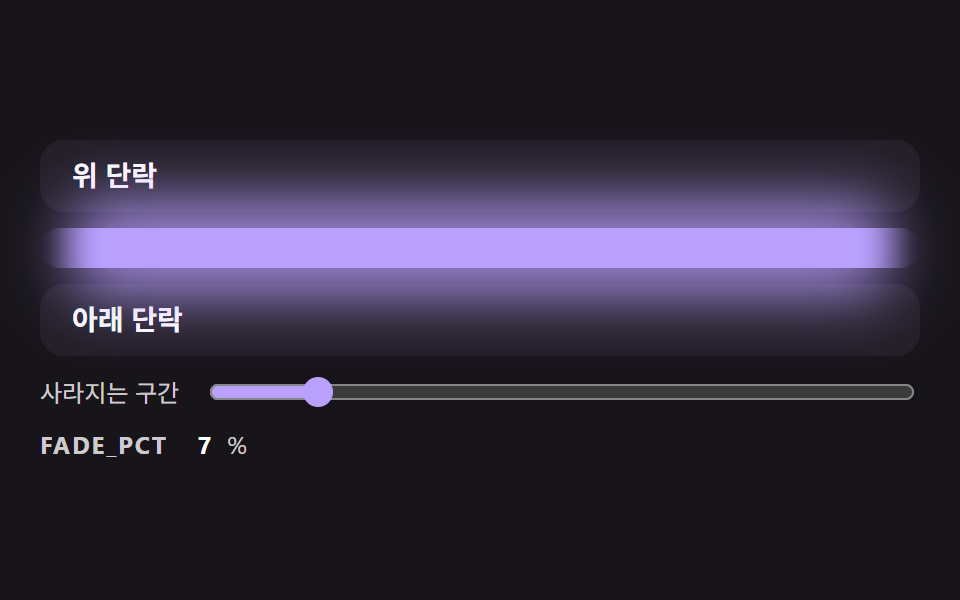 전환css 구분선 9가지 — 양 끝이 사라지고 글자 폭에 맞춰 선이 나뉘는 구분선 장면
 전환CSS 모달 팝업 애니메이션 9종 — JS 최소, @starting-style로
 전환메가 메뉴 ui 9종 — 링크 나열이 아니라 사이트 지도
 전환필터 UI 9종 — 패널 슬라이드부터 칩 제거까지
 전환장바구니 담기 UI 9종 — 스프링부터 배지 관성까지
 전환캐러셀 슬라이드 예제 9종 — 관성 드래그부터 3D 원근까지
 전환화면전환 애니메이션 효과 9가지 — 파티클 물리로 만들기
 전환모달 창 애니메이션 9종 — 스프링·원형 마스크·화소로 열고 닫기