글리치 텍스트 효과 9종 — 색 채널 분리부터 줄 찢김과 픽셀 번짐까지
글리치 텍스트는 글자를 어떻게 깨뜨릴까 — 02번은 가로 띠를 해시로 밀어 줄 찢김을 만들고, 03번은 밝은 픽셀을 끌어 번지게 하며, 09번은 누르는 순간 세게 깨졌다 한 값으로 잦아든다.
글리치 텍스트는 글자를 일부러 깨뜨려 그리는 효과가 아니라, 글자 그림의 픽셀을 시간표에 맞춰 옮기고 섞는 계산이다 — 글리치 텍스트 만들기는 어떤 값을 어느 순간에 얼마나 어긋나게 할지 정하는 데서 시작한다
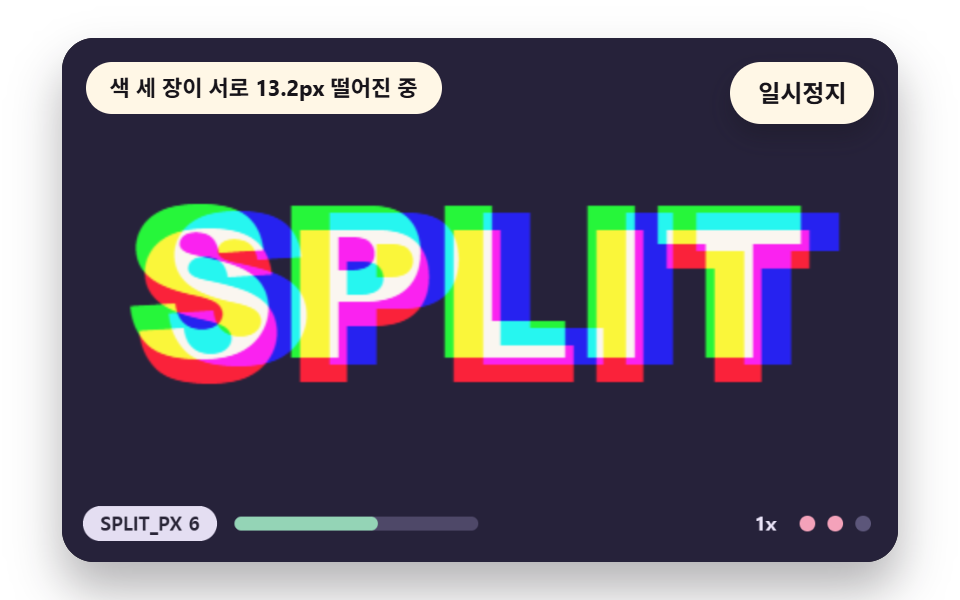 01 gt-rgb-channel-split
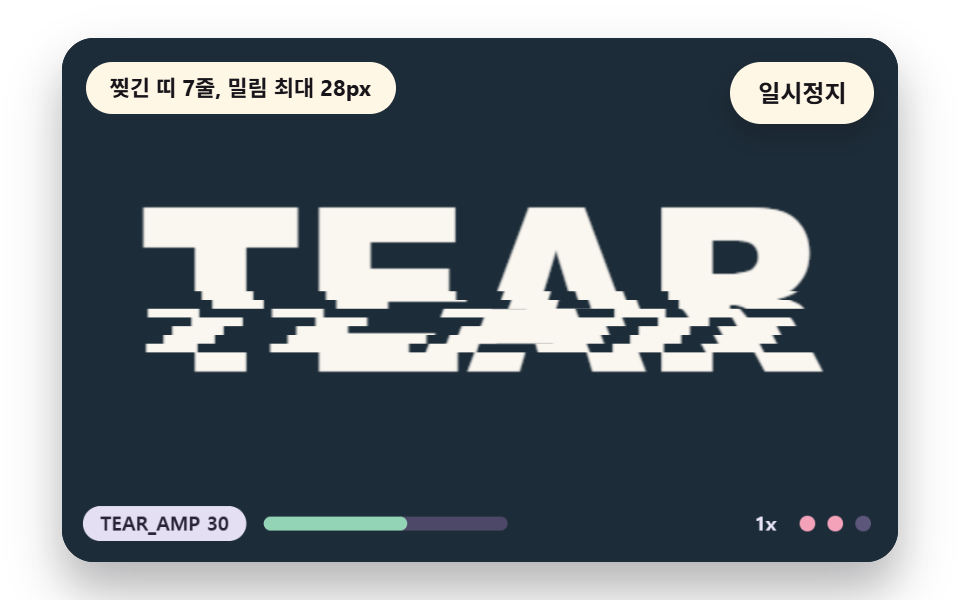 02 gt-scanline-slice-shift
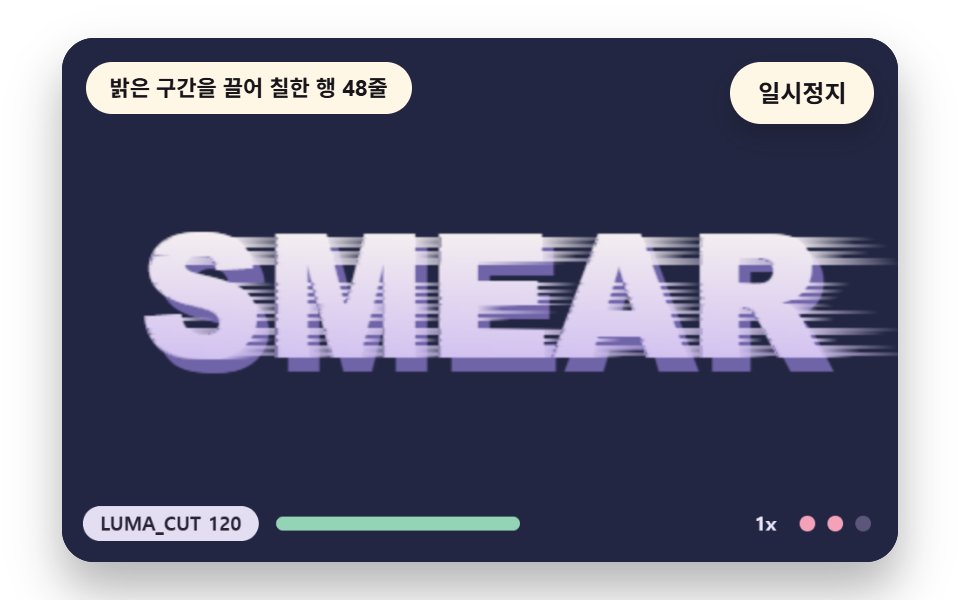 03 gt-pixel-sort-smear
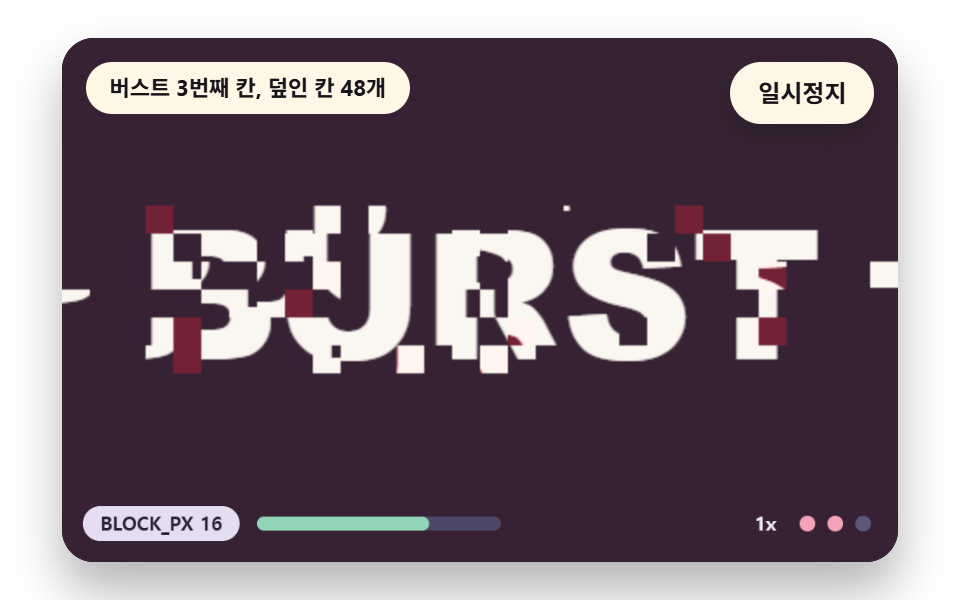 04 gt-block-displace-burst
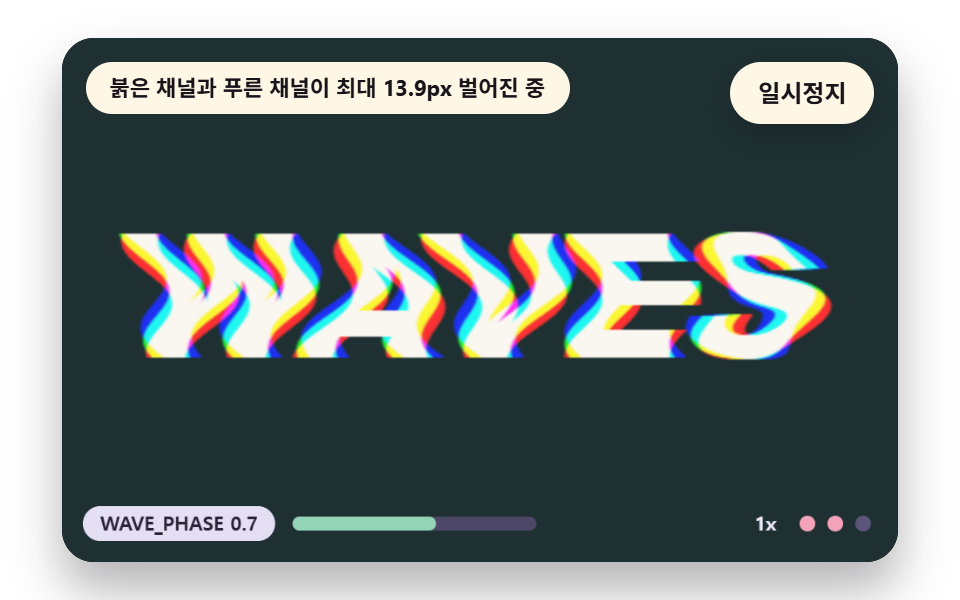 05 gt-chromatic-wave-warp
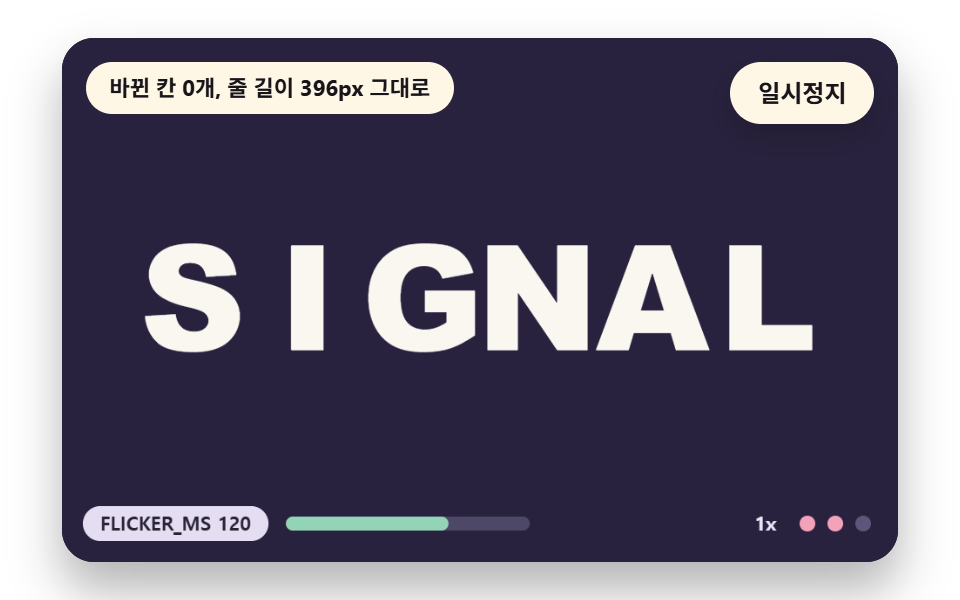 06 gt-char-swap-flicker
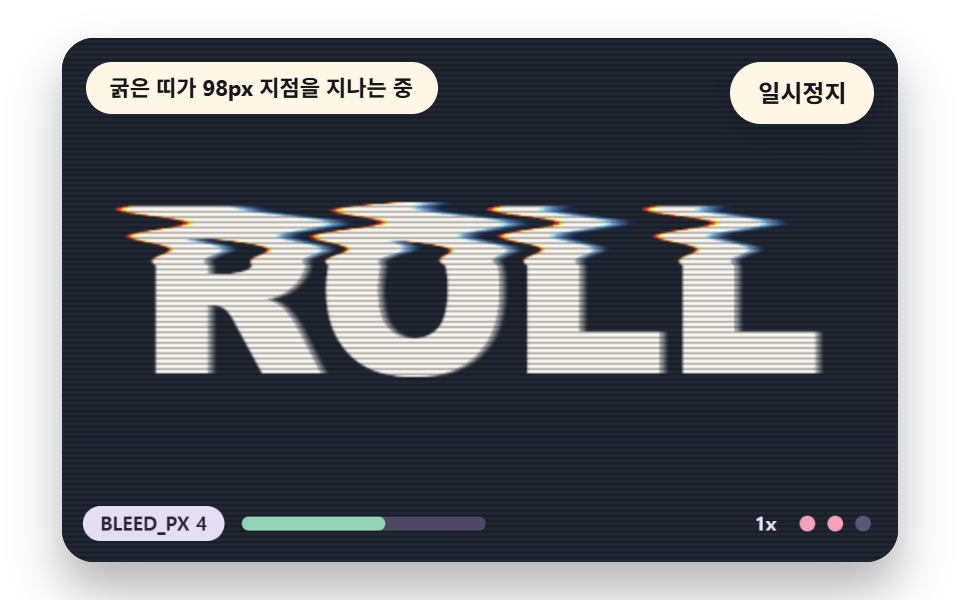 07 gt-scan-bleed-roll
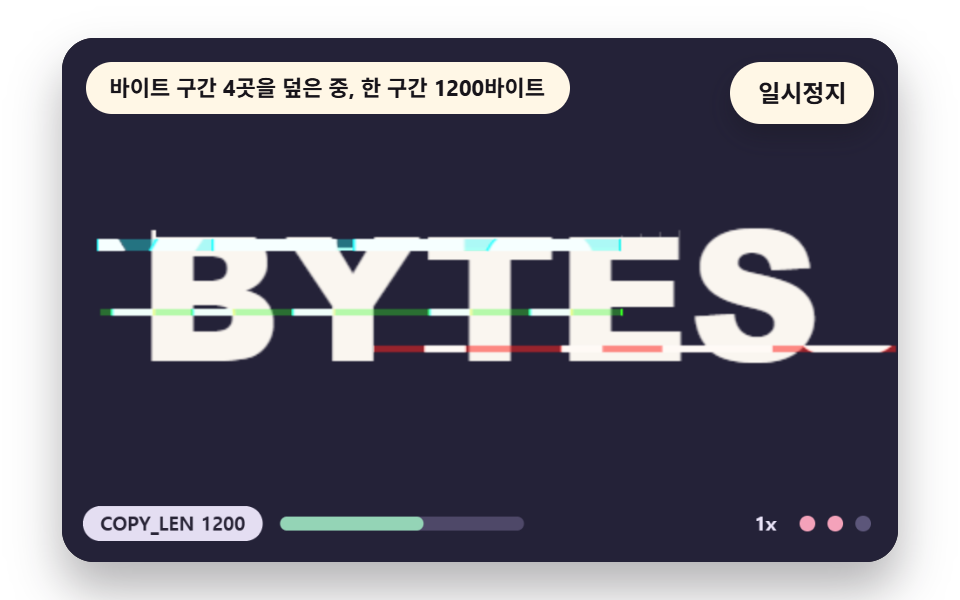 08 gt-data-corrupt-bytes
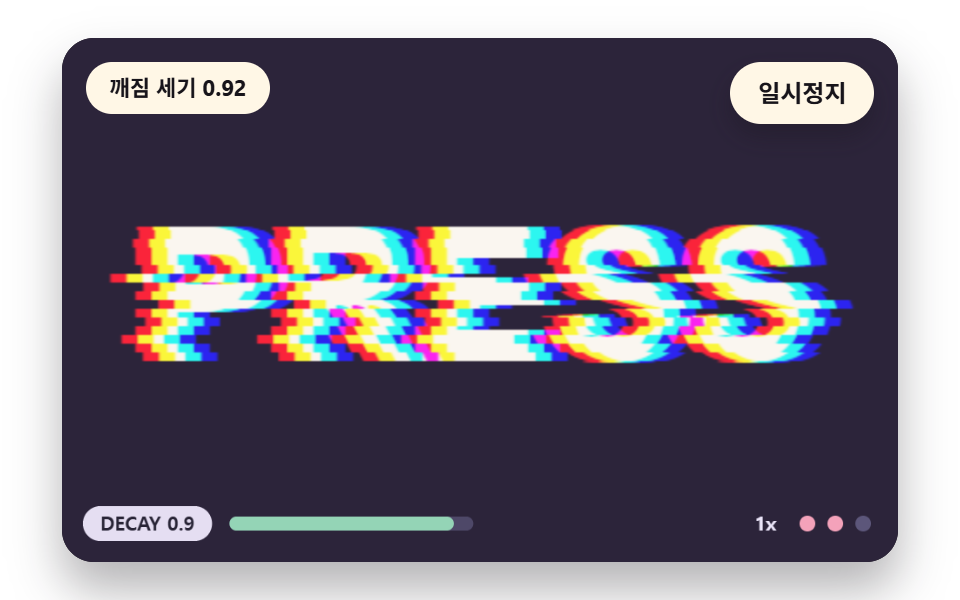 09 gt-envelope-trigger-decay
자동 재생 · 눌러서 해당 항목으로 · 전부 한 zip
- 01 글자를 붉은·초록·푸른 세 장으로 떼어 어긋나게
- 02 가로 띠가 줄마다 어긋나는 줄 찢김
- 03 밝은 픽셀이 한쪽으로 끌려 번지는 픽셀 정렬
- 04 격자 블록이 튀어 나가는 순간 버스트
- 05 사인 물결에 색마다 위상이 다른 색수차
- 06 글자 하나씩 비슷한 모양으로 바뀌는 깜박임
- 07 주사선과 번짐이 위아래로 굴러가는 화면
- 08 픽셀 버퍼의 구간이 다른 곳으로 덮이는 데이터 손상
- 09 누르는 순간 세게 깨졌다 잦아드는 세기
아홉 장면의 바탕은 하나다. 480x300 캔버스에 단어 하나를 오프스크린 캔버스에 그려 getImageData 로 읽어 화소 배열 base 로 들고 있고, 매 프레임은 이 배열을 읽어 결과를 out 에 쓴 뒤 putImageData 로 올린다. 라이브러리·WebGL·CDN 은 쓰지 않고 아홉 파일 모두 난수·날짜·외부 주소 호출이 0건이라 같은 입력이 늘 같은 그림을 낸다.
흔들림의 씨앗은 난수가 아니라 해시다
난수를 쓰면 매 프레임마다 찢기는 띠가 달라져 화면이 끝없이 떨린다. 아홉 장면은 hash2(a, b) 하나로 갈랐는데 정수 곱과 시프트로 0 이상 1 미만 값을 만들고 같은 입력은 늘 같은 값을 돌려주므로, 어느 띠가 어느 칸에서 찢길지가 시간 칸마다 정해진다.
    // 해시 — 같은 (a, b) 에는 늘 같은 0 이상 1 미만 값. 난수 함수는 쓰지 않는다
    function hash2(a, b) {
        let h = (Math.imul(a | 0, 374761393) + Math.imul(b | 0, 668265263)) | 0;
        h = Math.imul(h ^ (h >>> 13), 1274126177);
        h = h ^ (h >>> 16);
        return (h >>> 0) / 4294967296;
    }
    // 1차원 값 잡음 — 정수 칸마다 해시 값이 있고 그 사이를 부드럽게 잇는다
    function noise1(x, seed) {
        const i = Math.floor(x);
        const f = x - i;
        const u = f * f * (3 - 2 * f);
        return lerp(hash2(i, seed), hash2(i + 1, seed), u);
    }
글자가 있는 행만 계산한다
loadWord 는 단어를 그린 뒤 화소 배열을 한 번 훑어 배경과 차이가 24를 넘는 행 범위 rowTop·rowBot 을 찾는다. 02 는 행 95~192, 03 은 109~193 을 계산하므로 300행 가운데 85행만 돌고 나머지 행은 건드리지 않는다.
    // 원본 화소 버퍼 — 글자를 한 번 그려 읽어 둔 판. 모든 글리치는 이 base 를 읽어 out 에 쓴다
    let base = new Uint8ClampedArray(W * H * 4);
    let rowTop = 0;
    let rowBot = H - 1;
    const img = wkCtx.createImageData(W, H);
    const out = img.data;
    function loadWord(paint) {
        wordCtx.fillStyle = rgba(BGC, 1);
        wordCtx.fillRect(0, 0, W, H);
        paint(wordCtx);
        base = wordCtx.getImageData(0, 0, W, H).data;
        // 글자가 있는 행 범위 — 글리치 계산은 이 행만 돈다
        let top = -1;
        let bot = -1;
        for (let y = 0; y < H; y += 1) {
            let hit = false;
            for (let x = 0; x < W && !hit; x += 2) {
                const p = (y * W + x) * 4;
                if (Math.abs(base[p] - BGC[0]) + Math.abs(base[p + 1] - BGC[1]) + Math.abs(base[p + 2] - BGC[2]) > 24) {
                    hit = true;
                }
            }
            if (hit) {
                if (top < 0) {
                    top = y;
                }
                bot = y;
            }
        }
        rowTop = Math.max(0, top - 2);
        rowBot = Math.min(H - 1, bot + 2);
    }
시간표만으로 돌아가는 자동 시연
장면은 입력 없이 시간표로만 움직이고 첫 변화는 0.25초에 둔다. 무대를 누르거나 방향키를 누르면 세기 단계가 한 칸 올라가고, 탭이 숨으면 루프를 멈췄다가 돌아오면 긴 첫 프레임을 버려 몇 초가 한 프레임에 몰리지 않게 한다.
글리치 텍스트 효과 9종 — 색 채널 분리·줄 단위 찢김·밝기 기준 픽셀 번짐·격자 블록 버스트·색마다 다른 물결·글자 바꿔치기·주사선 굴림·바이트 구간 손상·누르면 깨지는 세기
아홉 장면이 이 순서로 놓인 이유와 렌더 측정값
01 은 화소 배열을 건드리지 않고 세 장을 포개는 가장 가벼운 방법이라 맨 앞이고, 02·03 은 띠와 행 단위로 배열을 옮기는 기본 두 축이다. 04·08 은 화면을 덮어 쓰는 찢김이고 05·07 은 채널·번짐으로 번지며, 06 은 모양을 바꾸고 09 는 깨짐 자체의 세기를 다룬다.
| 장면 | 누적면적 | 움직인 프레임 | 강도 평균 |
|---|---|---|---|
| 01 색 채널 분리 | 18.4% | 22/23 | 91.3 |
| 02 줄 찢김 | 9.5% | 7/23 | 153.8 |
| 03 픽셀 번짐 | 4.9% | 11/23 | 38.3 |
| 04 블록 버스트 | 15.8% | 8/23 | 150.9 |
| 05 색수차 파동 | 13.4% | 23/23 | 157.2 |
| 06 글자 바꿔치기 | 3.8% | 6/23 | 149.9 |
| 07 주사 번짐 롤 | 18.0% | 23/23 | 124.5 |
| 08 바이트 손상 | 14.9% | 16/23 | 119.6 |
| 09 트리거 감쇠 | 14.2% | 12/23 | 78.6 |
면적이 가장 넓은 장면은 01 의 18.4% 이고 06 은 3.8% 로 가장 좁다. 02 는 시간 칸이 바뀔 때만 찢기니 움직인 프레임이 7/23 에 그치고 06 은 한 판에 바꿈이 일곱 번이라 6/23 이며, 05·07 은 물결과 띠가 멈추지 않아 23/23 이다.
01글자를 붉은·초록·푸른 세 장으로 떼어 어긋나게
글자 가장자리에 색이 번지는 느낌을 가장 적은 코드로 얻는 방법이다. 종이색에서 바탕색을 뺀 값 가운데 한 채널만 가진 글자 장을 세 개 만들어 lighter 합성으로 포개면 겹친 곳은 정확히 원래 색으로 돌아오고 가장자리만 색이 갈라진다.
<main class="stage">
<div class="vj is-demo" id="vj">
  <div class="vj__pad" data-role="pad" tabindex="0" role="application" aria-label="글리치 텍스트 시연 무대 — Enter 또는 Space 로 일시정지, R 로 처음부터, 오른쪽 방향키나 T 나 누르기로 한 번 깨뜨리기">
    <canvas class="vj__canvas" data-role="canvas" width="480" height="300" role="img" aria-label="어두운 자두색 바탕에 SPLIT 이라는 글자가 있다. 글자는 빨강·초록·파랑 세 장이 겹친 것으로 평소에는 한 장으로 합쳐 보이고, 깨짐 세기가 오르면 세 장이 120도씩 다른 방향으로 벌어져 가장자리가 색으로 갈라지며 그 방향이 천천히 돈다. 아래 눈금은 설정값과 세기 단계를 보이고, 움직임 줄이기에서는 깨끗한 글자 한 장만 그려진다"></canvas>
  </div>
  <p class="vj__status" data-role="status" aria-live="off">글리치 텍스트 장면</p>
  <div class="vj__ctrl">
    <button class="vj__pause" data-role="pause" type="button" aria-pressed="false">일시정지</button>
  </div>
  <p class="vj__done" data-role="done" role="status" aria-live="polite"></p>
</div>
</main>
@use "../../../../site/static/demo-tokens" as *;
@include stage($stage-paper);
.vj {
position: relative;
width: min(92vw, calc(160vh - 12.8vw));
aspect-ratio: 480 / 300;
margin: 0 auto;
border-radius: $r-card;
overflow: hidden;
box-shadow: $shadow-raised;
background: $subject-ink;
}
// 무대 상자 — 눌러서 한 번 깨뜨리는 곳(touch-action: none 은 이 상자에만). 무대 밖 터치는 페이지 스크롤 그대로
.vj__pad {
position: absolute;
inset: 0;
border-radius: inherit;
outline: none;
touch-action: none;
cursor: pointer;
}
// 바깥 .vj 가 넘침을 자르므로 포커스 테두리는 안쪽으로 들인다
.vj__pad:focus-visible {
outline: 3px solid $subject-cream;
outline-offset: -3px;
}
.vj__canvas {
position: absolute;
inset: 0;
display: block;
width: 100%;
height: 100%;
}
.vj__ctrl {
position: absolute;
right: $sp-3;
top: $sp-3;
display: flex;
gap: $sp-2;
}
.vj__pause {
padding: $sp-1 $sp-3;
border: 2px solid $subject-cream;
border-radius: $r-pill;
background: $subject-cream;
color: $subject-ink;
font-family: inherit;
font-weight: 700;
font-size: 12px;
line-height: 1.6;
cursor: pointer;
box-shadow: $shadow-press;
transition: transform $dur-quick $ease-spring;
}
// 스크린리더에만 읽히는 낭독 문장 — 모드가 바뀔 때만 쓴다
.vj__done {
position: absolute;
width: 1px;
height: 1px;
margin: 0;
overflow: hidden;
clip-path: inset(50%);
white-space: nowrap;
}
// 눌린 상태(멈춤) — 바탕과 글자색을 뒤집어 aria-pressed 가 눈에도 보이게
.vj__pause[aria-pressed="true"] {
background: $subject-ink;
color: $subject-cream;
}
.vj__pause:hover {
transform: translateY(-2px);
}
.vj__pause:active {
transform: translateY(1px);
}
.vj__pause:focus-visible {
outline: 3px solid $subject-cream;
outline-offset: 3px;
}
// 상태 줄 — 지금 장면의 수치를 글자로. 화면에만 있고 aria-live 는 늘 off
.vj__status {
position: absolute;
left: $sp-3;
top: $sp-3;
max-width: calc(100% - 100px);
margin: 0;
padding: $sp-1 $sp-3;
border-radius: $r-pill;
background: $subject-cream;
color: $subject-ink;
font-weight: 700;
font-size: 11px;
line-height: 1.6;
white-space: nowrap;
overflow: hidden;
text-overflow: ellipsis;
pointer-events: none;
}
@media (max-width: 340px) {
.vj__pause,
.vj__status { font-size: 10px; padding: 0 $sp-2; }
}
// 움직임 줄이기 — 장면은 스크립트가 글리치 없는 원문 한 장으로 멈춘다. 버튼도 떠오르지 않게
@media (prefers-reduced-motion: reduce) {
.vj__pause { transition: none !important; }
.vj__pause:hover,
.vj__pause:active { transform: none !important; }
}html, body {
margin: 0;
overflow: hidden;
}
.stage {
box-sizing: border-box;
min-height: 100vh;
display: grid;
place-items: center;
margin: 0;
background: #ffffff;
font-family: -apple-system, "Segoe UI", "Noto Sans KR", sans-serif;
padding: clamp(8px, 4vw, 24px);
}
.vj {
position: relative;
width: min(92vw, 160vh - 12.8vw);
aspect-ratio: 480/300;
margin: 0 auto;
border-radius: 16px;
overflow: hidden;
box-shadow: 0 14px 24px rgba(23, 20, 26, 0.32);
background: #17141a;
}
.vj__pad {
position: absolute;
inset: 0;
border-radius: inherit;
outline: none;
touch-action: none;
cursor: pointer;
}
.vj__pad:focus-visible {
outline: 3px solid #fff7e6;
outline-offset: -3px;
}
.vj__canvas {
position: absolute;
inset: 0;
display: block;
width: 100%;
height: 100%;
}
.vj__ctrl {
position: absolute;
right: 12px;
top: 12px;
display: flex;
gap: 8px;
}
.vj__pause {
padding: 4px 12px;
border: 2px solid #fff7e6;
border-radius: 999px;
background: #fff7e6;
color: #17141a;
font-family: inherit;
font-weight: 700;
font-size: 12px;
line-height: 1.6;
cursor: pointer;
box-shadow: 0 6px 12px rgba(23, 20, 26, 0.32);
transition: transform 220ms cubic-bezier(0.2, 0.8, 0.2, 1);
}
.vj__done {
position: absolute;
width: 1px;
height: 1px;
margin: 0;
overflow: hidden;
clip-path: inset(50%);
white-space: nowrap;
}
.vj__pause[aria-pressed=true] {
background: #17141a;
color: #fff7e6;
}
.vj__pause:hover {
transform: translateY(-2px);
}
.vj__pause:active {
transform: translateY(1px);
}
.vj__pause:focus-visible {
outline: 3px solid #fff7e6;
outline-offset: 3px;
}
.vj__status {
position: absolute;
left: 12px;
top: 12px;
max-width: calc(100% - 100px);
margin: 0;
padding: 4px 12px;
border-radius: 999px;
background: #fff7e6;
color: #17141a;
font-weight: 700;
font-size: 11px;
line-height: 1.6;
white-space: nowrap;
overflow: hidden;
text-overflow: ellipsis;
pointer-events: none;
}
@media (max-width: 340px) {
.vj__pause,
.vj__status {
font-size: 10px;
padding: 0 8px;
}
}
@media (prefers-reduced-motion: reduce) {
.vj__pause {
transition: none !important;
}
.vj__pause:hover,
.vj__pause:active {
transform: none !important;
}
}(function () {
const root = document.getElementById("vj");
if (!root) return;
// 무대 좌표 — 캔버스 안 계산은 늘 480×300. 화면에 보이는 크기와 상관없다
const W = 480;
const H = 300;
const TAU = Math.PI * 2;
function clamp(v, lo, hi) { return v < lo ? lo : (v > hi ? hi : v); }
function lerp(a, b, k) { return a + (b - a) * k; }
// 파스텔 팔레트 — 바탕은 짙은 자두색, 글자는 연한 종이색, 눈금과 알약은 연한 색
const INK = [40, 36, 54];
const PAPER = [250, 246, 240];
const ROSE = [244, 162, 186];
const MINT = [148, 212, 182];
const NEU = [236, 230, 250];
function rgba(c, a) {
return 'rgba(' + Math.round(clamp(c[0], 0, 255)) + ',' + Math.round(clamp(c[1], 0, 255)) + ',' + Math.round(clamp(c[2], 0, 255)) + ',' + clamp(a, 0, 1).toFixed(3) + ')';
}
// 해시 — 같은 (a, b) 에는 늘 같은 0 이상 1 미만 값. 난수 함수는 쓰지 않는다
function hash2(a, b) {
let h = (Math.imul(a | 0, 374761393) + Math.imul(b | 0, 668265263)) | 0;
h = Math.imul(h ^ (h >>> 13), 1274126177);
h = h ^ (h >>> 16);
return (h >>> 0) / 4294967296;
}
// 1차원 값 잡음 — 정수 칸마다 해시 값이 있고 그 사이를 부드럽게 잇는다
function noise1(x, seed) {
const i = Math.floor(x);
const f = x - i;
const u = f * f * (3 - 2 * f);
return lerp(hash2(i, seed), hash2(i + 1, seed), u);
}
// 장면 시계(초)·판 반복 번호·시간표 — 시간표는 (시각, 할 일) 목록이고 시각이 지나면 한 번씩 부른다
let sceneT = 0;
let lap = 0;
let script = [];
let evAt = 0;
// 문구 틀의 {a}·{b} 자리에 값을 끼운다 — 화면 문구는 늘 이 틀 한 줄로 두고 로케일 사전이 통째로 바꾼다
function fill(s, a, b) { return s.replace('{a}', a).replace('{b}', b === undefined ? '' : b); }
function r1(v) { return String(Math.round(v * 10) / 10); }
// 세기 단계 — 장면을 누를 때마다 0 → 1 → 2 → 0 으로 돈다. 글리치의 크기에 이 배율이 곱해진다
const LVL_MUL = [0.5, 1, 1.7];
let lvl = 1;
// 깨짐 세기 g 는 시간표가 정한 목표 gTgt 를 따라간다. 손으로 누르면 holdUntil 까지 목표가 서 있다가 0 으로 돌아간다
let g = 0;
let gTgt = 0;
let holdUntil = 0;
function followG(dt, rate) {
if (manual && sceneT > holdUntil) {
gTgt = 0;
}
g += (gTgt - g) * (1 - Math.exp(-rate * dt));
if (g < 0.002 && gTgt === 0) {
g = 0;
}
}
function hitG(top) {
gTgt = top;
holdUntil = sceneT + 1.6;
}
// 움직임 줄이기에서는 글리치 없이 원문 한 장 — 세기 단계는 눈금에만 반영된다
function gainNow() { return still ? 0 : g * LVL_MUL[lvl]; }
const STILL_FMT = '움직임 줄이기 — 깨끗한 글자 한 장, 설정 {a}';
const SPEAK_GLITCH = '글자 {a} 가 깨지는 중, 세기 {b}단계';
const SPEAK_CLEAN = '글자 {a} 가 깨끗하게 보이는 중, 세기 {b}단계';
const SPEAK_STILL = '움직임 줄이기 — 글자 {a} 한 장, 세기 {b}단계';
function speakLine(word) {
if (still) {
return fill(SPEAK_STILL, word, String(lvl + 1));
}
return fill(modeId() === 1 ? SPEAK_GLITCH : SPEAK_CLEAN, word, String(lvl + 1));
}
const canvasEl = root.querySelector('[data-role="canvas"]');
const padEl = root.querySelector('[data-role="pad"]');
const pauseEl = root.querySelector('[data-role="pause"]');
const statusEl = root.querySelector('[data-role="status"]');
const doneEl = root.querySelector('[data-role="done"]');
const ctxRaw = canvasEl ? canvasEl.getContext('2d') : null;
const wkCv = document.createElement('canvas');
wkCv.width = W;
wkCv.height = H;
const wkRaw = wkCv.getContext('2d');
const wordCv = document.createElement('canvas');
wordCv.width = W;
wordCv.height = H;
const wordRaw = wordCv.getContext('2d', { willReadFrequently: true });
if (!canvasEl || !ctxRaw || !pauseEl || !padEl || !doneEl || !wkRaw || !wordRaw) {
return;
}
const cv = canvasEl;
const ctx = ctxRaw;
const wkCtx = wkRaw;
const wordCtx = wordRaw;
const pauseBtn = pauseEl;
const doneP = doneEl;
const pad = padEl;
// 외부 웹폰트는 부르지 않는다 — 기기에 있는 굵은 글꼴 목록만
const WORD_FONT = '"Arial Black", "Segoe UI Black", Impact, system-ui, sans-serif';
const UI_FONT = 'system-ui, -apple-system, "Segoe UI", "Noto Sans KR", sans-serif';
let dpr = 1;
function fitCanvas() {
// 배율은 2 에서 자른다 — 화소 계산은 늘 480×300 이고 화면 배율만 이 값
dpr = Math.min(window.devicePixelRatio || 1, 2);
cv.width = Math.round(W * dpr);
cv.height = Math.round(H * dpr);
ctx.setTransform(dpr, 0, 0, dpr, 0, 0);
}
const MAX_W = 392;
// 글자 한 줄을 무대 한가운데에 그린다 — dx·dy 는 그림자·겹침용 어긋남
function paintWord(c, word, px, fillStyle, dx, dy) {
// 글꼴이 기기마다 달라도 단어가 MAX_W 안에 들도록 크기를 줄여 맞춘다
c.font = '900 ' + px + 'px ' + WORD_FONT;
const wide = c.measureText(word).width;
const fit = wide > MAX_W ? px * MAX_W / wide : px;
c.font = '900 ' + fit + 'px ' + WORD_FONT;
c.textAlign = 'center';
c.textBaseline = 'middle';
c.fillStyle = fillStyle;
c.fillText(word, W / 2 + dx, H / 2 + 6 + dy);
}
// 원본 화소 버퍼 — 글자를 한 번 그려 읽어 둔 판. 모든 글리치는 이 base 를 읽어 out 에 쓴다
let base = new Uint8ClampedArray(W * H * 4);
let rowTop = 0;
let rowBot = H - 1;
const img = wkCtx.createImageData(W, H);
const out = img.data;
function loadWord(paint) {
wordCtx.fillStyle = rgba(BGC, 1);
wordCtx.fillRect(0, 0, W, H);
paint(wordCtx);
base = wordCtx.getImageData(0, 0, W, H).data;
// 글자가 있는 행 범위 — 글리치 계산은 이 행만 돈다
let top = -1;
let bot = -1;
for (let y = 0; y < H; y += 1) {
let hit = false;
for (let x = 0; x < W && !hit; x += 2) {
const p = (y * W + x) * 4;
if (Math.abs(base[p] - BGC[0]) + Math.abs(base[p + 1] - BGC[1]) + Math.abs(base[p + 2] - BGC[2]) > 24) {
hit = true;
}
}
if (hit) {
if (top < 0) {
top = y;
}
bot = y;
}
}
rowTop = Math.max(0, top - 2);
rowBot = Math.min(H - 1, bot + 2);
}
function present() {
wkCtx.putImageData(img, 0, 0);
ctx.drawImage(wkCv, 0, 0, W, H);
}
// 한 행을 채널마다 다른 가로 어긋남으로 읽어 tmp(길이 W×3)에 쓴다 — 어긋남이 소수여도 이웃 두 화소를 섞는다
function rowSample(y, dR, dG, dB, tmp) {
const o = y * W * 4;
const d = [dR, dG, dB];
for (let c = 0; c < 3; c += 1) {
for (let x = 0; x < W; x += 1) {
let sx = x - d[c];
if (sx < 0) {
sx = 0;
}
else if (sx > W - 1.001) {
sx = W - 1.001;
}
const i0 = Math.floor(sx);
const f = sx - i0;
const p = o + i0 * 4 + c;
tmp[x * 3 + c] = base[p] * (1 - f) + base[p + 4] * f;
}
}
}
const rowTmp = new Float32Array(W * 3);
function renderRows(y0, y1, dxR, dxG, dxB) {
for (let y = y0; y <= y1; y += 1) {
rowSample(y, dxR[y], dxG[y], dxB[y], rowTmp);
const o = y * W * 4;
for (let x = 0; x < W; x += 1) {
out[o + x * 4] = rowTmp[x * 3];
out[o + x * 4 + 1] = rowTmp[x * 3 + 1];
out[o + x * 4 + 2] = rowTmp[x * 3 + 2];
}
}
}
function box(x, y, w, h, r, c, a) {
if (w <= 0.2 || h <= 0.2 || a <= 0) {
return;
}
ctx.beginPath();
ctx.roundRect(x, y, w, h, Math.max(0, Math.min(r, w / 2, h / 2)));
ctx.fillStyle = rgba(c, a);
ctx.fill();
}
function disc(x, y, r, c) {
ctx.beginPath();
ctx.arc(x, y, r, 0, TAU);
ctx.fillStyle = rgba(c, 1);
ctx.fill();
}
function text(s, x, y, c, px, weight, align) {
ctx.font = weight + ' ' + px + 'px ' + UI_FONT;
ctx.textAlign = align;
ctx.textBaseline = 'middle';
ctx.fillStyle = rgba(c, 1);
ctx.fillText(s, x, y);
}
// 아래쪽 눈금 — 상수 이름과 지금 설정값 · 설정 크기 막대 · 세기 단계 점 셋. 값은 세기 단계가 곱해진 설정이다
function hud(name, val, frac) {
const label = name + ' ' + r1(val);
ctx.font = '700 11px ' + UI_FONT;
const w = ctx.measureText(label).width + 20;
const x = 12;
const y = H - 32;
box(x, y, w, 20, 10, NEU, 0.96);
text(label, x + w / 2, y + 10.5, INK, 11, 700, 'center');
const mx = x + w + 10;
box(mx, y + 6, 140, 8, 4, [78, 72, 104], 1);
box(mx, y + 6, 140 * clamp(frac, 0, 1), 8, 4, MINT, 1);
text(String(LVL_MUL[lvl]) + 'x', W - 70, y + 10.5, NEU, 11, 700, 'right');
for (let i = 0; i < 3; i += 1) {
disc(W - 52 + i * 16, y + 10, 4.5, i <= lvl ? ROSE : [92, 86, 122]);
}
}
let shownStatus = '';
function pushStatus(s) {
if (!statusEl || s === shownStatus) {
return;
}
shownStatus = s;
statusEl.textContent = s;
}
let paused = false;
const reduceQuery = window.matchMedia('(prefers-reduced-motion: reduce)');
// 페이지를 연 채 움직임 줄이기 설정을 바꿔도 change 리스너가 다시 읽는다
let still = reduceQuery.matches;
// 자동 시연 표시 — 사람이 처음 손대면 떼고, 그 뒤부터 모드가 바뀔 때만 낭독 문장을 쓴다
let demo = root.classList.contains('is-demo');
const off = new AbortController();
// 사람이 직접 누르는 중이면 시간표는 멈추고 계산만 흐른다
let manual = false;
function wake() {
if (!demo) {
return;
}
demo = false;
root.classList.remove('is-demo');
}
function takeOver() {
if (manual) {
return;
}
manual = true;
wake();
}
// 낭독 문장 — 화면 상태 줄(aria-live off)과 따로, 모드가 바뀔 때와 사람이 눌렀을 때만 role=status 에 쓴다
let lastMode = -9;
function say() {
doneP.textContent = speakLine(WORD);
lastMode = still ? -2 : modeId();
}
function advance(dt) {
sceneT += dt;
if (!manual) {
while (evAt < script.length && script[evAt].t <= sceneT) {
const ev = script[evAt];
evAt += 1;
ev.f();
}
if (sceneT >= LAP_S) {
lap += 1;
begin();
return;
}
}
update(dt);
}
function begin() {
sceneT = 0;
evAt = 0;
script = [];
build();
}
const DT_MAX = 0.05;
function showNow() {
draw();
pushStatus(statusText());
if (!demo) {
const m = still ? -2 : modeId();
if (m !== lastMode) {
say();
}
}
}
let rafId = 0;
let lastTs = -1;
function frame(ts) {
if (still || paused) {
rafId = 0;
return;
}
if (lastTs < 0) {
lastTs = ts;
}
const dt = Math.min((ts - lastTs) / 1000, DT_MAX);
lastTs = ts;
if (dt > 0) {
advance(dt);
}
showNow();
rafId = window.requestAnimationFrame(frame);
}
function startLoop() {
if (rafId) {
return;
}
// 멈췄던 사이의 시간을 첫 프레임 dt 로 넘기지 않는다
lastTs = -1;
rafId = window.requestAnimationFrame(frame);
}
function stopLoop() {
if (rafId) {
window.cancelAnimationFrame(rafId);
rafId = 0;
}
}
// 움직임 줄이기 — 루프 없이 글리치 없는 원문 한 장
function showRest() {
stopLoop();
lap = 0;
sceneT = 0;
evAt = 0;
script = [];
build();
update(0);
showNow();
}
function play() {
begin();
showNow();
if (!paused) {
startLoop();
}
}
function togglePause() {
paused = !paused;
pauseBtn.setAttribute('aria-pressed', paused ? 'true' : 'false');
wake();
if (paused) {
stopLoop();
}
else if (!still) {
startLoop();
}
say();
}
function restart() {
manual = false;
lap += 1;
g = 0;
gTgt = 0;
begin();
update(0);
showNow();
say();
}
// 누르기 — 세기 단계를 한 칸 올리고(0 → 1 → 2 → 0) 그 자리에서 한 번 깨뜨린다. 멈춘 채여도 세 걸음을 더 돌려 깨진 장면이 눈에 보이게
function tap() {
takeOver();
lvl = (lvl + 1) % 3;
if (!still) {
onHit();
if (paused) {
for (let k = 0; k < 3; k += 1) {
sceneT += 1 / 30;
update(1 / 30);
}
}
}
showNow();
say();
}
pauseBtn.addEventListener('click', togglePause, { signal: off.signal });
// 키보드 — 무대에 포커스가 있을 때만. Enter·Space = 일시정지, R = 처음부터, 오른쪽·위·T = 한 번 깨뜨리기
pad.addEventListener('keydown', function (e) {
if (e.altKey || e.ctrlKey || e.metaKey) {
return;
}
const k = e.key;
if (k === 'Enter' || k === ' ' || k === 'p' || k === 'P') {
e.preventDefault();
togglePause();
}
else if (k === 'r' || k === 'R') {
restart();
}
else if (k === 'ArrowRight' || k === 'ArrowUp' || k === 't' || k === 'T') {
e.preventDefault();
tap();
}
}, { signal: off.signal });
// 마우스·터치 — 무대를 누르는 순간 한 번 깨뜨린다
pad.addEventListener('pointerdown', function () { tap(); }, { signal: off.signal });
// 탭이 숨으면 멈추고, 돌아오면 시계를 다시 맞춰 시작 — 숨은 동안의 몇 초가 한 프레임에 몰리지 않게
document.addEventListener('visibilitychange', function () {
if (document.hidden) {
stopLoop();
}
else if (!paused && !still) {
startLoop();
}
}, { signal: off.signal });
// 설정이 바뀌면 — 켜지면 원문 한 장, 꺼지면 다시 움직인다
reduceQuery.addEventListener('change', function () {
still = reduceQuery.matches;
if (still) {
showRest();
}
else {
lap = 0;
play();
}
}, { signal: off.signal });
window.addEventListener('resize', function () {
fitCanvas();
showNow();
}, { signal: off.signal });
// 01 — 글자 한 줄을 빨강·초록·파랑 세 장으로 따로 그려 두고, lighter 합성으로 포갠다. 세 장은 SPLIT_PX × 깨짐 세기 만큼 120도씩 다른 방향으로 밀리고 그 방향이 천천히 돈다
const SPLIT_PX = 6;
const SPIN_RAD_S = 0.9;
const LAP_S = 6.8;
const BGC = [38, 34, 58];
const WORD = 'SPLIT';
    // 한 장 = 종이색에서 바탕색을 뺀 값 중 한 채널만 가진 글자 — 세 장을 더하면 정확히 원래 종이색이 된다
    function makeTint(ch) {
        const c = document.createElement('canvas');
        c.width = W;
        c.height = H;
        const x = c.getContext('2d');
        const tint = [0, 0, 0];
        tint[ch] = PAPER[ch] - BGC[ch];
        if (x) {
            paintWord(x, WORD, 150, rgba(tint, 1), 0, 0);
        }
        return c;
    }
const tints = [makeTint(0), makeTint(1), makeTint(2)];
loadWord(function (c) { paintWord(c, WORD, 150, rgba(PAPER, 1), 0, 0); });
let spin = 0;
let splitNow = 0;
function setting() { return SPLIT_PX * LVL_MUL[lvl]; }
function build() {
g = 0;
gTgt = 0;
spin = 0;
script.push({ t: 0.25, f: function () { gTgt = 1; } });
script.push({ t: 1.5, f: function () { gTgt = 2.2; } });
script.push({ t: 2.7, f: function () { gTgt = 0.15; } });
script.push({ t: 4.4, f: function () { gTgt = 1.6; } });
script.push({ t: 5.6, f: function () { gTgt = 0; } });
}
function update(dt) {
followG(dt, 9);
spin += SPIN_RAD_S * dt;
}
function draw() {
ctx.fillStyle = rgba(BGC, 1);
ctx.fillRect(0, 0, W, H);
splitNow = still ? 0 : SPLIT_PX * g * LVL_MUL[lvl];
        ctx.globalCompositeOperation = 'lighter';
        for (let ch = 0; ch < 3; ch += 1) {
            const a = spin + ch * TAU / 3;
            ctx.drawImage(tints[ch], Math.round(Math.cos(a) * splitNow), Math.round(Math.sin(a) * splitNow * 0.6));
        }
        ctx.globalCompositeOperation = 'source-over';
hud('SPLIT_PX', setting(), LVL_MUL[lvl] / 1.7);
}
function statusText() {
if (still) {
return fill(STILL_FMT, r1(setting()) + 'px');
}
return fill('색 세 장이 서로 {a}px 떨어진 중', r1(splitNow));
}
function modeId() { return g > 0.3 ? 1 : 0; }
function onHit() { hitG(1.4); }
fitCanvas();
if (still) {
showRest();
}
else {
play();
}
return function () {
stopLoop();
off.abort();
};
})();// RgbChannelSplit - 같은 항목 vanilla index.html 의 React 판. 같은 계산을 useEffect 안에서 돌린다
import { useEffect, useRef } from "react";
import styles from "./RgbChannelSplit.module.scss";
const cx = (s: string): string => s.split(" ").map((n) => styles[n] ?? n).join(" ");
export default function RgbChannelSplit() {
const rootRef = useRef<HTMLDivElement | null>(null);
useEffect(() => {
const rootEl = rootRef.current;
if (!rootEl) return;
const root: HTMLElement = rootEl;
type RGB = [number, number, number];
// 무대 좌표 — 캔버스 안 계산은 늘 480×300. 화면에 보이는 크기와 상관없다
const W = 480;
const H = 300;
const TAU = Math.PI * 2;
function clamp(v: number, lo: number, hi: number): number { return v < lo ? lo : (v > hi ? hi : v); }
function lerp(a: number, b: number, k: number): number { return a + (b - a) * k; }
// 파스텔 팔레트 — 바탕은 짙은 자두색, 글자는 연한 종이색, 눈금과 알약은 연한 색
const INK: RGB = [40, 36, 54];
const PAPER: RGB = [250, 246, 240];
const ROSE: RGB = [244, 162, 186];
const MINT: RGB = [148, 212, 182];
const NEU: RGB = [236, 230, 250];
function rgba(c: RGB, a: number): string {
return 'rgba(' + Math.round(clamp(c[0], 0, 255)) + ',' + Math.round(clamp(c[1], 0, 255)) + ',' + Math.round(clamp(c[2], 0, 255)) + ',' + clamp(a, 0, 1).toFixed(3) + ')';
}
// 해시 — 같은 (a, b) 에는 늘 같은 0 이상 1 미만 값. 난수 함수는 쓰지 않는다
function hash2(a: number, b: number): number {
let h = (Math.imul(a | 0, 374761393) + Math.imul(b | 0, 668265263)) | 0;
h = Math.imul(h ^ (h >>> 13), 1274126177);
h = h ^ (h >>> 16);
return (h >>> 0) / 4294967296;
}
// 1차원 값 잡음 — 정수 칸마다 해시 값이 있고 그 사이를 부드럽게 잇는다
function noise1(x: number, seed: number): number {
const i = Math.floor(x);
const f = x - i;
const u = f * f * (3 - 2 * f);
return lerp(hash2(i, seed), hash2(i + 1, seed), u);
}
// 장면 시계(초)·판 반복 번호·시간표 — 시간표는 (시각, 할 일) 목록이고 시각이 지나면 한 번씩 부른다
let sceneT = 0;
let lap = 0;
type Ev = { t: number; f: () => void };
let script: Ev[] = [];
let evAt = 0;
// 문구 틀의 {a}·{b} 자리에 값을 끼운다 — 화면 문구는 늘 이 틀 한 줄로 두고 로케일 사전이 통째로 바꾼다
function fill(s: string, a: string, b?: string): string { return s.replace('{a}', a).replace('{b}', b === undefined ? '' : b); }
function r1(v: number): string { return String(Math.round(v * 10) / 10); }
// 세기 단계 — 장면을 누를 때마다 0 → 1 → 2 → 0 으로 돈다. 글리치의 크기에 이 배율이 곱해진다
const LVL_MUL = [0.5, 1, 1.7];
let lvl = 1;
// 깨짐 세기 g 는 시간표가 정한 목표 gTgt 를 따라간다. 손으로 누르면 holdUntil 까지 목표가 서 있다가 0 으로 돌아간다
let g = 0;
let gTgt = 0;
let holdUntil = 0;
function followG(dt: number, rate: number): void {
if (manual && sceneT > holdUntil) { gTgt = 0; }
g += (gTgt - g) * (1 - Math.exp(-rate * dt));
if (g < 0.002 && gTgt === 0) { g = 0; }
}
function hitG(top: number): void {
gTgt = top;
holdUntil = sceneT + 1.6;
}
// 움직임 줄이기에서는 글리치 없이 원문 한 장 — 세기 단계는 눈금에만 반영된다
function gainNow(): number { return still ? 0 : g * LVL_MUL[lvl]; }
const STILL_FMT = '움직임 줄이기 — 깨끗한 글자 한 장, 설정 {a}';
const SPEAK_GLITCH = '글자 {a} 가 깨지는 중, 세기 {b}단계';
const SPEAK_CLEAN = '글자 {a} 가 깨끗하게 보이는 중, 세기 {b}단계';
const SPEAK_STILL = '움직임 줄이기 — 글자 {a} 한 장, 세기 {b}단계';
function speakLine(word: string): string {
if (still) { return fill(SPEAK_STILL, word, String(lvl + 1)); }
return fill(modeId() === 1 ? SPEAK_GLITCH : SPEAK_CLEAN, word, String(lvl + 1));
}
const canvasEl = root.querySelector('[data-role="canvas"]') as HTMLCanvasElement | null;
const padEl = root.querySelector('[data-role="pad"]') as HTMLElement | null;
const pauseEl = root.querySelector('[data-role="pause"]') as HTMLButtonElement | null;
const statusEl = root.querySelector('[data-role="status"]') as HTMLElement | null;
const doneEl = root.querySelector('[data-role="done"]') as HTMLElement | null;
const ctxRaw = canvasEl ? canvasEl.getContext('2d') : null;
const wkCv: HTMLCanvasElement = document.createElement('canvas');
wkCv.width = W;
wkCv.height = H;
const wkRaw = wkCv.getContext('2d');
const wordCv: HTMLCanvasElement = document.createElement('canvas');
wordCv.width = W;
wordCv.height = H;
const wordRaw = wordCv.getContext('2d', { willReadFrequently: true });
if (!canvasEl || !ctxRaw || !pauseEl || !padEl || !doneEl || !wkRaw || !wordRaw) { return; }
const cv: HTMLCanvasElement = canvasEl;
const ctx: CanvasRenderingContext2D = ctxRaw;
const wkCtx: CanvasRenderingContext2D = wkRaw;
const wordCtx: CanvasRenderingContext2D = wordRaw;
const pauseBtn: HTMLButtonElement = pauseEl;
const doneP: HTMLElement = doneEl;
const pad: HTMLElement = padEl;
// 외부 웹폰트는 부르지 않는다 — 기기에 있는 굵은 글꼴 목록만
const WORD_FONT = '"Arial Black", "Segoe UI Black", Impact, system-ui, sans-serif';
const UI_FONT = 'system-ui, -apple-system, "Segoe UI", "Noto Sans KR", sans-serif';
let dpr = 1;
function fitCanvas(): void {
// 배율은 2 에서 자른다 — 화소 계산은 늘 480×300 이고 화면 배율만 이 값
dpr = Math.min(window.devicePixelRatio || 1, 2);
cv.width = Math.round(W * dpr);
cv.height = Math.round(H * dpr);
ctx.setTransform(dpr, 0, 0, dpr, 0, 0);
}
const MAX_W = 392;
// 글자 한 줄을 무대 한가운데에 그린다 — dx·dy 는 그림자·겹침용 어긋남
function paintWord(c: CanvasRenderingContext2D, word: string, px: number, fillStyle: string | CanvasGradient, dx: number, dy: number): void {
// 글꼴이 기기마다 달라도 단어가 MAX_W 안에 들도록 크기를 줄여 맞춘다
c.font = '900 ' + px + 'px ' + WORD_FONT;
const wide = c.measureText(word).width;
const fit = wide > MAX_W ? px * MAX_W / wide : px;
c.font = '900 ' + fit + 'px ' + WORD_FONT;
c.textAlign = 'center';
c.textBaseline = 'middle';
c.fillStyle = fillStyle;
c.fillText(word, W / 2 + dx, H / 2 + 6 + dy);
}
// 원본 화소 버퍼 — 글자를 한 번 그려 읽어 둔 판. 모든 글리치는 이 base 를 읽어 out 에 쓴다
let base: Uint8ClampedArray = new Uint8ClampedArray(W * H * 4);
let rowTop = 0;
let rowBot = H - 1;
const img: ImageData = wkCtx.createImageData(W, H);
const out: Uint8ClampedArray = img.data;
function loadWord(paint: (c: CanvasRenderingContext2D) => void): void {
wordCtx.fillStyle = rgba(BGC, 1);
wordCtx.fillRect(0, 0, W, H);
paint(wordCtx);
base = wordCtx.getImageData(0, 0, W, H).data;
// 글자가 있는 행 범위 — 글리치 계산은 이 행만 돈다
let top = -1;
let bot = -1;
for (let y = 0; y < H; y += 1) {
let hit = false;
for (let x = 0; x < W && !hit; x += 2) {
const p = (y * W + x) * 4;
if (Math.abs(base[p] - BGC[0]) + Math.abs(base[p + 1] - BGC[1]) + Math.abs(base[p + 2] - BGC[2]) > 24) { hit = true; }
}
if (hit) {
if (top < 0) { top = y; }
bot = y;
}
}
rowTop = Math.max(0, top - 2);
rowBot = Math.min(H - 1, bot + 2);
}
function present(): void {
wkCtx.putImageData(img, 0, 0);
ctx.drawImage(wkCv, 0, 0, W, H);
}
// 한 행을 채널마다 다른 가로 어긋남으로 읽어 tmp(길이 W×3)에 쓴다 — 어긋남이 소수여도 이웃 두 화소를 섞는다
function rowSample(y: number, dR: number, dG: number, dB: number, tmp: Float32Array): void {
const o = y * W * 4;
const d = [dR, dG, dB];
for (let c = 0; c < 3; c += 1) {
for (let x = 0; x < W; x += 1) {
let sx = x - d[c];
if (sx < 0) { sx = 0; } else if (sx > W - 1.001) { sx = W - 1.001; }
const i0 = Math.floor(sx);
const f = sx - i0;
const p = o + i0 * 4 + c;
tmp[x * 3 + c] = base[p] * (1 - f) + base[p + 4] * f;
}
}
}
const rowTmp = new Float32Array(W * 3);
function renderRows(y0: number, y1: number, dxR: Float32Array, dxG: Float32Array, dxB: Float32Array): void {
for (let y = y0; y <= y1; y += 1) {
rowSample(y, dxR[y], dxG[y], dxB[y], rowTmp);
const o = y * W * 4;
for (let x = 0; x < W; x += 1) {
out[o + x * 4] = rowTmp[x * 3];
out[o + x * 4 + 1] = rowTmp[x * 3 + 1];
out[o + x * 4 + 2] = rowTmp[x * 3 + 2];
}
}
}
function box(x: number, y: number, w: number, h: number, r: number, c: RGB, a: number): void {
if (w <= 0.2 || h <= 0.2 || a <= 0) { return; }
ctx.beginPath();
ctx.roundRect(x, y, w, h, Math.max(0, Math.min(r, w / 2, h / 2)));
ctx.fillStyle = rgba(c, a);
ctx.fill();
}
function disc(x: number, y: number, r: number, c: RGB): void {
ctx.beginPath();
ctx.arc(x, y, r, 0, TAU);
ctx.fillStyle = rgba(c, 1);
ctx.fill();
}
function text(s: string, x: number, y: number, c: RGB, px: number, weight: number, align: CanvasTextAlign): void {
ctx.font = weight + ' ' + px + 'px ' + UI_FONT;
ctx.textAlign = align;
ctx.textBaseline = 'middle';
ctx.fillStyle = rgba(c, 1);
ctx.fillText(s, x, y);
}
// 아래쪽 눈금 — 상수 이름과 지금 설정값 · 설정 크기 막대 · 세기 단계 점 셋. 값은 세기 단계가 곱해진 설정이다
function hud(name: string, val: number, frac: number): void {
const label = name + ' ' + r1(val);
ctx.font = '700 11px ' + UI_FONT;
const w = ctx.measureText(label).width + 20;
const x = 12;
const y = H - 32;
box(x, y, w, 20, 10, NEU, 0.96);
text(label, x + w / 2, y + 10.5, INK, 11, 700, 'center');
const mx = x + w + 10;
box(mx, y + 6, 140, 8, 4, [78, 72, 104], 1);
box(mx, y + 6, 140 * clamp(frac, 0, 1), 8, 4, MINT, 1);
text(String(LVL_MUL[lvl]) + 'x', W - 70, y + 10.5, NEU, 11, 700, 'right');
for (let i = 0; i < 3; i += 1) { disc(W - 52 + i * 16, y + 10, 4.5, i <= lvl ? ROSE : [92, 86, 122]); }
}
let shownStatus = '';
function pushStatus(s: string): void {
if (!statusEl || s === shownStatus) { return; }
shownStatus = s;
statusEl.textContent = s;
}
let paused = false;
const reduceQuery = window.matchMedia('(prefers-reduced-motion: reduce)');
// 페이지를 연 채 움직임 줄이기 설정을 바꿔도 change 리스너가 다시 읽는다
let still = reduceQuery.matches;
// 자동 시연 표시 — 사람이 처음 손대면 떼고, 그 뒤부터 모드가 바뀔 때만 낭독 문장을 쓴다
let demo = root.classList.contains('is-demo');
const off = new AbortController();
// 사람이 직접 누르는 중이면 시간표는 멈추고 계산만 흐른다
let manual = false;
function wake(): void {
if (!demo) { return; }
demo = false;
root.classList.remove('is-demo');
}
function takeOver(): void {
if (manual) { return; }
manual = true;
wake();
}
// 낭독 문장 — 화면 상태 줄(aria-live off)과 따로, 모드가 바뀔 때와 사람이 눌렀을 때만 role=status 에 쓴다
let lastMode = -9;
function say(): void {
doneP.textContent = speakLine(WORD);
lastMode = still ? -2 : modeId();
}
function advance(dt: number): void {
sceneT += dt;
if (!manual) {
while (evAt < script.length && script[evAt].t <= sceneT) {
const ev = script[evAt];
evAt += 1;
ev.f();
}
if (sceneT >= LAP_S) { lap += 1; begin(); return; }
}
update(dt);
}
function begin(): void {
sceneT = 0;
evAt = 0;
script = [];
build();
}
const DT_MAX = 0.05;
function showNow(): void {
draw();
pushStatus(statusText());
if (!demo) {
const m = still ? -2 : modeId();
if (m !== lastMode) { say(); }
}
}
let rafId = 0;
let lastTs = -1;
function frame(ts: number): void {
if (still || paused) { rafId = 0; return; }
if (lastTs < 0) { lastTs = ts; }
const dt = Math.min((ts - lastTs) / 1000, DT_MAX);
lastTs = ts;
if (dt > 0) { advance(dt); }
showNow();
rafId = window.requestAnimationFrame(frame);
}
function startLoop(): void {
if (rafId) { return; }
// 멈췄던 사이의 시간을 첫 프레임 dt 로 넘기지 않는다
lastTs = -1;
rafId = window.requestAnimationFrame(frame);
}
function stopLoop(): void {
if (rafId) { window.cancelAnimationFrame(rafId); rafId = 0; }
}
// 움직임 줄이기 — 루프 없이 글리치 없는 원문 한 장
function showRest(): void {
stopLoop();
lap = 0;
sceneT = 0;
evAt = 0;
script = [];
build();
update(0);
showNow();
}
function play(): void {
begin();
showNow();
if (!paused) { startLoop(); }
}
function togglePause(): void {
paused = !paused;
pauseBtn.setAttribute('aria-pressed', paused ? 'true' : 'false');
wake();
if (paused) { stopLoop(); } else if (!still) { startLoop(); }
say();
}
function restart(): void {
manual = false;
lap += 1;
g = 0;
gTgt = 0;
begin();
update(0);
showNow();
say();
}
// 누르기 — 세기 단계를 한 칸 올리고(0 → 1 → 2 → 0) 그 자리에서 한 번 깨뜨린다. 멈춘 채여도 세 걸음을 더 돌려 깨진 장면이 눈에 보이게
function tap(): void {
takeOver();
lvl = (lvl + 1) % 3;
if (!still) {
onHit();
if (paused) {
for (let k = 0; k < 3; k += 1) { sceneT += 1 / 30; update(1 / 30); }
}
}
showNow();
say();
}
pauseBtn.addEventListener('click', togglePause, { signal: off.signal });
// 키보드 — 무대에 포커스가 있을 때만. Enter·Space = 일시정지, R = 처음부터, 오른쪽·위·T = 한 번 깨뜨리기
pad.addEventListener('keydown', function (e: KeyboardEvent): void {
if (e.altKey || e.ctrlKey || e.metaKey) { return; }
const k = e.key;
if (k === 'Enter' || k === ' ' || k === 'p' || k === 'P') {
e.preventDefault();
togglePause();
} else if (k === 'r' || k === 'R') {
restart();
} else if (k === 'ArrowRight' || k === 'ArrowUp' || k === 't' || k === 'T') {
e.preventDefault();
tap();
}
}, { signal: off.signal });
// 마우스·터치 — 무대를 누르는 순간 한 번 깨뜨린다
pad.addEventListener('pointerdown', function (): void { tap(); }, { signal: off.signal });
// 탭이 숨으면 멈추고, 돌아오면 시계를 다시 맞춰 시작 — 숨은 동안의 몇 초가 한 프레임에 몰리지 않게
document.addEventListener('visibilitychange', function (): void {
if (document.hidden) { stopLoop(); } else if (!paused && !still) { startLoop(); }
}, { signal: off.signal });
// 설정이 바뀌면 — 켜지면 원문 한 장, 꺼지면 다시 움직인다
reduceQuery.addEventListener('change', function (): void {
still = reduceQuery.matches;
if (still) { showRest(); } else { lap = 0; play(); }
}, { signal: off.signal });
window.addEventListener('resize', function (): void {
fitCanvas();
showNow();
}, { signal: off.signal });
// 01 — 글자 한 줄을 빨강·초록·파랑 세 장으로 따로 그려 두고, lighter 합성으로 포갠다. 세 장은 SPLIT_PX × 깨짐 세기 만큼 120도씩 다른 방향으로 밀리고 그 방향이 천천히 돈다
const SPLIT_PX = 6;
const SPIN_RAD_S = 0.9;
const LAP_S = 6.8;
const BGC: RGB = [38, 34, 58];
const WORD = 'SPLIT';
// 한 장 = 종이색에서 바탕색을 뺀 값 중 한 채널만 가진 글자 — 세 장을 더하면 정확히 원래 종이색이 된다
function makeTint(ch: number): HTMLCanvasElement {
const c = document.createElement('canvas');
c.width = W;
c.height = H;
const x = c.getContext('2d');
const tint: RGB = [0, 0, 0];
tint[ch] = PAPER[ch] - BGC[ch];
if (x) { paintWord(x, WORD, 150, rgba(tint, 1), 0, 0); }
return c;
}
const tints: HTMLCanvasElement[] = [makeTint(0), makeTint(1), makeTint(2)];
loadWord(function (c: CanvasRenderingContext2D): void { paintWord(c, WORD, 150, rgba(PAPER, 1), 0, 0); });
let spin = 0;
let splitNow = 0;
function setting(): number { return SPLIT_PX * LVL_MUL[lvl]; }
function build(): void {
g = 0;
gTgt = 0;
spin = 0;
script.push({ t: 0.25, f: function (): void { gTgt = 1; } });
script.push({ t: 1.5, f: function (): void { gTgt = 2.2; } });
script.push({ t: 2.7, f: function (): void { gTgt = 0.15; } });
script.push({ t: 4.4, f: function (): void { gTgt = 1.6; } });
script.push({ t: 5.6, f: function (): void { gTgt = 0; } });
}
function update(dt: number): void {
followG(dt, 9);
spin += SPIN_RAD_S * dt;
}
function draw(): void {
ctx.fillStyle = rgba(BGC, 1);
ctx.fillRect(0, 0, W, H);
splitNow = still ? 0 : SPLIT_PX * g * LVL_MUL[lvl];
ctx.globalCompositeOperation = 'lighter';
for (let ch = 0; ch < 3; ch += 1) {
const a = spin + ch * TAU / 3;
ctx.drawImage(tints[ch], Math.round(Math.cos(a) * splitNow), Math.round(Math.sin(a) * splitNow * 0.6));
}
ctx.globalCompositeOperation = 'source-over';
hud('SPLIT_PX', setting(), LVL_MUL[lvl] / 1.7);
}
function statusText(): string {
if (still) { return fill(STILL_FMT, r1(setting()) + 'px'); }
return fill('색 세 장이 서로 {a}px 떨어진 중', r1(splitNow));
}
function modeId(): number { return g > 0.3 ? 1 : 0; }
function onHit(): void { hitG(1.4); }
fitCanvas();
if (still) { showRest(); } else { play(); }
return function (): void {
stopLoop();
off.abort();
};
}, []);
return (
<div className={cx("vj") + " is-demo"} ref={rootRef}>
<div className={cx("vj__pad")} data-role="pad" tabIndex={0} role="application" aria-label={'글리치 텍스트 시연 무대 — Enter 또는 Space 로 일시정지, R 로 처음부터, 오른쪽 방향키나 T 나 누르기로 한 번 깨뜨리기'}>
<canvas className={cx("vj__canvas")} data-role="canvas" width={480} height={300} role="img" aria-label={'어두운 자두색 바탕에 SPLIT 이라는 글자가 있다. 글자는 빨강·초록·파랑 세 장이 겹친 것으로 평소에는 한 장으로 합쳐 보이고, 깨짐 세기가 오르면 세 장이 120도씩 다른 방향으로 벌어져 가장자리가 색으로 갈라지며 그 방향이 천천히 돈다. 아래 눈금은 설정값과 세기 단계를 보이고, 움직임 줄이기에서는 깨끗한 글자 한 장만 그려진다'}></canvas>
</div>
<p className={cx("vj__status")} data-role="status" aria-live="off">{'글리치 텍스트 장면'}</p>
<div className={cx("vj__ctrl")}>
<button className={cx("vj__pause")} data-role="pause" type="button" aria-pressed="false">{'일시정지'}</button>
</div>
<p className={cx("vj__done")} data-role="done" role="status" aria-live="polite"></p>
</div>
);
}01 · 글자를 붉은·초록·푸른 세 장으로 떼어 어긋나게 — 측정 누적면적 18.401% · 움직인 프레임 22/23GODRICH 원작 · zip 에 SCSS·React 포함 · 비밀번호 보기
// 한 장 = 종이색에서 바탕색을 뺀 값 중 한 채널만 가진 글자 — 세 장을 더하면 정확히 원래 종이색이 된다
function makeTint(ch) {
const c = document.createElement('canvas');
c.width = W;
c.height = H;
const x = c.getContext('2d');
const tint = [0, 0, 0];
tint[ch] = PAPER[ch] - BGC[ch];
if (x) {
paintWord(x, WORD, 150, rgba(tint, 1), 0, 0);
}
return c;
}
ctx.globalCompositeOperation = 'lighter';
for (let ch = 0; ch < 3; ch += 1) {
const a = spin + ch * TAU / 3;
ctx.drawImage(tints[ch], Math.round(Math.cos(a) * splitNow), Math.round(Math.sin(a) * splitNow * 0.6));
}
ctx.globalCompositeOperation = 'source-over';
세 장은 SPLIT_PX 6 에 세기를 곱한 만큼 120도씩 다른 방향으로 밀리는데 가운데 행의 획 폭이 대부분 27~32px 인 것에 견주면 세 장 사이 거리는 세기 1 에서 10.4px 로 획보다 좁다.
02가로 띠가 줄마다 어긋나는 줄 찢김
라인마다 다른 시점으로 어긋나는 화면 찢김을 재현하는 장면이다. 글자 그림을 SLICE_H 5px 높이 띠로 자르고 띠마다 해시로 좌우를 밀어 다시 붙이는데, 밀림은 시간 칸이 0.16초마다 바뀔 때만 새로 뽑으니 계속 흔들리지 않고 끊겨 튄다.
<main class="stage">
<div class="vj is-demo" id="vj">
  <div class="vj__pad" data-role="pad" tabindex="0" role="application" aria-label="글리치 텍스트 시연 무대 — Enter 또는 Space 로 일시정지, R 로 처음부터, 오른쪽 방향키나 T 나 누르기로 한 번 깨뜨리기">
    <canvas class="vj__canvas" data-role="canvas" width="480" height="300" role="img" aria-label="짙은 청록 바탕에 TEAR 라는 글자가 있다. 글자가 5픽셀 높이 가로 띠로 잘려 이웃한 띠들이 함께 좌우로 밀리며 줄 단위로 찢긴 모양이 되었다가 0.16초 칸이 바뀔 때마다 다른 띠가 찢긴다. 아래 눈금은 설정값과 세기 단계를 보이고, 움직임 줄이기에서는 깨끗한 글자 한 장만 그려진다"></canvas>
  </div>
  <p class="vj__status" data-role="status" aria-live="off">글리치 텍스트 장면</p>
  <div class="vj__ctrl">
    <button class="vj__pause" data-role="pause" type="button" aria-pressed="false">일시정지</button>
  </div>
  <p class="vj__done" data-role="done" role="status" aria-live="polite"></p>
</div>
</main>
@use "../../../../site/static/demo-tokens" as *;
@include stage($stage-paper);
.vj {
position: relative;
width: min(92vw, calc(160vh - 12.8vw));
aspect-ratio: 480 / 300;
margin: 0 auto;
border-radius: $r-card;
overflow: hidden;
box-shadow: $shadow-raised;
background: $subject-ink;
}
// 무대 상자 — 눌러서 한 번 깨뜨리는 곳(touch-action: none 은 이 상자에만). 무대 밖 터치는 페이지 스크롤 그대로
.vj__pad {
position: absolute;
inset: 0;
border-radius: inherit;
outline: none;
touch-action: none;
cursor: pointer;
}
// 바깥 .vj 가 넘침을 자르므로 포커스 테두리는 안쪽으로 들인다
.vj__pad:focus-visible {
outline: 3px solid $subject-cream;
outline-offset: -3px;
}
.vj__canvas {
position: absolute;
inset: 0;
display: block;
width: 100%;
height: 100%;
}
.vj__ctrl {
position: absolute;
right: $sp-3;
top: $sp-3;
display: flex;
gap: $sp-2;
}
.vj__pause {
padding: $sp-1 $sp-3;
border: 2px solid $subject-cream;
border-radius: $r-pill;
background: $subject-cream;
color: $subject-ink;
font-family: inherit;
font-weight: 700;
font-size: 12px;
line-height: 1.6;
cursor: pointer;
box-shadow: $shadow-press;
transition: transform $dur-quick $ease-spring;
}
// 스크린리더에만 읽히는 낭독 문장 — 모드가 바뀔 때만 쓴다
.vj__done {
position: absolute;
width: 1px;
height: 1px;
margin: 0;
overflow: hidden;
clip-path: inset(50%);
white-space: nowrap;
}
// 눌린 상태(멈춤) — 바탕과 글자색을 뒤집어 aria-pressed 가 눈에도 보이게
.vj__pause[aria-pressed="true"] {
background: $subject-ink;
color: $subject-cream;
}
.vj__pause:hover {
transform: translateY(-2px);
}
.vj__pause:active {
transform: translateY(1px);
}
.vj__pause:focus-visible {
outline: 3px solid $subject-cream;
outline-offset: 3px;
}
// 상태 줄 — 지금 장면의 수치를 글자로. 화면에만 있고 aria-live 는 늘 off
.vj__status {
position: absolute;
left: $sp-3;
top: $sp-3;
max-width: calc(100% - 100px);
margin: 0;
padding: $sp-1 $sp-3;
border-radius: $r-pill;
background: $subject-cream;
color: $subject-ink;
font-weight: 700;
font-size: 11px;
line-height: 1.6;
white-space: nowrap;
overflow: hidden;
text-overflow: ellipsis;
pointer-events: none;
}
@media (max-width: 340px) {
.vj__pause,
.vj__status { font-size: 10px; padding: 0 $sp-2; }
}
// 움직임 줄이기 — 장면은 스크립트가 글리치 없는 원문 한 장으로 멈춘다. 버튼도 떠오르지 않게
@media (prefers-reduced-motion: reduce) {
.vj__pause { transition: none !important; }
.vj__pause:hover,
.vj__pause:active { transform: none !important; }
}html, body {
margin: 0;
overflow: hidden;
}
.stage {
box-sizing: border-box;
min-height: 100vh;
display: grid;
place-items: center;
margin: 0;
background: #ffffff;
font-family: -apple-system, "Segoe UI", "Noto Sans KR", sans-serif;
padding: clamp(8px, 4vw, 24px);
}
.vj {
position: relative;
width: min(92vw, 160vh - 12.8vw);
aspect-ratio: 480/300;
margin: 0 auto;
border-radius: 16px;
overflow: hidden;
box-shadow: 0 14px 24px rgba(23, 20, 26, 0.32);
background: #17141a;
}
.vj__pad {
position: absolute;
inset: 0;
border-radius: inherit;
outline: none;
touch-action: none;
cursor: pointer;
}
.vj__pad:focus-visible {
outline: 3px solid #fff7e6;
outline-offset: -3px;
}
.vj__canvas {
position: absolute;
inset: 0;
display: block;
width: 100%;
height: 100%;
}
.vj__ctrl {
position: absolute;
right: 12px;
top: 12px;
display: flex;
gap: 8px;
}
.vj__pause {
padding: 4px 12px;
border: 2px solid #fff7e6;
border-radius: 999px;
background: #fff7e6;
color: #17141a;
font-family: inherit;
font-weight: 700;
font-size: 12px;
line-height: 1.6;
cursor: pointer;
box-shadow: 0 6px 12px rgba(23, 20, 26, 0.32);
transition: transform 220ms cubic-bezier(0.2, 0.8, 0.2, 1);
}
.vj__done {
position: absolute;
width: 1px;
height: 1px;
margin: 0;
overflow: hidden;
clip-path: inset(50%);
white-space: nowrap;
}
.vj__pause[aria-pressed=true] {
background: #17141a;
color: #fff7e6;
}
.vj__pause:hover {
transform: translateY(-2px);
}
.vj__pause:active {
transform: translateY(1px);
}
.vj__pause:focus-visible {
outline: 3px solid #fff7e6;
outline-offset: 3px;
}
.vj__status {
position: absolute;
left: 12px;
top: 12px;
max-width: calc(100% - 100px);
margin: 0;
padding: 4px 12px;
border-radius: 999px;
background: #fff7e6;
color: #17141a;
font-weight: 700;
font-size: 11px;
line-height: 1.6;
white-space: nowrap;
overflow: hidden;
text-overflow: ellipsis;
pointer-events: none;
}
@media (max-width: 340px) {
.vj__pause,
.vj__status {
font-size: 10px;
padding: 0 8px;
}
}
@media (prefers-reduced-motion: reduce) {
.vj__pause {
transition: none !important;
}
.vj__pause:hover,
.vj__pause:active {
transform: none !important;
}
}(function () {
const root = document.getElementById("vj");
if (!root) return;
// 무대 좌표 — 캔버스 안 계산은 늘 480×300. 화면에 보이는 크기와 상관없다
const W = 480;
const H = 300;
const TAU = Math.PI * 2;
function clamp(v, lo, hi) { return v < lo ? lo : (v > hi ? hi : v); }
function lerp(a, b, k) { return a + (b - a) * k; }
// 파스텔 팔레트 — 바탕은 짙은 자두색, 글자는 연한 종이색, 눈금과 알약은 연한 색
const INK = [40, 36, 54];
const PAPER = [250, 246, 240];
const ROSE = [244, 162, 186];
const MINT = [148, 212, 182];
const NEU = [236, 230, 250];
function rgba(c, a) {
return 'rgba(' + Math.round(clamp(c[0], 0, 255)) + ',' + Math.round(clamp(c[1], 0, 255)) + ',' + Math.round(clamp(c[2], 0, 255)) + ',' + clamp(a, 0, 1).toFixed(3) + ')';
}
// 해시 — 같은 (a, b) 에는 늘 같은 0 이상 1 미만 값. 난수 함수는 쓰지 않는다
function hash2(a, b) {
let h = (Math.imul(a | 0, 374761393) + Math.imul(b | 0, 668265263)) | 0;
h = Math.imul(h ^ (h >>> 13), 1274126177);
h = h ^ (h >>> 16);
return (h >>> 0) / 4294967296;
}
// 1차원 값 잡음 — 정수 칸마다 해시 값이 있고 그 사이를 부드럽게 잇는다
function noise1(x, seed) {
const i = Math.floor(x);
const f = x - i;
const u = f * f * (3 - 2 * f);
return lerp(hash2(i, seed), hash2(i + 1, seed), u);
}
// 장면 시계(초)·판 반복 번호·시간표 — 시간표는 (시각, 할 일) 목록이고 시각이 지나면 한 번씩 부른다
let sceneT = 0;
let lap = 0;
let script = [];
let evAt = 0;
// 문구 틀의 {a}·{b} 자리에 값을 끼운다 — 화면 문구는 늘 이 틀 한 줄로 두고 로케일 사전이 통째로 바꾼다
function fill(s, a, b) { return s.replace('{a}', a).replace('{b}', b === undefined ? '' : b); }
function r1(v) { return String(Math.round(v * 10) / 10); }
// 세기 단계 — 장면을 누를 때마다 0 → 1 → 2 → 0 으로 돈다. 글리치의 크기에 이 배율이 곱해진다
const LVL_MUL = [0.5, 1, 1.7];
let lvl = 1;
// 깨짐 세기 g 는 시간표가 정한 목표 gTgt 를 따라간다. 손으로 누르면 holdUntil 까지 목표가 서 있다가 0 으로 돌아간다
let g = 0;
let gTgt = 0;
let holdUntil = 0;
function followG(dt, rate) {
if (manual && sceneT > holdUntil) {
gTgt = 0;
}
g += (gTgt - g) * (1 - Math.exp(-rate * dt));
if (g < 0.002 && gTgt === 0) {
g = 0;
}
}
function hitG(top) {
gTgt = top;
holdUntil = sceneT + 1.6;
}
// 움직임 줄이기에서는 글리치 없이 원문 한 장 — 세기 단계는 눈금에만 반영된다
function gainNow() { return still ? 0 : g * LVL_MUL[lvl]; }
const STILL_FMT = '움직임 줄이기 — 깨끗한 글자 한 장, 설정 {a}';
const SPEAK_GLITCH = '글자 {a} 가 깨지는 중, 세기 {b}단계';
const SPEAK_CLEAN = '글자 {a} 가 깨끗하게 보이는 중, 세기 {b}단계';
const SPEAK_STILL = '움직임 줄이기 — 글자 {a} 한 장, 세기 {b}단계';
function speakLine(word) {
if (still) {
return fill(SPEAK_STILL, word, String(lvl + 1));
}
return fill(modeId() === 1 ? SPEAK_GLITCH : SPEAK_CLEAN, word, String(lvl + 1));
}
const canvasEl = root.querySelector('[data-role="canvas"]');
const padEl = root.querySelector('[data-role="pad"]');
const pauseEl = root.querySelector('[data-role="pause"]');
const statusEl = root.querySelector('[data-role="status"]');
const doneEl = root.querySelector('[data-role="done"]');
const ctxRaw = canvasEl ? canvasEl.getContext('2d') : null;
const wkCv = document.createElement('canvas');
wkCv.width = W;
wkCv.height = H;
const wkRaw = wkCv.getContext('2d');
const wordCv = document.createElement('canvas');
wordCv.width = W;
wordCv.height = H;
const wordRaw = wordCv.getContext('2d', { willReadFrequently: true });
if (!canvasEl || !ctxRaw || !pauseEl || !padEl || !doneEl || !wkRaw || !wordRaw) {
return;
}
const cv = canvasEl;
const ctx = ctxRaw;
const wkCtx = wkRaw;
const wordCtx = wordRaw;
const pauseBtn = pauseEl;
const doneP = doneEl;
const pad = padEl;
// 외부 웹폰트는 부르지 않는다 — 기기에 있는 굵은 글꼴 목록만
const WORD_FONT = '"Arial Black", "Segoe UI Black", Impact, system-ui, sans-serif';
const UI_FONT = 'system-ui, -apple-system, "Segoe UI", "Noto Sans KR", sans-serif';
let dpr = 1;
function fitCanvas() {
// 배율은 2 에서 자른다 — 화소 계산은 늘 480×300 이고 화면 배율만 이 값
dpr = Math.min(window.devicePixelRatio || 1, 2);
cv.width = Math.round(W * dpr);
cv.height = Math.round(H * dpr);
ctx.setTransform(dpr, 0, 0, dpr, 0, 0);
}
const MAX_W = 392;
// 글자 한 줄을 무대 한가운데에 그린다 — dx·dy 는 그림자·겹침용 어긋남
function paintWord(c, word, px, fillStyle, dx, dy) {
// 글꼴이 기기마다 달라도 단어가 MAX_W 안에 들도록 크기를 줄여 맞춘다
c.font = '900 ' + px + 'px ' + WORD_FONT;
const wide = c.measureText(word).width;
const fit = wide > MAX_W ? px * MAX_W / wide : px;
c.font = '900 ' + fit + 'px ' + WORD_FONT;
c.textAlign = 'center';
c.textBaseline = 'middle';
c.fillStyle = fillStyle;
c.fillText(word, W / 2 + dx, H / 2 + 6 + dy);
}
// 원본 화소 버퍼 — 글자를 한 번 그려 읽어 둔 판. 모든 글리치는 이 base 를 읽어 out 에 쓴다
let base = new Uint8ClampedArray(W * H * 4);
let rowTop = 0;
let rowBot = H - 1;
const img = wkCtx.createImageData(W, H);
const out = img.data;
function loadWord(paint) {
wordCtx.fillStyle = rgba(BGC, 1);
wordCtx.fillRect(0, 0, W, H);
paint(wordCtx);
base = wordCtx.getImageData(0, 0, W, H).data;
// 글자가 있는 행 범위 — 글리치 계산은 이 행만 돈다
let top = -1;
let bot = -1;
for (let y = 0; y < H; y += 1) {
let hit = false;
for (let x = 0; x < W && !hit; x += 2) {
const p = (y * W + x) * 4;
if (Math.abs(base[p] - BGC[0]) + Math.abs(base[p + 1] - BGC[1]) + Math.abs(base[p + 2] - BGC[2]) > 24) {
hit = true;
}
}
if (hit) {
if (top < 0) {
top = y;
}
bot = y;
}
}
rowTop = Math.max(0, top - 2);
rowBot = Math.min(H - 1, bot + 2);
}
function present() {
wkCtx.putImageData(img, 0, 0);
ctx.drawImage(wkCv, 0, 0, W, H);
}
// 한 행을 채널마다 다른 가로 어긋남으로 읽어 tmp(길이 W×3)에 쓴다 — 어긋남이 소수여도 이웃 두 화소를 섞는다
function rowSample(y, dR, dG, dB, tmp) {
const o = y * W * 4;
const d = [dR, dG, dB];
for (let c = 0; c < 3; c += 1) {
for (let x = 0; x < W; x += 1) {
let sx = x - d[c];
if (sx < 0) {
sx = 0;
}
else if (sx > W - 1.001) {
sx = W - 1.001;
}
const i0 = Math.floor(sx);
const f = sx - i0;
const p = o + i0 * 4 + c;
tmp[x * 3 + c] = base[p] * (1 - f) + base[p + 4] * f;
}
}
}
const rowTmp = new Float32Array(W * 3);
function renderRows(y0, y1, dxR, dxG, dxB) {
for (let y = y0; y <= y1; y += 1) {
rowSample(y, dxR[y], dxG[y], dxB[y], rowTmp);
const o = y * W * 4;
for (let x = 0; x < W; x += 1) {
out[o + x * 4] = rowTmp[x * 3];
out[o + x * 4 + 1] = rowTmp[x * 3 + 1];
out[o + x * 4 + 2] = rowTmp[x * 3 + 2];
}
}
}
function box(x, y, w, h, r, c, a) {
if (w <= 0.2 || h <= 0.2 || a <= 0) {
return;
}
ctx.beginPath();
ctx.roundRect(x, y, w, h, Math.max(0, Math.min(r, w / 2, h / 2)));
ctx.fillStyle = rgba(c, a);
ctx.fill();
}
function disc(x, y, r, c) {
ctx.beginPath();
ctx.arc(x, y, r, 0, TAU);
ctx.fillStyle = rgba(c, 1);
ctx.fill();
}
function text(s, x, y, c, px, weight, align) {
ctx.font = weight + ' ' + px + 'px ' + UI_FONT;
ctx.textAlign = align;
ctx.textBaseline = 'middle';
ctx.fillStyle = rgba(c, 1);
ctx.fillText(s, x, y);
}
// 아래쪽 눈금 — 상수 이름과 지금 설정값 · 설정 크기 막대 · 세기 단계 점 셋. 값은 세기 단계가 곱해진 설정이다
function hud(name, val, frac) {
const label = name + ' ' + r1(val);
ctx.font = '700 11px ' + UI_FONT;
const w = ctx.measureText(label).width + 20;
const x = 12;
const y = H - 32;
box(x, y, w, 20, 10, NEU, 0.96);
text(label, x + w / 2, y + 10.5, INK, 11, 700, 'center');
const mx = x + w + 10;
box(mx, y + 6, 140, 8, 4, [78, 72, 104], 1);
box(mx, y + 6, 140 * clamp(frac, 0, 1), 8, 4, MINT, 1);
text(String(LVL_MUL[lvl]) + 'x', W - 70, y + 10.5, NEU, 11, 700, 'right');
for (let i = 0; i < 3; i += 1) {
disc(W - 52 + i * 16, y + 10, 4.5, i <= lvl ? ROSE : [92, 86, 122]);
}
}
let shownStatus = '';
function pushStatus(s) {
if (!statusEl || s === shownStatus) {
return;
}
shownStatus = s;
statusEl.textContent = s;
}
let paused = false;
const reduceQuery = window.matchMedia('(prefers-reduced-motion: reduce)');
// 페이지를 연 채 움직임 줄이기 설정을 바꿔도 change 리스너가 다시 읽는다
let still = reduceQuery.matches;
// 자동 시연 표시 — 사람이 처음 손대면 떼고, 그 뒤부터 모드가 바뀔 때만 낭독 문장을 쓴다
let demo = root.classList.contains('is-demo');
const off = new AbortController();
// 사람이 직접 누르는 중이면 시간표는 멈추고 계산만 흐른다
let manual = false;
function wake() {
if (!demo) {
return;
}
demo = false;
root.classList.remove('is-demo');
}
function takeOver() {
if (manual) {
return;
}
manual = true;
wake();
}
// 낭독 문장 — 화면 상태 줄(aria-live off)과 따로, 모드가 바뀔 때와 사람이 눌렀을 때만 role=status 에 쓴다
let lastMode = -9;
function say() {
doneP.textContent = speakLine(WORD);
lastMode = still ? -2 : modeId();
}
function advance(dt) {
sceneT += dt;
if (!manual) {
while (evAt < script.length && script[evAt].t <= sceneT) {
const ev = script[evAt];
evAt += 1;
ev.f();
}
if (sceneT >= LAP_S) {
lap += 1;
begin();
return;
}
}
update(dt);
}
function begin() {
sceneT = 0;
evAt = 0;
script = [];
build();
}
const DT_MAX = 0.05;
function showNow() {
draw();
pushStatus(statusText());
if (!demo) {
const m = still ? -2 : modeId();
if (m !== lastMode) {
say();
}
}
}
let rafId = 0;
let lastTs = -1;
function frame(ts) {
if (still || paused) {
rafId = 0;
return;
}
if (lastTs < 0) {
lastTs = ts;
}
const dt = Math.min((ts - lastTs) / 1000, DT_MAX);
lastTs = ts;
if (dt > 0) {
advance(dt);
}
showNow();
rafId = window.requestAnimationFrame(frame);
}
function startLoop() {
if (rafId) {
return;
}
// 멈췄던 사이의 시간을 첫 프레임 dt 로 넘기지 않는다
lastTs = -1;
rafId = window.requestAnimationFrame(frame);
}
function stopLoop() {
if (rafId) {
window.cancelAnimationFrame(rafId);
rafId = 0;
}
}
// 움직임 줄이기 — 루프 없이 글리치 없는 원문 한 장
function showRest() {
stopLoop();
lap = 0;
sceneT = 0;
evAt = 0;
script = [];
build();
update(0);
showNow();
}
function play() {
begin();
showNow();
if (!paused) {
startLoop();
}
}
function togglePause() {
paused = !paused;
pauseBtn.setAttribute('aria-pressed', paused ? 'true' : 'false');
wake();
if (paused) {
stopLoop();
}
else if (!still) {
startLoop();
}
say();
}
function restart() {
manual = false;
lap += 1;
g = 0;
gTgt = 0;
begin();
update(0);
showNow();
say();
}
// 누르기 — 세기 단계를 한 칸 올리고(0 → 1 → 2 → 0) 그 자리에서 한 번 깨뜨린다. 멈춘 채여도 세 걸음을 더 돌려 깨진 장면이 눈에 보이게
function tap() {
takeOver();
lvl = (lvl + 1) % 3;
if (!still) {
onHit();
if (paused) {
for (let k = 0; k < 3; k += 1) {
sceneT += 1 / 30;
update(1 / 30);
}
}
}
showNow();
say();
}
pauseBtn.addEventListener('click', togglePause, { signal: off.signal });
// 키보드 — 무대에 포커스가 있을 때만. Enter·Space = 일시정지, R = 처음부터, 오른쪽·위·T = 한 번 깨뜨리기
pad.addEventListener('keydown', function (e) {
if (e.altKey || e.ctrlKey || e.metaKey) {
return;
}
const k = e.key;
if (k === 'Enter' || k === ' ' || k === 'p' || k === 'P') {
e.preventDefault();
togglePause();
}
else if (k === 'r' || k === 'R') {
restart();
}
else if (k === 'ArrowRight' || k === 'ArrowUp' || k === 't' || k === 'T') {
e.preventDefault();
tap();
}
}, { signal: off.signal });
// 마우스·터치 — 무대를 누르는 순간 한 번 깨뜨린다
pad.addEventListener('pointerdown', function () { tap(); }, { signal: off.signal });
// 탭이 숨으면 멈추고, 돌아오면 시계를 다시 맞춰 시작 — 숨은 동안의 몇 초가 한 프레임에 몰리지 않게
document.addEventListener('visibilitychange', function () {
if (document.hidden) {
stopLoop();
}
else if (!paused && !still) {
startLoop();
}
}, { signal: off.signal });
// 설정이 바뀌면 — 켜지면 원문 한 장, 꺼지면 다시 움직인다
reduceQuery.addEventListener('change', function () {
still = reduceQuery.matches;
if (still) {
showRest();
}
else {
lap = 0;
play();
}
}, { signal: off.signal });
window.addEventListener('resize', function () {
fitCanvas();
showNow();
}, { signal: off.signal });
// 02 — 글자 그림을 SLICE_H 높이 띠로 잘라, 띠마다 해시 값으로 좌우로 밀어 drawImage 로 다시 붙인다. 밀림은 STEP_S 칸이 바뀔 때만 새로 뽑고, 어느 띠가 찢길지는 이웃 띠가 함께 고르는 잡음이 정한다
const SLICE_H = 5;
const TEAR_AMP = 30;
const STEP_S = 0.16;
const LAP_S = 7.6;
const BGC = [28, 44, 56];
const WORD = 'TEAR';
loadWord(function (c) { paintWord(c, WORD, 168, rgba(PAPER, 1), 0, 0); });
let tornCount = 0;
let tornMax = 0;
function setting() { return TEAR_AMP * LVL_MUL[lvl]; }
function build() {
g = 0;
gTgt = 0;
tornCount = 0;
tornMax = 0;
script.push({ t: 0.25, f: function () { gTgt = 1; } });
script.push({ t: 1.6, f: function () { gTgt = 0; } });
script.push({ t: 3.1, f: function () { gTgt = 1; } });
script.push({ t: 4.4, f: function () { gTgt = 0; } });
script.push({ t: 5.6, f: function () { gTgt = 1; } });
script.push({ t: 6.6, f: function () { gTgt = 0; } });
}
function update(dt) { followG(dt, 10); }
    // 시간 칸 k 에서 찢길 띠와 밀림 — 이웃 띠가 함께 찢기도록 잡음으로 고르고, 얼마나 밀지는 띠마다 해시로 정한다
    function tearBands(k, gain, sliceH) {
        const list = [];
        const b0 = Math.floor(rowTop / sliceH);
        const b1 = Math.floor(rowBot / sliceH);
        for (let b = b0; b <= b1; b += 1) {
            if (noise1(b * sliceH / 30 + k * 0.9, 17) < 1 - 0.5 * Math.min(1, gain)) {
                continue;
            }
            const off = Math.round((hash2(b, k) - 0.5) * 2 * TEAR_AMP * gain);
            if (off !== 0) {
                list.push({ b: b, off: off });
            }
        }
        return list;
    }
function draw() {
ctx.drawImage(wordCv, 0, 0);
tornCount = 0;
tornMax = 0;
const gain = Math.min(1.4, gainNow());
if (gain > 0.02) {
            const list = tearBands(Math.floor(sceneT / STEP_S), gain, SLICE_H);
            for (let i = 0; i < list.length; i += 1) {
                const y = list[i].b * SLICE_H;
                ctx.fillStyle = rgba(BGC, 1);
                ctx.fillRect(0, y, W, SLICE_H);
                ctx.drawImage(wordCv, 0, y, W, SLICE_H, list[i].off, y, W, SLICE_H);
                tornCount += 1;
                tornMax = Math.max(tornMax, Math.abs(list[i].off));
            }
}
hud('TEAR_AMP', setting(), LVL_MUL[lvl] / 1.7);
}
function statusText() {
if (still) {
return fill(STILL_FMT, r1(setting()) + 'px');
}
return fill('찢긴 띠 {a}줄, 밀림 최대 {b}px', String(tornCount), String(tornMax));
}
function modeId() { return g > 0.3 ? 1 : 0; }
function onHit() { hitG(1); }
fitCanvas();
if (still) {
showRest();
}
else {
play();
}
return function () {
stopLoop();
off.abort();
};
})();// ScanlineSliceShift - 같은 항목 vanilla index.html 의 React 판. 같은 계산을 useEffect 안에서 돌린다
import { useEffect, useRef } from "react";
import styles from "./ScanlineSliceShift.module.scss";
const cx = (s: string): string => s.split(" ").map((n) => styles[n] ?? n).join(" ");
export default function ScanlineSliceShift() {
const rootRef = useRef<HTMLDivElement | null>(null);
useEffect(() => {
const rootEl = rootRef.current;
if (!rootEl) return;
const root: HTMLElement = rootEl;
type RGB = [number, number, number];
// 무대 좌표 — 캔버스 안 계산은 늘 480×300. 화면에 보이는 크기와 상관없다
const W = 480;
const H = 300;
const TAU = Math.PI * 2;
function clamp(v: number, lo: number, hi: number): number { return v < lo ? lo : (v > hi ? hi : v); }
function lerp(a: number, b: number, k: number): number { return a + (b - a) * k; }
// 파스텔 팔레트 — 바탕은 짙은 자두색, 글자는 연한 종이색, 눈금과 알약은 연한 색
const INK: RGB = [40, 36, 54];
const PAPER: RGB = [250, 246, 240];
const ROSE: RGB = [244, 162, 186];
const MINT: RGB = [148, 212, 182];
const NEU: RGB = [236, 230, 250];
function rgba(c: RGB, a: number): string {
return 'rgba(' + Math.round(clamp(c[0], 0, 255)) + ',' + Math.round(clamp(c[1], 0, 255)) + ',' + Math.round(clamp(c[2], 0, 255)) + ',' + clamp(a, 0, 1).toFixed(3) + ')';
}
// 해시 — 같은 (a, b) 에는 늘 같은 0 이상 1 미만 값. 난수 함수는 쓰지 않는다
function hash2(a: number, b: number): number {
let h = (Math.imul(a | 0, 374761393) + Math.imul(b | 0, 668265263)) | 0;
h = Math.imul(h ^ (h >>> 13), 1274126177);
h = h ^ (h >>> 16);
return (h >>> 0) / 4294967296;
}
// 1차원 값 잡음 — 정수 칸마다 해시 값이 있고 그 사이를 부드럽게 잇는다
function noise1(x: number, seed: number): number {
const i = Math.floor(x);
const f = x - i;
const u = f * f * (3 - 2 * f);
return lerp(hash2(i, seed), hash2(i + 1, seed), u);
}
// 장면 시계(초)·판 반복 번호·시간표 — 시간표는 (시각, 할 일) 목록이고 시각이 지나면 한 번씩 부른다
let sceneT = 0;
let lap = 0;
type Ev = { t: number; f: () => void };
let script: Ev[] = [];
let evAt = 0;
// 문구 틀의 {a}·{b} 자리에 값을 끼운다 — 화면 문구는 늘 이 틀 한 줄로 두고 로케일 사전이 통째로 바꾼다
function fill(s: string, a: string, b?: string): string { return s.replace('{a}', a).replace('{b}', b === undefined ? '' : b); }
function r1(v: number): string { return String(Math.round(v * 10) / 10); }
// 세기 단계 — 장면을 누를 때마다 0 → 1 → 2 → 0 으로 돈다. 글리치의 크기에 이 배율이 곱해진다
const LVL_MUL = [0.5, 1, 1.7];
let lvl = 1;
// 깨짐 세기 g 는 시간표가 정한 목표 gTgt 를 따라간다. 손으로 누르면 holdUntil 까지 목표가 서 있다가 0 으로 돌아간다
let g = 0;
let gTgt = 0;
let holdUntil = 0;
function followG(dt: number, rate: number): void {
if (manual && sceneT > holdUntil) { gTgt = 0; }
g += (gTgt - g) * (1 - Math.exp(-rate * dt));
if (g < 0.002 && gTgt === 0) { g = 0; }
}
function hitG(top: number): void {
gTgt = top;
holdUntil = sceneT + 1.6;
}
// 움직임 줄이기에서는 글리치 없이 원문 한 장 — 세기 단계는 눈금에만 반영된다
function gainNow(): number { return still ? 0 : g * LVL_MUL[lvl]; }
const STILL_FMT = '움직임 줄이기 — 깨끗한 글자 한 장, 설정 {a}';
const SPEAK_GLITCH = '글자 {a} 가 깨지는 중, 세기 {b}단계';
const SPEAK_CLEAN = '글자 {a} 가 깨끗하게 보이는 중, 세기 {b}단계';
const SPEAK_STILL = '움직임 줄이기 — 글자 {a} 한 장, 세기 {b}단계';
function speakLine(word: string): string {
if (still) { return fill(SPEAK_STILL, word, String(lvl + 1)); }
return fill(modeId() === 1 ? SPEAK_GLITCH : SPEAK_CLEAN, word, String(lvl + 1));
}
const canvasEl = root.querySelector('[data-role="canvas"]') as HTMLCanvasElement | null;
const padEl = root.querySelector('[data-role="pad"]') as HTMLElement | null;
const pauseEl = root.querySelector('[data-role="pause"]') as HTMLButtonElement | null;
const statusEl = root.querySelector('[data-role="status"]') as HTMLElement | null;
const doneEl = root.querySelector('[data-role="done"]') as HTMLElement | null;
const ctxRaw = canvasEl ? canvasEl.getContext('2d') : null;
const wkCv: HTMLCanvasElement = document.createElement('canvas');
wkCv.width = W;
wkCv.height = H;
const wkRaw = wkCv.getContext('2d');
const wordCv: HTMLCanvasElement = document.createElement('canvas');
wordCv.width = W;
wordCv.height = H;
const wordRaw = wordCv.getContext('2d', { willReadFrequently: true });
if (!canvasEl || !ctxRaw || !pauseEl || !padEl || !doneEl || !wkRaw || !wordRaw) { return; }
const cv: HTMLCanvasElement = canvasEl;
const ctx: CanvasRenderingContext2D = ctxRaw;
const wkCtx: CanvasRenderingContext2D = wkRaw;
const wordCtx: CanvasRenderingContext2D = wordRaw;
const pauseBtn: HTMLButtonElement = pauseEl;
const doneP: HTMLElement = doneEl;
const pad: HTMLElement = padEl;
// 외부 웹폰트는 부르지 않는다 — 기기에 있는 굵은 글꼴 목록만
const WORD_FONT = '"Arial Black", "Segoe UI Black", Impact, system-ui, sans-serif';
const UI_FONT = 'system-ui, -apple-system, "Segoe UI", "Noto Sans KR", sans-serif';
let dpr = 1;
function fitCanvas(): void {
// 배율은 2 에서 자른다 — 화소 계산은 늘 480×300 이고 화면 배율만 이 값
dpr = Math.min(window.devicePixelRatio || 1, 2);
cv.width = Math.round(W * dpr);
cv.height = Math.round(H * dpr);
ctx.setTransform(dpr, 0, 0, dpr, 0, 0);
}
const MAX_W = 392;
// 글자 한 줄을 무대 한가운데에 그린다 — dx·dy 는 그림자·겹침용 어긋남
function paintWord(c: CanvasRenderingContext2D, word: string, px: number, fillStyle: string | CanvasGradient, dx: number, dy: number): void {
// 글꼴이 기기마다 달라도 단어가 MAX_W 안에 들도록 크기를 줄여 맞춘다
c.font = '900 ' + px + 'px ' + WORD_FONT;
const wide = c.measureText(word).width;
const fit = wide > MAX_W ? px * MAX_W / wide : px;
c.font = '900 ' + fit + 'px ' + WORD_FONT;
c.textAlign = 'center';
c.textBaseline = 'middle';
c.fillStyle = fillStyle;
c.fillText(word, W / 2 + dx, H / 2 + 6 + dy);
}
// 원본 화소 버퍼 — 글자를 한 번 그려 읽어 둔 판. 모든 글리치는 이 base 를 읽어 out 에 쓴다
let base: Uint8ClampedArray = new Uint8ClampedArray(W * H * 4);
let rowTop = 0;
let rowBot = H - 1;
const img: ImageData = wkCtx.createImageData(W, H);
const out: Uint8ClampedArray = img.data;
function loadWord(paint: (c: CanvasRenderingContext2D) => void): void {
wordCtx.fillStyle = rgba(BGC, 1);
wordCtx.fillRect(0, 0, W, H);
paint(wordCtx);
base = wordCtx.getImageData(0, 0, W, H).data;
// 글자가 있는 행 범위 — 글리치 계산은 이 행만 돈다
let top = -1;
let bot = -1;
for (let y = 0; y < H; y += 1) {
let hit = false;
for (let x = 0; x < W && !hit; x += 2) {
const p = (y * W + x) * 4;
if (Math.abs(base[p] - BGC[0]) + Math.abs(base[p + 1] - BGC[1]) + Math.abs(base[p + 2] - BGC[2]) > 24) { hit = true; }
}
if (hit) {
if (top < 0) { top = y; }
bot = y;
}
}
rowTop = Math.max(0, top - 2);
rowBot = Math.min(H - 1, bot + 2);
}
function present(): void {
wkCtx.putImageData(img, 0, 0);
ctx.drawImage(wkCv, 0, 0, W, H);
}
// 한 행을 채널마다 다른 가로 어긋남으로 읽어 tmp(길이 W×3)에 쓴다 — 어긋남이 소수여도 이웃 두 화소를 섞는다
function rowSample(y: number, dR: number, dG: number, dB: number, tmp: Float32Array): void {
const o = y * W * 4;
const d = [dR, dG, dB];
for (let c = 0; c < 3; c += 1) {
for (let x = 0; x < W; x += 1) {
let sx = x - d[c];
if (sx < 0) { sx = 0; } else if (sx > W - 1.001) { sx = W - 1.001; }
const i0 = Math.floor(sx);
const f = sx - i0;
const p = o + i0 * 4 + c;
tmp[x * 3 + c] = base[p] * (1 - f) + base[p + 4] * f;
}
}
}
const rowTmp = new Float32Array(W * 3);
function renderRows(y0: number, y1: number, dxR: Float32Array, dxG: Float32Array, dxB: Float32Array): void {
for (let y = y0; y <= y1; y += 1) {
rowSample(y, dxR[y], dxG[y], dxB[y], rowTmp);
const o = y * W * 4;
for (let x = 0; x < W; x += 1) {
out[o + x * 4] = rowTmp[x * 3];
out[o + x * 4 + 1] = rowTmp[x * 3 + 1];
out[o + x * 4 + 2] = rowTmp[x * 3 + 2];
}
}
}
function box(x: number, y: number, w: number, h: number, r: number, c: RGB, a: number): void {
if (w <= 0.2 || h <= 0.2 || a <= 0) { return; }
ctx.beginPath();
ctx.roundRect(x, y, w, h, Math.max(0, Math.min(r, w / 2, h / 2)));
ctx.fillStyle = rgba(c, a);
ctx.fill();
}
function disc(x: number, y: number, r: number, c: RGB): void {
ctx.beginPath();
ctx.arc(x, y, r, 0, TAU);
ctx.fillStyle = rgba(c, 1);
ctx.fill();
}
function text(s: string, x: number, y: number, c: RGB, px: number, weight: number, align: CanvasTextAlign): void {
ctx.font = weight + ' ' + px + 'px ' + UI_FONT;
ctx.textAlign = align;
ctx.textBaseline = 'middle';
ctx.fillStyle = rgba(c, 1);
ctx.fillText(s, x, y);
}
// 아래쪽 눈금 — 상수 이름과 지금 설정값 · 설정 크기 막대 · 세기 단계 점 셋. 값은 세기 단계가 곱해진 설정이다
function hud(name: string, val: number, frac: number): void {
const label = name + ' ' + r1(val);
ctx.font = '700 11px ' + UI_FONT;
const w = ctx.measureText(label).width + 20;
const x = 12;
const y = H - 32;
box(x, y, w, 20, 10, NEU, 0.96);
text(label, x + w / 2, y + 10.5, INK, 11, 700, 'center');
const mx = x + w + 10;
box(mx, y + 6, 140, 8, 4, [78, 72, 104], 1);
box(mx, y + 6, 140 * clamp(frac, 0, 1), 8, 4, MINT, 1);
text(String(LVL_MUL[lvl]) + 'x', W - 70, y + 10.5, NEU, 11, 700, 'right');
for (let i = 0; i < 3; i += 1) { disc(W - 52 + i * 16, y + 10, 4.5, i <= lvl ? ROSE : [92, 86, 122]); }
}
let shownStatus = '';
function pushStatus(s: string): void {
if (!statusEl || s === shownStatus) { return; }
shownStatus = s;
statusEl.textContent = s;
}
let paused = false;
const reduceQuery = window.matchMedia('(prefers-reduced-motion: reduce)');
// 페이지를 연 채 움직임 줄이기 설정을 바꿔도 change 리스너가 다시 읽는다
let still = reduceQuery.matches;
// 자동 시연 표시 — 사람이 처음 손대면 떼고, 그 뒤부터 모드가 바뀔 때만 낭독 문장을 쓴다
let demo = root.classList.contains('is-demo');
const off = new AbortController();
// 사람이 직접 누르는 중이면 시간표는 멈추고 계산만 흐른다
let manual = false;
function wake(): void {
if (!demo) { return; }
demo = false;
root.classList.remove('is-demo');
}
function takeOver(): void {
if (manual) { return; }
manual = true;
wake();
}
// 낭독 문장 — 화면 상태 줄(aria-live off)과 따로, 모드가 바뀔 때와 사람이 눌렀을 때만 role=status 에 쓴다
let lastMode = -9;
function say(): void {
doneP.textContent = speakLine(WORD);
lastMode = still ? -2 : modeId();
}
function advance(dt: number): void {
sceneT += dt;
if (!manual) {
while (evAt < script.length && script[evAt].t <= sceneT) {
const ev = script[evAt];
evAt += 1;
ev.f();
}
if (sceneT >= LAP_S) { lap += 1; begin(); return; }
}
update(dt);
}
function begin(): void {
sceneT = 0;
evAt = 0;
script = [];
build();
}
const DT_MAX = 0.05;
function showNow(): void {
draw();
pushStatus(statusText());
if (!demo) {
const m = still ? -2 : modeId();
if (m !== lastMode) { say(); }
}
}
let rafId = 0;
let lastTs = -1;
function frame(ts: number): void {
if (still || paused) { rafId = 0; return; }
if (lastTs < 0) { lastTs = ts; }
const dt = Math.min((ts - lastTs) / 1000, DT_MAX);
lastTs = ts;
if (dt > 0) { advance(dt); }
showNow();
rafId = window.requestAnimationFrame(frame);
}
function startLoop(): void {
if (rafId) { return; }
// 멈췄던 사이의 시간을 첫 프레임 dt 로 넘기지 않는다
lastTs = -1;
rafId = window.requestAnimationFrame(frame);
}
function stopLoop(): void {
if (rafId) { window.cancelAnimationFrame(rafId); rafId = 0; }
}
// 움직임 줄이기 — 루프 없이 글리치 없는 원문 한 장
function showRest(): void {
stopLoop();
lap = 0;
sceneT = 0;
evAt = 0;
script = [];
build();
update(0);
showNow();
}
function play(): void {
begin();
showNow();
if (!paused) { startLoop(); }
}
function togglePause(): void {
paused = !paused;
pauseBtn.setAttribute('aria-pressed', paused ? 'true' : 'false');
wake();
if (paused) { stopLoop(); } else if (!still) { startLoop(); }
say();
}
function restart(): void {
manual = false;
lap += 1;
g = 0;
gTgt = 0;
begin();
update(0);
showNow();
say();
}
// 누르기 — 세기 단계를 한 칸 올리고(0 → 1 → 2 → 0) 그 자리에서 한 번 깨뜨린다. 멈춘 채여도 세 걸음을 더 돌려 깨진 장면이 눈에 보이게
function tap(): void {
takeOver();
lvl = (lvl + 1) % 3;
if (!still) {
onHit();
if (paused) {
for (let k = 0; k < 3; k += 1) { sceneT += 1 / 30; update(1 / 30); }
}
}
showNow();
say();
}
pauseBtn.addEventListener('click', togglePause, { signal: off.signal });
// 키보드 — 무대에 포커스가 있을 때만. Enter·Space = 일시정지, R = 처음부터, 오른쪽·위·T = 한 번 깨뜨리기
pad.addEventListener('keydown', function (e: KeyboardEvent): void {
if (e.altKey || e.ctrlKey || e.metaKey) { return; }
const k = e.key;
if (k === 'Enter' || k === ' ' || k === 'p' || k === 'P') {
e.preventDefault();
togglePause();
} else if (k === 'r' || k === 'R') {
restart();
} else if (k === 'ArrowRight' || k === 'ArrowUp' || k === 't' || k === 'T') {
e.preventDefault();
tap();
}
}, { signal: off.signal });
// 마우스·터치 — 무대를 누르는 순간 한 번 깨뜨린다
pad.addEventListener('pointerdown', function (): void { tap(); }, { signal: off.signal });
// 탭이 숨으면 멈추고, 돌아오면 시계를 다시 맞춰 시작 — 숨은 동안의 몇 초가 한 프레임에 몰리지 않게
document.addEventListener('visibilitychange', function (): void {
if (document.hidden) { stopLoop(); } else if (!paused && !still) { startLoop(); }
}, { signal: off.signal });
// 설정이 바뀌면 — 켜지면 원문 한 장, 꺼지면 다시 움직인다
reduceQuery.addEventListener('change', function (): void {
still = reduceQuery.matches;
if (still) { showRest(); } else { lap = 0; play(); }
}, { signal: off.signal });
window.addEventListener('resize', function (): void {
fitCanvas();
showNow();
}, { signal: off.signal });
// 02 — 글자 그림을 SLICE_H 높이 띠로 잘라, 띠마다 해시 값으로 좌우로 밀어 drawImage 로 다시 붙인다. 밀림은 STEP_S 칸이 바뀔 때만 새로 뽑고, 어느 띠가 찢길지는 이웃 띠가 함께 고르는 잡음이 정한다
const SLICE_H = 5;
const TEAR_AMP = 30;
const STEP_S = 0.16;
const LAP_S = 7.6;
const BGC: RGB = [28, 44, 56];
const WORD = 'TEAR';
loadWord(function (c: CanvasRenderingContext2D): void { paintWord(c, WORD, 168, rgba(PAPER, 1), 0, 0); });
let tornCount = 0;
let tornMax = 0;
function setting(): number { return TEAR_AMP * LVL_MUL[lvl]; }
function build(): void {
g = 0;
gTgt = 0;
tornCount = 0;
tornMax = 0;
script.push({ t: 0.25, f: function (): void { gTgt = 1; } });
script.push({ t: 1.6, f: function (): void { gTgt = 0; } });
script.push({ t: 3.1, f: function (): void { gTgt = 1; } });
script.push({ t: 4.4, f: function (): void { gTgt = 0; } });
script.push({ t: 5.6, f: function (): void { gTgt = 1; } });
script.push({ t: 6.6, f: function (): void { gTgt = 0; } });
}
function update(dt: number): void { followG(dt, 10); }
type Tear = { b: number; off: number };
// 시간 칸 k 에서 찢길 띠와 밀림 — 이웃 띠가 함께 찢기도록 잡음으로 고르고, 얼마나 밀지는 띠마다 해시로 정한다
function tearBands(k: number, gain: number, sliceH: number): Tear[] {
const list: Tear[] = [];
const b0 = Math.floor(rowTop / sliceH);
const b1 = Math.floor(rowBot / sliceH);
for (let b = b0; b <= b1; b += 1) {
if (noise1(b * sliceH / 30 + k * 0.9, 17) < 1 - 0.5 * Math.min(1, gain)) { continue; }
const off = Math.round((hash2(b, k) - 0.5) * 2 * TEAR_AMP * gain);
if (off !== 0) { list.push({ b: b, off: off }); }
}
return list;
}
function draw(): void {
ctx.drawImage(wordCv, 0, 0);
tornCount = 0;
tornMax = 0;
const gain = Math.min(1.4, gainNow());
if (gain > 0.02) {
const list = tearBands(Math.floor(sceneT / STEP_S), gain, SLICE_H);
for (let i = 0; i < list.length; i += 1) {
const y = list[i].b * SLICE_H;
ctx.fillStyle = rgba(BGC, 1);
ctx.fillRect(0, y, W, SLICE_H);
ctx.drawImage(wordCv, 0, y, W, SLICE_H, list[i].off, y, W, SLICE_H);
tornCount += 1;
tornMax = Math.max(tornMax, Math.abs(list[i].off));
}
}
hud('TEAR_AMP', setting(), LVL_MUL[lvl] / 1.7);
}
function statusText(): string {
if (still) { return fill(STILL_FMT, r1(setting()) + 'px'); }
return fill('찢긴 띠 {a}줄, 밀림 최대 {b}px', String(tornCount), String(tornMax));
}
function modeId(): number { return g > 0.3 ? 1 : 0; }
function onHit(): void { hitG(1); }
fitCanvas();
if (still) { showRest(); } else { play(); }
return function (): void {
stopLoop();
off.abort();
};
}, []);
return (
<div className={cx("vj") + " is-demo"} ref={rootRef}>
<div className={cx("vj__pad")} data-role="pad" tabIndex={0} role="application" aria-label={'글리치 텍스트 시연 무대 — Enter 또는 Space 로 일시정지, R 로 처음부터, 오른쪽 방향키나 T 나 누르기로 한 번 깨뜨리기'}>
<canvas className={cx("vj__canvas")} data-role="canvas" width={480} height={300} role="img" aria-label={'짙은 청록 바탕에 TEAR 라는 글자가 있다. 글자가 5픽셀 높이 가로 띠로 잘려 이웃한 띠들이 함께 좌우로 밀리며 줄 단위로 찢긴 모양이 되었다가 0.16초 칸이 바뀔 때마다 다른 띠가 찢긴다. 아래 눈금은 설정값과 세기 단계를 보이고, 움직임 줄이기에서는 깨끗한 글자 한 장만 그려진다'}></canvas>
</div>
<p className={cx("vj__status")} data-role="status" aria-live="off">{'글리치 텍스트 장면'}</p>
<div className={cx("vj__ctrl")}>
<button className={cx("vj__pause")} data-role="pause" type="button" aria-pressed="false">{'일시정지'}</button>
</div>
<p className={cx("vj__done")} data-role="done" role="status" aria-live="polite"></p>
</div>
);
}02 · 가로 띠가 줄마다 어긋나는 줄 찢김 — 측정 누적면적 9.508% · 움직인 프레임 7/23GODRICH 원작 · zip 에 SCSS·React 포함 · 비밀번호 보기
// 시간 칸 k 에서 찢길 띠와 밀림 — 이웃 띠가 함께 찢기도록 잡음으로 고르고, 얼마나 밀지는 띠마다 해시로 정한다
function tearBands(k, gain, sliceH) {
const list = [];
const b0 = Math.floor(rowTop / sliceH);
const b1 = Math.floor(rowBot / sliceH);
for (let b = b0; b <= b1; b += 1) {
if (noise1(b * sliceH / 30 + k * 0.9, 17) < 1 - 0.5 * Math.min(1, gain)) {
continue;
}
const off = Math.round((hash2(b, k) - 0.5) * 2 * TEAR_AMP * gain);
if (off !== 0) {
list.push({ b: b, off: off });
}
}
return list;
}
const list = tearBands(Math.floor(sceneT / STEP_S), gain, SLICE_H);
for (let i = 0; i < list.length; i += 1) {
const y = list[i].b * SLICE_H;
ctx.fillStyle = rgba(BGC, 1);
ctx.fillRect(0, y, W, SLICE_H);
ctx.drawImage(wordCv, 0, y, W, SLICE_H, list[i].off, y, W, SLICE_H);
tornCount += 1;
tornMax = Math.max(tornMax, Math.abs(list[i].off));
}
찢길 띠를 고르는 것은 hash2 가 아니라 이웃 띠가 함께 답하는 noise1 이라 찢김이 줄무늬로 뭉치고, 밀림 상한은 TEAR_AMP 30px 이며 한 칸에 찢기는 띠는 200칸 평균 9.3개로 46% 다.
03밝은 픽셀이 한쪽으로 끌려 번지는 픽셀 정렬
밝기 기준으로 픽셀을 끌어 번지게 하는 효과로, 속성 트윈이 아니라 화소 배열을 직접 계산한다. 행마다 밝기가 LUMA_CUT 120 을 넘는 연속 구간을 찾아 밝기 오름차순으로 정렬하고, 구간 끝의 색을 오른쪽으로 길게 끌어 칠한다.
<main class="stage">
<div class="vj is-demo" id="vj">
  <div class="vj__pad" data-role="pad" tabindex="0" role="application" aria-label="글리치 텍스트 시연 무대 — Enter 또는 Space 로 일시정지, R 로 처음부터, 오른쪽 방향키나 T 나 누르기로 한 번 깨뜨리기">
    <canvas class="vj__canvas" data-role="canvas" width="480" height="300" role="img" aria-label="남색 바탕에 SMEAR 라는 글자와 그 뒤의 어두운 그림자 글자가 있다. 밝기가 기준 120 을 넘는 밝은 글자 구간이 행마다 어둡고 밝은 순서로 정렬되고 오른쪽으로 길게 끌려 번졌다가 되돌아오며, 기준보다 어두운 그림자 글자는 그대로 있다. 아래 눈금은 설정값과 세기 단계를 보이고, 움직임 줄이기에서는 깨끗한 글자 한 장만 그려진다"></canvas>
  </div>
  <p class="vj__status" data-role="status" aria-live="off">글리치 텍스트 장면</p>
  <div class="vj__ctrl">
    <button class="vj__pause" data-role="pause" type="button" aria-pressed="false">일시정지</button>
  </div>
  <p class="vj__done" data-role="done" role="status" aria-live="polite"></p>
</div>
</main>
@use "../../../../site/static/demo-tokens" as *;
@include stage($stage-paper);
.vj {
position: relative;
width: min(92vw, calc(160vh - 12.8vw));
aspect-ratio: 480 / 300;
margin: 0 auto;
border-radius: $r-card;
overflow: hidden;
box-shadow: $shadow-raised;
background: $subject-ink;
}
// 무대 상자 — 눌러서 한 번 깨뜨리는 곳(touch-action: none 은 이 상자에만). 무대 밖 터치는 페이지 스크롤 그대로
.vj__pad {
position: absolute;
inset: 0;
border-radius: inherit;
outline: none;
touch-action: none;
cursor: pointer;
}
// 바깥 .vj 가 넘침을 자르므로 포커스 테두리는 안쪽으로 들인다
.vj__pad:focus-visible {
outline: 3px solid $subject-cream;
outline-offset: -3px;
}
.vj__canvas {
position: absolute;
inset: 0;
display: block;
width: 100%;
height: 100%;
}
.vj__ctrl {
position: absolute;
right: $sp-3;
top: $sp-3;
display: flex;
gap: $sp-2;
}
.vj__pause {
padding: $sp-1 $sp-3;
border: 2px solid $subject-cream;
border-radius: $r-pill;
background: $subject-cream;
color: $subject-ink;
font-family: inherit;
font-weight: 700;
font-size: 12px;
line-height: 1.6;
cursor: pointer;
box-shadow: $shadow-press;
transition: transform $dur-quick $ease-spring;
}
// 스크린리더에만 읽히는 낭독 문장 — 모드가 바뀔 때만 쓴다
.vj__done {
position: absolute;
width: 1px;
height: 1px;
margin: 0;
overflow: hidden;
clip-path: inset(50%);
white-space: nowrap;
}
// 눌린 상태(멈춤) — 바탕과 글자색을 뒤집어 aria-pressed 가 눈에도 보이게
.vj__pause[aria-pressed="true"] {
background: $subject-ink;
color: $subject-cream;
}
.vj__pause:hover {
transform: translateY(-2px);
}
.vj__pause:active {
transform: translateY(1px);
}
.vj__pause:focus-visible {
outline: 3px solid $subject-cream;
outline-offset: 3px;
}
// 상태 줄 — 지금 장면의 수치를 글자로. 화면에만 있고 aria-live 는 늘 off
.vj__status {
position: absolute;
left: $sp-3;
top: $sp-3;
max-width: calc(100% - 100px);
margin: 0;
padding: $sp-1 $sp-3;
border-radius: $r-pill;
background: $subject-cream;
color: $subject-ink;
font-weight: 700;
font-size: 11px;
line-height: 1.6;
white-space: nowrap;
overflow: hidden;
text-overflow: ellipsis;
pointer-events: none;
}
@media (max-width: 340px) {
.vj__pause,
.vj__status { font-size: 10px; padding: 0 $sp-2; }
}
// 움직임 줄이기 — 장면은 스크립트가 글리치 없는 원문 한 장으로 멈춘다. 버튼도 떠오르지 않게
@media (prefers-reduced-motion: reduce) {
.vj__pause { transition: none !important; }
.vj__pause:hover,
.vj__pause:active { transform: none !important; }
}html, body {
margin: 0;
overflow: hidden;
}
.stage {
box-sizing: border-box;
min-height: 100vh;
display: grid;
place-items: center;
margin: 0;
background: #ffffff;
font-family: -apple-system, "Segoe UI", "Noto Sans KR", sans-serif;
padding: clamp(8px, 4vw, 24px);
}
.vj {
position: relative;
width: min(92vw, 160vh - 12.8vw);
aspect-ratio: 480/300;
margin: 0 auto;
border-radius: 16px;
overflow: hidden;
box-shadow: 0 14px 24px rgba(23, 20, 26, 0.32);
background: #17141a;
}
.vj__pad {
position: absolute;
inset: 0;
border-radius: inherit;
outline: none;
touch-action: none;
cursor: pointer;
}
.vj__pad:focus-visible {
outline: 3px solid #fff7e6;
outline-offset: -3px;
}
.vj__canvas {
position: absolute;
inset: 0;
display: block;
width: 100%;
height: 100%;
}
.vj__ctrl {
position: absolute;
right: 12px;
top: 12px;
display: flex;
gap: 8px;
}
.vj__pause {
padding: 4px 12px;
border: 2px solid #fff7e6;
border-radius: 999px;
background: #fff7e6;
color: #17141a;
font-family: inherit;
font-weight: 700;
font-size: 12px;
line-height: 1.6;
cursor: pointer;
box-shadow: 0 6px 12px rgba(23, 20, 26, 0.32);
transition: transform 220ms cubic-bezier(0.2, 0.8, 0.2, 1);
}
.vj__done {
position: absolute;
width: 1px;
height: 1px;
margin: 0;
overflow: hidden;
clip-path: inset(50%);
white-space: nowrap;
}
.vj__pause[aria-pressed=true] {
background: #17141a;
color: #fff7e6;
}
.vj__pause:hover {
transform: translateY(-2px);
}
.vj__pause:active {
transform: translateY(1px);
}
.vj__pause:focus-visible {
outline: 3px solid #fff7e6;
outline-offset: 3px;
}
.vj__status {
position: absolute;
left: 12px;
top: 12px;
max-width: calc(100% - 100px);
margin: 0;
padding: 4px 12px;
border-radius: 999px;
background: #fff7e6;
color: #17141a;
font-weight: 700;
font-size: 11px;
line-height: 1.6;
white-space: nowrap;
overflow: hidden;
text-overflow: ellipsis;
pointer-events: none;
}
@media (max-width: 340px) {
.vj__pause,
.vj__status {
font-size: 10px;
padding: 0 8px;
}
}
@media (prefers-reduced-motion: reduce) {
.vj__pause {
transition: none !important;
}
.vj__pause:hover,
.vj__pause:active {
transform: none !important;
}
}(function () {
const root = document.getElementById("vj");
if (!root) return;
// 무대 좌표 — 캔버스 안 계산은 늘 480×300. 화면에 보이는 크기와 상관없다
const W = 480;
const H = 300;
const TAU = Math.PI * 2;
function clamp(v, lo, hi) { return v < lo ? lo : (v > hi ? hi : v); }
function lerp(a, b, k) { return a + (b - a) * k; }
// 파스텔 팔레트 — 바탕은 짙은 자두색, 글자는 연한 종이색, 눈금과 알약은 연한 색
const INK = [40, 36, 54];
const PAPER = [250, 246, 240];
const ROSE = [244, 162, 186];
const MINT = [148, 212, 182];
const NEU = [236, 230, 250];
function rgba(c, a) {
return 'rgba(' + Math.round(clamp(c[0], 0, 255)) + ',' + Math.round(clamp(c[1], 0, 255)) + ',' + Math.round(clamp(c[2], 0, 255)) + ',' + clamp(a, 0, 1).toFixed(3) + ')';
}
// 해시 — 같은 (a, b) 에는 늘 같은 0 이상 1 미만 값. 난수 함수는 쓰지 않는다
function hash2(a, b) {
let h = (Math.imul(a | 0, 374761393) + Math.imul(b | 0, 668265263)) | 0;
h = Math.imul(h ^ (h >>> 13), 1274126177);
h = h ^ (h >>> 16);
return (h >>> 0) / 4294967296;
}
// 1차원 값 잡음 — 정수 칸마다 해시 값이 있고 그 사이를 부드럽게 잇는다
function noise1(x, seed) {
const i = Math.floor(x);
const f = x - i;
const u = f * f * (3 - 2 * f);
return lerp(hash2(i, seed), hash2(i + 1, seed), u);
}
// 장면 시계(초)·판 반복 번호·시간표 — 시간표는 (시각, 할 일) 목록이고 시각이 지나면 한 번씩 부른다
let sceneT = 0;
let lap = 0;
let script = [];
let evAt = 0;
// 문구 틀의 {a}·{b} 자리에 값을 끼운다 — 화면 문구는 늘 이 틀 한 줄로 두고 로케일 사전이 통째로 바꾼다
function fill(s, a, b) { return s.replace('{a}', a).replace('{b}', b === undefined ? '' : b); }
function r1(v) { return String(Math.round(v * 10) / 10); }
// 세기 단계 — 장면을 누를 때마다 0 → 1 → 2 → 0 으로 돈다. 글리치의 크기에 이 배율이 곱해진다
const LVL_MUL = [0.5, 1, 1.7];
let lvl = 1;
// 깨짐 세기 g 는 시간표가 정한 목표 gTgt 를 따라간다. 손으로 누르면 holdUntil 까지 목표가 서 있다가 0 으로 돌아간다
let g = 0;
let gTgt = 0;
let holdUntil = 0;
function followG(dt, rate) {
if (manual && sceneT > holdUntil) {
gTgt = 0;
}
g += (gTgt - g) * (1 - Math.exp(-rate * dt));
if (g < 0.002 && gTgt === 0) {
g = 0;
}
}
function hitG(top) {
gTgt = top;
holdUntil = sceneT + 1.6;
}
// 움직임 줄이기에서는 글리치 없이 원문 한 장 — 세기 단계는 눈금에만 반영된다
function gainNow() { return still ? 0 : g * LVL_MUL[lvl]; }
const STILL_FMT = '움직임 줄이기 — 깨끗한 글자 한 장, 설정 {a}';
const SPEAK_GLITCH = '글자 {a} 가 깨지는 중, 세기 {b}단계';
const SPEAK_CLEAN = '글자 {a} 가 깨끗하게 보이는 중, 세기 {b}단계';
const SPEAK_STILL = '움직임 줄이기 — 글자 {a} 한 장, 세기 {b}단계';
function speakLine(word) {
if (still) {
return fill(SPEAK_STILL, word, String(lvl + 1));
}
return fill(modeId() === 1 ? SPEAK_GLITCH : SPEAK_CLEAN, word, String(lvl + 1));
}
const canvasEl = root.querySelector('[data-role="canvas"]');
const padEl = root.querySelector('[data-role="pad"]');
const pauseEl = root.querySelector('[data-role="pause"]');
const statusEl = root.querySelector('[data-role="status"]');
const doneEl = root.querySelector('[data-role="done"]');
const ctxRaw = canvasEl ? canvasEl.getContext('2d') : null;
const wkCv = document.createElement('canvas');
wkCv.width = W;
wkCv.height = H;
const wkRaw = wkCv.getContext('2d');
const wordCv = document.createElement('canvas');
wordCv.width = W;
wordCv.height = H;
const wordRaw = wordCv.getContext('2d', { willReadFrequently: true });
if (!canvasEl || !ctxRaw || !pauseEl || !padEl || !doneEl || !wkRaw || !wordRaw) {
return;
}
const cv = canvasEl;
const ctx = ctxRaw;
const wkCtx = wkRaw;
const wordCtx = wordRaw;
const pauseBtn = pauseEl;
const doneP = doneEl;
const pad = padEl;
// 외부 웹폰트는 부르지 않는다 — 기기에 있는 굵은 글꼴 목록만
const WORD_FONT = '"Arial Black", "Segoe UI Black", Impact, system-ui, sans-serif';
const UI_FONT = 'system-ui, -apple-system, "Segoe UI", "Noto Sans KR", sans-serif';
let dpr = 1;
function fitCanvas() {
// 배율은 2 에서 자른다 — 화소 계산은 늘 480×300 이고 화면 배율만 이 값
dpr = Math.min(window.devicePixelRatio || 1, 2);
cv.width = Math.round(W * dpr);
cv.height = Math.round(H * dpr);
ctx.setTransform(dpr, 0, 0, dpr, 0, 0);
}
const MAX_W = 392;
// 글자 한 줄을 무대 한가운데에 그린다 — dx·dy 는 그림자·겹침용 어긋남
function paintWord(c, word, px, fillStyle, dx, dy) {
// 글꼴이 기기마다 달라도 단어가 MAX_W 안에 들도록 크기를 줄여 맞춘다
c.font = '900 ' + px + 'px ' + WORD_FONT;
const wide = c.measureText(word).width;
const fit = wide > MAX_W ? px * MAX_W / wide : px;
c.font = '900 ' + fit + 'px ' + WORD_FONT;
c.textAlign = 'center';
c.textBaseline = 'middle';
c.fillStyle = fillStyle;
c.fillText(word, W / 2 + dx, H / 2 + 6 + dy);
}
// 원본 화소 버퍼 — 글자를 한 번 그려 읽어 둔 판. 모든 글리치는 이 base 를 읽어 out 에 쓴다
let base = new Uint8ClampedArray(W * H * 4);
let rowTop = 0;
let rowBot = H - 1;
const img = wkCtx.createImageData(W, H);
const out = img.data;
function loadWord(paint) {
wordCtx.fillStyle = rgba(BGC, 1);
wordCtx.fillRect(0, 0, W, H);
paint(wordCtx);
base = wordCtx.getImageData(0, 0, W, H).data;
// 글자가 있는 행 범위 — 글리치 계산은 이 행만 돈다
let top = -1;
let bot = -1;
for (let y = 0; y < H; y += 1) {
let hit = false;
for (let x = 0; x < W && !hit; x += 2) {
const p = (y * W + x) * 4;
if (Math.abs(base[p] - BGC[0]) + Math.abs(base[p + 1] - BGC[1]) + Math.abs(base[p + 2] - BGC[2]) > 24) {
hit = true;
}
}
if (hit) {
if (top < 0) {
top = y;
}
bot = y;
}
}
rowTop = Math.max(0, top - 2);
rowBot = Math.min(H - 1, bot + 2);
}
function present() {
wkCtx.putImageData(img, 0, 0);
ctx.drawImage(wkCv, 0, 0, W, H);
}
// 한 행을 채널마다 다른 가로 어긋남으로 읽어 tmp(길이 W×3)에 쓴다 — 어긋남이 소수여도 이웃 두 화소를 섞는다
function rowSample(y, dR, dG, dB, tmp) {
const o = y * W * 4;
const d = [dR, dG, dB];
for (let c = 0; c < 3; c += 1) {
for (let x = 0; x < W; x += 1) {
let sx = x - d[c];
if (sx < 0) {
sx = 0;
}
else if (sx > W - 1.001) {
sx = W - 1.001;
}
const i0 = Math.floor(sx);
const f = sx - i0;
const p = o + i0 * 4 + c;
tmp[x * 3 + c] = base[p] * (1 - f) + base[p + 4] * f;
}
}
}
const rowTmp = new Float32Array(W * 3);
function renderRows(y0, y1, dxR, dxG, dxB) {
for (let y = y0; y <= y1; y += 1) {
rowSample(y, dxR[y], dxG[y], dxB[y], rowTmp);
const o = y * W * 4;
for (let x = 0; x < W; x += 1) {
out[o + x * 4] = rowTmp[x * 3];
out[o + x * 4 + 1] = rowTmp[x * 3 + 1];
out[o + x * 4 + 2] = rowTmp[x * 3 + 2];
}
}
}
function box(x, y, w, h, r, c, a) {
if (w <= 0.2 || h <= 0.2 || a <= 0) {
return;
}
ctx.beginPath();
ctx.roundRect(x, y, w, h, Math.max(0, Math.min(r, w / 2, h / 2)));
ctx.fillStyle = rgba(c, a);
ctx.fill();
}
function disc(x, y, r, c) {
ctx.beginPath();
ctx.arc(x, y, r, 0, TAU);
ctx.fillStyle = rgba(c, 1);
ctx.fill();
}
function text(s, x, y, c, px, weight, align) {
ctx.font = weight + ' ' + px + 'px ' + UI_FONT;
ctx.textAlign = align;
ctx.textBaseline = 'middle';
ctx.fillStyle = rgba(c, 1);
ctx.fillText(s, x, y);
}
// 아래쪽 눈금 — 상수 이름과 지금 설정값 · 설정 크기 막대 · 세기 단계 점 셋. 값은 세기 단계가 곱해진 설정이다
function hud(name, val, frac) {
const label = name + ' ' + r1(val);
ctx.font = '700 11px ' + UI_FONT;
const w = ctx.measureText(label).width + 20;
const x = 12;
const y = H - 32;
box(x, y, w, 20, 10, NEU, 0.96);
text(label, x + w / 2, y + 10.5, INK, 11, 700, 'center');
const mx = x + w + 10;
box(mx, y + 6, 140, 8, 4, [78, 72, 104], 1);
box(mx, y + 6, 140 * clamp(frac, 0, 1), 8, 4, MINT, 1);
text(String(LVL_MUL[lvl]) + 'x', W - 70, y + 10.5, NEU, 11, 700, 'right');
for (let i = 0; i < 3; i += 1) {
disc(W - 52 + i * 16, y + 10, 4.5, i <= lvl ? ROSE : [92, 86, 122]);
}
}
let shownStatus = '';
function pushStatus(s) {
if (!statusEl || s === shownStatus) {
return;
}
shownStatus = s;
statusEl.textContent = s;
}
let paused = false;
const reduceQuery = window.matchMedia('(prefers-reduced-motion: reduce)');
// 페이지를 연 채 움직임 줄이기 설정을 바꿔도 change 리스너가 다시 읽는다
let still = reduceQuery.matches;
// 자동 시연 표시 — 사람이 처음 손대면 떼고, 그 뒤부터 모드가 바뀔 때만 낭독 문장을 쓴다
let demo = root.classList.contains('is-demo');
const off = new AbortController();
// 사람이 직접 누르는 중이면 시간표는 멈추고 계산만 흐른다
let manual = false;
function wake() {
if (!demo) {
return;
}
demo = false;
root.classList.remove('is-demo');
}
function takeOver() {
if (manual) {
return;
}
manual = true;
wake();
}
// 낭독 문장 — 화면 상태 줄(aria-live off)과 따로, 모드가 바뀔 때와 사람이 눌렀을 때만 role=status 에 쓴다
let lastMode = -9;
function say() {
doneP.textContent = speakLine(WORD);
lastMode = still ? -2 : modeId();
}
function advance(dt) {
sceneT += dt;
if (!manual) {
while (evAt < script.length && script[evAt].t <= sceneT) {
const ev = script[evAt];
evAt += 1;
ev.f();
}
if (sceneT >= LAP_S) {
lap += 1;
begin();
return;
}
}
update(dt);
}
function begin() {
sceneT = 0;
evAt = 0;
script = [];
build();
}
const DT_MAX = 0.05;
function showNow() {
draw();
pushStatus(statusText());
if (!demo) {
const m = still ? -2 : modeId();
if (m !== lastMode) {
say();
}
}
}
let rafId = 0;
let lastTs = -1;
function frame(ts) {
if (still || paused) {
rafId = 0;
return;
}
if (lastTs < 0) {
lastTs = ts;
}
const dt = Math.min((ts - lastTs) / 1000, DT_MAX);
lastTs = ts;
if (dt > 0) {
advance(dt);
}
showNow();
rafId = window.requestAnimationFrame(frame);
}
function startLoop() {
if (rafId) {
return;
}
// 멈췄던 사이의 시간을 첫 프레임 dt 로 넘기지 않는다
lastTs = -1;
rafId = window.requestAnimationFrame(frame);
}
function stopLoop() {
if (rafId) {
window.cancelAnimationFrame(rafId);
rafId = 0;
}
}
// 움직임 줄이기 — 루프 없이 글리치 없는 원문 한 장
function showRest() {
stopLoop();
lap = 0;
sceneT = 0;
evAt = 0;
script = [];
build();
update(0);
showNow();
}
function play() {
begin();
showNow();
if (!paused) {
startLoop();
}
}
function togglePause() {
paused = !paused;
pauseBtn.setAttribute('aria-pressed', paused ? 'true' : 'false');
wake();
if (paused) {
stopLoop();
}
else if (!still) {
startLoop();
}
say();
}
function restart() {
manual = false;
lap += 1;
g = 0;
gTgt = 0;
begin();
update(0);
showNow();
say();
}
// 누르기 — 세기 단계를 한 칸 올리고(0 → 1 → 2 → 0) 그 자리에서 한 번 깨뜨린다. 멈춘 채여도 세 걸음을 더 돌려 깨진 장면이 눈에 보이게
function tap() {
takeOver();
lvl = (lvl + 1) % 3;
if (!still) {
onHit();
if (paused) {
for (let k = 0; k < 3; k += 1) {
sceneT += 1 / 30;
update(1 / 30);
}
}
}
showNow();
say();
}
pauseBtn.addEventListener('click', togglePause, { signal: off.signal });
// 키보드 — 무대에 포커스가 있을 때만. Enter·Space = 일시정지, R = 처음부터, 오른쪽·위·T = 한 번 깨뜨리기
pad.addEventListener('keydown', function (e) {
if (e.altKey || e.ctrlKey || e.metaKey) {
return;
}
const k = e.key;
if (k === 'Enter' || k === ' ' || k === 'p' || k === 'P') {
e.preventDefault();
togglePause();
}
else if (k === 'r' || k === 'R') {
restart();
}
else if (k === 'ArrowRight' || k === 'ArrowUp' || k === 't' || k === 'T') {
e.preventDefault();
tap();
}
}, { signal: off.signal });
// 마우스·터치 — 무대를 누르는 순간 한 번 깨뜨린다
pad.addEventListener('pointerdown', function () { tap(); }, { signal: off.signal });
// 탭이 숨으면 멈추고, 돌아오면 시계를 다시 맞춰 시작 — 숨은 동안의 몇 초가 한 프레임에 몰리지 않게
document.addEventListener('visibilitychange', function () {
if (document.hidden) {
stopLoop();
}
else if (!paused && !still) {
startLoop();
}
}, { signal: off.signal });
// 설정이 바뀌면 — 켜지면 원문 한 장, 꺼지면 다시 움직인다
reduceQuery.addEventListener('change', function () {
still = reduceQuery.matches;
if (still) {
showRest();
}
else {
lap = 0;
play();
}
}, { signal: off.signal });
window.addEventListener('resize', function () {
fitCanvas();
showNow();
}, { signal: off.signal });
// 03 — getImageData 로 읽어 둔 글자 그림에서 밝기가 LUMA_CUT 을 넘는 구간을 행마다 찾아 어두운 쪽부터 밝은 쪽으로 정렬하고, 구간 끝의 색을 오른쪽으로 DRAG_MAX × 깨짐 세기 × 행마다 다른 해시 값(0.2 이상 1 이하) 만큼 끌어 칠한다
const LUMA_CUT = 120;
const DRAG_MAX = 120;
const LAP_S = 7.4;
const BGC = [34, 38, 66];
const ECHO = [112, 100, 168];
const WORD = 'SMEAR';
// 글자 뒤에 밝기가 낮은 그림자 글자를 한 겹 깐다 — LUMA_CUT 보다 어두워서 기준을 내리기 전에는 끌리지 않는다
loadWord(function (c) {
paintWord(c, WORD, 150, rgba(ECHO, 1), 7, 8);
const grad = c.createLinearGradient(0, 98, 0, 206);
grad.addColorStop(0, rgba(PAPER, 1));
grad.addColorStop(1, rgba([200, 180, 240], 1));
paintWord(c, WORD, 150, grad, 0, 0);
});
let smearRows = 0;
function lumaAt(p) { return 0.299 * base[p] + 0.587 * base[p + 1] + 0.114 * base[p + 2]; }
function setting() { return LUMA_CUT; }
function build() {
g = 0;
gTgt = 0;
smearRows = 0;
script.push({ t: 0.25, f: function () { gTgt = 1; } });
script.push({ t: 2.2, f: function () { gTgt = 0; } });
script.push({ t: 3.8, f: function () { gTgt = 1; } });
script.push({ t: 5.6, f: function () { gTgt = 0; } });
}
function update(dt) { followG(dt, 6); }
// 한 구간의 화소를 밝기 오름차순으로 다시 놓는다 — 어두운 화소가 왼쪽, 밝은 화소가 오른쪽
    function sortRun(o, a, b) {
        const px = [];
        for (let x = a; x < b; x += 1) {
            const p = o + x * 4;
            px.push([lumaAt(p), base[p], base[p + 1], base[p + 2]]);
        }
        px.sort(function (u, v) { return u[0] - v[0]; });
        for (let i = 0; i < px.length; i += 1) {
            const p = o + (a + i) * 4;
            out[p] = px[i][1];
            out[p + 1] = px[i][2];
            out[p + 2] = px[i][3];
        }
    }
function smearRow(y, drag) {
const o = y * W * 4;
let x = 0;
while (x < W) {
if (lumaAt(o + x * 4) <= LUMA_CUT) {
x += 1;
continue;
}
const a = x;
while (x < W && lumaAt(o + x * 4) > LUMA_CUT) {
x += 1;
}
const b = x;
if (b - a >= 3) {
sortRun(o, a, b);
}
const last = o + (b - 1) * 4;
const cr = out[last];
const cg = out[last + 1];
const cb = out[last + 2];
for (let j = 0; j < drag && b + j < W; j += 1) {
const p = o + (b + j) * 4;
if (lumaAt(p) > LUMA_CUT) {
break;
}
const k = 0.9 * (1 - j / drag);
out[p] = lerp(out[p], cr, k);
out[p + 1] = lerp(out[p + 1], cg, k);
out[p + 2] = lerp(out[p + 2], cb, k);
}
}
}
function draw() {
out.set(base);
smearRows = 0;
const gain = Math.min(1.4, gainNow());
if (gain > 0.02) {
for (let y = rowTop; y <= rowBot; y += 1) {
// 어느 행이 끌릴지, 얼마나 끌릴지는 행 쌍의 해시로 고정 — 세기가 오르내릴 때 같은 행이 같은 자리에서 길어졌다 줄어든다
const hh = hash2(y >> 1, 3);
if (hh > 0.62) {
continue;
}
smearRow(y, Math.round(DRAG_MAX * gain * (0.2 + 0.8 * hash2(y >> 1, 9))));
smearRows += 1;
}
}
present();
hud('LUMA_CUT', setting(), 1);
}
function statusText() {
if (still) {
return fill(STILL_FMT, String(LUMA_CUT));
}
return fill('밝은 구간을 끌어 칠한 행 {a}줄', String(smearRows));
}
function modeId() { return g > 0.3 ? 1 : 0; }
function onHit() { hitG(1); }
fitCanvas();
if (still) {
showRest();
}
else {
play();
}
return function () {
stopLoop();
off.abort();
};
})();// PixelSortSmear - 같은 항목 vanilla index.html 의 React 판. 같은 계산을 useEffect 안에서 돌린다
import { useEffect, useRef } from "react";
import styles from "./PixelSortSmear.module.scss";
const cx = (s: string): string => s.split(" ").map((n) => styles[n] ?? n).join(" ");
export default function PixelSortSmear() {
const rootRef = useRef<HTMLDivElement | null>(null);
useEffect(() => {
const rootEl = rootRef.current;
if (!rootEl) return;
const root: HTMLElement = rootEl;
type RGB = [number, number, number];
// 무대 좌표 — 캔버스 안 계산은 늘 480×300. 화면에 보이는 크기와 상관없다
const W = 480;
const H = 300;
const TAU = Math.PI * 2;
function clamp(v: number, lo: number, hi: number): number { return v < lo ? lo : (v > hi ? hi : v); }
function lerp(a: number, b: number, k: number): number { return a + (b - a) * k; }
// 파스텔 팔레트 — 바탕은 짙은 자두색, 글자는 연한 종이색, 눈금과 알약은 연한 색
const INK: RGB = [40, 36, 54];
const PAPER: RGB = [250, 246, 240];
const ROSE: RGB = [244, 162, 186];
const MINT: RGB = [148, 212, 182];
const NEU: RGB = [236, 230, 250];
function rgba(c: RGB, a: number): string {
return 'rgba(' + Math.round(clamp(c[0], 0, 255)) + ',' + Math.round(clamp(c[1], 0, 255)) + ',' + Math.round(clamp(c[2], 0, 255)) + ',' + clamp(a, 0, 1).toFixed(3) + ')';
}
// 해시 — 같은 (a, b) 에는 늘 같은 0 이상 1 미만 값. 난수 함수는 쓰지 않는다
function hash2(a: number, b: number): number {
let h = (Math.imul(a | 0, 374761393) + Math.imul(b | 0, 668265263)) | 0;
h = Math.imul(h ^ (h >>> 13), 1274126177);
h = h ^ (h >>> 16);
return (h >>> 0) / 4294967296;
}
// 1차원 값 잡음 — 정수 칸마다 해시 값이 있고 그 사이를 부드럽게 잇는다
function noise1(x: number, seed: number): number {
const i = Math.floor(x);
const f = x - i;
const u = f * f * (3 - 2 * f);
return lerp(hash2(i, seed), hash2(i + 1, seed), u);
}
// 장면 시계(초)·판 반복 번호·시간표 — 시간표는 (시각, 할 일) 목록이고 시각이 지나면 한 번씩 부른다
let sceneT = 0;
let lap = 0;
type Ev = { t: number; f: () => void };
let script: Ev[] = [];
let evAt = 0;
// 문구 틀의 {a}·{b} 자리에 값을 끼운다 — 화면 문구는 늘 이 틀 한 줄로 두고 로케일 사전이 통째로 바꾼다
function fill(s: string, a: string, b?: string): string { return s.replace('{a}', a).replace('{b}', b === undefined ? '' : b); }
function r1(v: number): string { return String(Math.round(v * 10) / 10); }
// 세기 단계 — 장면을 누를 때마다 0 → 1 → 2 → 0 으로 돈다. 글리치의 크기에 이 배율이 곱해진다
const LVL_MUL = [0.5, 1, 1.7];
let lvl = 1;
// 깨짐 세기 g 는 시간표가 정한 목표 gTgt 를 따라간다. 손으로 누르면 holdUntil 까지 목표가 서 있다가 0 으로 돌아간다
let g = 0;
let gTgt = 0;
let holdUntil = 0;
function followG(dt: number, rate: number): void {
if (manual && sceneT > holdUntil) { gTgt = 0; }
g += (gTgt - g) * (1 - Math.exp(-rate * dt));
if (g < 0.002 && gTgt === 0) { g = 0; }
}
function hitG(top: number): void {
gTgt = top;
holdUntil = sceneT + 1.6;
}
// 움직임 줄이기에서는 글리치 없이 원문 한 장 — 세기 단계는 눈금에만 반영된다
function gainNow(): number { return still ? 0 : g * LVL_MUL[lvl]; }
const STILL_FMT = '움직임 줄이기 — 깨끗한 글자 한 장, 설정 {a}';
const SPEAK_GLITCH = '글자 {a} 가 깨지는 중, 세기 {b}단계';
const SPEAK_CLEAN = '글자 {a} 가 깨끗하게 보이는 중, 세기 {b}단계';
const SPEAK_STILL = '움직임 줄이기 — 글자 {a} 한 장, 세기 {b}단계';
function speakLine(word: string): string {
if (still) { return fill(SPEAK_STILL, word, String(lvl + 1)); }
return fill(modeId() === 1 ? SPEAK_GLITCH : SPEAK_CLEAN, word, String(lvl + 1));
}
const canvasEl = root.querySelector('[data-role="canvas"]') as HTMLCanvasElement | null;
const padEl = root.querySelector('[data-role="pad"]') as HTMLElement | null;
const pauseEl = root.querySelector('[data-role="pause"]') as HTMLButtonElement | null;
const statusEl = root.querySelector('[data-role="status"]') as HTMLElement | null;
const doneEl = root.querySelector('[data-role="done"]') as HTMLElement | null;
const ctxRaw = canvasEl ? canvasEl.getContext('2d') : null;
const wkCv: HTMLCanvasElement = document.createElement('canvas');
wkCv.width = W;
wkCv.height = H;
const wkRaw = wkCv.getContext('2d');
const wordCv: HTMLCanvasElement = document.createElement('canvas');
wordCv.width = W;
wordCv.height = H;
const wordRaw = wordCv.getContext('2d', { willReadFrequently: true });
if (!canvasEl || !ctxRaw || !pauseEl || !padEl || !doneEl || !wkRaw || !wordRaw) { return; }
const cv: HTMLCanvasElement = canvasEl;
const ctx: CanvasRenderingContext2D = ctxRaw;
const wkCtx: CanvasRenderingContext2D = wkRaw;
const wordCtx: CanvasRenderingContext2D = wordRaw;
const pauseBtn: HTMLButtonElement = pauseEl;
const doneP: HTMLElement = doneEl;
const pad: HTMLElement = padEl;
// 외부 웹폰트는 부르지 않는다 — 기기에 있는 굵은 글꼴 목록만
const WORD_FONT = '"Arial Black", "Segoe UI Black", Impact, system-ui, sans-serif';
const UI_FONT = 'system-ui, -apple-system, "Segoe UI", "Noto Sans KR", sans-serif';
let dpr = 1;
function fitCanvas(): void {
// 배율은 2 에서 자른다 — 화소 계산은 늘 480×300 이고 화면 배율만 이 값
dpr = Math.min(window.devicePixelRatio || 1, 2);
cv.width = Math.round(W * dpr);
cv.height = Math.round(H * dpr);
ctx.setTransform(dpr, 0, 0, dpr, 0, 0);
}
const MAX_W = 392;
// 글자 한 줄을 무대 한가운데에 그린다 — dx·dy 는 그림자·겹침용 어긋남
function paintWord(c: CanvasRenderingContext2D, word: string, px: number, fillStyle: string | CanvasGradient, dx: number, dy: number): void {
// 글꼴이 기기마다 달라도 단어가 MAX_W 안에 들도록 크기를 줄여 맞춘다
c.font = '900 ' + px + 'px ' + WORD_FONT;
const wide = c.measureText(word).width;
const fit = wide > MAX_W ? px * MAX_W / wide : px;
c.font = '900 ' + fit + 'px ' + WORD_FONT;
c.textAlign = 'center';
c.textBaseline = 'middle';
c.fillStyle = fillStyle;
c.fillText(word, W / 2 + dx, H / 2 + 6 + dy);
}
// 원본 화소 버퍼 — 글자를 한 번 그려 읽어 둔 판. 모든 글리치는 이 base 를 읽어 out 에 쓴다
let base: Uint8ClampedArray = new Uint8ClampedArray(W * H * 4);
let rowTop = 0;
let rowBot = H - 1;
const img: ImageData = wkCtx.createImageData(W, H);
const out: Uint8ClampedArray = img.data;
function loadWord(paint: (c: CanvasRenderingContext2D) => void): void {
wordCtx.fillStyle = rgba(BGC, 1);
wordCtx.fillRect(0, 0, W, H);
paint(wordCtx);
base = wordCtx.getImageData(0, 0, W, H).data;
// 글자가 있는 행 범위 — 글리치 계산은 이 행만 돈다
let top = -1;
let bot = -1;
for (let y = 0; y < H; y += 1) {
let hit = false;
for (let x = 0; x < W && !hit; x += 2) {
const p = (y * W + x) * 4;
if (Math.abs(base[p] - BGC[0]) + Math.abs(base[p + 1] - BGC[1]) + Math.abs(base[p + 2] - BGC[2]) > 24) { hit = true; }
}
if (hit) {
if (top < 0) { top = y; }
bot = y;
}
}
rowTop = Math.max(0, top - 2);
rowBot = Math.min(H - 1, bot + 2);
}
function present(): void {
wkCtx.putImageData(img, 0, 0);
ctx.drawImage(wkCv, 0, 0, W, H);
}
// 한 행을 채널마다 다른 가로 어긋남으로 읽어 tmp(길이 W×3)에 쓴다 — 어긋남이 소수여도 이웃 두 화소를 섞는다
function rowSample(y: number, dR: number, dG: number, dB: number, tmp: Float32Array): void {
const o = y * W * 4;
const d = [dR, dG, dB];
for (let c = 0; c < 3; c += 1) {
for (let x = 0; x < W; x += 1) {
let sx = x - d[c];
if (sx < 0) { sx = 0; } else if (sx > W - 1.001) { sx = W - 1.001; }
const i0 = Math.floor(sx);
const f = sx - i0;
const p = o + i0 * 4 + c;
tmp[x * 3 + c] = base[p] * (1 - f) + base[p + 4] * f;
}
}
}
const rowTmp = new Float32Array(W * 3);
function renderRows(y0: number, y1: number, dxR: Float32Array, dxG: Float32Array, dxB: Float32Array): void {
for (let y = y0; y <= y1; y += 1) {
rowSample(y, dxR[y], dxG[y], dxB[y], rowTmp);
const o = y * W * 4;
for (let x = 0; x < W; x += 1) {
out[o + x * 4] = rowTmp[x * 3];
out[o + x * 4 + 1] = rowTmp[x * 3 + 1];
out[o + x * 4 + 2] = rowTmp[x * 3 + 2];
}
}
}
function box(x: number, y: number, w: number, h: number, r: number, c: RGB, a: number): void {
if (w <= 0.2 || h <= 0.2 || a <= 0) { return; }
ctx.beginPath();
ctx.roundRect(x, y, w, h, Math.max(0, Math.min(r, w / 2, h / 2)));
ctx.fillStyle = rgba(c, a);
ctx.fill();
}
function disc(x: number, y: number, r: number, c: RGB): void {
ctx.beginPath();
ctx.arc(x, y, r, 0, TAU);
ctx.fillStyle = rgba(c, 1);
ctx.fill();
}
function text(s: string, x: number, y: number, c: RGB, px: number, weight: number, align: CanvasTextAlign): void {
ctx.font = weight + ' ' + px + 'px ' + UI_FONT;
ctx.textAlign = align;
ctx.textBaseline = 'middle';
ctx.fillStyle = rgba(c, 1);
ctx.fillText(s, x, y);
}
// 아래쪽 눈금 — 상수 이름과 지금 설정값 · 설정 크기 막대 · 세기 단계 점 셋. 값은 세기 단계가 곱해진 설정이다
function hud(name: string, val: number, frac: number): void {
const label = name + ' ' + r1(val);
ctx.font = '700 11px ' + UI_FONT;
const w = ctx.measureText(label).width + 20;
const x = 12;
const y = H - 32;
box(x, y, w, 20, 10, NEU, 0.96);
text(label, x + w / 2, y + 10.5, INK, 11, 700, 'center');
const mx = x + w + 10;
box(mx, y + 6, 140, 8, 4, [78, 72, 104], 1);
box(mx, y + 6, 140 * clamp(frac, 0, 1), 8, 4, MINT, 1);
text(String(LVL_MUL[lvl]) + 'x', W - 70, y + 10.5, NEU, 11, 700, 'right');
for (let i = 0; i < 3; i += 1) { disc(W - 52 + i * 16, y + 10, 4.5, i <= lvl ? ROSE : [92, 86, 122]); }
}
let shownStatus = '';
function pushStatus(s: string): void {
if (!statusEl || s === shownStatus) { return; }
shownStatus = s;
statusEl.textContent = s;
}
let paused = false;
const reduceQuery = window.matchMedia('(prefers-reduced-motion: reduce)');
// 페이지를 연 채 움직임 줄이기 설정을 바꿔도 change 리스너가 다시 읽는다
let still = reduceQuery.matches;
// 자동 시연 표시 — 사람이 처음 손대면 떼고, 그 뒤부터 모드가 바뀔 때만 낭독 문장을 쓴다
let demo = root.classList.contains('is-demo');
const off = new AbortController();
// 사람이 직접 누르는 중이면 시간표는 멈추고 계산만 흐른다
let manual = false;
function wake(): void {
if (!demo) { return; }
demo = false;
root.classList.remove('is-demo');
}
function takeOver(): void {
if (manual) { return; }
manual = true;
wake();
}
// 낭독 문장 — 화면 상태 줄(aria-live off)과 따로, 모드가 바뀔 때와 사람이 눌렀을 때만 role=status 에 쓴다
let lastMode = -9;
function say(): void {
doneP.textContent = speakLine(WORD);
lastMode = still ? -2 : modeId();
}
function advance(dt: number): void {
sceneT += dt;
if (!manual) {
while (evAt < script.length && script[evAt].t <= sceneT) {
const ev = script[evAt];
evAt += 1;
ev.f();
}
if (sceneT >= LAP_S) { lap += 1; begin(); return; }
}
update(dt);
}
function begin(): void {
sceneT = 0;
evAt = 0;
script = [];
build();
}
const DT_MAX = 0.05;
function showNow(): void {
draw();
pushStatus(statusText());
if (!demo) {
const m = still ? -2 : modeId();
if (m !== lastMode) { say(); }
}
}
let rafId = 0;
let lastTs = -1;
function frame(ts: number): void {
if (still || paused) { rafId = 0; return; }
if (lastTs < 0) { lastTs = ts; }
const dt = Math.min((ts - lastTs) / 1000, DT_MAX);
lastTs = ts;
if (dt > 0) { advance(dt); }
showNow();
rafId = window.requestAnimationFrame(frame);
}
function startLoop(): void {
if (rafId) { return; }
// 멈췄던 사이의 시간을 첫 프레임 dt 로 넘기지 않는다
lastTs = -1;
rafId = window.requestAnimationFrame(frame);
}
function stopLoop(): void {
if (rafId) { window.cancelAnimationFrame(rafId); rafId = 0; }
}
// 움직임 줄이기 — 루프 없이 글리치 없는 원문 한 장
function showRest(): void {
stopLoop();
lap = 0;
sceneT = 0;
evAt = 0;
script = [];
build();
update(0);
showNow();
}
function play(): void {
begin();
showNow();
if (!paused) { startLoop(); }
}
function togglePause(): void {
paused = !paused;
pauseBtn.setAttribute('aria-pressed', paused ? 'true' : 'false');
wake();
if (paused) { stopLoop(); } else if (!still) { startLoop(); }
say();
}
function restart(): void {
manual = false;
lap += 1;
g = 0;
gTgt = 0;
begin();
update(0);
showNow();
say();
}
// 누르기 — 세기 단계를 한 칸 올리고(0 → 1 → 2 → 0) 그 자리에서 한 번 깨뜨린다. 멈춘 채여도 세 걸음을 더 돌려 깨진 장면이 눈에 보이게
function tap(): void {
takeOver();
lvl = (lvl + 1) % 3;
if (!still) {
onHit();
if (paused) {
for (let k = 0; k < 3; k += 1) { sceneT += 1 / 30; update(1 / 30); }
}
}
showNow();
say();
}
pauseBtn.addEventListener('click', togglePause, { signal: off.signal });
// 키보드 — 무대에 포커스가 있을 때만. Enter·Space = 일시정지, R = 처음부터, 오른쪽·위·T = 한 번 깨뜨리기
pad.addEventListener('keydown', function (e: KeyboardEvent): void {
if (e.altKey || e.ctrlKey || e.metaKey) { return; }
const k = e.key;
if (k === 'Enter' || k === ' ' || k === 'p' || k === 'P') {
e.preventDefault();
togglePause();
} else if (k === 'r' || k === 'R') {
restart();
} else if (k === 'ArrowRight' || k === 'ArrowUp' || k === 't' || k === 'T') {
e.preventDefault();
tap();
}
}, { signal: off.signal });
// 마우스·터치 — 무대를 누르는 순간 한 번 깨뜨린다
pad.addEventListener('pointerdown', function (): void { tap(); }, { signal: off.signal });
// 탭이 숨으면 멈추고, 돌아오면 시계를 다시 맞춰 시작 — 숨은 동안의 몇 초가 한 프레임에 몰리지 않게
document.addEventListener('visibilitychange', function (): void {
if (document.hidden) { stopLoop(); } else if (!paused && !still) { startLoop(); }
}, { signal: off.signal });
// 설정이 바뀌면 — 켜지면 원문 한 장, 꺼지면 다시 움직인다
reduceQuery.addEventListener('change', function (): void {
still = reduceQuery.matches;
if (still) { showRest(); } else { lap = 0; play(); }
}, { signal: off.signal });
window.addEventListener('resize', function (): void {
fitCanvas();
showNow();
}, { signal: off.signal });
// 03 — getImageData 로 읽어 둔 글자 그림에서 밝기가 LUMA_CUT 을 넘는 구간을 행마다 찾아 어두운 쪽부터 밝은 쪽으로 정렬하고, 구간 끝의 색을 오른쪽으로 DRAG_MAX × 깨짐 세기 × 행마다 다른 해시 값(0.2 이상 1 이하) 만큼 끌어 칠한다
const LUMA_CUT = 120;
const DRAG_MAX = 120;
const LAP_S = 7.4;
const BGC: RGB = [34, 38, 66];
const ECHO: RGB = [112, 100, 168];
const WORD = 'SMEAR';
// 글자 뒤에 밝기가 낮은 그림자 글자를 한 겹 깐다 — LUMA_CUT 보다 어두워서 기준을 내리기 전에는 끌리지 않는다
loadWord(function (c: CanvasRenderingContext2D): void {
paintWord(c, WORD, 150, rgba(ECHO, 1), 7, 8);
const grad = c.createLinearGradient(0, 98, 0, 206);
grad.addColorStop(0, rgba(PAPER, 1));
grad.addColorStop(1, rgba([200, 180, 240], 1));
paintWord(c, WORD, 150, grad, 0, 0);
});
let smearRows = 0;
function lumaAt(p: number): number { return 0.299 * base[p] + 0.587 * base[p + 1] + 0.114 * base[p + 2]; }
function setting(): number { return LUMA_CUT; }
function build(): void {
g = 0;
gTgt = 0;
smearRows = 0;
script.push({ t: 0.25, f: function (): void { gTgt = 1; } });
script.push({ t: 2.2, f: function (): void { gTgt = 0; } });
script.push({ t: 3.8, f: function (): void { gTgt = 1; } });
script.push({ t: 5.6, f: function (): void { gTgt = 0; } });
}
function update(dt: number): void { followG(dt, 6); }
// 한 구간의 화소를 밝기 오름차순으로 다시 놓는다 — 어두운 화소가 왼쪽, 밝은 화소가 오른쪽
function sortRun(o: number, a: number, b: number): void {
const px: number[][] = [];
for (let x = a; x < b; x += 1) {
const p = o + x * 4;
px.push([lumaAt(p), base[p], base[p + 1], base[p + 2]]);
}
px.sort(function (u: number[], v: number[]): number { return u[0] - v[0]; });
for (let i = 0; i < px.length; i += 1) {
const p = o + (a + i) * 4;
out[p] = px[i][1];
out[p + 1] = px[i][2];
out[p + 2] = px[i][3];
}
}
function smearRow(y: number, drag: number): void {
const o = y * W * 4;
let x = 0;
while (x < W) {
if (lumaAt(o + x * 4) <= LUMA_CUT) { x += 1; continue; }
const a = x;
while (x < W && lumaAt(o + x * 4) > LUMA_CUT) { x += 1; }
const b = x;
if (b - a >= 3) { sortRun(o, a, b); }
const last = o + (b - 1) * 4;
const cr = out[last];
const cg = out[last + 1];
const cb = out[last + 2];
for (let j = 0; j < drag && b + j < W; j += 1) {
const p = o + (b + j) * 4;
if (lumaAt(p) > LUMA_CUT) { break; }
const k = 0.9 * (1 - j / drag);
out[p] = lerp(out[p], cr, k);
out[p + 1] = lerp(out[p + 1], cg, k);
out[p + 2] = lerp(out[p + 2], cb, k);
}
}
}
function draw(): void {
out.set(base);
smearRows = 0;
const gain = Math.min(1.4, gainNow());
if (gain > 0.02) {
for (let y = rowTop; y <= rowBot; y += 1) {
// 어느 행이 끌릴지, 얼마나 끌릴지는 행 쌍의 해시로 고정 — 세기가 오르내릴 때 같은 행이 같은 자리에서 길어졌다 줄어든다
const hh = hash2(y >> 1, 3);
if (hh > 0.62) { continue; }
smearRow(y, Math.round(DRAG_MAX * gain * (0.2 + 0.8 * hash2(y >> 1, 9))));
smearRows += 1;
}
}
present();
hud('LUMA_CUT', setting(), 1);
}
function statusText(): string {
if (still) { return fill(STILL_FMT, String(LUMA_CUT)); }
return fill('밝은 구간을 끌어 칠한 행 {a}줄', String(smearRows));
}
function modeId(): number { return g > 0.3 ? 1 : 0; }
function onHit(): void { hitG(1); }
fitCanvas();
if (still) { showRest(); } else { play(); }
return function (): void {
stopLoop();
off.abort();
};
}, []);
return (
<div className={cx("vj") + " is-demo"} ref={rootRef}>
<div className={cx("vj__pad")} data-role="pad" tabIndex={0} role="application" aria-label={'글리치 텍스트 시연 무대 — Enter 또는 Space 로 일시정지, R 로 처음부터, 오른쪽 방향키나 T 나 누르기로 한 번 깨뜨리기'}>
<canvas className={cx("vj__canvas")} data-role="canvas" width={480} height={300} role="img" aria-label={'남색 바탕에 SMEAR 라는 글자와 그 뒤의 어두운 그림자 글자가 있다. 밝기가 기준 120 을 넘는 밝은 글자 구간이 행마다 어둡고 밝은 순서로 정렬되고 오른쪽으로 길게 끌려 번졌다가 되돌아오며, 기준보다 어두운 그림자 글자는 그대로 있다. 아래 눈금은 설정값과 세기 단계를 보이고, 움직임 줄이기에서는 깨끗한 글자 한 장만 그려진다'}></canvas>
</div>
<p className={cx("vj__status")} data-role="status" aria-live="off">{'글리치 텍스트 장면'}</p>
<div className={cx("vj__ctrl")}>
<button className={cx("vj__pause")} data-role="pause" type="button" aria-pressed="false">{'일시정지'}</button>
</div>
<p className={cx("vj__done")} data-role="done" role="status" aria-live="polite"></p>
</div>
);
}03 · 밝은 픽셀이 한쪽으로 끌려 번지는 픽셀 정렬 — 측정 누적면적 4.937% · 움직인 프레임 11/23GODRICH 원작 · zip 에 SCSS·React 포함 · 비밀번호 보기
function sortRun(o, a, b) {
const px = [];
for (let x = a; x < b; x += 1) {
const p = o + x * 4;
px.push([lumaAt(p), base[p], base[p + 1], base[p + 2]]);
}
px.sort(function (u, v) { return u[0] - v[0]; });
for (let i = 0; i < px.length; i += 1) {
const p = o + (a + i) * 4;
out[p] = px[i][1];
out[p + 1] = px[i][2];
out[p + 2] = px[i][3];
}
}
어느 행이 끌릴지는 행 쌍의 해시로 고정이라 세기가 오르내릴 때 같은 행이 같은 자리에서 길어졌다 줄어들며, 밝기 120 을 넘는 화소는 18,196개에 끌리는 행은 85행 가운데 48행, 세기 1 의 끌림은 평균 75.1px 최대 119px 다.
04격자 블록이 튀어 나가는 순간 버스트
일정 간격으로 화면 조각이 어긋나는 깨짐 연출이다. 화면을 BLOCK_PX 16px 격자로 나눠 칸을 해시로 골라 다른 칸의 화소를 복사해 덮는데, 칸이 바뀌는 시각은 버스트 간격표 0.0·0.25·0.55·0.9·1.3초를 따르고 그 사이에는 깨끗한 글자로 쉰다.
<main class="stage">
<div class="vj is-demo" id="vj">
  <div class="vj__pad" data-role="pad" tabindex="0" role="application" aria-label="글리치 텍스트 시연 무대 — Enter 또는 Space 로 일시정지, R 로 처음부터, 오른쪽 방향키나 T 나 누르기로 한 번 깨뜨리기">
    <canvas class="vj__canvas" data-role="canvas" width="480" height="300" role="img" aria-label="진한 포도색 바탕에 BURST 라는 글자가 있다. 버스트가 터지는 네 번의 순간마다 16픽셀 격자 칸 상당수가 다른 칸의 모습으로 덮여 글자 조각이 튀어 나가고, 표가 끝나면 깨끗한 글자로 돌아온다. 아래 눈금은 설정값과 세기 단계를 보이고, 움직임 줄이기에서는 깨끗한 글자 한 장만 그려진다"></canvas>
  </div>
  <p class="vj__status" data-role="status" aria-live="off">글리치 텍스트 장면</p>
  <div class="vj__ctrl">
    <button class="vj__pause" data-role="pause" type="button" aria-pressed="false">일시정지</button>
  </div>
  <p class="vj__done" data-role="done" role="status" aria-live="polite"></p>
</div>
</main>
@use "../../../../site/static/demo-tokens" as *;
@include stage($stage-paper);
.vj {
position: relative;
width: min(92vw, calc(160vh - 12.8vw));
aspect-ratio: 480 / 300;
margin: 0 auto;
border-radius: $r-card;
overflow: hidden;
box-shadow: $shadow-raised;
background: $subject-ink;
}
// 무대 상자 — 눌러서 한 번 깨뜨리는 곳(touch-action: none 은 이 상자에만). 무대 밖 터치는 페이지 스크롤 그대로
.vj__pad {
position: absolute;
inset: 0;
border-radius: inherit;
outline: none;
touch-action: none;
cursor: pointer;
}
// 바깥 .vj 가 넘침을 자르므로 포커스 테두리는 안쪽으로 들인다
.vj__pad:focus-visible {
outline: 3px solid $subject-cream;
outline-offset: -3px;
}
.vj__canvas {
position: absolute;
inset: 0;
display: block;
width: 100%;
height: 100%;
}
.vj__ctrl {
position: absolute;
right: $sp-3;
top: $sp-3;
display: flex;
gap: $sp-2;
}
.vj__pause {
padding: $sp-1 $sp-3;
border: 2px solid $subject-cream;
border-radius: $r-pill;
background: $subject-cream;
color: $subject-ink;
font-family: inherit;
font-weight: 700;
font-size: 12px;
line-height: 1.6;
cursor: pointer;
box-shadow: $shadow-press;
transition: transform $dur-quick $ease-spring;
}
// 스크린리더에만 읽히는 낭독 문장 — 모드가 바뀔 때만 쓴다
.vj__done {
position: absolute;
width: 1px;
height: 1px;
margin: 0;
overflow: hidden;
clip-path: inset(50%);
white-space: nowrap;
}
// 눌린 상태(멈춤) — 바탕과 글자색을 뒤집어 aria-pressed 가 눈에도 보이게
.vj__pause[aria-pressed="true"] {
background: $subject-ink;
color: $subject-cream;
}
.vj__pause:hover {
transform: translateY(-2px);
}
.vj__pause:active {
transform: translateY(1px);
}
.vj__pause:focus-visible {
outline: 3px solid $subject-cream;
outline-offset: 3px;
}
// 상태 줄 — 지금 장면의 수치를 글자로. 화면에만 있고 aria-live 는 늘 off
.vj__status {
position: absolute;
left: $sp-3;
top: $sp-3;
max-width: calc(100% - 100px);
margin: 0;
padding: $sp-1 $sp-3;
border-radius: $r-pill;
background: $subject-cream;
color: $subject-ink;
font-weight: 700;
font-size: 11px;
line-height: 1.6;
white-space: nowrap;
overflow: hidden;
text-overflow: ellipsis;
pointer-events: none;
}
@media (max-width: 340px) {
.vj__pause,
.vj__status { font-size: 10px; padding: 0 $sp-2; }
}
// 움직임 줄이기 — 장면은 스크립트가 글리치 없는 원문 한 장으로 멈춘다. 버튼도 떠오르지 않게
@media (prefers-reduced-motion: reduce) {
.vj__pause { transition: none !important; }
.vj__pause:hover,
.vj__pause:active { transform: none !important; }
}html, body {
margin: 0;
overflow: hidden;
}
.stage {
box-sizing: border-box;
min-height: 100vh;
display: grid;
place-items: center;
margin: 0;
background: #ffffff;
font-family: -apple-system, "Segoe UI", "Noto Sans KR", sans-serif;
padding: clamp(8px, 4vw, 24px);
}
.vj {
position: relative;
width: min(92vw, 160vh - 12.8vw);
aspect-ratio: 480/300;
margin: 0 auto;
border-radius: 16px;
overflow: hidden;
box-shadow: 0 14px 24px rgba(23, 20, 26, 0.32);
background: #17141a;
}
.vj__pad {
position: absolute;
inset: 0;
border-radius: inherit;
outline: none;
touch-action: none;
cursor: pointer;
}
.vj__pad:focus-visible {
outline: 3px solid #fff7e6;
outline-offset: -3px;
}
.vj__canvas {
position: absolute;
inset: 0;
display: block;
width: 100%;
height: 100%;
}
.vj__ctrl {
position: absolute;
right: 12px;
top: 12px;
display: flex;
gap: 8px;
}
.vj__pause {
padding: 4px 12px;
border: 2px solid #fff7e6;
border-radius: 999px;
background: #fff7e6;
color: #17141a;
font-family: inherit;
font-weight: 700;
font-size: 12px;
line-height: 1.6;
cursor: pointer;
box-shadow: 0 6px 12px rgba(23, 20, 26, 0.32);
transition: transform 220ms cubic-bezier(0.2, 0.8, 0.2, 1);
}
.vj__done {
position: absolute;
width: 1px;
height: 1px;
margin: 0;
overflow: hidden;
clip-path: inset(50%);
white-space: nowrap;
}
.vj__pause[aria-pressed=true] {
background: #17141a;
color: #fff7e6;
}
.vj__pause:hover {
transform: translateY(-2px);
}
.vj__pause:active {
transform: translateY(1px);
}
.vj__pause:focus-visible {
outline: 3px solid #fff7e6;
outline-offset: 3px;
}
.vj__status {
position: absolute;
left: 12px;
top: 12px;
max-width: calc(100% - 100px);
margin: 0;
padding: 4px 12px;
border-radius: 999px;
background: #fff7e6;
color: #17141a;
font-weight: 700;
font-size: 11px;
line-height: 1.6;
white-space: nowrap;
overflow: hidden;
text-overflow: ellipsis;
pointer-events: none;
}
@media (max-width: 340px) {
.vj__pause,
.vj__status {
font-size: 10px;
padding: 0 8px;
}
}
@media (prefers-reduced-motion: reduce) {
.vj__pause {
transition: none !important;
}
.vj__pause:hover,
.vj__pause:active {
transform: none !important;
}
}(function () {
const root = document.getElementById("vj");
if (!root) return;
// 무대 좌표 — 캔버스 안 계산은 늘 480×300. 화면에 보이는 크기와 상관없다
const W = 480;
const H = 300;
const TAU = Math.PI * 2;
function clamp(v, lo, hi) { return v < lo ? lo : (v > hi ? hi : v); }
function lerp(a, b, k) { return a + (b - a) * k; }
// 파스텔 팔레트 — 바탕은 짙은 자두색, 글자는 연한 종이색, 눈금과 알약은 연한 색
const INK = [40, 36, 54];
const PAPER = [250, 246, 240];
const ROSE = [244, 162, 186];
const MINT = [148, 212, 182];
const NEU = [236, 230, 250];
function rgba(c, a) {
return 'rgba(' + Math.round(clamp(c[0], 0, 255)) + ',' + Math.round(clamp(c[1], 0, 255)) + ',' + Math.round(clamp(c[2], 0, 255)) + ',' + clamp(a, 0, 1).toFixed(3) + ')';
}
// 해시 — 같은 (a, b) 에는 늘 같은 0 이상 1 미만 값. 난수 함수는 쓰지 않는다
function hash2(a, b) {
let h = (Math.imul(a | 0, 374761393) + Math.imul(b | 0, 668265263)) | 0;
h = Math.imul(h ^ (h >>> 13), 1274126177);
h = h ^ (h >>> 16);
return (h >>> 0) / 4294967296;
}
// 1차원 값 잡음 — 정수 칸마다 해시 값이 있고 그 사이를 부드럽게 잇는다
function noise1(x, seed) {
const i = Math.floor(x);
const f = x - i;
const u = f * f * (3 - 2 * f);
return lerp(hash2(i, seed), hash2(i + 1, seed), u);
}
// 장면 시계(초)·판 반복 번호·시간표 — 시간표는 (시각, 할 일) 목록이고 시각이 지나면 한 번씩 부른다
let sceneT = 0;
let lap = 0;
let script = [];
let evAt = 0;
// 문구 틀의 {a}·{b} 자리에 값을 끼운다 — 화면 문구는 늘 이 틀 한 줄로 두고 로케일 사전이 통째로 바꾼다
function fill(s, a, b) { return s.replace('{a}', a).replace('{b}', b === undefined ? '' : b); }
function r1(v) { return String(Math.round(v * 10) / 10); }
// 세기 단계 — 장면을 누를 때마다 0 → 1 → 2 → 0 으로 돈다. 글리치의 크기에 이 배율이 곱해진다
const LVL_MUL = [0.5, 1, 1.7];
let lvl = 1;
// 깨짐 세기 g 는 시간표가 정한 목표 gTgt 를 따라간다. 손으로 누르면 holdUntil 까지 목표가 서 있다가 0 으로 돌아간다
let g = 0;
let gTgt = 0;
let holdUntil = 0;
function followG(dt, rate) {
if (manual && sceneT > holdUntil) {
gTgt = 0;
}
g += (gTgt - g) * (1 - Math.exp(-rate * dt));
if (g < 0.002 && gTgt === 0) {
g = 0;
}
}
function hitG(top) {
gTgt = top;
holdUntil = sceneT + 1.6;
}
// 움직임 줄이기에서는 글리치 없이 원문 한 장 — 세기 단계는 눈금에만 반영된다
function gainNow() { return still ? 0 : g * LVL_MUL[lvl]; }
const STILL_FMT = '움직임 줄이기 — 깨끗한 글자 한 장, 설정 {a}';
const SPEAK_GLITCH = '글자 {a} 가 깨지는 중, 세기 {b}단계';
const SPEAK_CLEAN = '글자 {a} 가 깨끗하게 보이는 중, 세기 {b}단계';
const SPEAK_STILL = '움직임 줄이기 — 글자 {a} 한 장, 세기 {b}단계';
function speakLine(word) {
if (still) {
return fill(SPEAK_STILL, word, String(lvl + 1));
}
return fill(modeId() === 1 ? SPEAK_GLITCH : SPEAK_CLEAN, word, String(lvl + 1));
}
const canvasEl = root.querySelector('[data-role="canvas"]');
const padEl = root.querySelector('[data-role="pad"]');
const pauseEl = root.querySelector('[data-role="pause"]');
const statusEl = root.querySelector('[data-role="status"]');
const doneEl = root.querySelector('[data-role="done"]');
const ctxRaw = canvasEl ? canvasEl.getContext('2d') : null;
const wkCv = document.createElement('canvas');
wkCv.width = W;
wkCv.height = H;
const wkRaw = wkCv.getContext('2d');
const wordCv = document.createElement('canvas');
wordCv.width = W;
wordCv.height = H;
const wordRaw = wordCv.getContext('2d', { willReadFrequently: true });
if (!canvasEl || !ctxRaw || !pauseEl || !padEl || !doneEl || !wkRaw || !wordRaw) {
return;
}
const cv = canvasEl;
const ctx = ctxRaw;
const wkCtx = wkRaw;
const wordCtx = wordRaw;
const pauseBtn = pauseEl;
const doneP = doneEl;
const pad = padEl;
// 외부 웹폰트는 부르지 않는다 — 기기에 있는 굵은 글꼴 목록만
const WORD_FONT = '"Arial Black", "Segoe UI Black", Impact, system-ui, sans-serif';
const UI_FONT = 'system-ui, -apple-system, "Segoe UI", "Noto Sans KR", sans-serif';
let dpr = 1;
function fitCanvas() {
// 배율은 2 에서 자른다 — 화소 계산은 늘 480×300 이고 화면 배율만 이 값
dpr = Math.min(window.devicePixelRatio || 1, 2);
cv.width = Math.round(W * dpr);
cv.height = Math.round(H * dpr);
ctx.setTransform(dpr, 0, 0, dpr, 0, 0);
}
const MAX_W = 392;
// 글자 한 줄을 무대 한가운데에 그린다 — dx·dy 는 그림자·겹침용 어긋남
function paintWord(c, word, px, fillStyle, dx, dy) {
// 글꼴이 기기마다 달라도 단어가 MAX_W 안에 들도록 크기를 줄여 맞춘다
c.font = '900 ' + px + 'px ' + WORD_FONT;
const wide = c.measureText(word).width;
const fit = wide > MAX_W ? px * MAX_W / wide : px;
c.font = '900 ' + fit + 'px ' + WORD_FONT;
c.textAlign = 'center';
c.textBaseline = 'middle';
c.fillStyle = fillStyle;
c.fillText(word, W / 2 + dx, H / 2 + 6 + dy);
}
// 원본 화소 버퍼 — 글자를 한 번 그려 읽어 둔 판. 모든 글리치는 이 base 를 읽어 out 에 쓴다
let base = new Uint8ClampedArray(W * H * 4);
let rowTop = 0;
let rowBot = H - 1;
const img = wkCtx.createImageData(W, H);
const out = img.data;
function loadWord(paint) {
wordCtx.fillStyle = rgba(BGC, 1);
wordCtx.fillRect(0, 0, W, H);
paint(wordCtx);
base = wordCtx.getImageData(0, 0, W, H).data;
// 글자가 있는 행 범위 — 글리치 계산은 이 행만 돈다
let top = -1;
let bot = -1;
for (let y = 0; y < H; y += 1) {
let hit = false;
for (let x = 0; x < W && !hit; x += 2) {
const p = (y * W + x) * 4;
if (Math.abs(base[p] - BGC[0]) + Math.abs(base[p + 1] - BGC[1]) + Math.abs(base[p + 2] - BGC[2]) > 24) {
hit = true;
}
}
if (hit) {
if (top < 0) {
top = y;
}
bot = y;
}
}
rowTop = Math.max(0, top - 2);
rowBot = Math.min(H - 1, bot + 2);
}
function present() {
wkCtx.putImageData(img, 0, 0);
ctx.drawImage(wkCv, 0, 0, W, H);
}
// 한 행을 채널마다 다른 가로 어긋남으로 읽어 tmp(길이 W×3)에 쓴다 — 어긋남이 소수여도 이웃 두 화소를 섞는다
function rowSample(y, dR, dG, dB, tmp) {
const o = y * W * 4;
const d = [dR, dG, dB];
for (let c = 0; c < 3; c += 1) {
for (let x = 0; x < W; x += 1) {
let sx = x - d[c];
if (sx < 0) {
sx = 0;
}
else if (sx > W - 1.001) {
sx = W - 1.001;
}
const i0 = Math.floor(sx);
const f = sx - i0;
const p = o + i0 * 4 + c;
tmp[x * 3 + c] = base[p] * (1 - f) + base[p + 4] * f;
}
}
}
const rowTmp = new Float32Array(W * 3);
function renderRows(y0, y1, dxR, dxG, dxB) {
for (let y = y0; y <= y1; y += 1) {
rowSample(y, dxR[y], dxG[y], dxB[y], rowTmp);
const o = y * W * 4;
for (let x = 0; x < W; x += 1) {
out[o + x * 4] = rowTmp[x * 3];
out[o + x * 4 + 1] = rowTmp[x * 3 + 1];
out[o + x * 4 + 2] = rowTmp[x * 3 + 2];
}
}
}
function box(x, y, w, h, r, c, a) {
if (w <= 0.2 || h <= 0.2 || a <= 0) {
return;
}
ctx.beginPath();
ctx.roundRect(x, y, w, h, Math.max(0, Math.min(r, w / 2, h / 2)));
ctx.fillStyle = rgba(c, a);
ctx.fill();
}
function disc(x, y, r, c) {
ctx.beginPath();
ctx.arc(x, y, r, 0, TAU);
ctx.fillStyle = rgba(c, 1);
ctx.fill();
}
function text(s, x, y, c, px, weight, align) {
ctx.font = weight + ' ' + px + 'px ' + UI_FONT;
ctx.textAlign = align;
ctx.textBaseline = 'middle';
ctx.fillStyle = rgba(c, 1);
ctx.fillText(s, x, y);
}
// 아래쪽 눈금 — 상수 이름과 지금 설정값 · 설정 크기 막대 · 세기 단계 점 셋. 값은 세기 단계가 곱해진 설정이다
function hud(name, val, frac) {
const label = name + ' ' + r1(val);
ctx.font = '700 11px ' + UI_FONT;
const w = ctx.measureText(label).width + 20;
const x = 12;
const y = H - 32;
box(x, y, w, 20, 10, NEU, 0.96);
text(label, x + w / 2, y + 10.5, INK, 11, 700, 'center');
const mx = x + w + 10;
box(mx, y + 6, 140, 8, 4, [78, 72, 104], 1);
box(mx, y + 6, 140 * clamp(frac, 0, 1), 8, 4, MINT, 1);
text(String(LVL_MUL[lvl]) + 'x', W - 70, y + 10.5, NEU, 11, 700, 'right');
for (let i = 0; i < 3; i += 1) {
disc(W - 52 + i * 16, y + 10, 4.5, i <= lvl ? ROSE : [92, 86, 122]);
}
}
let shownStatus = '';
function pushStatus(s) {
if (!statusEl || s === shownStatus) {
return;
}
shownStatus = s;
statusEl.textContent = s;
}
let paused = false;
const reduceQuery = window.matchMedia('(prefers-reduced-motion: reduce)');
// 페이지를 연 채 움직임 줄이기 설정을 바꿔도 change 리스너가 다시 읽는다
let still = reduceQuery.matches;
// 자동 시연 표시 — 사람이 처음 손대면 떼고, 그 뒤부터 모드가 바뀔 때만 낭독 문장을 쓴다
let demo = root.classList.contains('is-demo');
const off = new AbortController();
// 사람이 직접 누르는 중이면 시간표는 멈추고 계산만 흐른다
let manual = false;
function wake() {
if (!demo) {
return;
}
demo = false;
root.classList.remove('is-demo');
}
function takeOver() {
if (manual) {
return;
}
manual = true;
wake();
}
// 낭독 문장 — 화면 상태 줄(aria-live off)과 따로, 모드가 바뀔 때와 사람이 눌렀을 때만 role=status 에 쓴다
let lastMode = -9;
function say() {
doneP.textContent = speakLine(WORD);
lastMode = still ? -2 : modeId();
}
function advance(dt) {
sceneT += dt;
if (!manual) {
while (evAt < script.length && script[evAt].t <= sceneT) {
const ev = script[evAt];
evAt += 1;
ev.f();
}
if (sceneT >= LAP_S) {
lap += 1;
begin();
return;
}
}
update(dt);
}
function begin() {
sceneT = 0;
evAt = 0;
script = [];
build();
}
const DT_MAX = 0.05;
function showNow() {
draw();
pushStatus(statusText());
if (!demo) {
const m = still ? -2 : modeId();
if (m !== lastMode) {
say();
}
}
}
let rafId = 0;
let lastTs = -1;
function frame(ts) {
if (still || paused) {
rafId = 0;
return;
}
if (lastTs < 0) {
lastTs = ts;
}
const dt = Math.min((ts - lastTs) / 1000, DT_MAX);
lastTs = ts;
if (dt > 0) {
advance(dt);
}
showNow();
rafId = window.requestAnimationFrame(frame);
}
function startLoop() {
if (rafId) {
return;
}
// 멈췄던 사이의 시간을 첫 프레임 dt 로 넘기지 않는다
lastTs = -1;
rafId = window.requestAnimationFrame(frame);
}
function stopLoop() {
if (rafId) {
window.cancelAnimationFrame(rafId);
rafId = 0;
}
}
// 움직임 줄이기 — 루프 없이 글리치 없는 원문 한 장
function showRest() {
stopLoop();
lap = 0;
sceneT = 0;
evAt = 0;
script = [];
build();
update(0);
showNow();
}
function play() {
begin();
showNow();
if (!paused) {
startLoop();
}
}
function togglePause() {
paused = !paused;
pauseBtn.setAttribute('aria-pressed', paused ? 'true' : 'false');
wake();
if (paused) {
stopLoop();
}
else if (!still) {
startLoop();
}
say();
}
function restart() {
manual = false;
lap += 1;
g = 0;
gTgt = 0;
begin();
update(0);
showNow();
say();
}
// 누르기 — 세기 단계를 한 칸 올리고(0 → 1 → 2 → 0) 그 자리에서 한 번 깨뜨린다. 멈춘 채여도 세 걸음을 더 돌려 깨진 장면이 눈에 보이게
function tap() {
takeOver();
lvl = (lvl + 1) % 3;
if (!still) {
onHit();
if (paused) {
for (let k = 0; k < 3; k += 1) {
sceneT += 1 / 30;
update(1 / 30);
}
}
}
showNow();
say();
}
pauseBtn.addEventListener('click', togglePause, { signal: off.signal });
// 키보드 — 무대에 포커스가 있을 때만. Enter·Space = 일시정지, R = 처음부터, 오른쪽·위·T = 한 번 깨뜨리기
pad.addEventListener('keydown', function (e) {
if (e.altKey || e.ctrlKey || e.metaKey) {
return;
}
const k = e.key;
if (k === 'Enter' || k === ' ' || k === 'p' || k === 'P') {
e.preventDefault();
togglePause();
}
else if (k === 'r' || k === 'R') {
restart();
}
else if (k === 'ArrowRight' || k === 'ArrowUp' || k === 't' || k === 'T') {
e.preventDefault();
tap();
}
}, { signal: off.signal });
// 마우스·터치 — 무대를 누르는 순간 한 번 깨뜨린다
pad.addEventListener('pointerdown', function () { tap(); }, { signal: off.signal });
// 탭이 숨으면 멈추고, 돌아오면 시계를 다시 맞춰 시작 — 숨은 동안의 몇 초가 한 프레임에 몰리지 않게
document.addEventListener('visibilitychange', function () {
if (document.hidden) {
stopLoop();
}
else if (!paused && !still) {
startLoop();
}
}, { signal: off.signal });
// 설정이 바뀌면 — 켜지면 원문 한 장, 꺼지면 다시 움직인다
reduceQuery.addEventListener('change', function () {
still = reduceQuery.matches;
if (still) {
showRest();
}
else {
lap = 0;
play();
}
}, { signal: off.signal });
window.addEventListener('resize', function () {
fitCanvas();
showNow();
}, { signal: off.signal });
// 04 — 화면을 BLOCK_PX 격자로 나눠, 버스트가 터진 순간(BURST_AT 표)마다 해시로 고른 칸에 다른 칸의 화소를 복사해 덮는다. 표가 끝나면 깨끗한 글자로 돌아온다
const BLOCK_PX = 16;
const BURST_AT = [0, 0.25, 0.55, 0.9, 1.3];
const BURST_END_S = 1.8;
const LAP_S = 7.6;
const BGC = [54, 34, 52];
const WORD = 'BURST';
loadWord(function (c) { paintWord(c, WORD, 150, rgba(PAPER, 1), 0, 0); });
const COLS = Math.ceil(W / BLOCK_PX);
let trigT = -99;
let trigN = 0;
let blockCount = 0;
function setting() { return Math.min(0.5, 0.24 * LVL_MUL[lvl]); }
function build() {
trigT = -99;
blockCount = 0;
script.push({ t: 0.25, f: function () { fire(); } });
script.push({ t: 2.1, f: function () { fire(); } });
script.push({ t: 4.2, f: function () { fire(); } });
script.push({ t: 6.1, f: function () { fire(); } });
}
function fire() {
trigT = sceneT;
trigN += 1;
}
// 지금 몇 번째 버스트 칸인지 — 표가 시작되기 전이거나 끝난 뒤면 -1
    function burstStep() {
        const since = sceneT - trigT;
        if (since < 0 || since >= BURST_END_S) {
            return -1;
        }
        let j = 0;
        for (let i = 0; i < BURST_AT.length; i += 1) {
            if (since >= BURST_AT[i]) {
                j = i;
            }
        }
        return j;
    }
function update(dt) { if (dt < 0) {
return;
} }
// 칸 하나 복사 — (sx, sy) 에서 읽어 (dx, dy) 에 쓴다. 범위 밖은 가장자리 화소로 채운다
function copyBlock(dx, dy, sx, sy, add) {
for (let y = 0; y < BLOCK_PX; y += 1) {
const ty = dy + y;
if (ty >= H) {
break;
}
const ry = clamp(sy + y, 0, H - 1);
for (let x = 0; x < BLOCK_PX; x += 1) {
const tx = dx + x;
if (tx >= W) {
break;
}
const rx = clamp(sx + x, 0, W - 1);
const p = (ty * W + tx) * 4;
const q = (ry * W + rx) * 4;
out[p] = base[q] + add;
out[p + 1] = base[q + 1];
out[p + 2] = base[q + 2];
}
}
}
    // 버스트 칸 j 에서 덮일 칸 — 글자가 있는 행의 칸 중 해시가 frac 미만인 것만, 어디서 읽을지도 해시로 정한다
    function pickBlocks(j, n, frac) {
        const list = [];
        const cy0 = Math.floor(rowTop / BLOCK_PX);
        const cy1 = Math.floor(rowBot / BLOCK_PX);
        for (let cy = cy0; cy <= cy1; cy += 1) {
            for (let cx = 0; cx < COLS; cx += 1) {
                const id = cy * COLS + cx;
                if (hash2(id, j * 97 + n * 13) >= frac) {
                    continue;
                }
                const sx = cx * BLOCK_PX + (Math.floor(hash2(id, j + 5) * 13) - 6) * BLOCK_PX;
                const sy = cy * BLOCK_PX + (Math.floor(hash2(id, j + 8) * 5) - 2) * BLOCK_PX;
                // 네 칸 중 한 칸쯤은 붉은 채널을 더해 분홍 기가 돈다
                list.push({ cx: cx, cy: cy, sx: sx, sy: sy, add: hash2(id, j + 11) < 0.25 ? 60 : 0 });
            }
        }
        return list;
    }
function draw() {
out.set(base);
blockCount = 0;
const j = still ? -1 : burstStep();
if (j >= 0) {
const list = pickBlocks(j, trigN, setting());
for (let i = 0; i < list.length; i += 1) {
copyBlock(list[i].cx * BLOCK_PX, list[i].cy * BLOCK_PX, list[i].sx, list[i].sy, list[i].add);
blockCount += 1;
}
}
present();
hud('BLOCK_PX', BLOCK_PX, setting() / 0.34);
}
function statusText() {
if (still) {
return fill(STILL_FMT, 'BLOCK_PX ' + String(BLOCK_PX));
}
const j = burstStep();
if (j < 0) {
return '버스트 사이, 깨끗한 글자';
}
return fill('버스트 {a}번째 칸, 덮인 칸 {b}개', String(j + 1), String(blockCount));
}
function modeId() { return burstStep() >= 0 ? 1 : 0; }
function onHit() { fire(); }
fitCanvas();
if (still) {
showRest();
}
else {
play();
}
return function () {
stopLoop();
off.abort();
};
})();// BlockDisplaceBurst - 같은 항목 vanilla index.html 의 React 판. 같은 계산을 useEffect 안에서 돌린다
import { useEffect, useRef } from "react";
import styles from "./BlockDisplaceBurst.module.scss";
const cx = (s: string): string => s.split(" ").map((n) => styles[n] ?? n).join(" ");
export default function BlockDisplaceBurst() {
const rootRef = useRef<HTMLDivElement | null>(null);
useEffect(() => {
const rootEl = rootRef.current;
if (!rootEl) return;
const root: HTMLElement = rootEl;
type RGB = [number, number, number];
// 무대 좌표 — 캔버스 안 계산은 늘 480×300. 화면에 보이는 크기와 상관없다
const W = 480;
const H = 300;
const TAU = Math.PI * 2;
function clamp(v: number, lo: number, hi: number): number { return v < lo ? lo : (v > hi ? hi : v); }
function lerp(a: number, b: number, k: number): number { return a + (b - a) * k; }
// 파스텔 팔레트 — 바탕은 짙은 자두색, 글자는 연한 종이색, 눈금과 알약은 연한 색
const INK: RGB = [40, 36, 54];
const PAPER: RGB = [250, 246, 240];
const ROSE: RGB = [244, 162, 186];
const MINT: RGB = [148, 212, 182];
const NEU: RGB = [236, 230, 250];
function rgba(c: RGB, a: number): string {
return 'rgba(' + Math.round(clamp(c[0], 0, 255)) + ',' + Math.round(clamp(c[1], 0, 255)) + ',' + Math.round(clamp(c[2], 0, 255)) + ',' + clamp(a, 0, 1).toFixed(3) + ')';
}
// 해시 — 같은 (a, b) 에는 늘 같은 0 이상 1 미만 값. 난수 함수는 쓰지 않는다
function hash2(a: number, b: number): number {
let h = (Math.imul(a | 0, 374761393) + Math.imul(b | 0, 668265263)) | 0;
h = Math.imul(h ^ (h >>> 13), 1274126177);
h = h ^ (h >>> 16);
return (h >>> 0) / 4294967296;
}
// 1차원 값 잡음 — 정수 칸마다 해시 값이 있고 그 사이를 부드럽게 잇는다
function noise1(x: number, seed: number): number {
const i = Math.floor(x);
const f = x - i;
const u = f * f * (3 - 2 * f);
return lerp(hash2(i, seed), hash2(i + 1, seed), u);
}
// 장면 시계(초)·판 반복 번호·시간표 — 시간표는 (시각, 할 일) 목록이고 시각이 지나면 한 번씩 부른다
let sceneT = 0;
let lap = 0;
type Ev = { t: number; f: () => void };
let script: Ev[] = [];
let evAt = 0;
// 문구 틀의 {a}·{b} 자리에 값을 끼운다 — 화면 문구는 늘 이 틀 한 줄로 두고 로케일 사전이 통째로 바꾼다
function fill(s: string, a: string, b?: string): string { return s.replace('{a}', a).replace('{b}', b === undefined ? '' : b); }
function r1(v: number): string { return String(Math.round(v * 10) / 10); }
// 세기 단계 — 장면을 누를 때마다 0 → 1 → 2 → 0 으로 돈다. 글리치의 크기에 이 배율이 곱해진다
const LVL_MUL = [0.5, 1, 1.7];
let lvl = 1;
// 깨짐 세기 g 는 시간표가 정한 목표 gTgt 를 따라간다. 손으로 누르면 holdUntil 까지 목표가 서 있다가 0 으로 돌아간다
let g = 0;
let gTgt = 0;
let holdUntil = 0;
function followG(dt: number, rate: number): void {
if (manual && sceneT > holdUntil) { gTgt = 0; }
g += (gTgt - g) * (1 - Math.exp(-rate * dt));
if (g < 0.002 && gTgt === 0) { g = 0; }
}
function hitG(top: number): void {
gTgt = top;
holdUntil = sceneT + 1.6;
}
// 움직임 줄이기에서는 글리치 없이 원문 한 장 — 세기 단계는 눈금에만 반영된다
function gainNow(): number { return still ? 0 : g * LVL_MUL[lvl]; }
const STILL_FMT = '움직임 줄이기 — 깨끗한 글자 한 장, 설정 {a}';
const SPEAK_GLITCH = '글자 {a} 가 깨지는 중, 세기 {b}단계';
const SPEAK_CLEAN = '글자 {a} 가 깨끗하게 보이는 중, 세기 {b}단계';
const SPEAK_STILL = '움직임 줄이기 — 글자 {a} 한 장, 세기 {b}단계';
function speakLine(word: string): string {
if (still) { return fill(SPEAK_STILL, word, String(lvl + 1)); }
return fill(modeId() === 1 ? SPEAK_GLITCH : SPEAK_CLEAN, word, String(lvl + 1));
}
const canvasEl = root.querySelector('[data-role="canvas"]') as HTMLCanvasElement | null;
const padEl = root.querySelector('[data-role="pad"]') as HTMLElement | null;
const pauseEl = root.querySelector('[data-role="pause"]') as HTMLButtonElement | null;
const statusEl = root.querySelector('[data-role="status"]') as HTMLElement | null;
const doneEl = root.querySelector('[data-role="done"]') as HTMLElement | null;
const ctxRaw = canvasEl ? canvasEl.getContext('2d') : null;
const wkCv: HTMLCanvasElement = document.createElement('canvas');
wkCv.width = W;
wkCv.height = H;
const wkRaw = wkCv.getContext('2d');
const wordCv: HTMLCanvasElement = document.createElement('canvas');
wordCv.width = W;
wordCv.height = H;
const wordRaw = wordCv.getContext('2d', { willReadFrequently: true });
if (!canvasEl || !ctxRaw || !pauseEl || !padEl || !doneEl || !wkRaw || !wordRaw) { return; }
const cv: HTMLCanvasElement = canvasEl;
const ctx: CanvasRenderingContext2D = ctxRaw;
const wkCtx: CanvasRenderingContext2D = wkRaw;
const wordCtx: CanvasRenderingContext2D = wordRaw;
const pauseBtn: HTMLButtonElement = pauseEl;
const doneP: HTMLElement = doneEl;
const pad: HTMLElement = padEl;
// 외부 웹폰트는 부르지 않는다 — 기기에 있는 굵은 글꼴 목록만
const WORD_FONT = '"Arial Black", "Segoe UI Black", Impact, system-ui, sans-serif';
const UI_FONT = 'system-ui, -apple-system, "Segoe UI", "Noto Sans KR", sans-serif';
let dpr = 1;
function fitCanvas(): void {
// 배율은 2 에서 자른다 — 화소 계산은 늘 480×300 이고 화면 배율만 이 값
dpr = Math.min(window.devicePixelRatio || 1, 2);
cv.width = Math.round(W * dpr);
cv.height = Math.round(H * dpr);
ctx.setTransform(dpr, 0, 0, dpr, 0, 0);
}
const MAX_W = 392;
// 글자 한 줄을 무대 한가운데에 그린다 — dx·dy 는 그림자·겹침용 어긋남
function paintWord(c: CanvasRenderingContext2D, word: string, px: number, fillStyle: string | CanvasGradient, dx: number, dy: number): void {
// 글꼴이 기기마다 달라도 단어가 MAX_W 안에 들도록 크기를 줄여 맞춘다
c.font = '900 ' + px + 'px ' + WORD_FONT;
const wide = c.measureText(word).width;
const fit = wide > MAX_W ? px * MAX_W / wide : px;
c.font = '900 ' + fit + 'px ' + WORD_FONT;
c.textAlign = 'center';
c.textBaseline = 'middle';
c.fillStyle = fillStyle;
c.fillText(word, W / 2 + dx, H / 2 + 6 + dy);
}
// 원본 화소 버퍼 — 글자를 한 번 그려 읽어 둔 판. 모든 글리치는 이 base 를 읽어 out 에 쓴다
let base: Uint8ClampedArray = new Uint8ClampedArray(W * H * 4);
let rowTop = 0;
let rowBot = H - 1;
const img: ImageData = wkCtx.createImageData(W, H);
const out: Uint8ClampedArray = img.data;
function loadWord(paint: (c: CanvasRenderingContext2D) => void): void {
wordCtx.fillStyle = rgba(BGC, 1);
wordCtx.fillRect(0, 0, W, H);
paint(wordCtx);
base = wordCtx.getImageData(0, 0, W, H).data;
// 글자가 있는 행 범위 — 글리치 계산은 이 행만 돈다
let top = -1;
let bot = -1;
for (let y = 0; y < H; y += 1) {
let hit = false;
for (let x = 0; x < W && !hit; x += 2) {
const p = (y * W + x) * 4;
if (Math.abs(base[p] - BGC[0]) + Math.abs(base[p + 1] - BGC[1]) + Math.abs(base[p + 2] - BGC[2]) > 24) { hit = true; }
}
if (hit) {
if (top < 0) { top = y; }
bot = y;
}
}
rowTop = Math.max(0, top - 2);
rowBot = Math.min(H - 1, bot + 2);
}
function present(): void {
wkCtx.putImageData(img, 0, 0);
ctx.drawImage(wkCv, 0, 0, W, H);
}
// 한 행을 채널마다 다른 가로 어긋남으로 읽어 tmp(길이 W×3)에 쓴다 — 어긋남이 소수여도 이웃 두 화소를 섞는다
function rowSample(y: number, dR: number, dG: number, dB: number, tmp: Float32Array): void {
const o = y * W * 4;
const d = [dR, dG, dB];
for (let c = 0; c < 3; c += 1) {
for (let x = 0; x < W; x += 1) {
let sx = x - d[c];
if (sx < 0) { sx = 0; } else if (sx > W - 1.001) { sx = W - 1.001; }
const i0 = Math.floor(sx);
const f = sx - i0;
const p = o + i0 * 4 + c;
tmp[x * 3 + c] = base[p] * (1 - f) + base[p + 4] * f;
}
}
}
const rowTmp = new Float32Array(W * 3);
function renderRows(y0: number, y1: number, dxR: Float32Array, dxG: Float32Array, dxB: Float32Array): void {
for (let y = y0; y <= y1; y += 1) {
rowSample(y, dxR[y], dxG[y], dxB[y], rowTmp);
const o = y * W * 4;
for (let x = 0; x < W; x += 1) {
out[o + x * 4] = rowTmp[x * 3];
out[o + x * 4 + 1] = rowTmp[x * 3 + 1];
out[o + x * 4 + 2] = rowTmp[x * 3 + 2];
}
}
}
function box(x: number, y: number, w: number, h: number, r: number, c: RGB, a: number): void {
if (w <= 0.2 || h <= 0.2 || a <= 0) { return; }
ctx.beginPath();
ctx.roundRect(x, y, w, h, Math.max(0, Math.min(r, w / 2, h / 2)));
ctx.fillStyle = rgba(c, a);
ctx.fill();
}
function disc(x: number, y: number, r: number, c: RGB): void {
ctx.beginPath();
ctx.arc(x, y, r, 0, TAU);
ctx.fillStyle = rgba(c, 1);
ctx.fill();
}
function text(s: string, x: number, y: number, c: RGB, px: number, weight: number, align: CanvasTextAlign): void {
ctx.font = weight + ' ' + px + 'px ' + UI_FONT;
ctx.textAlign = align;
ctx.textBaseline = 'middle';
ctx.fillStyle = rgba(c, 1);
ctx.fillText(s, x, y);
}
// 아래쪽 눈금 — 상수 이름과 지금 설정값 · 설정 크기 막대 · 세기 단계 점 셋. 값은 세기 단계가 곱해진 설정이다
function hud(name: string, val: number, frac: number): void {
const label = name + ' ' + r1(val);
ctx.font = '700 11px ' + UI_FONT;
const w = ctx.measureText(label).width + 20;
const x = 12;
const y = H - 32;
box(x, y, w, 20, 10, NEU, 0.96);
text(label, x + w / 2, y + 10.5, INK, 11, 700, 'center');
const mx = x + w + 10;
box(mx, y + 6, 140, 8, 4, [78, 72, 104], 1);
box(mx, y + 6, 140 * clamp(frac, 0, 1), 8, 4, MINT, 1);
text(String(LVL_MUL[lvl]) + 'x', W - 70, y + 10.5, NEU, 11, 700, 'right');
for (let i = 0; i < 3; i += 1) { disc(W - 52 + i * 16, y + 10, 4.5, i <= lvl ? ROSE : [92, 86, 122]); }
}
let shownStatus = '';
function pushStatus(s: string): void {
if (!statusEl || s === shownStatus) { return; }
shownStatus = s;
statusEl.textContent = s;
}
let paused = false;
const reduceQuery = window.matchMedia('(prefers-reduced-motion: reduce)');
// 페이지를 연 채 움직임 줄이기 설정을 바꿔도 change 리스너가 다시 읽는다
let still = reduceQuery.matches;
// 자동 시연 표시 — 사람이 처음 손대면 떼고, 그 뒤부터 모드가 바뀔 때만 낭독 문장을 쓴다
let demo = root.classList.contains('is-demo');
const off = new AbortController();
// 사람이 직접 누르는 중이면 시간표는 멈추고 계산만 흐른다
let manual = false;
function wake(): void {
if (!demo) { return; }
demo = false;
root.classList.remove('is-demo');
}
function takeOver(): void {
if (manual) { return; }
manual = true;
wake();
}
// 낭독 문장 — 화면 상태 줄(aria-live off)과 따로, 모드가 바뀔 때와 사람이 눌렀을 때만 role=status 에 쓴다
let lastMode = -9;
function say(): void {
doneP.textContent = speakLine(WORD);
lastMode = still ? -2 : modeId();
}
function advance(dt: number): void {
sceneT += dt;
if (!manual) {
while (evAt < script.length && script[evAt].t <= sceneT) {
const ev = script[evAt];
evAt += 1;
ev.f();
}
if (sceneT >= LAP_S) { lap += 1; begin(); return; }
}
update(dt);
}
function begin(): void {
sceneT = 0;
evAt = 0;
script = [];
build();
}
const DT_MAX = 0.05;
function showNow(): void {
draw();
pushStatus(statusText());
if (!demo) {
const m = still ? -2 : modeId();
if (m !== lastMode) { say(); }
}
}
let rafId = 0;
let lastTs = -1;
function frame(ts: number): void {
if (still || paused) { rafId = 0; return; }
if (lastTs < 0) { lastTs = ts; }
const dt = Math.min((ts - lastTs) / 1000, DT_MAX);
lastTs = ts;
if (dt > 0) { advance(dt); }
showNow();
rafId = window.requestAnimationFrame(frame);
}
function startLoop(): void {
if (rafId) { return; }
// 멈췄던 사이의 시간을 첫 프레임 dt 로 넘기지 않는다
lastTs = -1;
rafId = window.requestAnimationFrame(frame);
}
function stopLoop(): void {
if (rafId) { window.cancelAnimationFrame(rafId); rafId = 0; }
}
// 움직임 줄이기 — 루프 없이 글리치 없는 원문 한 장
function showRest(): void {
stopLoop();
lap = 0;
sceneT = 0;
evAt = 0;
script = [];
build();
update(0);
showNow();
}
function play(): void {
begin();
showNow();
if (!paused) { startLoop(); }
}
function togglePause(): void {
paused = !paused;
pauseBtn.setAttribute('aria-pressed', paused ? 'true' : 'false');
wake();
if (paused) { stopLoop(); } else if (!still) { startLoop(); }
say();
}
function restart(): void {
manual = false;
lap += 1;
g = 0;
gTgt = 0;
begin();
update(0);
showNow();
say();
}
// 누르기 — 세기 단계를 한 칸 올리고(0 → 1 → 2 → 0) 그 자리에서 한 번 깨뜨린다. 멈춘 채여도 세 걸음을 더 돌려 깨진 장면이 눈에 보이게
function tap(): void {
takeOver();
lvl = (lvl + 1) % 3;
if (!still) {
onHit();
if (paused) {
for (let k = 0; k < 3; k += 1) { sceneT += 1 / 30; update(1 / 30); }
}
}
showNow();
say();
}
pauseBtn.addEventListener('click', togglePause, { signal: off.signal });
// 키보드 — 무대에 포커스가 있을 때만. Enter·Space = 일시정지, R = 처음부터, 오른쪽·위·T = 한 번 깨뜨리기
pad.addEventListener('keydown', function (e: KeyboardEvent): void {
if (e.altKey || e.ctrlKey || e.metaKey) { return; }
const k = e.key;
if (k === 'Enter' || k === ' ' || k === 'p' || k === 'P') {
e.preventDefault();
togglePause();
} else if (k === 'r' || k === 'R') {
restart();
} else if (k === 'ArrowRight' || k === 'ArrowUp' || k === 't' || k === 'T') {
e.preventDefault();
tap();
}
}, { signal: off.signal });
// 마우스·터치 — 무대를 누르는 순간 한 번 깨뜨린다
pad.addEventListener('pointerdown', function (): void { tap(); }, { signal: off.signal });
// 탭이 숨으면 멈추고, 돌아오면 시계를 다시 맞춰 시작 — 숨은 동안의 몇 초가 한 프레임에 몰리지 않게
document.addEventListener('visibilitychange', function (): void {
if (document.hidden) { stopLoop(); } else if (!paused && !still) { startLoop(); }
}, { signal: off.signal });
// 설정이 바뀌면 — 켜지면 원문 한 장, 꺼지면 다시 움직인다
reduceQuery.addEventListener('change', function (): void {
still = reduceQuery.matches;
if (still) { showRest(); } else { lap = 0; play(); }
}, { signal: off.signal });
window.addEventListener('resize', function (): void {
fitCanvas();
showNow();
}, { signal: off.signal });
// 04 — 화면을 BLOCK_PX 격자로 나눠, 버스트가 터진 순간(BURST_AT 표)마다 해시로 고른 칸에 다른 칸의 화소를 복사해 덮는다. 표가 끝나면 깨끗한 글자로 돌아온다
const BLOCK_PX = 16;
const BURST_AT = [0, 0.25, 0.55, 0.9, 1.3];
const BURST_END_S = 1.8;
const LAP_S = 7.6;
const BGC: RGB = [54, 34, 52];
const WORD = 'BURST';
loadWord(function (c: CanvasRenderingContext2D): void { paintWord(c, WORD, 150, rgba(PAPER, 1), 0, 0); });
const COLS = Math.ceil(W / BLOCK_PX);
let trigT = -99;
let trigN = 0;
let blockCount = 0;
function setting(): number { return Math.min(0.5, 0.24 * LVL_MUL[lvl]); }
function build(): void {
trigT = -99;
blockCount = 0;
script.push({ t: 0.25, f: function (): void { fire(); } });
script.push({ t: 2.1, f: function (): void { fire(); } });
script.push({ t: 4.2, f: function (): void { fire(); } });
script.push({ t: 6.1, f: function (): void { fire(); } });
}
function fire(): void {
trigT = sceneT;
trigN += 1;
}
// 지금 몇 번째 버스트 칸인지 — 표가 시작되기 전이거나 끝난 뒤면 -1
function burstStep(): number {
const since = sceneT - trigT;
if (since < 0 || since >= BURST_END_S) { return -1; }
let j = 0;
for (let i = 0; i < BURST_AT.length; i += 1) { if (since >= BURST_AT[i]) { j = i; } }
return j;
}
function update(dt: number): void { if (dt < 0) { return; } }
// 칸 하나 복사 — (sx, sy) 에서 읽어 (dx, dy) 에 쓴다. 범위 밖은 가장자리 화소로 채운다
function copyBlock(dx: number, dy: number, sx: number, sy: number, add: number): void {
for (let y = 0; y < BLOCK_PX; y += 1) {
const ty = dy + y;
if (ty >= H) { break; }
const ry = clamp(sy + y, 0, H - 1);
for (let x = 0; x < BLOCK_PX; x += 1) {
const tx = dx + x;
if (tx >= W) { break; }
const rx = clamp(sx + x, 0, W - 1);
const p = (ty * W + tx) * 4;
const q = (ry * W + rx) * 4;
out[p] = base[q] + add;
out[p + 1] = base[q + 1];
out[p + 2] = base[q + 2];
}
}
}
type Pick = { cx: number; cy: number; sx: number; sy: number; add: number };
// 버스트 칸 j 에서 덮일 칸 — 글자가 있는 행의 칸 중 해시가 frac 미만인 것만, 어디서 읽을지도 해시로 정한다
function pickBlocks(j: number, n: number, frac: number): Pick[] {
const list: Pick[] = [];
const cy0 = Math.floor(rowTop / BLOCK_PX);
const cy1 = Math.floor(rowBot / BLOCK_PX);
for (let cy = cy0; cy <= cy1; cy += 1) {
for (let cx = 0; cx < COLS; cx += 1) {
const id = cy * COLS + cx;
if (hash2(id, j * 97 + n * 13) >= frac) { continue; }
const sx = cx * BLOCK_PX + (Math.floor(hash2(id, j + 5) * 13) - 6) * BLOCK_PX;
const sy = cy * BLOCK_PX + (Math.floor(hash2(id, j + 8) * 5) - 2) * BLOCK_PX;
// 네 칸 중 한 칸쯤은 붉은 채널을 더해 분홍 기가 돈다
list.push({ cx: cx, cy: cy, sx: sx, sy: sy, add: hash2(id, j + 11) < 0.25 ? 60 : 0 });
}
}
return list;
}
function draw(): void {
out.set(base);
blockCount = 0;
const j = still ? -1 : burstStep();
if (j >= 0) {
const list = pickBlocks(j, trigN, setting());
for (let i = 0; i < list.length; i += 1) {
copyBlock(list[i].cx * BLOCK_PX, list[i].cy * BLOCK_PX, list[i].sx, list[i].sy, list[i].add);
blockCount += 1;
}
}
present();
hud('BLOCK_PX', BLOCK_PX, setting() / 0.34);
}
function statusText(): string {
if (still) { return fill(STILL_FMT, 'BLOCK_PX ' + String(BLOCK_PX)); }
const j = burstStep();
if (j < 0) { return '버스트 사이, 깨끗한 글자'; }
return fill('버스트 {a}번째 칸, 덮인 칸 {b}개', String(j + 1), String(blockCount));
}
function modeId(): number { return burstStep() >= 0 ? 1 : 0; }
function onHit(): void { fire(); }
fitCanvas();
if (still) { showRest(); } else { play(); }
return function (): void {
stopLoop();
off.abort();
};
}, []);
return (
<div className={cx("vj") + " is-demo"} ref={rootRef}>
<div className={cx("vj__pad")} data-role="pad" tabIndex={0} role="application" aria-label={'글리치 텍스트 시연 무대 — Enter 또는 Space 로 일시정지, R 로 처음부터, 오른쪽 방향키나 T 나 누르기로 한 번 깨뜨리기'}>
<canvas className={cx("vj__canvas")} data-role="canvas" width={480} height={300} role="img" aria-label={'진한 포도색 바탕에 BURST 라는 글자가 있다. 버스트가 터지는 네 번의 순간마다 16픽셀 격자 칸 상당수가 다른 칸의 모습으로 덮여 글자 조각이 튀어 나가고, 표가 끝나면 깨끗한 글자로 돌아온다. 아래 눈금은 설정값과 세기 단계를 보이고, 움직임 줄이기에서는 깨끗한 글자 한 장만 그려진다'}></canvas>
</div>
<p className={cx("vj__status")} data-role="status" aria-live="off">{'글리치 텍스트 장면'}</p>
<div className={cx("vj__ctrl")}>
<button className={cx("vj__pause")} data-role="pause" type="button" aria-pressed="false">{'일시정지'}</button>
</div>
<p className={cx("vj__done")} data-role="done" role="status" aria-live="polite"></p>
</div>
);
}04 · 격자 블록이 튀어 나가는 순간 버스트 — 측정 누적면적 15.841% · 움직인 프레임 8/23GODRICH 원작 · zip 에 SCSS·React 포함 · 비밀번호 보기
function burstStep() {
const since = sceneT - trigT;
if (since < 0 || since >= BURST_END_S) {
return -1;
}
let j = 0;
for (let i = 0; i < BURST_AT.length; i += 1) {
if (since >= BURST_AT[i]) {
j = i;
}
}
return j;
}
// 버스트 칸 j 에서 덮일 칸 — 글자가 있는 행의 칸 중 해시가 frac 미만인 것만, 어디서 읽을지도 해시로 정한다
function pickBlocks(j, n, frac) {
const list = [];
const cy0 = Math.floor(rowTop / BLOCK_PX);
const cy1 = Math.floor(rowBot / BLOCK_PX);
for (let cy = cy0; cy <= cy1; cy += 1) {
for (let cx = 0; cx < COLS; cx += 1) {
const id = cy * COLS + cx;
if (hash2(id, j * 97 + n * 13) >= frac) {
continue;
}
const sx = cx * BLOCK_PX + (Math.floor(hash2(id, j + 5) * 13) - 6) * BLOCK_PX;
const sy = cy * BLOCK_PX + (Math.floor(hash2(id, j + 8) * 5) - 2) * BLOCK_PX;
// 네 칸 중 한 칸쯤은 붉은 채널을 더해 분홍 기가 돈다
list.push({ cx: cx, cy: cy, sx: sx, sy: sy, add: hash2(id, j + 11) < 0.25 ? 60 : 0 });
}
}
return list;
}
읽을 자리는 원래 칸에서 가로 ±6칸 세로 ±2칸 안이고 네 칸 중 한 칸쯤 붉은 채널에 60 을 더해 분홍 기가 돌며, 한 번에 덮는 칸 비율은 세기 단계에 따라 0.12 에서 0.408 까지 오르고 한 판에 터지는 횟수는 네 번이다.
05사인 물결에 색마다 위상이 다른 색수차
렌즈 느낌의 번짐을 글자에 얹을 때 쓰는 장면이다. 행마다 사인 곡선으로 가로 밀림을 만들되 붉은·초록·푸른 채널의 위상을 WAVE_PHASE 0.7 씩 어긋나게 두면 세 채널이 같은 물결을 조금씩 늦게 타서 렌즈를 지난 듯한 색 갈라짐이 번진다.
<main class="stage">
<div class="vj is-demo" id="vj">
  <div class="vj__pad" data-role="pad" tabindex="0" role="application" aria-label="글리치 텍스트 시연 무대 — Enter 또는 Space 로 일시정지, R 로 처음부터, 오른쪽 방향키나 T 나 누르기로 한 번 깨뜨리기">
    <canvas class="vj__canvas" data-role="canvas" width="480" height="300" role="img" aria-label="짙은 초록 바탕에 WAVES 라는 글자가 있다. 행마다 사인 곡선으로 가로로 흔들리는데 붉은·초록·푸른 채널의 위상이 조금씩 달라서 물결이 번질수록 가장자리 색이 갈라진다. 아래 눈금은 설정값과 세기 단계를 보이고, 움직임 줄이기에서는 깨끗한 글자 한 장만 그려진다"></canvas>
  </div>
  <p class="vj__status" data-role="status" aria-live="off">글리치 텍스트 장면</p>
  <div class="vj__ctrl">
    <button class="vj__pause" data-role="pause" type="button" aria-pressed="false">일시정지</button>
  </div>
  <p class="vj__done" data-role="done" role="status" aria-live="polite"></p>
</div>
</main>
@use "../../../../site/static/demo-tokens" as *;
@include stage($stage-paper);
.vj {
position: relative;
width: min(92vw, calc(160vh - 12.8vw));
aspect-ratio: 480 / 300;
margin: 0 auto;
border-radius: $r-card;
overflow: hidden;
box-shadow: $shadow-raised;
background: $subject-ink;
}
// 무대 상자 — 눌러서 한 번 깨뜨리는 곳(touch-action: none 은 이 상자에만). 무대 밖 터치는 페이지 스크롤 그대로
.vj__pad {
position: absolute;
inset: 0;
border-radius: inherit;
outline: none;
touch-action: none;
cursor: pointer;
}
// 바깥 .vj 가 넘침을 자르므로 포커스 테두리는 안쪽으로 들인다
.vj__pad:focus-visible {
outline: 3px solid $subject-cream;
outline-offset: -3px;
}
.vj__canvas {
position: absolute;
inset: 0;
display: block;
width: 100%;
height: 100%;
}
.vj__ctrl {
position: absolute;
right: $sp-3;
top: $sp-3;
display: flex;
gap: $sp-2;
}
.vj__pause {
padding: $sp-1 $sp-3;
border: 2px solid $subject-cream;
border-radius: $r-pill;
background: $subject-cream;
color: $subject-ink;
font-family: inherit;
font-weight: 700;
font-size: 12px;
line-height: 1.6;
cursor: pointer;
box-shadow: $shadow-press;
transition: transform $dur-quick $ease-spring;
}
// 스크린리더에만 읽히는 낭독 문장 — 모드가 바뀔 때만 쓴다
.vj__done {
position: absolute;
width: 1px;
height: 1px;
margin: 0;
overflow: hidden;
clip-path: inset(50%);
white-space: nowrap;
}
// 눌린 상태(멈춤) — 바탕과 글자색을 뒤집어 aria-pressed 가 눈에도 보이게
.vj__pause[aria-pressed="true"] {
background: $subject-ink;
color: $subject-cream;
}
.vj__pause:hover {
transform: translateY(-2px);
}
.vj__pause:active {
transform: translateY(1px);
}
.vj__pause:focus-visible {
outline: 3px solid $subject-cream;
outline-offset: 3px;
}
// 상태 줄 — 지금 장면의 수치를 글자로. 화면에만 있고 aria-live 는 늘 off
.vj__status {
position: absolute;
left: $sp-3;
top: $sp-3;
max-width: calc(100% - 100px);
margin: 0;
padding: $sp-1 $sp-3;
border-radius: $r-pill;
background: $subject-cream;
color: $subject-ink;
font-weight: 700;
font-size: 11px;
line-height: 1.6;
white-space: nowrap;
overflow: hidden;
text-overflow: ellipsis;
pointer-events: none;
}
@media (max-width: 340px) {
.vj__pause,
.vj__status { font-size: 10px; padding: 0 $sp-2; }
}
// 움직임 줄이기 — 장면은 스크립트가 글리치 없는 원문 한 장으로 멈춘다. 버튼도 떠오르지 않게
@media (prefers-reduced-motion: reduce) {
.vj__pause { transition: none !important; }
.vj__pause:hover,
.vj__pause:active { transform: none !important; }
}html, body {
margin: 0;
overflow: hidden;
}
.stage {
box-sizing: border-box;
min-height: 100vh;
display: grid;
place-items: center;
margin: 0;
background: #ffffff;
font-family: -apple-system, "Segoe UI", "Noto Sans KR", sans-serif;
padding: clamp(8px, 4vw, 24px);
}
.vj {
position: relative;
width: min(92vw, 160vh - 12.8vw);
aspect-ratio: 480/300;
margin: 0 auto;
border-radius: 16px;
overflow: hidden;
box-shadow: 0 14px 24px rgba(23, 20, 26, 0.32);
background: #17141a;
}
.vj__pad {
position: absolute;
inset: 0;
border-radius: inherit;
outline: none;
touch-action: none;
cursor: pointer;
}
.vj__pad:focus-visible {
outline: 3px solid #fff7e6;
outline-offset: -3px;
}
.vj__canvas {
position: absolute;
inset: 0;
display: block;
width: 100%;
height: 100%;
}
.vj__ctrl {
position: absolute;
right: 12px;
top: 12px;
display: flex;
gap: 8px;
}
.vj__pause {
padding: 4px 12px;
border: 2px solid #fff7e6;
border-radius: 999px;
background: #fff7e6;
color: #17141a;
font-family: inherit;
font-weight: 700;
font-size: 12px;
line-height: 1.6;
cursor: pointer;
box-shadow: 0 6px 12px rgba(23, 20, 26, 0.32);
transition: transform 220ms cubic-bezier(0.2, 0.8, 0.2, 1);
}
.vj__done {
position: absolute;
width: 1px;
height: 1px;
margin: 0;
overflow: hidden;
clip-path: inset(50%);
white-space: nowrap;
}
.vj__pause[aria-pressed=true] {
background: #17141a;
color: #fff7e6;
}
.vj__pause:hover {
transform: translateY(-2px);
}
.vj__pause:active {
transform: translateY(1px);
}
.vj__pause:focus-visible {
outline: 3px solid #fff7e6;
outline-offset: 3px;
}
.vj__status {
position: absolute;
left: 12px;
top: 12px;
max-width: calc(100% - 100px);
margin: 0;
padding: 4px 12px;
border-radius: 999px;
background: #fff7e6;
color: #17141a;
font-weight: 700;
font-size: 11px;
line-height: 1.6;
white-space: nowrap;
overflow: hidden;
text-overflow: ellipsis;
pointer-events: none;
}
@media (max-width: 340px) {
.vj__pause,
.vj__status {
font-size: 10px;
padding: 0 8px;
}
}
@media (prefers-reduced-motion: reduce) {
.vj__pause {
transition: none !important;
}
.vj__pause:hover,
.vj__pause:active {
transform: none !important;
}
}(function () {
const root = document.getElementById("vj");
if (!root) return;
// 무대 좌표 — 캔버스 안 계산은 늘 480×300. 화면에 보이는 크기와 상관없다
const W = 480;
const H = 300;
const TAU = Math.PI * 2;
function clamp(v, lo, hi) { return v < lo ? lo : (v > hi ? hi : v); }
function lerp(a, b, k) { return a + (b - a) * k; }
// 파스텔 팔레트 — 바탕은 짙은 자두색, 글자는 연한 종이색, 눈금과 알약은 연한 색
const INK = [40, 36, 54];
const PAPER = [250, 246, 240];
const ROSE = [244, 162, 186];
const MINT = [148, 212, 182];
const NEU = [236, 230, 250];
function rgba(c, a) {
return 'rgba(' + Math.round(clamp(c[0], 0, 255)) + ',' + Math.round(clamp(c[1], 0, 255)) + ',' + Math.round(clamp(c[2], 0, 255)) + ',' + clamp(a, 0, 1).toFixed(3) + ')';
}
// 해시 — 같은 (a, b) 에는 늘 같은 0 이상 1 미만 값. 난수 함수는 쓰지 않는다
function hash2(a, b) {
let h = (Math.imul(a | 0, 374761393) + Math.imul(b | 0, 668265263)) | 0;
h = Math.imul(h ^ (h >>> 13), 1274126177);
h = h ^ (h >>> 16);
return (h >>> 0) / 4294967296;
}
// 1차원 값 잡음 — 정수 칸마다 해시 값이 있고 그 사이를 부드럽게 잇는다
function noise1(x, seed) {
const i = Math.floor(x);
const f = x - i;
const u = f * f * (3 - 2 * f);
return lerp(hash2(i, seed), hash2(i + 1, seed), u);
}
// 장면 시계(초)·판 반복 번호·시간표 — 시간표는 (시각, 할 일) 목록이고 시각이 지나면 한 번씩 부른다
let sceneT = 0;
let lap = 0;
let script = [];
let evAt = 0;
// 문구 틀의 {a}·{b} 자리에 값을 끼운다 — 화면 문구는 늘 이 틀 한 줄로 두고 로케일 사전이 통째로 바꾼다
function fill(s, a, b) { return s.replace('{a}', a).replace('{b}', b === undefined ? '' : b); }
function r1(v) { return String(Math.round(v * 10) / 10); }
// 세기 단계 — 장면을 누를 때마다 0 → 1 → 2 → 0 으로 돈다. 글리치의 크기에 이 배율이 곱해진다
const LVL_MUL = [0.5, 1, 1.7];
let lvl = 1;
// 깨짐 세기 g 는 시간표가 정한 목표 gTgt 를 따라간다. 손으로 누르면 holdUntil 까지 목표가 서 있다가 0 으로 돌아간다
let g = 0;
let gTgt = 0;
let holdUntil = 0;
function followG(dt, rate) {
if (manual && sceneT > holdUntil) {
gTgt = 0;
}
g += (gTgt - g) * (1 - Math.exp(-rate * dt));
if (g < 0.002 && gTgt === 0) {
g = 0;
}
}
function hitG(top) {
gTgt = top;
holdUntil = sceneT + 1.6;
}
// 움직임 줄이기에서는 글리치 없이 원문 한 장 — 세기 단계는 눈금에만 반영된다
function gainNow() { return still ? 0 : g * LVL_MUL[lvl]; }
const STILL_FMT = '움직임 줄이기 — 깨끗한 글자 한 장, 설정 {a}';
const SPEAK_GLITCH = '글자 {a} 가 깨지는 중, 세기 {b}단계';
const SPEAK_CLEAN = '글자 {a} 가 깨끗하게 보이는 중, 세기 {b}단계';
const SPEAK_STILL = '움직임 줄이기 — 글자 {a} 한 장, 세기 {b}단계';
function speakLine(word) {
if (still) {
return fill(SPEAK_STILL, word, String(lvl + 1));
}
return fill(modeId() === 1 ? SPEAK_GLITCH : SPEAK_CLEAN, word, String(lvl + 1));
}
const canvasEl = root.querySelector('[data-role="canvas"]');
const padEl = root.querySelector('[data-role="pad"]');
const pauseEl = root.querySelector('[data-role="pause"]');
const statusEl = root.querySelector('[data-role="status"]');
const doneEl = root.querySelector('[data-role="done"]');
const ctxRaw = canvasEl ? canvasEl.getContext('2d') : null;
const wkCv = document.createElement('canvas');
wkCv.width = W;
wkCv.height = H;
const wkRaw = wkCv.getContext('2d');
const wordCv = document.createElement('canvas');
wordCv.width = W;
wordCv.height = H;
const wordRaw = wordCv.getContext('2d', { willReadFrequently: true });
if (!canvasEl || !ctxRaw || !pauseEl || !padEl || !doneEl || !wkRaw || !wordRaw) {
return;
}
const cv = canvasEl;
const ctx = ctxRaw;
const wkCtx = wkRaw;
const wordCtx = wordRaw;
const pauseBtn = pauseEl;
const doneP = doneEl;
const pad = padEl;
// 외부 웹폰트는 부르지 않는다 — 기기에 있는 굵은 글꼴 목록만
const WORD_FONT = '"Arial Black", "Segoe UI Black", Impact, system-ui, sans-serif';
const UI_FONT = 'system-ui, -apple-system, "Segoe UI", "Noto Sans KR", sans-serif';
let dpr = 1;
function fitCanvas() {
// 배율은 2 에서 자른다 — 화소 계산은 늘 480×300 이고 화면 배율만 이 값
dpr = Math.min(window.devicePixelRatio || 1, 2);
cv.width = Math.round(W * dpr);
cv.height = Math.round(H * dpr);
ctx.setTransform(dpr, 0, 0, dpr, 0, 0);
}
const MAX_W = 392;
// 글자 한 줄을 무대 한가운데에 그린다 — dx·dy 는 그림자·겹침용 어긋남
function paintWord(c, word, px, fillStyle, dx, dy) {
// 글꼴이 기기마다 달라도 단어가 MAX_W 안에 들도록 크기를 줄여 맞춘다
c.font = '900 ' + px + 'px ' + WORD_FONT;
const wide = c.measureText(word).width;
const fit = wide > MAX_W ? px * MAX_W / wide : px;
c.font = '900 ' + fit + 'px ' + WORD_FONT;
c.textAlign = 'center';
c.textBaseline = 'middle';
c.fillStyle = fillStyle;
c.fillText(word, W / 2 + dx, H / 2 + 6 + dy);
}
// 원본 화소 버퍼 — 글자를 한 번 그려 읽어 둔 판. 모든 글리치는 이 base 를 읽어 out 에 쓴다
let base = new Uint8ClampedArray(W * H * 4);
let rowTop = 0;
let rowBot = H - 1;
const img = wkCtx.createImageData(W, H);
const out = img.data;
function loadWord(paint) {
wordCtx.fillStyle = rgba(BGC, 1);
wordCtx.fillRect(0, 0, W, H);
paint(wordCtx);
base = wordCtx.getImageData(0, 0, W, H).data;
// 글자가 있는 행 범위 — 글리치 계산은 이 행만 돈다
let top = -1;
let bot = -1;
for (let y = 0; y < H; y += 1) {
let hit = false;
for (let x = 0; x < W && !hit; x += 2) {
const p = (y * W + x) * 4;
if (Math.abs(base[p] - BGC[0]) + Math.abs(base[p + 1] - BGC[1]) + Math.abs(base[p + 2] - BGC[2]) > 24) {
hit = true;
}
}
if (hit) {
if (top < 0) {
top = y;
}
bot = y;
}
}
rowTop = Math.max(0, top - 2);
rowBot = Math.min(H - 1, bot + 2);
}
function present() {
wkCtx.putImageData(img, 0, 0);
ctx.drawImage(wkCv, 0, 0, W, H);
}
// 한 행을 채널마다 다른 가로 어긋남으로 읽어 tmp(길이 W×3)에 쓴다 — 어긋남이 소수여도 이웃 두 화소를 섞는다
function rowSample(y, dR, dG, dB, tmp) {
const o = y * W * 4;
const d = [dR, dG, dB];
for (let c = 0; c < 3; c += 1) {
for (let x = 0; x < W; x += 1) {
let sx = x - d[c];
if (sx < 0) {
sx = 0;
}
else if (sx > W - 1.001) {
sx = W - 1.001;
}
const i0 = Math.floor(sx);
const f = sx - i0;
const p = o + i0 * 4 + c;
tmp[x * 3 + c] = base[p] * (1 - f) + base[p + 4] * f;
}
}
}
const rowTmp = new Float32Array(W * 3);
function renderRows(y0, y1, dxR, dxG, dxB) {
for (let y = y0; y <= y1; y += 1) {
rowSample(y, dxR[y], dxG[y], dxB[y], rowTmp);
const o = y * W * 4;
for (let x = 0; x < W; x += 1) {
out[o + x * 4] = rowTmp[x * 3];
out[o + x * 4 + 1] = rowTmp[x * 3 + 1];
out[o + x * 4 + 2] = rowTmp[x * 3 + 2];
}
}
}
function box(x, y, w, h, r, c, a) {
if (w <= 0.2 || h <= 0.2 || a <= 0) {
return;
}
ctx.beginPath();
ctx.roundRect(x, y, w, h, Math.max(0, Math.min(r, w / 2, h / 2)));
ctx.fillStyle = rgba(c, a);
ctx.fill();
}
function disc(x, y, r, c) {
ctx.beginPath();
ctx.arc(x, y, r, 0, TAU);
ctx.fillStyle = rgba(c, 1);
ctx.fill();
}
function text(s, x, y, c, px, weight, align) {
ctx.font = weight + ' ' + px + 'px ' + UI_FONT;
ctx.textAlign = align;
ctx.textBaseline = 'middle';
ctx.fillStyle = rgba(c, 1);
ctx.fillText(s, x, y);
}
// 아래쪽 눈금 — 상수 이름과 지금 설정값 · 설정 크기 막대 · 세기 단계 점 셋. 값은 세기 단계가 곱해진 설정이다
function hud(name, val, frac) {
const label = name + ' ' + r1(val);
ctx.font = '700 11px ' + UI_FONT;
const w = ctx.measureText(label).width + 20;
const x = 12;
const y = H - 32;
box(x, y, w, 20, 10, NEU, 0.96);
text(label, x + w / 2, y + 10.5, INK, 11, 700, 'center');
const mx = x + w + 10;
box(mx, y + 6, 140, 8, 4, [78, 72, 104], 1);
box(mx, y + 6, 140 * clamp(frac, 0, 1), 8, 4, MINT, 1);
text(String(LVL_MUL[lvl]) + 'x', W - 70, y + 10.5, NEU, 11, 700, 'right');
for (let i = 0; i < 3; i += 1) {
disc(W - 52 + i * 16, y + 10, 4.5, i <= lvl ? ROSE : [92, 86, 122]);
}
}
let shownStatus = '';
function pushStatus(s) {
if (!statusEl || s === shownStatus) {
return;
}
shownStatus = s;
statusEl.textContent = s;
}
let paused = false;
const reduceQuery = window.matchMedia('(prefers-reduced-motion: reduce)');
// 페이지를 연 채 움직임 줄이기 설정을 바꿔도 change 리스너가 다시 읽는다
let still = reduceQuery.matches;
// 자동 시연 표시 — 사람이 처음 손대면 떼고, 그 뒤부터 모드가 바뀔 때만 낭독 문장을 쓴다
let demo = root.classList.contains('is-demo');
const off = new AbortController();
// 사람이 직접 누르는 중이면 시간표는 멈추고 계산만 흐른다
let manual = false;
function wake() {
if (!demo) {
return;
}
demo = false;
root.classList.remove('is-demo');
}
function takeOver() {
if (manual) {
return;
}
manual = true;
wake();
}
// 낭독 문장 — 화면 상태 줄(aria-live off)과 따로, 모드가 바뀔 때와 사람이 눌렀을 때만 role=status 에 쓴다
let lastMode = -9;
function say() {
doneP.textContent = speakLine(WORD);
lastMode = still ? -2 : modeId();
}
function advance(dt) {
sceneT += dt;
if (!manual) {
while (evAt < script.length && script[evAt].t <= sceneT) {
const ev = script[evAt];
evAt += 1;
ev.f();
}
if (sceneT >= LAP_S) {
lap += 1;
begin();
return;
}
}
update(dt);
}
function begin() {
sceneT = 0;
evAt = 0;
script = [];
build();
}
const DT_MAX = 0.05;
function showNow() {
draw();
pushStatus(statusText());
if (!demo) {
const m = still ? -2 : modeId();
if (m !== lastMode) {
say();
}
}
}
let rafId = 0;
let lastTs = -1;
function frame(ts) {
if (still || paused) {
rafId = 0;
return;
}
if (lastTs < 0) {
lastTs = ts;
}
const dt = Math.min((ts - lastTs) / 1000, DT_MAX);
lastTs = ts;
if (dt > 0) {
advance(dt);
}
showNow();
rafId = window.requestAnimationFrame(frame);
}
function startLoop() {
if (rafId) {
return;
}
// 멈췄던 사이의 시간을 첫 프레임 dt 로 넘기지 않는다
lastTs = -1;
rafId = window.requestAnimationFrame(frame);
}
function stopLoop() {
if (rafId) {
window.cancelAnimationFrame(rafId);
rafId = 0;
}
}
// 움직임 줄이기 — 루프 없이 글리치 없는 원문 한 장
function showRest() {
stopLoop();
lap = 0;
sceneT = 0;
evAt = 0;
script = [];
build();
update(0);
showNow();
}
function play() {
begin();
showNow();
if (!paused) {
startLoop();
}
}
function togglePause() {
paused = !paused;
pauseBtn.setAttribute('aria-pressed', paused ? 'true' : 'false');
wake();
if (paused) {
stopLoop();
}
else if (!still) {
startLoop();
}
say();
}
function restart() {
manual = false;
lap += 1;
g = 0;
gTgt = 0;
begin();
update(0);
showNow();
say();
}
// 누르기 — 세기 단계를 한 칸 올리고(0 → 1 → 2 → 0) 그 자리에서 한 번 깨뜨린다. 멈춘 채여도 세 걸음을 더 돌려 깨진 장면이 눈에 보이게
function tap() {
takeOver();
lvl = (lvl + 1) % 3;
if (!still) {
onHit();
if (paused) {
for (let k = 0; k < 3; k += 1) {
sceneT += 1 / 30;
update(1 / 30);
}
}
}
showNow();
say();
}
pauseBtn.addEventListener('click', togglePause, { signal: off.signal });
// 키보드 — 무대에 포커스가 있을 때만. Enter·Space = 일시정지, R = 처음부터, 오른쪽·위·T = 한 번 깨뜨리기
pad.addEventListener('keydown', function (e) {
if (e.altKey || e.ctrlKey || e.metaKey) {
return;
}
const k = e.key;
if (k === 'Enter' || k === ' ' || k === 'p' || k === 'P') {
e.preventDefault();
togglePause();
}
else if (k === 'r' || k === 'R') {
restart();
}
else if (k === 'ArrowRight' || k === 'ArrowUp' || k === 't' || k === 'T') {
e.preventDefault();
tap();
}
}, { signal: off.signal });
// 마우스·터치 — 무대를 누르는 순간 한 번 깨뜨린다
pad.addEventListener('pointerdown', function () { tap(); }, { signal: off.signal });
// 탭이 숨으면 멈추고, 돌아오면 시계를 다시 맞춰 시작 — 숨은 동안의 몇 초가 한 프레임에 몰리지 않게
document.addEventListener('visibilitychange', function () {
if (document.hidden) {
stopLoop();
}
else if (!paused && !still) {
startLoop();
}
}, { signal: off.signal });
// 설정이 바뀌면 — 켜지면 원문 한 장, 꺼지면 다시 움직인다
reduceQuery.addEventListener('change', function () {
still = reduceQuery.matches;
if (still) {
showRest();
}
else {
lap = 0;
play();
}
}, { signal: off.signal });
window.addEventListener('resize', function () {
fitCanvas();
showNow();
}, { signal: off.signal });
// 05 — 행마다 사인 곡선으로 가로 밀림을 만들되, 붉은·초록·푸른 채널의 위상을 WAVE_PHASE 씩 어긋나게 둔다. 채널 셋이 같은 물결을 조금씩 늦게 타서 렌즈를 지난 듯한 색 갈라짐이 번진다
const WAVE_PHASE = 0.7;
const WAVE_AMP = 11;
const WAVE_LEN = 64;
const WAVE_RAD_S = 7;
const LAP_S = 7.2;
const BGC = [30, 48, 50];
const WORD = 'WAVES';
loadWord(function (c) { paintWord(c, WORD, 150, rgba(PAPER, 1), 0, 0); });
const dxR = new Float32Array(H);
const dxG = new Float32Array(H);
const dxB = new Float32Array(H);
let gapNow = 0;
function setting() { return WAVE_AMP * LVL_MUL[lvl]; }
function build() {
g = 0;
gTgt = 0;
script.push({ t: 0.25, f: function () { gTgt = 1; } });
script.push({ t: 2.6, f: function () { gTgt = 0; } });
script.push({ t: 3.8, f: function () { gTgt = 1.3; } });
script.push({ t: 6.0, f: function () { gTgt = 0; } });
}
function update(dt) { followG(dt, 7); }
function draw() {
out.set(base);
        const amp = WAVE_AMP * Math.min(1.5, gainNow());
        gapNow = 0;
        if (amp > 0.05) {
            for (let y = rowTop; y <= rowBot; y += 1) {
                const ph = y * TAU / WAVE_LEN + sceneT * WAVE_RAD_S;
                dxR[y] = amp * Math.sin(ph);
                dxG[y] = amp * Math.sin(ph + WAVE_PHASE);
                dxB[y] = amp * Math.sin(ph + 2 * WAVE_PHASE);
                gapNow = Math.max(gapNow, Math.abs(dxR[y] - dxB[y]));
            }
            renderRows(rowTop, rowBot, dxR, dxG, dxB);
        }
present();
hud('WAVE_PHASE', WAVE_PHASE, LVL_MUL[lvl] / 1.7);
}
function statusText() {
if (still) {
return fill(STILL_FMT, r1(setting()) + 'px');
}
return fill('붉은 채널과 푸른 채널이 최대 {a}px 벌어진 중', r1(gapNow));
}
function modeId() { return g > 0.3 ? 1 : 0; }
function onHit() { hitG(1.3); }
fitCanvas();
if (still) {
showRest();
}
else {
play();
}
return function () {
stopLoop();
off.abort();
};
})();// ChromaticWaveWarp - 같은 항목 vanilla index.html 의 React 판. 같은 계산을 useEffect 안에서 돌린다
import { useEffect, useRef } from "react";
import styles from "./ChromaticWaveWarp.module.scss";
const cx = (s: string): string => s.split(" ").map((n) => styles[n] ?? n).join(" ");
export default function ChromaticWaveWarp() {
const rootRef = useRef<HTMLDivElement | null>(null);
useEffect(() => {
const rootEl = rootRef.current;
if (!rootEl) return;
const root: HTMLElement = rootEl;
type RGB = [number, number, number];
// 무대 좌표 — 캔버스 안 계산은 늘 480×300. 화면에 보이는 크기와 상관없다
const W = 480;
const H = 300;
const TAU = Math.PI * 2;
function clamp(v: number, lo: number, hi: number): number { return v < lo ? lo : (v > hi ? hi : v); }
function lerp(a: number, b: number, k: number): number { return a + (b - a) * k; }
// 파스텔 팔레트 — 바탕은 짙은 자두색, 글자는 연한 종이색, 눈금과 알약은 연한 색
const INK: RGB = [40, 36, 54];
const PAPER: RGB = [250, 246, 240];
const ROSE: RGB = [244, 162, 186];
const MINT: RGB = [148, 212, 182];
const NEU: RGB = [236, 230, 250];
function rgba(c: RGB, a: number): string {
return 'rgba(' + Math.round(clamp(c[0], 0, 255)) + ',' + Math.round(clamp(c[1], 0, 255)) + ',' + Math.round(clamp(c[2], 0, 255)) + ',' + clamp(a, 0, 1).toFixed(3) + ')';
}
// 해시 — 같은 (a, b) 에는 늘 같은 0 이상 1 미만 값. 난수 함수는 쓰지 않는다
function hash2(a: number, b: number): number {
let h = (Math.imul(a | 0, 374761393) + Math.imul(b | 0, 668265263)) | 0;
h = Math.imul(h ^ (h >>> 13), 1274126177);
h = h ^ (h >>> 16);
return (h >>> 0) / 4294967296;
}
// 1차원 값 잡음 — 정수 칸마다 해시 값이 있고 그 사이를 부드럽게 잇는다
function noise1(x: number, seed: number): number {
const i = Math.floor(x);
const f = x - i;
const u = f * f * (3 - 2 * f);
return lerp(hash2(i, seed), hash2(i + 1, seed), u);
}
// 장면 시계(초)·판 반복 번호·시간표 — 시간표는 (시각, 할 일) 목록이고 시각이 지나면 한 번씩 부른다
let sceneT = 0;
let lap = 0;
type Ev = { t: number; f: () => void };
let script: Ev[] = [];
let evAt = 0;
// 문구 틀의 {a}·{b} 자리에 값을 끼운다 — 화면 문구는 늘 이 틀 한 줄로 두고 로케일 사전이 통째로 바꾼다
function fill(s: string, a: string, b?: string): string { return s.replace('{a}', a).replace('{b}', b === undefined ? '' : b); }
function r1(v: number): string { return String(Math.round(v * 10) / 10); }
// 세기 단계 — 장면을 누를 때마다 0 → 1 → 2 → 0 으로 돈다. 글리치의 크기에 이 배율이 곱해진다
const LVL_MUL = [0.5, 1, 1.7];
let lvl = 1;
// 깨짐 세기 g 는 시간표가 정한 목표 gTgt 를 따라간다. 손으로 누르면 holdUntil 까지 목표가 서 있다가 0 으로 돌아간다
let g = 0;
let gTgt = 0;
let holdUntil = 0;
function followG(dt: number, rate: number): void {
if (manual && sceneT > holdUntil) { gTgt = 0; }
g += (gTgt - g) * (1 - Math.exp(-rate * dt));
if (g < 0.002 && gTgt === 0) { g = 0; }
}
function hitG(top: number): void {
gTgt = top;
holdUntil = sceneT + 1.6;
}
// 움직임 줄이기에서는 글리치 없이 원문 한 장 — 세기 단계는 눈금에만 반영된다
function gainNow(): number { return still ? 0 : g * LVL_MUL[lvl]; }
const STILL_FMT = '움직임 줄이기 — 깨끗한 글자 한 장, 설정 {a}';
const SPEAK_GLITCH = '글자 {a} 가 깨지는 중, 세기 {b}단계';
const SPEAK_CLEAN = '글자 {a} 가 깨끗하게 보이는 중, 세기 {b}단계';
const SPEAK_STILL = '움직임 줄이기 — 글자 {a} 한 장, 세기 {b}단계';
function speakLine(word: string): string {
if (still) { return fill(SPEAK_STILL, word, String(lvl + 1)); }
return fill(modeId() === 1 ? SPEAK_GLITCH : SPEAK_CLEAN, word, String(lvl + 1));
}
const canvasEl = root.querySelector('[data-role="canvas"]') as HTMLCanvasElement | null;
const padEl = root.querySelector('[data-role="pad"]') as HTMLElement | null;
const pauseEl = root.querySelector('[data-role="pause"]') as HTMLButtonElement | null;
const statusEl = root.querySelector('[data-role="status"]') as HTMLElement | null;
const doneEl = root.querySelector('[data-role="done"]') as HTMLElement | null;
const ctxRaw = canvasEl ? canvasEl.getContext('2d') : null;
const wkCv: HTMLCanvasElement = document.createElement('canvas');
wkCv.width = W;
wkCv.height = H;
const wkRaw = wkCv.getContext('2d');
const wordCv: HTMLCanvasElement = document.createElement('canvas');
wordCv.width = W;
wordCv.height = H;
const wordRaw = wordCv.getContext('2d', { willReadFrequently: true });
if (!canvasEl || !ctxRaw || !pauseEl || !padEl || !doneEl || !wkRaw || !wordRaw) { return; }
const cv: HTMLCanvasElement = canvasEl;
const ctx: CanvasRenderingContext2D = ctxRaw;
const wkCtx: CanvasRenderingContext2D = wkRaw;
const wordCtx: CanvasRenderingContext2D = wordRaw;
const pauseBtn: HTMLButtonElement = pauseEl;
const doneP: HTMLElement = doneEl;
const pad: HTMLElement = padEl;
// 외부 웹폰트는 부르지 않는다 — 기기에 있는 굵은 글꼴 목록만
const WORD_FONT = '"Arial Black", "Segoe UI Black", Impact, system-ui, sans-serif';
const UI_FONT = 'system-ui, -apple-system, "Segoe UI", "Noto Sans KR", sans-serif';
let dpr = 1;
function fitCanvas(): void {
// 배율은 2 에서 자른다 — 화소 계산은 늘 480×300 이고 화면 배율만 이 값
dpr = Math.min(window.devicePixelRatio || 1, 2);
cv.width = Math.round(W * dpr);
cv.height = Math.round(H * dpr);
ctx.setTransform(dpr, 0, 0, dpr, 0, 0);
}
const MAX_W = 392;
// 글자 한 줄을 무대 한가운데에 그린다 — dx·dy 는 그림자·겹침용 어긋남
function paintWord(c: CanvasRenderingContext2D, word: string, px: number, fillStyle: string | CanvasGradient, dx: number, dy: number): void {
// 글꼴이 기기마다 달라도 단어가 MAX_W 안에 들도록 크기를 줄여 맞춘다
c.font = '900 ' + px + 'px ' + WORD_FONT;
const wide = c.measureText(word).width;
const fit = wide > MAX_W ? px * MAX_W / wide : px;
c.font = '900 ' + fit + 'px ' + WORD_FONT;
c.textAlign = 'center';
c.textBaseline = 'middle';
c.fillStyle = fillStyle;
c.fillText(word, W / 2 + dx, H / 2 + 6 + dy);
}
// 원본 화소 버퍼 — 글자를 한 번 그려 읽어 둔 판. 모든 글리치는 이 base 를 읽어 out 에 쓴다
let base: Uint8ClampedArray = new Uint8ClampedArray(W * H * 4);
let rowTop = 0;
let rowBot = H - 1;
const img: ImageData = wkCtx.createImageData(W, H);
const out: Uint8ClampedArray = img.data;
function loadWord(paint: (c: CanvasRenderingContext2D) => void): void {
wordCtx.fillStyle = rgba(BGC, 1);
wordCtx.fillRect(0, 0, W, H);
paint(wordCtx);
base = wordCtx.getImageData(0, 0, W, H).data;
// 글자가 있는 행 범위 — 글리치 계산은 이 행만 돈다
let top = -1;
let bot = -1;
for (let y = 0; y < H; y += 1) {
let hit = false;
for (let x = 0; x < W && !hit; x += 2) {
const p = (y * W + x) * 4;
if (Math.abs(base[p] - BGC[0]) + Math.abs(base[p + 1] - BGC[1]) + Math.abs(base[p + 2] - BGC[2]) > 24) { hit = true; }
}
if (hit) {
if (top < 0) { top = y; }
bot = y;
}
}
rowTop = Math.max(0, top - 2);
rowBot = Math.min(H - 1, bot + 2);
}
function present(): void {
wkCtx.putImageData(img, 0, 0);
ctx.drawImage(wkCv, 0, 0, W, H);
}
// 한 행을 채널마다 다른 가로 어긋남으로 읽어 tmp(길이 W×3)에 쓴다 — 어긋남이 소수여도 이웃 두 화소를 섞는다
function rowSample(y: number, dR: number, dG: number, dB: number, tmp: Float32Array): void {
const o = y * W * 4;
const d = [dR, dG, dB];
for (let c = 0; c < 3; c += 1) {
for (let x = 0; x < W; x += 1) {
let sx = x - d[c];
if (sx < 0) { sx = 0; } else if (sx > W - 1.001) { sx = W - 1.001; }
const i0 = Math.floor(sx);
const f = sx - i0;
const p = o + i0 * 4 + c;
tmp[x * 3 + c] = base[p] * (1 - f) + base[p + 4] * f;
}
}
}
const rowTmp = new Float32Array(W * 3);
function renderRows(y0: number, y1: number, dxR: Float32Array, dxG: Float32Array, dxB: Float32Array): void {
for (let y = y0; y <= y1; y += 1) {
rowSample(y, dxR[y], dxG[y], dxB[y], rowTmp);
const o = y * W * 4;
for (let x = 0; x < W; x += 1) {
out[o + x * 4] = rowTmp[x * 3];
out[o + x * 4 + 1] = rowTmp[x * 3 + 1];
out[o + x * 4 + 2] = rowTmp[x * 3 + 2];
}
}
}
function box(x: number, y: number, w: number, h: number, r: number, c: RGB, a: number): void {
if (w <= 0.2 || h <= 0.2 || a <= 0) { return; }
ctx.beginPath();
ctx.roundRect(x, y, w, h, Math.max(0, Math.min(r, w / 2, h / 2)));
ctx.fillStyle = rgba(c, a);
ctx.fill();
}
function disc(x: number, y: number, r: number, c: RGB): void {
ctx.beginPath();
ctx.arc(x, y, r, 0, TAU);
ctx.fillStyle = rgba(c, 1);
ctx.fill();
}
function text(s: string, x: number, y: number, c: RGB, px: number, weight: number, align: CanvasTextAlign): void {
ctx.font = weight + ' ' + px + 'px ' + UI_FONT;
ctx.textAlign = align;
ctx.textBaseline = 'middle';
ctx.fillStyle = rgba(c, 1);
ctx.fillText(s, x, y);
}
// 아래쪽 눈금 — 상수 이름과 지금 설정값 · 설정 크기 막대 · 세기 단계 점 셋. 값은 세기 단계가 곱해진 설정이다
function hud(name: string, val: number, frac: number): void {
const label = name + ' ' + r1(val);
ctx.font = '700 11px ' + UI_FONT;
const w = ctx.measureText(label).width + 20;
const x = 12;
const y = H - 32;
box(x, y, w, 20, 10, NEU, 0.96);
text(label, x + w / 2, y + 10.5, INK, 11, 700, 'center');
const mx = x + w + 10;
box(mx, y + 6, 140, 8, 4, [78, 72, 104], 1);
box(mx, y + 6, 140 * clamp(frac, 0, 1), 8, 4, MINT, 1);
text(String(LVL_MUL[lvl]) + 'x', W - 70, y + 10.5, NEU, 11, 700, 'right');
for (let i = 0; i < 3; i += 1) { disc(W - 52 + i * 16, y + 10, 4.5, i <= lvl ? ROSE : [92, 86, 122]); }
}
let shownStatus = '';
function pushStatus(s: string): void {
if (!statusEl || s === shownStatus) { return; }
shownStatus = s;
statusEl.textContent = s;
}
let paused = false;
const reduceQuery = window.matchMedia('(prefers-reduced-motion: reduce)');
// 페이지를 연 채 움직임 줄이기 설정을 바꿔도 change 리스너가 다시 읽는다
let still = reduceQuery.matches;
// 자동 시연 표시 — 사람이 처음 손대면 떼고, 그 뒤부터 모드가 바뀔 때만 낭독 문장을 쓴다
let demo = root.classList.contains('is-demo');
const off = new AbortController();
// 사람이 직접 누르는 중이면 시간표는 멈추고 계산만 흐른다
let manual = false;
function wake(): void {
if (!demo) { return; }
demo = false;
root.classList.remove('is-demo');
}
function takeOver(): void {
if (manual) { return; }
manual = true;
wake();
}
// 낭독 문장 — 화면 상태 줄(aria-live off)과 따로, 모드가 바뀔 때와 사람이 눌렀을 때만 role=status 에 쓴다
let lastMode = -9;
function say(): void {
doneP.textContent = speakLine(WORD);
lastMode = still ? -2 : modeId();
}
function advance(dt: number): void {
sceneT += dt;
if (!manual) {
while (evAt < script.length && script[evAt].t <= sceneT) {
const ev = script[evAt];
evAt += 1;
ev.f();
}
if (sceneT >= LAP_S) { lap += 1; begin(); return; }
}
update(dt);
}
function begin(): void {
sceneT = 0;
evAt = 0;
script = [];
build();
}
const DT_MAX = 0.05;
function showNow(): void {
draw();
pushStatus(statusText());
if (!demo) {
const m = still ? -2 : modeId();
if (m !== lastMode) { say(); }
}
}
let rafId = 0;
let lastTs = -1;
function frame(ts: number): void {
if (still || paused) { rafId = 0; return; }
if (lastTs < 0) { lastTs = ts; }
const dt = Math.min((ts - lastTs) / 1000, DT_MAX);
lastTs = ts;
if (dt > 0) { advance(dt); }
showNow();
rafId = window.requestAnimationFrame(frame);
}
function startLoop(): void {
if (rafId) { return; }
// 멈췄던 사이의 시간을 첫 프레임 dt 로 넘기지 않는다
lastTs = -1;
rafId = window.requestAnimationFrame(frame);
}
function stopLoop(): void {
if (rafId) { window.cancelAnimationFrame(rafId); rafId = 0; }
}
// 움직임 줄이기 — 루프 없이 글리치 없는 원문 한 장
function showRest(): void {
stopLoop();
lap = 0;
sceneT = 0;
evAt = 0;
script = [];
build();
update(0);
showNow();
}
function play(): void {
begin();
showNow();
if (!paused) { startLoop(); }
}
function togglePause(): void {
paused = !paused;
pauseBtn.setAttribute('aria-pressed', paused ? 'true' : 'false');
wake();
if (paused) { stopLoop(); } else if (!still) { startLoop(); }
say();
}
function restart(): void {
manual = false;
lap += 1;
g = 0;
gTgt = 0;
begin();
update(0);
showNow();
say();
}
// 누르기 — 세기 단계를 한 칸 올리고(0 → 1 → 2 → 0) 그 자리에서 한 번 깨뜨린다. 멈춘 채여도 세 걸음을 더 돌려 깨진 장면이 눈에 보이게
function tap(): void {
takeOver();
lvl = (lvl + 1) % 3;
if (!still) {
onHit();
if (paused) {
for (let k = 0; k < 3; k += 1) { sceneT += 1 / 30; update(1 / 30); }
}
}
showNow();
say();
}
pauseBtn.addEventListener('click', togglePause, { signal: off.signal });
// 키보드 — 무대에 포커스가 있을 때만. Enter·Space = 일시정지, R = 처음부터, 오른쪽·위·T = 한 번 깨뜨리기
pad.addEventListener('keydown', function (e: KeyboardEvent): void {
if (e.altKey || e.ctrlKey || e.metaKey) { return; }
const k = e.key;
if (k === 'Enter' || k === ' ' || k === 'p' || k === 'P') {
e.preventDefault();
togglePause();
} else if (k === 'r' || k === 'R') {
restart();
} else if (k === 'ArrowRight' || k === 'ArrowUp' || k === 't' || k === 'T') {
e.preventDefault();
tap();
}
}, { signal: off.signal });
// 마우스·터치 — 무대를 누르는 순간 한 번 깨뜨린다
pad.addEventListener('pointerdown', function (): void { tap(); }, { signal: off.signal });
// 탭이 숨으면 멈추고, 돌아오면 시계를 다시 맞춰 시작 — 숨은 동안의 몇 초가 한 프레임에 몰리지 않게
document.addEventListener('visibilitychange', function (): void {
if (document.hidden) { stopLoop(); } else if (!paused && !still) { startLoop(); }
}, { signal: off.signal });
// 설정이 바뀌면 — 켜지면 원문 한 장, 꺼지면 다시 움직인다
reduceQuery.addEventListener('change', function (): void {
still = reduceQuery.matches;
if (still) { showRest(); } else { lap = 0; play(); }
}, { signal: off.signal });
window.addEventListener('resize', function (): void {
fitCanvas();
showNow();
}, { signal: off.signal });
// 05 — 행마다 사인 곡선으로 가로 밀림을 만들되, 붉은·초록·푸른 채널의 위상을 WAVE_PHASE 씩 어긋나게 둔다. 채널 셋이 같은 물결을 조금씩 늦게 타서 렌즈를 지난 듯한 색 갈라짐이 번진다
const WAVE_PHASE = 0.7;
const WAVE_AMP = 11;
const WAVE_LEN = 64;
const WAVE_RAD_S = 7;
const LAP_S = 7.2;
const BGC: RGB = [30, 48, 50];
const WORD = 'WAVES';
loadWord(function (c: CanvasRenderingContext2D): void { paintWord(c, WORD, 150, rgba(PAPER, 1), 0, 0); });
const dxR = new Float32Array(H);
const dxG = new Float32Array(H);
const dxB = new Float32Array(H);
let gapNow = 0;
function setting(): number { return WAVE_AMP * LVL_MUL[lvl]; }
function build(): void {
g = 0;
gTgt = 0;
script.push({ t: 0.25, f: function (): void { gTgt = 1; } });
script.push({ t: 2.6, f: function (): void { gTgt = 0; } });
script.push({ t: 3.8, f: function (): void { gTgt = 1.3; } });
script.push({ t: 6.0, f: function (): void { gTgt = 0; } });
}
function update(dt: number): void { followG(dt, 7); }
function draw(): void {
out.set(base);
const amp = WAVE_AMP * Math.min(1.5, gainNow());
gapNow = 0;
if (amp > 0.05) {
for (let y = rowTop; y <= rowBot; y += 1) {
const ph = y * TAU / WAVE_LEN + sceneT * WAVE_RAD_S;
dxR[y] = amp * Math.sin(ph);
dxG[y] = amp * Math.sin(ph + WAVE_PHASE);
dxB[y] = amp * Math.sin(ph + 2 * WAVE_PHASE);
gapNow = Math.max(gapNow, Math.abs(dxR[y] - dxB[y]));
}
renderRows(rowTop, rowBot, dxR, dxG, dxB);
}
present();
hud('WAVE_PHASE', WAVE_PHASE, LVL_MUL[lvl] / 1.7);
}
function statusText(): string {
if (still) { return fill(STILL_FMT, r1(setting()) + 'px'); }
return fill('붉은 채널과 푸른 채널이 최대 {a}px 벌어진 중', r1(gapNow));
}
function modeId(): number { return g > 0.3 ? 1 : 0; }
function onHit(): void { hitG(1.3); }
fitCanvas();
if (still) { showRest(); } else { play(); }
return function (): void {
stopLoop();
off.abort();
};
}, []);
return (
<div className={cx("vj") + " is-demo"} ref={rootRef}>
<div className={cx("vj__pad")} data-role="pad" tabIndex={0} role="application" aria-label={'글리치 텍스트 시연 무대 — Enter 또는 Space 로 일시정지, R 로 처음부터, 오른쪽 방향키나 T 나 누르기로 한 번 깨뜨리기'}>
<canvas className={cx("vj__canvas")} data-role="canvas" width={480} height={300} role="img" aria-label={'짙은 초록 바탕에 WAVES 라는 글자가 있다. 행마다 사인 곡선으로 가로로 흔들리는데 붉은·초록·푸른 채널의 위상이 조금씩 달라서 물결이 번질수록 가장자리 색이 갈라진다. 아래 눈금은 설정값과 세기 단계를 보이고, 움직임 줄이기에서는 깨끗한 글자 한 장만 그려진다'}></canvas>
</div>
<p className={cx("vj__status")} data-role="status" aria-live="off">{'글리치 텍스트 장면'}</p>
<div className={cx("vj__ctrl")}>
<button className={cx("vj__pause")} data-role="pause" type="button" aria-pressed="false">{'일시정지'}</button>
</div>
<p className={cx("vj__done")} data-role="done" role="status" aria-live="polite"></p>
</div>
);
}05 · 사인 물결에 색마다 위상이 다른 색수차 — 측정 누적면적 13.426% · 움직인 프레임 23/23GODRICH 원작 · zip 에 SCSS·React 포함 · 비밀번호 보기
const amp = WAVE_AMP * Math.min(1.5, gainNow());
gapNow = 0;
if (amp > 0.05) {
for (let y = rowTop; y <= rowBot; y += 1) {
const ph = y * TAU / WAVE_LEN + sceneT * WAVE_RAD_S;
dxR[y] = amp * Math.sin(ph);
dxG[y] = amp * Math.sin(ph + WAVE_PHASE);
dxB[y] = amp * Math.sin(ph + 2 * WAVE_PHASE);
gapNow = Math.max(gapNow, Math.abs(dxR[y] - dxB[y]));
}
renderRows(rowTop, rowBot, dxR, dxG, dxB);
}
    // 한 행을 채널마다 다른 가로 어긋남으로 읽어 tmp(길이 W×3)에 쓴다 — 어긋남이 소수여도 이웃 두 화소를 섞는다
    function rowSample(y, dR, dG, dB, tmp) {
        const o = y * W * 4;
        const d = [dR, dG, dB];
        for (let c = 0; c < 3; c += 1) {
            for (let x = 0; x < W; x += 1) {
                let sx = x - d[c];
                if (sx < 0) {
                    sx = 0;
                }
                else if (sx > W - 1.001) {
                    sx = W - 1.001;
                }
                const i0 = Math.floor(sx);
                const f = sx - i0;
                const p = o + i0 * 4 + c;
                tmp[x * 3 + c] = base[p] * (1 - f) + base[p + 4] * f;
            }
        }
    }
rowSample 은 어긋남이 소수여도 이웃 두 화소를 섞어 읽으므로 채널이 갈라지면서 부드럽게 번지며, 물결 한 주기는 64행에 시간으로 0.9초이고 세기 1 에서 붉은 채널과 푸른 채널의 최대 간격은 14.2px 다.
06글자 하나씩 비슷한 모양으로 바뀌는 깜박임
문자를 비슷한 모양으로 갈아 끼우는 변환 효과로, 변환기가 하는 일을 그림으로 보인다. 글자마다 SWAP_SET 에서 닮은 모양을 해시로 골라 정해진 시각에만 바꿔 그리는데 칸 폭이 CELL_W 66px 로 고정이라 줄 길이가 변하지 않는다.
<main class="stage">
<div class="vj is-demo" id="vj">
  <div class="vj__pad" data-role="pad" tabindex="0" role="application" aria-label="글리치 텍스트 시연 무대 — Enter 또는 Space 로 일시정지, R 로 처음부터, 오른쪽 방향키나 T 나 누르기로 한 번 깨뜨리기">
    <canvas class="vj__canvas" data-role="canvas" width="480" height="300" role="img" aria-label="자두색 바탕에 SIGNAL 이라는 글자가 칸 폭이 같게 놓여 있다. 정해진 순간에 한두 글자가 닮은 모양(5·1·6·M·4·7 등)으로 0.12초 동안 바뀌었다가 제자리로 돌아오고, 바뀐 칸은 색이 세 갈래로 갈라지며 줄 길이는 변하지 않는다. 아래 눈금은 설정값과 세기 단계를 보이고, 움직임 줄이기에서는 깨끗한 글자 한 장만 그려진다"></canvas>
  </div>
  <p class="vj__status" data-role="status" aria-live="off">글리치 텍스트 장면</p>
  <div class="vj__ctrl">
    <button class="vj__pause" data-role="pause" type="button" aria-pressed="false">일시정지</button>
  </div>
  <p class="vj__done" data-role="done" role="status" aria-live="polite"></p>
</div>
</main>
@use "../../../../site/static/demo-tokens" as *;
@include stage($stage-paper);
.vj {
position: relative;
width: min(92vw, calc(160vh - 12.8vw));
aspect-ratio: 480 / 300;
margin: 0 auto;
border-radius: $r-card;
overflow: hidden;
box-shadow: $shadow-raised;
background: $subject-ink;
}
// 무대 상자 — 눌러서 한 번 깨뜨리는 곳(touch-action: none 은 이 상자에만). 무대 밖 터치는 페이지 스크롤 그대로
.vj__pad {
position: absolute;
inset: 0;
border-radius: inherit;
outline: none;
touch-action: none;
cursor: pointer;
}
// 바깥 .vj 가 넘침을 자르므로 포커스 테두리는 안쪽으로 들인다
.vj__pad:focus-visible {
outline: 3px solid $subject-cream;
outline-offset: -3px;
}
.vj__canvas {
position: absolute;
inset: 0;
display: block;
width: 100%;
height: 100%;
}
.vj__ctrl {
position: absolute;
right: $sp-3;
top: $sp-3;
display: flex;
gap: $sp-2;
}
.vj__pause {
padding: $sp-1 $sp-3;
border: 2px solid $subject-cream;
border-radius: $r-pill;
background: $subject-cream;
color: $subject-ink;
font-family: inherit;
font-weight: 700;
font-size: 12px;
line-height: 1.6;
cursor: pointer;
box-shadow: $shadow-press;
transition: transform $dur-quick $ease-spring;
}
// 스크린리더에만 읽히는 낭독 문장 — 모드가 바뀔 때만 쓴다
.vj__done {
position: absolute;
width: 1px;
height: 1px;
margin: 0;
overflow: hidden;
clip-path: inset(50%);
white-space: nowrap;
}
// 눌린 상태(멈춤) — 바탕과 글자색을 뒤집어 aria-pressed 가 눈에도 보이게
.vj__pause[aria-pressed="true"] {
background: $subject-ink;
color: $subject-cream;
}
.vj__pause:hover {
transform: translateY(-2px);
}
.vj__pause:active {
transform: translateY(1px);
}
.vj__pause:focus-visible {
outline: 3px solid $subject-cream;
outline-offset: 3px;
}
// 상태 줄 — 지금 장면의 수치를 글자로. 화면에만 있고 aria-live 는 늘 off
.vj__status {
position: absolute;
left: $sp-3;
top: $sp-3;
max-width: calc(100% - 100px);
margin: 0;
padding: $sp-1 $sp-3;
border-radius: $r-pill;
background: $subject-cream;
color: $subject-ink;
font-weight: 700;
font-size: 11px;
line-height: 1.6;
white-space: nowrap;
overflow: hidden;
text-overflow: ellipsis;
pointer-events: none;
}
@media (max-width: 340px) {
.vj__pause,
.vj__status { font-size: 10px; padding: 0 $sp-2; }
}
// 움직임 줄이기 — 장면은 스크립트가 글리치 없는 원문 한 장으로 멈춘다. 버튼도 떠오르지 않게
@media (prefers-reduced-motion: reduce) {
.vj__pause { transition: none !important; }
.vj__pause:hover,
.vj__pause:active { transform: none !important; }
}html, body {
margin: 0;
overflow: hidden;
}
.stage {
box-sizing: border-box;
min-height: 100vh;
display: grid;
place-items: center;
margin: 0;
background: #ffffff;
font-family: -apple-system, "Segoe UI", "Noto Sans KR", sans-serif;
padding: clamp(8px, 4vw, 24px);
}
.vj {
position: relative;
width: min(92vw, 160vh - 12.8vw);
aspect-ratio: 480/300;
margin: 0 auto;
border-radius: 16px;
overflow: hidden;
box-shadow: 0 14px 24px rgba(23, 20, 26, 0.32);
background: #17141a;
}
.vj__pad {
position: absolute;
inset: 0;
border-radius: inherit;
outline: none;
touch-action: none;
cursor: pointer;
}
.vj__pad:focus-visible {
outline: 3px solid #fff7e6;
outline-offset: -3px;
}
.vj__canvas {
position: absolute;
inset: 0;
display: block;
width: 100%;
height: 100%;
}
.vj__ctrl {
position: absolute;
right: 12px;
top: 12px;
display: flex;
gap: 8px;
}
.vj__pause {
padding: 4px 12px;
border: 2px solid #fff7e6;
border-radius: 999px;
background: #fff7e6;
color: #17141a;
font-family: inherit;
font-weight: 700;
font-size: 12px;
line-height: 1.6;
cursor: pointer;
box-shadow: 0 6px 12px rgba(23, 20, 26, 0.32);
transition: transform 220ms cubic-bezier(0.2, 0.8, 0.2, 1);
}
.vj__done {
position: absolute;
width: 1px;
height: 1px;
margin: 0;
overflow: hidden;
clip-path: inset(50%);
white-space: nowrap;
}
.vj__pause[aria-pressed=true] {
background: #17141a;
color: #fff7e6;
}
.vj__pause:hover {
transform: translateY(-2px);
}
.vj__pause:active {
transform: translateY(1px);
}
.vj__pause:focus-visible {
outline: 3px solid #fff7e6;
outline-offset: 3px;
}
.vj__status {
position: absolute;
left: 12px;
top: 12px;
max-width: calc(100% - 100px);
margin: 0;
padding: 4px 12px;
border-radius: 999px;
background: #fff7e6;
color: #17141a;
font-weight: 700;
font-size: 11px;
line-height: 1.6;
white-space: nowrap;
overflow: hidden;
text-overflow: ellipsis;
pointer-events: none;
}
@media (max-width: 340px) {
.vj__pause,
.vj__status {
font-size: 10px;
padding: 0 8px;
}
}
@media (prefers-reduced-motion: reduce) {
.vj__pause {
transition: none !important;
}
.vj__pause:hover,
.vj__pause:active {
transform: none !important;
}
}(function () {
const root = document.getElementById("vj");
if (!root) return;
// 무대 좌표 — 캔버스 안 계산은 늘 480×300. 화면에 보이는 크기와 상관없다
const W = 480;
const H = 300;
const TAU = Math.PI * 2;
function clamp(v, lo, hi) { return v < lo ? lo : (v > hi ? hi : v); }
function lerp(a, b, k) { return a + (b - a) * k; }
// 파스텔 팔레트 — 바탕은 짙은 자두색, 글자는 연한 종이색, 눈금과 알약은 연한 색
const INK = [40, 36, 54];
const PAPER = [250, 246, 240];
const ROSE = [244, 162, 186];
const MINT = [148, 212, 182];
const NEU = [236, 230, 250];
function rgba(c, a) {
return 'rgba(' + Math.round(clamp(c[0], 0, 255)) + ',' + Math.round(clamp(c[1], 0, 255)) + ',' + Math.round(clamp(c[2], 0, 255)) + ',' + clamp(a, 0, 1).toFixed(3) + ')';
}
// 해시 — 같은 (a, b) 에는 늘 같은 0 이상 1 미만 값. 난수 함수는 쓰지 않는다
function hash2(a, b) {
let h = (Math.imul(a | 0, 374761393) + Math.imul(b | 0, 668265263)) | 0;
h = Math.imul(h ^ (h >>> 13), 1274126177);
h = h ^ (h >>> 16);
return (h >>> 0) / 4294967296;
}
// 1차원 값 잡음 — 정수 칸마다 해시 값이 있고 그 사이를 부드럽게 잇는다
function noise1(x, seed) {
const i = Math.floor(x);
const f = x - i;
const u = f * f * (3 - 2 * f);
return lerp(hash2(i, seed), hash2(i + 1, seed), u);
}
// 장면 시계(초)·판 반복 번호·시간표 — 시간표는 (시각, 할 일) 목록이고 시각이 지나면 한 번씩 부른다
let sceneT = 0;
let lap = 0;
let script = [];
let evAt = 0;
// 문구 틀의 {a}·{b} 자리에 값을 끼운다 — 화면 문구는 늘 이 틀 한 줄로 두고 로케일 사전이 통째로 바꾼다
function fill(s, a, b) { return s.replace('{a}', a).replace('{b}', b === undefined ? '' : b); }
function r1(v) { return String(Math.round(v * 10) / 10); }
// 세기 단계 — 장면을 누를 때마다 0 → 1 → 2 → 0 으로 돈다. 글리치의 크기에 이 배율이 곱해진다
const LVL_MUL = [0.5, 1, 1.7];
let lvl = 1;
// 깨짐 세기 g 는 시간표가 정한 목표 gTgt 를 따라간다. 손으로 누르면 holdUntil 까지 목표가 서 있다가 0 으로 돌아간다
let g = 0;
let gTgt = 0;
let holdUntil = 0;
function followG(dt, rate) {
if (manual && sceneT > holdUntil) {
gTgt = 0;
}
g += (gTgt - g) * (1 - Math.exp(-rate * dt));
if (g < 0.002 && gTgt === 0) {
g = 0;
}
}
function hitG(top) {
gTgt = top;
holdUntil = sceneT + 1.6;
}
// 움직임 줄이기에서는 글리치 없이 원문 한 장 — 세기 단계는 눈금에만 반영된다
function gainNow() { return still ? 0 : g * LVL_MUL[lvl]; }
const STILL_FMT = '움직임 줄이기 — 깨끗한 글자 한 장, 설정 {a}';
const SPEAK_GLITCH = '글자 {a} 가 깨지는 중, 세기 {b}단계';
const SPEAK_CLEAN = '글자 {a} 가 깨끗하게 보이는 중, 세기 {b}단계';
const SPEAK_STILL = '움직임 줄이기 — 글자 {a} 한 장, 세기 {b}단계';
function speakLine(word) {
if (still) {
return fill(SPEAK_STILL, word, String(lvl + 1));
}
return fill(modeId() === 1 ? SPEAK_GLITCH : SPEAK_CLEAN, word, String(lvl + 1));
}
const canvasEl = root.querySelector('[data-role="canvas"]');
const padEl = root.querySelector('[data-role="pad"]');
const pauseEl = root.querySelector('[data-role="pause"]');
const statusEl = root.querySelector('[data-role="status"]');
const doneEl = root.querySelector('[data-role="done"]');
const ctxRaw = canvasEl ? canvasEl.getContext('2d') : null;
const wkCv = document.createElement('canvas');
wkCv.width = W;
wkCv.height = H;
const wkRaw = wkCv.getContext('2d');
const wordCv = document.createElement('canvas');
wordCv.width = W;
wordCv.height = H;
const wordRaw = wordCv.getContext('2d', { willReadFrequently: true });
if (!canvasEl || !ctxRaw || !pauseEl || !padEl || !doneEl || !wkRaw || !wordRaw) {
return;
}
const cv = canvasEl;
const ctx = ctxRaw;
const wkCtx = wkRaw;
const wordCtx = wordRaw;
const pauseBtn = pauseEl;
const doneP = doneEl;
const pad = padEl;
// 외부 웹폰트는 부르지 않는다 — 기기에 있는 굵은 글꼴 목록만
const WORD_FONT = '"Arial Black", "Segoe UI Black", Impact, system-ui, sans-serif';
const UI_FONT = 'system-ui, -apple-system, "Segoe UI", "Noto Sans KR", sans-serif';
let dpr = 1;
function fitCanvas() {
// 배율은 2 에서 자른다 — 화소 계산은 늘 480×300 이고 화면 배율만 이 값
dpr = Math.min(window.devicePixelRatio || 1, 2);
cv.width = Math.round(W * dpr);
cv.height = Math.round(H * dpr);
ctx.setTransform(dpr, 0, 0, dpr, 0, 0);
}
const MAX_W = 392;
// 글자 한 줄을 무대 한가운데에 그린다 — dx·dy 는 그림자·겹침용 어긋남
function paintWord(c, word, px, fillStyle, dx, dy) {
// 글꼴이 기기마다 달라도 단어가 MAX_W 안에 들도록 크기를 줄여 맞춘다
c.font = '900 ' + px + 'px ' + WORD_FONT;
const wide = c.measureText(word).width;
const fit = wide > MAX_W ? px * MAX_W / wide : px;
c.font = '900 ' + fit + 'px ' + WORD_FONT;
c.textAlign = 'center';
c.textBaseline = 'middle';
c.fillStyle = fillStyle;
c.fillText(word, W / 2 + dx, H / 2 + 6 + dy);
}
// 원본 화소 버퍼 — 글자를 한 번 그려 읽어 둔 판. 모든 글리치는 이 base 를 읽어 out 에 쓴다
let base = new Uint8ClampedArray(W * H * 4);
let rowTop = 0;
let rowBot = H - 1;
const img = wkCtx.createImageData(W, H);
const out = img.data;
function loadWord(paint) {
wordCtx.fillStyle = rgba(BGC, 1);
wordCtx.fillRect(0, 0, W, H);
paint(wordCtx);
base = wordCtx.getImageData(0, 0, W, H).data;
// 글자가 있는 행 범위 — 글리치 계산은 이 행만 돈다
let top = -1;
let bot = -1;
for (let y = 0; y < H; y += 1) {
let hit = false;
for (let x = 0; x < W && !hit; x += 2) {
const p = (y * W + x) * 4;
if (Math.abs(base[p] - BGC[0]) + Math.abs(base[p + 1] - BGC[1]) + Math.abs(base[p + 2] - BGC[2]) > 24) {
hit = true;
}
}
if (hit) {
if (top < 0) {
top = y;
}
bot = y;
}
}
rowTop = Math.max(0, top - 2);
rowBot = Math.min(H - 1, bot + 2);
}
function present() {
wkCtx.putImageData(img, 0, 0);
ctx.drawImage(wkCv, 0, 0, W, H);
}
// 한 행을 채널마다 다른 가로 어긋남으로 읽어 tmp(길이 W×3)에 쓴다 — 어긋남이 소수여도 이웃 두 화소를 섞는다
function rowSample(y, dR, dG, dB, tmp) {
const o = y * W * 4;
const d = [dR, dG, dB];
for (let c = 0; c < 3; c += 1) {
for (let x = 0; x < W; x += 1) {
let sx = x - d[c];
if (sx < 0) {
sx = 0;
}
else if (sx > W - 1.001) {
sx = W - 1.001;
}
const i0 = Math.floor(sx);
const f = sx - i0;
const p = o + i0 * 4 + c;
tmp[x * 3 + c] = base[p] * (1 - f) + base[p + 4] * f;
}
}
}
const rowTmp = new Float32Array(W * 3);
function renderRows(y0, y1, dxR, dxG, dxB) {
for (let y = y0; y <= y1; y += 1) {
rowSample(y, dxR[y], dxG[y], dxB[y], rowTmp);
const o = y * W * 4;
for (let x = 0; x < W; x += 1) {
out[o + x * 4] = rowTmp[x * 3];
out[o + x * 4 + 1] = rowTmp[x * 3 + 1];
out[o + x * 4 + 2] = rowTmp[x * 3 + 2];
}
}
}
function box(x, y, w, h, r, c, a) {
if (w <= 0.2 || h <= 0.2 || a <= 0) {
return;
}
ctx.beginPath();
ctx.roundRect(x, y, w, h, Math.max(0, Math.min(r, w / 2, h / 2)));
ctx.fillStyle = rgba(c, a);
ctx.fill();
}
function disc(x, y, r, c) {
ctx.beginPath();
ctx.arc(x, y, r, 0, TAU);
ctx.fillStyle = rgba(c, 1);
ctx.fill();
}
function text(s, x, y, c, px, weight, align) {
ctx.font = weight + ' ' + px + 'px ' + UI_FONT;
ctx.textAlign = align;
ctx.textBaseline = 'middle';
ctx.fillStyle = rgba(c, 1);
ctx.fillText(s, x, y);
}
// 아래쪽 눈금 — 상수 이름과 지금 설정값 · 설정 크기 막대 · 세기 단계 점 셋. 값은 세기 단계가 곱해진 설정이다
function hud(name, val, frac) {
const label = name + ' ' + r1(val);
ctx.font = '700 11px ' + UI_FONT;
const w = ctx.measureText(label).width + 20;
const x = 12;
const y = H - 32;
box(x, y, w, 20, 10, NEU, 0.96);
text(label, x + w / 2, y + 10.5, INK, 11, 700, 'center');
const mx = x + w + 10;
box(mx, y + 6, 140, 8, 4, [78, 72, 104], 1);
box(mx, y + 6, 140 * clamp(frac, 0, 1), 8, 4, MINT, 1);
text(String(LVL_MUL[lvl]) + 'x', W - 70, y + 10.5, NEU, 11, 700, 'right');
for (let i = 0; i < 3; i += 1) {
disc(W - 52 + i * 16, y + 10, 4.5, i <= lvl ? ROSE : [92, 86, 122]);
}
}
let shownStatus = '';
function pushStatus(s) {
if (!statusEl || s === shownStatus) {
return;
}
shownStatus = s;
statusEl.textContent = s;
}
let paused = false;
const reduceQuery = window.matchMedia('(prefers-reduced-motion: reduce)');
// 페이지를 연 채 움직임 줄이기 설정을 바꿔도 change 리스너가 다시 읽는다
let still = reduceQuery.matches;
// 자동 시연 표시 — 사람이 처음 손대면 떼고, 그 뒤부터 모드가 바뀔 때만 낭독 문장을 쓴다
let demo = root.classList.contains('is-demo');
const off = new AbortController();
// 사람이 직접 누르는 중이면 시간표는 멈추고 계산만 흐른다
let manual = false;
function wake() {
if (!demo) {
return;
}
demo = false;
root.classList.remove('is-demo');
}
function takeOver() {
if (manual) {
return;
}
manual = true;
wake();
}
// 낭독 문장 — 화면 상태 줄(aria-live off)과 따로, 모드가 바뀔 때와 사람이 눌렀을 때만 role=status 에 쓴다
let lastMode = -9;
function say() {
doneP.textContent = speakLine(WORD);
lastMode = still ? -2 : modeId();
}
function advance(dt) {
sceneT += dt;
if (!manual) {
while (evAt < script.length && script[evAt].t <= sceneT) {
const ev = script[evAt];
evAt += 1;
ev.f();
}
if (sceneT >= LAP_S) {
lap += 1;
begin();
return;
}
}
update(dt);
}
function begin() {
sceneT = 0;
evAt = 0;
script = [];
build();
}
const DT_MAX = 0.05;
function showNow() {
draw();
pushStatus(statusText());
if (!demo) {
const m = still ? -2 : modeId();
if (m !== lastMode) {
say();
}
}
}
let rafId = 0;
let lastTs = -1;
function frame(ts) {
if (still || paused) {
rafId = 0;
return;
}
if (lastTs < 0) {
lastTs = ts;
}
const dt = Math.min((ts - lastTs) / 1000, DT_MAX);
lastTs = ts;
if (dt > 0) {
advance(dt);
}
showNow();
rafId = window.requestAnimationFrame(frame);
}
function startLoop() {
if (rafId) {
return;
}
// 멈췄던 사이의 시간을 첫 프레임 dt 로 넘기지 않는다
lastTs = -1;
rafId = window.requestAnimationFrame(frame);
}
function stopLoop() {
if (rafId) {
window.cancelAnimationFrame(rafId);
rafId = 0;
}
}
// 움직임 줄이기 — 루프 없이 글리치 없는 원문 한 장
function showRest() {
stopLoop();
lap = 0;
sceneT = 0;
evAt = 0;
script = [];
build();
update(0);
showNow();
}
function play() {
begin();
showNow();
if (!paused) {
startLoop();
}
}
function togglePause() {
paused = !paused;
pauseBtn.setAttribute('aria-pressed', paused ? 'true' : 'false');
wake();
if (paused) {
stopLoop();
}
else if (!still) {
startLoop();
}
say();
}
function restart() {
manual = false;
lap += 1;
g = 0;
gTgt = 0;
begin();
update(0);
showNow();
say();
}
// 누르기 — 세기 단계를 한 칸 올리고(0 → 1 → 2 → 0) 그 자리에서 한 번 깨뜨린다. 멈춘 채여도 세 걸음을 더 돌려 깨진 장면이 눈에 보이게
function tap() {
takeOver();
lvl = (lvl + 1) % 3;
if (!still) {
onHit();
if (paused) {
for (let k = 0; k < 3; k += 1) {
sceneT += 1 / 30;
update(1 / 30);
}
}
}
showNow();
say();
}
pauseBtn.addEventListener('click', togglePause, { signal: off.signal });
// 키보드 — 무대에 포커스가 있을 때만. Enter·Space = 일시정지, R = 처음부터, 오른쪽·위·T = 한 번 깨뜨리기
pad.addEventListener('keydown', function (e) {
if (e.altKey || e.ctrlKey || e.metaKey) {
return;
}
const k = e.key;
if (k === 'Enter' || k === ' ' || k === 'p' || k === 'P') {
e.preventDefault();
togglePause();
}
else if (k === 'r' || k === 'R') {
restart();
}
else if (k === 'ArrowRight' || k === 'ArrowUp' || k === 't' || k === 'T') {
e.preventDefault();
tap();
}
}, { signal: off.signal });
// 마우스·터치 — 무대를 누르는 순간 한 번 깨뜨린다
pad.addEventListener('pointerdown', function () { tap(); }, { signal: off.signal });
// 탭이 숨으면 멈추고, 돌아오면 시계를 다시 맞춰 시작 — 숨은 동안의 몇 초가 한 프레임에 몰리지 않게
document.addEventListener('visibilitychange', function () {
if (document.hidden) {
stopLoop();
}
else if (!paused && !still) {
startLoop();
}
}, { signal: off.signal });
// 설정이 바뀌면 — 켜지면 원문 한 장, 꺼지면 다시 움직인다
reduceQuery.addEventListener('change', function () {
still = reduceQuery.matches;
if (still) {
showRest();
}
else {
lap = 0;
play();
}
}, { signal: off.signal });
window.addEventListener('resize', function () {
fitCanvas();
showNow();
}, { signal: off.signal });
// 06 — 글자마다 폭이 같은 칸(CELL_W)에 따로 그리고, 정해진 시각에 SWAP_SET 에서 닮은 모양을 해시로 골라 바꿔 그린다. 칸 폭이 고정이라 줄 길이가 변하지 않고, 바뀐 글자는 FLICKER_MS 뒤 제자리로 돌아온다
const WORD = 'SIGNAL';
const CELL_W = 66;
const WORD_PX = 84;
const FLICKER_MS = 120;
const LAP_S = 6.4;
const BGC = [40, 34, 62];
const SWAP_SET = {
S: ['5', '$', 'Z'],
I: ['1', 'l', '!'],
G: ['6', 'C', '0'],
N: ['M', 'H', 'W'],
A: ['4', 'R', 'H'],
L: ['1', 'I', '7'],
};
// 칸마다 바뀐 글자와 바뀐 시각 — 바뀐 시각이 FLICKER_MS 안이면 바뀐 모양, 아니면 제 글자
const swapGlyph = WORD.split('').map(function () { return ''; });
const swapAt = WORD.split('').map(function () { return -99; });
let eventN = 0;
let lastSwapT = -99;
let activeCells = 0;
const ROW_X = (W - CELL_W * WORD.length) / 2 + CELL_W / 2;
function setting() { return [1, 2, 3][lvl]; }
function build() {
for (let i = 0; i < swapAt.length; i += 1) {
swapAt[i] = -99;
swapGlyph[i] = '';
}
lastSwapT = -99;
eventN = 0;
activeCells = 0;
const times = [0.25, 0.9, 1.55, 3.0, 3.6, 4.4, 5.2];
for (let i = 0; i < times.length; i += 1) {
script.push({ t: times[i], f: function () { swapNow(); } });
}
}
    // 한 번의 바꿔치기 — 글자를 고르는 건 해시, 몇 칸을 바꿀지는 세기 단계(1·2·3칸)
    function swapNow() {
        eventN += 1;
        lastSwapT = sceneT;
        const n = setting();
        for (let k = 0; k < n; k += 1) {
            const cell = Math.floor(hash2(eventN, k + 3) * WORD.length);
            const set = SWAP_SET[WORD[cell]];
            swapGlyph[cell] = set[Math.floor(hash2(eventN, k + 41) * set.length)];
            swapAt[cell] = sceneT;
        }
    }
function update(dt) { if (dt < 0) {
return;
} }
    function fixedCell(i, c, ox, oy, fillStyle) {
        const swapped = sceneT - swapAt[i] < FLICKER_MS / 1000 && swapGlyph[i] !== '';
        c.font = '900 ' + WORD_PX + 'px ' + WORD_FONT;
        c.textAlign = 'center';
        c.textBaseline = 'middle';
        c.fillStyle = fillStyle;
        c.fillText(swapped ? swapGlyph[i] : WORD[i], ROW_X + i * CELL_W + ox, H / 2 + 6 + oy);
    }
function draw() {
ctx.fillStyle = rgba(BGC, 1);
ctx.fillRect(0, 0, W, H);
activeCells = 0;
for (let i = 0; i < WORD.length; i += 1) {
const swapped = !still && sceneT - swapAt[i] < FLICKER_MS / 1000 && swapGlyph[i] !== '';
if (!swapped) {
fixedCell(i, ctx, 0, 0, rgba(PAPER, 1));
continue;
}
activeCells += 1;
// 바뀐 칸은 세 채널로 갈라 그린다
ctx.globalCompositeOperation = 'lighter';
const s = 3 * LVL_MUL[lvl];
fixedCell(i, ctx, -s, 0, rgba([PAPER[0] - BGC[0], 0, 0], 1));
fixedCell(i, ctx, 0, 0, rgba([0, PAPER[1] - BGC[1], 0], 1));
fixedCell(i, ctx, s, 0, rgba([0, 0, PAPER[2] - BGC[2]], 1));
ctx.globalCompositeOperation = 'source-over';
}
hud('FLICKER_MS', FLICKER_MS, setting() / 3);
}
function statusText() {
if (still) {
return fill(STILL_FMT, String(setting()));
}
return fill('바뀐 칸 {a}개, 줄 길이 {b}px 그대로', String(activeCells), String(CELL_W * WORD.length));
}
function modeId() { return sceneT - lastSwapT < 1.0 ? 1 : 0; }
function onHit() { swapNow(); }
fitCanvas();
if (still) {
showRest();
}
else {
play();
}
return function () {
stopLoop();
off.abort();
};
})();// CharSwapFlicker - 같은 항목 vanilla index.html 의 React 판. 같은 계산을 useEffect 안에서 돌린다
import { useEffect, useRef } from "react";
import styles from "./CharSwapFlicker.module.scss";
const cx = (s: string): string => s.split(" ").map((n) => styles[n] ?? n).join(" ");
export default function CharSwapFlicker() {
const rootRef = useRef<HTMLDivElement | null>(null);
useEffect(() => {
const rootEl = rootRef.current;
if (!rootEl) return;
const root: HTMLElement = rootEl;
type RGB = [number, number, number];
// 무대 좌표 — 캔버스 안 계산은 늘 480×300. 화면에 보이는 크기와 상관없다
const W = 480;
const H = 300;
const TAU = Math.PI * 2;
function clamp(v: number, lo: number, hi: number): number { return v < lo ? lo : (v > hi ? hi : v); }
function lerp(a: number, b: number, k: number): number { return a + (b - a) * k; }
// 파스텔 팔레트 — 바탕은 짙은 자두색, 글자는 연한 종이색, 눈금과 알약은 연한 색
const INK: RGB = [40, 36, 54];
const PAPER: RGB = [250, 246, 240];
const ROSE: RGB = [244, 162, 186];
const MINT: RGB = [148, 212, 182];
const NEU: RGB = [236, 230, 250];
function rgba(c: RGB, a: number): string {
return 'rgba(' + Math.round(clamp(c[0], 0, 255)) + ',' + Math.round(clamp(c[1], 0, 255)) + ',' + Math.round(clamp(c[2], 0, 255)) + ',' + clamp(a, 0, 1).toFixed(3) + ')';
}
// 해시 — 같은 (a, b) 에는 늘 같은 0 이상 1 미만 값. 난수 함수는 쓰지 않는다
function hash2(a: number, b: number): number {
let h = (Math.imul(a | 0, 374761393) + Math.imul(b | 0, 668265263)) | 0;
h = Math.imul(h ^ (h >>> 13), 1274126177);
h = h ^ (h >>> 16);
return (h >>> 0) / 4294967296;
}
// 1차원 값 잡음 — 정수 칸마다 해시 값이 있고 그 사이를 부드럽게 잇는다
function noise1(x: number, seed: number): number {
const i = Math.floor(x);
const f = x - i;
const u = f * f * (3 - 2 * f);
return lerp(hash2(i, seed), hash2(i + 1, seed), u);
}
// 장면 시계(초)·판 반복 번호·시간표 — 시간표는 (시각, 할 일) 목록이고 시각이 지나면 한 번씩 부른다
let sceneT = 0;
let lap = 0;
type Ev = { t: number; f: () => void };
let script: Ev[] = [];
let evAt = 0;
// 문구 틀의 {a}·{b} 자리에 값을 끼운다 — 화면 문구는 늘 이 틀 한 줄로 두고 로케일 사전이 통째로 바꾼다
function fill(s: string, a: string, b?: string): string { return s.replace('{a}', a).replace('{b}', b === undefined ? '' : b); }
function r1(v: number): string { return String(Math.round(v * 10) / 10); }
// 세기 단계 — 장면을 누를 때마다 0 → 1 → 2 → 0 으로 돈다. 글리치의 크기에 이 배율이 곱해진다
const LVL_MUL = [0.5, 1, 1.7];
let lvl = 1;
// 깨짐 세기 g 는 시간표가 정한 목표 gTgt 를 따라간다. 손으로 누르면 holdUntil 까지 목표가 서 있다가 0 으로 돌아간다
let g = 0;
let gTgt = 0;
let holdUntil = 0;
function followG(dt: number, rate: number): void {
if (manual && sceneT > holdUntil) { gTgt = 0; }
g += (gTgt - g) * (1 - Math.exp(-rate * dt));
if (g < 0.002 && gTgt === 0) { g = 0; }
}
function hitG(top: number): void {
gTgt = top;
holdUntil = sceneT + 1.6;
}
// 움직임 줄이기에서는 글리치 없이 원문 한 장 — 세기 단계는 눈금에만 반영된다
function gainNow(): number { return still ? 0 : g * LVL_MUL[lvl]; }
const STILL_FMT = '움직임 줄이기 — 깨끗한 글자 한 장, 설정 {a}';
const SPEAK_GLITCH = '글자 {a} 가 깨지는 중, 세기 {b}단계';
const SPEAK_CLEAN = '글자 {a} 가 깨끗하게 보이는 중, 세기 {b}단계';
const SPEAK_STILL = '움직임 줄이기 — 글자 {a} 한 장, 세기 {b}단계';
function speakLine(word: string): string {
if (still) { return fill(SPEAK_STILL, word, String(lvl + 1)); }
return fill(modeId() === 1 ? SPEAK_GLITCH : SPEAK_CLEAN, word, String(lvl + 1));
}
const canvasEl = root.querySelector('[data-role="canvas"]') as HTMLCanvasElement | null;
const padEl = root.querySelector('[data-role="pad"]') as HTMLElement | null;
const pauseEl = root.querySelector('[data-role="pause"]') as HTMLButtonElement | null;
const statusEl = root.querySelector('[data-role="status"]') as HTMLElement | null;
const doneEl = root.querySelector('[data-role="done"]') as HTMLElement | null;
const ctxRaw = canvasEl ? canvasEl.getContext('2d') : null;
const wkCv: HTMLCanvasElement = document.createElement('canvas');
wkCv.width = W;
wkCv.height = H;
const wkRaw = wkCv.getContext('2d');
const wordCv: HTMLCanvasElement = document.createElement('canvas');
wordCv.width = W;
wordCv.height = H;
const wordRaw = wordCv.getContext('2d', { willReadFrequently: true });
if (!canvasEl || !ctxRaw || !pauseEl || !padEl || !doneEl || !wkRaw || !wordRaw) { return; }
const cv: HTMLCanvasElement = canvasEl;
const ctx: CanvasRenderingContext2D = ctxRaw;
const wkCtx: CanvasRenderingContext2D = wkRaw;
const wordCtx: CanvasRenderingContext2D = wordRaw;
const pauseBtn: HTMLButtonElement = pauseEl;
const doneP: HTMLElement = doneEl;
const pad: HTMLElement = padEl;
// 외부 웹폰트는 부르지 않는다 — 기기에 있는 굵은 글꼴 목록만
const WORD_FONT = '"Arial Black", "Segoe UI Black", Impact, system-ui, sans-serif';
const UI_FONT = 'system-ui, -apple-system, "Segoe UI", "Noto Sans KR", sans-serif';
let dpr = 1;
function fitCanvas(): void {
// 배율은 2 에서 자른다 — 화소 계산은 늘 480×300 이고 화면 배율만 이 값
dpr = Math.min(window.devicePixelRatio || 1, 2);
cv.width = Math.round(W * dpr);
cv.height = Math.round(H * dpr);
ctx.setTransform(dpr, 0, 0, dpr, 0, 0);
}
const MAX_W = 392;
// 글자 한 줄을 무대 한가운데에 그린다 — dx·dy 는 그림자·겹침용 어긋남
function paintWord(c: CanvasRenderingContext2D, word: string, px: number, fillStyle: string | CanvasGradient, dx: number, dy: number): void {
// 글꼴이 기기마다 달라도 단어가 MAX_W 안에 들도록 크기를 줄여 맞춘다
c.font = '900 ' + px + 'px ' + WORD_FONT;
const wide = c.measureText(word).width;
const fit = wide > MAX_W ? px * MAX_W / wide : px;
c.font = '900 ' + fit + 'px ' + WORD_FONT;
c.textAlign = 'center';
c.textBaseline = 'middle';
c.fillStyle = fillStyle;
c.fillText(word, W / 2 + dx, H / 2 + 6 + dy);
}
// 원본 화소 버퍼 — 글자를 한 번 그려 읽어 둔 판. 모든 글리치는 이 base 를 읽어 out 에 쓴다
let base: Uint8ClampedArray = new Uint8ClampedArray(W * H * 4);
let rowTop = 0;
let rowBot = H - 1;
const img: ImageData = wkCtx.createImageData(W, H);
const out: Uint8ClampedArray = img.data;
function loadWord(paint: (c: CanvasRenderingContext2D) => void): void {
wordCtx.fillStyle = rgba(BGC, 1);
wordCtx.fillRect(0, 0, W, H);
paint(wordCtx);
base = wordCtx.getImageData(0, 0, W, H).data;
// 글자가 있는 행 범위 — 글리치 계산은 이 행만 돈다
let top = -1;
let bot = -1;
for (let y = 0; y < H; y += 1) {
let hit = false;
for (let x = 0; x < W && !hit; x += 2) {
const p = (y * W + x) * 4;
if (Math.abs(base[p] - BGC[0]) + Math.abs(base[p + 1] - BGC[1]) + Math.abs(base[p + 2] - BGC[2]) > 24) { hit = true; }
}
if (hit) {
if (top < 0) { top = y; }
bot = y;
}
}
rowTop = Math.max(0, top - 2);
rowBot = Math.min(H - 1, bot + 2);
}
function present(): void {
wkCtx.putImageData(img, 0, 0);
ctx.drawImage(wkCv, 0, 0, W, H);
}
// 한 행을 채널마다 다른 가로 어긋남으로 읽어 tmp(길이 W×3)에 쓴다 — 어긋남이 소수여도 이웃 두 화소를 섞는다
function rowSample(y: number, dR: number, dG: number, dB: number, tmp: Float32Array): void {
const o = y * W * 4;
const d = [dR, dG, dB];
for (let c = 0; c < 3; c += 1) {
for (let x = 0; x < W; x += 1) {
let sx = x - d[c];
if (sx < 0) { sx = 0; } else if (sx > W - 1.001) { sx = W - 1.001; }
const i0 = Math.floor(sx);
const f = sx - i0;
const p = o + i0 * 4 + c;
tmp[x * 3 + c] = base[p] * (1 - f) + base[p + 4] * f;
}
}
}
const rowTmp = new Float32Array(W * 3);
function renderRows(y0: number, y1: number, dxR: Float32Array, dxG: Float32Array, dxB: Float32Array): void {
for (let y = y0; y <= y1; y += 1) {
rowSample(y, dxR[y], dxG[y], dxB[y], rowTmp);
const o = y * W * 4;
for (let x = 0; x < W; x += 1) {
out[o + x * 4] = rowTmp[x * 3];
out[o + x * 4 + 1] = rowTmp[x * 3 + 1];
out[o + x * 4 + 2] = rowTmp[x * 3 + 2];
}
}
}
function box(x: number, y: number, w: number, h: number, r: number, c: RGB, a: number): void {
if (w <= 0.2 || h <= 0.2 || a <= 0) { return; }
ctx.beginPath();
ctx.roundRect(x, y, w, h, Math.max(0, Math.min(r, w / 2, h / 2)));
ctx.fillStyle = rgba(c, a);
ctx.fill();
}
function disc(x: number, y: number, r: number, c: RGB): void {
ctx.beginPath();
ctx.arc(x, y, r, 0, TAU);
ctx.fillStyle = rgba(c, 1);
ctx.fill();
}
function text(s: string, x: number, y: number, c: RGB, px: number, weight: number, align: CanvasTextAlign): void {
ctx.font = weight + ' ' + px + 'px ' + UI_FONT;
ctx.textAlign = align;
ctx.textBaseline = 'middle';
ctx.fillStyle = rgba(c, 1);
ctx.fillText(s, x, y);
}
// 아래쪽 눈금 — 상수 이름과 지금 설정값 · 설정 크기 막대 · 세기 단계 점 셋. 값은 세기 단계가 곱해진 설정이다
function hud(name: string, val: number, frac: number): void {
const label = name + ' ' + r1(val);
ctx.font = '700 11px ' + UI_FONT;
const w = ctx.measureText(label).width + 20;
const x = 12;
const y = H - 32;
box(x, y, w, 20, 10, NEU, 0.96);
text(label, x + w / 2, y + 10.5, INK, 11, 700, 'center');
const mx = x + w + 10;
box(mx, y + 6, 140, 8, 4, [78, 72, 104], 1);
box(mx, y + 6, 140 * clamp(frac, 0, 1), 8, 4, MINT, 1);
text(String(LVL_MUL[lvl]) + 'x', W - 70, y + 10.5, NEU, 11, 700, 'right');
for (let i = 0; i < 3; i += 1) { disc(W - 52 + i * 16, y + 10, 4.5, i <= lvl ? ROSE : [92, 86, 122]); }
}
let shownStatus = '';
function pushStatus(s: string): void {
if (!statusEl || s === shownStatus) { return; }
shownStatus = s;
statusEl.textContent = s;
}
let paused = false;
const reduceQuery = window.matchMedia('(prefers-reduced-motion: reduce)');
// 페이지를 연 채 움직임 줄이기 설정을 바꿔도 change 리스너가 다시 읽는다
let still = reduceQuery.matches;
// 자동 시연 표시 — 사람이 처음 손대면 떼고, 그 뒤부터 모드가 바뀔 때만 낭독 문장을 쓴다
let demo = root.classList.contains('is-demo');
const off = new AbortController();
// 사람이 직접 누르는 중이면 시간표는 멈추고 계산만 흐른다
let manual = false;
function wake(): void {
if (!demo) { return; }
demo = false;
root.classList.remove('is-demo');
}
function takeOver(): void {
if (manual) { return; }
manual = true;
wake();
}
// 낭독 문장 — 화면 상태 줄(aria-live off)과 따로, 모드가 바뀔 때와 사람이 눌렀을 때만 role=status 에 쓴다
let lastMode = -9;
function say(): void {
doneP.textContent = speakLine(WORD);
lastMode = still ? -2 : modeId();
}
function advance(dt: number): void {
sceneT += dt;
if (!manual) {
while (evAt < script.length && script[evAt].t <= sceneT) {
const ev = script[evAt];
evAt += 1;
ev.f();
}
if (sceneT >= LAP_S) { lap += 1; begin(); return; }
}
update(dt);
}
function begin(): void {
sceneT = 0;
evAt = 0;
script = [];
build();
}
const DT_MAX = 0.05;
function showNow(): void {
draw();
pushStatus(statusText());
if (!demo) {
const m = still ? -2 : modeId();
if (m !== lastMode) { say(); }
}
}
let rafId = 0;
let lastTs = -1;
function frame(ts: number): void {
if (still || paused) { rafId = 0; return; }
if (lastTs < 0) { lastTs = ts; }
const dt = Math.min((ts - lastTs) / 1000, DT_MAX);
lastTs = ts;
if (dt > 0) { advance(dt); }
showNow();
rafId = window.requestAnimationFrame(frame);
}
function startLoop(): void {
if (rafId) { return; }
// 멈췄던 사이의 시간을 첫 프레임 dt 로 넘기지 않는다
lastTs = -1;
rafId = window.requestAnimationFrame(frame);
}
function stopLoop(): void {
if (rafId) { window.cancelAnimationFrame(rafId); rafId = 0; }
}
// 움직임 줄이기 — 루프 없이 글리치 없는 원문 한 장
function showRest(): void {
stopLoop();
lap = 0;
sceneT = 0;
evAt = 0;
script = [];
build();
update(0);
showNow();
}
function play(): void {
begin();
showNow();
if (!paused) { startLoop(); }
}
function togglePause(): void {
paused = !paused;
pauseBtn.setAttribute('aria-pressed', paused ? 'true' : 'false');
wake();
if (paused) { stopLoop(); } else if (!still) { startLoop(); }
say();
}
function restart(): void {
manual = false;
lap += 1;
g = 0;
gTgt = 0;
begin();
update(0);
showNow();
say();
}
// 누르기 — 세기 단계를 한 칸 올리고(0 → 1 → 2 → 0) 그 자리에서 한 번 깨뜨린다. 멈춘 채여도 세 걸음을 더 돌려 깨진 장면이 눈에 보이게
function tap(): void {
takeOver();
lvl = (lvl + 1) % 3;
if (!still) {
onHit();
if (paused) {
for (let k = 0; k < 3; k += 1) { sceneT += 1 / 30; update(1 / 30); }
}
}
showNow();
say();
}
pauseBtn.addEventListener('click', togglePause, { signal: off.signal });
// 키보드 — 무대에 포커스가 있을 때만. Enter·Space = 일시정지, R = 처음부터, 오른쪽·위·T = 한 번 깨뜨리기
pad.addEventListener('keydown', function (e: KeyboardEvent): void {
if (e.altKey || e.ctrlKey || e.metaKey) { return; }
const k = e.key;
if (k === 'Enter' || k === ' ' || k === 'p' || k === 'P') {
e.preventDefault();
togglePause();
} else if (k === 'r' || k === 'R') {
restart();
} else if (k === 'ArrowRight' || k === 'ArrowUp' || k === 't' || k === 'T') {
e.preventDefault();
tap();
}
}, { signal: off.signal });
// 마우스·터치 — 무대를 누르는 순간 한 번 깨뜨린다
pad.addEventListener('pointerdown', function (): void { tap(); }, { signal: off.signal });
// 탭이 숨으면 멈추고, 돌아오면 시계를 다시 맞춰 시작 — 숨은 동안의 몇 초가 한 프레임에 몰리지 않게
document.addEventListener('visibilitychange', function (): void {
if (document.hidden) { stopLoop(); } else if (!paused && !still) { startLoop(); }
}, { signal: off.signal });
// 설정이 바뀌면 — 켜지면 원문 한 장, 꺼지면 다시 움직인다
reduceQuery.addEventListener('change', function (): void {
still = reduceQuery.matches;
if (still) { showRest(); } else { lap = 0; play(); }
}, { signal: off.signal });
window.addEventListener('resize', function (): void {
fitCanvas();
showNow();
}, { signal: off.signal });
// 06 — 글자마다 폭이 같은 칸(CELL_W)에 따로 그리고, 정해진 시각에 SWAP_SET 에서 닮은 모양을 해시로 골라 바꿔 그린다. 칸 폭이 고정이라 줄 길이가 변하지 않고, 바뀐 글자는 FLICKER_MS 뒤 제자리로 돌아온다
const WORD = 'SIGNAL';
const CELL_W = 66;
const WORD_PX = 84;
const FLICKER_MS = 120;
const LAP_S = 6.4;
const BGC: RGB = [40, 34, 62];
const SWAP_SET: { [k: string]: string[] } = {
S: ['5', '$', 'Z'],
I: ['1', 'l', '!'],
G: ['6', 'C', '0'],
N: ['M', 'H', 'W'],
A: ['4', 'R', 'H'],
L: ['1', 'I', '7'],
};
// 칸마다 바뀐 글자와 바뀐 시각 — 바뀐 시각이 FLICKER_MS 안이면 바뀐 모양, 아니면 제 글자
const swapGlyph: string[] = WORD.split('').map(function (): string { return ''; });
const swapAt: number[] = WORD.split('').map(function (): number { return -99; });
let eventN = 0;
let lastSwapT = -99;
let activeCells = 0;
const ROW_X = (W - CELL_W * WORD.length) / 2 + CELL_W / 2;
function setting(): number { return [1, 2, 3][lvl]; }
function build(): void {
for (let i = 0; i < swapAt.length; i += 1) { swapAt[i] = -99; swapGlyph[i] = ''; }
lastSwapT = -99;
eventN = 0;
activeCells = 0;
const times = [0.25, 0.9, 1.55, 3.0, 3.6, 4.4, 5.2];
for (let i = 0; i < times.length; i += 1) {
script.push({ t: times[i], f: function (): void { swapNow(); } });
}
}
// 한 번의 바꿔치기 — 글자를 고르는 건 해시, 몇 칸을 바꿀지는 세기 단계(1·2·3칸)
function swapNow(): void {
eventN += 1;
lastSwapT = sceneT;
const n = setting();
for (let k = 0; k < n; k += 1) {
const cell = Math.floor(hash2(eventN, k + 3) * WORD.length);
const set = SWAP_SET[WORD[cell]];
swapGlyph[cell] = set[Math.floor(hash2(eventN, k + 41) * set.length)];
swapAt[cell] = sceneT;
}
}
function update(dt: number): void { if (dt < 0) { return; } }
function fixedCell(i: number, c: CanvasRenderingContext2D, ox: number, oy: number, fillStyle: string): void {
const swapped = sceneT - swapAt[i] < FLICKER_MS / 1000 && swapGlyph[i] !== '';
c.font = '900 ' + WORD_PX + 'px ' + WORD_FONT;
c.textAlign = 'center';
c.textBaseline = 'middle';
c.fillStyle = fillStyle;
c.fillText(swapped ? swapGlyph[i] : WORD[i], ROW_X + i * CELL_W + ox, H / 2 + 6 + oy);
}
function draw(): void {
ctx.fillStyle = rgba(BGC, 1);
ctx.fillRect(0, 0, W, H);
activeCells = 0;
for (let i = 0; i < WORD.length; i += 1) {
const swapped = !still && sceneT - swapAt[i] < FLICKER_MS / 1000 && swapGlyph[i] !== '';
if (!swapped) {
fixedCell(i, ctx, 0, 0, rgba(PAPER, 1));
continue;
}
activeCells += 1;
// 바뀐 칸은 세 채널로 갈라 그린다
ctx.globalCompositeOperation = 'lighter';
const s = 3 * LVL_MUL[lvl];
fixedCell(i, ctx, -s, 0, rgba([PAPER[0] - BGC[0], 0, 0], 1));
fixedCell(i, ctx, 0, 0, rgba([0, PAPER[1] - BGC[1], 0], 1));
fixedCell(i, ctx, s, 0, rgba([0, 0, PAPER[2] - BGC[2]], 1));
ctx.globalCompositeOperation = 'source-over';
}
hud('FLICKER_MS', FLICKER_MS, setting() / 3);
}
function statusText(): string {
if (still) { return fill(STILL_FMT, String(setting())); }
return fill('바뀐 칸 {a}개, 줄 길이 {b}px 그대로', String(activeCells), String(CELL_W * WORD.length));
}
function modeId(): number { return sceneT - lastSwapT < 1.0 ? 1 : 0; }
function onHit(): void { swapNow(); }
fitCanvas();
if (still) { showRest(); } else { play(); }
return function (): void {
stopLoop();
off.abort();
};
}, []);
return (
<div className={cx("vj") + " is-demo"} ref={rootRef}>
<div className={cx("vj__pad")} data-role="pad" tabIndex={0} role="application" aria-label={'글리치 텍스트 시연 무대 — Enter 또는 Space 로 일시정지, R 로 처음부터, 오른쪽 방향키나 T 나 누르기로 한 번 깨뜨리기'}>
<canvas className={cx("vj__canvas")} data-role="canvas" width={480} height={300} role="img" aria-label={'자두색 바탕에 SIGNAL 이라는 글자가 칸 폭이 같게 놓여 있다. 정해진 순간에 한두 글자가 닮은 모양(5·1·6·M·4·7 등)으로 0.12초 동안 바뀌었다가 제자리로 돌아오고, 바뀐 칸은 색이 세 갈래로 갈라지며 줄 길이는 변하지 않는다. 아래 눈금은 설정값과 세기 단계를 보이고, 움직임 줄이기에서는 깨끗한 글자 한 장만 그려진다'}></canvas>
</div>
<p className={cx("vj__status")} data-role="status" aria-live="off">{'글리치 텍스트 장면'}</p>
<div className={cx("vj__ctrl")}>
<button className={cx("vj__pause")} data-role="pause" type="button" aria-pressed="false">{'일시정지'}</button>
</div>
<p className={cx("vj__done")} data-role="done" role="status" aria-live="polite"></p>
</div>
);
}06 · 글자 하나씩 비슷한 모양으로 바뀌는 깜박임 — 측정 누적면적 3.829% · 움직인 프레임 6/23GODRICH 원작 · zip 에 SCSS·React 포함 · 비밀번호 보기
// 한 번의 바꿔치기 — 글자를 고르는 건 해시, 몇 칸을 바꿀지는 세기 단계(1·2·3칸)
function swapNow() {
eventN += 1;
lastSwapT = sceneT;
const n = setting();
for (let k = 0; k < n; k += 1) {
const cell = Math.floor(hash2(eventN, k + 3) * WORD.length);
const set = SWAP_SET[WORD[cell]];
swapGlyph[cell] = set[Math.floor(hash2(eventN, k + 41) * set.length)];
swapAt[cell] = sceneT;
}
}
function fixedCell(i, c, ox, oy, fillStyle) {
const swapped = sceneT - swapAt[i] < FLICKER_MS / 1000 && swapGlyph[i] !== '';
c.font = '900 ' + WORD_PX + 'px ' + WORD_FONT;
c.textAlign = 'center';
c.textBaseline = 'middle';
c.fillStyle = fillStyle;
c.fillText(swapped ? swapGlyph[i] : WORD[i], ROW_X + i * CELL_W + ox, H / 2 + 6 + oy);
}
바뀐 글자는 FLICKER_MS 120 뒤 제자리로 돌아오는데 60fps 화면에서 7.2프레임이고, 바뀐 칸은 세 채널로 갈라 그리며 한 판에 바꿈은 일곱 번에 세기 단계마다 한 번에 1·2·3칸이 바뀐다.
07주사선과 번짐이 위아래로 굴러가는 화면
오래된 화면 같은 줄무늬와 흐림을 얹는 연출이다. 화면에 ROLL_PX 3px 간격의 어두운 줄을 깔고 밝은 글자는 옆으로 번지게 한 뒤, 굵은 띠 하나가 위에서 아래로 초속 130px 로 굴러 내려가며 그 안의 행만 크게 어긋나고 번짐이 세 배로 길어진다.
<main class="stage">
<div class="vj is-demo" id="vj">
  <div class="vj__pad" data-role="pad" tabindex="0" role="application" aria-label="글리치 텍스트 시연 무대 — Enter 또는 Space 로 일시정지, R 로 처음부터, 오른쪽 방향키나 T 나 누르기로 한 번 깨뜨리기">
    <canvas class="vj__canvas" data-role="canvas" width="480" height="300" role="img" aria-label="슬레이트색 바탕에 ROLL 이라는 글자가 있다. 3픽셀 간격의 어두운 줄이 화면에 깔려 있고 밝은 글자는 오른쪽으로 4픽셀 번지며, 굵은 띠 하나가 위에서 아래로 굴러 내려가는 동안 그 안의 행만 크게 어긋나고 번짐이 길어진다. 아래 눈금은 설정값과 세기 단계를 보이고, 움직임 줄이기에서는 깨끗한 글자 한 장만 그려진다"></canvas>
  </div>
  <p class="vj__status" data-role="status" aria-live="off">글리치 텍스트 장면</p>
  <div class="vj__ctrl">
    <button class="vj__pause" data-role="pause" type="button" aria-pressed="false">일시정지</button>
  </div>
  <p class="vj__done" data-role="done" role="status" aria-live="polite"></p>
</div>
</main>
@use "../../../../site/static/demo-tokens" as *;
@include stage($stage-paper);
.vj {
position: relative;
width: min(92vw, calc(160vh - 12.8vw));
aspect-ratio: 480 / 300;
margin: 0 auto;
border-radius: $r-card;
overflow: hidden;
box-shadow: $shadow-raised;
background: $subject-ink;
}
// 무대 상자 — 눌러서 한 번 깨뜨리는 곳(touch-action: none 은 이 상자에만). 무대 밖 터치는 페이지 스크롤 그대로
.vj__pad {
position: absolute;
inset: 0;
border-radius: inherit;
outline: none;
touch-action: none;
cursor: pointer;
}
// 바깥 .vj 가 넘침을 자르므로 포커스 테두리는 안쪽으로 들인다
.vj__pad:focus-visible {
outline: 3px solid $subject-cream;
outline-offset: -3px;
}
.vj__canvas {
position: absolute;
inset: 0;
display: block;
width: 100%;
height: 100%;
}
.vj__ctrl {
position: absolute;
right: $sp-3;
top: $sp-3;
display: flex;
gap: $sp-2;
}
.vj__pause {
padding: $sp-1 $sp-3;
border: 2px solid $subject-cream;
border-radius: $r-pill;
background: $subject-cream;
color: $subject-ink;
font-family: inherit;
font-weight: 700;
font-size: 12px;
line-height: 1.6;
cursor: pointer;
box-shadow: $shadow-press;
transition: transform $dur-quick $ease-spring;
}
// 스크린리더에만 읽히는 낭독 문장 — 모드가 바뀔 때만 쓴다
.vj__done {
position: absolute;
width: 1px;
height: 1px;
margin: 0;
overflow: hidden;
clip-path: inset(50%);
white-space: nowrap;
}
// 눌린 상태(멈춤) — 바탕과 글자색을 뒤집어 aria-pressed 가 눈에도 보이게
.vj__pause[aria-pressed="true"] {
background: $subject-ink;
color: $subject-cream;
}
.vj__pause:hover {
transform: translateY(-2px);
}
.vj__pause:active {
transform: translateY(1px);
}
.vj__pause:focus-visible {
outline: 3px solid $subject-cream;
outline-offset: 3px;
}
// 상태 줄 — 지금 장면의 수치를 글자로. 화면에만 있고 aria-live 는 늘 off
.vj__status {
position: absolute;
left: $sp-3;
top: $sp-3;
max-width: calc(100% - 100px);
margin: 0;
padding: $sp-1 $sp-3;
border-radius: $r-pill;
background: $subject-cream;
color: $subject-ink;
font-weight: 700;
font-size: 11px;
line-height: 1.6;
white-space: nowrap;
overflow: hidden;
text-overflow: ellipsis;
pointer-events: none;
}
@media (max-width: 340px) {
.vj__pause,
.vj__status { font-size: 10px; padding: 0 $sp-2; }
}
// 움직임 줄이기 — 장면은 스크립트가 글리치 없는 원문 한 장으로 멈춘다. 버튼도 떠오르지 않게
@media (prefers-reduced-motion: reduce) {
.vj__pause { transition: none !important; }
.vj__pause:hover,
.vj__pause:active { transform: none !important; }
}html, body {
margin: 0;
overflow: hidden;
}
.stage {
box-sizing: border-box;
min-height: 100vh;
display: grid;
place-items: center;
margin: 0;
background: #ffffff;
font-family: -apple-system, "Segoe UI", "Noto Sans KR", sans-serif;
padding: clamp(8px, 4vw, 24px);
}
.vj {
position: relative;
width: min(92vw, 160vh - 12.8vw);
aspect-ratio: 480/300;
margin: 0 auto;
border-radius: 16px;
overflow: hidden;
box-shadow: 0 14px 24px rgba(23, 20, 26, 0.32);
background: #17141a;
}
.vj__pad {
position: absolute;
inset: 0;
border-radius: inherit;
outline: none;
touch-action: none;
cursor: pointer;
}
.vj__pad:focus-visible {
outline: 3px solid #fff7e6;
outline-offset: -3px;
}
.vj__canvas {
position: absolute;
inset: 0;
display: block;
width: 100%;
height: 100%;
}
.vj__ctrl {
position: absolute;
right: 12px;
top: 12px;
display: flex;
gap: 8px;
}
.vj__pause {
padding: 4px 12px;
border: 2px solid #fff7e6;
border-radius: 999px;
background: #fff7e6;
color: #17141a;
font-family: inherit;
font-weight: 700;
font-size: 12px;
line-height: 1.6;
cursor: pointer;
box-shadow: 0 6px 12px rgba(23, 20, 26, 0.32);
transition: transform 220ms cubic-bezier(0.2, 0.8, 0.2, 1);
}
.vj__done {
position: absolute;
width: 1px;
height: 1px;
margin: 0;
overflow: hidden;
clip-path: inset(50%);
white-space: nowrap;
}
.vj__pause[aria-pressed=true] {
background: #17141a;
color: #fff7e6;
}
.vj__pause:hover {
transform: translateY(-2px);
}
.vj__pause:active {
transform: translateY(1px);
}
.vj__pause:focus-visible {
outline: 3px solid #fff7e6;
outline-offset: 3px;
}
.vj__status {
position: absolute;
left: 12px;
top: 12px;
max-width: calc(100% - 100px);
margin: 0;
padding: 4px 12px;
border-radius: 999px;
background: #fff7e6;
color: #17141a;
font-weight: 700;
font-size: 11px;
line-height: 1.6;
white-space: nowrap;
overflow: hidden;
text-overflow: ellipsis;
pointer-events: none;
}
@media (max-width: 340px) {
.vj__pause,
.vj__status {
font-size: 10px;
padding: 0 8px;
}
}
@media (prefers-reduced-motion: reduce) {
.vj__pause {
transition: none !important;
}
.vj__pause:hover,
.vj__pause:active {
transform: none !important;
}
}(function () {
const root = document.getElementById("vj");
if (!root) return;
// 무대 좌표 — 캔버스 안 계산은 늘 480×300. 화면에 보이는 크기와 상관없다
const W = 480;
const H = 300;
const TAU = Math.PI * 2;
function clamp(v, lo, hi) { return v < lo ? lo : (v > hi ? hi : v); }
function lerp(a, b, k) { return a + (b - a) * k; }
// 파스텔 팔레트 — 바탕은 짙은 자두색, 글자는 연한 종이색, 눈금과 알약은 연한 색
const INK = [40, 36, 54];
const PAPER = [250, 246, 240];
const ROSE = [244, 162, 186];
const MINT = [148, 212, 182];
const NEU = [236, 230, 250];
function rgba(c, a) {
return 'rgba(' + Math.round(clamp(c[0], 0, 255)) + ',' + Math.round(clamp(c[1], 0, 255)) + ',' + Math.round(clamp(c[2], 0, 255)) + ',' + clamp(a, 0, 1).toFixed(3) + ')';
}
// 해시 — 같은 (a, b) 에는 늘 같은 0 이상 1 미만 값. 난수 함수는 쓰지 않는다
function hash2(a, b) {
let h = (Math.imul(a | 0, 374761393) + Math.imul(b | 0, 668265263)) | 0;
h = Math.imul(h ^ (h >>> 13), 1274126177);
h = h ^ (h >>> 16);
return (h >>> 0) / 4294967296;
}
// 1차원 값 잡음 — 정수 칸마다 해시 값이 있고 그 사이를 부드럽게 잇는다
function noise1(x, seed) {
const i = Math.floor(x);
const f = x - i;
const u = f * f * (3 - 2 * f);
return lerp(hash2(i, seed), hash2(i + 1, seed), u);
}
// 장면 시계(초)·판 반복 번호·시간표 — 시간표는 (시각, 할 일) 목록이고 시각이 지나면 한 번씩 부른다
let sceneT = 0;
let lap = 0;
let script = [];
let evAt = 0;
// 문구 틀의 {a}·{b} 자리에 값을 끼운다 — 화면 문구는 늘 이 틀 한 줄로 두고 로케일 사전이 통째로 바꾼다
function fill(s, a, b) { return s.replace('{a}', a).replace('{b}', b === undefined ? '' : b); }
function r1(v) { return String(Math.round(v * 10) / 10); }
// 세기 단계 — 장면을 누를 때마다 0 → 1 → 2 → 0 으로 돈다. 글리치의 크기에 이 배율이 곱해진다
const LVL_MUL = [0.5, 1, 1.7];
let lvl = 1;
// 깨짐 세기 g 는 시간표가 정한 목표 gTgt 를 따라간다. 손으로 누르면 holdUntil 까지 목표가 서 있다가 0 으로 돌아간다
let g = 0;
let gTgt = 0;
let holdUntil = 0;
function followG(dt, rate) {
if (manual && sceneT > holdUntil) {
gTgt = 0;
}
g += (gTgt - g) * (1 - Math.exp(-rate * dt));
if (g < 0.002 && gTgt === 0) {
g = 0;
}
}
function hitG(top) {
gTgt = top;
holdUntil = sceneT + 1.6;
}
// 움직임 줄이기에서는 글리치 없이 원문 한 장 — 세기 단계는 눈금에만 반영된다
function gainNow() { return still ? 0 : g * LVL_MUL[lvl]; }
const STILL_FMT = '움직임 줄이기 — 깨끗한 글자 한 장, 설정 {a}';
const SPEAK_GLITCH = '글자 {a} 가 깨지는 중, 세기 {b}단계';
const SPEAK_CLEAN = '글자 {a} 가 깨끗하게 보이는 중, 세기 {b}단계';
const SPEAK_STILL = '움직임 줄이기 — 글자 {a} 한 장, 세기 {b}단계';
function speakLine(word) {
if (still) {
return fill(SPEAK_STILL, word, String(lvl + 1));
}
return fill(modeId() === 1 ? SPEAK_GLITCH : SPEAK_CLEAN, word, String(lvl + 1));
}
const canvasEl = root.querySelector('[data-role="canvas"]');
const padEl = root.querySelector('[data-role="pad"]');
const pauseEl = root.querySelector('[data-role="pause"]');
const statusEl = root.querySelector('[data-role="status"]');
const doneEl = root.querySelector('[data-role="done"]');
const ctxRaw = canvasEl ? canvasEl.getContext('2d') : null;
const wkCv = document.createElement('canvas');
wkCv.width = W;
wkCv.height = H;
const wkRaw = wkCv.getContext('2d');
const wordCv = document.createElement('canvas');
wordCv.width = W;
wordCv.height = H;
const wordRaw = wordCv.getContext('2d', { willReadFrequently: true });
if (!canvasEl || !ctxRaw || !pauseEl || !padEl || !doneEl || !wkRaw || !wordRaw) {
return;
}
const cv = canvasEl;
const ctx = ctxRaw;
const wkCtx = wkRaw;
const wordCtx = wordRaw;
const pauseBtn = pauseEl;
const doneP = doneEl;
const pad = padEl;
// 외부 웹폰트는 부르지 않는다 — 기기에 있는 굵은 글꼴 목록만
const WORD_FONT = '"Arial Black", "Segoe UI Black", Impact, system-ui, sans-serif';
const UI_FONT = 'system-ui, -apple-system, "Segoe UI", "Noto Sans KR", sans-serif';
let dpr = 1;
function fitCanvas() {
// 배율은 2 에서 자른다 — 화소 계산은 늘 480×300 이고 화면 배율만 이 값
dpr = Math.min(window.devicePixelRatio || 1, 2);
cv.width = Math.round(W * dpr);
cv.height = Math.round(H * dpr);
ctx.setTransform(dpr, 0, 0, dpr, 0, 0);
}
const MAX_W = 392;
// 글자 한 줄을 무대 한가운데에 그린다 — dx·dy 는 그림자·겹침용 어긋남
function paintWord(c, word, px, fillStyle, dx, dy) {
// 글꼴이 기기마다 달라도 단어가 MAX_W 안에 들도록 크기를 줄여 맞춘다
c.font = '900 ' + px + 'px ' + WORD_FONT;
const wide = c.measureText(word).width;
const fit = wide > MAX_W ? px * MAX_W / wide : px;
c.font = '900 ' + fit + 'px ' + WORD_FONT;
c.textAlign = 'center';
c.textBaseline = 'middle';
c.fillStyle = fillStyle;
c.fillText(word, W / 2 + dx, H / 2 + 6 + dy);
}
// 원본 화소 버퍼 — 글자를 한 번 그려 읽어 둔 판. 모든 글리치는 이 base 를 읽어 out 에 쓴다
let base = new Uint8ClampedArray(W * H * 4);
let rowTop = 0;
let rowBot = H - 1;
const img = wkCtx.createImageData(W, H);
const out = img.data;
function loadWord(paint) {
wordCtx.fillStyle = rgba(BGC, 1);
wordCtx.fillRect(0, 0, W, H);
paint(wordCtx);
base = wordCtx.getImageData(0, 0, W, H).data;
// 글자가 있는 행 범위 — 글리치 계산은 이 행만 돈다
let top = -1;
let bot = -1;
for (let y = 0; y < H; y += 1) {
let hit = false;
for (let x = 0; x < W && !hit; x += 2) {
const p = (y * W + x) * 4;
if (Math.abs(base[p] - BGC[0]) + Math.abs(base[p + 1] - BGC[1]) + Math.abs(base[p + 2] - BGC[2]) > 24) {
hit = true;
}
}
if (hit) {
if (top < 0) {
top = y;
}
bot = y;
}
}
rowTop = Math.max(0, top - 2);
rowBot = Math.min(H - 1, bot + 2);
}
function present() {
wkCtx.putImageData(img, 0, 0);
ctx.drawImage(wkCv, 0, 0, W, H);
}
// 한 행을 채널마다 다른 가로 어긋남으로 읽어 tmp(길이 W×3)에 쓴다 — 어긋남이 소수여도 이웃 두 화소를 섞는다
function rowSample(y, dR, dG, dB, tmp) {
const o = y * W * 4;
const d = [dR, dG, dB];
for (let c = 0; c < 3; c += 1) {
for (let x = 0; x < W; x += 1) {
let sx = x - d[c];
if (sx < 0) {
sx = 0;
}
else if (sx > W - 1.001) {
sx = W - 1.001;
}
const i0 = Math.floor(sx);
const f = sx - i0;
const p = o + i0 * 4 + c;
tmp[x * 3 + c] = base[p] * (1 - f) + base[p + 4] * f;
}
}
}
const rowTmp = new Float32Array(W * 3);
function renderRows(y0, y1, dxR, dxG, dxB) {
for (let y = y0; y <= y1; y += 1) {
rowSample(y, dxR[y], dxG[y], dxB[y], rowTmp);
const o = y * W * 4;
for (let x = 0; x < W; x += 1) {
out[o + x * 4] = rowTmp[x * 3];
out[o + x * 4 + 1] = rowTmp[x * 3 + 1];
out[o + x * 4 + 2] = rowTmp[x * 3 + 2];
}
}
}
function box(x, y, w, h, r, c, a) {
if (w <= 0.2 || h <= 0.2 || a <= 0) {
return;
}
ctx.beginPath();
ctx.roundRect(x, y, w, h, Math.max(0, Math.min(r, w / 2, h / 2)));
ctx.fillStyle = rgba(c, a);
ctx.fill();
}
function disc(x, y, r, c) {
ctx.beginPath();
ctx.arc(x, y, r, 0, TAU);
ctx.fillStyle = rgba(c, 1);
ctx.fill();
}
function text(s, x, y, c, px, weight, align) {
ctx.font = weight + ' ' + px + 'px ' + UI_FONT;
ctx.textAlign = align;
ctx.textBaseline = 'middle';
ctx.fillStyle = rgba(c, 1);
ctx.fillText(s, x, y);
}
// 아래쪽 눈금 — 상수 이름과 지금 설정값 · 설정 크기 막대 · 세기 단계 점 셋. 값은 세기 단계가 곱해진 설정이다
function hud(name, val, frac) {
const label = name + ' ' + r1(val);
ctx.font = '700 11px ' + UI_FONT;
const w = ctx.measureText(label).width + 20;
const x = 12;
const y = H - 32;
box(x, y, w, 20, 10, NEU, 0.96);
text(label, x + w / 2, y + 10.5, INK, 11, 700, 'center');
const mx = x + w + 10;
box(mx, y + 6, 140, 8, 4, [78, 72, 104], 1);
box(mx, y + 6, 140 * clamp(frac, 0, 1), 8, 4, MINT, 1);
text(String(LVL_MUL[lvl]) + 'x', W - 70, y + 10.5, NEU, 11, 700, 'right');
for (let i = 0; i < 3; i += 1) {
disc(W - 52 + i * 16, y + 10, 4.5, i <= lvl ? ROSE : [92, 86, 122]);
}
}
let shownStatus = '';
function pushStatus(s) {
if (!statusEl || s === shownStatus) {
return;
}
shownStatus = s;
statusEl.textContent = s;
}
let paused = false;
const reduceQuery = window.matchMedia('(prefers-reduced-motion: reduce)');
// 페이지를 연 채 움직임 줄이기 설정을 바꿔도 change 리스너가 다시 읽는다
let still = reduceQuery.matches;
// 자동 시연 표시 — 사람이 처음 손대면 떼고, 그 뒤부터 모드가 바뀔 때만 낭독 문장을 쓴다
let demo = root.classList.contains('is-demo');
const off = new AbortController();
// 사람이 직접 누르는 중이면 시간표는 멈추고 계산만 흐른다
let manual = false;
function wake() {
if (!demo) {
return;
}
demo = false;
root.classList.remove('is-demo');
}
function takeOver() {
if (manual) {
return;
}
manual = true;
wake();
}
// 낭독 문장 — 화면 상태 줄(aria-live off)과 따로, 모드가 바뀔 때와 사람이 눌렀을 때만 role=status 에 쓴다
let lastMode = -9;
function say() {
doneP.textContent = speakLine(WORD);
lastMode = still ? -2 : modeId();
}
function advance(dt) {
sceneT += dt;
if (!manual) {
while (evAt < script.length && script[evAt].t <= sceneT) {
const ev = script[evAt];
evAt += 1;
ev.f();
}
if (sceneT >= LAP_S) {
lap += 1;
begin();
return;
}
}
update(dt);
}
function begin() {
sceneT = 0;
evAt = 0;
script = [];
build();
}
const DT_MAX = 0.05;
function showNow() {
draw();
pushStatus(statusText());
if (!demo) {
const m = still ? -2 : modeId();
if (m !== lastMode) {
say();
}
}
}
let rafId = 0;
let lastTs = -1;
function frame(ts) {
if (still || paused) {
rafId = 0;
return;
}
if (lastTs < 0) {
lastTs = ts;
}
const dt = Math.min((ts - lastTs) / 1000, DT_MAX);
lastTs = ts;
if (dt > 0) {
advance(dt);
}
showNow();
rafId = window.requestAnimationFrame(frame);
}
function startLoop() {
if (rafId) {
return;
}
// 멈췄던 사이의 시간을 첫 프레임 dt 로 넘기지 않는다
lastTs = -1;
rafId = window.requestAnimationFrame(frame);
}
function stopLoop() {
if (rafId) {
window.cancelAnimationFrame(rafId);
rafId = 0;
}
}
// 움직임 줄이기 — 루프 없이 글리치 없는 원문 한 장
function showRest() {
stopLoop();
lap = 0;
sceneT = 0;
evAt = 0;
script = [];
build();
update(0);
showNow();
}
function play() {
begin();
showNow();
if (!paused) {
startLoop();
}
}
function togglePause() {
paused = !paused;
pauseBtn.setAttribute('aria-pressed', paused ? 'true' : 'false');
wake();
if (paused) {
stopLoop();
}
else if (!still) {
startLoop();
}
say();
}
function restart() {
manual = false;
lap += 1;
g = 0;
gTgt = 0;
begin();
update(0);
showNow();
say();
}
// 누르기 — 세기 단계를 한 칸 올리고(0 → 1 → 2 → 0) 그 자리에서 한 번 깨뜨린다. 멈춘 채여도 세 걸음을 더 돌려 깨진 장면이 눈에 보이게
function tap() {
takeOver();
lvl = (lvl + 1) % 3;
if (!still) {
onHit();
if (paused) {
for (let k = 0; k < 3; k += 1) {
sceneT += 1 / 30;
update(1 / 30);
}
}
}
showNow();
say();
}
pauseBtn.addEventListener('click', togglePause, { signal: off.signal });
// 키보드 — 무대에 포커스가 있을 때만. Enter·Space = 일시정지, R = 처음부터, 오른쪽·위·T = 한 번 깨뜨리기
pad.addEventListener('keydown', function (e) {
if (e.altKey || e.ctrlKey || e.metaKey) {
return;
}
const k = e.key;
if (k === 'Enter' || k === ' ' || k === 'p' || k === 'P') {
e.preventDefault();
togglePause();
}
else if (k === 'r' || k === 'R') {
restart();
}
else if (k === 'ArrowRight' || k === 'ArrowUp' || k === 't' || k === 'T') {
e.preventDefault();
tap();
}
}, { signal: off.signal });
// 마우스·터치 — 무대를 누르는 순간 한 번 깨뜨린다
pad.addEventListener('pointerdown', function () { tap(); }, { signal: off.signal });
// 탭이 숨으면 멈추고, 돌아오면 시계를 다시 맞춰 시작 — 숨은 동안의 몇 초가 한 프레임에 몰리지 않게
document.addEventListener('visibilitychange', function () {
if (document.hidden) {
stopLoop();
}
else if (!paused && !still) {
startLoop();
}
}, { signal: off.signal });
// 설정이 바뀌면 — 켜지면 원문 한 장, 꺼지면 다시 움직인다
reduceQuery.addEventListener('change', function () {
still = reduceQuery.matches;
if (still) {
showRest();
}
else {
lap = 0;
play();
}
}, { signal: off.signal });
window.addEventListener('resize', function () {
fitCanvas();
showNow();
}, { signal: off.signal });
// 07 — 화면 전체에 ROLL_PX 간격의 어두운 줄을 깔고, 밝은 글자는 오른쪽으로 BLEED_PX 번지게 한다. 굵은 띠(BAND_H) 하나가 위에서 아래로 BAND_SPEED 로 굴러 내려가며 그 안에서만 행이 가로로 어긋나고 번짐이 세 배로 길어진다
const ROLL_PX = 3;
const BLEED_PX = 4;
const BAND_H = 64;
const BAND_SPEED = 130;
const LAP_S = 7.6;
const BGC = [32, 40, 52];
const WORD = 'ROLL';
loadWord(function (c) { paintWord(c, WORD, 168, rgba(PAPER, 1), 0, 0); });
const dxAll = new Float32Array(H);
let bandY = -999;
let bandOn = false;
let bandRows = 0;
function setting() { return BLEED_PX * LVL_MUL[lvl]; }
function build() {
bandOn = false;
bandY = -999;
script.push({ t: 0.25, f: function () { roll(); } });
script.push({ t: 3.8, f: function () { roll(); } });
}
    function roll() {
        bandOn = true;
        bandY = -BAND_H;
    }
    function update(dt) {
        if (!bandOn) {
            return;
        }
        bandY += BAND_SPEED * dt;
        if (bandY > H) {
            bandOn = false;
        }
    }
function draw() {
out.set(base);
bandRows = 0;
// 움직임 줄이기 — 줄·번짐·띠 없이 원문 그대로
if (still) {
present();
hud('BLEED_PX', setting(), LVL_MUL[lvl] / 1.7);
return;
}
const bleedBase = Math.max(1, Math.round(setting()));
const mean = new Float32Array(3);
        for (let y = rowTop; y <= rowBot; y += 1) {
            // 띠 안의 행은 사인 가중치 w 만큼 가로로 어긋나고 번짐 길이가 길어진다
            const u = (y - bandY) / BAND_H;
            const w = !still && bandOn && u > 0 && u < 1 ? Math.sin(Math.PI * u) : 0;
            if (w > 0.05) {
                bandRows += 1;
            }
            const shift = w * 20 * LVL_MUL[lvl] * Math.sin(y * 0.4 + sceneT * 18);
            dxAll[y] = shift;
            rowSample(y, shift - 3 * w, shift, shift + 3 * w, rowTmp);
            const bleed = bleedBase + Math.round(w * bleedBase * 2);
const o = y * W * 4;
for (let x = 0; x < W; x += 1) {
// 왼쪽 bleed 칸의 평균이 지금 값보다 밝으면 그만큼 번져 올라온다
for (let c = 0; c < 3; c += 1) {
let s = 0;
for (let k = 1; k <= bleed; k += 1) {
s += rowTmp[Math.max(0, x - k) * 3 + c];
}
mean[c] = s / bleed;
}
for (let c = 0; c < 3; c += 1) {
const v = rowTmp[x * 3 + c];
const bl = BGC[c] + (mean[c] - BGC[c]) * 0.62;
out[o + x * 4 + c] = bl > v ? bl : v;
}
}
}
// 어두운 줄 — 화면 전체에 ROLL_PX 행마다 한 줄
for (let y = 0; y < H; y += ROLL_PX) {
const o = y * W * 4;
for (let x = 0; x < W; x += 1) {
out[o + x * 4] *= 0.66;
out[o + x * 4 + 1] *= 0.66;
out[o + x * 4 + 2] *= 0.66;
}
}
present();
hud('BLEED_PX', setting(), LVL_MUL[lvl] / 1.7);
}
function statusText() {
if (still) {
return fill(STILL_FMT, r1(setting()) + 'px');
}
if (!bandOn) {
return '굵은 띠가 지나간 뒤, 어두운 줄만';
}
return fill('굵은 띠가 {a}px 지점을 지나는 중', String(Math.round(bandY + BAND_H / 2)));
}
function modeId() { return bandOn ? 1 : 0; }
function onHit() { roll(); }
fitCanvas();
if (still) {
showRest();
}
else {
play();
}
return function () {
stopLoop();
off.abort();
};
})();// ScanBleedRoll - 같은 항목 vanilla index.html 의 React 판. 같은 계산을 useEffect 안에서 돌린다
import { useEffect, useRef } from "react";
import styles from "./ScanBleedRoll.module.scss";
const cx = (s: string): string => s.split(" ").map((n) => styles[n] ?? n).join(" ");
export default function ScanBleedRoll() {
const rootRef = useRef<HTMLDivElement | null>(null);
useEffect(() => {
const rootEl = rootRef.current;
if (!rootEl) return;
const root: HTMLElement = rootEl;
type RGB = [number, number, number];
// 무대 좌표 — 캔버스 안 계산은 늘 480×300. 화면에 보이는 크기와 상관없다
const W = 480;
const H = 300;
const TAU = Math.PI * 2;
function clamp(v: number, lo: number, hi: number): number { return v < lo ? lo : (v > hi ? hi : v); }
function lerp(a: number, b: number, k: number): number { return a + (b - a) * k; }
// 파스텔 팔레트 — 바탕은 짙은 자두색, 글자는 연한 종이색, 눈금과 알약은 연한 색
const INK: RGB = [40, 36, 54];
const PAPER: RGB = [250, 246, 240];
const ROSE: RGB = [244, 162, 186];
const MINT: RGB = [148, 212, 182];
const NEU: RGB = [236, 230, 250];
function rgba(c: RGB, a: number): string {
return 'rgba(' + Math.round(clamp(c[0], 0, 255)) + ',' + Math.round(clamp(c[1], 0, 255)) + ',' + Math.round(clamp(c[2], 0, 255)) + ',' + clamp(a, 0, 1).toFixed(3) + ')';
}
// 해시 — 같은 (a, b) 에는 늘 같은 0 이상 1 미만 값. 난수 함수는 쓰지 않는다
function hash2(a: number, b: number): number {
let h = (Math.imul(a | 0, 374761393) + Math.imul(b | 0, 668265263)) | 0;
h = Math.imul(h ^ (h >>> 13), 1274126177);
h = h ^ (h >>> 16);
return (h >>> 0) / 4294967296;
}
// 1차원 값 잡음 — 정수 칸마다 해시 값이 있고 그 사이를 부드럽게 잇는다
function noise1(x: number, seed: number): number {
const i = Math.floor(x);
const f = x - i;
const u = f * f * (3 - 2 * f);
return lerp(hash2(i, seed), hash2(i + 1, seed), u);
}
// 장면 시계(초)·판 반복 번호·시간표 — 시간표는 (시각, 할 일) 목록이고 시각이 지나면 한 번씩 부른다
let sceneT = 0;
let lap = 0;
type Ev = { t: number; f: () => void };
let script: Ev[] = [];
let evAt = 0;
// 문구 틀의 {a}·{b} 자리에 값을 끼운다 — 화면 문구는 늘 이 틀 한 줄로 두고 로케일 사전이 통째로 바꾼다
function fill(s: string, a: string, b?: string): string { return s.replace('{a}', a).replace('{b}', b === undefined ? '' : b); }
function r1(v: number): string { return String(Math.round(v * 10) / 10); }
// 세기 단계 — 장면을 누를 때마다 0 → 1 → 2 → 0 으로 돈다. 글리치의 크기에 이 배율이 곱해진다
const LVL_MUL = [0.5, 1, 1.7];
let lvl = 1;
// 깨짐 세기 g 는 시간표가 정한 목표 gTgt 를 따라간다. 손으로 누르면 holdUntil 까지 목표가 서 있다가 0 으로 돌아간다
let g = 0;
let gTgt = 0;
let holdUntil = 0;
function followG(dt: number, rate: number): void {
if (manual && sceneT > holdUntil) { gTgt = 0; }
g += (gTgt - g) * (1 - Math.exp(-rate * dt));
if (g < 0.002 && gTgt === 0) { g = 0; }
}
function hitG(top: number): void {
gTgt = top;
holdUntil = sceneT + 1.6;
}
// 움직임 줄이기에서는 글리치 없이 원문 한 장 — 세기 단계는 눈금에만 반영된다
function gainNow(): number { return still ? 0 : g * LVL_MUL[lvl]; }
const STILL_FMT = '움직임 줄이기 — 깨끗한 글자 한 장, 설정 {a}';
const SPEAK_GLITCH = '글자 {a} 가 깨지는 중, 세기 {b}단계';
const SPEAK_CLEAN = '글자 {a} 가 깨끗하게 보이는 중, 세기 {b}단계';
const SPEAK_STILL = '움직임 줄이기 — 글자 {a} 한 장, 세기 {b}단계';
function speakLine(word: string): string {
if (still) { return fill(SPEAK_STILL, word, String(lvl + 1)); }
return fill(modeId() === 1 ? SPEAK_GLITCH : SPEAK_CLEAN, word, String(lvl + 1));
}
const canvasEl = root.querySelector('[data-role="canvas"]') as HTMLCanvasElement | null;
const padEl = root.querySelector('[data-role="pad"]') as HTMLElement | null;
const pauseEl = root.querySelector('[data-role="pause"]') as HTMLButtonElement | null;
const statusEl = root.querySelector('[data-role="status"]') as HTMLElement | null;
const doneEl = root.querySelector('[data-role="done"]') as HTMLElement | null;
const ctxRaw = canvasEl ? canvasEl.getContext('2d') : null;
const wkCv: HTMLCanvasElement = document.createElement('canvas');
wkCv.width = W;
wkCv.height = H;
const wkRaw = wkCv.getContext('2d');
const wordCv: HTMLCanvasElement = document.createElement('canvas');
wordCv.width = W;
wordCv.height = H;
const wordRaw = wordCv.getContext('2d', { willReadFrequently: true });
if (!canvasEl || !ctxRaw || !pauseEl || !padEl || !doneEl || !wkRaw || !wordRaw) { return; }
const cv: HTMLCanvasElement = canvasEl;
const ctx: CanvasRenderingContext2D = ctxRaw;
const wkCtx: CanvasRenderingContext2D = wkRaw;
const wordCtx: CanvasRenderingContext2D = wordRaw;
const pauseBtn: HTMLButtonElement = pauseEl;
const doneP: HTMLElement = doneEl;
const pad: HTMLElement = padEl;
// 외부 웹폰트는 부르지 않는다 — 기기에 있는 굵은 글꼴 목록만
const WORD_FONT = '"Arial Black", "Segoe UI Black", Impact, system-ui, sans-serif';
const UI_FONT = 'system-ui, -apple-system, "Segoe UI", "Noto Sans KR", sans-serif';
let dpr = 1;
function fitCanvas(): void {
// 배율은 2 에서 자른다 — 화소 계산은 늘 480×300 이고 화면 배율만 이 값
dpr = Math.min(window.devicePixelRatio || 1, 2);
cv.width = Math.round(W * dpr);
cv.height = Math.round(H * dpr);
ctx.setTransform(dpr, 0, 0, dpr, 0, 0);
}
const MAX_W = 392;
// 글자 한 줄을 무대 한가운데에 그린다 — dx·dy 는 그림자·겹침용 어긋남
function paintWord(c: CanvasRenderingContext2D, word: string, px: number, fillStyle: string | CanvasGradient, dx: number, dy: number): void {
// 글꼴이 기기마다 달라도 단어가 MAX_W 안에 들도록 크기를 줄여 맞춘다
c.font = '900 ' + px + 'px ' + WORD_FONT;
const wide = c.measureText(word).width;
const fit = wide > MAX_W ? px * MAX_W / wide : px;
c.font = '900 ' + fit + 'px ' + WORD_FONT;
c.textAlign = 'center';
c.textBaseline = 'middle';
c.fillStyle = fillStyle;
c.fillText(word, W / 2 + dx, H / 2 + 6 + dy);
}
// 원본 화소 버퍼 — 글자를 한 번 그려 읽어 둔 판. 모든 글리치는 이 base 를 읽어 out 에 쓴다
let base: Uint8ClampedArray = new Uint8ClampedArray(W * H * 4);
let rowTop = 0;
let rowBot = H - 1;
const img: ImageData = wkCtx.createImageData(W, H);
const out: Uint8ClampedArray = img.data;
function loadWord(paint: (c: CanvasRenderingContext2D) => void): void {
wordCtx.fillStyle = rgba(BGC, 1);
wordCtx.fillRect(0, 0, W, H);
paint(wordCtx);
base = wordCtx.getImageData(0, 0, W, H).data;
// 글자가 있는 행 범위 — 글리치 계산은 이 행만 돈다
let top = -1;
let bot = -1;
for (let y = 0; y < H; y += 1) {
let hit = false;
for (let x = 0; x < W && !hit; x += 2) {
const p = (y * W + x) * 4;
if (Math.abs(base[p] - BGC[0]) + Math.abs(base[p + 1] - BGC[1]) + Math.abs(base[p + 2] - BGC[2]) > 24) { hit = true; }
}
if (hit) {
if (top < 0) { top = y; }
bot = y;
}
}
rowTop = Math.max(0, top - 2);
rowBot = Math.min(H - 1, bot + 2);
}
function present(): void {
wkCtx.putImageData(img, 0, 0);
ctx.drawImage(wkCv, 0, 0, W, H);
}
// 한 행을 채널마다 다른 가로 어긋남으로 읽어 tmp(길이 W×3)에 쓴다 — 어긋남이 소수여도 이웃 두 화소를 섞는다
function rowSample(y: number, dR: number, dG: number, dB: number, tmp: Float32Array): void {
const o = y * W * 4;
const d = [dR, dG, dB];
for (let c = 0; c < 3; c += 1) {
for (let x = 0; x < W; x += 1) {
let sx = x - d[c];
if (sx < 0) { sx = 0; } else if (sx > W - 1.001) { sx = W - 1.001; }
const i0 = Math.floor(sx);
const f = sx - i0;
const p = o + i0 * 4 + c;
tmp[x * 3 + c] = base[p] * (1 - f) + base[p + 4] * f;
}
}
}
const rowTmp = new Float32Array(W * 3);
function renderRows(y0: number, y1: number, dxR: Float32Array, dxG: Float32Array, dxB: Float32Array): void {
for (let y = y0; y <= y1; y += 1) {
rowSample(y, dxR[y], dxG[y], dxB[y], rowTmp);
const o = y * W * 4;
for (let x = 0; x < W; x += 1) {
out[o + x * 4] = rowTmp[x * 3];
out[o + x * 4 + 1] = rowTmp[x * 3 + 1];
out[o + x * 4 + 2] = rowTmp[x * 3 + 2];
}
}
}
function box(x: number, y: number, w: number, h: number, r: number, c: RGB, a: number): void {
if (w <= 0.2 || h <= 0.2 || a <= 0) { return; }
ctx.beginPath();
ctx.roundRect(x, y, w, h, Math.max(0, Math.min(r, w / 2, h / 2)));
ctx.fillStyle = rgba(c, a);
ctx.fill();
}
function disc(x: number, y: number, r: number, c: RGB): void {
ctx.beginPath();
ctx.arc(x, y, r, 0, TAU);
ctx.fillStyle = rgba(c, 1);
ctx.fill();
}
function text(s: string, x: number, y: number, c: RGB, px: number, weight: number, align: CanvasTextAlign): void {
ctx.font = weight + ' ' + px + 'px ' + UI_FONT;
ctx.textAlign = align;
ctx.textBaseline = 'middle';
ctx.fillStyle = rgba(c, 1);
ctx.fillText(s, x, y);
}
// 아래쪽 눈금 — 상수 이름과 지금 설정값 · 설정 크기 막대 · 세기 단계 점 셋. 값은 세기 단계가 곱해진 설정이다
function hud(name: string, val: number, frac: number): void {
const label = name + ' ' + r1(val);
ctx.font = '700 11px ' + UI_FONT;
const w = ctx.measureText(label).width + 20;
const x = 12;
const y = H - 32;
box(x, y, w, 20, 10, NEU, 0.96);
text(label, x + w / 2, y + 10.5, INK, 11, 700, 'center');
const mx = x + w + 10;
box(mx, y + 6, 140, 8, 4, [78, 72, 104], 1);
box(mx, y + 6, 140 * clamp(frac, 0, 1), 8, 4, MINT, 1);
text(String(LVL_MUL[lvl]) + 'x', W - 70, y + 10.5, NEU, 11, 700, 'right');
for (let i = 0; i < 3; i += 1) { disc(W - 52 + i * 16, y + 10, 4.5, i <= lvl ? ROSE : [92, 86, 122]); }
}
let shownStatus = '';
function pushStatus(s: string): void {
if (!statusEl || s === shownStatus) { return; }
shownStatus = s;
statusEl.textContent = s;
}
let paused = false;
const reduceQuery = window.matchMedia('(prefers-reduced-motion: reduce)');
// 페이지를 연 채 움직임 줄이기 설정을 바꿔도 change 리스너가 다시 읽는다
let still = reduceQuery.matches;
// 자동 시연 표시 — 사람이 처음 손대면 떼고, 그 뒤부터 모드가 바뀔 때만 낭독 문장을 쓴다
let demo = root.classList.contains('is-demo');
const off = new AbortController();
// 사람이 직접 누르는 중이면 시간표는 멈추고 계산만 흐른다
let manual = false;
function wake(): void {
if (!demo) { return; }
demo = false;
root.classList.remove('is-demo');
}
function takeOver(): void {
if (manual) { return; }
manual = true;
wake();
}
// 낭독 문장 — 화면 상태 줄(aria-live off)과 따로, 모드가 바뀔 때와 사람이 눌렀을 때만 role=status 에 쓴다
let lastMode = -9;
function say(): void {
doneP.textContent = speakLine(WORD);
lastMode = still ? -2 : modeId();
}
function advance(dt: number): void {
sceneT += dt;
if (!manual) {
while (evAt < script.length && script[evAt].t <= sceneT) {
const ev = script[evAt];
evAt += 1;
ev.f();
}
if (sceneT >= LAP_S) { lap += 1; begin(); return; }
}
update(dt);
}
function begin(): void {
sceneT = 0;
evAt = 0;
script = [];
build();
}
const DT_MAX = 0.05;
function showNow(): void {
draw();
pushStatus(statusText());
if (!demo) {
const m = still ? -2 : modeId();
if (m !== lastMode) { say(); }
}
}
let rafId = 0;
let lastTs = -1;
function frame(ts: number): void {
if (still || paused) { rafId = 0; return; }
if (lastTs < 0) { lastTs = ts; }
const dt = Math.min((ts - lastTs) / 1000, DT_MAX);
lastTs = ts;
if (dt > 0) { advance(dt); }
showNow();
rafId = window.requestAnimationFrame(frame);
}
function startLoop(): void {
if (rafId) { return; }
// 멈췄던 사이의 시간을 첫 프레임 dt 로 넘기지 않는다
lastTs = -1;
rafId = window.requestAnimationFrame(frame);
}
function stopLoop(): void {
if (rafId) { window.cancelAnimationFrame(rafId); rafId = 0; }
}
// 움직임 줄이기 — 루프 없이 글리치 없는 원문 한 장
function showRest(): void {
stopLoop();
lap = 0;
sceneT = 0;
evAt = 0;
script = [];
build();
update(0);
showNow();
}
function play(): void {
begin();
showNow();
if (!paused) { startLoop(); }
}
function togglePause(): void {
paused = !paused;
pauseBtn.setAttribute('aria-pressed', paused ? 'true' : 'false');
wake();
if (paused) { stopLoop(); } else if (!still) { startLoop(); }
say();
}
function restart(): void {
manual = false;
lap += 1;
g = 0;
gTgt = 0;
begin();
update(0);
showNow();
say();
}
// 누르기 — 세기 단계를 한 칸 올리고(0 → 1 → 2 → 0) 그 자리에서 한 번 깨뜨린다. 멈춘 채여도 세 걸음을 더 돌려 깨진 장면이 눈에 보이게
function tap(): void {
takeOver();
lvl = (lvl + 1) % 3;
if (!still) {
onHit();
if (paused) {
for (let k = 0; k < 3; k += 1) { sceneT += 1 / 30; update(1 / 30); }
}
}
showNow();
say();
}
pauseBtn.addEventListener('click', togglePause, { signal: off.signal });
// 키보드 — 무대에 포커스가 있을 때만. Enter·Space = 일시정지, R = 처음부터, 오른쪽·위·T = 한 번 깨뜨리기
pad.addEventListener('keydown', function (e: KeyboardEvent): void {
if (e.altKey || e.ctrlKey || e.metaKey) { return; }
const k = e.key;
if (k === 'Enter' || k === ' ' || k === 'p' || k === 'P') {
e.preventDefault();
togglePause();
} else if (k === 'r' || k === 'R') {
restart();
} else if (k === 'ArrowRight' || k === 'ArrowUp' || k === 't' || k === 'T') {
e.preventDefault();
tap();
}
}, { signal: off.signal });
// 마우스·터치 — 무대를 누르는 순간 한 번 깨뜨린다
pad.addEventListener('pointerdown', function (): void { tap(); }, { signal: off.signal });
// 탭이 숨으면 멈추고, 돌아오면 시계를 다시 맞춰 시작 — 숨은 동안의 몇 초가 한 프레임에 몰리지 않게
document.addEventListener('visibilitychange', function (): void {
if (document.hidden) { stopLoop(); } else if (!paused && !still) { startLoop(); }
}, { signal: off.signal });
// 설정이 바뀌면 — 켜지면 원문 한 장, 꺼지면 다시 움직인다
reduceQuery.addEventListener('change', function (): void {
still = reduceQuery.matches;
if (still) { showRest(); } else { lap = 0; play(); }
}, { signal: off.signal });
window.addEventListener('resize', function (): void {
fitCanvas();
showNow();
}, { signal: off.signal });
// 07 — 화면 전체에 ROLL_PX 간격의 어두운 줄을 깔고, 밝은 글자는 오른쪽으로 BLEED_PX 번지게 한다. 굵은 띠(BAND_H) 하나가 위에서 아래로 BAND_SPEED 로 굴러 내려가며 그 안에서만 행이 가로로 어긋나고 번짐이 세 배로 길어진다
const ROLL_PX = 3;
const BLEED_PX = 4;
const BAND_H = 64;
const BAND_SPEED = 130;
const LAP_S = 7.6;
const BGC: RGB = [32, 40, 52];
const WORD = 'ROLL';
loadWord(function (c: CanvasRenderingContext2D): void { paintWord(c, WORD, 168, rgba(PAPER, 1), 0, 0); });
const dxAll = new Float32Array(H);
let bandY = -999;
let bandOn = false;
let bandRows = 0;
function setting(): number { return BLEED_PX * LVL_MUL[lvl]; }
function build(): void {
bandOn = false;
bandY = -999;
script.push({ t: 0.25, f: function (): void { roll(); } });
script.push({ t: 3.8, f: function (): void { roll(); } });
}
function roll(): void {
bandOn = true;
bandY = -BAND_H;
}
function update(dt: number): void {
if (!bandOn) { return; }
bandY += BAND_SPEED * dt;
if (bandY > H) { bandOn = false; }
}
function draw(): void {
out.set(base);
bandRows = 0;
// 움직임 줄이기 — 줄·번짐·띠 없이 원문 그대로
if (still) {
present();
hud('BLEED_PX', setting(), LVL_MUL[lvl] / 1.7);
return;
}
const bleedBase = Math.max(1, Math.round(setting()));
const mean = new Float32Array(3);
for (let y = rowTop; y <= rowBot; y += 1) {
// 띠 안의 행은 사인 가중치 w 만큼 가로로 어긋나고 번짐 길이가 길어진다
const u = (y - bandY) / BAND_H;
const w = !still && bandOn && u > 0 && u < 1 ? Math.sin(Math.PI * u) : 0;
if (w > 0.05) { bandRows += 1; }
const shift = w * 20 * LVL_MUL[lvl] * Math.sin(y * 0.4 + sceneT * 18);
dxAll[y] = shift;
rowSample(y, shift - 3 * w, shift, shift + 3 * w, rowTmp);
const bleed = bleedBase + Math.round(w * bleedBase * 2);
const o = y * W * 4;
for (let x = 0; x < W; x += 1) {
// 왼쪽 bleed 칸의 평균이 지금 값보다 밝으면 그만큼 번져 올라온다
for (let c = 0; c < 3; c += 1) {
let s = 0;
for (let k = 1; k <= bleed; k += 1) { s += rowTmp[Math.max(0, x - k) * 3 + c]; }
mean[c] = s / bleed;
}
for (let c = 0; c < 3; c += 1) {
const v = rowTmp[x * 3 + c];
const bl = BGC[c] + (mean[c] - BGC[c]) * 0.62;
out[o + x * 4 + c] = bl > v ? bl : v;
}
}
}
// 어두운 줄 — 화면 전체에 ROLL_PX 행마다 한 줄
for (let y = 0; y < H; y += ROLL_PX) {
const o = y * W * 4;
for (let x = 0; x < W; x += 1) {
out[o + x * 4] *= 0.66;
out[o + x * 4 + 1] *= 0.66;
out[o + x * 4 + 2] *= 0.66;
}
}
present();
hud('BLEED_PX', setting(), LVL_MUL[lvl] / 1.7);
}
function statusText(): string {
if (still) { return fill(STILL_FMT, r1(setting()) + 'px'); }
if (!bandOn) { return '굵은 띠가 지나간 뒤, 어두운 줄만'; }
return fill('굵은 띠가 {a}px 지점을 지나는 중', String(Math.round(bandY + BAND_H / 2)));
}
function modeId(): number { return bandOn ? 1 : 0; }
function onHit(): void { roll(); }
fitCanvas();
if (still) { showRest(); } else { play(); }
return function (): void {
stopLoop();
off.abort();
};
}, []);
return (
<div className={cx("vj") + " is-demo"} ref={rootRef}>
<div className={cx("vj__pad")} data-role="pad" tabIndex={0} role="application" aria-label={'글리치 텍스트 시연 무대 — Enter 또는 Space 로 일시정지, R 로 처음부터, 오른쪽 방향키나 T 나 누르기로 한 번 깨뜨리기'}>
<canvas className={cx("vj__canvas")} data-role="canvas" width={480} height={300} role="img" aria-label={'슬레이트색 바탕에 ROLL 이라는 글자가 있다. 3픽셀 간격의 어두운 줄이 화면에 깔려 있고 밝은 글자는 오른쪽으로 4픽셀 번지며, 굵은 띠 하나가 위에서 아래로 굴러 내려가는 동안 그 안의 행만 크게 어긋나고 번짐이 길어진다. 아래 눈금은 설정값과 세기 단계를 보이고, 움직임 줄이기에서는 깨끗한 글자 한 장만 그려진다'}></canvas>
</div>
<p className={cx("vj__status")} data-role="status" aria-live="off">{'글리치 텍스트 장면'}</p>
<div className={cx("vj__ctrl")}>
<button className={cx("vj__pause")} data-role="pause" type="button" aria-pressed="false">{'일시정지'}</button>
</div>
<p className={cx("vj__done")} data-role="done" role="status" aria-live="polite"></p>
</div>
);
}07 · 주사선과 번짐이 위아래로 굴러가는 화면 — 측정 누적면적 17.951% · 움직인 프레임 23/23GODRICH 원작 · zip 에 SCSS·React 포함 · 비밀번호 보기
function roll() {
bandOn = true;
bandY = -BAND_H;
}
function update(dt) {
if (!bandOn) {
return;
}
bandY += BAND_SPEED * dt;
if (bandY > H) {
bandOn = false;
}
}
for (let y = rowTop; y <= rowBot; y += 1) {
// 띠 안의 행은 사인 가중치 w 만큼 가로로 어긋나고 번짐 길이가 길어진다
const u = (y - bandY) / BAND_H;
const w = !still && bandOn && u > 0 && u < 1 ? Math.sin(Math.PI * u) : 0;
if (w > 0.05) {
bandRows += 1;
}
const shift = w * 20 * LVL_MUL[lvl] * Math.sin(y * 0.4 + sceneT * 18);
dxAll[y] = shift;
rowSample(y, shift - 3 * w, shift, shift + 3 * w, rowTmp);
const bleed = bleedBase + Math.round(w * bleedBase * 2);
띠는 화면의 21.3% 를 차지하고 지나가는 시간은 2.8초인데 글자 행 위는 1.28초라 그 사이만 읽기 어렵고, 어두운 줄은 3행마다 한 줄씩 0.66 배로 어둡게 하며 번짐은 왼쪽 칸들의 평균이 지금 값보다 밝을 때만 그 값으로 올라간다.
08픽셀 버퍼의 구간이 다른 곳으로 덮이는 데이터 손상
파일이 깨진 듯한 색 줄무늬 질감을 낼 때 쓰는 장면이다. 화소 버퍼를 한 줄짜리 바이트 열로 보고 COPY_LEN 1200바이트 구간을 다른 위치에서 copyWithin 으로 복사해 덮은 뒤, 일부 구간은 한 채널만 255 로 채운다.
<main class="stage">
<div class="vj is-demo" id="vj">
  <div class="vj__pad" data-role="pad" tabindex="0" role="application" aria-label="글리치 텍스트 시연 무대 — Enter 또는 Space 로 일시정지, R 로 처음부터, 오른쪽 방향키나 T 나 누르기로 한 번 깨뜨리기">
    <canvas class="vj__canvas" data-role="canvas" width="480" height="300" role="img" aria-label="어두운 자두색 바탕에 BYTES 라는 글자가 있다. 픽셀 버퍼의 1200바이트 구간이 다른 위치에서 복사되어 덮이고 그 구간의 한 채널이 255 로 채워져 글자 위에 가로로 붉거나 푸른 띠가 끊겨 나타났다가 사라진다. 아래 눈금은 설정값과 세기 단계를 보이고, 움직임 줄이기에서는 깨끗한 글자 한 장만 그려진다"></canvas>
  </div>
  <p class="vj__status" data-role="status" aria-live="off">글리치 텍스트 장면</p>
  <div class="vj__ctrl">
    <button class="vj__pause" data-role="pause" type="button" aria-pressed="false">일시정지</button>
  </div>
  <p class="vj__done" data-role="done" role="status" aria-live="polite"></p>
</div>
</main>
@use "../../../../site/static/demo-tokens" as *;
@include stage($stage-paper);
.vj {
position: relative;
width: min(92vw, calc(160vh - 12.8vw));
aspect-ratio: 480 / 300;
margin: 0 auto;
border-radius: $r-card;
overflow: hidden;
box-shadow: $shadow-raised;
background: $subject-ink;
}
// 무대 상자 — 눌러서 한 번 깨뜨리는 곳(touch-action: none 은 이 상자에만). 무대 밖 터치는 페이지 스크롤 그대로
.vj__pad {
position: absolute;
inset: 0;
border-radius: inherit;
outline: none;
touch-action: none;
cursor: pointer;
}
// 바깥 .vj 가 넘침을 자르므로 포커스 테두리는 안쪽으로 들인다
.vj__pad:focus-visible {
outline: 3px solid $subject-cream;
outline-offset: -3px;
}
.vj__canvas {
position: absolute;
inset: 0;
display: block;
width: 100%;
height: 100%;
}
.vj__ctrl {
position: absolute;
right: $sp-3;
top: $sp-3;
display: flex;
gap: $sp-2;
}
.vj__pause {
padding: $sp-1 $sp-3;
border: 2px solid $subject-cream;
border-radius: $r-pill;
background: $subject-cream;
color: $subject-ink;
font-family: inherit;
font-weight: 700;
font-size: 12px;
line-height: 1.6;
cursor: pointer;
box-shadow: $shadow-press;
transition: transform $dur-quick $ease-spring;
}
// 스크린리더에만 읽히는 낭독 문장 — 모드가 바뀔 때만 쓴다
.vj__done {
position: absolute;
width: 1px;
height: 1px;
margin: 0;
overflow: hidden;
clip-path: inset(50%);
white-space: nowrap;
}
// 눌린 상태(멈춤) — 바탕과 글자색을 뒤집어 aria-pressed 가 눈에도 보이게
.vj__pause[aria-pressed="true"] {
background: $subject-ink;
color: $subject-cream;
}
.vj__pause:hover {
transform: translateY(-2px);
}
.vj__pause:active {
transform: translateY(1px);
}
.vj__pause:focus-visible {
outline: 3px solid $subject-cream;
outline-offset: 3px;
}
// 상태 줄 — 지금 장면의 수치를 글자로. 화면에만 있고 aria-live 는 늘 off
.vj__status {
position: absolute;
left: $sp-3;
top: $sp-3;
max-width: calc(100% - 100px);
margin: 0;
padding: $sp-1 $sp-3;
border-radius: $r-pill;
background: $subject-cream;
color: $subject-ink;
font-weight: 700;
font-size: 11px;
line-height: 1.6;
white-space: nowrap;
overflow: hidden;
text-overflow: ellipsis;
pointer-events: none;
}
@media (max-width: 340px) {
.vj__pause,
.vj__status { font-size: 10px; padding: 0 $sp-2; }
}
// 움직임 줄이기 — 장면은 스크립트가 글리치 없는 원문 한 장으로 멈춘다. 버튼도 떠오르지 않게
@media (prefers-reduced-motion: reduce) {
.vj__pause { transition: none !important; }
.vj__pause:hover,
.vj__pause:active { transform: none !important; }
}html, body {
margin: 0;
overflow: hidden;
}
.stage {
box-sizing: border-box;
min-height: 100vh;
display: grid;
place-items: center;
margin: 0;
background: #ffffff;
font-family: -apple-system, "Segoe UI", "Noto Sans KR", sans-serif;
padding: clamp(8px, 4vw, 24px);
}
.vj {
position: relative;
width: min(92vw, 160vh - 12.8vw);
aspect-ratio: 480/300;
margin: 0 auto;
border-radius: 16px;
overflow: hidden;
box-shadow: 0 14px 24px rgba(23, 20, 26, 0.32);
background: #17141a;
}
.vj__pad {
position: absolute;
inset: 0;
border-radius: inherit;
outline: none;
touch-action: none;
cursor: pointer;
}
.vj__pad:focus-visible {
outline: 3px solid #fff7e6;
outline-offset: -3px;
}
.vj__canvas {
position: absolute;
inset: 0;
display: block;
width: 100%;
height: 100%;
}
.vj__ctrl {
position: absolute;
right: 12px;
top: 12px;
display: flex;
gap: 8px;
}
.vj__pause {
padding: 4px 12px;
border: 2px solid #fff7e6;
border-radius: 999px;
background: #fff7e6;
color: #17141a;
font-family: inherit;
font-weight: 700;
font-size: 12px;
line-height: 1.6;
cursor: pointer;
box-shadow: 0 6px 12px rgba(23, 20, 26, 0.32);
transition: transform 220ms cubic-bezier(0.2, 0.8, 0.2, 1);
}
.vj__done {
position: absolute;
width: 1px;
height: 1px;
margin: 0;
overflow: hidden;
clip-path: inset(50%);
white-space: nowrap;
}
.vj__pause[aria-pressed=true] {
background: #17141a;
color: #fff7e6;
}
.vj__pause:hover {
transform: translateY(-2px);
}
.vj__pause:active {
transform: translateY(1px);
}
.vj__pause:focus-visible {
outline: 3px solid #fff7e6;
outline-offset: 3px;
}
.vj__status {
position: absolute;
left: 12px;
top: 12px;
max-width: calc(100% - 100px);
margin: 0;
padding: 4px 12px;
border-radius: 999px;
background: #fff7e6;
color: #17141a;
font-weight: 700;
font-size: 11px;
line-height: 1.6;
white-space: nowrap;
overflow: hidden;
text-overflow: ellipsis;
pointer-events: none;
}
@media (max-width: 340px) {
.vj__pause,
.vj__status {
font-size: 10px;
padding: 0 8px;
}
}
@media (prefers-reduced-motion: reduce) {
.vj__pause {
transition: none !important;
}
.vj__pause:hover,
.vj__pause:active {
transform: none !important;
}
}(function () {
const root = document.getElementById("vj");
if (!root) return;
// 무대 좌표 — 캔버스 안 계산은 늘 480×300. 화면에 보이는 크기와 상관없다
const W = 480;
const H = 300;
const TAU = Math.PI * 2;
function clamp(v, lo, hi) { return v < lo ? lo : (v > hi ? hi : v); }
function lerp(a, b, k) { return a + (b - a) * k; }
// 파스텔 팔레트 — 바탕은 짙은 자두색, 글자는 연한 종이색, 눈금과 알약은 연한 색
const INK = [40, 36, 54];
const PAPER = [250, 246, 240];
const ROSE = [244, 162, 186];
const MINT = [148, 212, 182];
const NEU = [236, 230, 250];
function rgba(c, a) {
return 'rgba(' + Math.round(clamp(c[0], 0, 255)) + ',' + Math.round(clamp(c[1], 0, 255)) + ',' + Math.round(clamp(c[2], 0, 255)) + ',' + clamp(a, 0, 1).toFixed(3) + ')';
}
// 해시 — 같은 (a, b) 에는 늘 같은 0 이상 1 미만 값. 난수 함수는 쓰지 않는다
function hash2(a, b) {
let h = (Math.imul(a | 0, 374761393) + Math.imul(b | 0, 668265263)) | 0;
h = Math.imul(h ^ (h >>> 13), 1274126177);
h = h ^ (h >>> 16);
return (h >>> 0) / 4294967296;
}
// 1차원 값 잡음 — 정수 칸마다 해시 값이 있고 그 사이를 부드럽게 잇는다
function noise1(x, seed) {
const i = Math.floor(x);
const f = x - i;
const u = f * f * (3 - 2 * f);
return lerp(hash2(i, seed), hash2(i + 1, seed), u);
}
// 장면 시계(초)·판 반복 번호·시간표 — 시간표는 (시각, 할 일) 목록이고 시각이 지나면 한 번씩 부른다
let sceneT = 0;
let lap = 0;
let script = [];
let evAt = 0;
// 문구 틀의 {a}·{b} 자리에 값을 끼운다 — 화면 문구는 늘 이 틀 한 줄로 두고 로케일 사전이 통째로 바꾼다
function fill(s, a, b) { return s.replace('{a}', a).replace('{b}', b === undefined ? '' : b); }
function r1(v) { return String(Math.round(v * 10) / 10); }
// 세기 단계 — 장면을 누를 때마다 0 → 1 → 2 → 0 으로 돈다. 글리치의 크기에 이 배율이 곱해진다
const LVL_MUL = [0.5, 1, 1.7];
let lvl = 1;
// 깨짐 세기 g 는 시간표가 정한 목표 gTgt 를 따라간다. 손으로 누르면 holdUntil 까지 목표가 서 있다가 0 으로 돌아간다
let g = 0;
let gTgt = 0;
let holdUntil = 0;
function followG(dt, rate) {
if (manual && sceneT > holdUntil) {
gTgt = 0;
}
g += (gTgt - g) * (1 - Math.exp(-rate * dt));
if (g < 0.002 && gTgt === 0) {
g = 0;
}
}
function hitG(top) {
gTgt = top;
holdUntil = sceneT + 1.6;
}
// 움직임 줄이기에서는 글리치 없이 원문 한 장 — 세기 단계는 눈금에만 반영된다
function gainNow() { return still ? 0 : g * LVL_MUL[lvl]; }
const STILL_FMT = '움직임 줄이기 — 깨끗한 글자 한 장, 설정 {a}';
const SPEAK_GLITCH = '글자 {a} 가 깨지는 중, 세기 {b}단계';
const SPEAK_CLEAN = '글자 {a} 가 깨끗하게 보이는 중, 세기 {b}단계';
const SPEAK_STILL = '움직임 줄이기 — 글자 {a} 한 장, 세기 {b}단계';
function speakLine(word) {
if (still) {
return fill(SPEAK_STILL, word, String(lvl + 1));
}
return fill(modeId() === 1 ? SPEAK_GLITCH : SPEAK_CLEAN, word, String(lvl + 1));
}
const canvasEl = root.querySelector('[data-role="canvas"]');
const padEl = root.querySelector('[data-role="pad"]');
const pauseEl = root.querySelector('[data-role="pause"]');
const statusEl = root.querySelector('[data-role="status"]');
const doneEl = root.querySelector('[data-role="done"]');
const ctxRaw = canvasEl ? canvasEl.getContext('2d') : null;
const wkCv = document.createElement('canvas');
wkCv.width = W;
wkCv.height = H;
const wkRaw = wkCv.getContext('2d');
const wordCv = document.createElement('canvas');
wordCv.width = W;
wordCv.height = H;
const wordRaw = wordCv.getContext('2d', { willReadFrequently: true });
if (!canvasEl || !ctxRaw || !pauseEl || !padEl || !doneEl || !wkRaw || !wordRaw) {
return;
}
const cv = canvasEl;
const ctx = ctxRaw;
const wkCtx = wkRaw;
const wordCtx = wordRaw;
const pauseBtn = pauseEl;
const doneP = doneEl;
const pad = padEl;
// 외부 웹폰트는 부르지 않는다 — 기기에 있는 굵은 글꼴 목록만
const WORD_FONT = '"Arial Black", "Segoe UI Black", Impact, system-ui, sans-serif';
const UI_FONT = 'system-ui, -apple-system, "Segoe UI", "Noto Sans KR", sans-serif';
let dpr = 1;
function fitCanvas() {
// 배율은 2 에서 자른다 — 화소 계산은 늘 480×300 이고 화면 배율만 이 값
dpr = Math.min(window.devicePixelRatio || 1, 2);
cv.width = Math.round(W * dpr);
cv.height = Math.round(H * dpr);
ctx.setTransform(dpr, 0, 0, dpr, 0, 0);
}
const MAX_W = 392;
// 글자 한 줄을 무대 한가운데에 그린다 — dx·dy 는 그림자·겹침용 어긋남
function paintWord(c, word, px, fillStyle, dx, dy) {
// 글꼴이 기기마다 달라도 단어가 MAX_W 안에 들도록 크기를 줄여 맞춘다
c.font = '900 ' + px + 'px ' + WORD_FONT;
const wide = c.measureText(word).width;
const fit = wide > MAX_W ? px * MAX_W / wide : px;
c.font = '900 ' + fit + 'px ' + WORD_FONT;
c.textAlign = 'center';
c.textBaseline = 'middle';
c.fillStyle = fillStyle;
c.fillText(word, W / 2 + dx, H / 2 + 6 + dy);
}
// 원본 화소 버퍼 — 글자를 한 번 그려 읽어 둔 판. 모든 글리치는 이 base 를 읽어 out 에 쓴다
let base = new Uint8ClampedArray(W * H * 4);
let rowTop = 0;
let rowBot = H - 1;
const img = wkCtx.createImageData(W, H);
const out = img.data;
function loadWord(paint) {
wordCtx.fillStyle = rgba(BGC, 1);
wordCtx.fillRect(0, 0, W, H);
paint(wordCtx);
base = wordCtx.getImageData(0, 0, W, H).data;
// 글자가 있는 행 범위 — 글리치 계산은 이 행만 돈다
let top = -1;
let bot = -1;
for (let y = 0; y < H; y += 1) {
let hit = false;
for (let x = 0; x < W && !hit; x += 2) {
const p = (y * W + x) * 4;
if (Math.abs(base[p] - BGC[0]) + Math.abs(base[p + 1] - BGC[1]) + Math.abs(base[p + 2] - BGC[2]) > 24) {
hit = true;
}
}
if (hit) {
if (top < 0) {
top = y;
}
bot = y;
}
}
rowTop = Math.max(0, top - 2);
rowBot = Math.min(H - 1, bot + 2);
}
function present() {
wkCtx.putImageData(img, 0, 0);
ctx.drawImage(wkCv, 0, 0, W, H);
}
// 한 행을 채널마다 다른 가로 어긋남으로 읽어 tmp(길이 W×3)에 쓴다 — 어긋남이 소수여도 이웃 두 화소를 섞는다
function rowSample(y, dR, dG, dB, tmp) {
const o = y * W * 4;
const d = [dR, dG, dB];
for (let c = 0; c < 3; c += 1) {
for (let x = 0; x < W; x += 1) {
let sx = x - d[c];
if (sx < 0) {
sx = 0;
}
else if (sx > W - 1.001) {
sx = W - 1.001;
}
const i0 = Math.floor(sx);
const f = sx - i0;
const p = o + i0 * 4 + c;
tmp[x * 3 + c] = base[p] * (1 - f) + base[p + 4] * f;
}
}
}
const rowTmp = new Float32Array(W * 3);
function renderRows(y0, y1, dxR, dxG, dxB) {
for (let y = y0; y <= y1; y += 1) {
rowSample(y, dxR[y], dxG[y], dxB[y], rowTmp);
const o = y * W * 4;
for (let x = 0; x < W; x += 1) {
out[o + x * 4] = rowTmp[x * 3];
out[o + x * 4 + 1] = rowTmp[x * 3 + 1];
out[o + x * 4 + 2] = rowTmp[x * 3 + 2];
}
}
}
function box(x, y, w, h, r, c, a) {
if (w <= 0.2 || h <= 0.2 || a <= 0) {
return;
}
ctx.beginPath();
ctx.roundRect(x, y, w, h, Math.max(0, Math.min(r, w / 2, h / 2)));
ctx.fillStyle = rgba(c, a);
ctx.fill();
}
function disc(x, y, r, c) {
ctx.beginPath();
ctx.arc(x, y, r, 0, TAU);
ctx.fillStyle = rgba(c, 1);
ctx.fill();
}
function text(s, x, y, c, px, weight, align) {
ctx.font = weight + ' ' + px + 'px ' + UI_FONT;
ctx.textAlign = align;
ctx.textBaseline = 'middle';
ctx.fillStyle = rgba(c, 1);
ctx.fillText(s, x, y);
}
// 아래쪽 눈금 — 상수 이름과 지금 설정값 · 설정 크기 막대 · 세기 단계 점 셋. 값은 세기 단계가 곱해진 설정이다
function hud(name, val, frac) {
const label = name + ' ' + r1(val);
ctx.font = '700 11px ' + UI_FONT;
const w = ctx.measureText(label).width + 20;
const x = 12;
const y = H - 32;
box(x, y, w, 20, 10, NEU, 0.96);
text(label, x + w / 2, y + 10.5, INK, 11, 700, 'center');
const mx = x + w + 10;
box(mx, y + 6, 140, 8, 4, [78, 72, 104], 1);
box(mx, y + 6, 140 * clamp(frac, 0, 1), 8, 4, MINT, 1);
text(String(LVL_MUL[lvl]) + 'x', W - 70, y + 10.5, NEU, 11, 700, 'right');
for (let i = 0; i < 3; i += 1) {
disc(W - 52 + i * 16, y + 10, 4.5, i <= lvl ? ROSE : [92, 86, 122]);
}
}
let shownStatus = '';
function pushStatus(s) {
if (!statusEl || s === shownStatus) {
return;
}
shownStatus = s;
statusEl.textContent = s;
}
let paused = false;
const reduceQuery = window.matchMedia('(prefers-reduced-motion: reduce)');
// 페이지를 연 채 움직임 줄이기 설정을 바꿔도 change 리스너가 다시 읽는다
let still = reduceQuery.matches;
// 자동 시연 표시 — 사람이 처음 손대면 떼고, 그 뒤부터 모드가 바뀔 때만 낭독 문장을 쓴다
let demo = root.classList.contains('is-demo');
const off = new AbortController();
// 사람이 직접 누르는 중이면 시간표는 멈추고 계산만 흐른다
let manual = false;
function wake() {
if (!demo) {
return;
}
demo = false;
root.classList.remove('is-demo');
}
function takeOver() {
if (manual) {
return;
}
manual = true;
wake();
}
// 낭독 문장 — 화면 상태 줄(aria-live off)과 따로, 모드가 바뀔 때와 사람이 눌렀을 때만 role=status 에 쓴다
let lastMode = -9;
function say() {
doneP.textContent = speakLine(WORD);
lastMode = still ? -2 : modeId();
}
function advance(dt) {
sceneT += dt;
if (!manual) {
while (evAt < script.length && script[evAt].t <= sceneT) {
const ev = script[evAt];
evAt += 1;
ev.f();
}
if (sceneT >= LAP_S) {
lap += 1;
begin();
return;
}
}
update(dt);
}
function begin() {
sceneT = 0;
evAt = 0;
script = [];
build();
}
const DT_MAX = 0.05;
function showNow() {
draw();
pushStatus(statusText());
if (!demo) {
const m = still ? -2 : modeId();
if (m !== lastMode) {
say();
}
}
}
let rafId = 0;
let lastTs = -1;
function frame(ts) {
if (still || paused) {
rafId = 0;
return;
}
if (lastTs < 0) {
lastTs = ts;
}
const dt = Math.min((ts - lastTs) / 1000, DT_MAX);
lastTs = ts;
if (dt > 0) {
advance(dt);
}
showNow();
rafId = window.requestAnimationFrame(frame);
}
function startLoop() {
if (rafId) {
return;
}
// 멈췄던 사이의 시간을 첫 프레임 dt 로 넘기지 않는다
lastTs = -1;
rafId = window.requestAnimationFrame(frame);
}
function stopLoop() {
if (rafId) {
window.cancelAnimationFrame(rafId);
rafId = 0;
}
}
// 움직임 줄이기 — 루프 없이 글리치 없는 원문 한 장
function showRest() {
stopLoop();
lap = 0;
sceneT = 0;
evAt = 0;
script = [];
build();
update(0);
showNow();
}
function play() {
begin();
showNow();
if (!paused) {
startLoop();
}
}
function togglePause() {
paused = !paused;
pauseBtn.setAttribute('aria-pressed', paused ? 'true' : 'false');
wake();
if (paused) {
stopLoop();
}
else if (!still) {
startLoop();
}
say();
}
function restart() {
manual = false;
lap += 1;
g = 0;
gTgt = 0;
begin();
update(0);
showNow();
say();
}
// 누르기 — 세기 단계를 한 칸 올리고(0 → 1 → 2 → 0) 그 자리에서 한 번 깨뜨린다. 멈춘 채여도 세 걸음을 더 돌려 깨진 장면이 눈에 보이게
function tap() {
takeOver();
lvl = (lvl + 1) % 3;
if (!still) {
onHit();
if (paused) {
for (let k = 0; k < 3; k += 1) {
sceneT += 1 / 30;
update(1 / 30);
}
}
}
showNow();
say();
}
pauseBtn.addEventListener('click', togglePause, { signal: off.signal });
// 키보드 — 무대에 포커스가 있을 때만. Enter·Space = 일시정지, R = 처음부터, 오른쪽·위·T = 한 번 깨뜨리기
pad.addEventListener('keydown', function (e) {
if (e.altKey || e.ctrlKey || e.metaKey) {
return;
}
const k = e.key;
if (k === 'Enter' || k === ' ' || k === 'p' || k === 'P') {
e.preventDefault();
togglePause();
}
else if (k === 'r' || k === 'R') {
restart();
}
else if (k === 'ArrowRight' || k === 'ArrowUp' || k === 't' || k === 'T') {
e.preventDefault();
tap();
}
}, { signal: off.signal });
// 마우스·터치 — 무대를 누르는 순간 한 번 깨뜨린다
pad.addEventListener('pointerdown', function () { tap(); }, { signal: off.signal });
// 탭이 숨으면 멈추고, 돌아오면 시계를 다시 맞춰 시작 — 숨은 동안의 몇 초가 한 프레임에 몰리지 않게
document.addEventListener('visibilitychange', function () {
if (document.hidden) {
stopLoop();
}
else if (!paused && !still) {
startLoop();
}
}, { signal: off.signal });
// 설정이 바뀌면 — 켜지면 원문 한 장, 꺼지면 다시 움직인다
reduceQuery.addEventListener('change', function () {
still = reduceQuery.matches;
if (still) {
showRest();
}
else {
lap = 0;
play();
}
}, { signal: off.signal });
window.addEventListener('resize', function () {
fitCanvas();
showNow();
}, { signal: off.signal });
// 08 — 화소 버퍼(Uint8ClampedArray)를 한 줄짜리 바이트 열로 보고, COPY_LEN 바이트 구간을 다른 위치에서 copyWithin 으로 복사해 덮고 그 구간의 한 채널만 255 로 채운다. 구간은 STEP_S 칸마다 해시로 정해진 자리만 쓴다
const COPY_LEN = 1200;
const STEP_S = 0.15;
const LAP_S = 7.6;
const BGC = [36, 34, 56];
const WORD = 'BYTES';
loadWord(function (c) { paintWord(c, WORD, 150, rgba(PAPER, 1), 0, 0); });
const bytes = out;
let rangeCount = 0;
function setting() { return COPY_LEN * LVL_MUL[lvl]; }
function build() {
g = 0;
gTgt = 0;
rangeCount = 0;
script.push({ t: 0.25, f: function () { gTgt = 1; } });
script.push({ t: 1.8, f: function () { gTgt = 0; } });
script.push({ t: 3.3, f: function () { gTgt = 1; } });
script.push({ t: 4.6, f: function () { gTgt = 0; } });
script.push({ t: 5.8, f: function () { gTgt = 1; } });
script.push({ t: 6.6, f: function () { gTgt = 0; } });
}
function update(dt) { followG(dt, 10); }
    // 바이트 구간 하나 — dst 에서 시작하는 COPY_LEN 바이트를 src 에서 읽은 값으로 덮고, ch 채널(0 붉은·1 초록·2 푸른)을 255 로 채운다
    function byteRange(dst, src, ch, flood) {
        bytes.copyWithin(dst, src, src + COPY_LEN);
        if (!flood) {
            return;
        }
        for (let p = dst + ch; p < dst + COPY_LEN; p += 4) {
            bytes[p] = 255;
        }
    }
function draw() {
out.set(base);
rangeCount = 0;
const gain = gainNow();
if (gain > 0.25) {
            const k = Math.floor(sceneT / STEP_S);
            const rowBytes = W * 4;
            const rows = rowBot - rowTop + 1;
            const n = Math.max(1, Math.round(4 * Math.min(1.5, gain)));
            for (let r = 0; r < n; r += 1) {
                const row = rowTop + Math.floor(hash2(r, k * 7 + 1) * rows);
                const dst = row * rowBytes + Math.floor(hash2(r, k + 90) * (rowBytes - COPY_LEN));
                // 읽는 자리는 가까운 위 아래 행이고, 바이트가 0~3 칸 어긋나면 채널이 서로 밀린다
                const rowAt = clamp(row + Math.floor(hash2(r, k + 33) * 11) - 5, rowTop, rowBot);
                const src = clamp(rowAt * rowBytes + Math.floor(hash2(r, k + 60) * (rowBytes - COPY_LEN)) + Math.floor(hash2(r, k + 71) * 4), 0, H * rowBytes - COPY_LEN);
                // 같은 구간을 아래로 2~7행 이어 덮어 가로로 끊긴 띠가 된다
                const tall = 2 + Math.floor(hash2(r, k + 5) * 6);
                const flood = hash2(r, k + 17) < 0.5;
for (let t = 0; t < tall; t += 1) {
const d = dst + t * rowBytes;
const s = src + t * rowBytes;
if (d + COPY_LEN > H * rowBytes || s + COPY_LEN > H * rowBytes) {
break;
}
byteRange(d, s, r % 3, flood);
}
rangeCount += 1;
}
}
present();
hud('COPY_LEN', setting(), LVL_MUL[lvl] / 1.7);
}
function statusText() {
if (still) {
return fill(STILL_FMT, String(Math.round(setting())) + 'B');
}
return fill('바이트 구간 {a}곳을 덮은 중, 한 구간 {b}바이트', String(rangeCount), String(COPY_LEN));
}
function modeId() { return g > 0.3 ? 1 : 0; }
function onHit() { hitG(1); }
fitCanvas();
if (still) {
showRest();
}
else {
play();
}
return function () {
stopLoop();
off.abort();
};
})();// DataCorruptBytes - 같은 항목 vanilla index.html 의 React 판. 같은 계산을 useEffect 안에서 돌린다
import { useEffect, useRef } from "react";
import styles from "./DataCorruptBytes.module.scss";
const cx = (s: string): string => s.split(" ").map((n) => styles[n] ?? n).join(" ");
export default function DataCorruptBytes() {
const rootRef = useRef<HTMLDivElement | null>(null);
useEffect(() => {
const rootEl = rootRef.current;
if (!rootEl) return;
const root: HTMLElement = rootEl;
type RGB = [number, number, number];
// 무대 좌표 — 캔버스 안 계산은 늘 480×300. 화면에 보이는 크기와 상관없다
const W = 480;
const H = 300;
const TAU = Math.PI * 2;
function clamp(v: number, lo: number, hi: number): number { return v < lo ? lo : (v > hi ? hi : v); }
function lerp(a: number, b: number, k: number): number { return a + (b - a) * k; }
// 파스텔 팔레트 — 바탕은 짙은 자두색, 글자는 연한 종이색, 눈금과 알약은 연한 색
const INK: RGB = [40, 36, 54];
const PAPER: RGB = [250, 246, 240];
const ROSE: RGB = [244, 162, 186];
const MINT: RGB = [148, 212, 182];
const NEU: RGB = [236, 230, 250];
function rgba(c: RGB, a: number): string {
return 'rgba(' + Math.round(clamp(c[0], 0, 255)) + ',' + Math.round(clamp(c[1], 0, 255)) + ',' + Math.round(clamp(c[2], 0, 255)) + ',' + clamp(a, 0, 1).toFixed(3) + ')';
}
// 해시 — 같은 (a, b) 에는 늘 같은 0 이상 1 미만 값. 난수 함수는 쓰지 않는다
function hash2(a: number, b: number): number {
let h = (Math.imul(a | 0, 374761393) + Math.imul(b | 0, 668265263)) | 0;
h = Math.imul(h ^ (h >>> 13), 1274126177);
h = h ^ (h >>> 16);
return (h >>> 0) / 4294967296;
}
// 1차원 값 잡음 — 정수 칸마다 해시 값이 있고 그 사이를 부드럽게 잇는다
function noise1(x: number, seed: number): number {
const i = Math.floor(x);
const f = x - i;
const u = f * f * (3 - 2 * f);
return lerp(hash2(i, seed), hash2(i + 1, seed), u);
}
// 장면 시계(초)·판 반복 번호·시간표 — 시간표는 (시각, 할 일) 목록이고 시각이 지나면 한 번씩 부른다
let sceneT = 0;
let lap = 0;
type Ev = { t: number; f: () => void };
let script: Ev[] = [];
let evAt = 0;
// 문구 틀의 {a}·{b} 자리에 값을 끼운다 — 화면 문구는 늘 이 틀 한 줄로 두고 로케일 사전이 통째로 바꾼다
function fill(s: string, a: string, b?: string): string { return s.replace('{a}', a).replace('{b}', b === undefined ? '' : b); }
function r1(v: number): string { return String(Math.round(v * 10) / 10); }
// 세기 단계 — 장면을 누를 때마다 0 → 1 → 2 → 0 으로 돈다. 글리치의 크기에 이 배율이 곱해진다
const LVL_MUL = [0.5, 1, 1.7];
let lvl = 1;
// 깨짐 세기 g 는 시간표가 정한 목표 gTgt 를 따라간다. 손으로 누르면 holdUntil 까지 목표가 서 있다가 0 으로 돌아간다
let g = 0;
let gTgt = 0;
let holdUntil = 0;
function followG(dt: number, rate: number): void {
if (manual && sceneT > holdUntil) { gTgt = 0; }
g += (gTgt - g) * (1 - Math.exp(-rate * dt));
if (g < 0.002 && gTgt === 0) { g = 0; }
}
function hitG(top: number): void {
gTgt = top;
holdUntil = sceneT + 1.6;
}
// 움직임 줄이기에서는 글리치 없이 원문 한 장 — 세기 단계는 눈금에만 반영된다
function gainNow(): number { return still ? 0 : g * LVL_MUL[lvl]; }
const STILL_FMT = '움직임 줄이기 — 깨끗한 글자 한 장, 설정 {a}';
const SPEAK_GLITCH = '글자 {a} 가 깨지는 중, 세기 {b}단계';
const SPEAK_CLEAN = '글자 {a} 가 깨끗하게 보이는 중, 세기 {b}단계';
const SPEAK_STILL = '움직임 줄이기 — 글자 {a} 한 장, 세기 {b}단계';
function speakLine(word: string): string {
if (still) { return fill(SPEAK_STILL, word, String(lvl + 1)); }
return fill(modeId() === 1 ? SPEAK_GLITCH : SPEAK_CLEAN, word, String(lvl + 1));
}
const canvasEl = root.querySelector('[data-role="canvas"]') as HTMLCanvasElement | null;
const padEl = root.querySelector('[data-role="pad"]') as HTMLElement | null;
const pauseEl = root.querySelector('[data-role="pause"]') as HTMLButtonElement | null;
const statusEl = root.querySelector('[data-role="status"]') as HTMLElement | null;
const doneEl = root.querySelector('[data-role="done"]') as HTMLElement | null;
const ctxRaw = canvasEl ? canvasEl.getContext('2d') : null;
const wkCv: HTMLCanvasElement = document.createElement('canvas');
wkCv.width = W;
wkCv.height = H;
const wkRaw = wkCv.getContext('2d');
const wordCv: HTMLCanvasElement = document.createElement('canvas');
wordCv.width = W;
wordCv.height = H;
const wordRaw = wordCv.getContext('2d', { willReadFrequently: true });
if (!canvasEl || !ctxRaw || !pauseEl || !padEl || !doneEl || !wkRaw || !wordRaw) { return; }
const cv: HTMLCanvasElement = canvasEl;
const ctx: CanvasRenderingContext2D = ctxRaw;
const wkCtx: CanvasRenderingContext2D = wkRaw;
const wordCtx: CanvasRenderingContext2D = wordRaw;
const pauseBtn: HTMLButtonElement = pauseEl;
const doneP: HTMLElement = doneEl;
const pad: HTMLElement = padEl;
// 외부 웹폰트는 부르지 않는다 — 기기에 있는 굵은 글꼴 목록만
const WORD_FONT = '"Arial Black", "Segoe UI Black", Impact, system-ui, sans-serif';
const UI_FONT = 'system-ui, -apple-system, "Segoe UI", "Noto Sans KR", sans-serif';
let dpr = 1;
function fitCanvas(): void {
// 배율은 2 에서 자른다 — 화소 계산은 늘 480×300 이고 화면 배율만 이 값
dpr = Math.min(window.devicePixelRatio || 1, 2);
cv.width = Math.round(W * dpr);
cv.height = Math.round(H * dpr);
ctx.setTransform(dpr, 0, 0, dpr, 0, 0);
}
const MAX_W = 392;
// 글자 한 줄을 무대 한가운데에 그린다 — dx·dy 는 그림자·겹침용 어긋남
function paintWord(c: CanvasRenderingContext2D, word: string, px: number, fillStyle: string | CanvasGradient, dx: number, dy: number): void {
// 글꼴이 기기마다 달라도 단어가 MAX_W 안에 들도록 크기를 줄여 맞춘다
c.font = '900 ' + px + 'px ' + WORD_FONT;
const wide = c.measureText(word).width;
const fit = wide > MAX_W ? px * MAX_W / wide : px;
c.font = '900 ' + fit + 'px ' + WORD_FONT;
c.textAlign = 'center';
c.textBaseline = 'middle';
c.fillStyle = fillStyle;
c.fillText(word, W / 2 + dx, H / 2 + 6 + dy);
}
// 원본 화소 버퍼 — 글자를 한 번 그려 읽어 둔 판. 모든 글리치는 이 base 를 읽어 out 에 쓴다
let base: Uint8ClampedArray = new Uint8ClampedArray(W * H * 4);
let rowTop = 0;
let rowBot = H - 1;
const img: ImageData = wkCtx.createImageData(W, H);
const out: Uint8ClampedArray = img.data;
function loadWord(paint: (c: CanvasRenderingContext2D) => void): void {
wordCtx.fillStyle = rgba(BGC, 1);
wordCtx.fillRect(0, 0, W, H);
paint(wordCtx);
base = wordCtx.getImageData(0, 0, W, H).data;
// 글자가 있는 행 범위 — 글리치 계산은 이 행만 돈다
let top = -1;
let bot = -1;
for (let y = 0; y < H; y += 1) {
let hit = false;
for (let x = 0; x < W && !hit; x += 2) {
const p = (y * W + x) * 4;
if (Math.abs(base[p] - BGC[0]) + Math.abs(base[p + 1] - BGC[1]) + Math.abs(base[p + 2] - BGC[2]) > 24) { hit = true; }
}
if (hit) {
if (top < 0) { top = y; }
bot = y;
}
}
rowTop = Math.max(0, top - 2);
rowBot = Math.min(H - 1, bot + 2);
}
function present(): void {
wkCtx.putImageData(img, 0, 0);
ctx.drawImage(wkCv, 0, 0, W, H);
}
// 한 행을 채널마다 다른 가로 어긋남으로 읽어 tmp(길이 W×3)에 쓴다 — 어긋남이 소수여도 이웃 두 화소를 섞는다
function rowSample(y: number, dR: number, dG: number, dB: number, tmp: Float32Array): void {
const o = y * W * 4;
const d = [dR, dG, dB];
for (let c = 0; c < 3; c += 1) {
for (let x = 0; x < W; x += 1) {
let sx = x - d[c];
if (sx < 0) { sx = 0; } else if (sx > W - 1.001) { sx = W - 1.001; }
const i0 = Math.floor(sx);
const f = sx - i0;
const p = o + i0 * 4 + c;
tmp[x * 3 + c] = base[p] * (1 - f) + base[p + 4] * f;
}
}
}
const rowTmp = new Float32Array(W * 3);
function renderRows(y0: number, y1: number, dxR: Float32Array, dxG: Float32Array, dxB: Float32Array): void {
for (let y = y0; y <= y1; y += 1) {
rowSample(y, dxR[y], dxG[y], dxB[y], rowTmp);
const o = y * W * 4;
for (let x = 0; x < W; x += 1) {
out[o + x * 4] = rowTmp[x * 3];
out[o + x * 4 + 1] = rowTmp[x * 3 + 1];
out[o + x * 4 + 2] = rowTmp[x * 3 + 2];
}
}
}
function box(x: number, y: number, w: number, h: number, r: number, c: RGB, a: number): void {
if (w <= 0.2 || h <= 0.2 || a <= 0) { return; }
ctx.beginPath();
ctx.roundRect(x, y, w, h, Math.max(0, Math.min(r, w / 2, h / 2)));
ctx.fillStyle = rgba(c, a);
ctx.fill();
}
function disc(x: number, y: number, r: number, c: RGB): void {
ctx.beginPath();
ctx.arc(x, y, r, 0, TAU);
ctx.fillStyle = rgba(c, 1);
ctx.fill();
}
function text(s: string, x: number, y: number, c: RGB, px: number, weight: number, align: CanvasTextAlign): void {
ctx.font = weight + ' ' + px + 'px ' + UI_FONT;
ctx.textAlign = align;
ctx.textBaseline = 'middle';
ctx.fillStyle = rgba(c, 1);
ctx.fillText(s, x, y);
}
// 아래쪽 눈금 — 상수 이름과 지금 설정값 · 설정 크기 막대 · 세기 단계 점 셋. 값은 세기 단계가 곱해진 설정이다
function hud(name: string, val: number, frac: number): void {
const label = name + ' ' + r1(val);
ctx.font = '700 11px ' + UI_FONT;
const w = ctx.measureText(label).width + 20;
const x = 12;
const y = H - 32;
box(x, y, w, 20, 10, NEU, 0.96);
text(label, x + w / 2, y + 10.5, INK, 11, 700, 'center');
const mx = x + w + 10;
box(mx, y + 6, 140, 8, 4, [78, 72, 104], 1);
box(mx, y + 6, 140 * clamp(frac, 0, 1), 8, 4, MINT, 1);
text(String(LVL_MUL[lvl]) + 'x', W - 70, y + 10.5, NEU, 11, 700, 'right');
for (let i = 0; i < 3; i += 1) { disc(W - 52 + i * 16, y + 10, 4.5, i <= lvl ? ROSE : [92, 86, 122]); }
}
let shownStatus = '';
function pushStatus(s: string): void {
if (!statusEl || s === shownStatus) { return; }
shownStatus = s;
statusEl.textContent = s;
}
let paused = false;
const reduceQuery = window.matchMedia('(prefers-reduced-motion: reduce)');
// 페이지를 연 채 움직임 줄이기 설정을 바꿔도 change 리스너가 다시 읽는다
let still = reduceQuery.matches;
// 자동 시연 표시 — 사람이 처음 손대면 떼고, 그 뒤부터 모드가 바뀔 때만 낭독 문장을 쓴다
let demo = root.classList.contains('is-demo');
const off = new AbortController();
// 사람이 직접 누르는 중이면 시간표는 멈추고 계산만 흐른다
let manual = false;
function wake(): void {
if (!demo) { return; }
demo = false;
root.classList.remove('is-demo');
}
function takeOver(): void {
if (manual) { return; }
manual = true;
wake();
}
// 낭독 문장 — 화면 상태 줄(aria-live off)과 따로, 모드가 바뀔 때와 사람이 눌렀을 때만 role=status 에 쓴다
let lastMode = -9;
function say(): void {
doneP.textContent = speakLine(WORD);
lastMode = still ? -2 : modeId();
}
function advance(dt: number): void {
sceneT += dt;
if (!manual) {
while (evAt < script.length && script[evAt].t <= sceneT) {
const ev = script[evAt];
evAt += 1;
ev.f();
}
if (sceneT >= LAP_S) { lap += 1; begin(); return; }
}
update(dt);
}
function begin(): void {
sceneT = 0;
evAt = 0;
script = [];
build();
}
const DT_MAX = 0.05;
function showNow(): void {
draw();
pushStatus(statusText());
if (!demo) {
const m = still ? -2 : modeId();
if (m !== lastMode) { say(); }
}
}
let rafId = 0;
let lastTs = -1;
function frame(ts: number): void {
if (still || paused) { rafId = 0; return; }
if (lastTs < 0) { lastTs = ts; }
const dt = Math.min((ts - lastTs) / 1000, DT_MAX);
lastTs = ts;
if (dt > 0) { advance(dt); }
showNow();
rafId = window.requestAnimationFrame(frame);
}
function startLoop(): void {
if (rafId) { return; }
// 멈췄던 사이의 시간을 첫 프레임 dt 로 넘기지 않는다
lastTs = -1;
rafId = window.requestAnimationFrame(frame);
}
function stopLoop(): void {
if (rafId) { window.cancelAnimationFrame(rafId); rafId = 0; }
}
// 움직임 줄이기 — 루프 없이 글리치 없는 원문 한 장
function showRest(): void {
stopLoop();
lap = 0;
sceneT = 0;
evAt = 0;
script = [];
build();
update(0);
showNow();
}
function play(): void {
begin();
showNow();
if (!paused) { startLoop(); }
}
function togglePause(): void {
paused = !paused;
pauseBtn.setAttribute('aria-pressed', paused ? 'true' : 'false');
wake();
if (paused) { stopLoop(); } else if (!still) { startLoop(); }
say();
}
function restart(): void {
manual = false;
lap += 1;
g = 0;
gTgt = 0;
begin();
update(0);
showNow();
say();
}
// 누르기 — 세기 단계를 한 칸 올리고(0 → 1 → 2 → 0) 그 자리에서 한 번 깨뜨린다. 멈춘 채여도 세 걸음을 더 돌려 깨진 장면이 눈에 보이게
function tap(): void {
takeOver();
lvl = (lvl + 1) % 3;
if (!still) {
onHit();
if (paused) {
for (let k = 0; k < 3; k += 1) { sceneT += 1 / 30; update(1 / 30); }
}
}
showNow();
say();
}
pauseBtn.addEventListener('click', togglePause, { signal: off.signal });
// 키보드 — 무대에 포커스가 있을 때만. Enter·Space = 일시정지, R = 처음부터, 오른쪽·위·T = 한 번 깨뜨리기
pad.addEventListener('keydown', function (e: KeyboardEvent): void {
if (e.altKey || e.ctrlKey || e.metaKey) { return; }
const k = e.key;
if (k === 'Enter' || k === ' ' || k === 'p' || k === 'P') {
e.preventDefault();
togglePause();
} else if (k === 'r' || k === 'R') {
restart();
} else if (k === 'ArrowRight' || k === 'ArrowUp' || k === 't' || k === 'T') {
e.preventDefault();
tap();
}
}, { signal: off.signal });
// 마우스·터치 — 무대를 누르는 순간 한 번 깨뜨린다
pad.addEventListener('pointerdown', function (): void { tap(); }, { signal: off.signal });
// 탭이 숨으면 멈추고, 돌아오면 시계를 다시 맞춰 시작 — 숨은 동안의 몇 초가 한 프레임에 몰리지 않게
document.addEventListener('visibilitychange', function (): void {
if (document.hidden) { stopLoop(); } else if (!paused && !still) { startLoop(); }
}, { signal: off.signal });
// 설정이 바뀌면 — 켜지면 원문 한 장, 꺼지면 다시 움직인다
reduceQuery.addEventListener('change', function (): void {
still = reduceQuery.matches;
if (still) { showRest(); } else { lap = 0; play(); }
}, { signal: off.signal });
window.addEventListener('resize', function (): void {
fitCanvas();
showNow();
}, { signal: off.signal });
// 08 — 화소 버퍼(Uint8ClampedArray)를 한 줄짜리 바이트 열로 보고, COPY_LEN 바이트 구간을 다른 위치에서 copyWithin 으로 복사해 덮고 그 구간의 한 채널만 255 로 채운다. 구간은 STEP_S 칸마다 해시로 정해진 자리만 쓴다
const COPY_LEN = 1200;
const STEP_S = 0.15;
const LAP_S = 7.6;
const BGC: RGB = [36, 34, 56];
const WORD = 'BYTES';
loadWord(function (c: CanvasRenderingContext2D): void { paintWord(c, WORD, 150, rgba(PAPER, 1), 0, 0); });
const bytes: Uint8ClampedArray = out;
let rangeCount = 0;
function setting(): number { return COPY_LEN * LVL_MUL[lvl]; }
function build(): void {
g = 0;
gTgt = 0;
rangeCount = 0;
script.push({ t: 0.25, f: function (): void { gTgt = 1; } });
script.push({ t: 1.8, f: function (): void { gTgt = 0; } });
script.push({ t: 3.3, f: function (): void { gTgt = 1; } });
script.push({ t: 4.6, f: function (): void { gTgt = 0; } });
script.push({ t: 5.8, f: function (): void { gTgt = 1; } });
script.push({ t: 6.6, f: function (): void { gTgt = 0; } });
}
function update(dt: number): void { followG(dt, 10); }
// 바이트 구간 하나 — dst 에서 시작하는 COPY_LEN 바이트를 src 에서 읽은 값으로 덮고, ch 채널(0 붉은·1 초록·2 푸른)을 255 로 채운다
function byteRange(dst: number, src: number, ch: number, flood: boolean): void {
bytes.copyWithin(dst, src, src + COPY_LEN);
if (!flood) { return; }
for (let p = dst + ch; p < dst + COPY_LEN; p += 4) { bytes[p] = 255; }
}
function draw(): void {
out.set(base);
rangeCount = 0;
const gain = gainNow();
if (gain > 0.25) {
const k = Math.floor(sceneT / STEP_S);
const rowBytes = W * 4;
const rows = rowBot - rowTop + 1;
const n = Math.max(1, Math.round(4 * Math.min(1.5, gain)));
for (let r = 0; r < n; r += 1) {
const row = rowTop + Math.floor(hash2(r, k * 7 + 1) * rows);
const dst = row * rowBytes + Math.floor(hash2(r, k + 90) * (rowBytes - COPY_LEN));
// 읽는 자리는 가까운 위 아래 행이고, 바이트가 0~3 칸 어긋나면 채널이 서로 밀린다
const rowAt = clamp(row + Math.floor(hash2(r, k + 33) * 11) - 5, rowTop, rowBot);
const src = clamp(rowAt * rowBytes + Math.floor(hash2(r, k + 60) * (rowBytes - COPY_LEN)) + Math.floor(hash2(r, k + 71) * 4), 0, H * rowBytes - COPY_LEN);
// 같은 구간을 아래로 2~7행 이어 덮어 가로로 끊긴 띠가 된다
const tall = 2 + Math.floor(hash2(r, k + 5) * 6);
const flood = hash2(r, k + 17) < 0.5;
for (let t = 0; t < tall; t += 1) {
const d = dst + t * rowBytes;
const s = src + t * rowBytes;
if (d + COPY_LEN > H * rowBytes || s + COPY_LEN > H * rowBytes) { break; }
byteRange(d, s, r % 3, flood);
}
rangeCount += 1;
}
}
present();
hud('COPY_LEN', setting(), LVL_MUL[lvl] / 1.7);
}
function statusText(): string {
if (still) { return fill(STILL_FMT, String(Math.round(setting())) + 'B'); }
return fill('바이트 구간 {a}곳을 덮은 중, 한 구간 {b}바이트', String(rangeCount), String(COPY_LEN));
}
function modeId(): number { return g > 0.3 ? 1 : 0; }
function onHit(): void { hitG(1); }
fitCanvas();
if (still) { showRest(); } else { play(); }
return function (): void {
stopLoop();
off.abort();
};
}, []);
return (
<div className={cx("vj") + " is-demo"} ref={rootRef}>
<div className={cx("vj__pad")} data-role="pad" tabIndex={0} role="application" aria-label={'글리치 텍스트 시연 무대 — Enter 또는 Space 로 일시정지, R 로 처음부터, 오른쪽 방향키나 T 나 누르기로 한 번 깨뜨리기'}>
<canvas className={cx("vj__canvas")} data-role="canvas" width={480} height={300} role="img" aria-label={'어두운 자두색 바탕에 BYTES 라는 글자가 있다. 픽셀 버퍼의 1200바이트 구간이 다른 위치에서 복사되어 덮이고 그 구간의 한 채널이 255 로 채워져 글자 위에 가로로 붉거나 푸른 띠가 끊겨 나타났다가 사라진다. 아래 눈금은 설정값과 세기 단계를 보이고, 움직임 줄이기에서는 깨끗한 글자 한 장만 그려진다'}></canvas>
</div>
<p className={cx("vj__status")} data-role="status" aria-live="off">{'글리치 텍스트 장면'}</p>
<div className={cx("vj__ctrl")}>
<button className={cx("vj__pause")} data-role="pause" type="button" aria-pressed="false">{'일시정지'}</button>
</div>
<p className={cx("vj__done")} data-role="done" role="status" aria-live="polite"></p>
</div>
);
}08 · 픽셀 버퍼의 구간이 다른 곳으로 덮이는 데이터 손상 — 측정 누적면적 14.923% · 움직인 프레임 16/23GODRICH 원작 · zip 에 SCSS·React 포함 · 비밀번호 보기
// 바이트 구간 하나 — dst 에서 시작하는 COPY_LEN 바이트를 src 에서 읽은 값으로 덮고, ch 채널(0 붉은·1 초록·2 푸른)을 255 로 채운다
function byteRange(dst, src, ch, flood) {
bytes.copyWithin(dst, src, src + COPY_LEN);
if (!flood) {
return;
}
for (let p = dst + ch; p < dst + COPY_LEN; p += 4) {
bytes[p] = 255;
}
}
const k = Math.floor(sceneT / STEP_S);
const rowBytes = W * 4;
const rows = rowBot - rowTop + 1;
const n = Math.max(1, Math.round(4 * Math.min(1.5, gain)));
for (let r = 0; r < n; r += 1) {
const row = rowTop + Math.floor(hash2(r, k * 7 + 1) * rows);
const dst = row * rowBytes + Math.floor(hash2(r, k + 90) * (rowBytes - COPY_LEN));
// 읽는 자리는 가까운 위 아래 행이고, 바이트가 0~3 칸 어긋나면 채널이 서로 밀린다
const rowAt = clamp(row + Math.floor(hash2(r, k + 33) * 11) - 5, rowTop, rowBot);
const src = clamp(rowAt * rowBytes + Math.floor(hash2(r, k + 60) * (rowBytes - COPY_LEN)) + Math.floor(hash2(r, k + 71) * 4), 0, H * rowBytes - COPY_LEN);
// 같은 구간을 아래로 2~7행 이어 덮어 가로로 끊긴 띠가 된다
const tall = 2 + Math.floor(hash2(r, k + 5) * 6);
const flood = hash2(r, k + 17) < 0.5;
한 행은 1,920바이트라 1200바이트는 그 가운데 62.5% 로 이어 덮는 행이 2~7행이면 가로로 끊긴 굵은 띠가 되고, 구간 자리는 0.15초마다 해시로 정해진 곳으로만 움직이며 구간 수는 세기 단계에 따라 2·4·6곳이다.
09누르는 순간 세게 깨졌다 잦아드는 세기
클릭할 때만 번쩍 깨지는 버튼·제목에 붙이는 방식이다. 평소에는 깨끗한 글자이고 누르거나 시간표의 신호가 오면 깨짐 세기가 1 에서 시작해 1/30초마다 DECAY 0.92 배씩 줄어들다 TRIGGER_MIN 0.05 아래로 내려가면 원본으로 돌아간다.
<main class="stage">
<div class="vj is-demo" id="vj">
  <div class="vj__pad" data-role="pad" tabindex="0" role="application" aria-label="글리치 텍스트 시연 무대 — Enter 또는 Space 로 일시정지, R 로 처음부터, 오른쪽 방향키나 T 나 누르기로 한 번 깨뜨리기">
    <canvas class="vj__canvas" data-role="canvas" width="480" height="300" role="img" aria-label="짙은 보라색 바탕에 PRESS 라는 글자가 있다. 누르거나 신호가 오면 깨짐 세기가 1 에서 시작해 0.92 배씩 줄어 글자가 크게 찢기고 색이 갈라졌다가 서서히 잦아들며, 세기가 0.05 아래로 내려가면 원본 글자로 딱 돌아온다. 아래 막대는 지금 세기를 보인다. 아래 눈금은 설정값과 세기 단계를 보이고, 움직임 줄이기에서는 깨끗한 글자 한 장만 그려진다"></canvas>
  </div>
  <p class="vj__status" data-role="status" aria-live="off">글리치 텍스트 장면</p>
  <div class="vj__ctrl">
    <button class="vj__pause" data-role="pause" type="button" aria-pressed="false">일시정지</button>
  </div>
  <p class="vj__done" data-role="done" role="status" aria-live="polite"></p>
</div>
</main>
@use "../../../../site/static/demo-tokens" as *;
@include stage($stage-paper);
.vj {
position: relative;
width: min(92vw, calc(160vh - 12.8vw));
aspect-ratio: 480 / 300;
margin: 0 auto;
border-radius: $r-card;
overflow: hidden;
box-shadow: $shadow-raised;
background: $subject-ink;
}
// 무대 상자 — 눌러서 한 번 깨뜨리는 곳(touch-action: none 은 이 상자에만). 무대 밖 터치는 페이지 스크롤 그대로
.vj__pad {
position: absolute;
inset: 0;
border-radius: inherit;
outline: none;
touch-action: none;
cursor: pointer;
}
// 바깥 .vj 가 넘침을 자르므로 포커스 테두리는 안쪽으로 들인다
.vj__pad:focus-visible {
outline: 3px solid $subject-cream;
outline-offset: -3px;
}
.vj__canvas {
position: absolute;
inset: 0;
display: block;
width: 100%;
height: 100%;
}
.vj__ctrl {
position: absolute;
right: $sp-3;
top: $sp-3;
display: flex;
gap: $sp-2;
}
.vj__pause {
padding: $sp-1 $sp-3;
border: 2px solid $subject-cream;
border-radius: $r-pill;
background: $subject-cream;
color: $subject-ink;
font-family: inherit;
font-weight: 700;
font-size: 12px;
line-height: 1.6;
cursor: pointer;
box-shadow: $shadow-press;
transition: transform $dur-quick $ease-spring;
}
// 스크린리더에만 읽히는 낭독 문장 — 모드가 바뀔 때만 쓴다
.vj__done {
position: absolute;
width: 1px;
height: 1px;
margin: 0;
overflow: hidden;
clip-path: inset(50%);
white-space: nowrap;
}
// 눌린 상태(멈춤) — 바탕과 글자색을 뒤집어 aria-pressed 가 눈에도 보이게
.vj__pause[aria-pressed="true"] {
background: $subject-ink;
color: $subject-cream;
}
.vj__pause:hover {
transform: translateY(-2px);
}
.vj__pause:active {
transform: translateY(1px);
}
.vj__pause:focus-visible {
outline: 3px solid $subject-cream;
outline-offset: 3px;
}
// 상태 줄 — 지금 장면의 수치를 글자로. 화면에만 있고 aria-live 는 늘 off
.vj__status {
position: absolute;
left: $sp-3;
top: $sp-3;
max-width: calc(100% - 100px);
margin: 0;
padding: $sp-1 $sp-3;
border-radius: $r-pill;
background: $subject-cream;
color: $subject-ink;
font-weight: 700;
font-size: 11px;
line-height: 1.6;
white-space: nowrap;
overflow: hidden;
text-overflow: ellipsis;
pointer-events: none;
}
@media (max-width: 340px) {
.vj__pause,
.vj__status { font-size: 10px; padding: 0 $sp-2; }
}
// 움직임 줄이기 — 장면은 스크립트가 글리치 없는 원문 한 장으로 멈춘다. 버튼도 떠오르지 않게
@media (prefers-reduced-motion: reduce) {
.vj__pause { transition: none !important; }
.vj__pause:hover,
.vj__pause:active { transform: none !important; }
}html, body {
margin: 0;
overflow: hidden;
}
.stage {
box-sizing: border-box;
min-height: 100vh;
display: grid;
place-items: center;
margin: 0;
background: #ffffff;
font-family: -apple-system, "Segoe UI", "Noto Sans KR", sans-serif;
padding: clamp(8px, 4vw, 24px);
}
.vj {
position: relative;
width: min(92vw, 160vh - 12.8vw);
aspect-ratio: 480/300;
margin: 0 auto;
border-radius: 16px;
overflow: hidden;
box-shadow: 0 14px 24px rgba(23, 20, 26, 0.32);
background: #17141a;
}
.vj__pad {
position: absolute;
inset: 0;
border-radius: inherit;
outline: none;
touch-action: none;
cursor: pointer;
}
.vj__pad:focus-visible {
outline: 3px solid #fff7e6;
outline-offset: -3px;
}
.vj__canvas {
position: absolute;
inset: 0;
display: block;
width: 100%;
height: 100%;
}
.vj__ctrl {
position: absolute;
right: 12px;
top: 12px;
display: flex;
gap: 8px;
}
.vj__pause {
padding: 4px 12px;
border: 2px solid #fff7e6;
border-radius: 999px;
background: #fff7e6;
color: #17141a;
font-family: inherit;
font-weight: 700;
font-size: 12px;
line-height: 1.6;
cursor: pointer;
box-shadow: 0 6px 12px rgba(23, 20, 26, 0.32);
transition: transform 220ms cubic-bezier(0.2, 0.8, 0.2, 1);
}
.vj__done {
position: absolute;
width: 1px;
height: 1px;
margin: 0;
overflow: hidden;
clip-path: inset(50%);
white-space: nowrap;
}
.vj__pause[aria-pressed=true] {
background: #17141a;
color: #fff7e6;
}
.vj__pause:hover {
transform: translateY(-2px);
}
.vj__pause:active {
transform: translateY(1px);
}
.vj__pause:focus-visible {
outline: 3px solid #fff7e6;
outline-offset: 3px;
}
.vj__status {
position: absolute;
left: 12px;
top: 12px;
max-width: calc(100% - 100px);
margin: 0;
padding: 4px 12px;
border-radius: 999px;
background: #fff7e6;
color: #17141a;
font-weight: 700;
font-size: 11px;
line-height: 1.6;
white-space: nowrap;
overflow: hidden;
text-overflow: ellipsis;
pointer-events: none;
}
@media (max-width: 340px) {
.vj__pause,
.vj__status {
font-size: 10px;
padding: 0 8px;
}
}
@media (prefers-reduced-motion: reduce) {
.vj__pause {
transition: none !important;
}
.vj__pause:hover,
.vj__pause:active {
transform: none !important;
}
}(function () {
const root = document.getElementById("vj");
if (!root) return;
// 무대 좌표 — 캔버스 안 계산은 늘 480×300. 화면에 보이는 크기와 상관없다
const W = 480;
const H = 300;
const TAU = Math.PI * 2;
function clamp(v, lo, hi) { return v < lo ? lo : (v > hi ? hi : v); }
function lerp(a, b, k) { return a + (b - a) * k; }
// 파스텔 팔레트 — 바탕은 짙은 자두색, 글자는 연한 종이색, 눈금과 알약은 연한 색
const INK = [40, 36, 54];
const PAPER = [250, 246, 240];
const ROSE = [244, 162, 186];
const MINT = [148, 212, 182];
const NEU = [236, 230, 250];
function rgba(c, a) {
return 'rgba(' + Math.round(clamp(c[0], 0, 255)) + ',' + Math.round(clamp(c[1], 0, 255)) + ',' + Math.round(clamp(c[2], 0, 255)) + ',' + clamp(a, 0, 1).toFixed(3) + ')';
}
// 해시 — 같은 (a, b) 에는 늘 같은 0 이상 1 미만 값. 난수 함수는 쓰지 않는다
function hash2(a, b) {
let h = (Math.imul(a | 0, 374761393) + Math.imul(b | 0, 668265263)) | 0;
h = Math.imul(h ^ (h >>> 13), 1274126177);
h = h ^ (h >>> 16);
return (h >>> 0) / 4294967296;
}
// 1차원 값 잡음 — 정수 칸마다 해시 값이 있고 그 사이를 부드럽게 잇는다
function noise1(x, seed) {
const i = Math.floor(x);
const f = x - i;
const u = f * f * (3 - 2 * f);
return lerp(hash2(i, seed), hash2(i + 1, seed), u);
}
// 장면 시계(초)·판 반복 번호·시간표 — 시간표는 (시각, 할 일) 목록이고 시각이 지나면 한 번씩 부른다
let sceneT = 0;
let lap = 0;
let script = [];
let evAt = 0;
// 문구 틀의 {a}·{b} 자리에 값을 끼운다 — 화면 문구는 늘 이 틀 한 줄로 두고 로케일 사전이 통째로 바꾼다
function fill(s, a, b) { return s.replace('{a}', a).replace('{b}', b === undefined ? '' : b); }
function r1(v) { return String(Math.round(v * 10) / 10); }
// 세기 단계 — 장면을 누를 때마다 0 → 1 → 2 → 0 으로 돈다. 글리치의 크기에 이 배율이 곱해진다
const LVL_MUL = [0.5, 1, 1.7];
let lvl = 1;
// 깨짐 세기 g 는 시간표가 정한 목표 gTgt 를 따라간다. 손으로 누르면 holdUntil 까지 목표가 서 있다가 0 으로 돌아간다
let g = 0;
let gTgt = 0;
let holdUntil = 0;
function followG(dt, rate) {
if (manual && sceneT > holdUntil) {
gTgt = 0;
}
g += (gTgt - g) * (1 - Math.exp(-rate * dt));
if (g < 0.002 && gTgt === 0) {
g = 0;
}
}
function hitG(top) {
gTgt = top;
holdUntil = sceneT + 1.6;
}
// 움직임 줄이기에서는 글리치 없이 원문 한 장 — 세기 단계는 눈금에만 반영된다
function gainNow() { return still ? 0 : g * LVL_MUL[lvl]; }
const STILL_FMT = '움직임 줄이기 — 깨끗한 글자 한 장, 설정 {a}';
const SPEAK_GLITCH = '글자 {a} 가 깨지는 중, 세기 {b}단계';
const SPEAK_CLEAN = '글자 {a} 가 깨끗하게 보이는 중, 세기 {b}단계';
const SPEAK_STILL = '움직임 줄이기 — 글자 {a} 한 장, 세기 {b}단계';
function speakLine(word) {
if (still) {
return fill(SPEAK_STILL, word, String(lvl + 1));
}
return fill(modeId() === 1 ? SPEAK_GLITCH : SPEAK_CLEAN, word, String(lvl + 1));
}
const canvasEl = root.querySelector('[data-role="canvas"]');
const padEl = root.querySelector('[data-role="pad"]');
const pauseEl = root.querySelector('[data-role="pause"]');
const statusEl = root.querySelector('[data-role="status"]');
const doneEl = root.querySelector('[data-role="done"]');
const ctxRaw = canvasEl ? canvasEl.getContext('2d') : null;
const wkCv = document.createElement('canvas');
wkCv.width = W;
wkCv.height = H;
const wkRaw = wkCv.getContext('2d');
const wordCv = document.createElement('canvas');
wordCv.width = W;
wordCv.height = H;
const wordRaw = wordCv.getContext('2d', { willReadFrequently: true });
if (!canvasEl || !ctxRaw || !pauseEl || !padEl || !doneEl || !wkRaw || !wordRaw) {
return;
}
const cv = canvasEl;
const ctx = ctxRaw;
const wkCtx = wkRaw;
const wordCtx = wordRaw;
const pauseBtn = pauseEl;
const doneP = doneEl;
const pad = padEl;
// 외부 웹폰트는 부르지 않는다 — 기기에 있는 굵은 글꼴 목록만
const WORD_FONT = '"Arial Black", "Segoe UI Black", Impact, system-ui, sans-serif';
const UI_FONT = 'system-ui, -apple-system, "Segoe UI", "Noto Sans KR", sans-serif';
let dpr = 1;
function fitCanvas() {
// 배율은 2 에서 자른다 — 화소 계산은 늘 480×300 이고 화면 배율만 이 값
dpr = Math.min(window.devicePixelRatio || 1, 2);
cv.width = Math.round(W * dpr);
cv.height = Math.round(H * dpr);
ctx.setTransform(dpr, 0, 0, dpr, 0, 0);
}
const MAX_W = 392;
// 글자 한 줄을 무대 한가운데에 그린다 — dx·dy 는 그림자·겹침용 어긋남
function paintWord(c, word, px, fillStyle, dx, dy) {
// 글꼴이 기기마다 달라도 단어가 MAX_W 안에 들도록 크기를 줄여 맞춘다
c.font = '900 ' + px + 'px ' + WORD_FONT;
const wide = c.measureText(word).width;
const fit = wide > MAX_W ? px * MAX_W / wide : px;
c.font = '900 ' + fit + 'px ' + WORD_FONT;
c.textAlign = 'center';
c.textBaseline = 'middle';
c.fillStyle = fillStyle;
c.fillText(word, W / 2 + dx, H / 2 + 6 + dy);
}
// 원본 화소 버퍼 — 글자를 한 번 그려 읽어 둔 판. 모든 글리치는 이 base 를 읽어 out 에 쓴다
let base = new Uint8ClampedArray(W * H * 4);
let rowTop = 0;
let rowBot = H - 1;
const img = wkCtx.createImageData(W, H);
const out = img.data;
function loadWord(paint) {
wordCtx.fillStyle = rgba(BGC, 1);
wordCtx.fillRect(0, 0, W, H);
paint(wordCtx);
base = wordCtx.getImageData(0, 0, W, H).data;
// 글자가 있는 행 범위 — 글리치 계산은 이 행만 돈다
let top = -1;
let bot = -1;
for (let y = 0; y < H; y += 1) {
let hit = false;
for (let x = 0; x < W && !hit; x += 2) {
const p = (y * W + x) * 4;
if (Math.abs(base[p] - BGC[0]) + Math.abs(base[p + 1] - BGC[1]) + Math.abs(base[p + 2] - BGC[2]) > 24) {
hit = true;
}
}
if (hit) {
if (top < 0) {
top = y;
}
bot = y;
}
}
rowTop = Math.max(0, top - 2);
rowBot = Math.min(H - 1, bot + 2);
}
function present() {
wkCtx.putImageData(img, 0, 0);
ctx.drawImage(wkCv, 0, 0, W, H);
}
// 한 행을 채널마다 다른 가로 어긋남으로 읽어 tmp(길이 W×3)에 쓴다 — 어긋남이 소수여도 이웃 두 화소를 섞는다
function rowSample(y, dR, dG, dB, tmp) {
const o = y * W * 4;
const d = [dR, dG, dB];
for (let c = 0; c < 3; c += 1) {
for (let x = 0; x < W; x += 1) {
let sx = x - d[c];
if (sx < 0) {
sx = 0;
}
else if (sx > W - 1.001) {
sx = W - 1.001;
}
const i0 = Math.floor(sx);
const f = sx - i0;
const p = o + i0 * 4 + c;
tmp[x * 3 + c] = base[p] * (1 - f) + base[p + 4] * f;
}
}
}
const rowTmp = new Float32Array(W * 3);
function renderRows(y0, y1, dxR, dxG, dxB) {
for (let y = y0; y <= y1; y += 1) {
rowSample(y, dxR[y], dxG[y], dxB[y], rowTmp);
const o = y * W * 4;
for (let x = 0; x < W; x += 1) {
out[o + x * 4] = rowTmp[x * 3];
out[o + x * 4 + 1] = rowTmp[x * 3 + 1];
out[o + x * 4 + 2] = rowTmp[x * 3 + 2];
}
}
}
function box(x, y, w, h, r, c, a) {
if (w <= 0.2 || h <= 0.2 || a <= 0) {
return;
}
ctx.beginPath();
ctx.roundRect(x, y, w, h, Math.max(0, Math.min(r, w / 2, h / 2)));
ctx.fillStyle = rgba(c, a);
ctx.fill();
}
function disc(x, y, r, c) {
ctx.beginPath();
ctx.arc(x, y, r, 0, TAU);
ctx.fillStyle = rgba(c, 1);
ctx.fill();
}
function text(s, x, y, c, px, weight, align) {
ctx.font = weight + ' ' + px + 'px ' + UI_FONT;
ctx.textAlign = align;
ctx.textBaseline = 'middle';
ctx.fillStyle = rgba(c, 1);
ctx.fillText(s, x, y);
}
// 아래쪽 눈금 — 상수 이름과 지금 설정값 · 설정 크기 막대 · 세기 단계 점 셋. 값은 세기 단계가 곱해진 설정이다
function hud(name, val, frac) {
const label = name + ' ' + r1(val);
ctx.font = '700 11px ' + UI_FONT;
const w = ctx.measureText(label).width + 20;
const x = 12;
const y = H - 32;
box(x, y, w, 20, 10, NEU, 0.96);
text(label, x + w / 2, y + 10.5, INK, 11, 700, 'center');
const mx = x + w + 10;
box(mx, y + 6, 140, 8, 4, [78, 72, 104], 1);
box(mx, y + 6, 140 * clamp(frac, 0, 1), 8, 4, MINT, 1);
text(String(LVL_MUL[lvl]) + 'x', W - 70, y + 10.5, NEU, 11, 700, 'right');
for (let i = 0; i < 3; i += 1) {
disc(W - 52 + i * 16, y + 10, 4.5, i <= lvl ? ROSE : [92, 86, 122]);
}
}
let shownStatus = '';
function pushStatus(s) {
if (!statusEl || s === shownStatus) {
return;
}
shownStatus = s;
statusEl.textContent = s;
}
let paused = false;
const reduceQuery = window.matchMedia('(prefers-reduced-motion: reduce)');
// 페이지를 연 채 움직임 줄이기 설정을 바꿔도 change 리스너가 다시 읽는다
let still = reduceQuery.matches;
// 자동 시연 표시 — 사람이 처음 손대면 떼고, 그 뒤부터 모드가 바뀔 때만 낭독 문장을 쓴다
let demo = root.classList.contains('is-demo');
const off = new AbortController();
// 사람이 직접 누르는 중이면 시간표는 멈추고 계산만 흐른다
let manual = false;
function wake() {
if (!demo) {
return;
}
demo = false;
root.classList.remove('is-demo');
}
function takeOver() {
if (manual) {
return;
}
manual = true;
wake();
}
// 낭독 문장 — 화면 상태 줄(aria-live off)과 따로, 모드가 바뀔 때와 사람이 눌렀을 때만 role=status 에 쓴다
let lastMode = -9;
function say() {
doneP.textContent = speakLine(WORD);
lastMode = still ? -2 : modeId();
}
function advance(dt) {
sceneT += dt;
if (!manual) {
while (evAt < script.length && script[evAt].t <= sceneT) {
const ev = script[evAt];
evAt += 1;
ev.f();
}
if (sceneT >= LAP_S) {
lap += 1;
begin();
return;
}
}
update(dt);
}
function begin() {
sceneT = 0;
evAt = 0;
script = [];
build();
}
const DT_MAX = 0.05;
function showNow() {
draw();
pushStatus(statusText());
if (!demo) {
const m = still ? -2 : modeId();
if (m !== lastMode) {
say();
}
}
}
let rafId = 0;
let lastTs = -1;
function frame(ts) {
if (still || paused) {
rafId = 0;
return;
}
if (lastTs < 0) {
lastTs = ts;
}
const dt = Math.min((ts - lastTs) / 1000, DT_MAX);
lastTs = ts;
if (dt > 0) {
advance(dt);
}
showNow();
rafId = window.requestAnimationFrame(frame);
}
function startLoop() {
if (rafId) {
return;
}
// 멈췄던 사이의 시간을 첫 프레임 dt 로 넘기지 않는다
lastTs = -1;
rafId = window.requestAnimationFrame(frame);
}
function stopLoop() {
if (rafId) {
window.cancelAnimationFrame(rafId);
rafId = 0;
}
}
// 움직임 줄이기 — 루프 없이 글리치 없는 원문 한 장
function showRest() {
stopLoop();
lap = 0;
sceneT = 0;
evAt = 0;
script = [];
build();
update(0);
showNow();
}
function play() {
begin();
showNow();
if (!paused) {
startLoop();
}
}
function togglePause() {
paused = !paused;
pauseBtn.setAttribute('aria-pressed', paused ? 'true' : 'false');
wake();
if (paused) {
stopLoop();
}
else if (!still) {
startLoop();
}
say();
}
function restart() {
manual = false;
lap += 1;
g = 0;
gTgt = 0;
begin();
update(0);
showNow();
say();
}
// 누르기 — 세기 단계를 한 칸 올리고(0 → 1 → 2 → 0) 그 자리에서 한 번 깨뜨린다. 멈춘 채여도 세 걸음을 더 돌려 깨진 장면이 눈에 보이게
function tap() {
takeOver();
lvl = (lvl + 1) % 3;
if (!still) {
onHit();
if (paused) {
for (let k = 0; k < 3; k += 1) {
sceneT += 1 / 30;
update(1 / 30);
}
}
}
showNow();
say();
}
pauseBtn.addEventListener('click', togglePause, { signal: off.signal });
// 키보드 — 무대에 포커스가 있을 때만. Enter·Space = 일시정지, R = 처음부터, 오른쪽·위·T = 한 번 깨뜨리기
pad.addEventListener('keydown', function (e) {
if (e.altKey || e.ctrlKey || e.metaKey) {
return;
}
const k = e.key;
if (k === 'Enter' || k === ' ' || k === 'p' || k === 'P') {
e.preventDefault();
togglePause();
}
else if (k === 'r' || k === 'R') {
restart();
}
else if (k === 'ArrowRight' || k === 'ArrowUp' || k === 't' || k === 'T') {
e.preventDefault();
tap();
}
}, { signal: off.signal });
// 마우스·터치 — 무대를 누르는 순간 한 번 깨뜨린다
pad.addEventListener('pointerdown', function () { tap(); }, { signal: off.signal });
// 탭이 숨으면 멈추고, 돌아오면 시계를 다시 맞춰 시작 — 숨은 동안의 몇 초가 한 프레임에 몰리지 않게
document.addEventListener('visibilitychange', function () {
if (document.hidden) {
stopLoop();
}
else if (!paused && !still) {
startLoop();
}
}, { signal: off.signal });
// 설정이 바뀌면 — 켜지면 원문 한 장, 꺼지면 다시 움직인다
reduceQuery.addEventListener('change', function () {
still = reduceQuery.matches;
if (still) {
showRest();
}
else {
lap = 0;
play();
}
}, { signal: off.signal });
window.addEventListener('resize', function () {
fitCanvas();
showNow();
}, { signal: off.signal });
// 09 — 평소에는 깨끗한 글자. 누르거나 시간표의 신호가 오면 깨짐 세기 strength 가 1 에서 시작해 TICK_S 마다 DECAY 배씩 줄고, TRIGGER_MIN 아래로 내려가면 0 으로 잘라 원본으로 돌아온다. 세기가 같은 값 하나로 띠 밀림과 색 갈라짐을 함께 정한다
const DECAY = 0.92;
const TRIGGER_MIN = 0.05;
const TICK_S = 1 / 30;
const SHIFT_AMP = 28;
const SPLIT_AMP = 10;
const STEP_S = 0.16;
const LAP_S = 9.0;
const BGC = [44, 36, 58];
const WORD = 'PRESS';
loadWord(function (c) { paintWord(c, WORD, 150, rgba(PAPER, 1), 0, 0); });
const dxR = new Float32Array(H);
const dxG = new Float32Array(H);
const dxB = new Float32Array(H);
let strength = 0;
let acc = 0;
let hitN = 0;
function setting() { return SHIFT_AMP * LVL_MUL[lvl]; }
function trigger() {
strength = 1;
acc = 0;
hitN += 1;
}
function build() {
strength = 0;
acc = 0;
script.push({ t: 0.25, f: function () { trigger(); } });
script.push({ t: 3.6, f: function () { trigger(); } });
script.push({ t: 6.4, f: function () { trigger(); } });
}
    function update(dt) {
        if (strength <= 0) {
            return;
        }
        acc += dt;
        while (acc >= TICK_S && strength > 0) {
            acc -= TICK_S;
            strength *= DECAY;
            if (strength < TRIGGER_MIN) {
                strength = 0;
            }
        }
    }
function draw() {
out.set(base);
if (strength > 0 && !still) {
const k = Math.floor(sceneT / STEP_S);
const m = LVL_MUL[lvl];
            for (let y = rowTop; y <= rowBot; y += 1) {
                const b = Math.floor(y / 5);
                // 세기가 클수록 더 많은 띠가 밀리고, 밀리는 폭도 세기에 비례한다
                const moved = hash2(b, k + hitN * 31) < Math.min(1, strength * 0.7 * m);
                const dx = moved ? (hash2(b, k + 7) - 0.5) * 2 * SHIFT_AMP * strength * m : 0;
                dxR[y] = dx - SPLIT_AMP * strength * m;
                dxG[y] = dx;
                dxB[y] = dx + SPLIT_AMP * strength * m;
            }
            renderRows(rowTop, rowBot, dxR, dxG, dxB);
}
present();
hud('DECAY', DECAY, still ? 0 : strength);
}
function statusText() {
if (still) {
return fill(STILL_FMT, 'DECAY ' + String(DECAY));
}
if (strength <= 0) {
return '신호를 기다리는 중, 깨끗한 글자';
}
return fill('깨짐 세기 {a}', (Math.round(strength * 100) / 100).toFixed(2));
}
function modeId() { return strength > 0 ? 1 : 0; }
function onHit() { trigger(); }
fitCanvas();
if (still) {
showRest();
}
else {
play();
}
return function () {
stopLoop();
off.abort();
};
})();// EnvelopeTriggerDecay - 같은 항목 vanilla index.html 의 React 판. 같은 계산을 useEffect 안에서 돌린다
import { useEffect, useRef } from "react";
import styles from "./EnvelopeTriggerDecay.module.scss";
const cx = (s: string): string => s.split(" ").map((n) => styles[n] ?? n).join(" ");
export default function EnvelopeTriggerDecay() {
const rootRef = useRef<HTMLDivElement | null>(null);
useEffect(() => {
const rootEl = rootRef.current;
if (!rootEl) return;
const root: HTMLElement = rootEl;
type RGB = [number, number, number];
// 무대 좌표 — 캔버스 안 계산은 늘 480×300. 화면에 보이는 크기와 상관없다
const W = 480;
const H = 300;
const TAU = Math.PI * 2;
function clamp(v: number, lo: number, hi: number): number { return v < lo ? lo : (v > hi ? hi : v); }
function lerp(a: number, b: number, k: number): number { return a + (b - a) * k; }
// 파스텔 팔레트 — 바탕은 짙은 자두색, 글자는 연한 종이색, 눈금과 알약은 연한 색
const INK: RGB = [40, 36, 54];
const PAPER: RGB = [250, 246, 240];
const ROSE: RGB = [244, 162, 186];
const MINT: RGB = [148, 212, 182];
const NEU: RGB = [236, 230, 250];
function rgba(c: RGB, a: number): string {
return 'rgba(' + Math.round(clamp(c[0], 0, 255)) + ',' + Math.round(clamp(c[1], 0, 255)) + ',' + Math.round(clamp(c[2], 0, 255)) + ',' + clamp(a, 0, 1).toFixed(3) + ')';
}
// 해시 — 같은 (a, b) 에는 늘 같은 0 이상 1 미만 값. 난수 함수는 쓰지 않는다
function hash2(a: number, b: number): number {
let h = (Math.imul(a | 0, 374761393) + Math.imul(b | 0, 668265263)) | 0;
h = Math.imul(h ^ (h >>> 13), 1274126177);
h = h ^ (h >>> 16);
return (h >>> 0) / 4294967296;
}
// 1차원 값 잡음 — 정수 칸마다 해시 값이 있고 그 사이를 부드럽게 잇는다
function noise1(x: number, seed: number): number {
const i = Math.floor(x);
const f = x - i;
const u = f * f * (3 - 2 * f);
return lerp(hash2(i, seed), hash2(i + 1, seed), u);
}
// 장면 시계(초)·판 반복 번호·시간표 — 시간표는 (시각, 할 일) 목록이고 시각이 지나면 한 번씩 부른다
let sceneT = 0;
let lap = 0;
type Ev = { t: number; f: () => void };
let script: Ev[] = [];
let evAt = 0;
// 문구 틀의 {a}·{b} 자리에 값을 끼운다 — 화면 문구는 늘 이 틀 한 줄로 두고 로케일 사전이 통째로 바꾼다
function fill(s: string, a: string, b?: string): string { return s.replace('{a}', a).replace('{b}', b === undefined ? '' : b); }
function r1(v: number): string { return String(Math.round(v * 10) / 10); }
// 세기 단계 — 장면을 누를 때마다 0 → 1 → 2 → 0 으로 돈다. 글리치의 크기에 이 배율이 곱해진다
const LVL_MUL = [0.5, 1, 1.7];
let lvl = 1;
// 깨짐 세기 g 는 시간표가 정한 목표 gTgt 를 따라간다. 손으로 누르면 holdUntil 까지 목표가 서 있다가 0 으로 돌아간다
let g = 0;
let gTgt = 0;
let holdUntil = 0;
function followG(dt: number, rate: number): void {
if (manual && sceneT > holdUntil) { gTgt = 0; }
g += (gTgt - g) * (1 - Math.exp(-rate * dt));
if (g < 0.002 && gTgt === 0) { g = 0; }
}
function hitG(top: number): void {
gTgt = top;
holdUntil = sceneT + 1.6;
}
// 움직임 줄이기에서는 글리치 없이 원문 한 장 — 세기 단계는 눈금에만 반영된다
function gainNow(): number { return still ? 0 : g * LVL_MUL[lvl]; }
const STILL_FMT = '움직임 줄이기 — 깨끗한 글자 한 장, 설정 {a}';
const SPEAK_GLITCH = '글자 {a} 가 깨지는 중, 세기 {b}단계';
const SPEAK_CLEAN = '글자 {a} 가 깨끗하게 보이는 중, 세기 {b}단계';
const SPEAK_STILL = '움직임 줄이기 — 글자 {a} 한 장, 세기 {b}단계';
function speakLine(word: string): string {
if (still) { return fill(SPEAK_STILL, word, String(lvl + 1)); }
return fill(modeId() === 1 ? SPEAK_GLITCH : SPEAK_CLEAN, word, String(lvl + 1));
}
const canvasEl = root.querySelector('[data-role="canvas"]') as HTMLCanvasElement | null;
const padEl = root.querySelector('[data-role="pad"]') as HTMLElement | null;
const pauseEl = root.querySelector('[data-role="pause"]') as HTMLButtonElement | null;
const statusEl = root.querySelector('[data-role="status"]') as HTMLElement | null;
const doneEl = root.querySelector('[data-role="done"]') as HTMLElement | null;
const ctxRaw = canvasEl ? canvasEl.getContext('2d') : null;
const wkCv: HTMLCanvasElement = document.createElement('canvas');
wkCv.width = W;
wkCv.height = H;
const wkRaw = wkCv.getContext('2d');
const wordCv: HTMLCanvasElement = document.createElement('canvas');
wordCv.width = W;
wordCv.height = H;
const wordRaw = wordCv.getContext('2d', { willReadFrequently: true });
if (!canvasEl || !ctxRaw || !pauseEl || !padEl || !doneEl || !wkRaw || !wordRaw) { return; }
const cv: HTMLCanvasElement = canvasEl;
const ctx: CanvasRenderingContext2D = ctxRaw;
const wkCtx: CanvasRenderingContext2D = wkRaw;
const wordCtx: CanvasRenderingContext2D = wordRaw;
const pauseBtn: HTMLButtonElement = pauseEl;
const doneP: HTMLElement = doneEl;
const pad: HTMLElement = padEl;
// 외부 웹폰트는 부르지 않는다 — 기기에 있는 굵은 글꼴 목록만
const WORD_FONT = '"Arial Black", "Segoe UI Black", Impact, system-ui, sans-serif';
const UI_FONT = 'system-ui, -apple-system, "Segoe UI", "Noto Sans KR", sans-serif';
let dpr = 1;
function fitCanvas(): void {
// 배율은 2 에서 자른다 — 화소 계산은 늘 480×300 이고 화면 배율만 이 값
dpr = Math.min(window.devicePixelRatio || 1, 2);
cv.width = Math.round(W * dpr);
cv.height = Math.round(H * dpr);
ctx.setTransform(dpr, 0, 0, dpr, 0, 0);
}
const MAX_W = 392;
// 글자 한 줄을 무대 한가운데에 그린다 — dx·dy 는 그림자·겹침용 어긋남
function paintWord(c: CanvasRenderingContext2D, word: string, px: number, fillStyle: string | CanvasGradient, dx: number, dy: number): void {
// 글꼴이 기기마다 달라도 단어가 MAX_W 안에 들도록 크기를 줄여 맞춘다
c.font = '900 ' + px + 'px ' + WORD_FONT;
const wide = c.measureText(word).width;
const fit = wide > MAX_W ? px * MAX_W / wide : px;
c.font = '900 ' + fit + 'px ' + WORD_FONT;
c.textAlign = 'center';
c.textBaseline = 'middle';
c.fillStyle = fillStyle;
c.fillText(word, W / 2 + dx, H / 2 + 6 + dy);
}
// 원본 화소 버퍼 — 글자를 한 번 그려 읽어 둔 판. 모든 글리치는 이 base 를 읽어 out 에 쓴다
let base: Uint8ClampedArray = new Uint8ClampedArray(W * H * 4);
let rowTop = 0;
let rowBot = H - 1;
const img: ImageData = wkCtx.createImageData(W, H);
const out: Uint8ClampedArray = img.data;
function loadWord(paint: (c: CanvasRenderingContext2D) => void): void {
wordCtx.fillStyle = rgba(BGC, 1);
wordCtx.fillRect(0, 0, W, H);
paint(wordCtx);
base = wordCtx.getImageData(0, 0, W, H).data;
// 글자가 있는 행 범위 — 글리치 계산은 이 행만 돈다
let top = -1;
let bot = -1;
for (let y = 0; y < H; y += 1) {
let hit = false;
for (let x = 0; x < W && !hit; x += 2) {
const p = (y * W + x) * 4;
if (Math.abs(base[p] - BGC[0]) + Math.abs(base[p + 1] - BGC[1]) + Math.abs(base[p + 2] - BGC[2]) > 24) { hit = true; }
}
if (hit) {
if (top < 0) { top = y; }
bot = y;
}
}
rowTop = Math.max(0, top - 2);
rowBot = Math.min(H - 1, bot + 2);
}
function present(): void {
wkCtx.putImageData(img, 0, 0);
ctx.drawImage(wkCv, 0, 0, W, H);
}
// 한 행을 채널마다 다른 가로 어긋남으로 읽어 tmp(길이 W×3)에 쓴다 — 어긋남이 소수여도 이웃 두 화소를 섞는다
function rowSample(y: number, dR: number, dG: number, dB: number, tmp: Float32Array): void {
const o = y * W * 4;
const d = [dR, dG, dB];
for (let c = 0; c < 3; c += 1) {
for (let x = 0; x < W; x += 1) {
let sx = x - d[c];
if (sx < 0) { sx = 0; } else if (sx > W - 1.001) { sx = W - 1.001; }
const i0 = Math.floor(sx);
const f = sx - i0;
const p = o + i0 * 4 + c;
tmp[x * 3 + c] = base[p] * (1 - f) + base[p + 4] * f;
}
}
}
const rowTmp = new Float32Array(W * 3);
function renderRows(y0: number, y1: number, dxR: Float32Array, dxG: Float32Array, dxB: Float32Array): void {
for (let y = y0; y <= y1; y += 1) {
rowSample(y, dxR[y], dxG[y], dxB[y], rowTmp);
const o = y * W * 4;
for (let x = 0; x < W; x += 1) {
out[o + x * 4] = rowTmp[x * 3];
out[o + x * 4 + 1] = rowTmp[x * 3 + 1];
out[o + x * 4 + 2] = rowTmp[x * 3 + 2];
}
}
}
function box(x: number, y: number, w: number, h: number, r: number, c: RGB, a: number): void {
if (w <= 0.2 || h <= 0.2 || a <= 0) { return; }
ctx.beginPath();
ctx.roundRect(x, y, w, h, Math.max(0, Math.min(r, w / 2, h / 2)));
ctx.fillStyle = rgba(c, a);
ctx.fill();
}
function disc(x: number, y: number, r: number, c: RGB): void {
ctx.beginPath();
ctx.arc(x, y, r, 0, TAU);
ctx.fillStyle = rgba(c, 1);
ctx.fill();
}
function text(s: string, x: number, y: number, c: RGB, px: number, weight: number, align: CanvasTextAlign): void {
ctx.font = weight + ' ' + px + 'px ' + UI_FONT;
ctx.textAlign = align;
ctx.textBaseline = 'middle';
ctx.fillStyle = rgba(c, 1);
ctx.fillText(s, x, y);
}
// 아래쪽 눈금 — 상수 이름과 지금 설정값 · 설정 크기 막대 · 세기 단계 점 셋. 값은 세기 단계가 곱해진 설정이다
function hud(name: string, val: number, frac: number): void {
const label = name + ' ' + r1(val);
ctx.font = '700 11px ' + UI_FONT;
const w = ctx.measureText(label).width + 20;
const x = 12;
const y = H - 32;
box(x, y, w, 20, 10, NEU, 0.96);
text(label, x + w / 2, y + 10.5, INK, 11, 700, 'center');
const mx = x + w + 10;
box(mx, y + 6, 140, 8, 4, [78, 72, 104], 1);
box(mx, y + 6, 140 * clamp(frac, 0, 1), 8, 4, MINT, 1);
text(String(LVL_MUL[lvl]) + 'x', W - 70, y + 10.5, NEU, 11, 700, 'right');
for (let i = 0; i < 3; i += 1) { disc(W - 52 + i * 16, y + 10, 4.5, i <= lvl ? ROSE : [92, 86, 122]); }
}
let shownStatus = '';
function pushStatus(s: string): void {
if (!statusEl || s === shownStatus) { return; }
shownStatus = s;
statusEl.textContent = s;
}
let paused = false;
const reduceQuery = window.matchMedia('(prefers-reduced-motion: reduce)');
// 페이지를 연 채 움직임 줄이기 설정을 바꿔도 change 리스너가 다시 읽는다
let still = reduceQuery.matches;
// 자동 시연 표시 — 사람이 처음 손대면 떼고, 그 뒤부터 모드가 바뀔 때만 낭독 문장을 쓴다
let demo = root.classList.contains('is-demo');
const off = new AbortController();
// 사람이 직접 누르는 중이면 시간표는 멈추고 계산만 흐른다
let manual = false;
function wake(): void {
if (!demo) { return; }
demo = false;
root.classList.remove('is-demo');
}
function takeOver(): void {
if (manual) { return; }
manual = true;
wake();
}
// 낭독 문장 — 화면 상태 줄(aria-live off)과 따로, 모드가 바뀔 때와 사람이 눌렀을 때만 role=status 에 쓴다
let lastMode = -9;
function say(): void {
doneP.textContent = speakLine(WORD);
lastMode = still ? -2 : modeId();
}
function advance(dt: number): void {
sceneT += dt;
if (!manual) {
while (evAt < script.length && script[evAt].t <= sceneT) {
const ev = script[evAt];
evAt += 1;
ev.f();
}
if (sceneT >= LAP_S) { lap += 1; begin(); return; }
}
update(dt);
}
function begin(): void {
sceneT = 0;
evAt = 0;
script = [];
build();
}
const DT_MAX = 0.05;
function showNow(): void {
draw();
pushStatus(statusText());
if (!demo) {
const m = still ? -2 : modeId();
if (m !== lastMode) { say(); }
}
}
let rafId = 0;
let lastTs = -1;
function frame(ts: number): void {
if (still || paused) { rafId = 0; return; }
if (lastTs < 0) { lastTs = ts; }
const dt = Math.min((ts - lastTs) / 1000, DT_MAX);
lastTs = ts;
if (dt > 0) { advance(dt); }
showNow();
rafId = window.requestAnimationFrame(frame);
}
function startLoop(): void {
if (rafId) { return; }
// 멈췄던 사이의 시간을 첫 프레임 dt 로 넘기지 않는다
lastTs = -1;
rafId = window.requestAnimationFrame(frame);
}
function stopLoop(): void {
if (rafId) { window.cancelAnimationFrame(rafId); rafId = 0; }
}
// 움직임 줄이기 — 루프 없이 글리치 없는 원문 한 장
function showRest(): void {
stopLoop();
lap = 0;
sceneT = 0;
evAt = 0;
script = [];
build();
update(0);
showNow();
}
function play(): void {
begin();
showNow();
if (!paused) { startLoop(); }
}
function togglePause(): void {
paused = !paused;
pauseBtn.setAttribute('aria-pressed', paused ? 'true' : 'false');
wake();
if (paused) { stopLoop(); } else if (!still) { startLoop(); }
say();
}
function restart(): void {
manual = false;
lap += 1;
g = 0;
gTgt = 0;
begin();
update(0);
showNow();
say();
}
// 누르기 — 세기 단계를 한 칸 올리고(0 → 1 → 2 → 0) 그 자리에서 한 번 깨뜨린다. 멈춘 채여도 세 걸음을 더 돌려 깨진 장면이 눈에 보이게
function tap(): void {
takeOver();
lvl = (lvl + 1) % 3;
if (!still) {
onHit();
if (paused) {
for (let k = 0; k < 3; k += 1) { sceneT += 1 / 30; update(1 / 30); }
}
}
showNow();
say();
}
pauseBtn.addEventListener('click', togglePause, { signal: off.signal });
// 키보드 — 무대에 포커스가 있을 때만. Enter·Space = 일시정지, R = 처음부터, 오른쪽·위·T = 한 번 깨뜨리기
pad.addEventListener('keydown', function (e: KeyboardEvent): void {
if (e.altKey || e.ctrlKey || e.metaKey) { return; }
const k = e.key;
if (k === 'Enter' || k === ' ' || k === 'p' || k === 'P') {
e.preventDefault();
togglePause();
} else if (k === 'r' || k === 'R') {
restart();
} else if (k === 'ArrowRight' || k === 'ArrowUp' || k === 't' || k === 'T') {
e.preventDefault();
tap();
}
}, { signal: off.signal });
// 마우스·터치 — 무대를 누르는 순간 한 번 깨뜨린다
pad.addEventListener('pointerdown', function (): void { tap(); }, { signal: off.signal });
// 탭이 숨으면 멈추고, 돌아오면 시계를 다시 맞춰 시작 — 숨은 동안의 몇 초가 한 프레임에 몰리지 않게
document.addEventListener('visibilitychange', function (): void {
if (document.hidden) { stopLoop(); } else if (!paused && !still) { startLoop(); }
}, { signal: off.signal });
// 설정이 바뀌면 — 켜지면 원문 한 장, 꺼지면 다시 움직인다
reduceQuery.addEventListener('change', function (): void {
still = reduceQuery.matches;
if (still) { showRest(); } else { lap = 0; play(); }
}, { signal: off.signal });
window.addEventListener('resize', function (): void {
fitCanvas();
showNow();
}, { signal: off.signal });
// 09 — 평소에는 깨끗한 글자. 누르거나 시간표의 신호가 오면 깨짐 세기 strength 가 1 에서 시작해 TICK_S 마다 DECAY 배씩 줄고, TRIGGER_MIN 아래로 내려가면 0 으로 잘라 원본으로 돌아온다. 세기가 같은 값 하나로 띠 밀림과 색 갈라짐을 함께 정한다
const DECAY = 0.92;
const TRIGGER_MIN = 0.05;
const TICK_S = 1 / 30;
const SHIFT_AMP = 28;
const SPLIT_AMP = 10;
const STEP_S = 0.16;
const LAP_S = 9.0;
const BGC: RGB = [44, 36, 58];
const WORD = 'PRESS';
loadWord(function (c: CanvasRenderingContext2D): void { paintWord(c, WORD, 150, rgba(PAPER, 1), 0, 0); });
const dxR = new Float32Array(H);
const dxG = new Float32Array(H);
const dxB = new Float32Array(H);
let strength = 0;
let acc = 0;
let hitN = 0;
function setting(): number { return SHIFT_AMP * LVL_MUL[lvl]; }
function trigger(): void {
strength = 1;
acc = 0;
hitN += 1;
}
function build(): void {
strength = 0;
acc = 0;
script.push({ t: 0.25, f: function (): void { trigger(); } });
script.push({ t: 3.6, f: function (): void { trigger(); } });
script.push({ t: 6.4, f: function (): void { trigger(); } });
}
function update(dt: number): void {
if (strength <= 0) { return; }
acc += dt;
while (acc >= TICK_S && strength > 0) {
acc -= TICK_S;
strength *= DECAY;
if (strength < TRIGGER_MIN) { strength = 0; }
}
}
function draw(): void {
out.set(base);
if (strength > 0 && !still) {
const k = Math.floor(sceneT / STEP_S);
const m = LVL_MUL[lvl];
for (let y = rowTop; y <= rowBot; y += 1) {
const b = Math.floor(y / 5);
// 세기가 클수록 더 많은 띠가 밀리고, 밀리는 폭도 세기에 비례한다
const moved = hash2(b, k + hitN * 31) < Math.min(1, strength * 0.7 * m);
const dx = moved ? (hash2(b, k + 7) - 0.5) * 2 * SHIFT_AMP * strength * m : 0;
dxR[y] = dx - SPLIT_AMP * strength * m;
dxG[y] = dx;
dxB[y] = dx + SPLIT_AMP * strength * m;
}
renderRows(rowTop, rowBot, dxR, dxG, dxB);
}
present();
hud('DECAY', DECAY, still ? 0 : strength);
}
function statusText(): string {
if (still) { return fill(STILL_FMT, 'DECAY ' + String(DECAY)); }
if (strength <= 0) { return '신호를 기다리는 중, 깨끗한 글자'; }
return fill('깨짐 세기 {a}', (Math.round(strength * 100) / 100).toFixed(2));
}
function modeId(): number { return strength > 0 ? 1 : 0; }
function onHit(): void { trigger(); }
fitCanvas();
if (still) { showRest(); } else { play(); }
return function (): void {
stopLoop();
off.abort();
};
}, []);
return (
<div className={cx("vj") + " is-demo"} ref={rootRef}>
<div className={cx("vj__pad")} data-role="pad" tabIndex={0} role="application" aria-label={'글리치 텍스트 시연 무대 — Enter 또는 Space 로 일시정지, R 로 처음부터, 오른쪽 방향키나 T 나 누르기로 한 번 깨뜨리기'}>
<canvas className={cx("vj__canvas")} data-role="canvas" width={480} height={300} role="img" aria-label={'짙은 보라색 바탕에 PRESS 라는 글자가 있다. 누르거나 신호가 오면 깨짐 세기가 1 에서 시작해 0.92 배씩 줄어 글자가 크게 찢기고 색이 갈라졌다가 서서히 잦아들며, 세기가 0.05 아래로 내려가면 원본 글자로 딱 돌아온다. 아래 막대는 지금 세기를 보인다. 아래 눈금은 설정값과 세기 단계를 보이고, 움직임 줄이기에서는 깨끗한 글자 한 장만 그려진다'}></canvas>
</div>
<p className={cx("vj__status")} data-role="status" aria-live="off">{'글리치 텍스트 장면'}</p>
<div className={cx("vj__ctrl")}>
<button className={cx("vj__pause")} data-role="pause" type="button" aria-pressed="false">{'일시정지'}</button>
</div>
<p className={cx("vj__done")} data-role="done" role="status" aria-live="polite"></p>
</div>
);
}09 · 누르는 순간 세게 깨졌다 잦아드는 세기 — 측정 누적면적 14.229% · 움직인 프레임 12/23GODRICH 원작 · zip 에 SCSS·React 포함 · 비밀번호 보기
function update(dt) {
if (strength <= 0) {
return;
}
acc += dt;
while (acc >= TICK_S && strength > 0) {
acc -= TICK_S;
strength *= DECAY;
if (strength < TRIGGER_MIN) {
strength = 0;
}
}
}
for (let y = rowTop; y <= rowBot; y += 1) {
const b = Math.floor(y / 5);
// 세기가 클수록 더 많은 띠가 밀리고, 밀리는 폭도 세기에 비례한다
const moved = hash2(b, k + hitN * 31) < Math.min(1, strength * 0.7 * m);
const dx = moved ? (hash2(b, k + 7) - 0.5) * 2 * SHIFT_AMP * strength * m : 0;
dxR[y] = dx - SPLIT_AMP * strength * m;
dxG[y] = dx;
dxB[y] = dx + SPLIT_AMP * strength * m;
}
renderRows(rowTop, rowBot, dxR, dxG, dxB);
띠 밀림과 색 갈라짐을 세기 값 하나에 묶었기 때문에 깨짐이 잦아들면서 두 효과가 같은 속도로 사라지며, 세기가 0 이 되기까지는 36틱 1.2초에 반감기는 0.277초, 0.5초 뒤 남은 세기는 0.286 이다.
글리치 텍스트를 코드로 만들면 글자 하나는 어떤 값 몇 개로 깨진 화면이 될까?
단어 하나는 화소 배열 하나이고 장면마다 그 배열을 읽는 값이 하나씩 더 얹힌다. 03·04·05·07·08·09 는 base 를 읽어 out 에 계산 결과를 쓰고 01·02·06 은 drawImage 와 lighter 합성으로 그린다.
한 장면을 움직이는 값들
| 값 | 만들어지는 곳 | 하는 일 |
|---|---|---|
base |
loadWord 가 단어를 그려 읽은 화소 배열 |
아홉 장면이 읽는 원본 그림 |
hash2(a, b) |
정수 곱·시프트 | 띠·칸·행이 어디서 깨질지 정하는 씨앗 |
SPLIT_PX·SLICE_H·LUMA_CUT |
01·02·03 | 세 장 사이 거리·띠 높이·끌림 밝기 기준 |
DECAY·TRIGGER_MIN |
09 | 세기가 잦아드는 배율과 끊는 아랫값 |
LVL_MUL |
세기 단계 0.5·1·1.7 | 누를 때마다 모든 장면의 세기를 곱하는 값 |
같은 화소를 다른 렌즈로 읽는 이웃
글리치 전환 편은 화면이 넘어가는 사이에 끼는 짧은 깨짐을 다루고 이 편은 글자 하나가 계속 깨졌다 붙는 시간표를 다룬다. 글자의 화소를 샘플해 모양을 다시 세우는 계산은 글자 픽셀 샘플링 타이포 편이 이어서 풀고, 속성만으로 글자를 움직이는 쪽은 CSS 텍스트 애니메이션 편에 남겨 둔다.
글자를 한 번 그리고, 그 픽셀 배열에서 띠나 칸을 해시로 골라 옮기고, 색 채널을 따로 얹는 — 글리치 텍스트 한 장면이 그려지는 순서
한 프레임이 지나가는 네 걸음
loadWord가 단어를 오프스크린 캔버스에 그려base로 읽고 글자가 있는 행 범위를 찾는다.- 시간 칸 번호를 구한다.
Math.floor(sceneT / STEP_S)로 같은 칸 안에서는 같은 해시 입력이 된다. - 장면마다 띠·칸·행을 골라 밀림·복사·정렬을 계산해
out에 쓰거나drawImage로 그린다. putImageData로 올리고 아래 눈금hud가 상수 이름과 세기 단계가 곱해진 설정값을 그린다.
이 글의 계산이 처음이라면 hash2 와 loadWord 두 함수부터 읽으면 나머지 장면이 모두 이 두 가지 위에 얹힌 것임이 보인다.
세기 단계 하나로 장면 전체가 달라진다
무대를 누르면 LVL_MUL 이 0.5·1·1.7 을 순환하는데 이 값이 장면의 상수에 곱해진다. 01 의 세 장 사이 거리는 최고점에서 단계마다 6.6·13.2·22.4px 로 벌어지고 04 의 덮는 칸 비율은 0.12·0.24·0.408 로 오르므로, 값을 바꾸는 곳은 한 곳이지만 화면은 통째로 세 배까지 달라진다.
글리치 텍스트 사이트처럼 실제 화면에 붙일 때 — 라이브러리 없이 만들기·제목에 얹는 법·장면이 바뀌는 시점
라이브러리 없이 한 캔버스에 붙이기
index.html 하나 안에 캔버스·일시정지 버튼·상태 줄이 있고 계산은 getImageData 배열과 정수 해시만 쓴다. 글리치 효과를 라이브러리로 얻으려는 사람보다 웹 제목에 직접 붙이려는 사람을 위한 코드라서 장면 시계와 깨짐 계산 두 부분만 떼어 가면 된다.
제목에 얹을 때는 원문을 숨기지 않는다
실제 제목·버튼에서는 누름·호버·로딩 끝 같은 이벤트가 오는 순간의 시각을 저장해 두고 매 프레임 경과 시간으로 세기를 다시 계산해야 프레임 간격에 기대 값을 곱하는 일이 없다. DOM 글자를 캔버스에 옮겨 그린 뒤 같은 계산을 쓰되 원문 DOM 글자는 숨기지 않고 캔버스를 aria-hidden 장식으로 겹치는 편이 안전하다.
장면이 바뀌는 시점은 시간표 한 곳에
데모의 깨짐 시각은 시간표의 (시각, 할 일) 목록이 정하는데 02 처럼 켜고 끄는 목록으로도 쓰고 04·09 처럼 그 순간 신호를 보내는 방식으로도 쓴다. 오류 상태 표현이나 로딩 연출에 붙일 때는 이 시간표 자리에 이벤트를 넣으면 장면과 읽어 주는 문장이 어긋나지 않는다.
글리치 텍스트가 깨지는 지점 — 높은 화면에서 화소 배열이 커져 느려지는 일·해시가 매 프레임 바뀌어 눈이 아픈 깜박임·글자가 읽히지 않는 구간이 길어지는 일
화면이 높으면 계산이 제곱으로 늘어난다
화소 수는 가로에 세로를 곱하므로 480x300 의 144,000 화소가 960x600 이면 576,000 개로 네 배다. loadWord 가 찾은 글자 행만 돌면 03 의 계산 행이 85행으로 줄지만 캔버스를 통째로 2배로 키우는 구조라면 배열 복사부터 무거워진다. 계산은 480x300 에서 하고 devicePixelRatio 배율은 그려진 판을 키우는 데만 쓰는 것이 이 소스의 답이다.
시간 칸이 없으면 매 프레임 다른 띠가 찢긴다
밀림을 띠 번호만으로 해시하면 장면 시계가 조금만 흘러도 입력이 바뀌어 매 프레임 다른 띠가 찢긴다. 이 편은 시간 칸 번호를 해시에 섞어 0.16초 동안은 같은 띠가 같은 자리를 유지하게 했고, 이웃 프레임 밝기 차 10% 를 넘는 화소가 화면의 25% 를 넘지 않는지가 화면을 아프게 하지 않는 선이다.
눈을 아프게 하지 않는 선
한 판을 30fps 연속 프레임으로 돌려 인접 프레임 사이 휘도차가 10% 이상인 화소 비율을 재면 최대는 09 의 10.8%(누른 첫 프레임)·02 의 10.3%·04 의 7.2% 이고, 5% 를 넘는 프레임은 02·09 에서 7장 04 에서 15장뿐이다. 전체 평균 휘도 변화는 프레임당 최대 2.9 로 좁아서 번쩍임이 아픈 수준으로 커지지 않는다.
글자가 읽히지 않는 구간이 길어지면 효과가 아니라 오류이다
07 은 띠가 글자 위를 지나는 1.28초 동안만 읽기 어렵고 09 는 1.2초 만에 잦아든다. 깨짐 세기를 계속 높게 두면 관객은 효과를 보는 대신 글자를 기다리게 되므로, 깨끗한 구간과 깨진 구간의 비율을 시간표로 정해 두는 것이 이 편의 설계다.
아홉 장면의 완성 소스와 React 판은 아래 zip 에 들어 있고, 풀 때 ejerp5wd 을 입력하면 열린다.
색 갈라짐 폭과 띠 높이와 끌림 기준을 바꾸면 느낌은 얼마나 달라질까 — SPLIT_PX·SLICE_H·LUMA_CUT 을 바꿔 본 차이
| 이름 | 바꾼 값 | 느낌 |
|---|---|---|
| 색 갈라짐을 더 벌려 | 01 SPLIT_PX 6 → 16 |
세 겹 사이가 10.4px 에서 27.7px 로 벌어져 획 굵기(27~32px)와 비슷해지고, 낮추면 가장자리만 살짝 물든다 |
| 띠를 더 가늘게 | 02 SLICE_H 5 → 2 |
글자가 걸친 띠가 20개에서 50개로 늘고 한 순간 찢기는 띠도 평균 9.3개에서 23.1개로 늘어 가는 물결처럼 보이며, 키우면 굵은 층이 계단처럼 어긋난다 |
| 끌림 기준을 낮춰 | 03 LUMA_CUT 120 → 60 |
밝기 111 쯤인 그림자 글자까지 끌려 대상 화소가 18,196개에서 24,314개로 34% 늘고, 올리면 위쪽의 가장 밝은 획만 길게 늘어난다 |
값을 바꾸기 전에 볼 것
01 의 세 겹 사이 거리는 SPLIT_PX 에 √3 을 곱한 값이라 16 으로 올려도 겹침 폭이 획 두 개를 넘지 않고, 02 는 띠를 가늘게 해도 찢기는 비율 46% 와 밀림 상한 30px 는 그대로라 결만 가늘어진다. 03 은 기준을 내리면 그림자 겹까지 끌려 화면이 한층 흐려지는 방향이므로 깨끗한 글자와의 대비가 줄어드는 값을 감수해야 한다.
움직임 줄이기에서는 깨끗한 글자 한 장 — 장면 이름과 지금 깨짐 세기를 문장으로 읽어 주는 접근성
움직임 줄이기 설정이면 원문 한 장만 그린다
prefers-reduced-motion 이 켜지면 루프를 시작하지 않고 글리치 없는 원문 단어 한 장을 그린다. 설정을 페이지가 열린 채 바꿔도 change 리스너가 다시 읽어 바로 한 장으로 바뀐다.
깨진 글자를 낭독하지 않는다
캔버스 aria-label 에는 깨진 그림이 아니라 원문 단어와 장면 설명이 들어 있다. 화면 상태 줄은 숫자가 프레임마다 바뀌어도 aria-live 가 늘 off 로 읽히지 않고, speakLine 은 role="status" 문단에 쓰되 모드가 바뀌는 깨짐 시작·끝과 사람이 누르거나 멈추거나 처음부터를 눌렀을 때만 문장을 낸다.
키보드로 멈추고 처음부터 다시 본다
무대는 role="application" 에 tabindex 가 0 이라 포커스를 받으면 Enter·Space·P 가 일시정지, R 이 처음부터다. 오른쪽·위 방향키·T·무대 누르기는 한 번 깨뜨리며 세기 단계를 한 칸 올리고, 누르고 있으면 눌린 만큼만 깨진 뒤 풀린다.
숨은 탭에서는 멈춘다
탭이 숨으면 루프를 멈추고 돌아오면 첫 프레임의 시간 차이를 버려 DT_MAX 0.05초 상한을 넘는 한 프레임이 생기지 않는다.
글리치 텍스트 FAQ — 라이브러리 없이 만들기·글자 변환기와의 차이·웹에 올릴 때 필요한 것
글리치 텍스트 만들기를 라이브러리 없이 할 수 있나요
할 수 있다. 캔버스 2D 의 getImageData·putImageData·drawImage 와 requestAnimationFrame 만으로 아홉 장면이 돌아가고 외부 스크립트는 없다.
글리치 텍스트 변환기와 이 코드는 다른 건가요
변환기는 글자를 닮은 기호로 바꿔 복사하게 내주는 물건이고 이 코드는 글자 그림의 화소를 시간표에 맞춰 옮겨 화면에서 깨지게 하는 물건이다. 06 이 변환기가 하는 바꿔치기를 그림으로 보여 주는 장면이고 나머지 여덟은 화소 단위로 깨뜨리는 장면이다.
웹에 올릴 때 필요한 것이 있나요
스크립트는 index.html 한 파일 안에 들어 있고 fetch 나 외부 주소 호출이 없어 따로 준비할 서버 쪽 일은 없다. 계산은 480x300 화소에서 하고 devicePixelRatio 배율은 상한 2 로 잘라 쓰므로 배율이 높은 기기에서 화소 계산이 늘지 않는다.
화소 배열 읽기는 MDN 의 getImageData 문서, 합성 모드는 globalCompositeOperation 문서, 애니메이션 루프는 requestAnimationFrame 문서, 움직임 줄이기는 prefers-reduced-motion 문서가 기준이다.
이런 글이랑 어울려요
 크리에이티브 UICSS 배경 패턴 9종 — 시드 하나로 다시 그리기
 크리에이티브 UI3D 지구본 캔버스 장면 9종 — Three.js 없이
 크리에이티브 UI자바스크립트 물리엔진 원리 9종 — Verlet 로프부터 래그돌까지
 크리에이티브 UI메쉬 그라데이션 애니메이션 9가지 — 색점 보간부터 노이즈 비틀기까지 JS 계산 장면
 크리에이티브 UIcss 그림자 효과 9가지 — 광원 위치에서 그림자를 계산하는 장면
 크리에이티브 UI마블링 효과 css 9가지 — 잉크 확산·빗 결·돌 결의 흐르는 배경
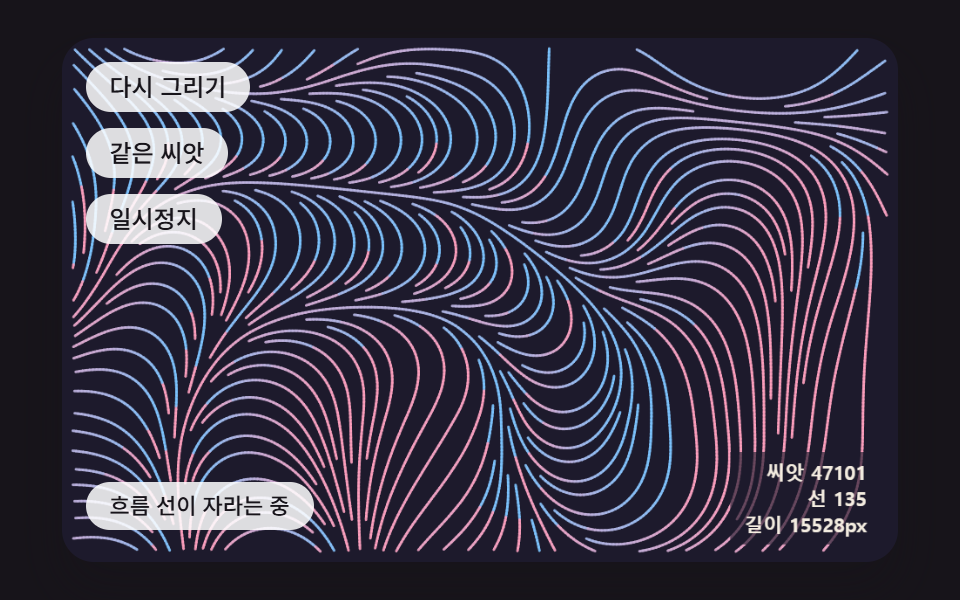 크리에이티브 UI제너레이티브 아트 9종 — 랜덤 패턴 만들기에서 자라는 그림까지
 크리에이티브 UI오로라 배경 9종 — 커튼·세로 광선·호수 반사·산 능선 히어로
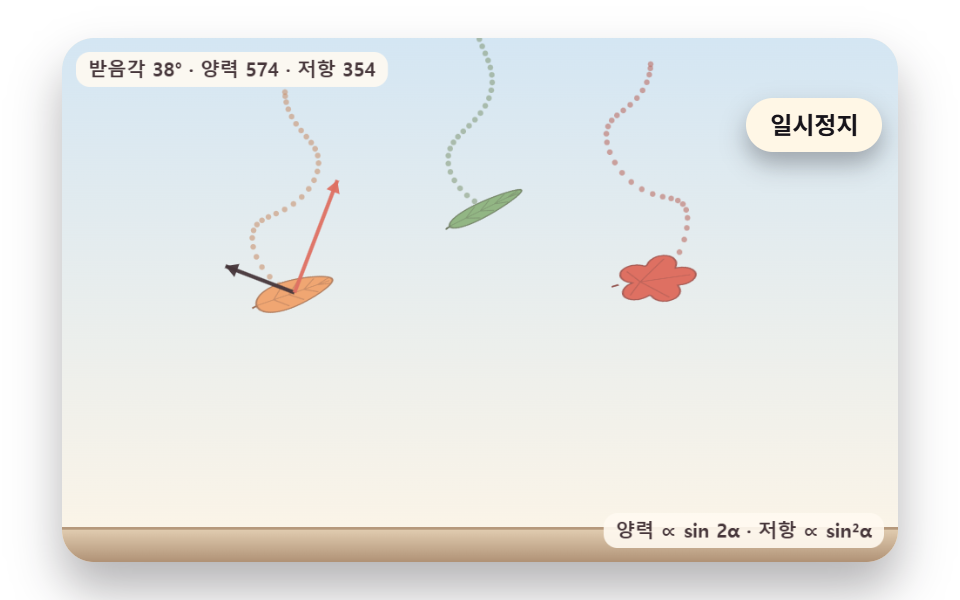 크리에이티브 UI낙엽 떨어지는 효과 9종 — 흔들림·바람·단풍 물듦·쌓이는 더미
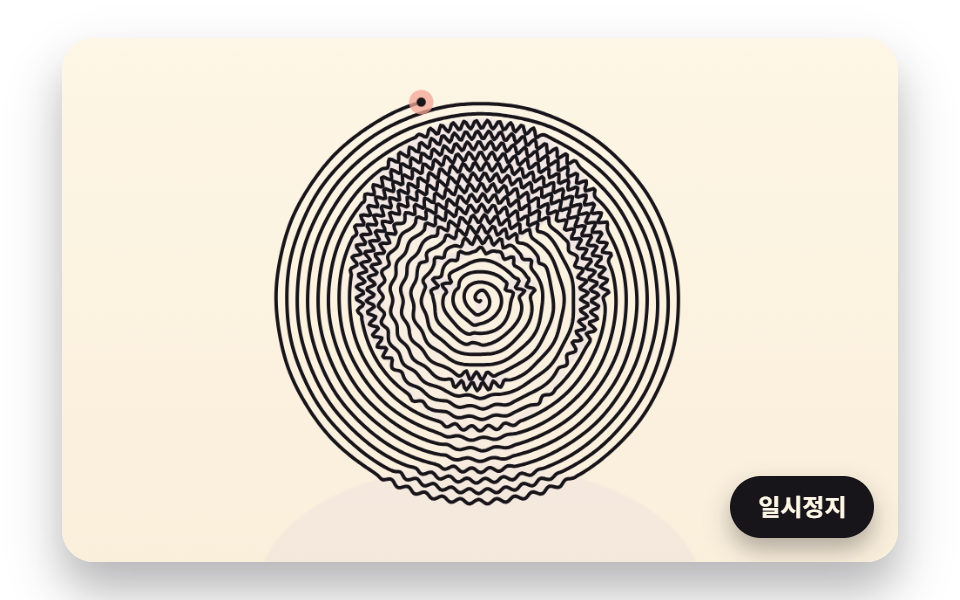 크리에이티브 UI라인 드로잉 9종 — 점 순서와 선 길이를 계산해 한 줄로 그리는 캔버스