텍스트 애니메이션 css 9종 — 글자를 캔버스 픽셀로 뜯어 다시 짓는 법
텍스트 애니메이션을 css 키프레임으로만 누르면 글자는 늘 통짜로만 움직입니다. 이 아홉 종은 다릅니다 — 글자를 통째로 옮기지 않고 픽셀로 샘플링해 다시 짓는다, 즉 fillText 로 그린 글자를 getImageData 로 되읽어 입자·점·선·원의 재료로 씁니다.
 01 glyph-particle-formation
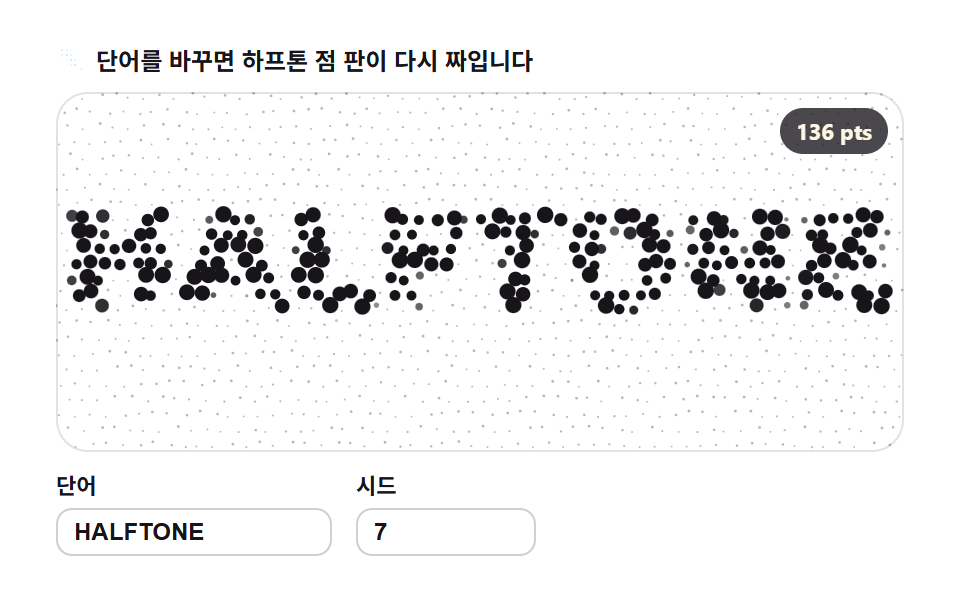 02 glyph-grid-dot-halftone
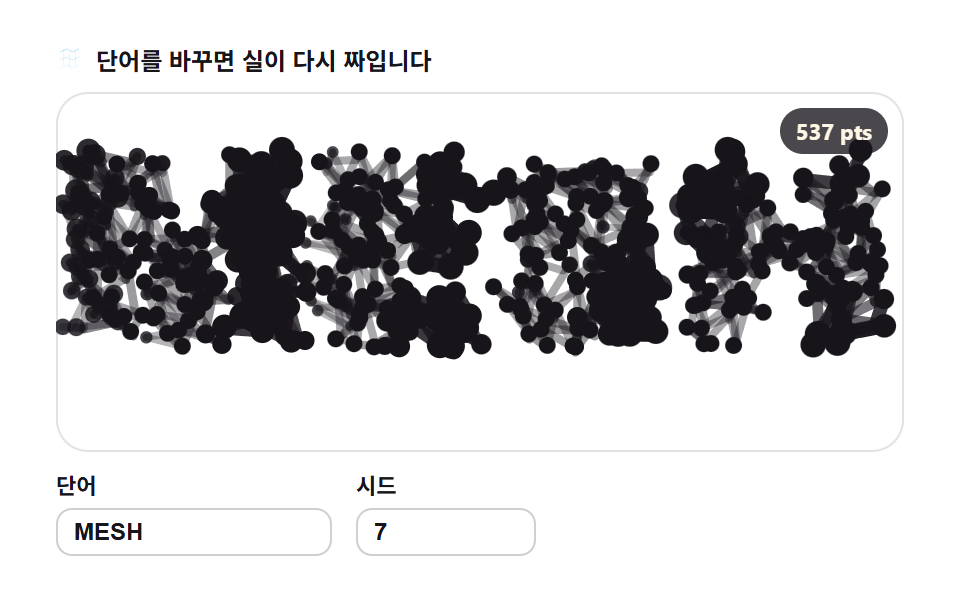 03 glyph-line-segment-mesh
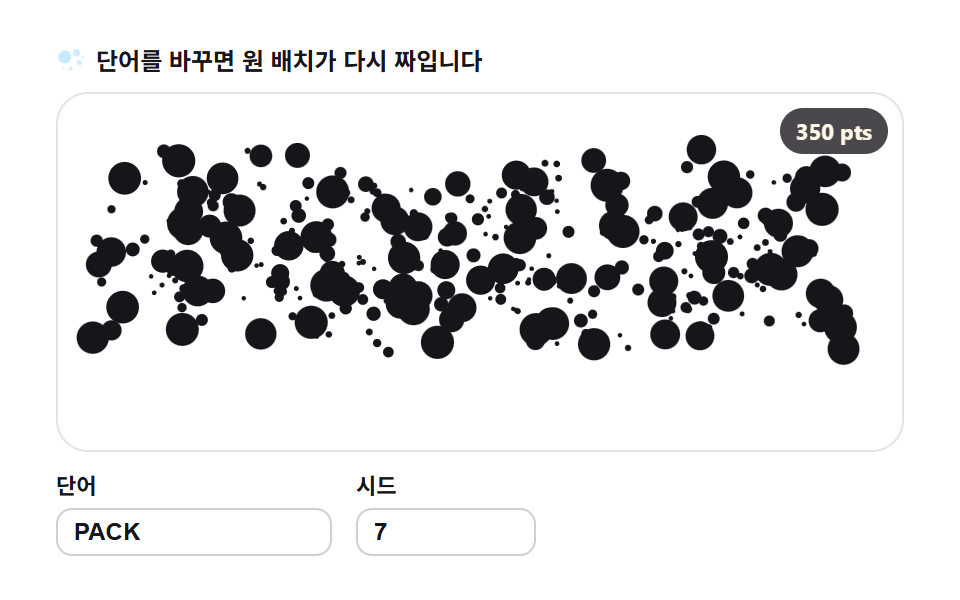 04 glyph-circle-packing
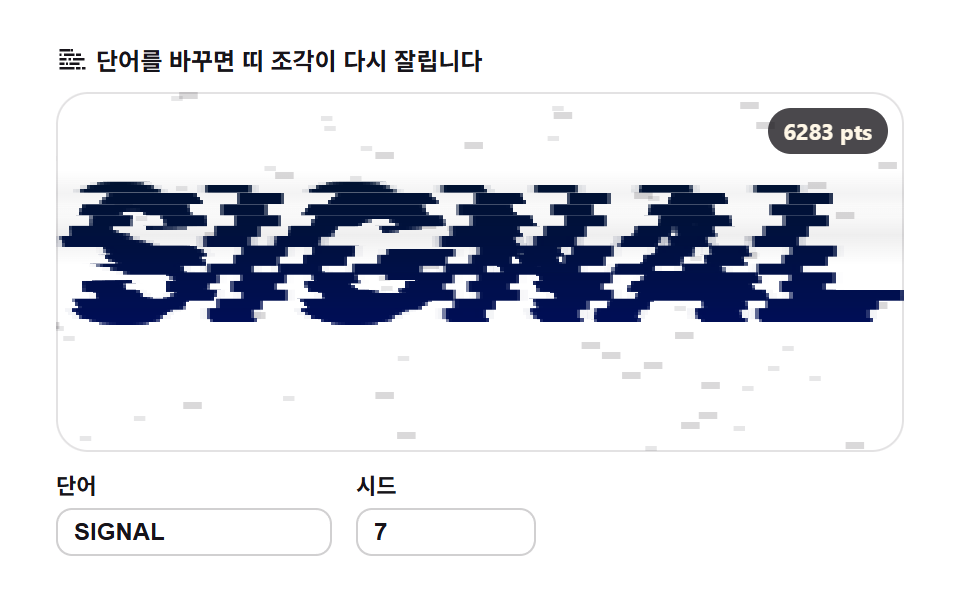 05 glyph-glitch-shard
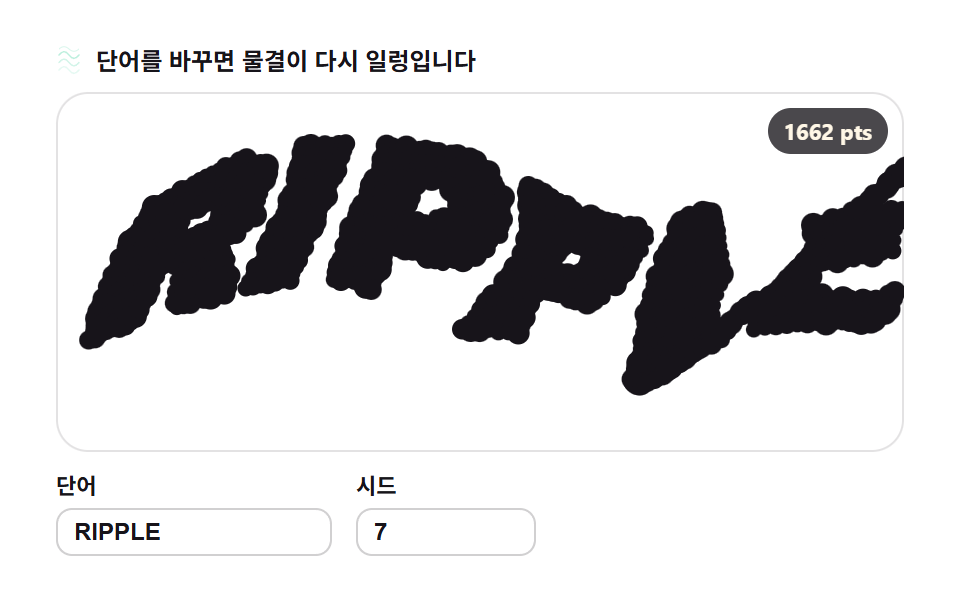 06 glyph-distortion-noise-warp
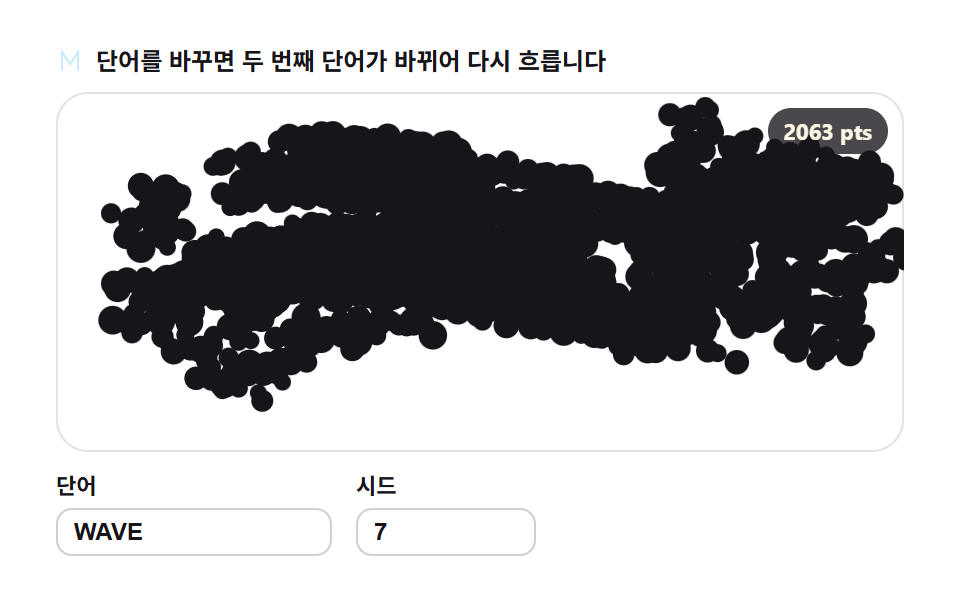 07 glyph-morph-crossfade
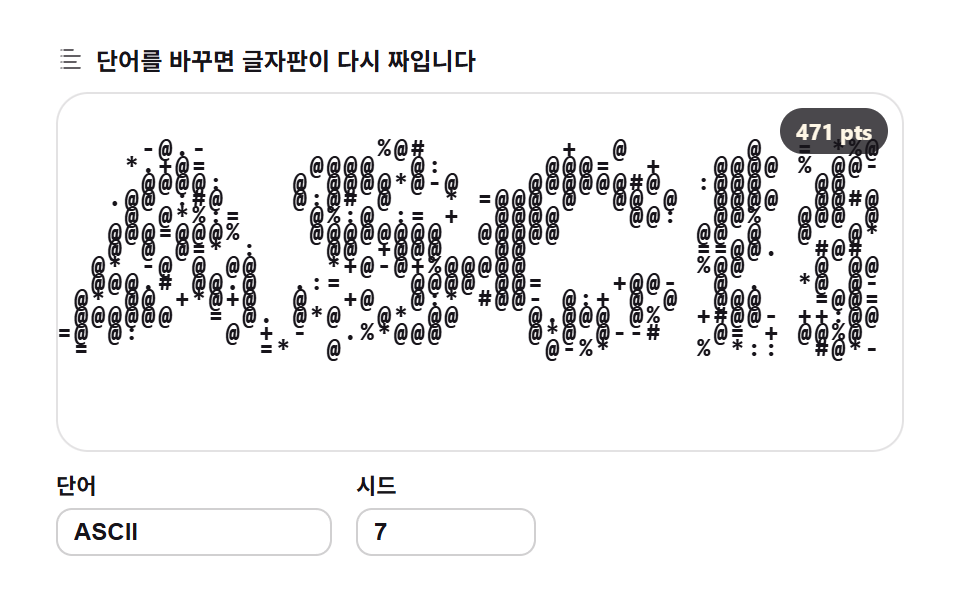 08 glyph-ascii-density-map
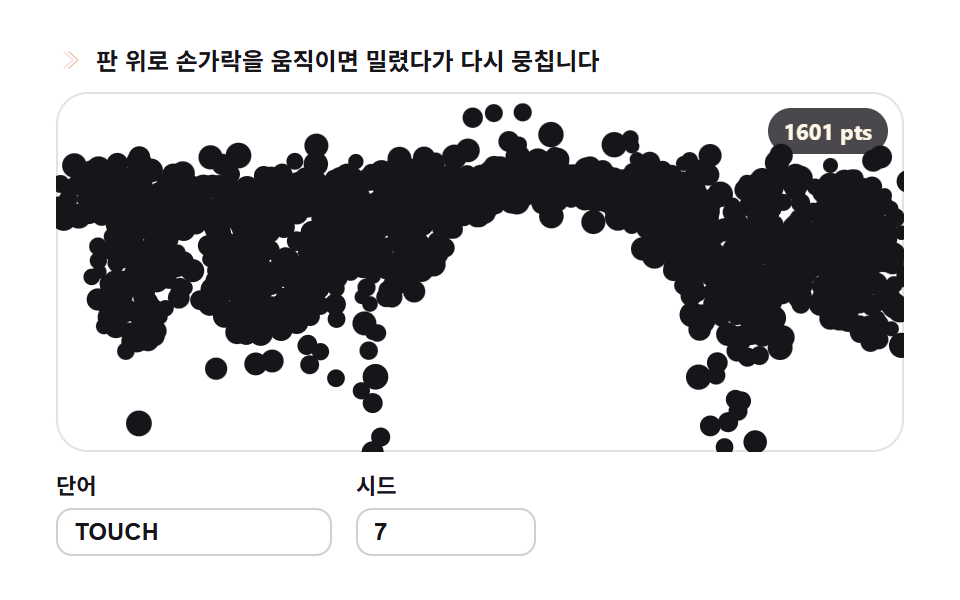 09 glyph-scatter-reassemble-pointer
자동 재생 · 눌러서 해당 항목으로 · 전부 한 zip
- 01 입자 재구성 — 흩어진 먼지가 글자로 뭉치기
- 02 격자 점 하프톤 — 샘플 간격이 만드는 글자
- 03 선분 메시 — 이웃 샘플을 오가는 실
- 04 원 채우기 — 마스크 안에 최대한 많은 원
- 05 글리치 조각 — 가로 띠가 어긋나는 글자
- 06 노이즈 왜곡 — 물결에 씻기는 글자
- 07 모핑 — 단어가 다른 단어로 바뀌기
- 08 ASCII 밀도 — 밝기가 글자를 고르는 판
- 09 재집합 — 포인터가 헤치면 다시 뭉치는 글자
데모
순서는 화려함의 순서가 아니라 글자가 재료가 되는 순서입니다. 먼저 흩어진 입자가 글자로 뭉치는 기본형이 생기고(01), 샘플을 점·선·원 같은 다른 재료로 옮겨 적고(02·03·04), 띠·물결·모핑으로 글자 자체가 변형되고(05·06·07), 마지막에 밀도 재해석과 포인터 반응으로 관객과 얽힙니다(08·09). 노이즈로 지형을 계산하거나 레이를 쏘아 3D 를 그리는 게 아니라, 이미 그려진 글자를 다시 읽어 재료로 쓰는 것이 이 편의 축입니다.
아홉 개는 왜 이 순서인가
01 입자 재구성이 샘플링의 원형입니다. 오프스크린 캔버스에 fillText 로 글자를 그려 getImageData 로 알파 마스크를 뽑고, 각 입자에게 자기 목표 픽셀 좌표를 줘 스프링으로 모여들게 합니다. 랜딩 히어로 워드마크 등장에 씁니다. 이 원형 위에서 02 는 점, 03 은 선, 04 는 원으로 재료만 갈아 끼우고, 05~07 은 마스크를 뜯는 단위를 행·좌표·단어로 바꾸고, 08~09 는 읽는 법 자체를 밀도와 힘으로 바꿉니다.
항목별 코드
01입자 재구성 — 흩어진 먼지가 글자로 뭉치기
<main class="stage">
<div class="gp" id="gp">
  <p class="gp__hint">
    <svg class="gp__ico" viewBox="0 0 256 256" aria-hidden="true"><g fill="currentColor"><circle cx="64" cy="72" r="18"/><circle cx="112" cy="48" r="12"/><circle cx="96" cy="112" r="9"/><circle cx="160" cy="80" r="14"/><circle cx="208" cy="64" r="8"/><circle cx="184" cy="128" r="11"/><circle cx="136" cy="152" r="7"/><path d="M56 184h144a8 8 0 0 1 0 16H56a8 8 0 0 1 0-16m28 28h88a8 8 0 0 1 0 16H84a8 8 0 0 1 0-16" opacity=".45"/></g></svg>
    <span>단어를 바꾸면 먼지가 다시 뭉칩니다</span>
  </p>
  <div class="gp__field" id="field" role="application" aria-label="입자 재구성 실험판" tabindex="0">
    <canvas class="gp__cv" id="cv"></canvas>
    <b class="gp__badge" aria-hidden="true" id="badge">0 pts</b>
  </div>
  <div class="gp__bar">
    <label class="gp__dial">단어
      <input type="text" id="word" value="GLYPH" maxlength="12" spellcheck="false" aria-label="단어">
    </label>
    <label class="gp__dial">시드
      <input type="number" id="seed" min="1" max="9999" value="7" aria-label="시드">
    </label>
  </div>
</div>
</main>
@use "../../../../site/static/demo-tokens" as *;
// 입자 재구성 — 움직임은 전부 캔버스 rAF 루프 안에 있다(@keyframes 0개 — 077-03 패턴).
// 입자색은 파스텔 변수를 커스텀 프로퍼티로 내려 JS 가 읽어 쓴다. 리터럴 hex 는 없다(BD26).
$glyph-ink: $subject-ink; // 글릿 본색 — 잉크
$glyph-sky: mix($subject-sky, $stage-paper, 42%); // 파스텔 하늘
$glyph-mint: mix($subject-mint, $stage-paper, 42%); // 파스텔 민트
$glyph-peach: mix($subject-orange-deep, $stage-paper, 30%); // 파스텔 복숭아
@include stage($stage-paper);
.gp {
--g0: #{$glyph-ink};
--g1: #{$glyph-sky};
--g2: #{$glyph-mint};
--g3: #{$glyph-peach};
display: flex; flex-direction: column; gap: $sp-2;
width: 100%; max-width: 424px;
}
.gp__hint {
display: flex; align-items: center; gap: $sp-1; margin: 0;
font-weight: 700; font-size: clamp(10px, 2.8vw, 12px); line-height: 1.35;
color: $subject-ink;
}
.gp__ico { width: 16px; height: 16px; flex: 0 0 auto; color: $glyph-peach; }
.gp__field {
position: relative; height: 180px;
border-radius: $r-card; overflow: hidden;
background: $stage-paper;
box-shadow: inset 0 0 0 1px rgba($subject-ink, .12);
}
.gp__field:focus-visible { outline: 2px solid $glyph-sky; outline-offset: 2px; }
.gp__cv { display: block; width: 100%; height: 100%; }
// 목표점(=샘플 픽셀) 수를 화면에 적는다 — 런타임 샘플링이 이 데모의 요점이다
.gp__badge {
position: absolute; right: $sp-2; top: $sp-2;
padding: $sp-1 $sp-2; border-radius: $r-pill;
background: rgba($subject-ink, .78);
color: $subject-cream; font-weight: 700; font-size: 11px;
}
.gp__bar { display: flex; align-items: flex-end; gap: $sp-3; }
.gp__dial {
display: flex; flex-direction: column; gap: $sp-1;
font-weight: 700; font-size: 11px; color: $subject-ink;
}
.gp__dial input {
width: 120px; margin: 0; padding: $sp-1 $sp-2;
border: 1px solid rgba($subject-ink, .2); border-radius: $r-sm;
background: $stage-paper; color: $subject-ink;
font-weight: 700; font-size: 12px;
}
.gp__dial input[type="number"] { width: 72px; }
.gp__dial input:focus-visible { outline: 2px solid $glyph-sky; outline-offset: 1px; }
@media (max-width: 340px) {
.gp { gap: $sp-1; }
.gp__field { height: 100px; }
.gp__badge { font-size: 10px; padding: 0 $sp-1; }
.gp__dial input { width: 88px; }
.gp__dial input[type="number"] { width: 56px; }
.gp__hint { font-size: 10px; }
}
// reduce — 루프가 아예 안 돈다. 목표에 붙은 정지 한 장이 남는다.
@media (prefers-reduced-motion: reduce) {
.gp.is-still .gp__field { cursor: default !important; }
}html, body {
margin: 0;
overflow: hidden;
}
.stage {
box-sizing: border-box;
min-height: 100vh;
display: grid;
place-items: center;
margin: 0;
background: #ffffff;
font-family: -apple-system, "Segoe UI", "Noto Sans KR", sans-serif;
padding: clamp(8px, 4vw, 24px);
}
.gp {
--g0: #17141a;
--g1: rgb(76.1176470588%, 90.9411764706%, 100%);
--g2: rgb(70.5176470588%, 92.9176470588%, 85.3411764706%);
--g3: rgb(93.6470588235%, 75.6470588235%, 70%);
display: flex;
flex-direction: column;
gap: 8px;
width: 100%;
max-width: 424px;
}
.gp__hint {
display: flex;
align-items: center;
gap: 4px;
margin: 0;
font-weight: 700;
font-size: clamp(10px, 2.8vw, 12px);
line-height: 1.35;
color: #17141a;
}
.gp__ico {
width: 16px;
height: 16px;
flex: 0 0 auto;
color: rgb(93.6470588235%, 75.6470588235%, 70%);
}
.gp__field {
position: relative;
height: 180px;
border-radius: 16px;
overflow: hidden;
background: #ffffff;
box-shadow: inset 0 0 0 1px rgba(23, 20, 26, 0.12);
}
.gp__field:focus-visible {
outline: 2px solid rgb(76.1176470588%, 90.9411764706%, 100%);
outline-offset: 2px;
}
.gp__cv {
display: block;
width: 100%;
height: 100%;
}
.gp__badge {
position: absolute;
right: 8px;
top: 8px;
padding: 4px 8px;
border-radius: 999px;
background: rgba(23, 20, 26, 0.78);
color: #fff7e6;
font-weight: 700;
font-size: 11px;
}
.gp__bar {
display: flex;
align-items: flex-end;
gap: 12px;
}
.gp__dial {
display: flex;
flex-direction: column;
gap: 4px;
font-weight: 700;
font-size: 11px;
color: #17141a;
}
.gp__dial input {
width: 120px;
margin: 0;
padding: 4px 8px;
border: 1px solid rgba(23, 20, 26, 0.2);
border-radius: 8px;
background: #ffffff;
color: #17141a;
font-weight: 700;
font-size: 12px;
}
.gp__dial input[type=number] {
width: 72px;
}
.gp__dial input:focus-visible {
outline: 2px solid rgb(76.1176470588%, 90.9411764706%, 100%);
outline-offset: 1px;
}
@media (max-width: 340px) {
.gp {
gap: 4px;
}
.gp__field {
height: 100px;
}
.gp__badge {
font-size: 10px;
padding: 0 4px;
}
.gp__dial input {
width: 88px;
}
.gp__dial input[type=number] {
width: 56px;
}
.gp__hint {
font-size: 10px;
}
}
@media (prefers-reduced-motion: reduce) {
.gp.is-still .gp__field {
cursor: default !important;
}
}// 입자 재구성 — 글자를 통째로 옮기지 않고 픽셀로 뜯어 다시 짓는다.
// 1) 오프스크린 캔버스에 fillText 로 단어를 그려 getImageData 로 알파 마스크를 뽑는다
// 2) 격자 간격 STEP 로 걸어 알파>128 인 칸의 (x,y) 를 목표점 목록으로 만든다
// 3) 시드로 뿌린 입자들이 스프링(복원 0.012 · 감쇠 0.86)으로 제 목표 픽셀을 찾아간다
// 무작위는 전부 mulberry32(시드) — 같은 시드는 같은 그림. Math.random 은 쓰지 않는다.
var root = document.getElementById('gp');
var field = document.getElementById('field');
var cv = document.getElementById('cv');
var ctx = cv.getContext('2d');
var wordIn = document.getElementById('word');
var seedIn = document.getElementById('seed');
var badge = document.getElementById('badge');
var SW = 252, SH = 108; // 샘플 해상도 — 판 비율과 같아 늘려 뭉개지지 않는다
var STEP = 2; // 샘플 간격(px) — 좁힐수록 입자 수가 늘어난다
var BASE = 0.28; // 산란 비율 — 매 주기 시작을 목표가 아니라 판에 뿌린 먼지에서 시작한다
var reduce = window.matchMedia('(prefers-reduced-motion: reduce)').matches;
var W = 0, H = 0;
var parts = [];
var t0 = 0, raf = 0;
// 색 — scss 가 파스텔 커스텀 프로퍼티(--g0..--g3)로 내려준 넉 색을 읽어 쓴다
var css = getComputedStyle(root);
function hexOf(name) {
var v = css.getPropertyValue(name).trim().replace('#', '');
if (v.length === 3) v = v.charAt(0) + v.charAt(0) + v.charAt(1) + v.charAt(1) + v.charAt(2) + v.charAt(2);
return '#' + v;
}
var cols = [hexOf('--g0'), hexOf('--g1'), hexOf('--g2'), hexOf('--g3')];
// 결정적 난수 — 시드 하나가 입자의 시작 위치·위상·크기·색 전부를 정한다
function mulberry32(a) {
return function () {
a |= 0; a = a + 0x6D2B79F5 | 0;
var t = Math.imul(a ^ a >>> 15, 1 | a);
t = t + Math.imul(t ^ t >>> 7, 61 | t) ^ t;
return ((t ^ t >>> 14) >>> 0) / 4294967296;
};
}
// ── 1) 글자 → 알파 마스크 ────────────────────────────────────────
function buildMask(word) {
  var off = document.createElement('canvas');
  off.width = SW; off.height = SH;
  var oc = off.getContext('2d', { willReadFrequently: true });
  oc.textAlign = 'center'; oc.textBaseline = 'middle';
  var fs = 200;
  oc.font = '900 ' + fs + 'px Arial';
  var w = oc.measureText(word).width || 1;
  fs = Math.min(fs * ((SW - 8) / w), SH - 6);       // 폭·높이 안에서 제일 큰 글자
  oc.font = '900 ' + Math.round(fs) + 'px Arial';
  oc.fillStyle = '#fff';
  oc.fillText(word, SW / 2, SH / 2);
  return oc.getImageData(0, 0, SW, SH).data;
}
// ── 2) 마스크 → 목표점 목록 ─────────────────────────────────────
function samplePoints(data) {
  var pts = [];
  for (var y = 0; y < SH; y += STEP) {
    for (var x = 0; x < SW; x += STEP) {
      if (data[(y * SW + x) * 4 + 3] > 128) pts.push({ x: x, y: y });
    }
  }
  return pts;
}
function pickColor(r) {
if (r < 0.55) return 0; // 잉크 다수
if (r < 0.73) return 1; // 하늘
if (r < 0.88) return 2; // 민트
return 3; // 복숭아
}
// ── 3) 입자 재구성 — 단어·시드가 바뀌면 목표와 입자 수가 다시 계산된다 ──
var word = 'GLYPH', seed = 7;
function resample(nextWord, nextSeed) {
var w = String(nextWord == null ? word : nextWord).trim().toUpperCase();
if (w) word = w; // 빈 문자열이면 직전 값을 유지
var s = Math.floor(Number(nextSeed));
if (s >= 1) seed = s;
var pts = samplePoints(buildMask(word));
var rnd = mulberry32(seed);
parts = [];
for (var i = 0; i < pts.length; i++) {
var r1 = rnd(), r2 = rnd(), r3 = rnd(), r4 = rnd(), r5 = rnd();
parts.push({
x: r1 * SW, y: r2 * SH, vx: 0, vy: 0, // 시작은 판 전체에 흩뿌린 먼지
tx: pts[i].x, ty: pts[i].y,
ph: r3 * 6.2832, sz: 1.7 + r4 * 1.7, ci: pickColor(r5)
});
}
window.__sampleInfo = { targets: pts.length, particles: parts.length };
badge.textContent = pts.length + ' pts';
if (reduce) {
// 정지 한 장 — 입자를 목표에 붙인 상태로 그린다(시드 위상만큼 비껴 있다)
for (var k = 0; k < parts.length; k++) {
var q = parts[k];
q.x = q.tx + Math.cos(q.ph) * 1.3;
q.y = q.ty + Math.sin(q.ph * 1.3) * 1.3;
}
paint(0);
} else {
t0 = performance.now(); // 모임 연기를 처음부터 다시
}
}
function fit() {
var r = field.getBoundingClientRect();
var d = window.devicePixelRatio || 1;
W = r.width; H = r.height;
cv.width = Math.round(W * d); cv.height = Math.round(H * d);
ctx.setTransform(d, 0, 0, d, 0, 0);
}
function paint(t) {
ctx.clearRect(0, 0, W, H);
var sx = W / SW, sy = H / SH;
for (var i = 0; i < parts.length; i++) {
var p = parts[i];
var wx = Math.sin(t * 3.4 + p.ph) * 10.5; // 정착 뒤에도 입자가 숨쉰다
var wy = Math.cos(t * 2.9 + p.ph * 1.7) * 9.5;
ctx.fillStyle = cols[p.ci];
ctx.beginPath();
ctx.arc((p.x + wx) * sx, (p.y + wy) * sy, p.sz * sx * 0.85, 0, 6.2832);
ctx.fill();
}
}
function frame(now) {
var t = (now - t0) / 1000;
var cyc = Math.floor(t / 2) * 2; // 2초마다 —
var u = t - cyc; // 주기 안 진행(초)
var k;
if (u < 0.5) {
var q = u / 0.5;
k = q * q; // 도입부: 먼지 → 글자로 가속해 뭉친다
} else {
var s = (u - 0.5) / 1.5; // 정착부: 숨쉬듯 모였다 퍼졌다
k = 0.68 + 0.34 * Math.sin(s * 6.2832);
}
var br = BASE + (1 - BASE) * k;                  // 산란 ↔ 뭉침 사이를 오간다
var cx = SW / 2, cy = SH / 2;
for (var i = 0; i < parts.length; i++) {
  var p = parts[i];
  var tx = cx + (p.tx - cx) * br, ty = cy + (p.ty - cy) * br;
  p.vx = (p.vx + (tx - p.x) * 0.014) * 0.86;
  p.vy = (p.vy + (ty - p.y) * 0.014) * 0.86;
  p.x += p.vx; p.y += p.vy;
}
paint(t);
raf = requestAnimationFrame(frame);
}
wordIn.addEventListener('input', function () { resample(wordIn.value, seedIn.value); });
seedIn.addEventListener('input', function () { resample(wordIn.value, seedIn.value); });
window.addEventListener('resize', function () { fit(); if (reduce) paint(0); });
fit();
resample(wordIn.value, seedIn.value);
if (reduce) {
root.classList.add('is-still'); // 루프 없이 정지 한 장
} else {
raf = requestAnimationFrame(frame);
}// GlyphParticleFormation — vanilla 판(run/310/demo/01-glyph-particle-formation/index.html) 의 React 포트.
// 오프스크린 캔버스에 fillText 로 단어를 그려 getImageData 로 알파 마스크를 뽑고,
// 격자 간격 STEP 로 걸어 알파>128 칸의 (x,y) 를 목표점으로 삼아 입자가 스프링으로 모여들게 한다.
// 입자 시작 위치·위상·크기·색은 전부 mulberry32(시드) 로 정한다 — 같은 시드는 같은 그림.
// 움직임은 캔버스 rAF 루프가 전부 그리므로 @keyframes 는 없다 — props 는 CSS 변수로 내려간다.
import { useEffect, useRef, useState } from "react";
import type { CSSProperties } from "react";
import styles from "./GlyphParticleFormation.module.scss";
export type GlyphParticleFormationProps = {
duration?: string;
easing?: string;
color?: string;
};
type Vars = CSSProperties & { "--duration"?: string; "--easing"?: string; "--color"?: string };
type Box<T> = { current: T };
// React 이벤트 제네릭이 없는 환경이라 필요한 것만 로컬로 선언한다
type InputEvt = { target: { value: string } };
const SW = 252, SH = 108; // 샘플 해상도 — 판 비율과 같아 늘려 뭉개지지 않는다
const STEP = 2; // 샘플 간격(px) — 좁힐수록 입자 수가 늘어난다
const BASE = 0.28; // 산란 비율 — 매 주기 시작을 판에 뿌린 먼지에서 시작한다
const FIELD_LABEL = "입자 재구성 실험판";
// 결정적 난수 — mulberry32. 같은 시드면 같은 수열을 돌려준다
function mulberry32(a: number): () => number {
return function () {
a |= 0; a = (a + 0x6D2B79F5) | 0;
const t = Math.imul(a ^ (a >>> 15), 1 | a);
const u = (t + Math.imul(t ^ (t >>> 7), 61 | t)) ^ t;
return ((u ^ (u >>> 14)) >>> 0) / 4294967296;
};
}
type Particle = {
x: number; y: number; vx: number; vy: number;
tx: number; ty: number; ph: number; sz: number; ci: number;
};
// 오프스크린 fillText → 알파 마스크 픽셀 배열
function buildMask(word: string): Uint8ClampedArray {
const off = document.createElement("canvas");
off.width = SW; off.height = SH;
const oc = off.getContext("2d", { willReadFrequently: true }) as CanvasRenderingContext2D;
oc.textAlign = "center"; oc.textBaseline = "middle";
let fs = 200;
oc.font = "900 " + fs + "px Arial";
const w = oc.measureText(word).width || 1;
fs = Math.min(fs * ((SW - 8) / w), SH - 6); // 폭·높이 안에서 제일 큰 글자
oc.font = "900 " + Math.round(fs) + "px Arial";
oc.fillStyle = "#fff";
oc.fillText(word, SW / 2, SH / 2);
return oc.getImageData(0, 0, SW, SH).data;
}
// 마스크 → 목표점 목록 — 격자 간격 STEP 로 걸어 알파>128 인 칸만
function samplePoints(data: Uint8ClampedArray): { x: number; y: number }[] {
const pts: { x: number; y: number }[] = [];
for (let y = 0; y < SH; y += STEP) {
for (let x = 0; x < SW; x += STEP) {
if (data[(y * SW + x) * 4 + 3] > 128) pts.push({ x, y });
}
}
return pts;
}
function pickColor(r: number): number {
if (r < 0.55) return 0; // 잉크 다수
if (r < 0.73) return 1; // 하늘
if (r < 0.88) return 2; // 민트
return 3; // 복숭아
}
export default function GlyphParticleFormation({
duration = "2s", // vanilla $duration: $dur-loop
easing = "cubic-bezier(.2, .8, .2, 1)", // vanilla $easing: $ease-spring
color = "#17141a", // vanilla $glyph-ink
}: GlyphParticleFormationProps) {
const rootRef = useRef<HTMLDivElement | null>(null);
const fieldRef = useRef<HTMLDivElement | null>(null);
const cvRef = useRef<HTMLCanvasElement | null>(null);
const ctxRef = useRef<CanvasRenderingContext2D | null>(null);
const partsRef = useRef<Particle[]>([]) as Box<Particle[]>;
const colsRef = useRef<string[]>([]) as Box<string[]>;
const sizeRef = useRef({ w: 0, h: 0 }) as Box<{ w: number; h: number }>;
const stateRef = useRef({ word: "GLYPH", seed: 7, t0: 0 }) as Box<{ word: string; seed: number; t0: number }>;
const rafRef = useRef(0) as Box<number>;
const [word, setWord] = useState("GLYPH");
const [seed, setSeed] = useState(7);
const [count, setCount] = useState(0);
const [still, setStill] = useState(false);
const vars: Vars = { "--duration": duration, "--easing": easing, "--color": color };
function reduced(): boolean {
return window.matchMedia("(prefers-reduced-motion: reduce)").matches;
}
function hex3to6(v: string): string {
if (v.length === 3) return v.charAt(0) + v.charAt(0) + v.charAt(1) + v.charAt(1) + v.charAt(2) + v.charAt(2);
return v;
}
function colors(): string[] {
const root = rootRef.current;
if (!root) return ["#17141a", "#17141a", "#17141a", "#17141a"];
const one = (n: string) => hex3to6(getComputedStyle(root).getPropertyValue(n).trim());
return [one("--g0"), one("--g1"), one("--g2"), one("--g3")];
}
// 고DPI 대응 — 배킹 스토어는 devicePixelRatio 배, 그리기 좌표계는 CSS 픽셀 그대로
function fit(): void {
const field = fieldRef.current;
const cv = cvRef.current;
if (!field || !cv) return;
const r = field.getBoundingClientRect();
const dpr = window.devicePixelRatio || 1;
sizeRef.current.w = r.width;
sizeRef.current.h = r.height;
cv.width = Math.round(r.width * dpr);
cv.height = Math.round(r.height * dpr);
const ctx = ctxRef.current;
if (ctx) ctx.setTransform(dpr, 0, 0, dpr, 0, 0);
}
function paint(t: number): void {
const ctx = ctxRef.current;
const parts = partsRef.current;
const cols = colsRef.current;
if (!ctx) return;
const W = sizeRef.current.w, H = sizeRef.current.h;
ctx.clearRect(0, 0, W, H);
const sx = W / SW, sy = H / SH;
for (let i = 0; i < parts.length; i++) {
const p = parts[i];
const wx = Math.sin(t * 3.4 + p.ph) * 9.5; // 정착 뒤에도 입자가 숨쉰다
const wy = Math.cos(t * 2.9 + p.ph * 1.7) * 9.5;
ctx.fillStyle = cols[p.ci] || "#17141a";
ctx.beginPath();
ctx.arc((p.x + wx) * sx, (p.y + wy) * sy, p.sz * sx * 0.85, 0, 6.2832);
ctx.fill();
}
}
// 단어·시드가 바뀌면 목표와 입자 수가 다시 계산된다(런타임 샘플링)
function resample(nextWord: string, nextSeed: number): void {
const st = stateRef.current;
const w = String(nextWord == null ? st.word : nextWord).trim().toUpperCase();
if (w) st.word = w;
if (nextSeed >= 1) st.seed = Math.floor(nextSeed);
const pts = samplePoints(buildMask(st.word));
const rnd = mulberry32(st.seed);
const parts: Particle[] = [];
for (let i = 0; i < pts.length; i++) {
const r1 = rnd(), r2 = rnd(), r3 = rnd(), r4 = rnd(), r5 = rnd();
parts.push({
x: r1 * SW, y: r2 * SH, vx: 0, vy: 0, // 시작은 판 전체에 흩뿌린 먼지
tx: pts[i].x, ty: pts[i].y,
ph: r3 * 6.2832, sz: 1.7 + r4 * 1.7, ci: pickColor(r5)
});
}
partsRef.current = parts;
setCount(pts.length);
if (reduced()) {
// 정지 한 장 — 입자를 목표에 붙인 상태로 그린다
for (let k = 0; k < parts.length; k++) {
const q = parts[k];
q.x = q.tx + Math.cos(q.ph) * 1.3;
q.y = q.ty + Math.sin(q.ph * 1.3) * 1.3;
}
paint(0);
} else {
st.t0 = performance.now(); // 모임 연기를 처음부터 다시
}
}
function frame(now: number): void {
const st = stateRef.current;
const parts = partsRef.current;
const t = (now - st.t0) / 1000;
const cyc = Math.floor(t / 2) * 2; // 2초마다 —
const u = t - cyc; // 주기 안 진행(초)
let k: number;
if (u < 0.5) {
const q = u / 0.5;
k = q * q; // 도입부: 먼지 → 글자로 가속해 뭉친다
} else {
const s = (u - 0.5) / 1.5; // 정착부: 숨쉬듯 모였다 퍼졌다
k = 0.68 + 0.34 * Math.sin(s * 6.2832);
}
const br = BASE + (1 - BASE) * k; // 산란 ↔ 뭉침 사이를 오간다
const cx = SW / 2, cy = SH / 2;
for (let i = 0; i < parts.length; i++) {
const p = parts[i];
const tx = cx + (p.tx - cx) * br, ty = cy + (p.ty - cy) * br;
p.vx = (p.vx + (tx - p.x) * 0.014) * 0.86;
p.vy = (p.vy + (ty - p.y) * 0.014) * 0.86;
p.x += p.vx; p.y += p.vy;
}
paint(t);
rafRef.current = requestAnimationFrame(frame);
}
function onWord(e: InputEvt): void {
setWord(e.target.value);
resample(e.target.value, stateRef.current.seed);
}
function onSeed(e: InputEvt): void {
const v = Math.floor(Number(e.target.value)) || 1;
setSeed(v);
resample(stateRef.current.word, v);
}
function onResize(): void {
fit();
if (reduced()) paint(0);
}
useEffect(() => {
const cv = cvRef.current;
if (!cv) return;
ctxRef.current = cv.getContext("2d");
if (!ctxRef.current) return;
colsRef.current = colors();
fit();
resample("GLYPH", 7);
window.addEventListener("resize", onResize);
if (reduced()) {
// reduce — 루프를 시작하지 않고 목표에 붙은 정지 한 장만 그린다
setStill(true);
} else {
rafRef.current = requestAnimationFrame(frame);
}
return () => {
window.removeEventListener("resize", onResize);
cancelAnimationFrame(rafRef.current);
};
}, []);
const cls = [styles.root, still ? styles.isStill : ""].filter(Boolean).join(" ");
return (
<main className={styles.stage}>
<div className={cls} ref={rootRef} style={vars}>
<p className={styles.hint}>
<svg className={styles.ico} viewBox="0 0 256 256" aria-hidden="true"><g fill="currentColor"><circle cx="64" cy="72" r="18"/><circle cx="112" cy="48" r="12"/><circle cx="96" cy="112" r="9"/><circle cx="160" cy="80" r="14"/><circle cx="208" cy="64" r="8"/><circle cx="184" cy="128" r="11"/><circle cx="136" cy="152" r="7"/><path d="M56 184h144a8 8 0 0 1 0 16H56a8 8 0 0 1 0-16m28 28h88a8 8 0 0 1 0 16H84a8 8 0 0 1 0-16" opacity=".45"/></g></svg>
<span>단어를 바꾸면 먼지가 다시 뭉칩니다</span>
</p>
<div className={styles.field} ref={fieldRef} role="application" aria-label={FIELD_LABEL} tabIndex={0}>
<canvas className={styles.cv} ref={cvRef} id="cv"></canvas>
<b className={styles.badge} aria-hidden="true">{count} pts</b>
</div>
<div className={styles.bar}>
<label className={styles.dial}>단어
<input type="text" id="word" defaultValue="GLYPH" maxLength={12} spellCheck={false} aria-label="단어" onInput={onWord} />
</label>
<label className={styles.dial}>시드
<input type="number" id="seed" defaultValue={7} min={1} max={9999} aria-label="시드" onInput={onSeed} />
</label>
</div>
</div>
</main>
);
}01 · 입자 재구성 — 흩어진 먼지가 글자로 뭉치기 — 측정 누적면적 30.128% · 움직인 프레임 23/23GODRICH 원작 · zip 에 SCSS·React 포함 · 비밀번호 보기
마스크는 어떻게 뽑고 입자는 어떻게 찾아가나
오프스크린 캔버스에 fillText 로 글자를 그려 getImageData 로 알파 마스크를 뽑고, 각 입자에게 자기 목표 픽셀 좌표를 줘 스프링으로 모여들게 하는, 랜딩 히어로 워드마크 등장에 쓰는 이 편 전체의 원형이 되는 판입니다.
// ── 1) 글자 → 알파 마스크 ────────────────────────────────────────
function buildMask(word) {
var off = document.createElement('canvas');
off.width = SW; off.height = SH;
var oc = off.getContext('2d', { willReadFrequently: true });
oc.textAlign = 'center'; oc.textBaseline = 'middle';
var fs = 200;
oc.font = '900 ' + fs + 'px Arial';
var w = oc.measureText(word).width || 1;
fs = Math.min(fs * ((SW - 8) / w), SH - 6); // 폭·높이 안에서 제일 큰 글자
oc.font = '900 ' + Math.round(fs) + 'px Arial';
oc.fillStyle = '#fff';
oc.fillText(word, SW / 2, SH / 2);
return oc.getImageData(0, 0, SW, SH).data;
}
// ── 2) 마스크 → 목표점 목록 ─────────────────────────────────────
function samplePoints(data) {
var pts = [];
for (var y = 0; y < SH; y += STEP) {
for (var x = 0; x < SW; x += STEP) {
if (data[(y * SW + x) * 4 + 3] > 128) pts.push({ x: x, y: y });
}
}
return pts;
}
산란과 뭉침을 오가는 스프링
var br = BASE + (1 - BASE) * k; // 산란 ↔ 뭉침 사이를 오간다
var cx = SW / 2, cy = SH / 2;
for (var i = 0; i < parts.length; i++) {
var p = parts[i];
var tx = cx + (p.tx - cx) * br, ty = cy + (p.ty - cy) * br;
p.vx = (p.vx + (tx - p.x) * 0.014) * 0.86;
p.vy = (p.vy + (ty - p.y) * 0.014) * 0.86;
p.x += p.vx; p.y += p.vy;
}
measureText 로 폭을 재 폭·높이 안에서 제일 큰 글씨로 맞추고 흰색으로 찍으면 알파 채널이 글자의 모양 그대로 남으며 격자 간격 STEP(2px)로 걸어 알파가 128 을 넘는 칸의 좌표만 목표점으로 삼는 것이 모든 판의 기준이 되는 두 걸음입니다. 프레임마다 목표를 판 중심 기준 산란 비율로 밀었다 당겼다 하니 입자는 2초 주기로 먼지에서 글자로, 글자에서 숨쉬는 결로 오갑니다(실측: 누적면적 30.13퍼센트, 강도 평균 167.7, 23/23 프레임 움직임).
02격자 점 하프톤 — 샘플 간격이 만드는 글자
<main class="stage">
<div class="gh" id="gh">
  <p class="gh__hint">
    <svg class="gh__ico" viewBox="0 0 256 256" aria-hidden="true"><g fill="currentColor"><circle cx="48" cy="48" r="8"/><circle cx="88" cy="48" r="5"/><circle cx="120" cy="48" r="3"/><circle cx="152" cy="48" r="2"/><circle cx="48" cy="88" r="5"/><circle cx="88" cy="88" r="8"/><circle cx="120" cy="88" r="5"/><circle cx="152" cy="88" r="3"/><circle cx="48" cy="128" r="3"/><circle cx="88" cy="128" r="5"/><circle cx="120" cy="128" r="8"/><circle cx="152" cy="128" r="5"/><circle cx="48" cy="168" r="2"/><circle cx="88" cy="168" r="3"/><circle cx="120" cy="168" r="5"/><circle cx="152" cy="168" r="8"/><circle cx="200" cy="200" r="10" opacity=".35"/></g></svg>
    <span>단어를 바꾸면 하프톤 점 판이 다시 짜입니다</span>
  </p>
  <div class="gh__field" id="field" role="application" aria-label="격자 점 하프톤 실험판" tabindex="0">
    <canvas class="gh__cv" id="cv"></canvas>
    <b class="gh__badge" aria-hidden="true" id="badge">0 pts</b>
  </div>
  <div class="gh__bar">
    <label class="gh__dial">단어
      <input type="text" id="word" value="HALFTONE" maxlength="12" spellcheck="false" aria-label="단어">
    </label>
    <label class="gh__dial">시드
      <input type="number" id="seed" min="1" max="9999" value="7" aria-label="시드">
    </label>
  </div>
</div>
</main>
@use "../../../../site/static/demo-tokens" as *;
// 격자 점 하프톤 — 움직임은 전부 캔버스 rAF 루프 안에 있다(@keyframes 0개 — 077-03 패턴).
// 점색은 파스텔 변수를 커스텀 프로퍼티로 내려 JS 가 읽어 쓴다. 리터럴 hex 는 없다(BD26).
$glyph-ink: $subject-ink; // 진한 잉크 점 — 하프톤 본색
$glyph-sky: mix($subject-sky, $stage-paper, 42%); // 파스텔 하늘 점
$glyph-mint: mix($subject-mint, $stage-paper, 42%); // 파스텔 민트 점
@include stage($stage-paper);
.gh {
--g0: #{$glyph-ink};
--g1: #{$glyph-sky};
--g2: #{$glyph-mint};
--g3: #{$glyph-sky};
display: flex; flex-direction: column; gap: $sp-2;
width: 100%; max-width: 424px;
}
.gh__hint {
display: flex; align-items: center; gap: $sp-1; margin: 0;
font-weight: 700; font-size: clamp(10px, 2.8vw, 12px); line-height: 1.35;
color: $subject-ink;
}
.gh__ico { width: 16px; height: 16px; flex: 0 0 auto; color: $glyph-sky; }
.gh__field {
position: relative; height: 180px;
border-radius: $r-card; overflow: hidden;
background: $stage-paper;
box-shadow: inset 0 0 0 1px rgba($subject-ink, .12);
}
.gh__field:focus-visible { outline: 2px solid $glyph-sky; outline-offset: 2px; }
.gh__cv { display: block; width: 100%; height: 100%; }
// 격자점(=샘플 칸) 수를 화면에 적는다 — 런타임 샘플링이 이 데모의 요점이다
.gh__badge {
position: absolute; right: $sp-2; top: $sp-2;
padding: $sp-1 $sp-2; border-radius: $r-pill;
background: rgba($subject-ink, .78);
color: $subject-cream; font-weight: 700; font-size: 11px;
}
.gh__bar { display: flex; align-items: flex-end; gap: $sp-3; }
.gh__dial {
display: flex; flex-direction: column; gap: $sp-1;
font-weight: 700; font-size: 11px; color: $subject-ink;
}
.gh__dial input {
width: 120px; margin: 0; padding: $sp-1 $sp-2;
border: 1px solid rgba($subject-ink, .2); border-radius: $r-sm;
background: $stage-paper; color: $subject-ink;
font-weight: 700; font-size: 12px;
}
.gh__dial input[type="number"] { width: 72px; }
.gh__dial input:focus-visible { outline: 2px solid $glyph-sky; outline-offset: 1px; }
@media (max-width: 340px) {
.gh { gap: $sp-1; }
.gh__field { height: 100px; }
.gh__badge { font-size: 10px; padding: 0 $sp-1; }
.gh__dial input { width: 88px; }
.gh__dial input[type="number"] { width: 56px; }
.gh__hint { font-size: 10px; }
}
// reduce — 루프가 아예 안 돈다. 정지 격자 한 장이 남는다.
@media (prefers-reduced-motion: reduce) {
.gh.is-still .gh__field { cursor: default !important; }
}html, body {
margin: 0;
overflow: hidden;
}
.stage {
box-sizing: border-box;
min-height: 100vh;
display: grid;
place-items: center;
margin: 0;
background: #ffffff;
font-family: -apple-system, "Segoe UI", "Noto Sans KR", sans-serif;
padding: clamp(8px, 4vw, 24px);
}
.gh {
--g0: #17141a;
--g1: rgb(76.1176470588%, 90.9411764706%, 100%);
--g2: rgb(70.5176470588%, 92.9176470588%, 85.3411764706%);
--g3: rgb(76.1176470588%, 90.9411764706%, 100%);
display: flex;
flex-direction: column;
gap: 8px;
width: 100%;
max-width: 424px;
}
.gh__hint {
display: flex;
align-items: center;
gap: 4px;
margin: 0;
font-weight: 700;
font-size: clamp(10px, 2.8vw, 12px);
line-height: 1.35;
color: #17141a;
}
.gh__ico {
width: 16px;
height: 16px;
flex: 0 0 auto;
color: rgb(76.1176470588%, 90.9411764706%, 100%);
}
.gh__field {
position: relative;
height: 180px;
border-radius: 16px;
overflow: hidden;
background: #ffffff;
box-shadow: inset 0 0 0 1px rgba(23, 20, 26, 0.12);
}
.gh__field:focus-visible {
outline: 2px solid rgb(76.1176470588%, 90.9411764706%, 100%);
outline-offset: 2px;
}
.gh__cv {
display: block;
width: 100%;
height: 100%;
}
.gh__badge {
position: absolute;
right: 8px;
top: 8px;
padding: 4px 8px;
border-radius: 999px;
background: rgba(23, 20, 26, 0.78);
color: #fff7e6;
font-weight: 700;
font-size: 11px;
}
.gh__bar {
display: flex;
align-items: flex-end;
gap: 12px;
}
.gh__dial {
display: flex;
flex-direction: column;
gap: 4px;
font-weight: 700;
font-size: 11px;
color: #17141a;
}
.gh__dial input {
width: 120px;
margin: 0;
padding: 4px 8px;
border: 1px solid rgba(23, 20, 26, 0.2);
border-radius: 8px;
background: #ffffff;
color: #17141a;
font-weight: 700;
font-size: 12px;
}
.gh__dial input[type=number] {
width: 72px;
}
.gh__dial input:focus-visible {
outline: 2px solid rgb(76.1176470588%, 90.9411764706%, 100%);
outline-offset: 1px;
}
@media (max-width: 340px) {
.gh {
gap: 4px;
}
.gh__field {
height: 100px;
}
.gh__badge {
font-size: 10px;
padding: 0 4px;
}
.gh__dial input {
width: 88px;
}
.gh__dial input[type=number] {
width: 56px;
}
.gh__hint {
font-size: 10px;
}
}
@media (prefers-reduced-motion: reduce) {
.gh.is-still .gh__field {
cursor: default !important;
}
}// 격자 점 하프톤 — 글자를 픽셀로 샘플링해 격자점마다 점 크기로 옮겨 적는다(인쇄 하프톤의 원리).
// 1) 오프스크린 캔버스에 fillText 로 단어를 그려 getImageData 로 알파 마스크를 뽑는다
// 2) 격자점 (x,y) 에서 알파를 읽어 0..1 값으로 정규화한다
// 3) 점 반경 = 값 비례. 격자 간격 자체를 사인으로 6↔10px 오가며 조밀↔성김 — 판 전체가 호흡한다
// 무작위 요소는 격자점 위상 흔들림뿐이고 전부 mulberry32(시드) 로 돌린다.
var root = document.getElementById('gh');
var field = document.getElementById('field');
var cv = document.getElementById('cv');
var ctx = cv.getContext('2d');
var wordIn = document.getElementById('word');
var seedIn = document.getElementById('seed');
var badge = document.getElementById('badge');
var SW = 252, SH = 108; // 샘플 해상도
var MSZ = 1.4; // 확대 배율 — 글자를 판보다 크게 키워 잉크 면적을 늘린다
var reduce = window.matchMedia('(prefers-reduced-motion: reduce)').matches;
var W = 0, H = 0;
var mask = null; // 현재 단어의 알파 마스크(ImageData.data)
var phas = []; // 격자점마다의 시드 위상 — 점마다 반짝이는 타이밍이 다르다
var seed = 7, word = 'HALFTONE';
var t0 = 0, raf = 0;
var css = getComputedStyle(root);
function hexOf(name) {
var v = css.getPropertyValue(name).trim().replace('#', '');
if (v.length === 3) v = v.charAt(0) + v.charAt(0) + v.charAt(1) + v.charAt(1) + v.charAt(2) + v.charAt(2);
return '#' + v;
}
var cols = [hexOf('--g0'), hexOf('--g1'), hexOf('--g2'), hexOf('--g3')];
function mulberry32(a) {
return function () {
a |= 0; a = a + 0x6D2B79F5 | 0;
var t = Math.imul(a ^ a >>> 15, 1 | a);
t = t + Math.imul(t ^ t >>> 7, 61 | t) ^ t;
return ((t ^ t >>> 14) >>> 0) / 4294967296;
};
}
// ── 1) 글자 → 알파 마스크 ────────────────────────────────────────
function buildMask(text) {
var off = document.createElement('canvas');
off.width = SW; off.height = SH;
var oc = off.getContext('2d', { willReadFrequently: true });
oc.textAlign = 'center'; oc.textBaseline = 'middle';
var fs = 200 * MSZ;
oc.font = '900 ' + fs + 'px Arial';
var w = oc.measureText(text).width || 1;
fs = Math.min(fs * ((SW - 4) / w), SH * 1.05);
oc.font = '900 ' + Math.round(fs) + 'px Arial';
oc.fillStyle = '#fff';
// 두 줄 겹인쇄(overprint) — 글자 중앙을 두 번 찍어 잉크 면적을 늘리고 명암 단계를 만든다
oc.fillText(text, SW / 2, SH / 2);
oc.globalAlpha = 1;
return oc.getImageData(0, 0, SW, SH).data;
}
// 샘플 간격이 시간에 따라 4.2↔7.8px — 주기 2초. 판이 조밀해졌다 성겨진다
function stepAt(t) { return 6 + 1.8 * Math.sin(t * Math.PI); }
// ── 2)+(3) 매 프레임 격자를 다시 걸어 점을 찍는다 ─────────────────
// 간격이 매끈하게 미끄러지면 점이 격자 위를 떠다닌다 — 마이크로 흔들림(jitter)을 더해
// 점 하나 하나가 프레임마다 살짝 비껴 그려지게 한다. 판 등록 흔들림도 함께.
function paint(t) {
ctx.clearRect(0, 0, W, H);
var sx = W / SW, sy = H / SH;
var s = stepAt(t);
var ox = Math.sin(t * 1.2) * 4.0, oy = Math.cos(t * 0.9) * 3.2;
var rows = Math.ceil((SH + 8) / s) + 2, colsN = Math.ceil((SW + 8) / s) + 2;
var idx = 0;
for (var gy = -2; gy < rows; gy++) {
var y = gy * s + oy;
for (var gx = -2; gx < colsN; gx++) {
var x = gx * s + ((gy & 1) ? s * 0.5 : 0) + ox; // 한 줄 걸러 반 칸 엇갈림 — 하프톤 결
idx = ((gy + 8) * 131 + (gx + 8)) % phas.length; // 격자점 고유 위상(시드로 결정)
var jx = x + Math.sin(t * 5.1 + phas[idx]) * 0.9; // 점마다 마이크로 흔들림
var jy = y + Math.cos(t * 4.7 + phas[idx] * 1.3) * 0.9;
var xi = Math.round(jx), yi = Math.round(jy);
if (xi < 0 || yi < 0 || xi >= SW || yi >= SH) continue;
var a = mask[(yi * SW + xi) * 4 + 3] / 255; // 이 칸의 잉크 농도
var fl = 0.80 + 0.20 * Math.sin(t * 4.4 + phas[idx]); // 점마다 다른 반짝임
// 인쇄판 하프톤 — 빈 칸도 희미한 바탕점을 받는다. 글자는 점이 커지는 곳에서 떠오른다
var r = (0.17 + Math.pow(a, 1.2) * 0.86) * s * 0.52 * fl;
ctx.globalAlpha = 0.30 + a * 0.70;
ctx.fillStyle = cols[a > 0.66 ? 0 : (a > 0.4 ? 1 : 2)];
ctx.beginPath();
ctx.arc(jx * sx, jy * sy, r * sx, 0, 6.2832);
ctx.fill();
}
}
ctx.globalAlpha = 1;
}
function countTargets() {
// probe 계약 — 현재 간격(정지 시각 기준)에서 잉크 칸 수
var s = stepAt(0), n = 0;
for (var y = 0; y < SH; y += s) {
for (var x = 0; x < SW; x += s) {
if (mask[(Math.round(y) * SW + Math.round(x)) * 4 + 3] > 128) n++;
}
}
return n;
}
function resample(nextWord, nextSeed) {
var w = String(nextWord == null ? word : nextWord).trim().toUpperCase();
if (w) word = w;
var sv = Math.floor(Number(nextSeed));
if (sv >= 1) seed = sv;
mask = buildMask(word);
var rnd = mulberry32(seed);
phas = [];
for (var i = 0; i < 617; i++) phas.push(rnd() * 6.2832);
var n = countTargets();
window.__sampleInfo = { targets: n, particles: n };
badge.textContent = n + ' pts';
if (reduce) paint(0);
else t0 = performance.now();
}
function fit() {
var r = field.getBoundingClientRect();
var d = window.devicePixelRatio || 1;
W = r.width; H = r.height;
cv.width = Math.round(W * d); cv.height = Math.round(H * d);
ctx.setTransform(d, 0, 0, d, 0, 0);
}
function frame(now) {
paint((now - t0) / 1000);
raf = requestAnimationFrame(frame);
}
wordIn.addEventListener('input', function () { resample(wordIn.value, seedIn.value); });
seedIn.addEventListener('input', function () { resample(wordIn.value, seedIn.value); });
window.addEventListener('resize', function () { fit(); if (reduce) paint(0); });
fit();
resample(wordIn.value, seedIn.value);
if (reduce) {
root.classList.add('is-still'); // 루프 없이 정지 한 장
} else {
raf = requestAnimationFrame(frame);
}// GlyphGridDotHalftone — vanilla 판(run/310/demo/02-glyph-grid-dot-halftone/index.html) 의 React 포트.
// 오프스크린 캔버스에 fillText 로 단어를 그려 getImageData 로 알파 마스크를 뽑고,
// 격자점마다 알파를 읽어 점 크기로 옮겨 적는다(인쇄 하프톤의 원리). 빈 칸도 희미한 바탕점을 받는다.
// 격자 간격 자체를 사인으로 오가며 판이 조밀해졌다 성겨진다 — 간격·판 흔들림·점 반짝임이 전부 rAF 안에서 계산된다.
// 무작위 요소는 격자점 위상뿐이고 전부 mulberry32(시드) 로 정한다. @keyframes 는 없다.
import { useEffect, useRef, useState } from "react";
import type { CSSProperties } from "react";
import styles from "./GlyphGridDotHalftone.module.scss";
export type GlyphGridDotHalftoneProps = {
duration?: string;
easing?: string;
color?: string;
};
type Vars = CSSProperties & { "--duration"?: string; "--easing"?: string; "--color"?: string };
type Box<T> = { current: T };
type InputEvt = { target: { value: string } };
const SW = 252, SH = 108; // 샘플 해상도
const MSZ = 1.4; // 확대 배율 — 글자를 판보다 크게 키워 잉크 면적을 늘린다
const FIELD_LABEL = "격자 점 하프톤 실험판";
// 결정적 난수 — mulberry32. 같은 시드면 같은 수열을 돌려준다
function mulberry32(a: number): () => number {
return function () {
a |= 0; a = (a + 0x6D2B79F5) | 0;
const t = Math.imul(a ^ (a >>> 15), 1 | a);
const u = (t + Math.imul(t ^ (t >>> 7), 61 | t)) ^ t;
return ((u ^ (u >>> 14)) >>> 0) / 4294967296;
};
}
// 오프스크린 fillText → 알파 마스크 픽셀 배열
function buildMask(text: string): Uint8ClampedArray {
const off = document.createElement("canvas");
off.width = SW; off.height = SH;
const oc = off.getContext("2d", { willReadFrequently: true }) as CanvasRenderingContext2D;
oc.textAlign = "center"; oc.textBaseline = "middle";
let fs = 200 * MSZ;
oc.font = "900 " + fs + "px Arial";
const w = oc.measureText(text).width || 1;
fs = Math.min(fs * ((SW - 4) / w), SH * 1.05);
oc.font = "900 " + Math.round(fs) + "px Arial";
oc.fillStyle = "#fff";
oc.fillText(text, SW / 2, SH / 2);
return oc.getImageData(0, 0, SW, SH).data;
}
// 샘플 간격이 시간에 따라 4.2↔7.8px — 주기 2초. 판이 조밀해졌다 성겨진다
function stepAt(t: number): number {
return 6 + 1.8 * Math.sin(t * Math.PI);
}
export default function GlyphGridDotHalftone({
duration = "2s", // vanilla $duration: $dur-loop
easing = "cubic-bezier(.2, .8, .2, 1)", // vanilla $easing: $ease-spring
color = "#17141a", // vanilla $glyph-ink
}: GlyphGridDotHalftoneProps) {
const rootRef = useRef<HTMLDivElement | null>(null);
const fieldRef = useRef<HTMLDivElement | null>(null);
const cvRef = useRef<HTMLCanvasElement | null>(null);
const ctxRef = useRef<CanvasRenderingContext2D | null>(null);
const maskRef = useRef<Uint8ClampedArray | null>(null);
const phasRef = useRef<number[]>([]) as Box<number[]>;
const colsRef = useRef<string[]>([]) as Box<string[]>;
const sizeRef = useRef({ w: 0, h: 0 }) as Box<{ w: number; h: number }>;
const stateRef = useRef({ word: "HALFTONE", seed: 7, t0: 0 }) as Box<{ word: string; seed: number; t0: number }>;
const rafRef = useRef(0) as Box<number>;
const [count, setCount] = useState(0);
const [still, setStill] = useState(false);
const vars: Vars = { "--duration": duration, "--easing": easing, "--color": color };
function reduced(): boolean {
return window.matchMedia("(prefers-reduced-motion: reduce)").matches;
}
function hex3to6(v: string): string {
if (v.length === 3) return v.charAt(0) + v.charAt(0) + v.charAt(1) + v.charAt(1) + v.charAt(2) + v.charAt(2);
return v;
}
function colors(): string[] {
const root = rootRef.current;
if (!root) return ["#17141a", "#17141a", "#17141a"];
const one = (n: string) => hex3to6(getComputedStyle(root).getPropertyValue(n).trim());
return [one("--g0"), one("--g1"), one("--g2")];
}
// 고DPI 대응 — 배킹 스토어는 devicePixelRatio 배, 그리기 좌표계는 CSS 픽셀 그대로
function fit(): void {
const field = fieldRef.current;
const cv = cvRef.current;
if (!field || !cv) return;
const r = field.getBoundingClientRect();
const dpr = window.devicePixelRatio || 1;
sizeRef.current.w = r.width;
sizeRef.current.h = r.height;
cv.width = Math.round(r.width * dpr);
cv.height = Math.round(r.height * dpr);
const ctx = ctxRef.current;
if (ctx) ctx.setTransform(dpr, 0, 0, dpr, 0, 0);
}
// 매 프레임 격자를 다시 걸어 점을 찍는다 — 판 흔들림 + 점마다 마이크로 흔들림·반짝임
function paint(t: number): void {
const ctx = ctxRef.current;
const mask = maskRef.current;
const phas = phasRef.current;
const cols = colsRef.current;
if (!ctx || !mask || !phas.length) return;
const W = sizeRef.current.w, H = sizeRef.current.h;
ctx.clearRect(0, 0, W, H);
const sx = W / SW, sy = H / SH;
const s = stepAt(t);
const ox = Math.sin(t * 1.2) * 4.0, oy = Math.cos(t * 0.9) * 3.2;
const rows = Math.ceil((SH + 8) / s) + 2, colsN = Math.ceil((SW + 8) / s) + 2;
for (let gy = -2; gy < rows; gy++) {
const y = gy * s + oy;
for (let gx = -2; gx < colsN; gx++) {
const x = gx * s + ((gy & 1) ? s * 0.5 : 0) + ox; // 한 줄 걸러 반 칸 엇갈림 — 하프톤 결
const idx = ((gy + 8) * 131 + (gx + 8)) % phas.length;
const jx = x + Math.sin(t * 5.1 + phas[idx]) * 0.9; // 점마다 마이크로 흔들림
const jy = y + Math.cos(t * 4.7 + phas[idx] * 1.3) * 0.9;
const xi = Math.round(jx), yi = Math.round(jy);
if (xi < 0 || yi < 0 || xi >= SW || yi >= SH) continue;
const a = mask[(yi * SW + xi) * 4 + 3] / 255; // 이 칸의 잉크 농도
const fl = 0.80 + 0.20 * Math.sin(t * 4.4 + phas[idx]); // 점마다 다른 반짝임
// 인쇄판 하프톤 — 빈 칸도 희미한 바탕점을 받는다. 글자는 점이 커지는 곳에서 떠오른다
const r = (0.17 + Math.pow(a, 1.2) * 0.86) * s * 0.52 * fl;
ctx.globalAlpha = 0.30 + a * 0.70;
ctx.fillStyle = cols[a > 0.66 ? 0 : (a > 0.4 ? 1 : 2)] || "#17141a";
ctx.beginPath();
ctx.arc(jx * sx, jy * sy, r * sx, 0, 6.2832);
ctx.fill();
}
}
ctx.globalAlpha = 1;
}
// probe 계약 대응 — 정지 시각 기준 잉크 칸 수
function countTargets(): number {
const mask = maskRef.current;
if (!mask) return 0;
const s = stepAt(0);
let n = 0;
for (let y = 0; y < SH; y += s) {
for (let x = 0; x < SW; x += s) {
if (mask[(Math.round(y) * SW + Math.round(x)) * 4 + 3] > 128) n++;
}
}
return n;
}
// 단어·시드가 바뀌면 마스크와 위상표가 다시 계산된다(런타임 샘플링)
function resample(nextWord: string, nextSeed: number): void {
const st = stateRef.current;
const w = String(nextWord == null ? st.word : nextWord).trim().toUpperCase();
if (w) st.word = w;
if (nextSeed >= 1) st.seed = Math.floor(nextSeed);
maskRef.current = buildMask(st.word);
const rnd = mulberry32(st.seed);
const phas: number[] = [];
for (let i = 0; i < 617; i++) phas.push(rnd() * 6.2832);
phasRef.current = phas;
setCount(countTargets());
if (reduced()) paint(0);
else st.t0 = performance.now();
}
function frame(now: number): void {
paint((now - stateRef.current.t0) / 1000);
rafRef.current = requestAnimationFrame(frame);
}
function onWord(e: InputEvt): void {
resample(e.target.value, stateRef.current.seed);
}
function onSeed(e: InputEvt): void {
const v = Math.floor(Number(e.target.value)) || 1;
resample(stateRef.current.word, v);
}
function onResize(): void {
fit();
if (reduced()) paint(0);
}
useEffect(() => {
const cv = cvRef.current;
if (!cv) return;
ctxRef.current = cv.getContext("2d");
if (!ctxRef.current) return;
colsRef.current = colors();
fit();
resample("HALFTONE", 7);
window.addEventListener("resize", onResize);
if (reduced()) {
// reduce — 루프를 시작하지 않고 정지 격자 한 장만 그린다
setStill(true);
} else {
rafRef.current = requestAnimationFrame(frame);
}
return () => {
window.removeEventListener("resize", onResize);
cancelAnimationFrame(rafRef.current);
};
}, []);
const cls = [styles.root, still ? styles.isStill : ""].filter(Boolean).join(" ");
return (
<main className={styles.stage}>
<div className={cls} ref={rootRef} style={vars}>
<p className={styles.hint}>
<svg className={styles.ico} viewBox="0 0 256 256" aria-hidden="true"><g fill="currentColor"><circle cx="48" cy="48" r="8"/><circle cx="88" cy="48" r="5"/><circle cx="120" cy="48" r="3"/><circle cx="152" cy="48" r="2"/><circle cx="48" cy="88" r="5"/><circle cx="88" cy="88" r="8"/><circle cx="120" cy="88" r="5"/><circle cx="152" cy="88" r="3"/><circle cx="48" cy="128" r="3"/><circle cx="88" cy="128" r="5"/><circle cx="120" cy="128" r="8"/><circle cx="152" cy="128" r="5"/><circle cx="48" cy="168" r="2"/><circle cx="88" cy="168" r="3"/><circle cx="120" cy="168" r="5"/><circle cx="152" cy="168" r="8"/><circle cx="200" cy="200" r="10" opacity=".35"/></g></svg>
<span>단어를 바꾸면 하프톤 점 판이 다시 짜입니다</span>
</p>
<div className={styles.field} ref={fieldRef} role="application" aria-label={FIELD_LABEL} tabIndex={0}>
<canvas className={styles.cv} ref={cvRef} id="cv"></canvas>
<b className={styles.badge} aria-hidden="true">{count} pts</b>
</div>
<div className={styles.bar}>
<label className={styles.dial}>단어
<input type="text" id="word" defaultValue="HALFTONE" maxLength={12} spellCheck={false} aria-label="단어" onInput={onWord} />
</label>
<label className={styles.dial}>시드
<input type="number" id="seed" defaultValue={7} min={1} max={9999} aria-label="시드" onInput={onSeed} />
</label>
</div>
</div>
</main>
);
}02 · 격자 점 하프톤 — 샘플 간격이 만드는 글자 — 측정 누적면적 36.418% · 움직인 프레임 23/23GODRICH 원작 · zip 에 SCSS·React 포함 · 비밀번호 보기
격자점마다 잉크 농도를 점 크기로 옮겨 적는다
알파 마스크를 일정 간격의 격자점에서만 읽어 점의 크기를 값에 비례하게 그리고 간격을 시간에 따라 좁혔다 넓혀 글자가 조밀해졌다 성겨지게 하는, 인쇄·출판 컨셉 브랜드 히어로에 어울리는 하프톤 인쇄판 원리를 그대로 옮긴 판입니다.
// 샘플 간격이 시간에 따라 4.2↔7.8px — 주기 2초. 판이 조밀해졌다 성겨진다
function stepAt(t) { return 6 + 1.8 * Math.sin(t * Math.PI); }
function paint(t) {
  ctx.clearRect(0, 0, W, H);
  var sx = W / SW, sy = H / SH, s = stepAt(t);
  var ox = Math.sin(t * 1.2) * 4.0, oy = Math.cos(t * 0.9) * 3.2;
  var rows = Math.ceil((SH + 8) / s) + 2, colsN = Math.ceil((SW + 8) / s) + 2;
  for (var gy = -2; gy < rows; gy++) {
    var y = gy * s + oy;
    for (var gx = -2; gx < colsN; gx++) {
      var x = gx * s + ((gy & 1) ? s * 0.5 : 0) + ox;  // 한 줄 걸러 반 칸 엇갈림
      var idx = ((gy + 8) * 131 + (gx + 8)) % phas.length; // 격자점 고유 위상
      var jx = x + Math.sin(t * 5.1 + phas[idx]) * 0.9;
      var jy = y + Math.cos(t * 4.7 + phas[idx] * 1.3) * 0.9;
      var xi = Math.round(jx), yi = Math.round(jy);
      if (xi < 0 || yi < 0 || xi >= SW || yi >= SH) continue;
      var a = mask[(yi * SW + xi) * 4 + 3] / 255;  // 이 칸의 잉크 농도
      var r = (0.17 + Math.pow(a, 1.2) * 0.86) * s * 0.52;
      ctx.globalAlpha = 0.30 + a * 0.70;
      ctx.fillStyle = cols[a > 0.66 ? 0 : (a > 0.4 ? 1 : 2)];
      ctx.beginPath(); ctx.arc(jx * sx, jy * sy, r * sx, 0, 6.2832); ctx.fill();
    }
  }
  ctx.globalAlpha = 1;
}
하프톤으로 읽으면 잉크가 남는다
간격이 매끈하게 미끄러지면 점이 격자 위를 떠다니므로 점마다 마이크로 흔들림을 더해 프레임마다 살짝 비껴 그립니다. 글자는 알파를 농도로 읽는 격자점에서만 점이 커지는 곳에서 떠오르고 빈 칸도 희미한 바탕점을 받아 판 전체가 인쇄물처럼 숨쉽니다(실측: 누적면적 36.42퍼센트, 23/23 프레임 움직임).
03선분 메시 — 이웃 샘플을 오가는 실
<main class="stage">
<div class="gm" id="gm">
  <p class="gm__hint">
    <svg class="gm__ico" viewBox="0 0 256 256" aria-hidden="true"><g fill="none" stroke="currentColor" stroke-width="10" stroke-linecap="round"><path d="M36 64l48-24 48 24 48-24" opacity=".9"/><path d="M36 128l48-24 48 24 48-24" opacity=".6"/><path d="M36 192l48-24 48 24 48-24" opacity=".35"/><path d="M60 40v128M108 64v128M156 40v128" stroke-width="6" opacity=".5"/></g></svg>
    <span>단어를 바꾸면 실이 다시 짜입니다</span>
  </p>
  <div class="gm__field" id="field" role="application" aria-label="선분 메시 실험판" tabindex="0">
    <canvas class="gm__cv" id="cv"></canvas>
    <b class="gm__badge" aria-hidden="true" id="badge">0 pts</b>
  </div>
  <div class="gm__bar">
    <label class="gm__dial">단어
      <input type="text" id="word" value="MESH" maxlength="12" spellcheck="false" aria-label="단어">
    </label>
    <label class="gm__dial">시드
      <input type="number" id="seed" min="1" max="9999" value="7" aria-label="시드">
    </label>
  </div>
</div>
</main>
@use "../../../../site/static/demo-tokens" as *;
// 선분 메시 — 움직임은 전부 캔버스 rAF 루프 안에 있다(@keyframes 0개 — 077-03 패턴).
// 실색은 파스텔 변수를 커스텀 프로퍼티로 내려 JS 가 읽어 쓴다. 리터럴 hex 는 없다(BD26).
$glyph-ink: $subject-ink; // 진한 실 — 매듭·마루
$glyph-sky: mix($subject-sky, $stage-paper, 42%); // 파스텔 하늘 실
$glyph-mint: mix($subject-mint, $stage-paper, 42%); // 파스텔 민트 실
@include stage($stage-paper);
.gm {
--g0: #{$glyph-ink};
--g1: #{$glyph-sky};
--g2: #{$glyph-mint};
display: flex; flex-direction: column; gap: $sp-2;
width: 100%; max-width: 424px;
}
.gm__hint {
display: flex; align-items: center; gap: $sp-1; margin: 0;
font-weight: 700; font-size: clamp(10px, 2.8vw, 12px); line-height: 1.35;
color: $subject-ink;
}
.gm__ico { width: 16px; height: 16px; flex: 0 0 auto; color: $glyph-sky; }
.gm__field {
position: relative; height: 180px;
border-radius: $r-card; overflow: hidden;
background: $stage-paper;
box-shadow: inset 0 0 0 1px rgba($subject-ink, .12);
}
.gm__field:focus-visible { outline: 2px solid $glyph-sky; outline-offset: 2px; }
.gm__cv { display: block; width: 100%; height: 100%; }
// 샘플점(=실의 매듭) 수를 화면에 적는다 — 런타임 샘플링이 이 데모의 요점이다
.gm__badge {
position: absolute; right: $sp-2; top: $sp-2;
padding: $sp-1 $sp-2; border-radius: $r-pill;
background: rgba($subject-ink, .78);
color: $subject-cream; font-weight: 700; font-size: 11px;
}
.gm__bar { display: flex; align-items: flex-end; gap: $sp-3; }
.gm__dial {
display: flex; flex-direction: column; gap: $sp-1;
font-weight: 700; font-size: 11px; color: $subject-ink;
}
.gm__dial input {
width: 120px; margin: 0; padding: $sp-1 $sp-2;
border: 1px solid rgba($subject-ink, .2); border-radius: $r-sm;
background: $stage-paper; color: $subject-ink;
font-weight: 700; font-size: 12px;
}
.gm__dial input[type="number"] { width: 72px; }
.gm__dial input:focus-visible { outline: 2px solid $glyph-sky; outline-offset: 1px; }
@media (max-width: 340px) {
.gm { gap: $sp-1; }
.gm__field { height: 100px; }
.gm__badge { font-size: 10px; padding: 0 $sp-1; }
.gm__dial input { width: 88px; }
.gm__dial input[type="number"] { width: 56px; }
.gm__hint { font-size: 10px; }
}
// reduce — 루프가 아예 안 돈다. 정지 실 한 장이 남는다.
@media (prefers-reduced-motion: reduce) {
.gm.is-still .gm__field { cursor: default !important; }
}html, body {
margin: 0;
overflow: hidden;
}
.stage {
box-sizing: border-box;
min-height: 100vh;
display: grid;
place-items: center;
margin: 0;
background: #ffffff;
font-family: -apple-system, "Segoe UI", "Noto Sans KR", sans-serif;
padding: clamp(8px, 4vw, 24px);
}
.gm {
--g0: #17141a;
--g1: rgb(76.1176470588%, 90.9411764706%, 100%);
--g2: rgb(70.5176470588%, 92.9176470588%, 85.3411764706%);
display: flex;
flex-direction: column;
gap: 8px;
width: 100%;
max-width: 424px;
}
.gm__hint {
display: flex;
align-items: center;
gap: 4px;
margin: 0;
font-weight: 700;
font-size: clamp(10px, 2.8vw, 12px);
line-height: 1.35;
color: #17141a;
}
.gm__ico {
width: 16px;
height: 16px;
flex: 0 0 auto;
color: rgb(76.1176470588%, 90.9411764706%, 100%);
}
.gm__field {
position: relative;
height: 180px;
border-radius: 16px;
overflow: hidden;
background: #ffffff;
box-shadow: inset 0 0 0 1px rgba(23, 20, 26, 0.12);
}
.gm__field:focus-visible {
outline: 2px solid rgb(76.1176470588%, 90.9411764706%, 100%);
outline-offset: 2px;
}
.gm__cv {
display: block;
width: 100%;
height: 100%;
}
.gm__badge {
position: absolute;
right: 8px;
top: 8px;
padding: 4px 8px;
border-radius: 999px;
background: rgba(23, 20, 26, 0.78);
color: #fff7e6;
font-weight: 700;
font-size: 11px;
}
.gm__bar {
display: flex;
align-items: flex-end;
gap: 12px;
}
.gm__dial {
display: flex;
flex-direction: column;
gap: 4px;
font-weight: 700;
font-size: 11px;
color: #17141a;
}
.gm__dial input {
width: 120px;
margin: 0;
padding: 4px 8px;
border: 1px solid rgba(23, 20, 26, 0.2);
border-radius: 8px;
background: #ffffff;
color: #17141a;
font-weight: 700;
font-size: 12px;
}
.gm__dial input[type=number] {
width: 72px;
}
.gm__dial input:focus-visible {
outline: 2px solid rgb(76.1176470588%, 90.9411764706%, 100%);
outline-offset: 1px;
}
@media (max-width: 340px) {
.gm {
gap: 4px;
}
.gm__field {
height: 100px;
}
.gm__badge {
font-size: 10px;
padding: 0 4px;
}
.gm__dial input {
width: 88px;
}
.gm__dial input[type=number] {
width: 56px;
}
.gm__hint {
font-size: 10px;
}
}
@media (prefers-reduced-motion: reduce) {
.gm.is-still .gm__field {
cursor: default !important;
}
}// 선분 메시 — 글자를 픽셀로 샘플링해, 이웃한 샘플쌍을 잇는 실로 실루엣을 띄운다.
// 1) 오프스크린 캔버스에 fillText 로 단어를 그려 getImageData 로 알파 마스크를 뽑는다
// 2) 격자 간격 STEP 로 걸어 알파>128 인 칸을 샘플점으로 삼는다
// 3) 각 점에서 오른쪽·아래 이웃이 마스크 안이면 moveTo·lineTo 로 실을 긋는다
// 선 알파 = 두 점 알파의 곱 * (0.3 + 0.7 * 흐르는 위상) — 위상이 지나가면 실이 반짝인다
// 무작위 요소는 점마다의 위상 흔들림이고 전부 mulberry32(시드) 로 돌린다.
var root = document.getElementById('gm');
var field = document.getElementById('field');
var cv = document.getElementById('cv');
var ctx = cv.getContext('2d');
var wordIn = document.getElementById('word');
var seedIn = document.getElementById('seed');
var badge = document.getElementById('badge');
var SW = 252, SH = 108; // 샘플 해상도
var STEP = 4; // 격자 간격(px)
var LINK = STEP * 1.6; // 이웃 판정 거리 — 이 안의 쌍만 실로 잇는다
var reduce = window.matchMedia('(prefers-reduced-motion: reduce)').matches;
var W = 0, H = 0;
var pts = []; // 샘플점 { x, y, a(알파), ph(위상), gx, gy }
var seed = 7, word = 'MESH';
var t0 = 0, raf = 0;
var css = getComputedStyle(root);
function hexOf(name) {
var v = css.getPropertyValue(name).trim().replace('#', '');
if (v.length === 3) v = v.charAt(0) + v.charAt(0) + v.charAt(1) + v.charAt(1) + v.charAt(2) + v.charAt(2);
return '#' + v;
}
var colA = hexOf('--g0'), colB = hexOf('--g1'), colC = hexOf('--g2');
function mulberry32(a) {
return function () {
a |= 0; a = a + 0x6D2B79F5 | 0;
var t = Math.imul(a ^ a >>> 15, 1 | a);
t = t + Math.imul(t ^ t >>> 7, 61 | t) ^ t;
return ((t ^ t >>> 14) >>> 0) / 4294967296;
};
}
// ── 1) 글자 → 알파 마스크 ────────────────────────────────────────
function buildMask(text) {
var off = document.createElement('canvas');
off.width = SW; off.height = SH;
var oc = off.getContext('2d', { willReadFrequently: true });
oc.textAlign = 'center'; oc.textBaseline = 'middle';
var fs = 200;
oc.font = '900 ' + fs + 'px Arial';
var w = oc.measureText(text).width || 1;
fs = Math.min(fs * ((SW - 8) / w), SH - 6);
oc.font = '900 ' + Math.round(fs) + 'px Arial';
oc.fillStyle = '#fff';
oc.fillText(text, SW / 2, SH / 2);
return oc.getImageData(0, 0, SW, SH).data;
}
// ── 2) 격자 샘플점 — (x,y,알파,시드위상) ────────────────────────
function samplePoints(data, rnd) {
var out = [];
for (var y = 0; y < SH; y += STEP) {
for (var x = 0; x < SW; x += STEP) {
var a = data[(y * SW + x) * 4 + 3] / 255;
if (a > 0.5) out.push({ x: x, y: y, a: a, ph: rnd() * 6.2832, gx: x / STEP, gy: y / STEP });
}
}
return out;
}
// 점 인덱스 격자 — 이웃 찾기를 O(1) 로. key = gx + gy * 4096
var grid = {};
function gkey(gx, gy) { return gx + gy * 4096; }
function resample(nextWord, nextSeed) {
var w = String(nextWord == null ? word : nextWord).trim().toUpperCase();
if (w) word = w;
var sv = Math.floor(Number(nextSeed));
if (sv >= 1) seed = sv;
var rnd = mulberry32(seed);
pts = samplePoints(buildMask(word), rnd);
grid = {};
for (var i = 0; i < pts.length; i++) grid[gkey(pts[i].gx, pts[i].gy)] = i;
window.__sampleInfo = { targets: pts.length, particles: pts.length };
badge.textContent = pts.length + ' pts';
if (reduce) paint(0);
else t0 = performance.now();
}
function fit() {
var r = field.getBoundingClientRect();
var d = window.devicePixelRatio || 1;
W = r.width; H = r.height;
cv.width = Math.round(W * d); cv.height = Math.round(H * d);
ctx.setTransform(d, 0, 0, d, 0, 0);
}
// ── 3) 매 프레임: 이웃쌍 실 그리기 ──────────────────────────────
// 위상 파동이 격자를 흐른다 — 파동 앞을 지나는 선이 밝아졌다 어두워진다
function paint(t) {
ctx.clearRect(0, 0, W, H);
var sx = W / SW, sy = H / SH;
ctx.lineCap = 'round';
ctx.lineWidth = 2.6 * sx;
var i, p, q;
// 파동 원점이 판을 빠르게 크게 돈다 — 마루가 지나가는 자리가 넓게 바뀐다
var wx = SW * (0.5 + 0.46 * Math.sin(t * 3.9));
var wy = SH * (0.5 + 0.44 * Math.cos(t * 3.1));
for (i = 0; i < pts.length; i++) {
p = pts[i];
// 오른쪽·아래 두 이웃만 본다(중복 선 방지) — 격자라 거리 계산이 필요 없다
var nbs = [grid[gkey(p.gx + 1, p.gy)], grid[gkey(p.gx, p.gy + 1)],
grid[gkey(p.gx + 1, p.gy + 1)], grid[gkey(p.gx + 1, p.gy - 1)]];
for (var k = 0; k < nbs.length; k++) {
var j = nbs[k];
if (j === undefined || j <= i) continue;
q = pts[j];
var dx = q.x - p.x, dy = q.y - p.y;
if (dx * dx + dy * dy > LINK * LINK) continue;
// 실의 끝이 시간에 따라 2.6px 안팎으로 숨쉰다(breath) — 전 실루엣이 매 프레임 미세하게 움직인다
var breath = 1 + 0.34 * Math.sin(t * 2.2 + p.ph * 0.5);
var jx1 = p.x + Math.sin(t * 3.1 + p.ph) * 5.0 * breath;
var jy1 = p.y + Math.cos(t * 2.7 + p.ph) * 5.0 * breath;
var jx2 = q.x + Math.sin(t * 3.1 + q.ph) * 5.0 / breath;
var jy2 = q.y + Math.cos(t * 2.7 + q.ph) * 5.0 / breath;
var mx = (p.x + q.x) * 0.5, my = (p.y + q.y) * 0.5;
var d = Math.sqrt((mx - wx) * (mx - wx) + (my - wy) * (my - wy));
var wave = 0.26 + 0.74 * Math.max(0, Math.cos(d * 0.11 - t * 2.6)); // 파동 마루
var tw = 0.82 + 0.18 * Math.sin(t * 4.4 + p.ph * 0.7 + q.ph * 0.3); // 점쌍 위상 반짝임
var al = p.a * q.a * wave * tw;
if (al < 0.05) continue;
ctx.strokeStyle = al > 0.62 ? colA : (al > 0.32 ? colB : colC);
ctx.globalAlpha = Math.min(1, 0.2 + al);
ctx.lineWidth = (1.8 + al * 3.4) * sx; // 밝은 실일수록 굵다 — 파동 마루가 부피로 보인다
ctx.beginPath();
ctx.moveTo(jx1 * sx, jy1 * sy);
ctx.lineTo(jx2 * sx, jy2 * sy);
ctx.stroke();
}
}
// 매듭 — 실이 만나는 샘플점에 작은 점 하나. 실루엣이 또렷해진다
ctx.globalAlpha = 1;
ctx.fillStyle = colA;
for (i = 0; i < pts.length; i++) {
p = pts[i];
var d2 = Math.sqrt((p.x - wx) * (p.x - wx) + (p.y - wy) * (p.y - wy));
var g = Math.max(0, Math.cos(d2 * 0.11 - t * 2.6));
var r = (0.9 + p.a * 1.6 + g * 1.4) * sx;
var br2 = 1 + 0.34 * Math.sin(t * 2.2 + p.ph * 0.5);
ctx.globalAlpha = 0.5 + p.a * 0.5 + g * 0.15;
ctx.beginPath();
ctx.arc((p.x + Math.sin(t * 3.1 + p.ph) * 5.0 * br2) * sx, (p.y + Math.cos(t * 2.7 + p.ph) * 5.0 * br2) * sy, r, 0, 6.2832);
ctx.fill();
}
ctx.globalAlpha = 1;
}
function frame(now) {
paint((now - t0) / 1000);
raf = requestAnimationFrame(frame);
}
wordIn.addEventListener('input', function () { resample(wordIn.value, seedIn.value); });
seedIn.addEventListener('input', function () { resample(wordIn.value, seedIn.value); });
window.addEventListener('resize', function () { fit(); if (reduce) paint(0); });
fit();
resample(wordIn.value, seedIn.value);
if (reduce) {
root.classList.add('is-still'); // 루프 없이 정지 한 장
} else {
raf = requestAnimationFrame(frame);
}// GlyphLineSegmentMesh — vanilla 판(run/310/demo/03-glyph-line-segment-mesh/index.html) 의 React 포트.
// 오프스크린 캔버스에 fillText 로 단어를 그려 getImageData 로 알파 마스크를 뽑고,
// 격자 간격 STEP 로 걸어 알파>128 칸을 샘플점으로 삼아 이웃쌍을 moveTo·lineTo 로 잇는다.
// 파동 원점이 판을 돌며 지나가는 선이 밝아지고, 실의 끝이 숨쉰다(breath) — 전부 rAF 안에서 계산된다.
// 점마다의 위상은 mulberry32(시드) 로 정한다. @keyframes 는 없다.
import { useEffect, useRef, useState } from "react";
import type { CSSProperties } from "react";
import styles from "./GlyphLineSegmentMesh.module.scss";
export type GlyphLineSegmentMeshProps = {
duration?: string;
easing?: string;
color?: string;
};
type Vars = CSSProperties & { "--duration"?: string; "--easing"?: string; "--color"?: string };
type Box<T> = { current: T };
type InputEvt = { target: { value: string } };
const SW = 252, SH = 108; // 샘플 해상도
const STEP = 4; // 격자 간격(px)
const LINK = STEP * 1.6; // 이웃 판정 거리 — 이 안의 쌍만 실로 잇는다
const FIELD_LABEL = "선분 메시 실험판";
// 결정적 난수 — mulberry32. 같은 시드면 같은 수열을 돌려준다
function mulberry32(a: number): () => number {
return function () {
a |= 0; a = (a + 0x6D2B79F5) | 0;
const t = Math.imul(a ^ (a >>> 15), 1 | a);
const u = (t + Math.imul(t ^ (t >>> 7), 61 | t)) ^ t;
return ((u ^ (u >>> 14)) >>> 0) / 4294967296;
};
}
type SamplePt = { x: number; y: number; a: number; ph: number; gx: number; gy: number };
// 오프스크린 fillText → 알파 마스크 픽셀 배열
function buildMask(text: string): Uint8ClampedArray {
const off = document.createElement("canvas");
off.width = SW; off.height = SH;
const oc = off.getContext("2d", { willReadFrequently: true }) as CanvasRenderingContext2D;
oc.textAlign = "center"; oc.textBaseline = "middle";
let fs = 200;
oc.font = "900 " + fs + "px Arial";
const w = oc.measureText(text).width || 1;
fs = Math.min(fs * ((SW - 8) / w), SH - 6);
oc.font = "900 " + Math.round(fs) + "px Arial";
oc.fillStyle = "#fff";
oc.fillText(text, SW / 2, SH / 2);
return oc.getImageData(0, 0, SW, SH).data;
}
// 격자 샘플점 — (x,y,알파,시드위상)
function samplePoints(data: Uint8ClampedArray, rnd: () => number): SamplePt[] {
const out: SamplePt[] = [];
for (let y = 0; y < SH; y += STEP) {
for (let x = 0; x < SW; x += STEP) {
const a = data[(y * SW + x) * 4 + 3] / 255;
if (a > 0.5) out.push({ x, y, a, ph: rnd() * 6.2832, gx: x / STEP, gy: y / STEP });
}
}
return out;
}
// 점 인덱스 격자 — 이웃 찾기를 O(1) 로
function gkey(gx: number, gy: number): number {
return gx + gy * 4096;
}
export default function GlyphLineSegmentMesh({
duration = "2s", // vanilla $duration: $dur-loop
easing = "cubic-bezier(.2, .8, .2, 1)", // vanilla $easing: $ease-spring
color = "#17141a", // vanilla $glyph-ink
}: GlyphLineSegmentMeshProps) {
const rootRef = useRef<HTMLDivElement | null>(null);
const fieldRef = useRef<HTMLDivElement | null>(null);
const cvRef = useRef<HTMLCanvasElement | null>(null);
const ctxRef = useRef<CanvasRenderingContext2D | null>(null);
const ptsRef = useRef<SamplePt[]>([]) as Box<SamplePt[]>;
const gridRef = useRef<Record<number, number>>({}) as Box<Record<number, number>>;
const colsRef = useRef<string[]>([]) as Box<string[]>;
const sizeRef = useRef({ w: 0, h: 0 }) as Box<{ w: number; h: number }>;
const stateRef = useRef({ word: "MESH", seed: 7, t0: 0 }) as Box<{ word: string; seed: number; t0: number }>;
const rafRef = useRef(0) as Box<number>;
const [count, setCount] = useState(0);
const [still, setStill] = useState(false);
const vars: Vars = { "--duration": duration, "--easing": easing, "--color": color };
function reduced(): boolean {
return window.matchMedia("(prefers-reduced-motion: reduce)").matches;
}
function hex3to6(v: string): string {
if (v.length === 3) return v.charAt(0) + v.charAt(0) + v.charAt(1) + v.charAt(1) + v.charAt(2) + v.charAt(2);
return v;
}
function colors(): string[] {
const root = rootRef.current;
if (!root) return ["#17141a", "#17141a", "#17141a"];
const one = (n: string) => hex3to6(getComputedStyle(root).getPropertyValue(n).trim());
return [one("--g0"), one("--g1"), one("--g2")];
}
// 고DPI 대응 — 배킹 스토어는 devicePixelRatio 배, 그리기 좌표계는 CSS 픽셀 그대로
function fit(): void {
const field = fieldRef.current;
const cv = cvRef.current;
if (!field || !cv) return;
const r = field.getBoundingClientRect();
const dpr = window.devicePixelRatio || 1;
sizeRef.current.w = r.width;
sizeRef.current.h = r.height;
cv.width = Math.round(r.width * dpr);
cv.height = Math.round(r.height * dpr);
const ctx = ctxRef.current;
if (ctx) ctx.setTransform(dpr, 0, 0, dpr, 0, 0);
}
// 매 프레임: 이웃쌍 실 그리기 — 파동 마루가 지나가는 선이 밝아지고 실의 끝이 숨쉰다
function paint(t: number): void {
const ctx = ctxRef.current;
const pts = ptsRef.current;
const grid = gridRef.current;
const cols = colsRef.current;
if (!ctx) return;
const W = sizeRef.current.w, H = sizeRef.current.h;
ctx.clearRect(0, 0, W, H);
const sx = W / SW, sy = H / SH;
ctx.lineCap = "round";
// 파동 원점이 판을 빠르게 크게 돈다 — 마루가 지나가는 자리가 넓게 바뀐다
const wx = SW * (0.5 + 0.46 * Math.sin(t * 3.9));
const wy = SH * (0.5 + 0.44 * Math.cos(t * 3.1));
for (let i = 0; i < pts.length; i++) {
const p = pts[i];
// 오른쪽·아래·대각 이웃만 본다(중복 선 방지) — 격자라 거리 계산이 필요 없다
const nbs = [grid[gkey(p.gx + 1, p.gy)], grid[gkey(p.gx, p.gy + 1)],
grid[gkey(p.gx + 1, p.gy + 1)], grid[gkey(p.gx + 1, p.gy - 1)]];
for (let k = 0; k < nbs.length; k++) {
const j = nbs[k];
if (j === undefined || j <= i) continue;
const q = pts[j];
const dx = q.x - p.x, dy = q.y - p.y;
if (dx * dx + dy * dy > LINK * LINK) continue;
// 실의 끝이 시간에 따라 숨쉰다(breath) — 전 실루엣이 매 프레임 미세하게 움직인다
const breath = 1 + 0.34 * Math.sin(t * 2.2 + p.ph * 0.5);
const jx1 = p.x + Math.sin(t * 3.1 + p.ph) * 5.0 * breath;
const jy1 = p.y + Math.cos(t * 2.7 + p.ph) * 5.0 * breath;
const jx2 = q.x + Math.sin(t * 3.1 + q.ph) * 5.0 / breath;
const jy2 = q.y + Math.cos(t * 2.7 + q.ph) * 5.0 / breath;
const mx = (p.x + q.x) * 0.5, my = (p.y + q.y) * 0.5;
const d = Math.sqrt((mx - wx) * (mx - wx) + (my - wy) * (my - wy));
const wave = 0.26 + 0.74 * Math.max(0, Math.cos(d * 0.11 - t * 2.6)); // 파동 마루
const tw = 0.82 + 0.18 * Math.sin(t * 4.4 + p.ph * 0.7 + q.ph * 0.3); // 점쌍 위상 반짝임
const al = p.a * q.a * wave * tw;
if (al < 0.05) continue;
ctx.strokeStyle = (al > 0.62 ? cols[0] : (al > 0.32 ? cols[1] : cols[2])) || "#17141a";
ctx.globalAlpha = Math.min(1, 0.2 + al);
ctx.lineWidth = (1.8 + al * 3.4) * sx; // 밝은 실일수록 굵다 — 파동 마루가 부피로 보인다
ctx.beginPath();
ctx.moveTo(jx1 * sx, jy1 * sy);
ctx.lineTo(jx2 * sx, jy2 * sy);
ctx.stroke();
}
}
// 매듭 — 실이 만나는 샘플점에 작은 점 하나. 실루엣이 또렷해진다
ctx.globalAlpha = 1;
ctx.fillStyle = cols[0] || "#17141a";
for (let i = 0; i < pts.length; i++) {
const p = pts[i];
const d2 = Math.sqrt((p.x - wx) * (p.x - wx) + (p.y - wy) * (p.y - wy));
const g = Math.max(0, Math.cos(d2 * 0.11 - t * 2.6));
const r = (0.9 + p.a * 1.6 + g * 1.4) * sx;
const br2 = 1 + 0.34 * Math.sin(t * 2.2 + p.ph * 0.5);
ctx.globalAlpha = 0.5 + p.a * 0.5 + g * 0.15;
ctx.beginPath();
ctx.arc((p.x + Math.sin(t * 3.1 + p.ph) * 5.0 * br2) * sx, (p.y + Math.cos(t * 2.7 + p.ph) * 5.0 * br2) * sy, r, 0, 6.2832);
ctx.fill();
}
ctx.globalAlpha = 1;
}
// 단어·시드가 바뀌면 샘플점과 이웃 격자가 다시 계산된다(런타임 샘플링)
function resample(nextWord: string, nextSeed: number): void {
const st = stateRef.current;
const w = String(nextWord == null ? st.word : nextWord).trim().toUpperCase();
if (w) st.word = w;
if (nextSeed >= 1) st.seed = Math.floor(nextSeed);
const rnd = mulberry32(st.seed);
const pts = samplePoints(buildMask(st.word), rnd);
const grid: Record<number, number> = {};
for (let i = 0; i < pts.length; i++) grid[gkey(pts[i].gx, pts[i].gy)] = i;
ptsRef.current = pts;
gridRef.current = grid;
setCount(pts.length);
if (reduced()) paint(0);
else st.t0 = performance.now();
}
function frame(now: number): void {
paint((now - stateRef.current.t0) / 1000);
rafRef.current = requestAnimationFrame(frame);
}
function onWord(e: InputEvt): void {
resample(e.target.value, stateRef.current.seed);
}
function onSeed(e: InputEvt): void {
const v = Math.floor(Number(e.target.value)) || 1;
resample(stateRef.current.word, v);
}
function onResize(): void {
fit();
if (reduced()) paint(0);
}
useEffect(() => {
const cv = cvRef.current;
if (!cv) return;
ctxRef.current = cv.getContext("2d");
if (!ctxRef.current) return;
colsRef.current = colors();
fit();
resample("MESH", 7);
window.addEventListener("resize", onResize);
if (reduced()) {
// reduce — 루프를 시작하지 않고 정지 실 한 장만 그린다
setStill(true);
} else {
rafRef.current = requestAnimationFrame(frame);
}
return () => {
window.removeEventListener("resize", onResize);
cancelAnimationFrame(rafRef.current);
};
}, []);
const cls = [styles.root, still ? styles.isStill : ""].filter(Boolean).join(" ");
return (
<main className={styles.stage}>
<div className={cls} ref={rootRef} style={vars}>
<p className={styles.hint}>
<svg className={styles.ico} viewBox="0 0 256 256" aria-hidden="true"><g fill="none" stroke="currentColor" stroke-width="10" stroke-linecap="round"><path d="M36 64l48-24 48 24 48-24" opacity=".9"/><path d="M36 128l48-24 48 24 48-24" opacity=".6"/><path d="M36 192l48-24 48 24 48-24" opacity=".35"/><path d="M60 40v128M108 64v128M156 40v128" stroke-width="6" opacity=".5"/></g></svg>
<span>단어를 바꾸면 실이 다시 짜입니다</span>
</p>
<div className={styles.field} ref={fieldRef} role="application" aria-label={FIELD_LABEL} tabIndex={0}>
<canvas className={styles.cv} ref={cvRef} id="cv"></canvas>
<b className={styles.badge} aria-hidden="true">{count} pts</b>
</div>
<div className={styles.bar}>
<label className={styles.dial}>단어
<input type="text" id="word" defaultValue="MESH" maxLength={12} spellCheck={false} aria-label="단어" onInput={onWord} />
</label>
<label className={styles.dial}>시드
<input type="number" id="seed" defaultValue={7} min={1} max={9999} aria-label="시드" onInput={onSeed} />
</label>
</div>
</div>
</main>
);
}03 · 선분 메시 — 이웃 샘플을 오가는 실 — 측정 누적면적 30.981% · 움직인 프레임 23/23GODRICH 원작 · zip 에 SCSS·React 포함 · 비밀번호 보기
가까운 이웃쌍만 실로 잇는다
격자 간격으로 뽑은 샘플점들에서 서로 가까운 이웃쌍만 골라 moveTo·lineTo 로 실을 긋고 각 선의 알파를 값에 따라 흔들어 글자가 실루엣으로 떠오르게 하는, 테크·AI 스타트업 히어로 배경에 쓰는 글자가 자료 구조처럼 보이는 판입니다.
function paint(t) {
  ctx.clearRect(0, 0, W, H);
  var sx = W / SW, sy = H / SH, wx = SW * (0.5 + 0.46 * Math.sin(t * 3.9)), wy = SH * (0.5 + 0.44 * Math.cos(t * 3.1));
  ctx.lineCap = 'round';
  for (var i = 0; i < pts.length; i++) {
    var p = pts[i];
    var nbs = [grid[gkey(p.gx + 1, p.gy)], grid[gkey(p.gx, p.gy + 1)],
               grid[gkey(p.gx + 1, p.gy + 1)], grid[gkey(p.gx + 1, p.gy - 1)]];
    for (var k = 0; k < nbs.length; k++) {
      var j = nbs[k];
      if (j === undefined || j <= i) continue;
      var q = pts[j], dx = q.x - p.x, dy = q.y - p.y;
      if (dx * dx + dy * dy > LINK * LINK) continue;
      var mx = (p.x + q.x) * 0.5, my = (p.y + q.y) * 0.5;
      var d = Math.sqrt((mx - wx) * (mx - wx) + (my - wy) * (my - wy));
      var al = p.a * q.a * (0.26 + 0.74 * Math.max(0, Math.cos(d * 0.11 - t * 2.6)));  // 마루가 지날 때만 밝다
      if (al < 0.05) continue;
      ctx.strokeStyle = al > 0.62 ? colA : (al > 0.32 ? colB : colC);
      ctx.globalAlpha = Math.min(1, 0.2 + al);
      ctx.lineWidth = (1.8 + al * 3.4) * sx;
      ctx.beginPath();
      ctx.moveTo(p.x * sx, p.y * sy); ctx.lineTo(q.x * sx, q.y * sy); ctx.stroke();
    }
  }
}
파동 마루가 실루엣을 깨운다
각 점에서 오른쪽·아래·대각선 이웃만 보니 같은 선이 두 번 그려지지 않고 격자 좌표로 조회하니 거리 계산조차 필요 없습니다. 파동의 원점이 판을 크게 돌아 마루가 지나가는 자리의 실만 밝아지고 굵어지니 글자가 한 번에 켜지는 게 아니라 쓸리며 떠오릅니다(실측: 누적면적 30.98퍼센트, 23/23 프레임 움직임).
04원 채우기 — 마스크 안에 최대한 많은 원
<main class="stage">
<div class="gc" id="gc">
  <p class="gc__hint">
    <svg class="gc__ico" viewBox="0 0 256 256" aria-hidden="true"><g fill="currentColor"><circle cx="70" cy="104" r="52" opacity=".9"/><circle cx="164" cy="70" r="30" opacity=".8"/><circle cx="186" cy="150" r="22" opacity=".7"/><circle cx="118" cy="196" r="16" opacity=".6"/><circle cx="212" cy="106" r="12" opacity=".55"/><circle cx="58" cy="196" r="10" opacity=".5"/></g></svg>
    <span>단어를 바꾸면 원 배치가 다시 짜입니다</span>
  </p>
  <div class="gc__field" id="field" role="application" aria-label="원 채우기 실험판" tabindex="0">
    <canvas class="gc__cv" id="cv"></canvas>
    <b class="gc__badge" aria-hidden="true" id="badge">0 pts</b>
  </div>
  <div class="gc__bar">
    <label class="gc__dial">단어
      <input type="text" id="word" value="PACK" maxlength="12" spellcheck="false" aria-label="단어">
    </label>
    <label class="gc__dial">시드
      <input type="number" id="seed" min="1" max="9999" value="7" aria-label="시드">
    </label>
  </div>
</div>
</main>
@use "../../../../site/static/demo-tokens" as *;
// 원 채우기 — 움직임은 전부 캔버스 rAF 루프 안에 있다(@keyframes 0개 — 077-03 패턴).
// 입자색은 파스텔 변수를 커스텀 프로퍼티로 내려 JS 가 읽어 쓴다. 리터럴 hex 는 없다(BD26).
$glyph-ink: $subject-ink; // 글릿 본색 — 잉크
$glyph-sky: mix($subject-sky, $stage-paper, 42%); // 파스텔 하늘
$glyph-mint: mix($subject-mint, $stage-paper, 42%); // 파스텔 민트
$glyph-peach: mix($subject-orange-deep, $stage-paper, 30%); // 파스텔 복숭아
@include stage($stage-paper);
.gc {
--g0: #{$glyph-ink};
--g1: #{$glyph-sky};
--g2: #{$glyph-mint};
--g3: #{$glyph-peach};
display: flex; flex-direction: column; gap: $sp-2;
width: 100%; max-width: 424px;
}
.gc__hint {
display: flex; align-items: center; gap: $sp-1; margin: 0;
font-weight: 700; font-size: clamp(10px, 2.8vw, 12px); line-height: 1.35;
color: $subject-ink;
}
.gc__ico { width: 16px; height: 16px; flex: 0 0 auto; color: $glyph-sky; }
.gc__field {
position: relative; height: 180px;
border-radius: $r-card; overflow: hidden;
background: $stage-paper;
box-shadow: inset 0 0 0 1px rgba($subject-ink, .12);
}
.gc__field:focus-visible { outline: 2px solid $glyph-sky; outline-offset: 2px; }
.gc__cv { display: block; width: 100%; height: 100%; }
// 놓인 원의 수를 화면에 적는다 — 런타임 샘플링이 이 데모의 요점이다
.gc__badge {
position: absolute; right: $sp-2; top: $sp-2;
padding: $sp-1 $sp-2; border-radius: $r-pill;
background: rgba($subject-ink, .78);
color: $subject-cream; font-weight: 700; font-size: 11px;
}
.gc__bar { display: flex; align-items: flex-end; gap: $sp-3; }
.gc__dial {
display: flex; flex-direction: column; gap: $sp-1;
font-weight: 700; font-size: 11px; color: $subject-ink;
}
.gc__dial input {
width: 120px; margin: 0; padding: $sp-1 $sp-2;
border: 1px solid rgba($subject-ink, .2); border-radius: $r-sm;
background: $stage-paper; color: $subject-ink;
font-weight: 700; font-size: 12px;
}
.gc__dial input[type="number"] { width: 72px; }
.gc__dial input:focus-visible { outline: 2px solid $glyph-sky; outline-offset: 1px; }
@media (max-width: 340px) {
.gc { gap: $sp-1; }
.gc__field { height: 100px; }
.gc__badge { font-size: 10px; padding: 0 $sp-1; }
.gc__dial input { width: 88px; }
.gc__dial input[type="number"] { width: 56px; }
.gc__hint { font-size: 10px; }
}
// reduce — 루프가 아예 안 돈다. 완성 포즈의 정지 한 장이 남는다.
@media (prefers-reduced-motion: reduce) {
.gc.is-still .gc__field { cursor: default !important; }
}html, body {
margin: 0;
overflow: hidden;
}
.stage {
box-sizing: border-box;
min-height: 100vh;
display: grid;
place-items: center;
margin: 0;
background: #ffffff;
font-family: -apple-system, "Segoe UI", "Noto Sans KR", sans-serif;
padding: clamp(8px, 4vw, 24px);
}
.gc {
--g0: #17141a;
--g1: rgb(76.1176470588%, 90.9411764706%, 100%);
--g2: rgb(70.5176470588%, 92.9176470588%, 85.3411764706%);
--g3: rgb(93.6470588235%, 75.6470588235%, 70%);
display: flex;
flex-direction: column;
gap: 8px;
width: 100%;
max-width: 424px;
}
.gc__hint {
display: flex;
align-items: center;
gap: 4px;
margin: 0;
font-weight: 700;
font-size: clamp(10px, 2.8vw, 12px);
line-height: 1.35;
color: #17141a;
}
.gc__ico {
width: 16px;
height: 16px;
flex: 0 0 auto;
color: rgb(76.1176470588%, 90.9411764706%, 100%);
}
.gc__field {
position: relative;
height: 180px;
border-radius: 16px;
overflow: hidden;
background: #ffffff;
box-shadow: inset 0 0 0 1px rgba(23, 20, 26, 0.12);
}
.gc__field:focus-visible {
outline: 2px solid rgb(76.1176470588%, 90.9411764706%, 100%);
outline-offset: 2px;
}
.gc__cv {
display: block;
width: 100%;
height: 100%;
}
.gc__badge {
position: absolute;
right: 8px;
top: 8px;
padding: 4px 8px;
border-radius: 999px;
background: rgba(23, 20, 26, 0.78);
color: #fff7e6;
font-weight: 700;
font-size: 11px;
}
.gc__bar {
display: flex;
align-items: flex-end;
gap: 12px;
}
.gc__dial {
display: flex;
flex-direction: column;
gap: 4px;
font-weight: 700;
font-size: 11px;
color: #17141a;
}
.gc__dial input {
width: 120px;
margin: 0;
padding: 4px 8px;
border: 1px solid rgba(23, 20, 26, 0.2);
border-radius: 8px;
background: #ffffff;
color: #17141a;
font-weight: 700;
font-size: 12px;
}
.gc__dial input[type=number] {
width: 72px;
}
.gc__dial input:focus-visible {
outline: 2px solid rgb(76.1176470588%, 90.9411764706%, 100%);
outline-offset: 1px;
}
@media (max-width: 340px) {
.gc {
gap: 4px;
}
.gc__field {
height: 100px;
}
.gc__badge {
font-size: 10px;
padding: 0 4px;
}
.gc__dial input {
width: 88px;
}
.gc__dial input[type=number] {
width: 56px;
}
.gc__hint {
font-size: 10px;
}
}
@media (prefers-reduced-motion: reduce) {
.gc.is-still .gc__field {
cursor: default !important;
}
}// 원 채우기 — 글자를 픽셀로 뜯어 그 안에 최대한 많은 원을 탐욕적으로 놓는다.
// 1) 오프스크린 캔버스에 fillText 로 단어를 그려 getImageData 로 알파 마스크를 뽑는다
// 2) 지름을 10px 에서 1.4px 까지 줄여가며 무작위 위치에 원을 놓고, 마스크 밖이거나 겹치면 버린다
// 3) 시드(mulberry32) 가 시도 순서를 정하므로 같은 단어+같은 시드는 항상 같은 배치가 나온다
// 완성 뒤에는 원들이 제각각의 위상으로 맥동한다(반경 ±7%) — 판이 숨쉰다.
var root = document.getElementById('gc');
var field = document.getElementById('field');
var cv = document.getElementById('cv');
var ctx = cv.getContext('2d');
var wordIn = document.getElementById('word');
var seedIn = document.getElementById('seed');
var badge = document.getElementById('badge');
var SW = 252, SH = 108; // 샘플 해상도 — 판 비율과 같다
var DIAMS = [9.2, 7.2, 5.6, 4.4, 3.4, 2.6, 1.9, 1.4]; // 지름 단계 — 큰 원부터 채운다
var TRIES = [1500, 2400, 3600, 5000, 6400, 7400, 8000, 8600]; // 단계별 시도 수
var CELL = 12, GW = 24; // 충돌 조회 격자(한 칸 12px — 최대 지름 10 보다 넉넉)
var reduce = window.matchMedia('(prefers-reduced-motion: reduce)').matches;
var W = 0, H = 0;
var circles = [];
var t0 = 0, raf = 0;
// 색 — scss 가 파스텔 커스텀 프로퍼티(--g0..--g3)로 내려준 넉 색을 읽어 쓴다
var css = getComputedStyle(root);
function hexOf(name) {
var v = css.getPropertyValue(name).trim().replace('#', '');
if (v.length === 3) v = v.charAt(0) + v.charAt(0) + v.charAt(1) + v.charAt(1) + v.charAt(2) + v.charAt(2);
return '#' + v;
}
var cols = [hexOf('--g0'), hexOf('--g1'), hexOf('--g2'), hexOf('--g3')];
// 결정적 난수 — 시드 하나가 시도 순서·원의 위상·색 전부를 정한다
function mulberry32(a) {
return function () {
a |= 0; a = a + 0x6D2B79F5 | 0;
var t = Math.imul(a ^ a >>> 15, 1 | a);
t = t + Math.imul(t ^ t >>> 7, 61 | t) ^ t;
return ((t ^ t >>> 14) >>> 0) / 4294967296;
};
}
// ── 1) 글자 → 알파 마스크 ────────────────────────────────────────
function buildMask(word) {
var off = document.createElement('canvas');
off.width = SW; off.height = SH;
var oc = off.getContext('2d', { willReadFrequently: true });
oc.textAlign = 'center'; oc.textBaseline = 'middle';
var fs = 200;
oc.font = '900 ' + fs + 'px Arial';
var w = oc.measureText(word).width || 1;
fs = Math.min(fs * ((SW - 8) / w), SH - 6); // 폭·높이 안에서 제일 큰 글자
oc.font = '900 ' + Math.round(fs) + 'px Arial';
oc.fillStyle = '#fff';
oc.fillText(word, SW / 2, SH / 2);
return oc.getImageData(0, 0, SW, SH).data;
}
function pickColor(r) {
if (r < 0.55) return 0; // 잉크 다수
if (r < 0.73) return 1; // 하늘
if (r < 0.88) return 2; // 민트
return 3; // 복숭아
}
// ── 2) 탐욕 원 채우기 — 격자 조회로 충돌 검사를 O(1) 에 가깝게 ──
// 각 원은 흩어진 시작 자리(sx,sy — 시드로 결정)를 함께 받는다. 등장 때 이 자리에서 목표로 날아든다.
function packCircles(data, seed) {
var rnd = mulberry32(seed);
var out = [];
var grid = []; // 칸 -> 원 인덱스 목록
function hits(x, y, r) {
var cx = Math.floor(x / CELL), cy = Math.floor(y / CELL);
for (var gy = cy - 1; gy <= cy + 1; gy++) {
for (var gx = cx - 1; gx <= cx + 1; gx++) {
if (gx < 0 || gy < 0 || gx >= GW) continue;
var cell = grid[gy * GW + gx];
if (!cell) continue;
for (var k = 0; k < cell.length; k++) {
var c = out[cell[k]];
var dx = c.x - x, dy = c.y - y, rr = c.r + r + 0.25;
if (dx * dx + dy * dy < rr * rr) return true;
}
}
}
return false;
}
for (var d = 0; d < DIAMS.length; d++) {
var r = DIAMS[d] / 2;
for (var i = 0; i < TRIES[d]; i++) {
var x = rnd() * SW, y = rnd() * SH;
var xi = x | 0, yi = y | 0;
if (data[(yi * SW + xi) * 4 + 3] <= 128) continue; // 마스크 밖 — 버린다
if (hits(x, y, r)) continue; // 겹침 — 버린다
var c = { x: x, y: y, r: r, ph: rnd() * 6.2832, ci: pickColor(rnd()), sx: rnd() * SW, sy: rnd() * SH };
var gi = (y / CELL | 0) * GW + (x / CELL | 0);
(grid[gi] || (grid[gi] = [])).push(out.length);
out.push(c);
}
}
return out;
}
// ── 3) 단어·시드가 바뀌면 배치를 다시 계산한다 ───────────────────
var word = 'PACK', seed = 7;
function resample(nextWord, nextSeed) {
var w = String(nextWord == null ? word : nextWord).trim().toUpperCase();
if (w) word = w; // 빈 문자열이면 직전 값을 유지
var s = Math.floor(Number(nextSeed));
if (s >= 1) seed = s;
circles = packCircles(buildMask(word), seed);
window.__sampleInfo = { targets: circles.length, particles: circles.length };
badge.textContent = circles.length + ' pts';
if (reduce) {
paint(1); // 완성 포즈 한 장 — k=1
} else {
t0 = performance.now(); // 등장 연출을 처음부터 다시
}
}
function fit() {
var r = field.getBoundingClientRect();
var d = window.devicePixelRatio || 1;
W = r.width; H = r.height;
cv.width = Math.round(W * d); cv.height = Math.round(H * d);
ctx.setTransform(d, 0, 0, d, 0, 0);
}
// 등장 — 원들이 흩어진 자리에서 채워진 배치로 날아든다(0.55 초, easeOutQuad).
// 이후 2초 주기로 숨쉰다: 배치가 중심 쪽으로 0.78↔1.0 만큼 오그라들었다 펴진다.
function posK(t) {
var cyc = Math.floor(t / 2) * 2;
var u = t - cyc;
if (u < 0.55) {
var q = u / 0.55;
return 1 - (1 - q) * (1 - q); // 날아드는 중 — 목표를 향해 가속
}
var s = (u - 0.55) / 1.45;
return 0.78 + 0.22 * (0.5 - 0.5 * Math.cos(s * 6.2832)); // 정착부 — 호흡
}
function paint(t) {
ctx.clearRect(0, 0, W, H);
var sx = W / SW, sy = H / SH;
var k = reduce ? 1 : posK(t);
var ox = Math.sin(t * 0.8) * 1.2, oy = Math.cos(t * 0.6) * 1.0; // 판 등록 미세 흔들림
for (var i = 0; i < circles.length; i++) {
var c = circles[i];
var x = c.sx + (c.x - c.sx) * k; // 흩어진 자리 → 채워진 자리
var y = c.sy + (c.y - c.sy) * k;
var pulse = 1 + 0.07 * Math.sin(t * 6.2832 + c.ph); // 원마다 위상이 다른 맥동
ctx.fillStyle = cols[c.ci];
ctx.beginPath();
ctx.arc((x + ox) * sx, (y + oy) * sy, c.r * pulse * sx, 0, 6.2832);
ctx.fill();
}
}
function frame(now) {
paint((now - t0) / 1000);
raf = requestAnimationFrame(frame);
}
wordIn.addEventListener('input', function () { resample(wordIn.value, seedIn.value); });
seedIn.addEventListener('input', function () { resample(wordIn.value, seedIn.value); });
window.addEventListener('resize', function () { fit(); if (reduce) paint(1); });
fit();
resample(wordIn.value, seedIn.value);
if (reduce) {
root.classList.add('is-still'); // 루프 없이 정지 한 장
} else {
raf = requestAnimationFrame(frame);
}// GlyphCirclePacking — vanilla 판(run/310/demo/04-glyph-circle-packing/index.html) 의 React 포트.
// 오프스크린 캔버스에 fillText 로 단어를 그려 getImageData 로 알파 마스크를 뽑고,
// 지름을 9.2→1.4px 로 줄여가며 마스크 안에 겹치지 않게 원을 탐욕적으로 놓는다.
// 시도 순서·시작 자리·위상·색은 전부 mulberry32(시드) 로 정한다 — 같은 시드는 같은 배치.
// 움직임은 캔버스 rAF 루프가 전부 그리므로 @keyframes 는 없다 — props 는 CSS 변수로 내려간다.
import { useEffect, useRef, useState } from "react";
import type { CSSProperties } from "react";
import styles from "./GlyphCirclePacking.module.scss";
export type GlyphCirclePackingProps = {
duration?: string;
easing?: string;
color?: string;
};
type Vars = CSSProperties & { "--duration"?: string; "--easing"?: string; "--color"?: string };
type Box<T> = { current: T };
// React 이벤트 제네릭이 없는 환경이라 필요한 것만 로컬로 선언한다
type InputEvt = { target: { value: string } };
const SW = 252, SH = 108; // 샘플 해상도 — 판 비율과 같다
const DIAMS = [9.2, 7.2, 5.6, 4.4, 3.4, 2.6, 1.9, 1.4]; // 지름 단계 — 큰 원부터 채운다
const TRIES = [1500, 2400, 3600, 5000, 6400, 7400, 8000, 8600]; // 단계별 시도 수
const CELL = 12, GW = 24; // 충돌 조회 격자(한 칸 12px)
const FIELD_LABEL = "원 채우기 실험판";
// 결정적 난수 — mulberry32. 같은 시드면 같은 수열을 돌려준다
function mulberry32(a: number): () => number {
return function () {
a |= 0; a = (a + 0x6D2B79F5) | 0;
const t = Math.imul(a ^ (a >>> 15), 1 | a);
const u = (t + Math.imul(t ^ (t >>> 7), 61 | t)) ^ t;
return ((u ^ (u >>> 14)) >>> 0) / 4294967296;
};
}
type Circle = { x: number; y: number; r: number; ph: number; ci: number; sx: number; sy: number };
// 오프스크린 fillText → 알파 마스크 픽셀 배열
function buildMask(word: string): Uint8ClampedArray {
const off = document.createElement("canvas");
off.width = SW; off.height = SH;
const oc = off.getContext("2d", { willReadFrequently: true }) as CanvasRenderingContext2D;
oc.textAlign = "center"; oc.textBaseline = "middle";
let fs = 200;
oc.font = "900 " + fs + "px Arial";
const w = oc.measureText(word).width || 1;
fs = Math.min(fs * ((SW - 8) / w), SH - 6); // 폭·높이 안에서 제일 큰 글자
oc.font = "900 " + Math.round(fs) + "px Arial";
oc.fillStyle = "#fff";
oc.fillText(word, SW / 2, SH / 2);
return oc.getImageData(0, 0, SW, SH).data;
}
function pickColor(r: number): number {
if (r < 0.55) return 0; // 잉크 다수
if (r < 0.73) return 1; // 하늘
if (r < 0.88) return 2; // 민트
return 3; // 복숭아
}
// 탐욕 원 채우기 — 격자 조회로 충돌 검사를 O(1) 에 가깝게.
// 각 원은 흩어진 시작 자리(sx,sy — 시드로 결정)를 함께 받는다.
function packCircles(data: Uint8ClampedArray, seed: number): Circle[] {
const rnd = mulberry32(seed);
const out: Circle[] = [];
const grid: (number[] | undefined)[] = []; // 칸 -> 원 인덱스 목록
function hits(x: number, y: number, r: number): boolean {
const cx = Math.floor(x / CELL), cy = Math.floor(y / CELL);
for (let gy = cy - 1; gy <= cy + 1; gy++) {
for (let gx = cx - 1; gx <= cx + 1; gx++) {
if (gx < 0 || gy < 0 || gx >= GW) continue;
const cell = grid[gy * GW + gx];
if (!cell) continue;
for (let k = 0; k < cell.length; k++) {
const c = out[cell[k]];
const dx = c.x - x, dy = c.y - y, rr = c.r + r + 0.25;
if (dx * dx + dy * dy < rr * rr) return true;
}
}
}
return false;
}
for (let d = 0; d < DIAMS.length; d++) {
const r = DIAMS[d] / 2;
for (let i = 0; i < TRIES[d]; i++) {
const x = rnd() * SW, y = rnd() * SH;
const xi = x | 0, yi = y | 0;
if (data[(yi * SW + xi) * 4 + 3] <= 128) continue; // 마스크 밖 — 버린다
if (hits(x, y, r)) continue; // 겹침 — 버린다
const c: Circle = { x, y, r, ph: rnd() * 6.2832, ci: pickColor(rnd()), sx: rnd() * SW, sy: rnd() * SH };
const gi = ((y / CELL) | 0) * GW + ((x / CELL) | 0);
(grid[gi] || (grid[gi] = [])).push(out.length);
out.push(c);
}
}
return out;
}
// 등장(0.55 초 easeOutQuad) 뒤 2초 주기로 숨쉰다 — 배치가 0.78↔1.0 만큼 오그라들었다 펴진다
function posK(t: number): number {
const cyc = Math.floor(t / 2) * 2;
const u = t - cyc;
if (u < 0.55) {
const q = u / 0.55;
return 1 - (1 - q) * (1 - q); // 날아드는 중 — 목표를 향해 가속
}
const s = (u - 0.55) / 1.45;
return 0.78 + 0.22 * (0.5 - 0.5 * Math.cos(s * 6.2832)); // 정착부 — 호흡
}
export default function GlyphCirclePacking({
duration = "2s", // vanilla $duration: $dur-loop
easing = "cubic-bezier(.2, .8, .2, 1)", // vanilla $easing: $ease-spring
color = "#17141a", // vanilla $glyph-ink
}: GlyphCirclePackingProps) {
const rootRef = useRef<HTMLDivElement | null>(null);
const fieldRef = useRef<HTMLDivElement | null>(null);
const cvRef = useRef<HTMLCanvasElement | null>(null);
const ctxRef = useRef<CanvasRenderingContext2D | null>(null);
const circlesRef = useRef<Circle[]>([]) as Box<Circle[]>;
const colsRef = useRef<string[]>([]) as Box<string[]>;
const sizeRef = useRef({ w: 0, h: 0 }) as Box<{ w: number; h: number }>;
const stateRef = useRef({ word: "PACK", seed: 7, t0: 0 }) as Box<{ word: string; seed: number; t0: number }>;
const rafRef = useRef(0) as Box<number>;
const [count, setCount] = useState(0);
const [still, setStill] = useState(false);
const vars: Vars = { "--duration": duration, "--easing": easing, "--color": color };
function reduced(): boolean {
return window.matchMedia("(prefers-reduced-motion: reduce)").matches;
}
function hex3to6(v: string): string {
if (v.length === 3) return v.charAt(0) + v.charAt(0) + v.charAt(1) + v.charAt(1) + v.charAt(2) + v.charAt(2);
return v;
}
function colors(): string[] {
const root = rootRef.current;
if (!root) return ["#17141a", "#17141a", "#17141a", "#17141a"];
const one = (n: string) => hex3to6(getComputedStyle(root).getPropertyValue(n).trim());
return [one("--g0"), one("--g1"), one("--g2"), one("--g3")];
}
// 고DPI 대응 — 배킹 스토어는 devicePixelRatio 배, 그리기 좌표계는 CSS 픽셀 그대로
function fit(): void {
const field = fieldRef.current;
const cv = cvRef.current;
if (!field || !cv) return;
const r = field.getBoundingClientRect();
const dpr = window.devicePixelRatio || 1;
sizeRef.current.w = r.width;
sizeRef.current.h = r.height;
cv.width = Math.round(r.width * dpr);
cv.height = Math.round(r.height * dpr);
const ctx = ctxRef.current;
if (ctx) ctx.setTransform(dpr, 0, 0, dpr, 0, 0);
}
function paint(t: number): void {
const ctx = ctxRef.current;
const circles = circlesRef.current;
const cols = colsRef.current;
if (!ctx) return;
const W = sizeRef.current.w, H = sizeRef.current.h;
ctx.clearRect(0, 0, W, H);
const sx = W / SW, sy = H / SH;
const k = reduced() ? 1 : posK(t);
const ox = Math.sin(t * 0.8) * 1.2, oy = Math.cos(t * 0.6) * 1.0; // 판 등록 미세 흔들림
for (let i = 0; i < circles.length; i++) {
const c = circles[i];
const x = c.sx + (c.x - c.sx) * k; // 흩어진 자리 → 채워진 자리
const y = c.sy + (c.y - c.sy) * k;
const pulse = 1 + 0.07 * Math.sin(t * 6.2832 + c.ph); // 원마다 위상이 다른 맥동
ctx.fillStyle = cols[c.ci] || "#17141a";
ctx.beginPath();
ctx.arc((x + ox) * sx, (y + oy) * sy, c.r * pulse * sx, 0, 6.2832);
ctx.fill();
}
}
// 단어·시드가 바뀌면 배치를 다시 계산한다(런타임 샘플링)
function resample(nextWord: string, nextSeed: number): void {
const st = stateRef.current;
const w = String(nextWord == null ? st.word : nextWord).trim().toUpperCase();
if (w) st.word = w;
if (nextSeed >= 1) st.seed = Math.floor(nextSeed);
circlesRef.current = packCircles(buildMask(st.word), st.seed);
setCount(circlesRef.current.length);
if (reduced()) {
paint(1); // 완성 포즈 한 장 — k=1
} else {
st.t0 = performance.now(); // 등장 연출을 처음부터 다시
}
}
function frame(now: number): void {
paint((now - stateRef.current.t0) / 1000);
rafRef.current = requestAnimationFrame(frame);
}
function onWord(e: InputEvt): void {
resample(e.target.value, stateRef.current.seed);
}
function onSeed(e: InputEvt): void {
const v = Math.floor(Number(e.target.value)) || 1;
resample(stateRef.current.word, v);
}
function onResize(): void {
fit();
if (reduced()) paint(1);
}
useEffect(() => {
const cv = cvRef.current;
if (!cv) return;
ctxRef.current = cv.getContext("2d");
if (!ctxRef.current) return;
colsRef.current = colors();
fit();
resample("PACK", 7);
window.addEventListener("resize", onResize);
if (reduced()) {
// reduce — 루프를 시작하지 않고 완성 포즈 한 장만 그린다
setStill(true);
} else {
rafRef.current = requestAnimationFrame(frame);
}
return () => {
window.removeEventListener("resize", onResize);
cancelAnimationFrame(rafRef.current);
};
}, []);
const cls = [styles.root, still ? styles.isStill : ""].filter(Boolean).join(" ");
return (
<main className={styles.stage}>
<div className={cls} ref={rootRef} style={vars}>
<p className={styles.hint}>
<svg className={styles.ico} viewBox="0 0 256 256" aria-hidden="true"><g fill="currentColor"><circle cx="70" cy="104" r="52" opacity=".9"/><circle cx="164" cy="70" r="30" opacity=".8"/><circle cx="186" cy="150" r="22" opacity=".7"/><circle cx="118" cy="196" r="16" opacity=".6"/><circle cx="212" cy="106" r="12" opacity=".55"/><circle cx="58" cy="196" r="10" opacity=".5"/></g></svg>
<span>단어를 바꾸면 원 배치가 다시 짜입니다</span>
</p>
<div className={styles.field} ref={fieldRef} role="application" aria-label={FIELD_LABEL} tabIndex={0}>
<canvas className={styles.cv} ref={cvRef} id="cv"></canvas>
<b className={styles.badge} aria-hidden="true">{count} pts</b>
</div>
<div className={styles.bar}>
<label className={styles.dial}>단어
<input type="text" id="word" defaultValue="PACK" maxLength={12} spellCheck={false} aria-label="단어" onInput={onWord} />
</label>
<label className={styles.dial}>시드
<input type="number" id="seed" defaultValue={7} min={1} max={9999} aria-label="시드" onInput={onSeed} />
</label>
</div>
</div>
</main>
);
}04 · 원 채우기 — 마스크 안에 최대한 많은 원 — 측정 누적면적 32.033% · 움직인 프레임 23/23GODRICH 원작 · zip 에 SCSS·React 포함 · 비밀번호 보기
지름을 줄여가며 겹치면 버린다
마스크 안에 지름을 줄여가며 원을 무작위로 놓아 겹치면 버리는 탐욕 채우기를 돌리고 씨앗 고정 덕에 같은 글자엔 항상 같은 배치가 나오는, 이벤트·발표 슬라이드 타이틀에 어울리는 완성 뒤에도 원들이 맥동하는 판입니다.
function packCircles(data, seed) {
  var rnd = mulberry32(seed), out = [], grid = [];   // 칸 -> 원 인덱스 목록
  function hits(x, y, r) { var cx = Math.floor(x / CELL), cy = Math.floor(y / CELL);
    for (var gy = cy - 1; gy <= cy + 1; gy++) {
      for (var gx = cx - 1; gx <= cx + 1; gx++) {
        if (gx < 0 || gy < 0 || gx >= GW || !grid[gy * GW + gx]) continue;
        var cell = grid[gy * GW + gx];
        for (var k = 0; k < cell.length; k++) {
          var c = out[cell[k]], dx = c.x - x, dy = c.y - y, rr = c.r + r + 0.25;
          if (dx * dx + dy * dy < rr * rr) return true;
        }
      }
    }
    return false;
  }
  for (var d = 0; d < DIAMS.length; d++) { var r = DIAMS[d] / 2;
    for (var i = 0; i < TRIES[d]; i++) {
      var x = rnd() * SW, y = rnd() * SH;
      if (data[((y | 0) * SW + (x | 0)) * 4 + 3] <= 128 || hits(x, y, r)) continue;  // 마스크 밖·겹침
      var gi = (y / CELL | 0) * GW + (x / CELL | 0);
      (grid[gi] || (grid[gi] = [])).push(out.length); out.push({ x: x, y: y, r: r, ph: rnd() * 6.2832, ci: pickColor(rnd()) });
    }
  }
  return out;
}
같은 씨앗은 같은 배치를 보장한다
지름 9.2px 부터 1.4px 까지 여덟 단계로 줄여가며 큰 원부터 채우니 굵은 획은 큰 원이, 가는 획 끝은 작은 원이 차지합니다. 충돌 조회를 12px 칸 격자로 나눠 이웃 아홉 칸만 보니 시도 수천 번에도 가볍고, 시도 순서가 전부 mulberry32(시드) 로 정해지므로 시드 7 을 다시 넣으면 같은 배치가 돌아옵니다(실측: 누적면적 32.03퍼센트, 강도 평균 167.9, 23/23 프레임 움직임).
05글리치 조각 — 가로 띠가 어긋나는 글자
<main class="stage">
<div class="gg" id="gg">
  <p class="gg__hint">
    <svg class="gg__ico" viewBox="0 0 256 256" aria-hidden="true"><g fill="currentColor"><path d="M28 40h84v20H28zM116 40h20v20h-20zM28 76h16v20H28zM64 76h84v20H64zM160 76h40v20h-40zM28 112h56v20H28zM100 112h20v20h-20zM136 112h92v20h-92zM28 148h40v20H28zM80 148h16v20H80zM108 148h80v20h-80zM28 184h120v20H28zM160 184h36v20h-36zM208 184h28v20h-28z"/></g></svg>
    <span>단어를 바꾸면 띠 조각이 다시 잘립니다</span>
  </p>
  <div class="gg__field" id="field" role="application" aria-label="글리치 조각 실험판" tabindex="0">
    <canvas class="gg__cv" id="cv"></canvas>
    <b class="gg__badge" aria-hidden="true" id="badge">0 pts</b>
  </div>
  <div class="gg__bar">
    <label class="gg__dial">단어
      <input type="text" id="word" value="SIGNAL" maxlength="12" spellcheck="false" aria-label="단어">
    </label>
    <label class="gg__dial">시드
      <input type="number" id="seed" min="1" max="9999" value="7" aria-label="시드">
    </label>
  </div>
</div>
</main>
@use "../../../../site/static/demo-tokens" as *;
// 글리치 조각 — 움직임은 전부 캔버스 rAF 루프 안에 있다(@keyframes 0개 — 077-03 패턴).
// 잉크 판 색은 파스텔 변수를 커스텀 프로퍼티로 내려 JS 가 읽어 쓴다. 리터럴 hex 는 없다(BD26).
$glyph-ink: $subject-ink; // 글릿 본색 — 잉크
$glyph-sky: mix($subject-sky, $stage-paper, 42%); // 파스텔 하늘
$glyph-mint: mix($subject-mint, $stage-paper, 42%); // 파스텔 민트
$glyph-peach: mix($subject-orange-deep, $stage-paper, 30%); // 파스텔 복숭아
@include stage($stage-paper);
.gg {
--g0: #{$glyph-ink};
--g1: #{$glyph-sky};
--g2: #{$glyph-mint};
--g3: #{$glyph-peach};
display: flex; flex-direction: column; gap: $sp-2;
width: 100%; max-width: 424px;
}
.gg__hint {
display: flex; align-items: center; gap: $sp-1; margin: 0;
font-weight: 700; font-size: clamp(10px, 2.8vw, 12px); line-height: 1.35;
color: $subject-ink;
}
.gg__ico { width: 16px; height: 16px; flex: 0 0 auto; color: $glyph-ink; }
.gg__field {
position: relative; height: 180px;
border-radius: $r-card; overflow: hidden;
background: $stage-paper;
box-shadow: inset 0 0 0 1px rgba($subject-ink, .12);
}
.gg__field:focus-visible { outline: 2px solid $glyph-sky; outline-offset: 2px; }
.gg__cv { display: block; width: 100%; height: 100%; }
// 잉크 픽셀(=샘플 픽셀) 수를 화면에 적는다 — 런타임 샘플링이 이 데모의 요점이다
.gg__badge {
position: absolute; right: $sp-2; top: $sp-2;
padding: $sp-1 $sp-2; border-radius: $r-pill;
background: rgba($subject-ink, .78);
color: $subject-cream; font-weight: 700; font-size: 11px;
}
.gg__bar { display: flex; align-items: flex-end; gap: $sp-3; }
.gg__dial {
display: flex; flex-direction: column; gap: $sp-1;
font-weight: 700; font-size: 11px; color: $subject-ink;
}
.gg__dial input {
width: 120px; margin: 0; padding: $sp-1 $sp-2;
border: 1px solid rgba($subject-ink, .2); border-radius: $r-sm;
background: $stage-paper; color: $subject-ink;
font-weight: 700; font-size: 12px;
}
.gg__dial input[type="number"] { width: 72px; }
.gg__dial input:focus-visible { outline: 2px solid $glyph-sky; outline-offset: 1px; }
@media (max-width: 340px) {
.gg { gap: $sp-1; }
.gg__field { height: 100px; }
.gg__badge { font-size: 10px; padding: 0 $sp-1; }
.gg__dial input { width: 88px; }
.gg__dial input[type="number"] { width: 56px; }
.gg__hint { font-size: 10px; }
}
// reduce — 루프가 아예 안 돈다. 어긋남 없는 정합 한 장이 남는다.
@media (prefers-reduced-motion: reduce) {
.gg.is-still .gg__field { cursor: default !important; }
}html, body {
margin: 0;
overflow: hidden;
}
.stage {
box-sizing: border-box;
min-height: 100vh;
display: grid;
place-items: center;
margin: 0;
background: #ffffff;
font-family: -apple-system, "Segoe UI", "Noto Sans KR", sans-serif;
padding: clamp(8px, 4vw, 24px);
}
.gg {
--g0: #17141a;
--g1: rgb(76.1176470588%, 90.9411764706%, 100%);
--g2: rgb(70.5176470588%, 92.9176470588%, 85.3411764706%);
--g3: rgb(93.6470588235%, 75.6470588235%, 70%);
display: flex;
flex-direction: column;
gap: 8px;
width: 100%;
max-width: 424px;
}
.gg__hint {
display: flex;
align-items: center;
gap: 4px;
margin: 0;
font-weight: 700;
font-size: clamp(10px, 2.8vw, 12px);
line-height: 1.35;
color: #17141a;
}
.gg__ico {
width: 16px;
height: 16px;
flex: 0 0 auto;
color: #17141a;
}
.gg__field {
position: relative;
height: 180px;
border-radius: 16px;
overflow: hidden;
background: #ffffff;
box-shadow: inset 0 0 0 1px rgba(23, 20, 26, 0.12);
}
.gg__field:focus-visible {
outline: 2px solid rgb(76.1176470588%, 90.9411764706%, 100%);
outline-offset: 2px;
}
.gg__cv {
display: block;
width: 100%;
height: 100%;
}
.gg__badge {
position: absolute;
right: 8px;
top: 8px;
padding: 4px 8px;
border-radius: 999px;
background: rgba(23, 20, 26, 0.78);
color: #fff7e6;
font-weight: 700;
font-size: 11px;
}
.gg__bar {
display: flex;
align-items: flex-end;
gap: 12px;
}
.gg__dial {
display: flex;
flex-direction: column;
gap: 4px;
font-weight: 700;
font-size: 11px;
color: #17141a;
}
.gg__dial input {
width: 120px;
margin: 0;
padding: 4px 8px;
border: 1px solid rgba(23, 20, 26, 0.2);
border-radius: 8px;
background: #ffffff;
color: #17141a;
font-weight: 700;
font-size: 12px;
}
.gg__dial input[type=number] {
width: 72px;
}
.gg__dial input:focus-visible {
outline: 2px solid rgb(76.1176470588%, 90.9411764706%, 100%);
outline-offset: 1px;
}
@media (max-width: 340px) {
.gg {
gap: 4px;
}
.gg__field {
height: 100px;
}
.gg__badge {
font-size: 10px;
padding: 0 4px;
}
.gg__dial input {
width: 88px;
}
.gg__dial input[type=number] {
width: 56px;
}
.gg__hint {
font-size: 10px;
}
}
@media (prefers-reduced-motion: reduce) {
.gg.is-still .gg__field {
cursor: default !important;
}
}// 글리치 조각 — 글자를 픽셀로 뜯어 가로 띠 조각으로 재조립한다.
// 1) 오프스크린 캔버스에 fillText 로 단어를 그려 getImageData 로 알파 마스크를 뽑는다
// (이 데모는 마스크를 다시 오프스크린 '잉크 판'에 그려 띠 단위로 뜯어 쓴다)
// 2) 잉크 판을 BH개의 가로 띠로 자르고, 매 프레임 띠마다 drawImage 로 제 갈지길 옮겨 붙인다
// 오프셋 = 사인 흐름 + 행별 시드 잡음 + 주기마다 크게 튀는 킥
// 3) RGB 채널 어긋남(같은 띠를 빨강·청록으로 ±2px)을 얹어 찢어지는 순간을 강조한다
// 시드(mulberry32) 가 행 잡음을 정하므로 같은 단어+같은 시드는 같은 흐름이 나온다.
var root = document.getElementById('gg');
var field = document.getElementById('field');
var cv = document.getElementById('cv');
var ctx = cv.getContext('2d');
var wordIn = document.getElementById('word');
var seedIn = document.getElementById('seed');
var badge = document.getElementById('badge');
var SW = 252, SH = 108; // 샘플 해상도 — 판 비율과 같다
var BH = 3; // 띠 높이(px) — 행 단위 조각
var KICK = 0.8; // 크게 튀는 주기(초)
var reduce = window.matchMedia('(prefers-reduced-motion: reduce)').matches;
var W = 0, H = 0;
var ink = null; // 단어를 그린 잉크 판(오프스크린) — 띠의 원본
var bands = 0;
var rowNoise = [];
var targets = 0;
var t0 = 0, raf = 0;
// 색 — scss 가 파스텔 커스텀 프로퍼티(--g0..--g3)로 내려준 넉 색을 읽어 쓴다
var css = getComputedStyle(root);
function hexOf(name) {
var v = css.getPropertyValue(name).trim().replace('#', '');
if (v.length === 3) v = v.charAt(0) + v.charAt(0) + v.charAt(1) + v.charAt(1) + v.charAt(2) + v.charAt(2);
return '#' + v;
}
var cols = [hexOf('--g0'), hexOf('--g1'), hexOf('--g2'), hexOf('--g3')];
// 결정적 난수 — 시드 하나가 행 잡음·위상 전부를 정한다
function mulberry32(a) {
return function () {
a |= 0; a = a + 0x6D2B79F5 | 0;
var t = Math.imul(a ^ a >>> 15, 1 | a);
t = t + Math.imul(t ^ t >>> 7, 61 | t) ^ t;
return ((t ^ t >>> 14) >>> 0) / 4294967296;
};
}
// ── 1) 글자 → 알파 마스크 → 잉크 판 ────────────────────────────
// 잉크 판은 단어를 원하는 파스텔색으로 그려둔 오프스크린 캔버스다. 띠는 여기서 잘린다.
function buildInk(word) {
var off = document.createElement('canvas');
off.width = SW; off.height = SH;
var oc = off.getContext('2d', { willReadFrequently: true });
oc.textAlign = 'center'; oc.textBaseline = 'middle';
var fs = 200;
oc.font = '900 ' + fs + 'px Arial';
var w = oc.measureText(word).width || 1;
fs = Math.min(fs * ((SW - 8) / w), SH - 6); // 폭·높이 안에서 제일 큰 글자
oc.font = '900 ' + Math.round(fs) + 'px Arial';
oc.fillStyle = '#fff';
oc.fillText(word, SW / 2, SH / 2);
var data = oc.getImageData(0, 0, SW, SH).data;
// 잉크 픽셀 수(=목표점) — probe 계약 노출용
targets = 0;
for (var i = 3; i < data.length; i += 4) if (data[i] > 128) targets++;
// 알파를 그대로 옮겨 잉크 판을 다시 그린다 — 마스크가 색의 모양을 정한다
var plate = document.createElement('canvas');
plate.width = SW; plate.height = SH;
var pc = plate.getContext('2d');
var img = pc.createImageData(SW, SH);
var col = [cols[0], cols[1], cols[2], cols[3]];
for (var p = 0; p < SW * SH; p++) {
var a = data[p * 4 + 3];
if (a <= 128) continue;
// 세로 위치로 부드럽게 섞인 두 파스텔 — 잉크(아래) → 하늘(위)
var mixT = p / SW / SH;
img.data[p * 4] = Math.round(parseInt(col[1].slice(1, 3), 16) * mixT + parseInt(col[0].slice(1, 3), 16) * (1 - mixT));
img.data[p * 4 + 1] = Math.round(parseInt(col[1].slice(3, 5), 16) * mixT + parseInt(col[0].slice(3, 5), 16) * (1 - mixT));
img.data[p * 4 + 2] = Math.round(parseInt(col[1].slice(5, 7), 16) * mixT + parseInt(col[0].slice(5, 7), 16) * (1 - mixT));
img.data[p * 4 + 3] = a;
}
pc.putImageData(img, 0, 0);
return plate;
}
// ── 2)+(3) 단어·시드가 바뀌면 잉크 판과 행 잡음을 다시 만든다 ──
var word = 'SIGNAL', seed = 7;
function resample(nextWord, nextSeed) {
var w = String(nextWord == null ? word : nextWord).trim().toUpperCase();
if (w) word = w; // 빈 문자열이면 직전 값을 유지
var s = Math.floor(Number(nextSeed));
if (s >= 1) seed = s;
ink = buildInk(word);
bands = Math.ceil(SH / BH);
var rnd = mulberry32(seed);
rowNoise = [];
for (var y = 0; y < bands; y++) rowNoise.push({ n1: rnd() * 6.2832, n2: rnd() * 6.2832, sp: 0.6 + rnd() * 0.9 });
window.__sampleInfo = { targets: targets, particles: bands };
badge.textContent = targets + ' pts';
if (reduce) {
paint(0); // 어긋남 없는 정합 한 장
} else {
t0 = performance.now();
}
}
function fit() {
var r = field.getBoundingClientRect();
var d = window.devicePixelRatio || 1;
W = r.width; H = r.height;
cv.width = Math.round(W * d); cv.height = Math.round(H * d);
ctx.setTransform(d, 0, 0, d, 0, 0);
}
// 띠 하나의 x-오프셋 — 사인 흐름(행별 주파수)에 주기 KICK 초마다 샤프한 킥을 섞는다
function offsetAt(row, t) {
var nz = rowNoise[row];
var o = Math.sin(t * 2.1 * nz.sp + nz.n1) * 4.6 + Math.sin(t * 3.7 * nz.sp + nz.n2) * 2.2;
// 킥 — KICK 초 주기의 좁은 창(0.09s)에서 행 절반이 크게 튄다(시드가 행을 가른다)
var ph = (t % KICK) / KICK;
if (ph < 0.09) {
var kq = Math.sin((ph / 0.09) * Math.PI);
if ((row * 2654435761 + seed) % 2 === 0) o += (nz.n1 > 3.14 ? 1 : -1) * 16 * kq;
}
return o;
}
// 킥이 얼마나 임박했는지(0~1) — 잡음 대시가 킥 직전 밝아진다
function kickNear(t) {
var ph = (t % KICK) / KICK;
return ph < 0.09 ? Math.sin((ph / 0.09) * Math.PI) : 0;
}
function paint(t) {
ctx.clearRect(0, 0, W, H);
if (!ink) return;
var sx = W / SW, sy = H / SH;
var kn = kickNear(t);
ctx.imageSmoothingEnabled = false;
// CRT 스윕 — 주사선 하나가 판을 1.33초에 한 번 훑고 지나간다(위→아래, 두 번째는 아래→위).
// 잉크를 옅게 깐 그라디언트 띠라 화면 전체가 2초 안에 최소 한 번은 숨쉰다.
var sw1 = ((t * 0.75) % 1) * (SH + 36) - 18;
var sw2 = SH - (((t * 0.55) + 0.37) % 1) * (SH + 36) - 18;
var gr = ctx.createLinearGradient(0, (sw1 - 9) * sy, 0, (sw1 + 9) * sy);
gr.addColorStop(0, 'rgba(23,20,26,0)');
gr.addColorStop(0.5, 'rgba(23,20,26,' + (0.07 + 0.03 * kn) + ')');
gr.addColorStop(1, 'rgba(23,20,26,0)');
ctx.fillStyle = gr;
ctx.fillRect(0, (sw1 - 9) * sy, W, 18 * sy);
var gr2 = ctx.createLinearGradient(0, (sw2 - 7) * sy, 0, (sw2 + 7) * sy);
gr2.addColorStop(0, 'rgba(23,20,26,0)');
gr2.addColorStop(0.5, 'rgba(23,20,26,0.05)');
gr2.addColorStop(1, 'rgba(23,20,26,0)');
ctx.fillStyle = gr2;
ctx.fillRect(0, (sw2 - 7) * sy, W, 14 * sy);
// 잡음 대시 — 띠마다 시드가 정한 자리·속도로 흐르는 짧은 신호 표시. 띠와 같은 오프셋으로 밀린다
for (var d = 0; d < bands; d++) {
var dnz = rowNoise[d];
var oD = offsetAt(d, t) * 0.5;
var dx1 = ((dnz.n1 / 6.2832) * SW + t * (6 + dnz.sp * 10)) % (SW + 8) - 4;
var dx2 = ((dnz.n2 / 6.2832) * SW + t * (4 + dnz.sp * 6)) % (SW + 8) - 4;
ctx.globalAlpha = 0.16 + 0.16 * kn;
ctx.fillStyle = cols[0];
ctx.fillRect((dx1 + oD) * sx, (d * BH) * sy, 5.5 * sx, BH * sy * 0.7);
ctx.globalAlpha = 0.10 + 0.12 * kn;
ctx.fillStyle = cols[1];
ctx.fillRect((dx2 + oD) * sx, (d * BH + BH * 0.4) * sy, 3.4 * sx, BH * sy * 0.5);
}
ctx.globalAlpha = 1;
for (var row = 0; row < bands; row++) {
var o = offsetAt(row, t);
var y = row * BH;
var drawY = y + Math.sin(t * 1.6 + row * 0.35) * 1.2; // 띠가 위아래로도 흔들린다
// 본띠 — 잉크 판의 이 행을 오프셋에 그대로 찍는다 (drawImage)
ctx.drawImage(ink, 0, y, SW, BH, (o * 1.0) * sx, drawY * sy, SW * sx, BH * sy + 0.5);
// RGB 어긋남 — 크게 튀는 순간만 복숭아·민트 고스트를 ±2.2px 에 깔아댄다
var aa = Math.abs(o);
if (aa > 4.5) {
var g = Math.min((aa - 4.5) / 8, 1) * 0.6;
ctx.globalAlpha = g;
ctx.drawImage(ink, 0, y, SW, BH, (o * 1.0 - 2.2) * sx, drawY * sy, SW * sx, BH * sy + 0.5);
ctx.drawImage(ink, 0, y, SW, BH, (o * 1.0 + 2.2) * sx, drawY * sy, SW * sx, BH * sy + 0.5);
ctx.globalAlpha = 1;
}
}
ctx.imageSmoothingEnabled = true;
}
function frame(now) {
paint((now - t0) / 1000);
raf = requestAnimationFrame(frame);
}
wordIn.addEventListener('input', function () { resample(wordIn.value, seedIn.value); });
seedIn.addEventListener('input', function () { resample(wordIn.value, seedIn.value); });
window.addEventListener('resize', function () { fit(); if (reduce) paint(0); });
fit();
resample(wordIn.value, seedIn.value);
if (reduce) {
root.classList.add('is-still'); // 루프 없이 정합 한 장
} else {
raf = requestAnimationFrame(frame);
}// GlyphGlitchShard — vanilla 판(run/310/demo/05-glyph-glitch-shard/index.html) 의 React 포트.
// 오프스크린 캔버스에 fillText 로 단어를 그려 getImageData 로 알파 마스크를 뽑고,
// 마스크 모양대로 그린 잉크 판을 가로 띠(BH px)로 잘라 drawImage 로 띠마다 다른 오프셋에 재조립한다.
// 행 잡음은 mulberry32(시드) 로 정한다 — 같은 시드는 같은 흐름.
// 움직임은 캔버스 rAF 루프가 전부 그리므로 @keyframes 는 없다 — props 는 CSS 변수로 내려간다.
import { useEffect, useRef, useState } from "react";
import type { CSSProperties } from "react";
import styles from "./GlyphGlitchShard.module.scss";
export type GlyphGlitchShardProps = {
duration?: string;
easing?: string;
color?: string;
};
type Vars = CSSProperties & { "--duration"?: string; "--easing"?: string; "--color"?: string };
type Box<T> = { current: T };
// React 이벤트 제네릭이 없는 환경이라 필요한 것만 로컬로 선언한다
type InputEvt = { target: { value: string } };
const SW = 252, SH = 108; // 샘플 해상도 — 판 비율과 같다
const BH = 3; // 띠 높이(px) — 행 단위 조각
const KICK = 0.8; // 크게 튀는 주기(초)
const FIELD_LABEL = "글리치 조각 실험판";
// 결정적 난수 — mulberry32. 같은 시드면 같은 수열을 돌려준다
function mulberry32(a: number): () => number {
return function () {
a |= 0; a = (a + 0x6D2B79F5) | 0;
const t = Math.imul(a ^ (a >>> 15), 1 | a);
const u = (t + Math.imul(t ^ (t >>> 7), 61 | t)) ^ t;
return ((u ^ (u >>> 14)) >>> 0) / 4294967296;
};
}
type RowNoise = { n1: number; n2: number; sp: number };
type InkResult = { plate: HTMLCanvasElement; targets: number };
// 글자 → 알파 마스크 → 파스텔 잉크 판. 띠는 이 판에서 잘라 나간다
function buildInk(word: string, col0: string, col1: string): InkResult {
const off = document.createElement("canvas");
off.width = SW; off.height = SH;
const oc = off.getContext("2d", { willReadFrequently: true }) as CanvasRenderingContext2D;
oc.textAlign = "center"; oc.textBaseline = "middle";
let fs = 200;
oc.font = "900 " + fs + "px Arial";
const w = oc.measureText(word).width || 1;
fs = Math.min(fs * ((SW - 8) / w), SH - 6); // 폭·높이 안에서 제일 큰 글자
oc.font = "900 " + Math.round(fs) + "px Arial";
oc.fillStyle = "#fff";
oc.fillText(word, SW / 2, SH / 2);
const data = oc.getImageData(0, 0, SW, SH).data;
let targets = 0;
for (let i = 3; i < data.length; i += 4) if (data[i] > 128) targets++;
const plate = document.createElement("canvas");
plate.width = SW; plate.height = SH;
const pc = plate.getContext("2d") as CanvasRenderingContext2D;
const img = pc.createImageData(SW, SH);
const c0 = [parseInt(col0.slice(1, 3), 16), parseInt(col0.slice(3, 5), 16), parseInt(col0.slice(5, 7), 16)];
const c1 = [parseInt(col1.slice(1, 3), 16), parseInt(col1.slice(3, 5), 16), parseInt(col1.slice(5, 7), 16)];
for (let p = 0; p < SW * SH; p++) {
const a = data[p * 4 + 3];
if (a <= 128) continue;
// 세로 위치로 부드럽게 섞인 두 파스텔 — 잉크(아래) → 하늘(위)
const mixT = p / SW / SH;
img.data[p * 4] = Math.round(c1[0] * mixT + c0[0] * (1 - mixT));
img.data[p * 4 + 1] = Math.round(c1[1] * mixT + c0[1] * (1 - mixT));
img.data[p * 4 + 2] = Math.round(c1[2] * mixT + c0[2] * (1 - mixT));
img.data[p * 4 + 3] = a;
}
pc.putImageData(img, 0, 0);
return { plate, targets };
}
// 띠 하나의 x-오프셋 — 사인 흐름(행별 주파수)에 주기 KICK 초마다 샤프한 킥을 섞는다
function offsetAt(row: number, t: number, nz: RowNoise, seed: number): number {
let o = Math.sin(t * 2.1 * nz.sp + nz.n1) * 4.6 + Math.sin(t * 3.7 * nz.sp + nz.n2) * 2.2;
const ph = (t % KICK) / KICK;
if (ph < 0.09) {
const kq = Math.sin((ph / 0.09) * Math.PI);
const h = (Math.imul(row, 2654435761) + seed) % 2;
if (h === 0) o += (nz.n1 > 3.14 ? 1 : -1) * 16 * kq;
}
return o;
}
// 킥이 얼마나 임박했는지(0~1) — 잡음 대시가 킥 직전 밝아진다
function kickNear(t: number): number {
const ph = (t % KICK) / KICK;
return ph < 0.09 ? Math.sin((ph / 0.09) * Math.PI) : 0;
}
export default function GlyphGlitchShard({
duration = "2s", // vanilla $duration: $dur-loop
easing = "cubic-bezier(.2, .8, .2, 1)", // vanilla $easing: $ease-spring
color = "#17141a", // vanilla $glyph-ink
}: GlyphGlitchShardProps) {
const rootRef = useRef<HTMLDivElement | null>(null);
const fieldRef = useRef<HTMLDivElement | null>(null);
const cvRef = useRef<HTMLCanvasElement | null>(null);
const ctxRef = useRef<CanvasRenderingContext2D | null>(null);
const inkRef = useRef<InkResult | null>(null) as Box<InkResult | null>;
const noiseRef = useRef<RowNoise[]>([]) as Box<RowNoise[]>;
const colsRef = useRef<string[]>([]) as Box<string[]>;
const sizeRef = useRef({ w: 0, h: 0 }) as Box<{ w: number; h: number }>;
const stateRef = useRef({ word: "SIGNAL", seed: 7, t0: 0, targets: 0 }) as Box<{ word: string; seed: number; t0: number; targets: number }>;
const rafRef = useRef(0) as Box<number>;
const [count, setCount] = useState(0);
const [still, setStill] = useState(false);
const vars: Vars = { "--duration": duration, "--easing": easing, "--color": color };
function reduced(): boolean {
return window.matchMedia("(prefers-reduced-motion: reduce)").matches;
}
function hex3to6(v: string): string {
if (v.length === 3) return v.charAt(0) + v.charAt(0) + v.charAt(1) + v.charAt(1) + v.charAt(2) + v.charAt(2);
return v;
}
function colors(): string[] {
const root = rootRef.current;
if (!root) return ["#17141a", "#17141a", "#17141a", "#17141a"];
const one = (n: string) => hex3to6(getComputedStyle(root).getPropertyValue(n).trim());
return [one("--g0"), one("--g1"), one("--g2"), one("--g3")];
}
// 고DPI 대응 — 배킹 스토어는 devicePixelRatio 배, 그리기 좌표계는 CSS 픽셀 그대로
function fit(): void {
const field = fieldRef.current;
const cv = cvRef.current;
if (!field || !cv) return;
const r = field.getBoundingClientRect();
const dpr = window.devicePixelRatio || 1;
sizeRef.current.w = r.width;
sizeRef.current.h = r.height;
cv.width = Math.round(r.width * dpr);
cv.height = Math.round(r.height * dpr);
const ctx = ctxRef.current;
if (ctx) ctx.setTransform(dpr, 0, 0, dpr, 0, 0);
}
function paint(t: number): void {
const ctx = ctxRef.current;
const ink = inkRef.current;
const cols = colsRef.current;
const nzs = noiseRef.current;
if (!ctx || !ink) return;
const st = stateRef.current;
const W = sizeRef.current.w, H = sizeRef.current.h;
const bands = Math.ceil(SH / BH);
ctx.clearRect(0, 0, W, H);
const sx = W / SW, sy = H / SH;
const kn = kickNear(t);
ctx.imageSmoothingEnabled = false;
// CRT 스윕 — 주사선 하나가 판을 1.33초에 한 번 훑고 지나간다(위→아래, 두 번째는 아래→위)
const sw1 = ((t * 0.75) % 1) * (SH + 36) - 18;
const sw2 = SH - (((t * 0.55) + 0.37) % 1) * (SH + 36) - 18;
const gr = ctx.createLinearGradient(0, (sw1 - 9) * sy, 0, (sw1 + 9) * sy);
gr.addColorStop(0, "rgba(23,20,26,0)");
gr.addColorStop(0.5, "rgba(23,20,26," + (0.07 + 0.03 * kn) + ")");
gr.addColorStop(1, "rgba(23,20,26,0)");
ctx.fillStyle = gr;
ctx.fillRect(0, (sw1 - 9) * sy, W, 18 * sy);
const gr2 = ctx.createLinearGradient(0, (sw2 - 7) * sy, 0, (sw2 + 7) * sy);
gr2.addColorStop(0, "rgba(23,20,26,0)");
gr2.addColorStop(0.5, "rgba(23,20,26,0.05)");
gr2.addColorStop(1, "rgba(23,20,26,0)");
ctx.fillStyle = gr2;
ctx.fillRect(0, (sw2 - 7) * sy, W, 14 * sy);
// 잡음 대시 — 띠마다 시드가 정한 자리·속도로 흐르는 짧은 신호 표시
for (let d = 0; d < bands; d++) {
const dnz = nzs[d];
if (!dnz) continue;
const oD = offsetAt(d, t, dnz, st.seed) * 0.5;
const dx1 = ((dnz.n1 / 6.2832) * SW + t * (6 + dnz.sp * 10)) % (SW + 8) - 4;
const dx2 = ((dnz.n2 / 6.2832) * SW + t * (4 + dnz.sp * 6)) % (SW + 8) - 4;
ctx.globalAlpha = 0.16 + 0.16 * kn;
ctx.fillStyle = cols[0] || "#17141a";
ctx.fillRect((dx1 + oD) * sx, (d * BH) * sy, 5.5 * sx, BH * sy * 0.7);
ctx.globalAlpha = 0.10 + 0.12 * kn;
ctx.fillStyle = cols[1] || "#17141a";
ctx.fillRect((dx2 + oD) * sx, (d * BH + BH * 0.4) * sy, 3.4 * sx, BH * sy * 0.5);
}
ctx.globalAlpha = 1;
for (let row = 0; row < bands; row++) {
const nz = nzs[row];
if (!nz) continue;
const o = offsetAt(row, t, nz, st.seed);
const y = row * BH;
const drawY = y + Math.sin(t * 1.6 + row * 0.35) * 1.2; // 띠가 위아래로도 흔들린다
// 본띠 — 잉크 판의 이 행을 오프셋에 그대로 찍는다 (drawImage)
ctx.drawImage(ink.plate, 0, y, SW, BH, o * sx, drawY * sy, SW * sx, BH * sy + 0.5);
// RGB 어긋남 — 크게 튀는 순간만 복숭아·민트 고스트를 ±2.2px 에 깔아댄다
const aa = Math.abs(o);
if (aa > 4.5) {
const g = Math.min((aa - 4.5) / 8, 1) * 0.6;
ctx.globalAlpha = g;
ctx.drawImage(ink.plate, 0, y, SW, BH, (o - 2.2) * sx, drawY * sy, SW * sx, BH * sy + 0.5);
ctx.drawImage(ink.plate, 0, y, SW, BH, (o + 2.2) * sx, drawY * sy, SW * sx, BH * sy + 0.5);
ctx.globalAlpha = 1;
}
}
ctx.imageSmoothingEnabled = true;
}
// 단어·시드가 바뀌면 잉크 판과 행 잡음을 다시 만든다(런타임 샘플링)
function resample(nextWord: string, nextSeed: number): void {
const st = stateRef.current;
const cols = colsRef.current;
const w = String(nextWord == null ? st.word : nextWord).trim().toUpperCase();
if (w) st.word = w;
if (nextSeed >= 1) st.seed = Math.floor(nextSeed);
inkRef.current = buildInk(st.word, cols[0] || "#17141a", cols[1] || "#17141a");
st.targets = inkRef.current.targets;
const bands = Math.ceil(SH / BH);
const rnd = mulberry32(st.seed);
const nz: RowNoise[] = [];
for (let y = 0; y < bands; y++) nz.push({ n1: rnd() * 6.2832, n2: rnd() * 6.2832, sp: 0.6 + rnd() * 0.9 });
noiseRef.current = nz;
setCount(st.targets);
if (reduced()) {
paint(0); // 어긋남 없는 정합 한 장
} else {
st.t0 = performance.now();
}
}
function frame(now: number): void {
paint((now - stateRef.current.t0) / 1000);
rafRef.current = requestAnimationFrame(frame);
}
function onWord(e: InputEvt): void {
resample(e.target.value, stateRef.current.seed);
}
function onSeed(e: InputEvt): void {
const v = Math.floor(Number(e.target.value)) || 1;
resample(stateRef.current.word, v);
}
function onResize(): void {
fit();
if (reduced()) paint(0);
}
useEffect(() => {
const cv = cvRef.current;
if (!cv) return;
ctxRef.current = cv.getContext("2d");
if (!ctxRef.current) return;
colsRef.current = colors();
fit();
resample("SIGNAL", 7);
window.addEventListener("resize", onResize);
if (reduced()) {
// reduce — 루프를 시작하지 않고 정합 한 장만 그린다
setStill(true);
} else {
rafRef.current = requestAnimationFrame(frame);
}
return () => {
window.removeEventListener("resize", onResize);
cancelAnimationFrame(rafRef.current);
};
}, []);
const cls = [styles.root, still ? styles.isStill : ""].filter(Boolean).join(" ");
return (
<main className={styles.stage}>
<div className={cls} ref={rootRef} style={vars}>
<p className={styles.hint}>
<svg className={styles.ico} viewBox="0 0 256 256" aria-hidden="true"><g fill="currentColor"><path d="M28 40h84v20H28zM116 40h20v20h-20zM28 76h16v20H28zM64 76h84v20H64zM160 76h40v20h-40zM28 112h56v20H28zM100 112h20v20h-20zM136 112h92v20h-92zM28 148h40v20H28zM80 148h16v20H80zM108 148h80v20h-80zM28 184h120v20H28zM160 184h36v20h-36zM208 184h28v20h-28z"/></g></svg>
<span>단어를 바꾸면 띠 조각이 다시 잘립니다</span>
</p>
<div className={styles.field} ref={fieldRef} role="application" aria-label={FIELD_LABEL} tabIndex={0}>
<canvas className={styles.cv} ref={cvRef} id="cv"></canvas>
<b className={styles.badge} aria-hidden="true">{count} pts</b>
</div>
<div className={styles.bar}>
<label className={styles.dial}>단어
<input type="text" id="word" defaultValue="SIGNAL" maxLength={12} spellCheck={false} aria-label="단어" onInput={onWord} />
</label>
<label className={styles.dial}>시드
<input type="number" id="seed" defaultValue={7} min={1} max={9999} aria-label="시드" onInput={onSeed} />
</label>
</div>
</div>
</main>
);
}05 · 글리치 조각 — 가로 띠가 어긋나는 글자 — 측정 누적면적 37.567% · 움직인 프레임 23/23GODRICH 원작 · zip 에 SCSS·React 포함 · 비밀번호 보기
행 단위로 뜯어 다른 오프셋에 옮겨 붙인다
샘플링한 각 가로 띠(행)를 독립 조각으로 떼어 낸 뒤 drawImage 로 다른 오프셋에 옮겨 붙여 띠마다 다른 타이밍에 튀어 글자가 찢어졌다 붙는, 게임·해킹 컨셉 오류 화면에 쓰는 판입니다.
function offsetAt(row, t) {
  var nz = rowNoise[row];
  var o = Math.sin(t * 2.1 * nz.sp + nz.n1) * 4.6 + Math.sin(t * 3.7 * nz.sp + nz.n2) * 2.2;
  var ph = (t % KICK) / KICK;                        // 킥 — 좁은 창(0.09s)에서 행 절반이 크게 튄다
  if (ph < 0.09 && (row * 2654435761 + seed) % 2 === 0) o += (nz.n1 > 3.14 ? 1 : -1) * 16 * Math.sin((ph / 0.09) * Math.PI);
  return o;
}
function paint(t) {
  ctx.clearRect(0, 0, W, H);
  if (!ink) return;
  var sx = W / SW, sy = H / SH;
  ctx.imageSmoothingEnabled = false;
  for (var row = 0; row < bands; row++) {
    var o = offsetAt(row, t), y = row * BH, aa = Math.abs(o);
    ctx.drawImage(ink, 0, y, SW, BH, o * sx, y * sy, SW * sx, BH * sy + 0.5);
    if (aa > 4.5) {                                  // 큰 어긋남에만 고스트 ±2.2px
      ctx.globalAlpha = Math.min((aa - 4.5) / 8, 1) * 0.6;
      ctx.drawImage(ink, 0, y, SW, BH, (o - 2.2) * sx, y * sy, SW * sx, BH * sy + 0.5);
      ctx.drawImage(ink, 0, y, SW, BH, (o + 2.2) * sx, y * sy, SW * sx, BH * sy + 0.5);
      ctx.globalAlpha = 1;
    }
  }
  ctx.imageSmoothingEnabled = true;
}
어긋남이 커야 고스트를 깐다
마스크를 오프스크린 잉크 판에 다시 그려 띠 단위로 뜯어 쓰니 잉크 판의 해당 행을 drawImage 로 찍을 때 오프셋만 바꾸면 그 행의 픽셀은 한 번도 다시 계산되지 않아 3px 짜리 행 서른여섯 개를 매 프레임 옮겨 붙여도 계산이 쌓이지 않습니다. 어긋남이 4.5px 을 넘는 순간에만 좌우로 2.2px 씩 벌린 고스트를 얹어 찢어지는 순간을 강조합니다(실측: 누적면적 37.57퍼센트, 23/23 프레임 움직임).
06노이즈 왜곡 — 물결에 씻기는 글자
<main class="stage">
<div class="gw" id="gw">
  <p class="gw__hint">
    <svg class="gw__ico" viewBox="0 0 256 256" aria-hidden="true"><g fill="none" stroke="currentColor" stroke-width="12" stroke-linecap="round"><path d="M24 88c28-36 52-36 80 0s52 36 80 0" opacity=".9"/><path d="M24 148c28-36 52-36 80 0s52 36 80 0" opacity=".6"/><path d="M24 208c28-36 52-36 80 0s52 36 80 0" opacity=".35"/><path d="M24 40c28-24 52-24 80 0s52 24 80 0" stroke-width="8" opacity=".5"/></g></svg>
    <span>단어를 바꾸면 물결이 다시 일렁입니다</span>
  </p>
  <div class="gw__field" id="field" role="application" aria-label="노이즈 왜곡 실험판" tabindex="0">
    <canvas class="gw__cv" id="cv"></canvas>
    <b class="gw__badge" aria-hidden="true" id="badge">0 pts</b>
  </div>
  <div class="gw__bar">
    <label class="gw__dial">단어
      <input type="text" id="word" value="RIPPLE" maxlength="12" spellcheck="false" aria-label="단어">
    </label>
    <label class="gw__dial">시드
      <input type="number" id="seed" min="1" max="9999" value="7" aria-label="시드">
    </label>
  </div>
</div>
</main>
@use "../../../../site/static/demo-tokens" as *;
// 노이즈 왜곡 — 움직임은 전부 캔버스 rAF 루프 안에 있다(@keyframes 0개 — 077-03 패턴).
// 입자색은 파스텔 변수를 커스텀 프로퍼티로 내려 JS 가 읽어 쓴다. 리터럴 hex 는 없다(BD26).
$glyph-ink: $subject-ink; // 글릿 본색 — 잉크
$glyph-sky: mix($subject-sky, $stage-paper, 42%); // 파스텔 하늘
$glyph-mint: mix($subject-mint, $stage-paper, 42%); // 파스텔 민트
$glyph-peach: mix($subject-orange-deep, $stage-paper, 30%); // 파스텔 복숭아
@include stage($stage-paper);
.gw {
--g0: #{$glyph-ink};
--g1: #{$glyph-sky};
--g2: #{$glyph-mint};
--g3: #{$glyph-peach};
display: flex; flex-direction: column; gap: $sp-2;
width: 100%; max-width: 424px;
}
.gw__hint {
display: flex; align-items: center; gap: $sp-1; margin: 0;
font-weight: 700; font-size: clamp(10px, 2.8vw, 12px); line-height: 1.35;
color: $subject-ink;
}
.gw__ico { width: 16px; height: 16px; flex: 0 0 auto; color: $glyph-mint; }
.gw__field {
position: relative; height: 180px;
border-radius: $r-card; overflow: hidden;
background: $stage-paper;
box-shadow: inset 0 0 0 1px rgba($subject-ink, .12);
}
.gw__field:focus-visible { outline: 2px solid $glyph-sky; outline-offset: 2px; }
.gw__cv { display: block; width: 100%; height: 100%; }
// 목표점(=샘플 픽셀) 수를 화면에 적는다 — 런타임 샘플링이 이 데모의 요점이다
.gw__badge {
position: absolute; right: $sp-2; top: $sp-2;
padding: $sp-1 $sp-2; border-radius: $r-pill;
background: rgba($subject-ink, .78);
color: $subject-cream; font-weight: 700; font-size: 11px;
}
.gw__bar { display: flex; align-items: flex-end; gap: $sp-3; }
.gw__dial {
display: flex; flex-direction: column; gap: $sp-1;
font-weight: 700; font-size: 11px; color: $subject-ink;
}
.gw__dial input {
width: 120px; margin: 0; padding: $sp-1 $sp-2;
border: 1px solid rgba($subject-ink, .2); border-radius: $r-sm;
background: $stage-paper; color: $subject-ink;
font-weight: 700; font-size: 12px;
}
.gw__dial input[type="number"] { width: 72px; }
.gw__dial input:focus-visible { outline: 2px solid $glyph-sky; outline-offset: 1px; }
@media (max-width: 340px) {
.gw { gap: $sp-1; }
.gw__field { height: 100px; }
.gw__badge { font-size: 10px; padding: 0 $sp-1; }
.gw__dial input { width: 88px; }
.gw__dial input[type="number"] { width: 56px; }
.gw__hint { font-size: 10px; }
}
// reduce — 루프가 아예 안 돈다. t=0 물결 포즈 한 장이 남는다.
@media (prefers-reduced-motion: reduce) {
.gw.is-still .gw__field { cursor: default !important; }
}html, body {
margin: 0;
overflow: hidden;
}
.stage {
box-sizing: border-box;
min-height: 100vh;
display: grid;
place-items: center;
margin: 0;
background: #ffffff;
font-family: -apple-system, "Segoe UI", "Noto Sans KR", sans-serif;
padding: clamp(8px, 4vw, 24px);
}
.gw {
--g0: #17141a;
--g1: rgb(76.1176470588%, 90.9411764706%, 100%);
--g2: rgb(70.5176470588%, 92.9176470588%, 85.3411764706%);
--g3: rgb(93.6470588235%, 75.6470588235%, 70%);
display: flex;
flex-direction: column;
gap: 8px;
width: 100%;
max-width: 424px;
}
.gw__hint {
display: flex;
align-items: center;
gap: 4px;
margin: 0;
font-weight: 700;
font-size: clamp(10px, 2.8vw, 12px);
line-height: 1.35;
color: #17141a;
}
.gw__ico {
width: 16px;
height: 16px;
flex: 0 0 auto;
color: rgb(70.5176470588%, 92.9176470588%, 85.3411764706%);
}
.gw__field {
position: relative;
height: 180px;
border-radius: 16px;
overflow: hidden;
background: #ffffff;
box-shadow: inset 0 0 0 1px rgba(23, 20, 26, 0.12);
}
.gw__field:focus-visible {
outline: 2px solid rgb(76.1176470588%, 90.9411764706%, 100%);
outline-offset: 2px;
}
.gw__cv {
display: block;
width: 100%;
height: 100%;
}
.gw__badge {
position: absolute;
right: 8px;
top: 8px;
padding: 4px 8px;
border-radius: 999px;
background: rgba(23, 20, 26, 0.78);
color: #fff7e6;
font-weight: 700;
font-size: 11px;
}
.gw__bar {
display: flex;
align-items: flex-end;
gap: 12px;
}
.gw__dial {
display: flex;
flex-direction: column;
gap: 4px;
font-weight: 700;
font-size: 11px;
color: #17141a;
}
.gw__dial input {
width: 120px;
margin: 0;
padding: 4px 8px;
border: 1px solid rgba(23, 20, 26, 0.2);
border-radius: 8px;
background: #ffffff;
color: #17141a;
font-weight: 700;
font-size: 12px;
}
.gw__dial input[type=number] {
width: 72px;
}
.gw__dial input:focus-visible {
outline: 2px solid rgb(76.1176470588%, 90.9411764706%, 100%);
outline-offset: 1px;
}
@media (max-width: 340px) {
.gw {
gap: 4px;
}
.gw__field {
height: 100px;
}
.gw__badge {
font-size: 10px;
padding: 0 4px;
}
.gw__dial input {
width: 88px;
}
.gw__dial input[type=number] {
width: 56px;
}
.gw__hint {
font-size: 10px;
}
}
@media (prefers-reduced-motion: reduce) {
.gw.is-still .gw__field {
cursor: default !important;
}
}// 노이즈 왜곡 — 글자를 픽셀로 뜯어 사인파 두 겹으로 밀어 물결치게 한다.
// 1) 오프스크린 캔버스에 fillText 로 단어를 그려 getImageData 로 알파 마스크를 뽑는다
// 2) 격자 간격 STEP 로 걸어 알파>128 인 칸의 (x,y) 를 목표점 목록으로 만든다
// 3) 매 프레임 목표 자체를 물결친다: tx = x + sin(y*F1+t)*sin(x*F2-t*0.7)*AMP
// 입자는 lerp(0.14) 로 이 밀린 목표를 쫓아가며 글자 전체가 열김처럼 일렁인다
// 시드(mulberry32) 가 입자의 반경·위상·색을 정하므로 같은 시드는 같은 그림이 나온다.
var root = document.getElementById('gw');
var field = document.getElementById('field');
var cv = document.getElementById('cv');
var ctx = cv.getContext('2d');
var wordIn = document.getElementById('word');
var seedIn = document.getElementById('seed');
var badge = document.getElementById('badge');
var SW = 252, SH = 108; // 샘플 해상도 — 판 비율과 같다
var STEP = 2; // 샘플 간격(px) — 좁힐수록 입자 수가 늘어난다
var F1 = 0.115, F2 = 0.083; // 사인파 공간 주파수 — 두 겹이 어긋나며 물결 무늬를 만든다
var AMP = 5.2; // 왜곡 진폭(px) — 윤곽이 물결친다
var LERP = 0.14; // 목표 추적 계수 — 뒤처짐이 물결의 잔상이 된다
var reduce = window.matchMedia('(prefers-reduced-motion: reduce)').matches;
var W = 0, H = 0;
var parts = [];
var t0 = 0, raf = 0;
// 색 — scss 가 파스텔 커스텀 프로퍼티(--g0..--g3)로 내려준 넉 색을 읽어 쓴다
var css = getComputedStyle(root);
function hexOf(name) {
var v = css.getPropertyValue(name).trim().replace('#', '');
if (v.length === 3) v = v.charAt(0) + v.charAt(0) + v.charAt(1) + v.charAt(1) + v.charAt(2) + v.charAt(2);
return '#' + v;
}
var cols = [hexOf('--g0'), hexOf('--g1'), hexOf('--g2'), hexOf('--g3')];
// 결정적 난수 — 시드 하나가 입자의 크기·색 전부를 정한다
function mulberry32(a) {
return function () {
a |= 0; a = a + 0x6D2B79F5 | 0;
var t = Math.imul(a ^ a >>> 15, 1 | a);
t = t + Math.imul(t ^ t >>> 7, 61 | t) ^ t;
return ((t ^ t >>> 14) >>> 0) / 4294967296;
};
}
// ── 1) 글자 → 알파 마스크 ────────────────────────────────────────
function buildMask(word) {
var off = document.createElement('canvas');
off.width = SW; off.height = SH;
var oc = off.getContext('2d', { willReadFrequently: true });
oc.textAlign = 'center'; oc.textBaseline = 'middle';
var fs = 200;
oc.font = '900 ' + fs + 'px Arial';
var w = oc.measureText(word).width || 1;
fs = Math.min(fs * ((SW - 8) / w), SH - 6); // 폭·높이 안에서 제일 큰 글자
oc.font = '900 ' + Math.round(fs) + 'px Arial';
oc.fillStyle = '#fff';
oc.fillText(word, SW / 2, SH / 2);
return oc.getImageData(0, 0, SW, SH).data;
}
// ── 2) 마스크 → 목표점 목록 ─────────────────────────────────────
function samplePoints(data) {
var pts = [];
for (var y = 0; y < SH; y += STEP) {
for (var x = 0; x < SW; x += STEP) {
if (data[(y * SW + x) * 4 + 3] > 128) pts.push({ x: x, y: y });
}
}
return pts;
}
function pickColor(r) {
if (r < 0.55) return 0; // 잉크 다수
if (r < 0.73) return 1; // 하늘
if (r < 0.88) return 2; // 민트
return 3; // 복숭아
}
// ── 3) 단어·시드가 바뀌면 목표와 입자 수가 다시 계산된다 ──────────
var word = 'RIPPLE', seed = 7;
function resample(nextWord, nextSeed) {
var w = String(nextWord == null ? word : nextWord).trim().toUpperCase();
if (w) word = w; // 빈 문자열이면 직전 값을 유지
var s = Math.floor(Number(nextSeed));
if (s >= 1) seed = s;
var pts = samplePoints(buildMask(word));
var rnd = mulberry32(seed);
parts = [];
for (var i = 0; i < pts.length; i++) {
var r1 = rnd(), r2 = rnd();
parts.push({
x: pts[i].x, y: pts[i].y, // 시작 = 샘플 자리 (물결이 곧 움직인다)
ox: pts[i].x, oy: pts[i].y, // 원본 샘플 좌표 — 왜곡의 기준점
sz: 2.3 + r1 * 2.1, ci: pickColor(r2)
});
}
window.__sampleInfo = { targets: pts.length, particles: parts.length };
badge.textContent = pts.length + ' pts';
if (reduce) {
paint(0); // t=0 물결 포즈 한 장
} else {
t0 = performance.now();
}
}
function fit() {
var r = field.getBoundingClientRect();
var d = window.devicePixelRatio || 1;
W = r.width; H = r.height;
cv.width = Math.round(W * d); cv.height = Math.round(H * d);
ctx.setTransform(d, 0, 0, d, 0, 0);
}
function paint(t) {
  ctx.clearRect(0, 0, W, H);
  var sx = W / SW, sy = H / SH;
  for (var i = 0; i < parts.length; i++) {
    var p = parts[i];
    // 느린 대굴곡 — 행·열마다 위상이 어긋난 큰 사인. 글자 전체가 물결에 씻기듯 휘청인다
    var swx = Math.sin(t * 0.95 + p.oy * 0.028) * 19;
    var swy = Math.cos(t * 0.75 + p.ox * 0.031) * 13;
    // 잔물결 — 목표점 자체를 물결친다. 진폭도 느리게 부풀었다 가라앉는다(파도의 결)
    var amp = AMP * (1 + 0.85 * Math.sin(t * 2.4 + p.ox * 0.02 + p.oy * 0.015));
    var tx = p.ox + swx + Math.sin(p.oy * F1 + t * 2.0) * Math.sin(p.ox * F2 - t * 1.4) * amp;
    var ty = p.oy + swy + Math.cos(p.ox * F2 * 1.15 + t * 1.7) * Math.sin(p.oy * F1 * 0.9 + t * 1.1) * amp * 0.72;
    p.x += (tx - p.x) * LERP;                       // lerp 추적 — 잔상이 일렁임을 키운다
    p.y += (ty - p.y) * LERP;
    ctx.fillStyle = cols[p.ci];
    ctx.beginPath();
    ctx.arc(p.x * sx, p.y * sy, p.sz * sx * 0.85, 0, 6.2832);
    ctx.fill();
  }
}
function frame(now) {
paint((now - t0) / 1000);
raf = requestAnimationFrame(frame);
}
wordIn.addEventListener('input', function () { resample(wordIn.value, seedIn.value); });
seedIn.addEventListener('input', function () { resample(wordIn.value, seedIn.value); });
window.addEventListener('resize', function () { fit(); if (reduce) paint(0); });
fit();
resample(wordIn.value, seedIn.value);
if (reduce) {
root.classList.add('is-still'); // 루프 없이 t=0 한 장
} else {
raf = requestAnimationFrame(frame);
}// GlyphDistortionNoiseWarp — vanilla 판(run/310/demo/06-glyph-distortion-noise-warp/index.html) 의 React 포트.
// 오프스크린 캔버스에 fillText 로 단어를 그려 getImageData 로 알파 마스크를 뽑고,
// 격자 간격 STEP 로 걸어 알파>128 칸의 (x,y) 를 목표점으로 삼는다. 매 프레임 목표 자체를
// 사인파 두 겹(느린 대굴곡 + 잔물결)으로 밀어 입자가 lerp 로 쫓아가며 글자가 열김처럼 일렁인다.
// 입자 크기·색은 전부 mulberry32(시드) 로 정한다 — 같은 시드는 같은 그림.
// 움직임은 캔버스 rAF 루프가 전부 그리므로 @keyframes 는 없다 — props 는 CSS 변수로 내려간다.
import { useEffect, useRef, useState } from "react";
import type { CSSProperties } from "react";
import styles from "./GlyphDistortionNoiseWarp.module.scss";
export type GlyphDistortionNoiseWarpProps = {
duration?: string;
easing?: string;
color?: string;
};
type Vars = CSSProperties & { "--duration"?: string; "--easing"?: string; "--color"?: string };
type Box<T> = { current: T };
// React 이벤트 제네릭이 없는 환경이라 필요한 것만 로컬로 선언한다
type InputEvt = { target: { value: string } };
const SW = 252, SH = 108; // 샘플 해상도 — 판 비율과 같다
const STEP = 2; // 샘플 간격(px) — 좁힐수록 입자 수가 늘어난다
const F1 = 0.115, F2 = 0.083; // 사인파 공간 주파수 — 두 겹이 어긋나며 물결 무늬를 만든다
const AMP = 5.2; // 왜곡 진폭(px) — 윤곽이 물결친다
const LERP = 0.14; // 목표 추적 계수 — 뒤처짐이 물결의 잔상이 된다
const FIELD_LABEL = "노이즈 왜곡 실험판";
// 결정적 난수 — mulberry32. 같은 시드면 같은 수열을 돌려준다
function mulberry32(a: number): () => number {
return function () {
a |= 0; a = (a + 0x6D2B79F5) | 0;
const t = Math.imul(a ^ (a >>> 15), 1 | a);
const u = (t + Math.imul(t ^ (t >>> 7), 61 | t)) ^ t;
return ((u ^ (u >>> 14)) >>> 0) / 4294967296;
};
}
type Particle = {
x: number; y: number; ox: number; oy: number; sz: number; ci: number;
};
// 오프스크린 fillText → 알파 마스크 픽셀 배열
function buildMask(word: string): Uint8ClampedArray {
const off = document.createElement("canvas");
off.width = SW; off.height = SH;
const oc = off.getContext("2d", { willReadFrequently: true }) as CanvasRenderingContext2D;
oc.textAlign = "center"; oc.textBaseline = "middle";
let fs = 200;
oc.font = "900 " + fs + "px Arial";
const w = oc.measureText(word).width || 1;
fs = Math.min(fs * ((SW - 8) / w), SH - 6); // 폭·높이 안에서 제일 큰 글자
oc.font = "900 " + Math.round(fs) + "px Arial";
oc.fillStyle = "#fff";
oc.fillText(word, SW / 2, SH / 2);
return oc.getImageData(0, 0, SW, SH).data;
}
// 마스크 → 목표점 목록 — 격자 간격 STEP 로 걸어 알파>128 인 칸만
function samplePoints(data: Uint8ClampedArray): { x: number; y: number }[] {
const pts: { x: number; y: number }[] = [];
for (let y = 0; y < SH; y += STEP) {
for (let x = 0; x < SW; x += STEP) {
if (data[(y * SW + x) * 4 + 3] > 128) pts.push({ x, y });
}
}
return pts;
}
function pickColor(r: number): number {
if (r < 0.55) return 0; // 잉크 다수
if (r < 0.73) return 1; // 하늘
if (r < 0.88) return 2; // 민트
return 3; // 복숭아
}
export default function GlyphDistortionNoiseWarp({
duration = "2s", // vanilla $duration: $dur-loop
easing = "cubic-bezier(.2, .8, .2, 1)", // vanilla $easing: $ease-spring
color = "#17141a", // vanilla $glyph-ink
}: GlyphDistortionNoiseWarpProps) {
const rootRef = useRef<HTMLDivElement | null>(null);
const fieldRef = useRef<HTMLDivElement | null>(null);
const cvRef = useRef<HTMLCanvasElement | null>(null);
const ctxRef = useRef<CanvasRenderingContext2D | null>(null);
const partsRef = useRef<Particle[]>([]) as Box<Particle[]>;
const colsRef = useRef<string[]>([]) as Box<string[]>;
const sizeRef = useRef({ w: 0, h: 0 }) as Box<{ w: number; h: number }>;
const stateRef = useRef({ word: "RIPPLE", seed: 7, t0: 0 }) as Box<{ word: string; seed: number; t0: number }>;
const rafRef = useRef(0) as Box<number>;
const [count, setCount] = useState(0);
const [still, setStill] = useState(false);
const vars: Vars = { "--duration": duration, "--easing": easing, "--color": color };
function reduced(): boolean {
return window.matchMedia("(prefers-reduced-motion: reduce)").matches;
}
function hex3to6(v: string): string {
if (v.length === 3) return v.charAt(0) + v.charAt(0) + v.charAt(1) + v.charAt(1) + v.charAt(2) + v.charAt(2);
return v;
}
function colors(): string[] {
const root = rootRef.current;
if (!root) return ["#17141a", "#17141a", "#17141a", "#17141a"];
const one = (n: string) => hex3to6(getComputedStyle(root).getPropertyValue(n).trim());
return [one("--g0"), one("--g1"), one("--g2"), one("--g3")];
}
// 고DPI 대응 — 배킹 스토어는 devicePixelRatio 배, 그리기 좌표계는 CSS 픽셀 그대로
function fit(): void {
const field = fieldRef.current;
const cv = cvRef.current;
if (!field || !cv) return;
const r = field.getBoundingClientRect();
const dpr = window.devicePixelRatio || 1;
sizeRef.current.w = r.width;
sizeRef.current.h = r.height;
cv.width = Math.round(r.width * dpr);
cv.height = Math.round(r.height * dpr);
const ctx = ctxRef.current;
if (ctx) ctx.setTransform(dpr, 0, 0, dpr, 0, 0);
}
function paint(t: number): void {
const ctx = ctxRef.current;
const parts = partsRef.current;
const cols = colsRef.current;
if (!ctx) return;
const W = sizeRef.current.w, H = sizeRef.current.h;
ctx.clearRect(0, 0, W, H);
const sx = W / SW, sy = H / SH;
for (let i = 0; i < parts.length; i++) {
const p = parts[i];
// 느린 대굴곡 — 행·열마다 위상이 어긋난 큰 사인. 글자 전체가 물결에 씻기듯 휘청인다
const swx = Math.sin(t * 0.95 + p.oy * 0.028) * 19;
const swy = Math.cos(t * 0.75 + p.ox * 0.031) * 13;
// 잔물결 — 목표점 자체를 물결친다. 진폭도 느리게 부풀었다 가라앉는다(파도의 결)
const amp = AMP * (1 + 0.85 * Math.sin(t * 2.4 + p.ox * 0.02 + p.oy * 0.015));
const tx = p.ox + swx + Math.sin(p.oy * F1 + t * 2.0) * Math.sin(p.ox * F2 - t * 1.4) * amp;
const ty = p.oy + swy + Math.cos(p.ox * F2 * 1.15 + t * 1.7) * Math.sin(p.oy * F1 * 0.9 + t * 1.1) * amp * 0.72;
p.x += (tx - p.x) * LERP; // lerp 추적 — 잔상이 일렁임을 키운다
p.y += (ty - p.y) * LERP;
ctx.fillStyle = cols[p.ci] || "#17141a";
ctx.beginPath();
ctx.arc(p.x * sx, p.y * sy, p.sz * sx * 0.85, 0, 6.2832);
ctx.fill();
}
}
// 단어·시드가 바뀌면 목표와 입자 수가 다시 계산된다(런타임 샘플링)
function resample(nextWord: string, nextSeed: number): void {
const st = stateRef.current;
const w = String(nextWord == null ? st.word : nextWord).trim().toUpperCase();
if (w) st.word = w;
if (nextSeed >= 1) st.seed = Math.floor(nextSeed);
const pts = samplePoints(buildMask(st.word));
const rnd = mulberry32(st.seed);
const parts: Particle[] = [];
for (let i = 0; i < pts.length; i++) {
const r1 = rnd(), r2 = rnd();
parts.push({
x: pts[i].x, y: pts[i].y, // 시작 = 샘플 자리 (물결이 곧 움직인다)
ox: pts[i].x, oy: pts[i].y, // 원본 샘플 좌표 — 왜곡의 기준점
sz: 2.3 + r1 * 2.1, ci: pickColor(r2)
});
}
partsRef.current = parts;
setCount(pts.length);
if (reduced()) {
paint(0); // t=0 물결 포즈 한 장
} else {
st.t0 = performance.now();
}
}
function frame(now: number): void {
paint((now - stateRef.current.t0) / 1000);
rafRef.current = requestAnimationFrame(frame);
}
function onWord(e: InputEvt): void {
resample(e.target.value, stateRef.current.seed);
}
function onSeed(e: InputEvt): void {
const v = Math.floor(Number(e.target.value)) || 1;
resample(stateRef.current.word, v);
}
function onResize(): void {
fit();
if (reduced()) paint(0);
}
useEffect(() => {
const cv = cvRef.current;
if (!cv) return;
ctxRef.current = cv.getContext("2d");
if (!ctxRef.current) return;
colsRef.current = colors();
fit();
resample("RIPPLE", 7);
window.addEventListener("resize", onResize);
if (reduced()) {
// reduce — 루프를 시작하지 않고 t=0 포즈 한 장만 그린다
setStill(true);
} else {
rafRef.current = requestAnimationFrame(frame);
}
return () => {
window.removeEventListener("resize", onResize);
cancelAnimationFrame(rafRef.current);
};
}, []);
const cls = [styles.root, still ? styles.isStill : ""].filter(Boolean).join(" ");
return (
<main className={styles.stage}>
<div className={cls} ref={rootRef} style={vars}>
<p className={styles.hint}>
<svg className={styles.ico} viewBox="0 0 256 256" aria-hidden="true"><g fill="none" stroke="currentColor" stroke-width="12" stroke-linecap="round"><path d="M24 88c28-36 52-36 80 0s52 36 80 0" opacity=".9"/><path d="M24 148c28-36 52-36 80 0s52 36 80 0" opacity=".6"/><path d="M24 208c28-36 52-36 80 0s52 36 80 0" opacity=".35"/><path d="M24 40c28-24 52-24 80 0s52 24 80 0" stroke-width="8" opacity=".5"/></g></svg>
<span>단어를 바꾸면 물결이 다시 일렁입니다</span>
</p>
<div className={styles.field} ref={fieldRef} role="application" aria-label={FIELD_LABEL} tabIndex={0}>
<canvas className={styles.cv} ref={cvRef} id="cv"></canvas>
<b className={styles.badge} aria-hidden="true">{count} pts</b>
</div>
<div className={styles.bar}>
<label className={styles.dial}>단어
<input type="text" id="word" defaultValue="RIPPLE" maxLength={12} spellCheck={false} aria-label="단어" onInput={onWord} />
</label>
<label className={styles.dial}>시드
<input type="number" id="seed" defaultValue={7} min={1} max={9999} aria-label="시드" onInput={onSeed} />
</label>
</div>
</div>
</main>
);
}06 · 노이즈 왜곡 — 물결에 씻기는 글자 — 측정 누적면적 30.59% · 움직인 프레임 23/23GODRICH 원작 · zip 에 SCSS·React 포함 · 비밀번호 보기
목표점 자체를 물결치게 민다
샘플 좌표를 읽을 때마다 사인파 두 겹의 위상을 섞어 목표점 자체를 물결치게 밀고 입자가 따라가며 글자 전체가 열김처럼 일렁이는, 음악·페스티벌 랜딩 배경에 어울리는 잔상이 일렁임을 키우는 판입니다.
function paint(t) {
ctx.clearRect(0, 0, W, H);
var sx = W / SW, sy = H / SH;
for (var i = 0; i < parts.length; i++) {
var p = parts[i];
// 느린 대굴곡 — 행·열마다 위상이 어긋난 큰 사인. 글자 전체가 물결에 씻기듯 휘청인다
var swx = Math.sin(t * 0.95 + p.oy * 0.028) * 19;
var swy = Math.cos(t * 0.75 + p.ox * 0.031) * 13;
// 잔물결 — 목표점 자체를 물결친다. 진폭도 느리게 부풀었다 가라앉는다(파도의 결)
var amp = AMP * (1 + 0.85 * Math.sin(t * 2.4 + p.ox * 0.02 + p.oy * 0.015));
var tx = p.ox + swx + Math.sin(p.oy * F1 + t * 2.0) * Math.sin(p.ox * F2 - t * 1.4) * amp;
var ty = p.oy + swy + Math.cos(p.ox * F2 * 1.15 + t * 1.7) * Math.sin(p.oy * F1 * 0.9 + t * 1.1) * amp * 0.72;
p.x += (tx - p.x) * LERP; // lerp 추적 — 잔상이 일렁임을 키운다
p.y += (ty - p.y) * LERP;
ctx.fillStyle = cols[p.ci];
ctx.beginPath();
ctx.arc(p.x * sx, p.y * sy, p.sz * sx * 0.85, 0, 6.2832);
ctx.fill();
}
}
사인 두 겹의 곱이 물결의 결을 만든다
사인파 하나로 밀면 글자가 그냥 좌우로 흔들리지만, sin(y·F1+t) × sin(x·F2−t·0.7) 처럼 세로·가로 진행을 곱하면 마루와 골이 교차하는 지점마다 밀림의 방향이 바뀌어 물결 무늬가 됩니다. 진폭 자체도 느린 사인으로 부풀었다 가라앉으니 파도가 한결같지 않고, 입자가 목표를 LERP 0.14 로 느리게 쫓아가니 목표가 이미 다음 물결로 가 버린 자리에 잔상이 남습니다(실측: 누적면적 30.59퍼센트에 강도 평균 151.0 — 아홉 판 중 움직임 폭은 가장 좁지만 흔들림은 거센 축입니다).
07모핑 — 단어가 다른 단어로 바뀌기
<main class="stage">
<div class="gm" id="gm">
  <p class="gm__hint">
    <svg class="gm__ico" viewBox="0 0 256 256" aria-hidden="true"><g fill="none" stroke="currentColor" stroke-width="14" stroke-linecap="round"><path d="M48 208V64l64 96 64-96v144"/></g></svg>
    <span>단어를 바꾸면 두 번째 단어가 바뀌어 다시 흐릅니다</span>
  </p>
  <div class="gm__field" id="field" role="application" aria-label="모핑 크로스페이드 실험판" tabindex="0">
    <canvas class="gm__cv" id="cv"></canvas>
    <b class="gm__badge" aria-hidden="true" id="badge">0 pts</b>
  </div>
  <div class="gm__bar">
    <label class="gm__dial">단어
      <input type="text" id="word" value="WAVE" maxlength="12" spellcheck="false" aria-label="단어">
    </label>
    <label class="gm__dial">시드
      <input type="number" id="seed" min="1" max="9999" value="7" aria-label="시드">
    </label>
  </div>
</div>
</main>
@use "../../../../site/static/demo-tokens" as *;
// 모핑 크로스페이드 — 움직임은 전부 캔버스 rAF 루프 안에 있다(@keyframes 0개 — 077-03 패턴).
// 입자색은 파스텔 변수를 커스텀 프로퍼티로 내려 JS 가 읽어 쓴다. 리터럴 hex 는 없다(BD26).
$glyph-ink: $subject-ink; // 글릿 본색 — 잉크
$glyph-sky: mix($subject-sky, $stage-paper, 42%); // 파스텔 하늘
$glyph-mint: mix($subject-mint, $stage-paper, 42%); // 파스텔 민트
$glyph-peach: mix($subject-orange-deep, $stage-paper, 30%); // 파스텔 복숭아
@include stage($stage-paper);
.gm {
--g0: #{$glyph-ink};
--g1: #{$glyph-sky};
--g2: #{$glyph-mint};
--g3: #{$glyph-peach};
display: flex; flex-direction: column; gap: $sp-2;
width: 100%; max-width: 424px;
}
.gm__hint {
display: flex; align-items: center; gap: $sp-1; margin: 0;
font-weight: 700; font-size: clamp(10px, 2.8vw, 12px); line-height: 1.35;
color: $subject-ink;
}
.gm__ico { width: 16px; height: 16px; flex: 0 0 auto; color: $glyph-sky; }
.gm__field {
position: relative; height: 180px;
border-radius: $r-card; overflow: hidden;
background: $stage-paper;
box-shadow: inset 0 0 0 1px rgba($subject-ink, .12);
}
.gm__field:focus-visible { outline: 2px solid $glyph-sky; outline-offset: 2px; }
.gm__cv { display: block; width: 100%; height: 100%; }
// 입자 수(=많은 쪽 목표점 수)를 화면에 적는다 — 런타임 샘플링이 이 데모의 요점이다
.gm__badge {
position: absolute; right: $sp-2; top: $sp-2;
padding: $sp-1 $sp-2; border-radius: $r-pill;
background: rgba($subject-ink, .78);
color: $subject-cream; font-weight: 700; font-size: 11px;
}
.gm__bar { display: flex; align-items: flex-end; gap: $sp-3; }
.gm__dial {
display: flex; flex-direction: column; gap: $sp-1;
font-weight: 700; font-size: 11px; color: $subject-ink;
}
.gm__dial input {
width: 120px; margin: 0; padding: $sp-1 $sp-2;
border: 1px solid rgba($subject-ink, .2); border-radius: $r-sm;
background: $stage-paper; color: $subject-ink;
font-weight: 700; font-size: 12px;
}
.gm__dial input[type="number"] { width: 72px; }
.gm__dial input:focus-visible { outline: 2px solid $glyph-sky; outline-offset: 1px; }
@media (max-width: 340px) {
.gm { gap: $sp-1; }
.gm__field { height: 100px; }
.gm__badge { font-size: 10px; padding: 0 $sp-1; }
.gm__dial input { width: 88px; }
.gm__dial input[type="number"] { width: 56px; }
.gm__hint { font-size: 10px; }
}
// reduce — 루프가 아예 안 돈다. t=0 = HELLO 포즈 한 장이 남는다.
@media (prefers-reduced-motion: reduce) {
.gm.is-still .gm__field { cursor: default !important; }
}html, body {
margin: 0;
overflow: hidden;
}
.stage {
box-sizing: border-box;
min-height: 100vh;
display: grid;
place-items: center;
margin: 0;
background: #ffffff;
font-family: -apple-system, "Segoe UI", "Noto Sans KR", sans-serif;
padding: clamp(8px, 4vw, 24px);
}
.gm {
--g0: #17141a;
--g1: rgb(76.1176470588%, 90.9411764706%, 100%);
--g2: rgb(70.5176470588%, 92.9176470588%, 85.3411764706%);
--g3: rgb(93.6470588235%, 75.6470588235%, 70%);
display: flex;
flex-direction: column;
gap: 8px;
width: 100%;
max-width: 424px;
}
.gm__hint {
display: flex;
align-items: center;
gap: 4px;
margin: 0;
font-weight: 700;
font-size: clamp(10px, 2.8vw, 12px);
line-height: 1.35;
color: #17141a;
}
.gm__ico {
width: 16px;
height: 16px;
flex: 0 0 auto;
color: rgb(76.1176470588%, 90.9411764706%, 100%);
}
.gm__field {
position: relative;
height: 180px;
border-radius: 16px;
overflow: hidden;
background: #ffffff;
box-shadow: inset 0 0 0 1px rgba(23, 20, 26, 0.12);
}
.gm__field:focus-visible {
outline: 2px solid rgb(76.1176470588%, 90.9411764706%, 100%);
outline-offset: 2px;
}
.gm__cv {
display: block;
width: 100%;
height: 100%;
}
.gm__badge {
position: absolute;
right: 8px;
top: 8px;
padding: 4px 8px;
border-radius: 999px;
background: rgba(23, 20, 26, 0.78);
color: #fff7e6;
font-weight: 700;
font-size: 11px;
}
.gm__bar {
display: flex;
align-items: flex-end;
gap: 12px;
}
.gm__dial {
display: flex;
flex-direction: column;
gap: 4px;
font-weight: 700;
font-size: 11px;
color: #17141a;
}
.gm__dial input {
width: 120px;
margin: 0;
padding: 4px 8px;
border: 1px solid rgba(23, 20, 26, 0.2);
border-radius: 8px;
background: #ffffff;
color: #17141a;
font-weight: 700;
font-size: 12px;
}
.gm__dial input[type=number] {
width: 72px;
}
.gm__dial input:focus-visible {
outline: 2px solid rgb(76.1176470588%, 90.9411764706%, 100%);
outline-offset: 1px;
}
@media (max-width: 340px) {
.gm {
gap: 4px;
}
.gm__field {
height: 100px;
}
.gm__badge {
font-size: 10px;
padding: 0 4px;
}
.gm__dial input {
width: 88px;
}
.gm__dial input[type=number] {
width: 56px;
}
.gm__hint {
font-size: 10px;
}
}
@media (prefers-reduced-motion: reduce) {
.gm.is-still .gm__field {
cursor: default !important;
}
}// 모핑 크로스페이드 — 글자를 픽셀로 뜯어 두 단어 사이를 흐르듯 오간다.
// 1) 오프스크린 캔버스에 fillText 로 단어를 그려 getImageData 로 알파 마스크를 뽑는다
// 2) 격자 간격 STEP 로 걸어 알파>128 인 칸의 (x,y) 를 목표점 목록으로 만든다 — 두 단어 각각
// 3) 입자 수는 많은 쪽에 맞추고 목표 인덱스 i → setA[i % lenA] · setB[i % lenB] 로 짝짓는다.
// 매 프레임 사인 믹스(0..1) 로 두 목표 사이를 좌표 보간 — 부드러운 교차가 아니라
// 좌표가 흘러가므로 유령 프레임이 없다. 추가로 호흡 진폭(원 궤도)을 얹어 멈추는 프레임이 없다.
// 시드(mulberry32) 가 입자의 반경·궤도 위상·색을 정하므로 같은 시드는 같은 그림이 나온다.
var root = document.getElementById('gm');
var field = document.getElementById('field');
var cv = document.getElementById('cv');
var ctx = cv.getContext('2d');
var wordIn = document.getElementById('word');
var seedIn = document.getElementById('seed');
var badge = document.getElementById('badge');
var SW = 252, SH = 108; // 샘플 해상도 — 판 비율과 같다
var STEP = 2; // 샘플 간격(px) — 좁힐수록 입자 수가 늘어난다
var CYCLE = 1.0; // 모핑 왕복 주기(초) — 2초 gif 안에 두 바퀴 돈다
var ORBIT = 3.6; // 호흡 진폭(px) — 정지 상태에서도 입자가 원 궤도로 살아 움직인다
var LERP = 0.12; // 목표 추적 계수 — 느린 추적이 흐름의 밴드를 넓힌다
var WORD_A = 'HELLO'; // 첫 단어 — 고정
var reduce = window.matchMedia('(prefers-reduced-motion: reduce)').matches;
var W = 0, H = 0;
var parts = [];
var t0 = 0, raf = 0;
// 색 — scss 가 파스텔 커스텀 프로퍼티(--g0..--g3)로 내려준 넉 색을 읽어 쓴다
var css = getComputedStyle(root);
function hexOf(name) {
var v = css.getPropertyValue(name).trim().replace('#', '');
if (v.length === 3) v = v.charAt(0) + v.charAt(0) + v.charAt(1) + v.charAt(1) + v.charAt(2) + v.charAt(2);
return '#' + v;
}
var cols = [hexOf('--g0'), hexOf('--g1'), hexOf('--g2'), hexOf('--g3')];
// 결정적 난수 — 시드 하나가 입자의 크기·궤도·색 전부를 정한다
function mulberry32(a) {
return function () {
a |= 0; a = a + 0x6D2B79F5 | 0;
var t = Math.imul(a ^ a >>> 15, 1 | a);
t = t + Math.imul(t ^ t >>> 7, 61 | t) ^ t;
return ((t ^ t >>> 14) >>> 0) / 4294967296;
};
}
// ── 1) 글자 → 알파 마스크 ────────────────────────────────────────
function buildMask(word) {
var off = document.createElement('canvas');
off.width = SW; off.height = SH;
var oc = off.getContext('2d', { willReadFrequently: true });
oc.textAlign = 'center'; oc.textBaseline = 'middle';
var fs = 200;
oc.font = '900 ' + fs + 'px Arial';
var w = oc.measureText(word).width || 1;
fs = Math.min(fs * ((SW - 8) / w), SH - 6); // 폭·높이 안에서 제일 큰 글자
oc.font = '900 ' + Math.round(fs) + 'px Arial';
oc.fillStyle = '#fff';
oc.fillText(word, SW / 2, SH / 2);
return oc.getImageData(0, 0, SW, SH).data;
}
// ── 2) 마스크 → 목표점 목록 ─────────────────────────────────────
function samplePoints(data) {
var pts = [];
for (var y = 0; y < SH; y += STEP) {
for (var x = 0; x < SW; x += STEP) {
if (data[(y * SW + x) * 4 + 3] > 128) pts.push({ x: x, y: y });
}
}
return pts;
}
function pickColor(r) {
if (r < 0.55) return 0; // 잉크 다수
if (r < 0.73) return 1; // 하늘
if (r < 0.88) return 2; // 민트
return 3; // 복숭아
}
// ── 3) 두 단어를 샘플링해 입자 수는 많은 쪽에 맞춘다 ─────────────
var wordB = 'WAVE', seed = 7;
function resample(nextWord, nextSeed) {
var w = String(nextWord == null ? wordB : nextWord).trim().toUpperCase();
if (w) wordB = w; // 빈 문자열이면 직전 값을 유지
var s = Math.floor(Number(nextSeed));
if (s >= 1) seed = s;
var setA = samplePoints(buildMask(WORD_A));
var setB = samplePoints(buildMask(wordB));
var n = Math.max(setA.length, setB.length); // 입자 수 = 많은 쪽 (나머지는 % 로 재사용)
var rnd = mulberry32(seed);
parts = [];
for (var i = 0; i < n; i++) {
var a = setA[i % setA.length];
var b = setB[i % setB.length];
var r1 = rnd(), r2 = rnd(), r3 = rnd(), r4 = rnd();
parts.push({
x: a.x, y: a.y, // 시작 = 첫 단어 모양
ax: a.x, ay: a.y, // 목표 A — HELLO 쪽 좌표
bx: b.x, by: b.y, // 목표 B — 입력 단어 쪽 좌표
sz: 2.9 + r1 * 2.2, // 반경 — 시드가 정한다
ph: r2 * 6.2832, // 호흡 궤도 위상 — 시드가 정한다
ci: pickColor(r3),
bl: (r4 - 0.5) * 26 // 활꼴 휨(px) — 이동 경로를 직선이 아니라 활으로 벌린다
});
}
window.__sampleInfo = { targets: setB.length, particles: parts.length };
badge.textContent = n + ' pts';
if (reduce) {
paint(0); // t=0 = HELLO 포즈 한 장
} else {
t0 = performance.now();
}
}
function fit() {
var r = field.getBoundingClientRect();
var d = window.devicePixelRatio || 1;
W = r.width; H = r.height;
cv.width = Math.round(W * d); cv.height = Math.round(H * d);
ctx.setTransform(d, 0, 0, d, 0, 0);
}
function paint(t) {
ctx.clearRect(0, 0, W, H);
var sx = W / SW, sy = H / SH;
// 모핑 믹스 — 사인으로 0..1..0 왕복. 2초 gif 안에 두 바퀴 돈다
var mix = 0.5 - 0.5 * Math.cos(t / CYCLE * 6.2832);
var ease = mix * mix * (3 - 2 * mix); // smoothstep — 흐름이 급발진하지 않게
for (var i = 0; i < parts.length; i++) {
var p = parts[i];
// 좌표 보간 — 두 목표 사이를 흐른다. 직선 대신 활꼴(사인 벌림)로 벌려
// 이동 경로가 입자마다 달라져 sweep 면적이 크게 벌어진다
var dx = p.bx - p.ax, dy = p.by - p.ay;
var tx = p.ax + dx * ease;
var ty = p.ay + dy * ease;
var bow = Math.sin(ease * Math.PI); // 출발·도착에서 0, 중간에서 최대인 활의 결
tx += -dy * 0.35 * bow + p.bl * bow; // 직교 방향 벌림 + 시드 활 개량
ty += dx * 0.35 * bow + p.bl * 0.6 * bow;
// 느린 대굴곡 — 행·열마다 위상이 어긋난 큰 사인. 판 전체가 흔들린다(면적의 주된 원천)
tx += Math.sin(t * 0.95 + p.ay * 0.028) * 12;
ty += Math.cos(t * 0.75 + p.ax * 0.031) * 9;
// 호흡 — 정지 상태에서도 입자마다 원 궤도로 움직여 프레임이 죽지 않는다
var ob = 0.55 + 0.45 * Math.sin(t * 1.9 + p.ph * 3.1); // 궤도 크기도 느리게 부풀었다 가라앉는다
tx += Math.cos(t * 1.35 + p.ph) * ORBIT * ob;
ty += Math.sin(t * 1.15 + p.ph * 1.7) * ORBIT * ob * 0.8;
p.x += (tx - p.x) * LERP; // lerp 추적 — 잔상이 흐름을 키운다
p.y += (ty - p.y) * LERP;
ctx.fillStyle = cols[p.ci];
ctx.beginPath();
ctx.arc(p.x * sx, p.y * sy, p.sz * sx * 0.85, 0, 6.2832);
ctx.fill();
}
}
function frame(now) {
paint((now - t0) / 1000);
raf = requestAnimationFrame(frame);
}
wordIn.addEventListener('input', function () { resample(wordIn.value, seedIn.value); });
seedIn.addEventListener('input', function () { resample(wordIn.value, seedIn.value); });
window.addEventListener('resize', function () { fit(); if (reduce) paint(0); });
fit();
resample(wordIn.value, seedIn.value);
if (reduce) {
root.classList.add('is-still'); // 루프 없이 t=0 한 장
} else {
raf = requestAnimationFrame(frame);
}// GlyphMorphCrossfade — vanilla 판(run/310/demo/07-glyph-morph-crossfade/index.html) 의 React 포트.
// 오프스크린 캔버스에 fillText 로 HELLO 와 입력 단어를 각각 그려 getImageData 로 알파 마스크를 뽑고,
// 격자 간격 STEP 로 걸어 알파>128 칸의 (x,y) 를 두 목표점 집합으로 삼는다. 입자 수는 많은 쪽에 맞추고
// 인덱스를 % 로 재사용해 짝짓는다. 매 프레임 smoothstep 믹스로 두 목표 사이를 활꼴로 벌려 흐르고,
// 대굴곡(느린 판 흔들림)·호흡(원 궤도)을 더해 정지 상태에서도 항상 움직인다.
// 입자 크기·궤도 위상·색·활꼴 개량은 전부 mulberry32(시드) 로 정한다 — 같은 시드는 같은 그림.
// 움직임은 캔버스 rAF 루프가 전부 그리므로 @keyframes 는 없다 — props 는 CSS 변수로 내려간다.
import { useEffect, useRef, useState } from "react";
import type { CSSProperties } from "react";
import styles from "./GlyphMorphCrossfade.module.scss";
export type GlyphMorphCrossfadeProps = {
duration?: string;
easing?: string;
color?: string;
};
type Vars = CSSProperties & { "--duration"?: string; "--easing"?: string; "--color"?: string };
type Box<T> = { current: T };
type InputEvt = { target: { value: string } };
const SW = 252, SH = 108; // 샘플 해상도 — 판 비율과 같다
const STEP = 2; // 샘플 간격(px) — 좁힐수록 입자 수가 늘어난다
const CYCLE = 1.0; // 모핑 왕복 주기(초) — 2초 gif 안에 두 바퀴 돈다
const ORBIT = 3.6; // 호흡 진폭(px) — 정지 상태에서도 입자가 원 궤도로 살아 움직인다
const LERP = 0.12; // 목표 추적 계수 — 느린 추적이 흐름의 밴드를 넓힌다
const WORD_A = "HELLO"; // 첫 단어 — 고정
const FIELD_LABEL = "모핑 크로스페이드 실험판";
// 결정적 난수 — mulberry32. 같은 시드면 같은 수열을 돌려준다
function mulberry32(a: number): () => number {
return function () {
a |= 0; a = (a + 0x6D2B79F5) | 0;
const t = Math.imul(a ^ (a >>> 15), 1 | a);
const u = (t + Math.imul(t ^ (t >>> 7), 61 | t)) ^ t;
return ((u ^ (u >>> 14)) >>> 0) / 4294967296;
};
}
type Point = { x: number; y: number };
type Particle = {
x: number; y: number; ax: number; ay: number; bx: number; by: number;
sz: number; ph: number; ci: number; bl: number;
};
// 오프스크린 fillText → 알파 마스크 픽셀 배열
function buildMask(word: string): Uint8ClampedArray {
const off = document.createElement("canvas");
off.width = SW; off.height = SH;
const oc = off.getContext("2d", { willReadFrequently: true }) as CanvasRenderingContext2D;
oc.textAlign = "center"; oc.textBaseline = "middle";
let fs = 200;
oc.font = "900 " + fs + "px Arial";
const w = oc.measureText(word).width || 1;
fs = Math.min(fs * ((SW - 8) / w), SH - 6); // 폭·높이 안에서 제일 큰 글자
oc.font = "900 " + Math.round(fs) + "px Arial";
oc.fillStyle = "#fff";
oc.fillText(word, SW / 2, SH / 2);
return oc.getImageData(0, 0, SW, SH).data;
}
// 마스크 → 목표점 목록 — 격자 간격 STEP 로 걸어 알파>128 인 칸만
function samplePoints(data: Uint8ClampedArray): Point[] {
const pts: Point[] = [];
for (let y = 0; y < SH; y += STEP) {
for (let x = 0; x < SW; x += STEP) {
if (data[(y * SW + x) * 4 + 3] > 128) pts.push({ x, y });
}
}
return pts;
}
function pickColor(r: number): number {
if (r < 0.55) return 0; // 잉크 다수
if (r < 0.73) return 1; // 하늘
if (r < 0.88) return 2; // 민트
return 3; // 복숭아
}
export default function GlyphMorphCrossfade({
duration = "2s", // vanilla $duration: $dur-loop
easing = "cubic-bezier(.2, .8, .2, 1)", // vanilla $easing: $ease-spring
color = "#17141a", // vanilla $glyph-ink
}: GlyphMorphCrossfadeProps) {
const rootRef = useRef<HTMLDivElement | null>(null);
const fieldRef = useRef<HTMLDivElement | null>(null);
const cvRef = useRef<HTMLCanvasElement | null>(null);
const ctxRef = useRef<CanvasRenderingContext2D | null>(null);
const partsRef = useRef<Particle[]>([]) as Box<Particle[]>;
const colsRef = useRef<string[]>([]) as Box<string[]>;
const sizeRef = useRef({ w: 0, h: 0 }) as Box<{ w: number; h: number }>;
const stateRef = useRef({ wordB: "WAVE", seed: 7, t0: 0 }) as Box<{ wordB: string; seed: number; t0: number }>;
const rafRef = useRef(0) as Box<number>;
const [count, setCount] = useState(0);
const [still, setStill] = useState(false);
const vars: Vars = { "--duration": duration, "--easing": easing, "--color": color };
function reduced(): boolean {
return window.matchMedia("(prefers-reduced-motion: reduce)").matches;
}
function hex3to6(v: string): string {
if (v.length === 3) return v.charAt(0) + v.charAt(0) + v.charAt(1) + v.charAt(1) + v.charAt(2) + v.charAt(2);
return v;
}
function colors(): string[] {
const root = rootRef.current;
if (!root) return ["#17141a", "#17141a", "#17141a", "#17141a"];
const one = (n: string) => hex3to6(getComputedStyle(root).getPropertyValue(n).trim());
return [one("--g0"), one("--g1"), one("--g2"), one("--g3")];
}
// 고DPI 대응 — 배킹 스토어는 devicePixelRatio 배, 그리기 좌표계는 CSS 픽셀 그대로
function fit(): void {
const field = fieldRef.current;
const cv = cvRef.current;
if (!field || !cv) return;
const r = field.getBoundingClientRect();
const dpr = window.devicePixelRatio || 1;
sizeRef.current.w = r.width;
sizeRef.current.h = r.height;
cv.width = Math.round(r.width * dpr);
cv.height = Math.round(r.height * dpr);
const ctx = ctxRef.current;
if (ctx) ctx.setTransform(dpr, 0, 0, dpr, 0, 0);
}
function paint(t: number): void {
const ctx = ctxRef.current;
const parts = partsRef.current;
const cols = colsRef.current;
if (!ctx) return;
const W = sizeRef.current.w, H = sizeRef.current.h;
ctx.clearRect(0, 0, W, H);
const sx = W / SW, sy = H / SH;
// 모핑 믹스 — 사인으로 0..1..0 왕복. 2초 gif 안에 두 바퀴 돈다
const mix = 0.5 - 0.5 * Math.cos((t / CYCLE) * 6.2832);
const ease = mix * mix * (3 - 2 * mix); // smoothstep — 흐름이 급발진하지 않게
for (let i = 0; i < parts.length; i++) {
const p = parts[i];
// 좌표 보간 — 두 목표 사이를 흐른다. 직선 대신 활꼴(사인 벌림)로 벌려
// 이동 경로가 입자마다 달라져 sweep 면적이 크게 벌어진다
const dx = p.bx - p.ax, dy = p.by - p.ay;
let tx = p.ax + dx * ease;
let ty = p.ay + dy * ease;
const bow = Math.sin(ease * Math.PI); // 출발·도착에서 0, 중간에서 최대인 활의 결
tx += -dy * 0.35 * bow + p.bl * bow;
ty += dx * 0.35 * bow + p.bl * 0.6 * bow;
// 느린 대굴곡 — 행·열마다 위상이 어긋난 큰 사인. 판 전체가 흔들린다(면적의 주된 원천)
tx += Math.sin(t * 0.95 + p.ay * 0.028) * 12;
ty += Math.cos(t * 0.75 + p.ax * 0.031) * 9;
// 호흡 — 정지 상태에서도 입자마다 원 궤도로 움직여 프레임이 죽지 않는다
const ob = 0.55 + 0.45 * Math.sin(t * 1.9 + p.ph * 3.1);
tx += Math.cos(t * 1.35 + p.ph) * ORBIT * ob;
ty += Math.sin(t * 1.15 + p.ph * 1.7) * ORBIT * ob * 0.8;
p.x += (tx - p.x) * LERP; // lerp 추적 — 잔상이 흐름을 키운다
p.y += (ty - p.y) * LERP;
ctx.fillStyle = cols[p.ci] || "#17141a";
ctx.beginPath();
ctx.arc(p.x * sx, p.y * sy, p.sz * sx * 0.85, 0, 6.2832);
ctx.fill();
}
}
// 단어·시드가 바뀌면 목표와 입자 수가 다시 계산된다(런타임 샘플링)
function resample(nextWord: string, nextSeed: number): void {
const st = stateRef.current;
const w = String(nextWord == null ? st.wordB : nextWord).trim().toUpperCase();
if (w) st.wordB = w;
if (nextSeed >= 1) st.seed = Math.floor(nextSeed);
const setA = samplePoints(buildMask(WORD_A));
const setB = samplePoints(buildMask(st.wordB));
const n = Math.max(setA.length, setB.length);
const rnd = mulberry32(st.seed);
const parts: Particle[] = [];
for (let i = 0; i < n; i++) {
const a = setA[i % setA.length];
const b = setB[i % setB.length];
const r1 = rnd(), r2 = rnd(), r3 = rnd(), r4 = rnd();
parts.push({
x: a.x, y: a.y,
ax: a.x, ay: a.y,
bx: b.x, by: b.y,
sz: 2.9 + r1 * 2.2,
ph: r2 * 6.2832,
ci: pickColor(r3),
bl: (r4 - 0.5) * 26,
});
}
partsRef.current = parts;
setCount(n);
if (reduced()) {
paint(0); // t=0 = HELLO 포즈 한 장
} else {
st.t0 = performance.now();
}
}
function frame(now: number): void {
paint((now - stateRef.current.t0) / 1000);
rafRef.current = requestAnimationFrame(frame);
}
function onWord(e: InputEvt): void {
resample(e.target.value, stateRef.current.seed);
}
function onSeed(e: InputEvt): void {
const v = Math.floor(Number(e.target.value)) || 1;
resample(stateRef.current.wordB, v);
}
function onResize(): void {
fit();
if (reduced()) paint(0);
}
useEffect(() => {
const cv = cvRef.current;
if (!cv) return;
ctxRef.current = cv.getContext("2d");
if (!ctxRef.current) return;
colsRef.current = colors();
fit();
resample("WAVE", 7);
window.addEventListener("resize", onResize);
if (reduced()) {
setStill(true);
} else {
rafRef.current = requestAnimationFrame(frame);
}
return () => {
window.removeEventListener("resize", onResize);
cancelAnimationFrame(rafRef.current);
};
}, []);
const cls = [styles.root, still ? styles.isStill : ""].filter(Boolean).join(" ");
return (
<main className={styles.stage}>
<div className={cls} ref={rootRef} style={vars}>
<p className={styles.hint}>
<svg className={styles.ico} viewBox="0 0 256 256" aria-hidden="true"><g fill="none" stroke="currentColor" stroke-width="14" stroke-linecap="round"><path d="M48 208V64l64 96 64-96v144"/></g></svg>
<span>단어를 바꾸면 두 번째 단어가 바뀌어 다시 흐릅니다</span>
</p>
<div className={styles.field} ref={fieldRef} role="application" aria-label={FIELD_LABEL} tabIndex={0}>
<canvas className={styles.cv} ref={cvRef} id="cv"></canvas>
<b className={styles.badge} aria-hidden="true">{count} pts</b>
</div>
<div className={styles.bar}>
<label className={styles.dial}>단어
<input type="text" id="word" defaultValue="WAVE" maxLength={12} spellCheck={false} aria-label="단어" onInput={onWord} />
</label>
<label className={styles.dial}>시드
<input type="number" id="seed" defaultValue={7} min={1} max={9999} aria-label="시드" onInput={onSeed} />
</label>
</div>
</div>
</main>
);
}07 · 모핑 — 단어가 다른 단어로 바뀌기 — 측정 누적면적 41.546% · 움직인 프레임 23/23GODRICH 원작 · zip 에 SCSS·React 포함 · 비밀번호 보기
목표 세트를 두 벌 만들어 바꿔치기한다
두 단어를 각각 샘플링해 목표 좌표 세트를 두 벌 만들고 입자 수를 많은 쪽에 맞춰 짝지은 뒤 목표를 바꿔치기해 단어가 흐르듯 바뀌는, 서비스 소개 롤링 카피에 쓰는 아홉 판 중 가장 넓게 움직이는 판입니다.
// ── 3) 두 단어를 샘플링해 입자 수는 많은 쪽에 맞춘다 ─────────────
function resample(nextWord, nextSeed) {
  var w = String(nextWord == null ? wordB : nextWord).trim().toUpperCase();
  if (w) wordB = w;                          // 빈 문자열이면 직접 값을 유지
  var s = Math.floor(Number(nextSeed));
  if (s >= 1) seed = s;
  var setA = samplePoints(buildMask(WORD_A));
  var setB = samplePoints(buildMask(wordB));
  var n = Math.max(setA.length, setB.length);  // 입자 수 = 많은 쪽
  var rnd = mulberry32(seed);
  parts = [];
  for (var i = 0; i < n; i++) {
    var a = setA[i % setA.length], b = setB[i % setB.length];
    var r1 = rnd(), r2 = rnd(), r3 = rnd(), r4 = rnd();
    parts.push({
      x: a.x, y: a.y,                        // 시작 = 첫 단어 모양
      ax: a.x, ay: a.y,                      // 목표 A — HELLO 쪽 좌표
      bx: b.x, by: b.y,                      // 목표 B — 입력 단어 쪽 좌표
      sz: 2.9 + r1 * 2.2, ph: r2 * 6.2832, ci: pickColor(r3),
      bl: (r4 - 0.5) * 26                    // 활꼴 휨(px) — 경로를 활으로 벌린다
    });
  }
}
좌표가 흐르므로 유령 프레임이 없다
// 모핑 믹스 — 사인으로 0..1..0 왕복. 2초 gif 안에 두 바퀴 돈다
var mix = 0.5 - 0.5 * Math.cos(t / CYCLE * 6.2832);
var ease = mix * mix * (3 - 2 * mix);               // smoothstep
for (var i = 0; i < parts.length; i++) {
  var p = parts[i];
  var dx = p.bx - p.ax, dy = p.by - p.ay;
  var tx = p.ax + dx * ease, ty = p.ay + dy * ease;
  var bow = Math.sin(ease * Math.PI);               // 출발·도착 0, 중간 최대
  tx += -dy * 0.35 * bow + p.bl * bow;              // 직교 방향 활 벌림
  ty +=  dx * 0.35 * bow + p.bl * 0.6 * bow;
  tx += Math.sin(t * 0.95 + p.ay * 0.028) * 12;     // 느린 대굴곡(면적의 주된 원천)
  ty += Math.cos(t * 0.75 + p.ax * 0.031) * 9;
  var ob = 0.55 + 0.45 * Math.sin(t * 1.9 + p.ph * 3.1);   // 호흡 궤도 크기
  tx += Math.cos(t * 1.35 + p.ph) * ORBIT * ob;
  ty += Math.sin(t * 1.15 + p.ph * 1.7) * ORBIT * ob * 0.8;
  p.x += (tx - p.x) * LERP;                         // lerp 추적
  p.y += (ty - p.y) * LERP;
}
두 단어의 알파를 겹쳐 크로스페이드하면 중간 순간에 두 글자가 반씩 섞인 유령 프레임이 지나가지만, 좌표 보간은 각 입자가 물리적으로 한 지점에만 있으니 유령이 생기지 않습니다. 입자 수가 적은 쪽 목표는 % 나머지로 재사용해 두 세트를 같은 입자에 짝짓고, 직교 방향 활 벌림이 이동 경로를 벌려 쓸고 지나가는 면적을 크게 만듭니다(실측: 누적면적 41.55퍼센트로 아홉 판 중 최대, 23/23 프레임 움직임).
08ASCII 밀도 — 밝기가 글자를 고르는 판
<main class="stage">
<div class="ga" id="ga">
  <p class="ga__hint">
    <svg class="ga__ico" viewBox="0 0 256 256" aria-hidden="true"><g fill="none" stroke="currentColor" stroke-width="12" stroke-linecap="round"><path d="M64 48h72M64 96h128M64 144h96M64 192h128" opacity=".9"/><path d="M40 48h8M40 96h8M40 144h8M40 192h8" opacity=".55"/></g></svg>
    <span>단어를 바꾸면 글자판이 다시 짜입니다</span>
  </p>
  <div class="ga__field" id="field" role="application" aria-label="ASCII 밀도 실험판" tabindex="0">
    <canvas class="ga__cv" id="cv"></canvas>
    <b class="ga__badge" aria-hidden="true" id="badge">0 pts</b>
  </div>
  <div class="ga__bar">
    <label class="ga__dial">단어
      <input type="text" id="word" value="ASCII" maxlength="12" spellcheck="false" aria-label="단어">
    </label>
    <label class="ga__dial">시드
      <input type="number" id="seed" min="1" max="9999" value="7" aria-label="시드">
    </label>
  </div>
</div>
</main>
@use "../../../../site/static/demo-tokens" as *;
// ASCII 밀도 — 움직임은 전부 캔버스 rAF 루프 안에 있다(@keyframes 0개 — 077-03 패턴).
// 글자색은 파스텔 변수를 커스텀 프로퍼티로 내려 JS 가 읽어 쓴다. 리터럴 hex 는 없다(BD26).
$glyph-ink: $subject-ink; // 글릿 본색 — 잉크
$glyph-sky: mix($subject-sky, $stage-paper, 42%); // 파스텔 하늘
$glyph-mint: mix($subject-mint, $stage-paper, 42%); // 파스텔 민트
$glyph-peach: mix($subject-orange-deep, $stage-paper, 30%); // 파스텔 복숭아
@include stage($stage-paper);
.ga {
--g0: #{$glyph-ink};
--g1: #{$glyph-sky};
--g2: #{$glyph-mint};
--g3: #{$glyph-peach};
display: flex; flex-direction: column; gap: $sp-2;
width: 100%; max-width: 424px;
}
.ga__hint {
display: flex; align-items: center; gap: $sp-1; margin: 0;
font-weight: 700; font-size: clamp(10px, 2.8vw, 12px); line-height: 1.35;
color: $subject-ink;
}
.ga__ico { width: 16px; height: 16px; flex: 0 0 auto; color: $glyph-ink; }
.ga__field {
position: relative; height: 180px;
border-radius: $r-card; overflow: hidden;
background: $stage-paper;
box-shadow: inset 0 0 0 1px rgba($subject-ink, .12);
}
.ga__field:focus-visible { outline: 2px solid $glyph-sky; outline-offset: 2px; }
.ga__cv { display: block; width: 100%; height: 100%; }
// 마스크 안 칸 수를 화면에 적는다 — 런타임 샘플링이 이 데모의 요점이다
.ga__badge {
position: absolute; right: $sp-2; top: $sp-2;
padding: $sp-1 $sp-2; border-radius: $r-pill;
background: rgba($subject-ink, .78);
color: $subject-cream; font-weight: 700; font-size: 11px;
}
.ga__bar { display: flex; align-items: flex-end; gap: $sp-3; }
.ga__dial {
display: flex; flex-direction: column; gap: $sp-1;
font-weight: 700; font-size: 11px; color: $subject-ink;
}
.ga__dial input {
width: 120px; margin: 0; padding: $sp-1 $sp-2;
border: 1px solid rgba($subject-ink, .2); border-radius: $r-sm;
background: $stage-paper; color: $subject-ink;
font-weight: 700; font-size: 12px;
}
.ga__dial input[type="number"] { width: 72px; }
.ga__dial input:focus-visible { outline: 2px solid $glyph-sky; outline-offset: 1px; }
@media (max-width: 340px) {
.ga { gap: $sp-1; }
.ga__field { height: 100px; }
.ga__badge { font-size: 10px; padding: 0 $sp-1; }
.ga__dial input { width: 88px; }
.ga__dial input[type="number"] { width: 56px; }
.ga__hint { font-size: 10px; }
}
// reduce — 루프가 아예 안 돈다. t=0 계단 포즈 한 장이 남는다.
@media (prefers-reduced-motion: reduce) {
.ga.is-still .ga__field { cursor: default !important; }
}html, body {
margin: 0;
overflow: hidden;
}
.stage {
box-sizing: border-box;
min-height: 100vh;
display: grid;
place-items: center;
margin: 0;
background: #ffffff;
font-family: -apple-system, "Segoe UI", "Noto Sans KR", sans-serif;
padding: clamp(8px, 4vw, 24px);
}
.ga {
--g0: #17141a;
--g1: rgb(76.1176470588%, 90.9411764706%, 100%);
--g2: rgb(70.5176470588%, 92.9176470588%, 85.3411764706%);
--g3: rgb(93.6470588235%, 75.6470588235%, 70%);
display: flex;
flex-direction: column;
gap: 8px;
width: 100%;
max-width: 424px;
}
.ga__hint {
display: flex;
align-items: center;
gap: 4px;
margin: 0;
font-weight: 700;
font-size: clamp(10px, 2.8vw, 12px);
line-height: 1.35;
color: #17141a;
}
.ga__ico {
width: 16px;
height: 16px;
flex: 0 0 auto;
color: #17141a;
}
.ga__field {
position: relative;
height: 180px;
border-radius: 16px;
overflow: hidden;
background: #ffffff;
box-shadow: inset 0 0 0 1px rgba(23, 20, 26, 0.12);
}
.ga__field:focus-visible {
outline: 2px solid rgb(76.1176470588%, 90.9411764706%, 100%);
outline-offset: 2px;
}
.ga__cv {
display: block;
width: 100%;
height: 100%;
}
.ga__badge {
position: absolute;
right: 8px;
top: 8px;
padding: 4px 8px;
border-radius: 999px;
background: rgba(23, 20, 26, 0.78);
color: #fff7e6;
font-weight: 700;
font-size: 11px;
}
.ga__bar {
display: flex;
align-items: flex-end;
gap: 12px;
}
.ga__dial {
display: flex;
flex-direction: column;
gap: 4px;
font-weight: 700;
font-size: 11px;
color: #17141a;
}
.ga__dial input {
width: 120px;
margin: 0;
padding: 4px 8px;
border: 1px solid rgba(23, 20, 26, 0.2);
border-radius: 8px;
background: #ffffff;
color: #17141a;
font-weight: 700;
font-size: 12px;
}
.ga__dial input[type=number] {
width: 72px;
}
.ga__dial input:focus-visible {
outline: 2px solid rgb(76.1176470588%, 90.9411764706%, 100%);
outline-offset: 1px;
}
@media (max-width: 340px) {
.ga {
gap: 4px;
}
.ga__field {
height: 100px;
}
.ga__badge {
font-size: 10px;
padding: 0 4px;
}
.ga__dial input {
width: 88px;
}
.ga__dial input[type=number] {
width: 56px;
}
.ga__hint {
font-size: 10px;
}
}
@media (prefers-reduced-motion: reduce) {
.ga.is-still .ga__field {
cursor: default !important;
}
}// ASCII 밀도 — 글자를 픽셀로 뜯어 밝기가 글자를 고르는 판으로 짠다.
// 1) 오프스크린 캔버스에 fillText 로 단어를 그려 getImageData 로 알파 마스크를 뽑는다
// 2) 격자 칸(CELL px) 안 알파를 평균해 밀도(0..1) 로 읽는다 — 칸마다 하나의 값
// 3) 밀도 → 문자 계단 " .:-=+*#%@" 에서 한 글자를 골라 fillText 로 찍는다.
// 계단 기준을 시간에 따라 밀면 같은 밀도가 다른 글자로 바뀌어 판 전체가 살아 움직인다.
// 시드(mulberry32) 가 칸마다 색·주사 위상을 정하므로 같은 시드는 같은 그림이 나온다.
var root = document.getElementById('ga');
var field = document.getElementById('field');
var cv = document.getElementById('cv');
var ctx = cv.getContext('2d');
var wordIn = document.getElementById('word');
var seedIn = document.getElementById('seed');
var badge = document.getElementById('badge');
var SW = 252, SH = 108; // 샘플 해상도 — 판 비율과 같다
var CELL = 5; // 격자 칸(px) — 칸이 작을수록 판이 조밀해진다
var LADDER = ' .:-=+*#%@'; // 밀도 계단 — 옅은 것부터 짙은 것 순서
var CYCLE = 0.30; // 계단 슬라이드 주기(초) — 프레임 사이 83ms 에 계단이 확 걸린다
var reduce = window.matchMedia('(prefers-reduced-motion: reduce)').matches;
var W = 0, H = 0;
var cells = [];
var t0 = 0, raf = 0;
// 색 — scss 가 파스텔 커스텀 프로퍼티(--g0..--g3)로 내려준 넉 색을 읽어 쓴다
var css = getComputedStyle(root);
function hexOf(name) {
var v = css.getPropertyValue(name).trim().replace('#', '');
if (v.length === 3) v = v.charAt(0) + v.charAt(0) + v.charAt(1) + v.charAt(1) + v.charAt(2) + v.charAt(2);
return '#' + v;
}
var cols = [hexOf('--g0'), hexOf('--g1'), hexOf('--g2'), hexOf('--g3')];
// 결정적 난수 — 시드 하나가 칸의 색·위상을 정한다
function mulberry32(a) {
return function () {
a |= 0; a = a + 0x6D2B79F5 | 0;
var t = Math.imul(a ^ a >>> 15, 1 | a);
t = t + Math.imul(t ^ t >>> 7, 61 | t) ^ t;
return ((t ^ t >>> 14) >>> 0) / 4294967296;
};
}
// ── 1) 글자 → 알파 마스크 ────────────────────────────────────────
function buildMask(word) {
var off = document.createElement('canvas');
off.width = SW; off.height = SH;
var oc = off.getContext('2d', { willReadFrequently: true });
oc.textAlign = 'center'; oc.textBaseline = 'middle';
var fs = 200;
oc.font = '900 ' + fs + 'px Arial';
var w = oc.measureText(word).width || 1;
fs = Math.min(fs * ((SW - 8) / w), SH - 6); // 폭·높이 안에서 제일 큰 글자
oc.font = '900 ' + Math.round(fs) + 'px Arial';
oc.fillStyle = '#fff';
oc.fillText(word, SW / 2, SH / 2);
return oc.getImageData(0, 0, SW, SH).data;
}
// ── 2) 마스크 → 칸 밀도 격자 ────────────────────────────────────
// 칸 안 픽셀 알파를 전부 더해 평균 — 두께·가장자리 반쯤 걸친 칸까지 값으로 읽는다
function buildCells(word) {
var data = buildMask(word);
var cw = Math.floor(SW / CELL), ch = Math.floor(SH / CELL);
var rnd = mulberry32(seed);
var out = [];
for (var cy = 0; cy < ch; cy++) {
for (var cx = 0; cx < cw; cx++) {
var sum = 0, n = 0;
for (var py = cy * CELL; py < (cy + 1) * CELL; py++) {
for (var px = cx * CELL; px < (cx + 1) * CELL; px++) {
sum += data[(py * SW + px) * 4 + 3]; n++;
}
}
var d = sum / (n * 255); // 0..1 밀도
var r1 = rnd(), r2 = rnd();
out.push({
cx: cx, cy: cy,
d: d,
ci: d > 0.02 ? (r1 < 0.6 ? 0 : r1 < 0.78 ? 1 : r1 < 0.9 ? 2 : 3) : 0,
ph: r2 * 6.2832 // 주사 위상 — 시드가 정한다
});
}
}
return out;
}
function pickColor(r) {
if (r < 0.55) return 0; // 잉크 다수
if (r < 0.73) return 1; // 하늘
if (r < 0.88) return 2; // 민트
return 3; // 복숭아
}
// ── 3) 단어·시드가 바뀌면 칸 격자가 다시 계산된다 ─────────────────
var word = 'ASCII', seed = 7;
function resample(nextWord, nextSeed) {
var w = String(nextWord == null ? word : nextWord).trim().toUpperCase();
if (w) word = w; // 빈 문자열이면 직전 값을 유지
var s = Math.floor(Number(nextSeed));
if (s >= 1) seed = s;
cells = buildCells(word);
var inMask = 0;
for (var i = 0; i < cells.length; i++) if (cells[i].d > 0.02) inMask++;
window.__sampleInfo = { targets: inMask, particles: cells.length };
badge.textContent = inMask + ' pts';
if (reduce) {
paint(0); // t=0 계단 포즈 한 장
} else {
t0 = performance.now();
}
}
function fit() {
var r = field.getBoundingClientRect();
var d = window.devicePixelRatio || 1;
W = r.width; H = r.height;
cv.width = Math.round(W * d); cv.height = Math.round(H * d);
ctx.setTransform(d, 0, 0, d, 0, 0);
}
function paint(t) {
ctx.clearRect(0, 0, W, H);
var sx = W / SW, sy = H / SH;
var fs = CELL * 1.5 * sx; // 칸보다 반 큰 활자 — 판이 성기지 않게
ctx.textAlign = 'center'; ctx.textBaseline = 'middle';
// 계단 슬라이드 — 밀도→글자 대응이 시간에 따라 밀린다(등장 시퀀스: 판이 차오르는 결).
// 슬라이드 항은 잠시 등장에만 쓰고(0.28 계수로 완만) 상시 운동은 아래 사인 주사가 맡는다
var slide = (t / CYCLE) * LADDER.length;
var bgA = 0.46 + 0.36 * Math.sin(t * 5.3 * 0.5 + 1.1); // 바탕 주사 — 마스크 밖 칸의 명멸 알파
// 바탕 계단 위치 — 주사 사인의 절반 위상으로 마스크 밖 칸이 0..2 계단을 오간다.
// 마스크 안(글릿)과 위상이 어긋나므로 두 층이 번갈아 살아 움직인다
var slBg = Math.sin(t * 5.3 + 2.2) * 5.0 - 0.6;
for (var i = 0; i < cells.length; i++) {
var c = cells[i];
var bg = c.d <= 0.02; // 마스크 밖 칸 — 바탕 주사가 담당
if (bg && slBg <= 0) continue; // 이 프레임에 바탕이 꺼져 있으면 쉰다
// 주사 위상 — 칸마다 시드 위상으로 계단 슬라이드가 물린다. 위상이 퍼져 판 전체가 반짝인다.
// 진폭은 계단 전체 폭(LADDER.length) 을 넘게 — 마스크 안 모든 칸이 프레임마다
// 최소 한 계단 이상 오르내려 빈 칸(' ')과 짙은 글자를 오간다(면적 하선).
// 슬라이드 등장항은 사인 반주기(π/5.3≈0.59s) 안에 끝나도록 코사인 창으로 감쇠한다 —
// 창이 닫히면(≈1.2s 뒤) 순수 주사만 남아 2초 내내 계단이 계속 움직인다
var win = Math.max(0, Math.cos(Math.min(t * 2.6, Math.PI))); // 등장 창 — 1.2초 뒤 0
var sl = slide * 0.28 * win + Math.sin(t * 5.3 + c.ph) * (LADDER.length + 1.5) + Math.sin(t * 2.6 + c.ph * 2.7) * 2.2;
var lv = (bg ? 0 : c.d) * (LADDER.length - 1) + (bg ? slBg : sl);
var idx = Math.max(0, Math.min(LADDER.length - 1, Math.round(lv)));
var ch = LADDER.charAt(idx);
if (ch === ' ') continue; // 계단 아래로 떨어진 칸은 이 프레임에 쉰다
if (bg) ctx.globalAlpha = bgA; // 바탕 글자는 옅게 — 글릿보다 한 단계 뒤에 있다
ctx.fillStyle = cols[c.ci];
ctx.font = '700 ' + fs.toFixed(1) + 'px monospace';
ctx.fillText(ch, (c.cx + 0.5) * CELL * sx, (c.cy + 0.5) * CELL * sy);
if (bg) ctx.globalAlpha = 1;
}
}
function frame(now) {
paint((now - t0) / 1000);
raf = requestAnimationFrame(frame);
}
wordIn.addEventListener('input', function () { resample(wordIn.value, seedIn.value); });
seedIn.addEventListener('input', function () { resample(wordIn.value, seedIn.value); });
window.addEventListener('resize', function () { fit(); if (reduce) paint(0); });
fit();
resample(wordIn.value, seedIn.value);
if (reduce) {
root.classList.add('is-still'); // 루프 없이 t=0 한 장
} else {
raf = requestAnimationFrame(frame);
}// GlyphAsciiDensityMap — vanilla 판(run/310/demo/08-glyph-ascii-density-map/index.html) 의 React 포트.
// 오프스크린 캔버스에 fillText 로 단어를 그려 getImageData 로 알파 마스크를 뽑고,
// 격자 칸(CELL px) 안 알파를 평균해 밀도(0..1) 로 읽는다. 밀도 → 문자 계단 " .:-=+*#%@"
// 에서 한 글자를 골라 fillText 로 찍는다. 계단 기준을 시간에 따라 밀면 같은 밀도가 다른
// 글자로 바뀌어 판 전체가 살아 움직인다. 마스크 밖 칸은 바탕 주사가 옅게 명멸시켜
// 빈 화면까지 면적에 들어온다. 칸마다 색·주사 위상은 mulberry32(시드) 로 정한다.
// 움직임은 캔버스 rAF 루프가 전부 그리므로 @keyframes 는 없다 — props 는 CSS 변수로 내려간다.
import { useEffect, useRef, useState } from "react";
import type { CSSProperties } from "react";
import styles from "./GlyphAsciiDensityMap.module.scss";
export type GlyphAsciiDensityMapProps = {
duration?: string;
easing?: string;
color?: string;
};
type Vars = CSSProperties & { "--duration"?: string; "--easing"?: string; "--color"?: string };
type Box<T> = { current: T };
type InputEvt = { target: { value: string } };
const SW = 252, SH = 108; // 샘플 해상도 — 판 비율과 같다
const CELL = 5; // 격자 칸(px) — 칸이 작을수록 판이 조밀해진다
const LADDER = " .:-=+*#%@"; // 밀도 계단 — 옅은 것부터 짙은 것 순서
const CYCLE = 0.30; // 계단 슬라이드 주기(초) — 등장 시퀀스의 밀림 속도
const FIELD_LABEL = "ASCII 밀도 실험판";
// 결정적 난수 — mulberry32. 같은 시드면 같은 수열을 돌려준다
function mulberry32(a: number): () => number {
return function () {
a |= 0; a = (a + 0x6D2B79F5) | 0;
const t = Math.imul(a ^ (a >>> 15), 1 | a);
const u = (t + Math.imul(t ^ (t >>> 7), 61 | t)) ^ t;
return ((u ^ (u >>> 14)) >>> 0) / 4294967296;
};
}
type Cell = { cx: number; cy: number; d: number; ci: number; ph: number };
// 오프스크린 fillText → 알파 마스크 픽셀 배열
function buildMask(word: string): Uint8ClampedArray {
const off = document.createElement("canvas");
off.width = SW; off.height = SH;
const oc = off.getContext("2d", { willReadFrequently: true }) as CanvasRenderingContext2D;
oc.textAlign = "center"; oc.textBaseline = "middle";
let fs = 200;
oc.font = "900 " + fs + "px Arial";
const w = oc.measureText(word).width || 1;
fs = Math.min(fs * ((SW - 8) / w), SH - 6); // 폭·높이 안에서 제일 큰 글자
oc.font = "900 " + Math.round(fs) + "px Arial";
oc.fillStyle = "#fff";
oc.fillText(word, SW / 2, SH / 2);
return oc.getImageData(0, 0, SW, SH).data;
}
// 마스크 → 칸 밀도 격자. 칸 안 픽셀 알파를 전부 더해 평균 —
// 두께·가장자리 반쯤 걸친 칸까지 값으로 읽는다
function buildCells(word: string, seed: number): Cell[] {
const data = buildMask(word);
const cw = Math.floor(SW / CELL), ch = Math.floor(SH / CELL);
const rnd = mulberry32(seed);
const out: Cell[] = [];
for (let cy = 0; cy < ch; cy++) {
for (let cx = 0; cx < cw; cx++) {
let sum = 0, n = 0;
for (let py = cy * CELL; py < (cy + 1) * CELL; py++) {
for (let px = cx * CELL; px < (cx + 1) * CELL; px++) {
sum += data[(py * SW + px) * 4 + 3]; n++;
}
}
const d = sum / (n * 255); // 0..1 밀도
const r1 = rnd(), r2 = rnd();
out.push({
cx, cy, d,
ci: d > 0.02 ? (r1 < 0.6 ? 0 : r1 < 0.78 ? 1 : r1 < 0.9 ? 2 : 3) : 0,
ph: r2 * 6.2832, // 주사 위상 — 시드가 정한다
});
}
}
return out;
}
export default function GlyphAsciiDensityMap({
duration = "2s", // vanilla $duration: $dur-loop
easing = "cubic-bezier(.2, .8, .2, 1)", // vanilla $easing: $ease-spring
color = "#17141a", // vanilla $glyph-ink
}: GlyphAsciiDensityMapProps) {
const rootRef = useRef<HTMLDivElement | null>(null);
const fieldRef = useRef<HTMLDivElement | null>(null);
const cvRef = useRef<HTMLCanvasElement | null>(null);
const ctxRef = useRef<CanvasRenderingContext2D | null>(null);
const cellsRef = useRef<Cell[]>([]) as Box<Cell[]>;
const colsRef = useRef<string[]>([]) as Box<string[]>;
const sizeRef = useRef({ w: 0, h: 0 }) as Box<{ w: number; h: number }>;
const stateRef = useRef({ word: "ASCII", seed: 7, t0: 0 }) as Box<{ word: string; seed: number; t0: number }>;
const rafRef = useRef(0) as Box<number>;
const [count, setCount] = useState(0);
const [still, setStill] = useState(false);
const vars: Vars = { "--duration": duration, "--easing": easing, "--color": color };
function reduced(): boolean {
return window.matchMedia("(prefers-reduced-motion: reduce)").matches;
}
function hex3to6(v: string): string {
if (v.length === 3) return v.charAt(0) + v.charAt(0) + v.charAt(1) + v.charAt(1) + v.charAt(2) + v.charAt(2);
return v;
}
function colors(): string[] {
const root = rootRef.current;
if (!root) return ["#17141a", "#17141a", "#17141a", "#17141a"];
const one = (n: string) => hex3to6(getComputedStyle(root).getPropertyValue(n).trim());
return [one("--g0"), one("--g1"), one("--g2"), one("--g3")];
}
// 고DPI 대응 — 배킹 스토어는 devicePixelRatio 배, 그리기 좌표계는 CSS 픽셀 그대로
function fit(): void {
const field = fieldRef.current;
const cv = cvRef.current;
if (!field || !cv) return;
const r = field.getBoundingClientRect();
const dpr = window.devicePixelRatio || 1;
sizeRef.current.w = r.width;
sizeRef.current.h = r.height;
cv.width = Math.round(r.width * dpr);
cv.height = Math.round(r.height * dpr);
const ctx = ctxRef.current;
if (ctx) ctx.setTransform(dpr, 0, 0, dpr, 0, 0);
}
function paint(t: number): void {
const ctx = ctxRef.current;
const cells = cellsRef.current;
const cols = colsRef.current;
if (!ctx) return;
const W = sizeRef.current.w, H = sizeRef.current.h;
ctx.clearRect(0, 0, W, H);
const sx = W / SW, sy = H / SH;
const fs = CELL * 1.5 * sx; // 칸보다 반 큰 활자 — 판이 성기지 않게
ctx.textAlign = "center"; ctx.textBaseline = "middle";
// 계단 슬라이드 — 밀도→글자 대응이 시간에 따라 밀린다(등장 시퀀스: 판이 차오르는 결).
// 슬라이드 항은 잠시 등장에만 쓰고(0.28 계수로 완만) 상시 운동은 사인 주사가 맡는다
const slide = (t / CYCLE) * LADDER.length;
const bgA = 0.46 + 0.36 * Math.sin(t * 5.3 * 0.5 + 1.1); // 바탕 주사 — 마스크 밖 칸의 명멸 알파
// 바탕 계단 위치 — 주사 사인의 절반 위상으로 마스크 밖 칸이 0..2 계단을 오간다
const slBg = Math.sin(t * 5.3 + 2.2) * 5.0 - 0.6;
for (let i = 0; i < cells.length; i++) {
const c = cells[i];
const bg = c.d <= 0.02; // 마스크 밖 칸 — 바탕 주사가 담당
if (bg && slBg <= 0) continue; // 이 프레임에 바탕이 꺼져 있으면 쉰다
// 주사 위상 — 칸마다 시드 위상으로 계단 슬라이드가 물린다. 진폭은 계단 전체 폭을
// 넘게 — 마스크 안 모든 칸이 프레임마다 최소 한 계단 이상 오르내린다(면적 하선).
// 슬라이드 등장항은 사인 반주기 안에 끝나도록 코사인 창으로 감쇠한다(≈1.2s 뒤 0)
const win = Math.max(0, Math.cos(Math.min(t * 2.6, Math.PI))); // 등장 창
const sl = slide * 0.28 * win + Math.sin(t * 5.3 + c.ph) * (LADDER.length + 1.5) + Math.sin(t * 2.6 + c.ph * 2.7) * 2.2;
const lv = (bg ? 0 : c.d) * (LADDER.length - 1) + (bg ? slBg : sl);
const idx = Math.max(0, Math.min(LADDER.length - 1, Math.round(lv)));
const ch = LADDER.charAt(idx);
if (ch === " ") continue; // 계단 아래로 떨어진 칸은 이 프레임에 쉰다
if (bg) ctx.globalAlpha = bgA; // 바탕 글자는 옅게 — 글릿보다 한 단계 뒤에
ctx.fillStyle = cols[c.ci] || "#17141a";
ctx.font = "700 " + fs.toFixed(1) + "px monospace";
ctx.fillText(ch, (c.cx + 0.5) * CELL * sx, (c.cy + 0.5) * CELL * sy);
if (bg) ctx.globalAlpha = 1;
}
}
// 단어·시드가 바뀌면 칸 격자가 다시 계산된다(런타임 샘플링)
function resample(nextWord: string, nextSeed: number): void {
const st = stateRef.current;
const w = String(nextWord == null ? st.word : nextWord).trim().toUpperCase();
if (w) st.word = w;
if (nextSeed >= 1) st.seed = Math.floor(nextSeed);
cellsRef.current = buildCells(st.word, st.seed);
let inMask = 0;
for (let i = 0; i < cellsRef.current.length; i++) if (cellsRef.current[i].d > 0.02) inMask++;
setCount(inMask);
if (reduced()) {
paint(0); // t=0 계단 포즈 한 장
} else {
st.t0 = performance.now();
}
}
function frame(now: number): void {
paint((now - stateRef.current.t0) / 1000);
rafRef.current = requestAnimationFrame(frame);
}
function onWord(e: InputEvt): void {
resample(e.target.value, stateRef.current.seed);
}
function onSeed(e: InputEvt): void {
const v = Math.floor(Number(e.target.value)) || 1;
resample(stateRef.current.word, v);
}
function onResize(): void {
fit();
if (reduced()) paint(0);
}
useEffect(() => {
const cv = cvRef.current;
if (!cv) return;
ctxRef.current = cv.getContext("2d");
if (!ctxRef.current) return;
colsRef.current = colors();
fit();
resample("ASCII", 7);
window.addEventListener("resize", onResize);
if (reduced()) {
setStill(true);
} else {
rafRef.current = requestAnimationFrame(frame);
}
return () => {
window.removeEventListener("resize", onResize);
cancelAnimationFrame(rafRef.current);
};
}, []);
const cls = [styles.root, still ? styles.isStill : ""].filter(Boolean).join(" ");
return (
<main className={styles.stage}>
<div className={cls} ref={rootRef} style={vars}>
<p className={styles.hint}>
<svg className={styles.ico} viewBox="0 0 256 256" aria-hidden="true"><g fill="none" stroke="currentColor" stroke-width="12" stroke-linecap="round"><path d="M64 48h72M64 96h128M64 144h96M64 192h128" opacity=".9"/><path d="M40 48h8M40 96h8M40 144h8M40 192h8" opacity=".55"/></g></svg>
<span>단어를 바꾸면 글자판이 다시 짜입니다</span>
</p>
<div className={styles.field} ref={fieldRef} role="application" aria-label={FIELD_LABEL} tabIndex={0}>
<canvas className={styles.cv} ref={cvRef} id="cv"></canvas>
<b className={styles.badge} aria-hidden="true">{count} pts</b>
</div>
<div className={styles.bar}>
<label className={styles.dial}>단어
<input type="text" id="word" defaultValue="ASCII" maxLength={12} spellCheck={false} aria-label="단어" onInput={onWord} />
</label>
<label className={styles.dial}>시드
<input type="number" id="seed" defaultValue={7} min={1} max={9999} aria-label="시드" onInput={onSeed} />
</label>
</div>
</div>
</main>
);
}08 · ASCII 밀도 — 밝기가 글자를 고르는 판 — 측정 누적면적 32.283% · 움직인 프레임 23/23GODRICH 원작 · zip 에 SCSS·React 포함 · 비밀번호 보기
칸 알파를 평균해 밀도로 읽는다
각 격자 칸의 알파 값을 밀도로 읽어 문자 계단 " .:-=+*#%@" 에서 한 글자를 골라 fillText 로 찍고 계단 기준을 시간에 따라 밀어 채워지는 순서가 바뀌는, 레트로 터미널·개발자 랜딩에 쓰는 판입니다.
// ── 2) 마스크 → 칸 밀도 격자 ────────────────────────────────────
function buildCells(word) {
  var data = buildMask(word);
  var cw = Math.floor(SW / CELL), ch = Math.floor(SH / CELL);
  var rnd = mulberry32(seed);
  var out = [];
  for (var cy = 0; cy < ch; cy++) {
    for (var cx = 0; cx < cw; cx++) {
      var sum = 0, n = 0;
      for (var py = cy * CELL; py < (cy + 1) * CELL; py++) {
        for (var px = cx * CELL; px < (cx + 1) * CELL; px++) {
          sum += data[(py * SW + px) * 4 + 3]; n++;
        }
      }
      var d = sum / (n * 255);                   // 0..1 밀도
      var r1 = rnd(), r2 = rnd();
      out.push({
        cx: cx, cy: cy, d: d,
        ci: d > 0.02 ? (r1 < 0.6 ? 0 : r1 < 0.78 ? 1 : r1 < 0.9 ? 2 : 3) : 0,
        ph: r2 * 6.2832                          // 주사 위상 — 시드가 정한다
      });
    }
  }
  return out;
}
계단을 밀면 채워지는 순서가 달라진다
// 계단 슬라이드 — 밀도→글자 대응이 시간에 따라 밀린다(등장 시퀀스)
var slide = (t / CYCLE) * LADDER.length;
for (var i = 0; i < cells.length; i++) {
  var c = cells[i];
  var bg = c.d <= 0.02;                    // 마스크 밖 칸
  if (bg && slBg <= 0) continue;
  var win = Math.max(0, Math.cos(Math.min(t * 2.6, Math.PI)));  // 등장 창
  var sl = slide * 0.28 * win + Math.sin(t * 5.3 + c.ph) * (LADDER.length + 1.5);
  var lv = (bg ? 0 : c.d) * (LADDER.length - 1) + (bg ? slBg : sl);
  var idx = Math.max(0, Math.min(LADDER.length - 1, Math.round(lv)));
  var ch = LADDER.charAt(idx);
  if (ch === ' ') continue;
  ctx.fillText(ch, (c.cx + 0.5) * CELL * sx, (c.cy + 0.5) * CELL * sy);
}
이진 문턱(안/밖)이 아니라 칸 안 픽셀 알파를 평균 내 0..1 밀도로 읽으니, 굵은 획 중앙은 짙은 #·@, 가장자리에 반쯤 걸친 칸은 옅은 .·: 를 받아 글자에 명암이 생깁니다. 계단의 기준점을 시간으로 밀면 같은 밀도가 다른 글자로 바뀌어 판 전체가 차오르는 결이 살아 움직입니다(실측: 누적면적 32.28퍼센트, 23/23 프레임 움직임).
09재집합 — 포인터가 헤치면 다시 뭉치는 글자
<main class="stage">
<div class="gr" id="gr">
  <p class="gr__hint">
    <svg class="gr__ico" viewBox="0 0 256 256" aria-hidden="true"><g fill="none" stroke="currentColor" stroke-width="12" stroke-linecap="round"><path d="M104 64l72 64-72 64" opacity=".9"/><path d="M64 64l72 64-72 64" opacity=".5"/></g></svg>
    <span>판 위로 손가락을 움직이면 밀렸다가 다시 뭉칩니다</span>
  </p>
  <div class="gr__field" id="field" role="application" aria-label="재집합 실험판" tabindex="0">
    <canvas class="gr__cv" id="cv"></canvas>
    <b class="gr__badge" aria-hidden="true" id="badge">0 pts</b>
  </div>
  <div class="gr__bar">
    <label class="gr__dial">단어
      <input type="text" id="word" value="TOUCH" maxlength="12" spellcheck="false" aria-label="단어">
    </label>
    <label class="gr__dial">시드
      <input type="number" id="seed" min="1" max="9999" value="7" aria-label="시드">
    </label>
  </div>
</div>
</main>
@use "../../../../site/static/demo-tokens" as *;
// 재집합 — 움직임은 전부 캔버스 rAF 루프 안에 있다(@keyframes 0개 — 077-03 패턴).
// 입자색은 파스텔 변수를 커스텀 프로퍼티로 내려 JS 가 읽어 쓴다. 리터럴 hex 는 없다(BD26).
$glyph-ink: $subject-ink; // 글릿 본색 — 잉크
$glyph-sky: mix($subject-sky, $stage-paper, 42%); // 파스텔 하늘
$glyph-mint: mix($subject-mint, $stage-paper, 42%); // 파스텔 민트
$glyph-peach: mix($subject-orange-deep, $stage-paper, 30%); // 파스텔 복숭아
@include stage($stage-paper);
.gr {
--g0: #{$glyph-ink};
--g1: #{$glyph-sky};
--g2: #{$glyph-mint};
--g3: #{$glyph-peach};
display: flex; flex-direction: column; gap: $sp-2;
width: 100%; max-width: 424px;
}
.gr__hint {
display: flex; align-items: center; gap: $sp-1; margin: 0;
font-weight: 700; font-size: clamp(10px, 2.8vw, 12px); line-height: 1.35;
color: $subject-ink;
}
.gr__ico { width: 16px; height: 16px; flex: 0 0 auto; color: $glyph-peach; }
.gr__field {
position: relative; height: 180px;
border-radius: $r-card; overflow: hidden;
background: $stage-paper;
box-shadow: inset 0 0 0 1px rgba($subject-ink, .12);
cursor: none;
touch-action: none;
}
.gr__field:focus-visible { outline: 2px solid $glyph-sky; outline-offset: 2px; }
.gr__cv { display: block; width: 100%; height: 100%; }
// 목표점(=샘플 픽셀) 수를 화면에 적는다 — 런타임 샘플링이 이 데모의 요점이다
.gr__badge {
position: absolute; right: $sp-2; top: $sp-2;
padding: $sp-1 $sp-2; border-radius: $r-pill;
background: rgba($subject-ink, .78);
color: $subject-cream; font-weight: 700; font-size: 11px;
}
.gr__bar { display: flex; align-items: flex-end; gap: $sp-3; }
.gr__dial {
display: flex; flex-direction: column; gap: $sp-1;
font-weight: 700; font-size: 11px; color: $subject-ink;
}
.gr__dial input {
width: 120px; margin: 0; padding: $sp-1 $sp-2;
border: 1px solid rgba($subject-ink, .2); border-radius: $r-sm;
background: $stage-paper; color: $subject-ink;
font-weight: 700; font-size: 12px;
}
.gr__dial input[type="number"] { width: 72px; }
.gr__dial input:focus-visible { outline: 2px solid $glyph-sky; outline-offset: 1px; }
@media (max-width: 340px) {
.gr { gap: $sp-1; }
.gr__field { height: 100px; }
.gr__badge { font-size: 10px; padding: 0 $sp-1; }
.gr__dial input { width: 88px; }
.gr__dial input[type="number"] { width: 56px; }
.gr__hint { font-size: 10px; }
}
// reduce — 루프가 아예 안 돈다. 목표로 수렴한 정지 포즈 한 장이 남는다.
@media (prefers-reduced-motion: reduce) {
.gr.is-still .gr__field { cursor: default !important; }
}html, body {
margin: 0;
overflow: hidden;
}
.stage {
box-sizing: border-box;
min-height: 100vh;
display: grid;
place-items: center;
margin: 0;
background: #ffffff;
font-family: -apple-system, "Segoe UI", "Noto Sans KR", sans-serif;
padding: clamp(8px, 4vw, 24px);
}
.gr {
--g0: #17141a;
--g1: rgb(76.1176470588%, 90.9411764706%, 100%);
--g2: rgb(70.5176470588%, 92.9176470588%, 85.3411764706%);
--g3: rgb(93.6470588235%, 75.6470588235%, 70%);
display: flex;
flex-direction: column;
gap: 8px;
width: 100%;
max-width: 424px;
}
.gr__hint {
display: flex;
align-items: center;
gap: 4px;
margin: 0;
font-weight: 700;
font-size: clamp(10px, 2.8vw, 12px);
line-height: 1.35;
color: #17141a;
}
.gr__ico {
width: 16px;
height: 16px;
flex: 0 0 auto;
color: rgb(93.6470588235%, 75.6470588235%, 70%);
}
.gr__field {
position: relative;
height: 180px;
border-radius: 16px;
overflow: hidden;
background: #ffffff;
box-shadow: inset 0 0 0 1px rgba(23, 20, 26, 0.12);
cursor: none;
touch-action: none;
}
.gr__field:focus-visible {
outline: 2px solid rgb(76.1176470588%, 90.9411764706%, 100%);
outline-offset: 2px;
}
.gr__cv {
display: block;
width: 100%;
height: 100%;
}
.gr__badge {
position: absolute;
right: 8px;
top: 8px;
padding: 4px 8px;
border-radius: 999px;
background: rgba(23, 20, 26, 0.78);
color: #fff7e6;
font-weight: 700;
font-size: 11px;
}
.gr__bar {
display: flex;
align-items: flex-end;
gap: 12px;
}
.gr__dial {
display: flex;
flex-direction: column;
gap: 4px;
font-weight: 700;
font-size: 11px;
color: #17141a;
}
.gr__dial input {
width: 120px;
margin: 0;
padding: 4px 8px;
border: 1px solid rgba(23, 20, 26, 0.2);
border-radius: 8px;
background: #ffffff;
color: #17141a;
font-weight: 700;
font-size: 12px;
}
.gr__dial input[type=number] {
width: 72px;
}
.gr__dial input:focus-visible {
outline: 2px solid rgb(76.1176470588%, 90.9411764706%, 100%);
outline-offset: 1px;
}
@media (max-width: 340px) {
.gr {
gap: 4px;
}
.gr__field {
height: 100px;
}
.gr__badge {
font-size: 10px;
padding: 0 4px;
}
.gr__dial input {
width: 88px;
}
.gr__dial input[type=number] {
width: 56px;
}
.gr__hint {
font-size: 10px;
}
}
@media (prefers-reduced-motion: reduce) {
.gr.is-still .gr__field {
cursor: default !important;
}
}// 재집합 — 글자를 픽셀로 뜯어 포인터가 헤치면 밀리고 제자리로 되돌아오게 한다.
// 1) 오프스크린 캔버스에 fillText 로 단어를 그려 getImageData 로 알파 마스크를 뽑는다
// 2) 격자 간격 STEP 로 걸어 알파>128 인 칸의 (x,y) 를 목표점 목록으로 만든다
// 3) 입자마다 목표로 돌아가는 복원 스프링(속도 감쇠 0.86 · 복원 0.012)을 두고,
// 포인터(마우스·터치) 반경 RADIUS 안에서는 밀어내는 힘이 이긴다.
// 포인터가 없을 때는 가상 포인터가 사인으로 흘러 판이 항상 살아 움직인다(자동 모드).
// 실제 포인터가 들어오면 즉시 그 위치를 따라간다.
// 시드(mulberry32) 가 입자의 시작 위치·반경·색을 정하므로 같은 시드는 같은 그림이 나온다.
var root = document.getElementById('gr');
var field = document.getElementById('field');
var cv = document.getElementById('cv');
var ctx = cv.getContext('2d');
var wordIn = document.getElementById('word');
var seedIn = document.getElementById('seed');
var badge = document.getElementById('badge');
var SW = 252, SH = 108; // 샘플 해상도 — 판 비율과 같다
var STEP = 2; // 샘플 간격(px) — 좁힐수록 입자 수가 늘어난다
var RADIUS = 46; // 포인터 반발 반경(샘플 px)
var PUSH = 2.9; // 반발 가속 — 복원보다 세게
var DAMP = 0.86; // 속도 감쇠 — 스프링의 점성
var SPRING = 0.012; // 목표 복원 계수
var AUTO_R = 62; // 자동 모드 가상 포인터 반경(샘플 px) — 글자를 가로질러 흐른다
var reduce = window.matchMedia('(prefers-reduced-motion: reduce)').matches;
var W = 0, H = 0;
var parts = [];
var t0 = 0, raf = 0;
var ptr = { x: -999, y: -999, on: false }; // 실제 포인터(샘플 좌표계)
// 색 — scss 가 파스텔 커스텀 프로퍼티(--g0..--g3)로 내려준 넉 색을 읽어 쓴다
var css = getComputedStyle(root);
function hexOf(name) {
var v = css.getPropertyValue(name).trim().replace('#', '');
if (v.length === 3) v = v.charAt(0) + v.charAt(0) + v.charAt(1) + v.charAt(1) + v.charAt(2) + v.charAt(2);
return '#' + v;
}
var cols = [hexOf('--g0'), hexOf('--g1'), hexOf('--g2'), hexOf('--g3')];
// 결정적 난수 — 시드 하나가 입자의 크기·색 전부를 정한다
function mulberry32(a) {
return function () {
a |= 0; a = a + 0x6D2B79F5 | 0;
var t = Math.imul(a ^ a >>> 15, 1 | a);
t = t + Math.imul(t ^ t >>> 7, 61 | t) ^ t;
return ((t ^ t >>> 14) >>> 0) / 4294967296;
};
}
// ── 1) 글자 → 알파 마스크 ────────────────────────────────────────
function buildMask(word) {
var off = document.createElement('canvas');
off.width = SW; off.height = SH;
var oc = off.getContext('2d', { willReadFrequently: true });
oc.textAlign = 'center'; oc.textBaseline = 'middle';
var fs = 200;
oc.font = '900 ' + fs + 'px Arial';
var w = oc.measureText(word).width || 1;
fs = Math.min(fs * ((SW - 8) / w), SH - 6); // 폭·높이 안에서 제일 큰 글자
oc.font = '900 ' + Math.round(fs) + 'px Arial';
oc.fillStyle = '#fff';
oc.fillText(word, SW / 2, SH / 2);
return oc.getImageData(0, 0, SW, SH).data;
}
// ── 2) 마스크 → 목표점 목록 ─────────────────────────────────────
function samplePoints(data) {
var pts = [];
for (var y = 0; y < SH; y += STEP) {
for (var x = 0; x < SW; x += STEP) {
if (data[(y * SW + x) * 4 + 3] > 128) pts.push({ x: x, y: y });
}
}
return pts;
}
function pickColor(r) {
if (r < 0.55) return 0; // 잉크 다수
if (r < 0.73) return 1; // 하늘
if (r < 0.88) return 2; // 민트
return 3; // 복숭아
}
// ── 3) 단어·시드가 바뀌면 목표와 입자 수가 다시 계산된다 ──────────
var word = 'TOUCH', seed = 7;
function resample(nextWord, nextSeed) {
var w = String(nextWord == null ? word : nextWord).trim().toUpperCase();
if (w) word = w; // 빈 문자열이면 직전 값을 유지
var s = Math.floor(Number(nextSeed));
if (s >= 1) seed = s;
var pts = samplePoints(buildMask(word));
var rnd = mulberry32(seed);
parts = [];
for (var i = 0; i < pts.length; i++) {
var a = rnd() * 6.2832, rr = rnd();
// 시작 위치 = 판 가장자리 링 — 흩어진 상태에서 모여드는 등장 시퀀스
var edge = 0.5 + 0.5 * Math.sin(a * 3.0 + rr * 6.2832);
parts.push({
x: pts[i].x + Math.cos(a) * (46 + rr * 58) * edge, // 흩어짐 출발
y: pts[i].y + Math.sin(a) * (30 + rr * 38) * edge,
vx: 0, vy: 0,
ox: pts[i].x, oy: pts[i].y, // 목표 = 샘플 픽셀 (복원 기준점)
sz: 2.4 + rr * 2.1, ci: pickColor(rnd())
});
}
window.__sampleInfo = { targets: pts.length, particles: parts.length };
badge.textContent = pts.length + ' pts';
if (reduce) {
step(0); // t=0 — 스프링 몇 걸음만 둔 포즈
for (var k = 0; k < 90; k++) step(1 / 60); // 안정 상태로 수렴시킨 한 장
draw(); // 수렴한 위치·색을 즉시 화면에 반영한다
} else {
t0 = performance.now();
}
}
function fit() {
var r = field.getBoundingClientRect();
var d = window.devicePixelRatio || 1;
W = r.width; H = r.height;
cv.width = Math.round(W * d); cv.height = Math.round(H * d);
ctx.setTransform(d, 0, 0, d, 0, 0);
}
// 물리 한 걸음 — 포인터(실제 또는 가상) 반발 + 목표 복원 스프링
function step(dt) {
// 가상 포인터 — 실제 포인터가 없을 때 사인으로 판을 가로질러 흐른다(자동 모드)
var px, py;
if (ptr.on) {
px = ptr.x; py = ptr.y;
} else {
var w = tNow * 0.9; // 자동 흐름 위상
px = SW / 2 + Math.sin(w) * (SW * 0.36);
py = SH / 2 + Math.sin(w * 2.3 + 1.2) * (SH * 0.30);
}
for (var i = 0; i < parts.length; i++) {
var p = parts[i];
var dx = p.x - px, dy = p.y - py;
var d2 = dx * dx + dy * dy;
var R = ptr.on ? RADIUS : AUTO_R; // 자동 모드는 더 넓게 훑는다
if (d2 < R * R && d2 > 0.01) {
var d = Math.sqrt(d2);
var f = (1 - d / R) * PUSH; // 가까울수록 세게 민다
p.vx += (dx / d) * f;
p.vy += (dy / d) * f;
}
p.vx += (p.ox - p.x) * SPRING; // 목표 복원
p.vy += (p.oy - p.y) * SPRING;
p.vx *= DAMP; p.vy *= DAMP;
p.x += p.vx; p.y += p.vy;
}
}
var tNow = 0;
function paint(now) {
tNow = now;
step(1 / 60);
ctx.clearRect(0, 0, W, H);
var sx = W / SW, sy = H / SH;
for (var i = 0; i < parts.length; i++) {
var p = parts[i];
ctx.fillStyle = cols[p.ci];
ctx.beginPath();
ctx.arc(p.x * sx, p.y * sy, p.sz * sx * 0.85, 0, 6.2832);
ctx.fill();
}
}
function frame(now) {
paint((now - t0) / 1000);
raf = requestAnimationFrame(frame);
}
// 실제 포인터 — 마우스·터치. 들어오면 자동 모드를 즉시 내어준다
function toSample(e) {
var r = cv.getBoundingClientRect();
var cx = (e.touches ? e.touches[0].clientX : e.clientX) - r.left;
var cy = (e.touches ? e.touches[0].clientY : e.clientY) - r.top;
return { x: cx / r.width * SW, y: cy / r.height * SH };
}
field.addEventListener('pointermove', function (e) {
var s = toSample(e); ptr.x = s.x; ptr.y = s.y; ptr.on = true;
});
field.addEventListener('pointerleave', function () { ptr.on = false; });
field.addEventListener('pointerdown', function (e) {
var s = toSample(e); ptr.x = s.x; ptr.y = s.y; ptr.on = true;
});
field.addEventListener('pointerup', function () { ptr.on = false; });
wordIn.addEventListener('input', function () { resample(wordIn.value, seedIn.value); });
seedIn.addEventListener('input', function () { resample(wordIn.value, seedIn.value); });
window.addEventListener('resize', function () { fit(); if (reduce) { for (var k = 0; k < 90; k++) step(1 / 60); draw(); } });
function draw() {
ctx.clearRect(0, 0, W, H);
var sx = W / SW, sy = H / SH;
for (var i = 0; i < parts.length; i++) {
var p = parts[i];
ctx.fillStyle = cols[p.ci];
ctx.beginPath();
ctx.arc(p.x * sx, p.y * sy, p.sz * sx * 0.85, 0, 6.2832);
ctx.fill();
}
}
fit();
resample(wordIn.value, seedIn.value);
if (reduce) {
root.classList.add('is-still'); // 루프 없이 수렴 포즈 한 장
draw();
} else {
raf = requestAnimationFrame(frame);
}// GlyphScatterReassemblePointer — vanilla 판(run/310/demo/09-glyph-scatter-reassemble-pointer/index.html) 의 React 포트.
// 오프스크린 캔버스에 fillText 로 단어를 그려 getImageData 로 알파 마스크를 뽑고,
// 격자 간격 STEP 로 걸어 알파>128 칸의 (x,y) 를 목표점 목록으로 만든다. 입자마다 목표로
// 돌아가는 복원 스프링(속도 감쇠 0.86 · 복원 0.012)을 두고, 포인터(마우스·터치) 반경
// RADIUS 안에서는 밀어내는 힘이 이긴다. 포인터가 없을 때는 가상 포인터가 사인으로 흘러
// 판이 항상 살아 움직인다(자동 모드). 실제 포인터가 들어오면 즉시 그 위치를 따라간다.
// 시드(mulberry32) 가 입자의 시작 위치·반경·색을 정하므로 같은 시드는 같은 그림이 나온다.
// 움직임은 캔버스 rAF 루프가 전부 그리므로 @keyframes 는 없다 — props 는 CSS 변수로 내려간다.
import { useEffect, useRef, useState } from "react";
import type { CSSProperties } from "react";
import styles from "./GlyphScatterReassemblePointer.module.scss";
export type GlyphScatterReassemblePointerProps = {
duration?: string;
easing?: string;
color?: string;
};
type Vars = CSSProperties & { "--duration"?: string; "--easing"?: string; "--color"?: string };
type Box<T> = { current: T };
type InputEvt = { target: { value: string } };
type PtrEvt = { clientX: number; clientY: number };
const SW = 252, SH = 108; // 샘플 해상도 — 판 비율과 같다
const STEP = 2; // 샘플 간격(px) — 좁힐수록 입자 수가 늘어난다
const RADIUS = 46; // 포인터 반발 반경(샘플 px)
const PUSH = 2.9; // 반발 가속 — 복원보다 세게
const DAMP = 0.86; // 속도 감쇠 — 스프링의 점성
const SPRING = 0.012; // 목표 복원 계수
const AUTO_R = 62; // 자동 모드 가상 포인터 반경(샘플 px) — 글자를 가로질러 흐른다
const FIELD_LABEL = "재집합 실험판";
// 결정적 난수 — mulberry32. 같은 시드면 같은 수열을 돌려준다
function mulberry32(a: number): () => number {
return function () {
a |= 0; a = (a + 0x6D2B79F5) | 0;
const t = Math.imul(a ^ (a >>> 15), 1 | a);
const u = (t + Math.imul(t ^ (t >>> 7), 61 | t)) ^ t;
return ((u ^ (u >>> 14)) >>> 0) / 4294967296;
};
}
type Point = { x: number; y: number };
type Particle = {
x: number; y: number; vx: number; vy: number;
ox: number; oy: number; sz: number; ci: number;
};
// 오프스크린 fillText → 알파 마스크 픽셀 배열
function buildMask(word: string): Uint8ClampedArray {
const off = document.createElement("canvas");
off.width = SW; off.height = SH;
const oc = off.getContext("2d", { willReadFrequently: true }) as CanvasRenderingContext2D;
oc.textAlign = "center"; oc.textBaseline = "middle";
let fs = 200;
oc.font = "900 " + fs + "px Arial";
const w = oc.measureText(word).width || 1;
fs = Math.min(fs * ((SW - 8) / w), SH - 6); // 폭·높이 안에서 제일 큰 글자
oc.font = "900 " + Math.round(fs) + "px Arial";
oc.fillStyle = "#fff";
oc.fillText(word, SW / 2, SH / 2);
return oc.getImageData(0, 0, SW, SH).data;
}
// 마스크 → 목표점 목록 — 격자 간격 STEP 로 걸어 알파>128 인 칸만
function samplePoints(data: Uint8ClampedArray): Point[] {
const pts: Point[] = [];
for (let y = 0; y < SH; y += STEP) {
for (let x = 0; x < SW; x += STEP) {
if (data[(y * SW + x) * 4 + 3] > 128) pts.push({ x, y });
}
}
return pts;
}
function pickColor(r: number): number {
if (r < 0.55) return 0; // 잉크 다수
if (r < 0.73) return 1; // 하늘
if (r < 0.88) return 2; // 민트
return 3; // 복숭아
}
export default function GlyphScatterReassemblePointer({
duration = "2s", // vanilla $duration: $dur-loop
easing = "cubic-bezier(.2, .8, .2, 1)", // vanilla $easing: $ease-spring
color = "#17141a", // vanilla $glyph-ink
}: GlyphScatterReassemblePointerProps) {
const rootRef = useRef<HTMLDivElement | null>(null);
const fieldRef = useRef<HTMLDivElement | null>(null);
const cvRef = useRef<HTMLCanvasElement | null>(null);
const ctxRef = useRef<CanvasRenderingContext2D | null>(null);
const partsRef = useRef<Particle[]>([]) as Box<Particle[]>;
const colsRef = useRef<string[]>([]) as Box<string[]>;
const sizeRef = useRef({ w: 0, h: 0 }) as Box<{ w: number; h: number }>;
const stateRef = useRef({ word: "TOUCH", seed: 7, t0: 0 }) as Box<{ word: string; seed: number; t0: number }>;
const ptrRef = useRef({ x: -999, y: -999, on: false }) as Box<{ x: number; y: number; on: boolean }>;
const tNowRef = useRef(0) as Box<number>;
const rafRef = useRef(0) as Box<number>;
const [count, setCount] = useState(0);
const [still, setStill] = useState(false);
const vars: Vars = { "--duration": duration, "--easing": easing, "--color": color };
function reduced(): boolean {
return window.matchMedia("(prefers-reduced-motion: reduce)").matches;
}
function hex3to6(v: string): string {
if (v.length === 3) return v.charAt(0) + v.charAt(0) + v.charAt(1) + v.charAt(1) + v.charAt(2) + v.charAt(2);
return v;
}
function colors(): string[] {
const root = rootRef.current;
if (!root) return ["#17141a", "#17141a", "#17141a", "#17141a"];
const one = (n: string) => hex3to6(getComputedStyle(root).getPropertyValue(n).trim());
return [one("--g0"), one("--g1"), one("--g2"), one("--g3")];
}
// 고DPI 대응 — 배킹 스토어는 devicePixelRatio 배, 그리기 좌표계는 CSS 픽셀 그대로
function fit(): void {
const field = fieldRef.current;
const cv = cvRef.current;
if (!field || !cv) return;
const r = field.getBoundingClientRect();
const dpr = window.devicePixelRatio || 1;
sizeRef.current.w = r.width;
sizeRef.current.h = r.height;
cv.width = Math.round(r.width * dpr);
cv.height = Math.round(r.height * dpr);
const ctx = ctxRef.current;
if (ctx) ctx.setTransform(dpr, 0, 0, dpr, 0, 0);
}
function draw(): void {
const ctx = ctxRef.current;
const parts = partsRef.current;
const cols = colsRef.current;
if (!ctx) return;
const W = sizeRef.current.w, H = sizeRef.current.h;
ctx.clearRect(0, 0, W, H);
const sx = W / SW, sy = H / SH;
for (let i = 0; i < parts.length; i++) {
const p = parts[i];
ctx.fillStyle = cols[p.ci] || "#17141a";
ctx.beginPath();
ctx.arc(p.x * sx, p.y * sy, p.sz * sx * 0.85, 0, 6.2832);
ctx.fill();
}
}
// 물리 한 걸음 — 포인터(실제 또는 가상) 반발 + 목표 복원 스프링
function step(dt: number): void {
const parts = partsRef.current;
const ptr = ptrRef.current;
let px: number, py: number;
if (ptr.on) {
px = ptr.x; py = ptr.y;
} else {
// 가상 포인터 — 실제 포인터가 없을 때 사인으로 판을 가로질러 흐른다(자동 모드)
const w = tNowRef.current * 0.9; // 자동 흐름 위상
px = SW / 2 + Math.sin(w) * (SW * 0.36);
py = SH / 2 + Math.sin(w * 2.3 + 1.2) * (SH * 0.30);
}
for (let i = 0; i < parts.length; i++) {
const p = parts[i];
const dx = p.x - px, dy = p.y - py;
const d2 = dx * dx + dy * dy;
const R = ptr.on ? RADIUS : AUTO_R; // 자동 모드는 더 넓게 훑는다
if (d2 < R * R && d2 > 0.01) {
const d = Math.sqrt(d2);
const f = (1 - d / R) * PUSH; // 가까울수록 세게 민다
p.vx += (dx / d) * f;
p.vy += (dy / d) * f;
}
p.vx += (p.ox - p.x) * SPRING; // 목표 복원
p.vy += (p.oy - p.y) * SPRING;
p.vx *= DAMP; p.vy *= DAMP;
p.x += p.vx; p.y += p.vy;
}
}
function paint(now: number): void {
tNowRef.current = now;
step(1 / 60);
draw();
}
function frame(now: number): void {
paint((now - stateRef.current.t0) / 1000);
rafRef.current = requestAnimationFrame(frame);
}
// 단어·시드가 바뀌면 목표와 입자 수가 다시 계산된다(런타임 샘플링)
function resample(nextWord: string, nextSeed: number): void {
const st = stateRef.current;
const w = String(nextWord == null ? st.word : nextWord).trim().toUpperCase();
if (w) st.word = w;
if (nextSeed >= 1) st.seed = Math.floor(nextSeed);
const pts = samplePoints(buildMask(st.word));
const rnd = mulberry32(st.seed);
const parts: Particle[] = [];
for (let i = 0; i < pts.length; i++) {
const a = rnd() * 6.2832, rr = rnd();
// 시작 위치 = 판 가장자리 링 — 흩어진 상태에서 모여드는 등장 시퀀스
const edge = 0.5 + 0.5 * Math.sin(a * 3.0 + rr * 6.2832);
parts.push({
x: pts[i].x + Math.cos(a) * (46 + rr * 58) * edge, // 흩어짐 출발
y: pts[i].y + Math.sin(a) * (30 + rr * 38) * edge,
vx: 0, vy: 0,
ox: pts[i].x, oy: pts[i].y, // 목표 = 샘플 픽셀 (복원 기준점)
sz: 2.4 + rr * 2.1, ci: pickColor(rnd()),
});
}
partsRef.current = parts;
setCount(pts.length);
if (reduced()) {
tNowRef.current = 0;
step(0); // t=0 — 스프링 몇 걸음만 둔 포즈
for (let k = 0; k < 90; k++) step(1 / 60); // 안정 상태로 수렴시킨 한 장
draw(); // 수렴한 위치·색을 즉시 화면에 반영한다
} else {
st.t0 = performance.now();
}
}
// 실제 포인터 — 마우스·터치. 들어오면 자동 모드를 즉시 내어준다
function toSample(e: PtrEvt): Point {
const cv = cvRef.current;
if (!cv) return { x: -999, y: -999 };
const r = cv.getBoundingClientRect();
return {
x: ((e.clientX - r.left) / r.width) * SW,
y: ((e.clientY - r.top) / r.height) * SH,
};
}
function onPoint(e: PtrEvt): void {
const s = toSample(e);
ptrRef.current.x = s.x; ptrRef.current.y = s.y; ptrRef.current.on = true;
}
function onPointerLeave(): void {
ptrRef.current.on = false;
}
function onPointerUp(): void {
ptrRef.current.on = false;
}
function onWord(e: InputEvt): void {
resample(e.target.value, stateRef.current.seed);
}
function onSeed(e: InputEvt): void {
const v = Math.floor(Number(e.target.value)) || 1;
resample(stateRef.current.word, v);
}
function onResize(): void {
fit();
if (reduced()) {
for (let k = 0; k < 90; k++) step(1 / 60);
draw();
}
}
useEffect(() => {
const cv = cvRef.current;
if (!cv) return;
ctxRef.current = cv.getContext("2d");
if (!ctxRef.current) return;
colsRef.current = colors();
fit();
resample("TOUCH", 7);
window.addEventListener("resize", onResize);
if (reduced()) {
setStill(true);
} else {
rafRef.current = requestAnimationFrame(frame);
}
return () => {
window.removeEventListener("resize", onResize);
cancelAnimationFrame(rafRef.current);
};
}, []);
const cls = [styles.root, still ? styles.isStill : ""].filter(Boolean).join(" ");
return (
<main className={styles.stage}>
<div className={cls} ref={rootRef} style={vars}>
<p className={styles.hint}>
<svg className={styles.ico} viewBox="0 0 256 256" aria-hidden="true"><g fill="none" stroke="currentColor" stroke-width="12" stroke-linecap="round"><path d="M104 64l72 64-72 64" opacity=".9"/><path d="M64 64l72 64-64 64" opacity=".5"/></g></svg>
<span>판 위로 손가락을 움직이면 밀렸다가 다시 뭉칩니다</span>
</p>
<div
className={styles.field}
ref={fieldRef}
role="application"
aria-label={FIELD_LABEL}
tabIndex={0}
onPointerMove={onPoint}
onPointerDown={onPoint}
onPointerLeave={onPointerLeave}
onPointerUp={onPointerUp}
>
<canvas className={styles.cv} ref={cvRef} id="cv"></canvas>
<b className={styles.badge} aria-hidden="true">{count} pts</b>
</div>
<div className={styles.bar}>
<label className={styles.dial}>단어
<input type="text" id="word" defaultValue="TOUCH" maxLength={12} spellCheck={false} aria-label="단어" onInput={onWord} />
</label>
<label className={styles.dial}>시드
<input type="number" id="seed" defaultValue={7} min={1} max={9999} aria-label="시드" onInput={onSeed} />
</label>
</div>
</div>
</main>
);
}09 · 재집합 — 포인터가 헤치면 다시 뭉치는 글자 — 측정 누적면적 35.76% · 움직인 프레임 23/23GODRICH 원작 · zip 에 SCSS·React 포함 · 비밀번호 보기
복원 스프링과 밀어내는 힘의 줄다리기
입자마다 목표 픽셀로 돌아가는 복원력을 두고 포인터 반경 안에서는 밀어내는 힘이 이기게 해 손이 지나간 자리가 밀렸다 재집합하는, 인터랙티브 히어로·전시 설치에 쓰는 판입니다.
function step(dt) {
  // 가상 포인터 — 실제 포인터가 없을 때 사인으로 판을 가로질러 흐른다(자동 모드)
  var px, py;
  if (ptr.on) {
    px = ptr.x; py = ptr.y;
  } else {
    var w = tNow * 0.9;
    px = SW / 2 + Math.sin(w) * (SW * 0.36);
    py = SH / 2 + Math.sin(w * 2.3 + 1.2) * (SH * 0.30);
  }
  for (var i = 0; i < parts.length; i++) {
    var p = parts[i];
    var dx = p.x - px, dy = p.y - py;
    var d2 = dx * dx + dy * dy;
    var R = ptr.on ? RADIUS : AUTO_R;                // 자동 모드는 더 넓게 훑는다
    if (d2 < R * R && d2 > 0.01) {
      var d = Math.sqrt(d2), f = (1 - d / R) * PUSH;  // 가까울수록 세게 민다
      p.vx += (dx / d) * f; p.vy += (dy / d) * f;
    }
    p.vx += (p.ox - p.x) * SPRING;                   // 목표 복원
    p.vy += (p.oy - p.y) * SPRING;
    p.vx *= DAMP; p.vy *= DAMP;
    p.x += p.vx; p.y += p.vy;
  }
}
방출기가 아니라 목표점 복원이 핵심
같은 캔버스 입자 장면을 떠올릴 때 불꽃놀이의 방출기와 수명 축을 먼저 생각하게 되는데 이 판에는 둘 다 없고, 입자는 태어나지도 죽지도 않으며 처음 샘플링된 목표 픽셀을 평생의 집으로 기억하다가 포인터가 지나가면 잠시 밀리고 힘이 빠지면 SPRING 0.012 의 복원력으로 제 집으로 돌아옵니다. 포인터가 없을 때는 가상 포인터가 사인으로 판을 가로질러 글자를 스스로 헤칩니다(실측: 누적면적 35.76퍼센트, 강도 평균 176.2, 23/23 프레임 움직임).
텍스트 애니메이션 만들기는 어떻게 글자가 픽셀이 되나? — getImageData 샘플링
아홉 판 전부가 같은 샘플링 절차 하나를 반복해서 씁니다. 어떤 글리프 효과를 만들든 첫걸음은 똑같이 보이지 않는 캔버스에 글자를 그리고 다시 읽는 것입니다. 252×108 짜리 오프스크린 캔버스에 fillText 로 단어를 흰색으로 찍으면 잉크가 앉은 픽셀의 알파값이 255 에 가깝고 빈 곳은 0 이라, 네 번째 바이트만 보면 글자의 모양이 숫자 지도가 됩니다. getImageData 로 이 배열을 들고 나온 뒤가 갈림길입니다. 알파 128 을 넘는 칸의 좌표를 목표점 목록으로 만들면 입자가 될 수 있고(01·06·07·09), 격자점에서 값을 읽으면 점의 크기가 되고(02), 이웃쌍을 잇면 선이 되고(03), 안에 원을 채우면 타이포그래피 자체가 되고(04), 행 단위로 뜯으면 조각이 되고(05), 칸 평균을 내면 밀도가 됩니다(08). 외부 라이브러리도 글꼴 파일 다운로드도 없이 브라우저가 기본으로 갖고 있는 시스템 서체와 캔버스 2D 만으로 글자가 재료가 되는 것입니다. 찍힌 글자를 getImageData 로 되읽어 그 좌표를 입자·점·선·원의 목표로 되쓴다는 점이, 노이즈 함수로 지형을 계산하는 방식이나 레이를 쏘아 3D 장면을 그리는 방식과 다른 이 편의 자리입니다.
어디서 깨지는가 — 함정
초기 버전의 02 하프톤은 점 간격을 사인으로 밀 때 점들이 격자 위를 미끄러지듯 떠다니기만 해 글자가 인쇄판이 아니라 그물처럼 보였습니다. 격자점 좌표가 프레임마다 소수점 단위로 매끄럽게 변하니 점은 제자리에서 커지는 게 아니라 이웃 칸으로 흘러간 것입니다. 마이크로 흔들림을 점마다 시드 위상으로 더해 매 프레임 살짝 비껴 그리니 점은 자리를 지키면서도 살아 움직였습니다. 반대 방향의 함정도 있었습니다. 08 ASCII 밀도에서 칸 알파를 이진 문턱(0 아니면 1)으로 읽자 글자가 오려낸 도장처럼 평면적으로 변했고, 칸 안 픽셀을 전부 더해 평균 내는 밀도 읽기로 바꾸고서야 가장자리에 옅은 계단이 생겼습니다. 또한 fillText 는 글꼴이 로드되지 않은 순간에 fallback 서체로 그려질 수 있어, 첫 판에서 잠깐 fallback 이 뜬 뒤 실제 서체로 다시 샘플링되며 목표점이 순간적으로 수백 개 늘어나 입자가 튕겨 나간 적이 있습니다. 지금은 시스템 서체(Arial)만 쓰고 단어가 바뀔 때마다 목표점을 처음부터 다시 계산해 이 점프를 없앴습니다. 소스는 아홉 판 전부와 React 이식판까지 zip 하나에 있고, 압축을 풀려면 ex82wzp9 을 입력합니다.
변형 세 가지와 접근성
| 이름 | 바꾼 값 | 느낌 한 줄 |
|---|---|---|
| 샘플 간격 | 02 격자 점 6px → 3px | 성기던 점 글자가 조밀해져 인쇄물처럼 보인다 |
| 문장 | 07 모핑 단어 HELLO → WELCOME | 같은 입자가 다른 글자로 흘러간다 |
| 색 | $glyph-sky → $glyph-peach | 차가운 청록 입자가 따뜻한 복숭아 톤으로 |
접근성 처리도 아홉 판이 한 몸입니다. 모션 최소화 설정이 켜진 방문자에게는 rAF 루프를 아예 돌리지 않고 시드가 정한 정적 한 장만 그려 드립니다 — 01 은 입자가 목표에 붙은 완성 글자, 02 는 격자점이 찍힌 하프톤 판, 08 은 밀도 계단이 앉은 터미널 판입니다. 이 정적 프레임에서도 단어·시드 입력은 살아 있어 값을 바꾸면 즉시 다른 한 장으로 다시 그려지므로, 텍스트 애니메이션 효과가 꺼져도 글자라는 결과는 남습니다.
FAQ
이 데모는 입력창 문장을 실시간으로 다시 샘플링하나요?
합니다. 아홉 판 전부 입력창의 단어와 시드에 input 이벤트를 걸어 두었고, 글자가 바뀌면 buildMask 부터 다시 돌아 목표점을 전부 재계산합니다. 실측에서 01 은 기본 단어 GLYPH 의 목표점 1631개가 긴 단어에서 856개로, 07 모핑은 WAVE 2063개가 1110개로 순간적으로 다시 짜졌고, 같은 시드를 두 번 넣으면 같은 해시가 나오고 다른 시드(7 ↔ 91)를 넣으면 어긋나는 것까지 확인했습니다. 원 채우기와 모핑에서 특히 시드가 배치를 크게 바꾸니 두 값을 번갈아 넣어 보는 맛이 있습니다.
css 텍스트 애니메이션 효과 대신 캔버스를 쓰는 기준이 있나요?
글자가 통짜로 움직여도 되는 순간 — 이동·페이드·크기 변화 — 에는 css 키프레임이나 트랜지션이 여전히 가볍고 정확합니다. 캔버스가 필요한 때는 글자를 재료로 바꾸는 순간입니다. 입자가 픽셀에서 흩어지거나 하프톤 점이 조밀해지거나 단어 사이를 흐르는 텍스트 애니메이션 효과는 css 가 보지 못하는 글자 내부의 픽셀 지도가 필요하므로, 텍스트 애니메이션 사이트에서 이런 장면을 구현하는 경우 캔버스 샘플링이 정답에 가깝습니다.
소스 코드를 그대로 복사해도 되나요?
됩니다. 아홉 판의 바닐라 코드와 React 이식판이 각각 통째로 zip 안에 있어 소스를 그대로 붙여 넣으면 데모와 같은 화면이 뜹니다. 판마다 scss 맨 위에 놓인 파스텔 토큰 변수만 바꾸면 색이 갈리고, 단어와 시드는 데모 입력창 자리에 있는 소스 상단 기본값을 고쳐도 똑같이 바뀝니다.
더 읽을거리
이런 글이랑 어울려요
 크리에이티브 UICSS 배경 패턴 9종 — 시드 하나로 다시 그리기
 크리에이티브 UI3D 지구본 캔버스 장면 9종 — Three.js 없이
 크리에이티브 UI자바스크립트 물리엔진 원리 9종 — Verlet 로프부터 래그돌까지
 크리에이티브 UI튜링 패턴 시뮬레이션 9종 — 라이브러리 없이 두 물질의 반응 격자만으로
 크리에이티브 UI레이 마칭 9종 — 캔버스 픽셀 계산으로 그리는 3D 장면 (WebGL 없이)
 크리에이티브 UI캔버스 메타볼 효과 9종 — 마칭 스퀘어로 합체하는 액체 덩어리
 크리에이티브 UI파티클 효과 9종 — 캔버스 파티클 엔진 직접 만들기
 크리에이티브 UIhtml5 canvas 애니메이션 9종 — 물방울·블랙홀 특수효과
 크리에이티브 UI리사주 곡선 만들기 9종 — 파동 간섭으로 그리는 캔버스
 크리에이티브 UI유체 시뮬레이션 9종 — 캔버스 연기·잉크 격자 계산 (WebGL 없이)