html5 canvas 애니메이션 9종 — 물방울·블랙홀 특수효과
html5 canvas 애니메이션은 물방울이 글자를 부풀려 보이게 하고 블랙홀이 화면을 빨아들이는 것처럼, 사진 보정 없이 픽셀을 직접 움직이는 특수효과입니다. 이 아홉 종을 Three.js 없이 캔버스 한 장으로 만들었고, 아래 격자에서 지금 돌아갑니다.
 01 fx-droplet-lens
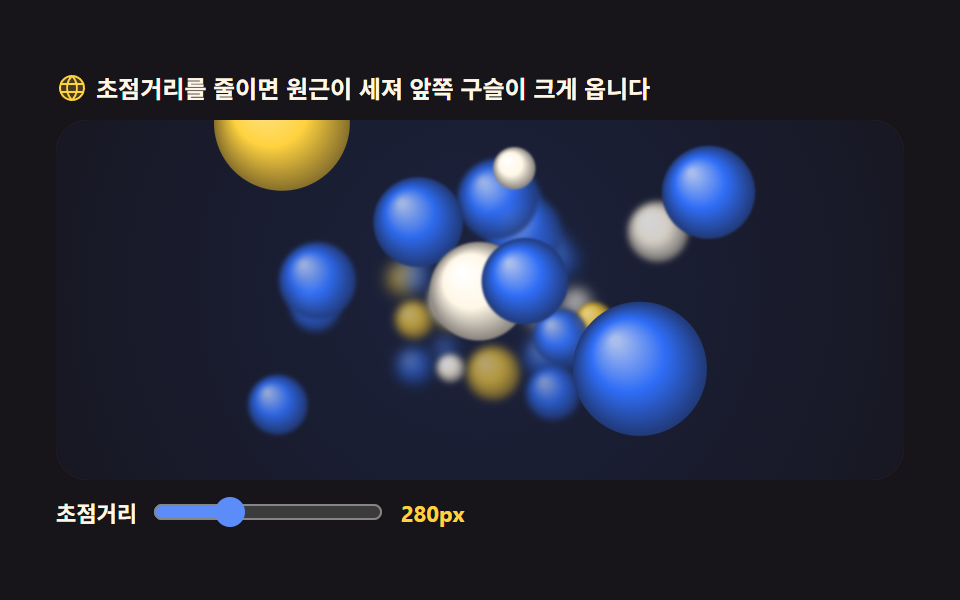 02 fx-orb-depth-field
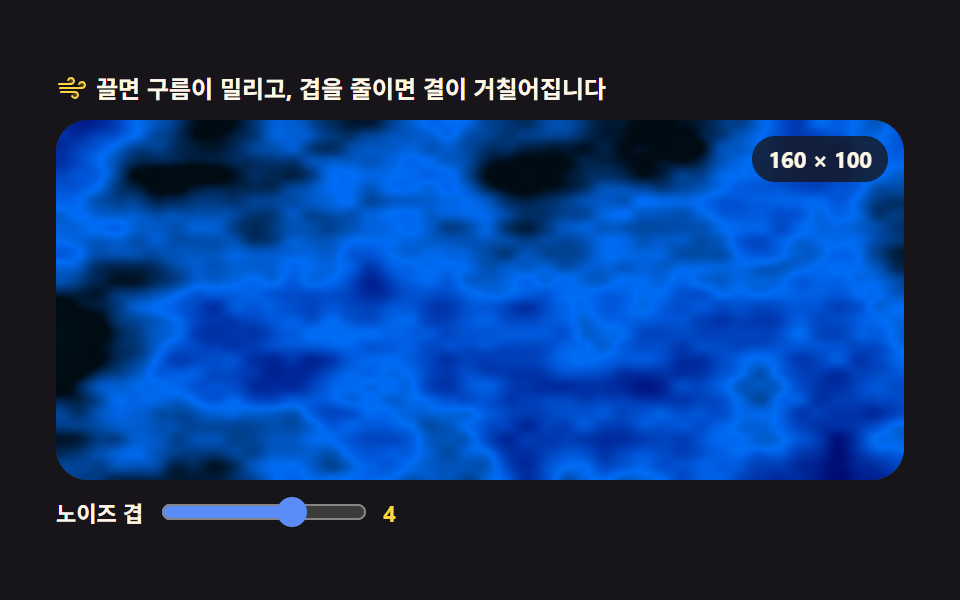 03 fx-noise-shader-2d
 04 fx-text-heat-warp
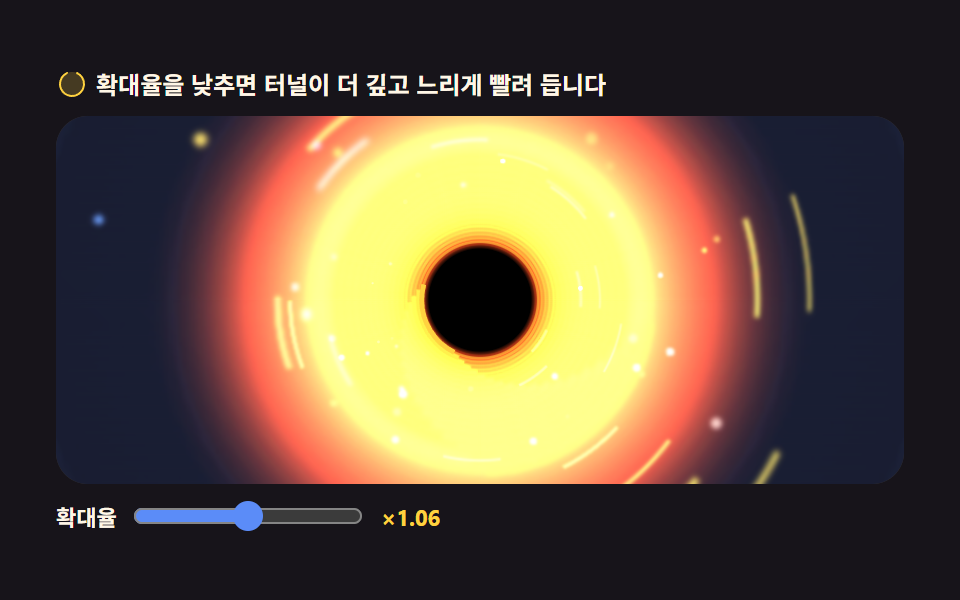 05 fx-blackhole-tunnel
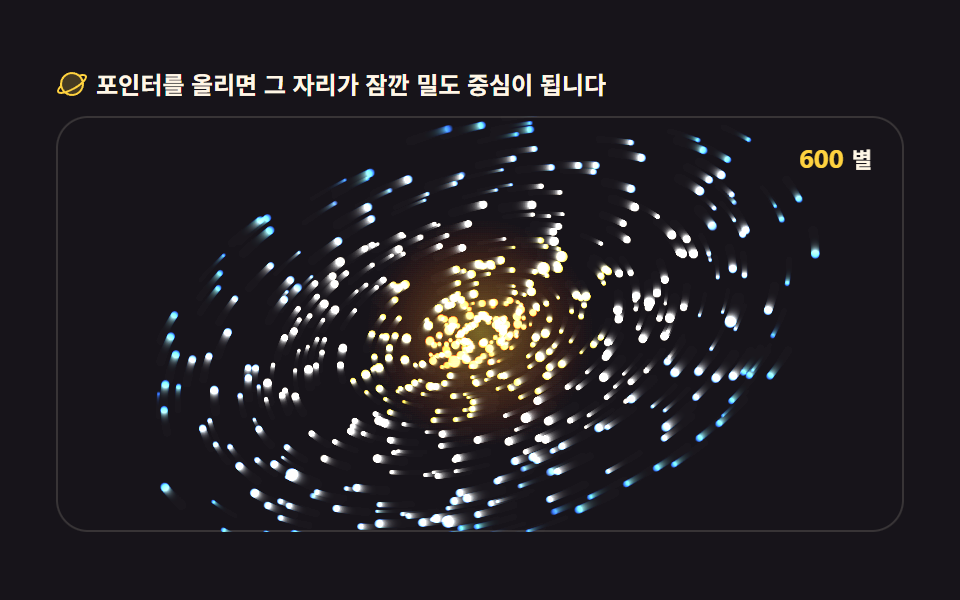 06 fx-galaxy-swirl
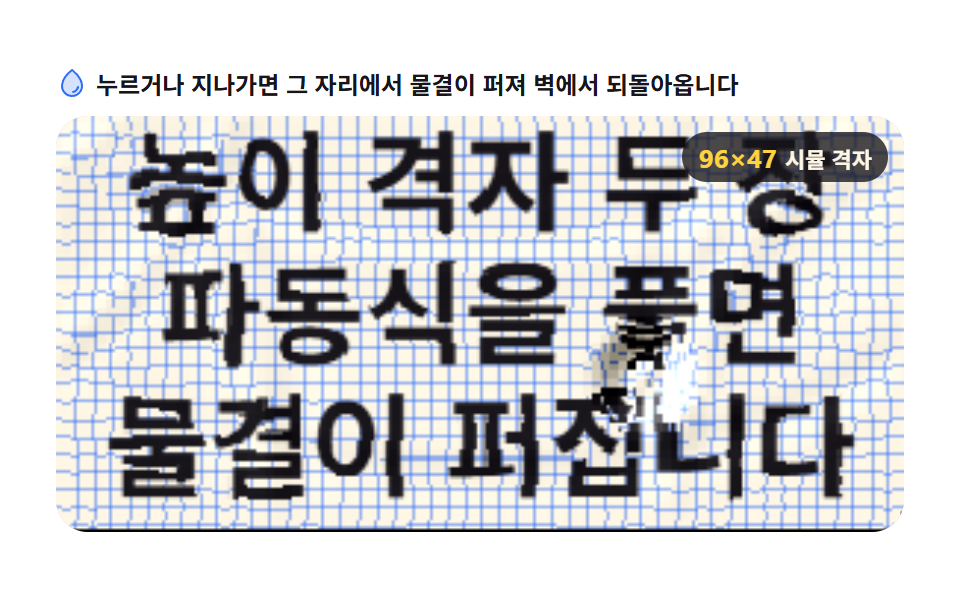 07 fx-fluid-surface
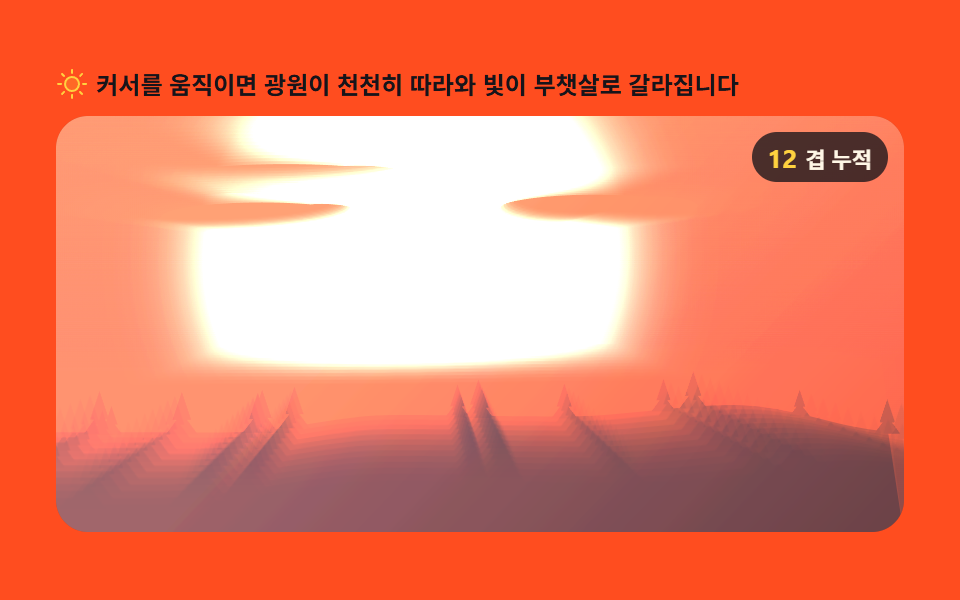 08 fx-light-scatter
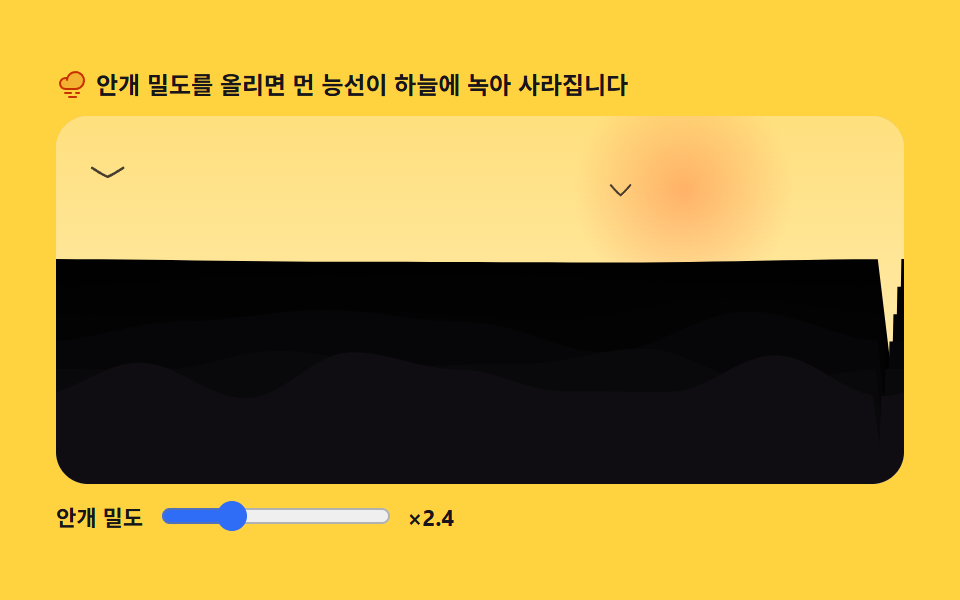 09 fx-depth-fog
자동 재생 · 눌러서 해당 항목으로 · 전부 한 zip
- 01 물방울 렌즈
- 02 떠오르는 3D 볼 필드
- 03 노이즈 쉐이더 재현
- 04 흔들리는 3D 텍스트
- 05 블랙홀 터널
- 06 은하 회오리
- 07 유체 물결 표면
- 08 빛 산란 광선
- 09 깊이 안개 씬
순서는 화려한 순서가 아니라 왜곡이 만들어지는 순서입니다. 먼저 픽셀을 꺼내 다시 놓는 굴절이 생기고(01), 깊이의 착시가 생기고(02·03·04), 화면 전체가 흐르는 되먹임이 생기고(05·06), 마지막에 빛과 안개가 장면을 통째로 입힙니다(07·08·09). 알갱이를 흩뿌리는 캔버스 파티클 엔진과 스프링·중력을 다루는 물리 인터랙션이 이 편의 이웃입니다.
01물방울 렌즈
배경을 한 번 그려 둔 다음 방울이 덮은 원 안쪽 픽셀만 꺼내 구면 굴절 식으로 다시 배치하는, 제품 사진 위를 굴러다니는 물방울 히어로용 부품입니다.
<main class="stage">
<div class="dl" id="dl">
  <p class="dl__hint">
    <svg class="dl__ico" viewBox="0 0 256 256" aria-hidden="true"><g fill="currentColor"><path d="M208 144a80 80 0 0 1-160 0c0-72 80-128 80-128s80 56 80 128" opacity=".2"/><path d="M174 47.75a254.2 254.2 0 0 0-41.45-38.3a8 8 0 0 0-9.18 0A254.2 254.2 0 0 0 82 47.75C54.51 79.32 40 112.6 40 144a88 88 0 0 0 176 0c0-31.4-14.51-64.68-42-96.25M128 216a72.08 72.08 0 0 1-72-72c0-57.23 55.47-105 72-118c16.53 13 72 60.75 72 118a72.08 72.08 0 0 1-72 72m55.89-62.66a57.6 57.6 0 0 1-46.56 46.55a9 9 0 0 1-1.33.11a8 8 0 0 1-1.32-15.89c16.57-2.79 30.63-16.85 33.44-33.45a8 8 0 0 1 15.78 2.68Z"/></g></svg>
    <span>방울을 잡아 끌면 그 아래가 렌즈처럼 부풀어 오릅니다</span>
  </p>
  <div class="dl__field" id="field" role="application" aria-label="굴절 실험판" tabindex="0">
    <canvas class="dl__cv" id="cv"></canvas>
    <b class="dl__badge" aria-hidden="true"><span class="dl__badgeNum">1.34</span><span class="dl__badgeUnit">굴절률</span></b>
  </div>
</div>
</main>
@use "../../../../site/static/demo-tokens" as *;
// 물방울 렌즈 — 움직임은 전부 캔버스 rAF 루프 안에 있다. CSS 는 무대·판·배지만 맡는다.
// @keyframes 를 하나도 두지 않는 것이 중요하다 — CSS 애니메이션이 0개라야 렌더러가 시계를 고정하지 않고
// 실시간으로 24장을 찍어 캔버스가 실제로 도는 모습이 담긴다(도구/demo.py 렌더(), 012 선례 "애니메이션": 0).
// 캔버스가 쓰는 색은 여기서 커스텀 프로퍼티로 내려보낸다 — 값은 토큰 한 곳에만 둔다.
$duration: $dur-loop;
$easing: $ease-spring;
$color: $subject-blue;
@include stage($stage-paper);
.dl {
--paper: #{$subject-cream};
--ink: #{$subject-ink};
--line: #{$color};
--rim-0: #{rgba($subject-ink, 0)};
--rim-1: #{rgba($subject-ink, .18)};
--gloss-0: #{rgba($stage-paper, .88)};
--gloss-1: #{rgba($stage-paper, 0)};
--edge: #{rgba($subject-ink, .38)};
display: flex; flex-direction: column; gap: $sp-2;
width: 100%; max-width: 424px;
}
.dl__hint {
display: flex; align-items: center; gap: $sp-1; margin: 0;
font-weight: 700; font-size: clamp(10px, 2.8vw, 12px); line-height: 1.35;
color: $subject-ink;
}
.dl__ico { width: 16px; height: 16px; flex: 0 0 auto; color: $color; }
.dl__field {
position: relative; height: 208px;
border-radius: $r-card; overflow: hidden;
background: $subject-cream;
box-shadow: inset 0 0 0 1px rgba($subject-ink, .16);
cursor: crosshair; touch-action: none;
}
.dl__field:focus-visible { outline: 2px solid $color; outline-offset: 2px; }
.dl__cv { display: block; width: 100%; height: 100%; }
// 방울이 쓰는 상수를 화면에도 적어 둔다 — 코드의 IOR 과 같은 값이다
.dl__badge {
position: absolute; right: $sp-2; top: $sp-2;
display: flex; align-items: baseline; gap: $sp-1;
padding: $sp-1 $sp-2; border-radius: $r-pill;
background: rgba($subject-ink, .78);
color: $subject-cream; font-weight: 700; font-size: 11px;
}
.dl__badgeNum { font-size: 13px; color: $stage-yellow; }
.dl__badgeUnit { font-weight: 700; }
@media (max-width: 340px) {
.dl { gap: $sp-1; }
.dl__field { height: 124px; }
.dl__badge { font-size: 10px; padding: 0 $sp-1; }
.dl__badgeNum { font-size: 11px; }
}
// reduce — 루프가 아예 안 돌아 끄고 말고 할 애니메이션이 없다.
// 방울이 멈춰 선 한 장이 남으므로 끌 수 있다는 신호(커서)만 거둔다.
@media (prefers-reduced-motion: reduce) {
.dl.is-still .dl__field { cursor: default !important; }
.dl.is-still .dl__badge { opacity: .92 !important; }
}html, body {
margin: 0;
overflow: hidden;
}
.stage {
box-sizing: border-box;
min-height: 100vh;
display: grid;
place-items: center;
margin: 0;
background: #ffffff;
font-family: -apple-system, "Segoe UI", "Noto Sans KR", sans-serif;
padding: clamp(8px, 4vw, 24px);
}
.dl {
--paper: #fff7e6;
--ink: #17141a;
--line: #2f6df6;
--rim-0: rgba(23, 20, 26, 0);
--rim-1: rgba(23, 20, 26, 0.18);
--gloss-0: rgba(255, 255, 255, 0.88);
--gloss-1: rgba(255, 255, 255, 0);
--edge: rgba(23, 20, 26, 0.38);
display: flex;
flex-direction: column;
gap: 8px;
width: 100%;
max-width: 424px;
}
.dl__hint {
display: flex;
align-items: center;
gap: 4px;
margin: 0;
font-weight: 700;
font-size: clamp(10px, 2.8vw, 12px);
line-height: 1.35;
color: #17141a;
}
.dl__ico {
width: 16px;
height: 16px;
flex: 0 0 auto;
color: #2f6df6;
}
.dl__field {
position: relative;
height: 208px;
border-radius: 16px;
overflow: hidden;
background: #fff7e6;
box-shadow: inset 0 0 0 1px rgba(23, 20, 26, 0.16);
cursor: crosshair;
touch-action: none;
}
.dl__field:focus-visible {
outline: 2px solid #2f6df6;
outline-offset: 2px;
}
.dl__cv {
display: block;
width: 100%;
height: 100%;
}
.dl__badge {
position: absolute;
right: 8px;
top: 8px;
display: flex;
align-items: baseline;
gap: 4px;
padding: 4px 8px;
border-radius: 999px;
background: rgba(23, 20, 26, 0.78);
color: #fff7e6;
font-weight: 700;
font-size: 11px;
}
.dl__badgeNum {
font-size: 13px;
color: #ffd23f;
}
.dl__badgeUnit {
font-weight: 700;
}
@media (max-width: 340px) {
.dl {
gap: 4px;
}
.dl__field {
height: 124px;
}
.dl__badge {
font-size: 10px;
padding: 0 4px;
}
.dl__badgeNum {
font-size: 11px;
}
}
@media (prefers-reduced-motion: reduce) {
.dl.is-still .dl__field {
cursor: default !important;
}
.dl.is-still .dl__badge {
opacity: 0.92 !important;
}
}// 물방울 렌즈 — 배경을 한 번 그려 둔 다음, 방울이 덮은 원 안쪽 픽셀만 getImageData 로 꺼내
// 구면 굴절 식으로 자리를 옮겨 putImageData 로 되돌려 놓는다.
// 요점은 "확대"가 아니라 **표본 좌표를 옮기는 것**이다 — 그릴 것은 그대로고 어디서 읽느냐만 바뀐다.
var root = document.getElementById('dl');
var field = document.getElementById('field');
var cv = document.getElementById('cv');
// willReadFrequently — 프레임마다 getImageData 를 부르는 캔버스는 이 힌트를 줘야 GPU 왕복을 안 한다
var ctx = cv.getContext('2d', { willReadFrequently: true });
var css = getComputedStyle(root);
var PAPER = css.getPropertyValue('--paper').trim();
var INK = css.getPropertyValue('--ink').trim();
var LINE = css.getPropertyValue('--line').trim();
var RIM0 = css.getPropertyValue('--rim-0').trim();
var RIM1 = css.getPropertyValue('--rim-1').trim();
var GLOSS0 = css.getPropertyValue('--gloss-0').trim();
var GLOSS1 = css.getPropertyValue('--gloss-1').trim();
var EDGE = css.getPropertyValue('--edge').trim();
var FONT = '-apple-system, "Segoe UI", "Noto Sans KR", sans-serif';
var LINES = ['픽셀을 꺼내', '굴절 식으로', '다시 배치합니다'];
var IOR = 1.34; // 물의 굴절률 — 공기(1.00)에서 물로 들어갈 때의 비
var GRID = 20; // 배경 격자 한 칸(CSS px) — 렌즈가 휘는 정도를 눈으로 재는 자
var LOOP = 2; // 방울이 8자 한 바퀴를 도는 데 걸리는 초. 캡처 창(2초)과 같아 gif 가 이어진다
var reduce = window.matchMedia('(prefers-reduced-motion: reduce)').matches;
var W = 0, H = 0, dpr = 1, radius = 54;
var cx = 0, cy = 0; // 방울 중심(CSS px)
var tx = 0, ty = 0; // 방울이 따라가는 목표점
var manual = false; // 사람이 잡고 있는가 — 손을 떼면 다시 8자 경로로 돌아간다
var raf = 0;
// 고DPI 대응 — 배킹 스토어는 devicePixelRatio 배, 그리기 좌표계는 CSS 픽셀 그대로.
// 굴절 계산만 배킹 스토어(장치 픽셀) 기준으로 한다. getImageData·putImageData 는 변환을 무시하기 때문이다.
function fit() {
var r = field.getBoundingClientRect();
dpr = window.devicePixelRatio || 1;
W = r.width; H = r.height;
cv.width = Math.round(W * dpr);
cv.height = Math.round(H * dpr);
ctx.setTransform(dpr, 0, 0, dpr, 0, 0);
radius = Math.max(30, Math.min(62, Math.round(Math.min(W, H) * 0.27)));
if (!cx) { cx = W * 0.5; cy = H * 0.5; tx = cx; ty = cy; }
}
// 배경 — 렌즈가 읽어갈 그림. 글자와 격자처럼 가늘고 곧은 것이 굴절을 가장 잘 드러낸다
function scene() {
ctx.fillStyle = PAPER;
ctx.fillRect(0, 0, W, H);
ctx.strokeStyle = LINE;
ctx.globalAlpha = 0.5;
ctx.lineWidth = 1;
ctx.beginPath();
for (var x = GRID; x < W; x += GRID) { ctx.moveTo(x + 0.5, 0); ctx.lineTo(x + 0.5, H); }
for (var y = GRID; y < H; y += GRID) { ctx.moveTo(0, y + 0.5); ctx.lineTo(W, y + 0.5); }
ctx.stroke();
ctx.globalAlpha = 1;
// 글자는 판을 가득 채운다 — 방울이 어디로 가든 굴절시킬 것이 있어야 렌즈로 보인다(실측:
// 세 줄만 두었더니 방울이 빈 자리를 확대해 뿌연 공으로만 보였다)
// 100px 로 한 번 재 두고 가장 긴 줄이 판 폭의 88% 가 되도록 크기를 역산한다
ctx.font = '700 100px ' + FONT;
var widest = 1;
for (var k = 0; k < LINES.length; k++) widest = Math.max(widest, ctx.measureText(LINES[k]).width);
var size = Math.max(12, Math.round(100 * (W * 0.88) / widest));
var rowH = Math.round(size * 1.18);
var rows = Math.max(3, Math.round(H / rowH));
var top = (H - (rows - 1) * rowH) * 0.5;
ctx.fillStyle = INK;
ctx.textAlign = 'center';
ctx.textBaseline = 'middle';
ctx.font = '700 ' + size + 'px ' + FONT;
for (var i = 0; i < rows; i++) {
ctx.fillText(LINES[i % LINES.length], W * 0.5, top + i * rowH);
}
}
// 구면 굴절 — 수직으로 들어온 빛이 반구 표면에서 스넬 법칙만큼 꺾인다.
// 중심에서의 정규화 거리 rn 이 곧 입사각의 sin 이고, 그 각도 차이가 깊이만큼 곱해져 옆으로 밀린 양이 된다.
function refract() {
var pr = Math.round(radius * dpr);
var px = Math.round(cx * dpr), py = Math.round(cy * dpr);
var sx = Math.max(0, px - pr), sy = Math.max(0, py - pr);
var ex = Math.min(cv.width, px + pr), ey = Math.min(cv.height, py + pr);
var sw = ex - sx, sh = ey - sy;
if (sw < 2 || sh < 2) return;
var src = ctx.getImageData(sx, sy, sw, sh);
var out = ctx.createImageData(sw, sh);
var s = src.data, o = out.data;
var ox = px - sx, oy = py - sy; // 잘라낸 조각 안에서의 방울 중심
var depth = pr * 0.9; // 방울 아래 물층 두께(구 반지름의 0.9배) — 클수록 크게 부푼다.
// 1.0 을 넘기면 가장자리에서 표본 좌표가 음수로 넘어가 상이 뒤집힌다
  for (var y = 0; y < sh; y++) {
    for (var x = 0; x < sw; x++) {
      var i = (y * sw + x) * 4;
      var dx = x - ox, dy = y - oy;
      var dist = Math.sqrt(dx * dx + dy * dy);
      var rn = dist / pr;
      var j = i;
      if (rn < 1 && dist > 0) {
        var inc = Math.asin(rn);                 // 입사각
        var ref = Math.asin(rn / IOR);           // 굴절각 (스넬 법칙)
        var shift = depth * Math.tan(inc - ref); // 안쪽으로 당겨 읽을 거리
        var k = (dist - shift) / dist;
        var mx = Math.round(ox + dx * k), my = Math.round(oy + dy * k);
        if (mx < 0) mx = 0; else if (mx >= sw) mx = sw - 1;
        if (my < 0) my = 0; else if (my >= sh) my = sh - 1;
        j = (my * sw + mx) * 4;
      }
o[i] = s[j]; o[i + 1] = s[j + 1]; o[i + 2] = s[j + 2]; o[i + 3] = 255;
}
}
ctx.putImageData(out, sx, sy);
}
// 방울처럼 보이게 하는 것은 굴절이 아니라 이 세 겹이다 — 가장자리 그늘·왼쪽 위 광택·얇은 테두리
function gloss() {
// 가장자리 그늘은 좁고 옅게 — 넓게 깔면 방울이 유리가 아니라 회색 공으로 읽힌다(실측)
var rim = ctx.createRadialGradient(cx, cy, radius * 0.72, cx, cy, radius);
rim.addColorStop(0, RIM0);
rim.addColorStop(1, RIM1);
ctx.fillStyle = rim;
ctx.beginPath();
ctx.arc(cx, cy, radius, 0, Math.PI * 2);
ctx.fill();
// 광택은 작게 — 크게 깔면 굴절로 부푼 글자가 하얗게 묻힌다(실측)
var hx = cx - radius * 0.36, hy = cy - radius * 0.4;
var hi = ctx.createRadialGradient(hx, hy, 1, hx, hy, radius * 0.26);
hi.addColorStop(0, GLOSS0);
hi.addColorStop(1, GLOSS1);
ctx.fillStyle = hi;
ctx.beginPath();
ctx.arc(cx, cy, radius, 0, Math.PI * 2);
ctx.fill();
ctx.strokeStyle = EDGE;
ctx.lineWidth = 1.5;
ctx.beginPath();
ctx.arc(cx, cy, radius - 0.75, 0, Math.PI * 2);
ctx.stroke();
}
function draw() {
scene();
refract();
gloss();
}
// 8자 경로 — 가로는 한 바퀴, 세로는 두 바퀴 도는 리사주 곡선이 그대로 8자가 된다
function autoTarget(sec) {
var th = (sec % LOOP) / LOOP * Math.PI * 2;
tx = W * 0.5 + Math.sin(th) * W * 0.26;
ty = H * 0.5 + Math.sin(th * 2) * H * 0.2;
}
function step(sec) {
if (!manual) autoTarget(sec);
cx += (tx - cx) * 0.16;
cy += (ty - cy) * 0.16;
}
function frame(now) {
step(now / 1000);
draw();
raf = requestAnimationFrame(frame);
}
function aim(e) {
var r = field.getBoundingClientRect();
tx = Math.max(0, Math.min(W, e.clientX - r.left));
ty = Math.max(0, Math.min(H, e.clientY - r.top));
manual = true;
}
field.addEventListener('pointermove', aim);
field.addEventListener('pointerdown', function (e) { aim(e); field.setPointerCapture(e.pointerId); });
field.addEventListener('pointerup', function (e) { field.releasePointerCapture(e.pointerId); });
field.addEventListener('pointerleave', function () { manual = false; });
field.addEventListener('keydown', function (e) {
var d = { ArrowLeft: [-16, 0], ArrowRight: [16, 0], ArrowUp: [0, -16], ArrowDown: [0, 16] }[e.key];
if (!d) { if (e.key === 'Escape') manual = false; return; }
e.preventDefault();
manual = true;
tx = Math.max(0, Math.min(W, tx + d[0]));
ty = Math.max(0, Math.min(H, ty + d[1]));
if (reduce) { cx = tx; cy = ty; draw(); }
});
window.addEventListener('resize', function () { fit(); if (reduce) draw(); });
fit();
if (reduce) {
// reduce — 루프를 시작하지 않고 방울이 글자 위에 올라선 한 장만 그린다(빈 화면이 아니다)
root.classList.add('is-still');
cx = W * 0.44; cy = H * 0.5; tx = cx; ty = cy;
draw();
} else {
raf = requestAnimationFrame(frame);
}// DropletLens — vanilla 판(run/077/demo/01-fx-droplet-lens/index.html) 의 React 포트.
// 배경을 한 번 그려 둔 다음 방울이 덮은 원 안쪽 픽셀만 getImageData 로 꺼내
// 구면 굴절 식(스넬 법칙)으로 자리를 옮겨 putImageData 로 되돌려 놓는다.
// 움직임은 캔버스 rAF 루프가 전부 그리므로 @keyframes 가 없다 — props 는 CSS 변수로 내려간다.
import { useEffect, useRef } from "react";
import type { CSSProperties } from "react";
import styles from "./DropletLens.module.scss";
export type DropletLensProps = {
duration?: string;
easing?: string;
color?: string;
};
type Vars = CSSProperties & { "--duration"?: string; "--easing"?: string; "--color"?: string };
// useRef 는 T | null 을 돌려준다. 처음부터 값이 있고 절대 비지 않는 상자는 이렇게 좁혀 쓴다
type Box<T> = { current: T };
// React 이벤트 제네릭이 없는 환경이라 필요한 것만 로컬로 선언한다
type KeyEvt = { key: string; preventDefault(): void };
type PtrEvt = { clientX: number; clientY: number; pointerId: number };
const IOR = 1.34; // 물의 굴절률 — 공기(1.00)에서 물로 들어갈 때의 비
const GRID = 20; // 배경 격자 한 칸(CSS px)
const LOOP = 2; // 방울이 8자 한 바퀴를 도는 데 걸리는 초
const LINES = ["픽셀을 꺼내", "굴절 식으로", "다시 배치합니다"];
const FONT = '-apple-system, "Segoe UI", "Noto Sans KR", sans-serif';
const FIELD_LABEL = "굴절 실험판";
export default function DropletLens({
duration = "2s", // vanilla $duration: $dur-loop
easing = "cubic-bezier(.2, .8, .2, 1)", // vanilla $easing: $ease-spring
color = "#2f6df6", // vanilla $color: $subject-blue
}: DropletLensProps) {
const rootRef = useRef<HTMLDivElement | null>(null);
const fieldRef = useRef<HTMLDivElement | null>(null);
const cvRef = useRef<HTMLCanvasElement | null>(null);
const ctxRef = useRef<CanvasRenderingContext2D | null>(null);
const sizeRef = useRef({ w: 0, h: 0, dpr: 1 }) as Box<{ w: number; h: number; dpr: number }>;
const dropRef = useRef({ cx: 0, cy: 0, tx: 0, ty: 0, radius: 54, manual: false }) as Box<{ cx: number; cy: number; tx: number; ty: number; radius: number; manual: boolean }>;
const rafRef = useRef(0) as Box<number>;
const vars: Vars = { "--duration": duration, "--easing": easing, "--color": color };
function reduced(): boolean {
return window.matchMedia("(prefers-reduced-motion: reduce)").matches;
}
// 고DPI 대응 — 배킹 스토어는 devicePixelRatio 배, 그리기 좌표계는 CSS 픽셀 그대로.
// 굴절 계산만 배킹 스토어 기준으로 한다. getImageData·putImageData 는 변환을 무시하기 때문이다.
function fit(): void {
const field = fieldRef.current;
const cv = cvRef.current;
if (!field || !cv) return;
const r = field.getBoundingClientRect();
const dpr = window.devicePixelRatio || 1;
const d = dropRef.current;
sizeRef.current.w = r.width;
sizeRef.current.h = r.height;
sizeRef.current.dpr = dpr;
cv.width = Math.round(r.width * dpr);
cv.height = Math.round(r.height * dpr);
d.radius = Math.max(30, Math.min(62, Math.round(Math.min(r.width, r.height) * 0.27)));
if (!d.cx) { d.cx = r.width * 0.5; d.cy = r.height * 0.5; d.tx = d.cx; d.ty = d.cy; }
}
// 배경 — 렌즈가 읽어갈 그림. 글자와 격자처럼 가늘고 곧은 것이 굴절을 가장 잘 드러낸다
function scene(): void {
const ctx = ctxRef.current;
const root = rootRef.current;
if (!ctx || !root) return;
const W = sizeRef.current.w, H = sizeRef.current.h;
const cssv = (n: string) => getComputedStyle(root).getPropertyValue(n).trim();
ctx.fillStyle = cssv("--paper");
ctx.fillRect(0, 0, W, H);
ctx.strokeStyle = cssv("--line");
ctx.globalAlpha = 0.5;
ctx.lineWidth = 1;
ctx.beginPath();
for (let x = GRID; x < W; x += GRID) { ctx.moveTo(x + 0.5, 0); ctx.lineTo(x + 0.5, H); }
for (let y = GRID; y < H; y += GRID) { ctx.moveTo(0, y + 0.5); ctx.lineTo(W, y + 0.5); }
ctx.stroke();
ctx.globalAlpha = 1;
// 100px 로 한 번 재 두고 가장 긴 줄이 판 폭의 88% 가 되도록 크기를 역산한다
ctx.font = "700 100px " + FONT;
let widest = 1;
for (const s of LINES) widest = Math.max(widest, ctx.measureText(s).width);
const size = Math.max(12, Math.round(100 * (W * 0.88) / widest));
const rowH = Math.round(size * 1.18);
const rows = Math.max(3, Math.round(H / rowH));
const top = (H - (rows - 1) * rowH) * 0.5;
ctx.fillStyle = cssv("--ink");
ctx.textAlign = "center";
ctx.textBaseline = "middle";
ctx.font = "700 " + size + "px " + FONT;
for (let i = 0; i < rows; i++) {
ctx.fillText(LINES[i % LINES.length], W * 0.5, top + i * rowH);
}
}
// 구면 굴절 — 수직으로 들어온 빛이 반구 표면에서 스넬 법칙만큼 꺾인다.
// 중심에서의 정규화 거리 rn 이 곧 입사각의 sin 이고, 각도 차이가 깊이를 곱해 옆으로 밀린 양이 된다.
function refract(): void {
const ctx = ctxRef.current;
const cv = cvRef.current;
if (!ctx || !cv) return;
const { dpr } = sizeRef.current;
const d = dropRef.current;
const pr = Math.round(d.radius * dpr);
const px = Math.round(d.cx * dpr), py = Math.round(d.cy * dpr);
const sx = Math.max(0, px - pr), sy = Math.max(0, py - pr);
const ex = Math.min(cv.width, px + pr), ey = Math.min(cv.height, py + pr);
const sw = ex - sx, sh = ey - sy;
if (sw < 2 || sh < 2) return;
const src = ctx.getImageData(sx, sy, sw, sh);
const out = ctx.createImageData(sw, sh);
const s = src.data, o = out.data;
const ox = px - sx, oy = py - sy;
const depth = pr * 0.9; // 방울 아래 물층 두께(구 반지름의 0.9배)
for (let y = 0; y < sh; y++) {
for (let x = 0; x < sw; x++) {
const i = (y * sw + x) * 4;
const dx = x - ox, dy = y - oy;
const dist = Math.sqrt(dx * dx + dy * dy);
const rn = dist / pr;
let j = i;
if (rn < 1 && dist > 0) {
const inc = Math.asin(rn);
const ref = Math.asin(rn / IOR);
const shift = depth * Math.tan(inc - ref);
const k = (dist - shift) / dist;
let mx = Math.round(ox + dx * k), my = Math.round(oy + dy * k);
if (mx < 0) mx = 0; else if (mx >= sw) mx = sw - 1;
if (my < 0) my = 0; else if (my >= sh) my = sh - 1;
j = (my * sw + mx) * 4;
}
o[i] = s[j]; o[i + 1] = s[j + 1]; o[i + 2] = s[j + 2]; o[i + 3] = 255;
}
}
ctx.putImageData(out, sx, sy);
}
// 방울처럼 보이게 하는 것은 굴절이 아니라 이 세 겹이다 — 가장자리 그늘·왼쪽 위 광택·얇은 테두리
function gloss(): void {
const ctx = ctxRef.current;
const root = rootRef.current;
if (!ctx || !root) return;
const cssv = (n: string) => getComputedStyle(root).getPropertyValue(n).trim();
const d = dropRef.current;
// 가장자리 그늘은 좁고 옅게 — 넓게 깔면 방울이 유리가 아니라 회색 공으로 읽힌다
const rim = ctx.createRadialGradient(d.cx, d.cy, d.radius * 0.72, d.cx, d.cy, d.radius);
rim.addColorStop(0, cssv("--rim-0"));
rim.addColorStop(1, cssv("--rim-1"));
ctx.fillStyle = rim;
ctx.beginPath();
ctx.arc(d.cx, d.cy, d.radius, 0, Math.PI * 2);
ctx.fill();
// 광택은 작게 — 크게 깔면 굴절로 부푼 글자가 하얗게 묻힌다
const hx = d.cx - d.radius * 0.36, hy = d.cy - d.radius * 0.4;
const hi = ctx.createRadialGradient(hx, hy, 1, hx, hy, d.radius * 0.26);
hi.addColorStop(0, cssv("--gloss-0"));
hi.addColorStop(1, cssv("--gloss-1"));
ctx.fillStyle = hi;
ctx.beginPath();
ctx.arc(d.cx, d.cy, d.radius, 0, Math.PI * 2);
ctx.fill();
ctx.strokeStyle = cssv("--edge");
ctx.lineWidth = 1.5;
ctx.beginPath();
ctx.arc(d.cx, d.cy, d.radius - 0.75, 0, Math.PI * 2);
ctx.stroke();
}
function draw(): void {
scene();
refract();
gloss();
}
// 8자 경로 — 가로는 한 바퀴, 세로는 두 바퀴 도는 리사주 곡선이 그대로 8자가 된다
function autoTarget(sec: number): void {
const W = sizeRef.current.w, H = sizeRef.current.h;
const th = (sec % LOOP) / LOOP * Math.PI * 2;
const d = dropRef.current;
d.tx = W * 0.5 + Math.sin(th) * W * 0.26;
d.ty = H * 0.5 + Math.sin(th * 2) * H * 0.2;
}
function step(sec: number): void {
const d = dropRef.current;
if (!d.manual) autoTarget(sec);
d.cx += (d.tx - d.cx) * 0.16;
d.cy += (d.ty - d.cy) * 0.16;
}
function frame(now: number): void {
step(now / 1000);
draw();
rafRef.current = requestAnimationFrame(frame);
}
function aim(e: PtrEvt): void {
const field = fieldRef.current;
if (!field) return;
const r = field.getBoundingClientRect();
const W = sizeRef.current.w, H = sizeRef.current.h;
const d = dropRef.current;
d.tx = Math.max(0, Math.min(W, e.clientX - r.left));
d.ty = Math.max(0, Math.min(H, e.clientY - r.top));
d.manual = true;
}
function onMove(e: PtrEvt): void {
aim(e);
}
function onDown(e: PtrEvt): void {
aim(e);
const field = fieldRef.current;
if (field && typeof field.setPointerCapture === "function") {
try { field.setPointerCapture(e.pointerId); } catch { /* 캡처 실패는 치명적이지 않다 */ }
}
}
function onUp(e: PtrEvt): void {
const field = fieldRef.current;
if (field && typeof field.releasePointerCapture === "function") {
try { field.releasePointerCapture(e.pointerId); } catch { /* 이미 풀려 있을 수 있다 */ }
}
}
function onLeave(): void {
dropRef.current.manual = false;
}
function onKey(e: KeyEvt): void {
const W = sizeRef.current.w, H = sizeRef.current.h;
const d = dropRef.current;
const map: Record<string, number[]> = {
ArrowLeft: [-16, 0], ArrowRight: [16, 0], ArrowUp: [0, -16], ArrowDown: [0, 16],
};
const dd = map[e.key];
if (!dd) { if (e.key === "Escape") d.manual = false; return; }
e.preventDefault();
d.manual = true;
d.tx = Math.max(0, Math.min(W, d.tx + dd[0]));
d.ty = Math.max(0, Math.min(H, d.ty + dd[1]));
if (reduced()) { d.cx = d.tx; d.cy = d.ty; draw(); }
}
function onResize(): void {
fit();
if (reduced()) draw();
}
useEffect(() => {
const cv = cvRef.current;
if (!cv) return;
// willReadFrequently — 프레임마다 getImageData 를 부르는 캔버스는 이 힌트를 줘야 GPU 왕복을 안 한다
ctxRef.current = cv.getContext("2d", { willReadFrequently: true });
if (!ctxRef.current) return;
fit();
window.addEventListener("resize", onResize);
if (reduced()) {
// reduce — 루프를 시작하지 않고 방울이 글자 위에 올라선 한 장만 그린다
const root = rootRef.current;
if (root) root.classList.add("is-still");
const d = dropRef.current;
d.cx = sizeRef.current.w * 0.44; d.cy = sizeRef.current.h * 0.5; d.tx = d.cx; d.ty = d.cy;
draw();
} else {
rafRef.current = requestAnimationFrame(frame);
}
return () => {
window.removeEventListener("resize", onResize);
cancelAnimationFrame(rafRef.current);
};
}, []);
return (
<main className={styles.stage}>
<div className={styles.root} ref={rootRef} style={vars}>
<p className={styles.hint}>
<svg className={styles.ico} viewBox="0 0 256 256" aria-hidden="true"><g fill="currentColor"><path d="M208 144a80 80 0 0 1-160 0c0-72 80-128 80-128s80 56 80 128" opacity=".2"/><path d="M174 47.75a254.2 254.2 0 0 0-41.45-38.3a8 8 0 0 0-9.18 0A254.2 254.2 0 0 0 82 47.75C54.51 79.32 40 112.6 40 144a88 88 0 0 0 176 0c0-31.4-14.51-64.68-42-96.25M128 216a72.08 72.08 0 0 1-72-72c0-57.23 55.47-105 72-118c16.53 13 72 60.75 72 118a72.08 72.08 0 0 1-72 72m55.89-62.66a57.6 57.6 0 0 1-46.56 46.55a9 9 0 0 1-1.33.11a8 8 0 0 1-1.32-15.89c16.57-2.79 30.63-16.85 33.44-33.45a8 8 0 0 1 15.78 2.68Z"/></g></svg>
<span>방울을 잡아 끌면 그 아래가 렌즈처럼 부풀어 오릅니다</span>
</p>
<div
className={styles.field}
ref={fieldRef}
role="application"
aria-label={FIELD_LABEL}
tabIndex={0}
onPointerMove={onMove}
onPointerDown={onDown}
onPointerUp={onUp}
onPointerLeave={onLeave}
onKeyDown={onKey}
>
<canvas className={styles.cv} ref={cvRef}></canvas>
<b className={styles.badge} aria-hidden="true"><span className={styles.badgeNum}>1.34</span><span className={styles.badgeUnit}>굴절률</span></b>
</div>
</div>
</main>
);
}01 · 물방울 렌즈 — 측정 누적면적 32.968% · 움직인 프레임 23/23GODRICH 원작 · zip 에 SCSS·React 포함 · 비밀번호 보기
표본 좌표를 옮기는 것이 확대다
for (var y = 0; y < sh; y++) {
for (var x = 0; x < sw; x++) {
var i = (y * sw + x) * 4;
var dx = x - ox, dy = y - oy;
var dist = Math.sqrt(dx * dx + dy * dy);
var rn = dist / pr;
var j = i;
if (rn < 1 && dist > 0) {
var inc = Math.asin(rn); // 입사각
var ref = Math.asin(rn / IOR); // 굴절각 (스넬 법칙)
var shift = depth * Math.tan(inc - ref); // 안쪽으로 당겨 읽을 거리
var k = (dist - shift) / dist;
var mx = Math.round(ox + dx * k), my = Math.round(oy + dy * k);
if (mx < 0) mx = 0; else if (mx >= sw) mx = sw - 1;
if (my < 0) my = 0; else if (my >= sh) my = sh - 1;
j = (my * sw + mx) * 4;
}
그릴 것은 그대로 두고 읽는 곳만 방울 중심 쪽으로 당겨 오니 격자와 글자가 렌즈 아래에서 부풉니다. 물의 굴절률 1.34 로 스넬 법칙을 그대로 풀었고, 방울을 끌면 잡은 위치로 스르르 따라옵니다(실측: 드래그 위치로 방울 중심 이동, 알파 픽셀 14,273개 변화).
02떠오르는 3D 볼 필드
구슬 마흔 개에 z 값을 주고 초점거리로 한 번 나눠 원근을 만드는, 요금제 섹션 뒤로 떠오르는 배경용 부품입니다.
<main class="stage">
<div class="od" id="od">
  <p class="od__hint">
    <svg class="od__ico" viewBox="0 0 256 256" aria-hidden="true"><g fill="currentColor"><path d="M224 128a96 96 0 1 1-96-96a96 96 0 0 1 96 96" opacity=".2"/><path d="M128 24a104 104 0 1 0 104 104A104.12 104.12 0 0 0 128 24m88 104a87.6 87.6 0 0 1-3.33 24h-38.51a157.4 157.4 0 0 0 0-48h38.51a87.6 87.6 0 0 1 3.33 24m-114 40h52a115.1 115.1 0 0 1-26 45a115.3 115.3 0 0 1-26-45m-3.9-16a140.8 140.8 0 0 1 0-48h59.88a140.8 140.8 0 0 1 0 48ZM40 128a87.6 87.6 0 0 1 3.33-24h38.51a157.4 157.4 0 0 0 0 48H43.33A87.6 87.6 0 0 1 40 128m114-40h-52a115.1 115.1 0 0 1 26-45a115.3 115.3 0 0 1 26 45m52.33 0h-35.62a135.3 135.3 0 0 0-22.3-45.6A88.29 88.29 0 0 1 206.37 88Zm-98.74-45.6A135.3 135.3 0 0 0 85.29 88H49.63a88.29 88.29 0 0 1 57.96-45.6M49.63 168h35.66a135.3 135.3 0 0 0 22.3 45.6A88.29 88.29 0 0 1 49.63 168m98.78 45.6a135.3 135.3 0 0 0 22.3-45.6h35.66a88.29 88.29 0 0 1-57.96 45.6"/></g></svg>
    <span>초점거리를 줄이면 원근이 세져 앞쪽 구슬이 크게 옵니다</span>
  </p>
  <div class="od__field" id="field" role="application" aria-label="원근 실험판" tabindex="0">
    <canvas class="od__cv" id="cv"></canvas>
  </div>
  <div class="od__bar">
    <label class="od__dial">초점거리
      <input type="range" id="focal" min="120" max="640" step="20" value="280" aria-label="초점거리">
      <b class="od__val" id="focalVal">280px</b>
    </label>
  </div>
</div>
</main>
@use "../../../../site/static/demo-tokens" as *;
// 떠오르는 3D 볼 필드 — 움직임은 전부 캔버스 rAF 루프 안에 있다. CSS 는 무대·판·다이얼만 맡는다.
// @keyframes 를 두지 않는다 — CSS 애니메이션이 0개라야 렌더러가 시계를 고정하지 않고 실시간 24장을 찍는다.
// 구슬 세 계열의 하이라이트·중간·그늘 색은 토큰에서 섞어 커스텀 프로퍼티로 내려보낸다(값은 토큰 한 곳에만).
$duration: $dur-loop;
$easing: $ease-spring;
$color: $subject-blue;
@include stage($stage-ink);
.od {
--bg-0: #{mix($subject-blue, $stage-ink, 16%)};
--bg-1: #{$stage-ink};
// 계열 a — 파랑 구슬 (가장 많다)
--orb-a-hi: #{mix($subject-cream, $color, 58%)};
--orb-a-mid: #{$color};
--orb-a-lo: #{mix($stage-ink, $color, 58%)};
// 계열 b — 크림 구슬
--orb-b-hi: #{$stage-paper};
--orb-b-mid: #{$subject-cream};
--orb-b-lo: #{mix($stage-ink, $subject-cream, 52%)};
// 계열 c — 노랑 구슬 (몇 알만)
--orb-c-hi: #{mix($stage-paper, $stage-yellow, 46%)};
--orb-c-mid: #{$stage-yellow};
--orb-c-lo: #{mix($stage-ink, $stage-yellow, 52%)};
display: flex; flex-direction: column; gap: $sp-2;
width: 100%; max-width: 424px;
}
.od__hint {
display: flex; align-items: center; gap: $sp-1; margin: 0;
font-weight: 700; font-size: clamp(10px, 2.8vw, 12px); line-height: 1.35;
color: $subject-cream;
}
.od__ico { width: 16px; height: 16px; flex: 0 0 auto; color: $stage-yellow; }
.od__field {
position: relative; height: 180px;
border-radius: $r-card; overflow: hidden;
background: $stage-ink;
box-shadow: inset 0 0 0 1px rgba($subject-cream, .14);
cursor: crosshair; touch-action: none;
}
.od__field:focus-visible { outline: 2px solid $stage-yellow; outline-offset: 2px; }
.od__cv { display: block; width: 100%; height: 100%; }
.od__bar { display: flex; align-items: center; gap: $sp-3; }
.od__dial {
display: flex; align-items: center; gap: $sp-2;
font-weight: 700; font-size: 11px; color: $subject-cream;
}
.od__dial input { width: 116px; margin: 0; accent-color: $subject-blue-light; }
.od__val { color: $stage-yellow; font-size: 11px; font-weight: 700; }
@media (max-width: 340px) {
.od { gap: $sp-1; }
.od__field { height: 100px; }
.od__dial { gap: $sp-1; }
.od__dial input { width: 68px; }
.od__hint { font-size: 10px; }
}
// reduce — 루프가 아예 안 돌므로 끄고 말고 할 애니메이션이 없다.
// 멈춰 선 한 장이 그대로 남으므로 움직일 것 같은 커서 신호만 거둔다.
@media (prefers-reduced-motion: reduce) {
.od.is-still .od__field { cursor: default !important; }
}html, body {
margin: 0;
overflow: hidden;
}
.stage {
box-sizing: border-box;
min-height: 100vh;
display: grid;
place-items: center;
margin: 0;
background: #17141a;
font-family: -apple-system, "Segoe UI", "Noto Sans KR", sans-serif;
padding: clamp(8px, 4vw, 24px);
}
.od {
--bg-0: rgb(10.5254901961%, 13.4274509804%, 24%);
--bg-1: #17141a;
--orb-a-hi: rgb(65.7411764706%, 74.1333333333%, 92.831372549%);
--orb-a-mid: #2f6df6;
--orb-a-lo: rgb(12.9725490196%, 22.5019607843%, 46.431372549%);
--orb-b-hi: #ffffff;
--orb-b-mid: #fff7e6;
--orb-b-lo: rgb(52.6901960784%, 50.5725490196%, 48.5960784314%);
--orb-c-hi: rgb(100%, 90.4705882353%, 59.3411764706%);
--orb-c-mid: #ffd23f;
--orb-c-lo: rgb(52.6901960784%, 43.6078431373%, 17.1607843137%);
display: flex;
flex-direction: column;
gap: 8px;
width: 100%;
max-width: 424px;
}
.od__hint {
display: flex;
align-items: center;
gap: 4px;
margin: 0;
font-weight: 700;
font-size: clamp(10px, 2.8vw, 12px);
line-height: 1.35;
color: #fff7e6;
}
.od__ico {
width: 16px;
height: 16px;
flex: 0 0 auto;
color: #ffd23f;
}
.od__field {
position: relative;
height: 180px;
border-radius: 16px;
overflow: hidden;
background: #17141a;
box-shadow: inset 0 0 0 1px rgba(255, 247, 230, 0.14);
cursor: crosshair;
touch-action: none;
}
.od__field:focus-visible {
outline: 2px solid #ffd23f;
outline-offset: 2px;
}
.od__cv {
display: block;
width: 100%;
height: 100%;
}
.od__bar {
display: flex;
align-items: center;
gap: 12px;
}
.od__dial {
display: flex;
align-items: center;
gap: 8px;
font-weight: 700;
font-size: 11px;
color: #fff7e6;
}
.od__dial input {
width: 116px;
margin: 0;
accent-color: #5b8cf8;
}
.od__val {
color: #ffd23f;
font-size: 11px;
font-weight: 700;
}
@media (max-width: 340px) {
.od {
gap: 4px;
}
.od__field {
height: 100px;
}
.od__dial {
gap: 4px;
}
.od__dial input {
width: 68px;
}
.od__hint {
font-size: 10px;
}
}
@media (prefers-reduced-motion: reduce) {
.od.is-still .od__field {
cursor: default !important;
}
}// 떠오르는 3D 볼 필드 — 구슬마다 x·y·z 를 두고 s = focal / (focal + z) 한 번으로 원근을 만든다.
// 3D 라이브러리도 행렬도 없다. 입체로 읽히는 것은 ① 먼 것부터 그리는 화가 알고리즘 ② z 를 따라
// 같이 변하는 반경·흐림·투명도, 이 둘뿐이다.
var root = document.getElementById('od');
var field = document.getElementById('field');
var cv = document.getElementById('cv');
var ctx = cv.getContext('2d');
var focalIn = document.getElementById('focal');
var focalOut = document.getElementById('focalVal');
var css = getComputedStyle(root);
function tone(name) {
return [
css.getPropertyValue('--orb-' + name + '-hi').trim(),
css.getPropertyValue('--orb-' + name + '-mid').trim(),
css.getPropertyValue('--orb-' + name + '-lo').trim()
];
}
var TONES = [tone('a'), tone('a'), tone('a'), tone('b'), tone('c')];
var BG0 = css.getPropertyValue('--bg-0').trim();
var BG1 = css.getPropertyValue('--bg-1').trim();
var COUNT = 40;
var Z_NEAR = 40, Z_FAR = 980; // 구슬이 사는 깊이 구간
var RISE = 52; // 월드 좌표에서의 상승 속도 — 모든 구슬이 같다(등속)
var DRIFT = 26; // 같은 속도로 천천히 다가온다
var TAU = Math.PI * 2;
var MAX_BLUR = 7;
var reduce = window.matchMedia('(prefers-reduced-motion: reduce)').matches;
var W = 0, H = 0, dpr = 1;
var spanX = 0, spanY = 0;
var focal = 280;
var camX = 0, camY = 0, aimX = 0, aimY = 0; // 포인터가 만드는 시차(카메라 평행이동)
var orbs = [], order = [];
var last = 0, raf = 0;
for (var i = 0; i < COUNT; i++) {
var o = {
x: Math.random() * 2 - 1, // 월드 폭 대비 비율 — fit() 에서 실제 좌표로 편다
y: Math.random() * 2 - 1,
z: Z_NEAR + Math.random() * (Z_FAR - Z_NEAR),
r: 16 + Math.random() * 30,
tone: i % TONES.length
};
orbs.push(o);
order.push(o);
}
function fit() {
var r = field.getBoundingClientRect();
dpr = window.devicePixelRatio || 1;
W = r.width; H = r.height;
cv.width = Math.round(W * dpr);
cv.height = Math.round(H * dpr);
ctx.setTransform(dpr, 0, 0, dpr, 0, 0);
spanX = W * 0.92; // 화면 밖까지 조금 넉넉히 — 가장자리에서 구슬이 툭 사라지지 않게
spanY = H * 1.15;
}
// 월드 좌표는 -1..1 비율로 들고 있다가 그릴 때만 화면 크기를 곱한다 — 창이 바뀌어도 배치가 안 흐트러진다
function step(dt) {
var ry = RISE * dt / spanY;
var rz = DRIFT * dt;
for (var i = 0; i < COUNT; i++) {
var o = orbs[i];
o.y -= ry;
if (o.y < -1.1) o.y += 2.2; // 위를 벗어나면 아래에서 다시 들어온다
o.z -= rz;
if (o.z < Z_NEAR) o.z += (Z_FAR - Z_NEAR);
}
camX += (aimX - camX) * 0.12;
camY += (aimY - camY) * 0.12;
}
function draw() {
var bg = ctx.createRadialGradient(W * 0.5, H * 0.42, 8, W * 0.5, H * 0.5, Math.max(W, H) * 0.72);
bg.addColorStop(0, BG0);
bg.addColorStop(1, BG1);
ctx.filter = 'none';
ctx.globalAlpha = 1;
ctx.fillStyle = bg;
ctx.fillRect(0, 0, W, H);
// 화가 알고리즘 — z 내림차순으로 먼 것부터. 깊이 버퍼가 없는 2D 에서 겹침 순서를 만드는 유일한 방법이다
order.sort(function (a, b) { return b.z - a.z; });
var blurNow = -1;
for (var i = 0; i < COUNT; i++) {
var o = order[i];
var s = focal / (focal + o.z); // 원근 투영 — 이 한 줄이 전부다
var sx = W * 0.5 + (o.x * spanX * 0.5 - camX) * s;
var sy = H * 0.5 + (o.y * spanY * 0.5 - camY) * s;
var r = o.r * s;
if (r < 0.8) continue;
// 흐림은 정수 단계로 끊는다 — z 로 정렬돼 있어 ctx.filter 를 다섯 번쯤만 갈아 끼우면 된다.
// 범위를 0~7px 로 넓혀 먼 것·가까운 것의 차이가 한눈에 벌어지게 한다(기존 4px 로는 스틸컷에서
// 거의 안 보였다 — 실측)
var blur = Math.round((o.z - Z_NEAR) / (Z_FAR - Z_NEAR) * MAX_BLUR * 1.2);
if (blur > MAX_BLUR) blur = MAX_BLUR;
if (blur !== blurNow) {
ctx.filter = blur > 0 ? 'blur(' + blur + 'px)' : 'none';
blurNow = blur;
}
ctx.globalAlpha = 0.28 + 0.72 * Math.min(1, s * 1.6);
var t = TONES[o.tone];
var g = ctx.createRadialGradient(sx - r * 0.36, sy - r * 0.42, r * 0.06, sx, sy, r);
g.addColorStop(0, t[0]);
g.addColorStop(0.52, t[1]);
g.addColorStop(1, t[2]);
ctx.fillStyle = g;
ctx.beginPath();
ctx.arc(sx, sy, r, 0, TAU);
ctx.fill();
}
ctx.filter = 'none';
ctx.globalAlpha = 1;
}
function frame(now) {
var dt = last ? Math.min((now - last) / 1000, 0.05) : 0.016;
last = now;
step(dt);
draw();
raf = requestAnimationFrame(frame);
}
function setFocal(v) {
focal = Number(v);
focalOut.textContent = focal + 'px';
if (reduce) draw();
}
focalIn.addEventListener('input', function () { setFocal(focalIn.value); });
field.addEventListener('pointermove', function (e) {
var r = field.getBoundingClientRect();
aimX = ((e.clientX - r.left) / r.width - 0.5) * 150;
aimY = ((e.clientY - r.top) / r.height - 0.5) * 90;
if (reduce) { camX = aimX; camY = aimY; draw(); }
});
field.addEventListener('pointerleave', function () { aimX = 0; aimY = 0; });
field.addEventListener('keydown', function (e) {
var d = { ArrowLeft: [-30, 0], ArrowRight: [30, 0], ArrowUp: [0, -22], ArrowDown: [0, 22] }[e.key];
if (!d) return;
e.preventDefault();
aimX = Math.max(-150, Math.min(150, aimX + d[0]));
aimY = Math.max(-90, Math.min(90, aimY + d[1]));
if (reduce) { camX = aimX; camY = aimY; draw(); }
});
window.addEventListener('resize', function () { fit(); if (reduce) draw(); });
fit();
setFocal(focalIn.value);
if (reduce) {
// reduce — 루프를 시작하지 않고 구슬이 깊이별로 흩어진 한 장만 그린다(빈 화면이 아니다)
root.classList.add('is-still');
draw();
} else {
raf = requestAnimationFrame(frame);
}// OrbDepthField — vanilla 판(run/077/demo/02-fx-orb-depth-field/index.html) 의 React 포트.
// 구슬마다 x·y·z 를 두고 s = focal / (focal + z) 한 번으로 원근을 만든다.
// 먼 것부터 그리는 화가 알고리즘(정렬)과 z 를 따라 변하는 반경·흐림·투명도가 입체를 만든다.
// 움직임은 캔버스 rAF 루프가 전부 그리므로 @keyframes 가 없다 — props 는 CSS 변수로 내려간다.
import { useEffect, useRef, useState } from "react";
import type { CSSProperties } from "react";
import styles from "./OrbDepthField.module.scss";
export type OrbDepthFieldProps = {
duration?: string;
easing?: string;
color?: string;
};
type Vars = CSSProperties & { "--duration"?: string; "--easing"?: string; "--color"?: string };
type Box<T> = { current: T };
// React 이벤트 제네릭이 없는 환경이라 필요한 것만 로컬로 선언한다
type KeyEvt = { key: string; preventDefault(): void };
type PtrEvt = { clientX: number; clientY: number };
type InputEvt = { target: { value: string } };
type Orb = { x: number; y: number; z: number; r: number; tone: number };
const COUNT = 40;
const Z_NEAR = 40, Z_FAR = 980; // 구슬이 사는 깊이 구간
const RISE = 52; // 월드 좌표에서의 상승 속도 — 모든 구슬이 같다(등속)
const DRIFT = 26; // 같은 속도로 천천히 다가온다
const TAU = Math.PI * 2;
const MAX_BLUR = 7;
const FIELD_LABEL = "원근 실험판";
function makeOrbs(): Orb[] {
const orbs: Orb[] = [];
for (let i = 0; i < COUNT; i++) {
orbs.push({
x: Math.random() * 2 - 1, // 월드 폭 대비 비율 — fit() 에서 실제 좌표로 편다
y: Math.random() * 2 - 1,
z: Z_NEAR + Math.random() * (Z_FAR - Z_NEAR),
r: 16 + Math.random() * 30,
tone: i % 5,
});
}
return orbs;
}
export default function OrbDepthField({
duration = "2s", // vanilla $duration: $dur-loop
easing = "cubic-bezier(.2, .8, .2, 1)", // vanilla $easing: $ease-spring
color = "#2f6df6", // vanilla $color: $subject-blue
}: OrbDepthFieldProps) {
const rootRef = useRef<HTMLDivElement | null>(null);
const fieldRef = useRef<HTMLDivElement | null>(null);
const cvRef = useRef<HTMLCanvasElement | null>(null);
const ctxRef = useRef<CanvasRenderingContext2D | null>(null);
const focalOutRef = useRef<HTMLSpanElement | null>(null);
const sizeRef = useRef({ w: 0, h: 0, spanX: 0, spanY: 0 }) as Box<{ w: number; h: number; spanX: number; spanY: number }>;
const orbsRef = useRef<Orb[]>([]) as Box<Orb[]>;
const camRef = useRef({ x: 0, y: 0, ax: 0, ay: 0 }) as Box<{ x: number; y: number; ax: number; ay: number }>;
const focalRef = useRef(280) as Box<number>;
const lastRef = useRef(0) as Box<number>;
const rafRef = useRef(0) as Box<number>;
const [focal, setFocal] = useState(280);
const [still, setStill] = useState(false);
const vars: Vars = { "--duration": duration, "--easing": easing, "--color": color };
function reduced(): boolean {
return window.matchMedia("(prefers-reduced-motion: reduce)").matches;
}
function tones(): string[][] {
const root = rootRef.current;
if (!root) return [];
const one = (n: string) => [
getComputedStyle(root).getPropertyValue("--orb-" + n + "-hi").trim(),
getComputedStyle(root).getPropertyValue("--orb-" + n + "-mid").trim(),
getComputedStyle(root).getPropertyValue("--orb-" + n + "-lo").trim(),
];
const a = one("a");
return [a, a, a, one("b"), one("c")];
}
// 고DPI 대응 — 배킹 스토어는 devicePixelRatio 배, 그리기 좌표계는 CSS 픽셀 그대로
function fit(): void {
const field = fieldRef.current;
const cv = cvRef.current;
if (!field || !cv) return;
const r = field.getBoundingClientRect();
const dpr = window.devicePixelRatio || 1;
sizeRef.current.w = r.width;
sizeRef.current.h = r.height;
cv.width = Math.round(r.width * dpr);
cv.height = Math.round(r.height * dpr);
const ctx = ctxRef.current;
if (ctx) ctx.setTransform(dpr, 0, 0, dpr, 0, 0);
sizeRef.current.spanX = r.width * 0.92; // 화면 밖까지 조금 넉넉히 — 가장자리에서 구슬이 툭 사라지지 않게
sizeRef.current.spanY = r.height * 1.15;
}
// 월드 좌표는 -1..1 비율로 들고 있다가 그릴 때만 화면 크기를 곱한다
function step(dt: number): void {
const { spanY } = sizeRef.current;
const ry = RISE * dt / spanY;
const rz = DRIFT * dt;
for (const o of orbsRef.current) {
o.y -= ry;
if (o.y < -1.1) o.y += 2.2; // 위를 벗어나면 아래에서 다시 들어온다
o.z -= rz;
if (o.z < Z_NEAR) o.z += (Z_FAR - Z_NEAR);
}
const cam = camRef.current;
cam.x += (cam.ax - cam.x) * 0.12;
cam.y += (cam.ay - cam.y) * 0.12;
}
function draw(): void {
const ctx = ctxRef.current;
const root = rootRef.current;
if (!ctx || !root) return;
const W = sizeRef.current.w, H = sizeRef.current.h;
const bg0 = getComputedStyle(root).getPropertyValue("--bg-0").trim();
const bg1 = getComputedStyle(root).getPropertyValue("--bg-1").trim();
const bg = ctx.createRadialGradient(W * 0.5, H * 0.42, 8, W * 0.5, H * 0.5, Math.max(W, H) * 0.72);
bg.addColorStop(0, bg0);
bg.addColorStop(1, bg1);
ctx.filter = "none";
ctx.globalAlpha = 1;
ctx.fillStyle = bg;
ctx.fillRect(0, 0, W, H);
const T = tones();
const order = orbsRef.current.slice();
// 화가 알고리즘 — z 내림차순으로 먼 것부터. 깊이 버퍼가 없는 2D 에서 겹침 순서를 만드는 유일한 방법이다
order.sort((a, b) => b.z - a.z);
const cam = camRef.current;
let blurNow = -1;
for (const o of order) {
const s = focalRef.current / (focalRef.current + o.z); // 원근 투영 — 이 한 줄이 전부다
const sx = W * 0.5 + (o.x * sizeRef.current.spanX * 0.5 - cam.x) * s;
const sy = H * 0.5 + (o.y * sizeRef.current.spanY * 0.5 - cam.y) * s;
const r = o.r * s;
if (r < 0.8) continue;
// 흐림은 정수 단계로 끊는다 — z 로 정렬돼 있어 ctx.filter 를 몇 번만 갈아 끼우면 된다
let blur = Math.round((o.z - Z_NEAR) / (Z_FAR - Z_NEAR) * MAX_BLUR * 1.2);
if (blur > MAX_BLUR) blur = MAX_BLUR;
if (blur !== blurNow) {
ctx.filter = blur > 0 ? "blur(" + blur + "px)" : "none";
blurNow = blur;
}
ctx.globalAlpha = 0.28 + 0.72 * Math.min(1, s * 1.6);
const t = T[o.tone] || T[0];
const g = ctx.createRadialGradient(sx - r * 0.36, sy - r * 0.42, r * 0.06, sx, sy, r);
g.addColorStop(0, t[0]);
g.addColorStop(0.52, t[1]);
g.addColorStop(1, t[2]);
ctx.fillStyle = g;
ctx.beginPath();
ctx.arc(sx, sy, r, 0, TAU);
ctx.fill();
}
ctx.filter = "none";
ctx.globalAlpha = 1;
}
function frame(now: number): void {
const dt = lastRef.current ? Math.min((now - lastRef.current) / 1000, 0.05) : 0.016;
lastRef.current = now;
step(dt);
draw();
rafRef.current = requestAnimationFrame(frame);
}
function setFocalValue(v: number): void {
focalRef.current = v;
setFocal(v);
if (focalOutRef.current) focalOutRef.current.textContent = v + "px";
if (reduced()) draw();
}
function onInput(e: InputEvt): void {
setFocalValue(Number(e.target.value));
}
function onMove(e: PtrEvt): void {
const field = fieldRef.current;
if (!field) return;
const r = field.getBoundingClientRect();
const cam = camRef.current;
cam.ax = ((e.clientX - r.left) / r.width - 0.5) * 150;
cam.ay = ((e.clientY - r.top) / r.height - 0.5) * 90;
if (reduced()) { cam.x = cam.ax; cam.y = cam.ay; draw(); }
}
function onLeave(): void {
camRef.current.ax = 0;
camRef.current.ay = 0;
}
function onKey(e: KeyEvt): void {
const cam = camRef.current;
const map: Record<string, number[]> = {
ArrowLeft: [-30, 0], ArrowRight: [30, 0], ArrowUp: [0, -22], ArrowDown: [0, 22],
};
const d = map[e.key];
if (!d) return;
e.preventDefault();
cam.ax = Math.max(-150, Math.min(150, cam.ax + d[0]));
cam.ay = Math.max(-90, Math.min(90, cam.ay + d[1]));
if (reduced()) { cam.x = cam.ax; cam.y = cam.ay; draw(); }
}
function onResize(): void {
fit();
if (reduced()) draw();
}
useEffect(() => {
const cv = cvRef.current;
if (!cv) return;
ctxRef.current = cv.getContext("2d");
if (!ctxRef.current) return;
orbsRef.current = makeOrbs();
fit();
window.addEventListener("resize", onResize);
if (reduced()) {
// reduce — 루프를 시작하지 않고 구슬이 깊이별로 흩어진 한 장만 그린다
setStill(true);
draw();
} else {
lastRef.current = 0;
rafRef.current = requestAnimationFrame(frame);
}
return () => {
window.removeEventListener("resize", onResize);
cancelAnimationFrame(rafRef.current);
};
}, []);
const cls = [styles.root, still ? styles.isStill : ""].filter(Boolean).join(" ");
return (
<main className={styles.stage}>
<div className={cls} ref={rootRef} style={vars}>
<p className={styles.hint}>
<svg className={styles.ico} viewBox="0 0 256 256" aria-hidden="true"><g fill="currentColor"><path d="M224 128a96 96 0 1 1-96-96a96 96 0 0 1 96 96" opacity=".2"/><path d="M128 24a104 104 0 1 0 104 104A104.12 104.12 0 0 0 128 24m88 104a87.6 87.6 0 0 1-3.33 24h-38.51a157.4 157.4 0 0 0 0-48h38.51a87.6 87.6 0 0 1 3.33 24m-114 40h52a115.1 115.1 0 0 1-26 45a115.3 115.3 0 0 1-26-45m-3.9-16a140.8 140.8 0 0 1 0-48h59.88a140.8 140.8 0 0 1 0 48ZM40 128a87.6 87.6 0 0 1 3.33-24h38.51a157.4 157.4 0 0 0 0 48H43.33A87.6 87.6 0 0 1 40 128m114-40h-52a115.1 115.1 0 0 1 26-45a115.3 115.3 0 0 1 26 45m52.33 0h-35.62a135.3 135.3 0 0 0-22.3-45.6A88.29 88.29 0 0 1 206.37 88Zm-98.74-45.6A135.3 135.3 0 0 0 85.29 88H49.63a88.29 88.29 0 0 1 57.96-45.6M49.63 168h35.66a135.3 135.3 0 0 0 22.3 45.6A88.29 88.29 0 0 1 49.63 168m98.78 45.6a135.3 135.3 0 0 0 22.3-45.6h35.66a88.29 88.29 0 0 1-57.96 45.6"/></g></svg>
<span>초점거리를 줄이면 원근이 세져 앞쪽 구슬이 크게 옵니다</span>
</p>
<div
className={styles.field}
ref={fieldRef}
role="application"
aria-label={FIELD_LABEL}
tabIndex={0}
onPointerMove={onMove}
onPointerLeave={onLeave}
onKeyDown={onKey}
>
<canvas className={styles.cv} ref={cvRef}></canvas>
</div>
<div className={styles.bar}>
<label className={styles.dial}>초점거리
<input type="range" min={120} max={640} step={20} value={focal} aria-label="초점거리" onChange={onInput} />
<b className={styles.val} ref={focalOutRef}>{focal}px</b>
</label>
</div>
</div>
</main>
);
}02 · 떠오르는 3D 볼 필드 — 측정 누적면적 31.135% · 움직인 프레임 23/23GODRICH 원작 · zip 에 SCSS·React 포함 · 비밀번호 보기
원근은 나누기 한 줄이다
  // 화가 알고리즘 — z 내림차순으로 먼 것부터. 깊이 버퍼가 없는 2D 에서 겹침 순서를 만드는 유일한 방법이다
  order.sort(function (a, b) { return b.z - a.z; });

  var blurNow = -1;
  for (var i = 0; i < COUNT; i++) {
    var o = order[i];
    var s = focal / (focal + o.z);                 // 원근 투영 — 이 한 줄이 전부다
    var sx = W * 0.5 + (o.x * spanX * 0.5 - camX) * s;
    var sy = H * 0.5 + (o.y * spanY * 0.5 - camY) * s;
    var r = o.r * s;
    if (r < 0.8) continue;
    // 흐림은 정수 단계로 끊는다 — z 로 정렬돼 있어 ctx.filter 를 다섯 번쯤만 갈아 끼우면 된다.
    var blur = Math.round((o.z - Z_NEAR) / (Z_FAR - Z_NEAR) * MAX_BLUR * 1.2);
스케일 s 를 좌표와 반경에 곱하면 같은 크기의 구슬이 먼 것은 작게, 가까운 것은 크게 그려집니다. 먼 것은 ctx.filter 흐림과 낮은 알파로 더 멀어 보이게 하고, 포인터를 움직이면 카메라가 살짝 치우쳐 그 시차가 공간이 기울었다는 단서를 줍니다.
03노이즈 쉐이더 재현
160×100 짜리 작은 버퍼에 값 노이즈를 네 겹 쌓아 픽셀을 직접 쓰고 확대하는, 섹션 사이를 메우는 흐르는 구름 배경용 부품입니다.
<main class="stage">
<div class="ns" id="ns">
<p class="ns__hint">
<svg class="ns__ico" viewBox="0 0 256 256" aria-hidden="true"><g fill="currentColor"><path d="M120 96a24 24 0 1 1 24-24a24 24 0 0 1-24 24m88-16a24 24 0 1 0 24 24a24 24 0 0 0-24-24m-56 80a24 24 0 1 0 24 24a24 24 0 0 0-24-24" opacity=".2"/><path d="M184 184a32 32 0 0 1-32 32c-13.7 0-26.95-8.93-31.5-21.22a8 8 0 0 1 15-5.56C137.74 195.27 145 200 152 200a16 16 0 0 0 0-32H40a8 8 0 0 1 0-16h112a32 32 0 0 1 32 32m-64-80a32 32 0 0 0 0-64c-13.7 0-26.95 8.93-31.5 21.22a8 8 0 0 0 15 5.56C105.74 60.73 113 56 120 56a16 16 0 0 1 0 32H24a8 8 0 0 0 0 16Zm88-32c-13.7 0-26.95 8.93-31.5 21.22a8 8 0 0 0 15 5.56C193.74 92.73 201 88 208 88a16 16 0 0 1 0 32H32a8 8 0 0 0 0 16h176a32 32 0 0 0 0-64"/></g></svg>
<span>끌면 구름이 밀리고, 겹을 줄이면 결이 거칠어집니다</span>
</p>
<div class="ns__field" id="field" role="application" aria-label="노이즈 실험판" tabindex="0">
<canvas class="ns__cv" id="cv"></canvas>
<b class="ns__badge" aria-hidden="true">160 × 100</b>
</div>
<div class="ns__bar">
<label class="ns__dial">노이즈 겹
<input type="range" id="oct" min="2" max="5" step="1" value="4" aria-label="노이즈 겹">
<b class="ns__val" id="octVal">4</b>
</label>
</div>
</div>
</main>@use "../../../../site/static/demo-tokens" as *;
// 노이즈 쉐이더 재현 — 움직임은 전부 캔버스 rAF 루프 안에 있다. CSS 는 무대·판·다이얼만 맡는다.
// @keyframes 를 두지 않는다 — CSS 애니메이션이 0개라야 렌더러가 시계를 고정하지 않고 실시간 24장을 찍는다.
// 구름 색은 토큰 네 단계를 커스텀 프로퍼티로 내려보내고, JS 가 그걸 256칸 표로 펴서 픽셀에 꽂는다.
$duration: $dur-loop;
$easing: $ease-spring;
$color: $subject-blue;
@include stage($stage-ink);
.ns {
--n0: #{$stage-ink};
--n1: #{mix($color, $stage-ink, 44%)};
--n2: #{$color};
--n3: #{mix($subject-cream, $color, 68%)};
display: flex; flex-direction: column; gap: $sp-2;
width: 100%; max-width: 424px;
}
.ns__hint {
display: flex; align-items: center; gap: $sp-1; margin: 0;
font-weight: 700; font-size: clamp(10px, 2.8vw, 12px); line-height: 1.35;
color: $subject-cream;
}
.ns__ico { width: 16px; height: 16px; flex: 0 0 auto; color: $stage-yellow; }
.ns__field {
position: relative; height: 180px;
border-radius: $r-card; overflow: hidden;
background: $stage-ink;
box-shadow: inset 0 0 0 1px rgba($subject-cream, .14);
cursor: grab; touch-action: none;
}
.ns__field:active { cursor: grabbing; }
.ns__field:focus-visible { outline: 2px solid $stage-yellow; outline-offset: 2px; }
.ns__cv { display: block; width: 100%; height: 100%; }
// 버퍼 해상도를 화면에 적어 둔다 — 소스의 NW·NH 와 같은 값이고, 이 데모의 요점이다
.ns__badge {
position: absolute; right: $sp-2; top: $sp-2;
padding: $sp-1 $sp-2; border-radius: $r-pill;
background: rgba($subject-ink, .78);
color: $subject-cream; font-weight: 700; font-size: 11px;
}
.ns__bar { display: flex; align-items: center; gap: $sp-3; }
.ns__dial {
display: flex; align-items: center; gap: $sp-2;
font-weight: 700; font-size: 11px; color: $subject-cream;
}
.ns__dial input { width: 104px; margin: 0; accent-color: $subject-blue-light; }
.ns__val { color: $stage-yellow; font-size: 11px; font-weight: 700; }
@media (max-width: 340px) {
.ns { gap: $sp-1; }
.ns__field { height: 100px; }
.ns__badge { font-size: 10px; padding: 0 $sp-1; }
.ns__dial { gap: $sp-1; }
.ns__dial input { width: 60px; }
.ns__hint { font-size: 10px; }
}
// reduce — 루프가 아예 안 돌므로 끄고 말고 할 애니메이션이 없다.
// 구름이 멈춰 선 한 장이 그대로 남으므로 끌 수 있다는 커서 신호만 거둔다.
@media (prefers-reduced-motion: reduce) {
.ns.is-still .ns__field { cursor: default !important; }
.ns.is-still .ns__field:active { cursor: default !important; }
}html, body {
margin: 0;
overflow: hidden;
}
.stage {
box-sizing: border-box;
min-height: 100vh;
display: grid;
place-items: center;
margin: 0;
background: #17141a;
font-family: -apple-system, "Segoe UI", "Noto Sans KR", sans-serif;
padding: clamp(8px, 4vw, 24px);
}
.ns {
--n0: #17141a;
--n1: rgb(13.1607843137%, 23.2%, 48.1568627451%);
--n2: #2f6df6;
--n3: rgb(73.8980392157%, 79.5450980392%, 92.2039215686%);
display: flex;
flex-direction: column;
gap: 8px;
width: 100%;
max-width: 424px;
}
.ns__hint {
display: flex;
align-items: center;
gap: 4px;
margin: 0;
font-weight: 700;
font-size: clamp(10px, 2.8vw, 12px);
line-height: 1.35;
color: #fff7e6;
}
.ns__ico {
width: 16px;
height: 16px;
flex: 0 0 auto;
color: #ffd23f;
}
.ns__field {
position: relative;
height: 180px;
border-radius: 16px;
overflow: hidden;
background: #17141a;
box-shadow: inset 0 0 0 1px rgba(255, 247, 230, 0.14);
cursor: grab;
touch-action: none;
}
.ns__field:active {
cursor: grabbing;
}
.ns__field:focus-visible {
outline: 2px solid #ffd23f;
outline-offset: 2px;
}
.ns__cv {
display: block;
width: 100%;
height: 100%;
}
.ns__badge {
position: absolute;
right: 8px;
top: 8px;
padding: 4px 8px;
border-radius: 999px;
background: rgba(23, 20, 26, 0.78);
color: #fff7e6;
font-weight: 700;
font-size: 11px;
}
.ns__bar {
display: flex;
align-items: center;
gap: 12px;
}
.ns__dial {
display: flex;
align-items: center;
gap: 8px;
font-weight: 700;
font-size: 11px;
color: #fff7e6;
}
.ns__dial input {
width: 104px;
margin: 0;
accent-color: #5b8cf8;
}
.ns__val {
color: #ffd23f;
font-size: 11px;
font-weight: 700;
}
@media (max-width: 340px) {
.ns {
gap: 4px;
}
.ns__field {
height: 100px;
}
.ns__badge {
font-size: 10px;
padding: 0 4px;
}
.ns__dial {
gap: 4px;
}
.ns__dial input {
width: 60px;
}
.ns__hint {
font-size: 10px;
}
}
@media (prefers-reduced-motion: reduce) {
.ns.is-still .ns__field {
cursor: default !important;
}
.ns.is-still .ns__field:active {
cursor: default !important;
}
}// 노이즈 쉐이더 재현 — 셰이더가 아니라 160x100 짜리 ImageData 에 값 노이즈를 픽셀 단위로 써 넣고,
// 그 작은 버퍼를 imageSmoothingEnabled 로 늘려 480x300 을 채운다.
// 셰이더처럼 보이는 까닭은 계산이 대단해서가 아니라 **해상도를 일부러 낮췄기** 때문이다 —
// 16,000 픽셀만 계산하고 나머지는 브라우저의 확대 보간이 메운다.
var root = document.getElementById('ns');
var field = document.getElementById('field');
var cv = document.getElementById('cv');
var ctx = cv.getContext('2d');
var octIn = document.getElementById('oct');
var octOut = document.getElementById('octVal');
var NW = 160, NH = 100; // 노이즈 버퍼 해상도 — 화면이 커져도 이 값은 그대로다
var small = document.createElement('canvas');
small.width = NW; small.height = NH;
var sctx = small.getContext('2d');
var buf = sctx.createImageData(NW, NH); // 한 번만 만들어 두고 프레임마다 같은 배열을 덮어쓴다
var px = buf.data;
// ── 값 노이즈 — 격자 꼭짓점마다 난수를 하나 두고 그 사이를 부드럽게 잇는다 ───────────
// 그라디언트 노이즈(펄린)보다 단순하고, 네 겹만 쌓아도 구름으로 읽힌다.
var PERM = new Uint8Array(512);
var VAL = new Float32Array(256);
(function seed() {
var p = [], i, j, t;
for (i = 0; i < 256; i++) p[i] = i;
for (i = 255; i > 0; i--) { j = (Math.random() * (i + 1)) | 0; t = p[i]; p[i] = p[j]; p[j] = t; }
for (i = 0; i < 512; i++) PERM[i] = p[i & 255];
for (i = 0; i < 256; i++) VAL[i] = Math.random();
})();
function fade(t) { return t * t * (3 - 2 * t); } // 스무스스텝 — 격자 경계에서 각이 안 지게
function vnoise(x, y, z) {
var xi = Math.floor(x), yi = Math.floor(y), zi = Math.floor(z);
var xf = x - xi, yf = y - yi, zf = z - zi;
xi &= 255; yi &= 255; zi &= 255;
var u = fade(xf), v = fade(yf), w = fade(zf);
var a = PERM[xi] + yi, b = PERM[xi + 1] + yi;
var aa = PERM[a] + zi, ab = PERM[a + 1] + zi;
var ba = PERM[b] + zi, bb = PERM[b + 1] + zi;
var c000 = VAL[PERM[aa]], c100 = VAL[PERM[ba]];
var c010 = VAL[PERM[ab]], c110 = VAL[PERM[bb]];
var c001 = VAL[PERM[aa + 1]], c101 = VAL[PERM[ba + 1]];
var c011 = VAL[PERM[ab + 1]], c111 = VAL[PERM[bb + 1]];
var x00 = c000 + (c100 - c000) * u, x10 = c010 + (c110 - c010) * u;
var x01 = c001 + (c101 - c001) * u, x11 = c011 + (c111 - c011) * u;
var y0 = x00 + (x10 - x00) * v, y1 = x01 + (x11 - x01) * v;
return y0 + (y1 - y0) * w;
}
// fbm — 같은 노이즈를 주파수 2배·진폭 절반으로 겹쳐 쌓는다. 겹 수가 곧 결의 고움이다
function fbm(x, y, z, oct) {
  var sum = 0, amp = 0.5, norm = 0, f = 1;
  for (var i = 0; i < oct; i++) {
    sum += vnoise(x * f, y * f, z * f) * amp;
    norm += amp;
    amp *= 0.5;
    f *= 2;
  }
  return sum / norm;
}
// ── 색 — 토큰 네 단계를 256칸 표로 펴 두고 노이즈 값으로 찾아 쓴다 ─────────────────
var css = getComputedStyle(root);
function rgbOf(name) {
var v = css.getPropertyValue(name).trim().replace('#', '');
if (v.length === 3) v = v.charAt(0) + v.charAt(0) + v.charAt(1) + v.charAt(1) + v.charAt(2) + v.charAt(2);
return [parseInt(v.slice(0, 2), 16), parseInt(v.slice(2, 4), 16), parseInt(v.slice(4, 6), 16)];
}
var STOPS = [rgbOf('--n0'), rgbOf('--n1'), rgbOf('--n2'), rgbOf('--n3')];
var LUT = new Uint8Array(256 * 3);
for (var q = 0; q < 256; q++) {
var t = q / 255 * (STOPS.length - 1);
var k = Math.min(STOPS.length - 2, Math.floor(t));
var f2 = t - k;
for (var c = 0; c < 3; c++) LUT[q * 3 + c] = STOPS[k][c] + (STOPS[k + 1][c] - STOPS[k][c]) * f2;
}
var SCALE = 0.034; // 격자 간격 — 작을수록 구름 덩어리가 커진다. 0.05 에서는 결이
// 스틸컷에서 거칠게 보였다(실측) — 낮춰 덩어리를 키운다
var FLOW = 0.24; // 시간축이 흐르는 속도. 시간은 노이즈의 셋째 차원이다
var reduce = window.matchMedia('(prefers-reduced-motion: reduce)').matches;
var W = 0, H = 0, dpr = 1;
var octaves = 4;
var panX = 0, panY = 0, aimX = 0, aimY = 0;
var raf = 0;
function fit() {
var r = field.getBoundingClientRect();
dpr = window.devicePixelRatio || 1;
W = r.width; H = r.height;
cv.width = Math.round(W * dpr);
cv.height = Math.round(H * dpr);
ctx.setTransform(dpr, 0, 0, dpr, 0, 0);
}
function paint(sec) {
panX += (aimX - panX) * 0.14;
panY += (aimY - panY) * 0.14;
var z = sec * FLOW;
var i = 0;
for (var y = 0; y < NH; y++) {
var ny = (y + panY) * SCALE;
for (var x = 0; x < NW; x++) {
var n = fbm((x + panX) * SCALE, ny, z, octaves);
n = n * 1.5 - 0.25; // 값 노이즈는 가운데로 몰린다 — 대비를 한 번 펴 준다
if (n < 0) n = 0; else if (n > 1) n = 1;
var q2 = (n * 255) | 0;
px[i] = LUT[q2 * 3];
px[i + 1] = LUT[q2 * 3 + 1];
px[i + 2] = LUT[q2 * 3 + 2];
px[i + 3] = 255;
i += 4;
}
}
sctx.putImageData(buf, 0, 0);
// 확대 보간을 켜 둔 채로 늘린다 — 이 한 줄이 픽셀 덩어리를 구름으로 바꾼다
ctx.imageSmoothingEnabled = true;
ctx.imageSmoothingQuality = 'high';
ctx.drawImage(small, 0, 0, NW, NH, 0, 0, W, H);
}
function frame(now) {
paint(now / 1000);
raf = requestAnimationFrame(frame);
}
function setOct(v) {
octaves = Number(v);
octOut.textContent = String(octaves);
if (reduce) paint(0);
}
octIn.addEventListener('input', function () { setOct(octIn.value); });
field.addEventListener('pointermove', function (e) {
var r = field.getBoundingClientRect();
aimX = ((e.clientX - r.left) / r.width - 0.5) * 190;
aimY = ((e.clientY - r.top) / r.height - 0.5) * 120;
if (reduce) paint(0);
});
field.addEventListener('pointerleave', function () { aimX = 0; aimY = 0; });
field.addEventListener('keydown', function (e) {
var d = { ArrowLeft: [-24, 0], ArrowRight: [24, 0], ArrowUp: [0, -24], ArrowDown: [0, 24] }[e.key];
if (!d) return;
e.preventDefault();
aimX = Math.max(-190, Math.min(190, aimX + d[0]));
aimY = Math.max(-120, Math.min(120, aimY + d[1]));
if (reduce) paint(0);
});
window.addEventListener('resize', function () { fit(); if (reduce) paint(0); });
fit();
setOct(octIn.value);
if (reduce) {
// reduce — 루프를 시작하지 않고 구름이 멈춰 선 한 장만 그린다(빈 화면이 아니다)
root.classList.add('is-still');
panX = 0; panY = 0;
paint(0);
} else {
raf = requestAnimationFrame(frame);
}// NoiseShader2D — vanilla 판(run/077/demo/03-fx-noise-shader-2d/index.html) 의 React 포트.
// 160x100 짜리 ImageData 에 값 노이즈 4옥타브(fbm) 를 픽셀 단위로 써 넣고
// imageSmoothingEnabled 를 켠 채 drawImage 로 늘려 화면을 채운다.
// 움직임은 캔버스 rAF 루프가 전부 그리므로 @keyframes 가 없다 — props 는 CSS 변수로 내려간다.
import { useEffect, useRef, useState } from "react";
import type { CSSProperties } from "react";
import styles from "./NoiseShader2D.module.scss";
export type NoiseShader2DProps = {
duration?: string;
easing?: string;
color?: string;
};
type Vars = CSSProperties & { "--duration"?: string; "--easing"?: string; "--color"?: string };
type Box<T> = { current: T };
// React 이벤트 제네릭이 없는 환경이라 필요한 것만 로컬로 선언한다
type KeyEvt = { key: string; preventDefault(): void };
type PtrEvt = { clientX: number; clientY: number };
type InputEvt = { target: { value: string } };
const NW = 160, NH = 100; // 노이즈 버퍼 해상도 — 화면이 커져도 이 값은 그대로다
const SCALE = 0.034; // 격자 간격 — 작을수록 구름 덩어리가 커진다
const FLOW = 0.24; // 시간축이 흐르는 속도. 시간은 노이즈의 셋째 차원이다
const FIELD_LABEL = "노이즈 실험판";
function fade(t: number): number {
return t * t * (3 - 2 * t); // 스무스스텝 — 격자 경계에서 각이 안 지게
}
// ── 값 노이즈 — 격자 꼭짓점마다 난수를 하나 두고 그 사이를 부드럽게 잇는다 ───────────
// 그라디언트 노이즈(펄린)보다 단순하고, 네 겹만 쌓아도 구름으로 읽힌다.
class ValueNoise {
perm: Uint8Array;
val: Float32Array;
constructor() {
const p: number[] = [];
for (let i = 0; i < 256; i++) p[i] = i;
for (let i = 255; i > 0; i--) {
const j = (Math.random() * (i + 1)) | 0;
const t = p[i]; p[i] = p[j]; p[j] = t;
}
this.perm = new Uint8Array(512);
for (let i = 0; i < 512; i++) this.perm[i] = p[i & 255];
this.val = new Float32Array(256);
for (let i = 0; i < 256; i++) this.val[i] = Math.random();
}
at(x: number, y: number, z: number): number {
const xi = Math.floor(x), yi = Math.floor(y), zi = Math.floor(z);
const xf = x - xi, yf = y - yi, zf = z - zi;
const X = xi & 255, Y = yi & 255, Z = zi & 255;
const u = fade(xf), v = fade(yf), w = fade(zf);
const a = this.perm[X] + Y, b = this.perm[X + 1] + Y;
const aa = this.perm[a] + Z, ab = this.perm[a + 1] + Z;
const ba = this.perm[b] + Z, bb = this.perm[b + 1] + Z;
const c000 = this.val[this.perm[aa]], c100 = this.val[this.perm[ba]];
const c010 = this.val[this.perm[ab]], c110 = this.val[this.perm[bb]];
const c001 = this.val[this.perm[aa + 1]], c101 = this.val[this.perm[ba + 1]];
const c011 = this.val[this.perm[ab + 1]], c111 = this.val[this.perm[bb + 1]];
const x00 = c000 + (c100 - c000) * u, x10 = c010 + (c110 - c010) * u;
const x01 = c001 + (c101 - c001) * u, x11 = c011 + (c111 - c011) * u;
const y0 = x00 + (x10 - x00) * v, y1 = x01 + (x11 - x01) * v;
return y0 + (y1 - y0) * w;
}
}
// fbm — 같은 노이즈를 주파수 2배·진폭 절반으로 겹쳐 쌓는다. 겹 수이 곧 결의 고움이다
function fbm(n: ValueNoise, x: number, y: number, z: number, oct: number): number {
let sum = 0, amp = 0.5, norm = 0, f = 1;
for (let i = 0; i < oct; i++) {
sum += n.at(x * f, y * f, z * f) * amp;
norm += amp;
amp *= 0.5;
f *= 2;
}
return sum / norm;
}
// 토큰 네 단계를 256칸 표로 편다 — 프레임마다 색을 다시 섞지 않게 하기 위해서다
function buildLut(stops: number[][]): Uint8Array {
const lut = new Uint8Array(256 * 3);
for (let q = 0; q < 256; q++) {
const t = q / 255 * (stops.length - 1);
const k = Math.min(stops.length - 2, Math.floor(t));
const f = t - k;
for (let c = 0; c < 3; c++) lut[q * 3 + c] = stops[k][c] + (stops[k + 1][c] - stops[k][c]) * f;
}
return lut;
}
export default function NoiseShader2D({
duration = "2s", // vanilla $duration: $dur-loop
easing = "cubic-bezier(.2, .8, .2, 1)", // vanilla $easing: $ease-spring
color = "#2f6df6", // vanilla $color: $subject-blue
}: NoiseShader2DProps) {
const rootRef = useRef<HTMLDivElement | null>(null);
const fieldRef = useRef<HTMLDivElement | null>(null);
const cvRef = useRef<HTMLCanvasElement | null>(null);
const ctxRef = useRef<CanvasRenderingContext2D | null>(null);
const smallRef = useRef<HTMLCanvasElement | null>(null);
const sctxRef = useRef<CanvasRenderingContext2D | null>(null);
const bufRef = useRef<ImageData | null>(null);
const noiseRef = useRef<ValueNoise | null>(null);
const lutRef = useRef<Uint8Array | null>(null);
const sizeRef = useRef({ w: 0, h: 0 }) as Box<{ w: number; h: number }>;
const panRef = useRef({ x: 0, y: 0, ax: 0, ay: 0 }) as Box<{ x: number; y: number; ax: number; ay: number }>;
const octRef = useRef(4) as Box<number>;
const rafRef = useRef(0) as Box<number>;
const [oct, setOct] = useState(4);
const [still, setStill] = useState(false);
const vars: Vars = { "--duration": duration, "--easing": easing, "--color": color };
function reduced(): boolean {
return window.matchMedia("(prefers-reduced-motion: reduce)").matches;
}
function hex3to6(v: string): string {
if (v.length === 3) return v.charAt(0) + v.charAt(0) + v.charAt(1) + v.charAt(1) + v.charAt(2) + v.charAt(2);
return v;
}
function stops(): number[][] {
const root = rootRef.current;
if (!root) return [[0, 0, 0], [255, 255, 255]];
const one = (n: string) => {
const v = hex3to6(getComputedStyle(root).getPropertyValue(n).trim().replace("#", ""));
return [parseInt(v.slice(0, 2), 16), parseInt(v.slice(2, 4), 16), parseInt(v.slice(4, 6), 16)];
};
return [one("--n0"), one("--n1"), one("--n2"), one("--n3")];
}
// 고DPI 대응 — 배킹 스토어는 devicePixelRatio 배, 그리기 좌표계는 CSS 픽셀 그대로
function fit(): void {
const field = fieldRef.current;
const cv = cvRef.current;
if (!field || !cv) return;
const r = field.getBoundingClientRect();
const dpr = window.devicePixelRatio || 1;
sizeRef.current.w = r.width;
sizeRef.current.h = r.height;
cv.width = Math.round(r.width * dpr);
cv.height = Math.round(r.height * dpr);
const ctx = ctxRef.current;
if (ctx) ctx.setTransform(dpr, 0, 0, dpr, 0, 0);
}
function paint(sec: number): void {
const ctx = ctxRef.current, sctx = sctxRef.current, n = noiseRef.current;
const buf = bufRef.current, lut = lutRef.current;
if (!ctx || !sctx || !n || !buf || !lut) return;
const W = sizeRef.current.w, H = sizeRef.current.h;
const pan = panRef.current;
pan.x += (pan.ax - pan.x) * 0.14;
pan.y += (pan.ay - pan.y) * 0.14;
const z = sec * FLOW;
const px = buf.data;
let i = 0;
for (let y = 0; y < NH; y++) {
const ny = (y + pan.y) * SCALE;
for (let x = 0; x < NW; x++) {
let v = fbm(n, (x + pan.x) * SCALE, ny, z, octRef.current);
v = v * 1.5 - 0.25; // 값 노이즈는 가운데로 몰린다 — 대비를 한 번 펴 준다
if (v < 0) v = 0; else if (v > 1) v = 1;
const q = (v * 255) | 0;
px[i] = lut[q * 3];
px[i + 1] = lut[q * 3 + 1];
px[i + 2] = lut[q * 3 + 2];
px[i + 3] = 255;
i += 4;
}
}
sctx.putImageData(buf, 0, 0);
// 확대 보간을 켜 둔 채로 늘린다 — 이 한 줄이 픽셀 덩어리를 구름으로 바꾼다
ctx.imageSmoothingEnabled = true;
ctx.imageSmoothingQuality = "high";
ctx.drawImage(sctx.canvas, 0, 0, NW, NH, 0, 0, W, H);
}
function frame(now: number): void {
paint(now / 1000);
rafRef.current = requestAnimationFrame(frame);
}
function setOctValue(v: number): void {
octRef.current = v;
setOct(v);
if (reduced()) paint(0);
}
function onInput(e: InputEvt): void {
setOctValue(Number(e.target.value));
}
function onMove(e: PtrEvt): void {
const field = fieldRef.current;
if (!field) return;
const r = field.getBoundingClientRect();
const pan = panRef.current;
pan.ax = ((e.clientX - r.left) / r.width - 0.5) * 190;
pan.ay = ((e.clientY - r.top) / r.height - 0.5) * 120;
if (reduced()) paint(0);
}
function onLeave(): void {
panRef.current.ax = 0;
panRef.current.ay = 0;
}
function onKey(e: KeyEvt): void {
const pan = panRef.current;
const map: Record<string, number[]> = {
ArrowLeft: [-24, 0], ArrowRight: [24, 0], ArrowUp: [0, -24], ArrowDown: [0, 24],
};
const d = map[e.key];
if (!d) return;
e.preventDefault();
pan.ax = Math.max(-190, Math.min(190, pan.ax + d[0]));
pan.ay = Math.max(-120, Math.min(120, pan.ay + d[1]));
if (reduced()) paint(0);
}
function onResize(): void {
fit();
if (reduced()) paint(0);
}
useEffect(() => {
const cv = cvRef.current;
if (!cv) return;
ctxRef.current = cv.getContext("2d");
if (!ctxRef.current) return;
const small = document.createElement("canvas");
small.width = NW;
small.height = NH;
smallRef.current = small;
sctxRef.current = small.getContext("2d");
if (!sctxRef.current) return;
bufRef.current = sctxRef.current.createImageData(NW, NH); // 한 번만 만들어 두고 프레임마다 같은 배열을 덮어쓴다
noiseRef.current = new ValueNoise();
lutRef.current = buildLut(stops());
fit();
window.addEventListener("resize", onResize);
if (reduced()) {
// reduce — 루프를 시작하지 않고 구름이 멈춰 선 한 장만 그린다
setStill(true);
panRef.current.x = 0;
panRef.current.y = 0;
paint(0);
} else {
rafRef.current = requestAnimationFrame(frame);
}
return () => {
window.removeEventListener("resize", onResize);
cancelAnimationFrame(rafRef.current);
};
}, []);
const cls = [styles.root, still ? styles.isStill : ""].filter(Boolean).join(" ");
return (
<main className={styles.stage}>
<div className={cls} ref={rootRef} style={vars}>
<p className={styles.hint}>
<svg className={styles.ico} viewBox="0 0 256 256" aria-hidden="true"><g fill="currentColor"><path d="M120 96a24 24 0 1 1 24-24a24 24 0 0 1-24 24m88-16a24 24 0 1 0 24 24a24 24 0 0 0-24-24m-56 80a24 24 0 1 0 24 24a24 24 0 0 0-24-24" opacity=".2"/><path d="M184 184a32 32 0 0 1-32 32c-13.7 0-26.95-8.93-31.5-21.22a8 8 0 0 1 15-5.56C137.74 195.27 145 200 152 200a16 16 0 0 0 0-32H40a8 8 0 0 1 0-16h112a32 32 0 0 1 32 32m-64-80a32 32 0 0 0 0-64c-13.7 0-26.95 8.93-31.5 21.22a8 8 0 0 0 15 5.56C105.74 60.73 113 56 120 56a16 16 0 0 1 0 32H24a8 8 0 0 0 0 16Zm88-32c-13.7 0-26.95 8.93-31.5 21.22a8 8 0 0 0 15 5.56C193.74 92.73 201 88 208 88a16 16 0 0 1 0 32H32a8 8 0 0 0 0 16h176a32 32 0 0 0 0-64"/></g></svg>
<span>끌면 구름이 밀리고, 겹을 줄이면 결이 거칠어집니다</span>
</p>
<div
className={styles.field}
ref={fieldRef}
role="application"
aria-label={FIELD_LABEL}
tabIndex={0}
onPointerMove={onMove}
onPointerLeave={onLeave}
onKeyDown={onKey}
>
<canvas className={styles.cv} ref={cvRef}></canvas>
<b className={styles.badge} aria-hidden="true">160 × 100</b>
</div>
<div className={styles.bar}>
<label className={styles.dial}>노이즈 겹
<input type="range" min={2} max={5} step={1} value={oct} aria-label="노이즈 겹" onChange={onInput} />
<b className={styles.val}>{oct}</b>
</label>
</div>
</div>
</main>
);
}03 · 노이즈 쉐이더 재현 — 측정 누적면적 44.889% · 움직인 프레임 23/23GODRICH 원작 · zip 에 SCSS·React 포함 · 비밀번호 보기
노이즈를 주파수 2배로 겹쳐 쌓는다
// fbm — 같은 노이즈를 주파수 2배·진폭 절반으로 겹쳐 쌓는다. 겹 수가 곧 결의 고움이다
function fbm(x, y, z, oct) {
var sum = 0, amp = 0.5, norm = 0, f = 1;
for (var i = 0; i < oct; i++) {
sum += vnoise(x * f, y * f, z * f) * amp;
norm += amp;
amp *= 0.5;
f *= 2;
}
return sum / norm;
}
셰이더의 프래그먼트 루프를 흉내 내되 해상도를 160×100 으로 낮춰 매 프레임 픽셀 계산을 화면의 약 100분의 1로 줄였습니다. 시간을 셋째 값으로 넣어 구름이 흐르고, 겹 수를 4에서 2로 줄이면 결이 뭉툭해집니다(실측: 슬라이더 겹 2, 알파 픽셀 69,182개 변화).
04흔들리는 3D 텍스트
글자를 보이지 않는 캔버스에 한 번만 그린 뒤 가로 한 줄씩 잘라 사인파로 밀어 붙이는, 행사 페이지의 출렁이는 헤드라인용 부품입니다.
<main class="stage">
<div class="tw" id="tw">
  <p class="tw__hint">
    <svg class="tw__ico" viewBox="0 0 256 256" aria-hidden="true"><g fill="currentColor"><path d="M232 128c-52 110.85-78 55.43-104 0Zm-208 0h104c-26-55.43-52-110.85-104 0" opacity=".2"/><path d="M239.24 131.4c-22 46.8-41.4 68.6-61.2 68.6c-25.1 0-40.73-33.32-57.28-68.6C107.7 103.56 92.9 72 78 72c-16.4 0-36.31 37.21-46.72 59.4a8 8 0 0 1-14.48-6.8C38.71 77.8 58.16 56 78 56c25.1 0 40.73 33.32 57.28 68.6C148.3 152.44 163.1 184 178 184c16.4 0 36.31-37.21 46.72-59.4a8 8 0 0 1 14.48 6.8Z"/></g></svg>
    <span>문구를 바꾸면 가로 줄마다 사인파 위상만큼 밀려 출렁입니다</span>
  </p>
  <div class="tw__field">
    <canvas class="tw__cv" id="cv"></canvas>
    <b class="tw__badge" aria-hidden="true"><span class="tw__badgeNum">2px</span><span class="tw__badgeUnit">스캔라인</span></b>
  </div>
  <div class="tw__bar">
    <input class="tw__in" id="phraseIn" type="text" maxlength="12" value="깃발처럼 출렁" placeholder="문구를 입력하세요" aria-label="표시할 문구">
    <button class="tw__btn" id="nextBtn" type="button">다음 문구</button>
  </div>
</div>
</main>
@use "../../../../site/static/demo-tokens" as *;
// 흔들리는 3D 텍스트 — 움직임은 전부 캔버스 rAF 루프 안에 있다. CSS 는 무대·판·입력칸만 맡는다.
// @keyframes 를 하나도 두지 않는다 — CSS 애니메이션이 0개라야 렌더러가 시계를 고정하지 않고
// 실시간으로 24장을 찍는다(01 항목과 같은 방식, 도구/demo.py 렌더()).
// 캔버스가 쓰는 색은 커스텀 프로퍼티로 내려보낸다 — 값은 토큰 한 곳에만 둔다.
$duration: $dur-loop;
$easing: $ease-spring;
$color: $subject-blue;
@include stage($stage-yellow);
.tw {
--face: #{$subject-ink}; // 글자 앞면 — 노랑 무대 위 잉크
--depth: #{$color}; // 아래 복사층(가짜 3D 돌출) — 파랑 한 겹
display: flex; flex-direction: column; gap: $sp-2;
width: 100%; max-width: 424px;
}
.tw__hint {
display: flex; align-items: center; gap: $sp-1; margin: 0;
font-weight: 700; font-size: clamp(10px, 2.8vw, 12px); line-height: 1.35;
color: $subject-ink;
}
.tw__ico { width: 16px; height: 16px; flex: 0 0 auto; color: $color; }
.tw__field {
position: relative; height: 184px;
border-radius: $r-card; overflow: hidden;
background: $stage-yellow;
box-shadow: inset 0 0 0 1px rgba($subject-ink, .22);
}
.tw__cv { display: block; width: 100%; height: 100%; }
// 코드의 ROW 상수를 화면에도 적어 둔다 — 2px 스캔라인
.tw__badge {
position: absolute; right: $sp-2; top: $sp-2;
display: flex; align-items: baseline; gap: $sp-1;
padding: $sp-1 $sp-2; border-radius: $r-pill;
background: rgba($subject-ink, .78);
color: $subject-cream; font-weight: 700; font-size: 11px;
}
.tw__badgeNum { font-size: 13px; color: $stage-yellow; }
.tw__badgeUnit { font-weight: 700; }
.tw__bar { display: flex; align-items: center; gap: $sp-2; }
.tw__in {
flex: 1 1 auto; min-width: 0; margin: 0;
padding: $sp-1 $sp-2; border: 0; border-radius: $r-sm;
background: $stage-paper; color: $subject-ink;
font-weight: 700; font-size: 12px; line-height: 1.4;
font-family: inherit;
box-shadow: inset 0 0 0 1px rgba($subject-ink, .22);
}
.tw__in:focus-visible { outline: 2px solid $color; outline-offset: 2px; }
.tw__btn {
flex: 0 0 auto; margin: 0;
padding: $sp-1 $sp-2; border: 0; border-radius: $r-control;
background: $subject-ink; color: $subject-cream;
font-weight: 700; font-size: 11px; line-height: 1.4;
font-family: inherit; cursor: pointer;
}
.tw__btn:focus-visible { outline: 2px solid $color; outline-offset: 2px; }
.tw__btn:active { transform: translateY(1px); }
@media (max-width: 340px) {
.tw { gap: $sp-1; }
.tw__field { height: 108px; }
.tw__badge { font-size: 10px; padding: 0 $sp-1; }
.tw__badgeNum { font-size: 11px; }
.tw__bar { gap: $sp-1; }
.tw__in { font-size: 11px; padding: $sp-1; }
.tw__btn { padding: $sp-1; font-size: 10px; }
.tw__hint { font-size: 10px; }
}
// reduce — 루프가 아예 안 돈다. 출렁임이 잡힌 정적 한 장이 남으므로
// 문구를 바꾸면 즉시 다시 그린다. 없애야 할 애니메이션이 없어 커서 신호만 정리한다.
@media (prefers-reduced-motion: reduce) {
.tw.is-still .tw__badge { opacity: .92 !important; }
}html, body {
margin: 0;
overflow: hidden;
}
.stage {
box-sizing: border-box;
min-height: 100vh;
display: grid;
place-items: center;
margin: 0;
background: #ffd23f;
font-family: -apple-system, "Segoe UI", "Noto Sans KR", sans-serif;
padding: clamp(8px, 4vw, 24px);
}
.tw {
--face: #17141a;
--depth: #2f6df6;
display: flex;
flex-direction: column;
gap: 8px;
width: 100%;
max-width: 424px;
}
.tw__hint {
display: flex;
align-items: center;
gap: 4px;
margin: 0;
font-weight: 700;
font-size: clamp(10px, 2.8vw, 12px);
line-height: 1.35;
color: #17141a;
}
.tw__ico {
width: 16px;
height: 16px;
flex: 0 0 auto;
color: #2f6df6;
}
.tw__field {
position: relative;
height: 184px;
border-radius: 16px;
overflow: hidden;
background: #ffd23f;
box-shadow: inset 0 0 0 1px rgba(23, 20, 26, 0.22);
}
.tw__cv {
display: block;
width: 100%;
height: 100%;
}
.tw__badge {
position: absolute;
right: 8px;
top: 8px;
display: flex;
align-items: baseline;
gap: 4px;
padding: 4px 8px;
border-radius: 999px;
background: rgba(23, 20, 26, 0.78);
color: #fff7e6;
font-weight: 700;
font-size: 11px;
}
.tw__badgeNum {
font-size: 13px;
color: #ffd23f;
}
.tw__badgeUnit {
font-weight: 700;
}
.tw__bar {
display: flex;
align-items: center;
gap: 8px;
}
.tw__in {
flex: 1 1 auto;
min-width: 0;
margin: 0;
padding: 4px 8px;
border: 0;
border-radius: 8px;
background: #ffffff;
color: #17141a;
font-weight: 700;
font-size: 12px;
line-height: 1.4;
font-family: inherit;
box-shadow: inset 0 0 0 1px rgba(23, 20, 26, 0.22);
}
.tw__in:focus-visible {
outline: 2px solid #2f6df6;
outline-offset: 2px;
}
.tw__btn {
flex: 0 0 auto;
margin: 0;
padding: 4px 8px;
border: 0;
border-radius: 12px;
background: #17141a;
color: #fff7e6;
font-weight: 700;
font-size: 11px;
line-height: 1.4;
font-family: inherit;
cursor: pointer;
}
.tw__btn:focus-visible {
outline: 2px solid #2f6df6;
outline-offset: 2px;
}
.tw__btn:active {
transform: translateY(1px);
}
@media (max-width: 340px) {
.tw {
gap: 4px;
}
.tw__field {
height: 108px;
}
.tw__badge {
font-size: 10px;
padding: 0 4px;
}
.tw__badgeNum {
font-size: 11px;
}
.tw__bar {
gap: 4px;
}
.tw__in {
font-size: 11px;
padding: 4px;
}
.tw__btn {
padding: 4px;
font-size: 10px;
}
.tw__hint {
font-size: 10px;
}
}
@media (prefers-reduced-motion: reduce) {
.tw.is-still .tw__badge {
opacity: 0.92 !important;
}
}// 흔들리는 3D 텍스트 — 글자를 보이지 않는 캔버스에 딱 한 번 fillText 로 그려 두고,
// 본 캔버스에는 가로 스캔라인(2px) 단위로 drawImage 잘라 붙인다. 이때 줄마다 사인파 위상만큼
// 옆으로 밀고 가로 폭도 살짝 들숨 쉬게 하면 깃발처럼 출렁이는 글자가 된다.
// 아래쪽에 먼저 깔아 두는 어두운 복사층이 두께(가짜 3D 돌출)를 만든다.
var root = document.getElementById('tw');
var cv = document.getElementById('cv');
var ctx = cv.getContext('2d');
var phraseIn = document.getElementById('phraseIn');
var nextBtn = document.getElementById('nextBtn');
var css = getComputedStyle(root);
var FACE = css.getPropertyValue('--face').trim(); // 글자 앞면
var DEPTH = css.getPropertyValue('--depth').trim(); // 아래 복사층(돌출)
var FONT = '-apple-system, "Segoe UI", "Noto Sans KR", sans-serif';
var PRESETS = ['깃발처럼 출렁', 'canvas 한 장으로', '3D 돌출 글자'];
var presetAt = 0;
var ROW = 2; // 스캔라인 한 줄의 높이(CSS px). 화면 배지와 같은 값이다
var DROP = 7; // 복사층을 아래로 미루는 양 — 두께로 읽힌다
var reduce = window.matchMedia('(prefers-reduced-motion: reduce)').matches;
var W = 0, H = 0, dpr = 1, raf = 0;
var phrase = phraseIn.value;
// 글자 원본 — 앞면과 복사층 두 장. 그리는 시점마다 다시 만든다(문구·창 폭이 바뀔 때뿐이다)
var face = document.createElement('canvas');
var depth = document.createElement('canvas');
var fctx = face.getContext('2d');
var dctx = depth.getContext('2d');
function fit() {
var r = cv.parentElement.getBoundingClientRect();
dpr = window.devicePixelRatio || 1;
W = r.width; H = r.height;
cv.width = Math.round(W * dpr);
cv.height = Math.round(H * dpr);
ctx.setTransform(dpr, 0, 0, dpr, 0, 0);
}
// 오프스크린 한 번 그리기 — measureText 로 100px 에서 폭을 재고 판 폭의 84% 에 맞춰 크기를 역산해
// 중앙 정렬한다. 긴 문구를 넣어도 넘치지 않는 이유가 이 두 줄이다.
function build() {
face.width = cv.width; face.height = cv.height;
depth.width = cv.width; depth.height = cv.height;
var w = face.width, h = face.height;
fctx.font = '700 100px ' + FONT;
var wide = Math.max(1, fctx.measureText(phrase).width);
var size = Math.min(100 * (w * 0.84) / wide, h * 0.5);
fctx.textAlign = 'center';
fctx.textBaseline = 'middle';
fctx.fillStyle = FACE;
fctx.font = '700 ' + size + 'px ' + FONT;
fctx.fillText(phrase, w * 0.5, h * 0.47);
dctx.textAlign = 'center';
dctx.textBaseline = 'middle';
dctx.fillStyle = DEPTH;
dctx.font = '700 ' + size + 'px ' + FONT;
dctx.fillText(phrase, w * 0.5, h * 0.47);
}
// 파동 — 사인 합성. 줄의 옆 이동 sx 는 y 와 시간 t 의 사인 둘(서로 반대 방향으로 달리는 행파),
// 가로 스케일 w 는 y 와 t 의 사인 하나. 스케일은 중심 기준이므로 밀림이 x 의 1차 함수가 되어
// 세 항을 합하면 변위가 x·y·t 에 모두 의존하는 마퀴식 출렁임이 된다.
function pass(img, drop, t) {
  for (var y = 0; y < H; y += ROW) {
    var sx = 7 * Math.sin(0.055 * y + 2.4 * t) + 3 * Math.sin(0.021 * y - 1.5 * t + 1.4);
    var w = 1 + 0.05 * Math.sin(0.026 * y - 1.9 * t + 0.7);
    ctx.drawImage(img, 0, y * dpr, img.width, ROW * dpr, (W - W * w) * 0.5 + sx, y + drop, W * w, ROW);
  }
}
function draw(t) {
ctx.clearRect(0, 0, W, H);
pass(depth, DROP, t - 0.12); // 복사층 먼저 — 위상을 조금 늦게 줘 앞면과 어긋나면 돌출이 더 산다
pass(face, 0, t);
}
function frame(now) {
draw(now / 1000);
raf = requestAnimationFrame(frame);
}
function setPhrase(p) {
phrase = p || PRESETS[0];
build();
if (reduce) draw(1.7);
}
phraseIn.addEventListener('input', function () { setPhrase(phraseIn.value); });
nextBtn.addEventListener('click', function () {
presetAt = (presetAt + 1) % PRESETS.length;
phraseIn.value = PRESETS[presetAt];
setPhrase(phraseIn.value);
});
window.addEventListener('resize', function () { fit(); build(); if (reduce) draw(1.7); });
fit();
build();
if (reduce) {
// reduce — 루프를 시작하지 않는다. 출렁임이 잡힌 한 순간의 정적 한 장만 그린다(빈 화면이 아니다)
root.classList.add('is-still');
draw(1.7);
} else {
raf = requestAnimationFrame(frame);
}// TextHeatWarp — vanilla 판(run/077/demo/04-fx-text-heat-warp/index.html) 의 React 포트.
// 글자를 오프스크린 캔버스에 한 번만 fillText 로 그려 두고, 가로 스캔라인(2px) 단위로 drawImage
// 잘라 붙이되 줄마다 사인파 위상만큼 옆으로 민다. 아래 복사층이 두께(가짜 3D 돌출)를 만든다.
// 움직임은 캔버스 rAF 루프가 전부 그리므로 @keyframes 가 없다 — props 는 CSS 변수로 내려간다.
import { useEffect, useRef } from "react";
import type { CSSProperties } from "react";
import styles from "./TextHeatWarp.module.scss";
export type TextHeatWarpProps = {
duration?: string;
easing?: string;
color?: string;
};
type Vars = CSSProperties & { "--duration"?: string; "--easing"?: string; "--color"?: string };
// useRef 는 T | null 을 돌려준다. 처음부터 값이 있고 절대 비지 않는 상자는 이렇게 좁혀 쓴다
type Box<T> = { current: T };
// React 이벤트 제네릭이 없는 환경이라 필요한 것만 로컬로 선언한다
type InEvt = { target: { value: string } };
const PRESETS = ["깃발처럼 출렁", "canvas 한 장으로", "3D 돌출 글자"];
const ROW = 2; // 스캔라인 한 줄의 높이(CSS px). 화면 배지와 같은 값이다
const DROP = 7; // 복사층을 아래로 미루는 양 — 두께로 읽힌다
const STILL_T = 1.7; // reduce 정지판을 찍는 파동의 시각(초)
const FONT = '-apple-system, "Segoe UI", "Noto Sans KR", sans-serif';
const PHRASE_LABEL = "표시할 문구";
const PLACEHOLDER = "문구를 입력하세요";
const NEXT_LABEL = "다음 문구";
export default function TextHeatWarp({
duration = "2s", // vanilla $duration: $dur-loop
easing = "cubic-bezier(.2, .8, .2, 1)", // vanilla $easing: $ease-spring
color = "#2f6df6", // vanilla $color: $subject-blue
}: TextHeatWarpProps) {
const rootRef = useRef<HTMLDivElement | null>(null);
const cvRef = useRef<HTMLCanvasElement | null>(null);
const inputRef = useRef<HTMLInputElement | null>(null);
const ctxRef = useRef<CanvasRenderingContext2D | null>(null);
const faceRef = useRef<HTMLCanvasElement | null>(null);
const depthRef = useRef<HTMLCanvasElement | null>(null);
const sizeRef = useRef({ w: 0, h: 0, dpr: 1 }) as Box<{ w: number; h: number; dpr: number }>;
const phraseRef = useRef("깃발처럼 출렁") as Box<string>;
const presetRef = useRef(0) as Box<number>;
const rafRef = useRef(0) as Box<number>;
const vars: Vars = { "--duration": duration, "--easing": easing, "--color": color };
function reduced(): boolean {
return window.matchMedia("(prefers-reduced-motion: reduce)").matches;
}
function fit(): void {
const cv = cvRef.current;
if (!cv || !cv.parentElement) return;
const r = cv.parentElement.getBoundingClientRect();
const dpr = window.devicePixelRatio || 1;
sizeRef.current.w = r.width;
sizeRef.current.h = r.height;
sizeRef.current.dpr = dpr;
cv.width = Math.round(r.width * dpr);
cv.height = Math.round(r.height * dpr);
ctxRef.current!.setTransform(dpr, 0, 0, dpr, 0, 0);
}
// 오프스크린 한 번 그리기 — measureText 로 100px 에서 폭을 재고 판 폭의 84% 에 맞춰
// 크기를 역산해 중앙 정렬한다. 긴 문구를 넣어도 넘치지 않는 이유가 이 두 줄이다.
function build(): void {
const cv = cvRef.current;
const face = faceRef.current;
const depth = depthRef.current;
const root = rootRef.current;
if (!cv || !face || !depth || !root) return;
face.width = cv.width; face.height = cv.height;
depth.width = cv.width; depth.height = cv.height;
const fctx = face.getContext("2d");
const dctx = depth.getContext("2d");
if (!fctx || !dctx) return;
const cssv = (n: string) => getComputedStyle(root).getPropertyValue(n).trim();
const w = face.width, h = face.height;
const phrase = phraseRef.current;
fctx.font = "700 100px " + FONT;
const wide = Math.max(1, fctx.measureText(phrase).width);
const size = Math.min(100 * (w * 0.84) / wide, h * 0.5);
fctx.textAlign = "center";
fctx.textBaseline = "middle";
fctx.fillStyle = cssv("--face");
fctx.font = "700 " + size + "px " + FONT;
fctx.fillText(phrase, w * 0.5, h * 0.47);
dctx.textAlign = "center";
dctx.textBaseline = "middle";
dctx.fillStyle = cssv("--depth");
dctx.font = "700 " + size + "px " + FONT;
dctx.fillText(phrase, w * 0.5, h * 0.47);
}
// 파동 — 사인 합성. 줄의 옆 이동 sx 는 y 와 시간 t 의 사인 둘, 가로 스케일 w 는 y 와 t 의
// 사인 하나. 스케일은 중심 기준이므로 밀림이 x 의 1차 함수가 되어 세 항을 합하면 변위가
// x·y·t 에 모두 의존하는 마퀴식 출렁임이 된다.
function pass(img: HTMLCanvasElement, drop: number, t: number): void {
const ctx = ctxRef.current;
if (!ctx) return;
const { w: W, h: H, dpr } = sizeRef.current;
for (let y = 0; y < H; y += ROW) {
const sx = 7 * Math.sin(0.055 * y + 2.4 * t) + 3 * Math.sin(0.021 * y - 1.5 * t + 1.4);
const w = 1 + 0.05 * Math.sin(0.026 * y - 1.9 * t + 0.7);
ctx.drawImage(img, 0, y * dpr, img.width, ROW * dpr, (W - W * w) * 0.5 + sx, y + drop, W * w, ROW);
}
}
function draw(t: number): void {
const ctx = ctxRef.current;
const face = faceRef.current;
const depth = depthRef.current;
if (!ctx || !face || !depth) return;
const { w: W, h: H } = sizeRef.current;
ctx.clearRect(0, 0, W, H);
// 복사층 먼저 — 위상을 조금 늦게 줘 앞면과 어긋나면 돌출이 더 산다
pass(depth, DROP, t - 0.12);
pass(face, 0, t);
}
function frame(now: number): void {
draw(now / 1000);
rafRef.current = requestAnimationFrame(frame);
}
function setPhrase(p: string): void {
phraseRef.current = p || PRESETS[0];
build();
if (reduced()) draw(STILL_T);
}
function onInput(e: InEvt): void {
setPhrase(e.target.value);
}
function onNext(): void {
const input = inputRef.current;
presetRef.current = (presetRef.current + 1) % PRESETS.length;
const next = PRESETS[presetRef.current];
if (input) input.value = next;
setPhrase(next);
}
function onResize(): void {
fit();
build();
if (reduced()) draw(STILL_T);
}
useEffect(() => {
const cv = cvRef.current;
if (!cv) return;
ctxRef.current = cv.getContext("2d");
faceRef.current = document.createElement("canvas");
depthRef.current = document.createElement("canvas");
if (!ctxRef.current) return;
fit();
build();
window.addEventListener("resize", onResize);
if (reduced()) {
// reduce — 루프를 시작하지 않는다. 출렁임이 잡힌 한 순간의 정적 한 장만 그린다
rootRef.current?.classList.add("is-still");
draw(STILL_T);
} else {
rafRef.current = requestAnimationFrame(frame);
}
return () => {
window.removeEventListener("resize", onResize);
cancelAnimationFrame(rafRef.current);
};
}, []);
return (
<main className={styles.stage}>
<div className={styles.root} ref={rootRef} style={vars}>
<p className={styles.hint}>
<svg className={styles.ico} viewBox="0 0 256 256" aria-hidden="true"><g fill="currentColor"><path d="M232 128c-52 110.85-78 55.43-104 0Zm-208 0h104c-26-55.43-52-110.85-104 0" opacity=".2"/><path d="M239.24 131.4c-22 46.8-41.4 68.6-61.2 68.6c-25.1 0-40.73-33.32-57.28-68.6C107.7 103.56 92.9 72 78 72c-16.4 0-36.31 37.21-46.72 59.4a8 8 0 0 1-14.48-6.8C38.71 77.8 58.16 56 78 56c25.1 0 40.73 33.32 57.28 68.6C148.3 152.44 163.1 184 178 184c16.4 0 36.31-37.21 46.72-59.4a8 8 0 0 1 14.48 6.8Z"/></g></svg>
<span>문구를 바꾸면 가로 줄마다 사인파 위상만큼 밀려 출렁입니다</span>
</p>
<div className={styles.field}>
<canvas className={styles.cv} ref={cvRef}></canvas>
<b className={styles.badge} aria-hidden="true"><span className={styles.badgeNum}>2px</span><span className={styles.badgeUnit}>스캔라인</span></b>
</div>
<div className={styles.bar}>
<input
className={styles.in}
ref={inputRef}
type="text"
maxLength={12}
defaultValue="깃발처럼 출렁"
placeholder={PLACEHOLDER}
aria-label={PHRASE_LABEL}
onChange={onInput}
/>
<button className={styles.btn} type="button" onClick={onNext}>{NEXT_LABEL}</button>
</div>
</div>
</main>
);
}04 · 흔들리는 3D 텍스트 — 측정 누적면적 13.245% · 움직인 프레임 23/23GODRICH 원작 · zip 에 SCSS·React 포함 · 비밀번호 보기
줄마다 사인파 위상만큼 민다
function pass(img, drop, t) {
for (var y = 0; y < H; y += ROW) {
var sx = 7 * Math.sin(0.055 * y + 2.4 * t) + 3 * Math.sin(0.021 * y - 1.5 * t + 1.4);
var w = 1 + 0.05 * Math.sin(0.026 * y - 1.9 * t + 0.7);
ctx.drawImage(img, 0, y * dpr, img.width, ROW * dpr, (W - W * w) * 0.5 + sx, y + drop, W * w, ROW);
}
}
두 개의 사인이 서로 반대 방향으로 달리는 행파라 줄 사이에 위상차가 생기고, 글자가 깃발처럼 출렁입니다. 아래에 깔아 둔 어두운 복사층이 두께를 만들고, 입력칸에 직접 문구를 넣으면 measureText 가 다시 중앙을 잡습니다(실측: 문구 교체에 알파 픽셀 14,779개 변화).
05블랙홀 터널
직전 프레임을 중심 기준으로 살짝 키워 자기 위에 다시 그리는 되먹임 확대 하나로 끝없이 빨려드는 터널을 만드는, 페이지 전환 직전의 몰입 배경용 부품입니다.
<main class="stage">
<div class="bh" id="bh">
  <p class="bh__hint">
    <svg class="bh__ico" viewBox="0 0 256 256" aria-hidden="true"><g fill="currentColor"><path d="M224 128a96 96 0 1 1-96-96a96 96 0 0 1 96 96" opacity=".2"/><path d="M232 128a104 104 0 0 1-208 0c0-41 23.81-78.36 60.66-95.27a8 8 0 0 1 6.68 14.54C60.15 61.59 40 93.27 40 128a88 88 0 0 0 176 0c0-34.73-20.15-66.41-51.34-80.73a8 8 0 0 1 6.68-14.54C208.19 49.64 232 87 232 128"/></g></svg>
    <span>확대율을 낮추면 터널이 더 깊고 느리게 빨려 듭니다</span>
  </p>
  <div class="bh__field">
    <canvas class="bh__cv" id="cv"></canvas>
  </div>
  <div class="bh__bar">
    <label class="bh__dial">확대율
      <input type="range" id="zoom" min="102" max="110" step="1" value="106" aria-label="확대율">
      <b class="bh__val" id="zoomVal">×1.06</b>
    </label>
  </div>
</div>
</main>
@use "../../../../site/static/demo-tokens" as *;
// 블랙홀 터널 — 움직임은 전부 캔버스 rAF 루프 안에 있다. CSS 는 무대·판·다이얼만 맡는다.
// @keyframes 를 두지 않는다 — CSS 애니메이션이 0개라야 렌더러가 실시간으로 24장을 찍는다(01 항목과 같은 방식).
// 캔버스가 쓰는 색은 커스텀 프로퍼티로 내려보낸다 — 값은 토큰 한 곳에만 둔다.
$duration: $dur-loop;
$easing: $ease-spring;
$color: $subject-blue;
@include stage($stage-ink);
.bh {
--bg-0: #{mix($subject-blue, $stage-ink, 14%)};
--bg-1: #{$stage-ink};
// 터널 벽 얼룩 — 크림·하늘빛·노랑·주황이 섞여 돌아간다
--speck-cream: #{$subject-cream};
--speck-blue: #{$subject-blue-light};
--speck-yellow: #{$stage-yellow};
--speck-orange: #{$stage-orange};
// 강착 빛(지평선 바깥의 따뜻한 안개)과 광자 구
--glow-0: #{rgba($stage-orange, .5)};
--glow-1: #{rgba($stage-orange, 0)};
--ring: #{$stage-yellow};
--hole: #000; // 사건의 지평선 — 잉크보다 더 깊은 검정
display: flex; flex-direction: column; gap: $sp-2;
width: 100%; max-width: 424px;
}
.bh__hint {
display: flex; align-items: center; gap: $sp-1; margin: 0;
font-weight: 700; font-size: clamp(10px, 2.8vw, 12px); line-height: 1.35;
color: $subject-cream;
}
.bh__ico { width: 16px; height: 16px; flex: 0 0 auto; color: $stage-yellow; }
.bh__field {
position: relative; height: 184px;
border-radius: $r-card; overflow: hidden;
background: $stage-ink;
box-shadow: inset 0 0 0 1px rgba($subject-cream, .14);
}
.bh__cv { display: block; width: 100%; height: 100%; }
.bh__bar { display: flex; align-items: center; gap: $sp-3; }
.bh__dial {
display: flex; align-items: center; gap: $sp-2;
font-weight: 700; font-size: 11px; color: $subject-cream;
}
.bh__dial input { width: 116px; margin: 0; accent-color: $subject-blue-light; }
.bh__val { color: $stage-yellow; font-size: 11px; font-weight: 700; }
@media (max-width: 340px) {
.bh { gap: $sp-1; }
.bh__field { height: 104px; }
.bh__dial { gap: $sp-1; }
.bh__dial input { width: 68px; }
.bh__hint { font-size: 10px; }
}
// reduce — 루프가 아예 안 돈다. 완성된 터널의 정적 한 장이 남는다.
@media (prefers-reduced-motion: reduce) {
.bh.is-still .bh__val { opacity: .92 !important; }
}html, body {
margin: 0;
overflow: hidden;
}
.stage {
box-sizing: border-box;
min-height: 100vh;
display: grid;
place-items: center;
margin: 0;
background: #17141a;
font-family: -apple-system, "Segoe UI", "Noto Sans KR", sans-serif;
padding: clamp(8px, 4vw, 24px);
}
.bh {
--bg-0: rgb(10.337254902%, 12.7294117647%, 22.2745098039%);
--bg-1: #17141a;
--speck-cream: #fff7e6;
--speck-blue: #5b8cf8;
--speck-yellow: #ffd23f;
--speck-orange: #ff4d1f;
--glow-0: rgba(255, 77, 31, 0.5);
--glow-1: rgba(255, 77, 31, 0);
--ring: #ffd23f;
--hole: #000;
display: flex;
flex-direction: column;
gap: 8px;
width: 100%;
max-width: 424px;
}
.bh__hint {
display: flex;
align-items: center;
gap: 4px;
margin: 0;
font-weight: 700;
font-size: clamp(10px, 2.8vw, 12px);
line-height: 1.35;
color: #fff7e6;
}
.bh__ico {
width: 16px;
height: 16px;
flex: 0 0 auto;
color: #ffd23f;
}
.bh__field {
position: relative;
height: 184px;
border-radius: 16px;
overflow: hidden;
background: #17141a;
box-shadow: inset 0 0 0 1px rgba(255, 247, 230, 0.14);
}
.bh__cv {
display: block;
width: 100%;
height: 100%;
}
.bh__bar {
display: flex;
align-items: center;
gap: 12px;
}
.bh__dial {
display: flex;
align-items: center;
gap: 8px;
font-weight: 700;
font-size: 11px;
color: #fff7e6;
}
.bh__dial input {
width: 116px;
margin: 0;
accent-color: #5b8cf8;
}
.bh__val {
color: #ffd23f;
font-size: 11px;
font-weight: 700;
}
@media (max-width: 340px) {
.bh {
gap: 4px;
}
.bh__field {
height: 104px;
}
.bh__dial {
gap: 4px;
}
.bh__dial input {
width: 68px;
}
.bh__hint {
font-size: 10px;
}
}
@media (prefers-reduced-motion: reduce) {
.bh.is-still .bh__val {
opacity: 0.92 !important;
}
}// 블랙홀 터널 — 되먹임 확대 하나로 만든다. 매 프레임 캔버스 자기 자신(직전 프레임)을
// 보조 캔버스에 복사한 뒤 중심 기준 scale 배로 키워 자기 위에 다시 drawImage 한다.
// 자기 위에 겹쳐 그리면 읽는 도중 내용이 바뀌므로 반드시 보조 캔버스를 거친다.
// 키워진 지난 그림 위에 매 프레임 새 얼룩(밝은 점·호)을 lighter 합성으로 조금씩 뿌리면
// 얼룩이 바깥으로 흘러 나가며 끝없이 빨려 드는 터널 벽이 된다.
var root = document.getElementById('bh');
var cv = document.getElementById('cv');
var ctx = cv.getContext('2d');
var zoomIn = document.getElementById('zoom');
var zoomOut = document.getElementById('zoomVal');
var css = getComputedStyle(root);
function v(name) { return css.getPropertyValue(name).trim(); }
var BG0 = v('--bg-0'), BG1 = v('--bg-1');
var SPECKS = [v('--speck-cream'), v('--speck-blue'), v('--speck-yellow'), v('--speck-orange')];
var GLOW0 = v('--glow-0'), GLOW1 = v('--glow-1');
var RING = v('--ring');
var HOLE = v('--hole');
var reduce = window.matchMedia('(prefers-reduced-motion: reduce)').matches;
var zoom = 1.06; // 되먹임 배율 — 편 변형 1번(1.06 에서 1.02 로)과 같은 축
var SEEDS = 4; // 프레임마다 뿌리는 얼룩 수
var raf = 0;
var aux = document.createElement('canvas');
var actx = aux.getContext('2d');
function fit() {
var r = cv.parentElement.getBoundingClientRect();
var dpr = window.devicePixelRatio || 1;
// 이 데모는 되먹임 drawImage 이 좌표계가 흐트러지지 않게 장치 픽셀로만 그린다(변환 없음)
cv.width = Math.round(r.width * dpr);
cv.height = Math.round(r.height * dpr);
aux.width = cv.width; aux.height = cv.height;
}
// 바닥 — 짙은 방사 배경과 옅은 동심 원 몇 개. 첫 프레임이 빈 화면이 되지 않게 한다
function base() {
var w = cv.width, h = cv.height;
var g = ctx.createRadialGradient(w * 0.5, h * 0.5, 4, w * 0.5, h * 0.5, Math.max(w, h) * 0.72);
g.addColorStop(0, BG0);
g.addColorStop(1, BG1);
ctx.globalCompositeOperation = 'source-over';
ctx.globalAlpha = 1;
ctx.fillStyle = g;
ctx.fillRect(0, 0, w, h);
ctx.strokeStyle = SPECKS[1];
for (var i = 1; i <= 4; i++) {
ctx.globalAlpha = 0.05 + i * 0.015;
ctx.beginPath();
ctx.arc(w * 0.5, h * 0.5, horizonR() * (1 + i * 0.85), 0, Math.PI * 2);
ctx.stroke();
}
ctx.globalAlpha = 1;
}
function horizonR() { return Math.max(12, Math.round(Math.min(cv.width, cv.height) * 0.15)); }
// 새 얼룩 — 터널 벽의 밥알. 지평선 바로 바깥에서 태어나 확대되며 바깥으로 흘러 나간다
function speck() {
var w = cv.width, h = cv.height, r = horizonR();
var ang = Math.random() * Math.PI * 2;
var dist = r * (1.12 + Math.random() * 1.7);
var x = w * 0.5 + Math.cos(ang) * dist;
var y = h * 0.5 + Math.sin(ang) * dist;
ctx.fillStyle = SPECKS[(Math.random() * SPECKS.length) | 0];
if (Math.random() < 0.3) {
// 호 얼룩 — 훑고 지나가는 빛의 자국
ctx.lineWidth = 1 + Math.random() * 1.6;
ctx.beginPath();
ctx.arc(w * 0.5, h * 0.5, dist, ang - 0.18, ang + 0.18);
ctx.stroke();
} else {
ctx.globalAlpha = 0.5 + Math.random() * 0.5;
ctx.beginPath();
ctx.arc(x, y, 0.8 + Math.random() * 1.8, 0, Math.PI * 2);
ctx.fill();
ctx.globalAlpha = 1;
}
}
// 사건의 지평선 + 광자 구 — 매 프레임 마지막에 얹는다. 검은 원은 방사 그라디언트로
// 가장자리만 물러지게 지우고, 그 둘레를 도는 얇은 링이 흐르는 방향을 알려 준다.
function horizon(now) {
var w = cv.width, h = cv.height, r = horizonR();
var cx = w * 0.5, cy = h * 0.5;
// 강착 빛 — 지평선 바로 바깥의 따뜻한 안개
ctx.globalCompositeOperation = 'lighter';
var glow = ctx.createRadialGradient(cx, cy, r * 0.9, cx, cy, r * 2.1);
glow.addColorStop(0, GLOW0);
glow.addColorStop(1, GLOW1);
ctx.fillStyle = glow;
ctx.beginPath();
ctx.arc(cx, cy, r * 2.1, 0, Math.PI * 2);
ctx.fill();
// 검은 원
ctx.globalCompositeOperation = 'source-over';
var disc = ctx.createRadialGradient(cx, cy, r * 0.6, cx, cy, r);
disc.addColorStop(0, HOLE);
disc.addColorStop(0.82, HOLE);
disc.addColorStop(1, 'rgba(0, 0, 0, 0)');
ctx.fillStyle = disc;
ctx.beginPath();
ctx.arc(cx, cy, r, 0, Math.PI * 2);
ctx.fill();
// 광자 구 — 링 전체를 옅게, 그 위에 대시 한토막을 돌려 보인다
ctx.strokeStyle = RING;
ctx.lineWidth = Math.max(1, r * 0.05);
ctx.globalAlpha = 0.55;
ctx.beginPath();
ctx.arc(cx, cy, r * 1.06, 0, Math.PI * 2);
ctx.stroke();
ctx.globalAlpha = 1;
var circ = 2 * Math.PI * r * 1.06;
ctx.setLineDash([circ * 0.22, circ * 0.78]);
ctx.lineDashOffset = -(now / 1000 % 1) * circ;
ctx.lineWidth = Math.max(1.4, r * 0.09);
ctx.beginPath();
ctx.arc(cx, cy, r * 1.06, 0, Math.PI * 2);
ctx.stroke();
ctx.setLineDash([]);
}
function frame(now) {
  var w = cv.width, h = cv.height;
  // ① 직전 프레임을 보조 캔버스에 복사
  actx.clearRect(0, 0, w, h);
  actx.drawImage(cv, 0, 0);
  // ② 중심 기준 확대해 다시 깐다 — 이 한 번의 drawImage 가 터널 전부다
  var dw = w * zoom, dh = h * zoom;
  ctx.globalCompositeOperation = 'source-over';
  ctx.drawImage(aux, 0, 0, w, h, (w - dw) * 0.5, (h - dh) * 0.5, dw, dh);
  // ③ 새 얼룩을 더한다 — 겹치는 곳이 밝아지는 lighter 합성
  ctx.globalCompositeOperation = 'lighter';
  for (var i = 0; i < SEEDS; i++) speck();
  // ④ 지평선과 광자 구
  horizon(now);
  raf = requestAnimationFrame(frame);
}
function setZoom(val) {
zoom = Number(val) / 100;
zoomOut.textContent = '×' + zoom.toFixed(2);
}
zoomIn.addEventListener('input', function () { setZoom(zoomIn.value); });
window.addEventListener('resize', function () { fit(); if (reduce) still(); else base(); });
// 정지판 — 루프 없이 얼룩·확대를 몇십 번만 몰아 그려 이미 다 만들어진 터널 한 장을 얻는다
function still() {
base();
for (var i = 0; i < 60; i++) {
var w = cv.width, h = cv.height;
actx.clearRect(0, 0, w, h);
actx.drawImage(cv, 0, 0);
var dw = w * zoom, dh = h * zoom;
ctx.globalCompositeOperation = 'source-over';
ctx.drawImage(aux, 0, 0, w, h, (w - dw) * 0.5, (h - dh) * 0.5, dw, dh);
ctx.globalCompositeOperation = 'lighter';
for (var k = 0; k < SEEDS; k++) speck();
}
horizon(0);
}
fit();
setZoom(zoomIn.value);
if (reduce) {
// reduce — 루프를 시작하지 않고 완성된 터널의 정적 한 장만 그린다(빈 화면이 아니다)
root.classList.add('is-still');
still();
} else {
base();
raf = requestAnimationFrame(frame);
}// BlackholeTunnel — vanilla 판(run/077/demo/05-fx-blackhole-tunnel/index.html) 의 React 포트.
// 매 프레임 캔버스 자기 자신(직전 프레임)을 보조 캔버스에 복사한 뒤 중심 기준 확대해
// 다시 drawImage 하는 되먹임 하나로 끝없이 빨려 드는 터널을 만든다.
// 움직임은 캔버스 rAF 루프가 전부 그리므로 @keyframes 가 없다 — props 는 CSS 변수로 내려간다.
import { useEffect, useRef } from "react";
import type { CSSProperties } from "react";
import styles from "./BlackholeTunnel.module.scss";
export type BlackholeTunnelProps = {
duration?: string;
easing?: string;
color?: string;
};
type Vars = CSSProperties & { "--duration"?: string; "--easing"?: string; "--color"?: string };
type Box<T> = { current: T };
// React 이벤트 제네릭이 없는 환경이라 필요한 것만 로컬로 선언한다
type RngEvt = { target: { value: string } };
const ZOOM_LABEL = "확대율";
const SEEDS = 4; // 프레임마다 뿌리는 얼룩 수
const BASE_ZOOM = "106";
export default function BlackholeTunnel({
duration = "2s", // vanilla $duration: $dur-loop
easing = "cubic-bezier(.2, .8, .2, 1)", // vanilla $easing: $ease-spring
color = "#2f6df6", // vanilla $color: $subject-blue
}: BlackholeTunnelProps) {
const rootRef = useRef<HTMLDivElement | null>(null);
const cvRef = useRef<HTMLCanvasElement | null>(null);
const zoomOutRef = useRef<HTMLElement | null>(null);
const ctxRef = useRef<CanvasRenderingContext2D | null>(null);
const auxRef = useRef<HTMLCanvasElement | null>(null);
const actxRef = useRef<CanvasRenderingContext2D | null>(null);
const zoomRef = useRef(1.06) as Box<number>; // 되먹임 배율 — 편 변형 1번과 같은 축
const rafRef = useRef(0) as Box<number>;
const vars: Vars = { "--duration": duration, "--easing": easing, "--color": color };
function reduced(): boolean {
return window.matchMedia("(prefers-reduced-motion: reduce)").matches;
}
function horizonR(): number {
const cv = cvRef.current;
if (!cv) return 12;
return Math.max(12, Math.round(Math.min(cv.width, cv.height) * 0.15));
}
// 이 데모는 되먹임 drawImage 이 좌표계가 흐트러지지 않게 장치 픽셀로만 그린다(변환 없음)
function fit(): void {
const cv = cvRef.current;
const aux = auxRef.current;
if (!cv || !aux || !cv.parentElement) return;
const r = cv.parentElement.getBoundingClientRect();
const dpr = window.devicePixelRatio || 1;
cv.width = Math.round(r.width * dpr);
cv.height = Math.round(r.height * dpr);
aux.width = cv.width;
aux.height = cv.height;
}
// 바닥 — 짙은 방사 배경과 옅은 동심 원 몇 개. 첫 프레임이 빈 화면이 되지 않게 한다
function base(): void {
const ctx = ctxRef.current;
const root = rootRef.current;
const cv = cvRef.current;
if (!ctx || !root || !cv) return;
const cssv = (n: string) => getComputedStyle(root).getPropertyValue(n).trim();
const w = cv.width, h = cv.height;
const g = ctx.createRadialGradient(w * 0.5, h * 0.5, 4, w * 0.5, h * 0.5, Math.max(w, h) * 0.72);
g.addColorStop(0, cssv("--bg-0"));
g.addColorStop(1, cssv("--bg-1"));
ctx.globalCompositeOperation = "source-over";
ctx.globalAlpha = 1;
ctx.fillStyle = g;
ctx.fillRect(0, 0, w, h);
ctx.strokeStyle = cssv("--speck-blue");
for (let i = 1; i <= 4; i++) {
ctx.globalAlpha = 0.05 + i * 0.015;
ctx.beginPath();
ctx.arc(w * 0.5, h * 0.5, horizonR() * (1 + i * 0.85), 0, Math.PI * 2);
ctx.stroke();
}
ctx.globalAlpha = 1;
}
// 새 얼룩 — 터널 벽의 밥알. 지평선 바로 바깥에서 태어나 확대되며 바깥으로 흘러 나간다
function speck(): void {
const ctx = ctxRef.current;
const root = rootRef.current;
const cv = cvRef.current;
if (!ctx || !root || !cv) return;
const cssv = (n: string) => getComputedStyle(root).getPropertyValue(n).trim();
const specks = ["--speck-cream", "--speck-blue", "--speck-yellow", "--speck-orange"].map(cssv);
const w = cv.width, h = cv.height, r = horizonR();
const ang = Math.random() * Math.PI * 2;
const dist = r * (1.12 + Math.random() * 1.7);
const x = w * 0.5 + Math.cos(ang) * dist;
const y = h * 0.5 + Math.sin(ang) * dist;
ctx.strokeStyle = specks[(Math.random() * specks.length) | 0];
ctx.fillStyle = ctx.strokeStyle;
if (Math.random() < 0.3) {
// 호 얼룩 — 훑고 지나가는 빛의 자국
ctx.lineWidth = 1 + Math.random() * 1.6;
ctx.beginPath();
ctx.arc(w * 0.5, h * 0.5, dist, ang - 0.18, ang + 0.18);
ctx.stroke();
} else {
ctx.globalAlpha = 0.5 + Math.random() * 0.5;
ctx.beginPath();
ctx.arc(x, y, 0.8 + Math.random() * 1.8, 0, Math.PI * 2);
ctx.fill();
ctx.globalAlpha = 1;
}
}
// 사건의 지평선 + 광자 구 — 매 프레임 마지막에 얹는다. 검은 원은 방사 그라디언트로
// 가장자리만 물러지게 지우고, 그 둘레를 도는 얇은 링이 흐르는 방향을 알려 준다.
function horizon(now: number): void {
const ctx = ctxRef.current;
const root = rootRef.current;
const cv = cvRef.current;
if (!ctx || !root || !cv) return;
const cssv = (n: string) => getComputedStyle(root).getPropertyValue(n).trim();
const w = cv.width, h = cv.height, r = horizonR();
const cx = w * 0.5, cy = h * 0.5;
const hole = cssv("--hole");
// 강착 빛 — 지평선 바로 바깥의 따뜻한 안개
ctx.globalCompositeOperation = "lighter";
const glow = ctx.createRadialGradient(cx, cy, r * 0.9, cx, cy, r * 2.1);
glow.addColorStop(0, cssv("--glow-0"));
glow.addColorStop(1, cssv("--glow-1"));
ctx.fillStyle = glow;
ctx.beginPath();
ctx.arc(cx, cy, r * 2.1, 0, Math.PI * 2);
ctx.fill();
// 검은 원
ctx.globalCompositeOperation = "source-over";
const disc = ctx.createRadialGradient(cx, cy, r * 0.6, cx, cy, r);
disc.addColorStop(0, hole);
disc.addColorStop(0.82, hole);
disc.addColorStop(1, "rgba(0, 0, 0, 0)");
ctx.fillStyle = disc;
ctx.beginPath();
ctx.arc(cx, cy, r, 0, Math.PI * 2);
ctx.fill();
// 광자 구 — 링 전체를 옅게, 그 위에 대시 한토막을 돌려 보인다
ctx.strokeStyle = cssv("--ring");
ctx.lineWidth = Math.max(1, r * 0.05);
ctx.globalAlpha = 0.55;
ctx.beginPath();
ctx.arc(cx, cy, r * 1.06, 0, Math.PI * 2);
ctx.stroke();
ctx.globalAlpha = 1;
const circ = 2 * Math.PI * r * 1.06;
ctx.setLineDash([circ * 0.22, circ * 0.78]);
ctx.lineDashOffset = -(now / 1000 % 1) * circ;
ctx.lineWidth = Math.max(1.4, r * 0.09);
ctx.beginPath();
ctx.arc(cx, cy, r * 1.06, 0, Math.PI * 2);
ctx.stroke();
ctx.setLineDash([]);
}
// 되먹임 한 걸음 — 직전 프레임을 확대해 다시 깐다. 이 drawImage 가 터널 전부다
function feedback(): void {
const ctx = ctxRef.current;
const actx = actxRef.current;
const cv = cvRef.current;
const aux = auxRef.current;
if (!ctx || !actx || !cv || !aux) return;
const w = cv.width, h = cv.height;
actx.clearRect(0, 0, w, h);
actx.drawImage(cv, 0, 0);
const dw = w * zoomRef.current, dh = h * zoomRef.current;
ctx.globalCompositeOperation = "source-over";
ctx.drawImage(aux, 0, 0, w, h, (w - dw) * 0.5, (h - dh) * 0.5, dw, dh);
}
function frame(now: number): void {
feedback();
const ctx = ctxRef.current;
if (ctx) {
// 새 얼룩을 더한다 — 겹치는 곳이 밝아지는 lighter 합성
ctx.globalCompositeOperation = "lighter";
for (let i = 0; i < SEEDS; i++) speck();
}
horizon(now);
rafRef.current = requestAnimationFrame(frame);
}
function setZoom(val: string): void {
zoomRef.current = Number(val) / 100;
if (zoomOutRef.current) zoomOutRef.current.textContent = "×" + zoomRef.current.toFixed(2);
if (reduced()) still();
}
function onRange(e: RngEvt): void {
setZoom(e.target.value);
}
// 정지판 — 루프 없이 얼룩·확대를 몇십 번만 몰아 그려 이미 다 만들어진 터널 한 장을 얻는다
function still(): void {
const ctx = ctxRef.current;
if (!ctx) return;
base();
for (let i = 0; i < 60; i++) {
feedback();
ctx.globalCompositeOperation = "lighter";
for (let k = 0; k < SEEDS; k++) speck();
}
horizon(0);
}
function onResize(): void {
fit();
if (reduced()) still();
else base();
}
useEffect(() => {
const cv = cvRef.current;
const aux = document.createElement("canvas");
auxRef.current = aux;
actxRef.current = aux.getContext("2d");
if (!cv || !actxRef.current) return;
ctxRef.current = cv.getContext("2d");
if (!ctxRef.current) return;
fit();
if (reduced()) {
// reduce — 루프를 시작하지 않고 완성된 터널의 정적 한 장만 그린다
rootRef.current?.classList.add("is-still");
still();
} else {
base();
rafRef.current = requestAnimationFrame(frame);
}
window.addEventListener("resize", onResize);
return () => {
window.removeEventListener("resize", onResize);
cancelAnimationFrame(rafRef.current);
};
}, []);
return (
<main className={styles.stage}>
<div className={styles.root} ref={rootRef} style={vars}>
<p className={styles.hint}>
<svg className={styles.ico} viewBox="0 0 256 256" aria-hidden="true"><g fill="currentColor"><path d="M224 128a96 96 0 1 1-96-96a96 96 0 0 1 96 96" opacity=".2"/><path d="M232 128a104 104 0 0 1-208 0c0-41 23.81-78.36 60.66-95.27a8 8 0 0 1 6.68 14.54C60.15 61.59 40 93.27 40 128a88 88 0 0 0 176 0c0-34.73-20.15-66.41-51.34-80.73a8 8 0 0 1 6.68-14.54C208.19 49.64 232 87 232 128"/></g></svg>
<span>확대율을 낮추면 터널이 더 깊고 느리게 빨려 듭니다</span>
</p>
<div className={styles.field}>
<canvas className={styles.cv} ref={cvRef}></canvas>
</div>
<div className={styles.bar}>
<label className={styles.dial}>{ZOOM_LABEL}
<input type="range" min="102" max="110" step="1" defaultValue={BASE_ZOOM} aria-label={ZOOM_LABEL} onChange={onRange}></input>
<b className={styles.val} ref={zoomOutRef}>×1.06</b>
</label>
</div>
</div>
</main>
);
}05 · 블랙홀 터널 — 측정 누적면적 52.193% · 움직인 프레임 23/23GODRICH 원작 · zip 에 SCSS·React 포함 · 비밀번호 보기
되먹임 확대 한 번이 터널 전부다
function frame(now) {
var w = cv.width, h = cv.height;
// ① 직전 프레임을 보조 캔버스에 복사
actx.clearRect(0, 0, w, h);
actx.drawImage(cv, 0, 0);
// ② 중심 기준 확대해 다시 깐다 — 이 한 번의 drawImage 가 터널 전부다
var dw = w * zoom, dh = h * zoom;
ctx.globalCompositeOperation = 'source-over';
ctx.drawImage(aux, 0, 0, w, h, (w - dw) * 0.5, (h - dh) * 0.5, dw, dh);
// ③ 새 얼룩을 더한다 — 겹치는 곳이 밝아지는 lighter 합성
ctx.globalCompositeOperation = 'lighter';
for (var i = 0; i < SEEDS; i++) speck();
// ④ 지평선과 광자 구
horizon(now);
raf = requestAnimationFrame(frame);
}
직전 그림을 매 프레임 1.06배로 키우니 얼룩이 바깥으로 흘러 나가며 깊이가 무한인 터널이 됩니다. 확대율을 1.02 로 낮추면 빨려드는 속도가 눈에 띄게 느려집니다(실측: 같은 0.4초에 변한 픽셀 63,768개에서 57,853개로).
06은하 회오리
별 육백 개의 반지름과 시작 각도를 한 번만 정해 두고 자리를 식으로 계산하는, 야간 모드 대시보드의 잔잔한 배경용 부품입니다.
<main class="stage">
<div class="gs" id="gs">
  <p class="gs__hint">
    <svg class="gs__ico" viewBox="0 0 256 256" aria-hidden="true"><g fill="currentColor"><path d="M216 128a88 88 0 1 1-88-88a88 88 0 0 1 88 88" opacity=".2"/><path d="M245.11 60.68c-7.65-13.19-27.84-16.16-58.5-8.66A95.93 95.93 0 0 0 32 128a98 98 0 0 0 .78 12.31C5.09 169 5.49 186 10.9 195.32C16 204.16 26.64 208 40.64 208a124 124 0 0 0 28.79-4A95.93 95.93 0 0 0 224 128a97 97 0 0 0-.77-12.25c12.5-13 20.82-25.35 23.65-35.92c1.95-7.32 1.36-13.76-1.77-19.15M128 48a80.11 80.11 0 0 1 78 62.2c-17.06 16.06-40.15 32.53-62.07 45.13c-27.55 15.81-51.45 25.67-70.51 31.07A79.94 79.94 0 0 1 128 48M24.74 187.29c-1.46-2.51-.65-7.24 2.22-13a79 79 0 0 1 10.29-15.05a96 96 0 0 0 18 31.32c-17.25 2.9-28.01 1.05-30.51-3.27M128 208a79.45 79.45 0 0 1-38.56-9.94a370 370 0 0 0 62.43-28.86c21.58-12.39 40.68-25.82 56.07-39.08A80.07 80.07 0 0 1 128 208M231.42 75.69c-1.7 6.31-6.19 13.53-12.63 21.13a95.7 95.7 0 0 0-18-31.35c14.21-2.35 27.37-2.17 30.5 3.24c.9 1.57.95 3.92.13 6.98"/></g></svg>
    <span>포인터를 올리면 그 자리가 잠깐 밀도 중심이 됩니다</span>
  </p>
  <div class="gs__field" id="field" role="application" aria-label="은하 실험판" tabindex="0">
    <canvas class="gs__cv" id="cv"></canvas>
    <b class="gs__badge" aria-hidden="true"><span class="gs__badgeNum">600</span><span class="gs__badgeUnit">별</span></b>
  </div>
</div>
</main>
@use "../../../../site/static/demo-tokens" as *;
// 은하 회오리 — 움직임은 전부 캔버스 rAF 루프 안에 있다. CSS 는 무대·판만 맡는다.
// @keyframes 를 두지 않는다 — CSS 애니메이션이 0개라야 렌더러가 실시간으로 24장을 찍는다(01 항목과 같은 방식).
// 별 빛깔은 반지름에 따라 파랑(바깥) 에서 주황(허브) 으로 — 색 닻 다섯을 커스텀 프로퍼티로 내려보낸다.
$duration: $dur-loop;
$easing: $ease-spring;
$color: $subject-blue;
@include stage($stage-ink);
.gs {
// 허브 빛 — 중심의 따뜻한 코어. 낮은 알파로 매 프레임 얹어 equilibrium 이 맞는다
--hub-0: #{rgba($stage-yellow, .9)};
--hub-1: #{rgba($stage-orange, 0)};
// 반지름 순서대로: 허브(주황) 따뜻한 노랑 크림 시원한 파랑 가장자리 파랑
--tone-hub: #{$stage-orange};
--tone-warm: #{$stage-yellow};
--tone-mid: #{$subject-cream};
--tone-cool: #{$subject-blue-light};
--tone-edge: #{mix($stage-ink, $subject-blue, 30%)};
display: flex; flex-direction: column; gap: $sp-2;
width: 100%; max-width: 424px;
}
.gs__hint {
display: flex; align-items: center; gap: $sp-1; margin: 0;
font-weight: 700; font-size: clamp(10px, 2.8vw, 12px); line-height: 1.35;
color: $subject-cream;
}
.gs__ico { width: 16px; height: 16px; flex: 0 0 auto; color: $stage-yellow; }
.gs__field {
position: relative; height: 208px;
border-radius: $r-card; overflow: hidden;
background: $stage-ink;
box-shadow: inset 0 0 0 1px rgba($subject-cream, .14);
cursor: crosshair; touch-action: none;
}
.gs__field:focus-visible { outline: 2px solid $stage-yellow; outline-offset: 2px; }
.gs__cv { display: block; width: 100%; height: 100%; }
// 코드의 COUNT 상수를 화면에도 적어 둔다 — 별 육백 개
.gs__badge {
position: absolute; right: $sp-2; top: $sp-2;
display: flex; align-items: baseline; gap: $sp-1;
padding: $sp-1 $sp-2; border-radius: $r-pill;
background: rgba($subject-ink, .78);
color: $subject-cream; font-weight: 700; font-size: 11px;
}
.gs__badgeNum { font-size: 13px; color: $stage-yellow; }
.gs__badgeUnit { font-weight: 700; }
@media (max-width: 340px) {
.gs { gap: $sp-1; }
.gs__field { height: 124px; }
.gs__badge { font-size: 10px; padding: 0 $sp-1; }
.gs__badgeNum { font-size: 11px; }
.gs__hint { font-size: 10px; }
}
// reduce — 루프가 아예 안 돈다. 나선이 감긴 정적 한 장이 남으므로 커서 신호만 거둔다.
@media (prefers-reduced-motion: reduce) {
.gs.is-still .gs__field { cursor: default !important; }
}html, body {
margin: 0;
overflow: hidden;
}
.stage {
box-sizing: border-box;
min-height: 100vh;
display: grid;
place-items: center;
margin: 0;
background: #17141a;
font-family: -apple-system, "Segoe UI", "Noto Sans KR", sans-serif;
padding: clamp(8px, 4vw, 24px);
}
.gs {
--hub-0: rgba(255, 210, 63, 0.9);
--hub-1: rgba(255, 77, 31, 0);
--tone-hub: #ff4d1f;
--tone-warm: #ffd23f;
--tone-mid: #fff7e6;
--tone-cool: #5b8cf8;
--tone-edge: rgb(15.6078431373%, 32.2745098039%, 70.5882352941%);
display: flex;
flex-direction: column;
gap: 8px;
width: 100%;
max-width: 424px;
}
.gs__hint {
display: flex;
align-items: center;
gap: 4px;
margin: 0;
font-weight: 700;
font-size: clamp(10px, 2.8vw, 12px);
line-height: 1.35;
color: #fff7e6;
}
.gs__ico {
width: 16px;
height: 16px;
flex: 0 0 auto;
color: #ffd23f;
}
.gs__field {
position: relative;
height: 208px;
border-radius: 16px;
overflow: hidden;
background: #17141a;
box-shadow: inset 0 0 0 1px rgba(255, 247, 230, 0.14);
cursor: crosshair;
touch-action: none;
}
.gs__field:focus-visible {
outline: 2px solid #ffd23f;
outline-offset: 2px;
}
.gs__cv {
display: block;
width: 100%;
height: 100%;
}
.gs__badge {
position: absolute;
right: 8px;
top: 8px;
display: flex;
align-items: baseline;
gap: 4px;
padding: 4px 8px;
border-radius: 999px;
background: rgba(23, 20, 26, 0.78);
color: #fff7e6;
font-weight: 700;
font-size: 11px;
}
.gs__badgeNum {
font-size: 13px;
color: #ffd23f;
}
.gs__badgeUnit {
font-weight: 700;
}
@media (max-width: 340px) {
.gs {
gap: 4px;
}
.gs__field {
height: 124px;
}
.gs__badge {
font-size: 10px;
padding: 0 4px;
}
.gs__badgeNum {
font-size: 11px;
}
.gs__hint {
font-size: 10px;
}
}
@media (prefers-reduced-motion: reduce) {
.gs.is-still .gs__field {
cursor: default !important;
}
}// 은하 회오리 — 별 육백 개의 반지름 r 과 시작각 a0 은 초기화 때 한 번만 정한다.
// 매 프레임 위치는 식으로 계산한다: a = a0 + t * K / (r^0.8 + 20).
// 안쪽일수록 분모가 작아 각속도가 커진다(시더) — 속도나 수명을 저장하는 배열이 없어도
// 같은 시각 t 에서는 언제나 같은 그림이 나오고, 차등 회전이 쌓여 나선팔이 저절로 생긴다.
// 꼬리는 프레임을 완전히 지우지 않아서 생긴다 — destination-out 합성으로 낮은 알파를 발라
// 옛별이 서서히 지워지게 하면 별이 지나온 궤적이 남는다.
var root = document.getElementById('gs');
var field = document.getElementById('field');
var cv = document.getElementById('cv');
var ctx = cv.getContext('2d');
var css = getComputedStyle(root);
function v(name) { return css.getPropertyValue(name).trim(); }
var HUB0 = v('--hub-0'), HUB1 = v('--hub-1'); // 허브 빛(중심의 따뜻한 코어)
var EDGE = [v('--tone-hub'), v('--tone-warm'), v('--tone-mid'), v('--tone-cool'), v('--tone-edge')];
var COUNT = 600;
var K = 13; // 각속도 계수 — r 이 0 에 가까우면 약 0.65rad/s, 바깥은 약 0.17rad/s
var FLAT = 0.58; // 세로 눌림 — 납작한 회전 은하로 읽히는 값
var TILT = -0.35; // 전체 기울기(라디안)
var cosT = Math.cos(TILT), sinT = Math.sin(TILT);
var FADE = 0.16; // 꼬리 길이 — 지우는 알파가 낮을수록 궤적이 길게 남는다
var reduce = window.matchMedia('(prefers-reduced-motion: reduce)').matches;
var W = 0, H = 0, dpr = 1, raf = 0;
var cx = 0, cy = 0, rmax = 0;
var px = 0, py = 0, inf = 0, aimInf = 0; // 포인터 항 — (px, py) 를 향해 전체가 살짝 기운다
// 별 — 반지름·시작각·크기·빛깔만 받는다. 속도·수명 배열은 없다(식이 전부 계산한다)
var stars = [];
for (var i = 0; i < COUNT; i++) {
var rr = Math.pow(Math.random(), 1.25); // 안쪽 밀도를 살짝 높인다(지수 1 이상이 중심으로 몬다)
stars.push({
r: rr,
a0: Math.random() * Math.PI * 2,
s: 0.7 + Math.random() * 1.5 + (Math.random() < 0.03 ? 0.9 : 0),
tone: EDGE[Math.min(EDGE.length - 1, Math.round(rr * (EDGE.length - 1)))],
tw: i % 9 === 0 ? Math.random() * Math.PI * 2 : -1 // 아홉 개 중 하나는 반짝인다
});
}
function fit() {
var r = field.getBoundingClientRect();
dpr = window.devicePixelRatio || 1;
W = r.width; H = r.height;
cv.width = Math.round(W * dpr);
cv.height = Math.round(H * dpr);
ctx.setTransform(dpr, 0, 0, dpr, 0, 0);
cx = W * 0.5; cy = H * 0.52;
rmax = Math.min(W * 0.47, H * 0.82);
if (reduce) draw(42);
}
function draw(t) {
  // 꼬리 — 완전히 지우지 않고 낮은 알파로 바른다
  ctx.globalCompositeOperation = 'destination-out';
  ctx.fillStyle = 'rgba(0, 0, 0, ' + FADE + ')';
  ctx.fillRect(0, 0, W, H);
  // 별과 허브 빛은 겹치면 밝아지는 lighter 로 얹는다
  ctx.globalCompositeOperation = 'lighter';
var hub = ctx.createRadialGradient(cx, cy, 0, cx, cy, rmax * 0.34);
hub.addColorStop(0, HUB0);
hub.addColorStop(1, HUB1);
ctx.globalAlpha = 0.08;
ctx.fillStyle = hub;
ctx.beginPath();
ctx.arc(cx, cy, rmax * 0.34, 0, Math.PI * 2);
ctx.fill();
ctx.globalAlpha = 1;
  for (var i = 0; i < COUNT; i++) {
    var st = stars[i];
    var R = st.r * rmax + 8;                       // 아주 중심으로 모두 몰리지 않게 바닥 반지름 8
    var a = st.a0 + t * K / (Math.pow(R, 0.8) + 20);
    var ex = Math.cos(a) * R;
    var ey = Math.sin(a) * R * FLAT;
    // 계산식의 포인터 항 — (px, py) 쪽으로 좌표 전체가 inf 만큼 기운다(밀도 중심이 잠깐 그 자리로)
    var x = cx + ex * cosT - ey * sinT + (px - cx) * inf;
    var y = cy + ex * sinT + ey * cosT + (py - cy) * inf;
ctx.globalAlpha = st.tw >= 0 ? 0.45 + 0.55 * (0.5 + 0.5 * Math.sin(t * 2.2 + st.tw)) : 0.9;
ctx.fillStyle = st.tone;
ctx.beginPath();
ctx.arc(x, y, st.s, 0, Math.PI * 2);
ctx.fill();
}
ctx.globalAlpha = 1;
ctx.globalCompositeOperation = 'source-over';
}
function frame(now) {
inf += (aimInf - inf) * 0.08;
draw(now / 1000);
raf = requestAnimationFrame(frame);
}
field.addEventListener('pointermove', function (e) {
var r = field.getBoundingClientRect();
px = Math.max(0, Math.min(W, e.clientX - r.left));
py = Math.max(0, Math.min(H, e.clientY - r.top));
aimInf = 0.32;
if (reduce) { inf = aimInf; draw(42); }
});
field.addEventListener('pointerleave', function () { aimInf = 0; });
field.addEventListener('keydown', function (e) {
var d = { ArrowLeft: [-16, 0], ArrowRight: [16, 0], ArrowUp: [0, -16], ArrowDown: [0, 16] }[e.key];
if (!d) { if (e.key === 'Escape') aimInf = 0; return; }
e.preventDefault();
aimInf = 0.32;
px = Math.max(0, Math.min(W, px + d[0]));
py = Math.max(0, Math.min(H, py + d[1]));
if (reduce) { inf = aimInf; draw(42); }
});
window.addEventListener('resize', function () { fit(); });
fit();
if (reduce) {
// reduce — 루프를 시작하지 않고 나선이 감긴 한 장(t = 42 초)만 그린다(빈 화면이 아니다)
root.classList.add('is-still');
draw(42);
} else {
px = W * 0.62; py = H * 0.4;
raf = requestAnimationFrame(frame);
}// GalaxySwirl — vanilla 판(run/077/demo/06-fx-galaxy-swirl/index.html) 의 React 포트.
// 별 육백 개의 반지름과 시작각만 초기화 때 정하고 매 프레임 위치는 식으로 계산한다:
// a = a0 + t * K / (r^0.8 + 20). 꼬리는 destination-out 낮은 알파 지우기로 남긴다.
// 움직임은 캔버스 rAF 루프가 전부 그리므로 @keyframes 가 없다 — props 는 CSS 변수로 내려간다.
import { useEffect, useRef } from "react";
import type { CSSProperties } from "react";
import styles from "./GalaxySwirl.module.scss";
export type GalaxySwirlProps = {
duration?: string;
easing?: string;
color?: string;
};
type Vars = CSSProperties & { "--duration"?: string; "--easing"?: string; "--color"?: string };
type Box<T> = { current: T };
// React 이벤트 제네릭이 없는 환경이라 필요한 것만 로컬로 선언한다
type KeyEvt = { key: string; preventDefault(): void };
type PtrEvt = { clientX: number; clientY: number };
type Star = { r: number; a0: number; s: number; tone: string; tw: number };
const COUNT = 600;
const K = 13; // 각속도 계수 — 안쪽은 약 0.65rad/s, 바깥은 약 0.17rad/s
const FLAT = 0.58; // 세로 눌림 — 납작한 회전 은하로 읽히는 값
const TILT = -0.35; // 전체 기울기(라디안)
const COS_T = Math.cos(TILT), SIN_T = Math.sin(TILT);
const FADE = 0.16; // 꼬리 길이 — 지우는 알파가 낮을수록 궤적이 길게 남는다
const STILL_T = 42; // reduce 정지판의 시각(초) — 나선이 감긴 뒤의 모습
const FIELD_LABEL = "은하 실험판";
export default function GalaxySwirl({
duration = "2s", // vanilla $duration: $dur-loop
easing = "cubic-bezier(.2, .8, .2, 1)", // vanilla $easing: $ease-spring
color = "#2f6df6", // vanilla $color: $subject-blue
}: GalaxySwirlProps) {
const rootRef = useRef<HTMLDivElement | null>(null);
const fieldRef = useRef<HTMLDivElement | null>(null);
const cvRef = useRef<HTMLCanvasElement | null>(null);
const ctxRef = useRef<CanvasRenderingContext2D | null>(null);
const sizeRef = useRef({ w: 0, h: 0, dpr: 1, cx: 0, cy: 0, rmax: 0 }) as Box<{ w: number; h: number; dpr: number; cx: number; cy: number; rmax: number }>;
const starsRef = useRef([]) as Box<Star[]>;
const aimRef = useRef({ px: 0, py: 0, inf: 0, aimInf: 0 }) as Box<{ px: number; py: number; inf: number; aimInf: number }>;
const rafRef = useRef(0) as Box<number>;
const vars: Vars = { "--duration": duration, "--easing": easing, "--color": color };
function reduced(): boolean {
return window.matchMedia("(prefers-reduced-motion: reduce)").matches;
}
function fit(): void {
const field = fieldRef.current;
const cv = cvRef.current;
if (!field || !cv) return;
const r = field.getBoundingClientRect();
const dpr = window.devicePixelRatio || 1;
const s = sizeRef.current;
s.w = r.width; s.h = r.height; s.dpr = dpr;
cv.width = Math.round(r.width * dpr);
cv.height = Math.round(r.height * dpr);
ctxRef.current!.setTransform(dpr, 0, 0, dpr, 0, 0);
s.cx = r.width * 0.5;
s.cy = r.height * 0.52;
s.rmax = Math.min(r.width * 0.47, r.height * 0.82);
if (reduced()) draw(STILL_T);
}
function draw(t: number): void {
const ctx = ctxRef.current;
const root = rootRef.current;
const stars = starsRef.current;
if (!ctx || !root) return;
const cssv = (n: string) => getComputedStyle(root).getPropertyValue(n).trim();
const s = sizeRef.current;
const a = aimRef.current;
// 꼬리 — 완전히 지우지 않고 낮은 알파로 바른다
ctx.globalCompositeOperation = "destination-out";
ctx.fillStyle = "rgba(0, 0, 0, " + FADE + ")";
ctx.fillRect(0, 0, s.w, s.h);
// 별과 허브 빛은 겹치면 밝아지는 lighter 로 얹는다
ctx.globalCompositeOperation = "lighter";
const hub = ctx.createRadialGradient(s.cx, s.cy, 0, s.cx, s.cy, s.rmax * 0.34);
hub.addColorStop(0, cssv("--hub-0"));
hub.addColorStop(1, cssv("--hub-1"));
ctx.globalAlpha = 0.08;
ctx.fillStyle = hub;
ctx.beginPath();
ctx.arc(s.cx, s.cy, s.rmax * 0.34, 0, Math.PI * 2);
ctx.fill();
ctx.globalAlpha = 1;
for (let i = 0; i < stars.length; i++) {
const st = stars[i];
const R = st.r * s.rmax + 8; // 중심으로 모두 몰리지 않게 바닥 반지름 8
const ang = st.a0 + t * K / (Math.pow(R, 0.8) + 20);
const ex = Math.cos(ang) * R;
const ey = Math.sin(ang) * R * FLAT;
// 계산식의 포인터 항 — (px, py) 쪽으로 좌표 전체가 inf 만큼 기운다(밀도 중심이 잠깐 그 자리로)
const x = s.cx + ex * COS_T - ey * SIN_T + (a.px - s.cx) * a.inf;
const y = s.cy + ex * SIN_T + ey * COS_T + (a.py - s.cy) * a.inf;
ctx.globalAlpha = st.tw >= 0 ? 0.45 + 0.55 * (0.5 + 0.5 * Math.sin(t * 2.2 + st.tw)) : 0.9;
ctx.fillStyle = st.tone;
ctx.beginPath();
ctx.arc(x, y, st.s, 0, Math.PI * 2);
ctx.fill();
}
ctx.globalAlpha = 1;
ctx.globalCompositeOperation = "source-over";
}
function frame(now: number): void {
const a = aimRef.current;
a.inf += (a.aimInf - a.inf) * 0.08;
draw(now / 1000);
rafRef.current = requestAnimationFrame(frame);
}
function onMove(e: PtrEvt): void {
const field = fieldRef.current;
const s = sizeRef.current;
const a = aimRef.current;
if (!field) return;
const r = field.getBoundingClientRect();
a.px = Math.max(0, Math.min(s.w, e.clientX - r.left));
a.py = Math.max(0, Math.min(s.h, e.clientY - r.top));
a.aimInf = 0.32;
if (reduced()) { a.inf = a.aimInf; draw(STILL_T); }
}
function onLeave(): void {
aimRef.current.aimInf = 0;
}
function onKey(e: KeyEvt): void {
const s = sizeRef.current;
const a = aimRef.current;
const map: Record<string, number[]> = {
ArrowLeft: [-16, 0], ArrowRight: [16, 0], ArrowUp: [0, -16], ArrowDown: [0, 16],
};
const d = map[e.key];
if (!d) { if (e.key === "Escape") a.aimInf = 0; return; }
e.preventDefault();
a.aimInf = 0.32;
a.px = Math.max(0, Math.min(s.w, a.px + d[0]));
a.py = Math.max(0, Math.min(s.h, a.py + d[1]));
if (reduced()) { a.inf = a.aimInf; draw(STILL_T); }
}
function onResize(): void {
fit();
}
useEffect(() => {
const cv = cvRef.current;
const root = rootRef.current;
if (!cv || !root) return;
ctxRef.current = cv.getContext("2d");
if (!ctxRef.current) return;
// 별 — 반지름·시작각·크기·빛깔만 받는다. 속도·수명 배열은 없다(식이 전부 계산한다)
const cssv = (n: string) => getComputedStyle(root).getPropertyValue(n).trim();
const tones = ["--tone-hub", "--tone-warm", "--tone-mid", "--tone-cool", "--tone-edge"].map(cssv);
const stars: Star[] = [];
for (let i = 0; i < COUNT; i++) {
const rr = Math.pow(Math.random(), 1.25); // 지수 1 이상이 중심으로 모는 쪽이다
stars.push({
r: rr,
a0: Math.random() * Math.PI * 2,
s: 0.7 + Math.random() * 1.5 + (Math.random() < 0.03 ? 0.9 : 0),
tone: tones[Math.min(tones.length - 1, Math.round(rr * (tones.length - 1)))],
tw: i % 9 === 0 ? Math.random() * Math.PI * 2 : -1, // 아홉 개 중 하나는 반짝인다
});
}
starsRef.current = stars;
fit();
window.addEventListener("resize", onResize);
if (reduced()) {
// reduce — 루프를 시작하지 않고 나선이 감긴 한 장만 그린다
root.classList.add("is-still");
draw(STILL_T);
} else {
const a = aimRef.current;
a.px = sizeRef.current.w * 0.62;
a.py = sizeRef.current.h * 0.4;
rafRef.current = requestAnimationFrame(frame);
}
return () => {
window.removeEventListener("resize", onResize);
cancelAnimationFrame(rafRef.current);
};
}, []);
return (
<main className={styles.stage}>
<div className={styles.root} ref={rootRef} style={vars}>
<p className={styles.hint}>
<svg className={styles.ico} viewBox="0 0 256 256" aria-hidden="true"><g fill="currentColor"><path d="M216 128a88 88 0 1 1-88-88a88 88 0 0 1 88 88" opacity=".2"/><path d="M245.11 60.68c-7.65-13.19-27.84-16.16-58.5-8.66A95.93 95.93 0 0 0 32 128a98 98 0 0 0 .78 12.31C5.09 169 5.49 186 10.9 195.32C16 204.16 26.64 208 40.64 208a124 124 0 0 0 28.79-4A95.93 95.93 0 0 0 224 128a97 97 0 0 0-.77-12.25c12.5-13 20.82-25.35 23.65-35.92c1.95-7.32 1.36-13.76-1.77-19.15M128 48a80.11 80.11 0 0 1 78 62.2c-17.06 16.06-40.15 32.53-62.07 45.13c-27.55 15.81-51.45 25.67-70.51 31.07A79.94 79.94 0 0 1 128 48M24.74 187.29c-1.46-2.51-.65-7.24 2.22-13a79 79 0 0 1 10.29-15.05a96 96 0 0 0 18 31.32c-17.25 2.9-28.01 1.05-30.51-3.27M128 208a79.45 79.45 0 0 1-38.56-9.94a370 370 0 0 0 62.43-28.86c21.58-12.39 40.68-25.82 56.07-39.08A80.07 80.07 0 0 1 128 208M231.42 75.69c-1.7 6.31-6.19 13.53-12.63 21.13a95.7 95.7 0 0 0-18-31.35c14.21-2.35 27.37-2.17 30.5 3.24c.9 1.57.95 3.92.13 6.98"/></g></svg>
<span>포인터를 올리면 그 자리가 잠깐 밀도 중심이 됩니다</span>
</p>
<div
className={styles.field}
ref={fieldRef}
role="application"
aria-label={FIELD_LABEL}
tabIndex={0}
onPointerMove={onMove}
onPointerLeave={onLeave}
onKeyDown={onKey}
>
<canvas className={styles.cv} ref={cvRef}></canvas>
<b className={styles.badge} aria-hidden="true"><span className={styles.badgeNum}>600</span><span className={styles.badgeUnit}>별</span></b>
</div>
</div>
</main>
);
}06 · 은하 회오리 — 측정 누적면적 30.838% · 움직인 프레임 23/23GODRICH 원작 · zip 에 SCSS·React 포함 · 비밀번호 보기
위치는 매 프레임 식으로 계산한다
function draw(t) {
// 꼬리 — 완전히 지우지 않고 낮은 알파로 바른다
ctx.globalCompositeOperation = 'destination-out';
ctx.fillStyle = 'rgba(0, 0, 0, ' + FADE + ')';
ctx.fillRect(0, 0, W, H);
// 별과 허브 빛은 겹치면 밝아지는 lighter 로 얹는다
ctx.globalCompositeOperation = 'lighter';
for (var i = 0; i < COUNT; i++) {
var st = stars[i];
var R = st.r * rmax + 8; // 아주 중심으로 모두 몰리지 않게 바닥 반지름 8
var a = st.a0 + t * K / (Math.pow(R, 0.8) + 20);
var ex = Math.cos(a) * R;
var ey = Math.sin(a) * R * FLAT;
// 계산식의 포인터 항 — (px, py) 쪽으로 좌표 전체가 inf 만큼 기운다(밀도 중심이 잠깐 그 자리로)
var x = cx + ex * cosT - ey * sinT + (px - cx) * inf;
var y = cy + ex * sinT + ey * cosT + (py - cy) * inf;
각속도가 바깥으로 갈수록 줄어들어 안쪽이 빨리 돌고 바깥이 느리게 도니 차등 회전이 쌓여 나선팔이 저절로 생깁니다. 속도나 수명을 저장하는 배열이 없어 한참 뒤에도 같은 시각에는 같은 그림이고, destination-out 의 낮은 알파 지우기가 궤적을 남깁니다.
07유체 물결 표면
높이 격자 두 장을 번갈아 쓰며 파동식을 풀고 이웃 칸의 높이 차이로 아래 그림의 픽셀을 끌어오는, 손대면 반응하는 배너 물 표면용 부품입니다.
<main class="stage">
<div class="fs" id="fs">
  <p class="fs__hint">
    <svg class="fs__ico" viewBox="0 0 256 256" aria-hidden="true"><g fill="currentColor"><path d="M208 144a80 80 0 0 1-160 0c0-72 80-128 80-128s80 56 80 128" opacity=".2"/><path d="M174 47.75a254.2 254.2 0 0 0-41.45-38.3a8 8 0 0 0-9.18 0A254.2 254.2 0 0 0 82 47.75C54.51 79.32 40 112.6 40 144a88 88 0 0 0 176 0c0-31.4-14.51-64.68-42-96.25M128 216a72.08 72.08 0 0 1-72-72c0-57.23 55.47-105 72-118c16.53 13 72 60.75 72 118a72.08 72.08 0 0 1-72 72m55.89-62.66a57.6 57.6 0 0 1-46.56 46.55a9 9 0 0 1-1.33.11a8 8 0 0 1-1.32-15.89c16.57-2.79 30.63-16.85 33.44-33.45a8 8 0 0 1 15.78 2.68Z"/></g></svg>
    <span>누르거나 지나가면 그 자리에서 물결이 퍼져 벽에서 되돌아옵니다</span>
  </p>
  <div class="fs__field" id="field" role="application" aria-label="물결 실험판" tabindex="0">
    <canvas class="fs__cv" id="cv"></canvas>
    <b class="fs__badge" aria-hidden="true"><span class="fs__badgeNum" id="gridVal">96×47</span><span class="fs__badgeUnit">시뮬 격자</span></b>
  </div>
</div>
</main>
@use "../../../../site/static/demo-tokens" as *;
// 유체 물결 표면 — 움직임은 전부 캔버스 rAF 루프 안에 있다. CSS 는 무대·판·배지만 맡는다.
// @keyframes 를 두지 않는다 — CSS 애니메이션이 0개여야 렌더러가 실시간으로 24장을 찍는다(01·05 항목과 같은 방식).
// 캔버스가 쓰는 색은 커스텀 프로퍼티로 내려보낸다 — 값은 토큰 한 곳에만 둔다.
$duration: $dur-loop;
$easing: $ease-spring;
$color: $subject-blue;
@include stage($stage-paper);
.fs {
--paper: #{$subject-cream};
--ink: #{$subject-ink};
--line: #{$color};
display: flex; flex-direction: column; gap: $sp-2;
width: 100%; max-width: 424px;
}
.fs__hint {
display: flex; align-items: center; gap: $sp-1; margin: 0;
font-weight: 700; font-size: clamp(10px, 2.8vw, 12px); line-height: 1.35;
color: $subject-ink;
}
.fs__ico { width: 16px; height: 16px; flex: 0 0 auto; color: $color; }
.fs__field {
position: relative; height: 208px;
border-radius: $r-card; overflow: hidden;
background: $subject-cream;
box-shadow: inset 0 0 0 1px rgba($subject-ink, .16);
cursor: crosshair; touch-action: none;
}
.fs__field:focus-visible { outline: 2px solid $color; outline-offset: 2px; }
.fs__cv { display: block; width: 100%; height: 100%; }
// 시뮬 격자 크기를 화면에도 적어 둔다 — JS 의 COLS·ROWS 와 같은 값으로 fit() 이 갱신한다
.fs__badge {
position: absolute; right: $sp-2; top: $sp-2;
display: flex; align-items: baseline; gap: $sp-1;
padding: $sp-1 $sp-2; border-radius: $r-pill;
background: rgba($subject-ink, .78);
color: $subject-cream; font-weight: 700; font-size: 11px;
}
.fs__badgeNum { font-size: 13px; color: $stage-yellow; }
.fs__badgeUnit { font-weight: 700; }
@media (max-width: 340px) {
.fs { gap: $sp-1; }
.fs__field { height: 124px; }
.fs__badge { font-size: 10px; padding: 0 $sp-1; }
.fs__badgeNum { font-size: 11px; }
}
// reduce — 루프가 아예 안 돈다. 물결이 살아 있는 정적 한 장이 남으므로
// 끌 수 있다는 신호(커서)만 거둔다.
@media (prefers-reduced-motion: reduce) {
.fs.is-still .fs__field { cursor: default !important; }
.fs.is-still .fs__badge { opacity: .92 !important; }
}html, body {
margin: 0;
overflow: hidden;
}
.stage {
box-sizing: border-box;
min-height: 100vh;
display: grid;
place-items: center;
margin: 0;
background: #ffffff;
font-family: -apple-system, "Segoe UI", "Noto Sans KR", sans-serif;
padding: clamp(8px, 4vw, 24px);
}
.fs {
--paper: #fff7e6;
--ink: #17141a;
--line: #2f6df6;
display: flex;
flex-direction: column;
gap: 8px;
width: 100%;
max-width: 424px;
}
.fs__hint {
display: flex;
align-items: center;
gap: 4px;
margin: 0;
font-weight: 700;
font-size: clamp(10px, 2.8vw, 12px);
line-height: 1.35;
color: #17141a;
}
.fs__ico {
width: 16px;
height: 16px;
flex: 0 0 auto;
color: #2f6df6;
}
.fs__field {
position: relative;
height: 208px;
border-radius: 16px;
overflow: hidden;
background: #fff7e6;
box-shadow: inset 0 0 0 1px rgba(23, 20, 26, 0.16);
cursor: crosshair;
touch-action: none;
}
.fs__field:focus-visible {
outline: 2px solid #2f6df6;
outline-offset: 2px;
}
.fs__cv {
display: block;
width: 100%;
height: 100%;
}
.fs__badge {
position: absolute;
right: 8px;
top: 8px;
display: flex;
align-items: baseline;
gap: 4px;
padding: 4px 8px;
border-radius: 999px;
background: rgba(23, 20, 26, 0.78);
color: #fff7e6;
font-weight: 700;
font-size: 11px;
}
.fs__badgeNum {
font-size: 13px;
color: #ffd23f;
}
.fs__badgeUnit {
font-weight: 700;
}
@media (max-width: 340px) {
.fs {
gap: 4px;
}
.fs__field {
height: 124px;
}
.fs__badge {
font-size: 10px;
padding: 0 4px;
}
.fs__badgeNum {
font-size: 11px;
}
}
@media (prefers-reduced-motion: reduce) {
.fs.is-still .fs__field {
cursor: default !important;
}
.fs.is-still .fs__badge {
opacity: 0.92 !important;
}
}// 유체 물결 표면 — 높이 격자 두 장(curr·prev)을 번갈아 쓰며 파동 방정식을 푼다.
// next = (이웃 네 칸의 합) × 0.5 − prev, 다시 감쇠를 곱한다. 포인터를 누르거나 지나가면
// 그 자리 높이를 올려 동그란 물결이 퍼지고, 가장자리 칸을 0 으로 고정해 둔 벽에서 반사된다.
// 화면은 밑그림(격자+글자)의 ImageData 를 떠 두고, 이웃 칸의 높이差를 굴절 오프셋으로 바꿔
// 원본 픽셀을 당겨 온다 — 그림을 다시 그리는 게 아니라 어디서 읽을지만 바꾼다(01 렌즈와 같은 뿌리).
var root = document.getElementById('fs');
var field = document.getElementById('field');
var cv = document.getElementById('cv');
var gridVal = document.getElementById('gridVal');
var ctx = cv.getContext('2d');
var css = getComputedStyle(root);
function v(name) { return css.getPropertyValue(name).trim(); }
var PAPER = v('--paper'), INK = v('--ink'), LINE = v('--line');
var LINES = ['높이 격자 두 장', '파동식을 풀면', '물결이 퍼집니다'];
var FONT = '-apple-system, "Segoe UI", "Noto Sans KR", sans-serif';
var COLS = 96; // 시뮬 격자 가로 칸 수 — 세로 칸 수는 판 폭에 맞춰 정사각 칸이 되게 잡는다.
// 칸이 직사각이면 물결이 타원으로 퍼져 물로 안 읽힌다
var DAMP = 0.986; // 감쇠 — 1 에 가까울수록 물결이 오래 살아 벽 반사가 몇 번씩 보인다
var REFR = 4; // 굴절 계수 — 높이 기울기 1 이 렌더 픽셀을 몇 칸 당기는가
var SPEC = 26; // 경면광 계수 — 기울기를 밝기 요철로도 보게 한다. 색이 고른 데서는 이 요철이 굴절의 증거다
var SUBSTEPS = 2; // 프레임마다 푸는 걸음 수 — 2 걸음이면 물결이 약 0.8초 만에 판을 건넌다
var DROP_EVERY = 0.9; // 자동 물방울 간격(초)
var TOUR = 8.1; // 낙하 위치가 리사주로 한 바퀴 도는 초(물방울 9개)
var STEP = 3; // 시뮬 한 칸이 렌더 버퍼에서 차지하는 픽셀 — 렌더 해상도를 낮춰 픽셀 루프를 가볍게 한다
var reduce = window.matchMedia('(prefers-reduced-motion: reduce)').matches;
var W = 0, H = 0, dpr = 1, ROWS = 0;
var curr = null, prev = null, swap = null; // Float32Array 높이 격자 두 장(+교환용)
var bgd = null; // 밑그림을 떠 둔 픽셀
var buf = null, bctx = null, out = null; // 굴절 결과를 담는 렌더 버퍼(시뮬 칸의 3배 해상도)
var RW = 0, RH = 0;
var auto = true, tx = 0, ty = 0, lastDrop = -1, nowSec = 0, raf = 0;
function fit() {
var r = field.getBoundingClientRect();
dpr = window.devicePixelRatio || 1;
W = r.width; H = r.height;
cv.width = Math.round(W * dpr);
cv.height = Math.round(H * dpr);
ctx.setTransform(dpr, 0, 0, dpr, 0, 0);
ROWS = Math.max(24, Math.round(COLS * H / W));
var n = COLS * ROWS;
curr = new Float32Array(n);
prev = new Float32Array(n);
tx = W * 0.5; ty = H * 0.5;
RW = COLS * STEP; RH = ROWS * STEP;
// 밑그림 — 크림 바탕 + 격자 + 잉크 글자. 가늘고 곧은 것이 굴절을 가장 잘 드러낸다
var bgc = document.createElement('canvas');
bgc.width = RW; bgc.height = RH;
var g = bgc.getContext('2d');
g.fillStyle = PAPER;
g.fillRect(0, 0, RW, RH);
g.strokeStyle = LINE;
g.globalAlpha = 0.5;
g.lineWidth = 1;
g.beginPath();
for (var x = STEP * 2; x < RW; x += STEP * 2) { g.moveTo(x + 0.5, 0); g.lineTo(x + 0.5, RH); }
for (var y = STEP * 2; y < RH; y += STEP * 2) { g.moveTo(0, y + 0.5); g.lineTo(RW, y + 0.5); }
g.stroke();
g.globalAlpha = 1;
// 글자 크기 역산 — 100px 로 재 본 뒤 가장 긴 줄이 판 폭의 88% 를 차지하게 한다(01 과 같은 방식)
g.font = '700 100px ' + FONT;
var widest = 1;
for (var k = 0; k < LINES.length; k++) widest = Math.max(widest, g.measureText(LINES[k]).width);
var size = Math.max(11, Math.round(100 * (RW * 0.88) / widest));
var rowH = Math.round(size * 1.18);
var rows = Math.max(3, Math.round(RH / rowH));
var top = (RH - (rows - 1) * rowH) * 0.5;
g.fillStyle = INK;
g.textAlign = 'center';
g.textBaseline = 'middle';
g.font = '700 ' + size + 'px ' + FONT;
for (var i = 0; i < rows; i++) g.fillText(LINES[i % LINES.length], RW * 0.5, top + i * rowH);
bgd = g.getImageData(0, 0, RW, RH).data;
buf = document.createElement('canvas');
buf.width = RW; buf.height = RH;
bctx = buf.getContext('2d');
out = bctx.createImageData(RW, RH);
gridVal.textContent = COLS + '×' + ROWS;
}
// 파동식 — 이웃 네 칸 평균의 두 배에서 직전 값을 빼면 다음 높이다. 두 장을 교환하며 푼다
function sim(steps) {
  for (var s = 0; s < steps; s++) {
    for (var y = 1; y < ROWS - 1; y++) {
      var row = y * COLS;
      for (var x = 1; x < COLS - 1; x++) {
        var i = row + x;
        prev[i] = ((curr[i - 1] + curr[i + 1] + curr[i - COLS] + curr[i + COLS]) * 0.5 - prev[i]) * DAMP;
      }
    }
    swap = prev; prev = curr; curr = swap;
  }
}
// 물방울 낙하 — 중심이 강하고 가장자리가 0 인 코사인 낙차로 높이를 올린다
function disturb(px, py, rad, str) {
var gx = px / W * COLS, gy = py / H * ROWS;
var x0 = Math.max(1, Math.floor(gx - rad)), x1 = Math.min(COLS - 2, Math.ceil(gx + rad));
var y0 = Math.max(1, Math.floor(gy - rad)), y1 = Math.min(ROWS - 2, Math.ceil(gy + rad));
for (var y = y0; y <= y1; y++) {
for (var x = x0; x <= x1; x++) {
var dx = x - gx, dy = y - gy;
var d = Math.sqrt(dx * dx + dy * dy);
if (d > rad) continue;
curr[y * COLS + x] += str * Math.cos(d / rad * Math.PI / 2);
}
}
}
// 굴절 렌더 — 각 렌더 픽셀에서 시뮬 칸 좌표의 높이를 네 방향으로 샘플해 기울기를 만들고,
// 그 기울기만큼 밑그림의 읽을 자리를 당겨 온다. 밝기 요철(경면광)을 함께 얹는다
function render() {
var o = out.data, b = bgd;
var kx = COLS / RW, ky = ROWS / RH;
for (var y = 0; y < RH; y++) {
var cy = Math.round(y * ky);
var rc = cy * COLS;
var ru = Math.max(0, cy - 1) * COLS;
var rd = Math.min(ROWS - 1, cy + 1) * COLS;
    for (var x = 0; x < RW; x++) {
      var cx = Math.round(x * kx);
      var cl = Math.max(0, cx - 1), cr = Math.min(COLS - 1, cx + 1);
      var hL = curr[rc + cl], hR = curr[rc + cr];
      var hU = curr[ru + cx], hD = curr[rd + cx];
      var sxp = x + (hL - hR) * REFR;
var syp = y + (hU - hD) * REFR;
if (sxp < 0) sxp = 0; else if (sxp > RW - 1.001) sxp = RW - 1.001;
if (syp < 0) syp = 0; else if (syp > RH - 1.001) syp = RH - 1.001;
var j = ((syp | 0) * RW + (sxp | 0)) * 4;
var i = (y * RW + x) * 4;
var spec = (hL - hR + hU - hD) * SPEC;
o[i] = b[j] + spec;
o[i + 1] = b[j + 1] + spec;
o[i + 2] = b[j + 2] + spec;
o[i + 3] = 255;
}
}
bctx.putImageData(out, 0, 0);
ctx.drawImage(buf, 0, 0, W, H);
}
function frame(now) {
nowSec = now / 1000;
if (auto) {
var k = Math.floor(nowSec / DROP_EVERY);
if (k !== lastDrop) {
lastDrop = k;
var th = (k * DROP_EVERY / TOUR % 1) * Math.PI * 2; // 낙하 위치가 리사주로 옮겨 다닌다
tx = W * (0.5 + Math.sin(th) * 0.3);
ty = H * (0.5 + Math.sin(th * 2 + 1.2) * 0.24);
disturb(tx, ty, 3, 4.5);
}
}
sim(SUBSTEPS);
render();
raf = requestAnimationFrame(frame);
}
// 정지판 — 루프 없이 파동을 몰아 전진해, 퍼져 가는 물결이 살아 있는 한 장을 담는다
function still() {
disturb(W * 0.52, H * 0.4, 3.4, 6);
sim(30);
disturb(W * 0.28, H * 0.66, 2.8, 4.5);
sim(20);
render();
}
function localXY(e) {
var r = field.getBoundingClientRect();
return [e.clientX - r.left, e.clientY - r.top];
}
field.addEventListener('pointermove', function (e) {
var p = localXY(e);
auto = false;
disturb(p[0], p[1], 2.2, 2.2); // 지나가는 자국 — 누름보다 얕게
});
field.addEventListener('pointerdown', function (e) {
var p = localXY(e);
auto = false;
tx = p[0]; ty = p[1];
disturb(p[0], p[1], 3.2, 5.5); // 누름 — 동그란 파문의 씨
field.setPointerCapture(e.pointerId);
});
field.addEventListener('pointerup', function (e) { field.releasePointerCapture(e.pointerId); });
field.addEventListener('pointerleave', function () {
auto = true;
lastDrop = Math.floor(nowSec / DROP_EVERY); // 떠나면 다음 간격 뒤 자율 낙하로 돌아간다
});
field.addEventListener('keydown', function (e) {
var d = { ArrowLeft: [-14, 0], ArrowRight: [14, 0], ArrowUp: [0, -14], ArrowDown: [0, 14] }[e.key];
if (e.key === 'Enter' || e.key === ' ') {
e.preventDefault();
auto = false;
disturb(tx, ty, 3.4, 6);
if (reduce) { sim(26); render(); }
return;
}
if (!d) { if (e.key === 'Escape') auto = true; return; }
e.preventDefault();
auto = false;
tx = Math.max(0, Math.min(W, tx + d[0]));
ty = Math.max(0, Math.min(H, ty + d[1]));
if (reduce) { disturb(tx, ty, 1.8, 1.8); sim(20); render(); }
});
window.addEventListener('resize', function () { fit(); if (reduce) still(); });
fit();
if (reduce) {
// reduce — 루프를 시작하지 않고 물결이 살아 있는 정적 한 장만 그린다(빈 화면이 아니다)
root.classList.add('is-still');
still();
} else {
raf = requestAnimationFrame(frame);
}// FluidSurface — vanilla 판(run/077/demo/07-fx-fluid-surface/index.html) 의 React 포트.
// 높이 격자 두 장(curr·prev)을 번갈아 쓰며 파동 방정식을 풀고, 이웃 칸의 높이差를
// 굴절 오프셋으로 바꿔 밑그림의 픽셀을 끌어온다.
// 움직임은 캔버스 rAF 루프가 전부 그리므로 @keyframes 가 없다 — props 는 CSS 변수로 내려간다.
import { useEffect, useRef } from "react";
import type { CSSProperties } from "react";
import styles from "./FluidSurface.module.scss";
export type FluidSurfaceProps = {
duration?: string;
easing?: string;
color?: string;
};
type Vars = CSSProperties & { "--duration"?: string; "--easing"?: string; "--color"?: string };
// useRef 는 T | null 을 돌려준다. 처음부터 값이 있고 절대 비지 않는 상자는 이렇게 좁혀 쓴다
type Box<T> = { current: T };
// React 이벤트 제네릭이 없는 환경이라 필요한 것만 로컬로 선언한다
type KeyEvt = { key: string; preventDefault(): void };
type PtrEvt = { clientX: number; clientY: number; pointerId: number };
const LINES = ["높이 격자 두 장", "파동식을 풀면", "물결이 퍼집니다"];
const FONT = '-apple-system, "Segoe UI", "Noto Sans KR", sans-serif';
const FIELD_LABEL = "물결 실험판";
const COLS = 96; // 시뮬 격자 가로 칸 수 — 세로 칸 수는 판 폭에 맞춰 정사각 칸이 되게 잡는다
const DAMP = 0.986; // 감쇠 — 1 에 가까울수록 물결이 오래 살아 벽 반사가 몇 번씩 보인다
const REFR = 4; // 굴절 계수 — 높이 기울기 1 이 렌더 픽셀을 몇 칸 당기는가
const SPEC = 26; // 경면광 계수 — 기울기를 밝기 요철로도 보게 한다
const SUBSTEPS = 2; // 프레임마다 푸는 걸음 수
const DROP_EVERY = 0.9; // 자동 물방울 간격(초)
const TOUR = 8.1; // 낙하 위치가 리사주로 한 바퀴 도는 초
const STEP = 3; // 시뮬 한 칸이 렌더 버퍼에서 차지하는 픽셀
type Sim = { curr: Float32Array; prev: Float32Array; rows: number };
type Bufs = { bgd: Uint8ClampedArray | null; buf: HTMLCanvasElement | null; bctx: CanvasRenderingContext2D | null; out: ImageData | null; rw: number; rh: number };
type Size = { w: number; h: number; dpr: number };
type Aim = { tx: number; ty: number; auto: boolean; lastDrop: number; nowSec: number };
export default function FluidSurface({
duration = "2s", // vanilla $duration: $dur-loop
easing = "cubic-bezier(.2, .8, .2, 1)", // vanilla $easing: $ease-spring
color = "#2f6df6", // vanilla $color: $subject-blue
}: FluidSurfaceProps) {
const rootRef = useRef<HTMLDivElement | null>(null);
const fieldRef = useRef<HTMLDivElement | null>(null);
const cvRef = useRef<HTMLCanvasElement | null>(null);
const gridValRef = useRef<HTMLElement | null>(null);
const ctxRef = useRef<CanvasRenderingContext2D | null>(null);
const simRef = useRef({ curr: new Float32Array(0), prev: new Float32Array(0), rows: 0 }) as Box<Sim>;
const bufRef = useRef({ bgd: null, buf: null, bctx: null, out: null, rw: 0, rh: 0 }) as Box<Bufs>;
const sizeRef = useRef({ w: 0, h: 0, dpr: 1 }) as Box<Size>;
const aimRef = useRef({ tx: 0, ty: 0, auto: true, lastDrop: -1, nowSec: 0 }) as Box<Aim>;
const rafRef = useRef(0) as Box<number>;
const vars: Vars = { "--duration": duration, "--easing": easing, "--color": color };
function reduced(): boolean {
return window.matchMedia("(prefers-reduced-motion: reduce)").matches;
}
function fit(): void {
const field = fieldRef.current;
const cv = cvRef.current;
const ctx = ctxRef.current;
if (!field || !cv || !ctx) return;
const r = field.getBoundingClientRect();
const dpr = window.devicePixelRatio || 1;
const s = sizeRef.current;
s.w = r.width; s.h = r.height; s.dpr = dpr;
cv.width = Math.round(r.width * dpr);
cv.height = Math.round(r.height * dpr);
ctx.setTransform(dpr, 0, 0, dpr, 0, 0);
const rows = Math.max(24, Math.round(COLS * r.height / r.width));
const n = COLS * rows;
simRef.current.curr = new Float32Array(n);
simRef.current.prev = new Float32Array(n);
simRef.current.rows = rows;
const a = aimRef.current;
a.tx = r.width * 0.5; a.ty = r.height * 0.5;
const rw = COLS * STEP, rh = rows * STEP;
// 밑그림 — 크림 바탕 + 격자 + 잉크 글자. 가늘고 곧은 것이 굴절을 가장 잘 드러낸다
const bgc = document.createElement("canvas");
bgc.width = rw; bgc.height = rh;
const g = bgc.getContext("2d");
if (!g) return;
const cssv = (nm: string) => getComputedStyle(rootRef.current as HTMLDivElement).getPropertyValue(nm).trim();
g.fillStyle = cssv("--paper");
g.fillRect(0, 0, rw, rh);
g.strokeStyle = cssv("--line");
g.globalAlpha = 0.5;
g.lineWidth = 1;
g.beginPath();
for (let x = STEP * 2; x < rw; x += STEP * 2) { g.moveTo(x + 0.5, 0); g.lineTo(x + 0.5, rh); }
for (let y = STEP * 2; y < rh; y += STEP * 2) { g.moveTo(0, y + 0.5); g.lineTo(rw, y + 0.5); }
g.stroke();
g.globalAlpha = 1;
// 글자 크기 역산 — 100px 로 재 본 뒤 가장 긴 줄이 판 폭의 88% 를 차지하게 한다
g.font = "700 100px " + FONT;
let widest = 1;
for (const t of LINES) widest = Math.max(widest, g.measureText(t).width);
const size = Math.max(11, Math.round(100 * (rw * 0.88) / widest));
const rowH = Math.round(size * 1.18);
const rowsN = Math.max(3, Math.round(rh / rowH));
const top = (rh - (rowsN - 1) * rowH) * 0.5;
g.fillStyle = cssv("--ink");
g.textAlign = "center";
g.textBaseline = "middle";
g.font = "700 " + size + "px " + FONT;
for (let i = 0; i < rowsN; i++) g.fillText(LINES[i % LINES.length], rw * 0.5, top + i * rowH);
const buf = document.createElement("canvas");
buf.width = rw; buf.height = rh;
const bctx = buf.getContext("2d");
if (!bctx) return;
bufRef.current = { bgd: g.getImageData(0, 0, rw, rh).data, buf, bctx, out: bctx.createImageData(rw, rh), rw, rh };
if (gridValRef.current) gridValRef.current.textContent = COLS + "×" + rows;
}
// 파동식 — 이웃 네 칸 평균의 두 배에서 직전 값을 빼면 다음 높이다. 두 장을 교환하며 푼다
function sim(steps: number): void {
const sm = simRef.current;
if (!sm.curr.length) return;
for (let s = 0; s < steps; s++) {
for (let y = 1; y < sm.rows - 1; y++) {
const row = y * COLS;
for (let x = 1; x < COLS - 1; x++) {
const i = row + x;
sm.prev[i] = ((sm.curr[i - 1] + sm.curr[i + 1] + sm.curr[i - COLS] + sm.curr[i + COLS]) * 0.5 - sm.prev[i]) * DAMP;
}
}
const swap = sm.prev; sm.prev = sm.curr; sm.curr = swap;
}
}
// 물방울 낙하 — 중심이 강하고 가장자리가 0 인 코사인 낙차로 높이를 올린다
function disturb(px: number, py: number, rad: number, str: number): void {
const sm = simRef.current;
const s = sizeRef.current;
if (!sm.curr.length || !s.w) return;
const gx = px / s.w * COLS, gy = py / s.h * sm.rows;
const x0 = Math.max(1, Math.floor(gx - rad)), x1 = Math.min(COLS - 2, Math.ceil(gx + rad));
const y0 = Math.max(1, Math.floor(gy - rad)), y1 = Math.min(sm.rows - 2, Math.ceil(gy + rad));
for (let y = y0; y <= y1; y++) {
for (let x = x0; x <= x1; x++) {
const dx = x - gx, dy = y - gy;
const d = Math.sqrt(dx * dx + dy * dy);
if (d > rad) continue;
sm.curr[y * COLS + x] += str * Math.cos(d / rad * Math.PI / 2);
}
}
}
// 굴절 렌더 — 높이 기울기만큼 밑그림의 읽을 자리를 당겨 온다. 밝기 요철(경면광)을 함께 얹는다
function render(): void {
const ctx = ctxRef.current;
const sm = simRef.current;
const bf = bufRef.current;
const s = sizeRef.current;
if (!ctx || !bf.bgd || !bf.buf || !bf.bctx || !bf.out || !bf.rw) return;
const o = bf.out.data, b = bf.bgd;
const rw = bf.rw, rh = bf.rh, rows = sm.rows;
const kx = COLS / rw, ky = rows / rh;
for (let y = 0; y < rh; y++) {
const cy = Math.round(y * ky);
const rc = cy * COLS;
const ru = Math.max(0, cy - 1) * COLS;
const rd = Math.min(rows - 1, cy + 1) * COLS;
for (let x = 0; x < rw; x++) {
const cx = Math.round(x * kx);
const cl = Math.max(0, cx - 1), cr = Math.min(COLS - 1, cx + 1);
const hL = sm.curr[rc + cl], hR = sm.curr[rc + cr];
const hU = sm.curr[ru + cx], hD = sm.curr[rd + cx];
let sxp = x + (hL - hR) * REFR;
let syp = y + (hU - hD) * REFR;
if (sxp < 0) sxp = 0; else if (sxp > rw - 1.001) sxp = rw - 1.001;
if (syp < 0) syp = 0; else if (syp > rh - 1.001) syp = rh - 1.001;
const j = ((syp | 0) * rw + (sxp | 0)) * 4;
const i = (y * rw + x) * 4;
const spec = (hL - hR + hU - hD) * SPEC;
o[i] = b[j] + spec;
o[i + 1] = b[j + 1] + spec;
o[i + 2] = b[j + 2] + spec;
o[i + 3] = 255;
}
}
bf.bctx.putImageData(bf.out, 0, 0);
ctx.drawImage(bf.buf, 0, 0, s.w, s.h);
}
function frame(now: number): void {
const s = sizeRef.current;
const a = aimRef.current;
a.nowSec = now / 1000;
if (a.auto) {
const k = Math.floor(a.nowSec / DROP_EVERY);
if (k !== a.lastDrop) {
a.lastDrop = k;
const th = (k * DROP_EVERY / TOUR % 1) * Math.PI * 2;
a.tx = s.w * (0.5 + Math.sin(th) * 0.3);
a.ty = s.h * (0.5 + Math.sin(th * 2 + 1.2) * 0.24);
disturb(a.tx, a.ty, 3, 4.5);
}
}
sim(SUBSTEPS);
render();
rafRef.current = requestAnimationFrame(frame);
}
// 정지판 — 루프 없이 파동을 몰아 전진해, 퍼져 가는 물결이 살아 있는 한 장을 담는다
function still(): void {
const s = sizeRef.current;
disturb(s.w * 0.52, s.h * 0.4, 3.4, 6);
sim(30);
disturb(s.w * 0.28, s.h * 0.66, 2.8, 4.5);
sim(20);
render();
}
function localXY(e: PtrEvt): number[] {
const field = fieldRef.current;
if (!field) return [0, 0];
const r = field.getBoundingClientRect();
return [e.clientX - r.left, e.clientY - r.top];
}
function onMove(e: PtrEvt): void {
const p = localXY(e);
aimRef.current.auto = false;
disturb(p[0], p[1], 2.2, 2.2);
}
function onDown(e: PtrEvt): void {
const p = localXY(e);
const a = aimRef.current;
a.auto = false;
a.tx = p[0]; a.ty = p[1];
disturb(p[0], p[1], 3.2, 5.5);
const field = fieldRef.current;
if (field && typeof field.setPointerCapture === "function") {
try { field.setPointerCapture(e.pointerId); } catch { /* 캡처 실패는 치명적이지 않다 */ }
}
}
function onUp(e: PtrEvt): void {
const field = fieldRef.current;
if (field && typeof field.releasePointerCapture === "function") {
try { field.releasePointerCapture(e.pointerId); } catch { /* 이미 풀려 있을 수 있다 */ }
}
}
function onLeave(): void {
const a = aimRef.current;
a.auto = true;
a.lastDrop = Math.floor(a.nowSec / DROP_EVERY);
}
function onKey(e: KeyEvt): void {
const s = sizeRef.current;
const a = aimRef.current;
const map: Record<string, number[]> = {
ArrowLeft: [-14, 0], ArrowRight: [14, 0], ArrowUp: [0, -14], ArrowDown: [0, 14],
};
if (e.key === "Enter" || e.key === " ") {
e.preventDefault();
a.auto = false;
disturb(a.tx, a.ty, 3.4, 6);
if (reduced()) { sim(26); render(); }
return;
}
const dd = map[e.key];
if (!dd) { if (e.key === "Escape") a.auto = true; return; }
e.preventDefault();
a.auto = false;
a.tx = Math.max(0, Math.min(s.w, a.tx + dd[0]));
a.ty = Math.max(0, Math.min(s.h, a.ty + dd[1]));
if (reduced()) { disturb(a.tx, a.ty, 1.8, 1.8); sim(20); render(); }
}
function onResize(): void {
fit();
if (reduced()) still();
}
useEffect(() => {
const cv = cvRef.current;
if (!cv) return;
ctxRef.current = cv.getContext("2d");
if (!ctxRef.current) return;
fit();
if (reduced()) {
// reduce — 루프를 시작하지 않고 물결이 살아 있는 정적 한 장만 그린다
rootRef.current?.classList.add("is-still");
still();
} else {
rafRef.current = requestAnimationFrame(frame);
}
window.addEventListener("resize", onResize);
return () => {
window.removeEventListener("resize", onResize);
cancelAnimationFrame(rafRef.current);
};
}, []);
return (
<main className={styles.stage}>
<div className={styles.root} ref={rootRef} style={vars}>
<p className={styles.hint}>
<svg className={styles.ico} viewBox="0 0 256 256" aria-hidden="true"><g fill="currentColor"><path d="M208 144a80 80 0 0 1-160 0c0-72 80-128 80-128s80 56 80 128" opacity=".2"/><path d="M174 47.75a254.2 254.2 0 0 0-41.45-38.3a8 8 0 0 0-9.18 0A254.2 254.2 0 0 0 82 47.75C54.51 79.32 40 112.6 40 144a88 88 0 0 0 176 0c0-31.4-14.51-64.68-42-96.25M128 216a72.08 72.08 0 0 1-72-72c0-57.23 55.47-105 72-118c16.53 13 72 60.75 72 118a72.08 72.08 0 0 1-72 72m55.89-62.66a57.6 57.6 0 0 1-46.56 46.55a9 9 0 0 1-1.33.11a8 8 0 0 1-1.32-15.89c16.57-2.79 30.63-16.85 33.44-33.45a8 8 0 0 1 15.78 2.68Z"/></g></svg>
<span>누르거나 지나가면 그 자리에서 물결이 퍼져 벽에서 되돌아옵니다</span>
</p>
<div
className={styles.field}
ref={fieldRef}
role="application"
aria-label={FIELD_LABEL}
tabIndex={0}
onPointerMove={onMove}
onPointerDown={onDown}
onPointerUp={onUp}
onPointerLeave={onLeave}
onKeyDown={onKey}
>
<canvas className={styles.cv} ref={cvRef}></canvas>
<b className={styles.badge} aria-hidden="true"><span className={styles.badgeNum} ref={gridValRef}>96×47</span><span className={styles.badgeUnit}>시뮬 격자</span></b>
</div>
</div>
</main>
);
}07 · 유체 물결 표면 — 측정 누적면적 57.639% · 움직인 프레임 23/23GODRICH 원작 · zip 에 SCSS·React 포함 · 비밀번호 보기
이웃 네 칸의 평균에서 직전 값을 뺀다
// 파동식 — 이웃 네 칸 평균의 두 배에서 직전 값을 빼면 다음 높이다. 두 장을 교환하며 푼다
function sim(steps) {
for (var s = 0; s < steps; s++) {
for (var y = 1; y < ROWS - 1; y++) {
var row = y * COLS;
for (var x = 1; x < COLS - 1; x++) {
var i = row + x;
prev[i] = ((curr[i - 1] + curr[i + 1] + curr[i - COLS] + curr[i + COLS]) * 0.5 - prev[i]) * DAMP;
}
}
swap = prev; prev = curr; curr = swap;
}
}
for (var x = 0; x < RW; x++) {
var cx = Math.round(x * kx);
var cl = Math.max(0, cx - 1), cr = Math.min(COLS - 1, cx + 1);
var hL = curr[rc + cl], hR = curr[rc + cr];
var hU = curr[ru + cx], hD = curr[rd + cx];
var sxp = x + (hL - hR) * REFR;
물결은 물리 현상이지만 물결이 보이는 것은 굴절입니다 — 좌우·위아래 높이 차를 오프셋으로 원본 픽셀을 당겨 옵니다. 판을 누르거나 지나가면 코사인 낙차로 물이 움푹 들어갔다가 동그랗게 퍼지고 벽에서 되돌아옵니다(실측: 드래그에 알파 픽셀 79,762개 변화).
08빛 산란 광선
실루엣을 그린 그림을 광원 기준으로 조금씩 키우며 열두 번 겹쳐 더하는, 숲·창문 사진 위에 얹는 빛줄기용 부품입니다.
<main class="stage">
<div class="ls" id="ls">
  <p class="ls__hint">
    <svg class="ls__ico" viewBox="0 0 256 256" aria-hidden="true"><g fill="currentColor"><path d="M184 128a56 56 0 1 1-56-56a56 56 0 0 1 56 56" opacity=".2"/><path d="M120 40V16a8 8 0 0 1 16 0v24a8 8 0 0 1-16 0m72 88a64 64 0 1 1-64-64a64.07 64.07 0 0 1 64 64m-16 0a48 48 0 1 0-48 48a48.05 48.05 0 0 0 48-48M58.34 69.66a8 8 0 0 0 11.32-11.32l-16-16a8 8 0 0 0-11.32 11.32Zm0 116.68l-16 16a8 8 0 0 0 11.32 11.32l16-16a8 8 0 0 0-11.32-11.32M192 72a8 8 0 0 0 5.66-2.34l16-16a8 8 0 0 0-11.32-11.32l-16 16A8 8 0 0 0 192 72m5.66 114.34a8 8 0 0 0-11.32 11.32l16 16a8 8 0 0 0 11.32-11.32ZM48 128a8 8 0 0 0-8-8H16a8 8 0 0 0 0 16h24a8 8 0 0 0 8-8m80 80a8 8 0 0 0-8 8v24a8 8 0 0 0 16 0v-24a8 8 0 0 0-8-8m112-88h-24a8 8 0 0 0 0 16h24a8 8 0 0 0 0-16"/></g></svg>
    <span>커서를 움직이면 광원이 천천히 따라와 빛이 부챗살로 갈라집니다</span>
  </p>
  <div class="ls__field" id="field" role="application" aria-label="빛 산란 실험판" tabindex="0">
    <canvas class="ls__cv" id="cv"></canvas>
    <b class="ls__badge" aria-hidden="true"><span class="ls__badgeNum">12</span><span class="ls__badgeUnit">겹 누적</span></b>
  </div>
</div>
</main>
@use "../../../../site/static/demo-tokens" as *;
// 빛 산란 광선 — 움직임은 전부 캔버스 rAF 루프 안에 있다. CSS 는 무대·판·배지만 맡는다.
// @keyframes 를 두지 않는다 — CSS 애니메이션이 0개여야 렌더러가 실시간으로 24장을 찍는다(01·05 항목과 같은 방식).
// 캔버스가 쓰는 색은 커스텀 프로퍼티로 내려보낸다 — 값은 토큰 한 곳에만 둔다.
$duration: $dur-loop;
$easing: $ease-spring;
$color: $subject-cream;
@include stage($stage-orange);
.ls {
// 노을 하늘 — 위는 태운 잉크빛, 아래는 호박색. 밑그림의 밝기가 곧 광선의 양식이다
--sky-0: #{mix($stage-ink, $stage-orange, 68%)};
--sky-1: #{mix($stage-orange, $stage-ink, 22%)};
--glow-0: #{rgba($subject-cream, .98)};
--glow-1: #{rgba($subject-cream, 0)};
// 실루엣 — 먼 능선은 공기색이 묻어 옅고, 앞 능선과 나무는 거의 잉크다(어두울수록 덜 더해진다)
--ridge-far: #{mix($stage-ink, $stage-orange, 72%)};
--ridge-near: #{mix($stage-ink, $stage-orange, 93%)};
--tree: #{mix($stage-ink, $stage-orange, 97%)};
// 가늘고 긴 구름 — 하늘의 가림막. 구름 사이 틈으로 새는 빛이 하늘에도 광선을 만든다
--cloud: #{mix($stage-ink, $stage-orange, 66%)};
display: flex; flex-direction: column; gap: $sp-2;
width: 100%; max-width: 424px;
}
.ls__hint {
display: flex; align-items: center; gap: $sp-1; margin: 0;
font-weight: 700; font-size: clamp(10px, 2.8vw, 12px); line-height: 1.35;
color: $subject-ink;
}
.ls__ico { width: 16px; height: 16px; flex: 0 0 auto; color: $stage-yellow; }
.ls__field {
position: relative; height: 208px;
border-radius: $r-card; overflow: hidden;
background: $stage-orange;
box-shadow: inset 0 0 0 1px rgba($subject-ink, .18);
cursor: crosshair; touch-action: none;
}
.ls__field:focus-visible { outline: 2px solid $subject-ink; outline-offset: 2px; }
.ls__cv { display: block; width: 100%; height: 100%; }
// 겹 수를 화면에도 적어 둔다 — JS 의 STACK 과 같은 값이다
.ls__badge {
position: absolute; right: $sp-2; top: $sp-2;
display: flex; align-items: baseline; gap: $sp-1;
padding: $sp-1 $sp-2; border-radius: $r-pill;
background: rgba($subject-ink, .78);
color: $subject-cream; font-weight: 700; font-size: 11px;
}
.ls__badgeNum { font-size: 13px; color: $stage-yellow; }
.ls__badgeUnit { font-weight: 700; }
@media (max-width: 340px) {
.ls { gap: $sp-1; }
.ls__field { height: 124px; }
.ls__badge { font-size: 10px; padding: 0 $sp-1; }
.ls__badgeNum { font-size: 11px; }
}
// reduce — 루프가 아예 안 돈다. 광선이 다 자란 정적 한 장이 남는다.
@media (prefers-reduced-motion: reduce) {
.ls.is-still .ls__field { cursor: default !important; }
.ls.is-still .ls__badge { opacity: .92 !important; }
}html, body {
margin: 0;
overflow: hidden;
}
.stage {
box-sizing: border-box;
min-height: 100vh;
display: grid;
place-items: center;
margin: 0;
background: #ff4d1f;
font-family: -apple-system, "Segoe UI", "Noto Sans KR", sans-serif;
padding: clamp(8px, 4vw, 24px);
}
.ls {
--sky-0: rgb(38.1333333333%, 14.9960784314%, 10.8235294118%);
--sky-1: rgb(29.0352941176%, 12.7607843137%, 10.6274509804%);
--glow-0: rgba(255, 247, 230, 0.98);
--glow-1: rgba(255, 247, 230, 0);
--ridge-far: rgb(34.4941176471%, 14.1019607843%, 10.7450980392%);
--ridge-near: rgb(15.3882352941%, 9.4078431373%, 10.3333333333%);
--tree: rgb(11.7490196078%, 8.5137254902%, 10.2549019608%);
--cloud: rgb(39.9529411765%, 15.4431372549%, 10.862745098%);
display: flex;
flex-direction: column;
gap: 8px;
width: 100%;
max-width: 424px;
}
.ls__hint {
display: flex;
align-items: center;
gap: 4px;
margin: 0;
font-weight: 700;
font-size: clamp(10px, 2.8vw, 12px);
line-height: 1.35;
color: #17141a;
}
.ls__ico {
width: 16px;
height: 16px;
flex: 0 0 auto;
color: #ffd23f;
}
.ls__field {
position: relative;
height: 208px;
border-radius: 16px;
overflow: hidden;
background: #ff4d1f;
box-shadow: inset 0 0 0 1px rgba(23, 20, 26, 0.18);
cursor: crosshair;
touch-action: none;
}
.ls__field:focus-visible {
outline: 2px solid #17141a;
outline-offset: 2px;
}
.ls__cv {
display: block;
width: 100%;
height: 100%;
}
.ls__badge {
position: absolute;
right: 8px;
top: 8px;
display: flex;
align-items: baseline;
gap: 4px;
padding: 4px 8px;
border-radius: 999px;
background: rgba(23, 20, 26, 0.78);
color: #fff7e6;
font-weight: 700;
font-size: 11px;
}
.ls__badgeNum {
font-size: 13px;
color: #ffd23f;
}
.ls__badgeUnit {
font-weight: 700;
}
@media (max-width: 340px) {
.ls {
gap: 4px;
}
.ls__field {
height: 124px;
}
.ls__badge {
font-size: 10px;
padding: 0 4px;
}
.ls__badgeNum {
font-size: 11px;
}
}
@media (prefers-reduced-motion: reduce) {
.ls.is-still .ls__field {
cursor: default !important;
}
.ls.is-still .ls__badge {
opacity: 0.92 !important;
}
}// 빛 산란 광선 — 밑그림(그라디언트 하늘 + 실루엣 능선·나무)을 광원 기준으로 매번 1.03배씩
// 키우며 lighter 합성으로 열두 번 겹쳐 더한다. 겹칠수록 밝아지는 성질 때문에 나무 사이 틈으로
// 새어 나온 밝은 하늘이 부챗살 광선으로 자란다 — 광선을 그린 게 아니라 쌓아 자라게 한 것이다.
// 겹마다 알파를 광원에서 멀어지는 선형 그라디언트로 깎아, 광원 가까운 밝기만 누적에 기여하게 한다.
var root = document.getElementById('ls');
var field = document.getElementById('field');
var cv = document.getElementById('cv');
var ctx = cv.getContext('2d');
var css = getComputedStyle(root);
function v(n) { return css.getPropertyValue(n).trim(); }
var SKY0 = v('--sky-0'), SKY1 = v('--sky-1');
var GLOW0 = v('--glow-0'), GLOW1 = v('--glow-1');
var RIDGE_FAR = v('--ridge-far'), RIDGE_NEAR = v('--ridge-near'), TREE = v('--tree');
var CLOUD = v('--cloud');
var reduce = window.matchMedia('(prefers-reduced-motion: reduce)').matches;
var STACK = 12; // 겹치는 횟수 — 늘리면 광선이 더 길게 자란다
var GROW = 1.03; // 한 겹이 광원 기준으로 자라는 배율
var LERP = 0.05; // 광원이 목표를 따라오는 비율(프레임당) — 느리게 따라와 빛이 흐르는 느낌
var TOUR = 7; // 자율 광원이 한 바퀴 도는 초
var raf = 0, W = 0, H = 0, dpr = 1;
var lx = 0, ly = 0, tx = 0, ty = 0, manual = false;
var scene = document.createElement('canvas');
var sctx = scene.getContext('2d');
var veil = document.createElement('canvas');
var vctx = veil.getContext('2d');
// 시드 고정 난수 — 새로고침해도 같은 능선·나무가 자란다
function rng(seed) {
return function () { seed = (seed * 1664525 + 1013904223) >>> 0; return seed / 4294967296; };
}
// 능선 점렬(정규화 0..1) — 조절점 사이를 코사인으로 부드럽게 잇는 값 노이즈. 양 끝이 이어진다
function ridgePts(seed, bumps) {
var rr = rng(seed);
var cp = [];
for (var i = 0; i < bumps; i++) cp.push(rr());
cp.push(cp[0]);
var pts = [];
var n = bumps * 12;
for (var k = 0; k <= n; k++) {
var t = k / n * bumps;
var i0 = Math.floor(t), f = t - i0;
var s = (1 - Math.cos(f * Math.PI)) * 0.5;
pts.push(cp[i0] + (cp[i0 + 1] - cp[i0]) * s);
}
return pts;
}
var farPts = ridgePts(11, 3);
var nearPts = ridgePts(77, 5);
var trees = [];
(function () {
var rr = rng(5);
for (var i = 0; i < 16; i++) trees.push({ x: rr(), h: 0.06 + rr() * 0.05 });
})();
var clouds = [];
(function () {
var rr = rng(23);
for (var i = 0; i < 3; i++) clouds.push({ x: 0.08 + rr() * 0.78, y: 0.09 + rr() * 0.17, w: 0.2 + rr() * 0.16, h: 0.026 + rr() * 0.02 });
})();
function fit() {
var r = field.getBoundingClientRect();
dpr = window.devicePixelRatio || 1;
W = r.width; H = r.height;
cv.width = scene.width = veil.width = Math.round(W * dpr);
cv.height = scene.height = veil.height = Math.round(H * dpr);
ctx.setTransform(dpr, 0, 0, dpr, 0, 0);
sctx.setTransform(dpr, 0, 0, dpr, 0, 0);
vctx.setTransform(dpr, 0, 0, dpr, 0, 0);
if (!lx) { lx = W * 0.34; ly = H * 0.26; tx = lx; ty = ly; }
}
// 능선 위 한 점의 y — 정규화 점렬을 CSS px 로 샘플한다
function ridgeY(pts, base, amp, x) {
var t = x / W * (pts.length - 1);
var i0 = Math.floor(t);
if (i0 >= pts.length - 1) return H * (base - amp * pts[pts.length - 1]);
var f = t - i0;
return H * (base - amp * (pts[i0] + (pts[i0 + 1] - pts[i0]) * f));
}
function fillRidge(c, pts, base, amp, color) {
c.fillStyle = color;
c.beginPath();
c.moveTo(0, H + 2);
for (var x = 0; x <= W; x += 4) c.lineTo(x, ridgeY(pts, base, amp, x));
c.lineTo(W, H + 2);
c.closePath();
c.fill();
}
// 가늘고 긴 구름 세 조각 — 하늘의 가림막. 광원과 구름 사이 틈이 하늘의 광선 뼈대다
function drawClouds(c) {
c.fillStyle = CLOUD;
for (var i = 0; i < clouds.length; i++) {
var cl = clouds[i];
var cx = cl.x * W, cy = cl.y * H, cw = cl.w * W, ch = cl.h * H;
c.beginPath();
c.moveTo(cx + cw * 0.5, cy);
c.ellipse(cx, cy, cw * 0.5, ch, 0, 0, Math.PI * 2);
c.moveTo(cx - cw * 0.32 + cw * 0.22, cy + ch * 0.35);
c.ellipse(cx - cw * 0.32, cy + ch * 0.35, cw * 0.22, ch * 0.62, 0, 0, Math.PI * 2);
c.moveTo(cx + cw * 0.3 + cw * 0.2, cy - ch * 0.3);
c.ellipse(cx + cw * 0.3, cy - ch * 0.3, cw * 0.2, ch * 0.6, 0, 0, Math.PI * 2);
c.fill();
}
}
// 침엽수 실루엣 — 앞 능선 등선선 위에 삼각 두 개를 포개 얹는다. 틈이 벌어질수록 광선이 굵어진다
function drawTrees(c) {
c.fillStyle = TREE;
for (var i = 0; i < trees.length; i++) {
var tr = trees[i];
var x = tr.x * W;
var y = ridgeY(nearPts, 0.80, 0.15, x) + 1;
var h = tr.h * H;
var w = h * 0.44;
c.beginPath();
c.moveTo(x, y - h);
c.lineTo(x + w * 0.5, y - h * 0.34);
c.lineTo(x + w * 0.28, y - h * 0.34);
c.lineTo(x + w * 0.85, y);
c.lineTo(x - w * 0.85, y);
c.lineTo(x - w * 0.28, y - h * 0.34);
c.lineTo(x - w * 0.5, y - h * 0.34);
c.closePath();
c.fill();
}
}
// 밑그림 — 세로 그라디언트 하늘 + 광원 주위 광운 + 실루엣 두 겹
function drawScene() {
var sky = sctx.createLinearGradient(0, 0, 0, H);
sky.addColorStop(0, SKY0);
sky.addColorStop(1, SKY1);
sctx.fillStyle = sky;
sctx.fillRect(0, 0, W, H);
var glow = sctx.createRadialGradient(lx, ly, 2, lx, ly, Math.max(W, H) * 0.26);
glow.addColorStop(0, GLOW0);
glow.addColorStop(0.22, GLOW0);
glow.addColorStop(1, GLOW1);
sctx.fillStyle = glow;
sctx.fillRect(0, 0, W, H);
drawClouds(sctx);
fillRidge(sctx, farPts, 0.58, 0.09, RIDGE_FAR);
fillRidge(sctx, nearPts, 0.80, 0.15, RIDGE_NEAR);
drawTrees(sctx);
}
// 베일 — 밑그림을 복사한 뒤 광원에서 장면 반대편으로 빠지는 선형 그라디언트로 알파를 깎는다
function drawVeil() {
vctx.globalCompositeOperation = 'source-over';
vctx.clearRect(0, 0, W, H);
vctx.drawImage(scene, 0, 0, W, H);
var ux = W * 0.5 - lx, uy = H * 0.5 - ly;
var ul = Math.sqrt(ux * ux + uy * uy) || 1;
var far = Math.sqrt(W * W + H * H) * 1.05;
var fx = lx + ux / ul * far, fy = ly + uy / ul * far;
var g = vctx.createLinearGradient(lx, ly, fx, fy);
g.addColorStop(0, 'rgba(0, 0, 0, .95)');
g.addColorStop(0.5, 'rgba(0, 0, 0, .5)');
g.addColorStop(1, 'rgba(0, 0, 0, 0)');
vctx.globalCompositeOperation = 'destination-in';
vctx.fillStyle = g;
vctx.fillRect(0, 0, W, H);
}
function paint() {
drawScene();
drawVeil();
// ① 밑그림을 그대로 깐다
ctx.globalCompositeOperation = 'source-over';
  ctx.globalAlpha = 1;
  ctx.drawImage(scene, 0, 0, W, H);
  // ② 광원 기준 1.03배씩 커지는 겹 12장 — 겹칠수록 밝아지는 lighter 합성으로 광선이 자란다
  var s = 1;
  for (var i = 1; i <= STACK; i++) {
    s *= GROW;
    ctx.globalCompositeOperation = 'lighter';
    ctx.globalAlpha = 0.55 * (1 - i / (STACK + 1));
    ctx.drawImage(veil, lx * (1 - s), ly * (1 - s), W * s, H * s);
  }
ctx.globalAlpha = 1;
ctx.globalCompositeOperation = 'source-over';
}
function frame(now) {
var sec = now / 1000;
if (!manual) {
var th = sec / TOUR * Math.PI * 2;
tx = W * (0.34 + Math.sin(th) * 0.18);
ty = H * (0.25 + Math.sin(th * 2 + 0.8) * 0.12);
}
lx += (tx - lx) * LERP;
ly += (ty - ly) * LERP;
paint();
raf = requestAnimationFrame(frame);
}
field.addEventListener('pointermove', function (e) {
var r = field.getBoundingClientRect();
tx = Math.max(W * 0.08, Math.min(W * 0.92, e.clientX - r.left));
ty = Math.max(H * 0.06, Math.min(H * 0.6, e.clientY - r.top));
manual = true;
});
field.addEventListener('pointerleave', function () { manual = false; });
field.addEventListener('keydown', function (e) {
var d = { ArrowLeft: [-12, 0], ArrowRight: [12, 0], ArrowUp: [0, -12], ArrowDown: [0, 12] }[e.key];
if (!d) { if (e.key === 'Escape') manual = false; return; }
e.preventDefault();
manual = true;
tx = Math.max(W * 0.08, Math.min(W * 0.92, tx + d[0]));
ty = Math.max(H * 0.06, Math.min(H * 0.6, ty + d[1]));
if (reduce) { lx = tx; ly = ty; paint(); }
});
window.addEventListener('resize', function () { fit(); if (reduce) paint(); });
fit();
if (reduce) {
// reduce — 루프를 시작하지 않고 광선이 다 자란 정적 한 장만 그린다(빈 화면이 아니다)
root.classList.add('is-still');
paint();
} else {
raf = requestAnimationFrame(frame);
}// LightScatter — vanilla 판(run/077/demo/08-fx-light-scatter/index.html) 의 React 포트.
// 밑그림(그라디언트 하늘 + 실루엣 능선·나무)을 광원 기준으로 매번 1.03배씩 키우며
// lighter 합성으로 열두 번 겹쳐 더해 부챗살 광선을 자라게 한다.
// 움직임은 캔버스 rAF 루프가 전부 그리므로 @keyframes 가 없다 — props 는 CSS 변수로 내려간다.
import { useEffect, useRef } from "react";
import type { CSSProperties } from "react";
import styles from "./LightScatter.module.scss";
export type LightScatterProps = {
duration?: string;
easing?: string;
color?: string;
};
type Vars = CSSProperties & { "--duration"?: string; "--easing"?: string; "--color"?: string };
// useRef 는 T | null 을 돌려준다. 처음부터 값이 있고 절대 비지 않는 상자는 이렇게 좁혀 쓴다
type Box<T> = { current: T };
// React 이벤트 제네릭이 없는 환경이라 필요한 것만 로컬로 선언한다
type KeyEvt = { key: string; preventDefault(): void };
type PtrEvt = { clientX: number; clientY: number };
const STACK = 12; // 겹치는 횟수 — 늘리면 광선이 더 길게 자란다
const GROW = 1.03; // 한 겹이 광원 기준으로 자라는 배율
const LERP = 0.05; // 광원이 목표를 따라오는 비율(프레임당)
const TOUR = 7; // 자율 광원이 한 바퀴 도는 초
const FIELD_LABEL = "빛 산란 실험판";
type Size = { w: number; h: number; dpr: number };
type Light = { lx: number; ly: number; tx: number; ty: number; manual: boolean };
// 시드 고정 난수와 능선 점렬(정규화 0..1) — 조절점 사이 코사인 보간, 양 끝이 이어진다
function rng(seed: number): () => number {
return function (): number {
seed = (seed * 1664525 + 1013904223) >>> 0;
return seed / 4294967296;
};
}
function ridgePts(seed: number, bumps: number): number[] {
const rr = rng(seed);
const cp: number[] = [];
for (let i = 0; i < bumps; i++) cp.push(rr());
cp.push(cp[0]);
const pts: number[] = [];
const n = bumps * 12;
for (let k = 0; k <= n; k++) {
const t = k / n * bumps;
const i0 = Math.floor(t), f = t - i0;
const s = (1 - Math.cos(f * Math.PI)) * 0.5;
pts.push(cp[i0] + (cp[i0 + 1] - cp[i0]) * s);
}
return pts;
}
const CLOUDS: { x: number; y: number; w: number; h: number }[] = [];
{
const rr = rng(23);
for (let i = 0; i < 3; i++) CLOUDS.push({ x: 0.08 + rr() * 0.78, y: 0.09 + rr() * 0.17, w: 0.2 + rr() * 0.16, h: 0.026 + rr() * 0.02 });
}
const FAR_PTS = ridgePts(11, 3);
const NEAR_PTS = ridgePts(77, 5);
const TREES: { x: number; h: number }[] = [];
{
const rr = rng(5);
for (let i = 0; i < 16; i++) TREES.push({ x: rr(), h: 0.06 + rr() * 0.05 });
}
export default function LightScatter({
duration = "2s", // vanilla $duration: $dur-loop
easing = "cubic-bezier(.2, .8, .2, 1)", // vanilla $easing: $ease-spring
color = "#fff7e6", // vanilla $color: $subject-cream
}: LightScatterProps) {
const rootRef = useRef<HTMLDivElement | null>(null);
const fieldRef = useRef<HTMLDivElement | null>(null);
const cvRef = useRef<HTMLCanvasElement | null>(null);
const ctxRef = useRef<CanvasRenderingContext2D | null>(null);
const sceneRef = useRef<HTMLCanvasElement | null>(null);
const sctxRef = useRef<CanvasRenderingContext2D | null>(null);
const veilRef = useRef<HTMLCanvasElement | null>(null);
const vctxRef = useRef<CanvasRenderingContext2D | null>(null);
const sizeRef = useRef({ w: 0, h: 0, dpr: 1 }) as Box<Size>;
const lightRef = useRef({ lx: 0, ly: 0, tx: 0, ty: 0, manual: false }) as Box<Light>;
const rafRef = useRef(0) as Box<number>;
const vars: Vars = { "--duration": duration, "--easing": easing, "--color": color };
function reduced(): boolean {
return window.matchMedia("(prefers-reduced-motion: reduce)").matches;
}
function fit(): void {
const field = fieldRef.current;
const cv = cvRef.current;
const scene = sceneRef.current;
const veil = veilRef.current;
if (!field || !cv || !scene || !veil) return;
const r = field.getBoundingClientRect();
const dpr = window.devicePixelRatio || 1;
const s = sizeRef.current;
s.w = r.width; s.h = r.height; s.dpr = dpr;
cv.width = scene.width = veil.width = Math.round(r.width * dpr);
cv.height = scene.height = veil.height = Math.round(r.height * dpr);
ctxRef.current?.setTransform(dpr, 0, 0, dpr, 0, 0);
sctxRef.current?.setTransform(dpr, 0, 0, dpr, 0, 0);
vctxRef.current?.setTransform(dpr, 0, 0, dpr, 0, 0);
const li = lightRef.current;
if (!li.lx) { li.lx = r.width * 0.34; li.ly = r.height * 0.26; li.tx = li.lx; li.ty = li.ly; }
}
// 능선 위 한 점의 y — 정규화 점렬을 CSS px 로 샘플한다
function ridgeY(pts: number[], base: number, amp: number, x: number): number {
const s = sizeRef.current;
if (!s.w) return 0;
const t = x / s.w * (pts.length - 1);
const i0 = Math.floor(t);
if (i0 >= pts.length - 1) return s.h * (base - amp * pts[pts.length - 1]);
const f = t - i0;
return s.h * (base - amp * (pts[i0] + (pts[i0 + 1] - pts[i0]) * f));
}
function fillRidge(c: CanvasRenderingContext2D, pts: number[], base: number, amp: number, color: string): void {
const s = sizeRef.current;
c.fillStyle = color;
c.beginPath();
c.moveTo(0, s.h + 2);
for (let x = 0; x <= s.w; x += 4) c.lineTo(x, ridgeY(pts, base, amp, x));
c.lineTo(s.w, s.h + 2);
c.closePath();
c.fill();
}
// 가늘고 긴 구름 세 조각 — 하늘의 가림막. 광원과 구름 사이 틈이 하늘의 광선 뼈대다
function drawClouds(c: CanvasRenderingContext2D): void {
const s = sizeRef.current;
const cssv = (n: string) => getComputedStyle(rootRef.current as HTMLDivElement).getPropertyValue(n).trim();
c.fillStyle = cssv("--cloud");
for (const cl of CLOUDS) {
const cx = cl.x * s.w, cy = cl.y * s.h, cw = cl.w * s.w, ch = cl.h * s.h;
c.beginPath();
c.moveTo(cx + cw * 0.5, cy);
c.ellipse(cx, cy, cw * 0.5, ch, 0, 0, Math.PI * 2);
c.moveTo(cx - cw * 0.32 + cw * 0.22, cy + ch * 0.35);
c.ellipse(cx - cw * 0.32, cy + ch * 0.35, cw * 0.22, ch * 0.62, 0, 0, Math.PI * 2);
c.moveTo(cx + cw * 0.3 + cw * 0.2, cy - ch * 0.3);
c.ellipse(cx + cw * 0.3, cy - ch * 0.3, cw * 0.2, ch * 0.6, 0, 0, Math.PI * 2);
c.fill();
}
}
// 침엽수 실루엣 — 앞 능선 등선선 위에 삼각 두 개를 포개 얹는다
function drawTrees(c: CanvasRenderingContext2D): void {
const s = sizeRef.current;
const cssv = (n: string) => getComputedStyle(rootRef.current as HTMLDivElement).getPropertyValue(n).trim();
c.fillStyle = cssv("--tree");
for (const tr of TREES) {
const x = tr.x * s.w;
const y = ridgeY(NEAR_PTS, 0.80, 0.15, x) + 1;
const h = tr.h * s.h;
const w = h * 0.44;
c.beginPath();
c.moveTo(x, y - h);
c.lineTo(x + w * 0.5, y - h * 0.34);
c.lineTo(x + w * 0.28, y - h * 0.34);
c.lineTo(x + w * 0.85, y);
c.lineTo(x - w * 0.85, y);
c.lineTo(x - w * 0.28, y - h * 0.34);
c.lineTo(x - w * 0.5, y - h * 0.34);
c.closePath();
c.fill();
}
}
// 밑그림 — 세로 그라디언트 하늘 + 광원 주위 광운 + 실루엣 두 겹
function drawScene(): void {
const sctx = sctxRef.current;
const s = sizeRef.current;
const li = lightRef.current;
if (!sctx || !s.w) return;
const cssv = (n: string) => getComputedStyle(rootRef.current as HTMLDivElement).getPropertyValue(n).trim();
const sky = sctx.createLinearGradient(0, 0, 0, s.h);
sky.addColorStop(0, cssv("--sky-0"));
sky.addColorStop(1, cssv("--sky-1"));
sctx.fillStyle = sky;
sctx.fillRect(0, 0, s.w, s.h);
const glow = sctx.createRadialGradient(li.lx, li.ly, 2, li.lx, li.ly, Math.max(s.w, s.h) * 0.26);
glow.addColorStop(0, cssv("--glow-0"));
glow.addColorStop(0.22, cssv("--glow-0"));
glow.addColorStop(1, cssv("--glow-1"));
sctx.fillStyle = glow;
sctx.fillRect(0, 0, s.w, s.h);
drawClouds(sctx);
fillRidge(sctx, FAR_PTS, 0.58, 0.09, cssv("--ridge-far"));
fillRidge(sctx, NEAR_PTS, 0.80, 0.15, cssv("--ridge-near"));
drawTrees(sctx);
}
// 베일 — 밑그림을 복사한 뒤 광원에서 장면 반대편으로 빠지는 선형 그라디언트로 알파를 깎는다
function drawVeil(): void {
const vctx = vctxRef.current;
const scene = sceneRef.current;
const s = sizeRef.current;
const li = lightRef.current;
if (!vctx || !scene || !s.w) return;
vctx.globalCompositeOperation = "source-over";
vctx.clearRect(0, 0, s.w, s.h);
vctx.drawImage(scene, 0, 0, s.w, s.h);
const ux = s.w * 0.5 - li.lx, uy = s.h * 0.5 - li.ly;
const ul = Math.sqrt(ux * ux + uy * uy) || 1;
const far = Math.sqrt(s.w * s.w + s.h * s.h) * 1.05;
const fx = li.lx + ux / ul * far, fy = li.ly + uy / ul * far;
const g = vctx.createLinearGradient(li.lx, li.ly, fx, fy);
g.addColorStop(0, "rgba(0, 0, 0, .95)");
g.addColorStop(0.5, "rgba(0, 0, 0, .5)");
g.addColorStop(1, "rgba(0, 0, 0, 0)");
vctx.globalCompositeOperation = "destination-in";
vctx.fillStyle = g;
vctx.fillRect(0, 0, s.w, s.h);
}
function paint(): void {
const ctx = ctxRef.current;
const scene = sceneRef.current;
const veil = veilRef.current;
const s = sizeRef.current;
const li = lightRef.current;
if (!ctx || !scene || !veil || !s.w) return;
drawScene();
drawVeil();
// ① 밑그림을 그대로 깐다
ctx.globalCompositeOperation = "source-over";
ctx.globalAlpha = 1;
ctx.drawImage(scene, 0, 0, s.w, s.h);
// ② 광원 기준 1.03배씩 커지는 겹 12장 — 겹칠수록 밝아지는 lighter 합성으로 광선이 자란다
let sc = 1;
for (let i = 1; i <= STACK; i++) {
sc *= GROW;
ctx.globalCompositeOperation = "lighter";
ctx.globalAlpha = 0.55 * (1 - i / (STACK + 1));
ctx.drawImage(veil, li.lx * (1 - sc), li.ly * (1 - sc), s.w * sc, s.h * sc);
}
ctx.globalAlpha = 1;
ctx.globalCompositeOperation = "source-over";
}
function frame(now: number): void {
const s = sizeRef.current;
const li = lightRef.current;
if (!li.manual) {
const th = now / 1000 / TOUR * Math.PI * 2;
li.tx = s.w * (0.34 + Math.sin(th) * 0.18);
li.ty = s.h * (0.25 + Math.sin(th * 2 + 0.8) * 0.12);
}
li.lx += (li.tx - li.lx) * LERP;
li.ly += (li.ty - li.ly) * LERP;
paint();
rafRef.current = requestAnimationFrame(frame);
}
function onMove(e: PtrEvt): void {
const field = fieldRef.current;
const s = sizeRef.current;
const li = lightRef.current;
if (!field) return;
const r = field.getBoundingClientRect();
li.tx = Math.max(s.w * 0.08, Math.min(s.w * 0.92, e.clientX - r.left));
li.ty = Math.max(s.h * 0.06, Math.min(s.h * 0.6, e.clientY - r.top));
li.manual = true;
}
function onLeave(): void {
lightRef.current.manual = false;
}
function onKey(e: KeyEvt): void {
const s = sizeRef.current;
const li = lightRef.current;
const map: Record<string, number[]> = {
ArrowLeft: [-12, 0], ArrowRight: [12, 0], ArrowUp: [0, -12], ArrowDown: [0, 12],
};
const dd = map[e.key];
if (!dd) { if (e.key === "Escape") li.manual = false; return; }
e.preventDefault();
li.manual = true;
li.tx = Math.max(s.w * 0.08, Math.min(s.w * 0.92, li.tx + dd[0]));
li.ty = Math.max(s.h * 0.06, Math.min(s.h * 0.6, li.ty + dd[1]));
if (reduced()) { li.lx = li.tx; li.ly = li.ty; paint(); }
}
function onResize(): void {
fit();
if (reduced()) paint();
}
useEffect(() => {
const cv = cvRef.current;
if (!cv) return;
ctxRef.current = cv.getContext("2d");
const scene = document.createElement("canvas");
sceneRef.current = scene;
sctxRef.current = scene.getContext("2d");
const veil = document.createElement("canvas");
veilRef.current = veil;
vctxRef.current = veil.getContext("2d");
if (!ctxRef.current || !sctxRef.current || !vctxRef.current) return;
fit();
if (reduced()) {
// reduce — 루프를 시작하지 않고 광선이 다 자란 정적 한 장만 그린다
rootRef.current?.classList.add("is-still");
paint();
} else {
rafRef.current = requestAnimationFrame(frame);
}
window.addEventListener("resize", onResize);
return () => {
window.removeEventListener("resize", onResize);
cancelAnimationFrame(rafRef.current);
};
}, []);
return (
<main className={styles.stage}>
<div className={styles.root} ref={rootRef} style={vars}>
<p className={styles.hint}>
<svg className={styles.ico} viewBox="0 0 256 256" aria-hidden="true"><g fill="currentColor"><path d="M184 128a56 56 0 1 1-56-56a56 56 0 0 1 56 56" opacity=".2"/><path d="M120 40V16a8 8 0 0 1 16 0v24a8 8 0 0 1-16 0m72 88a64 64 0 1 1-64-64a64.07 64.07 0 0 1 64 64m-16 0a48 48 0 1 0-48 48a48.05 48.05 0 0 0 48-48M58.34 69.66a8 8 0 0 0 11.32-11.32l-16-16a8 8 0 0 0-11.32 11.32Zm0 116.68l-16 16a8 8 0 0 0 11.32 11.32l16-16a8 8 0 0 0-11.32-11.32M192 72a8 8 0 0 0 5.66-2.34l16-16a8 8 0 0 0-11.32-11.32l-16 16A8 8 0 0 0 192 72m5.66 114.34a8 8 0 0 0-11.32 11.32l16 16a8 8 0 0 0 11.32-11.32ZM48 128a8 8 0 0 0-8-8H16a8 8 0 0 0 0 16h24a8 8 0 0 0 8-8m80 80a8 8 0 0 0-8 8v24a8 8 0 0 0 16 0v-24a8 8 0 0 0-8-8m112-88h-24a8 8 0 0 0 0 16h24a8 8 0 0 0 0-16"/></g></svg>
<span>커서를 움직이면 광원이 천천히 따라와 빛이 부챗살로 갈라집니다</span>
</p>
<div
className={styles.field}
ref={fieldRef}
role="application"
aria-label={FIELD_LABEL}
tabIndex={0}
onPointerMove={onMove}
onPointerLeave={onLeave}
onKeyDown={onKey}
>
<canvas className={styles.cv} ref={cvRef}></canvas>
<b className={styles.badge} aria-hidden="true"><span className={styles.badgeNum}>12</span><span className={styles.badgeUnit}>겹 누적</span></b>
</div>
</div>
</main>
);
}08 · 빛 산란 광선 — 측정 누적면적 46.398% · 움직인 프레임 23/23GODRICH 원작 · zip 에 SCSS·React 포함 · 비밀번호 보기
겹칠수록 밝아지는 합성으로 광선이 자란다
ctx.globalAlpha = 1;
ctx.drawImage(scene, 0, 0, W, H);
// ② 광원 기준 1.03배씩 커지는 겹 12장 — 겹칠수록 밝아지는 lighter 합성으로 광선이 자란다
var s = 1;
for (var i = 1; i <= STACK; i++) {
s *= GROW;
ctx.globalCompositeOperation = 'lighter';
ctx.globalAlpha = 0.55 * (1 - i / (STACK + 1));
ctx.drawImage(veil, lx * (1 - s), ly * (1 - s), W * s, H * s);
}
실루엣의 어두운 덮개를 광원에서 벗어나는 방향으로 열두 장 겹치면 나무 사이 틈만 밝게 누적되어 부챗살 광선이 됩니다. 광원은 포인터를 천천히 따라오고(실측: 이동에 알파 픽셀 77,145개 변화), 키보드 방향키로도 움직일 수 있습니다.
09깊이 안개 씬
능선 여섯 겹을 거리순으로 세우고 거리마다 안개 색을 지수로 섞는, 여행 랜딩의 조용한 원경 배경용 부품입니다.
<main class="stage">
<div class="df" id="df">
  <p class="df__hint">
    <svg class="df__ico" viewBox="0 0 256 256" aria-hidden="true"><g fill="currentColor"><path d="M224 100a68 68 0 0 1-68 68H76a44 44 0 1 1 14.2-85.66v.11A68.06 68.06 0 0 1 224 100" opacity=".2"/><path d="M120 208H72a8 8 0 0 1 0-16h48a8 8 0 0 1 0 16m64-16h-24a8 8 0 0 0 0 16h24a8 8 0 0 0 0-16m-24 32h-56a8 8 0 0 0 0 16h56a8 8 0 0 0 0-16m72-124a76.08 76.08 0 0 1-76 76H76a52 52 0 0 1 0-104a53 53 0 0 1 8.92.76A76.08 76.08 0 0 1 232 100m-16 0a60.06 60.06 0 0 0-120-3.54a8 8 0 0 1-16-.92q.21-3.66.77-7.23A38 38 0 0 0 76 88a36 36 0 0 0 0 72h80a60.07 60.07 0 0 0 60-60"/></g></svg>
    <span>안개 밀도를 올리면 먼 능선이 하늘에 녹아 사라집니다</span>
  </p>
  <div class="df__field">
    <canvas class="df__cv" id="cv"></canvas>
  </div>
  <div class="df__bar">
    <label class="df__dial">안개 밀도
      <input type="range" id="fog" min="10" max="60" step="1" value="24" aria-label="안개 밀도">
      <b class="df__val" id="fogVal">×2.4</b>
    </label>
  </div>
</div>
</main>
@use "../../../../site/static/demo-tokens" as *;
// 깊이 안개 씬 — 움직임은 전부 캔버스 rAF 루프 안에 있다. CSS 는 무대·판·다이얼만 맡는다.
// @keyframes 를 두지 않는다 — CSS 애니메이션이 0개여야 렌더러가 실시간으로 24장을 찍는다(01·05 항목과 같은 방식).
// 캔버스가 쓰는 색은 커스텀 프로퍼티로 내려보낸다 — 값은 토큰 한 곳에만 둔다.
$duration: $dur-loop;
$easing: $ease-spring;
$color: $subject-ink;
@include stage($stage-yellow);
.df {
// 하늘 — 위가 노랑에 가깝고 지평선으로 갈수록 크림에 녹는다(안개의 목표색이기도 하다)
--sky-0: #{mix($stage-yellow, $subject-cream, 62%)};
--sky-1: #{mix($stage-yellow, $subject-cream, 24%)};
--sun-0: #{rgba($stage-orange, .32)};
--sun-1: #{rgba($stage-orange, 0)};
--bird: #{$subject-ink};
--ink: #{$subject-ink};
display: flex; flex-direction: column; gap: $sp-2;
width: 100%; max-width: 424px;
}
.df__hint {
display: flex; align-items: center; gap: $sp-1; margin: 0;
font-weight: 700; font-size: clamp(10px, 2.8vw, 12px); line-height: 1.35;
color: $subject-ink;
}
.df__ico { width: 16px; height: 16px; flex: 0 0 auto; color: $subject-orange-deep; }
.df__field {
position: relative; height: 184px;
border-radius: $r-card; overflow: hidden;
background: $subject-cream;
box-shadow: inset 0 0 0 1px rgba($subject-ink, .16);
}
.df__cv { display: block; width: 100%; height: 100%; }
.df__bar { display: flex; align-items: center; gap: $sp-3; }
.df__dial {
display: flex; align-items: center; gap: $sp-2;
font-weight: 700; font-size: 11px; color: $subject-ink;
}
.df__dial input { width: 116px; margin: 0; accent-color: $subject-blue; }
.df__val { color: $subject-ink; font-size: 11px; font-weight: 700; }
@media (max-width: 340px) {
.df { gap: $sp-1; }
.df__field { height: 104px; }
.df__dial { gap: $sp-1; }
.df__dial input { width: 68px; }
.df__hint { font-size: 10px; }
}
// reduce — 루프가 아예 안 돈다. 여섯 층 깊이가 다 보이는 정적 한 장이 남는다.
@media (prefers-reduced-motion: reduce) {
.df.is-still .df__val { opacity: .92 !important; }
}html, body {
margin: 0;
overflow: hidden;
}
.stage {
box-sizing: border-box;
min-height: 100vh;
display: grid;
place-items: center;
margin: 0;
background: #ffd23f;
font-family: -apple-system, "Segoe UI", "Noto Sans KR", sans-serif;
padding: clamp(8px, 4vw, 24px);
}
.df {
--sky-0: rgb(100%, 87.8666666667%, 49.5921568627%);
--sky-1: rgb(100%, 93.3803921569%, 74.4784313725%);
--sun-0: rgba(255, 77, 31, 0.32);
--sun-1: rgba(255, 77, 31, 0);
--bird: #17141a;
--ink: #17141a;
display: flex;
flex-direction: column;
gap: 8px;
width: 100%;
max-width: 424px;
}
.df__hint {
display: flex;
align-items: center;
gap: 4px;
margin: 0;
font-weight: 700;
font-size: clamp(10px, 2.8vw, 12px);
line-height: 1.35;
color: #17141a;
}
.df__ico {
width: 16px;
height: 16px;
flex: 0 0 auto;
color: #c93000;
}
.df__field {
position: relative;
height: 184px;
border-radius: 16px;
overflow: hidden;
background: #fff7e6;
box-shadow: inset 0 0 0 1px rgba(23, 20, 26, 0.16);
}
.df__cv {
display: block;
width: 100%;
height: 100%;
}
.df__bar {
display: flex;
align-items: center;
gap: 12px;
}
.df__dial {
display: flex;
align-items: center;
gap: 8px;
font-weight: 700;
font-size: 11px;
color: #17141a;
}
.df__dial input {
width: 116px;
margin: 0;
accent-color: #2f6df6;
}
.df__val {
color: #17141a;
font-size: 11px;
font-weight: 700;
}
@media (max-width: 340px) {
.df {
gap: 4px;
}
.df__field {
height: 104px;
}
.df__dial {
gap: 4px;
}
.df__dial input {
width: 68px;
}
.df__hint {
font-size: 10px;
}
}
@media (prefers-reduced-motion: reduce) {
.df.is-still .df__val {
opacity: 0.92 !important;
}
}// 깊이 안개 씬 — 능선 실루엣 여섯 겹을 거리순으로 뒤에서 앞으로 그린다. 각 능선은 시드 고정
// 노이즈로 미리 계산한 봉우리 점렬(Path2D)이고, 거리별 안개는 지수 혼합이다:
// 그 층이 남길 대비 t = exp(-거리/밀도). 멀수록 하늘색에 녹아 대비가 사라지고, 앞쪽은 어둡고
// 대비가 강하며 서로 다른 속도로 가로 흘러(시차) 같은 색 도형 여섯 개가 깊이로 읽힌다.
var root = document.getElementById('df');
var cv = document.getElementById('cv');
var ctx = cv.getContext('2d');
var fogIn = document.getElementById('fog');
var fogOut = document.getElementById('fogVal');
var css = getComputedStyle(root);
function v(n) { return css.getPropertyValue(n).trim(); }
var SKY0 = v('--sky-0'), SKY1 = v('--sky-1');
var SUN0 = v('--sun-0'), SUN1 = v('--sun-1');
var BIRD = v('--bird');
var INK = hex3(v('--ink'));
var SKY1C = hex3(SKY1); // 안개가 희석해 가는 목표색 — 지평선 근처 하늘색
// '#rrggbb' → [r, g, b]. 토큰 mix 값은 컴파일 타임에 hex 로 굳는다
function hex3(s) {
var m = /^#([0-9a-f]{6})$/i.exec(s);
return m ? [parseInt(s.substr(1, 2), 16), parseInt(s.substr(3, 2), 16), parseInt(s.substr(5, 2), 16)] : [0, 0, 0];
}
function mix3(a, b, t) {
return [a[0] + (b[0] - a[0]) * t, a[1] + (b[1] - a[1]) * t, a[2] + (b[2] - a[2]) * t];
}
function css3(c) {
return 'rgb(' + (c[0] | 0) + ',' + (c[1] | 0) + ',' + (c[2] | 0) + ')';
}
var reduce = window.matchMedia('(prefers-reduced-motion: reduce)').matches;
var LAYERS = 6;
var density = 2.4; // 안개 밀도(지수 혼합의 분모) — 슬라이더로 바뀐다
var STILL_T = 3; // reduce 정지판을 찍는 시각(초) — 새가 하늘에 떠 있는 순간
var raf = 0, W = 0, H = 0, dpr = 1;
var paths = []; // 능선별 Path2D — fit() 에서 한 번만 만든다
var meta = []; // 능선별 기준선·진폭·흐름 속도
// 시드 고정 난수와 능선 점렬 — 08 빛 산란과 같은 방식(조절점 사이 코사인 보간, 양 끝 이어짐)
function rng(seed) {
return function () { seed = (seed * 1664525 + 1013904223) >>> 0; return seed / 4294967296; };
}
function ridgePts(seed, bumps) {
var rr = rng(seed);
var cp = [];
for (var i = 0; i < bumps; i++) cp.push(rr());
cp.push(cp[0]);
var pts = [];
var n = bumps * 12;
for (var k = 0; k <= n; k++) {
var t = k / n * bumps;
var i0 = Math.floor(t), f = t - i0;
var s = (1 - Math.cos(f * Math.PI)) * 0.5;
pts.push(cp[i0] + (cp[i0 + 1] - cp[i0]) * s);
}
return pts;
}
var ridgeData = [];
for (var li = 0; li < LAYERS; li++) {
ridgeData.push(ridgePts(31 + li * 17, 3 + li)); // 앞으로 올수록 봉우리가 촘촘해진다
meta.push({
base: 0.40 + li * 0.082, // 능선 기준선(정규) — 뒤가 높고 앞이 낮게 내려온다
amp: 0.045 + li * 0.026, // 진폭 — 앞으로 올수록 산이 크다
speed: 4 + li * 6 // 흐름 속도(px/초) — 앞이 빠르다(시차)
});
}
// 새 두 마리 — 하늘을 가로지르는 작은 v 자. 날개각이 떨린다
var BIRDS = [
{ y: 0.15, speed: 0.11, phase: 0.1, size: 9 },
{ y: 0.23, speed: 0.07, phase: 0.62, size: 7 }
];
function fit() {
var r = cv.parentElement.getBoundingClientRect();
dpr = window.devicePixelRatio || 1;
W = r.width; H = r.height;
cv.width = Math.round(W * dpr);
cv.height = Math.round(H * dpr);
ctx.setTransform(dpr, 0, 0, dpr, 0, 0);
paths = [];
for (var i = 0; i < LAYERS; i++) {
var pts = ridgeData[i], m = meta[i];
var p = new Path2D();
p.moveTo(-2, H + 2);
for (var k = 0; k < pts.length; k++) {
p.lineTo(k / (pts.length - 1) * W, H * (m.base - m.amp * pts[k]));
}
p.lineTo(W + 2, H + 2);
p.closePath();
paths.push(p);
}
}
function birds(sec) {
ctx.strokeStyle = BIRD;
ctx.lineCap = 'round';
ctx.globalAlpha = 0.8;
for (var i = 0; i < BIRDS.length; i++) {
var b = BIRDS[i];
var span = W + 80;
var x = -40 + ((sec * b.speed * W + b.phase * span) % span);
var y = H * (b.y + Math.sin(sec * 0.8 + b.phase * 6) * 0.02);
var wing = 0.18 + (Math.sin(sec * 6.5 + b.phase * 9) * 0.5 + 0.5) * 0.62; // 날개각(라디안, 0.18~0.8)
var dy = Math.sin(wing) * b.size;
var dx = Math.cos(wing) * b.size;
ctx.lineWidth = Math.max(1, b.size * 0.14);
ctx.beginPath();
ctx.moveTo(x - dx, y - dy);
ctx.quadraticCurveTo(x - dx * 0.3, y - dy * 0.2, x, y);
ctx.quadraticCurveTo(x + dx * 0.3, y - dy * 0.2, x + dx, y - dy);
ctx.stroke();
}
ctx.globalAlpha = 1;
}
function paint(sec) {
// 하늘 — 위가 진하고 지평선으로 갈수록 옅어지는 세로 그라디언트
var sky = ctx.createLinearGradient(0, 0, 0, H);
sky.addColorStop(0, SKY0);
sky.addColorStop(1, SKY1);
ctx.fillStyle = sky;
ctx.fillRect(0, 0, W, H);
// 옅은 해 — 거리 감각을 잡아 주는 반점 하나(빛줄기는 없다. 그건 08 의 소재다)
var sun = ctx.createRadialGradient(W * 0.74, H * 0.2, 1, W * 0.74, H * 0.2, H * 0.3);
sun.addColorStop(0, SUN0);
sun.addColorStop(1, SUN1);
ctx.fillStyle = sun;
ctx.fillRect(0, 0, W, H);
birds(sec);
  // 능선 — 뒤에서 앞으로. 거리마다 안개 색을 지수로 섞는다: t = exp(-거리/밀도)
  for (var i = 0; i < LAYERS; i++) {
    var d = LAYERS - i;              // 거리 — 앞층이 1
    var t = Math.exp(-d / density);  // 그 층이 남길 대비
    var off = (sec * meta[i].speed) % W;
    ctx.fillStyle = css3(mix3(SKY1C, INK, t));
    ctx.save();
    ctx.translate(-off, 0);
    ctx.fill(paths[i]);
    ctx.translate(W, 0);
    ctx.fill(paths[i]);
ctx.restore();
}
}
function frame(now) {
paint(now / 1000);
raf = requestAnimationFrame(frame);
}
function setFog(val) {
density = Number(val) / 10;
fogOut.textContent = '×' + density.toFixed(1);
}
fogIn.addEventListener('input', function () { setFog(fogIn.value); if (reduce) paint(STILL_T); });
window.addEventListener('resize', function () { fit(); if (reduce) paint(STILL_T); });
fit();
setFog(fogIn.value);
if (reduce) {
// reduce — 루프를 시작하지 않고 여섯 층 깊이가 다 보이는 정적 한 장만 그린다(빈 화면이 아니다)
root.classList.add('is-still');
paint(STILL_T);
} else {
raf = requestAnimationFrame(frame);
}// DepthFog — vanilla 판(run/077/demo/09-fx-depth-fog/index.html) 의 React 포트.
// 능선 실루엣 여섯 겹을 거리순으로 세우고 거리마다 안개 색을 지수로 섞는다(t = exp(-거리/밀도)).
// 움직임은 캔버스 rAF 루프가 전부 그리므로 @keyframes 가 없다 — props 는 CSS 변수로 내려간다.
import { useEffect, useRef } from "react";
import type { CSSProperties } from "react";
import styles from "./DepthFog.module.scss";
export type DepthFogProps = {
duration?: string;
easing?: string;
color?: string;
};
type Vars = CSSProperties & { "--duration"?: string; "--easing"?: string; "--color"?: string };
// useRef 는 T | null 을 돌려준다. 처음부터 값이 있고 절대 비지 않는 상자는 이렇게 좁혀 쓴다
type Box<T> = { current: T };
// React 이벤트 제네릭이 없는 환경이라 필요한 것만 로컬로 선언한다
type RngEvt = { target: { value: string } };
const LAYERS = 6;
const STILL_T = 3; // reduce 정지판을 찍는 시각(초) — 새가 하늘에 떠 있는 순간
const FOG_LABEL = "안개 밀도";
const BASE_FOG = "24";
const BIRDS = [
{ y: 0.15, speed: 0.11, phase: 0.1, size: 9 },
{ y: 0.23, speed: 0.07, phase: 0.62, size: 7 },
];
type Size = { w: number; h: number; dpr: number };
type RGB = [number, number, number];
// 시드 고정 난수와 능선 점렬(정규화 0..1) — 조절점 사이 코사인 보간, 양 끝이 이어진다
function rng(seed: number): () => number {
return function (): number {
seed = (seed * 1664525 + 1013904223) >>> 0;
return seed / 4294967296;
};
}
function ridgePts(seed: number, bumps: number): number[] {
const rr = rng(seed);
const cp: number[] = [];
for (let i = 0; i < bumps; i++) cp.push(rr());
cp.push(cp[0]);
const pts: number[] = [];
const n = bumps * 12;
for (let k = 0; k <= n; k++) {
const t = k / n * bumps;
const i0 = Math.floor(t), f = t - i0;
const s = (1 - Math.cos(f * Math.PI)) * 0.5;
pts.push(cp[i0] + (cp[i0 + 1] - cp[i0]) * s);
}
return pts;
}
const RIDGE_DATA: number[][] = [];
const META: { base: number; amp: number; speed: number }[] = [];
for (let i = 0; i < LAYERS; i++) {
RIDGE_DATA.push(ridgePts(31 + i * 17, 3 + i)); // 앞으로 올수록 봉우리가 촘촘해진다
META.push({
base: 0.40 + i * 0.082, // 능선 기준선(정규) — 뒤가 높고 앞이 낮게 내려온다
amp: 0.045 + i * 0.026, // 진폭 — 앞으로 올수록 산이 크다
speed: 4 + i * 6, // 흐름 속도(px/초) — 앞이 빠르다(시차)
});
}
// '#rrggbb' → [r, g, b]. 토큰 mix 값은 컴파일 타임에 hex 로 굳는다
function hex3(s: string): RGB {
const m = /^#([0-9a-f]{6})$/i.exec(s);
return m ? [parseInt(s.substr(1, 2), 16), parseInt(s.substr(3, 2), 16), parseInt(s.substr(5, 2), 16)] : [0, 0, 0];
}
function mix3(a: RGB, b: RGB, t: number): RGB {
return [a[0] + (b[0] - a[0]) * t, a[1] + (b[1] - a[1]) * t, a[2] + (b[2] - a[2]) * t];
}
function css3(c: RGB): string {
return "rgb(" + (c[0] | 0) + "," + (c[1] | 0) + "," + (c[2] | 0) + ")";
}
export default function DepthFog({
duration = "2s", // vanilla $duration: $dur-loop
easing = "cubic-bezier(.2, .8, .2, 1)", // vanilla $easing: $ease-spring
color = "#17141a", // vanilla $color: $subject-ink
}: DepthFogProps) {
const rootRef = useRef<HTMLDivElement | null>(null);
const cvRef = useRef<HTMLCanvasElement | null>(null);
const ctxRef = useRef<CanvasRenderingContext2D | null>(null);
const fogOutRef = useRef<HTMLElement | null>(null);
const sizeRef = useRef({ w: 0, h: 0, dpr: 1 }) as Box<Size>;
const pathsRef = useRef<Path2D[]>([]) as Box<Path2D[]>;
const densityRef = useRef(2.4) as Box<number>;
const rafRef = useRef(0) as Box<number>;
const vars: Vars = { "--duration": duration, "--easing": easing, "--color": color };
function reduced(): boolean {
return window.matchMedia("(prefers-reduced-motion: reduce)").matches;
}
function fit(): void {
const cv = cvRef.current;
const ctx = ctxRef.current;
if (!cv || !ctx || !cv.parentElement) return;
const r = cv.parentElement.getBoundingClientRect();
const dpr = window.devicePixelRatio || 1;
const s = sizeRef.current;
s.w = r.width; s.h = r.height; s.dpr = dpr;
cv.width = Math.round(r.width * dpr);
cv.height = Math.round(r.height * dpr);
ctx.setTransform(dpr, 0, 0, dpr, 0, 0);
const paths: Path2D[] = [];
for (let i = 0; i < LAYERS; i++) {
const pts = RIDGE_DATA[i], m = META[i];
const p = new Path2D();
p.moveTo(-2, r.height + 2);
for (let k = 0; k < pts.length; k++) {
p.lineTo(k / (pts.length - 1) * r.width, r.height * (m.base - m.amp * pts[k]));
}
p.lineTo(r.width + 2, r.height + 2);
p.closePath();
paths.push(p);
}
pathsRef.current = paths;
}
// 새 두 마리 — 하늘을 가로지르는 작은 v 자. 날개각이 떨린다
function birds(ctx: CanvasRenderingContext2D, sec: number): void {
const s = sizeRef.current;
const cssv = (n: string) => getComputedStyle(rootRef.current as HTMLDivElement).getPropertyValue(n).trim();
ctx.strokeStyle = cssv("--bird");
ctx.lineCap = "round";
ctx.globalAlpha = 0.8;
for (const b of BIRDS) {
const span = s.w + 80;
const x = -40 + ((sec * b.speed * s.w + b.phase * span) % span);
const y = s.h * (b.y + Math.sin(sec * 0.8 + b.phase * 6) * 0.02);
const wing = 0.18 + (Math.sin(sec * 6.5 + b.phase * 9) * 0.5 + 0.5) * 0.62;
const dy = Math.sin(wing) * b.size;
const dx = Math.cos(wing) * b.size;
ctx.lineWidth = Math.max(1, b.size * 0.14);
ctx.beginPath();
ctx.moveTo(x - dx, y - dy);
ctx.quadraticCurveTo(x - dx * 0.3, y - dy * 0.2, x, y);
ctx.quadraticCurveTo(x + dx * 0.3, y - dy * 0.2, x + dx, y - dy);
ctx.stroke();
}
ctx.globalAlpha = 1;
}
function paint(sec: number): void {
const ctx = ctxRef.current;
const s = sizeRef.current;
if (!ctx || !s.w) return;
const cssv = (n: string) => getComputedStyle(rootRef.current as HTMLDivElement).getPropertyValue(n).trim();
const sky1c = hex3(cssv("--sky-1"));
const ink = hex3(cssv("--ink"));
// 하늘 — 위가 진하고 지평선으로 갈수록 옅어지는 세로 그라디언트
const sky = ctx.createLinearGradient(0, 0, 0, s.h);
sky.addColorStop(0, cssv("--sky-0"));
sky.addColorStop(1, cssv("--sky-1"));
ctx.fillStyle = sky;
ctx.fillRect(0, 0, s.w, s.h);
// 옅은 해 — 거리 감각을 잡아 주는 반점 하나(빛줄기는 없다. 그건 08 의 소재다)
const sun = ctx.createRadialGradient(s.w * 0.74, s.h * 0.2, 1, s.w * 0.74, s.h * 0.2, s.h * 0.3);
sun.addColorStop(0, cssv("--sun-0"));
sun.addColorStop(1, cssv("--sun-1"));
ctx.fillStyle = sun;
ctx.fillRect(0, 0, s.w, s.h);
birds(ctx, sec);
// 능선 — 뒤에서 앞으로. 거리마다 안개 색을 지수로 섞는다: t = exp(-거리/밀도)
for (let i = 0; i < LAYERS; i++) {
const d = LAYERS - i; // 거리 — 앞층이 1
const t = Math.exp(-d / densityRef.current); // 그 층이 남길 대비
const off = (sec * META[i].speed) % s.w;
ctx.fillStyle = css3(mix3(sky1c, ink, t));
ctx.save();
ctx.translate(-off, 0);
ctx.fill(pathsRef.current[i]);
ctx.translate(s.w, 0);
ctx.fill(pathsRef.current[i]);
ctx.restore();
}
}
function frame(now: number): void {
paint(now / 1000);
rafRef.current = requestAnimationFrame(frame);
}
function setFog(val: string): void {
densityRef.current = Number(val) / 10;
if (fogOutRef.current) fogOutRef.current.textContent = "×" + densityRef.current.toFixed(1);
}
function onRange(e: RngEvt): void {
setFog(e.target.value);
if (reduced()) paint(STILL_T);
}
function onResize(): void {
fit();
if (reduced()) paint(STILL_T);
}
useEffect(() => {
const cv = cvRef.current;
if (!cv) return;
ctxRef.current = cv.getContext("2d");
if (!ctxRef.current) return;
fit();
setFog(BASE_FOG);
if (reduced()) {
// reduce — 루프를 시작하지 않고 여섯 층 깊이가 다 보이는 정적 한 장만 그린다
rootRef.current?.classList.add("is-still");
paint(STILL_T);
} else {
rafRef.current = requestAnimationFrame(frame);
}
window.addEventListener("resize", onResize);
return () => {
window.removeEventListener("resize", onResize);
cancelAnimationFrame(rafRef.current);
};
}, []);
return (
<main className={styles.stage}>
<div className={styles.root} ref={rootRef} style={vars}>
<p className={styles.hint}>
<svg className={styles.ico} viewBox="0 0 256 256" aria-hidden="true"><g fill="currentColor"><path d="M224 100a68 68 0 0 1-68 68H76a44 44 0 1 1 14.2-85.66v.11A68.06 68.06 0 0 1 224 100" opacity=".2"/><path d="M120 208H72a8 8 0 0 1 0-16h48a8 8 0 0 1 0 16m64-16h-24a8 8 0 0 0 0 16h24a8 8 0 0 0 0-16m-24 32h-56a8 8 0 0 0 0 16h56a8 8 0 0 0 0-16m72-124a76.08 76.08 0 0 1-76 76H76a52 52 0 0 1 0-104a53 53 0 0 1 8.92.76A76.08 76.08 0 0 1 232 100m-16 0a60.06 60.06 0 0 0-120-3.54a8 8 0 0 1-16-.92q.21-3.66.77-7.23A38 38 0 0 0 76 88a36 36 0 0 0 0 72h80a60.07 60.07 0 0 0 60-60"/></g></svg>
<span>안개 밀도를 올리면 먼 능선이 하늘에 녹아 사라집니다</span>
</p>
<div className={styles.field}>
<canvas className={styles.cv} ref={cvRef}></canvas>
</div>
<div className={styles.bar}>
<label className={styles.dial}>{FOG_LABEL}
<input type="range" min="10" max="60" step="1" defaultValue={BASE_FOG} aria-label={FOG_LABEL} onChange={onRange}></input>
<b className={styles.val} ref={fogOutRef}>×2.4</b>
</label>
</div>
</div>
</main>
);
}09 · 깊이 안개 씬 — 측정 누적면적 1.434% · 움직인 프레임 23/23GODRICH 원작 · zip 에 SCSS·React 포함 · 비밀번호 보기
남을 대비는 지수로 녹는다
// 능선 — 뒤에서 앞으로. 거리마다 안개 색을 지수로 섞는다: t = exp(-거리/밀도)
for (var i = 0; i < LAYERS; i++) {
var d = LAYERS - i; // 거리 — 앞층이 1
var t = Math.exp(-d / density); // 그 층이 남길 대비
var off = (sec * meta[i].speed) % W;
ctx.fillStyle = css3(mix3(SKY1C, INK, t));
ctx.save();
ctx.translate(-off, 0);
ctx.fill(paths[i]);
ctx.translate(W, 0);
ctx.fill(paths[i]);
지수 혼합은 먼 층일수록 하늘색에 급격히 녹아 들게 해, 같은 잉크색 능선 여섯 개가 단계적인 원경으로 읽힙니다. 각 층이 서로 다른 속도로 가로 흐르는 시차가 깊이를 두 배로 확실히 하고, 밀도를 ×2.4 에서 ×5.0 으로 올리면 안개가 짙어져 맨 앞 능선만 남습니다(실측: 알파 픽셀 46,650개 변화).
html5 canvas 2d 는 왜곡을 어떻게 만드나?
html5 canvas 2d 가 왜곡을 만드는 방법은 그리기가 아니라 다시 읽기 하나입니다. 이미 그려진 픽셀을 getImageData 로 꺼내 표본 좌표만 옮겨 되돌리면(01), 이웃의 높이차로 당겨 오면(07), 직전 프레임을 키워 얹으면(05) 같은 그림이 각각 렌즈·물결·터널로 보입니다. 화가 알고리즘과 지수 혼합(02·09)처럼 그리는 순서와 색만 바꾸는 것도 픽셀을 다시 읽는 같은 계열입니다.
이 아홉 개는 전부 requestAnimationFrame 이 넘겨주는 시간을 시계로 삼고, 프레임 사이 간격을 직접 재는 02 는 그 간격이 0.05초를 넘지 못하게 자릅니다. 실측에서 60프레임의 평균 간격은 항목마다 16.4~16.6밀리초로 60fps 에 붙어 있었고, 움직인 프레임은 스물세 칸 전부, 누적면적은 09 의 1.4퍼센트부터 07 의 57.6퍼센트까지 항목마다 다릅니다. html5 canvas api 의 이 세 함수 — 읽기·쓰기·합성 — 가 물방울과 블랙홀의 전부입니다.
어디서 깨지는가 — 포스터에서 유리가 회색 공이 되다
첫 판의 물방울은 렌즈가 아니라 반투명 회색 공으로 읽혔습니다. 굴절을 계산하면서 물층 두께를 반지름의 0.5배로 잡았더니 확대가 너무 약해서 배경이 거의 그대로 보였고, 그 위에 겹친 가장자리 그늘이 주인공이 되어 버린 것입니다. 두께를 0.9배까지 올려서야 격자가 눈에 띄게 휘었고, 1.0 을 넘기면 가장자리의 표본 좌표가 음수로 넘어가 상이 뒤집히는 경계도 소스에 남겨 두었습니다.
재는 쪽의 함정도 있었습니다. 굴절 검증을 처음에 파랑 채널로 잰 것이 잘못이었습니다 — 파란 격자와 크림 배경이 파랑 채널에서는 5밖에 차이가 나지 않아, 멀쩡히 휘고 있는 격자가 빈 화면으로 오판되었습니다. 빨강 채널로 다시 재고 나서야 원 안 격자 간격이 원 밖의 약 1.3배로 벌어져 있다는 사실이 잡혔습니다. 아홉 개의 완성된 특수효과 소스와 측정값 전체는 글 아래 암호 zip 안에 들어 있습니다. 여는 암호는 w2k393bp 인데, 세 로케일 판의 받기 단추가 모두 이 한 암호를 공유합니다.
변형 세 가지와 접근성
| 이름 | 바꾼 값 | 느낌 한 줄 |
|---|---|---|
| 되먹임 배율 | 05 확대 1.06 → 1.02 | 빨려드는 속도가 느려지고 터널이 길어진다 |
| 노이즈 겹 | 03 octaves 4 → 2 | 구름이 뭉툭해지고 결이 거칠어진다 |
| 색 | $subject-blue → $subject-mint | 차가운 파랑에서 상큼한 민트로 |
접근성은 아홉 판이 한 가지 원칙을 공유합니다. prefers-reduced-motion: reduce 를 켠 사용자에게는 rAF 루프를 아예 시작하지 않고, 각 판이 가장 잘 읽히는 정적 한 장만 그립니다 — 01 은 방울이 배경 위에 얹힌 상태, 05 는 터널이 완성된 상태, 09 는 새가 하늘에 떠 있는 순간입니다(실측: 세 항목 모두 알파 픽셀 수가 0 이 아닌 정지판). 여섯 판(01·02·03·06·07·08)에는 tabindex 와 role 이 있어 Enter·Space 로 물결을 일으키고(07), 방향키로 방울·카메라·노이즈 판·은하 중심·물결 자리·광원을 움직일 수 있습니다. 08 의 커서는 가늘은 십자라 화면을 가리지 않습니다.
FAQ
자바스크립트 애니메이션 효과를 CSS 대신 캔버스로 만들어야 할 때는 언제인가요?
실제 픽셀 값을 읽어야 할 때입니다. CSS 변형은 요소를 통째로 움직이지만 방울 아래 글자를 부풀리거나(01) 물결 아래 그림을 굴절시키는(07) 것은 픽셀 단위의 재배치라 CSS 로는 표현할 수 없습니다. 반면 단순 이동·페이드라면 CSS 가 배터리와 성능 면에서 낫습니다.
캔버스 데모가 휴대폰에서 느려지지 않나요?
계산하는 픽셀 수를 화면보다 작게 잡는 것이 이 편의 정석입니다. 노이즈는 160×100 버퍼에서 계산해 확대하고(03), 물 시뮬레이션은 격자 96×47 에서 풀고 렌더 해상도도 그 격자의 3배에서 그립니다(07). 블랙홀 터널은 매 프레임 그리는 것이 확대 한 번과 얼룩 몇 개뿐이라 가장 가볍습니다.
소스 코드를 그대로 복사해도 되나요?
됩니다. 글 아래 암호 zip 에 아홉 개의 vanilla 판과 React 판이 통째로 들어 있어 붙여 넣으면 바로 돌아갑니다. 화면 문구는 세 언어로 분리돼 있고, 격자 색과 굵기는 각 판 맨 위의 변수와 토큰으로 바꾸면 됩니다.
더 읽을거리
이런 글이랑 어울려요
 크리에이티브 UI파티클 효과 9종 — 캔버스 파티클 엔진 직접 만들기
 크리에이티브 UI3D 지구본 캔버스 장면 9종 — Three.js 없이
 크리에이티브 UICSS 배경 패턴 9종 — 시드 하나로 다시 그리기
 크리에이티브 UI리사주 곡선 만들기 9종 — 파동 간섭으로 그리는 캔버스
 크리에이티브 UI자바스크립트 물리엔진 원리 9종 — Verlet 로프부터 래그돌까지
 크리에이티브 UI유체 시뮬레이션 9종 — 캔버스 연기·잉크 격자 계산 (WebGL 없이)
 크리에이티브 UI레이 마칭 9종 — 캔버스 픽셀 계산으로 그리는 3D 장면 (WebGL 없이)
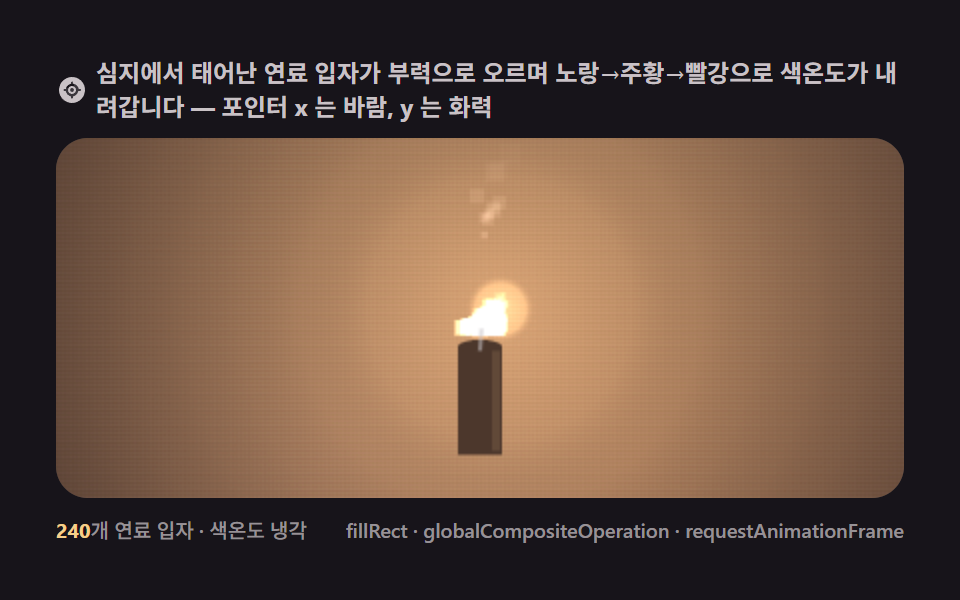 크리에이티브 UI캔버스 불 애니메이션 9종 — 시드 고정 파티클로 그리는 불꽃 효과
 크리에이티브 UI캔버스 보이드(boids javascript) 군집 9종 — 새떼 애니메이션
 크리에이티브 UI캔버스 번개 효과 그리기 9종 — 프랙탈 중점변위로 치는 낙뢰