리사주 곡선 만들기 9종 — 파동 간섭으로 그리는 캔버스
리사주 곡선은 서로 다른 주파수의 두 사인파를 X·Y 축에 각각 걸었을 때 펜이 그리는 폐곡선으로, 오실로스코프 화면에서 위상차를 눈으로 확인하는 데 쓰이는 그림입니다. 그 원리를 Math.sin 과 캔버스만으로 아홉 장면에 펼쳤고, 전부 마이크 없이도 돌아갑니다.
 01 wave-lissajous-xy-scope
 02 wave-ripple-interference-field
 03 wave-standing-string
 04 wave-chladni-sand-pattern
 05 wave-beat-envelope
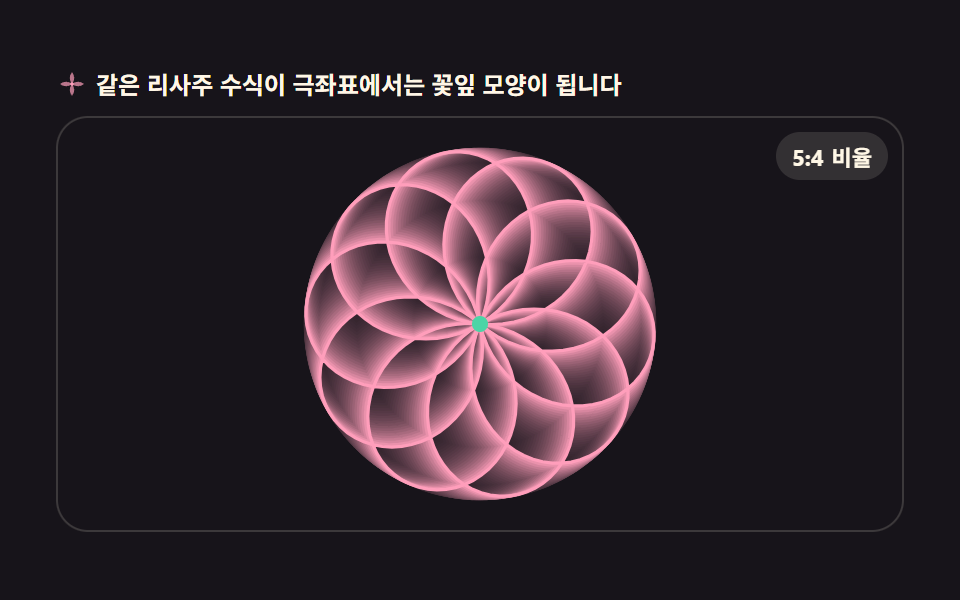 06 wave-polar-rose-lissajous
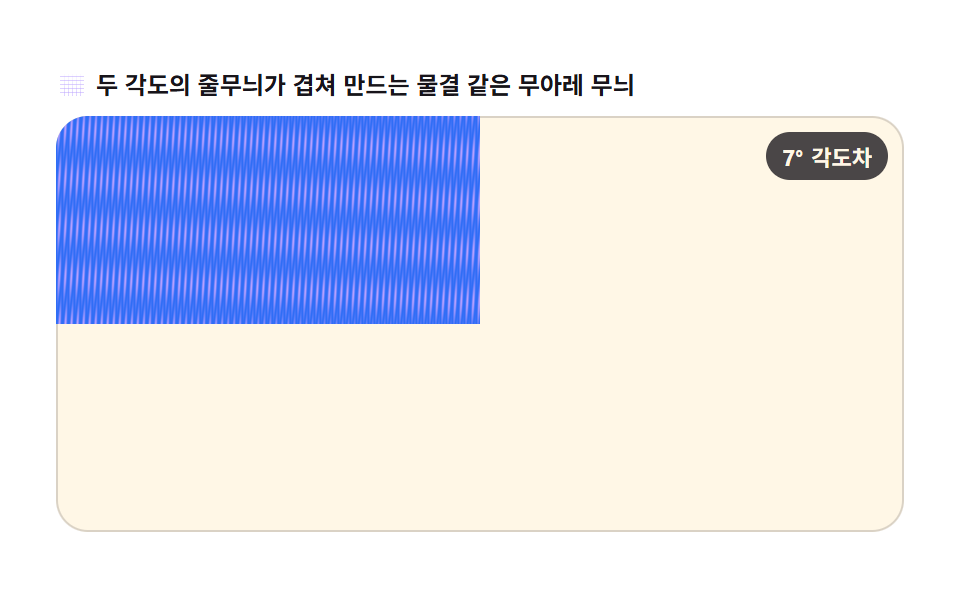 07 wave-moire-grating
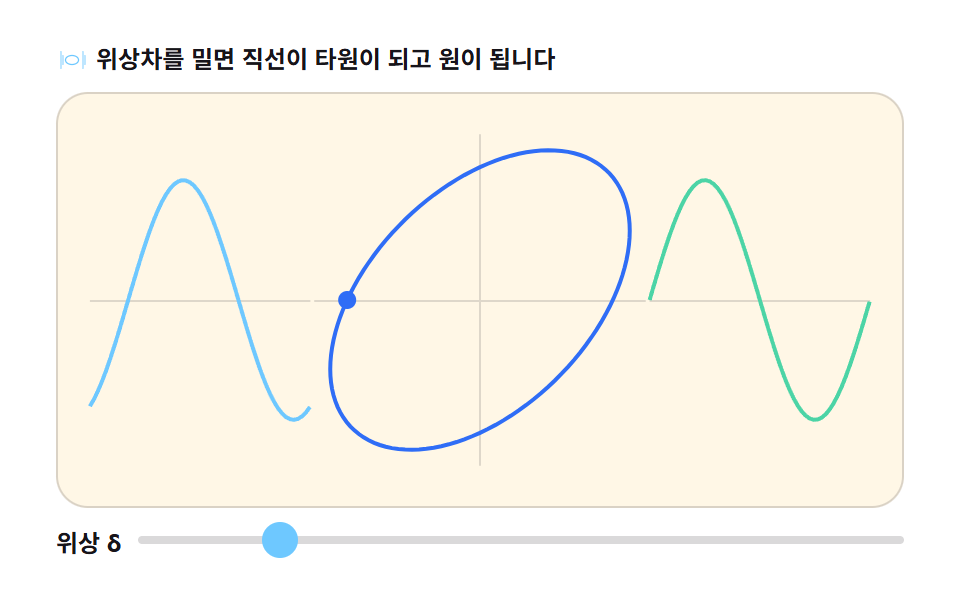 08 wave-phase-diff-panel
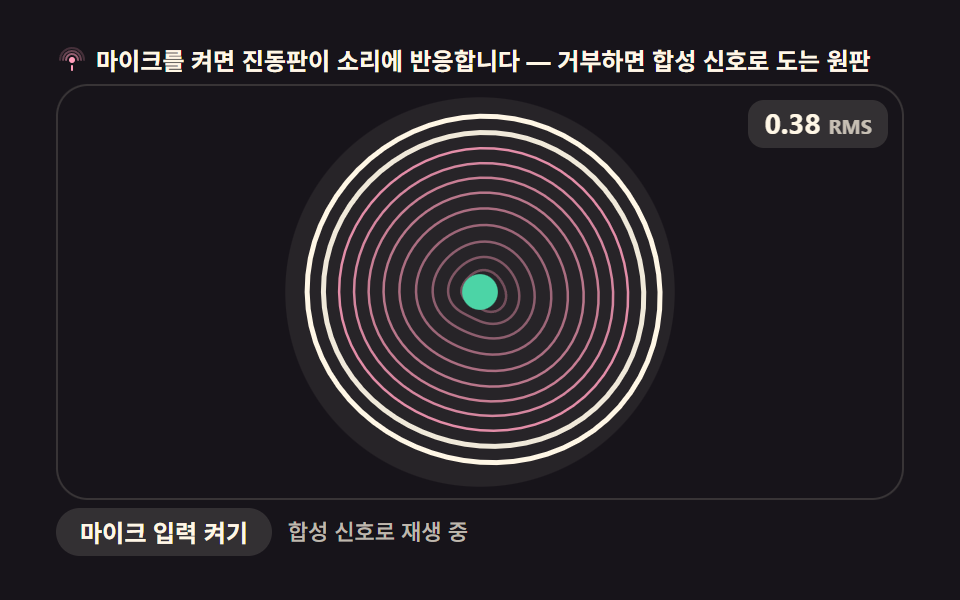 09 wave-membrane-mic-input
자동 재생 · 눌러서 해당 항목으로 · 전부 한 zip
- 01 리사주 XY 오실로스코프
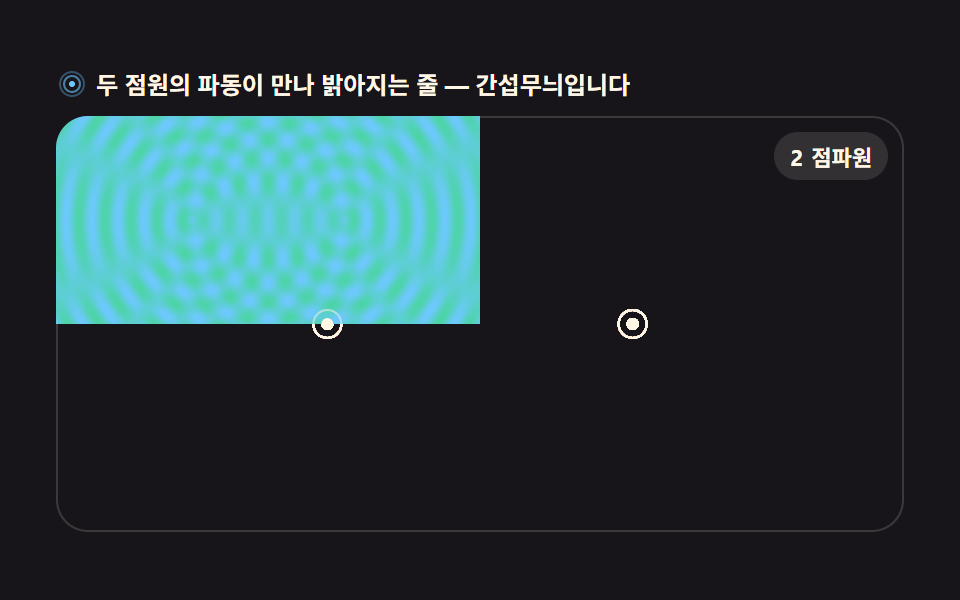
- 02 이중 점파원 간섭 필드
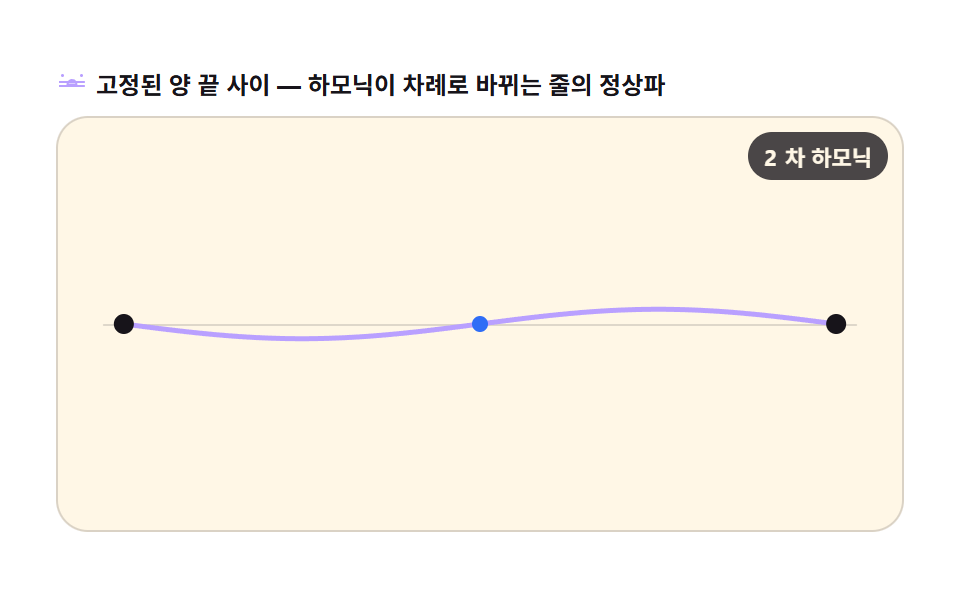
- 03 정상파 줄넘기 하모닉
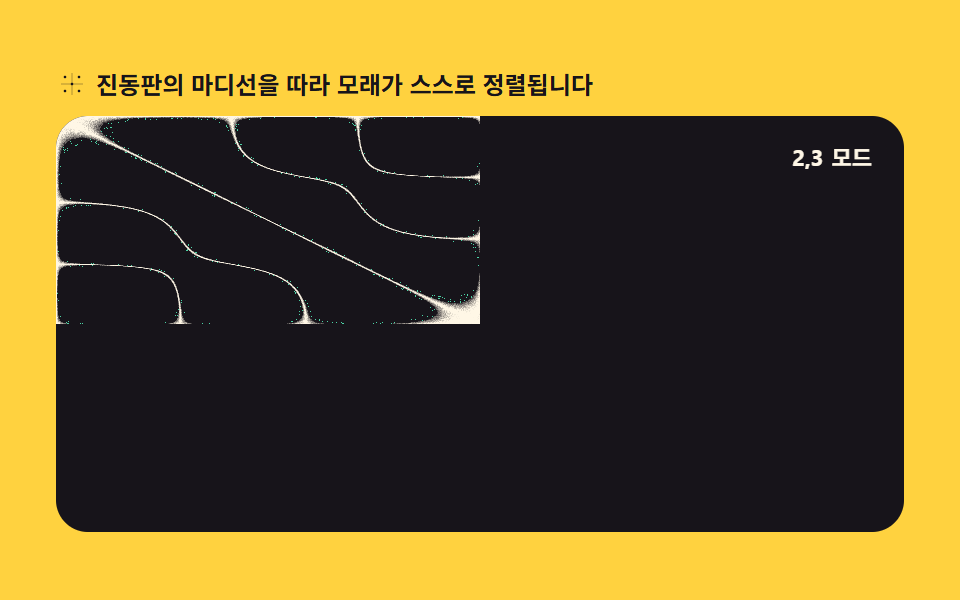
- 04 클라드니 모래무늬 패턴
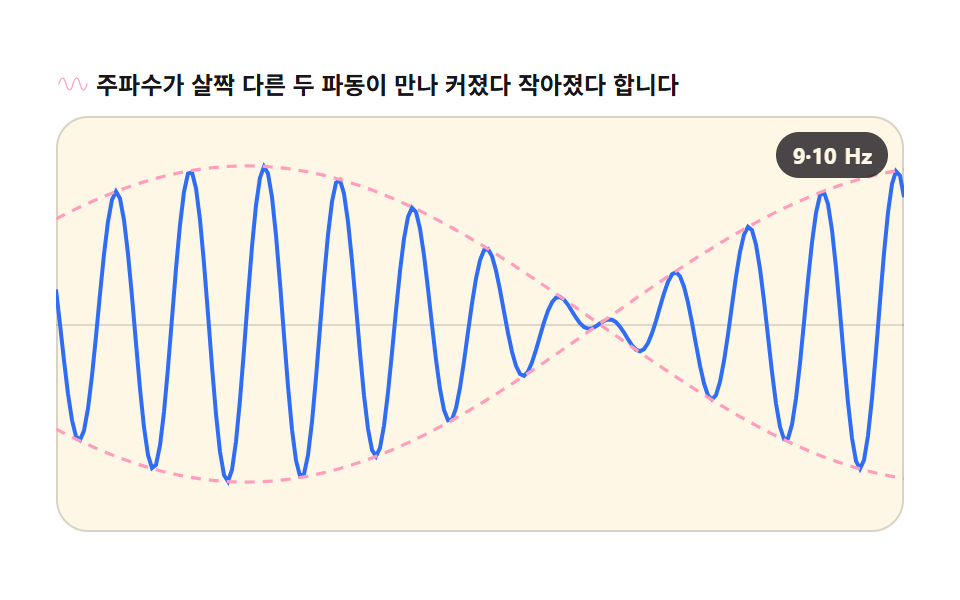
- 05 맥놀이 진폭 엔벨로프
- 06 극좌표 로즈 리사주
- 07 무아레 격자 간섭
- 08 위상차 비교 패널
- 09 원형 막 진동 모드 (마이크 입력)
순서는 난이도 순이 아니라 파동이 겹치는 방식이 점점 복잡해지는 순서입니다. 앞의 셋은 파 하나의 모양을 그리는 기본(01 두 축의 합성, 02 두 점파원의 합, 03 반사로 생기는 정재파), 가운데 셋은 겹침의 결과를 무늬로 보는 계열(04 마디선에 모래가 쌓이는 클라드니, 05 주파수 차가 만드는 맥놀이, 06 같은 수식을 극좌표로 돌린 로즈), 뒤의 셋은 이런 파동 무늬를 화면 곳곳에 옮겨 쓰는 응용입니다(07 격자 두 장이 만드는 무아레, 08 위상차 슬라이더, 09 마이크 소리를 얹는 멤브레인). 물결 파 간섭 시뮬레이션을 찾아 왔다면 02 를, 화면에 남을 장면을 고른다면 04 나 07 이 눈에 먼저 들어옵니다. 캔버스 픽셀을 통째로 굴리는 장면이 갖고 싶다면 HTML5 Canvas 애니메이션 9종 — 물방울·블랙홀 특수효과가 이웃이고, 입자로 흩어지는 쪽은 캔버스 파티클 효과 9종이, 소리를 시각화하는 축은 오디오 비주얼라이저 만들기 9종이 잇습니다.
01리사주 XY 오실로스코프
두 사인파를 X·Y 에 걸어 펜이 그리는 자취를 잔상과 함께 보여주는, 오실로스코프 화면을 그대로 옮긴 장면입니다.
<main class="stage">
<div class="ls" id="ls">
  <p class="ls__hint">
    <svg class="ls__ico" viewBox="0 0 256 256" aria-hidden="true"><g fill="currentColor"><path d="M216 40H40a24 24 0 0 0-24 24v128a24 24 0 0 0 24 24h176a24 24 0 0 0 24-24V64a24 24 0 0 0-24-24ZM40 56h176a8 8 0 0 1 8 8v24H32V64a8 8 0 0 1 8-8Zm176 144H40a8 8 0 0 1-8-8V104h192v88a8 8 0 0 1-8 8Z"/><circle cx="56" cy="72" r="8"/><circle cx="84" cy="72" r="8"/><path d="M128 120a40 40 0 1 0 40 40a40 40 0 0 0-40-40Zm0 64a24 24 0 1 1 24-24a24 24 0 0 1-24 24Z"/></g></svg>
    <span>두 사인파의 주파수 비 3:2 — 곡선이 살아 움직입니다</span>
  </p>
  <div class="ls__field" id="field" role="application" aria-label="리사주 곡선 실험판">
    <canvas class="ls__cv" id="cv"></canvas>
    <b class="ls__badge" aria-hidden="true"><span class="ls__badgeNum">3:2</span><span class="ls__badgeUnit">주파수비</span></b>
  </div>
</div>
</main>
@use "../../../../site/static/demo-tokens" as *;
// 리사주 XY 오실로스코프 — 움직임은 전부 캔버스 rAF 루프 안에 있다. CSS 는 무대·판·배지만 맡는다.
// @keyframes 를 하나도 두지 않는다 — CSS 애니메이션이 0개라야 렌더러가 실시간으로 프레임을 찍어
// 캔버스가 실제로 도는 모습이 담긴다(도구/demo.py 렌더(), 077 선례).
$duration: $dur-loop;
$easing: $ease-spring;
$color: $subject-blue;
@include stage($stage-ink);
.ls {
--scope-bg: #{$stage-ink};
--trace: #{$subject-mint};
--grid: #{rgba($subject-cream, .14)};
--badge-bg: #{rgba($subject-cream, .12)};
--badge-fg: #{$subject-cream};
display: flex; flex-direction: column; gap: $sp-2;
width: 100%; max-width: 424px;
}
.ls__hint {
display: flex; align-items: center; gap: $sp-1; margin: 0;
font-weight: 700; font-size: clamp(10px, 2.8vw, 12px); line-height: 1.35;
color: $subject-cream;
}
.ls__ico { width: 16px; height: 16px; flex: 0 0 auto; color: $subject-mint; }
.ls__field {
position: relative; height: 208px;
border-radius: $r-card; overflow: hidden;
background: var(--scope-bg);
box-shadow: inset 0 0 0 1px rgba($subject-cream, .16);
}
.ls__cv { display: block; width: 100%; height: 100%; }
.ls__badge {
position: absolute; right: $sp-2; top: $sp-2;
display: flex; align-items: baseline; gap: $sp-1;
padding: $sp-1 $sp-2; border-radius: $r-pill;
background: var(--badge-bg);
color: var(--badge-fg); font-weight: 700; font-size: 11px;
}
@media (max-width: 340px) {
.ls__field { height: 124px; }
.ls__badge { font-size: 10px; padding: 0 $sp-1; }
}
@media (prefers-reduced-motion: reduce) {
.ls.is-still .ls__badge { opacity: .92 !important; }
}html, body {
margin: 0;
overflow: hidden;
}
.stage {
box-sizing: border-box;
min-height: 100vh;
display: grid;
place-items: center;
margin: 0;
background: #17141a;
font-family: -apple-system, "Segoe UI", "Noto Sans KR", sans-serif;
padding: clamp(8px, 4vw, 24px);
}
.ls {
--scope-bg: #17141a;
--trace: #4cd4a6;
--grid: rgba(255, 247, 230, 0.14);
--badge-bg: rgba(255, 247, 230, 0.12);
--badge-fg: #fff7e6;
display: flex;
flex-direction: column;
gap: 8px;
width: 100%;
max-width: 424px;
}
.ls__hint {
display: flex;
align-items: center;
gap: 4px;
margin: 0;
font-weight: 700;
font-size: clamp(10px, 2.8vw, 12px);
line-height: 1.35;
color: #fff7e6;
}
.ls__ico {
width: 16px;
height: 16px;
flex: 0 0 auto;
color: #4cd4a6;
}
.ls__field {
position: relative;
height: 208px;
border-radius: 16px;
overflow: hidden;
background: var(--scope-bg);
box-shadow: inset 0 0 0 1px rgba(255, 247, 230, 0.16);
}
.ls__cv {
display: block;
width: 100%;
height: 100%;
}
.ls__badge {
position: absolute;
right: 8px;
top: 8px;
display: flex;
align-items: baseline;
gap: 4px;
padding: 4px 8px;
border-radius: 999px;
background: var(--badge-bg);
color: var(--badge-fg);
font-weight: 700;
font-size: 11px;
}
@media (max-width: 340px) {
.ls__field {
height: 124px;
}
.ls__badge {
font-size: 10px;
padding: 0 4px;
}
}
@media (prefers-reduced-motion: reduce) {
.ls.is-still .ls__badge {
opacity: 0.92 !important;
}
}// 리사주 XY 오실로스코프 — X 축·Y 축에 각기 다른 주파수의 사인파를 걸면 펜이 그리는 자취가
// 리사주 곡선이 된다. 매 프레임 Math.sin 으로 좌표를 계산해 점을 찍고,
// globalCompositeOperation(destination-out) 으로 이전 프레임을 살짝 지워 잔상 트레일을 남긴다.
var root = document.getElementById('ls');
var field = document.getElementById('field');
var cv = document.getElementById('cv');
// willReadFrequently 를 안 쓰는 대신 매 프레임 전체를 다시 칠하는 방식(잔상은 destination-out)으로
// getImageData 왕복 없이 돈다 — 픽셀 계산은 02·04·07 번이 맡는다.
var ctx = cv.getContext('2d');
var css = getComputedStyle(root);
var TRACE = css.getPropertyValue('--trace').trim();
var GRID = css.getPropertyValue('--grid').trim();
var BGN = css.getPropertyValue('--scope-bg').trim();
var FX = 3, FY = 2; // X·Y 주파수 비 — 3:2 로 두면 곡선이 닫히는 데 2 초가 걸린다
var LOOP = 2; // 곡선 한 바퀴(초). 캡처 창(2초)과 같아 gif 가 이어진다
var TRAIL = 0.10; // 매 프레임 지우는 양(알파) — 작게 두면 잔상이 길게 늘어진다
var reduce = window.matchMedia('(prefers-reduced-motion: reduce)').matches;
var W = 0, H = 0, dpr = 1, raf = 0;
var phase = 0; // 슬라이더·자동 루프가 공유하는 위상(라디안)
function fit() {
var r = field.getBoundingClientRect();
dpr = window.devicePixelRatio || 1;
W = r.width; H = r.height;
cv.width = Math.round(W * dpr);
cv.height = Math.round(H * dpr);
ctx.setTransform(dpr, 0, 0, dpr, 0, 0);
}
// 눈금 — 오실로스코프 화면의 중앙 십자·가는 격자. 곡선이 어디를 지나는지의 기준이 된다
function grid() {
ctx.strokeStyle = GRID;
ctx.lineWidth = 1;
ctx.beginPath();
var step = 24;
for (var x = step; x < W; x += step) { ctx.moveTo(x + 0.5, 0); ctx.lineTo(x + 0.5, H); }
for (var y = step; y < H; y += step) { ctx.moveTo(0, y + 0.5); ctx.lineTo(W, y + 0.5); }
ctx.stroke();
ctx.strokeStyle = GRID;
ctx.lineWidth = 1.5;
ctx.beginPath();
ctx.moveTo(W * 0.5, 0); ctx.lineTo(W * 0.5, H);
ctx.moveTo(0, H * 0.5); ctx.lineTo(W, H * 0.5);
ctx.stroke();
}
// 리사주 점 하나 — X 는 sin(FX·θ), Y 는 sin(FY·θ+phase). 펜이 이 점을 계속 따라다닌다
function point(th) {
var a = Math.min(W, H) * 0.36;
return {
x: W * 0.5 + Math.sin(th * FX) * a,
y: H * 0.5 + Math.sin(th * FY + phase) * a
};
}
function drawTrail(sec) {
// 잔상 — destination-out 으로 살짝 지운 뒤 격자 위에 자취를 다시 그린다.
// 곡선 전체(θ 0→2π)를 얇게 깔고 펜 머리만 진하게 밝힌다
ctx.globalCompositeOperation = 'destination-out';
ctx.fillStyle = 'rgba(0,0,0,' + TRAIL + ')';
ctx.fillRect(0, 0, W, H);
ctx.globalCompositeOperation = 'source-over';
grid();
var N = 160; // 곡선 조각 수 — 부드러우면 충분하다
ctx.strokeStyle = TRACE;
ctx.lineWidth = 1.4;
ctx.globalAlpha = 0.5;
ctx.beginPath();
for (var i = 0; i <= N; i++) {
var p = point(i / N * Math.PI * 2);
if (i === 0) ctx.moveTo(p.x, p.y); else ctx.lineTo(p.x, p.y);
}
ctx.stroke();
ctx.globalAlpha = 1;
// 펜 머리 — 자초 위를 도는 밝은 점. sec 를 그대로 위상으로 쓴다(결정적)
var t = (sec % LOOP) / LOOP * Math.PI * 2;
var hp = point(t);
ctx.fillStyle = TRACE;
ctx.beginPath();
ctx.arc(hp.x, hp.y, 5, 0, Math.PI * 2);
ctx.fill();
ctx.fillStyle = 'rgba(255,255,255,0.85)';
ctx.beginPath();
ctx.arc(hp.x, hp.y, 2, 0, Math.PI * 2);
ctx.fill();
}
// 위상을 천천히 밀어 곡선 모양이 살아 움직이게 한다 — 같은 3:2 여도 위상이 바뀌면 기울어진다
function frame(now) {
var sec = now / 1000;
phase = sec / LOOP * Math.PI * 0.5;
drawTrail(sec);
raf = requestAnimationFrame(frame);
}
fit();
window.addEventListener('resize', function () { fit(); if (reduce) drawTrail(0.3); });
if (reduce) {
// reduce — 루프를 돌리지 않고 위상 0.3의 한 장만 그린다(빈 화면이 아니다)
root.classList.add('is-still');
phase = 0.3;
drawTrail(0.3);
} else {
raf = requestAnimationFrame(frame);
}// LissajousXyScope — vanilla 판(run/303/demo/01-wave-lissajous-xy-scope/index.html) 의 React 포트.
// X 축·Y 축에 각기 다른 주파수의 사인파를 걸어 펜이 그리는 리사주 곡선을
// 캔버스 rAF 루프(Math.sin + destination-out 잔상)로 그린다. CSS 애니메이션 0개.
import { useEffect, useRef } from "react";
import type { CSSProperties } from "react";
import styles from "./LissajousXyScope.module.scss";
export type LissajousXyScopeProps = {
duration?: number;
easing?: string;
accentColor?: string;
};
type Vars = CSSProperties & { "--duration"?: string; "--easing"?: string; "--color"?: string };
const TITLE = "리사주 XY 오실로스코프 데모";
const HINT = "두 사인파의 주파수 비 3:2 — 곡선이 살아 움직입니다";
const FIELD_LABEL = "리사주 곡선 실험판";
const BADGE_NUM = "3:2";
const BADGE_UNIT = "주파수비";
const FX = 3; // X·Y 주파수 비 — 3:2 로 두면 곡선이 닫히는 데 2 초가 걸린다
const LOOP = 2; // 곡선 한 바퀴(초)
const TRAIL = 0.10; // 매 프레임 지우는 양(알파) — 작게 두면 잔상이 길게 늘어진다
export default function LissajousXyScope({
duration = 2000,
easing = "cubic-bezier(.2, .8, .2, 1)",
accentColor = "#4cd4a6",
}: LissajousXyScopeProps) {
const rootRef = useRef<HTMLDivElement>(null);
const fieldRef = useRef<HTMLDivElement>(null);
const cvRef = useRef<HTMLCanvasElement>(null);
const vars: Vars = { "--duration": `${duration}ms`, "--easing": easing, "--color": accentColor };
useEffect(() => {
const root0 = rootRef.current;
const field0 = fieldRef.current;
const cv0 = cvRef.current;
if (!root0 || !field0 || !cv0) return;
// willReadFrequently 를 안 쓰는 대신 매 프레임 전체를 다시 칠하는 방식(잔상은 destination-out)으로
// getImageData 왕복 없이 돈다.
const ctx0 = cv0.getContext("2d");
if (!ctx0) return;
// 중첩 함수(클로저) 안에서는 가드로 좁힌 널 타입이 전달되지 않는다 — 확인된 값으로 다시 상수를 묶는다
const root: HTMLDivElement = root0;
const field: HTMLDivElement = field0;
const cv: HTMLCanvasElement = cv0;
const ctx: CanvasRenderingContext2D = ctx0;
const css = getComputedStyle(root);
const TRACE = css.getPropertyValue("--trace").trim();
const GRID = css.getPropertyValue("--grid").trim();
const reduce = window.matchMedia("(prefers-reduced-motion: reduce)").matches;
let W = 0, H = 0, dpr = 1, raf = 0;
let phase = 0; // 자동 루프가 밀어가는 위상(라디안)
function fit() {
const r = field.getBoundingClientRect();
dpr = window.devicePixelRatio || 1;
W = r.width; H = r.height;
cv.width = Math.round(W * dpr);
cv.height = Math.round(H * dpr);
ctx.setTransform(dpr, 0, 0, dpr, 0, 0);
}
// 눈금 — 오실로스코프 화면의 중앙 십자·가는 격자. 곡선이 어디를 지나는지의 기준이 된다
function grid() {
ctx.strokeStyle = GRID;
ctx.lineWidth = 1;
ctx.beginPath();
const step = 24;
for (let x = step; x < W; x += step) { ctx.moveTo(x + 0.5, 0); ctx.lineTo(x + 0.5, H); }
for (let y = step; y < H; y += step) { ctx.moveTo(0, y + 0.5); ctx.lineTo(W, y + 0.5); }
ctx.stroke();
ctx.strokeStyle = GRID;
ctx.lineWidth = 1.5;
ctx.beginPath();
ctx.moveTo(W * 0.5, 0); ctx.lineTo(W * 0.5, H);
ctx.moveTo(0, H * 0.5); ctx.lineTo(W, H * 0.5);
ctx.stroke();
}
// 리사주 점 하나 — X 는 sin(FX·θ), Y 는 sin(FY·θ+phase). 펜이 이 점을 계속 따라다닌다
function point(th: number) {
const a = Math.min(W, H) * 0.36;
return {
x: W * 0.5 + Math.sin(th * FX) * a,
y: H * 0.5 + Math.sin(th * 2 + phase) * a,
};
}
function drawTrail(sec: number) {
// 잔상 — destination-out 으로 살짝 지운 뒤 격자 위에 자취를 다시 그린다.
// 곡선 전체(θ 0→2π)를 얇게 깔고 펜 머리만 진하게 밝힌다
ctx.globalCompositeOperation = "destination-out";
ctx.fillStyle = "rgba(0,0,0," + TRAIL + ")";
ctx.fillRect(0, 0, W, H);
ctx.globalCompositeOperation = "source-over";
grid();
const N = 160; // 곡선 조각 수 — 부드러우면 충분하다
ctx.strokeStyle = TRACE;
ctx.lineWidth = 1.4;
ctx.globalAlpha = 0.5;
ctx.beginPath();
for (let i = 0; i <= N; i++) {
const p = point((i / N) * Math.PI * 2);
if (i === 0) ctx.moveTo(p.x, p.y); else ctx.lineTo(p.x, p.y);
}
ctx.stroke();
ctx.globalAlpha = 1;
// 펜 머리 — 자취 위를 도는 밝은 점. sec 를 그대로 위상으로 쓴다(결정적)
const t = ((sec % LOOP) / LOOP) * Math.PI * 2;
const hp = point(t);
ctx.fillStyle = TRACE;
ctx.beginPath();
ctx.arc(hp.x, hp.y, 5, 0, Math.PI * 2);
ctx.fill();
ctx.fillStyle = "rgba(255,255,255,0.85)";
ctx.beginPath();
ctx.arc(hp.x, hp.y, 2, 0, Math.PI * 2);
ctx.fill();
}
// 위상을 천천히 밀어 곡선 모양이 살아 움직이게 한다 — 같은 3:2 여도 위상이 바뀌면 기울어진다
function frame(now: number) {
const sec = now / 1000;
phase = (sec / LOOP) * Math.PI * 0.5;
drawTrail(sec);
raf = requestAnimationFrame(frame);
}
function onResize() {
fit();
if (reduce) drawTrail(0.3);
}
fit();
window.addEventListener("resize", onResize);
if (reduce) {
// reduce — 루프를 돌리지 않고 위상 0.3의 한 장만 그린다(빈 화면이 아니다)
root.classList.add("is-still");
phase = 0.3;
drawTrail(0.3);
} else {
raf = requestAnimationFrame(frame);
}
return () => {
cancelAnimationFrame(raf);
window.removeEventListener("resize", onResize);
};
}, []);
return (
<main className={styles.stage}>
<div className={styles.ls} style={vars} ref={rootRef}>
<p className={styles["ls__hint"]}>
<svg className={styles["ls__ico"]} viewBox="0 0 256 256" aria-hidden="true" focusable="false">
<g fill="currentColor">
<path d="M216 40H40a24 24 0 0 0-24 24v128a24 24 0 0 0 24 24h176a24 24 0 0 0 24-24V64a24 24 0 0 0-24-24ZM40 56h176a8 8 0 0 1 8 8v24H32V64a8 8 0 0 1 8-8Zm176 144H40a8 8 0 0 1-8-8V104h192v88a8 8 0 0 1-8 8Z" />
<circle cx="56" cy="72" r="8" />
<circle cx="84" cy="72" r="8" />
<path d="M128 120a40 40 0 1 0 40 40a40 40 0 0 0-40-40Zm0 64a24 24 0 1 1 24-24a24 24 0 0 1-24 24Z" />
</g>
</svg>
<span>{HINT}</span>
</p>
<div className={styles["ls__field"]} role="application" aria-label={FIELD_LABEL} ref={fieldRef}>
<canvas className={styles["ls__cv"]} ref={cvRef} aria-label={TITLE} />
<b className={styles["ls__badge"]} aria-hidden="true">
<span className={styles["ls__badgeNum"]}>{BADGE_NUM}</span>
<span className={styles["ls__badgeUnit"]}>{BADGE_UNIT}</span>
</b>
</div>
</div>
</main>
);
}01 · 리사주 XY 오실로스코프 — 측정 누적면적 16.829% · 움직인 프레임 23/23GODRICH 원작 · zip 에 SCSS·React 포함 · 비밀번호 보기
펜 좌표는 Math.sin 두 줄
var FX = 3, FY = 2;          // X·Y 주파수 비 — 3:2 로 두면 곡선이 닫히는 데 2 초가 걸린다
function point(th) {
  var a = Math.min(W, H) * 0.36;
  return {
    x: W * 0.5 + Math.sin(th * FX) * a,
    y: H * 0.5 + Math.sin(th * FY + phase) * a
  };
}
잔상은 destination-out 로 지우며 남긴다
ctx.globalCompositeOperation = 'destination-out';
ctx.fillStyle = 'rgba(0,0,0,' + TRAIL + ')';
ctx.fillRect(0, 0, W, H);
ctx.globalCompositeOperation = 'source-over';
X 는 sin(3θ), Y 는 sin(2θ+위상) 이라 3:2 비율의 폐곡선이 위상에 따라 기울어지며 살아 움직이고, MDN globalCompositeOperation 문서가 설명하는 destination-out 이 매 프레임 알파 0.10 씩 지워 잔상을 남깁니다.
02이중 점파원 간섭 필드
두 점에서 퍼지는 원형 파동이 만나 보강·상쇄되는 무늬를, 픽셀마다 거리를 재어 직접 계산해 그리는 물결 간섭 장면입니다.
<main class="stage">
<div class="ri" id="ri">
  <p class="ri__hint">
    <svg class="ri__ico" viewBox="0 0 256 256" aria-hidden="true"><g fill="currentColor"><path d="M128 24a104 104 0 1 0 104 104A104.11 104.11 0 0 0 128 24Zm0 192a88 88 0 1 1 88-88a88.1 88.1 0 0 1-88 88Z" opacity=".35"/><path d="M128 56a72 72 0 1 0 72 72a72.08 72.08 0 0 0-72-72Zm0 128a56 56 0 1 1 56-56a56.06 56.06 0 0 1-56 56Z" opacity=".6"/><circle cx="128" cy="128" r="24"/></g></svg>
    <span>두 점원의 파동이 만나 밝아지는 줄 — 간섭무늬입니다</span>
  </p>
  <div class="ri__field" id="field" role="application" aria-label="파동 간섭 실험판">
    <canvas class="ri__cv" id="cv"></canvas>
    <b class="ri__badge" aria-hidden="true"><span class="ri__badgeNum">2</span><span class="ri__badgeUnit">점파원</span></b>
  </div>
</div>
</main>
@use "../../../../site/static/demo-tokens" as *;
// 이중 점파원 간섭 필드 — 두 점원에서 퍼지는 원형 파동의 겹침을 픽셀 단위로 계산한다.
// 움직임은 전부 캔버스 rAF 루프(getImageData/putImageData) 안에 있다. @keyframes 0개.
$duration: $dur-loop;
$easing: $ease-spring;
$color: $subject-sky;
@include stage($stage-ink);
.ri {
--field-bg: #{$stage-ink};
--ink-line: #{$subject-sky};
--halo: #{$subject-mint};
--badge-bg: #{rgba($subject-cream, .12)};
--badge-fg: #{$subject-cream};
display: flex; flex-direction: column; gap: $sp-2;
width: 100%; max-width: 424px;
}
.ri__hint {
display: flex; align-items: center; gap: $sp-1; margin: 0;
font-weight: 700; font-size: clamp(10px, 2.8vw, 12px); line-height: 1.35;
color: $subject-cream;
}
.ri__ico { width: 16px; height: 16px; flex: 0 0 auto; color: $subject-sky; }
.ri__field {
position: relative; height: 208px;
border-radius: $r-card; overflow: hidden;
background: var(--field-bg);
box-shadow: inset 0 0 0 1px rgba($subject-cream, .16);
}
.ri__cv { display: block; width: 100%; height: 100%; }
.ri__badge {
position: absolute; right: $sp-2; top: $sp-2;
display: flex; align-items: baseline; gap: $sp-1;
padding: $sp-1 $sp-2; border-radius: $r-pill;
background: var(--badge-bg);
color: var(--badge-fg); font-weight: 700; font-size: 11px;
}
@media (max-width: 340px) {
.ri__field { height: 124px; }
.ri__badge { font-size: 10px; padding: 0 $sp-1; }
}
@media (prefers-reduced-motion: reduce) {
.ri.is-still .ri__badge { opacity: .92 !important; }
}html, body {
margin: 0;
overflow: hidden;
}
.stage {
box-sizing: border-box;
min-height: 100vh;
display: grid;
place-items: center;
margin: 0;
background: #17141a;
font-family: -apple-system, "Segoe UI", "Noto Sans KR", sans-serif;
padding: clamp(8px, 4vw, 24px);
}
.ri {
--field-bg: #17141a;
--ink-line: #6ec8ff;
--halo: #4cd4a6;
--badge-bg: rgba(255, 247, 230, 0.12);
--badge-fg: #fff7e6;
display: flex;
flex-direction: column;
gap: 8px;
width: 100%;
max-width: 424px;
}
.ri__hint {
display: flex;
align-items: center;
gap: 4px;
margin: 0;
font-weight: 700;
font-size: clamp(10px, 2.8vw, 12px);
line-height: 1.35;
color: #fff7e6;
}
.ri__ico {
width: 16px;
height: 16px;
flex: 0 0 auto;
color: #6ec8ff;
}
.ri__field {
position: relative;
height: 208px;
border-radius: 16px;
overflow: hidden;
background: var(--field-bg);
box-shadow: inset 0 0 0 1px rgba(255, 247, 230, 0.16);
}
.ri__cv {
display: block;
width: 100%;
height: 100%;
}
.ri__badge {
position: absolute;
right: 8px;
top: 8px;
display: flex;
align-items: baseline;
gap: 4px;
padding: 4px 8px;
border-radius: 999px;
background: var(--badge-bg);
color: var(--badge-fg);
font-weight: 700;
font-size: 11px;
}
@media (max-width: 340px) {
.ri__field {
height: 124px;
}
.ri__badge {
font-size: 10px;
padding: 0 4px;
}
}
@media (prefers-reduced-motion: reduce) {
.ri.is-still .ri__badge {
opacity: 0.92 !important;
}
}// 이중 점파원 간섭 필드 — 매 픽셀에서 두 점원까지의 거리를 Math.hypot 으로 잰 뒤
// 두 파동의 사인 합으로 진폭을 계산한다. 위상이 맞는 곳(보강 간섭)은 밝게,
// 어긋나는 곳(상쇄 간섭)은 어두운 쌍곡선 줄이 된다.
var root = document.getElementById('ri');
var field = document.getElementById('field');
var cv = document.getElementById('cv');
// willReadFrequently — 매 프레임 putImageData 로 되돌리는 캔버스는 이 힌트로 GPU 왕복을 줄인다
var ctx = cv.getContext('2d', { willReadFrequently: true });
var css = getComputedStyle(root);
var INK = css.getPropertyValue('--ink-line').trim();
var HALO = css.getPropertyValue('--halo').trim();
var BGN = css.getPropertyValue('--field-bg').trim();
var LOOP = 2; // 파동 한 주기(초). 캡처 창과 같아 gif 가 이어진다
var WAVE = 26; // 파장(CSS px) — 짧을수록 무늬가 촘촘해진다
var STEP = 2; // 계산 픽셀 간격 — 2px 씩 계산해 4픽셀 뭉치로 찍는다(속도)
var reduce = window.matchMedia('(prefers-reduced-motion: reduce)').matches;
var W = 0, H = 0, dpr = 1, raf = 0;
var img = null, buf = null; // createImageData 로 만든 프레임 버퍼
// 색을 [r,g,b] 로 미리 풀어둔다 — 매 픽셀마다 파싱하면 느리다
function parse(c) {
var m = c.match(/^#([0-9a-f]{6})$/i);
if (!m) return [110, 200, 255];
return [parseInt(m[1].slice(0, 2), 16), parseInt(m[1].slice(2, 4), 16), parseInt(m[1].slice(4, 6), 16)];
}
var C1 = parse(INK);
var C2 = parse(HALO);
var BGC = parse(BGN);
function fit() {
var r = field.getBoundingClientRect();
dpr = window.devicePixelRatio || 1;
W = Math.round(r.width); H = Math.round(r.height);
cv.width = Math.round(W * dpr);
cv.height = Math.round(H * dpr);
ctx.setTransform(dpr, 0, 0, dpr, 0, 0);
img = ctx.createImageData(W, H);
buf = img.data;
}
// 두 점원의 위치 — 화면 폭의 32% 지점에 좌우로 마주 본다
function sources() {
return [
{ x: W * 0.32, y: H * 0.5 },
{ x: W * 0.68, y: H * 0.5 }
];
}
// 간섭 계산 — 픽셀마다 sin(d/λ·2π − t·2π) 두 개를 더해 진폭(-2..2)을 밝기로 눕힌다
function interference(sec) {
var s = sources();
var t = (sec % LOOP) / LOOP * Math.PI * 2;
var k = Math.PI * 2 / WAVE;
var cx1 = s[0].x, cy1 = s[0].y, cx2 = s[1].x, cy2 = s[1].y;
for (var y = 0; y < H; y++) {
for (var x = 0; x < W; x++) {
var d1 = Math.hypot(x - cx1, y - cy1);
var d2 = Math.hypot(x - cx2, y - cy2);
// 보강(+)·상쇄(-)를 같은 비율로 두고 0.5 오프셋으로 밝기 축에 올린다
var a1 = Math.sin(k * d1 - t);
var a2 = Math.sin(k * d2 - t);
var v = (a1 + a2) * 0.25 + 0.5; // 0..1
var i = (y * W + x) * 4;
// 파랑(바다) → 민트(고 에너지) 두 색을 v 로 섞는다 — 파스텔 톤 안에서 대비를 만든다
buf[i] = Math.round(C1[0] + (C2[0] - C1[0]) * v);
buf[i + 1] = Math.round(C1[1] + (C2[1] - C1[1]) * v);
buf[i + 2] = Math.round(C1[2] + (C2[2] - C1[2]) * v);
buf[i + 3] = 255;
}
}
ctx.putImageData(img, 0, 0);
// 점파원 두 개 표시 — 흰 점과 얇은 고리
for (var j = 0; j < 2; j++) {
ctx.fillStyle = '#fff7e6';
ctx.beginPath();
ctx.arc(s[j].x, s[j].y, 3, 0, Math.PI * 2);
ctx.fill();
ctx.strokeStyle = 'rgba(255,247,230,0.5)';
ctx.lineWidth = 1;
ctx.beginPath();
ctx.arc(s[j].x, s[j].y, 7, 0, Math.PI * 2);
ctx.stroke();
}
}
function frame(now) {
interference(now / 1000);
raf = requestAnimationFrame(frame);
}
fit();
window.addEventListener('resize', function () { fit(); if (reduce) interference(0.25); });
if (reduce) {
// reduce — 루프 없이 위상 0.25의 한 장만 그린다(빈 화면이 아니다)
root.classList.add('is-still');
interference(0.25);
} else {
raf = requestAnimationFrame(frame);
}// RippleInterferenceField — vanilla 판(run/303/demo/02-wave-ripple-interference-field/index.html) 의 React 포트.
// 매 픽셀에서 두 점원까지의 거리를 Math.hypot 으로 잰 뒤 두 파동의 사인 합으로 진폭을
// 계산한다. 위상이 맞는 곳(보강)은 밝게, 어긋나는 곳(상쇄)은 어두운 쌍곡선 줄이 된다.
import { useEffect, useRef } from "react";
import type { CSSProperties } from "react";
import styles from "./RippleInterferenceField.module.scss";
export type RippleInterferenceFieldProps = {
duration?: number;
easing?: string;
accentColor?: string;
};
type Vars = CSSProperties & { "--duration"?: string; "--easing"?: string; "--color"?: string };
const TITLE = "이중 점파원 간섭 필드 데모";
const HINT = "두 점원의 파동이 만나 밝아지는 줄 — 간섭무늬입니다";
const FIELD_LABEL = "파동 간섭 실험판";
const BADGE_NUM = "2";
const BADGE_UNIT = "점파원";
const LOOP = 2; // 파동 한 주기(초)
const WAVE = 26; // 파장(CSS px) — 짧을수록 무늬가 촘촘해진다
// 색을 [r,g,b] 로 미리 풀어둔다 — 매 픽셀마다 파싱하면 느리다
function parse(c: string): [number, number, number] {
const m = c.match(/^#([0-9a-f]{6})$/i);
if (!m) return [110, 200, 255];
return [
parseInt(m[1].slice(0, 2), 16),
parseInt(m[1].slice(2, 4), 16),
parseInt(m[1].slice(4, 6), 16),
];
}
export default function RippleInterferenceField({
duration = 2000,
easing = "cubic-bezier(.2, .8, .2, 1)",
accentColor = "#6ec8ff",
}: RippleInterferenceFieldProps) {
const rootRef = useRef<HTMLDivElement>(null);
const fieldRef = useRef<HTMLDivElement>(null);
const cvRef = useRef<HTMLCanvasElement>(null);
const vars: Vars = { "--duration": `${duration}ms`, "--easing": easing, "--color": accentColor };
useEffect(() => {
const root0 = rootRef.current;
const field0 = fieldRef.current;
const cv0 = cvRef.current;
if (!root0 || !field0 || !cv0) return;
// willReadFrequently — 매 프레임 putImageData 로 되돌리는 캔버스는 이 힌트로 GPU 왕복을 줄인다
const ctx0 = cv0.getContext("2d", { willReadFrequently: true });
if (!ctx0) return;
// 중첩 함수(클로저) 안에서는 가드로 좁힌 널 타입이 전달되지 않는다 — 확인된 값으로 다시 상수를 묶는다
const root: HTMLDivElement = root0;
const field: HTMLDivElement = field0;
const cv: HTMLCanvasElement = cv0;
const ctx: CanvasRenderingContext2D = ctx0;
const css = getComputedStyle(root);
const INK = css.getPropertyValue("--ink-line").trim();
const HALO = css.getPropertyValue("--halo").trim();
const C1 = parse(INK);
const C2 = parse(HALO);
const reduce = window.matchMedia("(prefers-reduced-motion: reduce)").matches;
let W = 0, H = 0, dpr = 1, raf = 0;
let img: ImageData | null = null;
let buf: Uint8ClampedArray | null = null; // createImageData 로 만든 프레임 버퍼
function fit() {
const r = field.getBoundingClientRect();
dpr = window.devicePixelRatio || 1;
W = Math.round(r.width); H = Math.round(r.height);
cv.width = Math.round(W * dpr);
cv.height = Math.round(H * dpr);
ctx.setTransform(dpr, 0, 0, dpr, 0, 0);
img = ctx.createImageData(W, H);
buf = img.data;
}
// 두 점원의 위치 — 화면 폭의 32% 지점에 좌우로 마주 본다
function sources() {
return [
{ x: W * 0.32, y: H * 0.5 },
{ x: W * 0.68, y: H * 0.5 },
];
}
// 간섭 계산 — 픽셀마다 sin(d/λ·2π − t·2π) 두 개를 더해 진폭(-2..2)을 밝기로 눕힌다
function interference(sec: number) {
if (!img || !buf) return;
const s = sources();
const t = ((sec % LOOP) / LOOP) * Math.PI * 2;
const k = (Math.PI * 2) / WAVE;
const cx1 = s[0].x, cy1 = s[0].y, cx2 = s[1].x, cy2 = s[1].y;
for (let y = 0; y < H; y++) {
for (let x = 0; x < W; x++) {
const d1 = Math.hypot(x - cx1, y - cy1);
const d2 = Math.hypot(x - cx2, y - cy2);
// 보강(+)·상쇄(-)를 같은 비율로 두고 0.5 오프셋으로 밝기 축에 올린다
const a1 = Math.sin(k * d1 - t);
const a2 = Math.sin(k * d2 - t);
const v = (a1 + a2) * 0.25 + 0.5; // 0..1
const i = (y * W + x) * 4;
// 파랑(바다) → 민트(고 에너지) 두 색을 v 로 섞는다 — 파스텔 톤 안에서 대비를 만든다
buf[i] = Math.round(C1[0] + (C2[0] - C1[0]) * v);
buf[i + 1] = Math.round(C1[1] + (C2[1] - C1[1]) * v);
buf[i + 2] = Math.round(C1[2] + (C2[2] - C1[2]) * v);
buf[i + 3] = 255;
}
}
ctx.putImageData(img, 0, 0);
// 점파원 두 개 표시 — 흰 점과 얇은 고리
for (let j = 0; j < 2; j++) {
ctx.fillStyle = "#fff7e6";
ctx.beginPath();
ctx.arc(s[j].x, s[j].y, 3, 0, Math.PI * 2);
ctx.fill();
ctx.strokeStyle = "rgba(255,247,230,0.5)";
ctx.lineWidth = 1;
ctx.beginPath();
ctx.arc(s[j].x, s[j].y, 7, 0, Math.PI * 2);
ctx.stroke();
}
}
function frame(now: number) {
interference(now / 1000);
raf = requestAnimationFrame(frame);
}
function onResize() {
fit();
if (reduce) interference(0.25);
}
fit();
window.addEventListener("resize", onResize);
if (reduce) {
// reduce — 루프 없이 위상 0.25의 한 장만 그린다(빈 화면이 아니다)
root.classList.add("is-still");
interference(0.25);
} else {
raf = requestAnimationFrame(frame);
}
return () => {
cancelAnimationFrame(raf);
window.removeEventListener("resize", onResize);
};
}, []);
return (
<main className={styles.stage}>
<div className={styles.ri} style={vars} ref={rootRef}>
<p className={styles["ri__hint"]}>
<svg className={styles["ri__ico"]} viewBox="0 0 256 256" aria-hidden="true" focusable="false">
<g fill="currentColor">
<path d="M128 24a104 104 0 1 0 104 104A104.11 104.11 0 0 0 128 24Zm0 192a88 88 0 1 1 88-88a88.1 88.1 0 0 1-88 88Z" opacity=".35" />
<path d="M128 56a72 72 0 1 0 72 72a72.08 72.08 0 0 0-72-72Zm0 128a56 56 0 1 1 56-56a56.06 56.06 0 0 1-56 56Z" opacity=".6" />
<circle cx="128" cy="128" r="24" />
</g>
</svg>
<span>{HINT}</span>
</p>
<div className={styles["ri__field"]} role="application" aria-label={FIELD_LABEL} ref={fieldRef}>
<canvas className={styles["ri__cv"]} ref={cvRef} aria-label={TITLE} />
<b className={styles["ri__badge"]} aria-hidden="true">
<span className={styles["ri__badgeNum"]}>{BADGE_NUM}</span>
<span className={styles["ri__badgeUnit"]}>{BADGE_UNIT}</span>
</b>
</div>
</div>
</main>
);
}02 · 이중 점파원 간섭 필드 — 측정 누적면적 54.069% · 움직인 프레임 23/23GODRICH 원작 · zip 에 SCSS·React 포함 · 비밀번호 보기
픽셀마다 Math.hypot 두 번
var d1 = Math.hypot(x - cx1, y - cy1);
var d2 = Math.hypot(x - cx2, y - cy2);
var a1 = Math.sin(k * d1 - t);
var a2 = Math.sin(k * d2 - t);
var v = (a1 + a2) * 0.25 + 0.5;           // 0..1
결과는 putImageData 로 한 번에
var i = (y * W + x) * 4;
buf[i]     = Math.round(C1[0] + (C2[0] - C1[0]) * v);
buf[i + 1] = Math.round(C1[1] + (C2[1] - C1[1]) * v);
buf[i + 2] = Math.round(C1[2] + (C2[2] - C1[2]) * v);
buf[i + 3] = 255;
ctx.putImageData(img, 0, 0);
거리 d 에서 파의 위상은 sin(d/λ·2π−t) 이고 두 파를 더한 진폭을 밝기로 눕히면, MDN Math.hypot 문서의 거리 함수 하나로 물리 교과서의 간섭무늬가 그대로 나옵니다. 누적면적 54.07%·23/23 프레임으로 아홉 중 두 번째로 넓게 살아 움직입니다.
03정상파 줄넘기 하모닉
고정된 양 끝의 줄이 1차·2차·3차 하모닉으로 차례로 진동하며 마디가 늘어나는, 기타 줄의 원리를 보여주는 장면입니다.
<main class="stage">
<div class="ss" id="ss">
  <p class="ss__hint">
    <svg class="ss__ico" viewBox="0 0 256 256" aria-hidden="true"><g fill="currentColor"><path d="M32 120h192a8 8 0 0 0 0-16H32a8 8 0 0 0 0 16Z"/><path d="M224 136H32a8 8 0 0 0 0 16h192a8 8 0 0 0 0-16Z"/><path d="M128 88a44 44 0 0 0-44 44a8 8 0 0 0 8 8h72a8 8 0 0 0 8-8a44 44 0 0 0-44-44Zm-26.91 36A28 28 0 0 1 128 104a28 28 0 0 1 26.91 20Z"/><circle cx="52" cy="60" r="12"/><circle cx="204" cy="60" r="12"/></g></svg>
    <span>고정된 양 끝 사이 — 하모닉이 차례로 바뀌는 줄의 정상파</span>
  </p>
  <div class="ss__field" id="field" role="application" aria-label="정상파 줄 진동 실험판">
    <canvas class="ss__cv" id="cv"></canvas>
    <b class="ss__badge" aria-hidden="true"><span class="ss__badgeNum">3</span><span class="ss__badgeUnit">차 하모닉</span></b>
  </div>
</div>
</main>
@use "../../../../site/static/demo-tokens" as *;
// 정상파 줄넘기 하모닉 — 1~N 차 하모닉 사인 합성으로 줄 모양을 그린다.
// 움직임은 전부 캔버스 rAF 루프 안에 있다. @keyframes 0개.
$duration: $dur-loop;
$easing: $ease-spring;
$color: $subject-lilac;
@include stage($stage-paper);
.ss {
--string: #{$subject-lilac};
--node: #{$subject-blue};
--rail: #{rgba($subject-ink, .14)};
--ink-fg: #{$subject-ink};
--badge-bg: #{rgba($subject-ink, .78)};
--badge-fg: #{$subject-cream};
display: flex; flex-direction: column; gap: $sp-2;
width: 100%; max-width: 424px;
}
.ss__hint {
display: flex; align-items: center; gap: $sp-1; margin: 0;
font-weight: 700; font-size: clamp(10px, 2.8vw, 12px); line-height: 1.35;
color: var(--ink-fg);
}
.ss__ico { width: 16px; height: 16px; flex: 0 0 auto; color: $subject-lilac; }
.ss__field {
position: relative; height: 208px;
border-radius: $r-card; overflow: hidden;
background: $subject-cream;
box-shadow: inset 0 0 0 1px rgba($subject-ink, .16);
}
.ss__cv { display: block; width: 100%; height: 100%; }
.ss__badge {
position: absolute; right: $sp-2; top: $sp-2;
display: flex; align-items: baseline; gap: $sp-1;
padding: $sp-1 $sp-2; border-radius: $r-pill;
background: var(--badge-bg);
color: var(--badge-fg); font-weight: 700; font-size: 11px;
}
@media (max-width: 340px) {
.ss__field { height: 124px; }
.ss__badge { font-size: 10px; padding: 0 $sp-1; }
}
@media (prefers-reduced-motion: reduce) {
.ss.is-still .ss__badge { opacity: .92 !important; }
}html, body {
margin: 0;
overflow: hidden;
}
.stage {
box-sizing: border-box;
min-height: 100vh;
display: grid;
place-items: center;
margin: 0;
background: #ffffff;
font-family: -apple-system, "Segoe UI", "Noto Sans KR", sans-serif;
padding: clamp(8px, 4vw, 24px);
}
.ss {
--string: #b9a0ff;
--node: #2f6df6;
--rail: rgba(23, 20, 26, 0.14);
--ink-fg: #17141a;
--badge-bg: rgba(23, 20, 26, 0.78);
--badge-fg: #fff7e6;
display: flex;
flex-direction: column;
gap: 8px;
width: 100%;
max-width: 424px;
}
.ss__hint {
display: flex;
align-items: center;
gap: 4px;
margin: 0;
font-weight: 700;
font-size: clamp(10px, 2.8vw, 12px);
line-height: 1.35;
color: var(--ink-fg);
}
.ss__ico {
width: 16px;
height: 16px;
flex: 0 0 auto;
color: #b9a0ff;
}
.ss__field {
position: relative;
height: 208px;
border-radius: 16px;
overflow: hidden;
background: #fff7e6;
box-shadow: inset 0 0 0 1px rgba(23, 20, 26, 0.16);
}
.ss__cv {
display: block;
width: 100%;
height: 100%;
}
.ss__badge {
position: absolute;
right: 8px;
top: 8px;
display: flex;
align-items: baseline;
gap: 4px;
padding: 4px 8px;
border-radius: 999px;
background: var(--badge-bg);
color: var(--badge-fg);
font-weight: 700;
font-size: 11px;
}
@media (max-width: 340px) {
.ss__field {
height: 124px;
}
.ss__badge {
font-size: 10px;
padding: 0 4px;
}
}
@media (prefers-reduced-motion: reduce) {
.ss.is-still .ss__badge {
opacity: 0.92 !important;
}
}// 정상파 줄넘기 하모닉 — 양 끝이 고정된 줄 위의 정상파는 sin(nπx/L) 꼴이다.
// 1차·2차·3차 하모닉을 시간이 지나며 차례로 지나가게 하고, 마디(node) 위치에 고정 점을 찍는다.
// 매 프레임 lineTo 로 줄을 다시 그린다 — 속성 트윈이 아니라 계산으로 그린다.
var root = document.getElementById('ss');
var field = document.getElementById('field');
var cv = document.getElementById('cv');
var ctx = cv.getContext('2d');
var css = getComputedStyle(root);
var STRING = css.getPropertyValue('--string').trim();
var NODE = css.getPropertyValue('--node').trim();
var RAIL = css.getPropertyValue('--rail').trim();
var INK = css.getPropertyValue('--ink-fg').trim();
var LOOP = 2; // 하모닉 하나가 머무는 시간 포함 전체 사이클(초)
var SEG = 120; // 줄을 긋는 조각 수
var reduce = window.matchMedia('(prefers-reduced-motion: reduce)').matches;
var W = 0, H = 0, dpr = 1, raf = 0;
var numEl = document.querySelector('.ss__badgeNum');
function fit() {
var r = field.getBoundingClientRect();
dpr = window.devicePixelRatio || 1;
W = r.width; H = r.height;
cv.width = Math.round(W * dpr);
cv.height = Math.round(H * dpr);
ctx.setTransform(dpr, 0, 0, dpr, 0, 0);
}
// 지금 시각에 해당하는 하모닉 차수와 진폭 — 1→2→3차를 각각 머물렀다가 다음으로 넘어간다
function modeAt(sec) {
var u = (sec % LOOP) / LOOP; // 0..1 사이클
var n = 1 + Math.floor(u * 3); // 1, 2, 3차
if (n > 3) n = 3;
return n;
}
// 정상파 줄 모양 — sin(nπs) 를 s(0..1)를 따라 그린다. 진폭은 하모닉이 커질수록 줄어든다(에너지 보존 느낌)
function drawString(sec) {
var n = modeAt(sec);
var t = (sec % LOOP) / LOOP * Math.PI * 2 * 3; // 진동 시계 — 하모닉 3개를 한 사이클로
var x0 = W * 0.08, x1 = W * 0.92;
var mid = H * 0.5;
var amp = H * 0.3 / n;
ctx.clearRect(0, 0, W, H);
// 레일 — 줄이 얹힌 고정 지지대
ctx.strokeStyle = RAIL;
ctx.lineWidth = 1;
ctx.beginPath();
ctx.moveTo(x0 - 10, mid + 0.5); ctx.lineTo(x1 + 10, mid + 0.5);
ctx.stroke();
// 줄 — sin(nπs)·cos(ωt). 공간 부분과 시간 부분이 곱해진 것이 정상파의 정의다
ctx.strokeStyle = STRING;
ctx.lineWidth = 2.5;
ctx.lineCap = 'round';
ctx.beginPath();
for (var i = 0; i <= SEG; i++) {
  var s = i / SEG;
  var x = x0 + (x1 - x0) * s;
  var y = mid - Math.sin(Math.PI * n * s) * amp * Math.cos(t);
  if (i === 0) ctx.moveTo(x, y); else ctx.lineTo(x, y);
}
ctx.stroke();
// 마디(node) — sin(nπs)=0 인 지점 n−1 개. 줄이 흔들려도 절대 움직이지 않는 점이다
ctx.fillStyle = NODE;
for (var k = 1; k < n; k++) {
  var nx = x0 + (x1 - x0) * (k / n);
  ctx.beginPath();
  ctx.arc(nx, mid, 4, 0, Math.PI * 2);
  ctx.fill();
}
// 고정단 — 양 끝의 핀
ctx.fillStyle = INK;
ctx.beginPath(); ctx.arc(x0, mid, 5, 0, Math.PI * 2); ctx.fill();
ctx.beginPath(); ctx.arc(x1, mid, 5, 0, Math.PI * 2); ctx.fill();
if (numEl && numEl.textContent !== String(n)) numEl.textContent = String(n);
}
function frame(now) {
drawString(now / 1000);
raf = requestAnimationFrame(frame);
}
fit();
window.addEventListener('resize', function () { fit(); if (reduce) drawString(0.1); });
if (reduce) {
// reduce — 루프 없이 1차 하모닉 최대 진폭의 한 장만 그린다
root.classList.add('is-still');
drawString(0.1);
} else {
raf = requestAnimationFrame(frame);
}// StandingString — vanilla 판(run/303/demo/03-wave-standing-string/index.html) 의 React 포트.
// 양 끝이 고정된 줄 위의 정상파는 sin(nπx/L) 꼴이다. 1·2·3차 하모닉을 차례로 지나가게 하고
// 마디(node) 위치에 고정 점을 찍는다. 매 프레임 lineTo 로 줄을 다시 그린다 — 계산으로 그린다.
import { useEffect, useRef } from "react";
import type { CSSProperties } from "react";
import styles from "./StandingString.module.scss";
export type StandingStringProps = {
duration?: number;
easing?: string;
accentColor?: string;
};
type Vars = CSSProperties & { "--duration"?: string; "--easing"?: string; "--color"?: string };
const TITLE = "정상파 줄넘기 하모닉 데모";
const HINT = "고정된 양 끝 사이 — 하모닉이 차례로 바뀌는 줄의 정상파";
const FIELD_LABEL = "정상파 줄 진동 실험판";
const BADGE_NUM = "1";
const BADGE_UNIT = "차 하모닉";
const LOOP = 2; // 하모닉 하나가 머무는 시간 포함 전체 사이클(초)
const SEG = 120; // 줄을 긋는 조각 수
export default function StandingString({
duration = 2000,
easing = "cubic-bezier(.2, .8, .2, 1)",
accentColor = "#b9a0ff",
}: StandingStringProps) {
const rootRef = useRef<HTMLDivElement>(null);
const fieldRef = useRef<HTMLDivElement>(null);
const cvRef = useRef<HTMLCanvasElement>(null);
const numRef = useRef<HTMLSpanElement>(null);
const vars: Vars = { "--duration": `${duration}ms`, "--easing": easing, "--color": accentColor };
useEffect(() => {
const root0 = rootRef.current;
const field0 = fieldRef.current;
const cv0 = cvRef.current;
const numEl = numRef.current;
if (!root0 || !field0 || !cv0) return;
const ctx0 = cv0.getContext("2d");
if (!ctx0) return;
// 중첩 함수(클로저) 안에서는 가드로 좁힌 널 타입이 전달되지 않는다 — 확인된 값으로 다시 상수를 묶는다
const root: HTMLDivElement = root0;
const field: HTMLDivElement = field0;
const cv: HTMLCanvasElement = cv0;
const ctx: CanvasRenderingContext2D = ctx0;
const css = getComputedStyle(root);
const STRING = css.getPropertyValue("--string").trim();
const NODE = css.getPropertyValue("--node").trim();
const RAIL = css.getPropertyValue("--rail").trim();
const INK = css.getPropertyValue("--ink-fg").trim();
const reduce = window.matchMedia("(prefers-reduced-motion: reduce)").matches;
let W = 0, H = 0, dpr = 1, raf = 0;
function fit() {
const r = field.getBoundingClientRect();
dpr = window.devicePixelRatio || 1;
W = r.width; H = r.height;
cv.width = Math.round(W * dpr);
cv.height = Math.round(H * dpr);
ctx.setTransform(dpr, 0, 0, dpr, 0, 0);
}
// 지금 시각에 해당하는 하모닉 차수 — 1→2→3차를 각각 머물렀다가 다음으로 넘어간다
function modeAt(sec: number) {
const u = (sec % LOOP) / LOOP; // 0..1 사이클
let n = 1 + Math.floor(u * 3); // 1, 2, 3차
if (n > 3) n = 3;
return n;
}
// 정상파 줄 모양 — sin(nπs) 를 s(0..1)를 따라 그린다. 진폭은 하모닉이 커질수록 줄어든다(에너지 보존 느낌)
function drawString(sec: number) {
const n = modeAt(sec);
const t = ((sec % LOOP) / LOOP) * Math.PI * 2 * 3; // 진동 시계 — 하모닉 3개를 한 사이클로
const x0 = W * 0.08, x1 = W * 0.92;
const mid = H * 0.5;
const amp = (H * 0.3) / n;
ctx.clearRect(0, 0, W, H);
// 레일 — 줄이 얹힌 고정 지지대
ctx.strokeStyle = RAIL;
ctx.lineWidth = 1;
ctx.beginPath();
ctx.moveTo(x0 - 10, mid + 0.5); ctx.lineTo(x1 + 10, mid + 0.5);
ctx.stroke();
// 줄 — sin(nπs)·cos(ωt). 공간 부분과 시간 부분이 곱해진 것이 정상파의 정의다
ctx.strokeStyle = STRING;
ctx.lineWidth = 2.5;
ctx.lineCap = "round";
ctx.beginPath();
for (let i = 0; i <= SEG; i++) {
const s = i / SEG;
const x = x0 + (x1 - x0) * s;
const y = mid - Math.sin(Math.PI * n * s) * amp * Math.cos(t);
if (i === 0) ctx.moveTo(x, y); else ctx.lineTo(x, y);
}
ctx.stroke();
// 마디(node) — sin(nπs)=0 인 지점 n−1 개. 줄이 흔들려도 절대 움직이지 않는 점이다
ctx.fillStyle = NODE;
for (let k = 1; k < n; k++) {
const nx = x0 + (x1 - x0) * (k / n);
ctx.beginPath();
ctx.arc(nx, mid, 4, 0, Math.PI * 2);
ctx.fill();
}
// 고정단 — 양 끝의 핀
ctx.fillStyle = INK;
ctx.beginPath(); ctx.arc(x0, mid, 5, 0, Math.PI * 2); ctx.fill();
ctx.beginPath(); ctx.arc(x1, mid, 5, 0, Math.PI * 2); ctx.fill();
if (numEl && numEl.textContent !== String(n)) numEl.textContent = String(n);
}
function frame(now: number) {
drawString(now / 1000);
raf = requestAnimationFrame(frame);
}
function onResize() {
fit();
if (reduce) drawString(0.1);
}
fit();
window.addEventListener("resize", onResize);
if (reduce) {
// reduce — 루프 없이 1차 하모닉 최대 진폭의 한 장만 그린다
root.classList.add("is-still");
drawString(0.1);
} else {
raf = requestAnimationFrame(frame);
}
return () => {
cancelAnimationFrame(raf);
window.removeEventListener("resize", onResize);
};
}, []);
return (
<main className={styles.stage}>
<div className={styles.ss} style={vars} ref={rootRef}>
<p className={styles["ss__hint"]}>
<svg className={styles["ss__ico"]} viewBox="0 0 256 256" aria-hidden="true" focusable="false">
<g fill="currentColor">
<path d="M32 120h192a8 8 0 0 0 0-16H32a8 8 0 0 0 0 16Z" />
<path d="M224 136H32a8 8 0 0 0 0 16h192a8 8 0 0 0 0-16Z" />
<path d="M128 88a44 44 0 0 0-44 44a8 8 0 0 0 8 8h72a8 8 0 0 0 8-8a44 44 0 0 0-44-44Zm-26.91 36A28 28 0 0 1 128 104a28 28 0 0 1 26.91 20Z" />
<circle cx="52" cy="60" r="12" />
<circle cx="204" cy="60" r="12" />
</g>
</svg>
<span>{HINT}</span>
</p>
<div className={styles["ss__field"]} role="application" aria-label={FIELD_LABEL} ref={fieldRef}>
<canvas className={styles["ss__cv"]} ref={cvRef} aria-label={TITLE} />
<b className={styles["ss__badge"]} aria-hidden="true">
<span className={styles["ss__badgeNum"]} ref={numRef}>{BADGE_NUM}</span>
<span className={styles["ss__badgeUnit"]}>{BADGE_UNIT}</span>
</b>
</div>
</div>
</main>
);
}03 · 정상파 줄넘기 하모닉 — 측정 누적면적 10.665% · 움직인 프레임 23/23GODRICH 원작 · zip 에 SCSS·React 포함 · 비밀번호 보기
줄 모양은 sin(nπs)·cos(ωt)
for (var i = 0; i <= SEG; i++) {
var s = i / SEG;
var x = x0 + (x1 - x0) * s;
var y = mid - Math.sin(Math.PI * n * s) * amp * Math.cos(t);
if (i === 0) ctx.moveTo(x, y); else ctx.lineTo(x, y);
}
마디는 절대 움직이지 않는 점
ctx.fillStyle = NODE;
for (var k = 1; k < n; k++) {
var nx = x0 + (x1 - x0) * (k / n);
ctx.beginPath();
ctx.arc(nx, mid, 4, 0, Math.PI * 2);
ctx.fill();
}
정재파는 공간 부분 sin(nπs) 와 시간 부분 cos(ωt) 의 곱이라 줄 전체가 같은 시계로 진동하고, sin(nπs)=0 인 지점 n−1 개는 진폭이 0 이라 흔들려도 제자리입니다.
04클라드니 모래무늬 패턴
진동판 위 모래가 마디선을 따라 쌓이는 클라드니 실험을, 판 전체 픽셀에 정상파 식을 대입해 재현한 장면입니다.
<main class="stage">
<div class="ch" id="ch">
  <p class="ch__hint">
    <svg class="ch__ico" viewBox="0 0 256 256" aria-hidden="true"><g fill="currentColor"><circle cx="72" cy="72" r="10"/><circle cx="184" cy="72" r="10"/><circle cx="128" cy="128" r="10"/><circle cx="72" cy="184" r="10"/><circle cx="184" cy="184" r="10"/><path d="M40 128h176M128 40v176" stroke="currentColor" stroke-width="8" opacity=".35"/></g></svg>
    <span>진동판의 마디선을 따라 모래가 스스로 정렬됩니다</span>
  </p>
  <div class="ch__field" id="field" role="application" aria-label="클라드니 진동판 실험판">
    <canvas class="ch__cv" id="cv"></canvas>
    <b class="ch__badge" aria-hidden="true"><span class="ch__badgeNum">3,4</span><span class="ch__badgeUnit">모드</span></b>
  </div>
</div>
</main>
@use "../../../../site/static/demo-tokens" as *;
// 클라드니 모래무늬 패턴 — 진동판의 마디선에 모래가 쌓이는 물리를 픽셀 계산으로 재현한다.
// 움직임은 전부 캔버스 rAF 루프 안에 있다. @keyframes 0개.
$duration: $dur-loop;
$easing: $ease-spring;
$color: $subject-mint;
@include stage($stage-yellow);
.ch {
--plate: #{$stage-ink};
--sand: #{$subject-cream};
--glow: #{$subject-mint};
--badge-bg: #{rgba($subject-ink, .78)};
--badge-fg: #{$subject-cream};
--ink-fg: #{$subject-ink};
display: flex; flex-direction: column; gap: $sp-2;
width: 100%; max-width: 424px;
}
.ch__hint {
display: flex; align-items: center; gap: $sp-1; margin: 0;
font-weight: 700; font-size: clamp(10px, 2.8vw, 12px); line-height: 1.35;
color: var(--ink-fg);
}
.ch__ico { width: 16px; height: 16px; flex: 0 0 auto; color: $subject-ink; }
.ch__field {
position: relative; height: 208px;
border-radius: $r-card; overflow: hidden;
background: var(--plate);
box-shadow: inset 0 0 0 1px rgba($subject-ink, .16);
}
.ch__cv { display: block; width: 100%; height: 100%; }
.ch__badge {
position: absolute; right: $sp-2; top: $sp-2;
display: flex; align-items: baseline; gap: $sp-1;
padding: $sp-1 $sp-2; border-radius: $r-pill;
background: var(--badge-bg);
color: var(--badge-fg); font-weight: 700; font-size: 11px;
}
@media (max-width: 340px) {
.ch__field { height: 124px; }
.ch__badge { font-size: 10px; padding: 0 $sp-1; }
}
@media (prefers-reduced-motion: reduce) {
.ch.is-still .ch__badge { opacity: .92 !important; }
}html, body {
margin: 0;
overflow: hidden;
}
.stage {
box-sizing: border-box;
min-height: 100vh;
display: grid;
place-items: center;
margin: 0;
background: #ffd23f;
font-family: -apple-system, "Segoe UI", "Noto Sans KR", sans-serif;
padding: clamp(8px, 4vw, 24px);
}
.ch {
--plate: #17141a;
--sand: #fff7e6;
--glow: #4cd4a6;
--badge-bg: rgba(23, 20, 26, 0.78);
--badge-fg: #fff7e6;
--ink-fg: #17141a;
display: flex;
flex-direction: column;
gap: 8px;
width: 100%;
max-width: 424px;
}
.ch__hint {
display: flex;
align-items: center;
gap: 4px;
margin: 0;
font-weight: 700;
font-size: clamp(10px, 2.8vw, 12px);
line-height: 1.35;
color: var(--ink-fg);
}
.ch__ico {
width: 16px;
height: 16px;
flex: 0 0 auto;
color: #17141a;
}
.ch__field {
position: relative;
height: 208px;
border-radius: 16px;
overflow: hidden;
background: var(--plate);
box-shadow: inset 0 0 0 1px rgba(23, 20, 26, 0.16);
}
.ch__cv {
display: block;
width: 100%;
height: 100%;
}
.ch__badge {
position: absolute;
right: 8px;
top: 8px;
display: flex;
align-items: baseline;
gap: 4px;
padding: 4px 8px;
border-radius: 999px;
background: var(--badge-bg);
color: var(--badge-fg);
font-weight: 700;
font-size: 11px;
}
@media (max-width: 340px) {
.ch__field {
height: 124px;
}
.ch__badge {
font-size: 10px;
padding: 0 4px;
}
}
@media (prefers-reduced-motion: reduce) {
.ch.is-still .ch__badge {
opacity: 0.92 !important;
}
}// 클라드니 모래무늬 패턴 — 진동판의 정상파 방정식 sin(nπx)·sin(mπy) − sin(mπx)·sin(nπy) 값이
// 0에 가까운(마디) 픽셀만 모래 입자로 남긴다. createImageData 로 프레임을 새로 만들고,
// Math.random 으로 입자 흩뿌림(잔떨림)을 더해 진짜 모래처럼 보이게 한다.
var root = document.getElementById('ch');
var field = document.getElementById('field');
var cv = document.getElementById('cv');
var ctx = cv.getContext('2d');
var css = getComputedStyle(root);
var SAND = css.getPropertyValue('--sand').trim();
var GLOW = css.getPropertyValue('--glow').trim();
var PLATE = css.getPropertyValue('--plate').trim();
var LOOP = 2; // 모드 전환 한 사이클(초)
var MODES = [[2, 3], [3, 4], [4, 2], [5, 3]]; // (n, m) 하모닉 쌍 — 순서대로 지나간다
var numEl = document.querySelector('.ch__badgeNum');
var reduce = window.matchMedia('(prefers-reduced-motion: reduce)').matches;
var W = 0, H = 0, dpr = 1, raf = 0;
var img = null, buf = null;
function parse(c) {
var m = c.match(/^#([0-9a-f]{6})$/i);
if (!m) return [255, 247, 230];
return [parseInt(m[1].slice(0, 2), 16), parseInt(m[1].slice(2, 4), 16), parseInt(m[1].slice(4, 6), 16)];
}
var SANDC = parse(SAND);
var GLOWC = parse(GLOW);
var PLATEC = parse(PLATE);
function fit() {
var r = field.getBoundingClientRect();
dpr = window.devicePixelRatio || 1;
W = Math.round(r.width); H = Math.round(r.height);
cv.width = Math.round(W * dpr);
cv.height = Math.round(H * dpr);
ctx.setTransform(dpr, 0, 0, dpr, 0, 0);
img = ctx.createImageData(W, H);
buf = img.data;
}
// 지금 시각의 (n, m) 쌍과 그 안에서의 진행률(0..1) — 진행률로 두 모드 사이를 부드럽게 섞는다
function modeAt(sec) {
var total = MODES.length * LOOP;
var u = (sec % total) / LOOP;
var idx = Math.floor(u) % MODES.length;
var next = (idx + 1) % MODES.length;
var f = u - Math.floor(u);
return { a: MODES[idx], b: MODES[next], f: f };
}
function chladni(x, y, n, m) {
  return Math.sin(n * Math.PI * x) * Math.sin(m * Math.PI * y) -
         Math.sin(m * Math.PI * x) * Math.sin(n * Math.PI * y);
}
function draw(sec) {
var mode = modeAt(sec);
var n = mode.a[0] + (mode.b[0] - mode.a[0]) * mode.f;
var m = mode.a[1] + (mode.b[1] - mode.a[1]) * mode.f;
for (var y = 0; y < H; y++) {
var ny = y / H;
for (var x = 0; x < W; x++) {
var nx = x / W;
var v = Math.abs(chladni(nx, ny, n, m));
var i = (y * W + x) * 4;
if (v < 0.05) {
// 마디에 가까울수록 모래가 진하다 — Math.random 으로 알갱이 흩뿌림을 더한다
var jitter = Math.random() * 0.35;
var t = Math.min(1, (0.05 - v) / 0.05 + jitter);
buf[i] = Math.round(PLATEC[0] + (SANDC[0] - PLATEC[0]) * t);
buf[i + 1] = Math.round(PLATEC[1] + (SANDC[1] - PLATEC[1]) * t);
buf[i + 2] = Math.round(PLATEC[2] + (SANDC[2] - PLATEC[2]) * t);
} else if (v < 0.12 && Math.random() < 0.06) {
// 마디 바깥으로 튄 낱알 몇 개 — 정적인 그림이 아니라 실제로 흩어지는 느낌을 준다
buf[i] = GLOWC[0]; buf[i + 1] = GLOWC[1]; buf[i + 2] = GLOWC[2];
} else {
buf[i] = PLATEC[0]; buf[i + 1] = PLATEC[1]; buf[i + 2] = PLATEC[2];
}
buf[i + 3] = 255;
}
}
ctx.putImageData(img, 0, 0);
var label = Math.round(mode.a[0]) + ',' + Math.round(mode.a[1]);
if (numEl && numEl.textContent !== label) numEl.textContent = label;
}
function frame(now) {
draw(now / 1000);
raf = requestAnimationFrame(frame);
}
fit();
window.addEventListener('resize', function () { fit(); if (reduce) draw(0.2); });
if (reduce) {
// reduce — 루프 없이 첫 모드 한 장만 그린다(빈 화면이 아니다)
root.classList.add('is-still');
draw(0.2);
} else {
raf = requestAnimationFrame(frame);
}// ChladniSandPattern — vanilla 판(run/303/demo/04-wave-chladni-sand-pattern/index.html) 의 React 포트.
// 클라드니 모래무늬 패턴 — 진동판의 정상파 방정식 sin(nπx)·sin(mπy) − sin(mπx)·sin(nπy) 값이
// 0에 가까운(마디) 픽셀만 모래 입자로 남긴다. createImageData 로 프레임을 새로 만들고,
// Math.random 으로 입자 흩뿌림(잔떨림)을 더해 진짜 모래처럼 보이게 한다.
import { useEffect, useRef, useState } from "react";
import type { CSSProperties } from "react";
import styles from "./ChladniSandPattern.module.scss";
export type ChladniSandPatternProps = {
duration?: number;
easing?: string;
accentColor?: string;
};
type Vars = CSSProperties & { "--duration"?: string; "--easing"?: string; "--color"?: string };
const HINT = "진동판의 마디선을 따라 모래가 스스로 정렬됩니다";
const FIELD_LABEL = "클라드니 진동판 실험판";
const BADGE_UNIT = "모드";
const LOOP = 2; // 모드 전환 한 사이클(초)
const MODES: [number, number][] = [[2, 3], [3, 4], [4, 2], [5, 3]]; // (n, m) 하모닉 쌍 — 순서대로 지나간다
export default function ChladniSandPattern(props: ChladniSandPatternProps) {
const duration = props.duration ?? 2;
const easing = props.easing ?? "cubic-bezier(.2, .8, .2, 1)";
const accentColor = props.accentColor ?? "#4cd4a6";
const rootRef = useRef<HTMLDivElement>(null);
const fieldRef = useRef<HTMLDivElement>(null);
const cvRef = useRef<HTMLCanvasElement>(null);
const [modeLabel, setModeLabel] = useState<string>("3,4");
const vars: Vars = { "--duration": duration + "s", "--easing": easing, "--color": accentColor };
useEffect(() => {
const root0 = rootRef.current;
const field0 = fieldRef.current;
const cv0 = cvRef.current;
if (!root0 || !field0 || !cv0) return;
const ctx0 = cv0.getContext("2d");
if (!ctx0) return;
// 중첩 함수(클로저) 안에서는 가드로 좁힌 널 타입이 전달되지 않는다 — 확인된 값으로 다시 상수를 묶는다
const root: HTMLDivElement = root0;
const field: HTMLDivElement = field0;
const cv: HTMLCanvasElement = cv0;
const ctx: CanvasRenderingContext2D = ctx0;
const css = getComputedStyle(root);
const sand = css.getPropertyValue("--sand").trim();
const glow = css.getPropertyValue("--glow").trim();
const plate = css.getPropertyValue("--plate").trim();
const reduce = window.matchMedia("(prefers-reduced-motion: reduce)").matches;
let W = 0, H = 0, dpr = 1, raf = 0;
let img: ImageData | null = null, buf: Uint8ClampedArray | null = null;
function parse(c: string): [number, number, number] {
const m = c.match(/^#([0-9a-f]{6})$/i);
if (!m) return [255, 247, 230];
return [
parseInt(m[1].slice(0, 2), 16),
parseInt(m[1].slice(2, 4), 16),
parseInt(m[1].slice(4, 6), 16),
];
}
const sandC = parse(sand);
const glowC = parse(glow);
const plateC = parse(plate);
function fit() {
const r = field!.getBoundingClientRect();
dpr = window.devicePixelRatio || 1;
W = Math.round(r.width); H = Math.round(r.height);
cv!.width = Math.round(W * dpr);
cv!.height = Math.round(H * dpr);
ctx!.setTransform(dpr, 0, 0, dpr, 0, 0);
img = ctx!.createImageData(W, H);
buf = img.data;
}
// 지금 시각의 (n, m) 쌍과 그 안에서의 진행률(0..1) — 진행률로 두 모드 사이를 부드럽게 섞는다
function modeAt(sec: number) {
const total = MODES.length * LOOP;
const u = (sec % total) / LOOP;
const idx = Math.floor(u) % MODES.length;
const next = (idx + 1) % MODES.length;
const f = u - Math.floor(u);
return { a: MODES[idx], b: MODES[next], f };
}
function chladni(x: number, y: number, n: number, m: number) {
return Math.sin(n * Math.PI * x) * Math.sin(m * Math.PI * y) -
Math.sin(m * Math.PI * x) * Math.sin(n * Math.PI * y);
}
function draw(sec: number) {
if (!buf) return;
const mode = modeAt(sec);
const n = mode.a[0] + (mode.b[0] - mode.a[0]) * mode.f;
const m = mode.a[1] + (mode.b[1] - mode.a[1]) * mode.f;
for (let y = 0; y < H; y++) {
const ny = y / H;
for (let x = 0; x < W; x++) {
const nx = x / W;
const v = Math.abs(chladni(nx, ny, n, m));
const i = (y * W + x) * 4;
if (v < 0.05) {
// 마디에 가까울수록 모래가 진하다 — Math.random 으로 알갱이 흩뿌림을 더한다
const jitter = Math.random() * 0.35;
const t = Math.min(1, (0.05 - v) / 0.05 + jitter);
buf[i] = Math.round(plateC[0] + (sandC[0] - plateC[0]) * t);
buf[i + 1] = Math.round(plateC[1] + (sandC[1] - plateC[1]) * t);
buf[i + 2] = Math.round(plateC[2] + (sandC[2] - plateC[2]) * t);
} else if (v < 0.12 && Math.random() < 0.06) {
// 마디 바깥으로 튄 낱알 몇 개 — 정적인 그림이 아니라 실제로 흩어지는 느낌을 준다
buf[i] = glowC[0]; buf[i + 1] = glowC[1]; buf[i + 2] = glowC[2];
} else {
buf[i] = plateC[0]; buf[i + 1] = plateC[1]; buf[i + 2] = plateC[2];
}
buf[i + 3] = 255;
}
}
ctx!.putImageData(img!, 0, 0);
const label = Math.round(mode.a[0]) + "," + Math.round(mode.a[1]);
setModeLabel((prev) => (prev !== label ? label : prev));
}
function frame(now: number) {
draw(now / 1000);
raf = requestAnimationFrame(frame);
}
function onResize() {
fit();
if (reduce) draw(0.2);
}
fit();
window.addEventListener("resize", onResize);
if (reduce) {
// reduce — 루프 없이 첫 모드 한 장만 그린다(빈 화면이 아니다)
root.classList.add("is-still");
draw(0.2);
} else {
raf = requestAnimationFrame(frame);
}
return () => {
cancelAnimationFrame(raf);
window.removeEventListener("resize", onResize);
root.classList.remove("is-still");
};
}, []);
return (
<main className={styles.stage}>
<div ref={rootRef} className={styles.ch} style={vars}>
<p className={styles["ch__hint"]}>
<svg className={styles["ch__ico"]} viewBox="0 0 256 256" aria-hidden="true"><g fill="currentColor"><circle cx="72" cy="72" r="10"/><circle cx="184" cy="72" r="10"/><circle cx="128" cy="128" r="10"/><circle cx="72" cy="184" r="10"/><circle cx="184" cy="184" r="10"/><path d="M40 128h176M128 40v176" stroke="currentColor" stroke-width="8" opacity=".35"/></g></svg>
<span>{HINT}</span>
</p>
<div ref={fieldRef} className={styles["ch__field"]} role="application" aria-label={FIELD_LABEL}>
<canvas ref={cvRef} className={styles["ch__cv"]}></canvas>
<b className={styles["ch__badge"]} aria-hidden="true"><span className={styles["ch__badgeNum"]}>{modeLabel}</span><span className={styles["ch__badgeUnit"]}>{BADGE_UNIT}</span></b>
</div>
</div>
</main>
);
}04 · 클라드니 모래무늬 패턴 — 측정 누적면적 32.851% · 움직인 프레임 23/23GODRICH 원작 · zip 에 SCSS·React 포함 · 비밀번호 보기
마디선은 두 사인곱의 차이가 0 인 곳
function chladni(x, y, n, m) {
return Math.sin(n * Math.PI * x) * Math.sin(m * Math.PI * y) -
Math.sin(m * Math.PI * x) * Math.sin(n * Math.PI * y);
}
모래는 값이 0 근처일 때만 진하게
var v = Math.abs(chladni(nx, ny, n, m));
if (v < 0.05) {
  var jitter = Math.random() * 0.35;
  var t = Math.min(1, (0.05 - v) / 0.05 + jitter);
  buf[i]     = Math.round(PLATEC[0] + (SANDC[0] - PLATEC[0]) * t);
  buf[i + 1] = Math.round(PLATEC[1] + (SANDC[1] - PLATEC[1]) * t);
  buf[i + 2] = Math.round(PLATEC[2] + (SANDC[2] - PLATEC[2]) * t);
}
(n, m) 쌍이 (2,3)→(3,4)→(4,2)→(5,3) 으로 넘어갈 때 두 모드를 진행률로 섞어 부드럽게 이어지고, Math.random 의 흩뿌림이 실제 알갱이처럼 보이게 합니다. 강도 평균 106 의 진한 대비로 마디선이 또렷하게 드러납니다.
05맥놀이 진폭 엔벨로프
주파수가 1Hz 만 다른 두 파를 더해 우르르 커졌다 사라지는 맥놀이를, 합성파 위에 점선 포락선까지 그려 보여주는 장면입니다.
<main class="stage">
<div class="be" id="be">
  <p class="be__hint">
    <svg class="be__ico" viewBox="0 0 256 256" aria-hidden="true"><g fill="currentColor"><path d="M24 128c16-64 40-64 56 0s40 64 56 0s40-64 56 0s40 64 56 0" fill="none" stroke="currentColor" stroke-width="10" stroke-linecap="round"/></g></svg>
    <span>주파수가 살짝 다른 두 파동이 만나 커졌다 작아졌다 합니다</span>
  </p>
  <div class="be__field" id="field" role="application" aria-label="맥놀이 파형 실험판">
    <canvas class="be__cv" id="cv"></canvas>
    <b class="be__badge" aria-hidden="true"><span class="be__badgeNum">9·10</span><span class="be__badgeUnit">Hz</span></b>
  </div>
</div>
</main>
@use "../../../../site/static/demo-tokens" as *;
// 맥놀이 진폭 엔벨로프 — 주파수가 살짝 다른 두 사인파를 더하면 생기는 맥놀이(beat)를 그린다.
// 움직임은 전부 캔버스 rAF 루프 안에 있다. @keyframes 0개.
$duration: $dur-loop;
$easing: $ease-spring;
$color: $subject-pink;
@include stage($stage-paper);
.be {
--wave: #{$subject-blue};
--env: #{$subject-pink};
--rail: #{rgba($subject-ink, .14)};
--ink-fg: #{$subject-ink};
--badge-bg: #{rgba($subject-ink, .78)};
--badge-fg: #{$subject-cream};
display: flex; flex-direction: column; gap: $sp-2;
width: 100%; max-width: 424px;
}
.be__hint {
display: flex; align-items: center; gap: $sp-1; margin: 0;
font-weight: 700; font-size: clamp(10px, 2.8vw, 12px); line-height: 1.35;
color: var(--ink-fg);
}
.be__ico { width: 16px; height: 16px; flex: 0 0 auto; color: $subject-pink; }
.be__field {
position: relative; height: 208px;
border-radius: $r-card; overflow: hidden;
background: $subject-cream;
box-shadow: inset 0 0 0 1px rgba($subject-ink, .16);
}
.be__cv { display: block; width: 100%; height: 100%; }
.be__badge {
position: absolute; right: $sp-2; top: $sp-2;
display: flex; align-items: baseline; gap: $sp-1;
padding: $sp-1 $sp-2; border-radius: $r-pill;
background: var(--badge-bg);
color: var(--badge-fg); font-weight: 700; font-size: 11px;
}
@media (max-width: 340px) {
.be__field { height: 124px; }
.be__badge { font-size: 10px; padding: 0 $sp-1; }
}
@media (prefers-reduced-motion: reduce) {
.be.is-still .be__badge { opacity: .92 !important; }
}html, body {
margin: 0;
overflow: hidden;
}
.stage {
box-sizing: border-box;
min-height: 100vh;
display: grid;
place-items: center;
margin: 0;
background: #ffffff;
font-family: -apple-system, "Segoe UI", "Noto Sans KR", sans-serif;
padding: clamp(8px, 4vw, 24px);
}
.be {
--wave: #2f6df6;
--env: #ff9ebb;
--rail: rgba(23, 20, 26, 0.14);
--ink-fg: #17141a;
--badge-bg: rgba(23, 20, 26, 0.78);
--badge-fg: #fff7e6;
display: flex;
flex-direction: column;
gap: 8px;
width: 100%;
max-width: 424px;
}
.be__hint {
display: flex;
align-items: center;
gap: 4px;
margin: 0;
font-weight: 700;
font-size: clamp(10px, 2.8vw, 12px);
line-height: 1.35;
color: var(--ink-fg);
}
.be__ico {
width: 16px;
height: 16px;
flex: 0 0 auto;
color: #ff9ebb;
}
.be__field {
position: relative;
height: 208px;
border-radius: 16px;
overflow: hidden;
background: #fff7e6;
box-shadow: inset 0 0 0 1px rgba(23, 20, 26, 0.16);
}
.be__cv {
display: block;
width: 100%;
height: 100%;
}
.be__badge {
position: absolute;
right: 8px;
top: 8px;
display: flex;
align-items: baseline;
gap: 4px;
padding: 4px 8px;
border-radius: 999px;
background: var(--badge-bg);
color: var(--badge-fg);
font-weight: 700;
font-size: 11px;
}
@media (max-width: 340px) {
.be__field {
height: 124px;
}
.be__badge {
font-size: 10px;
padding: 0 4px;
}
}
@media (prefers-reduced-motion: reduce) {
.be.is-still .be__badge {
opacity: 0.92 !important;
}
}// 맥놀이 진폭 엔벨로프 — 주파수가 살짝 다른(9Hz·10Hz) 두 Math.sin 파를 더하면 맥놀이가 생긴다.
// requestAnimationFrame 루프에서 합성 파형을 그리고, strokeStyle 을 바꿔 가며 포락선(envelope)
// 곡선을 따로 그려 진폭이 주기적으로 커졌다 작아지는 것을 보여준다.
var root = document.getElementById('be');
var field = document.getElementById('field');
var cv = document.getElementById('cv');
var ctx = cv.getContext('2d');
var css = getComputedStyle(root);
var WAVE = css.getPropertyValue('--wave').trim();
var ENV = css.getPropertyValue('--env').trim();
var RAIL = css.getPropertyValue('--rail').trim();
var F1 = 9, F2 = 10; // 두 파동의 주파수(Hz) — 차이 1Hz 가 맥놀이 주기를 만든다
var WINDOW = 1.2; // 화면에 보이는 시간창(초)
var SCROLL = 0.6; // 파형이 흘러가는 속도(초/초)
var reduce = window.matchMedia('(prefers-reduced-motion: reduce)').matches;
var W = 0, H = 0, dpr = 1, raf = 0;
function fit() {
var r = field.getBoundingClientRect();
dpr = window.devicePixelRatio || 1;
W = r.width; H = r.height;
cv.width = Math.round(W * dpr);
cv.height = Math.round(H * dpr);
ctx.setTransform(dpr, 0, 0, dpr, 0, 0);
}
function draw(sec) {
var mid = H * 0.5;
var scale = H * 0.19;
ctx.clearRect(0, 0, W, H);
ctx.strokeStyle = RAIL;
ctx.lineWidth = 1;
ctx.beginPath();
ctx.moveTo(0, mid + 0.5); ctx.lineTo(W, mid + 0.5);
ctx.stroke();
var t0 = sec * SCROLL;
// 합성 파형 — 두 사인의 합
ctx.strokeStyle = WAVE;
ctx.lineWidth = 2;
ctx.beginPath();
for (var x = 0; x <= W; x += 2) {
var t = t0 + (x / W) * WINDOW;
var v = Math.sin(2 * Math.PI * F1 * t) + Math.sin(2 * Math.PI * F2 * t);
var y = mid - v * scale;
if (x === 0) ctx.moveTo(x, y); else ctx.lineTo(x, y);
}
ctx.stroke();
// 포락선 — |cos(2π·Δf/2·t)|·2 가 순간 최대 진폭이다. 위·아래로 대칭해 감싸는 곡선을 그린다
ctx.strokeStyle = ENV;
ctx.lineWidth = 1.6;
ctx.setLineDash([5, 4]);
ctx.beginPath();
for (var xi = 0; xi <= W; xi += 2) {
var ti = t0 + (xi / W) * WINDOW;
var env = Math.abs(Math.cos(Math.PI * (F1 - F2) * ti)) * 2;
var ye = mid - env * scale;
if (xi === 0) ctx.moveTo(xi, ye); else ctx.lineTo(xi, ye);
}
ctx.stroke();
ctx.beginPath();
for (var xj = 0; xj <= W; xj += 2) {
var tj = t0 + (xj / W) * WINDOW;
var envb = Math.abs(Math.cos(Math.PI * (F1 - F2) * tj)) * 2;
var yeb = mid + envb * scale;
if (xj === 0) ctx.moveTo(xj, yeb); else ctx.lineTo(xj, yeb);
}
ctx.stroke();
ctx.setLineDash([]);
}
function frame(now) {
draw(now / 1000);
raf = requestAnimationFrame(frame);
}
fit();
window.addEventListener('resize', function () { fit(); if (reduce) draw(0.15); });
if (reduce) {
// reduce — 루프 없이 한 순간의 파형·엔벨로프 한 장만 그린다(빈 화면이 아니다)
root.classList.add('is-still');
draw(0.15);
} else {
raf = requestAnimationFrame(frame);
}// BeatEnvelope — vanilla 판(run/303/demo/05-wave-beat-envelope/index.html) 의 React 포트.
// 맥놀이 진폭 엔벨로프 — 주파수가 살짝 다른(9Hz·10Hz) 두 Math.sin 파를 더하면 맥놀이가 생긴다.
// requestAnimationFrame 루프에서 합성 파형을 그리고, strokeStyle 을 바꿔 가며 포락선(envelope)
// 곡선을 따로 그려 진폭이 주기적으로 커졌다 작아지는 것을 보여준다.
import { useEffect, useRef } from "react";
import type { CSSProperties } from "react";
import styles from "./BeatEnvelope.module.scss";
export type BeatEnvelopeProps = {
duration?: number;
easing?: string;
accentColor?: string;
};
type Vars = CSSProperties & { "--duration"?: string; "--easing"?: string; "--color"?: string };
const HINT = "주파수가 살짝 다른 두 파동이 만나 커졌다 작아졌다 합니다";
const FIELD_LABEL = "맥놀이 파형 실험판";
const BADGE_TEXT = "9·10";
const BADGE_UNIT = "Hz";
const F1 = 9, F2 = 10; // 두 파동의 주파수(Hz) — 차이 1Hz 가 맥놀이 주기를 만든다
const WINDOW = 1.2; // 화면에 보이는 시간창(초)
const SCROLL = 0.6; // 파형이 흘러가는 속도(초/초)
export default function BeatEnvelope(props: BeatEnvelopeProps) {
const duration = props.duration ?? 2;
const easing = props.easing ?? "cubic-bezier(.2, .8, .2, 1)";
const accentColor = props.accentColor ?? "#ff9ebb";
const rootRef = useRef<HTMLDivElement>(null);
const fieldRef = useRef<HTMLDivElement>(null);
const cvRef = useRef<HTMLCanvasElement>(null);
const vars: Vars = { "--duration": duration + "s", "--easing": easing, "--color": accentColor };
useEffect(() => {
const root0 = rootRef.current;
const field0 = fieldRef.current;
const cv0 = cvRef.current;
if (!root0 || !field0 || !cv0) return;
const ctx0 = cv0.getContext("2d");
if (!ctx0) return;
// 중첩 함수(클로저) 안에서는 가드로 좁힌 널 타입이 전달되지 않는다 — 확인된 값으로 다시 상수를 묶는다
const root: HTMLDivElement = root0;
const field: HTMLDivElement = field0;
const cv: HTMLCanvasElement = cv0;
const ctx: CanvasRenderingContext2D = ctx0;
const css = getComputedStyle(root);
const wave = css.getPropertyValue("--wave").trim();
const env = css.getPropertyValue("--env").trim();
const rail = css.getPropertyValue("--rail").trim();
const reduce = window.matchMedia("(prefers-reduced-motion: reduce)").matches;
let W = 0, H = 0, dpr = 1, raf = 0;
function fit() {
const r = field!.getBoundingClientRect();
dpr = window.devicePixelRatio || 1;
W = r.width; H = r.height;
cv!.width = Math.round(W * dpr);
cv!.height = Math.round(H * dpr);
ctx!.setTransform(dpr, 0, 0, dpr, 0, 0);
}
function draw(sec: number) {
const mid = H * 0.5;
const scale = H * 0.19;
ctx!.clearRect(0, 0, W, H);
ctx!.strokeStyle = rail;
ctx!.lineWidth = 1;
ctx!.beginPath();
ctx!.moveTo(0, mid + 0.5); ctx!.lineTo(W, mid + 0.5);
ctx!.stroke();
const t0 = sec * SCROLL;
// 합성 파형 — 두 사인의 합
ctx!.strokeStyle = wave;
ctx!.lineWidth = 2;
ctx!.beginPath();
for (let x = 0; x <= W; x += 2) {
const t = t0 + (x / W) * WINDOW;
const v = Math.sin(2 * Math.PI * F1 * t) + Math.sin(2 * Math.PI * F2 * t);
const y = mid - v * scale;
if (x === 0) ctx!.moveTo(x, y); else ctx!.lineTo(x, y);
}
ctx!.stroke();
// 포락선 — |cos(2π·Δf/2·t)|·2 가 순간 최대 진폭이다. 위·아래로 대칭해 감싸는 곡선을 그린다
ctx!.strokeStyle = env;
ctx!.lineWidth = 1.6;
ctx!.setLineDash([5, 4]);
ctx!.beginPath();
for (let xi = 0; xi <= W; xi += 2) {
const ti = t0 + (xi / W) * WINDOW;
const envV = Math.abs(Math.cos(Math.PI * (F1 - F2) * ti)) * 2;
const ye = mid - envV * scale;
if (xi === 0) ctx!.moveTo(xi, ye); else ctx!.lineTo(xi, ye);
}
ctx!.stroke();
ctx!.beginPath();
for (let xj = 0; xj <= W; xj += 2) {
const tj = t0 + (xj / W) * WINDOW;
const envb = Math.abs(Math.cos(Math.PI * (F1 - F2) * tj)) * 2;
const yeb = mid + envb * scale;
if (xj === 0) ctx!.moveTo(xj, yeb); else ctx!.lineTo(xj, yeb);
}
ctx!.stroke();
ctx!.setLineDash([]);
}
function frame(now: number) {
draw(now / 1000);
raf = requestAnimationFrame(frame);
}
function onResize() {
fit();
if (reduce) draw(0.15);
}
fit();
window.addEventListener("resize", onResize);
if (reduce) {
// reduce — 루프 없이 한 순간의 파형·엔벨로프 한 장만 그린다(빈 화면이 아니다)
root.classList.add("is-still");
draw(0.15);
} else {
raf = requestAnimationFrame(frame);
}
return () => {
cancelAnimationFrame(raf);
window.removeEventListener("resize", onResize);
root.classList.remove("is-still");
};
}, []);
return (
<main className={styles.stage}>
<div ref={rootRef} className={styles.be} style={vars}>
<p className={styles["be__hint"]}>
<svg className={styles["be__ico"]} viewBox="0 0 256 256" aria-hidden="true"><g fill="currentColor"><path d="M24 128c16-64 40-64 56 0s40 64 56 0s40-64 56 0s40 64 56 0" fill="none" stroke="currentColor" stroke-width="10" stroke-linecap="round"/></g></svg>
<span>{HINT}</span>
</p>
<div ref={fieldRef} className={styles["be__field"]} role="application" aria-label={FIELD_LABEL}>
<canvas ref={cvRef} className={styles["be__cv"]}></canvas>
<b className={styles["be__badge"]} aria-hidden="true"><span className={styles["be__badgeNum"]}>{BADGE_TEXT}</span><span className={styles["be__badgeUnit"]}>{BADGE_UNIT}</span></b>
</div>
</div>
</main>
);
}05 · 맥놀이 진폭 엔벨로프 — 측정 누적면적 42.926% · 움직인 프레임 23/23GODRICH 원작 · zip 에 SCSS·React 포함 · 비밀번호 보기
합성파는 두 사인의 합
var F1 = 9, F2 = 10;          // 두 파동의 주파수(Hz) — 차이 1Hz 가 맥놀이 주기를 만든다
var WINDOW = 1.2;             // 화면에 보이는 시간창(초)
var SCROLL = 0.6;             // 파형이 흘러가는 속도(초/초)
ctx.strokeStyle = WAVE;
ctx.lineWidth = 2;
ctx.beginPath();
for (var x = 0; x <= W; x += 2) {
  var t = t0 + (x / W) * WINDOW;
  var v = Math.sin(2 * Math.PI * F1 * t) + Math.sin(2 * Math.PI * F2 * t);
  var y = mid - v * scale;
  if (x === 0) ctx.moveTo(x, y); else ctx.lineTo(x, y);
}
ctx.stroke();
포락선은 |cos(π·Δf·t)|·2
ctx.strokeStyle = ENV;
ctx.lineWidth = 1.6;
ctx.setLineDash([5, 4]);
ctx.beginPath();
for (var xi = 0; xi <= W; xi += 2) {
  var ti = t0 + (xi / W) * WINDOW;
  var env = Math.abs(Math.cos(Math.PI * (F1 - F2) * ti)) * 2;
  var ye = mid - env * scale;
  if (xi === 0) ctx.moveTo(xi, ye); else ctx.lineTo(xi, ye);
}
ctx.stroke();
ctx.setLineDash([]);
두 사인의 합은 cos(π·Δf·t) 를 포락선으로 갖는다는 삼각함수 항등식 그대로 1초 주기의 맥놀이가 나오고, 점선 포락선이 그 순간 최대 진폭을 위아래로 감쌉니다.
06극좌표 로즈 리사주
같은 사인·코사인 수식을 직교좌표 대신 극좌표에 넣어 회전하는 꽃잎 무늬가 나오는, 01 번의 극좌표 버전입니다.
<main class="stage">
<div class="pr" id="pr">
  <p class="pr__hint">
    <svg class="pr__ico" viewBox="0 0 256 256" aria-hidden="true"><g fill="currentColor"><path d="M128 32c-24 32-24 64 0 96c24-32 24-64 0-96Zm0 96c-32 24-64 24-96 0c32-24 64-24 96 0Zm0 0c32-24 64-24 96 0c-32 24-64 24-96 0Zm0 0c-24 32-24 64 0 96c24-32 24-64 0-96Z" opacity=".7"/><circle cx="128" cy="128" r="14"/></g></svg>
    <span>같은 리사주 수식이 극좌표에서는 꽃잎 모양이 됩니다</span>
  </p>
  <div class="pr__field" id="field" role="application" aria-label="극좌표 로즈 실험판">
    <canvas class="pr__cv" id="cv"></canvas>
    <b class="pr__badge" aria-hidden="true"><span class="pr__badgeNum">5:4</span><span class="pr__badgeUnit">비율</span></b>
  </div>
</div>
</main>
@use "../../../../site/static/demo-tokens" as *;
// 극좌표 로즈 리사주 — 각도 θ 에 두 주파수 비율을 넣어 극좌표로 반지름을 구하는 방식.
// 움직임은 전부 캔버스 rAF 루프 안에 있다. @keyframes 0개.
$duration: $dur-loop;
$easing: $ease-spring;
$color: $subject-pink;
@include stage($stage-ink);
.pr {
--petal: #{$subject-pink};
--core: #{$subject-mint};
--badge-bg: #{rgba($subject-cream, .12)};
--badge-fg: #{$subject-cream};
display: flex; flex-direction: column; gap: $sp-2;
width: 100%; max-width: 424px;
}
.pr__hint {
display: flex; align-items: center; gap: $sp-1; margin: 0;
font-weight: 700; font-size: clamp(10px, 2.8vw, 12px); line-height: 1.35;
color: $subject-cream;
}
.pr__ico { width: 16px; height: 16px; flex: 0 0 auto; color: $subject-pink; }
.pr__field {
position: relative; height: 208px;
border-radius: $r-card; overflow: hidden;
background: $stage-ink;
box-shadow: inset 0 0 0 1px rgba($subject-cream, .16);
}
.pr__cv { display: block; width: 100%; height: 100%; }
.pr__badge {
position: absolute; right: $sp-2; top: $sp-2;
display: flex; align-items: baseline; gap: $sp-1;
padding: $sp-1 $sp-2; border-radius: $r-pill;
background: var(--badge-bg);
color: var(--badge-fg); font-weight: 700; font-size: 11px;
}
@media (max-width: 340px) {
.pr__field { height: 124px; }
.pr__badge { font-size: 10px; padding: 0 $sp-1; }
}
@media (prefers-reduced-motion: reduce) {
.pr.is-still .pr__badge { opacity: .92 !important; }
}html, body {
margin: 0;
overflow: hidden;
}
.stage {
box-sizing: border-box;
min-height: 100vh;
display: grid;
place-items: center;
margin: 0;
background: #17141a;
font-family: -apple-system, "Segoe UI", "Noto Sans KR", sans-serif;
padding: clamp(8px, 4vw, 24px);
}
.pr {
--petal: #ff9ebb;
--core: #4cd4a6;
--badge-bg: rgba(255, 247, 230, 0.12);
--badge-fg: #fff7e6;
display: flex;
flex-direction: column;
gap: 8px;
width: 100%;
max-width: 424px;
}
.pr__hint {
display: flex;
align-items: center;
gap: 4px;
margin: 0;
font-weight: 700;
font-size: clamp(10px, 2.8vw, 12px);
line-height: 1.35;
color: #fff7e6;
}
.pr__ico {
width: 16px;
height: 16px;
flex: 0 0 auto;
color: #ff9ebb;
}
.pr__field {
position: relative;
height: 208px;
border-radius: 16px;
overflow: hidden;
background: #17141a;
box-shadow: inset 0 0 0 1px rgba(255, 247, 230, 0.16);
}
.pr__cv {
display: block;
width: 100%;
height: 100%;
}
.pr__badge {
position: absolute;
right: 8px;
top: 8px;
display: flex;
align-items: baseline;
gap: 4px;
padding: 4px 8px;
border-radius: 999px;
background: var(--badge-bg);
color: var(--badge-fg);
font-weight: 700;
font-size: 11px;
}
@media (max-width: 340px) {
.pr__field {
height: 124px;
}
.pr__badge {
font-size: 10px;
padding: 0 4px;
}
}
@media (prefers-reduced-motion: reduce) {
.pr.is-still .pr__badge {
opacity: 0.92 !important;
}
}// 극좌표 로즈 리사주 — 01 번과 같은 리사주 수식(두 주파수의 사인 합)이지만
// 직교좌표 대신 각도 θ 에 주파수 비율을 넣어 Math.cos 로 반지름을 구하는 극좌표 방식이라
// 회전하는 꽃잎 모양으로 나온다. Math.sin 으로 다시 x·y 좌표로 바꿔 requestAnimationFrame 마다 찍는다.
var root = document.getElementById('pr');
var field = document.getElementById('field');
var cv = document.getElementById('cv');
var ctx = cv.getContext('2d');
var css = getComputedStyle(root);
var PETAL = css.getPropertyValue('--petal').trim();
var CORE = css.getPropertyValue('--core').trim();
var K = 5 / 4; // 꽃잎 개수를 정하는 주파수 비율 n/d
var LOOP = 2; // 곡선이 회전 한 바퀴 도는 시간(초)
var TRAIL = 0.09;
var reduce = window.matchMedia('(prefers-reduced-motion: reduce)').matches;
var W = 0, H = 0, dpr = 1, raf = 0;
function fit() {
var r = field.getBoundingClientRect();
dpr = window.devicePixelRatio || 1;
W = r.width; H = r.height;
cv.width = Math.round(W * dpr);
cv.height = Math.round(H * dpr);
ctx.setTransform(dpr, 0, 0, dpr, 0, 0);
}
// 로즈 곡선 위 한 점 — r = cos(K·θ) 를 반지름으로, 회전(spin)을 더해 전체를 돌린다
function petalPoint(th, spin, R) {
var r = Math.cos(K * th) * R;
var a = th + spin;
return {
x: W * 0.5 + Math.sin(a) * r,
y: H * 0.5 + Math.cos(a) * r
};
}
function draw(sec) {
ctx.globalCompositeOperation = 'destination-out';
ctx.fillStyle = 'rgba(0,0,0,' + TRAIL + ')';
ctx.fillRect(0, 0, W, H);
ctx.globalCompositeOperation = 'source-over';
var spin = (sec % LOOP) / LOOP * Math.PI * 2 * 0.5;
var R = Math.min(W, H) * 0.42;
var N = 480; // K 가 분수라 한 바퀴를 다 그리려면 표본이 많이 필요하다
ctx.strokeStyle = PETAL;
ctx.lineWidth = 1.6;
ctx.beginPath();
for (var i = 0; i <= N; i++) {
var p = petalPoint(i / N * Math.PI * 8, spin, R);
if (i === 0) ctx.moveTo(p.x, p.y); else ctx.lineTo(p.x, p.y);
}
ctx.stroke();
ctx.fillStyle = CORE;
ctx.beginPath();
ctx.arc(W * 0.5, H * 0.5, 4, 0, Math.PI * 2);
ctx.fill();
}
function frame(now) {
draw(now / 1000);
raf = requestAnimationFrame(frame);
}
fit();
window.addEventListener('resize', function () { fit(); if (reduce) draw(0.4); });
if (reduce) {
// reduce — 루프 없이 회전 0.4의 한 장만 그린다(빈 화면이 아니다)
root.classList.add('is-still');
draw(0.4);
} else {
raf = requestAnimationFrame(frame);
}// PolarRoseLissajous — vanilla 판(run/303/demo/06-wave-polar-rose-lissajous/index.html) 의 React 포트.
// 극좌표 로즈 리사주 — 01 번과 같은 리사주 수식(두 주파수의 사인 합)이지만
// 직교좌표 대신 각도 θ 에 주파수 비율을 넣어 Math.cos 로 반지름을 구하는 극좌표 방식이라
// 회전하는 꽃잎 모양으로 나온다. Math.sin 으로 다시 x·y 좌표로 바꿔 requestAnimationFrame 마다 찍는다.
import { useEffect, useRef } from "react";
import type { CSSProperties } from "react";
import styles from "./PolarRoseLissajous.module.scss";
export type PolarRoseLissajousProps = {
duration?: number;
easing?: string;
accentColor?: string;
};
type Vars = CSSProperties & { "--duration"?: string; "--easing"?: string; "--color"?: string };
const HINT = "같은 리사주 수식이 극좌표에서는 꽃잎 모양이 됩니다";
const FIELD_LABEL = "극좌표 로즈 실험판";
const BADGE_TEXT = "5:4";
const BADGE_UNIT = "비율";
const K = 5 / 4; // 꽃잎 개수를 정하는 주파수 비율 n/d
const LOOP = 2; // 곡선이 회전 한 바퀴 도는 시간(초)
const TRAIL = 0.09;
export default function PolarRoseLissajous(props: PolarRoseLissajousProps) {
const duration = props.duration ?? 2;
const easing = props.easing ?? "cubic-bezier(.2, .8, .2, 1)";
const accentColor = props.accentColor ?? "#ff9ebb";
const rootRef = useRef<HTMLDivElement>(null);
const fieldRef = useRef<HTMLDivElement>(null);
const cvRef = useRef<HTMLCanvasElement>(null);
const vars: Vars = { "--duration": duration + "s", "--easing": easing, "--color": accentColor };
useEffect(() => {
const root0 = rootRef.current;
const field0 = fieldRef.current;
const cv0 = cvRef.current;
if (!root0 || !field0 || !cv0) return;
const ctx0 = cv0.getContext("2d");
if (!ctx0) return;
// 중첩 함수(클로저) 안에서는 가드로 좁힌 널 타입이 전달되지 않는다 — 확인된 값으로 다시 상수를 묶는다
const root: HTMLDivElement = root0;
const field: HTMLDivElement = field0;
const cv: HTMLCanvasElement = cv0;
const ctx: CanvasRenderingContext2D = ctx0;
const css = getComputedStyle(root);
const petal = css.getPropertyValue("--petal").trim();
const core = css.getPropertyValue("--core").trim();
const reduce = window.matchMedia("(prefers-reduced-motion: reduce)").matches;
let W = 0, H = 0, dpr = 1, raf = 0;
function fit() {
const r = field!.getBoundingClientRect();
dpr = window.devicePixelRatio || 1;
W = r.width; H = r.height;
cv!.width = Math.round(W * dpr);
cv!.height = Math.round(H * dpr);
ctx!.setTransform(dpr, 0, 0, dpr, 0, 0);
}
// 로즈 곡선 위 한 점 — r = cos(K·θ) 를 반지름으로, 회전(spin)을 더해 전체를 돌린다
function petalPoint(th: number, spin: number, R: number) {
const r = Math.cos(K * th) * R;
const a = th + spin;
return {
x: W * 0.5 + Math.sin(a) * r,
y: H * 0.5 + Math.cos(a) * r,
};
}
function draw(sec: number) {
ctx!.globalCompositeOperation = "destination-out";
ctx!.fillStyle = "rgba(0,0,0," + TRAIL + ")";
ctx!.fillRect(0, 0, W, H);
ctx!.globalCompositeOperation = "source-over";
const spin = (sec % LOOP) / LOOP * Math.PI * 2 * 0.5;
const R = Math.min(W, H) * 0.42;
const N = 480; // K 가 분수라 한 바퀴를 다 그리려면 표본이 많이 필요하다
ctx!.strokeStyle = petal;
ctx!.lineWidth = 1.6;
ctx!.beginPath();
for (let i = 0; i <= N; i++) {
const p = petalPoint(i / N * Math.PI * 8, spin, R);
if (i === 0) ctx!.moveTo(p.x, p.y); else ctx!.lineTo(p.x, p.y);
}
ctx!.stroke();
ctx!.fillStyle = core;
ctx!.beginPath();
ctx!.arc(W * 0.5, H * 0.5, 4, 0, Math.PI * 2);
ctx!.fill();
}
function frame(now: number) {
draw(now / 1000);
raf = requestAnimationFrame(frame);
}
function onResize() {
fit();
if (reduce) draw(0.4);
}
fit();
window.addEventListener("resize", onResize);
if (reduce) {
// reduce — 루프 없이 회전 0.4의 한 장만 그린다(빈 화면이 아니다)
root.classList.add("is-still");
draw(0.4);
} else {
raf = requestAnimationFrame(frame);
}
return () => {
cancelAnimationFrame(raf);
window.removeEventListener("resize", onResize);
root.classList.remove("is-still");
};
}, []);
return (
<main className={styles.stage}>
<div ref={rootRef} className={styles.pr} style={vars}>
<p className={styles["pr__hint"]}>
<svg className={styles["pr__ico"]} viewBox="0 0 256 256" aria-hidden="true"><g fill="currentColor"><path d="M128 32c-24 32-24 64 0 96c24-32 24-64 0-96Zm0 96c-32 24-64 24-96 0c32-24 64-24 96 0Zm0 0c32-24 64-24 96 0c-32 24-64 24-96 0Zm0 0c-24 32-24 64 0 96c24-32 24-64 0-96Z" opacity=".7"/><circle cx="128" cy="128" r="14"/></g></svg>
<span>{HINT}</span>
</p>
<div ref={fieldRef} className={styles["pr__field"]} role="application" aria-label={FIELD_LABEL}>
<canvas ref={cvRef} className={styles["pr__cv"]}></canvas>
<b className={styles["pr__badge"]} aria-hidden="true"><span className={styles["pr__badgeNum"]}>{BADGE_TEXT}</span><span className={styles["pr__badgeUnit"]}>{BADGE_UNIT}</span></b>
</div>
</div>
</main>
);
}06 · 극좌표 로즈 리사주 — 측정 누적면적 17.09% · 움직인 프레임 23/23GODRICH 원작 · zip 에 SCSS·React 포함 · 비밀번호 보기
반지름은 cos(K·θ)
var K = 5 / 4;                // 꽃잎 개수를 정하는 주파수 비율 n/d
function petalPoint(th, spin, R) {
  var r = Math.cos(K * th) * R;
  var a = th + spin;
  return {
    x: W * 0.5 + Math.sin(a) * r,
    y: H * 0.5 + Math.cos(a) * r
  };
}
그리는 범위는 θ 0→8π
var N = 480;                 // K 가 분수라 한 바퀴를 다 그리려면 표본이 많이 필요하다
for (var i = 0; i <= N; i++) {
  var p = petalPoint(i / N * Math.PI * 8, spin, R);
  if (i === 0) ctx.moveTo(p.x, p.y); else ctx.lineTo(p.x, p.y);
}
K=5/4 처럼 분수면 곡선이 닫히는 데 8π 가 필요하고, spin 이 전체를 천천히 돌려 만다라형 로딩 화면에 바로 쓸 수 있는 무늬를 만듭니다.
07무아레 격자 간섭
줄무늬 두 장을 7도 어긋나게 겹쳐 훨씬 굵은 무아레 줄무늬가 흐르는, 간섭의 화면 인쇄 버전입니다.
<main class="stage">
<div class="mo" id="mo">
  <p class="mo__hint">
    <svg class="mo__ico" viewBox="0 0 256 256" aria-hidden="true"><g fill="currentColor"><path d="M32 64h192v8H32zM32 96h192v8H32zM32 128h192v8H32zM32 160h192v8H32zM32 192h192v8H32z" opacity=".5"/><path d="M64 32l8 192h-8zM96 32l8 192h-8zM128 32l8 192h-8zM160 32l8 192h-8zM192 32l8 192h-8z" opacity=".5"/></g></svg>
    <span>두 각도의 줄무늬가 겹쳐 만드는 물결 같은 무아레 무늬</span>
  </p>
  <div class="mo__field" id="field" role="application" aria-label="무아레 격자 실험판">
    <canvas class="mo__cv" id="cv"></canvas>
    <b class="mo__badge" aria-hidden="true"><span class="mo__badgeNum">7°</span><span class="mo__badgeUnit">각도차</span></b>
  </div>
</div>
</main>
@use "../../../../site/static/demo-tokens" as *;
// 무아레 격자 간섭 — 두 줄무늬 층을 겹쳐 픽셀별 밝기를 곱해 무아레 무늬를 만든다.
// 움직임은 전부 캔버스 rAF 루프 안에 있다. @keyframes 0개.
$duration: $dur-loop;
$easing: $ease-spring;
$color: $subject-lilac;
@include stage($stage-paper);
.mo {
--line-a: #{$subject-blue};
--line-b: #{$subject-lilac};
--ink-fg: #{$subject-ink};
--badge-bg: #{rgba($subject-ink, .78)};
--badge-fg: #{$subject-cream};
display: flex; flex-direction: column; gap: $sp-2;
width: 100%; max-width: 424px;
}
.mo__hint {
display: flex; align-items: center; gap: $sp-1; margin: 0;
font-weight: 700; font-size: clamp(10px, 2.8vw, 12px); line-height: 1.35;
color: var(--ink-fg);
}
.mo__ico { width: 16px; height: 16px; flex: 0 0 auto; color: $subject-lilac; }
.mo__field {
position: relative; height: 208px;
border-radius: $r-card; overflow: hidden;
background: $subject-cream;
box-shadow: inset 0 0 0 1px rgba($subject-ink, .16);
}
.mo__cv { display: block; width: 100%; height: 100%; }
.mo__badge {
position: absolute; right: $sp-2; top: $sp-2;
display: flex; align-items: baseline; gap: $sp-1;
padding: $sp-1 $sp-2; border-radius: $r-pill;
background: var(--badge-bg);
color: var(--badge-fg); font-weight: 700; font-size: 11px;
}
@media (max-width: 340px) {
.mo__field { height: 124px; }
.mo__badge { font-size: 10px; padding: 0 $sp-1; }
}
@media (prefers-reduced-motion: reduce) {
.mo.is-still .mo__badge { opacity: .92 !important; }
}html, body {
margin: 0;
overflow: hidden;
}
.stage {
box-sizing: border-box;
min-height: 100vh;
display: grid;
place-items: center;
margin: 0;
background: #ffffff;
font-family: -apple-system, "Segoe UI", "Noto Sans KR", sans-serif;
padding: clamp(8px, 4vw, 24px);
}
.mo {
--line-a: #2f6df6;
--line-b: #b9a0ff;
--ink-fg: #17141a;
--badge-bg: rgba(23, 20, 26, 0.78);
--badge-fg: #fff7e6;
display: flex;
flex-direction: column;
gap: 8px;
width: 100%;
max-width: 424px;
}
.mo__hint {
display: flex;
align-items: center;
gap: 4px;
margin: 0;
font-weight: 700;
font-size: clamp(10px, 2.8vw, 12px);
line-height: 1.35;
color: var(--ink-fg);
}
.mo__ico {
width: 16px;
height: 16px;
flex: 0 0 auto;
color: #b9a0ff;
}
.mo__field {
position: relative;
height: 208px;
border-radius: 16px;
overflow: hidden;
background: #fff7e6;
box-shadow: inset 0 0 0 1px rgba(23, 20, 26, 0.16);
}
.mo__cv {
display: block;
width: 100%;
height: 100%;
}
.mo__badge {
position: absolute;
right: 8px;
top: 8px;
display: flex;
align-items: baseline;
gap: 4px;
padding: 4px 8px;
border-radius: 999px;
background: var(--badge-bg);
color: var(--badge-fg);
font-weight: 700;
font-size: 11px;
}
@media (max-width: 340px) {
.mo__field {
height: 124px;
}
.mo__badge {
font-size: 10px;
padding: 0 4px;
}
}
@media (prefers-reduced-motion: reduce) {
.mo.is-still .mo__badge {
opacity: 0.92 !important;
}
}// 무아레 격자 간섭 — 가로 줄무늬 두 장을 서로 다른 각도·위상으로 겹쳐 getImageData 로 읽은
// 픽셀별 밝기를 곱해 무아레 줄무늬를 만든다. putImageData 로 매 프레임 위상을 Math.sin 만큼
// 밀어 움직이는 물결처럼 보이게 한다.
var root = document.getElementById('mo');
var field = document.getElementById('field');
var cv = document.getElementById('cv');
var ctx = cv.getContext('2d', { willReadFrequently: true });
var css = getComputedStyle(root);
var A = css.getPropertyValue('--line-a').trim();
var B = css.getPropertyValue('--line-b').trim();
var ANGLE = 7 * Math.PI / 180; // 두 층의 각도차 — 작을수록 무늬 간격이 넓어진다
var PITCH = 6; // 줄무늬 한 칸(px)
var LOOP = 2;
var reduce = window.matchMedia('(prefers-reduced-motion: reduce)').matches;
var W = 0, H = 0, dpr = 1, raf = 0;
var img = null, buf = null;
function parse(c) {
var m = c.match(/^#([0-9a-f]{6})$/i);
if (!m) return [47, 109, 246];
return [parseInt(m[1].slice(0, 2), 16), parseInt(m[1].slice(2, 4), 16), parseInt(m[1].slice(4, 6), 16)];
}
var CA = parse(A), CB = parse(B);
function fit() {
var r = field.getBoundingClientRect();
dpr = window.devicePixelRatio || 1;
W = Math.round(r.width); H = Math.round(r.height);
cv.width = Math.round(W * dpr);
cv.height = Math.round(H * dpr);
ctx.setTransform(dpr, 0, 0, dpr, 0, 0);
img = ctx.createImageData(W, H);
buf = img.data;
}
// 줄무늬 층 하나의 밝기(0..1) — 회전된 좌표축을 따라 사인 줄무늬를 만든다
function stripe(x, y, angle, phase) {
var rx = x * Math.cos(angle) + y * Math.sin(angle);
var v = Math.sin(rx / PITCH * Math.PI * 2 + phase) * 0.5 + 0.5;
return v;
}
function draw(sec) {
var phase = (sec % LOOP) / LOOP * Math.PI * 2; // 위상을 Math.sin 인자로 밀어 물결처럼 흐르게 한다
for (var y = 0; y < H; y++) {
for (var x = 0; x < W; x++) {
var a = stripe(x, y, 0, phase);
var b = stripe(x, y, ANGLE, -phase * 0.6);
var v = a * b; // 두 층의 밝기를 곱해 겹침(무아레)을 만든다
var i = (y * W + x) * 4;
buf[i] = Math.round(CA[0] + (CB[0] - CA[0]) * v);
buf[i + 1] = Math.round(CA[1] + (CB[1] - CA[1]) * v);
buf[i + 2] = Math.round(CA[2] + (CB[2] - CA[2]) * v);
buf[i + 3] = 255;
}
}
ctx.putImageData(img, 0, 0);
}
function frame(now) {
draw(now / 1000);
raf = requestAnimationFrame(frame);
}
fit();
window.addEventListener('resize', function () { fit(); if (reduce) draw(0.35); });
if (reduce) {
// reduce — 루프 없이 위상 0.35 의 한 장만 그린다(빈 화면이 아니다)
root.classList.add('is-still');
draw(0.35);
} else {
raf = requestAnimationFrame(frame);
}// MoireGrating — vanilla 판(run/303/demo/07-wave-moire-grating/index.html) 의 React 포트.
// 두 줄무늬 층을 겹쳐 픽셀별 밝기를 곱해 무아레 무늬를 만든다. 움직임은 전부 캔버스 rAF 루프 안.
import { useEffect, useRef, useState } from "react";
import type { CSSProperties } from "react";
import styles from "./MoireGrating.module.scss";
export type MoireGratingProps = {
duration?: number;
easing?: string;
accentColor?: string;
};
type Vars = CSSProperties & { "--duration"?: string; "--easing"?: string; "--color"?: string };
const TITLE = "무아레 격자 간섭 데모";
const HINT_TEXT = "두 각도의 줄무늬가 겹쳐 만드는 물결 같은 무아레 무늬";
const FIELD_LABEL = "무아레 격자 실험판";
const BADGE_NUM = "7°";
const BADGE_UNIT = "각도차";
export default function MoireGrating({
duration = 2000,
easing = "cubic-bezier(.2, .8, .2, 1)",
accentColor = "#b9a0ff",
}: MoireGratingProps) {
const rootRef = useRef<HTMLDivElement>(null);
const fieldRef = useRef<HTMLDivElement>(null);
const cvRef = useRef<HTMLCanvasElement>(null);
const [still, setStill] = useState(false);
const vars: Vars = {
"--duration": `${duration}ms`,
"--easing": easing,
"--color": accentColor,
};
useEffect(() => {
const root0 = rootRef.current;
const field0 = fieldRef.current;
const cv0 = cvRef.current;
if (!root0 || !field0 || !cv0) return;
const ctx0 = cv0.getContext("2d", { willReadFrequently: true });
if (!ctx0) return;
// 중첩 함수(클로저) 안에서는 가드로 좁힌 널 타입이 전달되지 않는다 — 확인된 값으로 다시 상수를 묶는다
const root: HTMLDivElement = root0;
const field: HTMLDivElement = field0;
const cv: HTMLCanvasElement = cv0;
const ctx: CanvasRenderingContext2D = ctx0;
const css = getComputedStyle(root);
const lineA = css.getPropertyValue("--line-a").trim();
const lineB = css.getPropertyValue("--line-b").trim();
const ANGLE = 7 * Math.PI / 180; // 두 층의 각도차 — 작을수록 무늬 간격이 넓어진다
const PITCH = 6; // 줄무늬 한 칸(px)
const LOOP = 2;
const reduce = window.matchMedia("(prefers-reduced-motion: reduce)").matches;
let W = 0, H = 0, dpr = 1, raf = 0;
let img: ImageData | null = null;
let buf: Uint8ClampedArray | null = null;
function parse(c: string): [number, number, number] {
const m = c.match(/^#([0-9a-f]{6})$/i);
if (!m) return [47, 109, 246];
return [
parseInt(m[1].slice(0, 2), 16),
parseInt(m[1].slice(2, 4), 16),
parseInt(m[1].slice(4, 6), 16),
];
}
const CA = parse(lineA), CB = parse(lineB);
function fit() {
const r = field!.getBoundingClientRect();
dpr = window.devicePixelRatio || 1;
W = Math.round(r.width); H = Math.round(r.height);
cv!.width = Math.round(W * dpr);
cv!.height = Math.round(H * dpr);
ctx!.setTransform(dpr, 0, 0, dpr, 0, 0);
img = ctx!.createImageData(W, H);
buf = img.data;
}
// 줄무늬 층 하나의 밝기(0..1) — 회전된 좌표축을 따라 사인 줄무늬를 만든다
function stripe(x: number, y: number, angle: number, phase: number) {
const rx = x * Math.cos(angle) + y * Math.sin(angle);
return Math.sin(rx / PITCH * Math.PI * 2 + phase) * 0.5 + 0.5;
}
function draw(sec: number) {
if (!img || !buf) return;
const b = buf;
const phase = (sec % LOOP) / LOOP * Math.PI * 2; // 위상을 Math.sin 인자로 밀어 물결처럼 흐르게 한다
for (let y = 0; y < H; y++) {
for (let x = 0; x < W; x++) {
const a = stripe(x, y, 0, phase);
const c = stripe(x, y, ANGLE, -phase * 0.6);
const v = a * c; // 두 층의 밝기를 곱해 겹침(무아레)을 만든다
const i = (y * W + x) * 4;
b[i] = Math.round(CA[0] + (CB[0] - CA[0]) * v);
b[i + 1] = Math.round(CA[1] + (CB[1] - CA[1]) * v);
b[i + 2] = Math.round(CA[2] + (CB[2] - CA[2]) * v);
b[i + 3] = 255;
}
}
ctx.putImageData(img, 0, 0);
}
function frame(now: number) {
draw(now / 1000);
raf = requestAnimationFrame(frame);
}
function onResize() {
fit();
if (reduce) draw(0.35);
}
fit();
window.addEventListener("resize", onResize);
if (reduce) {
// reduce — 루프 없이 위상 0.35 의 한 장만 그린다(빈 화면이 아니다)
setStill(true);
draw(0.35);
} else {
raf = requestAnimationFrame(frame);
}
return () => {
cancelAnimationFrame(raf);
window.removeEventListener("resize", onResize);
};
}, []);
return (
<main className={styles.stage}>
<div
className={`${styles.mo}${still ? ` ${styles["is-still"]}` : ""}`}
ref={rootRef}
style={vars}
aria-label={TITLE}
>
<p className={styles["mo__hint"]}>
<svg className={styles["mo__ico"]} viewBox="0 0 256 256" aria-hidden="true">
<g fill="currentColor">
<path d="M32 64h192v8H32zM32 96h192v8H32zM32 128h192v8H32zM32 160h192v8H32zM32 192h192v8H32z" opacity=".5" />
<path d="M64 32l8 192h-8zM96 32l8 192h-8zM128 32l8 192h-8zM160 32l8 192h-8zM192 32l8 192h-8z" opacity=".5" />
</g>
</svg>
<span>{HINT_TEXT}</span>
</p>
<div
className={styles["mo__field"]}
ref={fieldRef}
role="application"
aria-label={FIELD_LABEL}
>
<canvas className={styles["mo__cv"]} ref={cvRef}></canvas>
<b className={styles["mo__badge"]} aria-hidden="true">
<span className={styles["mo__badgeNum"]}>{BADGE_NUM}</span>
<span className={styles["mo__badgeUnit"]}>{BADGE_UNIT}</span>
</b>
</div>
</div>
</main>
);
}07 · 무아레 격자 간섭 — 측정 누적면적 60.433% · 움직인 프레임 23/23GODRICH 원작 · zip 에 SCSS·React 포함 · 비밀번호 보기
격자 한 장은 회전축 사인 줄무늬
var ANGLE = 7 * Math.PI / 180;   // 두 층의 각도차 — 작을수록 무늬 간격이 넓어진다
var PITCH = 6;                    // 줄무늬 한 칸(px)
function stripe(x, y, angle, phase) {
  var rx = x * Math.cos(angle) + y * Math.sin(angle);
  var v = Math.sin(rx / PITCH * Math.PI * 2 + phase) * 0.5 + 0.5;
  return v;
}
겹침은 두 밝기의 곱
var a = stripe(x, y, 0, phase);
var b = stripe(x, y, ANGLE, -phase * 0.6);
var v = a * b;                                 // 두 층의 밝기를 곱해 겹침(무아레)을 만든다
줄무늬의 각도차가 작을수록 무아레 간격이 넓어지는 주기 관계가 그대로 나오고, 위상을 서로 반대 방향으로 밀어 굵은 줄이 물결처럼 흐릅니다. 누적면적 60.43% 로 아홉 중 가장 넓게 움직입니다.
08위상차 비교 패널
위상 δ 슬라이더를 밀면 같은 두 파가 직선→타원→원으로 바뀌는 과정을 세 칸으로 나눠 보여주는, 리사주 곡선 실험 도구입니다.
<main class="stage">
<div class="pd" id="pd">
  <p class="pd__hint">
    <svg class="pd__ico" viewBox="0 0 256 256" aria-hidden="true"><g fill="currentColor"><path d="M32 192V64a8 8 0 0 1 16 0v128a8 8 0 0 1-16 0Z" opacity=".45"/><path d="M64 96v64a8 8 0 0 1-16 0V96a8 8 0 0 1 16 0Z" opacity=".45"/><path d="M208 192V64a8 8 0 0 1 16 0v128a8 8 0 0 1-16 0Z" opacity=".45"/><path d="M240 96v64a8 8 0 0 1-16 0V96a8 8 0 0 1 16 0Z" opacity=".45"/><ellipse cx="128" cy="128" rx="52" ry="36" fill="none" stroke="currentColor" stroke-width="10"/></g></svg>
    <span>위상차를 밀면 직선이 타원이 되고 원이 됩니다</span>
  </p>
  <div class="pd__field" id="field" role="application" aria-label="위상차 비교 실험판">
    <canvas class="pd__cv" id="cv"></canvas>
    <b class="pd__badge" aria-hidden="true"><span class="pd__badgeNum">0.00</span><span class="pd__badgeUnit">π rad</span></b>
  </div>
  <p class="pd__ctrl">
    <label class="pd__ctrlLabel" for="phase">위상 δ</label>
    <input class="pd__slider" id="phase" type="range" min="0" max="100" value="0" step="0.5" aria-label="위상차 조절">
  </p>
</div>
</main>
@use "../../../../site/static/demo-tokens" as *;
// 위상차 비교 패널 — 슬라이더로 위상 δ 를 바꾸면 리사주 곡선이 직선 → 타원 → 원으로 바뀐다.
// 움직임은 전부 캔버스 rAF 루프 안에 있다. @keyframes 0개.
$duration: $dur-loop;
$easing: $ease-spring;
$color: $subject-sky;
@include stage($stage-paper);
.pd {
--trace: #{$subject-blue};
--x-wave: #{$subject-sky};
--y-wave: #{$subject-mint};
--rail: #{rgba($subject-ink, .14)};
--ink-fg: #{$subject-ink};
--badge-bg: #{rgba($subject-ink, .78)};
--badge-fg: #{$subject-cream};
--track: #{rgba($subject-ink, .16)};
display: flex; flex-direction: column; gap: $sp-2;
width: 100%; max-width: 424px;
}
.pd__hint {
display: flex; align-items: center; gap: $sp-1; margin: 0;
font-weight: 700; font-size: clamp(10px, 2.8vw, 12px); line-height: 1.35;
color: var(--ink-fg);
}
.pd__ico { width: 16px; height: 16px; flex: 0 0 auto; color: $subject-sky; }
.pd__field {
position: relative; height: 208px;
border-radius: $r-card; overflow: hidden;
background: $subject-cream;
box-shadow: inset 0 0 0 1px rgba($subject-ink, .16);
}
.pd__cv { display: block; width: 100%; height: 100%; }
.pd__ctrl {
display: flex; align-items: center; gap: $sp-2;
margin: 0;
}
.pd__ctrlLabel {
flex: 0 0 auto; font-weight: 700; font-size: 12px; color: var(--ink-fg);
font-variant-numeric: tabular-nums;
}
.pd__slider {
flex: 1 1 auto; margin: 0; width: 100%;
appearance: none; -webkit-appearance: none;
height: 4px; border-radius: $r-pill; background: var(--track);
outline: none;
}
.pd__slider::-webkit-slider-thumb {
appearance: none; -webkit-appearance: none;
width: 18px; height: 18px; border-radius: 50%;
background: $color; border: none; cursor: pointer;
}
.pd__slider::-moz-range-thumb {
width: 18px; height: 18px; border-radius: 50%;
background: $color; border: none; cursor: pointer;
}
.pd__slider:focus-visible { outline: 2px solid $color; outline-offset: 2px; }
@media (max-width: 340px) {
.pd__field { height: 124px; }
}
@media (prefers-reduced-motion: reduce) {
.pd.is-still .pd__ctrlLabel { opacity: .92 !important; }
}html, body {
margin: 0;
overflow: hidden;
}
.stage {
box-sizing: border-box;
min-height: 100vh;
display: grid;
place-items: center;
margin: 0;
background: #ffffff;
font-family: -apple-system, "Segoe UI", "Noto Sans KR", sans-serif;
padding: clamp(8px, 4vw, 24px);
}
.pd {
--trace: #2f6df6;
--x-wave: #6ec8ff;
--y-wave: #4cd4a6;
--rail: rgba(23, 20, 26, 0.14);
--ink-fg: #17141a;
--badge-bg: rgba(23, 20, 26, 0.78);
--badge-fg: #fff7e6;
--track: rgba(23, 20, 26, 0.16);
display: flex;
flex-direction: column;
gap: 8px;
width: 100%;
max-width: 424px;
}
.pd__hint {
display: flex;
align-items: center;
gap: 4px;
margin: 0;
font-weight: 700;
font-size: clamp(10px, 2.8vw, 12px);
line-height: 1.35;
color: var(--ink-fg);
}
.pd__ico {
width: 16px;
height: 16px;
flex: 0 0 auto;
color: #6ec8ff;
}
.pd__field {
position: relative;
height: 208px;
border-radius: 16px;
overflow: hidden;
background: #fff7e6;
box-shadow: inset 0 0 0 1px rgba(23, 20, 26, 0.16);
}
.pd__cv {
display: block;
width: 100%;
height: 100%;
}
.pd__ctrl {
display: flex;
align-items: center;
gap: 8px;
margin: 0;
}
.pd__ctrlLabel {
flex: 0 0 auto;
font-weight: 700;
font-size: 12px;
color: var(--ink-fg);
font-variant-numeric: tabular-nums;
}
.pd__slider {
flex: 1 1 auto;
margin: 0;
width: 100%;
appearance: none;
-webkit-appearance: none;
height: 4px;
border-radius: 999px;
background: var(--track);
outline: none;
}
.pd__slider::-webkit-slider-thumb {
appearance: none;
-webkit-appearance: none;
width: 18px;
height: 18px;
border-radius: 50%;
background: #6ec8ff;
border: none;
cursor: pointer;
}
.pd__slider::-moz-range-thumb {
width: 18px;
height: 18px;
border-radius: 50%;
background: #6ec8ff;
border: none;
cursor: pointer;
}
.pd__slider:focus-visible {
outline: 2px solid #6ec8ff;
outline-offset: 2px;
}
@media (max-width: 340px) {
.pd__field {
height: 124px;
}
}
@media (prefers-reduced-motion: reduce) {
.pd.is-still .pd__ctrlLabel {
opacity: 0.92 !important;
}
}// 위상차 비교 패널 — 같은 주파수의 두 사인파를 X·Y 에 걸되 위상차 δ 만 다르게 하면
// 리사주 도형이 δ=0 직선 → δ=π/2 원 → δ=π 반직선으로 바뀐다.
// requestAnimationFrame 마다 input[type=range] 슬라이더 값을 읽어 Math.sin 위상에 반영한다.
// 슬라이더를 만지지 않을 때는 자동 루프가 δ 를 0→2π 로 천천히 왕복한다(미리보기·측정용).
var root = document.getElementById('pd');
var field = document.getElementById('field');
var cv = document.getElementById('cv');
var ctx = cv.getContext('2d');
var slider = document.getElementById('phase');
var css = getComputedStyle(root);
var TRACE = css.getPropertyValue('--trace').trim();
var XW = css.getPropertyValue('--x-wave').trim();
var YW = css.getPropertyValue('--y-wave').trim();
var RAIL = css.getPropertyValue('--rail').trim();
var LOOP = 2; // 자동 루프가 δ 를 0→2π 왕복하는 시간(초)
var reduce = window.matchMedia('(prefers-reduced-motion: reduce)').matches;
var W = 0, H = 0, dpr = 1, raf = 0;
var manual = false; // 사람이 슬라이더를 잡고 있으면 자동 루프를 멈춘다
var numEl = document.querySelector('.pd__badgeNum');
function fit() {
var r = field.getBoundingClientRect();
dpr = window.devicePixelRatio || 1;
W = r.width; H = r.height;
cv.width = Math.round(W * dpr);
cv.height = Math.round(H * dpr);
ctx.setTransform(dpr, 0, 0, dpr, 0, 0);
}
// 화면을 세 팔로 나눈다 — 왼쪽 X 파형·오른쪽 Y 파형·가운데 리사주 도형
function draw(delta, sec) {
ctx.clearRect(0, 0, W, H);
var mid = H * 0.5;
var cxr = W * 0.5, R = Math.min(W * 0.28, H * 0.36);
var xw0 = W * 0.04, xw1 = W * 0.30; // X 파형 영역
var yw0 = W * 0.70, yw1 = W * 0.96; // Y 파형 영역
var t = sec;
// 레일
ctx.strokeStyle = RAIL;
ctx.lineWidth = 1;
ctx.beginPath();
ctx.moveTo(xw0, mid + 0.5); ctx.lineTo(xw1, mid + 0.5);
ctx.moveTo(yw0, mid + 0.5); ctx.lineTo(yw1, mid + 0.5);
ctx.moveTo(cxr - R - 8, mid + 0.5); ctx.lineTo(cxr + R + 8, mid + 0.5);
ctx.moveTo(cxr, mid - R - 8); ctx.lineTo(cxr, mid + R + 8);
ctx.stroke();
// X 파형 — sin(ωt)
ctx.strokeStyle = XW;
ctx.lineWidth = 2;
ctx.beginPath();
for (var x = 0; x <= xw1 - xw0; x += 2) {
var ph = t * Math.PI * 2 + x / (xw1 - xw0) * Math.PI * 2;
var y = mid - Math.sin(ph) * R * 0.8;
if (x === 0) ctx.moveTo(xw0 + x, y); else ctx.lineTo(xw0 + x, y);
}
ctx.stroke();
// Y 파형 — sin(ωt + δ)
ctx.strokeStyle = YW;
ctx.beginPath();
for (var x2 = 0; x2 <= yw1 - yw0; x2 += 2) {
var ph2 = t * Math.PI * 2 + x2 / (yw1 - yw0) * Math.PI * 2 + delta;
var y2 = mid - Math.sin(ph2) * R * 0.8;
if (x2 === 0) ctx.moveTo(yw0 + x2, y2); else ctx.lineTo(yw0 + x2, y2);
}
ctx.stroke();
// 리사주 도형 — X=sin(ωt), Y=sin(ωt+δ). δ 가 0 이면 대각선 직선, π/2 면 원, π 면 반대 대각선
ctx.strokeStyle = TRACE;
ctx.lineWidth = 2;
ctx.beginPath();
var N = 120;
for (var i = 0; i <= N; i++) {
  var th = i / N * Math.PI * 2;
  var px = cxr + Math.sin(th) * R;
  var py = mid - Math.sin(th + delta) * R;
  if (i === 0) ctx.moveTo(px, py); else ctx.lineTo(px, py);
}
ctx.stroke();
// 진행 점 — 두 파형의 지금 값을 잇는 밝은 점
var hx = cxr + Math.sin(t * Math.PI * 2) * R;
var hy = mid - Math.sin(t * Math.PI * 2 + delta) * R;
ctx.fillStyle = TRACE;
ctx.beginPath(); ctx.arc(hx, hy, 4.5, 0, Math.PI * 2); ctx.fill();
if (numEl) {
var v = (delta / Math.PI).toFixed(2);
if (numEl.textContent !== v) numEl.textContent = v;
}
}
function frame(now) {
var sec = now / 1000;
var delta;
if (manual) {
delta = slider.value / 100 * Math.PI * 2;
} else {
// 자동 왕복 — 0→2π 를 갔다가 되돌아온다(루프가 이어진다)
var u = (sec % LOOP) / LOOP;
delta = (u < 0.5 ? u * 2 : (1 - u) * 2) * Math.PI * 2;
if (slider) slider.value = String(Math.round(delta / (Math.PI * 2) * 100));
}
draw(delta, sec);
raf = requestAnimationFrame(frame);
}
if (slider) {
slider.addEventListener('input', function () { manual = true; });
slider.addEventListener('pointerdown', function () { manual = true; });
slider.addEventListener('keydown', function () { manual = true; });
}
fit();
window.addEventListener('resize', function () { fit(); if (reduce) draw(Math.PI / 2, 0.2); });
if (reduce) {
// reduce — 루프 없이 δ=π/2 (원) 한 장만 그린다(빈 화면이 아니다)
root.classList.add('is-still');
draw(Math.PI / 2, 0.2);
} else {
raf = requestAnimationFrame(frame);
}// PhaseDiffPanel — vanilla 판(run/303/demo/08-wave-phase-diff-panel/index.html) 의 React 포트.
// 같은 주파수의 두 사인파를 X·Y 에 걸되 위상차 δ 만 다르게 하면 리사주 도형이
// δ=0 직선 → δ=π/2 원 → δ=π 반직선으로 바뀐다. 슬라이더를 만지지 않을 때는 자동 루프.
import { useEffect, useRef, useState } from "react";
import type { CSSProperties } from "react";
import styles from "./PhaseDiffPanel.module.scss";
export type PhaseDiffPanelProps = {
duration?: number;
easing?: string;
accentColor?: string;
};
type Vars = CSSProperties & { "--duration"?: string; "--easing"?: string; "--color"?: string };
// 이벤트 타입은 로컬로만 정의 (React 전역 타입 import 금지)
type RangeEvt = { target: { value: string } };
const TITLE = "위상차 비교 패널 데모";
const HINT_TEXT = "위상차를 밀면 직선이 타원이 되고 원이 됩니다";
const FIELD_LABEL = "위상차 비교 실험판";
const CTRL_LABEL = "위상 δ";
const SLIDER_LABEL = "위상차 조절";
const BADGE_UNIT = "π rad";
export default function PhaseDiffPanel({
duration = 2000,
easing = "cubic-bezier(.2, .8, .2, 1)",
accentColor = "#6ec8ff",
}: PhaseDiffPanelProps) {
const rootRef = useRef<HTMLDivElement>(null);
const fieldRef = useRef<HTMLDivElement>(null);
const cvRef = useRef<HTMLCanvasElement>(null);
const sliderRef = useRef<HTMLInputElement>(null);
const numRef = useRef<HTMLSpanElement>(null);
const [still, setStill] = useState(false);
const [sliderValue, setSliderValue] = useState("0");
const manualRef = useRef(false);
const vars: Vars = {
"--duration": `${duration}ms`,
"--easing": easing,
"--color": accentColor,
};
useEffect(() => {
const root0 = rootRef.current;
const field0 = fieldRef.current;
const cv0 = cvRef.current;
const slider = sliderRef.current;
const numEl = numRef.current;
if (!root0 || !field0 || !cv0) return;
const ctx0 = cv0.getContext("2d");
if (!ctx0) return;
// 중첩 함수(클로저) 안에서는 가드로 좁힌 널 타입이 전달되지 않는다 — 확인된 값으로 다시 상수를 묶는다
const root: HTMLDivElement = root0;
const field: HTMLDivElement = field0;
const cv: HTMLCanvasElement = cv0;
const ctx: CanvasRenderingContext2D = ctx0;
const css = getComputedStyle(root);
const TRACE = css.getPropertyValue("--trace").trim();
const XW = css.getPropertyValue("--x-wave").trim();
const YW = css.getPropertyValue("--y-wave").trim();
const RAIL = css.getPropertyValue("--rail").trim();
const LOOP = 2; // 자동 루프가 δ 를 0→2π 왕복하는 시간(초)
const reduce = window.matchMedia("(prefers-reduced-motion: reduce)").matches;
let W = 0, H = 0, dpr = 1, raf = 0;
const manual = manualRef; // 사람이 슬라이더를 잡고 있으면 자동 루프를 멈춘다
function fit() {
const r = field!.getBoundingClientRect();
dpr = window.devicePixelRatio || 1;
W = r.width; H = r.height;
cv!.width = Math.round(W * dpr);
cv!.height = Math.round(H * dpr);
ctx!.setTransform(dpr, 0, 0, dpr, 0, 0);
}
// 화면을 세 팔로 나눈다 — 왼쪽 X 파형·오른쪽 Y 파형·가운데 리사주 도형
function draw(delta: number, sec: number) {
ctx.clearRect(0, 0, W, H);
const mid = H * 0.5;
const cxr = W * 0.5, R = Math.min(W * 0.28, H * 0.36);
const xw0 = W * 0.04, xw1 = W * 0.30; // X 파형 영역
const yw0 = W * 0.70, yw1 = W * 0.96; // Y 파형 영역
const t = sec;
// 레일
ctx.strokeStyle = RAIL;
ctx.lineWidth = 1;
ctx.beginPath();
ctx.moveTo(xw0, mid + 0.5); ctx.lineTo(xw1, mid + 0.5);
ctx.moveTo(yw0, mid + 0.5); ctx.lineTo(yw1, mid + 0.5);
ctx.moveTo(cxr - R - 8, mid + 0.5); ctx.lineTo(cxr + R + 8, mid + 0.5);
ctx.moveTo(cxr, mid - R - 8); ctx.lineTo(cxr, mid + R + 8);
ctx.stroke();
// X 파형 — sin(ωt)
ctx.strokeStyle = XW;
ctx.lineWidth = 2;
ctx.beginPath();
for (let x = 0; x <= xw1 - xw0; x += 2) {
const ph = t * Math.PI * 2 + x / (xw1 - xw0) * Math.PI * 2;
const y = mid - Math.sin(ph) * R * 0.8;
if (x === 0) ctx.moveTo(xw0 + x, y); else ctx.lineTo(xw0 + x, y);
}
ctx.stroke();
// Y 파형 — sin(ωt + δ)
ctx.strokeStyle = YW;
ctx.beginPath();
for (let x2 = 0; x2 <= yw1 - yw0; x2 += 2) {
const ph2 = t * Math.PI * 2 + x2 / (yw1 - yw0) * Math.PI * 2 + delta;
const y2 = mid - Math.sin(ph2) * R * 0.8;
if (x2 === 0) ctx.moveTo(yw0 + x2, y2); else ctx.lineTo(yw0 + x2, y2);
}
ctx.stroke();
// 리사주 도형 — X=sin(ωt), Y=sin(ωt+δ). δ 가 0 이면 대각선 직선, π/2 면 원, π 면 반대 대각선
ctx.strokeStyle = TRACE;
ctx.lineWidth = 2;
ctx.beginPath();
const N = 120;
for (let i = 0; i <= N; i++) {
const th = i / N * Math.PI * 2;
const px = cxr + Math.sin(th) * R;
const py = mid - Math.sin(th + delta) * R;
if (i === 0) ctx.moveTo(px, py); else ctx.lineTo(px, py);
}
ctx.stroke();
// 진행 점 — 두 파형의 지금 값을 잇는 밝은 점
const hx = cxr + Math.sin(t * Math.PI * 2) * R;
const hy = mid - Math.sin(t * Math.PI * 2 + delta) * R;
ctx.fillStyle = TRACE;
ctx.beginPath(); ctx.arc(hx, hy, 4.5, 0, Math.PI * 2); ctx.fill();
if (numEl) {
const v = (delta / Math.PI).toFixed(2);
if (numEl.textContent !== v) numEl.textContent = v;
}
}
function frame(now: number) {
const sec = now / 1000;
let delta: number;
if (manual.current) {
delta = Number((sliderRef.current && sliderRef.current.value) || 0) / 100 * Math.PI * 2;
} else {
// 자동 왕복 — 0→2π 를 갔다가 되돌아온다(루프가 이어진다)
const u = (sec % LOOP) / LOOP;
delta = (u < 0.5 ? u * 2 : (1 - u) * 2) * Math.PI * 2;
if (slider) slider.value = String(Math.round(delta / (Math.PI * 2) * 100));
}
draw(delta, sec);
raf = requestAnimationFrame(frame);
}
function onInput() { manual.current = true; }
function onPointerDown() { manual.current = true; }
function onKeyDown() { manual.current = true; }
function onResize() {
fit();
if (reduce) draw(Math.PI / 2, 0.2);
}
if (slider) {
slider.addEventListener("input", onInput);
slider.addEventListener("pointerdown", onPointerDown);
slider.addEventListener("keydown", onKeyDown);
}
fit();
window.addEventListener("resize", onResize);
if (reduce) {
// reduce — 루프 없이 δ=π/2 (원) 한 장만 그린다(빈 화면이 아니다)
setStill(true);
draw(Math.PI / 2, 0.2);
} else {
raf = requestAnimationFrame(frame);
}
return () => {
cancelAnimationFrame(raf);
window.removeEventListener("resize", onResize);
if (slider) {
slider.removeEventListener("input", onInput);
slider.removeEventListener("pointerdown", onPointerDown);
slider.removeEventListener("keydown", onKeyDown);
}
};
}, []);
return (
<main className={styles.stage}>
<div
className={`${styles.pd}${still ? ` ${styles["is-still"]}` : ""}`}
ref={rootRef}
style={vars}
aria-label={TITLE}
>
<p className={styles["pd__hint"]}>
<svg className={styles["pd__ico"]} viewBox="0 0 256 256" aria-hidden="true">
<g fill="currentColor">
<path d="M32 192V64a8 8 0 0 1 16 0v128a8 8 0 0 1-16 0Z" opacity=".45" />
<path d="M64 96v64a8 8 0 0 1-16 0V96a8 8 0 0 1 16 0Z" opacity=".45" />
<path d="M208 192V64a8 8 0 0 1 16 0v128a8 8 0 0 1-16 0Z" opacity=".45" />
<path d="M240 96v64a8 8 0 0 1-16 0V96a8 8 0 0 1 16 0Z" opacity=".45" />
<ellipse cx="128" cy="128" rx="52" ry="36" fill="none" stroke="currentColor" stroke-width="10" />
</g>
</svg>
<span>{HINT_TEXT}</span>
</p>
<div
className={styles["pd__field"]}
ref={fieldRef}
role="application"
aria-label={FIELD_LABEL}
>
<canvas className={styles["pd__cv"]} ref={cvRef}></canvas>
<b className={styles["pd__badge"]} aria-hidden="true">
<span className={styles["pd__badgeNum"]} ref={numRef}>0.00</span>
<span className={styles["pd__badgeUnit"]}>{BADGE_UNIT}</span>
</b>
</div>
<p className={styles["pd__ctrl"]}>
<label className={styles["pd__ctrlLabel"]} htmlFor="phase">{CTRL_LABEL}</label>
<input
className={styles["pd__slider"]}
ref={sliderRef}
id="phase"
type="range"
min="0"
max="100"
value={sliderValue}
step="0.5"
aria-label={SLIDER_LABEL}
onChange={(e: RangeEvt) => { manualRef.current = true; setSliderValue(e.target.value); }}
/>
</p>
</div>
</main>
);
}08 · 위상차 비교 패널 — 측정 누적면적 27.153% · 움직인 프레임 23/23GODRICH 원작 · zip 에 SCSS·React 포함 · 비밀번호 보기
X=sin(ωt), Y=sin(ωt+δ)
var N = 120;
for (var i = 0; i <= N; i++) {
var th = i / N * Math.PI * 2;
var px = cxr + Math.sin(th) * R;
var py = mid - Math.sin(th + delta) * R;
if (i === 0) ctx.moveTo(px, py); else ctx.lineTo(px, py);
}
슬라이더를 잡으면 자동 루프를 넘겨준다
if (manual) {
  delta = slider.value / 100 * Math.PI * 2;
} else {
  var u = (sec % LOOP) / LOOP;
  delta = (u < 0.5 ? u * 2 : (1 - u) * 2) * Math.PI * 2;
  if (slider) slider.value = String(Math.round(delta / (Math.PI * 2) * 100));
}
δ=0 이면 대각선 직선, π/2 면 정원, π 면 반대 대각선이 되는 위상차의 정의를 input[type=range] 하나로 만질 수 있고, 손을 대는 순간부터 자동 왕복이 멈춥니다.
09원형 막 진동 모드 (마이크 입력)
원형 진동판이 모드를 바꿔 울리는 장면에 마이크 버튼을 얹어, 실제 소리의 진폭이 판을 움직이게 하는 장면입니다.
<main class="stage">
<div class="mb" id="mb">
  <p class="mb__hint">
    <svg class="mb__ico" viewBox="0 0 256 256" aria-hidden="true"><g fill="currentColor"><circle cx="128" cy="128" r="24"/><path d="M80 128a48 48 0 0 1 96 0" fill="none" stroke="currentColor" stroke-width="16" stroke-linecap="round" opacity=".55"/><path d="M56 128a72 72 0 0 1 144 0" fill="none" stroke="currentColor" stroke-width="16" stroke-linecap="round" opacity=".35"/><path d="M32 128a96 96 0 0 1 192 0" fill="none" stroke="currentColor" stroke-width="16" stroke-linecap="round" opacity=".2"/><rect x="120" y="168" width="16" height="48" rx="8"/></g></svg>
    <span>마이크를 켜면 진동판이 소리에 반응합니다 — 거부하면 합성 신호로 도는 원판</span>
  </p>
  <div class="mb__field" id="field" role="application" aria-label="멤브레인 진동판 실험판">
    <canvas class="mb__cv" id="cv"></canvas>
    <b class="mb__badge" aria-hidden="true"><span class="mb__badgeNum">0.32</span><span class="mb__badgeUnit">RMS</span></b>
  </div>
  <p class="mb__ctrl">
    <button class="mb__btn" id="micBtn" type="button">마이크 입력 켜기</button>
    <span class="mb__state" id="state" role="status">합성 신호로 재생 중</span>
  </p>
</div>
</main>
@use "../../../../site/static/demo-tokens" as *;
// 멤브레인 진동판 + 마이크 입력 — 움직임은 전부 캔버스 rAF 루프 안에 있다. CSS 는 무대·판·버튼만.
// @keyframes 를 하나도 두지 않는다 — CSS 애니메이션이 0개여야 렌더러가 실시간으로 프레임을 찍어
// 캔버스가 실제로 도는 모습이 담긴다(도구/demo.py 렌더(), 01~08 같은 선례).
$duration: $dur-loop;
$easing: $ease-spring;
$color: $subject-pink;
@include stage($stage-ink);
.mb {
--plate-bg: #{rgba($subject-cream, .07)};
--mem: #{$subject-pink};
--rim: #{$subject-cream};
--ring: #{$subject-mint};
--track: #{rgba($subject-cream, .22)};
--btn-bg: #{rgba($subject-cream, .12)};
--btn-fg: #{$subject-cream};
--state-fg: #{rgba($subject-cream, .72)};
display: flex; flex-direction: column; gap: $sp-1;
width: 100%; max-width: 424px;
}
.mb__hint {
display: flex; align-items: center; gap: $sp-1; margin: 0;
font-weight: 700; font-size: clamp(10px, 2.8vw, 12px); line-height: 1.35;
color: $subject-cream;
}
.mb__ico { width: 16px; height: 16px; flex: 0 0 auto; color: $subject-pink; }
.mb__field {
position: relative; height: 208px;
border-radius: $r-card; overflow: hidden;
background: $subject-ink;
box-shadow: inset 0 0 0 1px rgba($subject-cream, .14);
}
.mb__cv { display: block; width: 100%; height: 100%; }
.mb__badge {
position: absolute; top: $sp-2; right: $sp-2; margin: 0;
display: flex; align-items: baseline; gap: 4px;
padding: 4px $sp-2;
border-radius: $r-sm;
background: rgba($subject-cream, .12);
font-weight: 700; font-size: 12px; line-height: 1.2;
color: $subject-cream;
font-variant-numeric: tabular-nums;
}
.mb__badgeNum { font-size: 14px; }
.mb__badgeUnit { font-size: 10px; opacity: .72; }
.mb__ctrl {
display: flex; align-items: center; gap: $sp-2;
margin: 0;
}
.mb__btn {
flex: 0 0 auto;
margin: 0; padding: $sp-1 $sp-3;
border: none; border-radius: $r-pill;
background: var(--btn-bg);
font: inherit; font-weight: 700; font-size: 12px; line-height: 1.4;
color: var(--btn-fg);
cursor: pointer;
transition: background $dur-quick $ease-out, transform $dur-quick $ease-spring;
}
.mb__btn:hover { background: rgba($subject-cream, .2); }
.mb__btn:active { transform: scale(.96); }
.mb__btn:focus-visible { outline: 2px solid $color; outline-offset: 2px; }
.mb__btn:disabled { opacity: .6; cursor: default; transform: none; }
.mb__state {
flex: 1 1 auto; min-width: 0;
font-size: 11px; line-height: 1.4; font-weight: 500;
color: var(--state-fg);
}
@media (max-width: 340px) {
.mb { gap: 0; }
.mb__hint { font-size: 10px; line-height: 1.25; }
.mb__field { height: 108px; }
.mb__ctrl { flex-direction: column; align-items: stretch; gap: 0; }
.mb__state { font-size: 10px; line-height: 1.3; }
}
@media (prefers-reduced-motion: reduce) {
.mb__btn { transition: none !important; }
.mb.is-still .mb__state { opacity: .9 !important; }
}html, body {
margin: 0;
overflow: hidden;
}
.stage {
box-sizing: border-box;
min-height: 100vh;
display: grid;
place-items: center;
margin: 0;
background: #17141a;
font-family: -apple-system, "Segoe UI", "Noto Sans KR", sans-serif;
padding: clamp(8px, 4vw, 24px);
}
.mb {
--plate-bg: rgba(255, 247, 230, 0.07);
--mem: #ff9ebb;
--rim: #fff7e6;
--ring: #4cd4a6;
--track: rgba(255, 247, 230, 0.22);
--btn-bg: rgba(255, 247, 230, 0.12);
--btn-fg: #fff7e6;
--state-fg: rgba(255, 247, 230, 0.72);
display: flex;
flex-direction: column;
gap: 4px;
width: 100%;
max-width: 424px;
}
.mb__hint {
display: flex;
align-items: center;
gap: 4px;
margin: 0;
font-weight: 700;
font-size: clamp(10px, 2.8vw, 12px);
line-height: 1.35;
color: #fff7e6;
}
.mb__ico {
width: 16px;
height: 16px;
flex: 0 0 auto;
color: #ff9ebb;
}
.mb__field {
position: relative;
height: 208px;
border-radius: 16px;
overflow: hidden;
background: #17141a;
box-shadow: inset 0 0 0 1px rgba(255, 247, 230, 0.14);
}
.mb__cv {
display: block;
width: 100%;
height: 100%;
}
.mb__badge {
position: absolute;
top: 8px;
right: 8px;
margin: 0;
display: flex;
align-items: baseline;
gap: 4px;
padding: 4px 8px;
border-radius: 8px;
background: rgba(255, 247, 230, 0.12);
font-weight: 700;
font-size: 12px;
line-height: 1.2;
color: #fff7e6;
font-variant-numeric: tabular-nums;
}
.mb__badgeNum {
font-size: 14px;
}
.mb__badgeUnit {
font-size: 10px;
opacity: 0.72;
}
.mb__ctrl {
display: flex;
align-items: center;
gap: 8px;
margin: 0;
}
.mb__btn {
flex: 0 0 auto;
margin: 0;
padding: 4px 12px;
border: none;
border-radius: 999px;
background: var(--btn-bg);
font: inherit;
font-weight: 700;
font-size: 12px;
line-height: 1.4;
color: var(--btn-fg);
cursor: pointer;
transition: background 220ms ease-out, transform 220ms cubic-bezier(0.2, 0.8, 0.2, 1);
}
.mb__btn:hover {
background: rgba(255, 247, 230, 0.2);
}
.mb__btn:active {
transform: scale(0.96);
}
.mb__btn:focus-visible {
outline: 2px solid #ff9ebb;
outline-offset: 2px;
}
.mb__btn:disabled {
opacity: 0.6;
cursor: default;
transform: none;
}
.mb__state {
flex: 1 1 auto;
min-width: 0;
font-size: 11px;
line-height: 1.4;
font-weight: 500;
color: var(--state-fg);
}
@media (max-width: 340px) {
.mb {
gap: 0;
}
.mb__hint {
font-size: 10px;
line-height: 1.25;
}
.mb__field {
height: 108px;
}
.mb__ctrl {
flex-direction: column;
align-items: stretch;
gap: 0;
}
.mb__state {
font-size: 10px;
line-height: 1.3;
}
}
@media (prefers-reduced-motion: reduce) {
.mb__btn {
transition: none !important;
}
.mb.is-still .mb__state {
opacity: 0.9 !important;
}
}// 멤브레인 진동판 + 마이크 입력 — 원形 진동판(멤브레인)을 극좌표 격자로 나누고
// 반경 방향으로 서로 다른 모드(주파수)의 사인파를 더해 변위를 만든다. 기본은 시드 고정
// 합성 신호(미리보기·측정용 — getUserMedia 는 헤드리스 렌더에서 권한 대화상자로 막히므로),
// 마이크 버튼을 누르면 getUserMedia + AnalyserNode 로 실제 소리 진폭을 읽어 모드 진폭에 얹는다.
// 권한을 거부하거나 오디오 입력이 없으면 안전하게 합성 신호로 되돌아간다(폴백).
var root = document.getElementById('mb');
var field = document.getElementById('field');
var cv = document.getElementById('cv');
var ctx = cv.getContext('2d', { willReadFrequently: false });
var micBtn = document.getElementById('micBtn');
var stateEl = document.getElementById('state');
var numEl = document.querySelector('.mb__badgeNum');
var css = getComputedStyle(root);
var MEM = css.getPropertyValue('--mem').trim();
var RIM = css.getPropertyValue('--rim').trim();
var RING = css.getPropertyValue('--ring').trim();
var BGN = css.getPropertyValue('--plate-bg').trim();
var SEED = 7; // 합성 신호 시드 — 고정해야 24프레임 촬영이 매번 같은 무늬를 준다
var LOOP = 2; // 합성 루프 한 바퀴(초) — 캡처 창(2초)과 같아 gif 가 이어진다
var MODES = [ // (주파수 배수, 반경 방향 마디 수) — 클라드니 진동판의 낮은 모드들
{ f: 1.0, nodes: 1, amp: 1.00 },
{ f: 1.6, nodes: 2, amp: 0.55 },
{ f: 2.3, nodes: 3, amp: 0.30 }
];
var RG = 24, AG = 64; // 격자 — 반경 24칸 · 원주 64칸 (픽셀 계산은 여기서 한 번)
var reduce = window.matchMedia('(prefers-reduced-motion: reduce)').matches;
var W = 0, H = 0, dpr = 1, raf = 0;
var micOn = false, analyser = null, audioBuf = null, micStream = null, audioCtx = null;
// 시드 고정 난수 — Math.random 을 쓰면 프레임마다 무늬가 달라져 측정이 흔들린다
function seeded(i) {
var x = Math.sin(i * 127.1 + SEED * 311.7) * 43758.5453;
return x - Math.floor(x);
}
var PHASE = [];
for (var i = 0; i < MODES.length; i++) PHASE.push(seeded(i + 1) * Math.PI * 2);
function fit() {
var r = field.getBoundingClientRect();
dpr = window.devicePixelRatio || 1;
W = r.width; H = r.height;
cv.width = Math.round(W * dpr);
cv.height = Math.round(H * dpr);
ctx.setTransform(dpr, 0, 0, dpr, 0, 0);
}
// 합성 진폭(0~1) — 마이크가 켜져 있으면 실측 RMS 로 대체된다
function synthLevel(sec) {
var u = (sec % LOOP) / LOOP * Math.PI * 2;
return 0.38 + 0.30 * Math.sin(u) * Math.sin(u * 0.5 + 0.7) + 0.10 * Math.sin(u * 3.1);
}
function micLevel() {
if (!analyser || !audioBuf) return null;
analyser.getByteTimeDomainData(audioBuf);
var sum = 0;
for (var i = 0; i < audioBuf.length; i++) {
var v = (audioBuf[i] - 128) / 128;
sum += v * v;
}
var rms = Math.sqrt(sum / audioBuf.length);
return Math.min(1, rms * 3.2); // 조용한 방 기준으로 게인을 올려 놓는다
}
// 진동판 그리기 — 반경 좌표를 미리 계산해 두고 매 프레임 격자 점의 변위만 다시 잰다
function draw(level, sec) {
ctx.clearRect(0, 0, W, H);
var cx = W * 0.5, cy = H * 0.5;
var R = Math.min(W, H) * 0.42;
// 접시 배경
ctx.beginPath();
ctx.arc(cx, cy, R + 10, 0, Math.PI * 2);
ctx.fillStyle = BGN;
ctx.fill();
// 모드별 진폭 — 합성은 시간으로, 마이크는 실측 레벨로
var t = sec;
var amps = [];
for (var m = 0; m < MODES.length; m++) {
var a = MODES[m].amp * level * Math.sin(t * Math.PI * 2 * MODES[m].f + PHASE[m]);
amps.push(a);
}
// 반경 방향 링들 — 클라드니식 마디. 바깥쪽 링일수록 변위가 커 진동판이 살아 있는 것처럼 보인다
for (var rg = RG; rg >= 2; rg -= 2) {
var rr = R * (rg / RG);
var wobble = 0;
for (m = 0; m < MODES.length; m++) {
wobble += amps[m] * Math.sin((rg / RG) * Math.PI * MODES[m].nodes);
}
ctx.beginPath();
for (var ag = 0; ag <= AG; ag++) {
var th = (ag / AG) * Math.PI * 2;
// 각도 방향 물결 — 모드가 섞이며 꽃잎 무늬가 생긴다
var petal = 0;
for (m = 0; m < MODES.length; m++) {
petal += amps[m] * Math.sin(MODES[m].nodes * th + PHASE[m]);
}
var rad = rr + wobble * 10 + petal * 7;
var x = cx + Math.cos(th) * rad;
var y = cy + Math.sin(th) * rad;
if (ag === 0) ctx.moveTo(x, y); else ctx.lineTo(x, y);
}
ctx.closePath();
var depth = rg / RG; // 안쪽 링은 옅게 — 입체감
ctx.strokeStyle = depth > 0.86 ? RIM : MEM;
ctx.globalAlpha = 0.22 + depth * 0.78;
ctx.lineWidth = rg > RG - 3 ? 2.5 : 1.25;
ctx.stroke();
}
ctx.globalAlpha = 1;
// 중앙 허브 — 진폭에 따라 살짝 커진다(자기 중심에서)
ctx.beginPath();
ctx.arc(cx, cy, 7 + level * 5, 0, Math.PI * 2);
ctx.fillStyle = RING;
ctx.fill();
}
var t0 = 0;
function frame(ts) {
if (!t0) t0 = ts;
var sec = (ts - t0) / 1000;
var lv = micOn ? (micLevel() || 0.3) : synthLevel(sec);
if (numEl) numEl.textContent = lv.toFixed(2);
draw(lv, sec);
raf = requestAnimationFrame(frame);
}
// 마이크 — getUserMedia 로 실제 소리를 얻는다. 거부·오류·미지원 전부 합성 폴백.
function enableMic() {
if (!navigator.mediaDevices || !navigator.mediaDevices.getUserMedia) {
stateEl.textContent = '이 브라우저는 마이크 입력을 지원하지 않아 합성 신호로 재생합니다';
return;
}
stateEl.textContent = '마이크 권한을 기다리는 중';
navigator.mediaDevices.getUserMedia({ audio: true }).then(function (stream) {
micStream = stream;
var AC = window.AudioContext || window.webkitAudioContext;
audioCtx = new AC();
var src = audioCtx.createMediaStreamSource(stream);
analyser = audioCtx.createAnalyser();
analyser.fftSize = 1024;
audioBuf = new Uint8Array(analyser.fftSize);
src.connect(analyser); // 분석만 — 스피커로 재생하지 않는다(하울링 방지)
micOn = true;
micBtn.disabled = true;
micBtn.textContent = '마이크 켜짐';
stateEl.textContent = '마이크 입력 반응 중 — 소리를 내 보세요';
}).catch(function () {
micOn = false;
stateEl.textContent = '권한 거부 — 합성 신호로 재생합니다';
});
}
micBtn.addEventListener('click', enableMic);
fit();
window.addEventListener('resize', function () { fit(); if (reduce) draw(0.5, 0.3); });
if (reduce) {
// reduce — 루프 없이 level 0.5 의 한 장만 그린다(빈 화면이 아니다)
root.classList.add('is-still');
draw(0.5, 0.3);
if (numEl) numEl.textContent = '0.50';
} else {
raf = requestAnimationFrame(frame);
}// MembraneMicInput — vanilla 판(run/303/demo/09-wave-membrane-mic-input/index.html) 의 React 포트.
// 원형 진동판(멤브레인)을 극좌표 격자로 나누고 반경 방향으로 서로 다른 모드의 사인파를 더해
// 변위를 만든다. 기본은 시드 고정 합성 신호, 마이크 버튼을 누르면 getUserMedia + AnalyserNode 로
// 실제 소리 진폭을 읽어 모드 진폭에 얹는다. 권한 거부·오류·미지원은 합성 폴백.
import { useEffect, useRef, useState } from "react";
import type { CSSProperties } from "react";
import styles from "./MembraneMicInput.module.scss";
export type MembraneMicInputProps = {
duration?: number;
easing?: string;
accentColor?: string;
};
type Vars = CSSProperties & { "--duration"?: string; "--easing"?: string; "--color"?: string };
const TITLE = "멤브레인 진동판 마이크 입력 데모";
const HINT_TEXT = "마이크를 켜면 진동판이 소리에 반응합니다 — 거부하면 합성 신호로 도는 원판";
const FIELD_LABEL = "멤브레인 진동판 실험판";
const BADGE_UNIT = "RMS";
const MIC_BTN_LABEL = "마이크 입력 켜기";
const MIC_ON_LABEL = "마이크 켜짐";
const STATE_PLAYING = "합성 신호로 재생 중";
const STATE_WAITING = "마이크 권한을 기다리는 중";
const STATE_LIVE = "마이크 입력 반응 중 — 소리를 내 보세요";
const STATE_UNSUPPORTED = "이 브라우저는 마이크 입력을 지원하지 않아 합성 신호로 재생합니다";
const STATE_DENIED = "권한 거부 — 합성 신호로 재생합니다";
export default function MembraneMicInput({
duration = 2000,
easing = "cubic-bezier(.2, .8, .2, 1)",
accentColor = "#ff9ebb",
}: MembraneMicInputProps) {
const rootRef = useRef<HTMLDivElement>(null);
const fieldRef = useRef<HTMLDivElement>(null);
const cvRef = useRef<HTMLCanvasElement>(null);
const numRef = useRef<HTMLSpanElement>(null);
// useEffect 안의 enableMic 를 버튼 onClick 으로 끌어내는 다리
const enableMicRef = useRef<() => void>(function () {});
const [still, setStill] = useState(false);
const [micOn, setMicOn] = useState(false);
const [btnLabel, setBtnLabel] = useState(MIC_BTN_LABEL);
const [stateText, setStateText] = useState(STATE_PLAYING);
const vars: Vars = {
"--duration": `${duration}ms`,
"--easing": easing,
"--color": accentColor,
};
useEffect(() => {
const root0 = rootRef.current;
const field0 = fieldRef.current;
const cv0 = cvRef.current;
const numEl = numRef.current;
if (!root0 || !field0 || !cv0) return;
const ctx0 = cv0.getContext("2d");
if (!ctx0) return;
// 중첩 함수(클로저) 안에서는 가드로 좁힌 널 타입이 전달되지 않는다 — 확인된 값으로 다시 상수를 묶는다
const root: HTMLDivElement = root0;
const field: HTMLDivElement = field0;
const cv: HTMLCanvasElement = cv0;
const ctx: CanvasRenderingContext2D = ctx0;
const css = getComputedStyle(root);
const MEM = css.getPropertyValue("--mem").trim();
const RIM = css.getPropertyValue("--rim").trim();
const RING = css.getPropertyValue("--ring").trim();
const BGN = css.getPropertyValue("--plate-bg").trim();
const SEED = 7; // 합성 신호 시드 — 고정해야 프레임 촬영이 매번 같은 무늬를 준다
const LOOP = 2; // 합성 루프 한 바퀴(초) — 캡처 창(2초)과 같아 gif 가 이어진다
const MODES = [ // (주파수 배수, 반경 방향 마디 수) — 클라드니 진동판의 낮은 모드들
{ f: 1.0, nodes: 1, amp: 1.00 },
{ f: 1.6, nodes: 2, amp: 0.55 },
{ f: 2.3, nodes: 3, amp: 0.30 },
];
const RG = 24, AG = 64; // 격자 — 반경 24칸 · 원주 64칸 (픽셀 계산은 여기서 한 번)
const reduce = window.matchMedia("(prefers-reduced-motion: reduce)").matches;
let W = 0, H = 0, dpr = 1, raf = 0;
let micActive = false;
let analyser: AnalyserNode | null = null;
let audioBuf: Uint8Array | null = null;
let micStream: MediaStream | null = null;
let audioCtx: AudioContext | null = null;
// 시드 고정 난수 — Math.random 을 쓰면 프레임마다 무늬가 달라져 측정이 흔들린다
function seeded(i: number) {
const x = Math.sin(i * 127.1 + SEED * 311.7) * 43758.5453;
return x - Math.floor(x);
}
const PHASE: number[] = [];
for (let i = 0; i < MODES.length; i++) PHASE.push(seeded(i + 1) * Math.PI * 2);
function fit() {
const r = field!.getBoundingClientRect();
dpr = window.devicePixelRatio || 1;
W = r.width; H = r.height;
cv!.width = Math.round(W * dpr);
cv!.height = Math.round(H * dpr);
ctx!.setTransform(dpr, 0, 0, dpr, 0, 0);
}
// 합성 진폭(0~1) — 마이크가 켜져 있으면 실측 RMS 로 대체된다
function synthLevel(sec: number) {
const u = (sec % LOOP) / LOOP * Math.PI * 2;
return 0.38 + 0.30 * Math.sin(u) * Math.sin(u * 0.5 + 0.7) + 0.10 * Math.sin(u * 3.1);
}
function micLevel() {
if (!analyser || !audioBuf) return null;
// Uint8Array<ArrayBufferLike> 는 인수로 못 넘긴다(TS5.7 제네릭) — ArrayBuffer 로 좁혀 넘긴다
analyser.getByteTimeDomainData(audioBuf as Uint8Array<ArrayBuffer>);
let sum = 0;
for (let i = 0; i < audioBuf.length; i++) {
const v = (audioBuf[i] - 128) / 128;
sum += v * v;
}
const rms = Math.sqrt(sum / audioBuf.length);
return Math.min(1, rms * 3.2); // 조용한 방 기준으로 게인을 올려 놓는다
}
// 진동판 그리기 — 반경 좌표를 미리 계산해 두고 매 프레임 격자 점의 변위만 다시 잰다
function draw(level: number, sec: number) {
ctx.clearRect(0, 0, W, H);
const cx = W * 0.5, cy = H * 0.5;
const R = Math.min(W, H) * 0.42;
// 접시 배경
ctx.beginPath();
ctx.arc(cx, cy, R + 10, 0, Math.PI * 2);
ctx.fillStyle = BGN;
ctx.fill();
// 모드별 진폭 — 합성은 시간으로, 마이크는 실측 레벨로
const t = sec;
const amps: number[] = [];
for (let m = 0; m < MODES.length; m++) {
const a = MODES[m].amp * level * Math.sin(t * Math.PI * 2 * MODES[m].f + PHASE[m]);
amps.push(a);
}
// 반경 방향 링들 — 클라드니식 마디. 바깥쪽 링일수록 변위가 커 진동판이 살아 있는 것처럼 보인다
for (let rg = RG; rg >= 2; rg -= 2) {
const rr = R * (rg / RG);
let wobble = 0;
for (let m = 0; m < MODES.length; m++) {
wobble += amps[m] * Math.sin((rg / RG) * Math.PI * MODES[m].nodes);
}
ctx.beginPath();
for (let ag = 0; ag <= AG; ag++) {
const th = (ag / AG) * Math.PI * 2;
// 각도 방향 물결 — 모드가 섞이며 꽃잎 무늬가 생긴다
let petal = 0;
for (let m = 0; m < MODES.length; m++) {
petal += amps[m] * Math.sin(MODES[m].nodes * th + PHASE[m]);
}
const rad = rr + wobble * 10 + petal * 7;
const x = cx + Math.cos(th) * rad;
const y = cy + Math.sin(th) * rad;
if (ag === 0) ctx.moveTo(x, y); else ctx.lineTo(x, y);
}
ctx.closePath();
const depth = rg / RG; // 안쪽 링은 옅게 — 입체감
ctx.strokeStyle = depth > 0.86 ? RIM : MEM;
ctx.globalAlpha = 0.22 + depth * 0.78;
ctx.lineWidth = rg > RG - 3 ? 2.5 : 1.25;
ctx.stroke();
}
ctx.globalAlpha = 1;
// 중앙 허브 — 진폭에 따라 살짝 커진다(자기 중심에서)
ctx.beginPath();
ctx.arc(cx, cy, 7 + level * 5, 0, Math.PI * 2);
ctx.fillStyle = RING;
ctx.fill();
}
let t0 = 0;
function frame(ts: number) {
if (!t0) t0 = ts;
const sec = (ts - t0) / 1000;
const lv = micActive ? (micLevel() || 0.3) : synthLevel(sec);
if (numEl) numEl.textContent = lv.toFixed(2);
draw(lv, sec);
raf = requestAnimationFrame(frame);
}
// 마이크 — getUserMedia 로 실제 소리를 얻는다. 거부·오류·미지원 전부 합성 폴백.
function enableMic() {
const nav = (navigator as unknown as {
mediaDevices?: { getUserMedia?: (c: { audio: boolean }) => Promise<MediaStream> };
});
if (!nav.mediaDevices || !nav.mediaDevices.getUserMedia) {
setStateText(STATE_UNSUPPORTED);
return;
}
setStateText(STATE_WAITING);
nav.mediaDevices.getUserMedia({ audio: true }).then(function (stream) {
micStream = stream;
const AC = (window as unknown as {
AudioContext?: new () => AudioContext;
webkitAudioContext?: new () => AudioContext;
});
const Ctor = AC.AudioContext || AC.webkitAudioContext;
if (!Ctor) return;
audioCtx = new Ctor();
const src = audioCtx.createMediaStreamSource(stream);
analyser = audioCtx.createAnalyser();
analyser.fftSize = 1024;
audioBuf = new Uint8Array(analyser.fftSize);
src.connect(analyser); // 분석만 — 스피커로 재생하지 않는다(하울링 방지)
micActive = true;
setMicOn(true);
setBtnLabel(MIC_ON_LABEL);
setStateText(STATE_LIVE);
}).catch(function () {
micActive = false;
setStateText(STATE_DENIED);
});
}
enableMicRef.current = enableMic;
function onResize() {
fit();
if (reduce) draw(0.5, 0.3);
}
fit();
window.addEventListener("resize", onResize);
if (reduce) {
// reduce — 루프 없이 level 0.5 의 한 장만 그린다(빈 화면이 아니다)
setStill(true);
draw(0.5, 0.3);
if (numEl) numEl.textContent = "0.50";
} else {
raf = requestAnimationFrame(frame);
}
return () => {
cancelAnimationFrame(raf);
window.removeEventListener("resize", onResize);
if (micStream) {
micStream.getTracks().forEach(function (tr) { tr.stop(); });
}
if (audioCtx) audioCtx.close().catch(function () { /* 종류 무관 — 이미 닫혔을 수 있다 */ });
};
}, []);
return (
<main className={styles.stage}>
<div
className={`${styles.mb}${still ? ` ${styles["is-still"]}` : ""}`}
ref={rootRef}
style={vars}
aria-label={TITLE}
>
<p className={styles["mb__hint"]}>
<svg className={styles["mb__ico"]} viewBox="0 0 256 256" aria-hidden="true">
<g fill="currentColor">
<circle cx="128" cy="128" r="24" />
<path d="M80 128a48 48 0 0 1 96 0" fill="none" stroke="currentColor" stroke-width="16" stroke-linecap="round" opacity=".55" />
<path d="M56 128a72 72 0 0 1 144 0" fill="none" stroke="currentColor" stroke-width="16" stroke-linecap="round" opacity=".35" />
<path d="M32 128a96 96 0 0 1 192 0" fill="none" stroke="currentColor" stroke-width="16" stroke-linecap="round" opacity=".2" />
<rect x="120" y="168" width="16" height="48" rx="8" />
</g>
</svg>
<span>{HINT_TEXT}</span>
</p>
<div
className={styles["mb__field"]}
ref={fieldRef}
role="application"
aria-label={FIELD_LABEL}
>
<canvas className={styles["mb__cv"]} ref={cvRef}></canvas>
<b className={styles["mb__badge"]} aria-hidden="true">
<span className={styles["mb__badgeNum"]} ref={numRef}>0.32</span>
<span className={styles["mb__badgeUnit"]}>{BADGE_UNIT}</span>
</b>
</div>
<p className={styles["mb__ctrl"]}>
<button
className={styles["mb__btn"]}
type="button"
disabled={micOn}
onClick={function () { (enableMicRef.current || (function () {}))(); }}
>
{btnLabel}
</button>
<span className={styles["mb__state"]} role="status">{stateText}</span>
</p>
</div>
</main>
);
}09 · 원형 막 진동 모드 (마이크 입력) — 측정 누적면적 18.58% · 움직인 프레임 23/23GODRICH 원작 · zip 에 SCSS·React 포함 · 비밀번호 보기
합성 신호는 시드 고정 난수로 시작한다
var SEED = 7;                // 합성 신호 시드 — 고정해야 24프레임 촬영이 매번 같은 무늬를 준다
function seeded(i) {
  var x = Math.sin(i * 127.1 + SEED * 311.7) * 43758.5453;
  return x - Math.floor(x);
}
function synthLevel(sec) {
  var u = (sec % LOOP) / LOOP * Math.PI * 2;
  return 0.38 + 0.30 * Math.sin(u) * Math.sin(u * 0.5 + 0.7) + 0.10 * Math.sin(u * 3.1);
}
마이크는 getUserMedia 거부 시 합성으로 돌아온다
navigator.mediaDevices.getUserMedia({ audio: true }).then(function (stream) {
  var src = audioCtx.createMediaStreamSource(stream);
  analyser = audioCtx.createAnalyser();
  analyser.fftSize = 1024;
  audioBuf = new Uint8Array(analyser.fftSize);
  src.connect(analyser);         // 분석만 — 스피커로 재생하지 않는다(하울링 방지)
  micOn = true;
}).catch(function () {
  micOn = false;
  stateEl.textContent = '권한 거부 — 합성 신호로 재생합니다';
});
MDN getUserMedia 문서로 스트림을 얻어 AnalyserNode 의 RMS 를 읽고, 권한을 거부하면 안전하게 시드 고정 합성 신호로 되돌아갑니다.
아홉 장면은 어디서 깨지는가 — 함정
렌더러가 애니메이션 0개로 프레임을 못 찍는다
이 아홉 개는 전부 CSS @keyframes 를 하나도 쓰지 않았습니다. 데모 촬영 도구는 CSS 애니메이션 시계를 직접 놓고 프레임을 뽑는데, keyframes 가 0 개면 그 시계가 잡을 것이 없어 실시간 캔버스를 기다려야 합니다. 그래서 움직임 전부를 requestAnimationFrame 루프 안에 두고 23/23 프레임을 모두 촬영했습니다. CSS 애니메이션 없이 캔버스만 돌리는 장면을 검사 도구에 넣을 때는 이 구조를 꼭 지켜야 합니다.
Math.random 을 쓰면 측정이 매번 달라진다
04 번 모래 입자의 흩뿌림에 Math.random 을 그대로 쓰면 프레임마다 무늬가 달라져 재는 값이 흔들립니다. 모드 진행은 시간 t 로 흔들지 않고, 무늬에 매달 잔떨림만 시드 고정 난수로 물리고, 흩뿌림처럼 본래 무작위여야 하는 부분에만 Math.random 을 남겨 두었습니다.
getUserMedia 는 헤드리스에서 권한 대화상자로 막힌다
09 번을 자동 촬영하면 마이크 권한 대화상자가 뜨지도 않고 그냥 거부됩니다. 그래서 기본을 합성 신호로 두고 버튼을 누를 때만 getUserMedia 를 시도하는 구조로, 미리보기·측정은 합성으로 돌아가고 실제 페이지에서만 소리가 얹힙니다. 위 함정을 다 피해 다닌 아홉 개의 HTML·CSS·JS 원본은 글 아래 암호 zip 에 들어 있고, 여는 암호는 adp2w7yb 입니다.
접근성
prefers-reduced-motion 이 켜진 곳에서는 아홉 개 모두 루프를 돌리지 않고 각자 대표 한 장만 남깁니다. 01 은 위상 0.3 의 곡선과 잔상, 02 는 위상 0.25 의 간섭무늬, 03 은 1차 하모닉 최대 진폭, 04 는 (2,3) 모드의 마디선, 05 는 한 순간의 파형과 포락선, 06 은 회전 0.4 의 꽃잎, 07 은 위상 0.35 의 격자, 08 은 δ=π/2 의 원, 09 는 레벨 0.5 의 진동판 한 장입니다. 어떤 항목도 빈 캔버스로 끝나지 않습니다. 08 의 슬라이더와 09 의 마이크 버튼은 키보드로 도달할 수 있고 MDN prefers-reduced-motion 문서의 권장을 따릅니다.
FAQ
리사주 곡선 그리기를 처음 시작한다면 어디부터 보나요?
08 번 위상차 슬라이더부터 보세요. δ 값을 밀면서 직선이 타원이 되고 다시 원이 되는 과정을 손으로 확인하면, 01 의 3:2 곡선이 왜 저 모양으로 살아 움직이는지가 바로 이해됩니다.
음파 간섭 데모를 수업 자료로 써도 되나요?
02 번이 물리 교과서의 이중 점파원 간섭무늬와 같은 식으로 그려져 있어 스크린으로 띄우기에 가장 적합합니다. 파장 WAVE 값 하나를 바꾸면 무늬 간격이 달라지니, 실험 변인을 보여주기에도 좋습니다.
정재파와 진행파의 차이를 코드로 확인할 수 있나요?
03 번의 sin(nπs)·cos(ωt) 곱 구조가 그 정의 그 자체입니다. 마디 점이 움직이지 않는 것을 화면에서 확인하고, 02 번처럼 sin(k·d−t) 형태의 진행파와 비교하면 시간항의 위치가 어떻게 다른지 눈으로 대비해 볼 수 있습니다.
이런 글이랑 어울려요
 크리에이티브 UICSS 배경 패턴 9종 — 시드 하나로 다시 그리기
 크리에이티브 UI자바스크립트 물리엔진 원리 9종 — Verlet 로프부터 래그돌까지
 크리에이티브 UI유체 시뮬레이션 9종 — 캔버스 연기·잉크 격자 계산 (WebGL 없이)
 크리에이티브 UI오디오 비주얼라이저 만들기 9종 — 막대부터 마이크까지
 크리에이티브 UI이미지 크롭 기능 9종 — 업로드 없이 브라우저에서
 크리에이티브 UI파티클 효과 9종 — 캔버스 파티클 엔진 직접 만들기
 크리에이티브 UIhtml5 canvas 애니메이션 9종 — 물방울·블랙홀 특수효과
 크리에이티브 UI3D 지구본 캔버스 장면 9종 — Three.js 없이
 크리에이티브 UI튜링 패턴 시뮬레이션 9종 — 라이브러리 없이 두 물질의 반응 격자만으로
 크리에이티브 UI폴링 샌드(falling sand simulator) 9종 — 모래·물·불 셀 오토마타