CSS 배경 패턴 9종 — 시드 하나로 다시 그리기
css 배경 패턴을 이미지 파일로 깔면 화면마다 같은 그림이 나옵니다. 여기 아홉 개는 숫자 하나(시드)를 넣으면 그 자리에서 무늬를 새로 계산해 SVG 로 뱉고, 같은 숫자를 다시 넣으면 똑같은 그림이 돌아옵니다.
 01 generative-noise-contour
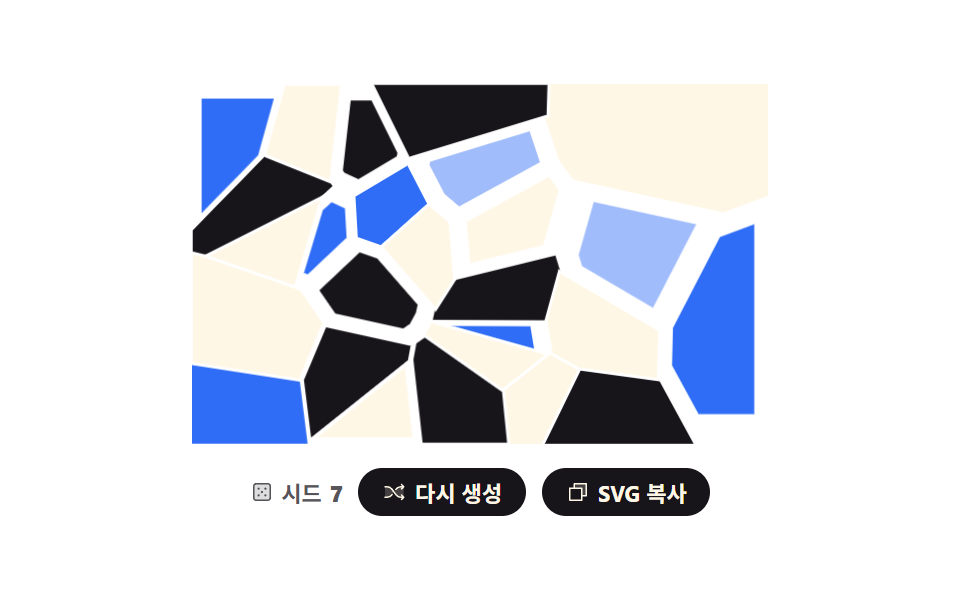 02 generative-voronoi-cells
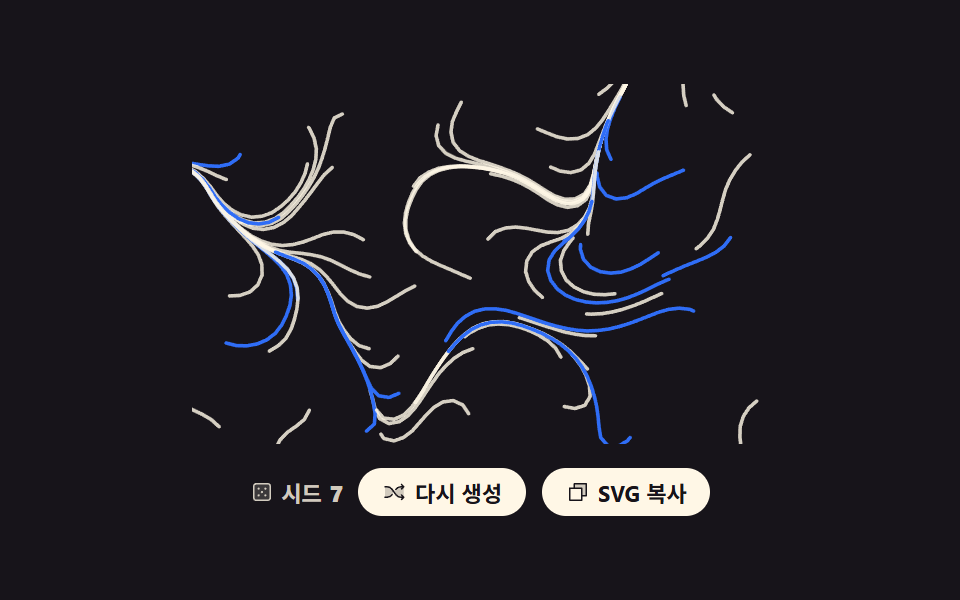 03 generative-flow-field-lines
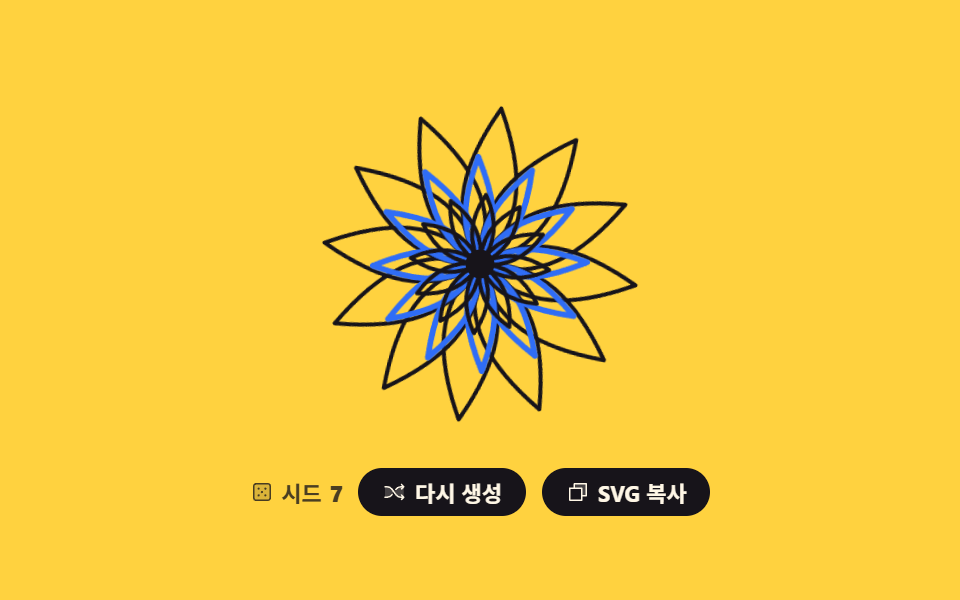 04 generative-mandala-symmetry
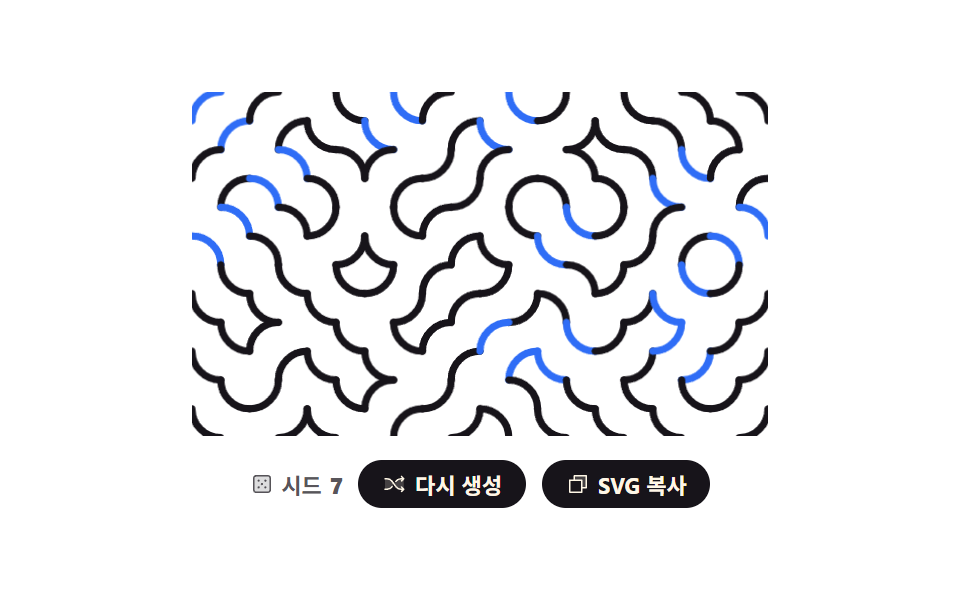 05 generative-truchet-tiles
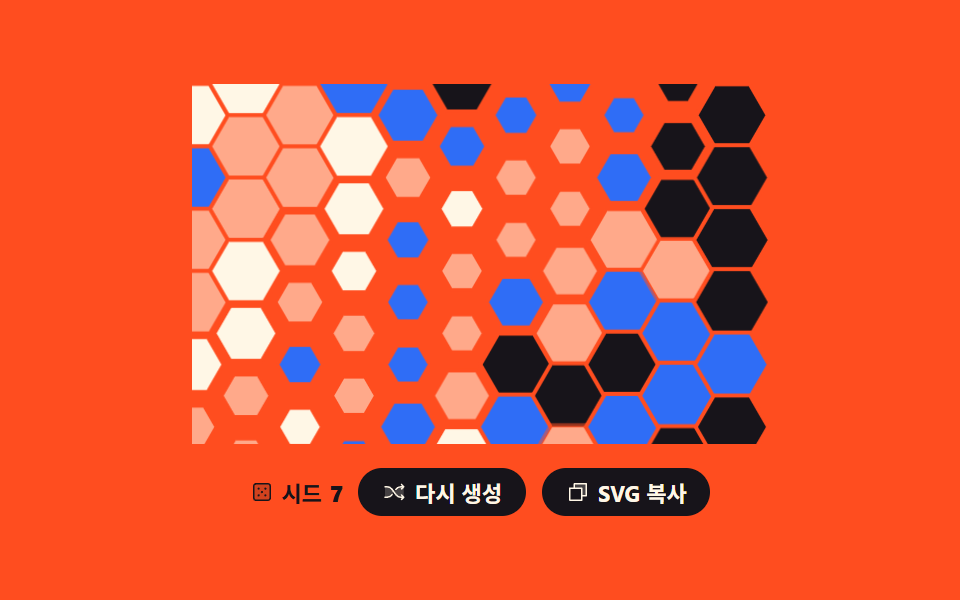 06 generative-hex-grid-paint
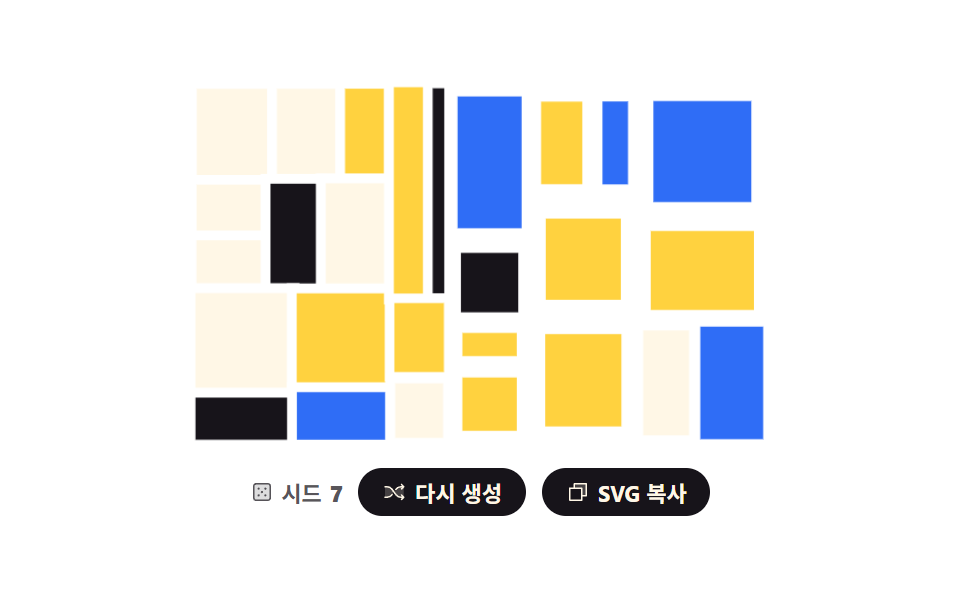 07 generative-recursive-split
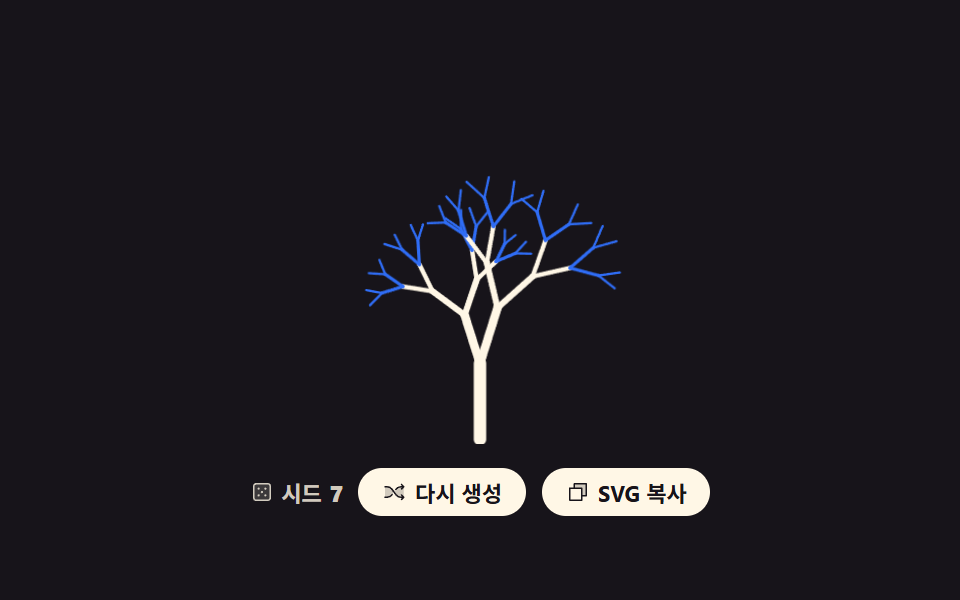 08 generative-branching-tree
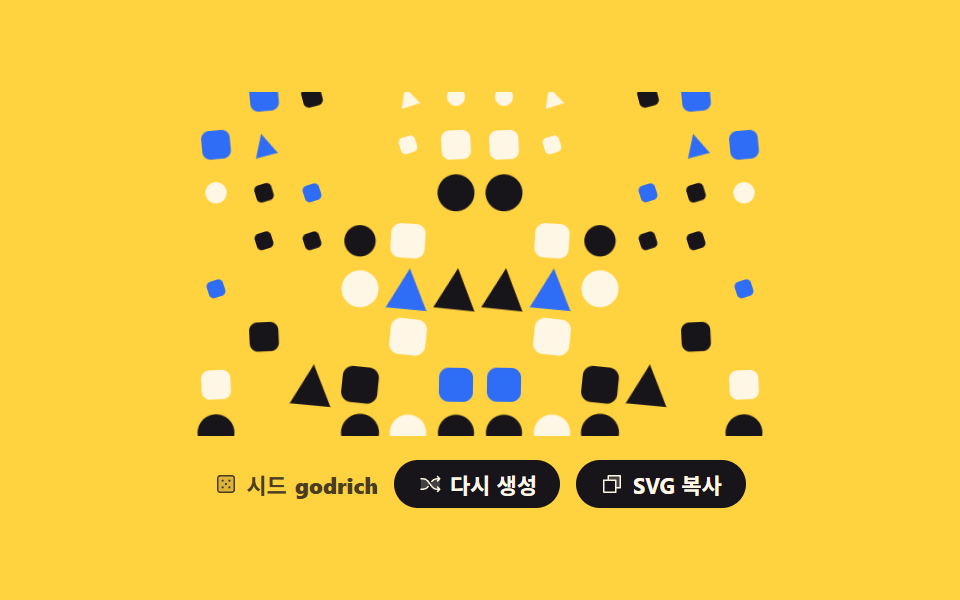 09 generative-seed-avatar-bg
자동 재생 · 눌러서 해당 항목으로 · 전부 한 zip
- 01 노이즈 등고선 지도
- 02 보로노이 셀 타일
- 03 플로우 필드 선 그림
- 04 회전 대칭 만다라
- 05 트루셰 타일 미로
- 06 육각 격자 색칠
- 07 재귀 분할 사각형
- 08 가지치기 나무
- 09 이름으로 만든 배경
아홉 개를 늘어놓은 기준은 인기순이 아니라 제너러티브 아트가 난수를 어디에 쓰는가입니다. 앞의 셋은 난수를 자리 전체에 뿌립니다 — 격자마다 높이를 뽑아 등고선으로 자르고(01), 흩뿌린 점에 영역을 나눠 주고(02), 자리마다 각도를 정해 선을 흘려보냅니다(03). 가운데 셋은 난수를 한 번만 쓰고 나머지는 규칙이 복사합니다 — 획 하나를 열두 번 돌린 만다라(04), 타일 한 장을 네 각도로만 놓는 트루셰(05), 자리에 따라 기운 확률로 칸을 칠하는 육각 격자(06). 마지막 셋은 난수를 재귀에 먹입니다 — 자르고 또 자르는 사각형(07), 갈라지고 또 갈라지는 나무(08), 그리고 시드가 숫자가 아니라 문자열인 이름 배경(09). 배경이 스스로 움직이는 쪽이 필요하면 CSS 배경 애니메이션 9종이, 같은 SVG 로 수치를 그리는 쪽은 css 그래프 만들기 SVG로 9종에 있습니다. 03 의 흐름장을 규칙 대신 힘으로 돌리면 물리 시뮬레이션 만들기가 되고, 그린 무늬를 사람이 사진처럼 잘라 쓰는 쪽은 이미지 크롭 기능이 맡습니다.
01노이즈 등고선 지도
무엇이 보이나
격자 꼭짓점에만 난수를 놓고 사이는 smoothstep 으로 이어 붙이면 울퉁불퉁한 높이 지도가 됩니다. 마칭 스퀘어로 같은 높이를 잇는 선을 여섯 겹 뽑아 지형도처럼 보이게 했습니다.
<main class="stage">
<div class="nc is-demo" id="root">
  <svg class="nc__art" id="art" viewBox="0 0 240 150" role="img" data-label="난수 높이를 등고선으로 그린 지도, 시드 {n}"></svg>
  <div class="nc__bar">
    <p class="nc__seed">
      <svg xmlns="http://www.w3.org/2000/svg" class="nc__ic" viewBox="0 0 256 256" aria-hidden="true"><g fill="currentColor"><path d="M216 64v128a24 24 0 0 1-24 24H64a24 24 0 0 1-24-24V64a24 24 0 0 1 24-24h128a24 24 0 0 1 24 24" opacity=".2"/><path d="M192 32H64a32 32 0 0 0-32 32v128a32 32 0 0 0 32 32h128a32 32 0 0 0 32-32V64a32 32 0 0 0-32-32m16 160a16 16 0 0 1-16 16H64a16 16 0 0 1-16-16V64a16 16 0 0 1 16-16h128a16 16 0 0 1 16 16ZM104 92a12 12 0 1 1-12-12a12 12 0 0 1 12 12m72 0a12 12 0 1 1-12-12a12 12 0 0 1 12 12m-72 72a12 12 0 1 1-12-12a12 12 0 0 1 12 12m36-36a12 12 0 1 1-12-12a12 12 0 0 1 12 12m36 36a12 12 0 1 1-12-12a12 12 0 0 1 12 12"/></g></svg>
      시드 <b id="num">7</b>
    </p>
    <button class="nc__btn" type="button" id="again">
      <svg xmlns="http://www.w3.org/2000/svg" class="nc__ic" viewBox="0 0 256 256" aria-hidden="true"><g fill="currentColor"><path d="M107.14 98.8L128 128l-20.86 29.2A64 64 0 0 1 55.06 184H32V72h23.06a64 64 0 0 1 52.08 26.8m93.8-26.8a64 64 0 0 0-52.08 26.8L128 128l20.86 29.2a64 64 0 0 0 52.08 26.8H232V72Z" opacity=".2"/><path d="M237.66 178.34a8 8 0 0 1 0 11.32l-24 24a8 8 0 0 1-11.32-11.32L212.69 192h-11.75a72.12 72.12 0 0 1-58.59-30.15l-41.72-58.4A56.1 56.1 0 0 0 55.06 80H32a8 8 0 0 1 0-16h23.06a72.12 72.12 0 0 1 58.59 30.15l41.72 58.4A56.1 56.1 0 0 0 200.94 176h11.75l-10.35-10.34a8 8 0 0 1 11.32-11.32ZM143 107a8 8 0 0 0 11.16-1.86l1.2-1.67A56.1 56.1 0 0 1 200.94 80h11.75l-10.35 10.34a8 8 0 0 0 11.32 11.32l24-24a8 8 0 0 0 0-11.32l-24-24a8 8 0 0 0-11.32 11.32L212.69 64h-11.75a72.12 72.12 0 0 0-58.59 30.15l-1.2 1.67A8 8 0 0 0 143 107m-30 42a8 8 0 0 0-11.16 1.86l-1.2 1.67A56.1 56.1 0 0 1 55.06 176H32a8 8 0 0 0 0 16h23.06a72.12 72.12 0 0 0 58.59-30.15l1.2-1.67A8 8 0 0 0 113 149"/></g></svg>
      <span class="nc__label">다시 생성</span>
    </button>
    <button class="nc__btn" type="button" id="copy" data-done="복사됨">
      <svg xmlns="http://www.w3.org/2000/svg" class="nc__ic" viewBox="0 0 256 256" aria-hidden="true"><g fill="currentColor"><path d="M216 40v128h-48V88H88V40Z" opacity=".2"/><path d="M216 32H88a8 8 0 0 0-8 8v40H40a8 8 0 0 0-8 8v128a8 8 0 0 0 8 8h128a8 8 0 0 0 8-8v-40h40a8 8 0 0 0 8-8V40a8 8 0 0 0-8-8m-56 176H48V96h112Zm48-48h-32V88a8 8 0 0 0-8-8H96V48h112Z"/></g></svg>
      <span class="nc__label">SVG 복사</span>
    </button>
  </div>
</div>
</main>
@use "../../../../site/static/demo-tokens" as *;
// 노이즈 등고선 지도 — 값 노이즈로 높이를 만들고 마칭 스퀘어로 같은 높이를 잇는 선을 뽑는다.
// 경로 생성은 JS 지만 **그리는 연출은 CSS** 다: path 마다 pathLength="1" 로 길이를 1 로 정규화해
// stroke-dasharray: 1 · stroke-dashoffset 1 → 0 → -1 을 키프레임으로 돌린다.
// demo.py 는 CSS 애니메이션 시계로 24장을 뽑으므로 rAF 로 그리면 전부 같은 장면이 된다.
$duration: $dur-loop;
$easing: cubic-bezier(.7, 0, .85, .4);
$color: $subject-cream;
@include stage($stage-ink);
.nc { display: grid; justify-items: center; gap: $sp-3; width: 100%; }
.nc__art { display: block; width: clamp(176px, 60vw, 320px); height: auto; }
// 정적(미리보기를 뗀) 상태가 기본값 — 시드로 뽑힌 지도가 다 그려져 있다
.nc__line {
fill: none;
stroke: $color;
stroke-width: 1.4;
stroke-linecap: round;
stroke-dasharray: 1; // pathLength="1" 이라 1 = 경로 전체 길이
stroke-dashoffset: 0;
opacity: calc(.44 + var(--i) * .1);
}
.nc__bar { display: flex; flex-wrap: wrap; align-items: center; justify-content: center; gap: $sp-2; }
.nc__seed {
margin: 0;
display: inline-flex; align-items: center; gap: $sp-1;
color: rgba(255, 247, 230, .8);
font-weight: 700; font-size: clamp(9px, 2.4vw, 11px);
}
.nc__btn {
display: inline-flex; align-items: center; gap: $sp-1;
border: 0; border-radius: $r-pill;
padding: $sp-1 $sp-3;
background: $subject-cream; color: $subject-ink;
font-family: inherit; font-weight: 700; font-size: clamp(9px, 2.4vw, 11px);
cursor: pointer;
}
.nc__btn:focus-visible { outline: 3px solid $subject-blue; outline-offset: 2px; }
.nc__ic { width: 12px; height: 12px; flex: none; }
// ── 미리보기 루프: 아래 dashoffset 궤적은 「다시 생성」을 눌렀을 때 실제로 도는 것과 같은 그리기 연출이다.
// 양 끝(1 과 -1)이 둘 다 "감춰짐" 이라 한 바퀴가 끝날 때 튀지 않는다.
.nc.is-demo .nc__line {
animation-name: ncScan;
animation-duration: $duration;
animation-timing-function: $easing;
animation-iteration-count: infinite;
animation-fill-mode: backwards; // 지연 구간에 다 그려진 기본 상태가 번쩍이지 않게
animation-delay: calc(var(--i) * 110ms);
}
// 사람이 「다시 생성」을 누르면 루프를 떼고 한 번만 그린다
.nc.is-draw .nc__line {
animation-name: ncDraw;
animation-duration: $dur-enter;
animation-timing-function: $ease-out;
animation-iteration-count: 1;
animation-fill-mode: backwards;
animation-delay: calc(var(--i) * 110ms);
}
// 그리기는 느리게 시작해 끝에서 빨라지고 지우기는 그 반대다 — 프레임당 변화가 가장 큰 순간이
// 「선이 거의 다 있는」 장면에 오게 해서 poster(앞 장과 가장 크게 달라진 장)가 빈 지도로 뽑히지 않는다
@keyframes ncScan {
0% { stroke-dashoffset: 1; animation-timing-function: $easing; }
38% { stroke-dashoffset: 0; animation-timing-function: linear; }
50% { stroke-dashoffset: 0; animation-timing-function: $ease-out; }
86% { stroke-dashoffset: -1; }
100% { stroke-dashoffset: -1; }
}
@keyframes ncDraw {
from { stroke-dashoffset: 1; }
to { stroke-dashoffset: 0; }
}
@media (max-width: 340px) {
.nc { gap: $sp-2; }
.nc__ic { width: 10px; height: 10px; }
}
@media (prefers-reduced-motion: reduce) {
.nc.is-demo .nc__line,
.nc.is-draw .nc__line { animation: none !important; stroke-dashoffset: 0 !important; }
}html, body {
margin: 0;
overflow: hidden;
}
.stage {
box-sizing: border-box;
min-height: 100vh;
display: grid;
place-items: center;
margin: 0;
background: #17141a;
font-family: -apple-system, "Segoe UI", "Noto Sans KR", sans-serif;
padding: clamp(8px, 4vw, 24px);
}
.nc {
display: grid;
justify-items: center;
gap: 12px;
width: 100%;
}
.nc__art {
display: block;
width: clamp(176px, 60vw, 320px);
height: auto;
}
.nc__line {
fill: none;
stroke: #fff7e6;
stroke-width: 1.4;
stroke-linecap: round;
stroke-dasharray: 1;
stroke-dashoffset: 0;
opacity: calc(0.44 + var(--i) * 0.1);
}
.nc__bar {
display: flex;
flex-wrap: wrap;
align-items: center;
justify-content: center;
gap: 8px;
}
.nc__seed {
margin: 0;
display: inline-flex;
align-items: center;
gap: 4px;
color: rgba(255, 247, 230, 0.8);
font-weight: 700;
font-size: clamp(9px, 2.4vw, 11px);
}
.nc__btn {
display: inline-flex;
align-items: center;
gap: 4px;
border: 0;
border-radius: 999px;
padding: 4px 12px;
background: #fff7e6;
color: #17141a;
font-family: inherit;
font-weight: 700;
font-size: clamp(9px, 2.4vw, 11px);
cursor: pointer;
}
.nc__btn:focus-visible {
outline: 3px solid #2f6df6;
outline-offset: 2px;
}
.nc__ic {
width: 12px;
height: 12px;
flex: none;
}
.nc.is-demo .nc__line {
animation-name: ncScan;
animation-duration: 2s;
animation-timing-function: cubic-bezier(0.7, 0, 0.85, 0.4);
animation-iteration-count: infinite;
animation-fill-mode: backwards;
animation-delay: calc(var(--i) * 110ms);
}
.nc.is-draw .nc__line {
animation-name: ncDraw;
animation-duration: 600ms;
animation-timing-function: ease-out;
animation-iteration-count: 1;
animation-fill-mode: backwards;
animation-delay: calc(var(--i) * 110ms);
}
@keyframes ncScan {
0% {
stroke-dashoffset: 1;
animation-timing-function: cubic-bezier(0.7, 0, 0.85, 0.4);
}
38% {
stroke-dashoffset: 0;
animation-timing-function: linear;
}
50% {
stroke-dashoffset: 0;
animation-timing-function: ease-out;
}
86% {
stroke-dashoffset: -1;
}
100% {
stroke-dashoffset: -1;
}
}
@keyframes ncDraw {
from {
stroke-dashoffset: 1;
}
to {
stroke-dashoffset: 0;
}
}
@media (max-width: 340px) {
.nc {
gap: 8px;
}
.nc__ic {
width: 10px;
height: 10px;
}
}
@media (prefers-reduced-motion: reduce) {
.nc.is-demo .nc__line,
.nc.is-draw .nc__line {
animation: none !important;
stroke-dashoffset: 0 !important;
}
}var root = document.getElementById('root');
var art = document.getElementById('art');
var num = document.getElementById('num');
var W = 240, H = 150, COLS = 9, ROWS = 6, LEVELS = 6, NX = 32, NY = 20;
var seed = 7;
// mulberry32 — 32비트 정수 시드 하나로 언제나 같은 난수열을 돌려준다. 재현 가능한 생성의 뿌리
function mulberry32(a) {
  return function () {
    a = a + 0x6D2B79F5 | 0;
    var t = Math.imul(a ^ a >>> 15, 1 | a);
    t = t + Math.imul(t ^ t >>> 7, 61 | t) ^ t;
    return ((t ^ t >>> 14) >>> 0) / 4294967296;
  };
}
// 격자 꼭짓점에만 난수를 놓고 사이는 smoothstep 으로 이어 붙인다 (값 노이즈)
function makeField(s) {
var rand = mulberry32(s), lat = [], r, c;
for (r = 0; r <= ROWS; r++) { lat.push([]); for (c = 0; c <= COLS; c++) { lat[r].push(rand()); } }
return function (x, y) {
var gx = x * COLS, gy = y * ROWS;
var ix = Math.min(COLS - 1, Math.floor(gx)), iy = Math.min(ROWS - 1, Math.floor(gy));
var fx = gx - ix, fy = gy - iy;
var sx = fx * fx * (3 - 2 * fx), sy = fy * fy * (3 - 2 * fy);
var top = lat[iy][ix] + (lat[iy][ix + 1] - lat[iy][ix]) * sx;
var bot = lat[iy + 1][ix] + (lat[iy + 1][ix + 1] - lat[iy + 1][ix]) * sx;
return top + (bot - top) * sy;
};
}
// 칸 네 꼭짓점의 높이를 문턱과 견줘 어느 변에서 선이 드나드는지 고른다 (마칭 스퀘어 16가지)
var TABLE = [[], [[2, 3]], [[1, 2]], [[1, 3]], [[0, 1]], [[0, 3], [1, 2]], [[0, 2]], [[0, 3]],
[[0, 3]], [[0, 2]], [[0, 1], [2, 3]], [[0, 1]], [[1, 3]], [[1, 2]], [[2, 3]], []];
function cut(ax, ay, av, bx, by, bv, level) {
var t = (level - av) / (bv - av);
return ((ax + (bx - ax) * t) * W).toFixed(1) + ' ' + ((ay + (by - ay) * t) * H).toFixed(1);
}
function contour(field, level) {
var d = '', i, j, k;
for (j = 0; j < NY; j++) {
for (i = 0; i < NX; i++) {
var x0 = i / NX, y0 = j / NY, x1 = (i + 1) / NX, y1 = (j + 1) / NY;
var v = [field(x0, y0), field(x1, y0), field(x1, y1), field(x0, y1)];
var code = (v[0] > level ? 8 : 0) | (v[1] > level ? 4 : 0) | (v[2] > level ? 2 : 0) | (v[3] > level ? 1 : 0);
var pairs = TABLE[code];
if (!pairs.length) { continue; }
var edge = [cut(x0, y0, v[0], x1, y0, v[1], level), cut(x1, y0, v[1], x1, y1, v[2], level),
cut(x1, y1, v[2], x0, y1, v[3], level), cut(x0, y1, v[3], x0, y0, v[0], level)];
for (k = 0; k < pairs.length; k++) { d += 'M' + edge[pairs[k][0]] + 'L' + edge[pairs[k][1]]; }
}
}
return d;
}
function build() {
var field = makeField(seed), parts = [], i;
for (i = 0; i < LEVELS; i++) {
parts.push('<path class="nc__line" style="--i:' + i + '" pathLength="1" d="' + contour(field, 0.26 + i * 0.1) + '"/>');
}
art.innerHTML = parts.join('');
art.setAttribute('aria-label', art.getAttribute('data-label').replace('{n}', seed));
num.textContent = seed;
}
document.getElementById('again').addEventListener('click', function () {
seed = (seed * 7 + 13) % 991 + 1;
build();
root.classList.remove('is-demo');
root.classList.remove('is-draw');
void art.getBoundingClientRect().width; // 한 번 읽어 리플로를 일으켜야 같은 애니메이션이 처음부터 다시 돈다
root.classList.add('is-draw');
});
var copyBtn = document.getElementById('copy');
copyBtn.addEventListener('click', function () {
var label = copyBtn.querySelector('.nc__label');
var before = label.textContent;
if (navigator.clipboard && navigator.clipboard.writeText) {
navigator.clipboard.writeText(art.outerHTML).catch(function () {});
}
label.textContent = copyBtn.getAttribute('data-done');
setTimeout(function () { label.textContent = before; }, 1200);
});
build();// NoiseContourMap — vanilla 판(run/293/demo/01-generative-noise-contour/index.html) 의 React 포트.
// 값 노이즈로 높이를 만들고 마칭 스퀘어로 같은 높이를 잇는 선을 뽑는다. 경로는 JS, 그리는 연출은 CSS.
// 시드·격자 수·문턱은 vanilla 와 같은 값이다.
import { useMemo, useRef, useState } from "react";
import type { CSSProperties } from "react";
import styles from "./NoiseContourMap.module.scss";
export type NoiseContourMapProps = {
duration?: number;
easing?: string;
color?: string;
label?: string;
seedText?: string;
regenerateText?: string;
copyText?: string;
copiedText?: string;
};
type Vars = CSSProperties & { "--duration"?: string; "--easing"?: string; "--color"?: string };
// useRef 는 T | null 을 돌려준다. 처음부터 값이 있고 절대 비지 않는 상자는 이렇게 좁혀 쓴다
type Box<T> = { current: T };
const W = 240;
const H = 150;
const COLS = 9;
const ROWS = 6;
const LEVELS = 6;
const NX = 32;
const NY = 20;
// 칸 네 꼭짓점의 높이를 문턱과 견줘 어느 변에서 선이 드나드는지 고른다 (마칭 스퀘어 16가지)
const TABLE: number[][][] = [[], [[2, 3]], [[1, 2]], [[1, 3]], [[0, 1]], [[0, 3], [1, 2]], [[0, 2]], [[0, 3]],
[[0, 3]], [[0, 2]], [[0, 1], [2, 3]], [[0, 1]], [[1, 3]], [[1, 2]], [[2, 3]], []];
// mulberry32 — 32비트 정수 시드 하나로 언제나 같은 난수열을 돌려준다. 재현 가능한 생성의 뿌리
function mulberry32(a: number): () => number {
return function (): number {
a = a + 0x6D2B79F5 | 0;
let t = Math.imul(a ^ a >>> 15, 1 | a);
t = t + Math.imul(t ^ t >>> 7, 61 | t) ^ t;
return ((t ^ t >>> 14) >>> 0) / 4294967296;
};
}
// 격자 꼭짓점에만 난수를 놓고 사이는 smoothstep 으로 이어 붙인다 (값 노이즈)
function makeField(s: number): (x: number, y: number) => number {
const rand = mulberry32(s);
const lat: number[][] = [];
for (let r = 0; r <= ROWS; r++) {
const row: number[] = [];
for (let c = 0; c <= COLS; c++) { row.push(rand()); }
lat.push(row);
}
return function (x: number, y: number): number {
const gx = x * COLS;
const gy = y * ROWS;
const ix = Math.min(COLS - 1, Math.floor(gx));
const iy = Math.min(ROWS - 1, Math.floor(gy));
const fx = gx - ix;
const fy = gy - iy;
const sx = fx * fx * (3 - 2 * fx);
const sy = fy * fy * (3 - 2 * fy);
const top = lat[iy][ix] + (lat[iy][ix + 1] - lat[iy][ix]) * sx;
const bot = lat[iy + 1][ix] + (lat[iy + 1][ix + 1] - lat[iy + 1][ix]) * sx;
return top + (bot - top) * sy;
};
}
function cut(ax: number, ay: number, av: number, bx: number, by: number, bv: number, level: number): string {
const t = (level - av) / (bv - av);
return ((ax + (bx - ax) * t) * W).toFixed(1) + " " + ((ay + (by - ay) * t) * H).toFixed(1);
}
function contour(field: (x: number, y: number) => number, level: number): string {
let d = "";
for (let j = 0; j < NY; j++) {
for (let i = 0; i < NX; i++) {
const x0 = i / NX, y0 = j / NY, x1 = (i + 1) / NX, y1 = (j + 1) / NY;
const v = [field(x0, y0), field(x1, y0), field(x1, y1), field(x0, y1)];
const code = (v[0] > level ? 8 : 0) | (v[1] > level ? 4 : 0) | (v[2] > level ? 2 : 0) | (v[3] > level ? 1 : 0);
const pairs = TABLE[code];
if (!pairs.length) { continue; }
const edge = [cut(x0, y0, v[0], x1, y0, v[1], level), cut(x1, y0, v[1], x1, y1, v[2], level),
cut(x1, y1, v[2], x0, y1, v[3], level), cut(x0, y1, v[3], x0, y0, v[0], level)];
for (let k = 0; k < pairs.length; k++) { d += "M" + edge[pairs[k][0]] + "L" + edge[pairs[k][1]]; }
}
}
return d;
}
export default function NoiseContourMap({
duration = 2000,
easing = "cubic-bezier(.7, 0, .85, .4)",
color = "#fff7e6",
label = "A map of random heights drawn as contour lines, seed {n}",
seedText = "Seed",
regenerateText = "Regenerate",
copyText = "Copy SVG",
copiedText = "Copied",
}: NoiseContourMapProps) {
const artRef = useRef<SVGSVGElement | null>(null);
const timerRef = useRef<number>(0) as Box<number>;
const [seed, setSeed] = useState(7);
const [mode, setMode] = useState("demo");
const [copyLabel, setCopyLabel] = useState(copyText);
const vars: Vars = { "--duration": `${duration}ms`, "--easing": easing, "--color": color };
// 시드가 바뀔 때만 다시 계산한다 — 같은 시드면 언제나 같은 경로 문자열이 나온다
const paths = useMemo(() => {
const field = makeField(seed);
const out: string[] = [];
for (let i = 0; i < LEVELS; i++) { out.push(contour(field, 0.26 + i * 0.1)); }
return out;
}, [seed]);
function regenerate(): void {
setSeed((prev: number) => (prev * 7 + 13) % 991 + 1);
setMode("draw");
}
function copySvg(): void {
const art = artRef.current;
if (!art) { return; }
if (navigator.clipboard && navigator.clipboard.writeText) {
navigator.clipboard.writeText(art.outerHTML).catch(function () {});
}
setCopyLabel(copiedText);
clearTimeout(timerRef.current);
timerRef.current = window.setTimeout(() => setCopyLabel(copyText), 1200);
}
const rootClass = `${styles.nc} ${mode === "demo" ? styles.isDemo : styles.isDraw}`;
return (
<div className={rootClass} style={vars}>
<svg
ref={artRef}
className={styles.art}
viewBox={`0 0 ${W} ${H}`}
role="img"
aria-label={label.replace("{n}", String(seed))}
>
{paths.map((d: string, i: number) => (
<path key={i} className={styles.line} style={{ "--i": i } as CSSProperties} pathLength={1} d={d} />
))}
</svg>
<div className={styles.bar}>
<p className={styles.seed}>{seedText} <b>{seed}</b></p>
<button className={styles.btn} type="button" onClick={regenerate}>{regenerateText}</button>
<button className={styles.btn} type="button" onClick={copySvg}>{copyLabel}</button>
</div>
</div>
);
}01 · 노이즈 등고선 지도 — 측정 누적면적 11.925% · 움직인 프레임 16/23GODRICH 원작 · zip 에 SCSS·React 포함 · 비밀번호 보기
코드에서 볼 곳
미리보기에서 누적면적 11.93%, 강도 94.5, 움직인 프레임 16/23 을 기록했고 소개 페이지 첫 화면 배경에 씁니다.
// mulberry32 — 32비트 정수 시드 하나로 언제나 같은 난수열을 돌려준다. 재현 가능한 생성의 뿌리
function mulberry32(a) {
return function () {
a = a + 0x6D2B79F5 | 0;
var t = Math.imul(a ^ a >>> 15, 1 | a);
t = t + Math.imul(t ^ t >>> 7, 61 | t) ^ t;
return ((t ^ t >>> 14) >>> 0) / 4294967296;
};
}
@keyframes ncScan {
  0%   { stroke-dashoffset: 1; animation-timing-function: $easing; }
  38%  { stroke-dashoffset: 0; animation-timing-function: linear; }
  50%  { stroke-dashoffset: 0; animation-timing-function: $ease-out; }
  86%  { stroke-dashoffset: -1; }
  100% { stroke-dashoffset: -1; }
}
02보로노이 셀 타일
css 격자 무늬와 무엇이 다른가
점 스물여섯 개를 흩뿌리고 각 점이 "나한테 제일 가까운 영역"을 가져가면 유리 조각처럼 갈라진 면이 됩니다. 바깥 사각형을 다른 점과의 수직이등분선으로 차례차례 잘라 내면 되니 전용 알고리즘을 따로 불러올 필요가 없습니다.
<main class="stage">
<div class="vo is-demo" id="root">
  <svg class="vo__art" id="art" viewBox="0 0 240 150" role="img" data-label="흩뿌린 점마다 가장 가까운 영역을 칠한 셀 타일, 시드 {n}"></svg>
  <div class="vo__bar">
    <p class="vo__seed">
      <svg xmlns="http://www.w3.org/2000/svg" class="vo__ic" viewBox="0 0 256 256" aria-hidden="true"><g fill="currentColor"><path d="M216 64v128a24 24 0 0 1-24 24H64a24 24 0 0 1-24-24V64a24 24 0 0 1 24-24h128a24 24 0 0 1 24 24" opacity=".2"/><path d="M192 32H64a32 32 0 0 0-32 32v128a32 32 0 0 0 32 32h128a32 32 0 0 0 32-32V64a32 32 0 0 0-32-32m16 160a16 16 0 0 1-16 16H64a16 16 0 0 1-16-16V64a16 16 0 0 1 16-16h128a16 16 0 0 1 16 16ZM104 92a12 12 0 1 1-12-12a12 12 0 0 1 12 12m72 0a12 12 0 1 1-12-12a12 12 0 0 1 12 12m-72 72a12 12 0 1 1-12-12a12 12 0 0 1 12 12m36-36a12 12 0 1 1-12-12a12 12 0 0 1 12 12m36 36a12 12 0 1 1-12-12a12 12 0 0 1 12 12"/></g></svg>
      시드 <b id="num">7</b>
    </p>
    <button class="vo__btn" type="button" id="again">
      <svg xmlns="http://www.w3.org/2000/svg" class="vo__ic" viewBox="0 0 256 256" aria-hidden="true"><g fill="currentColor"><path d="M107.14 98.8L128 128l-20.86 29.2A64 64 0 0 1 55.06 184H32V72h23.06a64 64 0 0 1 52.08 26.8m93.8-26.8a64 64 0 0 0-52.08 26.8L128 128l20.86 29.2a64 64 0 0 0 52.08 26.8H232V72Z" opacity=".2"/><path d="M237.66 178.34a8 8 0 0 1 0 11.32l-24 24a8 8 0 0 1-11.32-11.32L212.69 192h-11.75a72.12 72.12 0 0 1-58.59-30.15l-41.72-58.4A56.1 56.1 0 0 0 55.06 80H32a8 8 0 0 1 0-16h23.06a72.12 72.12 0 0 1 58.59 30.15l41.72 58.4A56.1 56.1 0 0 0 200.94 176h11.75l-10.35-10.34a8 8 0 0 1 11.32-11.32ZM143 107a8 8 0 0 0 11.16-1.86l1.2-1.67A56.1 56.1 0 0 1 200.94 80h11.75l-10.35 10.34a8 8 0 0 0 11.32 11.32l24-24a8 8 0 0 0 0-11.32l-24-24a8 8 0 0 0-11.32 11.32L212.69 64h-11.75a72.12 72.12 0 0 0-58.59 30.15l-1.2 1.67A8 8 0 0 0 143 107m-30 42a8 8 0 0 0-11.16 1.86l-1.2 1.67A56.1 56.1 0 0 1 55.06 176H32a8 8 0 0 0 0 16h23.06a72.12 72.12 0 0 0 58.59-30.15l1.2-1.67A8 8 0 0 0 113 149"/></g></svg>
      <span class="vo__label">다시 생성</span>
    </button>
    <button class="vo__btn" type="button" id="copy" data-done="복사됨">
      <svg xmlns="http://www.w3.org/2000/svg" class="vo__ic" viewBox="0 0 256 256" aria-hidden="true"><g fill="currentColor"><path d="M216 40v128h-48V88H88V40Z" opacity=".2"/><path d="M216 32H88a8 8 0 0 0-8 8v40H40a8 8 0 0 0-8 8v128a8 8 0 0 0 8 8h128a8 8 0 0 0 8-8v-40h40a8 8 0 0 0 8-8V40a8 8 0 0 0-8-8m-56 176H48V96h112Zm48-48h-32V88a8 8 0 0 0-8-8H96V48h112Z"/></g></svg>
      <span class="vo__label">SVG 복사</span>
    </button>
  </div>
</div>
</main>
@use "../../../../site/static/demo-tokens" as *;
// 보로노이 셀 타일 — 흩뿌린 점마다 바깥 사각형을 다른 점과의 수직이등분선으로 계속 잘라 셀을 남긴다.
// 면 생성은 JS, 연출은 CSS. 미리보기 루프는 셀이 **사라졌다 나타나는** 것이 아니라 한 칸씩 눌렸다
// 펴지는 물결이다 — 시작 상태와 끝 상태가 같은 완성 모자이크라 한 바퀴가 끝날 때 튀지 않고,
// poster(앞 장과 가장 크게 달라진 장)에도 빈 화면이 뽑히지 않는다.
$duration: $dur-loop;
$easing: $ease-spring;
$color: $subject-blue;
@include stage($stage-paper);
.vo { display: grid; justify-items: center; gap: $sp-3; width: 100%; }
.vo__art { display: block; width: clamp(176px, 60vw, 320px); height: auto; }
// transform-box: fill-box 가 없으면 SVG 도형의 % 원점이 뷰포트 기준이 되어 셀이 제자리에서 안 커진다
.vo__cell {
stroke: $stage-paper;
stroke-width: 1.2;
transform-box: fill-box;
transform-origin: 50% 50%;
}
.vo__cell--a { fill: $color; }
.vo__cell--b { fill: $color; opacity: .46; }
.vo__cell--c { fill: $subject-ink; }
.vo__cell--d { fill: $subject-cream; }
.vo__bar { display: flex; flex-wrap: wrap; align-items: center; justify-content: center; gap: $sp-2; }
.vo__seed {
margin: 0;
display: inline-flex; align-items: center; gap: $sp-1;
color: rgba(23, 20, 26, .72);
font-weight: 700; font-size: clamp(9px, 2.4vw, 11px);
}
.vo__btn {
display: inline-flex; align-items: center; gap: $sp-1;
border: 0; border-radius: $r-pill;
padding: $sp-1 $sp-3;
background: $subject-ink; color: $subject-cream;
font-family: inherit; font-weight: 700; font-size: clamp(9px, 2.4vw, 11px);
cursor: pointer;
}
.vo__btn:focus-visible { outline: 3px solid $color; outline-offset: 2px; }
.vo__ic { width: 12px; height: 12px; flex: none; }
// ── 미리보기 루프: 셀 번호 순으로 물결이 지나간다. 같은 셀 크기로 시작해 같은 크기로 끝난다
.vo.is-demo .vo__cell {
animation-name: voPress;
animation-duration: $duration;
animation-timing-function: $easing;
animation-iteration-count: infinite;
animation-fill-mode: backwards;
animation-delay: calc(var(--i) * -46ms); // 음수 지연이라 첫 프레임부터 물결이 이미 퍼져 있다
}
// 사람이 「다시 생성」을 누르면 새 시드의 셀이 한 칸씩 펼쳐진다 — 루프와 달리 한 번만 돈다
.vo.is-draw .vo__cell {
animation-name: voPop;
animation-duration: $dur-enter;
animation-timing-function: $ease-pop;
animation-iteration-count: 1;
animation-fill-mode: backwards;
animation-delay: calc(var(--i) * 18ms);
}
@keyframes voPress {
0% { transform: scale(1); }
22% { transform: scale(.72); }
46% { transform: scale(1.04); }
70% { transform: scale(1); }
100% { transform: scale(1); }
}
@keyframes voPop {
from { transform: scale(.2); opacity: 0; }
to { transform: scale(1); opacity: 1; }
}
@media (max-width: 340px) {
.vo { gap: $sp-2; }
.vo__ic { width: 10px; height: 10px; }
}
@media (prefers-reduced-motion: reduce) {
.vo.is-demo .vo__cell,
.vo.is-draw .vo__cell { animation: none !important; transform: scale(1) !important; }
}html, body {
margin: 0;
overflow: hidden;
}
.stage {
box-sizing: border-box;
min-height: 100vh;
display: grid;
place-items: center;
margin: 0;
background: #ffffff;
font-family: -apple-system, "Segoe UI", "Noto Sans KR", sans-serif;
padding: clamp(8px, 4vw, 24px);
}
.vo {
display: grid;
justify-items: center;
gap: 12px;
width: 100%;
}
.vo__art {
display: block;
width: clamp(176px, 60vw, 320px);
height: auto;
}
.vo__cell {
stroke: #ffffff;
stroke-width: 1.2;
transform-box: fill-box;
transform-origin: 50% 50%;
}
.vo__cell--a {
fill: #2f6df6;
}
.vo__cell--b {
fill: #2f6df6;
opacity: 0.46;
}
.vo__cell--c {
fill: #17141a;
}
.vo__cell--d {
fill: #fff7e6;
}
.vo__bar {
display: flex;
flex-wrap: wrap;
align-items: center;
justify-content: center;
gap: 8px;
}
.vo__seed {
margin: 0;
display: inline-flex;
align-items: center;
gap: 4px;
color: rgba(23, 20, 26, 0.72);
font-weight: 700;
font-size: clamp(9px, 2.4vw, 11px);
}
.vo__btn {
display: inline-flex;
align-items: center;
gap: 4px;
border: 0;
border-radius: 999px;
padding: 4px 12px;
background: #17141a;
color: #fff7e6;
font-family: inherit;
font-weight: 700;
font-size: clamp(9px, 2.4vw, 11px);
cursor: pointer;
}
.vo__btn:focus-visible {
outline: 3px solid #2f6df6;
outline-offset: 2px;
}
.vo__ic {
width: 12px;
height: 12px;
flex: none;
}
.vo.is-demo .vo__cell {
animation-name: voPress;
animation-duration: 2s;
animation-timing-function: cubic-bezier(0.2, 0.8, 0.2, 1);
animation-iteration-count: infinite;
animation-fill-mode: backwards;
animation-delay: calc(var(--i) * -46ms);
}
.vo.is-draw .vo__cell {
animation-name: voPop;
animation-duration: 600ms;
animation-timing-function: cubic-bezier(0.2, 1.4, 0.4, 1);
animation-iteration-count: 1;
animation-fill-mode: backwards;
animation-delay: calc(var(--i) * 18ms);
}
@keyframes voPress {
0% {
transform: scale(1);
}
22% {
transform: scale(0.72);
}
46% {
transform: scale(1.04);
}
70% {
transform: scale(1);
}
100% {
transform: scale(1);
}
}
@keyframes voPop {
from {
transform: scale(0.2);
opacity: 0;
}
to {
transform: scale(1);
opacity: 1;
}
}
@media (max-width: 340px) {
.vo {
gap: 8px;
}
.vo__ic {
width: 10px;
height: 10px;
}
}
@media (prefers-reduced-motion: reduce) {
.vo.is-demo .vo__cell,
.vo.is-draw .vo__cell {
animation: none !important;
transform: scale(1) !important;
}
}var root = document.getElementById('root');
var art = document.getElementById('art');
var num = document.getElementById('num');
var W = 240, H = 150, SITES = 26;
var seed = 7;
// mulberry32 — 32비트 정수 시드 하나로 언제나 같은 난수열을 돌려준다. 재현 가능한 생성의 뿌리
function mulberry32(a) {
return function () {
a = a + 0x6D2B79F5 | 0;
var t = Math.imul(a ^ a >>> 15, 1 | a);
t = t + Math.imul(t ^ t >>> 7, 61 | t) ^ t;
return ((t ^ t >>> 14) >>> 0) / 4294967296;
};
}
// 두 점의 수직이등분선으로 다각형을 잘라 a 쪽 반평면만 남긴다 (서덜랜드-호지먼 클리핑)
function clip(poly, a, b) {
  var mx = (a[0] + b[0]) / 2, my = (a[1] + b[1]) / 2;
  var dx = b[0] - a[0], dy = b[1] - a[1], out = [], i;
  function side(p) { return (p[0] - mx) * dx + (p[1] - my) * dy; }
  for (i = 0; i < poly.length; i++) {
    var p = poly[i], q = poly[(i + 1) % poly.length], sp = side(p), sq = side(q);
    if (sp <= 0) { out.push(p); }
    if ((sp < 0 && sq > 0) || (sp > 0 && sq < 0)) {
      var t = sp / (sp - sq);
      out.push([p[0] + (q[0] - p[0]) * t, p[1] + (q[1] - p[1]) * t]);
    }
  }
  return out;
}
var TONES = ['a', 'b', 'c', 'd'];
function build() {
var rand = mulberry32(seed), pts = [], parts = [], i, j;
for (i = 0; i < SITES; i++) { pts.push([10 + rand() * (W - 20), 8 + rand() * (H - 16)]); }
for (i = 0; i < SITES; i++) {
var poly = [[0, 0], [W, 0], [W, H], [0, H]];
for (j = 0; j < SITES && poly.length; j++) { if (j !== i) { poly = clip(poly, pts[i], pts[j]); } }
if (poly.length < 3) { continue; }
var tone = TONES[Math.min(3, Math.floor(rand() * 4))];
var d = poly.map(function (p) { return p[0].toFixed(1) + ',' + p[1].toFixed(1); }).join(' ');
parts.push('<polygon class="vo__cell vo__cell--' + tone + '" style="--i:' + i + '" points="' + d + '"/>');
}
art.innerHTML = parts.join('');
art.setAttribute('aria-label', art.getAttribute('data-label').replace('{n}', seed));
num.textContent = seed;
}
document.getElementById('again').addEventListener('click', function () {
seed = (seed * 7 + 13) % 991 + 1;
build();
root.classList.remove('is-demo');
root.classList.remove('is-draw');
void art.getBoundingClientRect().width; // 한 번 읽어 리플로를 일으켜야 같은 애니메이션이 처음부터 다시 돈다
root.classList.add('is-draw');
});
var copyBtn = document.getElementById('copy');
copyBtn.addEventListener('click', function () {
var label = copyBtn.querySelector('.vo__label');
var before = label.textContent;
if (navigator.clipboard && navigator.clipboard.writeText) {
navigator.clipboard.writeText(art.outerHTML).catch(function () {});
}
label.textContent = copyBtn.getAttribute('data-done');
setTimeout(function () { label.textContent = before; }, 1200);
});
build();// VoronoiCellTiles — vanilla 판(run/293/demo/02-generative-voronoi-cells/index.html) 의 React 포트.
// 흩뿌린 점마다 바깥 사각형을 "다른 점과의 수직이등분선" 으로 계속 잘라, 남은 조각이 그 점의 셀이다.
// 면 생성은 JS, 연출은 CSS. 시드·점 개수·자르는 순서는 vanilla 와 같은 값이다.
import { useMemo, useRef, useState } from "react";
import type { CSSProperties } from "react";
import styles from "./VoronoiCellTiles.module.scss";
export type VoronoiCellTilesProps = {
duration?: number;
easing?: string;
color?: string;
label?: string;
seedText?: string;
regenerateText?: string;
copyText?: string;
copiedText?: string;
};
type Vars = CSSProperties & { "--duration"?: string; "--easing"?: string; "--color"?: string };
// useRef 는 T | null 을 돌려준다. 처음부터 값이 있고 절대 비지 않는 상자는 이렇게 좁혀 쓴다
type Box<T> = { current: T };
type Point = [number, number];
type Cell = { i: number; tone: string; points: string };
const W = 240;
const H = 150;
const SITES = 26;
// 네 가지 칠. 뽑는 순서와 확률은 vanilla 의 'a' 'b' 'c' 'd' 와 같고 이름만 CSS 모듈식이다
const TONES: string[] = ["cellA", "cellB", "cellC", "cellD"];
// mulberry32 — 32비트 정수 시드 하나로 언제나 같은 난수열을 돌려준다. 재현 가능한 생성의 뿌리
function mulberry32(a: number): () => number {
return function (): number {
a = a + 0x6D2B79F5 | 0;
let t = Math.imul(a ^ a >>> 15, 1 | a);
t = t + Math.imul(t ^ t >>> 7, 61 | t) ^ t;
return ((t ^ t >>> 14) >>> 0) / 4294967296;
};
}
// 두 점의 수직이등분선으로 다각형을 잘라 a 쪽 반평면만 남긴다 (서덜랜드-호지먼 클리핑)
function clip(poly: Point[], a: Point, b: Point): Point[] {
const mx = (a[0] + b[0]) / 2;
const my = (a[1] + b[1]) / 2;
const dx = b[0] - a[0];
const dy = b[1] - a[1];
const out: Point[] = [];
function side(p: Point): number { return (p[0] - mx) * dx + (p[1] - my) * dy; }
for (let i = 0; i < poly.length; i++) {
const p = poly[i];
const q = poly[(i + 1) % poly.length];
const sp = side(p);
const sq = side(q);
if (sp <= 0) { out.push(p); }
if ((sp < 0 && sq > 0) || (sp > 0 && sq < 0)) {
const t = sp / (sp - sq);
out.push([p[0] + (q[0] - p[0]) * t, p[1] + (q[1] - p[1]) * t]);
}
}
return out;
}
export default function VoronoiCellTiles({
duration = 2000,
easing = "cubic-bezier(.2, .8, .2, 1)",
color = "#2f6df6",
label = "Cell tiles where each scattered point owns its nearest area, seed {n}",
seedText = "Seed",
regenerateText = "Regenerate",
copyText = "Copy SVG",
copiedText = "Copied",
}: VoronoiCellTilesProps) {
const artRef = useRef<SVGSVGElement | null>(null);
const timerRef = useRef<number>(0) as Box<number>;
const [seed, setSeed] = useState(7);
const [mode, setMode] = useState("demo");
const [copyLabel, setCopyLabel] = useState(copyText);
const vars: Vars = { "--duration": `${duration}ms`, "--easing": easing, "--color": color };
// 시드가 바뀔 때만 다시 계산한다 — 같은 시드면 언제나 같은 셀이 나온다.
// 칠(tone)을 뽑는 rand() 는 셀이 살아남은 뒤에만 부른다: vanilla 와 난수 소비 순서를 맞춰야
// 같은 시드에서 두 판의 색이 어긋나지 않는다
const cells = useMemo(() => {
const rand = mulberry32(seed);
const pts: Point[] = [];
const out: Cell[] = [];
for (let i = 0; i < SITES; i++) { pts.push([10 + rand() * (W - 20), 8 + rand() * (H - 16)]); }
for (let i = 0; i < SITES; i++) {
let poly: Point[] = [[0, 0], [W, 0], [W, H], [0, H]];
for (let j = 0; j < SITES && poly.length > 0; j++) { if (j !== i) { poly = clip(poly, pts[i], pts[j]); } }
if (poly.length < 3) { continue; }
const tone = TONES[Math.min(3, Math.floor(rand() * 4))];
const d = poly.map((p: Point) => p[0].toFixed(1) + "," + p[1].toFixed(1)).join(" ");
out.push({ i, tone, points: d });
}
return out;
}, [seed]);
function regenerate(): void {
setSeed((prev: number) => (prev * 7 + 13) % 991 + 1);
setMode("draw");
}
function copySvg(): void {
const art = artRef.current;
if (!art) { return; }
if (navigator.clipboard && navigator.clipboard.writeText) {
navigator.clipboard.writeText(art.outerHTML).catch(function () {});
}
setCopyLabel(copiedText);
clearTimeout(timerRef.current);
timerRef.current = window.setTimeout(() => setCopyLabel(copyText), 1200);
}
const rootClass = `${styles.vo} ${mode === "demo" ? styles.isDemo : styles.isDraw}`;
return (
<div className={rootClass} style={vars}>
<svg
ref={artRef}
className={styles.art}
viewBox={`0 0 ${W} ${H}`}
role="img"
aria-label={label.replace("{n}", String(seed))}
>
{cells.map((c: Cell) => (
<polygon
key={c.i}
className={`${styles.cell} ${styles[c.tone]}`}
style={{ "--i": c.i } as CSSProperties}
points={c.points}
/>
))}
</svg>
<div className={styles.bar}>
<p className={styles.seed}>{seedText} <b>{seed}</b></p>
<button className={styles.btn} type="button" onClick={regenerate}>{regenerateText}</button>
<button className={styles.btn} type="button" onClick={copySvg}>{copyLabel}</button>
</div>
</div>
);
}02 · 보로노이 셀 타일 — 측정 누적면적 19.066% · 움직인 프레임 23/23GODRICH 원작 · zip 에 SCSS·React 포함 · 비밀번호 보기
코드 읽는 법
누적면적 19.07%, 강도 72.5, 움직인 프레임 23/23 — 가격표 섹션 배경으로 씁니다.
// 두 점의 수직이등분선으로 다각형을 잘라 a 쪽 반평면만 남긴다 (서덜랜드-호지먼 클리핑)
function clip(poly, a, b) {
var mx = (a[0] + b[0]) / 2, my = (a[1] + b[1]) / 2;
var dx = b[0] - a[0], dy = b[1] - a[1], out = [], i;
function side(p) { return (p[0] - mx) * dx + (p[1] - my) * dy; }
for (i = 0; i < poly.length; i++) {
var p = poly[i], q = poly[(i + 1) % poly.length], sp = side(p), sq = side(q);
if (sp <= 0) { out.push(p); }
if ((sp < 0 && sq > 0) || (sp > 0 && sq < 0)) {
var t = sp / (sp - sq);
out.push([p[0] + (q[0] - p[0]) * t, p[1] + (q[1] - p[1]) * t]);
}
}
return out;
}
03플로우 필드 선 그림
어떤 움직임인가
자리마다 각도를 하나씩 정해 둔 판(방향장) 위에서 짧은 걸음을 서른 번 이어 붙이면 긴 곡선이 나옵니다. 시작점 쉰네 개를 흔들어 놓은 격자에서 뽑아 화면 전체에 고르게 깔았습니다.
<main class="stage">
<div class="ff is-demo" id="root">
  <svg class="ff__art" id="art" viewBox="0 0 240 150" role="img" data-label="방향장을 따라 흐르는 선으로 그린 그림, 시드 {n}"></svg>
  <div class="ff__bar">
    <p class="ff__seed">
      <svg xmlns="http://www.w3.org/2000/svg" class="ff__ic" viewBox="0 0 256 256" aria-hidden="true"><g fill="currentColor"><path d="M216 64v128a24 24 0 0 1-24 24H64a24 24 0 0 1-24-24V64a24 24 0 0 1 24-24h128a24 24 0 0 1 24 24" opacity=".2"/><path d="M192 32H64a32 32 0 0 0-32 32v128a32 32 0 0 0 32 32h128a32 32 0 0 0 32-32V64a32 32 0 0 0-32-32m16 160a16 16 0 0 1-16 16H64a16 16 0 0 1-16-16V64a16 16 0 0 1 16-16h128a16 16 0 0 1 16 16ZM104 92a12 12 0 1 1-12-12a12 12 0 0 1 12 12m72 0a12 12 0 1 1-12-12a12 12 0 0 1 12 12m-72 72a12 12 0 1 1-12-12a12 12 0 0 1 12 12m36-36a12 12 0 1 1-12-12a12 12 0 0 1 12 12m36 36a12 12 0 1 1-12-12a12 12 0 0 1 12 12"/></g></svg>
      시드 <b id="num">7</b>
    </p>
    <button class="ff__btn" type="button" id="again">
      <svg xmlns="http://www.w3.org/2000/svg" class="ff__ic" viewBox="0 0 256 256" aria-hidden="true"><g fill="currentColor"><path d="M107.14 98.8L128 128l-20.86 29.2A64 64 0 0 1 55.06 184H32V72h23.06a64 64 0 0 1 52.08 26.8m93.8-26.8a64 64 0 0 0-52.08 26.8L128 128l20.86 29.2a64 64 0 0 0 52.08 26.8H232V72Z" opacity=".2"/><path d="M237.66 178.34a8 8 0 0 1 0 11.32l-24 24a8 8 0 0 1-11.32-11.32L212.69 192h-11.75a72.12 72.12 0 0 1-58.59-30.15l-41.72-58.4A56.1 56.1 0 0 0 55.06 80H32a8 8 0 0 1 0-16h23.06a72.12 72.12 0 0 1 58.59 30.15l41.72 58.4A56.1 56.1 0 0 0 200.94 176h11.75l-10.35-10.34a8 8 0 0 1 11.32-11.32ZM143 107a8 8 0 0 0 11.16-1.86l1.2-1.67A56.1 56.1 0 0 1 200.94 80h11.75l-10.35 10.34a8 8 0 0 0 11.32 11.32l24-24a8 8 0 0 0 0-11.32l-24-24a8 8 0 0 0-11.32 11.32L212.69 64h-11.75a72.12 72.12 0 0 0-58.59 30.15l-1.2 1.67A8 8 0 0 0 143 107m-30 42a8 8 0 0 0-11.16 1.86l-1.2 1.67A56.1 56.1 0 0 1 55.06 176H32a8 8 0 0 0 0 16h23.06a72.12 72.12 0 0 0 58.59-30.15l1.2-1.67A8 8 0 0 0 113 149"/></g></svg>
      <span class="ff__label">다시 생성</span>
    </button>
    <button class="ff__btn" type="button" id="copy" data-done="복사됨">
      <svg xmlns="http://www.w3.org/2000/svg" class="ff__ic" viewBox="0 0 256 256" aria-hidden="true"><g fill="currentColor"><path d="M216 40v128h-48V88H88V40Z" opacity=".2"/><path d="M216 32H88a8 8 0 0 0-8 8v40H40a8 8 0 0 0-8 8v128a8 8 0 0 0 8 8h128a8 8 0 0 0 8-8v-40h40a8 8 0 0 0 8-8V40a8 8 0 0 0-8-8m-56 176H48V96h112Zm48-48h-32V88a8 8 0 0 0-8-8H96V48h112Z"/></g></svg>
      <span class="ff__label">SVG 복사</span>
    </button>
  </div>
</div>
</main>
@use "../../../../site/static/demo-tokens" as *;
// 플로우 필드 선 그림 — 자리마다 각도를 하나씩 정해 둔 방향장 위를 짧은 걸음으로 걸어 곡선을 만든다.
// 경로 계산은 JS, 그리는 연출은 CSS: pathLength="1" 로 길이를 1 로 정규화하고
// stroke-dashoffset 을 1 → 0 → -1 로 돌린다. 1 과 -1 은 둘 다 "감춰짐" 이라 한 바퀴 끝에서 안 튄다.
$duration: $dur-loop;
$easing: cubic-bezier(.7, 0, .85, .4);
$color: $subject-cream;
@include stage($stage-ink);
.ff { display: grid; justify-items: center; gap: $sp-3; width: 100%; }
.ff__art { display: block; width: clamp(176px, 60vw, 320px); height: auto; }
.ff__line {
fill: none;
stroke-width: 1.5;
stroke-linecap: round;
stroke-linejoin: round;
stroke-dasharray: 1; // pathLength="1" 이라 1 = 경로 전체 길이
stroke-dashoffset: 0; // 정적 상태는 선이 다 그려진 그림
}
.ff__line--a { stroke: $color; opacity: .82; }
.ff__line--b { stroke: $subject-blue; }
.ff__bar { display: flex; flex-wrap: wrap; align-items: center; justify-content: center; gap: $sp-2; }
.ff__seed {
margin: 0;
display: inline-flex; align-items: center; gap: $sp-1;
color: rgba(255, 247, 230, .8);
font-weight: 700; font-size: clamp(9px, 2.4vw, 11px);
}
.ff__btn {
display: inline-flex; align-items: center; gap: $sp-1;
border: 0; border-radius: $r-pill;
padding: $sp-1 $sp-3;
background: $subject-cream; color: $subject-ink;
font-family: inherit; font-weight: 700; font-size: clamp(9px, 2.4vw, 11px);
cursor: pointer;
}
.ff__btn:focus-visible { outline: 3px solid $subject-blue; outline-offset: 2px; }
.ff__ic { width: 12px; height: 12px; flex: none; }
// ── 미리보기 루프: 「다시 생성」을 눌렀을 때 실제로 도는 것과 같은 그리기 연출을 무한 반복한다.
// 그리기는 느리게 시작해 끝에서 빨라지고 지우기는 그 반대라, 프레임당 변화가 가장 큰 순간이
// 「선이 거의 다 있는」 장면에 온다 — poster 가 빈 화면으로 뽑히지 않는다.
.ff.is-demo .ff__line {
animation-name: ffFlow;
animation-duration: $duration;
animation-timing-function: $easing;
animation-iteration-count: infinite;
animation-fill-mode: backwards;
animation-delay: calc(var(--i) * 62ms);
}
.ff.is-draw .ff__line {
animation-name: ffDraw;
animation-duration: $dur-enter;
animation-timing-function: $ease-out;
animation-iteration-count: 1;
animation-fill-mode: backwards;
animation-delay: calc(var(--i) * 30ms);
}
@keyframes ffFlow {
0% { stroke-dashoffset: 1; animation-timing-function: $easing; }
40% { stroke-dashoffset: 0; animation-timing-function: linear; }
52% { stroke-dashoffset: 0; animation-timing-function: $ease-out; }
86% { stroke-dashoffset: -1; }
100% { stroke-dashoffset: -1; }
}
@keyframes ffDraw {
from { stroke-dashoffset: 1; }
to { stroke-dashoffset: 0; }
}
@media (max-width: 340px) {
.ff { gap: $sp-2; }
.ff__ic { width: 10px; height: 10px; }
}
@media (prefers-reduced-motion: reduce) {
.ff.is-demo .ff__line,
.ff.is-draw .ff__line { animation: none !important; stroke-dashoffset: 0 !important; }
}html, body {
margin: 0;
overflow: hidden;
}
.stage {
box-sizing: border-box;
min-height: 100vh;
display: grid;
place-items: center;
margin: 0;
background: #17141a;
font-family: -apple-system, "Segoe UI", "Noto Sans KR", sans-serif;
padding: clamp(8px, 4vw, 24px);
}
.ff {
display: grid;
justify-items: center;
gap: 12px;
width: 100%;
}
.ff__art {
display: block;
width: clamp(176px, 60vw, 320px);
height: auto;
}
.ff__line {
fill: none;
stroke-width: 1.5;
stroke-linecap: round;
stroke-linejoin: round;
stroke-dasharray: 1;
stroke-dashoffset: 0;
}
.ff__line--a {
stroke: #fff7e6;
opacity: 0.82;
}
.ff__line--b {
stroke: #2f6df6;
}
.ff__bar {
display: flex;
flex-wrap: wrap;
align-items: center;
justify-content: center;
gap: 8px;
}
.ff__seed {
margin: 0;
display: inline-flex;
align-items: center;
gap: 4px;
color: rgba(255, 247, 230, 0.8);
font-weight: 700;
font-size: clamp(9px, 2.4vw, 11px);
}
.ff__btn {
display: inline-flex;
align-items: center;
gap: 4px;
border: 0;
border-radius: 999px;
padding: 4px 12px;
background: #fff7e6;
color: #17141a;
font-family: inherit;
font-weight: 700;
font-size: clamp(9px, 2.4vw, 11px);
cursor: pointer;
}
.ff__btn:focus-visible {
outline: 3px solid #2f6df6;
outline-offset: 2px;
}
.ff__ic {
width: 12px;
height: 12px;
flex: none;
}
.ff.is-demo .ff__line {
animation-name: ffFlow;
animation-duration: 2s;
animation-timing-function: cubic-bezier(0.7, 0, 0.85, 0.4);
animation-iteration-count: infinite;
animation-fill-mode: backwards;
animation-delay: calc(var(--i) * 62ms);
}
.ff.is-draw .ff__line {
animation-name: ffDraw;
animation-duration: 600ms;
animation-timing-function: ease-out;
animation-iteration-count: 1;
animation-fill-mode: backwards;
animation-delay: calc(var(--i) * 30ms);
}
@keyframes ffFlow {
0% {
stroke-dashoffset: 1;
animation-timing-function: cubic-bezier(0.7, 0, 0.85, 0.4);
}
40% {
stroke-dashoffset: 0;
animation-timing-function: linear;
}
52% {
stroke-dashoffset: 0;
animation-timing-function: ease-out;
}
86% {
stroke-dashoffset: -1;
}
100% {
stroke-dashoffset: -1;
}
}
@keyframes ffDraw {
from {
stroke-dashoffset: 1;
}
to {
stroke-dashoffset: 0;
}
}
@media (max-width: 340px) {
.ff {
gap: 8px;
}
.ff__ic {
width: 10px;
height: 10px;
}
}
@media (prefers-reduced-motion: reduce) {
.ff.is-demo .ff__line,
.ff.is-draw .ff__line {
animation: none !important;
stroke-dashoffset: 0 !important;
}
}var root = document.getElementById('root');
var art = document.getElementById('art');
var num = document.getElementById('num');
var W = 240, H = 150, COLS = 5, ROWS = 3, GX = 9, GY = 6, STEPS = 30, STEP = 4.4;
var seed = 7;
// mulberry32 — 32비트 정수 시드 하나로 언제나 같은 난수열을 돌려준다. 재현 가능한 생성의 뿌리
function mulberry32(a) {
return function () {
a = a + 0x6D2B79F5 | 0;
var t = Math.imul(a ^ a >>> 15, 1 | a);
t = t + Math.imul(t ^ t >>> 7, 61 | t) ^ t;
return ((t ^ t >>> 14) >>> 0) / 4294967296;
};
}
// 성긴 격자에 난수를 놓고 사이를 smoothstep 으로 이어 자리마다 하나의 각도를 준다 = 방향장
function makeAngles(s) {
var rand = mulberry32(s), lat = [], r, c;
for (r = 0; r <= ROWS; r++) { lat.push([]); for (c = 0; c <= COLS; c++) { lat[r].push(rand()); } }
return function (x, y) {
var gx = Math.max(0, Math.min(COLS - 0.001, x / W * COLS));
var gy = Math.max(0, Math.min(ROWS - 0.001, y / H * ROWS));
var ix = Math.floor(gx), iy = Math.floor(gy), fx = gx - ix, fy = gy - iy;
var sx = fx * fx * (3 - 2 * fx), sy = fy * fy * (3 - 2 * fy);
var top = lat[iy][ix] + (lat[iy][ix + 1] - lat[iy][ix]) * sx;
var bot = lat[iy + 1][ix] + (lat[iy + 1][ix + 1] - lat[iy + 1][ix]) * sx;
return (top + (bot - top) * sy) * Math.PI * 3;
};
}
// 한 점에서 시작해 그 자리의 각도로 한 걸음씩 옮기며 좌표를 이어 붙인다
function walk(angleAt, x, y) {
  var d = 'M' + x.toFixed(1) + ' ' + y.toFixed(1), i;
  for (i = 0; i < STEPS; i++) {
    var a = angleAt(x, y);
    x += Math.cos(a) * STEP;
    y += Math.sin(a) * STEP;
    if (x < -8 || x > W + 8 || y < -8 || y > H + 8) { break; }
    d += 'L' + x.toFixed(1) + ' ' + y.toFixed(1);
  }
  return d;
}
function build() {
var angleAt = makeAngles(seed), rand = mulberry32(seed + 991), parts = [], gx, gy;
// 시작점을 흔들린 격자에서 뽑아 화면 전체에 고르게 깔리게 한다 (순수 난수면 한쪽에 뭉친다)
for (gy = 0; gy < GY; gy++) {
for (gx = 0; gx < GX; gx++) {
var x = (gx + 0.15 + rand() * 0.7) / GX * W, y = (gy + 0.15 + rand() * 0.7) / GY * H;
var tone = rand() < 0.34 ? 'b' : 'a';
parts.push('<path class="ff__line ff__line--' + tone + '" style="--i:' + ((gx + gy) % 11) + '" pathLength="1" d="' + walk(angleAt, x, y) + '"/>');
}
}
art.innerHTML = parts.join('');
art.setAttribute('aria-label', art.getAttribute('data-label').replace('{n}', seed));
num.textContent = seed;
}
document.getElementById('again').addEventListener('click', function () {
seed = (seed * 7 + 13) % 991 + 1;
build();
root.classList.remove('is-demo');
root.classList.remove('is-draw');
void art.getBoundingClientRect().width; // 한 번 읽어 리플로를 일으켜야 같은 애니메이션이 처음부터 다시 돈다
root.classList.add('is-draw');
});
var copyBtn = document.getElementById('copy');
copyBtn.addEventListener('click', function () {
var label = copyBtn.querySelector('.ff__label');
var before = label.textContent;
if (navigator.clipboard && navigator.clipboard.writeText) {
navigator.clipboard.writeText(art.outerHTML).catch(function () {});
}
label.textContent = copyBtn.getAttribute('data-done');
setTimeout(function () { label.textContent = before; }, 1200);
});
build();// FlowFieldLines — vanilla 판(run/293/demo/03-generative-flow-field-lines/index.html) 의 React 포트.
// 자리마다 각도를 하나씩 정해 둔 방향장 위를 짧은 걸음으로 걸어 곡선을 만든다. 경로는 JS, 그리는 연출은 CSS.
// 시드·격자 수·걸음 수·걸음 길이는 vanilla 와 같은 값이다.
import { useMemo, useRef, useState } from "react";
import type { CSSProperties } from "react";
import styles from "./FlowFieldLines.module.scss";
export type FlowFieldLinesProps = {
duration?: number;
easing?: string;
color?: string;
label?: string;
seedText?: string;
regenerateText?: string;
copyText?: string;
copiedText?: string;
};
type Vars = CSSProperties & { "--duration"?: string; "--easing"?: string; "--color"?: string };
// useRef 는 T | null 을 돌려준다. 처음부터 값이 있고 절대 비지 않는 상자는 이렇게 좁혀 쓴다
type Box<T> = { current: T };
type Line = { key: number; tone: string; i: number; d: string };
const W = 240;
const H = 150;
const COLS = 5;
const ROWS = 3;
const GX = 9;
const GY = 6;
const STEPS = 30;
const STEP = 4.4;
// mulberry32 — 32비트 정수 시드 하나로 언제나 같은 난수열을 돌려준다. 재현 가능한 생성의 뿌리
function mulberry32(a: number): () => number {
return function (): number {
a = a + 0x6D2B79F5 | 0;
let t = Math.imul(a ^ a >>> 15, 1 | a);
t = t + Math.imul(t ^ t >>> 7, 61 | t) ^ t;
return ((t ^ t >>> 14) >>> 0) / 4294967296;
};
}
// 성긴 격자에 난수를 놓고 사이를 smoothstep 으로 이어 자리마다 하나의 각도를 준다 = 방향장
function makeAngles(s: number): (x: number, y: number) => number {
const rand = mulberry32(s);
const lat: number[][] = [];
for (let r = 0; r <= ROWS; r++) {
const row: number[] = [];
for (let c = 0; c <= COLS; c++) { row.push(rand()); }
lat.push(row);
}
return function (x: number, y: number): number {
const gx = Math.max(0, Math.min(COLS - 0.001, x / W * COLS));
const gy = Math.max(0, Math.min(ROWS - 0.001, y / H * ROWS));
const ix = Math.floor(gx);
const iy = Math.floor(gy);
const fx = gx - ix;
const fy = gy - iy;
const sx = fx * fx * (3 - 2 * fx);
const sy = fy * fy * (3 - 2 * fy);
const top = lat[iy][ix] + (lat[iy][ix + 1] - lat[iy][ix]) * sx;
const bot = lat[iy + 1][ix] + (lat[iy + 1][ix + 1] - lat[iy + 1][ix]) * sx;
return (top + (bot - top) * sy) * Math.PI * 3;
};
}
// 한 점에서 시작해 그 자리의 각도로 한 걸음씩 옮기며 좌표를 이어 붙인다
function walk(angleAt: (x: number, y: number) => number, x: number, y: number): string {
let d = "M" + x.toFixed(1) + " " + y.toFixed(1);
for (let i = 0; i < STEPS; i++) {
const a = angleAt(x, y);
x += Math.cos(a) * STEP;
y += Math.sin(a) * STEP;
if (x < -8 || x > W + 8 || y < -8 || y > H + 8) { break; }
d += "L" + x.toFixed(1) + " " + y.toFixed(1);
}
return d;
}
export default function FlowFieldLines({
duration = 2000,
easing = "cubic-bezier(.7, 0, .85, .4)",
color = "#fff7e6",
label = "A picture drawn with lines flowing along a field of angles, seed {n}",
seedText = "Seed",
regenerateText = "Regenerate",
copyText = "Copy SVG",
copiedText = "Copied",
}: FlowFieldLinesProps) {
const artRef = useRef<SVGSVGElement | null>(null);
const timerRef = useRef<number>(0) as Box<number>;
const [seed, setSeed] = useState(7);
const [mode, setMode] = useState("demo");
const [copyLabel, setCopyLabel] = useState(copyText);
const vars: Vars = { "--duration": `${duration}ms`, "--easing": easing, "--color": color };
// 시드가 바뀔 때만 다시 계산한다 — 같은 시드면 언제나 같은 경로 문자열이 나온다.
// 시작점은 흔들린 격자에서 뽑아 화면 전체에 고르게 깔리게 한다 (순수 난수면 한쪽에 뭉친다)
const lines = useMemo(() => {
const angleAt = makeAngles(seed);
const rand = mulberry32(seed + 991);
const out: Line[] = [];
for (let gy = 0; gy < GY; gy++) {
for (let gx = 0; gx < GX; gx++) {
const x = (gx + 0.15 + rand() * 0.7) / GX * W;
const y = (gy + 0.15 + rand() * 0.7) / GY * H;
const tone = rand() < 0.34 ? "lineB" : "lineA";
out.push({ key: gy * GX + gx, tone, i: (gx + gy) % 11, d: walk(angleAt, x, y) });
}
}
return out;
}, [seed]);
function regenerate(): void {
setSeed((prev: number) => (prev * 7 + 13) % 991 + 1);
setMode("draw");
}
function copySvg(): void {
const art = artRef.current;
if (!art) { return; }
if (navigator.clipboard && navigator.clipboard.writeText) {
navigator.clipboard.writeText(art.outerHTML).catch(function () {});
}
setCopyLabel(copiedText);
clearTimeout(timerRef.current);
timerRef.current = window.setTimeout(() => setCopyLabel(copyText), 1200);
}
const rootClass = `${styles.ff} ${mode === "demo" ? styles.isDemo : styles.isDraw}`;
return (
<div className={rootClass} style={vars}>
<svg
ref={artRef}
className={styles.art}
viewBox={`0 0 ${W} ${H}`}
role="img"
aria-label={label.replace("{n}", String(seed))}
>
{lines.map((l: Line) => (
<path
key={l.key}
className={`${styles.line} ${styles[l.tone]}`}
style={{ "--i": l.i } as CSSProperties}
pathLength={1}
d={l.d}
/>
))}
</svg>
<div className={styles.bar}>
<p className={styles.seed}>{seedText} <b>{seed}</b></p>
<button className={styles.btn} type="button" onClick={regenerate}>{regenerateText}</button>
<button className={styles.btn} type="button" onClick={copySvg}>{copyLabel}</button>
</div>
</div>
);
}03 · 플로우 필드 선 그림 — 측정 누적면적 5.71% · 움직인 프레임 23/23GODRICH 원작 · zip 에 SCSS·React 포함 · 비밀번호 보기
어디를 바꾸면 되나
누적면적 5.71%, 강도 90.8, 움직인 프레임 23/23 — 음악이나 전시 페이지의 전면 배경에 씁니다.
// 한 점에서 시작해 그 자리의 각도로 한 걸음씩 옮기며 좌표를 이어 붙인다
function walk(angleAt, x, y) {
var d = 'M' + x.toFixed(1) + ' ' + y.toFixed(1), i;
for (i = 0; i < STEPS; i++) {
var a = angleAt(x, y);
x += Math.cos(a) * STEP;
y += Math.sin(a) * STEP;
if (x < -8 || x > W + 8 || y < -8 || y > H + 8) { break; }
d += 'L' + x.toFixed(1) + ' ' + y.toFixed(1);
}
return d;
}
04회전 대칭 만다라
무엇이 보이나
난수를 쓰는 자리는 겹마다 "중심에서 위로 뻗는 획 하나"뿐이고, 그 겹의 나머지 열한 개는 그 획을 30도씩 돌린 복사본입니다. 대칭은 난수를 아껴 쓰고도 무늬가 되는 가장 싼 방법입니다.
<main class="stage">
<div class="md is-demo" id="root">
  <svg class="md__art" id="art" viewBox="0 0 240 150" role="img" data-label="획 하나를 열두 번 돌려 만든 대칭 무늬, 시드 {n}"></svg>
  <div class="md__bar">
    <p class="md__seed">
      <svg xmlns="http://www.w3.org/2000/svg" class="md__ic" viewBox="0 0 256 256" aria-hidden="true"><g fill="currentColor"><path d="M216 64v128a24 24 0 0 1-24 24H64a24 24 0 0 1-24-24V64a24 24 0 0 1 24-24h128a24 24 0 0 1 24 24" opacity=".2"/><path d="M192 32H64a32 32 0 0 0-32 32v128a32 32 0 0 0 32 32h128a32 32 0 0 0 32-32V64a32 32 0 0 0-32-32m16 160a16 16 0 0 1-16 16H64a16 16 0 0 1-16-16V64a16 16 0 0 1 16-16h128a16 16 0 0 1 16 16ZM104 92a12 12 0 1 1-12-12a12 12 0 0 1 12 12m72 0a12 12 0 1 1-12-12a12 12 0 0 1 12 12m-72 72a12 12 0 1 1-12-12a12 12 0 0 1 12 12m36-36a12 12 0 1 1-12-12a12 12 0 0 1 12 12m36 36a12 12 0 1 1-12-12a12 12 0 0 1 12 12"/></g></svg>
      시드 <b id="num">7</b>
    </p>
    <button class="md__btn" type="button" id="again">
      <svg xmlns="http://www.w3.org/2000/svg" class="md__ic" viewBox="0 0 256 256" aria-hidden="true"><g fill="currentColor"><path d="M107.14 98.8L128 128l-20.86 29.2A64 64 0 0 1 55.06 184H32V72h23.06a64 64 0 0 1 52.08 26.8m93.8-26.8a64 64 0 0 0-52.08 26.8L128 128l20.86 29.2a64 64 0 0 0 52.08 26.8H232V72Z" opacity=".2"/><path d="M237.66 178.34a8 8 0 0 1 0 11.32l-24 24a8 8 0 0 1-11.32-11.32L212.69 192h-11.75a72.12 72.12 0 0 1-58.59-30.15l-41.72-58.4A56.1 56.1 0 0 0 55.06 80H32a8 8 0 0 1 0-16h23.06a72.12 72.12 0 0 1 58.59 30.15l41.72 58.4A56.1 56.1 0 0 0 200.94 176h11.75l-10.35-10.34a8 8 0 0 1 11.32-11.32ZM143 107a8 8 0 0 0 11.16-1.86l1.2-1.67A56.1 56.1 0 0 1 200.94 80h11.75l-10.35 10.34a8 8 0 0 0 11.32 11.32l24-24a8 8 0 0 0 0-11.32l-24-24a8 8 0 0 0-11.32 11.32L212.69 64h-11.75a72.12 72.12 0 0 0-58.59 30.15l-1.2 1.67A8 8 0 0 0 143 107m-30 42a8 8 0 0 0-11.16 1.86l-1.2 1.67A56.1 56.1 0 0 1 55.06 176H32a8 8 0 0 0 0 16h23.06a72.12 72.12 0 0 0 58.59-30.15l1.2-1.67A8 8 0 0 0 113 149"/></g></svg>
      <span class="md__label">다시 생성</span>
    </button>
    <button class="md__btn" type="button" id="copy" data-done="복사됨">
      <svg xmlns="http://www.w3.org/2000/svg" class="md__ic" viewBox="0 0 256 256" aria-hidden="true"><g fill="currentColor"><path d="M216 40v128h-48V88H88V40Z" opacity=".2"/><path d="M216 32H88a8 8 0 0 0-8 8v40H40a8 8 0 0 0-8 8v128a8 8 0 0 0 8 8h128a8 8 0 0 0 8-8v-40h40a8 8 0 0 0 8-8V40a8 8 0 0 0-8-8m-56 176H48V96h112Zm48-48h-32V88a8 8 0 0 0-8-8H96V48h112Z"/></g></svg>
      <span class="md__label">SVG 복사</span>
    </button>
  </div>
</div>
</main>
@use "../../../../site/static/demo-tokens" as *;
// 회전 대칭 만다라 — 난수는 "획 하나"에만 쓰고 나머지 열한 개는 그 획을 30도씩 돌린 복사본이다.
// 미리보기 루프는 겹(ring)이 서로 반대로 조금씩 돌며 숨쉬는 것이라 시작과 끝 상태가 같다 —
// 사라졌다 나타나지 않으니 한 바퀴 끝에서 튀지 않고 poster 에도 늘 무늬가 다 차 있다.
$duration: $dur-loop;
$easing: $ease-spring;
$color: $subject-ink;
@include stage($stage-yellow);
.md { display: grid; justify-items: center; gap: $sp-3; width: 100%; }
.md__art { display: block; width: clamp(176px, 60vw, 320px); height: auto; }
// 겹의 회전 중심은 무늬의 중심이어야 한다. fill-box 는 그 겹의 경계 상자를 기준으로 잡는데
// 12겹 회전 대칭이라 경계 상자의 한가운데가 곧 만다라의 중심이다
.md__ring {
transform-box: fill-box;
transform-origin: 50% 50%;
fill: none;
stroke-linejoin: round;
stroke-linecap: round;
}
.md__ring--a { stroke: $color; stroke-width: 1.6; }
.md__ring--b { stroke: $subject-blue; stroke-width: 2.4; }
.md__eye { fill: $color; }
.md__bar { display: flex; flex-wrap: wrap; align-items: center; justify-content: center; gap: $sp-2; }
.md__seed {
margin: 0;
display: inline-flex; align-items: center; gap: $sp-1;
color: rgba(23, 20, 26, .78);
font-weight: 700; font-size: clamp(9px, 2.4vw, 11px);
}
.md__btn {
display: inline-flex; align-items: center; gap: $sp-1;
border: 0; border-radius: $r-pill;
padding: $sp-1 $sp-3;
background: $subject-ink; color: $subject-cream;
font-family: inherit; font-weight: 700; font-size: clamp(9px, 2.4vw, 11px);
cursor: pointer;
}
.md__btn:focus-visible { outline: 3px solid $subject-blue; outline-offset: 2px; }
.md__ic { width: 12px; height: 12px; flex: none; }
// ── 미리보기 루프: 겹마다 조금씩 다른 각도로 돌았다 제자리로 돌아온다
.md.is-demo .md__ring {
animation-name: mdBreathe;
animation-duration: $duration;
animation-timing-function: $easing;
animation-iteration-count: infinite;
animation-fill-mode: backwards;
animation-delay: calc(var(--i) * -260ms); // 음수 지연이라 첫 프레임부터 겹들이 서로 어긋나 있다
}
.md.is-demo .md__ring--b { animation-direction: reverse; }
// 사람이 「다시 생성」을 누르면 새 시드의 무늬가 한 겹씩 펼쳐진다
.md.is-draw .md__ring {
animation-name: mdOpen;
animation-duration: $dur-enter;
animation-timing-function: $ease-pop;
animation-iteration-count: 1;
animation-fill-mode: backwards;
animation-delay: calc(var(--i) * 70ms);
}
@keyframes mdBreathe {
0% { transform: rotate(0deg) scale(1); }
32% { transform: rotate(10deg) scale(1.07); }
66% { transform: rotate(-8deg) scale(.94); }
100% { transform: rotate(0deg) scale(1); }
}
@keyframes mdOpen {
from { transform: rotate(-24deg) scale(.4); opacity: 0; }
to { transform: rotate(0deg) scale(1); opacity: 1; }
}
@media (max-width: 340px) {
.md { gap: $sp-2; }
.md__ic { width: 10px; height: 10px; }
}
@media (prefers-reduced-motion: reduce) {
.md.is-demo .md__ring,
.md.is-draw .md__ring { animation: none !important; transform: rotate(0deg) scale(1) !important; }
}html, body {
margin: 0;
overflow: hidden;
}
.stage {
box-sizing: border-box;
min-height: 100vh;
display: grid;
place-items: center;
margin: 0;
background: #ffd23f;
font-family: -apple-system, "Segoe UI", "Noto Sans KR", sans-serif;
padding: clamp(8px, 4vw, 24px);
}
.md {
display: grid;
justify-items: center;
gap: 12px;
width: 100%;
}
.md__art {
display: block;
width: clamp(176px, 60vw, 320px);
height: auto;
}
.md__ring {
transform-box: fill-box;
transform-origin: 50% 50%;
fill: none;
stroke-linejoin: round;
stroke-linecap: round;
}
.md__ring--a {
stroke: #17141a;
stroke-width: 1.6;
}
.md__ring--b {
stroke: #2f6df6;
stroke-width: 2.4;
}
.md__eye {
fill: #17141a;
}
.md__bar {
display: flex;
flex-wrap: wrap;
align-items: center;
justify-content: center;
gap: 8px;
}
.md__seed {
margin: 0;
display: inline-flex;
align-items: center;
gap: 4px;
color: rgba(23, 20, 26, 0.78);
font-weight: 700;
font-size: clamp(9px, 2.4vw, 11px);
}
.md__btn {
display: inline-flex;
align-items: center;
gap: 4px;
border: 0;
border-radius: 999px;
padding: 4px 12px;
background: #17141a;
color: #fff7e6;
font-family: inherit;
font-weight: 700;
font-size: clamp(9px, 2.4vw, 11px);
cursor: pointer;
}
.md__btn:focus-visible {
outline: 3px solid #2f6df6;
outline-offset: 2px;
}
.md__ic {
width: 12px;
height: 12px;
flex: none;
}
.md.is-demo .md__ring {
animation-name: mdBreathe;
animation-duration: 2s;
animation-timing-function: cubic-bezier(0.2, 0.8, 0.2, 1);
animation-iteration-count: infinite;
animation-fill-mode: backwards;
animation-delay: calc(var(--i) * -260ms);
}
.md.is-demo .md__ring--b {
animation-direction: reverse;
}
.md.is-draw .md__ring {
animation-name: mdOpen;
animation-duration: 600ms;
animation-timing-function: cubic-bezier(0.2, 1.4, 0.4, 1);
animation-iteration-count: 1;
animation-fill-mode: backwards;
animation-delay: calc(var(--i) * 70ms);
}
@keyframes mdBreathe {
0% {
transform: rotate(0deg) scale(1);
}
32% {
transform: rotate(10deg) scale(1.07);
}
66% {
transform: rotate(-8deg) scale(0.94);
}
100% {
transform: rotate(0deg) scale(1);
}
}
@keyframes mdOpen {
from {
transform: rotate(-24deg) scale(0.4);
opacity: 0;
}
to {
transform: rotate(0deg) scale(1);
opacity: 1;
}
}
@media (max-width: 340px) {
.md {
gap: 8px;
}
.md__ic {
width: 10px;
height: 10px;
}
}
@media (prefers-reduced-motion: reduce) {
.md.is-demo .md__ring,
.md.is-draw .md__ring {
animation: none !important;
transform: rotate(0deg) scale(1) !important;
}
}var root = document.getElementById('root');
var art = document.getElementById('art');
var num = document.getElementById('num');
var CX = 120, CY = 75, ARMS = 12, RINGS = 3;
var seed = 7;
// mulberry32 — 32비트 정수 시드 하나로 언제나 같은 난수열을 돌려준다. 재현 가능한 생성의 뿌리
function mulberry32(a) {
return function () {
a = a + 0x6D2B79F5 | 0;
var t = Math.imul(a ^ a >>> 15, 1 | a);
t = t + Math.imul(t ^ t >>> 7, 61 | t) ^ t;
return ((t ^ t >>> 14) >>> 0) / 4294967296;
};
}
// 중심에서 위로 뻗는 획 하나. 이 획 하나만 난수로 정하고 나머지는 전부 이것을 돌려 쓴다
function stroke(rand, reach) {
var r1 = reach * (0.3 + rand() * 0.14), r2 = reach * (0.62 + rand() * 0.16), r3 = reach;
var w1 = 4 + rand() * 12, w2 = 2 + rand() * 14;
return 'M0 0C' + w1.toFixed(1) + ' ' + (-r1).toFixed(1) + ' ' + w2.toFixed(1) + ' ' + (-r2).toFixed(1) +
' 0 ' + (-r3).toFixed(1) + 'C' + (-w2).toFixed(1) + ' ' + (-r2).toFixed(1) + ' ' +
(-w1).toFixed(1) + ' ' + (-r1).toFixed(1) + ' 0 0Z';
}
function build() {
var rand = mulberry32(seed), parts = [], ring, arm;
  for (ring = 0; ring < RINGS; ring++) {
    var d = stroke(rand, 62 - ring * 17), inner = '';
    for (arm = 0; arm < ARMS; arm++) {
      // 획 하나를 30도씩 돌려 붙인다 — 회전 대칭은 난수를 한 번만 쓰고도 무늬가 되는 가장 싼 방법
      inner += '<path transform="translate(' + CX + ' ' + CY + ') rotate(' + (arm * 360 / ARMS) + ')" d="' + d + '"/>';
    }
    parts.push('<g class="md__ring md__ring--' + (ring % 2 ? 'b' : 'a') + '" style="--i:' + ring + '">' + inner + '</g>');
  }
parts.push('<circle class="md__eye" cx="' + CX + '" cy="' + CY + '" r="6"/>');
art.innerHTML = parts.join('');
art.setAttribute('aria-label', art.getAttribute('data-label').replace('{n}', seed));
num.textContent = seed;
}
document.getElementById('again').addEventListener('click', function () {
seed = (seed * 7 + 13) % 991 + 1;
build();
root.classList.remove('is-demo');
root.classList.remove('is-draw');
void art.getBoundingClientRect().width; // 한 번 읽어 리플로를 일으켜야 같은 애니메이션이 처음부터 다시 돈다
root.classList.add('is-draw');
});
var copyBtn = document.getElementById('copy');
copyBtn.addEventListener('click', function () {
var label = copyBtn.querySelector('.md__label');
var before = label.textContent;
if (navigator.clipboard && navigator.clipboard.writeText) {
navigator.clipboard.writeText(art.outerHTML).catch(function () {});
}
label.textContent = copyBtn.getAttribute('data-done');
setTimeout(function () { label.textContent = before; }, 1200);
});
build();// MandalaSymmetry — vanilla 판(run/293/demo/04-generative-mandala-symmetry/index.html) 의 React 포트.
// 난수는 "획 하나"에만 쓰고 나머지 열한 개는 그 획을 30도씩 돌린 복사본이다. 획 생성은 JS, 연출은 CSS.
// 시드·겹 수·팔 수·획의 반지름 비율은 vanilla 와 같은 값이다.
import { useMemo, useRef, useState } from "react";
import type { CSSProperties } from "react";
import styles from "./MandalaSymmetry.module.scss";
export type MandalaSymmetryProps = {
duration?: number;
easing?: string;
color?: string;
label?: string;
seedText?: string;
regenerateText?: string;
copyText?: string;
copiedText?: string;
};
type Vars = CSSProperties & { "--duration"?: string; "--easing"?: string; "--color"?: string };
// useRef 는 T | null 을 돌려준다. 처음부터 값이 있고 절대 비지 않는 상자는 이렇게 좁혀 쓴다
type Box<T> = { current: T };
type Ring = { i: number; tone: string; d: string };
const CX = 120;
const CY = 75;
const ARMS = 12;
const RINGS = 3;
// 팔의 각도는 시드와 무관한 상수다 — 30도씩 열두 번
const ANGLES: number[] = [];
for (let arm = 0; arm < ARMS; arm++) { ANGLES.push(arm * 360 / ARMS); }
// mulberry32 — 32비트 정수 시드 하나로 언제나 같은 난수열을 돌려준다. 재현 가능한 생성의 뿌리
function mulberry32(a: number): () => number {
return function (): number {
a = a + 0x6D2B79F5 | 0;
let t = Math.imul(a ^ a >>> 15, 1 | a);
t = t + Math.imul(t ^ t >>> 7, 61 | t) ^ t;
return ((t ^ t >>> 14) >>> 0) / 4294967296;
};
}
// 중심에서 위로 뻗는 획 하나. 이 획 하나만 난수로 정하고 나머지는 전부 이것을 돌려 쓴다
function stroke(rand: () => number, reach: number): string {
const r1 = reach * (0.3 + rand() * 0.14);
const r2 = reach * (0.62 + rand() * 0.16);
const r3 = reach;
const w1 = 4 + rand() * 12;
const w2 = 2 + rand() * 14;
return "M0 0C" + w1.toFixed(1) + " " + (-r1).toFixed(1) + " " + w2.toFixed(1) + " " + (-r2).toFixed(1) +
" 0 " + (-r3).toFixed(1) + "C" + (-w2).toFixed(1) + " " + (-r2).toFixed(1) + " " +
(-w1).toFixed(1) + " " + (-r1).toFixed(1) + " 0 0Z";
}
export default function MandalaSymmetry({
duration = 2000,
easing = "cubic-bezier(.2, .8, .2, 1)",
color = "#17141a",
label = "A symmetric figure made by turning one stroke twelve times, seed {n}",
seedText = "Seed",
regenerateText = "Regenerate",
copyText = "Copy SVG",
copiedText = "Copied",
}: MandalaSymmetryProps) {
const artRef = useRef<SVGSVGElement | null>(null);
const timerRef = useRef<number>(0) as Box<number>;
const [seed, setSeed] = useState(7);
const [mode, setMode] = useState("demo");
const [copyLabel, setCopyLabel] = useState(copyText);
const vars: Vars = { "--duration": `${duration}ms`, "--easing": easing, "--color": color };
// 시드가 바뀔 때만 다시 계산한다 — 겹마다 난수를 이어서 쓰므로 겹 순서가 곧 난수 소비 순서다
const rings = useMemo(() => {
const rand = mulberry32(seed);
const out: Ring[] = [];
for (let ring = 0; ring < RINGS; ring++) {
out.push({ i: ring, tone: ring % 2 ? "ringB" : "ringA", d: stroke(rand, 62 - ring * 17) });
}
return out;
}, [seed]);
function regenerate(): void {
setSeed((prev: number) => (prev * 7 + 13) % 991 + 1);
setMode("draw");
}
function copySvg(): void {
const art = artRef.current;
if (!art) { return; }
if (navigator.clipboard && navigator.clipboard.writeText) {
navigator.clipboard.writeText(art.outerHTML).catch(function () {});
}
setCopyLabel(copiedText);
clearTimeout(timerRef.current);
timerRef.current = window.setTimeout(() => setCopyLabel(copyText), 1200);
}
const rootClass = `${styles.md} ${mode === "demo" ? styles.isDemo : styles.isDraw}`;
return (
<div className={rootClass} style={vars}>
<svg
ref={artRef}
className={styles.art}
viewBox="0 0 240 150"
role="img"
aria-label={label.replace("{n}", String(seed))}
>
{rings.map((r: Ring) => (
<g
key={r.i}
className={`${styles.ring} ${styles[r.tone]}`}
style={{ "--i": r.i } as CSSProperties}
>
{ANGLES.map((deg: number, k: number) => (
<path key={k} transform={`translate(${CX} ${CY}) rotate(${deg})`} d={r.d} />
))}
</g>
))}
<circle className={styles.eye} cx={CX} cy={CY} r={6} />
</svg>
<div className={styles.bar}>
<p className={styles.seed}>{seedText} <b>{seed}</b></p>
<button className={styles.btn} type="button" onClick={regenerate}>{regenerateText}</button>
<button className={styles.btn} type="button" onClick={copySvg}>{copyLabel}</button>
</div>
</div>
);
}04 · 회전 대칭 만다라 — 측정 누적면적 11.881% · 움직인 프레임 23/23GODRICH 원작 · zip 에 SCSS·React 포함 · 비밀번호 보기
코드에서 볼 곳
겹 세 개에 도형 37개로 누적면적 11.88%, 강도 76.2, 움직인 프레임 23/23 — 명상 앱 시작 화면이나 초대장 장식 원에 씁니다.
for (ring = 0; ring < RINGS; ring++) {
var d = stroke(rand, 62 - ring * 17), inner = '';
for (arm = 0; arm < ARMS; arm++) {
// 획 하나를 30도씩 돌려 붙인다 — 회전 대칭은 난수를 한 번만 쓰고도 무늬가 되는 가장 싼 방법
inner += '<path transform="translate(' + CX + ' ' + CY + ') rotate(' + (arm * 360 / ARMS) + ')" d="' + d + '"/>';
}
parts.push('<g class="md__ring md__ring--' + (ring % 2 ? 'b' : 'a') + '" style="--i:' + ring + '">' + inner + '</g>');
}
05트루셰 타일 미로
화면에서 일어나는 일
타일은 한 장뿐입니다. 이웃한 두 변의 한가운데를 잇는 사분원 두 개를 그려 두고 0·90·180·270도 중 하나로 놓기만 하면, 칸 경계를 넘어 이어지는 곡선이 저절로 생깁니다.
<main class="stage">
<div class="tr is-demo" id="root">
  <svg class="tr__art" id="art" viewBox="0 0 240 144" role="img" data-label="같은 타일을 무작위 각도로 깔아 이어진 곡선 미로, 시드 {n}"></svg>
  <div class="tr__bar">
    <p class="tr__seed">
      <svg xmlns="http://www.w3.org/2000/svg" class="tr__ic" viewBox="0 0 256 256" aria-hidden="true"><g fill="currentColor"><path d="M216 64v128a24 24 0 0 1-24 24H64a24 24 0 0 1-24-24V64a24 24 0 0 1 24-24h128a24 24 0 0 1 24 24" opacity=".2"/><path d="M192 32H64a32 32 0 0 0-32 32v128a32 32 0 0 0 32 32h128a32 32 0 0 0 32-32V64a32 32 0 0 0-32-32m16 160a16 16 0 0 1-16 16H64a16 16 0 0 1-16-16V64a16 16 0 0 1 16-16h128a16 16 0 0 1 16 16ZM104 92a12 12 0 1 1-12-12a12 12 0 0 1 12 12m72 0a12 12 0 1 1-12-12a12 12 0 0 1 12 12m-72 72a12 12 0 1 1-12-12a12 12 0 0 1 12 12m36-36a12 12 0 1 1-12-12a12 12 0 0 1 12 12m36 36a12 12 0 1 1-12-12a12 12 0 0 1 12 12"/></g></svg>
      시드 <b id="num">7</b>
    </p>
    <button class="tr__btn" type="button" id="again">
      <svg xmlns="http://www.w3.org/2000/svg" class="tr__ic" viewBox="0 0 256 256" aria-hidden="true"><g fill="currentColor"><path d="M107.14 98.8L128 128l-20.86 29.2A64 64 0 0 1 55.06 184H32V72h23.06a64 64 0 0 1 52.08 26.8m93.8-26.8a64 64 0 0 0-52.08 26.8L128 128l20.86 29.2a64 64 0 0 0 52.08 26.8H232V72Z" opacity=".2"/><path d="M237.66 178.34a8 8 0 0 1 0 11.32l-24 24a8 8 0 0 1-11.32-11.32L212.69 192h-11.75a72.12 72.12 0 0 1-58.59-30.15l-41.72-58.4A56.1 56.1 0 0 0 55.06 80H32a8 8 0 0 1 0-16h23.06a72.12 72.12 0 0 1 58.59 30.15l41.72 58.4A56.1 56.1 0 0 0 200.94 176h11.75l-10.35-10.34a8 8 0 0 1 11.32-11.32ZM143 107a8 8 0 0 0 11.16-1.86l1.2-1.67A56.1 56.1 0 0 1 200.94 80h11.75l-10.35 10.34a8 8 0 0 0 11.32 11.32l24-24a8 8 0 0 0 0-11.32l-24-24a8 8 0 0 0-11.32 11.32L212.69 64h-11.75a72.12 72.12 0 0 0-58.59 30.15l-1.2 1.67A8 8 0 0 0 143 107m-30 42a8 8 0 0 0-11.16 1.86l-1.2 1.67A56.1 56.1 0 0 1 55.06 176H32a8 8 0 0 0 0 16h23.06a72.12 72.12 0 0 0 58.59-30.15l1.2-1.67A8 8 0 0 0 113 149"/></g></svg>
      <span class="tr__label">다시 생성</span>
    </button>
    <button class="tr__btn" type="button" id="copy" data-done="복사됨">
      <svg xmlns="http://www.w3.org/2000/svg" class="tr__ic" viewBox="0 0 256 256" aria-hidden="true"><g fill="currentColor"><path d="M216 40v128h-48V88H88V40Z" opacity=".2"/><path d="M216 32H88a8 8 0 0 0-8 8v40H40a8 8 0 0 0-8 8v128a8 8 0 0 0 8 8h128a8 8 0 0 0 8-8v-40h40a8 8 0 0 0 8-8V40a8 8 0 0 0-8-8m-56 176H48V96h112Zm48-48h-32V88a8 8 0 0 0-8-8H96V48h112Z"/></g></svg>
      <span class="tr__label">SVG 복사</span>
    </button>
  </div>
</div>
</main>
@use "../../../../site/static/demo-tokens" as *;
// 트루셰 타일 미로 — 타일은 한 장뿐이고 난수가 정하는 것은 각도(0·90·180·270)밖에 없다.
// 미리보기 루프는 그 네 각도를 steps(1, end) 로 한 프레임에 딱 끊어 넘긴다 — 중간 각도를 거치면
// 곡선이 반투명하게 겹쳐 보이고 poster 가 유령 프레임으로 뽑힌다.
// 한 바퀴에 360도를 돌아 제자리로 오므로 루프 끝에서 튀지 않는다.
$duration: $dur-loop;
$easing: steps(1, end);
$color: $subject-ink;
@include stage($stage-paper);
.tr { display: grid; justify-items: center; gap: $sp-3; width: 100%; }
.tr__art { display: block; width: clamp(176px, 60vw, 320px); height: auto; }
// 타일이 도는 중심은 타일 자신의 한가운데다 (blog-demo 규칙 8) — fill-box 의 경계 상자는
// 사분원 두 개를 합쳐 정확히 24×24 가 되므로 그 50% 50% 가 곧 타일 중심이다
.tr__tile {
transform-box: fill-box;
transform-origin: 50% 50%;
fill: none;
stroke-width: 3;
stroke-linecap: round;
}
.tr__tile--a { stroke: $color; }
.tr__tile--b { stroke: $subject-blue; }
.tr__bar { display: flex; flex-wrap: wrap; align-items: center; justify-content: center; gap: $sp-2; }
.tr__seed {
margin: 0;
display: inline-flex; align-items: center; gap: $sp-1;
color: rgba(23, 20, 26, .72);
font-weight: 700; font-size: clamp(9px, 2.4vw, 11px);
}
.tr__btn {
display: inline-flex; align-items: center; gap: $sp-1;
border: 0; border-radius: $r-pill;
padding: $sp-1 $sp-3;
background: $subject-ink; color: $subject-cream;
font-family: inherit; font-weight: 700; font-size: clamp(9px, 2.4vw, 11px);
cursor: pointer;
}
.tr__btn:focus-visible { outline: 3px solid $subject-blue; outline-offset: 2px; }
.tr__ic { width: 12px; height: 12px; flex: none; }
// ── 미리보기 루프: 뒤집기가 왼쪽 칸부터 차례로 번져 나간다.
// 시차는 타일 60장이 서로 다른 순간에 뒤집히도록 33ms 로 잡았다 — 대각선 번호(0~14)로 묶어
// 64ms 를 주면 같은 번호의 네 장이 한꺼번에 뒤집혀 이음매(마지막 프레임 → 첫 프레임) 한 칸에만
// 뒤집기가 몰린다. 실측: 이음매 7.197% · 보통 칸 최대 4.169% (run/293/_이음매.json)
.tr.is-demo .tr__tile {
animation-name: trFlip;
animation-duration: $duration;
animation-timing-function: $easing;
animation-iteration-count: infinite;
animation-fill-mode: backwards;
animation-delay: calc(var(--i) * -33ms); // 음수 지연이라 첫 프레임부터 뒤집기가 이미 번져 있다
}
// 사람이 「다시 생성」을 누르면 새 시드의 타일이 한 줄씩 내려앉는다
.tr.is-draw .tr__tile {
animation-name: trDrop;
animation-duration: $dur-enter;
animation-timing-function: $ease-pop;
animation-iteration-count: 1;
animation-fill-mode: backwards;
animation-delay: calc(var(--i) * 9ms);
}
@keyframes trFlip {
0% { transform: rotate(0deg); }
25% { transform: rotate(90deg); }
50% { transform: rotate(180deg); }
75% { transform: rotate(270deg); }
100% { transform: rotate(360deg); }
}
@keyframes trDrop {
from { transform: scale(.3); opacity: 0; }
to { transform: scale(1); opacity: 1; }
}
@media (max-width: 340px) {
.tr { gap: $sp-2; }
.tr__ic { width: 10px; height: 10px; }
}
@media (prefers-reduced-motion: reduce) {
.tr.is-demo .tr__tile,
.tr.is-draw .tr__tile { animation: none !important; transform: rotate(0deg) !important; }
}html, body {
margin: 0;
overflow: hidden;
}
.stage {
box-sizing: border-box;
min-height: 100vh;
display: grid;
place-items: center;
margin: 0;
background: #ffffff;
font-family: -apple-system, "Segoe UI", "Noto Sans KR", sans-serif;
padding: clamp(8px, 4vw, 24px);
}
.tr {
display: grid;
justify-items: center;
gap: 12px;
width: 100%;
}
.tr__art {
display: block;
width: clamp(176px, 60vw, 320px);
height: auto;
}
.tr__tile {
transform-box: fill-box;
transform-origin: 50% 50%;
fill: none;
stroke-width: 3;
stroke-linecap: round;
}
.tr__tile--a {
stroke: #17141a;
}
.tr__tile--b {
stroke: #2f6df6;
}
.tr__bar {
display: flex;
flex-wrap: wrap;
align-items: center;
justify-content: center;
gap: 8px;
}
.tr__seed {
margin: 0;
display: inline-flex;
align-items: center;
gap: 4px;
color: rgba(23, 20, 26, 0.72);
font-weight: 700;
font-size: clamp(9px, 2.4vw, 11px);
}
.tr__btn {
display: inline-flex;
align-items: center;
gap: 4px;
border: 0;
border-radius: 999px;
padding: 4px 12px;
background: #17141a;
color: #fff7e6;
font-family: inherit;
font-weight: 700;
font-size: clamp(9px, 2.4vw, 11px);
cursor: pointer;
}
.tr__btn:focus-visible {
outline: 3px solid #2f6df6;
outline-offset: 2px;
}
.tr__ic {
width: 12px;
height: 12px;
flex: none;
}
.tr.is-demo .tr__tile {
animation-name: trFlip;
animation-duration: 2s;
animation-timing-function: steps(1, end);
animation-iteration-count: infinite;
animation-fill-mode: backwards;
animation-delay: calc(var(--i) * -33ms);
}
.tr.is-draw .tr__tile {
animation-name: trDrop;
animation-duration: 600ms;
animation-timing-function: cubic-bezier(0.2, 1.4, 0.4, 1);
animation-iteration-count: 1;
animation-fill-mode: backwards;
animation-delay: calc(var(--i) * 9ms);
}
@keyframes trFlip {
0% {
transform: rotate(0deg);
}
25% {
transform: rotate(90deg);
}
50% {
transform: rotate(180deg);
}
75% {
transform: rotate(270deg);
}
100% {
transform: rotate(360deg);
}
}
@keyframes trDrop {
from {
transform: scale(0.3);
opacity: 0;
}
to {
transform: scale(1);
opacity: 1;
}
}
@media (max-width: 340px) {
.tr {
gap: 8px;
}
.tr__ic {
width: 10px;
height: 10px;
}
}
@media (prefers-reduced-motion: reduce) {
.tr.is-demo .tr__tile,
.tr.is-draw .tr__tile {
animation: none !important;
transform: rotate(0deg) !important;
}
}var root = document.getElementById('root');
var art = document.getElementById('art');
var num = document.getElementById('num');
var SIZE = 24, COLS = 10, ROWS = 6;
// 타일 한 장 = 이웃한 두 변의 한가운데를 잇는 사분원 두 개. 이것만 있으면 된다
// (왼쪽 변 중점 → 위쪽 변 중점, 오른쪽 변 중점 → 아래쪽 변 중점. 마주 보는 변끼리면 사분원이 안 된다)
var TILE = 'M0 12A12 12 0 0 1 12 0M24 12A12 12 0 0 0 12 24';
var seed = 7;
// mulberry32 — 32비트 정수 시드 하나로 언제나 같은 난수열을 돌려준다. 재현 가능한 생성의 뿌리
function mulberry32(a) {
return function () {
a = a + 0x6D2B79F5 | 0;
var t = Math.imul(a ^ a >>> 15, 1 | a);
t = t + Math.imul(t ^ t >>> 7, 61 | t) ^ t;
return ((t ^ t >>> 14) >>> 0) / 4294967296;
};
}
function build() {
var rand = mulberry32(seed), parts = [], col, row;
  for (row = 0; row < ROWS; row++) {
    for (col = 0; col < COLS; col++) {
      var turn = Math.floor(rand() * 4) * 90;
      var tone = rand() < 0.28 ? 'b' : 'a';
      // 바깥 g 는 자리만 잡는다(정적). 애니메이션이 붙는 안쪽 g 에 CSS transform 을 쓰면
      // transform 속성이 덮여 타일이 제자리를 잃기 때문이다
      parts.push('<g transform="translate(' + col * SIZE + ' ' + row * SIZE + ')">' +
        '<g class="tr__tile tr__tile--' + tone + '" style="--i:' + (col * ROWS + row) + '">' +
        '<path transform="rotate(' + turn + ' 12 12)" d="' + TILE + '"/></g></g>');
    }
  }
art.innerHTML = parts.join('');
art.setAttribute('aria-label', art.getAttribute('data-label').replace('{n}', seed));
num.textContent = seed;
}
document.getElementById('again').addEventListener('click', function () {
seed = (seed * 7 + 13) % 991 + 1;
build();
root.classList.remove('is-demo');
root.classList.remove('is-draw');
void art.getBoundingClientRect().width; // 한 번 읽어 리플로를 일으켜야 같은 애니메이션이 처음부터 다시 돈다
root.classList.add('is-draw');
});
var copyBtn = document.getElementById('copy');
copyBtn.addEventListener('click', function () {
var label = copyBtn.querySelector('.tr__label');
var before = label.textContent;
if (navigator.clipboard && navigator.clipboard.writeText) {
navigator.clipboard.writeText(art.outerHTML).catch(function () {});
}
label.textContent = copyBtn.getAttribute('data-done');
setTimeout(function () { label.textContent = before; }, 1200);
});
build();// TruchetTiles — vanilla 판(run/293/demo/05-generative-truchet-tiles/index.html) 의 React 포트.
// 타일은 한 장뿐이고 난수가 정하는 것은 각도(0·90·180·270)와 색 두 가지밖에 없다.
// 시드·격자 수·확률(0.28)은 vanilla 와 같은 값이다.
import { useMemo, useRef, useState } from "react";
import type { CSSProperties } from "react";
import styles from "./TruchetTiles.module.scss";
export type TruchetTilesProps = {
duration?: number;
easing?: string;
color?: string;
label?: string;
seedText?: string;
regenerateText?: string;
copyText?: string;
copiedText?: string;
};
type Vars = CSSProperties & { "--duration"?: string; "--easing"?: string; "--color"?: string };
// useRef 는 T | null 을 돌려준다. 처음부터 값이 있고 절대 비지 않는 상자는 이렇게 좁혀 쓴다
type Box<T> = { current: T };
type Tile = { x: number; y: number; turn: number; toned: boolean; i: number };
const SIZE = 24;
const COLS = 10;
const ROWS = 6;
const W = SIZE * COLS;
const H = SIZE * ROWS;
// 타일 한 장 = 이웃한 두 변의 한가운데를 잇는 사분원 두 개. 이것만 있으면 된다
// (왼쪽 변 중점 → 위쪽 변 중점, 오른쪽 변 중점 → 아래쪽 변 중점. 마주 보는 변끼리면 사분원이 안 된다)
const TILE = "M0 12A12 12 0 0 1 12 0M24 12A12 12 0 0 0 12 24";
// mulberry32 — 32비트 정수 시드 하나로 언제나 같은 난수열을 돌려준다. 재현 가능한 생성의 뿌리
function mulberry32(a: number): () => number {
return function (): number {
a = a + 0x6D2B79F5 | 0;
let t = Math.imul(a ^ a >>> 15, 1 | a);
t = t + Math.imul(t ^ t >>> 7, 61 | t) ^ t;
return ((t ^ t >>> 14) >>> 0) / 4294967296;
};
}
// 난수를 부르는 차례(각도 → 색)가 vanilla 와 같아야 같은 시드에서 같은 미로가 나온다
function build(s: number): Tile[] {
const rand = mulberry32(s);
const out: Tile[] = [];
for (let row = 0; row < ROWS; row++) {
for (let col = 0; col < COLS; col++) {
const turn = Math.floor(rand() * 4) * 90;
const toned = rand() < 0.28;
out.push({ x: col * SIZE, y: row * SIZE, turn: turn, toned: toned, i: col + row });
}
}
return out;
}
export default function TruchetTiles({
duration = 2000,
easing = "steps(1, end)",
color = "#17141a",
label = "A maze of curves from one tile laid at random angles, seed {n}",
seedText = "Seed",
regenerateText = "Regenerate",
copyText = "Copy SVG",
copiedText = "Copied",
}: TruchetTilesProps) {
const artRef = useRef<SVGSVGElement | null>(null);
const timerRef = useRef<number>(0) as Box<number>;
const [seed, setSeed] = useState(7);
const [mode, setMode] = useState("demo");
const [copyLabel, setCopyLabel] = useState(copyText);
const vars: Vars = { "--duration": `${duration}ms`, "--easing": easing, "--color": color };
// 시드가 바뀔 때만 다시 계산한다 — 같은 시드면 언제나 같은 타일 배열이 나온다
const tiles = useMemo(() => build(seed), [seed]);
function regenerate(): void {
setSeed((prev: number) => (prev * 7 + 13) % 991 + 1);
setMode("draw");
}
function copySvg(): void {
const art = artRef.current;
if (!art) { return; }
if (navigator.clipboard && navigator.clipboard.writeText) {
navigator.clipboard.writeText(art.outerHTML).catch(function () {});
}
setCopyLabel(copiedText);
clearTimeout(timerRef.current);
timerRef.current = window.setTimeout(() => setCopyLabel(copyText), 1200);
}
const rootClass = `${styles.tr} ${mode === "demo" ? styles.isDemo : styles.isDraw}`;
return (
<div className={rootClass} style={vars}>
<svg
ref={artRef}
className={styles.art}
viewBox={`0 0 ${W} ${H}`}
role="img"
aria-label={label.replace("{n}", String(seed))}
>
{/* 바깥 g 는 자리만 잡는다(정적). 애니메이션이 붙는 안쪽 g 에 CSS transform 을 쓰면
transform 속성이 덮여 타일이 제자리를 잃기 때문이다 */}
{tiles.map((t: Tile, k: number) => (
<g key={k} transform={`translate(${t.x} ${t.y})`}>
<g
className={`${styles.tile} ${t.toned ? styles.toneB : styles.toneA}`}
style={{ "--i": t.i } as CSSProperties}
>
<path transform={`rotate(${t.turn} 12 12)`} d={TILE} />
</g>
</g>
))}
</svg>
<div className={styles.bar}>
<p className={styles.seed}>{seedText} <b>{seed}</b></p>
<button className={styles.btn} type="button" onClick={regenerate}>{regenerateText}</button>
<button className={styles.btn} type="button" onClick={copySvg}>{copyLabel}</button>
</div>
</div>
);
}05 · 트루셰 타일 미로 — 측정 누적면적 26.122% · 움직인 프레임 22/23GODRICH 원작 · zip 에 SCSS·React 포함 · 비밀번호 보기
코드 읽는 법
60칸에서 누적면적 26.12%, 강도 150.0, 움직인 프레임 22/23 — 404 페이지 배경이나 카드 격자 뒤 무늬에 씁니다.
for (row = 0; row < ROWS; row++) {
for (col = 0; col < COLS; col++) {
var turn = Math.floor(rand() * 4) * 90;
var tone = rand() < 0.28 ? 'b' : 'a';
// 바깥 g 는 자리만 잡는다(정적). 애니메이션이 붙는 안쪽 g 에 CSS transform 을 쓰면
// transform 속성이 덮여 타일이 제자리를 잃기 때문이다
parts.push('<g transform="translate(' + col * SIZE + ' ' + row * SIZE + ')">' +
'<g class="tr__tile tr__tile--' + tone + '" style="--i:' + (col * ROWS + row) + '">' +
'<path transform="rotate(' + turn + ' 12 12)" d="' + TILE + '"/></g></g>');
}
}
06육각 격자 색칠
어떤 움직임인가
칸 색을 순수 난수로만 고르면 소금을 뿌린 것처럼 흩어져 무늬가 안 보입니다. 왼쪽에서 오른쪽으로 기운 확률에 난수를 섞으면 자리가 결과에 남아 색이 흐르는 것처럼 보입니다.
<main class="stage">
<div class="hx is-demo" id="root">
  <svg class="hx__art" id="art" viewBox="0 0 240 150" role="img" data-label="벌집처럼 깔린 육각형을 자리와 난수로 칠한 격자, 시드 {n}"></svg>
  <div class="hx__bar">
    <p class="hx__seed">
      <svg xmlns="http://www.w3.org/2000/svg" class="hx__ic" viewBox="0 0 256 256" aria-hidden="true"><g fill="currentColor"><path d="M216 64v128a24 24 0 0 1-24 24H64a24 24 0 0 1-24-24V64a24 24 0 0 1 24-24h128a24 24 0 0 1 24 24" opacity=".2"/><path d="M192 32H64a32 32 0 0 0-32 32v128a32 32 0 0 0 32 32h128a32 32 0 0 0 32-32V64a32 32 0 0 0-32-32m16 160a16 16 0 0 1-16 16H64a16 16 0 0 1-16-16V64a16 16 0 0 1 16-16h128a16 16 0 0 1 16 16ZM104 92a12 12 0 1 1-12-12a12 12 0 0 1 12 12m72 0a12 12 0 1 1-12-12a12 12 0 0 1 12 12m-72 72a12 12 0 1 1-12-12a12 12 0 0 1 12 12m36-36a12 12 0 1 1-12-12a12 12 0 0 1 12 12m36 36a12 12 0 1 1-12-12a12 12 0 0 1 12 12"/></g></svg>
      시드 <b id="num">7</b>
    </p>
    <button class="hx__btn" type="button" id="again">
      <svg xmlns="http://www.w3.org/2000/svg" class="hx__ic" viewBox="0 0 256 256" aria-hidden="true"><g fill="currentColor"><path d="M107.14 98.8L128 128l-20.86 29.2A64 64 0 0 1 55.06 184H32V72h23.06a64 64 0 0 1 52.08 26.8m93.8-26.8a64 64 0 0 0-52.08 26.8L128 128l20.86 29.2a64 64 0 0 0 52.08 26.8H232V72Z" opacity=".2"/><path d="M237.66 178.34a8 8 0 0 1 0 11.32l-24 24a8 8 0 0 1-11.32-11.32L212.69 192h-11.75a72.12 72.12 0 0 1-58.59-30.15l-41.72-58.4A56.1 56.1 0 0 0 55.06 80H32a8 8 0 0 1 0-16h23.06a72.12 72.12 0 0 1 58.59 30.15l41.72 58.4A56.1 56.1 0 0 0 200.94 176h11.75l-10.35-10.34a8 8 0 0 1 11.32-11.32ZM143 107a8 8 0 0 0 11.16-1.86l1.2-1.67A56.1 56.1 0 0 1 200.94 80h11.75l-10.35 10.34a8 8 0 0 0 11.32 11.32l24-24a8 8 0 0 0 0-11.32l-24-24a8 8 0 0 0-11.32 11.32L212.69 64h-11.75a72.12 72.12 0 0 0-58.59 30.15l-1.2 1.67A8 8 0 0 0 143 107m-30 42a8 8 0 0 0-11.16 1.86l-1.2 1.67A56.1 56.1 0 0 1 55.06 176H32a8 8 0 0 0 0 16h23.06a72.12 72.12 0 0 0 58.59-30.15l1.2-1.67A8 8 0 0 0 113 149"/></g></svg>
      <span class="hx__label">다시 생성</span>
    </button>
    <button class="hx__btn" type="button" id="copy" data-done="복사됨">
      <svg xmlns="http://www.w3.org/2000/svg" class="hx__ic" viewBox="0 0 256 256" aria-hidden="true"><g fill="currentColor"><path d="M216 40v128h-48V88H88V40Z" opacity=".2"/><path d="M216 32H88a8 8 0 0 0-8 8v40H40a8 8 0 0 0-8 8v128a8 8 0 0 0 8 8h128a8 8 0 0 0 8-8v-40h40a8 8 0 0 0 8-8V40a8 8 0 0 0-8-8m-56 176H48V96h112Zm48-48h-32V88a8 8 0 0 0-8-8H96V48h112Z"/></g></svg>
      <span class="hx__label">SVG 복사</span>
    </button>
  </div>
</div>
</main>
@use "../../../../site/static/demo-tokens" as *;
// 육각 격자 색칠 — 자리(왼쪽에서 오른쪽으로 기운 확률)와 난수를 섞어 칸마다 색 단계를 고른다.
// 미리보기 루프는 대각선을 타고 지나가는 물결이라 시작과 끝이 같은 완성 격자다 —
// 칸이 사라지지 않으니 루프 끝에서 튀지 않고 poster 에도 빈 화면이 안 뽑힌다.
$duration: $dur-loop;
$easing: $ease-spring;
$color: $subject-cream;
@include stage($stage-orange);
.hx { display: grid; justify-items: center; gap: $sp-3; width: 100%; }
.hx__art { display: block; width: clamp(176px, 60vw, 320px); height: auto; }
// transform-box: fill-box 가 없으면 % 원점이 SVG 뷰포트 기준이라 칸이 제자리에서 안 커진다
.hx__cell {
stroke: $stage-orange;
stroke-width: 1.6;
transform-box: fill-box;
transform-origin: 50% 50%;
}
.hx__cell--a { fill: $color; }
.hx__cell--b { fill: $color; opacity: .54; }
.hx__cell--c { fill: $subject-blue; }
.hx__cell--d { fill: $subject-ink; }
.hx__bar { display: flex; flex-wrap: wrap; align-items: center; justify-content: center; gap: $sp-2; }
.hx__seed {
margin: 0;
display: inline-flex; align-items: center; gap: $sp-1;
color: $subject-ink;
font-weight: 700; font-size: clamp(9px, 2.4vw, 11px);
}
.hx__btn {
display: inline-flex; align-items: center; gap: $sp-1;
border: 0; border-radius: $r-pill;
padding: $sp-1 $sp-3;
background: $subject-ink; color: $subject-cream;
font-family: inherit; font-weight: 700; font-size: clamp(9px, 2.4vw, 11px);
cursor: pointer;
}
.hx__btn:focus-visible { outline: 3px solid $subject-cream; outline-offset: 2px; }
.hx__ic { width: 12px; height: 12px; flex: none; }
// ── 미리보기 루프: 대각선을 따라 칸이 한 번씩 눌렸다 펴진다
.hx.is-demo .hx__cell {
animation-name: hxWave;
animation-duration: $duration;
animation-timing-function: $easing;
animation-iteration-count: infinite;
animation-fill-mode: backwards;
animation-delay: calc(var(--i) * -108ms); // 음수 지연이라 첫 프레임부터 물결이 이미 퍼져 있다
}
// 사람이 「다시 생성」을 누르면 새 시드의 격자가 대각선 순으로 펼쳐진다
.hx.is-draw .hx__cell {
animation-name: hxPop;
animation-duration: $dur-enter;
animation-timing-function: $ease-pop;
animation-iteration-count: 1;
animation-fill-mode: backwards;
animation-delay: calc(var(--i) * 22ms);
}
@keyframes hxWave {
0% { transform: scale(1); }
26% { transform: scale(.58); }
52% { transform: scale(1.06); }
78% { transform: scale(1); }
100% { transform: scale(1); }
}
@keyframes hxPop {
from { transform: scale(.2); opacity: 0; }
to { transform: scale(1); opacity: 1; }
}
@media (max-width: 340px) {
.hx { gap: $sp-2; }
.hx__ic { width: 10px; height: 10px; }
}
@media (prefers-reduced-motion: reduce) {
.hx.is-demo .hx__cell,
.hx.is-draw .hx__cell { animation: none !important; transform: scale(1) !important; }
}html, body {
margin: 0;
overflow: hidden;
}
.stage {
box-sizing: border-box;
min-height: 100vh;
display: grid;
place-items: center;
margin: 0;
background: #ff4d1f;
font-family: -apple-system, "Segoe UI", "Noto Sans KR", sans-serif;
padding: clamp(8px, 4vw, 24px);
}
.hx {
display: grid;
justify-items: center;
gap: 12px;
width: 100%;
}
.hx__art {
display: block;
width: clamp(176px, 60vw, 320px);
height: auto;
}
.hx__cell {
stroke: #ff4d1f;
stroke-width: 1.6;
transform-box: fill-box;
transform-origin: 50% 50%;
}
.hx__cell--a {
fill: #fff7e6;
}
.hx__cell--b {
fill: #fff7e6;
opacity: 0.54;
}
.hx__cell--c {
fill: #2f6df6;
}
.hx__cell--d {
fill: #17141a;
}
.hx__bar {
display: flex;
flex-wrap: wrap;
align-items: center;
justify-content: center;
gap: 8px;
}
.hx__seed {
margin: 0;
display: inline-flex;
align-items: center;
gap: 4px;
color: #17141a;
font-weight: 700;
font-size: clamp(9px, 2.4vw, 11px);
}
.hx__btn {
display: inline-flex;
align-items: center;
gap: 4px;
border: 0;
border-radius: 999px;
padding: 4px 12px;
background: #17141a;
color: #fff7e6;
font-family: inherit;
font-weight: 700;
font-size: clamp(9px, 2.4vw, 11px);
cursor: pointer;
}
.hx__btn:focus-visible {
outline: 3px solid #fff7e6;
outline-offset: 2px;
}
.hx__ic {
width: 12px;
height: 12px;
flex: none;
}
.hx.is-demo .hx__cell {
animation-name: hxWave;
animation-duration: 2s;
animation-timing-function: cubic-bezier(0.2, 0.8, 0.2, 1);
animation-iteration-count: infinite;
animation-fill-mode: backwards;
animation-delay: calc(var(--i) * -108ms);
}
.hx.is-draw .hx__cell {
animation-name: hxPop;
animation-duration: 600ms;
animation-timing-function: cubic-bezier(0.2, 1.4, 0.4, 1);
animation-iteration-count: 1;
animation-fill-mode: backwards;
animation-delay: calc(var(--i) * 22ms);
}
@keyframes hxWave {
0% {
transform: scale(1);
}
26% {
transform: scale(0.58);
}
52% {
transform: scale(1.06);
}
78% {
transform: scale(1);
}
100% {
transform: scale(1);
}
}
@keyframes hxPop {
from {
transform: scale(0.2);
opacity: 0;
}
to {
transform: scale(1);
opacity: 1;
}
}
@media (max-width: 340px) {
.hx {
gap: 8px;
}
.hx__ic {
width: 10px;
height: 10px;
}
}
@media (prefers-reduced-motion: reduce) {
.hx.is-demo .hx__cell,
.hx.is-draw .hx__cell {
animation: none !important;
transform: scale(1) !important;
}
}var root = document.getElementById('root');
var art = document.getElementById('art');
var num = document.getElementById('num');
var R = 15, COLS = 11, ROWS = 7;
var HSTEP = R * 1.5, VSTEP = R * Math.sqrt(3);
var TONES = ['a', 'b', 'c', 'd'];
var seed = 7;
// mulberry32 — 32비트 정수 시드 하나로 언제나 같은 난수열을 돌려준다. 재현 가능한 생성의 뿌리
function mulberry32(a) {
return function () {
a = a + 0x6D2B79F5 | 0;
var t = Math.imul(a ^ a >>> 15, 1 | a);
t = t + Math.imul(t ^ t >>> 7, 61 | t) ^ t;
return ((t ^ t >>> 14) >>> 0) / 4294967296;
};
}
// 납작한 육각형 여섯 꼭짓점 — 0도부터 60도씩
function hexPoints(cx, cy) {
  var pts = [], k;
  for (k = 0; k < 6; k++) {
    var a = k * Math.PI / 3;
    pts.push((cx + R * Math.cos(a)).toFixed(1) + ',' + (cy + R * Math.sin(a)).toFixed(1));
  }
  return pts.join(' ');
}
function build() {
var rand = mulberry32(seed), parts = [], col, row;
for (col = 0; col < COLS; col++) {
for (row = 0; row < ROWS; row++) {
var cx = col * HSTEP, cy = row * VSTEP + (col % 2 ? VSTEP / 2 : 0) - VSTEP / 2;
// 색 단계는 왼쪽에서 오른쪽으로 기운 확률에 난수를 섞어 고른다 — 자리가 결과에 남는다
var bias = col / (COLS - 1) * 1.6 + rand() * 2.4;
var tone = TONES[Math.max(0, Math.min(3, Math.floor(bias)))];
parts.push('<polygon class="hx__cell hx__cell--' + tone + '" style="--i:' + (col + row) +
'" points="' + hexPoints(cx, cy) + '"/>');
}
}
art.innerHTML = parts.join('');
art.setAttribute('aria-label', art.getAttribute('data-label').replace('{n}', seed));
num.textContent = seed;
}
document.getElementById('again').addEventListener('click', function () {
seed = (seed * 7 + 13) % 991 + 1;
build();
root.classList.remove('is-demo');
root.classList.remove('is-draw');
void art.getBoundingClientRect().width; // 한 번 읽어 리플로를 일으켜야 같은 애니메이션이 처음부터 다시 돈다
root.classList.add('is-draw');
});
var copyBtn = document.getElementById('copy');
copyBtn.addEventListener('click', function () {
var label = copyBtn.querySelector('.hx__label');
var before = label.textContent;
if (navigator.clipboard && navigator.clipboard.writeText) {
navigator.clipboard.writeText(art.outerHTML).catch(function () {});
}
label.textContent = copyBtn.getAttribute('data-done');
setTimeout(function () { label.textContent = before; }, 1200);
});
build();// HexGridPaint — vanilla 판(run/293/demo/06-generative-hex-grid-paint/index.html) 의 React 포트.
// 벌집처럼 깔린 육각형을 「자리(왼쪽→오른쪽으로 기운 확률) + 난수」로 칠한다. 자리가 결과에 남는다.
// 시드·반지름·격자 수·기울기(1.6 / 2.4)는 vanilla 와 같은 값이다.
import { useMemo, useRef, useState } from "react";
import type { CSSProperties } from "react";
import styles from "./HexGridPaint.module.scss";
export type HexGridPaintProps = {
duration?: number;
easing?: string;
color?: string;
label?: string;
seedText?: string;
regenerateText?: string;
copyText?: string;
copiedText?: string;
};
type Vars = CSSProperties & { "--duration"?: string; "--easing"?: string; "--color"?: string };
// useRef 는 T | null 을 돌려준다. 처음부터 값이 있고 절대 비지 않는 상자는 이렇게 좁혀 쓴다
type Box<T> = { current: T };
type Cell = { points: string; tone: number; i: number };
const W = 240;
const H = 150;
const R = 15;
const COLS = 11;
const ROWS = 7;
const HSTEP = R * 1.5;
const VSTEP = R * Math.sqrt(3);
// 색 단계 네 가지 — vanilla 의 TONES = ['a','b','c','d'] 와 차례가 같다
const TONES: string[] = ["toneA", "toneB", "toneC", "toneD"];
// mulberry32 — 32비트 정수 시드 하나로 언제나 같은 난수열을 돌려준다. 재현 가능한 생성의 뿌리
function mulberry32(a: number): () => number {
return function (): number {
a = a + 0x6D2B79F5 | 0;
let t = Math.imul(a ^ a >>> 15, 1 | a);
t = t + Math.imul(t ^ t >>> 7, 61 | t) ^ t;
return ((t ^ t >>> 14) >>> 0) / 4294967296;
};
}
// 납작한 육각형 여섯 꼭짓점 — 0도부터 60도씩
function hexPoints(cx: number, cy: number): string {
const pts: string[] = [];
for (let k = 0; k < 6; k++) {
const a = k * Math.PI / 3;
pts.push((cx + R * Math.cos(a)).toFixed(1) + "," + (cy + R * Math.sin(a)).toFixed(1));
}
return pts.join(" ");
}
function build(s: number): Cell[] {
const rand = mulberry32(s);
const out: Cell[] = [];
for (let col = 0; col < COLS; col++) {
for (let row = 0; row < ROWS; row++) {
const cx = col * HSTEP;
const cy = row * VSTEP + (col % 2 ? VSTEP / 2 : 0) - VSTEP / 2;
// 색 단계는 왼쪽에서 오른쪽으로 기운 확률에 난수를 섞어 고른다 — 자리가 결과에 남는다
const bias = col / (COLS - 1) * 1.6 + rand() * 2.4;
const tone = Math.max(0, Math.min(3, Math.floor(bias)));
out.push({ points: hexPoints(cx, cy), tone: tone, i: col + row });
}
}
return out;
}
export default function HexGridPaint({
duration = 2000,
easing = "cubic-bezier(.2, .8, .2, 1)",
color = "#fff7e6",
label = "A honeycomb grid colored by position and a random draw, seed {n}",
seedText = "Seed",
regenerateText = "Regenerate",
copyText = "Copy SVG",
copiedText = "Copied",
}: HexGridPaintProps) {
const artRef = useRef<SVGSVGElement | null>(null);
const timerRef = useRef<number>(0) as Box<number>;
const [seed, setSeed] = useState(7);
const [mode, setMode] = useState("demo");
const [copyLabel, setCopyLabel] = useState(copyText);
const vars: Vars = { "--duration": `${duration}ms`, "--easing": easing, "--color": color };
// 시드가 바뀔 때만 다시 계산한다 — 같은 시드면 언제나 같은 격자가 나온다
const cells = useMemo(() => build(seed), [seed]);
function regenerate(): void {
setSeed((prev: number) => (prev * 7 + 13) % 991 + 1);
setMode("draw");
}
function copySvg(): void {
const art = artRef.current;
if (!art) { return; }
if (navigator.clipboard && navigator.clipboard.writeText) {
navigator.clipboard.writeText(art.outerHTML).catch(function () {});
}
setCopyLabel(copiedText);
clearTimeout(timerRef.current);
timerRef.current = window.setTimeout(() => setCopyLabel(copyText), 1200);
}
const rootClass = `${styles.hx} ${mode === "demo" ? styles.isDemo : styles.isDraw}`;
return (
<div className={rootClass} style={vars}>
<svg
ref={artRef}
className={styles.art}
viewBox={`0 0 ${W} ${H}`}
role="img"
aria-label={label.replace("{n}", String(seed))}
>
{cells.map((c: Cell, k: number) => (
<polygon
key={k}
className={`${styles.cell} ${styles[TONES[c.tone]]}`}
style={{ "--i": c.i } as CSSProperties}
points={c.points}
/>
))}
</svg>
<div className={styles.bar}>
<p className={styles.seed}>{seedText} <b>{seed}</b></p>
<button className={styles.btn} type="button" onClick={regenerate}>{regenerateText}</button>
<button className={styles.btn} type="button" onClick={copySvg}>{copyLabel}</button>
</div>
</div>
);
}06 · 육각 격자 색칠 — 측정 누적면적 25.931% · 움직인 프레임 23/23GODRICH 원작 · zip 에 SCSS·React 포함 · 비밀번호 보기
어디를 바꾸면 되나
육각형 77개로 누적면적 25.93%, 강도 84.4, 움직인 프레임 23/23 — 대시보드 빈 화면이나 통계 페이지 헤더 띠에 씁니다.
// 납작한 육각형 여섯 꼭짓점 — 0도부터 60도씩
function hexPoints(cx, cy) {
var pts = [], k;
for (k = 0; k < 6; k++) {
var a = k * Math.PI / 3;
pts.push((cx + R * Math.cos(a)).toFixed(1) + ',' + (cy + R * Math.sin(a)).toFixed(1));
}
return pts.join(' ');
}
07재귀 분할 사각형
무엇이 보이나
큰 사각형을 한 번 자르고, 나온 조각을 같은 규칙으로 또 자릅니다. 함수가 자기 자신을 부르며 깊이를 하나씩 줄이는 게 전부이고, 긴 쪽을 자르도록 확률을 기울여야 가늘고 긴 조각이 안 생깁니다.
<main class="stage">
<div class="rs is-demo" id="root">
  <svg class="rs__art" id="art" viewBox="0 0 240 150" role="img" data-label="큰 사각형을 되풀이해 잘라 만든 구성, 시드 {n}"></svg>
  <div class="rs__bar">
    <p class="rs__seed">
      <svg xmlns="http://www.w3.org/2000/svg" class="rs__ic" viewBox="0 0 256 256" aria-hidden="true"><g fill="currentColor"><path d="M216 64v128a24 24 0 0 1-24 24H64a24 24 0 0 1-24-24V64a24 24 0 0 1 24-24h128a24 24 0 0 1 24 24" opacity=".2"/><path d="M192 32H64a32 32 0 0 0-32 32v128a32 32 0 0 0 32 32h128a32 32 0 0 0 32-32V64a32 32 0 0 0-32-32m16 160a16 16 0 0 1-16 16H64a16 16 0 0 1-16-16V64a16 16 0 0 1 16-16h128a16 16 0 0 1 16 16ZM104 92a12 12 0 1 1-12-12a12 12 0 0 1 12 12m72 0a12 12 0 1 1-12-12a12 12 0 0 1 12 12m-72 72a12 12 0 1 1-12-12a12 12 0 0 1 12 12m36-36a12 12 0 1 1-12-12a12 12 0 0 1 12 12m36 36a12 12 0 1 1-12-12a12 12 0 0 1 12 12"/></g></svg>
      시드 <b id="num">7</b>
    </p>
    <button class="rs__btn" type="button" id="again">
      <svg xmlns="http://www.w3.org/2000/svg" class="rs__ic" viewBox="0 0 256 256" aria-hidden="true"><g fill="currentColor"><path d="M107.14 98.8L128 128l-20.86 29.2A64 64 0 0 1 55.06 184H32V72h23.06a64 64 0 0 1 52.08 26.8m93.8-26.8a64 64 0 0 0-52.08 26.8L128 128l20.86 29.2a64 64 0 0 0 52.08 26.8H232V72Z" opacity=".2"/><path d="M237.66 178.34a8 8 0 0 1 0 11.32l-24 24a8 8 0 0 1-11.32-11.32L212.69 192h-11.75a72.12 72.12 0 0 1-58.59-30.15l-41.72-58.4A56.1 56.1 0 0 0 55.06 80H32a8 8 0 0 1 0-16h23.06a72.12 72.12 0 0 1 58.59 30.15l41.72 58.4A56.1 56.1 0 0 0 200.94 176h11.75l-10.35-10.34a8 8 0 0 1 11.32-11.32ZM143 107a8 8 0 0 0 11.16-1.86l1.2-1.67A56.1 56.1 0 0 1 200.94 80h11.75l-10.35 10.34a8 8 0 0 0 11.32 11.32l24-24a8 8 0 0 0 0-11.32l-24-24a8 8 0 0 0-11.32 11.32L212.69 64h-11.75a72.12 72.12 0 0 0-58.59 30.15l-1.2 1.67A8 8 0 0 0 143 107m-30 42a8 8 0 0 0-11.16 1.86l-1.2 1.67A56.1 56.1 0 0 1 55.06 176H32a8 8 0 0 0 0 16h23.06a72.12 72.12 0 0 0 58.59-30.15l1.2-1.67A8 8 0 0 0 113 149"/></g></svg>
      <span class="rs__label">다시 생성</span>
    </button>
    <button class="rs__btn" type="button" id="copy" data-done="복사됨">
      <svg xmlns="http://www.w3.org/2000/svg" class="rs__ic" viewBox="0 0 256 256" aria-hidden="true"><g fill="currentColor"><path d="M216 40v128h-48V88H88V40Z" opacity=".2"/><path d="M216 32H88a8 8 0 0 0-8 8v40H40a8 8 0 0 0-8 8v128a8 8 0 0 0 8 8h128a8 8 0 0 0 8-8v-40h40a8 8 0 0 0 8-8V40a8 8 0 0 0-8-8m-56 176H48V96h112Zm48-48h-32V88a8 8 0 0 0-8-8H96V48h112Z"/></g></svg>
      <span class="rs__label">SVG 복사</span>
    </button>
  </div>
</div>
</main>
@use "../../../../site/static/demo-tokens" as *;
// 재귀 분할 사각형 — 자르는 규칙 하나가 자기 자신을 부르며 깊이를 줄인다. 난수는 자르는 방향과
// 자르는 자리에만 쓴다. 미리보기 루프는 조각이 한 번씩 안으로 물러났다 제자리로 돌아오는 물결이라
// 시작과 끝이 같은 완성 구성이다 — 조각이 사라지지 않으니 루프 끝에서 튀지 않는다.
$duration: $dur-loop;
$easing: $ease-spring;
$color: $subject-blue;
@include stage($stage-paper);
.rs { display: grid; justify-items: center; gap: $sp-3; width: 100%; }
.rs__art { display: block; width: clamp(176px, 60vw, 320px); height: auto; }
// 조각은 자기 한가운데를 기준으로 물러난다 (blog-demo 규칙 8) — 모서리 기준이면 옆으로 밀려 보인다
.rs__box {
stroke: $stage-paper;
stroke-width: 4;
transform-box: fill-box;
transform-origin: 50% 50%;
}
.rs__box--a { fill: $subject-cream; }
.rs__box--b { fill: $color; }
.rs__box--c { fill: $subject-ink; }
.rs__box--d { fill: $stage-yellow; }
.rs__bar { display: flex; flex-wrap: wrap; align-items: center; justify-content: center; gap: $sp-2; }
.rs__seed {
margin: 0;
display: inline-flex; align-items: center; gap: $sp-1;
color: rgba(23, 20, 26, .72);
font-weight: 700; font-size: clamp(9px, 2.4vw, 11px);
}
.rs__btn {
display: inline-flex; align-items: center; gap: $sp-1;
border: 0; border-radius: $r-pill;
padding: $sp-1 $sp-3;
background: $subject-ink; color: $subject-cream;
font-family: inherit; font-weight: 700; font-size: clamp(9px, 2.4vw, 11px);
cursor: pointer;
}
.rs__btn:focus-visible { outline: 3px solid $color; outline-offset: 2px; }
.rs__ic { width: 12px; height: 12px; flex: none; }
// ── 미리보기 루프: 잘린 차례대로 조각이 물러났다 돌아온다.
// animation-fill-mode: backwards 가 없으면 지연 구간에 기본 상태가 그대로 그려져
// 첫 프레임에 전부 제자리로 한 번 번쩍인다 (blog-demo 252-08 실측 계열)
.rs.is-demo .rs__box {
animation-name: rsSettle;
animation-duration: $duration;
animation-timing-function: $easing;
animation-iteration-count: infinite;
animation-fill-mode: backwards;
animation-delay: calc(var(--i) * 52ms);
}
// 사람이 「다시 생성」을 누르면 새 시드의 조각이 잘린 차례대로 벌어진다
.rs.is-draw .rs__box {
animation-name: rsOpen;
animation-duration: $dur-enter;
animation-timing-function: $ease-pop;
animation-iteration-count: 1;
animation-fill-mode: backwards;
animation-delay: calc(var(--i) * 30ms);
}
@keyframes rsSettle {
0% { transform: scale(1); }
24% { transform: scale(.76); }
52% { transform: scale(1.03); }
76% { transform: scale(1); }
100% { transform: scale(1); }
}
@keyframes rsOpen {
from { transform: scale(.24); opacity: 0; }
to { transform: scale(1); opacity: 1; }
}
@media (max-width: 340px) {
.rs { gap: $sp-2; }
.rs__ic { width: 10px; height: 10px; }
}
@media (prefers-reduced-motion: reduce) {
.rs.is-demo .rs__box,
.rs.is-draw .rs__box { animation: none !important; transform: scale(1) !important; }
}html, body {
margin: 0;
overflow: hidden;
}
.stage {
box-sizing: border-box;
min-height: 100vh;
display: grid;
place-items: center;
margin: 0;
background: #ffffff;
font-family: -apple-system, "Segoe UI", "Noto Sans KR", sans-serif;
padding: clamp(8px, 4vw, 24px);
}
.rs {
display: grid;
justify-items: center;
gap: 12px;
width: 100%;
}
.rs__art {
display: block;
width: clamp(176px, 60vw, 320px);
height: auto;
}
.rs__box {
stroke: #ffffff;
stroke-width: 4;
transform-box: fill-box;
transform-origin: 50% 50%;
}
.rs__box--a {
fill: #fff7e6;
}
.rs__box--b {
fill: #2f6df6;
}
.rs__box--c {
fill: #17141a;
}
.rs__box--d {
fill: #ffd23f;
}
.rs__bar {
display: flex;
flex-wrap: wrap;
align-items: center;
justify-content: center;
gap: 8px;
}
.rs__seed {
margin: 0;
display: inline-flex;
align-items: center;
gap: 4px;
color: rgba(23, 20, 26, 0.72);
font-weight: 700;
font-size: clamp(9px, 2.4vw, 11px);
}
.rs__btn {
display: inline-flex;
align-items: center;
gap: 4px;
border: 0;
border-radius: 999px;
padding: 4px 12px;
background: #17141a;
color: #fff7e6;
font-family: inherit;
font-weight: 700;
font-size: clamp(9px, 2.4vw, 11px);
cursor: pointer;
}
.rs__btn:focus-visible {
outline: 3px solid #2f6df6;
outline-offset: 2px;
}
.rs__ic {
width: 12px;
height: 12px;
flex: none;
}
.rs.is-demo .rs__box {
animation-name: rsSettle;
animation-duration: 2s;
animation-timing-function: cubic-bezier(0.2, 0.8, 0.2, 1);
animation-iteration-count: infinite;
animation-fill-mode: backwards;
animation-delay: calc(var(--i) * 52ms);
}
.rs.is-draw .rs__box {
animation-name: rsOpen;
animation-duration: 600ms;
animation-timing-function: cubic-bezier(0.2, 1.4, 0.4, 1);
animation-iteration-count: 1;
animation-fill-mode: backwards;
animation-delay: calc(var(--i) * 30ms);
}
@keyframes rsSettle {
0% {
transform: scale(1);
}
24% {
transform: scale(0.76);
}
52% {
transform: scale(1.03);
}
76% {
transform: scale(1);
}
100% {
transform: scale(1);
}
}
@keyframes rsOpen {
from {
transform: scale(0.24);
opacity: 0;
}
to {
transform: scale(1);
opacity: 1;
}
}
@media (max-width: 340px) {
.rs {
gap: 8px;
}
.rs__ic {
width: 10px;
height: 10px;
}
}
@media (prefers-reduced-motion: reduce) {
.rs.is-demo .rs__box,
.rs.is-draw .rs__box {
animation: none !important;
transform: scale(1) !important;
}
}var root = document.getElementById('root');
var art = document.getElementById('art');
var num = document.getElementById('num');
var W = 240, H = 150, DEPTH = 5, MIN = 22;
var TONES = ['a', 'a', 'b', 'c', 'd'];
var seed = 7;
// mulberry32 — 32비트 정수 시드 하나로 언제나 같은 난수열을 돌려준다. 재현 가능한 생성의 뿌리
function mulberry32(a) {
return function () {
a = a + 0x6D2B79F5 | 0;
var t = Math.imul(a ^ a >>> 15, 1 | a);
t = t + Math.imul(t ^ t >>> 7, 61 | t) ^ t;
return ((t ^ t >>> 14) >>> 0) / 4294967296;
};
}
// 자기 자신을 두 번 부르며 깊이를 하나씩 줄인다. 더 못 자를 만큼 작아지면 그 조각을 결과에 넣는다
function split(x, y, w, h, depth, rand, out) {
  if (depth === 0 || (w < MIN * 2 && h < MIN * 2)) { out.push([x, y, w, h]); return; }
  var cutDown = w > h ? rand() < 0.82 : rand() < 0.18;   // 긴 쪽을 자르는 쪽으로 기울인다
  var t = 0.32 + rand() * 0.36;
  if (cutDown) {
    split(x, y, w * t, h, depth - 1, rand, out);
    split(x + w * t, y, w * (1 - t), h, depth - 1, rand, out);
  } else {
    split(x, y, w, h * t, depth - 1, rand, out);
    split(x, y + h * t, w, h * (1 - t), depth - 1, rand, out);
  }
}
function build() {
var rand = mulberry32(seed), boxes = [], parts = [], i;
split(0, 0, W, H, DEPTH, rand, boxes);
for (i = 0; i < boxes.length; i++) {
var b = boxes[i], tone = TONES[Math.floor(rand() * TONES.length)];
parts.push('<rect class="rs__box rs__box--' + tone + '" style="--i:' + i + '" x="' + b[0].toFixed(1) +
'" y="' + b[1].toFixed(1) + '" width="' + b[2].toFixed(1) + '" height="' + b[3].toFixed(1) + '"/>');
}
art.innerHTML = parts.join('');
art.setAttribute('aria-label', art.getAttribute('data-label').replace('{n}', seed));
num.textContent = seed;
}
document.getElementById('again').addEventListener('click', function () {
seed = (seed * 7 + 13) % 991 + 1;
build();
root.classList.remove('is-demo');
root.classList.remove('is-draw');
void art.getBoundingClientRect().width; // 한 번 읽어 리플로를 일으켜야 같은 애니메이션이 처음부터 다시 돈다
root.classList.add('is-draw');
});
var copyBtn = document.getElementById('copy');
copyBtn.addEventListener('click', function () {
var label = copyBtn.querySelector('.rs__label');
var before = label.textContent;
if (navigator.clipboard && navigator.clipboard.writeText) {
navigator.clipboard.writeText(art.outerHTML).catch(function () {});
}
label.textContent = copyBtn.getAttribute('data-done');
setTimeout(function () { label.textContent = before; }, 1200);
});
build();// RecursiveSplit — vanilla 판(run/293/demo/07-generative-recursive-split/index.html) 의 React 포트.
// 자르는 규칙 하나가 자기 자신을 부르며 깊이를 줄인다. 난수는 자르는 방향과 자르는 자리에만 쓴다.
// 시드·깊이(5)·최소 변(22)·확률(0.82 / 0.18)·자리(0.32 + 0.36)는 vanilla 와 같은 값이다.
import { useMemo, useRef, useState } from "react";
import type { CSSProperties } from "react";
import styles from "./RecursiveSplit.module.scss";
export type RecursiveSplitProps = {
duration?: number;
easing?: string;
color?: string;
label?: string;
seedText?: string;
regenerateText?: string;
copyText?: string;
copiedText?: string;
};
type Vars = CSSProperties & { "--duration"?: string; "--easing"?: string; "--color"?: string };
// useRef 는 T | null 을 돌려준다. 처음부터 값이 있고 절대 비지 않는 상자는 이렇게 좁혀 쓴다
type Box<T> = { current: T };
type Rect = { x: number; y: number; w: number; h: number };
type Piece = Rect & { tone: string };
const W = 240;
const H = 150;
const DEPTH = 5;
const MIN = 22;
// vanilla 의 TONES = ['a','a','b','c','d'] 와 같다 — 'a' 가 두 번이라 크림색이 더 자주 나온다
const TONES: string[] = ["toneA", "toneA", "toneB", "toneC", "toneD"];
// mulberry32 — 32비트 정수 시드 하나로 언제나 같은 난수열을 돌려준다. 재현 가능한 생성의 뿌리
function mulberry32(a: number): () => number {
return function (): number {
a = a + 0x6D2B79F5 | 0;
let t = Math.imul(a ^ a >>> 15, 1 | a);
t = t + Math.imul(t ^ t >>> 7, 61 | t) ^ t;
return ((t ^ t >>> 14) >>> 0) / 4294967296;
};
}
// 자기 자신을 두 번 부르며 깊이를 하나씩 줄인다. 더 못 자를 만큼 작아지면 그 조각을 결과에 넣는다
function split(x: number, y: number, w: number, h: number, depth: number, rand: () => number, out: Rect[]): void {
if (depth === 0 || (w < MIN * 2 && h < MIN * 2)) { out.push({ x: x, y: y, w: w, h: h }); return; }
const cutDown = w > h ? rand() < 0.82 : rand() < 0.18; // 긴 쪽을 자르는 쪽으로 기울인다
const t = 0.32 + rand() * 0.36;
if (cutDown) {
split(x, y, w * t, h, depth - 1, rand, out);
split(x + w * t, y, w * (1 - t), h, depth - 1, rand, out);
} else {
split(x, y, w, h * t, depth - 1, rand, out);
split(x, y + h * t, w, h * (1 - t), depth - 1, rand, out);
}
}
// 색은 조각을 다 자른 뒤에 고른다 — 난수를 부르는 차례가 vanilla 와 같아야 같은 그림이 나온다
function build(s: number): Piece[] {
const rand = mulberry32(s);
const boxes: Rect[] = [];
split(0, 0, W, H, DEPTH, rand, boxes);
const out: Piece[] = [];
for (let i = 0; i < boxes.length; i++) {
const b = boxes[i];
out.push({ x: b.x, y: b.y, w: b.w, h: b.h, tone: TONES[Math.floor(rand() * TONES.length)] });
}
return out;
}
export default function RecursiveSplit({
duration = 2000,
easing = "cubic-bezier(.2, .8, .2, 1)",
color = "#2f6df6",
label = "A composition built by cutting one big rectangle over and over, seed {n}",
seedText = "Seed",
regenerateText = "Regenerate",
copyText = "Copy SVG",
copiedText = "Copied",
}: RecursiveSplitProps) {
const artRef = useRef<SVGSVGElement | null>(null);
const timerRef = useRef<number>(0) as Box<number>;
const [seed, setSeed] = useState(7);
const [mode, setMode] = useState("demo");
const [copyLabel, setCopyLabel] = useState(copyText);
const vars: Vars = { "--duration": `${duration}ms`, "--easing": easing, "--color": color };
// 시드가 바뀔 때만 다시 계산한다 — 같은 시드면 언제나 같은 구성이 나온다
const pieces = useMemo(() => build(seed), [seed]);
function regenerate(): void {
setSeed((prev: number) => (prev * 7 + 13) % 991 + 1);
setMode("draw");
}
function copySvg(): void {
const art = artRef.current;
if (!art) { return; }
if (navigator.clipboard && navigator.clipboard.writeText) {
navigator.clipboard.writeText(art.outerHTML).catch(function () {});
}
setCopyLabel(copiedText);
clearTimeout(timerRef.current);
timerRef.current = window.setTimeout(() => setCopyLabel(copyText), 1200);
}
const rootClass = `${styles.rs} ${mode === "demo" ? styles.isDemo : styles.isDraw}`;
return (
<div className={rootClass} style={vars}>
<svg
ref={artRef}
className={styles.art}
viewBox={`0 0 ${W} ${H}`}
role="img"
aria-label={label.replace("{n}", String(seed))}
>
{/* 자리는 x·y 속성이 잡고 CSS 는 transform 만 건드린다 — 둘이 겹치지 않아 조각이 제자리를 지킨다 */}
{pieces.map((p: Piece, i: number) => (
<rect
key={i}
className={`${styles.box} ${styles[p.tone]}`}
style={{ "--i": i } as CSSProperties}
x={p.x.toFixed(1)}
y={p.y.toFixed(1)}
width={p.w.toFixed(1)}
height={p.h.toFixed(1)}
/>
))}
</svg>
<div className={styles.bar}>
<p className={styles.seed}>{seedText} <b>{seed}</b></p>
<button className={styles.btn} type="button" onClick={regenerate}>{regenerateText}</button>
<button className={styles.btn} type="button" onClick={copySvg}>{copyLabel}</button>
</div>
</div>
);
}07 · 재귀 분할 사각형 — 측정 누적면적 14.919% · 움직인 프레임 23/23GODRICH 원작 · zip 에 SCSS·React 포함 · 비밀번호 보기
코드에서 볼 곳
조각 27개에서 누적면적 14.92%, 강도 77.2, 움직인 프레임 23/23 — 포트폴리오 표지에 씁니다.
// 자기 자신을 두 번 부르며 깊이를 하나씩 줄인다. 더 못 자를 만큼 작아지면 그 조각을 결과에 넣는다
function split(x, y, w, h, depth, rand, out) {
if (depth === 0 || (w < MIN * 2 && h < MIN * 2)) { out.push([x, y, w, h]); return; }
var cutDown = w > h ? rand() < 0.82 : rand() < 0.18; // 긴 쪽을 자르는 쪽으로 기울인다
var t = 0.32 + rand() * 0.36;
if (cutDown) {
split(x, y, w * t, h, depth - 1, rand, out);
split(x + w * t, y, w * (1 - t), h, depth - 1, rand, out);
} else {
split(x, y, w, h * t, depth - 1, rand, out);
split(x, y + h * t, w, h * (1 - t), depth - 1, rand, out);
}
}
08가지치기 나무
화면에서 일어나는 일
07 과 같은 재귀인데 자르는 대신 뻗습니다. 가지 하나를 그린 뒤 그 끝에서 자기 자신을 두 번 부르고, 갈라질 때마다 길이는 0.70~0.82 배, 굵기는 0.72 배로 줄입니다.
<main class="stage">
<div class="bt is-demo" id="root">
  <svg class="bt__art" id="art" viewBox="0 0 240 150" role="img" data-label="줄기 하나에서 두 갈래씩 갈라져 자란 나무, 시드 {n}"></svg>
  <div class="bt__bar">
    <p class="bt__seed">
      <svg xmlns="http://www.w3.org/2000/svg" class="bt__ic" viewBox="0 0 256 256" aria-hidden="true"><g fill="currentColor"><path d="M216 64v128a24 24 0 0 1-24 24H64a24 24 0 0 1-24-24V64a24 24 0 0 1 24-24h128a24 24 0 0 1 24 24" opacity=".2"/><path d="M192 32H64a32 32 0 0 0-32 32v128a32 32 0 0 0 32 32h128a32 32 0 0 0 32-32V64a32 32 0 0 0-32-32m16 160a16 16 0 0 1-16 16H64a16 16 0 0 1-16-16V64a16 16 0 0 1 16-16h128a16 16 0 0 1 16 16ZM104 92a12 12 0 1 1-12-12a12 12 0 0 1 12 12m72 0a12 12 0 1 1-12-12a12 12 0 0 1 12 12m-72 72a12 12 0 1 1-12-12a12 12 0 0 1 12 12m36-36a12 12 0 1 1-12-12a12 12 0 0 1 12 12m36 36a12 12 0 1 1-12-12a12 12 0 0 1 12 12"/></g></svg>
      시드 <b id="num">7</b>
    </p>
    <button class="bt__btn" type="button" id="again">
      <svg xmlns="http://www.w3.org/2000/svg" class="bt__ic" viewBox="0 0 256 256" aria-hidden="true"><g fill="currentColor"><path d="M107.14 98.8L128 128l-20.86 29.2A64 64 0 0 1 55.06 184H32V72h23.06a64 64 0 0 1 52.08 26.8m93.8-26.8a64 64 0 0 0-52.08 26.8L128 128l20.86 29.2a64 64 0 0 0 52.08 26.8H232V72Z" opacity=".2"/><path d="M237.66 178.34a8 8 0 0 1 0 11.32l-24 24a8 8 0 0 1-11.32-11.32L212.69 192h-11.75a72.12 72.12 0 0 1-58.59-30.15l-41.72-58.4A56.1 56.1 0 0 0 55.06 80H32a8 8 0 0 1 0-16h23.06a72.12 72.12 0 0 1 58.59 30.15l41.72 58.4A56.1 56.1 0 0 0 200.94 176h11.75l-10.35-10.34a8 8 0 0 1 11.32-11.32ZM143 107a8 8 0 0 0 11.16-1.86l1.2-1.67A56.1 56.1 0 0 1 200.94 80h11.75l-10.35 10.34a8 8 0 0 0 11.32 11.32l24-24a8 8 0 0 0 0-11.32l-24-24a8 8 0 0 0-11.32 11.32L212.69 64h-11.75a72.12 72.12 0 0 0-58.59 30.15l-1.2 1.67A8 8 0 0 0 143 107m-30 42a8 8 0 0 0-11.16 1.86l-1.2 1.67A56.1 56.1 0 0 1 55.06 176H32a8 8 0 0 0 0 16h23.06a72.12 72.12 0 0 0 58.59-30.15l1.2-1.67A8 8 0 0 0 113 149"/></g></svg>
      <span class="bt__label">다시 생성</span>
    </button>
    <button class="bt__btn" type="button" id="copy" data-done="복사됨">
      <svg xmlns="http://www.w3.org/2000/svg" class="bt__ic" viewBox="0 0 256 256" aria-hidden="true"><g fill="currentColor"><path d="M216 40v128h-48V88H88V40Z" opacity=".2"/><path d="M216 32H88a8 8 0 0 0-8 8v40H40a8 8 0 0 0-8 8v128a8 8 0 0 0 8 8h128a8 8 0 0 0 8-8v-40h40a8 8 0 0 0 8-8V40a8 8 0 0 0-8-8m-56 176H48V96h112Zm48-48h-32V88a8 8 0 0 0-8-8H96V48h112Z"/></g></svg>
      <span class="bt__label">SVG 복사</span>
    </button>
  </div>
</div>
</main>
@use "../../../../site/static/demo-tokens" as *;
// 가지치기 나무 — 가지 하나를 그리고 그 끝에서 자기 자신을 두 번 부른다. 난수는 벌어지는 각도와
// 줄어드는 비율에만 쓴다. 미리보기 루프는 뿌리에서 끝으로 번지며 자랐다 같은 순서로 접히는 것이고,
// 시작 상태와 끝 상태가 둘 다 "접힘" 이라 한 바퀴 끝에서 튀지 않는다.
$duration: $dur-loop;
$easing: cubic-bezier(.7, 0, .85, .4);
$color: $subject-cream;
@include stage($stage-ink);
.bt { display: grid; justify-items: center; gap: $sp-3; width: 100%; }
.bt__art { display: block; width: clamp(176px, 60vw, 320px); height: auto; }
// 여기서만 회전·확대 중심이 요소 한가운데가 아니다 (blog-demo 규칙 8 의 예외 조건 — 붙는 지점이 있는 요소).
// 가지는 제 뿌리에 붙어 있으므로 --ox/--oy(뿌리 좌표)에서 자라야 한다. 한가운데에서 키우면
// 가지가 줄기에서 떨어져 공중에 뜬 채 커진다. view-box 라 이 px 값은 viewBox 좌표다
.bt__seg {
transform-box: view-box;
transform-origin: var(--ox) var(--oy);
}
.bt__line { stroke-linecap: round; }
.bt__line--a { stroke: $color; }
.bt__line--b { stroke: $subject-blue; }
.bt__bar { display: flex; flex-wrap: wrap; align-items: center; justify-content: center; gap: $sp-2; }
.bt__seed {
margin: 0;
display: inline-flex; align-items: center; gap: $sp-1;
color: rgba(255, 247, 230, .8);
font-weight: 700; font-size: clamp(9px, 2.4vw, 11px);
}
.bt__btn {
display: inline-flex; align-items: center; gap: $sp-1;
border: 0; border-radius: $r-pill;
padding: $sp-1 $sp-3;
background: $subject-cream; color: $subject-ink;
font-family: inherit; font-weight: 700; font-size: clamp(9px, 2.4vw, 11px);
cursor: pointer;
}
.bt__btn:focus-visible { outline: 3px solid $subject-blue; outline-offset: 2px; }
.bt__ic { width: 12px; height: 12px; flex: none; }
// ── 미리보기 루프: 「다시 생성」을 눌렀을 때 실제로 자라는 것과 같은 연출을 무한 반복한다.
// 자람은 느리게 시작해 끝에서 빨라지고 접힘은 그 반대라, 프레임당 변화가 가장 큰 순간이
// 「가지가 거의 다 나온」 장면에 온다 — poster 가 빈 화면으로 뽑히지 않는다.
.bt.is-demo .bt__seg {
animation-name: btGrow;
animation-duration: $duration;
animation-timing-function: $easing;
animation-iteration-count: infinite;
animation-fill-mode: backwards;
animation-delay: calc(var(--i) * 70ms);
}
.bt.is-draw .bt__seg {
animation-name: btSprout;
animation-duration: $dur-enter;
animation-timing-function: $ease-out;
animation-iteration-count: 1;
animation-fill-mode: backwards;
animation-delay: calc(var(--i) * 60ms);
}
@keyframes btGrow {
0% { transform: scale(0); animation-timing-function: $easing; }
40% { transform: scale(1); animation-timing-function: linear; }
54% { transform: scale(1); animation-timing-function: $ease-out; }
86% { transform: scale(0); }
100% { transform: scale(0); }
}
@keyframes btSprout {
from { transform: scale(0); }
to { transform: scale(1); }
}
@media (max-width: 340px) {
.bt { gap: $sp-2; }
.bt__ic { width: 10px; height: 10px; }
}
@media (prefers-reduced-motion: reduce) {
.bt.is-demo .bt__seg,
.bt.is-draw .bt__seg { animation: none !important; transform: scale(1) !important; }
}html, body {
margin: 0;
overflow: hidden;
}
.stage {
box-sizing: border-box;
min-height: 100vh;
display: grid;
place-items: center;
margin: 0;
background: #17141a;
font-family: -apple-system, "Segoe UI", "Noto Sans KR", sans-serif;
padding: clamp(8px, 4vw, 24px);
}
.bt {
display: grid;
justify-items: center;
gap: 12px;
width: 100%;
}
.bt__art {
display: block;
width: clamp(176px, 60vw, 320px);
height: auto;
}
.bt__seg {
transform-box: view-box;
transform-origin: var(--ox) var(--oy);
}
.bt__line {
stroke-linecap: round;
}
.bt__line--a {
stroke: #fff7e6;
}
.bt__line--b {
stroke: #2f6df6;
}
.bt__bar {
display: flex;
flex-wrap: wrap;
align-items: center;
justify-content: center;
gap: 8px;
}
.bt__seed {
margin: 0;
display: inline-flex;
align-items: center;
gap: 4px;
color: rgba(255, 247, 230, 0.8);
font-weight: 700;
font-size: clamp(9px, 2.4vw, 11px);
}
.bt__btn {
display: inline-flex;
align-items: center;
gap: 4px;
border: 0;
border-radius: 999px;
padding: 4px 12px;
background: #fff7e6;
color: #17141a;
font-family: inherit;
font-weight: 700;
font-size: clamp(9px, 2.4vw, 11px);
cursor: pointer;
}
.bt__btn:focus-visible {
outline: 3px solid #2f6df6;
outline-offset: 2px;
}
.bt__ic {
width: 12px;
height: 12px;
flex: none;
}
.bt.is-demo .bt__seg {
animation-name: btGrow;
animation-duration: 2s;
animation-timing-function: cubic-bezier(0.7, 0, 0.85, 0.4);
animation-iteration-count: infinite;
animation-fill-mode: backwards;
animation-delay: calc(var(--i) * 70ms);
}
.bt.is-draw .bt__seg {
animation-name: btSprout;
animation-duration: 600ms;
animation-timing-function: ease-out;
animation-iteration-count: 1;
animation-fill-mode: backwards;
animation-delay: calc(var(--i) * 60ms);
}
@keyframes btGrow {
0% {
transform: scale(0);
animation-timing-function: cubic-bezier(0.7, 0, 0.85, 0.4);
}
40% {
transform: scale(1);
animation-timing-function: linear;
}
54% {
transform: scale(1);
animation-timing-function: ease-out;
}
86% {
transform: scale(0);
}
100% {
transform: scale(0);
}
}
@keyframes btSprout {
from {
transform: scale(0);
}
to {
transform: scale(1);
}
}
@media (max-width: 340px) {
.bt {
gap: 8px;
}
.bt__ic {
width: 10px;
height: 10px;
}
}
@media (prefers-reduced-motion: reduce) {
.bt.is-demo .bt__seg,
.bt.is-draw .bt__seg {
animation: none !important;
transform: scale(1) !important;
}
}var root = document.getElementById('root');
var art = document.getElementById('art');
var num = document.getElementById('num');
var DEPTH = 5, ROOT_LEN = 40, ROOT_WIDTH = 6.6;
var seed = 7;
// mulberry32 — 32비트 정수 시드 하나로 언제나 같은 난수열을 돌려준다. 재현 가능한 생성의 뿌리
function mulberry32(a) {
return function () {
a = a + 0x6D2B79F5 | 0;
var t = Math.imul(a ^ a >>> 15, 1 | a);
t = t + Math.imul(t ^ t >>> 7, 61 | t) ^ t;
return ((t ^ t >>> 14) >>> 0) / 4294967296;
};
}
// 가지 하나를 그린 뒤 그 끝에서 자기 자신을 두 번 부르고, 두 자식을 **자기 그룹 안에** 넣는다.
// 자식을 형제로 늘어놓으면 부모가 아직 덜 자란 사이에 자식만 제자리에 떠서 나무가 끊어져 보인다
// (실측: 접히는 구간의 poster 에 줄기 없이 잔가지만 남았다). 겹쳐 두면 부모의 배율이 자식까지 함께 끌고 간다
function branch(x, y, angle, len, width, depth, rand) {
  var x2 = x + Math.cos(angle) * len, y2 = y + Math.sin(angle) * len;
  var gen = DEPTH - depth;
  var inner = '<line class="bt__line bt__line--' + (gen > 3 ? 'b' : 'a') + '" x1="' + x.toFixed(1) +
    '" y1="' + y.toFixed(1) + '" x2="' + x2.toFixed(1) + '" y2="' + y2.toFixed(1) +
    '" stroke-width="' + width.toFixed(2) + '"/>';
  if (depth > 0) {
    var spread = 0.3 + rand() * 0.34;
    inner += branch(x2, y2, angle - spread, len * (0.7 + rand() * 0.12), width * 0.72, depth - 1, rand);
    inner += branch(x2, y2, angle + spread, len * (0.7 + rand() * 0.12), width * 0.72, depth - 1, rand);
  }
  // --ox/--oy 는 그 가지의 뿌리 좌표다. CSS 가 이 점을 transform-origin 으로 받아 거기서 자라게 한다
  return '<g class="bt__seg" style="--i:' + gen + ';--ox:' + x.toFixed(1) + 'px;--oy:' + y.toFixed(1) +
    'px">' + inner + '</g>';
}
function build() {
var rand = mulberry32(seed);
art.innerHTML = branch(120, 148, -Math.PI / 2, ROOT_LEN, ROOT_WIDTH, DEPTH, rand);
art.setAttribute('aria-label', art.getAttribute('data-label').replace('{n}', seed));
num.textContent = seed;
}
document.getElementById('again').addEventListener('click', function () {
seed = (seed * 7 + 13) % 991 + 1;
build();
root.classList.remove('is-demo');
root.classList.remove('is-draw');
void art.getBoundingClientRect().width; // 한 번 읽어 리플로를 일으켜야 같은 애니메이션이 처음부터 다시 돈다
root.classList.add('is-draw');
});
var copyBtn = document.getElementById('copy');
copyBtn.addEventListener('click', function () {
var label = copyBtn.querySelector('.bt__label');
var before = label.textContent;
if (navigator.clipboard && navigator.clipboard.writeText) {
navigator.clipboard.writeText(art.outerHTML).catch(function () {});
}
label.textContent = copyBtn.getAttribute('data-done');
setTimeout(function () { label.textContent = before; }, 1200);
});
build();// BranchingTree — vanilla 판(run/293/demo/08-generative-branching-tree/index.html) 의 React 포트.
// 가지 하나를 그린 뒤 그 끝에서 자기 자신을 두 번 부른다. 난수는 벌어지는 각도와 줄어드는 비율에만 쓴다.
// 시드·깊이·뿌리 길이·굵기는 vanilla 와 같은 값이다.
import { useMemo, useRef, useState } from "react";
import type { CSSProperties } from "react";
import styles from "./BranchingTree.module.scss";
export type BranchingTreeProps = {
duration?: number;
easing?: string;
color?: string;
label?: string;
seedText?: string;
regenerateText?: string;
copyText?: string;
copiedText?: string;
};
type Vars = CSSProperties & { "--duration"?: string; "--easing"?: string; "--color"?: string };
// useRef 는 T | null 을 돌려준다. 처음부터 값이 있고 절대 비지 않는 상자는 이렇게 좁혀 쓴다
type Box<T> = { current: T };
// 가지 하나와 그 끝에서 갈라진 자식들. 자식을 배열로 품기 때문에 JSX 도 같은 모양으로 중첩된다
type Branch = { x: number; y: number; x2: number; y2: number; width: number; gen: number; kids: Branch[] };
const DEPTH = 5;
const ROOT_LEN = 40;
const ROOT_WIDTH = 6.6;
// mulberry32 — 32비트 정수 시드 하나로 언제나 같은 난수열을 돌려준다. 재현 가능한 생성의 뿌리
function mulberry32(a: number): () => number {
return function (): number {
a = a + 0x6D2B79F5 | 0;
let t = Math.imul(a ^ a >>> 15, 1 | a);
t = t + Math.imul(t ^ t >>> 7, 61 | t) ^ t;
return ((t ^ t >>> 14) >>> 0) / 4294967296;
};
}
// 난수를 부르는 순서가 곧 무늬다. 벌어지는 각도 → 왼쪽 가지(그 안의 재귀까지) → 오른쪽 가지 순서로
// vanilla 와 똑같이 부른다. 한 번만 어긋나도 같은 시드에서 다른 나무가 나온다
function grow(x: number, y: number, angle: number, len: number, width: number, depth: number, rand: () => number): Branch {
const x2 = x + Math.cos(angle) * len;
const y2 = y + Math.sin(angle) * len;
const gen = DEPTH - depth;
const kids: Branch[] = [];
if (depth > 0) {
const spread = 0.3 + rand() * 0.34;
kids.push(grow(x2, y2, angle - spread, len * (0.7 + rand() * 0.12), width * 0.72, depth - 1, rand));
kids.push(grow(x2, y2, angle + spread, len * (0.7 + rand() * 0.12), width * 0.72, depth - 1, rand));
}
return { x: x, y: y, x2: x2, y2: y2, width: width, gen: gen, kids: kids };
}
// 자식을 **부모 그룹 안에** 넣는다. 형제로 늘어놓으면 부모가 아직 덜 자란 사이에 자식만 제자리에
// 떠서 나무가 끊어져 보인다 (vanilla 실측: 접히는 구간의 poster 에 줄기 없이 잔가지만 남았다).
// 겹쳐 두면 부모의 배율이 자식까지 함께 끌고 간다
function renderBranch(b: Branch, key: string) {
// --ox/--oy 는 그 가지의 뿌리 좌표다. CSS 가 이 점을 transform-origin 으로 받아 거기서 자라게 한다
const vars = { "--i": b.gen, "--ox": `${b.x.toFixed(1)}px`, "--oy": `${b.y.toFixed(1)}px` } as CSSProperties;
return (
<g key={key} className={styles.seg} style={vars}>
<line
className={`${styles.line} ${b.gen > 3 ? styles.lineB : styles.lineA}`}
x1={b.x.toFixed(1)}
y1={b.y.toFixed(1)}
x2={b.x2.toFixed(1)}
y2={b.y2.toFixed(1)}
strokeWidth={b.width.toFixed(2)}
/>
{b.kids.map((kid: Branch, i: number) => renderBranch(kid, `${key}-${i}`))}
</g>
);
}
export default function BranchingTree({
duration = 2000,
easing = "cubic-bezier(.7, 0, .85, .4)",
color = "#fff7e6",
label = "A tree grown by splitting each branch in two, seed {n}",
seedText = "Seed",
regenerateText = "Regenerate",
copyText = "Copy SVG",
copiedText = "Copied",
}: BranchingTreeProps) {
const artRef = useRef<SVGSVGElement | null>(null);
const timerRef = useRef<number>(0) as Box<number>;
const [seed, setSeed] = useState(7);
const [mode, setMode] = useState("demo");
const [copyLabel, setCopyLabel] = useState(copyText);
const vars: Vars = { "--duration": `${duration}ms`, "--easing": easing, "--color": color };
// 시드가 바뀔 때만 다시 계산한다 — 같은 시드면 언제나 같은 나무가 나온다
const tree = useMemo(() => grow(120, 148, -Math.PI / 2, ROOT_LEN, ROOT_WIDTH, DEPTH, mulberry32(seed)), [seed]);
function regenerate(): void {
setSeed((prev: number) => (prev * 7 + 13) % 991 + 1);
setMode("draw");
}
function copySvg(): void {
const art = artRef.current;
if (!art) { return; }
if (navigator.clipboard && navigator.clipboard.writeText) {
navigator.clipboard.writeText(art.outerHTML).catch(function () {});
}
setCopyLabel(copiedText);
clearTimeout(timerRef.current);
timerRef.current = window.setTimeout(() => setCopyLabel(copyText), 1200);
}
const rootClass = `${styles.bt} ${mode === "demo" ? styles.isDemo : styles.isDraw}`;
return (
<div className={rootClass} style={vars}>
<svg
ref={artRef}
className={styles.art}
viewBox="0 0 240 150"
role="img"
aria-label={label.replace("{n}", String(seed))}
>
{renderBranch(tree, "r")}
</svg>
<div className={styles.bar}>
<p className={styles.seed}>{seedText} <b>{seed}</b></p>
<button className={styles.btn} type="button" onClick={regenerate}>{regenerateText}</button>
<button className={styles.btn} type="button" onClick={copySvg}>{copyLabel}</button>
</div>
</div>
);
}08 · 가지치기 나무 — 측정 누적면적 3.97% · 움직인 프레임 16/23GODRICH 원작 · zip 에 SCSS·React 포함 · 비밀번호 보기
코드 읽는 법
가지 63개에서 누적면적 3.97%, 강도 125.2, 움직인 프레임 16/23 — 환경 페이지 삽화나 로딩 화면의 자라나는 그림에 씁니다.
function branch(x, y, angle, len, width, depth, rand) {
var x2 = x + Math.cos(angle) * len, y2 = y + Math.sin(angle) * len;
var gen = DEPTH - depth;
var inner = '<line class="bt__line bt__line--' + (gen > 3 ? 'b' : 'a') + '" x1="' + x.toFixed(1) +
'" y1="' + y.toFixed(1) + '" x2="' + x2.toFixed(1) + '" y2="' + y2.toFixed(1) +
'" stroke-width="' + width.toFixed(2) + '"/>';
if (depth > 0) {
var spread = 0.3 + rand() * 0.34;
inner += branch(x2, y2, angle - spread, len * (0.7 + rand() * 0.12), width * 0.72, depth - 1, rand);
inner += branch(x2, y2, angle + spread, len * (0.7 + rand() * 0.12), width * 0.72, depth - 1, rand);
}
// --ox/--oy 는 그 가지의 뿌리 좌표다. CSS 가 이 점을 transform-origin 으로 받아 거기서 자라게 한다
return '<g class="bt__seg" style="--i:' + gen + ';--ox:' + x.toFixed(1) + 'px;--oy:' + y.toFixed(1) +
'px">' + inner + '</g>';
}
09이름으로 만든 배경
어떤 움직임인가
여기서는 시드가 숫자가 아니라 문자열입니다. 이름을 FNV-1a 로 접어 32비트 정수 하나를 얻고 이를 난수 시드로 넘기면, 같은 이름은 언제나 같은 무늬로 돌아옵니다.
<main class="stage">
<div class="sa is-demo" id="root">
  <svg class="sa__art" id="art" viewBox="0 0 240 144" role="img" data-label="이름을 숫자로 접어 만든 좌우 대칭 배경, 시드 {n}"></svg>
  <div class="sa__bar">
    <p class="sa__seed">
      <svg xmlns="http://www.w3.org/2000/svg" class="sa__ic" viewBox="0 0 256 256" aria-hidden="true"><g fill="currentColor"><path d="M216 64v128a24 24 0 0 1-24 24H64a24 24 0 0 1-24-24V64a24 24 0 0 1 24-24h128a24 24 0 0 1 24 24" opacity=".2"/><path d="M192 32H64a32 32 0 0 0-32 32v128a32 32 0 0 0 32 32h128a32 32 0 0 0 32-32V64a32 32 0 0 0-32-32m16 160a16 16 0 0 1-16 16H64a16 16 0 0 1-16-16V64a16 16 0 0 1 16-16h128a16 16 0 0 1 16 16ZM104 92a12 12 0 1 1-12-12a12 12 0 0 1 12 12m72 0a12 12 0 1 1-12-12a12 12 0 0 1 12 12m-72 72a12 12 0 1 1-12-12a12 12 0 0 1 12 12m36-36a12 12 0 1 1-12-12a12 12 0 0 1 12 12m36 36a12 12 0 1 1-12-12a12 12 0 0 1 12 12"/></g></svg>
      시드 <b id="num">godrich</b>
    </p>
    <button class="sa__btn" type="button" id="again">
      <svg xmlns="http://www.w3.org/2000/svg" class="sa__ic" viewBox="0 0 256 256" aria-hidden="true"><g fill="currentColor"><path d="M107.14 98.8L128 128l-20.86 29.2A64 64 0 0 1 55.06 184H32V72h23.06a64 64 0 0 1 52.08 26.8m93.8-26.8a64 64 0 0 0-52.08 26.8L128 128l20.86 29.2a64 64 0 0 0 52.08 26.8H232V72Z" opacity=".2"/><path d="M237.66 178.34a8 8 0 0 1 0 11.32l-24 24a8 8 0 0 1-11.32-11.32L212.69 192h-11.75a72.12 72.12 0 0 1-58.59-30.15l-41.72-58.4A56.1 56.1 0 0 0 55.06 80H32a8 8 0 0 1 0-16h23.06a72.12 72.12 0 0 1 58.59 30.15l41.72 58.4A56.1 56.1 0 0 0 200.94 176h11.75l-10.35-10.34a8 8 0 0 1 11.32-11.32ZM143 107a8 8 0 0 0 11.16-1.86l1.2-1.67A56.1 56.1 0 0 1 200.94 80h11.75l-10.35 10.34a8 8 0 0 0 11.32 11.32l24-24a8 8 0 0 0 0-11.32l-24-24a8 8 0 0 0-11.32 11.32L212.69 64h-11.75a72.12 72.12 0 0 0-58.59 30.15l-1.2 1.67A8 8 0 0 0 143 107m-30 42a8 8 0 0 0-11.16 1.86l-1.2 1.67A56.1 56.1 0 0 1 55.06 176H32a8 8 0 0 0 0 16h23.06a72.12 72.12 0 0 0 58.59-30.15l1.2-1.67A8 8 0 0 0 113 149"/></g></svg>
      <span class="sa__label">다시 생성</span>
    </button>
    <button class="sa__btn" type="button" id="copy" data-done="복사됨">
      <svg xmlns="http://www.w3.org/2000/svg" class="sa__ic" viewBox="0 0 256 256" aria-hidden="true"><g fill="currentColor"><path d="M216 40v128h-48V88H88V40Z" opacity=".2"/><path d="M216 32H88a8 8 0 0 0-8 8v40H40a8 8 0 0 0-8 8v128a8 8 0 0 0 8 8h128a8 8 0 0 0 8-8v-40h40a8 8 0 0 0 8-8V40a8 8 0 0 0-8-8m-56 176H48V96h112Zm48-48h-32V88a8 8 0 0 0-8-8H96V48h112Z"/></g></svg>
      <span class="sa__label">SVG 복사</span>
    </button>
  </div>
</div>
</main>
@use "../../../../site/static/demo-tokens" as *;
// 이름으로 만든 배경 — 시드가 숫자가 아니라 글자열이다. FNV-1a 로 접어 얻은 32비트 정수를
// 그대로 난수의 시드로 쓰면 같은 이름은 언제나 같은 무늬로 돌아온다.
// 미리보기 루프는 대각선을 타는 물결이라 시작과 끝이 같은 완성 배경이다 — 조각이 사라지지 않는다.
$duration: $dur-loop;
$easing: $ease-spring;
$color: $subject-ink;
@include stage($stage-yellow);
.sa { display: grid; justify-items: center; gap: $sp-3; width: 100%; }
.sa__art { display: block; width: clamp(176px, 60vw, 320px); height: auto; }
// transform-box: fill-box 가 없으면 % 원점이 SVG 뷰포트 기준이라 조각이 제자리에서 안 커진다
.sa__bit {
transform-box: fill-box;
transform-origin: 50% 50%;
}
.sa__bit--a { fill: $color; }
.sa__bit--b { fill: $subject-blue; }
.sa__bit--c { fill: $subject-cream; }
.sa__bar { display: flex; flex-wrap: wrap; align-items: center; justify-content: center; gap: $sp-2; }
.sa__seed {
margin: 0;
display: inline-flex; align-items: center; gap: $sp-1;
color: rgba(23, 20, 26, .78);
font-weight: 700; font-size: clamp(9px, 2.4vw, 11px);
}
.sa__btn {
display: inline-flex; align-items: center; gap: $sp-1;
border: 0; border-radius: $r-pill;
padding: $sp-1 $sp-3;
background: $subject-ink; color: $subject-cream;
font-family: inherit; font-weight: 700; font-size: clamp(9px, 2.4vw, 11px);
cursor: pointer;
}
.sa__btn:focus-visible { outline: 3px solid $subject-blue; outline-offset: 2px; }
.sa__ic { width: 12px; height: 12px; flex: none; }
// ── 미리보기 루프: 좌우 대칭이라 물결도 양쪽에서 같이 온다
.sa.is-demo .sa__bit {
animation-name: saPulse;
animation-duration: $duration;
animation-timing-function: $easing;
animation-iteration-count: infinite;
animation-fill-mode: backwards;
animation-delay: calc(var(--i) * -124ms); // 음수 지연이라 첫 프레임부터 물결이 이미 퍼져 있다
}
// 사람이 「다시 생성」을 눌러 다음 이름으로 넘어가면 새 무늬가 대각선 순으로 찍힌다
.sa.is-draw .sa__bit {
animation-name: saStamp;
animation-duration: $dur-enter;
animation-timing-function: $ease-pop;
animation-iteration-count: 1;
animation-fill-mode: backwards;
animation-delay: calc(var(--i) * 28ms);
}
@keyframes saPulse {
0% { transform: scale(1) rotate(0deg); }
28% { transform: scale(.5) rotate(-18deg); }
56% { transform: scale(1.08) rotate(6deg); }
80% { transform: scale(1) rotate(0deg); }
100% { transform: scale(1) rotate(0deg); }
}
@keyframes saStamp {
from { transform: scale(.2) rotate(-30deg); opacity: 0; }
to { transform: scale(1) rotate(0deg); opacity: 1; }
}
@media (max-width: 340px) {
.sa { gap: $sp-2; }
.sa__ic { width: 10px; height: 10px; }
}
@media (prefers-reduced-motion: reduce) {
.sa.is-demo .sa__bit,
.sa.is-draw .sa__bit { animation: none !important; transform: scale(1) rotate(0deg) !important; }
}html, body {
margin: 0;
overflow: hidden;
}
.stage {
box-sizing: border-box;
min-height: 100vh;
display: grid;
place-items: center;
margin: 0;
background: #ffd23f;
font-family: -apple-system, "Segoe UI", "Noto Sans KR", sans-serif;
padding: clamp(8px, 4vw, 24px);
}
.sa {
display: grid;
justify-items: center;
gap: 12px;
width: 100%;
}
.sa__art {
display: block;
width: clamp(176px, 60vw, 320px);
height: auto;
}
.sa__bit {
transform-box: fill-box;
transform-origin: 50% 50%;
}
.sa__bit--a {
fill: #17141a;
}
.sa__bit--b {
fill: #2f6df6;
}
.sa__bit--c {
fill: #fff7e6;
}
.sa__bar {
display: flex;
flex-wrap: wrap;
align-items: center;
justify-content: center;
gap: 8px;
}
.sa__seed {
margin: 0;
display: inline-flex;
align-items: center;
gap: 4px;
color: rgba(23, 20, 26, 0.78);
font-weight: 700;
font-size: clamp(9px, 2.4vw, 11px);
}
.sa__btn {
display: inline-flex;
align-items: center;
gap: 4px;
border: 0;
border-radius: 999px;
padding: 4px 12px;
background: #17141a;
color: #fff7e6;
font-family: inherit;
font-weight: 700;
font-size: clamp(9px, 2.4vw, 11px);
cursor: pointer;
}
.sa__btn:focus-visible {
outline: 3px solid #2f6df6;
outline-offset: 2px;
}
.sa__ic {
width: 12px;
height: 12px;
flex: none;
}
.sa.is-demo .sa__bit {
animation-name: saPulse;
animation-duration: 2s;
animation-timing-function: cubic-bezier(0.2, 0.8, 0.2, 1);
animation-iteration-count: infinite;
animation-fill-mode: backwards;
animation-delay: calc(var(--i) * -124ms);
}
.sa.is-draw .sa__bit {
animation-name: saStamp;
animation-duration: 600ms;
animation-timing-function: cubic-bezier(0.2, 1.4, 0.4, 1);
animation-iteration-count: 1;
animation-fill-mode: backwards;
animation-delay: calc(var(--i) * 28ms);
}
@keyframes saPulse {
0% {
transform: scale(1) rotate(0deg);
}
28% {
transform: scale(0.5) rotate(-18deg);
}
56% {
transform: scale(1.08) rotate(6deg);
}
80% {
transform: scale(1) rotate(0deg);
}
100% {
transform: scale(1) rotate(0deg);
}
}
@keyframes saStamp {
from {
transform: scale(0.2) rotate(-30deg);
opacity: 0;
}
to {
transform: scale(1) rotate(0deg);
opacity: 1;
}
}
@media (max-width: 340px) {
.sa {
gap: 8px;
}
.sa__ic {
width: 10px;
height: 10px;
}
}
@media (prefers-reduced-motion: reduce) {
.sa.is-demo .sa__bit,
.sa.is-draw .sa__bit {
animation: none !important;
transform: scale(1) rotate(0deg) !important;
}
}var root = document.getElementById('root');
var art = document.getElementById('art');
var num = document.getElementById('num');
var COLS = 12, ROWS = 8, CELL = 20, HALF = 6;
var NAMES = ['godrich', 'aurora', 'bluebird', 'studio', 'maker'];
var TONES = ['a', 'b', 'c'];
var at = 0;
// mulberry32 — 32비트 정수 시드 하나로 언제나 같은 난수열을 돌려준다. 재현 가능한 생성의 뿌리
function mulberry32(a) {
return function () {
a = a + 0x6D2B79F5 | 0;
var t = Math.imul(a ^ a >>> 15, 1 | a);
t = t + Math.imul(t ^ t >>> 7, 61 | t) ^ t;
return ((t ^ t >>> 14) >>> 0) / 4294967296;
};
}
// FNV-1a: 글자 하나씩 섞어 32비트 정수 하나로 접는다. 같은 글자열은 언제나 같은 숫자가 된다
function hash(text) {
  var h = 2166136261, i;
  for (i = 0; i < text.length; i++) {
    h = Math.imul(h ^ text.charCodeAt(i), 16777619);
  }
  return h >>> 0;
}
// 반쪽만 뽑고 오른쪽은 거울처럼 되비춘다 — 좌우 대칭이라야 얼굴처럼 읽힌다
function shape(kind, x, y, tone, order) {
var c = ' class="sa__bit sa__bit--' + tone + '" style="--i:' + order + '"';
if (kind === 1) { return '<rect' + c + ' x="' + (x + 3) + '" y="' + (y + 3) + '" width="14" height="14" rx="4"/>'; }
if (kind === 2) { return '<circle' + c + ' cx="' + (x + 10) + '" cy="' + (y + 10) + '" r="7.5"/>'; }
return '<polygon' + c + ' points="' + (x + 10) + ',' + (y + 2) + ' ' + (x + 18) + ',' + (y + 18) +
' ' + (x + 2) + ',' + (y + 18) + '"/>';
}
function build() {
var name = NAMES[at], rand = mulberry32(hash(name)), parts = [], col, row;
for (row = 0; row < ROWS; row++) {
for (col = 0; col < HALF; col++) {
var draw = rand(), kind = 1 + Math.floor(rand() * 3), tone = TONES[Math.floor(rand() * 3)];
if (draw < 0.38) { continue; }
var order = col + row;
parts.push(shape(kind, col * CELL, row * CELL - 8, tone, order));
parts.push(shape(kind, (COLS - 1 - col) * CELL, row * CELL - 8, tone, order));
}
}
art.innerHTML = parts.join('');
art.setAttribute('aria-label', art.getAttribute('data-label').replace('{n}', name));
num.textContent = name;
}
document.getElementById('again').addEventListener('click', function () {
at = (at + 1) % NAMES.length;
build();
root.classList.remove('is-demo');
root.classList.remove('is-draw');
void art.getBoundingClientRect().width; // 한 번 읽어 리플로를 일으켜야 같은 애니메이션이 처음부터 다시 돈다
root.classList.add('is-draw');
});
var copyBtn = document.getElementById('copy');
copyBtn.addEventListener('click', function () {
var label = copyBtn.querySelector('.sa__label');
var before = label.textContent;
if (navigator.clipboard && navigator.clipboard.writeText) {
navigator.clipboard.writeText(art.outerHTML).catch(function () {});
}
label.textContent = copyBtn.getAttribute('data-done');
setTimeout(function () { label.textContent = before; }, 1200);
});
build();// SeedAvatarBackground — vanilla 판(run/293/demo/09-generative-seed-avatar-bg/index.html) 의 React 포트.
// 시드가 숫자가 아니라 글자열이다. FNV-1a 로 접어 얻은 32비트 정수를 그대로 난수 시드로 쓰면
// 같은 이름은 언제나 같은 무늬로 돌아온다. 격자 수·칸 크기·이름 목록은 vanilla 와 같은 값이다.
import { useMemo, useRef, useState } from "react";
import type { CSSProperties } from "react";
import styles from "./SeedAvatarBackground.module.scss";
export type SeedAvatarBackgroundProps = {
duration?: number;
easing?: string;
color?: string;
label?: string;
seedText?: string;
regenerateText?: string;
copyText?: string;
copiedText?: string;
};
type Vars = CSSProperties & { "--duration"?: string; "--easing"?: string; "--color"?: string };
// useRef 는 T | null 을 돌려준다. 처음부터 값이 있고 절대 비지 않는 상자는 이렇게 좁혀 쓴다
type Box<T> = { current: T };
// 조각 하나 — 모양(1 네모 · 2 원 · 그 밖 삼각형)·왼쪽 위 좌표·색 계열·대각선 차례
type Bit = { kind: number; x: number; y: number; tone: string; order: number };
const COLS = 12;
const ROWS = 8;
const CELL = 20;
const HALF = 6;
const NAMES: string[] = ["godrich", "aurora", "bluebird", "studio", "maker"];
const TONES: string[] = ["a", "b", "c"];
// mulberry32 — 32비트 정수 시드 하나로 언제나 같은 난수열을 돌려준다. 재현 가능한 생성의 뿌리
function mulberry32(a: number): () => number {
return function (): number {
a = a + 0x6D2B79F5 | 0;
let t = Math.imul(a ^ a >>> 15, 1 | a);
t = t + Math.imul(t ^ t >>> 7, 61 | t) ^ t;
return ((t ^ t >>> 14) >>> 0) / 4294967296;
};
}
// FNV-1a: 글자 하나씩 섞어 32비트 정수 하나로 접는다. 같은 글자열은 언제나 같은 숫자가 된다
function hash(text: string): number {
let h = 2166136261;
for (let i = 0; i < text.length; i++) {
h = Math.imul(h ^ text.charCodeAt(i), 16777619);
}
return h >>> 0;
}
// 반쪽(HALF 열)만 뽑고 오른쪽은 거울처럼 되비춘다 — 좌우 대칭이라야 얼굴처럼 읽힌다.
// 건너뛰는 칸에서도 난수를 세 번 다 뽑는다 (vanilla 와 같은 순서라야 같은 이름에 같은 무늬가 나온다)
function build(name: string): Bit[] {
const rand = mulberry32(hash(name));
const parts: Bit[] = [];
for (let row = 0; row < ROWS; row++) {
for (let col = 0; col < HALF; col++) {
const draw = rand();
const kind = 1 + Math.floor(rand() * 3);
const tone = TONES[Math.floor(rand() * 3)];
if (draw < 0.38) { continue; }
const order = col + row;
parts.push({ kind: kind, x: col * CELL, y: row * CELL - 8, tone: tone, order: order });
parts.push({ kind: kind, x: (COLS - 1 - col) * CELL, y: row * CELL - 8, tone: tone, order: order });
}
}
return parts;
}
// 색 계열은 문자열 하나지만 CSS 모듈 클래스는 객체 속성이라 이렇게 갈라 준다 (동적 색인 금지)
function toneClass(tone: string): string {
if (tone === "a") { return styles.bitA; }
if (tone === "b") { return styles.bitB; }
return styles.bitC;
}
function renderBit(b: Bit, key: string) {
const cls = `${styles.bit} ${toneClass(b.tone)}`;
const vars = { "--i": b.order } as CSSProperties;
if (b.kind === 1) {
return <rect key={key} className={cls} style={vars} x={b.x + 3} y={b.y + 3} width={14} height={14} rx={4} />;
}
if (b.kind === 2) {
return <circle key={key} className={cls} style={vars} cx={b.x + 10} cy={b.y + 10} r={7.5} />;
}
const points = `${b.x + 10},${b.y + 2} ${b.x + 18},${b.y + 18} ${b.x + 2},${b.y + 18}`;
return <polygon key={key} className={cls} style={vars} points={points} />;
}
export default function SeedAvatarBackground({
duration = 2000,
easing = "cubic-bezier(.2, .8, .2, 1)",
color = "#17141a",
label = "A left-right symmetric background folded out of a name, seed {n}",
seedText = "Seed",
regenerateText = "Regenerate",
copyText = "Copy SVG",
copiedText = "Copied",
}: SeedAvatarBackgroundProps) {
const artRef = useRef<SVGSVGElement | null>(null);
const timerRef = useRef<number>(0) as Box<number>;
const [nameIndex, setNameIndex] = useState(0);
const [mode, setMode] = useState("demo");
const [copyLabel, setCopyLabel] = useState(copyText);
const vars: Vars = { "--duration": `${duration}ms`, "--easing": easing, "--color": color };
const name = NAMES[nameIndex];
// 이름이 바뀔 때만 다시 계산한다 — 같은 이름이면 언제나 같은 무늬가 나온다
const bits = useMemo(() => build(NAMES[nameIndex]), [nameIndex]);
function regenerate(): void {
setNameIndex((prev: number) => (prev + 1) % NAMES.length);
setMode("draw");
}
function copySvg(): void {
const art = artRef.current;
if (!art) { return; }
if (navigator.clipboard && navigator.clipboard.writeText) {
navigator.clipboard.writeText(art.outerHTML).catch(function () {});
}
setCopyLabel(copiedText);
clearTimeout(timerRef.current);
timerRef.current = window.setTimeout(() => setCopyLabel(copyText), 1200);
}
const rootClass = `${styles.sa} ${mode === "demo" ? styles.isDemo : styles.isDraw}`;
return (
<div className={rootClass} style={vars}>
<svg
ref={artRef}
className={styles.art}
viewBox="0 0 240 144"
role="img"
aria-label={label.replace("{n}", name)}
>
{bits.map((b: Bit, i: number) => renderBit(b, String(i)))}
</svg>
<div className={styles.bar}>
<p className={styles.seed}>{seedText} <b>{name}</b></p>
<button className={styles.btn} type="button" onClick={regenerate}>{regenerateText}</button>
<button className={styles.btn} type="button" onClick={copySvg}>{copyLabel}</button>
</div>
</div>
);
}09 · 이름으로 만든 배경 — 측정 누적면적 11.025% · 움직인 프레임 23/23GODRICH 원작 · zip 에 SCSS·React 포함 · 비밀번호 보기
어디를 바꾸면 되나
왼쪽 절반만 뽑아 오른쪽을 거울처럼 되비춘 도형 60개로 누적면적 11.03%, 강도 72.5, 움직인 프레임 23/23 — 프로필 헤더 배경에 씁니다.
// FNV-1a: 글자 하나씩 섞어 32비트 정수 하나로 접는다. 같은 글자열은 언제나 같은 숫자가 된다
function hash(text) {
var h = 2166136261, i;
for (i = 0; i < text.length; i++) {
h = Math.imul(h ^ text.charCodeAt(i), 16777619);
}
return h >>> 0;
}
어디서 깨지는가 — 재귀는 화면에서도 겹쳐야 한다
08 을 처음 만들 때 가지 63개를 전부 형제로 늘어놓았습니다. 좌표는 완성된 나무 기준으로 계산해 두고 가지마다 제 뿌리에서 자라게 했으니 맞을 것 같았는데, 접히는 구간의 대표 이미지에는 줄기가 사라진 자리에 잔가지만 공중에 떠 있었습니다. 세대마다 70ms 씩 시차를 줘서 줄기(지연 0ms)가 먼저 접히고 잔가지(지연 350ms)는 아직 남아 있었기 때문입니다. 자동 재생 루프를 눈으로 보기 전까지 게이트는 전부 통과였고 그때 값은 누적면적 1.83%, 강도 74.5, 움직인 프레임 18/23 이었습니다(run/293/_수리전실측.json). 고치는 방법은 자식 가지를 부모 <g> 안에 넣는 것 하나였습니다. 그러면 부모의 배율이 자식까지 함께 끌고 가서 어느 순간에 멈춰 세워도 나무는 나무입니다.
같은 뿌리의 함정이 하나 더 있습니다 — 요소 수입니다. 생성하는 코드는 격자 수만 올리면 도형이 얼마든지 늘어나는데, 그 전부에 animation-delay 가 걸리면 320px 짜리 저사양 화면에서는 스크롤이 먼저 무너집니다. 그래서 아홉 개 전부 상한을 정해 두고 시드를 열 번 넘겨 실제로 몇 개가 나오는지 셌습니다(run/293/_요소수.json).
| 항목 | 기본 시드의 도형 수 | 시드 10회 최대 | 늘어나는 축 |
|---|---|---|---|
| 01 등고선 | 6 | 6 | 등고선 겹수(6) — 표본 격자 32×20 은 겹 안에서만 커진다 |
| 02 보로노이 | 26 | 26 | 점 개수(26) |
| 03 플로우 필드 | 54 | 54 | 시작점 격자 9×6 |
| 04 만다라 | 37 | 37 | 겹 3 × 획 12 + 중심 원 1 |
| 05 트루셰 | 60 | 60 | 타일 격자 10×6 |
| 06 육각 격자 | 77 | 77 | 벌집 11×7 |
| 07 재귀 분할 | 27 | 32 | 깊이 5 — 난수라 시드마다 다르다 |
| 08 나무 | 63 | 63 | 깊이 5 (2⁶−1) |
| 09 이름 배경 | 60 | 60 | 격자 12×8 의 채워진 칸 |
표에서 유일하게 값이 흔들리는 07 도 32개에서 멈춥니다. 무늬를 더 촘촘하게 만들고 싶으면 도형 수를 늘리지 말고 한 도형을 더 잘게 그리는 쪽을 고르세요 — 01 은 도형이 여섯 개뿐인데도 선이 가장 빽빽합니다. 시드 하나로 뽑은 무늬를 날마다 자동으로 갈아 끼우고 싶다면 n8n 워크플로우 예제가 그 반복 작업을 노드로 대신합니다. 아홉 개 파일과 React 판이 든 zip 의 압축 비밀번호는 69g487dg 이고, 내려받으면 마칭 스퀘어 표와 보로노이 클리핑까지 손대지 않고 그대로 돌아갑니다.
접근성
아홉 개 모두 SVG 에 role="img" 와 aria-label 을 달았고, 라벨 안에는 지금 그려진 시드 값이 들어갑니다. 스크린 리더 사용자도 "다시 생성"을 누르면 무엇이 바뀌었는지 값으로 알 수 있어야 하기 때문입니다. 색은 정보를 나르지 않습니다 — 색 단계는 장식이고 무늬의 뜻은 모양과 자리에 있습니다. 글자 대비는 실측했습니다: 잉크 무대 위 시드 라벨 11.16:1, 오렌지 무대(#ff4d1f) 위 시드 라벨 5.5:1, 페이퍼·옐로 무대 위 7.27:1, 모든 버튼 안 글자 17.11:1 로 전부 AA 기준 4.5:1 을 넘습니다(run/293/_대비실측.json). prefers-reduced-motion: reduce 에서는 아홉 개 모두 애니메이션을 끄되 완성된 무늬는 그대로 남깁니다. 움직임을 줄이라는 설정이 "배경을 지워라"는 뜻은 아니기 때문입니다. reduce 블록 안 선언에는 !important 를 붙였습니다. 여기서는 reduce 블록이 .nc.is-demo .nc__line 과 같은 셀렉터를 뒤에서 다시 선언하므로 없어도 이기지만, 나중에 특이도가 더 높은 규칙이 위에 얹혀도 움직임이 되살아나지 않게 막아 두는 쪽을 골랐습니다.
FAQ
같은 시드인데 브라우저마다 그림이 다를 수 있나요?
그럴 일은 없습니다. mulberry32 는 32비트 정수 연산(Math.imul, >>>)만 쓰고 부동소수점 누적에 기대지 않아 어느 엔진에서나 같은 수열이 나옵니다. 좌표 계산에 들어가는 Math.cos·Math.sin 은 구현마다 마지막 자리가 갈릴 수 있지만 toFixed(1) 로 소수점 한 자리에서 반올림하므로 결과 문자열이 같습니다.
배경 이미지 파일 대신 이걸 쓰면 뭐가 좋나요?
파일 하나가 사라집니다. 1,000명에게 다른 무늬를 주려고 이미지 1,000장을 만들 필요가 없고, 09 처럼 사용자 이름만 넘기면 그 자리에서 나옵니다. 만들어진 SVG 는 "SVG 복사" 버튼으로 그대로 가져갈 수 있으니 마음에 드는 시드 하나를 골라 정적 파일로 박아 둘 수도 있습니다.
css 배경 애니메이션 효과를 매 프레임 다시 그리지 않는 이유가 뭔가요?
requestAnimationFrame 으로 그리면 탭이 백그라운드로 가거나 화면이 바쁠 때 프레임이 통째로 밀립니다. 생성은 한 번만 하고 움직임을 @keyframes 에 맡기면 브라우저의 합성 단계로 내려가 스크롤 중에도 끊기지 않고, prefers-reduced-motion 으로 끄기도 한 줄입니다. stroke-dashoffset 이 애니메이션 가능한 속성이라는 것은 MDN stroke-dasharray 문서에 적혀 있습니다.
이런 글이랑 어울려요
 크리에이티브 UI자바스크립트 물리엔진 원리 9종 — Verlet 로프부터 래그돌까지
 크리에이티브 UI리사주 곡선 만들기 9종 — 파동 간섭으로 그리는 캔버스
 크리에이티브 UI3D 지구본 캔버스 장면 9종 — Three.js 없이
 크리에이티브 UI유체 시뮬레이션 9종 — 캔버스 연기·잉크 격자 계산 (WebGL 없이)
 크리에이티브 UI튜링 패턴 시뮬레이션 9종 — 라이브러리 없이 두 물질의 반응 격자만으로
 크리에이티브 UI오디오 비주얼라이저 만들기 9종 — 막대부터 마이크까지
 크리에이티브 UI물리 시뮬레이션 만들기 9종 — 스프링부터 관성 스크럽까지
 크리에이티브 UI파티클 효과 9종 — 캔버스 파티클 엔진 직접 만들기
 크리에이티브 UIhtml5 canvas 애니메이션 9종 — 물방울·블랙홀 특수효과
 크리에이티브 UI텍스트 애니메이션 css 9종 — 글자를 캔버스 픽셀로 뜯어 다시 짓는 법