키오스크 UI 디자인 9종 — 손가락 기준으로 키운 주문 화면
키오스크 UI 디자인은 서서 쓰는 큰 화면을 손가락 기준으로 키운 주문 흐름으로 짜는 일입니다. 여기 아홉 화면은 유휴 광고부터 언어 고르기·메뉴 타일·품절 칸·호출판·되돌아가기까지, 붙여 넣으면 바로 도는 형태로 만들어 두었습니다.
 01 kiosk-attract-idle-loop
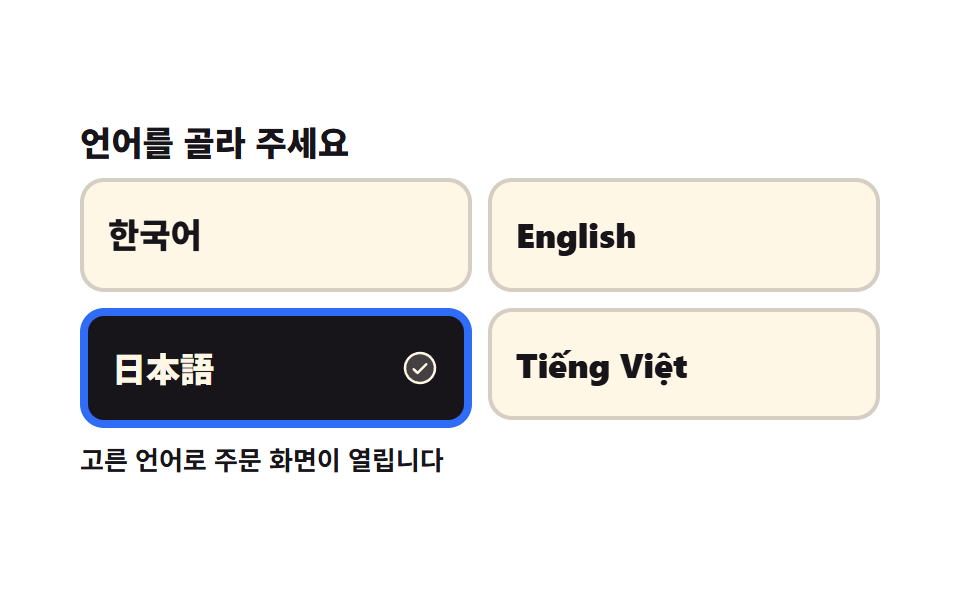 02 kiosk-language-first-choice
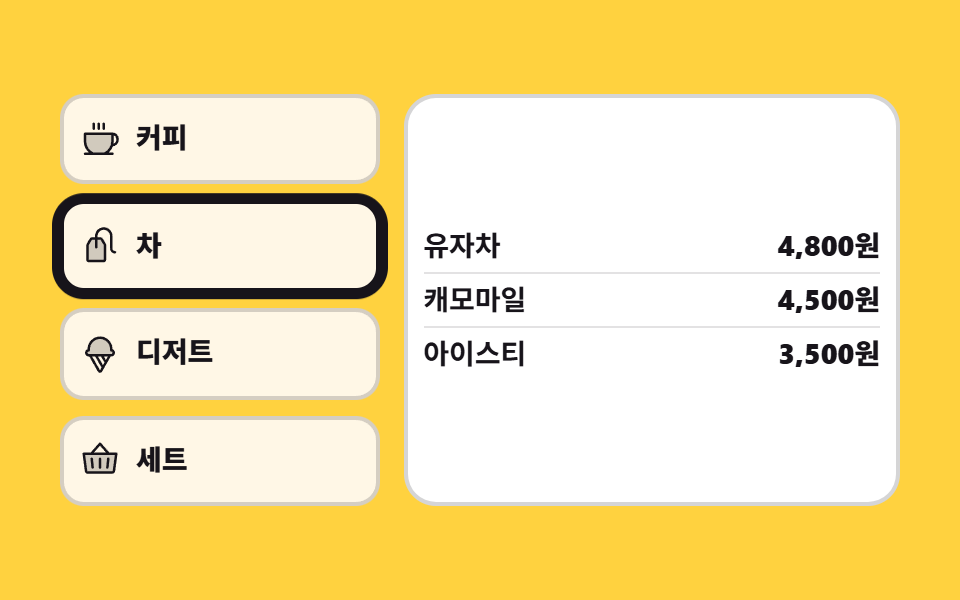 03 kiosk-category-rail-vertical
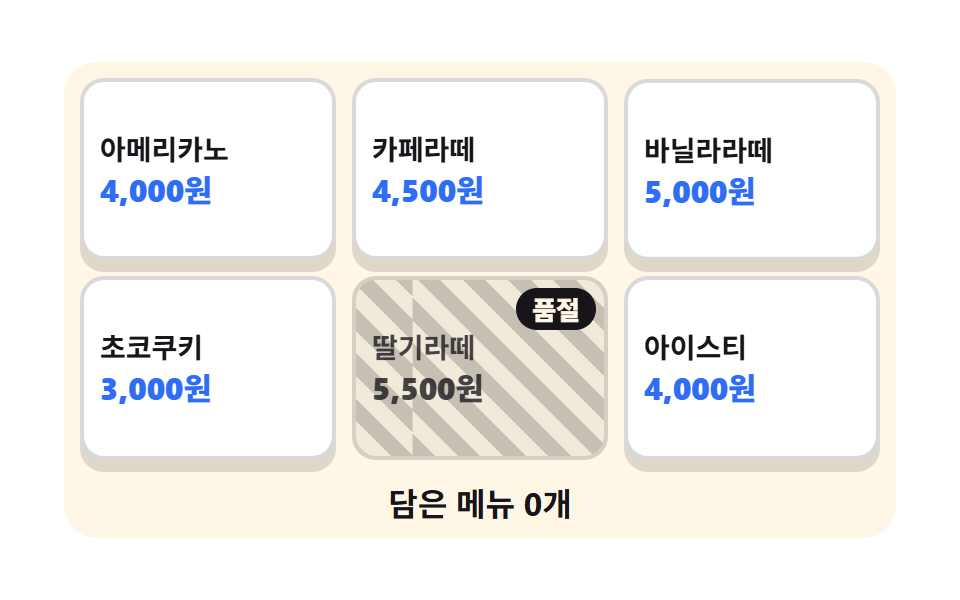 04 kiosk-menu-tile-soldout
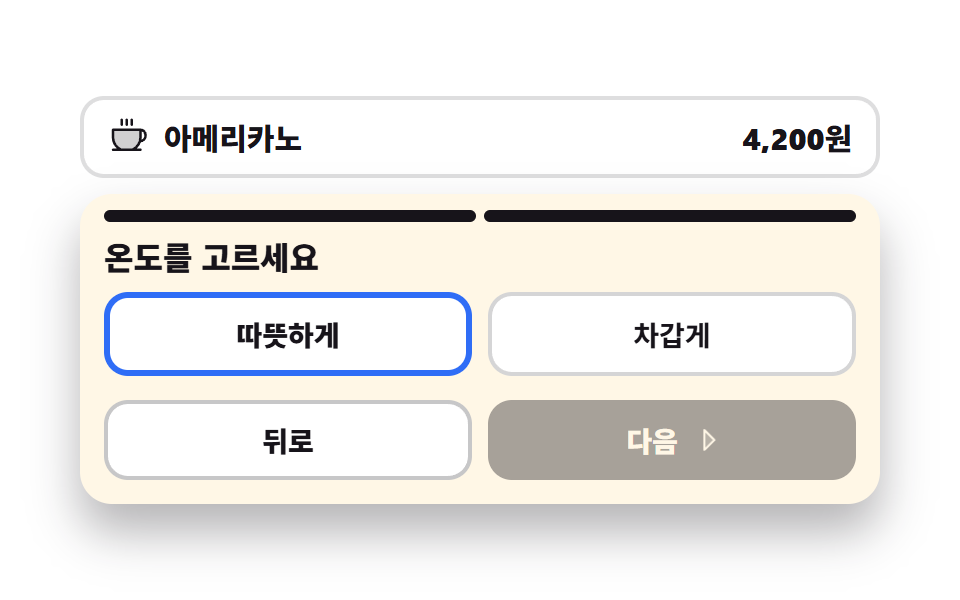 05 kiosk-option-sheet-step
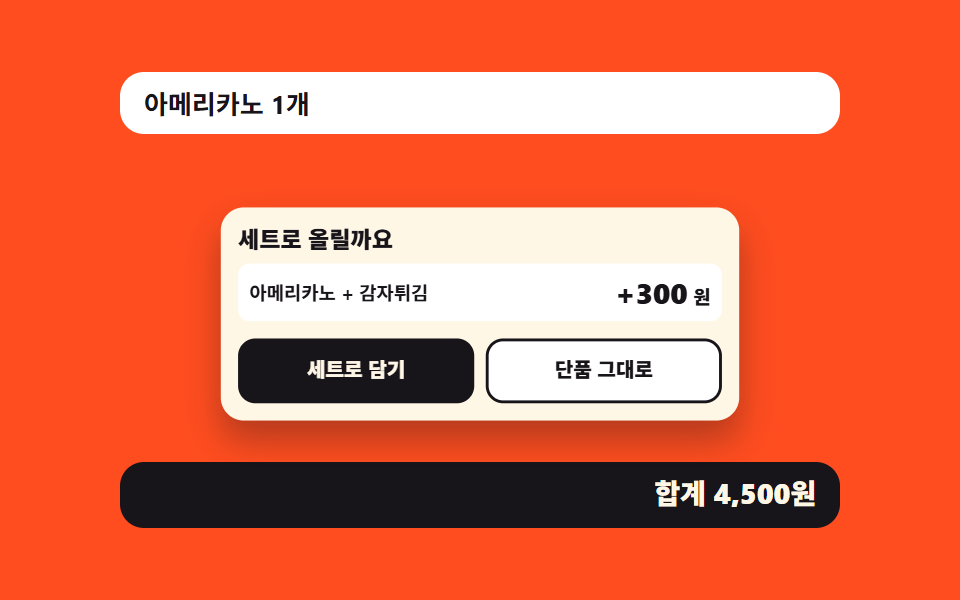 06 kiosk-combo-upsell-sheet
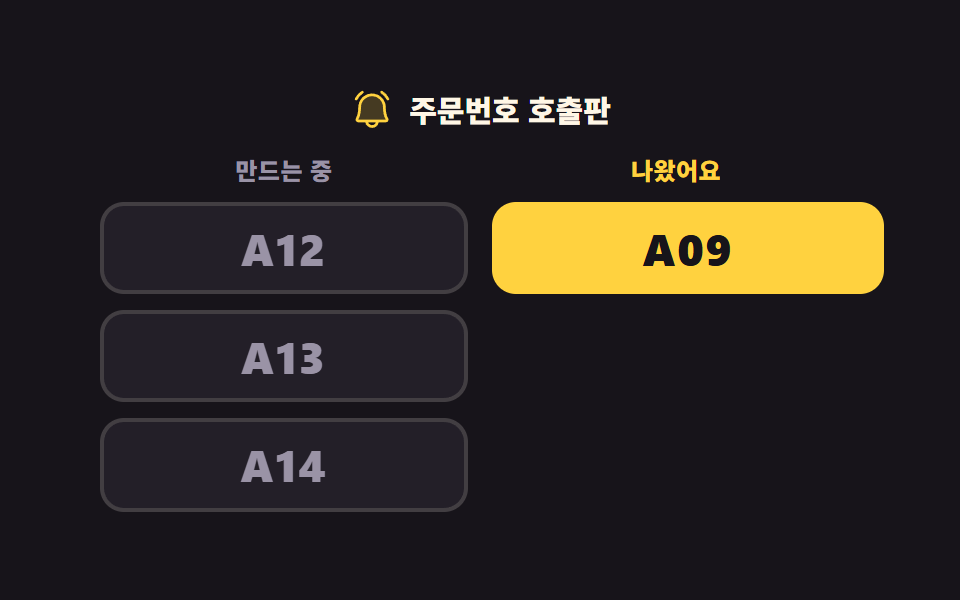 07 kiosk-order-number-board
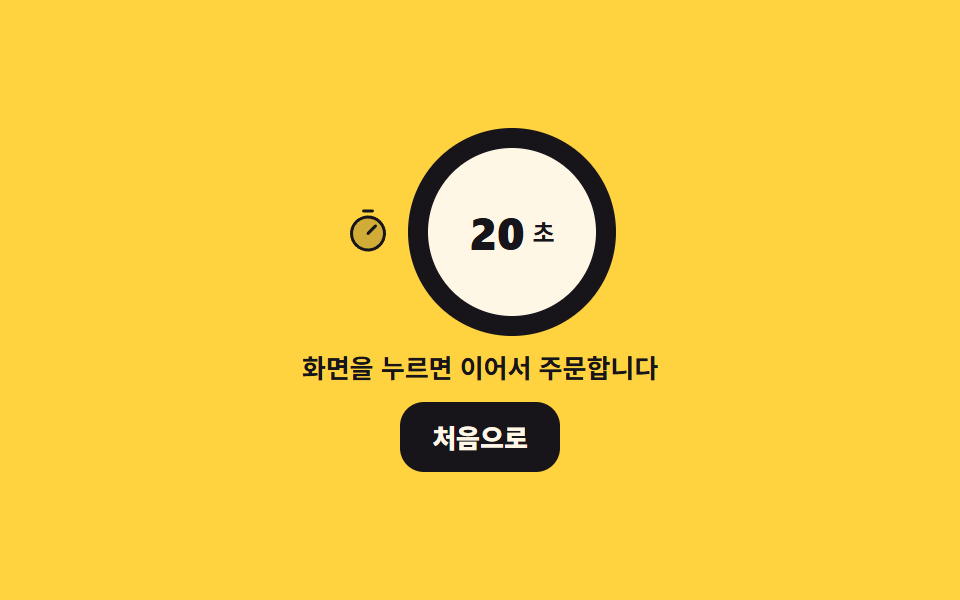 08 kiosk-timeout-return-home
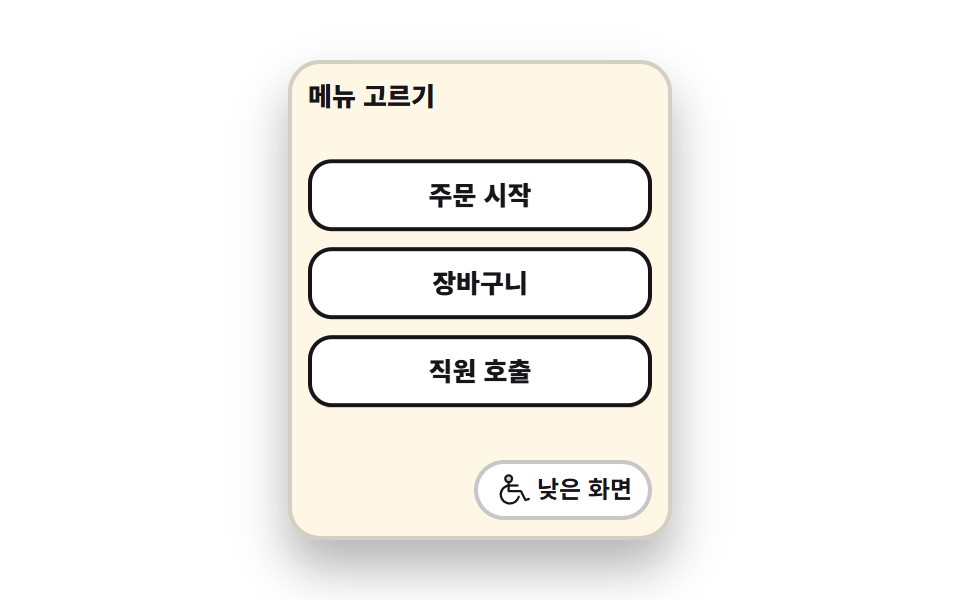 09 kiosk-low-reach-mode
자동 재생 · 눌러서 해당 항목으로 · 전부 한 zip
- 01 유휴 화면
- 02 언어 고르는 첫 화면
- 03 세로 카테고리 레일
- 04 메뉴 타일과 품절 칸
- 05 옵션 고르는 큰 시트
- 06 세트 권유 칸
- 07 주문번호 호출판
- 08 손을 떼면 처음으로
- 09 낮은 화면 모드
늘어놓은 기준은 CSS 난이도가 아니라 손님이 매장 단말 앞에 서서 밟는 차례입니다. 아직 아무도 안 만지는 화면이 맨 앞이고(01), 손이 닿으면 언어를 묻고(02), 왼쪽 레일로 분류를 좁힌 뒤(03) 타일에서 메뉴를 고릅니다(04). 고른 메뉴의 옵션을 두 걸음으로 받고(05) 세트로 올릴지 한 번 묻고(06), 값을 치른 손님은 호출판 앞에서 번호를 기다립니다(07). 마지막 둘은 사람이 떠났을 때와 사람이 앉아 있을 때입니다 — 손을 떼면 화면이 스스로 처음으로 돌아가고(08), 휠체어 눈높이에 맞춰 버튼 묶음이 통째로 내려앉습니다(09). 키오스크 화면 구성이 웹 화면과 갈라지는 지점이 여기입니다. 수량 스테퍼·쿠폰·배송지를 다루는 장바구니 UI 9종과 달리 매장 단말은 화면이 통째로 갈리고, 누르는 칸도 마우스 포인터가 아니라 손가락 너비에 맞춥니다. 눌린 칸이 어떻게 답하는지는 CSS 버튼 눌림 효과 9종이 더 깊이 다루고, 03 레일과 05 옵션 줄의 이웃은 세그먼트 컨트롤 선택 UI 9종, 08 이 되돌아간 뒤 서는 화면은 빈 화면 디자인 9종에 있습니다. 무대 색은 잉크 둘·종이 넷·노랑 둘·오렌지 하나로 나눠, 어두운 호출판과 밝은 주문 화면이 한 격자 안에서 서로를 가리지 않게 했습니다. 같은 interaction 기둥에서 손가락 대신 마우스가 주인공이 되면 마우스를 따라오는 CSS 3D 회전 장면이 되고, 01 유휴 화면에 캐릭터를 세우고 싶다면 마스코트 애니메이션에 아홉 가지 표정이 있습니다.
01유휴 화면
아무도 안 만지는 동안 도는 화면
광고 세 장이 steps(1, end) 컷으로 갈리고 그 아래 남은 시간 막대가 scaleX 로 왼쪽 변에서 차오릅니다. 화면을 누르면 미리보기 루프가 떨어지고 400×206px짜리 주문 칸이 열리며 포커스가 「무엇을 드릴까요」로 옮겨 가고, 이어지는 Tab 은 타일 네 개를 지나 「처음 화면으로」 버튼에서 끝납니다. 컷과 연속 움직임을 같은 2초 시계에 묶어 누적면적 29.122%·움직인 프레임 23/23 을 기록했습니다.
<main class="stage">
<div class="ka is-demo" id="ka">
  <button type="button" class="ka__attract" id="attract" aria-label="화면을 눌러 주문을 시작하세요">
    <span class="ka__promo" aria-hidden="true">
      <span class="ka__slide ka__slide--a"><b class="ka__big">20%</b><i class="ka__sub">오늘의 커피 할인</i></span>
      <span class="ka__slide ka__slide--b"><b class="ka__big">NEW</b><i class="ka__sub">시즌 라떼 나왔어요</i></span>
      <span class="ka__slide ka__slide--c"><b class="ka__big">TO GO</b><i class="ka__sub">포장 주문도 여기서</i></span>
    </span>
    <span class="ka__bar" aria-hidden="true"><i class="ka__fill"></i></span>
    <span class="ka__cta">
      <svg xmlns="http://www.w3.org/2000/svg" viewBox="0 0 256 256" fill="currentColor" class="ka__ico" aria-hidden="true"><path d="M216,148v36c0,24-8,40-8,40H72L42.68,174a20,20,0,0,1,34.64-20L96,184V76a20,20,0,0,1,40,0v56a20,20,0,0,1,40,0v16a20,20,0,0,1,40,0Z" opacity="0.2"/><path d="M56,76a60,60,0,0,1,120,0,8,8,0,0,1-16,0,44,44,0,0,0-88,0,8,8,0,1,1-16,0Zm140,44a27.9,27.9,0,0,0-13.36,3.39A28,28,0,0,0,144,106.7V76a28,28,0,0,0-56,0v80l-3.82-6.13a28,28,0,0,0-48.41,28.17l29.32,50A8,8,0,1,0,78.89,220L49.6,170a12,12,0,1,1,20.78-12l.14.23,18.68,30A8,8,0,0,0,104,184V76a12,12,0,0,1,24,0v68a8,8,0,1,0,16,0V132a12,12,0,0,1,24,0v20a8,8,0,0,0,16,0v-4a12,12,0,0,1,24,0v36c0,21.61-7.1,36.3-7.16,36.42a8,8,0,0,0,3.58,10.73A7.9,7.9,0,0,0,208,232a8,8,0,0,0,7.16-4.42c.37-.73,8.85-18,8.85-43.58V148A28,28,0,0,0,196,120Z"/></svg>
      <span class="ka__ctaText">화면을 눌러 주문을 시작하세요</span>
    </span>
  </button>
  <div class="ka__order" id="order" hidden>
    <p class="ka__head" id="head" tabindex="-1">무엇을 드릴까요</p>
    <ul class="ka__tiles">
      <li><button type="button" class="ka__tile">커피</button></li>
      <li><button type="button" class="ka__tile">홍차</button></li>
      <li><button type="button" class="ka__tile">디저트</button></li>
      <li><button type="button" class="ka__tile">세트</button></li>
    </ul>
    <button type="button" class="ka__back" id="back">처음 화면으로</button>
  </div>
</div>
</main>@use "../../../../site/static/demo-tokens" as *;
// 유휴 화면 — 아무도 안 만지는 동안 광고가 스스로 돌고, 손이 닿으면 주문 화면으로 넘어간다.
// 슬라이드 교체는 steps(1, end) 컷이다. opacity 로 서서히 교차하면 24장 표본의 중간 프레임이
// 두 광고가 반투명하게 겹친 유령이 되고 그 장이 poster 로 뽑힌다.
// 컷만 있으면 움직인 프레임이 두세 장으로 떨어지므로, 남은 시간을 알리는 막대(scaleX)와
// 손 아이콘의 위아래 흔들림을 같은 2초 시계에 붙여 칸을 채운다.
$duration: $dur-loop;
$easing: $ease-spring;
$color: $subject-blue;
@include stage($stage-ink);
.ka { width: 100%; max-width: 400px; }
.ka__attract {
display: block; width: 100%; padding: $sp-3; margin: 0; cursor: pointer;
border: 0; border-radius: $r-card; background: $subject-cream; text-align: left;
font-family: inherit; color: $subject-ink; box-shadow: $shadow-raised;
}
.ka__attract:focus-visible { outline: 3px solid $color; outline-offset: 3px; }
// display 를 준 요소는 UA 의 [hidden]{display:none} 을 이긴다 — 두 화면이 겹쳐 서는 것을 여기서 막는다
.ka [hidden] { display: none; }
.ka__promo {
position: relative; display: block; overflow: hidden;
height: clamp(64px, 22vw, 112px); border-radius: $r-sm;
}
.ka__slide {
position: absolute; inset: 0; display: grid; place-content: center; gap: $sp-1;
text-align: center; opacity: 0; color: $subject-ink;
}
.ka__slide--a { background: $stage-yellow; opacity: 1; }
.ka__slide--b { background: $subject-mint; }
.ka__slide--c { background: $stage-orange; }
.ka__big { font-weight: 800; font-size: clamp(20px, 7vw, 34px); line-height: 1; font-style: normal; }
.ka__sub { font-weight: 700; font-size: clamp(11px, 3vw, 14px); line-height: 1.2; font-style: normal; }
.ka__bar {
display: block; height: 6px; margin: $sp-2 0; border-radius: $r-pill;
background: rgba(23, 20, 26, .16); overflow: hidden;
}
// 채움 막대는 왼쪽 변이 시작점이라 transform-origin 을 왼쪽에 둔다 (붙는 지점이 있는 요소)
.ka__fill {
display: block; height: 100%; border-radius: $r-pill; background: $color;
transform: scaleX(0); transform-origin: left center;
}
.ka__cta {
display: flex; align-items: center; justify-content: center; gap: $sp-2;
padding: $sp-3 $sp-2; border-radius: $r-control;
background: $subject-ink; color: $subject-cream;
font-weight: 800; font-size: clamp(12px, 3.2vw, 15px);
}
.ka__ico { width: clamp(18px, 5vw, 24px); height: clamp(18px, 5vw, 24px); flex: 0 0 auto; }
.ka__ctaText { line-height: 1.2; }
.ka__order { padding: $sp-3; border-radius: $r-card; background: $subject-cream; box-shadow: $shadow-raised; }
.ka__head {
margin: 0 0 $sp-2; font-weight: 800; font-size: clamp(13px, 3.6vw, 17px); color: $subject-ink;
}
.ka__head:focus-visible { outline: 3px solid $color; outline-offset: 2px; }
.ka__tiles {
display: grid; grid-template-columns: repeat(2, 1fr); gap: $sp-2;
margin: 0 0 $sp-2; padding: 0; list-style: none;
}
// 버튼 격자는 width:100% 를 못 박는다 — 버튼은 fit-content 라 1fr 칸이 내용 폭으로 접힌다
.ka__tile {
width: 100%; padding: $sp-3 $sp-2; cursor: pointer;
border: 2px solid rgba(23, 20, 26, .18); border-radius: $r-control;
background: $stage-paper; color: $subject-ink;
font-family: inherit; font-weight: 800; font-size: clamp(12px, 3.2vw, 15px);
}
.ka__tile:focus-visible { outline: 3px solid $color; outline-offset: 2px; }
.ka__back {
width: 100%; padding: $sp-2; cursor: pointer; border: 0; border-radius: $r-control;
background: $subject-ink; color: $subject-cream;
font-family: inherit; font-weight: 700; font-size: clamp(11px, 3vw, 13px);
}
.ka__back:focus-visible { outline: 3px solid $color; outline-offset: 2px; }
// ── 미리보기 루프 ────────────────────────────────────────────────
// 광고 세 장이 2초를 3등분해 컷으로 갈린다. 세 애니메이션이 같은 2초 시계를 쓰므로 어긋나지 않는다.
.ka.is-demo .ka__slide {
animation-name: kaSlide; animation-duration: $duration;
animation-timing-function: steps(1, end); animation-iteration-count: infinite;
animation-fill-mode: backwards;
}
.ka.is-demo .ka__slide--b { animation-delay: calc(#{$duration} / -3 * 2); }
.ka.is-demo .ka__slide--c { animation-delay: calc(#{$duration} / -3); }
@keyframes kaSlide {
0% { opacity: 1; }
33.34%, 100% { opacity: 0; }
}
.ka.is-demo .ka__fill {
animation-name: kaFill; animation-duration: $duration;
animation-timing-function: linear; animation-iteration-count: infinite;
}
@keyframes kaFill {
0% { transform: scaleX(0); }
33.33% { transform: scaleX(1); }
33.34% { transform: scaleX(0); }
66.66% { transform: scaleX(1); }
66.67% { transform: scaleX(0); }
100% { transform: scaleX(1); }
}
// 아이콘은 자기 중심에서 흔들린다 — 누르라는 손짓이라 위아래로만 움직인다
.ka.is-demo .ka__ico {
animation-name: kaTap; animation-duration: $duration;
animation-timing-function: $easing; animation-iteration-count: infinite;
}
@keyframes kaTap {
0%, 100% { transform: translateY(0); }
16% { transform: translateY(5px); }
32% { transform: translateY(0); }
48% { transform: translateY(5px); }
64% { transform: translateY(0); }
}
// 폰 폭에서 쓸 수 있는 세로는 174px 남짓이다. 주문 칸(머리말 + 타일 네 칸 + 되돌아가기)이
// 그 안에 들어오도록 간격과 안쪽 여백만 줄인다 — 누르는 칸의 가로 폭은 그대로 둔다
@media (max-width: 340px) {
.ka__attract, .ka__order { padding: $sp-2; }
.ka__cta { padding: $sp-2; }
.ka__head { margin-bottom: $sp-1; }
.ka__tiles { gap: $sp-1; margin-bottom: $sp-1; }
.ka__tile { padding: $sp-2 $sp-1; }
}
@media (prefers-reduced-motion: reduce) {
.ka.is-demo .ka__slide,
.ka.is-demo .ka__fill,
.ka.is-demo .ka__ico { animation: none !important; }
// 움직임 없이 첫 광고와 3분의 1쯤 찬 막대를 세워 둔다
.ka.is-demo .ka__slide--a { opacity: 1 !important; }
.ka.is-demo .ka__slide--b,
.ka.is-demo .ka__slide--c { opacity: 0 !important; }
.ka.is-demo .ka__fill { transform: scaleX(.34) !important; }
}html, body {
margin: 0;
overflow: hidden;
}
.stage {
box-sizing: border-box;
min-height: 100vh;
display: grid;
place-items: center;
margin: 0;
background: #17141a;
font-family: -apple-system, "Segoe UI", "Noto Sans KR", sans-serif;
padding: clamp(8px, 4vw, 24px);
}
.ka {
width: 100%;
max-width: 400px;
}
.ka__attract {
display: block;
width: 100%;
padding: 12px;
margin: 0;
cursor: pointer;
border: 0;
border-radius: 16px;
background: #fff7e6;
text-align: left;
font-family: inherit;
color: #17141a;
box-shadow: 0 14px 24px rgba(23, 20, 26, 0.32);
}
.ka__attract:focus-visible {
outline: 3px solid #2f6df6;
outline-offset: 3px;
}
.ka [hidden] {
display: none;
}
.ka__promo {
position: relative;
display: block;
overflow: hidden;
height: clamp(64px, 22vw, 112px);
border-radius: 8px;
}
.ka__slide {
position: absolute;
inset: 0;
display: grid;
place-content: center;
gap: 4px;
text-align: center;
opacity: 0;
color: #17141a;
}
.ka__slide--a {
background: #ffd23f;
opacity: 1;
}
.ka__slide--b {
background: #4cd4a6;
}
.ka__slide--c {
background: #ff4d1f;
}
.ka__big {
font-weight: 800;
font-size: clamp(20px, 7vw, 34px);
line-height: 1;
font-style: normal;
}
.ka__sub {
font-weight: 700;
font-size: clamp(11px, 3vw, 14px);
line-height: 1.2;
font-style: normal;
}
.ka__bar {
display: block;
height: 6px;
margin: 8px 0;
border-radius: 999px;
background: rgba(23, 20, 26, 0.16);
overflow: hidden;
}
.ka__fill {
display: block;
height: 100%;
border-radius: 999px;
background: #2f6df6;
transform: scaleX(0);
transform-origin: left center;
}
.ka__cta {
display: flex;
align-items: center;
justify-content: center;
gap: 8px;
padding: 12px 8px;
border-radius: 12px;
background: #17141a;
color: #fff7e6;
font-weight: 800;
font-size: clamp(12px, 3.2vw, 15px);
}
.ka__ico {
width: clamp(18px, 5vw, 24px);
height: clamp(18px, 5vw, 24px);
flex: 0 0 auto;
}
.ka__ctaText {
line-height: 1.2;
}
.ka__order {
padding: 12px;
border-radius: 16px;
background: #fff7e6;
box-shadow: 0 14px 24px rgba(23, 20, 26, 0.32);
}
.ka__head {
margin: 0 0 8px;
font-weight: 800;
font-size: clamp(13px, 3.6vw, 17px);
color: #17141a;
}
.ka__head:focus-visible {
outline: 3px solid #2f6df6;
outline-offset: 2px;
}
.ka__tiles {
display: grid;
grid-template-columns: repeat(2, 1fr);
gap: 8px;
margin: 0 0 8px;
padding: 0;
list-style: none;
}
.ka__tile {
width: 100%;
padding: 12px 8px;
cursor: pointer;
border: 2px solid rgba(23, 20, 26, 0.18);
border-radius: 12px;
background: #ffffff;
color: #17141a;
font-family: inherit;
font-weight: 800;
font-size: clamp(12px, 3.2vw, 15px);
}
.ka__tile:focus-visible {
outline: 3px solid #2f6df6;
outline-offset: 2px;
}
.ka__back {
width: 100%;
padding: 8px;
cursor: pointer;
border: 0;
border-radius: 12px;
background: #17141a;
color: #fff7e6;
font-family: inherit;
font-weight: 700;
font-size: clamp(11px, 3vw, 13px);
}
.ka__back:focus-visible {
outline: 3px solid #2f6df6;
outline-offset: 2px;
}
.ka.is-demo .ka__slide {
animation-name: kaSlide;
animation-duration: 2s;
animation-timing-function: steps(1, end);
animation-iteration-count: infinite;
animation-fill-mode: backwards;
}
.ka.is-demo .ka__slide--b {
animation-delay: calc(2s / -3 * 2);
}
.ka.is-demo .ka__slide--c {
animation-delay: calc(2s / -3);
}
@keyframes kaSlide {
0% {
opacity: 1;
}
33.34%, 100% {
opacity: 0;
}
}
.ka.is-demo .ka__fill {
animation-name: kaFill;
animation-duration: 2s;
animation-timing-function: linear;
animation-iteration-count: infinite;
}
@keyframes kaFill {
0% {
transform: scaleX(0);
}
33.33% {
transform: scaleX(1);
}
33.34% {
transform: scaleX(0);
}
66.66% {
transform: scaleX(1);
}
66.67% {
transform: scaleX(0);
}
100% {
transform: scaleX(1);
}
}
.ka.is-demo .ka__ico {
animation-name: kaTap;
animation-duration: 2s;
animation-timing-function: cubic-bezier(0.2, 0.8, 0.2, 1);
animation-iteration-count: infinite;
}
@keyframes kaTap {
0%, 100% {
transform: translateY(0);
}
16% {
transform: translateY(5px);
}
32% {
transform: translateY(0);
}
48% {
transform: translateY(5px);
}
64% {
transform: translateY(0);
}
}
@media (max-width: 340px) {
.ka__attract, .ka__order {
padding: 8px;
}
.ka__cta {
padding: 8px;
}
.ka__head {
margin-bottom: 4px;
}
.ka__tiles {
gap: 4px;
margin-bottom: 4px;
}
.ka__tile {
padding: 8px 4px;
}
}
@media (prefers-reduced-motion: reduce) {
.ka.is-demo .ka__slide,
.ka.is-demo .ka__fill,
.ka.is-demo .ka__ico {
animation: none !important;
}
.ka.is-demo .ka__slide--a {
opacity: 1 !important;
}
.ka.is-demo .ka__slide--b,
.ka.is-demo .ka__slide--c {
opacity: 0 !important;
}
.ka.is-demo .ka__fill {
transform: scaleX(0.34) !important;
}
}var ka = document.getElementById('ka');
var attract = document.getElementById('attract');
var order = document.getElementById('order');
var back = document.getElementById('back');
var head = document.getElementById('head');
// 유휴 화면은 "아무도 안 만질 때 스스로 도는 화면"이다. 손이 닿는 순간 광고를 멈추고 주문 화면으로 넘긴다.
// 미리보기 루프(.is-demo)는 CSS 키프레임이 돌리고, 사람이 누르면 여기서 루프를 떼고 화면을 바꾼다.
function start() {
  ka.classList.remove('is-demo');
  attract.hidden = true;
  order.hidden = false;
  head.focus({ preventScroll: true });
}

function home() {
  order.hidden = true;
  attract.hidden = false;
  attract.focus({ preventScroll: true });
}

attract.addEventListener('click', start);
back.addEventListener('click', function (e) { e.stopPropagation(); home(); });// AttractIdleScreen — vanilla 판(run/298/demo/01-kiosk-attract-idle-loop/index.html) 의 React 포트.
// 유휴 화면은 "아무도 안 만질 때 스스로 도는 화면"이다. 손이 닿는 순간 광고를 멈추고 주문 화면으로 넘긴다.
// 미리보기 루프(.isDemo)는 CSS 키프레임이 돌리고, 사람이 누르면 여기서 루프를 떼고 화면을 바꾼다.
// 두 화면은 hidden 속성 하나로 갈린다 — 모듈의 `.root [hidden] { display: none; }` 이
// display 를 준 요소에서도 UA 기본값을 이겨 준다(안 그러면 두 화면이 겹쳐 선다). 값·수치는 vanilla 와 같다.
import { useEffect, useRef, useState } from "react";
import type { CSSProperties } from "react";
import styles from "./AttractIdleScreen.module.scss";
export type AttractIdleScreenProps = {
duration?: number;
easing?: string;
color?: string;
};
type Vars = CSSProperties & {
"--duration"?: string;
"--easing"?: string;
"--color"?: string;
};
// ambient 타입에는 React 이벤트 제네릭이 없다 — 핸들러가 실제로 쓰는 것만 지역 타입으로 적는다
type StopEvt = { stopPropagation(): void };
const CTA_LABEL = "화면을 눌러 주문을 시작하세요";
const ORDER_HEAD = "무엇을 드릴까요";
const BACK_LABEL = "처음 화면으로";
const SLIDES: { cls: string; big: string; sub: string }[] = [
{ cls: "slideA", big: "20%", sub: "오늘의 커피 할인" },
{ cls: "slideB", big: "NEW", sub: "시즌 라떼 나왔어요" },
{ cls: "slideC", big: "TO GO", sub: "포장 주문도 여기서" },
];
const TILES: string[] = ["커피", "홍차", "디저트", "세트"];
export default function AttractIdleScreen({
duration = 2000,
easing = "cubic-bezier(.2, .8, .2, 1)",
color = "#2f6df6",
}: AttractIdleScreenProps) {
const attractRef = useRef<HTMLButtonElement | null>(null);
const headRef = useRef<HTMLParagraphElement | null>(null);
// 첫 렌더에는 초점을 옮기지 않는다 — 사람이 만진 뒤부터가 화면 전환이다
const touchedRef = useRef<boolean>(false);
const [ordering, setOrdering] = useState(false);
const [demo, setDemo] = useState(true);
const vars: Vars = { "--duration": `${duration}ms`, "--easing": easing, "--color": color };
useEffect(() => {
if (!touchedRef.current) return;
const target = ordering ? headRef.current : attractRef.current;
if (target) target.focus({ preventScroll: true });
}, [ordering]);
function start(): void {
touchedRef.current = true;
setDemo(false);
setOrdering(true);
}
function home(event: StopEvt): void {
event.stopPropagation();
touchedRef.current = true;
setOrdering(false);
}
const cls = [styles.root, demo ? styles.isDemo : ""].filter(Boolean).join(" ");
return (
<main className={styles.stage}>
<div className={cls} style={vars}>
<button
type="button"
className={styles.attract}
ref={attractRef}
hidden={ordering}
aria-label={CTA_LABEL}
onClick={start}
>
<span className={styles.promo} aria-hidden="true">
{SLIDES.map((slide) => (
<span key={slide.cls} className={`${styles.slide} ${styles[slide.cls]}`}>
<b className={styles.big}>{slide.big}</b>
<i className={styles.sub}>{slide.sub}</i>
</span>
))}
</span>
<span className={styles.bar} aria-hidden="true"><i className={styles.fill}></i></span>
<span className={styles.cta}>
<svg xmlns="http://www.w3.org/2000/svg" viewBox="0 0 256 256" fill="currentColor" className={styles.ico} aria-hidden="true"><path d="M216,148v36c0,24-8,40-8,40H72L42.68,174a20,20,0,0,1,34.64-20L96,184V76a20,20,0,0,1,40,0v56a20,20,0,0,1,40,0v16a20,20,0,0,1,40,0Z" opacity="0.2"/><path d="M56,76a60,60,0,0,1,120,0,8,8,0,0,1-16,0,44,44,0,0,0-88,0,8,8,0,1,1-16,0Zm140,44a27.9,27.9,0,0,0-13.36,3.39A28,28,0,0,0,144,106.7V76a28,28,0,0,0-56,0v80l-3.82-6.13a28,28,0,0,0-48.41,28.17l29.32,50A8,8,0,1,0,78.89,220L49.6,170a12,12,0,1,1,20.78-12l.14.23,18.68,30A8,8,0,0,0,104,184V76a12,12,0,0,1,24,0v68a8,8,0,1,0,16,0V132a12,12,0,0,1,24,0v20a8,8,0,0,0,16,0v-4a12,12,0,0,1,24,0v36c0,21.61-7.1,36.3-7.16,36.42a8,8,0,0,0,3.58,10.73A7.9,7.9,0,0,0,208,232a8,8,0,0,0,7.16-4.42c.37-.73,8.85-18,8.85-43.58V148A28,28,0,0,0,196,120Z"/></svg>
<span className={styles.ctaText}>{CTA_LABEL}</span>
</span>
</button>
<div className={styles.order} hidden={!ordering}>
<p className={styles.head} ref={headRef} tabIndex={-1}>{ORDER_HEAD}</p>
<ul className={styles.tiles}>
{TILES.map((tile) => (
<li key={tile}><button type="button" className={styles.tile}>{tile}</button></li>
))}
</ul>
<button type="button" className={styles.back} onClick={home}>{BACK_LABEL}</button>
</div>
</div>
</main>
);
}01 · 유휴 화면 — 측정 누적면적 29.122% · 움직인 프레임 23/23GODRICH 원작 · zip 에 SCSS·React 포함 · 비밀번호 보기
function start() {
ka.classList.remove('is-demo');
attract.hidden = true;
order.hidden = false;
head.focus({ preventScroll: true });
}
function home() {
order.hidden = true;
attract.hidden = false;
attract.focus({ preventScroll: true });
}
attract.addEventListener('click', start);
back.addEventListener('click', function (e) { e.stopPropagation(); home(); });
02언어 고르는 첫 화면
네 언어를 한 화면에 세우는 칸
네 칸이 translateY 로 차례로 떠오르고 고른 칸에만 4px 테두리·먹 배경·체크가 한 프레임에 함께 붙어, 누적면적 35.997%·움직인 프레임 15/23 이 나왔습니다. 日本語 칸을 누르면 aria-pressed 가 그 칸으로 옮겨 가고 켜진 칸은 언제나 정확히 하나이며, 아래 안내 줄도 「日本語で注文画面が開きます」로 함께 바뀝니다. 언어 이름은 한국어·English·日本語·Tiếng Việt처럼 각 언어 표기 그대로 둡니다 — 번역해 두면 정작 그 언어를 쓰는 사람이 자기 줄을 못 찾습니다.
<main class="stage">
<div class="kl is-demo" id="kl">
  <p class="kl__head">언어를 골라 주세요</p>
  <div class="kl__grid" role="group" aria-label="화면 언어">
    <!-- _의도적한국어: 언어 이름은 그 언어 표기가 정석이라 번역하지 않는다. 문구 사전이 걷어 가지 않도록 data-name 에 두고 CSS content 로 그린다 -->
    <div class="kl__cell kl__cell--1">
      <button type="button" class="kl__opt" data-lang="ko" aria-pressed="true">
        <span class="kl__name" data-name="한국어"></span>
        <svg xmlns="http://www.w3.org/2000/svg" viewBox="0 0 256 256" fill="currentColor" class="kl__check" aria-hidden="true"><path d="M224,128a96,96,0,1,1-96-96A96,96,0,0,1,224,128Z" opacity="0.2"/><path d="M173.66,98.34a8,8,0,0,1,0,11.32l-56,56a8,8,0,0,1-11.32,0l-24-24a8,8,0,0,1,11.32-11.32L112,148.69l50.34-50.35A8,8,0,0,1,173.66,98.34ZM232,128A104,104,0,1,1,128,24,104.11,104.11,0,0,1,232,128Zm-16,0a88,88,0,1,0-88,88A88.1,88.1,0,0,0,216,128Z"/></svg>
      </button>
    </div>
    <div class="kl__cell kl__cell--2">
      <button type="button" class="kl__opt" data-lang="en" aria-pressed="false">
        <span class="kl__name" data-name="English"></span>
        <svg xmlns="http://www.w3.org/2000/svg" viewBox="0 0 256 256" fill="currentColor" class="kl__check" aria-hidden="true"><path d="M224,128a96,96,0,1,1-96-96A96,96,0,0,1,224,128Z" opacity="0.2"/><path d="M173.66,98.34a8,8,0,0,1,0,11.32l-56,56a8,8,0,0,1-11.32,0l-24-24a8,8,0,0,1,11.32-11.32L112,148.69l50.34-50.35A8,8,0,0,1,173.66,98.34ZM232,128A104,104,0,1,1,128,24,104.11,104.11,0,0,1,232,128Zm-16,0a88,88,0,1,0-88,88A88.1,88.1,0,0,0,216,128Z"/></svg>
      </button>
    </div>
    <div class="kl__cell kl__cell--3">
      <button type="button" class="kl__opt" data-lang="ja" aria-pressed="false">
        <span class="kl__name" data-name="日本語"></span>
        <svg xmlns="http://www.w3.org/2000/svg" viewBox="0 0 256 256" fill="currentColor" class="kl__check" aria-hidden="true"><path d="M224,128a96,96,0,1,1-96-96A96,96,0,0,1,224,128Z" opacity="0.2"/><path d="M173.66,98.34a8,8,0,0,1,0,11.32l-56,56a8,8,0,0,1-11.32,0l-24-24a8,8,0,0,1,11.32-11.32L112,148.69l50.34-50.35A8,8,0,0,1,173.66,98.34ZM232,128A104,104,0,1,1,128,24,104.11,104.11,0,0,1,232,128Zm-16,0a88,88,0,1,0-88,88A88.1,88.1,0,0,0,216,128Z"/></svg>
      </button>
    </div>
    <div class="kl__cell kl__cell--4">
      <button type="button" class="kl__opt" data-lang="vi" aria-pressed="false">
        <span class="kl__name" data-name="Tiếng Việt"></span>
        <svg xmlns="http://www.w3.org/2000/svg" viewBox="0 0 256 256" fill="currentColor" class="kl__check" aria-hidden="true"><path d="M224,128a96,96,0,1,1-96-96A96,96,0,0,1,224,128Z" opacity="0.2"/><path d="M173.66,98.34a8,8,0,0,1,0,11.32l-56,56a8,8,0,0,1-11.32,0l-24-24a8,8,0,0,1,11.32-11.32L112,148.69l50.34-50.35A8,8,0,0,1,173.66,98.34ZM232,128A104,104,0,1,1,128,24,104.11,104.11,0,0,1,232,128Zm-16,0a88,88,0,1,0-88,88A88.1,88.1,0,0,0,216,128Z"/></svg>
      </button>
    </div>
  </div>
  <p class="kl__hint" id="klHint">고른 언어로 주문 화면이 열립니다</p>
</div>
</main>@use "../../../../site/static/demo-tokens" as *;
// 언어 고르는 첫 화면 — 큰 칸 네 개로 언어를 고르고, 고른 칸에만 체크가 붙는다.
// 선택 표시(굵은 테두리 · 먹 배경 · 체크 아이콘)는 전부 같은 steps(1, end) 시각표 위에 있다.
// opacity 로 서서히 교차하면 24장 표본의 중간 프레임이 두 칸이 반쯤 켜진 유령이 되고 그 장이 poster 로 뽑힌다.
// 컷만 있으면 움직인 프레임이 두세 장으로 떨어지므로, 네 칸이 차례로 떠오르는 translateY 를
// 같은 2초 시계에 계속 돌려 칸을 채운다.
$duration: $dur-loop;
$easing: $ease-spring;
$color: $subject-blue;
@include stage($stage-paper);
.kl { width: 100%; max-width: 400px; }
.kl__head {
margin: 0 0 $sp-2; font-weight: 800; font-size: clamp(13px, 3.6vw, 17px);
line-height: 1.2; color: $subject-ink;
}
.kl__grid { display: grid; grid-template-columns: repeat(2, 1fr); gap: $sp-2; }
// 칸(떠오름)과 버튼(선택 컷)을 나눠 둔다 — 둘의 animation-delay 가 다르기 때문이다
.kl__cell { display: block; }
// 버튼 격자는 width:100% 를 못 박는다 — 버튼은 fit-content 라 1fr 칸이 내용 폭으로 접힌다
.kl__opt {
box-sizing: border-box; width: 100%;
display: flex; align-items: center; justify-content: space-between; gap: $sp-2;
padding: $sp-4 $sp-3; cursor: pointer;
border: 2px solid rgba(23, 20, 26, .18); border-radius: $r-control;
background: $subject-cream; color: $subject-ink;
font-family: inherit; font-weight: 800; font-size: clamp(12px, 3.6vw, 17px);
line-height: 1.2; text-align: left;
}
.kl__opt:focus-visible { outline: 3px solid $color; outline-offset: 2px; }
// 언어 이름은 번역하지 않는 값이라 data-name 에 두고 여기서 그린다 (index.html 의 _의도적한국어 주석 참고)
.kl__name::after { content: attr(data-name); }
// 체크는 안 고른 칸에서도 자리를 차지한다 — 고를 때 글자가 밀리지 않는다
.kl__check {
width: clamp(14px, 4.4vw, 20px); height: clamp(14px, 4.4vw, 20px);
flex: 0 0 auto; opacity: 0;
}
// 고른 칸 — 정적 경로. 손이 닿으면 JS 가 aria-pressed 를 옮기고 이 규칙이 그대로 그린다
.kl__opt[aria-pressed="true"] {
border-width: 4px; border-color: $color;
background: $subject-ink; color: $subject-cream;
}
.kl__opt[aria-pressed="true"] .kl__check { opacity: 1; }
.kl__hint {
margin: $sp-2 0 0; font-weight: 700; font-size: clamp(11px, 3vw, 13px);
line-height: 1.3; color: $subject-ink;
}
// ── 미리보기 루프 ────────────────────────────────────────────────
// 네 칸이 2초를 4등분해 차례로 켜진다. 테두리·배경·글자색·체크가 같은 시각표라 한 프레임에 갈린다.
.kl.is-demo .kl__opt {
animation-name: klSel; animation-duration: $duration;
animation-timing-function: steps(1, end); animation-iteration-count: infinite;
}
.kl.is-demo .kl__check {
animation-name: klCheck; animation-duration: $duration;
animation-timing-function: steps(1, end); animation-iteration-count: infinite;
}
.kl.is-demo .kl__cell--2 .kl__opt,
.kl.is-demo .kl__cell--2 .kl__check { animation-delay: calc(#{$duration} / -4 * 3); }
.kl.is-demo .kl__cell--3 .kl__opt,
.kl.is-demo .kl__cell--3 .kl__check { animation-delay: calc(#{$duration} / -2); }
.kl.is-demo .kl__cell--4 .kl__opt,
.kl.is-demo .kl__cell--4 .kl__check { animation-delay: calc(#{$duration} / -4); }
@keyframes klSel {
0% { border-width: 4px; border-color: $color; background: $subject-ink; color: $subject-cream; }
25%, 100% { border-width: 2px; border-color: rgba(23, 20, 26, .18); background: $subject-cream; color: $subject-ink; }
}
@keyframes klCheck {
0% { opacity: 1; }
25%, 100% { opacity: 0; }
}
// 떠오름 — 컷 옆에 붙이는 작은 움직임. 반투명이 안 생기는 transform 이라 유령 프레임을 만들지 않는다.
// 지연이 걸린 루프라 fill-mode: backwards 가 없으면 0프레임에 완성 상태가 한 번 번쩍인다.
.kl.is-demo .kl__cell {
animation-name: klRise; animation-duration: $duration;
animation-timing-function: $easing; animation-iteration-count: infinite;
animation-fill-mode: backwards;
}
.kl.is-demo .kl__cell--2 { animation-delay: 80ms; }
.kl.is-demo .kl__cell--3 { animation-delay: 160ms; }
.kl.is-demo .kl__cell--4 { animation-delay: 240ms; }
@keyframes klRise {
0% { transform: translateY(8px); }
22%, 74% { transform: translateY(0); }
88%, 100% { transform: translateY(8px); }
}
@media (max-width: 340px) {
.kl__opt { padding: $sp-2; }
.kl__hint { margin-top: $sp-1; }
}
@media (prefers-reduced-motion: reduce) {
.kl.is-demo .kl__opt,
.kl.is-demo .kl__check,
.kl.is-demo .kl__cell { animation: none !important; }
// 움직임 없이 첫 칸이 고른 상태로 서 있게 값을 못 박는다
.kl.is-demo .kl__cell { transform: translateY(0) !important; }
}html, body {
margin: 0;
overflow: hidden;
}
.stage {
box-sizing: border-box;
min-height: 100vh;
display: grid;
place-items: center;
margin: 0;
background: #ffffff;
font-family: -apple-system, "Segoe UI", "Noto Sans KR", sans-serif;
padding: clamp(8px, 4vw, 24px);
}
.kl {
width: 100%;
max-width: 400px;
}
.kl__head {
margin: 0 0 8px;
font-weight: 800;
font-size: clamp(13px, 3.6vw, 17px);
line-height: 1.2;
color: #17141a;
}
.kl__grid {
display: grid;
grid-template-columns: repeat(2, 1fr);
gap: 8px;
}
.kl__cell {
display: block;
}
.kl__opt {
box-sizing: border-box;
width: 100%;
display: flex;
align-items: center;
justify-content: space-between;
gap: 8px;
padding: 16px 12px;
cursor: pointer;
border: 2px solid rgba(23, 20, 26, 0.18);
border-radius: 12px;
background: #fff7e6;
color: #17141a;
font-family: inherit;
font-weight: 800;
font-size: clamp(12px, 3.6vw, 17px);
line-height: 1.2;
text-align: left;
}
.kl__opt:focus-visible {
outline: 3px solid #2f6df6;
outline-offset: 2px;
}
.kl__name::after {
content: attr(data-name);
}
.kl__check {
width: clamp(14px, 4.4vw, 20px);
height: clamp(14px, 4.4vw, 20px);
flex: 0 0 auto;
opacity: 0;
}
.kl__opt[aria-pressed=true] {
border-width: 4px;
border-color: #2f6df6;
background: #17141a;
color: #fff7e6;
}
.kl__opt[aria-pressed=true] .kl__check {
opacity: 1;
}
.kl__hint {
margin: 8px 0 0;
font-weight: 700;
font-size: clamp(11px, 3vw, 13px);
line-height: 1.3;
color: #17141a;
}
.kl.is-demo .kl__opt {
animation-name: klSel;
animation-duration: 2s;
animation-timing-function: steps(1, end);
animation-iteration-count: infinite;
}
.kl.is-demo .kl__check {
animation-name: klCheck;
animation-duration: 2s;
animation-timing-function: steps(1, end);
animation-iteration-count: infinite;
}
.kl.is-demo .kl__cell--2 .kl__opt,
.kl.is-demo .kl__cell--2 .kl__check {
animation-delay: calc(2s / -4 * 3);
}
.kl.is-demo .kl__cell--3 .kl__opt,
.kl.is-demo .kl__cell--3 .kl__check {
animation-delay: calc(2s / -2);
}
.kl.is-demo .kl__cell--4 .kl__opt,
.kl.is-demo .kl__cell--4 .kl__check {
animation-delay: calc(2s / -4);
}
@keyframes klSel {
0% {
border-width: 4px;
border-color: #2f6df6;
background: #17141a;
color: #fff7e6;
}
25%, 100% {
border-width: 2px;
border-color: rgba(23, 20, 26, 0.18);
background: #fff7e6;
color: #17141a;
}
}
@keyframes klCheck {
0% {
opacity: 1;
}
25%, 100% {
opacity: 0;
}
}
.kl.is-demo .kl__cell {
animation-name: klRise;
animation-duration: 2s;
animation-timing-function: cubic-bezier(0.2, 0.8, 0.2, 1);
animation-iteration-count: infinite;
animation-fill-mode: backwards;
}
.kl.is-demo .kl__cell--2 {
animation-delay: 80ms;
}
.kl.is-demo .kl__cell--3 {
animation-delay: 160ms;
}
.kl.is-demo .kl__cell--4 {
animation-delay: 240ms;
}
@keyframes klRise {
0% {
transform: translateY(8px);
}
22%, 74% {
transform: translateY(0);
}
88%, 100% {
transform: translateY(8px);
}
}
@media (max-width: 340px) {
.kl__opt {
padding: 8px;
}
.kl__hint {
margin-top: 4px;
}
}
@media (prefers-reduced-motion: reduce) {
.kl.is-demo .kl__opt,
.kl.is-demo .kl__check,
.kl.is-demo .kl__cell {
animation: none !important;
}
.kl.is-demo .kl__cell {
transform: translateY(0) !important;
}
}var kl = document.getElementById('kl');
var klHint = document.getElementById('klHint');
var klOpts = [].slice.call(document.querySelectorAll('.kl__opt'));
// 언어 고르기 첫 화면. 고른 칸만 aria-pressed="true" 가 되고, 아래 안내 한 줄이 **고른 언어로** 바뀐다.
// 안내문 한 벌을 상수로 둔다 — 화면 언어가 바뀌는 것을 보여 주는 게 이 데모의 주제라서,
// ko 말고 en·ja·vi 문장은 번역 대상이 아니라 그 자체가 데모 데이터다.
var LANG_HINT = {
ko: '한국어로 주문 화면이 열립니다',
en: 'The order screen opens in English',
ja: '日本語で注文画面が開きます',
vi: 'Màn hình đặt món sẽ mở bằng tiếng Việt'
};
// 미리보기 루프(.is-demo)는 CSS 키프레임이 돌린다. 손이 닿는 순간 루프를 떼고 진짜 선택으로 넘긴다.
function klPick(btn) {
kl.classList.remove('is-demo');
for (var i = 0; i < klOpts.length; i++) {
klOpts[i].setAttribute('aria-pressed', klOpts[i] === btn ? 'true' : 'false');
}
var text = LANG_HINT[btn.getAttribute('data-lang')];
if (text) { klHint.textContent = text; }
}
// <button> 은 Enter·Space 를 브라우저가 click 으로 바꿔 준다 — 키 핸들러를 따로 두지 않는다.
for (var i = 0; i < klOpts.length; i++) {
klOpts[i].addEventListener('click', function (e) { klPick(e.currentTarget); });
}// LanguageFirstChoice — vanilla 판(run/298/demo/02-kiosk-language-first-choice/index.html) 의 React 포트.
// 언어 고르기 첫 화면. 고른 칸만 aria-pressed="true" 가 되고, 아래 안내 한 줄이 **고른 언어로** 바뀐다.
// 미리보기 루프(.isDemo)는 CSS 키프레임이 돌린다. 손이 닿는 순간 루프를 떼고 진짜 선택으로 넘긴다.
// <button> 은 Enter·Space 를 브라우저가 click 으로 바꿔 준다 — 키 핸들러를 따로 두지 않는다.
// 값·수치는 vanilla 와 같다.
import { useState } from "react";
import type { CSSProperties } from "react";
import styles from "./LanguageFirstChoice.module.scss";
export type LanguageFirstChoiceProps = {
duration?: number;
easing?: string;
color?: string;
};
type Vars = CSSProperties & {
"--duration"?: string;
"--easing"?: string;
"--color"?: string;
};
type Lang = { code: string; name: string; cell: string };
// _의도적한국어: 언어 이름은 그 언어 표기가 정석이라 번역하지 않는다.
// 문구 사전이 걷어 가지 않도록 data-name 에 두고 CSS content 로 그린다.
const LANGS: Lang[] = [
{ code: "ko", name: "한국어", cell: "cell1" },
{ code: "en", name: "English", cell: "cell2" },
{ code: "ja", name: "日本語", cell: "cell3" },
{ code: "vi", name: "Tiếng Việt", cell: "cell4" },
];
// 안내문 한 벌을 상수로 둔다 — 화면 언어가 바뀌는 것을 보여 주는 게 이 데모의 주제라서,
// ko 말고 en·ja·vi 문장은 번역 대상이 아니라 그 자체가 데모 데이터다.
const LANG_HINT: { [k: string]: string } = {
ko: "한국어로 주문 화면이 열립니다",
en: "The order screen opens in English",
ja: "日本語で注文画面が開きます",
vi: "Màn hình đặt món sẽ mở bằng tiếng Việt",
};
// CSS 모듈은 규칙이 없는 이름을 undefined 로 돌려준다 — vanilla 에서 스타일이 안 붙은 이름
// (첫 칸 .kl__cell--1 은 지연이 없어 규칙이 없다)까지 구조 그대로 옮기려고 빈 값을 걸러 낸다
function cx(...names: (string | undefined)[]): string {
return names.filter(Boolean).join(" ");
}
const HEAD = "언어를 골라 주세요";
const GROUP_LABEL = "화면 언어";
const FIRST_HINT = "고른 언어로 주문 화면이 열립니다";
// 체크 아이콘 넷이 같은 그림이라 한 군데서만 그린다
function CheckMark({ cls }: { cls: string }) {
return (
<svg xmlns="http://www.w3.org/2000/svg" viewBox="0 0 256 256" fill="currentColor" className={cls} aria-hidden="true"><path d="M224,128a96,96,0,1,1-96-96A96,96,0,0,1,224,128Z" opacity="0.2"/><path d="M173.66,98.34a8,8,0,0,1,0,11.32l-56,56a8,8,0,0,1-11.32,0l-24-24a8,8,0,0,1,11.32-11.32L112,148.69l50.34-50.35A8,8,0,0,1,173.66,98.34ZM232,128A104,104,0,1,1,128,24,104.11,104.11,0,0,1,232,128Zm-16,0a88,88,0,1,0-88,88A88.1,88.1,0,0,0,216,128Z"/></svg>
);
}
export default function LanguageFirstChoice({
duration = 2000,
easing = "cubic-bezier(.2, .8, .2, 1)",
color = "#2f6df6",
}: LanguageFirstChoiceProps) {
const [picked, setPicked] = useState("ko");
const [hint, setHint] = useState(FIRST_HINT);
const [demo, setDemo] = useState(true);
const vars: Vars = { "--duration": `${duration}ms`, "--easing": easing, "--color": color };
function pick(code: string): void {
setDemo(false);
setPicked(code);
const text = LANG_HINT[code];
if (text) { setHint(text); }
}
const cls = cx(styles.root, demo ? styles.isDemo : "");
return (
<main className={styles.stage}>
<div className={cls} style={vars}>
<p className={styles.head}>{HEAD}</p>
<div className={styles.grid} role="group" aria-label={GROUP_LABEL}>
{LANGS.map((lang) => (
<div key={lang.code} className={cx(styles.cell, styles[lang.cell])}>
<button
type="button"
className={styles.opt}
data-lang={lang.code}
aria-pressed={picked === lang.code ? "true" : "false"}
onClick={() => pick(lang.code)}
>
<span className={styles.name} data-name={lang.name}></span>
<CheckMark cls={styles.check} />
</button>
</div>
))}
</div>
<p className={styles.hint}>{hint}</p>
</div>
</main>
);
}02 · 언어 고르는 첫 화면 — 측정 누적면적 35.997% · 움직인 프레임 15/23GODRICH 원작 · zip 에 SCSS·React 포함 · 비밀번호 보기
var LANG_HINT = {
  ko: '한국어로 주문 화면이 열립니다',
  en: 'The order screen opens in English',
  ja: '日本語で注文画面が開きます',
  vi: 'Màn hình đặt món sẽ mở bằng tiếng Việt'
};

function klPick(btn) {
  kl.classList.remove('is-demo');
  for (var i = 0; i < klOpts.length; i++) {
    klOpts[i].setAttribute('aria-pressed', klOpts[i] === btn ? 'true' : 'false');
  }
  var text = LANG_HINT[btn.getAttribute('data-lang')];
  if (text) { klHint.textContent = text; }
}
03세로 카테고리 레일
서 있는 손이 닿는 왼쪽 아래
왼쪽에 세운 큰 칸 뒤로 먹 블록이 미끄러져 옮겨 다니고 오른쪽 메뉴 판이 같은 박자로 갈립니다. 디저트 칸을 누르면 블록의 top 이 43px 에서 150px 로 내려가는데, 블록을 칸보다 4px씩 크게 깔아 두어 43·96·150·204px 어느 자리에서도 칸과 정확히 −4px 차를 지킵니다. 움직이는 것이 블록 하나뿐이라 누적면적은 4.647% 로 낮고, 대신 프레임 사이 변화 강도는 178.4 로 아홉 중 가장 높습니다.
<main class="stage">
<div class="kr is-demo" id="kr" data-sel="1">
  <div class="kr__rail">
    <span class="kr__mark" aria-hidden="true"></span>
    <div class="kr__tabs" role="tablist" aria-orientation="vertical" aria-label="메뉴 분류" id="krTabs">
      <button type="button" role="tab" class="kr__tab" id="krTab1" aria-selected="true" aria-controls="krPanel1" tabindex="0" data-sel="1">
        <svg xmlns="http://www.w3.org/2000/svg" viewBox="0 0 256 256" fill="currentColor" class="kr__ico" aria-hidden="true"><path d="M208,88v48a88,88,0,0,1-51.3,80H83.3A88,88,0,0,1,32,136V88Z" opacity="0.2"/><path d="M80,56V24a8,8,0,0,1,16,0V56a8,8,0,0,1-16,0Zm40,8a8,8,0,0,0,8-8V24a8,8,0,0,0-16,0V56A8,8,0,0,0,120,64Zm32,0a8,8,0,0,0,8-8V24a8,8,0,0,0-16,0V56A8,8,0,0,0,152,64Zm96,56v8a40,40,0,0,1-37.51,39.91,96.59,96.59,0,0,1-27,40.09H208a8,8,0,0,1,0,16H32a8,8,0,0,1,0-16H56.54A96.3,96.3,0,0,1,24,136V88a8,8,0,0,1,8-8H208A40,40,0,0,1,248,120ZM200,96H40v40a80.27,80.27,0,0,0,45.12,72h69.76A80.27,80.27,0,0,0,200,136Zm32,24a24,24,0,0,0-16-22.62V136a95.78,95.78,0,0,1-1.2,15A24,24,0,0,0,232,128Z"/></svg>
        <span class="kr__label">커피</span>
      </button>
      <button type="button" role="tab" class="kr__tab" id="krTab2" aria-selected="false" aria-controls="krPanel2" tabindex="-1" data-sel="2">
        <svg xmlns="http://www.w3.org/2000/svg" viewBox="0 0 256 256" fill="currentColor" class="kr__ico" aria-hidden="true"><path d="M160,122.22V216a8,8,0,0,1-8,8H56a8,8,0,0,1-8-8V122.22a8,8,0,0,1,1.14-4.12L69.67,83.88A8,8,0,0,1,76.53,80h54.94a8,8,0,0,1,6.86,3.88l20.53,34.22A8,8,0,0,1,160,122.22Z" opacity="0.2"/><path d="M224,160a16,16,0,0,1-16-16V64A56,56,0,0,0,96,64v8H76.53a16.09,16.09,0,0,0-13.72,7.77L42.28,114A16.06,16.06,0,0,0,40,122.22V216a16,16,0,0,0,16,16h96a16,16,0,0,0,16-16V122.22a16.06,16.06,0,0,0-2.28-8.24L145.19,79.77A16.09,16.09,0,0,0,131.47,72H112V64a40,40,0,0,1,80,0v80a32,32,0,0,0,32,32,8,8,0,0,0,0-16ZM131.47,88,152,122.22V216H56V122.22L76.53,88H96v48a8,8,0,0,0,16,0V88Z"/></svg>
        <span class="kr__label">차</span>
      </button>
      <button type="button" role="tab" class="kr__tab" id="krTab3" aria-selected="false" aria-controls="krPanel3" tabindex="-1" data-sel="3">
        <svg xmlns="http://www.w3.org/2000/svg" viewBox="0 0 256 256" fill="currentColor" class="kr__ico" aria-hidden="true"><path d="M216,120a16,16,0,0,1-16,16H56a16,16,0,0,1,0-32V96a72,72,0,0,1,144,0v8A16,16,0,0,1,216,120Z" opacity="0.2"/><path d="M208,97.37V96A80,80,0,0,0,48,96v1.37A24,24,0,0,0,56,144h3.29l54.82,95.94a16,16,0,0,0,27.78,0L196.71,144H200a24,24,0,0,0,8-46.63ZM77.71,144H97.07l40.61,71.06L128,232Zm57.08,0,21.75,38.06-9.65,16.88L115.5,144Zm31,21.94L153.21,144h25.08ZM200,128H56a8,8,0,0,1,0-16,8,8,0,0,0,8-8V96a64,64,0,0,1,128,0v8a8,8,0,0,0,8,8,8,8,0,0,1,0,16Z"/></svg>
        <span class="kr__label">디저트</span>
      </button>
      <button type="button" role="tab" class="kr__tab" id="krTab4" aria-selected="false" aria-controls="krPanel4" tabindex="-1" data-sel="4">
        <svg xmlns="http://www.w3.org/2000/svg" viewBox="0 0 256 256" fill="currentColor" class="kr__ico" aria-hidden="true"><path d="M232,88,216.93,201.06A8,8,0,0,1,209,208H47a8,8,0,0,1-7.93-6.94L24,88Z" opacity="0.2"/><path d="M136,120v56a8,8,0,0,1-16,0V120a8,8,0,0,1,16,0Zm36.84-.8-5.6,56A8,8,0,0,0,174.4,184a7.32,7.32,0,0,0,.81,0,8,8,0,0,0,7.95-7.2l5.6-56a8,8,0,0,0-15.92-1.6Zm-89.68,0a8,8,0,0,0-15.92,1.6l5.6,56a8,8,0,0,0,8,7.2,7.32,7.32,0,0,0,.81,0,8,8,0,0,0,7.16-8.76ZM239.93,89.06,224.86,202.12A16.06,16.06,0,0,1,209,216H47a16.06,16.06,0,0,1-15.86-13.88L16.07,89.06A8,8,0,0,1,24,80H68.37L122,18.73a8,8,0,0,1,12,0L187.63,80H232a8,8,0,0,1,7.93,9.06ZM89.63,80h76.74L128,36.15ZM222.86,96H33.14L47,200H209Z"/></svg>
        <span class="kr__label">세트</span>
      </button>
    </div>
  </div>
  <div class="kr__panels">
    <div class="kr__panel kr__panel--1" role="tabpanel" id="krPanel1" aria-labelledby="krTab1" tabindex="0">
      <p class="kr__row"><span class="kr__menu">아메리카노</span><b class="kr__price">3,000원</b></p>
      <p class="kr__row"><span class="kr__menu">카페라떼</span><b class="kr__price">4,000원</b></p>
      <p class="kr__row"><span class="kr__menu">콜드브루</span><b class="kr__price">4,500원</b></p>
    </div>
    <div class="kr__panel kr__panel--2" role="tabpanel" id="krPanel2" aria-labelledby="krTab2" tabindex="0">
      <p class="kr__row"><span class="kr__menu">유자차</span><b class="kr__price">4,800원</b></p>
      <p class="kr__row"><span class="kr__menu">캐모마일</span><b class="kr__price">4,500원</b></p>
      <p class="kr__row"><span class="kr__menu">아이스티</span><b class="kr__price">3,500원</b></p>
    </div>
    <div class="kr__panel kr__panel--3" role="tabpanel" id="krPanel3" aria-labelledby="krTab3" tabindex="0">
      <p class="kr__row"><span class="kr__menu">치즈케이크</span><b class="kr__price">5,500원</b></p>
      <p class="kr__row"><span class="kr__menu">마카롱</span><b class="kr__price">2,500원</b></p>
      <p class="kr__row"><span class="kr__menu">브라우니</span><b class="kr__price">4,200원</b></p>
    </div>
    <div class="kr__panel kr__panel--4" role="tabpanel" id="krPanel4" aria-labelledby="krTab4" tabindex="0">
      <p class="kr__row"><span class="kr__menu">모닝 세트</span><b class="kr__price">6,500원</b></p>
      <p class="kr__row"><span class="kr__menu">오후 세트</span><b class="kr__price">7,500원</b></p>
      <p class="kr__row"><span class="kr__menu">나눔 세트</span><b class="kr__price">12,000원</b></p>
    </div>
  </div>
</div>
</main>@use "../../../../site/static/demo-tokens" as *;
// 세로 카테고리 레일 — 서 있는 사람 손이 닿는 왼쪽 아래에 레일을 붙이고, 오른쪽에 그 분류의 메뉴를 편다.
// 선택 표시는 레일 칸 **뒤에** 깔린 먹 블록이다. 칸 자체는 크림색이라 블록이 4px 씩 삐져나와
// 테두리처럼 보이고, 글자는 언제나 크림 위 먹이라 미끄러지는 동안에도 읽힌다.
// 블록은 translateY 로 미끄러지고(연속 움직임) 오른쪽 패널은 블록이 **닿은 뒤** steps(1, end) 로 갈린다 —
// 이동 중에 패널을 바꾸면 그 프레임이 poster 로 뽑혀 "블록은 1번, 패널은 2번" 인 장면이 대표 이미지가 된다.
// 칸이 넷이라도 2초에 두 칸만 오간다. 넷을 다 돌면 한 칸에 0.5초라 어디에 섰는지 안 보인다.
$duration: $dur-loop;
$easing: $ease-spring;
$color: $subject-ink;
@include stage($stage-yellow);
.kr {
--cell: clamp(30px, 9.5vw, 52px);
width: 100%; max-width: 420px;
display: grid; grid-template-columns: minmax(88px, 38%) 1fr; gap: $sp-3;
align-items: stretch;
}
// 레일을 아래에 붙인다 — 키오스크 앞에 선 손이 닿는 높이
.kr__rail { position: relative; align-self: end; }
// 선택 블록 — 칸보다 4px 씩 크게 깔려 테두리처럼 보인다. left/top 은 간격이 아니라 위치 오프셋이다
.kr__mark {
position: absolute; left: -4px; right: -4px; top: -4px;
height: calc(var(--cell) + 8px);
border-radius: $r-card; background: $color;
transition: transform $dur-quick $easing;
}
.kr__tabs {
position: relative; display: grid; grid-template-rows: repeat(4, var(--cell)); gap: $sp-2;
}
.kr__tab {
box-sizing: border-box; width: 100%; height: 100%;
display: flex; align-items: center; gap: $sp-2;
padding: 0 $sp-2; cursor: pointer;
border: 2px solid rgba(23, 20, 26, .18); border-radius: $r-control;
background: $subject-cream; color: $subject-ink;
font-family: inherit; font-weight: 800; font-size: clamp(11px, 3vw, 14px);
line-height: 1.2; text-align: left;
}
.kr__tab:focus-visible { outline: 3px solid $subject-blue; outline-offset: 4px; }
.kr__tab[aria-selected="true"] { border-color: $color; }
.kr__ico { width: clamp(14px, 4.4vw, 20px); height: clamp(14px, 4.4vw, 20px); flex: 0 0 auto; }
// 패널 넷을 같은 격자 칸에 겹쳐 둔다 — 절대배치가 아니라서 높이는 가장 긴 패널이 정한다 (BD8 안전)
.kr__panels { display: grid; }
.kr__panel {
grid-area: 1 / 1;
box-sizing: border-box; padding: $sp-2;
display: flex; flex-direction: column; justify-content: center;
border: 2px solid rgba(23, 20, 26, .18); border-radius: $r-card;
background: $stage-paper; color: $subject-ink;
opacity: 0; visibility: hidden;
}
.kr__panel:focus-visible { outline: 3px solid $subject-blue; outline-offset: 2px; }
.kr[data-sel="1"] .kr__panel--1,
.kr[data-sel="2"] .kr__panel--2,
.kr[data-sel="3"] .kr__panel--3,
.kr[data-sel="4"] .kr__panel--4 { opacity: 1; visibility: visible; }
// 선택 블록의 정지 위치도 data-sel 한 곳이 정한다. 한 칸의 이동거리 = 칸 높이 + 칸 사이 간격
.kr[data-sel="2"] .kr__mark { transform: translateY(calc(var(--cell) + #{$sp-2})); }
.kr[data-sel="3"] .kr__mark { transform: translateY(calc((var(--cell) + #{$sp-2}) * 2)); }
.kr[data-sel="4"] .kr__mark { transform: translateY(calc((var(--cell) + #{$sp-2}) * 3)); }
.kr__row {
display: flex; align-items: baseline; justify-content: space-between; gap: $sp-2;
margin: 0; padding: $sp-1 0;
font-weight: 700; font-size: clamp(11px, 3vw, 14px); line-height: 1.3;
}
.kr__row + .kr__row { border-top: 1px solid rgba(23, 20, 26, .12); }
.kr__price { font-weight: 800; font-style: normal; white-space: nowrap; }
// ── 미리보기 루프 ────────────────────────────────────────────────
// 블록은 25~40% 에 내려가고 65~80% 에 돌아온다 (복귀는 90% 안에 끝난다 — 24장의 끝은 95.8% 지점이다)
.kr.is-demo .kr__mark {
animation-name: krMark; animation-duration: $duration;
animation-timing-function: $easing; animation-iteration-count: infinite;
}
@keyframes krMark {
0%, 25% { transform: translateY(0); }
40%, 65% { transform: translateY(calc(var(--cell) + #{$sp-2})); }
80%, 100% { transform: translateY(0); }
}
// 패널 교체는 블록이 닿은 프레임(40% · 80%)에 컷으로. 두 패널이 반투명하게 겹치는 프레임을 만들지 않는다
.kr.is-demo .kr__panel--1 {
animation-name: krPanelA; animation-duration: $duration;
animation-timing-function: steps(1, end); animation-iteration-count: infinite;
}
.kr.is-demo .kr__panel--2 {
animation-name: krPanelB; animation-duration: $duration;
animation-timing-function: steps(1, end); animation-iteration-count: infinite;
}
@keyframes krPanelA {
0% { opacity: 1; visibility: visible; }
40% { opacity: 0; visibility: hidden; }
80%, 100% { opacity: 1; visibility: visible; }
}
@keyframes krPanelB {
0% { opacity: 0; visibility: hidden; }
40% { opacity: 1; visibility: visible; }
80%, 100% { opacity: 0; visibility: hidden; }
}
// 고른 칸의 테두리도 같은 시각표에 올린다 — 블록이 닿는 프레임에 함께 갈린다
.kr.is-demo .kr__tab {
animation-name: krTabEdge; animation-duration: $duration;
animation-timing-function: steps(1, end); animation-iteration-count: infinite;
}
.kr.is-demo .kr__tab:nth-child(2) { animation-name: krTabEdge2; }
.kr.is-demo .kr__tab:nth-child(3),
.kr.is-demo .kr__tab:nth-child(4) { animation-name: none; }
@keyframes krTabEdge {
0% { border-color: $color; }
40% { border-color: rgba(23, 20, 26, .18); }
80%, 100% { border-color: $color; }
}
@keyframes krTabEdge2 {
0% { border-color: rgba(23, 20, 26, .18); }
40% { border-color: $color; }
80%, 100% { border-color: rgba(23, 20, 26, .18); }
}
@media (max-width: 340px) {
.kr { gap: $sp-2; }
.kr__tabs { gap: $sp-1; }
.kr[data-sel="2"] .kr__mark { transform: translateY(calc(var(--cell) + #{$sp-1})); }
.kr[data-sel="3"] .kr__mark { transform: translateY(calc((var(--cell) + #{$sp-1}) * 2)); }
.kr[data-sel="4"] .kr__mark { transform: translateY(calc((var(--cell) + #{$sp-1}) * 3)); }
@keyframes krMark {
0%, 25% { transform: translateY(0); }
40%, 65% { transform: translateY(calc(var(--cell) + #{$sp-1})); }
80%, 100% { transform: translateY(0); }
}
}
@media (prefers-reduced-motion: reduce) {
.kr.is-demo .kr__mark,
.kr.is-demo .kr__panel--1,
.kr.is-demo .kr__panel--2,
.kr.is-demo .kr__tab { animation: none !important; }
// 움직임 없이 첫 칸이 고른 상태로 서 있게 값을 못 박는다
.kr.is-demo .kr__mark { transform: translateY(0) !important; }
.kr.is-demo .kr__panel--1 { opacity: 1 !important; visibility: visible !important; }
.kr.is-demo .kr__panel--2 { opacity: 0 !important; visibility: hidden !important; }
}html, body {
margin: 0;
overflow: hidden;
}
.stage {
box-sizing: border-box;
min-height: 100vh;
display: grid;
place-items: center;
margin: 0;
background: #ffd23f;
font-family: -apple-system, "Segoe UI", "Noto Sans KR", sans-serif;
padding: clamp(8px, 4vw, 24px);
}
.kr {
--cell: clamp(30px, 9.5vw, 52px);
width: 100%;
max-width: 420px;
display: grid;
grid-template-columns: minmax(88px, 38%) 1fr;
gap: 12px;
align-items: stretch;
}
.kr__rail {
position: relative;
align-self: end;
}
.kr__mark {
position: absolute;
left: -4px;
right: -4px;
top: -4px;
height: calc(var(--cell) + 8px);
border-radius: 16px;
background: #17141a;
transition: transform 220ms cubic-bezier(0.2, 0.8, 0.2, 1);
}
.kr__tabs {
position: relative;
display: grid;
grid-template-rows: repeat(4, var(--cell));
gap: 8px;
}
.kr__tab {
box-sizing: border-box;
width: 100%;
height: 100%;
display: flex;
align-items: center;
gap: 8px;
padding: 0 8px;
cursor: pointer;
border: 2px solid rgba(23, 20, 26, 0.18);
border-radius: 12px;
background: #fff7e6;
color: #17141a;
font-family: inherit;
font-weight: 800;
font-size: clamp(11px, 3vw, 14px);
line-height: 1.2;
text-align: left;
}
.kr__tab:focus-visible {
outline: 3px solid #2f6df6;
outline-offset: 4px;
}
.kr__tab[aria-selected=true] {
border-color: #17141a;
}
.kr__ico {
width: clamp(14px, 4.4vw, 20px);
height: clamp(14px, 4.4vw, 20px);
flex: 0 0 auto;
}
.kr__panels {
display: grid;
}
.kr__panel {
grid-area: 1/1;
box-sizing: border-box;
padding: 8px;
display: flex;
flex-direction: column;
justify-content: center;
border: 2px solid rgba(23, 20, 26, 0.18);
border-radius: 16px;
background: #ffffff;
color: #17141a;
opacity: 0;
visibility: hidden;
}
.kr__panel:focus-visible {
outline: 3px solid #2f6df6;
outline-offset: 2px;
}
.kr[data-sel="1"] .kr__panel--1,
.kr[data-sel="2"] .kr__panel--2,
.kr[data-sel="3"] .kr__panel--3,
.kr[data-sel="4"] .kr__panel--4 {
opacity: 1;
visibility: visible;
}
.kr[data-sel="2"] .kr__mark {
transform: translateY(calc(var(--cell) + 8px));
}
.kr[data-sel="3"] .kr__mark {
transform: translateY(calc((var(--cell) + 8px) * 2));
}
.kr[data-sel="4"] .kr__mark {
transform: translateY(calc((var(--cell) + 8px) * 3));
}
.kr__row {
display: flex;
align-items: baseline;
justify-content: space-between;
gap: 8px;
margin: 0;
padding: 4px 0;
font-weight: 700;
font-size: clamp(11px, 3vw, 14px);
line-height: 1.3;
}
.kr__row + .kr__row {
border-top: 1px solid rgba(23, 20, 26, 0.12);
}
.kr__price {
font-weight: 800;
font-style: normal;
white-space: nowrap;
}
.kr.is-demo .kr__mark {
animation-name: krMark;
animation-duration: 2s;
animation-timing-function: cubic-bezier(0.2, 0.8, 0.2, 1);
animation-iteration-count: infinite;
}
@keyframes krMark {
0%, 25% {
transform: translateY(0);
}
40%, 65% {
transform: translateY(calc(var(--cell) + 8px));
}
80%, 100% {
transform: translateY(0);
}
}
.kr.is-demo .kr__panel--1 {
animation-name: krPanelA;
animation-duration: 2s;
animation-timing-function: steps(1, end);
animation-iteration-count: infinite;
}
.kr.is-demo .kr__panel--2 {
animation-name: krPanelB;
animation-duration: 2s;
animation-timing-function: steps(1, end);
animation-iteration-count: infinite;
}
@keyframes krPanelA {
0% {
opacity: 1;
visibility: visible;
}
40% {
opacity: 0;
visibility: hidden;
}
80%, 100% {
opacity: 1;
visibility: visible;
}
}
@keyframes krPanelB {
0% {
opacity: 0;
visibility: hidden;
}
40% {
opacity: 1;
visibility: visible;
}
80%, 100% {
opacity: 0;
visibility: hidden;
}
}
.kr.is-demo .kr__tab {
animation-name: krTabEdge;
animation-duration: 2s;
animation-timing-function: steps(1, end);
animation-iteration-count: infinite;
}
.kr.is-demo .kr__tab:nth-child(2) {
animation-name: krTabEdge2;
}
.kr.is-demo .kr__tab:nth-child(3),
.kr.is-demo .kr__tab:nth-child(4) {
animation-name: none;
}
@keyframes krTabEdge {
0% {
border-color: #17141a;
}
40% {
border-color: rgba(23, 20, 26, 0.18);
}
80%, 100% {
border-color: #17141a;
}
}
@keyframes krTabEdge2 {
0% {
border-color: rgba(23, 20, 26, 0.18);
}
40% {
border-color: #17141a;
}
80%, 100% {
border-color: rgba(23, 20, 26, 0.18);
}
}
@media (max-width: 340px) {
.kr {
gap: 8px;
}
.kr__tabs {
gap: 4px;
}
.kr[data-sel="2"] .kr__mark {
transform: translateY(calc(var(--cell) + 4px));
}
.kr[data-sel="3"] .kr__mark {
transform: translateY(calc((var(--cell) + 4px) * 2));
}
.kr[data-sel="4"] .kr__mark {
transform: translateY(calc((var(--cell) + 4px) * 3));
}
@keyframes krMark {
0%, 25% {
transform: translateY(0);
}
40%, 65% {
transform: translateY(calc(var(--cell) + 4px));
}
80%, 100% {
transform: translateY(0);
}
}
}
@media (prefers-reduced-motion: reduce) {
.kr.is-demo .kr__mark,
.kr.is-demo .kr__panel--1,
.kr.is-demo .kr__panel--2,
.kr.is-demo .kr__tab {
animation: none !important;
}
.kr.is-demo .kr__mark {
transform: translateY(0) !important;
}
.kr.is-demo .kr__panel--1 {
opacity: 1 !important;
visibility: visible !important;
}
.kr.is-demo .kr__panel--2 {
opacity: 0 !important;
visibility: hidden !important;
}
}var kr = document.getElementById('kr');
var krTabs = [].slice.call(document.querySelectorAll('.kr__tab'));
// 세로 카테고리 레일. 고른 칸은 data-sel 한 곳으로 표시하고, 선택 블록의 위치와 오른쪽 패널은
// 그 값 하나를 보고 CSS 가 그린다 (미리보기 루프 .is-demo 는 같은 자리를 키프레임으로 돌린다).
// 레일은 role="tablist" aria-orientation="vertical" 이라 위아래 화살표가 표준 조작이다.
function krSelect(idx, moveFocus) {
kr.classList.remove('is-demo');
kr.setAttribute('data-sel', String(idx + 1));
for (var i = 0; i < krTabs.length; i++) {
var on = i === idx;
krTabs[i].setAttribute('aria-selected', on ? 'true' : 'false');
// 로빙 탭인덱스 — 레일 전체가 Tab 한 번에 들어오고, 안에서는 화살표로 옮긴다
krTabs[i].setAttribute('tabindex', on ? '0' : '-1');
}
if (moveFocus) { krTabs[idx].focus({ preventScroll: true }); }
}
for (var i = 0; i < krTabs.length; i++) {
krTabs[i].addEventListener('click', function (e) {
krSelect(krTabs.indexOf(e.currentTarget), false);
});
}
document.getElementById('krTabs').addEventListener('keydown', function (e) {
var at = krTabs.indexOf(e.target);
if (at < 0) { return; }
var to = at;
if (e.key === 'ArrowDown') { to = (at + 1) % krTabs.length; }
else if (e.key === 'ArrowUp') { to = (at - 1 + krTabs.length) % krTabs.length; }
else if (e.key === 'Home') { to = 0; }
else if (e.key === 'End') { to = krTabs.length - 1; }
else { return; }
e.preventDefault();
krSelect(to, true);
});// CategoryRailVertical — vanilla 판(run/298/demo/03-kiosk-category-rail-vertical/index.html) 의 React 포트.
// 세로 카테고리 레일. 고른 칸은 data-sel 한 곳으로 표시하고, 선택 블록의 위치와 오른쪽 패널은
// 그 값 하나를 보고 CSS 가 그린다 (미리보기 루프 .isDemo 는 같은 자리를 키프레임으로 돌린다).
// 레일은 role="tablist" aria-orientation="vertical" 이라 위아래 화살표가 표준 조작이다.
// 키 핸들러는 vanilla 가 레일 통째에 걸었지만 여기서는 칸마다 건다 — 초점이 있는 칸이 곧 이벤트의
// 주인이라 같은 동작이고, target 에서 자리를 되찾을 필요가 없다. 값·수치는 vanilla 와 같다.
import { useRef, useState } from "react";
import type { CSSProperties } from "react";
import styles from "./CategoryRailVertical.module.scss";
export type CategoryRailVerticalProps = {
duration?: number;
easing?: string;
color?: string;
};
type Vars = CSSProperties & {
"--duration"?: string;
"--easing"?: string;
"--color"?: string;
};
// ambient 타입에는 React 이벤트 제네릭이 없다 — 키 핸들러가 실제로 쓰는 것만 지역 타입으로 적는다
type KeyEvt = { key: string; preventDefault(): void };
// useRef 는 T | null 을 돌려준다. 처음부터 값이 있고 절대 비지 않는 상자는 이렇게 좁혀 쓴다
type Box<T> = { current: T };
type Tab = { label: string; bg: string; fg: string };
type Row = { menu: string; price: string };
// CSS 모듈은 규칙이 없는 이름을 undefined 로 돌려준다 — vanilla 에서 스타일이 안 붙은 이름
// (.kr__label · .kr__menu 는 규칙 없이 의미만 나른다)까지 구조 그대로 옮기려고 빈 값을 걸러 낸다
function cx(...names: (string | undefined)[]): string {
return names.filter(Boolean).join(" ");
}
const RAIL_LABEL = "메뉴 분류";
const TABS: Tab[] = [
{
label: "커피",
bg: "M208,88v48a88,88,0,0,1-51.3,80H83.3A88,88,0,0,1,32,136V88Z",
fg: "M80,56V24a8,8,0,0,1,16,0V56a8,8,0,0,1-16,0Zm40,8a8,8,0,0,0,8-8V24a8,8,0,0,0-16,0V56A8,8,0,0,0,120,64Zm32,0a8,8,0,0,0,8-8V24a8,8,0,0,0-16,0V56A8,8,0,0,0,152,64Zm96,56v8a40,40,0,0,1-37.51,39.91,96.59,96.59,0,0,1-27,40.09H208a8,8,0,0,1,0,16H32a8,8,0,0,1,0-16H56.54A96.3,96.3,0,0,1,24,136V88a8,8,0,0,1,8-8H208A40,40,0,0,1,248,120ZM200,96H40v40a80.27,80.27,0,0,0,45.12,72h69.76A80.27,80.27,0,0,0,200,136Zm32,24a24,24,0,0,0-16-22.62V136a95.78,95.78,0,0,1-1.2,15A24,24,0,0,0,232,128Z",
},
{
label: "차",
bg: "M160,122.22V216a8,8,0,0,1-8,8H56a8,8,0,0,1-8-8V122.22a8,8,0,0,1,1.14-4.12L69.67,83.88A8,8,0,0,1,76.53,80h54.94a8,8,0,0,1,6.86,3.88l20.53,34.22A8,8,0,0,1,160,122.22Z",
fg: "M224,160a16,16,0,0,1-16-16V64A56,56,0,0,0,96,64v8H76.53a16.09,16.09,0,0,0-13.72,7.77L42.28,114A16.06,16.06,0,0,0,40,122.22V216a16,16,0,0,0,16,16h96a16,16,0,0,0,16-16V122.22a16.06,16.06,0,0,0-2.28-8.24L145.19,79.77A16.09,16.09,0,0,0,131.47,72H112V64a40,40,0,0,1,80,0v80a32,32,0,0,0,32,32,8,8,0,0,0,0-16ZM131.47,88,152,122.22V216H56V122.22L76.53,88H96v48a8,8,0,0,0,16,0V88Z",
},
{
label: "디저트",
bg: "M216,120a16,16,0,0,1-16,16H56a16,16,0,0,1,0-32V96a72,72,0,0,1,144,0v8A16,16,0,0,1,216,120Z",
fg: "M208,97.37V96A80,80,0,0,0,48,96v1.37A24,24,0,0,0,56,144h3.29l54.82,95.94a16,16,0,0,0,27.78,0L196.71,144H200a24,24,0,0,0,8-46.63ZM77.71,144H97.07l40.61,71.06L128,232Zm57.08,0,21.75,38.06-9.65,16.88L115.5,144Zm31,21.94L153.21,144h25.08ZM200,128H56a8,8,0,0,1,0-16,8,8,0,0,0,8-8V96a64,64,0,0,1,128,0v8a8,8,0,0,0,8,8,8,8,0,0,1,0,16Z",
},
{
label: "세트",
bg: "M232,88,216.93,201.06A8,8,0,0,1,209,208H47a8,8,0,0,1-7.93-6.94L24,88Z",
fg: "M136,120v56a8,8,0,0,1-16,0V120a8,8,0,0,1,16,0Zm36.84-.8-5.6,56A8,8,0,0,0,174.4,184a7.32,7.32,0,0,0,.81,0,8,8,0,0,0,7.95-7.2l5.6-56a8,8,0,0,0-15.92-1.6Zm-89.68,0a8,8,0,0,0-15.92,1.6l5.6,56a8,8,0,0,0,8,7.2,7.32,7.32,0,0,0,.81,0,8,8,0,0,0,7.16-8.76ZM239.93,89.06,224.86,202.12A16.06,16.06,0,0,1,209,216H47a16.06,16.06,0,0,1-15.86-13.88L16.07,89.06A8,8,0,0,1,24,80H68.37L122,18.73a8,8,0,0,1,12,0L187.63,80H232a8,8,0,0,1,7.93,9.06ZM89.63,80h76.74L128,36.15ZM222.86,96H33.14L47,200H209Z",
},
];
const PANELS: Row[][] = [
[
{ menu: "아메리카노", price: "3,000원" },
{ menu: "카페라떼", price: "4,000원" },
{ menu: "콜드브루", price: "4,500원" },
],
[
{ menu: "유자차", price: "4,800원" },
{ menu: "캐모마일", price: "4,500원" },
{ menu: "아이스티", price: "3,500원" },
],
[
{ menu: "치즈케이크", price: "5,500원" },
{ menu: "마카롱", price: "2,500원" },
{ menu: "브라우니", price: "4,200원" },
],
[
{ menu: "모닝 세트", price: "6,500원" },
{ menu: "오후 세트", price: "7,500원" },
{ menu: "나눔 세트", price: "12,000원" },
],
];
const PANEL_CLS: string[] = ["panel1", "panel2", "panel3", "panel4"];
export default function CategoryRailVertical({
duration = 2000,
easing = "cubic-bezier(.2, .8, .2, 1)",
color = "#17141a",
}: CategoryRailVerticalProps) {
const tabsRef = useRef<HTMLButtonElement[]>([]) as Box<HTMLButtonElement[]>;
const [sel, setSel] = useState(0);
const [demo, setDemo] = useState(true);
const vars: Vars = { "--duration": `${duration}ms`, "--easing": easing, "--color": color };
// 로빙 탭인덱스 — 레일 전체가 Tab 한 번에 들어오고, 안에서는 화살표로 옮긴다.
// 선택된 칸만 tabindex="0" 이라 그 처리는 아래 JSX 의 tabIndex 한 줄이 맡는다
function select(idx: number, moveFocus: boolean): void {
setDemo(false);
setSel(idx);
const target = tabsRef.current[idx];
if (moveFocus && target) { target.focus({ preventScroll: true }); }
}
function onTabKey(event: KeyEvt, at: number): void {
let to = at;
if (event.key === "ArrowDown") { to = (at + 1) % TABS.length; }
else if (event.key === "ArrowUp") { to = (at - 1 + TABS.length) % TABS.length; }
else if (event.key === "Home") { to = 0; }
else if (event.key === "End") { to = TABS.length - 1; }
else { return; }
event.preventDefault();
select(to, true);
}
const cls = cx(styles.root, demo ? styles.isDemo : "");
return (
<main className={styles.stage}>
<div className={cls} style={vars} data-sel={String(sel + 1)}>
<div className={styles.rail}>
<span className={styles.mark} aria-hidden="true"></span>
<div className={styles.tabs} role="tablist" aria-orientation="vertical" aria-label={RAIL_LABEL}>
{TABS.map((tab, i) => (
<button
key={tab.label}
type="button"
role="tab"
className={styles.tab}
id={`krTab${i + 1}`}
aria-selected={sel === i ? "true" : "false"}
aria-controls={`krPanel${i + 1}`}
tabIndex={sel === i ? 0 : -1}
ref={(el: HTMLButtonElement | null) => { if (el) { tabsRef.current[i] = el; } }}
onClick={() => select(i, false)}
onKeyDown={(event: KeyEvt) => onTabKey(event, i)}
>
<svg xmlns="http://www.w3.org/2000/svg" viewBox="0 0 256 256" fill="currentColor" className={styles.ico} aria-hidden="true">
<path d={tab.bg} opacity="0.2"/>
<path d={tab.fg}/>
</svg>
<span className={cx(styles.label)}>{tab.label}</span>
</button>
))}
</div>
</div>
<div className={styles.panels}>
{PANELS.map((rows, i) => (
<div
key={PANEL_CLS[i]}
className={cx(styles.panel, styles[PANEL_CLS[i]])}
role="tabpanel"
id={`krPanel${i + 1}`}
aria-labelledby={`krTab${i + 1}`}
tabIndex={0}
>
{rows.map((row) => (
<p key={row.menu} className={styles.row}>
<span className={cx(styles.menu)}>{row.menu}</span>
<b className={styles.price}>{row.price}</b>
</p>
))}
</div>
))}
</div>
</div>
</main>
);
}03 · 세로 카테고리 레일 — 측정 누적면적 4.647% · 움직인 프레임 9/23GODRICH 원작 · zip 에 SCSS·React 포함 · 비밀번호 보기
.kr__mark {
  position: absolute; left: -4px; right: -4px; top: -4px;
  height: calc(var(--cell) + 8px);
  border-radius: $r-card; background: $color;
  transition: transform $dur-quick $easing;
}
.kr[data-sel="2"] .kr__mark { transform: translateY(calc(var(--cell) + #{$sp-2})); }
.kr[data-sel="3"] .kr__mark { transform: translateY(calc((var(--cell) + #{$sp-2}) * 2)); }
.kr[data-sel="4"] .kr__mark { transform: translateY(calc((var(--cell) + #{$sp-2}) * 3)); }
04메뉴 타일과 품절 칸
못 누르는 칸을 못 누르게 보이기
여섯 칸 중 한 칸만 흐려지고 repeating-linear-gradient 사선 띠와 품절 도장이 덮입니다. 품절 칸은 클릭·Enter·Space 어느 쪽으로 눌러도 담은 개수가 2개에서 2개로 그대로지만, aria-disabled 라서 포커스는 그대로 받습니다. 눌림이 칸에서 칸으로 옮겨 다니고 띠가 쉬지 않고 흐르는 덕에 움직인 프레임은 23/23 이고, 한 번에 변하는 면적이 작아 강도는 47.1 로 아홉 중 가장 낮습니다.
<main class="stage">
<div class="mt is-demo" id="mt">
  <ul class="mt__grid" aria-label="메뉴 고르기">
    <li class="mt__cell"><button type="button" class="mt__tile mt__tile--1">
      <span class="mt__name">아메리카노</span><span class="mt__price">4,000원</span>
    </button></li>
    <li class="mt__cell"><button type="button" class="mt__tile mt__tile--2">
      <span class="mt__name">카페라떼</span><span class="mt__price">4,500원</span>
    </button></li>
    <li class="mt__cell"><button type="button" class="mt__tile mt__tile--3">
      <span class="mt__name">바닐라라떼</span><span class="mt__price">5,000원</span>
    </button></li>
    <li class="mt__cell"><button type="button" class="mt__tile mt__tile--4">
      <span class="mt__name">초코쿠키</span><span class="mt__price">3,000원</span>
    </button></li>
    <li class="mt__cell"><button type="button" class="mt__tile mt__tile--out" id="out" aria-disabled="true">
      <span class="mt__band" aria-hidden="true"></span>
      <span class="mt__name">딸기라떼</span><span class="mt__price">5,500원</span>
      <span class="mt__stamp">품절</span>
    </button></li>
    <li class="mt__cell"><button type="button" class="mt__tile mt__tile--6">
      <span class="mt__name">아이스티</span><span class="mt__price">4,000원</span>
    </button></li>
  </ul>
  <p class="mt__bag" id="bag" aria-live="polite">담은 메뉴 0개</p>
</div>
</main>@use "../../../../site/static/demo-tokens" as *;
// 메뉴 타일과 품절 칸 — 여섯 칸 중 한 칸만 재고가 떨어졌다.
// 미리보기 루프가 보여 주는 것은 "눌림이 칸에서 칸으로 옮겨가다가 품절 칸만 건너뛴다" 는 사실이다.
// 그래서 눌림 애니메이션은 품절 칸(.mt__tile--out)에 아예 걸지 않고, 그 자리에서는 사선 띠만 흐른다.
// 띠의 흐름이 24장 내내 이어지는 연속 움직임이라 컷 없이도 움직인 프레임이 채워진다.
// 눌림은 6px 내려앉는 transform 이라 반투명 유령이 안 생긴다 — opacity 로 깜빡이지 않는 이유다.
$duration: $dur-loop;
$easing: $ease-spring;
$color: $subject-blue;
// 다섯 칸이 2초를 나눠 쓴다. 마지막 칸(1.28s)의 눌림이 1.58s = 79% 에 끝나 루프 복귀가 90% 안에 든다.
$press-step: 320ms;
@include stage($stage-paper);
// 무대가 흰색이라 타일도 흰색이면 경계가 죽는다. 크림 판 위에 흰 타일을 얹어 층을 만든다 —
// 덤으로 파랑 가격표가 흰 바탕 위에 놓여 대비 4.53:1 로 AA 를 넘는다 (크림 위에서는 4.25:1 로 미달).
.mt {
width: 100%; max-width: 400px;
padding: $sp-2; border-radius: $r-card; background: $subject-cream;
}
.mt__grid {
display: grid; grid-template-columns: repeat(3, 1fr); gap: $sp-2;
margin: 0; padding: 0; list-style: none;
}
.mt__cell { display: flex; }
// 버튼 격자는 width:100% 를 못 박는다 — 버튼은 fit-content 라 1fr 칸이 내용 폭으로 접힌다
.mt__tile {
position: relative; overflow: hidden; width: 100%; cursor: pointer;
display: flex; flex-direction: column; align-items: flex-start; justify-content: center; gap: $sp-1;
min-height: clamp(56px, 19vw, 92px); padding: $sp-2; margin: 0;
border: 2px solid rgba($subject-ink, .16); border-radius: $r-control;
background: $stage-paper; color: $subject-ink; text-align: left;
font-family: inherit;
box-shadow: 0 6px 0 rgba($subject-ink, .14);
}
.mt__tile:focus-visible { outline: 3px solid $color; outline-offset: 2px; }
// 사람이 실제로 누른 자리의 피드백. 미리보기 루프(.is-demo)와 별개 경로라 여기에도 눌림을 둔다.
.mt__tile.is-tapped { transform: translateY(6px); box-shadow: 0 0 0 rgba($subject-ink, .14); }
.mt__name {
font-weight: 700; font-size: clamp(11px, 3vw, 14px); line-height: 1.25;
}
.mt__price {
font-weight: 800; font-size: clamp(12px, 3.2vw, 16px); line-height: 1.1; color: $color;
}
// ── 품절 칸 ──────────────────────────────────────────────────
// 흐리게 보이되 글자 대비는 지킨다. 사선 띠 위에서도 4.5:1 을 넘도록 먹을 .78 까지만 흐린다
// (run/298/_probe/대비.04.json 에 실측값).
.mt__tile--out {
cursor: not-allowed; border-color: rgba($subject-ink, .12);
background: rgba($subject-ink, .06); box-shadow: none;
}
.mt__tile--out .mt__name,
.mt__tile--out .mt__price { color: rgba($subject-ink, .78); }
// 사선 띠. 한 주기는 45° 축 방향으로 16px 이고, 가로로는 16 × √2 = 22.627px 마다 같은 무늬가 된다.
// 2초에 세 주기(67.882px)를 흘려 매 프레임 2.8px 씩 움직이게 했다 — 이음매 없는 루프다.
.mt__band {
position: absolute; inset: 0; pointer-events: none;
background-image: repeating-linear-gradient(45deg,
rgba($subject-ink, .2) 0 8px, rgba($subject-ink, 0) 8px 16px);
}
.mt__stamp {
position: absolute; top: $sp-1; right: $sp-1;
padding: $sp-1 $sp-2; border-radius: $r-pill;
background: $subject-ink; color: $subject-cream;
font-weight: 800; font-size: clamp(10px, 2.8vw, 13px); line-height: 1;
}
.mt__bag {
margin: $sp-3 0 0; text-align: center;
font-weight: 700; font-size: clamp(12px, 3.4vw, 16px); line-height: 1.2; color: $subject-ink;
}
// ── 미리보기 루프 ────────────────────────────────────────────────
// animation 단축을 쓰면 animation-delay 가 0s 로 리셋돼 다섯 칸이 동시에 눌린다 — 낱개 속성으로만 쓴다.
// 지연이 걸린 칸은 fill-mode: backwards 가 없으면 0프레임에 눌린 상태가 한 번 번쩍인다.
.mt.is-demo .mt__tile--1,
.mt.is-demo .mt__tile--2,
.mt.is-demo .mt__tile--3,
.mt.is-demo .mt__tile--4,
.mt.is-demo .mt__tile--6 {
animation-name: mtPress;
animation-duration: $duration;
animation-timing-function: $easing;
animation-iteration-count: infinite;
animation-fill-mode: backwards;
}
.mt.is-demo .mt__tile--2 { animation-delay: $press-step; }
.mt.is-demo .mt__tile--3 { animation-delay: $press-step * 2; }
.mt.is-demo .mt__tile--4 { animation-delay: $press-step * 3; }
// 5번 칸(품절)은 건너뛴다. 6번 칸이 네 번째 순서를 이어받는 것이 이 데모의 주제다.
.mt.is-demo .mt__tile--6 { animation-delay: $press-step * 4; }
@keyframes mtPress {
0%, 100% { transform: translateY(0); box-shadow: 0 6px 0 rgba($subject-ink, .14); }
6% { transform: translateY(6px); box-shadow: 0 0 0 rgba($subject-ink, .14); }
14% { transform: translateY(0); box-shadow: 0 6px 0 rgba($subject-ink, .14); }
}
.mt.is-demo .mt__band {
animation-name: mtBand;
animation-duration: $duration;
animation-timing-function: linear;
animation-iteration-count: infinite;
}
@keyframes mtBand {
0% { background-position: 0 0; }
100% { background-position: 67.882px 0; }
}
// 320px 에서는 간격을 올리지 않고 내린다 — 폰의 세로 여유는 174px 뿐이다
@media (max-width: 340px) {
.mt { padding: $sp-1; }
.mt__grid { gap: $sp-1; }
.mt__tile { min-height: 48px; padding: $sp-1; }
.mt__bag { margin-top: $sp-1; }
}
@media (prefers-reduced-motion: reduce) {
// @media 안의 선언은 .mt.is-demo .mt__tile--1 특이도에 지므로 !important 로 이긴다
.mt.is-demo .mt__tile--1,
.mt.is-demo .mt__tile--2,
.mt.is-demo .mt__tile--3,
.mt.is-demo .mt__tile--4,
.mt.is-demo .mt__tile--6,
.mt.is-demo .mt__band { animation: none !important; }
// 움직임을 껐어도 "지금 눌린 칸" 이 하나는 보이게 첫 칸을 내려앉힌 채로 둔다
.mt.is-demo .mt__tile--1 {
transform: translateY(6px) !important;
box-shadow: 0 0 0 rgba($subject-ink, .14) !important;
}
}html, body {
margin: 0;
overflow: hidden;
}
.stage {
box-sizing: border-box;
min-height: 100vh;
display: grid;
place-items: center;
margin: 0;
background: #ffffff;
font-family: -apple-system, "Segoe UI", "Noto Sans KR", sans-serif;
padding: clamp(8px, 4vw, 24px);
}
.mt {
width: 100%;
max-width: 400px;
padding: 8px;
border-radius: 16px;
background: #fff7e6;
}
.mt__grid {
display: grid;
grid-template-columns: repeat(3, 1fr);
gap: 8px;
margin: 0;
padding: 0;
list-style: none;
}
.mt__cell {
display: flex;
}
.mt__tile {
position: relative;
overflow: hidden;
width: 100%;
cursor: pointer;
display: flex;
flex-direction: column;
align-items: flex-start;
justify-content: center;
gap: 4px;
min-height: clamp(56px, 19vw, 92px);
padding: 8px;
margin: 0;
border: 2px solid rgba(23, 20, 26, 0.16);
border-radius: 12px;
background: #ffffff;
color: #17141a;
text-align: left;
font-family: inherit;
box-shadow: 0 6px 0 rgba(23, 20, 26, 0.14);
}
.mt__tile:focus-visible {
outline: 3px solid #2f6df6;
outline-offset: 2px;
}
.mt__tile.is-tapped {
transform: translateY(6px);
box-shadow: 0 0 0 rgba(23, 20, 26, 0.14);
}
.mt__name {
font-weight: 700;
font-size: clamp(11px, 3vw, 14px);
line-height: 1.25;
}
.mt__price {
font-weight: 800;
font-size: clamp(12px, 3.2vw, 16px);
line-height: 1.1;
color: #2f6df6;
}
.mt__tile--out {
cursor: not-allowed;
border-color: rgba(23, 20, 26, 0.12);
background: rgba(23, 20, 26, 0.06);
box-shadow: none;
}
.mt__tile--out .mt__name,
.mt__tile--out .mt__price {
color: rgba(23, 20, 26, 0.78);
}
.mt__band {
position: absolute;
inset: 0;
pointer-events: none;
background-image: repeating-linear-gradient(45deg, rgba(23, 20, 26, 0.2) 0 8px, rgba(23, 20, 26, 0) 8px 16px);
}
.mt__stamp {
position: absolute;
top: 4px;
right: 4px;
padding: 4px 8px;
border-radius: 999px;
background: #17141a;
color: #fff7e6;
font-weight: 800;
font-size: clamp(10px, 2.8vw, 13px);
line-height: 1;
}
.mt__bag {
margin: 12px 0 0;
text-align: center;
font-weight: 700;
font-size: clamp(12px, 3.4vw, 16px);
line-height: 1.2;
color: #17141a;
}
.mt.is-demo .mt__tile--1,
.mt.is-demo .mt__tile--2,
.mt.is-demo .mt__tile--3,
.mt.is-demo .mt__tile--4,
.mt.is-demo .mt__tile--6 {
animation-name: mtPress;
animation-duration: 2s;
animation-timing-function: cubic-bezier(0.2, 0.8, 0.2, 1);
animation-iteration-count: infinite;
animation-fill-mode: backwards;
}
.mt.is-demo .mt__tile--2 {
animation-delay: 320ms;
}
.mt.is-demo .mt__tile--3 {
animation-delay: 640ms;
}
.mt.is-demo .mt__tile--4 {
animation-delay: 960ms;
}
.mt.is-demo .mt__tile--6 {
animation-delay: 1280ms;
}
@keyframes mtPress {
0%, 100% {
transform: translateY(0);
box-shadow: 0 6px 0 rgba(23, 20, 26, 0.14);
}
6% {
transform: translateY(6px);
box-shadow: 0 0 0 rgba(23, 20, 26, 0.14);
}
14% {
transform: translateY(0);
box-shadow: 0 6px 0 rgba(23, 20, 26, 0.14);
}
}
.mt.is-demo .mt__band {
animation-name: mtBand;
animation-duration: 2s;
animation-timing-function: linear;
animation-iteration-count: infinite;
}
@keyframes mtBand {
0% {
background-position: 0 0;
}
100% {
background-position: 67.882px 0;
}
}
@media (max-width: 340px) {
.mt {
padding: 4px;
}
.mt__grid {
gap: 4px;
}
.mt__tile {
min-height: 48px;
padding: 4px;
}
.mt__bag {
margin-top: 4px;
}
}
@media (prefers-reduced-motion: reduce) {
.mt.is-demo .mt__tile--1,
.mt.is-demo .mt__tile--2,
.mt.is-demo .mt__tile--3,
.mt.is-demo .mt__tile--4,
.mt.is-demo .mt__tile--6,
.mt.is-demo .mt__band {
animation: none !important;
}
.mt.is-demo .mt__tile--1 {
transform: translateY(6px) !important;
box-shadow: 0 0 0 rgba(23, 20, 26, 0.14) !important;
}
}var mt = document.getElementById('mt');
var bag = document.getElementById('bag');
var tiles = [].slice.call(document.querySelectorAll('.mt__tile'));
var BAG_LABEL = '담은 메뉴 {n}개';
var picked = 0;
// 품절 칸은 disabled 속성 대신 aria-disabled 로 표시한다. disabled 를 주면 Tab 이 그 칸을 건너뛰어
// "왜 못 누르는지" 를 읽어 줄 기회가 사라진다 — 포커스는 남기고 담기만 여기 한 줄로 막는다.
function add(tile) {
  if (tile.getAttribute('aria-disabled') === 'true') return;
  mt.classList.remove('is-demo');
  picked += 1;
  bag.textContent = BAG_LABEL.replace('{n}', picked);
  tile.classList.add('is-tapped');
  setTimeout(function () { tile.classList.remove('is-tapped'); }, 180);
}

tiles.forEach(function (tile) {
  // 버튼이라 Enter·Space 도 click 으로 들어온다 — 키보드 경로를 따로 만들지 않는다.
  tile.addEventListener('click', function () { add(tile); });
});// MenuTileSoldOut — vanilla 판(run/298/demo/04-kiosk-menu-tile-soldout/index.html) 의 React 포트.
// 여섯 칸 중 한 칸만 재고가 떨어졌다. 그 칸은 `disabled` 가 아니라 `aria-disabled="true"` 다 —
// disabled 를 주면 Tab 이 그 칸을 건너뛰어 "왜 못 누르는지" 를 읽어 줄 기회가 사라진다.
// 그래서 초점은 남기고 담기만 add() 한 줄에서 막는다. 눌러도 담은 개수가 안 오르는 것이 이 부품의 핵심이다.
// 미리보기 루프(.isDemo)는 CSS 키프레임이 돌리고, 사람이 누르면 여기서 루프를 뗀다. 값·수치는 vanilla 와 같다.
import { useEffect, useRef, useState } from "react";
import type { CSSProperties } from "react";
import styles from "./MenuTileSoldOut.module.scss";
export type MenuTileSoldOutProps = {
duration?: number;
easing?: string;
color?: string;
};
type Vars = CSSProperties & {
"--duration"?: string;
"--easing"?: string;
"--color"?: string;
};
// useRef 는 T | null 을 돌려준다. 처음부터 값이 있고 절대 비지 않는 상자는 이렇게 좁혀 쓴다
type Box<T> = { current: T };
const GRID_LABEL = "메뉴 고르기";
const BAG_LABEL = "담은 메뉴 {n}개";
const STAMP = "품절";
const TAP_MS = 180; // 사람이 누른 자리의 눌림이 남는 시간
type Tile = { cls: string; name: string; price: string; out: boolean };
const TILES: Tile[] = [
{ cls: "tile1", name: "아메리카노", price: "4,000원", out: false },
{ cls: "tile2", name: "카페라떼", price: "4,500원", out: false },
{ cls: "tile3", name: "바닐라라떼", price: "5,000원", out: false },
{ cls: "tile4", name: "초코쿠키", price: "3,000원", out: false },
{ cls: "tileOut", name: "딸기라떼", price: "5,500원", out: true },
{ cls: "tile6", name: "아이스티", price: "4,000원", out: false },
];
export default function MenuTileSoldOut({
duration = 2000,
easing = "cubic-bezier(.2, .8, .2, 1)",
color = "#2f6df6",
}: MenuTileSoldOutProps) {
const timerRef = useRef<number>(0) as Box<number>;
const [picked, setPicked] = useState(0);
const [tapped, setTapped] = useState("");
const [demo, setDemo] = useState(true);
const vars: Vars = { "--duration": `${duration}ms`, "--easing": easing, "--color": color };
useEffect(() => {
return () => { if (timerRef.current) window.clearTimeout(timerRef.current); };
}, []);
// 품절 칸은 여기서 되돌아간다 — 초점도 가고 눌리기도 하지만 담은 개수는 오르지 않는다
function add(tile: Tile): void {
if (tile.out) return;
setDemo(false);
setPicked((n) => n + 1);
setTapped(tile.cls);
if (timerRef.current) window.clearTimeout(timerRef.current);
timerRef.current = window.setTimeout(() => { setTapped(""); }, TAP_MS);
}
const cls = [styles.root, demo ? styles.isDemo : ""].filter(Boolean).join(" ");
return (
<main className={styles.stage}>
<div className={cls} style={vars}>
<ul className={styles.grid} aria-label={GRID_LABEL}>
{TILES.map((tile) => (
<li className={styles.cell} key={tile.cls}>
{/* 버튼이라 Enter·Space 도 click 으로 들어온다 — 키보드 경로를 따로 만들지 않는다 */}
<button
type="button"
className={[styles.tile, styles[tile.cls], tapped === tile.cls ? styles.isTapped : ""].filter(Boolean).join(" ")}
aria-disabled={tile.out ? "true" : undefined}
onClick={() => add(tile)}
>
{tile.out ? <span className={styles.band} aria-hidden="true"></span> : null}
<span className={styles.name}>{tile.name}</span>
<span className={styles.price}>{tile.price}</span>
{tile.out ? <span className={styles.stamp}>{STAMP}</span> : null}
</button>
</li>
))}
</ul>
<p className={styles.bag} aria-live="polite">{BAG_LABEL.replace("{n}", String(picked))}</p>
</div>
</main>
);
}04 · 메뉴 타일과 품절 칸 — 측정 누적면적 18.788% · 움직인 프레임 23/23GODRICH 원작 · zip 에 SCSS·React 포함 · 비밀번호 보기
function add(tile) {
if (tile.getAttribute('aria-disabled') === 'true') return;
mt.classList.remove('is-demo');
picked += 1;
bag.textContent = BAG_LABEL.replace('{n}', picked);
tile.classList.add('is-tapped');
setTimeout(function () { tile.classList.remove('is-tapped'); }, 180);
}
tiles.forEach(function (tile) {
// 버튼이라 Enter·Space 도 click 으로 들어온다 — 키보드 경로를 따로 만들지 않는다.
tile.addEventListener('click', function () { add(tile); });
});
05옵션 고르는 큰 시트
한 화면에 다 늘어놓지 않는 이유
크기와 온도를 두 걸음으로 나눠 보여 주고, 걸음이 바뀌면 위쪽 걸음 표시 한 칸이 함께 찹니다. 크게를 고르고 넘어가 차갑게를 지정한 뒤 뒤로·다시 다음을 눌러도 두 값이 그대로 남아, 켜진 칸 수는 언제나 2 입니다. 두 판을 같은 격자 칸에 겹쳐 두고 steps(1, end) 로 갈아 끼워 시트가 들썩이지 않게 했고, 누적면적 14.037%·17/23 프레임이 움직였습니다.
<main class="stage">
<div class="ko is-demo" id="ko">
  <p class="ko__menu">
    <svg xmlns="http://www.w3.org/2000/svg" viewBox="0 0 256 256" fill="currentColor" class="ko__ico" aria-hidden="true"><path d="M208,88v48a88,88,0,0,1-51.3,80H83.3A88,88,0,0,1,32,136V88Z" opacity="0.2"/><path d="M80,56V24a8,8,0,0,1,16,0V56a8,8,0,0,1-16,0Zm40,8a8,8,0,0,0,8-8V24a8,8,0,0,0-16,0V56A8,8,0,0,0,120,64Zm32,0a8,8,0,0,0,8-8V24a8,8,0,0,0-16,0V56A8,8,0,0,0,152,64Zm96,56v8a40,40,0,0,1-37.51,39.91,96.59,96.59,0,0,1-27,40.09H208a8,8,0,0,1,0,16H32a8,8,0,0,1,0-16H56.54A96.3,96.3,0,0,1,24,136V88a8,8,0,0,1,8-8H208A40,40,0,0,1,248,120ZM200,96H40v40a80.27,80.27,0,0,0,45.12,72h69.76A80.27,80.27,0,0,0,200,136Zm32,24a24,24,0,0,0-16-22.62V136a95.78,95.78,0,0,1-1.2,15A24,24,0,0,0,232,128Z"/></svg>
    <span class="ko__name">아메리카노</span>
    <b class="ko__price">4,200원</b>
  </p>

  <div class="ko__sheet" id="sheet">
    <span class="ko__steps" aria-hidden="true">
      <i class="ko__seg ko__seg--1"></i>
      <i class="ko__seg ko__seg--2"></i>
    </span>

    <div class="ko__panes">
      <section class="ko__pane ko__pane--1" id="pane1">
        <h2 class="ko__title">크기를 고르세요</h2>
        <div class="ko__opts" role="radiogroup" aria-label="크기 고르기" data-group="size">
          <button type="button" class="ko__opt" role="radio" aria-checked="false" data-v="작게">작게</button>
          <button type="button" class="ko__opt is-on" role="radio" aria-checked="true" data-v="보통">보통</button>
          <button type="button" class="ko__opt" role="radio" aria-checked="false" data-v="크게">크게</button>
        </div>
      </section>
      <section class="ko__pane ko__pane--2" id="pane2">
        <h2 class="ko__title">온도를 고르세요</h2>
        <div class="ko__opts" role="radiogroup" aria-label="온도 고르기" data-group="temp">
          <button type="button" class="ko__opt is-on" role="radio" aria-checked="true" data-v="따뜻하게">따뜻하게</button>
          <button type="button" class="ko__opt" role="radio" aria-checked="false" data-v="차갑게">차갑게</button>
        </div>
      </section>
    </div>

    <div class="ko__nav">
      <button type="button" class="ko__back" id="back">뒤로</button>
      <button type="button" class="ko__next" id="next">
        <span>다음</span>
        <svg xmlns="http://www.w3.org/2000/svg" viewBox="0 0 256 256" fill="currentColor" class="ko__caret" aria-hidden="true"><path d="M176,128,96,208V48Z" opacity="0.2"/><path d="M181.66,122.34l-80-80A8,8,0,0,0,88,48V208a8,8,0,0,0,13.66,5.66l80-80A8,8,0,0,0,181.66,122.34ZM104,188.69V67.31L164.69,128Z"/></svg>
      </button>
    </div>
  </div>
</div>
</main>@use "../../../../site/static/demo-tokens" as *;
// 옵션 고르는 큰 시트 — 한 화면에 다 늘어놓지 않고 크기·온도 두 걸음으로 나눈다.
// 걸음 교체는 steps(1, end) 컷이다. 두 판을 opacity 로 겹쳐 교차하면 24장 표본의 중간 프레임이
// 두 걸음이 반투명하게 겹친 유령이 되고 그 장이 poster 로 뽑힌다 (237·248 계열).
// 걸음 표시·제목·옵션 줄이 전부 같은 컷 시각표에 올라가야 「굵어진 걸음 표시 + 옛 제목」 같은 어긋난 장면이 안 생긴다.
// 컷만 있으면 움직인 프레임이 두세 장으로 떨어지므로, 「다음」의 꺾쇠가 오른쪽으로 밀렸다 돌아오는 움직임을 같은 2초 시계에 붙인다.
// 시트를 아래에서 끌어올리는 연출은 쓰지 않는다 — 루프가 이어붙는 지점에서 시트가 한 번에 다시 내려가 튄다.
$duration: $dur-loop;
$easing: $ease-spring;
$color: $subject-blue;
@include stage($stage-paper);
.ko { display: grid; gap: $sp-2; width: 100%; max-width: 400px; }
.ko__menu {
display: flex; align-items: center; gap: $sp-2; margin: 0;
padding: $sp-2 $sp-3; border: 2px solid rgba(23, 20, 26, .14); border-radius: $r-control;
background: $stage-paper; color: $subject-ink;
}
.ko__ico { width: clamp(16px, 4.4vw, 20px); height: clamp(16px, 4.4vw, 20px); flex: 0 0 auto; }
.ko__name { flex: 1 1 auto; font-weight: 800; font-size: clamp(12px, 3.2vw, 15px); }
.ko__price { font-weight: 800; font-size: clamp(12px, 3.2vw, 15px); }
.ko__sheet {
padding: $sp-2 $sp-3 $sp-3; border-radius: $r-card;
background: $subject-cream; box-shadow: $shadow-raised;
}
.ko__steps { display: grid; grid-template-columns: repeat(2, 1fr); gap: $sp-1; margin-bottom: $sp-2; }
.ko__seg { display: block; height: 6px; border-radius: $r-pill; background: rgba(23, 20, 26, .16); }
.ko__seg--1 { background: $subject-ink; }
.ko.is-step2 .ko__seg--2 { background: $subject-ink; }
// 두 걸음 판을 같은 격자 칸에 겹쳐 둔다 — 높이가 큰 쪽으로 고정돼 걸음이 바뀔 때 시트가 들썩이지 않는다
.ko__panes { display: grid; }
.ko__pane { grid-area: 1 / 1; }
.ko:not(.is-step2) .ko__pane--2,
.ko.is-step2 .ko__pane--1 { visibility: hidden; opacity: 0; }
.ko__title {
margin: 0 0 $sp-2; font-weight: 800; font-size: clamp(13px, 3.6vw, 16px); line-height: 1.2;
color: $subject-ink;
}
.ko__opts { display: grid; grid-auto-flow: column; grid-auto-columns: 1fr; gap: $sp-2; }
// 버튼 격자는 width:100% 를 못 박는다 — 버튼은 fit-content 라 1fr 칸이 내용 폭으로 접힌다
.ko__opt {
width: 100%; padding: $sp-2 $sp-1; cursor: pointer;
border: 2px solid rgba(23, 20, 26, .18); border-radius: $r-control;
background: $stage-paper; color: $subject-ink;
font-family: inherit; font-weight: 700; font-size: clamp(11px, 3vw, 14px);
}
// 고른 칸은 흰 바탕에 파란 테두리다. 파랑을 바탕으로 깔고 크림 글자를 얹으면 4.25:1 로 AA 에 못 미친다
.ko__opt.is-on { border-color: $color; border-width: 3px; font-weight: 800; }
.ko__opt:focus-visible { outline: 3px solid $color; outline-offset: 2px; }
.ko__nav { display: grid; grid-template-columns: repeat(2, 1fr); gap: $sp-2; margin-top: $sp-3; }
.ko__back, .ko__next {
width: 100%; padding: $sp-2; cursor: pointer; border-radius: $r-control;
font-family: inherit; font-weight: 800; font-size: clamp(11px, 3vw, 14px);
}
.ko__back { border: 2px solid rgba(23, 20, 26, .24); background: $stage-paper; color: $subject-ink; }
.ko__next {
display: flex; align-items: center; justify-content: center; gap: $sp-1;
border: 0; background: $subject-ink; color: $subject-cream;
}
.ko__back:disabled, .ko__next:disabled { opacity: .38; cursor: default; }
.ko__back:focus-visible, .ko__next:focus-visible { outline: 3px solid $color; outline-offset: 2px; }
.ko__caret { width: clamp(13px, 3.4vw, 16px); height: clamp(13px, 3.4vw, 16px); flex: 0 0 auto; }
// ── 미리보기 루프 ────────────────────────────────────────────────
// 1걸음 → 2걸음 → 1걸음. 세 컷이 전부 같은 2초 시계를 쓰므로 제목·옵션·걸음 표시가 한 프레임에 함께 간다.
.ko.is-demo .ko__pane--1,
.ko.is-demo .ko__pane--2 {
animation-duration: $duration; animation-timing-function: steps(1, end);
animation-iteration-count: infinite; animation-fill-mode: backwards;
}
.ko.is-demo .ko__pane--1 { animation-name: koPane1; }
.ko.is-demo .ko__pane--2 { animation-name: koPane2; }
@keyframes koPane1 {
0%, 46% { visibility: visible; opacity: 1; }
50%, 82% { visibility: hidden; opacity: 0; }
86%, 100% { visibility: visible; opacity: 1; }
}
@keyframes koPane2 {
0%, 46% { visibility: hidden; opacity: 0; }
50%, 82% { visibility: visible; opacity: 1; }
86%, 100% { visibility: hidden; opacity: 0; }
}
.ko.is-demo .ko__seg--2 {
animation-name: koSeg; animation-duration: $duration;
animation-timing-function: steps(1, end); animation-iteration-count: infinite;
animation-fill-mode: backwards;
}
@keyframes koSeg {
0%, 46% { background: rgba(23, 20, 26, .16); }
50%, 82% { background: $subject-ink; }
86%, 100% { background: rgba(23, 20, 26, .16); }
}
// 걸음이 바뀌면 쓸 수 있는 버튼도 바뀐다 — 1걸음에서는 「뒤로」가, 2걸음에서는 「다음」이 흐리다.
// 이것도 같은 컷 시각표에 올려야 「2걸음 판인데 뒤로가 흐린」 어긋난 장면이 대표 이미지로 뽑히지 않는다
// (`disabled` 속성은 CSS 가 못 바꾸므로 미리보기에서는 흐림만 같은 시각표로 흉내 낸다)
.ko.is-demo .ko__back,
.ko.is-demo .ko__next {
animation-duration: $duration; animation-timing-function: steps(1, end);
animation-iteration-count: infinite; animation-fill-mode: backwards;
}
.ko.is-demo .ko__back { animation-name: koBack; }
.ko.is-demo .ko__next { animation-name: koNext; }
@keyframes koBack {
0%, 46% { opacity: .38; }
50%, 82% { opacity: 1; }
86%, 100% { opacity: .38; }
}
@keyframes koNext {
0%, 46% { opacity: 1; }
50%, 82% { opacity: .38; }
86%, 100% { opacity: 1; }
}
// 꺾쇠는 자기 중심에서 오른쪽으로 밀렸다 돌아온다 — 컷 사이의 빈 칸을 이 움직임이 채운다
.ko.is-demo .ko__caret {
animation-name: koCaret; animation-duration: $duration;
animation-timing-function: $easing; animation-iteration-count: infinite;
}
@keyframes koCaret {
0%, 100% { transform: translateX(0); }
22% { transform: translateX(4px); }
44% { transform: translateX(0); }
66% { transform: translateX(4px); }
88% { transform: translateX(0); }
}
@media (max-width: 340px) {
.ko__menu { padding: $sp-1 $sp-2; }
.ko__sheet { padding: $sp-2; }
.ko__title { margin-bottom: $sp-1; }
.ko__nav { margin-top: $sp-2; }
}
@media (prefers-reduced-motion: reduce) {
.ko.is-demo .ko__pane--1,
.ko.is-demo .ko__pane--2,
.ko.is-demo .ko__seg--2,
.ko.is-demo .ko__back,
.ko.is-demo .ko__next,
.ko.is-demo .ko__caret { animation: none !important; }
.ko.is-demo .ko__back { opacity: 1 !important; }
.ko.is-demo .ko__next { opacity: .38 !important; }
// 움직임 없이 2걸음이 열린 자리에 세워 둔다
.ko.is-demo .ko__pane--1 { visibility: hidden !important; opacity: 0 !important; }
.ko.is-demo .ko__pane--2 { visibility: visible !important; opacity: 1 !important; }
.ko.is-demo .ko__seg--2 { background: $subject-ink !important; }
}html, body {
margin: 0;
overflow: hidden;
}
.stage {
box-sizing: border-box;
min-height: 100vh;
display: grid;
place-items: center;
margin: 0;
background: #ffffff;
font-family: -apple-system, "Segoe UI", "Noto Sans KR", sans-serif;
padding: clamp(8px, 4vw, 24px);
}
.ko {
display: grid;
gap: 8px;
width: 100%;
max-width: 400px;
}
.ko__menu {
display: flex;
align-items: center;
gap: 8px;
margin: 0;
padding: 8px 12px;
border: 2px solid rgba(23, 20, 26, 0.14);
border-radius: 12px;
background: #ffffff;
color: #17141a;
}
.ko__ico {
width: clamp(16px, 4.4vw, 20px);
height: clamp(16px, 4.4vw, 20px);
flex: 0 0 auto;
}
.ko__name {
flex: 1 1 auto;
font-weight: 800;
font-size: clamp(12px, 3.2vw, 15px);
}
.ko__price {
font-weight: 800;
font-size: clamp(12px, 3.2vw, 15px);
}
.ko__sheet {
padding: 8px 12px 12px;
border-radius: 16px;
background: #fff7e6;
box-shadow: 0 14px 24px rgba(23, 20, 26, 0.32);
}
.ko__steps {
display: grid;
grid-template-columns: repeat(2, 1fr);
gap: 4px;
margin-bottom: 8px;
}
.ko__seg {
display: block;
height: 6px;
border-radius: 999px;
background: rgba(23, 20, 26, 0.16);
}
.ko__seg--1 {
background: #17141a;
}
.ko.is-step2 .ko__seg--2 {
background: #17141a;
}
.ko__panes {
display: grid;
}
.ko__pane {
grid-area: 1/1;
}
.ko:not(.is-step2) .ko__pane--2,
.ko.is-step2 .ko__pane--1 {
visibility: hidden;
opacity: 0;
}
.ko__title {
margin: 0 0 8px;
font-weight: 800;
font-size: clamp(13px, 3.6vw, 16px);
line-height: 1.2;
color: #17141a;
}
.ko__opts {
display: grid;
grid-auto-flow: column;
grid-auto-columns: 1fr;
gap: 8px;
}
.ko__opt {
width: 100%;
padding: 8px 4px;
cursor: pointer;
border: 2px solid rgba(23, 20, 26, 0.18);
border-radius: 12px;
background: #ffffff;
color: #17141a;
font-family: inherit;
font-weight: 700;
font-size: clamp(11px, 3vw, 14px);
}
.ko__opt.is-on {
border-color: #2f6df6;
border-width: 3px;
font-weight: 800;
}
.ko__opt:focus-visible {
outline: 3px solid #2f6df6;
outline-offset: 2px;
}
.ko__nav {
display: grid;
grid-template-columns: repeat(2, 1fr);
gap: 8px;
margin-top: 12px;
}
.ko__back, .ko__next {
width: 100%;
padding: 8px;
cursor: pointer;
border-radius: 12px;
font-family: inherit;
font-weight: 800;
font-size: clamp(11px, 3vw, 14px);
}
.ko__back {
border: 2px solid rgba(23, 20, 26, 0.24);
background: #ffffff;
color: #17141a;
}
.ko__next {
display: flex;
align-items: center;
justify-content: center;
gap: 4px;
border: 0;
background: #17141a;
color: #fff7e6;
}
.ko__back:disabled, .ko__next:disabled {
opacity: 0.38;
cursor: default;
}
.ko__back:focus-visible, .ko__next:focus-visible {
outline: 3px solid #2f6df6;
outline-offset: 2px;
}
.ko__caret {
width: clamp(13px, 3.4vw, 16px);
height: clamp(13px, 3.4vw, 16px);
flex: 0 0 auto;
}
.ko.is-demo .ko__pane--1,
.ko.is-demo .ko__pane--2 {
animation-duration: 2s;
animation-timing-function: steps(1, end);
animation-iteration-count: infinite;
animation-fill-mode: backwards;
}
.ko.is-demo .ko__pane--1 {
animation-name: koPane1;
}
.ko.is-demo .ko__pane--2 {
animation-name: koPane2;
}
@keyframes koPane1 {
0%, 46% {
visibility: visible;
opacity: 1;
}
50%, 82% {
visibility: hidden;
opacity: 0;
}
86%, 100% {
visibility: visible;
opacity: 1;
}
}
@keyframes koPane2 {
0%, 46% {
visibility: hidden;
opacity: 0;
}
50%, 82% {
visibility: visible;
opacity: 1;
}
86%, 100% {
visibility: hidden;
opacity: 0;
}
}
.ko.is-demo .ko__seg--2 {
animation-name: koSeg;
animation-duration: 2s;
animation-timing-function: steps(1, end);
animation-iteration-count: infinite;
animation-fill-mode: backwards;
}
@keyframes koSeg {
0%, 46% {
background: rgba(23, 20, 26, 0.16);
}
50%, 82% {
background: #17141a;
}
86%, 100% {
background: rgba(23, 20, 26, 0.16);
}
}
.ko.is-demo .ko__back,
.ko.is-demo .ko__next {
animation-duration: 2s;
animation-timing-function: steps(1, end);
animation-iteration-count: infinite;
animation-fill-mode: backwards;
}
.ko.is-demo .ko__back {
animation-name: koBack;
}
.ko.is-demo .ko__next {
animation-name: koNext;
}
@keyframes koBack {
0%, 46% {
opacity: 0.38;
}
50%, 82% {
opacity: 1;
}
86%, 100% {
opacity: 0.38;
}
}
@keyframes koNext {
0%, 46% {
opacity: 1;
}
50%, 82% {
opacity: 0.38;
}
86%, 100% {
opacity: 1;
}
}
.ko.is-demo .ko__caret {
animation-name: koCaret;
animation-duration: 2s;
animation-timing-function: cubic-bezier(0.2, 0.8, 0.2, 1);
animation-iteration-count: infinite;
}
@keyframes koCaret {
0%, 100% {
transform: translateX(0);
}
22% {
transform: translateX(4px);
}
44% {
transform: translateX(0);
}
66% {
transform: translateX(4px);
}
88% {
transform: translateX(0);
}
}
@media (max-width: 340px) {
.ko__menu {
padding: 4px 8px;
}
.ko__sheet {
padding: 8px;
}
.ko__title {
margin-bottom: 4px;
}
.ko__nav {
margin-top: 8px;
}
}
@media (prefers-reduced-motion: reduce) {
.ko.is-demo .ko__pane--1,
.ko.is-demo .ko__pane--2,
.ko.is-demo .ko__seg--2,
.ko.is-demo .ko__back,
.ko.is-demo .ko__next,
.ko.is-demo .ko__caret {
animation: none !important;
}
.ko.is-demo .ko__back {
opacity: 1 !important;
}
.ko.is-demo .ko__next {
opacity: 0.38 !important;
}
.ko.is-demo .ko__pane--1 {
visibility: hidden !important;
opacity: 0 !important;
}
.ko.is-demo .ko__pane--2 {
visibility: visible !important;
opacity: 1 !important;
}
.ko.is-demo .ko__seg--2 {
background: #17141a !important;
}
}var ko = document.getElementById('ko');
var back = document.getElementById('back');
var next = document.getElementById('next');
var panes = [document.getElementById('pane1'), document.getElementById('pane2')];
var step = 0;
// 시트는 걸음마다 옵션 줄만 갈아 끼운다. 고른 값은 걸음을 오가도 버리지 않는다 —
// 라디오 상태를 DOM 에 그대로 두고 보이는 칸만 바꾸기 때문이다.
var picks = { size: '보통', temp: '따뜻하게' };
function paint() {
ko.classList.toggle('is-step2', step === 1);
for (var i = 0; i < panes.length; i++) {
panes[i].setAttribute('aria-hidden', i === step ? 'false' : 'true');
}
back.disabled = step === 0;
next.disabled = step === panes.length - 1;
}
function go(to) {
ko.classList.remove('is-demo');
step = Math.max(0, Math.min(panes.length - 1, to));
paint();
var first = panes[step].querySelector('[aria-checked="true"]') || panes[step].querySelector('.ko__opt');
if (first) { first.focus({ preventScroll: true }); }
}
function pick(group, btn) {
  ko.classList.remove('is-demo');
  var opts = btn.parentNode.querySelectorAll('.ko__opt');
  for (var i = 0; i < opts.length; i++) {
    var on = opts[i] === btn;
    opts[i].setAttribute('aria-checked', on ? 'true' : 'false');
    opts[i].classList.toggle('is-on', on);
    opts[i].tabIndex = on ? 0 : -1;
  }
  picks[group] = btn.getAttribute('data-v');
}
var groups = ko.querySelectorAll('.ko__opts');
for (var g = 0; g < groups.length; g++) {
(function (box) {
var group = box.getAttribute('data-group');
var opts = box.querySelectorAll('.ko__opt');
for (var i = 0; i < opts.length; i++) {
opts[i].tabIndex = opts[i].getAttribute('aria-checked') === 'true' ? 0 : -1;
opts[i].addEventListener('click', function () { pick(group, this); });
}
// 라디오 묶음은 화살표로 옮겨 다닌다 — Tab 은 묶음 하나에 한 번만 들어온다
box.addEventListener('keydown', function (e) {
var list = Array.prototype.slice.call(opts);
var at = list.indexOf(document.activeElement);
var d = 0;
if (e.key === 'ArrowRight' || e.key === 'ArrowDown') { d = 1; }
else if (e.key === 'ArrowLeft' || e.key === 'ArrowUp') { d = -1; }
else { return; }
e.preventDefault();
var to = list[(at + d + list.length) % list.length];
pick(group, to);
to.focus({ preventScroll: true });
});
})(groups[g]);
}
back.addEventListener('click', function () { go(step - 1); });
next.addEventListener('click', function () { go(step + 1); });
paint();// OptionSheetStep — vanilla 판(run/298/demo/05-kiosk-option-sheet-step/index.html) 의 React 포트.
// 옵션을 한 화면에 다 늘어놓지 않고 크기·온도 두 걸음으로 나눈다. 두 판은 같은 격자 칸(grid-area: 1 / 1)에
// 겹쳐 서고 visibility + opacity 로만 갈린다 — 높이가 큰 쪽으로 고정돼 걸음이 바뀔 때 시트가 들썩이지 않는다.
// 고른 값은 걸음을 오가도 버리지 않는다. 라디오 상태를 DOM 에 그대로 두고 보이는 칸만 바꾸기 때문이다.
// 라디오 묶음은 Tab 이 한 번만 들어오는 로빙 tabindex 다 — 안에서는 화살표로 옮겨 다닌다.
// 미리보기 루프(.isDemo)는 CSS 키프레임이 돌리고, 사람이 만지면 여기서 루프를 뗀다. 값·수치는 vanilla 와 같다.
import { useEffect, useRef, useState } from "react";
import type { CSSProperties } from "react";
import styles from "./OptionSheetStep.module.scss";
export type OptionSheetStepProps = {
duration?: number;
easing?: string;
color?: string;
};
type Vars = CSSProperties & {
"--duration"?: string;
"--easing"?: string;
"--color"?: string;
};
// ambient 타입에는 React 이벤트 제네릭이 없다 — 핸들러가 실제로 쓰는 것만 지역 타입으로 적는다
type KeyEvt = { key: string; preventDefault(): void };
// useRef 는 T | null 을 돌려준다. 처음부터 값이 있고 절대 비지 않는 상자는 이렇게 좁혀 쓴다
type Box<T> = { current: T };
const MENU_NAME = "아메리카노";
const MENU_PRICE = "4,200원";
const BACK_LABEL = "뒤로";
const NEXT_LABEL = "다음";
type Group = { pane: string; title: string; label: string; opts: string[] };
const GROUPS: Group[] = [
{ pane: "pane1", title: "크기를 고르세요", label: "크기 고르기", opts: ["작게", "보통", "크게"] },
{ pane: "pane2", title: "온도를 고르세요", label: "온도 고르기", opts: ["따뜻하게", "차갑게"] },
];
const FIRST_PICKS: string[] = ["보통", "따뜻하게"];
export default function OptionSheetStep({
duration = 2000,
easing = "cubic-bezier(.2, .8, .2, 1)",
color = "#2f6df6",
}: OptionSheetStepProps) {
const box1 = useRef<HTMLDivElement | null>(null);
const box2 = useRef<HTMLDivElement | null>(null);
const boxes = [box1, box2];
// 첫 렌더에는 초점을 옮기지 않는다 — 사람이 만진 뒤부터가 걸음 이동이다
const touchedRef = useRef<boolean>(false) as Box<boolean>;
const [step, setStep] = useState(0);
const [picks, setPicks] = useState(FIRST_PICKS);
const [demo, setDemo] = useState(true);
const vars: Vars = { "--duration": `${duration}ms`, "--easing": easing, "--color": color };
useEffect(() => {
if (!touchedRef.current) return;
const box = boxes[step].current;
if (!box) return;
// 걸음을 옮기면 그 판에서 이미 고른 칸으로 초점이 간다 (없으면 첫 칸)
const on = box.querySelector('[aria-checked="true"]') as HTMLButtonElement | null;
const first = on || (box.querySelector("button") as HTMLButtonElement | null);
if (first) first.focus({ preventScroll: true });
}, [step]);
function go(to: number): void {
touchedRef.current = true;
setDemo(false);
setStep(Math.max(0, Math.min(GROUPS.length - 1, to)));
}
function pick(gi: number, value: string): void {
setDemo(false);
setPicks((prev) => prev.map((v, i) => (i === gi ? value : v)));
}
// 라디오 묶음은 화살표로 옮겨 다닌다 — 로빙 tabindex 라 초점은 늘 고른 칸에 있다
function keys(gi: number, event: KeyEvt): void {
let d = 0;
if (event.key === "ArrowRight" || event.key === "ArrowDown") d = 1;
else if (event.key === "ArrowLeft" || event.key === "ArrowUp") d = -1;
else return;
event.preventDefault();
const opts = GROUPS[gi].opts;
const at = opts.indexOf(picks[gi]);
const next = (at + d + opts.length) % opts.length;
pick(gi, opts[next]);
const box = boxes[gi].current;
if (!box) return;
const btn = box.querySelectorAll("button")[next] as HTMLButtonElement | undefined;
if (btn) btn.focus({ preventScroll: true });
}
const cls = [styles.root, demo ? styles.isDemo : "", step === 1 ? styles.isStep2 : ""].filter(Boolean).join(" ");
return (
<main className={styles.stage}>
<div className={cls} style={vars}>
<p className={styles.menu}>
<svg xmlns="http://www.w3.org/2000/svg" viewBox="0 0 256 256" fill="currentColor" className={styles.ico} aria-hidden="true"><path d="M208,88v48a88,88,0,0,1-51.3,80H83.3A88,88,0,0,1,32,136V88Z" opacity="0.2"/><path d="M80,56V24a8,8,0,0,1,16,0V56a8,8,0,0,1-16,0Zm40,8a8,8,0,0,0,8-8V24a8,8,0,0,0-16,0V56A8,8,0,0,0,120,64Zm32,0a8,8,0,0,0,8-8V24a8,8,0,0,0-16,0V56A8,8,0,0,0,152,64Zm96,56v8a40,40,0,0,1-37.51,39.91,96.59,96.59,0,0,1-27,40.09H208a8,8,0,0,1,0,16H32a8,8,0,0,1,0-16H56.54A96.3,96.3,0,0,1,24,136V88a8,8,0,0,1,8-8H208A40,40,0,0,1,248,120ZM200,96H40v40a80.27,80.27,0,0,0,45.12,72h69.76A80.27,80.27,0,0,0,200,136Zm32,24a24,24,0,0,0-16-22.62V136a95.78,95.78,0,0,1-1.2,15A24,24,0,0,0,232,128Z"/></svg>
<span className={styles.name}>{MENU_NAME}</span>
<b className={styles.price}>{MENU_PRICE}</b>
</p>
<div className={styles.sheet}>
<span className={styles.steps} aria-hidden="true">
<i className={`${styles.seg} ${styles.seg1}`}></i>
<i className={`${styles.seg} ${styles.seg2}`}></i>
</span>
<div className={styles.panes}>
{GROUPS.map((group, gi) => (
<section className={`${styles.pane} ${styles[group.pane]}`} key={group.pane} aria-hidden={gi === step ? "false" : "true"}>
<h2 className={styles.title}>{group.title}</h2>
<div
className={styles.opts}
role="radiogroup"
aria-label={group.label}
ref={boxes[gi]}
onKeyDown={(event: KeyEvt) => keys(gi, event)}
>
{group.opts.map((opt) => {
const on = picks[gi] === opt;
return (
<button
type="button"
key={opt}
className={[styles.opt, on ? styles.isOn : ""].filter(Boolean).join(" ")}
role="radio"
aria-checked={on ? "true" : "false"}
tabIndex={on ? 0 : -1}
onClick={() => pick(gi, opt)}
>
{opt}
</button>
);
})}
</div>
</section>
))}
</div>
<div className={styles.nav}>
<button type="button" className={styles.back} disabled={step === 0} onClick={() => go(step - 1)}>{BACK_LABEL}</button>
<button type="button" className={styles.next} disabled={step === GROUPS.length - 1} onClick={() => go(step + 1)}>
<span>{NEXT_LABEL}</span>
<svg xmlns="http://www.w3.org/2000/svg" viewBox="0 0 256 256" fill="currentColor" className={styles.caret} aria-hidden="true"><path d="M176,128,96,208V48Z" opacity="0.2"/><path d="M181.66,122.34l-80-80A8,8,0,0,0,88,48V208a8,8,0,0,0,13.66,5.66l80-80A8,8,0,0,0,181.66,122.34ZM104,188.69V67.31L164.69,128Z"/></svg>
</button>
</div>
</div>
</div>
</main>
);
}05 · 옵션 고르는 큰 시트 — 측정 누적면적 14.037% · 움직인 프레임 17/23GODRICH 원작 · zip 에 SCSS·React 포함 · 비밀번호 보기
function pick(group, btn) {
ko.classList.remove('is-demo');
var opts = btn.parentNode.querySelectorAll('.ko__opt');
for (var i = 0; i < opts.length; i++) {
var on = opts[i] === btn;
opts[i].setAttribute('aria-checked', on ? 'true' : 'false');
opts[i].classList.toggle('is-on', on);
opts[i].tabIndex = on ? 0 : -1;
}
picks[group] = btn.getAttribute('data-v');
}
06세트 권유 칸
거절 버튼을 작게 만들지 않는다
단품을 고른 뒤 카드가 자기 중심에서 튀어오르고, 차액이 숫자 칸을 굴려 +1,500 까지 올라갑니다. 세트로 담기를 누르면 합계가 4,500원에서 6,000원으로 바뀌고 카드는 0×0 으로 접히는데, 두 버튼의 폭 차이는 480px 무대(153×42)에서도 320px 화면(133×37)에서도 0px 입니다. 오렌지 무대 위에 작은 글자를 직접 얹지 않고 크림 카드와 먹 판 위로만 올려, 잰 열두 곳 중 가장 낮은 대비가 #17141a 바탕 위 크림 글자 17.11:1 입니다.
<main class="stage">
<div class="ku is-demo" id="ku">
  <p class="ku__order" id="orderLine">아메리카노 1개</p>
  <div class="ku__sheet" id="sheet">
    <p class="ku__title">세트로 올릴까요</p>
    <div class="ku__combo">
      <span class="ku__items">아메리카노 + 감자튀김</span>
      <span class="ku__diff" aria-label="세트 차액 +1,500원">
        <span class="ku__odo" aria-hidden="true"><span class="ku__roll"><b>+300</b><b>+600</b><b>+900</b><b>+1,200</b><b>+1,500</b></span></span>
        <b class="ku__won" aria-hidden="true">원</b>
      </span>
    </div>
    <div class="ku__btns">
      <button type="button" class="ku__btn ku__btn--yes" id="yes">세트로 담기</button>
      <button type="button" class="ku__btn ku__btn--no" id="no">단품 그대로</button>
    </div>
  </div>
  <p class="ku__sum" id="sum" tabindex="-1" aria-live="polite">합계 4,500원</p>
</div>
</main>
@use "../../../../site/static/demo-tokens" as *;
// 세트 권유 칸 — 단품을 고른 뒤 뜨는 권유 카드. 거절 버튼을 작게 만들지 않는 것이 이 부품의 주장이라
// 두 버튼은 repeat(2, 1fr) 격자에 width:100% 로 선다 (버튼은 fit-content 라 100% 를 못 박지 않으면 칸이 접힌다).
//
// 무대가 오렌지라 크림 작은 글자는 AA 에 못 미친다. 그래서 카드·주문 줄은 크림/흰 바탕을 깔고 그 위에 먹 글자를 쓴다
// (대비 실측은 run/298/_probe/대비.06.json).
//
// 미리보기 루프는 등장(팝)과 차액 숫자의 굴림만 돌린다. 카드가 닫히는 것은 이 부품의 주제이지만
// 루프에서 퇴장을 재현하면 poster 가 빈 화면이 된다 — 닫기는 사람이 눌렀을 때 JS 가 한다.
$duration: $dur-loop;
$easing: $ease-pop;
$color: $subject-ink;
@include stage($stage-orange);
.ku { width: 100%; max-width: 360px; display: grid; gap: $sp-2; }
// display 를 지정한 요소는 UA 기본 [hidden]{display:none} 을 이긴다 — 닫은 카드가 자리를 그대로 차지한다
.ku [hidden] { display: none; }
.ku__order {
margin: 0; padding: $sp-2 $sp-3; border-radius: $r-control;
background: $stage-paper; color: $subject-ink;
font-weight: 700; font-size: clamp(11px, 3vw, 13px); line-height: 1.2;
}
.ku__sheet {
padding: clamp(8px, 3.4vw, 12px); border-radius: $r-card;
background: $subject-cream; color: $subject-ink; box-shadow: $shadow-raised;
// 카드는 자기 중심에서 튀어오른다 — transform-origin 기본값(50% 50%)
transform-origin: 50% 50%;
}
.ku__title {
margin: 0 0 $sp-2; font-weight: 800; font-size: clamp(13px, 3.6vw, 16px); line-height: 1.2;
}
.ku__combo {
display: flex; align-items: center; justify-content: space-between; gap: $sp-2;
margin: 0 0 $sp-3; padding: clamp(4px, 2.4vw, 8px); border-radius: $r-sm;
background: $stage-paper;
}
.ku__items { font-weight: 700; font-size: clamp(11px, 3vw, 13px); line-height: 1.2; }
.ku__diff {
display: flex; align-items: baseline; flex: 0 0 auto;
font-weight: 800; font-size: clamp(15px, 4.4vw, 20px); line-height: 1.2; color: $subject-ink;
}
.ku__won { padding-left: $sp-1; font-weight: 800; font-size: clamp(11px, 3vw, 13px); }
// 오도미터 — 숫자 칸 높이만큼만 열린 창을 두고, 세로로 쌓은 금액 줄을 translateY 로 밀어 올린다.
// 창 높이(1.2em)와 줄 높이(1.2)가 같아야 한 줄만 보인다. 다섯 줄이므로 -80% 가 마지막 줄(1,500)이다.
.ku__odo { display: block; overflow: hidden; height: 1.2em; }
.ku__roll { display: block; transform: translateY(-80%); }
// 줄마다 자릿수가 다르다(300 · 1,500) — 오른쪽에 맞춰야 굴리는 동안 단위(원)와 사이가 벌어지지 않는다
.ku__roll b { display: block; text-align: right; font-weight: 800; line-height: 1.2; }
.ku__btns { display: grid; grid-template-columns: repeat(2, 1fr); gap: $sp-2; }
// 버튼 격자는 width:100% 를 못 박는다 — 두 칸의 넓이가 같아야 "거절도 같은 크기" 라는 주장이 성립한다
.ku__btn {
width: 100%; padding: clamp(8px, 3vw, 12px) $sp-2; cursor: pointer;
border: 2px solid $subject-ink; border-radius: $r-control;
font-family: inherit; font-weight: 800; font-size: clamp(11px, 3.2vw, 14px); line-height: 1.2;
}
.ku__btn--yes { background: $subject-ink; color: $subject-cream; }
.ku__btn--no { background: $stage-paper; color: $subject-ink; }
.ku__btn:focus-visible { outline: 3px solid $stage-paper; outline-offset: 3px; }
.ku__sum {
margin: 0; padding: $sp-2 $sp-3; border-radius: $r-control;
background: $subject-ink; color: $subject-cream; text-align: right;
font-weight: 800; font-size: clamp(12px, 3.2vw, 14px); line-height: 1.2;
}
.ku__sum:focus-visible { outline: 3px solid $stage-paper; outline-offset: 2px; }
// ── 미리보기 루프 ────────────────────────────────────────────────
// ① 카드가 $ease-pop 으로 자기 중심에서 튀어오른다 ② 차액 숫자가 숫자 칸을 굴려 올라간다.
// 복귀(86%)는 steps(1, end) 컷이다 — 되돌아가는 움직임을 보여 주면 "값이 다시 내려간다" 로 읽힌다.
// 마지막 프레임이 2초의 95.8% 지점이므로 복귀는 90% 안에 끝낸다.
.ku.is-demo .ku__sheet {
animation-name: kuPop; animation-duration: $duration;
animation-timing-function: $easing; animation-iteration-count: infinite;
animation-fill-mode: backwards;
}
@keyframes kuPop {
0% { transform: translateY(8px) scale(.72); animation-timing-function: $ease-pop; }
26% { transform: translateY(0) scale(1); animation-timing-function: steps(1, end); }
86% { transform: translateY(8px) scale(.72); }
100% { transform: translateY(8px) scale(.72); }
}
.ku.is-demo .ku__roll {
animation-name: kuRoll; animation-duration: $duration;
animation-timing-function: $ease-out; animation-iteration-count: infinite;
animation-fill-mode: backwards;
}
@keyframes kuRoll {
0% { transform: translateY(0); }
24% { transform: translateY(0); animation-timing-function: $ease-out; }
64% { transform: translateY(-80%); animation-timing-function: steps(1, end); }
86% { transform: translateY(0); }
100% { transform: translateY(0); }
}
@media (max-width: 340px) {
// 폰에서 쓸 수 있는 세로는 174px 남짓이다 — 좁은 화면에서는 간격을 올리지 않고 내린다
.ku { gap: $sp-1; }
.ku__order, .ku__sum { padding: $sp-1 $sp-2; }
.ku__title { margin: 0 0 $sp-1; }
.ku__combo { margin: 0 0 $sp-2; }
}
@media (prefers-reduced-motion: reduce) {
.ku.is-demo .ku__sheet,
.ku.is-demo .ku__roll { animation: none !important; }
// 움직임 없이 다 펼쳐진 카드와 최종 차액(1,500)을 세워 둔다
.ku.is-demo .ku__sheet { transform: translateY(0) scale(1) !important; }
.ku.is-demo .ku__roll { transform: translateY(-80%) !important; }
}html, body {
margin: 0;
overflow: hidden;
}
.stage {
box-sizing: border-box;
min-height: 100vh;
display: grid;
place-items: center;
margin: 0;
background: #ff4d1f;
font-family: -apple-system, "Segoe UI", "Noto Sans KR", sans-serif;
padding: clamp(8px, 4vw, 24px);
}
.ku {
width: 100%;
max-width: 360px;
display: grid;
gap: 8px;
}
.ku [hidden] {
display: none;
}
.ku__order {
margin: 0;
padding: 8px 12px;
border-radius: 12px;
background: #ffffff;
color: #17141a;
font-weight: 700;
font-size: clamp(11px, 3vw, 13px);
line-height: 1.2;
}
.ku__sheet {
padding: clamp(8px, 3.4vw, 12px);
border-radius: 16px;
background: #fff7e6;
color: #17141a;
box-shadow: 0 14px 24px rgba(23, 20, 26, 0.32);
transform-origin: 50% 50%;
}
.ku__title {
margin: 0 0 8px;
font-weight: 800;
font-size: clamp(13px, 3.6vw, 16px);
line-height: 1.2;
}
.ku__combo {
display: flex;
align-items: center;
justify-content: space-between;
gap: 8px;
margin: 0 0 12px;
padding: clamp(4px, 2.4vw, 8px);
border-radius: 8px;
background: #ffffff;
}
.ku__items {
font-weight: 700;
font-size: clamp(11px, 3vw, 13px);
line-height: 1.2;
}
.ku__diff {
display: flex;
align-items: baseline;
flex: 0 0 auto;
font-weight: 800;
font-size: clamp(15px, 4.4vw, 20px);
line-height: 1.2;
color: #17141a;
}
.ku__won {
padding-left: 4px;
font-weight: 800;
font-size: clamp(11px, 3vw, 13px);
}
.ku__odo {
display: block;
overflow: hidden;
height: 1.2em;
}
.ku__roll {
display: block;
transform: translateY(-80%);
}
.ku__roll b {
display: block;
text-align: right;
font-weight: 800;
line-height: 1.2;
}
.ku__btns {
display: grid;
grid-template-columns: repeat(2, 1fr);
gap: 8px;
}
.ku__btn {
width: 100%;
padding: clamp(8px, 3vw, 12px) 8px;
cursor: pointer;
border: 2px solid #17141a;
border-radius: 12px;
font-family: inherit;
font-weight: 800;
font-size: clamp(11px, 3.2vw, 14px);
line-height: 1.2;
}
.ku__btn--yes {
background: #17141a;
color: #fff7e6;
}
.ku__btn--no {
background: #ffffff;
color: #17141a;
}
.ku__btn:focus-visible {
outline: 3px solid #ffffff;
outline-offset: 3px;
}
.ku__sum {
margin: 0;
padding: 8px 12px;
border-radius: 12px;
background: #17141a;
color: #fff7e6;
text-align: right;
font-weight: 800;
font-size: clamp(12px, 3.2vw, 14px);
line-height: 1.2;
}
.ku__sum:focus-visible {
outline: 3px solid #ffffff;
outline-offset: 2px;
}
.ku.is-demo .ku__sheet {
animation-name: kuPop;
animation-duration: 2s;
animation-timing-function: cubic-bezier(0.2, 1.4, 0.4, 1);
animation-iteration-count: infinite;
animation-fill-mode: backwards;
}
@keyframes kuPop {
0% {
transform: translateY(8px) scale(0.72);
animation-timing-function: cubic-bezier(0.2, 1.4, 0.4, 1);
}
26% {
transform: translateY(0) scale(1);
animation-timing-function: steps(1, end);
}
86% {
transform: translateY(8px) scale(0.72);
}
100% {
transform: translateY(8px) scale(0.72);
}
}
.ku.is-demo .ku__roll {
animation-name: kuRoll;
animation-duration: 2s;
animation-timing-function: ease-out;
animation-iteration-count: infinite;
animation-fill-mode: backwards;
}
@keyframes kuRoll {
0% {
transform: translateY(0);
}
24% {
transform: translateY(0);
animation-timing-function: ease-out;
}
64% {
transform: translateY(-80%);
animation-timing-function: steps(1, end);
}
86% {
transform: translateY(0);
}
100% {
transform: translateY(0);
}
}
@media (max-width: 340px) {
.ku {
gap: 4px;
}
.ku__order, .ku__sum {
padding: 4px 8px;
}
.ku__title {
margin: 0 0 4px;
}
.ku__combo {
margin: 0 0 8px;
}
}
@media (prefers-reduced-motion: reduce) {
.ku.is-demo .ku__sheet,
.ku.is-demo .ku__roll {
animation: none !important;
}
.ku.is-demo .ku__sheet {
transform: translateY(0) scale(1) !important;
}
.ku.is-demo .ku__roll {
transform: translateY(-80%) !important;
}
}var ku = document.getElementById('ku');
var sheet = document.getElementById('sheet');
var orderLine = document.getElementById('orderLine');
var sum = document.getElementById('sum');
var yes = document.getElementById('yes');
var no = document.getElementById('no');
// 권유 칸의 주장은 "거절 버튼을 작게 만들지 않는다" 다. 두 버튼은 같은 1fr 칸에 width:100% 로 서므로
// 어느 쪽을 고르든 손가락이 닿는 넓이가 같다. 고르고 나면 카드만 닫히고 주문 줄과 합계는 남는다.
var SUM_LABEL = '합계 {n}원';
var SINGLE_LINE = '아메리카노 1개';
var COMBO_LINE = '아메리카노 세트 1개';
var BASE = 4500;
var DIFF = 1500;
function money(n) {
return String(n).replace(/\B(?=(\d{3})+$)/g, ',');
}
function settle(add) {
ku.classList.remove('is-demo');
var total = BASE + (add ? DIFF : 0);
orderLine.textContent = add ? COMBO_LINE : SINGLE_LINE;
sum.textContent = SUM_LABEL.replace('{n}', money(total));
sheet.hidden = true;
sum.focus({ preventScroll: true });
}
yes.addEventListener('click', function () { settle(true); });
no.addEventListener('click', function () { settle(false); });// ComboUpsellSheet — vanilla 판(run/298/demo/06-kiosk-combo-upsell-sheet/index.html) 의 React 포트.
// 권유 칸의 주장은 "거절 버튼을 작게 만들지 않는다" 다. 두 버튼은 같은 1fr 칸에 width:100% 로 서므로
// 어느 쪽을 고르든 손가락이 닿는 넓이가 같다. 고르고 나면 카드만 닫히고 주문 줄과 합계는 남는다.
// 닫기는 hidden 속성이고, 짝 scss 의 `.root [hidden] { display: none }` 이 UA 기본을 대신한다 —
// 그 규칙이 없으면 display 를 지정한 카드가 닫힌 뒤에도 자리를 그대로 차지한다.
import { useRef, useState } from "react";
import type { CSSProperties } from "react";
import styles from "./ComboUpsellSheet.module.scss";
export type ComboUpsellSheetProps = {
duration?: number;
easing?: string;
color?: string;
};
type Vars = CSSProperties & {
"--duration"?: string;
"--easing"?: string;
"--color"?: string;
};
const SUM_LABEL = "합계 {n}원";
const SINGLE_LINE = "아메리카노 1개";
const COMBO_LINE = "아메리카노 세트 1개";
const SHEET_TITLE = "세트로 올릴까요";
const ITEMS_LINE = "아메리카노 + 감자튀김";
const DIFF_LABEL = "세트 차액 +1,500원";
const WON = "원";
const YES_LABEL = "세트로 담기";
const NO_LABEL = "단품 그대로";
const ROLL_STEPS = ["+300", "+600", "+900", "+1,200", "+1,500"];
const BASE = 4500;
const DIFF = 1500;
function money(n: number): string {
return String(n).replace(/\B(?=(\d{3})+$)/g, ",");
}
export default function ComboUpsellSheet({
duration = 2000,
easing = "cubic-bezier(.2, 1.4, .4, 1)",
color = "#17141a",
}: ComboUpsellSheetProps) {
const sumRef = useRef<HTMLParagraphElement | null>(null);
const [demo, setDemo] = useState(true);
const [closed, setClosed] = useState(false);
const [combo, setCombo] = useState(false);
const [total, setTotal] = useState(BASE);
const vars: Vars = { "--duration": `${duration}ms`, "--easing": easing, "--color": color };
function settle(add: boolean): void {
setDemo(false);
setCombo(add);
setTotal(BASE + (add ? DIFF : 0));
setClosed(true);
const sum = sumRef.current;
if (sum) sum.focus({ preventScroll: true });
}
const cls = [styles.root, demo ? styles.isDemo : ""].filter(Boolean).join(" ");
return (
<main className={styles.stage}>
<div className={cls} style={vars}>
<p className={styles.order}>{combo ? COMBO_LINE : SINGLE_LINE}</p>
<div className={styles.sheet} hidden={closed}>
<p className={styles.title}>{SHEET_TITLE}</p>
<div className={styles.combo}>
<span className={styles.items}>{ITEMS_LINE}</span>
<span className={styles.diff} aria-label={DIFF_LABEL}>
<span className={styles.odo} aria-hidden="true">
<span className={styles.roll}>
{ROLL_STEPS.map((step) => (
<b key={step}>{step}</b>
))}
</span>
</span>
<b className={styles.won} aria-hidden="true">{WON}</b>
</span>
</div>
<div className={styles.btns}>
<button type="button" className={`${styles.btn} ${styles.btnYes}`} onClick={() => settle(true)}>{YES_LABEL}</button>
<button type="button" className={`${styles.btn} ${styles.btnNo}`} onClick={() => settle(false)}>{NO_LABEL}</button>
</div>
</div>
<p className={styles.sum} ref={sumRef} tabIndex={-1} aria-live="polite">
{SUM_LABEL.replace("{n}", money(total))}
</p>
</div>
</main>
);
}06 · 세트 권유 칸 — 측정 누적면적 34.771% · 움직인 프레임 17/23GODRICH 원작 · zip 에 SCSS·React 포함 · 비밀번호 보기
.ku__odo { display: block; overflow: hidden; height: 1.2em; }
.ku__roll { display: block; transform: translateY(-80%); }
.ku__roll b { display: block; text-align: right; font-weight: 800; line-height: 1.2; }

@keyframes kuRoll {
  0% { transform: translateY(0); }
  24% { transform: translateY(0); animation-timing-function: $ease-out; }
  64% { transform: translateY(-80%); animation-timing-function: steps(1, end); }
  86% { transform: translateY(0); }
  100% { transform: translateY(0); }
}
07주문번호 호출판
번호 하나가 건너가는 순간
만드는 중 칸의 A12 를 누르면 그 조각이 나왔어요 칸 맨 위로 건너가 두 목록이 [A13, A14] 와 [A12, A09] 로 갈리고, 읽어 주는 칸의 글자도 「A09」에서 「A12 A09」로 바뀝니다. 남은 번호는 빈자리를 메우며 한 줄씩 올라서고 포커스는 다음 번호 A13 으로 옮겨 갑니다. 내려가기·건너가기·올라서기를 조금씩 어긋나게 겹쳐 누적면적 31.229%·17/23 프레임이 움직였습니다.
<main class="stage">
<div class="kb is-demo" id="kb">
  <p class="kb__title">
    <svg xmlns="http://www.w3.org/2000/svg" viewBox="0 0 256 256" fill="currentColor" class="kb__ico" aria-hidden="true"><path d="M208,192H48a8,8,0,0,1-6.88-12C47.71,168.6,56,147.81,56,112a72,72,0,0,1,144,0c0,35.82,8.3,56.6,14.9,68A8,8,0,0,1,208,192Z" opacity="0.2"/><path d="M224,71.1a8,8,0,0,1-10.78-3.42,94.13,94.13,0,0,0-33.46-36.91,8,8,0,1,1,8.54-13.54,111.46,111.46,0,0,1,39.12,43.09A8,8,0,0,1,224,71.1ZM35.71,72a8,8,0,0,0,7.1-4.32A94.13,94.13,0,0,1,76.27,30.77a8,8,0,1,0-8.54-13.54A111.46,111.46,0,0,0,28.61,60.32,8,8,0,0,0,35.71,72Zm186.1,103.94A16,16,0,0,1,208,200H167.2a40,40,0,0,1-78.4,0H48a16,16,0,0,1-13.79-24.06C43.22,160.39,48,138.28,48,112a80,80,0,0,1,160,0C208,138.27,212.78,160.38,221.81,175.94ZM150.62,200H105.38a24,24,0,0,0,45.24,0ZM208,184c-10.64-18.27-16-42.49-16-72a64,64,0,0,0-128,0c0,29.52-5.38,53.74-16,72Z"/></svg>
    <span class="kb__titleText">주문번호 호출판</span>
  </p>
  <div class="kb__cols">
    <section class="kb__col">
      <h2 class="kb__head kb__head--making">만드는 중</h2>
      <ul class="kb__list" id="making">
        <li><button type="button" class="kb__num kb__num--making kb__num--go">A12</button></li>
        <li><button type="button" class="kb__num kb__num--making kb__num--up1">A13</button></li>
        <li><button type="button" class="kb__num kb__num--making kb__num--up2">A14</button></li>
      </ul>
    </section>
    <section class="kb__col">
      <h2 class="kb__head kb__head--ready">나왔어요</h2>
      <ul class="kb__list" id="ready" aria-live="polite">
        <li><span class="kb__num kb__num--ready kb__num--down">A09</span></li>
      </ul>
    </section>
  </div>
</div>
</main>
@use "../../../../site/static/demo-tokens" as *;
// 주문번호 호출판 — 왼쪽 「만드는 중」, 오른쪽 「나왔어요」. 어두운 무대라 번호를 밝게 쓰되
// 오른쪽(나온 번호)은 노랑으로 눈에 띄게, 왼쪽(아직 만드는 번호)은 한 단계 낮은 밝기로 둔다
// (대비 실측은 run/298/_probe/대비.07.json — 작은 글자는 전부 4.5:1 이상).
//
// 미리보기 루프는 번호 하나가 왼쪽에서 오른쪽으로 건너가고, 도착한 번호만 두 번 깜빡이고,
// 남은 번호들이 빈자리를 메우며 올라선다. 깜빡임은 steps(1, end) 컷이다 —
// opacity 페이드로 하면 24장 표본의 중간 프레임이 반투명 유령이 되고 그 장이 poster 로 뽑힌다.
$duration: $dur-loop;
$easing: $ease-spring;
$color: $stage-yellow;
@include stage($stage-ink);
.kb { width: 100%; max-width: 380px; }
.kb__title {
display: flex; align-items: center; justify-content: center; gap: $sp-2;
margin: 0 0 $sp-3; color: $subject-cream;
font-weight: 800; font-size: clamp(12px, 3.4vw, 15px); line-height: 1.2;
}
.kb__ico { width: clamp(16px, 5vw, 22px); height: clamp(16px, 5vw, 22px); flex: 0 0 auto; color: $color; }
.kb__titleText { line-height: 1.2; }
.kb__cols { display: grid; grid-template-columns: repeat(2, 1fr); gap: $sp-3; align-items: start; }
.kb__col { min-width: 0; }
.kb__head {
margin: 0 0 $sp-2; text-align: center;
font-weight: 800; font-size: clamp(10px, 3vw, 12px); line-height: 1.2; letter-spacing: .02em;
}
.kb__head--making { color: $tick-mute; }
.kb__head--ready { color: $color; }
.kb__list { display: grid; gap: $sp-2; margin: 0; padding: 0; list-style: none; }
.kb__num {
display: block; width: 100%; margin: 0; padding: clamp(4px, 2.4vw, 8px) $sp-1;
border-radius: $r-control; text-align: center; font-family: inherit;
font-weight: 800; font-size: clamp(15px, 4.6vw, 22px); line-height: 1.2; letter-spacing: .04em;
}
.kb__num--making {
border: 2px solid rgba(255, 247, 230, .14); background: $tick-panel; color: $tick-mute; cursor: pointer;
}
.kb__num--ready {
border: 2px solid $color; background: $color; color: $subject-ink; cursor: default;
}
.kb__num:focus-visible { outline: 3px solid $subject-cream; outline-offset: 3px; }
// ── 미리보기 루프 ────────────────────────────────────────────────
// 순서가 있다. ① 오른쪽 칸이 8~24% 에 한 줄 내려가 자리를 비우고 ② 번호가 26~52% 에 건너가고
// ③ 남은 번호가 34~58% 에 올라선다. 겹쳐 돌리면 건너가는 번호가 노란 조각 위를 지나가고,
// 그 프레임(어두운 조각 위에 노랑)이 가장 크게 달라져 poster 로 뽑힌다 (298-07 실측).
// 복귀는 88% 컷 — 마지막 프레임이 2초의 95.8% 지점이라 90% 를 넘기면 아예 안 찍힌다.
// 되돌아가는 움직임을 보여 주면 "나온 번호가 다시 들어간다" 로 읽히므로 컷으로 끊는다.
.kb.is-demo .kb__num--go {
animation-name: kbGo, kbArrive;
animation-duration: $duration, $duration;
animation-timing-function: $easing, steps(1, end);
animation-iteration-count: infinite, infinite;
animation-fill-mode: backwards, backwards;
}
// 100% 는 자기 폭이고 $sp-3 은 두 칸 사이 간격이라, 둘을 더하면 정확히 오른쪽 칸의 같은 줄이다
@keyframes kbGo {
0% { transform: translateX(0); animation-timing-function: $ease-spring; }
26% { transform: translateX(0); animation-timing-function: $ease-spring; }
52% { transform: translateX(calc(100% + #{$sp-3})); animation-timing-function: steps(1, end); }
88% { transform: translateX(0); }
100% { transform: translateX(0); }
}
// 도착한 번호만 두 번 깜빡인다. 색을 바꾸는 컷이라 사라지는 프레임이 없다
@keyframes kbArrive {
0% { border-color: rgba(255, 247, 230, .14); background: $tick-panel; color: $tick-mute; }
52% { border-color: $stage-yellow; background: $stage-yellow; color: $subject-ink; }
58% { border-color: $subject-cream; background: $subject-cream; color: $subject-ink; }
66% { border-color: $stage-yellow; background: $stage-yellow; color: $subject-ink; }
70% { border-color: $subject-cream; background: $subject-cream; color: $subject-ink; }
78% { border-color: $stage-yellow; background: $stage-yellow; color: $subject-ink; }
88% { border-color: rgba(255, 247, 230, .14); background: $tick-panel; color: $tick-mute; }
100% { border-color: rgba(255, 247, 230, .14); background: $tick-panel; color: $tick-mute; }
}
.kb.is-demo .kb__num--up1,
.kb.is-demo .kb__num--up2 {
animation-name: kbUp; animation-duration: $duration;
animation-timing-function: $easing; animation-iteration-count: infinite;
animation-fill-mode: backwards;
}
// 한 줄 = 자기 높이 + 줄 간격($sp-2)
@keyframes kbUp {
0% { transform: translateY(0); animation-timing-function: $ease-spring; }
34% { transform: translateY(0); animation-timing-function: $ease-spring; }
58% { transform: translateY(calc(-100% - #{$sp-2})); animation-timing-function: steps(1, end); }
88% { transform: translateY(0); }
100% { transform: translateY(0); }
}
.kb.is-demo .kb__num--down {
animation-name: kbDown; animation-duration: $duration;
animation-timing-function: $easing; animation-iteration-count: infinite;
animation-fill-mode: backwards;
}
@keyframes kbDown {
0% { transform: translateY(0); animation-timing-function: $ease-spring; }
8% { transform: translateY(0); animation-timing-function: $ease-spring; }
24% { transform: translateY(calc(100% + #{$sp-2})); animation-timing-function: steps(1, end); }
88% { transform: translateY(0); }
100% { transform: translateY(0); }
}
@media (max-width: 340px) {
// 폰에서 쓸 수 있는 세로는 174px 남짓이다 — 좁은 화면에서는 간격을 올리지 않고 내린다
.kb__title { margin: 0 0 $sp-2; }
.kb__head { margin: 0 0 $sp-1; }
}
@media (prefers-reduced-motion: reduce) {
.kb.is-demo .kb__num--go,
.kb.is-demo .kb__num--up1,
.kb.is-demo .kb__num--up2,
.kb.is-demo .kb__num--down { animation: none !important; }
// 움직임 없이 두 칸이 각자 제자리에 선 호출판을 세워 둔다
.kb.is-demo .kb__num { transform: none !important; }
}html, body {
margin: 0;
overflow: hidden;
}
.stage {
box-sizing: border-box;
min-height: 100vh;
display: grid;
place-items: center;
margin: 0;
background: #17141a;
font-family: -apple-system, "Segoe UI", "Noto Sans KR", sans-serif;
padding: clamp(8px, 4vw, 24px);
}
.kb {
width: 100%;
max-width: 380px;
}
.kb__title {
display: flex;
align-items: center;
justify-content: center;
gap: 8px;
margin: 0 0 12px;
color: #fff7e6;
font-weight: 800;
font-size: clamp(12px, 3.4vw, 15px);
line-height: 1.2;
}
.kb__ico {
width: clamp(16px, 5vw, 22px);
height: clamp(16px, 5vw, 22px);
flex: 0 0 auto;
color: #ffd23f;
}
.kb__titleText {
line-height: 1.2;
}
.kb__cols {
display: grid;
grid-template-columns: repeat(2, 1fr);
gap: 12px;
align-items: start;
}
.kb__col {
min-width: 0;
}
.kb__head {
margin: 0 0 8px;
text-align: center;
font-weight: 800;
font-size: clamp(10px, 3vw, 12px);
line-height: 1.2;
letter-spacing: 0.02em;
}
.kb__head--making {
color: #9a93a6;
}
.kb__head--ready {
color: #ffd23f;
}
.kb__list {
display: grid;
gap: 8px;
margin: 0;
padding: 0;
list-style: none;
}
.kb__num {
display: block;
width: 100%;
margin: 0;
padding: clamp(4px, 2.4vw, 8px) 4px;
border-radius: 12px;
text-align: center;
font-family: inherit;
font-weight: 800;
font-size: clamp(15px, 4.6vw, 22px);
line-height: 1.2;
letter-spacing: 0.04em;
}
.kb__num--making {
border: 2px solid rgba(255, 247, 230, 0.14);
background: #231f28;
color: #9a93a6;
cursor: pointer;
}
.kb__num--ready {
border: 2px solid #ffd23f;
background: #ffd23f;
color: #17141a;
cursor: default;
}
.kb__num:focus-visible {
outline: 3px solid #fff7e6;
outline-offset: 3px;
}
.kb.is-demo .kb__num--go {
animation-name: kbGo, kbArrive;
animation-duration: 2s, 2s;
animation-timing-function: cubic-bezier(0.2, 0.8, 0.2, 1), steps(1, end);
animation-iteration-count: infinite, infinite;
animation-fill-mode: backwards, backwards;
}
@keyframes kbGo {
0% {
transform: translateX(0);
animation-timing-function: cubic-bezier(0.2, 0.8, 0.2, 1);
}
26% {
transform: translateX(0);
animation-timing-function: cubic-bezier(0.2, 0.8, 0.2, 1);
}
52% {
transform: translateX(calc(100% + 12px));
animation-timing-function: steps(1, end);
}
88% {
transform: translateX(0);
}
100% {
transform: translateX(0);
}
}
@keyframes kbArrive {
0% {
border-color: rgba(255, 247, 230, 0.14);
background: #231f28;
color: #9a93a6;
}
52% {
border-color: #ffd23f;
background: #ffd23f;
color: #17141a;
}
58% {
border-color: #fff7e6;
background: #fff7e6;
color: #17141a;
}
66% {
border-color: #ffd23f;
background: #ffd23f;
color: #17141a;
}
70% {
border-color: #fff7e6;
background: #fff7e6;
color: #17141a;
}
78% {
border-color: #ffd23f;
background: #ffd23f;
color: #17141a;
}
88% {
border-color: rgba(255, 247, 230, 0.14);
background: #231f28;
color: #9a93a6;
}
100% {
border-color: rgba(255, 247, 230, 0.14);
background: #231f28;
color: #9a93a6;
}
}
.kb.is-demo .kb__num--up1,
.kb.is-demo .kb__num--up2 {
animation-name: kbUp;
animation-duration: 2s;
animation-timing-function: cubic-bezier(0.2, 0.8, 0.2, 1);
animation-iteration-count: infinite;
animation-fill-mode: backwards;
}
@keyframes kbUp {
0% {
transform: translateY(0);
animation-timing-function: cubic-bezier(0.2, 0.8, 0.2, 1);
}
34% {
transform: translateY(0);
animation-timing-function: cubic-bezier(0.2, 0.8, 0.2, 1);
}
58% {
transform: translateY(calc(-100% - 8px));
animation-timing-function: steps(1, end);
}
88% {
transform: translateY(0);
}
100% {
transform: translateY(0);
}
}
.kb.is-demo .kb__num--down {
animation-name: kbDown;
animation-duration: 2s;
animation-timing-function: cubic-bezier(0.2, 0.8, 0.2, 1);
animation-iteration-count: infinite;
animation-fill-mode: backwards;
}
@keyframes kbDown {
0% {
transform: translateY(0);
animation-timing-function: cubic-bezier(0.2, 0.8, 0.2, 1);
}
8% {
transform: translateY(0);
animation-timing-function: cubic-bezier(0.2, 0.8, 0.2, 1);
}
24% {
transform: translateY(calc(100% + 8px));
animation-timing-function: steps(1, end);
}
88% {
transform: translateY(0);
}
100% {
transform: translateY(0);
}
}
@media (max-width: 340px) {
.kb__title {
margin: 0 0 8px;
}
.kb__head {
margin: 0 0 4px;
}
}
@media (prefers-reduced-motion: reduce) {
.kb.is-demo .kb__num--go,
.kb.is-demo .kb__num--up1,
.kb.is-demo .kb__num--up2,
.kb.is-demo .kb__num--down {
animation: none !important;
}
.kb.is-demo .kb__num {
transform: none !important;
}
}var kb = document.getElementById('kb');
var making = document.getElementById('making');
var ready = document.getElementById('ready');
var MAX_READY = 3;
// 「만드는 중」의 번호를 누르면(Enter 도 같다 — 네이티브 button) 그 조각이 「나왔어요」 칸 맨 위로 옮겨간다.
// 옮겨 간 칸에 aria-live="polite" 가 붙어 있어 화면을 못 보는 사람도 새로 나온 번호를 듣는다.
// 미리보기 루프(.is-demo)는 CSS 키프레임이고 여기는 실제 DOM 이동이라 둘은 별개 코드다.
making.addEventListener('click', function (e) {
var btn = e.target.closest('.kb__num');
if (!btn || btn.disabled) return;
kb.classList.remove('is-demo');
var row = btn.parentNode;
btn.className = 'kb__num kb__num--ready';
btn.disabled = true;
ready.insertBefore(row, ready.firstChild);
// 호출판은 최근 MAX_READY 건만 남긴다. 무한히 쌓으면 칸이 화면 밖으로 자란다
// (298-07 실측: 네 칸이 되자 320×200 에서 문서높이 239px — 조작 전만 재는 BD9 는 이걸 못 본다)
while (ready.children.length > MAX_READY) ready.removeChild(ready.lastElementChild);
var next = making.querySelector('.kb__num');
if (next) next.focus({ preventScroll: true });
});// OrderNumberBoard — vanilla 판(run/298/demo/07-kiosk-order-number-board/index.html) 의 React 포트.
// 「만드는 중」의 번호를 누르면(Enter 도 같다 — 네이티브 button) 그 조각이 「나왔어요」 칸 맨 위로 옮겨간다.
// 옮겨 간 칸에 aria-live="polite" 가 붙어 있어 화면을 못 보는 사람도 새로 나온 번호를 듣는다.
// 미리보기 루프(.isDemo)는 CSS 키프레임이고 여기는 실제 목록 이동이라 둘은 별개 코드다.
import { useEffect, useRef, useState } from "react";
import type { CSSProperties } from "react";
import styles from "./OrderNumberBoard.module.scss";
export type OrderNumberBoardProps = {
duration?: number;
easing?: string;
color?: string;
};
type Vars = CSSProperties & {
"--duration"?: string;
"--easing"?: string;
"--color"?: string;
};
// useRef 는 T | null 을 돌려준다. 처음부터 값이 있고 절대 비지 않는 상자는 이렇게 좁혀 쓴다
type Box<T> = { current: T };
// 나온 번호 한 줄 — moved 는 사람이 눌러 건너온 조각인지(그러면 disabled 버튼이다)
type Ready = { num: string; moved: boolean };
const BOARD_TITLE = "주문번호 호출판";
const HEAD_MAKING = "만드는 중";
const HEAD_READY = "나왔어요";
// 호출판은 최근 MAX_READY 건만 남긴다. 무한히 쌓으면 칸이 화면 밖으로 자란다
// (298-07 실측: 네 칸이 되자 320×200 에서 문서높이 239px — 조작 전만 재는 BD9 는 이걸 못 본다)
const MAX_READY = 3;
const FIRST_MAKING = ["A12", "A13", "A14"];
const FIRST_READY: Ready[] = [{ num: "A09", moved: false }];
// 왼쪽 칸의 자리마다 붙는 미리보기 클래스 — 맨 위는 건너가고 아래 둘은 빈자리를 메우며 올라선다
const MAKING_ANIM = ["numGo", "numUp1", "numUp2"];
export default function OrderNumberBoard({
duration = 2000,
easing = "cubic-bezier(.2, .8, .2, 1)",
color = "#ffd23f",
}: OrderNumberBoardProps) {
const makingRef = useRef<HTMLUListElement | null>(null);
const wantFocusRef = useRef<boolean>(false) as Box<boolean>;
const [demo, setDemo] = useState(true);
const [making, setMaking] = useState<string[]>(FIRST_MAKING);
const [ready, setReady] = useState<Ready[]>(FIRST_READY);
const vars: Vars = { "--duration": `${duration}ms`, "--easing": easing, "--color": color };
// 옮긴 뒤 남은 줄의 맨 위로 초점을 넘긴다 — 목록이 다시 그려진 다음이라야 그 버튼이 있다
useEffect(() => {
if (!wantFocusRef.current) return;
wantFocusRef.current = false;
const list = makingRef.current;
if (!list) return;
const next = list.querySelector("button");
if (next) next.focus({ preventScroll: true });
}, [making]);
function call(num: string): void {
setDemo(false);
setMaking(making.filter((item) => item !== num));
setReady([{ num: num, moved: true }].concat(ready).slice(0, MAX_READY));
wantFocusRef.current = true;
}
const cls = [styles.root, demo ? styles.isDemo : ""].filter(Boolean).join(" ");
return (
<main className={styles.stage}>
<div className={cls} style={vars}>
<p className={styles.title}>
<svg xmlns="http://www.w3.org/2000/svg" viewBox="0 0 256 256" fill="currentColor" className={styles.ico} aria-hidden="true"><path d="M208,192H48a8,8,0,0,1-6.88-12C47.71,168.6,56,147.81,56,112a72,72,0,0,1,144,0c0,35.82,8.3,56.6,14.9,68A8,8,0,0,1,208,192Z" opacity="0.2"/><path d="M224,71.1a8,8,0,0,1-10.78-3.42,94.13,94.13,0,0,0-33.46-36.91,8,8,0,1,1,8.54-13.54,111.46,111.46,0,0,1,39.12,43.09A8,8,0,0,1,224,71.1ZM35.71,72a8,8,0,0,0,7.1-4.32A94.13,94.13,0,0,1,76.27,30.77a8,8,0,1,0-8.54-13.54A111.46,111.46,0,0,0,28.61,60.32,8,8,0,0,0,35.71,72Zm186.1,103.94A16,16,0,0,1,208,200H167.2a40,40,0,0,1-78.4,0H48a16,16,0,0,1-13.79-24.06C43.22,160.39,48,138.28,48,112a80,80,0,0,1,160,0C208,138.27,212.78,160.38,221.81,175.94ZM150.62,200H105.38a24,24,0,0,0,45.24,0ZM208,184c-10.64-18.27-16-42.49-16-72a64,64,0,0,0-128,0c0,29.52-5.38,53.74-16,72Z"/></svg>
<span className={styles.titleText}>{BOARD_TITLE}</span>
</p>
<div className={styles.cols}>
<section className={styles.col}>
<h2 className={`${styles.head} ${styles.headMaking}`}>{HEAD_MAKING}</h2>
<ul className={styles.list} ref={makingRef}>
{making.map((num, i) => (
<li key={num}>
<button
type="button"
className={`${styles.num} ${styles.numMaking} ${styles[MAKING_ANIM[i]] || ""}`}
onClick={() => call(num)}
>{num}</button>
</li>
))}
</ul>
</section>
<section className={styles.col}>
<h2 className={`${styles.head} ${styles.headReady}`}>{HEAD_READY}</h2>
<ul className={styles.list} aria-live="polite">
{ready.map((item) => (
<li key={item.num}>
{item.moved ? (
<button type="button" className={`${styles.num} ${styles.numReady}`} disabled>{item.num}</button>
) : (
<span className={`${styles.num} ${styles.numReady} ${styles.numDown}`}>{item.num}</span>
)}
</li>
))}
</ul>
</section>
</div>
</div>
</main>
);
}07 · 주문번호 호출판 — 측정 누적면적 31.229% · 움직인 프레임 17/23GODRICH 원작 · zip 에 SCSS·React 포함 · 비밀번호 보기
making.addEventListener('click', function (e) {
  var btn = e.target.closest('.kb__num');
  if (!btn || btn.disabled) return;
  kb.classList.remove('is-demo');
  var row = btn.parentNode;
  btn.className = 'kb__num kb__num--ready';
  btn.disabled = true;
  ready.insertBefore(row, ready.firstChild);
  // 호출판은 최근 MAX_READY 건만 남긴다. 무한히 쌓으면 칸이 화면 밖으로 자란다
  while (ready.children.length > MAX_READY) ready.removeChild(ready.lastElementChild);
  var next = making.querySelector('.kb__num');
  if (next) next.focus({ preventScroll: true });
});
08손을 떼면 처음으로
남은 시간을 고리로 보여 주기
남은 시간 고리는 conic-gradient 한 장이고, 각도는 @property 로 등록한 --sweep 이 움직입니다. 손을 떼고 3.2초를 기다리면 남은 초가 20에서 17로, 고리가 360deg 에서 306deg 로, 숫자줄이 translateY 0 에서 −96px 로 함께 갑니다. 고리가 다 닳으면 안내가 「고른 것을 지우고 첫 화면으로 돌아갔습니다」로 바뀌고, 움직이는 것이 고리와 숫자뿐이라 누적면적은 2.486% 로 아홉 중 가장 작습니다.
<main class="stage">
<div class="kt is-demo" id="kt">
  <div class="kt__top">
    <svg xmlns="http://www.w3.org/2000/svg" viewBox="0 0 256 256" fill="currentColor" class="kt__ico" aria-hidden="true"><path d="M216,136a88,88,0,1,1-88-88A88,88,0,0,1,216,136Z" opacity="0.2"/><path d="M128,40a96,96,0,1,0,96,96A96.11,96.11,0,0,0,128,40Zm0,176a80,80,0,1,1,80-80A80.09,80.09,0,0,1,128,216ZM173.66,90.34a8,8,0,0,1,0,11.32l-40,40a8,8,0,0,1-11.32-11.32l40-40A8,8,0,0,1,173.66,90.34ZM96,16a8,8,0,0,1,8-8h48a8,8,0,0,1,0,16H104A8,8,0,0,1,96,16Z"/></svg>
    <div class="kt__ring" id="ring" role="img">
      <div class="kt__face">
        <span class="kt__win"><span class="kt__nums" id="nums"><i class="kt__num">20</i><i class="kt__num">19</i><i class="kt__num">18</i><i class="kt__num">17</i><i class="kt__num">16</i><i class="kt__num">15</i><i class="kt__num">14</i><i class="kt__num">13</i><i class="kt__num">12</i><i class="kt__num">11</i><i class="kt__num">10</i><i class="kt__num">9</i><i class="kt__num">8</i><i class="kt__num">7</i><i class="kt__num">6</i><i class="kt__num">5</i><i class="kt__num">4</i><i class="kt__num">3</i><i class="kt__num">2</i><i class="kt__num">1</i><i class="kt__num">0</i></span></span>
        <i class="kt__unit">초</i>
      </div>
    </div>
  </div>
  <p class="kt__note" id="note">화면을 누르면 이어서 주문합니다</p>
  <button type="button" class="kt__home" id="home">처음으로</button>
</div>
</main>
@use "../../../../site/static/demo-tokens" as *;
// 손을 떼면 처음으로 — 남은 시간 고리가 닳고 그 안의 숫자가 한 칸씩 떨어진다.
// 고리는 conic-gradient 한 장이고 각도는 @property 로 등록한 --sweep 이 움직인다.
// inherits: false 로 등록했으니 값은 그 고리 요소 자신에 놓는다 (부모나 트랙에 걸면 아무 일도 안 일어난다).
// 숫자는 0 부터 20 까지를 세로로 쌓은 줄을 창 하나로 들여다보는 방식이라, 남은 초 --left 만 바꾸면
// 줄이 그만큼 밀린다. 미리보기에서는 그 밀림을 steps(1, end) 컷으로 해서 초가 "떨어지게" 보이고,
// 사람이 만진 뒤에는 JS 가 같은 --left 에 1초마다 값을 놓는다 — 표시하는 코드는 한 벌이다.
// 고리(연속)와 숫자(컷)가 같은 2초 시계를 쓰고, 다 닳은 장면을 보여 준 뒤 87.5% 에 되돌아온다
// (24장 표본의 마지막은 95.8% 지점이라 복귀는 90% 안에 끝나야 찍힌다).
$duration: $dur-loop;
$easing: $ease-spring;
$color: $subject-ink;
$ring-size: clamp(76px, 26vw, 104px);
$ring-band: 10px; // 고리 두께 (안쪽 원의 inset)
$digit-h: clamp(24px, 8vw, 32px); // 숫자 한 칸 높이 = 창 높이. 둘이 어긋나면 줄이 반 칸씩 선다
$total: 20; // 처음 남은 초. JS 의 TOTAL 과 같은 값
@include stage($stage-yellow);
// 노랑 무대 위 글자는 먹이다. 크림·흰 글자는 노랑 위에서 AA(4.5:1) 에 한참 못 미친다
@property --sweep {
syntax: "<angle>";
inherits: false;
initial-value: 360deg;
}
@property --left {
syntax: "<integer>";
inherits: false;
initial-value: 20;
}
.kt { display: grid; justify-items: center; gap: $sp-2; width: 100%; max-width: 400px; }
.kt__top { display: flex; align-items: center; gap: $sp-2; }
.kt__ico { width: clamp(20px, 5vw, 24px); height: clamp(20px, 5vw, 24px); flex: 0 0 auto; color: $color; }
.kt__ring {
position: relative; flex: 0 0 auto;
width: $ring-size; height: $ring-size; border-radius: 50%;
background: conic-gradient($color var(--sweep), rgba(23, 20, 26, .16) 0);
}
.kt__face {
position: absolute; inset: $ring-band; border-radius: 50%;
display: flex; align-items: center; justify-content: center; gap: $sp-1;
background: $subject-cream;
}
.kt__win { display: block; height: $digit-h; overflow: hidden; }
// 0 부터 20 까지 스물한 칸이 쌓인 줄. 남은 초가 줄면 그만큼 위로 밀린다
.kt__nums { display: block; transform: translateY(calc((#{$total} - var(--left)) * -100% / 21)); }
.kt__num {
display: block; height: $digit-h; line-height: $digit-h; text-align: center;
font-style: normal; font-weight: 800; font-size: clamp(17px, 5.6vw, 23px); color: $subject-ink;
}
.kt__unit {
font-style: normal; font-weight: 700; font-size: clamp(10px, 3vw, 12px); line-height: 1;
color: $subject-ink;
}
.kt__note {
margin: 0; text-align: center;
font-weight: 700; font-size: clamp(11px, 3.2vw, 13px); line-height: 1.3; color: $subject-ink;
}
.kt__home {
padding: $sp-2 $sp-4; cursor: pointer; border: 0; border-radius: $r-control;
background: $subject-ink; color: $subject-cream;
font-family: inherit; font-weight: 800; font-size: clamp(11px, 3vw, 13px);
transition: transform $dur-quick $easing;
}
.kt__home:active { transform: translateY(2px); }
.kt__home:focus-visible { outline: 3px solid $color; outline-offset: 3px; }
// ── 미리보기 루프 ────────────────────────────────────────────────
// 고리는 연속으로 닳는다 (0 → 60%), 다 닳은 자리를 잠깐 보여 주고 (60 → 75%), 87.5% 에 다시 찬다.
.kt.is-demo .kt__ring {
animation-name: ktSweep; animation-duration: $duration;
animation-timing-function: linear; animation-iteration-count: infinite;
}
@keyframes ktSweep {
0% { --sweep: 360deg; }
60% { --sweep: 0deg; }
75% { --sweep: 0deg; }
87.5% { --sweep: 360deg; }
100% { --sweep: 360deg; }
}
// 숫자는 컷이다. 20 → 15 → 10 → 5 → 0 이 한 프레임에 갈린다 — 보간하면 중간 프레임에 반 칸이 선다
.kt.is-demo .kt__nums {
animation-name: ktLeft; animation-duration: $duration;
animation-timing-function: steps(1, end); animation-iteration-count: infinite;
}
@keyframes ktLeft {
0% { --left: 20; }
15% { --left: 15; }
30% { --left: 10; }
45% { --left: 5; }
60% { --left: 0; }
87.5% { --left: 20; }
100% { --left: 20; }
}
@media (max-width: 340px) {
.kt { gap: $sp-1; }
.kt__home { padding: $sp-1 $sp-3; }
}
@media (prefers-reduced-motion: reduce) {
.kt.is-demo .kt__ring,
.kt.is-demo .kt__nums { animation: none !important; }
// 움직임 없이 일곱 칸쯤 닳은 고리와 그 숫자를 세워 둔다
.kt.is-demo .kt__ring { --sweep: 234deg !important; }
.kt.is-demo .kt__nums { --left: 13 !important; }
}html, body {
margin: 0;
overflow: hidden;
}
.stage {
box-sizing: border-box;
min-height: 100vh;
display: grid;
place-items: center;
margin: 0;
background: #ffd23f;
font-family: -apple-system, "Segoe UI", "Noto Sans KR", sans-serif;
padding: clamp(8px, 4vw, 24px);
}
@property --sweep {
syntax: "<angle>";
inherits: false;
initial-value: 360deg;
}
@property --left {
syntax: "<integer>";
inherits: false;
initial-value: 20;
}
.kt {
display: grid;
justify-items: center;
gap: 8px;
width: 100%;
max-width: 400px;
}
.kt__top {
display: flex;
align-items: center;
gap: 8px;
}
.kt__ico {
width: clamp(20px, 5vw, 24px);
height: clamp(20px, 5vw, 24px);
flex: 0 0 auto;
color: #17141a;
}
.kt__ring {
position: relative;
flex: 0 0 auto;
width: clamp(76px, 26vw, 104px);
height: clamp(76px, 26vw, 104px);
border-radius: 50%;
background: conic-gradient(#17141a var(--sweep), rgba(23, 20, 26, 0.16) 0);
}
.kt__face {
position: absolute;
inset: 10px;
border-radius: 50%;
display: flex;
align-items: center;
justify-content: center;
gap: 4px;
background: #fff7e6;
}
.kt__win {
display: block;
height: clamp(24px, 8vw, 32px);
overflow: hidden;
}
.kt__nums {
display: block;
transform: translateY(calc((20 - var(--left)) * -100% / 21));
}
.kt__num {
display: block;
height: clamp(24px, 8vw, 32px);
line-height: clamp(24px, 8vw, 32px);
text-align: center;
font-style: normal;
font-weight: 800;
font-size: clamp(17px, 5.6vw, 23px);
color: #17141a;
}
.kt__unit {
font-style: normal;
font-weight: 700;
font-size: clamp(10px, 3vw, 12px);
line-height: 1;
color: #17141a;
}
.kt__note {
margin: 0;
text-align: center;
font-weight: 700;
font-size: clamp(11px, 3.2vw, 13px);
line-height: 1.3;
color: #17141a;
}
.kt__home {
padding: 8px 16px;
cursor: pointer;
border: 0;
border-radius: 12px;
background: #17141a;
color: #fff7e6;
font-family: inherit;
font-weight: 800;
font-size: clamp(11px, 3vw, 13px);
transition: transform 220ms cubic-bezier(0.2, 0.8, 0.2, 1);
}
.kt__home:active {
transform: translateY(2px);
}
.kt__home:focus-visible {
outline: 3px solid #17141a;
outline-offset: 3px;
}
.kt.is-demo .kt__ring {
animation-name: ktSweep;
animation-duration: 2s;
animation-timing-function: linear;
animation-iteration-count: infinite;
}
@keyframes ktSweep {
0% {
--sweep: 360deg;
}
60% {
--sweep: 0deg;
}
75% {
--sweep: 0deg;
}
87.5% {
--sweep: 360deg;
}
100% {
--sweep: 360deg;
}
}
.kt.is-demo .kt__nums {
animation-name: ktLeft;
animation-duration: 2s;
animation-timing-function: steps(1, end);
animation-iteration-count: infinite;
}
@keyframes ktLeft {
0% {
--left: 20;
}
15% {
--left: 15;
}
30% {
--left: 10;
}
45% {
--left: 5;
}
60% {
--left: 0;
}
87.5% {
--left: 20;
}
100% {
--left: 20;
}
}
@media (max-width: 340px) {
.kt {
gap: 4px;
}
.kt__home {
padding: 4px 12px;
}
}
@media (prefers-reduced-motion: reduce) {
.kt.is-demo .kt__ring,
.kt.is-demo .kt__nums {
animation: none !important;
}
.kt.is-demo .kt__ring {
--sweep: 234deg !important;
}
.kt.is-demo .kt__nums {
--left: 13 !important;
}
}// 손을 떼면 처음으로 — 아무도 안 만지면 남은 시간 고리가 닳고 숫자가 한 칸씩 떨어진다.
// 미리보기 루프(.is-demo)는 CSS 키프레임이고 여기 카운트다운은 setInterval 이다. 둘은 별개 코드다 —
// 사람이 화면을 만지는 순간 루프를 떼고, 그때부터 보이는 값은 전부 이 코드가 놓는다.
// --sweep(고리 각도)과 --left(남은 초)는 @property 에 inherits: false 로 등록했다.
// 상속을 끊었으니 값은 부모가 아니라 그 값을 쓰는 요소 자신에 놓아야 한다.
var TOTAL = 20; // 처음 남은 초. 고리 한 바퀴가 이 값이다
var TICK = 1000; // 1초마다 한 칸
var RING_LABEL = '남은 시간 {n}초';
var NOTE_IDLE = '화면을 누르면 이어서 주문합니다';
var NOTE_RESET = '고른 것을 지우고 첫 화면으로 돌아갔습니다';
var kt = document.getElementById('kt');
var ring = document.getElementById('ring');
var nums = document.getElementById('nums');
var note = document.getElementById('note');
var home = document.getElementById('home');
var left = TOTAL;
function paint() {
ring.style.setProperty('--sweep', (360 * left / TOTAL) + 'deg');
nums.style.setProperty('--left', String(left));
ring.setAttribute('aria-label', RING_LABEL.replace('{n}', String(left)));
}
function reset(text) {
left = TOTAL;
note.textContent = text;
paint();
}
function tick() {
left = left - 1;
if (left <= 0) { reset(NOTE_RESET); return; } // 다 닳으면 고른 것을 버리고 첫 화면 상태로
paint();
}
function touch() {
kt.classList.remove('is-demo'); // 사람이 만지면 미리보기 루프를 뗀다
reset(NOTE_IDLE);
}
paint();
setInterval(tick, TICK);
document.addEventListener('pointerdown', touch);
document.addEventListener('keydown', touch);
home.addEventListener('click', function () { reset(NOTE_RESET); });// TimeoutReturnHome — vanilla 판(run/298/demo/08-kiosk-timeout-return-home/index.html) 의 React 포트.
// 아무도 안 만지면 남은 시간 고리가 닳고 숫자가 한 칸씩 떨어진다.
// 미리보기 루프(.isDemo)는 CSS 키프레임이고 여기 카운트다운은 setInterval 이다. 둘은 별개 코드다 —
// 사람이 화면을 만지는 순간 루프를 떼고, 그때부터 보이는 값은 전부 이 코드가 놓는다.
// --sweep(고리 각도)과 --left(남은 초)는 짝 scss 에서 @property 에 inherits: false 로 등록했다.
// 상속을 끊었으니 값은 부모가 아니라 그 값을 쓰는 요소 자신에 놓는다 (고리에 --sweep, 숫자 줄에 --left).
import { useEffect, useRef, useState } from "react";
import type { CSSProperties } from "react";
import styles from "./TimeoutReturnHome.module.scss";
export type TimeoutReturnHomeProps = {
duration?: number;
easing?: string;
color?: string;
};
type Vars = CSSProperties & {
"--duration"?: string;
"--easing"?: string;
"--color"?: string;
};
type RingVars = CSSProperties & { "--sweep"?: string };
type NumsVars = CSSProperties & { "--left"?: string };
// useRef 는 T | null 을 돌려준다. 처음부터 값이 있고 절대 비지 않는 상자는 이렇게 좁혀 쓴다
type Box<T> = { current: T };
const TOTAL = 20; // 처음 남은 초. 고리 한 바퀴가 이 값이다
const TICK = 1000; // 1초마다 한 칸
const RING_LABEL = "남은 시간 {n}초";
const NOTE_IDLE = "화면을 누르면 이어서 주문합니다";
const NOTE_RESET = "고른 것을 지우고 첫 화면으로 돌아갔습니다";
const HOME_LABEL = "처음으로";
const UNIT = "초";
// 20 부터 0 까지 쌓아 둔 스물한 칸. 창 하나로 그중 한 칸만 들여다본다
const DIGITS: number[] = [];
for (let n = TOTAL; n >= 0; n--) DIGITS.push(n);
export default function TimeoutReturnHome({
duration = 2000,
easing = "cubic-bezier(.2, .8, .2, 1)",
color = "#17141a",
}: TimeoutReturnHomeProps) {
const leftRef = useRef<number>(TOTAL) as Box<number>;
const [left, setLeft] = useState(TOTAL);
const [note, setNote] = useState(NOTE_IDLE);
const [demo, setDemo] = useState(true);
const vars: Vars = { "--duration": `${duration}ms`, "--easing": easing, "--color": color };
const ringVars: RingVars = { "--sweep": `${360 * left / TOTAL}deg` };
const numsVars: NumsVars = { "--left": String(left) };
function reset(text: string): void {
leftRef.current = TOTAL;
setLeft(TOTAL);
setNote(text);
}
function touch(): void {
setDemo(false); // 사람이 만지면 미리보기 루프를 뗀다
reset(NOTE_IDLE);
}
useEffect(() => {
const id = setInterval(() => {
const next = leftRef.current - 1;
if (next <= 0) { reset(NOTE_RESET); return; } // 다 닳으면 고른 것을 버리고 첫 화면 상태로
leftRef.current = next;
setLeft(next);
}, TICK);
document.addEventListener("pointerdown", touch);
document.addEventListener("keydown", touch);
return () => {
clearInterval(id);
document.removeEventListener("pointerdown", touch);
document.removeEventListener("keydown", touch);
};
}, []);
const cls = [styles.root, demo ? styles.isDemo : ""].filter(Boolean).join(" ");
return (
<main className={styles.stage}>
<div className={cls} style={vars}>
<div className={styles.top}>
<svg xmlns="http://www.w3.org/2000/svg" viewBox="0 0 256 256" fill="currentColor" className={styles.ico} aria-hidden="true"><path d="M216,136a88,88,0,1,1-88-88A88,88,0,0,1,216,136Z" opacity="0.2"/><path d="M128,40a96,96,0,1,0,96,96A96.11,96.11,0,0,0,128,40Zm0,176a80,80,0,1,1,80-80A80.09,80.09,0,0,1,128,216ZM173.66,90.34a8,8,0,0,1,0,11.32l-40,40a8,8,0,0,1-11.32-11.32l40-40A8,8,0,0,1,173.66,90.34ZM96,16a8,8,0,0,1,8-8h48a8,8,0,0,1,0,16H104A8,8,0,0,1,96,16Z"/></svg>
<div className={styles.ring} role="img" aria-label={RING_LABEL.replace("{n}", String(left))} style={ringVars}>
<div className={styles.face}>
<span className={styles.win}>
<span className={styles.nums} style={numsVars}>
{DIGITS.map((n) => (
<i className={styles.num} key={n}>{n}</i>
))}
</span>
</span>
<i className={styles.unit}>{UNIT}</i>
</div>
</div>
</div>
<p className={styles.note}>{note}</p>
<button type="button" className={styles.home} onClick={() => reset(NOTE_RESET)}>{HOME_LABEL}</button>
</div>
</main>
);
}08 · 손을 떼면 처음으로 — 측정 누적면적 2.486% · 움직인 프레임 18/23GODRICH 원작 · zip 에 SCSS·React 포함 · 비밀번호 보기
@property --sweep {
  syntax: "<angle>";
  inherits: false;
  initial-value: 360deg;
}
@property --left {
  syntax: "<integer>";
  inherits: false;
  initial-value: 20;
}

.kt__ring {
  position: relative; flex: 0 0 auto;
  width: $ring-size; height: $ring-size; border-radius: 50%;
  background: conic-gradient($color var(--sweep), rgba(23, 20, 26, .16) 0);
}
// 0 부터 20 까지 스물한 칸이 쌓인 줄. 남은 초가 줄면 그만큼 위로 밀린다
.kt__nums { display: block; transform: translateY(calc((#{$total} - var(--left)) * -100% / 21)); }
09낮은 화면 모드
앉은 눈높이로 내리되 칸은 그대로
낮은 화면 버튼을 누르면 버튼 묶음의 top 이 64px 에서 97.6px 로 33.6px만큼 내려앉고 라벨이 13px 에서 16px 로 커집니다. 그런데 누르는 칸의 높이는 36·36·36px 그대로입니다 — 앉은 눈높이에 맞추는 것이지 칸을 줄이는 일이 아니기 때문입니다. 내려앉는 거리는 $drop 한 값이고 묶음 아래에 같은 만큼 자리를 미리 비워 두어 레이아웃을 다시 계산하지 않으며, 누적면적 20.542%·15/23 을 기록했습니다.
<main class="stage">
<div class="lr is-demo" id="lr">
  <div class="lr__frame">
    <p class="lr__title">메뉴 고르기</p>
    <div class="lr__body">
      <ul class="lr__group" id="group">
        <li><button type="button" class="lr__btn"><span class="lr__label">주문 시작</span></button></li>
        <li><button type="button" class="lr__btn"><span class="lr__label">장바구니</span></button></li>
        <li><button type="button" class="lr__btn"><span class="lr__label">직원 호출</span></button></li>
      </ul>
    </div>
    <div class="lr__foot">
      <button type="button" class="lr__toggle" id="toggle" aria-pressed="false">
        <svg xmlns="http://www.w3.org/2000/svg" viewBox="0 0 256 256" fill="currentColor" class="lr__ico" aria-hidden="true"><path d="M128,48a24,24,0,1,1-24-24A24,24,0,0,1,128,48Z" opacity="0.2"/><path d="M255.59,189.47a8,8,0,0,0-10.12-5.06l-17.42,5.81-28.9-57.8A8,8,0,0,0,192,128H112V104h56a8,8,0,0,0,0-16H112V79a32,32,0,1,0-16,0V89.81A72,72,0,0,0,112,232c33.52,0,63.69-22.71,71.75-54a8,8,0,1,0-15.5-4C162.09,198,137.91,216,112,216A56,56,0,0,1,96,106.34V136a8,8,0,0,0,8,8h83.05l29.79,59.58a8,8,0,0,0,9.69,4l24-8A8,8,0,0,0,255.59,189.47ZM88,48a16,16,0,1,1,16,16A16,16,0,0,1,88,48Z"/></svg>
        <span class="lr__toggleLabel">낮은 화면</span>
      </button>
    </div>
  </div>
</div>
</main>
@use "../../../../site/static/demo-tokens" as *;
// 낮은 화면 모드 — 세로로 긴 키오스크 틀 안에서 버튼 묶음이 위쪽에서 아래쪽으로 통째로 내려앉는다.
// 내려앉는 거리는 $drop 한 값이다. 묶음 아래에 같은 값만큼 자리를 미리 비워 두었으므로
// translateY($drop) 이면 묶음이 정확히 바닥에 닿는다 (레이아웃을 다시 계산하지 않는다).
// 글자 크기는 보간이 애매해서 steps(1, end) 컷으로 갈리고, 전환 버튼의 눌림 표시도 같은 시각표에 올린다.
// 누르는 칸의 높이($btn-h)는 두 모드에서 같다 — 앉은 눈높이로 내리는 것이지 칸을 줄이는 것이 아니다.
// 실제 조작은 transition 이 맡고 미리보기 루프만 키프레임이라, 두 경로가 같은 자리에서 만나게
// 눌림 표시를 mixin 하나로 묶어 둔다.
$duration: $dur-loop;
$easing: $ease-spring;
$color: $subject-blue;
$drop: clamp(20px, 7vw, 36px); // 묶음이 내려앉는 거리 = 묶음 아래 비워 둔 자리
$btn-h: clamp(24px, 8vw, 36px); // 누르는 칸 높이. 모드가 바뀌어도 이 값은 그대로다
$label-sm: clamp(11px, 3.2vw, 13px); // 기본 글자
$label-lg: clamp(13px, 3.8vw, 16px); // 낮은 화면 모드의 한 단계 큰 글자
@include stage($stage-paper);
@mixin toggle-off {
border-color: rgba(23, 20, 26, .24);
background: $stage-paper;
color: $subject-ink;
}
@mixin toggle-on {
border-color: $subject-ink;
background: $subject-ink;
color: $subject-cream;
}
.lr { display: grid; place-items: center; width: 100%; }
// 세로로 긴 틀. 높이는 내용이 정한다 — 묶음 + 비워 둔 자리 + 전환 줄
.lr__frame {
box-sizing: border-box; width: clamp(152px, 42vw, 192px);
display: grid; gap: $sp-2;
padding: $sp-2; border: 2px solid rgba(23, 20, 26, .18); border-radius: $r-card;
background: $subject-cream; box-shadow: $shadow-raised;
}
.lr__title {
margin: 0; font-weight: 800; font-size: clamp(11px, 3.2vw, 13px); line-height: 1.2; color: $subject-ink;
}
.lr__body { padding-bottom: $drop; }
.lr__group {
display: grid; gap: $sp-2; margin: 0; padding: 0; list-style: none;
transform: translateY(0); transition: transform $dur-base $easing;
}
.lr.is-low .lr__group { transform: translateY($drop); }
.lr__btn {
display: flex; align-items: center; justify-content: center;
width: 100%; min-height: $btn-h; padding: $sp-1 $sp-2; cursor: pointer;
border: 2px solid $subject-ink; border-radius: $r-control;
background: $stage-paper; color: $subject-ink; font-family: inherit;
}
.lr__btn:focus-visible { outline: 3px solid $color; outline-offset: 2px; }
.lr__label { font-weight: 800; font-size: $label-sm; line-height: 1.1; }
.lr.is-low .lr__label { font-size: $label-lg; }
.lr__foot { display: flex; justify-content: flex-end; }
.lr__toggle {
display: inline-flex; align-items: center; gap: $sp-1;
padding: $sp-1 $sp-2; cursor: pointer; border-width: 2px; border-style: solid; border-radius: $r-pill;
font-family: inherit; font-weight: 700; font-size: clamp(10px, 2.8vw, 12px); line-height: 1.2;
@include toggle-off;
}
.lr__toggle[aria-pressed="true"] { @include toggle-on; }
.lr__toggle:focus-visible { outline: 3px solid $color; outline-offset: 2px; }
.lr__ico { width: clamp(14px, 4vw, 18px); height: clamp(14px, 4vw, 18px); flex: 0 0 auto; }
// ── 미리보기 루프 ────────────────────────────────────────────────
// 묶음이 8 → 44% 동안 내려앉고, **바닥에 닿은 44% 에** 글자와 눌림 표시가 한 프레임에 갈린다.
// 컷을 내려앉기 전에 두면 poster(앞 장과 가장 크게 달라진 장)가 "켜졌는데 아직 위에 있는" 어중간한
// 장면으로 뽑힌다 — 상태 교체는 움직임이 끝난 뒤로 미룬다 (242-06 과 같은 계열).
// 바닥에 선 자리를 68% 까지 보여 주고 88% 에 원래 자리로 돌아온다 — 복귀는 90% 안이다.
.lr.is-demo .lr__group {
animation-name: lrDrop; animation-duration: $duration;
animation-timing-function: $easing; animation-iteration-count: infinite;
}
@keyframes lrDrop {
0%, 8% { transform: translateY(0); }
44%, 68% { transform: translateY($drop); }
88%, 100% { transform: translateY(0); }
}
.lr.is-demo .lr__label {
animation-name: lrLabel; animation-duration: $duration;
animation-timing-function: steps(1, end); animation-iteration-count: infinite;
}
@keyframes lrLabel {
0% { font-size: $label-sm; }
44% { font-size: $label-lg; }
68%, 100% { font-size: $label-sm; }
}
.lr.is-demo .lr__toggle {
animation-name: lrToggle; animation-duration: $duration;
animation-timing-function: steps(1, end); animation-iteration-count: infinite;
}
@keyframes lrToggle {
0% { @include toggle-off; }
44% { @include toggle-on; }
68%, 100% { @include toggle-off; }
}
@media (max-width: 340px) {
// 좁은 화면에서는 간격을 올리지 않는다 — 320×200 의 세로 여유는 174px 뿐이다
.lr__frame { gap: $sp-1; padding: $sp-1; }
.lr__group { gap: $sp-1; }
}
@media (prefers-reduced-motion: reduce) {
.lr.is-demo .lr__group,
.lr.is-demo .lr__label,
.lr.is-demo .lr__toggle { animation: none !important; }
// 움직임 없이 낮은 배치로 내려앉은 상태를 세워 둔다 — 이 데모가 주장하는 자리다
.lr.is-demo .lr__group { transform: translateY($drop) !important; }
.lr.is-demo .lr__label { font-size: $label-lg !important; }
.lr.is-demo .lr__toggle {
border-color: $subject-ink !important; background: $subject-ink !important; color: $subject-cream !important;
}
}html, body {
margin: 0;
overflow: hidden;
}
.stage {
box-sizing: border-box;
min-height: 100vh;
display: grid;
place-items: center;
margin: 0;
background: #ffffff;
font-family: -apple-system, "Segoe UI", "Noto Sans KR", sans-serif;
padding: clamp(8px, 4vw, 24px);
}
.lr {
display: grid;
place-items: center;
width: 100%;
}
.lr__frame {
box-sizing: border-box;
width: clamp(152px, 42vw, 192px);
display: grid;
gap: 8px;
padding: 8px;
border: 2px solid rgba(23, 20, 26, 0.18);
border-radius: 16px;
background: #fff7e6;
box-shadow: 0 14px 24px rgba(23, 20, 26, 0.32);
}
.lr__title {
margin: 0;
font-weight: 800;
font-size: clamp(11px, 3.2vw, 13px);
line-height: 1.2;
color: #17141a;
}
.lr__body {
padding-bottom: clamp(20px, 7vw, 36px);
}
.lr__group {
display: grid;
gap: 8px;
margin: 0;
padding: 0;
list-style: none;
transform: translateY(0);
transition: transform 300ms cubic-bezier(0.2, 0.8, 0.2, 1);
}
.lr.is-low .lr__group {
transform: translateY(clamp(20px, 7vw, 36px));
}
.lr__btn {
display: flex;
align-items: center;
justify-content: center;
width: 100%;
min-height: clamp(24px, 8vw, 36px);
padding: 4px 8px;
cursor: pointer;
border: 2px solid #17141a;
border-radius: 12px;
background: #ffffff;
color: #17141a;
font-family: inherit;
}
.lr__btn:focus-visible {
outline: 3px solid #2f6df6;
outline-offset: 2px;
}
.lr__label {
font-weight: 800;
font-size: clamp(11px, 3.2vw, 13px);
line-height: 1.1;
}
.lr.is-low .lr__label {
font-size: clamp(13px, 3.8vw, 16px);
}
.lr__foot {
display: flex;
justify-content: flex-end;
}
.lr__toggle {
display: inline-flex;
align-items: center;
gap: 4px;
padding: 4px 8px;
cursor: pointer;
border-width: 2px;
border-style: solid;
border-radius: 999px;
font-family: inherit;
font-weight: 700;
font-size: clamp(10px, 2.8vw, 12px);
line-height: 1.2;
border-color: rgba(23, 20, 26, 0.24);
background: #ffffff;
color: #17141a;
}
.lr__toggle[aria-pressed=true] {
border-color: #17141a;
background: #17141a;
color: #fff7e6;
}
.lr__toggle:focus-visible {
outline: 3px solid #2f6df6;
outline-offset: 2px;
}
.lr__ico {
width: clamp(14px, 4vw, 18px);
height: clamp(14px, 4vw, 18px);
flex: 0 0 auto;
}
.lr.is-demo .lr__group {
animation-name: lrDrop;
animation-duration: 2s;
animation-timing-function: cubic-bezier(0.2, 0.8, 0.2, 1);
animation-iteration-count: infinite;
}
@keyframes lrDrop {
0%, 8% {
transform: translateY(0);
}
44%, 68% {
transform: translateY(clamp(20px, 7vw, 36px));
}
88%, 100% {
transform: translateY(0);
}
}
.lr.is-demo .lr__label {
animation-name: lrLabel;
animation-duration: 2s;
animation-timing-function: steps(1, end);
animation-iteration-count: infinite;
}
@keyframes lrLabel {
0% {
font-size: clamp(11px, 3.2vw, 13px);
}
44% {
font-size: clamp(13px, 3.8vw, 16px);
}
68%, 100% {
font-size: clamp(11px, 3.2vw, 13px);
}
}
.lr.is-demo .lr__toggle {
animation-name: lrToggle;
animation-duration: 2s;
animation-timing-function: steps(1, end);
animation-iteration-count: infinite;
}
@keyframes lrToggle {
0% {
border-color: rgba(23, 20, 26, 0.24);
background: #ffffff;
color: #17141a;
}
44% {
border-color: #17141a;
background: #17141a;
color: #fff7e6;
}
68%, 100% {
border-color: rgba(23, 20, 26, 0.24);
background: #ffffff;
color: #17141a;
}
}
@media (max-width: 340px) {
.lr__frame {
gap: 4px;
padding: 4px;
}
.lr__group {
gap: 4px;
}
}
@media (prefers-reduced-motion: reduce) {
.lr.is-demo .lr__group,
.lr.is-demo .lr__label,
.lr.is-demo .lr__toggle {
animation: none !important;
}
.lr.is-demo .lr__group {
transform: translateY(clamp(20px, 7vw, 36px)) !important;
}
.lr.is-demo .lr__label {
font-size: clamp(13px, 3.8vw, 16px) !important;
}
.lr.is-demo .lr__toggle {
border-color: #17141a !important;
background: #17141a !important;
color: #fff7e6 !important;
}
}// 낮은 화면 모드 — 버튼 묶음이 화면 위쪽에서 아래쪽으로 통째로 내려앉고 글자가 한 단계 커진다.
// 앉은 눈높이에 맞추는 것이 목적이라 누르는 칸의 높이는 그대로 둔다 (글자만 커진다).
// 미리보기 루프(.is-demo)는 CSS 키프레임이고, 사람이 전환 버튼을 누르면 여기서 루프를 떼고
// is-low 클래스와 aria-pressed 를 뒤집는다 — 내려앉는 움직임은 그때부터 transition 이 맡는다.
var lr = document.getElementById('lr');
var toggle = document.getElementById('toggle');
function setLow(on) {
lr.classList.remove('is-demo');
lr.classList.toggle('is-low', on);
toggle.setAttribute('aria-pressed', on ? 'true' : 'false');
}
// <button> 은 클릭과 Enter·Space 가 모두 click 으로 온다 — 키보드 경로를 따로 둘 필요가 없다
toggle.addEventListener('click', function () {
setLow(toggle.getAttribute('aria-pressed') !== 'true');
});// LowReachMode — vanilla 판(run/298/demo/09-kiosk-low-reach-mode/index.html) 의 React 포트.
// 버튼 묶음이 화면 위쪽에서 아래쪽으로 통째로 내려앉고 글자가 한 단계 커진다.
// 앉은 눈높이에 맞추는 것이 목적이라 누르는 칸의 높이는 그대로 둔다 (글자만 커진다).
// 미리보기 루프(.isDemo)는 CSS 키프레임이고, 사람이 전환 버튼을 누르면 여기서 루프를 떼고
// isLow 클래스와 aria-pressed 를 뒤집는다 — 내려앉는 움직임은 그때부터 transition 이 맡는다.
import { useState } from "react";
import type { CSSProperties } from "react";
import styles from "./LowReachMode.module.scss";
export type LowReachModeProps = {
duration?: number;
easing?: string;
color?: string;
};
type Vars = CSSProperties & {
"--duration"?: string;
"--easing"?: string;
"--color"?: string;
};
const FRAME_TITLE = "메뉴 고르기";
const TOGGLE_LABEL = "낮은 화면";
const MENU = ["주문 시작", "장바구니", "직원 호출"];
export default function LowReachMode({
duration = 2000,
easing = "cubic-bezier(.2, .8, .2, 1)",
color = "#2f6df6",
}: LowReachModeProps) {
const [demo, setDemo] = useState(true);
const [low, setLow] = useState(false);
const vars: Vars = { "--duration": `${duration}ms`, "--easing": easing, "--color": color };
// <button> 은 클릭과 Enter·Space 가 모두 click 으로 온다 — 키보드 경로를 따로 둘 필요가 없다
function onToggle(): void {
setDemo(false);
setLow(!low);
}
const cls = [styles.root, demo ? styles.isDemo : "", low ? styles.isLow : ""].filter(Boolean).join(" ");
return (
<main className={styles.stage}>
<div className={cls} style={vars}>
<div className={styles.frame}>
<p className={styles.title}>{FRAME_TITLE}</p>
<div className={styles.body}>
<ul className={styles.group}>
{MENU.map((item) => (
<li key={item}>
<button type="button" className={styles.btn}><span className={styles.label}>{item}</span></button>
</li>
))}
</ul>
</div>
<div className={styles.foot}>
<button type="button" className={styles.toggle} aria-pressed={low ? "true" : "false"} onClick={onToggle}>
<svg xmlns="http://www.w3.org/2000/svg" viewBox="0 0 256 256" fill="currentColor" className={styles.ico} aria-hidden="true"><path d="M128,48a24,24,0,1,1-24-24A24,24,0,0,1,128,48Z" opacity="0.2"/><path d="M255.59,189.47a8,8,0,0,0-10.12-5.06l-17.42,5.81-28.9-57.8A8,8,0,0,0,192,128H112V104h56a8,8,0,0,0,0-16H112V79a32,32,0,1,0-16,0V89.81A72,72,0,0,0,112,232c33.52,0,63.69-22.71,71.75-54a8,8,0,1,0-15.5-4C162.09,198,137.91,216,112,216A56,56,0,0,1,96,106.34V136a8,8,0,0,0,8,8h83.05l29.79,59.58a8,8,0,0,0,9.69,4l24-8A8,8,0,0,0,255.59,189.47ZM88,48a16,16,0,1,1,16,16A16,16,0,0,1,88,48Z"/></svg>
<span className={styles.toggleLabel}>{TOGGLE_LABEL}</span>
</button>
</div>
</div>
</div>
</main>
);
}09 · 낮은 화면 모드 — 측정 누적면적 20.542% · 움직인 프레임 15/23GODRICH 원작 · zip 에 SCSS·React 포함 · 비밀번호 보기
$drop: clamp(20px, 7vw, 36px);              // 묶음이 내려앉는 거리 = 묶음 아래 비워 둔 자리
$btn-h: clamp(24px, 8vw, 36px);             // 누르는 칸 높이. 모드가 바뀌어도 이 값은 그대로다
$label-sm: clamp(11px, 3.2vw, 13px);        // 기본 글자
$label-lg: clamp(13px, 3.8vw, 16px);        // 낮은 화면 모드의 한 단계 큰 글자

.lr__body { padding-bottom: $drop; }

.lr__group {
  display: grid; gap: $sp-2; margin: 0; padding: 0; list-style: none;
  transform: translateY(0); transition: transform $dur-base $easing;
}
.lr.is-low .lr__group { transform: translateY($drop); }

.lr__label { font-weight: 800; font-size: $label-sm; line-height: 1.1; }
.lr.is-low .lr__label { font-size: $label-lg; }
어디서 깨지는가 — 함정
hidden 속성이 display 에 지는 자리
가장 오래 붙잡은 것은 [hidden] 이 display 에 진다는 사실이었습니다. 01 의 유휴 화면과 주문 칸은 hidden 속성 하나로 갈아 끼우는데, 두 칸에 각각 display 값을 준 순간 브라우저 기본 규칙인 [hidden] { display: none } 이 특이도에서 밀려 두 화면이 겹쳐 섰습니다. 멈춘 화면만 들여다봐서는 안 보이고 실제로 눌러 상자 크기를 재야 드러나는 종류라, .ka [hidden] { display: none; } 한 줄을 부품 안에 못 박아 두었습니다. 화면을 통째로 갈아 끼우는 일이 키오스크 ui 만들기의 첫 관문이라, 06 의 권유 카드에도 같은 한 줄을 넣어 닫힌 카드가 0×0 이 되게 했습니다.
조작한 뒤에야 무대를 넘기는 목록
두 번째는 정지 화면 검사가 보지 못하는 넘침입니다. 07 호출판은 처음에 세 칸과 한 칸으로 서 있어 320×200 안에 깔끔하게 들어가지만, 번호를 옮겨 나왔어요 칸이 네 칸이 되자 문서 높이가 239px 로 자라 화면 밖으로 삐져나갔습니다. 반응형 게이트는 조작 전 화면만 재기 때문에 이 장면 앞에서 침묵합니다 — 그래서 MAX_READY = 3 상한을 두고 오래된 번호부터 지웁니다. 재는 방법에도 함정이 있었습니다. 04 품절 칸은 aria-disabled 만 붙고 disabled 속성은 없는데, Playwright 의 page.click() 은 그 칸을 아직 쓸 수 없는 요소로 보고 30초를 기다리다 죽습니다. 좌표를 직접 눌러야 「눌러도 담은 개수가 2개에서 2개」라는 사실을 잴 수 있었습니다.
파랑 가격이 크림 위에서 반 칸 모자란 일
세 번째는 색입니다. 04 의 가격표는 #2f6df6 파랑인데, 크림 판 #fff7e6 위에 바로 얹으면 4.25:1 로 본문 기준 4.5:1 에 못 미칩니다. 크림 판 위에 흰 타일 #ffffff 을 한 겹 얹어 가격이 흰 바탕에 놓이게 하자 4.53:1 이 되어 타일 경계도 살고 대비도 넘었습니다. 아홉 부품의 화면 글자 아흔다섯 곳을 이 기준으로 다시 재서 미달은 0건입니다. 05 에서는 반대로 하나를 버렸습니다. 옵션 시트를 아래에서 끌어올리는 연출은 루프가 이어붙는 지점에서 시트가 한 번에 내려가 튀기 때문에 쓰지 않고, 걸음 표시가 한 칸씩 차는 것으로만 단계를 알립니다. 단계를 칸이 아니라 선으로 잇는 화면이 필요하면 플로우차트 UI가 그 일을 맡습니다. 여기까지 손본 아홉 벌 원본을 zip 으로 묶어 두었고, 그 압축을 푸는 비밀번호는 3abh2hs9 입니다.
접근성
화면 움직임을 줄이는 prefers-reduced-motion: reduce 설정에서는 아홉 부품의 키프레임을 모두 끄고, 대신 무엇이 켜져 있는지 한눈에 읽히는 한 장을 세워 둡니다. 빈 화면으로 멈추지 않게 부품마다 남길 자리를 따로 정했습니다.
| 부품 | 움직임을 껐을 때 남는 화면 |
|---|---|
| 01 유휴 화면 | 첫 광고와 34% 찬 남은 시간 막대 |
| 02 언어 고르기 | 떠오름 없이 첫 칸이 고른 상태 |
| 03 카테고리 레일 | 블록이 첫 칸에 선 커피 판 |
| 04 메뉴 타일 | 첫 타일이 6px 내려앉은 「지금 눌린 칸」 |
| 05 옵션 시트 | 2걸음이 열린 자리 (뒤로 살아 있고 다음은 흐림) |
| 06 세트 권유 | 다 펼쳐진 카드와 최종 차액 +1,500 |
| 07 호출판 | 두 칸이 각자 제자리에 선 번호판 |
| 08 되돌아가기 | 일곱 칸쯤 닳은 고리 (sweep 234deg · left 13) |
| 09 낮은 화면 | 내려앉고 글자가 한 단계 커진 낮은 배치 |
말로 전해야 하는 것들은 이렇게 나눴습니다. 03 레일은 role="tablist" 와 aria-orientation="vertical" 에 로빙 tabindex 를 얹어, Tab 한 번이면 레일 전체가 들어오고 안에서는 ArrowUp·ArrowDown·Home·End 로 옮겨 다닙니다 — 실측에서 Home 은 블록을 43px 자리로, End 는 204px 자리로 보냈습니다. 04 품절 칸은 disabled 속성 대신 aria-disabled="true" 라 포커스를 그대로 받습니다. disabled 를 주면 Tab 이 그 칸을 건너뛰어 왜 못 누르는지 읽어 줄 기회 자체가 사라집니다. 07 의 나왔어요 칸은 aria-live="polite" 라 화면을 못 보는 사람도 새로 나온 번호를 듣고, 09 의 전환 버튼과 02 의 언어 칸은 aria-pressed 로 지금 켜진 것이 무엇인지 알립니다. 누르는 칸의 크기는 WCAG 2.2 Target Size (Minimum) 의 24×24 CSS 픽셀을 바닥값으로 잡되 서서 쓰는 단말이라 실제로는 더 크게 두었고, 09 의 버튼은 좁은 화면에서 26.3px, 480px 무대에서 36px 입니다.
FAQ
키오스크 ui 템플릿을 그대로 복사해도 되나요
아홉 부품은 전부 붙여 넣으면 도는 완결본이라 그대로 써도 됩니다. 따로 내려받는 화면 꾸러미 대신 이 글의 zip 이 그 자리를 채우는데, 부품마다 HTML·SCSS·컴파일된 CSS·React 판이 한 벌씩 들어 있어 색과 문구만 갈면 됩니다. 다만 화면에 보이는 글자는 매장 말로 바꾸고, 08 의 TOTAL 처럼 매장 사정이 정하는 값은 꼭 다시 잡으세요.
화면 크기는 무엇을 기준으로 잡나요
이 아홉 벌은 480×300 무대에서 재고, 320×200 까지 줄여 다시 쟀습니다. 실제 단말은 세로로 긴 대형 화면이 흔한데, 부품마다 clamp() 로 글자·아이콘·칸 높이를 묶어 두어 가로로 넓히든 세로로 세우든 같은 코드가 따라옵니다. 좁은 쪽에서는 간격을 올리지 않고 내리는 쪽으로만 손봤습니다 — 320×200 에서 쓸 수 있는 세로가 174px 남짓이라 칸을 키우면 그 자리에서 넘칩니다. 02 처럼 첫 화면에서 사람을 맞는 카드 골격은 로그인 화면 디자인 9가지의 카드와 같은 문제를 풉니다.
마우스 없이 터치만으로 다 되나요
됩니다. 아홉 부품의 누르는 곳은 전부 네이티브 <button> 이라 탭과 Enter·Space 가 같은 click 으로 들어오고, 03 레일과 05 옵션 줄만 화살표 키를 따로 받습니다. 손가락인지 마우스인지에 따라 동작을 가르고 싶다면 MDN Pointer events 의 pointerType 으로 touch·mouse·pen 을 구분할 수 있는데, 08 은 그 구분이 필요 없어 pointerdown 하나만 듣습니다.
이런 글이랑 어울려요
 인터랙션브레드크럼 UI 9종 — 경로가 길어도 안 깨지는 내비게이션
 인터랙션키보드 단축키 UI 9종 — 키캡부터 도움말 시트까지
 인터랙션마이크로 인터랙션 사이트 UI 패턴 9종 — 토스트부터 스크롤 스파이까지
 인터랙션css popover 9가지 — 앵커에서 열리고 가장자리에서 뒤집히는 팝오버
 인터랙션공유하기 버튼 UI 9종 — 붙이면 실제로 복사되는
 인터랙션마우스를 따라오는 CSS 3D 회전 장면 9종
 인터랙션마스코트 애니메이션 9종 — 인사부터 잠들기까지
 인터랙션마우스 따라다니는 효과 9종 — 커서를 쫓는 글씨·빛·파티클
 인터랙션css 3d 회전 장면 9종 — 마우스를 따라 도는 입체 씬 (CSS+캔버스)
 인터랙션아이소메트릭 디자인 — 진짜 등각투영 행렬로 짓는 3D 다이오라마 씬 9종