장바구니 UI 9종 — 복붙하면 되는 수량·쿠폰·결제 코드
장바구니 UI 는 손님이 물건을 담은 뒤 결제 버튼을 누르기 직전까지 마주치는 화면 묶음입니다. 수량을 바꾸면 합계가 따라오는 줄, 쿠폰을 넣으면 끼어드는 할인 줄, 결제 수단을 고르면 펼쳐지는 카드 같은 것들인데, 여기 모은 아홉 벌은 복붙하면 되는 HTML·SCSS·JS 로 짜여
 01 cart-qty-subtotal-sync
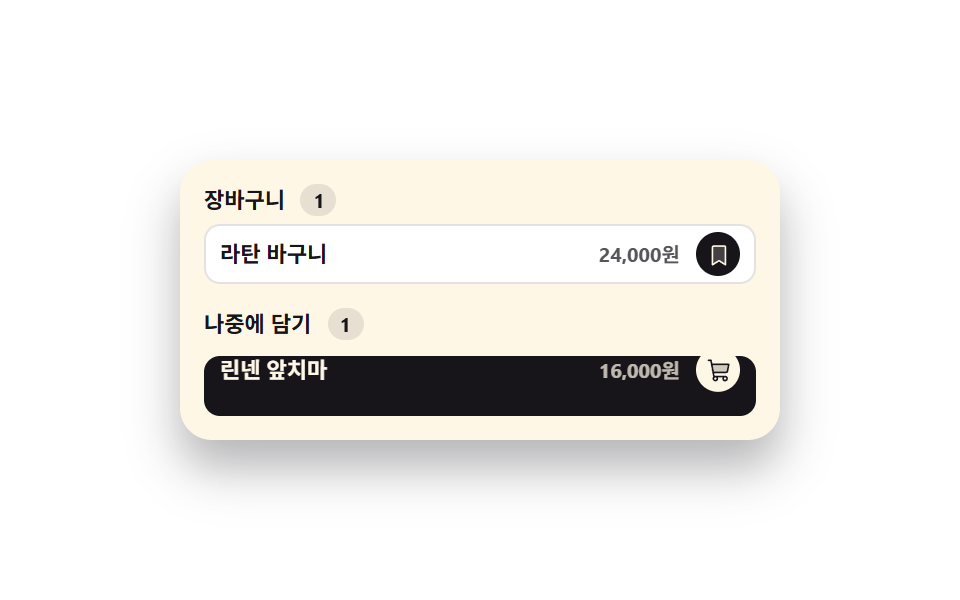 02 cart-move-to-saved
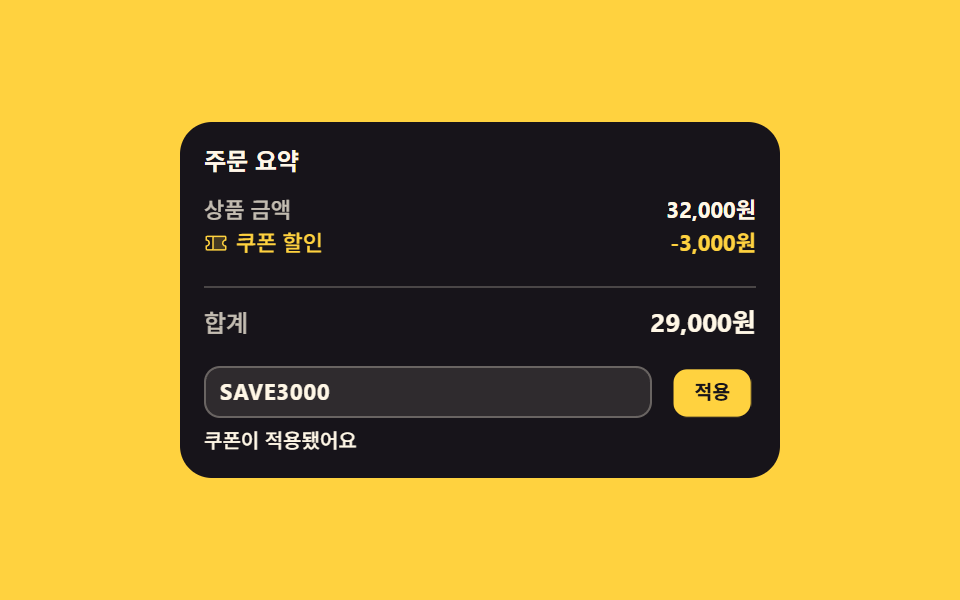 03 cart-coupon-discount-line
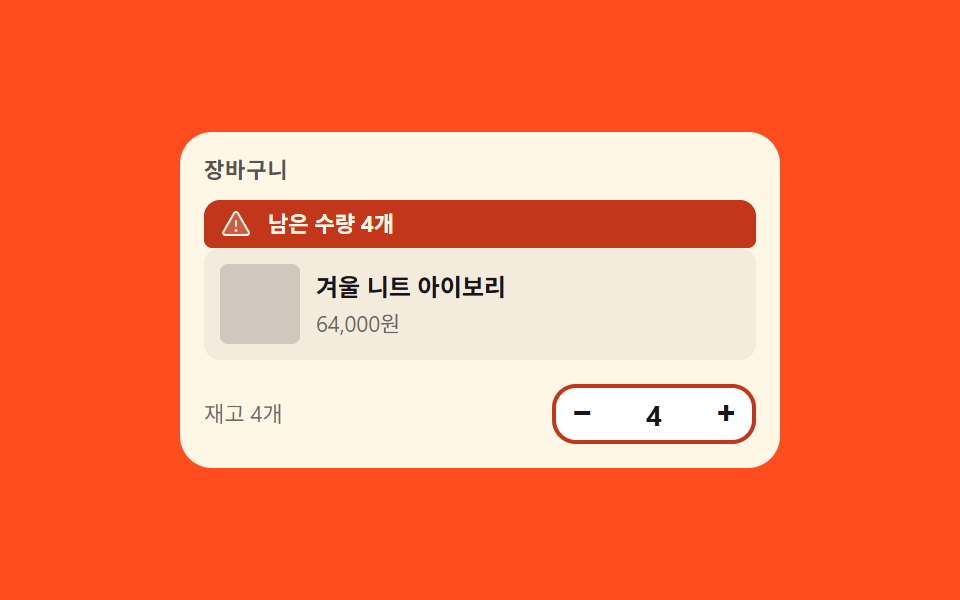 04 cart-stock-limit-clamp
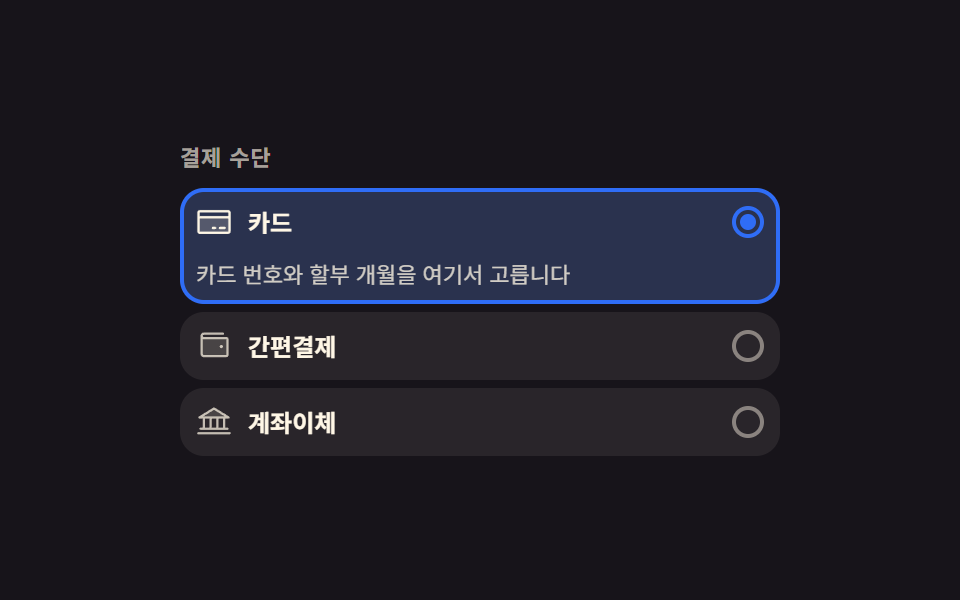 05 pay-method-card-expand
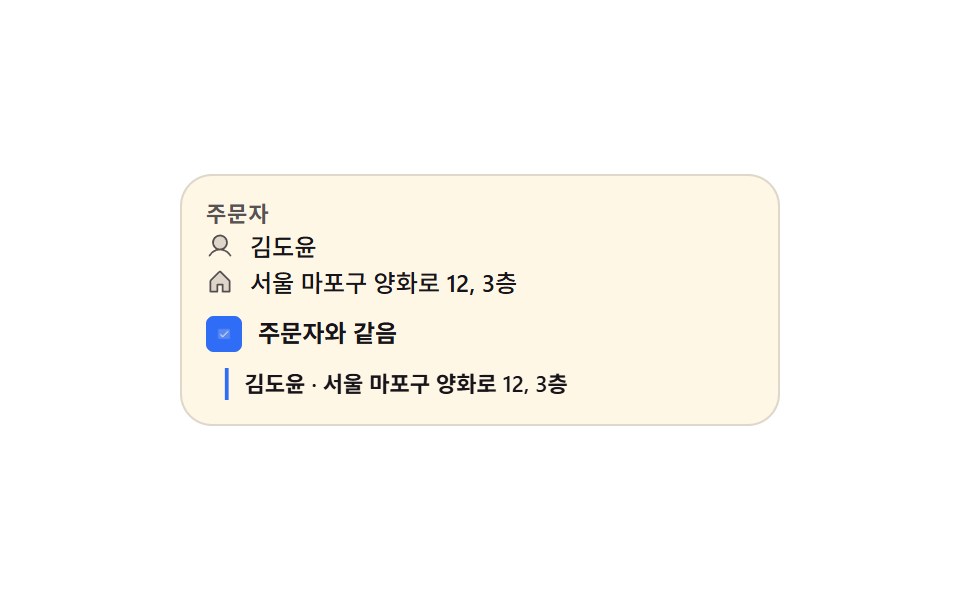 06 ship-same-address-collapse
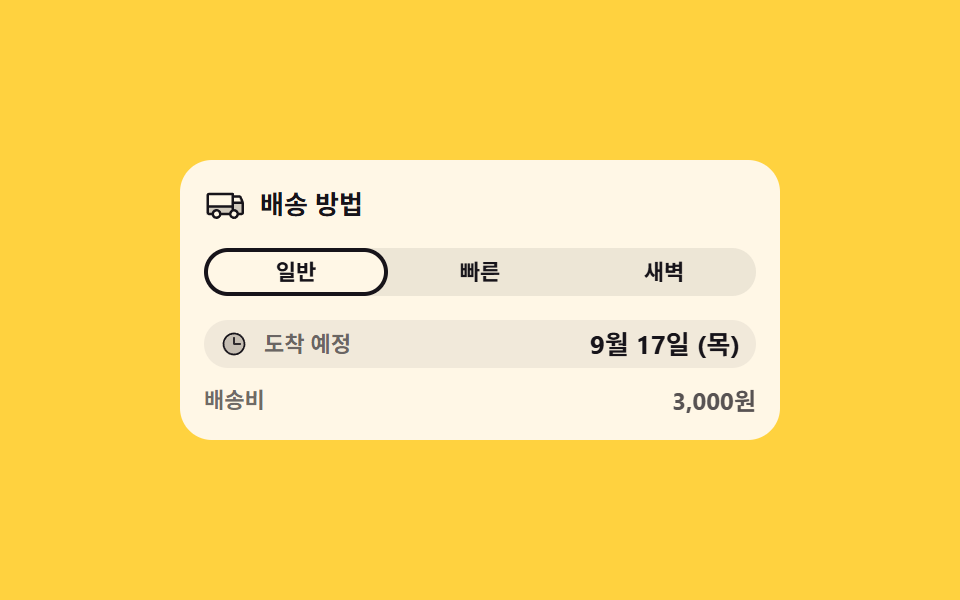 07 ship-speed-eta-swap
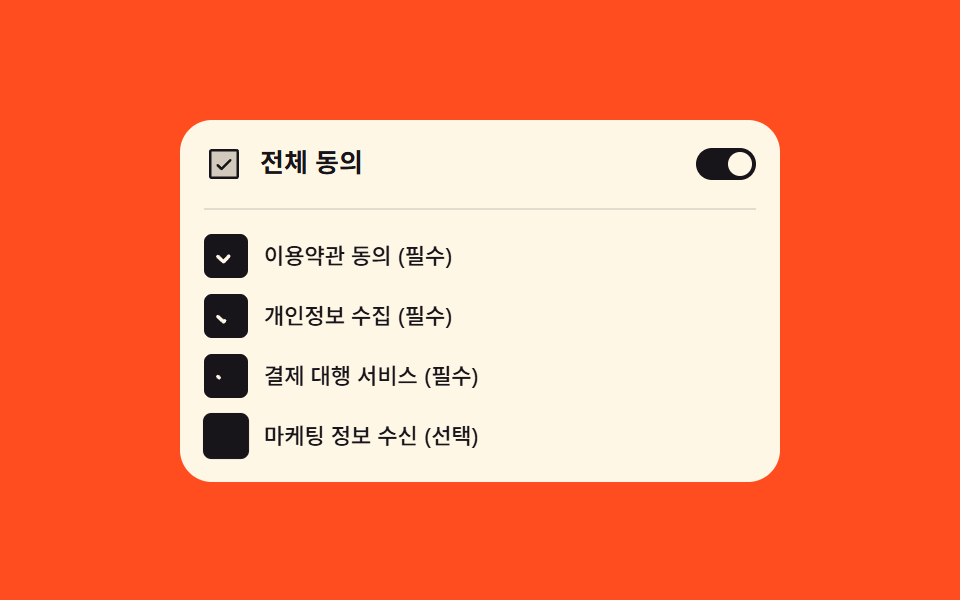 08 terms-agree-all-cascade
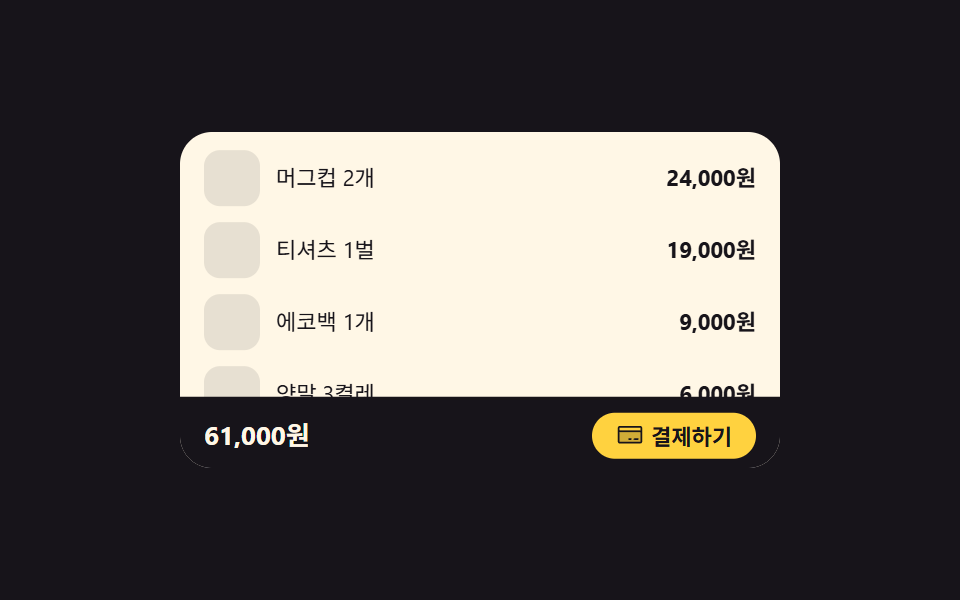 09 checkout-sticky-total-bar
자동 재생 · 눌러서 해당 항목으로 · 전부 한 zip
- 01 수량을 바꾸면 소계와 합계가 함께 물드는 줄
- 02 나중에 담기로 미끄러져 내려가는 줄
- 03 요약 사이로 끼어드는 할인 줄
- 04 재고를 넘으면 되튕겨 돌아오는 수량
- 05 고른 결제 수단만 아래로 펼쳐지는 카드
- 06 주문자와 같음을 켜면 접히며 채워지는 배송지
- 07 배송 방법을 바꾸면 날짜가 밀려 바뀌는 도착 칩
- 08 전체 동의가 아래를 차례로 켜는 약관 묶음
- 09 요약이 보이면 내려가 앉는 하단 결제 바
아홉 개는 결제 페이지 디자인의 기술 난이도 순이 아니라 주문이 완성되기까지의 순서로 놓았습니다. 장바구니에서 수량과 소계가 함께 물드는 줄(01)에서 시작해, 나중에 담기를 고르면 줄이 옮겨가고(02), 쿠폰이 요약 사이에 끼어들고(03), 재고 한도가 수량을 되튕기는가 하면(04) 결제 수단 카드가 열리고(05), 배송지가 접히고(06), 도착 날짜가 밀려 바뀌고(07), 약관 동의가 차례로 켜진 뒤(08)에야 하단 결제 바가 자리를 내주고 물러납니다(09). 아홉 벌이 같은 색·간격·이징 값을 나눠 쓰기 때문에 몇 개를 한 결제 화면에 섞어도 톤이 어긋나지 않습니다. 주문서 자체가 몇 단계로 갈라지는 쪽은 단계 폼 마법사가 갈림과 되돌아오기를 다루고, 주소를 지도에서 찍게 하는 단은 지도 위치 선택이 맡습니다.
01수량을 바꾸면 소계와 합계가 함께 물드는 줄
쇼핑몰 장바구니 ui 에서 무엇이 보이나
수량 칸의 값을 바꾸면 그 줄 소계와 아래 합계가 같은 순간에 다시 계산되고, 바뀐 숫자 칸 두 곳만 background-color 로 물들었다가 transition 으로 식습니다. 숫자는 font-variant-numeric: tabular-nums 로 자릿수가 늘어나도 칸 폭이 흔들리지 않고, 누적 변화 면적은 화면의 2.699% 로 측정됐습니다.
<main class="stage">
  <section class="qs is-demo" id="qs" aria-label="장바구니 수량과 합계">
    <header class="qs__head">
      <p class="qs__title">장바구니</p>
      <p class="qs__hint">수량을 눌러 보세요</p>
    </header>
    <ul class="qs__list">
      <li class="qs__row" data-qty="2">
        <span class="qs__info">
          <span class="qs__name">기본 티셔츠</span>
          <span class="qs__unit">12,000원</span>
        </span>
        <span class="qs__step">
          <button class="qs__b qs__b--down" type="button" data-step="-1" aria-label="기본 티셔츠 수량 줄이기"><svg viewBox="0 0 256 256" width="12" height="12" fill="currentColor" aria-hidden="true"><path d="M216,56V200a16,16,0,0,1-16,16H56a16,16,0,0,1-16-16V56A16,16,0,0,1,56,40H200A16,16,0,0,1,216,56Z" opacity="0.2"/><path d="M224,128a8,8,0,0,1-8,8H40a8,8,0,0,1,0-16H216A8,8,0,0,1,224,128Z"/></svg></button>
          <output class="qs__q qs__swap"><span class="qs__v">2</span><span class="qs__alt" aria-hidden="true">3</span></output>
          <button class="qs__b qs__b--up" type="button" data-step="1" aria-label="기본 티셔츠 수량 늘리기"><svg viewBox="0 0 256 256" width="12" height="12" fill="currentColor" aria-hidden="true"><path d="M216,56V200a16,16,0,0,1-16,16H56a16,16,0,0,1-16-16V56A16,16,0,0,1,56,40H200A16,16,0,0,1,216,56Z" opacity="0.2"/><path d="M224,128a8,8,0,0,1-8,8H136v80a8,8,0,0,1-16,0V136H40a8,8,0,0,1,0-16h80V40a8,8,0,0,1,16,0v80h80A8,8,0,0,1,224,128Z"/></svg></button>
        </span>
        <span class="qs__sum qs__swap"><span class="qs__v qs__money">24,000원</span><span class="qs__alt" aria-hidden="true">36,000원</span></span>
      </li>
      <li class="qs__row" data-qty="1">
        <span class="qs__info">
          <span class="qs__name">무지 양말</span>
          <span class="qs__unit">4,000원</span>
        </span>
        <span class="qs__step">
          <button class="qs__b qs__b--down" type="button" data-step="-1" aria-label="무지 양말 수량 줄이기"><svg viewBox="0 0 256 256" width="12" height="12" fill="currentColor" aria-hidden="true"><path d="M216,56V200a16,16,0,0,1-16,16H56a16,16,0,0,1-16-16V56A16,16,0,0,1,56,40H200A16,16,0,0,1,216,56Z" opacity="0.2"/><path d="M224,128a8,8,0,0,1-8,8H40a8,8,0,0,1,0-16H216A8,8,0,0,1,224,128Z"/></svg></button>
          <output class="qs__q"><span class="qs__v">1</span></output>
          <button class="qs__b qs__b--up" type="button" data-step="1" aria-label="무지 양말 수량 늘리기"><svg viewBox="0 0 256 256" width="12" height="12" fill="currentColor" aria-hidden="true"><path d="M216,56V200a16,16,0,0,1-16,16H56a16,16,0,0,1-16-16V56A16,16,0,0,1,56,40H200A16,16,0,0,1,216,56Z" opacity="0.2"/><path d="M224,128a8,8,0,0,1-8,8H136v80a8,8,0,0,1-16,0V136H40a8,8,0,0,1,0-16h80V40a8,8,0,0,1,16,0v80h80A8,8,0,0,1,224,128Z"/></svg></button>
        </span>
        <span class="qs__sum"><span class="qs__v qs__money">4,000원</span></span>
      </li>
    </ul>
    <p class="qs__total">
      <span class="qs__tlabel">합계</span>
      <output class="qs__sum qs__sum--grand qs__swap" id="qs-grand"><span class="qs__v" id="qs-grandv">28,000원</span><span class="qs__alt" aria-hidden="true">40,000원</span></output>
    </p>
  </section>
</main>@use "../../../../site/static/demo-tokens" as *;
// 수량을 바꾸면 그 줄 소계와 아래 합계가 같은 순간에 다시 계산되고,
// 바뀐 숫자 칸 두 곳만 background-color 가 켜졌다 transition 으로 식는다.
// 숫자는 font-variant-numeric: tabular-nums 라 자릿수가 늘어도 칸이 흔들리지 않는다.
$duration: $dur-loop;
$easing: $ease-spring;
$color: $stage-yellow;
@include stage($stage-ink);
.qs {
box-sizing: border-box;
width: min(300px, 92vw);
padding: $sp-3;
border-radius: $r-card;
background: $subject-cream;
color: $subject-ink;
font-family: -apple-system, "Segoe UI", "Noto Sans KR", sans-serif;
}
.qs * { box-sizing: border-box; }
.qs__head {
display: flex;
align-items: baseline;
justify-content: space-between;
gap: $sp-2;
}
.qs__title {
margin: 0;
font-size: 13px;
font-weight: 700;
line-height: 1.3;
}
.qs__hint {
margin: 0;
font-size: 10px;
font-weight: 500;
line-height: 1.3;
color: rgba($subject-ink, .72);
}
.qs__list {
display: grid;
gap: $sp-2;
margin: $sp-2 0 0;
padding: 0;
list-style: none;
}
.qs__row {
display: grid;
grid-template-columns: 1fr auto auto;
align-items: center;
gap: $sp-2;
}
.qs__info {
display: grid;
min-width: 0;
}
.qs__name {
font-size: 11px;
font-weight: 700;
line-height: 1.35;
white-space: nowrap;
overflow: hidden;
text-overflow: ellipsis;
}
.qs__unit {
font-size: 10px;
font-weight: 500;
line-height: 1.35;
color: rgba($subject-ink, .72);
font-variant-numeric: tabular-nums;
}
.qs__step {
display: inline-flex;
align-items: center;
gap: $sp-1;
padding: $sp-1;
border-radius: $r-pill;
background: rgba(23, 20, 26, .07);
}
.qs__b {
display: inline-grid;
place-items: center;
width: 20px;
height: 20px;
padding: 0;
margin: 0;
border: 0;
border-radius: 50%;
background: $subject-cream;
color: $subject-ink;
cursor: pointer;
&:focus-visible { outline: 2px solid $subject-blue; outline-offset: 2px; }
}
// 숫자 칸 — 자릿수가 바뀌어도 폭이 흔들리지 않게 tabular-nums + min-width
.qs__q {
position: relative;
min-width: 18px;
text-align: center;
font-size: 12px;
font-weight: 700;
line-height: 1.4;
font-variant-numeric: tabular-nums;
}
.qs__sum {
position: relative;
justify-self: end;
min-width: 58px;
padding: $sp-1;
border-radius: $r-xs;
text-align: right;
font-size: 11px;
font-weight: 700;
line-height: 1.4;
font-variant-numeric: tabular-nums;
// 실제 클릭 경로: 배경을 한 번 켜고(transition: none) 클래스를 떼면 이 transition 이 식힌다
background-color: rgba($stage-yellow, 0);
transition: background-color $dur-enter $ease-out;
&.is-hot {
background-color: rgba($stage-yellow, .62);
transition: none;
}
}
// 미리보기 루프에서만 쓰는 두 번째 숫자 — 정적 경로에서는 자리를 차지하지 않고 보이지도 않는다
.qs__alt {
position: absolute;
inset: 0;
display: grid;
place-items: center;
opacity: 0;
}
.qs__sum .qs__alt {
place-items: center end;
padding: $sp-1;
}
.qs__total {
display: flex;
align-items: center;
justify-content: space-between;
gap: $sp-2;
margin: $sp-2 0 0;
padding: $sp-2 0 0;
border-top: 1px solid rgba(23, 20, 26, .14);
}
.qs__tlabel {
font-size: 11px;
font-weight: 700;
line-height: 1.4;
}
.qs__sum--grand {
min-width: 68px;
font-size: 13px;
}
// ── 격자 미리보기 루프 (2초) ──
// 숫자 교체는 steps(1, end) 컷이다 — 크로스페이드로 겹치면 대표 이미지에 두 숫자가 반투명하게 겹친다.
// 컷만으로는 움직인 프레임이 모자라니 칸이 살짝 솟았다 내려오는 translateY 를 곁들인다.
@keyframes qs-a {
0%, 24% { opacity: 1; }
25%, 62% { opacity: 0; }
63%, 100% { opacity: 1; }
}
@keyframes qs-b {
0%, 24% { opacity: 0; }
25%, 62% { opacity: 1; }
63%, 100% { opacity: 0; }
}
@keyframes qs-tint {
0%, 24% { background-color: rgba($stage-yellow, 0); }
25% { background-color: rgba($stage-yellow, .62); }
54% { background-color: rgba($stage-yellow, 0); }
62% { background-color: rgba($stage-yellow, 0); }
63% { background-color: rgba($stage-yellow, .62); }
88%, 100% { background-color: rgba($stage-yellow, 0); }
}
@keyframes qs-pop {
0%, 24% { transform: translateY(0); }
25% { transform: translateY(-4px); }
40% { transform: translateY(0); }
62% { transform: translateY(0); }
63% { transform: translateY(-4px); }
78%, 100% { transform: translateY(0); }
}
@keyframes qs-press-up {
0%, 21% { transform: scale(1); }
25% { transform: scale(.78); }
37%, 100% { transform: scale(1); }
}
@keyframes qs-press-down {
0%, 59% { transform: scale(1); }
63% { transform: scale(.78); }
75%, 100% { transform: scale(1); }
}
.qs.is-demo {
.qs__swap .qs__v { animation-name: qs-a; }
.qs__swap .qs__alt { animation-name: qs-b; }
.qs__swap .qs__v,
.qs__swap .qs__alt {
animation-duration: $duration;
animation-timing-function: steps(1, end);
animation-iteration-count: infinite;
animation-fill-mode: backwards;
}
.qs__sum.qs__swap {
animation-name: qs-tint, qs-pop;
animation-duration: $duration, $duration;
animation-timing-function: $ease-out, $easing;
animation-iteration-count: infinite, infinite;
animation-fill-mode: backwards, backwards;
}
.qs__row:first-child .qs__b--up { animation-name: qs-press-up; }
.qs__row:first-child .qs__b--down { animation-name: qs-press-down; }
.qs__row:first-child .qs__b {
animation-duration: $duration;
animation-timing-function: $easing;
animation-iteration-count: infinite;
animation-fill-mode: backwards;
}
}
@media (max-width: 340px) {
.qs { padding: $sp-2; }
.qs__sum { min-width: 52px; }
.qs__sum--grand { min-width: 60px; }
.qs__b { width: 18px; height: 18px; }
}
@media (prefers-reduced-motion: reduce) {
.qs.is-demo .qs__v,
.qs.is-demo .qs__b,
.qs.is-demo .qs__sum {
animation: none !important;
transform: none !important;
}
.qs.is-demo .qs__v { opacity: 1 !important; }
// 정지 상태에서도 값은 보인다 — 겹쳐 둔 두 번째 숫자만 계속 감춘다
.qs.is-demo .qs__alt { animation: none !important; opacity: 0 !important; }
.qs.is-demo .qs__sum { background-color: rgba($stage-yellow, 0) !important; }
.qs__sum { transition: none !important; }
}html, body {
margin: 0;
overflow: hidden;
}
.stage {
box-sizing: border-box;
min-height: 100vh;
display: grid;
place-items: center;
margin: 0;
background: #17141a;
font-family: -apple-system, "Segoe UI", "Noto Sans KR", sans-serif;
padding: clamp(8px, 4vw, 24px);
}
.qs {
box-sizing: border-box;
width: min(300px, 92vw);
padding: 12px;
border-radius: 16px;
background: #fff7e6;
color: #17141a;
font-family: -apple-system, "Segoe UI", "Noto Sans KR", sans-serif;
}
.qs * {
box-sizing: border-box;
}
.qs__head {
display: flex;
align-items: baseline;
justify-content: space-between;
gap: 8px;
}
.qs__title {
margin: 0;
font-size: 13px;
font-weight: 700;
line-height: 1.3;
}
.qs__hint {
margin: 0;
font-size: 10px;
font-weight: 500;
line-height: 1.3;
color: rgba(23, 20, 26, 0.72);
}
.qs__list {
display: grid;
gap: 8px;
margin: 8px 0 0;
padding: 0;
list-style: none;
}
.qs__row {
display: grid;
grid-template-columns: 1fr auto auto;
align-items: center;
gap: 8px;
}
.qs__info {
display: grid;
min-width: 0;
}
.qs__name {
font-size: 11px;
font-weight: 700;
line-height: 1.35;
white-space: nowrap;
overflow: hidden;
text-overflow: ellipsis;
}
.qs__unit {
font-size: 10px;
font-weight: 500;
line-height: 1.35;
color: rgba(23, 20, 26, 0.72);
font-variant-numeric: tabular-nums;
}
.qs__step {
display: inline-flex;
align-items: center;
gap: 4px;
padding: 4px;
border-radius: 999px;
background: rgba(23, 20, 26, 0.07);
}
.qs__b {
display: inline-grid;
place-items: center;
width: 20px;
height: 20px;
padding: 0;
margin: 0;
border: 0;
border-radius: 50%;
background: #fff7e6;
color: #17141a;
cursor: pointer;
}
.qs__b:focus-visible {
outline: 2px solid #2f6df6;
outline-offset: 2px;
}
.qs__q {
position: relative;
min-width: 18px;
text-align: center;
font-size: 12px;
font-weight: 700;
line-height: 1.4;
font-variant-numeric: tabular-nums;
}
.qs__sum {
position: relative;
justify-self: end;
min-width: 58px;
padding: 4px;
border-radius: 4px;
text-align: right;
font-size: 11px;
font-weight: 700;
line-height: 1.4;
font-variant-numeric: tabular-nums;
background-color: rgba(255, 210, 63, 0);
transition: background-color 600ms ease-out;
}
.qs__sum.is-hot {
background-color: rgba(255, 210, 63, 0.62);
transition: none;
}
.qs__alt {
position: absolute;
inset: 0;
display: grid;
place-items: center;
opacity: 0;
}
.qs__sum .qs__alt {
place-items: center end;
padding: 4px;
}
.qs__total {
display: flex;
align-items: center;
justify-content: space-between;
gap: 8px;
margin: 8px 0 0;
padding: 8px 0 0;
border-top: 1px solid rgba(23, 20, 26, 0.14);
}
.qs__tlabel {
font-size: 11px;
font-weight: 700;
line-height: 1.4;
}
.qs__sum--grand {
min-width: 68px;
font-size: 13px;
}
@keyframes qs-a {
0%, 24% {
opacity: 1;
}
25%, 62% {
opacity: 0;
}
63%, 100% {
opacity: 1;
}
}
@keyframes qs-b {
0%, 24% {
opacity: 0;
}
25%, 62% {
opacity: 1;
}
63%, 100% {
opacity: 0;
}
}
@keyframes qs-tint {
0%, 24% {
background-color: rgba(255, 210, 63, 0);
}
25% {
background-color: rgba(255, 210, 63, 0.62);
}
54% {
background-color: rgba(255, 210, 63, 0);
}
62% {
background-color: rgba(255, 210, 63, 0);
}
63% {
background-color: rgba(255, 210, 63, 0.62);
}
88%, 100% {
background-color: rgba(255, 210, 63, 0);
}
}
@keyframes qs-pop {
0%, 24% {
transform: translateY(0);
}
25% {
transform: translateY(-4px);
}
40% {
transform: translateY(0);
}
62% {
transform: translateY(0);
}
63% {
transform: translateY(-4px);
}
78%, 100% {
transform: translateY(0);
}
}
@keyframes qs-press-up {
0%, 21% {
transform: scale(1);
}
25% {
transform: scale(0.78);
}
37%, 100% {
transform: scale(1);
}
}
@keyframes qs-press-down {
0%, 59% {
transform: scale(1);
}
63% {
transform: scale(0.78);
}
75%, 100% {
transform: scale(1);
}
}
.qs.is-demo .qs__swap .qs__v {
animation-name: qs-a;
}
.qs.is-demo .qs__swap .qs__alt {
animation-name: qs-b;
}
.qs.is-demo .qs__swap .qs__v,
.qs.is-demo .qs__swap .qs__alt {
animation-duration: 2s;
animation-timing-function: steps(1, end);
animation-iteration-count: infinite;
animation-fill-mode: backwards;
}
.qs.is-demo .qs__sum.qs__swap {
animation-name: qs-tint, qs-pop;
animation-duration: 2s, 2s;
animation-timing-function: ease-out, cubic-bezier(0.2, 0.8, 0.2, 1);
animation-iteration-count: infinite, infinite;
animation-fill-mode: backwards, backwards;
}
.qs.is-demo .qs__row:first-child .qs__b--up {
animation-name: qs-press-up;
}
.qs.is-demo .qs__row:first-child .qs__b--down {
animation-name: qs-press-down;
}
.qs.is-demo .qs__row:first-child .qs__b {
animation-duration: 2s;
animation-timing-function: cubic-bezier(0.2, 0.8, 0.2, 1);
animation-iteration-count: infinite;
animation-fill-mode: backwards;
}
@media (max-width: 340px) {
.qs {
padding: 8px;
}
.qs__sum {
min-width: 52px;
}
.qs__sum--grand {
min-width: 60px;
}
.qs__b {
width: 18px;
height: 18px;
}
}
@media (prefers-reduced-motion: reduce) {
.qs.is-demo .qs__v,
.qs.is-demo .qs__b,
.qs.is-demo .qs__sum {
animation: none !important;
transform: none !important;
}
.qs.is-demo .qs__v {
opacity: 1 !important;
}
.qs.is-demo .qs__alt {
animation: none !important;
opacity: 0 !important;
}
.qs.is-demo .qs__sum {
background-color: rgba(255, 210, 63, 0) !important;
}
.qs__sum {
transition: none !important;
}
}// 수량을 바꾸면 그 줄 소계와 아래 합계를 같은 순간에 다시 계산한다.
// 금액 서식은 화면에 이미 있는 단가 글자에서 뽑는다 — 언어팩이 바꿔 둔 통화 표기를 그대로 따라간다
var qsRoot = document.getElementById('qs');
var qsRows = qsRoot.querySelectorAll('.qs__row');
var qsGrand = document.getElementById('qs-grand');
var qsGrandValue = document.getElementById('qs-grandv');
function qsComma(n) { return String(n).replace(/\B(?=(\d{3})+$)/g, ','); }
function qsUnitText(row) { return row.querySelector('.qs__unit').textContent.trim(); }
function qsAmount(text) { return Number(text.replace(/[^\d]/g, '')); }
function qsMoney(row, n) { return qsUnitText(row).replace(/[\d,]+/, qsComma(n)); }
function qsPaint(row) {
var qty = Number(row.getAttribute('data-qty'));
row.querySelector('.qs__q .qs__v').textContent = String(qty);
row.querySelector('.qs__money').textContent = qsMoney(row, qty * qsAmount(qsUnitText(row)));
}
function qsTotal() {
var sum = 0;
for (var i = 0; i < qsRows.length; i++) {
sum += Number(qsRows[i].getAttribute('data-qty')) * qsAmount(qsUnitText(qsRows[i]));
}
qsGrandValue.textContent = qsMoney(qsRows[0], sum);
}
// 물들었다 식는다 — 배경만 한 번 켜고 transition 이 되돌린다
function qsTint(cell) {
cell.classList.add('is-hot');
setTimeout(function () { cell.classList.remove('is-hot'); }, 80);
}
function qsBump(row, step) {
qsRoot.classList.remove('is-demo');
var qty = Math.min(9, Math.max(1, Number(row.getAttribute('data-qty')) + step));
row.setAttribute('data-qty', String(qty));
qsPaint(row);
qsTotal();
qsTint(row.querySelector('.qs__sum'));
qsTint(qsGrand);
}
qsRoot.addEventListener('click', function (e) {
var btn = e.target.closest('.qs__b');
if (btn) { qsBump(btn.closest('.qs__row'), Number(btn.getAttribute('data-step'))); }
});import { useState } from "react";
import type { CSSProperties } from "react";
import styles from "./CartQtySubtotalSync.module.scss";
export type CartQtyLine = {
id: string;
name: string;
/** 단가 글자 그대로 — 금액 서식(통화 기호·자릿점)을 여기서 뽑아 쓴다 */
unit: string;
qty: number;
downLabel: string;
upLabel: string;
};
export type CartQtySubtotalSyncProps = {
title?: string;
hint?: string;
totalLabel?: string;
groupLabel?: string;
lines?: CartQtyLine[];
/** 격자 미리보기용 2초 자동 루프. 사람이 손대면 꺼진다 */
demo?: boolean;
duration?: number;
easing?: string;
color?: string;
};
type Vars = CSSProperties & { "--duration"?: string; "--easing"?: string; "--color"?: string };
const DEFAULT_LINES: CartQtyLine[] = [
{ id: "tee", name: "기본 티셔츠", unit: "12,000원", qty: 2, downLabel: "기본 티셔츠 수량 줄이기", upLabel: "기본 티셔츠 수량 늘리기" },
{ id: "socks", name: "무지 양말", unit: "4,000원", qty: 1, downLabel: "무지 양말 수량 줄이기", upLabel: "무지 양말 수량 늘리기" },
];
function comma(n: number): string {
return String(n).replace(/\B(?=(\d{3})+$)/g, ",");
}
function amount(text: string): number {
return Number(text.replace(/[^\d]/g, ""));
}
// 금액 서식은 단가 글자를 그대로 본떠 만든다 — 언어팩이 바꿔 둔 통화 표기를 따라간다
function money(unit: string, n: number): string {
return unit.replace(/[\d,]+/, comma(n));
}
function MinusIcon() {
return (
<svg viewBox="0 0 256 256" width="12" height="12" fill="currentColor" aria-hidden="true"><path d="M216,56V200a16,16,0,0,1-16,16H56a16,16,0,0,1-16-16V56A16,16,0,0,1,56,40H200A16,16,0,0,1,216,56Z" opacity="0.2"/><path d="M224,128a8,8,0,0,1-8,8H40a8,8,0,0,1,0-16H216A8,8,0,0,1,224,128Z"/></svg>
);
}
function PlusIcon() {
return (
<svg viewBox="0 0 256 256" width="12" height="12" fill="currentColor" aria-hidden="true"><path d="M216,56V200a16,16,0,0,1-16,16H56a16,16,0,0,1-16-16V56A16,16,0,0,1,56,40H200A16,16,0,0,1,216,56Z" opacity="0.2"/><path d="M224,128a8,8,0,0,1-8,8H136v80a8,8,0,0,1-16,0V136H40a8,8,0,0,1,0-16h80V40a8,8,0,0,1,16,0v80h80A8,8,0,0,1,224,128Z"/></svg>
);
}
export default function CartQtySubtotalSync({
title = "장바구니",
hint = "수량을 눌러 보세요",
totalLabel = "합계",
groupLabel = "장바구니 수량과 합계",
lines = DEFAULT_LINES,
demo = true,
duration = 2000,
easing = "cubic-bezier(.2,.8,.2,1)",
color = "#ffd23f",
}: CartQtySubtotalSyncProps) {
const [qty, setQty] = useState<number[]>(lines.map((l) => l.qty));
const [hot, setHot] = useState<string[]>([]);
const [live, setLive] = useState(demo);
const vars: Vars = { "--duration": `${duration}ms`, "--easing": easing, "--color": color };
const grand = lines.reduce((sum, l, i) => sum + qty[i] * amount(l.unit), 0);
// 미리보기 루프가 컷으로 갈아 끼우는 두 번째 값 — 첫 줄 수량이 하나 늘었을 때의 숫자
const altQty = lines[0].qty + 1;
const altGrand = lines.reduce((sum, l, i) => sum + (i === 0 ? altQty : l.qty) * amount(l.unit), 0);
// 수량·소계·합계를 같은 순간에 다시 계산하고, 바뀐 숫자 칸 두 곳만 배경을 한 번 켠다
function bump(index: number, step: number) {
setLive(false);
setQty((prev: number[]) => prev.map((q, k) => (k === index ? Math.min(9, Math.max(1, q + step)) : q)));
setHot([lines[index].id, "grand"]);
setTimeout(() => setHot([]), 80);
}
const cls = [styles.qs, live ? styles.isDemo : ""].filter(Boolean).join(" ");
const grandCls = [styles.sum, styles.grand, styles.swap, hot.indexOf("grand") >= 0 ? styles.isHot : ""].filter(Boolean).join(" ");
return (
<section className={cls} style={vars} aria-label={groupLabel}>
<header className={styles.head}>
<p className={styles.title}>{title}</p>
<p className={styles.hint}>{hint}</p>
</header>
<ul className={styles.list}>
{lines.map((line, i) => {
const swap = i === 0;
const sumCls = [styles.sum, swap ? styles.swap : "", hot.indexOf(line.id) >= 0 ? styles.isHot : ""].filter(Boolean).join(" ");
return (
<li className={styles.row} key={line.id}>
<span className={styles.info}>
<span className={styles.name}>{line.name}</span>
<span className={styles.unit}>{line.unit}</span>
</span>
<span className={styles.step}>
<button className={`${styles.btn} ${styles.btnDown}`} type="button" onClick={() => bump(i, -1)} aria-label={line.downLabel}><MinusIcon /></button>
<output className={`${styles.qty} ${swap ? styles.swap : ""}`}>
<span className={styles.value}>{qty[i]}</span>
{swap && live ? <span className={styles.alt} aria-hidden="true">{altQty}</span> : null}
</output>
<button className={`${styles.btn} ${styles.btnUp}`} type="button" onClick={() => bump(i, 1)} aria-label={line.upLabel}><PlusIcon /></button>
</span>
<span className={sumCls}>
<span className={styles.value}>{money(line.unit, qty[i] * amount(line.unit))}</span>
{swap && live ? <span className={styles.alt} aria-hidden="true">{money(line.unit, altQty * amount(line.unit))}</span> : null}
</span>
</li>
);
})}
</ul>
<p className={styles.total}>
<span className={styles.tlabel}>{totalLabel}</span>
<output className={grandCls}>
<span className={styles.value}>{money(lines[0].unit, grand)}</span>
{live ? <span className={styles.alt} aria-hidden="true">{money(lines[0].unit, altGrand)}</span> : null}
</output>
</p>
</section>
);
}01 · 수량을 바꾸면 소계와 합계가 함께 물드는 줄 — 측정 누적면적 2.699% · 움직인 프레임 11/23GODRICH 원작 · zip 에 SCSS·React 포함 · 비밀번호 보기
코드에서 볼 곳
쇼핑몰 장바구니 줄이나 예약 인원 수 변경 화면에 씁니다.
// 숫자 칸 — 자릿수가 바뀌어도 폭이 흔들리지 않게 tabular-nums + min-width
.qs__sum {
  min-width: 58px;
  padding: $sp-1;
  border-radius: $r-xs;
  text-align: right;
  font-variant-numeric: tabular-nums;
  // 실제 클릭 경로: 배경을 한 번 켜고(transition: none) 클래스를 떼면 이 transition 이 식힌다
  background-color: rgba($stage-yellow, 0);
  transition: background-color $dur-enter $ease-out;
  &.is-hot {
    background-color: rgba($stage-yellow, .62);
    transition: none;
  }
}
02나중에 담기로 미끄러져 내려가는 줄
화면에서 일어나는 일
나중에 담기를 누르면 그 줄이 높이를 잃으며 접히고, 아래 보관 묶음에 같은 상품이 위에서 내려앉아 두 목록의 개수가 함께 바뀝니다. 줄 하나가 grid-template-rows: 1fr → 0fr 로 접히는 동시에 짝이 0fr → 1fr 로 열리므로 카드 전체 높이는 그대로이고, 누적면적 11.938% · 강도 104.9 로 측정됐습니다.
<main class="stage">
  <section class="mv is-demo" id="mv" aria-label="장바구니와 나중에 담기">
    <div class="mv__group">
      <p class="mv__head">
        <span class="mv__label">장바구니</span>
        <output class="mv__n mv__swap"><span class="mv__v">2</span><span class="mv__alt" aria-hidden="true">1</span></output>
      </p>
      <ul class="mv__list" id="mv-cart">
        <li class="mv__row" data-pair="p1">
          <div class="mv__box"><div class="mv__in">
            <span class="mv__name">라탄 바구니</span>
            <span class="mv__price">24,000원</span>
            <button class="mv__b" type="button" aria-label="라탄 바구니를 나중에 담기로 옮기기"><svg viewBox="0 0 256 256" width="13" height="13" fill="currentColor" aria-hidden="true"><path d="M192,48V224l-64-40L64,224V48a8,8,0,0,1,8-8H184A8,8,0,0,1,192,48Z" opacity="0.2"/><path d="M184,32H72A16,16,0,0,0,56,48V224a8,8,0,0,0,12.24,6.78L128,193.43l59.77,37.35A8,8,0,0,0,200,224V48A16,16,0,0,0,184,32Zm0,177.57-51.77-32.35a8,8,0,0,0-8.48,0L72,209.57V48H184Z"/></svg></button>
          </div></div>
        </li>
        <li class="mv__row" data-pair="p2">
          <div class="mv__box"><div class="mv__in">
            <span class="mv__name">린넨 앞치마</span>
            <span class="mv__price">16,000원</span>
            <button class="mv__b" type="button" aria-label="린넨 앞치마를 나중에 담기로 옮기기"><svg viewBox="0 0 256 256" width="13" height="13" fill="currentColor" aria-hidden="true"><path d="M192,48V224l-64-40L64,224V48a8,8,0,0,1,8-8H184A8,8,0,0,1,192,48Z" opacity="0.2"/><path d="M184,32H72A16,16,0,0,0,56,48V224a8,8,0,0,0,12.24,6.78L128,193.43l59.77,37.35A8,8,0,0,0,200,224V48A16,16,0,0,0,184,32Zm0,177.57-51.77-32.35a8,8,0,0,0-8.48,0L72,209.57V48H184Z"/></svg></button>
          </div></div>
        </li>
      </ul>
    </div>
    <div class="mv__group">
      <p class="mv__head">
        <span class="mv__label">나중에 담기</span>
        <output class="mv__n mv__swap"><span class="mv__v">0</span><span class="mv__alt" aria-hidden="true">1</span></output>
      </p>
      <ul class="mv__list" id="mv-saved">
        <li class="mv__row mv__row--saved is-out" data-pair="p1">
          <div class="mv__box"><div class="mv__in">
            <span class="mv__name">라탄 바구니</span>
            <span class="mv__price">24,000원</span>
            <button class="mv__b mv__b--back" type="button" aria-label="라탄 바구니를 장바구니로 되돌리기"><svg viewBox="0 0 256 256" width="13" height="13" fill="currentColor" aria-hidden="true"><path d="M224,64l-12.16,66.86A16,16,0,0,1,196.1,144H70.55L56,64Z" opacity="0.2"/><path d="M230.14,58.87A8,8,0,0,0,224,56H62.68L56.6,22.57A8,8,0,0,0,48.73,16H24a8,8,0,0,0,0,16h18L67.56,172.29a24,24,0,0,0,5.33,11.27,28,28,0,1,0,44.4,8.44h45.42A27.75,27.75,0,0,0,160,204a28,28,0,1,0,28-28H91.17a8,8,0,0,1-7.87-6.57L80.13,152h116a24,24,0,0,0,23.61-19.71l12.16-66.86A8,8,0,0,0,230.14,58.87ZM104,204a12,12,0,1,1-12-12A12,12,0,0,1,104,204Zm96,0a12,12,0,1,1-12-12A12,12,0,0,1,200,204Zm4-74.57A8,8,0,0,1,196.1,136H77.22L65.59,72H214.41Z"/></svg></button>
          </div></div>
        </li>
        <li class="mv__row mv__row--saved is-out" data-pair="p2">
          <div class="mv__box"><div class="mv__in">
            <span class="mv__name">린넨 앞치마</span>
            <span class="mv__price">16,000원</span>
            <button class="mv__b mv__b--back" type="button" aria-label="린넨 앞치마를 장바구니로 되돌리기"><svg viewBox="0 0 256 256" width="13" height="13" fill="currentColor" aria-hidden="true"><path d="M224,64l-12.16,66.86A16,16,0,0,1,196.1,144H70.55L56,64Z" opacity="0.2"/><path d="M230.14,58.87A8,8,0,0,0,224,56H62.68L56.6,22.57A8,8,0,0,0,48.73,16H24a8,8,0,0,0,0,16h18L67.56,172.29a24,24,0,0,0,5.33,11.27,28,28,0,1,0,44.4,8.44h45.42A27.75,27.75,0,0,0,160,204a28,28,0,1,0,28-28H91.17a8,8,0,0,1-7.87-6.57L80.13,152h116a24,24,0,0,0,23.61-19.71l12.16-66.86A8,8,0,0,0,230.14,58.87ZM104,204a12,12,0,1,1-12-12A12,12,0,0,1,104,204Zm96,0a12,12,0,1,1-12-12A12,12,0,0,1,200,204Zm4-74.57A8,8,0,0,1,196.1,136H77.22L65.59,72H214.41Z"/></svg></button>
          </div></div>
        </li>
      </ul>
    </div>
  </section>
</main>@use "../../../../site/static/demo-tokens" as *;
// 나중에 담기를 누르면 그 줄이 grid-template-rows: 1fr → 0fr 로 접히고,
// 보관 묶음의 같은 상품 줄이 그만큼 열리며 안쪽 내용이 translateY 로 위에서 내려앉는다.
// 접히는 높이와 열리는 높이가 같아서 카드 전체 높이는 움직이지 않는다.
$duration: $dur-loop;
$easing: $ease-spring;
$color: $subject-ink;
@include stage($stage-paper);
.mv {
box-sizing: border-box;
width: min(300px, 92vw);
padding: $sp-3;
border-radius: $r-card;
background: $subject-cream;
box-shadow: $shadow-raised;
color: $subject-ink;
font-family: -apple-system, "Segoe UI", "Noto Sans KR", sans-serif;
}
.mv * { box-sizing: border-box; }
.mv__group + .mv__group { margin-top: $sp-2; }
.mv__head {
display: flex;
align-items: center;
gap: $sp-2;
margin: 0 0 $sp-1;
}
.mv__label {
font-size: 11px;
font-weight: 700;
line-height: 1.3;
}
.mv__n {
position: relative;
min-width: 18px;
padding: 0 $sp-1;
border-radius: $r-pill;
background: rgba(23, 20, 26, .1);
text-align: center;
font-size: 10px;
font-weight: 700;
line-height: 1.6;
font-variant-numeric: tabular-nums;
}
// 미리보기 루프에서만 쓰는 두 번째 숫자 — 자리를 차지하지 않고 정적 경로에서는 보이지 않는다
.mv__alt {
position: absolute;
inset: 0;
display: grid;
place-items: center;
opacity: 0;
}
.mv__list {
display: grid;
gap: $sp-1;
margin: 0;
padding: 0;
list-style: none;
}
// 줄 하나 = 높이를 주고받는 칸. 실제 클릭 경로는 transition 으로 부드럽게 접힌다
.mv__row {
display: grid;
grid-template-rows: 1fr;
transition: grid-template-rows $dur-base $easing;
}
.mv__row.is-out { grid-template-rows: 0fr; }
// 접히는 칸에는 패딩을 두지 않는다 — 0fr 이 되어도 세로 패딩은 그대로 남는다.
// 안쪽을 감싸는 이 칸이 높이 0 이 되면서 패딩을 가진 진짜 줄을 잘라 낸다
.mv__box {
min-height: 0;
overflow: hidden;
border-radius: $r-sm;
background: $stage-paper;
box-shadow: inset 0 0 0 1px rgba(23, 20, 26, .12);
}
.mv__in {
display: grid;
grid-template-columns: 1fr auto auto;
align-items: center;
gap: $sp-2;
padding: $sp-1 $sp-2;
}
.mv__row--saved .mv__box {
background: $subject-ink;
box-shadow: none;
}
.mv__row--saved .mv__in { color: $subject-cream; }
.mv__name {
min-width: 0;
font-size: 11px;
font-weight: 700;
line-height: 1.4;
white-space: nowrap;
overflow: hidden;
text-overflow: ellipsis;
}
.mv__price {
font-size: 10px;
font-weight: 700;
line-height: 1.4;
font-variant-numeric: tabular-nums;
opacity: .72;
}
.mv__b {
display: inline-grid;
place-items: center;
width: 22px;
height: 22px;
padding: 0;
margin: 0;
border: 0;
border-radius: 50%;
background: $subject-ink;
color: $subject-cream;
cursor: pointer;
&:focus-visible { outline: 2px solid $subject-blue; outline-offset: 2px; }
}
.mv__b--back {
background: $subject-cream;
color: $subject-ink;
}
// ── 격자 미리보기 루프 (2초) ──
// 여닫기를 한 프레임에 컷으로 끝낸다 — 대표 이미지가 「반쯤 접힌 줄」 이 되지 않게.
// 돌아오는 쪽만 70~86% 에 천천히 풀어 퇴장 프레임이 등장 프레임을 이기지 못하게 한다.
@keyframes mv-leave {
0% { grid-template-rows: 1fr; animation-timing-function: steps(1, end); }
24% { grid-template-rows: 1fr; animation-timing-function: steps(1, end); }
25% { grid-template-rows: 0fr; animation-timing-function: steps(1, end); }
70% { grid-template-rows: 0fr; animation-timing-function: $ease-out; }
86% { grid-template-rows: 1fr; }
100% { grid-template-rows: 1fr; }
}
@keyframes mv-arrive {
0% { grid-template-rows: 0fr; animation-timing-function: steps(1, end); }
24% { grid-template-rows: 0fr; animation-timing-function: steps(1, end); }
25% { grid-template-rows: 1fr; animation-timing-function: steps(1, end); }
70% { grid-template-rows: 1fr; animation-timing-function: $ease-out; }
86% { grid-template-rows: 0fr; }
100% { grid-template-rows: 0fr; }
}
// 열린 칸 안쪽이 위에서 내려앉는다 — 투명도가 아니라 transform 이라 중간 프레임에 유령이 없다.
// 칸이 열리는 컷과 같은 순간에 글자가 이미 칸 안에 들어와 있어야 대표 이미지가 빈 띠가 되지 않는다
@keyframes mv-drop {
0%, 24% { transform: translateY(-10px); }
45%, 100% { transform: translateY(0); }
}
@keyframes mv-press {
0%, 21% { transform: scale(1); }
25% { transform: scale(.78); }
37%, 100% { transform: scale(1); }
}
@keyframes mv-a {
0%, 24% { opacity: 1; }
25%, 85% { opacity: 0; }
86%, 100% { opacity: 1; }
}
@keyframes mv-b {
0%, 24% { opacity: 0; }
25%, 85% { opacity: 1; }
86%, 100% { opacity: 0; }
}
.mv.is-demo {
#mv-cart .mv__row:nth-child(2) { animation-name: mv-leave; }
#mv-saved .mv__row:nth-child(2) { animation-name: mv-arrive; }
#mv-cart .mv__row:nth-child(2),
#mv-saved .mv__row:nth-child(2) {
animation-duration: $duration;
animation-iteration-count: infinite;
animation-fill-mode: backwards;
}
#mv-saved .mv__row:nth-child(2) .mv__in {
animation-name: mv-drop;
animation-duration: $duration;
animation-timing-function: $easing;
animation-iteration-count: infinite;
animation-fill-mode: backwards;
}
#mv-cart .mv__row:nth-child(2) .mv__b {
animation-name: mv-press;
animation-duration: $duration;
animation-timing-function: $easing;
animation-iteration-count: infinite;
animation-fill-mode: backwards;
}
.mv__swap .mv__v { animation-name: mv-a; }
.mv__swap .mv__alt { animation-name: mv-b; }
.mv__swap .mv__v,
.mv__swap .mv__alt {
animation-duration: $duration;
animation-timing-function: steps(1, end);
animation-iteration-count: infinite;
animation-fill-mode: backwards;
}
}
@media (max-width: 340px) {
.mv { padding: $sp-2; }
.mv__in { padding: $sp-1; }
.mv__b { width: 20px; height: 20px; }
}
@media (prefers-reduced-motion: reduce) {
.mv.is-demo .mv__row,
.mv.is-demo .mv__in,
.mv.is-demo .mv__b,
.mv.is-demo .mv__v {
animation: none !important;
transform: none !important;
}
.mv.is-demo .mv__v { opacity: 1 !important; }
// 정지 상태에서도 두 목록이 무엇인지는 보인다 — 겹쳐 둔 두 번째 숫자만 계속 감춘다
.mv.is-demo .mv__alt { animation: none !important; opacity: 0 !important; }
.mv__row { transition: none !important; }
}html, body {
margin: 0;
overflow: hidden;
}
.stage {
box-sizing: border-box;
min-height: 100vh;
display: grid;
place-items: center;
margin: 0;
background: #ffffff;
font-family: -apple-system, "Segoe UI", "Noto Sans KR", sans-serif;
padding: clamp(8px, 4vw, 24px);
}
.mv {
box-sizing: border-box;
width: min(300px, 92vw);
padding: 12px;
border-radius: 16px;
background: #fff7e6;
box-shadow: 0 14px 24px rgba(23, 20, 26, 0.32);
color: #17141a;
font-family: -apple-system, "Segoe UI", "Noto Sans KR", sans-serif;
}
.mv * {
box-sizing: border-box;
}
.mv__group + .mv__group {
margin-top: 8px;
}
.mv__head {
display: flex;
align-items: center;
gap: 8px;
margin: 0 0 4px;
}
.mv__label {
font-size: 11px;
font-weight: 700;
line-height: 1.3;
}
.mv__n {
position: relative;
min-width: 18px;
padding: 0 4px;
border-radius: 999px;
background: rgba(23, 20, 26, 0.1);
text-align: center;
font-size: 10px;
font-weight: 700;
line-height: 1.6;
font-variant-numeric: tabular-nums;
}
.mv__alt {
position: absolute;
inset: 0;
display: grid;
place-items: center;
opacity: 0;
}
.mv__list {
display: grid;
gap: 4px;
margin: 0;
padding: 0;
list-style: none;
}
.mv__row {
display: grid;
grid-template-rows: 1fr;
transition: grid-template-rows 300ms cubic-bezier(0.2, 0.8, 0.2, 1);
}
.mv__row.is-out {
grid-template-rows: 0fr;
}
.mv__box {
min-height: 0;
overflow: hidden;
border-radius: 8px;
background: #ffffff;
box-shadow: inset 0 0 0 1px rgba(23, 20, 26, 0.12);
}
.mv__in {
display: grid;
grid-template-columns: 1fr auto auto;
align-items: center;
gap: 8px;
padding: 4px 8px;
}
.mv__row--saved .mv__box {
background: #17141a;
box-shadow: none;
}
.mv__row--saved .mv__in {
color: #fff7e6;
}
.mv__name {
min-width: 0;
font-size: 11px;
font-weight: 700;
line-height: 1.4;
white-space: nowrap;
overflow: hidden;
text-overflow: ellipsis;
}
.mv__price {
font-size: 10px;
font-weight: 700;
line-height: 1.4;
font-variant-numeric: tabular-nums;
opacity: 0.72;
}
.mv__b {
display: inline-grid;
place-items: center;
width: 22px;
height: 22px;
padding: 0;
margin: 0;
border: 0;
border-radius: 50%;
background: #17141a;
color: #fff7e6;
cursor: pointer;
}
.mv__b:focus-visible {
outline: 2px solid #2f6df6;
outline-offset: 2px;
}
.mv__b--back {
background: #fff7e6;
color: #17141a;
}
@keyframes mv-leave {
0% {
grid-template-rows: 1fr;
animation-timing-function: steps(1, end);
}
24% {
grid-template-rows: 1fr;
animation-timing-function: steps(1, end);
}
25% {
grid-template-rows: 0fr;
animation-timing-function: steps(1, end);
}
70% {
grid-template-rows: 0fr;
animation-timing-function: ease-out;
}
86% {
grid-template-rows: 1fr;
}
100% {
grid-template-rows: 1fr;
}
}
@keyframes mv-arrive {
0% {
grid-template-rows: 0fr;
animation-timing-function: steps(1, end);
}
24% {
grid-template-rows: 0fr;
animation-timing-function: steps(1, end);
}
25% {
grid-template-rows: 1fr;
animation-timing-function: steps(1, end);
}
70% {
grid-template-rows: 1fr;
animation-timing-function: ease-out;
}
86% {
grid-template-rows: 0fr;
}
100% {
grid-template-rows: 0fr;
}
}
@keyframes mv-drop {
0%, 24% {
transform: translateY(-10px);
}
45%, 100% {
transform: translateY(0);
}
}
@keyframes mv-press {
0%, 21% {
transform: scale(1);
}
25% {
transform: scale(0.78);
}
37%, 100% {
transform: scale(1);
}
}
@keyframes mv-a {
0%, 24% {
opacity: 1;
}
25%, 85% {
opacity: 0;
}
86%, 100% {
opacity: 1;
}
}
@keyframes mv-b {
0%, 24% {
opacity: 0;
}
25%, 85% {
opacity: 1;
}
86%, 100% {
opacity: 0;
}
}
.mv.is-demo #mv-cart .mv__row:nth-child(2) {
animation-name: mv-leave;
}
.mv.is-demo #mv-saved .mv__row:nth-child(2) {
animation-name: mv-arrive;
}
.mv.is-demo #mv-cart .mv__row:nth-child(2),
.mv.is-demo #mv-saved .mv__row:nth-child(2) {
animation-duration: 2s;
animation-iteration-count: infinite;
animation-fill-mode: backwards;
}
.mv.is-demo #mv-saved .mv__row:nth-child(2) .mv__in {
animation-name: mv-drop;
animation-duration: 2s;
animation-timing-function: cubic-bezier(0.2, 0.8, 0.2, 1);
animation-iteration-count: infinite;
animation-fill-mode: backwards;
}
.mv.is-demo #mv-cart .mv__row:nth-child(2) .mv__b {
animation-name: mv-press;
animation-duration: 2s;
animation-timing-function: cubic-bezier(0.2, 0.8, 0.2, 1);
animation-iteration-count: infinite;
animation-fill-mode: backwards;
}
.mv.is-demo .mv__swap .mv__v {
animation-name: mv-a;
}
.mv.is-demo .mv__swap .mv__alt {
animation-name: mv-b;
}
.mv.is-demo .mv__swap .mv__v,
.mv.is-demo .mv__swap .mv__alt {
animation-duration: 2s;
animation-timing-function: steps(1, end);
animation-iteration-count: infinite;
animation-fill-mode: backwards;
}
@media (max-width: 340px) {
.mv {
padding: 8px;
}
.mv__in {
padding: 4px;
}
.mv__b {
width: 20px;
height: 20px;
}
}
@media (prefers-reduced-motion: reduce) {
.mv.is-demo .mv__row,
.mv.is-demo .mv__in,
.mv.is-demo .mv__b,
.mv.is-demo .mv__v {
animation: none !important;
transform: none !important;
}
.mv.is-demo .mv__v {
opacity: 1 !important;
}
.mv.is-demo .mv__alt {
animation: none !important;
opacity: 0 !important;
}
.mv__row {
transition: none !important;
}
}// 같은 상품의 줄을 두 목록에 미리 한 벌씩 두고 is-out 으로 높이(1fr↔0fr)만 주고받는다.
// 옮기는 쪽이 접히는 만큼 받는 쪽이 열리므로 카드 전체 높이는 그대로다
var mv = document.getElementById('mv');
var mvCart = document.getElementById('mv-cart');
var mvSaved = document.getElementById('mv-saved');
function mvTwin(list, pair) { return list.querySelector('[data-pair="' + pair + '"]'); }
function mvCount() {
var lists = [mvCart, mvSaved];
for (var i = 0; i < lists.length; i++) {
var open = lists[i].querySelectorAll('.mv__row:not(.is-out)').length;
lists[i].parentNode.querySelector('.mv__n .mv__v').textContent = String(open);
}
}
function mvMove(row, to) {
mv.classList.remove('is-demo');
row.classList.add('is-out');
mvTwin(to, row.getAttribute('data-pair')).classList.remove('is-out');
mvCount();
}
mv.addEventListener('click', function (e) {
var btn = e.target.closest('.mv__b');
if (!btn) { return; }
var row = btn.closest('.mv__row');
mvMove(row, mvCart.contains(row) ? mvSaved : mvCart);
});import { useState } from "react";
import type { CSSProperties } from "react";
import styles from "./CartMoveToSaved.module.scss";
export type CartSavedItem = {
id: string;
name: string;
price: string;
moveLabel: string;
backLabel: string;
};
export type CartMoveToSavedProps = {
cartLabel?: string;
savedLabel?: string;
groupLabel?: string;
items?: CartSavedItem[];
/** 격자 미리보기용 2초 자동 루프. 사람이 손대면 꺼진다 */
demo?: boolean;
duration?: number;
easing?: string;
color?: string;
};
type Vars = CSSProperties & { "--duration"?: string; "--easing"?: string; "--color"?: string };
const DEFAULT_ITEMS: CartSavedItem[] = [
{ id: "p1", name: "라탄 바구니", price: "24,000원", moveLabel: "라탄 바구니를 나중에 담기로 옮기기", backLabel: "라탄 바구니를 장바구니로 되돌리기" },
{ id: "p2", name: "린넨 앞치마", price: "16,000원", moveLabel: "린넨 앞치마를 나중에 담기로 옮기기", backLabel: "린넨 앞치마를 장바구니로 되돌리기" },
];
function BookmarkIcon() {
return (
<svg viewBox="0 0 256 256" width="13" height="13" fill="currentColor" aria-hidden="true"><path d="M192,48V224l-64-40L64,224V48a8,8,0,0,1,8-8H184A8,8,0,0,1,192,48Z" opacity="0.2"/><path d="M184,32H72A16,16,0,0,0,56,48V224a8,8,0,0,0,12.24,6.78L128,193.43l59.77,37.35A8,8,0,0,0,200,224V48A16,16,0,0,0,184,32Zm0,177.57-51.77-32.35a8,8,0,0,0-8.48,0L72,209.57V48H184Z"/></svg>
);
}
function CartIcon() {
return (
<svg viewBox="0 0 256 256" width="13" height="13" fill="currentColor" aria-hidden="true"><path d="M224,64l-12.16,66.86A16,16,0,0,1,196.1,144H70.55L56,64Z" opacity="0.2"/><path d="M230.14,58.87A8,8,0,0,0,224,56H62.68L56.6,22.57A8,8,0,0,0,48.73,16H24a8,8,0,0,0,0,16h18L67.56,172.29a24,24,0,0,0,5.33,11.27,28,28,0,1,0,44.4,8.44h45.42A27.75,27.75,0,0,0,160,204a28,28,0,1,0,28-28H91.17a8,8,0,0,1-7.87-6.57L80.13,152h116a24,24,0,0,0,23.61-19.71l12.16-66.86A8,8,0,0,0,230.14,58.87ZM104,204a12,12,0,1,1-12-12A12,12,0,0,1,104,204Zm96,0a12,12,0,1,1-12-12A12,12,0,0,1,200,204Zm4-74.57A8,8,0,0,1,196.1,136H77.22L65.59,72H214.41Z"/></svg>
);
}
export default function CartMoveToSaved({
cartLabel = "장바구니",
savedLabel = "나중에 담기",
groupLabel = "장바구니와 나중에 담기",
items = DEFAULT_ITEMS,
demo = true,
duration = 2000,
easing = "cubic-bezier(.2,.8,.2,1)",
color = "#17141a",
}: CartMoveToSavedProps) {
const [savedIds, setSavedIds] = useState<string[]>([]);
const [live, setLive] = useState(demo);
const vars: Vars = { "--duration": `${duration}ms`, "--easing": easing, "--color": color };
// 같은 상품 줄을 두 목록에 한 벌씩 두고 높이(1fr↔0fr)만 주고받는다 — 카드 전체 높이는 그대로다
function move(id: string, toSaved: boolean) {
setLive(false);
setSavedIds((prev: string[]) => (toSaved ? prev.concat([id]) : prev.filter((x) => x !== id)));
}
const cartCount = items.length - savedIds.length;
const savedCount = savedIds.length;
// 미리보기 루프가 컷으로 갈아 끼우는 두 번째 숫자 — 둘째 줄이 옮겨 갔을 때의 개수
const altCart = items.length - 1;
const altSaved = 1;
function count(now: number, alt: number) {
return (
<output className={`${styles.n} ${styles.swap}`}>
<span className={styles.value}>{now}</span>
{live ? <span className={styles.alt} aria-hidden="true">{alt}</span> : null}
</output>
);
}
function row(item: CartSavedItem, saved: boolean) {
const out = saved ? savedIds.indexOf(item.id) < 0 : savedIds.indexOf(item.id) >= 0;
const cls = [styles.row, saved ? styles.rowSaved : "", out ? styles.isOut : ""].filter(Boolean).join(" ");
return (
<li className={cls} key={item.id}>
<div className={styles.box}>
<div className={styles.in}>
<span className={styles.name}>{item.name}</span>
<span className={styles.price}>{item.price}</span>
<button
className={`${styles.btn} ${saved ? styles.btnBack : ""}`}
type="button"
onClick={() => move(item.id, !saved)}
aria-label={saved ? item.backLabel : item.moveLabel}
>
{saved ? <CartIcon /> : <BookmarkIcon />}
</button>
</div>
</div>
</li>
);
}
const cls = [styles.mv, live ? styles.isDemo : ""].filter(Boolean).join(" ");
return (
<section className={cls} style={vars} aria-label={groupLabel}>
<div className={styles.group}>
<p className={styles.head}>
<span className={styles.label}>{cartLabel}</span>
{count(cartCount, altCart)}
</p>
<ul className={`${styles.list} ${styles.listCart}`}>{items.map((it) => row(it, false))}</ul>
</div>
<div className={styles.group}>
<p className={styles.head}>
<span className={styles.label}>{savedLabel}</span>
{count(savedCount, altSaved)}
</p>
<ul className={`${styles.list} ${styles.listSaved}`}>{items.map((it) => row(it, true))}</ul>
</div>
</section>
);
}02 · 나중에 담기로 미끄러져 내려가는 줄 — 측정 누적면적 11.938% · 움직인 프레임 11/23GODRICH 원작 · zip 에 SCSS·React 포함 · 비밀번호 보기
코드 읽는 법
장바구니의 나중에 구매 목록이나 위시리스트로 옮기기에 씁니다.
// 줄 하나 = 높이를 주고받는 칸. 실제 클릭 경로는 transition 으로 부드럽게 접힌다
.mv__row {
  display: grid;
  grid-template-rows: 1fr;
  transition: grid-template-rows $dur-base $easing;
}
.mv__row.is-out { grid-template-rows: 0fr; }
// 접히는 칸에는 패딩을 두지 않는다 — 0fr 이 되어도 세로 패딩은 그대로 남는다.
// 안쪽을 감싸는 이 칸이 높이 0 이 되면서 패딩을 가진 진짜 줄을 잘라 낸다
.mv__box {
  min-height: 0;
  overflow: hidden;
}
03요약 사이로 끼어드는 할인 줄
어떤 움직임인가
쿠폰 코드를 넣고 적용하면 요약의 상품 금액과 합계 사이에 할인 줄이 높이 0에서 펴지며 끼어들고, 아래 줄들이 그만큼 밀려 내려갑니다. 결과 문구는 aria-live 영역으로 읽히고 합계 숫자도 같은 계산으로 바뀌며, 누적면적 15.799% · 강도 110.8 로 측정됐습니다.
<main class="stage">
  <section class="cp is-demo" id="cp" aria-label="쿠폰 코드와 주문 요약">
    <p class="cp__title">주문 요약</p>
    <div class="cp__sum">
      <p class="cp__line">
        <span class="cp__k">상품 금액</span>
        <span class="cp__v" id="cp-items">32,000원</span>
      </p>
      <div class="cp__disc">
        <div class="cp__box">
          <p class="cp__line cp__line--disc">
            <span class="cp__k"><svg viewBox="0 0 256 256" width="12" height="12" fill="currentColor" aria-hidden="true"><path d="M200,128a32,32,0,0,0,32,32v32a8,8,0,0,1-8,8H96V56H224a8,8,0,0,1,8,8V96A32,32,0,0,0,200,128Z" opacity="0.2"/><path d="M232,104a8,8,0,0,0,8-8V64a16,16,0,0,0-16-16H32A16,16,0,0,0,16,64V96a8,8,0,0,0,8,8,24,24,0,0,1,0,48,8,8,0,0,0-8,8v32a16,16,0,0,0,16,16H224a16,16,0,0,0,16-16V160a8,8,0,0,0-8-8,24,24,0,0,1,0-48ZM32,167.2a40,40,0,0,0,0-78.4V64H88V192H32Zm192,0V192H104V64H224V88.8a40,40,0,0,0,0,78.4Z"/></svg>쿠폰 할인</span>
            <span class="cp__v cp__v--off" id="cp-off">-3,000원</span>
          </p>
        </div>
      </div>
      <p class="cp__line cp__line--total">
        <span class="cp__k">합계</span>
        <span class="cp__v cp__v--total cp__swap"><span class="cp__t" id="cp-totalv">32,000원</span><span class="cp__alt" aria-hidden="true">29,000원</span></span>
      </p>
    </div>
    <form class="cp__form" id="cp-form">
      <span class="cp__field">
        <input class="cp__code" id="cp-code" type="text" placeholder="쿠폰 코드" aria-label="쿠폰 코드" autocomplete="off">
        <span class="cp__ghost" aria-hidden="true">SAVE3000</span>
      </span>
      <button class="cp__go" type="submit">적용</button>
    </form>
    <p class="cp__msg" aria-live="polite"><span class="cp__msg-t" id="cp-msg"></span><span class="cp__msg-d" aria-hidden="true">쿠폰이 적용됐어요</span></p>
  </section>
</main>@use "../../../../site/static/demo-tokens" as *;
// 쿠폰을 적용하면 상품 금액과 합계 사이의 칸이 grid-template-rows: 0fr → 1fr 로 펴지며
// 할인 줄이 끼어들고 아래 줄이 밀려 내려간다. 결과 문구는 aria-live 영역으로 읽힌다.
$duration: $dur-loop;
$easing: $ease-spring;
$color: $stage-yellow;
@include stage($stage-yellow);
.cp {
box-sizing: border-box;
width: min(300px, 92vw);
padding: $sp-3;
border-radius: $r-card;
background: $subject-ink;
color: $subject-cream;
font-family: -apple-system, "Segoe UI", "Noto Sans KR", sans-serif;
}
.cp * { box-sizing: border-box; }
.cp__title {
margin: 0 0 $sp-1;
font-size: 12px;
font-weight: 700;
line-height: 1.3;
}
.cp__sum { display: grid; }
.cp__line {
display: flex;
align-items: center;
justify-content: space-between;
gap: $sp-2;
margin: 0;
padding: $sp-1 0;
font-size: 11px;
line-height: 1.4;
}
.cp__k {
display: inline-flex;
align-items: center;
gap: $sp-1;
font-weight: 500;
opacity: .74;
}
.cp__v {
font-weight: 700;
font-variant-numeric: tabular-nums;
}
.cp__v--off { color: $color; }
.cp__line--disc .cp__k {
color: $color;
opacity: 1;
}
.cp__line--total {
margin-top: $sp-1;
padding-top: $sp-2;
border-top: 1px solid rgba($subject-cream, .22);
font-size: 12px;
}
.cp__v--total {
position: relative;
font-size: 13px;
}
// 미리보기 루프에서만 쓰는 두 번째 숫자 — 자리를 차지하지 않고 정적 경로에서는 보이지 않는다
.cp__alt {
position: absolute;
inset: 0;
display: grid;
place-items: center end;
opacity: 0;
}
// 끼어드는 할인 줄. 실제 클릭 경로는 transition 으로 부드럽게 펴진다
.cp__disc {
  display: grid;
  grid-template-rows: 0fr;
  transition: grid-template-rows $dur-base $easing;
}
.cp.is-on .cp__disc { grid-template-rows: 1fr; }
// 접히는 칸에는 패딩을 두지 않는다 — 0fr 이 되어도 세로 패딩은 그대로 남는다
.cp__box {
min-height: 0;
overflow: hidden;
}
.cp__form {
display: grid;
grid-template-columns: 1fr auto;
gap: $sp-2;
margin-top: $sp-2;
}
.cp__field {
position: relative;
display: grid;
}
.cp__code {
width: 100%;
padding: $sp-1 $sp-2;
border: 1px solid rgba($subject-cream, .28);
border-radius: $r-sm;
background: rgba($subject-cream, .1);
color: $subject-cream;
font-family: inherit;
font-size: 11px;
font-weight: 700;
line-height: 1.5;
letter-spacing: .04em;
&::placeholder {
color: rgba($subject-cream, .5);
font-weight: 500;
letter-spacing: 0;
}
&:focus-visible { outline: 2px solid $color; outline-offset: 1px; }
}
// 미리보기에서만 입력칸 위에 얹는 코드 글자 — 정적 경로에서는 색만 지워 자리를 남긴다
.cp__ghost {
position: absolute;
inset: 0;
display: grid;
align-items: center;
padding-left: $sp-2;
color: transparent;
font-size: 11px;
font-weight: 700;
line-height: 1.5;
letter-spacing: .04em;
pointer-events: none;
}
.cp__go {
padding: $sp-1 $sp-3;
border: 0;
border-radius: $r-sm;
background: $color;
color: $subject-ink;
font-family: inherit;
font-size: 11px;
font-weight: 700;
line-height: 1.5;
cursor: pointer;
&:focus-visible { outline: 2px solid $subject-cream; outline-offset: 2px; }
}
.cp__msg {
position: relative;
min-height: 14px;
margin: $sp-1 0 0;
font-size: 10px;
font-weight: 500;
line-height: 1.4;
}
.cp__msg-t {
opacity: 0;
transition: opacity $dur-quick $ease-out;
}
.cp.is-said .cp__msg-t { opacity: 1; }
.cp__msg-d {
position: absolute;
inset: 0;
opacity: 0;
}
// ── 격자 미리보기 루프 (2초) ──
// 여는 순간을 한 프레임에 컷으로 끝낸다 — 대표 이미지가 「반쯤 펴진 줄」 이 되지 않게.
// 닫는 쪽만 70~86% 에 천천히 풀어 퇴장 프레임이 등장 프레임을 이기지 못하게 한다
@keyframes cp-open {
0% { grid-template-rows: 0fr; animation-timing-function: steps(1, end); }
24% { grid-template-rows: 0fr; animation-timing-function: steps(1, end); }
25% { grid-template-rows: 1fr; animation-timing-function: steps(1, end); }
70% { grid-template-rows: 1fr; animation-timing-function: $ease-out; }
86% { grid-template-rows: 0fr; }
100% { grid-template-rows: 0fr; }
}
// 끼어든 줄이 제자리에 내려앉는다 — transform 이라 중간 프레임에 유령이 없다
@keyframes cp-settle {
0%, 24% { transform: translateY(-8px); }
45%, 100% { transform: translateY(0); }
}
@keyframes cp-ghost {
0%, 11% { opacity: 0; }
12%, 85% { opacity: 1; }
86%, 100% { opacity: 0; }
}
@keyframes cp-press {
0%, 20% { transform: scale(1); }
25% { transform: scale(.88); }
37%, 100% { transform: scale(1); }
}
@keyframes cp-a {
0%, 24% { opacity: 1; }
25%, 85% { opacity: 0; }
86%, 100% { opacity: 1; }
}
@keyframes cp-b {
0%, 24% { opacity: 0; }
25%, 85% { opacity: 1; }
86%, 100% { opacity: 0; }
}
.cp.is-demo {
.cp__code::placeholder { color: transparent; }
.cp__ghost {
color: $subject-cream;
animation-name: cp-ghost;
animation-duration: $duration;
animation-timing-function: steps(1, end);
animation-iteration-count: infinite;
animation-fill-mode: backwards;
}
.cp__disc {
animation-name: cp-open;
animation-duration: $duration;
animation-iteration-count: infinite;
animation-fill-mode: backwards;
}
.cp__line--disc {
animation-name: cp-settle;
animation-duration: $duration;
animation-timing-function: $easing;
animation-iteration-count: infinite;
animation-fill-mode: backwards;
}
.cp__go {
animation-name: cp-press;
animation-duration: $duration;
animation-timing-function: $easing;
animation-iteration-count: infinite;
animation-fill-mode: backwards;
}
.cp__swap .cp__t { animation-name: cp-a; }
.cp__swap .cp__alt,
.cp__msg-d { animation-name: cp-b; }
.cp__swap .cp__t,
.cp__swap .cp__alt,
.cp__msg-d {
animation-duration: $duration;
animation-timing-function: steps(1, end);
animation-iteration-count: infinite;
animation-fill-mode: backwards;
}
}
@media (max-width: 340px) {
.cp { padding: $sp-2; }
.cp__line { padding: 0; }
.cp__line--total { padding-top: $sp-1; }
.cp__form { gap: $sp-1; }
.cp__go { padding: $sp-1 $sp-2; }
}
@media (prefers-reduced-motion: reduce) {
.cp.is-demo .cp__disc,
.cp.is-demo .cp__line--disc,
.cp.is-demo .cp__go,
.cp.is-demo .cp__t {
animation: none !important;
transform: none !important;
}
.cp.is-demo .cp__t { opacity: 1 !important; }
// 정지 상태에서도 요약이 무엇인지는 보인다 — 겹쳐 둔 두 번째 값과 안내만 계속 감춘다
.cp.is-demo .cp__alt,
.cp.is-demo .cp__msg-d { animation: none !important; opacity: 0 !important; }
// 움직임을 뺀 자리는 「쿠폰을 넣기 전」 한 장면으로 고정한다 — 할인 줄은 닫힌 채,
// 코드 글자도 감추고 placeholder 를 되살려 요약과 합계가 서로 어긋나지 않게
.cp.is-demo .cp__ghost { animation: none !important; opacity: 0 !important; }
.cp.is-demo .cp__code::placeholder { color: rgba($subject-cream, .5) !important; }
.cp__disc { transition: none !important; }
.cp__msg-t { transition: none !important; }
}html, body {
margin: 0;
overflow: hidden;
}
.stage {
box-sizing: border-box;
min-height: 100vh;
display: grid;
place-items: center;
margin: 0;
background: #ffd23f;
font-family: -apple-system, "Segoe UI", "Noto Sans KR", sans-serif;
padding: clamp(8px, 4vw, 24px);
}
.cp {
box-sizing: border-box;
width: min(300px, 92vw);
padding: 12px;
border-radius: 16px;
background: #17141a;
color: #fff7e6;
font-family: -apple-system, "Segoe UI", "Noto Sans KR", sans-serif;
}
.cp * {
box-sizing: border-box;
}
.cp__title {
margin: 0 0 4px;
font-size: 12px;
font-weight: 700;
line-height: 1.3;
}
.cp__sum {
display: grid;
}
.cp__line {
display: flex;
align-items: center;
justify-content: space-between;
gap: 8px;
margin: 0;
padding: 4px 0;
font-size: 11px;
line-height: 1.4;
}
.cp__k {
display: inline-flex;
align-items: center;
gap: 4px;
font-weight: 500;
opacity: 0.74;
}
.cp__v {
font-weight: 700;
font-variant-numeric: tabular-nums;
}
.cp__v--off {
color: #ffd23f;
}
.cp__line--disc .cp__k {
color: #ffd23f;
opacity: 1;
}
.cp__line--total {
margin-top: 4px;
padding-top: 8px;
border-top: 1px solid rgba(255, 247, 230, 0.22);
font-size: 12px;
}
.cp__v--total {
position: relative;
font-size: 13px;
}
.cp__alt {
position: absolute;
inset: 0;
display: grid;
place-items: center end;
opacity: 0;
}
.cp__disc {
display: grid;
grid-template-rows: 0fr;
transition: grid-template-rows 300ms cubic-bezier(0.2, 0.8, 0.2, 1);
}
.cp.is-on .cp__disc {
grid-template-rows: 1fr;
}
.cp__box {
min-height: 0;
overflow: hidden;
}
.cp__form {
display: grid;
grid-template-columns: 1fr auto;
gap: 8px;
margin-top: 8px;
}
.cp__field {
position: relative;
display: grid;
}
.cp__code {
width: 100%;
padding: 4px 8px;
border: 1px solid rgba(255, 247, 230, 0.28);
border-radius: 8px;
background: rgba(255, 247, 230, 0.1);
color: #fff7e6;
font-family: inherit;
font-size: 11px;
font-weight: 700;
line-height: 1.5;
letter-spacing: 0.04em;
}
.cp__code::placeholder {
color: rgba(255, 247, 230, 0.5);
font-weight: 500;
letter-spacing: 0;
}
.cp__code:focus-visible {
outline: 2px solid #ffd23f;
outline-offset: 1px;
}
.cp__ghost {
position: absolute;
inset: 0;
display: grid;
align-items: center;
padding-left: 8px;
color: transparent;
font-size: 11px;
font-weight: 700;
line-height: 1.5;
letter-spacing: 0.04em;
pointer-events: none;
}
.cp__go {
padding: 4px 12px;
border: 0;
border-radius: 8px;
background: #ffd23f;
color: #17141a;
font-family: inherit;
font-size: 11px;
font-weight: 700;
line-height: 1.5;
cursor: pointer;
}
.cp__go:focus-visible {
outline: 2px solid #fff7e6;
outline-offset: 2px;
}
.cp__msg {
position: relative;
min-height: 14px;
margin: 4px 0 0;
font-size: 10px;
font-weight: 500;
line-height: 1.4;
}
.cp__msg-t {
opacity: 0;
transition: opacity 220ms ease-out;
}
.cp.is-said .cp__msg-t {
opacity: 1;
}
.cp__msg-d {
position: absolute;
inset: 0;
opacity: 0;
}
@keyframes cp-open {
0% {
grid-template-rows: 0fr;
animation-timing-function: steps(1, end);
}
24% {
grid-template-rows: 0fr;
animation-timing-function: steps(1, end);
}
25% {
grid-template-rows: 1fr;
animation-timing-function: steps(1, end);
}
70% {
grid-template-rows: 1fr;
animation-timing-function: ease-out;
}
86% {
grid-template-rows: 0fr;
}
100% {
grid-template-rows: 0fr;
}
}
@keyframes cp-settle {
0%, 24% {
transform: translateY(-8px);
}
45%, 100% {
transform: translateY(0);
}
}
@keyframes cp-ghost {
0%, 11% {
opacity: 0;
}
12%, 85% {
opacity: 1;
}
86%, 100% {
opacity: 0;
}
}
@keyframes cp-press {
0%, 20% {
transform: scale(1);
}
25% {
transform: scale(0.88);
}
37%, 100% {
transform: scale(1);
}
}
@keyframes cp-a {
0%, 24% {
opacity: 1;
}
25%, 85% {
opacity: 0;
}
86%, 100% {
opacity: 1;
}
}
@keyframes cp-b {
0%, 24% {
opacity: 0;
}
25%, 85% {
opacity: 1;
}
86%, 100% {
opacity: 0;
}
}
.cp.is-demo .cp__code::placeholder {
color: transparent;
}
.cp.is-demo .cp__ghost {
color: #fff7e6;
animation-name: cp-ghost;
animation-duration: 2s;
animation-timing-function: steps(1, end);
animation-iteration-count: infinite;
animation-fill-mode: backwards;
}
.cp.is-demo .cp__disc {
animation-name: cp-open;
animation-duration: 2s;
animation-iteration-count: infinite;
animation-fill-mode: backwards;
}
.cp.is-demo .cp__line--disc {
animation-name: cp-settle;
animation-duration: 2s;
animation-timing-function: cubic-bezier(0.2, 0.8, 0.2, 1);
animation-iteration-count: infinite;
animation-fill-mode: backwards;
}
.cp.is-demo .cp__go {
animation-name: cp-press;
animation-duration: 2s;
animation-timing-function: cubic-bezier(0.2, 0.8, 0.2, 1);
animation-iteration-count: infinite;
animation-fill-mode: backwards;
}
.cp.is-demo .cp__swap .cp__t {
animation-name: cp-a;
}
.cp.is-demo .cp__swap .cp__alt,
.cp.is-demo .cp__msg-d {
animation-name: cp-b;
}
.cp.is-demo .cp__swap .cp__t,
.cp.is-demo .cp__swap .cp__alt,
.cp.is-demo .cp__msg-d {
animation-duration: 2s;
animation-timing-function: steps(1, end);
animation-iteration-count: infinite;
animation-fill-mode: backwards;
}
@media (max-width: 340px) {
.cp {
padding: 8px;
}
.cp__line {
padding: 0;
}
.cp__line--total {
padding-top: 4px;
}
.cp__form {
gap: 4px;
}
.cp__go {
padding: 4px 8px;
}
}
@media (prefers-reduced-motion: reduce) {
.cp.is-demo .cp__disc,
.cp.is-demo .cp__line--disc,
.cp.is-demo .cp__go,
.cp.is-demo .cp__t {
animation: none !important;
transform: none !important;
}
.cp.is-demo .cp__t {
opacity: 1 !important;
}
.cp.is-demo .cp__alt,
.cp.is-demo .cp__msg-d {
animation: none !important;
opacity: 0 !important;
}
.cp.is-demo .cp__ghost {
animation: none !important;
opacity: 0 !important;
}
.cp.is-demo .cp__code::placeholder {
color: rgba(255, 247, 230, 0.5) !important;
}
.cp__disc {
transition: none !important;
}
.cp__msg-t {
transition: none !important;
}
}// 적용을 누르면 상품 금액과 합계 사이의 칸이 0fr 에서 1fr 로 펴지며 할인 줄이 끼어들고,
// 합계 숫자가 다시 계산된다. 금액 서식은 화면의 상품 금액 글자에서 뽑아 언어팩을 따라간다
var cp = document.getElementById('cp');
var cpForm = document.getElementById('cp-form');
var cpCode = document.getElementById('cp-code');
var cpMsg = document.getElementById('cp-msg');
var cpItems = document.getElementById('cp-items');
var cpOff = document.getElementById('cp-off');
var cpTotalValue = document.getElementById('cp-totalv');
var cpValidCode = 'SAVE3000';
var cpOkText = '쿠폰이 적용됐어요';
var cpEmptyText = '쿠폰 코드를 입력해 주세요';
var cpWrongText = '없는 코드예요';
function cpComma(n) { return String(n).replace(/\B(?=(\d{3})+$)/g, ','); }
function cpAmount(text) { return Number(text.replace(/[^\d]/g, '')); }
function cpMoney(n) { return cpItems.textContent.replace(/[\d,]+/, cpComma(n)); }
function cpApply() {
cp.classList.remove('is-demo');
var code = cpCode.value.trim().toUpperCase();
var on = code === cpValidCode;
cp.classList.toggle('is-on', on);
cpTotalValue.textContent = cpMoney(cpAmount(cpItems.textContent) - (on ? cpAmount(cpOff.textContent) : 0));
cpMsg.textContent = on ? cpOkText : (code ? cpWrongText : cpEmptyText);
cp.classList.add('is-said');
}
cpForm.addEventListener('submit', function (e) { e.preventDefault(); cpApply(); });import { useState } from "react";
import type { CSSProperties } from "react";
import styles from "./CartCouponDiscountLine.module.scss";
export type CartCouponDiscountLineProps = {
title?: string;
itemsLabel?: string;
/** 상품 금액 글자 그대로 — 금액 서식(통화 기호·자릿점)을 여기서 뽑아 쓴다 */
itemsValue?: string;
discountLabel?: string;
discountValue?: string;
totalLabel?: string;
codeLabel?: string;
applyLabel?: string;
groupLabel?: string;
validCode?: string;
okText?: string;
emptyText?: string;
wrongText?: string;
/** 격자 미리보기용 2초 자동 루프. 사람이 손대면 꺼진다 */
demo?: boolean;
duration?: number;
easing?: string;
color?: string;
};
type Vars = CSSProperties & { "--duration"?: string; "--easing"?: string; "--color"?: string };
// ambient 가 얇아 입력 이벤트 제네릭을 못 쓴다 — 필요한 꼴만 로컬 타입으로 선언
type ChangeEvt = { target: { value: string } };
type SubmitEvt = { preventDefault: () => void };
function comma(n: number): string {
return String(n).replace(/\B(?=(\d{3})+$)/g, ",");
}
function amount(text: string): number {
return Number(text.replace(/[^\d]/g, ""));
}
// 금액 서식은 상품 금액 글자를 그대로 본떠 만든다 — 언어팩이 바꿔 둔 통화 표기를 따라간다
function money(source: string, n: number): string {
return source.replace(/[\d,]+/, comma(n));
}
function TicketIcon() {
return (
<svg viewBox="0 0 256 256" width="12" height="12" fill="currentColor" aria-hidden="true"><path d="M200,128a32,32,0,0,0,32,32v32a8,8,0,0,1-8,8H96V56H224a8,8,0,0,1,8,8V96A32,32,0,0,0,200,128Z" opacity="0.2"/><path d="M232,104a8,8,0,0,0,8-8V64a16,16,0,0,0-16-16H32A16,16,0,0,0,16,64V96a8,8,0,0,0,8,8,24,24,0,0,1,0,48,8,8,0,0,0-8,8v32a16,16,0,0,0,16,16H224a16,16,0,0,0,16-16V160a8,8,0,0,0-8-8,24,24,0,0,1,0-48ZM32,167.2a40,40,0,0,0,0-78.4V64H88V192H32Zm192,0V192H104V64H224V88.8a40,40,0,0,0,0,78.4Z"/></svg>
);
}
export default function CartCouponDiscountLine({
title = "주문 요약",
itemsLabel = "상품 금액",
itemsValue = "32,000원",
discountLabel = "쿠폰 할인",
discountValue = "-3,000원",
totalLabel = "합계",
codeLabel = "쿠폰 코드",
applyLabel = "적용",
groupLabel = "쿠폰 코드와 주문 요약",
validCode = "SAVE3000",
okText = "쿠폰이 적용됐어요",
emptyText = "쿠폰 코드를 입력해 주세요",
wrongText = "없는 코드예요",
demo = true,
duration = 2000,
easing = "cubic-bezier(.2,.8,.2,1)",
color = "#ffd23f",
}: CartCouponDiscountLineProps) {
const [code, setCode] = useState("");
const [on, setOn] = useState(false);
const [message, setMessage] = useState("");
const [live, setLive] = useState(demo);
const vars: Vars = { "--duration": `${duration}ms`, "--easing": easing, "--color": color };
const items = amount(itemsValue);
const off = amount(discountValue);
const total = money(itemsValue, on ? items - off : items);
// 미리보기 루프가 컷으로 갈아 끼우는 두 번째 값 — 할인이 붙었을 때의 합계
const altTotal = money(itemsValue, items - off);
// 적용을 누르면 할인 줄이 0fr 에서 1fr 로 펴지고 합계가 같은 순간에 다시 계산된다
function apply(e: SubmitEvt) {
e.preventDefault();
setLive(false);
const typed = code.trim().toUpperCase();
const hit = typed === validCode;
setOn(hit);
setMessage(hit ? okText : typed ? wrongText : emptyText);
}
const cls = [styles.cp, live ? styles.isDemo : "", on ? styles.isOn : "", message ? styles.isSaid : ""].filter(Boolean).join(" ");
return (
<section className={cls} style={vars} aria-label={groupLabel}>
<p className={styles.title}>{title}</p>
<div className={styles.sum}>
<p className={styles.line}>
<span className={styles.k}>{itemsLabel}</span>
<span className={styles.v}>{itemsValue}</span>
</p>
<div className={styles.disc}>
<div className={styles.box}>
<p className={`${styles.line} ${styles.lineDisc}`}>
<span className={styles.k}><TicketIcon />{discountLabel}</span>
<span className={`${styles.v} ${styles.vOff}`}>{discountValue}</span>
</p>
</div>
</div>
<p className={`${styles.line} ${styles.lineTotal}`}>
<span className={styles.k}>{totalLabel}</span>
<span className={`${styles.v} ${styles.vTotal} ${styles.swap}`}>
<span className={styles.t}>{total}</span>
{live ? <span className={styles.alt} aria-hidden="true">{altTotal}</span> : null}
</span>
</p>
</div>
<form className={styles.form} onSubmit={apply}>
<span className={styles.field}>
<input
className={styles.code}
type="text"
value={code}
onChange={(e: ChangeEvt) => setCode(e.target.value)}
placeholder={codeLabel}
aria-label={codeLabel}
autoComplete="off"
/>
{live ? <span className={styles.ghost} aria-hidden="true">{validCode}</span> : null}
</span>
<button className={styles.go} type="submit">{applyLabel}</button>
</form>
<p className={styles.msg} aria-live="polite">
<span className={styles.msgText}>{message}</span>
{live ? <span className={styles.msgDemo} aria-hidden="true">{okText}</span> : null}
</p>
</section>
);
}03 · 요약 사이로 끼어드는 할인 줄 — 측정 누적면적 15.799% · 움직인 프레임 13/23GODRICH 원작 · zip 에 SCSS·React 포함 · 비밀번호 보기
어디를 바꾸면 되나
쿠폰·프로모션 코드 입력칸이 있는 결제 요약에 씁니다.
.cp__disc {
display: grid;
grid-template-rows: 0fr;
transition: grid-template-rows $dur-base $easing;
}
.cp.is-on .cp__disc { grid-template-rows: 1fr; }
function cpApply() {
  cp.classList.remove('is-demo');
  var code = cpCode.value.trim().toUpperCase();
  var on = code === cpValidCode;
  cp.classList.toggle('is-on', on);
  cpTotalValue.textContent = cpMoney(cpAmount(cpItems.textContent) - (on ? cpAmount(cpOff.textContent) : 0));
  cpMsg.textContent = on ? cpOkText : (code ? cpWrongText : cpEmptyText);
}
04재고를 넘으면 되튕겨 돌아오는 수량
무엇이 보이나
남은 재고보다 큰 수를 넣으면 숫자가 최대치로 한 번 되튕기고 줄 위에 경고 띠가 내려와 남은 개수를 말해 줍니다. 되튕김은 cubic-bezier 오버슛 이징의 translateY 이고 띠는 role="alert" 로 읽히며, 띠가 설 자리 24px 을 미리 확보해 상품 이름을 덮지 않게 했습니다.
<main class="stage">
  <section class="cs is-demo" id="cs" aria-label="재고 한도 수량 입력">
    <p class="cs__kicker">장바구니</p>
    <div class="cs__band">
      <!-- 경고 띠: 줄 위로 내려와 남은 개수를 말한다. role="alert" 라서 읽어주는 기계도 바로 말한다 -->
      <p class="cs__strip" id="csStrip" role="alert">
        <svg viewBox="0 0 256 256" fill="currentColor" aria-hidden="true"><path d="M215.46,216H40.54C27.92,216,20,202.79,26.13,192.09L113.59,40.22c6.3-11,22.52-11,28.82,0l87.46,151.87C236,202.79,228.08,216,215.46,216Z" opacity="0.2"/><path d="M236.8,188.09,149.35,36.22h0a24.76,24.76,0,0,0-42.7,0L19.2,188.09a23.51,23.51,0,0,0,0,23.72A24.35,24.35,0,0,0,40.55,224h174.9a24.35,24.35,0,0,0,21.33-12.19A23.51,23.51,0,0,0,236.8,188.09ZM222.93,203.8a8.5,8.5,0,0,1-7.48,4.2H40.55a8.5,8.5,0,0,1-7.48-4.2,7.59,7.59,0,0,1,0-7.72L120.52,44.21a8.75,8.75,0,0,1,15,0l87.45,151.87A7.59,7.59,0,0,1,222.93,203.8ZM120,144V104a8,8,0,0,1,16,0v40a8,8,0,0,1-16,0Zm20,36a12,12,0,1,1-12-12A12,12,0,0,1,140,180Z"/></svg>
        <span>남은 수량 4개</span>
      </p>
      <div class="cs__row">
        <span class="cs__thumb" aria-hidden="true"></span>
        <span class="cs__info">
          <b class="cs__name">겨울 니트 아이보리</b>
          <span class="cs__price">64,000원</span>
        </span>
      </div>
    </div>
    <div class="cs__qty">
      <span class="cs__left">재고 4개</span>
      <span class="cs__step">
        <button class="cs__btn" type="button" id="csMinus" aria-label="수량 줄이기">−</button>
        <span class="cs__num" id="csNum">
          <input class="cs__input" id="csInput" type="number" inputmode="numeric" value="4" min="1" max="4" aria-label="수량">
          <!-- 미리보기 전용: 재고를 넘겨 넣은 값. 손으로 쓰는 정적 상태에서는 투명하게 비켜 있고 자리만 지킨다 -->
          <b class="cs__over" id="csOver" aria-hidden="true">6</b>
        </span>
        <button class="cs__btn" type="button" id="csPlus" aria-label="수량 늘리기">+</button>
      </span>
    </div>
  </section>
</main>@use "../../../../site/static/demo-tokens" as *;
// 재고 한도에 걸린 수량 — 남은 재고보다 큰 수는 최대치로 한 번 되튕기고, 줄 위로 경고 띠가 내려온다.
// $easing 은 오버슛이 있는 이징($ease-pop) — 되튕김이 제자리를 한 번 지나쳤다 돌아온다
$duration: $dur-loop;
$easing: $ease-pop;
$color: $error;
@include stage($stage-orange);
.cs {
box-sizing: border-box;
width: min(300px, 92vw);
padding: $sp-3;
border-radius: $r-card;
background: $subject-cream;
color: $subject-ink;
font-family: -apple-system, "Segoe UI", "Noto Sans KR", sans-serif;
}
.cs * { box-sizing: border-box; }
.cs__kicker {
margin: 0 0 $sp-2;
font-size: 11px;
font-weight: 700;
line-height: 1.3;
letter-spacing: .04em;
color: rgba($subject-ink, .72);
}
// 띠가 물러난 자리를 잘라 두는 상자 — 띠는 이 상자 위쪽 밖에 숨어 있다.
// 위쪽 24px 은 띠가 내려와 설 자리다. 상품 줄을 덮어 버리면 무엇을 담았는지가 대표 이미지에서 사라진다
.cs__band {
position: relative;
overflow: hidden;
padding-top: $sp-6;
border-radius: $r-sm;
}
.cs__row {
display: flex;
align-items: center;
gap: $sp-2;
padding: $sp-2;
border-radius: $r-sm;
background: rgba($subject-ink, .05);
}
.cs__thumb {
flex: 0 0 auto;
width: 40px;
height: 40px;
border-radius: $r-xs;
background: rgba($subject-ink, .16);
}
.cs__info {
display: grid;
gap: $sp-1;
min-width: 0;
}
.cs__name {
font-size: 12px;
font-weight: 700;
line-height: 1.2;
white-space: nowrap;
overflow: hidden;
text-overflow: ellipsis;
}
.cs__price {
font-size: 11px;
line-height: 1.2;
color: rgba($subject-ink, .62);
}
.cs__strip {
position: absolute;
left: 0;
right: 0;
top: 0;
display: flex;
align-items: center;
gap: $sp-2;
height: 24px;
margin: 0;
padding: 0 $sp-2;
border-radius: $r-xs;
background: $color;
color: $subject-cream;
font-size: 11px;
font-weight: 700;
line-height: 1.3;
// 정적(실제 사용) 경로 — JS 가 .is-over 를 켜면 내려오고, 잠시 뒤 스스로 올라간다
transform: translateY(-110%);
transition: transform $dur-quick $easing;
}
.cs.is-over .cs__strip { transform: translateY(0); }
.cs__strip svg { flex: 0 0 auto; width: 16px; height: 16px; }
.cs__qty {
display: flex;
align-items: center;
justify-content: space-between;
gap: $sp-2;
margin-top: $sp-3;
}
.cs__left {
font-size: 11px;
line-height: 1.3;
color: rgba($subject-ink, .62);
}
.cs__step {
position: relative;
display: flex;
align-items: center;
border: 1px solid rgba($subject-ink, .2);
border-radius: $r-control;
background: $stage-paper;
}
// 한도 초과 테두리 — 모양은 그대로 두고 opacity 만 켠다 (레이아웃을 다시 계산하지 않는다)
.cs__step::after {
content: "";
position: absolute;
inset: -1px;
border: 2px solid $color;
border-radius: $r-control;
opacity: 0;
pointer-events: none;
transition: opacity $dur-instant linear;
}
.cs.is-over .cs__step::after { opacity: 1; }
.cs__btn {
width: 28px;
height: 28px;
padding: 0;
border: 0;
border-radius: $r-control;
background: transparent;
color: $subject-ink;
font-size: 16px;
font-weight: 700;
line-height: 1;
cursor: pointer;
}
.cs__btn:focus-visible { outline: 2px solid $subject-blue; outline-offset: 2px; }
.cs__num {
position: relative;
display: grid;
place-items: center;
width: 44px;
height: 28px;
}
.cs__input {
width: 100%;
height: 100%;
padding: 0;
border: 0;
background: transparent;
color: $subject-ink;
font-family: inherit;
font-size: 14px;
font-weight: 700;
line-height: 1;
text-align: center;
appearance: textfield;
}
.cs__input::-webkit-outer-spin-button,
.cs__input::-webkit-inner-spin-button { appearance: none; margin: 0; }
.cs__input:focus-visible { outline: 2px solid $subject-blue; outline-offset: 2px; }
// 미리보기에서만 쓰는 「넣어 본 값」 — 입력칸을 덮어 가린다. 정적 경로에서는 투명해 자리만 지킨다
.cs__over {
position: absolute;
inset: 0;
display: grid;
place-items: center;
background: $stage-paper;
color: $color;
font-size: 14px;
font-weight: 700;
line-height: 1;
opacity: 0;
pointer-events: none;
}
// ── 격자 미리보기 루프 ──────────────────────────────────────
// 띠는 한 프레임에 내려오고(그 장이 최대 변화 = 대표 이미지), 물러남은 네 프레임에 걸쳐 천천히 —
// 그래야 퇴장 장면이 등장 장면을 이기지 않는다. 복귀는 89% 에 끝난다
@keyframes cs-strip {
0%, 20% { transform: translateY(-110%); }
25%, 71% { transform: translateY(0); }
89%, 100% { transform: translateY(-110%); }
}
// 넣어 본 6 → 최대치 4 는 한 프레임 컷. 크로스페이드를 쓰면 두 숫자가 반투명하게 겹친다
@keyframes cs-over {
0%, 20% { opacity: 1; }
25%, 100% { opacity: 0; }
}
// 되튕김 — 최대치로 돌아오며 제자리를 한 번 지나친다 (오버슛 이징)
@keyframes cs-bounce {
  0%, 25% { transform: translateY(0) scale(1); }
  29% { transform: translateY(-10px) scale(1.16); }
  40%, 100% { transform: translateY(0) scale(1); }
}
@keyframes cs-warn {
0%, 20% { opacity: 0; }
25%, 71% { opacity: 1; }
89%, 100% { opacity: 0; }
}
.cs.is-demo {
.cs__strip {
animation-name: cs-strip;
animation-duration: $duration;
animation-timing-function: $ease-out;
animation-iteration-count: infinite;
animation-fill-mode: backwards;
}
.cs__over {
animation-name: cs-over;
animation-duration: $duration;
animation-timing-function: steps(1, end);
animation-iteration-count: infinite;
animation-fill-mode: backwards;
}
.cs__num {
animation-name: cs-bounce;
animation-duration: $duration;
animation-timing-function: $easing;
animation-iteration-count: infinite;
animation-fill-mode: backwards;
}
.cs__step::after {
animation-name: cs-warn;
animation-duration: $duration;
animation-timing-function: steps(1, end);
animation-iteration-count: infinite;
animation-fill-mode: backwards;
}
}
@media (max-width: 340px) {
.cs { padding: $sp-2; }
.cs__kicker { font-size: 10px; }
.cs__thumb { width: 32px; height: 32px; }
.cs__name { font-size: 11px; }
.cs__price { font-size: 10px; }
.cs__band { padding-top: $sp-5; }
.cs__strip { height: 20px; font-size: 10px; }
.cs__strip svg { width: 14px; height: 14px; }
.cs__qty { margin-top: $sp-2; }
}
@media (prefers-reduced-motion: reduce) {
// 움직임만 뺀다 — 한도에 걸린 결과(띠·붉은 테두리·최대치 숫자)는 그대로 보인다
.cs.is-demo .cs__strip { animation: none !important; transform: translateY(0) !important; }
.cs.is-demo .cs__over { animation: none !important; opacity: 0 !important; }
.cs.is-demo .cs__num { animation: none !important; transform: none !important; }
.cs.is-demo .cs__step::after { animation: none !important; opacity: 1 !important; }
.cs__strip { transition: none !important; }
.cs__step::after { transition: none !important; }
}html, body {
margin: 0;
overflow: hidden;
}
.stage {
box-sizing: border-box;
min-height: 100vh;
display: grid;
place-items: center;
margin: 0;
background: #ff4d1f;
font-family: -apple-system, "Segoe UI", "Noto Sans KR", sans-serif;
padding: clamp(8px, 4vw, 24px);
}
.cs {
box-sizing: border-box;
width: min(300px, 92vw);
padding: 12px;
border-radius: 16px;
background: #fff7e6;
color: #17141a;
font-family: -apple-system, "Segoe UI", "Noto Sans KR", sans-serif;
}
.cs * {
box-sizing: border-box;
}
.cs__kicker {
margin: 0 0 8px;
font-size: 11px;
font-weight: 700;
line-height: 1.3;
letter-spacing: 0.04em;
color: rgba(23, 20, 26, 0.72);
}
.cs__band {
position: relative;
overflow: hidden;
padding-top: 24px;
border-radius: 8px;
}
.cs__row {
display: flex;
align-items: center;
gap: 8px;
padding: 8px;
border-radius: 8px;
background: rgba(23, 20, 26, 0.05);
}
.cs__thumb {
flex: 0 0 auto;
width: 40px;
height: 40px;
border-radius: 4px;
background: rgba(23, 20, 26, 0.16);
}
.cs__info {
display: grid;
gap: 4px;
min-width: 0;
}
.cs__name {
font-size: 12px;
font-weight: 700;
line-height: 1.2;
white-space: nowrap;
overflow: hidden;
text-overflow: ellipsis;
}
.cs__price {
font-size: 11px;
line-height: 1.2;
color: rgba(23, 20, 26, 0.62);
}
.cs__strip {
position: absolute;
left: 0;
right: 0;
top: 0;
display: flex;
align-items: center;
gap: 8px;
height: 24px;
margin: 0;
padding: 0 8px;
border-radius: 4px;
background: #c2361a;
color: #fff7e6;
font-size: 11px;
font-weight: 700;
line-height: 1.3;
transform: translateY(-110%);
transition: transform 220ms cubic-bezier(0.2, 1.4, 0.4, 1);
}
.cs.is-over .cs__strip {
transform: translateY(0);
}
.cs__strip svg {
flex: 0 0 auto;
width: 16px;
height: 16px;
}
.cs__qty {
display: flex;
align-items: center;
justify-content: space-between;
gap: 8px;
margin-top: 12px;
}
.cs__left {
font-size: 11px;
line-height: 1.3;
color: rgba(23, 20, 26, 0.62);
}
.cs__step {
position: relative;
display: flex;
align-items: center;
border: 1px solid rgba(23, 20, 26, 0.2);
border-radius: 12px;
background: #ffffff;
}
.cs__step::after {
content: "";
position: absolute;
inset: -1px;
border: 2px solid #c2361a;
border-radius: 12px;
opacity: 0;
pointer-events: none;
transition: opacity 140ms linear;
}
.cs.is-over .cs__step::after {
opacity: 1;
}
.cs__btn {
width: 28px;
height: 28px;
padding: 0;
border: 0;
border-radius: 12px;
background: transparent;
color: #17141a;
font-size: 16px;
font-weight: 700;
line-height: 1;
cursor: pointer;
}
.cs__btn:focus-visible {
outline: 2px solid #2f6df6;
outline-offset: 2px;
}
.cs__num {
position: relative;
display: grid;
place-items: center;
width: 44px;
height: 28px;
}
.cs__input {
width: 100%;
height: 100%;
padding: 0;
border: 0;
background: transparent;
color: #17141a;
font-family: inherit;
font-size: 14px;
font-weight: 700;
line-height: 1;
text-align: center;
appearance: textfield;
}
.cs__input::-webkit-outer-spin-button,
.cs__input::-webkit-inner-spin-button {
appearance: none;
margin: 0;
}
.cs__input:focus-visible {
outline: 2px solid #2f6df6;
outline-offset: 2px;
}
.cs__over {
position: absolute;
inset: 0;
display: grid;
place-items: center;
background: #ffffff;
color: #c2361a;
font-size: 14px;
font-weight: 700;
line-height: 1;
opacity: 0;
pointer-events: none;
}
@keyframes cs-strip {
0%, 20% {
transform: translateY(-110%);
}
25%, 71% {
transform: translateY(0);
}
89%, 100% {
transform: translateY(-110%);
}
}
@keyframes cs-over {
0%, 20% {
opacity: 1;
}
25%, 100% {
opacity: 0;
}
}
@keyframes cs-bounce {
0%, 25% {
transform: translateY(0) scale(1);
}
29% {
transform: translateY(-10px) scale(1.16);
}
40%, 100% {
transform: translateY(0) scale(1);
}
}
@keyframes cs-warn {
0%, 20% {
opacity: 0;
}
25%, 71% {
opacity: 1;
}
89%, 100% {
opacity: 0;
}
}
.cs.is-demo .cs__strip {
animation-name: cs-strip;
animation-duration: 2s;
animation-timing-function: ease-out;
animation-iteration-count: infinite;
animation-fill-mode: backwards;
}
.cs.is-demo .cs__over {
animation-name: cs-over;
animation-duration: 2s;
animation-timing-function: steps(1, end);
animation-iteration-count: infinite;
animation-fill-mode: backwards;
}
.cs.is-demo .cs__num {
animation-name: cs-bounce;
animation-duration: 2s;
animation-timing-function: cubic-bezier(0.2, 1.4, 0.4, 1);
animation-iteration-count: infinite;
animation-fill-mode: backwards;
}
.cs.is-demo .cs__step::after {
animation-name: cs-warn;
animation-duration: 2s;
animation-timing-function: steps(1, end);
animation-iteration-count: infinite;
animation-fill-mode: backwards;
}
@media (max-width: 340px) {
.cs {
padding: 8px;
}
.cs__kicker {
font-size: 10px;
}
.cs__thumb {
width: 32px;
height: 32px;
}
.cs__name {
font-size: 11px;
}
.cs__price {
font-size: 10px;
}
.cs__band {
padding-top: 20px;
}
.cs__strip {
height: 20px;
font-size: 10px;
}
.cs__strip svg {
width: 14px;
height: 14px;
}
.cs__qty {
margin-top: 8px;
}
}
@media (prefers-reduced-motion: reduce) {
.cs.is-demo .cs__strip {
animation: none !important;
transform: translateY(0) !important;
}
.cs.is-demo .cs__over {
animation: none !important;
opacity: 0 !important;
}
.cs.is-demo .cs__num {
animation: none !important;
transform: none !important;
}
.cs.is-demo .cs__step::after {
animation: none !important;
opacity: 1 !important;
}
.cs__strip {
transition: none !important;
}
.cs__step::after {
transition: none !important;
}
}// 재고 한도 수량 — 재고보다 큰 수는 최대치로 되돌리고 경고 띠를 잠시 내린다
var cs = document.getElementById('cs');
var input = document.getElementById('csInput');
var stock = 4;
var backTimer = 0;
function clampQty(wanted) {
cs.classList.remove('is-demo'); // 사람이 손대면 미리보기 루프는 끝난다
var over = wanted > stock;
input.value = String(Math.max(1, Math.min(stock, wanted)));
cs.classList.toggle('is-over', over);
if (over) {
clearTimeout(backTimer);
backTimer = setTimeout(function () { cs.classList.remove('is-over'); }, 1600);
}
}
document.getElementById('csPlus').addEventListener('click', function () {
clampQty(Number(input.value) + 1);
});
document.getElementById('csMinus').addEventListener('click', function () {
clampQty(Number(input.value) - 1);
});
input.addEventListener('input', function () {
if (input.value === '') { return; } // 지우는 중에는 되튕기지 않는다
clampQty(Number(input.value));
});import { useRef, useState } from "react";
import type { CSSProperties } from "react";
import styles from "./CartStockLimitClamp.module.scss";
export type CartStockLimitClampProps = {
kicker?: string;
productName?: string;
price?: string;
stockLeft?: string;
warning?: string;
qtyLabel?: string;
minusLabel?: string;
plusLabel?: string;
groupLabel?: string;
/** 남은 재고 — 이 수를 넘는 입력은 최대치로 되튕긴다 */
stock?: number;
/** 격자 미리보기용 2초 자동 루프. 사람이 손대면 꺼진다 */
demo?: boolean;
duration?: number;
easing?: string;
color?: string;
};
type Vars = CSSProperties & { "--duration"?: string; "--easing"?: string; "--color"?: string };
// ambient 가 얇아 DOM 요소·이벤트 타입을 못 쓴다 — 필요한 꼴만 로컬 타입으로 선언
type InputChange = { target: { value: string } };
type TimerBox = { current: number | null };
function WarningIcon() {
return (
<svg viewBox="0 0 256 256" fill="currentColor" aria-hidden="true"><path d="M215.46,216H40.54C27.92,216,20,202.79,26.13,192.09L113.59,40.22c6.3-11,22.52-11,28.82,0l87.46,151.87C236,202.79,228.08,216,215.46,216Z" opacity="0.2"/><path d="M236.8,188.09,149.35,36.22h0a24.76,24.76,0,0,0-42.7,0L19.2,188.09a23.51,23.51,0,0,0,0,23.72A24.35,24.35,0,0,0,40.55,224h174.9a24.35,24.35,0,0,0,21.33-12.19A23.51,23.51,0,0,0,236.8,188.09ZM222.93,203.8a8.5,8.5,0,0,1-7.48,4.2H40.55a8.5,8.5,0,0,1-7.48-4.2,7.59,7.59,0,0,1,0-7.72L120.52,44.21a8.75,8.75,0,0,1,15,0l87.45,151.87A7.59,7.59,0,0,1,222.93,203.8ZM120,144V104a8,8,0,0,1,16,0v40a8,8,0,0,1-16,0Zm20,36a12,12,0,1,1-12-12A12,12,0,0,1,140,180Z"/></svg>
);
}
export default function CartStockLimitClamp({
kicker = "장바구니",
productName = "겨울 니트 아이보리",
price = "64,000원",
stockLeft = "재고 4개",
warning = "남은 수량 4개",
qtyLabel = "수량",
minusLabel = "수량 줄이기",
plusLabel = "수량 늘리기",
groupLabel = "재고 한도 수량 입력",
stock = 4,
demo = true,
duration = 2000,
easing = "cubic-bezier(.2,1.4,.4,1)",
color = "#c2361a",
}: CartStockLimitClampProps) {
const [qty, setQty] = useState(stock);
const [over, setOver] = useState(false);
const [live, setLive] = useState(demo);
const timer: TimerBox = useRef<number>(0);
const vars: Vars = { "--duration": `${duration}ms`, "--easing": easing, "--color": color };
// 재고보다 큰 수는 최대치로 되돌리고 경고 띠를 잠시 내린다
function clampQty(wanted: number) {
setLive(false);
const tooMany = wanted > stock;
setQty(Math.max(1, Math.min(stock, wanted)));
setOver(tooMany);
if (timer.current) clearTimeout(timer.current);
if (tooMany) timer.current = setTimeout(() => setOver(false), 1600);
}
function onType(e: InputChange) {
if (e.target.value === "") return; // 지우는 중에는 되튕기지 않는다
clampQty(Number(e.target.value));
}
const cls = [styles.cs, live ? styles.isDemo : "", over ? styles.isOver : ""].filter(Boolean).join(" ");
return (
<section className={cls} style={vars} aria-label={groupLabel}>
<p className={styles.kicker}>{kicker}</p>
<div className={styles.band}>
{/* 경고 띠: 줄 위로 내려와 남은 개수를 말한다 */}
<p className={styles.strip} role="alert">
<WarningIcon />
<span>{warning}</span>
</p>
<div className={styles.row}>
<span className={styles.thumb} aria-hidden="true"></span>
<span className={styles.info}>
<b className={styles.name}>{productName}</b>
<span className={styles.price}>{price}</span>
</span>
</div>
</div>
<div className={styles.qty}>
<span className={styles.left}>{stockLeft}</span>
<span className={styles.step}>
<button className={styles.btn} type="button" onClick={() => clampQty(qty - 1)} aria-label={minusLabel}>−</button>
<span className={styles.num}>
<input
className={styles.input}
type="number"
inputMode="numeric"
value={qty}
min={1}
max={stock}
onChange={onType}
aria-label={qtyLabel}
/>
{/* 미리보기 전용: 재고를 넘겨 넣은 값. 손으로 쓰는 정적 상태에서는 투명하게 비켜 있고 자리만 지킨다 */}
<b className={styles.over} aria-hidden="true">{stock + 2}</b>
</span>
<button className={styles.btn} type="button" onClick={() => clampQty(qty + 1)} aria-label={plusLabel}>+</button>
</span>
</div>
</section>
);
}04 · 재고를 넘으면 되튕겨 돌아오는 수량 — 측정 누적면적 5.05% · 움직인 프레임 11/23GODRICH 원작 · zip 에 SCSS·React 포함 · 비밀번호 보기
코드에서 볼 곳
누적면적 5.05% · 강도 123.9 로 측정된 이 벌은 재고 한정 상품이나 1인당 구매 수량 제한이 있는 특가에 씁니다.
// 되튕김 — 최대치로 돌아오며 제자리를 한 번 지나친다 (오버슛 이징)
@keyframes cs-bounce {
0%, 25% { transform: translateY(0) scale(1); }
29% { transform: translateY(-10px) scale(1.16); }
40%, 100% { transform: translateY(0) scale(1); }
}
05고른 결제 수단만 아래로 펼쳐지는 카드
화면에서 일어나는 일
결제 수단 카드 세 장 중 하나를 고르면 그 카드 아래 상세 칸만 높이 0에서 펴지고, 앞서 열려 있던 칸은 같은 시간 동안 닫힙니다. 여닫는 힘은 라디오의 :checked 가 내고 키보드 화살표 이동에도 aria-expanded 값이 따라오며, 누적면적 17.7% · 움직인 프레임 8/23 으로 측정됐습니다.
<main class="stage">
  <form class="pm is-demo" id="pm">
    <fieldset class="pm__set">
      <legend class="pm__legend">결제 수단</legend>

      <div class="pm__item">
        <label class="pm__row" aria-expanded="true">
          <input class="pm__radio" type="radio" name="payMethod" value="card" checked>
          <span class="pm__ic" aria-hidden="true"><svg viewBox="0 0 256 256" fill="currentColor"><path d="M232,96v96a8,8,0,0,1-8,8H32a8,8,0,0,1-8-8V96Z" opacity="0.2"/><path d="M224,48H32A16,16,0,0,0,16,64V192a16,16,0,0,0,16,16H224a16,16,0,0,0,16-16V64A16,16,0,0,0,224,48Zm0,16V88H32V64Zm0,128H32V104H224v88Zm-16-24a8,8,0,0,1-8,8H168a8,8,0,0,1,0-16h32A8,8,0,0,1,208,168Zm-64,0a8,8,0,0,1-8,8H120a8,8,0,0,1,0-16h16A8,8,0,0,1,144,168Z"/></svg></span>
          <span class="pm__name">카드</span>
          <span class="pm__dot" aria-hidden="true"></span>
        </label>
        <div class="pm__fold">
          <p class="pm__detail"><span class="pm__dtext">카드 번호와 할부 개월을 여기서 고릅니다</span></p>
        </div>
      </div>

      <div class="pm__item">
        <label class="pm__row" aria-expanded="false">
          <input class="pm__radio" type="radio" name="payMethod" value="wallet">
          <span class="pm__ic" aria-hidden="true"><svg viewBox="0 0 256 256" fill="currentColor"><path d="M224,80V192a8,8,0,0,1-8,8H56a16,16,0,0,1-16-16V56A16,16,0,0,0,56,72H216A8,8,0,0,1,224,80Z" opacity="0.2"/><path d="M216,64H56a8,8,0,0,1,0-16H192a8,8,0,0,0,0-16H56A24,24,0,0,0,32,56V184a24,24,0,0,0,24,24H216a16,16,0,0,0,16-16V80A16,16,0,0,0,216,64Zm0,128H56a8,8,0,0,1-8-8V78.63A23.84,23.84,0,0,0,56,80H216Zm-48-60a12,12,0,1,1,12,12A12,12,0,0,1,168,132Z"/></svg></span>
          <span class="pm__name">간편결제</span>
          <span class="pm__dot" aria-hidden="true"></span>
        </label>
        <div class="pm__fold">
          <p class="pm__detail"><span class="pm__dtext">앱에서 지문으로 확인하면 끝납니다</span></p>
        </div>
      </div>

      <div class="pm__item">
        <label class="pm__row" aria-expanded="false">
          <input class="pm__radio" type="radio" name="payMethod" value="bank">
          <span class="pm__ic" aria-hidden="true"><svg viewBox="0 0 256 256" fill="currentColor"><path d="M232,96H24L128,32Z" opacity="0.2"/><path d="M24,104H48v64H32a8,8,0,0,0,0,16H224a8,8,0,0,0,0-16H208V104h24a8,8,0,0,0,4.19-14.81l-104-64a8,8,0,0,0-8.38,0l-104,64A8,8,0,0,0,24,104Zm40,0H96v64H64Zm80,0v64H112V104Zm48,64H160V104h32ZM128,41.39,203.74,88H52.26ZM248,208a8,8,0,0,1-8,8H16a8,8,0,0,1,0-16H240A8,8,0,0,1,248,208Z"/></svg></span>
          <span class="pm__name">계좌이체</span>
          <span class="pm__dot" aria-hidden="true"></span>
        </label>
        <div class="pm__fold">
          <p class="pm__detail"><span class="pm__dtext">입금하실 계좌를 다음 화면에 띄웁니다</span></p>
        </div>
      </div>

    </fieldset>
  </form>
</main>@use "../../../../site/static/demo-tokens" as *;
// 고른 결제 수단만 아래로 펼쳐지는 카드 — 상세 칸은 grid-template-rows 0fr→1fr 로 문서 흐름 안에서 편다.
// 절대배치 패널로 띄우면 320px 에서 실제 높이가 화면을 넘긴다(BD9)
$duration: $dur-base;
$easing: $ease-spring;
$color: $subject-blue;
@include stage($stage-ink);
.pm {
box-sizing: border-box;
width: min(300px, 92vw);
color: $subject-cream;
font-family: -apple-system, "Segoe UI", "Noto Sans KR", sans-serif;
}
.pm * { box-sizing: border-box; }
.pm__set {
display: grid;
gap: $sp-1;
margin: 0;
padding: 0;
border: 0;
}
.pm__legend {
padding: 0;
margin-bottom: $sp-2;
font-size: 11px;
font-weight: 700;
line-height: 1.3;
letter-spacing: .04em;
color: rgba($subject-cream, .62);
}
.pm__item {
position: relative;
border-radius: $r-control;
background: rgba($subject-cream, .08);
}
// 고른 표시 — 테두리·바탕을 따로 그린 겹으로 두고 opacity 만 켠다.
// 그래야 미리보기 루프에서 컷으로 갈아 끼워도 두 카드가 반투명하게 겹치지 않는다
.pm__item::before {
content: "";
position: absolute;
inset: 0;
border: 2px solid $color;
border-radius: $r-control;
background: rgba($subject-blue, .18);
opacity: 0;
pointer-events: none;
transition: opacity $dur-quick linear;
}
.pm__item:has(.pm__radio:checked)::before { opacity: 1; }
.pm__row {
position: relative;
z-index: 1;
display: flex;
align-items: center;
gap: $sp-2;
padding: $sp-2;
cursor: pointer;
}
.pm__radio {
position: absolute;
width: 1px;
height: 1px;
margin: 0;
opacity: 0;
pointer-events: none;
}
.pm__ic {
flex: 0 0 auto;
display: inline-grid;
place-items: center;
width: 18px;
height: 18px;
color: rgba($subject-cream, .72);
}
.pm__ic svg { width: 18px; height: 18px; }
.pm__item:has(.pm__radio:checked) .pm__ic { color: $subject-cream; }
.pm__name {
flex: 1 1 auto;
font-size: 12px;
font-weight: 700;
line-height: 1.2;
}
.pm__dot {
position: relative;
flex: 0 0 auto;
width: 16px;
height: 16px;
border: 2px solid rgba($subject-cream, .45);
border-radius: 50%;
}
.pm__dot::after {
content: "";
position: absolute;
inset: 2px;
border-radius: 50%;
background: $color;
opacity: 0;
transform: scale(.4);
transition: opacity $dur-instant linear, transform $dur-quick $easing;
}
.pm__item:has(.pm__radio:checked) .pm__dot { border-color: $color; }
.pm__item:has(.pm__radio:checked) .pm__dot::after { opacity: 1; transform: scale(1); }
// 키보드로 옮겨 다닐 때도 어느 카드에 서 있는지 보인다
.pm__item:has(.pm__radio:focus-visible) { outline: 2px solid $subject-cream; outline-offset: 2px; }
// 상세 칸 — 닫힘 0fr, 열림 1fr. 높이를 px 로 짐작하지 않으니 글자가 길어져도 맞는다
.pm__fold {
position: relative;
z-index: 1;
display: grid;
grid-template-rows: 0fr;
transition: grid-template-rows $duration $easing;
}
.pm__item:has(.pm__radio:checked) .pm__fold { grid-template-rows: 1fr; }
.pm__detail {
min-height: 0;
margin: 0;
overflow: hidden;
}
.pm__dtext {
display: block;
padding: 0 $sp-2 $sp-2;
font-size: 11px;
line-height: 1.4;
color: rgba($subject-cream, .78);
}
// ── 격자 미리보기 루프: 1번 열림 → 2번 열림 → 1번 복귀. 상태 교체는 컷, 곁들이는 움직임은 transform ──
@keyframes pm-fold-1 {
0%, 42% { grid-template-rows: 1fr; }
46%, 84% { grid-template-rows: 0fr; }
88%, 100% { grid-template-rows: 1fr; }
}
@keyframes pm-fold-2 {
0%, 42% { grid-template-rows: 0fr; }
46%, 84% { grid-template-rows: 1fr; }
88%, 100% { grid-template-rows: 0fr; }
}
@keyframes pm-on-1 {
0%, 42% { opacity: 1; }
46%, 84% { opacity: 0; }
88%, 100% { opacity: 1; }
}
@keyframes pm-on-2 {
0%, 42% { opacity: 0; }
46%, 84% { opacity: 1; }
88%, 100% { opacity: 0; }
}
@keyframes pm-dot-1 {
0%, 42% { opacity: 1; transform: scale(1); }
46%, 84% { opacity: 0; transform: scale(.4); }
88%, 100% { opacity: 1; transform: scale(1); }
}
@keyframes pm-dot-2 {
0%, 42% { opacity: 0; transform: scale(.4); }
46%, 84% { opacity: 1; transform: scale(1); }
88%, 100% { opacity: 0; transform: scale(.4); }
}
// 컷만으로는 움직인 프레임이 두어 장뿐이라 측정이 안 찬다 — 펼쳐진 글이 한 번 올라서며 프레임을 채운다.
// 투명도가 아니라 transform 이라 중간 프레임이 유령이 되지 않는다
@keyframes pm-rise-1 {
0%, 87% { transform: translateY(0); }
88% { transform: translateY(10px); }
100% { transform: translateY(0); }
}
@keyframes pm-rise-2 {
0%, 45% { transform: translateY(0); }
46% { transform: translateY(10px); }
62%, 100% { transform: translateY(0); }
}
@keyframes pm-pop-1 {
0%, 87% { transform: scale(1); }
88% { transform: scale(1.35); }
100% { transform: scale(1); }
}
@keyframes pm-pop-2 {
0%, 45% { transform: scale(1); }
46% { transform: scale(1.35); }
62%, 100% { transform: scale(1); }
}
.pm.is-demo {
.pm__fold,
.pm__item::before,
.pm__dot::after {
animation-duration: $dur-loop;
animation-timing-function: steps(1, end);
animation-iteration-count: infinite;
animation-fill-mode: backwards;
}
.pm__dtext,
.pm__ic {
animation-duration: $dur-loop;
animation-timing-function: $easing;
animation-iteration-count: infinite;
animation-fill-mode: backwards;
}
.pm__item:nth-child(2) {
.pm__fold { animation-name: pm-fold-1; }
&::before { animation-name: pm-on-1; }
.pm__dot::after { animation-name: pm-dot-1; }
.pm__dtext { animation-name: pm-rise-1; }
.pm__ic { animation-name: pm-pop-1; }
}
.pm__item:nth-child(3) {
.pm__fold { animation-name: pm-fold-2; }
&::before { animation-name: pm-on-2; }
.pm__dot::after { animation-name: pm-dot-2; }
.pm__dtext { animation-name: pm-rise-2; }
.pm__ic { animation-name: pm-pop-2; }
}
}
@media (max-width: 340px) {
.pm__legend { margin-bottom: $sp-1; font-size: 10px; }
.pm__row { padding: $sp-1 $sp-2; }
.pm__name { font-size: 11px; }
.pm__dtext { padding: 0 $sp-2 $sp-1; font-size: 10px; }
}
@media (prefers-reduced-motion: reduce) {
// 정지 상태에서도 「1번이 골라져 펼쳐져 있다」 는 것은 보인다 — 움직임만 뺀다
.pm.is-demo .pm__fold,
.pm.is-demo .pm__item::before,
.pm.is-demo .pm__dot::after,
.pm.is-demo .pm__dtext,
.pm.is-demo .pm__ic { animation: none !important; }
.pm.is-demo .pm__dtext,
.pm.is-demo .pm__ic { transform: none !important; }
.pm__fold { transition: none !important; }
.pm__item::before { transition: none !important; }
.pm__dot::after { transition: none !important; }
}html, body {
margin: 0;
overflow: hidden;
}
.stage {
box-sizing: border-box;
min-height: 100vh;
display: grid;
place-items: center;
margin: 0;
background: #17141a;
font-family: -apple-system, "Segoe UI", "Noto Sans KR", sans-serif;
padding: clamp(8px, 4vw, 24px);
}
.pm {
box-sizing: border-box;
width: min(300px, 92vw);
color: #fff7e6;
font-family: -apple-system, "Segoe UI", "Noto Sans KR", sans-serif;
}
.pm * {
box-sizing: border-box;
}
.pm__set {
display: grid;
gap: 4px;
margin: 0;
padding: 0;
border: 0;
}
.pm__legend {
padding: 0;
margin-bottom: 8px;
font-size: 11px;
font-weight: 700;
line-height: 1.3;
letter-spacing: 0.04em;
color: rgba(255, 247, 230, 0.62);
}
.pm__item {
position: relative;
border-radius: 12px;
background: rgba(255, 247, 230, 0.08);
}
.pm__item::before {
content: "";
position: absolute;
inset: 0;
border: 2px solid #2f6df6;
border-radius: 12px;
background: rgba(47, 109, 246, 0.18);
opacity: 0;
pointer-events: none;
transition: opacity 220ms linear;
}
.pm__item:has(.pm__radio:checked)::before {
opacity: 1;
}
.pm__row {
position: relative;
z-index: 1;
display: flex;
align-items: center;
gap: 8px;
padding: 8px;
cursor: pointer;
}
.pm__radio {
position: absolute;
width: 1px;
height: 1px;
margin: 0;
opacity: 0;
pointer-events: none;
}
.pm__ic {
flex: 0 0 auto;
display: inline-grid;
place-items: center;
width: 18px;
height: 18px;
color: rgba(255, 247, 230, 0.72);
}
.pm__ic svg {
width: 18px;
height: 18px;
}
.pm__item:has(.pm__radio:checked) .pm__ic {
color: #fff7e6;
}
.pm__name {
flex: 1 1 auto;
font-size: 12px;
font-weight: 700;
line-height: 1.2;
}
.pm__dot {
position: relative;
flex: 0 0 auto;
width: 16px;
height: 16px;
border: 2px solid rgba(255, 247, 230, 0.45);
border-radius: 50%;
}
.pm__dot::after {
content: "";
position: absolute;
inset: 2px;
border-radius: 50%;
background: #2f6df6;
opacity: 0;
transform: scale(0.4);
transition: opacity 140ms linear, transform 220ms cubic-bezier(0.2, 0.8, 0.2, 1);
}
.pm__item:has(.pm__radio:checked) .pm__dot {
border-color: #2f6df6;
}
.pm__item:has(.pm__radio:checked) .pm__dot::after {
opacity: 1;
transform: scale(1);
}
.pm__item:has(.pm__radio:focus-visible) {
outline: 2px solid #fff7e6;
outline-offset: 2px;
}
.pm__fold {
position: relative;
z-index: 1;
display: grid;
grid-template-rows: 0fr;
transition: grid-template-rows 300ms cubic-bezier(0.2, 0.8, 0.2, 1);
}
.pm__item:has(.pm__radio:checked) .pm__fold {
grid-template-rows: 1fr;
}
.pm__detail {
min-height: 0;
margin: 0;
overflow: hidden;
}
.pm__dtext {
display: block;
padding: 0 8px 8px;
font-size: 11px;
line-height: 1.4;
color: rgba(255, 247, 230, 0.78);
}
@keyframes pm-fold-1 {
0%, 42% {
grid-template-rows: 1fr;
}
46%, 84% {
grid-template-rows: 0fr;
}
88%, 100% {
grid-template-rows: 1fr;
}
}
@keyframes pm-fold-2 {
0%, 42% {
grid-template-rows: 0fr;
}
46%, 84% {
grid-template-rows: 1fr;
}
88%, 100% {
grid-template-rows: 0fr;
}
}
@keyframes pm-on-1 {
0%, 42% {
opacity: 1;
}
46%, 84% {
opacity: 0;
}
88%, 100% {
opacity: 1;
}
}
@keyframes pm-on-2 {
0%, 42% {
opacity: 0;
}
46%, 84% {
opacity: 1;
}
88%, 100% {
opacity: 0;
}
}
@keyframes pm-dot-1 {
0%, 42% {
opacity: 1;
transform: scale(1);
}
46%, 84% {
opacity: 0;
transform: scale(0.4);
}
88%, 100% {
opacity: 1;
transform: scale(1);
}
}
@keyframes pm-dot-2 {
0%, 42% {
opacity: 0;
transform: scale(0.4);
}
46%, 84% {
opacity: 1;
transform: scale(1);
}
88%, 100% {
opacity: 0;
transform: scale(0.4);
}
}
@keyframes pm-rise-1 {
0%, 87% {
transform: translateY(0);
}
88% {
transform: translateY(10px);
}
100% {
transform: translateY(0);
}
}
@keyframes pm-rise-2 {
0%, 45% {
transform: translateY(0);
}
46% {
transform: translateY(10px);
}
62%, 100% {
transform: translateY(0);
}
}
@keyframes pm-pop-1 {
0%, 87% {
transform: scale(1);
}
88% {
transform: scale(1.35);
}
100% {
transform: scale(1);
}
}
@keyframes pm-pop-2 {
0%, 45% {
transform: scale(1);
}
46% {
transform: scale(1.35);
}
62%, 100% {
transform: scale(1);
}
}
.pm.is-demo .pm__fold,
.pm.is-demo .pm__item::before,
.pm.is-demo .pm__dot::after {
animation-duration: 2s;
animation-timing-function: steps(1, end);
animation-iteration-count: infinite;
animation-fill-mode: backwards;
}
.pm.is-demo .pm__dtext,
.pm.is-demo .pm__ic {
animation-duration: 2s;
animation-timing-function: cubic-bezier(0.2, 0.8, 0.2, 1);
animation-iteration-count: infinite;
animation-fill-mode: backwards;
}
.pm.is-demo .pm__item:nth-child(2) .pm__fold {
animation-name: pm-fold-1;
}
.pm.is-demo .pm__item:nth-child(2)::before {
animation-name: pm-on-1;
}
.pm.is-demo .pm__item:nth-child(2) .pm__dot::after {
animation-name: pm-dot-1;
}
.pm.is-demo .pm__item:nth-child(2) .pm__dtext {
animation-name: pm-rise-1;
}
.pm.is-demo .pm__item:nth-child(2) .pm__ic {
animation-name: pm-pop-1;
}
.pm.is-demo .pm__item:nth-child(3) .pm__fold {
animation-name: pm-fold-2;
}
.pm.is-demo .pm__item:nth-child(3)::before {
animation-name: pm-on-2;
}
.pm.is-demo .pm__item:nth-child(3) .pm__dot::after {
animation-name: pm-dot-2;
}
.pm.is-demo .pm__item:nth-child(3) .pm__dtext {
animation-name: pm-rise-2;
}
.pm.is-demo .pm__item:nth-child(3) .pm__ic {
animation-name: pm-pop-2;
}
@media (max-width: 340px) {
.pm__legend {
margin-bottom: 4px;
font-size: 10px;
}
.pm__row {
padding: 4px 8px;
}
.pm__name {
font-size: 11px;
}
.pm__dtext {
padding: 0 8px 4px;
font-size: 10px;
}
}
@media (prefers-reduced-motion: reduce) {
.pm.is-demo .pm__fold,
.pm.is-demo .pm__item::before,
.pm.is-demo .pm__dot::after,
.pm.is-demo .pm__dtext,
.pm.is-demo .pm__ic {
animation: none !important;
}
.pm.is-demo .pm__dtext,
.pm.is-demo .pm__ic {
transform: none !important;
}
.pm__fold {
transition: none !important;
}
.pm__item::before {
transition: none !important;
}
.pm__dot::after {
transition: none !important;
}
}// 고른 수단의 상세 칸만 편다 — 여닫는 힘은 :checked 가 내고, JS 는 aria-expanded 만 맞춘다
var pm = document.getElementById('pm');
var rows = pm.querySelectorAll('.pm__row');
function syncExpanded() {
for (var i = 0; i < rows.length; i++) {
var picked = rows[i].querySelector('.pm__radio').checked;
rows[i].setAttribute('aria-expanded', picked ? 'true' : 'false');
}
}
// 라디오는 키보드 화살표로도 옮겨 다닌다 — change 하나면 마우스·키보드가 같이 걸린다
pm.addEventListener('change', function () {
pm.classList.remove('is-demo');
syncExpanded();
});
syncExpanded();import { useState } from "react";
import type { CSSProperties, ReactNode } from "react";
import styles from "./PayMethodCardExpand.module.scss";
export type PayMethodCardExpandProps = {
legend?: string;
cardName?: string;
cardDetail?: string;
walletName?: string;
walletDetail?: string;
bankName?: string;
bankDetail?: string;
/** 격자 미리보기용 2초 자동 루프. 사람이 손대면 꺼진다 */
demo?: boolean;
duration?: number;
easing?: string;
color?: string;
};
type Vars = CSSProperties & { "--duration"?: string; "--easing"?: string; "--color"?: string };
// ambient 가 얇아 이벤트 타입을 못 쓴다 — 필요한 꼴만 로컬 타입으로 선언
type Method = { value: string; name: string; detail: string; icon: ReactNode };
function CardIcon() {
return (
<svg viewBox="0 0 256 256" fill="currentColor"><path d="M232,96v96a8,8,0,0,1-8,8H32a8,8,0,0,1-8-8V96Z" opacity="0.2"/><path d="M224,48H32A16,16,0,0,0,16,64V192a16,16,0,0,0,16,16H224a16,16,0,0,0,16-16V64A16,16,0,0,0,224,48Zm0,16V88H32V64Zm0,128H32V104H224v88Zm-16-24a8,8,0,0,1-8,8H168a8,8,0,0,1,0-16h32A8,8,0,0,1,208,168Zm-64,0a8,8,0,0,1-8,8H120a8,8,0,0,1,0-16h16A8,8,0,0,1,144,168Z"/></svg>
);
}
function WalletIcon() {
return (
<svg viewBox="0 0 256 256" fill="currentColor"><path d="M224,80V192a8,8,0,0,1-8,8H56a16,16,0,0,1-16-16V56A16,16,0,0,0,56,72H216A8,8,0,0,1,224,80Z" opacity="0.2"/><path d="M216,64H56a8,8,0,0,1,0-16H192a8,8,0,0,0,0-16H56A24,24,0,0,0,32,56V184a24,24,0,0,0,24,24H216a16,16,0,0,0,16-16V80A16,16,0,0,0,216,64Zm0,128H56a8,8,0,0,1-8-8V78.63A23.84,23.84,0,0,0,56,80H216Zm-48-60a12,12,0,1,1,12,12A12,12,0,0,1,168,132Z"/></svg>
);
}
function BankIcon() {
return (
<svg viewBox="0 0 256 256" fill="currentColor"><path d="M232,96H24L128,32Z" opacity="0.2"/><path d="M24,104H48v64H32a8,8,0,0,0,0,16H224a8,8,0,0,0,0-16H208V104h24a8,8,0,0,0,4.19-14.81l-104-64a8,8,0,0,0-8.38,0l-104,64A8,8,0,0,0,24,104Zm40,0H96v64H64Zm80,0v64H112V104Zm48,64H160V104h32ZM128,41.39,203.74,88H52.26ZM248,208a8,8,0,0,1-8,8H16a8,8,0,0,1,0-16H240A8,8,0,0,1,248,208Z"/></svg>
);
}
export default function PayMethodCardExpand({
legend = "결제 수단",
cardName = "카드",
cardDetail = "카드 번호와 할부 개월을 여기서 고릅니다",
walletName = "간편결제",
walletDetail = "앱에서 지문으로 확인하면 끝납니다",
bankName = "계좌이체",
bankDetail = "입금하실 계좌를 다음 화면에 띄웁니다",
demo = true,
duration = 300,
easing = "cubic-bezier(.2,.8,.2,1)",
color = "#2f6df6",
}: PayMethodCardExpandProps) {
const [picked, setPicked] = useState("card");
const [live, setLive] = useState(demo);
const vars: Vars = { "--duration": `${duration}ms`, "--easing": easing, "--color": color };
const methods: Method[] = [
{ value: "card", name: cardName, detail: cardDetail, icon: <CardIcon /> },
{ value: "wallet", name: walletName, detail: walletDetail, icon: <WalletIcon /> },
{ value: "bank", name: bankName, detail: bankDetail, icon: <BankIcon /> },
];
// 라디오는 키보드 화살표로도 옮겨 다닌다 — onChange 하나면 마우스·키보드가 같이 걸린다
function pick(value: string) {
setLive(false);
setPicked(value);
}
const loopClass = [styles.loopA, styles.loopB, ""];
return (
<form className={[styles.pm, live ? styles.isDemo : ""].filter(Boolean).join(" ")} style={vars}>
<fieldset className={styles.set}>
<legend className={styles.legend}>{legend}</legend>
{methods.map((m, i) => (
<div key={m.value} className={[styles.item, loopClass[i]].filter(Boolean).join(" ")}>
<label className={styles.row} aria-expanded={picked === m.value}>
<input
className={styles.radio}
type="radio"
name="payMethod"
value={m.value}
checked={picked === m.value}
onChange={() => pick(m.value)}
/>
<span className={styles.ic} aria-hidden="true">{m.icon}</span>
<span className={styles.name}>{m.name}</span>
<span className={styles.dot} aria-hidden="true"></span>
</label>
{/* 상세 칸 — 닫힘 0fr, 열림 1fr. 높이를 px 로 짐작하지 않으니 글자가 길어져도 맞는다 */}
<div className={styles.fold}>
<p className={styles.detail}><span className={styles.dtext}>{m.detail}</span></p>
</div>
</div>
))}
</fieldset>
</form>
);
}05 · 고른 결제 수단만 아래로 펼쳐지는 카드 — 측정 누적면적 17.7% · 움직인 프레임 8/23GODRICH 원작 · zip 에 SCSS·React 포함 · 비밀번호 보기
코드 읽는 법
카드·간편결제·계좌이체를 고르는 결제 화면에 씁니다.
// 상세 칸 — 닫힘 0fr, 열림 1fr. 높이를 px 로 짐작하지 않으니 글자가 길어져도 맞는다
.pm__fold {
  display: grid;
  grid-template-rows: 0fr;
  transition: grid-template-rows $duration $easing;
}
.pm__item:has(.pm__radio:checked) .pm__fold { grid-template-rows: 1fr; }
.pm__detail {
  min-height: 0;
  overflow: hidden;
}
06주문자와 같음을 켜면 접히며 채워지는 배송지
어떤 움직임인가
주문자와 같음을 켜면 배송지 칸 묶음이 접히면서 요약 한 줄로 줄고, 그 줄에 주문자 이름과 주소가 이미 들어와 있습니다. 값 복사는 JS 가 하고 접힌 칸은 aria-hidden="true" 와 inert 로 초점에서 빼서 탭 키가 빈 칸을 헤매지 않게 했으며, 누적면적 22.416% · 강도 55.7 로 측정됐습니다.
<main class="stage">
  <section class="sa is-demo" id="sa" aria-label="배송지 입력">
    <div class="sa__who" data-tel="010-2345-6789">
      <p class="sa__kicker">주문자</p>
      <p class="sa__line">
        <span class="sa__ic" aria-hidden="true"><svg viewBox="0 0 256 256" fill="currentColor"><path d="M192,96a64,64,0,1,1-64-64A64,64,0,0,1,192,96Z" opacity="0.2"/><path d="M230.92,212c-15.23-26.33-38.7-45.21-66.09-54.16a72,72,0,1,0-73.66,0C63.78,166.78,40.31,185.66,25.08,212a8,8,0,1,0,13.85,8c18.84-32.56,52.14-52,89.07-52s70.23,19.44,89.07,52a8,8,0,1,0,13.85-8ZM72,96a56,56,0,1,1,56,56A56.06,56.06,0,0,1,72,96Z"/></svg></span>
        <b class="sa__v" id="saWhoName">김도윤</b>
      </p>
      <p class="sa__line">
        <span class="sa__ic" aria-hidden="true"><svg viewBox="0 0 256 256" fill="currentColor"><path d="M216,120v96H152V152H104v64H40V120a8,8,0,0,1,2.34-5.66l80-80a8,8,0,0,1,11.32,0l80,80A8,8,0,0,1,216,120Z" opacity="0.2"/><path d="M219.31,108.68l-80-80a16,16,0,0,0-22.62,0l-80,80A15.87,15.87,0,0,0,32,120v96a8,8,0,0,0,8,8h64a8,8,0,0,0,8-8V160h32v56a8,8,0,0,0,8,8h64a8,8,0,0,0,8-8V120A15.87,15.87,0,0,0,219.31,108.68ZM208,208H160V152a8,8,0,0,0-8-8H104a8,8,0,0,0-8,8v56H48V120l80-80,80,80Z"/></svg></span>
        <span class="sa__v" id="saWhoAddr">서울 마포구 양화로 12, 3층</span>
      </p>
    </div>

    <label class="sa__same">
      <input class="sa__box" type="checkbox" id="saSame" checked>
      <span class="sa__tick" aria-hidden="true"><svg viewBox="0 0 256 256" fill="currentColor"><path d="M232,56V200a16,16,0,0,1-16,16H40a16,16,0,0,1-16-16V56A16,16,0,0,1,40,40H216A16,16,0,0,1,232,56Z" opacity="0.2"/><path d="M205.66,85.66l-96,96a8,8,0,0,1-11.32,0l-40-40a8,8,0,0,1,11.32-11.32L104,164.69l90.34-90.35a8,8,0,0,1,11.32,11.32Z"/></svg></span>
      <span class="sa__label">주문자와 같음</span>
    </label>

    <!-- 접혔을 때 남는 요약 한 줄 — 값은 JS 가 주문자 칸에서 그대로 옮겨 적는다 -->
    <div class="sa__sumfold">
      <p class="sa__sum"><b class="sa__sumtext" id="saSum">김도윤 · 서울 마포구 양화로 12, 3층</b></p>
    </div>

    <div class="sa__fold" id="saFold" aria-hidden="true" inert>
      <div class="sa__inner">
        <p class="sa__field">
          <label class="sa__fk" for="saName">받는 분</label>
          <input class="sa__fv" id="saName" type="text" value="김도윤">
        </p>
        <p class="sa__field">
          <label class="sa__fk" for="saAddr">주소</label>
          <input class="sa__fv" id="saAddr" type="text" value="서울 마포구 양화로 12, 3층">
        </p>
        <p class="sa__field">
          <label class="sa__fk" for="saTel">연락처</label>
          <input class="sa__fv" id="saTel" type="tel" value="010-2345-6789">
        </p>
      </div>
    </div>
  </section>
</main>@use "../../../../site/static/demo-tokens" as *;
// 주문자와 같음을 켜면 배송지 칸 묶음이 grid-template-rows 로 접히고 요약 한 줄만 남는다.
// 접히는 칸에는 세로 패딩을 두지 않는다 — 0fr 에서도 패딩은 남아 칸이 완전히 닫히지 않는다
$duration: $dur-base;
$easing: $ease-spring;
$color: $subject-blue;
@include stage($stage-paper);
.sa {
box-sizing: border-box;
width: min(300px, 92vw);
padding: $sp-3;
border: 1px solid rgba($subject-ink, .14);
border-radius: $r-card;
background: $subject-cream;
color: $subject-ink;
font-family: -apple-system, "Segoe UI", "Noto Sans KR", sans-serif;
}
.sa * { box-sizing: border-box; }
.sa__who { margin-bottom: $sp-2; }
.sa__kicker {
margin: 0;
font-size: 11px;
font-weight: 700;
line-height: 1.3;
letter-spacing: .04em;
color: rgba($subject-ink, .72);
}
.sa__line {
display: flex;
align-items: center;
gap: $sp-2;
margin: 0;
min-width: 0;
}
.sa__ic {
flex: 0 0 auto;
display: inline-grid;
place-items: center;
width: 14px;
height: 14px;
color: rgba($subject-ink, .72);
}
.sa__ic svg { width: 14px; height: 14px; }
.sa__v {
font-size: 12px;
font-weight: 500;
line-height: 1.5;
white-space: nowrap;
overflow: hidden;
text-overflow: ellipsis;
}
// ── 「주문자와 같음」 체크 ──
.sa__same {
display: flex;
align-items: center;
gap: $sp-2;
margin-bottom: $sp-2;
cursor: pointer;
}
.sa__box {
position: absolute;
width: 1px;
height: 1px;
margin: 0;
opacity: 0;
pointer-events: none;
}
.sa__tick {
position: relative;
flex: 0 0 auto;
display: inline-grid;
place-items: center;
width: 18px;
height: 18px;
border: 2px solid rgba($subject-ink, .3);
border-radius: $r-xs;
color: $subject-cream;
}
// 켜진 바탕은 따로 그린 겹 — opacity 만 켜므로 미리보기 루프에서 컷으로 갈아 끼워도 색이 섞이지 않는다
.sa__tick::before {
content: "";
position: absolute;
inset: -2px;
border: 2px solid $color;
border-radius: $r-xs;
background: $color;
opacity: 0;
transition: opacity $dur-instant linear;
}
.sa__tick svg {
position: relative;
width: 12px;
height: 12px;
opacity: 0;
transform: scale(.4);
transition: opacity $dur-instant linear, transform $dur-quick $easing;
}
.sa:has(.sa__box:checked) .sa__tick::before { opacity: 1; }
.sa:has(.sa__box:checked) .sa__tick svg { opacity: 1; transform: scale(1); }
.sa:has(.sa__box:focus-visible) .sa__tick { outline: 2px solid $color; outline-offset: 2px; }
.sa__label {
font-size: 12px;
font-weight: 700;
line-height: 1.3;
}
// ── 접혔을 때 남는 요약 한 줄 ──
.sa__sumfold {
display: grid;
grid-template-rows: 0fr;
transition: grid-template-rows $duration $easing;
}
.sa:has(.sa__box:checked) .sa__sumfold { grid-template-rows: 1fr; }
.sa__sum {
min-height: 0;
margin: 0;
overflow: hidden;
}
.sa__sumtext {
display: block;
border-left: 2px solid $color;
padding-left: $sp-2;
font-size: 11px;
font-weight: 600;
line-height: 1.5;
white-space: nowrap;
overflow: hidden;
text-overflow: ellipsis;
}
// ── 배송지 입력 칸 묶음 ──
.sa__fold {
display: grid;
grid-template-rows: 1fr;
transition: grid-template-rows $duration $easing;
}
.sa:has(.sa__box:checked) .sa__fold { grid-template-rows: 0fr; }
.sa__inner {
display: grid;
gap: $sp-1;
min-height: 0;
overflow: hidden;
}
.sa__field {
display: flex;
align-items: center;
gap: $sp-2;
margin: 0;
}
.sa__fk {
flex: 0 0 auto;
width: 48px;
font-size: 10px;
font-weight: 700;
line-height: 1.4;
color: rgba($subject-ink, .72);
}
.sa__fv {
flex: 1 1 auto;
min-width: 0;
height: 20px;
padding: 0 $sp-2;
border: 1px solid rgba($subject-ink, .2);
border-radius: $r-xs;
background: $stage-paper;
color: $subject-ink;
font-family: inherit;
font-size: 10px;
font-weight: 500;
line-height: 1.4;
}
.sa__fv:focus-visible { outline: 2px solid $color; outline-offset: 1px; }
// ── 격자 미리보기 루프: 접힘 → 펼침 → 접힘. 칸 높이는 컷, 곁들이는 움직임은 transform ──
@keyframes sa-fields {
0%, 40% { grid-template-rows: 0fr; }
44%, 80% { grid-template-rows: 1fr; }
84%, 100% { grid-template-rows: 0fr; }
}
@keyframes sa-sumrow {
0%, 40% { grid-template-rows: 1fr; }
44%, 80% { grid-template-rows: 0fr; }
84%, 100% { grid-template-rows: 1fr; }
}
@keyframes sa-tickbg {
0%, 40% { opacity: 1; }
44%, 80% { opacity: 0; }
84%, 100% { opacity: 1; }
}
@keyframes sa-tickfade {
0%, 40% { opacity: 1; }
44%, 80% { opacity: 0; }
84%, 100% { opacity: 1; }
}
// 컷만으로는 움직인 프레임이 두어 장뿐이라 측정이 안 찬다 — 체크·칸·요약이 저마다 한 번 올라서며 채운다
@keyframes sa-tickpop {
0%, 43% { transform: scale(1); }
44%, 84% { transform: scale(.3); }
96%, 100% { transform: scale(1); }
}
@keyframes sa-rise {
0%, 43% { transform: translateY(0); }
44% { transform: translateY(16px); }
76%, 100% { transform: translateY(0); }
}
// 요약 줄만 옆에서 들어온다 — 세로로 올리면 제 칸(overflow: hidden)에 반쯤 잘린 장이 대표 이미지로 뽑힌다
@keyframes sa-sumrise {
0%, 83% { transform: translateX(0); }
84% { transform: translateX(14px); }
100% { transform: translateX(0); }
}
.sa.is-demo {
.sa__fold,
.sa__sumfold,
.sa__tick::before {
animation-duration: $dur-loop;
animation-timing-function: steps(1, end);
animation-iteration-count: infinite;
animation-fill-mode: backwards;
}
.sa__fold { animation-name: sa-fields; }
.sa__sumfold { animation-name: sa-sumrow; }
.sa__tick::before { animation-name: sa-tickbg; }
// 체크 표시는 켜짐/꺼짐만 컷하고 크기는 부드럽게 — 투명도가 섞이지 않으니 유령 프레임이 안 생긴다
.sa__tick svg {
animation-name: sa-tickfade, sa-tickpop;
animation-duration: $dur-loop, $dur-loop;
animation-timing-function: steps(1, end), $ease-out;
animation-iteration-count: infinite, infinite;
animation-fill-mode: backwards, backwards;
}
.sa__field,
.sa__sumtext {
animation-duration: $dur-loop;
animation-timing-function: $ease-out;
animation-iteration-count: infinite;
animation-fill-mode: backwards;
}
.sa__field { animation-name: sa-rise; }
.sa__field:nth-child(2) { animation-delay: 60ms; }
.sa__field:nth-child(3) { animation-delay: 120ms; }
.sa__sumtext { animation-name: sa-sumrise; }
}
@media (max-width: 340px) {
.sa { padding: $sp-2; }
.sa__kicker { font-size: 10px; }
.sa__v { font-size: 11px; }
.sa__label { font-size: 11px; }
.sa__sumtext { font-size: 10px; }
.sa__fv { height: 18px; }
.sa__fk { width: 44px; }
}
@media (prefers-reduced-motion: reduce) {
// 정지 상태에서도 「켜져 있고 접혀 있다」 는 결과는 보인다 — 움직임만 뺀다
.sa.is-demo .sa__fold,
.sa.is-demo .sa__sumfold,
.sa.is-demo .sa__tick::before,
.sa.is-demo .sa__tick svg,
.sa.is-demo .sa__field,
.sa.is-demo .sa__sumtext { animation: none !important; }
.sa.is-demo .sa__field,
.sa.is-demo .sa__sumtext { transform: none !important; }
.sa.is-demo .sa__tick svg { transform: scale(1) !important; opacity: 1 !important; }
.sa__fold { transition: none !important; }
.sa__sumfold { transition: none !important; }
.sa__tick::before { transition: none !important; }
.sa__tick svg { transition: none !important; }
}html, body {
margin: 0;
overflow: hidden;
}
.stage {
box-sizing: border-box;
min-height: 100vh;
display: grid;
place-items: center;
margin: 0;
background: #ffffff;
font-family: -apple-system, "Segoe UI", "Noto Sans KR", sans-serif;
padding: clamp(8px, 4vw, 24px);
}
.sa {
box-sizing: border-box;
width: min(300px, 92vw);
padding: 12px;
border: 1px solid rgba(23, 20, 26, 0.14);
border-radius: 16px;
background: #fff7e6;
color: #17141a;
font-family: -apple-system, "Segoe UI", "Noto Sans KR", sans-serif;
}
.sa * {
box-sizing: border-box;
}
.sa__who {
margin-bottom: 8px;
}
.sa__kicker {
margin: 0;
font-size: 11px;
font-weight: 700;
line-height: 1.3;
letter-spacing: 0.04em;
color: rgba(23, 20, 26, 0.72);
}
.sa__line {
display: flex;
align-items: center;
gap: 8px;
margin: 0;
min-width: 0;
}
.sa__ic {
flex: 0 0 auto;
display: inline-grid;
place-items: center;
width: 14px;
height: 14px;
color: rgba(23, 20, 26, 0.72);
}
.sa__ic svg {
width: 14px;
height: 14px;
}
.sa__v {
font-size: 12px;
font-weight: 500;
line-height: 1.5;
white-space: nowrap;
overflow: hidden;
text-overflow: ellipsis;
}
.sa__same {
display: flex;
align-items: center;
gap: 8px;
margin-bottom: 8px;
cursor: pointer;
}
.sa__box {
position: absolute;
width: 1px;
height: 1px;
margin: 0;
opacity: 0;
pointer-events: none;
}
.sa__tick {
position: relative;
flex: 0 0 auto;
display: inline-grid;
place-items: center;
width: 18px;
height: 18px;
border: 2px solid rgba(23, 20, 26, 0.3);
border-radius: 4px;
color: #fff7e6;
}
.sa__tick::before {
content: "";
position: absolute;
inset: -2px;
border: 2px solid #2f6df6;
border-radius: 4px;
background: #2f6df6;
opacity: 0;
transition: opacity 140ms linear;
}
.sa__tick svg {
position: relative;
width: 12px;
height: 12px;
opacity: 0;
transform: scale(0.4);
transition: opacity 140ms linear, transform 220ms cubic-bezier(0.2, 0.8, 0.2, 1);
}
.sa:has(.sa__box:checked) .sa__tick::before {
opacity: 1;
}
.sa:has(.sa__box:checked) .sa__tick svg {
opacity: 1;
transform: scale(1);
}
.sa:has(.sa__box:focus-visible) .sa__tick {
outline: 2px solid #2f6df6;
outline-offset: 2px;
}
.sa__label {
font-size: 12px;
font-weight: 700;
line-height: 1.3;
}
.sa__sumfold {
display: grid;
grid-template-rows: 0fr;
transition: grid-template-rows 300ms cubic-bezier(0.2, 0.8, 0.2, 1);
}
.sa:has(.sa__box:checked) .sa__sumfold {
grid-template-rows: 1fr;
}
.sa__sum {
min-height: 0;
margin: 0;
overflow: hidden;
}
.sa__sumtext {
display: block;
border-left: 2px solid #2f6df6;
padding-left: 8px;
font-size: 11px;
font-weight: 600;
line-height: 1.5;
white-space: nowrap;
overflow: hidden;
text-overflow: ellipsis;
}
.sa__fold {
display: grid;
grid-template-rows: 1fr;
transition: grid-template-rows 300ms cubic-bezier(0.2, 0.8, 0.2, 1);
}
.sa:has(.sa__box:checked) .sa__fold {
grid-template-rows: 0fr;
}
.sa__inner {
display: grid;
gap: 4px;
min-height: 0;
overflow: hidden;
}
.sa__field {
display: flex;
align-items: center;
gap: 8px;
margin: 0;
}
.sa__fk {
flex: 0 0 auto;
width: 48px;
font-size: 10px;
font-weight: 700;
line-height: 1.4;
color: rgba(23, 20, 26, 0.72);
}
.sa__fv {
flex: 1 1 auto;
min-width: 0;
height: 20px;
padding: 0 8px;
border: 1px solid rgba(23, 20, 26, 0.2);
border-radius: 4px;
background: #ffffff;
color: #17141a;
font-family: inherit;
font-size: 10px;
font-weight: 500;
line-height: 1.4;
}
.sa__fv:focus-visible {
outline: 2px solid #2f6df6;
outline-offset: 1px;
}
@keyframes sa-fields {
0%, 40% {
grid-template-rows: 0fr;
}
44%, 80% {
grid-template-rows: 1fr;
}
84%, 100% {
grid-template-rows: 0fr;
}
}
@keyframes sa-sumrow {
0%, 40% {
grid-template-rows: 1fr;
}
44%, 80% {
grid-template-rows: 0fr;
}
84%, 100% {
grid-template-rows: 1fr;
}
}
@keyframes sa-tickbg {
0%, 40% {
opacity: 1;
}
44%, 80% {
opacity: 0;
}
84%, 100% {
opacity: 1;
}
}
@keyframes sa-tickfade {
0%, 40% {
opacity: 1;
}
44%, 80% {
opacity: 0;
}
84%, 100% {
opacity: 1;
}
}
@keyframes sa-tickpop {
0%, 43% {
transform: scale(1);
}
44%, 84% {
transform: scale(0.3);
}
96%, 100% {
transform: scale(1);
}
}
@keyframes sa-rise {
0%, 43% {
transform: translateY(0);
}
44% {
transform: translateY(16px);
}
76%, 100% {
transform: translateY(0);
}
}
@keyframes sa-sumrise {
0%, 83% {
transform: translateX(0);
}
84% {
transform: translateX(14px);
}
100% {
transform: translateX(0);
}
}
.sa.is-demo .sa__fold,
.sa.is-demo .sa__sumfold,
.sa.is-demo .sa__tick::before {
animation-duration: 2s;
animation-timing-function: steps(1, end);
animation-iteration-count: infinite;
animation-fill-mode: backwards;
}
.sa.is-demo .sa__fold {
animation-name: sa-fields;
}
.sa.is-demo .sa__sumfold {
animation-name: sa-sumrow;
}
.sa.is-demo .sa__tick::before {
animation-name: sa-tickbg;
}
.sa.is-demo .sa__tick svg {
animation-name: sa-tickfade, sa-tickpop;
animation-duration: 2s, 2s;
animation-timing-function: steps(1, end), ease-out;
animation-iteration-count: infinite, infinite;
animation-fill-mode: backwards, backwards;
}
.sa.is-demo .sa__field,
.sa.is-demo .sa__sumtext {
animation-duration: 2s;
animation-timing-function: ease-out;
animation-iteration-count: infinite;
animation-fill-mode: backwards;
}
.sa.is-demo .sa__field {
animation-name: sa-rise;
}
.sa.is-demo .sa__field:nth-child(2) {
animation-delay: 60ms;
}
.sa.is-demo .sa__field:nth-child(3) {
animation-delay: 120ms;
}
.sa.is-demo .sa__sumtext {
animation-name: sa-sumrise;
}
@media (max-width: 340px) {
.sa {
padding: 8px;
}
.sa__kicker {
font-size: 10px;
}
.sa__v {
font-size: 11px;
}
.sa__label {
font-size: 11px;
}
.sa__sumtext {
font-size: 10px;
}
.sa__fv {
height: 18px;
}
.sa__fk {
width: 44px;
}
}
@media (prefers-reduced-motion: reduce) {
.sa.is-demo .sa__fold,
.sa.is-demo .sa__sumfold,
.sa.is-demo .sa__tick::before,
.sa.is-demo .sa__tick svg,
.sa.is-demo .sa__field,
.sa.is-demo .sa__sumtext {
animation: none !important;
}
.sa.is-demo .sa__field,
.sa.is-demo .sa__sumtext {
transform: none !important;
}
.sa.is-demo .sa__tick svg {
transform: scale(1) !important;
opacity: 1 !important;
}
.sa__fold {
transition: none !important;
}
.sa__sumfold {
transition: none !important;
}
.sa__tick::before {
transition: none !important;
}
.sa__tick svg {
transition: none !important;
}
}// 주문자와 같음 — 배송지 칸 묶음을 접고, 접힌 칸은 초점에서 뺀다(inert). 값 복사도 여기서
var sa = document.getElementById('sa');
var same = document.getElementById('saSame');
var fold = document.getElementById('saFold');
var who = sa.querySelector('.sa__who');
var whoName = document.getElementById('saWhoName');
var whoAddr = document.getElementById('saWhoAddr');
var sum = document.getElementById('saSum');
function syncShipping() {
sa.classList.remove('is-demo'); // 사람이 손대면 미리보기 루프는 끝난다
var folded = same.checked;
fold.setAttribute('aria-hidden', folded ? 'true' : 'false');
fold.toggleAttribute('inert', folded); // 접힌 칸은 탭으로도 안 들어간다
if (folded) {
document.getElementById('saName').value = whoName.textContent.trim();
document.getElementById('saAddr').value = whoAddr.textContent.trim();
document.getElementById('saTel').value = who.getAttribute('data-tel');
sum.textContent = whoName.textContent.trim() + ' · ' + whoAddr.textContent.trim();
}
}
same.addEventListener('change', syncShipping);import { useState } from "react";
import type { CSSProperties } from "react";
import styles from "./ShipSameAddressCollapse.module.scss";
export type ShipSameAddressCollapseProps = {
kicker?: string;
ordererName?: string;
ordererAddress?: string;
ordererTel?: string;
sameLabel?: string;
nameLabel?: string;
addressLabel?: string;
telLabel?: string;
groupLabel?: string;
/** 격자 미리보기용 2초 자동 루프. 사람이 손대면 꺼진다 */
demo?: boolean;
duration?: number;
easing?: string;
color?: string;
};
type Vars = CSSProperties & { "--duration"?: string; "--easing"?: string; "--color"?: string };
// ambient 가 얇아 이벤트 타입을 못 쓴다 — 필요한 꼴만 로컬 타입으로 선언
type CheckChange = { target: { checked: boolean } };
type FieldChange = { target: { value: string } };
function UserIcon() {
return (
<svg viewBox="0 0 256 256" fill="currentColor"><path d="M192,96a64,64,0,1,1-64-64A64,64,0,0,1,192,96Z" opacity="0.2"/><path d="M230.92,212c-15.23-26.33-38.7-45.21-66.09-54.16a72,72,0,1,0-73.66,0C63.78,166.78,40.31,185.66,25.08,212a8,8,0,1,0,13.85,8c18.84-32.56,52.14-52,89.07-52s70.23,19.44,89.07,52a8,8,0,1,0,13.85-8ZM72,96a56,56,0,1,1,56,56A56.06,56.06,0,0,1,72,96Z"/></svg>
);
}
function HouseIcon() {
return (
<svg viewBox="0 0 256 256" fill="currentColor"><path d="M216,120v96H152V152H104v64H40V120a8,8,0,0,1,2.34-5.66l80-80a8,8,0,0,1,11.32,0l80,80A8,8,0,0,1,216,120Z" opacity="0.2"/><path d="M219.31,108.68l-80-80a16,16,0,0,0-22.62,0l-80,80A15.87,15.87,0,0,0,32,120v96a8,8,0,0,0,8,8h64a8,8,0,0,0,8-8V160h32v56a8,8,0,0,0,8,8h64a8,8,0,0,0,8-8V120A15.87,15.87,0,0,0,219.31,108.68ZM208,208H160V152a8,8,0,0,0-8-8H104a8,8,0,0,0-8,8v56H48V120l80-80,80,80Z"/></svg>
);
}
function CheckIcon() {
return (
<svg viewBox="0 0 256 256" fill="currentColor"><path d="M232,56V200a16,16,0,0,1-16,16H40a16,16,0,0,1-16-16V56A16,16,0,0,1,40,40H216A16,16,0,0,1,232,56Z" opacity="0.2"/><path d="M205.66,85.66l-96,96a8,8,0,0,1-11.32,0l-40-40a8,8,0,0,1,11.32-11.32L104,164.69l90.34-90.35a8,8,0,0,1,11.32,11.32Z"/></svg>
);
}
export default function ShipSameAddressCollapse({
kicker = "주문자",
ordererName = "김도윤",
ordererAddress = "서울 마포구 양화로 12, 3층",
ordererTel = "010-2345-6789",
sameLabel = "주문자와 같음",
nameLabel = "받는 분",
addressLabel = "주소",
telLabel = "연락처",
groupLabel = "배송지 입력",
demo = true,
duration = 300,
easing = "cubic-bezier(.2,.8,.2,1)",
color = "#2f6df6",
}: ShipSameAddressCollapseProps) {
const [same, setSame] = useState(true);
const [live, setLive] = useState(demo);
const [shipName, setShipName] = useState(ordererName);
const [shipAddress, setShipAddress] = useState(ordererAddress);
const [shipTel, setShipTel] = useState(ordererTel);
const vars: Vars = { "--duration": `${duration}ms`, "--easing": easing, "--color": color };
// 주문자와 같음 — 값 복사는 여기서, 접힌 칸은 aria-hidden + inert 로 초점에서 뺀다
function onSame(e: CheckChange) {
const folded = e.target.checked;
setLive(false);
setSame(folded);
if (folded) {
setShipName(ordererName);
setShipAddress(ordererAddress);
setShipTel(ordererTel);
}
}
const cls = [styles.sa, live ? styles.isDemo : "", same ? styles.isSame : ""].filter(Boolean).join(" ");
const summary = `${ordererName} · ${ordererAddress}`;
return (
<section className={cls} style={vars} aria-label={groupLabel}>
<div className={styles.who}>
<p className={styles.kicker}>{kicker}</p>
<p className={styles.line}>
<span className={styles.ic} aria-hidden="true"><UserIcon /></span>
<b className={styles.v}>{ordererName}</b>
</p>
<p className={styles.line}>
<span className={styles.ic} aria-hidden="true"><HouseIcon /></span>
<span className={styles.v}>{ordererAddress}</span>
</p>
</div>
<label className={styles.same}>
<input className={styles.box} type="checkbox" checked={same} onChange={onSame} />
<span className={styles.tick} aria-hidden="true"><CheckIcon /></span>
<span className={styles.label}>{sameLabel}</span>
</label>
{/* 접혔을 때 남는 요약 한 줄 — 주문자 이름·주소가 이미 들어와 있다 */}
<div className={styles.sumfold}>
<p className={styles.sum}><b className={styles.sumtext}>{summary}</b></p>
</div>
<div className={styles.fold} aria-hidden={same} inert={same ? "" : undefined}>
<div className={styles.inner}>
<p className={styles.field}>
<span className={styles.fk}>{nameLabel}</span>
<input
className={styles.fv}
type="text"
value={shipName}
aria-label={nameLabel}
onChange={(e: FieldChange) => setShipName(e.target.value)}
/>
</p>
<p className={styles.field}>
<span className={styles.fk}>{addressLabel}</span>
<input
className={styles.fv}
type="text"
value={shipAddress}
aria-label={addressLabel}
onChange={(e: FieldChange) => setShipAddress(e.target.value)}
/>
</p>
<p className={styles.field}>
<span className={styles.fk}>{telLabel}</span>
<input
className={styles.fv}
type="tel"
value={shipTel}
aria-label={telLabel}
onChange={(e: FieldChange) => setShipTel(e.target.value)}
/>
</p>
</div>
</div>
</section>
);
}06 · 주문자와 같음을 켜면 접히며 채워지는 배송지 — 측정 누적면적 22.444% · 움직인 프레임 13/23GODRICH 원작 · zip 에 SCSS·React 포함 · 비밀번호 보기
어디를 바꾸면 되나
주문자·배송지를 따로 받는 주문서나 청구지 주소 폼에 씁니다.
function syncShipping() {
  sa.classList.remove('is-demo');                 // 사람이 손대면 미리보기 루프는 끝난다
  var folded = same.checked;
  fold.setAttribute('aria-hidden', folded ? 'true' : 'false');
  fold.toggleAttribute('inert', folded);          // 접힌 칸은 탭으로도 안 들어간다
  if (folded) {
    document.getElementById('saName').value = whoName.textContent.trim();
    document.getElementById('saAddr').value = whoAddr.textContent.trim();
    sum.textContent = whoName.textContent.trim() + ' · ' + whoAddr.textContent.trim();
  }
}
07배송 방법을 바꾸면 날짜가 밀려 바뀌는 도착 칩
무엇이 보이나
일반·빠른·새벽 중 하나를 고르면 도착 예정 칩 안의 날짜가 위로 밀려 나가고 새 날짜가 아래에서 올라와 자리를 잡습니다. 칩은 overflow: hidden 창 안에서 줄판이 translateY 로 미는 오도미터라 숫자가 겹쳐 보이는 중간 프레임이 없고, 바뀐 결과는 aria-live 칸이 한 문장으로 읽으며 배송비도 같이 바뀌고, 누적면적 9.291% · 움직인 프레임 12/23 으로 측정됐습니다.
<main class="stage">
  <section class="sp is-demo" id="sp" aria-label="배송 방법 고르기">
    <header class="sp__head">
      <span class="sp__ic" aria-hidden="true"><svg viewBox="0 0 256 256" fill="currentColor"><path d="M248,120v64a8,8,0,0,1-8,8H216a24,24,0,0,0-48,0H104a24,24,0,0,0-48,0H32a8,8,0,0,1-8-8V144H184V120Z" opacity="0.2"/><path d="M255.42,117l-14-35A15.93,15.93,0,0,0,226.58,72H192V64a8,8,0,0,0-8-8H32A16,16,0,0,0,16,72V184a16,16,0,0,0,16,16H49a32,32,0,0,0,62,0h50a32,32,0,0,0,62,0h17a16,16,0,0,0,16-16V120A7.94,7.94,0,0,0,255.42,117ZM192,88h34.58l9.6,24H192ZM32,72H176v64H32ZM80,208a16,16,0,1,1,16-16A16,16,0,0,1,80,208Zm81-24H111a32,32,0,0,0-62,0H32V152H176v12.31A32.11,32.11,0,0,0,161,184Zm31,24a16,16,0,1,1,16-16A16,16,0,0,1,192,208Zm48-24H223a32.06,32.06,0,0,0-31-24V128h48Z"/></svg></span>
      <h2 class="sp__title">배송 방법</h2>
    </header>

    <div class="sp__opts">
      <span class="sp__thumb" id="sp-thumb" aria-hidden="true"></span>
      <label class="sp__opt"><input class="sp__radio" type="radio" name="speed" value="0" checked><span class="sp__pill">일반</span></label>
      <label class="sp__opt"><input class="sp__radio" type="radio" name="speed" value="1"><span class="sp__pill">빠른</span></label>
      <label class="sp__opt"><input class="sp__radio" type="radio" name="speed" value="2"><span class="sp__pill">새벽</span></label>
    </div>

    <p class="sp__line sp__eta">
      <span class="sp__ic sp__ic--sm" aria-hidden="true"><svg viewBox="0 0 256 256" fill="currentColor"><path d="M224,128a96,96,0,1,1-96-96A96,96,0,0,1,224,128Z" opacity="0.2"/><path d="M128,24A104,104,0,1,0,232,128,104.11,104.11,0,0,0,128,24Zm0,192a88,88,0,1,1,88-88A88.1,88.1,0,0,1,128,216Zm64-88a8,8,0,0,1-8,8H128a8,8,0,0,1-8-8V72a8,8,0,0,1,16,0v48h48A8,8,0,0,1,192,128Z"/></svg></span>
      <span class="sp__label">도착 예정</span>
      <span class="sp__win" aria-hidden="true"><span class="sp__roll">
        <span class="sp__cell">9월 17일 (목)</span>
        <span class="sp__cell">9월 14일 (월)</span>
        <span class="sp__cell">9월 13일 (일)</span>
      </span></span>
    </p>

    <p class="sp__line sp__line--fee">
      <span class="sp__label">배송비</span>
      <span class="sp__win sp__win--fee" aria-hidden="true"><span class="sp__roll">
        <span class="sp__cell sp__cell--fee">3,000원</span>
        <span class="sp__cell sp__cell--fee">5,000원</span>
        <span class="sp__cell sp__cell--fee">7,000원</span>
      </span></span>
    </p>

    <p class="sp__live" id="sp-live" aria-live="polite"></p>
  </section>
</main>@use "../../../../site/static/demo-tokens" as *;
// 배송 방법을 고르면 도착 예정 날짜가 오도미터처럼 한 칸 밀려 바뀐다.
// 창(overflow: hidden)은 한 줄 높이만 열어 두고, 그 안의 줄판을 translateY 로 올린다.
$duration: $dur-loop;
$easing: $ease-spring;
$color: $subject-ink;
@include stage($stage-yellow);
.sp {
position: relative;
box-sizing: border-box;
width: min(300px, 92vw);
padding: $sp-3;
border-radius: $r-card;
background: $subject-cream;
color: $color;
font-family: -apple-system, "Segoe UI", "Noto Sans KR", sans-serif;
}
.sp * { box-sizing: border-box; }
.sp__head {
display: flex;
align-items: center;
gap: $sp-2;
margin: 0 0 $sp-3;
}
.sp__ic {
display: inline-grid;
place-items: center;
width: 20px;
height: 20px;
color: $color;
}
.sp__ic--sm { width: 14px; height: 14px; }
.sp__ic svg { width: 100%; height: 100%; }
.sp__title {
margin: 0;
font-size: 13px;
font-weight: 700;
line-height: 1.3;
}
// ── 배송 방법 세 칸: 균등 3열 격자 위를 같은 폭의 알약이 옮겨 다닌다 ──
// 칸 폭을 격자가 정하므로 알약은 translateX(100%) 한 번이 정확히 한 칸이다 (짐작한 px 이 아니다)
.sp__opts {
position: relative;
display: grid;
grid-template-columns: repeat(3, 1fr);
padding: 0;
border-radius: $r-pill;
background: rgba(23, 20, 26, .08);
}
.sp__thumb {
position: absolute;
top: 0;
left: 0;
width: calc(100% / 3);
height: 100%;
border: 2px solid $color;
border-radius: $r-pill;
background: $subject-cream;
transform: translateX(calc(var(--i, 0) * 100%));
transition: transform $dur-base $easing;
}
.sp__opt {
position: relative;
z-index: 1;
display: block;
cursor: pointer;
}
.sp__radio {
position: absolute;
width: 1px;
height: 1px;
margin: 0;
opacity: 0;
}
.sp__pill {
display: block;
padding: $sp-1 0;
border-radius: $r-pill;
text-align: center;
font-size: 11px;
font-weight: 700;
line-height: 1.4;
}
.sp__radio:focus-visible ~ .sp__pill {
outline: 2px solid $color;
outline-offset: 2px;
}
// ── 도착 예정 · 배송비 줄 ──
.sp__line {
display: flex;
align-items: center;
gap: $sp-2;
margin: $sp-3 0 0;
}
// 도착 예정 줄은 칩이다 — 빠른 배송일수록 바탕이 진해져, 날짜가 자리를 잡은 순간이
// 한 프레임 안에서 가장 크게 달라진다(= 대표 이미지가 밀리는 중간이 아니라 멎은 장면이 된다)
.sp__eta {
padding: $sp-1 $sp-2;
border-radius: $r-control;
background-color: rgba(23, 20, 26, .06);
transition: background-color $dur-quick steps(1, end);
}
.sp:has(.sp__opt:nth-child(3) .sp__radio:checked) .sp__eta { background-color: rgba(47, 109, 246, .14); }
.sp:has(.sp__opt:nth-child(4) .sp__radio:checked) .sp__eta { background-color: rgba(47, 109, 246, .24); }
.sp__line--fee { margin-top: $sp-2; }
.sp__label {
font-size: 11px;
font-weight: 700;
line-height: 1.4;
color: rgba(23, 20, 26, .62);
}
// 창은 한 줄만 보여 준다 — 줄판이 위로 밀려 나가고 다음 줄이 아래에서 올라온다
.sp__win {
margin-left: auto;
height: 16px;
overflow: hidden;
}
.sp__roll {
display: block;
transform: translateY(calc(var(--i, 0) * -33.3333%));
transition: transform $dur-base $easing;
}
.sp__cell {
display: block;
height: 16px;
font-size: 13px;
font-weight: 700;
line-height: 16px;
text-align: right;
white-space: nowrap;
}
.sp__cell--fee {
font-size: 12px;
color: rgba(23, 20, 26, .72);
}
// 화면에는 안 보이되 자리는 지운다 — 바뀐 결과를 읽어 주는 칸
.sp__live {
position: absolute;
width: 1px;
height: 1px;
margin: 0;
padding: 0;
overflow: hidden;
clip-path: inset(50%);
white-space: nowrap;
}
// ── 격자 미리보기 루프: 2초 안에 일반 → 빠른 → 새벽 → 일반 ──
// 되돌아오는 구간은 88% 에 끝난다 (24프레임의 마지막 장이 95.8% 라 그 뒤는 안 찍힌다)
@keyframes spRoll {
0%, 20% { transform: translateY(0); }
32%, 48% { transform: translateY(-33.3333%); }
60%, 76% { transform: translateY(-66.6666%); }
88%, 100% { transform: translateY(0); }
}
@keyframes spThumb {
0%, 20% { transform: translateX(0); }
32%, 48% { transform: translateX(100%); }
60%, 76% { transform: translateX(200%); }
88%, 100% { transform: translateX(0); }
}
// 칩 바탕은 날짜가 멎는 32% · 60% · 88% 에 정확히 한 프레임으로 갈린다 (steps 라 중간색이 없다)
@keyframes spTint {
0%, 20% { background-color: rgba(23, 20, 26, .06); }
32%, 48% { background-color: rgba(47, 109, 246, .14); }
60%, 76% { background-color: rgba(47, 109, 246, .24); }
88%, 100% { background-color: rgba(23, 20, 26, .06); }
}
.sp.is-demo {
.sp__eta {
animation-name: spTint;
animation-duration: $duration;
animation-timing-function: steps(1, end);
animation-iteration-count: infinite;
}
.sp__roll {
animation-name: spRoll;
animation-duration: $duration;
animation-timing-function: $easing;
animation-iteration-count: infinite;
}
.sp__thumb {
animation-name: spThumb;
animation-duration: $duration;
animation-timing-function: $easing;
animation-iteration-count: infinite;
}
}
@media (max-width: 340px) {
.sp { padding: $sp-2; }
.sp__head { margin-bottom: $sp-2; }
.sp__line { margin-top: $sp-2; }
.sp__title { font-size: 12px; }
.sp__cell { font-size: 12px; }
}
@media (prefers-reduced-motion: reduce) {
.sp__roll,
.sp__thumb,
.sp__eta { transition: none !important; }
.sp.is-demo .sp__roll,
.sp.is-demo .sp__thumb,
.sp.is-demo .sp__eta { animation: none !important; }
}html, body {
margin: 0;
overflow: hidden;
}
.stage {
box-sizing: border-box;
min-height: 100vh;
display: grid;
place-items: center;
margin: 0;
background: #ffd23f;
font-family: -apple-system, "Segoe UI", "Noto Sans KR", sans-serif;
padding: clamp(8px, 4vw, 24px);
}
.sp {
position: relative;
box-sizing: border-box;
width: min(300px, 92vw);
padding: 12px;
border-radius: 16px;
background: #fff7e6;
color: #17141a;
font-family: -apple-system, "Segoe UI", "Noto Sans KR", sans-serif;
}
.sp * {
box-sizing: border-box;
}
.sp__head {
display: flex;
align-items: center;
gap: 8px;
margin: 0 0 12px;
}
.sp__ic {
display: inline-grid;
place-items: center;
width: 20px;
height: 20px;
color: #17141a;
}
.sp__ic--sm {
width: 14px;
height: 14px;
}
.sp__ic svg {
width: 100%;
height: 100%;
}
.sp__title {
margin: 0;
font-size: 13px;
font-weight: 700;
line-height: 1.3;
}
.sp__opts {
position: relative;
display: grid;
grid-template-columns: repeat(3, 1fr);
padding: 0;
border-radius: 999px;
background: rgba(23, 20, 26, 0.08);
}
.sp__thumb {
position: absolute;
top: 0;
left: 0;
width: 33.3333333333%;
height: 100%;
border: 2px solid #17141a;
border-radius: 999px;
background: #fff7e6;
transform: translateX(calc(var(--i, 0) * 100%));
transition: transform 300ms cubic-bezier(0.2, 0.8, 0.2, 1);
}
.sp__opt {
position: relative;
z-index: 1;
display: block;
cursor: pointer;
}
.sp__radio {
position: absolute;
width: 1px;
height: 1px;
margin: 0;
opacity: 0;
}
.sp__pill {
display: block;
padding: 4px 0;
border-radius: 999px;
text-align: center;
font-size: 11px;
font-weight: 700;
line-height: 1.4;
}
.sp__radio:focus-visible ~ .sp__pill {
outline: 2px solid #17141a;
outline-offset: 2px;
}
.sp__line {
display: flex;
align-items: center;
gap: 8px;
margin: 12px 0 0;
}
.sp__eta {
padding: 4px 8px;
border-radius: 12px;
background-color: rgba(23, 20, 26, 0.06);
transition: background-color 220ms steps(1, end);
}
.sp:has(.sp__opt:nth-child(3) .sp__radio:checked) .sp__eta {
background-color: rgba(47, 109, 246, 0.14);
}
.sp:has(.sp__opt:nth-child(4) .sp__radio:checked) .sp__eta {
background-color: rgba(47, 109, 246, 0.24);
}
.sp__line--fee {
margin-top: 8px;
}
.sp__label {
font-size: 11px;
font-weight: 700;
line-height: 1.4;
color: rgba(23, 20, 26, 0.62);
}
.sp__win {
margin-left: auto;
height: 16px;
overflow: hidden;
}
.sp__roll {
display: block;
transform: translateY(calc(var(--i, 0) * -33.3333%));
transition: transform 300ms cubic-bezier(0.2, 0.8, 0.2, 1);
}
.sp__cell {
display: block;
height: 16px;
font-size: 13px;
font-weight: 700;
line-height: 16px;
text-align: right;
white-space: nowrap;
}
.sp__cell--fee {
font-size: 12px;
color: rgba(23, 20, 26, 0.72);
}
.sp__live {
position: absolute;
width: 1px;
height: 1px;
margin: 0;
padding: 0;
overflow: hidden;
clip-path: inset(50%);
white-space: nowrap;
}
@keyframes spRoll {
0%, 20% {
transform: translateY(0);
}
32%, 48% {
transform: translateY(-33.3333%);
}
60%, 76% {
transform: translateY(-66.6666%);
}
88%, 100% {
transform: translateY(0);
}
}
@keyframes spThumb {
0%, 20% {
transform: translateX(0);
}
32%, 48% {
transform: translateX(100%);
}
60%, 76% {
transform: translateX(200%);
}
88%, 100% {
transform: translateX(0);
}
}
@keyframes spTint {
0%, 20% {
background-color: rgba(23, 20, 26, 0.06);
}
32%, 48% {
background-color: rgba(47, 109, 246, 0.14);
}
60%, 76% {
background-color: rgba(47, 109, 246, 0.24);
}
88%, 100% {
background-color: rgba(23, 20, 26, 0.06);
}
}
.sp.is-demo .sp__eta {
animation-name: spTint;
animation-duration: 2s;
animation-timing-function: steps(1, end);
animation-iteration-count: infinite;
}
.sp.is-demo .sp__roll {
animation-name: spRoll;
animation-duration: 2s;
animation-timing-function: cubic-bezier(0.2, 0.8, 0.2, 1);
animation-iteration-count: infinite;
}
.sp.is-demo .sp__thumb {
animation-name: spThumb;
animation-duration: 2s;
animation-timing-function: cubic-bezier(0.2, 0.8, 0.2, 1);
animation-iteration-count: infinite;
}
@media (max-width: 340px) {
.sp {
padding: 8px;
}
.sp__head {
margin-bottom: 8px;
}
.sp__line {
margin-top: 8px;
}
.sp__title {
font-size: 12px;
}
.sp__cell {
font-size: 12px;
}
}
@media (prefers-reduced-motion: reduce) {
.sp__roll,
.sp__thumb,
.sp__eta {
transition: none !important;
}
.sp.is-demo .sp__roll,
.sp.is-demo .sp__thumb,
.sp.is-demo .sp__eta {
animation: none !important;
}
}// 배송 방법을 고르면 --i 하나가 바뀌고, 도착 칩과 배송비 칸이 같은 값으로 밀려 올라간다.
// 칸 안의 글자는 aria-hidden 이라 읽히지 않는다 — 바뀐 결과는 aria-live 칸이 한 문장으로 읽어 준다.
var sp = document.getElementById('sp');
var live = document.getElementById('sp-live');
var summary = [
'9월 17일 (목) 도착 · 배송비 3,000원',
'9월 14일 (월) 도착 · 배송비 5,000원',
'9월 13일 (일) 도착 · 배송비 7,000원'
];
function pick(index) {
sp.classList.remove('is-demo');
sp.style.setProperty('--i', index);
live.textContent = summary[index];
}
var radios = sp.querySelectorAll('.sp__radio');
for (var n = 0; n < radios.length; n++) {
radios[n].addEventListener('change', function (event) {
pick(Number(event.target.value));
});
}import { useState } from "react";
import type { CSSProperties } from "react";
import styles from "./ShipSpeedEtaSwap.module.scss";
export type ShipSpeedEtaSwapProps = {
title?: string;
/** 배송 방법 이름 — 도착 예정일·배송비와 같은 순서 */
speeds?: string[];
dates?: string[];
fees?: string[];
/** 고른 결과를 한 문장으로 읽어 주는 문구 (aria-live) */
summaries?: string[];
etaLabel?: string;
feeLabel?: string;
groupLabel?: string;
/** 격자 미리보기용 2초 자동 루프. 사람이 손대면 꺼진다 */
demo?: boolean;
duration?: number;
easing?: string;
color?: string;
};
type Vars = CSSProperties & {
"--duration"?: string;
"--easing"?: string;
"--color"?: string;
"--i"?: number;
};
// ambient 가 얇아 DOM 이벤트 타입을 못 쓴다 — 필요한 꼴만 로컬 타입으로 선언
type ChangeEvt = { target: { value: string } };
function TruckIcon() {
return (
<svg viewBox="0 0 256 256" width="1em" height="1em" fill="currentColor" aria-hidden="true"><path d="M248,120v64a8,8,0,0,1-8,8H216a24,24,0,0,0-48,0H104a24,24,0,0,0-48,0H32a8,8,0,0,1-8-8V144H184V120Z" opacity="0.2"/><path d="M255.42,117l-14-35A15.93,15.93,0,0,0,226.58,72H192V64a8,8,0,0,0-8-8H32A16,16,0,0,0,16,72V184a16,16,0,0,0,16,16H49a32,32,0,0,0,62,0h50a32,32,0,0,0,62,0h17a16,16,0,0,0,16-16V120A7.94,7.94,0,0,0,255.42,117ZM192,88h34.58l9.6,24H192ZM32,72H176v64H32ZM80,208a16,16,0,1,1,16-16A16,16,0,0,1,80,208Zm81-24H111a32,32,0,0,0-62,0H32V152H176v12.31A32.11,32.11,0,0,0,161,184Zm31,24a16,16,0,1,1,16-16A16,16,0,0,1,192,208Zm48-24H223a32.06,32.06,0,0,0-31-24V128h48Z"/></svg>
);
}
function ClockIcon() {
return (
<svg viewBox="0 0 256 256" width="1em" height="1em" fill="currentColor" aria-hidden="true"><path d="M224,128a96,96,0,1,1-96-96A96,96,0,0,1,224,128Z" opacity="0.2"/><path d="M128,24A104,104,0,1,0,232,128,104.11,104.11,0,0,0,128,24Zm0,192a88,88,0,1,1,88-88A88.1,88.1,0,0,1,128,216Zm64-88a8,8,0,0,1-8,8H128a8,8,0,0,1-8-8V72a8,8,0,0,1,16,0v48h48A8,8,0,0,1,192,128Z"/></svg>
);
}
export default function ShipSpeedEtaSwap({
title = "배송 방법",
speeds = ["일반", "빠른", "새벽"],
dates = ["9월 17일 (목)", "9월 14일 (월)", "9월 13일 (일)"],
fees = ["3,000원", "5,000원", "7,000원"],
summaries = [
"9월 17일 (목) 도착 · 배송비 3,000원",
"9월 14일 (월) 도착 · 배송비 5,000원",
"9월 13일 (일) 도착 · 배송비 7,000원",
],
etaLabel = "도착 예정",
feeLabel = "배송비",
groupLabel = "배송 방법 고르기",
demo = true,
duration = 2000,
easing = "cubic-bezier(.2,.8,.2,1)",
color = "#17141a",
}: ShipSpeedEtaSwapProps) {
const [index, setIndex] = useState(0);
const [live, setLive] = useState(demo);
const vars: Vars = { "--duration": `${duration}ms`, "--easing": easing, "--color": color, "--i": index };
const cls = [styles.sp, live ? styles.isDemo : ""].filter(Boolean).join(" ");
// 빠를수록 도착 칩 바탕이 진해진다 — 날짜가 자리를 잡은 순간이 한눈에 보이게
const tint = index === 1 ? styles.tint1 : index === 2 ? styles.tint2 : "";
function pick(event: ChangeEvt) {
setLive(false);
setIndex(Number(event.target.value));
}
return (
<section className={cls} style={vars} aria-label={groupLabel}>
<header className={styles.head}>
<span className={styles.ic} aria-hidden="true"><TruckIcon /></span>
<h2 className={styles.title}>{title}</h2>
</header>
<div className={styles.opts}>
<span className={styles.thumb} aria-hidden="true" />
{speeds.map((name, n) => (
<label className={styles.opt} key={name}>
<input
className={styles.radio}
type="radio"
name="speed"
value={String(n)}
checked={index === n}
onChange={pick}
/>
<span className={styles.pill}>{name}</span>
</label>
))}
</div>
<p className={`${styles.line} ${styles.eta} ${tint}`}>
<span className={`${styles.ic} ${styles.icSm}`} aria-hidden="true"><ClockIcon /></span>
<span className={styles.label}>{etaLabel}</span>
<span className={styles.win} aria-hidden="true">
<span className={styles.roll}>
{dates.map((date) => <span className={styles.cell} key={date}>{date}</span>)}
</span>
</span>
</p>
<p className={`${styles.line} ${styles.lineFee}`}>
<span className={styles.label}>{feeLabel}</span>
<span className={styles.win} aria-hidden="true">
<span className={styles.roll}>
{fees.map((fee) => <span className={`${styles.cell} ${styles.cellFee}`} key={fee}>{fee}</span>)}
</span>
</span>
</p>
<p className={styles.srOnly} aria-live="polite">{live ? "" : summaries[index]}</p>
</section>
);
}07 · 배송 방법을 바꾸면 날짜가 밀려 바뀌는 도착 칩 — 측정 누적면적 9.291% · 움직인 프레임 12/23GODRICH 원작 · zip 에 SCSS·React 포함 · 비밀번호 보기
코드에서 볼 곳
배송 방법별 도착 예정일 안내나 픽업 시간 선택에 씁니다.
// 창은 한 줄만 보여 준다 — 줄판이 위로 밀려 나가고 다음 줄이 아래에서 올라온다
.sp__win {
  height: 16px;
  overflow: hidden;
}
.sp__roll {
  display: block;
  transform: translateY(calc(var(--i, 0) * -33.3333%));
  transition: transform $dur-base $easing;
}
08전체 동의가 아래를 차례로 켜는 약관 묶음
화면에서 일어나는 일
전체 동의를 켜면 아래 항목 네 개의 체크 표시가 순서대로 그려지고, 그중 하나를 끄면 전체 동의만 조용히 풀립니다. 체크는 SVG polyline 을 stroke-dashoffset: 1 → 0 으로 그리고 시차는 transition-delay 한 줄로 주며, 「몇 개는 켜져 있다」 는 중간 상태는 스위치의 indeterminate 가 갖습니다.
<main class="stage">
  <section class="ta is-demo" id="ta" aria-label="약관 동의 묶음">
    <div class="ta__all">
      <span class="ta__ic" aria-hidden="true"><svg viewBox="0 0 256 256" fill="currentColor"><path d="M216,48V208a8,8,0,0,1-8,8H48a8,8,0,0,1-8-8V48a8,8,0,0,1,8-8H208A8,8,0,0,1,216,48Z" opacity="0.2"/><path d="M173.66,98.34a8,8,0,0,1,0,11.32l-56,56a8,8,0,0,1-11.32,0l-24-24a8,8,0,0,1,11.32-11.32L112,148.69l50.34-50.35A8,8,0,0,1,173.66,98.34ZM224,48V208a16,16,0,0,1-16,16H48a16,16,0,0,1-16-16V48A16,16,0,0,1,48,32H208A16,16,0,0,1,224,48ZM208,208V48H48V208H208Z"/></svg></span>
      <label class="ta__allText" for="ta-all">전체 동의</label>
      <input class="ta__switch" type="checkbox" id="ta-all">
    </div>

    <ul class="ta__list">
      <li class="ta__row">
        <input class="ta__box" type="checkbox" id="ta-1">
        <label class="ta__mark" for="ta-1" aria-hidden="true"><svg viewBox="0 0 24 24" aria-hidden="true"><polyline class="ta__tick" points="5 12.5 10 17 19 7" pathLength="1" fill="none" stroke="currentColor" stroke-width="3" stroke-linecap="round" stroke-linejoin="round"/></svg></label>
        <label class="ta__text" for="ta-1">이용약관 동의 (필수)</label>
      </li>
      <li class="ta__row">
        <input class="ta__box" type="checkbox" id="ta-2">
        <label class="ta__mark" for="ta-2" aria-hidden="true"><svg viewBox="0 0 24 24" aria-hidden="true"><polyline class="ta__tick" points="5 12.5 10 17 19 7" pathLength="1" fill="none" stroke="currentColor" stroke-width="3" stroke-linecap="round" stroke-linejoin="round"/></svg></label>
        <label class="ta__text" for="ta-2">개인정보 수집 (필수)</label>
      </li>
      <li class="ta__row">
        <input class="ta__box" type="checkbox" id="ta-3">
        <label class="ta__mark" for="ta-3" aria-hidden="true"><svg viewBox="0 0 24 24" aria-hidden="true"><polyline class="ta__tick" points="5 12.5 10 17 19 7" pathLength="1" fill="none" stroke="currentColor" stroke-width="3" stroke-linecap="round" stroke-linejoin="round"/></svg></label>
        <label class="ta__text" for="ta-3">결제 대행 서비스 (필수)</label>
      </li>
      <li class="ta__row">
        <input class="ta__box" type="checkbox" id="ta-4">
        <label class="ta__mark" for="ta-4" aria-hidden="true"><svg viewBox="0 0 24 24" aria-hidden="true"><polyline class="ta__tick" points="5 12.5 10 17 19 7" pathLength="1" fill="none" stroke="currentColor" stroke-width="3" stroke-linecap="round" stroke-linejoin="round"/></svg></label>
        <label class="ta__text" for="ta-4">마케팅 정보 수신 (선택)</label>
      </li>
    </ul>
  </section>
</main>@use "../../../../site/static/demo-tokens" as *;
// 전체 동의를 켜면 아래 네 칸의 체크 표시가 stroke-dashoffset 으로 차례차례 그려진다.
// 시차는 animation-delay 가 주고, 지연 구간을 채우는 건 animation-fill-mode: backwards 다
// — 없으면 첫 프레임에 네 개가 다 그려진 채로 한 번 번쩍인다.
$duration: $dur-loop;
$easing: $ease-out;
$color: $subject-ink;
@include stage($stage-orange);
.ta {
box-sizing: border-box;
width: min(300px, 92vw);
padding: $sp-3;
border-radius: $r-card;
background: $subject-cream;
color: $color;
font-family: -apple-system, "Segoe UI", "Noto Sans KR", sans-serif;
}
.ta * { box-sizing: border-box; }
// ── 전체 동의 줄 ──
.ta__all {
display: flex;
align-items: center;
gap: $sp-2;
padding: 0 0 $sp-3;
border-bottom: 1px solid rgba(23, 20, 26, .12);
}
.ta__ic {
display: inline-grid;
place-items: center;
width: 20px;
height: 20px;
color: $color;
}
.ta__ic svg { width: 100%; height: 100%; }
.ta__allText {
margin-right: auto;
font-size: 13px;
font-weight: 700;
line-height: 1.3;
cursor: pointer;
}
.ta__switch {
position: relative;
flex: 0 0 auto;
width: 30px;
height: 16px;
margin: 0;
padding: 0;
border: 0;
border-radius: $r-pill;
background-color: rgba(23, 20, 26, .2);
appearance: none;
-webkit-appearance: none;
cursor: pointer;
transition: background-color $dur-quick $easing;
&::after {
content: "";
position: absolute;
top: 2px;
left: 2px;
width: 12px;
height: 12px;
border-radius: 50%;
background: $subject-cream;
transition: transform $dur-quick $ease-spring;
}
&:checked { background-color: $color; }
&:checked::after { transform: translateX(14px); }
// 일부만 켜진 상태 — 전체 동의는 풀렸지만 아래는 남아 있다
&:indeterminate { background-color: rgba(23, 20, 26, .45); }
&:focus-visible { outline: 2px solid $color; outline-offset: 2px; }
}
// ── 약관 네 줄 ──
.ta__list {
display: grid;
gap: $sp-2;
margin: $sp-3 0 0;
padding: 0;
list-style: none;
}
.ta__row {
position: relative;
display: flex;
align-items: center;
gap: $sp-2;
}
.ta__row:nth-child(1) { --i: 0; }
.ta__row:nth-child(2) { --i: 1; }
.ta__row:nth-child(3) { --i: 2; }
.ta__row:nth-child(4) { --i: 3; }
.ta__box {
position: absolute;
width: 1px;
height: 1px;
margin: 0;
opacity: 0;
}
.ta__mark {
position: relative;
flex: 0 0 auto;
display: inline-grid;
place-items: center;
width: 22px;
height: 22px;
border: 2px solid rgba(23, 20, 26, .26);
border-radius: $r-xs;
color: $subject-cream;
cursor: pointer;
// 칸이 차는 것은 scale — 켤 때는 한 프레임에 차고, 끌 때는 천천히 줄어든다.
// 투명도가 아니라 크기라서 중간 프레임에 반투명 유령이 안 생긴다
&::before {
content: "";
position: absolute;
inset: -2px;
border-radius: inherit;
background-color: $color;
transform: scale(0);
transition: transform $dur-quick $easing;
transition-delay: calc(var(--i, 0) * 60ms);
}
}
.ta__mark svg {
position: relative;
z-index: 1;
width: 14px;
height: 14px;
}
// 체크는 폴리라인 한 줄이다 — 길이를 1 로 정규화해 두면 dashoffset 1 → 0 이 곧 「왼쪽부터 그린다」
.ta__tick {
stroke-dasharray: 1;
stroke-dashoffset: 1;
transition: stroke-dashoffset $dur-base $easing;
transition-delay: calc(var(--i, 0) * 60ms);
}
.ta__box:checked ~ .ta__mark::before { transform: scale(1); }
.ta__box:checked ~ .ta__mark .ta__tick { stroke-dashoffset: 0; }
.ta__box:focus-visible ~ .ta__mark {
outline: 2px solid $color;
outline-offset: 2px;
}
.ta__text {
font-size: 11px;
font-weight: 500;
line-height: 1.4;
cursor: pointer;
}
// ── 격자 미리보기 루프 ──
// 켜짐(6% 부터 60ms 씩)은 한 프레임에 톡, 꺼짐(46~80%)은 여덟 프레임에 걸쳐 천천히.
// 그래야 한 프레임에 가장 크게 달라지는 장면이 「차례로 켜지는 중」 이지 「꺼지는 중」 이 아니다.
// 구간마다 다른 이징이 필요하므로 타이밍 함수를 키프레임 안에 적는다
@keyframes taFill {
0% { transform: scale(0); animation-timing-function: steps(1, end); }
6% { transform: scale(0); animation-timing-function: $ease-pop; }
10% { transform: scale(1); animation-timing-function: steps(1, end); }
46% { transform: scale(1); animation-timing-function: linear; }
80%, 100% { transform: scale(0); }
}
@keyframes taDraw {
0%, 10% { stroke-dashoffset: 1; }
24%, 46% { stroke-dashoffset: 0; }
66%, 100% { stroke-dashoffset: 1; }
}
@keyframes taSwitchOn {
0% { background-color: rgba(23, 20, 26, .2); }
2%, 70% { background-color: $color; }
84%, 100% { background-color: rgba(23, 20, 26, .2); }
}
@keyframes taThumb {
0%, 2% { transform: translateX(0); }
10%, 70% { transform: translateX(14px); }
80%, 100% { transform: translateX(0); }
}
.ta.is-demo {
.ta__switch {
animation-name: taSwitchOn;
animation-duration: $duration;
animation-timing-function: steps(1, end);
animation-iteration-count: infinite;
}
.ta__switch::after {
animation-name: taThumb;
animation-duration: $duration;
animation-timing-function: $ease-spring;
animation-iteration-count: infinite;
}
.ta__mark::before {
animation-name: taFill;
animation-duration: $duration;
animation-timing-function: $easing;
animation-iteration-count: infinite;
animation-fill-mode: backwards;
animation-delay: calc(var(--i, 0) * 60ms);
}
.ta__tick {
animation-name: taDraw;
animation-duration: $duration;
animation-timing-function: $easing;
animation-iteration-count: infinite;
animation-fill-mode: backwards;
animation-delay: calc(var(--i, 0) * 60ms);
}
}
@media (max-width: 340px) {
.ta { padding: $sp-2; }
.ta__all { padding-bottom: $sp-2; }
.ta__list { gap: $sp-1; margin-top: $sp-2; }
.ta__allText { font-size: 12px; }
}
@media (prefers-reduced-motion: reduce) {
.ta__switch,
.ta__switch::after,
.ta__tick,
.ta__mark::before { transition: none !important; }
.ta.is-demo .ta__switch,
.ta.is-demo .ta__switch::after,
.ta.is-demo .ta__mark::before,
.ta.is-demo .ta__tick { animation: none !important; }
}html, body {
margin: 0;
overflow: hidden;
}
.stage {
box-sizing: border-box;
min-height: 100vh;
display: grid;
place-items: center;
margin: 0;
background: #ff4d1f;
font-family: -apple-system, "Segoe UI", "Noto Sans KR", sans-serif;
padding: clamp(8px, 4vw, 24px);
}
.ta {
box-sizing: border-box;
width: min(300px, 92vw);
padding: 12px;
border-radius: 16px;
background: #fff7e6;
color: #17141a;
font-family: -apple-system, "Segoe UI", "Noto Sans KR", sans-serif;
}
.ta * {
box-sizing: border-box;
}
.ta__all {
display: flex;
align-items: center;
gap: 8px;
padding: 0 0 12px;
border-bottom: 1px solid rgba(23, 20, 26, 0.12);
}
.ta__ic {
display: inline-grid;
place-items: center;
width: 20px;
height: 20px;
color: #17141a;
}
.ta__ic svg {
width: 100%;
height: 100%;
}
.ta__allText {
margin-right: auto;
font-size: 13px;
font-weight: 700;
line-height: 1.3;
cursor: pointer;
}
.ta__switch {
position: relative;
flex: 0 0 auto;
width: 30px;
height: 16px;
margin: 0;
padding: 0;
border: 0;
border-radius: 999px;
background-color: rgba(23, 20, 26, 0.2);
appearance: none;
-webkit-appearance: none;
cursor: pointer;
transition: background-color 220ms ease-out;
}
.ta__switch::after {
content: "";
position: absolute;
top: 2px;
left: 2px;
width: 12px;
height: 12px;
border-radius: 50%;
background: #fff7e6;
transition: transform 220ms cubic-bezier(0.2, 0.8, 0.2, 1);
}
.ta__switch:checked {
background-color: #17141a;
}
.ta__switch:checked::after {
transform: translateX(14px);
}
.ta__switch:indeterminate {
background-color: rgba(23, 20, 26, 0.45);
}
.ta__switch:focus-visible {
outline: 2px solid #17141a;
outline-offset: 2px;
}
.ta__list {
display: grid;
gap: 8px;
margin: 12px 0 0;
padding: 0;
list-style: none;
}
.ta__row {
position: relative;
display: flex;
align-items: center;
gap: 8px;
}
.ta__row:nth-child(1) {
--i: 0;
}
.ta__row:nth-child(2) {
--i: 1;
}
.ta__row:nth-child(3) {
--i: 2;
}
.ta__row:nth-child(4) {
--i: 3;
}
.ta__box {
position: absolute;
width: 1px;
height: 1px;
margin: 0;
opacity: 0;
}
.ta__mark {
position: relative;
flex: 0 0 auto;
display: inline-grid;
place-items: center;
width: 22px;
height: 22px;
border: 2px solid rgba(23, 20, 26, 0.26);
border-radius: 4px;
color: #fff7e6;
cursor: pointer;
}
.ta__mark::before {
content: "";
position: absolute;
inset: -2px;
border-radius: inherit;
background-color: #17141a;
transform: scale(0);
transition: transform 220ms ease-out;
transition-delay: calc(var(--i, 0) * 60ms);
}
.ta__mark svg {
position: relative;
z-index: 1;
width: 14px;
height: 14px;
}
.ta__tick {
stroke-dasharray: 1;
stroke-dashoffset: 1;
transition: stroke-dashoffset 300ms ease-out;
transition-delay: calc(var(--i, 0) * 60ms);
}
.ta__box:checked ~ .ta__mark::before {
transform: scale(1);
}
.ta__box:checked ~ .ta__mark .ta__tick {
stroke-dashoffset: 0;
}
.ta__box:focus-visible ~ .ta__mark {
outline: 2px solid #17141a;
outline-offset: 2px;
}
.ta__text {
font-size: 11px;
font-weight: 500;
line-height: 1.4;
cursor: pointer;
}
@keyframes taFill {
0% {
transform: scale(0);
animation-timing-function: steps(1, end);
}
6% {
transform: scale(0);
animation-timing-function: cubic-bezier(0.2, 1.4, 0.4, 1);
}
10% {
transform: scale(1);
animation-timing-function: steps(1, end);
}
46% {
transform: scale(1);
animation-timing-function: linear;
}
80%, 100% {
transform: scale(0);
}
}
@keyframes taDraw {
0%, 10% {
stroke-dashoffset: 1;
}
24%, 46% {
stroke-dashoffset: 0;
}
66%, 100% {
stroke-dashoffset: 1;
}
}
@keyframes taSwitchOn {
0% {
background-color: rgba(23, 20, 26, 0.2);
}
2%, 70% {
background-color: #17141a;
}
84%, 100% {
background-color: rgba(23, 20, 26, 0.2);
}
}
@keyframes taThumb {
0%, 2% {
transform: translateX(0);
}
10%, 70% {
transform: translateX(14px);
}
80%, 100% {
transform: translateX(0);
}
}
.ta.is-demo .ta__switch {
animation-name: taSwitchOn;
animation-duration: 2s;
animation-timing-function: steps(1, end);
animation-iteration-count: infinite;
}
.ta.is-demo .ta__switch::after {
animation-name: taThumb;
animation-duration: 2s;
animation-timing-function: cubic-bezier(0.2, 0.8, 0.2, 1);
animation-iteration-count: infinite;
}
.ta.is-demo .ta__mark::before {
animation-name: taFill;
animation-duration: 2s;
animation-timing-function: ease-out;
animation-iteration-count: infinite;
animation-fill-mode: backwards;
animation-delay: calc(var(--i, 0) * 60ms);
}
.ta.is-demo .ta__tick {
animation-name: taDraw;
animation-duration: 2s;
animation-timing-function: ease-out;
animation-iteration-count: infinite;
animation-fill-mode: backwards;
animation-delay: calc(var(--i, 0) * 60ms);
}
@media (max-width: 340px) {
.ta {
padding: 8px;
}
.ta__all {
padding-bottom: 8px;
}
.ta__list {
gap: 4px;
margin-top: 8px;
}
.ta__allText {
font-size: 12px;
}
}
@media (prefers-reduced-motion: reduce) {
.ta__switch,
.ta__switch::after,
.ta__tick,
.ta__mark::before {
transition: none !important;
}
.ta.is-demo .ta__switch,
.ta.is-demo .ta__switch::after,
.ta.is-demo .ta__mark::before,
.ta.is-demo .ta__tick {
animation: none !important;
}
}// 전체 동의는 아래 네 칸을 한꺼번에 켜고, 한 칸만 꺼지면 자기만 조용히 풀린다.
// 「몇 개는 켜져 있다」 는 상태는 indeterminate 가 그대로 갖고 있다 — 별도 클래스가 필요 없다.
var ta = document.getElementById('ta');
var master = document.getElementById('ta-all');
var boxes = ta.querySelectorAll('.ta__box');
function sync() {
var on = 0;
for (var i = 0; i < boxes.length; i++) { if (boxes[i].checked) { on++; } }
master.checked = on === boxes.length;
master.indeterminate = on > 0 && on < boxes.length;
}
master.addEventListener('change', function () {
ta.classList.remove('is-demo');
for (var i = 0; i < boxes.length; i++) { boxes[i].checked = master.checked; }
master.indeterminate = false;
});
for (var n = 0; n < boxes.length; n++) {
boxes[n].addEventListener('change', function () {
ta.classList.remove('is-demo');
sync();
});
}import { useEffect, useRef, useState } from "react";
import type { CSSProperties } from "react";
import styles from "./TermsAgreeAllCascade.module.scss";
export type TermsAgreeAllCascadeProps = {
allLabel?: string;
items?: string[];
groupLabel?: string;
/** 격자 미리보기용 2초 자동 루프. 사람이 손대면 꺼진다 */
demo?: boolean;
duration?: number;
easing?: string;
color?: string;
};
type Vars = CSSProperties & { "--duration"?: string; "--easing"?: string; "--color"?: string };
type RowVars = CSSProperties & { "--i"?: number };
// ambient 가 얇아 DOM 요소 타입을 못 쓴다 — 필요한 꼴만 로컬 타입으로 선언
type Toggle = { indeterminate: boolean };
function CheckSquareIcon() {
return (
<svg viewBox="0 0 256 256" width="1em" height="1em" fill="currentColor" aria-hidden="true"><path d="M216,48V208a8,8,0,0,1-8,8H48a8,8,0,0,1-8-8V48a8,8,0,0,1,8-8H208A8,8,0,0,1,216,48Z" opacity="0.2"/><path d="M173.66,98.34a8,8,0,0,1,0,11.32l-56,56a8,8,0,0,1-11.32,0l-24-24a8,8,0,0,1,11.32-11.32L112,148.69l50.34-50.35A8,8,0,0,1,173.66,98.34ZM224,48V208a16,16,0,0,1-16,16H48a16,16,0,0,1-16-16V48A16,16,0,0,1,48,32H208A16,16,0,0,1,224,48ZM208,208V48H48V208H208Z"/></svg>
);
}
export default function TermsAgreeAllCascade({
allLabel = "전체 동의",
items = [
"이용약관 동의 (필수)",
"개인정보 수집 (필수)",
"결제 대행 서비스 (필수)",
"마케팅 정보 수신 (선택)",
],
groupLabel = "약관 동의 묶음",
demo = true,
duration = 2000,
easing = "ease-out",
color = "#17141a",
}: TermsAgreeAllCascadeProps) {
const [checked, setChecked] = useState<boolean[]>(items.map(() => false));
const [live, setLive] = useState(demo);
const masterRef = useRef<Toggle>(null);
const on = checked.filter(Boolean).length;
const all = on === items.length && on > 0;
// 「몇 개는 켜져 있다」 는 상태는 속성으로만 있다 — 렌더 뒤에 직접 놓는다
useEffect(() => {
const el = masterRef.current;
if (!el) return;
el.indeterminate = on > 0 && on < items.length;
}, [on, items.length]);
function toggleAll(next: boolean) {
setLive(false);
setChecked(items.map(() => next));
}
function toggleOne(index: number, next: boolean) {
setLive(false);
setChecked((prev) => prev.map((was, n) => (n === index ? next : was)));
}
const vars: Vars = { "--duration": `${duration}ms`, "--easing": easing, "--color": color };
const cls = [styles.ta, live ? styles.isDemo : ""].filter(Boolean).join(" ");
return (
<section className={cls} style={vars} aria-label={groupLabel}>
<div className={styles.all}>
<span className={styles.ic} aria-hidden="true"><CheckSquareIcon /></span>
<label className={styles.allText} htmlFor="ta-all">{allLabel}</label>
<input
className={styles.switch}
type="checkbox"
id="ta-all"
ref={masterRef}
checked={all}
onChange={(event: { target: { checked: boolean } }) => toggleAll(event.target.checked)}
/>
</div>
<ul className={styles.list}>
{items.map((text, n) => {
const rowVars: RowVars = { "--i": n };
const id = `ta-${n + 1}`;
return (
<li className={styles.row} style={rowVars} key={text}>
<input
className={styles.box}
type="checkbox"
id={id}
checked={checked[n]}
onChange={(event: { target: { checked: boolean } }) => toggleOne(n, event.target.checked)}
/>
<label className={styles.mark} htmlFor={id} aria-hidden="true">
<svg viewBox="0 0 24 24" aria-hidden="true">
<polyline
className={styles.tick}
points="5 12.5 10 17 19 7"
pathLength="1"
fill="none"
stroke="currentColor"
strokeWidth="3"
strokeLinecap="round"
strokeLinejoin="round"
/>
</svg>
</label>
<label className={styles.text} htmlFor={id}>{text}</label>
</li>
);
})}
</ul>
</section>
);
}08 · 전체 동의가 아래를 차례로 켜는 약관 묶음 — 측정 누적면적 1.8% · 움직인 프레임 19/23GODRICH 원작 · zip 에 SCSS·React 포함 · 비밀번호 보기
코드 읽는 법
누적면적 1.8% · 강도 122.3 · 움직인 프레임 19/23 으로 측정됐고, 결제 전 약관 동의 묶음이나 회원가입 필수·선택 동의에 씁니다.
<label class="ta__mark" for="ta-1" aria-hidden="true">
  <svg viewBox="0 0 24 24" aria-hidden="true">
    <polyline class="ta__tick" points="5 12.5 10 17 19 7" pathLength="1"
      fill="none" stroke="currentColor" stroke-width="3"
      stroke-linecap="round" stroke-linejoin="round"/>
  </svg>
</label>
.ta__tick {
  stroke-dashoffset: 1;
  transition: stroke-dashoffset $dur-base $easing;
  transition-delay: calc(var(--i, 0) * 60ms);
}
.ta__box:checked ~ .ta__mark .ta__tick { stroke-dashoffset: 0; }
09요약이 보이면 내려가 앉는 하단 결제 바
어떤 움직임인가
화면 아래 붙어 있던 합계·결제 바가 주문 요약이 시야에 들어오는 순간 아래로 내려가고, 요약이 다시 나가면 제자리로 올라옵니다. 보임 여부는 IntersectionObserver 가 판정하고 바는 스크롤 상자 밖에 position: absolute 로 겹쳐 두어 스크롤이 0 인 첫 장면에서도 서 있으며, 요약 카드가 내려간 자리를 채워 누적면적 25.205% · 강도 85.2 · 움직인 프레임 16/23 으로 측정됐습니다.
<main class="stage">
  <section class="co is-demo" id="co" aria-label="주문서와 하단 결제 바">
    <div class="co__view" id="co-view" tabindex="0" role="region" aria-label="주문서">
      <div class="co__pad">
        <p class="co__title">주문서</p>

        <div class="co__item">
          <span class="co__thumb" aria-hidden="true"></span>
          <span class="co__name">머그컵 2개</span>
          <span class="co__price">24,000원</span>
        </div>
        <div class="co__item">
          <span class="co__thumb" aria-hidden="true"></span>
          <span class="co__name">티셔츠 1벌</span>
          <span class="co__price">19,000원</span>
        </div>
        <div class="co__item">
          <span class="co__thumb" aria-hidden="true"></span>
          <span class="co__name">에코백 1개</span>
          <span class="co__price">9,000원</span>
        </div>
        <div class="co__item">
          <span class="co__thumb" aria-hidden="true"></span>
          <span class="co__name">양말 3켤레</span>
          <span class="co__price">6,000원</span>
        </div>

        <div class="co__sum" id="co-sum">
          <p class="co__sumHead">
            <span class="co__ic" aria-hidden="true"><svg viewBox="0 0 256 256" fill="currentColor"><path d="M224,56V208l-32-16-32,16-32-16L96,208,64,192,32,208V56a8,8,0,0,1,8-8H216A8,8,0,0,1,224,56Z" opacity="0.2"/><path d="M72,104a8,8,0,0,1,8-8h96a8,8,0,0,1,0,16H80A8,8,0,0,1,72,104Zm8,40h96a8,8,0,0,0,0-16H80a8,8,0,0,0,0,16ZM232,56V208a8,8,0,0,1-11.58,7.15L192,200.94l-28.42,14.21a8,8,0,0,1-7.16,0L128,200.94,99.58,215.15a8,8,0,0,1-7.16,0L64,200.94,35.58,215.15A8,8,0,0,1,24,208V56A16,16,0,0,1,40,40H216A16,16,0,0,1,232,56Zm-16,0H40V195.06l20.42-10.22a8,8,0,0,1,7.16,0L96,199.06l28.42-14.22a8,8,0,0,1,7.16,0L160,199.06l28.42-14.22a8,8,0,0,1,7.16,0L216,195.06Z"/></svg></span>
            주문 요약
          </p>
          <p class="co__row"><span>상품 금액</span><span>58,000원</span></p>
          <p class="co__row"><span>배송비</span><span>3,000원</span></p>
          <p class="co__row co__row--total"><span>총 결제 금액</span><span>61,000원</span></p>
        </div>
      </div>
    </div>

    <div class="co__bar" id="co-bar">
      <span class="co__barTotal">61,000원</span>
      <button class="co__pay" type="button">
        <span class="co__ic" aria-hidden="true"><svg viewBox="0 0 256 256" fill="currentColor"><path d="M232,96v96a8,8,0,0,1-8,8H32a8,8,0,0,1-8-8V96Z" opacity="0.2"/><path d="M224,48H32A16,16,0,0,0,16,64V192a16,16,0,0,0,16,16H224a16,16,0,0,0,16-16V64A16,16,0,0,0,224,48Zm0,16V88H32V64Zm0,128H32V104H224v88Zm-16-24a8,8,0,0,1-8,8H168a8,8,0,0,1,0-16h32A8,8,0,0,1,208,168Zm-64,0a8,8,0,0,1-8,8H120a8,8,0,0,1,0-16h16A8,8,0,0,1,144,168Z"/></svg></span>
        결제하기
      </button>
    </div>
  </section>
</main>@use "../../../../site/static/demo-tokens" as *;
// 주문 요약이 시야에 들어오면 하단 결제 바가 translateY 로 내려가 자리를 비운다.
// 바는 스크롤 상자 밖에 position: absolute 로 겹쳐 둔다 — 스크롤이 0 인 첫 장면에서도
// 제자리에 서 있어야 하고, 상자 안에 넣으면 내용과 함께 흘러가 버린다.
$duration: $dur-loop;
$easing: $ease-spring;
$color: $subject-blue;
@include stage($stage-ink);
.co {
position: relative;
box-sizing: border-box;
width: min(300px, 92vw);
border-radius: $r-card;
background: $subject-cream;
color: $subject-ink;
font-family: -apple-system, "Segoe UI", "Noto Sans KR", sans-serif;
overflow: hidden;
}
.co * { box-sizing: border-box; }
.co__view {
height: 168px;
overflow-y: auto;
scrollbar-width: none;
&::-webkit-scrollbar { display: none; }
&:focus-visible { outline: 2px solid $color; outline-offset: -4px; }
}
.co__pad {
display: grid;
gap: $sp-2;
// 아래 여백은 얇게 — 끝까지 내려가면 바는 이미 물러나 있으므로, 바 높이만큼 비워 두면
// 마지막 장면이 요약 카드 아래의 빈 크림색 띠가 된다
padding: $sp-3 $sp-3 $sp-4;
}
.co__title {
margin: 0;
font-size: 13px;
font-weight: 700;
line-height: 1.3;
}
.co__item {
display: flex;
align-items: center;
gap: $sp-2;
}
.co__thumb {
flex: 0 0 auto;
width: 28px;
height: 28px;
border-radius: $r-sm;
background: rgba(23, 20, 26, .1);
}
.co__name {
flex: 1 1 auto;
font-size: 11px;
line-height: 1.4;
}
.co__price {
font-size: 11px;
font-weight: 700;
line-height: 1.4;
}
// 요약 카드 — 바가 내려간 자리를 이 카드가 채운다 (빈 장면이 대표 이미지로 나가지 않게)
.co__sum {
padding: $sp-3;
border-radius: $r-control;
background: rgba(47, 109, 246, .12);
}
.co__sumHead {
display: flex;
align-items: center;
gap: $sp-1;
margin: 0 0 $sp-2;
font-size: 11px;
font-weight: 700;
line-height: 1.3;
color: $subject-blue-deep; // 파란 tint 카드 위 파란 글자 — 진한 파랑이라야 AA
}
.co__ic {
display: inline-grid;
place-items: center;
width: 14px;
height: 14px;
}
.co__ic svg { width: 100%; height: 100%; }
.co__row {
display: flex;
justify-content: space-between;
gap: $sp-2;
margin: 0;
font-size: 11px;
line-height: 1.6;
}
.co__row--total {
margin-top: $sp-1;
padding-top: $sp-1;
border-top: 1px solid rgba(23, 20, 26, .16);
font-size: 12px;
font-weight: 700;
}
// ── 하단 결제 바 ──
.co__bar {
position: absolute;
left: 0;
right: 0;
bottom: 0;
display: flex;
align-items: center;
gap: $sp-2;
padding: $sp-2 $sp-3;
background: $subject-ink;
color: $subject-cream;
transform: translateY(0);
transition: transform $dur-base $easing;
}
.co.is-down .co__bar { transform: translateY(110%); }
.co__barTotal {
font-size: 13px;
font-weight: 700;
line-height: 1.4;
}
.co__pay {
display: inline-flex;
align-items: center;
gap: $sp-1;
margin-left: auto;
padding: $sp-1 $sp-3;
border: 0;
border-radius: $r-pill;
background: $stage-yellow;
color: $subject-ink;
font-family: inherit;
font-size: 11px;
font-weight: 700;
line-height: 1.4;
cursor: pointer;
&:focus-visible { outline: 2px solid $subject-cream; outline-offset: 2px; }
}
// ── 격자 미리보기 루프 ──
// 주문서가 실제로 스크롤될 때 보이는 것과 같은 순서: 내용이 올라가 요약이 드러나면 바가 내려간다.
// 내용이 멈춘 뒤에 바를 움직여, 가장 크게 변하는 프레임(= 대표 이미지)이 늘 「바가 서 있는 주문서」 가 되게 한다
@keyframes coScroll {
0%, 12% { transform: translateY(0); }
40%, 70% { transform: translateY(-120px); }
90%, 100% { transform: translateY(0); }
}
@keyframes coBar {
0%, 44% { transform: translateY(0); }
56%, 68% { transform: translateY(110%); }
84%, 100% { transform: translateY(0); }
}
.co.is-demo {
.co__pad {
animation-name: coScroll;
animation-duration: $duration;
animation-timing-function: $easing;
animation-iteration-count: infinite;
}
.co__bar {
animation-name: coBar;
animation-duration: $duration;
animation-timing-function: $easing;
animation-iteration-count: infinite;
}
}
@media (max-width: 340px) {
.co__view { height: 140px; }
.co__pad { padding: $sp-2 $sp-2 $sp-3; }
.co__title { font-size: 12px; }
.co__thumb { width: 24px; height: 24px; }
.co__sum { padding: $sp-2; }
}
@media (prefers-reduced-motion: reduce) {
.co__bar { transition: none !important; }
.co.is-demo .co__pad,
.co.is-demo .co__bar { animation: none !important; transform: none !important; }
}html, body {
margin: 0;
overflow: hidden;
}
.stage {
box-sizing: border-box;
min-height: 100vh;
display: grid;
place-items: center;
margin: 0;
background: #17141a;
font-family: -apple-system, "Segoe UI", "Noto Sans KR", sans-serif;
padding: clamp(8px, 4vw, 24px);
}
.co {
position: relative;
box-sizing: border-box;
width: min(300px, 92vw);
border-radius: 16px;
background: #fff7e6;
color: #17141a;
font-family: -apple-system, "Segoe UI", "Noto Sans KR", sans-serif;
overflow: hidden;
}
.co * {
box-sizing: border-box;
}
.co__view {
height: 168px;
overflow-y: auto;
scrollbar-width: none;
}
.co__view::-webkit-scrollbar {
display: none;
}
.co__view:focus-visible {
outline: 2px solid #2f6df6;
outline-offset: -4px;
}
.co__pad {
display: grid;
gap: 8px;
padding: 12px 12px 16px;
}
.co__title {
margin: 0;
font-size: 13px;
font-weight: 700;
line-height: 1.3;
}
.co__item {
display: flex;
align-items: center;
gap: 8px;
}
.co__thumb {
flex: 0 0 auto;
width: 28px;
height: 28px;
border-radius: 8px;
background: rgba(23, 20, 26, 0.1);
}
.co__name {
flex: 1 1 auto;
font-size: 11px;
line-height: 1.4;
}
.co__price {
font-size: 11px;
font-weight: 700;
line-height: 1.4;
}
.co__sum {
padding: 12px;
border-radius: 12px;
background: rgba(47, 109, 246, 0.12);
}
.co__sumHead {
display: flex;
align-items: center;
gap: 4px;
margin: 0 0 8px;
font-size: 11px;
font-weight: 700;
line-height: 1.3;
color: #0a4fe8;
}
.co__ic {
display: inline-grid;
place-items: center;
width: 14px;
height: 14px;
}
.co__ic svg {
width: 100%;
height: 100%;
}
.co__row {
display: flex;
justify-content: space-between;
gap: 8px;
margin: 0;
font-size: 11px;
line-height: 1.6;
}
.co__row--total {
margin-top: 4px;
padding-top: 4px;
border-top: 1px solid rgba(23, 20, 26, 0.16);
font-size: 12px;
font-weight: 700;
}
.co__bar {
position: absolute;
left: 0;
right: 0;
bottom: 0;
display: flex;
align-items: center;
gap: 8px;
padding: 8px 12px;
background: #17141a;
color: #fff7e6;
transform: translateY(0);
transition: transform 300ms cubic-bezier(0.2, 0.8, 0.2, 1);
}
.co.is-down .co__bar {
transform: translateY(110%);
}
.co__barTotal {
font-size: 13px;
font-weight: 700;
line-height: 1.4;
}
.co__pay {
display: inline-flex;
align-items: center;
gap: 4px;
margin-left: auto;
padding: 4px 12px;
border: 0;
border-radius: 999px;
background: #ffd23f;
color: #17141a;
font-family: inherit;
font-size: 11px;
font-weight: 700;
line-height: 1.4;
cursor: pointer;
}
.co__pay:focus-visible {
outline: 2px solid #fff7e6;
outline-offset: 2px;
}
@keyframes coScroll {
0%, 12% {
transform: translateY(0);
}
40%, 70% {
transform: translateY(-120px);
}
90%, 100% {
transform: translateY(0);
}
}
@keyframes coBar {
0%, 44% {
transform: translateY(0);
}
56%, 68% {
transform: translateY(110%);
}
84%, 100% {
transform: translateY(0);
}
}
.co.is-demo .co__pad {
animation-name: coScroll;
animation-duration: 2s;
animation-timing-function: cubic-bezier(0.2, 0.8, 0.2, 1);
animation-iteration-count: infinite;
}
.co.is-demo .co__bar {
animation-name: coBar;
animation-duration: 2s;
animation-timing-function: cubic-bezier(0.2, 0.8, 0.2, 1);
animation-iteration-count: infinite;
}
@media (max-width: 340px) {
.co__view {
height: 140px;
}
.co__pad {
padding: 8px 8px 12px;
}
.co__title {
font-size: 12px;
}
.co__thumb {
width: 24px;
height: 24px;
}
.co__sum {
padding: 8px;
}
}
@media (prefers-reduced-motion: reduce) {
.co__bar {
transition: none !important;
}
.co.is-demo .co__pad,
.co.is-demo .co__bar {
animation: none !important;
transform: none !important;
}
}// 주문 요약이 시야에 들어오면 하단 결제 바가 내려가 자리를 비운다.
// 「보이는가」 는 스크롤 좌표 계산이 아니라 IntersectionObserver 가 판정한다 — root 는 주문서 스크롤 상자.
var co = document.getElementById('co');
var view = document.getElementById('co-view');
var summary = document.getElementById('co-sum');
// 관찰자는 붙자마자 한 번 알려 주므로, 미리보기 루프는 사람이 실제로 스크롤할 때만 끈다
view.addEventListener('scroll', function () {
co.classList.remove('is-demo');
}, { passive: true });
if (window.IntersectionObserver) {
  var watcher = new IntersectionObserver(function (entries) {
    for (var i = 0; i < entries.length; i++) {
      co.classList.toggle('is-down', entries[i].isIntersecting);
    }
  }, { root: view, threshold: 0.45 });
  watcher.observe(summary);
}import { useEffect, useRef, useState } from "react";
import type { CSSProperties } from "react";
import styles from "./CheckoutStickyTotalBar.module.scss";
export type CheckoutLine = { name: string; price: string };
export type CheckoutStickyTotalBarProps = {
title?: string;
lines?: CheckoutLine[];
summaryLabel?: string;
itemsLabel?: string;
itemsTotal?: string;
shippingLabel?: string;
shippingFee?: string;
totalLabel?: string;
total?: string;
payLabel?: string;
groupLabel?: string;
bodyLabel?: string;
/** 격자 미리보기용 2초 자동 루프. 사람이 스크롤하면 꺼진다 */
demo?: boolean;
duration?: number;
easing?: string;
color?: string;
};
type Vars = CSSProperties & { "--duration"?: string; "--easing"?: string; "--color"?: string };
// ambient 가 얇아 DOM 요소 타입을 못 쓴다 — 관찰자에 넘길 만큼만 로컬 타입으로 선언
type Box = { scrollTop: number };
function ReceiptIcon() {
return (
<svg viewBox="0 0 256 256" width="1em" height="1em" fill="currentColor" aria-hidden="true"><path d="M224,56V208l-32-16-32,16-32-16L96,208,64,192,32,208V56a8,8,0,0,1,8-8H216A8,8,0,0,1,224,56Z" opacity="0.2"/><path d="M72,104a8,8,0,0,1,8-8h96a8,8,0,0,1,0,16H80A8,8,0,0,1,72,104Zm8,40h96a8,8,0,0,0,0-16H80a8,8,0,0,0,0,16ZM232,56V208a8,8,0,0,1-11.58,7.15L192,200.94l-28.42,14.21a8,8,0,0,1-7.16,0L128,200.94,99.58,215.15a8,8,0,0,1-7.16,0L64,200.94,35.58,215.15A8,8,0,0,1,24,208V56A16,16,0,0,1,40,40H216A16,16,0,0,1,232,56Zm-16,0H40V195.06l20.42-10.22a8,8,0,0,1,7.16,0L96,199.06l28.42-14.22a8,8,0,0,1,7.16,0L160,199.06l28.42-14.22a8,8,0,0,1,7.16,0L216,195.06Z"/></svg>
);
}
function CreditCardIcon() {
return (
<svg viewBox="0 0 256 256" width="1em" height="1em" fill="currentColor" aria-hidden="true"><path d="M232,96v96a8,8,0,0,1-8,8H32a8,8,0,0,1-8-8V96Z" opacity="0.2"/><path d="M224,48H32A16,16,0,0,0,16,64V192a16,16,0,0,0,16,16H224a16,16,0,0,0,16-16V64A16,16,0,0,0,224,48Zm0,16V88H32V64Zm0,128H32V104H224v88Zm-16-24a8,8,0,0,1-8,8H168a8,8,0,0,1,0-16h32A8,8,0,0,1,208,168Zm-64,0a8,8,0,0,1-8,8H120a8,8,0,0,1,0-16h16A8,8,0,0,1,144,168Z"/></svg>
);
}
export default function CheckoutStickyTotalBar({
title = "주문서",
lines = [
{ name: "머그컵 2개", price: "24,000원" },
{ name: "티셔츠 1벌", price: "19,000원" },
{ name: "에코백 1개", price: "9,000원" },
{ name: "양말 3켤레", price: "6,000원" },
],
summaryLabel = "주문 요약",
itemsLabel = "상품 금액",
itemsTotal = "58,000원",
shippingLabel = "배송비",
shippingFee = "3,000원",
totalLabel = "총 결제 금액",
total = "61,000원",
payLabel = "결제하기",
groupLabel = "주문서와 하단 결제 바",
bodyLabel = "주문서",
demo = true,
duration = 2000,
easing = "cubic-bezier(.2,.8,.2,1)",
color = "#2f6df6",
}: CheckoutStickyTotalBarProps) {
const [down, setDown] = useState(false);
const [live, setLive] = useState(demo);
const viewRef = useRef<HTMLDivElement>(null);
const summaryRef = useRef<HTMLDivElement>(null);
// 「보이는가」 는 스크롤 좌표 계산이 아니라 관찰자가 판정한다 — root 는 주문서 스크롤 상자
useEffect(() => {
const view = viewRef.current;
const summary = summaryRef.current;
if (!view || !summary) return;
const watcher = new IntersectionObserver(
(entries) => {
for (const entry of entries) setDown(entry.isIntersecting);
},
{ root: view, threshold: 0.45 },
);
watcher.observe(summary);
return () => watcher.disconnect();
}, []);
// 관찰자는 붙자마자 한 번 알려 주므로, 미리보기 루프는 사람이 실제로 스크롤할 때만 끈다
function onScroll() {
const view: Box | null = viewRef.current;
if (!view) return;
setLive(false);
}
const vars: Vars = { "--duration": `${duration}ms`, "--easing": easing, "--color": color };
const cls = [styles.co, live ? styles.isDemo : "", down ? styles.isDown : ""].filter(Boolean).join(" ");
return (
<section className={cls} style={vars} aria-label={groupLabel}>
<div className={styles.view} ref={viewRef} onScroll={onScroll} tabIndex={0} role="region" aria-label={bodyLabel}>
<div className={styles.pad}>
<p className={styles.title}>{title}</p>
{lines.map((line) => (
<div className={styles.item} key={line.name}>
<span className={styles.thumb} aria-hidden="true" />
<span className={styles.name}>{line.name}</span>
<span className={styles.price}>{line.price}</span>
</div>
))}
<div className={styles.sum} ref={summaryRef}>
<p className={styles.sumHead}>
<span className={styles.ic} aria-hidden="true"><ReceiptIcon /></span>
{summaryLabel}
</p>
<p className={styles.row}><span>{itemsLabel}</span><span>{itemsTotal}</span></p>
<p className={styles.row}><span>{shippingLabel}</span><span>{shippingFee}</span></p>
<p className={`${styles.row} ${styles.rowTotal}`}><span>{totalLabel}</span><span>{total}</span></p>
</div>
</div>
</div>
<div className={styles.bar}>
<span className={styles.barTotal}>{total}</span>
<button className={styles.pay} type="button">
<span className={styles.ic} aria-hidden="true"><CreditCardIcon /></span>
{payLabel}
</button>
</div>
</section>
);
}09 · 요약이 보이면 내려가 앉는 하단 결제 바 — 측정 누적면적 25.205% · 움직인 프레임 16/23GODRICH 원작 · zip 에 SCSS·React 포함 · 비밀번호 보기
어디를 바꾸면 되나
모바일 결제 화면의 고정 결제 버튼이나 긴 주문서의 합계 바에 씁니다.
if (window.IntersectionObserver) {
var watcher = new IntersectionObserver(function (entries) {
for (var i = 0; i < entries.length; i++) {
co.classList.toggle('is-down', entries[i].isIntersecting);
}
}, { root: view, threshold: 0.45 });
watcher.observe(summary);
}
어디서 깨지는가 — 함정
가장 먼저 걸린 것은 0fr 이었습니다. 여닫는 칸을 grid-template-rows: 0fr ↔ 1fr 로 접는 방식을 02·03·05·06 네 항목에서 쓰는데, 처음에는 접히는 칸 자체에 세로 패딩을 줬다가 칸이 완전히 닫히지 않고 8px짜리 얇은 띠가 남았습니다. 0fr 은 그 칸의 콘텐츠 높이를 0 으로 만들 뿐 패딩은 그대로 두기 때문입니다. 고친 방법은 구조를 둘로 나누는 것입니다 — 바깥 칸은 grid-template-rows 와 min-height: 0 만 갖고 패딩은 안쪽 줄에 둡니다. 바깥 칸이 높이 0 이 되면서 패딩을 가진 진짜 줄을 잘라 내므로 칸이 소리 없이 완전히 닫힙니다.
두 번째는 대표 이미지가 사라지는 쪽을 보여 주는 문제였습니다. poster 는 앞 프레임과 가장 크게 달라진 장을 뽑는데, 퇴장은 등장보다 변화량이 큰 경우가 많아 04 의 경고 띠가 물러나는 장면이 계속 이겼습니다. 물러남을 네 프레임에 걸쳐 천천히 하고 내려오는 순간을 한 프레임 컷으로 두어 띠가 서 있는 장이 다시 이기게 했고, 복귀는 2초 루프의 89% 안에 끝냈습니다. 02 와 03 도 같은 이유로 돌아오는 쪽을 70~86% 에 천천히 풀었습니다. 09 는 아예 설계를 바꿔 요약 카드가 바가 내려간 자리를 채우게 했는데, 그러지 않으면 「바가 사라진 빈 화면」 이 대표 이미지로 나갑니다.
세 번째는 겹쳐 둔 숫자가 반투명 유령이 되는 것이었습니다. 01 은 미리보기 루프에서 수량 2→3 을 보여 주려고 두 숫자를 같은 칸에 포개 두었는데, 처음엔 opacity 로 교차시켰다가 두 숫자가 겹쳐 읽히는 프레임이 그대로 poster 가 됐습니다. 숫자·글자 교체는 전부 steps(1, end) 컷으로 갈아 끼우고, 컷만 있으면 움직인 프레임이 모자라 측정이 안 차므로 칸이 살짝 솟았다 내려오는 translateY 를 곁들였습니다. 05 도 펼침 전환을 컷으로 하고 펼쳐진 글이 한 번 올라서며 프레임을 채웠습니다.
네 번째는 미리보기 루프를 뗀 뒤에야 드러났습니다. 03 의 미리보기에서는 입력칸 위에 코드 글자 SAVE3000 을 얹어 두는데, 이걸 display: none 으로 숨기면 정적 경로에서 입력칸의 모양이 흔들립니다. color: transparent 로 색만 지워 자리를 남겼고, 04 의 「넣어 본 값」 도 같은 방식입니다. 06 은 다른 종류의 사고를 미리 피했습니다 — 요약 줄을 세로로 올리면 overflow: hidden 칸에 반쯤 잘린 장면이 poster 로 뽑히므로 가로 슬라이드로 들어오게 했습니다.
마지막은 무대 색이 아니라 무대 밖이었습니다. 04 의 경고 띠는 절대배치로 상품 줄 위에 내려오는데, 처음에는 줄을 덮어 버려 무엇을 담았는지가 대표 이미지에서 사라졌습니다. 위쪽 24px 을 띠가 설 자리로 미리 확보하고 배경을 줄에 옮겼습니다. 09 의 바도 position: absolute 라 스크롤 상자와 겹치는데, 스크롤이 0 일 때도 서 있어야 하므로 sticky 대신 밖에 두는 쪽이 정답이었습니다 — sticky 는 미리보기의 스크롤 0 상태에서는 아예 걷지 않아 24프레임 어디에도 나오지 않습니다. 도착 날짜를 손님이 직접 고르게 하려면 진짜 넘어가는 월간 달력을 곁들이는 단이 됩니다. 아홉 벌의 소스는 이 글이 측정한 값 그대로 zip 에 들어 있고, 여는 비밀번호는 be3rd37n 입니다.
접근성
움직임을 줄여 달라는 설정(prefers-reduced-motion: reduce)에서 아홉 개가 무엇을 끄고 무엇을 남기는지는 항목마다 다릅니다. 공통 원칙은 하나입니다 — 스스로 도는 움직임은 끄고, 손님이 조작한 결과(숫자·상태·문구)는 남깁니다. 01 은 숫자 교체와 물듦 애니메이션을 끄고 겹쳐 둔 두 번째 숫자만 감춘 채 현재 값을 보여 줍니다. 02 는 줄 접힘을 멈추고 두 목록의 개수를 보여 줍니다. 03 은 할인 줄이 펴진 상태로 멈춥니다. 04 는 되튕김을 끄고 띠·붉은 테두리·최대치 숫자를 남깁니다. 05 는 카드 하나가 골라져 펼쳐진 상태를 보여 줍니다. 06 은 접힌 배송지와 요약 한 줄을 보여 줍니다. 07 은 굴림을 끄고 현재 도착 날짜를 보여 줍니다. 08 은 체크 그려짐을 끄고 네 칸이 켜진 상태를 보여 줍니다. 09 는 바가 내려간 상태를 보여 줍니다. 이 reduce 블록의 선언에는 전부 !important 가 붙어 있는데, 미리보기 루프 쪽 규칙이 클래스를 겹쳐 쌓은 모양이라 특이도에서 이기기 때문입니다. 기준은 MDN 의 prefers-reduced-motion 설명을 따랐고, 09 가 쓰는 관찰자는 MDN 의 Intersection Observer API 문서에 정리되어 있습니다.
화면을 못 보는 사람에게 결과를 전하는 장치는 항목마다 다릅니다.
| 항목 | 실제로 붙은 것 | 무엇을 알리나 |
|---|---|---|
| 01 수량 소계 동기 | 수량 버튼 aria-label |
어느 상품의 수량을 늘리는지·줄이는지 |
| 02 나중에 담기 | 이동 버튼 aria-label |
어느 상품을 어느 목록으로 옮기는지 |
| 03 쿠폰 할인 줄 | aria-live="polite" |
적용됐는지·없는 코드인지 |
| 04 재고 한도 | role="alert" |
남은 수량과 되돌린 최대치 |
| 05 결제 수단 | aria-expanded · 라디오 그룹 |
어느 수단이 펼쳐져 있는지 |
| 06 주문자와 같음 | aria-hidden · inert |
접힌 칸은 초점에서 빠진다는 것 |
| 07 도착 칩 | aria-live="polite" |
바뀐 도착 날짜와 배송비 |
| 08 약관 묶음 | indeterminate |
몇 개가 켜져 있는지 |
| 09 결제 바 | role="region" · 스크롤 창 tabindex |
주문서 영역과 하단 바의 존재 |
폼을 아직 안 만들었다면 폼 유효성 검사 UI 9종이 입력 칸 쪽 이웃이고, 여러 걸음 주문서는 다단계 폼 마법사 9종에 정리되어 있습니다. 입력 창 겉모습은 입력창 디자인 9종에 모여 있고, 표 형태 주문 목록은 데이터 테이블 인터랙션 9종이 이웃입니다. 이 사이트가 데모를 어떻게 렌더하고 잰 뒤에 본문을 쓰는지는 소개에 적어 두었습니다.
FAQ
결제창 디자인에서 장바구니 줄을 지우지 않고 접히게 하는 이유가 무엇인가요?
줄을 DOM 에서 바로 지우면 아래 내용이 한 번에 뛰어올라 손님이 무엇이 사라졌는지 놓칩니다. grid-template-rows: 0fr 로 접히면 줄이 차지하던 공간이 부드럽게 사라져 시선이 그 움직임을 따라가고, 짝이 되는 목록에서 같은 상품이 나타나므로 「옮겨갔다」 는 사실 자체가 움직임으로 설명됩니다. 요약 곁에 둘 만한 작은 정보 위젯으로는 날씨 위젯처럼 한 칸을 차지하는 부품이 이 규격에 맞습니다.
쿠폰 적용 버튼을 눌러도 할인 줄이 안 보이는데 왜 그런가요?
할인 줄이 끼어드는 칸은 grid-template-rows: 0fr 로 시작하는데, 안쪽 요소에 min-height: 0 이 빠지면 그 칸은 0 으로 줄지 않고 내용 높이만큼 펴진 채로 남습니다. 데모의 .pm__detail 처럼 접히는 칸의 안쪽에는 항상 min-height: 0 과 overflow: hidden 을 함께 두어야 0fr 과 1fr 사이가 왕복합니다.
결제 화면에 아홉 개를 다 넣어야 하나요?
아니요, 아홉 개는 재료입니다. 최소 구성은 01(수량·합계) · 08(약관) · 09(결제 바) 세 벌이고, 쿠폰을 쓴다면 03, 배송지를 따로 받는다면 06 을 더합니다. 전부 한 화면에 넣으면 그림이 복잡해지므로 결제 흐름의 한 걸음마다 한두 벌씩 나눠 붙이는 것을 권합니다.
이런 글이랑 어울려요
 입력 UI범위 슬라이더 9종 — 핸들 두 개가 서로 못 넘어가는 계산까지
 입력 UI입력창 디자인 9가지 — 복붙하면 되는 폼 위젯
 입력 UI회원가입 단계 ui 9가지 — 갈라지고 이어서 쓰는 폼
 입력 UI숫자 스텝퍼 UI 패턴 9종 — 길게 누를수록 빨라지는 것부터 눈금에 붙는 것까지
 입력 UI카드 번호 입력 UI 9종 — 자릿수 값마다 반응이 달라지는 아홉 가지 방식
 입력 UI커스텀 체크박스 9종 — 체크 값으로 바뀌는 아홉 가지 방식
 입력 UI폼 유효성 검사 UI 9종 — 입력하는 순간 판정하는 오류 안내
 입력 UIinput 자동완성 검색창 — 하이라이트·디바운스·편집거리 계산을 얹은 9종
 입력 UI비밀번호 강도 UI 9종 — 강도 값이 계산되는 아홉 가지 방식
 입력 UI계산기 디자인 9종 — 인풋 박스 디자인이 값을 그리는 방식