날씨 위젯 9종 — 복붙하면 되는 온도·시계·아이콘 코드
날씨 위젯은 사이트에 붙이는 순간 가장 먼저 보이는 작은 화면 묶음입니다. 「날씨 위젯」 을 검색하는 사람이 원하는 건 큰 그림이 아니라 온도 카드·시간별 띠·해의 길 같은 부품 하나인데, 여기 모은 아홉 벌은 복붙하면 되는 HTML·SCSS·JS 로 짜여 그 자리에서 움직입니다.
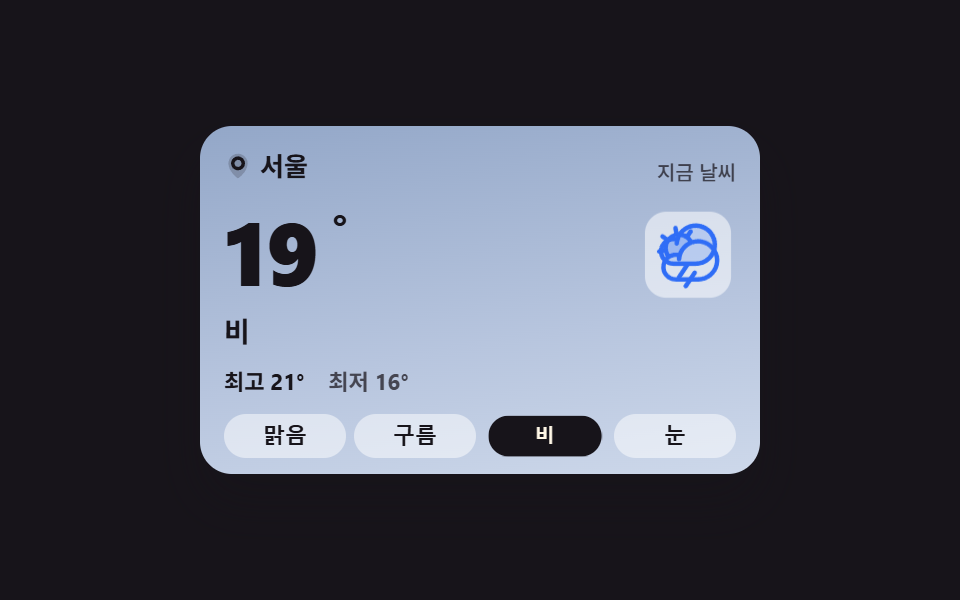 01 weather-current-card
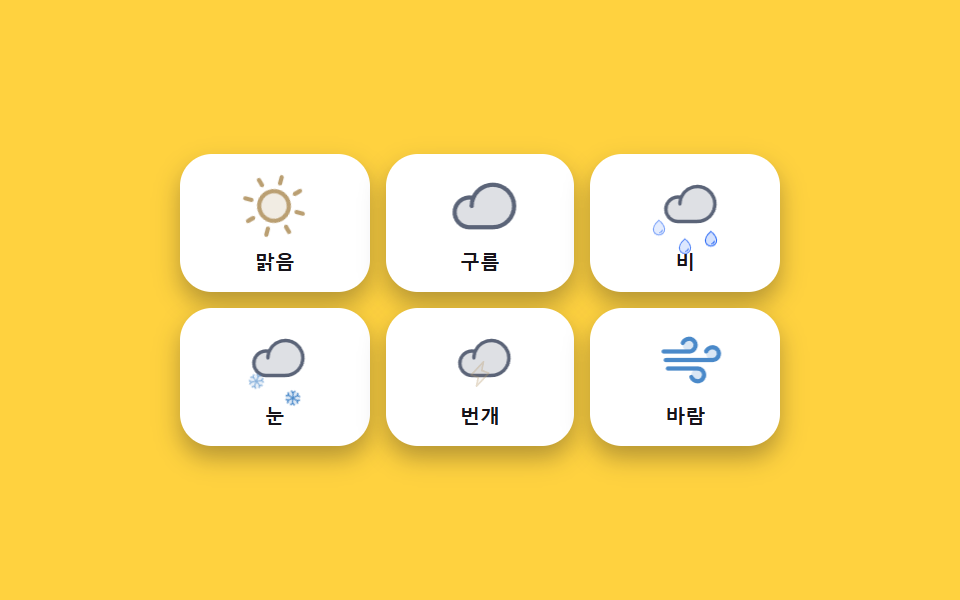 02 weather-icon-animations
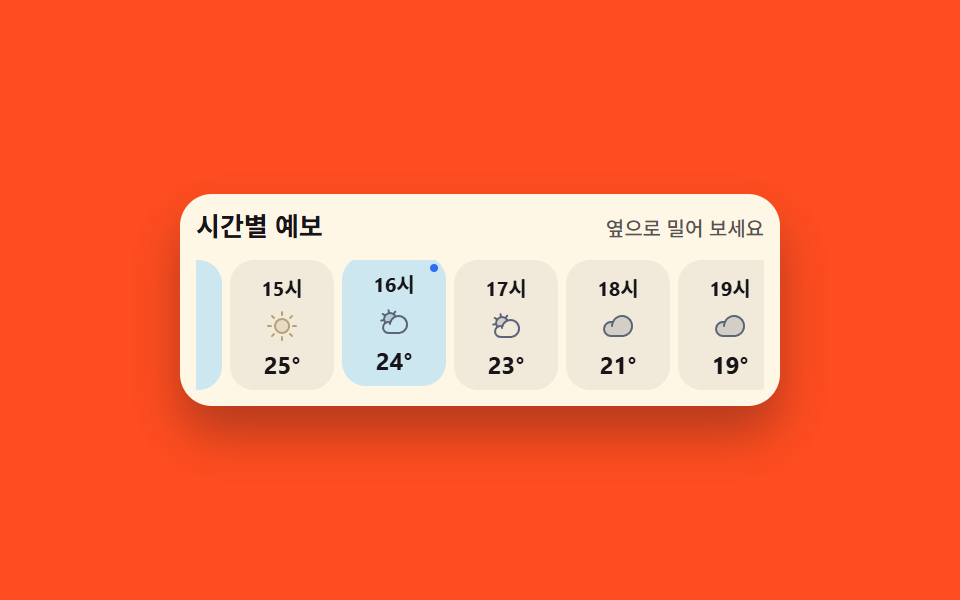 03 weather-hourly-strip
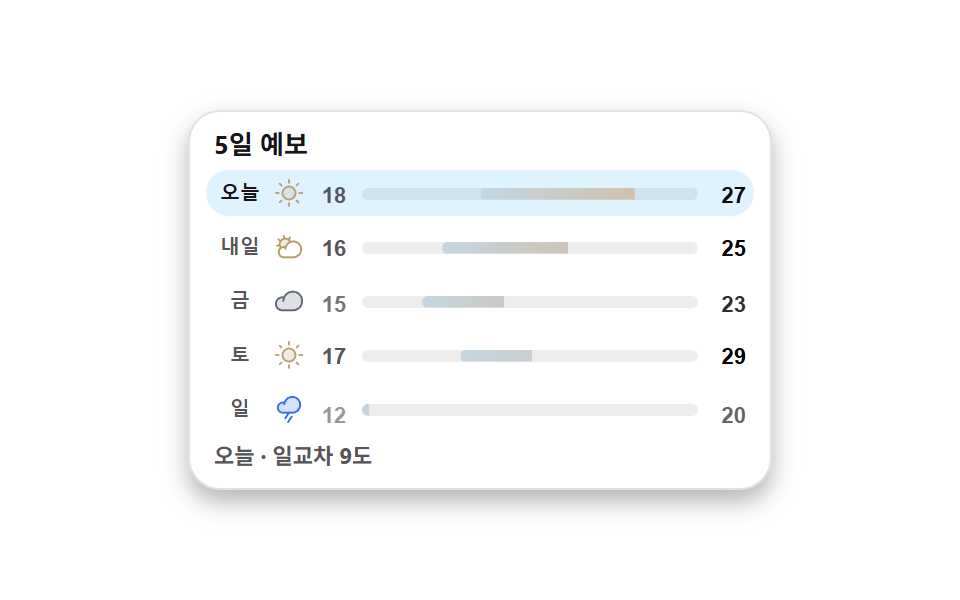 04 weather-daily-range
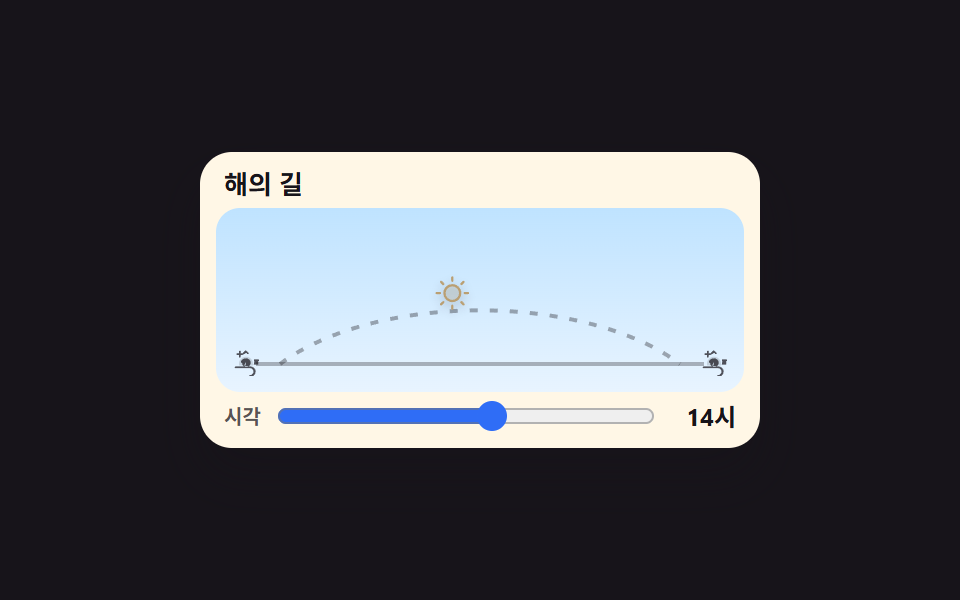 05 weather-sun-arc
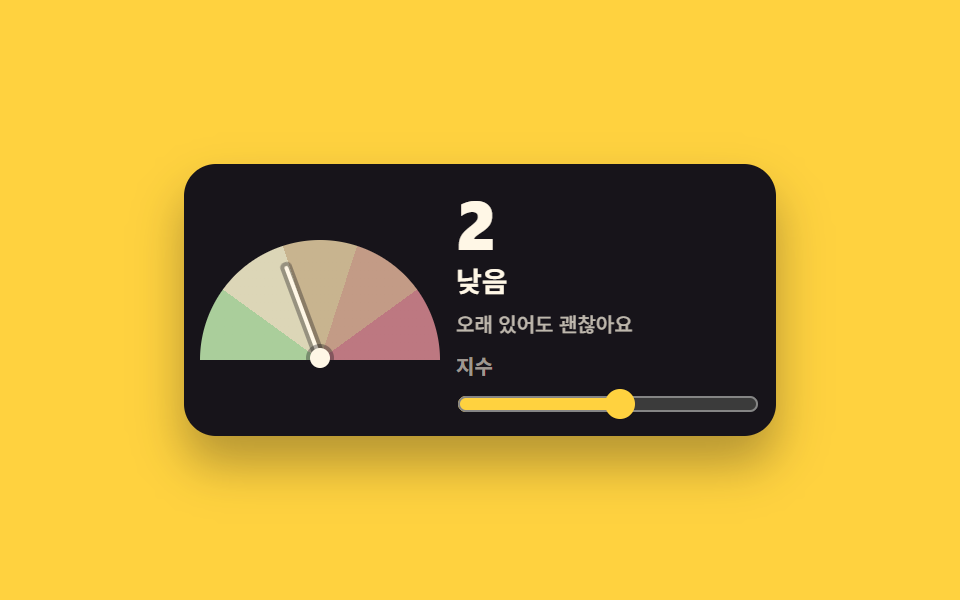 06 weather-uv-gauge
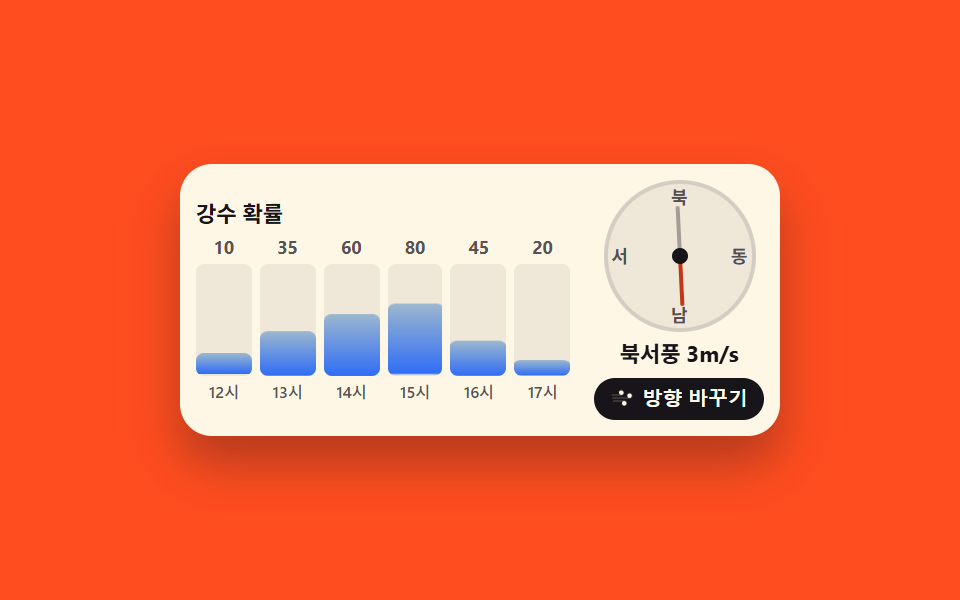 07 weather-precip-wind
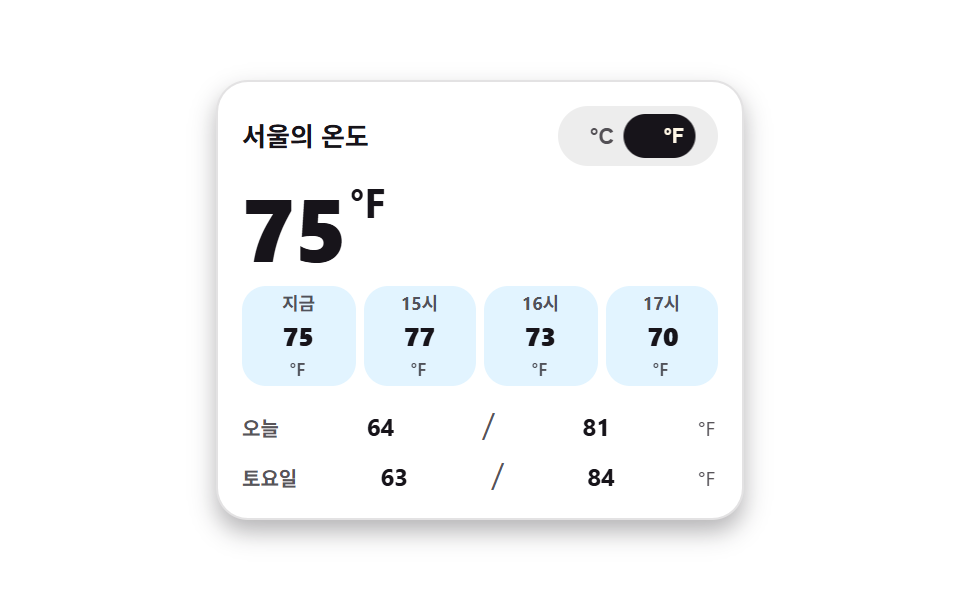 08 weather-unit-toggle
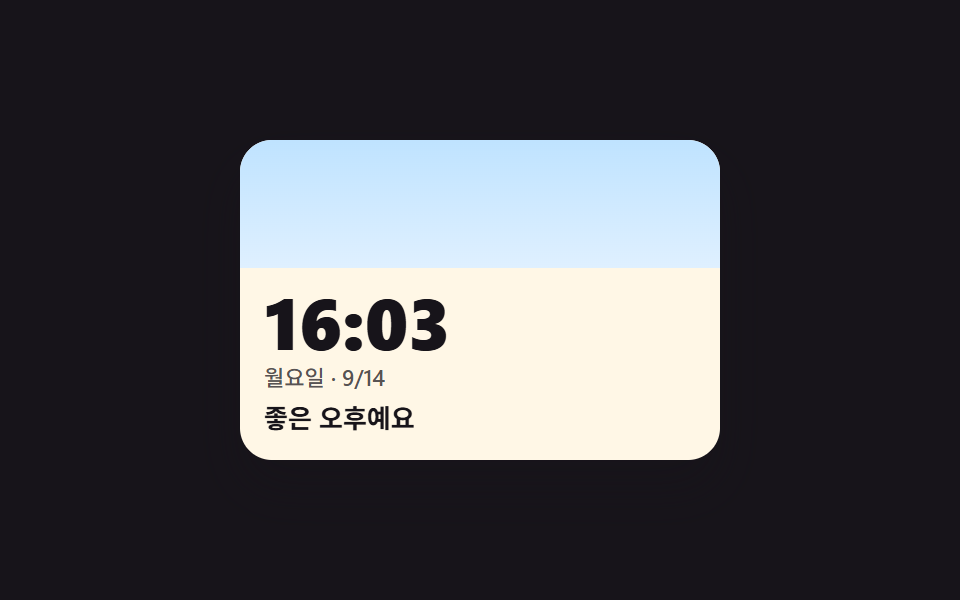 09 weather-live-clock-theme
자동 재생 · 눌러서 해당 항목으로 · 전부 한 zip
- 01 맑음에서 비로 바꾸면 하늘색도 문구도 함께 물드는 카드
- 02 멈춰 있지 않은 날씨 아이콘 — 해·구름·비·눈
- 03 지금 시각 칸에 불이 들어오는 시간별 띠
- 04 일주일 범위 안에서 제자리를 찾는 5일 예보 막대
- 05 하루의 해가 아치를 따라 올랐다 지는 해의 길
- 06 바늘이 등급 띠 위를 짚어 가리키는 자외선 게이지
- 07 강수 확률이 자라는 막대와 풍향을 짚는 나침반
- 08 한 번 누르면 카드 안 모든 온도가 환산되는 단위 토글
- 09 실제 시간이 지나면 하늘도 인사말도 바뀌는 시계 위젯
아홉 개는 갤럭시 날씨 위젯 디자인 같은 기성품 순서나 기술 난이도 순이 아니라 하루가 지나가는 순서로 놓았습니다. 지금 하늘을 보여 주는 카드(01)에서 시작해, 상태를 그리는 움직이는 아이콘(02)을 지나, 남은 시간이 띠로 이어지고(03), 주간 범위가 막대로 자리를 잡으며(04), 해가 아치를 지나가고(05), 지수 바늘이 등급을 짚고(06), 비와 바람이 자라고 도는가 하면(07), 단위를 고르면 숫자가 통째로 환산되고(08), 마지막에는 실제 시계가 하늘 색을 이어받습니다(09). 아홉 벌이 같은 색·간격·이징 값을 나눠 쓰기 때문에 몇 개를 한 페이지에 섞어도 톤이 어긋나지 않습니다. 임베드 위젯 모음의 다른 축과 함께 두면 좋습니다 — 위젯 패턴 모음 이나 활동 피드 위젯 을 보면 같은 규격으로 붙는 걸 확인할 수 있습니다. 같은 칸에 검은 바탕으로 앉는 이웃으로는 터미널 UI가 있어, 밝은 하늘 카드와 나란히 두면 위젯 한 줄의 명암이 갈립니다.
01맑음에서 비로 바꾸면 하늘색도 문구도 함께 물드는 카드
날씨 앱 디자인에서 무엇이 보이나
맑음·구름·비·눈 네 조건 중 하나를 고르면 카드의 하늘색이 steps(1, end) 컷으로 맞바뀌고, 온도·상태 문구·최저·최고가 한 세트로 따라옵니다. 컷만 있으면 움직인 프레임이 모자라니 아이콘이 한 번 솟았다 내려앉는 팝을 곁들였고, 누적면적 33.206% · 강도 56.6 로 측정됐습니다.
<main class="stage stage--ink">
  <section class="wc is-demo" id="wc" aria-label="현재 날씨 카드">
    <span class="wc__sky wc__sky--a" aria-hidden="true"></span>
    <span class="wc__sky wc__sky--b" aria-hidden="true"></span>
    <div class="wc__body">
      <header class="wc__head">
        <p class="wc__loc"><svg viewBox="0 0 256 256" width="14" height="14" fill="currentColor" aria-hidden="true"><path d="M128,16a88,88,0,0,0-88,88c0,75.3,80,132.17,83.41,134.55a8,8,0,0,0,9.18,0C136,236.17,216,179.3,216,104A88,88,0,0,0,128,16Z" opacity="0.2"/><path d="M128,40a64,64,0,1,0,64,64A64.07,64.07,0,0,0,128,40Zm0,96a32,32,0,1,1,32-32A32,32,0,0,1,128,136Z"/></svg>서울</p>
        <p class="wc__label">지금 날씨</p>
      </header>
      <div class="wc__now">
        <p class="wc__temp">
          <span class="wc__swap"><span class="wc__v">24</span><span class="wc__alt" aria-hidden="true">19</span></span><span class="wc__deg">°</span>
        </p>
        <span class="wc__art" aria-hidden="true">
          <span class="wc__glyph wc__glyph--sunny"><svg viewBox="0 0 256 256" width="40" height="40" fill="currentColor"><path d="M184,128a56,56,0,1,1-56-56A56,56,0,0,1,184,128Z" opacity="0.2"/><path d="M120,40V16a8,8,0,0,1,16,0V40a8,8,0,0,1-16,0Zm72,88a64,64,0,1,1-64-64A64.07,64.07,0,0,1,192,128Zm-16,0a48,48,0,1,0-48,48A48.05,48.05,0,0,0,176,128ZM58.34,69.66A8,8,0,0,0,69.66,58.34l-16-16A8,8,0,0,0,42.34,53.66Zm0,116.68-16,16a8,8,0,0,0,11.32,11.32l16-16a8,8,0,0,0-11.32-11.32ZM192,72a8,8,0,0,0,5.66-2.34l16-16a8,8,0,0,0-11.32-11.32l-16,16A8,8,0,0,0,192,72Zm5.66,114.34a8,8,0,0,0-11.32,11.32l16,16a8,8,0,0,0,11.32-11.32ZM48,128a8,8,0,0,0-8-8H16a8,8,0,0,0,0,16H40A8,8,0,0,0,48,128Zm80,80a8,8,0,0,0-8,8v24a8,8,0,0,0,16,0V216A8,8,0,0,0,128,208Zm112-88H216a8,8,0,0,0,0,16h24a8,8,0,0,0,0-16Z"/></svg></span>
          <span class="wc__glyph wc__glyph--cloudy"><svg viewBox="0 0 256 256" width="40" height="40" fill="currentColor"><path d="M139.84,84.41v0a68.22,68.22,0,0,0-41.65,46v-.11a44.08,44.08,0,0,0-38.54,5h0a48,48,0,1,1,80.19-50.94Z" opacity="0.2"/><path d="M164,72a76.2,76.2,0,0,0-20.26,2.73,55.63,55.63,0,0,0-9.41-11.54l9.51-13.57a8,8,0,1,0-13.11-9.18L121.22,54A55.9,55.9,0,0,0,96,48c-.58,0-1.16,0-1.74,0L91.37,31.71a8,8,0,1,0-15.75,2.77L78.5,50.82A56.1,56.1,0,0,0,55.23,65.67L41.61,56.14a8,8,0,1,0-9.17,13.11L46,78.77A55.55,55.55,0,0,0,40,104c0,.57,0,1.15,0,1.72L23.71,108.6a8,8,0,0,0,1.38,15.88,8.24,8.24,0,0,0,1.39-.12l16.32-2.88a55.74,55.74,0,0,0,5.86,12.42A52,52,0,0,0,84,224h80a76,76,0,0,0,0-152ZM56,104a40,40,0,0,1,72.54-23.24,76.26,76.26,0,0,0-35.62,40,52.14,52.14,0,0,0-31,4.17A40,40,0,0,1,56,104ZM164,208H84a36,36,0,1,1,4.78-71.69c-.37,2.37-.63,4.79-.77,7.23a8,8,0,0,0,16,.92,58.91,58.91,0,0,1,1.88-11.81c0-.16.09-.32.12-.48A60.06,60.06,0,1,1,164,208Z"/></svg></span>
          <span class="wc__glyph wc__glyph--rainy"><svg viewBox="0 0 256 256" width="40" height="40" fill="currentColor"><path d="M224,92a68,68,0,0,1-68,68H76A44,44,0,1,1,90.2,74.34v.11A68.06,68.06,0,0,1,224,92Z" opacity="0.2"/><path d="M158.66,196.44l-32,48a8,8,0,1,1-13.32-8.88l32-48a8,8,0,0,1,13.32,8.88ZM232,92a76.08,76.08,0,0,1-76,76H132.28l-29.62,44.44a8,8,0,1,1-13.32-8.88L113.05,168H76A52,52,0,1,1,76,64a53.26,53.26,0,0,1,8.92.76A76.08,76.08,0,0,1,232,92Zm-16,0A60.06,60.06,0,0,0,96,88.46a8,8,0,0,1-16-.92q.21-3.66.77-7.23A38.11,38.11,0,0,0,76,80a36,36,0,0,0,0,72h80A60.07,60.07,0,0,0,216,92Z"/></svg></span>
          <span class="wc__glyph wc__glyph--snowy"><svg viewBox="0 0 256 256" width="40" height="40" fill="currentColor"><path d="M220,128a92,92,0,1,1-92-92A92.1,92.1,0,0,1,220,128Z" opacity="0.2"/><path d="M223.77,150.09a8,8,0,0,1-5.86,9.68l-24.64,6,6.46,24.11a8,8,0,0,1-5.66,9.8A8.25,8.25,0,0,1,192,200a8,8,0,0,1-7.72-5.93l-7.72-28.8L136,141.86v46.83l21.66,21.65a8,8,0,0,1-11.32,11.32L128,203.31l-18.34,18.35a8,8,0,0,1-11.32-11.32L120,188.69V141.86L79.45,165.27l-7.72,28.8A8,8,0,0,1,64,200a8.25,8.25,0,0,1-2.08-.27,8,8,0,0,1-5.66-9.8l6.46-24.11-24.64-6a8,8,0,0,1,3.82-15.54l29.45,7.23L112,128,71.36,104.54l-29.45,7.23A7.85,7.85,0,0,1,40,112a8,8,0,0,1-1.91-15.77l24.64-6L56.27,66.07a8,8,0,0,1,15.46-4.14l7.72,28.8L120,114.14V67.31L98.34,45.66a8,8,0,0,1,11.32-11.32L128,52.69l18.34-18.35a8,8,0,0,1,11.32,11.32L136,67.31v46.83l40.55-23.41,7.72-28.8a8,8,0,0,1,15.46,4.14l-6.46,24.11,24.64,6A8,8,0,0,1,216,112a7.85,7.85,0,0,1-1.91-.23l-29.45-7.23L144,128l40.64,23.46,29.45-7.23A8,8,0,0,1,223.77,150.09Z"/></svg></span>
        </span>
        <p class="wc__word wc__swap"><span class="wc__v">맑음</span><span class="wc__alt" aria-hidden="true">비</span></p>
      </div>
      <p class="wc__range">
        <span class="wc__hi">최고 <span class="wc__swap"><span class="wc__v">27</span><span class="wc__alt" aria-hidden="true">21</span></span>°</span>
        <span class="wc__lo">최저 <span class="wc__swap"><span class="wc__v">18</span><span class="wc__alt" aria-hidden="true">16</span></span>°</span>
      </p>
      <div class="wc__conds" role="group" aria-label="하늘 상태 고르기">
        <button class="wc__c is-on" type="button" data-cond="sunny" aria-pressed="true">맑음</button>
        <button class="wc__c" type="button" data-cond="cloudy" aria-pressed="false">구름</button>
        <button class="wc__c" type="button" data-cond="rainy" aria-pressed="false">비</button>
        <button class="wc__c" type="button" data-cond="snowy" aria-pressed="false">눈</button>
      </div>
    </div>
  </section>
</main>@use "../../../../site/static/demo-tokens" as *;
// 하늘 상태를 고르면 카드 전체 — 하늘 배경·아이콘·온도·최고최저 — 가 한 세트로 맞바뀐다.
// 상태 교체는 steps(1, end) 컷: 크로스페이드로 겹치면 대표 이미지에 두 하늘이 반투명하게 겹친다(237 실측).
// 아이콘이 솟았다 내려앉는 pop 만 transform — 컷만으로는 움직인 프레임이 모자란다(252 실측).
$duration: $dur-loop;
$easing: $ease-spring;
$color: $subject-blue;
@include stage($stage-ink);
.wc {
position: relative;
box-sizing: border-box;
width: min(280px, 92vw);
overflow: hidden;
border-radius: $r-card;
color: $subject-ink;
box-shadow: $shadow-raised;
}
.wc * { box-sizing: border-box; }
// 두 하늘 겹 — 맑음(a)과 비(b). 기본은 a.
.wc__sky {
position: absolute;
inset: 0;
pointer-events: none;
}
.wc__sky--a { background: linear-gradient(170deg, #bfe3ff 0%, #dcefff 46%, #ffe9b0 100%); }
.wc__sky--b { background: linear-gradient(170deg, #93a7c8 0%, #b7c5de 60%, #cdd8ea 100%); opacity: 0; }
.wc__body {
position: relative;
display: grid;
gap: $sp-2;
padding: $sp-3 $sp-3 $sp-2;
}
.wc__head {
display: flex;
align-items: baseline;
justify-content: space-between;
gap: $sp-2;
}
.wc__loc {
display: inline-flex;
align-items: center;
gap: $sp-1;
margin: 0;
font-size: 13px;
font-weight: 700;
line-height: 1.3;
}
.wc__label {
margin: 0;
font-size: 10px;
font-weight: 500;
line-height: 1.3;
color: rgba($subject-ink, .72);
}
.wc__now {
display: grid;
grid-template-columns: 1fr auto;
align-items: center;
gap: $sp-2;
}
.wc__temp {
display: flex;
align-items: flex-start;
margin: 0;
font-size: 44px;
font-weight: 800;
line-height: 1;
font-variant-numeric: tabular-nums;
}
.wc__deg { font-size: 22px; font-weight: 700; }
.wc__word {
grid-column: 1 / -1;
margin: 0;
font-size: 14px;
font-weight: 700;
line-height: 1.3;
}
// 아이콘 네 겹 — 상태 클래스가 한 개만 보이게 한다
.wc__art {
position: relative;
display: grid;
place-items: center;
width: 48px;
height: 48px;
border-radius: $r-control;
background: rgba(255, 255, 255, .55);
}
.wc__glyph {
grid-area: 1 / 1;
display: grid;
place-items: center;
color: $subject-blue;
transition: none;
}
.wc__glyph--sunny { color: #ba9f72; }
.wc__glyph--rainy { opacity: 0; }
.wc__glyph--snowy { opacity: 0; color: #4a89c9; }
.wc.is-cloudy .wc__glyph--sunny,
.wc.is-rainy .wc__glyph--sunny,
.wc.is-snowy .wc__glyph--sunny { opacity: 0; }
.wc.is-cloudy .wc__glyph--cloudy { opacity: 1; }
.wc.is-rainy .wc__glyph--rainy { opacity: 1; }
.wc.is-snowy .wc__glyph--snowy { opacity: 1; }
.wc.is-cloudy .wc__sky--a,
.wc.is-rainy .wc__sky--a,
.wc.is-snowy .wc__sky--a { opacity: 0; }
.wc.is-cloudy .wc__sky--b,
.wc.is-rainy .wc__sky--b,
.wc.is-snowy .wc__sky--b { opacity: 1; }
// 실제 클릭: 아이콘이 한 번 솟았다 내려앉는다
@keyframes wc-pop {
0% { transform: translateY(3px) scale(.88); }
55% { transform: translateY(-3px) scale(1.04); }
100% { transform: translateY(0) scale(1); }
}
.wc__art.is-pop { animation-name: wc-pop; animation-duration: $dur-quick; animation-timing-function: $easing; animation-iteration-count: 1; }
.wc__range {
display: flex;
gap: $sp-3;
margin: 0;
font-size: 11px;
font-weight: 700;
line-height: 1.4;
font-variant-numeric: tabular-nums;
}
.wc__lo { color: rgba($subject-ink, .72); }
// 겹쳐 둔 두 번째 값 — 미리보기 루프에서만 보인다
.wc__swap { position: relative; display: inline-block; }
.wc__alt {
position: absolute;
inset: 0;
opacity: 0;
}
.wc__conds {
display: grid;
grid-template-columns: repeat(4, 1fr);
gap: $sp-1;
}
.wc__c {
padding: $sp-1 0;
border: 0;
border-radius: $r-control;
background: rgba(255, 255, 255, .5);
color: $subject-ink;
font-size: 11px;
font-weight: 700;
line-height: 1.3;
cursor: pointer;
&:focus-visible { outline: 2px solid $subject-blue; outline-offset: 2px; }
&.is-on { background: $subject-ink; color: $subject-cream; }
}
// ── 격자 미리보기 루프 (2초) ──
// 0~44% 맑음 → 45% 컷으로 비(아이콘 pop 함께) → 88% 맑음 복귀(90% 안)
@keyframes wc-a { 0%, 44% { opacity: 1; } 45%, 87% { opacity: 0; } 88%, 100% { opacity: 1; } }
@keyframes wc-b { 0%, 44% { opacity: 0; } 45%, 87% { opacity: 1; } 88%, 100% { opacity: 0; } }
@keyframes wc-va { 0%, 44% { opacity: 1; } 45%, 87% { opacity: 0; } 88%, 100% { opacity: 1; } }
@keyframes wc-vb { 0%, 44% { opacity: 0; } 45%, 87% { opacity: 1; } 88%, 100% { opacity: 0; } }
@keyframes wc-poploop {
0%, 42% { transform: translateY(0) scale(1); }
45% { transform: translateY(3px) scale(.88); }
58% { transform: translateY(-3px) scale(1.04); }
70%, 85% { transform: translateY(0) scale(1); }
88% { transform: translateY(3px) scale(.88); }
97%, 100% { transform: translateY(0) scale(1); }
}
@keyframes wc-press {
0%, 41% { transform: scale(1); }
45% { transform: scale(.9); }
57%, 100% { transform: scale(1); }
}
// 루프에서는 고른 단추의 강조도 상태와 함께 맞바뀐다 — 컷으로
@keyframes wc-on-a {
0%, 44% { background-color: $subject-ink; color: $subject-cream; }
45%, 87% { background-color: rgba(255, 255, 255, .5); color: $subject-ink; }
88%, 100% { background-color: $subject-ink; color: $subject-cream; }
}
@keyframes wc-on-b {
0%, 44% { background-color: rgba(255, 255, 255, .5); color: $subject-ink; }
45%, 87% { background-color: $subject-ink; color: $subject-cream; }
88%, 100% { background-color: rgba(255, 255, 255, .5); color: $subject-ink; }
}
.wc.is-demo {
.wc__sky--a { animation-name: wc-a; }
.wc__sky--b { animation-name: wc-b; }
.wc__glyph--sunny { animation-name: wc-a; }
.wc__glyph--rainy { animation-name: wc-b; }
.wc__sky--a, .wc__sky--b,
.wc__glyph--sunny, .wc__glyph--rainy {
animation-duration: $duration;
animation-timing-function: steps(1, end);
animation-iteration-count: infinite;
animation-fill-mode: backwards;
}
.wc__swap .wc__v { animation-name: wc-va; }
.wc__swap .wc__alt { animation-name: wc-vb; }
.wc__swap .wc__v, .wc__swap .wc__alt {
animation-duration: $duration;
animation-timing-function: steps(1, end);
animation-iteration-count: infinite;
animation-fill-mode: backwards;
}
.wc__art { animation-name: wc-poploop; animation-duration: $duration; animation-timing-function: $ease-out; animation-iteration-count: infinite; animation-fill-mode: backwards; }
.wc__c:nth-child(3) { animation-name: wc-press, wc-on-b; }
.wc__c:nth-child(1) { animation-name: wc-on-a; }
.wc__c:nth-child(1), .wc__c:nth-child(3) {
animation-duration: $duration, $duration;
animation-timing-function: $easing, steps(1, end);
animation-iteration-count: infinite, infinite;
animation-fill-mode: backwards, backwards;
}
}
@media (max-width: 340px) {
.wc__body { padding: $sp-2 $sp-2 $sp-1; }
.wc__temp { font-size: 36px; }
.wc__art { width: 40px; height: 40px; }
.wc__art svg { width: 32px; height: 32px; }
}
@media (prefers-reduced-motion: reduce) {
.wc.is-demo .wc__sky--a, .wc.is-demo .wc__sky--b,
.wc.is-demo .wc__glyph, .wc.is-demo .wc__swap .wc__v, .wc.is-demo .wc__swap .wc__alt,
.wc.is-demo .wc__art, .wc.is-demo .wc__c {
animation: none !important;
transform: none !important;
}
.wc.is-demo .wc__sky--a, .wc.is-demo .wc__glyph--sunny,
.wc.is-demo .wc__swap .wc__v { opacity: 1 !important; }
.wc.is-demo .wc__sky--b, .wc.is-demo .wc__glyph--rainy,
.wc.is-demo .wc__swap .wc__alt { opacity: 0 !important; }
.wc__art.is-pop { animation: none !important; }
}html, body {
margin: 0;
overflow: hidden;
}
.stage {
box-sizing: border-box;
min-height: 100vh;
display: grid;
place-items: center;
margin: 0;
background: #17141a;
font-family: -apple-system, "Segoe UI", "Noto Sans KR", sans-serif;
padding: clamp(8px, 4vw, 24px);
}
.wc {
position: relative;
box-sizing: border-box;
width: min(280px, 92vw);
overflow: hidden;
border-radius: 16px;
color: #17141a;
box-shadow: 0 14px 24px rgba(23, 20, 26, 0.32);
}
.wc * {
box-sizing: border-box;
}
.wc__sky {
position: absolute;
inset: 0;
pointer-events: none;
}
.wc__sky--a {
background: linear-gradient(170deg, #bfe3ff 0%, #dcefff 46%, #ffe9b0 100%);
}
.wc__sky--b {
background: linear-gradient(170deg, #93a7c8 0%, #b7c5de 60%, #cdd8ea 100%);
opacity: 0;
}
.wc__body {
position: relative;
display: grid;
gap: 8px;
padding: 12px 12px 8px;
}
.wc__head {
display: flex;
align-items: baseline;
justify-content: space-between;
gap: 8px;
}
.wc__loc {
display: inline-flex;
align-items: center;
gap: 4px;
margin: 0;
font-size: 13px;
font-weight: 700;
line-height: 1.3;
}
.wc__label {
margin: 0;
font-size: 10px;
font-weight: 500;
line-height: 1.3;
color: rgba(23, 20, 26, 0.72);
}
.wc__now {
display: grid;
grid-template-columns: 1fr auto;
align-items: center;
gap: 8px;
}
.wc__temp {
display: flex;
align-items: flex-start;
margin: 0;
font-size: 44px;
font-weight: 800;
line-height: 1;
font-variant-numeric: tabular-nums;
}
.wc__deg {
font-size: 22px;
font-weight: 700;
}
.wc__word {
grid-column: 1/-1;
margin: 0;
font-size: 14px;
font-weight: 700;
line-height: 1.3;
}
.wc__art {
position: relative;
display: grid;
place-items: center;
width: 48px;
height: 48px;
border-radius: 12px;
background: rgba(255, 255, 255, 0.55);
}
.wc__glyph {
grid-area: 1/1;
display: grid;
place-items: center;
color: #2f6df6;
transition: none;
}
.wc__glyph--sunny {
color: #ba9f72;
}
.wc__glyph--rainy {
opacity: 0;
}
.wc__glyph--snowy {
opacity: 0;
color: #4a89c9;
}
.wc.is-cloudy .wc__glyph--sunny,
.wc.is-rainy .wc__glyph--sunny,
.wc.is-snowy .wc__glyph--sunny {
opacity: 0;
}
.wc.is-cloudy .wc__glyph--cloudy {
opacity: 1;
}
.wc.is-rainy .wc__glyph--rainy {
opacity: 1;
}
.wc.is-snowy .wc__glyph--snowy {
opacity: 1;
}
.wc.is-cloudy .wc__sky--a,
.wc.is-rainy .wc__sky--a,
.wc.is-snowy .wc__sky--a {
opacity: 0;
}
.wc.is-cloudy .wc__sky--b,
.wc.is-rainy .wc__sky--b,
.wc.is-snowy .wc__sky--b {
opacity: 1;
}
@keyframes wc-pop {
0% {
transform: translateY(3px) scale(0.88);
}
55% {
transform: translateY(-3px) scale(1.04);
}
100% {
transform: translateY(0) scale(1);
}
}
.wc__art.is-pop {
animation-name: wc-pop;
animation-duration: 220ms;
animation-timing-function: cubic-bezier(0.2, 0.8, 0.2, 1);
animation-iteration-count: 1;
}
.wc__range {
display: flex;
gap: 12px;
margin: 0;
font-size: 11px;
font-weight: 700;
line-height: 1.4;
font-variant-numeric: tabular-nums;
}
.wc__lo {
color: rgba(23, 20, 26, 0.72);
}
.wc__swap {
position: relative;
display: inline-block;
}
.wc__alt {
position: absolute;
inset: 0;
opacity: 0;
}
.wc__conds {
display: grid;
grid-template-columns: repeat(4, 1fr);
gap: 4px;
}
.wc__c {
padding: 4px 0;
border: 0;
border-radius: 12px;
background: rgba(255, 255, 255, 0.5);
color: #17141a;
font-size: 11px;
font-weight: 700;
line-height: 1.3;
cursor: pointer;
}
.wc__c:focus-visible {
outline: 2px solid #2f6df6;
outline-offset: 2px;
}
.wc__c.is-on {
background: #17141a;
color: #fff7e6;
}
@keyframes wc-a {
0%, 44% {
opacity: 1;
}
45%, 87% {
opacity: 0;
}
88%, 100% {
opacity: 1;
}
}
@keyframes wc-b {
0%, 44% {
opacity: 0;
}
45%, 87% {
opacity: 1;
}
88%, 100% {
opacity: 0;
}
}
@keyframes wc-va {
0%, 44% {
opacity: 1;
}
45%, 87% {
opacity: 0;
}
88%, 100% {
opacity: 1;
}
}
@keyframes wc-vb {
0%, 44% {
opacity: 0;
}
45%, 87% {
opacity: 1;
}
88%, 100% {
opacity: 0;
}
}
@keyframes wc-poploop {
0%, 42% {
transform: translateY(0) scale(1);
}
45% {
transform: translateY(3px) scale(0.88);
}
58% {
transform: translateY(-3px) scale(1.04);
}
70%, 85% {
transform: translateY(0) scale(1);
}
88% {
transform: translateY(3px) scale(0.88);
}
97%, 100% {
transform: translateY(0) scale(1);
}
}
@keyframes wc-press {
0%, 41% {
transform: scale(1);
}
45% {
transform: scale(0.9);
}
57%, 100% {
transform: scale(1);
}
}
@keyframes wc-on-a {
0%, 44% {
background-color: #17141a;
color: #fff7e6;
}
45%, 87% {
background-color: rgba(255, 255, 255, 0.5);
color: #17141a;
}
88%, 100% {
background-color: #17141a;
color: #fff7e6;
}
}
@keyframes wc-on-b {
0%, 44% {
background-color: rgba(255, 255, 255, 0.5);
color: #17141a;
}
45%, 87% {
background-color: #17141a;
color: #fff7e6;
}
88%, 100% {
background-color: rgba(255, 255, 255, 0.5);
color: #17141a;
}
}
.wc.is-demo .wc__sky--a {
animation-name: wc-a;
}
.wc.is-demo .wc__sky--b {
animation-name: wc-b;
}
.wc.is-demo .wc__glyph--sunny {
animation-name: wc-a;
}
.wc.is-demo .wc__glyph--rainy {
animation-name: wc-b;
}
.wc.is-demo .wc__sky--a, .wc.is-demo .wc__sky--b,
.wc.is-demo .wc__glyph--sunny, .wc.is-demo .wc__glyph--rainy {
animation-duration: 2s;
animation-timing-function: steps(1, end);
animation-iteration-count: infinite;
animation-fill-mode: backwards;
}
.wc.is-demo .wc__swap .wc__v {
animation-name: wc-va;
}
.wc.is-demo .wc__swap .wc__alt {
animation-name: wc-vb;
}
.wc.is-demo .wc__swap .wc__v, .wc.is-demo .wc__swap .wc__alt {
animation-duration: 2s;
animation-timing-function: steps(1, end);
animation-iteration-count: infinite;
animation-fill-mode: backwards;
}
.wc.is-demo .wc__art {
animation-name: wc-poploop;
animation-duration: 2s;
animation-timing-function: ease-out;
animation-iteration-count: infinite;
animation-fill-mode: backwards;
}
.wc.is-demo .wc__c:nth-child(3) {
animation-name: wc-press, wc-on-b;
}
.wc.is-demo .wc__c:nth-child(1) {
animation-name: wc-on-a;
}
.wc.is-demo .wc__c:nth-child(1), .wc.is-demo .wc__c:nth-child(3) {
animation-duration: 2s, 2s;
animation-timing-function: cubic-bezier(0.2, 0.8, 0.2, 1), steps(1, end);
animation-iteration-count: infinite, infinite;
animation-fill-mode: backwards, backwards;
}
@media (max-width: 340px) {
.wc__body {
padding: 8px 8px 4px;
}
.wc__temp {
font-size: 36px;
}
.wc__art {
width: 40px;
height: 40px;
}
.wc__art svg {
width: 32px;
height: 32px;
}
}
@media (prefers-reduced-motion: reduce) {
.wc.is-demo .wc__sky--a, .wc.is-demo .wc__sky--b,
.wc.is-demo .wc__glyph, .wc.is-demo .wc__swap .wc__v, .wc.is-demo .wc__swap .wc__alt,
.wc.is-demo .wc__art, .wc.is-demo .wc__c {
animation: none !important;
transform: none !important;
}
.wc.is-demo .wc__sky--a, .wc.is-demo .wc__glyph--sunny,
.wc.is-demo .wc__swap .wc__v {
opacity: 1 !important;
}
.wc.is-demo .wc__sky--b, .wc.is-demo .wc__glyph--rainy,
.wc.is-demo .wc__swap .wc__alt {
opacity: 0 !important;
}
.wc__art.is-pop {
animation: none !important;
}
}// 하늘 상태를 고르면 카드 전체(하늘·아이콘·온도·최고최저)가 한 세트로 맞바뀐다.
// 값은 데이터 속성에 들어 있고, 화면 글자는 언어팩이 바꾼 텍스트 노드만 고친다.
var wcRoot = document.getElementById('wc');
// 상태 문구도 한 세트다 — 언어팩 사본이 이 한국어 글자를 통째로 바꾼다(04 의 drDetails 와 같은 방식)
var wcData = {
sunny: { temp: 24, hi: 27, lo: 18, word: '맑음' },
cloudy: { temp: 21, hi: 24, lo: 17, word: '구름' },
rainy: { temp: 19, hi: 21, lo: 16, word: '비' },
snowy: { temp: -2, hi: 1, lo: -5, word: '눈' }
};
var wcSwaps = [
{ box: '.wc__temp .wc__swap', key: 'temp' },
{ box: '.wc__word', key: 'word' },
{ box: '.wc__hi .wc__swap', key: 'hi' },
{ box: '.wc__lo .wc__swap', key: 'lo' }
];
function wcApply(cond) {
wcRoot.classList.remove('is-sunny', 'is-cloudy', 'is-rainy', 'is-snowy');
wcRoot.classList.add('is-' + cond);
for (var i = 0; i < wcSwaps.length; i++) {
var box = wcRoot.querySelector(wcSwaps[i].box);
box.querySelector('.wc__v').textContent = String(wcData[cond][wcSwaps[i].key]);
}
var btns = wcRoot.querySelectorAll('.wc__c');
for (var j = 0; j < btns.length; j++) {
var on = btns[j].getAttribute('data-cond') === cond;
btns[j].setAttribute('aria-pressed', on ? 'true' : 'false');
btns[j].classList.toggle('is-on', on);
}
// 아이콘이 한 번 솟았다 내려앉는다 — 상태가 바뀌었다는 피드백
var art = wcRoot.querySelector('.wc__art');
art.classList.remove('is-pop');
void art.offsetWidth;
art.classList.add('is-pop');
}
wcRoot.addEventListener('click', function (e) {
var btn = e.target.closest('.wc__c');
if (!btn) return;
wcRoot.classList.remove('is-demo');
wcApply(btn.getAttribute('data-cond'));
});import { useState } from "react";
import type { CSSProperties } from "react";
import styles from "./WeatherCurrentCard.module.scss";
// vanilla 판(run/281/demo/01-weather-current-card/index.html) 의 React 포트.
// 하늘 상태를 고르면 카드 전체(하늘·아이콘·온도·최고최저)가 한 세트로 맞바뀐다.
export type WcCondition = {
id: string;
/** 단추에 쓰는 낱말 — 언어팩이 통째로 바꾼다 */
label: string;
/** 큰 온도 아래 붙는 하늘 낱말 */
word: string;
temp: number;
hi: number;
lo: number;
};
export type WeatherCurrentCardProps = {
location?: string;
label?: string;
hiLabel?: string;
loLabel?: string;
groupLabel?: string;
condsLabel?: string;
conditions?: WcCondition[];
/** 격자 미리보기 루프가 컷으로 맞바꾸는 두 번째 하늘 상태 */
loopTo?: string;
/** 격자 미리보기 2초 자동 루프. 사람이 손대면 꺼진다 */
demo?: boolean;
duration?: number;
easing?: string;
color?: string;
};
type Vars = CSSProperties & { "--duration"?: string; "--easing"?: string; "--color"?: string };
const DEFAULT_CONDITIONS: WcCondition[] = [
{ id: "sunny", label: "맑음", word: "맑음", temp: 24, hi: 27, lo: 18 },
{ id: "cloudy", label: "구름", word: "구름", temp: 21, hi: 24, lo: 17 },
{ id: "rainy", label: "비", word: "비", temp: 19, hi: 21, lo: 16 },
{ id: "snowy", label: "눈", word: "눈", temp: -2, hi: 1, lo: -5 },
];
function PinIcon() {
return (
<svg viewBox="0 0 256 256" width="14" height="14" fill="currentColor" aria-hidden="true"><path d="M128,16a88,88,0,0,0-88,88c0,75.3,80,132.17,83.41,134.55a8,8,0,0,0,9.18,0C136,236.17,216,179.3,216,104A88,88,0,0,0,128,16Z" opacity="0.2"/><path d="M128,40a64,64,0,1,0,64,64A64.07,64.07,0,0,0,128,40Zm0,96a32,32,0,1,1,32-32A32,32,0,0,1,128,136Z"/></svg>
);
}
function SunGlyph() {
return (
<svg viewBox="0 0 256 256" width="40" height="40" fill="currentColor"><path d="M184,128a56,56,0,1,1-56-56A56,56,0,0,1,184,128Z" opacity="0.2"/><path d="M120,40V16a8,8,0,0,1,16,0V40a8,8,0,0,1-16,0Zm72,88a64,64,0,1,1-64-64A64.07,64.07,0,0,1,192,128Zm-16,0a48,48,0,1,0-48,48A48.05,48.05,0,0,0,176,128ZM58.34,69.66A8,8,0,0,0,69.66,58.34l-16-16A8,8,0,0,0,42.34,53.66Zm0,116.68-16,16a8,8,0,0,0,11.32,11.32l16-16a8,8,0,0,0-11.32-11.32ZM192,72a8,8,0,0,0,5.66-2.34l16-16a8,8,0,0,0-11.32-11.32l-16,16A8,8,0,0,0,192,72Zm5.66,114.34a8,8,0,0,0-11.32,11.32l16,16a8,8,0,0,0,11.32-11.32ZM48,128a8,8,0,0,0-8-8H16a8,8,0,0,0,0,16H40A8,8,0,0,0,48,128Zm80,80a8,8,0,0,0-8,8v24a8,8,0,0,0,16,0V216A8,8,0,0,0,128,208Zm112-88H216a8,8,0,0,0,0,16h24a8,8,0,0,0,0-16Z"/></svg>
);
}
function CloudGlyph() {
return (
<svg viewBox="0 0 256 256" width="40" height="40" fill="currentColor"><path d="M139.84,84.41v0a68.22,68.22,0,0,0-41.65,46v-.11a44.08,44.08,0,0,0-38.54,5h0a48,48,0,1,1,80.19-50.94Z" opacity="0.2"/><path d="M164,72a76.2,76.2,0,0,0-20.26,2.73,55.63,55.63,0,0,0-9.41-11.54l9.51-13.57a8,8,0,1,0-13.11-9.18L121.22,54A55.9,55.9,0,0,0,96,48c-.58,0-1.16,0-1.74,0L91.37,31.71a8,8,0,1,0-15.75,2.77L78.5,50.82A56.1,56.1,0,0,0,55.23,65.67L41.61,56.14a8,8,0,1,0-9.17,13.11L46,78.77A55.55,55.55,0,0,0,40,104c0,.57,0,1.15,0,1.72L23.71,108.6a8,8,0,0,0,1.38,15.88,8.24,8.24,0,0,0,1.39-.12l16.32-2.88a55.74,55.74,0,0,0,5.86,12.42A52,52,0,0,0,84,224h80a76,76,0,0,0,0-152ZM56,104a40,40,0,0,1,72.54-23.24,76.26,76.26,0,0,0-35.62,40,52.14,52.14,0,0,0-31,4.17A40,40,0,0,1,56,104ZM164,208H84a36,36,0,1,1,4.78-71.69c-.37,2.37-.63,4.79-.77,7.23a8,8,0,0,0,16,.92,58.91,58.91,0,0,1,1.88-11.81c0-.16.09-.32.12-.48A60.06,60.06,0,1,1,164,208Z"/></svg>
);
}
function RainGlyph() {
return (
<svg viewBox="0 0 256 256" width="40" height="40" fill="currentColor"><path d="M224,92a68,68,0,0,1-68,68H76A44,44,0,1,1,90.2,74.34v.11A68.06,68.06,0,0,1,224,92Z" opacity="0.2"/><path d="M158.66,196.44l-32,48a8,8,0,1,1-13.32-8.88l32-48a8,8,0,0,1,13.32,8.88ZM232,92a76.08,76.08,0,0,1-76,76H132.28l-29.62,44.44a8,8,0,1,1-13.32-8.88L113.05,168H76A52,52,0,1,1,76,64a53.26,53.26,0,0,1,8.92.76A76.08,76.08,0,0,1,232,92Zm-16,0A60.06,60.06,0,0,0,96,88.46a8,8,0,0,1-16-.92q.21-3.66.77-7.23A38.11,38.11,0,0,0,76,80a36,36,0,0,0,0,72h80A60.07,60.07,0,0,0,216,92Z"/></svg>
);
}
function SnowGlyph() {
return (
<svg viewBox="0 0 256 256" width="40" height="40" fill="currentColor"><path d="M220,128a92,92,0,1,1-92-92A92.1,92.1,0,0,1,220,128Z" opacity="0.2"/><path d="M223.77,150.09a8,8,0,0,1-5.86,9.68l-24.64,6,6.46,24.11a8,8,0,0,1-5.66,9.8A8.25,8.25,0,0,1,192,200a8,8,0,0,1-7.72-5.93l-7.72-28.8L136,141.86v46.83l21.66,21.65a8,8,0,0,1-11.32,11.32L128,203.31l-18.34,18.35a8,8,0,0,1-11.32-11.32L120,188.69V141.86L79.45,165.27l-7.72,28.8A8,8,0,0,1,64,200a8.25,8.25,0,0,1-2.08-.27,8,8,0,0,1-5.66-9.8l6.46-24.11-24.64-6a8,8,0,0,1,3.82-15.54l29.45,7.23L112,128,71.36,104.54l-29.45,7.23A7.85,7.85,0,0,1,40,112a8,8,0,0,1-1.91-15.77l24.64-6L56.27,66.07a8,8,0,0,1,15.46-4.14l7.72,28.8L120,114.14V67.31L98.34,45.66a8,8,0,0,1,11.32-11.32L128,52.69l18.34-18.35a8,8,0,0,1,11.32,11.32L136,67.31v46.83l40.55-23.41,7.72-28.8a8,8,0,0,1,15.46,4.14l-6.46,24.11,24.64,6A8,8,0,0,1,216,112a7.85,7.85,0,0,1-1.91-.23l-29.45-7.23L144,128l40.64,23.46,29.45-7.23A8,8,0,0,1,223.77,150.09Z"/></svg>
);
}
// 상태 클래스 — 바닐라의 .is-sunny … 를 모듈 클래스로
const STATE_CLASS: { [k: string]: string } = {
sunny: styles.isSunny,
cloudy: styles.isCloudy,
rainy: styles.isRainy,
snowy: styles.isSnowy,
};
export default function WeatherCurrentCard({
location = "서울",
label = "지금 날씨",
hiLabel = "최고",
loLabel = "최저",
groupLabel = "현재 날씨 카드",
condsLabel = "하늘 상태 고르기",
conditions = DEFAULT_CONDITIONS,
loopTo = "rainy",
demo = true,
duration = 2000,
easing = "cubic-bezier(.2,.8,.2,1)",
color = "#2f6df6",
}: WeatherCurrentCardProps) {
const [cond, setCond] = useState("sunny");
const [live, setLive] = useState(demo);
// 아이콘이 솟았다 내려앉는 pop 을 다시 튜닌다 — key 를 바꿔 한 번짜리 애니메이션을 처음부터 돌린다
const [popTick, setPopTick] = useState(0);
const vars: Vars = { "--duration": `${duration}ms`, "--easing": easing, "--color": color };
const cur = conditions.filter((c: WcCondition) => c.id === cond)[0];
const alt = conditions.filter((c: WcCondition) => c.id === loopTo)[0];
function pick(id: string): void {
setLive(false);
setCond(id);
setPopTick((n: number) => n + 1);
}
const cls = [styles.wc, live ? styles.isDemo : "", STATE_CLASS[cond] || ""].filter(Boolean).join(" ");
return (
<main className={styles.stage}>
<section className={cls} style={vars} aria-label={groupLabel}>
<span className={`${styles.sky} ${styles["sky--a"]}`} aria-hidden="true" />
<span className={`${styles.sky} ${styles["sky--b"]}`} aria-hidden="true" />
<div className={styles.body}>
<header className={styles.head}>
<p className={styles.loc}><PinIcon />{location}</p>
<p className={styles.label}>{label}</p>
</header>
<div className={styles.now}>
<p className={styles.temp}>
<span className={styles.swap}><span className={styles.v}>{cur.temp}</span><span className={styles.alt} aria-hidden="true">{alt.temp}</span></span>
<span className={styles.deg}>°</span>
</p>
<span className={[styles.art, popTick > 0 ? styles.isPop : ""].filter(Boolean).join(" ")} key={popTick} aria-hidden="true">
<span className={`${styles.glyph} ${styles["glyph--sunny"]}`}><SunGlyph /></span>
<span className={`${styles.glyph} ${styles["glyph--cloudy"]}`}><CloudGlyph /></span>
<span className={`${styles.glyph} ${styles["glyph--rainy"]}`}><RainGlyph /></span>
<span className={`${styles.glyph} ${styles["glyph--snowy"]}`}><SnowGlyph /></span>
</span>
<p className={`${styles.word} ${styles.swap}`}><span className={styles.v}>{cur.word}</span><span className={styles.alt} aria-hidden="true">{alt.word}</span></p>
</div>
<p className={styles.range}>
<span className={styles.hi}>{hiLabel} <span className={styles.swap}><span className={styles.v}>{cur.hi}</span><span className={styles.alt} aria-hidden="true">{alt.hi}</span></span>°</span>
<span className={styles.lo}>{loLabel} <span className={styles.swap}><span className={styles.v}>{cur.lo}</span><span className={styles.alt} aria-hidden="true">{alt.lo}</span></span>°</span>
</p>
<div className={styles.conds} role="group" aria-label={condsLabel}>
{conditions.map((c: WcCondition) => (
<button
key={c.id}
className={[styles.c, c.id === cond ? styles.isOn : ""].filter(Boolean).join(" ")}
type="button"
aria-pressed={c.id === cond ? "true" : "false"}
onClick={() => pick(c.id)}
>{c.label}</button>
))}
</div>
</div>
</section>
</main>
);
}01 · 맑음에서 비로 바꾸면 하늘색도 문구도 함께 물드는 카드 — 측정 누적면적 33.206% · 움직인 프레임 11/23GODRICH 원작 · zip 에 SCSS·React 포함 · 비밀번호 보기
코드에서 볼 곳
대시보드 상단 날씨 요약이나 여행·야외 행사 페이지에 씁니다.
// 하늘 두 겹 — 상태 클래스가 한 겹만 보이게 한다. 교체는 컷(크로스페이드 금지)
.wc.is-cloudy .wc__sky--a,
.wc.is-rainy .wc__sky--a,
.wc.is-snowy .wc__sky--a { opacity: 0; }
.wc.is-rainy .wc__sky--b { opacity: 1; }

// 실제 클릭: 아이콘이 한 번 솟았다 내려앉는다
@keyframes wc-pop {
  0% { transform: translateY(3px) scale(.88); }
  55% { transform: translateY(-3px) scale(1.04); }
  100% { transform: translateY(0) scale(1); }
}
02멈춰 있지 않은 날씨 아이콘 — 해·구름·비·눈
화면에서 일어나는 일
해는 광선이 돌고 구름은 흐르며 빗방울은 서로 엇갈리게 떨어지고 번개는 쉬었다 번쩍입니다. 주기는 전부 2초의 약수(2s·1s)라 캡처 창 안에 한 바퀴가 온전히 담기고, 딜레이가 걸린 빗방울·눈송이에는 animation-fill-mode: backwards 까지 필요합니다.
<main class="stage stage--yellow">
  <section class="wi is-demo" id="wi" aria-label="움직이는 날씨 아이콘">
    <button class="wi__tile" type="button" aria-label="맑음 아이콘 다시 재생">
      <span class="wi__fx wi__sun"><svg viewBox="0 0 256 256" width="34" height="34" fill="currentColor" aria-hidden="true"><path d="M184,128a56,56,0,1,1-56-56A56,56,0,0,1,184,128Z" opacity="0.2"/><path d="M120,40V16a8,8,0,0,1,16,0V40a8,8,0,0,1-16,0Zm72,88a64,64,0,1,1-64-64A64.07,64.07,0,0,1,192,128Zm-16,0a48,48,0,1,0-48,48A48.05,48.05,0,0,0,176,128ZM58.34,69.66A8,8,0,0,0,69.66,58.34l-16-16A8,8,0,0,0,42.34,53.66Zm0,116.68-16,16a8,8,0,0,0,11.32,11.32l16-16a8,8,0,0,0-11.32-11.32ZM192,72a8,8,0,0,0,5.66-2.34l16-16a8,8,0,0,0-11.32-11.32l-16,16A8,8,0,0,0,192,72Zm5.66,114.34a8,8,0,0,0-11.32,11.32l16,16a8,8,0,0,0,11.32-11.32ZM48,128a8,8,0,0,0-8-8H16a8,8,0,0,0,0,16H40A8,8,0,0,0,48,128Zm80,80a8,8,0,0,0-8,8v24a8,8,0,0,0,16,0V216A8,8,0,0,0,128,208Zm112-88H216a8,8,0,0,0,0,16h24a8,8,0,0,0,0-16Z"/></svg></span>
      <span class="wi__name">맑음</span>
    </button>
    <button class="wi__tile" type="button" aria-label="구름 아이콘 다시 재생">
      <span class="wi__fx wi__drift"><svg viewBox="0 0 256 256" width="34" height="34" fill="currentColor" aria-hidden="true"><path d="M240,128a80,80,0,0,1-80,80H72A56,56,0,1,1,85.92,97.74l0,.1A80,80,0,0,1,240,128Z" opacity="0.2"/><path d="M160,40A88.09,88.09,0,0,0,81.29,88.67,64,64,0,1,0,72,216h88a88,88,0,0,0,0-176Zm0,160H72a48,48,0,0,1,0-96c1.1,0,2.2,0,3.29.11A88,88,0,0,0,72,128a8,8,0,0,0,16,0,72,72,0,1,1,72,72Z"/></svg></span>
      <span class="wi__name">구름</span>
    </button>
    <button class="wi__tile" type="button" aria-label="비 아이콘 다시 재생">
      <span class="wi__scene">
        <span class="wi__fx wi__drift wi__cloud-s"><svg viewBox="0 0 256 256" width="28" height="28" fill="currentColor" aria-hidden="true"><path d="M240,128a80,80,0,0,1-80,80H72A56,56,0,1,1,85.92,97.74l0,.1A80,80,0,0,1,240,128Z" opacity="0.2"/><path d="M160,40A88.09,88.09,0,0,0,81.29,88.67,64,64,0,1,0,72,216h88a88,88,0,0,0,0-176Zm0,160H72a48,48,0,0,1,0-96c1.1,0,2.2,0,3.29.11A88,88,0,0,0,72,128a8,8,0,0,0,16,0,72,72,0,1,1,72,72Z"/></svg></span>
        <span class="wi__fx wi__drop wi__drop--1"><svg viewBox="0 0 256 256" width="9" height="9" fill="currentColor" aria-hidden="true"><path d="M208,144a80,80,0,0,1-160,0c0-72,80-128,80-128S208,72,208,144Z" opacity="0.2"/><path d="M174,47.75a254.19,254.19,0,0,0-41.45-38.3,8,8,0,0,0-9.18,0A254.19,254.19,0,0,0,82,47.75C54.51,79.32,40,112.6,40,144a88,88,0,0,0,176,0C216,112.6,201.49,79.32,174,47.75ZM128,216a72.08,72.08,0,0,1-72-72c0-57.23,55.47-105,72-118,16.53,13,72,60.75,72,118A72.08,72.08,0,0,1,128,216Zm55.89-62.66a57.6,57.6,0,0,1-46.56,46.55A8.75,8.75,0,0,1,136,200a8,8,0,0,1-1.32-15.89c16.57-2.79,30.63-16.85,33.44-33.45a8,8,0,0,1,15.78,2.68Z"/></svg></span>
        <span class="wi__fx wi__drop wi__drop--2"><svg viewBox="0 0 256 256" width="9" height="9" fill="currentColor" aria-hidden="true"><path d="M208,144a80,80,0,0,1-160,0c0-72,80-128,80-128S208,72,208,144Z" opacity="0.2"/><path d="M174,47.75a254.19,254.19,0,0,0-41.45-38.3,8,8,0,0,0-9.18,0A254.19,254.19,0,0,0,82,47.75C54.51,79.32,40,112.6,40,144a88,88,0,0,0,176,0C216,112.6,201.49,79.32,174,47.75ZM128,216a72.08,72.08,0,0,1-72-72c0-57.23,55.47-105,72-118,16.53,13,72,60.75,72,118A72.08,72.08,0,0,1,128,216Zm55.89-62.66a57.6,57.6,0,0,1-46.56,46.55A8.75,8.75,0,0,1,136,200a8,8,0,0,1-1.32-15.89c16.57-2.79,30.63-16.85,33.44-33.45a8,8,0,0,1,15.78,2.68Z"/></svg></span>
        <span class="wi__fx wi__drop wi__drop--3"><svg viewBox="0 0 256 256" width="9" height="9" fill="currentColor" aria-hidden="true"><path d="M208,144a80,80,0,0,1-160,0c0-72,80-128,80-128S208,72,208,144Z" opacity="0.2"/><path d="M174,47.75a254.19,254.19,0,0,0-41.45-38.3,8,8,0,0,0-9.18,0A254.19,254.19,0,0,0,82,47.75C54.51,79.32,40,112.6,40,144a88,88,0,0,0,176,0C216,112.6,201.49,79.32,174,47.75ZM128,216a72.08,72.08,0,0,1-72-72c0-57.23,55.47-105,72-118,16.53,13,72,60.75,72,118A72.08,72.08,0,0,1,128,216Zm55.89-62.66a57.6,57.6,0,0,1-46.56,46.55A8.75,8.75,0,0,1,136,200a8,8,0,0,1-1.32-15.89c16.57-2.79,30.63-16.85,33.44-33.45a8,8,0,0,1,15.78,2.68Z"/></svg></span>
      </span>
      <span class="wi__name">비</span>
    </button>
    <button class="wi__tile" type="button" aria-label="눈 아이콘 다시 재생">
      <span class="wi__scene">
        <span class="wi__fx wi__drift wi__cloud-s"><svg viewBox="0 0 256 256" width="28" height="28" fill="currentColor" aria-hidden="true"><path d="M240,128a80,80,0,0,1-80,80H72A56,56,0,1,1,85.92,97.74l0,.1A80,80,0,0,1,240,128Z" opacity="0.2"/><path d="M160,40A88.09,88.09,0,0,0,81.29,88.67,64,64,0,1,0,72,216h88a88,88,0,0,0,0-176Zm0,160H72a48,48,0,0,1,0-96c1.1,0,2.2,0,3.29.11A88,88,0,0,0,72,128a8,8,0,0,0,16,0,72,72,0,1,1,72,72Z"/></svg></span>
        <span class="wi__fx wi__flake wi__flake--1"><svg viewBox="0 0 256 256" width="10" height="10" fill="currentColor" aria-hidden="true"><path d="M220,128a92,92,0,1,1-92-92A92.1,92.1,0,0,1,220,128Z" opacity="0.2"/><path d="M223.77,150.09a8,8,0,0,1-5.86,9.68l-24.64,6,6.46,24.11a8,8,0,0,1-5.66,9.8A8.25,8.25,0,0,1,192,200a8,8,0,0,1-7.72-5.93l-7.72-28.8L136,141.86v46.83l21.66,21.65a8,8,0,0,1-11.32,11.32L128,203.31l-18.34,18.35a8,8,0,0,1-11.32-11.32L120,188.69V141.86L79.45,165.27l-7.72,28.8A8,8,0,0,1,64,200a8.25,8.25,0,0,1-2.08-.27,8,8,0,0,1-5.66-9.8l6.46-24.11-24.64-6a8,8,0,0,1,3.82-15.54l29.45,7.23L112,128,71.36,104.54l-29.45,7.23A7.85,7.85,0,0,1,40,112a8,8,0,0,1-1.91-15.77l24.64-6L56.27,66.07a8,8,0,0,1,15.46-4.14l7.72,28.8L120,114.14V67.31L98.34,45.66a8,8,0,0,1,11.32-11.32L128,52.69l18.34-18.35a8,8,0,0,1,11.32,11.32L136,67.31v46.83l40.55-23.41,7.72-28.8a8,8,0,0,1,15.46,4.14l-6.46,24.11,24.64,6A8,8,0,0,1,216,112a7.85,7.85,0,0,1-1.91-.23l-29.45-7.23L144,128l40.64,23.46,29.45-7.23A8,8,0,0,1,223.77,150.09Z"/></svg></span>
        <span class="wi__fx wi__flake wi__flake--2"><svg viewBox="0 0 256 256" width="10" height="10" fill="currentColor" aria-hidden="true"><path d="M220,128a92,92,0,1,1-92-92A92.1,92.1,0,0,1,220,128Z" opacity="0.2"/><path d="M223.77,150.09a8,8,0,0,1-5.86,9.68l-24.64,6,6.46,24.11a8,8,0,0,1-5.66,9.8A8.25,8.25,0,0,1,192,200a8,8,0,0,1-7.72-5.93l-7.72-28.8L136,141.86v46.83l21.66,21.65a8,8,0,0,1-11.32,11.32L128,203.31l-18.34,18.35a8,8,0,0,1-11.32-11.32L120,188.69V141.86L79.45,165.27l-7.72,28.8A8,8,0,0,1,64,200a8.25,8.25,0,0,1-2.08-.27,8,8,0,0,1-5.66-9.8l6.46-24.11-24.64-6a8,8,0,0,1,3.82-15.54l29.45,7.23L112,128,71.36,104.54l-29.45,7.23A7.85,7.85,0,0,1,40,112a8,8,0,0,1-1.91-15.77l24.64-6L56.27,66.07a8,8,0,0,1,15.46-4.14l7.72,28.8L120,114.14V67.31L98.34,45.66a8,8,0,0,1,11.32-11.32L128,52.69l18.34-18.35a8,8,0,0,1,11.32,11.32L136,67.31v46.83l40.55-23.41,7.72-28.8a8,8,0,0,1,15.46,4.14l-6.46,24.11,24.64,6A8,8,0,0,1,216,112a7.85,7.85,0,0,1-1.91-.23l-29.45-7.23L144,128l40.64,23.46,29.45-7.23A8,8,0,0,1,223.77,150.09Z"/></svg></span>
      </span>
      <span class="wi__name">눈</span>
    </button>
    <button class="wi__tile" type="button" aria-label="번개 아이콘 다시 재생">
      <span class="wi__scene">
        <span class="wi__fx wi__drift wi__cloud-s"><svg viewBox="0 0 256 256" width="28" height="28" fill="currentColor" aria-hidden="true"><path d="M240,128a80,80,0,0,1-80,80H72A56,56,0,1,1,85.92,97.74l0,.1A80,80,0,0,1,240,128Z" opacity="0.2"/><path d="M160,40A88.09,88.09,0,0,0,81.29,88.67,64,64,0,1,0,72,216h88a88,88,0,0,0,0-176Zm0,160H72a48,48,0,0,1,0-96c1.1,0,2.2,0,3.29.11A88,88,0,0,0,72,128a8,8,0,0,0,16,0,72,72,0,1,1,72,72Z"/></svg></span>
        <span class="wi__fx wi__bolt"><svg viewBox="0 0 256 256" width="14" height="14" fill="currentColor" aria-hidden="true"><path d="M96,240l16-80L48,136,160,16,144,96l64,24Z" opacity="0.2"/><path d="M215.79,118.17a8,8,0,0,0-5-5.66L153.18,90.9l14.66-73.33a8,8,0,0,0-13.69-7l-112,120a8,8,0,0,0,3,13l57.63,21.61L88.16,238.43a8,8,0,0,0,13.69,7l112-120A8,8,0,0,0,215.79,118.17ZM109.37,214l10.47-52.38a8,8,0,0,0-5-9.06L62,132.71l84.62-90.66L136.16,94.43a8,8,0,0,0,5,9.06l52.8,19.8Z"/></svg></span>
      </span>
      <span class="wi__name">번개</span>
    </button>
    <button class="wi__tile" type="button" aria-label="바람 아이콘 다시 재생">
      <span class="wi__fx wi__windfx"><svg viewBox="0 0 256 256" width="34" height="34" fill="currentColor" aria-hidden="true"><path d="M120,96a24,24,0,1,1,24-24A24,24,0,0,1,120,96Zm88-16a24,24,0,1,0,24,24A24,24,0,0,0,208,80Zm-56,80a24,24,0,1,0,24,24A24,24,0,0,0,152,160Z" opacity="0.2"/><path d="M184,184a32,32,0,0,1-32,32c-13.7,0-26.95-8.93-31.5-21.22a8,8,0,0,1,15-5.56C137.74,195.27,145,200,152,200a16,16,0,0,0,0-32H40a8,8,0,0,1,0-16H152A32,32,0,0,1,184,184Zm-64-80a32,32,0,0,0,0-64c-13.7,0-26.95,8.93-31.5,21.22a8,8,0,0,0,15,5.56C105.74,60.73,113,56,120,56a16,16,0,0,1,0,32H24a8,8,0,0,0,0,16Zm88-32c-13.7,0-26.95,8.93-31.5,21.22a8,8,0,0,0,15,5.56C193.74,92.73,201,88,208,88a16,16,0,0,1,0,32H32a8,8,0,0,0,0,16H208a32,32,0,0,0,0-64Z"/></svg></span>
      <span class="wi__name">바람</span>
    </button>
  </section>
</main>@use "../../../../site/static/demo-tokens" as *;
// 날씨 아이콘 여섯 개가 한 격자 안에서 각자의 주기로 움직인다.
// 주기는 전부 설정 초(2s)의 약수 — 2초 캡처 창 안에 한 바퀴가 온전히 담긴다(271 실측).
// 딜레이가 걸린 루프에는 animation-fill-mode: backwards 를 붙인다(252 실측: 첫 프레임 번쩍임).
$duration: $dur-loop;
$easing: $ease-out;
$color: $subject-blue;
@include stage($stage-yellow);
.wi {
box-sizing: border-box;
display: grid;
grid-template-columns: repeat(3, 1fr);
gap: $sp-2;
width: min(300px, 92vw);
}
.wi * { box-sizing: border-box; }
.wi__tile {
display: grid;
justify-items: center;
gap: $sp-1;
padding: $sp-2 $sp-1;
border: 0;
border-radius: $r-card;
background: $stage-paper;
color: $subject-ink;
box-shadow: $shadow-press;
cursor: pointer;
&:focus-visible { outline: 2px solid $color; outline-offset: 2px; }
}
.wi__name {
font-size: 10px;
font-weight: 700;
line-height: 1.3;
}
.wi__tile > .wi__fx,
.wi__scene {
height: 36px;
display: grid;
place-items: center;
}
.wi__scene { position: relative; width: 64px; }
.wi__cloud-s { color: #5b6478; }
.wi__drift { color: #5b6478; }
.wi__sun { color: #ba9f72; }
.wi__windfx { color: #4a89c9; }
// ── 여섯 개의 움직임 ──
// 해: 광선이 제자리에서 한 바퀴 — 원은 대칭이라 아이콘 전체를 돌려도 어색하지 않다
@keyframes wi-spin {
from { transform: rotate(0deg); }
to { transform: rotate(360deg); }
}
.wi__sun { animation-name: wi-spin; animation-duration: $duration; animation-timing-function: linear; animation-iteration-count: infinite; }
// 구름·장면의 구름: 좌우로 살랑(2초 한 바퀴)
@keyframes wi-drift {
0%, 100% { transform: translateX(-3px); }
50% { transform: translateX(3px); }
}
.wi__drift { animation-name: wi-drift; animation-duration: $duration; animation-timing-function: $easing; animation-iteration-count: infinite; }
// 빗방울 세 개: 1초 주기, 딜레이로 엇갈린다 — 끝에서 옅어져 사라지는 것까지 포함
@keyframes wi-dropfall {
0% { transform: translateY(0); opacity: 0; }
18% { opacity: 1; }
72% { opacity: 1; }
100% { transform: translateY(12px); opacity: 0; }
}
.wi__drop {
position: absolute;
top: 20px;
color: $color;
animation-name: wi-dropfall;
animation-duration: 1s;
animation-timing-function: $easing;
animation-iteration-count: infinite;
animation-fill-mode: backwards;
}
.wi__drop--1 { left: 14px; }
.wi__drop--2 { left: 27px; animation-delay: .33s; }
.wi__drop--3 { left: 40px; animation-delay: .66s; }
// 눈송이 두 개: 떨어지며 반 바퀴 돈다
@keyframes wi-flakefall {
0% { transform: translateY(0) rotate(0deg); opacity: 0; }
18% { opacity: 1; }
72% { opacity: 1; }
100% { transform: translateY(12px) rotate(160deg); opacity: 0; }
}
.wi__flake {
position: absolute;
top: 20px;
color: #4a89c9;
animation-name: wi-flakefall;
animation-duration: 1s;
animation-timing-function: $easing;
animation-iteration-count: infinite;
animation-fill-mode: backwards;
}
.wi__flake--1 { left: 18px; }
.wi__flake--2 { left: 36px; animation-delay: .5s; }
// 번개: 쉬었다 두 번 번쩍 — steps 컷으로 중간 밝기가 없게 한다. 쉴 때도 흐릿하게 남아 있어 번개 칸임이 보인다
@keyframes wi-flash {
0%, 20% { opacity: .35; }
22%, 28% { opacity: 1; }
30%, 44% { opacity: .35; }
46%, 52% { opacity: 1; }
54%, 100% { opacity: .35; }
}
.wi__bolt {
position: absolute;
top: 18px;
left: 50%;
margin-left: -7px;
color: #ba9f72;
animation-name: wi-flash;
animation-duration: $duration;
animation-timing-function: steps(1, end);
animation-iteration-count: infinite;
animation-fill-mode: backwards;
}
// 바람: 오른쪽으로 밀렸다 돌아오는 흐름
@keyframes wi-gust {
0%, 100% { transform: translateX(-4px); }
45% { transform: translateX(5px); }
}
.wi__windfx { animation-name: wi-gust; animation-duration: $duration; animation-timing-function: $easing; animation-iteration-count: infinite; }
@media (max-width: 340px) {
.wi { gap: $sp-1; }
.wi__tile { padding: $sp-1 0; border-radius: $r-control; }
.wi__scene { width: 56px; }
}
@media (prefers-reduced-motion: reduce) {
.wi__fx { animation: none !important; transform: none !important; }
// 정지 상태에서도 아이콘과 장면 전체가 보인다 — 빗방울·눈송이·번개만 바닥에 얹어 둔다
.wi__drop, .wi__flake { opacity: 1 !important; }
.wi__bolt { opacity: 1 !important; }
}html, body {
margin: 0;
overflow: hidden;
}
.stage {
box-sizing: border-box;
min-height: 100vh;
display: grid;
place-items: center;
margin: 0;
background: #ffd23f;
font-family: -apple-system, "Segoe UI", "Noto Sans KR", sans-serif;
padding: clamp(8px, 4vw, 24px);
}
.wi {
box-sizing: border-box;
display: grid;
grid-template-columns: repeat(3, 1fr);
gap: 8px;
width: min(300px, 92vw);
}
.wi * {
box-sizing: border-box;
}
.wi__tile {
display: grid;
justify-items: center;
gap: 4px;
padding: 8px 4px;
border: 0;
border-radius: 16px;
background: #ffffff;
color: #17141a;
box-shadow: 0 6px 12px rgba(23, 20, 26, 0.32);
cursor: pointer;
}
.wi__tile:focus-visible {
outline: 2px solid #2f6df6;
outline-offset: 2px;
}
.wi__name {
font-size: 10px;
font-weight: 700;
line-height: 1.3;
}
.wi__tile > .wi__fx,
.wi__scene {
height: 36px;
display: grid;
place-items: center;
}
.wi__scene {
position: relative;
width: 64px;
}
.wi__cloud-s {
color: #5b6478;
}
.wi__drift {
color: #5b6478;
}
.wi__sun {
color: #ba9f72;
}
.wi__windfx {
color: #4a89c9;
}
@keyframes wi-spin {
from {
transform: rotate(0deg);
}
to {
transform: rotate(360deg);
}
}
.wi__sun {
animation-name: wi-spin;
animation-duration: 2s;
animation-timing-function: linear;
animation-iteration-count: infinite;
}
@keyframes wi-drift {
0%, 100% {
transform: translateX(-3px);
}
50% {
transform: translateX(3px);
}
}
.wi__drift {
animation-name: wi-drift;
animation-duration: 2s;
animation-timing-function: ease-out;
animation-iteration-count: infinite;
}
@keyframes wi-dropfall {
0% {
transform: translateY(0);
opacity: 0;
}
18% {
opacity: 1;
}
72% {
opacity: 1;
}
100% {
transform: translateY(12px);
opacity: 0;
}
}
.wi__drop {
position: absolute;
top: 20px;
color: #2f6df6;
animation-name: wi-dropfall;
animation-duration: 1s;
animation-timing-function: ease-out;
animation-iteration-count: infinite;
animation-fill-mode: backwards;
}
.wi__drop--1 {
left: 14px;
}
.wi__drop--2 {
left: 27px;
animation-delay: 0.33s;
}
.wi__drop--3 {
left: 40px;
animation-delay: 0.66s;
}
@keyframes wi-flakefall {
0% {
transform: translateY(0) rotate(0deg);
opacity: 0;
}
18% {
opacity: 1;
}
72% {
opacity: 1;
}
100% {
transform: translateY(12px) rotate(160deg);
opacity: 0;
}
}
.wi__flake {
position: absolute;
top: 20px;
color: #4a89c9;
animation-name: wi-flakefall;
animation-duration: 1s;
animation-timing-function: ease-out;
animation-iteration-count: infinite;
animation-fill-mode: backwards;
}
.wi__flake--1 {
left: 18px;
}
.wi__flake--2 {
left: 36px;
animation-delay: 0.5s;
}
@keyframes wi-flash {
0%, 20% {
opacity: 0.35;
}
22%, 28% {
opacity: 1;
}
30%, 44% {
opacity: 0.35;
}
46%, 52% {
opacity: 1;
}
54%, 100% {
opacity: 0.35;
}
}
.wi__bolt {
position: absolute;
top: 18px;
left: 50%;
margin-left: -7px;
color: #ba9f72;
animation-name: wi-flash;
animation-duration: 2s;
animation-timing-function: steps(1, end);
animation-iteration-count: infinite;
animation-fill-mode: backwards;
}
@keyframes wi-gust {
0%, 100% {
transform: translateX(-4px);
}
45% {
transform: translateX(5px);
}
}
.wi__windfx {
animation-name: wi-gust;
animation-duration: 2s;
animation-timing-function: ease-out;
animation-iteration-count: infinite;
}
@media (max-width: 340px) {
.wi {
gap: 4px;
}
.wi__tile {
padding: 4px 0;
border-radius: 12px;
}
.wi__scene {
width: 56px;
}
}
@media (prefers-reduced-motion: reduce) {
.wi__fx {
animation: none !important;
transform: none !important;
}
.wi__drop, .wi__flake {
opacity: 1 !important;
}
.wi__bolt {
opacity: 1 !important;
}
}// 아이콘 여섯 개가 각자의 주기로 움직인다 — 누르면 그 아이콘만 처음부터 다시 재생된다.
var wiRoot = document.getElementById('wi');
wiRoot.addEventListener('click', function (e) {
var tile = e.target.closest('.wi__tile');
if (!tile) return;
var fxs = tile.querySelectorAll('.wi__fx');
for (var i = 0; i < fxs.length; i++) {
fxs[i].style.animation = 'none';
}
void tile.offsetWidth;
for (var j = 0; j < fxs.length; j++) {
fxs[j].style.animation = '';
}
});import { useState } from "react";
import type { CSSProperties } from "react";
import styles from "./WeatherIconAnimations.module.scss";
// vanilla 판(run/281/demo/02-weather-icon-animations/index.html) 의 React 포트.
// 아이콘 여섯 개가 각자의 주기로 움직인다 — 누르면 그 타일만 key 를 바꿔 처음부터 다시 재생된다.
export type WiTile = {
id: string;
/** 타일 아래 붙는 낱말 — 언어팩이 통째로 바꾼다 */
name: string;
};
export type WeatherIconAnimationsProps = {
tiles?: WiTile[];
groupLabel?: string;
/** 자동 재생 표시(이 데모의 움직임은 루프가 아니라 상시 재생이라 화면 변화는 없다) */
demo?: boolean;
duration?: number;
easing?: string;
color?: string;
};
type Vars = CSSProperties & { "--duration"?: string; "--easing"?: string; "--color"?: string };
const DEFAULT_TILES: WiTile[] = [
{ id: "sun", name: "맑음" },
{ id: "cloud", name: "구름" },
{ id: "rain", name: "비" },
{ id: "snow", name: "눈" },
{ id: "storm", name: "번개" },
{ id: "wind", name: "바람" },
];
function SunIcon() {
return (
<svg viewBox="0 0 256 256" width="34" height="34" fill="currentColor" aria-hidden="true"><path d="M184,128a56,56,0,1,1-56-56A56,56,0,0,1,184,128Z" opacity="0.2"/><path d="M120,40V16a8,8,0,0,1,16,0V40a8,8,0,0,1-16,0Zm72,88a64,64,0,1,1-64-64A64.07,64.07,0,0,1,192,128Zm-16,0a48,48,0,1,0-48,48A48.05,48.05,0,0,0,176,128ZM58.34,69.66A8,8,0,0,0,69.66,58.34l-16-16A8,8,0,0,0,42.34,53.66Zm0,116.68-16,16a8,8,0,0,0,11.32,11.32l16-16a8,8,0,0,0-11.32-11.32ZM192,72a8,8,0,0,0,5.66-2.34l16-16a8,8,0,0,0-11.32-11.32l-16,16A8,8,0,0,0,192,72Zm5.66,114.34a8,8,0,0,0-11.32,11.32l16,16a8,8,0,0,0,11.32-11.32ZM48,128a8,8,0,0,0-8-8H16a8,8,0,0,0,0,16H40A8,8,0,0,0,48,128Zm80,80a8,8,0,0,0-8,8v24a8,8,0,0,0,16,0V216A8,8,0,0,0,128,208Zm112-88H216a8,8,0,0,0,0,16h24a8,8,0,0,0,0-16Z"/></svg>
);
}
function CloudIcon({ size = 34 }: { size?: number }) {
return (
<svg viewBox="0 0 256 256" width={size} height={size} fill="currentColor" aria-hidden="true"><path d="M240,128a80,80,0,0,1-80,80H72A56,56,0,1,1,85.92,97.74l0,.1A80,80,0,0,1,240,128Z" opacity="0.2"/><path d="M160,40A88.09,88.09,0,0,0,81.29,88.67,64,64,0,1,0,72,216h88a88,88,0,0,0,0-176Zm0,160H72a48,48,0,0,1,0-96c1.1,0,2.2,0,3.29.11A88,88,0,0,0,72,128a8,8,0,0,0,16,0,72,72,0,1,1,72,72Z"/></svg>
);
}
function DropIcon() {
return (
<svg viewBox="0 0 256 256" width="9" height="9" fill="currentColor" aria-hidden="true"><path d="M208,144a80,80,0,0,1-160,0c0-72,80-128,80-128S208,72,208,144Z" opacity="0.2"/><path d="M174,47.75a254.19,254.19,0,0,0-41.45-38.3,8,8,0,0,0-9.18,0A254.19,254.19,0,0,0,82,47.75C54.51,79.32,40,112.6,40,144a88,88,0,0,0,176,0C216,112.6,201.49,79.32,174,47.75ZM128,216a72.08,72.08,0,0,1-72-72c0-57.23,55.47-105,72-118,16.53,13,72,60.75,72,118A72.08,72.08,0,0,1,128,216Zm55.89-62.66a57.6,57.6,0,0,1-46.56,46.55A8.75,8.75,0,0,1,136,200a8,8,0,0,1-1.32-15.89c16.57-2.79,30.63-16.85,33.44-33.45a8,8,0,0,1,15.78,2.68Z"/></svg>
);
}
function FlakeIcon() {
return (
<svg viewBox="0 0 256 256" width="10" height="10" fill="currentColor" aria-hidden="true"><path d="M220,128a92,92,0,1,1-92-92A92.1,92.1,0,0,1,220,128Z" opacity="0.2"/><path d="M223.77,150.09a8,8,0,0,1-5.86,9.68l-24.64,6,6.46,24.11a8,8,0,0,1-5.66,9.8A8.25,8.25,0,0,1,192,200a8,8,0,0,1-7.72-5.93l-7.72-28.8L136,141.86v46.83l21.66,21.65a8,8,0,0,1-11.32,11.32L128,203.31l-18.34,18.35a8,8,0,0,1-11.32-11.32L120,188.69V141.86L79.45,165.27l-7.72,28.8A8,8,0,0,1,64,200a8.25,8.25,0,0,1-2.08-.27,8,8,0,0,1-5.66-9.8l6.46-24.11-24.64-6a8,8,0,0,1,3.82-15.54l29.45,7.23L112,128,71.36,104.54l-29.45,7.23A7.85,7.85,0,0,1,40,112a8,8,0,0,1-1.91-15.77l24.64-6L56.27,66.07a8,8,0,0,1,15.46-4.14l7.72,28.8L120,114.14V67.31L98.34,45.66a8,8,0,0,1,11.32-11.32L128,52.69l18.34-18.35a8,8,0,0,1,11.32,11.32L136,67.31v46.83l40.55-23.41,7.72-28.8a8,8,0,0,1,15.46,4.14l-6.46,24.11,24.64,6A8,8,0,0,1,216,112a7.85,7.85,0,0,1-1.91-.23l-29.45-7.23L144,128l40.64,23.46,29.45-7.23A8,8,0,0,1,223.77,150.09Z"/></svg>
);
}
function BoltIcon() {
return (
<svg viewBox="0 0 256 256" width="14" height="14" fill="currentColor" aria-hidden="true"><path d="M96,240l16-80L48,136,160,16,144,96l64,24Z" opacity="0.2"/><path d="M215.79,118.17a8,8,0,0,0-5-5.66L153.18,90.9l14.66-73.33a8,8,0,0,0-13.69-7l-112,120a8,8,0,0,0,3,13l57.63,21.61L88.16,238.43a8,8,0,0,0,13.69,7l112-120A8,8,0,0,0,215.79,118.17ZM109.37,214l10.47-52.38a8,8,0,0,0-5-9.06L62,132.71l84.62-90.66L136.16,94.43a8,8,0,0,0,5,9.06l52.8,19.8Z"/></svg>
);
}
function WindIcon() {
return (
<svg viewBox="0 0 256 256" width="34" height="34" fill="currentColor" aria-hidden="true"><path d="M120,96a24,24,0,1,1,24-24A24,24,0,0,1,120,96Zm88-16a24,24,0,1,0,24,24A24,24,0,0,0,208,80Zm-56,80a24,24,0,1,0,24,24A24,24,0,0,0,152,160Z" opacity="0.2"/><path d="M184,184a32,32,0,0,1-32,32c-13.7,0-26.95-8.93-31.5-21.22a8,8,0,0,1,15-5.56C137.74,195.27,145,200,152,200a16,16,0,0,0,0-32H40a8,8,0,0,1,0-16H152A32,32,0,0,1,184,184Zm-64-80a32,32,0,0,0,0-64c-13.7,0-26.95,8.93-31.5,21.22a8,8,0,0,0,15,5.56C105.74,60.73,113,56,120,56a16,16,0,0,1,0,32H24a8,8,0,0,0,0,16Zm88-32c-13.7,0-26.95,8.93-31.5,21.22a8,8,0,0,0,15,5.56C193.74,92.73,201,88,208,88a16,16,0,0,1,0,32H32a8,8,0,0,0,0,16H208a32,32,0,0,0,0-64Z"/></svg>
);
}
// 타일 한 개의 그림 — 아이디마다 장면이 다르다
function TileArt({ id }: { id: string }) {
if (id === "sun") return <span className={`${styles.fx} ${styles.sun}`}><SunIcon /></span>;
if (id === "cloud") return <span className={`${styles.fx} ${styles.drift}`}><CloudIcon /></span>;
if (id === "rain") {
return (
<span className={styles.scene}>
<span className={`${styles.fx} ${styles.drift} ${styles.cloudS}`}><CloudIcon size={28} /></span>
<span className={`${styles.fx} ${styles.drop} ${styles["drop--1"]}`}><DropIcon /></span>
<span className={`${styles.fx} ${styles.drop} ${styles["drop--2"]}`}><DropIcon /></span>
<span className={`${styles.fx} ${styles.drop} ${styles["drop--3"]}`}><DropIcon /></span>
</span>
);
}
if (id === "snow") {
return (
<span className={styles.scene}>
<span className={`${styles.fx} ${styles.drift} ${styles.cloudS}`}><CloudIcon size={28} /></span>
<span className={`${styles.fx} ${styles.flake} ${styles["flake--1"]}`}><FlakeIcon /></span>
<span className={`${styles.fx} ${styles.flake} ${styles["flake--2"]}`}><FlakeIcon /></span>
</span>
);
}
if (id === "storm") {
return (
<span className={styles.scene}>
<span className={`${styles.fx} ${styles.drift} ${styles.cloudS}`}><CloudIcon size={28} /></span>
<span className={`${styles.fx} ${styles.bolt}`}><BoltIcon /></span>
</span>
);
}
return <span className={`${styles.fx} ${styles.windfx}`}><WindIcon /></span>;
}
export default function WeatherIconAnimations({
tiles = DEFAULT_TILES,
groupLabel = "움직이는 날씨 아이콘",
demo = true,
duration = 2000,
easing = "ease-out",
color = "#2f6df6",
}: WeatherIconAnimationsProps) {
const [live, setLive] = useState(demo);
// 타일마다 재생 회수 — 누르면 그 타일의 key 가 바뀌어 애니메이션이 처음부터 다시 돈다
const [gens, setGens] = useState<number[]>(tiles.map(() => 0));
const vars: Vars = { "--duration": `${duration}ms`, "--easing": easing, "--color": color };
function replay(index: number): void {
setLive(false);
setGens((prev: number[]) => prev.map((g: number, k: number) => (k === index ? g + 1 : g)));
}
const cls = [styles.wi, live ? styles.isDemo : ""].filter(Boolean).join(" ");
return (
<main className={styles.stage}>
<section className={cls} style={vars} aria-label={groupLabel}>
{tiles.map((tile: WiTile, i: number) => (
<button
key={`${tile.id}-${gens[i]}`}
className={styles.tile}
type="button"
aria-label={`${tile.name} 아이콘 다시 재생`}
onClick={() => replay(i)}
>
<TileArt id={tile.id} />
<span className={styles.name}>{tile.name}</span>
</button>
))}
</section>
</main>
);
}02 · 멈춰 있지 않은 날씨 아이콘 — 해·구름·비·눈 — 측정 누적면적 2.385% · 움직인 프레임 23/23GODRICH 원작 · zip 에 SCSS·React 포함 · 비밀번호 보기
코드 읽는 법
누적면적 2.385% · 움직인 프레임 23/23, 예보 목록의 조건 아이콘에 씁니다.
// 빗방울 세 개: 1초 주기, 딜레이로 엇갈린다 — 끝에서 옅어져 사라지는 것까지 포함
@keyframes wi-dropfall {
  0% { transform: translateY(0); opacity: 0; }
  18% { opacity: 1; }
  72% { opacity: 1; }
  100% { transform: translateY(12px); opacity: 0; }
}
.wi__drop {
  position: absolute;
  animation-name: wi-dropfall;
  animation-duration: 1s;
  animation-iteration-count: infinite;
  animation-fill-mode: backwards; // 지연 구간에도 0% 상태가 유지된다
}
.wi__drop--2 { left: 27px; animation-delay: .33s; }
03지금 시각 칸에 불이 들어오는 시간별 띠
어떤 움직임인가
지금부터 밤까지의 시간 칸이 가로로 이어져 있고, new Date().getHours() 로 찾은 현재 시각 칸에 점이 켜지며 살짝 앞으로 나옵니다. 스크롤은 scroll-snap-type: x mandatory 덕분에 칸 단위로 딱 맞춰 멈춥니다.
<main class="stage stage--orange">
  <section class="hs is-demo" id="hs" aria-label="시간별 예보 띠">
    <header class="hs__head">
      <p class="hs__title">시간별 예보</p>
      <p class="hs__hint">옆으로 밀어 보세요</p>
    </header>
    <div class="hs__viewport" tabindex="0" aria-label="시간별 온도 목록">
      <ul class="hs__track">
        <li class="hs__cell" data-hour="14"><span class="hs__dot" aria-hidden="true"></span><span class="hs__h">지금</span><svg viewBox="0 0 256 256" width="16" height="16" fill="currentColor" aria-hidden="true" class="hs__i"><path d="M184,128a56,56,0,1,1-56-56A56,56,0,0,1,184,128Z" opacity="0.2"/><path d="M120,40V16a8,8,0,0,1,16,0V40a8,8,0,0,1-16,0Zm72,88a64,64,0,1,1-64-64A64.07,64.07,0,0,1,192,128Zm-16,0a48,48,0,1,0-48,48A48.05,48.05,0,0,0,176,128ZM58.34,69.66A8,8,0,0,0,69.66,58.34l-16-16A8,8,0,0,0,42.34,53.66Zm0,116.68-16,16a8,8,0,0,0,11.32,11.32l16-16a8,8,0,0,0-11.32-11.32ZM192,72a8,8,0,0,0,5.66-2.34l16-16a8,8,0,0,0-11.32-11.32l-16,16A8,8,0,0,0,192,72Zm5.66,114.34a8,8,0,0,0-11.32,11.32l16,16a8,8,0,0,0,11.32-11.32ZM48,128a8,8,0,0,0-8-8H16a8,8,0,0,0,0,16H40A8,8,0,0,0,48,128Zm80,80a8,8,0,0,0-8,8v24a8,8,0,0,0,16,0V216A8,8,0,0,0,128,208Zm112-88H216a8,8,0,0,0,0,16h24a8,8,0,0,0,0-16Z"/></svg><span class="hs__t">24°</span></li>
        <li class="hs__cell" data-hour="15"><span class="hs__dot" aria-hidden="true"></span><span class="hs__h">15시</span><svg viewBox="0 0 256 256" width="16" height="16" fill="currentColor" aria-hidden="true" class="hs__i"><path d="M184,128a56,56,0,1,1-56-56A56,56,0,0,1,184,128Z" opacity="0.2"/><path d="M120,40V16a8,8,0,0,1,16,0V40a8,8,0,0,1-16,0Zm72,88a64,64,0,1,1-64-64A64.07,64.07,0,0,1,192,128Zm-16,0a48,48,0,1,0-48,48A48.05,48.05,0,0,0,176,128ZM58.34,69.66A8,8,0,0,0,69.66,58.34l-16-16A8,8,0,0,0,42.34,53.66Zm0,116.68-16,16a8,8,0,0,0,11.32,11.32l16-16a8,8,0,0,0-11.32-11.32ZM192,72a8,8,0,0,0,5.66-2.34l16-16a8,8,0,0,0-11.32-11.32l-16,16A8,8,0,0,0,192,72Zm5.66,114.34a8,8,0,0,0-11.32,11.32l16,16a8,8,0,0,0,11.32-11.32ZM48,128a8,8,0,0,0-8-8H16a8,8,0,0,0,0,16H40A8,8,0,0,0,48,128Zm80,80a8,8,0,0,0-8,8v24a8,8,0,0,0,16,0V216A8,8,0,0,0,128,208Zm112-88H216a8,8,0,0,0,0,16h24a8,8,0,0,0,0-16Z"/></svg><span class="hs__t">25°</span></li>
        <li class="hs__cell" data-hour="16"><span class="hs__dot" aria-hidden="true"></span><span class="hs__h">16시</span><svg viewBox="0 0 256 256" width="16" height="16" fill="currentColor" aria-hidden="true" class="hs__i hs__i--cloud"><path d="M139.84,84.41v0a68.22,68.22,0,0,0-41.65,46v-.11a44.08,44.08,0,0,0-38.54,5h0a48,48,0,1,1,80.19-50.94Z" opacity="0.2"/><path d="M164,72a76.2,76.2,0,0,0-20.26,2.73,55.63,55.63,0,0,0-9.41-11.54l9.51-13.57a8,8,0,1,0-13.11-9.18L121.22,54A55.9,55.9,0,0,0,96,48c-.58,0-1.16,0-1.74,0L91.37,31.71a8,8,0,1,0-15.75,2.77L78.5,50.82A56.1,56.1,0,0,0,55.23,65.67L41.61,56.14a8,8,0,1,0-9.17,13.11L46,78.77A55.55,55.55,0,0,0,40,104c0,.57,0,1.15,0,1.72L23.71,108.6a8,8,0,0,0,1.38,15.88,8.24,8.24,0,0,0,1.39-.12l16.32-2.88a55.74,55.74,0,0,0,5.86,12.42A52,52,0,0,0,84,224h80a76,76,0,0,0,0-152ZM56,104a40,40,0,0,1,72.54-23.24,76.26,76.26,0,0,0-35.62,40,52.14,52.14,0,0,0-31,4.17A40,40,0,0,1,56,104ZM164,208H84a36,36,0,1,1,4.78-71.69c-.37,2.37-.63,4.79-.77,7.23a8,8,0,0,0,16,.92,58.91,58.91,0,0,1,1.88-11.81c0-.16.09-.32.12-.48A60.06,60.06,0,1,1,164,208Z"/></svg><span class="hs__t">24°</span></li>
        <li class="hs__cell" data-hour="17"><span class="hs__dot" aria-hidden="true"></span><span class="hs__h">17시</span><svg viewBox="0 0 256 256" width="16" height="16" fill="currentColor" aria-hidden="true" class="hs__i hs__i--cloud"><path d="M139.84,84.41v0a68.22,68.22,0,0,0-41.65,46v-.11a44.08,44.08,0,0,0-38.54,5h0a48,48,0,1,1,80.19-50.94Z" opacity="0.2"/><path d="M164,72a76.2,76.2,0,0,0-20.26,2.73,55.63,55.63,0,0,0-9.41-11.54l9.51-13.57a8,8,0,1,0-13.11-9.18L121.22,54A55.9,55.9,0,0,0,96,48c-.58,0-1.16,0-1.74,0L91.37,31.71a8,8,0,1,0-15.75,2.77L78.5,50.82A56.1,56.1,0,0,0,55.23,65.67L41.61,56.14a8,8,0,1,0-9.17,13.11L46,78.77A55.55,55.55,0,0,0,40,104c0,.57,0,1.15,0,1.72L23.71,108.6a8,8,0,0,0,1.38,15.88,8.24,8.24,0,0,0,1.39-.12l16.32-2.88a55.74,55.74,0,0,0,5.86,12.42A52,52,0,0,0,84,224h80a76,76,0,0,0,0-152ZM56,104a40,40,0,0,1,72.54-23.24,76.26,76.26,0,0,0-35.62,40,52.14,52.14,0,0,0-31,4.17A40,40,0,0,1,56,104ZM164,208H84a36,36,0,1,1,4.78-71.69c-.37,2.37-.63,4.79-.77,7.23a8,8,0,0,0,16,.92,58.91,58.91,0,0,1,1.88-11.81c0-.16.09-.32.12-.48A60.06,60.06,0,1,1,164,208Z"/></svg><span class="hs__t">23°</span></li>
        <li class="hs__cell" data-hour="18"><span class="hs__dot" aria-hidden="true"></span><span class="hs__h">18시</span><svg viewBox="0 0 256 256" width="16" height="16" fill="currentColor" aria-hidden="true" class="hs__i hs__i--cloud"><path d="M240,128a80,80,0,0,1-80,80H72A56,56,0,1,1,85.92,97.74l0,.1A80,80,0,0,1,240,128Z" opacity="0.2"/><path d="M160,40A88.09,88.09,0,0,0,81.29,88.67,64,64,0,1,0,72,216h88a88,88,0,0,0,0-176Zm0,160H72a48,48,0,0,1,0-96c1.1,0,2.2,0,3.29.11A88,88,0,0,0,72,128a8,8,0,0,0,16,0,72,72,0,1,1,72,72Z"/></svg><span class="hs__t">21°</span></li>
        <li class="hs__cell" data-hour="19"><span class="hs__dot" aria-hidden="true"></span><span class="hs__h">19시</span><svg viewBox="0 0 256 256" width="16" height="16" fill="currentColor" aria-hidden="true" class="hs__i hs__i--cloud"><path d="M240,128a80,80,0,0,1-80,80H72A56,56,0,1,1,85.92,97.74l0,.1A80,80,0,0,1,240,128Z" opacity="0.2"/><path d="M160,40A88.09,88.09,0,0,0,81.29,88.67,64,64,0,1,0,72,216h88a88,88,0,0,0,0-176Zm0,160H72a48,48,0,0,1,0-96c1.1,0,2.2,0,3.29.11A88,88,0,0,0,72,128a8,8,0,0,0,16,0,72,72,0,1,1,72,72Z"/></svg><span class="hs__t">19°</span></li>
        <li class="hs__cell" data-hour="20"><span class="hs__dot" aria-hidden="true"></span><span class="hs__h">20시</span><svg viewBox="0 0 256 256" width="16" height="16" fill="currentColor" aria-hidden="true" class="hs__i hs__i--rain"><path d="M224,92a68,68,0,0,1-68,68H76A44,44,0,1,1,90.2,74.34v.11A68.06,68.06,0,0,1,224,92Z" opacity="0.2"/><path d="M158.66,196.44l-32,48a8,8,0,1,1-13.32-8.88l32-48a8,8,0,0,1,13.32,8.88ZM232,92a76.08,76.08,0,0,1-76,76H132.28l-29.62,44.44a8,8,0,1,1-13.32-8.88L113.05,168H76A52,52,0,1,1,76,64a53.26,53.26,0,0,1,8.92.76A76.08,76.08,0,0,1,232,92Zm-16,0A60.06,60.06,0,0,0,96,88.46a8,8,0,0,1-16-.92q.21-3.66.77-7.23A38.11,38.11,0,0,0,76,80a36,36,0,0,0,0,72h80A60.07,60.07,0,0,0,216,92Z"/></svg><span class="hs__t">18°</span></li>
        <li class="hs__cell" data-hour="21"><span class="hs__dot" aria-hidden="true"></span><span class="hs__h">21시</span><svg viewBox="0 0 256 256" width="16" height="16" fill="currentColor" aria-hidden="true" class="hs__i hs__i--rain"><path d="M224,92a68,68,0,0,1-68,68H76A44,44,0,1,1,90.2,74.34v.11A68.06,68.06,0,0,1,224,92Z" opacity="0.2"/><path d="M158.66,196.44l-32,48a8,8,0,1,1-13.32-8.88l32-48a8,8,0,0,1,13.32,8.88ZM232,92a76.08,76.08,0,0,1-76,76H132.28l-29.62,44.44a8,8,0,1,1-13.32-8.88L113.05,168H76A52,52,0,1,1,76,64a53.26,53.26,0,0,1,8.92.76A76.08,76.08,0,0,1,232,92Zm-16,0A60.06,60.06,0,0,0,96,88.46a8,8,0,0,1-16-.92q.21-3.66.77-7.23A38.11,38.11,0,0,0,76,80a36,36,0,0,0,0,72h80A60.07,60.07,0,0,0,216,92Z"/></svg><span class="hs__t">17°</span></li>
        <li class="hs__cell" data-hour="22"><span class="hs__dot" aria-hidden="true"></span><span class="hs__h">22시</span><svg viewBox="0 0 256 256" width="16" height="16" fill="currentColor" aria-hidden="true" class="hs__i hs__i--rain"><path d="M224,92a68,68,0,0,1-68,68H76A44,44,0,1,1,90.2,74.34v.11A68.06,68.06,0,0,1,224,92Z" opacity="0.2"/><path d="M158.66,196.44l-32,48a8,8,0,1,1-13.32-8.88l32-48a8,8,0,0,1,13.32,8.88ZM232,92a76.08,76.08,0,0,1-76,76H132.28l-29.62,44.44a8,8,0,1,1-13.32-8.88L113.05,168H76A52,52,0,1,1,76,64a53.26,53.26,0,0,1,8.92.76A76.08,76.08,0,0,1,232,92Zm-16,0A60.06,60.06,0,0,0,96,88.46a8,8,0,0,1-16-.92q.21-3.66.77-7.23A38.11,38.11,0,0,0,76,80a36,36,0,0,0,0,72h80A60.07,60.07,0,0,0,216,92Z"/></svg><span class="hs__t">17°</span></li>
      </ul>
    </div>
  </section>
</main>
@use "../../../../site/static/demo-tokens" as *;
// 시간별 띠 — 스크롤 상자(viewport)와 칸 줄(track)을 분리한다(051 실측).
// .is-demo 동안에는 스냅을 끈다: mandatory 스냅이 트랙 transform 을 다시 붙잡아 움직임을 먹는다(262 실측).
$duration: $dur-loop;
$easing: $ease-spring;
$color: $subject-blue;
@include stage($stage-orange);
.hs {
box-sizing: border-box;
width: min(300px, 92vw);
padding: $sp-2;
border-radius: $r-card;
background: $subject-cream;
color: $subject-ink;
box-shadow: $shadow-raised;
}
.hs * { box-sizing: border-box; }
.hs__head {
display: flex;
align-items: baseline;
justify-content: space-between;
gap: $sp-2;
}
.hs__title {
margin: 0;
font-size: 13px;
font-weight: 700;
line-height: 1.3;
}
.hs__hint {
margin: 0;
font-size: 10px;
font-weight: 500;
line-height: 1.3;
color: rgba($subject-ink, .72);
}
.hs__viewport {
margin-top: $sp-2;
overflow-x: auto;
scroll-snap-type: x mandatory;
scrollbar-width: none;
&::-webkit-scrollbar { display: none; }
&:focus-visible { outline: 2px solid $subject-blue; outline-offset: 2px; border-radius: $r-control; }
}
.hs__track {
display: grid;
grid-auto-flow: column;
grid-auto-columns: 52px;
gap: $sp-1;
margin: 0;
padding: 0;
list-style: none;
}
.hs__cell {
position: relative;
display: grid;
justify-items: center;
gap: $sp-1;
padding: $sp-2 0 $sp-1;
border-radius: $r-control;
background: rgba(23, 20, 26, .06);
scroll-snap-align: start;
font-variant-numeric: tabular-nums;
}
.hs__h {
font-size: 10px;
font-weight: 700;
line-height: 1.3;
// 셀 면이 주황 무대 위 얇은 오버레이라 합성 배경이 #c49387 다 — 알파 .72 로는 4.0 에 그친다
color: $subject-ink;
}
.hs__i { color: #ba9f72; }
.hs__i--cloud { color: #5b6478; }
.hs__i--rain { color: $subject-blue; }
.hs__t {
font-size: 12px;
font-weight: 700;
line-height: 1.3;
}
.hs__dot {
position: absolute;
top: $sp-1;
right: $sp-1;
width: 4px;
height: 4px;
border-radius: 50%;
background: rgba(23, 20, 26, 0);
}
// 지금 칸 — 점이 켜지고 칸이 살짝 앞으로 나온다
.hs__cell.is-now {
background: rgba(110, 200, 255, .35);
// 실제 조작 경로에서도 지금 칸은 2px 앞으로 — 미리보기 루프(hs-pop)가 이 값을 이어받는다
transform: translateY(-2px);
.hs__dot { background: $subject-blue; }
.hs__h { color: $subject-ink; }
}
// ── 격자 미리보기 루프 (2초) ──
// 트랙이 한 칸 미끄러졌다 돌아오고(85% 안), 그 사이 지금 칸의 불은 컷으로 다음 칸으로 넘어간다.
@keyframes hs-slide {
0%, 30% { transform: translateX(0); }
44%, 80% { transform: translateX(-52px); }
90%, 100% { transform: translateX(0); }
}
@keyframes hs-lita { 0%, 43% { background-color: rgba(110, 200, 255, .35); } 44%, 87% { background-color: rgba(23, 20, 26, .06); } 88%, 100% { background-color: rgba(110, 200, 255, .35); } }
@keyframes hs-litb { 0%, 43% { background-color: rgba(23, 20, 26, .06); } 44%, 87% { background-color: rgba(110, 200, 255, .35); } 88%, 100% { background-color: rgba(23, 20, 26, .06); } }
@keyframes hs-dota { 0%, 43% { opacity: 1; } 44%, 87% { opacity: 0; } 88%, 100% { opacity: 1; } }
@keyframes hs-dotb { 0%, 43% { opacity: 0; } 44%, 87% { opacity: 1; } 88%, 100% { opacity: 0; } }
@keyframes hs-pop {
0%, 41% { transform: translateY(0); }
44% { transform: translateY(-2px); }
58%, 85% { transform: translateY(-2px); }
88% { transform: translateY(0); }
100% { transform: translateY(0); }
}
@keyframes hs-dotpulse {
0%, 100% { transform: scale(1); }
50% { transform: scale(1.6); }
}
.hs.is-demo {
.hs__viewport { scroll-snap-type: none; }
.hs__track {
animation-name: hs-slide;
animation-duration: $duration;
animation-timing-function: $easing;
animation-iteration-count: infinite;
animation-fill-mode: backwards;
}
// 렌더러가 시각에 따라 어느 칸이든 지금 칸으로 골랐을 수 있으니 첫 두 칸을 순서대로 켠다
.hs__cell:nth-child(1) { animation-name: hs-lita, hs-pop; }
.hs__cell:nth-child(2) { animation-name: hs-litb; }
.hs__cell:nth-child(1), .hs__cell:nth-child(2) {
animation-duration: $duration, $duration;
animation-timing-function: steps(1, end), $ease-out;
animation-iteration-count: infinite, infinite;
animation-fill-mode: backwards, backwards;
}
.hs__cell:nth-child(1) .hs__dot { animation-name: hs-dota, hs-dotpulse; animation-duration: $duration, 1s; animation-timing-function: steps(1, end), $ease-out; animation-iteration-count: infinite, infinite; animation-fill-mode: backwards, backwards; }
.hs__cell:nth-child(2) .hs__dot { animation-name: hs-dotb; animation-duration: $duration; animation-timing-function: steps(1, end); animation-iteration-count: infinite; animation-fill-mode: backwards; }
}
@media (max-width: 340px) {
.hs { padding: $sp-2 $sp-1; }
.hs__track { grid-auto-columns: 48px; }
}
@media (prefers-reduced-motion: reduce) {
.hs.is-demo .hs__track,
.hs.is-demo .hs__cell,
.hs.is-demo .hs__dot {
animation: none !important;
transform: none !important;
}
// 미리보기 루프 규칙과 같은 특이도로 되돌린다 — 정지 상태에서도 지금 칸은 색·점·2px 앞으로가 남는다
.hs__cell.is-now,
.hs.is-demo .hs__cell.is-now { background: rgba(110, 200, 255, .35) !important; transform: translateY(-2px) !important; }
.hs__cell.is-now .hs__dot { opacity: 1 !important; }
}html, body {
margin: 0;
overflow: hidden;
}
.stage {
box-sizing: border-box;
min-height: 100vh;
display: grid;
place-items: center;
margin: 0;
background: #ff4d1f;
font-family: -apple-system, "Segoe UI", "Noto Sans KR", sans-serif;
padding: clamp(8px, 4vw, 24px);
}
.hs {
box-sizing: border-box;
width: min(300px, 92vw);
padding: 8px;
border-radius: 16px;
background: #fff7e6;
color: #17141a;
box-shadow: 0 14px 24px rgba(23, 20, 26, 0.32);
}
.hs * {
box-sizing: border-box;
}
.hs__head {
display: flex;
align-items: baseline;
justify-content: space-between;
gap: 8px;
}
.hs__title {
margin: 0;
font-size: 13px;
font-weight: 700;
line-height: 1.3;
}
.hs__hint {
margin: 0;
font-size: 10px;
font-weight: 500;
line-height: 1.3;
color: rgba(23, 20, 26, 0.72);
}
.hs__viewport {
margin-top: 8px;
overflow-x: auto;
scroll-snap-type: x mandatory;
scrollbar-width: none;
}
.hs__viewport::-webkit-scrollbar {
display: none;
}
.hs__viewport:focus-visible {
outline: 2px solid #2f6df6;
outline-offset: 2px;
border-radius: 12px;
}
.hs__track {
display: grid;
grid-auto-flow: column;
grid-auto-columns: 52px;
gap: 4px;
margin: 0;
padding: 0;
list-style: none;
}
.hs__cell {
position: relative;
display: grid;
justify-items: center;
gap: 4px;
padding: 8px 0 4px;
border-radius: 12px;
background: rgba(23, 20, 26, 0.06);
scroll-snap-align: start;
font-variant-numeric: tabular-nums;
}
.hs__h {
font-size: 10px;
font-weight: 700;
line-height: 1.3;
color: #17141a;
}
.hs__i {
color: #ba9f72;
}
.hs__i--cloud {
color: #5b6478;
}
.hs__i--rain {
color: #2f6df6;
}
.hs__t {
font-size: 12px;
font-weight: 700;
line-height: 1.3;
}
.hs__dot {
position: absolute;
top: 4px;
right: 4px;
width: 4px;
height: 4px;
border-radius: 50%;
background: rgba(23, 20, 26, 0);
}
.hs__cell.is-now {
background: rgba(110, 200, 255, 0.35);
transform: translateY(-2px);
}
.hs__cell.is-now .hs__dot {
background: #2f6df6;
}
.hs__cell.is-now .hs__h {
color: #17141a;
}
@keyframes hs-slide {
0%, 30% {
transform: translateX(0);
}
44%, 80% {
transform: translateX(-52px);
}
90%, 100% {
transform: translateX(0);
}
}
@keyframes hs-lita {
0%, 43% {
background-color: rgba(110, 200, 255, 0.35);
}
44%, 87% {
background-color: rgba(23, 20, 26, 0.06);
}
88%, 100% {
background-color: rgba(110, 200, 255, 0.35);
}
}
@keyframes hs-litb {
0%, 43% {
background-color: rgba(23, 20, 26, 0.06);
}
44%, 87% {
background-color: rgba(110, 200, 255, 0.35);
}
88%, 100% {
background-color: rgba(23, 20, 26, 0.06);
}
}
@keyframes hs-dota {
0%, 43% {
opacity: 1;
}
44%, 87% {
opacity: 0;
}
88%, 100% {
opacity: 1;
}
}
@keyframes hs-dotb {
0%, 43% {
opacity: 0;
}
44%, 87% {
opacity: 1;
}
88%, 100% {
opacity: 0;
}
}
@keyframes hs-pop {
0%, 41% {
transform: translateY(0);
}
44% {
transform: translateY(-2px);
}
58%, 85% {
transform: translateY(-2px);
}
88% {
transform: translateY(0);
}
100% {
transform: translateY(0);
}
}
@keyframes hs-dotpulse {
0%, 100% {
transform: scale(1);
}
50% {
transform: scale(1.6);
}
}
.hs.is-demo .hs__viewport {
scroll-snap-type: none;
}
.hs.is-demo .hs__track {
animation-name: hs-slide;
animation-duration: 2s;
animation-timing-function: cubic-bezier(0.2, 0.8, 0.2, 1);
animation-iteration-count: infinite;
animation-fill-mode: backwards;
}
.hs.is-demo .hs__cell:nth-child(1) {
animation-name: hs-lita, hs-pop;
}
.hs.is-demo .hs__cell:nth-child(2) {
animation-name: hs-litb;
}
.hs.is-demo .hs__cell:nth-child(1), .hs.is-demo .hs__cell:nth-child(2) {
animation-duration: 2s, 2s;
animation-timing-function: steps(1, end), ease-out;
animation-iteration-count: infinite, infinite;
animation-fill-mode: backwards, backwards;
}
.hs.is-demo .hs__cell:nth-child(1) .hs__dot {
animation-name: hs-dota, hs-dotpulse;
animation-duration: 2s, 1s;
animation-timing-function: steps(1, end), ease-out;
animation-iteration-count: infinite, infinite;
animation-fill-mode: backwards, backwards;
}
.hs.is-demo .hs__cell:nth-child(2) .hs__dot {
animation-name: hs-dotb;
animation-duration: 2s;
animation-timing-function: steps(1, end);
animation-iteration-count: infinite;
animation-fill-mode: backwards;
}
@media (max-width: 340px) {
.hs {
padding: 8px 4px;
}
.hs__track {
grid-auto-columns: 48px;
}
}
@media (prefers-reduced-motion: reduce) {
.hs.is-demo .hs__track,
.hs.is-demo .hs__cell,
.hs.is-demo .hs__dot {
animation: none !important;
transform: none !important;
}
.hs__cell.is-now,
.hs.is-demo .hs__cell.is-now {
background: rgba(110, 200, 255, 0.35) !important;
transform: translateY(-2px) !important;
}
.hs__cell.is-now .hs__dot {
opacity: 1 !important;
}
}// 실제 시각과 가장 가까운 칸을 찾아 점을 켜고 aria-current 를 붙인다.
var hsRoot = document.getElementById('hs');
var hsCells = hsRoot.querySelectorAll('.hs__cell');
var hsNow = new Date().getHours();
var hsBest = 0;
var hsGap = 99;
for (var i = 0; i < hsCells.length; i++) {
var gap = Math.abs(Number(hsCells[i].getAttribute('data-hour')) - hsNow);
if (gap < hsGap) { hsGap = gap; hsBest = i; }
}
var hsTarget = hsCells[hsBest];
hsTarget.classList.add('is-now');
hsTarget.setAttribute('aria-current', 'true');
// 칸을 누르면 미리보기 루프를 그만두고 진짜 스크롤로 쓰게 둔다
hsRoot.addEventListener('pointerdown', function () {
hsRoot.classList.remove('is-demo');
}, { once: true });import { useState } from "react";
import type { CSSProperties } from "react";
import styles from "./WeatherHourlyStrip.module.scss";
// vanilla 판(run/281/demo/03-weather-hourly-strip/index.html) 의 React 포트.
// 실제 시각과 가장 가까운 칸을 찾아 점을 켜고 aria-current 를 붙인다.
// 칸에 손을 대면 미리보기 루프를 그만두고 진짜 스크롤로 쓰게 둔다.
export type HsHour = {
hour: number;
/** 칸 위 라벨("지금", "15시" …) — 언어팩이 통째로 바꾼다 */
label: string;
icon: "sun" | "cloudsun" | "cloud" | "rain";
/** 온도 글자 그대로("24°") */
temp: string;
};
export type WeatherHourlyStripProps = {
title?: string;
hint?: string;
groupLabel?: string;
viewportLabel?: string;
hours?: HsHour[];
/** 격자 미리보기 2초 자동 루프. 사람이 손대면 꺼진다 */
demo?: boolean;
duration?: number;
easing?: string;
color?: string;
};
type Vars = CSSProperties & { "--duration"?: string; "--easing"?: string; "--color"?: string };
const DEFAULT_HOURS: HsHour[] = [
{ hour: 14, label: "지금", icon: "sun", temp: "24°" },
{ hour: 15, label: "15시", icon: "sun", temp: "25°" },
{ hour: 16, label: "16시", icon: "cloudsun", temp: "24°" },
{ hour: 17, label: "17시", icon: "cloudsun", temp: "23°" },
{ hour: 18, label: "18시", icon: "cloud", temp: "21°" },
{ hour: 19, label: "19시", icon: "cloud", temp: "19°" },
{ hour: 20, label: "20시", icon: "rain", temp: "18°" },
{ hour: 21, label: "21시", icon: "rain", temp: "17°" },
{ hour: 22, label: "22시", icon: "rain", temp: "17°" },
];
function SunIcon() {
return (
<svg viewBox="0 0 256 256" width="16" height="16" fill="currentColor" aria-hidden="true"><path d="M184,128a56,56,0,1,1-56-56A56,56,0,0,1,184,128Z" opacity="0.2"/><path d="M120,40V16a8,8,0,0,1,16,0V40a8,8,0,0,1-16,0Zm72,88a64,64,0,1,1-64-64A64.07,64.07,0,0,1,192,128Zm-16,0a48,48,0,1,0-48,48A48.05,48.05,0,0,0,176,128ZM58.34,69.66A8,8,0,0,0,69.66,58.34l-16-16A8,8,0,0,0,42.34,53.66Zm0,116.68-16,16a8,8,0,0,0,11.32,11.32l16-16a8,8,0,0,0-11.32-11.32ZM192,72a8,8,0,0,0,5.66-2.34l16-16a8,8,0,0,0-11.32-11.32l-16,16A8,8,0,0,0,192,72Zm5.66,114.34a8,8,0,0,0-11.32,11.32l16,16a8,8,0,0,0,11.32-11.32ZM48,128a8,8,0,0,0-8-8H16a8,8,0,0,0,0,16H40A8,8,0,0,0,48,128Zm80,80a8,8,0,0,0-8,8v24a8,8,0,0,0,16,0V216A8,8,0,0,0,128,208Zm112-88H216a8,8,0,0,0,0,16h24a8,8,0,0,0,0-16Z"/></svg>
);
}
function CloudSunIcon() {
return (
<svg viewBox="0 0 256 256" width="16" height="16" fill="currentColor" aria-hidden="true"><path d="M139.84,84.41v0a68.22,68.22,0,0,0-41.65,46v-.11a44.08,44.08,0,0,0-38.54,5h0a48,48,0,1,1,80.19-50.94Z" opacity="0.2"/><path d="M164,72a76.2,76.2,0,0,0-20.26,2.73,55.63,55.63,0,0,0-9.41-11.54l9.51-13.57a8,8,0,1,0-13.11-9.18L121.22,54A55.9,55.9,0,0,0,96,48c-.58,0-1.16,0-1.74,0L91.37,31.71a8,8,0,1,0-15.75,2.77L78.5,50.82A56.1,56.1,0,0,0,55.23,65.67L41.61,56.14a8,8,0,1,0-9.17,13.11L46,78.77A55.55,55.55,0,0,0,40,104c0,.57,0,1.15,0,1.72L23.71,108.6a8,8,0,0,0,1.38,15.88,8.24,8.24,0,0,0,1.39-.12l16.32-2.88a55.74,55.74,0,0,0,5.86,12.42A52,52,0,0,0,84,224h80a76,76,0,0,0,0-152ZM56,104a40,40,0,0,1,72.54-23.24,76.26,76.26,0,0,0-35.62,40,52.14,52.14,0,0,0-31,4.17A40,40,0,0,1,56,104ZM164,208H84a36,36,0,1,1,4.78-71.69c-.37,2.37-.63,4.79-.77,7.23a8,8,0,0,0,16,.92,58.91,58.91,0,0,1,1.88-11.81c0-.16.09-.32.12-.48A60.06,60.06,0,1,1,164,208Z"/></svg>
);
}
function CloudIcon() {
return (
<svg viewBox="0 0 256 256" width="16" height="16" fill="currentColor" aria-hidden="true"><path d="M240,128a80,80,0,0,1-80,80H72A56,56,0,1,1,85.92,97.74l0,.1A80,80,0,0,1,240,128Z" opacity="0.2"/><path d="M160,40A88.09,88.09,0,0,0,81.29,88.67,64,64,0,1,0,72,216h88a88,88,0,0,0,0-176Zm0,160H72a48,48,0,0,1,0-96c1.1,0,2.2,0,3.29.11A88,88,0,0,0,72,128a8,8,0,0,0,16,0,72,72,0,1,1,72,72Z"/></svg>
);
}
function RainIcon() {
return (
<svg viewBox="0 0 256 256" width="16" height="16" fill="currentColor" aria-hidden="true"><path d="M224,92a68,68,0,0,1-68,68H76A44,44,0,1,1,90.2,74.34v.11A68.06,68.06,0,0,1,224,92Z" opacity="0.2"/><path d="M158.66,196.44l-32,48a8,8,0,1,1-13.32-8.88l32-48a8,8,0,0,1,13.32,8.88ZM232,92a76.08,76.08,0,0,1-76,76H132.28l-29.62,44.44a8,8,0,1,1-13.32-8.88L113.05,168H76A52,52,0,1,1,76,64a53.26,53.26,0,0,1,8.92.76A76.08,76.08,0,0,1,232,92Zm-16,0A60.06,60.06,0,0,0,96,88.46a8,8,0,0,1-16-.92q.21-3.66.77-7.23A38.11,38.11,0,0,0,76,80a36,36,0,0,0,0,72h80A60.07,60.07,0,0,0,216,92Z"/></svg>
);
}
function HourIcon({ kind }: { kind: HsHour["icon"] }) {
if (kind === "cloudsun") return <CloudSunIcon />;
if (kind === "cloud") return <CloudIcon />;
if (kind === "rain") return <RainIcon />;
return <SunIcon />;
}
export default function WeatherHourlyStrip({
title = "시간별 예보",
hint = "옆으로 밀어 보세요",
groupLabel = "시간별 예보 띠",
viewportLabel = "시간별 온도 목록",
hours = DEFAULT_HOURS,
demo = true,
duration = 2000,
easing = "cubic-bezier(.2,.8,.2,1)",
color = "#2f6df6",
}: WeatherHourlyStripProps) {
const [live, setLive] = useState(demo);
// 실제 시각과 가장 가까운 칸 — 마운트 때 한 번 정한다
const [nowIdx] = useState(() => {
const nowHour = new Date().getHours();
let best = 0;
let gap = 99;
hours.forEach((h: HsHour, i: number) => {
const g = Math.abs(h.hour - nowHour);
if (g < gap) { gap = g; best = i; }
});
return best;
});
const vars: Vars = { "--duration": `${duration}ms`, "--easing": easing, "--color": color };
const cls = [styles.hs, live ? styles.isDemo : ""].filter(Boolean).join(" ");
const iconCls = (kind: HsHour["icon"]): string => {
if (kind === "cloud") return `${styles.i} ${styles["i--cloud"]}`;
if (kind === "rain") return `${styles.i} ${styles["i--rain"]}`;
return styles.i;
};
return (
<main className={styles.stage}>
<section className={cls} style={vars} aria-label={groupLabel}>
<header className={styles.head}>
<p className={styles.title}>{title}</p>
<p className={styles.hint}>{hint}</p>
</header>
<div
className={styles.viewport}
tabIndex={0}
aria-label={viewportLabel}
onPointerDown={() => setLive(false)}
>
<ul className={styles.track}>
{hours.map((h: HsHour, i: number) => (
<li
key={h.hour}
className={[styles.cell, i === nowIdx ? styles.isNow : ""].filter(Boolean).join(" ")}
aria-current={i === nowIdx ? "true" : undefined}
>
<span className={styles.dot} aria-hidden="true" />
<span className={styles.h}>{h.label}</span>
<span className={iconCls(h.icon)} aria-hidden="true"><HourIcon kind={h.icon} /></span>
<span className={styles.t}>{h.temp}</span>
</li>
))}
</ul>
</div>
</section>
</main>
);
}03 · 지금 시각 칸에 불이 들어오는 시간별 띠 — 측정 누적면적 10.719% · 움직인 프레임 7/23GODRICH 원작 · zip 에 SCSS·React 포함 · 비밀번호 보기
어디를 바꾸면 되나
누적면적 10.719% · 강도 53.1, 시간별 예보나 등하교 시간대 안내에 씁니다.
// 실제 시각과 가장 가까운 칸을 찾아 점을 켜고 aria-current 를 붙인다.
var hsNow = new Date().getHours();
var hsBest = 0;
var hsGap = 99;
for (var i = 0; i < hsCells.length; i++) {
  var gap = Math.abs(Number(hsCells[i].getAttribute('data-hour')) - hsNow);
  if (gap < hsGap) { hsGap = gap; hsBest = i; }
}
hsCells[hsBest].classList.add('is-now');
hsCells[hsBest].setAttribute('aria-current', 'true');
04일주일 범위 안에서 제자리를 찾는 5일 예보 막대
무엇이 보이나
다섯 날짜의 최저~최고 온도 막대가 주간 전체 범위 안에서 제자리에 놓입니다. 자리 계산은 JS 가 data-lo·data-hi 를 주간 최소·최대로 정규화해 left·width % 를 정적으로 넣는 방식이고, 등장은 width 재계산과 scaleX 눌림을 피하려고 clip-path 위프로 처리해 다섯 줄이 0.12초 간격으로 차례차례 펴집니다.
<main class="stage stage--paper">
  <section class="dr is-demo" id="dr" aria-label="5일 예보">
    <p class="dr__title">5일 예보</p>
    <ul class="dr__list">
      <li><button class="dr__row is-sel" type="button" data-lo="18" data-hi="27" aria-pressed="true" aria-label="오늘, 최저 18도, 최고 27도">
        <span class="dr__day">오늘</span>
        <svg viewBox="0 0 256 256" width="15" height="15" fill="currentColor" aria-hidden="true" class="dr__i dr__i--sun"><path d="M184,128a56,56,0,1,1-56-56A56,56,0,0,1,184,128Z" opacity="0.2"/><path d="M120,40V16a8,8,0,0,1,16,0V40a8,8,0,0,1-16,0Zm72,88a64,64,0,1,1-64-64A64.07,64.07,0,0,1,192,128Zm-16,0a48,48,0,1,0-48,48A48.05,48.05,0,0,0,176,128ZM58.34,69.66A8,8,0,0,0,69.66,58.34l-16-16A8,8,0,0,0,42.34,53.66Zm0,116.68-16,16a8,8,0,0,0,11.32,11.32l16-16a8,8,0,0,0-11.32-11.32ZM192,72a8,8,0,0,0,5.66-2.34l16-16a8,8,0,0,0-11.32-11.32l-16,16A8,8,0,0,0,192,72Zm5.66,114.34a8,8,0,0,0-11.32,11.32l16,16a8,8,0,0,0,11.32-11.32ZM48,128a8,8,0,0,0-8-8H16a8,8,0,0,0,0,16H40A8,8,0,0,0,48,128Zm80,80a8,8,0,0,0-8,8v24a8,8,0,0,0,16,0V216A8,8,0,0,0,128,208Zm112-88H216a8,8,0,0,0,0,16h24a8,8,0,0,0,0-16Z"/></svg>
        <span class="dr__lo">18</span><span class="dr__track"><span class="dr__bar"></span></span><span class="dr__hi">27</span>
      </button></li>
      <li><button class="dr__row" type="button" data-lo="16" data-hi="25" aria-pressed="false" aria-label="내일, 최저 16도, 최고 25도">
        <span class="dr__day">내일</span>
        <svg viewBox="0 0 256 256" width="15" height="15" fill="currentColor" aria-hidden="true" class="dr__i dr__i--cloudsun"><path d="M139.84,84.41v0a68.22,68.22,0,0,0-41.65,46v-.11a44.08,44.08,0,0,0-38.54,5h0a48,48,0,1,1,80.19-50.94Z" opacity="0.2"/><path d="M164,72a76.2,76.2,0,0,0-20.26,2.73,55.63,55.63,0,0,0-9.41-11.54l9.51-13.57a8,8,0,1,0-13.11-9.18L121.22,54A55.9,55.9,0,0,0,96,48c-.58,0-1.16,0-1.74,0L91.37,31.71a8,8,0,1,0-15.75,2.77L78.5,50.82A56.1,56.1,0,0,0,55.23,65.67L41.61,56.14a8,8,0,1,0-9.17,13.11L46,78.77A55.55,55.55,0,0,0,40,104c0,.57,0,1.15,0,1.72L23.71,108.6a8,8,0,0,0,1.38,15.88,8.24,8.24,0,0,0,1.39-.12l16.32-2.88a55.74,55.74,0,0,0,5.86,12.42A52,52,0,0,0,84,224h80a76,76,0,0,0,0-152ZM56,104a40,40,0,0,1,72.54-23.24,76.26,76.26,0,0,0-35.62,40,52.14,52.14,0,0,0-31,4.17A40,40,0,0,1,56,104ZM164,208H84a36,36,0,1,1,4.78-71.69c-.37,2.37-.63,4.79-.77,7.23a8,8,0,0,0,16,.92,58.91,58.91,0,0,1,1.88-11.81c0-.16.09-.32.12-.48A60.06,60.06,0,1,1,164,208Z"/></svg>
        <span class="dr__lo">16</span><span class="dr__track"><span class="dr__bar"></span></span><span class="dr__hi">25</span>
      </button></li>
      <li><button class="dr__row" type="button" data-lo="15" data-hi="23" aria-pressed="false" aria-label="금요일, 최저 15도, 최고 23도">
        <span class="dr__day">금</span>
        <svg viewBox="0 0 256 256" width="15" height="15" fill="currentColor" aria-hidden="true" class="dr__i dr__i--cloud"><path d="M240,128a80,80,0,0,1-80,80H72A56,56,0,1,1,85.92,97.74l0,.1A80,80,0,0,1,240,128Z" opacity="0.2"/><path d="M160,40A88.09,88.09,0,0,0,81.29,88.67,64,64,0,1,0,72,216h88a88,88,0,0,0,0-176Zm0,160H72a48,48,0,0,1,0-96c1.1,0,2.2,0,3.29.11A88,88,0,0,0,72,128a8,8,0,0,0,16,0,72,72,0,1,1,72,72Z"/></svg>
        <span class="dr__lo">15</span><span class="dr__track"><span class="dr__bar"></span></span><span class="dr__hi">23</span>
      </button></li>
      <li><button class="dr__row" type="button" data-lo="17" data-hi="29" aria-pressed="false" aria-label="토요일, 최저 17도, 최고 29도">
        <span class="dr__day">토</span>
        <svg viewBox="0 0 256 256" width="15" height="15" fill="currentColor" aria-hidden="true" class="dr__i dr__i--sun"><path d="M184,128a56,56,0,1,1-56-56A56,56,0,0,1,184,128Z" opacity="0.2"/><path d="M120,40V16a8,8,0,0,1,16,0V40a8,8,0,0,1-16,0Zm72,88a64,64,0,1,1-64-64A64.07,64.07,0,0,1,192,128Zm-16,0a48,48,0,1,0-48,48A48.05,48.05,0,0,0,176,128ZM58.34,69.66A8,8,0,0,0,69.66,58.34l-16-16A8,8,0,0,0,42.34,53.66Zm0,116.68-16,16a8,8,0,0,0,11.32,11.32l16-16a8,8,0,0,0-11.32-11.32ZM192,72a8,8,0,0,0,5.66-2.34l16-16a8,8,0,0,0-11.32-11.32l-16,16A8,8,0,0,0,192,72Zm5.66,114.34a8,8,0,0,0-11.32,11.32l16,16a8,8,0,0,0,11.32-11.32ZM48,128a8,8,0,0,0-8-8H16a8,8,0,0,0,0,16H40A8,8,0,0,0,48,128Zm80,80a8,8,0,0,0-8,8v24a8,8,0,0,0,16,0V216A8,8,0,0,0,128,208Zm112-88H216a8,8,0,0,0,0,16h24a8,8,0,0,0,0-16Z"/></svg>
        <span class="dr__lo">17</span><span class="dr__track"><span class="dr__bar"></span></span><span class="dr__hi">29</span>
      </button></li>
      <li><button class="dr__row" type="button" data-lo="12" data-hi="20" aria-pressed="false" aria-label="일요일, 최저 12도, 최고 20도">
        <span class="dr__day">일</span>
        <svg viewBox="0 0 256 256" width="15" height="15" fill="currentColor" aria-hidden="true" class="dr__i dr__i--rain"><path d="M224,92a68,68,0,0,1-68,68H76A44,44,0,1,1,90.2,74.34v.11A68.06,68.06,0,0,1,224,92Z" opacity="0.2"/><path d="M158.66,196.44l-32,48a8,8,0,1,1-13.32-8.88l32-48a8,8,0,0,1,13.32,8.88ZM232,92a76.08,76.08,0,0,1-76,76H132.28l-29.62,44.44a8,8,0,1,1-13.32-8.88L113.05,168H76A52,52,0,1,1,76,64a53.26,53.26,0,0,1,8.92.76A76.08,76.08,0,0,1,232,92Zm-16,0A60.06,60.06,0,0,0,96,88.46a8,8,0,0,1-16-.92q.21-3.66.77-7.23A38.11,38.11,0,0,0,76,80a36,36,0,0,0,0,72h80A60.07,60.07,0,0,0,216,92Z"/></svg>
        <span class="dr__lo">12</span><span class="dr__track"><span class="dr__bar"></span></span><span class="dr__hi">20</span>
      </button></li>
    </ul>
    <p class="dr__detail" aria-live="polite">오늘 · 일교차 9도</p>
  </section>
</main>@use "../../../../site/static/demo-tokens" as *;
// 5일 예보 — 막대의 left/width 는 JS 가 주간 범위 안 비율로 계산해 정적으로 놓는다(레이아웃 애니메이션 아님).
// 등장은 clip-path 위프: width 를 물리면 레이아웃이 다시 계산되고, scaleX 로 물리면 둥근 끝이 눌린다.
$duration: $dur-loop;
$easing: $ease-out;
$color: $subject-blue;
@include stage($stage-paper);
.dr {
box-sizing: border-box;
display: grid;
gap: $sp-1;
width: min(292px, 92vw);
padding: $sp-2;
border: 1px solid rgba(23, 20, 26, .12);
border-radius: $r-card;
background: $stage-paper;
color: $subject-ink;
box-shadow: $shadow-press;
}
.dr * { box-sizing: border-box; }
.dr__title {
margin: 0;
padding: 0 $sp-1;
font-size: 13px;
font-weight: 700;
line-height: 1.3;
}
.dr__list {
display: grid;
gap: $sp-1;
margin: 0;
padding: 0;
list-style: none;
}
.dr__row {
display: grid;
// 버튼은 display:grid 여도 폭이 fit-content 라 li 를 못 채운다 — 1fr 트랙이 0 으로 접혀 막대가 사라진다
width: 100%;
grid-template-columns: 26px 16px 20px 1fr 20px;
align-items: center;
gap: $sp-1;
padding: $sp-1;
border: 0;
border-radius: $r-control;
background: rgba(23, 20, 26, 0);
font-variant-numeric: tabular-nums;
cursor: pointer;
&:focus-visible { outline: 2px solid $subject-blue; outline-offset: 2px; }
&.is-sel { background: rgba(110, 200, 255, .22); }
}
.dr__day {
font-size: 10px;
font-weight: 700;
line-height: 1.3;
color: rgba($subject-ink, .72);
}
.is-sel .dr__day { color: $subject-ink; }
.dr__i--sun { color: #ba9f72; }
.dr__i--cloudsun { color: #b59c6a; }
.dr__i--cloud { color: #5b6478; }
.dr__i--rain { color: $subject-blue; }
.dr__lo, .dr__hi {
font-size: 11px;
font-weight: 700;
line-height: 1.3;
}
.dr__hi { text-align: right; }
.dr__lo { color: rgba($subject-ink, .72); }
// 온도 범위 트랙 — 막대는 안쪽 비율로 놓인다
.dr__track {
position: relative;
height: 6px;
border-radius: $r-pill;
background: rgba(23, 20, 26, .08);
}
.dr__bar {
position: absolute;
top: 0;
bottom: 0;
border-radius: $r-pill;
background: linear-gradient(90deg, #c4d6e2, #d2bea4);
}
.dr__detail {
margin: 0;
padding: 0 $sp-1;
font-size: 11px;
font-weight: 700;
line-height: 1.4;
color: rgba($subject-ink, .72);
}
// ── 격자 미리보기 루프 (2초) ──
// 다섯 막대가 시차를 두고 좌에서 우로 펴지고(0~44%), 88% 에 컷으로 접힌 뒤 다시 시작 — 복귀는 90% 안.
@keyframes dr-wipe {
0% { clip-path: inset(0 100% 0 0); }
36%, 86% { clip-path: inset(0 0 0 0); }
88%, 100% { clip-path: inset(0 100% 0 0); }
}
@keyframes dr-num {
0% { transform: translateY(6px); opacity: 0; }
30%, 86% { transform: translateY(0); opacity: 1; }
88%, 100% { transform: translateY(6px); opacity: 0; }
}
.dr.is-demo {
// 차례는 li 로 센다 — .dr__row 는 li 의 유일한 자식이라 :nth-child 를 버튼에 걸면 전부 1번이 된다
.dr__list > li:nth-child(1) .dr__bar { animation-name: dr-wipe; animation-delay: 0s; }
.dr__list > li:nth-child(2) .dr__bar { animation-name: dr-wipe; animation-delay: .12s; }
.dr__list > li:nth-child(3) .dr__bar { animation-name: dr-wipe; animation-delay: .24s; }
.dr__list > li:nth-child(4) .dr__bar { animation-name: dr-wipe; animation-delay: .36s; }
.dr__list > li:nth-child(5) .dr__bar { animation-name: dr-wipe; animation-delay: .48s; }
.dr__bar {
animation-duration: $duration;
animation-timing-function: $easing;
animation-iteration-count: infinite;
animation-fill-mode: backwards;
}
.dr__list > li:nth-child(1) .dr__hi, .dr__list > li:nth-child(1) .dr__lo { animation-name: dr-num; animation-delay: 0s; }
.dr__list > li:nth-child(3) .dr__hi, .dr__list > li:nth-child(3) .dr__lo { animation-name: dr-num; animation-delay: .12s; }
.dr__list > li:nth-child(5) .dr__hi, .dr__list > li:nth-child(5) .dr__lo { animation-name: dr-num; animation-delay: .24s; }
.dr__lo, .dr__hi {
animation-duration: $duration;
animation-timing-function: $ease-out;
animation-iteration-count: infinite;
animation-fill-mode: backwards;
}
}
@media (max-width: 340px) {
.dr { padding: $sp-1; }
.dr__row { grid-template-columns: 22px 14px 18px 1fr 18px; padding: 0 $sp-1; }
}
@media (prefers-reduced-motion: reduce) {
.dr.is-demo .dr__bar,
.dr.is-demo .dr__lo,
.dr.is-demo .dr__hi {
animation: none !important;
transform: none !important;
opacity: 1 !important;
clip-path: none !important;
}
}html, body {
margin: 0;
overflow: hidden;
}
.stage {
box-sizing: border-box;
min-height: 100vh;
display: grid;
place-items: center;
margin: 0;
background: #ffffff;
font-family: -apple-system, "Segoe UI", "Noto Sans KR", sans-serif;
padding: clamp(8px, 4vw, 24px);
}
.dr {
box-sizing: border-box;
display: grid;
gap: 4px;
width: min(292px, 92vw);
padding: 8px;
border: 1px solid rgba(23, 20, 26, 0.12);
border-radius: 16px;
background: #ffffff;
color: #17141a;
box-shadow: 0 6px 12px rgba(23, 20, 26, 0.32);
}
.dr * {
box-sizing: border-box;
}
.dr__title {
margin: 0;
padding: 0 4px;
font-size: 13px;
font-weight: 700;
line-height: 1.3;
}
.dr__list {
display: grid;
gap: 4px;
margin: 0;
padding: 0;
list-style: none;
}
.dr__row {
display: grid;
width: 100%;
grid-template-columns: 26px 16px 20px 1fr 20px;
align-items: center;
gap: 4px;
padding: 4px;
border: 0;
border-radius: 12px;
background: rgba(23, 20, 26, 0);
font-variant-numeric: tabular-nums;
cursor: pointer;
}
.dr__row:focus-visible {
outline: 2px solid #2f6df6;
outline-offset: 2px;
}
.dr__row.is-sel {
background: rgba(110, 200, 255, 0.22);
}
.dr__day {
font-size: 10px;
font-weight: 700;
line-height: 1.3;
color: rgba(23, 20, 26, 0.72);
}
.is-sel .dr__day {
color: #17141a;
}
.dr__i--sun {
color: #ba9f72;
}
.dr__i--cloudsun {
color: #b59c6a;
}
.dr__i--cloud {
color: #5b6478;
}
.dr__i--rain {
color: #2f6df6;
}
.dr__lo, .dr__hi {
font-size: 11px;
font-weight: 700;
line-height: 1.3;
}
.dr__hi {
text-align: right;
}
.dr__lo {
color: rgba(23, 20, 26, 0.72);
}
.dr__track {
position: relative;
height: 6px;
border-radius: 999px;
background: rgba(23, 20, 26, 0.08);
}
.dr__bar {
position: absolute;
top: 0;
bottom: 0;
border-radius: 999px;
background: linear-gradient(90deg, #c4d6e2, #d2bea4);
}
.dr__detail {
margin: 0;
padding: 0 4px;
font-size: 11px;
font-weight: 700;
line-height: 1.4;
color: rgba(23, 20, 26, 0.72);
}
@keyframes dr-wipe {
0% {
clip-path: inset(0 100% 0 0);
}
36%, 86% {
clip-path: inset(0 0 0 0);
}
88%, 100% {
clip-path: inset(0 100% 0 0);
}
}
@keyframes dr-num {
0% {
transform: translateY(6px);
opacity: 0;
}
30%, 86% {
transform: translateY(0);
opacity: 1;
}
88%, 100% {
transform: translateY(6px);
opacity: 0;
}
}
.dr.is-demo .dr__list > li:nth-child(1) .dr__bar {
animation-name: dr-wipe;
animation-delay: 0s;
}
.dr.is-demo .dr__list > li:nth-child(2) .dr__bar {
animation-name: dr-wipe;
animation-delay: 0.12s;
}
.dr.is-demo .dr__list > li:nth-child(3) .dr__bar {
animation-name: dr-wipe;
animation-delay: 0.24s;
}
.dr.is-demo .dr__list > li:nth-child(4) .dr__bar {
animation-name: dr-wipe;
animation-delay: 0.36s;
}
.dr.is-demo .dr__list > li:nth-child(5) .dr__bar {
animation-name: dr-wipe;
animation-delay: 0.48s;
}
.dr.is-demo .dr__bar {
animation-duration: 2s;
animation-timing-function: ease-out;
animation-iteration-count: infinite;
animation-fill-mode: backwards;
}
.dr.is-demo .dr__list > li:nth-child(1) .dr__hi, .dr.is-demo .dr__list > li:nth-child(1) .dr__lo {
animation-name: dr-num;
animation-delay: 0s;
}
.dr.is-demo .dr__list > li:nth-child(3) .dr__hi, .dr.is-demo .dr__list > li:nth-child(3) .dr__lo {
animation-name: dr-num;
animation-delay: 0.12s;
}
.dr.is-demo .dr__list > li:nth-child(5) .dr__hi, .dr.is-demo .dr__list > li:nth-child(5) .dr__lo {
animation-name: dr-num;
animation-delay: 0.24s;
}
.dr.is-demo .dr__lo, .dr.is-demo .dr__hi {
animation-duration: 2s;
animation-timing-function: ease-out;
animation-iteration-count: infinite;
animation-fill-mode: backwards;
}
@media (max-width: 340px) {
.dr {
padding: 4px;
}
.dr__row {
grid-template-columns: 22px 14px 18px 1fr 18px;
padding: 0 4px;
}
}
@media (prefers-reduced-motion: reduce) {
.dr.is-demo .dr__bar,
.dr.is-demo .dr__lo,
.dr.is-demo .dr__hi {
animation: none !important;
transform: none !important;
opacity: 1 !important;
clip-path: none !important;
}
}// 막대의 left/width 는 주간 전체 범위 안에서 비율로 계산한다 — 값이 바뀌어도 자리가 저절로 맞는다.
var drRoot = document.getElementById('dr');
var drRows = drRoot.querySelectorAll('.dr__row');
var drMin = Infinity;
var drMax = -Infinity;
var drDays = [];
for (var i = 0; i < drRows.length; i++) {
var lo = Number(drRows[i].getAttribute('data-lo'));
var hi = Number(drRows[i].getAttribute('data-hi'));
drDays.push({ row: drRows[i], lo: lo, hi: hi });
drMin = Math.min(drMin, lo);
drMax = Math.max(drMax, hi);
}
var drSpan = drMax - drMin;
for (var j = 0; j < drDays.length; j++) {
var d = drDays[j];
var bar = d.row.querySelector('.dr__bar');
bar.style.left = ((d.lo - drMin) / drSpan * 100) + '%';
bar.style.width = ((d.hi - d.lo) / drSpan * 100) + '%';
}
// 상세 문장은 날짜마다 미리 써 둔 전체 문장에서 뽑는다 — 언어팩 사본에서 통째로 바뀐다
var drDetails = [
'오늘 · 일교차 9도',
'내일 · 일교차 9도',
'금요일 · 일교차 8도',
'토요일 · 일교차 12도',
'일요일 · 일교차 8도'
];
function drPick(idx) {
for (var k = 0; k < drRows.length; k++) {
var on = k === idx;
drRows[k].classList.toggle('is-sel', on);
drRows[k].setAttribute('aria-pressed', on ? 'true' : 'false');
}
drRoot.querySelector('.dr__detail').textContent = drDetails[idx];
}
drRoot.addEventListener('click', function (e) {
var row = e.target.closest('.dr__row');
if (!row) return;
drRoot.classList.remove('is-demo');
for (var m = 0; m < drDays.length; m++) {
if (drDays[m].row === row) { drPick(m); break; }
}
});import { useState } from "react";
import type { CSSProperties } from "react";
import styles from "./WeatherDailyRange.module.scss";
// vanilla 판(run/281/demo/04-weather-daily-range/index.html) 의 React 포트.
// 막대의 left/width 는 주간 전체 범위 안에서 비율로 계산한다 — 값이 바뀌어도 자리가 저절로 맞는다.
export type DrDay = {
/** 날짜 낱말("오늘", "금" …) — 언어팩이 통째로 바꾼다 */
day: string;
icon: "sun" | "cloudsun" | "cloud" | "rain";
lo: number;
hi: number;
/** 아래 상세 문장 전체 — 날짜마다 미리 써 둔다 */
detail: string;
/** 낭독기용 전체 문장 */
ariaLabel: string;
};
export type WeatherDailyRangeProps = {
title?: string;
groupLabel?: string;
days?: DrDay[];
/** 격자 미리보기 2초 자동 루프. 사람이 손대면 꺼진다 */
demo?: boolean;
duration?: number;
easing?: string;
color?: string;
};
type Vars = CSSProperties & { "--duration"?: string; "--easing"?: string; "--color"?: string };
const DEFAULT_DAYS: DrDay[] = [
{ day: "오늘", icon: "sun", lo: 18, hi: 27, detail: "오늘 · 일교차 9도", ariaLabel: "오늘, 최저 18도, 최고 27도" },
{ day: "내일", icon: "cloudsun", lo: 16, hi: 25, detail: "내일 · 일교차 9도", ariaLabel: "내일, 최저 16도, 최고 25도" },
{ day: "금", icon: "cloud", lo: 15, hi: 23, detail: "금요일 · 일교차 8도", ariaLabel: "금요일, 최저 15도, 최고 23도" },
{ day: "토", icon: "sun", lo: 17, hi: 29, detail: "토요일 · 일교차 12도", ariaLabel: "토요일, 최저 17도, 최고 29도" },
{ day: "일", icon: "rain", lo: 12, hi: 20, detail: "일요일 · 일교차 8도", ariaLabel: "일요일, 최저 12도, 최고 20도" },
];
function SunIcon() {
return (
<svg viewBox="0 0 256 256" width="15" height="15" fill="currentColor" aria-hidden="true"><path d="M184,128a56,56,0,1,1-56-56A56,56,0,0,1,184,128Z" opacity="0.2"/><path d="M120,40V16a8,8,0,0,1,16,0V40a8,8,0,0,1-16,0Zm72,88a64,64,0,1,1-64-64A64.07,64.07,0,0,1,192,128Zm-16,0a48,48,0,1,0-48,48A48.05,48.05,0,0,0,176,128ZM58.34,69.66A8,8,0,0,0,69.66,58.34l-16-16A8,8,0,0,0,42.34,53.66Zm0,116.68-16,16a8,8,0,0,0,11.32,11.32l16-16a8,8,0,0,0-11.32-11.32ZM192,72a8,8,0,0,0,5.66-2.34l16-16a8,8,0,0,0-11.32-11.32l-16,16A8,8,0,0,0,192,72Zm5.66,114.34a8,8,0,0,0-11.32,11.32l16,16a8,8,0,0,0,11.32-11.32ZM48,128a8,8,0,0,0-8-8H16a8,8,0,0,0,0,16H40A8,8,0,0,0,48,128Zm80,80a8,8,0,0,0-8,8v24a8,8,0,0,0,16,0V216A8,8,0,0,0,128,208Zm112-88H216a8,8,0,0,0,0,16h24a8,8,0,0,0,0-16Z"/></svg>
);
}
function CloudSunIcon() {
return (
<svg viewBox="0 0 256 256" width="15" height="15" fill="currentColor" aria-hidden="true"><path d="M139.84,84.41v0a68.22,68.22,0,0,0-41.65,46v-.11a44.08,44.08,0,0,0-38.54,5h0a48,48,0,1,1,80.19-50.94Z" opacity="0.2"/><path d="M164,72a76.2,76.2,0,0,0-20.26,2.73,55.63,55.63,0,0,0-9.41-11.54l9.51-13.57a8,8,0,1,0-13.11-9.18L121.22,54A55.9,55.9,0,0,0,96,48c-.58,0-1.16,0-1.74,0L91.37,31.71a8,8,0,1,0-15.75,2.77L78.5,50.82A56.1,56.1,0,0,0,55.23,65.67L41.61,56.14a8,8,0,1,0-9.17,13.11L46,78.77A55.55,55.55,0,0,0,40,104c0,.57,0,1.15,0,1.72L23.71,108.6a8,8,0,0,0,1.38,15.88,8.24,8.24,0,0,0,1.39-.12l16.32-2.88a55.74,55.74,0,0,0,5.86,12.42A52,52,0,0,0,84,224h80a76,76,0,0,0,0-152ZM56,104a40,40,0,0,1,72.54-23.24,76.26,76.26,0,0,0-35.62,40,52.14,52.14,0,0,0-31,4.17A40,40,0,0,1,56,104ZM164,208H84a36,36,0,1,1,4.78-71.69c-.37,2.37-.63,4.79-.77,7.23a8,8,0,0,0,16,.92,58.91,58.91,0,0,1,1.88-11.81c0-.16.09-.32.12-.48A60.06,60.06,0,1,1,164,208Z"/></svg>
);
}
function CloudIcon() {
return (
<svg viewBox="0 0 256 256" width="15" height="15" fill="currentColor" aria-hidden="true"><path d="M240,128a80,80,0,0,1-80,80H72A56,56,0,1,1,85.92,97.74l0,.1A80,80,0,0,1,240,128Z" opacity="0.2"/><path d="M160,40A88.09,88.09,0,0,0,81.29,88.67,64,64,0,1,0,72,216h88a88,88,0,0,0,0-176Zm0,160H72a48,48,0,0,1,0-96c1.1,0,2.2,0,3.29.11A88,88,0,0,0,72,128a8,8,0,0,0,16,0,72,72,0,1,1,72,72Z"/></svg>
);
}
function RainIcon() {
return (
<svg viewBox="0 0 256 256" width="15" height="15" fill="currentColor" aria-hidden="true"><path d="M224,92a68,68,0,0,1-68,68H76A44,44,0,1,1,90.2,74.34v.11A68.06,68.06,0,0,1,224,92Z" opacity="0.2"/><path d="M158.66,196.44l-32,48a8,8,0,1,1-13.32-8.88l32-48a8,8,0,0,1,13.32,8.88ZM232,92a76.08,76.08,0,0,1-76,76H132.28l-29.62,44.44a8,8,0,1,1-13.32-8.88L113.05,168H76A52,52,0,1,1,76,64a53.26,53.26,0,0,1,8.92.76A76.08,76.08,0,0,1,232,92Zm-16,0A60.06,60.06,0,0,0,96,88.46a8,8,0,0,1-16-.92q.21-3.66.77-7.23A38.11,38.11,0,0,0,76,80a36,36,0,0,0,0,72h80A60.07,60.07,0,0,0,216,92Z"/></svg>
);
}
function DayIcon({ kind }: { kind: DrDay["icon"] }) {
if (kind === "cloudsun") return <CloudSunIcon />;
if (kind === "cloud") return <CloudIcon />;
if (kind === "rain") return <RainIcon />;
return <SunIcon />;
}
export default function WeatherDailyRange({
title = "5일 예보",
groupLabel = "5일 예보",
days = DEFAULT_DAYS,
demo = true,
duration = 2000,
easing = "ease-out",
color = "#2f6df6",
}: WeatherDailyRangeProps) {
const [sel, setSel] = useState(0);
const [live, setLive] = useState(demo);
const vars: Vars = { "--duration": `${duration}ms`, "--easing": easing, "--color": color };
// 주간 전체 범위 안 비율 — 값이 바뀌어도 자리가 저절로 맞는다
const min = days.reduce((m: number, d: DrDay) => Math.min(m, d.lo), Infinity);
const max = days.reduce((m: number, d: DrDay) => Math.max(m, d.hi), -Infinity);
const span = max - min;
const barVars = (d: DrDay): Vars => ({
left: `${((d.lo - min) / span) * 100}%`,
width: `${((d.hi - d.lo) / span) * 100}%`,
});
const iconCls = (kind: DrDay["icon"]): string => {
if (kind === "sun") return `${styles.i} ${styles["i--sun"]}`;
if (kind === "cloudsun") return `${styles.i} ${styles["i--cloudsun"]}`;
if (kind === "cloud") return `${styles.i} ${styles["i--cloud"]}`;
return `${styles.i} ${styles["i--rain"]}`;
};
function pick(index: number): void {
setLive(false);
setSel(index);
}
const cls = [styles.dr, live ? styles.isDemo : ""].filter(Boolean).join(" ");
return (
<main className={styles.stage}>
<section className={cls} style={vars} aria-label={groupLabel}>
<p className={styles.title}>{title}</p>
<ul className={styles.list}>
{days.map((d: DrDay, i: number) => (
<li key={d.day}>
<button
className={[styles.row, i === sel ? styles.isSel : ""].filter(Boolean).join(" ")}
type="button"
aria-pressed={i === sel ? "true" : "false"}
aria-label={d.ariaLabel}
onClick={() => pick(i)}
>
<span className={styles.day}>{d.day}</span>
<span className={iconCls(d.icon)} aria-hidden="true"><DayIcon kind={d.icon} /></span>
<span className={styles.lo}>{d.lo}</span>
<span className={styles.track}><span className={styles.bar} style={barVars(d)} /></span>
<span className={styles.hi}>{d.hi}</span>
</button>
</li>
))}
</ul>
<p className={styles.detail} aria-live="polite">{days[sel].detail}</p>
</section>
</main>
);
}04 · 일주일 범위 안에서 제자리를 찾는 5일 예보 막대 — 측정 누적면적 2.409% · 움직인 프레임 18/23GODRICH 원작 · zip 에 SCSS·React 포함 · 비밀번호 보기
코드에서 볼 곳
누적면적 2.409% · 강도 46.9 · 움직인 프레임 18/23, 주간 예보 리스트나 의상·짐 준비 안내에 씁니다.
// 막대의 left/width 는 주간 전체 범위 안에서 비율로 계산한다
var drSpan = drMax - drMin;
for (var j = 0; j < drDays.length; j++) {
  var d = drDays[j];
  var bar = d.row.querySelector('.dr__bar');
  bar.style.left = ((d.lo - drMin) / drSpan * 100) + '%';
  bar.style.width = ((d.hi - d.lo) / drSpan * 100) + '%';
}
05하루의 해가 아치를 따라 올랐다 지는 해의 길
화면에서 일어나는 일
타원 아치 위의 해가 슬라이더로 고른 시각의 높이에 붙어 굴러가며 아침·낮·저녁 하늘색이 그 아래에서 바뀝니다. 삼각함수는 없습니다 — 해 요소에 offset-path: path("M 20 71 A 120 60 0 0 1 220 71") 를 실어 두고 offset-distance 만 바꾸면 브라우저가 경로 위를 움직여 줍니다.
<main class="stage stage--ink">
  <section class="sa is-demo" id="sa" aria-label="해의 길">
    <p class="sa__title">해의 길</p>
    <div class="sa__skywrap">
      <span class="sa__band sa__band--morning" aria-hidden="true"></span>
      <span class="sa__band sa__band--noon" aria-hidden="true"></span>
      <span class="sa__band sa__band--evening" aria-hidden="true"></span>
      <svg class="sa__arc" viewBox="0 0 240 90" aria-hidden="true">
        <path class="sa__path" d="M 20 80 A 120 60 0 0 1 220 80" fill="none" stroke="rgba(23,20,26,.35)" stroke-width="2" stroke-dasharray="4 6"/>
        <line x1="8" y1="80" x2="232" y2="80" stroke="rgba(23,20,26,.3)" stroke-width="2"/>
      </svg>
      <span class="sa__sun" aria-hidden="true"><svg viewBox="0 0 256 256" width="18" height="18" fill="currentColor"><path d="M184,128a56,56,0,1,1-56-56A56,56,0,0,1,184,128Z" opacity="0.2"/><path d="M120,40V16a8,8,0,0,1,16,0V40a8,8,0,0,1-16,0Zm72,88a64,64,0,1,1-64-64A64.07,64.07,0,0,1,192,128Zm-16,0a48,48,0,1,0-48,48A48.05,48.05,0,0,0,176,128ZM58.34,69.66A8,8,0,0,0,69.66,58.34l-16-16A8,8,0,0,0,42.34,53.66Zm0,116.68-16,16a8,8,0,0,0,11.32,11.32l16-16a8,8,0,0,0-11.32-11.32ZM192,72a8,8,0,0,0,5.66-2.34l16-16a8,8,0,0,0-11.32-11.32l-16,16A8,8,0,0,0,192,72Zm5.66,114.34a8,8,0,0,0-11.32,11.32l16,16a8,8,0,0,0,11.32-11.32ZM48,128a8,8,0,0,0-8-8H16a8,8,0,0,0,0,16H40A8,8,0,0,0,48,128Zm80,80a8,8,0,0,0-8,8v24a8,8,0,0,0,16,0V216A8,8,0,0,0,128,208Zm112-88H216a8,8,0,0,0,0,16h24a8,8,0,0,0,0-16Z"/></svg></span>
      <span class="sa__rise" aria-hidden="true"><svg viewBox="0 0 256 256" width="14" height="14" fill="currentColor"><path d="M192,144a64.33,64.33,0,0,1-2,16H66a64,64,0,1,1,126-16Z" opacity="0.2"/><path d="M240,152H199.55a73.54,73.54,0,0,0,0-48H240a8,8,0,0,1,0,16ZM117.66,53.66,128,43.31l10.34,10.35a8,8,0,0,0,11.32-11.32l-18-18a8,8,0,0,0-11.32,0l-18,18a8,8,0,0,0,11.32,11.32ZM72,24a8,8,0,0,0-8,8V48H48a8,8,0,0,0,0,16h16v16a8,8,0,0,0,16,0V64h16a8,8,0,0,0,0-16H80V32A8,8,0,0,0,72,24ZM168,184H32a8,8,0,0,1,0-16H168a48,48,0,0,1,0,96h-4.6a8,8,0,1,1-3.2-15.68c1.28-.26,2.53-.32,3.8-.32a32,32,0,0,0,0-64ZM120,96a40,40,0,0,0-38.66,29.76A8,8,0,0,0,88.9,136a8.14,8.14,0,0,0,2.22-.31A40,40,0,1,0,120,96Zm0,64a24,24,0,0,1-8.69-1.63,56,56,0,0,1,15.06-25.74A23.94,23.94,0,0,1,120,160Z"/></svg></span>
      <span class="sa__set" aria-hidden="true"><svg viewBox="0 0 256 256" width="14" height="14" fill="currentColor"><path d="M192,144a64.33,64.33,0,0,1-2,16H66a64,64,0,1,1,126-16Z" opacity="0.2"/><path d="M240,152H199.55a73.54,73.54,0,0,0,0-48H240a8,8,0,0,1,0,16ZM117.66,53.66,128,43.31l10.34,10.35a8,8,0,0,0,11.32-11.32l-18-18a8,8,0,0,0-11.32,0l-18,18a8,8,0,0,0,11.32,11.32ZM72,24a8,8,0,0,0-8,8V48H48a8,8,0,0,0,0,16h16v16a8,8,0,0,0,16,0V64h16a8,8,0,0,0,0-16H80V32A8,8,0,0,0,72,24ZM168,184H32a8,8,0,0,1,0-16H168a48,48,0,0,1,0,96h-4.6a8,8,0,1,1-3.2-15.68c1.28-.26,2.53-.32,3.8-.32a32,32,0,0,0,0-64ZM120,96a40,40,0,0,0-38.66,29.76A8,8,0,0,0,88.9,136a8.14,8.14,0,0,0,2.22-.31A40,40,0,1,0,120,96Zm0,64a24,24,0,0,1-8.69-1.63,56,56,0,0,1,15.06-25.74A23.94,23.94,0,0,1,120,160Z"/></svg></span>
    </div>
    <div class="sa__ctrl">
      <label class="sa__lab" for="sa-hour">시각</label>
      <input class="sa__range" id="sa-hour" type="range" min="6" max="20" step="1" value="14" aria-label="하루 시각 고르기">
      <output class="sa__time" id="sa-time" for="sa-hour">14시</output>
    </div>
  </section>
</main>
@use "../../../../site/static/demo-tokens" as *;
// 해의 길 — 해가 offset-path 로 타원 아치를 따라 굴러간다. top/left 계산이 사라진다.
// 하늘 밴드 교체는 steps(1, end) 컷 — 세 하늘이 반투명하게 겹치는 프레임을 만들지 않는다.
$duration: $dur-loop;
$easing: $ease-out;
$color: #ba9f72;
@include stage($stage-ink);
.sa {
box-sizing: border-box;
display: grid;
gap: $sp-1;
width: min(280px, 92vw);
padding: $sp-2;
border-radius: $r-card;
background: $subject-cream;
color: $subject-ink;
box-shadow: $shadow-raised;
}
.sa * { box-sizing: border-box; }
.sa__title {
margin: 0;
padding: 0 $sp-1;
font-size: 13px;
font-weight: 700;
line-height: 1.3;
}
.sa__skywrap {
position: relative;
height: 92px;
border-radius: $r-control;
overflow: hidden;
}
.sa__band {
position: absolute;
inset: 0;
pointer-events: none;
}
.sa__band--morning { background: linear-gradient(180deg, #ffd9a3 0%, #ffeccc 100%); opacity: 0; }
.sa__band--noon { background: linear-gradient(180deg, #bfe3ff 0%, #e8f4ff 100%); opacity: 0; }
.sa__band--evening { background: linear-gradient(180deg, #ddc9b9 0%, #ffd9b8 100%); opacity: 0; }
.sa.is-morning .sa__band--morning { opacity: 1; }
.sa.is-noon .sa__band--noon { opacity: 1; }
.sa.is-evening .sa__band--evening { opacity: 1; }
.sa__arc {
position: absolute;
left: 50%;
bottom: $sp-1;
width: 240px;
height: 90px;
margin-left: -120px;
}
.sa__sun {
position: absolute;
left: 50%;
bottom: $sp-1;
width: 240px;
height: 90px;
margin-left: -120px;
pointer-events: none;
color: #ba9f72;
// 아치를 따라가는 길 — SVG 아치(M 20 80 A 120 60 0 0 1 220 80)와 반지름·시작끝 x 는 같고
// y 만 9px(해 아이콘 18px 의 절반) 올렸다. 해 심이 길 위에 놓이므로 아이콘이 선을 타고 굴러간다.
// 좁은 화면(340px) 길은 아래 미디어쿼리에 같은 방식으로 손으로 한 벌 더 적어 둔다 — 자동 추종이 아니다
offset-path: path("M 20 71 A 120 60 0 0 1 220 71");
offset-distance: 57%;
offset-rotate: 0deg;
display: grid;
place-items: center;
filter: drop-shadow(0 2px 2px rgba(23, 20, 26, .25));
}
.sa__rise, .sa__set {
position: absolute;
bottom: $sp-1;
color: rgba($subject-ink, .72);
}
.sa__rise { left: $sp-2; }
.sa__set { right: $sp-2; }
.sa__ctrl {
display: grid;
grid-template-columns: auto 1fr auto;
align-items: center;
gap: $sp-2;
padding: 0 $sp-1;
}
.sa__lab {
font-size: 10px;
font-weight: 700;
line-height: 1.3;
color: rgba($subject-ink, .72);
}
.sa__range {
width: 100%;
margin: 0;
accent-color: $subject-blue;
&:focus-visible { outline: 2px solid $subject-blue; outline-offset: 2px; }
}
.sa__time {
min-width: 32px;
font-size: 12px;
font-weight: 700;
line-height: 1.3;
font-variant-numeric: tabular-nums;
text-align: right;
}
// ── 격자 미리보기 루프 (2초) ──
// 해가 일출에서 일몰까지 아치를 한 바퀴(2s) 돌고, 루프 처음으로 컷 복귀 — 다음 일출이다.
@keyframes sa-travel {
from { offset-distance: 0%; }
to { offset-distance: 100%; }
}
@keyframes sa-morning { 0%, 27% { opacity: 1; } 28%, 100% { opacity: 0; } }
@keyframes sa-noon { 0%, 27% { opacity: 0; } 28%, 65% { opacity: 1; } 66%, 100% { opacity: 0; } }
@keyframes sa-evening { 0%, 65% { opacity: 0; } 66%, 100% { opacity: 1; } }
.sa.is-demo {
.sa__sun {
animation-name: sa-travel;
animation-duration: $duration;
animation-timing-function: $easing;
animation-iteration-count: infinite;
animation-fill-mode: backwards;
}
.sa__band--morning { animation-name: sa-morning; animation-duration: $duration; animation-timing-function: steps(1, end); animation-iteration-count: infinite; animation-fill-mode: backwards; }
.sa__band--noon { animation-name: sa-noon; animation-duration: $duration; animation-timing-function: steps(1, end); animation-iteration-count: infinite; animation-fill-mode: backwards; }
.sa__band--evening { animation-name: sa-evening; animation-duration: $duration; animation-timing-function: steps(1, end); animation-iteration-count: infinite; animation-fill-mode: backwards; }
}
@media (max-width: 340px) {
.sa { padding: $sp-1; }
.sa__skywrap { height: 84px; }
.sa__arc, .sa__sun { width: 216px; height: 81px; margin-left: -108px; }
.sa__sun { offset-path: path("M 16 64 A 108 54 0 0 1 200 64"); }
}
@media (prefers-reduced-motion: reduce) {
.sa.is-demo .sa__sun,
.sa.is-demo .sa__band {
animation: none !important;
}
// 정지 상태에서도 해는 아치 위, 하늘은 한 밴드 — 실제 조작 경로(is-*)가 값을 준다
.sa.is-demo .sa__band--noon { opacity: 1 !important; }
}html, body {
margin: 0;
overflow: hidden;
}
.stage {
box-sizing: border-box;
min-height: 100vh;
display: grid;
place-items: center;
margin: 0;
background: #17141a;
font-family: -apple-system, "Segoe UI", "Noto Sans KR", sans-serif;
padding: clamp(8px, 4vw, 24px);
}
.sa {
box-sizing: border-box;
display: grid;
gap: 4px;
width: min(280px, 92vw);
padding: 8px;
border-radius: 16px;
background: #fff7e6;
color: #17141a;
box-shadow: 0 14px 24px rgba(23, 20, 26, 0.32);
}
.sa * {
box-sizing: border-box;
}
.sa__title {
margin: 0;
padding: 0 4px;
font-size: 13px;
font-weight: 700;
line-height: 1.3;
}
.sa__skywrap {
position: relative;
height: 92px;
border-radius: 12px;
overflow: hidden;
}
.sa__band {
position: absolute;
inset: 0;
pointer-events: none;
}
.sa__band--morning {
background: linear-gradient(180deg, #ffd9a3 0%, #ffeccc 100%);
opacity: 0;
}
.sa__band--noon {
background: linear-gradient(180deg, #bfe3ff 0%, #e8f4ff 100%);
opacity: 0;
}
.sa__band--evening {
background: linear-gradient(180deg, #ddc9b9 0%, #ffd9b8 100%);
opacity: 0;
}
.sa.is-morning .sa__band--morning {
opacity: 1;
}
.sa.is-noon .sa__band--noon {
opacity: 1;
}
.sa.is-evening .sa__band--evening {
opacity: 1;
}
.sa__arc {
position: absolute;
left: 50%;
bottom: 4px;
width: 240px;
height: 90px;
margin-left: -120px;
}
.sa__sun {
position: absolute;
left: 50%;
bottom: 4px;
width: 240px;
height: 90px;
margin-left: -120px;
pointer-events: none;
color: #ba9f72;
offset-path: path("M 20 71 A 120 60 0 0 1 220 71");
offset-distance: 57%;
offset-rotate: 0deg;
display: grid;
place-items: center;
filter: drop-shadow(0 2px 2px rgba(23, 20, 26, 0.25));
}
.sa__rise, .sa__set {
position: absolute;
bottom: 4px;
color: rgba(23, 20, 26, 0.72);
}
.sa__rise {
left: 8px;
}
.sa__set {
right: 8px;
}
.sa__ctrl {
display: grid;
grid-template-columns: auto 1fr auto;
align-items: center;
gap: 8px;
padding: 0 4px;
}
.sa__lab {
font-size: 10px;
font-weight: 700;
line-height: 1.3;
color: rgba(23, 20, 26, 0.72);
}
.sa__range {
width: 100%;
margin: 0;
accent-color: #2f6df6;
}
.sa__range:focus-visible {
outline: 2px solid #2f6df6;
outline-offset: 2px;
}
.sa__time {
min-width: 32px;
font-size: 12px;
font-weight: 700;
line-height: 1.3;
font-variant-numeric: tabular-nums;
text-align: right;
}
@keyframes sa-travel {
from {
offset-distance: 0%;
}
to {
offset-distance: 100%;
}
}
@keyframes sa-morning {
0%, 27% {
opacity: 1;
}
28%, 100% {
opacity: 0;
}
}
@keyframes sa-noon {
0%, 27% {
opacity: 0;
}
28%, 65% {
opacity: 1;
}
66%, 100% {
opacity: 0;
}
}
@keyframes sa-evening {
0%, 65% {
opacity: 0;
}
66%, 100% {
opacity: 1;
}
}
.sa.is-demo .sa__sun {
animation-name: sa-travel;
animation-duration: 2s;
animation-timing-function: ease-out;
animation-iteration-count: infinite;
animation-fill-mode: backwards;
}
.sa.is-demo .sa__band--morning {
animation-name: sa-morning;
animation-duration: 2s;
animation-timing-function: steps(1, end);
animation-iteration-count: infinite;
animation-fill-mode: backwards;
}
.sa.is-demo .sa__band--noon {
animation-name: sa-noon;
animation-duration: 2s;
animation-timing-function: steps(1, end);
animation-iteration-count: infinite;
animation-fill-mode: backwards;
}
.sa.is-demo .sa__band--evening {
animation-name: sa-evening;
animation-duration: 2s;
animation-timing-function: steps(1, end);
animation-iteration-count: infinite;
animation-fill-mode: backwards;
}
@media (max-width: 340px) {
.sa {
padding: 4px;
}
.sa__skywrap {
height: 84px;
}
.sa__arc, .sa__sun {
width: 216px;
height: 81px;
margin-left: -108px;
}
.sa__sun {
offset-path: path("M 16 64 A 108 54 0 0 1 200 64");
}
}
@media (prefers-reduced-motion: reduce) {
.sa.is-demo .sa__sun,
.sa.is-demo .sa__band {
animation: none !important;
}
.sa.is-demo .sa__band--noon {
opacity: 1 !important;
}
}// 해는 아치를 따라 굴러가고(offset-path), 시각을 고르면 그 높이에 멈춘다.
// 하늘색은 아침/낮/저녁 세 밴드 — 실제 조작에서는 클래스로, 루프에서는 컷으로 맞바뀐다.
var saRoot = document.getElementById('sa');
var saSun = saRoot.querySelector('.sa__sun');
var saRange = document.getElementById('sa-hour');
var saTime = document.getElementById('sa-time');
// 시각 낱말은 배열 리터럴에서 뽑는다 — 언어팩 사본에서 배열 안 글자가 통째로 바뀐다
var saHours = ['6시', '7시', '8시', '9시', '10시', '11시', '12시', '13시', '14시', '15시', '16시', '17시', '18시', '19시', '20시'];
function saBandClass(t) {
if (t < 0.25) return 'is-morning';
if (t < 0.72) return 'is-noon';
return 'is-evening';
}
function saApply(hour) {
var t = (hour - 6) / 14;
saSun.style.offsetDistance = (t * 100) + '%';
saRoot.classList.remove('is-morning', 'is-noon', 'is-evening');
saRoot.classList.add(saBandClass(t));
saTime.textContent = saHours[hour - 6];
saRange.setAttribute('aria-valuenow', String(hour));
}
saRange.addEventListener('input', function () {
saRoot.classList.remove('is-demo');
saApply(Number(saRange.value));
});
saApply(Number(saRange.value));import { useState } from "react";
import type { CSSProperties } from "react";
import styles from "./WeatherSunArc.module.scss";
// vanilla 판(run/281/demo/05-weather-sun-arc/index.html) 의 React 포트.
// 해는 아치를 따라 굴러가고(offset-path), 시각을 고르면 그 높이에 멈춘다.
// 하늘색은 아침/낮/저녁 세 밴드 — 실제 조작에서는 클래스로, 루프에서는 컷으로 맞바뀐다.
export type WeatherSunArcProps = {
title?: string;
groupLabel?: string;
hourLabel?: string;
rangeAria?: string;
/** 시각 낱말("6시" … "20시") — 언어팩이 배열째로 바꾼다 */
hourWords?: string[];
/** 처음에 골라 둔 시각 */
hour?: number;
min?: number;
max?: number;
/** 격자 미리보기 2초 자동 루프. 사람이 손대면 꺼진다 */
demo?: boolean;
duration?: number;
easing?: string;
color?: string;
};
type Vars = CSSProperties & { "--duration"?: string; "--easing"?: string; "--color"?: string };
// 해 심의 아치 위치 — inline style 로 넣는다
type SunVars = CSSProperties & { offsetDistance?: string };
const DEFAULT_HOUR_WORDS: string[] = [
"6시", "7시", "8시", "9시", "10시", "11시", "12시", "13시", "14시",
"15시", "16시", "17시", "18시", "19시", "20시",
];
const BAND_CLASS: { [k: string]: string } = {
morning: styles.isMorning,
noon: styles.isNoon,
evening: styles.isEvening,
};
function SunOrb() {
return (
<svg viewBox="0 0 256 256" width="18" height="18" fill="currentColor"><path d="M184,128a56,56,0,1,1-56-56A56,56,0,0,1,184,128Z" opacity="0.2"/><path d="M120,40V16a8,8,0,0,1,16,0V40a8,8,0,0,1-16,0Zm72,88a64,64,0,1,1-64-64A64.07,64.07,0,0,1,192,128Zm-16,0a48,48,0,1,0-48,48A48.05,48.05,0,0,0,176,128ZM58.34,69.66A8,8,0,0,0,69.66,58.34l-16-16A8,8,0,0,0,42.34,53.66Zm0,116.68-16,16a8,8,0,0,0,11.32,11.32l16-16a8,8,0,0,0-11.32-11.32ZM192,72a8,8,0,0,0,5.66-2.34l16-16a8,8,0,0,0-11.32-11.32l-16,16A8,8,0,0,0,192,72Zm5.66,114.34a8,8,0,0,0-11.32,11.32l16,16a8,8,0,0,0,11.32-11.32ZM48,128a8,8,0,0,0-8-8H16a8,8,0,0,0,0,16H40A8,8,0,0,0,48,128Zm80,80a8,8,0,0,0-8,8v24a8,8,0,0,0,16,0V216A8,8,0,0,0,128,208Zm112-88H216a8,8,0,0,0,0,16h24a8,8,0,0,0,0-16Z"/></svg>
);
}
function SunRiseIcon() {
return (
<svg viewBox="0 0 256 256" width="14" height="14" fill="currentColor"><path d="M192,144a64.33,64.33,0,0,1-2,16H66a64,64,0,1,1,126-16Z" opacity="0.2"/><path d="M240,152H199.55a73.54,73.54,0,0,0,0-48H240a8,8,0,0,1,0,16ZM117.66,53.66,128,43.31l10.34,10.35a8,8,0,0,0,11.32-11.32l-18-18a8,8,0,0,0-11.32,0l-18,18a8,8,0,0,0,11.32,11.32ZM72,24a8,8,0,0,0-8,8V48H48a8,8,0,0,0,0,16h16v16a8,8,0,0,0,16,0V64h16a8,8,0,0,0,0-16H80V32A8,8,0,0,0,72,24ZM168,184H32a8,8,0,0,1,0-16H168a48,48,0,0,1,0,96h-4.6a8,8,0,1,1-3.2-15.68c1.28-.26,2.53-.32,3.8-.32a32,32,0,0,0,0-64ZM120,96a40,40,0,0,0-38.66,29.76A8,8,0,0,0,88.9,136a8.14,8.14,0,0,0,2.22-.31A40,40,0,1,0,120,96Zm0,64a24,24,0,0,1-8.69-1.63,56,56,0,0,1,15.06-25.74A23.94,23.94,0,0,1,120,160Z"/></svg>
);
}
export default function WeatherSunArc({
title = "해의 길",
groupLabel = "해의 길",
hourLabel = "시각",
rangeAria = "하루 시각 고르기",
hourWords = DEFAULT_HOUR_WORDS,
hour = 14,
min = 6,
max = 20,
demo = true,
duration = 2000,
easing = "ease-out",
color = "#e8960c",
}: WeatherSunArcProps) {
const [now, setNow] = useState(hour);
const [live, setLive] = useState(demo);
const vars: Vars = { "--duration": `${duration}ms`, "--easing": easing, "--color": color };
const span = max - min;
const t = (now - min) / span;
const sunVars: SunVars = { offsetDistance: `${t * 100}%` };
// 하늘 밴드 — 시각 비율로 고른다
const band = t < 0.25 ? "morning" : t < 0.72 ? "noon" : "evening";
const word = hourWords[now - min] || "";
function slide(e: { target: { value: string } }): void {
setLive(false);
setNow(Number(e.target.value));
}
const cls = [styles.sa, live ? styles.isDemo : "", BAND_CLASS[band] || ""].filter(Boolean).join(" ");
return (
<main className={styles.stage}>
<section className={cls} style={vars} aria-label={groupLabel}>
<p className={styles.title}>{title}</p>
<div className={styles.skywrap}>
<span className={`${styles.band} ${styles["band--morning"]}`} aria-hidden="true" />
<span className={`${styles.band} ${styles["band--noon"]}`} aria-hidden="true" />
<span className={`${styles.band} ${styles["band--evening"]}`} aria-hidden="true" />
<svg className={styles.arc} viewBox="0 0 240 90" aria-hidden="true">
<path className={styles.path} d="M 20 80 A 120 60 0 0 1 220 80" fill="none" stroke="rgba(23,20,26,.35)" strokeWidth="2" strokeDasharray="4 6" />
<line x1="8" y1="80" x2="232" y2="80" stroke="rgba(23,20,26,.3)" strokeWidth="2" />
</svg>
<span className={styles.sun} style={sunVars} aria-hidden="true"><SunOrb /></span>
<span className={styles.rise} aria-hidden="true"><SunRiseIcon /></span>
<span className={styles.set} aria-hidden="true"><SunRiseIcon /></span>
</div>
<div className={styles.ctrl}>
<label className={styles.lab} htmlFor="sa-hour">{hourLabel}</label>
<input
className={styles.range}
id="sa-hour"
type="range"
min={min}
max={max}
step={1}
value={now}
aria-label={rangeAria}
aria-valuenow={now}
onChange={slide}
/>
<output className={styles.time} htmlFor="sa-hour">{word}</output>
</div>
</section>
</main>
);
}05 · 하루의 해가 아치를 따라 올랐다 지는 해의 길 — 측정 누적면적 16.797% · 움직인 프레임 23/23GODRICH 원작 · zip 에 SCSS·React 포함 · 비밀번호 보기
코드 읽는 법
누적면적 16.797% · 강도 46.2 로 23/23 프레임 내내 쉬지 않고 움직이며, 일출일몰 카드나 야외 촬영 시간 안내에 씁니다.
// 아치를 따라가는 길 — SVG 아치(M 20 80 A 120 60 0 0 1 220 80)와 반지름·시작끝 x 는 같고
// y 만 9px(해 아이콘 18px 의 절반) 올려 해 심이 선 위에 놓이게 했다
.sa__sun {
  offset-path: path("M 20 71 A 120 60 0 0 1 220 71");
  offset-distance: 57%;
  offset-rotate: 0deg;
}
06바늘이 등급 띠 위를 짚어 가리키는 자외선 게이지
어떤 움직임인가
반원에 낮음부터 위험까지 다섯 등급의 색 띠가 이어져 있고, 값을 바꾸면 바늘이 transform: rotate 로 각도를 잡아 해당 띠에 멈추며 등급 이름과 지침 문장이 바뀝니다. 눈금은 conic-gradient 를 36도씩 끊어 만들었고, 원반과 읽는 칸은 2열 grid 로, 바늘의 회전축은 허브 중심으로 잡았습니다.
<main class="stage stage--yellow">
  <section class="uv is-demo" id="uv" aria-label="자외선 지수 게이지">
    <div class="uv__dial" role="img" aria-label="자외선 지수 눈금">
      <span class="uv__disc" aria-hidden="true"></span>
      <span class="uv__needle" aria-hidden="true"></span>
      <span class="uv__hub" aria-hidden="true"></span>
    </div>
    <div class="uv__panel">
      <p class="uv__value"><output id="uv-num" class="uv__swap"><span class="uv__v">6</span><span class="uv__alt" aria-hidden="true">2</span></output></p>
      <p class="uv__grade" id="uv-grade"><span class="uv__swap"><span class="uv__v">높음</span><span class="uv__alt" aria-hidden="true">낮음</span></span></p>
      <p class="uv__advice" id="uv-advice"><span class="uv__swap"><span class="uv__v">선크림을 바르고 모자를 쓰세요</span><span class="uv__alt" aria-hidden="true">오래 있어도 괜찮아요</span></span></p>
      <label class="uv__lab" for="uv-range">지수</label>
      <input class="uv__range" id="uv-range" type="range" min="0" max="11" step="1" value="6" aria-label="자외선 지수 고르기">
    </div>
  </section>
</main>
@use "../../../../site/static/demo-tokens" as *;
// 자외선 게이지 — 눈금 반원은 conic-gradient 다섯 등급 띠, 바늘은 transform: rotate 뿐.
// 카드는 grid 2열(auto 1fr) 배치, 다섯 등급 띠는 conic-gradient 정지점으로 나눈다 — 칸 요소가 따로 없다.
$duration: $dur-loop;
$easing: $ease-spring;
$color: $subject-blue;
@include stage($stage-yellow);
.uv {
box-sizing: border-box;
display: grid;
grid-template-columns: auto 1fr;
gap: $sp-2;
align-items: center;
width: min(296px, 92vw);
padding: $sp-3 $sp-2 $sp-2;
border-radius: $r-card;
background: $subject-ink;
color: $subject-cream;
box-shadow: $shadow-raised;
}
.uv * { box-sizing: border-box; }
// 반원 다이얼 — 정사각 원반을 border-radius: 50% 로 그리고 conic 다섯 등급 띠를 입힌 뒤
// clip-path 로 위쪽 절반만 보여준다(수평선 아래 슬리브가 남지 않게 중심선까지 자른다)
.uv__dial {
position: relative;
width: 120px;
height: 64px;
}
.uv__disc {
position: absolute;
top: 0;
left: 0;
width: 120px;
height: 120px;
border-radius: 50%;
background: conic-gradient(from 270deg at 50% 50%,
#aace9b 0 36deg, #dcd6b7 36deg 72deg, #c8b48f 72deg 108deg, #c39b86 108deg 144deg, #bd7881 144deg 180deg,
rgba(255, 247, 230, 0) 180deg 360deg);
clip-path: inset(0 0 60px 0);
}
.uv__needle {
position: absolute;
left: calc(50% - 1px);
bottom: 4px;
width: 2px;
height: 50px;
border-radius: $r-pill;
background: $subject-cream;
transform-origin: 50% calc(100% - 1px); // 규칙8: 경첩·피벗 — 바늘이 붙는 지점은 허브 중심(바닥에서 5px, 바늘 발보다 1px 위)이다
transform: rotate(8deg);
box-shadow: 0 0 0 2px rgba(23, 20, 26, .35);
}
.uv__hub {
position: absolute;
left: calc(50% - 5px);
bottom: 0;
width: 10px;
height: 10px;
border-radius: 50%;
background: $subject-cream;
box-shadow: 0 0 0 2px rgba(23, 20, 26, .35);
}
.uv__panel {
display: grid;
gap: $sp-1;
min-width: 0;
}
.uv__value {
margin: 0;
font-size: 34px;
font-weight: 800;
line-height: 1;
font-variant-numeric: tabular-nums;
}
.uv__grade {
margin: 0;
font-size: 14px;
font-weight: 700;
line-height: 1.3;
}
.uv__advice {
margin: 0;
font-size: 10px;
font-weight: 500;
line-height: 1.4;
color: rgba(255, 247, 230, .72);
}
.uv__lab {
margin-top: $sp-1;
font-size: 10px;
font-weight: 700;
line-height: 1.3;
color: rgba(255, 247, 230, .58);
}
.uv__range {
width: 100%;
margin: 0;
accent-color: $stage-yellow;
&:focus-visible { outline: 2px solid $stage-yellow; outline-offset: 2px; }
}
// 겹쳐 둔 두 번째 값 — 미리보기 루프에서만 보인다
.uv__swap { position: relative; display: inline-block; }
.uv__alt {
position: absolute;
inset: 0;
opacity: 0;
white-space: nowrap;
}
// ── 격자 미리보기 루프 (2초) ──
// 바늘이 낮음쪽으로 내려갔다(0~44%) 높음쪽으로 되돌아온다(88% 안). 값 글자는 컷으로 맞바뀐다.
@keyframes uv-swing {
0%, 12% { transform: rotate(8deg); }
34% { transform: rotate(-68deg); }
50% { transform: rotate(-20deg); }
62% { transform: rotate(-68deg); }
74% { transform: rotate(-45deg); }
86% { transform: rotate(-68deg); }
88%, 100% { transform: rotate(8deg); }
}
@keyframes uv-va { 0%, 44% { opacity: 1; } 45%, 87% { opacity: 0; } 88%, 100% { opacity: 1; } }
@keyframes uv-vb { 0%, 44% { opacity: 0; } 45%, 87% { opacity: 1; } 88%, 100% { opacity: 0; } }
.uv.is-demo {
.uv__needle {
animation-name: uv-swing;
animation-duration: $duration;
animation-timing-function: $easing;
animation-iteration-count: infinite;
animation-fill-mode: backwards;
}
.uv__swap .uv__v { animation-name: uv-va; }
.uv__swap .uv__alt { animation-name: uv-vb; }
.uv__swap .uv__v, .uv__swap .uv__alt {
animation-duration: $duration;
animation-timing-function: steps(1, end);
animation-iteration-count: infinite;
animation-fill-mode: backwards;
}
}
@media (max-width: 340px) {
.uv { padding: $sp-2 $sp-1 $sp-1; gap: $sp-2; }
.uv__dial { width: 96px; height: 52px; }
.uv__disc { width: 96px; height: 96px; clip-path: inset(0 0 44px 0); }
.uv__needle { height: 40px; }
.uv__value { font-size: 28px; }
}
@media (prefers-reduced-motion: reduce) {
.uv.is-demo .uv__needle,
.uv.is-demo .uv__swap .uv__v,
.uv.is-demo .uv__swap .uv__alt {
animation: none !important;
transform: none !important;
}
// 정지 상태: 실제 조작 경로가 지켰던 각도(8deg)를 그대로 보여준다
.uv.is-demo .uv__needle { transform: rotate(8deg) !important; }
.uv.is-demo .uv__swap .uv__v { opacity: 1 !important; }
.uv.is-demo .uv__swap .uv__alt { opacity: 0 !important; }
.uv__needle { transition: none !important; }
}html, body {
margin: 0;
overflow: hidden;
}
.stage {
box-sizing: border-box;
min-height: 100vh;
display: grid;
place-items: center;
margin: 0;
background: #ffd23f;
font-family: -apple-system, "Segoe UI", "Noto Sans KR", sans-serif;
padding: clamp(8px, 4vw, 24px);
}
.uv {
box-sizing: border-box;
display: grid;
grid-template-columns: auto 1fr;
gap: 8px;
align-items: center;
width: min(296px, 92vw);
padding: 12px 8px 8px;
border-radius: 16px;
background: #17141a;
color: #fff7e6;
box-shadow: 0 14px 24px rgba(23, 20, 26, 0.32);
}
.uv * {
box-sizing: border-box;
}
.uv__dial {
position: relative;
width: 120px;
height: 64px;
}
.uv__disc {
position: absolute;
top: 0;
left: 0;
width: 120px;
height: 120px;
border-radius: 50%;
background: conic-gradient(from 270deg at 50% 50%, #aace9b 0 36deg, #dcd6b7 36deg 72deg, #c8b48f 72deg 108deg, #c39b86 108deg 144deg, #bd7881 144deg 180deg, rgba(255, 247, 230, 0) 180deg 360deg);
clip-path: inset(0 0 60px 0);
}
.uv__needle {
position: absolute;
left: calc(50% - 1px);
bottom: 4px;
width: 2px;
height: 50px;
border-radius: 999px;
background: #fff7e6;
transform-origin: 50% calc(100% - 1px);
transform: rotate(8deg);
box-shadow: 0 0 0 2px rgba(23, 20, 26, 0.35);
}
.uv__hub {
position: absolute;
left: calc(50% - 5px);
bottom: 0;
width: 10px;
height: 10px;
border-radius: 50%;
background: #fff7e6;
box-shadow: 0 0 0 2px rgba(23, 20, 26, 0.35);
}
.uv__panel {
display: grid;
gap: 4px;
min-width: 0;
}
.uv__value {
margin: 0;
font-size: 34px;
font-weight: 800;
line-height: 1;
font-variant-numeric: tabular-nums;
}
.uv__grade {
margin: 0;
font-size: 14px;
font-weight: 700;
line-height: 1.3;
}
.uv__advice {
margin: 0;
font-size: 10px;
font-weight: 500;
line-height: 1.4;
color: rgba(255, 247, 230, 0.72);
}
.uv__lab {
margin-top: 4px;
font-size: 10px;
font-weight: 700;
line-height: 1.3;
color: rgba(255, 247, 230, 0.58);
}
.uv__range {
width: 100%;
margin: 0;
accent-color: #ffd23f;
}
.uv__range:focus-visible {
outline: 2px solid #ffd23f;
outline-offset: 2px;
}
.uv__swap {
position: relative;
display: inline-block;
}
.uv__alt {
position: absolute;
inset: 0;
opacity: 0;
white-space: nowrap;
}
@keyframes uv-swing {
0%, 12% {
transform: rotate(8deg);
}
34% {
transform: rotate(-68deg);
}
50% {
transform: rotate(-20deg);
}
62% {
transform: rotate(-68deg);
}
74% {
transform: rotate(-45deg);
}
86% {
transform: rotate(-68deg);
}
88%, 100% {
transform: rotate(8deg);
}
}
@keyframes uv-va {
0%, 44% {
opacity: 1;
}
45%, 87% {
opacity: 0;
}
88%, 100% {
opacity: 1;
}
}
@keyframes uv-vb {
0%, 44% {
opacity: 0;
}
45%, 87% {
opacity: 1;
}
88%, 100% {
opacity: 0;
}
}
.uv.is-demo .uv__needle {
animation-name: uv-swing;
animation-duration: 2s;
animation-timing-function: cubic-bezier(0.2, 0.8, 0.2, 1);
animation-iteration-count: infinite;
animation-fill-mode: backwards;
}
.uv.is-demo .uv__swap .uv__v {
animation-name: uv-va;
}
.uv.is-demo .uv__swap .uv__alt {
animation-name: uv-vb;
}
.uv.is-demo .uv__swap .uv__v, .uv.is-demo .uv__swap .uv__alt {
animation-duration: 2s;
animation-timing-function: steps(1, end);
animation-iteration-count: infinite;
animation-fill-mode: backwards;
}
@media (max-width: 340px) {
.uv {
padding: 8px 4px 4px;
gap: 8px;
}
.uv__dial {
width: 96px;
height: 52px;
}
.uv__disc {
width: 96px;
height: 96px;
clip-path: inset(0 0 44px 0);
}
.uv__needle {
height: 40px;
}
.uv__value {
font-size: 28px;
}
}
@media (prefers-reduced-motion: reduce) {
.uv.is-demo .uv__needle,
.uv.is-demo .uv__swap .uv__v,
.uv.is-demo .uv__swap .uv__alt {
animation: none !important;
transform: none !important;
}
.uv.is-demo .uv__needle {
transform: rotate(8deg) !important;
}
.uv.is-demo .uv__swap .uv__v {
opacity: 1 !important;
}
.uv.is-demo .uv__swap .uv__alt {
opacity: 0 !important;
}
.uv__needle {
transition: none !important;
}
}// 바늘은 0~11 을 -90도~+90도로 바꿔 돈다. 등급과 지침 문장이 값에 함께 따라온다.
var uvRoot = document.getElementById('uv');
var uvRange = document.getElementById('uv-range');
var uvNeedle = uvRoot.querySelector('.uv__needle');
var uvNum = document.getElementById('uv-num');
var uvGrade = document.getElementById('uv-grade');
var uvAdvice = document.getElementById('uv-advice');
var uvLevels = [
{ max: 2, grade: '낮음', advice: '오래 있어도 괜찮아요' },
{ max: 5, grade: '보통', advice: '그늘을 섞어 쉬세요' },
{ max: 7, grade: '높음', advice: '선크림을 바르고 모자를 쓰세요' },
{ max: 10, grade: '매우 높음', advice: '한낮에는 실내로 피하세요' },
{ max: 11, grade: '위험', advice: '외출을 줄이세요' }
];
function uvLevel(v) {
for (var i = 0; i < uvLevels.length; i++) {
if (v <= uvLevels[i].max) return uvLevels[i];
}
return uvLevels[uvLevels.length - 1];
}
function uvApply(v) {
uvNeedle.style.transform = 'rotate(' + (v / 11 * 180 - 90) + 'deg)';
uvNum.querySelector('.uv__v').textContent = String(v);
var lv = uvLevel(v);
uvGrade.querySelector('.uv__v').textContent = lv.grade;
uvAdvice.querySelector('.uv__v').textContent = lv.advice;
uvRange.setAttribute('aria-valuenow', String(v));
}
uvRange.addEventListener('input', function () {
uvRoot.classList.remove('is-demo');
uvApply(Number(uvRange.value));
});
uvApply(Number(uvRange.value));import { useState } from "react";
import type { CSSProperties } from "react";
import styles from "./WeatherUvGauge.module.scss";
// vanilla 판(run/281/demo/06-weather-uv-gauge/index.html) 의 React 포트.
// 바늘은 0~11 을 -90도~+90도로 바꿔 돈다. 등급과 지침 문장이 값에 함께 따라온다.
export type UvLevel = {
max: number;
grade: string;
advice: string;
};
export type WeatherUvGaugeProps = {
groupLabel?: string;
dialLabel?: string;
indexLabel?: string;
rangeAria?: string;
levels?: UvLevel[];
/** 처음에 골라 둔 지수 */
value?: number;
/** 지수 최대(눈금 폭) */
scaleMax?: number;
/** 격자 미리보기 루프가 컷으로 맞바꾸는 두 번째 지수 */
loopTo?: number;
/** 격자 미리보기 2초 자동 루프. 사람이 손대면 꺼진다 */
demo?: boolean;
duration?: number;
easing?: string;
color?: string;
};
type Vars = CSSProperties & { "--duration"?: string; "--easing"?: string; "--color"?: string };
// 바늘 각도 — inline style 로 넣는다
type NeedleVars = CSSProperties & { transform?: string };
const DEFAULT_LEVELS: UvLevel[] = [
{ max: 2, grade: "낮음", advice: "오래 있어도 괜찮아요" },
{ max: 5, grade: "보통", advice: "그늘을 섞어 쉬세요" },
{ max: 7, grade: "높음", advice: "선크림을 바르고 모자를 쓰세요" },
{ max: 10, grade: "매우 높음", advice: "한낮에는 실내로 피하세요" },
{ max: 11, grade: "위험", advice: "외출을 줄이세요" },
];
function levelOf(v: number, levels: UvLevel[]): UvLevel {
for (let i = 0; i < levels.length; i++) {
if (v <= levels[i].max) return levels[i];
}
return levels[levels.length - 1];
}
export default function WeatherUvGauge({
groupLabel = "자외선 지수 게이지",
dialLabel = "자외선 지수 눈금",
indexLabel = "지수",
rangeAria = "자외선 지수 고르기",
levels = DEFAULT_LEVELS,
value = 6,
scaleMax = 11,
loopTo = 2,
demo = true,
duration = 2000,
easing = "cubic-bezier(.2,.8,.2,1)",
color = "#2f6df6",
}: WeatherUvGaugeProps) {
const [now, setNow] = useState(value);
const [live, setLive] = useState(demo);
const vars: Vars = { "--duration": `${duration}ms`, "--easing": easing, "--color": color };
const needleVars: NeedleVars = { transform: `rotate(${(now / scaleMax) * 180 - 90}deg)` };
const cur = levelOf(now, levels);
const alt = levelOf(loopTo, levels);
function slide(e: { target: { value: string } }): void {
setLive(false);
setNow(Number(e.target.value));
}
const cls = [styles.uv, live ? styles.isDemo : ""].filter(Boolean).join(" ");
return (
<main className={styles.stage}>
<section className={cls} style={vars} aria-label={groupLabel}>
<div className={styles.dial} role="img" aria-label={dialLabel}>
<span className={styles.disc} aria-hidden="true" />
<span className={styles.needle} style={needleVars} aria-hidden="true" />
<span className={styles.hub} aria-hidden="true" />
</div>
<div className={styles.panel}>
<p className={styles.value}>
<output className={styles.swap}>
<span className={styles.v}>{now}</span>
<span className={styles.alt} aria-hidden="true">{loopTo}</span>
</output>
</p>
<p className={styles.grade}>
<span className={styles.swap}>
<span className={styles.v}>{cur.grade}</span>
<span className={styles.alt} aria-hidden="true">{alt.grade}</span>
</span>
</p>
<p className={styles.advice}>
<span className={styles.swap}>
<span className={styles.v}>{cur.advice}</span>
<span className={styles.alt} aria-hidden="true">{alt.advice}</span>
</span>
</p>
<label className={styles.lab} htmlFor="uv-range">{indexLabel}</label>
<input
className={styles.range}
id="uv-range"
type="range"
min={0}
max={scaleMax}
step={1}
value={now}
aria-label={rangeAria}
aria-valuenow={now}
onChange={slide}
/>
</div>
</section>
</main>
);
}06 · 바늘이 등급 띠 위를 짚어 가리키는 자외선 게이지 — 측정 누적면적 2.11% · 움직인 프레임 20/23GODRICH 원작 · zip 에 SCSS·React 포함 · 비밀번호 보기
어디를 바꾸면 되나
누적면적 2.11% · 강도 55.0 · 움직인 프레임 20/23, 자외선·대기 지수 카드나 야외 활동 안내에 씁니다.
// 정사각 원반을 50% 반경으로 그리고 위쪽 반원만 clip-path 로 보여준다
.uv__disc {
  width: 120px;
  height: 120px;
  border-radius: 50%;
  background: conic-gradient(from 270deg at 50% 50%,
    #7ed957 0 36deg, #ffe45c 36deg 72deg, #ffb020 72deg 108deg,
    #f2691f 108deg 144deg, #d7263d 144deg 180deg,
    rgba(255, 247, 230, 0) 180deg 360deg);
  clip-path: inset(0 0 60px 0);
}
07강수 확률이 자라는 막대와 풍향을 짚는 나침반
무엇이 보이나
시간마다 강수 확률 막대가 아래에서부터 자라 오르고, 옆 나침반의 바늘은 풍향으로 돌아가 속도 숫자와 함께 방향 이름을 바꿉니다. 막대 높이값은 --h 커스텀 속성에 정적으로 들어 있고 성장은 scaleY 로만 처리했습니다.
<main class="stage stage--orange">
  <section class="pw is-demo" id="pw" aria-label="강수 확률과 바람">
    <div class="pw__rain">
      <p class="pw__rt">강수 확률</p>
      <div class="pw__cols" role="img" aria-label="시간별 강수 확률 막대">
        <div class="pw__col"><span class="pw__pct">10</span><span class="pw__barwrap"><span class="pw__bar" style="--h: 20%"></span></span><span class="pw__hr">12시</span></div>
        <div class="pw__col"><span class="pw__pct">35</span><span class="pw__barwrap"><span class="pw__bar" style="--h: 44%"></span></span><span class="pw__hr">13시</span></div>
        <div class="pw__col"><span class="pw__pct">60</span><span class="pw__barwrap"><span class="pw__bar" style="--h: 68%"></span></span><span class="pw__hr">14시</span></div>
        <div class="pw__col"><span class="pw__pct">80</span><span class="pw__barwrap"><span class="pw__bar" style="--h: 88%"></span></span><span class="pw__hr">15시</span></div>
        <div class="pw__col"><span class="pw__pct">45</span><span class="pw__barwrap"><span class="pw__bar" style="--h: 52%"></span></span><span class="pw__hr">16시</span></div>
        <div class="pw__col"><span class="pw__pct">20</span><span class="pw__barwrap"><span class="pw__bar" style="--h: 28%"></span></span><span class="pw__hr">17시</span></div>
      </div>
    </div>
    <div class="pw__wind">
      <div class="pw__compass" aria-hidden="true">
        <span class="pw__tick pw__tick--n">북</span>
        <span class="pw__tick pw__tick--e">동</span>
        <span class="pw__tick pw__tick--s">남</span>
        <span class="pw__tick pw__tick--w">서</span>
        <span class="pw__needle"></span>
        <span class="pw__hub"></span>
      </div>
      <p class="pw__wlab" aria-live="polite"><span class="pw__swap"><span class="pw__v">북서풍 3m/s</span><span class="pw__alt" aria-hidden="true">북서풍 5m/s</span></span></p>
      <button class="pw__btn" type="button" id="pw-turn"><svg viewBox="0 0 256 256" width="12" height="12" fill="currentColor" aria-hidden="true"><path d="M184,184a32,32,0,0,1-32,32c-13.7,0-26.95-8.93-31.5-21.22a8,8,0,0,1,15-5.56C137.74,195.27,145,200,152,200a16,16,0,0,0,0-32H40a8,8,0,0,1,0-16H152A32,32,0,0,1,184,184Zm-64-80a32,32,0,0,0,0-64c-13.7,0-26.95,8.93-31.5,21.22a8,8,0,0,0,15,5.56C105.74,60.73,113,56,120,56a16,16,0,0,1,0,32H24a8,8,0,0,0,0,16Zm88-32c-13.7,0-26.95,8.93-31.5,21.22a8,8,0,0,0,15,5.56C193.74,92.73,201,88,208,88a16,16,0,0,1,0,32H32a8,8,0,0,0,0,16H208a32,32,0,0,0,0-64Z" opacity="0.2"/><path d="M120,96a24,24,0,1,1,24-24A24,24,0,0,1,120,96Zm88-16a24,24,0,1,0,24,24A24,24,0,0,0,208,80Zm-56,80a24,24,0,1,0,24,24A24,24,0,0,0,152,160Z"/></svg>방향 바꾸기</button>
    </div>
  </section>
</main>@use "../../../../site/static/demo-tokens" as *;
// 강수 막대 — 여섯 칸은 grid-template-columns: repeat(6, 1fr) (게이지는 grid, BD19 오탐 회피).
// 막대 성장은 scaleY (transform-origin: bottom), 높이값 자체는 --h 에 정적으로.
$duration: $dur-loop;
$easing: $ease-out;
$color: $subject-blue;
@include stage($stage-orange);
.pw {
box-sizing: border-box;
display: grid;
grid-template-columns: 1fr auto;
gap: $sp-3;
align-items: center;
width: min(300px, 92vw);
padding: $sp-2;
border-radius: $r-card;
background: $subject-cream;
color: $subject-ink;
box-shadow: $shadow-raised;
}
.pw * { box-sizing: border-box; }
.pw__rt {
margin: 0 0 $sp-1;
font-size: 11px;
font-weight: 700;
line-height: 1.3;
}
.pw__cols {
display: grid;
grid-template-columns: repeat(6, 1fr);
gap: $sp-1;
align-items: end;
}
.pw__col {
display: grid;
justify-items: center;
gap: $sp-1;
}
.pw__pct {
font-size: 9px;
font-weight: 700;
line-height: 1;
font-variant-numeric: tabular-nums;
color: rgba($subject-ink, .72);
}
.pw__barwrap {
position: relative;
display: block;
width: 100%;
height: 56px;
border-radius: $r-xs;
background: rgba(23, 20, 26, .07);
overflow: hidden;
}
.pw__bar {
position: absolute;
left: 0;
right: 0;
bottom: 0;
height: var(--h);
border-radius: $r-xs $r-xs 0 0;
transform-origin: bottom; // 규칙8: 채움 방향 — 막대는 바닥에서 자란다(기본 50% 50% 면 가운데서 벌어진다)
background: linear-gradient(180deg, #9cb7ce, $subject-blue);
}
.pw__hr {
font-size: 8px;
font-weight: 500;
line-height: 1;
color: rgba($subject-ink, .72);
}
// 나침반
.pw__wind {
display: grid;
justify-items: center;
gap: $sp-1;
}
.pw__compass {
position: relative;
width: 76px;
height: 76px;
border-radius: 50%;
background: rgba(23, 20, 26, .07);
box-shadow: inset 0 0 0 2px rgba(23, 20, 26, .12);
}
.pw__tick {
position: absolute;
font-size: 9px;
font-weight: 700;
line-height: 1;
color: rgba($subject-ink, .72);
}
.pw__tick--n { top: $sp-1; left: 50%; transform: translateX(-50%); }
.pw__tick--s { bottom: $sp-1; left: 50%; transform: translateX(-50%); }
.pw__tick--w { left: $sp-1; top: 50%; transform: translateY(-50%); }
.pw__tick--e { right: $sp-1; top: 50%; transform: translateY(-50%); }
.pw__needle {
position: absolute;
left: calc(50% - 1px);
top: calc(50% - 25px);
width: 2px;
height: 50px;
border-radius: $r-pill;
background: linear-gradient(180deg, $error 0 50%, rgba(23, 20, 26, .35) 50% 100%);
transform-origin: 50% 50%;
transform: rotate(315deg);
}
.pw__hub {
position: absolute;
left: calc(50% - 4px);
top: calc(50% - 4px);
width: 8px;
height: 8px;
border-radius: 50%;
background: $subject-ink;
}
.pw__wlab {
margin: 0;
font-size: 11px;
font-weight: 700;
line-height: 1.3;
font-variant-numeric: tabular-nums;
}
.pw__btn {
display: inline-flex;
align-items: center;
gap: $sp-1;
padding: $sp-1 $sp-2;
border: 0;
border-radius: $r-control;
background: $subject-ink;
color: $subject-cream;
font-size: 10px;
font-weight: 700;
line-height: 1.3;
cursor: pointer;
&:focus-visible { outline: 2px solid $subject-blue; outline-offset: 2px; }
}
// 겹쳐 둔 두 번째 값 — 미리보기 루프에서만 보인다
.pw__swap { position: relative; display: inline-block; }
.pw__alt {
position: absolute;
inset: 0;
opacity: 0;
white-space: nowrap;
}
// ── 격자 미리보기 루프 (2초) ──
// 여섯 막대가 시차를 두고 자라 오르고(0~48%), 88% 에 접힌다 — 복귀는 90% 안.
// 바늘은 북서(315도)에서 북(0도)으로 크게 한 바퀴 감아 돌아간 뒤 제자리.
@keyframes pw-grow {
0% { transform: scaleY(0); }
40%, 86% { transform: scaleY(1); }
88%, 100% { transform: scaleY(0); }
}
@keyframes pw-va { 0%, 44% { opacity: 1; } 45%, 87% { opacity: 0; } 88%, 100% { opacity: 1; } }
@keyframes pw-vb { 0%, 44% { opacity: 0; } 45%, 87% { opacity: 1; } 88%, 100% { opacity: 0; } }
@keyframes pw-swing {
0%, 30% { transform: rotate(315deg); }
55% { transform: rotate(45deg); }
88%, 100% { transform: rotate(315deg); }
}
.pw.is-demo {
.pw__col:nth-child(1) .pw__bar { animation-name: pw-grow; animation-delay: 0s; }
.pw__col:nth-child(2) .pw__bar { animation-name: pw-grow; animation-delay: .08s; }
.pw__col:nth-child(3) .pw__bar { animation-name: pw-grow; animation-delay: .16s; }
.pw__col:nth-child(4) .pw__bar { animation-name: pw-grow; animation-delay: .24s; }
.pw__col:nth-child(5) .pw__bar { animation-name: pw-grow; animation-delay: .32s; }
.pw__col:nth-child(6) .pw__bar { animation-name: pw-grow; animation-delay: .4s; }
.pw__bar {
animation-duration: $duration;
animation-timing-function: $easing;
animation-iteration-count: infinite;
animation-fill-mode: backwards;
}
.pw__needle {
animation-name: pw-swing;
animation-duration: $duration;
animation-timing-function: $ease-spring;
animation-iteration-count: infinite;
animation-fill-mode: backwards;
}
.pw__swap .pw__v { animation-name: pw-va; }
.pw__swap .pw__alt { animation-name: pw-vb; }
.pw__swap .pw__v, .pw__swap .pw__alt {
animation-duration: $duration;
animation-timing-function: steps(1, end);
animation-iteration-count: infinite;
animation-fill-mode: backwards;
}
}
@media (max-width: 340px) {
.pw { padding: $sp-1; gap: $sp-2; }
.pw__barwrap { height: 44px; }
.pw__compass { width: 64px; height: 64px; }
.pw__needle { height: 42px; top: calc(50% - 21px); }
.pw__tick { font-size: 8px; }
}
@media (prefers-reduced-motion: reduce) {
.pw.is-demo .pw__bar,
.pw.is-demo .pw__needle,
.pw.is-demo .pw__swap .pw__v,
.pw.is-demo .pw__swap .pw__alt {
animation: none !important;
transform: none !important;
}
// 정지 상태: 막대는 다 자란 모습, 바늘은 실제 풍향각
.pw.is-demo .pw__bar { transform: scaleY(1) !important; }
.pw.is-demo .pw__needle { transform: rotate(315deg) !important; }
.pw.is-demo .pw__swap .pw__v { opacity: 1 !important; }
.pw.is-demo .pw__swap .pw__alt { opacity: 0 !important; }
}html, body {
margin: 0;
overflow: hidden;
}
.stage {
box-sizing: border-box;
min-height: 100vh;
display: grid;
place-items: center;
margin: 0;
background: #ff4d1f;
font-family: -apple-system, "Segoe UI", "Noto Sans KR", sans-serif;
padding: clamp(8px, 4vw, 24px);
}
.pw {
box-sizing: border-box;
display: grid;
grid-template-columns: 1fr auto;
gap: 12px;
align-items: center;
width: min(300px, 92vw);
padding: 8px;
border-radius: 16px;
background: #fff7e6;
color: #17141a;
box-shadow: 0 14px 24px rgba(23, 20, 26, 0.32);
}
.pw * {
box-sizing: border-box;
}
.pw__rt {
margin: 0 0 4px;
font-size: 11px;
font-weight: 700;
line-height: 1.3;
}
.pw__cols {
display: grid;
grid-template-columns: repeat(6, 1fr);
gap: 4px;
align-items: end;
}
.pw__col {
display: grid;
justify-items: center;
gap: 4px;
}
.pw__pct {
font-size: 9px;
font-weight: 700;
line-height: 1;
font-variant-numeric: tabular-nums;
color: rgba(23, 20, 26, 0.72);
}
.pw__barwrap {
position: relative;
display: block;
width: 100%;
height: 56px;
border-radius: 4px;
background: rgba(23, 20, 26, 0.07);
overflow: hidden;
}
.pw__bar {
position: absolute;
left: 0;
right: 0;
bottom: 0;
height: var(--h);
border-radius: 4px 4px 0 0;
transform-origin: bottom;
background: linear-gradient(180deg, #9cb7ce, #2f6df6);
}
.pw__hr {
font-size: 8px;
font-weight: 500;
line-height: 1;
color: rgba(23, 20, 26, 0.72);
}
.pw__wind {
display: grid;
justify-items: center;
gap: 4px;
}
.pw__compass {
position: relative;
width: 76px;
height: 76px;
border-radius: 50%;
background: rgba(23, 20, 26, 0.07);
box-shadow: inset 0 0 0 2px rgba(23, 20, 26, 0.12);
}
.pw__tick {
position: absolute;
font-size: 9px;
font-weight: 700;
line-height: 1;
color: rgba(23, 20, 26, 0.72);
}
.pw__tick--n {
top: 4px;
left: 50%;
transform: translateX(-50%);
}
.pw__tick--s {
bottom: 4px;
left: 50%;
transform: translateX(-50%);
}
.pw__tick--w {
left: 4px;
top: 50%;
transform: translateY(-50%);
}
.pw__tick--e {
right: 4px;
top: 50%;
transform: translateY(-50%);
}
.pw__needle {
position: absolute;
left: calc(50% - 1px);
top: calc(50% - 25px);
width: 2px;
height: 50px;
border-radius: 999px;
background: linear-gradient(180deg, #c2361a 0 50%, rgba(23, 20, 26, 0.35) 50% 100%);
transform-origin: 50% 50%;
transform: rotate(315deg);
}
.pw__hub {
position: absolute;
left: calc(50% - 4px);
top: calc(50% - 4px);
width: 8px;
height: 8px;
border-radius: 50%;
background: #17141a;
}
.pw__wlab {
margin: 0;
font-size: 11px;
font-weight: 700;
line-height: 1.3;
font-variant-numeric: tabular-nums;
}
.pw__btn {
display: inline-flex;
align-items: center;
gap: 4px;
padding: 4px 8px;
border: 0;
border-radius: 12px;
background: #17141a;
color: #fff7e6;
font-size: 10px;
font-weight: 700;
line-height: 1.3;
cursor: pointer;
}
.pw__btn:focus-visible {
outline: 2px solid #2f6df6;
outline-offset: 2px;
}
.pw__swap {
position: relative;
display: inline-block;
}
.pw__alt {
position: absolute;
inset: 0;
opacity: 0;
white-space: nowrap;
}
@keyframes pw-grow {
0% {
transform: scaleY(0);
}
40%, 86% {
transform: scaleY(1);
}
88%, 100% {
transform: scaleY(0);
}
}
@keyframes pw-va {
0%, 44% {
opacity: 1;
}
45%, 87% {
opacity: 0;
}
88%, 100% {
opacity: 1;
}
}
@keyframes pw-vb {
0%, 44% {
opacity: 0;
}
45%, 87% {
opacity: 1;
}
88%, 100% {
opacity: 0;
}
}
@keyframes pw-swing {
0%, 30% {
transform: rotate(315deg);
}
55% {
transform: rotate(45deg);
}
88%, 100% {
transform: rotate(315deg);
}
}
.pw.is-demo .pw__col:nth-child(1) .pw__bar {
animation-name: pw-grow;
animation-delay: 0s;
}
.pw.is-demo .pw__col:nth-child(2) .pw__bar {
animation-name: pw-grow;
animation-delay: 0.08s;
}
.pw.is-demo .pw__col:nth-child(3) .pw__bar {
animation-name: pw-grow;
animation-delay: 0.16s;
}
.pw.is-demo .pw__col:nth-child(4) .pw__bar {
animation-name: pw-grow;
animation-delay: 0.24s;
}
.pw.is-demo .pw__col:nth-child(5) .pw__bar {
animation-name: pw-grow;
animation-delay: 0.32s;
}
.pw.is-demo .pw__col:nth-child(6) .pw__bar {
animation-name: pw-grow;
animation-delay: 0.4s;
}
.pw.is-demo .pw__bar {
animation-duration: 2s;
animation-timing-function: ease-out;
animation-iteration-count: infinite;
animation-fill-mode: backwards;
}
.pw.is-demo .pw__needle {
animation-name: pw-swing;
animation-duration: 2s;
animation-timing-function: cubic-bezier(0.2, 0.8, 0.2, 1);
animation-iteration-count: infinite;
animation-fill-mode: backwards;
}
.pw.is-demo .pw__swap .pw__v {
animation-name: pw-va;
}
.pw.is-demo .pw__swap .pw__alt {
animation-name: pw-vb;
}
.pw.is-demo .pw__swap .pw__v, .pw.is-demo .pw__swap .pw__alt {
animation-duration: 2s;
animation-timing-function: steps(1, end);
animation-iteration-count: infinite;
animation-fill-mode: backwards;
}
@media (max-width: 340px) {
.pw {
padding: 4px;
gap: 8px;
}
.pw__barwrap {
height: 44px;
}
.pw__compass {
width: 64px;
height: 64px;
}
.pw__needle {
height: 42px;
top: calc(50% - 21px);
}
.pw__tick {
font-size: 8px;
}
}
@media (prefers-reduced-motion: reduce) {
.pw.is-demo .pw__bar,
.pw.is-demo .pw__needle,
.pw.is-demo .pw__swap .pw__v,
.pw.is-demo .pw__swap .pw__alt {
animation: none !important;
transform: none !important;
}
.pw.is-demo .pw__bar {
transform: scaleY(1) !important;
}
.pw.is-demo .pw__needle {
transform: rotate(315deg) !important;
}
.pw.is-demo .pw__swap .pw__v {
opacity: 1 !important;
}
.pw.is-demo .pw__swap .pw__alt {
opacity: 0 !important;
}
}// 강수 막대는 scaleY 로 아래에서 자라고(높이값은 --h 로 정적으로 들어 있다),
// 나침반 바늘은 풍향 각도로 돈다 — 누르면 여덟 방향을 돌아가며 바꾼다.
var pwRoot = document.getElementById('pw');
var pwDirs = [
{ deg: 0, name: '북풍', speed: 2 },
{ deg: 45, name: '북동풍', speed: 3 },
{ deg: 90, name: '동풍', speed: 4 },
{ deg: 135, name: '남동풍', speed: 3 },
{ deg: 180, name: '남풍', speed: 2 },
{ deg: 225, name: '남서풍', speed: 4 },
{ deg: 270, name: '서풍', speed: 5 },
{ deg: 315, name: '북서풍', speed: 3 }
];
var pwIdx = 7;
var pwNeedle = pwRoot.querySelector('.pw__needle');
var pwLabel = pwRoot.querySelector('.pw__wlab');
function pwApply(i) {
var d = pwDirs[i];
pwNeedle.style.transform = 'rotate(' + d.deg + 'deg)';
pwLabel.querySelector('.pw__v').textContent = d.name + ' ' + d.speed + 'm/s';
}
document.getElementById('pw-turn').addEventListener('click', function () {
pwRoot.classList.remove('is-demo');
pwIdx = (pwIdx + 1) % pwDirs.length;
pwApply(pwIdx);
});
pwApply(pwIdx);import { useState } from "react";
import type { CSSProperties } from "react";
import styles from "./WeatherPrecipWind.module.scss";
// vanilla 판(run/281/demo/07-weather-precip-wind/index.html) 의 React 포트.
// 강수 막대는 scaleY 로 아래에서 자라고(높이값은 --h 로 정적으로 들어 있다),
// 나침반 바늘은 풍향 각도로 돈다 — 누르면 여덟 방향을 돌아가며 바꾼다.
export type PwBar = {
/** 퍼센트 숫자 */
pct: number;
/** 막대 높이 — CSS 변수 --h 값 그대로("20%") */
h: string;
/** 밑 라벨("12시") — 언어팩이 통째로 바꾼다 */
hour: string;
};
export type PwDir = {
deg: number;
name: string;
speed: number;
};
export type WeatherPrecipWindProps = {
groupLabel?: string;
rainTitle?: string;
barsAria?: string;
buttonLabel?: string;
bars?: PwBar[];
dirs?: PwDir[];
/** 겹쳐 둔 두 번째 풍문 글자 — 미리보기 루프에서만 보인다 */
altLabel?: string;
/** 처음에 골라 둔 풍향 인덱스 */
startIdx?: number;
/** 격자 미리보기 2초 자동 루프. 사람이 손대면 꺼진다 */
demo?: boolean;
duration?: number;
easing?: string;
color?: string;
};
type Vars = CSSProperties & { "--duration"?: string; "--easing"?: string; "--color"?: string };
// 막대 높이 — CSS 변수로만 전달한다
type BarVars = CSSProperties & { "--h"?: string };
// 바늘 각도 — inline style 로 넣는다
type NeedleVars = CSSProperties & { transform?: string };
const DEFAULT_BARS: PwBar[] = [
{ pct: 10, h: "20%", hour: "12시" },
{ pct: 35, h: "44%", hour: "13시" },
{ pct: 60, h: "68%", hour: "14시" },
{ pct: 80, h: "88%", hour: "15시" },
{ pct: 45, h: "52%", hour: "16시" },
{ pct: 20, h: "28%", hour: "17시" },
];
const DEFAULT_DIRS: PwDir[] = [
{ deg: 0, name: "북풍", speed: 2 },
{ deg: 45, name: "북동풍", speed: 3 },
{ deg: 90, name: "동풍", speed: 4 },
{ deg: 135, name: "남동풍", speed: 3 },
{ deg: 180, name: "남풍", speed: 2 },
{ deg: 225, name: "남서풍", speed: 4 },
{ deg: 270, name: "서풍", speed: 5 },
{ deg: 315, name: "북서풍", speed: 3 },
];
function WindMarkIcon() {
return (
<svg viewBox="0 0 256 256" width="12" height="12" fill="currentColor" aria-hidden="true"><path d="M184,184a32,32,0,0,1-32,32c-13.7,0-26.95-8.93-31.5-21.22a8,8,0,0,1,15-5.56C137.74,195.27,145,200,152,200a16,16,0,0,0,0-32H40a8,8,0,0,1,0-16H152A32,32,0,0,1,184,184Zm-64-80a32,32,0,0,0,0-64c-13.7,0-26.95,8.93-31.5,21.22a8,8,0,0,0,15,5.56C105.74,60.73,113,56,120,56a16,16,0,0,1,0,32H24a8,8,0,0,0,0,16Zm88-32c-13.7,0-26.95,8.93-31.5,21.22a8,8,0,0,0,15,5.56C193.74,92.73,201,88,208,88a16,16,0,0,1,0,32H32a8,8,0,0,0,0,16H208a32,32,0,0,0,0-64Z" opacity="0.2"/><path d="M120,96a24,24,0,1,1,24-24A24,24,0,0,1,120,96Zm88-16a24,24,0,1,0,24,24A24,24,0,0,0,208,80Zm-56,80a24,24,0,1,0,24,24A24,24,0,0,0,152,160Z"/></svg>
);
}
export default function WeatherPrecipWind({
groupLabel = "강수 확률과 바람",
rainTitle = "강수 확률",
barsAria = "시간별 강수 확률 막대",
buttonLabel = "방향 바꾸기",
bars = DEFAULT_BARS,
dirs = DEFAULT_DIRS,
altLabel = "북서풍 5m/s",
startIdx = 7,
demo = true,
duration = 2000,
easing = "ease-out",
color = "#2f6df6",
}: WeatherPrecipWindProps) {
const [idx, setIdx] = useState(startIdx);
const [live, setLive] = useState(demo);
const vars: Vars = { "--duration": `${duration}ms`, "--easing": easing, "--color": color };
const dir = dirs[idx % dirs.length];
const needleVars: NeedleVars = { transform: `rotate(${dir.deg}deg)` };
const windWord = `${dir.name} ${dir.speed}m/s`;
function turn(): void {
setLive(false);
setIdx((prev: number) => (prev + 1) % dirs.length);
}
const cls = [styles.pw, live ? styles.isDemo : ""].filter(Boolean).join(" ");
return (
<main className={styles.stage}>
<section className={cls} style={vars} aria-label={groupLabel}>
<div className={styles.rain}>
<p className={styles.rt}>{rainTitle}</p>
<div className={styles.cols} role="img" aria-label={barsAria}>
{bars.map((b: PwBar) => (
<div className={styles.col} key={b.hour}>
<span className={styles.pct}>{b.pct}</span>
<span className={styles.barwrap}><span className={styles.bar} style={({ "--h": b.h } as BarVars)} /></span>
<span className={styles.hr}>{b.hour}</span>
</div>
))}
</div>
</div>
<div className={styles.wind}>
<div className={styles.compass} aria-hidden="true">
<span className={`${styles.tick} ${styles["tick--n"]}`}>북</span>
<span className={`${styles.tick} ${styles["tick--e"]}`}>동</span>
<span className={`${styles.tick} ${styles["tick--s"]}`}>남</span>
<span className={`${styles.tick} ${styles["tick--w"]}`}>서</span>
<span className={styles.needle} style={needleVars} />
<span className={styles.hub} />
</div>
<p className={styles.wlab} aria-live="polite">
<span className={styles.swap}>
<span className={styles.v}>{windWord}</span>
<span className={styles.alt} aria-hidden="true">{altLabel}</span>
</span>
</p>
<button className={styles.btn} type="button" onClick={turn}><WindMarkIcon />{buttonLabel}</button>
</div>
</section>
</main>
);
}07 · 강수 확률이 자라는 막대와 풍향을 짚는 나침반 — 측정 누적면적 3.967% · 움직인 프레임 23/23GODRICH 원작 · zip 에 SCSS·React 포함 · 비밀번호 보기
코드에서 볼 곳
강도는 76.4 로 아홉 중에서도 손꼽히게 높고, 세탁·야외 일정 안내에 씁니다.
// 막대 성장은 scaleY 뿐 — 높이값(--h)은 정적으로 들어 있다
.pw__bar {
  position: absolute;
  left: 0;
  right: 0;
  bottom: 0;
  height: var(--h);
  transform-origin: bottom; // 데모 루프의 scaleY 가 아래에서 자란다
  background: linear-gradient(180deg, #4a9fe8, $subject-blue);
}
08한 번 누르면 카드 안 모든 온도가 환산되는 단위 토글
화면에서 일어나는 일
섭씨·화씨를 고르면 큰 온도·시간별 칸·주간 숫자가 같은 순간에 전부 환산되고, 고른 단위는 localStorage 에 저장됐다가 다음에 열면 그대로입니다. 저장은 try/catch 로 감쌌고 숫자는 font-variant-numeric: tabular-nums 로 흔들리지 않습니다.
<main class="stage stage--paper">
  <section class="ut is-demo" id="ut" aria-label="온도 단위 고르기">
    <header class="ut__head">
      <p class="ut__title">서울의 온도</p>
      <div class="ut__seg" role="group" aria-label="온도 단위">
        <span class="ut__thumb" aria-hidden="true"></span>
        <button class="ut__u is-on" type="button" data-unit="c" aria-pressed="true">°C</button>
        <button class="ut__u" type="button" data-unit="f" aria-pressed="false">°F</button>
      </div>
    </header>
    <p class="ut__big"><output class="ut__swap"><span class="ut__v ut-c" data-c="24">24</span><span class="ut__alt" aria-hidden="true">75</span></output><span class="ut__deg ut__swap"><span class="ut__v ut-suffix">°C</span><span class="ut__alt" aria-hidden="true">°F</span></span></p>
    <ul class="ut__hours">
      <li class="ut__h"><span class="ut__hl">지금</span><span class="ut__ht ut__swap"><span class="ut__v ut-c" data-c="24">24</span><span class="ut__alt" aria-hidden="true">75</span></span><span class="ut__hs ut__swap"><span class="ut__v ut-suffix">°C</span><span class="ut__alt" aria-hidden="true">°F</span></span></li>
      <li class="ut__h"><span class="ut__hl">15시</span><span class="ut__ht ut__swap"><span class="ut__v ut-c" data-c="25">25</span><span class="ut__alt" aria-hidden="true">77</span></span><span class="ut__hs ut__swap"><span class="ut__v ut-suffix">°C</span><span class="ut__alt" aria-hidden="true">°F</span></span></li>
      <li class="ut__h"><span class="ut__hl">16시</span><span class="ut__ht ut__swap"><span class="ut__v ut-c" data-c="23">23</span><span class="ut__alt" aria-hidden="true">73</span></span><span class="ut__hs ut__swap"><span class="ut__v ut-suffix">°C</span><span class="ut__alt" aria-hidden="true">°F</span></span></li>
      <li class="ut__h"><span class="ut__hl">17시</span><span class="ut__ht ut__swap"><span class="ut__v ut-c" data-c="21">21</span><span class="ut__alt" aria-hidden="true">70</span></span><span class="ut__hs ut__swap"><span class="ut__v ut-suffix">°C</span><span class="ut__alt" aria-hidden="true">°F</span></span></li>
    </ul>
    <ul class="ut__days">
      <li class="ut__d"><span class="ut__dl">오늘</span><span class="ut__dv ut__swap"><span class="ut__v ut-c" data-c="18">18</span><span class="ut__alt" aria-hidden="true">64</span></span><span class="ut__dd">/</span><span class="ut__dv ut__swap"><span class="ut__v ut-c" data-c="27">27</span><span class="ut__alt" aria-hidden="true">81</span></span><span class="ut__ds ut__swap"><span class="ut__v ut-suffix">°C</span><span class="ut__alt" aria-hidden="true">°F</span></span></li>
      <li class="ut__d"><span class="ut__dl">토요일</span><span class="ut__dv ut__swap"><span class="ut__v ut-c" data-c="17">17</span><span class="ut__alt" aria-hidden="true">63</span></span><span class="ut__dd">/</span><span class="ut__dv ut__swap"><span class="ut__v ut-c" data-c="29">29</span><span class="ut__alt" aria-hidden="true">84</span></span><span class="ut__ds ut__swap"><span class="ut__v ut-suffix">°C</span><span class="ut__alt" aria-hidden="true">°F</span></span></li>
    </ul>
  </section>
</main>
@use "../../../../site/static/demo-tokens" as *;
// 단위 토글 — 고르면 카드 안 모든 숫자가 같은 순간에 환산된다.
// 미리보기 루프도 카드의 모든 숫자·접미사를 한 컷(steps(1,end))에 같이 바꾼다 — 큰 온도만 바꾸면
// 「75°F 옆에 24°C 칸」이라는 실사용에 없는 장면이 poster 로 뽑힌다. 실제 환산은 JS 가 전 칸에 한다.
$duration: $dur-loop;
$easing: $ease-spring;
$color: $subject-blue;
@include stage($stage-paper);
.ut {
box-sizing: border-box;
display: grid;
gap: $sp-2;
width: min(264px, 92vw);
padding: $sp-3;
border: 1px solid rgba(23, 20, 26, .12);
border-radius: $r-card;
background: $stage-paper;
color: $subject-ink;
box-shadow: $shadow-press;
}
.ut * { box-sizing: border-box; }
.ut__head {
display: flex;
align-items: center;
justify-content: space-between;
gap: $sp-2;
}
.ut__title {
margin: 0;
font-size: 13px;
font-weight: 700;
line-height: 1.3;
}
// 두 단위 세그먼트 — 엄지가 칸을 옮겨 다닌다 (translateX 고정폭, 칸은 2칸 grid)
.ut__seg {
position: relative;
display: grid;
grid-template-columns: repeat(2, 36px);
padding: $sp-1;
border-radius: $r-pill;
background: rgba(23, 20, 26, .08);
}
.ut__thumb {
position: absolute;
top: $sp-1;
left: $sp-1;
width: 36px;
height: calc(100% - 8px);
border-radius: $r-pill;
background: $subject-ink;
transition: transform $dur-quick $easing;
}
.ut.is-f .ut__thumb { transform: translateX(36px); }
.ut__u {
position: relative;
z-index: 1;
padding: $sp-1 0;
border: 0;
background: none;
color: rgba($subject-ink, .72);
font-size: 11px;
font-weight: 700;
line-height: 1.3;
font-variant-numeric: tabular-nums;
cursor: pointer;
&:focus-visible { outline: 2px solid $subject-blue; outline-offset: 2px; border-radius: $r-pill; }
&.is-on { color: $subject-cream; }
}
.ut__big {
display: flex;
align-items: flex-start;
margin: 0;
font-size: 44px;
font-weight: 800;
line-height: 1;
font-variant-numeric: tabular-nums;
}
.ut__deg {
font-size: 20px;
font-weight: 700;
}
.ut__hours {
display: grid;
grid-template-columns: repeat(4, 1fr);
gap: $sp-1;
margin: 0;
padding: 0;
list-style: none;
}
.ut__h {
display: grid;
justify-items: center;
gap: $sp-1;
padding: $sp-1 0;
border-radius: $r-control;
background: rgba(110, 200, 255, .2);
font-variant-numeric: tabular-nums;
}
.ut__hl {
font-size: 9px;
font-weight: 700;
line-height: 1;
color: rgba($subject-ink, .72);
}
.ut__ht {
font-size: 13px;
font-weight: 800;
line-height: 1.2;
}
.ut__hs {
font-size: 9px;
font-weight: 500;
line-height: 1;
color: rgba($subject-ink, .72);
}
.ut__days {
display: grid;
gap: $sp-1;
margin: 0;
padding: 0;
list-style: none;
}
.ut__d {
display: flex;
align-items: baseline;
justify-content: space-between;
gap: $sp-2;
font-variant-numeric: tabular-nums;
}
.ut__dl {
font-size: 10px;
font-weight: 700;
line-height: 1.3;
color: rgba($subject-ink, .72);
}
.ut__dv {
font-size: 12px;
font-weight: 700;
line-height: 1.3;
}
.ut__dd { color: rgba($subject-ink, .72); }
.ut__ds {
font-size: 10px;
color: rgba($subject-ink, .72);
}
// 겹쳐 둔 두 번째 값 — 미리보기 루프에서만 보인다
.ut__swap { position: relative; display: inline-block; }
.ut__alt {
position: absolute;
inset: 0;
opacity: 0;
}
// ── 격자 미리보기 루프 (2초) ──
// 0~44% 섭씨 → 45% 컷으로 화씨(엄지 이동·강조 맞바뀜 함께) → 88% 섭씨 복귀.
@keyframes ut-va { 0%, 44% { opacity: 1; } 45%, 87% { opacity: 0; } 88%, 100% { opacity: 1; } }
@keyframes ut-vb { 0%, 44% { opacity: 0; } 45%, 87% { opacity: 1; } 88%, 100% { opacity: 0; } }
@keyframes ut-thumb {
0%, 42% { transform: translateX(0); }
56%, 84% { transform: translateX(36px); }
96%, 100% { transform: translateX(0); }
}
@keyframes ut-suffix {
0%, 44% { opacity: 1; }
45%, 87% { opacity: 0; }
88%, 100% { opacity: 1; }
}
@keyframes ut-pressf {
0%, 41% { transform: scale(1); }
45% { transform: scale(.9); }
57%, 100% { transform: scale(1); }
}
// 강조도 같은 컷에 맞바뀐다 — 엄지만 옮기면 엄지 밑 글자가 어두운 채로 묻히고
// 반대쪽 크림 글자는 밝은 바닥에서 사라져 토글이 빈 알약으로 찍힌다(poster 실측).
@keyframes ut-labelc {
0%, 44% { color: $subject-cream; }
45%, 87% { color: rgba($subject-ink, .72); }
88%, 100% { color: $subject-cream; }
}
@keyframes ut-labelf {
0%, 44% { color: rgba($subject-ink, .72); }
45%, 87% { color: $subject-cream; }
88%, 100% { color: rgba($subject-ink, .72); }
}
.ut.is-demo {
.ut__swap .ut__v { animation-name: ut-va; }
.ut__swap .ut__alt { animation-name: ut-vb; }
.ut__swap .ut__v, .ut__swap .ut__alt {
animation-duration: $duration;
animation-timing-function: steps(1, end);
animation-iteration-count: infinite;
animation-fill-mode: backwards;
}
.ut__thumb {
animation-name: ut-thumb;
animation-duration: $duration;
animation-timing-function: $easing;
animation-iteration-count: infinite;
animation-fill-mode: backwards;
}
// 접미사 °C/°F 도 숫자와 같은 컷 스왑 — 겹쳐 보이는 순간이 없게
.ut__deg .ut__v, .ut__deg .ut__alt {
animation-name: ut-va, ut-vb;
animation-duration: $duration, $duration;
animation-timing-function: steps(1, end), steps(1, end);
animation-iteration-count: infinite, infinite;
animation-fill-mode: backwards, backwards;
}
.ut__deg .ut__v { animation-name: ut-va; }
.ut__deg .ut__alt { animation-name: ut-vb; }
.ut__seg .ut__u[data-unit='c'] {
animation-name: ut-labelc;
animation-duration: $duration;
animation-timing-function: steps(1, end);
animation-iteration-count: infinite;
animation-fill-mode: backwards;
}
.ut__seg .ut__u[data-unit='f'] {
animation-name: ut-pressf, ut-labelf;
animation-duration: $duration, $duration;
animation-timing-function: $easing, steps(1, end);
animation-iteration-count: infinite, infinite;
animation-fill-mode: backwards, backwards;
}
}
@media (max-width: 340px) {
.ut { padding: $sp-1 $sp-2; gap: $sp-1; }
.ut__big { font-size: 30px; }
.ut__deg { font-size: 16px; }
.ut__h { padding: 0; }
.ut__d { gap: $sp-1; }
.ut__dv { font-size: 11px; }
}
@media (prefers-reduced-motion: reduce) {
.ut.is-demo .ut__swap .ut__v,
.ut.is-demo .ut__swap .ut__alt,
.ut.is-demo .ut__thumb,
.ut.is-demo .ut__u {
animation: none !important;
transform: none !important;
}
.ut.is-demo .ut__swap .ut__v { opacity: 1 !important; }
.ut.is-demo .ut__swap .ut__alt { opacity: 0 !important; }
.ut__thumb { transition: none !important; }
}html, body {
margin: 0;
overflow: hidden;
}
.stage {
box-sizing: border-box;
min-height: 100vh;
display: grid;
place-items: center;
margin: 0;
background: #ffffff;
font-family: -apple-system, "Segoe UI", "Noto Sans KR", sans-serif;
padding: clamp(8px, 4vw, 24px);
}
.ut {
box-sizing: border-box;
display: grid;
gap: 8px;
width: min(264px, 92vw);
padding: 12px;
border: 1px solid rgba(23, 20, 26, 0.12);
border-radius: 16px;
background: #ffffff;
color: #17141a;
box-shadow: 0 6px 12px rgba(23, 20, 26, 0.32);
}
.ut * {
box-sizing: border-box;
}
.ut__head {
display: flex;
align-items: center;
justify-content: space-between;
gap: 8px;
}
.ut__title {
margin: 0;
font-size: 13px;
font-weight: 700;
line-height: 1.3;
}
.ut__seg {
position: relative;
display: grid;
grid-template-columns: repeat(2, 36px);
padding: 4px;
border-radius: 999px;
background: rgba(23, 20, 26, 0.08);
}
.ut__thumb {
position: absolute;
top: 4px;
left: 4px;
width: 36px;
height: calc(100% - 8px);
border-radius: 999px;
background: #17141a;
transition: transform 220ms cubic-bezier(0.2, 0.8, 0.2, 1);
}
.ut.is-f .ut__thumb {
transform: translateX(36px);
}
.ut__u {
position: relative;
z-index: 1;
padding: 4px 0;
border: 0;
background: none;
color: rgba(23, 20, 26, 0.72);
font-size: 11px;
font-weight: 700;
line-height: 1.3;
font-variant-numeric: tabular-nums;
cursor: pointer;
}
.ut__u:focus-visible {
outline: 2px solid #2f6df6;
outline-offset: 2px;
border-radius: 999px;
}
.ut__u.is-on {
color: #fff7e6;
}
.ut__big {
display: flex;
align-items: flex-start;
margin: 0;
font-size: 44px;
font-weight: 800;
line-height: 1;
font-variant-numeric: tabular-nums;
}
.ut__deg {
font-size: 20px;
font-weight: 700;
}
.ut__hours {
display: grid;
grid-template-columns: repeat(4, 1fr);
gap: 4px;
margin: 0;
padding: 0;
list-style: none;
}
.ut__h {
display: grid;
justify-items: center;
gap: 4px;
padding: 4px 0;
border-radius: 12px;
background: rgba(110, 200, 255, 0.2);
font-variant-numeric: tabular-nums;
}
.ut__hl {
font-size: 9px;
font-weight: 700;
line-height: 1;
color: rgba(23, 20, 26, 0.72);
}
.ut__ht {
font-size: 13px;
font-weight: 800;
line-height: 1.2;
}
.ut__hs {
font-size: 9px;
font-weight: 500;
line-height: 1;
color: rgba(23, 20, 26, 0.72);
}
.ut__days {
display: grid;
gap: 4px;
margin: 0;
padding: 0;
list-style: none;
}
.ut__d {
display: flex;
align-items: baseline;
justify-content: space-between;
gap: 8px;
font-variant-numeric: tabular-nums;
}
.ut__dl {
font-size: 10px;
font-weight: 700;
line-height: 1.3;
color: rgba(23, 20, 26, 0.72);
}
.ut__dv {
font-size: 12px;
font-weight: 700;
line-height: 1.3;
}
.ut__dd {
color: rgba(23, 20, 26, 0.72);
}
.ut__ds {
font-size: 10px;
color: rgba(23, 20, 26, 0.72);
}
.ut__swap {
position: relative;
display: inline-block;
}
.ut__alt {
position: absolute;
inset: 0;
opacity: 0;
}
@keyframes ut-va {
0%, 44% {
opacity: 1;
}
45%, 87% {
opacity: 0;
}
88%, 100% {
opacity: 1;
}
}
@keyframes ut-vb {
0%, 44% {
opacity: 0;
}
45%, 87% {
opacity: 1;
}
88%, 100% {
opacity: 0;
}
}
@keyframes ut-thumb {
0%, 42% {
transform: translateX(0);
}
56%, 84% {
transform: translateX(36px);
}
96%, 100% {
transform: translateX(0);
}
}
@keyframes ut-suffix {
0%, 44% {
opacity: 1;
}
45%, 87% {
opacity: 0;
}
88%, 100% {
opacity: 1;
}
}
@keyframes ut-pressf {
0%, 41% {
transform: scale(1);
}
45% {
transform: scale(0.9);
}
57%, 100% {
transform: scale(1);
}
}
@keyframes ut-labelc {
0%, 44% {
color: #fff7e6;
}
45%, 87% {
color: rgba(23, 20, 26, 0.72);
}
88%, 100% {
color: #fff7e6;
}
}
@keyframes ut-labelf {
0%, 44% {
color: rgba(23, 20, 26, 0.72);
}
45%, 87% {
color: #fff7e6;
}
88%, 100% {
color: rgba(23, 20, 26, 0.72);
}
}
.ut.is-demo .ut__swap .ut__v {
animation-name: ut-va;
}
.ut.is-demo .ut__swap .ut__alt {
animation-name: ut-vb;
}
.ut.is-demo .ut__swap .ut__v, .ut.is-demo .ut__swap .ut__alt {
animation-duration: 2s;
animation-timing-function: steps(1, end);
animation-iteration-count: infinite;
animation-fill-mode: backwards;
}
.ut.is-demo .ut__thumb {
animation-name: ut-thumb;
animation-duration: 2s;
animation-timing-function: cubic-bezier(0.2, 0.8, 0.2, 1);
animation-iteration-count: infinite;
animation-fill-mode: backwards;
}
.ut.is-demo .ut__deg .ut__v, .ut.is-demo .ut__deg .ut__alt {
animation-name: ut-va, ut-vb;
animation-duration: 2s, 2s;
animation-timing-function: steps(1, end), steps(1, end);
animation-iteration-count: infinite, infinite;
animation-fill-mode: backwards, backwards;
}
.ut.is-demo .ut__deg .ut__v {
animation-name: ut-va;
}
.ut.is-demo .ut__deg .ut__alt {
animation-name: ut-vb;
}
.ut.is-demo .ut__seg .ut__u[data-unit=c] {
animation-name: ut-labelc;
animation-duration: 2s;
animation-timing-function: steps(1, end);
animation-iteration-count: infinite;
animation-fill-mode: backwards;
}
.ut.is-demo .ut__seg .ut__u[data-unit=f] {
animation-name: ut-pressf, ut-labelf;
animation-duration: 2s, 2s;
animation-timing-function: cubic-bezier(0.2, 0.8, 0.2, 1), steps(1, end);
animation-iteration-count: infinite, infinite;
animation-fill-mode: backwards, backwards;
}
@media (max-width: 340px) {
.ut {
padding: 4px 8px;
gap: 4px;
}
.ut__big {
font-size: 30px;
}
.ut__deg {
font-size: 16px;
}
.ut__h {
padding: 0;
}
.ut__d {
gap: 4px;
}
.ut__dv {
font-size: 11px;
}
}
@media (prefers-reduced-motion: reduce) {
.ut.is-demo .ut__swap .ut__v,
.ut.is-demo .ut__swap .ut__alt,
.ut.is-demo .ut__thumb,
.ut.is-demo .ut__u {
animation: none !important;
transform: none !important;
}
.ut.is-demo .ut__swap .ut__v {
opacity: 1 !important;
}
.ut.is-demo .ut__swap .ut__alt {
opacity: 0 !important;
}
.ut__thumb {
transition: none !important;
}
}// 단위를 고르면 카드 안 모든 온도가 같은 순간에 환산되고, 고른 값은 저장돼 다음에 열어도 그대로다.
var utRoot = document.getElementById('ut');
var utCells = utRoot.querySelectorAll('.ut-c');
var utSuffixes = utRoot.querySelectorAll('.ut-suffix');
var utButtons = utRoot.querySelectorAll('.ut__u');
function utShow(unit) {
for (var i = 0; i < utCells.length; i++) {
var c = Number(utCells[i].getAttribute('data-c'));
utCells[i].textContent = unit === 'f' ? String(Math.round(c * 9 / 5 + 32)) : String(c);
}
for (var j = 0; j < utSuffixes.length; j++) {
utSuffixes[j].textContent = unit === 'f' ? '°F' : '°C';
}
for (var k = 0; k < utButtons.length; k++) {
var on = utButtons[k].getAttribute('data-unit') === unit;
utButtons[k].classList.toggle('is-on', on);
utButtons[k].setAttribute('aria-pressed', on ? 'true' : 'false');
}
utRoot.classList.toggle('is-f', unit === 'f');
}
function utRemember(unit) {
try { localStorage.setItem('ut-unit', unit); } catch (err) { /* 저장이 막힌 창에서는 이번 화면만 */ }
}
utRoot.addEventListener('click', function (e) {
var btn = e.target.closest('.ut__u');
if (!btn) return;
utRoot.classList.remove('is-demo');
var unit = btn.getAttribute('data-unit');
utShow(unit);
utRemember(unit);
});
// 저장돼 있던 단위를 되살린다 — 없으면 섭씨
var utSaved = null;
try { utSaved = localStorage.getItem('ut-unit'); } catch (err2) { utSaved = null; }
utShow(utSaved === 'f' ? 'f' : 'c');import { useEffect, useState } from "react";
import type { CSSProperties } from "react";
import styles from "./WeatherUnitToggle.module.scss";
// vanilla 판(run/281/demo/08-weather-unit-toggle/index.html) 의 React 포트.
// 단위를 고르면 카드 안 모든 온도가 같은 순간에 환산되고, 고른 값은 저장돼 다음에 열어도 그대로다.
export type UtHour = {
/** 칸 라벨("지금", "15시" …) — 언어팩이 통째로 바꾼다 */
label: string;
/** 섭씨 원본값 */
c: number;
};
export type UtDay = {
label: string;
lo: number;
hi: number;
};
export type WeatherUnitToggleProps = {
title?: string;
groupLabel?: string;
segLabel?: string;
celsiusLabel?: string;
fahrenheitLabel?: string;
/** 큰 온도 — 섭씨 원본값 */
big?: number;
hours?: UtHour[];
days?: UtDay[];
/** 저장 열쇠 — 브라우저마다 이 이름으로 단위를 기억한다 */
storageKey?: string;
/** 격자 미리보기 2초 자동 루프. 사람이 손대면 꺼진다 */
demo?: boolean;
duration?: number;
easing?: string;
color?: string;
};
type Vars = CSSProperties & { "--duration"?: string; "--easing"?: string; "--color"?: string };
const DEFAULT_HOURS: UtHour[] = [
{ label: "지금", c: 24 },
{ label: "15시", c: 25 },
{ label: "16시", c: 23 },
{ label: "17시", c: 21 },
];
const DEFAULT_DAYS: UtDay[] = [
{ label: "오늘", lo: 18, hi: 27 },
{ label: "토요일", lo: 17, hi: 29 },
];
function toF(c: number): number {
return Math.round((c * 9) / 5 + 32);
}
function loadUnit(key: string): string {
try {
return localStorage.getItem(key) || "";
} catch (e) {
// 저장이 막힌 창에서는 이번 화면만
return "";
}
}
function saveUnit(key: string, unit: string): void {
try {
localStorage.setItem(key, unit);
} catch (e) {
/* 저장이 막힌 창에서는 이번 화면만 */
}
}
export default function WeatherUnitToggle({
title = "서울의 온도",
groupLabel = "온도 단위 고르기",
segLabel = "온도 단위",
celsiusLabel = "°C",
fahrenheitLabel = "°F",
big = 24,
hours = DEFAULT_HOURS,
days = DEFAULT_DAYS,
storageKey = "ut-unit",
demo = true,
duration = 2000,
easing = "cubic-bezier(.2,.8,.2,1)",
color = "#2f6df6",
}: WeatherUnitToggleProps) {
const [unit, setUnit] = useState("c");
const [live, setLive] = useState(demo);
// 저장돼 있던 단위를 되살린다 — 없으면 섭씨
useEffect(() => {
if (loadUnit(storageKey) === "f") setUnit("f");
}, []);
const vars: Vars = { "--duration": `${duration}ms`, "--easing": easing, "--color": color };
const isF = unit === "f";
const suffix = isF ? fahrenheitLabel : celsiusLabel;
const show = (c: number): number => (isF ? toF(c) : c);
function pick(next: string): void {
setLive(false);
setUnit(next);
saveUnit(storageKey, next);
}
const cls = [styles.ut, live ? styles.isDemo : "", isF ? styles.isF : ""].filter(Boolean).join(" ");
return (
<main className={styles.stage}>
<section className={cls} style={vars} aria-label={groupLabel}>
<header className={styles.head}>
<p className={styles.title}>{title}</p>
<div className={styles.seg} role="group" aria-label={segLabel}>
<span className={styles.thumb} aria-hidden="true" />
<button
className={[styles.u, styles.uC, !isF ? styles.isOn : ""].filter(Boolean).join(" ")}
type="button"
aria-pressed={!isF ? "true" : "false"}
onClick={() => pick("c")}
>{celsiusLabel}</button>
<button
className={[styles.u, styles.uF, isF ? styles.isOn : ""].filter(Boolean).join(" ")}
type="button"
aria-pressed={isF ? "true" : "false"}
onClick={() => pick("f")}
>{fahrenheitLabel}</button>
</div>
</header>
<p className={styles.big}>
<output className={styles.swap}>
<span className={styles.v}>{show(big)}</span>
<span className={styles.alt} aria-hidden="true">{isF ? big : toF(big)}</span>
</output>
<span className={`${styles.deg} ${styles.swap}`}>
<span className={styles.v}>{suffix}</span>
<span className={styles.alt} aria-hidden="true">{isF ? celsiusLabel : fahrenheitLabel}</span>
</span>
</p>
<ul className={styles.hours}>
{hours.map((h: UtHour) => (
<li className={styles.h} key={h.label}>
<span className={styles.hl}>{h.label}</span>
<span className={`${styles.ht} ${styles.swap}`}>
<span className={styles.v}>{show(h.c)}</span>
<span className={styles.alt} aria-hidden="true">{isF ? h.c : toF(h.c)}</span>
</span>
<span className={`${styles.hs} ${styles.swap}`}>
<span className={styles.v}>{suffix}</span>
<span className={styles.alt} aria-hidden="true">{isF ? celsiusLabel : fahrenheitLabel}</span>
</span>
</li>
))}
</ul>
<ul className={styles.days}>
{days.map((d: UtDay) => (
<li className={styles.d} key={d.label}>
<span className={styles.dl}>{d.label}</span>
<span className={`${styles.dv} ${styles.swap}`}>
<span className={styles.v}>{show(d.lo)}</span>
<span className={styles.alt} aria-hidden="true">{isF ? d.lo : toF(d.lo)}</span>
</span>
<span className={styles.dd}>/</span>
<span className={`${styles.dv} ${styles.swap}`}>
<span className={styles.v}>{show(d.hi)}</span>
<span className={styles.alt} aria-hidden="true">{isF ? d.hi : toF(d.hi)}</span>
</span>
<span className={`${styles.ds} ${styles.swap}`}>
<span className={styles.v}>{suffix}</span>
<span className={styles.alt} aria-hidden="true">{isF ? celsiusLabel : fahrenheitLabel}</span>
</span>
</li>
))}
</ul>
</section>
</main>
);
}08 · 한 번 누르면 카드 안 모든 온도가 환산되는 단위 토글 — 측정 누적면적 2.162% · 움직인 프레임 8/23GODRICH 원작 · zip 에 SCSS·React 포함 · 비밀번호 보기
코드 읽는 법
누적면적 2.162% · 강도 108.1, 글로벌 서비스의 단위 설정에 씁니다.
// 단위를 고르면 카드 안 모든 온도가 같은 순간에 환산된다
function utShow(unit) {
  for (var i = 0; i < utCells.length; i++) {
    var c = Number(utCells[i].getAttribute('data-c'));
    utCells[i].textContent = unit === 'f' ? String(Math.round(c * 9 / 5 + 32)) : String(c);
  }
}
function utRemember(unit) {
  try { localStorage.setItem('ut-unit', unit); } catch (err) { /* 저장이 막힌 창에서는 이번 화면만 */ }
}
09실제 시간이 지나면 하늘도 인사말도 바뀌는 시계 위젯
어떤 움직임인가
분이 바뀌는 순간마다 시계가 조용히 앞으로 가고 그 시간대의 하늘색과 인사말이 이어집니다. setInterval 은 매초 돌지만 글자를 고치는 건 분이 바뀔 때뿐이고, 시각 요소는 role="timer" aria-live="off" 로 묵음해 뒀습니다.
<main class="stage stage--ink">
  <section class="lc is-demo" id="lc" aria-label="실시간 시계와 하루 테마">
    <div class="lc__skywrap" aria-hidden="true">
      <span class="lc__band lc__band--morning"></span>
      <span class="lc__band lc__band--noon"></span>
      <span class="lc__band lc__band--evening"></span>
      <span class="lc__band lc__band--night"></span>
      <span class="lc__orb lc__orb--sun"><svg viewBox="0 0 256 256" width="22" height="22" fill="currentColor"><path d="M184,128a56,56,0,1,1-56-56A56,56,0,0,1,184,128Z" opacity="0.2"/><path d="M120,40V16a8,8,0,0,1,16,0V40a8,8,0,0,1-16,0Zm72,88a64,64,0,1,1-64-64A64.07,64.07,0,0,1,192,128Zm-16,0a48,48,0,1,0-48,48A48.05,48.05,0,0,0,176,128ZM58.34,69.66A8,8,0,0,0,69.66,58.34l-16-16A8,8,0,0,0,42.34,53.66Zm0,116.68-16,16a8,8,0,0,0,11.32,11.32l16-16a8,8,0,0,0-11.32-11.32ZM192,72a8,8,0,0,0,5.66-2.34l16-16a8,8,0,0,0-11.32-11.32l-16,16A8,8,0,0,0,192,72Zm5.66,114.34a8,8,0,0,0-11.32,11.32l16,16a8,8,0,0,0,11.32-11.32ZM48,128a8,8,0,0,0-8-8H16a8,8,0,0,0,0,16H40A8,8,0,0,0,48,128Zm80,80a8,8,0,0,0-8,8v24a8,8,0,0,0,16,0V216A8,8,0,0,0,128,208Zm112-88H216a8,8,0,0,0,0,16h24a8,8,0,0,0,0-16Z"/></svg></span>
      <span class="lc__orb lc__orb--moon"><svg viewBox="0 0 256 256" width="20" height="20" fill="currentColor"><path d="M210.69,158.18A88,88,0,1,1,97.82,45.31,96.08,96.08,0,0,0,192,160,96.78,96.78,0,0,0,210.69,158.18Z" opacity="0.2"/><path d="M240,96a8,8,0,0,1-8,8H216v16a8,8,0,0,1-16,0V104H184a8,8,0,0,1,0-16h16V72a8,8,0,0,1,16,0V88h16A8,8,0,0,1,240,96ZM144,56h8v8a8,8,0,0,0,16,0V56h8a8,8,0,0,0,0-16h-8V32a8,8,0,0,0-16,0v8h-8a8,8,0,0,0,0,16Zm72.77,97a8,8,0,0,1,1.43,8A96,96,0,1,1,95.07,37.8a8,8,0,0,1,10.6,9.06A88.07,88.07,0,0,0,209.14,150.33,8,8,0,0,1,216.77,153Zm-19.39,14.88c-1.79.09-3.59.14-5.38.14A104.11,104.11,0,0,1,88,64c0-1.79,0-3.59.14-5.38A80,80,0,1,0,197.38,167.86Z"/></svg></span>
    </div>
    <div class="lc__body">
      <p class="lc__clock" role="timer" aria-live="off" aria-label="현재 시각"><span class="lc__swap"><span class="lc__v" id="lc-now">14:32</span><span class="lc__alt" aria-hidden="true">14:33</span></span></p>
      <p class="lc__date" id="lc-date">토 · 9/12</p>
      <p class="lc__hi"><span class="lc__swap"><span class="lc__v" id="lc-hi-v">좋은 오후예요</span><span class="lc__alt" aria-hidden="true">좋은 저녁이에요</span></span></p>
    </div>
  </section>
</main>
@use "../../../../site/static/demo-tokens" as *;
// 실시간 시계 — 분이 바뀌는 순간만 글자가 바뀌고, 시간대가 하늘 색과 인사말을 이어 받는다.
// 하늘·인사말 교체는 steps(1, end) 컷, 시계 글자도 컷 — 반투명 유령 프레임을 만들지 않는다.
$duration: $dur-loop;
$easing: $ease-out;
$color: $subject-blue;
@include stage($stage-ink);
.lc {
box-sizing: border-box;
display: grid;
width: min(240px, 92vw);
overflow: hidden;
border-radius: $r-card;
background: $subject-cream;
color: $subject-ink;
box-shadow: $shadow-raised;
}
.lc * { box-sizing: border-box; }
.lc__skywrap {
position: relative;
height: 64px;
}
.lc__band {
position: absolute;
inset: 0;
opacity: 0;
}
.lc__band--morning { background: linear-gradient(180deg, #ffd9a3 0%, #ffe9c8 100%); }
.lc__band--noon { background: linear-gradient(180deg, #bfe3ff 0%, #dff0ff 100%); }
.lc__band--evening { background: linear-gradient(180deg, #ddc9b9 0%, #ffd9b8 100%); }
.lc__band--night { background: linear-gradient(180deg, #3d4460 0%, #6c7794 100%); }
.lc.is-morning .lc__band--morning { opacity: 1; }
.lc.is-noon .lc__band--noon { opacity: 1; }
.lc.is-evening .lc__band--evening { opacity: 1; }
.lc.is-night .lc__band--night { opacity: 1; }
// 해와 달 — 시간대가 바뀌면 맞바뀐다. 해는 광선이 늘 돌고 달은 살짝 떠 있는다(2초·1초 = 2s 약수)
.lc__orb {
position: absolute;
top: $sp-2;
display: grid;
place-items: center;
}
.lc__orb svg { display: block; }
.lc__orb--sun { right: $sp-3; color: #ba9f72; }
.lc__orb--sun svg {
animation-name: lc-spin;
animation-duration: $duration;
animation-timing-function: linear;
animation-iteration-count: infinite;
}
@keyframes lc-spin {
from { transform: rotate(0deg); }
to { transform: rotate(360deg); }
}
.lc__orb--moon { right: $sp-3; color: #f4f0e4; opacity: 0; }
.lc__orb--moon svg {
animation-name: lc-bob;
animation-duration: 1s;
animation-timing-function: $ease-out;
animation-iteration-count: infinite;
}
@keyframes lc-bob {
0%, 100% { transform: translateY(-2px); }
50% { transform: translateY(2px); }
}
.lc.is-night .lc__orb--sun { opacity: 0; }
.lc.is-night .lc__orb--moon { opacity: 1; }
.lc.is-evening .lc__orb--sun { opacity: 0; }
.lc.is-evening .lc__orb--moon { opacity: 1; }
.lc__body {
display: grid;
gap: $sp-1;
padding: $sp-2 $sp-3 $sp-3;
}
.lc__clock {
margin: 0;
font-size: 36px;
font-weight: 800;
line-height: 1;
font-variant-numeric: tabular-nums;
}
.lc__date {
margin: 0;
font-size: 11px;
font-weight: 500;
line-height: 1.3;
color: rgba($subject-ink, .72);
}
.lc__hi {
margin: 0;
font-size: 13px;
font-weight: 700;
line-height: 1.3;
}
// 겹쳐 둔 두 번째 값 — 미리보기 루프에서만 보인다
.lc__swap { position: relative; display: inline-block; }
.lc__alt {
position: absolute;
inset: 0;
opacity: 0;
}
// ── 격자 미리보기 루프 (2초) ──
// 낮(0~33%) → 저녁(34~66%) → 밤(67~87%) → 낮 복귀(88%, 90% 안). 분 글자는 45% 에 한 번 컷.
@keyframes lc-noon { 0%, 33% { opacity: 1; } 34%, 87% { opacity: 0; } 88%, 100% { opacity: 1; } }
@keyframes lc-evening { 0%, 33% { opacity: 0; } 34%, 66% { opacity: 1; } 67%, 100% { opacity: 0; } }
@keyframes lc-night { 0%, 66% { opacity: 0; } 67%, 87% { opacity: 1; } 88%, 100% { opacity: 0; } }
@keyframes lc-va { 0%, 44% { opacity: 1; } 45%, 87% { opacity: 0; } 88%, 100% { opacity: 1; } }
@keyframes lc-vb { 0%, 44% { opacity: 0; } 45%, 87% { opacity: 1; } 88%, 100% { opacity: 0; } }
@keyframes lc-suna { 0%, 33% { opacity: 1; } 34%, 100% { opacity: 0; } }
@keyframes lc-moonb { 0%, 33% { opacity: 0; } 34%, 66% { opacity: 0; } 67%, 87% { opacity: 1; } 88%, 100% { opacity: 0; } }
.lc.is-demo {
.lc__band--noon { animation-name: lc-noon; animation-duration: $duration; animation-timing-function: steps(1, end); animation-iteration-count: infinite; animation-fill-mode: backwards; }
.lc__band--evening { animation-name: lc-evening; animation-duration: $duration; animation-timing-function: steps(1, end); animation-iteration-count: infinite; animation-fill-mode: backwards; }
.lc__band--night { animation-name: lc-night; animation-duration: $duration; animation-timing-function: steps(1, end); animation-iteration-count: infinite; animation-fill-mode: backwards; }
.lc__band--morning { opacity: 0; }
.lc__orb--sun { animation-name: lc-suna; animation-duration: $duration; animation-timing-function: steps(1, end); animation-iteration-count: infinite; animation-fill-mode: backwards; }
.lc__orb--moon { animation-name: lc-moonb; animation-duration: $duration; animation-timing-function: steps(1, end); animation-iteration-count: infinite; animation-fill-mode: backwards; }
.lc__swap .lc__v { animation-name: lc-va; }
.lc__swap .lc__alt { animation-name: lc-vb; }
.lc__swap .lc__v, .lc__swap .lc__alt {
animation-duration: $duration;
animation-timing-function: steps(1, end);
animation-iteration-count: infinite;
animation-fill-mode: backwards;
}
}
@media (max-width: 340px) {
.lc__body { padding: $sp-2 $sp-2 $sp-2; }
.lc__clock { font-size: 30px; }
}
@media (prefers-reduced-motion: reduce) {
.lc.is-demo .lc__band,
.lc.is-demo .lc__orb,
.lc.is-demo .lc__swap .lc__v,
.lc.is-demo .lc__swap .lc__alt {
animation: none !important;
}
.lc__orb--sun svg, .lc__orb--moon svg { animation: none !important; transform: none !important; }
// 정지 상태: 실제 조작(시간 경과)이 정해 둔 시간대가 보인다
.lc.is-demo .lc__swap .lc__v { opacity: 1 !important; }
.lc.is-demo .lc__swap .lc__alt { opacity: 0 !important; }
// 해·달은 시간대 반 클래스를 따른다 — 밤에 해를 붙박아 두면 정지 화면이 거짓말을 한다
.lc.is-demo:not(.is-evening):not(.is-night) .lc__orb--sun { opacity: 1 !important; }
.lc.is-demo:not(.is-evening):not(.is-night) .lc__orb--moon { opacity: 0 !important; }
.lc.is-demo.is-evening .lc__orb--sun,
.lc.is-demo.is-night .lc__orb--sun { opacity: 0 !important; }
.lc.is-demo.is-evening .lc__orb--moon,
.lc.is-demo.is-night .lc__orb--moon { opacity: 1 !important; }
}html, body {
margin: 0;
overflow: hidden;
}
.stage {
box-sizing: border-box;
min-height: 100vh;
display: grid;
place-items: center;
margin: 0;
background: #17141a;
font-family: -apple-system, "Segoe UI", "Noto Sans KR", sans-serif;
padding: clamp(8px, 4vw, 24px);
}
.lc {
box-sizing: border-box;
display: grid;
width: min(240px, 92vw);
overflow: hidden;
border-radius: 16px;
background: #fff7e6;
color: #17141a;
box-shadow: 0 14px 24px rgba(23, 20, 26, 0.32);
}
.lc * {
box-sizing: border-box;
}
.lc__skywrap {
position: relative;
height: 64px;
}
.lc__band {
position: absolute;
inset: 0;
opacity: 0;
}
.lc__band--morning {
background: linear-gradient(180deg, #ffd9a3 0%, #ffe9c8 100%);
}
.lc__band--noon {
background: linear-gradient(180deg, #bfe3ff 0%, #dff0ff 100%);
}
.lc__band--evening {
background: linear-gradient(180deg, #ddc9b9 0%, #ffd9b8 100%);
}
.lc__band--night {
background: linear-gradient(180deg, #3d4460 0%, #6c7794 100%);
}
.lc.is-morning .lc__band--morning {
opacity: 1;
}
.lc.is-noon .lc__band--noon {
opacity: 1;
}
.lc.is-evening .lc__band--evening {
opacity: 1;
}
.lc.is-night .lc__band--night {
opacity: 1;
}
.lc__orb {
position: absolute;
top: 8px;
display: grid;
place-items: center;
}
.lc__orb svg {
display: block;
}
.lc__orb--sun {
right: 12px;
color: #ba9f72;
}
.lc__orb--sun svg {
animation-name: lc-spin;
animation-duration: 2s;
animation-timing-function: linear;
animation-iteration-count: infinite;
}
@keyframes lc-spin {
from {
transform: rotate(0deg);
}
to {
transform: rotate(360deg);
}
}
.lc__orb--moon {
right: 12px;
color: #f4f0e4;
opacity: 0;
}
.lc__orb--moon svg {
animation-name: lc-bob;
animation-duration: 1s;
animation-timing-function: ease-out;
animation-iteration-count: infinite;
}
@keyframes lc-bob {
0%, 100% {
transform: translateY(-2px);
}
50% {
transform: translateY(2px);
}
}
.lc.is-night .lc__orb--sun {
opacity: 0;
}
.lc.is-night .lc__orb--moon {
opacity: 1;
}
.lc.is-evening .lc__orb--sun {
opacity: 0;
}
.lc.is-evening .lc__orb--moon {
opacity: 1;
}
.lc__body {
display: grid;
gap: 4px;
padding: 8px 12px 12px;
}
.lc__clock {
margin: 0;
font-size: 36px;
font-weight: 800;
line-height: 1;
font-variant-numeric: tabular-nums;
}
.lc__date {
margin: 0;
font-size: 11px;
font-weight: 500;
line-height: 1.3;
color: rgba(23, 20, 26, 0.72);
}
.lc__hi {
margin: 0;
font-size: 13px;
font-weight: 700;
line-height: 1.3;
}
.lc__swap {
position: relative;
display: inline-block;
}
.lc__alt {
position: absolute;
inset: 0;
opacity: 0;
}
@keyframes lc-noon {
0%, 33% {
opacity: 1;
}
34%, 87% {
opacity: 0;
}
88%, 100% {
opacity: 1;
}
}
@keyframes lc-evening {
0%, 33% {
opacity: 0;
}
34%, 66% {
opacity: 1;
}
67%, 100% {
opacity: 0;
}
}
@keyframes lc-night {
0%, 66% {
opacity: 0;
}
67%, 87% {
opacity: 1;
}
88%, 100% {
opacity: 0;
}
}
@keyframes lc-va {
0%, 44% {
opacity: 1;
}
45%, 87% {
opacity: 0;
}
88%, 100% {
opacity: 1;
}
}
@keyframes lc-vb {
0%, 44% {
opacity: 0;
}
45%, 87% {
opacity: 1;
}
88%, 100% {
opacity: 0;
}
}
@keyframes lc-suna {
0%, 33% {
opacity: 1;
}
34%, 100% {
opacity: 0;
}
}
@keyframes lc-moonb {
0%, 33% {
opacity: 0;
}
34%, 66% {
opacity: 0;
}
67%, 87% {
opacity: 1;
}
88%, 100% {
opacity: 0;
}
}
.lc.is-demo .lc__band--noon {
animation-name: lc-noon;
animation-duration: 2s;
animation-timing-function: steps(1, end);
animation-iteration-count: infinite;
animation-fill-mode: backwards;
}
.lc.is-demo .lc__band--evening {
animation-name: lc-evening;
animation-duration: 2s;
animation-timing-function: steps(1, end);
animation-iteration-count: infinite;
animation-fill-mode: backwards;
}
.lc.is-demo .lc__band--night {
animation-name: lc-night;
animation-duration: 2s;
animation-timing-function: steps(1, end);
animation-iteration-count: infinite;
animation-fill-mode: backwards;
}
.lc.is-demo .lc__band--morning {
opacity: 0;
}
.lc.is-demo .lc__orb--sun {
animation-name: lc-suna;
animation-duration: 2s;
animation-timing-function: steps(1, end);
animation-iteration-count: infinite;
animation-fill-mode: backwards;
}
.lc.is-demo .lc__orb--moon {
animation-name: lc-moonb;
animation-duration: 2s;
animation-timing-function: steps(1, end);
animation-iteration-count: infinite;
animation-fill-mode: backwards;
}
.lc.is-demo .lc__swap .lc__v {
animation-name: lc-va;
}
.lc.is-demo .lc__swap .lc__alt {
animation-name: lc-vb;
}
.lc.is-demo .lc__swap .lc__v, .lc.is-demo .lc__swap .lc__alt {
animation-duration: 2s;
animation-timing-function: steps(1, end);
animation-iteration-count: infinite;
animation-fill-mode: backwards;
}
@media (max-width: 340px) {
.lc__body {
padding: 8px 8px 8px;
}
.lc__clock {
font-size: 30px;
}
}
@media (prefers-reduced-motion: reduce) {
.lc.is-demo .lc__band,
.lc.is-demo .lc__orb,
.lc.is-demo .lc__swap .lc__v,
.lc.is-demo .lc__swap .lc__alt {
animation: none !important;
}
.lc__orb--sun svg, .lc__orb--moon svg {
animation: none !important;
transform: none !important;
}
.lc.is-demo .lc__swap .lc__v {
opacity: 1 !important;
}
.lc.is-demo .lc__swap .lc__alt {
opacity: 0 !important;
}
.lc.is-demo:not(.is-evening):not(.is-night) .lc__orb--sun {
opacity: 1 !important;
}
.lc.is-demo:not(.is-evening):not(.is-night) .lc__orb--moon {
opacity: 0 !important;
}
.lc.is-demo.is-evening .lc__orb--sun,
.lc.is-demo.is-night .lc__orb--sun {
opacity: 0 !important;
}
.lc.is-demo.is-evening .lc__orb--moon,
.lc.is-demo.is-night .lc__orb--moon {
opacity: 1 !important;
}
}// 실제 시계 — 매초 돌되 분이 바뀔 때만 글자를 고친다.
// 낭독기가 매초 소리치지 않게 role="timer" + aria-live="off" 로 묵음한다.
// 인사말·요일은 전체 문장 배열에서 뽑는다 — 언어팩 사본에서는 배열 안 글자가 통째로 바뀐다.
var lcRoot = document.getElementById('lc');
var lcNow = document.getElementById('lc-now');
var lcDate = document.getElementById('lc-date');
var lcHi = document.getElementById('lc-hi-v');
var lcWeek = ['일요일', '월요일', '화요일', '수요일', '목요일', '금요일', '토요일'];
var lcHiWords = ['좋은 아침이에요', '좋은 오후예요', '좋은 저녁이에요', '좋은 밤이에요'];
var lcLastMinute = -1;
function lcTheme(h) {
if (h >= 5 && h < 12) return 'is-morning';
if (h < 18) return 'is-noon';
if (h < 22) return 'is-evening';
return 'is-night';
}
function lcGreeting(h) {
if (h >= 5 && h < 12) return lcHiWords[0];
if (h < 18) return lcHiWords[1];
if (h < 22) return lcHiWords[2];
return lcHiWords[3];
}
function lcPad(n) { return n < 10 ? '0' + n : String(n); }
function lcTick() {
var d = new Date();
if (d.getMinutes() !== lcLastMinute) {
lcLastMinute = d.getMinutes();
lcNow.textContent = lcPad(d.getHours()) + ':' + lcPad(d.getMinutes());
lcDate.textContent = lcWeek[d.getDay()] + ' · ' + (d.getMonth() + 1) + '/' + d.getDate();
lcHi.textContent = lcGreeting(d.getHours());
lcRoot.classList.remove('is-morning', 'is-noon', 'is-evening', 'is-night');
lcRoot.classList.add(lcTheme(d.getHours()));
// 격자 루프에 겹쳐 둔 다음 분 글자도 진짜 시각에서 만든다 — 맞지 않는 시간이 화면에 남지 않게
var nx = new Date(d.getTime() + 60000);
var alt = lcRoot.querySelector('.lc__swap .lc__alt');
if (alt) { alt.textContent = lcPad(nx.getHours()) + ':' + lcPad(nx.getMinutes()); }
}
}
setInterval(lcTick, 1000);
lcTick();import { useEffect, useState } from "react";
import type { CSSProperties } from "react";
import styles from "./WeatherLiveClockTheme.module.scss";
// vanilla 판(run/281/demo/09-weather-live-clock-theme/index.html) 의 React 포트.
// 실제 시계 — 매초 돌되 분이 바뀔 때만 글자를 고친다.
// 낭독기가 매초 소리치지 않게 role="timer" + aria-live="off" 로 묵음한다.
export type WeatherLiveClockThemeProps = {
groupLabel?: string;
clockLabel?: string;
/** 요일 낱말 — 일요일부터. 언어팩이 배열째로 바꾼다 */
weekWords?: string[];
/** 인사말 — 아침·오후·저녁·밤 순 */
greetings?: string[];
/** 날짜 표기 사이 구분 글자 */
dateSep?: string;
/** 격자 미리보기 2초 자동 루프 */
demo?: boolean;
duration?: number;
easing?: string;
color?: string;
};
type Vars = CSSProperties & { "--duration"?: string; "--easing"?: string; "--color"?: string };
const DEFAULT_WEEK: string[] = ["일요일", "월요일", "화요일", "수요일", "목요일", "금요일", "토요일"];
const DEFAULT_GREETINGS: string[] = ["좋은 아침이에요", "좋은 오후예요", "좋은 저녁이에요", "좋은 밤이에요"];
const THEME_CLASS: { [k: string]: string } = {
morning: styles.isMorning,
noon: styles.isNoon,
evening: styles.isEvening,
night: styles.isNight,
};
function pad(n: number): string {
return n < 10 ? `0${n}` : String(n);
}
function themeOf(h: number): string {
if (h >= 5 && h < 12) return "morning";
if (h < 18) return "noon";
if (h < 22) return "evening";
return "night";
}
function greetingIndex(h: number): number {
if (h >= 5 && h < 12) return 0;
if (h < 18) return 1;
if (h < 22) return 2;
return 3;
}
type ClockState = {
now: string;
/** 겹쳐 둔 다음 분 글자 — 격자 루프에서만 보인다 */
next: string;
date: string;
greeting: string;
theme: string;
};
function readClock(weekWords: string[], greetings: string[], sep: string): ClockState {
const d = new Date();
const nx = new Date(d.getTime() + 60000);
return {
now: `${pad(d.getHours())}:${pad(d.getMinutes())}`,
next: `${pad(nx.getHours())}:${pad(nx.getMinutes())}`,
date: `${weekWords[d.getDay()]} ${sep} ${d.getMonth() + 1}/${d.getDate()}`,
greeting: greetings[greetingIndex(d.getHours())],
theme: themeOf(d.getHours()),
};
}
function SunOrb() {
return (
<svg viewBox="0 0 256 256" width="22" height="22" fill="currentColor"><path d="M184,128a56,56,0,1,1-56-56A56,56,0,0,1,184,128Z" opacity="0.2"/><path d="M120,40V16a8,8,0,0,1,16,0V40a8,8,0,0,1-16,0Zm72,88a64,64,0,1,1-64-64A64.07,64.07,0,0,1,192,128Zm-16,0a48,48,0,1,0-48,48A48.05,48.05,0,0,0,176,128ZM58.34,69.66A8,8,0,0,0,69.66,58.34l-16-16A8,8,0,0,0,42.34,53.66Zm0,116.68-16,16a8,8,0,0,0,11.32,11.32l16-16a8,8,0,0,0-11.32-11.32ZM192,72a8,8,0,0,0,5.66-2.34l16-16a8,8,0,0,0-11.32-11.32l-16,16A8,8,0,0,0,192,72Zm5.66,114.34a8,8,0,0,0-11.32,11.32l16,16a8,8,0,0,0,11.32-11.32ZM48,128a8,8,0,0,0-8-8H16a8,8,0,0,0,0,16H40A8,8,0,0,0,48,128Zm80,80a8,8,0,0,0-8,8v24a8,8,0,0,0,16,0V216A8,8,0,0,0,128,208Zm112-88H216a8,8,0,0,0,0,16h24a8,8,0,0,0,0-16Z"/></svg>
);
}
function MoonOrb() {
return (
<svg viewBox="0 0 256 256" width="20" height="20" fill="currentColor"><path d="M210.69,158.18A88,88,0,1,1,97.82,45.31,96.08,96.08,0,0,0,192,160,96.78,96.78,0,0,0,210.69,158.18Z" opacity="0.2"/><path d="M240,96a8,8,0,0,1-8,8H216v16a8,8,0,0,1-16,0V104H184a8,8,0,0,1,0-16h16V72a8,8,0,0,1,16,0V88h16A8,8,0,0,1,240,96ZM144,56h8v8a8,8,0,0,0,16,0V56h8a8,8,0,0,0,0-16h-8V32a8,8,0,0,0-16,0v8h-8a8,8,0,0,0,0,16Zm72.77,97a8,8,0,0,1,1.43,8A96,96,0,1,1,95.07,37.8a8,8,0,0,1,10.6,9.06A88.07,88.07,0,0,0,209.14,150.33,8,8,0,0,1,216.77,153Zm-19.39,14.88c-1.79.09-3.59.14-5.38.14A104.11,104.11,0,0,1,88,64c0-1.79,0-3.59.14-5.38A80,80,0,1,0,197.38,167.86Z"/></svg>
);
}
export default function WeatherLiveClockTheme({
groupLabel = "실시간 시계와 하루 테마",
clockLabel = "현재 시각",
weekWords = DEFAULT_WEEK,
greetings = DEFAULT_GREETINGS,
dateSep = "·",
demo = true,
duration = 2000,
easing = "ease-out",
color = "#2f6df6",
}: WeatherLiveClockThemeProps) {
const [clock, setClock] = useState<ClockState>(() => readClock(weekWords, greetings, dateSep));
// 매초 돌되 분이 바뀔 때만 글자를 고친다
useEffect(() => {
const id = setInterval(() => {
setClock((prev: ClockState) => {
const next = readClock(weekWords, greetings, dateSep);
return next.now === prev.now ? prev : next;
});
}, 1000);
return () => clearInterval(id);
}, []);
const vars: Vars = { "--duration": `${duration}ms`, "--easing": easing, "--color": color };
const cls = [styles.lc, demo ? styles.isDemo : "", THEME_CLASS[clock.theme] || ""].filter(Boolean).join(" ");
return (
<main className={styles.stage}>
<section className={cls} style={vars} aria-label={groupLabel}>
<div className={styles.skywrap} aria-hidden="true">
<span className={`${styles.band} ${styles["band--morning"]}`} />
<span className={`${styles.band} ${styles["band--noon"]}`} />
<span className={`${styles.band} ${styles["band--evening"]}`} />
<span className={`${styles.band} ${styles["band--night"]}`} />
<span className={`${styles.orb} ${styles["orb--sun"]}`}><SunOrb /></span>
<span className={`${styles.orb} ${styles["orb--moon"]}`}><MoonOrb /></span>
</div>
<div className={styles.body}>
<p className={styles.clock} role="timer" aria-live="off" aria-label={clockLabel}>
<span className={styles.swap}>
<span className={styles.v}>{clock.now}</span>
<span className={styles.alt} aria-hidden="true">{clock.next}</span>
</span>
</p>
<p className={styles.date}>{clock.date}</p>
<p className={styles.hi}>
<span className={styles.swap}>
<span className={styles.v}>{clock.greeting}</span>
<span className={styles.alt} aria-hidden="true">{greetings[2]}</span>
</span>
</p>
</div>
</section>
</main>
);
}09 · 실제 시간이 지나면 하늘도 인사말도 바뀌는 시계 위젯 — 측정 누적면적 11.155% · 움직인 프레임 16/23GODRICH 원작 · zip 에 SCSS·React 포함 · 비밀번호 보기
어디를 바꾸면 되나
누적면적 11.155% · 움직인 프레임 16/23, 키오스크 대기 화면에 씁니다.
// 매초 돌되 분이 바뀔 때만 글자를 고친다
function lcTick() {
  var d = new Date();
  if (d.getMinutes() !== lcLastMinute) {
    lcLastMinute = d.getMinutes();
    lcNow.textContent = lcPad(d.getHours()) + ':' + lcPad(d.getMinutes());
    lcDate.textContent = lcWeek[d.getDay()] + ' · ' + (d.getMonth() + 1) + '/' + d.getDate();
    lcRoot.classList.add(lcTheme(d.getHours()));
  }
}
setInterval(lcTick, 1000);
어디서 깨지는가 — 함정
첫째, 반원 게이지의 수평선 아래 슬리브. 06 번 게이지를 처음엔 짧은 상자에 conic-gradient 피벗을 50% 100% 로 두고 border-radius: 50% 50% 0 0 / 100% 100% 0 0 로 반원을 만들었는데, 수평선 바로 아래에 등급색 슬리브가 가늘게 남았습니다. 반경 슬래시 표기도 간격 규칙에 걸렸습니다. 정사각 원반을 border-radius: 50% 로 그린 뒤 clip-path: inset(0 0 60px 0) 로 중심선까지 자르는 구조로 바꿔 해결했습니다.
둘째, 단위 접미사의 유령. 08 번의 °C/°F 를 처음엔 ::after 로 겹쳐 바꿨다가 대표 프레임에 75°C 라는 글자가 찍혔습니다 — 숫자는 컷으로 바뀌었는데 접미사가 두 겹으로 겹친 것입니다. 접미사도 숫자와 같은 v/alt 두 겹 steps(1, end) 컷 교체로 바꿔 유령을 없앴습니다. 단위와 인사말처럼 언어마다 갈리는 글자가 스크립트 손에 다시 쓰이는 문제는 언어팩 키 누락 검수가 검사 쪽에서 잡아 줍니다. 이렇게 잠긴 zip 의 비밀번호는 639h7wyh 이고, 안에는 이 아홉 벌의 바닐라판과 React 판이 통째로 들어 있습니다.
셋째, 스냅이 트랙을 붙잡는 문제. 03 번의 scroll-snap-type: mandatory 는 미리보기 루프가 칸 줄을 transform 으로 밀 때 그걸 다시 스냅해 움직임을 먹어버립니다. .is-demo 동안에만 scroll-snap-type: none 을 주고, 사람이 손대는 순간 루프를 멈춰 실제 스크롤로 쓰게 뒀습니다. 스크롤 상자와 칸 줄을 한 요소에 두면 translateX(-100%) 의 기준이 상자 자기 폭이 되어 카드 한 장만 밀려나가는 사고도 납니다 — 둘은 반드시 떼어 놓아야 합니다.
넷째, 브라우저 지원. 이번에 쓴 기능의 지원 범위를 caniuse 로 실측한 값이 offset-path Chrome 46+ · Safari 16+ · Firefox 72+ · Edge 79+, 전역 96.35% — scroll-snap Chrome 69+ · Safari 11+ · Firefox 68+ · Edge 79+, 전역 96.8% — conic-gradient Chrome 69+ · Safari 12.1+ · Firefox 83+ · Edge 79+, 전역 96.44% (2026-09-12 기준). 사파리 15 이하가 걸리는 건 offset-path 뿐이니, 해의 길을 뺀 여덟 벌은 그대로 쓰고 05 번만 조건부로 붙이면 됩니다.
접근성
prefers-reduced-motion 블록의 선언에는 !important 를 붙입니다. 루프용 클래스가 특이도에서 이기면 몸을 움직이기 힘든 사람의 화면에서도 위젯이 계속 돕니다. 컷 교체로 겹쳐 둔 두 번째 값은 reduce 에서 감추고 실제 값만 남깁니다. 시계(09)는 role="timer" aria-live="off" — 계속 바뀌는 값을 낭독하면 안 되기 때문입니다. 단위·조건 버튼은 aria-pressed, 지금 시각 칸은 aria-current="true", 바람 라벨처럼 값이 바뀌는 짧은 알림은 aria-live="polite" 로 읽히게 했고, 모든 조작 요소에 :focus-visible 테두리가 켜집니다. 대시보드 위젯 규격이 궁금하면 대시보드 위젯 모음 도 같은 규칙으로 짜여 있습니다.
FAQ
API 없이 쓸 수 있는 날씨 위젯 추천이 있나요?
됩니다. 아홉 벌 전부 화면 안 데이터로 돌아갑니다. 값의 주인을 API 가 아니라 화면 글자와 Date 로 둔 것도 그 때문입니다 — 나중에 진짜 API 를 붙이고 싶으면 숫자를 갈아 끼우기만 하면 됩니다. 값을 보여 주는 대신 사람에게 받아야 하는 화면이라면 입력창 디자인이 같은 규격의 폼 부품을 모아 둡니다.
offset-path 는 사파리에서 되나요?
Safari 16+ 에서 됩니다(전역 96.35%, caniuse 2026-09-12). 그 아래 버전을 섞어 써야 한다면 05 번 해의 길만 빼고 여덟 벌을 먼저 붙이고, 조건부로 05 번을 얹는 방식을 권합니다.
섭씨·화씨 선택은 어떻게 기억하나요?
localStorage 에 단위를 한 글자 저장하고 열 때 되살립니다. 저장이 막힌 창에서는 try/catch 로 넘어가 그 화면에서만 유효합니다 — 위젯이 멈추는 일은 없습니다.
변형 3개
| 바꾸는 값 | 원래 값 | 바꾼 값 | 생기는 것 |
|---|---|---|---|
$duration |
2s | 1s | 해의 여정이 반으로 줄고 구름 흐름·광선 회전도 같이 빨라진다 — 두 배로 쾌활해진다 |
$ease-spring |
spring 곡선 | linear | 나침반 바늘(07)과 지수 바늘(06)이 튀지 않고 등속으로 흐른다 — 기상청 느낌 |
$color (하늘) |
파랑 계열 | 주황 계열 | 같은 구조로 저녁 위젯이 된다 — 09 번과 짝을 지어 아침·저녁 세트로 쓸 수 있다 |
이런 글이랑 어울려요
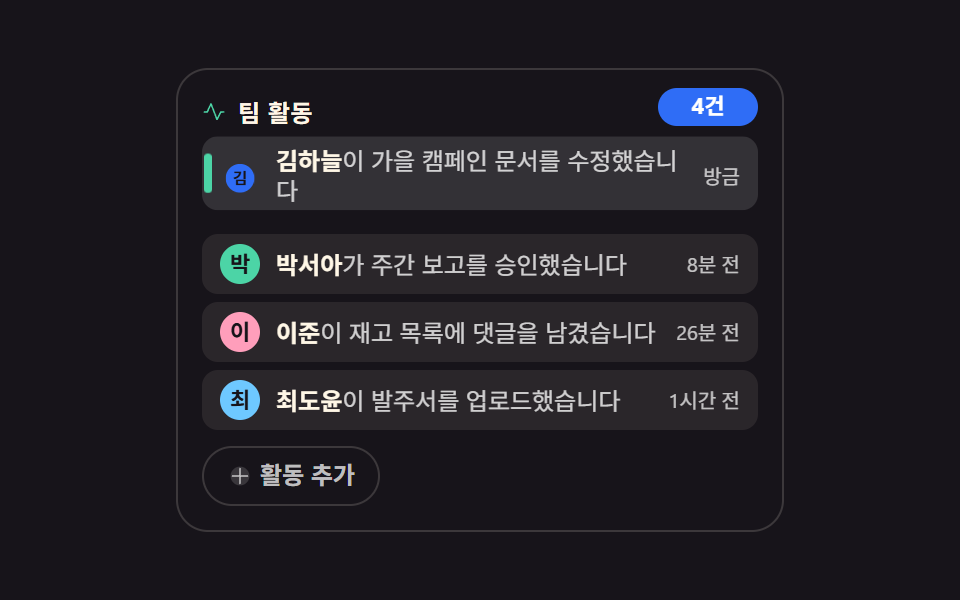 임베드알림 목록 ui 9가지 — 사이드바에 박히는 활동 피드와 이력 위젯
 임베드블로그 위젯 디자인 9종 — 공유·후기·지도 임베드 카드
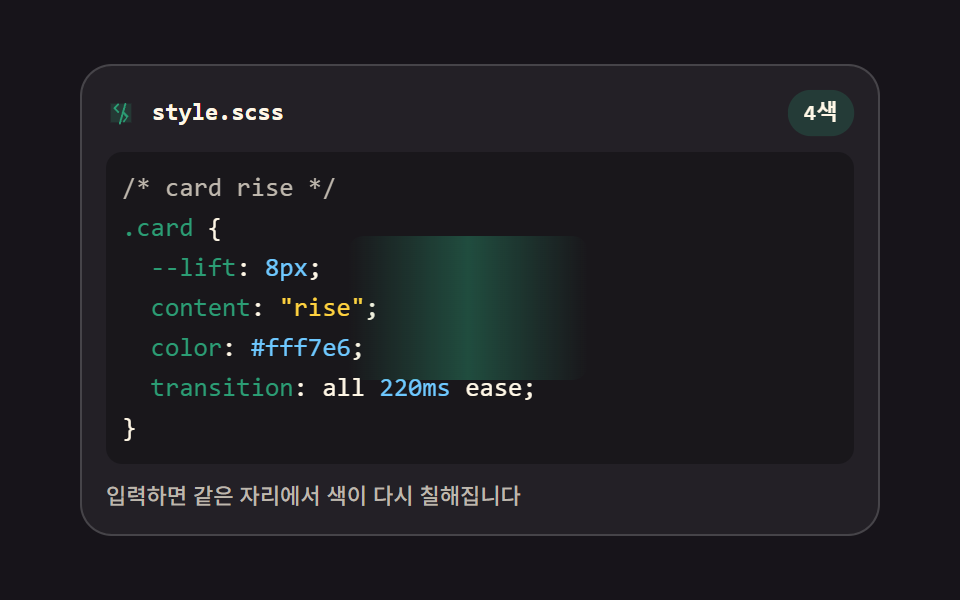 임베드코드 에디터 만들기 9종 — 온라인 코드 편집기 핵심 기법
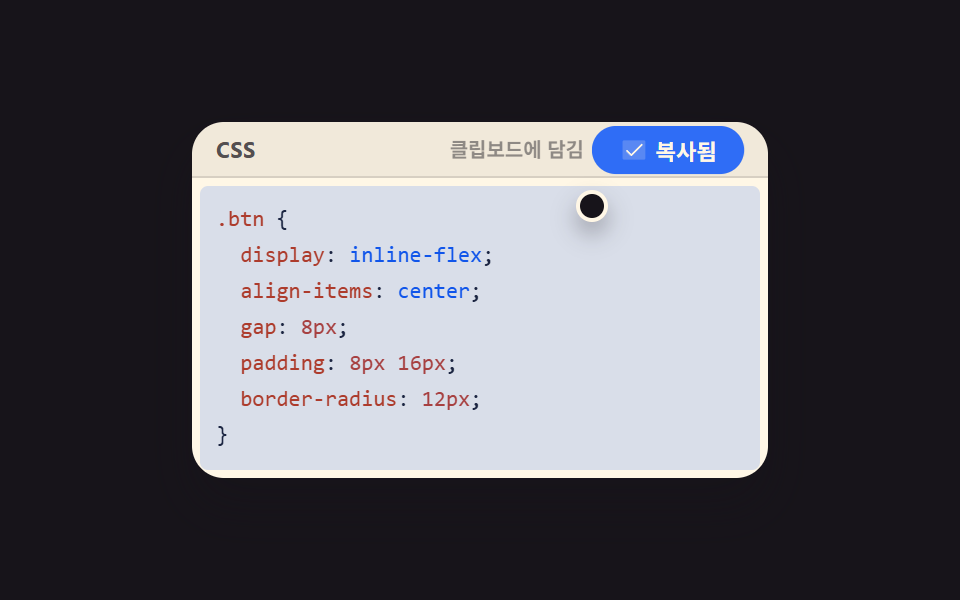 임베드코드 블록 UI 9종 — 하이라이터 없이 붙여 쓰는 코드 창
 임베드터미널 UI 9종 — 설치 명령 상자부터 튜토리얼 창까지
 임베드pdf 미리보기 구현 9가지 — 스크롤로 페이지를 계산하는 pdf 뷰어 ui
 임베드동영상 플레이어 만들기 9종 — 영상 파일 없이도 진짜로 돈다
 대시보드 UI주식 앱 ui 실시간 시세판 9종 — API 키 없이
 임베드유튜브 임베드 코드 9종 — SNS 카드도 담은 플레이스홀더 UI
 대시보드 UIcss countdown timer 9가지 — 링·모래·도화선으로 줄어드는 남은 시간