주식 앱 ui 실시간 시세판 9종 — API 키 없이
주식 앱 ui 의 시세판은 사람이 새로고침하지 않아도 숫자가 저절로 바뀌는 화면입니다. 값이 오르면 초록으로, 내리면 빨강으로 한 번 번쩍인 뒤 잠잠해지는 그 장면을 아홉 가지로 만들었고, 증권사 계정도 유료 데이터도 없이 파일만 열면 그대로 돕니다.
 01 ticker-price-flash-cell
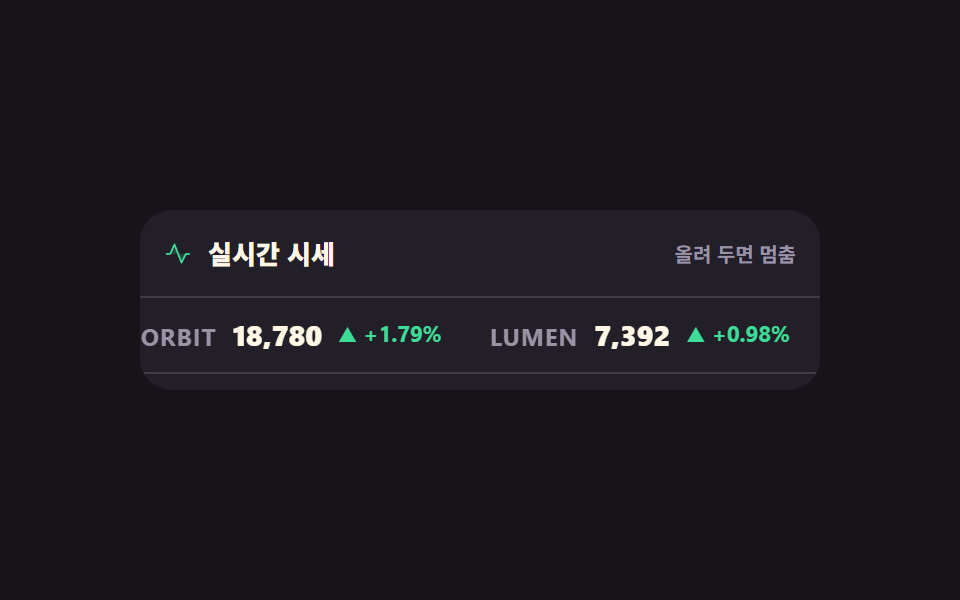 02 ticker-tape-horizontal
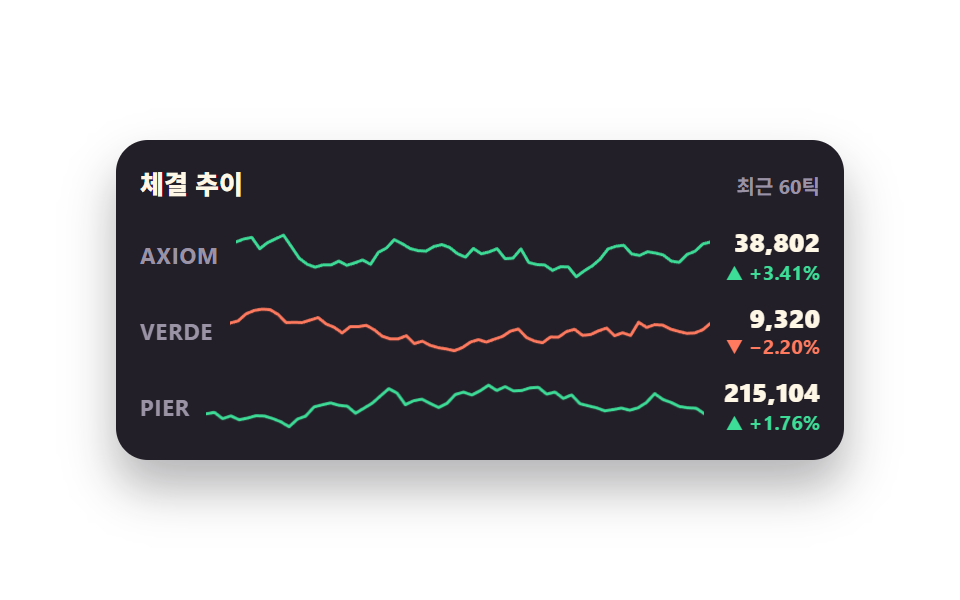 03 ticker-sparkline-shift
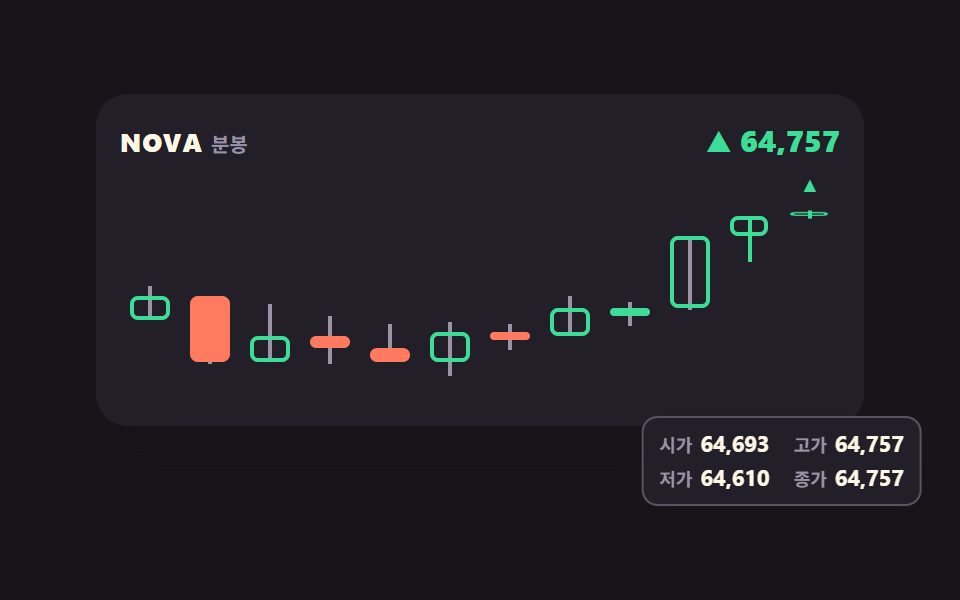 04 ticker-candle-live
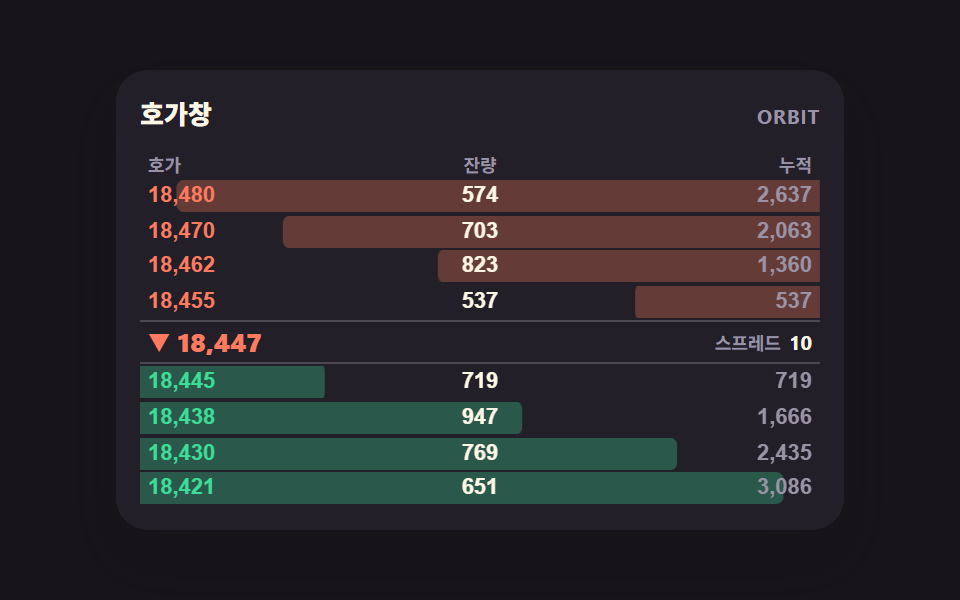 05 ticker-orderbook-depth
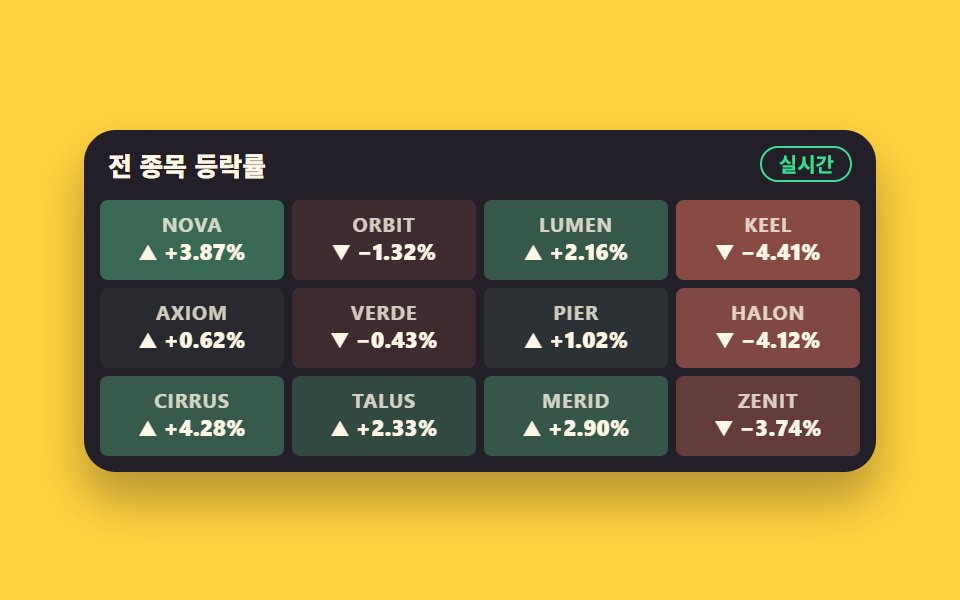 06 ticker-change-heatmap
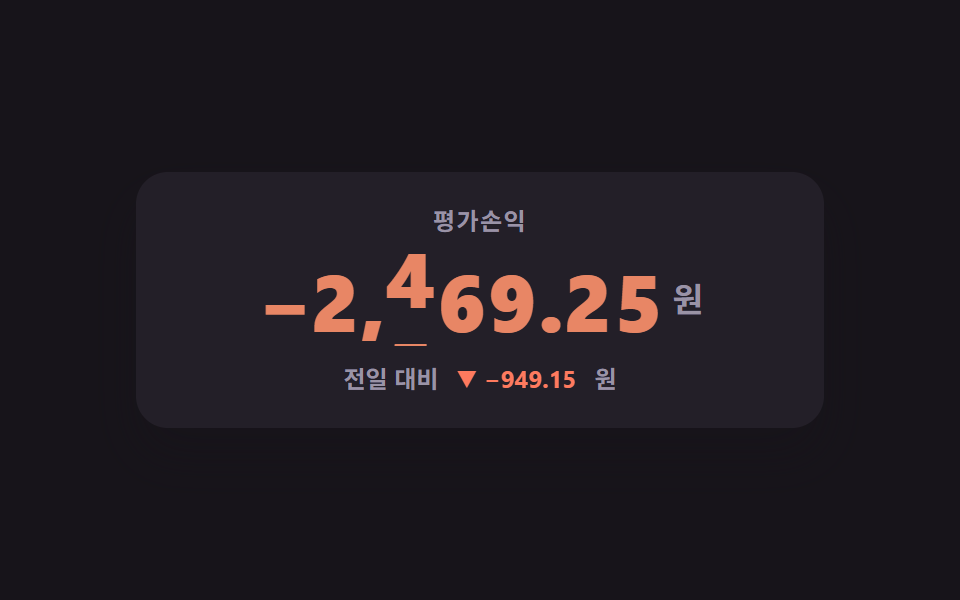 07 ticker-odometer-roll
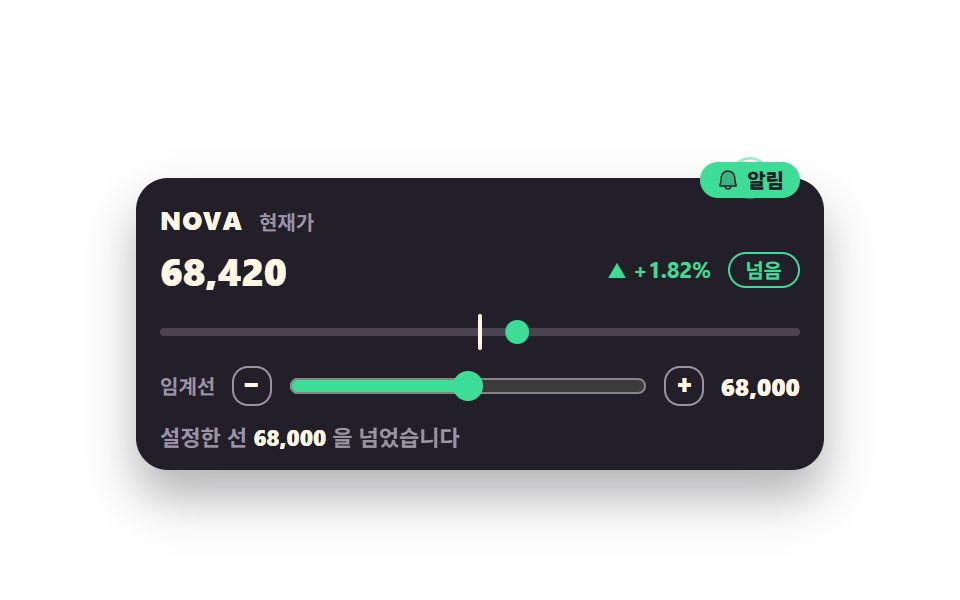 08 ticker-alert-threshold
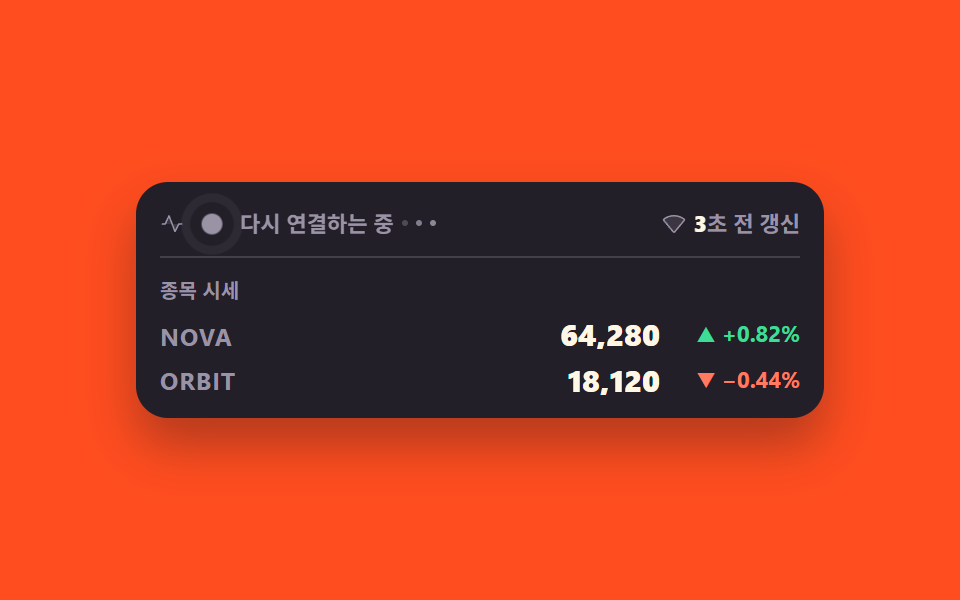 09 ticker-connection-status
자동 재생 · 눌러서 해당 항목으로 · 전부 한 zip
- 01 오르면 초록 내리면 빨강, 플래시 시세 셀
- 02 가로로 흐르는 티커 테이프
- 03 새 값이 들어오면 왼쪽으로 밀리는 스파크라인
- 04 마지막 봉이 자라는 캔들 차트
- 05 매수·매도 깊이가 늘었다 줄었다 하는 호가창
- 06 등락률이 색으로 바뀌는 격자 히트맵
- 07 자릿수가 굴러가는 큰 숫자판
- 08 설정한 선을 넘으면 알리는 임계 배지
- 09 연결 상태와 갱신 지연 표시
순서는 인기순이 아니라 시세 한 건이 화면에 닿는 순서입니다. 값 하나가 셀 안에서 번쩍이고(01), 그런 값들이 띠를 이뤄 흐르고(02), 시간이 쌓여 선이 되고(03), 선이 봉으로 굳습니다(04). 다음 셋은 종목 하나가 아니라 판 전체를 봅니다 — 사려는 쪽과 팔려는 쪽의 두께(05), 보유 종목 전부의 색(06), 평가손익 한 덩어리(07). 마지막 둘은 사람에게 말을 거는 쪽이라, 정해 둔 선을 넘었다고 알리고(08), 지금 이 숫자를 믿어도 되는지 알려 줍니다(09). 값이 들어오는 통로는 아홉 개 모두 같습니다: 시드를 받는 작은 난수 발생기가 정해진 간격마다 다음 값을 만들고, 그 자리에 나중에 실제 API 응답을 끼워 넣으면 화면 코드는 손댈 곳이 없습니다. 주식 차트 ui 를 처음부터 그려 내는 쪽은 SVG 그래프 그리기 9종에, 이미 그려진 그래프를 마우스로 만지는 쪽은 대시보드 차트 인터랙션 9종에 있습니다 — 이 편은 그 둘과 갈라져 값이 계속 들어올 때 화면이 어떻게 변하는가 한 축만 다룹니다. 초 단위가 아니라 하루 단위로 값을 쌓아 보여 주는 쪽은 같은 dashboard 기둥의 습관 트래커 UI가 맡고 있어, 갱신 주기만 다른 같은 문제를 정반대 끝에서 풉니다.
01오르면 초록 내리면 빨강, 플래시 시세 셀
무엇이 보이나
관심 종목 네 줄 가운데 값이 바뀐 한 줄만 배경이 한 프레임에 켜졌다가 600ms 동안 스스로 빠집니다. 가격과 등락률은 같은 칸에 두 장을 겹쳐 두고 컷으로 갈아 끼우기 때문에, 자릿수가 달라져도 오른쪽 끝이 제자리에 섭니다.
<main class="stage">
<div class="pf is-demo" id="pf">
  <div class="pf__board">
    <div class="pf__head">
      <p class="pf__title">관심 종목</p>
      <span class="pf__live">실시간</span>
    </div>
    <ul class="pf__rows">
      <!-- 행마다 이전값·현재값 두 장을 같은 칸에 겹친다 — steps(1, end) 컷이라 반투명 유령이 안 생긴다 -->
      <li class="pf__row" data-row="0">
        <span class="pf__sym">NOVA</span>
        <span class="pf__priceWrap">
          <span class="pf__price pf__price--prev" data-prev>0</span>
          <span class="pf__price pf__price--next" data-next>0</span>
        </span>
        <span class="pf__chgWrap">
          <span class="pf__chg pf__chg--prev" data-chgprev>0</span>
          <span class="pf__chg pf__chg--next" data-chgnext>0</span>
        </span>
      </li>
      <li class="pf__row" data-row="1">
        <span class="pf__sym">ORBIT</span>
        <span class="pf__priceWrap">
          <span class="pf__price pf__price--prev" data-prev>0</span>
          <span class="pf__price pf__price--next" data-next>0</span>
        </span>
        <span class="pf__chgWrap">
          <span class="pf__chg pf__chg--prev" data-chgprev>0</span>
          <span class="pf__chg pf__chg--next" data-chgnext>0</span>
        </span>
      </li>
      <li class="pf__row" data-row="2">
        <span class="pf__sym">LUMEN</span>
        <span class="pf__priceWrap">
          <span class="pf__price pf__price--prev" data-prev>0</span>
          <span class="pf__price pf__price--next" data-next>0</span>
        </span>
        <span class="pf__chgWrap">
          <span class="pf__chg pf__chg--prev" data-chgprev>0</span>
          <span class="pf__chg pf__chg--next" data-chgnext>0</span>
        </span>
      </li>
      <li class="pf__row" data-row="3">
        <span class="pf__sym">KEEL</span>
        <span class="pf__priceWrap">
          <span class="pf__price pf__price--prev" data-prev>0</span>
          <span class="pf__price pf__price--next" data-next>0</span>
        </span>
        <span class="pf__chgWrap">
          <span class="pf__chg pf__chg--prev" data-chgprev>0</span>
          <span class="pf__chg pf__chg--next" data-chgnext>0</span>
        </span>
      </li>
    </ul>
  </div>
</div>
</main>@use "../../../../site/static/demo-tokens" as *;
// 관심 종목 시세판 — 실사용에서는 시드 PRNG 가 setInterval 로 900ms 마다 한 행씩 값을 바꾸고,
// 바뀐 행의 배경이 한 프레임에 켜졌다가 천천히 꺼진다(가격 플래시). 방향은 색만으로 전하지 않고
// 화살표(▲▼)와 부호를 같이 적는다.
// 미리보기(.is-demo)는 같은 플래시를 CSS 키프레임으로 2초 루프에 눕혀 세 행이 차례로 켜지게 한다 —
// JS 는 미리보기 동안 값을 안 건드려 24프레임이 같은 순간을 재현한다.
$duration: $dur-loop;
$easing: $ease-out;
$flash-up: rgba(61, 220, 151, .3);
$flash-down: rgba(255, 122, 94, .3);
@include stage($stage-ink);
.pf { display: flex; justify-content: center; width: 100%; }
.pf__board {
width: min(100%, 320px); background: $tick-panel; border-radius: $r-card;
box-shadow: $shadow-raised; padding: $sp-3 $sp-2 $sp-2; overflow: hidden;
}
.pf__head { display: flex; align-items: center; justify-content: space-between; padding: 0 $sp-2 $sp-2; }
.pf__title { margin: 0; font-weight: 800; font-size: clamp(11px, 3vw, 13px); color: $subject-cream; }
// 라이브 배지 — 글자로도 상태를 말한다
.pf__live {
font-weight: 700; font-size: clamp(9px, 2.4vw, 10px); color: $tick-up;
border: 1px solid $tick-up; border-radius: $r-pill; padding: 0 $sp-2; line-height: 1.6;
}
.pf__rows { list-style: none; margin: 0; padding: 0; }
.pf__row {
display: grid; grid-template-columns: 1fr auto auto; align-items: center;
gap: $sp-2; padding: $sp-1 $sp-2; border-radius: $r-sm;
background-color: transparent;
}
.pf__sym {
font-weight: 700; font-size: clamp(10px, 2.8vw, 12px); color: $tick-mute; letter-spacing: .04em;
}
// 이전값·현재값을 같은 칸에 겹친다 — 컷 교체라 폭이 달라도 자리가 흔들리지 않는다
.pf__priceWrap, .pf__chgWrap { display: grid; justify-items: end; }
.pf__price, .pf__chg { grid-area: 1 / 1; font-variant-numeric: tabular-nums; }
.pf__price {
  font-weight: 800; font-size: clamp(12px, 3.4vw, 15px); line-height: 1.5; color: $subject-cream;
}
.pf__chg {
  font-weight: 700; font-size: clamp(10px, 2.6vw, 11px); line-height: 1.5; min-width: 62px;
}
.pf__chg.is-up { color: $tick-up; }
.pf__chg.is-down { color: $tick-down; }
// 실사용(정적 경로)에서는 현재값만 보인다 — 이전값은 자리만 지키고 안 보인다
.pf:not(.is-demo) .pf__price--prev, .pf:not(.is-demo) .pf__chg--prev { opacity: 0; }

// 실사용 플래시 — JS 가 붙인 is-up / is-down 이 한 프레임에 배경을 켜고 스스로 꺼진다.
// steps(1, end) 로 켜는 건 값 교체 쪽이고, 배경은 켜진 값에서 시작해 이어서 빠진다
.pf__row.is-up { animation: pfFlashUp 600ms $easing 1; }
.pf__row.is-down { animation: pfFlashDown 600ms $easing 1; }
@keyframes pfFlashUp { from { background-color: $flash-up; } to { background-color: transparent; } }
@keyframes pfFlashDown { from { background-color: $flash-down; } to { background-color: transparent; } }
// ── 미리보기 루프(2초): 6% 1번 행이 오르며 켜짐 → 34% 3번 행이 내리며 켜짐 → 62% 2번 행이 오르며 켜짐.
// 한 행의 배경은 켜진 뒤 다음 26% 동안 빠진다. 루프 안에서 세 번 = 초당 1.5회로 WCAG 2.3.1(초당 3회 미만) 아래.
// 값 교체(이전값 → 현재값)는 steps(1, end) 컷이라 두 장이 반투명하게 겹치는 유령 프레임이 없다.
// 되돌림은 96% 안에 끝난다 — 24프레임의 마지막 장이 2초의 95.8% 지점이라 그 뒤는 샘플이 없다.
.pf.is-demo .pf__row {
animation-duration: $duration;
animation-timing-function: $easing;
animation-iteration-count: infinite;
}
.pf.is-demo .pf__row[data-row="0"] { animation-name: pfRowA; }
.pf.is-demo .pf__row[data-row="2"] { animation-name: pfRowB; }
.pf.is-demo .pf__row[data-row="1"] { animation-name: pfRowC; }
@keyframes pfRowA {
0%, 4% { background-color: transparent; }
6% { background-color: $flash-up; }
32%, 100% { background-color: transparent; }
}
@keyframes pfRowB {
0%, 32% { background-color: transparent; }
34% { background-color: $flash-down; }
60%, 100% { background-color: transparent; }
}
@keyframes pfRowC {
0%, 60% { background-color: transparent; }
62% { background-color: $flash-up; }
88%, 100% { background-color: transparent; }
}
// 값 교체 — 켜지는 그 프레임에 이전값이 현재값으로 컷된다
.pf.is-demo .pf__price--prev, .pf.is-demo .pf__price--next,
.pf.is-demo .pf__chg--prev, .pf.is-demo .pf__chg--next {
animation-duration: $duration;
animation-timing-function: steps(1, end);
animation-iteration-count: infinite;
}
.pf.is-demo .pf__row[data-row="0"] .pf__price--prev,
.pf.is-demo .pf__row[data-row="0"] .pf__chg--prev { animation-name: pfPrevA; }
.pf.is-demo .pf__row[data-row="0"] .pf__price--next,
.pf.is-demo .pf__row[data-row="0"] .pf__chg--next { animation-name: pfNextA; }
.pf.is-demo .pf__row[data-row="2"] .pf__price--prev,
.pf.is-demo .pf__row[data-row="2"] .pf__chg--prev { animation-name: pfPrevB; }
.pf.is-demo .pf__row[data-row="2"] .pf__price--next,
.pf.is-demo .pf__row[data-row="2"] .pf__chg--next { animation-name: pfNextB; }
.pf.is-demo .pf__row[data-row="1"] .pf__price--prev,
.pf.is-demo .pf__row[data-row="1"] .pf__chg--prev { animation-name: pfPrevC; }
.pf.is-demo .pf__row[data-row="1"] .pf__price--next,
.pf.is-demo .pf__row[data-row="1"] .pf__chg--next { animation-name: pfNextC; }
.pf.is-demo .pf__row[data-row="3"] .pf__price--prev,
.pf.is-demo .pf__row[data-row="3"] .pf__chg--prev { opacity: 0; }
@keyframes pfPrevA { 0%, 4% { opacity: 1; } 6%, 100% { opacity: 0; } }
@keyframes pfNextA { 0%, 4% { opacity: 0; } 6%, 100% { opacity: 1; } }
@keyframes pfPrevB { 0%, 32% { opacity: 1; } 34%, 100% { opacity: 0; } }
@keyframes pfNextB { 0%, 32% { opacity: 0; } 34%, 100% { opacity: 1; } }
@keyframes pfPrevC { 0%, 60% { opacity: 1; } 62%, 100% { opacity: 0; } }
@keyframes pfNextC { 0%, 60% { opacity: 0; } 62%, 100% { opacity: 1; } }
@media (max-width: 340px) {
.pf__board { padding: $sp-2 $sp-1 $sp-1; }
.pf__head { padding: 0 $sp-1 $sp-1; }
.pf__row { gap: $sp-1; padding: 0 $sp-1; }
.pf__chg { min-width: 56px; }
}
@media (prefers-reduced-motion: reduce) {
// 플래시는 끄고 값만 갱신한다 — 방향은 화살표·부호·색이 그대로 말해 준다
.pf__row.is-up, .pf__row.is-down,
.pf.is-demo .pf__row { animation: none !important; background-color: transparent !important; }
.pf.is-demo .pf__price--prev, .pf.is-demo .pf__chg--prev { animation: none !important; opacity: 0 !important; }
.pf.is-demo .pf__price--next, .pf.is-demo .pf__chg--next { animation: none !important; opacity: 1 !important; }
}html, body {
margin: 0;
overflow: hidden;
}
.stage {
box-sizing: border-box;
min-height: 100vh;
display: grid;
place-items: center;
margin: 0;
background: #17141a;
font-family: -apple-system, "Segoe UI", "Noto Sans KR", sans-serif;
padding: clamp(8px, 4vw, 24px);
}
.pf {
display: flex;
justify-content: center;
width: 100%;
}
.pf__board {
width: min(100%, 320px);
background: #231f28;
border-radius: 16px;
box-shadow: 0 14px 24px rgba(23, 20, 26, 0.32);
padding: 12px 8px 8px;
overflow: hidden;
}
.pf__head {
display: flex;
align-items: center;
justify-content: space-between;
padding: 0 8px 8px;
}
.pf__title {
margin: 0;
font-weight: 800;
font-size: clamp(11px, 3vw, 13px);
color: #fff7e6;
}
.pf__live {
font-weight: 700;
font-size: clamp(9px, 2.4vw, 10px);
color: #3ddc97;
border: 1px solid #3ddc97;
border-radius: 999px;
padding: 0 8px;
line-height: 1.6;
}
.pf__rows {
list-style: none;
margin: 0;
padding: 0;
}
.pf__row {
display: grid;
grid-template-columns: 1fr auto auto;
align-items: center;
gap: 8px;
padding: 4px 8px;
border-radius: 8px;
background-color: transparent;
}
.pf__sym {
font-weight: 700;
font-size: clamp(10px, 2.8vw, 12px);
color: #9a93a6;
letter-spacing: 0.04em;
}
.pf__priceWrap, .pf__chgWrap {
display: grid;
justify-items: end;
}
.pf__price, .pf__chg {
grid-area: 1/1;
font-variant-numeric: tabular-nums;
}
.pf__price {
font-weight: 800;
font-size: clamp(12px, 3.4vw, 15px);
line-height: 1.5;
color: #fff7e6;
}
.pf__chg {
font-weight: 700;
font-size: clamp(10px, 2.6vw, 11px);
line-height: 1.5;
min-width: 62px;
}
.pf__chg.is-up {
color: #3ddc97;
}
.pf__chg.is-down {
color: #ff7a5e;
}
.pf:not(.is-demo) .pf__price--prev, .pf:not(.is-demo) .pf__chg--prev {
opacity: 0;
}
.pf__row.is-up {
animation: pfFlashUp 600ms ease-out 1;
}
.pf__row.is-down {
animation: pfFlashDown 600ms ease-out 1;
}
@keyframes pfFlashUp {
from {
background-color: rgba(61, 220, 151, 0.3);
}
to {
background-color: transparent;
}
}
@keyframes pfFlashDown {
from {
background-color: rgba(255, 122, 94, 0.3);
}
to {
background-color: transparent;
}
}
.pf.is-demo .pf__row {
animation-duration: 2s;
animation-timing-function: ease-out;
animation-iteration-count: infinite;
}
.pf.is-demo .pf__row[data-row="0"] {
animation-name: pfRowA;
}
.pf.is-demo .pf__row[data-row="2"] {
animation-name: pfRowB;
}
.pf.is-demo .pf__row[data-row="1"] {
animation-name: pfRowC;
}
@keyframes pfRowA {
0%, 4% {
background-color: transparent;
}
6% {
background-color: rgba(61, 220, 151, 0.3);
}
32%, 100% {
background-color: transparent;
}
}
@keyframes pfRowB {
0%, 32% {
background-color: transparent;
}
34% {
background-color: rgba(255, 122, 94, 0.3);
}
60%, 100% {
background-color: transparent;
}
}
@keyframes pfRowC {
0%, 60% {
background-color: transparent;
}
62% {
background-color: rgba(61, 220, 151, 0.3);
}
88%, 100% {
background-color: transparent;
}
}
.pf.is-demo .pf__price--prev, .pf.is-demo .pf__price--next,
.pf.is-demo .pf__chg--prev, .pf.is-demo .pf__chg--next {
animation-duration: 2s;
animation-timing-function: steps(1, end);
animation-iteration-count: infinite;
}
.pf.is-demo .pf__row[data-row="0"] .pf__price--prev,
.pf.is-demo .pf__row[data-row="0"] .pf__chg--prev {
animation-name: pfPrevA;
}
.pf.is-demo .pf__row[data-row="0"] .pf__price--next,
.pf.is-demo .pf__row[data-row="0"] .pf__chg--next {
animation-name: pfNextA;
}
.pf.is-demo .pf__row[data-row="2"] .pf__price--prev,
.pf.is-demo .pf__row[data-row="2"] .pf__chg--prev {
animation-name: pfPrevB;
}
.pf.is-demo .pf__row[data-row="2"] .pf__price--next,
.pf.is-demo .pf__row[data-row="2"] .pf__chg--next {
animation-name: pfNextB;
}
.pf.is-demo .pf__row[data-row="1"] .pf__price--prev,
.pf.is-demo .pf__row[data-row="1"] .pf__chg--prev {
animation-name: pfPrevC;
}
.pf.is-demo .pf__row[data-row="1"] .pf__price--next,
.pf.is-demo .pf__row[data-row="1"] .pf__chg--next {
animation-name: pfNextC;
}
.pf.is-demo .pf__row[data-row="3"] .pf__price--prev,
.pf.is-demo .pf__row[data-row="3"] .pf__chg--prev {
opacity: 0;
}
@keyframes pfPrevA {
0%, 4% {
opacity: 1;
}
6%, 100% {
opacity: 0;
}
}
@keyframes pfNextA {
0%, 4% {
opacity: 0;
}
6%, 100% {
opacity: 1;
}
}
@keyframes pfPrevB {
0%, 32% {
opacity: 1;
}
34%, 100% {
opacity: 0;
}
}
@keyframes pfNextB {
0%, 32% {
opacity: 0;
}
34%, 100% {
opacity: 1;
}
}
@keyframes pfPrevC {
0%, 60% {
opacity: 1;
}
62%, 100% {
opacity: 0;
}
}
@keyframes pfNextC {
0%, 60% {
opacity: 0;
}
62%, 100% {
opacity: 1;
}
}
@media (max-width: 340px) {
.pf__board {
padding: 8px 4px 4px;
}
.pf__head {
padding: 0 4px 4px;
}
.pf__row {
gap: 4px;
padding: 0 4px;
}
.pf__chg {
min-width: 56px;
}
}
@media (prefers-reduced-motion: reduce) {
.pf__row.is-up, .pf__row.is-down,
.pf.is-demo .pf__row {
animation: none !important;
background-color: transparent !important;
}
.pf.is-demo .pf__price--prev, .pf.is-demo .pf__chg--prev {
animation: none !important;
opacity: 0 !important;
}
.pf.is-demo .pf__price--next, .pf.is-demo .pf__chg--next {
animation: none !important;
opacity: 1 !important;
}
}// 가짜 시세는 시드 PRNG 로 만든다 — 같은 시드면 누가 열어도 같은 흐름이 재현된다.
// 외부 API·키가 필요 없고, 심볼도 실존 종목이 아니다.
var SEED = 296;
function mulberry32(a) {
return function () {
a |= 0; a = a + 0x6D2B79F5 | 0;
var t = Math.imul(a ^ a >>> 15, 1 | a);
t = t + Math.imul(t ^ t >>> 7, 61 | t) ^ t;
return ((t ^ t >>> 14) >>> 0) / 4294967296;
};
}
var rand = mulberry32(SEED);
var BASE = [64200, 18450, 7320, 132900]; // 전일 종가 4종 — 등락률의 기준
// 전일 대비 등락을 먼저 한 번 굴려 오늘 가격을 만든다. 그래야 첫 화면부터 등락률이 0 이 아니다
var state = BASE.map(function (p) {
var day = (rand() - 0.55) * 0.055;
var now = Math.round(p * (1 + day));
return { price: now, chg: (now - p) / p * 100 };
});
var pf = document.getElementById('pf');
var rows = [].slice.call(pf.querySelectorAll('.pf__row'));
// 숫자는 자리가 흔들리면 읽기 어렵다 — 천 단위 구분자까지 넣어 고정 폭으로 그린다
function money(n) { return n.toLocaleString('en-US'); }
function pct(v) { return (v >= 0 ? '+' : '−') + Math.abs(v).toFixed(2) + '%'; }
function arrow(v) { return v >= 0 ? '▲' : '▼'; }
// 방향은 색만으로 전하지 않는다 — 화살표와 부호를 같이 적는다
function paint(i) {
var s = state[i], row = rows[i];
row.querySelector('[data-next]').textContent = money(s.price);
row.querySelector('[data-chgnext]').textContent = arrow(s.chg) + ' ' + pct(s.chg);
row.querySelector('[data-chgnext]').className = 'pf__chg pf__chg--next ' + (s.chg >= 0 ? 'is-up' : 'is-down');
}
function tick(i, flash) {
var s = state[i], row = rows[i];
var prevPrice = s.price, prevChg = s.chg;
var step = Math.round((rand() - 0.48) * s.price * 0.004);
if (step === 0) { step = rand() < 0.5 ? -1 : 1; }
s.price = prevPrice + step;
s.chg = (s.price - BASE[i]) / BASE[i] * 100;
// 직전 값을 뒤 장에 남겨 둔다 — 사람이 "얼마에서 얼마로" 를 한 눈에 본다
row.querySelector('[data-prev]').textContent = money(prevPrice);
var cp = row.querySelector('[data-chgprev]');
cp.textContent = arrow(prevChg) + ' ' + pct(prevChg);
cp.className = 'pf__chg pf__chg--prev ' + (prevChg >= 0 ? 'is-up' : 'is-down');
paint(i);
if (!flash) { return; }
// 플래시는 한 프레임에 켜고 스스로 꺼진다. 클래스를 떼었다 붙여야 같은 행이 연속으로 깜빡인다
row.classList.remove('is-up', 'is-down');
void row.offsetWidth;
row.classList.add(step >= 0 ? 'is-up' : 'is-down');
}
// 첫 화면부터 "직전 값 → 현재 값" 이 서로 다르게 서 있어야 미리보기 컷이 뜻을 갖는다.
// 그래서 시작가에서 한 번씩만 값을 굴려 두고(플래시 없이) 시작한다
state.forEach(function (s, i) { tick(i, false); });
// 격자 미리보기(.is-demo) 동안에는 CSS 키프레임만 돌고 JS 는 값을 안 건드린다 — 프레임이 같은 순간에 고정돼야
// 렌더 측정이 흔들리지 않는다. 사람이 포인터를 올리거나 키보드로 들어오면 그때부터 시드 시세가 실제로 갱신된다.
function live() { if (pf.classList.contains('is-demo')) { pf.classList.remove('is-demo'); } }
['pointerdown', 'pointermove', 'focusin'].forEach(function (ev) { pf.addEventListener(ev, live); });
// 한 번에 한 행만 바꾼다 — WCAG 2.3.1 은 초당 3회 미만을 요구하고, 900ms 간격이면 1.1회다
var cursor = 0;
var timer = setInterval(function () {
if (pf.classList.contains('is-demo')) { return; }
if (document.visibilityState === 'hidden') { return; }
tick(cursor);
cursor = (cursor + 1) % rows.length;
}, 900);
// 탭을 다시 보면 현재 상태를 그대로 다시 그린다 — 안 보이는 동안 쌓아 두지 않는다
document.addEventListener('visibilitychange', function () {
if (document.visibilityState === 'visible') { state.forEach(function (s, i) { paint(i); }); }
});
window.addEventListener('pagehide', function () { clearInterval(timer); });// PriceFlashCell — vanilla 판(run/296/demo/01-ticker-price-flash-cell/index.html) 의 React 포트.
// 관심 종목 시세판. 시드 PRNG 가 900ms 마다 한 행씩 값을 바꾸고, 바뀐 행의 배경이 한 프레임에
// 켜졌다가 스스로 꺼진다. 방향은 색만으로 전하지 않고 화살표(▲▼)와 부호를 같이 적는다.
import { useEffect, useRef, useState } from "react";
import styles from "./PriceFlashCell.module.scss";
export type PriceFlashCellProps = {
/** 격자 미리보기용 2초 자동 루프. 포인터를 올리거나 키보드로 들어오면 꺼지고 실제 갱신이 시작된다 */
demo?: boolean;
/** 시드 — 같은 값이면 누가 열어도 같은 시세 흐름이 재현된다 */
seed?: number;
/** 갱신 간격(ms). WCAG 2.3.1 은 초당 3회 미만을 요구한다 */
intervalMs?: number;
};
type Box<T> = { current: T };
type Row = { sym: string; base: number; price: number; chg: number; prev: number; prevChg: number; dir: number };
const SYMBOLS = ["NOVA", "ORBIT", "LUMEN", "KEEL"];
const BASE = [64200, 18450, 7320, 132900]; // 전일 종가 4종 — 등락률의 기준
/** 시드 PRNG — 외부 API·키가 필요 없고 심볼도 실존 종목이 아니다 */
function mulberry32(a: number) {
return function () {
a |= 0; a = a + 0x6D2B79F5 | 0;
let t = Math.imul(a ^ a >>> 15, 1 | a);
t = t + Math.imul(t ^ t >>> 7, 61 | t) ^ t;
return ((t ^ t >>> 14) >>> 0) / 4294967296;
};
}
/** 숫자는 자리가 흔들리면 읽기 어렵다 — 천 단위 구분자까지 넣어 고정 폭으로 그린다 */
const money = (n: number) => n.toLocaleString("en-US");
const pct = (v: number) => (v >= 0 ? "+" : "−") + Math.abs(v).toFixed(2) + "%";
const arrow = (v: number) => (v >= 0 ? "▲" : "▼");
function initialRows(rand: () => number): Row[] {
return SYMBOLS.map((sym, i) => {
// 전일 대비 등락을 먼저 한 번 굴려 오늘 가격을 만든다. 그래야 첫 화면부터 등락률이 0 이 아니다
const day = (rand() - 0.55) * 0.055;
const now = Math.round(BASE[i] * (1 + day));
const chg = (now - BASE[i]) / BASE[i] * 100;
return { sym, base: BASE[i], price: now, chg, prev: BASE[i], prevChg: 0, dir: 0 };
});
}
export default function PriceFlashCell({ demo = true, seed = 296, intervalMs = 900 }: PriceFlashCellProps) {
const randRef: Box<(() => number) | null> = useRef(null);
if (randRef.current === null) { randRef.current = mulberry32(seed); }
const [rows, setRows] = useState<Row[]>(() => initialRows(randRef.current as () => number));
const [live, setLive] = useState(!demo);
const cursor = useRef(0) as Box<number>;
useEffect(() => {
if (!live) { return; }
const id = window.setInterval(() => {
// 탭이 안 보이는 동안은 세지 않는다 — 돌아왔을 때 밀린 갱신이 한꺼번에 터지지 않게
if (document.visibilityState === "hidden") { return; }
const i = cursor.current;
cursor.current = (i + 1) % SYMBOLS.length;
setRows((old) => old.map((r, k) => {
if (k !== i) { return { ...r, dir: 0 }; }
const rand = randRef.current as () => number;
let step = Math.round((rand() - 0.48) * r.price * 0.004);
if (step === 0) { step = rand() < 0.5 ? -1 : 1; }
const price = r.price + step;
return { ...r, prev: r.price, prevChg: r.chg, price, chg: (price - r.base) / r.base * 100, dir: step >= 0 ? 1 : -1 };
}));
}, intervalMs);
return () => window.clearInterval(id);
}, [live, intervalMs]);
const rootCls = [styles.root, live ? "" : styles.isDemo].filter(Boolean).join(" ");
return (
<div
className={rootCls}
onPointerMove={() => setLive(true)}
onPointerDown={() => setLive(true)}
onFocus={() => setLive(true)}
>
<div className={styles.board}>
<div className={styles.head}>
<p className={styles.title}>관심 종목</p>
<span className={styles.liveTag}>실시간</span>
</div>
<ul className={styles.rows}>
{rows.map((r, i) => (
/* 행마다 이전값·현재값 두 장을 같은 칸에 겹친다 — steps(1, end) 컷이라 반투명 유령이 안 생긴다 */
<li
key={r.sym}
className={[styles.row, r.dir > 0 ? styles.isUp : "", r.dir < 0 ? styles.isDown : ""].filter(Boolean).join(" ")}
data-row={i}
>
<span className={styles.sym}>{r.sym}</span>
<span className={styles.priceWrap}>
<span className={`${styles.price} ${styles.pricePrev}`}>{money(r.prev)}</span>
<span className={`${styles.price} ${styles.priceNext}`}>{money(r.price)}</span>
</span>
<span className={styles.chgWrap}>
<span className={`${styles.chg} ${styles.chgPrev} ${r.prevChg >= 0 ? styles.upText : styles.downText}`}>
{arrow(r.prevChg)} {pct(r.prevChg)}
</span>
<span className={`${styles.chg} ${styles.chgNext} ${r.chg >= 0 ? styles.upText : styles.downText}`}>
{arrow(r.chg)} {pct(r.chg)}
</span>
</span>
</li>
))}
</ul>
</div>
</div>
);
}01 · 오르면 초록 내리면 빨강, 플래시 시세 셀 — 측정 누적면적 19.33% · 움직인 프레임 9/23GODRICH 원작 · zip 에 SCSS·React 포함 · 비밀번호 보기
코드에서 볼 곳
2초 루프에서 움직인 프레임 9/23 · 누적면적 19.33% 를 기록했고, 관심 종목 목록이나 실시간 주문 체결 화면의 현재가 칸에 씁니다.
// 이전값·현재값을 같은 칸에 겹친다 — 컷 교체라 폭이 달라도 자리가 흔들리지 않는다
.pf__priceWrap, .pf__chgWrap { display: grid; justify-items: end; }
.pf__price, .pf__chg { grid-area: 1 / 1; font-variant-numeric: tabular-nums; }
.pf__price {
font-weight: 800; font-size: clamp(12px, 3.4vw, 15px); line-height: 1.5; color: $subject-cream;
}
.pf__chg {
font-weight: 700; font-size: clamp(10px, 2.6vw, 11px); line-height: 1.5; min-width: 62px;
}
.pf__chg.is-up { color: $tick-up; }
.pf__chg.is-down { color: $tick-down; }
// 실사용(정적 경로)에서는 현재값만 보인다 — 이전값은 자리만 지키고 안 보인다
.pf:not(.is-demo) .pf__price--prev, .pf:not(.is-demo) .pf__chg--prev { opacity: 0; }
// 실사용 플래시 — JS 가 붙인 is-up / is-down 이 한 프레임에 배경을 켜고 스스로 꺼진다.
// steps(1, end) 로 켜는 건 값 교체 쪽이고, 배경은 켜진 값에서 시작해 이어서 빠진다
.pf__row.is-up { animation: pfFlashUp 600ms $easing 1; }
.pf__row.is-down { animation: pfFlashDown 600ms $easing 1; }
@keyframes pfFlashUp { from { background-color: $flash-up; } to { background-color: transparent; } }
@keyframes pfFlashDown { from { background-color: $flash-down; } to { background-color: transparent; } }
02가로로 흐르는 티커 테이프
무엇이 보이나
같은 종목 줄을 두 벌 이어 붙인 트랙이 왼쪽으로 끊김 없이 흐르고, 포인터를 올리거나 키보드로 테이프에 들어가면 흐름이 그 자리에 섭니다. 흐르는 동안에도 700ms 마다 한 칸씩 값이 갈리고, 새 종목이 상장하면 두 벌 양쪽에 같은 칸이 함께 덧붙습니다.
<main class="stage">
<div class="tt is-demo" id="tt">
  <div class="tt__panel">
    <div class="tt__head">
      <span class="tt__pulse" aria-hidden="true"><svg xmlns="http://www.w3.org/2000/svg" width="1em" height="1em" viewBox="0 0 256 256"><g fill="currentColor"><path d="m96 40l33.52 88H56Zm104 88h-70.48L160 208Z" opacity=".2"/><path d="M240 128a8 8 0 0 1-8 8h-27.06l-37.78 75.58A8 8 0 0 1 160 216h-.4a8 8 0 0 1-7.08-5.14L95.35 60.76l-32.07 70.55A8 8 0 0 1 56 136H24a8 8 0 0 1 0-16h26.85l37.87-83.31a8 8 0 0 1 14.76.46l57.51 151l31.85-63.71A8 8 0 0 1 200 120h32a8 8 0 0 1 8 8"/></g></svg></span>
      <p class="tt__title">실시간 시세</p>
      <span class="tt__hint">올려 두면 멈춤</span>
    </div>
    <!-- 테이프 창(overflow:hidden)과 흐르는 트랙을 분리한다. transform 은 언제나 트랙에만 건다 -->
    <div class="tt__tape" id="ttTape" tabindex="0" aria-label="시세 테이프">
      <div class="tt__track" id="ttTrack">
        <!-- 같은 줄을 두 벌 이어 붙였다. 두 벌의 폭이 픽셀 단위로 같아야 -50% 가 정확히 한 벌이라
             한 바퀴가 이음매 없이 이어진다. 그래서 간격은 트랙의 flex gap 이 아니라 항목마다 margin-right 다 -->
        <div class="tt__half" data-half="0">
          <span class="tt__item" data-i="0"><span class="tt__sym">NOVA</span><span class="tt__price">0</span><span class="tt__chg">0</span></span>
          <span class="tt__item" data-i="1"><span class="tt__sym">ORBIT</span><span class="tt__price">0</span><span class="tt__chg">0</span></span>
          <span class="tt__item" data-i="2"><span class="tt__sym">LUMEN</span><span class="tt__price">0</span><span class="tt__chg">0</span></span>
        </div>
        <div class="tt__half" data-half="1" aria-hidden="true">
          <span class="tt__item" data-i="0"><span class="tt__sym">NOVA</span><span class="tt__price">0</span><span class="tt__chg">0</span></span>
          <span class="tt__item" data-i="1"><span class="tt__sym">ORBIT</span><span class="tt__price">0</span><span class="tt__chg">0</span></span>
          <span class="tt__item" data-i="2"><span class="tt__sym">LUMEN</span><span class="tt__price">0</span><span class="tt__chg">0</span></span>
        </div>
      </div>
    </div>
  </div>
</div>
</main>@use "../../../../site/static/demo-tokens" as *;
// 가로로 흐르는 티커 테이프 — 같은 줄을 두 벌 이어 붙이고 트랙을 translateX(-50%) 로 민다.
// -50% 는 트랙 폭의 절반이라 "정확히 한 벌"이어야 한 바퀴가 이음매 없이 이어진다. 그래서 간격은
// 트랙의 flex gap 이 아니라 항목마다의 margin-right 로 준다 — gap 은 2N 개 사이에 2N-1 번만 생겨
// -50% 가 gap 절반만큼 모자라고 한 바퀴마다 테이프가 튄다 (BD15, 028 실측 4~20px).
// 028(세로 마퀴)과 갈리는 지점: 028 은 세로로 도는 정지 목록이고, 이건 가로로 흐르면서 값이 실시간으로 갱신된다.
// 루프 안 플래시 0회 — 깜빡이지 않고 흐르기만 한다.
$duration: 10s; // 실사용 속도(초당 45px 쯤). 미리보기는 아래 .is-demo 가 한 바퀴를 2초로 배속한다
$easing: linear; // 등속 — 완급을 주면 글자를 따라 읽을 수 없다
$color: $subject-cream;
@include stage($stage-ink);
.tt { display: flex; justify-content: center; width: 100%; }
// 폭은 100% 가 아니라 뷰포트 단위로 못박는다 — overflow:hidden 은 잘라 보여 줄 뿐 요소의 max-content 를
// 줄이지 않아서, 폭이 100%(불확정)면 무대 격자가 트랙의 max-content(1,000px 넘음)만큼 벌어진다 (실측 480px 무대에서 1,047px)
.tt__panel {
width: min(340px, 84vw); background: $tick-panel; border-radius: $r-card;
box-shadow: $shadow-raised; padding: $sp-3 0 $sp-2; overflow: hidden;
}
.tt__head { display: flex; align-items: center; gap: $sp-2; padding: 0 $sp-3 $sp-3; }
// 아이콘은 Phosphor Duotone SVG 를 그대로 인라인했다 — 색은 currentColor 로 물려받는다
.tt__pulse { display: inline-flex; width: 14px; height: 14px; color: $tick-up; }
.tt__pulse svg { display: block; width: 100%; height: 100%; }
.tt__title { margin: 0; font-weight: 800; font-size: clamp(11px, 3vw, 13px); color: $color; }
.tt__hint { margin-left: auto; font-weight: 700; font-size: clamp(9px, 2.4vw, 10px); color: $tick-mute; }
// 테이프 창(overflow:hidden)과 흐르는 트랙을 분리한다 — transform 은 언제나 트랙에만 건다
.tt__tape {
overflow: hidden; padding: $sp-2 0;
border-top: 1px solid rgba(154, 147, 166, .24);
border-bottom: 1px solid rgba(154, 147, 166, .24);
}
.tt__tape:focus-visible { outline: 2px solid $tick-up; outline-offset: -2px; }
.tt__track {
display: flex; width: max-content;
animation-name: ttSlide;
animation-duration: $duration;
animation-timing-function: $easing;
animation-iteration-count: infinite;
}
.tt__half { display: flex; }
.tt__item {
  display: inline-flex; align-items: center; flex-shrink: 0; white-space: nowrap;
  margin-right: $sp-6;   // 트랙의 gap 대신 — 한 벌의 폭이 (칸 + 간격) × N 으로 딱 떨어진다
}
.tt__sym {
  margin-right: $sp-2; font-weight: 700; font-size: clamp(10px, 2.8vw, 12px);
  color: $tick-mute; letter-spacing: .04em;
}
.tt__price {
  margin-right: $sp-2; font-weight: 800; font-size: clamp(11px, 3.2vw, 14px); line-height: 1.5;
  color: $color; font-variant-numeric: tabular-nums;
}
.tt__chg { font-weight: 700; font-size: clamp(10px, 2.6vw, 11px); line-height: 1.5; font-variant-numeric: tabular-nums; }
.tt__chg.is-up { color: $tick-up; }
.tt__chg.is-down { color: $tick-down; }

@keyframes ttSlide {
  from { transform: translateX(0); }
  to   { transform: translateX(-50%); }
}

// 포인터·터치·키보드 어느 쪽으로 들어와도 테이프가 선다 — 읽는 중에 글자가 지나가지 않게.
// 멈추는 건 animation-play-state 하나뿐이라 위치를 JS 로 붙잡을 필요가 없다
.tt__tape:hover .tt__track,
.tt:focus-within .tt__track { animation-play-state: paused; }
// 격자 미리보기: 한 바퀴를 2초에 맞춰 gif 루프와 이음매를 겹친다 (24프레임이 정확히 한 바퀴)
.tt.is-demo .tt__track { animation-duration: $dur-loop; }
@media (max-width: 340px) {
.tt__panel { padding: $sp-2 0 $sp-1; }
.tt__head { padding: 0 $sp-2 $sp-2; }
.tt__tape { padding: $sp-1 0; }
.tt__item { margin-right: $sp-5; }
}
@media (prefers-reduced-motion: reduce) {
// 흐름을 멈추고 값만 갱신한다 — 테이프는 맨 앞에 선 채로 숫자만 바뀐다
.tt__track,
.tt.is-demo .tt__track { animation: none !important; transform: translateX(0) !important; }
}html, body {
margin: 0;
overflow: hidden;
}
.stage {
box-sizing: border-box;
min-height: 100vh;
display: grid;
place-items: center;
margin: 0;
background: #17141a;
font-family: -apple-system, "Segoe UI", "Noto Sans KR", sans-serif;
padding: clamp(8px, 4vw, 24px);
}
.tt {
display: flex;
justify-content: center;
width: 100%;
}
.tt__panel {
width: min(340px, 84vw);
background: #231f28;
border-radius: 16px;
box-shadow: 0 14px 24px rgba(23, 20, 26, 0.32);
padding: 12px 0 8px;
overflow: hidden;
}
.tt__head {
display: flex;
align-items: center;
gap: 8px;
padding: 0 12px 12px;
}
.tt__pulse {
display: inline-flex;
width: 14px;
height: 14px;
color: #3ddc97;
}
.tt__pulse svg {
display: block;
width: 100%;
height: 100%;
}
.tt__title {
margin: 0;
font-weight: 800;
font-size: clamp(11px, 3vw, 13px);
color: #fff7e6;
}
.tt__hint {
margin-left: auto;
font-weight: 700;
font-size: clamp(9px, 2.4vw, 10px);
color: #9a93a6;
}
.tt__tape {
overflow: hidden;
padding: 8px 0;
border-top: 1px solid rgba(154, 147, 166, 0.24);
border-bottom: 1px solid rgba(154, 147, 166, 0.24);
}
.tt__tape:focus-visible {
outline: 2px solid #3ddc97;
outline-offset: -2px;
}
.tt__track {
display: flex;
width: max-content;
animation-name: ttSlide;
animation-duration: 10s;
animation-timing-function: linear;
animation-iteration-count: infinite;
}
.tt__half {
display: flex;
}
.tt__item {
display: inline-flex;
align-items: center;
flex-shrink: 0;
white-space: nowrap;
margin-right: 24px;
}
.tt__sym {
margin-right: 8px;
font-weight: 700;
font-size: clamp(10px, 2.8vw, 12px);
color: #9a93a6;
letter-spacing: 0.04em;
}
.tt__price {
margin-right: 8px;
font-weight: 800;
font-size: clamp(11px, 3.2vw, 14px);
line-height: 1.5;
color: #fff7e6;
font-variant-numeric: tabular-nums;
}
.tt__chg {
font-weight: 700;
font-size: clamp(10px, 2.6vw, 11px);
line-height: 1.5;
font-variant-numeric: tabular-nums;
}
.tt__chg.is-up {
color: #3ddc97;
}
.tt__chg.is-down {
color: #ff7a5e;
}
@keyframes ttSlide {
from {
transform: translateX(0);
}
to {
transform: translateX(-50%);
}
}
.tt__tape:hover .tt__track,
.tt:focus-within .tt__track {
animation-play-state: paused;
}
.tt.is-demo .tt__track {
animation-duration: 2s;
}
@media (max-width: 340px) {
.tt__panel {
padding: 8px 0 4px;
}
.tt__head {
padding: 0 8px 8px;
}
.tt__tape {
padding: 4px 0;
}
.tt__item {
margin-right: 20px;
}
}
@media (prefers-reduced-motion: reduce) {
.tt__track,
.tt.is-demo .tt__track {
animation: none !important;
transform: translateX(0) !important;
}
}// 가짜 시세는 시드 PRNG(mulberry32)로 만든다 — 외부 API·키가 필요 없고, 같은 시드면 누가 열어도 같은 흐름이다.
// 심볼도 실존 종목이 아니다.
var SEED = 296;
function mulberry32(a) {
return function () {
a |= 0; a = a + 0x6D2B79F5 | 0;
var t = Math.imul(a ^ a >>> 15, 1 | a);
t = t + Math.imul(t ^ t >>> 7, 61 | t) ^ t;
return ((t ^ t >>> 14) >>> 0) / 4294967296;
};
}
var rand = mulberry32(SEED);
var START = [{ sym: 'NOVA', base: 64200 }, { sym: 'ORBIT', base: 18450 }, { sym: 'LUMEN', base: 7320 }];
var LATER = [{ sym: 'KEEL', base: 132900 }, { sym: 'AXIOM', base: 38400 }, { sym: 'VERDE', base: 9160 }];
var PX_PER_SEC = 45; // 실사용 흐름 속도. 칸이 늘어도 이 속도를 지키려고 한 바퀴 시간을 다시 잡는다
var tt = document.getElementById('tt');
var track = document.getElementById('ttTrack');
var halves = [].slice.call(track.querySelectorAll('.tt__half'));
var items = START.map(function (s) {
// 전일 대비 등락을 한 번 굴려 오늘 가격을 만든다 — 첫 화면부터 등락률이 0 이 아니다
var day = (rand() - 0.5) * 0.06;
return { sym: s.sym, base: s.base, price: Math.round(s.base * (1 + day)) };
});
// 숫자는 자리가 흔들리면 읽기 어렵다 — 천 단위 구분자까지 넣어 고정 폭으로 그린다
function money(n) { return n.toLocaleString('en-US'); }
function pct(v) { return (v >= 0 ? '+' : '−') + Math.abs(v).toFixed(2) + '%'; }
function arrow(v) { return v >= 0 ? '▲' : '▼'; }
// 방향은 색만으로 전하지 않는다 — 화살표와 부호를 늘 같이 적는다.
// 두 벌 모두 같은 값으로 칠해야 이음매에서 앞뒤 값이 갈리지 않는다
function paint(k) {
var it = items[k], chg = (it.price - it.base) / it.base * 100;
halves.forEach(function (h) {
var cell = h.querySelector('[data-i="' + k + '"]');
if (!cell) { return; }
cell.querySelector('.tt__price').textContent = money(it.price);
var c = cell.querySelector('.tt__chg');
c.textContent = arrow(chg) + ' ' + pct(chg);
c.className = 'tt__chg ' + (chg >= 0 ? 'is-up' : 'is-down');
});
}
items.forEach(function (it, k) { paint(k); });
// 격자 미리보기(.is-demo) 동안에는 CSS 키프레임만 돌고 JS 는 DOM 을 안 건드린다 — 24프레임이 같은 순간을
// 재현해야 측정이 흔들리지 않는다. 포인터·터치·키보드 중 하나가 들어오면 그때부터 시드 시세가 실제로 갱신된다
function live() { if (tt.classList.contains('is-demo')) { tt.classList.remove('is-demo'); } }
['pointerdown', 'pointermove', 'focusin'].forEach(function (ev) { tt.addEventListener(ev, live); });
var calm = window.matchMedia('(prefers-reduced-motion: reduce)');
var pending = [];
var added = 0;
// 새 종목이 상장하면 테이프 오른쪽 끝에 한 칸이 덧붙는다. 넣을 때는 반드시 두 벌에 같이 넣는다 —
// 한쪽만 늘면 두 벌의 폭이 달라져 -50% 가 어긋나고 한 바퀴마다 테이프가 튄다
function makeCell(k) {
var el = document.createElement('span');
el.className = 'tt__item';
el.setAttribute('data-i', String(k));
el.innerHTML = '<span class="tt__sym"></span><span class="tt__price"></span><span class="tt__chg"></span>';
el.querySelector('.tt__sym').textContent = items[k].sym;
return el;
}
function queueNew() {
if (added >= LATER.length) { return; }
var s = LATER[added];
added += 1;
items.push({ sym: s.sym, base: s.base, price: Math.round(s.base * (1 + (rand() - 0.5) * 0.06)) });
pending.push(items.length - 1);
// 움직임을 끈 화면에서는 이음매를 맞출 한 바퀴가 없다 — 그 자리에서 바로 넣는다
if (calm.matches) { flush(); }
}
// 칸을 붙이면 한 벌의 폭이 늘어 흐르는 위치가 그 자리에서 튄다. 그래서 붙이는 시점을 한 바퀴가 막 끝난
// 순간(animationiteration)으로 미룬다 — 그 순간의 위치는 0 이라 폭이 바뀌어도 눈에 안 띈다.
// 사람이 테이프를 세워 둔 동안에는 이 사건이 안 일어나니 읽는 중에 줄이 바뀌지도 않는다
function flush() {
if (!pending.length) { return; }
pending.forEach(function (k) {
halves.forEach(function (h) { h.appendChild(makeCell(k)); });
paint(k);
});
pending = [];
// 거리가 늘었으니 시간도 그만큼 늘려 초당 흐름 속도를 지킨다. 위치가 0 인 이 순간에 다시 시작한다
var w = halves[0].getBoundingClientRect().width;
track.style.animationName = 'none';
void track.offsetWidth;
track.style.animationDuration = (w / PX_PER_SEC).toFixed(2) + 's';
track.style.animationName = '';
}
track.addEventListener('animationiteration', flush);
// 한 번에 한 칸만 바꾼다. 700ms 간격이라 한 종목은 2초에 한 번꼴로 갱신된다
var cursor = 0;
var ticks = 0;
var timer = setInterval(function () {
if (tt.classList.contains('is-demo')) { return; }
if (document.visibilityState === 'hidden') { return; }
var it = items[cursor];
var step = Math.round((rand() - 0.48) * it.price * 0.004);
if (step === 0) { step = rand() < 0.5 ? -1 : 1; }
it.price = it.price + step;
paint(cursor);
cursor = (cursor + 1) % items.length;
ticks += 1;
if (ticks % 8 === 0) { queueNew(); }
}, 700);
// 탭을 다시 보면 현재 상태를 그대로 다시 그린다 — 안 보이는 동안 쌓아 두지 않는다
document.addEventListener('visibilitychange', function () {
if (document.visibilityState === 'visible') { items.forEach(function (it, k) { paint(k); }); }
});
window.addEventListener('pagehide', function () { clearInterval(timer); });// TickerTape — vanilla 판(run/296/demo/02-ticker-tape-horizontal/index.html) 의 React 포트.
// 같은 줄을 두 벌 이어 붙여 translateX(-50%) 로 미는 가로 티커 테이프. 포인터·터치·키보드가 들어오면
// animation-play-state 로 테이프가 서고, 시드 PRNG 가 값을 갱신하면서 새 종목 한 칸을 오른쪽 끝에 덧붙인다.
// 간격은 트랙의 flex gap 이 아니라 칸마다의 margin-right 다 — gap 은 2N 개 사이에 2N-1 번만 생겨
// -50% 가 gap 절반만큼 모자라고 한 바퀴마다 테이프가 튄다.
import { useEffect, useRef, useState } from "react";
import styles from "./TickerTape.module.scss";
export type TickerTapeProps = {
/** 격자 미리보기용 2초 루프. 포인터를 올리거나 키보드로 들어오면 꺼지고 실제 갱신이 시작된다 */
demo?: boolean;
/** 시드 — 같은 값이면 누가 열어도 같은 시세 흐름이 재현된다 */
seed?: number;
/** 흐름 속도(초당 px). 칸이 늘어도 이 속도를 지키려고 한 바퀴 시간을 다시 잡는다 */
pxPerSec?: number;
/** 값 갱신 간격(ms) */
intervalMs?: number;
};
type Box<T> = { current: T };
type Item = { sym: string; base: number; price: number };
const START: Item[] = [
{ sym: "NOVA", base: 64200, price: 64200 },
{ sym: "ORBIT", base: 18450, price: 18450 },
{ sym: "LUMEN", base: 7320, price: 7320 },
];
const LATER = [
{ sym: "KEEL", base: 132900 },
{ sym: "AXIOM", base: 38400 },
{ sym: "VERDE", base: 9160 },
];
/** 시드 PRNG — 외부 API·키가 필요 없고 심볼도 실존 종목이 아니다 */
function mulberry32(a: number) {
return function () {
a |= 0; a = a + 0x6D2B79F5 | 0;
let t = Math.imul(a ^ a >>> 15, 1 | a);
t = t + Math.imul(t ^ t >>> 7, 61 | t) ^ t;
return ((t ^ t >>> 14) >>> 0) / 4294967296;
};
}
/** 숫자는 자리가 흔들리면 읽기 어렵다 — 천 단위 구분자까지 넣어 고정 폭으로 그린다 */
const money = (n: number) => n.toLocaleString("en-US");
const pct = (v: number) => (v >= 0 ? "+" : "−") + Math.abs(v).toFixed(2) + "%";
const arrow = (v: number) => (v >= 0 ? "▲" : "▼");
export default function TickerTape({ demo = true, seed = 296, pxPerSec = 45, intervalMs = 700 }: TickerTapeProps) {
const randRef: Box<(() => number) | null> = useRef(null);
if (randRef.current === null) { randRef.current = mulberry32(seed); }
const [items, setItems] = useState<Item[]>(() => START.map((it) => {
// 전일 대비 등락을 한 번 굴려 오늘 가격을 만든다 — 첫 화면부터 등락률이 0 이 아니다
const rand = randRef.current as () => number;
return { ...it, price: Math.round(it.base * (1 + (rand() - 0.5) * 0.06)) };
}));
const [live, setLive] = useState(!demo);
const [durationS, setDurationS] = useState(10);
const halfRef = useRef<HTMLDivElement>(null);
const pending = useRef<Item[]>([]) as Box<Item[]>;
const added = useRef(0) as Box<number>;
const cursor = useRef(0) as Box<number>;
const ticks = useRef(0) as Box<number>;
useEffect(() => {
if (!live) { return; }
const id = window.setInterval(() => {
// 탭이 안 보이는 동안은 세지 않는다 — 돌아왔을 때 밀린 갱신이 한꺼번에 터지지 않게
if (document.visibilityState === "hidden") { return; }
const rand = randRef.current as () => number;
const i = cursor.current;
setItems((old) => old.map((it, k) => {
if (k !== i) { return it; }
let step = Math.round((rand() - 0.48) * it.price * 0.004);
if (step === 0) { step = rand() < 0.5 ? -1 : 1; }
return { ...it, price: it.price + step };
}));
cursor.current = (i + 1) % Math.max(1, items.length);
ticks.current += 1;
// 새 종목은 곧바로 넣지 않고 대기줄에 세운다 — 한 바퀴가 끝나는 순간에 두 벌에 같이 들어간다
if (ticks.current % 8 === 0 && added.current < LATER.length) {
const s = LATER[added.current];
added.current += 1;
pending.current.push({ sym: s.sym, base: s.base, price: Math.round(s.base * (1 + (rand() - 0.5) * 0.06)) });
}
}, intervalMs);
return () => window.clearInterval(id);
}, [live, intervalMs, items.length]);
// 칸이 늘면 한 바퀴 거리가 늘어난다. 거리에 비례해 시간을 다시 잡아야 초당 흐름 속도가 그대로다
useEffect(() => {
const el = halfRef.current;
if (!el) { return; }
const w = el.getBoundingClientRect().width;
if (w > 0) { setDurationS(Math.max(2, w / pxPerSec)); }
}, [items.length, pxPerSec]);
// 칸을 붙이면 흐르는 위치가 그 자리에서 튄다. 그래서 붙이는 시점을 한 바퀴가 막 끝난 순간으로 미룬다 —
// 그 순간의 위치는 0 이라 두 벌의 폭이 바뀌어도 눈에 안 띈다. 테이프가 서 있으면 이 사건도 안 일어난다
const onIteration = () => {
if (!pending.current.length) { return; }
const incoming = pending.current;
pending.current = [];
setItems((old) => old.concat(incoming));
};
const rootCls = [styles.root, live ? "" : styles.isDemo].filter(Boolean).join(" ");
const cell = (it: Item, k: number, half: number) => {
const chg = (it.price - it.base) / it.base * 100;
return (
/* 방향은 색만으로 전하지 않는다 — 화살표와 부호를 늘 같이 적는다 */
<span className={styles.item} key={half + "-" + k} data-i={k}>
<span className={styles.sym}>{it.sym}</span>
<span className={styles.price}>{money(it.price)}</span>
<span className={`${styles.chg} ${chg >= 0 ? styles.upText : styles.downText}`}>
{arrow(chg)} {pct(chg)}
</span>
</span>
);
};
return (
<div
className={rootCls}
onPointerMove={() => setLive(true)}
onPointerDown={() => setLive(true)}
onFocus={() => setLive(true)}
>
<div className={styles.panel}>
<div className={styles.head}>
{/* 아이콘은 Phosphor Duotone SVG 를 그대로 인라인했다 — 색은 currentColor 로 물려받는다 */}
<span className={styles.pulse} aria-hidden="true">
<svg xmlns="http://www.w3.org/2000/svg" width="1em" height="1em" viewBox="0 0 256 256">
<g fill="currentColor">
<path d="m96 40l33.52 88H56Zm104 88h-70.48L160 208Z" opacity=".2" />
<path d="M240 128a8 8 0 0 1-8 8h-27.06l-37.78 75.58A8 8 0 0 1 160 216h-.4a8 8 0 0 1-7.08-5.14L95.35 60.76l-32.07 70.55A8 8 0 0 1 56 136H24a8 8 0 0 1 0-16h26.85l37.87-83.31a8 8 0 0 1 14.76.46l57.51 151l31.85-63.71A8 8 0 0 1 200 120h32a8 8 0 0 1 8 8" />
</g>
</svg>
</span>
<p className={styles.title}>실시간 시세</p>
<span className={styles.hint}>올려 두면 멈춤</span>
</div>
{/* 테이프 창(overflow:hidden)과 흐르는 트랙을 분리한다 — transform 은 언제나 트랙에만 건다 */}
<div className={styles.tape} tabIndex={0} aria-label="시세 테이프">
<div
className={styles.track}
style={live ? { animationDuration: durationS.toFixed(2) + "s" } : undefined}
onAnimationIteration={onIteration}
>
<div className={styles.half} ref={halfRef} data-half="0">
{items.map((it, k) => cell(it, k, 0))}
</div>
<div className={styles.half} data-half="1" aria-hidden="true">
{items.map((it, k) => cell(it, k, 1))}
</div>
</div>
</div>
</div>
</div>
);
}02 · 가로로 흐르는 티커 테이프 — 측정 누적면적 2.469% · 움직인 프레임 23/23GODRICH 원작 · zip 에 SCSS·React 포함 · 비밀번호 보기
간격을 왜 margin-right 로 주나
24프레임 전부, 그러니까 움직인 프레임 23/23 에 변화가 잡혔고 누적면적은 2.469% 로 얇으며, 서비스 상단 고정 시세 띠나 로비 모니터처럼 늘 켜져 있는 자리에 씁니다.
.tt__item {
display: inline-flex; align-items: center; flex-shrink: 0; white-space: nowrap;
margin-right: $sp-6; // 트랙의 gap 대신 — 한 벌의 폭이 (칸 + 간격) × N 으로 딱 떨어진다
}
.tt__sym {
margin-right: $sp-2; font-weight: 700; font-size: clamp(10px, 2.8vw, 12px);
color: $tick-mute; letter-spacing: .04em;
}
.tt__price {
margin-right: $sp-2; font-weight: 800; font-size: clamp(11px, 3.2vw, 14px); line-height: 1.5;
color: $color; font-variant-numeric: tabular-nums;
}
.tt__chg { font-weight: 700; font-size: clamp(10px, 2.6vw, 11px); line-height: 1.5; font-variant-numeric: tabular-nums; }
.tt__chg.is-up { color: $tick-up; }
.tt__chg.is-down { color: $tick-down; }
@keyframes ttSlide {
from { transform: translateX(0); }
to { transform: translateX(-50%); }
}
// 포인터·터치·키보드 어느 쪽으로 들어와도 테이프가 선다 — 읽는 중에 글자가 지나가지 않게.
// 멈추는 건 animation-play-state 하나뿐이라 위치를 JS 로 붙잡을 필요가 없다
.tt__tape:hover .tt__track,
.tt:focus-within .tt__track { animation-play-state: paused; }
03새 값이 들어오면 왼쪽으로 밀리는 스파크라인
무엇이 보이나
줄마다 붙은 작은 추이선이 새 값 하나마다 한 칸씩 왼쪽으로 미끄러지고, 오른쪽 끝에서 새 점이 들어옵니다. 선을 통째로 다시 그리는 게 아니라 점 하나를 뒤에 붙이고 트랙을 한 칸 옮길 뿐이라, 왼쪽으로 밀려난 옛 점은 viewBox 경계가 알아서 잘라 냅니다.
<main class="stage">
<div class="sp is-demo" id="sp">
  <div class="sp__board">
    <div class="sp__head">
      <p class="sp__title">체결 추이</p>
      <span class="sp__unit">최근 60틱</span>
    </div>
    <ul class="sp__rows">
      <!-- 행마다 60칸짜리 미니 스파크라인. 새 값이 들어오면 통째로 다시 그리지 않고 점 하나를 끝에 붙인 뒤
           트랙을 한 칸(translateX)만 민다. 창 밖으로 나간 왼쪽 점은 svg 가 viewBox 에서 잘라 낸다 -->
      <li class="sp__row" data-row="0" data-base="37524" data-price="38400" data-lo="37637" data-hi="39029">
        <span class="sp__sym">AXIOM</span>
        <span class="sp__chart">
          <svg class="sp__svg" viewBox="0 0 60 24" preserveAspectRatio="none" aria-hidden="true" focusable="false">
            <g class="sp__track" data-track>
              <polyline class="sp__line is-up" data-line points="0,11.07 1,11.78 2,10.04 3,10.65 4,11.54 5,14.38 6,14.95 7,11.30 8,9.84 9,6.43 10,5.53 11,4.16 12,3.46 13,8.65 14,5.82 15,4.10 16,2.40 17,7.67 18,13.10 19,15.81 20,17.19 21,16.11 22,16.14 23,14.38 24,16.31 25,15.21 26,13.85 27,15.84 28,10.27 29,8.39 30,4.47 31,6.33 32,8.57 33,9.55 34,9.78 35,7.66 36,6.76 37,8.07 38,11.00 39,12.54 40,8.55 41,11.01 42,10.12 43,8.65 44,13.27 45,13.01 46,8.75 47,15.04 48,15.95 49,16.17 50,18.66 51,16.97 52,17.06 53,21.60 54,18.86 55,16.62 56,13.50 57,8.81 58,7.54 59,7.05 60,11.07 61,11.78 62,10.04 63,10.65 64,11.54 65,14.38 66,14.95 67,11.30 68,9.84 69,6.43 70,5.53 71,4.16 72,3.46 73,8.65 74,5.82 75,4.10 76,2.40 77,7.67 78,13.10 79,15.81 80,17.19 81,16.11 82,16.14 83,14.38 84,16.31 85,15.21 86,13.85 87,15.84 88,10.27 89,8.39 90,4.47 91,6.33 92,8.57 93,9.55 94,9.78 95,7.66 96,6.76 97,8.07 98,11.00 99,12.54 100,8.55 101,11.01 102,10.12 103,8.65 104,13.27 105,13.01 106,8.75 107,15.04 108,15.95 109,16.17 110,18.66 111,16.97 112,17.06 113,21.60 114,18.86 115,16.62 116,13.50 117,8.81 118,7.54 119,7.05 120,11.07"></polyline>
            </g>
          </svg>
        </span>
        <span class="sp__vals">
          <span class="sp__val" data-v="0"><span class="sp__num">38,400</span><span class="sp__chg is-up">▲ +2.33%</span></span>
          <span class="sp__val" data-v="1"><span class="sp__num">38,802</span><span class="sp__chg is-up">▲ +3.41%</span></span>
          <span class="sp__val" data-v="2"><span class="sp__num">37,957</span><span class="sp__chg is-up">▲ +1.15%</span></span>
          <span class="sp__val" data-v="3"><span class="sp__num">38,879</span><span class="sp__chg is-up">▲ +3.61%</span></span>
          <span class="sp__val" data-v="4"><span class="sp__num">38,583</span><span class="sp__chg is-up">▲ +2.82%</span></span>
          <span class="sp__val" data-v="5"><span class="sp__num">37,850</span><span class="sp__chg is-up">▲ +0.87%</span></span>
        </span>
      </li>
      <li class="sp__row" data-row="1" data-base="9529" data-price="9160" data-lo="8961" data-hi="9501">
        <span class="sp__sym">VERDE</span>
        <span class="sp__chart">
          <svg class="sp__svg" viewBox="0 0 60 24" preserveAspectRatio="none" aria-hidden="true" focusable="false">
            <g class="sp__track" data-track>
              <polyline class="sp__line is-down" data-line points="0,14.53 1,8.42 2,10.85 3,9.55 4,9.78 5,11.62 6,12.67 7,13.57 8,13.38 9,11.91 10,8.82 11,7.85 12,4.57 13,3.02 14,2.40 15,2.63 16,4.82 17,8.60 18,8.48 19,8.60 20,7.45 21,6.28 22,9.23 23,10.77 24,13.36 25,10.47 26,10.47 27,9.86 28,11.91 29,14.90 30,16.13 31,16.11 32,14.64 33,18.29 34,17.16 35,19.10 36,20.18 37,20.76 38,21.60 39,20.15 40,17.62 41,16.47 42,17.60 43,16.25 44,15.01 45,12.53 46,11.57 47,15.46 48,17.14 49,17.91 50,15.26 51,15.34 52,12.73 53,11.71 54,14.50 55,14.12 56,12.42 57,11.11 58,14.65 59,13.29 60,14.53 61,8.42 62,10.85 63,9.55 64,9.78 65,11.62 66,12.67 67,13.57 68,13.38 69,11.91 70,8.82 71,7.85 72,4.57 73,3.02 74,2.40 75,2.63 76,4.82 77,8.60 78,8.48 79,8.60 80,7.45 81,6.28 82,9.23 83,10.77 84,13.36 85,10.47 86,10.47 87,9.86 88,11.91 89,14.90 90,16.13 91,16.11 92,14.64 93,18.29 94,17.16 95,19.10 96,20.18 97,20.76 98,21.60 99,20.15 100,17.62 101,16.47 102,17.60 103,16.25 104,15.01 105,12.53 106,11.57 107,15.46 108,17.14 109,17.91 110,15.26 111,15.34 112,12.73 113,11.71 114,14.50 115,14.12 116,12.42 117,11.11 118,14.65 119,13.29 120,14.53"></polyline>
            </g>
          </svg>
        </span>
        <span class="sp__vals">
          <span class="sp__val" data-v="0"><span class="sp__num">9,160</span><span class="sp__chg is-down">▼ −3.87%</span></span>
          <span class="sp__val" data-v="1"><span class="sp__num">9,320</span><span class="sp__chg is-down">▼ −2.20%</span></span>
          <span class="sp__val" data-v="2"><span class="sp__num">9,359</span><span class="sp__chg is-down">▼ −1.79%</span></span>
          <span class="sp__val" data-v="3"><span class="sp__num">9,115</span><span class="sp__chg is-down">▼ −4.35%</span></span>
          <span class="sp__val" data-v="4"><span class="sp__num">9,073</span><span class="sp__chg is-down">▼ −4.79%</span></span>
          <span class="sp__val" data-v="5"><span class="sp__num">9,139</span><span class="sp__chg is-down">▼ −4.10%</span></span>
        </span>
      </li>
      <li class="sp__row" data-row="2" data-base="211392" data-price="216500" data-lo="212028" data-hi="221979">
        <span class="sp__sym">PIER</span>
        <span class="sp__chart">
          <svg class="sp__svg" viewBox="0 0 60 24" preserveAspectRatio="none" aria-hidden="true" focusable="false">
            <g class="sp__track" data-track>
              <polyline class="sp__line is-up" data-line points="0,12.97 1,13.98 2,12.85 3,10.41 4,6.31 5,9.03 6,10.43 7,12.27 8,12.84 9,13.05 10,15.67 11,14.96 12,17.87 13,16.58 14,18.37 15,17.60 16,16.51 17,16.62 18,17.77 19,19.30 20,21.60 21,18.09 22,16.65 23,12.44 24,11.47 25,10.58 26,11.70 27,12.10 28,15.35 29,13.05 30,10.75 31,7.35 32,4.01 33,6.10 34,11.41 35,9.58 36,8.87 37,10.86 38,12.71 39,10.80 40,6.72 41,5.60 42,6.95 43,4.96 44,2.40 45,4.87 46,3.07 47,5.06 48,4.86 49,3.65 50,3.39 51,6.54 52,5.57 53,8.54 54,6.89 55,10.95 56,11.92 57,12.85 58,14.26 59,13.67 60,12.97 61,13.98 62,12.85 63,10.41 64,6.31 65,9.03 66,10.43 67,12.27 68,12.84 69,13.05 70,15.67 71,14.96 72,17.87 73,16.58 74,18.37 75,17.60 76,16.51 77,16.62 78,17.77 79,19.30 80,21.60 81,18.09 82,16.65 83,12.44 84,11.47 85,10.58 86,11.70 87,12.10 88,15.35 89,13.05 90,10.75 91,7.35 92,4.01 93,6.10 94,11.41 95,9.58 96,8.87 97,10.86 98,12.71 99,10.80 100,6.72 101,5.60 102,6.95 103,4.96 104,2.40 105,4.87 106,3.07 107,5.06 108,4.86 109,3.65 110,3.39 111,6.54 112,5.57 113,8.54 114,6.89 115,10.95 116,11.92 117,12.85 118,14.26 119,13.67 120,12.97"></polyline>
            </g>
          </svg>
        </span>
        <span class="sp__vals">
          <span class="sp__val" data-v="0"><span class="sp__num">216,500</span><span class="sp__chg is-up">▲ +2.42%</span></span>
          <span class="sp__val" data-v="1"><span class="sp__num">215,104</span><span class="sp__chg is-up">▲ +1.76%</span></span>
          <span class="sp__val" data-v="2"><span class="sp__num">212,028</span><span class="sp__chg is-up">▲ +0.30%</span></span>
          <span class="sp__val" data-v="3"><span class="sp__num">217,653</span><span class="sp__chg is-up">▲ +2.96%</span></span>
          <span class="sp__val" data-v="4"><span class="sp__num">219,742</span><span class="sp__chg is-up">▲ +3.95%</span></span>
          <span class="sp__val" data-v="5"><span class="sp__num">221,467</span><span class="sp__chg is-up">▲ +4.77%</span></span>
        </span>
      </li>
    </ul>
  </div>
</div>
</main>@use "../../../../site/static/demo-tokens" as *;
// 새 값이 들어오면 왼쪽으로 밀리는 스파크라인 — 60칸짜리 polyline 을 통째로 다시 그리지 않고
// 점 하나를 끝에 붙인 뒤 트랙(<g>)을 한 칸(translateX)만 민다. SVG 안에서 CSS transform 의 1px 은
// 사용자 좌표 1칸이라, viewBox 를 한 칸 단위로 잡아 두면 "한 칸 밀기" 가 곧 translateX(-1px) 이다.
// 창 밖으로 나간 왼쪽 점은 svg 가 viewBox 경계에서 잘라 낸다(뿌리 svg 는 기본이 overflow:hidden).
// 289(chart-draw-sparkline-dot, stroke-dashoffset 로 한 번 그리기)·264(chart-ia-sparkline-row-expand,
// 호버 확장)와 다른 축이다 — 여기는 이미 그려진 선이 실시간으로 밀리는 쪽이고, 그리기 연출은 쓰지 않는다.
// 루프 안 플래시 0회 — 깜빡임 없이 밀기와 숫자 컷만 있다.
$duration: $dur-loop;
$easing: $ease-out;
$color: $tick-up;
@include stage($stage-paper);
.sp { display: flex; justify-content: center; width: 100%; }
// 밝은 무대 위에 어두운 시세판을 얹는다 — 등락색은 이 표면 기준으로 대비를 잡아 둔 색이다
.sp__board {
width: min(340px, 84vw); background: $tick-panel; border-radius: $r-card;
box-shadow: $shadow-raised; padding: $sp-3 $sp-3 $sp-2;
}
.sp__head { display: flex; align-items: baseline; justify-content: space-between; padding: 0 0 $sp-2; }
.sp__title { margin: 0; font-weight: 800; font-size: clamp(11px, 3vw, 13px); color: $subject-cream; }
.sp__unit { font-weight: 700; font-size: clamp(9px, 2.4vw, 10px); color: $tick-mute; }
.sp__rows { list-style: none; margin: 0; padding: 0; }
.sp__row {
display: grid; grid-template-columns: auto 1fr auto; align-items: center;
gap: $sp-2; padding: $sp-1 0;
}
.sp__sym { font-weight: 700; font-size: clamp(9px, 2.6vw, 11px); color: $tick-mute; letter-spacing: .04em; }
.sp__chart { display: block; min-width: 0; }
// preserveAspectRatio="none" 이라 가로·세로 배율이 다르다 — non-scaling-stroke 가 없으면 선이 한쪽으로 눌린다
.sp__svg { display: block; width: 100%; height: clamp(20px, 7vw, 26px); overflow: hidden; }
.sp__line {
fill: none; stroke-width: 1.5px; stroke-linejoin: round; stroke-linecap: round;
vector-effect: non-scaling-stroke;
}
.sp__line.is-up { stroke: $color; }
.sp__line.is-down { stroke: $tick-down; }
// 실사용에서 JS 가 인라인 transform 을 한 칸씩 올리면 이 transition 이 그 한 칸을 부드럽게 민다
.sp__track { transition: transform $dur-base $easing; }
// 값 여섯 장을 같은 칸에 겹친다 — 컷 교체라 자릿수가 달라도 자리가 흔들리지 않는다
.sp__vals { display: grid; justify-items: end; }
.sp__val { grid-area: 1 / 1; display: grid; justify-items: end; }
.sp__num {
font-weight: 800; font-size: clamp(11px, 3vw, 13px); line-height: 1.3; color: $subject-cream;
font-variant-numeric: tabular-nums;
}
.sp__chg { font-weight: 700; font-size: clamp(9px, 2.4vw, 10px); line-height: 1.3; font-variant-numeric: tabular-nums; }
.sp__chg.is-up { color: $color; }
.sp__chg.is-down { color: $tick-down; }
// 실사용(정적 경로)에서는 첫 장만 보인다 — 나머지 다섯 장은 자리만 지키고 안 보인다(레이아웃 폭 유지)
.sp:not(.is-demo) .sp__val { opacity: 0; }
.sp:not(.is-demo) .sp__val[data-v="0"] { opacity: 1; }
// ── 미리보기 루프(2초): 여섯 번 민다. 한 번 밀 때 8% 동안(160ms) 미끄러지고 다음 밀기까지 선다.
// 실사용은 "새 값 하나 = 한 칸" 이지만, 미리보기는 2초 안에 한 주기(60칸)를 정확히 돌아야 한다 —
// 폴리라인 데이터가 60칸 주기로 닫혀 있어서(뒤에 같은 한 벌을 이어 붙였다) 60칸을 밀면 처음과 같은
// 그림이 되고, 그래서 루프가 되돌아올 때 튀지 않는다. 60칸을 여섯 번에 나누니 한 번에 열 칸이다.
// 마지막 밀기는 96% 에 끝난다 — 24프레임의 마지막 장이 2초의 95.8% 지점이라 그 뒤는 샘플이 없다.
.sp.is-demo .sp__track {
animation-name: spShift;
animation-duration: $duration;
animation-timing-function: $easing;
animation-iteration-count: infinite;
}
@keyframes spShift {
0%, 8% { transform: translateX(0); }
16%, 24% { transform: translateX(-10px); }
32%, 40% { transform: translateX(-20px); }
48%, 56% { transform: translateX(-30px); }
64%, 72% { transform: translateX(-40px); }
80%, 88% { transform: translateX(-50px); }
96%, 100% { transform: translateX(-60px); }
}
// 값 라벨은 밀기가 끝나는 순간 steps(1, end) 로 컷 교체한다 — 크로스페이드는 poster 에 반투명 유령을 만든다
.sp.is-demo .sp__val {
animation-duration: $duration;
animation-timing-function: steps(1, end);
animation-iteration-count: infinite;
}
.sp.is-demo .sp__val[data-v="0"] { animation-name: spV0; }
.sp.is-demo .sp__val[data-v="1"] { animation-name: spV1; }
.sp.is-demo .sp__val[data-v="2"] { animation-name: spV2; }
.sp.is-demo .sp__val[data-v="3"] { animation-name: spV3; }
.sp.is-demo .sp__val[data-v="4"] { animation-name: spV4; }
.sp.is-demo .sp__val[data-v="5"] { animation-name: spV5; }
@keyframes spV0 { 0% { opacity: 1; } 16%, 100% { opacity: 0; } }
@keyframes spV1 { 0% { opacity: 0; } 16% { opacity: 1; } 32%, 100% { opacity: 0; } }
@keyframes spV2 { 0% { opacity: 0; } 32% { opacity: 1; } 48%, 100% { opacity: 0; } }
@keyframes spV3 { 0% { opacity: 0; } 48% { opacity: 1; } 64%, 100% { opacity: 0; } }
@keyframes spV4 { 0% { opacity: 0; } 64% { opacity: 1; } 80%, 100% { opacity: 0; } }
@keyframes spV5 { 0% { opacity: 0; } 80% { opacity: 1; } 100% { opacity: 1; } }
@media (max-width: 340px) {
.sp__board { padding: $sp-2; }
.sp__head { padding: 0 0 $sp-1; }
.sp__row { gap: $sp-1; padding: 0; }
}
@media (prefers-reduced-motion: reduce) {
// 밀기를 멈추고 숫자만 갱신한다 — 마지막 값 한 장만 남긴다
.sp.is-demo .sp__track { animation: none !important; transform: translateX(0) !important; }
.sp__track { transition: none !important; }
.sp.is-demo .sp__val { animation: none !important; opacity: 0 !important; }
.sp.is-demo .sp__val[data-v="0"] { opacity: 1 !important; }
}html, body {
margin: 0;
overflow: hidden;
}
.stage {
box-sizing: border-box;
min-height: 100vh;
display: grid;
place-items: center;
margin: 0;
background: #ffffff;
font-family: -apple-system, "Segoe UI", "Noto Sans KR", sans-serif;
padding: clamp(8px, 4vw, 24px);
}
.sp {
display: flex;
justify-content: center;
width: 100%;
}
.sp__board {
width: min(340px, 84vw);
background: #231f28;
border-radius: 16px;
box-shadow: 0 14px 24px rgba(23, 20, 26, 0.32);
padding: 12px 12px 8px;
}
.sp__head {
display: flex;
align-items: baseline;
justify-content: space-between;
padding: 0 0 8px;
}
.sp__title {
margin: 0;
font-weight: 800;
font-size: clamp(11px, 3vw, 13px);
color: #fff7e6;
}
.sp__unit {
font-weight: 700;
font-size: clamp(9px, 2.4vw, 10px);
color: #9a93a6;
}
.sp__rows {
list-style: none;
margin: 0;
padding: 0;
}
.sp__row {
display: grid;
grid-template-columns: auto 1fr auto;
align-items: center;
gap: 8px;
padding: 4px 0;
}
.sp__sym {
font-weight: 700;
font-size: clamp(9px, 2.6vw, 11px);
color: #9a93a6;
letter-spacing: 0.04em;
}
.sp__chart {
display: block;
min-width: 0;
}
.sp__svg {
display: block;
width: 100%;
height: clamp(20px, 7vw, 26px);
overflow: hidden;
}
.sp__line {
fill: none;
stroke-width: 1.5px;
stroke-linejoin: round;
stroke-linecap: round;
vector-effect: non-scaling-stroke;
}
.sp__line.is-up {
stroke: #3ddc97;
}
.sp__line.is-down {
stroke: #ff7a5e;
}
.sp__track {
transition: transform 300ms ease-out;
}
.sp__vals {
display: grid;
justify-items: end;
}
.sp__val {
grid-area: 1/1;
display: grid;
justify-items: end;
}
.sp__num {
font-weight: 800;
font-size: clamp(11px, 3vw, 13px);
line-height: 1.3;
color: #fff7e6;
font-variant-numeric: tabular-nums;
}
.sp__chg {
font-weight: 700;
font-size: clamp(9px, 2.4vw, 10px);
line-height: 1.3;
font-variant-numeric: tabular-nums;
}
.sp__chg.is-up {
color: #3ddc97;
}
.sp__chg.is-down {
color: #ff7a5e;
}
.sp:not(.is-demo) .sp__val {
opacity: 0;
}
.sp:not(.is-demo) .sp__val[data-v="0"] {
opacity: 1;
}
.sp.is-demo .sp__track {
animation-name: spShift;
animation-duration: 2s;
animation-timing-function: ease-out;
animation-iteration-count: infinite;
}
@keyframes spShift {
0%, 8% {
transform: translateX(0);
}
16%, 24% {
transform: translateX(-10px);
}
32%, 40% {
transform: translateX(-20px);
}
48%, 56% {
transform: translateX(-30px);
}
64%, 72% {
transform: translateX(-40px);
}
80%, 88% {
transform: translateX(-50px);
}
96%, 100% {
transform: translateX(-60px);
}
}
.sp.is-demo .sp__val {
animation-duration: 2s;
animation-timing-function: steps(1, end);
animation-iteration-count: infinite;
}
.sp.is-demo .sp__val[data-v="0"] {
animation-name: spV0;
}
.sp.is-demo .sp__val[data-v="1"] {
animation-name: spV1;
}
.sp.is-demo .sp__val[data-v="2"] {
animation-name: spV2;
}
.sp.is-demo .sp__val[data-v="3"] {
animation-name: spV3;
}
.sp.is-demo .sp__val[data-v="4"] {
animation-name: spV4;
}
.sp.is-demo .sp__val[data-v="5"] {
animation-name: spV5;
}
@keyframes spV0 {
0% {
opacity: 1;
}
16%, 100% {
opacity: 0;
}
}
@keyframes spV1 {
0% {
opacity: 0;
}
16% {
opacity: 1;
}
32%, 100% {
opacity: 0;
}
}
@keyframes spV2 {
0% {
opacity: 0;
}
32% {
opacity: 1;
}
48%, 100% {
opacity: 0;
}
}
@keyframes spV3 {
0% {
opacity: 0;
}
48% {
opacity: 1;
}
64%, 100% {
opacity: 0;
}
}
@keyframes spV4 {
0% {
opacity: 0;
}
64% {
opacity: 1;
}
80%, 100% {
opacity: 0;
}
}
@keyframes spV5 {
0% {
opacity: 0;
}
80% {
opacity: 1;
}
100% {
opacity: 1;
}
}
@media (max-width: 340px) {
.sp__board {
padding: 8px;
}
.sp__head {
padding: 0 0 4px;
}
.sp__row {
gap: 4px;
padding: 0;
}
}
@media (prefers-reduced-motion: reduce) {
.sp.is-demo .sp__track {
animation: none !important;
transform: translateX(0) !important;
}
.sp__track {
transition: none !important;
}
.sp.is-demo .sp__val {
animation: none !important;
opacity: 0 !important;
}
.sp.is-demo .sp__val[data-v="0"] {
opacity: 1 !important;
}
}// 가짜 시세는 시드 PRNG(mulberry32)로 만든다 — 외부 API·키가 필요 없고 심볼도 실존 종목이 아니다.
var SEED = 2963;
function mulberry32(a) {
return function () {
a |= 0; a = a + 0x6D2B79F5 | 0;
var t = Math.imul(a ^ a >>> 15, 1 | a);
t = t + Math.imul(t ^ t >>> 7, 61 | t) ^ t;
return ((t ^ t >>> 14) >>> 0) / 4294967296;
};
}
var rand = mulberry32(SEED);
var TOP = 2.4; // viewBox(0 0 60 24) 안에서 선이 쓰는 세로 범위 — 위아래로 선 굵기만큼 비워 둔다
var BOTTOM = 21.6;
var sp = document.getElementById('sp');
// 숫자는 자리가 흔들리면 읽기 어렵다 — 천 단위 구분자까지 넣어 고정 폭으로 그린다
function money(n) { return n.toLocaleString('en-US'); }
function pct(v) { return (v >= 0 ? '+' : '−') + Math.abs(v).toFixed(2) + '%'; }
function arrow(v) { return v >= 0 ? '▲' : '▼'; }
var rows = [].slice.call(sp.querySelectorAll('.sp__row')).map(function (el) {
var line = el.querySelector('[data-line]');
return {
line: line,
track: el.querySelector('[data-track]'),
num: el.querySelector('[data-v="0"] .sp__num'),
chg: el.querySelector('[data-v="0"] .sp__chg'),
base: +el.getAttribute('data-base'),
price: +el.getAttribute('data-price'),
lo: +el.getAttribute('data-lo'),
hi: +el.getAttribute('data-hi'),
// 지금까지 찍은 점의 개수. x 좌표는 0 부터 count-1 까지라 새 점은 언제나 x = count 다
count: line.getAttribute('points').trim().split(/\s+/).length,
shift: 0
};
});
// 값 → viewBox 세로 좌표. 범위를 벗어나면 위아래에 붙인다(실서비스라면 여기서 눈금을 다시 잡는다)
function toY(r, p) {
var t = (p - r.lo) / (r.hi - r.lo);
return Math.max(TOP, Math.min(BOTTOM, BOTTOM - t * (BOTTOM - TOP)));
}
// 좌표는 계속 커지기만 한다. 아주 오래 열어 두면 문자열이 길어지니 400칸마다 한 번만
// 최근 61칸을 남겨 0 부터 다시 번호를 매긴다 — 값이 올 때마다가 아니라 아주 가끔이다
function rebase(r) {
var pts = r.line.getAttribute('points').trim().split(/\s+/).slice(-61);
r.line.setAttribute('points', pts.map(function (pt, i) { return i + ',' + pt.split(',')[1]; }).join(' '));
r.count = pts.length;
r.shift = 0;
r.track.style.transition = 'none';
r.track.style.transform = 'translateX(0)';
void r.track.getBoundingClientRect();
r.track.style.transition = '';
}
// 새 값 하나 = 점 하나 + 한 칸. 60개를 다시 그리지 않는 게 이 부품의 전부다
function tick(r) {
  var mid = (r.lo + r.hi) / 2, span = r.hi - r.lo;
  // 평균으로 조금씩 돌아오는 임의보행 — 눈금 밖으로 영영 달아나지 않는다
  var p = Math.round(r.price + (rand() - 0.5) * span * 0.22 - (r.price - mid) * 0.05);
  r.price = p;
  r.line.setAttribute('points', r.line.getAttribute('points') + ' ' + r.count + ',' + toY(r, p).toFixed(2));
  r.count += 1;
  r.shift += 1;
  r.track.style.transform = 'translateX(-' + r.shift + 'px)';
  var chg = (p - r.base) / r.base * 100;
  r.num.textContent = money(p);
  // 방향은 색만으로 전하지 않는다 — 화살표와 부호를 늘 같이 적는다
  r.chg.textContent = arrow(chg) + ' ' + pct(chg);
  r.chg.className = 'sp__chg ' + (chg >= 0 ? 'is-up' : 'is-down');
  if (r.count > 400) { rebase(r); }
}
// 격자 미리보기(.is-demo) 동안에는 CSS 키프레임만 돌고 JS 는 DOM 을 안 건드린다 — 24프레임이 같은 순간을
// 재현해야 측정이 흔들리지 않는다. 포인터·터치·키보드 중 하나가 들어오면 그때부터 시드 시세가 실제로 갱신된다
function live() { if (sp.classList.contains('is-demo')) { sp.classList.remove('is-demo'); } }
['pointerdown', 'pointermove', 'focusin'].forEach(function (ev) { sp.addEventListener(ev, live); });
var timer = setInterval(function () {
if (sp.classList.contains('is-demo')) { return; }
if (document.visibilityState === 'hidden') { return; }
rows.forEach(tick);
}, 600);
window.addEventListener('pagehide', function () { clearInterval(timer); });// SparklineShift — vanilla 판(run/296/demo/03-ticker-sparkline-shift/index.html) 의 React 포트.
// 새 값이 들어오면 60칸짜리 polyline 을 통째로 다시 그리지 않고 점 하나를 끝에 붙인 뒤
// 트랙(<g>)을 한 칸(translateX)만 민다. SVG 안에서 CSS transform 의 1px 은 사용자 좌표 1칸이다.
// 창 밖으로 나간 왼쪽 점은 svg 가 viewBox 경계에서 잘라 낸다.
import { useEffect, useRef, useState } from "react";
import styles from "./SparklineShift.module.scss";
export type SparklineShiftProps = {
/** 격자 미리보기용 2초 자동 루프. 포인터를 올리거나 키보드로 들어오면 꺼지고 실제 갱신이 시작된다 */
demo?: boolean;
/** 시드 — 같은 값이면 누가 열어도 같은 시세 흐름이 재현된다 */
seed?: number;
/** 새 값이 들어오는 간격(ms) */
intervalMs?: number;
};
type Box<T> = { current: T };
type Label = { num: string; chg: string; up: boolean };
type Row = {
sym: string; base: number; lo: number; hi: number; up: boolean;
price: number; points: string; count: number; shift: number; preview: Label[];
};
const TOP = 2.4; // viewBox(0 0 60 24) 안에서 선이 쓰는 세로 범위 — 위아래로 선 굵기만큼 비워 둔다
const BOTTOM = 21.6;
// 미리보기 데이터는 60칸 주기로 닫혀 있다(뒤에 같은 한 벌을 이어 붙였다) — 60칸을 밀면 처음과 같은 그림이라
// 2초 루프가 되돌아올 때 튀지 않는다. 실사용에서는 이 뒤로 시드 PRNG 가 만든 값이 한 칸씩 붙는다
const SERIES: Row[] = [
{
sym: "AXIOM", base: 37524, lo: 37637, hi: 39029, up: true, price: 38400, count: 121, shift: 0,
points: "0,11.07 1,11.78 2,10.04 3,10.65 4,11.54 5,14.38 6,14.95 7,11.30 8,9.84 9,6.43 10,5.53 11,4.16 12,3.46 13,8.65 14,5.82 15,4.10 16,2.40 17,7.67 18,13.10 19,15.81 20,17.19 21,16.11 22,16.14 23,14.38 24,16.31 25,15.21 26,13.85 27,15.84 28,10.27 29,8.39 30,4.47 31,6.33 32,8.57 33,9.55 34,9.78 35,7.66 36,6.76 37,8.07 38,11.00 39,12.54 40,8.55 41,11.01 42,10.12 43,8.65 44,13.27 45,13.01 46,8.75 47,15.04 48,15.95 49,16.17 50,18.66 51,16.97 52,17.06 53,21.60 54,18.86 55,16.62 56,13.50 57,8.81 58,7.54 59,7.05 60,11.07 61,11.78 62,10.04 63,10.65 64,11.54 65,14.38 66,14.95 67,11.30 68,9.84 69,6.43 70,5.53 71,4.16 72,3.46 73,8.65 74,5.82 75,4.10 76,2.40 77,7.67 78,13.10 79,15.81 80,17.19 81,16.11 82,16.14 83,14.38 84,16.31 85,15.21 86,13.85 87,15.84 88,10.27 89,8.39 90,4.47 91,6.33 92,8.57 93,9.55 94,9.78 95,7.66 96,6.76 97,8.07 98,11.00 99,12.54 100,8.55 101,11.01 102,10.12 103,8.65 104,13.27 105,13.01 106,8.75 107,15.04 108,15.95 109,16.17 110,18.66 111,16.97 112,17.06 113,21.60 114,18.86 115,16.62 116,13.50 117,8.81 118,7.54 119,7.05 120,11.07",
preview: [
{ num: "38,802", chg: "▲ +3.41%", up: true },
{ num: "37,957", chg: "▲ +1.15%", up: true },
{ num: "38,879", chg: "▲ +3.61%", up: true },
{ num: "38,583", chg: "▲ +2.82%", up: true },
{ num: "37,850", chg: "▲ +0.87%", up: true },
],
},
{
sym: "VERDE", base: 9529, lo: 8961, hi: 9501, up: false, price: 9160, count: 121, shift: 0,
points: "0,14.53 1,8.42 2,10.85 3,9.55 4,9.78 5,11.62 6,12.67 7,13.57 8,13.38 9,11.91 10,8.82 11,7.85 12,4.57 13,3.02 14,2.40 15,2.63 16,4.82 17,8.60 18,8.48 19,8.60 20,7.45 21,6.28 22,9.23 23,10.77 24,13.36 25,10.47 26,10.47 27,9.86 28,11.91 29,14.90 30,16.13 31,16.11 32,14.64 33,18.29 34,17.16 35,19.10 36,20.18 37,20.76 38,21.60 39,20.15 40,17.62 41,16.47 42,17.60 43,16.25 44,15.01 45,12.53 46,11.57 47,15.46 48,17.14 49,17.91 50,15.26 51,15.34 52,12.73 53,11.71 54,14.50 55,14.12 56,12.42 57,11.11 58,14.65 59,13.29 60,14.53 61,8.42 62,10.85 63,9.55 64,9.78 65,11.62 66,12.67 67,13.57 68,13.38 69,11.91 70,8.82 71,7.85 72,4.57 73,3.02 74,2.40 75,2.63 76,4.82 77,8.60 78,8.48 79,8.60 80,7.45 81,6.28 82,9.23 83,10.77 84,13.36 85,10.47 86,10.47 87,9.86 88,11.91 89,14.90 90,16.13 91,16.11 92,14.64 93,18.29 94,17.16 95,19.10 96,20.18 97,20.76 98,21.60 99,20.15 100,17.62 101,16.47 102,17.60 103,16.25 104,15.01 105,12.53 106,11.57 107,15.46 108,17.14 109,17.91 110,15.26 111,15.34 112,12.73 113,11.71 114,14.50 115,14.12 116,12.42 117,11.11 118,14.65 119,13.29 120,14.53",
preview: [
{ num: "9,320", chg: "▼ −2.20%", up: false },
{ num: "9,359", chg: "▼ −1.79%", up: false },
{ num: "9,115", chg: "▼ −4.35%", up: false },
{ num: "9,073", chg: "▼ −4.79%", up: false },
{ num: "9,139", chg: "▼ −4.10%", up: false },
],
},
{
sym: "PIER", base: 211392, lo: 212028, hi: 221979, up: true, price: 216500, count: 121, shift: 0,
points: "0,12.97 1,13.98 2,12.85 3,10.41 4,6.31 5,9.03 6,10.43 7,12.27 8,12.84 9,13.05 10,15.67 11,14.96 12,17.87 13,16.58 14,18.37 15,17.60 16,16.51 17,16.62 18,17.77 19,19.30 20,21.60 21,18.09 22,16.65 23,12.44 24,11.47 25,10.58 26,11.70 27,12.10 28,15.35 29,13.05 30,10.75 31,7.35 32,4.01 33,6.10 34,11.41 35,9.58 36,8.87 37,10.86 38,12.71 39,10.80 40,6.72 41,5.60 42,6.95 43,4.96 44,2.40 45,4.87 46,3.07 47,5.06 48,4.86 49,3.65 50,3.39 51,6.54 52,5.57 53,8.54 54,6.89 55,10.95 56,11.92 57,12.85 58,14.26 59,13.67 60,12.97 61,13.98 62,12.85 63,10.41 64,6.31 65,9.03 66,10.43 67,12.27 68,12.84 69,13.05 70,15.67 71,14.96 72,17.87 73,16.58 74,18.37 75,17.60 76,16.51 77,16.62 78,17.77 79,19.30 80,21.60 81,18.09 82,16.65 83,12.44 84,11.47 85,10.58 86,11.70 87,12.10 88,15.35 89,13.05 90,10.75 91,7.35 92,4.01 93,6.10 94,11.41 95,9.58 96,8.87 97,10.86 98,12.71 99,10.80 100,6.72 101,5.60 102,6.95 103,4.96 104,2.40 105,4.87 106,3.07 107,5.06 108,4.86 109,3.65 110,3.39 111,6.54 112,5.57 113,8.54 114,6.89 115,10.95 116,11.92 117,12.85 118,14.26 119,13.67 120,12.97",
preview: [
{ num: "215,104", chg: "▲ +1.76%", up: true },
{ num: "212,028", chg: "▲ +0.30%", up: true },
{ num: "217,653", chg: "▲ +2.96%", up: true },
{ num: "219,742", chg: "▲ +3.95%", up: true },
{ num: "221,467", chg: "▲ +4.77%", up: true },
],
},
];
/** 시드 PRNG — 외부 API·키가 필요 없고 심볼도 실존 종목이 아니다 */
function mulberry32(a: number) {
return function () {
a |= 0; a = a + 0x6D2B79F5 | 0;
let t = Math.imul(a ^ a >>> 15, 1 | a);
t = t + Math.imul(t ^ t >>> 7, 61 | t) ^ t;
return ((t ^ t >>> 14) >>> 0) / 4294967296;
};
}
/** 숫자는 자리가 흔들리면 읽기 어렵다 — 천 단위 구분자까지 넣어 고정 폭으로 그린다 */
const money = (n: number) => n.toLocaleString("en-US");
const pct = (v: number) => (v >= 0 ? "+" : "−") + Math.abs(v).toFixed(2) + "%";
const arrow = (v: number) => (v >= 0 ? "▲" : "▼");
/** 값 → viewBox 세로 좌표. 범위를 벗어나면 위아래에 붙인다(실서비스라면 여기서 눈금을 다시 잡는다) */
function toY(r: Row, p: number) {
const t = (p - r.lo) / (r.hi - r.lo);
return Math.max(TOP, Math.min(BOTTOM, BOTTOM - t * (BOTTOM - TOP)));
}
/** 새 값 하나 = 점 하나 + 한 칸. 60개를 다시 그리지 않는 게 이 부품의 전부다 */
function advance(r: Row, rand: () => number): Row {
const mid = (r.lo + r.hi) / 2;
const span = r.hi - r.lo;
// 평균으로 조금씩 돌아오는 임의보행 — 눈금 밖으로 영영 달아나지 않는다
const price = Math.round(r.price + (rand() - 0.5) * span * 0.22 - (r.price - mid) * 0.05);
const next: Row = {
...r, price,
points: r.points + " " + r.count + "," + toY(r, price).toFixed(2),
count: r.count + 1,
shift: r.shift + 1,
};
// 좌표는 계속 커지기만 한다. 400칸마다 한 번만 최근 61칸을 남겨 0 부터 다시 번호를 매긴다
if (next.count > 400) {
const pts = next.points.trim().split(/\s+/).slice(-61);
next.points = pts.map((pt, i) => i + "," + pt.split(",")[1]).join(" ");
next.count = pts.length;
next.shift = 0;
}
return next;
}
export default function SparklineShift({ demo = true, seed = 2963, intervalMs = 600 }: SparklineShiftProps) {
const randRef: Box<(() => number) | null> = useRef(null);
if (randRef.current === null) { randRef.current = mulberry32(seed); }
const [rows, setRows] = useState<Row[]>(SERIES);
const [live, setLive] = useState(!demo);
useEffect(() => {
if (!live) { return; }
const id = window.setInterval(() => {
// 탭이 안 보이는 동안은 세지 않는다 — 돌아왔을 때 밀린 갱신이 한꺼번에 터지지 않게
if (document.visibilityState === "hidden") { return; }
const rand = randRef.current as () => number;
setRows((old) => old.map((r) => advance(r, rand)));
}, intervalMs);
return () => window.clearInterval(id);
}, [live, intervalMs]);
const rootCls = [styles.root, live ? "" : styles.isDemo].filter(Boolean).join(" ");
return (
<div
className={rootCls}
onPointerMove={() => setLive(true)}
onPointerDown={() => setLive(true)}
onFocus={() => setLive(true)}
>
{/* 밝은 무대 위에 어두운 시세판을 얹는다 — 등락색은 이 표면 기준으로 대비를 잡아 둔 색이다 */}
<div className={styles.board}>
<div className={styles.head}>
<p className={styles.title}>체결 추이</p>
<span className={styles.unit}>최근 60틱</span>
</div>
<ul className={styles.rows}>
{rows.map((r) => {
const chg = (r.price - r.base) / r.base * 100;
return (
<li className={styles.row} key={r.sym}>
<span className={styles.sym}>{r.sym}</span>
<span className={styles.chart}>
{/* preserveAspectRatio="none" 이라 가로·세로 배율이 다르다 — non-scaling-stroke 가 없으면 선이 눌린다 */}
<svg className={styles.svg} viewBox="0 0 60 24" preserveAspectRatio="none" aria-hidden="true" focusable="false">
<g className={styles.track} style={live ? { transform: "translateX(-" + r.shift + "px)" } : undefined}>
<polyline className={`${styles.line} ${r.up ? styles.upLine : styles.downLine}`} points={r.points} />
</g>
</svg>
</span>
{/* 값 여섯 장을 같은 칸에 겹친다 — 컷 교체라 자릿수가 달라도 자리가 흔들리지 않는다 */}
<span className={styles.vals}>
<span className={styles.val} data-v="0">
<span className={styles.num}>{money(r.price)}</span>
{/* 방향은 색만으로 전하지 않는다 — 화살표와 부호를 늘 같이 적는다 */}
<span className={`${styles.chg} ${chg >= 0 ? styles.upText : styles.downText}`}>
{arrow(chg)} {pct(chg)}
</span>
</span>
{r.preview.map((p, i) => (
<span className={styles.val} data-v={i + 1} key={p.num + i}>
<span className={styles.num}>{p.num}</span>
<span className={`${styles.chg} ${p.up ? styles.upText : styles.downText}`}>{p.chg}</span>
</span>
))}
</span>
</li>
);
})}
</ul>
</div>
</div>
);
}03 · 새 값이 들어오면 왼쪽으로 밀리는 스파크라인 — 측정 누적면적 10.465% · 움직인 프레임 17/23GODRICH 원작 · zip 에 SCSS·React 포함 · 비밀번호 보기
코드에서 볼 곳
600ms 간격 갱신이 움직인 프레임 17/23 · 누적면적 10.465% 로 잡혔고, 표의 행마다 붙는 미니 추이나 서버 모니터링 화면의 초당 요청 수에 씁니다.
// 새 값 하나 = 점 하나 + 한 칸. 60개를 다시 그리지 않는 게 이 부품의 전부다
function tick(r) {
var mid = (r.lo + r.hi) / 2, span = r.hi - r.lo;
// 평균으로 조금씩 돌아오는 임의보행 — 눈금 밖으로 영영 달아나지 않는다
var p = Math.round(r.price + (rand() - 0.5) * span * 0.22 - (r.price - mid) * 0.05);
r.price = p;
r.line.setAttribute('points', r.line.getAttribute('points') + ' ' + r.count + ',' + toY(r, p).toFixed(2));
r.count += 1;
r.shift += 1;
r.track.style.transform = 'translateX(-' + r.shift + 'px)';
var chg = (p - r.base) / r.base * 100;
r.num.textContent = money(p);
// 방향은 색만으로 전하지 않는다 — 화살표와 부호를 늘 같이 적는다
r.chg.textContent = arrow(chg) + ' ' + pct(chg);
r.chg.className = 'sp__chg ' + (chg >= 0 ? 'is-up' : 'is-down');
if (r.count > 400) { rebase(r); }
}
04마지막 봉이 자라는 캔들 차트
무엇이 보이나
왼쪽 봉 열한 개는 값이 굳어 가만히 서 있고, 맨 오른쪽 한 봉만 260ms 마다 고가·저가를 따라 늘어나며, 열 번을 채우면 그 봉이 확정되고 차트가 한 칸 왼쪽으로 밀립니다. 오르는 봉은 속이 빈 몸통, 내리는 봉은 채운 몸통이라 색을 못 읽어도 방향이 보입니다.
<main class="stage">
<div class="cl is-demo" id="cl">
  <div class="cl__board">
    <div class="cl__head">
      <p class="cl__name"><span class="cl__sym">NOVA</span><span class="cl__unit">분봉</span></p>
      <span class="cl__now" data-now>0</span>
    </div>
    <div class="cl__plot" id="clPlot">
      <!-- 칸 13개 = 화면에 12개 + 오른쪽에 대기 1개. 대기 칸은 확정 컷 뒤에 밀려 들어온다 -->
      <div class="cl__track" id="clTrack" data-label="{n}번째 봉">
        <button type="button" class="cl__slot" data-i="0"><span class="cl__wick cl__wick--up" data-wu></span><span class="cl__wick cl__wick--dn" data-wd></span><span class="cl__body" data-bd></span></button>
        <button type="button" class="cl__slot" data-i="1"><span class="cl__wick cl__wick--up" data-wu></span><span class="cl__wick cl__wick--dn" data-wd></span><span class="cl__body" data-bd></span></button>
        <button type="button" class="cl__slot" data-i="2"><span class="cl__wick cl__wick--up" data-wu></span><span class="cl__wick cl__wick--dn" data-wd></span><span class="cl__body" data-bd></span></button>
        <button type="button" class="cl__slot" data-i="3"><span class="cl__wick cl__wick--up" data-wu></span><span class="cl__wick cl__wick--dn" data-wd></span><span class="cl__body" data-bd></span></button>
        <button type="button" class="cl__slot" data-i="4"><span class="cl__wick cl__wick--up" data-wu></span><span class="cl__wick cl__wick--dn" data-wd></span><span class="cl__body" data-bd></span></button>
        <button type="button" class="cl__slot" data-i="5"><span class="cl__wick cl__wick--up" data-wu></span><span class="cl__wick cl__wick--dn" data-wd></span><span class="cl__body" data-bd></span></button>
        <button type="button" class="cl__slot" data-i="6"><span class="cl__wick cl__wick--up" data-wu></span><span class="cl__wick cl__wick--dn" data-wd></span><span class="cl__body" data-bd></span></button>
        <button type="button" class="cl__slot" data-i="7"><span class="cl__wick cl__wick--up" data-wu></span><span class="cl__wick cl__wick--dn" data-wd></span><span class="cl__body" data-bd></span></button>
        <button type="button" class="cl__slot" data-i="8"><span class="cl__wick cl__wick--up" data-wu></span><span class="cl__wick cl__wick--dn" data-wd></span><span class="cl__body" data-bd></span></button>
        <button type="button" class="cl__slot" data-i="9"><span class="cl__wick cl__wick--up" data-wu></span><span class="cl__wick cl__wick--dn" data-wd></span><span class="cl__body" data-bd></span></button>
        <button type="button" class="cl__slot" data-i="10"><span class="cl__wick cl__wick--up" data-wu></span><span class="cl__wick cl__wick--dn" data-wd></span><span class="cl__body" data-bd></span></button>
        <!-- 11 = 아직 안 끝난 봉. 이 하나만 자란다 -->
        <button type="button" class="cl__slot cl__slot--live" data-i="11"><span class="cl__tag" aria-hidden="true">▲</span><span class="cl__wick cl__wick--up" data-wu></span><span class="cl__wick cl__wick--dn" data-wd></span><span class="cl__body" data-bd></span></button>
        <!-- 12 = 확정 컷 뒤 오른쪽에 서는 새 봉. 실사용에서는 자리만 지킨다(opacity 0) -->
        <button type="button" class="cl__slot cl__slot--next" data-i="12"><span class="cl__tag" aria-hidden="true">▲</span><span class="cl__wick cl__wick--up" data-wu></span><span class="cl__wick cl__wick--dn" data-wd></span><span class="cl__body" data-bd></span></button>
      </div>
    </div>
  </div>
  <div class="cl__tip" data-tip>
    <span class="cl__tipRow"><span class="cl__tipK">시가</span><span class="cl__tipV" data-v0>0</span></span>
    <span class="cl__tipRow"><span class="cl__tipK">고가</span><span class="cl__tipV" data-v1>0</span></span>
    <span class="cl__tipRow"><span class="cl__tipK">저가</span><span class="cl__tipV" data-v2>0</span></span>
    <span class="cl__tipRow"><span class="cl__tipK">종가</span><span class="cl__tipV" data-v3>0</span></span>
  </div>
</div>
</main>@use "../../../../site/static/demo-tokens" as *;
// 마지막 봉이 자라는 캔들 차트 — 확정된 봉 11개는 값이 굳어 그대로 서 있고, 맨 오른쪽 한 봉만
// 새 값이 들어올 때마다 늘어난다. 주기가 끝나면 그 봉이 확정되고 차트가 한 칸 왼쪽으로 밀린다.
//
// 289(SVG 그래프 그리기)와 갈리는 지점: 289 는 이미 다 들어와 있는 정적 데이터를 한 번에 그리고,
// 여기는 데이터가 계속 들어와 마지막 한 봉이 그 자리에서 실시간으로 늘어난다.
//
// 실사용에서는 시드 PRNG 가 260ms 마다 마지막 봉을 갱신하고 JS 가 몸통·심지의 top/height 를 다시 적는다.
// 미리보기(.is-demo)는 같은 서사를 2초 CSS 루프에 눕힌다 — JS 는 그동안 값을 안 건드린다.
$duration: $dur-loop;
$easing: $ease-out;
$color: $tick-up;
@include stage($stage-ink);
// 툴팁이 절대 배치라 부모 높이 계산에서 빠진다 — 그 높이만큼 아래에 자리를 비워 둔다 (BD8·BD9)
.cl { position: relative; display: flex; justify-content: center; width: 100%; padding-bottom: $sp-10; }
.cl__board {
width: min(100%, 360px); background: $tick-panel; border-radius: $r-card;
box-shadow: $shadow-raised; padding: $sp-3 $sp-3 $sp-2;
}
.cl__head { display: flex; align-items: baseline; justify-content: space-between; gap: $sp-2; padding-bottom: $sp-2; }
.cl__name { margin: 0; }
.cl__sym { font-weight: 800; font-size: clamp(11px, 3vw, 13px); color: $subject-cream; letter-spacing: .04em; }
.cl__unit { font-weight: 700; font-size: clamp(9px, 2.4vw, 10px); color: $tick-mute; margin-left: $sp-1; }
.cl__now {
font-weight: 800; font-size: clamp(12px, 3.4vw, 15px); line-height: 1.4;
font-variant-numeric: tabular-nums; color: $subject-cream;
}
.cl__now.is-up { color: $color; }
.cl__now.is-down { color: $tick-down; }
.cl__plot { position: relative; height: clamp(76px, 25vw, 116px); overflow: hidden; }
// 칸을 13개로 짜고 트랙을 13/12 만큼 넓혀 12칸만 보이게 한다 — 한 칸 밀기가 translateX(-100%/13) 로 딱 떨어진다
.cl__track { display: grid; grid-template-columns: repeat(13, 1fr); width: calc(100% * 13 / 12); height: 100%; }
// 버튼은 폭이 fit-content 라 격자 칸이 0 으로 접힌다 — width: 100% 를 반드시 적는다 (281-04 실측)
.cl__slot {
position: relative; width: 100%; height: 100%;
padding: 0; margin: 0; border: 0; background: transparent; cursor: pointer;
}
.cl__slot:focus-visible { outline: 2px solid $tick-mute; outline-offset: -2px; }
.cl__wick { position: absolute; left: calc(50% - 1px); width: 2px; background: $tick-mute; }
// 심지도 몸통도 **여는 값 쪽 변**이 기준점이다. 가운데를 기준으로 늘리면 이미 확정된 여는 값 자리까지
// 같이 움직여 차트가 거짓말을 한다 — 위로 자라는 것은 아래 변, 아래로 자라는 것은 위 변이 origin
.cl__wick--up { transform-origin: 50% 100%; }
.cl__wick--dn { transform-origin: 50% 0; }
.cl__slot--live .cl__wick, .cl__slot--next .cl__wick { background: $color; }

.cl__body { box-sizing: border-box; position: absolute; left: 18%; right: 18%; border-radius: $r-xs; }
// 방향을 색만으로 전하지 않는다 — 오르는 봉은 속 빈 몸통, 내리는 봉은 채운 몸통으로 형태가 갈린다
.cl__body.is-up { border: 2px solid $color; background: transparent; transform-origin: 50% 100%; }
.cl__body.is-down { border: 2px solid $tick-down; background: $tick-down; transform-origin: 50% 0; }
// 아직 안 끝난 봉 위에 붙는 방향 표시 — 색을 못 읽어도 ▲ 로 어느 쪽으로 자라는지 안다
.cl__tag {
position: absolute; top: 0; left: 50%; transform: translateX(-50%);
font-weight: 700; font-size: clamp(7px, 2vw, 9px); line-height: 1; color: $color;
}
// 툴팁 — 실사용에서는 봉 위에 포인터를 올리면 JS 가 left 를 옮기고 네 값을 갈아 끼운다
.cl__tip {
position: absolute; bottom: 0; left: 50%; transform: translateX(-50%);
display: grid; grid-template-columns: repeat(2, auto); gap: 0 $sp-3;
background: $tick-panel; border: 1px solid rgba(154, 147, 166, .45); border-radius: $r-sm;
box-shadow: $shadow-press; padding: $sp-1 $sp-2; white-space: nowrap; max-width: 100%;
}
.cl__tipRow { display: flex; align-items: baseline; gap: $sp-1; }
.cl__tipK { font-weight: 700; font-size: clamp(8px, 2.1vw, 9px); line-height: 1.6; color: $tick-mute; }
.cl__tipV {
font-weight: 700; font-size: clamp(9px, 2.4vw, 11px); line-height: 1.6;
color: $subject-cream; font-variant-numeric: tabular-nums;
}
// 실사용(정적 경로)에서는 대기 칸이 보이면 안 된다. display: none 이 아니라 opacity 0 이라야
// 격자 칸 폭이 그대로 남아 나머지 12개의 자리가 안 흔들린다
.cl:not(.is-demo) .cl__slot--next { opacity: 0; }
.cl__slot--next .cl__tag { opacity: 0; }
// ── 미리보기 루프(2초)
// 0 → 70% 마지막 봉이 여는 값 선에서 위로 자란다 (몸통·심지 모두 scaleY)
// 72% 확정 컷 — 트랙이 한 칸 왼쪽으로 밀리고 오른쪽에서 새 봉이 선다 (steps(1, end))
// 72 → 92% 새 봉이 조금 자란다
// 94% 루프 복귀 컷 — 24프레임의 마지막 장이 2초의 95.8% 지점이라 96% 안에서 끝낸다
// 루프 안에서 컷은 두 번(확정·복귀) = 초당 1회로 WCAG 2.3.1 의 초당 3회 미만 아래다
.cl.is-demo .cl__track {
animation-name: clShift;
animation-duration: $duration;
animation-timing-function: steps(1, end);
animation-iteration-count: infinite;
}
@keyframes clShift {
0%, 70% { transform: translateX(0); }
72%, 92% { transform: translateX(calc(-100% / 13)); }
94%, 100% { transform: translateX(0); }
}
.cl.is-demo .cl__slot--live .cl__body,
.cl.is-demo .cl__slot--live .cl__wick,
.cl.is-demo .cl__slot--next .cl__body,
.cl.is-demo .cl__slot--next .cl__wick {
animation-duration: $duration;
animation-timing-function: $easing;
animation-iteration-count: infinite;
}
.cl.is-demo .cl__slot--live .cl__body { animation-name: clGrowBody; }
.cl.is-demo .cl__slot--live .cl__wick--up { animation-name: clGrowUp; }
.cl.is-demo .cl__slot--live .cl__wick--dn { animation-name: clGrowDn; }
.cl.is-demo .cl__slot--next .cl__body,
.cl.is-demo .cl__slot--next .cl__wick { animation-name: clGrowNext; }
@keyframes clGrowBody {
0% { transform: scaleY(.18); }
12% { transform: scaleY(.42); }
24% { transform: scaleY(.31); }
38% { transform: scaleY(.68); }
52% { transform: scaleY(.57); }
70% { transform: scaleY(1); }
92% { transform: scaleY(1); animation-timing-function: steps(1, end); }
94%, 100% { transform: scaleY(.18); }
}
@keyframes clGrowUp {
0% { transform: scaleY(.24); }
12% { transform: scaleY(.5); }
24% { transform: scaleY(.46); }
38% { transform: scaleY(.76); }
52% { transform: scaleY(.72); }
70% { transform: scaleY(1); }
92% { transform: scaleY(1); animation-timing-function: steps(1, end); }
94%, 100% { transform: scaleY(.24); }
}
@keyframes clGrowDn {
0% { transform: scaleY(.3); }
24% { transform: scaleY(1); }
92% { transform: scaleY(1); animation-timing-function: steps(1, end); }
94%, 100% { transform: scaleY(.3); }
}
@keyframes clGrowNext {
0% { transform: scaleY(0); }
70% { transform: scaleY(0); animation-timing-function: steps(1, end); }
72% { transform: scaleY(.26); animation-timing-function: $easing; }
84% { transform: scaleY(.48); }
92% { transform: scaleY(.62); animation-timing-function: steps(1, end); }
94%, 100% { transform: scaleY(0); }
}
// 방향 표시는 확정 컷에 맞춰 자리를 넘긴다 — 아직 안 끝난 봉 위에만 떠 있어야 뜻이 맞는다
.cl.is-demo .cl__slot--live .cl__tag,
.cl.is-demo .cl__slot--next .cl__tag {
animation-duration: $duration;
animation-timing-function: steps(1, end);
animation-iteration-count: infinite;
}
.cl.is-demo .cl__slot--live .cl__tag { animation-name: clTagLive; }
.cl.is-demo .cl__slot--next .cl__tag { animation-name: clTagNext; }
@keyframes clTagLive { 0%, 70% { opacity: 1; } 72%, 92% { opacity: 0; } 94%, 100% { opacity: 1; } }
@keyframes clTagNext { 0%, 70% { opacity: 0; } 72%, 92% { opacity: 1; } 94%, 100% { opacity: 0; } }
@media (max-width: 340px) {
.cl { padding-bottom: $sp-8; }
.cl__board { padding: $sp-2; }
.cl__head { padding-bottom: $sp-1; }
.cl__tip { gap: 0 $sp-2; padding: $sp-1; }
}
@media (prefers-reduced-motion: reduce) {
// 자라는 연출과 확정 컷을 멈추고 마지막 봉을 다 자란 크기로 세워 둔다 — 값은 그대로 갱신된다
.cl.is-demo .cl__track { animation: none !important; transform: none !important; }
.cl.is-demo .cl__slot--live .cl__body,
.cl.is-demo .cl__slot--live .cl__wick { animation: none !important; transform: none !important; }
.cl.is-demo .cl__slot--next .cl__body,
.cl.is-demo .cl__slot--next .cl__wick { animation: none !important; transform: scaleY(0) !important; }
.cl.is-demo .cl__slot--live .cl__tag { animation: none !important; opacity: 1 !important; }
.cl.is-demo .cl__slot--next .cl__tag { animation: none !important; opacity: 0 !important; }
}html, body {
margin: 0;
overflow: hidden;
}
.stage {
box-sizing: border-box;
min-height: 100vh;
display: grid;
place-items: center;
margin: 0;
background: #17141a;
font-family: -apple-system, "Segoe UI", "Noto Sans KR", sans-serif;
padding: clamp(8px, 4vw, 24px);
}
.cl {
position: relative;
display: flex;
justify-content: center;
width: 100%;
padding-bottom: 40px;
}
.cl__board {
width: min(100%, 360px);
background: #231f28;
border-radius: 16px;
box-shadow: 0 14px 24px rgba(23, 20, 26, 0.32);
padding: 12px 12px 8px;
}
.cl__head {
display: flex;
align-items: baseline;
justify-content: space-between;
gap: 8px;
padding-bottom: 8px;
}
.cl__name {
margin: 0;
}
.cl__sym {
font-weight: 800;
font-size: clamp(11px, 3vw, 13px);
color: #fff7e6;
letter-spacing: 0.04em;
}
.cl__unit {
font-weight: 700;
font-size: clamp(9px, 2.4vw, 10px);
color: #9a93a6;
margin-left: 4px;
}
.cl__now {
font-weight: 800;
font-size: clamp(12px, 3.4vw, 15px);
line-height: 1.4;
font-variant-numeric: tabular-nums;
color: #fff7e6;
}
.cl__now.is-up {
color: #3ddc97;
}
.cl__now.is-down {
color: #ff7a5e;
}
.cl__plot {
position: relative;
height: clamp(76px, 25vw, 116px);
overflow: hidden;
}
.cl__track {
display: grid;
grid-template-columns: repeat(13, 1fr);
width: 108.3333333333%;
height: 100%;
}
.cl__slot {
position: relative;
width: 100%;
height: 100%;
padding: 0;
margin: 0;
border: 0;
background: transparent;
cursor: pointer;
}
.cl__slot:focus-visible {
outline: 2px solid #9a93a6;
outline-offset: -2px;
}
.cl__wick {
position: absolute;
left: calc(50% - 1px);
width: 2px;
background: #9a93a6;
}
.cl__wick--up {
transform-origin: 50% 100%;
}
.cl__wick--dn {
transform-origin: 50% 0;
}
.cl__slot--live .cl__wick, .cl__slot--next .cl__wick {
background: #3ddc97;
}
.cl__body {
box-sizing: border-box;
position: absolute;
left: 18%;
right: 18%;
border-radius: 4px;
}
.cl__body.is-up {
border: 2px solid #3ddc97;
background: transparent;
transform-origin: 50% 100%;
}
.cl__body.is-down {
border: 2px solid #ff7a5e;
background: #ff7a5e;
transform-origin: 50% 0;
}
.cl__tag {
position: absolute;
top: 0;
left: 50%;
transform: translateX(-50%);
font-weight: 700;
font-size: clamp(7px, 2vw, 9px);
line-height: 1;
color: #3ddc97;
}
.cl__tip {
position: absolute;
bottom: 0;
left: 50%;
transform: translateX(-50%);
display: grid;
grid-template-columns: repeat(2, auto);
gap: 0 12px;
background: #231f28;
border: 1px solid rgba(154, 147, 166, 0.45);
border-radius: 8px;
box-shadow: 0 6px 12px rgba(23, 20, 26, 0.32);
padding: 4px 8px;
white-space: nowrap;
max-width: 100%;
}
.cl__tipRow {
display: flex;
align-items: baseline;
gap: 4px;
}
.cl__tipK {
font-weight: 700;
font-size: clamp(8px, 2.1vw, 9px);
line-height: 1.6;
color: #9a93a6;
}
.cl__tipV {
font-weight: 700;
font-size: clamp(9px, 2.4vw, 11px);
line-height: 1.6;
color: #fff7e6;
font-variant-numeric: tabular-nums;
}
.cl:not(.is-demo) .cl__slot--next {
opacity: 0;
}
.cl__slot--next .cl__tag {
opacity: 0;
}
.cl.is-demo .cl__track {
animation-name: clShift;
animation-duration: 2s;
animation-timing-function: steps(1, end);
animation-iteration-count: infinite;
}
@keyframes clShift {
0%, 70% {
transform: translateX(0);
}
72%, 92% {
transform: translateX(-7.6923076923%);
}
94%, 100% {
transform: translateX(0);
}
}
.cl.is-demo .cl__slot--live .cl__body,
.cl.is-demo .cl__slot--live .cl__wick,
.cl.is-demo .cl__slot--next .cl__body,
.cl.is-demo .cl__slot--next .cl__wick {
animation-duration: 2s;
animation-timing-function: ease-out;
animation-iteration-count: infinite;
}
.cl.is-demo .cl__slot--live .cl__body {
animation-name: clGrowBody;
}
.cl.is-demo .cl__slot--live .cl__wick--up {
animation-name: clGrowUp;
}
.cl.is-demo .cl__slot--live .cl__wick--dn {
animation-name: clGrowDn;
}
.cl.is-demo .cl__slot--next .cl__body,
.cl.is-demo .cl__slot--next .cl__wick {
animation-name: clGrowNext;
}
@keyframes clGrowBody {
0% {
transform: scaleY(0.18);
}
12% {
transform: scaleY(0.42);
}
24% {
transform: scaleY(0.31);
}
38% {
transform: scaleY(0.68);
}
52% {
transform: scaleY(0.57);
}
70% {
transform: scaleY(1);
}
92% {
transform: scaleY(1);
animation-timing-function: steps(1, end);
}
94%, 100% {
transform: scaleY(0.18);
}
}
@keyframes clGrowUp {
0% {
transform: scaleY(0.24);
}
12% {
transform: scaleY(0.5);
}
24% {
transform: scaleY(0.46);
}
38% {
transform: scaleY(0.76);
}
52% {
transform: scaleY(0.72);
}
70% {
transform: scaleY(1);
}
92% {
transform: scaleY(1);
animation-timing-function: steps(1, end);
}
94%, 100% {
transform: scaleY(0.24);
}
}
@keyframes clGrowDn {
0% {
transform: scaleY(0.3);
}
24% {
transform: scaleY(1);
}
92% {
transform: scaleY(1);
animation-timing-function: steps(1, end);
}
94%, 100% {
transform: scaleY(0.3);
}
}
@keyframes clGrowNext {
0% {
transform: scaleY(0);
}
70% {
transform: scaleY(0);
animation-timing-function: steps(1, end);
}
72% {
transform: scaleY(0.26);
animation-timing-function: ease-out;
}
84% {
transform: scaleY(0.48);
}
92% {
transform: scaleY(0.62);
animation-timing-function: steps(1, end);
}
94%, 100% {
transform: scaleY(0);
}
}
.cl.is-demo .cl__slot--live .cl__tag,
.cl.is-demo .cl__slot--next .cl__tag {
animation-duration: 2s;
animation-timing-function: steps(1, end);
animation-iteration-count: infinite;
}
.cl.is-demo .cl__slot--live .cl__tag {
animation-name: clTagLive;
}
.cl.is-demo .cl__slot--next .cl__tag {
animation-name: clTagNext;
}
@keyframes clTagLive {
0%, 70% {
opacity: 1;
}
72%, 92% {
opacity: 0;
}
94%, 100% {
opacity: 1;
}
}
@keyframes clTagNext {
0%, 70% {
opacity: 0;
}
72%, 92% {
opacity: 1;
}
94%, 100% {
opacity: 0;
}
}
@media (max-width: 340px) {
.cl {
padding-bottom: 32px;
}
.cl__board {
padding: 8px;
}
.cl__head {
padding-bottom: 4px;
}
.cl__tip {
gap: 0 8px;
padding: 4px;
}
}
@media (prefers-reduced-motion: reduce) {
.cl.is-demo .cl__track {
animation: none !important;
transform: none !important;
}
.cl.is-demo .cl__slot--live .cl__body,
.cl.is-demo .cl__slot--live .cl__wick {
animation: none !important;
transform: none !important;
}
.cl.is-demo .cl__slot--next .cl__body,
.cl.is-demo .cl__slot--next .cl__wick {
animation: none !important;
transform: scaleY(0) !important;
}
.cl.is-demo .cl__slot--live .cl__tag {
animation: none !important;
opacity: 1 !important;
}
.cl.is-demo .cl__slot--next .cl__tag {
animation: none !important;
opacity: 0 !important;
}
}// 가짜 시세는 시드 PRNG 로 만든다 — 같은 시드면 누가 열어도 같은 흐름이 재현되고 외부 API·키가 필요 없다.
// 심볼도 실존 종목이 아니다.
var SEED = 296;
function mulberry32(a) {
return function () {
a |= 0; a = a + 0x6D2B79F5 | 0;
var t = Math.imul(a ^ a >>> 15, 1 | a);
t = t + Math.imul(t ^ t >>> 7, 61 | t) ^ t;
return ((t ^ t >>> 14) >>> 0) / 4294967296;
};
}
var rand = mulberry32(SEED);
var VISIBLE = 12; // 화면에 서 있는 봉 수 (마지막 하나가 아직 안 끝난 봉)
var TICKS = 10; // 한 봉이 끝날 때까지의 갱신 횟수
var STEP_MS = 260; // 갱신 간격 — 2초에 7.7회, 값만 바뀌고 깜빡이지 않는다
var LIVE = VISIBLE - 1;
var root = document.getElementById('cl');
var plot = document.getElementById('clPlot');
var slots = [].slice.call(root.querySelectorAll('.cl__slot'));
var tip = root.querySelector('[data-tip]');
var tipV = [
root.querySelector('[data-v0]'), root.querySelector('[data-v1]'),
root.querySelector('[data-v2]'), root.querySelector('[data-v3]')
];
var nowEl = root.querySelector('[data-now]');
var labelTpl = document.getElementById('clTrack').getAttribute('data-label');
// 한 봉은 네 값을 쥔다: 여는 값 o, 그 주기의 최고 h, 최저 l, 닫는 값 c
function newBar(open) { return { o: open, h: open, l: open, c: open }; }
function grow(b) {
var step = Math.round((rand() - 0.47) * b.o * 0.0018);
if (step === 0) { step = rand() < 0.5 ? -1 : 1; }
b.c += step;
if (b.c > b.h) { b.h = b.c; }
if (b.c < b.l) { b.l = b.c; }
}
var bars = [];
var seedPrice = 64200;
for (var i = 0; i < VISIBLE; i++) {
var b = newBar(seedPrice);
for (var s = 0; s < TICKS; s++) { grow(b); }
bars.push(b);
seedPrice = b.c;
}
// 미리보기 첫 장면은 오르는 봉이어야 "어느 쪽으로 자라는가" 가 한눈에 읽힌다 — 마지막 봉만 위로 맞춰 둔다
var last = bars[LIVE];
if (last.c <= last.o) { last.c = last.o + Math.max(2, Math.round(last.o * 0.0018)); }
if (last.h < last.c) { last.h = last.c + Math.round(last.o * 0.0006); }
if (last.l > last.o) { last.l = last.o - Math.round(last.o * 0.0005); }
// 13번째 칸 — 확정 컷 뒤에 오른쪽에서 서는 새 봉
function makePending() {
var p = bars[LIVE].c;
return { o: p, h: p + Math.round(p * 0.0008), l: p - Math.round(p * 0.0004), c: p + Math.round(p * 0.0006) };
}
var pending = makePending();
function money(n) { return n.toLocaleString('en-US'); }
function arrow(v) { return v >= 0 ? '▲' : '▼'; }
// 값 → 판 위에서 위에서부터의 % (판은 위가 비쌀수록 위). 0~100 안에 들도록 위아래로 여유를 둔다
var hi = 0, lo = 0;
function scale() {
var all = bars.concat([pending]);
hi = -Infinity; lo = Infinity;
all.forEach(function (b) { if (b.h > hi) { hi = b.h; } if (b.l < lo) { lo = b.l; } });
var pad = (hi - lo) * 0.12 || 1;
hi += pad; lo -= pad;
}
function y(p) { return (hi - p) / (hi - lo) * 100; }
// 몸통도 심지도 **여는 값 쪽 변**을 기준점으로 늘린다. 가운데가 아니라 변을 origin 으로 잡는 이유는
// 봉이 커질 때 여는 값 자리가 그대로 있어야 하기 때문이다 — 가운데를 기준으로 늘리면 이미 확정된
// 여는 값까지 같이 움직여 차트가 거짓말을 한다.
function drawBar(el, b) {
var up = b.c >= b.o;
var wu = el.querySelector('[data-wu]'), wd = el.querySelector('[data-wd]'), bd = el.querySelector('[data-bd]');
wu.style.top = y(b.h) + '%';
wu.style.height = Math.max(0, y(b.o) - y(b.h)) + '%';
wd.style.top = y(b.o) + '%';
wd.style.height = Math.max(0, y(b.l) - y(b.o)) + '%';
bd.style.top = (up ? y(b.c) : y(b.o)) + '%';
bd.style.height = Math.max(1.4, up ? y(b.o) - y(b.c) : y(b.c) - y(b.o)) + '%';
bd.className = 'cl__body ' + (up ? 'is-up' : 'is-down');
}
function draw() {
scale();
for (var i = 0; i < VISIBLE; i++) { drawBar(slots[i], bars[i]); }
drawBar(slots[VISIBLE], pending);
var live = bars[LIVE];
nowEl.textContent = arrow(live.c - live.o) + ' ' + money(live.c);
nowEl.className = 'cl__now ' + (live.c >= live.o ? 'is-up' : 'is-down');
}
// 툴팁은 절대 배치라 판의 높이 계산에서 빠진다 — 뿌리(.cl)에 padding-bottom 으로 자리를 미리 비워 둬야
// 320px 에서 세로가 넘치지 않는다(BD8·BD9).
var tipIdx = LIVE;
function showTip(i) {
tipIdx = i;
var b = i >= VISIBLE ? pending : bars[i];
tipV[0].textContent = money(b.o);
tipV[1].textContent = money(b.h);
tipV[2].textContent = money(b.l);
tipV[3].textContent = money(b.c);
var r = slots[i].getBoundingClientRect(), rr = root.getBoundingClientRect();
var half = tip.offsetWidth / 2;
var x = r.left - rr.left + r.width / 2;
tip.style.left = Math.min(Math.max(x, half), rr.width - half) + 'px';
}
slots.forEach(function (el, i) {
el.setAttribute('aria-label', labelTpl.replace('{n}', i + 1));
el.addEventListener('pointerenter', function () { showTip(i); });
el.addEventListener('focus', function () { showTip(i); });
});
plot.addEventListener('pointerleave', function () { showTip(LIVE); });
// 툴팁 left 는 px 로 박히므로 폭이 바뀌면 다시 재야 한다 — 안 하면 폰 폭에서 판 밖으로 삐져나간다
window.addEventListener('resize', function () { showTip(tipIdx); });
draw();
showTip(LIVE);
// 격자 미리보기(.is-demo) 동안에는 CSS 키프레임만 돌고 JS 는 값을 안 건드린다 — 렌더 24프레임이 같은
// 순간을 재현해야 측정이 안 흔들린다. 포인터를 올리거나 키보드로 들어오면 그때부터 시드 시세가 갱신된다.
function live() { if (root.classList.contains('is-demo')) { root.classList.remove('is-demo'); } }
['pointerdown', 'pointermove', 'focusin'].forEach(function (ev) { root.addEventListener(ev, live); });
var left = TICKS;
var timer = setInterval(function () {
if (root.classList.contains('is-demo')) { return; }
if (document.visibilityState === 'hidden') { return; }
grow(bars[LIVE]);
left -= 1;
if (left <= 0) {
// 주기가 끝났다 — 맨 왼쪽 봉을 버리고 한 칸 밀린 자리에 새 봉을 세운다. 실사용에서도 이 교체는
// 중간 장면 없이 한 번에 바뀐다(미리보기의 steps(1, end) 컷과 같은 순간)
bars.shift();
bars.push(pending);
pending = makePending();
left = TICKS;
}
draw();
}, STEP_MS);
document.addEventListener('visibilitychange', function () {
if (document.visibilityState === 'visible') { draw(); }
});
window.addEventListener('pagehide', function () { clearInterval(timer); });// CandleLive — vanilla 판(run/296/demo/04-ticker-candle-live/index.html) 의 React 포트.
// 확정된 봉 11개는 값이 굳어 서 있고, 맨 오른쪽 아직 안 끝난 봉 하나만 새 값이 들어올 때마다 늘어난다.
// 주기가 끝나면 그 봉이 확정되고 차트가 한 칸 왼쪽으로 밀린다.
// 289(SVG 그래프 그리기)와 갈리는 지점: 289 는 정적 데이터를 한 번에 그리고, 여기는 마지막 한 봉이
// 그 자리에서 실시간으로 늘어난다.
import { useEffect, useRef, useState } from "react";
import styles from "./CandleLive.module.scss";
export type CandleLiveProps = {
/** 격자 미리보기용 2초 자동 루프. 포인터를 올리거나 키보드로 들어오면 꺼지고 실제 갱신이 시작된다 */
demo?: boolean;
/** 시드 — 같은 값이면 누가 열어도 같은 시세 흐름이 재현된다 */
seed?: number;
/** 갱신 간격(ms). 값만 바뀌고 깜빡이지 않으므로 WCAG 2.3.1 의 초당 3회 제한과 무관하다 */
stepMs?: number;
};
type Box<T> = { current: T };
/** 한 봉은 네 값을 쥔다: 여는 값 o, 그 주기의 최고 h, 최저 l, 닫는 값 c */
type Bar = { o: number; h: number; l: number; c: number };
const VISIBLE = 12; // 화면에 서 있는 봉 수 (마지막 하나가 아직 안 끝난 봉)
const TICKS = 10; // 한 봉이 끝날 때까지의 갱신 횟수
const LIVE = VISIBLE - 1;
const LABEL = "{n}번째 봉";
const START = 64200;
/** 시드 PRNG — 외부 API·키가 필요 없고 심볼도 실존 종목이 아니다 */
function mulberry32(a: number) {
return function () {
a |= 0; a = a + 0x6D2B79F5 | 0;
let t = Math.imul(a ^ a >>> 15, 1 | a);
t = t + Math.imul(t ^ t >>> 7, 61 | t) ^ t;
return ((t ^ t >>> 14) >>> 0) / 4294967296;
};
}
/** 새 값 하나를 붙인 봉을 돌려준다 — React 는 상태를 갈아 끼우므로 원본을 고치지 않는다 */
function grow(b: Bar, rand: () => number): Bar {
let step = Math.round((rand() - 0.47) * b.o * 0.0018);
if (step === 0) { step = rand() < 0.5 ? -1 : 1; }
const c = b.c + step;
return { o: b.o, h: Math.max(b.h, c), l: Math.min(b.l, c), c };
}
function nextBar(open: number): Bar {
return {
o: open,
h: open + Math.round(open * 0.0008),
l: open - Math.round(open * 0.0004),
c: open + Math.round(open * 0.0006),
};
}
function initial(rand: () => number): { bars: Bar[]; pending: Bar } {
const bars: Bar[] = [];
let seedPrice = START;
for (let i = 0; i < VISIBLE; i += 1) {
let b: Bar = { o: seedPrice, h: seedPrice, l: seedPrice, c: seedPrice };
for (let s = 0; s < TICKS; s += 1) { b = grow(b, rand); }
bars.push(b);
seedPrice = b.c;
}
// 미리보기 첫 장면은 오르는 봉이어야 "어느 쪽으로 자라는가" 가 한눈에 읽힌다 — 마지막 봉만 위로 맞춘다
const last = bars[LIVE];
const c = last.c <= last.o ? last.o + Math.max(2, Math.round(last.o * 0.0018)) : last.c;
bars[LIVE] = {
o: last.o,
h: Math.max(last.h, c + Math.round(last.o * 0.0006)),
l: Math.min(last.l, last.o - Math.round(last.o * 0.0005)),
c,
};
return { bars, pending: nextBar(bars[LIVE].c) };
}
const money = (n: number) => n.toLocaleString("en-US");
const arrow = (v: number) => (v >= 0 ? "▲" : "▼");
export default function CandleLive({ demo = true, seed = 296, stepMs = 260 }: CandleLiveProps) {
const randRef: Box<(() => number) | null> = useRef(null);
if (randRef.current === null) { randRef.current = mulberry32(seed); }
const rand = randRef.current as () => number;
const [chart, setChart] = useState(() => initial(rand));
const [live, setLive] = useState(!demo);
const [tipIdx, setTipIdx] = useState(LIVE);
const [tipX, setTipX] = useState(-1);
const leftTicks = useRef(TICKS) as Box<number>;
const rootRef = useRef<HTMLDivElement>(null);
const plotRef = useRef<HTMLDivElement>(null);
const tipRef = useRef<HTMLDivElement>(null);
useEffect(() => {
if (!live) { return; }
const id = window.setInterval(() => {
// 탭이 안 보이는 동안은 세지 않는다 — 돌아왔을 때 밀린 갱신이 한꺼번에 터지지 않게
if (document.visibilityState === "hidden") { return; }
setChart((old) => {
const bars = old.bars.slice();
bars[LIVE] = grow(bars[LIVE], rand);
leftTicks.current -= 1;
if (leftTicks.current > 0) { return { bars, pending: old.pending }; }
// 주기가 끝났다 — 맨 왼쪽 봉을 버리고 한 칸 밀린 자리에 새 봉을 세운다. 실사용에서도 이 교체는
// 중간 장면 없이 한 번에 바뀐다(미리보기의 steps(1, end) 컷과 같은 순간)
bars.shift();
bars.push(old.pending);
leftTicks.current = TICKS;
return { bars, pending: nextBar(bars[LIVE].c) };
});
}, stepMs);
return () => window.clearInterval(id);
}, [live, stepMs, rand]);
// 툴팁은 절대 배치라 부모 높이 계산에서 빠진다 — 뿌리에 padding-bottom 으로 자리를 비워 두고(BD8·BD9),
// 가로로는 뿌리 안에 들어오도록 반 폭만큼 잘라 준다
useEffect(() => {
const place = () => {
const root = rootRef.current, plot = plotRef.current, tip = tipRef.current;
if (!root || !plot || !tip) { return; }
const rr = root.getBoundingClientRect(), pr = plot.getBoundingClientRect();
const half = tip.offsetWidth / 2;
const x = pr.left - rr.left + (tipIdx + 0.5) / VISIBLE * pr.width;
setTipX(Math.min(Math.max(x, half), rr.width - half));
};
place();
// left 는 px 로 박히므로 폭이 바뀌면 다시 재야 한다 — 안 하면 폰 폭에서 판 밖으로 삐져나간다
window.addEventListener("resize", place);
return () => window.removeEventListener("resize", place);
}, [tipIdx]);
const all = chart.bars.concat([chart.pending]);
let hi = -Infinity, lo = Infinity;
all.forEach((b) => { if (b.h > hi) { hi = b.h; } if (b.l < lo) { lo = b.l; } });
const pad = (hi - lo) * 0.12 || 1;
hi += pad; lo -= pad;
// 값 → 판 위에서 위에서부터의 % (판은 비쌀수록 위)
const y = (p: number) => (hi - p) / (hi - lo) * 100;
const shown = chart.bars[LIVE];
const tipBar = tipIdx >= VISIBLE ? chart.pending : chart.bars[tipIdx];
const rootCls = [styles.root, live ? "" : styles.isDemo].filter(Boolean).join(" ");
return (
<div
className={rootCls}
ref={rootRef}
onPointerMove={() => setLive(true)}
onPointerDown={() => setLive(true)}
onFocus={() => setLive(true)}
>
<div className={styles.board}>
<div className={styles.head}>
<p className={styles.name}>
<span className={styles.sym}>NOVA</span><span className={styles.unit}>분봉</span>
</p>
<span className={`${styles.now} ${shown.c >= shown.o ? styles.nowUp : styles.nowDown}`}>
{arrow(shown.c - shown.o)} {money(shown.c)}
</span>
</div>
<div className={styles.plot} ref={plotRef}>
{/* 칸 13개 = 화면에 12개 + 오른쪽에 대기 1개. 대기 칸은 확정 컷 뒤에 밀려 들어온다 */}
<div className={styles.track}>
{all.map((b, i) => {
const up = b.c >= b.o;
const cls = [
styles.slot,
i === LIVE ? styles.slotLive : "",
i === VISIBLE ? styles.slotNext : "",
].filter(Boolean).join(" ");
return (
<button
key={i}
type="button"
className={cls}
aria-label={LABEL.replace("{n}", String(i + 1))}
onPointerEnter={() => setTipIdx(i)}
onFocus={() => setTipIdx(i)}
>
{i >= LIVE ? <span className={styles.tag} aria-hidden="true">▲</span> : null}
<span
className={`${styles.wick} ${styles.wickUp}`}
style={{ top: y(b.h) + "%", height: Math.max(0, y(b.o) - y(b.h)) + "%" }}
/>
<span
className={`${styles.wick} ${styles.wickDn}`}
style={{ top: y(b.o) + "%", height: Math.max(0, y(b.l) - y(b.o)) + "%" }}
/>
<span
className={`${styles.body} ${up ? styles.bodyUp : styles.bodyDown}`}
style={{
top: (up ? y(b.c) : y(b.o)) + "%",
height: Math.max(1.4, up ? y(b.o) - y(b.c) : y(b.c) - y(b.o)) + "%",
}}
/>
</button>
);
})}
</div>
</div>
</div>
<div className={styles.tip} ref={tipRef} style={tipX < 0 ? undefined : { left: tipX + "px" }}>
<span className={styles.tipRow}><span className={styles.tipK}>시가</span><span className={styles.tipV}>{money(tipBar.o)}</span></span>
<span className={styles.tipRow}><span className={styles.tipK}>고가</span><span className={styles.tipV}>{money(tipBar.h)}</span></span>
<span className={styles.tipRow}><span className={styles.tipK}>저가</span><span className={styles.tipV}>{money(tipBar.l)}</span></span>
<span className={styles.tipRow}><span className={styles.tipK}>종가</span><span className={styles.tipV}>{money(tipBar.c)}</span></span>
</div>
</div>
);
}04 · 마지막 봉이 자라는 캔들 차트 — 측정 누적면적 2.771% · 움직인 프레임 23/23GODRICH 원작 · zip 에 SCSS·React 포함 · 비밀번호 보기
기준점을 잘못 잡으면 차트가 거짓말을 한다
움직인 프레임 23/23 · 누적면적 2.771% 로 쉬는 장이 없는 부품이고, 차트 화면의 분봉 영역이나 거래 앱의 기간 전환 탭 아래에 씁니다.
.cl__wick { position: absolute; left: calc(50% - 1px); width: 2px; background: $tick-mute; }
// 심지도 몸통도 **여는 값 쪽 변**이 기준점이다. 가운데를 기준으로 늘리면 이미 확정된 여는 값 자리까지
// 같이 움직여 차트가 거짓말을 한다 — 위로 자라는 것은 아래 변, 아래로 자라는 것은 위 변이 origin
.cl__wick--up { transform-origin: 50% 100%; }
.cl__wick--dn { transform-origin: 50% 0; }
.cl__slot--live .cl__wick, .cl__slot--next .cl__wick { background: $color; }
.cl__body { box-sizing: border-box; position: absolute; left: 18%; right: 18%; border-radius: $r-xs; }
// 방향을 색만으로 전하지 않는다 — 오르는 봉은 속 빈 몸통, 내리는 봉은 채운 몸통으로 형태가 갈린다
.cl__body.is-up { border: 2px solid $color; background: transparent; transform-origin: 50% 100%; }
.cl__body.is-down { border: 2px solid $tick-down; background: $tick-down; transform-origin: 50% 0; }
05매수·매도 깊이가 늘었다 줄었다 하는 호가창
무엇이 보이나
가운데 체결가를 두고 위는 파는 쪽, 아래는 사는 쪽으로 줄이 서고, 줄마다 그 줄까지 쌓인 양이 400ms 마다 막대 길이로 다시 그려집니다. 파는 쪽 막대는 오른쪽 끝에서, 사는 쪽 막대는 왼쪽 끝에서 자라고 끝 모서리도 서로 반대로 둥글려 두었습니다.
<main class="stage">
<div class="ob is-demo" id="ob">
  <div class="ob__board">
    <div class="ob__head">
      <p class="ob__title">호가창</p>
      <span class="ob__sym">ORBIT</span>
    </div>
    <div class="ob__legend"><span>호가</span><span>잔량</span><span>누적</span></div>
    <!-- 위쪽은 파는 쪽. 가운데에서 멀어질수록 쌓인 양이 커진다 -->
    <ul class="ob__side" id="obAsk" data-ask="매도 {n}호가">
      <li class="ob__row" data-lv="4"><button type="button" class="ob__cell ob__cell--ask"><span class="ob__bar ob__bar--ask" data-bar></span><span class="ob__price">18,480</span><span class="ob__qty" data-qty>0</span><span class="ob__cum" data-cum>0</span></button></li>
      <li class="ob__row" data-lv="3"><button type="button" class="ob__cell ob__cell--ask"><span class="ob__bar ob__bar--ask" data-bar></span><span class="ob__price">18,470</span><span class="ob__qty" data-qty>0</span><span class="ob__cum" data-cum>0</span></button></li>
      <li class="ob__row" data-lv="2"><button type="button" class="ob__cell ob__cell--ask"><span class="ob__bar ob__bar--ask" data-bar></span><span class="ob__price">18,462</span><span class="ob__qty" data-qty>0</span><span class="ob__cum" data-cum>0</span></button></li>
      <li class="ob__row" data-lv="1"><button type="button" class="ob__cell ob__cell--ask"><span class="ob__bar ob__bar--ask" data-bar></span><span class="ob__price">18,455</span><span class="ob__qty" data-qty>0</span><span class="ob__cum" data-cum>0</span></button></li>
    </ul>
    <div class="ob__mid">
      <!-- 두 장을 같은 칸에 겹쳐 두고 steps(1, end) 로 컷 교체한다 — 반투명 유령 프레임이 안 생긴다 -->
      <span class="ob__nowWrap">
        <span class="ob__now ob__now--a is-up" data-now>▲ 18,450</span>
        <span class="ob__now ob__now--b is-down">▼ 18,447</span>
      </span>
      <span class="ob__spread"><span class="ob__spreadK">스프레드</span><span class="ob__spreadV" data-spread>0</span></span>
    </div>
    <!-- 아래쪽은 사는 쪽 -->
    <ul class="ob__side" id="obBid" data-bid="매수 {n}호가">
      <li class="ob__row" data-lv="1"><button type="button" class="ob__cell ob__cell--bid"><span class="ob__bar ob__bar--bid" data-bar></span><span class="ob__price">18,445</span><span class="ob__qty" data-qty>0</span><span class="ob__cum" data-cum>0</span></button></li>
      <li class="ob__row" data-lv="2"><button type="button" class="ob__cell ob__cell--bid"><span class="ob__bar ob__bar--bid" data-bar></span><span class="ob__price">18,438</span><span class="ob__qty" data-qty>0</span><span class="ob__cum" data-cum>0</span></button></li>
      <li class="ob__row" data-lv="3"><button type="button" class="ob__cell ob__cell--bid"><span class="ob__bar ob__bar--bid" data-bar></span><span class="ob__price">18,430</span><span class="ob__qty" data-qty>0</span><span class="ob__cum" data-cum>0</span></button></li>
      <li class="ob__row" data-lv="4"><button type="button" class="ob__cell ob__cell--bid"><span class="ob__bar ob__bar--bid" data-bar></span><span class="ob__price">18,421</span><span class="ob__qty" data-qty>0</span><span class="ob__cum" data-cum>0</span></button></li>
    </ul>
  </div>
</div>
</main>@use "../../../../site/static/demo-tokens" as *;
// 매수·매도 깊이가 늘었다 줄었다 하는 판 — 가운데 체결가를 두고 위는 파는 쪽, 아래는 사는 쪽.
// 줄마다 그 줄까지 쌓인 양을 막대로 그리고, 새 값이 들어올 때마다 막대 길이가 달라진다.
//
// 실사용에서는 시드 PRNG 가 400ms 마다 줄마다의 남은 수량을 다시 굴리고 JS 가 scaleX 만 갈아 끼운다.
// 미리보기(.is-demo)는 같은 흐름을 2초 CSS 루프에 눕힌다 — JS 는 그동안 값을 안 건드린다.
$duration: $dur-loop;
$easing: $ease-out;
$color: $tick-up;
@include stage($stage-ink);
.ob { display: flex; justify-content: center; width: 100%; }
.ob__board {
width: min(100%, 340px); background: $tick-panel; border-radius: $r-card;
box-shadow: $shadow-raised; padding: $sp-3;
}
.ob__head { display: flex; align-items: baseline; justify-content: space-between; gap: $sp-2; padding-bottom: $sp-2; }
.ob__title { margin: 0; font-weight: 800; font-size: clamp(11px, 3vw, 13px); line-height: 1.5; color: $subject-cream; }
.ob__sym { font-weight: 700; font-size: clamp(9px, 2.4vw, 10px); line-height: 1.5; color: $tick-mute; letter-spacing: .04em; }
// 칸은 repeat(N, 1fr) 로 짠다 — flex: 1 1 0 칸 위에 scaleX 막대를 얹으면 BD19(탭 인디케이터) 오탐을 부르고,
// 칸 폭도 내용에 따라 흔들린다
.ob__legend, .ob__cell, .ob__mid { display: grid; grid-template-columns: repeat(3, 1fr); align-items: center; }
.ob__legend { padding: 0 $sp-1; }
.ob__legend span { font-weight: 700; font-size: clamp(8px, 2vw, 9px); line-height: 1.6; color: $tick-mute; }
.ob__legend span:nth-child(2) { text-align: center; }
.ob__legend span:nth-child(3) { text-align: right; }
.ob__side { list-style: none; margin: 0; padding: 0; }
.ob__row { position: relative; }
// 버튼은 폭이 fit-content 라 1fr 칸이 0 으로 접힌다 — width: 100% 를 반드시 적는다 (281-04 실측)
.ob__cell {
position: relative; width: 100%; padding: 0 $sp-1; margin: 0; border: 0;
background: transparent; cursor: pointer; text-align: left;
}
.ob__cell:focus-visible { outline: 2px solid $tick-mute; outline-offset: -2px; }
// 그 줄까지 쌓인 양 막대. 절대 배치라 글자 칸의 자리를 안 먹고, 글자는 position: relative 로 막대 위에 올린다.
// 갱신마다 transition 이 길이를 이어 준다 — 값이 튀지 않고 흘러간다
.ob__bar { position: absolute; top: 1px; bottom: 1px; left: 0; right: 0; transition: transform $dur-quick $ease-out; }
// 파는 쪽은 오른쪽 끝에서 왼쪽으로, 사는 쪽은 왼쪽 끝에서 오른쪽으로 뻗는다 — transform-origin 이 서로 반대다.
// 가운데를 기준으로 늘리면 막대의 두 끝이 같이 움직여 "어느 쪽에서 쌓이는가" 가 사라진다.
// 끝 모서리도 서로 반대로 둥글려 색을 못 읽어도 방향이 보이게 했다
.ob__bar--ask { transform-origin: 100% 50%; background: rgba(255, 122, 94, .3); border-radius: $r-xs 0 0 $r-xs; }
.ob__bar--bid { transform-origin: 0 50%; background: rgba(61, 220, 151, .3); border-radius: 0 $r-xs $r-xs 0; }
.ob__price, .ob__qty, .ob__cum {
position: relative; font-weight: 700; font-size: clamp(9px, 2.4vw, 11px); line-height: 1.6;
font-variant-numeric: tabular-nums;
}
.ob__cell--ask .ob__price { color: $tick-down; }
.ob__cell--bid .ob__price { color: $color; }
.ob__qty { color: $subject-cream; text-align: center; }
// 오른쪽 끝 숫자가 "그 줄까지 쌓인 양" 이다 — 막대 길이가 무엇을 뜻하는지 숫자로도 읽힌다
.ob__cum { color: $tick-mute; text-align: right; }
.ob__mid {
padding: 0 $sp-1;
border-top: 1px solid rgba(154, 147, 166, .35);
border-bottom: 1px solid rgba(154, 147, 166, .35);
}
.ob__nowWrap { display: grid; grid-column: span 2; }
.ob__now {
grid-area: 1 / 1; font-weight: 800; font-size: clamp(11px, 3vw, 13px); line-height: 1.6;
font-variant-numeric: tabular-nums; color: $subject-cream;
}
.ob__now.is-up { color: $color; }
.ob__now.is-down { color: $tick-down; }
.ob__spread { display: flex; justify-content: flex-end; align-items: baseline; gap: $sp-1; }
.ob__spreadK { font-weight: 700; font-size: clamp(8px, 2vw, 9px); line-height: 1.6; color: $tick-mute; }
.ob__spreadV {
font-weight: 700; font-size: clamp(9px, 2.4vw, 10px); line-height: 1.6;
color: $subject-cream; font-variant-numeric: tabular-nums;
}
// 실사용(정적 경로)에서는 지금 값 한 장만 보인다 — 겹쳐 둔 뒤 장은 자리만 지키고 안 보인다
.ob:not(.is-demo) .ob__now--b { opacity: 0; }
// ── 미리보기 루프(2초)
// 막대 넷은 체결가에서 멀수록 길다(쌓인 양이니까). 줄마다 위상을 달리해 2초 안에 세 번씩 길이가 달라지고,
// 복귀는 92~94% 안에 끝난다 — 24프레임의 마지막 장이 2초의 95.8% 지점이라 그 뒤는 샘플이 없다.
// 체결가 숫자는 48% 에 한 번 컷되고 94% 에 되돌아온다. 루프 안 컷은 두 번 = 초당 1회로
// WCAG 2.3.1 의 초당 3회 미만 아래다.
.ob.is-demo .ob__bar {
animation-duration: $duration;
animation-timing-function: $easing;
animation-iteration-count: infinite;
}
.ob.is-demo .ob__row[data-lv="1"] .ob__bar { animation-name: obBar1; }
.ob.is-demo .ob__row[data-lv="2"] .ob__bar { animation-name: obBar2; }
.ob.is-demo .ob__row[data-lv="3"] .ob__bar { animation-name: obBar3; }
.ob.is-demo .ob__row[data-lv="4"] .ob__bar { animation-name: obBar4; }
@keyframes obBar1 {
0%, 10% { transform: scaleX(.26); }
22%, 46% { transform: scaleX(.35); }
58%, 82% { transform: scaleX(.19); }
92%, 100% { transform: scaleX(.26); }
}
@keyframes obBar2 {
0%, 4% { transform: scaleX(.48); }
16%, 40% { transform: scaleX(.39); }
52%, 76% { transform: scaleX(.57); }
88%, 100% { transform: scaleX(.48); }
}
@keyframes obBar3 {
0%, 16% { transform: scaleX(.66); }
28%, 50% { transform: scaleX(.79); }
62%, 82% { transform: scaleX(.59); }
94%, 100% { transform: scaleX(.66); }
}
@keyframes obBar4 {
0%, 8% { transform: scaleX(.92); }
20%, 44% { transform: scaleX(.83); }
56%, 78% { transform: scaleX(1); }
90%, 100% { transform: scaleX(.92); }
}
.ob.is-demo .ob__now {
animation-duration: $duration;
animation-timing-function: steps(1, end);
animation-iteration-count: infinite;
}
.ob.is-demo .ob__now--a { animation-name: obNowA; }
.ob.is-demo .ob__now--b { animation-name: obNowB; }
@keyframes obNowA { 0%, 46% { opacity: 1; } 48%, 92% { opacity: 0; } 94%, 100% { opacity: 1; } }
@keyframes obNowB { 0%, 46% { opacity: 0; } 48%, 92% { opacity: 1; } 94%, 100% { opacity: 0; } }
@media (max-width: 340px) {
// 320px 무대의 세로 여유는 174px 뿐이다 — 간격을 올리지 않고 내리고, 가장 바깥 줄 하나씩을 접는다
.ob__board { padding: $sp-1; }
.ob__head { padding-bottom: $sp-1; }
.ob__legend { padding: 0; }
.ob__cell { padding: 0; }
.ob__mid { padding: 0; }
.ob__row[data-lv="4"] { display: none; }
}
@media (prefers-reduced-motion: reduce) {
// 막대가 흐르는 연출과 숫자 컷을 멈추고 지금 값만 남긴다 — 길이는 그대로 갱신된다
.ob__bar { transition: none !important; }
.ob.is-demo .ob__bar { animation: none !important; }
.ob.is-demo .ob__now--a { animation: none !important; opacity: 1 !important; }
.ob.is-demo .ob__now--b { animation: none !important; opacity: 0 !important; }
}html, body {
margin: 0;
overflow: hidden;
}
.stage {
box-sizing: border-box;
min-height: 100vh;
display: grid;
place-items: center;
margin: 0;
background: #17141a;
font-family: -apple-system, "Segoe UI", "Noto Sans KR", sans-serif;
padding: clamp(8px, 4vw, 24px);
}
.ob {
display: flex;
justify-content: center;
width: 100%;
}
.ob__board {
width: min(100%, 340px);
background: #231f28;
border-radius: 16px;
box-shadow: 0 14px 24px rgba(23, 20, 26, 0.32);
padding: 12px;
}
.ob__head {
display: flex;
align-items: baseline;
justify-content: space-between;
gap: 8px;
padding-bottom: 8px;
}
.ob__title {
margin: 0;
font-weight: 800;
font-size: clamp(11px, 3vw, 13px);
line-height: 1.5;
color: #fff7e6;
}
.ob__sym {
font-weight: 700;
font-size: clamp(9px, 2.4vw, 10px);
line-height: 1.5;
color: #9a93a6;
letter-spacing: 0.04em;
}
.ob__legend, .ob__cell, .ob__mid {
display: grid;
grid-template-columns: repeat(3, 1fr);
align-items: center;
}
.ob__legend {
padding: 0 4px;
}
.ob__legend span {
font-weight: 700;
font-size: clamp(8px, 2vw, 9px);
line-height: 1.6;
color: #9a93a6;
}
.ob__legend span:nth-child(2) {
text-align: center;
}
.ob__legend span:nth-child(3) {
text-align: right;
}
.ob__side {
list-style: none;
margin: 0;
padding: 0;
}
.ob__row {
position: relative;
}
.ob__cell {
position: relative;
width: 100%;
padding: 0 4px;
margin: 0;
border: 0;
background: transparent;
cursor: pointer;
text-align: left;
}
.ob__cell:focus-visible {
outline: 2px solid #9a93a6;
outline-offset: -2px;
}
.ob__bar {
position: absolute;
top: 1px;
bottom: 1px;
left: 0;
right: 0;
transition: transform 220ms ease-out;
}
.ob__bar--ask {
transform-origin: 100% 50%;
background: rgba(255, 122, 94, 0.3);
border-radius: 4px 0 0 4px;
}
.ob__bar--bid {
transform-origin: 0 50%;
background: rgba(61, 220, 151, 0.3);
border-radius: 0 4px 4px 0;
}
.ob__price, .ob__qty, .ob__cum {
position: relative;
font-weight: 700;
font-size: clamp(9px, 2.4vw, 11px);
line-height: 1.6;
font-variant-numeric: tabular-nums;
}
.ob__cell--ask .ob__price {
color: #ff7a5e;
}
.ob__cell--bid .ob__price {
color: #3ddc97;
}
.ob__qty {
color: #fff7e6;
text-align: center;
}
.ob__cum {
color: #9a93a6;
text-align: right;
}
.ob__mid {
padding: 0 4px;
border-top: 1px solid rgba(154, 147, 166, 0.35);
border-bottom: 1px solid rgba(154, 147, 166, 0.35);
}
.ob__nowWrap {
display: grid;
grid-column: span 2;
}
.ob__now {
grid-area: 1/1;
font-weight: 800;
font-size: clamp(11px, 3vw, 13px);
line-height: 1.6;
font-variant-numeric: tabular-nums;
color: #fff7e6;
}
.ob__now.is-up {
color: #3ddc97;
}
.ob__now.is-down {
color: #ff7a5e;
}
.ob__spread {
display: flex;
justify-content: flex-end;
align-items: baseline;
gap: 4px;
}
.ob__spreadK {
font-weight: 700;
font-size: clamp(8px, 2vw, 9px);
line-height: 1.6;
color: #9a93a6;
}
.ob__spreadV {
font-weight: 700;
font-size: clamp(9px, 2.4vw, 10px);
line-height: 1.6;
color: #fff7e6;
font-variant-numeric: tabular-nums;
}
.ob:not(.is-demo) .ob__now--b {
opacity: 0;
}
.ob.is-demo .ob__bar {
animation-duration: 2s;
animation-timing-function: ease-out;
animation-iteration-count: infinite;
}
.ob.is-demo .ob__row[data-lv="1"] .ob__bar {
animation-name: obBar1;
}
.ob.is-demo .ob__row[data-lv="2"] .ob__bar {
animation-name: obBar2;
}
.ob.is-demo .ob__row[data-lv="3"] .ob__bar {
animation-name: obBar3;
}
.ob.is-demo .ob__row[data-lv="4"] .ob__bar {
animation-name: obBar4;
}
@keyframes obBar1 {
0%, 10% {
transform: scaleX(0.26);
}
22%, 46% {
transform: scaleX(0.35);
}
58%, 82% {
transform: scaleX(0.19);
}
92%, 100% {
transform: scaleX(0.26);
}
}
@keyframes obBar2 {
0%, 4% {
transform: scaleX(0.48);
}
16%, 40% {
transform: scaleX(0.39);
}
52%, 76% {
transform: scaleX(0.57);
}
88%, 100% {
transform: scaleX(0.48);
}
}
@keyframes obBar3 {
0%, 16% {
transform: scaleX(0.66);
}
28%, 50% {
transform: scaleX(0.79);
}
62%, 82% {
transform: scaleX(0.59);
}
94%, 100% {
transform: scaleX(0.66);
}
}
@keyframes obBar4 {
0%, 8% {
transform: scaleX(0.92);
}
20%, 44% {
transform: scaleX(0.83);
}
56%, 78% {
transform: scaleX(1);
}
90%, 100% {
transform: scaleX(0.92);
}
}
.ob.is-demo .ob__now {
animation-duration: 2s;
animation-timing-function: steps(1, end);
animation-iteration-count: infinite;
}
.ob.is-demo .ob__now--a {
animation-name: obNowA;
}
.ob.is-demo .ob__now--b {
animation-name: obNowB;
}
@keyframes obNowA {
0%, 46% {
opacity: 1;
}
48%, 92% {
opacity: 0;
}
94%, 100% {
opacity: 1;
}
}
@keyframes obNowB {
0%, 46% {
opacity: 0;
}
48%, 92% {
opacity: 1;
}
94%, 100% {
opacity: 0;
}
}
@media (max-width: 340px) {
.ob__board {
padding: 4px;
}
.ob__head {
padding-bottom: 4px;
}
.ob__legend {
padding: 0;
}
.ob__cell {
padding: 0;
}
.ob__mid {
padding: 0;
}
.ob__row[data-lv="4"] {
display: none;
}
}
@media (prefers-reduced-motion: reduce) {
.ob__bar {
transition: none !important;
}
.ob.is-demo .ob__bar {
animation: none !important;
}
.ob.is-demo .ob__now--a {
animation: none !important;
opacity: 1 !important;
}
.ob.is-demo .ob__now--b {
animation: none !important;
opacity: 0 !important;
}
}// 가짜 시세는 시드 PRNG 로 만든다 — 같은 시드면 누가 열어도 같은 흐름이 재현되고 외부 API·키가 필요 없다.
// 심볼도 실존 종목이 아니다.
var SEED = 296;
function mulberry32(a) {
return function () {
a |= 0; a = a + 0x6D2B79F5 | 0;
var t = Math.imul(a ^ a >>> 15, 1 | a);
t = t + Math.imul(t ^ t >>> 7, 61 | t) ^ t;
return ((t ^ t >>> 14) >>> 0) / 4294967296;
};
}
var rand = mulberry32(SEED);
var STEP_MS = 400; // 갱신 간격 — 2초에 5회. 막대는 transition 이 이어 주고 숫자만 갈린다
var BEST_BID = 18445;
var BEST_ASK = 18455;
var root = document.getElementById('ob');
var askList = document.getElementById('obAsk');
var bidList = document.getElementById('obBid');
// 가운데에서 바깥으로 세는 순서로 뒤집는다 — 쌓인 양은 체결가에 가까운 줄부터 더해 간다
var askCells = [].slice.call(askList.querySelectorAll('.ob__cell')).reverse();
var bidCells = [].slice.call(bidList.querySelectorAll('.ob__cell'));
var nowEl = root.querySelector('[data-now]');
function money(n) { return n.toLocaleString('en-US'); }
// 한 쪽을 굴려 줄마다 남은 수량과 거기까지 쌓인 양을 만든다
function roll(cells) {
var sum = 0, out = [];
cells.forEach(function (el) {
var q = 120 + Math.round(rand() * 880);
sum += q;
out.push({ el: el, q: q, sum: sum });
});
return out;
}
function repaint() {
  var rows = roll(askCells).concat(roll(bidCells));
  var max = 0;
  rows.forEach(function (r) { if (r.sum > max) { max = r.sum; } });
  rows.forEach(function (r) {
    r.el.querySelector('[data-qty]').textContent = money(r.q);
    r.el.querySelector('[data-cum]').textContent = money(r.sum);
    // 막대는 width 가 아니라 scaleX 로 늘린다 — 레이아웃을 다시 계산하지 않으니 줄이 흔들리지 않고,
    // 길이 변화는 transition 이 이어 준다
    r.el.querySelector('[data-bar]').style.transform = 'scaleX(' + (0.16 + 0.84 * r.sum / max).toFixed(3) + ')';
  });
}
var price = 18450, before = 18448;
function paintPrice() {
var up = price >= before;
// 방향을 색만으로 전하지 않는다 — 화살표를 숫자 앞에 같이 적는다
nowEl.textContent = (up ? '▲' : '▼') + ' ' + money(price);
nowEl.className = 'ob__now ob__now--a ' + (up ? 'is-up' : 'is-down');
}
var askTpl = askList.getAttribute('data-ask');
var bidTpl = bidList.getAttribute('data-bid');
askCells.forEach(function (el, i) { el.setAttribute('aria-label', askTpl.replace('{n}', i + 1)); });
bidCells.forEach(function (el, i) { el.setAttribute('aria-label', bidTpl.replace('{n}', i + 1)); });
root.querySelector('[data-spread]').textContent = money(BEST_ASK - BEST_BID);
repaint();
paintPrice();
// 격자 미리보기(.is-demo) 동안에는 CSS 키프레임만 돌고 JS 는 값을 안 건드린다 — 렌더 24프레임이 같은
// 순간을 재현해야 측정이 안 흔들린다. 포인터를 올리거나 키보드로 들어오면 그때부터 시드 시세가 갱신된다.
function live() { if (root.classList.contains('is-demo')) { root.classList.remove('is-demo'); } }
['pointerdown', 'pointermove', 'focusin'].forEach(function (ev) { root.addEventListener(ev, live); });
var timer = setInterval(function () {
if (root.classList.contains('is-demo')) { return; }
if (document.visibilityState === 'hidden') { return; }
before = price;
price = BEST_BID + Math.round(rand() * (BEST_ASK - BEST_BID));
repaint();
paintPrice();
}, STEP_MS);
document.addEventListener('visibilitychange', function () {
if (document.visibilityState === 'visible') { paintPrice(); }
});
window.addEventListener('pagehide', function () { clearInterval(timer); });// OrderBookDepth — vanilla 판(run/296/demo/05-ticker-orderbook-depth/index.html) 의 React 포트.
// 가운데 체결가를 두고 위는 파는 쪽, 아래는 사는 쪽. 줄마다 그 줄까지 쌓인 양을 막대로 그리고,
// 새 값이 들어올 때마다 막대 길이가 달라진다. 막대는 width 가 아니라 scaleX 라 레이아웃을 다시
// 계산하지 않고, 길이 변화는 transition 이 이어 준다.
import { useEffect, useRef, useState } from "react";
import styles from "./OrderBookDepth.module.scss";
export type OrderBookDepthProps = {
/** 격자 미리보기용 2초 자동 루프. 포인터를 올리거나 키보드로 들어오면 꺼지고 실제 갱신이 시작된다 */
demo?: boolean;
/** 시드 — 같은 값이면 누가 열어도 같은 흐름이 재현된다 */
seed?: number;
/** 갱신 간격(ms) */
stepMs?: number;
};
type Box<T> = { current: T };
/** 한 줄 = 그 값의 남은 수량 q 와 체결가 쪽부터 거기까지 쌓인 양 sum */
type Row = { price: number; lv: number; q: number; sum: number };
type Book = { ask: Row[]; bid: Row[]; price: number; before: number };
// 가운데에서 바깥으로 세는 순서 — 쌓인 양은 체결가에 가까운 줄부터 더해 간다
const ASK_PRICES = [18455, 18462, 18470, 18480];
const BID_PRICES = [18445, 18438, 18430, 18421];
const BEST_ASK = 18455;
const BEST_BID = 18445;
const ASK_LABEL = "매도 {n}호가";
const BID_LABEL = "매수 {n}호가";
/** 시드 PRNG — 외부 API·키가 필요 없고 심볼도 실존 종목이 아니다 */
function mulberry32(a: number) {
return function () {
a |= 0; a = a + 0x6D2B79F5 | 0;
let t = Math.imul(a ^ a >>> 15, 1 | a);
t = t + Math.imul(t ^ t >>> 7, 61 | t) ^ t;
return ((t ^ t >>> 14) >>> 0) / 4294967296;
};
}
function roll(prices: number[], rand: () => number): Row[] {
let sum = 0;
return prices.map((price, i) => {
const q = 120 + Math.round(rand() * 880);
sum += q;
return { price, lv: i + 1, q, sum };
});
}
const money = (n: number) => n.toLocaleString("en-US");
export default function OrderBookDepth({ demo = true, seed = 296, stepMs = 400 }: OrderBookDepthProps) {
const randRef: Box<(() => number) | null> = useRef(null);
if (randRef.current === null) { randRef.current = mulberry32(seed); }
const rand = randRef.current as () => number;
const [book, setBook] = useState<Book>(() => ({
ask: roll(ASK_PRICES, rand), bid: roll(BID_PRICES, rand), price: 18450, before: 18448,
}));
const [live, setLive] = useState(!demo);
useEffect(() => {
if (!live) { return; }
const id = window.setInterval(() => {
// 탭이 안 보이는 동안은 세지 않는다 — 돌아왔을 때 밀린 갱신이 한꺼번에 터지지 않게
if (document.visibilityState === "hidden") { return; }
setBook((old) => ({
ask: roll(ASK_PRICES, rand),
bid: roll(BID_PRICES, rand),
before: old.price,
price: BEST_BID + Math.round(rand() * (BEST_ASK - BEST_BID)),
}));
}, stepMs);
return () => window.clearInterval(id);
}, [live, stepMs, rand]);
let max = 0;
book.ask.concat(book.bid).forEach((r) => { if (r.sum > max) { max = r.sum; } });
const scale = (sum: number) => (0.16 + 0.84 * sum / max).toFixed(3);
const up = book.price >= book.before;
const rootCls = [styles.root, live ? "" : styles.isDemo].filter(Boolean).join(" ");
const line = (r: Row, side: "ask" | "bid") => (
<li key={r.price} className={styles.row} data-lv={r.lv}>
<button
type="button"
className={`${styles.cell} ${side === "ask" ? styles.cellAsk : styles.cellBid}`}
aria-label={(side === "ask" ? ASK_LABEL : BID_LABEL).replace("{n}", String(r.lv))}
>
<span
className={`${styles.bar} ${side === "ask" ? styles.barAsk : styles.barBid}`}
style={{ transform: "scaleX(" + scale(r.sum) + ")" }}
/>
<span className={`${styles.price} ${side === "ask" ? styles.priceAsk : styles.priceBid}`}>{money(r.price)}</span>
<span className={styles.qty}>{money(r.q)}</span>
{/* 오른쪽 끝 숫자가 "그 줄까지 쌓인 양" 이다 — 막대 길이가 무엇을 뜻하는지 숫자로도 읽힌다 */}
<span className={styles.cum}>{money(r.sum)}</span>
</button>
</li>
);
return (
<div
className={rootCls}
onPointerMove={() => setLive(true)}
onPointerDown={() => setLive(true)}
onFocus={() => setLive(true)}
>
<div className={styles.board}>
<div className={styles.head}>
<p className={styles.title}>호가창</p>
<span className={styles.sym}>ORBIT</span>
</div>
<div className={styles.legend}><span>호가</span><span>잔량</span><span>누적</span></div>
{/* 위쪽은 파는 쪽. 가운데에서 멀어질수록 쌓인 양이 커진다 */}
<ul className={styles.side}>{book.ask.slice().reverse().map((r) => line(r, "ask"))}</ul>
<div className={styles.mid}>
{/* 두 장을 같은 칸에 겹쳐 두고 steps(1, end) 로 컷 교체한다 — 반투명 유령 프레임이 안 생긴다 */}
<span className={styles.nowWrap}>
<span className={`${styles.now} ${styles.nowA} ${up ? styles.nowUp : styles.nowDown}`}>
{up ? "▲" : "▼"} {money(book.price)}
</span>
<span className={`${styles.now} ${styles.nowB} ${styles.nowDown}`}>▼ 18,447</span>
</span>
<span className={styles.spread}>
<span className={styles.spreadK}>스프레드</span>
<span className={styles.spreadV}>{money(BEST_ASK - BEST_BID)}</span>
</span>
</div>
{/* 아래쪽은 사는 쪽 */}
<ul className={styles.side}>{book.bid.map((r) => line(r, "bid"))}</ul>
</div>
</div>
);
}05 · 매수·매도 깊이가 늘었다 줄었다 하는 호가창 — 측정 누적면적 5.564% · 움직인 프레임 18/23GODRICH 원작 · zip 에 SCSS·React 포함 · 비밀번호 보기
왜 width 가 아니라 scaleX 인가
움직인 프레임 18/23 · 누적면적 5.564% 를 기록했고, 거래 화면 오른쪽 호가창이나 유동성을 눈으로 훑는 내부 도구에 씁니다.
function repaint() {
var rows = roll(askCells).concat(roll(bidCells));
var max = 0;
rows.forEach(function (r) { if (r.sum > max) { max = r.sum; } });
rows.forEach(function (r) {
r.el.querySelector('[data-qty]').textContent = money(r.q);
r.el.querySelector('[data-cum]').textContent = money(r.sum);
// 막대는 width 가 아니라 scaleX 로 늘린다 — 레이아웃을 다시 계산하지 않으니 줄이 흔들리지 않고,
// 길이 변화는 transition 이 이어 준다
r.el.querySelector('[data-bar]').style.transform = 'scaleX(' + (0.16 + 0.84 * r.sum / max).toFixed(3) + ')';
});
}
06등락률이 색으로 바뀌는 격자 히트맵
무엇이 보이나
칸 크기가 모두 같은 4×3 격자에서 850ms 마다 타일 세 개의 등락률이 갈리고, 그때마다 배경색이 컷으로 튀지 않고 흐르듯 따라옵니다. 칸 크기는 아무 값도 나르지 않으니 읽는 사람이 넓이와 비중을 헷갈릴 일이 없습니다.
<main class="stage">
<div class="hm is-demo" id="hm">
  <div class="hm__board">
    <div class="hm__head">
      <p class="hm__title">전 종목 등락률</p>
      <span class="hm__live">실시간</span>
    </div>
    <!-- 균등 격자 4×3. 트리맵이 아니라 칸 크기가 전부 같다 — 크기는 정보를 안 나르고 색만 나른다.
         타일마다 자기 --va(지금 값) 와 --vb(다음 값) 를 지니고, 미리보기는 그 둘 사이를 --p 로 오간다. -->
    <ul class="hm__grid">
      <li class="hm__tile" data-g="0" style="--va: 2.41; --vb: 3.87">
        <span class="hm__sym">NOVA</span>
        <span class="hm__val">
          <span class="hm__chg hm__chg--a" data-a>▲ +2.41%</span>
          <span class="hm__chg hm__chg--b" data-b>▲ +3.87%</span>
        </span>
      </li>
      <li class="hm__tile" data-g="1" style="--va: -1.32; --vb: 0.94">
        <span class="hm__sym">ORBIT</span>
        <span class="hm__val">
          <span class="hm__chg hm__chg--a" data-a>▼ −1.32%</span>
          <span class="hm__chg hm__chg--b" data-b>▲ +0.94%</span>
        </span>
      </li>
      <li class="hm__tile" data-g="2" style="--va: 4.05; --vb: 2.16">
        <span class="hm__sym">LUMEN</span>
        <span class="hm__val">
          <span class="hm__chg hm__chg--a" data-a>▲ +4.05%</span>
          <span class="hm__chg hm__chg--b" data-b>▲ +2.16%</span>
        </span>
      </li>
      <li class="hm__tile" data-g="0" style="--va: -3.28; --vb: -4.41">
        <span class="hm__sym">KEEL</span>
        <span class="hm__val">
          <span class="hm__chg hm__chg--a" data-a>▼ −3.28%</span>
          <span class="hm__chg hm__chg--b" data-b>▼ −4.41%</span>
        </span>
      </li>
      <li class="hm__tile" data-g="1" style="--va: 0.62; --vb: -1.85">
        <span class="hm__sym">AXIOM</span>
        <span class="hm__val">
          <span class="hm__chg hm__chg--a" data-a>▲ +0.62%</span>
          <span class="hm__chg hm__chg--b" data-b>▼ −1.85%</span>
        </span>
      </li>
      <li class="hm__tile" data-g="2" style="--va: -2.17; --vb: -0.43">
        <span class="hm__sym">VERDE</span>
        <span class="hm__val">
          <span class="hm__chg hm__chg--a" data-a>▼ −2.17%</span>
          <span class="hm__chg hm__chg--b" data-b>▼ −0.43%</span>
        </span>
      </li>
      <li class="hm__tile" data-g="0" style="--va: 3.36; --vb: 1.02">
        <span class="hm__sym">PIER</span>
        <span class="hm__val">
          <span class="hm__chg hm__chg--a" data-a>▲ +3.36%</span>
          <span class="hm__chg hm__chg--b" data-b>▲ +1.02%</span>
        </span>
      </li>
      <li class="hm__tile" data-g="1" style="--va: -4.12; --vb: -2.58">
        <span class="hm__sym">HALON</span>
        <span class="hm__val">
          <span class="hm__chg hm__chg--a" data-a>▼ −4.12%</span>
          <span class="hm__chg hm__chg--b" data-b>▼ −2.58%</span>
        </span>
      </li>
      <li class="hm__tile" data-g="2" style="--va: 1.74; --vb: 4.28">
        <span class="hm__sym">CIRRUS</span>
        <span class="hm__val">
          <span class="hm__chg hm__chg--a" data-a>▲ +1.74%</span>
          <span class="hm__chg hm__chg--b" data-b>▲ +4.28%</span>
        </span>
      </li>
      <li class="hm__tile" data-g="0" style="--va: -0.85; --vb: 2.33">
        <span class="hm__sym">TALUS</span>
        <span class="hm__val">
          <span class="hm__chg hm__chg--a" data-a>▼ −0.85%</span>
          <span class="hm__chg hm__chg--b" data-b>▲ +2.33%</span>
        </span>
      </li>
      <li class="hm__tile" data-g="1" style="--va: 2.90; --vb: 0.17">
        <span class="hm__sym">MERID</span>
        <span class="hm__val">
          <span class="hm__chg hm__chg--a" data-a>▲ +2.90%</span>
          <span class="hm__chg hm__chg--b" data-b>▲ +0.17%</span>
        </span>
      </li>
      <li class="hm__tile" data-g="2" style="--va: -1.96; --vb: -3.74">
        <span class="hm__sym">ZENIT</span>
        <span class="hm__val">
          <span class="hm__chg hm__chg--a" data-a>▼ −1.96%</span>
          <span class="hm__chg hm__chg--b" data-b>▼ −3.74%</span>
        </span>
      </li>
    </ul>
  </div>
</div>
</main>@use "../../../../site/static/demo-tokens" as *;
// 등락률 히트맵 — 균등 격자(4×3) 타일의 배경이 등락률을 따라 색으로 바뀐다.
// 289 의 요일×시간 히트맵과 갈리는 지점: 여기는 축이 없고(시간축 없음) 색이 실시간으로 바뀐다.
// 실사용에서는 시드 PRNG 가 850ms 마다 타일 세 개씩 --chg 를 갈아 끼우고, 등록된 커스텀 속성이라
// 색이 컷으로 튀지 않고 이어서 흐른다. 방향은 색만으로 전하지 않고 ▲▼ 와 +/− 부호를 같이 적는다.
// 미리보기(.is-demo)는 같은 흐름을 CSS 키프레임으로 2초 루프에 눕혀 대각선 세 파도로 갈라 보여 준다.
// 등락률은 숫자라야 보간된다 — 등록하지 않으면 키프레임·transition 이 컷으로 점프한다.
// inherits: false 로 등록했으므로 값은 반드시 타일 자신에 올린다 (부모 격자에 걸면 안 먹는다).
@property --chg { syntax: "<number>"; inherits: false; initial-value: 0; }
@property --va { syntax: "<number>"; inherits: false; initial-value: 0; }
@property --vb { syntax: "<number>"; inherits: false; initial-value: 0; }
@property --p { syntax: "<number>"; inherits: false; initial-value: 0; }
$duration: $dur-loop;
$easing: $ease-out;
// 혼합 상한 50%. 이 위로 올리면 타일이 밝아져 크림 글자가 4.5:1 아래로 떨어진다
// (run/296/_probe/타일대비.py 실측: 상승 50% #3c775e 위 크림 4.93:1 · 하락 50% #8a4c45 위 6.16:1,
// 상승 55% 는 4.35:1 로 미달). 그래서 글자색은 타일 어디서나 크림 한 가지로 간다
$mix-cap: 50%;
@include stage($stage-yellow);
.hm { display: flex; justify-content: center; width: 100%; }
.hm__board {
width: min(100%, 380px); background: $tick-panel; border-radius: $r-card;
box-shadow: $shadow-raised; padding: $sp-2; overflow: hidden;
}
.hm__head { display: flex; align-items: center; justify-content: space-between; padding: 0 $sp-1 $sp-2; }
.hm__title { margin: 0; font-weight: 800; font-size: clamp(11px, 3vw, 13px); color: $subject-cream; }
// 라이브 배지 — 글자로도 상태를 말한다
.hm__live {
font-weight: 700; font-size: clamp(9px, 2.4vw, 10px); color: $tick-up;
border: 1px solid $tick-up; border-radius: $r-pill; padding: 0 $sp-2; line-height: 1.6;
}
// 균등 격자 — 트리맵처럼 칸 크기가 값을 나르지 않는다. 4열 3행 모두 같은 크기다
.hm__grid {
list-style: none; margin: 0; padding: 0;
display: grid; grid-template-columns: repeat(4, 1fr); gap: $sp-1;
}
.hm__tile {
  // 타일의 등락률: 미리보기는 --p 로 지금 값(--va)과 다음 값(--vb) 사이를 오가고,
  // 실사용에서는 JS 가 이 자리에 인라인으로 --chg 를 써 넣어 이 규칙을 덮는다
  --chg: calc(var(--va) + (var(--vb) - var(--va)) * var(--p));
  // 0 부근은 판 색 그대로. 위로 갈수록 상승색, 아래로 갈수록 하락색을 섞는다 (1% 당 11%, 상한 50%)
  --up-mix: clamp(0%, calc(var(--chg) * 11%), #{$mix-cap});
  --down-mix: clamp(0%, calc(var(--chg) * -11%), #{$mix-cap});
  background-color: color-mix(in oklab, $tick-down var(--down-mix),
                    color-mix(in oklab, $tick-up var(--up-mix), $tick-panel));
  // 실사용에서 값이 바뀔 때 색이 컷으로 튀지 않고 이어진다 — 등록한 숫자 속성이라 보간된다
  transition: --chg $dur-base $easing;
  display: grid; align-content: center; justify-items: center; gap: 0;
  min-height: 32px; padding: $sp-1 0; border-radius: $r-xs;
}
.hm__sym {
font-weight: 700; font-size: clamp(8px, 2.2vw, 10px); line-height: 1.3;
color: $subject-cream; letter-spacing: .04em; opacity: .78;
}
// 지금 값·다음 값 두 장을 같은 칸에 겹친다 — 컷 교체라 폭이 달라도 자리가 안 흔들린다
.hm__val { display: grid; justify-items: center; }
.hm__chg {
grid-area: 1 / 1; font-variant-numeric: tabular-nums;
font-weight: 800; font-size: clamp(9px, 2.6vw, 11px); line-height: 1.3; color: $subject-cream;
}
// 실사용(정적 경로)에서는 지금 값만 보인다 — 다음 값 장은 자리만 지키고 안 보인다.
// display: none 으로 지우면 칸 폭이 무너진다
.hm:not(.is-demo) .hm__chg--b { opacity: 0; }
// ── 미리보기 루프(2초): 8% 에 숫자가 컷으로 바뀌고 색은 8~20% 에 이어서 따라간다(실사용과 같은 순서 —
// JS 가 숫자를 쓰면 색은 transition 으로 따라온다). 60% 에 원래 값으로 되돌아오고 72% 에 색이 앉는다.
// 되돌림이 96% 안에 끝난다 — 24프레임의 마지막 장이 2초의 95.8% 지점이라 그 뒤는 샘플이 없다.
// 한 타일의 색 변화는 루프 안에서 2회 = 초당 1회로 WCAG 2.3.1(초당 3회 미만) 아래다.
.hm.is-demo .hm__tile {
animation-name: hmWave;
animation-duration: $duration;
animation-timing-function: $easing;
animation-iteration-count: infinite;
animation-fill-mode: backwards;
}
// 대각선 세 파도. 지연은 낱개 속성으로 준다 — animation 단축은 delay 를 0 으로 리셋한다.
// 음수 지연이라 루프 이음매가 안 생긴다(어느 순간을 찍어도 같은 위상)
.hm.is-demo .hm__tile[data-g="1"] { animation-delay: -667ms; }
.hm.is-demo .hm__tile[data-g="2"] { animation-delay: -1333ms; }
@keyframes hmWave {
0%, 8% { --p: 0; }
20%, 60% { --p: 1; }
72%, 100% { --p: 0; }
}
// 숫자 교체는 steps(1, end) 컷 — 반투명하게 겹친 유령 프레임이 안 생긴다
.hm.is-demo .hm__chg--a, .hm.is-demo .hm__chg--b {
animation-duration: $duration;
animation-timing-function: steps(1, end);
animation-iteration-count: infinite;
animation-fill-mode: backwards;
}
.hm.is-demo .hm__chg--a { animation-name: hmTextA; }
.hm.is-demo .hm__chg--b { animation-name: hmTextB; }
.hm.is-demo .hm__tile[data-g="1"] .hm__chg--a,
.hm.is-demo .hm__tile[data-g="1"] .hm__chg--b { animation-delay: -667ms; }
.hm.is-demo .hm__tile[data-g="2"] .hm__chg--a,
.hm.is-demo .hm__tile[data-g="2"] .hm__chg--b { animation-delay: -1333ms; }
@keyframes hmTextA {
0%, 6% { opacity: 1; }
8%, 58% { opacity: 0; }
60%, 100% { opacity: 1; }
}
@keyframes hmTextB {
0%, 6% { opacity: 0; }
8%, 58% { opacity: 1; }
60%, 100% { opacity: 0; }
}
@media (max-width: 340px) {
.hm__board { padding: $sp-1; }
.hm__head { padding: 0 $sp-1 $sp-1; }
.hm__tile { min-height: 30px; padding: 0; }
}
@media (prefers-reduced-motion: reduce) {
// 색이 흐르는 것과 숫자가 바뀌는 것만 멈춘다 — 값은 그대로 읽히고 방향은 ▲▼ 와 부호가 말한다
.hm__tile { transition: none !important; }
.hm.is-demo .hm__tile { animation: none !important; }
.hm.is-demo .hm__chg--a { animation: none !important; opacity: 1 !important; }
.hm.is-demo .hm__chg--b { animation: none !important; opacity: 0 !important; }
}@property --chg {
syntax: "<number>";
inherits: false;
initial-value: 0;
}
@property --va {
syntax: "<number>";
inherits: false;
initial-value: 0;
}
@property --vb {
syntax: "<number>";
inherits: false;
initial-value: 0;
}
@property --p {
syntax: "<number>";
inherits: false;
initial-value: 0;
}
html, body {
margin: 0;
overflow: hidden;
}
.stage {
box-sizing: border-box;
min-height: 100vh;
display: grid;
place-items: center;
margin: 0;
background: #ffd23f;
font-family: -apple-system, "Segoe UI", "Noto Sans KR", sans-serif;
padding: clamp(8px, 4vw, 24px);
}
.hm {
display: flex;
justify-content: center;
width: 100%;
}
.hm__board {
width: min(100%, 380px);
background: #231f28;
border-radius: 16px;
box-shadow: 0 14px 24px rgba(23, 20, 26, 0.32);
padding: 8px;
overflow: hidden;
}
.hm__head {
display: flex;
align-items: center;
justify-content: space-between;
padding: 0 4px 8px;
}
.hm__title {
margin: 0;
font-weight: 800;
font-size: clamp(11px, 3vw, 13px);
color: #fff7e6;
}
.hm__live {
font-weight: 700;
font-size: clamp(9px, 2.4vw, 10px);
color: #3ddc97;
border: 1px solid #3ddc97;
border-radius: 999px;
padding: 0 8px;
line-height: 1.6;
}
.hm__grid {
list-style: none;
margin: 0;
padding: 0;
display: grid;
grid-template-columns: repeat(4, 1fr);
gap: 4px;
}
.hm__tile {
--chg: calc(var(--va) + (var(--vb) - var(--va)) * var(--p));
--up-mix: clamp(0%, calc(var(--chg) * 11%), 50%);
--down-mix: clamp(0%, calc(var(--chg) * -11%), 50%);
background-color: color-mix(in oklab, #ff7a5e var(--down-mix), color-mix(in oklab, #3ddc97 var(--up-mix), #231f28));
transition: --chg 300ms ease-out;
display: grid;
align-content: center;
justify-items: center;
gap: 0;
min-height: 32px;
padding: 4px 0;
border-radius: 4px;
}
.hm__sym {
font-weight: 700;
font-size: clamp(8px, 2.2vw, 10px);
line-height: 1.3;
color: #fff7e6;
letter-spacing: 0.04em;
opacity: 0.78;
}
.hm__val {
display: grid;
justify-items: center;
}
.hm__chg {
grid-area: 1/1;
font-variant-numeric: tabular-nums;
font-weight: 800;
font-size: clamp(9px, 2.6vw, 11px);
line-height: 1.3;
color: #fff7e6;
}
.hm:not(.is-demo) .hm__chg--b {
opacity: 0;
}
.hm.is-demo .hm__tile {
animation-name: hmWave;
animation-duration: 2s;
animation-timing-function: ease-out;
animation-iteration-count: infinite;
animation-fill-mode: backwards;
}
.hm.is-demo .hm__tile[data-g="1"] {
animation-delay: -667ms;
}
.hm.is-demo .hm__tile[data-g="2"] {
animation-delay: -1333ms;
}
@keyframes hmWave {
0%, 8% {
--p: 0;
}
20%, 60% {
--p: 1;
}
72%, 100% {
--p: 0;
}
}
.hm.is-demo .hm__chg--a, .hm.is-demo .hm__chg--b {
animation-duration: 2s;
animation-timing-function: steps(1, end);
animation-iteration-count: infinite;
animation-fill-mode: backwards;
}
.hm.is-demo .hm__chg--a {
animation-name: hmTextA;
}
.hm.is-demo .hm__chg--b {
animation-name: hmTextB;
}
.hm.is-demo .hm__tile[data-g="1"] .hm__chg--a,
.hm.is-demo .hm__tile[data-g="1"] .hm__chg--b {
animation-delay: -667ms;
}
.hm.is-demo .hm__tile[data-g="2"] .hm__chg--a,
.hm.is-demo .hm__tile[data-g="2"] .hm__chg--b {
animation-delay: -1333ms;
}
@keyframes hmTextA {
0%, 6% {
opacity: 1;
}
8%, 58% {
opacity: 0;
}
60%, 100% {
opacity: 1;
}
}
@keyframes hmTextB {
0%, 6% {
opacity: 0;
}
8%, 58% {
opacity: 1;
}
60%, 100% {
opacity: 0;
}
}
@media (max-width: 340px) {
.hm__board {
padding: 4px;
}
.hm__head {
padding: 0 4px 4px;
}
.hm__tile {
min-height: 30px;
padding: 0;
}
}
@media (prefers-reduced-motion: reduce) {
.hm__tile {
transition: none !important;
}
.hm.is-demo .hm__tile {
animation: none !important;
}
.hm.is-demo .hm__chg--a {
animation: none !important;
opacity: 1 !important;
}
.hm.is-demo .hm__chg--b {
animation: none !important;
opacity: 0 !important;
}
}// 가짜 시세는 시드 PRNG 로 만든다 — 같은 시드면 누가 열어도 같은 흐름이 재현된다.
// 외부 API·키가 필요 없고, 심볼도 실존 종목이 아니다.
var SEED = 2966;
function mulberry32(a) {
return function () {
a |= 0; a = a + 0x6D2B79F5 | 0;
var t = Math.imul(a ^ a >>> 15, 1 | a);
t = t + Math.imul(t ^ t >>> 7, 61 | t) ^ t;
return ((t ^ t >>> 14) >>> 0) / 4294967296;
};
}
var rand = mulberry32(SEED);
var hm = document.getElementById('hm');
var tiles = [].slice.call(hm.querySelectorAll('.hm__tile'));
// 첫 화면의 값은 HTML 의 --va 그대로다 — JS 가 늦게 깨어나도 격자가 비지 않는다
var chg = tiles.map(function (t) { return parseFloat(t.style.getPropertyValue('--va')); });
// 방향을 색만으로 전하지 않는다 — 화살표와 부호를 숫자 옆에 같이 적는다
function arrow(v) { return v >= 0 ? '▲' : '▼'; }
function pct(v) { return (v >= 0 ? '+' : '−') + Math.abs(v).toFixed(2) + '%'; }
// 색은 --chg 를 타일 자신에 올려야 먹는다. @property 를 inherits: false 로 등록했으므로
// 부모(격자)에 걸면 타일이 못 읽는다 — 262-08 에서 같은 함정을 실측했다
function paint(i) {
var t = tiles[i];
t.style.setProperty('--chg', chg[i].toFixed(2));
t.querySelector('[data-a]').textContent = arrow(chg[i]) + ' ' + pct(chg[i]);
}
// 등락률은 -4.6 ~ +4.6 안에서 걷는다. 흔들림 폭(4.2)과 되돌리는 힘(0.22)이 균형을 이뤄
// 값이 0 근처로 주저앉지도, 한쪽 끝에 붙어 살지도 않는다 — 격자가 계속 색으로 갈린다
function roll(i) {
var next = chg[i] + (rand() - 0.5) * 4.2 - chg[i] * 0.22;
if (next > 4.6) { next = 4.6; }
if (next < -4.6) { next = -4.6; }
chg[i] = next;
paint(i);
}
// 격자 미리보기(.is-demo) 동안에는 CSS 키프레임만 돌고 JS 는 DOM 을 안 건드린다 — 24프레임이 같은 순간을
// 재현해야 측정이 안 흔들린다. 포인터가 닿거나 키보드로 들어오면 그때부터 시드 시세가 실제로 갱신된다
function live() { if (hm.classList.contains('is-demo')) { hm.classList.remove('is-demo'); } }
['pointerdown', 'pointermove', 'focusin'].forEach(function (ev) { hm.addEventListener(ev, live); });
// 한 번에 타일 세 개만 굴린다. 850ms 간격이면 한 타일이 초당 0.3회 바뀌어 WCAG 2.3.1(초당 3회 미만) 아래다
var cursor = 0;
var timer = setInterval(function () {
if (hm.classList.contains('is-demo')) { return; }
if (document.visibilityState === 'hidden') { return; }
for (var k = 0; k < 3; k++) {
roll((cursor + k * 5) % tiles.length);
}
cursor = (cursor + 1) % tiles.length;
}, 850);
// 탭을 다시 보면 현재 상태를 그대로 다시 그린다 — 안 보이는 동안 갱신을 쌓아 두지 않는다
document.addEventListener('visibilitychange', function () {
if (document.visibilityState === 'visible') { tiles.forEach(function (t, i) { paint(i); }); }
});
window.addEventListener('pagehide', function () { clearInterval(timer); });// ChangeHeatmap — vanilla 판(run/296/demo/06-ticker-change-heatmap/index.html) 의 React 포트.
// 균등 격자(4×3) 히트맵. 타일마다 --chg 를 자기 자신에 올리고, 등록한 커스텀 속성이라
// 색이 컷으로 튀지 않고 이어서 흐른다. 방향은 색만으로 전하지 않고 ▲▼ 와 +/− 부호를 같이 적는다.
import { useEffect, useRef, useState } from "react";
import styles from "./ChangeHeatmap.module.scss";
export type ChangeHeatmapProps = {
/** 격자 미리보기용 2초 자동 루프. 포인터를 올리거나 키보드로 들어오면 꺼지고 실제 갱신이 시작된다 */
demo?: boolean;
/** 시드 — 같은 값이면 누가 열어도 같은 등락 흐름이 재현된다 */
seed?: number;
/** 갱신 간격(ms). WCAG 2.3.1 은 초당 3회 미만을 요구한다 */
intervalMs?: number;
};
type Box<T> = { current: T };
type Tile = { sym: string; va: number; vb: number; group: number; chg: number };
// 가짜 심볼 — 실존 종목·거래소 이름이 아니다. va 는 지금 값, vb 는 미리보기가 오가는 다음 값
const SEEDS: Array<[string, number, number]> = [
["NOVA", 2.41, 3.87], ["ORBIT", -1.32, 0.94], ["LUMEN", 4.05, 2.16], ["KEEL", -3.28, -4.41],
["AXIOM", 0.62, -1.85], ["VERDE", -2.17, -0.43], ["PIER", 3.36, 1.02], ["HALON", -4.12, -2.58],
["CIRRUS", 1.74, 4.28], ["TALUS", -0.85, 2.33], ["MERID", 2.90, 0.17], ["ZENIT", -1.96, -3.74],
];
/** 시드 PRNG — 외부 API·키가 필요 없다 */
function mulberry32(a: number) {
return function () {
a |= 0; a = a + 0x6D2B79F5 | 0;
let t = Math.imul(a ^ a >>> 15, 1 | a);
t = t + Math.imul(t ^ t >>> 7, 61 | t) ^ t;
return ((t ^ t >>> 14) >>> 0) / 4294967296;
};
}
// 방향을 색만으로 전하지 않는다 — 화살표와 부호를 숫자 옆에 같이 적는다
const arrow = (v: number) => (v >= 0 ? "▲" : "▼");
const pct = (v: number) => (v >= 0 ? "+" : "−") + Math.abs(v).toFixed(2) + "%";
function initialTiles(): Tile[] {
// 대각선 세 파도 — (행 + 열) % 3 이 같은 타일끼리 한 파도로 묶인다
return SEEDS.map(([sym, va, vb], i) => ({
sym, va, vb, group: (Math.floor(i / 4) + (i % 4)) % 3, chg: va,
}));
}
export default function ChangeHeatmap({ demo = true, seed = 2966, intervalMs = 850 }: ChangeHeatmapProps) {
const randRef: Box<(() => number) | null> = useRef(null);
if (randRef.current === null) { randRef.current = mulberry32(seed); }
const [tiles, setTiles] = useState<Tile[]>(initialTiles);
const [live, setLive] = useState(!demo);
const cursor = useRef(0) as Box<number>;
useEffect(() => {
if (!live) { return; }
const id = window.setInterval(() => {
// 탭이 안 보이는 동안은 세지 않는다 — 돌아왔을 때 밀린 갱신이 한꺼번에 터지지 않게
if (document.visibilityState === "hidden") { return; }
const at = cursor.current;
cursor.current = (at + 1) % SEEDS.length;
setTiles((old) => old.map((t, i) => {
// 한 번에 타일 세 개만 굴린다 — 한 타일이 초당 0.3회 바뀌어 WCAG 2.3.1 아래다
const hit = [0, 1, 2].some((k) => (at + k * 5) % SEEDS.length === i);
if (!hit) { return t; }
const rand = randRef.current as () => number;
// 등락률은 -4.6 ~ +4.6 안에서 걷는다. 흔들림 폭(4.2)과 되돌리는 힘(0.22)이 균형을 이뤄
// 값이 0 근처로 주저앉지도, 한쪽 끝에 붙어 살지도 않는다
let next = t.chg + (rand() - 0.5) * 4.2 - t.chg * 0.22;
if (next > 4.6) { next = 4.6; }
if (next < -4.6) { next = -4.6; }
return { ...t, chg: next };
}));
}, intervalMs);
return () => window.clearInterval(id);
}, [live, intervalMs]);
const rootCls = [styles.root, live ? "" : styles.isDemo].filter(Boolean).join(" ");
return (
<div
className={rootCls}
onPointerMove={() => setLive(true)}
onPointerDown={() => setLive(true)}
onFocus={() => setLive(true)}
>
<div className={styles.board}>
<div className={styles.head}>
<p className={styles.title}>전 종목 등락률</p>
<span className={styles.liveTag}>실시간</span>
</div>
{/* 균등 격자 4×3. 트리맵이 아니라 칸 크기가 전부 같다 — 크기는 정보를 안 나르고 색만 나른다 */}
<ul className={styles.grid}>
{tiles.map((t) => (
<li
key={t.sym}
className={styles.tile}
data-g={t.group}
/* --chg 는 타일 자신에 올린다. @property 를 inherits: false 로 등록했으므로
부모(격자)에 걸면 타일이 못 읽는다 — 262-08 에서 같은 함정을 실측했다 */
style={live
? { "--va": t.va, "--vb": t.vb, "--chg": t.chg.toFixed(2) }
: { "--va": t.va, "--vb": t.vb }}
>
<span className={styles.sym}>{t.sym}</span>
<span className={styles.val}>
{/* 지금 값·다음 값 두 장을 같은 칸에 겹친다 — 컷 교체라 폭이 달라도 자리가 안 흔들린다 */}
<span className={`${styles.chg} ${styles.chgA}`}>{arrow(t.chg)} {pct(t.chg)}</span>
<span className={`${styles.chg} ${styles.chgB}`}>{arrow(t.vb)} {pct(t.vb)}</span>
</span>
</li>
))}
</ul>
</div>
</div>
);
}06 · 등락률이 색으로 바뀌는 격자 히트맵 — 측정 누적면적 29.14% · 움직인 프레임 16/23GODRICH 원작 · zip 에 SCSS·React 포함 · 비밀번호 보기
색이 튀지 않고 이어지는 이유
아홉 개 중 가장 넓게 움직여 누적면적 29.14% · 움직인 프레임 16/23 이 나왔고, 보유 종목 전부를 한눈에 보는 화면이나 섹터 등락 요약 위젯에 씁니다.
.hm__tile {
// 타일의 등락률: 미리보기는 --p 로 지금 값(--va)과 다음 값(--vb) 사이를 오가고,
// 실사용에서는 JS 가 이 자리에 인라인으로 --chg 를 써 넣어 이 규칙을 덮는다
--chg: calc(var(--va) + (var(--vb) - var(--va)) * var(--p));
// 0 부근은 판 색 그대로. 위로 갈수록 상승색, 아래로 갈수록 하락색을 섞는다 (1% 당 11%, 상한 50%)
--up-mix: clamp(0%, calc(var(--chg) * 11%), #{$mix-cap});
--down-mix: clamp(0%, calc(var(--chg) * -11%), #{$mix-cap});
background-color: color-mix(in oklab, $tick-down var(--down-mix),
color-mix(in oklab, $tick-up var(--up-mix), $tick-panel));
// 실사용에서 값이 바뀔 때 색이 컷으로 튀지 않고 이어진다 — 등록한 숫자 속성이라 보간된다
transition: --chg $dur-base $easing;
display: grid; align-content: center; justify-items: center; gap: 0;
min-height: 32px; padding: $sp-1 0; border-radius: $r-xs;
}
07자릿수가 굴러가는 큰 숫자판
무엇이 보이나
평가손익 한 덩어리가 700ms 마다 다시 굴러가는데, 자릿수마다 0부터 9까지 세로로 쌓인 띠가 올라오고 칸이 넘치는 부분을 잘라 냅니다. 천 단위 구분자와 소수점은 굴리지 않고 제자리에 박혀 있으며, 값이 0을 지나 음수가 되면 부호 칸이 함께 갈립니다.
<main class="stage">
<div class="od is-demo" id="od">
  <div class="od__board">
    <p class="od__label">평가손익</p>
    <!-- 자릿수 칸 개수는 고정이다 — 값이 커지거나 작아져도 판이 좌우로 안 튄다.
         구분자(,)와 소수점(.)은 굴리지 않고 제자리에 박혀 있고, 부호 칸만 따로 컷으로 바뀐다. -->
    <p class="od__value">
      <span class="od__sign">
        <span class="od__glyph od__glyph--a" data-signa>−</span>
        <span class="od__glyph od__glyph--b" data-signb>+</span>
      </span>
      <span class="od__digit"><span class="od__strip" data-d="0" style="--d: 1"><span class="od__n">0</span><span class="od__n">1</span><span class="od__n">2</span><span class="od__n">3</span><span class="od__n">4</span><span class="od__n">5</span><span class="od__n">6</span><span class="od__n">7</span><span class="od__n">8</span><span class="od__n">9</span></span></span>
      <span class="od__fixed" data-lead-mark>,</span>
      <span class="od__digit"><span class="od__strip" data-d="1" style="--d: 3"><span class="od__n">0</span><span class="od__n">1</span><span class="od__n">2</span><span class="od__n">3</span><span class="od__n">4</span><span class="od__n">5</span><span class="od__n">6</span><span class="od__n">7</span><span class="od__n">8</span><span class="od__n">9</span></span></span>
      <span class="od__digit"><span class="od__strip" data-d="2" style="--d: 6"><span class="od__n">0</span><span class="od__n">1</span><span class="od__n">2</span><span class="od__n">3</span><span class="od__n">4</span><span class="od__n">5</span><span class="od__n">6</span><span class="od__n">7</span><span class="od__n">8</span><span class="od__n">9</span></span></span>
      <span class="od__digit"><span class="od__strip" data-d="3" style="--d: 9"><span class="od__n">0</span><span class="od__n">1</span><span class="od__n">2</span><span class="od__n">3</span><span class="od__n">4</span><span class="od__n">5</span><span class="od__n">6</span><span class="od__n">7</span><span class="od__n">8</span><span class="od__n">9</span></span></span>
      <span class="od__fixed">.</span>
      <span class="od__digit"><span class="od__strip" data-d="4" style="--d: 2"><span class="od__n">0</span><span class="od__n">1</span><span class="od__n">2</span><span class="od__n">3</span><span class="od__n">4</span><span class="od__n">5</span><span class="od__n">6</span><span class="od__n">7</span><span class="od__n">8</span><span class="od__n">9</span></span></span>
      <span class="od__digit"><span class="od__strip" data-d="5" style="--d: 5"><span class="od__n">0</span><span class="od__n">1</span><span class="od__n">2</span><span class="od__n">3</span><span class="od__n">4</span><span class="od__n">5</span><span class="od__n">6</span><span class="od__n">7</span><span class="od__n">8</span><span class="od__n">9</span></span></span>
      <span class="od__unit">원</span>
    </p>
    <p class="od__delta">
      <span class="od__deltaLabel">전일 대비</span>
      <span class="od__deltaWrap">
        <span class="od__deltaText od__deltaText--a" data-dela>▼ −949.15</span>
        <span class="od__deltaText od__deltaText--b" data-delb>▲ +3,196.75</span>
      </span>
      <span class="od__unit">원</span>
    </p>
  </div>
</div>
</main>@use "../../../../site/static/demo-tokens" as *;
// 오도미터 숫자판 — 평가손익 한 덩어리가 자릿수마다 세로로 굴러간다.
// 278-07 의 카운트업과 갈리는 지점: ① 소수점 두 자리까지 굴리고 ② 음수가 되면 부호 칸이 바뀌고
// ③ 천 단위 구분자와 소수점은 굴리지 않고 제자리에 박혀 있고 ④ 오르내림이 색 방향까지 바꾼다.
// 실사용에서는 시드 PRNG 가 700ms 마다 값을 올렸다 내렸다 하고, 등록한 --d 가 transition 으로
// 이어져 자릿수가 실제로 굴러간다. 미리보기(.is-demo)는 같은 두 번(오름 → 내림)을 CSS 키프레임에 눕혔다.
// 굴림 위치는 숫자라야 보간된다 — 등록하지 않으면 9 에서 0 으로 컷으로 점프한다.
// inherits: false 로 등록했으므로 값은 반드시 자릿수 칸 자신에 올린다 (부모에 걸면 안 먹는다).
@property --d { syntax: "<number>"; inherits: false; initial-value: 0; }
$duration: $dur-loop;
$easing: $ease-out;
// 한 칸의 높이. 굴림 거리는 이 값의 배수다 — 글자 높이와 칸 높이가 같아야 위아래가 안 잘린다
$cell: 1.15em;
@include stage($stage-ink);
.od { display: flex; justify-content: center; width: 100%; }
.od__board {
width: min(100%, 320px); background: $tick-panel; border-radius: $r-card;
box-shadow: $shadow-raised; padding: $sp-4 $sp-3; overflow: hidden; text-align: center;
}
.od__label {
margin: 0 0 $sp-2; font-weight: 700; font-size: clamp(10px, 2.8vw, 12px);
line-height: 1.4; color: $tick-mute; letter-spacing: .06em;
}
// ── 숫자판. 자릿수 칸 개수가 고정이라 값이 커지거나 작아져도 판이 좌우로 안 튄다
.od__value {
margin: 0; display: flex; align-items: center; justify-content: center;
font-weight: 800; font-size: clamp(26px, 9vw, 40px); line-height: 1.15;
font-variant-numeric: tabular-nums; color: $tick-down;
// 값이 오르면 상승색, 내리면 하락색 — 방향은 색만이 아니라 아래 줄의 ▲▼ 와 부호도 같이 말한다
transition: color $dur-base $easing;
}
.od.is-up .od__value { color: $tick-up; }
.od.is-down .od__value { color: $tick-down; }
// 부호 칸 — 두 글자를 같은 칸에 겹쳐 두고 컷으로 갈아 끼운다
.od__sign { display: grid; width: .66em; height: $cell; }
.od__glyph { grid-area: 1 / 1; line-height: 1.15; }
.od:not(.is-demo) .od__glyph--b { opacity: 0; }
// 자릿수 칸 — 0 부터 9 까지 세로로 쌓은 띠를 끌어올린다. 칸은 넘치는 부분을 자른다
.od__digit { display: block; overflow: hidden; width: .64em; height: $cell; }
.od__strip {
  display: block;
  transform: translateY(calc(var(--d) * -#{$cell}));
  // 실사용에서 값이 바뀌면 여기가 굴러간다. 등록한 숫자 속성이라 9 에서 0 으로도 이어서 흐른다
  transition: --d $dur-enter $easing;
}
.od__n { display: block; height: $cell; line-height: 1.15; text-align: center; }
// 구분자와 소수점은 굴리지 않는다 — 제자리에 박혀 있어야 자릿수가 어디서 끊기는지 눈이 안 잃는다
.od__fixed { display: block; width: .3em; height: $cell; line-height: 1.15; }
// 앞자리 0 은 흐리게. 칸은 그대로 두고 읽는 자리만 또렷하게 남긴다 (값이 0 을 지날 때 실사용에서 나타난다)
.od__digit.is-lead, .od__fixed.is-lead { opacity: .32; }
.od__unit {
align-self: center; margin-left: $sp-1; font-weight: 700; font-size: .42em;
line-height: 1.4; color: $tick-mute;
}
// ── 전일 대비 한 줄
.od__delta {
margin: $sp-2 0 0; display: flex; align-items: center; justify-content: center; gap: $sp-1;
font-weight: 700; font-size: clamp(10px, 2.8vw, 12px); line-height: 1.4;
font-variant-numeric: tabular-nums;
}
.od__deltaLabel { color: $tick-mute; }
// 두 장을 같은 칸에 겹친다 — 컷 교체라 자릿수가 늘어도 줄이 안 흔들린다
.od__deltaWrap { display: grid; justify-items: center; }
.od__deltaText { grid-area: 1 / 1; }
.od__deltaText--a, .od__deltaText.is-minus { color: $tick-down; }
.od__deltaText--b, .od__deltaText.is-plus { color: $tick-up; }
.od__delta .od__unit { font-size: 1em; margin-left: 0; }
.od:not(.is-demo) .od__deltaText--b { opacity: 0; }
// ── 미리보기 루프(2초): 24~45% 에 값이 오르고(상승색) 60~81% 에 도로 내린다(하락색).
// 자릿수는 오른쪽 끝부터 3% 씩 밀려 굴러간다 — 진짜 오도미터의 자리올림 순서이자,
// 한 프레임에 한두 칸만 굴러 나머지 자리가 읽히게 하는 장치다(poster 가 통째로 흐려지지 않는다).
// 부호 칸과 전일 대비 줄은 굴림이 시작되는 자리(25% · 61%)에서 steps(1, end) 컷으로 갈린다 —
// 실사용과 같은 순서다: JS 가 부호·전일 대비를 즉시 쓰고, 자릿수는 transition 으로 뒤따라 굴러온다.
// 반투명하게 겹친 유령 프레임이 안 생긴다. 되돌림이 81% 에 끝난다: 24프레임의 마지막 장이
// 2초의 95.8% 지점이라 96% 뒤는 샘플이 없다. 색 방향은 루프 안에서 2회 = 초당 1회로
// WCAG 2.3.1(초당 3회 미만) 아래다.
.od.is-demo .od__value { animation-name: odHue; }
.od.is-demo .od__strip[data-d="0"] { animation-name: odRoll0; }
.od.is-demo .od__strip[data-d="1"] { animation-name: odRoll1; }
.od.is-demo .od__strip[data-d="2"] { animation-name: odRoll2; }
.od.is-demo .od__strip[data-d="3"] { animation-name: odRoll3; }
.od.is-demo .od__strip[data-d="4"] { animation-name: odRoll4; }
.od.is-demo .od__strip[data-d="5"] { animation-name: odRoll5; }
.od.is-demo .od__value, .od.is-demo .od__strip {
animation-duration: $duration;
animation-timing-function: $easing;
animation-iteration-count: infinite;
animation-fill-mode: backwards;
}
// −1,369.25 에서 +2,776.65 로 올랐다 도로 내린다. 자릿수마다 굴러갈 곳과 굴러갈 때가 다르다 —
// 오른쪽 끝(odRoll5)이 먼저 떠나고 왼쪽으로 3% 씩 밀린다
@keyframes odRoll5 { 0%, 24% { --d: 5; } 30%, 60% { --d: 5; } 66%, 100% { --d: 5; } }
@keyframes odRoll4 { 0%, 27% { --d: 2; } 33%, 63% { --d: 6; } 69%, 100% { --d: 2; } }
@keyframes odRoll3 { 0%, 30% { --d: 9; } 36%, 66% { --d: 6; } 72%, 100% { --d: 9; } }
@keyframes odRoll2 { 0%, 33% { --d: 6; } 39%, 69% { --d: 7; } 75%, 100% { --d: 6; } }
@keyframes odRoll1 { 0%, 36% { --d: 3; } 42%, 72% { --d: 7; } 78%, 100% { --d: 3; } }
@keyframes odRoll0 { 0%, 39% { --d: 1; } 45%, 75% { --d: 2; } 81%, 100% { --d: 1; } }
@keyframes odHue {
0%, 24% { color: $tick-down; }
45%, 60% { color: $tick-up; }
81%, 100% { color: $tick-down; }
}
// 부호 칸·전일 대비 줄의 컷 — 굴림이 시작되는 프레임에 한 번에 갈린다
.od.is-demo .od__glyph--a, .od.is-demo .od__glyph--b,
.od.is-demo .od__deltaText--a, .od.is-demo .od__deltaText--b {
animation-duration: $duration;
animation-timing-function: steps(1, end);
animation-iteration-count: infinite;
animation-fill-mode: backwards;
}
.od.is-demo .od__glyph--a, .od.is-demo .od__deltaText--a { animation-name: odCutA; }
.od.is-demo .od__glyph--b, .od.is-demo .od__deltaText--b { animation-name: odCutB; }
@keyframes odCutA {
0%, 23% { opacity: 1; }
25%, 59% { opacity: 0; }
61%, 100% { opacity: 1; }
}
@keyframes odCutB {
0%, 23% { opacity: 0; }
25%, 59% { opacity: 1; }
61%, 100% { opacity: 0; }
}
@media (max-width: 340px) {
.od__board { padding: $sp-2; }
.od__label { margin: 0 0 $sp-1; }
.od__delta { margin: $sp-1 0 0; }
}
@media (prefers-reduced-motion: reduce) {
// 굴림과 색 흐름만 멈춘다 — 값은 그 자리에 그대로 서 있고 방향은 ▲▼ 와 부호가 말한다
.od__value { transition: none !important; }
.od__strip { transition: none !important; }
.od.is-demo .od__value, .od.is-demo .od__strip { animation: none !important; }
.od.is-demo .od__glyph--a, .od.is-demo .od__deltaText--a { animation: none !important; opacity: 1 !important; }
.od.is-demo .od__glyph--b, .od.is-demo .od__deltaText--b { animation: none !important; opacity: 0 !important; }
}@property --d {
syntax: "<number>";
inherits: false;
initial-value: 0;
}
html, body {
margin: 0;
overflow: hidden;
}
.stage {
box-sizing: border-box;
min-height: 100vh;
display: grid;
place-items: center;
margin: 0;
background: #17141a;
font-family: -apple-system, "Segoe UI", "Noto Sans KR", sans-serif;
padding: clamp(8px, 4vw, 24px);
}
.od {
display: flex;
justify-content: center;
width: 100%;
}
.od__board {
width: min(100%, 320px);
background: #231f28;
border-radius: 16px;
box-shadow: 0 14px 24px rgba(23, 20, 26, 0.32);
padding: 16px 12px;
overflow: hidden;
text-align: center;
}
.od__label {
margin: 0 0 8px;
font-weight: 700;
font-size: clamp(10px, 2.8vw, 12px);
line-height: 1.4;
color: #9a93a6;
letter-spacing: 0.06em;
}
.od__value {
margin: 0;
display: flex;
align-items: center;
justify-content: center;
font-weight: 800;
font-size: clamp(26px, 9vw, 40px);
line-height: 1.15;
font-variant-numeric: tabular-nums;
color: #ff7a5e;
transition: color 300ms ease-out;
}
.od.is-up .od__value {
color: #3ddc97;
}
.od.is-down .od__value {
color: #ff7a5e;
}
.od__sign {
display: grid;
width: 0.66em;
height: 1.15em;
}
.od__glyph {
grid-area: 1/1;
line-height: 1.15;
}
.od:not(.is-demo) .od__glyph--b {
opacity: 0;
}
.od__digit {
display: block;
overflow: hidden;
width: 0.64em;
height: 1.15em;
}
.od__strip {
display: block;
transform: translateY(calc(var(--d) * -1.15em));
transition: --d 600ms ease-out;
}
.od__n {
display: block;
height: 1.15em;
line-height: 1.15;
text-align: center;
}
.od__fixed {
display: block;
width: 0.3em;
height: 1.15em;
line-height: 1.15;
}
.od__digit.is-lead, .od__fixed.is-lead {
opacity: 0.32;
}
.od__unit {
align-self: center;
margin-left: 4px;
font-weight: 700;
font-size: 0.42em;
line-height: 1.4;
color: #9a93a6;
}
.od__delta {
margin: 8px 0 0;
display: flex;
align-items: center;
justify-content: center;
gap: 4px;
font-weight: 700;
font-size: clamp(10px, 2.8vw, 12px);
line-height: 1.4;
font-variant-numeric: tabular-nums;
}
.od__deltaLabel {
color: #9a93a6;
}
.od__deltaWrap {
display: grid;
justify-items: center;
}
.od__deltaText {
grid-area: 1/1;
}
.od__deltaText--a, .od__deltaText.is-minus {
color: #ff7a5e;
}
.od__deltaText--b, .od__deltaText.is-plus {
color: #3ddc97;
}
.od__delta .od__unit {
font-size: 1em;
margin-left: 0;
}
.od:not(.is-demo) .od__deltaText--b {
opacity: 0;
}
.od.is-demo .od__value {
animation-name: odHue;
}
.od.is-demo .od__strip[data-d="0"] {
animation-name: odRoll0;
}
.od.is-demo .od__strip[data-d="1"] {
animation-name: odRoll1;
}
.od.is-demo .od__strip[data-d="2"] {
animation-name: odRoll2;
}
.od.is-demo .od__strip[data-d="3"] {
animation-name: odRoll3;
}
.od.is-demo .od__strip[data-d="4"] {
animation-name: odRoll4;
}
.od.is-demo .od__strip[data-d="5"] {
animation-name: odRoll5;
}
.od.is-demo .od__value, .od.is-demo .od__strip {
animation-duration: 2s;
animation-timing-function: ease-out;
animation-iteration-count: infinite;
animation-fill-mode: backwards;
}
@keyframes odRoll5 {
0%, 24% {
--d: 5;
}
30%, 60% {
--d: 5;
}
66%, 100% {
--d: 5;
}
}
@keyframes odRoll4 {
0%, 27% {
--d: 2;
}
33%, 63% {
--d: 6;
}
69%, 100% {
--d: 2;
}
}
@keyframes odRoll3 {
0%, 30% {
--d: 9;
}
36%, 66% {
--d: 6;
}
72%, 100% {
--d: 9;
}
}
@keyframes odRoll2 {
0%, 33% {
--d: 6;
}
39%, 69% {
--d: 7;
}
75%, 100% {
--d: 6;
}
}
@keyframes odRoll1 {
0%, 36% {
--d: 3;
}
42%, 72% {
--d: 7;
}
78%, 100% {
--d: 3;
}
}
@keyframes odRoll0 {
0%, 39% {
--d: 1;
}
45%, 75% {
--d: 2;
}
81%, 100% {
--d: 1;
}
}
@keyframes odHue {
0%, 24% {
color: #ff7a5e;
}
45%, 60% {
color: #3ddc97;
}
81%, 100% {
color: #ff7a5e;
}
}
.od.is-demo .od__glyph--a, .od.is-demo .od__glyph--b,
.od.is-demo .od__deltaText--a, .od.is-demo .od__deltaText--b {
animation-duration: 2s;
animation-timing-function: steps(1, end);
animation-iteration-count: infinite;
animation-fill-mode: backwards;
}
.od.is-demo .od__glyph--a, .od.is-demo .od__deltaText--a {
animation-name: odCutA;
}
.od.is-demo .od__glyph--b, .od.is-demo .od__deltaText--b {
animation-name: odCutB;
}
@keyframes odCutA {
0%, 23% {
opacity: 1;
}
25%, 59% {
opacity: 0;
}
61%, 100% {
opacity: 1;
}
}
@keyframes odCutB {
0%, 23% {
opacity: 0;
}
25%, 59% {
opacity: 1;
}
61%, 100% {
opacity: 0;
}
}
@media (max-width: 340px) {
.od__board {
padding: 8px;
}
.od__label {
margin: 0 0 4px;
}
.od__delta {
margin: 4px 0 0;
}
}
@media (prefers-reduced-motion: reduce) {
.od__value {
transition: none !important;
}
.od__strip {
transition: none !important;
}
.od.is-demo .od__value, .od.is-demo .od__strip {
animation: none !important;
}
.od.is-demo .od__glyph--a, .od.is-demo .od__deltaText--a {
animation: none !important;
opacity: 1 !important;
}
.od.is-demo .od__glyph--b, .od.is-demo .od__deltaText--b {
animation: none !important;
opacity: 0 !important;
}
}// 가짜 손익은 시드 PRNG 로 만든다 — 같은 시드면 누가 열어도 같은 흐름이 재현된다.
// 외부 API·키가 필요 없다.
var SEED = 2967;
function mulberry32(a) {
return function () {
a |= 0; a = a + 0x6D2B79F5 | 0;
var t = Math.imul(a ^ a >>> 15, 1 | a);
t = t + Math.imul(t ^ t >>> 7, 61 | t) ^ t;
return ((t ^ t >>> 14) >>> 0) / 4294967296;
};
}
var rand = mulberry32(SEED);
var PREV_CLOSE = -420.10; // 전일 손익 — 아래 줄의 「전일 대비」는 이 값과의 차다
var LIMIT = 9999.99; // 자릿수 칸이 4+2 개라 여기까지만 걷는다
var od = document.getElementById('od');
var strips = [].slice.call(od.querySelectorAll('.od__strip'));
var signA = od.querySelector('[data-signa]');
var deltaA = od.querySelector('[data-dela]');
var leadMark = od.querySelector('[data-lead-mark]');
var value = -1369.25; // HTML 의 첫 화면과 같은 값에서 출발한다
// 278-07 의 카운터와 갈리는 지점: 여기는 소수점 두 자리까지 굴리고, 음수가 되면 부호 칸이 바뀌고,
// 구분자와 소수점은 굴리지 않고 제자리에 있고, 오르내림이 색 방향까지 바꾼다.
function digitsOf(v) {
var s = Math.abs(v).toFixed(2); // 예: 1369.25
var dot = s.indexOf('.');
var whole = s.slice(0, dot);
while (whole.length < 4) { whole = '0' + whole; }
return (whole + s.slice(dot + 1)).split('');
}
// 굴림 위치는 자릿수 칸 자신에 올린다. @property 를 inherits: false 로 등록했으므로
// 부모에 걸면 칸이 못 읽는다 — 262-08 에서 같은 함정을 실측했다
function paint(dir) {
var d = digitsOf(value);
strips.forEach(function (s, i) { s.style.setProperty('--d', d[i]); });
signA.textContent = value < 0 ? '−' : '+';
// 앞자리 0 은 흐리게 — 칸 개수는 그대로 두고 읽는 자리만 또렷하게 남긴다.
// 정수 네 자리 중 마지막 자리는 값이 0 이어도 항상 또렷하게 둔다
var leading = true;
for (var i = 0; i < 3; i++) {
leading = leading && d[i] === '0';
strips[i].parentNode.classList.toggle('is-lead', leading);
}
// 천 단위 구분자는 앞 묶음이 비었을 때만 함께 흐려진다
leadMark.classList.toggle('is-lead', d[0] === '0');
var gap = value - PREV_CLOSE;
var whole = Math.floor(Math.abs(gap)).toLocaleString('en-US');
var frac = Math.abs(gap).toFixed(2).slice(-2);
deltaA.textContent = (gap >= 0 ? '▲ +' : '▼ −') + whole + '.' + frac;
deltaA.className = 'od__deltaText od__deltaText--a ' + (gap >= 0 ? 'is-plus' : 'is-minus');
// 방향이 없는 다시 그리기(탭 복귀)에서는 색을 건드리지 않는다 — 없던 오름·내림을 지어내지 않는다
if (dir === 0) { return; }
od.classList.remove('is-up', 'is-down');
od.classList.add(dir > 0 ? 'is-up' : 'is-down');
}
// 손익은 0 을 가운데 두고 걷는다 — 되돌리는 힘이 있어 한쪽 끝에 붙어 살지 않고 부호가 실제로 뒤집힌다
function step() {
var before = value;
var next = value + (rand() - 0.5) * 3400 - value * 0.22;
if (next > LIMIT) { next = LIMIT; }
if (next < -LIMIT) { next = -LIMIT; }
value = next;
paint(next - before);
}
// 격자 미리보기(.is-demo) 동안에는 CSS 키프레임만 돌고 JS 는 DOM 을 안 건드린다 — 24프레임이 같은
// 순간을 재현해야 측정이 안 흔들린다. 포인터가 닿거나 키보드로 들어오면 그때부터 실제로 굴러간다
function live() { if (od.classList.contains('is-demo')) { od.classList.remove('is-demo'); } }
['pointerdown', 'pointermove', 'focusin'].forEach(function (ev) { od.addEventListener(ev, live); });
// 700ms 간격이면 색 방향이 초당 1.4회 바뀐다 — WCAG 2.3.1(초당 3회 미만) 아래다
var timer = setInterval(function () {
if (od.classList.contains('is-demo')) { return; }
if (document.visibilityState === 'hidden') { return; }
step();
}, 700);
// 탭을 다시 보면 현재 상태를 그대로 다시 그린다 — 안 보이는 동안 갱신을 쌓아 두지 않는다
document.addEventListener('visibilitychange', function () {
if (document.visibilityState === 'visible') { paint(0); }
});
window.addEventListener('pagehide', function () { clearInterval(timer); });// OdometerRoll — vanilla 판(run/296/demo/07-ticker-odometer-roll/index.html) 의 React 포트.
// 평가손익 한 덩어리가 자릿수마다 세로로 굴러간다. 소수점 두 자리까지 굴리고, 음수가 되면 부호 칸이
// 바뀌고, 천 단위 구분자와 소수점은 굴리지 않고 제자리에 있고, 오르내림이 색 방향까지 바꾼다.
import { useEffect, useRef, useState } from "react";
import styles from "./OdometerRoll.module.scss";
export type OdometerRollProps = {
/** 격자 미리보기용 2초 자동 루프. 포인터를 올리거나 키보드로 들어오면 꺼지고 실제 굴림이 시작된다 */
demo?: boolean;
/** 시드 — 같은 값이면 누가 열어도 같은 손익 흐름이 재현된다 */
seed?: number;
/** 갱신 간격(ms). WCAG 2.3.1 은 초당 3회 미만을 요구한다 */
intervalMs?: number;
};
type Box<T> = { current: T };
const PREV_CLOSE = -420.10; // 전일 손익 — 아래 줄의 「전일 대비」는 이 값과의 차다
const LIMIT = 9999.99; // 자릿수 칸이 4+2 개라 여기까지만 걷는다
const START = -1369.25; // 첫 화면 값 — 서버에서 그려도 판이 비지 않는다
const CELLS = [0, 1, 2, 3, 4, 5, 6, 7, 8, 9];
/** 시드 PRNG — 외부 API·키가 필요 없다 */
function mulberry32(a: number) {
return function () {
a |= 0; a = a + 0x6D2B79F5 | 0;
let t = Math.imul(a ^ a >>> 15, 1 | a);
t = t + Math.imul(t ^ t >>> 7, 61 | t) ^ t;
return ((t ^ t >>> 14) >>> 0) / 4294967296;
};
}
/** 정수 네 자리 + 소수 두 자리로 잘라 자릿수 칸에 하나씩 넣는다 */
function digitsOf(v: number): number[] {
const s = Math.abs(v).toFixed(2);
const dot = s.indexOf(".");
let whole = s.slice(0, dot);
while (whole.length < 4) { whole = "0" + whole; }
return (whole + s.slice(dot + 1)).split("").map((c) => Number(c));
}
/** 전일 대비 — 천 단위 구분자는 정수부에만 넣는다 */
function gapText(v: number): string {
const gap = v - PREV_CLOSE;
const whole = Math.floor(Math.abs(gap)).toLocaleString("en-US");
const frac = Math.abs(gap).toFixed(2).slice(-2);
return (gap >= 0 ? "▲ +" : "▼ −") + whole + "." + frac;
}
export default function OdometerRoll({ demo = true, seed = 2967, intervalMs = 700 }: OdometerRollProps) {
const randRef: Box<(() => number) | null> = useRef(null);
if (randRef.current === null) { randRef.current = mulberry32(seed); }
const [value, setValue] = useState(START);
const [dir, setDir] = useState(0);
const [live, setLive] = useState(!demo);
useEffect(() => {
if (!live) { return; }
const id = window.setInterval(() => {
// 탭이 안 보이는 동안은 세지 않는다 — 돌아왔을 때 밀린 갱신이 한꺼번에 터지지 않게
if (document.visibilityState === "hidden") { return; }
setValue((old) => {
const rand = randRef.current as () => number;
// 손익은 0 을 가운데 두고 걷는다 — 되돌리는 힘이 있어 한쪽 끝에 붙어 살지 않고 부호가 실제로 뒤집힌다
let next = old + (rand() - 0.5) * 3400 - old * 0.22;
if (next > LIMIT) { next = LIMIT; }
if (next < -LIMIT) { next = -LIMIT; }
setDir(next - old > 0 ? 1 : -1);
return next;
});
}, intervalMs);
return () => window.clearInterval(id);
}, [live, intervalMs]);
const d = digitsOf(value);
const gap = value - PREV_CLOSE;
// 앞자리 0 은 흐리게 — 칸 개수는 그대로 두고 읽는 자리만 또렷하게 남긴다.
// 정수 네 자리 중 마지막 자리는 값이 0 이어도 항상 또렷하게 둔다
const dim = [0, 1, 2].map((i) => (d.slice(0, i + 1).every((n) => n === 0) ? ` ${styles.isLead}` : ""));
const rootCls = [
styles.root, live ? "" : styles.isDemo,
dir > 0 ? styles.isUp : "", dir < 0 ? styles.isDown : "",
].filter(Boolean).join(" ");
/* 굴림 위치는 자릿수 칸 자신에 올린다. @property 를 inherits: false 로 등록했으므로
부모에 걸면 칸이 못 읽는다 — 262-08 에서 같은 함정을 실측했다 */
const digit = (i: number, extra: string) => (
<span className={styles.digit + extra} key={i}>
<span className={styles.strip} data-d={i} style={{ "--d": d[i] }}>
{CELLS.map((n) => <span className={styles.n} key={n}>{n}</span>)}
</span>
</span>
);
return (
<div
className={rootCls}
onPointerMove={() => setLive(true)}
onPointerDown={() => setLive(true)}
onFocus={() => setLive(true)}
>
<div className={styles.board}>
<p className={styles.label}>평가손익</p>
{/* 자릿수 칸 개수는 고정이다 — 값이 커지거나 작아져도 판이 좌우로 안 튄다 */}
<p className={styles.value}>
<span className={styles.sign}>
<span className={`${styles.glyph} ${styles.glyphA}`}>{value < 0 ? "−" : "+"}</span>
<span className={`${styles.glyph} ${styles.glyphB}`}>+</span>
</span>
{digit(0, dim[0])}
{/* 구분자와 소수점은 굴리지 않고 제자리에 박혀 있다 — 앞 묶음이 비면 같이 흐려진다 */}
<span className={styles.fixed + dim[0]}>,</span>
{digit(1, dim[1])}
{digit(2, dim[2])}
{digit(3, "")}
<span className={styles.fixed}>.</span>
{digit(4, "")}
{digit(5, "")}
<span className={styles.unit}>원</span>
</p>
<p className={styles.delta}>
<span className={styles.deltaLabel}>전일 대비</span>
{/* 두 장을 같은 칸에 겹친다 — 컷 교체라 자릿수가 늘어도 줄이 안 흔들린다 */}
<span className={styles.deltaWrap}>
<span className={`${styles.deltaText} ${styles.deltaA} ${gap >= 0 ? styles.isPlus : styles.isMinus}`}>
{gapText(value)}
</span>
<span className={`${styles.deltaText} ${styles.deltaB}`}>▲ +3,196.75</span>
</span>
<span className={styles.unit}>원</span>
</p>
</div>
</div>
);
}07 · 자릿수가 굴러가는 큰 숫자판 — 측정 누적면적 3.781% · 움직인 프레임 12/23GODRICH 원작 · zip 에 SCSS·React 포함 · 비밀번호 보기
코드에서 볼 곳
한 번에 한두 칸만 굴러 움직인 프레임 12/23 · 누적면적 3.781% 에 그쳤고, 대시보드 맨 위 총자산 카드나 누적 거래대금 표시에 씁니다.
// 자릿수 칸 — 0 부터 9 까지 세로로 쌓은 띠를 끌어올린다. 칸은 넘치는 부분을 자른다
.od__digit { display: block; overflow: hidden; width: .64em; height: $cell; }
.od__strip {
display: block;
transform: translateY(calc(var(--d) * -#{$cell}));
// 실사용에서 값이 바뀌면 여기가 굴러간다. 등록한 숫자 속성이라 9 에서 0 으로도 이어서 흐른다
transition: --d $dur-enter $easing;
}
.od__n { display: block; height: $cell; line-height: 1.15; text-align: center; }
// 구분자와 소수점은 굴리지 않는다 — 제자리에 박혀 있어야 자릿수가 어디서 끊기는지 눈이 안 잃는다
.od__fixed { display: block; width: .3em; height: $cell; line-height: 1.15; }
08설정한 선을 넘으면 알리는 임계 배지
무엇이 보이나
슬라이더와 버튼과 키보드로 움직이는 임계선이 트랙 위에 서고, 현재가 점이 그 선을 넘는 순간에만 배지가 뜨고 소리 없는 고리가 한 번 퍼집니다. 같은 쪽에 머무는 동안에는 값이 아무리 흔들려도 다시 울리지 않고, 화면에는 「넘음」과 「아래」가 글자로도 적힙니다.
<main class="stage">
<div class="at is-demo" id="at">
  <div class="at__card">
    <div class="at__head">
      <span class="at__sym">NOVA</span>
      <span class="at__cap">현재가</span>
    </div>

    <p class="at__priceRow">
      <!-- 이전값·현재값을 같은 칸에 겹친다 — steps(1, end) 컷이라 반투명 유령이 안 생긴다 -->
      <span class="at__priceWrap">
        <span class="at__price at__price--prev">66,940</span>
        <span class="at__price at__price--next" data-price>68,420</span>
      </span>
      <span class="at__dirWrap">
        <span class="at__dir at__dir--prev is-down">▼ −0.39%</span>
        <span class="at__dir at__dir--next is-up" data-dir>▲ +1.82%</span>
      </span>
      <!-- 방향을 색만으로 전하지 않는다 — ▲▼ 와 부호에 더해 "넘음 / 아래" 를 글자로도 적는다 -->
      <span class="at__chipWrap">
        <span class="at__chip at__chip--under">아래</span>
        <span class="at__chip at__chip--over">넘음</span>
      </span>
    </p>

    <div class="at__track">
      <span class="at__rail" aria-hidden="true"></span>
      <span class="at__lineHolder" data-line aria-hidden="true"><span class="at__line"></span></span>
      <span class="at__dotHolder" data-dot aria-hidden="true"><span class="at__dot"></span></span>
    </div>

    <div class="at__ctrl">
      <span class="at__ctrlLabel">임계선</span>
      <button class="at__btn" type="button" data-step="-1" aria-label="임계선 내리기">−</button>
      <input class="at__range" type="range" min="64000" max="72000" step="200" value="68000"
             aria-label="임계선 값" data-range>
      <button class="at__btn" type="button" data-step="1" aria-label="임계선 올리기">+</button>
      <span class="at__ctrlVal" data-threshold>68,000</span>
    </div>

    <!-- aria-live 는 이 알림 한 줄에만 붙인다 — 갱신되는 가격 칸에 붙이면 시세 전체가 계속 읽혀 스크린리더로 못 쓴다 -->
    <p class="at__alert" aria-live="polite">설정한 선 <b class="at__alertVal" data-alertval>68,000</b> <span class="at__msgWrap"><span class="at__msg at__msg--under">보다 낮습니다</span><span class="at__msg at__msg--over">을 넘었습니다</span></span></p>

    <span class="at__alertBox">
      <span class="at__pulse" aria-hidden="true"></span>
      <span class="at__badge"><svg class="at__bell" xmlns="http://www.w3.org/2000/svg" width="1em" height="1em" viewBox="0 0 256 256" aria-hidden="true"><g fill="currentColor"><path d="M208 192H48a8 8 0 0 1-6.88-12C47.71 168.6 56 139.81 56 104a72 72 0 0 1 144 0c0 35.82 8.3 64.6 14.9 76a8 8 0 0 1-6.9 12" opacity=".2"/><path d="M221.8 175.94c-5.55-9.56-13.8-36.61-13.8-71.94a80 80 0 1 0-160 0c0 35.34-8.26 62.38-13.81 71.94A16 16 0 0 0 48 200h40.81a40 40 0 0 0 78.38 0H208a16 16 0 0 0 13.8-24.06M128 216a24 24 0 0 1-22.62-16h45.24A24 24 0 0 1 128 216m-80-32c7.7-13.24 16-43.92 16-80a64 64 0 1 1 128 0c0 36.05 8.28 66.73 16 80Z"/></g></svg>알림</span>
    </span>
  </div>
</div>
</main>@use "../../../../site/static/demo-tokens" as *;
// 임계 배지 — 현재가와 "사용자가 정한 임계선" 이 한 카드 안에 같이 선다. 값이 그 선을 넘는 순간에만
// 배지가 뜨고 소리 없는 펄스가 퍼진다. 실사용에서는 시드 PRNG 가 setInterval 로 값을 움직이고,
// 임계 통과는 이전 상태와 지금 상태가 선을 사이에 두고 갈릴 때만 한 번 발동한다 — 같은 쪽에 머무는
// 동안에는 다시 울리지 않는다. 임계선은 슬라이더·버튼·키보드로 실제로 움직인다.
// 방향은 색만으로 전하지 않는다: ▲▼ 와 +/− 부호에 더해 "넘음 / 아래" 를 글자로도 적는다.
//
// 미리보기(.is-demo)는 같은 장면을 CSS 키프레임 2초 루프로 눕힌다 — JS 는 그동안 화면을 안 건드려
// 24프레임이 같은 순간을 재현한다. 루프 안 깜빡임은 펄스 2회 = 초당 1회로 WCAG 2.3.1(초당 3회 미만) 아래.
// 배지가 사라지는 장면은 루프에서 재현하지 않는다(퇴장이 poster 를 이긴다 — 255-03): 되돌림을 96% 컷으로
// 두면 24프레임의 마지막 장(2초의 95.8%)에는 안 잡힌다.
$duration: $dur-loop;
$easing: $ease-out;
$pulse: rgba(61, 220, 151, .8); // $tick-up 의 반투명 판 — 펄스 고리
@include stage($stage-paper);
// 배지가 카드 윗변에 걸쳐 올라앉고 그 둘레로 펄스가 퍼진다 — 그만큼을 뿌리에서 미리 비워 둔다 (BD8·BD9)
.at { position: relative; display: flex; justify-content: center; width: 100%; padding-top: $sp-6; }
.at__card {
position: relative; width: min(100%, 320px); background: $tick-panel; border-radius: $r-card;
box-shadow: $shadow-raised; padding: $sp-3 $sp-3 $sp-2;
}
.at__head { display: flex; align-items: baseline; gap: $sp-2; padding: 0 0 $sp-1; }
.at__sym { font-weight: 800; font-size: clamp(11px, 3vw, 13px); color: $subject-cream; letter-spacing: .04em; }
.at__cap { font-weight: 700; font-size: clamp(9px, 2.4vw, 10px); color: $tick-mute; }
.at__priceRow {
display: grid; grid-template-columns: auto 1fr auto; align-items: center;
gap: $sp-2; margin: 0 0 $sp-2;
}
// 이전값·현재값을 같은 칸에 겹친다 — 컷 교체라 자릿수가 달라져도 자리가 안 흔들린다
.at__priceWrap, .at__dirWrap, .at__chipWrap { display: grid; }
.at__dirWrap, .at__chipWrap { justify-items: end; }
.at__price, .at__dir, .at__chip { grid-area: 1 / 1; font-variant-numeric: tabular-nums; }
.at__price { font-weight: 800; font-size: clamp(15px, 4.4vw, 19px); line-height: 1.4; color: $subject-cream; }
.at__dir { font-weight: 700; font-size: clamp(10px, 2.6vw, 11px); line-height: 1.5; }
.at__dir.is-up { color: $tick-up; }
.at__dir.is-down { color: $tick-down; }
.at__chip {
font-weight: 700; font-size: clamp(9px, 2.4vw, 10px); line-height: 1.6;
padding: 0 $sp-2; border-radius: $r-pill; border: 1px solid currentColor; white-space: nowrap;
}
.at__chip--under { color: $tick-mute; }
.at__chip--over { color: $tick-up; opacity: 0; }
// ── 트랙: 임계선 표식과 현재가 점이 같은 자 위에 선다
.at__track { position: relative; height: 18px; margin: 0 0 $sp-2; overflow: hidden; }
.at__rail {
position: absolute; left: 0; right: 0; top: 50%; height: 4px;
transform: translateY(-50%); border-radius: $r-pill; background: rgba(154, 147, 166, .32);
}
// 홀더는 트랙과 같은 폭이라 translateX 의 % 가 곧 트랙 위 위치가 된다.
// 표식·점 자신에게 %를 주면 자기 폭(2px·12px)이 기준이 돼 자를 못 쓴다 — 그래서 홀더를 한 겹 둔다
.at__lineHolder, .at__dotHolder { position: absolute; inset: 0; }
.at__lineHolder { transform: translateX(50%); }
.at__dotHolder { transform: translateX(36.8%); transition: transform $dur-base $easing; }
// 표식·점은 자기 중심이 홀더의 왼쪽 변에 오도록 스스로 반 칸 물러선다
.at__line {
position: absolute; left: 0; top: 0; bottom: 0; width: 2px;
transform: translateX(-50%); border-radius: $r-pill; background: $subject-cream;
}
.at__dot {
position: absolute; left: 0; top: 50%; width: 12px; height: 12px;
transform: translate(-50%, -50%); border-radius: 50%; background: $tick-up;
}
// ── 임계선 조절: 슬라이더 + 위/아래 버튼. 둘 다 키보드로 닿는다
.at__ctrl {
display: grid; grid-template-columns: auto auto minmax(0, 1fr) auto auto;
align-items: center; gap: $sp-2; padding: 0 0 $sp-2;
}
.at__ctrlLabel { font-weight: 700; font-size: clamp(9px, 2.4vw, 10px); color: $tick-mute; white-space: nowrap; }
.at__btn {
width: 20px; height: 20px; display: grid; place-items: center; padding: 0;
border: 1px solid $tick-mute; border-radius: $r-sm; background: transparent;
color: $subject-cream; font-weight: 800; font-size: 12px; line-height: 1; cursor: pointer;
}
.at__btn:hover, .at__btn:focus-visible { border-color: $tick-up; color: $tick-up; }
.at__range { width: 100%; min-width: 0; height: 16px; margin: 0; accent-color: $tick-up; }
.at__ctrlVal {
font-weight: 800; font-size: clamp(10px, 2.8vw, 12px); color: $subject-cream;
font-variant-numeric: tabular-nums; white-space: nowrap;
}
.at__alert {
margin: 0; font-weight: 700; font-size: clamp(9px, 2.4vw, 11px); line-height: 1.5; color: $tick-mute;
}
.at__alertVal { font-weight: 800; color: $subject-cream; font-variant-numeric: tabular-nums; }
.at__msgWrap { display: inline-grid; vertical-align: baseline; }
.at__msg { grid-area: 1 / 1; white-space: nowrap; }
.at__msg--over { opacity: 0; }
// ── 배지와 펄스: 카드 윗변에 걸터앉는다. top 은 간격이 아니라 배치 오프셋이라 격자 대상이 아니다
.at__alertBox { position: absolute; top: -10px; right: $sp-3; }
.at__pulse {
position: absolute; top: 50%; left: 50%; width: 28px; height: 28px; border-radius: 50%;
border: 2px solid $pulse; opacity: 0; transform: translate(-50%, -50%) scale(.55);
}
.at__badge {
position: relative; display: inline-flex; align-items: center; gap: $sp-1;
padding: 0 $sp-2; border-radius: $r-pill; background: $tick-up; color: $tick-panel;
font-weight: 800; font-size: clamp(9px, 2.4vw, 10px); line-height: 1.8; white-space: nowrap; opacity: 0;
}
.at__bell { width: 12px; height: 12px; font-size: 12px; flex: 0 0 auto; }
// ── 실사용(정적 경로) — 미리보기 전용 장은 자리만 지키고 안 보인다 (display:none 은 폭까지 지운다)
.at:not(.is-demo) .at__price--prev, .at:not(.is-demo) .at__dir--prev { opacity: 0; }
.at:not(.is-demo).is-over .at__chip--under, .at:not(.is-demo).is-over .at__msg--under { opacity: 0; }
.at:not(.is-demo).is-over .at__chip--over, .at:not(.is-demo).is-over .at__msg--over,
.at:not(.is-demo).is-over .at__badge { opacity: 1; }
// 실사용 펄스 — 선을 넘는 순간 한 번만. 소리는 없다
.at.is-fired .at__pulse { animation: atPulseOnce $dur-enter $easing 1; }
@keyframes atPulseOnce {
from { opacity: .7; transform: translate(-50%, -50%) scale(.6); }
to { opacity: 0; transform: translate(-50%, -50%) scale(1.6); }
}
// ── 미리보기 루프(2초)
// 0~8% 선 아래에서 대기 18% 선을 넘는 컷 — 값·등락·칩·알림 한 줄·배지가 한 프레임에 갈린다
// 18~96% 점이 선 위에서 계속 오른다 96% 되돌림 컷 (마지막 표본이 95.8% 라 이 장면은 안 찍힌다)
// 펄스는 20~46% · 52~78% 두 번 = 초당 1회
.at.is-demo .at__price--prev, .at.is-demo .at__price--next,
.at.is-demo .at__dir--prev, .at.is-demo .at__dir--next,
.at.is-demo .at__chip--under, .at.is-demo .at__chip--over,
.at.is-demo .at__msg--under, .at.is-demo .at__msg--over,
.at.is-demo .at__badge {
animation-duration: $duration;
animation-timing-function: steps(1, end);
animation-iteration-count: infinite;
}
.at.is-demo .at__price--prev, .at.is-demo .at__dir--prev,
.at.is-demo .at__chip--under, .at.is-demo .at__msg--under { animation-name: atCutOut; }
.at.is-demo .at__price--next, .at.is-demo .at__dir--next,
.at.is-demo .at__chip--over, .at.is-demo .at__msg--over,
.at.is-demo .at__badge { animation-name: atCutIn; }
@keyframes atCutIn { 0% { opacity: 0; } 18% { opacity: 1; } 96% { opacity: 0; } }
@keyframes atCutOut { 0% { opacity: 1; } 18% { opacity: 0; } 96% { opacity: 1; } }
.at.is-demo .at__dotHolder {
animation-name: atDot;
animation-duration: $duration;
animation-timing-function: $easing;
animation-iteration-count: infinite;
}
@keyframes atDot {
0%, 8% { transform: translateX(36.8%); }
18% { transform: translateX(55.3%); }
// 마지막 표본(95.8%)까지 선 위에 있다가 96% 에 제자리로 컷 — 되돌아가는 장면이 poster 로 안 뽑힌다
96% { transform: translateX(64%); animation-timing-function: steps(1, end); }
100% { transform: translateX(36.8%); }
}
.at.is-demo .at__pulse {
animation-name: atPulse;
animation-duration: $duration;
animation-timing-function: $easing;
animation-iteration-count: infinite;
}
@keyframes atPulse {
0%, 18% { opacity: 0; transform: translate(-50%, -50%) scale(.55); }
20% { opacity: .7; transform: translate(-50%, -50%) scale(.6); }
// 다 퍼진 고리를 다음 펄스 직전까지 컷으로 붙잡는다 — 줄어드는 유령 고리를 안 만든다
46% { opacity: 0; transform: translate(-50%, -50%) scale(1.6); animation-timing-function: steps(1, end); }
52% { opacity: .7; transform: translate(-50%, -50%) scale(.6); }
78%, 100% { opacity: 0; transform: translate(-50%, -50%) scale(1.6); }
}
@media (max-width: 340px) {
.at { padding-top: $sp-5; }
.at__card { padding: $sp-2; }
.at__priceRow { gap: $sp-1; margin: 0 0 $sp-1; }
.at__track { height: 16px; margin: 0 0 $sp-1; }
.at__ctrl { gap: $sp-1; padding: 0 0 $sp-1; }
.at__alertBox { right: $sp-2; }
}
@media (prefers-reduced-motion: reduce) {
// 움직임은 멈추고 "넘은 뒤" 상태를 그대로 세워 둔다 — 알림 내용은 글자로 남는다
.at.is-fired .at__pulse, .at.is-demo .at__pulse { animation: none !important; opacity: 0 !important; }
.at.is-demo .at__dotHolder { animation: none !important; transform: translateX(55.3%) !important; }
.at.is-demo .at__price--prev, .at.is-demo .at__dir--prev,
.at.is-demo .at__chip--under, .at.is-demo .at__msg--under { animation: none !important; opacity: 0 !important; }
.at.is-demo .at__price--next, .at.is-demo .at__dir--next,
.at.is-demo .at__chip--over, .at.is-demo .at__msg--over,
.at.is-demo .at__badge { animation: none !important; opacity: 1 !important; }
}html, body {
margin: 0;
overflow: hidden;
}
.stage {
box-sizing: border-box;
min-height: 100vh;
display: grid;
place-items: center;
margin: 0;
background: #ffffff;
font-family: -apple-system, "Segoe UI", "Noto Sans KR", sans-serif;
padding: clamp(8px, 4vw, 24px);
}
.at {
position: relative;
display: flex;
justify-content: center;
width: 100%;
padding-top: 24px;
}
.at__card {
position: relative;
width: min(100%, 320px);
background: #231f28;
border-radius: 16px;
box-shadow: 0 14px 24px rgba(23, 20, 26, 0.32);
padding: 12px 12px 8px;
}
.at__head {
display: flex;
align-items: baseline;
gap: 8px;
padding: 0 0 4px;
}
.at__sym {
font-weight: 800;
font-size: clamp(11px, 3vw, 13px);
color: #fff7e6;
letter-spacing: 0.04em;
}
.at__cap {
font-weight: 700;
font-size: clamp(9px, 2.4vw, 10px);
color: #9a93a6;
}
.at__priceRow {
display: grid;
grid-template-columns: auto 1fr auto;
align-items: center;
gap: 8px;
margin: 0 0 8px;
}
.at__priceWrap, .at__dirWrap, .at__chipWrap {
display: grid;
}
.at__dirWrap, .at__chipWrap {
justify-items: end;
}
.at__price, .at__dir, .at__chip {
grid-area: 1/1;
font-variant-numeric: tabular-nums;
}
.at__price {
font-weight: 800;
font-size: clamp(15px, 4.4vw, 19px);
line-height: 1.4;
color: #fff7e6;
}
.at__dir {
font-weight: 700;
font-size: clamp(10px, 2.6vw, 11px);
line-height: 1.5;
}
.at__dir.is-up {
color: #3ddc97;
}
.at__dir.is-down {
color: #ff7a5e;
}
.at__chip {
font-weight: 700;
font-size: clamp(9px, 2.4vw, 10px);
line-height: 1.6;
padding: 0 8px;
border-radius: 999px;
border: 1px solid currentColor;
white-space: nowrap;
}
.at__chip--under {
color: #9a93a6;
}
.at__chip--over {
color: #3ddc97;
opacity: 0;
}
.at__track {
position: relative;
height: 18px;
margin: 0 0 8px;
overflow: hidden;
}
.at__rail {
position: absolute;
left: 0;
right: 0;
top: 50%;
height: 4px;
transform: translateY(-50%);
border-radius: 999px;
background: rgba(154, 147, 166, 0.32);
}
.at__lineHolder, .at__dotHolder {
position: absolute;
inset: 0;
}
.at__lineHolder {
transform: translateX(50%);
}
.at__dotHolder {
transform: translateX(36.8%);
transition: transform 300ms ease-out;
}
.at__line {
position: absolute;
left: 0;
top: 0;
bottom: 0;
width: 2px;
transform: translateX(-50%);
border-radius: 999px;
background: #fff7e6;
}
.at__dot {
position: absolute;
left: 0;
top: 50%;
width: 12px;
height: 12px;
transform: translate(-50%, -50%);
border-radius: 50%;
background: #3ddc97;
}
.at__ctrl {
display: grid;
grid-template-columns: auto auto minmax(0, 1fr) auto auto;
align-items: center;
gap: 8px;
padding: 0 0 8px;
}
.at__ctrlLabel {
font-weight: 700;
font-size: clamp(9px, 2.4vw, 10px);
color: #9a93a6;
white-space: nowrap;
}
.at__btn {
width: 20px;
height: 20px;
display: grid;
place-items: center;
padding: 0;
border: 1px solid #9a93a6;
border-radius: 8px;
background: transparent;
color: #fff7e6;
font-weight: 800;
font-size: 12px;
line-height: 1;
cursor: pointer;
}
.at__btn:hover, .at__btn:focus-visible {
border-color: #3ddc97;
color: #3ddc97;
}
.at__range {
width: 100%;
min-width: 0;
height: 16px;
margin: 0;
accent-color: #3ddc97;
}
.at__ctrlVal {
font-weight: 800;
font-size: clamp(10px, 2.8vw, 12px);
color: #fff7e6;
font-variant-numeric: tabular-nums;
white-space: nowrap;
}
.at__alert {
margin: 0;
font-weight: 700;
font-size: clamp(9px, 2.4vw, 11px);
line-height: 1.5;
color: #9a93a6;
}
.at__alertVal {
font-weight: 800;
color: #fff7e6;
font-variant-numeric: tabular-nums;
}
.at__msgWrap {
display: inline-grid;
vertical-align: baseline;
}
.at__msg {
grid-area: 1/1;
white-space: nowrap;
}
.at__msg--over {
opacity: 0;
}
.at__alertBox {
position: absolute;
top: -10px;
right: 12px;
}
.at__pulse {
position: absolute;
top: 50%;
left: 50%;
width: 28px;
height: 28px;
border-radius: 50%;
border: 2px solid rgba(61, 220, 151, 0.8);
opacity: 0;
transform: translate(-50%, -50%) scale(0.55);
}
.at__badge {
position: relative;
display: inline-flex;
align-items: center;
gap: 4px;
padding: 0 8px;
border-radius: 999px;
background: #3ddc97;
color: #231f28;
font-weight: 800;
font-size: clamp(9px, 2.4vw, 10px);
line-height: 1.8;
white-space: nowrap;
opacity: 0;
}
.at__bell {
width: 12px;
height: 12px;
font-size: 12px;
flex: 0 0 auto;
}
.at:not(.is-demo) .at__price--prev, .at:not(.is-demo) .at__dir--prev {
opacity: 0;
}
.at:not(.is-demo).is-over .at__chip--under, .at:not(.is-demo).is-over .at__msg--under {
opacity: 0;
}
.at:not(.is-demo).is-over .at__chip--over, .at:not(.is-demo).is-over .at__msg--over,
.at:not(.is-demo).is-over .at__badge {
opacity: 1;
}
.at.is-fired .at__pulse {
animation: atPulseOnce 600ms ease-out 1;
}
@keyframes atPulseOnce {
from {
opacity: 0.7;
transform: translate(-50%, -50%) scale(0.6);
}
to {
opacity: 0;
transform: translate(-50%, -50%) scale(1.6);
}
}
.at.is-demo .at__price--prev, .at.is-demo .at__price--next,
.at.is-demo .at__dir--prev, .at.is-demo .at__dir--next,
.at.is-demo .at__chip--under, .at.is-demo .at__chip--over,
.at.is-demo .at__msg--under, .at.is-demo .at__msg--over,
.at.is-demo .at__badge {
animation-duration: 2s;
animation-timing-function: steps(1, end);
animation-iteration-count: infinite;
}
.at.is-demo .at__price--prev, .at.is-demo .at__dir--prev,
.at.is-demo .at__chip--under, .at.is-demo .at__msg--under {
animation-name: atCutOut;
}
.at.is-demo .at__price--next, .at.is-demo .at__dir--next,
.at.is-demo .at__chip--over, .at.is-demo .at__msg--over,
.at.is-demo .at__badge {
animation-name: atCutIn;
}
@keyframes atCutIn {
0% {
opacity: 0;
}
18% {
opacity: 1;
}
96% {
opacity: 0;
}
}
@keyframes atCutOut {
0% {
opacity: 1;
}
18% {
opacity: 0;
}
96% {
opacity: 1;
}
}
.at.is-demo .at__dotHolder {
animation-name: atDot;
animation-duration: 2s;
animation-timing-function: ease-out;
animation-iteration-count: infinite;
}
@keyframes atDot {
0%, 8% {
transform: translateX(36.8%);
}
18% {
transform: translateX(55.3%);
}
96% {
transform: translateX(64%);
animation-timing-function: steps(1, end);
}
100% {
transform: translateX(36.8%);
}
}
.at.is-demo .at__pulse {
animation-name: atPulse;
animation-duration: 2s;
animation-timing-function: ease-out;
animation-iteration-count: infinite;
}
@keyframes atPulse {
0%, 18% {
opacity: 0;
transform: translate(-50%, -50%) scale(0.55);
}
20% {
opacity: 0.7;
transform: translate(-50%, -50%) scale(0.6);
}
46% {
opacity: 0;
transform: translate(-50%, -50%) scale(1.6);
animation-timing-function: steps(1, end);
}
52% {
opacity: 0.7;
transform: translate(-50%, -50%) scale(0.6);
}
78%, 100% {
opacity: 0;
transform: translate(-50%, -50%) scale(1.6);
}
}
@media (max-width: 340px) {
.at {
padding-top: 20px;
}
.at__card {
padding: 8px;
}
.at__priceRow {
gap: 4px;
margin: 0 0 4px;
}
.at__track {
height: 16px;
margin: 0 0 4px;
}
.at__ctrl {
gap: 4px;
padding: 0 0 4px;
}
.at__alertBox {
right: 8px;
}
}
@media (prefers-reduced-motion: reduce) {
.at.is-fired .at__pulse, .at.is-demo .at__pulse {
animation: none !important;
opacity: 0 !important;
}
.at.is-demo .at__dotHolder {
animation: none !important;
transform: translateX(55.3%) !important;
}
.at.is-demo .at__price--prev, .at.is-demo .at__dir--prev,
.at.is-demo .at__chip--under, .at.is-demo .at__msg--under {
animation: none !important;
opacity: 0 !important;
}
.at.is-demo .at__price--next, .at.is-demo .at__dir--next,
.at.is-demo .at__chip--over, .at.is-demo .at__msg--over,
.at.is-demo .at__badge {
animation: none !important;
opacity: 1 !important;
}
}// 가짜 시세는 시드 PRNG 로 만든다 — 같은 시드면 누가 열어도 같은 흐름이 재현되고 외부 API·키가 필요 없다.
// 심볼도 실존 종목이 아니다.
var SEED = 296;
function mulberry32(a) {
return function () {
a |= 0; a = a + 0x6D2B79F5 | 0;
var t = Math.imul(a ^ a >>> 15, 1 | a);
t = t + Math.imul(t ^ t >>> 7, 61 | t) ^ t;
return ((t ^ t >>> 14) >>> 0) / 4294967296;
};
}
var rand = mulberry32(SEED);
var LOW = 64000, HIGH = 72000; // 트랙(=슬라이더)의 양 끝. 가격도 임계선도 이 자를 공유한다
var BASE = 67200; // 전일 종가 — 등락률의 기준
var price = 68420; // 미리보기 컷의 "현재값" 과 같은 값에서 실사용이 이어진다
var wasOver = null; // 아직 한 번도 재지 않았다는 뜻
var root = document.getElementById('at');
var rangeEl = root.querySelector('[data-range]');
var priceEl = root.querySelector('[data-price]');
var dirEl = root.querySelector('[data-dir]');
var thEl = root.querySelector('[data-threshold]');
var alertValEl = root.querySelector('[data-alertval]');
var dotEl = root.querySelector('[data-dot]');
var lineEl = root.querySelector('[data-line]');
// 숫자는 자리가 흔들리면 읽기 어렵다 — 천 단위 구분자까지 넣어 고정 폭으로 그린다
function money(n) { return n.toLocaleString('en-US'); }
function pct(v) { return (v >= 0 ? '+' : '−') + Math.abs(v).toFixed(2) + '%'; }
function arrow(v) { return v >= 0 ? '▲' : '▼'; }
// 값 하나를 트랙 위 백분율로. 양 끝에 점이 반쯤 잘리지 않게 2~98% 로 가둔다
function posOf(v) { return Math.max(2, Math.min(98, (v - LOW) / (HIGH - LOW) * 100)); }
// 펄스는 소리가 없다. 같은 클래스를 다시 붙여도 처음부터 돌게 한 번 떼었다 붙인다
function fire() {
root.classList.remove('is-fired');
void root.offsetWidth;
root.classList.add('is-fired');
}
function paint() {
  var th = Number(rangeEl.value);
  var chg = (price - BASE) / BASE * 100;
  priceEl.textContent = money(price);
  dirEl.textContent = arrow(chg) + ' ' + pct(chg);
  dirEl.className = 'at__dir at__dir--next ' + (chg >= 0 ? 'is-up' : 'is-down');
  thEl.textContent = money(th);
  alertValEl.textContent = money(th);
  // 홀더는 트랙 폭과 같아서 translateX 의 % 가 곧 트랙 위 위치다 (점 자신의 폭이 기준이 되지 않는다)
  dotEl.style.transform = 'translateX(' + posOf(price).toFixed(1) + '%)';
  lineEl.style.transform = 'translateX(' + posOf(th).toFixed(1) + '%)';
  // 임계 통과는 "이전 상태와 지금 상태가 선을 사이에 두고 갈릴 때" 만 한 번 발동한다.
  // 같은 쪽에 머무는 동안에는 값이 아무리 움직여도 다시 울리지 않는다
  var over = price >= th;
  if (wasOver === false && over) { fire(); }
  wasOver = over;
  root.classList.toggle('is-over', over);
}
function tick() {
var step = Math.round((rand() - 0.46) * price * 0.006);
if (step === 0) { step = rand() < 0.5 ? -1 : 1; }
price = Math.max(LOW + 400, Math.min(HIGH - 400, price + step));
paint();
}
// 임계선은 슬라이더로도 버튼으로도 키보드로도 움직인다. 움직이는 즉시 선 위치와 "넘었는가" 판정이 바뀐다
rangeEl.addEventListener('input', paint);
[].slice.call(root.querySelectorAll('[data-step]')).forEach(function (b) {
b.addEventListener('click', function () {
var d = Number(b.getAttribute('data-step')) * Number(rangeEl.step);
var v = Number(rangeEl.value) + d;
rangeEl.value = String(Math.max(Number(rangeEl.min), Math.min(Number(rangeEl.max), v)));
paint();
});
});
// 격자 미리보기(.is-demo) 동안에는 CSS 키프레임만 돌고 JS 는 화면을 안 건드린다 — 24프레임이 같은 순간을
// 재현해야 렌더 측정이 흔들리지 않는다. 포인터를 올리거나 키보드로 들어오면 그때부터 시드 시세가 갱신된다
function live() {
if (root.classList.contains('is-demo')) { root.classList.remove('is-demo'); paint(); }
}
['pointerdown', 'pointermove', 'focusin'].forEach(function (ev) { root.addEventListener(ev, live); });
paint();
var timer = setInterval(function () {
if (root.classList.contains('is-demo')) { return; }
if (document.visibilityState === 'hidden') { return; }
tick();
}, 700);
// 탭을 다시 보면 현재 상태를 그대로 다시 그린다 — 안 보이는 동안 밀린 갱신을 쌓아 두지 않는다
document.addEventListener('visibilitychange', function () {
if (document.visibilityState === 'visible') { paint(); }
});
window.addEventListener('pagehide', function () { clearInterval(timer); });// AlertThreshold — vanilla 판(run/296/demo/08-ticker-alert-threshold/index.html) 의 React 포트.
// 현재가와 "사용자가 정한 임계선" 이 한 카드 안에 같이 선다. 값이 그 선을 넘는 순간에만 배지가 뜨고
// 소리 없는 펄스가 한 번 퍼진다. 임계 통과는 이전 상태와 지금 상태가 선을 사이에 두고 갈릴 때만
// 발동한다 — 같은 쪽에 머무는 동안에는 값이 아무리 움직여도 다시 울리지 않는다.
// 방향은 색만으로 전하지 않는다: ▲▼ 와 +/− 부호에 더해 "넘음 / 아래" 를 글자로도 적는다.
import { useEffect, useRef, useState } from "react";
import styles from "./AlertThreshold.module.scss";
export type AlertThresholdProps = {
/** 격자 미리보기용 2초 자동 루프. 포인터를 올리거나 키보드로 들어오면 꺼지고 실제 갱신이 시작된다 */
demo?: boolean;
/** 시드 — 같은 값이면 누가 열어도 같은 시세 흐름이 재현된다 */
seed?: number;
/** 갱신 간격(ms) */
intervalMs?: number;
/** 트랙(=슬라이더)의 양 끝. 가격도 임계선도 이 자를 공유한다 */
low?: number;
high?: number;
/** 처음 세워 둘 임계선 */
initialThreshold?: number;
};
type Box<T> = { current: T };
type RangeEvt = { target: { value: string } };
const BASE = 67200; // 전일 종가 — 등락률의 기준
const START = 68420; // 미리보기 컷의 "현재값" 과 같은 값에서 실사용이 이어진다
const STEP = 200; // 슬라이더 눈금
/** 시드 PRNG — 외부 API·키가 필요 없고 심볼도 실존 종목이 아니다 */
function mulberry32(a: number) {
return function () {
a |= 0; a = a + 0x6D2B79F5 | 0;
let t = Math.imul(a ^ a >>> 15, 1 | a);
t = t + Math.imul(t ^ t >>> 7, 61 | t) ^ t;
return ((t ^ t >>> 14) >>> 0) / 4294967296;
};
}
/** 숫자는 자리가 흔들리면 읽기 어렵다 — 천 단위 구분자까지 넣어 고정 폭으로 그린다 */
const money = (n: number) => n.toLocaleString("en-US");
const pct = (v: number) => (v >= 0 ? "+" : "−") + Math.abs(v).toFixed(2) + "%";
const arrow = (v: number) => (v >= 0 ? "▲" : "▼");
export default function AlertThreshold({
demo = true, seed = 296, intervalMs = 700, low = 64000, high = 72000, initialThreshold = 68000,
}: AlertThresholdProps) {
const randRef: Box<(() => number) | null> = useRef(null);
if (randRef.current === null) { randRef.current = mulberry32(seed); }
const [price, setPrice] = useState(START);
const [threshold, setThreshold] = useState(initialThreshold);
const [live, setLive] = useState(!demo);
const [fireCount, setFireCount] = useState(0);
const wasOver = useRef(null) as Box<boolean | null>;
const over = price >= threshold;
const chg = (price - BASE) / BASE * 100;
// 값 하나를 트랙 위 백분율로. 양 끝에 점이 반쯤 잘리지 않게 2~98% 로 가둔다
const posOf = (v: number) => Math.max(2, Math.min(98, (v - low) / (high - low) * 100));
// 임계 통과는 "이전 상태와 지금 상태가 선을 사이에 두고 갈릴 때" 만 한 번 발동한다.
// 가격이 움직여서든 사람이 선을 내려서든 판정은 똑같다
useEffect(() => {
if (wasOver.current === false && over) { setFireCount((c) => c + 1); }
wasOver.current = over;
}, [over]);
useEffect(() => {
if (!live) { return; }
const id = window.setInterval(() => {
// 탭이 안 보이는 동안은 세지 않는다 — 돌아왔을 때 밀린 갱신이 한꺼번에 터지지 않게
if (document.visibilityState === "hidden") { return; }
setPrice((p) => {
const rand = randRef.current as () => number;
let step = Math.round((rand() - 0.46) * p * 0.006);
if (step === 0) { step = rand() < 0.5 ? -1 : 1; }
return Math.max(low + 400, Math.min(high - 400, p + step));
});
}, intervalMs);
return () => window.clearInterval(id);
}, [live, intervalMs, low, high]);
const nudge = (dir: number) => {
setThreshold((t) => Math.max(low, Math.min(high, t + dir * STEP)));
};
const rootCls = [styles.root, live ? "" : styles.isDemo, over ? styles.isOver : ""].filter(Boolean).join(" ");
return (
<div
className={rootCls}
onPointerMove={() => setLive(true)}
onPointerDown={() => setLive(true)}
onFocus={() => setLive(true)}
>
<div className={styles.card}>
<div className={styles.head}>
<span className={styles.sym}>NOVA</span>
<span className={styles.cap}>현재가</span>
</div>
<p className={styles.priceRow}>
{/* 이전값·현재값을 같은 칸에 겹친다 — steps(1, end) 컷이라 반투명 유령이 안 생긴다 */}
<span className={styles.priceWrap}>
<span className={`${styles.price} ${styles.pricePrev}`}>66,940</span>
<span className={`${styles.price} ${styles.priceNext}`}>{money(price)}</span>
</span>
<span className={styles.dirWrap}>
<span className={`${styles.dir} ${styles.dirPrev} ${styles.downText}`}>▼ −0.39%</span>
<span className={`${styles.dir} ${styles.dirNext} ${chg >= 0 ? styles.upText : styles.downText}`}>
{arrow(chg)} {pct(chg)}
</span>
</span>
<span className={styles.chipWrap}>
<span className={`${styles.chip} ${styles.chipUnder}`}>아래</span>
<span className={`${styles.chip} ${styles.chipOver}`}>넘음</span>
</span>
</p>
<div className={styles.track}>
<span className={styles.rail} aria-hidden="true" />
{/* 홀더는 트랙과 같은 폭이라 translateX 의 % 가 곧 트랙 위 위치다 — 표식·점 자신에게 %를 주면
자기 폭(2px·12px)이 기준이 돼 자를 못 쓴다 */}
<span className={styles.lineHolder} aria-hidden="true" style={{ transform: `translateX(${posOf(threshold).toFixed(1)}%)` }}>
<span className={styles.line} />
</span>
<span className={styles.dotHolder} aria-hidden="true" style={{ transform: `translateX(${posOf(price).toFixed(1)}%)` }}>
<span className={styles.dot} />
</span>
</div>
{/* 임계선은 슬라이더로도 버튼으로도 키보드로도 움직인다 */}
<div className={styles.ctrl}>
<span className={styles.ctrlLabel}>임계선</span>
<button className={styles.btn} type="button" aria-label="임계선 내리기" onClick={() => nudge(-1)}>−</button>
<input
className={styles.range}
type="range"
min={low}
max={high}
step={STEP}
value={threshold}
aria-label="임계선 값"
onChange={(e: RangeEvt) => setThreshold(Number(e.target.value))}
/>
<button className={styles.btn} type="button" aria-label="임계선 올리기" onClick={() => nudge(1)}>+</button>
<span className={styles.ctrlVal}>{money(threshold)}</span>
</div>
{/* aria-live 는 이 알림 한 줄에만 붙인다 — 갱신되는 가격 칸에 붙이면 시세 전체가 계속 읽혀 스크린리더로 못 쓴다 */}
<p className={styles.alert} aria-live="polite">
설정한 선 <b className={styles.alertVal}>{money(threshold)}</b>{" "}
<span className={styles.msgWrap}>
<span className={`${styles.msg} ${styles.msgUnder}`}>보다 낮습니다</span>
<span className={`${styles.msg} ${styles.msgOver}`}>을 넘었습니다</span>
</span>
</p>
<span className={styles.alertBox}>
{/* key 가 바뀌면 고리가 새로 마운트돼 펄스가 처음부터 돈다 — 같은 클래스를 다시 붙이는 것과 같은 뜻 */}
<span key={fireCount} className={`${styles.pulse} ${fireCount > 0 ? styles.pulseFired : ""}`} aria-hidden="true" />
<span className={styles.badge}>
<svg className={styles.bell} xmlns="http://www.w3.org/2000/svg" width="1em" height="1em" viewBox="0 0 256 256" aria-hidden="true"><g fill="currentColor"><path d="M208 192H48a8 8 0 0 1-6.88-12C47.71 168.6 56 139.81 56 104a72 72 0 0 1 144 0c0 35.82 8.3 64.6 14.9 76a8 8 0 0 1-6.9 12" opacity=".2" /><path d="M221.8 175.94c-5.55-9.56-13.8-36.61-13.8-71.94a80 80 0 1 0-160 0c0 35.34-8.26 62.38-13.81 71.94A16 16 0 0 0 48 200h40.81a40 40 0 0 0 78.38 0H208a16 16 0 0 0 13.8-24.06M128 216a24 24 0 0 1-22.62-16h45.24A24 24 0 0 1 128 216m-80-32c7.7-13.24 16-43.92 16-80a64 64 0 1 1 128 0c0 36.05 8.28 66.73 16 80Z" /></g></svg>
알림
</span>
</span>
</div>
</div>
);
}08 · 설정한 선을 넘으면 알리는 임계 배지 — 측정 누적면적 2.406% · 움직인 프레임 21/23GODRICH 원작 · zip 에 SCSS·React 포함 · 비밀번호 보기
언제 울려야 한 번만 울리나
움직인 프레임 21/23 · 누적면적 2.406% 로 작게 움직이는 부품이고, 가격 알림 설정 화면이나 재고·온도처럼 선 하나를 감시하는 대시보드에 씁니다.
function paint() {
var th = Number(rangeEl.value);
var chg = (price - BASE) / BASE * 100;
priceEl.textContent = money(price);
dirEl.textContent = arrow(chg) + ' ' + pct(chg);
dirEl.className = 'at__dir at__dir--next ' + (chg >= 0 ? 'is-up' : 'is-down');
thEl.textContent = money(th);
alertValEl.textContent = money(th);
// 홀더는 트랙 폭과 같아서 translateX 의 % 가 곧 트랙 위 위치다 (점 자신의 폭이 기준이 되지 않는다)
dotEl.style.transform = 'translateX(' + posOf(price).toFixed(1) + '%)';
lineEl.style.transform = 'translateX(' + posOf(th).toFixed(1) + '%)';
// 임계 통과는 "이전 상태와 지금 상태가 선을 사이에 두고 갈릴 때" 만 한 번 발동한다.
// 같은 쪽에 머무는 동안에는 값이 아무리 움직여도 다시 울리지 않는다
var over = price >= th;
if (wasOver === false && over) { fire(); }
wasOver = over;
root.classList.toggle('is-over', over);
}
09연결 상태와 갱신 지연 표시
무엇이 보이나
시세판 머리에 라이브 점이 1초에 한 번 숨을 쉬고 그 옆에 마지막 갱신이 몇 초 전인지를 숫자로 셉니다. 값이 한동안 안 들어오면 상태가 「실시간」에서 「연결 끊김」으로, 이어 「다시 연결하는 중」으로 스스로 넘어가고, 점 색도 같이 갈립니다.
<main class="stage">
<div class="cs is-demo is-live" id="cs">
  <div class="cs__board">
    <div class="cs__bar">
      <span class="cs__left">
        <svg class="cs__ic" xmlns="http://www.w3.org/2000/svg" width="1em" height="1em" viewBox="0 0 256 256" aria-hidden="true"><g fill="currentColor"><path d="m96 40l33.52 88H56Zm104 88h-70.48L160 208Z" opacity=".2"/><path d="M240 128a8 8 0 0 1-8 8h-27.06l-37.78 75.58A8 8 0 0 1 160 216h-.4a8 8 0 0 1-7.08-5.14L95.35 60.76l-32.07 70.55A8 8 0 0 1 56 136H24a8 8 0 0 1 0-16h26.85l37.87-83.31a8 8 0 0 1 14.76.46l57.51 151l31.85-63.71A8 8 0 0 1 200 120h32a8 8 0 0 1 8 8"/></g></svg>
        <span class="cs__dotWrap" aria-hidden="true">
          <span class="cs__halo"></span>
          <span class="cs__dot"></span>
        </span>
        <!-- 상태는 점 색·움직임만으로 전하지 않는다 — 세 상태의 글자를 늘 같은 자리에 겹쳐 두고 한 장만 보인다 -->
        <span class="cs__stateWrap">
          <span class="cs__state cs__state--live">실시간</span>
          <span class="cs__state cs__state--lost">연결 끊김</span>
          <span class="cs__state cs__state--retry">다시 연결하는 중<span class="cs__dots" aria-hidden="true"><i></i><i></i><i></i></span></span>
        </span>
      </span>
      <span class="cs__right">
        <svg class="cs__ic" xmlns="http://www.w3.org/2000/svg" width="1em" height="1em" viewBox="0 0 256 256" aria-hidden="true"><g fill="currentColor"><path d="m238.2 87.69l-104 125.43a8 8 0 0 1-12.3 0L17.8 87.69a7.79 7.79 0 0 1 1.31-11.21a180.75 180.75 0 0 1 217.78 0a7.79 7.79 0 0 1 1.31 11.21" opacity=".2"/><path d="M247.89 80.91a15.93 15.93 0 0 0-6.17-10.81A186.67 186.67 0 0 0 128 32A186.67 186.67 0 0 0 14.28 70.1a15.93 15.93 0 0 0-6.17 10.81a15.65 15.65 0 0 0 3.54 11.89l104 125.43A15.93 15.93 0 0 0 128 224a15.93 15.93 0 0 0 12.31-5.77l104-125.43a15.65 15.65 0 0 0 3.58-11.89M128 208L24.09 82.74A170.76 170.76 0 0 1 128 48a170.76 170.76 0 0 1 103.91 34.74Z"/></g></svg>
        <!-- 지연 숫자만 칸을 겹쳐 컷 교체한다. 단위 글자는 HTML 에 두고 JS 는 숫자만 갈아 끼운다 -->
        <span class="cs__lagText"><span class="cs__lagWrap">
          <span class="cs__lag cs__lag--now" data-lag>0</span>
          <span class="cs__lag cs__lag--d0" aria-hidden="true">0</span>
          <span class="cs__lag cs__lag--d1" aria-hidden="true">1</span>
          <span class="cs__lag cs__lag--d2" aria-hidden="true">2</span>
          <span class="cs__lag cs__lag--d3" aria-hidden="true">3</span>
        </span>초 전 갱신</span>
      </span>
    </div>

    <p class="cs__cap">종목 시세</p>
    <ul class="cs__rows">
      <li class="cs__row">
        <span class="cs__sym">NOVA</span>
        <span class="cs__price" data-price0>64,280</span>
        <span class="cs__chg is-up" data-chg0>▲ +0.82%</span>
      </li>
      <li class="cs__row">
        <span class="cs__sym">ORBIT</span>
        <span class="cs__price" data-price1>18,120</span>
        <span class="cs__chg is-down" data-chg1>▼ −0.44%</span>
      </li>
    </ul>
  </div>
</div>
</main>@use "../../../../site/static/demo-tokens" as *;
// 연결 상태 줄 — 시세판 머리에 붙는다. 한 자리에 셋이 같이 산다.
// ① 라이브 점: 숨 쉬듯 커졌다 작아진다. 점 옆에 상태 글자를 반드시 같이 둔다(색·움직임만으로 전하지 않는다)
// ② 지연 표시: 마지막 갱신이 몇 초 전인지. 숫자는 tabular-nums 로 자리가 안 흔들린다
// ③ 재연결 시뮬: 값이 한동안 안 오면 실시간 → 연결 끊김 → 다시 연결하는 중 → 실시간 으로 스스로 넘어간다
// 실사용에서는 document.visibilityState 가 hidden 이면 타이머가 아예 세지 않는다(index.html 주석 참고).
// "다시 연결하는 중" 뒤의 점 세 개는 소스에 말줄임표를 남기지 않으려고 요소 세 개 + opacity 애니메이션으로 만든다.
//
// 미리보기(.is-demo)는 같은 장면을 CSS 키프레임 2초 루프로 눕힌다 — JS 는 그동안 화면을 안 건드린다.
// 루프 안 깜빡임: 숨결 2회 = 초당 1회로 WCAG 2.3.1(초당 3회 미만) 아래.
// 되돌림은 96% 컷이라 24프레임의 마지막 장(2초의 95.8%)에는 되돌아가는 장면이 안 찍힌다.
$duration: $dur-loop;
$easing: $ease-out;
$breath: 1s; // 숨결 한 번 — 2초의 약수라 루프가 안 끊긴다
@include stage($stage-orange);
.cs { display: flex; justify-content: center; width: 100%; }
.cs__board {
width: min(100%, 320px); background: $tick-panel; border-radius: $r-card;
box-shadow: $shadow-raised; padding: $sp-3 $sp-3 $sp-2;
}
.cs__bar {
display: flex; align-items: center; justify-content: space-between; gap: $sp-2;
padding: 0 0 $sp-2; border-bottom: 1px solid rgba(154, 147, 166, .28);
}
.cs__left, .cs__right { display: inline-flex; align-items: center; gap: $sp-1; }
.cs__ic { width: 12px; height: 12px; font-size: 12px; flex: 0 0 auto; color: $tick-mute; }
// ── 라이브 점과 숨결 고리. 색은 wrap 이 쥐고 점·고리는 currentColor 를 받는다 (상태 하나만 바꾸면 된다)
.cs__dotWrap { position: relative; width: 20px; height: 10px; flex: 0 0 auto; color: $tick-up; }
.cs__dot {
position: absolute; top: 50%; left: 50%; width: 8px; height: 8px; border-radius: 50%;
transform: translate(-50%, -50%); background: currentColor;
}
.cs__halo {
position: absolute; top: 50%; left: 50%; width: 10px; height: 10px; border-radius: 50%;
border: 2px solid currentColor; opacity: 0; transform: translate(-50%, -50%) scale(.6);
}
.cs__stateWrap { display: grid; }
.cs__state {
grid-area: 1 / 1; display: inline-flex; align-items: center; white-space: nowrap;
font-weight: 700; font-size: clamp(10px, 2.6vw, 11px); line-height: 1.6; opacity: 0;
}
.cs__state--live { color: $tick-up; }
.cs__state--lost { color: $tick-down; }
.cs__state--retry { color: $tick-mute; }
// 점 세 개 — 말줄임표 대신 요소 셋을 차례로 밝힌다
.cs__dots { display: inline-flex; align-items: center; gap: $sp-1; margin-left: $sp-1; }
.cs__dots i {
width: 3px; height: 3px; border-radius: 50%; background: currentColor; opacity: .25;
animation-name: csTypeDot;
animation-duration: $breath;
animation-timing-function: $easing;
animation-iteration-count: infinite;
animation-fill-mode: backwards; // 지연 구간에도 키프레임 첫 장을 쓴다 — 첫 프레임 번쩍임 방지
}
.cs__dots i:nth-child(2) { animation-delay: 150ms; }
.cs__dots i:nth-child(3) { animation-delay: 300ms; }
@keyframes csTypeDot { 0%, 60%, 100% { opacity: .25; } 30% { opacity: 1; } }
// ── 지연 표시. 숫자 칸만 겹쳐 두고 단위 글자는 HTML 에 그대로 둔다
.cs__right { color: $tick-mute; font-weight: 700; font-size: clamp(10px, 2.6vw, 11px); line-height: 1.6; }
.cs__lagText { white-space: nowrap; }
.cs__lagWrap { display: inline-grid; justify-items: end; }
.cs__lag {
grid-area: 1 / 1; font-variant-numeric: tabular-nums;
font-weight: 800; color: $subject-cream;
}
.cs__lag--d0, .cs__lag--d1, .cs__lag--d2, .cs__lag--d3 { opacity: 0; }
.cs__cap {
margin: $sp-2 0 $sp-1; font-weight: 700; font-size: clamp(9px, 2.4vw, 10px); color: $tick-mute;
}
.cs__rows { list-style: none; margin: 0; padding: 0; }
.cs__row { display: grid; grid-template-columns: 1fr auto auto; align-items: center; gap: $sp-2; }
.cs__sym { font-weight: 700; font-size: clamp(10px, 2.8vw, 12px); color: $tick-mute; letter-spacing: .04em; }
.cs__price {
font-weight: 800; font-size: clamp(12px, 3.4vw, 15px); line-height: 1.5; color: $subject-cream;
font-variant-numeric: tabular-nums;
}
.cs__chg {
font-weight: 700; font-size: clamp(10px, 2.6vw, 11px); line-height: 1.5; min-width: 62px;
text-align: right; font-variant-numeric: tabular-nums;
}
.cs__chg.is-up { color: $tick-up; }
.cs__chg.is-down { color: $tick-down; }
// ── 실사용(정적 경로): 지금 상태의 글자 한 장만 보이고 점 색도 따라간다
.cs:not(.is-demo).is-live .cs__state--live,
.cs:not(.is-demo).is-lost .cs__state--lost,
.cs:not(.is-demo).is-retry .cs__state--retry { opacity: 1; }
.cs:not(.is-demo).is-lost .cs__dotWrap { color: $tick-down; }
.cs:not(.is-demo).is-retry .cs__dotWrap { color: $tick-mute; }
// 끊긴 동안에는 숨결을 멈춘다 — 살아 있다는 신호를 거짓으로 주지 않는다
.cs:not(.is-demo).is-lost .cs__halo { animation: none; opacity: 0; }
// 숨결은 미리보기에서도 실사용에서도 똑같이 돈다 (2초 루프 안에서 두 번)
.cs__halo {
animation-name: csHalo;
animation-duration: $breath;
animation-timing-function: $easing;
animation-iteration-count: infinite;
}
@keyframes csHalo {
0% { opacity: .8; transform: translate(-50%, -50%) scale(.6); }
70%, 100% { opacity: 0; transform: translate(-50%, -50%) scale(2.4); }
}
.cs__dot {
animation-name: csBreath;
animation-duration: $breath;
animation-timing-function: $easing;
animation-iteration-count: infinite;
}
@keyframes csBreath {
0%, 100% { transform: translate(-50%, -50%) scale(1); }
50% { transform: translate(-50%, -50%) scale(1.3); }
}
// ── 미리보기 루프(2초)
// 지연 숫자는 24% 마다 steps(1, end) 로 0 → 1 → 2 → 3 컷 교체.
// 72% 에 상태가 "실시간" 에서 "다시 연결하는 중" 으로 한 번 바뀌고 점 색도 같이 바뀐다.
// 96% 되돌림 컷 — 마지막 표본이 95.8% 라 되돌아가는 장면은 안 찍힌다.
.cs.is-demo .cs__lag--now { opacity: 0; }
.cs.is-demo .cs__lag--d0, .cs.is-demo .cs__lag--d1,
.cs.is-demo .cs__lag--d2, .cs.is-demo .cs__lag--d3,
.cs.is-demo .cs__state--live, .cs.is-demo .cs__state--retry,
.cs.is-demo .cs__dotWrap {
animation-duration: $duration;
animation-timing-function: steps(1, end);
animation-iteration-count: infinite;
}
.cs.is-demo .cs__lag--d0 { animation-name: csD0; }
.cs.is-demo .cs__lag--d1 { animation-name: csD1; }
.cs.is-demo .cs__lag--d2 { animation-name: csD2; }
.cs.is-demo .cs__lag--d3 { animation-name: csD3; }
.cs.is-demo .cs__state--live { animation-name: csCutOut; }
.cs.is-demo .cs__state--retry { animation-name: csCutIn; }
.cs.is-demo .cs__dotWrap { animation-name: csHue; }
@keyframes csD0 { 0% { opacity: 1; } 24% { opacity: 0; } 96% { opacity: 1; } }
@keyframes csD1 { 0% { opacity: 0; } 24% { opacity: 1; } 48% { opacity: 0; } }
@keyframes csD2 { 0% { opacity: 0; } 48% { opacity: 1; } 72% { opacity: 0; } }
@keyframes csD3 { 0% { opacity: 0; } 72% { opacity: 1; } 96% { opacity: 0; } }
@keyframes csCutOut { 0% { opacity: 1; } 72% { opacity: 0; } 96% { opacity: 1; } }
@keyframes csCutIn { 0% { opacity: 0; } 72% { opacity: 1; } 96% { opacity: 0; } }
@keyframes csHue { 0% { color: $tick-up; } 72% { color: $tick-mute; } 96% { color: $tick-up; } }
@media (max-width: 340px) {
.cs__board { padding: $sp-2; }
.cs__bar { gap: $sp-1; padding: 0 0 $sp-1; }
.cs__cap { margin: $sp-1 0 0; }
.cs__row { gap: $sp-1; }
.cs__chg { min-width: 56px; }
}
@media (prefers-reduced-motion: reduce) {
// 숨결·점멸은 멈추고 상태 글자와 숫자만 남긴다 — 상태는 색이 아니라 글자가 말한다
.cs__halo { animation: none !important; opacity: 0 !important; }
.cs__dot { animation: none !important; transform: translate(-50%, -50%) scale(1) !important; }
.cs__dots i { animation: none !important; opacity: .6 !important; }
.cs.is-demo .cs__lag--now { opacity: 1 !important; }
.cs.is-demo .cs__lag--d0, .cs.is-demo .cs__lag--d1,
.cs.is-demo .cs__lag--d2, .cs.is-demo .cs__lag--d3 { animation: none !important; opacity: 0 !important; }
.cs.is-demo .cs__state--live { animation: none !important; opacity: 1 !important; }
.cs.is-demo .cs__state--retry { animation: none !important; opacity: 0 !important; }
.cs.is-demo .cs__dotWrap { animation: none !important; color: $tick-up !important; }
}html, body {
margin: 0;
overflow: hidden;
}
.stage {
box-sizing: border-box;
min-height: 100vh;
display: grid;
place-items: center;
margin: 0;
background: #ff4d1f;
font-family: -apple-system, "Segoe UI", "Noto Sans KR", sans-serif;
padding: clamp(8px, 4vw, 24px);
}
.cs {
display: flex;
justify-content: center;
width: 100%;
}
.cs__board {
width: min(100%, 320px);
background: #231f28;
border-radius: 16px;
box-shadow: 0 14px 24px rgba(23, 20, 26, 0.32);
padding: 12px 12px 8px;
}
.cs__bar {
display: flex;
align-items: center;
justify-content: space-between;
gap: 8px;
padding: 0 0 8px;
border-bottom: 1px solid rgba(154, 147, 166, 0.28);
}
.cs__left, .cs__right {
display: inline-flex;
align-items: center;
gap: 4px;
}
.cs__ic {
width: 12px;
height: 12px;
font-size: 12px;
flex: 0 0 auto;
color: #9a93a6;
}
.cs__dotWrap {
position: relative;
width: 20px;
height: 10px;
flex: 0 0 auto;
color: #3ddc97;
}
.cs__dot {
position: absolute;
top: 50%;
left: 50%;
width: 8px;
height: 8px;
border-radius: 50%;
transform: translate(-50%, -50%);
background: currentColor;
}
.cs__halo {
position: absolute;
top: 50%;
left: 50%;
width: 10px;
height: 10px;
border-radius: 50%;
border: 2px solid currentColor;
opacity: 0;
transform: translate(-50%, -50%) scale(0.6);
}
.cs__stateWrap {
display: grid;
}
.cs__state {
grid-area: 1/1;
display: inline-flex;
align-items: center;
white-space: nowrap;
font-weight: 700;
font-size: clamp(10px, 2.6vw, 11px);
line-height: 1.6;
opacity: 0;
}
.cs__state--live {
color: #3ddc97;
}
.cs__state--lost {
color: #ff7a5e;
}
.cs__state--retry {
color: #9a93a6;
}
.cs__dots {
display: inline-flex;
align-items: center;
gap: 4px;
margin-left: 4px;
}
.cs__dots i {
width: 3px;
height: 3px;
border-radius: 50%;
background: currentColor;
opacity: 0.25;
animation-name: csTypeDot;
animation-duration: 1s;
animation-timing-function: ease-out;
animation-iteration-count: infinite;
animation-fill-mode: backwards;
}
.cs__dots i:nth-child(2) {
animation-delay: 150ms;
}
.cs__dots i:nth-child(3) {
animation-delay: 300ms;
}
@keyframes csTypeDot {
0%, 60%, 100% {
opacity: 0.25;
}
30% {
opacity: 1;
}
}
.cs__right {
color: #9a93a6;
font-weight: 700;
font-size: clamp(10px, 2.6vw, 11px);
line-height: 1.6;
}
.cs__lagText {
white-space: nowrap;
}
.cs__lagWrap {
display: inline-grid;
justify-items: end;
}
.cs__lag {
grid-area: 1/1;
font-variant-numeric: tabular-nums;
font-weight: 800;
color: #fff7e6;
}
.cs__lag--d0, .cs__lag--d1, .cs__lag--d2, .cs__lag--d3 {
opacity: 0;
}
.cs__cap {
margin: 8px 0 4px;
font-weight: 700;
font-size: clamp(9px, 2.4vw, 10px);
color: #9a93a6;
}
.cs__rows {
list-style: none;
margin: 0;
padding: 0;
}
.cs__row {
display: grid;
grid-template-columns: 1fr auto auto;
align-items: center;
gap: 8px;
}
.cs__sym {
font-weight: 700;
font-size: clamp(10px, 2.8vw, 12px);
color: #9a93a6;
letter-spacing: 0.04em;
}
.cs__price {
font-weight: 800;
font-size: clamp(12px, 3.4vw, 15px);
line-height: 1.5;
color: #fff7e6;
font-variant-numeric: tabular-nums;
}
.cs__chg {
font-weight: 700;
font-size: clamp(10px, 2.6vw, 11px);
line-height: 1.5;
min-width: 62px;
text-align: right;
font-variant-numeric: tabular-nums;
}
.cs__chg.is-up {
color: #3ddc97;
}
.cs__chg.is-down {
color: #ff7a5e;
}
.cs:not(.is-demo).is-live .cs__state--live,
.cs:not(.is-demo).is-lost .cs__state--lost,
.cs:not(.is-demo).is-retry .cs__state--retry {
opacity: 1;
}
.cs:not(.is-demo).is-lost .cs__dotWrap {
color: #ff7a5e;
}
.cs:not(.is-demo).is-retry .cs__dotWrap {
color: #9a93a6;
}
.cs:not(.is-demo).is-lost .cs__halo {
animation: none;
opacity: 0;
}
.cs__halo {
animation-name: csHalo;
animation-duration: 1s;
animation-timing-function: ease-out;
animation-iteration-count: infinite;
}
@keyframes csHalo {
0% {
opacity: 0.8;
transform: translate(-50%, -50%) scale(0.6);
}
70%, 100% {
opacity: 0;
transform: translate(-50%, -50%) scale(2.4);
}
}
.cs__dot {
animation-name: csBreath;
animation-duration: 1s;
animation-timing-function: ease-out;
animation-iteration-count: infinite;
}
@keyframes csBreath {
0%, 100% {
transform: translate(-50%, -50%) scale(1);
}
50% {
transform: translate(-50%, -50%) scale(1.3);
}
}
.cs.is-demo .cs__lag--now {
opacity: 0;
}
.cs.is-demo .cs__lag--d0, .cs.is-demo .cs__lag--d1,
.cs.is-demo .cs__lag--d2, .cs.is-demo .cs__lag--d3,
.cs.is-demo .cs__state--live, .cs.is-demo .cs__state--retry,
.cs.is-demo .cs__dotWrap {
animation-duration: 2s;
animation-timing-function: steps(1, end);
animation-iteration-count: infinite;
}
.cs.is-demo .cs__lag--d0 {
animation-name: csD0;
}
.cs.is-demo .cs__lag--d1 {
animation-name: csD1;
}
.cs.is-demo .cs__lag--d2 {
animation-name: csD2;
}
.cs.is-demo .cs__lag--d3 {
animation-name: csD3;
}
.cs.is-demo .cs__state--live {
animation-name: csCutOut;
}
.cs.is-demo .cs__state--retry {
animation-name: csCutIn;
}
.cs.is-demo .cs__dotWrap {
animation-name: csHue;
}
@keyframes csD0 {
0% {
opacity: 1;
}
24% {
opacity: 0;
}
96% {
opacity: 1;
}
}
@keyframes csD1 {
0% {
opacity: 0;
}
24% {
opacity: 1;
}
48% {
opacity: 0;
}
}
@keyframes csD2 {
0% {
opacity: 0;
}
48% {
opacity: 1;
}
72% {
opacity: 0;
}
}
@keyframes csD3 {
0% {
opacity: 0;
}
72% {
opacity: 1;
}
96% {
opacity: 0;
}
}
@keyframes csCutOut {
0% {
opacity: 1;
}
72% {
opacity: 0;
}
96% {
opacity: 1;
}
}
@keyframes csCutIn {
0% {
opacity: 0;
}
72% {
opacity: 1;
}
96% {
opacity: 0;
}
}
@keyframes csHue {
0% {
color: #3ddc97;
}
72% {
color: #9a93a6;
}
96% {
color: #3ddc97;
}
}
@media (max-width: 340px) {
.cs__board {
padding: 8px;
}
.cs__bar {
gap: 4px;
padding: 0 0 4px;
}
.cs__cap {
margin: 4px 0 0;
}
.cs__row {
gap: 4px;
}
.cs__chg {
min-width: 56px;
}
}
@media (prefers-reduced-motion: reduce) {
.cs__halo {
animation: none !important;
opacity: 0 !important;
}
.cs__dot {
animation: none !important;
transform: translate(-50%, -50%) scale(1) !important;
}
.cs__dots i {
animation: none !important;
opacity: 0.6 !important;
}
.cs.is-demo .cs__lag--now {
opacity: 1 !important;
}
.cs.is-demo .cs__lag--d0, .cs.is-demo .cs__lag--d1,
.cs.is-demo .cs__lag--d2, .cs.is-demo .cs__lag--d3 {
animation: none !important;
opacity: 0 !important;
}
.cs.is-demo .cs__state--live {
animation: none !important;
opacity: 1 !important;
}
.cs.is-demo .cs__state--retry {
animation: none !important;
opacity: 0 !important;
}
.cs.is-demo .cs__dotWrap {
animation: none !important;
color: #3ddc97 !important;
}
}// 가짜 시세는 시드 PRNG 로 만든다 — 외부 API·키·네트워크가 없어도 같은 흐름이 재현된다
var SEED = 296;
function mulberry32(a) {
return function () {
a |= 0; a = a + 0x6D2B79F5 | 0;
var t = Math.imul(a ^ a >>> 15, 1 | a);
t = t + Math.imul(t ^ t >>> 7, 61 | t) ^ t;
return ((t ^ t >>> 14) >>> 0) / 4294967296;
};
}
var rand = mulberry32(SEED);
var BASE = [63760, 18200];
var price = [64280, 18120];
var root = document.getElementById('cs');
var lagEl = root.querySelector('[data-lag]');
var cells = [
{ p: root.querySelector('[data-price0]'), c: root.querySelector('[data-chg0]') },
{ p: root.querySelector('[data-price1]'), c: root.querySelector('[data-chg1]') }
];
function money(n) { return n.toLocaleString('en-US'); }
function pct(v) { return (v >= 0 ? '+' : '−') + Math.abs(v).toFixed(2) + '%'; }
function arrow(v) { return v >= 0 ? '▲' : '▼'; }
// 상태 이름은 클래스로만 다룬다 — 화면 글자는 HTML 에 세 장 다 있고 CSS 가 한 장만 보여 준다
var LIVE = 'is-live', LOST = 'is-lost', RETRY = 'is-retry';
function setState(name) {
root.classList.remove(LIVE, LOST, RETRY);
root.classList.add(name);
}
var lastAt = Date.now(); // 마지막으로 값이 들어온 시각
var ticks = 0; // 몇 번 받았는지 — 일정 횟수마다 끊김을 흉내 낸다
var phase = LIVE;
function paint(i) {
var chg = (price[i] - BASE[i]) / BASE[i] * 100;
cells[i].p.textContent = money(price[i]);
// 방향은 색만으로 전하지 않는다 — 화살표와 부호를 같이 적는다
cells[i].c.textContent = arrow(chg) + ' ' + pct(chg);
cells[i].c.className = 'cs__chg ' + (chg >= 0 ? 'is-up' : 'is-down');
}
function feed() {
for (var i = 0; i < price.length; i++) {
var step = Math.round((rand() - 0.48) * price[i] * 0.004);
if (step === 0) { step = rand() < 0.5 ? -1 : 1; }
price[i] = price[i] + step;
paint(i);
}
lastAt = Date.now();
ticks += 1;
}
// 지연 표시는 "마지막 갱신이 몇 초 전인가" 다. 값이 안 들어오는 동안에는 숫자가 계속 커진다
function showLag() {
lagEl.textContent = String(Math.floor((Date.now() - lastAt) / 1000));
}
function step() {
  if (root.classList.contains('is-demo')) { return; }
  // 탭이 안 보이면 세지 않는다 — 안 보이는 화면의 지연 숫자는 뜻이 없고, 돌아왔을 때
  // 밀린 갱신이 한꺼번에 터지지도 않게 한다 (document.visibilityState)
  if (document.visibilityState === 'hidden') { return; }
  var since = Date.now() - lastAt;
  if (phase === LIVE) {
    // 다섯 번 받고 나면 값이 안 오는 상황을 흉내 낸다 — 지연이 쌓이면 상태가 스스로 넘어간다
    if (ticks > 0 && ticks % 5 === 0) {
      if (since > 2600) { phase = LOST; setState(LOST); }
    } else if (since > 1400) { feed(); }
  } else if (phase === LOST) {
    if (since > 4200) { phase = RETRY; setState(RETRY); }
  } else if (since > 6000) {
    phase = LIVE; setState(LIVE); feed();
  }
  showLag();
}
// 격자 미리보기(.is-demo) 동안에는 CSS 키프레임만 돌고 JS 는 화면을 안 건드린다 — 24프레임이 같은
// 순간을 재현해야 렌더 측정이 흔들리지 않는다. 사람이 닿으면 그때부터 실제 갱신이 시작된다
function live() {
if (root.classList.contains('is-demo')) {
root.classList.remove('is-demo');
lastAt = Date.now();
showLag();
}
}
['pointerdown', 'pointermove', 'focusin'].forEach(function (ev) { root.addEventListener(ev, live); });
var timer = setInterval(step, 250);
// 탭이 다시 보이면 지연을 지금부터 새로 센다 — 안 보던 동안의 초를 몰아서 보여 주지 않는다
document.addEventListener('visibilitychange', function () {
if (document.visibilityState === 'visible') { lastAt = Date.now(); showLag(); }
});
window.addEventListener('pagehide', function () { clearInterval(timer); });// ConnectionStatus — vanilla 판(run/296/demo/09-ticker-connection-status/index.html) 의 React 포트.
// 시세판 머리에 붙는 상태 줄. 라이브 점이 숨 쉬고, 마지막 갱신이 몇 초 전인지 세고,
// 값이 한동안 안 오면 실시간 → 연결 끊김 → 다시 연결하는 중 → 실시간 으로 스스로 넘어간다.
// 상태는 점 색·움직임만으로 전하지 않는다 — 점 옆에 상태 글자가 늘 같이 있다.
import { useEffect, useRef, useState } from "react";
import styles from "./ConnectionStatus.module.scss";
export type ConnectionStatusProps = {
/** 격자 미리보기용 2초 자동 루프. 포인터를 올리거나 키보드로 들어오면 꺼지고 실제 갱신이 시작된다 */
demo?: boolean;
/** 시드 — 같은 값이면 누가 열어도 같은 시세 흐름이 재현된다 */
seed?: number;
/** 값이 들어오는 간격(ms) */
feedMs?: number;
/** 몇 번 받고 나서 끊김을 흉내 낼지 */
dropEvery?: number;
};
type Box<T> = { current: T };
type Phase = "live" | "lost" | "retry";
type Quote = { sym: string; base: number; price: number };
const START: Quote[] = [
{ sym: "NOVA", base: 63760, price: 64280 },
{ sym: "ORBIT", base: 18200, price: 18120 },
];
/** 시드 PRNG — 외부 API·키·네트워크가 없어도 같은 흐름이 재현된다 */
function mulberry32(a: number) {
return function () {
a |= 0; a = a + 0x6D2B79F5 | 0;
let t = Math.imul(a ^ a >>> 15, 1 | a);
t = t + Math.imul(t ^ t >>> 7, 61 | t) ^ t;
return ((t ^ t >>> 14) >>> 0) / 4294967296;
};
}
const money = (n: number) => n.toLocaleString("en-US");
const pct = (v: number) => (v >= 0 ? "+" : "−") + Math.abs(v).toFixed(2) + "%";
const arrow = (v: number) => (v >= 0 ? "▲" : "▼");
export default function ConnectionStatus({
demo = true, seed = 296, feedMs = 1400, dropEvery = 5,
}: ConnectionStatusProps) {
const randRef: Box<(() => number) | null> = useRef(null);
if (randRef.current === null) { randRef.current = mulberry32(seed); }
const [rows, setRows] = useState<Quote[]>(START);
const [live, setLive] = useState(!demo);
const [phase, setPhase] = useState<Phase>("live");
const [lag, setLag] = useState(0);
const lastAt = useRef(Date.now()) as Box<number>;
const ticks = useRef(0) as Box<number>;
useEffect(() => {
if (!live) { return; }
lastAt.current = Date.now();
const feed = () => {
setRows((old) => old.map((r) => {
const rand = randRef.current as () => number;
let step = Math.round((rand() - 0.48) * r.price * 0.004);
if (step === 0) { step = rand() < 0.5 ? -1 : 1; }
return { ...r, price: r.price + step };
}));
lastAt.current = Date.now();
ticks.current += 1;
};
const id = window.setInterval(() => {
// 탭이 안 보이면 세지 않는다 — 안 보이는 화면의 지연 숫자는 뜻이 없고,
// 돌아왔을 때 밀린 갱신이 한꺼번에 터지지도 않게 한다
if (document.visibilityState === "hidden") { return; }
const since = Date.now() - lastAt.current;
setPhase((p) => {
if (p === "live") {
// 몇 번 받고 나면 값이 안 오는 상황을 흉내 낸다 — 지연이 쌓이면 상태가 스스로 넘어간다
if (ticks.current > 0 && ticks.current % dropEvery === 0) {
return since > feedMs + 1200 ? "lost" : p;
}
if (since > feedMs) { feed(); }
return p;
}
if (p === "lost") { return since > feedMs + 2800 ? "retry" : p; }
if (since > feedMs + 4600) { feed(); return "live"; }
return p;
});
setLag(Math.floor((Date.now() - lastAt.current) / 1000));
}, 250);
return () => window.clearInterval(id);
}, [live, feedMs, dropEvery]);
// 탭이 다시 보이면 지연을 지금부터 새로 센다 — 안 보던 동안의 초를 몰아서 보여 주지 않는다
useEffect(() => {
const onVis = () => {
if (document.visibilityState === "visible") { lastAt.current = Date.now(); setLag(0); }
};
document.addEventListener("visibilitychange", onVis);
return () => document.removeEventListener("visibilitychange", onVis);
}, []);
const phaseCls = phase === "live" ? styles.isLive : phase === "lost" ? styles.isLost : styles.isRetry;
const rootCls = [styles.root, live ? "" : styles.isDemo, phaseCls].filter(Boolean).join(" ");
return (
<div
className={rootCls}
onPointerMove={() => setLive(true)}
onPointerDown={() => setLive(true)}
onFocus={() => setLive(true)}
>
<div className={styles.board}>
<div className={styles.bar}>
<span className={styles.left}>
<svg className={styles.ic} xmlns="http://www.w3.org/2000/svg" width="1em" height="1em" viewBox="0 0 256 256" aria-hidden="true"><g fill="currentColor"><path d="m96 40l33.52 88H56Zm104 88h-70.48L160 208Z" opacity=".2" /><path d="M240 128a8 8 0 0 1-8 8h-27.06l-37.78 75.58A8 8 0 0 1 160 216h-.4a8 8 0 0 1-7.08-5.14L95.35 60.76l-32.07 70.55A8 8 0 0 1 56 136H24a8 8 0 0 1 0-16h26.85l37.87-83.31a8 8 0 0 1 14.76.46l57.51 151l31.85-63.71A8 8 0 0 1 200 120h32a8 8 0 0 1 8 8" /></g></svg>
<span className={styles.dotWrap} aria-hidden="true">
<span className={styles.halo} />
<span className={styles.dot} />
</span>
{/* 상태는 점 색·움직임만으로 전하지 않는다 — 세 장을 같은 자리에 겹쳐 두고 한 장만 보인다 */}
<span className={styles.stateWrap}>
<span className={`${styles.state} ${styles.stateLive}`}>실시간</span>
<span className={`${styles.state} ${styles.stateLost}`}>연결 끊김</span>
<span className={`${styles.state} ${styles.stateRetry}`}>
다시 연결하는 중
{/* 점 세 개는 말줄임표 대신 요소 셋 + opacity 애니메이션으로 만든다 */}
<span className={styles.dots} aria-hidden="true"><i /><i /><i /></span>
</span>
</span>
</span>
<span className={styles.right}>
<svg className={styles.ic} xmlns="http://www.w3.org/2000/svg" width="1em" height="1em" viewBox="0 0 256 256" aria-hidden="true"><g fill="currentColor"><path d="m238.2 87.69l-104 125.43a8 8 0 0 1-12.3 0L17.8 87.69a7.79 7.79 0 0 1 1.31-11.21a180.75 180.75 0 0 1 217.78 0a7.79 7.79 0 0 1 1.31 11.21" opacity=".2" /><path d="M247.89 80.91a15.93 15.93 0 0 0-6.17-10.81A186.67 186.67 0 0 0 128 32A186.67 186.67 0 0 0 14.28 70.1a15.93 15.93 0 0 0-6.17 10.81a15.65 15.65 0 0 0 3.54 11.89l104 125.43A15.93 15.93 0 0 0 128 224a15.93 15.93 0 0 0 12.31-5.77l104-125.43a15.65 15.65 0 0 0 3.58-11.89M128 208L24.09 82.74A170.76 170.76 0 0 1 128 48a170.76 170.76 0 0 1 103.91 34.74Z" /></g></svg>
{/* 지연 숫자만 칸을 겹쳐 컷 교체한다. 단위 글자는 마크업에 두고 숫자만 갈아 끼운다 */}
<span className={styles.lagText}><span className={styles.lagWrap}>
<span className={`${styles.lag} ${styles.lagNow}`}>{lag}</span>
<span className={`${styles.lag} ${styles.lagD0}`} aria-hidden="true">0</span>
<span className={`${styles.lag} ${styles.lagD1}`} aria-hidden="true">1</span>
<span className={`${styles.lag} ${styles.lagD2}`} aria-hidden="true">2</span>
<span className={`${styles.lag} ${styles.lagD3}`} aria-hidden="true">3</span>
</span>초 전 갱신</span>
</span>
</div>
<p className={styles.cap}>종목 시세</p>
<ul className={styles.rows}>
{rows.map((r) => {
const chg = (r.price - r.base) / r.base * 100;
return (
<li key={r.sym} className={styles.row}>
<span className={styles.sym}>{r.sym}</span>
<span className={styles.price}>{money(r.price)}</span>
{/* 방향은 색만으로 전하지 않는다 — 화살표와 부호를 같이 적는다 */}
<span className={`${styles.chg} ${chg >= 0 ? styles.upText : styles.downText}`}>
{arrow(chg)} {pct(chg)}
</span>
</li>
);
})}
</ul>
</div>
</div>
);
}09 · 연결 상태와 갱신 지연 표시 — 측정 누적면적 0.926% · 움직인 프레임 23/23GODRICH 원작 · zip 에 SCSS·React 포함 · 비밀번호 보기
탭을 가리면 왜 세는 것을 멈추나
누적면적 0.926% 로 아홉 개 중 가장 조용하지만 움직인 프레임은 23/23 이고, 실시간 화면 오른쪽 위 상태 표시나 재연결 안내 띠에 씁니다.
function step() {
if (root.classList.contains('is-demo')) { return; }
// 탭이 안 보이면 세지 않는다 — 안 보이는 화면의 지연 숫자는 뜻이 없고, 돌아왔을 때
// 밀린 갱신이 한꺼번에 터지지도 않게 한다 (document.visibilityState)
if (document.visibilityState === 'hidden') { return; }
var since = Date.now() - lastAt;
if (phase === LIVE) {
// 다섯 번 받고 나면 값이 안 오는 상황을 흉내 낸다 — 지연이 쌓이면 상태가 스스로 넘어간다
if (ticks > 0 && ticks % 5 === 0) {
if (since > 2600) { phase = LOST; setState(LOST); }
} else if (since > 1400) { feed(); }
} else if (phase === LOST) {
if (since > 4200) { phase = RETRY; setState(RETRY); }
} else if (since > 6000) {
phase = LIVE; setState(LIVE); feed();
}
showLag();
}
어디서 깨지는가 — 함정
이 편에서 가장 비싸게 배운 것은 overflow: hidden 은 잘라 보여 줄 뿐 요소의 max-content 를 줄이지 않는다는 사실입니다. 02 테이프 상자에 width: 100% 를 주었더니 480px 무대가 1,047px 로 벌어져 가로 스크롤바가 떴습니다 — 트랙은 두 벌을 이어 붙인 max-content 폭을 갖는데 부모 폭이 불확정이면 그 폭을 그대로 요구하기 때문입니다. 폭을 min(340px, 84vw) 로 못박고서야 무대가 제 크기로 돌아왔습니다. 04 는 다른 쪽에서 넘쳤습니다: 툴팁 left 를 px 로 계산해 박았는데 렌더러가 리로드 없이 뷰포트만 480에서 320으로 줄이니 px 값이 낡은 채 남아 판 밖으로 튀어나갔고, resize 에서 다시 계산해 max-width: 100% 가드를 걸어 잡았습니다. 색 쪽 함정은 두 번이었습니다 — 하락색으로 쓰던 $error (#c2361a) 가 시세판 표면 #231f28 위에서 2.96:1 밖에 안 나와 본문 기준 4.5:1 에 한참 못 미쳤고 #ff7a5e 로 바꿔 같은 표면 위 6.31:1 을 얻었으며, 06 타일 혼합률을 55% 까지 올렸을 때는 밝아진 타일 위 크림 글자가 4.35:1 로 떨어져 상한을 50% 로 내렸습니다(상승 50% 타일 #3c775e 위 4.93:1 · 하락 50% 타일 #8a4c45 위 6.16:1). 마지막은 눈의 문제였습니다: 07 에서 여섯 자리를 동시에 굴렸더니 대표 이미지가 통째로 흐려져, 오른쪽 끝 자리부터 3% 씩 밀리는 실제 자리올림 순서로 바꿔 한 프레임에 한두 칸만 움직이게 했습니다.
| 무엇이 깨졌나 | 실측 | 어떻게 고쳤나 |
|---|---|---|
02 테이프 상자 width: 100% |
480px 무대가 1,047px 로 벌어짐 | 폭을 min(340px, 84vw) 로 고정 |
04 툴팁 left 를 px 로 고정 |
뷰포트만 320px 로 줄자 판 밖으로 나감 | resize 에서 재계산 + max-width: 100% |
하락색 $error (#c2361a) |
#231f28 위 2.96:1 로 AA 미달 | #ff7a5e — 같은 표면 위 6.31:1 |
| 06 타일 혼합률 55% | 크림 글자 4.35:1 로 미달 | 상한 50%, 글자색은 크림 하나로 |
| 07 여섯 자리 동시 굴림 | 대표 이미지가 통째로 흐려짐 | 오른쪽 끝부터 3% 씩 밀리는 자리올림 |
한 화면에서 여러 줄이 동시에 갱신될 때 어디를 봐야 할지 잃는 문제는 알림 목록 ui의 활동 피드에서도 같은 모양으로 나타납니다.
아홉 개를 한 묶음으로 받는 압축 파일의 암호는 m5tz6sq7 이고, 열면 항목마다 브라우저에서 바로 열리는 HTML 한 벌과 props 로 시드·간격을 받는 tsx 한 벌이 나란히 들어 있습니다.
접근성
주식 ui 에서 오름과 내림을 색으로만 말하면 색각 이상이 있는 사람에게는 그냥 숫자만 바뀌는 화면이 됩니다. 그래서 아홉 개 전부 숫자 옆에 ▲/▼ 와 +/− 부호를 같이 적었고, 04 는 몸통을 비우거나 채워 형태로도 방향을 갈랐으며, 08 은 「넘음 / 아래」를, 09 는 점 옆에 상태 이름을 글자로 둡니다. aria-live="polite" 는 08 의 알림 한 줄에만 붙였습니다 — 갱신되는 가격 칸에 붙이면 화면 낭독기가 시세를 끝없이 읽어 대서 화면 자체를 쓸 수 없게 됩니다(MDN aria-live). 깜빡임은 2초 루프 기준으로 01 이 세 번(초당 1.5회), 08 과 09 가 두 번(초당 1회)이고 02 와 03 은 아예 0회라, 초당 3회 이하를 요구하는 WCAG 2.3.1 아래에 들어갑니다.
prefers-reduced-motion: reduce 에서는 연출만 끄고 값 갱신은 남깁니다. 01 은 플래시 배경을 지우고 현재값만, 02 는 테이프를 맨 앞에 세운 채 숫자만, 03 은 밀기를 멈추고 마지막 값 한 장만 남습니다. 04 는 자라는 연출과 확정 컷을 멈춰 마지막 봉이 다 자란 크기로 서고, 05 는 막대 transition 을 끄되 길이는 그대로 갱신되며, 06 은 색이 흐르는 것과 숫자 교체만 멈춥니다. 07 은 굴림과 색 흐름을 멈춰 값이 제자리에 서고, 08 은 펄스와 점 이동을 끈 채 선을 넘은 뒤 상태를 그대로 보여 주며, 09 는 숨결과 점멸을 멈추고 상태 글자와 지연 숫자만 남깁니다. 09 의 document.visibilityState 는 탭이 보이지 않는 동안 타이머가 아예 세지 않게 해, 돌아왔을 때 밀린 갱신이 한꺼번에 터지지 않게 막습니다.
FAQ
실시간 차트를 붙이려면 서버나 웹소켓이 꼭 있어야 하나요?
화면 쪽은 없어도 됩니다. 아홉 개 모두 시드를 받는 난수 발생기가 setInterval 로 다음 값을 만들어 DOM 에 쓰는 구조라, 값을 만드는 그 함수 하나를 fetch 응답이나 웹소켓 메시지로 바꿔 끼우면 그리는 코드는 손댈 곳이 없습니다. 시드를 고정해 두었기 때문에 누가 열어도 같은 흐름이 재현되고, 디자인 리뷰나 스크린샷을 찍을 때 값이 매번 달라지지 않는 것도 덤입니다.
숫자가 바뀔 때마다 화면 낭독기가 읽게 하면 안 되나요?
안 됩니다. aria-live 를 갱신되는 가격 칸에 붙이면 초당 한두 번씩 들어오는 값이 전부 낭독 대기열에 쌓여 정작 중요한 알림이 묻힙니다. 이 편이 택한 기준은 사람이 미리 정한 조건을 만족했을 때만 소리로 말한다이고, 그래서 08 의 임계 알림 한 줄에만 aria-live="polite" 를 두고 나머지 시세는 눈으로 보는 정보로 남겼습니다. 값 자체를 소리로 확인해야 하는 화면이라면 낭독용 요약 문장을 따로 만들어 몇 초에 한 번만 갱신하는 편이 낫습니다. 조건을 만족했을 때 띄우는 알림 자체의 쌓임·사라짐은 토스트 알림 UI에서 아홉 가지로 정리했습니다.
숫자가 바뀔 때 자릿수가 흔들리는 건 어떻게 막나요?
font-variant-numeric: tabular-nums 한 줄이면 됩니다. 대부분의 본문용 글꼴은 1이 좁고 0이 넓은 비례 숫자를 쓰기 때문에 64,200 이 64,311 로만 바뀌어도 오른쪽 끝이 흔들리는데, 이 속성은 모든 숫자 글리프의 폭을 같게 맞춥니다(MDN font-variant-numeric, caniuse 기준 전역 96.75%). 폭이 달라지는 게 자릿수가 아니라 값의 개수 자체라면 01 처럼 두 장을 같은 칸에 겹쳐 컷으로 갈아 끼우고, 위젯을 카드 단위로 떼어 쓰는 방법은 대시보드 위젯 9종에 정리해 두었습니다.
이런 글이랑 어울려요
 대시보드 UIcss 그래프 만들기 SVG로 9종 — 라이브러리 없이
 대시보드 UI습관 트래커 UI 9종 — 잔디 격자부터 공유 카드까지
 대시보드 UIcanvas 그래프 그리기 — 라이브러리 없이 그리는 애니메이션 차트 9종
 대시보드 UIcss countdown timer 9가지 — 링·모래·도화선으로 줄어드는 남은 시간
 대시보드 UI워드 클라우드 만들기 9종 — 나선 배치·모양 채우기·3D 구·실시간 투표
 대시보드 UI간트 차트 만들기 9종 — 의존 화살표·가장 긴 경로·연쇄 밀기를 계산으로
 대시보드 UI대시보드 컴포넌트 9종 — 화면 통째로 말고 이 부품만
 대시보드 UI원형 프로그레스바 css 스탯 링 위젯 9종 — 숫자가 진짜 올라가는
 대시보드 UIcss 검색창 디자인 9종 — Cmd+K로 열리는 팔레트
 대시보드 UI대시보드 차트 디자인 인터랙션 9종 — 호버부터 드릴다운까지