canvas 그래프 그리기 — 라이브러리 없이 그리는 애니메이션 차트 9종
canvas 그래프 그리기는 데이터 배열을 x·y 좌표로 바꿔 캔버스 위에 선·막대·원호로 얹는 일입니다. 라이브러리와 CDN 없이 값이 그려지고 차오르고 모여드는 차트 아홉 종을 만들었고, 파일만 열면 복사한 그대로 돌아갑니다.
 01 chart-canvas-line-draw
 02 chart-canvas-bar-grow
 03 chart-canvas-donut-sweep
 04 chart-canvas-scatter-arrival
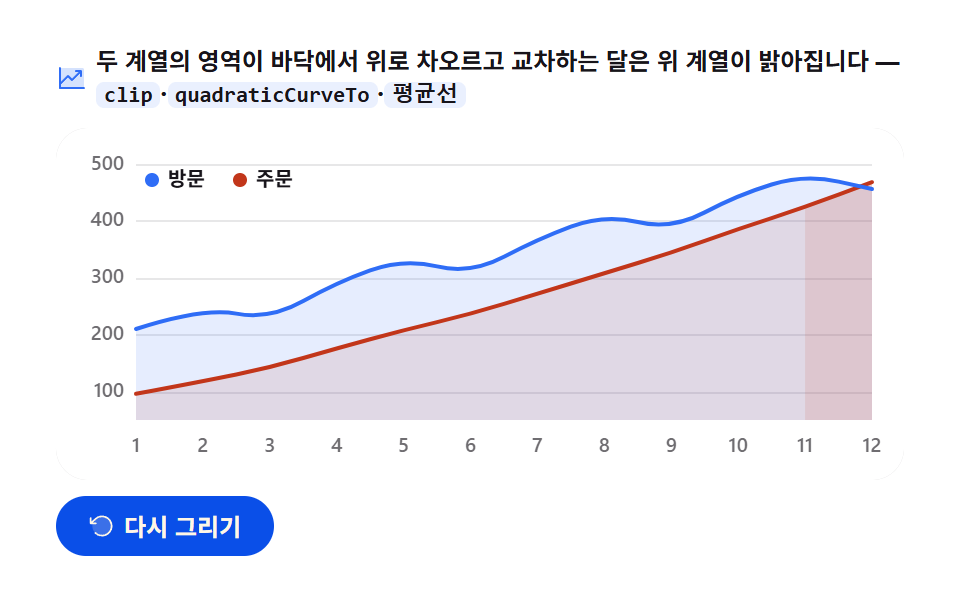 05 chart-canvas-area-rise
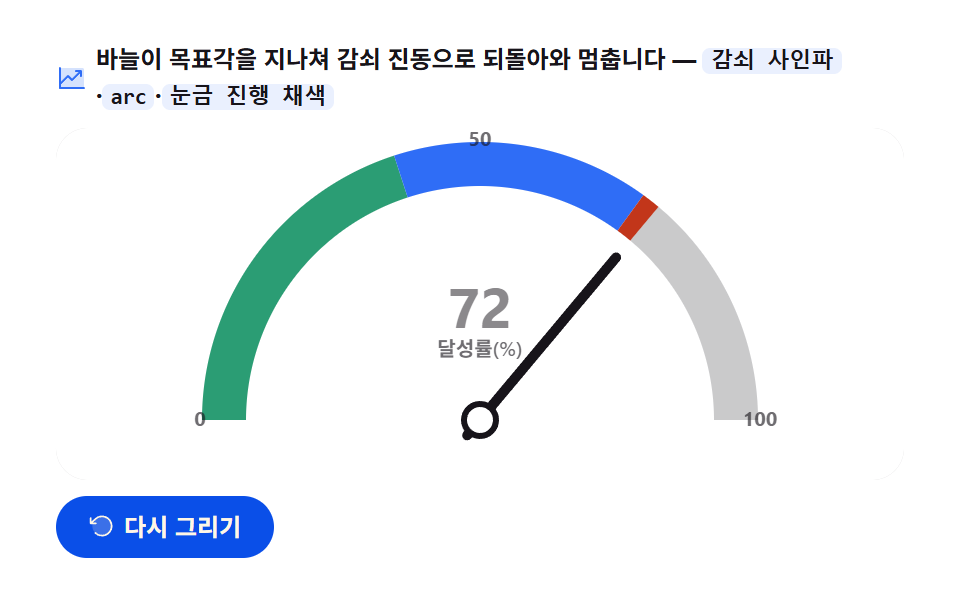 06 chart-canvas-gauge-needle
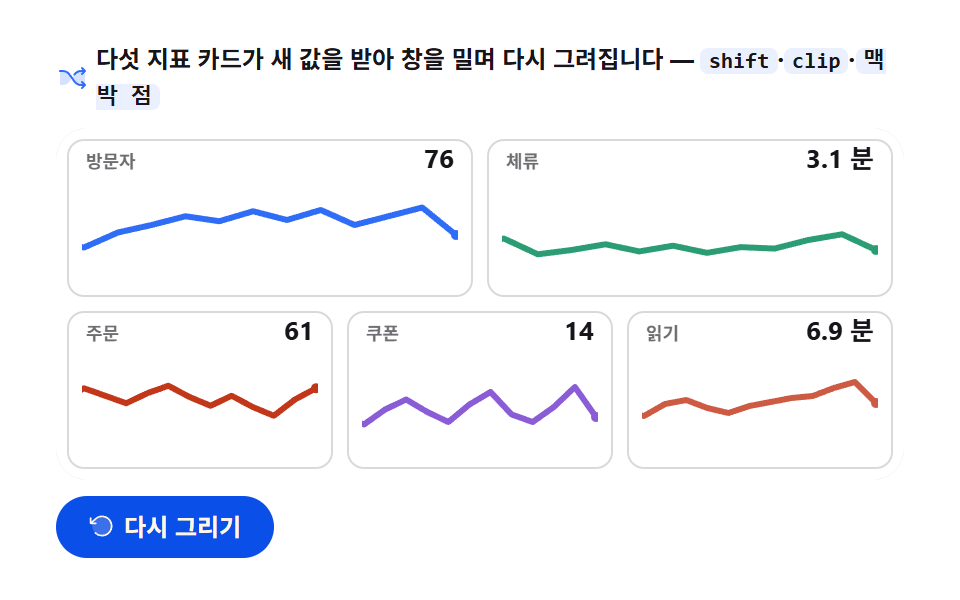 07 chart-canvas-sparkline-stream
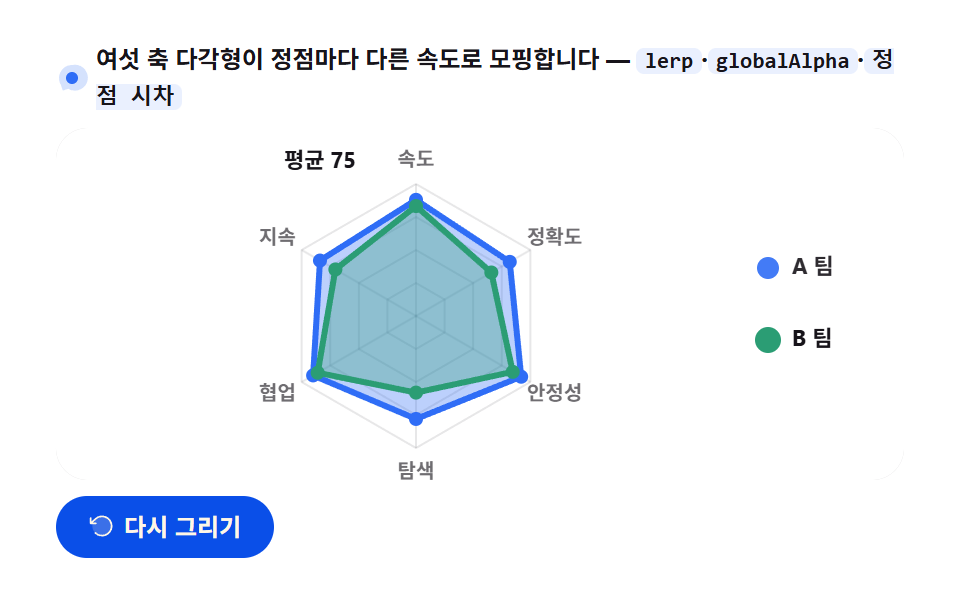 08 chart-canvas-radar-morph
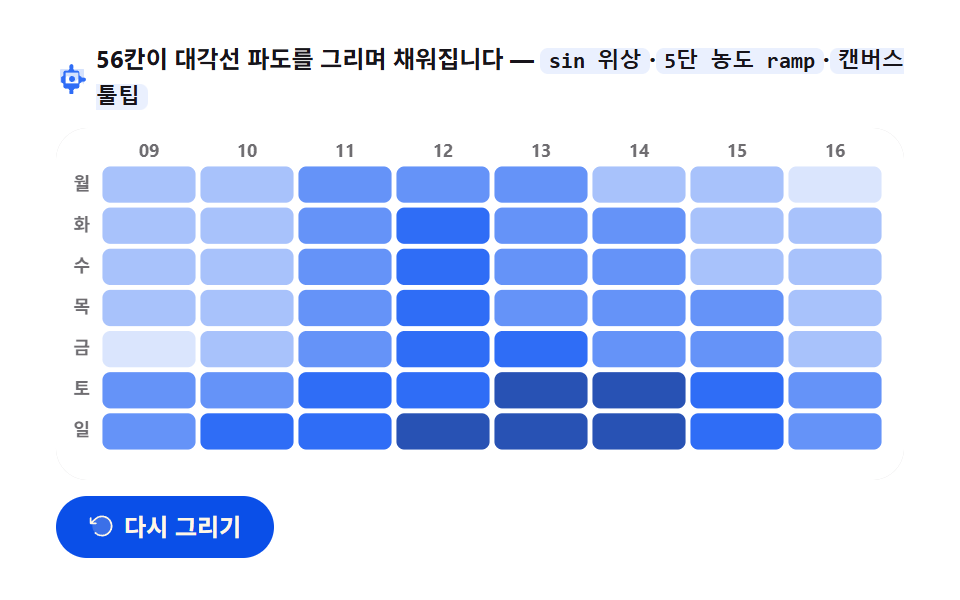 09 chart-canvas-heatmap-wave
자동 재생 · 눌러서 해당 항목으로 · 전부 한 zip
- 01 선 그래프 그리기
- 02 막대 그래프 성장
- 03 도넛 그래프 스윕
- 04 산포 그래프 등장
- 05 영역 그래프 채움
- 06 게이지 바늘 회전
- 07 스파크라인 흐름
- 08 레이더 그래프 변형
- 09 히트맵 파동
순서는 난이도가 아니라 캔버스에 잉크를 놓는 도구가 하나씩 늘어나는 순서입니다. 획 하나로 시작한 선(01)이 직사각형 채움을 얻어 막대가 되고(02), 원호를 얻어 도넛이 됩니다(03). 여기서 점 40개를 흩뿌리면 산포도(04), 면 두 장을 겹치면 영역 그래프(05)로 확장됩니다. 다음 넷은 그 잉크를 어떻게 움직이는가입니다 — 바늘 하나가 감쇠 진동하며 값 하나를 말하고(06), 시간 창이 밀리며 미니 선 다섯이 살아 숨 쉬고(07), 다각형이 정점마다 다른 속도로 변형하며(08), 마지막으로 56개의 셀이 파도를 이루며 채워집니다(09). 그리는 쪽이 아니라 픽셀을 계산하는 쪽이 궁금하다면 html5 canvas 애니메이션 9종에서 물방울·블랙홀 장면 효과를, 벡터로 그리는 쪽은 css 그래프 만들기 SVG로 9종에서, 이미 그려진 차트를 마우스로 만지는 쪽은 대시보드 차트 디자인 인터랙션 9종에서 다룹니다.
01선 그래프 그리기 — 클립이 열리며 드러나는 12주
무엇이 보이나
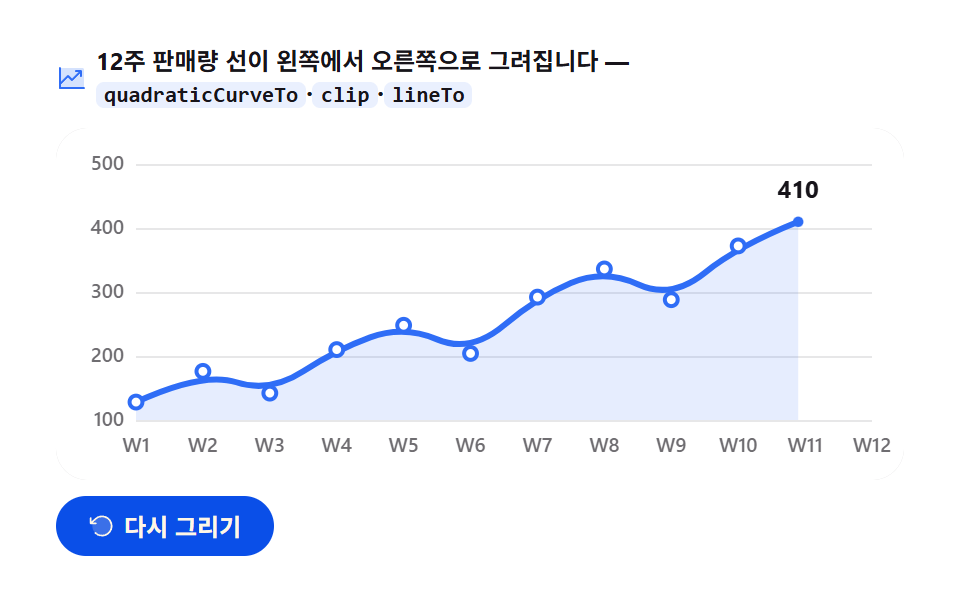
다시 그리기 단추를 누르면 12주 판매량 [128, 176, 142, 210, 248, 204, 292, 336, 288, 372, 414, 468] 이 왼쪽에서 오른쪽으로 이어서 그려지고, 펜이 지나온 꼭짓점마다 종이색 마커가 박힌 뒤 끝점이 반지름 2.6에서 5.5로 커지며 멈춥니다.
<main class="stage">
<div class="lc" id="lc">
  <p class="lc__hint">
    <svg class="lc__ico" viewBox="0 0 256 256" aria-hidden="true"><g fill="currentColor"><path d="M224 64v144H32V48h176a16 16 0 0 1 16 16" opacity=".2"/><path d="M232 208a8 8 0 0 1-8 8H32a8 8 0 0 1-8-8V48a8 8 0 0 1 16 0v108.69l50.34-50.35a8 8 0 0 1 11.32 0L128 132.69L180.69 80H160a8 8 0 0 1 0-16h40a8 8 0 0 1 8 8v40a8 8 0 0 1-16 0V91.31l-58.34 58.35a8 8 0 0 1-11.32 0L96 123.31l-56 56V200h184a8 8 0 0 1 8 8"/></g></svg>
    <span>12주 판매량 선이 왼쪽에서 오른쪽으로 그려집니다 — <code>quadraticCurveTo</code>·<code>clip</code>·<code>lineTo</code></span>
  </p>
  <div class="lc__field" id="field" role="application" aria-label="선 그래프 그리기 실험판" tabindex="0">
    <canvas class="lc__cv" id="cv" role="img" aria-label="12주 판매량 선 그래프 — 꺾이는 선이 주차를 따라 오르는 모습"></canvas>
  </div>
  <div class="lc__bar">
    <button class="lc__btn" id="replay" type="button">
      <svg class="lc__bico" viewBox="0 0 256 256" aria-hidden="true"><g fill="currentColor"><path d="M216 128a88 88 0 1 1-88-88a88 88 0 0 1 88 88" opacity=".2"/><path d="M224 128a96 96 0 0 1-94.71 96H128a95.38 95.38 0 0 1-65.9-26.2a8 8 0 0 1 11-11.63a80 80 0 1 0-1.67-114.78a3 3 0 0 1-.26.25L44.59 96H72a8 8 0 0 1 0 16H24a8 8 0 0 1-8-8V56a8 8 0 0 1 16 0v29.8L60.25 60A96 96 0 0 1 224 128"/></g></svg>
      <span>다시 그리기</span>
    </button>
    <table class="sr-only">
      <caption>12주 판매량(단위: 개)</caption>
      <thead><tr><th scope="col">주차</th><th scope="col">판매량</th></tr></thead>
      <tbody>
        <tr><th scope="row">1주</th><td>128</td></tr>
        <tr><th scope="row">2주</th><td>176</td></tr>
        <tr><th scope="row">3주</th><td>142</td></tr>
        <tr><th scope="row">4주</th><td>210</td></tr>
        <tr><th scope="row">5주</th><td>248</td></tr>
        <tr><th scope="row">6주</th><td>204</td></tr>
        <tr><th scope="row">7주</th><td>292</td></tr>
        <tr><th scope="row">8주</th><td>336</td></tr>
        <tr><th scope="row">9주</th><td>288</td></tr>
        <tr><th scope="row">10주</th><td>372</td></tr>
        <tr><th scope="row">11주</th><td>414</td></tr>
        <tr><th scope="row">12주</th><td>468</td></tr>
      </tbody>
    </table>
  </div>
</div>
</main>@use "../../../../site/static/demo-tokens" as *;
// 선 그래프 그리기 — 움직임은 전부 캔버스 rAF 루프 안(끝점 이동 + quadraticCurveTo 경로 + clip 리빌).
// CSS 애니메이션이 0개여야 렌더러가 실시간 24장을 찍는다(077·304 선례).
// 무대는 $stage-paper(흰) — 차트는 밝은 무대가 정석. 색은 차트 토큰 고정 순서 1번.
$duration: $dur-loop;
$easing: $ease-spring;
$color: $chart-1;
@include stage($stage-paper);
// 화면 낭독기용 표 — 캔버스를 읽지 못하므로 같은 데이터를 표로 붙인다
.sr-only {
// fixed + top/left 명시 — absolute 였을 때 표의 실제 콘텐츠 높이(12행 ≒ 390px)가 scrollHeight 에
// 잡혀 데스크톱·폰 전부 세로 넘침(BD8/BD9)이 났다. top 을 주지 않으면 static 자리 기준으로
// 배치돼 여전히 scrollHeight 에 들어간다 — 좌상단 고정으로 문서 흐름에서 완전히 뺀다.
position: fixed; top: 0; left: 0; width: 1px; height: 1px; margin: -1px;
overflow: hidden; clip: rect(0 0 0 0); white-space: nowrap;
}
.lc {
// 캔버스가 읽는 색 — JS 가 getComputedStyle 로 꺼내 쓴다. vivid 리터럴은 두지 않는다(BD26)
--chart-1: #{$color};
--fill-1: #{rgba($chart-1, .12)};
--ink: #{$subject-ink};
--mute: #{rgba($subject-ink, .62)};
--grid: #{rgba($subject-ink, .10)};
--paper: #{$stage-paper};
display: flex; flex-direction: column; gap: $sp-2;
width: 100%; max-width: 424px;
}
.lc__hint {
display: flex; align-items: center; gap: $sp-1; margin: 0;
font-weight: 700; font-size: clamp(10px, 2.8vw, 12px); line-height: 1.35;
color: $subject-ink;
}
.lc__hint code {
padding: 0 $sp-1; border-radius: $r-xs;
background: rgba($chart-1, .10);
color: $subject-ink;
font-weight: 700; font-size: .92em; line-height: 1.3;
}
.lc__ico { width: 16px; height: 16px; flex: 0 0 auto; color: $color; }
.lc__field {
position: relative; height: 176px;
border-radius: $r-card; overflow: hidden;
background: $stage-paper;
box-shadow: inset 0 0 0 1px rgba($subject-ink, .16);
}
.lc__cv { display: block; width: 100%; height: 100%; }
.lc__bar {
display: flex; align-items: center; gap: $sp-2;
}
.lc__btn {
display: inline-flex; align-items: center; gap: $sp-1;
box-sizing: border-box; padding: $sp-2 $sp-4; border: 0;
border-radius: $r-pill; background: $subject-blue-deep; color: $subject-cream;
font-family: inherit; font-weight: 700; font-size: 12px; line-height: 1.2;
cursor: pointer;
}
.lc__btn:focus-visible { outline: 2px solid $color; outline-offset: 2px; }
.lc__bico { width: 14px; height: 14px; flex: 0 0 auto; }
@media (max-width: 340px) {
.lc { gap: $sp-1; }
.lc__field { height: 112px; }
.lc__hint { font-size: 10px; }
.lc__btn { padding: $sp-1 $sp-3; font-size: 11px; }
}
// reduce — 루프가 아예 안 돌므로 끄고 말고 할 애니메이션이 없다.
// 완성 상태 한 장이 남으므로 "다시 그리기"는 여전히 정지 이미지를 다시 그린다.
@media (prefers-reduced-motion: reduce) {
.lc__btn { cursor: default; }
}html, body {
margin: 0;
overflow: hidden;
}
.stage {
box-sizing: border-box;
min-height: 100vh;
display: grid;
place-items: center;
margin: 0;
background: #ffffff;
font-family: -apple-system, "Segoe UI", "Noto Sans KR", sans-serif;
padding: clamp(8px, 4vw, 24px);
}
.sr-only {
position: fixed;
top: 0;
left: 0;
width: 1px;
height: 1px;
margin: -1px;
overflow: hidden;
clip: rect(0 0 0 0);
white-space: nowrap;
}
.lc {
--chart-1: #2f6df6;
--fill-1: rgba(47, 109, 246, 0.12);
--ink: #17141a;
--mute: rgba(23, 20, 26, 0.62);
--grid: rgba(23, 20, 26, 0.1);
--paper: #ffffff;
display: flex;
flex-direction: column;
gap: 8px;
width: 100%;
max-width: 424px;
}
.lc__hint {
display: flex;
align-items: center;
gap: 4px;
margin: 0;
font-weight: 700;
font-size: clamp(10px, 2.8vw, 12px);
line-height: 1.35;
color: #17141a;
}
.lc__hint code {
padding: 0 4px;
border-radius: 4px;
background: rgba(47, 109, 246, 0.1);
color: #17141a;
font-weight: 700;
font-size: 0.92em;
line-height: 1.3;
}
.lc__ico {
width: 16px;
height: 16px;
flex: 0 0 auto;
color: #2f6df6;
}
.lc__field {
position: relative;
height: 176px;
border-radius: 16px;
overflow: hidden;
background: #ffffff;
box-shadow: inset 0 0 0 1px rgba(23, 20, 26, 0.16);
}
.lc__cv {
display: block;
width: 100%;
height: 100%;
}
.lc__bar {
display: flex;
align-items: center;
gap: 8px;
}
.lc__btn {
display: inline-flex;
align-items: center;
gap: 4px;
box-sizing: border-box;
padding: 8px 16px;
border: 0;
border-radius: 999px;
background: #0a4fe8;
color: #fff7e6;
font-family: inherit;
font-weight: 700;
font-size: 12px;
line-height: 1.2;
cursor: pointer;
}
.lc__btn:focus-visible {
outline: 2px solid #2f6df6;
outline-offset: 2px;
}
.lc__bico {
width: 14px;
height: 14px;
flex: 0 0 auto;
}
@media (max-width: 340px) {
.lc {
gap: 4px;
}
.lc__field {
height: 112px;
}
.lc__hint {
font-size: 10px;
}
.lc__btn {
padding: 4px 12px;
font-size: 11px;
}
}
@media (prefers-reduced-motion: reduce) {
.lc__btn {
cursor: default;
}
}// 선 그래프 그리기 — 12주 판매량을 이어 그리는 애니메이션.
// 두 겹이 함께 움직인다:
// 1) 끝점이 x 축을 따라 이동하며, 지나온 꼭짓점들은 quadraticCurveTo 로 모서리를 눌러 이어진다(중점 제어).
// 2) 클리핑 사각형이 같은 속도로 왼쪽에서 오른쪽으로 열려, 선이 지나온 순서대로 드러난다.
// 그리드와 축 라벨은 정적이므로 reveal 초반에 먼저 띄우고, 선이 그 위를 지나간다.
var root = document.getElementById('lc');
var field = document.getElementById('field');
var cv = document.getElementById('cv');
var ctx = cv.getContext('2d');
var replayBtn = document.getElementById('replay');
var css = getComputedStyle(root);
var C_LINE = css.getPropertyValue('--chart-1').trim();
var C_FILL = css.getPropertyValue('--fill-1').trim();
var C_INK = css.getPropertyValue('--ink').trim();
var C_MUTE = css.getPropertyValue('--mute').trim();
var C_GRID = css.getPropertyValue('--grid').trim();
var C_PAPER = css.getPropertyValue('--paper').trim();
var FONT = '-apple-system, "Segoe UI", "Noto Sans KR", sans-serif';
// 고정 시드 데이터 — 12주 판매량(개). 난수가 아니라 코드 안 배열이므로 다시 그려도 같은 그림
var WEEKS = [128, 176, 142, 210, 248, 204, 292, 336, 288, 372, 414, 468];
var PAD_L = 40, PAD_R = 16, PAD_T = 18, PAD_B = 30; // 축 라벨 여백(CSS px)
var LOOP = 2; // 한 사이클 2초 — 캡처 창과 같아 gif 가 이어진다
var DRAW_AT = 0.88; // 전체 2초의 88% 에 그리기가 끝나고, 끝점이 커지며 잠시 쉰다
var Y_TOP = 100, Y_SPAN = 500; // y 축 스케일 고정(100~500개)
var reduce = window.matchMedia('(prefers-reduced-motion: reduce)').matches;
var W = 0, H = 0, dpr = 1;
var t0 = 0, raf = 0;
function fit() {
var r = field.getBoundingClientRect();
dpr = window.devicePixelRatio || 1;
W = r.width; H = r.height;
cv.width = Math.round(W * dpr);
cv.height = Math.round(H * dpr);
ctx.setTransform(dpr, 0, 0, dpr, 0, 0);
}
// 데이터 인덱스 → 플롯 좌표. y 는 위로 갈수록 크다
function xAt(i) { return PAD_L + (W - PAD_L - PAD_R) * (i / (WEEKS.length - 1)); }
function yAt(v) { return PAD_T + (H - PAD_T - PAD_B) * (1 - (v - Y_TOP) / (Y_SPAN - Y_TOP)); }
// 그리기 진행 p(0..1) → { i, k, ex, ey, f }
//   f = 0..11 정규화 경과, i·k = 현재 변, (ex,ey) = 끝점 좌표
function headAt(p) {
  var n = WEEKS.length;
  var f = Math.min(1, p / DRAW_AT) * (n - 1);
  var i = Math.min(n - 2, Math.floor(f));
  var k = f - i;
  var ex = xAt(i) + (xAt(i + 1) - xAt(i)) * k;
  var ey = yAt(WEEKS[i]) + (yAt(WEEKS[i + 1]) - yAt(WEEKS[i])) * k;
  return { i: i, k: k, f: f, ex: ex, ey: ey };
}
// 현재 끝점까지의 부드러운 경로를 만든다.
// 지나온 꼭짓점은 제어점으로 삼아 다음 꼭짓점과의 중점까지 quadraticCurveTo 로 누른다(정점을 스치듯),
// 마지막 구간은 현재 끝점까지 직선(lineTo) — 그리고 있는 순간의 펜 끝이다.
function tracePath(p) {
var d = headAt(p);
ctx.beginPath();
ctx.moveTo(xAt(0), yAt(WEEKS[0]));
for (var j = 1; j < d.i; j++) {
ctx.quadraticCurveTo(xAt(j), yAt(WEEKS[j]), (xAt(j) + xAt(j + 1)) / 2, (yAt(WEEKS[j]) + yAt(WEEKS[j + 1])) / 2);
}
if (d.i >= 1) {
ctx.quadraticCurveTo(xAt(d.i), yAt(WEEKS[d.i]), d.ex, d.ey);
} else {
ctx.lineTo(d.ex, d.ey);
}
return d;
}
// 목표를 살짝 넘겼다가 돌아오는 오버슛 — 끝점이 자리 잡을 때 커지는 감
function easeOutBack(t) {
var c = 1.7;
return 1 + (c + 1) * Math.pow(t - 1, 3) + c * Math.pow(t - 1, 2);
}
function draw(p) {
ctx.clearRect(0, 0, W, H);
ctx.fillStyle = C_PAPER;
ctx.fillRect(0, 0, W, H);
// 가로 그리드 + y 라벨 — 100~500 다섯 줄. 첫 12% 동안 아래에서 위로 떠오른다
var axisP = Math.min(1, p / 0.12);
ctx.lineWidth = 1;
ctx.font = '600 10px ' + FONT;
ctx.textBaseline = 'middle';
ctx.textAlign = 'right';
for (var g = Y_TOP; g <= Y_SPAN; g += 100) {
var gy = yAt(g) + (1 - axisP) * 14;
ctx.strokeStyle = C_GRID;
ctx.beginPath();
ctx.moveTo(PAD_L, Math.round(gy) + 0.5);
ctx.lineTo(W - PAD_R, Math.round(gy) + 0.5);
ctx.stroke();
ctx.fillStyle = C_MUTE;
ctx.globalAlpha = axisP;
ctx.fillText(String(g), PAD_L - 6, gy);
ctx.globalAlpha = 1;
}
// x 라벨(주차) — 축이 뜬 뒤 왼쪽부터 차례로 나타난다
ctx.textAlign = 'center';
for (var w = 0; w < WEEKS.length; w++) {
var wp = Math.max(0, Math.min(1, (p - 0.10 - w * 0.018) / 0.10));
if (wp <= 0) continue;
ctx.fillStyle = C_MUTE;
ctx.globalAlpha = wp;
ctx.fillText('W' + (w + 1), xAt(w), H - PAD_B + 13);
ctx.globalAlpha = 1;
}
// 클리핑 사각형 — 왼쪽에서 오른쪽으로 열린다. 이 안에서만 면과 선이 보인다
var cutX = PAD_L + (W - PAD_L - PAD_R) * Math.min(1, p / DRAW_AT);
ctx.save();
ctx.beginPath();
ctx.rect(0, 0, cutX + 1, H);
ctx.clip();
// 영역 채움(면) — 선 아래를 옅게 깐다. 움직이는 면적이 커야 측정 강도가 오른다
var d0 = tracePath(p);
ctx.lineTo(d0.ex, H - PAD_B);
ctx.lineTo(xAt(0), H - PAD_B);
ctx.closePath();
ctx.fillStyle = C_FILL;
ctx.fill();
// 선 — 3px. 경로를 다시 만들어 그린다
var d1 = tracePath(p);
ctx.strokeStyle = C_LINE;
ctx.lineWidth = 3;
ctx.lineJoin = 'round';
ctx.lineCap = 'round';
ctx.stroke();
ctx.restore();
// 꼭짓점 마커 — 끝점이 지나온 점만 종이색 속에 파란 테두리로 박는다(지나온 순서 확인)
for (var m = 0; m <= d1.i; m++) {
ctx.beginPath();
ctx.arc(xAt(m), yAt(WEEKS[m]), 3.2, 0, Math.PI * 2);
ctx.fillStyle = C_PAPER;
ctx.fill();
ctx.strokeStyle = C_LINE;
ctx.lineWidth = 2;
ctx.stroke();
}
// 끝점 — 그리기가 끝나면 오버슛으로 커진다(2.6 에서 5.5 로). 커지며 링이 한 번 퍼진다
var settled = Math.max(0, (p - DRAW_AT) / (1 - DRAW_AT));
var r0 = 2.6 + 2.9 * easeOutBack(Math.min(1, settled * 1.8));
ctx.beginPath();
ctx.arc(d1.ex, d1.ey, r0, 0, Math.PI * 2);
ctx.fillStyle = C_LINE;
ctx.fill();
if (settled > 0 && settled < 1) {
ctx.beginPath();
ctx.arc(d1.ex, d1.ey, r0 + 14 * settled, 0, Math.PI * 2);
ctx.strokeStyle = C_LINE;
ctx.globalAlpha = 0.5 * (1 - settled);
ctx.lineWidth = 2;
ctx.stroke();
ctx.globalAlpha = 1;
}
// 끝 값 라벨 — 끝점 위에서 따라오르는 값(변 위에서 보간되어 카운트업처럼 오른다)
if (p > 0.06) {
var lv = Math.round(WEEKS[d1.i] + (WEEKS[d1.i + 1] - WEEKS[d1.i]) * d1.k);
ctx.font = '700 12px ' + FONT;
ctx.textAlign = 'center';
ctx.textBaseline = 'alphabetic';
ctx.fillStyle = C_INK;
ctx.fillText(String(lv), Math.min(W - 20, Math.max(PAD_L, d1.ex)), d1.ey - 12 - 6 * settled);
}
}
function frame(now) {
if (!t0) t0 = now;
var p = ((now - t0) / 1000 % LOOP) / LOOP; // 0..1, 2초 루프
draw(p);
raf = requestAnimationFrame(frame);
}
replayBtn.addEventListener('click', function () { t0 = 0; });
window.addEventListener('resize', function () { fit(); if (reduce) draw(1); });
fit();
if (reduce) {
// reduce — 루프 없이 완성 상태(12주 전체가 그려지고 끝점이 커진 한 장)만 그린다
draw(1);
} else {
raf = requestAnimationFrame(frame);
}// LineDrawChart — vanilla 판(run/305/demo/01-chart-canvas-line-draw/index.html) 의 React 포트.
// 끝점이 x 축을 따라 이동하며 지나온 꼭짓점은 quadraticCurveTo 로 눌리고,
// 클리핑 사각형이 왼쪽에서 오른쪽으로 열려 선이 지나온 순서대로 드러난다.
// 움직임은 캔버스 rAF 루프가 전부 그리므로 @keyframes 가 없다 — props 는 CSS 변수로 내려간다.
import { useEffect, useRef } from "react";
import type { CSSProperties } from "react";
import styles from "./LineDrawChart.module.scss";
export type LineDrawChartProps = {
duration?: string;
easing?: string;
color?: string;
};
type Vars = CSSProperties & { "--duration"?: string; "--easing"?: string; "--color"?: string };
// useRef 는 T | null 을 돌려준다. 처음부터 값이 있고 절대 비지 않는 상자는 이렇게 좁혀 쓴다
type Box<T> = { current: T };
// 고정 시드 데이터 — 12주 판매량(개). 난수가 아니라 코드 안 배열
const WEEKS = [128, 176, 142, 210, 248, 204, 292, 336, 288, 372, 414, 468];
const PAD_L = 40, PAD_R = 16, PAD_T = 18, PAD_B = 30;
const LOOP = 2; // 한 사이클 2초
const DRAW_AT = 0.88; // 전체의 88% 에 그리기가 끝나고 끝점이 커지며 쉰다
const Y_TOP = 100, Y_SPAN = 500;
const FONT = '-apple-system, "Segoe UI", "Noto Sans KR", sans-serif';
const FIELD_LABEL = "선 그래프 그리기 실험판";
const CV_LABEL = "12주 판매량 선 그래프 — 꺾이는 선이 주차를 따라 오르는 모습";
export default function LineDrawChart({
duration = "2s", // vanilla $duration: $dur-loop
easing = "cubic-bezier(.2, .8, .2, 1)", // vanilla $easing: $ease-spring
color = "#2f6df6", // vanilla $color: $chart-1
}: LineDrawChartProps) {
const rootRef = useRef<HTMLDivElement | null>(null);
const cvRef = useRef<HTMLCanvasElement | null>(null);
const ctxRef = useRef<CanvasRenderingContext2D | null>(null);
const sizeRef = useRef({ w: 0, h: 0 }) as Box<{ w: number; h: number }>;
const t0Ref = useRef(0) as Box<number>;
const rafRef = useRef(0) as Box<number>;
const vars: Vars = { "--duration": duration, "--easing": easing, "--color": color };
function reduced(): boolean {
return window.matchMedia("(prefers-reduced-motion: reduce)").matches;
}
function cssv(n: string): string {
const root = rootRef.current;
return root ? getComputedStyle(root).getPropertyValue(n).trim() : "";
}
// 고DPI — 배킹 스토어는 devicePixelRatio 배, 그리기 좌표계는 CSS 픽셀 그대로
function fit(): void {
const cv = cvRef.current;
const s = sizeRef.current;
if (!cv) return;
const r = cv.getBoundingClientRect();
const dpr = window.devicePixelRatio || 1;
s.w = r.width; s.h = r.height;
cv.width = Math.round(r.width * dpr);
cv.height = Math.round(r.height * dpr);
const ctx = ctxRef.current;
if (ctx) ctx.setTransform(dpr, 0, 0, dpr, 0, 0);
}
function xAt(i: number): number {
const W = sizeRef.current.w;
return PAD_L + (W - PAD_L - PAD_R) * (i / (WEEKS.length - 1));
}
function yAt(v: number): number {
const H = sizeRef.current.h;
return PAD_T + (H - PAD_T - PAD_B) * (1 - (v - Y_TOP) / (Y_SPAN - Y_TOP));
}
// 그리기 진행 p(0..1) → 끝점 정보. f = 정규화 경과, i·k = 현재 변, (ex,ey) = 끝점
function headAt(p: number): { i: number; k: number; f: number; ex: number; ey: number } {
const n = WEEKS.length;
const f = Math.min(1, p / DRAW_AT) * (n - 1);
const i = Math.min(n - 2, Math.floor(f));
const k = f - i;
const ex = xAt(i) + (xAt(i + 1) - xAt(i)) * k;
const ey = yAt(WEEKS[i]) + (yAt(WEEKS[i + 1]) - yAt(WEEKS[i])) * k;
return { i, k, f, ex, ey };
}
// 지나온 꼭짓점을 중점 제어로 누른 경로. 마지막 구간은 현재 끝점까지 직선
function tracePath(p: number): { i: number; k: number; f: number; ex: number; ey: number } {
const ctx = ctxRef.current!;
const d = headAt(p);
ctx.beginPath();
ctx.moveTo(xAt(0), yAt(WEEKS[0]));
for (let j = 1; j < d.i; j++) {
ctx.quadraticCurveTo(xAt(j), yAt(WEEKS[j]), (xAt(j) + xAt(j + 1)) / 2, (yAt(WEEKS[j]) + yAt(WEEKS[j + 1])) / 2);
}
if (d.i >= 1) {
ctx.quadraticCurveTo(xAt(d.i), yAt(WEEKS[d.i]), d.ex, d.ey);
} else {
ctx.lineTo(d.ex, d.ey);
}
return d;
}
// 목표를 살짝 넘겼다가 돌아오는 오버슛 — 끝점이 자리 잡을 때 커지는 감
function easeOutBack(t: number): number {
const c = 1.7;
return 1 + (c + 1) * Math.pow(t - 1, 3) + c * Math.pow(t - 1, 2);
}
function draw(p: number): void {
const ctx = ctxRef.current;
if (!ctx) return;
const W = sizeRef.current.w, H = sizeRef.current.h;
const C_LINE = cssv("--chart-1") || color;
const C_FILL = cssv("--fill-1");
const C_INK = cssv("--ink");
const C_MUTE = cssv("--mute");
const C_GRID = cssv("--grid");
const C_PAPER = cssv("--paper");
ctx.clearRect(0, 0, W, H);
ctx.fillStyle = C_PAPER;
ctx.fillRect(0, 0, W, H);
// 가로 그리드 + y 라벨 — 첫 12% 동안 아래에서 위로 떠오른다
const axisP = Math.min(1, p / 0.12);
ctx.lineWidth = 1;
ctx.font = "600 10px " + FONT;
ctx.textBaseline = "middle";
ctx.textAlign = "right";
for (let g = Y_TOP; g <= Y_SPAN; g += 100) {
const gy = yAt(g) + (1 - axisP) * 14;
ctx.strokeStyle = C_GRID;
ctx.beginPath();
ctx.moveTo(PAD_L, Math.round(gy) + 0.5);
ctx.lineTo(W - PAD_R, Math.round(gy) + 0.5);
ctx.stroke();
ctx.fillStyle = C_MUTE;
ctx.globalAlpha = axisP;
ctx.fillText(String(g), PAD_L - 6, gy);
ctx.globalAlpha = 1;
}
// x 라벨(주차) — 왼쪽부터 차례로
ctx.textAlign = "center";
for (let w = 0; w < WEEKS.length; w++) {
const wp = Math.max(0, Math.min(1, (p - 0.10 - w * 0.018) / 0.10));
if (wp <= 0) continue;
ctx.fillStyle = C_MUTE;
ctx.globalAlpha = wp;
ctx.fillText("W" + (w + 1), xAt(w), H - PAD_B + 13);
ctx.globalAlpha = 1;
}
// 클리핑 사각형 — 왼쪽에서 오른쪽으로 열린다
const cutX = PAD_L + (W - PAD_L - PAD_R) * Math.min(1, p / DRAW_AT);
ctx.save();
ctx.beginPath();
ctx.rect(0, 0, cutX + 1, H);
ctx.clip();
// 영역 채움 — 선 아래를 옅게 깐다
const d0 = tracePath(p);
ctx.lineTo(d0.ex, H - PAD_B);
ctx.lineTo(xAt(0), H - PAD_B);
ctx.closePath();
ctx.fillStyle = C_FILL;
ctx.fill();
// 선 — 2px
const d1 = tracePath(p);
ctx.strokeStyle = C_LINE;
ctx.lineWidth = 2;
ctx.lineJoin = "round";
ctx.lineCap = "round";
ctx.stroke();
ctx.restore();
// 꼭짓점 마커 — 끝점이 지나온 점만
for (let m = 0; m <= d1.i; m++) {
ctx.beginPath();
ctx.arc(xAt(m), yAt(WEEKS[m]), 2.6, 0, Math.PI * 2);
ctx.fillStyle = C_PAPER;
ctx.fill();
ctx.strokeStyle = C_LINE;
ctx.lineWidth = 2;
ctx.stroke();
}
// 끝점 — 착지하며 오버슛으로 커지고 링이 한 번 퍼진다
const settled = Math.max(0, (p - DRAW_AT) / (1 - DRAW_AT));
const r0 = 2.6 + 2.9 * easeOutBack(Math.min(1, settled * 1.8));
ctx.beginPath();
ctx.arc(d1.ex, d1.ey, r0, 0, Math.PI * 2);
ctx.fillStyle = C_LINE;
ctx.fill();
if (settled > 0 && settled < 1) {
ctx.beginPath();
ctx.arc(d1.ex, d1.ey, r0 + 14 * settled, 0, Math.PI * 2);
ctx.strokeStyle = C_LINE;
ctx.globalAlpha = 0.5 * (1 - settled);
ctx.lineWidth = 2;
ctx.stroke();
ctx.globalAlpha = 1;
}
// 끝 값 라벨 — 끝점 위에서 보간되어 오른다
if (p > 0.06) {
const lv = Math.round(WEEKS[d1.i] + (WEEKS[d1.i + 1] - WEEKS[d1.i]) * d1.k);
ctx.font = "700 12px " + FONT;
ctx.textAlign = "center";
ctx.textBaseline = "alphabetic";
ctx.fillStyle = C_INK;
ctx.fillText(String(lv), Math.min(W - 20, Math.max(PAD_L, d1.ex)), d1.ey - 12 - 6 * settled);
}
}
function frame(now: number): void {
if (!t0Ref.current) t0Ref.current = now;
const p = ((now - t0Ref.current) / 1000 % LOOP) / LOOP;
draw(p);
rafRef.current = requestAnimationFrame(frame);
}
function replay(): void {
t0Ref.current = 0;
}
function onResize(): void {
fit();
if (reduced()) draw(1);
}
useEffect(() => {
const cv = cvRef.current;
if (!cv) return;
ctxRef.current = cv.getContext("2d");
if (!ctxRef.current) return;
fit();
window.addEventListener("resize", onResize);
if (reduced()) {
// reduce — 루프 없이 완성 상태 한 장만 그린다
draw(1);
} else {
rafRef.current = requestAnimationFrame(frame);
}
return () => {
window.removeEventListener("resize", onResize);
cancelAnimationFrame(rafRef.current);
};
}, []);
return (
<main className={styles.stage}>
<div className={styles.root} ref={rootRef} style={vars}>
<p className={styles.hint}>
<svg className={styles.ico} viewBox="0 0 256 256" aria-hidden="true"><g fill="currentColor"><path d="M224 64v144H32V48h176a16 16 0 0 1 16 16" opacity=".2"/><path d="M232 208a8 8 0 0 1-8 8H32a8 8 0 0 1-8-8V48a8 8 0 0 1 16 0v108.69l50.34-50.35a8 8 0 0 1 11.32 0L128 132.69L180.69 80H160a8 8 0 0 1 0-16h40a8 8 0 0 1 8 8v40a8 8 0 0 1-16 0V91.31l-58.34 58.35a8 8 0 0 1-11.32 0L96 123.31l-56 56V200h184a8 8 0 0 1 8 8"/></g></svg>
<span>12주 판매량 선이 왼쪽에서 오른쪽으로 그려집니다 — <code>quadraticCurveTo</code>·<code>clip</code>·<code>lineTo</code></span>
</p>
<div className={styles.field} role="application" aria-label={FIELD_LABEL} tabIndex={0}>
<canvas className={styles.cv} ref={cvRef} role="img" aria-label={CV_LABEL}></canvas>
</div>
<div className={styles.bar}>
<button className={styles.btn} type="button" onClick={replay}>
<svg className={styles.bico} viewBox="0 0 256 256" aria-hidden="true"><g fill="currentColor"><path d="M216 128a88 88 0 1 1-88-88a88 88 0 0 1 88 88" opacity=".2"/><path d="M224 128a96 96 0 0 1-94.71 96H128a95.38 95.38 0 0 1-65.9-26.2a8 8 0 0 1 11-11.63a80 80 0 1 0-1.67-114.78a3 3 0 0 1-.26.25L44.59 96H72a8 8 0 0 1 0 16H24a8 8 0 0 1-8-8V56a8 8 0 0 1 16 0v29.8L60.25 60A96 96 0 0 1 224 128"/></g></svg>
<span>다시 그리기</span>
</button>
<table className={styles.srOnly}>
<caption>12주 판매량(단위: 개)</caption>
<thead><tr><th scope="col">주차</th><th scope="col">판매량</th></tr></thead>
<tbody>
{WEEKS.map((v, i) => (
<tr key={i}><th scope="row">{i + 1}주</th><td>{v}</td></tr>
))}
</tbody>
</table>
</div>
</div>
</main>
);
}01 · 선 그래프 그리기 — 측정 누적면적 20.228% · 움직인 프레임 23/23GODRICH 원작 · zip 에 SCSS·React 포함 · 비밀번호 보기
계산을 볼 곳
2초 루프에서 움직인 프레임 23/24 · 누적면적 20.228% 를 기록했고, 주간·월간 지표 보고서의 첫 줄에 어울립니다 — 진행 p를 주 11개 구간에 얹어 현재 변과 끝점 좌표를 계산하는 것이 이 애니메이션의 심장입니다.
// 그리기 진행 p(0..1) → { i, k, ex, ey, f }
// f = 0..11 정규화 경과, i·k = 현재 변, (ex,ey) = 끝점 좌표
function headAt(p) {
var n = WEEKS.length;
var f = Math.min(1, p / DRAW_AT) * (n - 1);
var i = Math.min(n - 2, Math.floor(f));
var k = f - i;
var ex = xAt(i) + (xAt(i + 1) - xAt(i)) * k;
var ey = yAt(WEEKS[i]) + (yAt(WEEKS[i + 1]) - yAt(WEEKS[i])) * k;
return { i: i, k: k, f: f, ex: ex, ey: ey };
}
// 지나온 꼭짓점은 제어점으로 삼아 다음 꼭짓점과의 중점까지 quadraticCurveTo 로 누른다(정점을 스치듯)
function tracePath(p) {
  var d = headAt(p);
  ctx.beginPath();
  ctx.moveTo(xAt(0), yAt(WEEKS[0]));
  for (var j = 1; j < d.i; j++) {
    ctx.quadraticCurveTo(xAt(j), yAt(WEEKS[j]), (xAt(j) + xAt(j + 1)) / 2, (yAt(WEEKS[j]) + yAt(WEEKS[j + 1])) / 2);
  }
  if (d.i >= 1) {
    ctx.quadraticCurveTo(xAt(d.i), yAt(WEEKS[d.i]), d.ex, d.ey);
  } else {
    ctx.lineTo(d.ex, d.ey);
  }
  return d;
}
꼭짓점을 제어점으로 삼아 인접 꼭짓점과의 중점까지 곡선을 누르는 이 방식은 정점을 스치고 지나가므로, 계단처럼 튀지 않으면서도 데이터 위치를 정확히 지키고 클리핑 사각형이 같은 속도로 열려 선이 지나온 순서대로 드러납니다.
02막대 그래프 성장 — 시차로 번지는 파도
무엇이 보이나
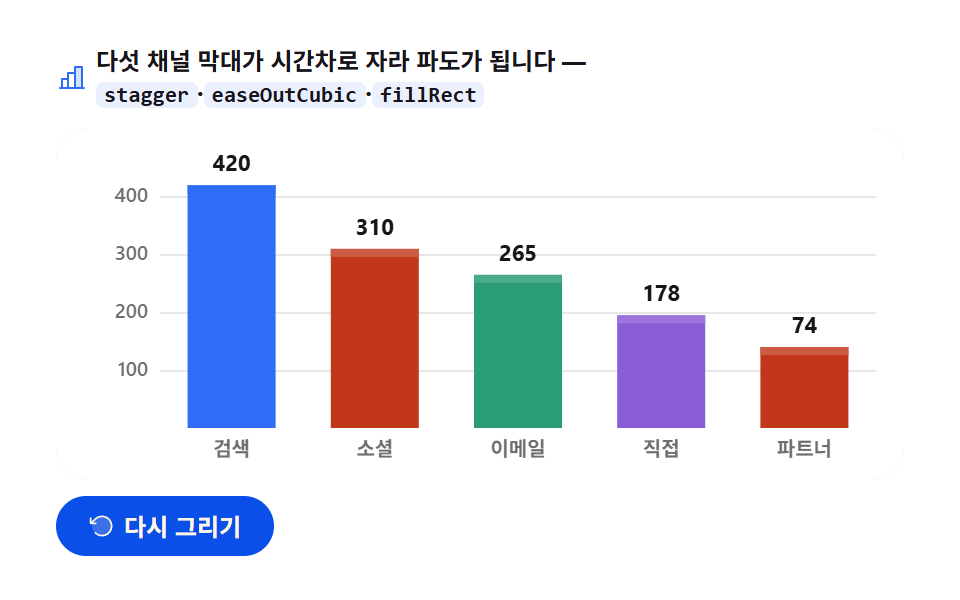
검색 420 · 소셜 310 · 이메일 265 · 직접 195 · 파트너 140(만원) 다섯 막대가 전체의 7.5% 간격으로 시차를 두고 바닥에서 자라 파도를 이루고, 착지한 막대부터 값 레이블이 카운트업됩니다.
<main class="stage">
<div class="bg" id="bg">
  <p class="bg__hint">
    <svg class="bg__ico" viewBox="0 0 256 256" aria-hidden="true"><g fill="currentColor"><path d="M208 40v168h-56V40Z" opacity=".2"/><path d="M224 200h-8V40a8 8 0 0 0-8-8h-56a8 8 0 0 0-8 8v40H96a8 8 0 0 0-8 8v40H48a8 8 0 0 0-8 8v64h-8a8 8 0 0 0 0 16h192a8 8 0 0 0 0-16M160 48h40v152h-40Zm-56 48h40v104h-40Zm-48 48h32v56H56Z"/></g></svg>
    <span>다섯 채널 막대가 시간차로 자라 파도가 됩니다 — <code>stagger</code>·<code>easeOutCubic</code>·<code>fillRect</code></span>
  </p>
  <div class="bg__field" id="field" role="application" aria-label="막대 그래프 성장 실험판" tabindex="0">
    <canvas class="bg__cv" id="cv" role="img" aria-label="다섯 채널 매출 막대 그래프 — 막대가 바닥에서 값까지 자라는 모습"></canvas>
  </div>
  <div class="bg__bar">
    <button class="bg__btn" id="replay" type="button">
      <svg class="bg__bico" viewBox="0 0 256 256" aria-hidden="true"><g fill="currentColor"><path d="M216 128a88 88 0 1 1-88-88a88 88 0 0 1 88 88" opacity=".2"/><path d="M224 128a96 96 0 0 1-94.71 96H128a95.38 95.38 0 0 1-65.9-26.2a8 8 0 0 1 11-11.63a80 80 0 1 0-1.67-114.78a3 3 0 0 1-.26.25L44.59 96H72a8 8 0 0 1 0 16H24a8 8 0 0 1-8-8V56a8 8 0 0 1 16 0v29.8L60.25 60A96 96 0 0 1 224 128"/></g></svg>
      <span>다시 그리기</span>
    </button>
    <table class="sr-only">
      <caption>채널별 분기 매출(단위: 만원)</caption>
      <thead><tr><th scope="col">채널</th><th scope="col">매출</th></tr></thead>
      <tbody>
        <tr><th scope="row">검색</th><td>420</td></tr>
        <tr><th scope="row">소셜</th><td>310</td></tr>
        <tr><th scope="row">이메일</th><td>265</td></tr>
        <tr><th scope="row">직접</th><td>195</td></tr>
        <tr><th scope="row">파트너</th><td>140</td></tr>
      </tbody>
    </table>
  </div>
</div>
</main>@use "sass:color";
@use "../../../../site/static/demo-tokens" as *;
// 막대 그래프 성장 — 움직임은 전부 캔버스 rAF 루프 안(막대 stagger 성장 + 값 카운트업).
// CSS 애니메이션 0개 — 렌더러가 실시간 24장을 찍는다(077·304 선례).
// 막대 여러 개는 차트 토큰 고정 순서대로. 2·3·4번 계열은 파스텔 카운터파트(한 단 밝게)로 밝은 무대에 맞춘다.
$duration: $dur-loop;
$easing: $ease-out; // easeOutCubic 을 JS 에서 계산하므로 CSS 쪽 이징 토큰은 감속 역할명으로
$color: $chart-1;
@include stage($stage-paper);
// 화면 낭독기용 표 — 캔버스를 읽지 못하므로 같은 데이터를 표로 붙인다
.sr-only {
// fixed + top/left 명시 — absolute 였을 때 표의 실제 콘텐츠 높이(행 수만큼 ≒ 390px)가
// scrollHeight 에 잡혀 데스크톱·폰 전부 세로 넘침(BD8/BD9)이 났다. top 을 주지 않으면
// static 자리 기준으로 배치돼 여전히 scrollHeight 에 들어간다 — 좌상단 고정으로 뺀다.
position: fixed; top: 0; left: 0; width: 1px; height: 1px; margin: -1px;
overflow: hidden; clip: rect(0 0 0 0); white-space: nowrap;
}
.bg {
// 캔버스가 읽는 색 — JS 가 getComputedStyle 로 꺼내 쓴다
--chart-1: #{$chart-1};
--chart-2: #{$chart-2};
--chart-3: #{$chart-3};
--chart-4: #{$chart-4};
// 파스텔 카운터파트 — 어두운 무대 기준 계열색을 흰 무대 위 가시에 맞춘 리프트
--chart-2-lift: #{color.mix(#ffffff, $chart-2, 18%)};
--chart-3-lift: #{color.mix(#ffffff, $chart-3, 14%)};
--chart-4-lift: #{color.mix(#ffffff, $chart-4, 16%)};
--ink: #{$subject-ink};
--mute: #{rgba($subject-ink, .62)};
--grid: #{rgba($subject-ink, .10)};
--track: #{rgba($subject-ink, .06)};
--paper: #{$stage-paper};
display: flex; flex-direction: column; gap: $sp-2;
width: 100%; max-width: 424px;
}
.bg__hint {
display: flex; align-items: center; gap: $sp-1; margin: 0;
font-weight: 700; font-size: clamp(10px, 2.8vw, 12px); line-height: 1.35;
color: $subject-ink;
}
.bg__hint code {
padding: 0 $sp-1; border-radius: $r-xs;
background: rgba($chart-1, .10);
color: $subject-ink;
font-weight: 700; font-size: .92em; line-height: 1.3;
}
.bg__ico { width: 16px; height: 16px; flex: 0 0 auto; color: $color; }
.bg__field {
position: relative; height: 176px;
border-radius: $r-card; overflow: hidden;
background: $stage-paper;
box-shadow: inset 0 0 0 1px rgba($subject-ink, .16);
}
.bg__cv { display: block; width: 100%; height: 100%; }
.bg__bar {
display: flex; align-items: center; gap: $sp-2;
}
.bg__btn {
display: inline-flex; align-items: center; gap: $sp-1;
box-sizing: border-box; padding: $sp-2 $sp-4; border: 0;
border-radius: $r-pill; background: $subject-blue-deep; color: $subject-cream;
font-family: inherit; font-weight: 700; font-size: 12px; line-height: 1.2;
cursor: pointer;
}
.bg__btn:focus-visible { outline: 2px solid $color; outline-offset: 2px; }
.bg__bico { width: 14px; height: 14px; flex: 0 0 auto; }
@media (max-width: 340px) {
.bg { gap: $sp-1; }
.bg__field { height: 112px; }
.bg__hint { font-size: 10px; }
.bg__btn { padding: $sp-1 $sp-3; font-size: 11px; }
}
// reduce — 루프가 아예 안 돌므로 끌 애니메이션이 없다. 완성 상태 한 장만 남는다.
@media (prefers-reduced-motion: reduce) {
.bg__btn { cursor: default; }
}html, body {
margin: 0;
overflow: hidden;
}
.stage {
box-sizing: border-box;
min-height: 100vh;
display: grid;
place-items: center;
margin: 0;
background: #ffffff;
font-family: -apple-system, "Segoe UI", "Noto Sans KR", sans-serif;
padding: clamp(8px, 4vw, 24px);
}
.sr-only {
position: fixed;
top: 0;
left: 0;
width: 1px;
height: 1px;
margin: -1px;
overflow: hidden;
clip: rect(0 0 0 0);
white-space: nowrap;
}
.bg {
--chart-1: #2f6df6;
--chart-2: #c2361a;
--chart-3: #2b9d74;
--chart-4: #8a5cd6;
--chart-2-lift: rgb(80.3843137255%, 35.3647058824%, 26.3607843137%);
--chart-3-lift: rgb(28.5019607843%, 66.9490196078%, 53.1215686275%);
--chart-4-lift: rgb(61.4588235294%, 46.3058823529%, 86.4941176471%);
--ink: #17141a;
--mute: rgba(23, 20, 26, 0.62);
--grid: rgba(23, 20, 26, 0.1);
--track: rgba(23, 20, 26, 0.06);
--paper: #ffffff;
display: flex;
flex-direction: column;
gap: 8px;
width: 100%;
max-width: 424px;
}
.bg__hint {
display: flex;
align-items: center;
gap: 4px;
margin: 0;
font-weight: 700;
font-size: clamp(10px, 2.8vw, 12px);
line-height: 1.35;
color: #17141a;
}
.bg__hint code {
padding: 0 4px;
border-radius: 4px;
background: rgba(47, 109, 246, 0.1);
color: #17141a;
font-weight: 700;
font-size: 0.92em;
line-height: 1.3;
}
.bg__ico {
width: 16px;
height: 16px;
flex: 0 0 auto;
color: #2f6df6;
}
.bg__field {
position: relative;
height: 176px;
border-radius: 16px;
overflow: hidden;
background: #ffffff;
box-shadow: inset 0 0 0 1px rgba(23, 20, 26, 0.16);
}
.bg__cv {
display: block;
width: 100%;
height: 100%;
}
.bg__bar {
display: flex;
align-items: center;
gap: 8px;
}
.bg__btn {
display: inline-flex;
align-items: center;
gap: 4px;
box-sizing: border-box;
padding: 8px 16px;
border: 0;
border-radius: 999px;
background: #0a4fe8;
color: #fff7e6;
font-family: inherit;
font-weight: 700;
font-size: 12px;
line-height: 1.2;
cursor: pointer;
}
.bg__btn:focus-visible {
outline: 2px solid #2f6df6;
outline-offset: 2px;
}
.bg__bico {
width: 14px;
height: 14px;
flex: 0 0 auto;
}
@media (max-width: 340px) {
.bg {
gap: 4px;
}
.bg__field {
height: 112px;
}
.bg__hint {
font-size: 10px;
}
.bg__btn {
padding: 4px 12px;
font-size: 11px;
}
}
@media (prefers-reduced-motion: reduce) {
.bg__btn {
cursor: default;
}
}// 막대 그래프 성장 — 다섯 채널 매출이 바닥에서 값까지 자란다.
// 각 막대의 시작 시각이 오른쪽으로 갈수록 늦춰져(stagger) 파도처럼 번지고,
// 성장 곡선은 easeOutCubic(처음 빠르고 끝에서 뭉툭해지는 감속) — 막대가 "콩" 하고 착지하는 맛을 만든다.
// 막대가 다 자란 뒤(각자 자기 시각에) 값 레이블이 0 에서 값까지 카운트업된다.
var root = document.getElementById('bg');
var field = document.getElementById('field');
var cv = document.getElementById('cv');
var ctx = cv.getContext('2d');
var replayBtn = document.getElementById('replay');
var css = getComputedStyle(root);
var C_1 = css.getPropertyValue('--chart-1').trim();
var C_2 = css.getPropertyValue('--chart-2').trim();
var C_3 = css.getPropertyValue('--chart-3').trim();
var C_4 = css.getPropertyValue('--chart-4').trim();
var C_2L = css.getPropertyValue('--chart-2-lift').trim();
var C_3L = css.getPropertyValue('--chart-3-lift').trim();
var C_4L = css.getPropertyValue('--chart-4-lift').trim();
var C_INK = css.getPropertyValue('--ink').trim();
var C_MUTE = css.getPropertyValue('--mute').trim();
var C_GRID = css.getPropertyValue('--grid').trim();
var C_TRACK = css.getPropertyValue('--track').trim();
var C_PAPER = css.getPropertyValue('--paper').trim();
var FONT = '-apple-system, "Segoe UI", "Noto Sans KR", sans-serif';
// 고정 시드 데이터 — 다섯 채널 분기 매출(만원). 파스텔 카운터파트: 첫 계열은 그대로, 나머지는 한 단계 밝게
var ROWS = [
{ name: '검색', v: 420, c: C_1, lift: C_1 },
{ name: '소셜', v: 310, c: C_2, lift: C_2L },
{ name: '이메일', v: 265, c: C_3, lift: C_3L },
{ name: '직접', v: 195, c: C_4, lift: C_4L },
{ name: '파트너', v: 140, c: C_2, lift: C_2L }
];
var PAD_L = 52, PAD_R = 14, PAD_T = 20, PAD_B = 26;
var LOOP = 2; // 한 사이클 2초
var GROW = 0.46; // 막대 하나가 자라는 데 쓰는 구간(전체의 46%)
var STAGGER = 0.075; // 오른쪽 막대가 늦게 시작하는 간격 — 5개면 마지막은 0.30 에 시작
var COUNT_AT = 0.62; // 값 레이블 카운트업 시작(마지막 막대 착지 직후)
var reduce = window.matchMedia('(prefers-reduced-motion: reduce)').matches;
var W = 0, H = 0, dpr = 1;
var t0 = 0, raf = 0;
function fit() {
var r = field.getBoundingClientRect();
dpr = window.devicePixelRatio || 1;
W = r.width; H = r.height;
cv.width = Math.round(W * dpr);
cv.height = Math.round(H * dpr);
ctx.setTransform(dpr, 0, 0, dpr, 0, 0);
}
// 감속 이징 — 1 - (1-t)^3. 처음에 빨랐다가 목표에서 미끄러지듯 멈춘다
function easeOutCubic(t) { return 1 - Math.pow(1 - t, 3); }
function draw(p) {
ctx.clearRect(0, 0, W, H);
ctx.fillStyle = C_PAPER;
ctx.fillRect(0, 0, W, H);
var plotW = W - PAD_L - PAD_R;
var plotH = H - PAD_T - PAD_B;
var baseY = PAD_T + plotH;
var n = ROWS.length;
var slot = plotW / n;
var barW = Math.min(44, Math.max(18, slot * 0.62));
// 가로 그리드 — 100/200/300/400 네 줄. 첫 10% 에 아래에서 뜬다
var axisP = Math.min(1, p / 0.10);
ctx.lineWidth = 1;
ctx.font = '600 10px ' + FONT;
ctx.textBaseline = 'middle';
ctx.textAlign = 'right';
for (var g = 100; g <= 400; g += 100) {
var gy = baseY - plotH * (g / 450) + (1 - axisP) * 12;
ctx.strokeStyle = C_GRID;
ctx.beginPath();
ctx.moveTo(PAD_L, Math.round(gy) + 0.5);
ctx.lineTo(W - PAD_R, Math.round(gy) + 0.5);
ctx.stroke();
ctx.fillStyle = C_MUTE;
ctx.globalAlpha = axisP;
ctx.fillText(String(g), PAD_L - 6, gy);
ctx.globalAlpha = 1;
}
// 막대 다섯 개 — i 번째는 i*STAGGER 에 시작해 GROW 동안 자란다(stagger 파도)
for (var i = 0; i < n; i++) {
var row = ROWS[i];
var cx = PAD_L + slot * (i + 0.5);
var fullH = plotH * (row.v / 450);
// 바닥 트랙 — 다 자랐을 때의 자리를 옅게 미리 깔아 둔다(착지 목표가 보인다)
ctx.fillStyle = C_TRACK;
ctx.fillRect(cx - barW / 2, baseY - fullH, barW, fullH);
var local = Math.max(0, Math.min(1, (p - i * STAGGER) / GROW));
var eased = easeOutCubic(local);
var h = fullH * eased;
var y = baseY - h;
// 막대 — fillRect. 위 4px 를 같은 색의 밝은 단(lift)으로 덮어 둥근 데이터 끝처럼 보이게 한다
if (h > 0) {
ctx.fillStyle = row.c;
ctx.fillRect(cx - barW / 2, y, barW, h);
if (h > 5) {
ctx.fillStyle = row.lift;
ctx.fillRect(cx - barW / 2, y, barW, Math.min(4, h));
}
}
// 착지 순간의 잔물결 — 자라는 동안 막대 꼭대기에 작은 캡이 붙었다가 착지하며 사라진다
if (local > 0 && local < 1) {
ctx.beginPath();
ctx.arc(cx, y, 2.4, 0, Math.PI * 2);
ctx.fillStyle = row.c;
ctx.fill();
}
// 채널 이름 — 축 아래. 왼쪽부터 차례로 나타난다
var lp = Math.max(0, Math.min(1, (p - 0.06 - i * STAGGER) / 0.12));
ctx.textAlign = 'center';
ctx.textBaseline = 'alphabetic';
ctx.fillStyle = C_MUTE;
ctx.globalAlpha = lp;
ctx.font = '600 10px ' + FONT;
ctx.fillText(row.name, cx, baseY + 14);
ctx.globalAlpha = 1;
// 값 레이블 — 막대 착지 뒤 자기 차례에 카운트업. 착지 전엔 그리지 않는다
if (local >= 1) {
var cp = Math.max(0, Math.min(1, (p - (i * STAGGER + GROW)) / 0.22));
var shown = Math.round(row.v * easeOutCubic(cp));
ctx.font = '700 11px ' + FONT;
ctx.fillStyle = C_INK;
ctx.fillText(String(shown), cx, y - 7);
}
}
}
function frame(now) {
if (!t0) t0 = now;
var p = ((now - t0) / 1000 % LOOP) / LOOP; // 0..1, 2초 루프
draw(p);
raf = requestAnimationFrame(frame);
}
replayBtn.addEventListener('click', function () { t0 = 0; });
window.addEventListener('resize', function () { fit(); if (reduce) draw(1); });
fit();
if (reduce) {
// reduce — 루프 없이 완성 상태(다 자란 막대와 카운트업 끝난 값) 한 장만 그린다
draw(1);
} else {
raf = requestAnimationFrame(frame);
}// BarGrowChart — vanilla 판(run/305/demo/02-chart-canvas-bar-grow/index.html) 의 React 포트.
// 다섯 채널 막대가 stagger 로 시간차를 두고 바닥에서 값까지 easeOutCubic 으로 자라며,
// 착지한 막대부터 값 레이블이 카운트업된다. @keyframes 없음 — props 는 CSS 변수로 내려간다.
import { useEffect, useRef } from "react";
import type { CSSProperties } from "react";
import styles from "./BarGrowChart.module.scss";
export type BarGrowChartProps = {
duration?: string;
easing?: string;
color?: string;
};
type Vars = CSSProperties & { "--duration"?: string; "--easing"?: string; "--color"?: string };
type Box<T> = { current: T };
type Row = { name: string; v: number; cvar: string; liftvar: string };
// 고정 시드 데이터 — 다섯 채널 분기 매출(만원). 색은 CSS 변수 이름으로 달아둔다(그릴 때 읽는다)
const ROWS: Row[] = [
{ name: "검색", v: 420, cvar: "--chart-1", liftvar: "--chart-1" },
{ name: "소셜", v: 310, cvar: "--chart-2", liftvar: "--chart-2-lift" },
{ name: "이메일", v: 265, cvar: "--chart-3", liftvar: "--chart-3-lift" },
{ name: "직접", v: 195, cvar: "--chart-4", liftvar: "--chart-4-lift" },
{ name: "파트너", v: 140, cvar: "--chart-2", liftvar: "--chart-2-lift" }
];
const PAD_L = 52, PAD_R = 14, PAD_T = 20, PAD_B = 26;
const LOOP = 2; // 한 사이클 2초
const GROW = 0.46; // 막대 하나가 자라는 구간
const STAGGER = 0.075; // 오른쪽 막대가 늦게 시작하는 간격
const FONT = '-apple-system, "Segoe UI", "Noto Sans KR", sans-serif';
const FIELD_LABEL = "막대 그래프 성장 실험판";
const CV_LABEL = "다섯 채널 매출 막대 그래프 — 막대가 바닥에서 값까지 자라는 모습";
export default function BarGrowChart({
duration = "2s",
easing = "ease-out",
color = "#2f6df6",
}: BarGrowChartProps) {
const rootRef = useRef<HTMLDivElement | null>(null);
const cvRef = useRef<HTMLCanvasElement | null>(null);
const ctxRef = useRef<CanvasRenderingContext2D | null>(null);
const sizeRef = useRef({ w: 0, h: 0 }) as Box<{ w: number; h: number }>;
const t0Ref = useRef(0) as Box<number>;
const rafRef = useRef(0) as Box<number>;
const vars: Vars = { "--duration": duration, "--easing": easing, "--color": color };
function reduced(): boolean {
return window.matchMedia("(prefers-reduced-motion: reduce)").matches;
}
function cssv(n: string): string {
const root = rootRef.current;
return root ? getComputedStyle(root).getPropertyValue(n).trim() : "";
}
// 고DPI — 배킹 스토어는 devicePixelRatio 배, 그리기 좌표계는 CSS 픽셀 그대로
function fit(): void {
const cv = cvRef.current;
const s = sizeRef.current;
if (!cv) return;
const r = cv.getBoundingClientRect();
const dpr = window.devicePixelRatio || 1;
s.w = r.width; s.h = r.height;
cv.width = Math.round(r.width * dpr);
cv.height = Math.round(r.height * dpr);
const ctx = ctxRef.current;
if (ctx) ctx.setTransform(dpr, 0, 0, dpr, 0, 0);
}
// 감속 이징 — 1 - (1-t)^3
function easeOutCubic(t: number): number {
return 1 - Math.pow(1 - t, 3);
}
function draw(p: number): void {
const ctx = ctxRef.current;
if (!ctx) return;
const W = sizeRef.current.w, H = sizeRef.current.h;
const C_INK = cssv("--ink");
const C_MUTE = cssv("--mute");
const C_GRID = cssv("--grid");
const C_TRACK = cssv("--track");
const C_PAPER = cssv("--paper");
ctx.clearRect(0, 0, W, H);
ctx.fillStyle = C_PAPER;
ctx.fillRect(0, 0, W, H);
const plotW = W - PAD_L - PAD_R;
const plotH = H - PAD_T - PAD_B;
const baseY = PAD_T + plotH;
const n = ROWS.length;
const slot = plotW / n;
const barW = Math.min(30, Math.max(14, slot * 0.42));
// 가로 그리드 — 첫 10% 에 아래에서 뜬다
const axisP = Math.min(1, p / 0.10);
ctx.lineWidth = 1;
ctx.font = "600 10px " + FONT;
ctx.textBaseline = "middle";
ctx.textAlign = "right";
for (let g = 100; g <= 400; g += 100) {
const gy = baseY - plotH * (g / 450) + (1 - axisP) * 12;
ctx.strokeStyle = C_GRID;
ctx.beginPath();
ctx.moveTo(PAD_L, Math.round(gy) + 0.5);
ctx.lineTo(W - PAD_R, Math.round(gy) + 0.5);
ctx.stroke();
ctx.fillStyle = C_MUTE;
ctx.globalAlpha = axisP;
ctx.fillText(String(g), PAD_L - 6, gy);
ctx.globalAlpha = 1;
}
// 막대 — i 번째는 i*STAGGER 에 시작해 GROW 동안 자란다
for (let i = 0; i < n; i++) {
const row = ROWS[i];
const cx = PAD_L + slot * (i + 0.5);
const fullH = plotH * (row.v / 450);
const rowC = row.cvar === "--chart-1" ? (cssv(row.cvar) || color) : cssv(row.cvar);
// 바닥 트랙 — 착지 목표 자리를 옅게 깐다
ctx.fillStyle = C_TRACK;
ctx.fillRect(cx - barW / 2, baseY - fullH, barW, fullH);
const local = Math.max(0, Math.min(1, (p - i * STAGGER) / GROW));
const eased = easeOutCubic(local);
const h = fullH * eased;
const y = baseY - h;
// 막대 — fillRect. 위 4px 를 밝은 단(lift)으로 덮어 둥근 데이터 끝처럼 보이게 한다
if (h > 0) {
ctx.fillStyle = rowC;
ctx.fillRect(cx - barW / 2, y, barW, h);
if (h > 5) {
ctx.fillStyle = cssv(row.liftvar);
ctx.fillRect(cx - barW / 2, y, barW, Math.min(4, h));
}
}
// 자라는 동안 막대 꼭대기 캡
if (local > 0 && local < 1) {
ctx.beginPath();
ctx.arc(cx, y, 2.4, 0, Math.PI * 2);
ctx.fillStyle = rowC;
ctx.fill();
}
// 채널 이름 — 왼쪽부터 차례로
const lp = Math.max(0, Math.min(1, (p - 0.06 - i * STAGGER) / 0.12));
ctx.textAlign = "center";
ctx.textBaseline = "alphabetic";
ctx.fillStyle = C_MUTE;
ctx.globalAlpha = lp;
ctx.font = "600 10px " + FONT;
ctx.fillText(row.name, cx, baseY + 14);
ctx.globalAlpha = 1;
// 값 레이블 — 착지 뒤 자기 차례에 카운트업
if (local >= 1) {
const cp = Math.max(0, Math.min(1, (p - (i * STAGGER + GROW)) / 0.22));
const shown = Math.round(row.v * easeOutCubic(cp));
ctx.font = "700 11px " + FONT;
ctx.fillStyle = C_INK;
ctx.fillText(String(shown), cx, y - 7);
}
}
}
function frame(now: number): void {
if (!t0Ref.current) t0Ref.current = now;
const p = ((now - t0Ref.current) / 1000 % LOOP) / LOOP;
draw(p);
rafRef.current = requestAnimationFrame(frame);
}
function replay(): void {
t0Ref.current = 0;
}
function onResize(): void {
fit();
if (reduced()) draw(1);
}
useEffect(() => {
const cv = cvRef.current;
if (!cv) return;
ctxRef.current = cv.getContext("2d");
if (!ctxRef.current) return;
fit();
window.addEventListener("resize", onResize);
if (reduced()) {
// reduce — 루프 없이 완성 상태 한 장만 그린다
draw(1);
} else {
rafRef.current = requestAnimationFrame(frame);
}
return () => {
window.removeEventListener("resize", onResize);
cancelAnimationFrame(rafRef.current);
};
}, []);
return (
<main className={styles.stage}>
<div className={styles.root} ref={rootRef} style={vars}>
<p className={styles.hint}>
<svg className={styles.ico} viewBox="0 0 256 256" aria-hidden="true"><g fill="currentColor"><path d="M208 40v168h-56V40Z" opacity=".2"/><path d="M224 200h-8V40a8 8 0 0 0-8-8h-56a8 8 0 0 0-8 8v40H96a8 8 0 0 0-8 8v40H48a8 8 0 0 0-8 8v64h-8a8 8 0 0 0 0 16h192a8 8 0 0 0 0-16M160 48h40v152h-40Zm-56 48h40v104h-40Zm-48 48h32v56H56Z"/></g></svg>
<span>다섯 채널 막대가 시간차로 자라 파도가 됩니다 — <code>stagger</code>·<code>easeOutCubic</code>·<code>fillRect</code></span>
</p>
<div className={styles.field} role="application" aria-label={FIELD_LABEL} tabIndex={0}>
<canvas className={styles.cv} ref={cvRef} role="img" aria-label={CV_LABEL}></canvas>
</div>
<div className={styles.bar}>
<button className={styles.btn} type="button" onClick={replay}>
<svg className={styles.bico} viewBox="0 0 256 256" aria-hidden="true"><g fill="currentColor"><path d="M216 128a88 88 0 1 1-88-88a88 88 0 0 1 88 88" opacity=".2"/><path d="M224 128a96 96 0 0 1-94.71 96H128a95.38 95.38 0 0 1-65.9-26.2a8 8 0 0 1 11-11.63a80 80 0 1 0-1.67-114.78a3 3 0 0 1-.26.25L44.59 96H72a8 8 0 0 1 0 16H24a8 8 0 0 1-8-8V56a8 8 0 0 1 16 0v29.8L60.25 60A96 96 0 0 1 224 128"/></g></svg>
<span>다시 그리기</span>
</button>
<table className={styles.srOnly}>
<caption>채널별 분기 매출(단위: 만원)</caption>
<thead><tr><th scope="col">채널</th><th scope="col">매출</th></tr></thead>
<tbody>
{ROWS.map((r, i) => (
<tr key={i}><th scope="row">{r.name}</th><td>{r.v}</td></tr>
))}
</tbody>
</table>
</div>
</div>
</main>
);
}02 · 막대 그래프 성장 — 측정 누적면적 14.631% · 움직인 프레임 23/23GODRICH 원작 · zip 에 SCSS·React 포함 · 비밀번호 보기
계산을 볼 곳
움직인 프레임 23/24 · 누적면적 14.631% · 강도 평균 118.5 를 기록했고, 채널·지점 비교 대시보드에 씁니다 — html 막대 그래프 라면 누구나 떠올리는 이 모양이 캔버스에서는 fillRect 네 번의 인자 계산이라는 점을 코드가 보여 줍니다.
// 막대 다섯 개 — i 번째는 i*STAGGER 에 시작해 GROW 동안 자란다(stagger 파도)
for (var i = 0; i < n; i++) {
  var row = ROWS[i];
  var cx = PAD_L + slot * (i + 0.5);
  var fullH = plotH * (row.v / 450);
  var local = Math.max(0, Math.min(1, (p - i * STAGGER) / GROW));
  var eased = easeOutCubic(local);
  var h = fullH * eased;
  var y = baseY - h;
  ctx.fillStyle = row.c;
  ctx.fillRect(cx - barW / 2, y, barW, h);
}
막대 하나가 자라는 구간 GROW는 전체 2초의 46%, 시차 STAGGER는 7.5%라 마지막 막대는 0.30 지점에 출발하고 폭은 min(44, max(18, slot * 0.62)) 로 상하한을 두어 채널이 늘어나도 빗살처럼 얇아지지 않게 했습니다.
03도넛 그래프 스윕 — 끝각에서 출발하는 다음 조각
무엇이 보이나
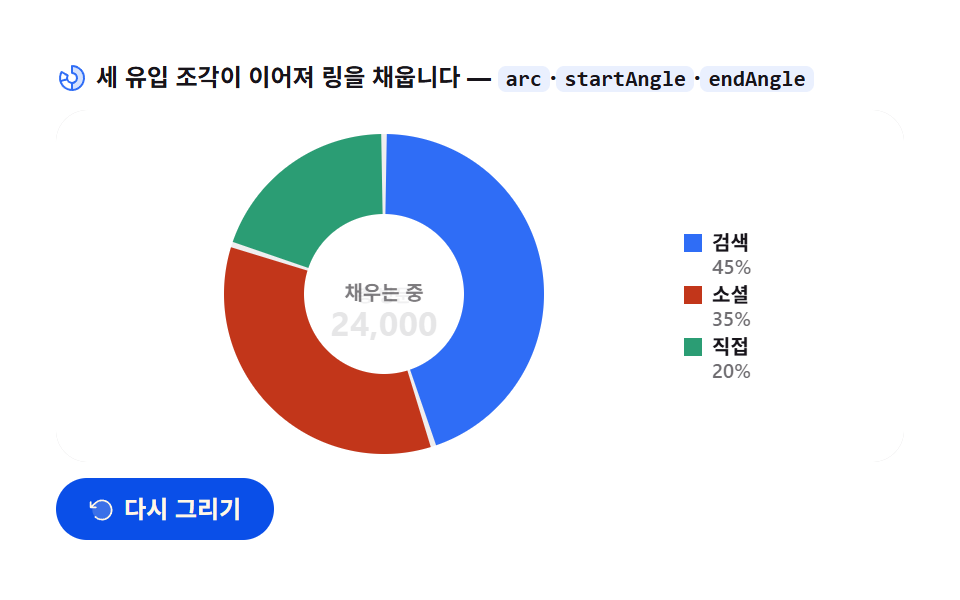
검색 10,800(45%) · 소셜 8,400(35%) · 직접 4,800(20%) 세 조각이 12시 방향부터 이어져 멈춤 없이 흐르듯 채워지고, 링이 다 찬 뒤 중앙의 「채우는 중」 이 총 방문 24,000 으로 세로 슬라이드로 뒤집힙니다.
<main class="stage">
<div class="dn" id="dn">
  <p class="dn__hint">
    <svg class="dn__ico" viewBox="0 0 256 256" aria-hidden="true"><g fill="currentColor"><path d="M224 128a96 96 0 0 1-96 96v-56a40 40 0 0 0 0-80V32a96 96 0 0 1 96 96" opacity=".2"/><path d="M128 24a8 8 0 0 0-8 8v56a8 8 0 0 0 8 8a32 32 0 1 1-27.72 16a8 8 0 0 0-2.93-10.93l-48.5-28A8 8 0 0 0 37.92 76A104 104 0 1 0 128 24M48.09 91.1L83 111.26A48.1 48.1 0 0 0 80 128c0 1.53.08 3 .22 4.52L41.28 143a88.16 88.16 0 0 1 6.81-51.9m-2.67 67.31l39-10.44A48.1 48.1 0 0 0 120 175.32v40.31a88.2 88.2 0 0 1-74.58-57.22M136 215.63v-40.31a48 48 0 0 0 0-94.65V40.36a88 88 0 0 1 0 175.27"/></g></svg>
    <span>세 유입 조각이 이어져 링을 채웁니다 — <code>arc</code>·<code>startAngle</code>·<code>endAngle</code></span>
  </p>
  <div class="dn__field" id="field" role="application" aria-label="도넛 그래프 스윕 실험판" tabindex="0">
    <canvas class="dn__cv" id="cv" role="img" aria-label="트래픽 유입 도넛 그래프 — 세 조각이 시계 방향으로 채워지는 모습"></canvas>
  </div>
  <div class="dn__bar">
    <button class="dn__btn" id="replay" type="button">
      <svg class="dn__bico" viewBox="0 0 256 256" aria-hidden="true"><g fill="currentColor"><path d="M216 128a88 88 0 1 1-88-88a88 88 0 0 1 88 88" opacity=".2"/><path d="M224 128a96 96 0 0 1-94.71 96H128a95.38 95.38 0 0 1-65.9-26.2a8 8 0 0 1 11-11.63a80 80 0 1 0-1.67-114.78a3 3 0 0 1-.26.25L44.59 96H72a8 8 0 0 1 0 16H24a8 8 0 0 1-8-8V56a8 8 0 0 1 16 0v29.8L60.25 60A96 96 0 0 1 224 128"/></g></svg>
      <span>다시 그리기</span>
    </button>
    <table class="sr-only">
      <caption>트래픽 유입 구성(단위: 방문, 합계 24,000)</caption>
      <thead><tr><th scope="col">유입원</th><th scope="col">방문</th><th scope="col">점유</th></tr></thead>
      <tbody>
        <tr><th scope="row">검색</th><td>10,800</td><td>45%</td></tr>
        <tr><th scope="row">소셜</th><td>8,400</td><td>35%</td></tr>
        <tr><th scope="row">직접</th><td>4,800</td><td>20%</td></tr>
      </tbody>
    </table>
  </div>
</div>
</main>@use "../../../../site/static/demo-tokens" as *;
// 도넛 그래프 스윕 — 움직임은 전부 캔버스 rAF 루프 안(이어지는 arc 스윕 + 중앙 총량 플립).
// CSS 애니메이션 0개 — 렌더러가 실시간 24장을 찍는다(077·304 선례).
// 조각은 차트 토큰 고정 순서 1·2·3번.
$duration: $dur-loop;
$easing: $ease-out; // 스윕 감속은 JS 에서 계산하므로 CSS 쪽 이징 토큰은 감속 역할명으로
$color: $chart-1;
@include stage($stage-paper);
// 화면 낭독기용 표 — 캔버스를 읽지 못하므로 같은 데이터를 표로 붙인다
.sr-only {
// fixed + top/left 명시 — absolute 였을 때 표의 실제 콘텐츠 높이(행 수만큼 ≒ 390px)가
// scrollHeight 에 잡혀 데스크톱·폰 전부 세로 넘침(BD8/BD9)이 났다. top 을 주지 않으면
// static 자리 기준으로 배치돼 여전히 scrollHeight 에 들어간다 — 좌상단 고정으로 뺀다.
position: fixed; top: 0; left: 0; width: 1px; height: 1px; margin: -1px;
overflow: hidden; clip: rect(0 0 0 0); white-space: nowrap;
}
.dn {
// 캔버스가 읽는 색 — JS 가 getComputedStyle 로 꺼내 쓴다
--chart-1: #{$chart-1};
--chart-2: #{$chart-2};
--chart-3: #{$chart-3};
--ink: #{$subject-ink};
--mute: #{rgba($subject-ink, .62)};
--track: #{rgba($subject-ink, .07)};
--paper: #{$stage-paper};
display: flex; flex-direction: column; gap: $sp-2;
width: 100%; max-width: 424px;
}
.dn__hint {
display: flex; align-items: center; gap: $sp-1; margin: 0;
font-weight: 700; font-size: clamp(10px, 2.8vw, 12px); line-height: 1.35;
color: $subject-ink;
}
.dn__hint code {
padding: 0 $sp-1; border-radius: $r-xs;
background: rgba($chart-1, .10);
color: $subject-ink;
font-weight: 700; font-size: .92em; line-height: 1.3;
}
.dn__ico { width: 16px; height: 16px; flex: 0 0 auto; color: $color; }
.dn__field {
position: relative; height: 176px;
border-radius: $r-card; overflow: hidden;
background: $stage-paper;
box-shadow: inset 0 0 0 1px rgba($subject-ink, .16);
}
.dn__cv { display: block; width: 100%; height: 100%; }
.dn__bar {
display: flex; align-items: center; gap: $sp-2;
}
.dn__btn {
display: inline-flex; align-items: center; gap: $sp-1;
box-sizing: border-box; padding: $sp-2 $sp-4; border: 0;
border-radius: $r-pill; background: $subject-blue-deep; color: $subject-cream;
font-family: inherit; font-weight: 700; font-size: 12px; line-height: 1.2;
cursor: pointer;
}
.dn__btn:focus-visible { outline: 2px solid $color; outline-offset: 2px; }
.dn__bico { width: 14px; height: 14px; flex: 0 0 auto; }
@media (max-width: 340px) {
.dn { gap: $sp-1; }
.dn__field { height: 112px; }
.dn__hint { font-size: 10px; }
.dn__btn { padding: $sp-1 $sp-3; font-size: 11px; }
}
// reduce — 루프가 아예 안 돌므로 끌 애니메이션이 없다. 완성 상태 한 장만 남는다.
@media (prefers-reduced-motion: reduce) {
.dn__btn { cursor: default; }
}html, body {
margin: 0;
overflow: hidden;
}
.stage {
box-sizing: border-box;
min-height: 100vh;
display: grid;
place-items: center;
margin: 0;
background: #ffffff;
font-family: -apple-system, "Segoe UI", "Noto Sans KR", sans-serif;
padding: clamp(8px, 4vw, 24px);
}
.sr-only {
position: fixed;
top: 0;
left: 0;
width: 1px;
height: 1px;
margin: -1px;
overflow: hidden;
clip: rect(0 0 0 0);
white-space: nowrap;
}
.dn {
--chart-1: #2f6df6;
--chart-2: #c2361a;
--chart-3: #2b9d74;
--ink: #17141a;
--mute: rgba(23, 20, 26, 0.62);
--track: rgba(23, 20, 26, 0.07);
--paper: #ffffff;
display: flex;
flex-direction: column;
gap: 8px;
width: 100%;
max-width: 424px;
}
.dn__hint {
display: flex;
align-items: center;
gap: 4px;
margin: 0;
font-weight: 700;
font-size: clamp(10px, 2.8vw, 12px);
line-height: 1.35;
color: #17141a;
}
.dn__hint code {
padding: 0 4px;
border-radius: 4px;
background: rgba(47, 109, 246, 0.1);
color: #17141a;
font-weight: 700;
font-size: 0.92em;
line-height: 1.3;
}
.dn__ico {
width: 16px;
height: 16px;
flex: 0 0 auto;
color: #2f6df6;
}
.dn__field {
position: relative;
height: 176px;
border-radius: 16px;
overflow: hidden;
background: #ffffff;
box-shadow: inset 0 0 0 1px rgba(23, 20, 26, 0.16);
}
.dn__cv {
display: block;
width: 100%;
height: 100%;
}
.dn__bar {
display: flex;
align-items: center;
gap: 8px;
}
.dn__btn {
display: inline-flex;
align-items: center;
gap: 4px;
box-sizing: border-box;
padding: 8px 16px;
border: 0;
border-radius: 999px;
background: #0a4fe8;
color: #fff7e6;
font-family: inherit;
font-weight: 700;
font-size: 12px;
line-height: 1.2;
cursor: pointer;
}
.dn__btn:focus-visible {
outline: 2px solid #2f6df6;
outline-offset: 2px;
}
.dn__bico {
width: 14px;
height: 14px;
flex: 0 0 auto;
}
@media (max-width: 340px) {
.dn {
gap: 4px;
}
.dn__field {
height: 112px;
}
.dn__hint {
font-size: 10px;
}
.dn__btn {
padding: 4px 12px;
font-size: 11px;
}
}
@media (prefers-reduced-motion: reduce) {
.dn__btn {
cursor: default;
}
}// 도넛 그래프 스윕 — 세 트래픽 유입의 점유가 링을 채운다.
// 각 조각은 arc 로 그리되, 이어지는 조각의 시작각(startAngle)이 앞 조각의 현재 끝각(endAngle)에서 출발한다.
// 그래서 조각 경계에서 펜이 멈추지 않고 링 전체가 한 번에 흐른다.
// 중앙 총량은 링이 다 채워진 뒤 숫자가 뒤집히며(세로 슬라이드 교체) 나타난다.
var root = document.getElementById('dn');
var field = document.getElementById('field');
var cv = document.getElementById('cv');
var ctx = cv.getContext('2d');
var replayBtn = document.getElementById('replay');
var css = getComputedStyle(root);
var C_1 = css.getPropertyValue('--chart-1').trim();
var C_2 = css.getPropertyValue('--chart-2').trim();
var C_3 = css.getPropertyValue('--chart-3').trim();
var C_INK = css.getPropertyValue('--ink').trim();
var C_MUTE = css.getPropertyValue('--mute').trim();
var C_TRACK = css.getPropertyValue('--track').trim();
var C_PAPER = css.getPropertyValue('--paper').trim();
var FONT = '-apple-system, "Segoe UI", "Noto Sans KR", sans-serif';
// 고정 시드 데이터 — 세 유입원의 방문 수(합계 24,000). 난수가 아니라 코드 안 배열
var SRC = [
{ name: '검색', v: 10800, c: C_1 }, // 45%
{ name: '소셜', v: 8400, c: C_2 }, // 35%
{ name: '직접', v: 4800, c: C_3 } // 20%
];
var TOTAL = 24000;
var TAU = Math.PI * 2;
var START = -Math.PI / 2; // 12시 방향에서 시작
var GAP = 0.035; // 조각 사이 표면 틈(라디안) — 붙어 있으면 경계가 안 읽힌다
var LOOP = 2; // 한 사이클 2초
var SWEEP = 0.80; // 전체 2초의 80% 동안 링이 채워진다
var reduce = window.matchMedia('(prefers-reduced-motion: reduce)').matches;
var W = 0, H = 0, dpr = 1;
var t0 = 0, raf = 0;
function fit() {
var r = field.getBoundingClientRect();
dpr = window.devicePixelRatio || 1;
W = r.width; H = r.height;
cv.width = Math.round(W * dpr);
cv.height = Math.round(H * dpr);
ctx.setTransform(dpr, 0, 0, dpr, 0, 0);
}
// p(0..1) → 이어지는 스윕의 현재 각도. 진행률을 점유합(1.0)에 얹는다
function sweepAngle(p) {
var q = Math.max(0, Math.min(1, p / SWEEP));
return q; // 0..1, 1 이면 링 전체
}
function draw(p) {
ctx.clearRect(0, 0, W, H);
ctx.fillStyle = C_PAPER;
ctx.fillRect(0, 0, W, H);
// 도넛 중심·반지름 — 캔버스를 채운다(누적면적). 범례는 오른쪽 세로 줄
var legendW = Math.min(96, Math.max(72, W * 0.26));
var cx = PAD_L() + (W - PAD_L() - legendW - PAD_R()) / 2;
var cy = H * 0.5 + 4;
var R = Math.min((W - PAD_L() - legendW - PAD_R()) / 2 - 4, H / 2 - 8);
var ring = Math.max(16, R * 0.5);
// 링 트랙 — 다 채워질 자리를 옅게 깐다. 스윕 진행까지만 깔린다:
// 첫 프레임에 전체 트랙을 깔면 그 자리는 끝까지 변하지 않아 누적면적이 죽는다 —
// 펜이 지나가며 트랙이 열리고 조각이 따라 붙는 그림(077 품질 기준선: 화면이 살아 있어야 한다)
var qTrack = sweepAngle(p);
if (qTrack > 0.005) {
ctx.beginPath();
ctx.arc(cx, cy, R - ring / 2, START, START + qTrack * TAU);
ctx.strokeStyle = C_TRACK;
ctx.lineWidth = ring;
ctx.stroke();
}
// 조각 — 이어지는 스윕. 진행 q 를 각 조각 점유에 분배한다:
// 앞 조각이 다 채워졌으면 전체 각을 확정하고, 현재 조각은 남은 진행으로 부분각을 그린다.
var q = qTrack;
var pen = START;
var acc = 0;
var cur = -1;
for (var i = 0; i < SRC.length; i++) {
var share = SRC[i].v / TOTAL;
var segEnd = acc + share;
if (q >= segEnd) {
// 이미 지나온 조각 — 전체 각을 그린다(양쪽에 틈 반씩)
var a0 = START + acc * TAU + GAP / 2;
var a1 = START + segEnd * TAU - GAP / 2;
slice(cx, cy, R, ring, a0, a1, SRC[i].c, 1);
pen = a1;
acc = segEnd;
} else if (q > acc) {
// 현재 그려지는 조각 — 시작각은 앞 조각의 끝각. 끝각은 진행에 따라 벌어진다
cur = i;
var a0c = START + acc * TAU + (i === 0 ? 0 : GAP / 2);
var a1c = START + q * TAU;
slice(cx, cy, R, ring, a0c, a1c, SRC[i].c, 1);
acc = segEnd;
} else {
break;
}
}
// 스윕 펜 끝 — 지나가는 지점에 작은 점. 조각이 흐른다는 감을 준다
if (cur >= 0 && q < 1) {
var penA = START + q * TAU;
var px = cx + Math.cos(penA) * (R - ring / 2);
var py = cy + Math.sin(penA) * (R - ring / 2);
ctx.beginPath();
ctx.arc(px, py, 2.6, 0, TAU);
ctx.fillStyle = C_PAPER;
ctx.fill();
ctx.strokeStyle = SRC[cur].c;
ctx.lineWidth = 2;
ctx.stroke();
}
// 중앙 총량 — 링이 다 채워진 뒤(SWEEP 이후) 세로 슬라이드로 뒤집혀 나타난다
var flipP = Math.max(0, Math.min(1, (p - SWEEP) / 0.16));
var midY = cy + 2;
var label = '총 방문';
var value = '24,000';
if (flipP > 0) {
// 숫자가 위에서 내려오고 "총 방문" 은 자리를 비켜 준다 — 두 줄이 교체되는 뒤집힘
var up = 1 - flipP;
ctx.save();
ctx.beginPath();
ctx.rect(cx - R, cy - R, R * 2, R * 2);
ctx.clip();
ctx.globalAlpha = up;
ctx.fillStyle = C_MUTE;
ctx.textAlign = 'center';
ctx.textBaseline = 'middle';
ctx.font = '600 10px ' + FONT;
ctx.fillText('채우는 중', cx, midY - flipP * 18);
ctx.restore();
ctx.globalAlpha = 1;
}
if (flipP > 0) {
ctx.textAlign = 'center';
ctx.textBaseline = 'middle';
ctx.globalAlpha = flipP;
ctx.fillStyle = C_INK;
ctx.font = '700 17px ' + FONT;
ctx.fillText(value, cx, midY + (1 - flipP) * 16);
ctx.fillStyle = C_MUTE;
ctx.font = '600 9px ' + FONT;
ctx.fillText(label, cx, midY - 13 + (1 - flipP) * 14);
ctx.globalAlpha = 1;
} else {
ctx.textAlign = 'center';
ctx.textBaseline = 'middle';
ctx.fillStyle = C_MUTE;
ctx.font = '600 10px ' + FONT;
ctx.fillText('채우는 중', cx, midY);
}
// 범례 — 오른쪽 세로 줄. 각 항목은 조각이 시작될 때 나타난다
var lx = W - PAD_R() - legendW;
var ly = cy - 30;
for (var k = 0; k < SRC.length; k++) {
var appear = Math.max(0, Math.min(1, (p - (k * 0.26)) / 0.14));
if (appear <= 0) continue;
ctx.globalAlpha = appear;
var ly2 = ly + k * 26;
ctx.fillStyle = SRC[k].c;
ctx.fillRect(lx, ly2, 9, 9);
ctx.fillStyle = C_INK;
ctx.textAlign = 'left';
ctx.textBaseline = 'alphabetic';
ctx.font = '700 10px ' + FONT;
ctx.fillText(SRC[k].name, lx + 14, ly2 + 8);
ctx.fillStyle = C_MUTE;
ctx.font = '600 10px ' + FONT;
ctx.fillText(Math.round(SRC[k].v / TOTAL * 100) + '%', lx + 14, ly2 + 20);
ctx.globalAlpha = 1;
}
}
// 링 조각 한 덩이 — arc 를 stroke 로 그린다(선 두께 = 링 두께). cap 을 butt 로 둬야 각이 정확하다
function slice(cx, cy, R, ring, a0, a1, color, alpha) {
if (a1 <= a0) return;
ctx.beginPath();
ctx.arc(cx, cy, R - ring / 2, a0, a1);
ctx.strokeStyle = color;
ctx.lineWidth = ring;
ctx.lineCap = 'butt';
ctx.globalAlpha = alpha;
ctx.stroke();
ctx.globalAlpha = 1;
}
// 왼쪽 패드 — 폭이 좁으면 라벨 패드를 줄인다
function PAD_L() { return W < 220 ? 10 : 14; }
function PAD_R() { return W < 220 ? 8 : 14; }
function frame(now) {
if (!t0) t0 = now;
var p = ((now - t0) / 1000 % LOOP) / LOOP; // 0..1, 2초 루프
draw(p);
raf = requestAnimationFrame(frame);
}
replayBtn.addEventListener('click', function () { t0 = 0; });
window.addEventListener('resize', function () { fit(); if (reduce) draw(1); });
fit();
if (reduce) {
// reduce — 루프 없이 완성 상태(링이 다 채워지고 총량이 떠 있는 한 장)만 그린다
draw(1);
} else {
raf = requestAnimationFrame(frame);
}// DonutSweepChart — vanilla 판(run/305/demo/03-chart-canvas-donut-sweep/index.html) 의 React 포트.
// 세 트래픽 조각이 arc 로 채색되되 이어지는 조각의 시작각이 앞 조각의 끝각에서 출발해
// 링이 멈추지 않고 흐른다. 중앙 총량은 링이 다 채워진 뒤 뒤집혀 나타난다.
// @keyframes 없음 — props 는 CSS 변수로 내려간다.
import { useEffect, useRef } from "react";
import type { CSSProperties } from "react";
import styles from "./DonutSweepChart.module.scss";
export type DonutSweepChartProps = {
duration?: string;
easing?: string;
color?: string;
};
type Vars = CSSProperties & { "--duration"?: string; "--easing"?: string; "--color"?: string };
type Box<T> = { current: T };
// 고정 시드 데이터 — 세 유입원의 방문 수(합계 24,000)
const SRC = [
{ name: "검색", v: 10800, cvar: "--chart-1" },
{ name: "소셜", v: 8400, cvar: "--chart-2" },
{ name: "직접", v: 4800, cvar: "--chart-3" }
];
const TOTAL = 24000;
const TAU = Math.PI * 2;
const START = -Math.PI / 2; // 12시 방향에서 시작
const GAP = 0.035; // 조각 사이 표면 틈(라디안)
const LOOP = 2; // 한 사이클 2초
const SWEEP = 0.80; // 전체의 80% 동안 링이 채워진다
const FONT = '-apple-system, "Segoe UI", "Noto Sans KR", sans-serif';
const FIELD_LABEL = "도넛 그래프 스윕 실험판";
const CV_LABEL = "트래픽 유입 도넛 그래프 — 세 조각이 시계 방향으로 채워지는 모습";
export default function DonutSweepChart({
duration = "2s",
easing = "ease-out",
color = "#2f6df6",
}: DonutSweepChartProps) {
const rootRef = useRef<HTMLDivElement | null>(null);
const cvRef = useRef<HTMLCanvasElement | null>(null);
const ctxRef = useRef<CanvasRenderingContext2D | null>(null);
const sizeRef = useRef({ w: 0, h: 0 }) as Box<{ w: number; h: number }>;
const t0Ref = useRef(0) as Box<number>;
const rafRef = useRef(0) as Box<number>;
const vars: Vars = { "--duration": duration, "--easing": easing, "--color": color };
function reduced(): boolean {
return window.matchMedia("(prefers-reduced-motion: reduce)").matches;
}
function cssv(n: string): string {
const root = rootRef.current;
return root ? getComputedStyle(root).getPropertyValue(n).trim() : "";
}
// 고DPI — 배킹 스토어는 devicePixelRatio 배, 그리기 좌표계는 CSS 픽셀 그대로
function fit(): void {
const cv = cvRef.current;
const s = sizeRef.current;
if (!cv) return;
const r = cv.getBoundingClientRect();
const dpr = window.devicePixelRatio || 1;
s.w = r.width; s.h = r.height;
cv.width = Math.round(r.width * dpr);
cv.height = Math.round(r.height * dpr);
const ctx = ctxRef.current;
if (ctx) ctx.setTransform(dpr, 0, 0, dpr, 0, 0);
}
// 링 조각 한 덩이 — arc 를 stroke 로 그린다(선 두께 = 링 두께). cap 을 butt 로 둬야 각이 정확하다
function slice(cx: number, cy: number, R: number, ring: number, a0: number, a1: number, col: string): void {
const ctx = ctxRef.current;
if (!ctx || a1 <= a0) return;
ctx.beginPath();
ctx.arc(cx, cy, R - ring / 2, a0, a1);
ctx.strokeStyle = col;
ctx.lineWidth = ring;
ctx.lineCap = "butt";
ctx.stroke();
}
function draw(p: number): void {
const ctx = ctxRef.current;
if (!ctx) return;
const W = sizeRef.current.w, H = sizeRef.current.h;
const C_INK = cssv("--ink");
const C_MUTE = cssv("--mute");
const C_TRACK = cssv("--track");
const C_PAPER = cssv("--paper");
ctx.clearRect(0, 0, W, H);
ctx.fillStyle = C_PAPER;
ctx.fillRect(0, 0, W, H);
// 도넛 중심·반지름 — 캔버스를 채운다(누적면적). 범례는 오른쪽 세로 줄
const padL = W < 220 ? 10 : 14;
const padR = W < 220 ? 8 : 14;
const legendW = Math.min(96, Math.max(72, W * 0.26));
const cx = padL + (W - padL - legendW - padR) / 2;
const cy = H * 0.5 + 4;
const R = Math.min((W - padL - legendW - padR) / 2 - 8, H / 2 - 14);
const ring = Math.max(16, R * 0.34);
// 링 트랙 — 다 채워질 자리를 옅게 깐다
ctx.beginPath();
ctx.arc(cx, cy, R - ring / 2, 0, TAU);
ctx.strokeStyle = C_TRACK;
ctx.lineWidth = ring;
ctx.stroke();
// 조각 — 이어지는 스윕. q(0..1) 를 점유에 분배한다
const q = Math.max(0, Math.min(1, p / SWEEP));
let acc = 0;
let cur = -1;
for (let i = 0; i < SRC.length; i++) {
const share = SRC[i].v / TOTAL;
const segEnd = acc + share;
const col = i === 0 ? (cssv(SRC[i].cvar) || color) : cssv(SRC[i].cvar);
if (q >= segEnd) {
// 지나온 조각 — 전체 각(양쪽 틈 반씩)
const a0 = START + acc * TAU + GAP / 2;
const a1 = START + segEnd * TAU - GAP / 2;
slice(cx, cy, R, ring, a0, a1, col);
acc = segEnd;
} else if (q > acc) {
// 현재 조각 — 시작각은 앞 조각 끝각. 끝각은 진행에 따라 벌어진다
cur = i;
const a0c = START + acc * TAU + (i === 0 ? 0 : GAP / 2);
const a1c = START + q * TAU;
slice(cx, cy, R, ring, a0c, a1c, col);
acc = segEnd;
} else {
break;
}
}
// 스윕 펜 끝 — 지나가는 지점의 작은 점
if (cur >= 0 && q < 1) {
const penA = START + q * TAU;
const px = cx + Math.cos(penA) * (R - ring / 2);
const py = cy + Math.sin(penA) * (R - ring / 2);
const col = cur === 0 ? (cssv(SRC[cur].cvar) || color) : cssv(SRC[cur].cvar);
ctx.beginPath();
ctx.arc(px, py, 2.6, 0, TAU);
ctx.fillStyle = C_PAPER;
ctx.fill();
ctx.strokeStyle = col;
ctx.lineWidth = 2;
ctx.stroke();
}
// 중앙 총량 — 링이 다 채워진 뒤 세로 슬라이드로 뒤집혀 나타난다
const flipP = Math.max(0, Math.min(1, (p - SWEEP) / 0.16));
const midY = cy + 2;
ctx.textAlign = "center";
ctx.textBaseline = "middle";
if (flipP > 0) {
ctx.globalAlpha = 1 - flipP;
ctx.fillStyle = C_MUTE;
ctx.font = "600 10px " + FONT;
ctx.fillText("채우는 중", cx, midY - flipP * 18);
ctx.globalAlpha = 1;
ctx.globalAlpha = flipP;
ctx.fillStyle = C_INK;
ctx.font = "700 17px " + FONT;
ctx.fillText("24,000", cx, midY + (1 - flipP) * 16);
ctx.fillStyle = C_MUTE;
ctx.font = "600 9px " + FONT;
ctx.fillText("총 방문", cx, midY - 13 + (1 - flipP) * 14);
ctx.globalAlpha = 1;
} else {
ctx.fillStyle = C_MUTE;
ctx.font = "600 10px " + FONT;
ctx.fillText("채우는 중", cx, midY);
}
// 범례 — 각 항목은 조각이 시작될 때 나타난다
const lx = W - padR - legendW;
const ly = cy - 30;
for (let k = 0; k < SRC.length; k++) {
const appear = Math.max(0, Math.min(1, (p - k * 0.26) / 0.14));
if (appear <= 0) continue;
const col = k === 0 ? (cssv(SRC[k].cvar) || color) : cssv(SRC[k].cvar);
const ly2 = ly + k * 26;
ctx.globalAlpha = appear;
ctx.fillStyle = col;
ctx.fillRect(lx, ly2, 9, 9);
ctx.fillStyle = C_INK;
ctx.textAlign = "left";
ctx.textBaseline = "alphabetic";
ctx.font = "700 10px " + FONT;
ctx.fillText(SRC[k].name, lx + 14, ly2 + 8);
ctx.fillStyle = C_MUTE;
ctx.font = "600 10px " + FONT;
ctx.fillText(Math.round(SRC[k].v / TOTAL * 100) + "%", lx + 14, ly2 + 20);
ctx.globalAlpha = 1;
}
}
function frame(now: number): void {
if (!t0Ref.current) t0Ref.current = now;
const p = ((now - t0Ref.current) / 1000 % LOOP) / LOOP;
draw(p);
rafRef.current = requestAnimationFrame(frame);
}
function replay(): void {
t0Ref.current = 0;
}
function onResize(): void {
fit();
if (reduced()) draw(1);
}
useEffect(() => {
const cv = cvRef.current;
if (!cv) return;
ctxRef.current = cv.getContext("2d");
if (!ctxRef.current) return;
fit();
window.addEventListener("resize", onResize);
if (reduced()) {
// reduce — 루프 없이 완성 상태 한 장만 그린다
draw(1);
} else {
rafRef.current = requestAnimationFrame(frame);
}
return () => {
window.removeEventListener("resize", onResize);
cancelAnimationFrame(rafRef.current);
};
}, []);
return (
<main className={styles.stage}>
<div className={styles.root} ref={rootRef} style={vars}>
<p className={styles.hint}>
<svg className={styles.ico} viewBox="0 0 256 256" aria-hidden="true"><g fill="currentColor"><path d="M224 128a96 96 0 0 1-96 96v-56a40 40 0 0 0 0-80V32a96 96 0 0 1 96 96" opacity=".2"/><path d="M128 24a8 8 0 0 0-8 8v56a8 8 0 0 0 8 8a32 32 0 1 1-27.72 16a8 8 0 0 0-2.93-10.93l-48.5-28A8 8 0 0 0 37.92 76A104 104 0 1 0 128 24M48.09 91.1L83 111.26A48.1 48.1 0 0 0 80 128c0 1.53.08 3 .22 4.52L41.28 143a88.16 88.16 0 0 1 6.81-51.9m-2.67 67.31l39-10.44A48.1 48.1 0 0 0 120 175.32v40.31a88.2 88.2 0 0 1-74.58-57.22M136 215.63v-40.31a48 48 0 0 0 0-94.65V40.36a88 88 0 0 1 0 175.27"/></g></svg>
<span>세 유입 조각이 이어져 링을 채웁니다 — <code>arc</code>·<code>startAngle</code>·<code>endAngle</code></span>
</p>
<div className={styles.field} role="application" aria-label={FIELD_LABEL} tabIndex={0}>
<canvas className={styles.cv} ref={cvRef} role="img" aria-label={CV_LABEL}></canvas>
</div>
<div className={styles.bar}>
<button className={styles.btn} type="button" onClick={replay}>
<svg className={styles.bico} viewBox="0 0 256 256" aria-hidden="true"><g fill="currentColor"><path d="M216 128a88 88 0 1 1-88-88a88 88 0 0 1 88 88" opacity=".2"/><path d="M224 128a96 96 0 0 1-94.71 96H128a95.38 95.38 0 0 1-65.9-26.2a8 8 0 0 1 11-11.63a80 80 0 1 0-1.67-114.78a3 3 0 0 1-.26.25L44.59 96H72a8 8 0 0 1 0 16H24a8 8 0 0 1-8-8V56a8 8 0 0 1 16 0v29.8L60.25 60A96 96 0 0 1 224 128"/></g></svg>
<span>다시 그리기</span>
</button>
<table className={styles.srOnly}>
<caption>트래픽 유입 구성(단위: 방문, 합계 24,000)</caption>
<thead><tr><th scope="col">유입원</th><th scope="col">방문</th><th scope="col">점유</th></tr></thead>
<tbody>
{SRC.map((s, i) => (
<tr key={i}><th scope="row">{s.name}</th><td>{s.v.toLocaleString()}</td><td>{Math.round(s.v / TOTAL * 100)}%</td></tr>
))}
</tbody>
</table>
</div>
</div>
</main>
);
}03 · 도넛 그래프 스윕 — 측정 누적면적 11.843% · 움직인 프레임 23/23GODRICH 원작 · zip 에 SCSS·React 포함 · 비밀번호 보기
계산을 볼 곳
움직인 프레임 23/24 · 누적면적 11.843% · 강도 평균 169.0 — 아홉 개 중 가장 강한 변화율을 기록했고, 유입 경로·구성비를 한눈에 보는 자리에 씁니다 — 진행을 점유합에 분배해 현재 조각의 끝각이 다음 조각의 시작각이 되는 구조입니다.
var q = sweepAngle(p);
var acc = 0;
for (var i = 0; i < SRC.length; i++) {
  var share = SRC[i].v / TOTAL;
  var segEnd = acc + share;
  if (q >= segEnd) {
    var a0 = START + acc * TAU + GAP / 2;
    var a1 = START + segEnd * TAU - GAP / 2;
    slice(cx, cy, R, ring, a0, a1, SRC[i].c, 1);
    acc = segEnd;
  } else if (q > acc) {
    var a1c = START + q * TAU;
    slice(cx, cy, R, ring, START + acc * TAU, a1c, SRC[i].c, 1);
    acc = segEnd;
  } else {
    break;
  }
}
조각 사이 틈은 붙어 있으면 경계가 읽히지 않기 때문에 0.035 라디안으로 고정했고, 트랙(옅게 깔아 두는 자리)도 첫 프레임에 몰아 깔지 않고 펜이 지나가는 만큼만 열립니다.
04산포 그래프 등장 — lerp 로 모여드는 40개
무엇이 보이나
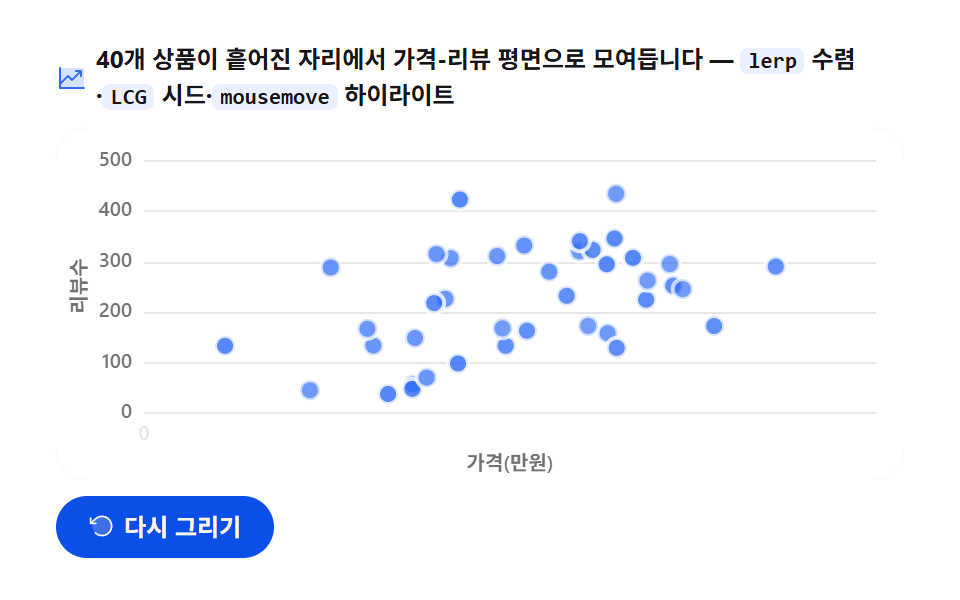
40개 상품 점이 흩어진 자리에서 시작해 반복 보간으로 가격(0.5~19.5만원)-리뷰수(10~480) 평면의 제자리로 모여들고, 마우스를 올리면 가장 가까운 점이 링에 잡히며 상품명과 가격·리뷰수가 뜹니다.
<main class="stage">
<div class="sa" id="sa">
  <p class="sa__hint">
    <svg class="sa__ico" viewBox="0 0 256 256" aria-hidden="true"><g fill="currentColor"><path d="M224 64v144H32V48h176a16 16 0 0 1 16 16" opacity=".2"/><path d="M232 208a8 8 0 0 1-8 8H32a8 8 0 0 1-8-8V48a8 8 0 0 1 16 0v108.69l50.34-50.35a8 8 0 0 1 11.32 0L128 132.69L180.69 80H160a8 8 0 0 1 0-16h40a8 8 0 0 1 8 8v40a8 8 0 0 1-16 0V91.31l-58.34 58.35a8 8 0 0 1-11.32 0L96 123.31l-56 56V200h184a8 8 0 0 1 8 8"/></g></svg>
    <span>40개 상품이 흩어진 자리에서 가격-리뷰 평면으로 모여듭니다 — <code>lerp</code> 수렴·<code>LCG</code> 시드·<code>mousemove</code> 하이라이트</span>
  </p>
  <div class="sa__field" id="field" role="application" aria-label="산포 등장 실험판" tabindex="0">
    <canvas class="sa__cv" id="cv" role="img" aria-label="산포 등장 — 40개 상품 점이 흩어진 자리에서 가격-리뷰 평면의 제자리로 모여드는 모습"></canvas>
  </div>
  <div class="sa__bar">
    <button class="sa__btn" id="replay" type="button">
      <svg class="sa__bico" viewBox="0 0 256 256" aria-hidden="true"><g fill="currentColor"><path d="M216 128a88 88 0 1 1-88-88a88 88 0 0 1 88 88" opacity=".2"/><path d="M224 128a96 96 0 0 1-94.71 96H128a95.38 95.38 0 0 1-65.9-26.2a8 8 0 0 1 11-11.63a80 80 0 1 0-1.67-114.78a3 3 0 0 1-.26.25L44.59 96H72a8 8 0 0 1 0 16H24a8 8 0 0 1-8-8V56a8 8 0 0 1 16 0v29.8L60.25 60A96 96 0 0 1 224 128"/></g></svg>
      <span>다시 그리기</span>
    </button>
    <table class="sr-only">
      <caption>상품 40개 중 8개 예시 — 가격(만원)·리뷰수</caption>
      <thead><tr><th scope="col">상품</th><th scope="col">가격(만원)</th><th scope="col">리뷰수</th></tr></thead>
      <tbody id="sampleBody"></tbody>
    </table>
  </div>
</div>
</main>
@use "../../../../site/static/demo-tokens" as *;
// 산포 등장 — 움직임은 전부 캔버스 rAF 루프 안(지수 감쇠 lerp 수렴 + 최근접점 하이라이트).
// CSS 애니메이션이 0개여야 렌더러가 실시간 24장을 찍는다(077·304 선례).
// 무대는 $stage-paper(흰) — 차트는 밝은 무대가 정석. 색은 차트 토큰 고정 순서 1번.
$duration: $dur-loop;
$easing: $ease-out; // 지수 감쇠 수렴을 JS 에서 계산하므로 CSS 쪽 이징 토큰은 감속 역할명으로
$color: $chart-1;
@include stage($stage-paper);
// 화면 낭독기용 표 — 캔버스를 읽지 못하므로 같은 데이터를 표로 붙인다
.sr-only {
// fixed + top/left 명시 — absolute 였을 때 표의 실제 콘텐츠 높이(행 수만큼 ≒ 390px)가
// scrollHeight 에 잡혀 데스크톱·폰 전부 세로 넘침(BD8/BD9)이 났다. top 을 주지 않으면
// static 자리 기준으로 배치돼 여전히 scrollHeight 에 들어간다 — 좌상단 고정으로 뺀다.
position: fixed; top: 0; left: 0; width: 1px; height: 1px; margin: -1px;
overflow: hidden; clip: rect(0 0 0 0); white-space: nowrap;
}
.sa {
// 캔버스가 읽는 색 — JS 가 getComputedStyle 로 꺼내 쓴다. vivid 리터럴은 두지 않는다(BD26)
--chart-1: #{$color};
--fill-1: #{rgba($chart-1, .12)};
--ink: #{$subject-ink};
--mute: #{rgba($subject-ink, .62)};
--grid: #{rgba($subject-ink, .10)};
--paper: #{$stage-paper};
display: flex; flex-direction: column; gap: $sp-2;
width: 100%; max-width: 424px;
}
.sa__hint {
display: flex; align-items: center; gap: $sp-1; margin: 0;
font-weight: 700; font-size: clamp(10px, 2.8vw, 12px); line-height: 1.35;
color: $subject-ink;
}
.sa__hint code {
padding: 0 $sp-1; border-radius: $r-xs;
background: rgba($chart-1, .10);
color: $subject-ink;
font-weight: 700; font-size: .92em; line-height: 1.3;
}
.sa__ico { width: 16px; height: 16px; flex: 0 0 auto; color: $color; }
.sa__field {
position: relative; height: 176px;
border-radius: $r-card; overflow: hidden;
background: $stage-paper;
box-shadow: inset 0 0 0 1px rgba($subject-ink, .16);
}
.sa__cv { display: block; width: 100%; height: 100%; }
.sa__bar {
display: flex; align-items: center; gap: $sp-2;
}
.sa__btn {
display: inline-flex; align-items: center; gap: $sp-1;
box-sizing: border-box; padding: $sp-2 $sp-4; border: 0;
border-radius: $r-pill; background: $subject-blue-deep; color: $subject-cream;
font-family: inherit; font-weight: 700; font-size: 12px; line-height: 1.2;
cursor: pointer;
}
.sa__btn:focus-visible { outline: 2px solid $color; outline-offset: 2px; }
.sa__bico { width: 14px; height: 14px; flex: 0 0 auto; }
@media (max-width: 340px) {
.sa { gap: $sp-1; }
.sa__field { height: 112px; }
.sa__hint { font-size: 10px; }
.sa__btn { padding: $sp-1 $sp-3; font-size: 11px; }
}
// reduce — 루프가 아예 안 돌므로 끄고 말고 할 애니메이션이 없다.
// 완성 상태 한 장이 남으므로 "다시 그리기"는 여전히 정지 이미지를 다시 그린다.
@media (prefers-reduced-motion: reduce) {
.sa__btn { cursor: default; }
}html, body {
margin: 0;
overflow: hidden;
}
.stage {
box-sizing: border-box;
min-height: 100vh;
display: grid;
place-items: center;
margin: 0;
background: #ffffff;
font-family: -apple-system, "Segoe UI", "Noto Sans KR", sans-serif;
padding: clamp(8px, 4vw, 24px);
}
.sr-only {
position: fixed;
top: 0;
left: 0;
width: 1px;
height: 1px;
margin: -1px;
overflow: hidden;
clip: rect(0 0 0 0);
white-space: nowrap;
}
.sa {
--chart-1: #2f6df6;
--fill-1: rgba(47, 109, 246, 0.12);
--ink: #17141a;
--mute: rgba(23, 20, 26, 0.62);
--grid: rgba(23, 20, 26, 0.1);
--paper: #ffffff;
display: flex;
flex-direction: column;
gap: 8px;
width: 100%;
max-width: 424px;
}
.sa__hint {
display: flex;
align-items: center;
gap: 4px;
margin: 0;
font-weight: 700;
font-size: clamp(10px, 2.8vw, 12px);
line-height: 1.35;
color: #17141a;
}
.sa__hint code {
padding: 0 4px;
border-radius: 4px;
background: rgba(47, 109, 246, 0.1);
color: #17141a;
font-weight: 700;
font-size: 0.92em;
line-height: 1.3;
}
.sa__ico {
width: 16px;
height: 16px;
flex: 0 0 auto;
color: #2f6df6;
}
.sa__field {
position: relative;
height: 176px;
border-radius: 16px;
overflow: hidden;
background: #ffffff;
box-shadow: inset 0 0 0 1px rgba(23, 20, 26, 0.16);
}
.sa__cv {
display: block;
width: 100%;
height: 100%;
}
.sa__bar {
display: flex;
align-items: center;
gap: 8px;
}
.sa__btn {
display: inline-flex;
align-items: center;
gap: 4px;
box-sizing: border-box;
padding: 8px 16px;
border: 0;
border-radius: 999px;
background: #0a4fe8;
color: #fff7e6;
font-family: inherit;
font-weight: 700;
font-size: 12px;
line-height: 1.2;
cursor: pointer;
}
.sa__btn:focus-visible {
outline: 2px solid #2f6df6;
outline-offset: 2px;
}
.sa__bico {
width: 14px;
height: 14px;
flex: 0 0 auto;
}
@media (max-width: 340px) {
.sa {
gap: 4px;
}
.sa__field {
height: 112px;
}
.sa__hint {
font-size: 10px;
}
.sa__btn {
padding: 4px 12px;
font-size: 11px;
}
}
@media (prefers-reduced-motion: reduce) {
.sa__btn {
cursor: default;
}
}// 산포 등장 — 40개 상품 점이 무작위 시작좌표에서 가격-리뷰 평면의 제자리로 모여드는 수렴 애니메이션.
// 두 겹이 함께 움직인다:
// 1) 각 점은 lerp(반복 학습)의 닫힌형인 지수 감쇠 pos = start + (target-start) * (1 - e^(-lam*t)) 로
// 프레임이 아니라 경과시간의 함수로 위치가 나온다 — 루프가 돌아가도 같은 p 에는 같은 그림.
// 2) lam(수렴 속도)을 점마다 3.0~6.0 으로 흩어 도착 시간이 어긋나 살아 있어 보인다.
// 시작좌표·목표좌표·lam 은 전부 시드 상수 LCG(선형합동법)로 만든다 — Math.random 금지, 재생마다 같은 그림.
var root = document.getElementById('sa');
var field = document.getElementById('field');
var cv = document.getElementById('cv');
var ctx = cv.getContext('2d');
var replayBtn = document.getElementById('replay');
var css = getComputedStyle(root);
var C_LINE = css.getPropertyValue('--chart-1').trim();
var C_FILL = css.getPropertyValue('--fill-1').trim();
var C_INK = css.getPropertyValue('--ink').trim();
var C_MUTE = css.getPropertyValue('--mute').trim();
var C_GRID = css.getPropertyValue('--grid').trim();
var C_PAPER = css.getPropertyValue('--paper').trim();
var FONT = '-apple-system, "Segoe UI", "Noto Sans KR", sans-serif';
// 결정적 난수 — minstd 선형합동법. 곱이 2^53 을 넘지 않아 부동소수점 오염도 없다
var SEED = 3050416;
var rs = SEED;
function rnd() {
rs = (rs * 48271) % 2147483647;
return rs / 2147483647;
}
var NAMES = [
'텀블러', '무선 마우스', '기계식 키보드', 'LED 데스크 램프', '노트북 거치대',
'블루투스 이어폰', '캠핑 의자', '스테인리스 보틀', '미니 선풍기', '무선 충전 패드',
'손목 받침대', '아로마 디퓨저', '데스크 매트', '게이밍 헤드셋', '스마트 체중계',
'여행용 파우치', '접이식 우산', '무전등', '멀티탭', '책상용 공기청정기',
'전기 주전자', '커피 그라인더', '원목 코스터', '가죽 키링', '스마트 워치',
'마우스 패드', '웹캠', '마이크 스탠드', '북셸프 스피커', '차량용 홀더',
'러닝 벨트', '요가 매트', '폼롤러', '저항 밴드', '점프 로프',
'캔버스 배낭', '토트백', '선글라스', '미니 블록', '스티커 묶음'
];
// 40개 점 생성 — rnd 호출 순서가 고정이라 목표·시작·속도가 전부 결정적.
// 목표: 가격 0.5~19.5만원, 리뷰수 10~480. 시작: 평면 안 정규화 좌표 0.04~0.96
var PTS = [];
for (var i = 0; i < 40; i++) {
PTS.push({
name: NAMES[i],
price: Math.round((0.5 + rnd() * 19) * 10) / 10,
rv: Math.round(10 + rnd() * 470),
sx: 0.04 + rnd() * 0.92,
sy: 0.04 + rnd() * 0.92,
lam: 3.0 + rnd() * 3.0,
cx: 0, cy: 0
});
}
var PAD_L = 44, PAD_R = 14, PAD_T = 16, PAD_B = 34; // 축 라벨·제목 여백(CSS px)
var LOOP = 2.4; // 한 사이클 2.4초 — 캡처 창(2초) 내내 수렴 진행 중이게 마지막 프레임까지 산다
var DRAW_AT = 0.85; // 전체 2초의 85% 동안 모여들고, 끝 15% 는 도착해 쉰다
var CONV_SEC = 1.6; // 수렴 시간(초) — elapsed 스케일
var X_SPAN = 20; // x 축: 가격 0~20만원
var Y_SPAN = 500; // y 축: 리뷰수 0~500
var reduce = window.matchMedia('(prefers-reduced-motion: reduce)').matches;
var W = 0, H = 0, dpr = 1;
var t0 = 0, raf = 0;
var mouse = { x: 0, y: 0, on: false };
function fit() {
var r = field.getBoundingClientRect();
dpr = window.devicePixelRatio || 1;
W = r.width; H = r.height;
cv.width = Math.round(W * dpr);
cv.height = Math.round(H * dpr);
ctx.setTransform(dpr, 0, 0, dpr, 0, 0);
}
// 데이터 값 → 플롯 좌표. x 는 가격(만원), y 는 리뷰수(위로 갈수록 크다)
function px(v) { return PAD_L + (W - PAD_L - PAD_R) * (v / X_SPAN); }
function py(v) { return PAD_T + (H - PAD_T - PAD_B) * (1 - v / Y_SPAN); }
// 닫힌형 lerp 수렴 — 경과시간 e(초)에서 점 위치를 결정적으로 계산해 cx·cy 에 저장, 진행도 t 반환
function converge(pt, e) {
  var t = 1 - Math.exp(-pt.lam * e);
  var x0 = PAD_L + (W - PAD_L - PAD_R) * pt.sx;
  var y0 = PAD_T + (H - PAD_T - PAD_B) * pt.sy;
  pt.cx = x0 + (px(pt.price) - x0) * t;
  pt.cy = y0 + (py(pt.rv) - y0) * t;
  return t;
}
// 모서리가 둥근 상자 경로 — roundRect 를 못 쓰는 환경은 사각형으로 물러난다
function boxPath(x, y, w, h, r) {
if (typeof ctx.roundRect === 'function') { ctx.roundRect(x, y, w, h, r); }
else { ctx.rect(x, y, w, h); }
}
function draw(p) {
ctx.clearRect(0, 0, W, H);
ctx.fillStyle = C_PAPER;
ctx.fillRect(0, 0, W, H);
// 가로 그리드 + y 라벨(리뷰수) — 첫 12% 동안 아래에서 위로 떠오른다
var axisP = Math.min(1, p / 0.12);
ctx.lineWidth = 1;
ctx.font = '600 10px ' + FONT;
ctx.textBaseline = 'middle';
ctx.textAlign = 'right';
for (var g = 0; g <= Y_SPAN; g += 100) {
var gy = py(g) + (1 - axisP) * 14;
ctx.strokeStyle = C_GRID;
ctx.beginPath();
ctx.moveTo(PAD_L, Math.round(gy) + 0.5);
ctx.lineTo(W - PAD_R, Math.round(gy) + 0.5);
ctx.stroke();
ctx.fillStyle = C_MUTE;
ctx.globalAlpha = axisP;
ctx.fillText(String(g), PAD_L - 6, gy);
ctx.globalAlpha = 1;
}
// x 라벨(가격 만원) — 왼쪽부터 차례로 나타난다
ctx.textAlign = 'center';
for (var xv = 0; xv <= X_SPAN; xv += 5) {
var xp = Math.max(0, Math.min(1, (p - 0.10 - (xv / 5) * 0.022) / 0.10));
if (xp <= 0) continue;
ctx.fillStyle = C_MUTE;
ctx.globalAlpha = xp;
ctx.fillText(String(xv), px(xv), H - PAD_B + 11);
ctx.globalAlpha = 1;
}
// 축 제목 — y 는 왼쪽에 세로로, x 는 아래 중앙에
ctx.save();
ctx.translate(12, (PAD_T + H - PAD_B) / 2);
ctx.rotate(-Math.PI / 2);
ctx.fillStyle = C_MUTE;
ctx.globalAlpha = axisP;
ctx.fillText('리뷰수', 0, 0);
ctx.restore();
ctx.globalAlpha = axisP;
ctx.fillStyle = C_MUTE;
ctx.fillText('가격(만원)', (PAD_L + W - PAD_R) / 2, H - 8);
ctx.globalAlpha = 1;
// 수렴 — elapsed = (p / DRAW_AT) * CONV_SEC. 루프가 0 으로 돌아가면 e 도 0 이 되어 점들이 시작좌표로 리셋
var e = CONV_SEC * Math.min(1, p / DRAW_AT);
var hi = -1, hd = Infinity;
for (var k = 0; k < PTS.length; k++) {
var t = converge(PTS[k], e);
// 점 — 도착할수록 진해진다. 종이색 테두리로 겹치는 점을 갈라 놓는다
ctx.globalAlpha = 0.35 + 0.65 * t;
ctx.beginPath();
ctx.arc(PTS[k].cx, PTS[k].cy, 5, 0, Math.PI * 2);
ctx.fillStyle = C_LINE;
ctx.fill();
ctx.lineWidth = 2;
ctx.strokeStyle = C_PAPER;
ctx.stroke();
ctx.globalAlpha = 1;
// 최근접점 후보 — 마우스가 안 있으면 계산만 비운다
if (mouse.on) {
var dd = (PTS[k].cx - mouse.x) * (PTS[k].cx - mouse.x) + (PTS[k].cy - mouse.y) * (PTS[k].cy - mouse.y);
if (dd < hd) { hd = dd; hi = k; }
}
}
// 최근접점 하이라이트 — 옅은 뒤광 위에 큰 점과 링, 그 위에 상품명 라벨
if (hi >= 0) {
var hp = PTS[hi];
ctx.beginPath();
ctx.arc(hp.cx, hp.cy, 13, 0, Math.PI * 2);
ctx.fillStyle = C_FILL;
ctx.fill();
ctx.beginPath();
ctx.arc(hp.cx, hp.cy, 8.5, 0, Math.PI * 2);
ctx.strokeStyle = C_LINE;
ctx.globalAlpha = 0.4;
ctx.lineWidth = 2;
ctx.stroke();
ctx.globalAlpha = 1;
ctx.beginPath();
ctx.arc(hp.cx, hp.cy, 5.5, 0, Math.PI * 2);
ctx.fillStyle = C_LINE;
ctx.fill();
// 라벨 상자 — 상품명(굵게) + 가격·리뷰수(옅게). 위에 띄우고 잘리면 아래로
var nm = hp.name;
var info = hp.price.toFixed(1) + '만원 · ' + hp.rv + '리뷰';
ctx.font = '700 11px ' + FONT;
var w1 = ctx.measureText(nm).width;
ctx.font = '600 10px ' + FONT;
var w2 = ctx.measureText(info).width;
var bw = Math.max(w1, w2) + 16, bh = 34;
var lx = Math.max(6, Math.min(W - bw - 6, hp.cx - bw / 2));
var ly = hp.cy - 16 - bh;
if (ly < 6) ly = hp.cy + 16;
ctx.beginPath();
boxPath(lx, ly, bw, bh, 5);
ctx.fillStyle = C_PAPER;
ctx.fill();
ctx.strokeStyle = C_GRID;
ctx.lineWidth = 1;
ctx.stroke();
ctx.textAlign = 'left';
ctx.textBaseline = 'alphabetic';
ctx.font = '700 11px ' + FONT;
ctx.fillStyle = C_INK;
ctx.fillText(nm, lx + 8, ly + 14);
ctx.font = '600 10px ' + FONT;
ctx.fillStyle = C_MUTE;
ctx.fillText(info, lx + 8, ly + 26);
}
}
function frame(now) {
if (!t0) t0 = now;
var p = ((now - t0) / 1000 % LOOP) / LOOP; // 0..1, 2초 루프
draw(p);
raf = requestAnimationFrame(frame);
}
replayBtn.addEventListener('click', function () { t0 = 0; });
field.addEventListener('mousemove', function (ev) {
var r = cv.getBoundingClientRect();
mouse.x = ev.clientX - r.left;
mouse.y = ev.clientY - r.top;
mouse.on = true;
if (reduce) draw(1); // 정지 화면에서는 이벤트에 그려 응답한다
});
field.addEventListener('mouseleave', function () {
mouse.on = false;
if (reduce) draw(1);
});
window.addEventListener('resize', function () { fit(); if (reduce) draw(1); });
// 화면 낭독기용 표 — 40행은 너무 기니 대표 8개만. 값은 위 LCG 계산과 같은 배열에서 가져온다
var tb = document.getElementById('sampleBody');
for (var s = 0; s < 8; s++) {
var tr = document.createElement('tr');
var th = document.createElement('th');
th.setAttribute('scope', 'row');
th.textContent = PTS[s].name;
var td1 = document.createElement('td');
td1.textContent = PTS[s].price.toFixed(1);
var td2 = document.createElement('td');
td2.textContent = String(PTS[s].rv);
tr.appendChild(th); tr.appendChild(td1); tr.appendChild(td2);
tb.appendChild(tr);
}
fit();
if (reduce) {
// reduce — 루프 없이 다 모여든 완성 상태(40개 전부 제자리) 한 장만 그린다
draw(1);
} else {
raf = requestAnimationFrame(frame);
}// ScatterArrivalChart — vanilla 판(run/305/demo/04-chart-canvas-scatter-arrival/index.html) 의 React 포트.
// 40개 상품 점이 흩어진 시작좌표에서 지수 감쇠 lerp 로 가격-리뷰 평면의 제자리로 모여들고,
// mousemove 최근접점이 커지며 상품명 라벨이 뜬다. 시작·목표 좌표는 시드 상수 LCG 로 결정적으로 만든다.
// 움직임은 캔버스 rAF 루프가 전부 그리므로 @keyframes 가 없다 — props 는 CSS 변수로 내려간다.
import { useEffect, useRef } from "react";
import type { CSSProperties, MouseEvent as ReactMouseEvent } from "react";
import styles from "./ScatterArrivalChart.module.scss";
export type ScatterArrivalChartProps = {
duration?: string;
easing?: string;
color?: string;
};
type Vars = CSSProperties & { "--duration"?: string; "--easing"?: string; "--color"?: string };
// useRef 는 T | null 을 돌려준다. 처음부터 값이 있고 절대 비지 않는 상자는 이렇게 좁혀 쓴다
type Box<T> = { current: T };
type Pt = {
name: string; price: number; rv: number;
sx: number; sy: number; lam: number; cx: number; cy: number;
};
const NAMES = [
"텀블러", "무선 마우스", "기계식 키보드", "LED 데스크 램프", "노트북 거치대",
"블루투스 이어폰", "캠핑 의자", "스테인리스 보틀", "미니 선풍기", "무선 충전 패드",
"손목 받침대", "아로마 디퓨저", "데스크 매트", "게이밍 헤드셋", "스마트 체중계",
"여행용 파우치", "접이식 우산", "무전등", "멀티탭", "책상용 공기청정기",
"전기 주전자", "커피 그라인더", "원목 코스터", "가죽 키링", "스마트 워치",
"마우스 패드", "웹캠", "마이크 스탠드", "북셸프 스피커", "차량용 홀더",
"러닝 벨트", "요가 매트", "폼롤러", "저항 밴드", "점프 로프",
"캔버스 배낭", "토트백", "선글라스", "미니 블록", "스티커 묶음"
];
const PAD_L = 44, PAD_R = 14, PAD_T = 16, PAD_B = 34;
const LOOP = 2; // 한 사이클 2초
const DRAW_AT = 0.85; // 전체의 85% 동안 모여들고 끝 15% 는 쉰다
const CONV_SEC = 1.6; // 수렴 시간(초) — elapsed 스케일
const X_SPAN = 20; // x 축: 가격 0~20만원
const Y_SPAN = 500; // y 축: 리뷰수 0~500
const SEED = 3050416; // LCG 시드 — 재생마다 같은 그림
const FONT = '-apple-system, "Segoe UI", "Noto Sans KR", sans-serif';
const FIELD_LABEL = "산포 등장 실험판";
const CV_LABEL = "산포 등장 — 40개 상품 점이 흩어진 자리에서 가격-리뷰 평면의 제자리로 모여드는 모습";
// 40개 점 생성 — rnd 호출 순서가 고정이라 목표·시작·속도가 전부 결정적
function buildPts(): Pt[] {
const pts: Pt[] = [];
let rs = SEED;
const rnd = (): number => {
rs = (rs * 48271) % 2147483647; // minstd 선형합동법 — 곱이 2^53 을 안 넘는다
return rs / 2147483647;
};
for (let i = 0; i < 40; i++) {
pts.push({
name: NAMES[i],
price: Math.round((0.5 + rnd() * 19) * 10) / 10,
rv: Math.round(10 + rnd() * 470),
sx: 0.04 + rnd() * 0.92,
sy: 0.04 + rnd() * 0.92,
lam: 3.0 + rnd() * 3.0,
cx: 0, cy: 0,
});
}
return pts;
}
export default function ScatterArrivalChart({
duration = "2s", // vanilla $duration: $dur-loop
easing = "ease-out", // vanilla $easing: $ease-out
color = "#2f6df6", // vanilla $color: $chart-1
}: ScatterArrivalChartProps) {
const rootRef = useRef<HTMLDivElement | null>(null);
const cvRef = useRef<HTMLCanvasElement | null>(null);
const ctxRef = useRef<CanvasRenderingContext2D | null>(null);
const sizeRef = useRef({ w: 0, h: 0 }) as Box<{ w: number; h: number }>;
const t0Ref = useRef(0) as Box<number>;
const rafRef = useRef(0) as Box<number>;
const ptsRef = useRef<Pt[]>(buildPts()) as Box<Pt[]>;
const mouseRef = useRef({ x: 0, y: 0, on: false }) as Box<{ x: number; y: number; on: boolean }>;
const vars: Vars = { "--duration": duration, "--easing": easing, "--color": color };
function reduced(): boolean {
return window.matchMedia("(prefers-reduced-motion: reduce)").matches;
}
function cssv(n: string): string {
const root = rootRef.current;
return root ? getComputedStyle(root).getPropertyValue(n).trim() : "";
}
// 고DPI — 배킹 스토어는 devicePixelRatio 배, 그리기 좌표계는 CSS 픽셀 그대로
function fit(): void {
const cv = cvRef.current;
const s = sizeRef.current;
if (!cv) return;
const r = cv.getBoundingClientRect();
const dpr = window.devicePixelRatio || 1;
s.w = r.width; s.h = r.height;
cv.width = Math.round(r.width * dpr);
cv.height = Math.round(r.height * dpr);
const ctx = ctxRef.current;
if (ctx) ctx.setTransform(dpr, 0, 0, dpr, 0, 0);
}
// 데이터 값 → 플롯 좌표. x 는 가격(만원), y 는 리뷰수(위로 갈수록 크다)
function px(v: number): number {
const W = sizeRef.current.w;
return PAD_L + (W - PAD_L - PAD_R) * (v / X_SPAN);
}
function py(v: number): number {
const H = sizeRef.current.h;
return PAD_T + (H - PAD_T - PAD_B) * (1 - v / Y_SPAN);
}
// 닫힌형 lerp 수렴 — 경과시간 e(초)에서 점 위치를 결정적으로 계산해 cx·cy 에 저장
function converge(pt: Pt, e: number): number {
const W = sizeRef.current.w, H = sizeRef.current.h;
const t = 1 - Math.exp(-pt.lam * e);
const x0 = PAD_L + (W - PAD_L - PAD_R) * pt.sx;
const y0 = PAD_T + (H - PAD_T - PAD_B) * pt.sy;
pt.cx = x0 + (px(pt.price) - x0) * t;
pt.cy = y0 + (py(pt.rv) - y0) * t;
return t;
}
// 모서리가 둥근 상자 경로 — roundRect 를 못 쓰는 환경은 사각형으로 물러난다
function boxPath(x: number, y: number, w: number, h: number, r: number): void {
const ctx = ctxRef.current!;
if (typeof ctx.roundRect === "function") { ctx.roundRect(x, y, w, h, r); }
else { ctx.rect(x, y, w, h); }
}
function draw(p: number): void {
const ctx = ctxRef.current;
if (!ctx) return;
const W = sizeRef.current.w, H = sizeRef.current.h;
const PTS = ptsRef.current;
const mouse = mouseRef.current;
const C_LINE = cssv("--chart-1") || color;
const C_FILL = cssv("--fill-1");
const C_INK = cssv("--ink");
const C_MUTE = cssv("--mute");
const C_GRID = cssv("--grid");
const C_PAPER = cssv("--paper");
ctx.clearRect(0, 0, W, H);
ctx.fillStyle = C_PAPER;
ctx.fillRect(0, 0, W, H);
// 가로 그리드 + y 라벨(리뷰수) — 첫 12% 동안 아래에서 위로 떠오른다
const axisP = Math.min(1, p / 0.12);
ctx.lineWidth = 1;
ctx.font = "600 10px " + FONT;
ctx.textBaseline = "middle";
ctx.textAlign = "right";
for (let g = 0; g <= Y_SPAN; g += 100) {
const gy = py(g) + (1 - axisP) * 14;
ctx.strokeStyle = C_GRID;
ctx.beginPath();
ctx.moveTo(PAD_L, Math.round(gy) + 0.5);
ctx.lineTo(W - PAD_R, Math.round(gy) + 0.5);
ctx.stroke();
ctx.fillStyle = C_MUTE;
ctx.globalAlpha = axisP;
ctx.fillText(String(g), PAD_L - 6, gy);
ctx.globalAlpha = 1;
}
// x 라벨(가격 만원) — 왼쪽부터 차례로 나타난다
ctx.textAlign = "center";
for (let xv = 0; xv <= X_SPAN; xv += 5) {
const xp = Math.max(0, Math.min(1, (p - 0.10 - (xv / 5) * 0.022) / 0.10));
if (xp <= 0) continue;
ctx.fillStyle = C_MUTE;
ctx.globalAlpha = xp;
ctx.fillText(String(xv), px(xv), H - PAD_B + 11);
ctx.globalAlpha = 1;
}
// 축 제목 — y 는 왼쪽에 세로로, x 는 아래 중앙에
ctx.save();
ctx.translate(12, (PAD_T + H - PAD_B) / 2);
ctx.rotate(-Math.PI / 2);
ctx.fillStyle = C_MUTE;
ctx.globalAlpha = axisP;
ctx.fillText("리뷰수", 0, 0);
ctx.restore();
ctx.globalAlpha = axisP;
ctx.fillStyle = C_MUTE;
ctx.fillText("가격(만원)", (PAD_L + W - PAD_R) / 2, H - 8);
ctx.globalAlpha = 1;
// 수렴 — elapsed = (p / DRAW_AT) * CONV_SEC. 루프가 0 으로 돌아가면 점들이 시작좌표로 리셋
const e = CONV_SEC * Math.min(1, p / DRAW_AT);
let hi = -1, hd = Infinity;
for (let k = 0; k < PTS.length; k++) {
const t = converge(PTS[k], e);
// 점 — 도착할수록 진해진다. 종이색 테두리로 겹치는 점을 갈라 놓는다
ctx.globalAlpha = 0.35 + 0.65 * t;
ctx.beginPath();
ctx.arc(PTS[k].cx, PTS[k].cy, 3, 0, Math.PI * 2);
ctx.fillStyle = C_LINE;
ctx.fill();
ctx.lineWidth = 1.5;
ctx.strokeStyle = C_PAPER;
ctx.stroke();
ctx.globalAlpha = 1;
// 최근접점 후보 — 마우스가 안 있으면 계산만 비운다
if (mouse.on) {
const dd = (PTS[k].cx - mouse.x) * (PTS[k].cx - mouse.x) + (PTS[k].cy - mouse.y) * (PTS[k].cy - mouse.y);
if (dd < hd) { hd = dd; hi = k; }
}
}
// 최근접점 하이라이트 — 옅은 뒤광 위에 큰 점과 링, 그 위에 상품명 라벨
if (hi >= 0) {
const hp = PTS[hi];
ctx.beginPath();
ctx.arc(hp.cx, hp.cy, 13, 0, Math.PI * 2);
ctx.fillStyle = C_FILL;
ctx.fill();
ctx.beginPath();
ctx.arc(hp.cx, hp.cy, 8.5, 0, Math.PI * 2);
ctx.strokeStyle = C_LINE;
ctx.globalAlpha = 0.4;
ctx.lineWidth = 2;
ctx.stroke();
ctx.globalAlpha = 1;
ctx.beginPath();
ctx.arc(hp.cx, hp.cy, 5.5, 0, Math.PI * 2);
ctx.fillStyle = C_LINE;
ctx.fill();
// 라벨 상자 — 상품명(굵게) + 가격·리뷰수(옅게). 위에 띄우고 잘리면 아래로
const nm = hp.name;
const info = hp.price.toFixed(1) + "만원 · " + hp.rv + "리뷰";
ctx.font = "700 11px " + FONT;
const w1 = ctx.measureText(nm).width;
ctx.font = "600 10px " + FONT;
const w2 = ctx.measureText(info).width;
const bw = Math.max(w1, w2) + 16, bh = 34;
const lx = Math.max(6, Math.min(W - bw - 6, hp.cx - bw / 2));
let ly = hp.cy - 16 - bh;
if (ly < 6) ly = hp.cy + 16;
ctx.beginPath();
boxPath(lx, ly, bw, bh, 5);
ctx.fillStyle = C_PAPER;
ctx.fill();
ctx.strokeStyle = C_GRID;
ctx.lineWidth = 1;
ctx.stroke();
ctx.textAlign = "left";
ctx.textBaseline = "alphabetic";
ctx.font = "700 11px " + FONT;
ctx.fillStyle = C_INK;
ctx.fillText(nm, lx + 8, ly + 14);
ctx.font = "600 10px " + FONT;
ctx.fillStyle = C_MUTE;
ctx.fillText(info, lx + 8, ly + 26);
}
}
function frame(now: number): void {
if (!t0Ref.current) t0Ref.current = now;
const p = ((now - t0Ref.current) / 1000 % LOOP) / LOOP;
draw(p);
rafRef.current = requestAnimationFrame(frame);
}
function replay(): void {
t0Ref.current = 0;
}
function onMove(ev: ReactMouseEvent<HTMLDivElement>): void {
const cv = cvRef.current;
const mouse = mouseRef.current;
if (!cv) return;
const r = cv.getBoundingClientRect();
mouse.x = ev.clientX - r.left;
mouse.y = ev.clientY - r.top;
mouse.on = true;
if (reduced()) draw(1); // 정지 화면에서는 이벤트에 그려 응답한다
}
function onLeave(): void {
mouseRef.current.on = false;
if (reduced()) draw(1);
}
function onResize(): void {
fit();
if (reduced()) draw(1);
}
useEffect(() => {
const cv = cvRef.current;
if (!cv) return;
ctxRef.current = cv.getContext("2d");
if (!ctxRef.current) return;
fit();
window.addEventListener("resize", onResize);
if (reduced()) {
// reduce — 루프 없이 다 모여든 완성 상태 한 장만 그린다
draw(1);
} else {
rafRef.current = requestAnimationFrame(frame);
}
return () => {
window.removeEventListener("resize", onResize);
cancelAnimationFrame(rafRef.current);
};
}, []);
return (
<main className={styles.stage}>
<div className={styles.root} ref={rootRef} style={vars}>
<p className={styles.hint}>
<svg className={styles.ico} viewBox="0 0 256 256" aria-hidden="true"><g fill="currentColor"><path d="M224 64v144H32V48h176a16 16 0 0 1 16 16" opacity=".2"/><path d="M232 208a8 8 0 0 1-8 8H32a8 8 0 0 1-8-8V48a8 8 0 0 1 16 0v108.69l50.34-50.35a8 8 0 0 1 11.32 0L128 132.69L180.69 80H160a8 8 0 0 1 0-16h40a8 8 0 0 1 8 8v40a8 8 0 0 1-16 0V91.31l-58.34 58.35a8 8 0 0 1-11.32 0L96 123.31l-56 56V200h184a8 8 0 0 1 8 8"/></g></svg>
<span>40개 상품이 흩어진 자리에서 가격-리뷰 평면으로 모여듭니다 — <code>lerp</code> 수렴·<code>LCG</code> 시드·<code>mousemove</code> 하이라이트</span>
</p>
<div
className={styles.field}
role="application"
aria-label={FIELD_LABEL}
tabIndex={0}
onMouseMove={onMove}
onMouseLeave={onLeave}
>
<canvas className={styles.cv} ref={cvRef} role="img" aria-label={CV_LABEL}></canvas>
</div>
<div className={styles.bar}>
<button className={styles.btn} type="button" onClick={replay}>
<svg className={styles.bico} viewBox="0 0 256 256" aria-hidden="true"><g fill="currentColor"><path d="M216 128a88 88 0 1 1-88-88a88 88 0 0 1 88 88" opacity=".2"/><path d="M224 128a96 96 0 0 1-94.71 96H128a95.38 95.38 0 0 1-65.9-26.2a8 8 0 0 1 11-11.63a80 80 0 1 0-1.67-114.78a3 3 0 0 1-.26.25L44.59 96H72a8 8 0 0 1 0 16H24a8 8 0 0 1-8-8V56a8 8 0 0 1 16 0v29.8L60.25 60A96 96 0 0 1 224 128"/></g></svg>
<span>다시 그리기</span>
</button>
<table className={styles.srOnly}>
<caption>상품 40개 중 8개 예시 — 가격(만원)·리뷰수</caption>
<thead><tr><th scope="col">상품</th><th scope="col">가격(만원)</th><th scope="col">리뷰수</th></tr></thead>
<tbody>
{ptsRef.current.slice(0, 8).map((pt, i) => (
<tr key={i}><th scope="row">{pt.name}</th><td>{pt.price.toFixed(1)}</td><td>{pt.rv}</td></tr>
))}
</tbody>
</table>
</div>
</div>
</main>
);
}04 · 산포 그래프 등장 — 측정 누적면적 19.836% · 움직인 프레임 21/23GODRICH 원작 · zip 에 SCSS·React 포함 · 비밀번호 보기
계산을 볼 곳
움직인 프레임 21/24 · 누적면적 19.836% 를 기록했고, 가격-만족도 같은 상관 관계를 탐색하는 자리에 씁니다 — 점마다 수렴 속도 lam 을 3.0~6.0 으로 다르게 줘 일제히 도착하지 않고 쏟아져 내리듯 멈춥니다.
// 닫힌형 lerp 수렴 — 경과시간 e(초)에서 점 위치를 결정적으로 계산해 cx·cy 에 저장, 진행도 t 반환
function converge(pt, e) {
var t = 1 - Math.exp(-pt.lam * e);
var x0 = PAD_L + (W - PAD_L - PAD_R) * pt.sx;
var y0 = PAD_T + (H - PAD_T - PAD_B) * pt.sy;
pt.cx = x0 + (px(pt.price) - x0) * t;
pt.cy = y0 + (py(pt.rv) - y0) * t;
return t;
}
40개의 목표 좌표와 시작 좌표는 시드 3050416 의 LCG(곱 48271 · 모듈러스 2147483647) 호출 순서가 고정이라, 누가 언제 열어도 같은 그림이 재현됩니다 — 수렴은 1.6초, 전체 루프 2.4초입니다.
05영역 그래프 채움 — 교차하는 달이 밝아지는 두 계열
무엇이 보이나
방문 [210, 248, 226, 292, 334, 306, 368, 412, 384, 446, 482, 456] 과 주문 [96, 118, 142, 176, 208, 236, 272, 308, 344, 386, 424, 468] 두 계열의 면이 바닥에서 위로 차오르며, 주문이 방문을 앞지르는 11→12월 구간의 위 계열이 한 단 밝아지고, 채움이 끝나면 평균선이 그 위를 가로지릅니다.
<main class="stage">
<div class="ar" id="ar">
  <p class="ar__hint">
    <svg class="ar__ico" viewBox="0 0 256 256" aria-hidden="true"><g fill="currentColor"><path d="M224 64v144H32V48h176a16 16 0 0 1 16 16" opacity=".2"/><path d="M232 208a8 8 0 0 1-8 8H32a8 8 0 0 1-8-8V48a8 8 0 0 1 16 0v108.69l50.34-50.35a8 8 0 0 1 11.32 0L128 132.69L180.69 80H160a8 8 0 0 1 0-16h40a8 8 0 0 1 8 8v40a8 8 0 0 1-16 0V91.31l-58.34 58.35a8 8 0 0 1-11.32 0L96 123.31l-56 56V200h184a8 8 0 0 1 8 8"/></g></svg>
    <span>두 계열의 영역이 바닥에서 위로 차오르고 교차하는 달은 위 계열이 밝아집니다 — <code>clip</code>·<code>quadraticCurveTo</code>·<code>평균선</code></span>
  </p>
  <div class="ar__field" id="field" role="application" aria-label="영역 채움 실험판" tabindex="0">
    <canvas class="ar__cv" id="cv" role="img" aria-label="12개월 방문·주문 두 계열 영역 그래프 — 채움이 아래에서 위로 차오르고 교차하는 달은 위 계열이 밝아지며, 뒤늦게 평균선이 가로지르는 모습"></canvas>
  </div>
  <div class="ar__bar">
    <button class="ar__btn" id="replay" type="button">
      <svg class="ar__bico" viewBox="0 0 256 256" aria-hidden="true"><g fill="currentColor"><path d="M216 128a88 88 0 1 1-88-88a88 88 0 0 1 88 88" opacity=".2"/><path d="M224 128a96 96 0 0 1-94.71 96H128a95.38 95.38 0 0 1-65.9-26.2a8 8 0 0 1 11-11.63a80 80 0 1 0-1.67-114.78a3 3 0 0 1-.26.25L44.59 96H72a8 8 0 0 1 0 16H24a8 8 0 0 1-8-8V56a8 8 0 0 1 16 0v29.8L60.25 60A96 96 0 0 1 224 128"/></g></svg>
      <span>다시 그리기</span>
    </button>
    <table class="sr-only">
      <caption>12개월 방문수·주문수(단위: 명)</caption>
      <thead><tr><th scope="col">월</th><th scope="col">방문수</th><th scope="col">주문수</th></tr></thead>
      <tbody>
        <tr><th scope="row">1월</th><td>210</td><td>96</td></tr>
        <tr><th scope="row">2월</th><td>248</td><td>118</td></tr>
        <tr><th scope="row">3월</th><td>226</td><td>142</td></tr>
        <tr><th scope="row">4월</th><td>292</td><td>176</td></tr>
        <tr><th scope="row">5월</th><td>334</td><td>208</td></tr>
        <tr><th scope="row">6월</th><td>306</td><td>236</td></tr>
        <tr><th scope="row">7월</th><td>368</td><td>272</td></tr>
        <tr><th scope="row">8월</th><td>412</td><td>308</td></tr>
        <tr><th scope="row">9월</th><td>384</td><td>344</td></tr>
        <tr><th scope="row">10월</th><td>446</td><td>386</td></tr>
        <tr><th scope="row">11월</th><td>482</td><td>424</td></tr>
        <tr><th scope="row">12월</th><td>456</td><td>468</td></tr>
      </tbody>
    </table>
  </div>
</div>
</main>@use "sass:color";
@use "../../../../site/static/demo-tokens" as *;
// 영역 채움 — 움직임은 전부 캔버스 rAF 루프 안(아래→위 clip 리빌 + 면 높이 감속 + 교차 리프트 + 평균선).
// CSS 애니메이션이 0개여야 렌더러가 실시간 24장을 찍는다(077·304 선례).
// 무대는 $stage-paper(흰) — 차트는 밝은 무대가 정석. 두 계열은 차트 토큰 고정 순서 1·2번.
$duration: $dur-loop;
$easing: $ease-out; // easeOutCubic 을 JS 에서 계산하므로 CSS 쪽 이징 토큰은 감속 역할명으로
$color: $chart-1;
@include stage($stage-paper);
// 화면 낭독기용 표 — 캔버스를 읽지 못하므로 같은 데이터를 표로 붙인다
.sr-only {
// fixed + top/left 명시 — absolute 였을 때 표의 실제 콘텐츠 높이(행 수만큼 ≒ 390px)가
// scrollHeight 에 잡혀 데스크톱·폰 전부 세로 넘침(BD8/BD9)이 났다. top 을 주지 않으면
// static 자리 기준으로 배치돼 여전히 scrollHeight 에 들어간다 — 좌상단 고정으로 뺀다.
position: fixed; top: 0; left: 0; width: 1px; height: 1px; margin: -1px;
overflow: hidden; clip: rect(0 0 0 0); white-space: nowrap;
}
.ar {
// 캔버스가 읽는 색 — JS 가 getComputedStyle 로 꺼내 쓴다. vivid 리터럴은 두지 않는다(BD26)
--chart-1: #{$chart-1};
--chart-2: #{$chart-2};
--fill-1: #{rgba($chart-1, .12)};
--fill-2: #{rgba($chart-2, .12)};
// 교차 구간 리프트 — 위 계열의 면이 밝아지는 톤. 채움색 한 단 위
--fill-1-lift: #{rgba(color.mix(#ffffff, $chart-1, 18%), .34)};
--fill-2-lift: #{rgba(color.mix(#ffffff, $chart-2, 16%), .34)};
--ink: #{$subject-ink};
--mute: #{rgba($subject-ink, .62)};
--grid: #{rgba($subject-ink, .10)};
--paper: #{$stage-paper};
display: flex; flex-direction: column; gap: $sp-2;
width: 100%; max-width: 424px;
}
.ar__hint {
display: flex; align-items: center; gap: $sp-1; margin: 0;
font-weight: 700; font-size: clamp(10px, 2.8vw, 12px); line-height: 1.35;
color: $subject-ink;
}
.ar__hint code {
padding: 0 $sp-1; border-radius: $r-xs;
background: rgba($chart-1, .10);
color: $subject-ink;
font-weight: 700; font-size: .92em; line-height: 1.3;
}
.ar__ico { width: 16px; height: 16px; flex: 0 0 auto; color: $color; }
.ar__field {
position: relative; height: 176px;
border-radius: $r-card; overflow: hidden;
background: $stage-paper;
box-shadow: inset 0 0 0 1px rgba($subject-ink, .16);
}
.ar__cv { display: block; width: 100%; height: 100%; }
.ar__bar {
display: flex; align-items: center; gap: $sp-2;
}
.ar__btn {
display: inline-flex; align-items: center; gap: $sp-1;
box-sizing: border-box; padding: $sp-2 $sp-4; border: 0;
border-radius: $r-pill; background: $subject-blue-deep; color: $subject-cream;
font-family: inherit; font-weight: 700; font-size: 12px; line-height: 1.2;
cursor: pointer;
}
.ar__btn:focus-visible { outline: 2px solid $color; outline-offset: 2px; }
.ar__bico { width: 14px; height: 14px; flex: 0 0 auto; }
@media (max-width: 340px) {
.ar { gap: $sp-1; }
.ar__field { height: 112px; }
.ar__hint { font-size: 10px; }
.ar__btn { padding: $sp-1 $sp-3; font-size: 11px; }
}
// reduce — 루프가 아예 안 돌므로 끄고 말고 할 애니메이션이 없다.
// 완성 상태 한 장이 남으므로 "다시 그리기"는 여전히 정지 이미지를 다시 그린다.
@media (prefers-reduced-motion: reduce) {
.ar__btn { cursor: default; }
}html, body {
margin: 0;
overflow: hidden;
}
.stage {
box-sizing: border-box;
min-height: 100vh;
display: grid;
place-items: center;
margin: 0;
background: #ffffff;
font-family: -apple-system, "Segoe UI", "Noto Sans KR", sans-serif;
padding: clamp(8px, 4vw, 24px);
}
.sr-only {
position: fixed;
top: 0;
left: 0;
width: 1px;
height: 1px;
margin: -1px;
overflow: hidden;
clip: rect(0 0 0 0);
white-space: nowrap;
}
.ar {
--chart-1: #2f6df6;
--chart-2: #c2361a;
--fill-1: rgba(47, 109, 246, 0.12);
--fill-2: rgba(194, 54, 26, 0.12);
--fill-1-lift: rgba(33.1137254902%, 53.0509803922%, 97.1058823529%, 0.34);
--fill-2-lift: rgba(79.9058823529%, 33.7882352941%, 24.5647058824%, 0.34);
--ink: #17141a;
--mute: rgba(23, 20, 26, 0.62);
--grid: rgba(23, 20, 26, 0.1);
--paper: #ffffff;
display: flex;
flex-direction: column;
gap: 8px;
width: 100%;
max-width: 424px;
}
.ar__hint {
display: flex;
align-items: center;
gap: 4px;
margin: 0;
font-weight: 700;
font-size: clamp(10px, 2.8vw, 12px);
line-height: 1.35;
color: #17141a;
}
.ar__hint code {
padding: 0 4px;
border-radius: 4px;
background: rgba(47, 109, 246, 0.1);
color: #17141a;
font-weight: 700;
font-size: 0.92em;
line-height: 1.3;
}
.ar__ico {
width: 16px;
height: 16px;
flex: 0 0 auto;
color: #2f6df6;
}
.ar__field {
position: relative;
height: 176px;
border-radius: 16px;
overflow: hidden;
background: #ffffff;
box-shadow: inset 0 0 0 1px rgba(23, 20, 26, 0.16);
}
.ar__cv {
display: block;
width: 100%;
height: 100%;
}
.ar__bar {
display: flex;
align-items: center;
gap: 8px;
}
.ar__btn {
display: inline-flex;
align-items: center;
gap: 4px;
box-sizing: border-box;
padding: 8px 16px;
border: 0;
border-radius: 999px;
background: #0a4fe8;
color: #fff7e6;
font-family: inherit;
font-weight: 700;
font-size: 12px;
line-height: 1.2;
cursor: pointer;
}
.ar__btn:focus-visible {
outline: 2px solid #2f6df6;
outline-offset: 2px;
}
.ar__bico {
width: 14px;
height: 14px;
flex: 0 0 auto;
}
@media (max-width: 340px) {
.ar {
gap: 4px;
}
.ar__field {
height: 112px;
}
.ar__hint {
font-size: 10px;
}
.ar__btn {
padding: 4px 12px;
font-size: 11px;
}
}
@media (prefers-reduced-motion: reduce) {
.ar__btn {
cursor: default;
}
}// 영역 채움 — 12개월 두 계열(방문·주문)의 면이 바닥에서 위로 차오른다.
// 세 겹이 함께 움직인다:
// 1) 클리핑 사각형이 아래에서 위로 열린다(01 의 좌→우 clip 과 축만 다른 같은 기법).
// 2) 면의 꼭짓점 높이를 같은 진행률로 (값-바닥)*s+바닥 으로 눌러, 클립과 면이 함께 위로 차오르는
// 키가 큰 면을 만든다(누적면적). 곡선은 quadraticCurveTo 중점 제어로 부드럽게.
// 3) 두 계열이 교차하는 달(11~12월)은 채움이 그 달에 닿은 순간부터 위 계열의 면을 리프트 톤(한 단 밝게)으로.
// 채움이 끝나면(0.85) 두 계열 평균의 수평선이 왼쪽에서 오른쪽으로 그 위를 가로질러 긋는다(--ink 점선).
var root = document.getElementById('ar');
var field = document.getElementById('field');
var cv = document.getElementById('cv');
var ctx = cv.getContext('2d');
var replayBtn = document.getElementById('replay');
var css = getComputedStyle(root);
var C_1 = css.getPropertyValue('--chart-1').trim();
var C_2 = css.getPropertyValue('--chart-2').trim();
var C_1F = css.getPropertyValue('--fill-1').trim();
var C_2F = css.getPropertyValue('--fill-2').trim();
var C_1L = css.getPropertyValue('--fill-1-lift').trim();
var C_2L = css.getPropertyValue('--fill-2-lift').trim();
var C_INK = css.getPropertyValue('--ink').trim();
var C_MUTE = css.getPropertyValue('--mute').trim();
var C_GRID = css.getPropertyValue('--grid').trim();
var C_PAPER = css.getPropertyValue('--paper').trim();
var FONT = '-apple-system, "Segoe UI", "Noto Sans KR", sans-serif';
// 고정 시드 데이터 — 손으로 쓴 배열이라 다시 그려도 같은 그림.
// 연말(12월)에 주문이 방문을 앞지른다 — 11→12월 구간이 교차 구간이 되어 리프트가 목격된다
var A = [210, 248, 226, 292, 334, 306, 368, 412, 384, 446, 482, 456]; // 방문(계열 1)
var B = [ 96, 118, 142, 176, 208, 236, 272, 308, 344, 386, 424, 468]; // 주문(계열 2)
var MONTHS = ['1', '2', '3', '4', '5', '6', '7', '8', '9', '10', '11', '12'];
var PAD_L = 40, PAD_R = 16, PAD_T = 18, PAD_B = 30; // 축 라벨 여백(CSS px)
var LOOP = 2; // 한 사이클 2초 — 캡처 창과 같아 gif 가 이어진다
var FILL_AT = 0.85; // 전체 2초의 85% 동안 차오르고, 그 뒤 평균선이 그 위를 지나간다
var LINE_AT = 0.93; // 평균선 그리기가 끝나는 지점 — 이후 확정 상태로 쉰다
var Y_TOP = 50, Y_SPAN = 500; // y 축 스케일 고정(50~500명)
// 두 계열의 전 기간 평균 — 평균선(확정선)의 y 값
var sumA = 0, sumB = 0;
for (var q = 0; q < 12; q++) { sumA += A[q]; sumB += B[q]; }
var AVG_A = Math.round(sumA / 12);
var AVG_B = Math.round(sumB / 12);
var AVG = Math.round((AVG_A + AVG_B) / 2);
var reduce = window.matchMedia('(prefers-reduced-motion: reduce)').matches;
var W = 0, H = 0, dpr = 1;
var t0 = 0, raf = 0;
function fit() {
var r = field.getBoundingClientRect();
dpr = window.devicePixelRatio || 1;
W = r.width; H = r.height;
cv.width = Math.round(W * dpr);
cv.height = Math.round(H * dpr);
ctx.setTransform(dpr, 0, 0, dpr, 0, 0);
}
// 데이터 인덱스 → 플롯 x. 월은 12칸 균등
function xAt(i) { return PAD_L + (W - PAD_L - PAD_R) * (i / (A.length - 1)); }
// 데이터 값 → 플롯 y. 위로 갈수록 크다
function yAt(v) { return PAD_T + (H - PAD_T - PAD_B) * (1 - (v - Y_TOP) / (Y_SPAN - Y_TOP)); }
// 채움 진행 s(0..1) 가 누른 꼭짓점 높이 — 바닥(Y_TOP) 기준 (v-바닥)*s+바닥. s=1 이면 제값
function vAt(v, s) { return Y_TOP + (v - Y_TOP) * s; }
// 계열의 윗가장자리 곡선 — 꼭짓점을 중점 제어로 눌러 부드럽게 이은 열린 경로
function linePath(S, s) {
var n = S.length;
ctx.beginPath();
ctx.moveTo(xAt(0), yAt(vAt(S[0], s)));
for (var j = 1; j < n - 1; j++) {
ctx.quadraticCurveTo(xAt(j), yAt(vAt(S[j], s)),
(xAt(j) + xAt(j + 1)) / 2, (yAt(vAt(S[j], s)) + yAt(vAt(S[j + 1], s))) / 2);
}
ctx.lineTo(xAt(n - 1), yAt(vAt(S[n - 1], s)));
}
// 면 경로 — 윗가장자리 곡선을 바닥까지 닫는다
function areaPath(S, s) {
linePath(S, s);
ctx.lineTo(xAt(S.length - 1), H - PAD_B);
ctx.lineTo(xAt(0), H - PAD_B);
ctx.closePath();
}
// 감속 이징 — 1 - (1-t)^3. 채움이 끝에서 뭉툭해지며 멈춘다
function easeOutCubic(t) { return 1 - Math.pow(1 - t, 3); }
function draw(p) {
ctx.clearRect(0, 0, W, H);
ctx.fillStyle = C_PAPER;
ctx.fillRect(0, 0, W, H);
// 가로 그리드 + y 라벨 — 100~500 다섯 줄. 첫 12% 동안 아래에서 위로 떠오른다
var axisP = Math.min(1, p / 0.12);
ctx.lineWidth = 1;
ctx.font = '600 10px ' + FONT;
ctx.textBaseline = 'middle';
ctx.textAlign = 'right';
for (var g = 100; g <= Y_SPAN; g += 100) {
var gy = yAt(g) + (1 - axisP) * 14;
ctx.strokeStyle = C_GRID;
ctx.beginPath();
ctx.moveTo(PAD_L, Math.round(gy) + 0.5);
ctx.lineTo(W - PAD_R, Math.round(gy) + 0.5);
ctx.stroke();
ctx.fillStyle = C_MUTE;
ctx.globalAlpha = axisP;
ctx.fillText(String(g), PAD_L - 6, gy);
ctx.globalAlpha = 1;
}
// x 라벨(월) — 축이 뜬 뒤 왼쪽부터 차례로 나타난다
ctx.textAlign = 'center';
for (var m = 0; m < MONTHS.length; m++) {
var mp = Math.max(0, Math.min(1, (p - 0.10 - m * 0.018) / 0.10));
if (mp <= 0) continue;
ctx.fillStyle = C_MUTE;
ctx.globalAlpha = mp;
ctx.fillText(MONTHS[m], xAt(m), H - PAD_B + 13);
ctx.globalAlpha = 1;
}
// 채움 진행률 — 감속 이징 하나로 클립과 면 높이를 함께 누른다
var f = easeOutCubic(Math.min(1, p / FILL_AT));
var s = f * f; // 면 높이 — 시작이 급하고 끝에 붙는 감
// 클리핑 사각형 — 바닥에서 위로 열린다. 이 안에서만 면과 선이 보인다
var cutY = (H - PAD_B) - (H - PAD_T - PAD_B) * f;
ctx.save();
ctx.beginPath();
ctx.rect(0, cutY - 1, W, H);
ctx.clip();
// 계열 2(주문) 면 — 아래 깔리는 쪽. 채움 내내 채워진다
areaPath(B, s);
ctx.fillStyle = C_2F;
ctx.fill();
// 계열 1(방문) 면 — 위에 겹친다
areaPath(A, s);
ctx.fillStyle = C_1F;
ctx.fill();
// 교차 리프트 — 두 계열의 순서가 바뀌는 구간에서, 채움이 닿은 순간부터
// 그 달 구간의 위 계열 면을 리프트 톤(한 단 밝게)으로 다시 깐다
var reachI = Math.floor(Math.min(1, p / FILL_AT) * (A.length - 1)); // 채움이 닿은 마지막 달
for (var c = 0; c < A.length - 1; c++) {
if (c > reachI) break; // 아직 채움이 닿지 않은 달은 두지 않는다
var topNow = A[c + 1] >= B[c + 1] ? 1 : 2; // 구간 끝 월에서 위에 있는 계열
var topPrev = A[c] >= B[c] ? 1 : 2; // 구간 시작 월에서 위에 있는 계열
if (topNow === topPrev) continue; // 교차가 없는 구간은 그대로
var S2 = topNow === 1 ? A : B;
var lift = topNow === 1 ? C_1L : C_2L;
ctx.save();
ctx.beginPath();
ctx.rect(xAt(c), 0, xAt(c + 1) - xAt(c) + 1, H); // 그 달 구간만
ctx.clip();
areaPath(S2, s);
ctx.fillStyle = lift;
ctx.globalAlpha = 0.4;
ctx.fill();
ctx.globalAlpha = 1;
ctx.restore();
}
// 계열 2 윤곽선 — 면 위 가장자리만 얇게(2px. 마크 규격)
ctx.strokeStyle = C_2;
ctx.lineWidth = 2;
ctx.lineJoin = 'round';
ctx.lineCap = 'round';
linePath(B, s);
ctx.stroke();
// 계열 1 윤곽선
ctx.strokeStyle = C_1;
linePath(A, s);
ctx.stroke();
ctx.restore();
// 범례 — 계열 1·2 색점과 이름. 왼쪽 위(초반 저값 구간)에 채움과 함께 뜬다
if (f > 0.15) {
ctx.globalAlpha = Math.min(1, (f - 0.15) / 0.2);
ctx.textAlign = 'left';
ctx.textBaseline = 'middle';
ctx.font = '700 10px ' + FONT;
ctx.beginPath();
ctx.arc(PAD_L + 8, PAD_T + 8, 3.5, 0, Math.PI * 2);
ctx.fillStyle = C_1;
ctx.fill();
ctx.fillStyle = C_INK;
ctx.fillText('방문', PAD_L + 16, PAD_T + 8);
ctx.beginPath();
ctx.arc(PAD_L + 52, PAD_T + 8, 3.5, 0, Math.PI * 2);
ctx.fillStyle = C_2;
ctx.fill();
ctx.fillStyle = C_INK;
ctx.fillText('주문', PAD_L + 60, PAD_T + 8);
ctx.globalAlpha = 1;
}
// 평균선 — 채움 완료(0.85) 뒤 왼쪽에서 오른쪽으로 그 위를 가로질러 긋는다(--ink 점선)
if (p > FILL_AT) {
var lp = Math.min(1, (p - FILL_AT) / (LINE_AT - FILL_AT));
var ly = yAt(AVG);
var lx = PAD_L + (W - PAD_L - PAD_R) * easeOutCubic(lp);
ctx.beginPath();
ctx.moveTo(PAD_L, ly);
ctx.lineTo(lx, ly);
ctx.strokeStyle = C_INK;
ctx.lineWidth = 1.5;
ctx.setLineDash([6, 4]);
ctx.stroke();
ctx.setLineDash([]);
// 평균 라벨 — 선 끝에 붙어 따라간다
ctx.font = '700 10px ' + FONT;
ctx.textAlign = 'left';
ctx.textBaseline = 'alphabetic';
ctx.fillStyle = C_INK;
ctx.fillText('평균 ' + AVG, Math.min(W - PAD_R - 52, PAD_L + 6), ly - 7);
}
}
function frame(now) {
if (!t0) t0 = now;
var p = ((now - t0) / 1000 % LOOP) / LOOP; // 0..1, 2초 루프
draw(p);
raf = requestAnimationFrame(frame);
}
replayBtn.addEventListener('click', function () { t0 = 0; });
window.addEventListener('resize', function () { fit(); if (reduce) draw(1); });
fit();
if (reduce) {
// reduce — 루프 없이 완성 상태(두 면이 가득 차고 평균선이 끝까지 그어진 한 장)만 그린다
draw(1);
} else {
raf = requestAnimationFrame(frame);
}// AreaRiseChart — vanilla 판(run/305/demo/05-chart-canvas-area-rise/index.html) 의 React 포트.
// 두 계열의 면이 클리핑 사각형(아래→위)과 면 높이 감속으로 바닥에서 위로 차오르고,
// 교차하는 달은 위 계열의 면이 리프트 톤으로 밝아지며, 채움 뒤 평균선이 가로지른다.
// 움직임은 캔버스 rAF 루프가 전부 그리므로 @keyframes 가 없다 — props 는 CSS 변수로 내려간다.
import { useEffect, useRef } from "react";
import type { CSSProperties } from "react";
import styles from "./AreaRiseChart.module.scss";
export type AreaRiseChartProps = {
duration?: string;
easing?: string;
color?: string;
};
type Vars = CSSProperties & { "--duration"?: string; "--easing"?: string; "--color"?: string };
// useRef 는 T | null 을 돌려준다. 처음부터 값이 있고 절대 비지 않는 상자는 이렇게 좁혀 쓴다
type Box<T> = { current: T };
// 고정 시드 데이터 — 손으로 쓴 배열. 연말(12월)에 주문이 방문을 앞지른다(교차 구간)
const A = [210, 248, 226, 292, 334, 306, 368, 412, 384, 446, 482, 456]; // 방문(계열 1)
const B = [96, 118, 142, 176, 208, 236, 272, 308, 344, 386, 424, 468]; // 주문(계열 2)
const MONTHS = ["1", "2", "3", "4", "5", "6", "7", "8", "9", "10", "11", "12"];
const PAD_L = 40, PAD_R = 16, PAD_T = 18, PAD_B = 30;
const LOOP = 2; // 한 사이클 2초
const FILL_AT = 0.85; // 전체의 85% 동안 차오르고 그 뒤 평균선이 지나간다
const LINE_AT = 0.93; // 평균선 그리기가 끝나는 지점
const Y_TOP = 50, Y_SPAN = 500;
const FONT = '-apple-system, "Segoe UI", "Noto Sans KR", sans-serif';
const FIELD_LABEL = "영역 채움 실험판";
const CV_LABEL = "12개월 방문·주문 두 계열 영역 그래프 — 채움이 아래에서 위로 차오르고 교차하는 달은 위 계열이 밝아지며, 뒤늦게 평균선이 가로지르는 모습";
// 두 계열의 전 기간 평균 — 평균선(확정선)의 값
const AVG_A = Math.round(A.reduce((s, v) => s + v, 0) / A.length);
const AVG_B = Math.round(B.reduce((s, v) => s + v, 0) / B.length);
const AVG = Math.round((AVG_A + AVG_B) / 2);
export default function AreaRiseChart({
duration = "2s", // vanilla $duration: $dur-loop
easing = "ease-out", // vanilla $easing: $ease-out
color = "#2f6df6", // vanilla $color: $chart-1
}: AreaRiseChartProps) {
const rootRef = useRef<HTMLDivElement | null>(null);
const cvRef = useRef<HTMLCanvasElement | null>(null);
const ctxRef = useRef<CanvasRenderingContext2D | null>(null);
const sizeRef = useRef({ w: 0, h: 0 }) as Box<{ w: number; h: number }>;
const t0Ref = useRef(0) as Box<number>;
const rafRef = useRef(0) as Box<number>;
const vars: Vars = { "--duration": duration, "--easing": easing, "--color": color };
function reduced(): boolean {
return window.matchMedia("(prefers-reduced-motion: reduce)").matches;
}
function cssv(n: string): string {
const root = rootRef.current;
return root ? getComputedStyle(root).getPropertyValue(n).trim() : "";
}
// 고DPI — 배킹 스토어는 devicePixelRatio 배, 그리기 좌표계는 CSS 픽셀 그대로
function fit(): void {
const cv = cvRef.current;
const s = sizeRef.current;
if (!cv) return;
const r = cv.getBoundingClientRect();
const dpr = window.devicePixelRatio || 1;
s.w = r.width; s.h = r.height;
cv.width = Math.round(r.width * dpr);
cv.height = Math.round(r.height * dpr);
const ctx = ctxRef.current;
if (ctx) ctx.setTransform(dpr, 0, 0, dpr, 0, 0);
}
// 데이터 인덱스 → 플롯 x. 월은 12칸 균등
function xAt(i: number): number {
const W = sizeRef.current.w;
return PAD_L + (W - PAD_L - PAD_R) * (i / (A.length - 1));
}
// 데이터 값 → 플롯 y. 위로 갈수록 크다
function yAt(v: number): number {
const H = sizeRef.current.h;
return PAD_T + (H - PAD_T - PAD_B) * (1 - (v - Y_TOP) / (Y_SPAN - Y_TOP));
}
// 채움 진행 s(0..1) 가 누른 꼭짓점 높이 — 바닥(Y_TOP) 기준 (v-바닥)*s+바닥. s=1 이면 제값
function vAt(v: number, s: number): number {
return Y_TOP + (v - Y_TOP) * s;
}
// 계열의 윗가장자리 곡선 — 꼭짓점을 중점 제어로 눌러 부드럽게 이은 열린 경로
function linePath(S: number[], s: number): void {
const ctx = ctxRef.current!;
const n = S.length;
ctx.beginPath();
ctx.moveTo(xAt(0), yAt(vAt(S[0], s)));
for (let j = 1; j < n - 1; j++) {
ctx.quadraticCurveTo(xAt(j), yAt(vAt(S[j], s)),
(xAt(j) + xAt(j + 1)) / 2, (yAt(vAt(S[j], s)) + yAt(vAt(S[j + 1], s))) / 2);
}
ctx.lineTo(xAt(n - 1), yAt(vAt(S[n - 1], s)));
}
// 면 경로 — 윗가장자리 곡선을 바닥까지 닫는다
function areaPath(S: number[], s: number): void {
const ctx = ctxRef.current!;
linePath(S, s);
ctx.lineTo(xAt(S.length - 1), sizeRef.current.h - PAD_B);
ctx.lineTo(xAt(0), sizeRef.current.h - PAD_B);
ctx.closePath();
}
// 감속 이징 — 1 - (1-t)^3. 채움이 끝에서 뭉툭해지며 멈춘다
function easeOutCubic(t: number): number {
return 1 - Math.pow(1 - t, 3);
}
function draw(p: number): void {
const ctx = ctxRef.current;
if (!ctx) return;
const W = sizeRef.current.w, H = sizeRef.current.h;
const C_1 = cssv("--chart-1") || color;
const C_2 = cssv("--chart-2");
const C_1F = cssv("--fill-1");
const C_2F = cssv("--fill-2");
const C_1L = cssv("--fill-1-lift");
const C_2L = cssv("--fill-2-lift");
const C_INK = cssv("--ink");
const C_MUTE = cssv("--mute");
const C_GRID = cssv("--grid");
const C_PAPER = cssv("--paper");
ctx.clearRect(0, 0, W, H);
ctx.fillStyle = C_PAPER;
ctx.fillRect(0, 0, W, H);
// 가로 그리드 + y 라벨 — 100~500 다섯 줄. 첫 12% 동안 아래에서 위로 떠오른다
const axisP = Math.min(1, p / 0.12);
ctx.lineWidth = 1;
ctx.font = "600 10px " + FONT;
ctx.textBaseline = "middle";
ctx.textAlign = "right";
for (let g = 100; g <= Y_SPAN; g += 100) {
const gy = yAt(g) + (1 - axisP) * 14;
ctx.strokeStyle = C_GRID;
ctx.beginPath();
ctx.moveTo(PAD_L, Math.round(gy) + 0.5);
ctx.lineTo(W - PAD_R, Math.round(gy) + 0.5);
ctx.stroke();
ctx.fillStyle = C_MUTE;
ctx.globalAlpha = axisP;
ctx.fillText(String(g), PAD_L - 6, gy);
ctx.globalAlpha = 1;
}
// x 라벨(월) — 축이 뜬 뒤 왼쪽부터 차례로 나타난다
ctx.textAlign = "center";
for (let m = 0; m < MONTHS.length; m++) {
const mp = Math.max(0, Math.min(1, (p - 0.10 - m * 0.018) / 0.10));
if (mp <= 0) continue;
ctx.fillStyle = C_MUTE;
ctx.globalAlpha = mp;
ctx.fillText(MONTHS[m], xAt(m), H - PAD_B + 13);
ctx.globalAlpha = 1;
}
// 채움 진행률 — 감속 이징 하나로 클립과 면 높이를 함께 누른다
const f = easeOutCubic(Math.min(1, p / FILL_AT));
const s = f * f; // 면 높이 — 시작이 급하고 끝에 붙는 감
// 클리핑 사각형 — 바닥에서 위로 열린다. 이 안에서만 면과 선이 보인다
const cutY = (H - PAD_B) - (H - PAD_T - PAD_B) * f;
ctx.save();
ctx.beginPath();
ctx.rect(0, cutY - 1, W, H);
ctx.clip();
// 계열 2(주문) 면 — 아래 깔리는 쪽
areaPath(B, s);
ctx.fillStyle = C_2F;
ctx.fill();
// 계열 1(방문) 면 — 위에 겹친다
areaPath(A, s);
ctx.fillStyle = C_1F;
ctx.fill();
// 교차 리프트 — 두 계열의 순서가 바뀌는 구간에서, 채움이 닿은 순간부터
// 그 달 구간의 위 계열 면을 리프트 톤(한 단 밝게)으로 다시 깐다
const reachI = Math.floor(Math.min(1, p / FILL_AT) * (A.length - 1)); // 채움이 닿은 마지막 달
for (let c = 0; c < A.length - 1; c++) {
if (c > reachI) break; // 아직 채움이 닿지 않은 달은 두지 않는다
const topNow = A[c + 1] >= B[c + 1] ? 1 : 2; // 구간 끝 월에서 위에 있는 계열
const topPrev = A[c] >= B[c] ? 1 : 2; // 구간 시작 월에서 위에 있는 계열
if (topNow === topPrev) continue; // 교차가 없는 구간은 그대로
const S2 = topNow === 1 ? A : B;
const lift = topNow === 1 ? C_1L : C_2L;
ctx.save();
ctx.beginPath();
ctx.rect(xAt(c), 0, xAt(c + 1) - xAt(c) + 1, H); // 그 달 구간만
ctx.clip();
areaPath(S2, s);
ctx.fillStyle = lift;
ctx.globalAlpha = 0.4;
ctx.fill();
ctx.globalAlpha = 1;
ctx.restore();
}
// 계열 2 윤곽선 — 면 위 가장자리만 얇게(2px. 마크 규격)
ctx.strokeStyle = C_2;
ctx.lineWidth = 2;
ctx.lineJoin = "round";
ctx.lineCap = "round";
linePath(B, s);
ctx.stroke();
// 계열 1 윤곽선
ctx.strokeStyle = C_1;
linePath(A, s);
ctx.stroke();
ctx.restore();
// 범례 — 계열 1·2 색점과 이름. 왼쪽 위(초반 저값 구간)에 채움과 함께 뜬다
if (f > 0.15) {
ctx.globalAlpha = Math.min(1, (f - 0.15) / 0.2);
ctx.textAlign = "left";
ctx.textBaseline = "middle";
ctx.font = "700 10px " + FONT;
ctx.beginPath();
ctx.arc(PAD_L + 8, PAD_T + 8, 3.5, 0, Math.PI * 2);
ctx.fillStyle = C_1;
ctx.fill();
ctx.fillStyle = C_INK;
ctx.fillText("방문", PAD_L + 16, PAD_T + 8);
ctx.beginPath();
ctx.arc(PAD_L + 52, PAD_T + 8, 3.5, 0, Math.PI * 2);
ctx.fillStyle = C_2;
ctx.fill();
ctx.fillStyle = C_INK;
ctx.fillText("주문", PAD_L + 60, PAD_T + 8);
ctx.globalAlpha = 1;
}
// 평균선 — 채움 완료(0.85) 뒤 왼쪽에서 오른쪽으로 그 위를 가로질러 긋는다(--ink 점선)
if (p > FILL_AT) {
const lp = Math.min(1, (p - FILL_AT) / (LINE_AT - FILL_AT));
const ly = yAt(AVG);
const lx = PAD_L + (W - PAD_L - PAD_R) * easeOutCubic(lp);
ctx.beginPath();
ctx.moveTo(PAD_L, ly);
ctx.lineTo(lx, ly);
ctx.strokeStyle = C_INK;
ctx.lineWidth = 1.5;
ctx.setLineDash([6, 4]);
ctx.stroke();
ctx.setLineDash([]);
// 평균 라벨 — 선 끝에 붙어 따라간다
ctx.font = "700 10px " + FONT;
ctx.textAlign = "left";
ctx.textBaseline = "alphabetic";
ctx.fillStyle = C_INK;
ctx.fillText("평균 " + AVG, Math.min(W - PAD_R - 52, PAD_L + 6), ly - 7);
}
}
function frame(now: number): void {
if (!t0Ref.current) t0Ref.current = now;
const p = ((now - t0Ref.current) / 1000 % LOOP) / LOOP;
draw(p);
rafRef.current = requestAnimationFrame(frame);
}
function replay(): void {
t0Ref.current = 0;
}
function onResize(): void {
fit();
if (reduced()) draw(1);
}
useEffect(() => {
const cv = cvRef.current;
if (!cv) return;
ctxRef.current = cv.getContext("2d");
if (!ctxRef.current) return;
fit();
window.addEventListener("resize", onResize);
if (reduced()) {
// reduce — 루프 없이 완성 상태(두 면이 가득 차고 평균선이 끝까지 그어진 한 장)만 그린다
draw(1);
} else {
rafRef.current = requestAnimationFrame(frame);
}
return () => {
window.removeEventListener("resize", onResize);
cancelAnimationFrame(rafRef.current);
};
}, []);
return (
<main className={styles.stage}>
<div className={styles.root} ref={rootRef} style={vars}>
<p className={styles.hint}>
<svg className={styles.ico} viewBox="0 0 256 256" aria-hidden="true"><g fill="currentColor"><path d="M224 64v144H32V48h176a16 16 0 0 1 16 16" opacity=".2"/><path d="M232 208a8 8 0 0 1-8 8H32a8 8 0 0 1-8-8V48a8 8 0 0 1 16 0v108.69l50.34-50.35a8 8 0 0 1 11.32 0L128 132.69L180.69 80H160a8 8 0 0 1 0-16h40a8 8 0 0 1 8 8v40a8 8 0 0 1-16 0V91.31l-58.34 58.35a8 8 0 0 1-11.32 0L96 123.31l-56 56V200h184a8 8 0 0 1 8 8"/></g></svg>
<span>두 계열의 영역이 바닥에서 위로 차오르고 교차하는 달은 위 계열이 밝아집니다 — <code>clip</code>·<code>quadraticCurveTo</code>·<code>평균선</code></span>
</p>
<div className={styles.field} role="application" aria-label={FIELD_LABEL} tabIndex={0}>
<canvas className={styles.cv} ref={cvRef} role="img" aria-label={CV_LABEL}></canvas>
</div>
<div className={styles.bar}>
<button className={styles.btn} type="button" onClick={replay}>
<svg className={styles.bico} viewBox="0 0 256 256" aria-hidden="true"><g fill="currentColor"><path d="M216 128a88 88 0 1 1-88-88a88 88 0 0 1 88 88" opacity=".2"/><path d="M224 128a96 96 0 0 1-94.71 96H128a95.38 95.38 0 0 1-65.9-26.2a8 8 0 0 1 11-11.63a80 80 0 1 0-1.67-114.78a3 3 0 0 1-.26.25L44.59 96H72a8 8 0 0 1 0 16H24a8 8 0 0 1-8-8V56a8 8 0 0 1 16 0v29.8L60.25 60A96 96 0 0 1 224 128"/></g></svg>
<span>다시 그리기</span>
</button>
<table className={styles.srOnly}>
<caption>12개월 방문수·주문수(단위: 명)</caption>
<thead><tr><th scope="col">월</th><th scope="col">방문수</th><th scope="col">주문수</th></tr></thead>
<tbody>
{A.map((v, i) => (
<tr key={i}><th scope="row">{i + 1}월</th><td>{v}</td><td>{B[i]}</td></tr>
))}
</tbody>
</table>
</div>
</div>
</main>
);
}05 · 영역 그래프 채움 — 측정 누적면적 25.02% · 움직인 프레임 23/23GODRICH 원작 · zip 에 SCSS·React 포함 · 비밀번호 보기
계산을 볼 곳
움직인 프레임 23/24 · 누적면적 25.02% 를 기록했고, 목표 대비 실적·누적 추이에 씁니다 — 감속 이징 하나로 클리핑 상승과 면 높이를 함께 누르는 것이 이 데모의 계산입니다.
// 채움 진행률 — 감속 이징 하나로 클립과 면 높이를 함께 누른다
var f = easeOutCubic(Math.min(1, p / FILL_AT));
var s = f * f;                                   // 면 높이 — 시작이 급하고 끝에 붙는 감
var cutY = (H - PAD_B) - (H - PAD_T - PAD_B) * f;

ctx.save();
ctx.beginPath();
ctx.rect(0, cutY - 1, W, H);
ctx.clip();

areaPath(B, s);
ctx.fillStyle = C_2F;
ctx.fill();
areaPath(A, s);
ctx.fillStyle = C_1F;
ctx.fill();
채움은 전체 2초의 85% 지점에 끝나고(FILL_AT) 평균선은 93%(LINE_AT) 에 확정되며, 면 높이를 f * f 로 한 번 더 눌러 시작이 급하고 끝에 붙는 무게감을 냈습니다.
06게이지 바늘 회전 — 목표를 지나쳐 돌아오는 감쇠 진동
무엇이 보이나
값 72 를 가리키는 바늘이 목표각을 지나쳤다가 스프링 감쇠로 되돌아와 멈추고, 눈금 세 구간(0-40-70-100)은 바늘이 닿은 만큼만 채색되며 값은 최종 각도에서 확정됩니다.
<main class="stage">
<div class="gn" id="gn">
  <p class="gn__hint">
    <svg class="gn__ico" viewBox="0 0 256 256" aria-hidden="true"><g fill="currentColor"><path d="M224 64v144H32V48h176a16 16 0 0 1 16 16" opacity=".2"/><path d="M232 208a8 8 0 0 1-8 8H32a8 8 0 0 1-8-8V48a8 8 0 0 1 16 0v108.69l50.34-50.35a8 8 0 0 1 11.32 0L128 132.69L180.69 80H160a8 8 0 0 1 0-16h40a8 8 0 0 1 8 8v40a8 8 0 0 1-16 0V91.31l-58.34 58.35a8 8 0 0 1-11.32 0L96 123.31l-56 56V200h184a8 8 0 0 1 8 8"/></g></svg>
    <span>바늘이 목표각을 지나쳐 감쇠 진동으로 되돌아와 멈춥니다 — <code>감쇠 사인파</code>·<code>arc</code>·<code>눈금 진행 채색</code></span>
  </p>
  <div class="gn__field" id="field" role="application" aria-label="게이지 바늘 실험판" tabindex="0">
    <canvas class="gn__cv" id="cv" role="img" aria-label="목표 달성률 반원 게이지 — 바늘이 값 72 퍼센트를 지나쳤다가 감쇠 진동하며 멈추고 눈금이 순서대로 채색되는 모습"></canvas>
  </div>
  <div class="gn__bar">
    <button class="gn__btn" id="replay" type="button">
      <svg class="gn__bico" viewBox="0 0 256 256" aria-hidden="true"><g fill="currentColor"><path d="M216 128a88 88 0 1 1-88-88a88 88 0 0 1 88 88" opacity=".2"/><path d="M224 128a96 96 0 0 1-94.71 96H128a95.38 95.38 0 0 1-65.9-26.2a8 8 0 0 1 11-11.63a80 80 0 1 0-1.67-114.78a3 3 0 0 1-.26.25L44.59 96H72a8 8 0 0 1 0 16H24a8 8 0 0 1-8-8V56a8 8 0 0 1 16 0v29.8L60.25 60A96 96 0 0 1 224 128"/></g></svg>
      <span>다시 그리기</span>
    </button>
    <table class="sr-only">
      <caption>목표 달성률 게이지 — 값과 눈금 3구간</caption>
      <thead><tr><th scope="col">항목</th><th scope="col">값</th></tr></thead>
      <tbody>
        <tr><th scope="row">달성률</th><td>72%</td></tr>
        <tr><th scope="row">낮음 구간(0~40)</th><td>파스텔 딥민트</td></tr>
        <tr><th scope="row">중간 구간(40~70)</th><td>파스텔 블루</td></tr>
        <tr><th scope="row">높음 구간(70~100)</th><td>파스텔 레드오렌지</td></tr>
      </tbody>
    </table>
  </div>
</div>
</main>@use "../../../../site/static/demo-tokens" as *;
// 게이지 바늘 — 움직임은 전부 캔버스 rAF 루프 안(감쇠 사인파 스윕 + 눈금 진행 채색 + 값 팝).
// CSS 애니메이션이 0개여야 렌더러가 실시간 24장을 찍는다(077·304 선례).
// 무대는 $stage-paper(흰) — 차트는 밝은 무대가 정석. 눈금 3구간은 저=3(민트)·중=1(블루)·고=2(레드오렌지) 파스텔 순서.
$duration: $dur-loop;
$easing: $ease-spring; // 감쇠 진동을 JS 에서 계산하므로 CSS 쪽 이징 토큰은 스프링 역할명으로
$color: $chart-1;
@include stage($stage-paper);
// 화면 낭독기용 표 — 캔버스를 읽지 못하므로 같은 데이터를 표로 붙인다
.sr-only {
// fixed + top/left 명시 — absolute 였을 때 표의 실제 콘텐츠 높이(행 수만큼 ≒ 390px)가
// scrollHeight 에 잡혀 데스크톱·폰 전부 세로 넘침(BD8/BD9)이 났다. top 을 주지 않으면
// static 자리 기준으로 배치돼 여전히 scrollHeight 에 들어간다 — 좌상단 고정으로 뺀다.
position: fixed; top: 0; left: 0; width: 1px; height: 1px; margin: -1px;
overflow: hidden; clip: rect(0 0 0 0); white-space: nowrap;
}
.gn {
// 캔버스가 읽는 색 — JS 가 getComputedStyle 로 꺼내 쓴다. vivid 리터럴은 두지 않는다(BD26)
--chart-1: #{$chart-1};
--chart-2: #{$chart-2};
--chart-3: #{$chart-3};
--ink: #{$subject-ink};
--mute: #{rgba($subject-ink, .62)};
--grid: #{rgba($subject-ink, .18)};
--track: #{rgba($subject-ink, .06)};
--paper: #{$stage-paper};
display: flex; flex-direction: column; gap: $sp-2;
width: 100%; max-width: 424px;
}
.gn__hint {
display: flex; align-items: center; gap: $sp-1; margin: 0;
font-weight: 700; font-size: clamp(10px, 2.8vw, 12px); line-height: 1.35;
color: $subject-ink;
}
.gn__hint code {
padding: 0 $sp-1; border-radius: $r-xs;
background: rgba($chart-1, .10);
color: $subject-ink;
font-weight: 700; font-size: .92em; line-height: 1.3;
}
.gn__ico { width: 16px; height: 16px; flex: 0 0 auto; color: $color; }
.gn__field {
position: relative; height: 176px;
border-radius: $r-card; overflow: hidden;
background: $stage-paper;
box-shadow: inset 0 0 0 1px rgba($subject-ink, .16);
}
.gn__cv { display: block; width: 100%; height: 100%; }
.gn__bar {
display: flex; align-items: center; gap: $sp-2;
}
.gn__btn {
display: inline-flex; align-items: center; gap: $sp-1;
box-sizing: border-box; padding: $sp-2 $sp-4; border: 0;
border-radius: $r-pill; background: $subject-blue-deep; color: $subject-cream;
font-family: inherit; font-weight: 700; font-size: 12px; line-height: 1.2;
cursor: pointer;
}
.gn__btn:focus-visible { outline: 2px solid $color; outline-offset: 2px; }
.gn__bico { width: 14px; height: 14px; flex: 0 0 auto; }
@media (max-width: 340px) {
.gn { gap: $sp-1; }
.gn__field { height: 112px; }
.gn__hint { font-size: 10px; }
.gn__btn { padding: $sp-1 $sp-3; font-size: 11px; }
}
// reduce — 루프가 아예 안 돌므로 끄고 말고 할 애니메이션이 없다.
// 완성 상태 한 장이 남으므로 "다시 그리기"는 여전히 정지 이미지를 다시 그린다.
@media (prefers-reduced-motion: reduce) {
.gn__btn { cursor: default; }
}html, body {
margin: 0;
overflow: hidden;
}
.stage {
box-sizing: border-box;
min-height: 100vh;
display: grid;
place-items: center;
margin: 0;
background: #ffffff;
font-family: -apple-system, "Segoe UI", "Noto Sans KR", sans-serif;
padding: clamp(8px, 4vw, 24px);
}
.sr-only {
position: fixed;
top: 0;
left: 0;
width: 1px;
height: 1px;
margin: -1px;
overflow: hidden;
clip: rect(0 0 0 0);
white-space: nowrap;
}
.gn {
--chart-1: #2f6df6;
--chart-2: #c2361a;
--chart-3: #2b9d74;
--ink: #17141a;
--mute: rgba(23, 20, 26, 0.62);
--grid: rgba(23, 20, 26, 0.18);
--track: rgba(23, 20, 26, 0.06);
--paper: #ffffff;
display: flex;
flex-direction: column;
gap: 8px;
width: 100%;
max-width: 424px;
}
.gn__hint {
display: flex;
align-items: center;
gap: 4px;
margin: 0;
font-weight: 700;
font-size: clamp(10px, 2.8vw, 12px);
line-height: 1.35;
color: #17141a;
}
.gn__hint code {
padding: 0 4px;
border-radius: 4px;
background: rgba(47, 109, 246, 0.1);
color: #17141a;
font-weight: 700;
font-size: 0.92em;
line-height: 1.3;
}
.gn__ico {
width: 16px;
height: 16px;
flex: 0 0 auto;
color: #2f6df6;
}
.gn__field {
position: relative;
height: 176px;
border-radius: 16px;
overflow: hidden;
background: #ffffff;
box-shadow: inset 0 0 0 1px rgba(23, 20, 26, 0.16);
}
.gn__cv {
display: block;
width: 100%;
height: 100%;
}
.gn__bar {
display: flex;
align-items: center;
gap: 8px;
}
.gn__btn {
display: inline-flex;
align-items: center;
gap: 4px;
box-sizing: border-box;
padding: 8px 16px;
border: 0;
border-radius: 999px;
background: #0a4fe8;
color: #fff7e6;
font-family: inherit;
font-weight: 700;
font-size: 12px;
line-height: 1.2;
cursor: pointer;
}
.gn__btn:focus-visible {
outline: 2px solid #2f6df6;
outline-offset: 2px;
}
.gn__bico {
width: 14px;
height: 14px;
flex: 0 0 auto;
}
@media (max-width: 340px) {
.gn {
gap: 4px;
}
.gn__field {
height: 112px;
}
.gn__hint {
font-size: 10px;
}
.gn__btn {
padding: 4px 12px;
font-size: 11px;
}
}
@media (prefers-reduced-motion: reduce) {
.gn__btn {
cursor: default;
}
}// 게이지 바늘 — 반원(180도) 게이지에서 바늘이 목표각(값 72)을 지나쳐 스프링 감쇠 진동으로 되돌아와 멈춘다.
// 세 겹이 함께 움직인다:
// 1) 스윕 진행 u(0..1) → 바늘 각도 = 목표각 * 감쇠 사인파(u). sin 으로 목표를 넘겼다 되돌아오는
// 오버슛을 만들고 e^(-감삭*u) 로 진폭을 줄여 몇 번 흔들리다 멈춘다 — 속성 트윈이 아니라 계산.
// 2) 눈금 3구간(저=3번·중=1번·고=2번 계열)은 바늘 현재 각도까지만 채색, 나머지는 --grid 트랙.
// 3) 값 숫자(72)는 바늘이 완전히 멈춘 뒤(루프 마지막 구간)에만 확정 표시 — 그 전엔 현재각을 조금씩 보인다.
// 루프: 0~0.1 눈금 등장, 0.1~0.75 스윕+오버슈트 진동, 0.75~0.9 값 확정+팝, 0.9~1.0 유지.
var root = document.getElementById('gn');
var field = document.getElementById('field');
var cv = document.getElementById('cv');
var ctx = cv.getContext('2d');
var replayBtn = document.getElementById('replay');
var css = getComputedStyle(root);
var C_1 = css.getPropertyValue('--chart-1').trim();
var C_2 = css.getPropertyValue('--chart-2').trim();
var C_3 = css.getPropertyValue('--chart-3').trim();
var C_INK = css.getPropertyValue('--ink').trim();
var C_MUTE = css.getPropertyValue('--mute').trim();
var C_GRID = css.getPropertyValue('--grid').trim();
var C_TRACK = css.getPropertyValue('--track').trim();
var C_PAPER = css.getPropertyValue('--paper').trim();
var FONT = '-apple-system, "Segoe UI", "Noto Sans KR", sans-serif';
// 값·눈금 — 72(중간 구간 끝자락, 높음 구간 살짝 침범). 3구간은 파스텔 순서 저=3·중=1·고=2
var VALUE = 72;
var SEGS = [
{ from: 0, to: 40, c: 'C3' },
{ from: 40, to: 70, c: 'C1' },
{ from: 70, to: 100, c: 'C2' }
];
var LOOP = 2.4; // 한 사이클 2.4초 — 캡처 창(2초) 내내 스윕·진동이 진행 중이다
var SWEEP = 0.65; // 0.1~0.75 — 스윕+오버슈트 진동 구간의 길이
var DECAY = 5.2; // 감쇠 계수 — 진폭이 줄며 흔들리다 멈춘다
var OMEGA = 10.5; // 진동 각진동수 — 목표를 지나쳤다 돌아오며 몇 번 흔들린다
var reduce = window.matchMedia('(prefers-reduced-motion: reduce)').matches;
var W = 0, H = 0, dpr = 1;
var t0 = 0, raf = 0;
function fit() {
var r = field.getBoundingClientRect();
dpr = window.devicePixelRatio || 1;
W = r.width; H = r.height;
cv.width = Math.round(W * dpr);
cv.height = Math.round(H * dpr);
ctx.setTransform(dpr, 0, 0, dpr, 0, 0);
}
// 게이지 기하 — 중심은 판 아래쪽 중앙. 반경은 판 폭에 맞춘다
function cx() { return W / 2; }
function cy() { return H - 30; }
function R() { return Math.min((W - 44) / 2, H - 48); }
// 값(0~100) → 캔버스 각도(라디안). 캔버스는 y 축이 아래로 열려 있으므로
// 위쪽 반원은 PI(왼쪽) → 1.5PI(꼭대기) → 2PI(오른쪽) 순으로 돈다 — 시계 방향(각도 증가)
function angOf(v) { return Math.PI + Math.PI * (v / 100); }
// 값 → 반경 r 위치(극 → 직교). 각이 커질수록 시계 방향(왼쪽에서 꼭대기를 지나 오른쪽)
function pt(v, r) {
var a = angOf(v);
return { x: cx() + Math.cos(a) * r, y: cy() + Math.sin(a) * r };
}
// 스윕 진행 u(0..1) → 바늘 값(0~100+). 감쇠 사인파로 목표를 지나쳤다 되돌아온다:
// 목표 이상 성분 VALUE * (1 - e^(-DECAY*u) * cos(OMEGA*u)) — u=0 에서 0, u→1 에서 VALUE 로 수렴
function needleVal(u) {
return VALUE * (1 - Math.exp(-DECAY * u) * Math.cos(OMEGA * u));
}
// 목표를 살짝 넘겼다가 돌아오는 오버슛 — 값 팝에 쓰는 감
function easeOutBack(t) {
var c = 1.7;
return 1 + (c + 1) * Math.pow(t - 1, 3) + c * Math.pow(t - 1, 2);
}
function draw(p) {
ctx.clearRect(0, 0, W, H);
ctx.fillStyle = C_PAPER;
ctx.fillRect(0, 0, W, H);
// 구간별 눈금 게이지 — 첫 10% 동안 트랙이 떠오른다(위에서 아래로 그린 값 내려붙기)
var trackP = Math.min(1, p / 0.1);
// 바늘 현재 값 — 0.1~0.75 구간에서 스윕+진동, 이후 VALUE 로 확정
var u = Math.max(0, Math.min(1, (p - 0.1) / SWEEP));
var nv = p < 0.1 ? 0 : needleVal(u);
var lw = 22;
// 트랙 전체(옅은) — 등장하는 동안 알파로 뜬다. PI→2PI 시계 방향은 위쪽 반원을 지난다
ctx.globalAlpha = trackP;
ctx.lineCap = 'butt';
ctx.lineWidth = lw;
ctx.beginPath();
ctx.arc(cx(), cy(), R(), angOf(0), angOf(100));
ctx.strokeStyle = C_TRACK;
ctx.stroke();
// 눈금 3구간 채색 — 바늘 현재 각도까지만 채우고, 못 미친 나머지는 --grid 로 남긴다
for (var i = 0; i < SEGS.length; i++) {
var seg = SEGS[i];
var col = seg.c === 'C1' ? C_1 : seg.c === 'C2' ? C_2 : C_3;
var to = Math.min(seg.to, nv);
if (to > seg.from) {
ctx.beginPath(); // 닿은 만큼 — 계열색
ctx.arc(cx(), cy(), R(), angOf(seg.from), angOf(to));
ctx.strokeStyle = col;
ctx.stroke();
}
if (to < seg.to) {
ctx.beginPath(); // 못 미친 나머지 — grid 톤
ctx.arc(cx(), cy(), R(), angOf(to), angOf(seg.to));
ctx.strokeStyle = C_GRID;
ctx.stroke();
}
}
ctx.globalAlpha = 1;
// 눈금 라벨 0·50·100 — 트랙 위 바깥. 등장 후 함께 뜬다
ctx.font = '700 10px ' + FONT;
ctx.textBaseline = 'middle';
ctx.textAlign = 'center';
ctx.globalAlpha = trackP;
var LABS = [{ v: 0, s: '0' }, { v: 50, s: '50' }, { v: 100, s: '100' }];
for (var l = 0; l < LABS.length; l++) {
var lp2 = pt(LABS[l].v, R() + 12);
ctx.fillStyle = C_MUTE;
ctx.fillText(LABS[l].s, lp2.x, lp2.y);
}
ctx.globalAlpha = 1;
// 바늘 — 중심을 지나 현재각으로 뻗는다. 꽁무니는 음의 반경(중심 반대편 10px) — 회전축 무게중심
var tip = pt(nv, R() - 22);
var tail = pt(nv, -10);
ctx.beginPath();
ctx.moveTo(tail.x, tail.y);
ctx.lineTo(tip.x, tip.y);
ctx.strokeStyle = C_INK;
ctx.lineWidth = 5;
ctx.lineCap = 'round';
ctx.stroke();
// 축 허브 — 종이색 속에 잉크 테두리
ctx.beginPath();
ctx.arc(cx(), cy(), 8, 0, Math.PI * 2);
ctx.fillStyle = C_PAPER;
ctx.fill();
ctx.lineWidth = 3;
ctx.strokeStyle = C_INK;
ctx.stroke();
// 값 숫자 — 바늘이 완전히 멈춘 뒤(0.75~)에만 확정 표시. 그 전엔 현재각을 조금씩 보인다
var settle = Math.max(0, Math.min(1, (p - 0.75) / 0.15)); // 0.75~0.9 값 확정+팝
var shown = settle >= 1 ? VALUE : Math.max(0, Math.min(100, nv));
var popR = settle > 0 ? easeOutBack(Math.min(1, settle * 1.6)) : 0;
var numY = cy() - R() * 0.36;
ctx.textAlign = 'center';
ctx.textBaseline = 'alphabetic';
ctx.font = '700 ' + Math.round(22 + 6 * popR) + 'px ' + FONT;
ctx.globalAlpha = settle >= 1 ? 1 : Math.min(1, p / 0.2) * 0.5;
ctx.fillStyle = C_INK;
ctx.fillText(String(Math.round(shown)), cx(), numY);
ctx.font = '600 10px ' + FONT;
ctx.globalAlpha = 1;
ctx.fillStyle = C_MUTE;
ctx.fillText('달성률(%)', cx(), numY + 14);
}
function frame(now) {
if (!t0) t0 = now;
var p = ((now - t0) / 1000 % LOOP) / LOOP; // 0..1, 2초 루프
draw(p);
raf = requestAnimationFrame(frame);
}
replayBtn.addEventListener('click', function () { t0 = 0; });
window.addEventListener('resize', function () { fit(); if (reduce) draw(1); });
fit();
if (reduce) {
// reduce — 루프 없이 완성 상태(바늘이 72 에 멈추고 값이 확정된 한 장)만 그린다
draw(0.95);
} else {
raf = requestAnimationFrame(frame);
}// GaugeNeedleChart — vanilla 판(run/305/demo/06-chart-canvas-gauge-needle/index.html) 의 React 포트.
// 반원 게이지에서 바늘이 목표각(값 72)을 지나쳐 감쇠 사인파로 진동하며 되돌아와 멈추고,
// 눈금 3구간은 바늘 현재 각도까지만 채색된다. 값 숫자는 바늘이 멈춘 뒤 확정 표시.
// 움직임은 캔버스 rAF 루프가 전부 그리므로 @keyframes 가 없다 — props 는 CSS 변수로 내려간다.
import { useEffect, useRef } from "react";
import type { CSSProperties } from "react";
import styles from "./GaugeNeedleChart.module.scss";
export type GaugeNeedleChartProps = {
duration?: string;
easing?: string;
color?: string;
};
type Vars = CSSProperties & { "--duration"?: string; "--easing"?: string; "--color"?: string };
// useRef 는 T | null 을 돌려준다. 처음부터 값이 있고 절대 비지 않는 상자는 이렇게 좁혀 쓴다
type Box<T> = { current: T };
type Seg = { from: number; to: number; c: "C1" | "C2" | "C3" };
const VALUE = 72;
// 눈금 3구간 — 파스텔 순서 저=3(민트)·중=1(블루)·고=2(레드오렌지)
const SEGS: Seg[] = [
{ from: 0, to: 40, c: "C3" },
{ from: 40, to: 70, c: "C1" },
{ from: 70, to: 100, c: "C2" }
];
const LOOP = 2; // 한 사이클 2초
const SWEEP = 0.65; // 0.1~0.75 — 스윕+오버슈트 진동 구간의 길이
const DECAY = 5.2; // 감쇠 계수 — 진폭이 줄며 흔들리다 멈춘다
const OMEGA = 10.5; // 진동 각진동수 — 목표를 지나쳤다 돌아오며 몇 번 흔들린다
const FONT = '-apple-system, "Segoe UI", "Noto Sans KR", sans-serif';
const FIELD_LABEL = "게이지 바늘 실험판";
const CV_LABEL = "목표 달성률 반원 게이지 — 바늘이 값 72 퍼센트를 지나쳤다가 감쇠 진동하며 멈추고 눈금이 순서대로 채색되는 모습";
export default function GaugeNeedleChart({
duration = "2s", // vanilla $duration: $dur-loop
easing = "cubic-bezier(.2, .8, .2, 1)", // vanilla $easing: $ease-spring
color = "#2f6df6", // vanilla $color: $chart-1
}: GaugeNeedleChartProps) {
const rootRef = useRef<HTMLDivElement | null>(null);
const cvRef = useRef<HTMLCanvasElement | null>(null);
const ctxRef = useRef<CanvasRenderingContext2D | null>(null);
const sizeRef = useRef({ w: 0, h: 0 }) as Box<{ w: number; h: number }>;
const t0Ref = useRef(0) as Box<number>;
const rafRef = useRef(0) as Box<number>;
const vars: Vars = { "--duration": duration, "--easing": easing, "--color": color };
function reduced(): boolean {
return window.matchMedia("(prefers-reduced-motion: reduce)").matches;
}
function cssv(n: string): string {
const root = rootRef.current;
return root ? getComputedStyle(root).getPropertyValue(n).trim() : "";
}
// 고DPI — 배킹 스토어는 devicePixelRatio 배, 그리기 좌표계는 CSS 픽셀 그대로
function fit(): void {
const cv = cvRef.current;
const s = sizeRef.current;
if (!cv) return;
const r = cv.getBoundingClientRect();
const dpr = window.devicePixelRatio || 1;
s.w = r.width; s.h = r.height;
cv.width = Math.round(r.width * dpr);
cv.height = Math.round(r.height * dpr);
const ctx = ctxRef.current;
if (ctx) ctx.setTransform(dpr, 0, 0, dpr, 0, 0);
}
// 게이지 기하 — 중심은 판 아래쪽 중앙. 반경은 판 폭에 맞춘다
function cx(): number { return sizeRef.current.w / 2; }
function cy(): number { return sizeRef.current.h - 30; }
function R(): number { return Math.min((sizeRef.current.w - 44) / 2, sizeRef.current.h - 48); }
// 값(0~100) → 캔버스 각도(라디안). 캔버스는 y 축이 아래로 열려 있으므로
// 위쪽 반원은 PI(왼쪽) → 1.5PI(꼭대기) → 2PI(오른쪽) 순으로 돈다 — 시계 방향(각도 증가)
function angOf(v: number): number { return Math.PI + Math.PI * (v / 100); }
// 값 → 반경 r 위치(극 → 직교). 각이 커질수록 시계 방향(왼쪽에서 꼭대기를 지나 오른쪽)
function pt(v: number, r: number): { x: number; y: number } {
const a = angOf(v);
return { x: cx() + Math.cos(a) * r, y: cy() + Math.sin(a) * r };
}
// 스윕 진행 u(0..1) → 바늘 값(0~100+). 감쇠 사인파로 목표를 지나쳤다 되돌아온다:
// 목표 이상 성분 VALUE * (1 - e^(-DECAY*u) * cos(OMEGA*u)) — u=0 에서 0, u→1 에서 VALUE 로 수렴
function needleVal(u: number): number {
return VALUE * (1 - Math.exp(-DECAY * u) * Math.cos(OMEGA * u));
}
// 목표를 살짝 넘겼다가 돌아오는 오버슛 — 값 팝에 쓰는 감
function easeOutBack(t: number): number {
const c = 1.7;
return 1 + (c + 1) * Math.pow(t - 1, 3) + c * Math.pow(t - 1, 2);
}
function draw(p: number): void {
const ctx = ctxRef.current;
if (!ctx) return;
const W = sizeRef.current.w, H = sizeRef.current.h;
const C_1 = cssv("--chart-1") || color;
const C_2 = cssv("--chart-2");
const C_3 = cssv("--chart-3");
const C_INK = cssv("--ink");
const C_MUTE = cssv("--mute");
const C_GRID = cssv("--grid");
const C_TRACK = cssv("--track");
const C_PAPER = cssv("--paper");
ctx.clearRect(0, 0, W, H);
ctx.fillStyle = C_PAPER;
ctx.fillRect(0, 0, W, H);
// 구간별 눈금 게이지 — 첫 10% 동안 트랙이 떠오른다
const trackP = Math.min(1, p / 0.1);
// 바늘 현재 값 — 0.1~0.75 구간에서 스윕+진동, 이후 VALUE 로 확정
const u = Math.max(0, Math.min(1, (p - 0.1) / SWEEP));
const nv = p < 0.1 ? 0 : needleVal(u);
const lw = 13;
// 트랙 전체(옅은) — 등장하는 동안 알파로 뜬다. PI→2PI 시계 방향은 위쪽 반원을 지난다
ctx.globalAlpha = trackP;
ctx.lineCap = "butt";
ctx.lineWidth = lw;
ctx.beginPath();
ctx.arc(cx(), cy(), R(), angOf(0), angOf(100));
ctx.strokeStyle = C_TRACK;
ctx.stroke();
// 눈금 3구간 채색 — 바늘 현재 각도까지만 채우고, 못 미친 나머지는 --grid 로 남긴다
for (let i = 0; i < SEGS.length; i++) {
const seg = SEGS[i];
const col = seg.c === "C1" ? C_1 : seg.c === "C2" ? C_2 : C_3;
const to = Math.min(seg.to, nv);
if (to > seg.from) {
ctx.beginPath(); // 닿은 만큼 — 계열색
ctx.arc(cx(), cy(), R(), angOf(seg.from), angOf(to));
ctx.strokeStyle = col;
ctx.stroke();
}
if (to < seg.to) {
ctx.beginPath(); // 못 미친 나머지 — grid 톤
ctx.arc(cx(), cy(), R(), angOf(to), angOf(seg.to));
ctx.strokeStyle = C_GRID;
ctx.stroke();
}
}
ctx.globalAlpha = 1;
// 눈금 라벨 0·50·100 — 트랙 위 바깥. 등장 후 함께 뜬다
ctx.font = "700 10px " + FONT;
ctx.textBaseline = "middle";
ctx.textAlign = "center";
ctx.globalAlpha = trackP;
const LABS = [{ v: 0, s: "0" }, { v: 50, s: "50" }, { v: 100, s: "100" }];
for (let l = 0; l < LABS.length; l++) {
const lp2 = pt(LABS[l].v, R() + 12);
ctx.fillStyle = C_MUTE;
ctx.fillText(LABS[l].s, lp2.x, lp2.y);
}
ctx.globalAlpha = 1;
// 바늘 — 중심을 지나 현재각으로 뻗는다. 꽁무니는 음의 반경(중심 반대편 10px) — 회전축 무게중심
const tip = pt(nv, R() - 22);
const tail = pt(nv, -10);
ctx.beginPath();
ctx.moveTo(tail.x, tail.y);
ctx.lineTo(tip.x, tip.y);
ctx.strokeStyle = C_INK;
ctx.lineWidth = 3;
ctx.lineCap = "round";
ctx.stroke();
// 축 허브 — 종이색 속에 잉크 테두리
ctx.beginPath();
ctx.arc(cx(), cy(), 6, 0, Math.PI * 2);
ctx.fillStyle = C_PAPER;
ctx.fill();
ctx.lineWidth = 3;
ctx.strokeStyle = C_INK;
ctx.stroke();
// 값 숫자 — 바늘이 완전히 멈춘 뒤(0.75~)에만 확정 표시. 그 전엔 현재각을 조금씩 보인다
const settle = Math.max(0, Math.min(1, (p - 0.75) / 0.15)); // 0.75~0.9 값 확정+팝
const shown = settle >= 1 ? VALUE : Math.max(0, Math.min(100, nv));
const popR = settle > 0 ? easeOutBack(Math.min(1, settle * 1.6)) : 0;
const numY = cy() - R() * 0.36;
ctx.textAlign = "center";
ctx.textBaseline = "alphabetic";
ctx.font = "700 " + Math.round(22 + 6 * popR) + "px " + FONT;
ctx.globalAlpha = settle >= 1 ? 1 : Math.min(1, p / 0.2) * 0.5;
ctx.fillStyle = C_INK;
ctx.fillText(String(Math.round(shown)), cx(), numY);
ctx.font = "600 10px " + FONT;
ctx.globalAlpha = 1;
ctx.fillStyle = C_MUTE;
ctx.fillText("달성률(%)", cx(), numY + 14);
}
function frame(now: number): void {
if (!t0Ref.current) t0Ref.current = now;
const p = ((now - t0Ref.current) / 1000 % LOOP) / LOOP;
draw(p);
rafRef.current = requestAnimationFrame(frame);
}
function replay(): void {
t0Ref.current = 0;
}
function onResize(): void {
fit();
if (reduced()) draw(0.95);
}
useEffect(() => {
const cv = cvRef.current;
if (!cv) return;
ctxRef.current = cv.getContext("2d");
if (!ctxRef.current) return;
fit();
window.addEventListener("resize", onResize);
if (reduced()) {
// reduce — 루프 없이 완성 상태(바늘이 72 에 멈추고 값이 확정된 한 장)만 그린다
draw(0.95);
} else {
rafRef.current = requestAnimationFrame(frame);
}
return () => {
window.removeEventListener("resize", onResize);
cancelAnimationFrame(rafRef.current);
};
}, []);
return (
<main className={styles.stage}>
<div className={styles.root} ref={rootRef} style={vars}>
<p className={styles.hint}>
<svg className={styles.ico} viewBox="0 0 256 256" aria-hidden="true"><g fill="currentColor"><path d="M224 64v144H32V48h176a16 16 0 0 1 16 16" opacity=".2"/><path d="M232 208a8 8 0 0 1-8 8H32a8 8 0 0 1-8-8V48a8 8 0 0 1 16 0v108.69l50.34-50.35a8 8 0 0 1 11.32 0L128 132.69L180.69 80H160a8 8 0 0 1 0-16h40a8 8 0 0 1 8 8v40a8 8 0 0 1-16 0V91.31l-58.34 58.35a8 8 0 0 1-11.32 0L96 123.31l-56 56V200h184a8 8 0 0 1 8 8"/></g></svg>
<span>바늘이 목표각(72)을 지나쳐 감쇠 진동으로 되돌아와 멈춥니다 — <code>감쇠 사인파</code>·<code>arc</code>·<code>눈금 진행 채색</code></span>
</p>
<div className={styles.field} role="application" aria-label={FIELD_LABEL} tabIndex={0}>
<canvas className={styles.cv} ref={cvRef} role="img" aria-label={CV_LABEL}></canvas>
</div>
<div className={styles.bar}>
<button className={styles.btn} type="button" onClick={replay}>
<svg className={styles.bico} viewBox="0 0 256 256" aria-hidden="true"><g fill="currentColor"><path d="M216 128a88 88 0 1 1-88-88a88 88 0 0 1 88 88" opacity=".2"/><path d="M224 128a96 96 0 0 1-94.71 96H128a95.38 95.38 0 0 1-65.9-26.2a8 8 0 0 1 11-11.63a80 80 0 1 0-1.67-114.78a3 3 0 0 1-.26.25L44.59 96H72a8 8 0 0 1 0 16H24a8 8 0 0 1-8-8V56a8 8 0 0 1 16 0v29.8L60.25 60A96 96 0 0 1 224 128"/></g></svg>
<span>다시 그리기</span>
</button>
<table className={styles.srOnly}>
<caption>목표 달성률 게이지 — 값과 눈금 3구간</caption>
<thead><tr><th scope="col">항목</th><th scope="col">값</th></tr></thead>
<tbody>
<tr><th scope="row">달성률</th><td>72%</td></tr>
<tr><th scope="row">낮음 구간(0~40)</th><td>파스텔 딥민트</td></tr>
<tr><th scope="row">중간 구간(40~70)</th><td>파스텔 블루</td></tr>
<tr><th scope="row">높음 구간(70~100)</th><td>파스텔 레드오렌지</td></tr>
</tbody>
</table>
</div>
</div>
</main>
);
}06 · 게이지 바늘 회전 — 측정 누적면적 10.783% · 움직인 프레임 21/23GODRICH 원작 · zip 에 SCSS·React 포함 · 비밀번호 보기
계산을 볼 곳
움직인 프레임 21/24 · 누적면적 10.783% · 강도 평균 119.3 을 기록했고, KPI 달성률·서비스 상태 표시에 씁니다 — 오버슈트를 CSS 이징이 아니라 물리식, 감쇠 지수와 진동 각진동수로 계산한 것이 특징입니다.
// 스윕 진행 u(0..1) → 바늘 값(0~100+). 감쇠 사인파로 목표를 지나쳤다 되돌아온다:
//   목표 이상 성분 VALUE * (1 - e^(-DECAY*u) * cos(OMEGA*u)) — u=0 에서 0, u→1 에서 VALUE 로 수렴
function needleVal(u) {
  return VALUE * (1 - Math.exp(-DECAY * u) * Math.cos(OMEGA * u));
}

// 값(0~100) → 캔버스 각도(라디안). 캔버스는 y 축이 아래로 열려 있으므로
// 위쪽 반원은 PI(왼쪽) → 1.5PI(꼭대기) → 2PI(오른쪽) 순으로 돈다 — 시계 방향(각도 증가)
function angOf(v) { return Math.PI + Math.PI * (v / 100); }
function pt(v, r) {
  var a = angOf(v);
  return { x: cx() + Math.cos(a) * r, y: cy() + Math.sin(a) * r };
}
감쇠 계수 DECAY 5.2 와 진동 각진동수 OMEGA 10.5 가 바늘이 몇 번 흔들릴지를 정하는데, 값이 커질수록 진폭이 줄어드는 지수 감쇠라 마지막 흔들림은 거의 눈에 띄지 않습니다.
07스파크라인 흐름 — 창을 밀며 사는 다섯 카드
무엇이 보이나
방문자·체류·주문·쿠폰·읽기 다섯 지표 카드의 미니 선이 2초 루프 안에서 0.28 · 0.55 · 0.82 세 지점에 창을 밀어 새 값을 받고, 마지막 점이 값 도착 직후 세게 맥박치다 잔 진동만 남기며 값이 갱신됩니다.
<main class="stage">
<div class="ss" id="ss">
  <p class="ss__hint">
    <svg class="ss__ico" viewBox="0 0 256 256" aria-hidden="true"><g fill="currentColor"><path d="M107.14 98.8L128 128l-20.86 29.2A64 64 0 0 1 55.06 184H32V72h23.06a64 64 0 0 1 52.08 26.8m93.8-26.8a64 64 0 0 0-52.08 26.8L128 128l20.86 29.2a64 64 0 0 0 52.08 26.8H232V72Z" opacity=".2"/><path d="M237.66 178.34a8 8 0 0 1 0 11.32l-24 24a8 8 0 0 1-11.32-11.32L212.69 192h-11.75a72.12 72.12 0 0 1-58.59-30.15l-41.72-58.4A56.1 56.1 0 0 0 55.06 80H32a8 8 0 0 1 0-16h23.06a72.12 72.12 0 0 1 58.59 30.15l41.72 58.4A56.1 56.1 0 0 0 200.94 176h11.75l-10.35-10.34a8 8 0 0 1 11.32-11.32ZM143 107a8 8 0 0 0 11.16-1.86l1.2-1.67A56.1 56.1 0 0 1 200.94 80h11.75l-10.35 10.34a8 8 0 0 0 11.32 11.32l24-24a8 8 0 0 0 0-11.32l-24-24a8 8 0 0 0-11.32 11.32L212.69 64h-11.75a72.12 72.12 0 0 0-58.59 30.15l-1.2 1.67A8 8 0 0 0 143 107"/></g></svg>
    <span>다섯 지표 카드가 새 값을 받아 창을 밀며 다시 그려집니다 — <code>shift</code>·<code>clip</code>·<code>맥박 점</code></span>
  </p>
  <div class="ss__field" id="field" role="application" aria-label="스파크라인 스트림 실험판" tabindex="0">
    <canvas class="ss__cv" id="cv" role="img" aria-label="다섯 지표 카드의 미니 스파크라인 — 최근 12개 값 창이 새 값으로 밀리며 마지막 점이 맥박친다"></canvas>
  </div>
  <div class="ss__bar">
    <button class="ss__btn" id="replay" type="button">
      <svg class="ss__bico" viewBox="0 0 256 256" aria-hidden="true"><g fill="currentColor"><path d="M216 128a88 88 0 1 1-88-88a88 88 0 0 1 88 88" opacity=".2"/><path d="M224 128a96 96 0 0 1-94.71 96H128a95.38 95.38 0 0 1-65.9-26.2a8 8 0 0 1 11-11.63a80 80 0 1 0-1.67-114.78a3 3 0 0 1-.26.25L44.59 96H72a8 8 0 0 1 0 16H24a8 8 0 0 1-8-8V56a8 8 0 0 1 16 0v29.8L60.25 60A96 96 0 0 1 224 128"/></g></svg>
      <span>다시 그리기</span>
    </button>
    <table class="sr-only">
      <caption>다섯 지표 최근 12개 값 창(방금 받은 값 포함)</caption>
      <thead><tr><th scope="col">지표</th><th scope="col">방금 받은 값</th></tr></thead>
      <tbody>
        <tr><th scope="row">방문자</th><td>91</td></tr>
        <tr><th scope="row">체류(분)</th><td>3.8</td></tr>
        <tr><th scope="row">주문</th><td>39</td></tr>
        <tr><th scope="row">쿠폰</th><td>18</td></tr>
        <tr><th scope="row">읽기(분)</th><td>8.4</td></tr>
      </tbody>
    </table>
  </div>
</div>
</main>@use "sass:color";
@use "../../../../site/static/demo-tokens" as *;
// 스파크라인 스트림 — 움직임은 전부 캔버스 rAF 루프 안(카드 5장 틀도 캔버스가 그린다 + 창 밀기 + 맥박 점).
// CSS 애니메이션 0개 — 렌더러가 실시간 24장을 찍는다(077·304 선례).
// 다섯 계열색은 차트 토큰 고정 순서 1~4 + 한 장은 lift 톤. 무대는 $stage-paper(흰).
$duration: $dur-loop;
$easing: $ease-out; // easeOutCubic 을 JS 에서 계산하므로 CSS 쪽 이징 토큰은 감속 역할명으로
$color: $chart-1;
@include stage($stage-paper);
// 화면 낭독기용 표 — 캔버스를 읽지 못하므로 같은 데이터를 표로 붙인다
.sr-only {
// fixed + top/left 명시 — absolute 였을 때 표의 실제 콘텐츠 높이(행 수만큼 ≒ 390px)가
// scrollHeight 에 잡혀 데스크톱·폰 전부 세로 넘침(BD8/BD9)이 났다. top 을 주지 않으면
// static 자리 기준으로 배치돼 여전히 scrollHeight 에 들어간다 — 좌상단 고정으로 뺀다.
position: fixed; top: 0; left: 0; width: 1px; height: 1px; margin: -1px;
overflow: hidden; clip: rect(0 0 0 0); white-space: nowrap;
}
.ss {
// 캔버스가 읽는 색 — JS 가 getComputedStyle 로 꺼내 쓴다. vivid 리터럴은 두지 않는다(BD26)
--chart-1: #{$chart-1};
--chart-2: #{$chart-2};
--chart-3: #{$chart-3};
--chart-4: #{$chart-4};
// 파스텔 카운터파트 — 다섯째 카드 계열(어두운 무대 기준색을 흰 무대 위 가시에 맞춘 리프트)
--chart-2-lift: #{color.mix(#ffffff, $chart-2, 18%)};
--ink: #{$subject-ink};
--mute: #{rgba($subject-ink, .62)};
--card: #{$stage-paper};
--edge: #{rgba($subject-ink, .16)};
--track: #{rgba($subject-ink, .12)};
--paper: #{$stage-paper};
display: flex; flex-direction: column; gap: $sp-2;
width: 100%; max-width: 424px;
}
.ss__hint {
display: flex; align-items: center; gap: $sp-1; margin: 0;
font-weight: 700; font-size: clamp(10px, 2.8vw, 12px); line-height: 1.35;
color: $subject-ink;
}
.ss__hint code {
padding: 0 $sp-1; border-radius: $r-xs;
background: rgba($chart-1, .10);
color: $subject-ink;
font-weight: 700; font-size: .92em; line-height: 1.3;
}
.ss__ico { width: 16px; height: 16px; flex: 0 0 auto; color: $color; }
.ss__field {
position: relative; height: 176px;
border-radius: $r-card; overflow: hidden;
background: $stage-paper;
box-shadow: inset 0 0 0 1px rgba($subject-ink, .16);
}
.ss__cv { display: block; width: 100%; height: 100%; }
.ss__bar {
display: flex; align-items: center; gap: $sp-2;
}
.ss__btn {
display: inline-flex; align-items: center; gap: $sp-1;
box-sizing: border-box; padding: $sp-2 $sp-4; border: 0;
border-radius: $r-pill; background: $subject-blue-deep; color: $subject-cream;
font-family: inherit; font-weight: 700; font-size: 12px; line-height: 1.2;
cursor: pointer;
}
.ss__btn:focus-visible { outline: 2px solid $color; outline-offset: 2px; }
.ss__bico { width: 14px; height: 14px; flex: 0 0 auto; }
@media (max-width: 340px) {
.ss { gap: $sp-1; }
.ss__field { height: 112px; }
.ss__hint { font-size: 10px; }
.ss__btn { padding: $sp-1 $sp-3; font-size: 11px; }
}
// reduce — 루프가 아예 안 돌므로 끌 애니메이션이 없다. 완성 상태 한 장만 남는다.
@media (prefers-reduced-motion: reduce) {
.ss__btn { cursor: default; }
}html, body {
margin: 0;
overflow: hidden;
}
.stage {
box-sizing: border-box;
min-height: 100vh;
display: grid;
place-items: center;
margin: 0;
background: #ffffff;
font-family: -apple-system, "Segoe UI", "Noto Sans KR", sans-serif;
padding: clamp(8px, 4vw, 24px);
}
.sr-only {
position: fixed;
top: 0;
left: 0;
width: 1px;
height: 1px;
margin: -1px;
overflow: hidden;
clip: rect(0 0 0 0);
white-space: nowrap;
}
.ss {
--chart-1: #2f6df6;
--chart-2: #c2361a;
--chart-3: #2b9d74;
--chart-4: #8a5cd6;
--chart-2-lift: rgb(80.3843137255%, 35.3647058824%, 26.3607843137%);
--ink: #17141a;
--mute: rgba(23, 20, 26, 0.62);
--card: #ffffff;
--edge: rgba(23, 20, 26, 0.16);
--track: rgba(23, 20, 26, 0.12);
--paper: #ffffff;
display: flex;
flex-direction: column;
gap: 8px;
width: 100%;
max-width: 424px;
}
.ss__hint {
display: flex;
align-items: center;
gap: 4px;
margin: 0;
font-weight: 700;
font-size: clamp(10px, 2.8vw, 12px);
line-height: 1.35;
color: #17141a;
}
.ss__hint code {
padding: 0 4px;
border-radius: 4px;
background: rgba(47, 109, 246, 0.1);
color: #17141a;
font-weight: 700;
font-size: 0.92em;
line-height: 1.3;
}
.ss__ico {
width: 16px;
height: 16px;
flex: 0 0 auto;
color: #2f6df6;
}
.ss__field {
position: relative;
height: 176px;
border-radius: 16px;
overflow: hidden;
background: #ffffff;
box-shadow: inset 0 0 0 1px rgba(23, 20, 26, 0.16);
}
.ss__cv {
display: block;
width: 100%;
height: 100%;
}
.ss__bar {
display: flex;
align-items: center;
gap: 8px;
}
.ss__btn {
display: inline-flex;
align-items: center;
gap: 4px;
box-sizing: border-box;
padding: 8px 16px;
border: 0;
border-radius: 999px;
background: #0a4fe8;
color: #fff7e6;
font-family: inherit;
font-weight: 700;
font-size: 12px;
line-height: 1.2;
cursor: pointer;
}
.ss__btn:focus-visible {
outline: 2px solid #2f6df6;
outline-offset: 2px;
}
.ss__bico {
width: 14px;
height: 14px;
flex: 0 0 auto;
}
@media (max-width: 340px) {
.ss {
gap: 4px;
}
.ss__field {
height: 112px;
}
.ss__hint {
font-size: 10px;
}
.ss__btn {
padding: 4px 12px;
font-size: 11px;
}
}
@media (prefers-reduced-motion: reduce) {
.ss__btn {
cursor: default;
}
}// 스파크라인 스트림 — 카드 5장(틀도 전부 캔버스가 그린다)이 2초 루프 안에서 값을 2번 받아
// 시간 창(최근 12개)을 밀고 다시 그린다. 값 교체 경계는 p=0.33·0.66 — 이 편 데모 규격이
// 2초라서 그 안에서 창 밀기가 두 번 일어난다. 카드마다 작은 시차(stagger)를 둬 서로 어긋나게 한다.
// 창 밀기 그림: 전체 값열(seed+next)에서 옛 창과 새 창을 겹친 13점을 그리되
// x = px + 칸*(m - slide) 로 놓는다 — slide=0 이면 옛 창 정렬, slide=1 이면 새 창 정렬.
// 플롯 사각형으로 clip 해 새 점은 오른쪽에서, 밀려나는 점은 왼쪽에서 사라진다.
// 마지막 점은 맥박(반지름 진동) — 값 도착 직후 강하게 뛰고 사이엔 잔 진동만 남는다.
var root = document.getElementById('ss');
var field = document.getElementById('field');
var cv = document.getElementById('cv');
var ctx = cv.getContext('2d');
var replayBtn = document.getElementById('replay');
var css = getComputedStyle(root);
var C_1 = css.getPropertyValue('--chart-1').trim();
var C_2 = css.getPropertyValue('--chart-2').trim();
var C_3 = css.getPropertyValue('--chart-3').trim();
var C_4 = css.getPropertyValue('--chart-4').trim();
var C_LIFT = css.getPropertyValue('--chart-2-lift').trim();
var C_INK = css.getPropertyValue('--ink').trim();
var C_MUTE = css.getPropertyValue('--mute').trim();
var C_CARD = css.getPropertyValue('--card').trim();
var C_EDGE = css.getPropertyValue('--edge').trim();
var C_TRACK = css.getPropertyValue('--track').trim();
var C_PAPER = css.getPropertyValue('--paper').trim();
var FONT = '-apple-system, "Segoe UI", "Noto Sans KR", sans-serif';
// 고정 시드 — 카드마다 다른 배열(12개)과 다음 값 2개. 시드이므로 다시 그려도 같은 흐름.
// 다섯 계열색은 차트 토큰 고정 순서(1~4) + 한 장은 lift 톤(파스텔 카운터파트).
var CARDS = [
{ name: '방문자', unit: '', dec: 0, vMin: 40, vMax: 120, color: C_1, seed: [62, 71, 66, 78, 84, 91, 87, 95, 88, 96, 84, 91], next: [98, 76] },
{ name: '체류', unit: '분', dec: 1, vMin: 1, vMax: 8, color: C_3, seed: [4.1, 3.6, 3.9, 2.8, 3.1, 3.5, 3.0, 3.4, 2.9, 3.3, 3.2, 3.8], next: [4.2, 3.1] },
{ name: '주문', unit: '', dec: 0, vMin: 10, vMax: 90, color: C_2, seed: [58, 52, 61, 55, 49, 57, 63, 54, 47, 55, 46, 39], next: [52, 61] },
{ name: '쿠폰', unit: '', dec: 0, vMin: 0, vMax: 40, color: C_4, seed: [8, 14, 11, 17, 21, 16, 12, 19, 24, 15, 12, 18], next: [26, 14] },
{ name: '읽기', unit: '분', dec: 1, vMin: 2, vMax: 12, color: C_LIFT, seed: [5.2, 6.0, 5.6, 6.8, 7.2, 6.4, 5.9, 6.6, 7.0, 7.4, 7.6, 8.4], next: [9.0, 6.9] }
];
var WIN = 12; // 시간 창 — 최근 12개
var LOOP = 2; // 한 사이클 2초 — 캡처 창과 같아 gif 가 이어진다
var SWAP_AT = [0.28, 0.55, 0.82]; // 값 교체 경계 — 루프 안에서 3번 창을 민다
var SWAP_DUR = 0.10; // 한 번 창을 미는 데 걸리는 구간(전체의 10%)
var STAG = 0.018; // 카드마다 어긋나는 시차
var reduce = window.matchMedia('(prefers-reduced-motion: reduce)').matches;
var W = 0, H = 0, dpr = 1;
var t0 = 0, raf = 0;
function fit() {
var r = field.getBoundingClientRect();
dpr = window.devicePixelRatio || 1;
W = r.width; H = r.height;
cv.width = Math.round(W * dpr);
cv.height = Math.round(H * dpr);
ctx.setTransform(dpr, 0, 0, dpr, 0, 0);
}
// 감속 이징 — 창 밀기가 시작에서 미끄러지듯 멈춘다
function easeOutCubic(t) { return 1 - Math.pow(1 - t, 3); }
// 값 표시 형식 — dec 0 은 정수, 1 은 소수 한 자리
function fmtV(card, v) {
return card.dec === 1 ? v.toFixed(1) : String(Math.round(v));
}
// 카드 i 의 루프 시각 p(0..1) 상태 — 몇 번 밀렸는지(shift)와 현재 밀기 진행(slide 0..1, 이즈 적용).
// shift=0(첫 등장~첫 교체 전) 은 창이 그대로 앉아 있으므로 slide=0.
function swapState(i, p) {
var shift = 0;
if (p >= SWAP_AT[1]) shift = 2;
else if (p >= SWAP_AT[0]) shift = 1;
if (shift === 0) return { shift: shift, slide: 0 };
var lastAt = SWAP_AT[shift - 1] + i * STAG;
var raw = Math.min(1, Math.max(0, (p - lastAt) / SWAP_DUR));
return { shift: shift, slide: easeOutCubic(raw) };
}
// 라운드 사각 경로 — 안쪽 미니 카드 반경 8(토큰 $r-sm 과 같은 눈금)
function roundRect(x, y, w, h, r) {
ctx.beginPath();
ctx.moveTo(x + r, y);
ctx.arcTo(x + w, y, x + w, y + h, r);
ctx.arcTo(x + w, y + h, x, y + h, r);
ctx.arcTo(x, y + h, x, y, r);
ctx.arcTo(x, y, x + w, y, r);
ctx.closePath();
}
// 카드 하나를 그린다 — 틀(라운드 사각 + 제목 + 값 숫자)·미니 라인·맥박 점 전부 캔버스가 그린다
function drawCard(i, rect, p, appear) {
var card = CARDS[i];
var st = swapState(i, p);
var x = rect.x, y = rect.y, w = rect.w, h = rect.h;
var ay = y + (1 - appear) * 10; // 등장 — 아래에서 떠오른다
ctx.save();
ctx.globalAlpha = appear;
// 카드 틀 — 흰 카드에 옅은 테두리
roundRect(x, ay, w, h, 8);
ctx.fillStyle = C_CARD;
ctx.fill();
ctx.strokeStyle = C_EDGE;
ctx.lineWidth = 1;
ctx.stroke();
// 제목 — 왼쪽 위 작게
ctx.fillStyle = C_MUTE;
ctx.font = '700 9px ' + FONT;
ctx.textAlign = 'left';
ctx.textBaseline = 'alphabetic';
ctx.fillText(card.name, x + 9, ay + 14);
// 값 숫자 — 창이 밀리는 동안 이전 값에서 새 값으로 넘어간다(첫 등장은 시드 끝값 그대로)
var all = card.seed.concat(card.next);
var lastV = all[WIN - 1 + st.shift];
var prevV = st.shift === 0 ? lastV : all[WIN - 2 + st.shift];
var shownV = lastV + (prevV - lastV) * (1 - st.slide);
ctx.fillStyle = C_INK;
ctx.font = '700 13px ' + FONT;
ctx.textAlign = 'right';
ctx.fillText(fmtV(card, shownV) + (card.unit ? ' ' + card.unit : ''), x + w - 9, ay + 14);
// 미니 라인 영역 — 카드 하단부
var px = x + 8, pw = w - 16;
var py = ay + 20, ph = h - 28;
var slot = pw / (WIN - 1);
var slide = st.slide;
// 그릴 값열 — 밀기 전후 창을 겹친 13점(첫 등장 shift=0 은 시드 12점)
var from = Math.max(0, st.shift - 1);
var to = WIN - 1 + st.shift;
var pts = [];
for (var j = from; j <= to; j++) {
var m = j - from; // 그릴 열 안쪽 순번
var vx = px + slot * (m - slide); // slide=0 옛 창 정렬 → slide=1 새 창 정렬
var vy = py + ph * (1 - (all[j] - card.vMin) / (card.vMax - card.vMin));
pts.push({ x: vx, y: vy });
}
// 플롯 사각형 클립 — 새 점은 오른쪽에서 들어오고 밀려나는 점은 왼쪽에서 잘린다
ctx.save();
ctx.beginPath();
ctx.rect(px - 1, py - 3, pw + 2, ph + 6);
ctx.clip();
// 바닥 트랙 — 라인이 앉을 자리를 옅게 깐다
ctx.strokeStyle = C_TRACK;
ctx.lineWidth = 1;
ctx.beginPath();
ctx.moveTo(pts[0].x, pts[0].y);
for (var s = 1; s < pts.length; s++) ctx.lineTo(pts[s].x, pts[s].y);
ctx.stroke();
// 미니 라인 — 카드 계열색 3px
ctx.strokeStyle = card.color;
ctx.lineWidth = 3;
ctx.lineJoin = 'round';
ctx.lineCap = 'round';
ctx.beginPath();
ctx.moveTo(pts[0].x, pts[0].y);
for (var d = 1; d < pts.length; d++) ctx.lineTo(pts[d].x, pts[d].y);
ctx.stroke();
// 맥박 점 — 마지막 점의 반지름이 진동한다. 값 도착 직후 강하게, 사이엔 잔 진동
var last = pts[pts.length - 1];
var phase = p * Math.PI * 2;
var beating = st.slide > 0 && st.slide < 1;
var beat = beating ? (1 - st.slide) : 0.25;
var pr = 2.2 + Math.abs(Math.sin(phase * 3)) * 2.4 * beat;
ctx.beginPath();
ctx.arc(last.x, last.y, pr, 0, Math.PI * 2);
ctx.fillStyle = card.color;
ctx.fill();
// 맥박 링 — 값 도착 순간 한 번 퍼진다
if (beating && st.slide < 0.7) {
var ring = st.slide / 0.7;
ctx.beginPath();
ctx.arc(last.x, last.y, pr + 8 * ring, 0, Math.PI * 2);
ctx.strokeStyle = card.color;
ctx.globalAlpha = 0.5 * (1 - ring) * appear;
ctx.lineWidth = 2;
ctx.stroke();
ctx.globalAlpha = appear;
}
ctx.restore(); // 플롯 클립 해제
ctx.restore(); // 카드 appear 알파 해제
}
function draw(p) {
ctx.clearRect(0, 0, W, H);
ctx.fillStyle = C_PAPER;
ctx.fillRect(0, 0, W, H);
// 카드 배치 — 넓을 때 2+3(두 줄), 좁으면 세로 1열
var gap = 8, m = 6;
var rects = [];
if (W >= 300) {
var w2 = (W - m * 2 - gap) / 2;
var w3 = (W - m * 2 - gap * 2) / 3;
var hRow = (H - m * 2 - gap) / 2;
rects.push({ x: m, y: m, w: w2, h: hRow });
rects.push({ x: m + w2 + gap, y: m, w: w2, h: hRow });
rects.push({ x: m, y: m + hRow + gap, w: w3, h: hRow });
rects.push({ x: m + w3 + gap, y: m + hRow + gap, w: w3, h: hRow });
rects.push({ x: m + (w3 + gap) * 2, y: m + hRow + gap, w: w3, h: hRow });
} else {
var w1 = W - m * 2;
var h1 = (H - m * 2 - gap * 4) / 5;
for (var v = 0; v < 5; v++) rects.push({ x: m, y: m + v * (h1 + gap), w: w1, h: h1 });
}
// 등장 — 카드가 왼쪽부터 시차로 뜬다(첫 20%)
for (var i = 0; i < CARDS.length; i++) {
var appear = easeOutCubic(Math.min(1, Math.max(0, (p - i * 0.04) / 0.16)));
drawCard(i, rects[i], p, appear);
}
}
function frame(now) {
if (!t0) t0 = now;
var p = ((now - t0) / 1000 % LOOP) / LOOP; // 0..1, 2초 루프
draw(p);
raf = requestAnimationFrame(frame);
}
replayBtn.addEventListener('click', function () { t0 = 0; });
window.addEventListener('resize', function () { fit(); if (reduce) draw(1); });
fit();
if (reduce) {
// reduce — 루프 없이 완성 상태(다섯 카드가 찬 창과 가만한 마지막 점) 한 장만 그린다
draw(1);
} else {
raf = requestAnimationFrame(frame);
}// SparklineStreamChart — vanilla 판(run/305/demo/07-chart-canvas-sparkline-stream/index.html) 의 React 포트.
// 카드 5장(틀도 캔버스가 그린다)이 2초 루프 안에서 값을 2번 받아 시간 창(최근 12개)을 밀고 다시 그린다.
// 움직임은 캔버스 rAF 루프가 전부 그리므로 @keyframes 가 없다 — props 는 CSS 변수로 내려간다.
import { useEffect, useRef } from "react";
import type { CSSProperties } from "react";
import styles from "./SparklineStreamChart.module.scss";
export type SparklineStreamChartProps = {
duration?: string;
easing?: string;
color?: string;
};
type Vars = CSSProperties & { "--duration"?: string; "--easing"?: string; "--color"?: string };
// useRef 는 T | null 을 돌려준다. 처음부터 값이 있고 절대 비지 않는 상자는 이렇게 좁혀 쓴다
type Box<T> = { current: T };
// 고정 시드 — 카드마다 다른 배열(12개)과 다음 값 2개. tone 은 계열 CSS 변수 키(1~4 + lift)
const CARDS = [
{ name: "방문자", unit: "", dec: 0, vMin: 40, vMax: 120, tone: "1", seed: [62, 71, 66, 78, 84, 91, 87, 95, 88, 96, 84, 91], next: [98, 76] },
{ name: "체류", unit: "분", dec: 1, vMin: 1, vMax: 8, tone: "3", seed: [4.1, 3.6, 3.9, 2.8, 3.1, 3.5, 3.0, 3.4, 2.9, 3.3, 3.2, 3.8], next: [4.2, 3.1] },
{ name: "주문", unit: "", dec: 0, vMin: 10, vMax: 90, tone: "2", seed: [58, 52, 61, 55, 49, 57, 63, 54, 47, 55, 46, 39], next: [52, 61] },
{ name: "쿠폰", unit: "", dec: 0, vMin: 0, vMax: 40, tone: "4", seed: [8, 14, 11, 17, 21, 16, 12, 19, 24, 15, 12, 18], next: [26, 14] },
{ name: "읽기", unit: "분", dec: 1, vMin: 2, vMax: 12, tone: "lift", seed: [5.2, 6.0, 5.6, 6.8, 7.2, 6.4, 5.9, 6.6, 7.0, 7.4, 7.6, 8.4], next: [9.0, 6.9] }
] as const;
const WIN = 12; // 시간 창 — 최근 12개
const LOOP = 2; // 한 사이클 2초
const SWAP_AT = [0.33, 0.66]; // 값 교체 경계 — 루프 안에서 2번 창을 민다
const SWAP_DUR = 0.10; // 한 번 창을 미는 데 걸리는 구간(전체의 10%)
const STAG = 0.018; // 카드마다 어긋나는 시차
const FONT = '-apple-system, "Segoe UI", "Noto Sans KR", sans-serif';
const FIELD_LABEL = "스파크라인 스트림 실험판";
const CV_LABEL = "다섯 지표 카드의 미니 스파크라인 — 최근 12개 값 창이 새 값으로 밀리며 마지막 점이 맥박친다";
export default function SparklineStreamChart({
duration = "2s", // vanilla $duration: $dur-loop
easing = "ease-out", // vanilla $easing: $ease-out
color = "#2f6df6", // vanilla $color: $chart-1
}: SparklineStreamChartProps) {
const rootRef = useRef<HTMLDivElement | null>(null);
const cvRef = useRef<HTMLCanvasElement | null>(null);
const ctxRef = useRef<CanvasRenderingContext2D | null>(null);
const sizeRef = useRef({ w: 0, h: 0 }) as Box<{ w: number; h: number }>;
const t0Ref = useRef(0) as Box<number>;
const rafRef = useRef(0) as Box<number>;
const vars: Vars = { "--duration": duration, "--easing": easing, "--color": color };
function reduced(): boolean {
return window.matchMedia("(prefers-reduced-motion: reduce)").matches;
}
function cssv(n: string): string {
const root = rootRef.current;
return root ? getComputedStyle(root).getPropertyValue(n).trim() : "";
}
// 고DPI — 배킹 스토어는 devicePixelRatio 배, 그리기 좌표계는 CSS 픽셀 그대로
function fit(): void {
const cv = cvRef.current;
const s = sizeRef.current;
if (!cv) return;
const r = cv.getBoundingClientRect();
const dpr = window.devicePixelRatio || 1;
s.w = r.width; s.h = r.height;
cv.width = Math.round(r.width * dpr);
cv.height = Math.round(r.height * dpr);
const ctx = ctxRef.current;
if (ctx) ctx.setTransform(dpr, 0, 0, dpr, 0, 0);
}
// 감속 이징 — 창 밀기가 시작에서 미끄러지듯 멈춘다
function easeOutCubic(t: number): number {
return 1 - Math.pow(1 - t, 3);
}
// 값 표시 형식 — dec 0 은 정수, 1 은 소수 한 자리
function fmtV(card: (typeof CARDS)[number], v: number): string {
return card.dec === 1 ? v.toFixed(1) : String(Math.round(v));
}
// 카드 i 의 루프 시각 p(0..1) 상태 — 몇 번 밀렸는지(shift)와 현재 밀기 진행(slide 0..1).
// shift=0(첫 등장~첫 교체 전) 은 창이 그대로 앉아 있으므로 slide=0.
function swapState(i: number, p: number): { shift: number; slide: number } {
let shift = 0;
if (p >= SWAP_AT[1]) shift = 2;
else if (p >= SWAP_AT[0]) shift = 1;
if (shift === 0) return { shift, slide: 0 };
const lastAt = SWAP_AT[shift - 1] + i * STAG;
const raw = Math.min(1, Math.max(0, (p - lastAt) / SWAP_DUR));
return { shift, slide: easeOutCubic(raw) };
}
// 라운드 사각 경로 — 안쪽 미니 카드 반경 8(토큰 $r-sm 과 같은 눈금)
function roundRect(ctx: CanvasRenderingContext2D, x: number, y: number, w: number, h: number, r: number): void {
ctx.beginPath();
ctx.moveTo(x + r, y);
ctx.arcTo(x + w, y, x + w, y + h, r);
ctx.arcTo(x + w, y + h, x, y + h, r);
ctx.arcTo(x, y + h, x, y, r);
ctx.arcTo(x, y, x + w, y, r);
ctx.closePath();
}
// 카드 하나를 그린다 — 틀·미니 라인·맥박 점 전부 캔버스가 그린다
function drawCard(i: number, rect: { x: number; y: number; w: number; h: number }, p: number, appear: number): void {
const ctx = ctxRef.current;
if (!ctx) return;
const card = CARDS[i];
const st = swapState(i, p);
const { x, y, w, h } = rect;
const ay = y + (1 - appear) * 10; // 등장 — 아래에서 떠오른다
const C_CARD = cssv("--card");
const C_EDGE = cssv("--edge");
const C_TRACK = cssv("--track");
const C_INK = cssv("--ink");
const C_MUTE = cssv("--mute");
const toneKey = card.tone === "lift" ? "--chart-2-lift" : ("--chart-" + card.tone);
const C_SERIES = cssv(toneKey) || color;
ctx.save();
ctx.globalAlpha = appear;
// 카드 틀 — 흰 카드에 옅은 테두리
roundRect(ctx, x, ay, w, h, 8);
ctx.fillStyle = C_CARD;
ctx.fill();
ctx.strokeStyle = C_EDGE;
ctx.lineWidth = 1;
ctx.stroke();
// 제목 — 왼쪽 위 작게
ctx.fillStyle = C_MUTE;
ctx.font = "700 9px " + FONT;
ctx.textAlign = "left";
ctx.textBaseline = "alphabetic";
ctx.fillText(card.name, x + 9, ay + 14);
// 값 숫자 — 창이 밀리는 동안 이전 값에서 새 값으로 넘어간다(첫 등장은 시드 끝값 그대로)
const all = (card.seed as readonly number[]).concat(card.next as readonly number[]);
const lastV = all[WIN - 1 + st.shift];
const prevV = st.shift === 0 ? lastV : all[WIN - 2 + st.shift];
const shownV = lastV + (prevV - lastV) * (1 - st.slide);
ctx.fillStyle = C_INK;
ctx.font = "700 13px " + FONT;
ctx.textAlign = "right";
ctx.fillText(fmtV(card, shownV) + (card.unit ? " " + card.unit : ""), x + w - 9, ay + 14);
// 미니 라인 영역 — 카드 하단부
const px = x + 8, pw = w - 16;
const py = ay + 20, ph = h - 28;
const slot = pw / (WIN - 1);
const slide = st.slide;
// 그릴 값열 — 밀기 전후 창을 겹친 점들(첫 등장 shift=0 은 시드 12점)
const from = Math.max(0, st.shift - 1);
const to = WIN - 1 + st.shift;
const pts: { x: number; y: number }[] = [];
for (let j = from; j <= to; j++) {
const m = j - from; // 그릴 열 안쪽 순번
const vx = px + slot * (m - slide); // slide=0 옛 창 정렬 → slide=1 새 창 정렬
const vy = py + ph * (1 - (all[j] - card.vMin) / (card.vMax - card.vMin));
pts.push({ x: vx, y: vy });
}
// 플롯 사각형 클립 — 새 점은 오른쪽에서 들어오고 밀려나는 점은 왼쪽에서 잘린다
ctx.save();
ctx.beginPath();
ctx.rect(px - 1, py - 3, pw + 2, ph + 6);
ctx.clip();
// 바닥 트랙 — 라인이 앉을 자리를 옅게 깐다
ctx.strokeStyle = C_TRACK;
ctx.lineWidth = 1;
ctx.beginPath();
ctx.moveTo(pts[0].x, pts[0].y);
for (let s = 1; s < pts.length; s++) ctx.lineTo(pts[s].x, pts[s].y);
ctx.stroke();
// 미니 라인 — 카드 계열색 2px
ctx.strokeStyle = C_SERIES;
ctx.lineWidth = 2;
ctx.lineJoin = "round";
ctx.lineCap = "round";
ctx.beginPath();
ctx.moveTo(pts[0].x, pts[0].y);
for (let d = 1; d < pts.length; d++) ctx.lineTo(pts[d].x, pts[d].y);
ctx.stroke();
// 맥박 점 — 마지막 점의 반지름이 진동한다. 값 도착 직후 강하게, 사이엔 잔 진동
const last = pts[pts.length - 1];
const phase = p * Math.PI * 2;
const beating = st.slide > 0 && st.slide < 1;
const beat = beating ? 1 - st.slide : 0.25;
const pr = 2.2 + Math.abs(Math.sin(phase * 3)) * 2.4 * beat;
ctx.beginPath();
ctx.arc(last.x, last.y, pr, 0, Math.PI * 2);
ctx.fillStyle = C_SERIES;
ctx.fill();
// 맥박 링 — 값 도착 순간 한 번 퍼진다
if (beating && st.slide < 0.7) {
const ring = st.slide / 0.7;
ctx.beginPath();
ctx.arc(last.x, last.y, pr + 8 * ring, 0, Math.PI * 2);
ctx.strokeStyle = C_SERIES;
ctx.globalAlpha = 0.5 * (1 - ring) * appear;
ctx.lineWidth = 2;
ctx.stroke();
ctx.globalAlpha = appear;
}
ctx.restore(); // 플롯 클립 해제
ctx.restore(); // 카드 appear 알파 해제
}
function draw(p: number): void {
const ctx = ctxRef.current;
if (!ctx) return;
const W = sizeRef.current.w, H = sizeRef.current.h;
const C_PAPER = cssv("--paper");
ctx.clearRect(0, 0, W, H);
ctx.fillStyle = C_PAPER;
ctx.fillRect(0, 0, W, H);
// 카드 배치 — 넓을 때 2+3(두 줄), 좁으면 세로 1열
const gap = 8, m = 6;
const rects: { x: number; y: number; w: number; h: number }[] = [];
if (W >= 300) {
const w2 = (W - m * 2 - gap) / 2;
const w3 = (W - m * 2 - gap * 2) / 3;
const hRow = (H - m * 2 - gap) / 2;
rects.push({ x: m, y: m, w: w2, h: hRow });
rects.push({ x: m + w2 + gap, y: m, w: w2, h: hRow });
rects.push({ x: m, y: m + hRow + gap, w: w3, h: hRow });
rects.push({ x: m + w3 + gap, y: m + hRow + gap, w: w3, h: hRow });
rects.push({ x: m + (w3 + gap) * 2, y: m + hRow + gap, w: w3, h: hRow });
} else {
const w1 = W - m * 2;
const h1 = (H - m * 2 - gap * 4) / 5;
for (let v = 0; v < 5; v++) rects.push({ x: m, y: m + v * (h1 + gap), w: w1, h: h1 });
}
// 등장 — 카드가 왼쪽부터 시차로 뜬다(첫 20%)
for (let i = 0; i < CARDS.length; i++) {
const appear = easeOutCubic(Math.min(1, Math.max(0, (p - i * 0.04) / 0.16)));
drawCard(i, rects[i], p, appear);
}
}
function frame(now: number): void {
if (!t0Ref.current) t0Ref.current = now;
const p = ((now - t0Ref.current) / 1000 % LOOP) / LOOP;
draw(p);
rafRef.current = requestAnimationFrame(frame);
}
function replay(): void {
t0Ref.current = 0;
}
function onResize(): void {
fit();
if (reduced()) draw(1);
}
useEffect(() => {
const cv = cvRef.current;
if (!cv) return;
ctxRef.current = cv.getContext("2d");
if (!ctxRef.current) return;
fit();
window.addEventListener("resize", onResize);
if (reduced()) {
// reduce — 루프 없이 완성 상태(다섯 카드가 찬 창과 가만한 마지막 점) 한 장만 그린다
draw(1);
} else {
rafRef.current = requestAnimationFrame(frame);
}
return () => {
window.removeEventListener("resize", onResize);
cancelAnimationFrame(rafRef.current);
};
}, []);
return (
<main className={styles.stage}>
<div className={styles.root} ref={rootRef} style={vars}>
<p className={styles.hint}>
<svg className={styles.ico} viewBox="0 0 256 256" aria-hidden="true"><g fill="currentColor"><path d="M107.14 98.8L128 128l-20.86 29.2A64 64 0 0 1 55.06 184H32V72h23.06a64 64 0 0 1 52.08 26.8m93.8-26.8a64 64 0 0 0-52.08 26.8L128 128l20.86 29.2a64 64 0 0 0 52.08 26.8H232V72Z" opacity=".2"/><path d="M237.66 178.34a8 8 0 0 1 0 11.32l-24 24a8 8 0 0 1-11.32-11.32L212.69 192h-11.75a72.12 72.12 0 0 1-58.59-30.15l-41.72-58.4A56.1 56.1 0 0 0 55.06 80H32a8 8 0 0 1 0-16h23.06a72.12 72.12 0 0 1 58.59 30.15l41.72 58.4A56.1 56.1 0 0 0 200.94 176h11.75l-10.35-10.34a8 8 0 0 1 11.32-11.32ZM143 107a8 8 0 0 0 11.16-1.86l1.2-1.67A56.1 56.1 0 0 1 200.94 80h11.75l-10.35 10.34a8 8 0 0 0 11.32 11.32l24-24a8 8 0 0 0 0-11.32l-24-24a8 8 0 0 0-11.32 11.32L212.69 64h-11.75a72.12 72.12 0 0 0-58.59 30.15l-1.2 1.67A8 8 0 0 0 143 107"/></g></svg>
<span>다섯 지표 카드가 새 값을 받아 창을 밀며 다시 그려집니다 — <code>shift</code>·<code>clip</code>·<code>맥박 점</code></span>
</p>
<div className={styles.field} role="application" aria-label={FIELD_LABEL} tabIndex={0}>
<canvas className={styles.cv} ref={cvRef} role="img" aria-label={CV_LABEL}></canvas>
</div>
<div className={styles.bar}>
<button className={styles.btn} type="button" onClick={replay}>
<svg className={styles.bico} viewBox="0 0 256 256" aria-hidden="true"><g fill="currentColor"><path d="M216 128a88 88 0 1 1-88-88a88 88 0 0 1 88 88" opacity=".2"/><path d="M224 128a96 96 0 0 1-94.71 96H128a95.38 95.38 0 0 1-65.9-26.2a8 8 0 0 1 11-11.63a80 80 0 1 0-1.67-114.78a3 3 0 0 1-.26.25L44.59 96H72a8 8 0 0 1 0 16H24a8 8 0 0 1-8-8V56a8 8 0 0 1 16 0v29.8L60.25 60A96 96 0 0 1 224 128"/></g></svg>
<span>다시 그리기</span>
</button>
<table className={styles.srOnly}>
<caption>다섯 지표 최근 12개 값 창(방금 받은 값 포함)</caption>
<thead><tr><th scope="col">지표</th><th scope="col">방금 받은 값</th></tr></thead>
<tbody>
<tr><th scope="row">방문자</th><td>91</td></tr>
<tr><th scope="row">체류(분)</th><td>3.8</td></tr>
<tr><th scope="row">주문</th><td>39</td></tr>
<tr><th scope="row">쿠폰</th><td>18</td></tr>
<tr><th scope="row">읽기(분)</th><td>8.4</td></tr>
</tbody>
</table>
</div>
</div>
</main>
);
}07 · 스파크라인 흐름 — 측정 누적면적 11.706% · 움직인 프레임 23/23GODRICH 원작 · zip 에 SCSS·React 포함 · 비밀번호 보기
계산을 볼 곳
움직인 프레임 23/24 · 누적면적 11.706% 를 기록했고, 목록 행·카드 안의 미니 지표에 씁니다 — 카드 틀·라인·숫자까지 전부 캔버스가 그리며, 넓을 때 2+3 두 줄 · 좁으면 세로 한 줄로 스스로 배치를 바꿉니다.
// 카드 i 의 루프 시각 p(0..1) 상태 — 몇 번 밀렸는지(shift)와 현재 밀기 진행(slide 0..1, 이즈 적용)
function swapState(i, p) {
  var shift = 0;
  if (p >= SWAP_AT[1]) shift = 2;
  else if (p >= SWAP_AT[0]) shift = 1;
  if (shift === 0) return { shift: shift, slide: 0 };
  var lastAt = SWAP_AT[shift - 1] + i * STAG;
  var raw = Math.min(1, Math.max(0, (p - lastAt) / SWAP_DUR));
  return { shift: shift, slide: easeOutCubic(raw) };
}
// 맥박 점 — 마지막 점의 반지름이 진동한다. 값 도착 직후 강하게, 사이엔 잔 진동
var phase = p * Math.PI * 2;
var beating = st.slide > 0 && st.slide < 1;
var beat = beating ? (1 - st.slide) : 0.25;
var pr = 2.2 + Math.abs(Math.sin(phase * 3)) * 2.4 * beat;
시간 창은 최근 12개 값, 한 번 미는 데 전체의 10%(SWAP_DUR) 를 쓰고 카드마다 1.8%(STAG) 시차를 둬 서로 어긋나게 했습니다.
08레이더 그래프 변형 — 정점마다 다른 시계
무엇이 보이나
속도·정확도·안정성·탐색·협업·지속 여섯 축의 다각형이 팀 A(88, 82, 92, 78, 90, 84)에서 팀 B(34, 26, 40, 22, 30, 28)로 정점마다 다른 시작 시차와 속도 배율로 모핑하고, 반투명 두 장이 겹쳐 공유하는 역량이 진하게 보입니다.
<main class="stage">
<div class="rm" id="rm">
  <p class="rm__hint">
    <svg class="rm__ico" viewBox="0 0 256 256" aria-hidden="true"><g fill="currentColor"><path d="M128 24a104 104 0 0 0-90.08 155.86l12.47 37.39a8 8 0 0 0 10.12 10.12l37.39-12.47A104 104 0 1 0 128 24m0 136a32 32 0 1 1 32-32a32 32 0 0 1-32 32" opacity=".2"/><path d="M176 128a48 48 0 1 1-48-48a48 48 0 0 1 48 48"/></g></svg>
    <span>여섯 축 다각형이 정점마다 다른 속도로 모핑합니다 — <code>lerp</code>·<code>globalAlpha</code>·<code>정점 시차</code></span>
  </p>
  <div class="rm__field" id="field" role="application" aria-label="레이더 차트 모핑 실험판" tabindex="0">
    <canvas class="rm__cv" id="cv" role="img" aria-label="여섯 축 역량 레이더 차트 — A 팀 다각형이 B 팀 다각형으로 정점마다 제각각 속도로 바뀌며 두 반투명 면이 겹친다"></canvas>
  </div>
  <div class="rm__bar">
    <button class="rm__btn" id="replay" type="button">
      <svg class="rm__bico" viewBox="0 0 256 256" aria-hidden="true"><g fill="currentColor"><path d="M216 128a88 88 0 1 1-88-88a88 88 0 0 1 88 88" opacity=".2"/><path d="M224 128a96 96 0 0 1-94.71 96H128a95.38 95.38 0 0 1-65.9-26.2a8 8 0 0 1 11-11.63a80 80 0 1 0-1.67-114.78a3 3 0 0 1-.26.25L44.59 96H72a8 8 0 0 1 0 16H24a8 8 0 0 1-8-8V56a8 8 0 0 1 16 0v29.8L60.25 60A96 96 0 0 1 224 128"/></g></svg>
      <span>다시 그리기</span>
    </button>
    <table class="sr-only">
      <caption>여섯 축 역량 점수(백점 만점) — A 팀과 B 팀</caption>
      <thead><tr><th scope="col">축</th><th scope="col">A 팀</th><th scope="col">B 팀</th></tr></thead>
      <tbody>
        <tr><th scope="row">속도</th><td>72</td><td>58</td></tr>
        <tr><th scope="row">정확도</th><td>64</td><td>82</td></tr>
        <tr><th scope="row">안정성</th><td>80</td><td>90</td></tr>
        <tr><th scope="row">탐색</th><td>52</td><td>74</td></tr>
        <tr><th scope="row">협업</th><td>76</td><td>60</td></tr>
        <tr><th scope="row">지속</th><td>58</td><td>78</td></tr>
      </tbody>
    </table>
  </div>
</div>
</main>@use "../../../../site/static/demo-tokens" as *;
// 레이더 차트 모핑 — 움직임은 전부 캔버스 rAF 루프 안(정점별 시차 모핑 + 반투명 두 층 겹침).
// CSS 애니메이션 0개 — 렌더러가 실시간 24장을 찍는다(077·304 선례).
// 두 계열은 차트 토큰 1번(A 팀)과 3번(B 팀). 무대는 $stage-paper(흰).
$duration: $dur-loop;
$easing: $ease-out; // easeOutCubic 을 JS 에서 계산하므로 CSS 쪽 이징 토큰은 감속 역할명으로
$color: $chart-1;
@include stage($stage-paper);
// 화면 낭독기용 표 — 캔버스를 읽지 못하므로 같은 데이터를 표로 붙인다
.sr-only {
// fixed + top/left 명시 — absolute 였을 때 표의 실제 콘텐츠 높이(행 수만큼 ≒ 390px)가
// scrollHeight 에 잡혀 데스크톱·폰 전부 세로 넘침(BD8/BD9)이 났다. top 을 주지 않으면
// static 자리 기준으로 배치돼 여전히 scrollHeight 에 들어간다 — 좌상단 고정으로 뺀다.
position: fixed; top: 0; left: 0; width: 1px; height: 1px; margin: -1px;
overflow: hidden; clip: rect(0 0 0 0); white-space: nowrap;
}
.rm {
// 캔버스가 읽는 색 — JS 가 getComputedStyle 로 꺼내 쓴다. vivid 리터럴은 두지 않는다(BD26)
--chart-1: #{$chart-1};
--chart-3: #{$chart-3};
--ink: #{$subject-ink};
--mute: #{rgba($subject-ink, .62)};
--grid: #{rgba($subject-ink, .10)};
--paper: #{$stage-paper};
display: flex; flex-direction: column; gap: $sp-2;
width: 100%; max-width: 424px;
}
.rm__hint {
display: flex; align-items: center; gap: $sp-1; margin: 0;
font-weight: 700; font-size: clamp(10px, 2.8vw, 12px); line-height: 1.35;
color: $subject-ink;
}
.rm__hint code {
padding: 0 $sp-1; border-radius: $r-xs;
background: rgba($chart-1, .10);
color: $subject-ink;
font-weight: 700; font-size: .92em; line-height: 1.3;
}
.rm__ico { width: 16px; height: 16px; flex: 0 0 auto; color: $color; }
.rm__field {
position: relative; height: 176px;
border-radius: $r-card; overflow: hidden;
background: $stage-paper;
box-shadow: inset 0 0 0 1px rgba($subject-ink, .16);
}
.rm__cv { display: block; width: 100%; height: 100%; }
.rm__bar {
display: flex; align-items: center; gap: $sp-2;
}
.rm__btn {
display: inline-flex; align-items: center; gap: $sp-1;
box-sizing: border-box; padding: $sp-2 $sp-4; border: 0;
border-radius: $r-pill; background: $subject-blue-deep; color: $subject-cream;
font-family: inherit; font-weight: 700; font-size: 12px; line-height: 1.2;
cursor: pointer;
}
.rm__btn:focus-visible { outline: 2px solid $color; outline-offset: 2px; }
.rm__bico { width: 14px; height: 14px; flex: 0 0 auto; }
@media (max-width: 340px) {
.rm { gap: $sp-1; }
.rm__field { height: 112px; }
.rm__hint { font-size: 10px; }
.rm__btn { padding: $sp-1 $sp-3; font-size: 11px; }
}
// reduce — 루프가 아예 안 돌므로 끌 애니메이션이 없다. 완성 상태 한 장만 남는다.
@media (prefers-reduced-motion: reduce) {
.rm__btn { cursor: default; }
}html, body {
margin: 0;
overflow: hidden;
}
.stage {
box-sizing: border-box;
min-height: 100vh;
display: grid;
place-items: center;
margin: 0;
background: #ffffff;
font-family: -apple-system, "Segoe UI", "Noto Sans KR", sans-serif;
padding: clamp(8px, 4vw, 24px);
}
.sr-only {
position: fixed;
top: 0;
left: 0;
width: 1px;
height: 1px;
margin: -1px;
overflow: hidden;
clip: rect(0 0 0 0);
white-space: nowrap;
}
.rm {
--chart-1: #2f6df6;
--chart-3: #2b9d74;
--ink: #17141a;
--mute: rgba(23, 20, 26, 0.62);
--grid: rgba(23, 20, 26, 0.1);
--paper: #ffffff;
display: flex;
flex-direction: column;
gap: 8px;
width: 100%;
max-width: 424px;
}
.rm__hint {
display: flex;
align-items: center;
gap: 4px;
margin: 0;
font-weight: 700;
font-size: clamp(10px, 2.8vw, 12px);
line-height: 1.35;
color: #17141a;
}
.rm__hint code {
padding: 0 4px;
border-radius: 4px;
background: rgba(47, 109, 246, 0.1);
color: #17141a;
font-weight: 700;
font-size: 0.92em;
line-height: 1.3;
}
.rm__ico {
width: 16px;
height: 16px;
flex: 0 0 auto;
color: #2f6df6;
}
.rm__field {
position: relative;
height: 176px;
border-radius: 16px;
overflow: hidden;
background: #ffffff;
box-shadow: inset 0 0 0 1px rgba(23, 20, 26, 0.16);
}
.rm__cv {
display: block;
width: 100%;
height: 100%;
}
.rm__bar {
display: flex;
align-items: center;
gap: 8px;
}
.rm__btn {
display: inline-flex;
align-items: center;
gap: 4px;
box-sizing: border-box;
padding: 8px 16px;
border: 0;
border-radius: 999px;
background: #0a4fe8;
color: #fff7e6;
font-family: inherit;
font-weight: 700;
font-size: 12px;
line-height: 1.2;
cursor: pointer;
}
.rm__btn:focus-visible {
outline: 2px solid #2f6df6;
outline-offset: 2px;
}
.rm__bico {
width: 14px;
height: 14px;
flex: 0 0 auto;
}
@media (max-width: 340px) {
.rm {
gap: 4px;
}
.rm__field {
height: 112px;
}
.rm__hint {
font-size: 10px;
}
.rm__btn {
padding: 4px 12px;
font-size: 11px;
}
}
@media (prefers-reduced-motion: reduce) {
.rm__btn {
cursor: default;
}
}// 레이더 차트 모핑 — 6축 다각형이 팀 A 값에서 팀 B 값으로 정점마다 서로 다른 속도로 바뀐다.
// 정점별 속도차는 시작 시각(offset)과 지속 배율(rate) 두 개로 만든다 — 같은 시각에 출발해도
// 배율이 다르면 도착이 어긋나고, 다각형이 찌그러졌다가 제 모양으로 펴지는 모핑의 핵이 그 어긋남이다.
// 두 팀 면은 반투명 fill(알파 0.25)로 겹친다 — source-over 겹침으로 교차 영역이 자연히 진해진다.
// 2초 루프: 0~0.08 축 라벨 등장, 0.08~0.62 A→B 모핑, 0.62~0.75 범례 칩 강조, 0.75~0.90 복귀.
var root = document.getElementById('rm');
var field = document.getElementById('field');
var cv = document.getElementById('cv');
var ctx = cv.getContext('2d');
var replayBtn = document.getElementById('replay');
var css = getComputedStyle(root);
var C_A = css.getPropertyValue('--chart-1').trim();
var C_B = css.getPropertyValue('--chart-3').trim();
var C_INK = css.getPropertyValue('--ink').trim();
var C_MUTE = css.getPropertyValue('--mute').trim();
var C_GRID = css.getPropertyValue('--grid').trim();
var C_PAPER = css.getPropertyValue('--paper').trim();
var FONT = '-apple-system, "Segoe UI", "Noto Sans KR", sans-serif';
// 고정 시드 — 여섯 축 역량 점수 두 세트(백점 만점)
var AXES = ['속도', '정확도', '안정성', '탐색', '협업', '지속'];
var A_VAL = [88, 82, 92, 78, 90, 84];
var B_VAL = [34, 26, 40, 22, 30, 28];
// 정점별 모핑 속도 — 시작 시차(offset)와 지속 배율(rate). 여섯 정점이 제각각 어긋난다
var VTX = [
{ off: 0.00, rate: 1.25 },
{ off: 0.04, rate: 0.80 },
{ off: 0.02, rate: 1.10 },
{ off: 0.06, rate: 0.70 },
{ off: 0.01, rate: 1.35 },
{ off: 0.05, rate: 0.90 }
];
var LOOP = 2; // 한 사이클 2초
var MORPH0 = 0.08; // 모핑 시작 — 그 전까지 축 라벨이 뜬다
var MORPH1 = 0.62; // 모핑 끝 — 이 뒤 범례 칩이 강조된다
var BACK1 = 0.90; // 복귀 완료 — 루프 끝(90%) 안에서 A 로 되돌아간다
var N = AXES.length;
var reduce = window.matchMedia('(prefers-reduced-motion: reduce)').matches;
var W = 0, H = 0, dpr = 1;
var t0 = 0, raf = 0;
function fit() {
var r = field.getBoundingClientRect();
dpr = window.devicePixelRatio || 1;
W = r.width; H = r.height;
cv.width = Math.round(W * dpr);
cv.height = Math.round(H * dpr);
ctx.setTransform(dpr, 0, 0, dpr, 0, 0);
}
// 감속 이징 — 정점이 목표에 미끄러지듯 닿는다
function easeOutCubic(t) { return 1 - Math.pow(1 - t, 3); }
// 축 i 방향의 단위 벡터 — 12시부터 시계 방향
function angleAt(i) { return -Math.PI / 2 + (Math.PI * 2 * i) / N; }
// 정점 i 의 모핑 진행(0..1). p 는 루프 전체 진행, span 은 이 구간의 전체 길이(정규화).
// VTX[i].off 만큼 늦게 출발하고 VTX[i].rate 배로 빨리/느리게 끝난다 — 정점마다 어긋난다.
function vertexP(i, p, span, start) {
var local = (p - start - VTX[i].off) / (span / VTX[i].rate);
return Math.max(0, Math.min(1, local));
}
// 반경 — 값(0..100)을 최대 반경에 얹는다
function rAt(v) { return R * Math.max(0.08, v / 100); }
var R = 0;
// 다각형 경로 — 값열을 정점 좌표로 잇는다
function polyPath(vals) {
ctx.beginPath();
for (var i = 0; i < N; i++) {
var a = angleAt(i);
var x = CX + Math.cos(a) * rAt(vals[i]);
var y = CY + Math.sin(a) * rAt(vals[i]);
if (i === 0) ctx.moveTo(x, y); else ctx.lineTo(x, y);
}
ctx.closePath();
}
var CX = 0, CY = 0;
// 한 팀 층 — 그릴 값열과 계열색. 면(알파 0.25) + 테두리 + 정점 점
function drawLayer(vals, color, alpha) {
polyPath(vals);
ctx.globalAlpha = 0.32 * alpha;
ctx.fillStyle = color;
ctx.fill();
ctx.globalAlpha = alpha;
ctx.strokeStyle = color;
ctx.lineWidth = 3;
ctx.lineJoin = 'round';
ctx.stroke();
for (var i = 0; i < N; i++) {
var a = angleAt(i);
ctx.beginPath();
ctx.arc(CX + Math.cos(a) * rAt(vals[i]), CY + Math.sin(a) * rAt(vals[i]), 3.5, 0, Math.PI * 2);
ctx.fillStyle = color;
ctx.fill();
}
ctx.globalAlpha = 1;
}
function draw(p) {
ctx.clearRect(0, 0, W, H);
ctx.fillStyle = C_PAPER;
ctx.fillRect(0, 0, W, H);
// 중심·반경 — 필드 안쪽. 왼쪽에 범례 침을 둘 자리를 남긴다
var legendW = 76;
CX = (W - legendW) / 2 + 6;
CY = H / 2 + 6;
R = Math.min(W - legendW - 24, H - 44) / 2;
var axisP = Math.min(1, p / 0.08); // 축 라벨 등장(첫 8%)
// 거미줄 그리드 — 25/50/75/100 농도 고리 + 축 살
ctx.lineWidth = 1;
for (var ring = 25; ring <= 100; ring += 25) {
polyGrid(ring);
ctx.strokeStyle = C_GRID;
ctx.stroke();
}
for (var i = 0; i < N; i++) {
var a = angleAt(i);
ctx.beginPath();
ctx.moveTo(CX, CY);
ctx.lineTo(CX + Math.cos(a) * R, CY + Math.sin(a) * R);
ctx.strokeStyle = C_GRID;
ctx.stroke();
}
// 축 라벨 — 농도 고리가 뜬 뒤 반경 밖에 붙는다
ctx.font = '700 10px ' + FONT;
ctx.textAlign = 'center';
ctx.textBaseline = 'middle';
for (var l = 0; l < N; l++) {
var la = angleAt(l);
ctx.fillStyle = C_MUTE;
ctx.globalAlpha = axisP;
ctx.fillText(AXES[l], CX + Math.cos(la) * (R + 14), CY + Math.sin(la) * (R + 12));
ctx.globalAlpha = 1;
}
// 모핑 값열 — A 팀은 고정, B 팀은 정점별 진행으로 A→B 사이를 간다
var morphing = A_VAL.slice();
var back = Math.max(0, (p - 0.75) / (BACK1 - 0.75));   // 0.75~0.90 복귀
for (var m = 0; m < N; m++) {
  var fwd = easeOutCubic(vertexP(m, p, MORPH1 - MORPH0, MORPH0));
  var v = A_VAL[m] + (B_VAL[m] - A_VAL[m]) * fwd;
  // 복귀 — B 에 도달한 뒤 다시 A 로. 복귀도 정점 배율을 그대로 쓴다
  var bk = easeOutCubic(Math.max(0, (back - VTX[m].off * 0.5) * VTX[m].rate));
  morphing[m] = v + (A_VAL[m] - v) * Math.min(1, bk);
}
// 두 층 — A 팀(고정, 뒤) 과 모핑 층(앞). 반투명 면이 겹쳐 교차 영역이 진해진다
drawLayer(A_VAL, C_A, axisP);
drawLayer(morphing, C_B, Math.min(1, axisP * 1.2));
// 범례 칩 — 오른쪽 세로. 모핑이 끝난 뒤(0.62~0.75) 강조로 커진다
var hi = Math.max(0, Math.min(1, (p - MORPH1) / 0.13));
drawChip(C_A, 'A 팀', H / 2 - 26, axisP * 0.9, hi * 0.6);
drawChip(C_B, 'B 팀', H / 2 + 10, Math.min(1, axisP * 1.2), 0.6 + hi * 0.4);
// 평균 라벨 — 모핑 층의 현재 평균. 모핑이 끝나면 뜬다
if (p > MORPH1) {
var sum = 0;
for (var s = 0; s < N; s++) sum += morphing[s];
ctx.font = '700 11px ' + FONT;
ctx.textAlign = 'left';
ctx.textBaseline = 'alphabetic';
ctx.fillStyle = C_INK;
ctx.fillText('평균 ' + Math.round(sum / N), CX - R, CY - R - 8);
}
}
// 농도 고리 경로 — 값 ring(0..100) 반경의 육각형
function polyGrid(ring) {
ctx.beginPath();
for (var i = 0; i < N; i++) {
var a = angleAt(i);
var r = R * ring / 100;
var x = CX + Math.cos(a) * r;
var y = CY + Math.sin(a) * r;
if (i === 0) ctx.moveTo(x, y); else ctx.lineTo(x, y);
}
ctx.closePath();
}
// 범례 칩 — 오른쪽 세로 배치. 색점 + 팀명. 강조(hi)로 색점이 커진다
function drawChip(color, label, y, alpha, hi) {
var x = W - 68;
ctx.globalAlpha = alpha;
ctx.beginPath();
ctx.arc(x, y + 8, 4 + hi * 2.5, 0, Math.PI * 2);
ctx.fillStyle = color;
ctx.fill();
ctx.font = '700 11px ' + FONT;
ctx.textAlign = 'left';
ctx.textBaseline = 'middle';
ctx.fillStyle = C_INK;
ctx.fillText(label, x + 12, y + 8);
ctx.globalAlpha = 1;
}
function frame(now) {
if (!t0) t0 = now;
var p = ((now - t0) / 1000 % LOOP) / LOOP; // 0..1, 2초 루프
draw(p);
raf = requestAnimationFrame(frame);
}
replayBtn.addEventListener('click', function () { t0 = 0; });
window.addEventListener('resize', function () { fit(); if (reduce) draw(1); });
fit();
if (reduce) {
// reduce — 루프 없이 완성 상태(두 다각형이 겹친 B 팀 도달 장면) 한 장만 그린다
draw(0.75);
} else {
raf = requestAnimationFrame(frame);
}// RadarMorphChart — vanilla 판(run/305/demo/08-chart-canvas-radar-morph/index.html) 의 React 포트.
// 6축 다각형이 팀 A 값에서 팀 B 값으로 정점마다 서로 다른 속도(시차+배율)로 모핑하고
// 두 반투명 fill(알파 0.25)이 겹쳐 교차 영역이 진해진다.
// 움직임은 캔버스 rAF 루프가 전부 그리므로 @keyframes 가 없다 — props 는 CSS 변수로 내려간다.
import { useEffect, useRef } from "react";
import type { CSSProperties } from "react";
import styles from "./RadarMorphChart.module.scss";
export type RadarMorphChartProps = {
duration?: string;
easing?: string;
color?: string;
};
type Vars = CSSProperties & { "--duration"?: string; "--easing"?: string; "--color"?: string };
// useRef 는 T | null 을 돌려준다. 처음부터 값이 있고 절대 비지 않는 상자는 이렇게 좁혀 쓴다
type Box<T> = { current: T };
// 고정 시드 — 여섯 축 역량 점수 두 세트(백점 만점)와 정점별 모핑 속도(시차·배율)
const AXES = ["속도", "정확도", "안정성", "탐색", "협업", "지속"];
const A_VAL = [72, 64, 80, 52, 76, 58];
const B_VAL = [58, 82, 90, 74, 60, 78];
const VTX = [
{ off: 0.00, rate: 1.25 },
{ off: 0.04, rate: 0.80 },
{ off: 0.02, rate: 1.10 },
{ off: 0.06, rate: 0.70 },
{ off: 0.01, rate: 1.35 },
{ off: 0.05, rate: 0.90 }
];
const LOOP = 2; // 한 사이클 2초
const MORPH0 = 0.08; // 모핑 시작 — 그 전까지 축 라벨이 뜬다
const MORPH1 = 0.62; // 모핑 끝 — 이 뒤 범례 칩이 강조된다
const BACK1 = 0.90; // 복귀 완료 — 루프 끝(90%) 안에서 A 로 되돌아간다
const N = AXES.length;
const FONT = '-apple-system, "Segoe UI", "Noto Sans KR", sans-serif';
const FIELD_LABEL = "레이더 차트 모핑 실험판";
const CV_LABEL = "여섯 축 역량 레이더 차트 — A 팀 다각형이 B 팀 다각형으로 정점마다 제각각 속도로 바뀌며 두 반투명 면이 겹친다";
export default function RadarMorphChart({
duration = "2s", // vanilla $duration: $dur-loop
easing = "ease-out", // vanilla $easing: $ease-out
color = "#2f6df6", // vanilla $color: $chart-1
}: RadarMorphChartProps) {
const rootRef = useRef<HTMLDivElement | null>(null);
const cvRef = useRef<HTMLCanvasElement | null>(null);
const ctxRef = useRef<CanvasRenderingContext2D | null>(null);
const sizeRef = useRef({ w: 0, h: 0 }) as Box<{ w: number; h: number }>;
const t0Ref = useRef(0) as Box<number>;
const rafRef = useRef(0) as Box<number>;
const vars: Vars = { "--duration": duration, "--easing": easing, "--color": color };
function reduced(): boolean {
return window.matchMedia("(prefers-reduced-motion: reduce)").matches;
}
function cssv(n: string): string {
const root = rootRef.current;
return root ? getComputedStyle(root).getPropertyValue(n).trim() : "";
}
// 고DPI — 배킹 스토어는 devicePixelRatio 배, 그리기 좌표계는 CSS 픽셀 그대로
function fit(): void {
const cv = cvRef.current;
const s = sizeRef.current;
if (!cv) return;
const r = cv.getBoundingClientRect();
const dpr = window.devicePixelRatio || 1;
s.w = r.width; s.h = r.height;
cv.width = Math.round(r.width * dpr);
cv.height = Math.round(r.height * dpr);
const ctx = ctxRef.current;
if (ctx) ctx.setTransform(dpr, 0, 0, dpr, 0, 0);
}
// 감속 이징 — 정점이 목표에 미끄러지듯 닿는다
function easeOutCubic(t: number): number {
return 1 - Math.pow(1 - t, 3);
}
// 축 i 방향의 각도 — 12시부터 시계 방향
function angleAt(i: number): number {
return -Math.PI / 2 + (Math.PI * 2 * i) / N;
}
// 정점 i 의 모핑 진행(0..1). 시차(off)만큼 늦게 출발하고 배율(rate)로 빨리/느리게 끝난다
function vertexP(i: number, p: number, span: number, start: number): number {
const local = (p - start - VTX[i].off) / (span / VTX[i].rate);
return Math.max(0, Math.min(1, local));
}
// 다각형 경로 — 값열을 정점 좌표로 잇는다
function polyPath(cx: number, cy: number, R: number, vals: number[]): void {
const ctx = ctxRef.current!;
ctx.beginPath();
for (let i = 0; i < N; i++) {
const a = angleAt(i);
const r = R * Math.max(0.08, vals[i] / 100);
const x = cx + Math.cos(a) * r;
const y = cy + Math.sin(a) * r;
if (i === 0) ctx.moveTo(x, y); else ctx.lineTo(x, y);
}
ctx.closePath();
}
// 농도 고리 경로 — 값 ring(0..100) 반경의 육각형
function polyGrid(cx: number, cy: number, R: number, ring: number): void {
const ctx = ctxRef.current!;
ctx.beginPath();
for (let i = 0; i < N; i++) {
const a = angleAt(i);
const r = R * ring / 100;
const x = cx + Math.cos(a) * r;
const y = cy + Math.sin(a) * r;
if (i === 0) ctx.moveTo(x, y); else ctx.lineTo(x, y);
}
ctx.closePath();
}
// 한 팀 층 — 면(알파 0.25) + 테두리 + 정점 점. 두 층이 겹치면 교차 영역이 진해진다
function drawLayer(cx: number, cy: number, R: number, vals: number[], colorStr: string, alpha: number): void {
const ctx = ctxRef.current!;
polyPath(cx, cy, R, vals);
ctx.globalAlpha = 0.25 * alpha;
ctx.fillStyle = colorStr;
ctx.fill();
ctx.globalAlpha = alpha;
ctx.strokeStyle = colorStr;
ctx.lineWidth = 2;
ctx.lineJoin = "round";
ctx.stroke();
for (let i = 0; i < N; i++) {
const a = angleAt(i);
ctx.beginPath();
ctx.arc(cx + Math.cos(a) * R * Math.max(0.08, vals[i] / 100), cy + Math.sin(a) * R * Math.max(0.08, vals[i] / 100), 2.4, 0, Math.PI * 2);
ctx.fillStyle = colorStr;
ctx.fill();
}
ctx.globalAlpha = 1;
}
// 범례 칩 — 오른쪽 세로 배치. 색점 + 팀명. 강조(hi)로 색점이 커진다
function drawChip(colorStr: string, label: string, x: number, y: number, alpha: number, hi: number, C_INK: string): void {
const ctx = ctxRef.current!;
ctx.globalAlpha = alpha;
ctx.beginPath();
ctx.arc(x, y + 8, 4 + hi * 2.5, 0, Math.PI * 2);
ctx.fillStyle = colorStr;
ctx.fill();
ctx.font = "700 11px " + FONT;
ctx.textAlign = "left";
ctx.textBaseline = "middle";
ctx.fillStyle = C_INK;
ctx.fillText(label, x + 12, y + 8);
ctx.globalAlpha = 1;
}
function draw(p: number): void {
const ctx = ctxRef.current;
if (!ctx) return;
const W = sizeRef.current.w, H = sizeRef.current.h;
const C_A = cssv("--chart-1") || color;
const C_B = cssv("--chart-3");
const C_INK = cssv("--ink");
const C_MUTE = cssv("--mute");
const C_GRID = cssv("--grid");
const C_PAPER = cssv("--paper");
ctx.clearRect(0, 0, W, H);
ctx.fillStyle = C_PAPER;
ctx.fillRect(0, 0, W, H);
// 중심·반경 — 필드 안쪽. 오른쪽에 범례 침을 둘 자리를 남긴다
const legendW = 76;
const CX = (W - legendW) / 2 + 6;
const CY = H / 2 + 6;
const R = Math.min(W - legendW - 24, H - 44) / 2;
const axisP = Math.min(1, p / 0.08); // 축 라벨 등장(첫 8%)
// 거미줄 그리드 — 25/50/75/100 농도 고리 + 축 살
ctx.lineWidth = 1;
for (let ring = 25; ring <= 100; ring += 25) {
polyGrid(CX, CY, R, ring);
ctx.strokeStyle = C_GRID;
ctx.stroke();
}
for (let i = 0; i < N; i++) {
const a = angleAt(i);
ctx.beginPath();
ctx.moveTo(CX, CY);
ctx.lineTo(CX + Math.cos(a) * R, CY + Math.sin(a) * R);
ctx.strokeStyle = C_GRID;
ctx.stroke();
}
// 축 라벨 — 농도 고리가 뜬 뒤 반경 밖에 붙는다
ctx.font = "700 10px " + FONT;
ctx.textAlign = "center";
ctx.textBaseline = "middle";
for (let l = 0; l < N; l++) {
const la = angleAt(l);
ctx.fillStyle = C_MUTE;
ctx.globalAlpha = axisP;
ctx.fillText(AXES[l], CX + Math.cos(la) * (R + 14), CY + Math.sin(la) * (R + 12));
ctx.globalAlpha = 1;
}
// 모핑 값열 — A 팀은 고정, B 팀은 정점별 진행으로 A→B 사이를 간다
const morphing = A_VAL.slice();
const back = Math.max(0, (p - 0.75) / (BACK1 - 0.75)); // 0.75~0.90 복귀
for (let m = 0; m < N; m++) {
const fwd = easeOutCubic(vertexP(m, p, MORPH1 - MORPH0, MORPH0));
const v = A_VAL[m] + (B_VAL[m] - A_VAL[m]) * fwd;
// 복귀 — B 에 도달한 뒤 다시 A 로. 복귀도 정점 배율을 그대로 쓴다
const bk = easeOutCubic(Math.max(0, (back - VTX[m].off * 0.5) * VTX[m].rate));
morphing[m] = v + (A_VAL[m] - v) * Math.min(1, bk);
}
// 두 층 — A 팀(고정, 뒤) 과 모핑 층(앞). 반투명 면이 겹쳐 교차 영역이 진해진다
drawLayer(CX, CY, R, A_VAL, C_A, axisP);
drawLayer(CX, CY, R, morphing, C_B, Math.min(1, axisP * 1.2));
// 범례 칩 — 오른쪽 세로. 모핑이 끝난 뒤(0.62~0.75) 강조로 커진다
const hi = Math.max(0, Math.min(1, (p - MORPH1) / 0.13));
drawChip(C_A, "A 팀", W - 68, H / 2 - 26, axisP * 0.9, hi * 0.6, C_INK);
drawChip(C_B, "B 팀", W - 68, H / 2 + 10, Math.min(1, axisP * 1.2), 0.6 + hi * 0.4, C_INK);
// 평균 라벨 — 모핑 층의 현재 평균. 모핑이 끝나면 뜬다
if (p > MORPH1) {
let sum = 0;
for (let s = 0; s < N; s++) sum += morphing[s];
ctx.font = "700 11px " + FONT;
ctx.textAlign = "left";
ctx.textBaseline = "alphabetic";
ctx.fillStyle = C_INK;
ctx.fillText("평균 " + Math.round(sum / N), CX - R, CY - R - 8);
}
}
function frame(now: number): void {
if (!t0Ref.current) t0Ref.current = now;
const p = ((now - t0Ref.current) / 1000 % LOOP) / LOOP;
draw(p);
rafRef.current = requestAnimationFrame(frame);
}
function replay(): void {
t0Ref.current = 0;
}
function onResize(): void {
fit();
if (reduced()) draw(0.75);
}
useEffect(() => {
const cv = cvRef.current;
if (!cv) return;
ctxRef.current = cv.getContext("2d");
if (!ctxRef.current) return;
fit();
window.addEventListener("resize", onResize);
if (reduced()) {
// reduce — 루프 없이 완성 상태(두 다각형이 겹친 B 팀 도달 장면) 한 장만 그린다
draw(0.75);
} else {
rafRef.current = requestAnimationFrame(frame);
}
return () => {
window.removeEventListener("resize", onResize);
cancelAnimationFrame(rafRef.current);
};
}, []);
return (
<main className={styles.stage}>
<div className={styles.root} ref={rootRef} style={vars}>
<p className={styles.hint}>
<svg className={styles.ico} viewBox="0 0 256 256" aria-hidden="true"><g fill="currentColor"><path d="M128 24a104 104 0 0 0-90.08 155.86l12.47 37.39a8 8 0 0 0 10.12 10.12l37.39-12.47A104 104 0 1 0 128 24m0 136a32 32 0 1 1 32-32a32 32 0 0 1-32 32" opacity=".2"/><path d="M176 128a48 48 0 1 1-48-48a48 48 0 0 1 48 48"/></g></svg>
<span>여섯 축 다각형이 정점마다 다른 속도로 모핑합니다 — <code>lerp</code>·<code>globalAlpha</code>·<code>정점 시차</code></span>
</p>
<div className={styles.field} role="application" aria-label={FIELD_LABEL} tabIndex={0}>
<canvas className={styles.cv} ref={cvRef} role="img" aria-label={CV_LABEL}></canvas>
</div>
<div className={styles.bar}>
<button className={styles.btn} type="button" onClick={replay}>
<svg className={styles.bico} viewBox="0 0 256 256" aria-hidden="true"><g fill="currentColor"><path d="M216 128a88 88 0 1 1-88-88a88 88 0 0 1 88 88" opacity=".2"/><path d="M224 128a96 96 0 0 1-94.71 96H128a95.38 95.38 0 0 1-65.9-26.2a8 8 0 0 1 11-11.63a80 80 0 1 0-1.67-114.78a3 3 0 0 1-.26.25L44.59 96H72a8 8 0 0 1 0 16H24a8 8 0 0 1-8-8V56a8 8 0 0 1 16 0v29.8L60.25 60A96 96 0 0 1 224 128"/></g></svg>
<span>다시 그리기</span>
</button>
<table className={styles.srOnly}>
<caption>여섯 축 역량 점수(백점 만점) — A 팀과 B 팀</caption>
<thead><tr><th scope="col">축</th><th scope="col">A 팀</th><th scope="col">B 팀</th></tr></thead>
<tbody>
{AXES.map((ax, i) => (
<tr key={ax}><th scope="row">{ax}</th><td>{A_VAL[i]}</td><td>{B_VAL[i]}</td></tr>
))}
</tbody>
</table>
</div>
</div>
</main>
);
}08 · 레이더 그래프 변형 — 측정 누적면적 7.3% · 움직인 프레임 23/23GODRICH 원작 · zip 에 SCSS·React 포함 · 비밀번호 보기
계산을 볼 곳
움직인 프레임 23/24 · 누적면적 7.3% — 아홉 개 중 가장 조용한 움직임이고, 역량 비교·두 후보 대조에 씁니다 — 모핑이 끝나는 62% 지점 뒤 0.75~0.90 구간에서 같은 배율로 다시 A 로 복귀합니다.
var morphing = A_VAL.slice();
var back = Math.max(0, (p - 0.75) / (BACK1 - 0.75)); // 0.75~0.90 복귀
for (var m = 0; m < N; m++) {
var fwd = easeOutCubic(vertexP(m, p, MORPH1 - MORPH0, MORPH0));
var v = A_VAL[m] + (B_VAL[m] - A_VAL[m]) * fwd;
// 복귀 — B 에 도달한 뒤 다시 A 로. 복귀도 정점 배율을 그대로 쓴다
var bk = easeOutCubic(Math.max(0, (back - VTX[m].off * 0.5) * VTX[m].rate));
morphing[m] = v + (A_VAL[m] - v) * Math.min(1, bk);
}
여섯 정점의 시차는 0.00~0.06, 속도 배율은 0.70~1.35 인데, 일괄 트윈이면 다각형이 통째로 움직여 비교 대상이라는 인상을 주지 못하고 정점이 어긋나면 두 팀의 차이가 먼저 드러납니다.
09히트맵 파동 — 대각선으로 번지는 56셀
무엇이 보이나
월~일 7일 × 09~16시 8시간대의 56셀이 왼쪽 위부터 대각선 파도 타이밍으로 하나씩 차오르고, 색은 값 0~100 을 20점 간격 다섯 단계로 매핑하며, 셀에 마우스를 올리면 요일·시간대·값이 캔버스 안의 흰 카드에 뜹니다.
<main class="stage">
<div class="hw" id="hw">
  <p class="hw__hint">
    <svg class="hw__ico" viewBox="0 0 256 256" aria-hidden="true"><g fill="currentColor"><path d="M224 56v122.06l-39.72-39.72a8 8 0 0 0-11.31 0L147.31 164l-49.65-49.66a8 8 0 0 0-11.32 0L32 168.69V64a8 8 0 0 1 8-8h176a8 8 0 0 1 8 8" opacity=".2"/><path d="M111 51h-4V32a16 16 0 0 1 32 0v19h-4a102.63 102.63 0 0 1 13 18h23a16 16 0 0 1 16 16v23a102.63 102.63 0 0 1 18 13v4h19a16 16 0 0 1 0 32h-19v4a102.63 102.63 0 0 1-18 13v23a16 16 0 0 1-16 16h-23a102.63 102.63 0 0 1-13 18h4v19a16 16 0 0 1-32 0v-19h4a102.63 102.63 0 0 1-13-18H75a16 16 0 0 1-16-16v-23a102.63 102.63 0 0 1-18-13v-4a102.63 102.63 0 0 1 0-32v-4a102.63 102.63 0 0 1 18-13V85a16 16 0 0 1 16-16h23a102.63 102.63 0 0 1 13-18m-34 34v86h102V85Zm51 75a24 24 0 1 1 24-24a24 24 0 0 1-24 24"/></g></svg>
    <span>56칸이 대각선 파도를 그리며 채워집니다 — <code>sin 위상</code>·<code>5단 농도 ramp</code>·<code>캔버스 툴팁</code></span>
  </p>
  <div class="hw__field" id="field" role="application" aria-label="히트맵 파도 실험판" tabindex="0">
    <canvas class="hw__cv" id="cv" role="img" aria-label="요일×시간대 방문 밀도 히트맵 — 셀이 왼쪽 위에서 대각선 파도로 채워지고 평균과 최고 셀이 뜬다"></canvas>
  </div>
  <div class="hw__bar">
    <button class="hw__btn" id="replay" type="button">
      <svg class="hw__bico" viewBox="0 0 256 256" aria-hidden="true"><g fill="currentColor"><path d="M216 128a88 88 0 1 1-88-88a88 88 0 0 1 88 88" opacity=".2"/><path d="M224 128a96 96 0 0 1-94.71 96H128a95.38 95.38 0 0 1-65.9-26.2a8 8 0 0 1 11-11.63a80 80 0 1 0-1.67-114.78a3 3 0 0 1-.26.25L44.59 96H72a8 8 0 0 1 0 16H24a8 8 0 0 1-8-8V56a8 8 0 0 1 16 0v29.8L60.25 60A96 96 0 0 1 224 128"/></g></svg>
      <span>다시 그리기</span>
    </button>
    <table class="sr-only">
      <caption>요일×시간대 방문 밀도(0~100) — 시간대 둘씩 묶은 요약</caption>
      <thead><tr><th scope="col">요일</th><th scope="col">09~10시</th><th scope="col">11~12시</th><th scope="col">13~14시</th><th scope="col">15~16시</th></tr></thead>
      <tbody>
        <tr><th scope="row">월</th><td>28</td><td>50</td><td>41</td><td>24</td></tr>
        <tr><th scope="row">화</th><td>32</td><td>58</td><td>46</td><td>27</td></tr>
        <tr><th scope="row">수</th><td>30</td><td>61</td><td>50</td><td>29</td></tr>
        <tr><th scope="row">목</th><td>26</td><td>61</td><td>54</td><td>32</td></tr>
        <tr><th scope="row">금</th><td>23</td><td>61</td><td>59</td><td>37</td></tr>
        <tr><th scope="row">토</th><td>48</td><td>72</td><td>86</td><td>67</td></tr>
        <tr><th scope="row">일</th><td>57</td><td>80</td><td>88</td><td>59</td></tr>
      </tbody>
    </table>
  </div>
</div>
</main>@use "sass:color";
@use "../../../../site/static/demo-tokens" as *;
// 히트맵 파도 — 움직임은 전부 캔버스 rAF 루프 안(대각선 파도 타이밍 셀 채움 + 캔버스 안 툴팁).
// CSS 애니메이션 0개 — 렌더러가 실시간 24장을 찍는다(077·304 선례).
// 농도 ramp 는 한 색 계열의 5단(밝은 파스텔 → 차트 블루 → 잉크 곁 파랑) — 순차 스케일이라
// 색상 변별이 필요 없고 밝기만 읽으면 된다(dataviz 순차 스케일 원칙, 297 계열과 같은 판단).
// 숫자 라벨은 칩 색 위가 아니라 흰 무대 배경 위에 그린다(대비).
$duration: $dur-loop;
$easing: $ease-out; // easeOutCubic 을 JS 에서 계산하므로 CSS 쪽 이징 토큰은 감속 역할명으로
$color: $chart-1;
@include stage($stage-paper);
// 화면 낭독기용 표 — 캔버스를 읽지 못하므로 같은 데이터를 표로 붙인다
.sr-only {
// fixed + top/left 명시 — absolute 였을 때 표의 실제 콘텐츠 높이(행 수만큼 ≒ 390px)가
// scrollHeight 에 잡혀 데스크톱·폰 전부 세로 넘침(BD8/BD9)이 났다. top 을 주지 않으면
// static 자리 기준으로 배치돼 여전히 scrollHeight 에 들어간다 — 좌상단 고정으로 뺀다.
position: fixed; top: 0; left: 0; width: 1px; height: 1px; margin: -1px;
overflow: hidden; clip: rect(0 0 0 0); white-space: nowrap;
}
.hw {
// 캔버스가 읽는 색 — JS 가 getComputedStyle 로 꺼내 쓴다. vivid 리터럴은 두지 않는다(BD26).
// 5단 농도 ramp: 값 0~19 는 1(가장 옅음), 80~100 은 5(가장 짙음)
--heat-1: #{color.mix(#ffffff, $chart-1, 82%)};
--heat-2: #{color.mix(#ffffff, $chart-1, 58%)};
--heat-3: #{color.mix(#ffffff, $chart-1, 26%)};
--heat-4: #{$chart-1};
--heat-5: #{color.mix($subject-ink, $chart-1, 30%)};
--ink: #{$subject-ink};
--mute: #{rgba($subject-ink, .62)};
--paper: #{$stage-paper};
display: flex; flex-direction: column; gap: $sp-2;
width: 100%; max-width: 424px;
}
.hw__hint {
display: flex; align-items: center; gap: $sp-1; margin: 0;
font-weight: 700; font-size: clamp(10px, 2.8vw, 12px); line-height: 1.35;
color: $subject-ink;
}
.hw__hint code {
padding: 0 $sp-1; border-radius: $r-xs;
background: rgba($chart-1, .10);
color: $subject-ink;
font-weight: 700; font-size: .92em; line-height: 1.3;
}
.hw__ico { width: 16px; height: 16px; flex: 0 0 auto; color: $color; }
.hw__field {
position: relative; height: 176px;
border-radius: $r-card; overflow: hidden;
background: $stage-paper;
box-shadow: inset 0 0 0 1px rgba($subject-ink, .16);
}
.hw__cv { display: block; width: 100%; height: 100%; }
.hw__bar {
display: flex; align-items: center; gap: $sp-2;
}
.hw__btn {
display: inline-flex; align-items: center; gap: $sp-1;
box-sizing: border-box; padding: $sp-2 $sp-4; border: 0;
border-radius: $r-pill; background: $subject-blue-deep; color: $subject-cream;
font-family: inherit; font-weight: 700; font-size: 12px; line-height: 1.2;
cursor: pointer;
}
.hw__btn:focus-visible { outline: 2px solid $color; outline-offset: 2px; }
.hw__bico { width: 14px; height: 14px; flex: 0 0 auto; }
@media (max-width: 340px) {
.hw { gap: $sp-1; }
.hw__field { height: 112px; }
.hw__hint { font-size: 10px; }
.hw__btn { padding: $sp-1 $sp-3; font-size: 11px; }
}
// reduce — 루프가 아예 안 돌므로 끌 애니메이션이 없다. 완성 상태 한 장만 남는다.
// hover 툴팁은 reduce 에서도 반응한다(마우스 이벤트는 애니메이션이 아니다).
@media (prefers-reduced-motion: reduce) {
.hw__btn { cursor: default; }
}html, body {
margin: 0;
overflow: hidden;
}
.stage {
box-sizing: border-box;
min-height: 100vh;
display: grid;
place-items: center;
margin: 0;
background: #ffffff;
font-family: -apple-system, "Segoe UI", "Noto Sans KR", sans-serif;
padding: clamp(8px, 4vw, 24px);
}
.sr-only {
position: fixed;
top: 0;
left: 0;
width: 1px;
height: 1px;
margin: -1px;
overflow: hidden;
clip: rect(0 0 0 0);
white-space: nowrap;
}
.hw {
--heat-1: rgb(85.3176470588%, 89.6941176471%, 99.3647058824%);
--heat-2: rgb(65.7411764706%, 75.9529411765%, 98.5176470588%);
--heat-3: rgb(39.6392156863%, 57.631372549%, 97.3882352941%);
--heat-4: #2f6df6;
--heat-5: rgb(15.6078431373%, 32.2745098039%, 70.5882352941%);
--ink: #17141a;
--mute: rgba(23, 20, 26, 0.62);
--paper: #ffffff;
display: flex;
flex-direction: column;
gap: 8px;
width: 100%;
max-width: 424px;
}
.hw__hint {
display: flex;
align-items: center;
gap: 4px;
margin: 0;
font-weight: 700;
font-size: clamp(10px, 2.8vw, 12px);
line-height: 1.35;
color: #17141a;
}
.hw__hint code {
padding: 0 4px;
border-radius: 4px;
background: rgba(47, 109, 246, 0.1);
color: #17141a;
font-weight: 700;
font-size: 0.92em;
line-height: 1.3;
}
.hw__ico {
width: 16px;
height: 16px;
flex: 0 0 auto;
color: #2f6df6;
}
.hw__field {
position: relative;
height: 176px;
border-radius: 16px;
overflow: hidden;
background: #ffffff;
box-shadow: inset 0 0 0 1px rgba(23, 20, 26, 0.16);
}
.hw__cv {
display: block;
width: 100%;
height: 100%;
}
.hw__bar {
display: flex;
align-items: center;
gap: 8px;
}
.hw__btn {
display: inline-flex;
align-items: center;
gap: 4px;
box-sizing: border-box;
padding: 8px 16px;
border: 0;
border-radius: 999px;
background: #0a4fe8;
color: #fff7e6;
font-family: inherit;
font-weight: 700;
font-size: 12px;
line-height: 1.2;
cursor: pointer;
}
.hw__btn:focus-visible {
outline: 2px solid #2f6df6;
outline-offset: 2px;
}
.hw__bico {
width: 14px;
height: 14px;
flex: 0 0 auto;
}
@media (max-width: 340px) {
.hw {
gap: 4px;
}
.hw__field {
height: 112px;
}
.hw__hint {
font-size: 10px;
}
.hw__btn {
padding: 4px 12px;
font-size: 11px;
}
}
@media (prefers-reduced-motion: reduce) {
.hw__btn {
cursor: default;
}
}// 히트맵 파도 — 7일×8시간(56셀) 그리드가 왼쪽 위부터 대각선 파도로 채워진다.
// 셀(i,j) 의 등장 시각 = (i+j)*계수 + 사인 위상 — 같은 대각선끼리 병행하고 위상이 살짝 어긋나
// 순차+병행이 섞인 파도가 된다. 색은 값(0~100)을 5단 농도 ramp(--heat-1..--heat-5)로 얹는다.
// hover(mousemove)하면 셀 좌표를 계산해 요일·시간대·값 툴팁을 캔버스 안에 그린다(DOM 아님).
// 채워진 뒤(0.8) 평균·최고 셀 라벨이 뜬다. 숫자 라벨은 칩 색 위가 아니라 흰 무대 배경 위(297 계열 — 대비).
var root = document.getElementById('hw');
var field = document.getElementById('field');
var cv = document.getElementById('cv');
var ctx = cv.getContext('2d');
var replayBtn = document.getElementById('replay');
var css = getComputedStyle(root);
var HEAT = [
css.getPropertyValue('--heat-1').trim(),
css.getPropertyValue('--heat-2').trim(),
css.getPropertyValue('--heat-3').trim(),
css.getPropertyValue('--heat-4').trim(),
css.getPropertyValue('--heat-5').trim()
];
var C_INK = css.getPropertyValue('--ink').trim();
var C_MUTE = css.getPropertyValue('--mute').trim();
var C_PAPER = css.getPropertyValue('--paper').trim();
var FONT = '-apple-system, "Segoe UI", "Noto Sans KR", sans-serif';
// 고정 시드 — 7일(월~일)×8시간대(09~16시) 방문 밀도(0~100). 난수가 아니라 코드 안 배열
var DAYS = ['월', '화', '수', '목', '금', '토', '일'];
var HOURS = ['09', '10', '11', '12', '13', '14', '15', '16'];
var GRID = [
[22, 34, 48, 52, 44, 38, 30, 18],
[26, 38, 55, 60, 50, 42, 34, 20],
[24, 36, 58, 64, 54, 46, 36, 22],
[20, 32, 54, 68, 58, 50, 40, 24],
[18, 28, 50, 72, 62, 56, 46, 28],
[42, 54, 66, 78, 84, 88, 76, 58],
[52, 62, 74, 86, 92, 84, 70, 48]
];
var ROWS = DAYS.length, COLS = HOURS.length;
var LOOP = 2.4; // 한 사이클 2.4초 — 캡처 창(2초) 내내 파동이 지나가는 중이다
var FILL_END = 0.56; // 파도가 마지막 셀까지 채우는 지점
var DIAG = 0.045; // 대각선 계수 — (i+j) 마다 등장 시각이 이만큼 늦춰진다
var WAVE = 0.06; // 사인 위상 폭 — 같은 대각선 안에서도 어긋나게
var GROW = 0.10; // 셀 하나가 0에서 1로 차오르는 구간
var reduce = window.matchMedia('(prefers-reduced-motion: reduce)').matches;
var W = 0, H = 0, dpr = 1;
var t0 = 0, raf = 0;
var hover = null; // { di, hi } — 현재 hover 셀. 없으면 null
function fit() {
var r = field.getBoundingClientRect();
dpr = window.devicePixelRatio || 1;
W = r.width; H = r.height;
cv.width = Math.round(W * dpr);
cv.height = Math.round(H * dpr);
ctx.setTransform(dpr, 0, 0, dpr, 0, 0);
}
// 감속 이징 — 셀이 차오를 때 미끄러지듯 멈춘다
function easeOutCubic(t) { return 1 - Math.pow(1 - t, 3); }
// 값(0~100) → 5단 농도 ramp 인덱스(0..4). 20점 간격 계량(scale)
function rampAt(v) {
  return Math.min(4, Math.floor(v / 20));
}

// 셀(i,j) 의 채워짐 진행(0..1) — 대각선 파도: (i+j)*계수 + 사인 위상
function cellAt(i, j, p) {
  var phase = Math.sin((i * 3.7 + j * 2.9)) * WAVE;   // 셀마다 정해진 위상 어긋남(시드)
  var start = (i + j) * DIAG + phase;
  return Math.max(0, Math.min(1, (p - start) / GROW));
}
// 그리드 지오메트리 — 라벨 여백을 남기고 셀 칸을 잡는다
function geo() {
var padL = 22, padT = 18, padB = 14, padR = 10;
var gw = W - padL - padR;
var gh = H - padT - padB;
return {
x0: padL, y0: padT,
cw: gw / COLS, ch: gh / ROWS,
gap: Math.min(3, (gw + gh) / 220)
};
}
// hover 셀 계산 — mousemove 좌표를 셀 칸으로 되돌린다
function cellFromPoint(mx, my) {
var g = geo();
var cj = Math.floor((mx - g.x0) / g.cw);
var ci = Math.floor((my - g.y0) / g.ch);
if (ci < 0 || ci >= ROWS || cj < 0 || cj >= COLS) return null;
return { di: ci, hi: cj };
}
function draw(p) {
ctx.clearRect(0, 0, W, H);
ctx.fillStyle = C_PAPER;
ctx.fillRect(0, 0, W, H);
var g = geo();
// 요일 라벨 — 첫 10% 에 뜬다
var rowP = Math.min(1, p / 0.10);
ctx.font = '700 9px ' + FONT;
ctx.textAlign = 'right';
ctx.textBaseline = 'middle';
for (var i = 0; i < ROWS; i++) {
ctx.fillStyle = C_MUTE;
ctx.globalAlpha = rowP;
ctx.fillText(DAYS[i], g.x0 - 5, g.y0 + g.ch * (i + 0.5));
ctx.globalAlpha = 1;
}
// 시간 라벨 — 요일 다음 순으로 뜬다
ctx.textAlign = 'center';
for (var j = 0; j < COLS; j++) {
var colP = Math.min(1, Math.max(0, (p - 0.05) / 0.10));
ctx.fillStyle = C_MUTE;
ctx.globalAlpha = colP;
ctx.fillText(HOURS[j], g.x0 + g.cw * (j + 0.5), g.y0 - 6);
ctx.globalAlpha = 1;
}
// 셀 56개 — 값 계량 → 5단 ramp 색. 채워짐 진행만큼 알파와 크기가 찬다
var maxV = 0, maxCell = null, sum = 0, filled = 0;
for (var r = 0; r < ROWS; r++) {
for (var c = 0; c < COLS; c++) {
var gp = easeOutCubic(cellAt(r, c, p));
if (gp <= 0) continue;
var v = GRID[r][c];
if (gp >= 1) {
filled += 1; sum += v;
if (v > maxV) { maxV = v; maxCell = { r: r, c: c }; }
}
var isHover = hover && hover.di === r && hover.hi === c;
var cx = g.x0 + g.cw * c + g.gap / 2 + (g.cw - g.gap) * (1 - gp) / 2; // 중심에서 자라난다
var cy = g.y0 + g.ch * r + g.gap / 2 + (g.ch - g.gap) * (1 - gp) / 2;
var cw = (g.cw - g.gap) * gp;
var ch = (g.ch - g.gap) * gp;
ctx.globalAlpha = 0.30 + 0.70 * gp; // 트랙(0.30)에서 실제 농도로 진해진다
ctx.fillStyle = HEAT[rampAt(v)];
roundRectFill(cx, cy, cw, ch, 4);
ctx.globalAlpha = 1;
// hover 셀 — 흰 테두리 링
if (isHover && gp >= 1) {
ctx.strokeStyle = C_PAPER;
ctx.lineWidth = 2;
roundRectStroke(g.x0 + g.cw * c + g.gap / 2, g.y0 + g.ch * r + g.gap / 2,
g.cw - g.gap, g.ch - g.gap, 4);
}
}
}
// 평균·최고 라벨 — 전부 찬 뒤(0.8) 흰 무대 위에 뜬다(칩 색 위가 아니라 — 297 계열 대비)
if (p > 0.8) {
var lp = Math.min(1, (p - 0.8) / 0.10);
ctx.globalAlpha = lp;
ctx.font = '700 10px ' + FONT;
ctx.textAlign = 'left';
ctx.textBaseline = 'alphabetic';
ctx.fillStyle = C_INK;
ctx.fillText('평균 ' + (filled ? Math.round(sum / filled) : 0), g.x0, H - 3);
ctx.textAlign = 'right';
ctx.fillStyle = C_INK;
if (maxCell) {
ctx.fillText('최고 ' + DAYS[maxCell.r] + ' ' + HOURS[maxCell.c] + '시 ' + maxV, W - 10, H - 3);
}
ctx.globalAlpha = 1;
}
// 캔버스 안 툴팁 — hover 셀의 요일·시간대·값. 셀 위에 흰 카드로 그린다(DOM 아님)
if (hover) {
var hv = GRID[hover.di][hover.hi];
var tx = g.x0 + g.cw * (hover.hi + 0.5);
var ty = g.y0 + g.ch * hover.di;
var label = DAYS[hover.di] + ' ' + HOURS[hover.hi] + '시';
ctx.font = '700 10px ' + FONT;
var lw = Math.max(ctx.measureText(label).width, ctx.measureText('값 ' + hv).width) + 16;
var bx = Math.min(W - lw - 4, Math.max(4, tx - lw / 2));
var by = Math.max(4, ty - 34);
ctx.fillStyle = C_PAPER;
roundRectFill(bx, by, lw, 28, 6);
ctx.strokeStyle = C_MUTE;
ctx.lineWidth = 1;
roundRectStroke(bx, by, lw, 28, 6);
ctx.fillStyle = C_INK;
ctx.textAlign = 'center';
ctx.textBaseline = 'alphabetic';
ctx.fillText(label, bx + lw / 2, by + 12);
ctx.fillStyle = HEAT[rampAt(hv)];
ctx.fillRect(bx + 8, by + 17, 8, 8);
ctx.fillStyle = C_INK;
ctx.textAlign = 'left';
ctx.fillText('값 ' + hv, bx + 20, by + 25);
}
}
// 라운드 사각 채우기 — 히트 셀 반경 4(토큰 $r-xs 와 같은 눈금)
function roundRectFill(x, y, w, h, r) {
ctx.beginPath();
ctx.moveTo(x + r, y);
ctx.arcTo(x + w, y, x + w, y + h, r);
ctx.arcTo(x + w, y + h, x, y + h, r);
ctx.arcTo(x, y + h, x, y, r);
ctx.arcTo(x, y, x + w, y, r);
ctx.closePath();
ctx.fill();
}
// 라운드 사각 테두리 — 위 경로에 stroke 만 얹는다
function roundRectStroke(x, y, w, h, r) {
ctx.beginPath();
ctx.moveTo(x + r, y);
ctx.arcTo(x + w, y, x + w, y + h, r);
ctx.arcTo(x + w, y + h, x, y + h, r);
ctx.arcTo(x, y + h, x, y, r);
ctx.arcTo(x, y, x + w, y, r);
ctx.closePath();
ctx.stroke();
}
function frame(now) {
if (!t0) t0 = now;
var p = ((now - t0) / 1000 % LOOP) / LOOP; // 0..1, 2초 루프
draw(p);
raf = requestAnimationFrame(frame);
}
replayBtn.addEventListener('click', function () { t0 = 0; });
cv.addEventListener('mousemove', function (e) {
var r = cv.getBoundingClientRect();
hover = cellFromPoint(e.clientX - r.left, e.clientY - r.top);
if (reduce) draw(1);
});
cv.addEventListener('mouseleave', function () {
hover = null;
if (reduce) draw(1);
});
window.addEventListener('resize', function () { fit(); if (reduce) draw(1); });
fit();
if (reduce) {
// reduce — 루프 없이 완성 상태(56셀 전부 찬 히트맵 + 평균·최고 라벨) 한 장만 그린다
draw(1);
} else {
raf = requestAnimationFrame(frame);
}// HeatmapWaveChart — vanilla 판(run/305/demo/09-chart-canvas-heatmap-wave/index.html) 의 React 포트.
// 7일×8시간(56셀) 그리드가 왼쪽 위부터 대각선 파도로 채워지고 hover 하면 캔버스 안 툴팁이 뜬다.
// 움직임은 캔버스 rAF 루프가 전부 그리므로 @keyframes 가 없다 — props 는 CSS 변수로 내려간다.
import { useEffect, useRef } from "react";
import type { CSSProperties, MouseEvent as ReactMouseEvent } from "react";
import styles from "./HeatmapWaveChart.module.scss";
export type HeatmapWaveChartProps = {
duration?: string;
easing?: string;
color?: string;
};
type Vars = CSSProperties & { "--duration"?: string; "--easing"?: string; "--color"?: string };
// useRef 는 T | null 을 돌려준다. 처음부터 값이 있고 절대 비지 않는 상자는 이렇게 좁혀 쓴다
type Box<T> = { current: T };
// 고정 시드 — 7일(월~일)×8시간대(09~16시) 방문 밀도(0~100). 난수가 아니라 코드 안 배열
const DAYS = ["월", "화", "수", "목", "금", "토", "일"];
const HOURS = ["09", "10", "11", "12", "13", "14", "15", "16"];
const GRID = [
[22, 34, 48, 52, 44, 38, 30, 18],
[26, 38, 55, 60, 50, 42, 34, 20],
[24, 36, 58, 64, 54, 46, 36, 22],
[20, 32, 54, 68, 58, 50, 40, 24],
[18, 28, 50, 72, 62, 56, 46, 28],
[42, 54, 66, 78, 84, 88, 76, 58],
[52, 62, 74, 86, 92, 84, 70, 48]
];
const ROWS = DAYS.length, COLS = HOURS.length;
const LOOP = 2; // 한 사이클 2초
const DIAG = 0.045; // 대각선 계수 — (i+j) 마다 등장 시각이 이만큼 늦춰진다
const WAVE = 0.06; // 사인 위상 폭 — 같은 대각선 안에서도 어긋나게
const GROW = 0.10; // 셀 하나가 0에서 1로 차오르는 구간
const FONT = '-apple-system, "Segoe UI", "Noto Sans KR", sans-serif';
const FIELD_LABEL = "히트맵 파도 실험판";
const CV_LABEL = "요일×시간대 방문 밀도 히트맵 — 셀이 왼쪽 위에서 대각선 파도로 채워지고 평균과 최고 셀이 뜬다";
export default function HeatmapWaveChart({
duration = "2s", // vanilla $duration: $dur-loop
easing = "ease-out", // vanilla $easing: $ease-out
color = "#2f6df6", // vanilla $color: $chart-1
}: HeatmapWaveChartProps) {
const rootRef = useRef<HTMLDivElement | null>(null);
const cvRef = useRef<HTMLCanvasElement | null>(null);
const ctxRef = useRef<CanvasRenderingContext2D | null>(null);
const sizeRef = useRef({ w: 0, h: 0 }) as Box<{ w: number; h: number }>;
const t0Ref = useRef(0) as Box<number>;
const rafRef = useRef(0) as Box<number>;
const hoverRef = useRef<{ di: number; hi: number } | null>(null) as Box<{ di: number; hi: number } | null>;
const vars: Vars = { "--duration": duration, "--easing": easing, "--color": color };
function reduced(): boolean {
return window.matchMedia("(prefers-reduced-motion: reduce)").matches;
}
function cssv(n: string): string {
const root = rootRef.current;
return root ? getComputedStyle(root).getPropertyValue(n).trim() : "";
}
// 고DPI — 배킹 스토어는 devicePixelRatio 배, 그리기 좌표계는 CSS 픽셀 그대로
function fit(): void {
const cv = cvRef.current;
const s = sizeRef.current;
if (!cv) return;
const r = cv.getBoundingClientRect();
const dpr = window.devicePixelRatio || 1;
s.w = r.width; s.h = r.height;
cv.width = Math.round(r.width * dpr);
cv.height = Math.round(r.height * dpr);
const ctx = ctxRef.current;
if (ctx) ctx.setTransform(dpr, 0, 0, dpr, 0, 0);
}
// 감속 이징 — 셀이 차오를 때 미끄러지듯 멈춘다
function easeOutCubic(t: number): number {
return 1 - Math.pow(1 - t, 3);
}
// 값(0~100) → 5단 농도 ramp 인덱스(0..4). 20점 간격 계량(scale)
function rampAt(v: number): number {
return Math.min(4, Math.floor(v / 20));
}
// 셀(i,j) 의 채워짐 진행(0..1) — 대각선 파도: (i+j)*계수 + 사인 위상
function cellAt(i: number, j: number, p: number): number {
const phase = Math.sin(i * 3.7 + j * 2.9) * WAVE; // 셀마다 정해진 위상 어긋남(시드)
const start = (i + j) * DIAG + phase;
return Math.max(0, Math.min(1, (p - start) / GROW));
}
// 그리드 지오메트리 — 라벨 여백을 남기고 셀 칸을 잡는다
function geo() {
const W = sizeRef.current.w, H = sizeRef.current.h;
const padL = 22, padT = 18, padB = 14, padR = 10;
const gw = W - padL - padR;
const gh = H - padT - padB;
return { x0: padL, y0: padT, cw: gw / COLS, ch: gh / ROWS, gap: Math.min(3, (gw + gh) / 220) };
}
// hover 셀 계산 — mousemove 좌표를 셀 칸으로 되돌린다
function cellFromPoint(mx: number, my: number): { di: number; hi: number } | null {
const g = geo();
const cj = Math.floor((mx - g.x0) / g.cw);
const ci = Math.floor((my - g.y0) / g.ch);
if (ci < 0 || ci >= ROWS || cj < 0 || cj >= COLS) return null;
return { di: ci, hi: cj };
}
// 라운드 사각 경로 — 히트 셀 반경 4(토큰 $r-xs 와 같은 눈금)
function roundRect(ctx: CanvasRenderingContext2D, x: number, y: number, w: number, h: number, r: number): void {
ctx.beginPath();
ctx.moveTo(x + r, y);
ctx.arcTo(x + w, y, x + w, y + h, r);
ctx.arcTo(x + w, y + h, x, y + h, r);
ctx.arcTo(x, y + h, x, y, r);
ctx.arcTo(x, y, x + w, y, r);
ctx.closePath();
}
function draw(p: number): void {
const ctx = ctxRef.current;
if (!ctx) return;
const W = sizeRef.current.w, H = sizeRef.current.h;
const HEAT = [cssv("--heat-1"), cssv("--heat-2"), cssv("--heat-3"), cssv("--heat-4"), cssv("--heat-5")];
const C_INK = cssv("--ink");
const C_MUTE = cssv("--mute");
const C_PAPER = cssv("--paper");
ctx.clearRect(0, 0, W, H);
ctx.fillStyle = C_PAPER;
ctx.fillRect(0, 0, W, H);
const g = geo();
// 요일 라벨 — 첫 10% 에 뜬다
const rowP = Math.min(1, p / 0.10);
ctx.font = "700 9px " + FONT;
ctx.textAlign = "right";
ctx.textBaseline = "middle";
for (let i = 0; i < ROWS; i++) {
ctx.fillStyle = C_MUTE;
ctx.globalAlpha = rowP;
ctx.fillText(DAYS[i], g.x0 - 5, g.y0 + g.ch * (i + 0.5));
ctx.globalAlpha = 1;
}
// 시간 라벨 — 요일 다음 순으로 뜬다
ctx.textAlign = "center";
for (let j = 0; j < COLS; j++) {
const colP = Math.min(1, Math.max(0, (p - 0.05) / 0.10));
ctx.fillStyle = C_MUTE;
ctx.globalAlpha = colP;
ctx.fillText(HOURS[j], g.x0 + g.cw * (j + 0.5), g.y0 - 6);
ctx.globalAlpha = 1;
}
// 셀 56개 — 값 계량 → 5단 ramp 색. 채워짐 진행만큼 알파와 크기가 찬다
const hover = hoverRef.current;
let maxV = 0;
let maxCell: { r: number; c: number } | null = null;
let sum = 0, filled = 0;
for (let r = 0; r < ROWS; r++) {
for (let c = 0; c < COLS; c++) {
const gp = easeOutCubic(cellAt(r, c, p));
if (gp <= 0) continue;
const v = GRID[r][c];
if (gp >= 1) {
filled += 1; sum += v;
if (v > maxV) { maxV = v; maxCell = { r, c }; }
}
const isHover = hover !== null && hover.di === r && hover.hi === c;
const cx = g.x0 + g.cw * c + g.gap / 2 + (g.cw - g.gap) * (1 - gp) / 2; // 중심에서 자라난다
const cy = g.y0 + g.ch * r + g.gap / 2 + (g.ch - g.gap) * (1 - gp) / 2;
const cw = (g.cw - g.gap) * gp;
const ch = (g.ch - g.gap) * gp;
ctx.globalAlpha = 0.30 + 0.70 * gp; // 트랙(0.30)에서 실제 농도로 진해진다
ctx.fillStyle = HEAT[rampAt(v)] || color;
roundRect(ctx, cx, cy, cw, ch, 4);
ctx.fill();
ctx.globalAlpha = 1;
// hover 셀 — 흰 테두리 링
if (isHover && gp >= 1) {
ctx.strokeStyle = C_PAPER;
ctx.lineWidth = 2;
roundRect(ctx, g.x0 + g.cw * c + g.gap / 2, g.y0 + g.ch * r + g.gap / 2, g.cw - g.gap, g.ch - g.gap, 4);
ctx.stroke();
}
}
}
// 평균·최고 라벨 — 전부 찬 뒤(0.8) 흰 무대 위에 뜬다(칩 색 위가 아니라 — 대비)
if (p > 0.8) {
const lp = Math.min(1, (p - 0.8) / 0.10);
ctx.globalAlpha = lp;
ctx.font = "700 10px " + FONT;
ctx.textAlign = "left";
ctx.textBaseline = "alphabetic";
ctx.fillStyle = C_INK;
ctx.fillText("평균 " + (filled ? Math.round(sum / filled) : 0), g.x0, H - 3);
ctx.textAlign = "right";
ctx.fillStyle = C_INK;
if (maxCell) {
ctx.fillText("최고 " + DAYS[maxCell.r] + " " + HOURS[maxCell.c] + "시 " + maxV, W - 10, H - 3);
}
ctx.globalAlpha = 1;
}
// 캔버스 안 툴팁 — hover 셀의 요일·시간대·값. 셀 위에 흰 카드로 그린다(DOM 아님)
if (hover) {
const hv = GRID[hover.di][hover.hi];
const tx = g.x0 + g.cw * (hover.hi + 0.5);
const ty = g.y0 + g.ch * hover.di;
const label = DAYS[hover.di] + " " + HOURS[hover.hi] + "시";
ctx.font = "700 10px " + FONT;
const lw = Math.max(ctx.measureText(label).width, ctx.measureText("값 " + hv).width) + 16;
const bx = Math.min(W - lw - 4, Math.max(4, tx - lw / 2));
const by = Math.max(4, ty - 34);
ctx.fillStyle = C_PAPER;
roundRect(ctx, bx, by, lw, 28, 6);
ctx.fill();
ctx.strokeStyle = C_MUTE;
ctx.lineWidth = 1;
roundRect(ctx, bx, by, lw, 28, 6);
ctx.stroke();
ctx.fillStyle = C_INK;
ctx.textAlign = "center";
ctx.textBaseline = "alphabetic";
ctx.fillText(label, bx + lw / 2, by + 12);
ctx.fillStyle = HEAT[rampAt(hv)] || color;
ctx.fillRect(bx + 8, by + 17, 8, 8);
ctx.fillStyle = C_INK;
ctx.textAlign = "left";
ctx.fillText("값 " + hv, bx + 20, by + 25);
}
}
function frame(now: number): void {
if (!t0Ref.current) t0Ref.current = now;
const p = ((now - t0Ref.current) / 1000 % LOOP) / LOOP;
draw(p);
rafRef.current = requestAnimationFrame(frame);
}
function replay(): void {
t0Ref.current = 0;
}
function onMouseMove(e: ReactMouseEvent<HTMLCanvasElement>): void {
const cv = cvRef.current;
if (!cv) return;
const r = cv.getBoundingClientRect();
hoverRef.current = cellFromPoint(e.clientX - r.left, e.clientY - r.top);
if (reduced()) draw(1);
}
function onMouseLeave(): void {
hoverRef.current = null;
if (reduced()) draw(1);
}
function onResize(): void {
fit();
if (reduced()) draw(1);
}
useEffect(() => {
const cv = cvRef.current;
if (!cv) return;
ctxRef.current = cv.getContext("2d");
if (!ctxRef.current) return;
fit();
window.addEventListener("resize", onResize);
if (reduced()) {
// reduce — 루프 없이 완성 상태(56셀 전부 찬 히트맵 + 평균·최고 라벨) 한 장만 그린다
draw(1);
} else {
rafRef.current = requestAnimationFrame(frame);
}
return () => {
window.removeEventListener("resize", onResize);
cancelAnimationFrame(rafRef.current);
};
}, []);
return (
<main className={styles.stage}>
<div className={styles.root} ref={rootRef} style={vars}>
<p className={styles.hint}>
<svg className={styles.ico} viewBox="0 0 256 256" aria-hidden="true"><g fill="currentColor"><path d="M224 56v122.06l-39.72-39.72a8 8 0 0 0-11.31 0L147.31 164l-49.65-49.66a8 8 0 0 0-11.32 0L32 168.69V64a8 8 0 0 1 8-8h176a8 8 0 0 1 8 8" opacity=".2"/><path d="M111 51h-4V32a16 16 0 0 1 32 0v19h-4a102.63 102.63 0 0 1 13 18h23a16 16 0 0 1 16 16v23a102.63 102.63 0 0 1 18 13v4h19a16 16 0 0 1 0 32h-19v4a102.63 102.63 0 0 1-18 13v23a16 16 0 0 1-16 16h-23a102.63 102.63 0 0 1-13 18h4v19a16 16 0 0 1-32 0v-19h4a102.63 102.63 0 0 1-13-18H75a16 16 0 0 1-16-16v-23a102.63 102.63 0 0 1-18-13v-4a102.63 102.63 0 0 1 0-32v-4a102.63 102.63 0 0 1 18-13V85a16 16 0 0 1 16-16h23a102.63 102.63 0 0 1 13-18m-34 34v86h102V85Zm51 75a24 24 0 1 1 24-24a24 24 0 0 1-24 24"/></g></svg>
<span>56칸이 대각선 파도를 그리며 채워집니다 — <code>sin 위상</code>·<code>5단 농도 ramp</code>·<code>캔버스 툴팁</code></span>
</p>
<div className={styles.field} role="application" aria-label={FIELD_LABEL} tabIndex={0}>
<canvas
className={styles.cv}
ref={cvRef}
role="img"
aria-label={CV_LABEL}
onMouseMove={onMouseMove}
onMouseLeave={onMouseLeave}
></canvas>
</div>
<div className={styles.bar}>
<button className={styles.btn} type="button" onClick={replay}>
<svg className={styles.bico} viewBox="0 0 256 256" aria-hidden="true"><g fill="currentColor"><path d="M216 128a88 88 0 1 1-88-88a88 88 0 0 1 88 88" opacity=".2"/><path d="M224 128a96 96 0 0 1-94.71 96H128a95.38 95.38 0 0 1-65.9-26.2a8 8 0 0 1 11-11.63a80 80 0 1 0-1.67-114.78a3 3 0 0 1-.26.25L44.59 96H72a8 8 0 0 1 0 16H24a8 8 0 0 1-8-8V56a8 8 0 0 1 16 0v29.8L60.25 60A96 96 0 0 1 224 128"/></g></svg>
<span>다시 그리기</span>
</button>
<table className={styles.srOnly}>
<caption>요일×시간대 방문 밀도(0~100) — 시간대 둘씩 묶은 요약</caption>
<thead><tr><th scope="col">요일</th><th scope="col">09~10시</th><th scope="col">11~12시</th><th scope="col">13~14시</th><th scope="col">15~16시</th></tr></thead>
<tbody>
{DAYS.map((d, i) => (
<tr key={d}>
<th scope="row">{d}</th>
<td>{Math.round((GRID[i][0] + GRID[i][1]) / 2)}</td>
<td>{Math.round((GRID[i][2] + GRID[i][3]) / 2)}</td>
<td>{Math.round((GRID[i][4] + GRID[i][5]) / 2)}</td>
<td>{Math.round((GRID[i][6] + GRID[i][7]) / 2)}</td>
</tr>
))}
</tbody>
</table>
</div>
</div>
</main>
);
}09 · 히트맵 파동 — 측정 누적면적 34.969% · 움직인 프레임 21/23GODRICH 원작 · zip 에 SCSS·React 포함 · 비밀번호 보기
계산을 볼 곳
움직인 프레임 21/24 · 누적면적 34.969% — 아홉 개 중 가장 넓게 살아 있고, 방문 시간대·사용 패턴 탐색에 씁니다 — 평균·최고 라벨은 전부 찬 뒤 80% 지점에 뜨며 최고 셀은 일요일 13시 92 입니다.
// 값(0~100) → 5단 농도 ramp 인덱스(0..4). 20점 간격 계량(scale)
function rampAt(v) {
return Math.min(4, Math.floor(v / 20));
}
// 셀(i,j) 의 채워짐 진행(0..1) — 대각선 파도: (i+j)*계수 + 사인 위상
function cellAt(i, j, p) {
var phase = Math.sin((i * 3.7 + j * 2.9)) * WAVE; // 셀마다 정해진 위상 어긋남(시드)
var start = (i + j) * DIAG + phase;
return Math.max(0, Math.min(1, (p - start) / GROW));
}
대각선 계수 DIAG 0.045 로 같은 대각선끼리 병행하고 사인 위상 폭 WAVE 0.06 이 같은 대각선 안에서도 어긋나게 해 순차와 병행이 섞인 파도를 만들며, 셀 하나가 차오르는 구간은 10%(GROW) 입니다.
canvas 그래프 그리기를 처음 잡을 때 무엇부터 정해야 하나?
축 척도를 먼저 못 박는다
html 그래프 그리기 는 캔버스 한 장과 스크립트 하나로 시작하지만, 좌표 계산 전에 정할 것이 둘 있습니다. y 축의 하한과 범위입니다 — 이 편에서는 01 이 100~500, 05 가 50~500, 04 는 y 0~500 에 x 0~20(만원)로 각자 못 박았습니다. 이 숫자를 데이터의 최솟값·최댓값 그대로 두면 여백은 줄지만 눈금 숫자가 어중간해지고, 반올림된 딱 떨어지는 수로 잡으면 그림이 안정됩니다. 막대(02)는 눈금을 100 단위 네 줄로 고정해 데이터가 바뀌어도 축이 흔들리지 않게 했습니다.
이징 함수가 그림의 성격을 정한다
같은 데이터라도 이징이 다르면 다른 그래프가 됩니다. 이 편의 아홉 개 중 다섯(02·05·07·08·09)이 1 - (1-t)^3 인 감속 이징 하나를 공유하는데, 처음에 빨랐다가 목표에서 미끄러지듯 멈추는 이 곡선이 「값이 쌓여 안정되는」 차트의 성격과 맞기 때문입니다. 반면 06 바늘은 감쇠 사인파, 01 끝점은 easeOutBack 으로 저마다 다른 함수를 썼습니다. 자바스크립트 그래프 구현 에서 이징을 어디에 둘지는 치장이 아니라 그림이 무엇을 말하는지의 문제입니다.
devicePixelRatio 로 물리 픽셀을 맞춘다
아홉 개 전부 창 크기가 바뀔 때 fit() 을 다시 돌며, 그 안에서 cv.width = Math.round(W * dpr) 에 이어 ctx.setTransform(dpr, 0, 0, dpr, 0, 0) 로 좌표계를 맞춥니다. 이 한 줄이 빠지면 2배 밀도 화면에서 축 라벨과 값 숫자가 물먹은 것처럼 흐려집니다 — 그래픽 코드는 늘 논리 픽셀로 쓰고 물리 해상도는 시작할 때 한 번만 건드리는 구조입니다.
어디서 깨지는가 — 함정
가장 자주 겪은 것은 캔버스의 y 축이 아래로 열려 있다는 사실입니다. 데이터 값을 y 에 그대로 얹으면 판매량이 커질수록 선이 아래로 내려가는 그래프가 됩니다 — 01 의 yAt 이 1 - (v - 하한) / 범위 로 뒤집는 이유이고, 06 이 위쪽 반원을 PI(왼쪽) → 1.5PI(꼭대기) → 2PI(오른쪽) 순으로 세는 것도 같은 좌표계의 결과입니다. 각도를 -90도부터 시작해 감소 방향으로 세면 반시계로 돌아 조각 순서가 거꾸로 흐릅니다. 두 번째는 트랙(옅게 깔아 두는 자리)입니다 — 03 을 첫 프레임에 트랙 전체를 깔아 두면 그 자리는 끝까지 변하지 않아 화면의 절반이 죽어 있습니다. 펜이 지나가는 만큼만 트랙을 여는 지금 구조로 바꾸고 나서 누적면적이 살아났습니다.
| 무엇이 깨지나 | 어떻게 나타나나 | 어떻게 다뤘나 |
|---|---|---|
| y 좌표에 값 그대로 얹기 | 클수록 아래로 내려가는 그래프 | 1-(v-하한)/범위 로 뒤집기 |
dpr 미설정 |
2배 화면에서 라벨·숫자가 흐릿 | setTransform(dpr,0,0,dpr,0,0) |
| 첫 프레임에 트랙 전체 깔기 | 그 자리가 끝까지 변하지 않음 | 펜이 지나간 만큼만 트랙 개방 (03) |
roundRect 미지원 브라우저 |
오류로 캔버스 전체가 비어 있음 | typeof 검사 후 rect 폴백 (04) |
| 칩 색 위의 숫자 라벨 | 대비가 기준에 못 미침 | 흰 무대 배경 위에 놓기 (09) |
아홉 개를 한 파일로 받는 묶음의 열람 암호는 6ypv8dkk 이고, 편을 펼치면 항목마다 브라우저에서 곧바로 열리는 HTML 과 스타일 한 벌씩 들어 있습니다.
접근성
캔버스는 그림이므로 낭독기에는 빈 상자입니다 — 그래서 아홉 개 전부 캔버스에 role="img" 와 무엇이 그려지는지를 적은 aria-label 을 붙이고(MDN aria-label), 옆에는 화면에서 숨긴 sr-only 표로 같은 데이터를 글자로 제공합니다(04 는 40행이 기니 대표 8개, 09 는 시간대를 둘씩 묶은 요약). 색으로만 의미를 전하지 않는다는 WCAG 1.4.1 원칙에 따라 03 도넛은 범례에 이름과 퍼센트를, 09 히트맵은 평균·최고 셀을 글자로 겹니다.
prefers-reduced-motion: reduce 에서는 아홉 개 모두 루프를 걷어내고 완성 상태 한 장만 그립니다 — 01 은 12주 전체가 그려지고 끝점이 커진 장면, 02 는 다 자란 막대와 카운트업 끝난 값, 03 은 링이 다 찬 채 총량 24,000 이 떠 있는 장면입니다. 04 와 09 는 정지 화면에서도 mousemove 가 오면 그때만 다시 그려 응답하므로, 움직임을 줄인 사람에게도 하이라이트와 툴팁은 살아 있습니다. 06 은 바늘이 72 에 확정된 장면(0.95), 08 은 두 다각형이 겹친 B 팀 도달 장면(0.75)으로 각각 멈춥니다.
FAQ
그래프 그리기 사이트처럼 접속해서 바로 써 보는 화면으로도 쓸 수 있나요?
가능합니다. 각 항목의 HTML 은 파일을 열면 그대로 도는 한 장짜리 문서라, 받아 둔 파일을 브라우저로 여는 것만으로 값 입력 없이 데모 화면이 살아 움직입니다. 이 글의 데모 창도 같은 파일을 그대로 박아 넣은 것이므로, 페이지에서 확인하고 파일에서 가져가는 그림이 같습니다.
Chart.js 같은 라이브러리를 쓰는 것과 뭐가 다른가요?
라이브러리는 축·범례·툴팁을 한 번에 얻는 대신 그리는 방식을 라이브러리의 방식에 맡깁니다. 이 편의 아홉 개는 외부 의존이 0 이라 파일 하나를 복사하면 어떤 페이지에도 붙고, 눈금이 몇 개인지(02 는 100 단위 네 줄)·조각 틈이 얼마인지(03 은 0.035 라디안)·바늘이 몇 번 흔들리는지(06 은 감쇠 5.2 · 각진동수 10.5)를 전부 코드에서 직접 정합니다. 대시보드 규모가 커져 교차 차트·툴팁 동기화가 필요해지면 그때 라이브러리가 맞고, 한두 개 차트를 내 것으로 만들 때는 이 쪽이 짧습니다.
실제 데이터로 바꾸려면 어디를 고치면 되나요?
각 파일 맨 위의 데이터 배열이 전부입니다 — 01 의 WEEKS, 02 의 ROWS, 03 의 SRC, 09 의 GRID 처럼 값을 적은 배열을 당신의 데이터로 바꾸면 좌표 계산·애니메이션·레이블이 같이 따라옵니다. 단 y 축 하한과 범위(01 은 Y_TOP 100 · Y_SPAN 500)는 데이터에 맞게 손봐야 그림이 찌그러지지 않고, 그 기준은 위 「처음 잡을 때」 절에 정리해 두었습니다.
이런 글이랑 어울려요
 대시보드 UI습관 트래커 UI 9종 — 잔디 격자부터 공유 카드까지
 대시보드 UI원형 프로그레스바 css 스탯 링 위젯 9종 — 숫자가 진짜 올라가는
 대시보드 UIcss 그래프 만들기 SVG로 9종 — 라이브러리 없이
 대시보드 UI주식 앱 ui 실시간 시세판 9종 — API 키 없이
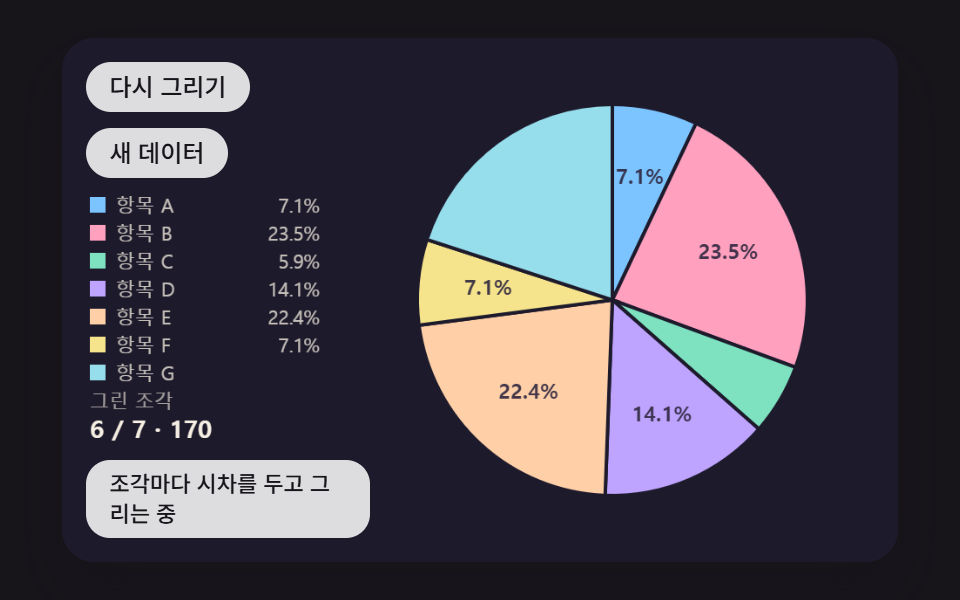 대시보드 UI원형 그래프 만들기 9종 — 조각이 튀어나오고 3D로 기우는 계산
 대시보드 UI워드 클라우드 만들기 9종 — 나선 배치·모양 채우기·3D 구·실시간 투표
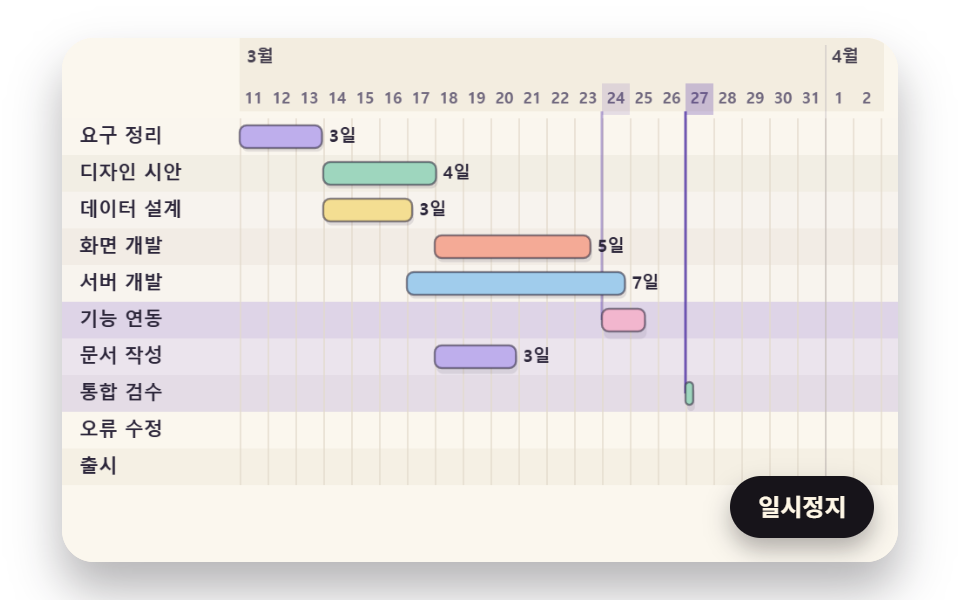 대시보드 UI간트 차트 만들기 9종 — 의존 화살표·가장 긴 경로·연쇄 밀기를 계산으로
 대시보드 UI대시보드 사이드바·위젯 UI 9종 — 완성 페이지 말고 이 조각 하나만
 대시보드 UI대시보드 컴포넌트 9종 — 화면 통째로 말고 이 부품만
 대시보드 UIcss 검색창 디자인 9종 — Cmd+K로 열리는 팔레트