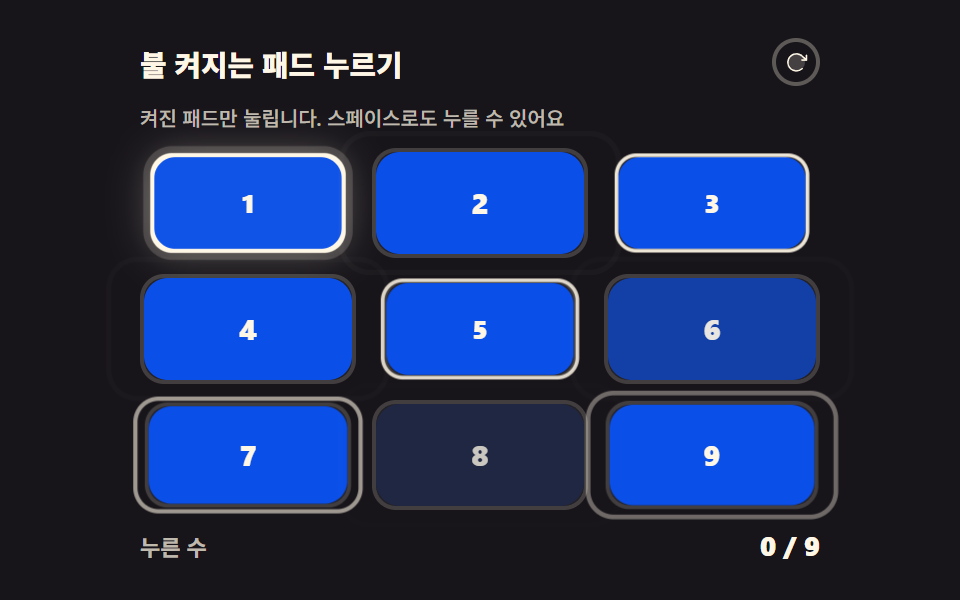
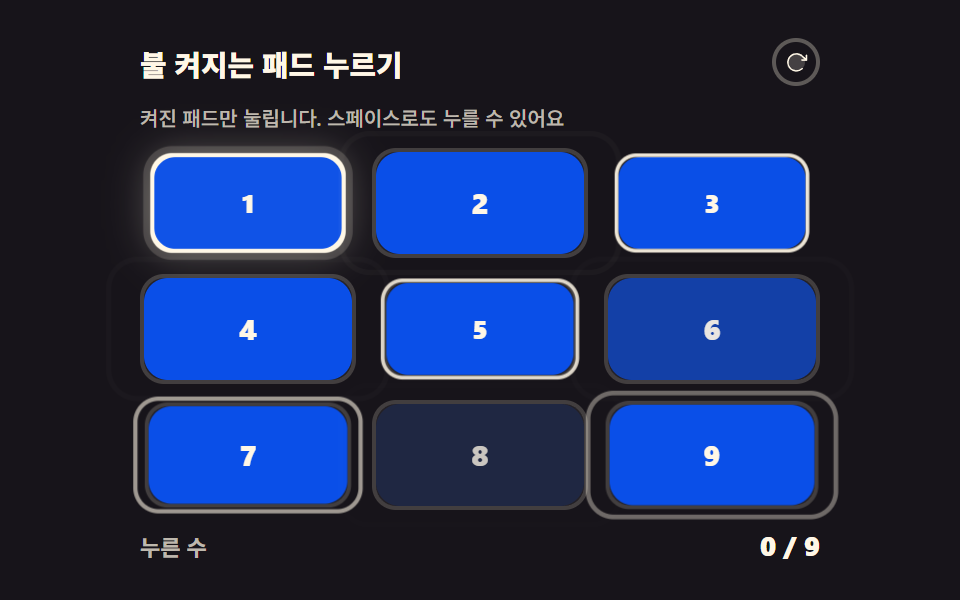
01불 켜지는 패드 누르기
:checked 로 체인을 걸어 지금 불이 켜진 패드만 눌리고, 누를 때마다 다음 패드가 켜지며 카운터가 점수를 센다.
쓰임로딩 대신 30초 놀이, 404 페이지의 볼거리
:checkedcounter-incrementcontent
<main class="stage">
<div class="rp is-demo" id="rp">
  <header class="rp__bar">
    <p class="rp__title">불 켜지는 패드 누르기</p>
    <button class="rp__restart" id="rpRestart" type="button" aria-label="다시 시작">
      <svg viewBox="0 0 256 256" aria-hidden="true" focusable="false"><g fill="currentColor"><path d="M216 128a88 88 0 1 1-88-88a88 88 0 0 1 88 88" opacity=".2"/><path d="M240 56v48a8 8 0 0 1-8 8h-48a8 8 0 0 1 0-16h27.4l-26.59-24.36l-.25-.24a80 80 0 1 0-1.67 114.78a8 8 0 0 1 11 11.63A95.44 95.44 0 0 1 128 224h-1.32a96 96 0 1 1 69.07-164L224 85.8V56a8 8 0 1 1 16 0"/></g></svg>
    </button>
  </header>
  <p class="rp__hint">켜진 패드만 눌립니다. 스페이스로도 누를 수 있어요</p>
  <div class="rp__board" id="rpBoard">
    <input class="rp__check" type="checkbox" id="rpP1" aria-label="1번 패드">
    <input class="rp__check" type="checkbox" id="rpP2" aria-label="2번 패드">
    <input class="rp__check" type="checkbox" id="rpP3" aria-label="3번 패드">
    <input class="rp__check" type="checkbox" id="rpP4" aria-label="4번 패드">
    <input class="rp__check" type="checkbox" id="rpP5" aria-label="5번 패드">
    <input class="rp__check" type="checkbox" id="rpP6" aria-label="6번 패드">
    <input class="rp__check" type="checkbox" id="rpP7" aria-label="7번 패드">
    <input class="rp__check" type="checkbox" id="rpP8" aria-label="8번 패드">
    <input class="rp__check" type="checkbox" id="rpP9" aria-label="9번 패드">
    <div class="rp__grid">
      <label class="rp__pad" for="rpP1" style="--i: 0"><span class="rp__no">1</span></label>
      <label class="rp__pad" for="rpP2" style="--i: 1"><span class="rp__no">2</span></label>
      <label class="rp__pad" for="rpP3" style="--i: 2"><span class="rp__no">3</span></label>
      <label class="rp__pad" for="rpP4" style="--i: 3"><span class="rp__no">4</span></label>
      <label class="rp__pad" for="rpP5" style="--i: 4"><span class="rp__no">5</span></label>
      <label class="rp__pad" for="rpP6" style="--i: 5"><span class="rp__no">6</span></label>
      <label class="rp__pad" for="rpP7" style="--i: 6"><span class="rp__no">7</span></label>
      <label class="rp__pad" for="rpP8" style="--i: 7"><span class="rp__no">8</span></label>
      <label class="rp__pad" for="rpP9" style="--i: 8"><span class="rp__no">9</span></label>
    </div>
    <p class="rp__done" role="status"><b>9개 패드 클리어!</b></p>
  </div>
  <p class="rp__tally"><span class="rp__tallyLabel">누른 수</span> <b class="rp__count"></b></p>
</div>
</main>@use "../../../../site/static/demo-tokens" as *;
// 불 켜지는 패드 누르기 — 순수 CSS 게임. input[type=checkbox] 를 형제 결합자(~)로 연결해
// "바로 앞 패드가 :checked 일 때만 다음 패드에 불이 켜진다"는 연쇄를 만든다.
// 점수는 체크된 input 이 counter-increment 하고 아랫줄 .rp__count::after 가 content: counter() 로 읽는다.
// 9번째까지 체크됐다는 건 연쇄 위에서 1번부터 8번까지 전부 눌렸다는 뜻이므로, 완료 판정도 #rpP9:checked 하나로 충분하다.
// 격자 미리보기(.is-demo)는 9개 패드가 순서대로 눌리는 연출을 프리뷰 레이어(::before 리플 + ::after 채움)로 보여 준다.
$duration: $dur-loop;
$easing: $ease-spring;
$color: $subject-blue-deep;
@include stage($stage-ink);
.rp {
display: flex; flex-direction: column; gap: $sp-2;
width: 100%; max-width: 340px; height: 100%;
counter-reset: rpTaps;
}
.rp__bar { display: flex; align-items: center; justify-content: space-between; gap: $sp-2; }
.rp__title { margin: 0; font-weight: 800; font-size: clamp(12px, 3vw, 15px); color: $subject-cream; }
.rp__restart {
display: grid; place-items: center; width: clamp(24px, 5vw, 28px); aspect-ratio: 1; padding: 0;
border: 2px solid rgba($subject-cream, .3); border-radius: $r-control;
background: none; color: $subject-cream; cursor: pointer;
}
.rp__restart svg { width: 62%; height: 62%; }
.rp__restart:focus-visible { outline: 2px solid $subject-cream; outline-offset: 2px; }
.rp__hint { margin: 0; font-weight: 500; font-size: clamp(8px, 2.2vw, 10px); color: rgba($subject-cream, .72); }
.rp__board { position: relative; flex: 1 1 auto; min-height: 0; display: flex; }
// 체크박스는 화면에 그리지 않지만 카운터와 키보드 초점을 위해서 상자를 유지한다(display:none 은 카운터를 끊는다)
.rp__check { position: absolute; width: 1px; height: 1px; margin: -1px; opacity: 0; pointer-events: none; }
.rp__check:checked { counter-increment: rpTaps; }
.rp__grid { flex: 1 1 auto; display: grid; grid-template: repeat(3, 1fr) / repeat(3, 1fr); gap: $sp-2; }
.rp__pad {
position: relative; display: grid; place-items: center;
border-radius: $r-control; border: 2px solid rgba($subject-cream, .14);
background-color: rgba($subject-cream, .05);
pointer-events: none; cursor: default;
transition: background-color $dur-quick $ease-out, border-color $dur-quick $ease-out,
box-shadow $dur-quick $ease-out, transform $dur-quick $ease-pop;
}
.rp__no { position: relative; z-index: 1; font-weight: 800; font-size: clamp(11px, 3vw, 16px); color: rgba($subject-cream, .72); }
// 프리뷰 채움(::after)과 리플 고리(::before) — .is-demo 연출에서만 움직인다
.rp__pad::after { content: ""; position: absolute; inset: 0; z-index: 0; border-radius: inherit; background-color: $color; opacity: 0; }
.rp__pad::before { content: ""; position: absolute; inset: -2px; z-index: 2; border: 2px solid $subject-cream; border-radius: inherit; opacity: 0; }
// ── 연쇄 규칙 ───────────────────────────────────────────────
// 꺼진(아직 못 누른) 패드는 pointer-events:none 이라 클릭이 닿지 않고, 켜진 패드만 auto 로 살아난다
#rpP1:not(:checked) ~ .rp__grid .rp__pad:nth-child(1),
#rpP1:checked ~ .rp__grid .rp__pad:nth-child(2),
#rpP2:checked ~ .rp__grid .rp__pad:nth-child(3),
#rpP3:checked ~ .rp__grid .rp__pad:nth-child(4),
#rpP4:checked ~ .rp__grid .rp__pad:nth-child(5),
#rpP5:checked ~ .rp__grid .rp__pad:nth-child(6),
#rpP6:checked ~ .rp__grid .rp__pad:nth-child(7),
#rpP7:checked ~ .rp__grid .rp__pad:nth-child(8),
#rpP8:checked ~ .rp__grid .rp__pad:nth-child(9) {
pointer-events: auto; cursor: pointer;
background-color: $subject-cream; border-color: $subject-cream;
box-shadow: 0 0 0 4px rgba($subject-cream, .16), 0 0 22px rgba($subject-cream, .3);
.rp__no { color: $subject-ink; }
}
// 누른 패드는 색이 바뀌어 남는다 — 연쇄가 순서를 보장하므로 반칙 클릭은 애초에 불가능하다
#rpP1:checked ~ .rp__grid .rp__pad:nth-child(1),
#rpP2:checked ~ .rp__grid .rp__pad:nth-child(2),
#rpP3:checked ~ .rp__grid .rp__pad:nth-child(3),
#rpP4:checked ~ .rp__grid .rp__pad:nth-child(4),
#rpP5:checked ~ .rp__grid .rp__pad:nth-child(5),
#rpP6:checked ~ .rp__grid .rp__pad:nth-child(6),
#rpP7:checked ~ .rp__grid .rp__pad:nth-child(7),
#rpP8:checked ~ .rp__grid .rp__pad:nth-child(8),
#rpP9:checked ~ .rp__grid .rp__pad:nth-child(9) {
background-color: $color; border-color: $color; box-shadow: none;
.rp__no { color: $subject-cream; }
}
// 키보드 초점도 켜진 패드에만 보인다 — 초점 자체는 JS 가 켜진 패드로 옮긴다
#rpP1:focus-visible ~ .rp__grid .rp__pad:nth-child(1),
#rpP2:focus-visible ~ .rp__grid .rp__pad:nth-child(2),
#rpP3:focus-visible ~ .rp__grid .rp__pad:nth-child(3),
#rpP4:focus-visible ~ .rp__grid .rp__pad:nth-child(4),
#rpP5:focus-visible ~ .rp__grid .rp__pad:nth-child(5),
#rpP6:focus-visible ~ .rp__grid .rp__pad:nth-child(6),
#rpP7:focus-visible ~ .rp__grid .rp__pad:nth-child(7),
#rpP8:focus-visible ~ .rp__grid .rp__pad:nth-child(8),
#rpP9:focus-visible ~ .rp__grid .rp__pad:nth-child(9) {
outline: 2px solid $subject-cream; outline-offset: 2px;
}
.rp__pad:active { transform: scale(.93); }
// 완료 — #rpP9 가 체크됐다면 1부터 8까지 전부 지나온 상태다
.rp__done { position: absolute; inset: 0; z-index: 3; display: none; place-items: center; margin: 0; }
#rpP9:checked ~ .rp__done { display: grid; }
.rp__done b {
display: inline-block; padding: $sp-2 $sp-4; border-radius: $r-pill;
background-color: $subject-cream; color: $subject-ink;
font-weight: 800; font-size: clamp(11px, 2.8vw, 14px); box-shadow: $shadow-press;
animation-name: rpDoneIn; animation-duration: $dur-enter; animation-timing-function: $easing;
animation-iteration-count: 1; animation-fill-mode: both;
}
@keyframes rpDoneIn {
from { opacity: 0; transform: scale(.8); }
to { opacity: 1; transform: scale(1); }
}
.rp__tally { display: flex; align-items: baseline; justify-content: space-between; gap: $sp-2; margin: 0; }
.rp__tallyLabel { font-weight: 700; font-size: clamp(9px, 2.4vw, 11px); color: rgba($subject-cream, .72); }
.rp__count { font-weight: 800; font-size: clamp(11px, 2.8vw, 14px); color: $subject-cream; }
.rp__count::after { content: counter(rpTaps) " / 9"; }
// ── 격자 미리보기 ───────────────────────────────────────────────
// 9개 패드가 2초 안에 순서대로 눌린다 — 눌림(scale)·채움(opacity)·리플 고리(scale+fade)를 같은 지연으로 묶는다
.rp.is-demo .rp__pad,
.rp.is-demo .rp__pad::after,
.rp.is-demo .rp__pad::before,
.rp.is-demo .rp__no {
animation-duration: 380ms; animation-timing-function: $easing;
animation-iteration-count: infinite; animation-fill-mode: backwards;
animation-delay: calc(var(--i) * 180ms);
}
.rp.is-demo .rp__pad { animation-name: rpPress; }
.rp.is-demo .rp__pad::after { animation-name: rpFill; }
.rp.is-demo .rp__pad::before { animation-name: rpRipple; }
.rp.is-demo .rp__no { animation-name: rpNo; }
@keyframes rpPress {
0% { transform: scale(1); }
28% { transform: scale(.9); }
58% { transform: scale(1); }
100% { transform: scale(1); }
}
@keyframes rpFill {
0% { opacity: 0; }
26% { opacity: 1; }
78% { opacity: 1; }
100% { opacity: 0; }
}
@keyframes rpRipple {
0% { transform: scale(1); opacity: 0; }
26% { opacity: .9; transform: scale(1); }
100% { transform: scale(1.32); opacity: 0; }
}
@keyframes rpNo {
0% { color: rgba($subject-cream, .72); }
26% { color: $subject-cream; }
78% { color: $subject-cream; }
100% { color: rgba($subject-cream, .72); }
}
@media (max-width: 340px) {
.rp { gap: $sp-1; }
.rp__grid { gap: $sp-1; }
}
// reduce 에서는 연출을 끄고 현재 상태 한 장만 보여 준다 — 눌림 반응(transition)은 남긴다
@media (prefers-reduced-motion: reduce) {
.rp.is-demo .rp__pad,
.rp.is-demo .rp__pad::before,
.rp.is-demo .rp__pad::after,
.rp.is-demo .rp__no { animation: none !important; }
.rp__done b { animation: none !important; }
.rp__pad { transition: none !important; }
}html, body {
margin: 0;
overflow: hidden;
}
.stage {
box-sizing: border-box;
min-height: 100vh;
display: grid;
place-items: center;
margin: 0;
background: #17141a;
font-family: -apple-system, "Segoe UI", "Noto Sans KR", sans-serif;
padding: clamp(8px, 4vw, 24px);
}
.rp {
display: flex;
flex-direction: column;
gap: 8px;
width: 100%;
max-width: 340px;
height: 100%;
counter-reset: rpTaps;
}
.rp__bar {
display: flex;
align-items: center;
justify-content: space-between;
gap: 8px;
}
.rp__title {
margin: 0;
font-weight: 800;
font-size: clamp(12px, 3vw, 15px);
color: #fff7e6;
}
.rp__restart {
display: grid;
place-items: center;
width: clamp(24px, 5vw, 28px);
aspect-ratio: 1;
padding: 0;
border: 2px solid rgba(255, 247, 230, 0.3);
border-radius: 12px;
background: none;
color: #fff7e6;
cursor: pointer;
}
.rp__restart svg {
width: 62%;
height: 62%;
}
.rp__restart:focus-visible {
outline: 2px solid #fff7e6;
outline-offset: 2px;
}
.rp__hint {
margin: 0;
font-weight: 500;
font-size: clamp(8px, 2.2vw, 10px);
color: rgba(255, 247, 230, 0.72);
}
.rp__board {
position: relative;
flex: 1 1 auto;
min-height: 0;
display: flex;
}
.rp__check {
position: absolute;
width: 1px;
height: 1px;
margin: -1px;
opacity: 0;
pointer-events: none;
}
.rp__check:checked {
counter-increment: rpTaps;
}
.rp__grid {
flex: 1 1 auto;
display: grid;
grid-template: repeat(3, 1fr)/repeat(3, 1fr);
gap: 8px;
}
.rp__pad {
position: relative;
display: grid;
place-items: center;
border-radius: 12px;
border: 2px solid rgba(255, 247, 230, 0.14);
background-color: rgba(255, 247, 230, 0.05);
pointer-events: none;
cursor: default;
transition: background-color 220ms ease-out, border-color 220ms ease-out, box-shadow 220ms ease-out, transform 220ms cubic-bezier(0.2, 1.4, 0.4, 1);
}
.rp__no {
position: relative;
z-index: 1;
font-weight: 800;
font-size: clamp(11px, 3vw, 16px);
color: rgba(255, 247, 230, 0.72);
}
.rp__pad::after {
content: "";
position: absolute;
inset: 0;
z-index: 0;
border-radius: inherit;
background-color: #0a4fe8;
opacity: 0;
}
.rp__pad::before {
content: "";
position: absolute;
inset: -2px;
z-index: 2;
border: 2px solid #fff7e6;
border-radius: inherit;
opacity: 0;
}
#rpP1:not(:checked) ~ .rp__grid .rp__pad:nth-child(1),
#rpP1:checked ~ .rp__grid .rp__pad:nth-child(2),
#rpP2:checked ~ .rp__grid .rp__pad:nth-child(3),
#rpP3:checked ~ .rp__grid .rp__pad:nth-child(4),
#rpP4:checked ~ .rp__grid .rp__pad:nth-child(5),
#rpP5:checked ~ .rp__grid .rp__pad:nth-child(6),
#rpP6:checked ~ .rp__grid .rp__pad:nth-child(7),
#rpP7:checked ~ .rp__grid .rp__pad:nth-child(8),
#rpP8:checked ~ .rp__grid .rp__pad:nth-child(9) {
pointer-events: auto;
cursor: pointer;
background-color: #fff7e6;
border-color: #fff7e6;
box-shadow: 0 0 0 4px rgba(255, 247, 230, 0.16), 0 0 22px rgba(255, 247, 230, 0.3);
}
#rpP1:not(:checked) ~ .rp__grid .rp__pad:nth-child(1) .rp__no,
#rpP1:checked ~ .rp__grid .rp__pad:nth-child(2) .rp__no,
#rpP2:checked ~ .rp__grid .rp__pad:nth-child(3) .rp__no,
#rpP3:checked ~ .rp__grid .rp__pad:nth-child(4) .rp__no,
#rpP4:checked ~ .rp__grid .rp__pad:nth-child(5) .rp__no,
#rpP5:checked ~ .rp__grid .rp__pad:nth-child(6) .rp__no,
#rpP6:checked ~ .rp__grid .rp__pad:nth-child(7) .rp__no,
#rpP7:checked ~ .rp__grid .rp__pad:nth-child(8) .rp__no,
#rpP8:checked ~ .rp__grid .rp__pad:nth-child(9) .rp__no {
color: #17141a;
}
#rpP1:checked ~ .rp__grid .rp__pad:nth-child(1),
#rpP2:checked ~ .rp__grid .rp__pad:nth-child(2),
#rpP3:checked ~ .rp__grid .rp__pad:nth-child(3),
#rpP4:checked ~ .rp__grid .rp__pad:nth-child(4),
#rpP5:checked ~ .rp__grid .rp__pad:nth-child(5),
#rpP6:checked ~ .rp__grid .rp__pad:nth-child(6),
#rpP7:checked ~ .rp__grid .rp__pad:nth-child(7),
#rpP8:checked ~ .rp__grid .rp__pad:nth-child(8),
#rpP9:checked ~ .rp__grid .rp__pad:nth-child(9) {
background-color: #0a4fe8;
border-color: #0a4fe8;
box-shadow: none;
}
#rpP1:checked ~ .rp__grid .rp__pad:nth-child(1) .rp__no,
#rpP2:checked ~ .rp__grid .rp__pad:nth-child(2) .rp__no,
#rpP3:checked ~ .rp__grid .rp__pad:nth-child(3) .rp__no,
#rpP4:checked ~ .rp__grid .rp__pad:nth-child(4) .rp__no,
#rpP5:checked ~ .rp__grid .rp__pad:nth-child(5) .rp__no,
#rpP6:checked ~ .rp__grid .rp__pad:nth-child(6) .rp__no,
#rpP7:checked ~ .rp__grid .rp__pad:nth-child(7) .rp__no,
#rpP8:checked ~ .rp__grid .rp__pad:nth-child(8) .rp__no,
#rpP9:checked ~ .rp__grid .rp__pad:nth-child(9) .rp__no {
color: #fff7e6;
}
#rpP1:focus-visible ~ .rp__grid .rp__pad:nth-child(1),
#rpP2:focus-visible ~ .rp__grid .rp__pad:nth-child(2),
#rpP3:focus-visible ~ .rp__grid .rp__pad:nth-child(3),
#rpP4:focus-visible ~ .rp__grid .rp__pad:nth-child(4),
#rpP5:focus-visible ~ .rp__grid .rp__pad:nth-child(5),
#rpP6:focus-visible ~ .rp__grid .rp__pad:nth-child(6),
#rpP7:focus-visible ~ .rp__grid .rp__pad:nth-child(7),
#rpP8:focus-visible ~ .rp__grid .rp__pad:nth-child(8),
#rpP9:focus-visible ~ .rp__grid .rp__pad:nth-child(9) {
outline: 2px solid #fff7e6;
outline-offset: 2px;
}
.rp__pad:active {
transform: scale(0.93);
}
.rp__done {
position: absolute;
inset: 0;
z-index: 3;
display: none;
place-items: center;
margin: 0;
}
#rpP9:checked ~ .rp__done {
display: grid;
}
.rp__done b {
display: inline-block;
padding: 8px 16px;
border-radius: 999px;
background-color: #fff7e6;
color: #17141a;
font-weight: 800;
font-size: clamp(11px, 2.8vw, 14px);
box-shadow: 0 6px 12px rgba(23, 20, 26, 0.32);
animation-name: rpDoneIn;
animation-duration: 600ms;
animation-timing-function: cubic-bezier(0.2, 0.8, 0.2, 1);
animation-iteration-count: 1;
animation-fill-mode: both;
}
@keyframes rpDoneIn {
from {
opacity: 0;
transform: scale(0.8);
}
to {
opacity: 1;
transform: scale(1);
}
}
.rp__tally {
display: flex;
align-items: baseline;
justify-content: space-between;
gap: 8px;
margin: 0;
}
.rp__tallyLabel {
font-weight: 700;
font-size: clamp(9px, 2.4vw, 11px);
color: rgba(255, 247, 230, 0.72);
}
.rp__count {
font-weight: 800;
font-size: clamp(11px, 2.8vw, 14px);
color: #fff7e6;
}
.rp__count::after {
content: counter(rpTaps) " / 9";
}
.rp.is-demo .rp__pad,
.rp.is-demo .rp__pad::after,
.rp.is-demo .rp__pad::before,
.rp.is-demo .rp__no {
animation-duration: 380ms;
animation-timing-function: cubic-bezier(0.2, 0.8, 0.2, 1);
animation-iteration-count: infinite;
animation-fill-mode: backwards;
animation-delay: calc(var(--i) * 180ms);
}
.rp.is-demo .rp__pad {
animation-name: rpPress;
}
.rp.is-demo .rp__pad::after {
animation-name: rpFill;
}
.rp.is-demo .rp__pad::before {
animation-name: rpRipple;
}
.rp.is-demo .rp__no {
animation-name: rpNo;
}
@keyframes rpPress {
0% {
transform: scale(1);
}
28% {
transform: scale(0.9);
}
58% {
transform: scale(1);
}
100% {
transform: scale(1);
}
}
@keyframes rpFill {
0% {
opacity: 0;
}
26% {
opacity: 1;
}
78% {
opacity: 1;
}
100% {
opacity: 0;
}
}
@keyframes rpRipple {
0% {
transform: scale(1);
opacity: 0;
}
26% {
opacity: 0.9;
transform: scale(1);
}
100% {
transform: scale(1.32);
opacity: 0;
}
}
@keyframes rpNo {
0% {
color: rgba(255, 247, 230, 0.72);
}
26% {
color: #fff7e6;
}
78% {
color: #fff7e6;
}
100% {
color: rgba(255, 247, 230, 0.72);
}
}
@media (max-width: 340px) {
.rp {
gap: 4px;
}
.rp__grid {
gap: 4px;
}
}
@media (prefers-reduced-motion: reduce) {
.rp.is-demo .rp__pad,
.rp.is-demo .rp__pad::before,
.rp.is-demo .rp__pad::after,
.rp.is-demo .rp__no {
animation: none !important;
}
.rp__done b {
animation: none !important;
}
.rp__pad {
transition: none !important;
}
}// 게임 판정 자체는 전부 CSS(:checked 연쇄 + counter)다. JS 는 두 가지 보조만 한다 —
// 재시작(체크 해제)과 키보드 초점이 켜진 패드를 따라가는 일.
(function () {
var root = document.getElementById('rp');
var checks = [].slice.call(document.querySelectorAll('.rp__check'));
var count = checks.length;
function litIndex() {
for (var i = 0; i < count; i++) { if (!checks[i].checked) { return i; } }
return -1;
}
function sync(focusLit) {
var k = litIndex();
for (var i = 0; i < count; i++) { checks[i].tabIndex = (k === i || k < 0) ? 0 : -1; }
if (focusLit && k >= 0) { checks[k].focus({ preventScroll: true }); }
}
root.addEventListener('change', function () {
root.classList.remove('is-demo');
sync(true);
});
document.getElementById('rpRestart').addEventListener('click', function () {
for (var i = 0; i < count; i++) { checks[i].checked = false; }
root.classList.remove('is-demo');
sync(true);
});
sync(false);
})();// LitReactionPad — vanilla 판(run/301/demo/01-lit-reaction-pad/index.html) 의 React 포트.
// 게임 판정은 전부 CSS(:checked 연쇄 + counter)다. React 는 상태(체크 9개)를 들고 있고
// 재시작과 키보드 초점(켜진 패드로 이동)만 담당한다.
import { useState } from "react";
import type { CSSProperties } from "react";
import styles from "./LitReactionPad.module.scss";
export type LitReactionPadProps = {
duration?: number;
easing?: string;
accentColor?: string;
};
type Vars = CSSProperties & { "--duration"?: string; "--easing"?: string; "--color"?: string };
type PadVars = CSSProperties & { "--i"?: string };
const TOTAL = 9;
const TITLE = "불 켜지는 패드 누르기";
const HINT = "켜진 패드만 눌립니다. 스페이스로도 누를 수 있어요";
const RESTART_LABEL = "다시 시작";
const PAD_LABEL = "{n}번 패드";
const DONE_TEXT = "9개 패드 클리어!";
const TALLY_LABEL = "누른 수";
function RestartIcon() {
return (
<svg viewBox="0 0 256 256" aria-hidden="true" focusable="false">
<g fill="currentColor">
<path d="M216 128a88 88 0 1 1-88-88a88 88 0 0 1 88 88" opacity=".2" />
<path d="M240 56v48a8 8 0 0 1-8 8h-48a8 8 0 0 1 0-16h27.4l-26.59-24.36l-.25-.24a80 80 0 1 0-1.67 114.78a8 8 0 0 1 11 11.63A95.44 95.44 0 0 1 128 224h-1.32a96 96 0 1 1 69.07-164L224 85.8V56a8 8 0 1 1 16 0" />
</g>
</svg>
);
}
export default function LitReactionPad({
duration = 2000,
easing = "cubic-bezier(.2, .8, .2, 1)",
accentColor = "#0a4fe8",
}: LitReactionPadProps) {
const [checks, setChecks] = useState<boolean[]>(Array(TOTAL).fill(false));
const [demo, setDemo] = useState(true);
const vars: Vars = { "--duration": `${duration}ms`, "--easing": easing, "--color": accentColor };
const litIndex = checks.findIndex((v) => !v);
function toggle(i: number) {
setDemo(false);
setChecks((prev) => prev.map((v, k) => (k === i ? !v : v)));
}
function restart() {
setDemo(false);
setChecks(Array(TOTAL).fill(false));
}
function padVars(i: number): PadVars {
return { "--i": String(i) };
}
function padLabel(i: number): string {
return PAD_LABEL.replace("{n}", String(i + 1));
}
const cls = [styles.root, demo ? styles.isDemo : ""].filter(Boolean).join(" ");
return (
<main className={styles.stage}>
<div className={cls} style={vars}>
<header className={styles.bar}>
<p className={styles.title}>{TITLE}</p>
<button className={styles.restart} type="button" aria-label={RESTART_LABEL} onClick={restart}>
<RestartIcon />
</button>
</header>
<p className={styles.hint}>{HINT}</p>
<div className={styles.board}>
{checks.map((v, i) => (
<input
key={i}
className={styles.check}
type="checkbox"
id={`rpP${i + 1}`}
aria-label={padLabel(i)}
checked={v}
tabIndex={litIndex === i || litIndex < 0 ? 0 : -1}
onChange={() => toggle(i)}
/>
))}
<div className={styles.grid}>
{checks.map((v, i) => (
<label key={i} className={styles.pad} htmlFor={`rpP${i + 1}`} style={padVars(i)}>
<span className={styles.no}>{i + 1}</span>
</label>
))}
</div>
<p className={styles.done} role="status">
<b>{DONE_TEXT}</b>
</p>
</div>
<p className={styles.tally}>
<span className={styles.tallyLabel}>{TALLY_LABEL}</span> <b className={styles.count}></b>
</p>
</div>
</main>
);
}01 불 켜지는 패드 누르기 — 측정 누적면적 47.79% · 움직인 프레임 23/23GODRICH 원작 · zip 에 SCSS·React 포함 · CSS 게임 만들기 — 미니게임 9종 복붙 코드
이 데모가 속한 글
 CSS 게임 만들기 — 미니게임 9종 복붙 코드CSS 게임은 브라우저가 원래 갖고 있는 선택자·키프레임·transform 만으로 규칙과 화면을 함께 굴리는 놀이판입니다. 게임엔진 없이 HTML·CSS·바닐라 JS 로 아홉 개를 짰고, 아래 격자에서 지금 돌아갑니 이 글의 데모 전부 보기