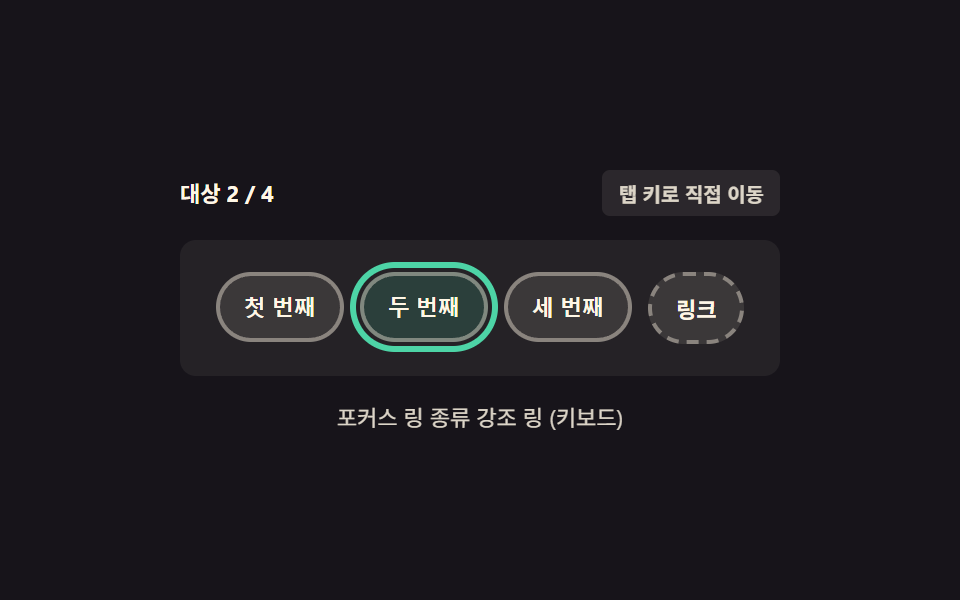
06키보드 포커스 링 — 마우스 클릭에는 안 뜨고 키보드 이동에만 나타나는 테두리
같은 버튼이라도 마우스로 클릭했을 때는 테두리가 나타나지 않고, 탭 키로 이동해 들어왔을 때만 테두리가 뚜렷하게 나타나 접근성과 시각적 깔끔함을 동시에 챙깁니다.
쓰임폼 제출 버튼, 내비게이션 링크 목록
:focus-visible:focus:not(:focus-visible)outline-offset
<main class="stage">
<div class="wrap is-demo" id="wrap">
  <div class="head">
    <span class="stateLabel" id="stateLabel">대상 —</span>
    <span class="howBadge">탭 키로 직접 이동</span>
  </div>
  <div class="pad">
    <button class="padBtn" id="padBtn1" type="button" data-idx="1">첫 번째</button>
    <button class="padBtn" id="padBtn2" type="button" data-idx="2">두 번째</button>
    <button class="padBtn" id="padBtn3" type="button" data-idx="3">세 번째</button>
    <a class="padLink" id="padLink" href="#" data-idx="4">링크</a>
  </div>
  <div class="readout" id="readout">포커스 링 종류 —</div>
</div>
</main>
@use "../../../../site/static/demo-tokens" as *;
// 계산 겹은 index.html 의 describe() 에 있다 — 실제 focus 를 옮기며 브라우저가 결정한
// matches(':focus-visible') 값을 그대로 읽어 링 종류를 판정한다. 여기는 링의 두 모습
// (키보드 진입 = 진한 링 / 마우스 클릭 = 링 없음)만 담당한다.
@include stage($stage-ink);
.wrap {
width: 300px;
display: flex;
flex-direction: column;
gap: $sp-3;
}
.head {
display: flex;
align-items: center;
justify-content: space-between;
gap: $sp-2;
}
.stateLabel {
color: $subject-cream;
font-size: 11px;
font-weight: 700;
}
.howBadge {
color: $subject-cream;
font-size: 10px;
font-weight: 600;
background: rgba($subject-cream, .1);
border-radius: $r-xs;
padding: $sp-1 $sp-2;
opacity: .85;
}
.pad {
display: flex;
gap: $sp-2;
justify-content: center;
align-items: center;
padding: $sp-4 $sp-2;
background: rgba($subject-cream, .06);
border-radius: $r-sm;
}
.padBtn,
.padLink {
appearance: none;
border: 2px solid rgba($subject-cream, .4);
border-radius: $r-pill;
background: rgba($subject-cream, .1);
color: $subject-cream;
padding: $sp-2 $sp-3;
font-size: 11px;
font-weight: 600;
cursor: pointer;
text-decoration: none;
transition: transform $dur-instant $ease-out, background $dur-instant $ease-out, outline-color $dur-instant $ease-out;
}
.padLink { border-style: dashed; }
// 주인공 — :focus-visible 은 키보드 진입에만 링을 준다. 마우스 클릭의 :focus 에는 없다.
// outline 색 전환을 부드럽게 하되 링의 생김/사라짐 자체는 즉시다.
.padBtn:focus-visible,
.padLink:focus-visible {
outline: 3px solid $subject-mint;
outline-offset: 2px;
background: rgba($subject-mint, .16);
}
.padBtn:focus:not(:focus-visible),
.padLink:focus:not(:focus-visible) {
outline: none;
}
// 시연 게이트 전용 — 자동 루프(.is-demo) 동안 키보드 진입과 같은 링 모양을 재현하는 클래스.
// 실사용(human() 호출 뒤) 에는 절대 붙지 않고 진짜 :focus-visible 규칙만 작동한다.
.padBtn.demoFocus,
.padLink.demoFocus {
outline: 3px solid $subject-mint;
outline-offset: 2px;
background: rgba($subject-mint, .16);
}
.readout {
color: $subject-cream;
font-size: 11px;
text-align: center;
opacity: .85;
}
@media (max-width: 340px) {
.wrap { width: 260px; }
.pad { flex-wrap: wrap; }
.padBtn, .padLink { padding: $sp-1 $sp-2; font-size: 10px; }
}
@media (prefers-reduced-motion: reduce) {
// reduce: 자동 루프의 포커스 순회만 멈춘다(탭 키·클릭으로 하는 실사용 포커스 이동은 그대로)
.padBtn, .padLink { transition: none; }
}html, body {
margin: 0;
overflow: hidden;
}
.stage {
box-sizing: border-box;
min-height: 100vh;
display: grid;
place-items: center;
margin: 0;
background: #17141a;
font-family: -apple-system, "Segoe UI", "Noto Sans KR", sans-serif;
padding: clamp(8px, 4vw, 24px);
}
.wrap {
width: 300px;
display: flex;
flex-direction: column;
gap: 12px;
}
.head {
display: flex;
align-items: center;
justify-content: space-between;
gap: 8px;
}
.stateLabel {
color: #fff7e6;
font-size: 11px;
font-weight: 700;
}
.howBadge {
color: #fff7e6;
font-size: 10px;
font-weight: 600;
background: rgba(255, 247, 230, 0.1);
border-radius: 4px;
padding: 4px 8px;
opacity: 0.85;
}
.pad {
display: flex;
gap: 8px;
justify-content: center;
align-items: center;
padding: 16px 8px;
background: rgba(255, 247, 230, 0.06);
border-radius: 8px;
}
.padBtn,
.padLink {
appearance: none;
border: 2px solid rgba(255, 247, 230, 0.4);
border-radius: 999px;
background: rgba(255, 247, 230, 0.1);
color: #fff7e6;
padding: 8px 12px;
font-size: 11px;
font-weight: 600;
cursor: pointer;
text-decoration: none;
transition: transform 140ms ease-out, background 140ms ease-out, outline-color 140ms ease-out;
}
.padLink {
border-style: dashed;
}
.padBtn:focus-visible,
.padLink:focus-visible {
outline: 3px solid #4cd4a6;
outline-offset: 2px;
background: rgba(76, 212, 166, 0.16);
}
.padBtn:focus:not(:focus-visible),
.padLink:focus:not(:focus-visible) {
outline: none;
}
.padBtn.demoFocus,
.padLink.demoFocus {
outline: 3px solid #4cd4a6;
outline-offset: 2px;
background: rgba(76, 212, 166, 0.16);
}
.readout {
color: #fff7e6;
font-size: 11px;
text-align: center;
opacity: 0.85;
}
@media (max-width: 340px) {
.wrap {
width: 260px;
}
.pad {
flex-wrap: wrap;
}
.padBtn, .padLink {
padding: 4px 8px;
font-size: 10px;
}
}
@media (prefers-reduced-motion: reduce) {
.padBtn, .padLink {
transition: none;
}
}(function () {
var STEP_MS = 320;
var reduce = window.matchMedia('(prefers-reduced-motion: reduce)').matches;
var wrap = document.getElementById('wrap');
var stateLabel = document.getElementById('stateLabel');
var readout = document.getElementById('readout');
var order = ['padBtn1', 'padBtn2', 'padBtn3', 'padLink'];
var isDemo = true;
var cursor = 0;
// 실측 — 이 데모는 focus({preventScroll:true}) 로 실제 포커스를 옮기고
// document.activeElement 와 matches(':focus-visible') 로 링 종류를 판정한다 (BD18 준수)
// 단 스크립트가 부른 focus() 는 :focus-visible 로 판정되지 않는다(브라우저는 마지막 입력이
// 키보드일 때만 이 상태를 켠다). 그래서 자동 루프(.is-demo) 동안에만 같은 모양의 링을
// demoFocus 클래스로 재현한다 — 시연 게이트 전용이고, 사람이 조작하면(human()) 루프가
// 멈추고 진짜 :focus-visible 판정(matches) 만을 읽는다.
function focusAt(idx) {
cursor = idx;
for (var j = 0; j < order.length; j++) {
document.getElementById(order[j]).classList.remove('demoFocus');
}
var el = document.getElementById(order[idx]);
el.focus({ preventScroll: true });
if (isDemo) { el.classList.add('demoFocus'); }
}
function describe() {
var el = document.activeElement;
if (!el || !el.id || order.indexOf(el.id) < 0) {
stateLabel.textContent = '대상 —';
readout.textContent = '포커스 링 종류 —';
return;
}
var idx = order.indexOf(el.id);
stateLabel.textContent = '대상 ' + (idx + 1) + ' / ' + order.length;
// 실측 — 브라우저가 스스로 결정한 :focus-visible 상태를 그대로 읽는다 (추측 아님)
// 자동 루프 동안에는 키보드 진입 상황을 시연 중이므로 시연 상태로 말한다
var viaKeyboard = isDemo ? true : el.matches(':focus-visible');
readout.textContent = '포커스 링 종류 ' + (viaKeyboard ? '강조 링 (키보드)' : '없음 (마우스)');
}
function human() {
if (isDemo) {
wrap.classList.remove('is-demo');
isDemo = false;
// 자동 루프가 요소를 붙잡고 있으니 실사용 모드로 넘어갈 때 포커스를 돌려놓는다
if (document.activeElement && document.activeElement.blur) { document.activeElement.blur(); }
describe();
}
}
for (var i = 0; i < order.length; i++) {
(function (id) {
var el = document.getElementById(id);
// focus 이벤트는 스크립트가 부른 것도 사람이 부른 것도 똑같이 울리므로 human() 을
// 여기서 걸면 자동 루프의 focusAt() 자체가 매번 사람 조작으로 오인된다.
// 사람이 실제로 한 입력(click·keydown)만 human() 을 부른다 — describe() 만 갱신
el.addEventListener('focus', describe);
el.addEventListener('click', function () { human(); describe(); });
})(order[i]);
}
document.addEventListener('keydown', function (e) {
human();
if (e.key === 'Tab') {
e.preventDefault();
// 실제 탭 순서를 그대로 순환한다 — 링크·버튼이 섞인 그대로
var next = (cursor + (e.shiftKey ? -1 : 1) + order.length) % order.length;
focusAt(next);
describe();
}
});
var last = 0;
function loop(ts) {
if (!last) last = ts;
if (isDemo && !reduce && ts - last >= STEP_MS) {
last = ts;
cursor = (cursor + 1) % order.length;
focusAt(cursor);
describe();
}
requestAnimationFrame(loop);
}
requestAnimationFrame(loop);
})();// FocusVisible — vanilla 판(run/376/demo/06-focus-visible/index.html) 의 React 포트.
// focus({preventScroll:true}) 로 실제 포커스를 옮기고 matches(':focus-visible') 로 브라우저가
// 스스로 결정한 링 종류를 읽는다. 자동 루프 동안만 demoFocus 클래스로 같은 링을 시연한다
// (스크립트가 부른 focus() 는 :focus-visible 로 판정되지 않기 때문).
import { useEffect, useRef } from "react";
import styles from "./FocusVisible.module.scss";
type Box<T> = { current: T };
const STEP_MS = 320;
const ORDER = ["padBtn1", "padBtn2", "padBtn3", "padLink"];
export default function FocusVisible() {
const wrapRef = useRef(null) as unknown as Box<HTMLDivElement>;
const stateLabelRef = useRef(null) as unknown as Box<HTMLSpanElement>;
const readoutRef = useRef(null) as unknown as Box<HTMLDivElement>;
const rafRef = useRef(0) as unknown as Box<number>;
useEffect(() => {
const reduce = window.matchMedia("(prefers-reduced-motion: reduce)").matches;
const wrap = wrapRef.current;
const stateLabel = stateLabelRef.current;
const readout = readoutRef.current;
if (!wrap || !stateLabel || !readout) return;
let isDemo = true;
let cursor = 0;
function elFor(id: string): HTMLElement | null {
return wrap!.querySelector<HTMLElement>("#" + id);
}
function describe() {
const el = document.activeElement as HTMLElement | null;
if (!el || !el.id || ORDER.indexOf(el.id) < 0) {
stateLabel!.textContent = "대상 —";
readout!.textContent = "포커스 링 종류 —";
return;
}
const idx = ORDER.indexOf(el.id);
stateLabel!.textContent = "대상 " + (idx + 1) + " / " + ORDER.length;
const viaKeyboard = isDemo ? true : el.matches(":focus-visible");
readout!.textContent = "포커스 링 종류 " + (viaKeyboard ? "강조 링 (키보드)" : "없음 (마우스)");
}
function focusAt(idx: number) {
cursor = idx;
for (let j = 0; j < ORDER.length; j++) {
const el = elFor(ORDER[j]);
if (el) el.classList.remove(styles.demoFocus);
}
const el = elFor(ORDER[idx]);
if (!el) return;
el.focus({ preventScroll: true });
if (isDemo) el.classList.add(styles.demoFocus);
}
function human() {
if (isDemo) {
wrap!.classList.remove(styles.isDemo);
isDemo = false;
if (document.activeElement && (document.activeElement as HTMLElement).blur) {
(document.activeElement as HTMLElement).blur();
}
describe();
}
}
const cleanups: (() => void)[] = [];
for (let i = 0; i < ORDER.length; i++) {
const el = elFor(ORDER[i]);
if (!el) continue;
const onFocus = () => describe();
const onClick = () => { human(); describe(); };
el.addEventListener("focus", onFocus);
el.addEventListener("click", onClick);
cleanups.push(function () {
el.removeEventListener("focus", onFocus);
el.removeEventListener("click", onClick);
});
}
function onKeyDown(e: KeyboardEvent) {
human();
if (e.key === "Tab") {
e.preventDefault();
const next = (cursor + (e.shiftKey ? -1 : 1) + ORDER.length) % ORDER.length;
focusAt(next);
describe();
}
}
document.addEventListener("keydown", onKeyDown);
let last = 0;
function loop(ts: number) {
if (!last) last = ts;
if (isDemo && !reduce && ts - last >= STEP_MS) {
last = ts;
cursor = (cursor + 1) % ORDER.length;
focusAt(cursor);
describe();
}
rafRef.current = requestAnimationFrame(loop);
}
rafRef.current = requestAnimationFrame(loop);
return () => {
cleanups.forEach(function (fn) { fn(); });
document.removeEventListener("keydown", onKeyDown);
cancelAnimationFrame(rafRef.current);
};
}, []);
return (
<main className={styles.stage}>
<div className={styles.wrap + " " + styles.isDemo} ref={wrapRef}>
<div className={styles.head}>
<span className={styles.stateLabel} ref={stateLabelRef}>대상 —</span>
<span className={styles.howBadge}>탭 키로 직접 이동</span>
</div>
<div className={styles.pad}>
<button className={styles.padBtn} id="padBtn1" type="button">첫 번째</button>
<button className={styles.padBtn} id="padBtn2" type="button">두 번째</button>
<button className={styles.padBtn} id="padBtn3" type="button">세 번째</button>
<a className={styles.padLink} id="padLink" href="#">링크</a>
</div>
<div className={styles.readout} ref={readoutRef}>포커스 링 종류 —</div>
</div>
</main>
);
}06 키보드 포커스 링 — 마우스 클릭에는 안 뜨고 키보드 이동에만 나타나는 테두리 — 측정 누적면적 6.39% · 움직인 프레임 15/23GODRICH 원작 · zip 에 SCSS·React 포함 · css 초기화 9종 — 리셋부터 안전 영역까지 한 번에 정리
이 데모가 속한 글
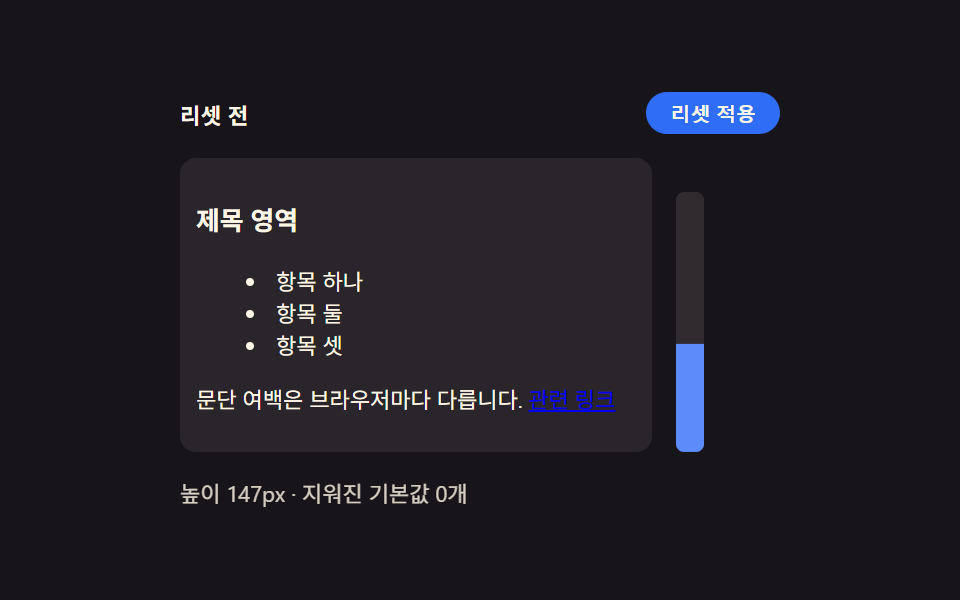 css 초기화 9종 — 리셋부터 안전 영역까지 한 번에 정리아홉 개의 css 초기화 패턴 중 하나는 화면 노치를 감지해 안전 영역만큼 여백을 다시 계산하고, 하나는 모션을 줄이는 환경에서 전환 시간이 거의 0에 가깝게 줄어들고, 하나는 각진 기본 모서리가 매끈한 곡선 모양으 이 글의 데모 전부 보기