css 초기화 9종 — 리셋부터 안전 영역까지 한 번에 정리
아홉 개의 css 초기화 패턴 중 하나는 화면 노치를 감지해 안전 영역만큼 여백을 다시 계산하고, 하나는 모션을 줄이는 환경에서 전환 시간이 거의 0에 가깝게 줄어들고, 하나는 각진 기본 모서리가 매끈한 곡선 모양으로 바뀝니다.
아홉 항목은 요소마다 제각각인 기본값을 지우는 것부터 표준 기능이 있는지 확인해 갈라지는 것까지 순서대로 이어집니다. 01·05·06 은 브라우저가 처음부터 정해 둔 여백·글꼴·포커스 표시를 지우거나 다시 맞추고, 02·04·07 은 크기·비율·안전 영역처럼 값 하나가 레이아웃 계산을 바꾸며, 03·09 는 css 초기화 코드에 표준 기능이 있는지부터 물어 지원 여부로 갈라지고, 08 은 모션을 줄이는 설정 자체가 주제입니다. Math.random은 아홉 항목 어디에도 없어 흐름은 전부 슬라이더·클릭·키보드 조작으로만 갈립니다.
 01 reset
 02 box-model
 03 text-wrap
 04 media-block
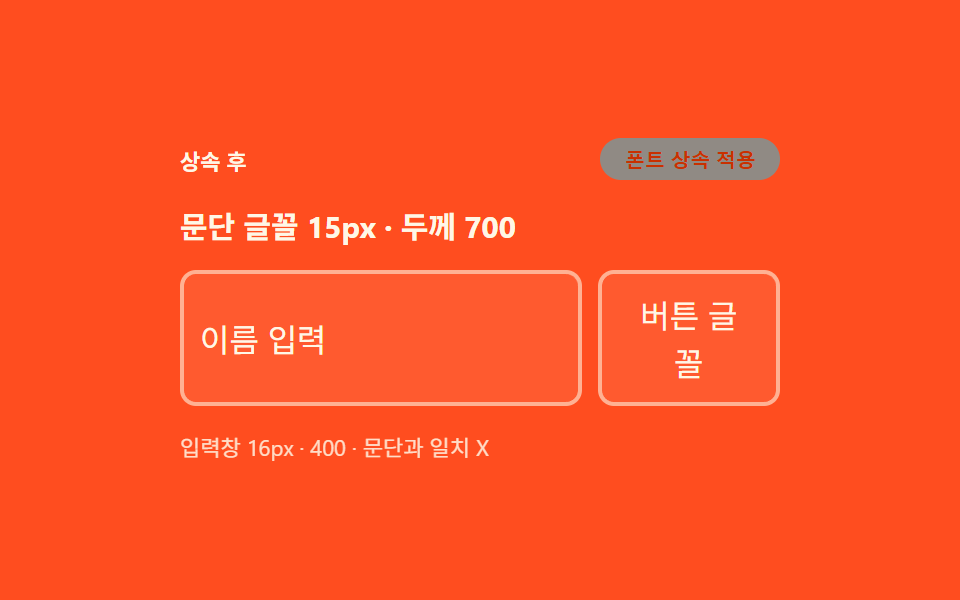 05 form-inherit
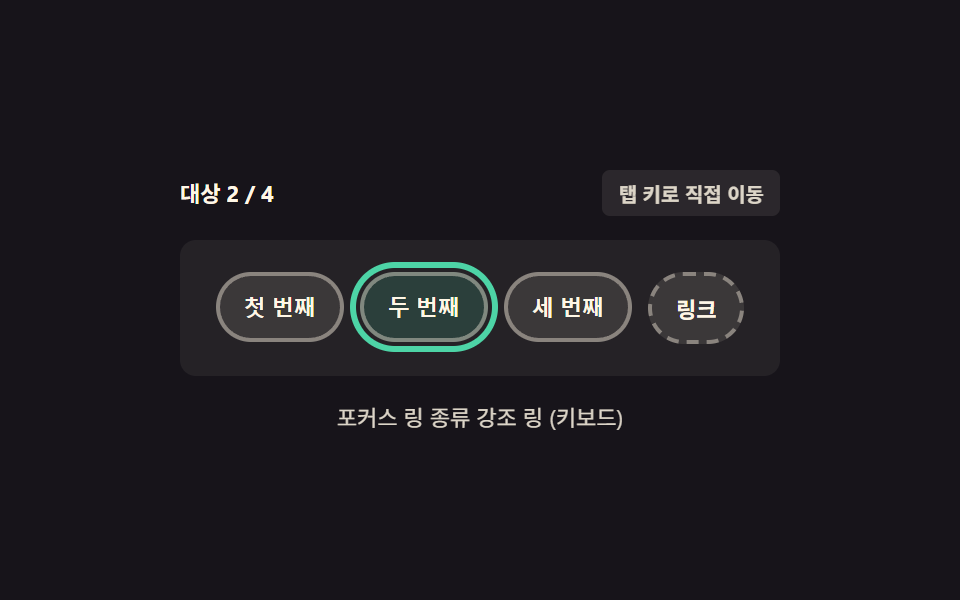 06 focus-visible
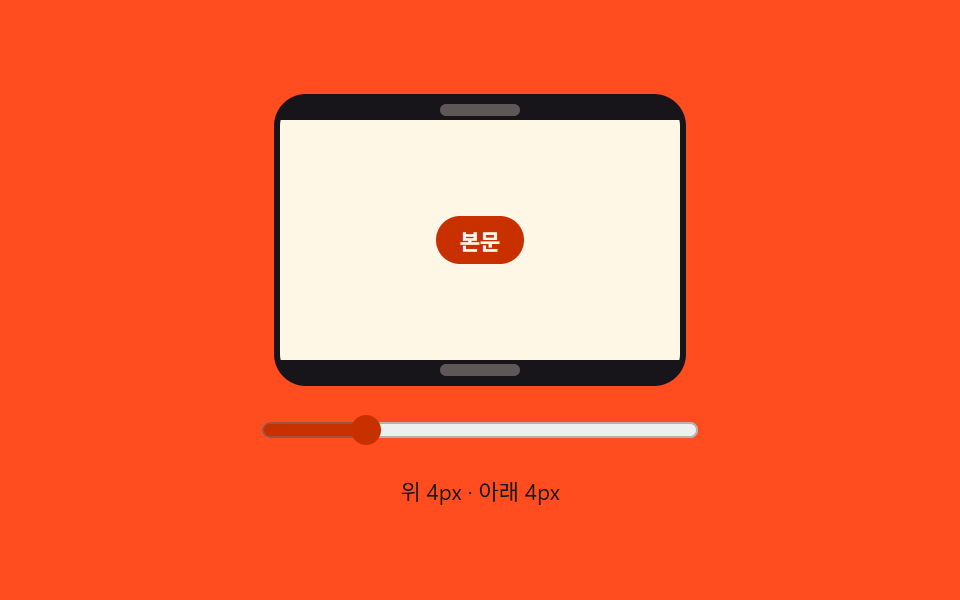 07 safe-area
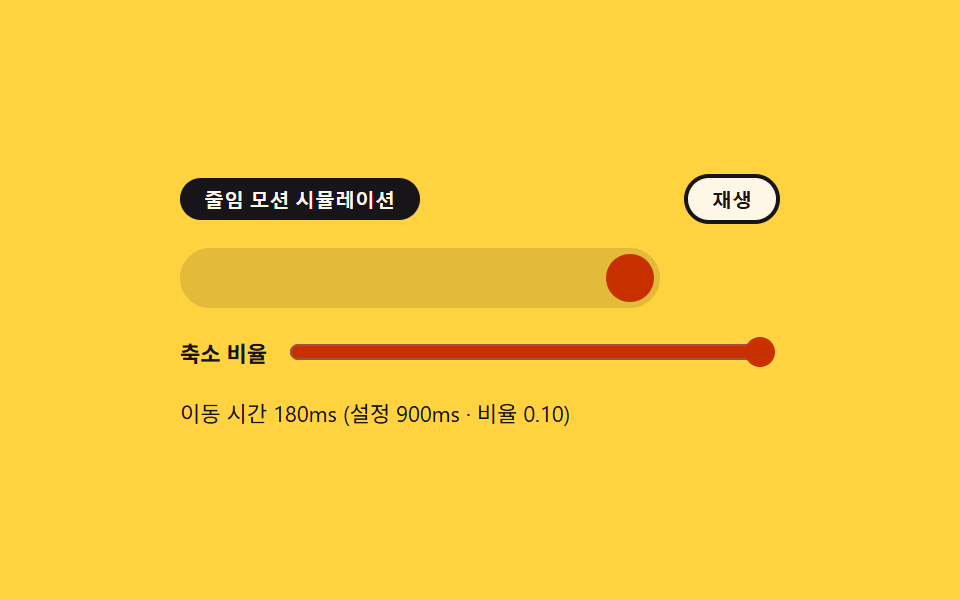 08 reduced-motion
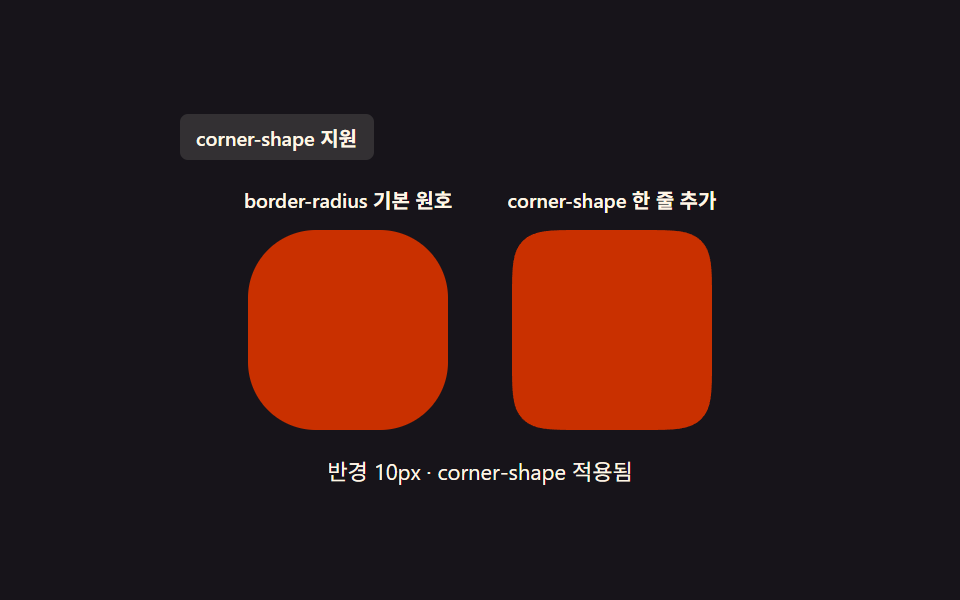 09 corner-shape
자동 재생 · 눌러서 해당 항목으로 · 전부 한 zip
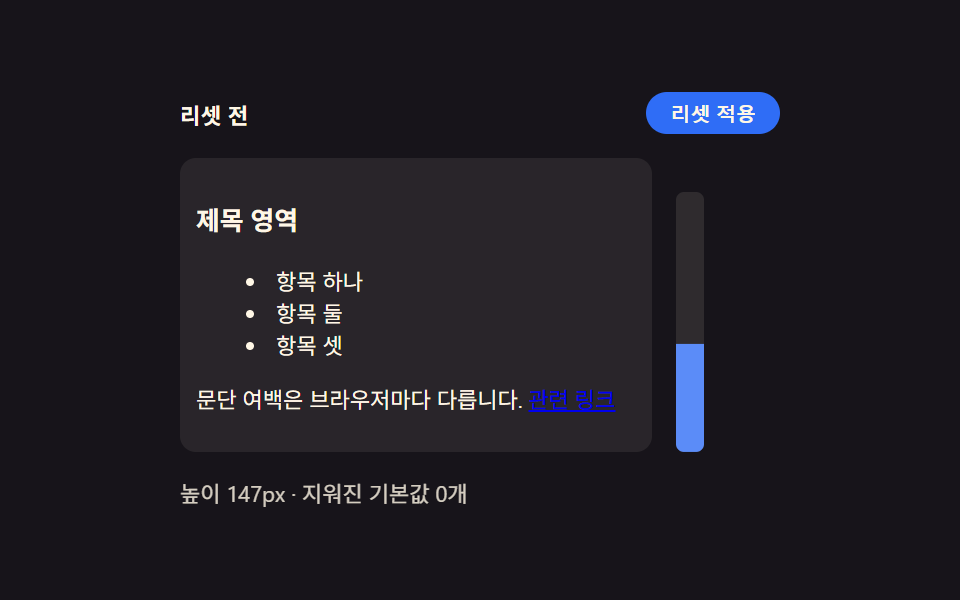
- 01 브라우저 기본값 리셋 — 요소마다 다른 여백과 목록 표시를 하나로 맞추는 시작점
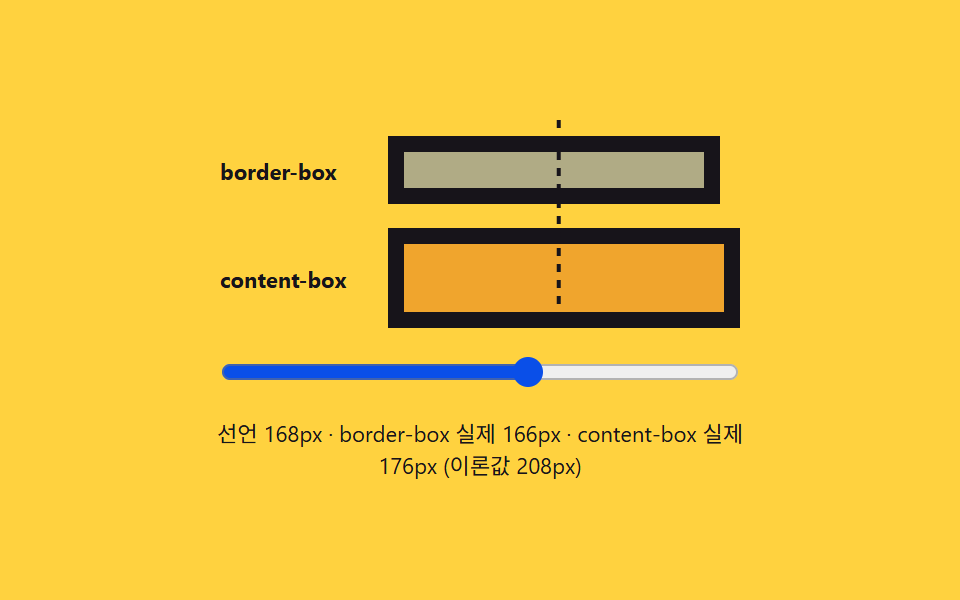
- 02 박스 모델 비교 — 테두리와 안쪽 여백이 크기 계산에 들어가는지 보여주는 카드
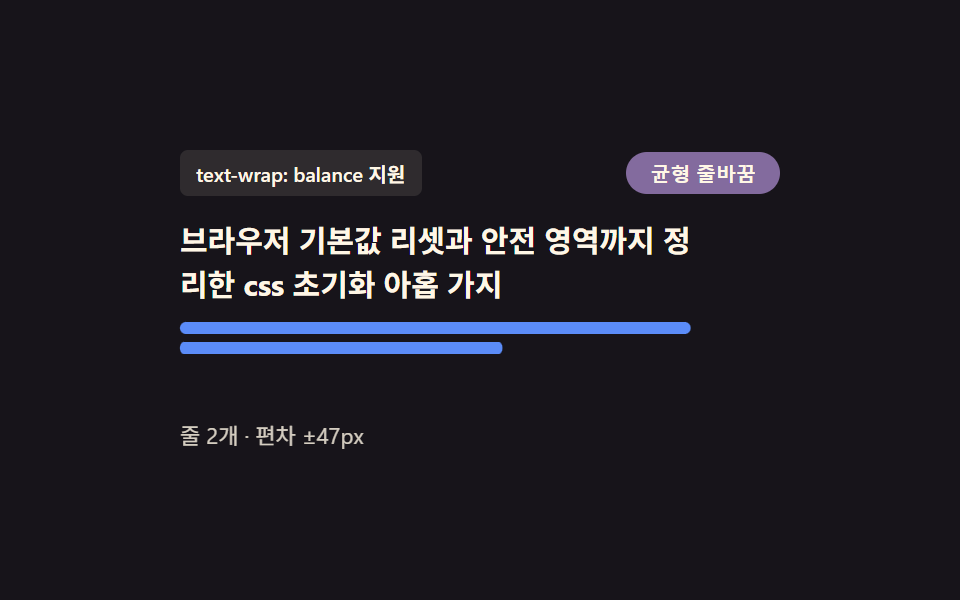
- 03 제목 줄바꿈 정리 — 마지막 줄에 한 단어만 남지 않게 균형 잡는 문단
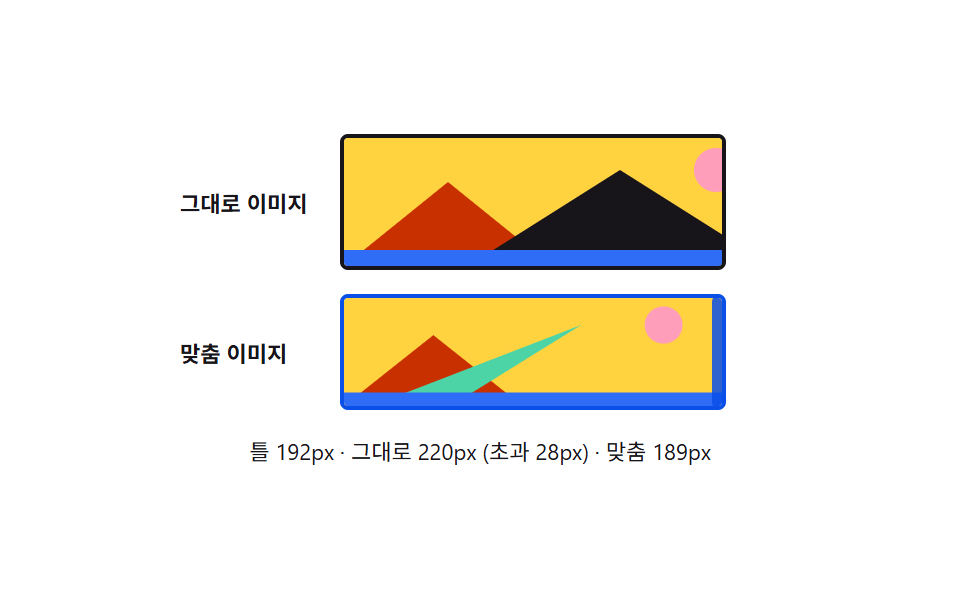
- 04 미디어 기본 비율 고정 — 이미지와 영상이 부모 너비를 넘지 않게 맞추는 틀
- 05 폼 요소 글꼴 상속 — 버튼과 입력창이 주변 글자와 같은 서체를 쓰게 맞추는 규칙
- 06 키보드 포커스 링 — 마우스 클릭에는 안 뜨고 키보드 이동에만 나타나는 테두리
- 07 노치 안전 영역 패딩 — 화면 위아래가 잘리는 기기에서도 내용이 가려지지 않게 미는 여백
- 08 모션 줄이기 대응 — 시스템 설정에 따라 애니메이션이 거의 멈추는 전환
- 09 둥근 모서리 형태 비교 — 원호 모서리와 매끈한 곡선 모서리를 나란히 놓고 보는 카드
아홉 개는 왜 이 순서인가
아홉 항목은 지우는 범위가 좁은 것에서 넓은 것 순으로 놓여, 앞쪽일수록 값 하나만 바꿔도 화면 전체가 같이 움직입니다.
| 항목 | 누적면적 | 강도 평균 | 움직인 프레임 |
|---|---|---|---|
| 01 브라우저 기본값 리셋 | 19.15% | 104.5 | 12/23 |
| 02 박스 모델 비교 | 2.36% | 122.3 | 22/23 |
| 03 제목 줄바꿈 정리 | 3.253% | 139.6 | 23/23 |
| 04 미디어 기본 비율 고정 | 11.703% | 137.6 | 18/23 |
| 05 폼 요소 글꼴 상속 | 13.463% | 95.8 | 22/23 |
| 06 키보드 포커스 링 | 6.39% | 94.2 | 15/23 |
| 07 노치 안전 영역 패딩 | 1.788% | 110.3 | 23/23 |
| 08 모션 줄이기 대응 | 5.87% | 122.2 | 13/23 |
| 09 둥근 모서리 형태 비교 | 1.044% | 118.6 | 9/23 |
누적면적은 01 브라우저 기본값 리셋이 19.15%로 가장 크고, 09 둥근 모서리 형태 비교가 1.044%로 가장 작습니다(07 노치 안전 영역 패딩도 1.788%로 그다음으로 작습니다). 강도 평균은 03 제목 줄바꿈 정리가 139.6으로 가장 높고 06 키보드 포커스 링이 94.2로 가장 낮으며, 움직인 프레임은 03·07 이 23/24로 매 프레임 움직인 항목이고 09 가 9/24로 가장 적습니다.
지우는 범위 자체가 주제인 01·05·06
01 은 여백·목록·링크 밑줄처럼 요소마다 다르게 오는 기본값 목록을 통째로 지우고, 05 는 폼 요소만 따로 갖던 글꼴을 주변 문단과 같게 되돌리며, 06 은 지우는 대신 포커스 표시를 마우스와 키보드로 갈라 다시 그립니다. 셋 다 css 선언 자체가 결과를 정하고 자바스크립트는 토글 상태만 바꿉니다.
값 하나가 레이아웃 계산을 바꾸는 02·04·07
02 는 테두리·안쪽 여백이 너비 계산에 들어가는지, 04 는 이미지 높이가 부모 너비에 맞춰 줄어드는지, 07 은 화면이 잘린 영역만큼 안쪽 여백이 자동으로 늘어나는지를 각각 보여줘, 세 항목 모두 css 값 하나가 실제 픽셀 크기를 정합니다.
표준 기능이 있는지 먼저 묻는 03·09
03·09 는 CSS.supports로 표준 기능이 있는지 먼저 물은 뒤 그 답에 따라 나머지 규칙을 켭니다. 03 은 text-wrap: balance, 09 는 corner-shape: squircle을 확인하고, 지원하지 않는 환경에서는 각각 균형 없는 줄바꿈과 원호 모서리가 그대로 남습니다.
항목별 코드
01브라우저 기본값 리셋 — 요소마다 다른 여백과 목록 표시를 하나로 맞추는 시작점
브라우저마다 다르게 주는 기본 여백과 목록 점 표시를 모두 지워 모든 요소가 같은 출발선에서 시작합니다. 새 프로젝트 시작 스타일시트나 컴포넌트 라이브러리 베이스에 씁니다.
지우는 범위는 상수 하나로 정한다
RESET_SCOPE 값이 minimal 이면 제목·문단 여백과 목록 점만 지우고, full 이면 링크 밑줄까지 더 지웁니다.
  // 변형 상수 — minimal 은 목록·여백만, full 은 버튼 겉모습까지 지운다 (D 뒤 확정)
  var RESET_SCOPE = 'minimal';
  var STEP_MS = 320;
  // 지워지는 기본값 카테고리 — 실제로 화면에 세어 보여주는 목록이라 죽은 상수가 아니다
  var CLEARED_MINIMAL = ['heading-margin', 'paragraph-margin', 'list-style'];
  var CLEARED_FULL = CLEARED_MINIMAL.concat(['link-decoration']);
  var MAX_HEIGHT_PX = 130; // 룰러 눈금의 기준 최대 높이 — 이 값을 넘는 초과분은 눈금 밖으로 잘린다
  var reduce = window.matchMedia('(prefers-reduced-motion: reduce)').matches;

  var wrap = document.getElementById('wrap');
  var panel = document.getElementById('panel');
  var toggleBtn = document.getElementById('toggleBtn');
  var stateLabel = document.getElementById('stateLabel');
  var readout = document.getElementById('readout');
  var rulerFill = document.getElementById('rulerFill');
  var isDemo = true;
  var on = false;

  function clearedList() { return RESET_SCOPE === 'full' ? CLEARED_FULL : CLEARED_MINIMAL; }
<main class="stage">
<div class="wrap is-demo" id="wrap">
  <div class="head">
    <span class="stateLabel" id="stateLabel">리셋 전</span>
    <button class="toggleBtn" id="toggleBtn" type="button" aria-pressed="false">리셋 적용</button>
  </div>
  <div class="body">
    <div class="panel" id="panel">
      <h3 class="demoHeading">제목 영역</h3>
      <ul class="demoList">
        <li>항목 하나</li>
        <li>항목 둘</li>
        <li>항목 셋</li>
      </ul>
      <p class="demoPara">문단 여백은 브라우저마다 다릅니다. <a href="#" class="demoLink" id="demoLink">관련 링크</a></p>
    </div>
    <div class="ruler" id="ruler">
      <div class="rulerFill" id="rulerFill"></div>
    </div>
  </div>
  <div class="readout" id="readout">높이 —px · 지워진 기본값 —개</div>
</div>
</main>
@use "../../../../site/static/demo-tokens" as *;
// 계산 겹은 index.html 의 measure() 에 있다 — 패널의 실제 렌더 높이(getBoundingClientRect)를 매 프레임
// 다시 재서 룰러 막대의 scaleY 와 "높이 Npx" 문구에 그대로 반영한다. 여기는 리셋 전/후 두 규칙 집합과
// 룰러 모양만 맡는다.
@include stage($stage-ink);
.wrap {
width: 300px;
display: flex;
flex-direction: column;
gap: $sp-3;
}
.head {
display: flex;
align-items: center;
justify-content: space-between;
gap: $sp-2;
}
.stateLabel {
color: $subject-cream;
font-size: 11px;
font-weight: 700;
letter-spacing: .02em;
}
.toggleBtn {
appearance: none;
border: none;
border-radius: $r-pill;
background: $subject-blue;
color: $subject-cream;
padding: $sp-1 $sp-3;
font-size: 10px;
font-weight: 600;
cursor: pointer;
transition: background $dur-instant $ease-out, transform $dur-instant $ease-out;
&:hover { background: $subject-blue-light; }
&:active { transform: scale(.96); }
&[aria-pressed="true"] { background: $subject-orange-deep; }
&:focus-visible { outline: 2px solid $subject-blue-light; outline-offset: 2px; }
}
.body {
display: flex;
align-items: flex-start;
gap: $sp-3;
}
// 패널은 일부러 우리 스타일을 씌우지 않는다 — .reset 이 없는 기본 상태가 곧 브라우저 기본값이다.
// font-size 를 11px 로 낮춰 h3·ul·p 의 em 기반 기본 여백을 실제 비율 그대로 작게 줄인다(값을 지어내지
// 않는다 — UA 스타일시트의 em 마진이 그대로 이 기준을 따라간다).
.panel {
width: 220px;
font-size: 11px;
background: rgba($subject-cream, .08);
border-radius: $r-sm;
padding: $sp-2;
transition: padding $dur-base $ease-out;
}
.demoHeading,
.demoPara,
.demoList {
color: $subject-cream;
transition: margin $dur-base $ease-out;
}
.demoList {
transition: margin $dur-base $ease-out, padding $dur-base $ease-out;
}
.demoList li { color: $subject-cream; }
.demoLink {
transition: color $dur-base $ease-out;
}
.panel.reset {
.demoHeading, .demoPara, .demoList { margin: 0 0 $sp-2; }
.demoList { padding: 0; list-style: none; }
.demoList li { padding: $sp-1 0; }
}
.panel.reset.full .demoLink {
color: $subject-blue-light;
text-decoration: none;
}
.ruler {
position: relative;
width: 14px;
height: 130px;
border-radius: $r-xs;
background: rgba($subject-cream, .1);
align-self: flex-end;
overflow: hidden;
}
.rulerFill {
position: absolute;
left: 0;
bottom: 0;
width: 100%;
height: 100%;
transform-origin: bottom;
transform: scaleY(0);
background: $subject-blue-light;
transition: transform $dur-base $ease-out;
}
.readout {
color: $subject-cream;
font-size: 11px;
opacity: .82;
}
@media (max-width: 340px) {
.wrap { width: 260px; gap: $sp-2; }
.panel { width: 190px; padding: $sp-1; font-size: 9px; }
.body { gap: $sp-2; }
.ruler { height: 80px; }
.demoList li:nth-child(3) { display: none; }
}
@media (prefers-reduced-motion: reduce) {
// reduce: 전환의 완만함만 지운다 — 상태 자체는 계속 바뀐다(모션이 아니라 값 전환이라 유지)
.panel, .demoHeading, .demoPara, .demoList, .demoBtn, .rulerFill, .toggleBtn { transition: none; }
}html, body {
margin: 0;
overflow: hidden;
}
.stage {
box-sizing: border-box;
min-height: 100vh;
display: grid;
place-items: center;
margin: 0;
background: #17141a;
font-family: -apple-system, "Segoe UI", "Noto Sans KR", sans-serif;
padding: clamp(8px, 4vw, 24px);
}
.wrap {
width: 300px;
display: flex;
flex-direction: column;
gap: 12px;
}
.head {
display: flex;
align-items: center;
justify-content: space-between;
gap: 8px;
}
.stateLabel {
color: #fff7e6;
font-size: 11px;
font-weight: 700;
letter-spacing: 0.02em;
}
.toggleBtn {
appearance: none;
border: none;
border-radius: 999px;
background: #2f6df6;
color: #fff7e6;
padding: 4px 12px;
font-size: 10px;
font-weight: 600;
cursor: pointer;
transition: background 140ms ease-out, transform 140ms ease-out;
}
.toggleBtn:hover {
background: #5b8cf8;
}
.toggleBtn:active {
transform: scale(0.96);
}
.toggleBtn[aria-pressed=true] {
background: #c93000;
}
.toggleBtn:focus-visible {
outline: 2px solid #5b8cf8;
outline-offset: 2px;
}
.body {
display: flex;
align-items: flex-start;
gap: 12px;
}
.panel {
width: 220px;
font-size: 11px;
background: rgba(255, 247, 230, 0.08);
border-radius: 8px;
padding: 8px;
transition: padding 300ms ease-out;
}
.demoHeading,
.demoPara,
.demoList {
color: #fff7e6;
transition: margin 300ms ease-out;
}
.demoList {
transition: margin 300ms ease-out, padding 300ms ease-out;
}
.demoList li {
color: #fff7e6;
}
.demoLink {
transition: color 300ms ease-out;
}
.panel.reset .demoHeading, .panel.reset .demoPara, .panel.reset .demoList {
margin: 0 0 8px;
}
.panel.reset .demoList {
padding: 0;
list-style: none;
}
.panel.reset .demoList li {
padding: 4px 0;
}
.panel.reset.full .demoLink {
color: #5b8cf8;
text-decoration: none;
}
.ruler {
position: relative;
width: 14px;
height: 130px;
border-radius: 4px;
background: rgba(255, 247, 230, 0.1);
align-self: flex-end;
overflow: hidden;
}
.rulerFill {
position: absolute;
left: 0;
bottom: 0;
width: 100%;
height: 100%;
transform-origin: bottom;
transform: scaleY(0);
background: #5b8cf8;
transition: transform 300ms ease-out;
}
.readout {
color: #fff7e6;
font-size: 11px;
opacity: 0.82;
}
@media (max-width: 340px) {
.wrap {
width: 260px;
gap: 8px;
}
.panel {
width: 190px;
padding: 4px;
font-size: 9px;
}
.body {
gap: 8px;
}
.ruler {
height: 80px;
}
.demoList li:nth-child(3) {
display: none;
}
}
@media (prefers-reduced-motion: reduce) {
.panel, .demoHeading, .demoPara, .demoList, .demoBtn, .rulerFill, .toggleBtn {
transition: none;
}
}(function () {
// 변형 상수 — minimal 은 목록·여백만, full 은 버튼 겉모습까지 지운다 (D 뒤 확정)
var RESET_SCOPE = 'minimal';
var STEP_MS = 320;
// 지워지는 기본값 카테고리 — 실제로 화면에 세어 보여주는 목록이라 죽은 상수가 아니다
var CLEARED_MINIMAL = ['heading-margin', 'paragraph-margin', 'list-style'];
var CLEARED_FULL = CLEARED_MINIMAL.concat(['link-decoration']);
var MAX_HEIGHT_PX = 130; // 룰러 눈금의 기준 최대 높이 — 이 값을 넘는 초과분은 눈금 밖으로 잘린다
var reduce = window.matchMedia('(prefers-reduced-motion: reduce)').matches;
var wrap = document.getElementById('wrap');
var panel = document.getElementById('panel');
var toggleBtn = document.getElementById('toggleBtn');
var stateLabel = document.getElementById('stateLabel');
var readout = document.getElementById('readout');
var rulerFill = document.getElementById('rulerFill');
var isDemo = true;
var on = false;
function clearedList() { return RESET_SCOPE === 'full' ? CLEARED_FULL : CLEARED_MINIMAL; }
function measure() {
// 실측 — 패널의 실제 렌더 높이를 매 프레임 다시 잰다. 값을 미리 정해두지 않는다
var h = panel.getBoundingClientRect().height;
var ratio = Math.min(1, h / MAX_HEIGHT_PX);
rulerFill.style.transform = 'scaleY(' + ratio.toFixed(3) + ')';
readout.textContent = '높이 ' + Math.round(h) + 'px · 지워진 기본값 ' + (on ? clearedList().length : 0) + '개';
}
function apply(next) {
on = next;
panel.classList.toggle('reset', on);
panel.classList.toggle('full', on && RESET_SCOPE === 'full');
stateLabel.textContent = on ? '리셋 후' : '리셋 전';
toggleBtn.setAttribute('aria-pressed', String(on));
}
function human() { if (isDemo) { wrap.classList.remove('is-demo'); isDemo = false; } }
toggleBtn.addEventListener('click', function () { human(); apply(!on); });
document.getElementById('demoLink').addEventListener('click', function (e) { human(); e.preventDefault(); });
var last = 0;
function loop(ts) {
if (!last) last = ts;
if (isDemo && !reduce && ts - last >= STEP_MS) { last = ts; apply(!on); }
measure();
requestAnimationFrame(loop);
}
requestAnimationFrame(loop);
})();// Reset — vanilla 판(run/376/demo/01-reset/index.html) 의 React 포트.
// 패널에 .reset 클래스를 토글해 브라우저 기본값(h3·ul·p 여백)이 지워지는 전후를 보여주고,
// 룰러 막대는 실제 렌더 높이(getBoundingClientRect)를 매 프레임 다시 재 채운다.
import { useEffect, useRef } from "react";
import styles from "./Reset.module.scss";
type Box<T> = { current: T };
const RESET_SCOPE: "minimal" | "full" = "minimal";
const STEP_MS = 320;
const CLEARED_MINIMAL = ["heading-margin", "paragraph-margin", "list-style"];
const CLEARED_FULL = CLEARED_MINIMAL.concat(["link-decoration"]);
const MAX_HEIGHT_PX = 130;
export default function Reset() {
const wrapRef = useRef(null) as unknown as Box<HTMLDivElement>;
const panelRef = useRef(null) as unknown as Box<HTMLDivElement>;
const toggleBtnRef = useRef(null) as unknown as Box<HTMLButtonElement>;
const stateLabelRef = useRef(null) as unknown as Box<HTMLSpanElement>;
const readoutRef = useRef(null) as unknown as Box<HTMLDivElement>;
const rulerFillRef = useRef(null) as unknown as Box<HTMLDivElement>;
const demoLinkRef = useRef(null) as unknown as Box<HTMLAnchorElement>;
const rafRef = useRef(0) as unknown as Box<number>;
useEffect(() => {
const reduce = window.matchMedia("(prefers-reduced-motion: reduce)").matches;
const wrap = wrapRef.current;
const panel = panelRef.current;
const toggleBtn = toggleBtnRef.current;
const stateLabel = stateLabelRef.current;
const readout = readoutRef.current;
const rulerFill = rulerFillRef.current;
const demoLink = demoLinkRef.current;
if (!wrap || !panel || !toggleBtn || !stateLabel || !readout || !rulerFill || !demoLink) return;
let isDemo = true;
let on = false;
function clearedList() {
return RESET_SCOPE === "full" ? CLEARED_FULL : CLEARED_MINIMAL;
}
function measure() {
const h = panel!.getBoundingClientRect().height;
const ratio = Math.min(1, h / MAX_HEIGHT_PX);
rulerFill!.style.transform = "scaleY(" + ratio.toFixed(3) + ")";
readout!.textContent = "높이 " + Math.round(h) + "px · 지워진 기본값 " + (on ? clearedList().length : 0) + "개";
}
function apply(next: boolean) {
on = next;
panel!.classList.toggle(styles.reset, on);
panel!.classList.toggle(styles.full, on && RESET_SCOPE === "full");
stateLabel!.textContent = on ? "리셋 후" : "리셋 전";
toggleBtn!.setAttribute("aria-pressed", String(on));
}
function human() { if (isDemo) { wrap!.classList.remove(styles.isDemo); isDemo = false; } }
function onToggleClick() { human(); apply(!on); }
function onLinkClick(e: MouseEvent) { human(); e.preventDefault(); }
toggleBtn.addEventListener("click", onToggleClick);
demoLink.addEventListener("click", onLinkClick);
let last = 0;
function loop(ts: number) {
if (!last) last = ts;
if (isDemo && !reduce && ts - last >= STEP_MS) { last = ts; apply(!on); }
measure();
rafRef.current = requestAnimationFrame(loop);
}
rafRef.current = requestAnimationFrame(loop);
return () => {
toggleBtn!.removeEventListener("click", onToggleClick);
demoLink!.removeEventListener("click", onLinkClick);
cancelAnimationFrame(rafRef.current);
};
}, []);
return (
<main className={styles.stage}>
<div className={styles.wrap + " " + styles.isDemo} ref={wrapRef}>
<div className={styles.head}>
<span className={styles.stateLabel} ref={stateLabelRef}>리셋 전</span>
<button className={styles.toggleBtn} ref={toggleBtnRef} type="button" aria-pressed="false">리셋 적용</button>
</div>
<div className={styles.body}>
<div className={styles.panel} ref={panelRef}>
<h3 className={styles.demoHeading}>제목 영역</h3>
<ul className={styles.demoList}>
<li>항목 하나</li>
<li>항목 둘</li>
<li>항목 셋</li>
</ul>
<p className={styles.demoPara}>문단 여백은 브라우저마다 다릅니다. <a href="#" className={styles.demoLink} ref={demoLinkRef}>관련 링크</a></p>
</div>
<div className={styles.ruler}>
<div className={styles.rulerFill} ref={rulerFillRef}></div>
</div>
</div>
<div className={styles.readout} ref={readoutRef}>높이 —px · 지워진 기본값 —개</div>
</div>
</main>
);
}01 · 브라우저 기본값 리셋 — 요소마다 다른 여백과 목록 표시를 하나로 맞추는 시작점 — 측정 누적면적 19.15% · 움직인 프레임 12/23GODRICH 원작 · zip 에 SCSS·React 포함 · 비밀번호 보기
02박스 모델 비교 — 테두리와 안쪽 여백이 크기 계산에 들어가는지 보여주는 카드
두 가지 계산 방식을 전환하면 같은 너비값이라도 테두리와 안쪽 여백을 포함하는지에 따라 카드의 실제 크기가 달라지는 것을 눈으로 비교합니다. 레이아웃 디버깅용 카드나 그리드 아이템 크기 확인에 씁니다.
box-sizing 이 같은 값을 다르게 그린다
box-sizing: content-box는 테두리·여백을 너비 바깥에 더하고, border-box는 그 안에 포함시켜 같은 너비 선언이라도 실제 카드 크기가 달라집니다.
.box {
  height: 34px;
  border: $border-w solid $subject-ink;
  padding: 0 $pad-w;
  background: rgba($subject-blue, .38);
  transition: width $dur-base $ease-out;
  box-sizing: content-box;
}

.contentBox {
  box-sizing: content-box;
  background: rgba($subject-orange-deep, .28);
}

.borderBox {
  box-sizing: border-box;
}
<main class="stage">
<div class="wrap is-demo" id="wrap">
  <div class="track" id="track">
    <div class="guide" id="guide"></div>
    <div class="row">
      <span class="rowLabel">border-box</span>
      <div class="box borderBox" id="borderBox"></div>
    </div>
    <div class="row">
      <span class="rowLabel">content-box</span>
      <div class="box contentBox" id="contentBox"></div>
    </div>
  </div>
  <input class="widthRange" id="widthRange" type="range" min="120" max="200" value="140" aria-label="선언 너비">
  <div class="readout" id="readout">선언 너비 —px</div>
</div>
</main>
@use "../../../../site/static/demo-tokens" as *;
// 계산 겹은 index.html 의 apply() 에 있다 — 선언 너비를 실제 style.width 로 넣고
// getBoundingClientRect 로 다시 잰 실제 렌더 너비를 이론값(선언+테두리·패딩)과 나란히 보여준다.
// 여기는 두 박스의 테두리·패딩 값과 안내선 모양만 맡는다.
@include stage($stage-yellow);
$border-w: 8px;
$pad-w: 12px;
.wrap {
width: 280px;
display: flex;
flex-direction: column;
gap: $sp-3;
align-items: center;
}
.track {
position: relative;
width: 260px;
display: flex;
flex-direction: column;
gap: $sp-3;
padding-top: $sp-2;
}
.guide {
position: absolute;
top: 0;
left: 0;
width: 2px;
height: 100%;
background: repeating-linear-gradient($subject-ink, $subject-ink 4px, transparent 4px, transparent 8px);
transform: translateX(140px);
}
.row {
display: flex;
align-items: center;
gap: $sp-2;
}
.rowLabel {
width: 76px;
flex: 0 0 auto;
color: $subject-ink;
font-size: 11px;
font-weight: 700;
}
.box {
height: 34px;
border: $border-w solid $subject-ink;
padding: 0 $pad-w;
background: rgba($subject-blue, .38);
transition: width $dur-base $ease-out;
box-sizing: content-box;
}
.contentBox {
box-sizing: content-box;
background: rgba($subject-orange-deep, .28);
}
.borderBox {
box-sizing: border-box;
}
.widthRange {
width: 260px;
accent-color: $subject-blue-deep;
}
.readout {
color: $subject-ink;
font-size: 11px;
text-align: center;
}
@media (max-width: 340px) {
.wrap { width: 230px; gap: $sp-2; }
.track, .widthRange { width: 210px; gap: $sp-2; }
.rowLabel { width: 64px; font-size: 10px; }
.box { height: 28px; }
}
@media (prefers-reduced-motion: reduce) {
// reduce: 자동 루프의 사인 진동만 멈춘다(슬라이더로 하는 실사용 조작은 그대로 즉시 반영)
.box { transition: none; }
}html, body {
margin: 0;
overflow: hidden;
}
.stage {
box-sizing: border-box;
min-height: 100vh;
display: grid;
place-items: center;
margin: 0;
background: #ffd23f;
font-family: -apple-system, "Segoe UI", "Noto Sans KR", sans-serif;
padding: clamp(8px, 4vw, 24px);
}
.wrap {
width: 280px;
display: flex;
flex-direction: column;
gap: 12px;
align-items: center;
}
.track {
position: relative;
width: 260px;
display: flex;
flex-direction: column;
gap: 12px;
padding-top: 8px;
}
.guide {
position: absolute;
top: 0;
left: 0;
width: 2px;
height: 100%;
background: repeating-linear-gradient(#17141a, #17141a 4px, transparent 4px, transparent 8px);
transform: translateX(140px);
}
.row {
display: flex;
align-items: center;
gap: 8px;
}
.rowLabel {
width: 76px;
flex: 0 0 auto;
color: #17141a;
font-size: 11px;
font-weight: 700;
}
.box {
height: 34px;
border: 8px solid #17141a;
padding: 0 12px;
background: rgba(47, 109, 246, 0.38);
transition: width 300ms ease-out;
box-sizing: content-box;
}
.contentBox {
box-sizing: content-box;
background: rgba(201, 48, 0, 0.28);
}
.borderBox {
box-sizing: border-box;
}
.widthRange {
width: 260px;
accent-color: #0a4fe8;
}
.readout {
color: #17141a;
font-size: 11px;
text-align: center;
}
@media (max-width: 340px) {
.wrap {
width: 230px;
gap: 8px;
}
.track, .widthRange {
width: 210px;
gap: 8px;
}
.rowLabel {
width: 64px;
font-size: 10px;
}
.box {
height: 28px;
}
}
@media (prefers-reduced-motion: reduce) {
.box {
transition: none;
}
}(function () {
var BORDER_PX = 8;
var PADDING_PX = 12;
var reduce = window.matchMedia('(prefers-reduced-motion: reduce)').matches;
var wrap = document.getElementById('wrap');
var track = document.getElementById('track');
var guide = document.getElementById('guide');
var borderBox = document.getElementById('borderBox');
var contentBox = document.getElementById('contentBox');
var widthRange = document.getElementById('widthRange');
var readout = document.getElementById('readout');
var isDemo = true;
var declared = 140;
function human() { if (isDemo) { wrap.classList.remove('is-demo'); isDemo = false; } }
widthRange.addEventListener('input', function () {
human();
declared = Number(widthRange.value);
});
widthRange.addEventListener('pointerdown', human);
function apply() {
borderBox.style.width = declared + 'px';
contentBox.style.width = declared + 'px';
// 실측 — 계산값을 가정하지 않고 실제 렌더 결과를 다시 잰다
var bRect = borderBox.getBoundingClientRect();
var cRect = contentBox.getBoundingClientRect();
guide.style.transform = 'translateX(' + declared + 'px)';
widthRange.value = String(Math.round(declared));
// 이론값 = 선언 너비 + 테두리·패딩 두 변 — 실측(getBoundingClientRect)과 맞는지 함께 보여준다
var theory = declared + 2 * (BORDER_PX + PADDING_PX);
readout.textContent = '선언 ' + Math.round(declared) + 'px · border-box 실제 ' +
Math.round(bRect.width) + 'px · content-box 실제 ' + Math.round(cRect.width) +
'px (이론값 ' + Math.round(theory) + 'px)';
}
var start = 0;
function loop(ts) {
if (!start) start = ts;
if (isDemo && !reduce) {
declared = 160 + 38 * Math.sin((ts - start) / 900);
}
apply();
requestAnimationFrame(loop);
}
requestAnimationFrame(loop);
})();// BoxModel — vanilla 판(run/376/demo/02-box-model/index.html) 의 React 포트.
// 슬라이더로 선언 너비를 바꾸면 border-box·content-box 두 박스에 같은 width 를 넣고,
// 실제 렌더 결과(getBoundingClientRect)를 이론값(선언+테두리·패딩)과 나란히 보여준다.
import { useEffect, useRef } from "react";
import styles from "./BoxModel.module.scss";
type Box<T> = { current: T };
const BORDER_PX = 8;
const PADDING_PX = 12;
export default function BoxModel() {
const wrapRef = useRef(null) as unknown as Box<HTMLDivElement>;
const guideRef = useRef(null) as unknown as Box<HTMLDivElement>;
const borderBoxRef = useRef(null) as unknown as Box<HTMLDivElement>;
const contentBoxRef = useRef(null) as unknown as Box<HTMLDivElement>;
const widthRangeRef = useRef(null) as unknown as Box<HTMLInputElement>;
const readoutRef = useRef(null) as unknown as Box<HTMLDivElement>;
const rafRef = useRef(0) as unknown as Box<number>;
useEffect(() => {
const reduce = window.matchMedia("(prefers-reduced-motion: reduce)").matches;
const wrap = wrapRef.current;
const guide = guideRef.current;
const borderBox = borderBoxRef.current;
const contentBox = contentBoxRef.current;
const widthRange = widthRangeRef.current;
const readout = readoutRef.current;
if (!wrap || !guide || !borderBox || !contentBox || !widthRange || !readout) return;
let isDemo = true;
let declared = 140;
function human() { if (isDemo) { wrap!.classList.remove(styles.isDemo); isDemo = false; } }
function onInput() { human(); declared = Number(widthRange!.value); }
function onPointerDown() { human(); }
widthRange.addEventListener("input", onInput);
widthRange.addEventListener("pointerdown", onPointerDown);
function apply() {
borderBox!.style.width = declared + "px";
contentBox!.style.width = declared + "px";
const bRect = borderBox!.getBoundingClientRect();
const cRect = contentBox!.getBoundingClientRect();
guide!.style.transform = "translateX(" + declared + "px)";
widthRange!.value = String(Math.round(declared));
const theory = declared + 2 * (BORDER_PX + PADDING_PX);
readout!.textContent = "선언 " + Math.round(declared) + "px · border-box 실제 " +
Math.round(bRect.width) + "px · content-box 실제 " + Math.round(cRect.width) +
"px (이론값 " + Math.round(theory) + "px)";
}
let start = 0;
function loop(ts: number) {
if (!start) start = ts;
if (isDemo && !reduce) { declared = 160 + 38 * Math.sin((ts - start) / 900); }
apply();
rafRef.current = requestAnimationFrame(loop);
}
rafRef.current = requestAnimationFrame(loop);
return () => {
widthRange!.removeEventListener("input", onInput);
widthRange!.removeEventListener("pointerdown", onPointerDown);
cancelAnimationFrame(rafRef.current);
};
}, []);
return (
<main className={styles.stage}>
<div className={styles.wrap + " " + styles.isDemo} ref={wrapRef}>
<div className={styles.track}>
<div className={styles.guide} ref={guideRef}></div>
<div className={styles.row}>
<span className={styles.rowLabel}>border-box</span>
<div className={styles.box + " " + styles.borderBox} ref={borderBoxRef}></div>
</div>
<div className={styles.row}>
<span className={styles.rowLabel}>content-box</span>
<div className={styles.box + " " + styles.contentBox} ref={contentBoxRef}></div>
</div>
</div>
<input className={styles.widthRange} ref={widthRangeRef} type="range" min="120" max="200" defaultValue="140" aria-label="선언 너비" />
<div className={styles.readout} ref={readoutRef}>선언 너비 —px</div>
</div>
</main>
);
}02 · 박스 모델 비교 — 테두리와 안쪽 여백이 크기 계산에 들어가는지 보여주는 카드 — 측정 누적면적 2.36% · 움직인 프레임 22/23GODRICH 원작 · zip 에 SCSS·React 포함 · 비밀번호 보기
03제목 줄바꿈 정리 — 마지막 줄에 한 단어만 남지 않게 균형 잡는 문단
긴 제목이 여러 줄로 꺾일 때 줄마다 글자 수가 고르게 균형을 잡아, 마지막 줄에 단어 하나만 외로이 남는 모양을 막습니다. 카드 제목이나 히어로 섹션 헤드라인에 씁니다.
지원 여부를 먼저 확인한다
CSS.supports('text-wrap', 'balance')로 먼저 물어 지원하는 환경에서만 균형 줄바꿈이 적용되고, 지원하지 않으면 배지가 폴백 상태를 알립니다.
  var STEP_MS = 220;
  var MAX_BARS = 4;
  var reduce = window.matchMedia('(prefers-reduced-motion: reduce)').matches;
  var supported = typeof CSS !== 'undefined' && CSS.supports && CSS.supports('text-wrap', 'balance');

  var wrap = document.getElementById('wrap');
  var heading = document.getElementById('heading');
  var toggleBtn = document.getElementById('toggleBtn');
  var supportBadge = document.getElementById('supportBadge');
  var bars = document.getElementById('bars');
  var readout = document.getElementById('readout');
  var isDemo = true;
  var on = false;

  supportBadge.textContent = supported ? 'text-wrap: balance 지원' : '미지원 — 폴백(균형 없음)';
  supportBadge.classList.toggle('fallback', !supported);
<main class="stage">
<div class="wrap is-demo" id="wrap">
  <div class="head">
    <span class="supportBadge" id="supportBadge">확인 중</span>
    <button class="toggleBtn" id="toggleBtn" type="button" aria-pressed="false">균형 줄바꿈</button>
  </div>
  <div class="frame">
    <h3 class="heading" id="heading">브라우저 기본값 리셋과 안전 영역까지 정리한 css 초기화 아홉 가지</h3>
    <div class="bars" id="bars"></div>
  </div>
  <div class="readout" id="readout">줄 —개 · 편차 —px</div>
</div>
</main>
@use "../../../../site/static/demo-tokens" as *;
// 계산 겹은 index.html 의 render() 에 있다 — Range.getClientRects() 로 줄마다 실제 렌더 폭을
// 다시 재고, 표준편차(stdDev)를 문구로 보여준다. 여기는 줄 막대의 모양과 균형 전환만 맡는다.
@include stage($stage-ink);
.wrap {
width: 300px;
display: flex;
flex-direction: column;
gap: $sp-3;
}
.head {
display: flex;
align-items: center;
justify-content: space-between;
gap: $sp-2;
}
.supportBadge {
color: $subject-cream;
font-size: 10px;
font-weight: 600;
background: rgba($subject-cream, .1);
border-radius: $r-xs;
padding: $sp-1 $sp-2;
&.fallback { background: rgba($subject-orange-deep, .45); }
}
.toggleBtn {
appearance: none;
border: none;
border-radius: $r-pill;
background: $subject-orange-deep;
color: $subject-cream;
padding: $sp-1 $sp-3;
font-size: 10px;
font-weight: 600;
cursor: pointer;
transition: background $dur-instant $ease-out, transform $dur-instant $ease-out;
&:hover { background: $subject-orange-deep; filter: brightness(1.2); }
&:active { transform: scale(.96); }
&[aria-pressed="true"] { background: $subject-blue-light; }
&:focus-visible { outline: 2px solid $subject-blue-light; outline-offset: 2px; }
}
.frame {
display: flex;
flex-direction: column;
gap: $sp-2;
}
.heading {
margin: 0;
color: $subject-cream;
font-size: 15px;
font-weight: 700;
line-height: 1.45;
width: 260px;
}
.bars {
display: flex;
flex-direction: column;
gap: $sp-1;
}
.bar {
height: 6px;
width: 260px;
border-radius: $r-xs;
background: $subject-blue-light;
transform-origin: left;
}
.readout {
color: $subject-cream;
font-size: 11px;
opacity: .82;
}
@media (max-width: 340px) {
.wrap { width: 260px; }
.heading, .bar { width: 230px; }
}
@media (prefers-reduced-motion: reduce) {
// reduce: 자동 루프 토글만 멈춘다(버튼으로 하는 실사용 전환은 즉시 상태만 바뀌면 된다)
.toggleBtn { transition: none; }
}html, body {
margin: 0;
overflow: hidden;
}
.stage {
box-sizing: border-box;
min-height: 100vh;
display: grid;
place-items: center;
margin: 0;
background: #17141a;
font-family: -apple-system, "Segoe UI", "Noto Sans KR", sans-serif;
padding: clamp(8px, 4vw, 24px);
}
.wrap {
width: 300px;
display: flex;
flex-direction: column;
gap: 12px;
}
.head {
display: flex;
align-items: center;
justify-content: space-between;
gap: 8px;
}
.supportBadge {
color: #fff7e6;
font-size: 10px;
font-weight: 600;
background: rgba(255, 247, 230, 0.1);
border-radius: 4px;
padding: 4px 8px;
}
.supportBadge.fallback {
background: rgba(201, 48, 0, 0.45);
}
.toggleBtn {
appearance: none;
border: none;
border-radius: 999px;
background: #c93000;
color: #fff7e6;
padding: 4px 12px;
font-size: 10px;
font-weight: 600;
cursor: pointer;
transition: background 140ms ease-out, transform 140ms ease-out;
}
.toggleBtn:hover {
background: #c93000;
filter: brightness(1.2);
}
.toggleBtn:active {
transform: scale(0.96);
}
.toggleBtn[aria-pressed=true] {
background: #5b8cf8;
}
.toggleBtn:focus-visible {
outline: 2px solid #5b8cf8;
outline-offset: 2px;
}
.frame {
display: flex;
flex-direction: column;
gap: 8px;
}
.heading {
margin: 0;
color: #fff7e6;
font-size: 15px;
font-weight: 700;
line-height: 1.45;
width: 260px;
}
.bars {
display: flex;
flex-direction: column;
gap: 4px;
}
.bar {
height: 6px;
width: 260px;
border-radius: 4px;
background: #5b8cf8;
transform-origin: left;
}
.readout {
color: #fff7e6;
font-size: 11px;
opacity: 0.82;
}
@media (max-width: 340px) {
.wrap {
width: 260px;
}
.heading, .bar {
width: 230px;
}
}
@media (prefers-reduced-motion: reduce) {
.toggleBtn {
transition: none;
}
}(function () {
var STEP_MS = 220;
var MAX_BARS = 4;
var reduce = window.matchMedia('(prefers-reduced-motion: reduce)').matches;
var supported = typeof CSS !== 'undefined' && CSS.supports && CSS.supports('text-wrap', 'balance');
var wrap = document.getElementById('wrap');
var heading = document.getElementById('heading');
var toggleBtn = document.getElementById('toggleBtn');
var supportBadge = document.getElementById('supportBadge');
var bars = document.getElementById('bars');
var readout = document.getElementById('readout');
var isDemo = true;
var on = false;
supportBadge.textContent = supported ? 'text-wrap: balance 지원' : '미지원 — 폴백(균형 없음)';
supportBadge.classList.toggle('fallback', !supported);
function lineWidths() {
var range = document.createRange();
range.selectNodeContents(heading);
var rects = range.getClientRects();
var out = [];
for (var i = 0; i < rects.length; i++) out.push(rects[i].width);
return out;
}
function stdDev(vals) {
if (vals.length < 2) return 0;
var mean = vals.reduce(function (a, b) { return a + b; }, 0) / vals.length;
var variance = vals.reduce(function (a, b) { return a + (b - mean) * (b - mean); }, 0) / vals.length;
return Math.sqrt(variance);
}
function render() {
var widths = lineWidths();
var maxW = heading.getBoundingClientRect().width || 1;
var html = '';
for (var i = 0; i < MAX_BARS; i++) {
var w = widths[i] || 0;
html += '<div class="bar" style="transform: scaleX(' + (w / maxW).toFixed(3) + '); opacity: ' + (widths[i] ? 1 : 0) + '"></div>';
}
bars.innerHTML = html;
readout.textContent = '줄 ' + widths.length + '개 · 편차 ±' + Math.round(stdDev(widths)) + 'px';
}
function apply(next) {
on = next && supported;
heading.style.textWrap = on ? 'balance' : 'wrap';
toggleBtn.setAttribute('aria-pressed', String(on));
render();
}
function human() { if (isDemo) { wrap.classList.remove('is-demo'); isDemo = false; } }
toggleBtn.addEventListener('click', function () { human(); apply(!on); });
var last = 0;
function loop(ts) {
if (!last) last = ts;
if (isDemo && !reduce && supported && ts - last >= STEP_MS) { last = ts; apply(!on); }
requestAnimationFrame(loop);
}
apply(false);
requestAnimationFrame(loop);
})();// TextWrap — vanilla 판(run/376/demo/03-text-wrap/index.html) 의 React 포트.
// Range.getClientRects() 로 실제 렌더된 줄마다의 폭을 재고, text-wrap: balance 켜짐/꺼짐에
// 따른 줄 수·너비 편차(표준편차)를 계산해 막대와 문구로 보여준다.
import { useEffect, useRef } from "react";
import styles from "./TextWrap.module.scss";
type Box<T> = { current: T };
const STEP_MS = 220;
const MAX_BARS = 4;
export default function TextWrap() {
const wrapRef = useRef(null) as unknown as Box<HTMLDivElement>;
const headingRef = useRef(null) as unknown as Box<HTMLHeadingElement>;
const toggleBtnRef = useRef(null) as unknown as Box<HTMLButtonElement>;
const supportBadgeRef = useRef(null) as unknown as Box<HTMLSpanElement>;
const barsRef = useRef(null) as unknown as Box<HTMLDivElement>;
const readoutRef = useRef(null) as unknown as Box<HTMLDivElement>;
const rafRef = useRef(0) as unknown as Box<number>;
useEffect(() => {
const reduce = window.matchMedia("(prefers-reduced-motion: reduce)").matches;
const wrap = wrapRef.current;
const heading = headingRef.current;
const toggleBtn = toggleBtnRef.current;
const supportBadge = supportBadgeRef.current;
const bars = barsRef.current;
const readout = readoutRef.current;
if (!wrap || !heading || !toggleBtn || !supportBadge || !bars || !readout) return;
const supported = typeof CSS !== "undefined" && !!CSS.supports && CSS.supports("text-wrap", "balance");
let isDemo = true;
let on = false;
supportBadge.textContent = supported ? "text-wrap: balance 지원" : "미지원 — 폴백(균형 없음)";
supportBadge.classList.toggle(styles.fallback, !supported);
function lineWidths(): number[] {
const range = document.createRange();
range.selectNodeContents(heading!);
const rects = range.getClientRects();
const out: number[] = [];
for (let i = 0; i < rects.length; i++) out.push(rects[i].width);
return out;
}
function stdDev(vals: number[]): number {
if (vals.length < 2) return 0;
const mean = vals.reduce(function (a, b) { return a + b; }, 0) / vals.length;
const variance = vals.reduce(function (a, b) { return a + (b - mean) * (b - mean); }, 0) / vals.length;
return Math.sqrt(variance);
}
function render() {
const widths = lineWidths();
const maxW = heading!.getBoundingClientRect().width || 1;
let html = "";
for (let i = 0; i < MAX_BARS; i++) {
const w = widths[i] || 0;
html += '<div class="' + styles.bar + '" style="transform: scaleX(' + (w / maxW).toFixed(3) + '); opacity: ' + (widths[i] ? 1 : 0) + '"></div>';
}
bars!.innerHTML = html;
readout!.textContent = "줄 " + widths.length + "개 · 편차 ±" + Math.round(stdDev(widths)) + "px";
}
function apply(next: boolean) {
on = next && supported;
heading!.style.setProperty("text-wrap", on ? "balance" : "wrap");
toggleBtn!.setAttribute("aria-pressed", String(on));
render();
}
function human() { if (isDemo) { wrap!.classList.remove(styles.isDemo); isDemo = false; } }
function onToggleClick() { human(); apply(!on); }
toggleBtn.addEventListener("click", onToggleClick);
let last = 0;
function loop(ts: number) {
if (!last) last = ts;
if (isDemo && !reduce && supported && ts - last >= STEP_MS) { last = ts; apply(!on); }
rafRef.current = requestAnimationFrame(loop);
}
apply(false);
rafRef.current = requestAnimationFrame(loop);
return () => {
toggleBtn!.removeEventListener("click", onToggleClick);
cancelAnimationFrame(rafRef.current);
};
}, []);
return (
<main className={styles.stage}>
<div className={styles.wrap + " " + styles.isDemo} ref={wrapRef}>
<div className={styles.head}>
<span className={styles.supportBadge} ref={supportBadgeRef}>확인 중</span>
<button className={styles.toggleBtn} ref={toggleBtnRef} type="button" aria-pressed="false">균형 줄바꿈</button>
</div>
<div className={styles.frame}>
<h3 className={styles.heading} ref={headingRef}>브라우저 기본값 리셋과 안전 영역까지 정리한 css 초기화 아홉 가지</h3>
<div className={styles.bars} ref={barsRef}></div>
</div>
<div className={styles.readout} ref={readoutRef}>줄 —개 · 편차 —px</div>
</div>
</main>
);
}03 · 제목 줄바꿈 정리 — 마지막 줄에 한 단어만 남지 않게 균형 잡는 문단 — 측정 누적면적 3.253% · 움직인 프레임 23/23GODRICH 원작 · zip 에 SCSS·React 포함 · 비밀번호 보기
04미디어 기본 비율 고정 — 이미지와 영상이 부모 너비를 넘지 않게 맞추는 틀
이미지와 영상이 줄 안의 글자처럼 취급돼 아래 여백이 생기던 문제를 없애고, 부모 너비를 넘지 않으면서 원래 비율을 유지한 채 표시됩니다. 블로그 본문 이미지나 카드 안 썸네일 영상에 씁니다.
핸들로 프레임 너비를 직접 당겨 본다
프레임 너비를 MIN_FRAME_PX~MAX_FRAME_PX 사이로 당기면 .fitImg는 매번 비율을 지키고 .rawImg는 원본 크기 그대로 넘칩니다.
// 리셋 항목의 주인공 — img { max-width: 100%; } 를 .fitImg 에만 걸어 나란히 비교한다
.fitImg {
  display: block;
  max-width: 100%;
  height: auto;
}

.rawImg {
  display: block;
}
<main class="stage">
<div class="wrap is-demo" id="wrap">
  <div class="row">
    <span class="rowLabel">그대로 이미지</span>
    <div class="frame rawFrame" id="rawFrame">
      <img class="rawImg" id="rawImg" alt="풍경 샘플 이미지" src="data:image/svg+xml;utf8,<svg xmlns='http://www.w3.org/2000/svg' width='220' height='64'><rect width='220' height='64' fill='%23ffd23f'/><circle cx='186' cy='16' r='11' fill='%23ff9ebb'/><polygon points='0,64 52,22 104,64' fill='%23c93000'/><polygon points='62,64 138,16 214,64' fill='%2317141a'/><rect y='56' width='220' height='8' fill='%232f6df6'/></svg>">
    </div>
  </div>
  <div class="row">
    <span class="rowLabel">맞춤 이미지</span>
    <div class="frame fitFrame" id="fitFrame">
      <img class="fitImg" id="fitImg" alt="풍경 샘플 이미지" src="data:image/svg+xml;utf8,<svg xmlns='http://www.w3.org/2000/svg' width='220' height='64'><rect width='220' height='64' fill='%23ffd23f'/><circle cx='186' cy='16' r='11' fill='%23ff9ebb'/><polygon points='0,64 52,22 104,64' fill='%23c93000'/><polygon points='62,64 138,16 16,64' fill='%234cd4a6'/><rect y='56' width='220' height='8' fill='%232f6df6'/></svg>">
      <div class="handle" id="handle" role="separator" aria-label="틀 너비 조절"></div>
    </div>
  </div>
  <div class="readout" id="readout">틀 —px</div>
</div>
</main>
@use "../../../../site/static/demo-tokens" as *;
// 계산 겹은 index.html 의 apply() 에 있다 — 틀 너비가 실시간으로 줄어들 때 그대로 이미지는
// 자연 폭(220px)을 지키다 틀 밖으로 삐져나가고(초과 px 를 문구로 세준다), 맞춤 이미지는
// max-width: 100% 로 틀 안으로 줄어든다. 실측은 getBoundingClientRect 로 매 프레임 다시.
@include stage($stage-paper);
.wrap {
width: 300px;
display: flex;
flex-direction: column;
gap: $sp-3;
}
.row {
display: flex;
align-items: center;
gap: $sp-2;
}
.rowLabel {
width: 72px;
flex: 0 0 auto;
color: $subject-ink;
font-size: 11px;
font-weight: 700;
}
.frame {
position: relative;
border: 2px solid $subject-ink;
border-radius: $r-xs;
overflow: hidden;
transition: width $dur-base $ease-out;
}
.fitFrame { border-color: $subject-blue-deep; }
// 리셋 항목의 주인공 — img { max-width: 100%; } 를 .fitImg 에만 걸어 나란히 비교한다
.fitImg {
display: block;
max-width: 100%;
height: auto;
}
.rawImg {
display: block;
}
.handle {
position: absolute;
top: -2px;
right: -9px;
width: 14px;
height: calc(100% + 4px);
border-radius: $r-xs;
background: $subject-blue-deep;
cursor: ew-resize;
opacity: .85;
transition: opacity $dur-instant $ease-out;
&::after {
content: "";
position: absolute;
top: 50%;
left: 50%;
width: 2px;
height: 14px;
border-radius: $r-xs;
background: $subject-cream;
transform: translate(-50%, -50%);
}
&:hover { opacity: 1; }
}
.readout {
color: $subject-ink;
font-size: 11px;
text-align: center;
}
@media (max-width: 340px) {
.wrap { width: 260px; }
.rowLabel { width: 60px; font-size: 10px; }
}
@media (prefers-reduced-motion: reduce) {
// reduce: 자동 루프의 사인 진동만 멈춘다(핸들로 하는 실사용 조절은 즉시 반영)
.frame { transition: none; }
}html, body {
margin: 0;
overflow: hidden;
}
.stage {
box-sizing: border-box;
min-height: 100vh;
display: grid;
place-items: center;
margin: 0;
background: #ffffff;
font-family: -apple-system, "Segoe UI", "Noto Sans KR", sans-serif;
padding: clamp(8px, 4vw, 24px);
}
.wrap {
width: 300px;
display: flex;
flex-direction: column;
gap: 12px;
}
.row {
display: flex;
align-items: center;
gap: 8px;
}
.rowLabel {
width: 72px;
flex: 0 0 auto;
color: #17141a;
font-size: 11px;
font-weight: 700;
}
.frame {
position: relative;
border: 2px solid #17141a;
border-radius: 4px;
overflow: hidden;
transition: width 300ms ease-out;
}
.fitFrame {
border-color: #0a4fe8;
}
.fitImg {
display: block;
max-width: 100%;
height: auto;
}
.rawImg {
display: block;
}
.handle {
position: absolute;
top: -2px;
right: -9px;
width: 14px;
height: calc(100% + 4px);
border-radius: 4px;
background: #0a4fe8;
cursor: ew-resize;
opacity: 0.85;
transition: opacity 140ms ease-out;
}
.handle::after {
content: "";
position: absolute;
top: 50%;
left: 50%;
width: 2px;
height: 14px;
border-radius: 4px;
background: #fff7e6;
transform: translate(-50%, -50%);
}
.handle:hover {
opacity: 1;
}
.readout {
color: #17141a;
font-size: 11px;
text-align: center;
}
@media (max-width: 340px) {
.wrap {
width: 260px;
}
.rowLabel {
width: 60px;
font-size: 10px;
}
}
@media (prefers-reduced-motion: reduce) {
.frame {
transition: none;
}
}(function () {
var MIN_FRAME_PX = 130;
var MAX_FRAME_PX = 230;
var reduce = window.matchMedia('(prefers-reduced-motion: reduce)').matches;
var wrap = document.getElementById('wrap');
var rawFrame = document.getElementById('rawFrame');
var rawImg = document.getElementById('rawImg');
var fitFrame = document.getElementById('fitFrame');
var fitImg = document.getElementById('fitImg');
var handle = document.getElementById('handle');
var readout = document.getElementById('readout');
var isDemo = true;
var frameW = 180;
function apply() {
rawFrame.style.width = frameW + 'px';
fitFrame.style.width = frameW + 'px';
// 실측 — 두 이미지의 실제 렌더 폭을 매 프레임 다시 잰다 (자연 폭 220px 는 svg width 에서 온다)
var fitW = fitImg.getBoundingClientRect().width;
var rawW = rawImg.getBoundingClientRect().width;
var over = Math.max(0, Math.round(rawW - frameW));
readout.textContent = '틀 ' + Math.round(frameW) + 'px · 그대로 ' + Math.round(rawW) +
'px (초과 ' + over + 'px) · 맞춤 ' + Math.round(fitW) + 'px';
}
var start = 0;
function loop(ts) {
if (!start) start = ts;
if (isDemo && !reduce) { frameW = 180 + 50 * Math.sin((ts - start) / 900); }
apply();
requestAnimationFrame(loop);
}
function human() { if (isDemo) { wrap.classList.remove('is-demo'); isDemo = false; } }
function onMove(e) {
var rect = fitFrame.getBoundingClientRect();
frameW = Math.min(MAX_FRAME_PX, Math.max(MIN_FRAME_PX, e.clientX - rect.left));
}
function onUp() {
window.removeEventListener('pointermove', onMove);
window.removeEventListener('pointerup', onUp);
}
handle.addEventListener('pointerdown', function (e) {
human();
e.preventDefault();
onMove(e);
window.addEventListener('pointermove', onMove);
window.addEventListener('pointerup', onUp);
});
requestAnimationFrame(loop);
})();// MediaBlock — vanilla 판(run/376/demo/04-media-block/index.html) 의 React 포트.
// 틀 너비를 핸들로 끌면 두 이미지의 실제 렌더 폭(getBoundingClientRect)을 다시 재
// "그대로 이미지" 는 자연 폭을 지키다 넘치고 "맞춤 이미지" 는 max-width:100% 로 줄어드는
// 차이를 초과 px 문구로 보여준다.
import { useEffect, useRef } from "react";
import styles from "./MediaBlock.module.scss";
type Box<T> = { current: T };
const MIN_FRAME_PX = 130;
const MAX_FRAME_PX = 230;
const SAMPLE_SVG =
"data:image/svg+xml;utf8,<svg xmlns='http://www.w3.org/2000/svg' width='220' height='64'><rect width='220' height='64' fill='%23ffd23f'/><circle cx='186' cy='16' r='11' fill='%23ff9ebb'/><polygon points='0,64 52,22 104,64' fill='%23c93000'/><polygon points='62,64 138,16 214,64' fill='%2317141a'/><rect y='56' width='220' height='8' fill='%232f6df6'/></svg>";
export default function MediaBlock() {
const wrapRef = useRef(null) as unknown as Box<HTMLDivElement>;
const rawFrameRef = useRef(null) as unknown as Box<HTMLDivElement>;
const rawImgRef = useRef(null) as unknown as Box<HTMLImageElement>;
const fitFrameRef = useRef(null) as unknown as Box<HTMLDivElement>;
const fitImgRef = useRef(null) as unknown as Box<HTMLImageElement>;
const handleRef = useRef(null) as unknown as Box<HTMLDivElement>;
const readoutRef = useRef(null) as unknown as Box<HTMLDivElement>;
const rafRef = useRef(0) as unknown as Box<number>;
useEffect(() => {
const reduce = window.matchMedia("(prefers-reduced-motion: reduce)").matches;
const wrap = wrapRef.current;
const rawFrame = rawFrameRef.current;
const rawImg = rawImgRef.current;
const fitFrame = fitFrameRef.current;
const fitImg = fitImgRef.current;
const handle = handleRef.current;
const readout = readoutRef.current;
if (!wrap || !rawFrame || !rawImg || !fitFrame || !fitImg || !handle || !readout) return;
let isDemo = true;
let frameW = 180;
function apply() {
rawFrame!.style.width = frameW + "px";
fitFrame!.style.width = frameW + "px";
const fitW = fitImg!.getBoundingClientRect().width;
const rawW = rawImg!.getBoundingClientRect().width;
const over = Math.max(0, Math.round(rawW - frameW));
readout!.textContent = "틀 " + Math.round(frameW) + "px · 그대로 " + Math.round(rawW) +
"px (초과 " + over + "px) · 맞춤 " + Math.round(fitW) + "px";
}
let start = 0;
function loop(ts: number) {
if (!start) start = ts;
if (isDemo && !reduce) { frameW = 180 + 50 * Math.sin((ts - start) / 900); }
apply();
rafRef.current = requestAnimationFrame(loop);
}
function human() { if (isDemo) { wrap!.classList.remove(styles.isDemo); isDemo = false; } }
function onMove(e: PointerEvent) {
const rect = fitFrame!.getBoundingClientRect();
frameW = Math.min(MAX_FRAME_PX, Math.max(MIN_FRAME_PX, e.clientX - rect.left));
}
function onUp() {
window.removeEventListener("pointermove", onMove);
window.removeEventListener("pointerup", onUp);
}
function onDown(e: PointerEvent) {
human();
e.preventDefault();
onMove(e);
window.addEventListener("pointermove", onMove);
window.addEventListener("pointerup", onUp);
}
handle.addEventListener("pointerdown", onDown as unknown as EventListener);
rafRef.current = requestAnimationFrame(loop);
return () => {
handle!.removeEventListener("pointerdown", onDown as unknown as EventListener);
window.removeEventListener("pointermove", onMove);
window.removeEventListener("pointerup", onUp);
cancelAnimationFrame(rafRef.current);
};
}, []);
return (
<main className={styles.stage}>
<div className={styles.wrap + " " + styles.isDemo} ref={wrapRef}>
<div className={styles.row}>
<span className={styles.rowLabel}>그대로 이미지</span>
<div className={styles.frame + " " + styles.rawFrame} ref={rawFrameRef}>
<img className={styles.rawImg} ref={rawImgRef} alt="풍경 샘플 이미지" src={SAMPLE_SVG} />
</div>
</div>
<div className={styles.row}>
<span className={styles.rowLabel}>맞춤 이미지</span>
<div className={styles.frame + " " + styles.fitFrame} ref={fitFrameRef}>
<img className={styles.fitImg} ref={fitImgRef} alt="풍경 샘플 이미지" src={SAMPLE_SVG} />
<div className={styles.handle} ref={handleRef} role="separator" aria-label="틀 너비 조절"></div>
</div>
</div>
<div className={styles.readout} ref={readoutRef}>틀 —px</div>
</div>
</main>
);
}04 · 미디어 기본 비율 고정 — 이미지와 영상이 부모 너비를 넘지 않게 맞추는 틀 — 측정 누적면적 11.703% · 움직인 프레임 18/23GODRICH 원작 · zip 에 SCSS·React 포함 · 비밀번호 보기
05폼 요소 글꼴 상속 — 버튼과 입력창이 주변 글자와 같은 서체를 쓰게 맞추는 규칙
브라우저가 버튼과 입력창에 따로 정해주던 글꼴과 글자 크기를 지우고, 주변 문단과 똑같은 서체·크기·색을 그대로 물려받게 합니다. 커스텀 디자인 폼이나 다크모드 대응 입력창에 씁니다.
inherit 세 줄이 하는 일
font-size·font-weight·font-family를 각각 inherit으로 바꾸면 폼 요소가 부모 문단과 같은 글꼴로 다시 그려집니다.
.ghostBtn {
  appearance: none;
  border: 2px solid rgba($subject-cream, .55);
  border-radius: $r-sm;
  background: rgba($subject-cream, .08);
  padding: $sp-2 $sp-3;
  color: $subject-cream;
  cursor: pointer;
  transition: color $dur-base $ease-out;
}

// 리셋의 주인공 — font: inherit 계열을 토글로 비교한다
.wrap.inherited {
  .field, .ghostBtn { font-size: inherit; font-weight: inherit; font-family: inherit; color: $subject-cream; }
}
<main class="stage">
<div class="wrap is-demo" id="wrap">
  <div class="head">
    <span class="stateLabel" id="stateLabel">상속 전</span>
    <button class="toggleBtn" id="toggleBtn" type="button" aria-pressed="false">폰트 상속 적용</button>
  </div>
  <p class="sample" id="sample">문단 글꼴 15px · 두께 700</p>
  <div class="fieldRow">
    <input class="field inheritField" id="fieldA" type="text" value="이름 입력" aria-label="입력창 예시">
    <button class="ghostBtn" id="ghostBtn" type="button">버튼 글꼴</button>
  </div>
  <div class="readout" id="readout">입력창 —px · 문단과 일치 —</div>
</div>
</main>
@use "../../../../site/static/demo-tokens" as *;
// 계산 겹은 index.html 의 measure() 에 있다 — 문단과 입력창의 실제 렌더 font-size·font-weight
// 를 getComputedStyle 로 다시 잡아 두 값이 같은지를 문구로 판정한다. 여기는 상속 전(브라우저
// 기본 13.33px · 400)과 상속 후(inherit) 두 규칙과 화면 구성만 맡는다.
@include stage($stage-orange);
.wrap {
width: 300px;
display: flex;
flex-direction: column;
gap: $sp-3;
}
.head {
display: flex;
align-items: center;
justify-content: space-between;
gap: $sp-2;
}
.stateLabel {
color: $subject-cream;
font-size: 11px;
font-weight: 700;
}
.toggleBtn {
appearance: none;
border: none;
border-radius: $r-pill;
background: $subject-ink;
color: $subject-cream;
padding: $sp-1 $sp-3;
font-size: 10px;
font-weight: 600;
cursor: pointer;
transition: background $dur-instant $ease-out, transform $dur-instant $ease-out;
&:hover { background: $subject-blue-deep; }
&:active { transform: scale(.96); }
&[aria-pressed="true"] { background: $subject-cream; color: $subject-orange-deep; }
&:focus-visible { outline: 2px solid $subject-cream; outline-offset: 2px; }
}
// 문단 기준 — 이 폰트로 입력창·버튼이 맞춰지는지가 주제다
.sample {
margin: 0;
color: $subject-cream;
font-size: 15px;
font-weight: 700;
}
.fieldRow {
display: flex;
gap: $sp-2;
align-items: stretch;
}
.field {
flex: 1 1 auto;
min-width: 0;
border: 2px solid rgba($subject-cream, .55);
border-radius: $r-sm;
background: rgba($subject-cream, .08);
padding: $sp-2;
color: $subject-cream;
transition: color $dur-base $ease-out, border-color $dur-base $ease-out;
}
.ghostBtn {
appearance: none;
border: 2px solid rgba($subject-cream, .55);
border-radius: $r-sm;
background: rgba($subject-cream, .08);
padding: $sp-2 $sp-3;
color: $subject-cream;
cursor: pointer;
transition: color $dur-base $ease-out;
}
// 리셋의 주인공 — font: inherit 계열을 토글로 비교한다
.wrap.inherited {
.field, .ghostBtn { font-size: inherit; font-weight: inherit; font-family: inherit; color: $subject-cream; }
}
.readout {
color: $subject-cream;
font-size: 11px;
opacity: .85;
}
@media (max-width: 340px) {
.wrap { width: 260px; }
.ghostBtn { padding: $sp-2; }
}
@media (prefers-reduced-motion: reduce) {
// reduce: 전환의 완만함만 지운다 — 상태 자체는 토글로 계속 바뀐다(값 전환이라 유지)
.toggleBtn, .field, .ghostBtn { transition: none; }
}html, body {
margin: 0;
overflow: hidden;
}
.stage {
box-sizing: border-box;
min-height: 100vh;
display: grid;
place-items: center;
margin: 0;
background: #ff4d1f;
font-family: -apple-system, "Segoe UI", "Noto Sans KR", sans-serif;
padding: clamp(8px, 4vw, 24px);
}
.wrap {
width: 300px;
display: flex;
flex-direction: column;
gap: 12px;
}
.head {
display: flex;
align-items: center;
justify-content: space-between;
gap: 8px;
}
.stateLabel {
color: #fff7e6;
font-size: 11px;
font-weight: 700;
}
.toggleBtn {
appearance: none;
border: none;
border-radius: 999px;
background: #17141a;
color: #fff7e6;
padding: 4px 12px;
font-size: 10px;
font-weight: 600;
cursor: pointer;
transition: background 140ms ease-out, transform 140ms ease-out;
}
.toggleBtn:hover {
background: #0a4fe8;
}
.toggleBtn:active {
transform: scale(0.96);
}
.toggleBtn[aria-pressed=true] {
background: #fff7e6;
color: #c93000;
}
.toggleBtn:focus-visible {
outline: 2px solid #fff7e6;
outline-offset: 2px;
}
.sample {
margin: 0;
color: #fff7e6;
font-size: 15px;
font-weight: 700;
}
.fieldRow {
display: flex;
gap: 8px;
align-items: stretch;
}
.field {
flex: 1 1 auto;
min-width: 0;
border: 2px solid rgba(255, 247, 230, 0.55);
border-radius: 8px;
background: rgba(255, 247, 230, 0.08);
padding: 8px;
color: #fff7e6;
transition: color 300ms ease-out, border-color 300ms ease-out;
}
.ghostBtn {
appearance: none;
border: 2px solid rgba(255, 247, 230, 0.55);
border-radius: 8px;
background: rgba(255, 247, 230, 0.08);
padding: 8px 12px;
color: #fff7e6;
cursor: pointer;
transition: color 300ms ease-out;
}
.wrap.inherited .field, .wrap.inherited .ghostBtn {
font-size: inherit;
font-weight: inherit;
font-family: inherit;
color: #fff7e6;
}
.readout {
color: #fff7e6;
font-size: 11px;
opacity: 0.85;
}
@media (max-width: 340px) {
.wrap {
width: 260px;
}
.ghostBtn {
padding: 8px;
}
}
@media (prefers-reduced-motion: reduce) {
.toggleBtn, .field, .ghostBtn {
transition: none;
}
}(function () {
var STEP_MS = 260;
var reduce = window.matchMedia('(prefers-reduced-motion: reduce)').matches;
var wrap = document.getElementById('wrap');
var toggleBtn = document.getElementById('toggleBtn');
var ghostBtn = document.getElementById('ghostBtn');
var stateLabel = document.getElementById('stateLabel');
var sample = document.getElementById('sample');
var fieldA = document.getElementById('fieldA');
var readout = document.getElementById('readout');
var isDemo = true;
var on = false;
function measure() {
// 실측 — 문단과 입력창의 렌더 글꼴 크기를 getComputedStyle 로 매 토글 뒤 다시 잰다
var ps = getComputedStyle(sample).fontSize;
var fs = getComputedStyle(fieldA).fontSize;
var pw = getComputedStyle(sample).fontWeight;
var fw = getComputedStyle(fieldA).fontWeight;
var match = ps === fs && pw === fw;
readout.textContent = '입력창 ' + fs + ' · ' + fw + ' · 문단과 일치 ' + (match ? 'O' : 'X');
}
function apply(next) {
on = next;
wrap.classList.toggle('inherited', on);
stateLabel.textContent = on ? '상속 후' : '상속 전';
toggleBtn.setAttribute('aria-pressed', String(on));
measure();
}
function human() { if (isDemo) { wrap.classList.remove('is-demo'); isDemo = false; } }
toggleBtn.addEventListener('click', function () { human(); apply(!on); });
ghostBtn.addEventListener('click', human);
fieldA.addEventListener('input', human);
fieldA.addEventListener('focus', human);
var last = 0;
function loop(ts) {
if (!last) last = ts;
if (isDemo && !reduce && ts - last >= STEP_MS) { last = ts; apply(!on); }
requestAnimationFrame(loop);
}
apply(false);
requestAnimationFrame(loop);
})();// FormInherit — vanilla 판(run/376/demo/05-form-inherit/index.html) 의 React 포트.
// 상속 전/후를 토글해 입력창·버튼의 렌더 font-size·font-weight 를 getComputedStyle 로 다시 재
// 문단 값과 일치하는지 판정한다.
import { useEffect, useRef } from "react";
import styles from "./FormInherit.module.scss";
type Box<T> = { current: T };
const STEP_MS = 260;
export default function FormInherit() {
const wrapRef = useRef(null) as unknown as Box<HTMLDivElement>;
const toggleBtnRef = useRef(null) as unknown as Box<HTMLButtonElement>;
const ghostBtnRef = useRef(null) as unknown as Box<HTMLButtonElement>;
const stateLabelRef = useRef(null) as unknown as Box<HTMLSpanElement>;
const sampleRef = useRef(null) as unknown as Box<HTMLParagraphElement>;
const fieldARef = useRef(null) as unknown as Box<HTMLInputElement>;
const readoutRef = useRef(null) as unknown as Box<HTMLDivElement>;
const rafRef = useRef(0) as unknown as Box<number>;
useEffect(() => {
const reduce = window.matchMedia("(prefers-reduced-motion: reduce)").matches;
const wrap = wrapRef.current;
const toggleBtn = toggleBtnRef.current;
const ghostBtn = ghostBtnRef.current;
const stateLabel = stateLabelRef.current;
const sample = sampleRef.current;
const fieldA = fieldARef.current;
const readout = readoutRef.current;
if (!wrap || !toggleBtn || !ghostBtn || !stateLabel || !sample || !fieldA || !readout) return;
let isDemo = true;
let on = false;
function measure() {
const ps = getComputedStyle(sample!).fontSize;
const fs = getComputedStyle(fieldA!).fontSize;
const pw = getComputedStyle(sample!).fontWeight;
const fw = getComputedStyle(fieldA!).fontWeight;
const match = ps === fs && pw === fw;
readout!.textContent = "입력창 " + fs + " · " + fw + " · 문단과 일치 " + (match ? "O" : "X");
}
function apply(next: boolean) {
on = next;
wrap!.classList.toggle(styles.inherited, on);
stateLabel!.textContent = on ? "상속 후" : "상속 전";
toggleBtn!.setAttribute("aria-pressed", String(on));
measure();
}
function human() { if (isDemo) { wrap!.classList.remove(styles.isDemo); isDemo = false; } }
function onToggleClick() { human(); apply(!on); }
function onGhostClick() { human(); }
function onFieldEvent() { human(); }
toggleBtn.addEventListener("click", onToggleClick);
ghostBtn.addEventListener("click", onGhostClick);
fieldA.addEventListener("input", onFieldEvent);
fieldA.addEventListener("focus", onFieldEvent);
let last = 0;
function loop(ts: number) {
if (!last) last = ts;
if (isDemo && !reduce && ts - last >= STEP_MS) { last = ts; apply(!on); }
rafRef.current = requestAnimationFrame(loop);
}
apply(false);
rafRef.current = requestAnimationFrame(loop);
return () => {
toggleBtn!.removeEventListener("click", onToggleClick);
ghostBtn!.removeEventListener("click", onGhostClick);
fieldA!.removeEventListener("input", onFieldEvent);
fieldA!.removeEventListener("focus", onFieldEvent);
cancelAnimationFrame(rafRef.current);
};
}, []);
return (
<main className={styles.stage}>
<div className={styles.wrap + " " + styles.isDemo} ref={wrapRef}>
<div className={styles.head}>
<span className={styles.stateLabel} ref={stateLabelRef}>상속 전</span>
<button className={styles.toggleBtn} ref={toggleBtnRef} type="button" aria-pressed="false">폰트 상속 적용</button>
</div>
<p className={styles.sample} ref={sampleRef}>문단 글꼴 15px · 두께 700</p>
<div className={styles.fieldRow}>
<input className={styles.field + " " + styles.inheritField} ref={fieldARef} type="text" defaultValue="이름 입력" aria-label="입력창 예시" />
<button className={styles.ghostBtn} ref={ghostBtnRef} type="button">버튼 글꼴</button>
</div>
<div className={styles.readout} ref={readoutRef}>입력창 —px · 문단과 일치 —</div>
</div>
</main>
);
}05 · 폼 요소 글꼴 상속 — 버튼과 입력창이 주변 글자와 같은 서체를 쓰게 맞추는 규칙 — 측정 누적면적 13.463% · 움직인 프레임 22/23GODRICH 원작 · zip 에 SCSS·React 포함 · 비밀번호 보기
06키보드 포커스 링 — 마우스 클릭에는 안 뜨고 키보드 이동에만 나타나는 테두리
같은 버튼이라도 마우스로 클릭했을 때는 테두리가 나타나지 않고, 탭 키로 이동해 들어왔을 때만 테두리가 뚜렷하게 나타나 접근성과 시각적 깔끔함을 동시에 챙깁니다. 폼 제출 버튼이나 내비게이션 링크 목록에 씁니다.
실제 Tab 키 입력만 구분한다
이 데모는 keydown에서 e.key === 'Tab'인 경우만 골라 순서를 옮기고, 클릭은 별도 리스너로 갈라 실제 키보드 이동과 마우스 클릭을 코드로 구분합니다.
// 주인공 — :focus-visible 은 키보드 진입에만 링을 준다. 마우스 클릭의 :focus 에는 없다.
// outline 색 전환을 부드럽게 하되 링의 생김/사라짐 자체는 즉시다.
.padBtn:focus-visible,
.padLink:focus-visible {
  outline: 3px solid $subject-mint;
  outline-offset: 2px;
  background: rgba($subject-mint, .16);
}

.padBtn:focus:not(:focus-visible),
.padLink:focus:not(:focus-visible) {
  outline: none;
}
<main class="stage">
<div class="wrap is-demo" id="wrap">
  <div class="head">
    <span class="stateLabel" id="stateLabel">대상 —</span>
    <span class="howBadge">탭 키로 직접 이동</span>
  </div>
  <div class="pad">
    <button class="padBtn" id="padBtn1" type="button" data-idx="1">첫 번째</button>
    <button class="padBtn" id="padBtn2" type="button" data-idx="2">두 번째</button>
    <button class="padBtn" id="padBtn3" type="button" data-idx="3">세 번째</button>
    <a class="padLink" id="padLink" href="#" data-idx="4">링크</a>
  </div>
  <div class="readout" id="readout">포커스 링 종류 —</div>
</div>
</main>
@use "../../../../site/static/demo-tokens" as *;
// 계산 겹은 index.html 의 describe() 에 있다 — 실제 focus 를 옮기며 브라우저가 결정한
// matches(':focus-visible') 값을 그대로 읽어 링 종류를 판정한다. 여기는 링의 두 모습
// (키보드 진입 = 진한 링 / 마우스 클릭 = 링 없음)만 담당한다.
@include stage($stage-ink);
.wrap {
width: 300px;
display: flex;
flex-direction: column;
gap: $sp-3;
}
.head {
display: flex;
align-items: center;
justify-content: space-between;
gap: $sp-2;
}
.stateLabel {
color: $subject-cream;
font-size: 11px;
font-weight: 700;
}
.howBadge {
color: $subject-cream;
font-size: 10px;
font-weight: 600;
background: rgba($subject-cream, .1);
border-radius: $r-xs;
padding: $sp-1 $sp-2;
opacity: .85;
}
.pad {
display: flex;
gap: $sp-2;
justify-content: center;
align-items: center;
padding: $sp-4 $sp-2;
background: rgba($subject-cream, .06);
border-radius: $r-sm;
}
.padBtn,
.padLink {
appearance: none;
border: 2px solid rgba($subject-cream, .4);
border-radius: $r-pill;
background: rgba($subject-cream, .1);
color: $subject-cream;
padding: $sp-2 $sp-3;
font-size: 11px;
font-weight: 600;
cursor: pointer;
text-decoration: none;
transition: transform $dur-instant $ease-out, background $dur-instant $ease-out, outline-color $dur-instant $ease-out;
}
.padLink { border-style: dashed; }
// 주인공 — :focus-visible 은 키보드 진입에만 링을 준다. 마우스 클릭의 :focus 에는 없다.
// outline 색 전환을 부드럽게 하되 링의 생김/사라짐 자체는 즉시다.
.padBtn:focus-visible,
.padLink:focus-visible {
outline: 3px solid $subject-mint;
outline-offset: 2px;
background: rgba($subject-mint, .16);
}
.padBtn:focus:not(:focus-visible),
.padLink:focus:not(:focus-visible) {
outline: none;
}
// 시연 게이트 전용 — 자동 루프(.is-demo) 동안 키보드 진입과 같은 링 모양을 재현하는 클래스.
// 실사용(human() 호출 뒤) 에는 절대 붙지 않고 진짜 :focus-visible 규칙만 작동한다.
.padBtn.demoFocus,
.padLink.demoFocus {
outline: 3px solid $subject-mint;
outline-offset: 2px;
background: rgba($subject-mint, .16);
}
.readout {
color: $subject-cream;
font-size: 11px;
text-align: center;
opacity: .85;
}
@media (max-width: 340px) {
.wrap { width: 260px; }
.pad { flex-wrap: wrap; }
.padBtn, .padLink { padding: $sp-1 $sp-2; font-size: 10px; }
}
@media (prefers-reduced-motion: reduce) {
// reduce: 자동 루프의 포커스 순회만 멈춘다(탭 키·클릭으로 하는 실사용 포커스 이동은 그대로)
.padBtn, .padLink { transition: none; }
}html, body {
margin: 0;
overflow: hidden;
}
.stage {
box-sizing: border-box;
min-height: 100vh;
display: grid;
place-items: center;
margin: 0;
background: #17141a;
font-family: -apple-system, "Segoe UI", "Noto Sans KR", sans-serif;
padding: clamp(8px, 4vw, 24px);
}
.wrap {
width: 300px;
display: flex;
flex-direction: column;
gap: 12px;
}
.head {
display: flex;
align-items: center;
justify-content: space-between;
gap: 8px;
}
.stateLabel {
color: #fff7e6;
font-size: 11px;
font-weight: 700;
}
.howBadge {
color: #fff7e6;
font-size: 10px;
font-weight: 600;
background: rgba(255, 247, 230, 0.1);
border-radius: 4px;
padding: 4px 8px;
opacity: 0.85;
}
.pad {
display: flex;
gap: 8px;
justify-content: center;
align-items: center;
padding: 16px 8px;
background: rgba(255, 247, 230, 0.06);
border-radius: 8px;
}
.padBtn,
.padLink {
appearance: none;
border: 2px solid rgba(255, 247, 230, 0.4);
border-radius: 999px;
background: rgba(255, 247, 230, 0.1);
color: #fff7e6;
padding: 8px 12px;
font-size: 11px;
font-weight: 600;
cursor: pointer;
text-decoration: none;
transition: transform 140ms ease-out, background 140ms ease-out, outline-color 140ms ease-out;
}
.padLink {
border-style: dashed;
}
.padBtn:focus-visible,
.padLink:focus-visible {
outline: 3px solid #4cd4a6;
outline-offset: 2px;
background: rgba(76, 212, 166, 0.16);
}
.padBtn:focus:not(:focus-visible),
.padLink:focus:not(:focus-visible) {
outline: none;
}
.padBtn.demoFocus,
.padLink.demoFocus {
outline: 3px solid #4cd4a6;
outline-offset: 2px;
background: rgba(76, 212, 166, 0.16);
}
.readout {
color: #fff7e6;
font-size: 11px;
text-align: center;
opacity: 0.85;
}
@media (max-width: 340px) {
.wrap {
width: 260px;
}
.pad {
flex-wrap: wrap;
}
.padBtn, .padLink {
padding: 4px 8px;
font-size: 10px;
}
}
@media (prefers-reduced-motion: reduce) {
.padBtn, .padLink {
transition: none;
}
}(function () {
var STEP_MS = 320;
var reduce = window.matchMedia('(prefers-reduced-motion: reduce)').matches;
var wrap = document.getElementById('wrap');
var stateLabel = document.getElementById('stateLabel');
var readout = document.getElementById('readout');
var order = ['padBtn1', 'padBtn2', 'padBtn3', 'padLink'];
var isDemo = true;
var cursor = 0;
// 실측 — 이 데모는 focus({preventScroll:true}) 로 실제 포커스를 옮기고
// document.activeElement 와 matches(':focus-visible') 로 링 종류를 판정한다 (BD18 준수)
// 단 스크립트가 부른 focus() 는 :focus-visible 로 판정되지 않는다(브라우저는 마지막 입력이
// 키보드일 때만 이 상태를 켠다). 그래서 자동 루프(.is-demo) 동안에만 같은 모양의 링을
// demoFocus 클래스로 재현한다 — 시연 게이트 전용이고, 사람이 조작하면(human()) 루프가
// 멈추고 진짜 :focus-visible 판정(matches) 만을 읽는다.
function focusAt(idx) {
cursor = idx;
for (var j = 0; j < order.length; j++) {
document.getElementById(order[j]).classList.remove('demoFocus');
}
var el = document.getElementById(order[idx]);
el.focus({ preventScroll: true });
if (isDemo) { el.classList.add('demoFocus'); }
}
function describe() {
var el = document.activeElement;
if (!el || !el.id || order.indexOf(el.id) < 0) {
stateLabel.textContent = '대상 —';
readout.textContent = '포커스 링 종류 —';
return;
}
var idx = order.indexOf(el.id);
stateLabel.textContent = '대상 ' + (idx + 1) + ' / ' + order.length;
// 실측 — 브라우저가 스스로 결정한 :focus-visible 상태를 그대로 읽는다 (추측 아님)
// 자동 루프 동안에는 키보드 진입 상황을 시연 중이므로 시연 상태로 말한다
var viaKeyboard = isDemo ? true : el.matches(':focus-visible');
readout.textContent = '포커스 링 종류 ' + (viaKeyboard ? '강조 링 (키보드)' : '없음 (마우스)');
}
function human() {
if (isDemo) {
wrap.classList.remove('is-demo');
isDemo = false;
// 자동 루프가 요소를 붙잡고 있으니 실사용 모드로 넘어갈 때 포커스를 돌려놓는다
if (document.activeElement && document.activeElement.blur) { document.activeElement.blur(); }
describe();
}
}
for (var i = 0; i < order.length; i++) {
(function (id) {
var el = document.getElementById(id);
// focus 이벤트는 스크립트가 부른 것도 사람이 부른 것도 똑같이 울리므로 human() 을
// 여기서 걸면 자동 루프의 focusAt() 자체가 매번 사람 조작으로 오인된다.
// 사람이 실제로 한 입력(click·keydown)만 human() 을 부른다 — describe() 만 갱신
el.addEventListener('focus', describe);
el.addEventListener('click', function () { human(); describe(); });
})(order[i]);
}
document.addEventListener('keydown', function (e) {
human();
if (e.key === 'Tab') {
e.preventDefault();
// 실제 탭 순서를 그대로 순환한다 — 링크·버튼이 섞인 그대로
var next = (cursor + (e.shiftKey ? -1 : 1) + order.length) % order.length;
focusAt(next);
describe();
}
});
var last = 0;
function loop(ts) {
if (!last) last = ts;
if (isDemo && !reduce && ts - last >= STEP_MS) {
last = ts;
cursor = (cursor + 1) % order.length;
focusAt(cursor);
describe();
}
requestAnimationFrame(loop);
}
requestAnimationFrame(loop);
})();// FocusVisible — vanilla 판(run/376/demo/06-focus-visible/index.html) 의 React 포트.
// focus({preventScroll:true}) 로 실제 포커스를 옮기고 matches(':focus-visible') 로 브라우저가
// 스스로 결정한 링 종류를 읽는다. 자동 루프 동안만 demoFocus 클래스로 같은 링을 시연한다
// (스크립트가 부른 focus() 는 :focus-visible 로 판정되지 않기 때문).
import { useEffect, useRef } from "react";
import styles from "./FocusVisible.module.scss";
type Box<T> = { current: T };
const STEP_MS = 320;
const ORDER = ["padBtn1", "padBtn2", "padBtn3", "padLink"];
export default function FocusVisible() {
const wrapRef = useRef(null) as unknown as Box<HTMLDivElement>;
const stateLabelRef = useRef(null) as unknown as Box<HTMLSpanElement>;
const readoutRef = useRef(null) as unknown as Box<HTMLDivElement>;
const rafRef = useRef(0) as unknown as Box<number>;
useEffect(() => {
const reduce = window.matchMedia("(prefers-reduced-motion: reduce)").matches;
const wrap = wrapRef.current;
const stateLabel = stateLabelRef.current;
const readout = readoutRef.current;
if (!wrap || !stateLabel || !readout) return;
let isDemo = true;
let cursor = 0;
function elFor(id: string): HTMLElement | null {
return wrap!.querySelector<HTMLElement>("#" + id);
}
function describe() {
const el = document.activeElement as HTMLElement | null;
if (!el || !el.id || ORDER.indexOf(el.id) < 0) {
stateLabel!.textContent = "대상 —";
readout!.textContent = "포커스 링 종류 —";
return;
}
const idx = ORDER.indexOf(el.id);
stateLabel!.textContent = "대상 " + (idx + 1) + " / " + ORDER.length;
const viaKeyboard = isDemo ? true : el.matches(":focus-visible");
readout!.textContent = "포커스 링 종류 " + (viaKeyboard ? "강조 링 (키보드)" : "없음 (마우스)");
}
function focusAt(idx: number) {
cursor = idx;
for (let j = 0; j < ORDER.length; j++) {
const el = elFor(ORDER[j]);
if (el) el.classList.remove(styles.demoFocus);
}
const el = elFor(ORDER[idx]);
if (!el) return;
el.focus({ preventScroll: true });
if (isDemo) el.classList.add(styles.demoFocus);
}
function human() {
if (isDemo) {
wrap!.classList.remove(styles.isDemo);
isDemo = false;
if (document.activeElement && (document.activeElement as HTMLElement).blur) {
(document.activeElement as HTMLElement).blur();
}
describe();
}
}
const cleanups: (() => void)[] = [];
for (let i = 0; i < ORDER.length; i++) {
const el = elFor(ORDER[i]);
if (!el) continue;
const onFocus = () => describe();
const onClick = () => { human(); describe(); };
el.addEventListener("focus", onFocus);
el.addEventListener("click", onClick);
cleanups.push(function () {
el.removeEventListener("focus", onFocus);
el.removeEventListener("click", onClick);
});
}
function onKeyDown(e: KeyboardEvent) {
human();
if (e.key === "Tab") {
e.preventDefault();
const next = (cursor + (e.shiftKey ? -1 : 1) + ORDER.length) % ORDER.length;
focusAt(next);
describe();
}
}
document.addEventListener("keydown", onKeyDown);
let last = 0;
function loop(ts: number) {
if (!last) last = ts;
if (isDemo && !reduce && ts - last >= STEP_MS) {
last = ts;
cursor = (cursor + 1) % ORDER.length;
focusAt(cursor);
describe();
}
rafRef.current = requestAnimationFrame(loop);
}
rafRef.current = requestAnimationFrame(loop);
return () => {
cleanups.forEach(function (fn) { fn(); });
document.removeEventListener("keydown", onKeyDown);
cancelAnimationFrame(rafRef.current);
};
}, []);
return (
<main className={styles.stage}>
<div className={styles.wrap + " " + styles.isDemo} ref={wrapRef}>
<div className={styles.head}>
<span className={styles.stateLabel} ref={stateLabelRef}>대상 —</span>
<span className={styles.howBadge}>탭 키로 직접 이동</span>
</div>
<div className={styles.pad}>
<button className={styles.padBtn} id="padBtn1" type="button">첫 번째</button>
<button className={styles.padBtn} id="padBtn2" type="button">두 번째</button>
<button className={styles.padBtn} id="padBtn3" type="button">세 번째</button>
<a className={styles.padLink} id="padLink" href="#">링크</a>
</div>
<div className={styles.readout} ref={readoutRef}>포커스 링 종류 —</div>
</div>
</main>
);
}06 · 키보드 포커스 링 — 마우스 클릭에는 안 뜨고 키보드 이동에만 나타나는 테두리 — 측정 누적면적 6.39% · 움직인 프레임 15/23GODRICH 원작 · zip 에 SCSS·React 포함 · 비밀번호 보기
07노치 안전 영역 패딩 — 화면 위아래가 잘리는 기기에서도 내용이 가려지지 않게 미는 여백
노치나 하단 바가 있는 화면을 흉내 낸 틀 안에서, 콘텐츠 아래쪽 여백이 그 잘린 영역만큼 자동으로 늘어나 버튼이 가려지지 않습니다. 전체화면 모바일 레이아웃이나 하단 고정 액션바에 씁니다.
두 값 중 큰 쪽을 쓴다
padding-top·padding-bottom은 슬라이더가 만든 커스텀 속성 값과 env(safe-area-inset-*) 중 큰 쪽을 골라, 실제 안전 영역과 시뮬레이션 값이 둘 다 반영됩니다.
.content {
  flex: 1 1 auto;
  display: flex;
  align-items: center;
  justify-content: center;
  // 실사용 규칙 — 실제 기기 안전 영역과 시뮬레이션 값 중 큰 쪽을 쓴다
  padding-top: max(var(--safe-top, 0px), env(safe-area-inset-top));
  padding-bottom: max(var(--safe-bottom, 0px), env(safe-area-inset-bottom));
  padding-left: $sp-3;
  padding-right: $sp-3;
  transition: padding $dur-base $ease-out;
}
<main class="stage">
<div class="wrap is-demo" id="wrap">
  <div class="frameOuter">
    <div class="notchTop" id="notchTop"></div>
    <div class="frameInner">
      <div class="content" id="content">
        <span class="pill" id="pill">본문</span>
      </div>
    </div>
    <div class="notchBottom" id="notchBottom"></div>
  </div>
  <input class="slider" id="slider" type="range" min="0" max="100" value="0" aria-label="안전 영역 시뮬레이션">
  <div class="readout" id="readout">위 —px · 아래 —px</div>
</div>
</main>
@use "../../../../site/static/demo-tokens" as *;
// 계산 겹은 index.html 의 apply() 에 있다 — 슬라이더 진행률(t)로 --safe-top/--safe-bottom
// 커스텀 프로퍼티를 실측 px 로 채우고 getComputedStyle 로 실제 렌더된 padding 을 다시 잰다.
// 실사용 코드는 env(safe-area-inset-*) 를 그대로 쓰고, 데스크톱은 그 값이 항상 0px 이라
// 시뮬레이션용 --safe-top/--safe-bottom 을 max() 로 겹쳐 잰다(데모 전용 값이지 대체가 아니다).
@include stage($stage-orange);
.wrap {
width: 300px;
display: flex;
flex-direction: column;
gap: $sp-3;
align-items: center;
}
.frameOuter {
width: 200px;
border-radius: $r-card;
border: 3px solid $subject-ink;
overflow: hidden;
background: $subject-ink;
}
.notchTop,
.notchBottom {
height: 10px;
background: rgba($subject-ink, .9);
display: flex;
justify-content: center;
&::after {
content: "";
width: 40px;
height: 6px;
border-radius: $r-pill;
background: $subject-cream;
opacity: .3;
align-self: center;
}
}
.frameInner {
background: $subject-cream;
min-height: 120px;
display: flex;
align-items: stretch;
}
.content {
flex: 1 1 auto;
display: flex;
align-items: center;
justify-content: center;
// 실사용 규칙 — 실제 기기 안전 영역과 시뮬레이션 값 중 큰 쪽을 쓴다
padding-top: max(var(--safe-top, 0px), env(safe-area-inset-top));
padding-bottom: max(var(--safe-bottom, 0px), env(safe-area-inset-bottom));
padding-left: $sp-3;
padding-right: $sp-3;
transition: padding $dur-base $ease-out;
}
.pill {
border-radius: $r-pill;
background: $subject-orange-deep;
color: $subject-cream;
padding: $sp-1 $sp-3;
font-size: 11px;
font-weight: 700;
}
.slider {
width: 220px;
accent-color: $subject-orange-deep;
}
.readout {
color: $subject-ink;
font-size: 11px;
}
@media (max-width: 340px) {
.wrap { width: 260px; gap: $sp-2; }
.frameOuter, .slider { width: 170px; }
.frameInner { min-height: 84px; }
.notchTop, .notchBottom { height: 8px; }
}
@media (prefers-reduced-motion: reduce) {
// reduce: 자동 루프의 오가는 진행만 멈춘다(슬라이더 실사용 조작은 즉시 반영)
.content { transition: none; }
}html, body {
margin: 0;
overflow: hidden;
}
.stage {
box-sizing: border-box;
min-height: 100vh;
display: grid;
place-items: center;
margin: 0;
background: #ff4d1f;
font-family: -apple-system, "Segoe UI", "Noto Sans KR", sans-serif;
padding: clamp(8px, 4vw, 24px);
}
.wrap {
width: 300px;
display: flex;
flex-direction: column;
gap: 12px;
align-items: center;
}
.frameOuter {
width: 200px;
border-radius: 16px;
border: 3px solid #17141a;
overflow: hidden;
background: #17141a;
}
.notchTop,
.notchBottom {
height: 10px;
background: rgba(23, 20, 26, 0.9);
display: flex;
justify-content: center;
}
.notchTop::after,
.notchBottom::after {
content: "";
width: 40px;
height: 6px;
border-radius: 999px;
background: #fff7e6;
opacity: 0.3;
align-self: center;
}
.frameInner {
background: #fff7e6;
min-height: 120px;
display: flex;
align-items: stretch;
}
.content {
flex: 1 1 auto;
display: flex;
align-items: center;
justify-content: center;
padding-top: max(var(--safe-top, 0px), env(safe-area-inset-top));
padding-bottom: max(var(--safe-bottom, 0px), env(safe-area-inset-bottom));
padding-left: 12px;
padding-right: 12px;
transition: padding 300ms ease-out;
}
.pill {
border-radius: 999px;
background: #c93000;
color: #fff7e6;
padding: 4px 12px;
font-size: 11px;
font-weight: 700;
}
.slider {
width: 220px;
accent-color: #c93000;
}
.readout {
color: #17141a;
font-size: 11px;
}
@media (max-width: 340px) {
.wrap {
width: 260px;
gap: 8px;
}
.frameOuter, .slider {
width: 170px;
}
.frameInner {
min-height: 84px;
}
.notchTop, .notchBottom {
height: 8px;
}
}
@media (prefers-reduced-motion: reduce) {
.content {
transition: none;
}
}(function () {
var SAFE_AREA_SCALE = 1.0;
var STEP_MS_TOTAL = 2000;
var MAX_INSET_PX = 24;
var reduce = window.matchMedia('(prefers-reduced-motion: reduce)').matches;
var wrap = document.getElementById('wrap');
var root = document.documentElement;
var slider = document.getElementById('slider');
var content = document.getElementById('content');
var readout = document.getElementById('readout');
var isDemo = true;
function apply(t) {
// t: 0~1, 시뮬레이션한 기기 안전 영역 진행률 — env() 변수를 실측 CSS 커스텀 프로퍼티로 대입한다
var top = Math.round(MAX_INSET_PX * t * SAFE_AREA_SCALE);
var bottom = Math.round(MAX_INSET_PX * t);
root.style.setProperty('--safe-top', top + 'px');
root.style.setProperty('--safe-bottom', bottom + 'px');
slider.value = String(Math.round(t * 100));
// 실측 — padding-top 이 실제로 몇 px 렌더됐는지 getComputedStyle 로 다시 잰다
var cs = getComputedStyle(content);
readout.textContent = '위 ' + parseFloat(cs.paddingTop).toFixed(0) + 'px · 아래 ' + parseFloat(cs.paddingBottom).toFixed(0) + 'px';
}
function human() { if (isDemo) { wrap.classList.remove('is-demo'); isDemo = false; } }
slider.addEventListener('input', function () {
human();
apply(Number(slider.value) / 100);
});
slider.addEventListener('pointerdown', human);
var start = 0;
function loop(ts) {
if (!start) start = ts;
if (isDemo && !reduce) {
var phase = ((ts - start) % STEP_MS_TOTAL) / STEP_MS_TOTAL;
var t = phase < 0.5 ? phase * 2 : (1 - phase) * 2;
apply(t);
}
requestAnimationFrame(loop);
}
requestAnimationFrame(loop);
})();// SafeArea — vanilla 판(run/376/demo/07-safe-area/index.html) 의 React 포트.
// 슬라이더 진행률(t)로 --safe-top/--safe-bottom 커스텀 프로퍼티를 실측 px 로 채우고
// getComputedStyle 로 실제 렌더된 padding 을 다시 잰다. 실사용 padding 규칙은 CSS 의
// env(safe-area-inset-*) 를 그대로 쓰고 --safe-top/--safe-bottom 은 데모 시뮬레이션 값이다.
import { useEffect, useRef } from "react";
import styles from "./SafeArea.module.scss";
type Box<T> = { current: T };
const SAFE_AREA_SCALE = 1.0;
const STEP_MS_TOTAL = 2000;
const MAX_INSET_PX = 24;
export default function SafeArea() {
const wrapRef = useRef(null) as unknown as Box<HTMLDivElement>;
const sliderRef = useRef(null) as unknown as Box<HTMLInputElement>;
const contentRef = useRef(null) as unknown as Box<HTMLDivElement>;
const readoutRef = useRef(null) as unknown as Box<HTMLDivElement>;
const rafRef = useRef(0) as unknown as Box<number>;
useEffect(() => {
const reduce = window.matchMedia("(prefers-reduced-motion: reduce)").matches;
const wrap = wrapRef.current;
const slider = sliderRef.current;
const content = contentRef.current;
const readout = readoutRef.current;
if (!wrap || !slider || !content || !readout) return;
const root = document.documentElement;
let isDemo = true;
function apply(t: number) {
const top = Math.round(MAX_INSET_PX * t * SAFE_AREA_SCALE);
const bottom = Math.round(MAX_INSET_PX * t);
root.style.setProperty("--safe-top", top + "px");
root.style.setProperty("--safe-bottom", bottom + "px");
slider!.value = String(Math.round(t * 100));
const cs = getComputedStyle(content!);
readout!.textContent =
"위 " + parseFloat(cs.paddingTop).toFixed(0) + "px · 아래 " + parseFloat(cs.paddingBottom).toFixed(0) + "px";
}
function human() {
if (isDemo) { wrap!.classList.remove(styles.isDemo); isDemo = false; }
}
function onInput() { human(); apply(Number(slider!.value) / 100); }
slider.addEventListener("input", onInput);
slider.addEventListener("pointerdown", human);
let start = 0;
function loop(ts: number) {
if (!start) start = ts;
if (isDemo && !reduce) {
const phase = ((ts - start) % STEP_MS_TOTAL) / STEP_MS_TOTAL;
const t = phase < 0.5 ? phase * 2 : (1 - phase) * 2;
apply(t);
}
rafRef.current = requestAnimationFrame(loop);
}
rafRef.current = requestAnimationFrame(loop);
return () => {
slider!.removeEventListener("input", onInput);
slider!.removeEventListener("pointerdown", human);
cancelAnimationFrame(rafRef.current);
root.style.setProperty("--safe-top", "0px");
root.style.setProperty("--safe-bottom", "0px");
};
}, []);
return (
<main className={styles.stage}>
<div className={styles.wrap + " " + styles.isDemo} ref={wrapRef}>
<div className={styles.frameOuter}>
<div className={styles.notchTop}></div>
<div className={styles.frameInner}>
<div className={styles.content} ref={contentRef}>
<span className={styles.pill}>본문</span>
</div>
</div>
<div className={styles.notchBottom}></div>
</div>
<input
className={styles.slider}
ref={sliderRef}
type="range"
min={0}
max={100}
defaultValue={0}
aria-label="안전 영역 시뮬레이션"
/>
<div className={styles.readout} ref={readoutRef}>위 —px · 아래 —px</div>
</div>
</main>
);
}07 · 노치 안전 영역 패딩 — 화면 위아래가 잘리는 기기에서도 내용이 가려지지 않게 미는 여백 — 측정 누적면적 1.788% · 움직인 프레임 23/23GODRICH 원작 · zip 에 SCSS·React 포함 · 비밀번호 보기
08모션 줄이기 대응 — 시스템 설정에 따라 애니메이션이 거의 멈추는 전환
모션을 줄이도록 맞춘 환경을 시뮬레이션하는 스위치를 켜면, 같은 카드 전환이 화려하게 움직이던 상태에서 거의 즉시 나타나는 상태로 바뀝니다. 전정기관 민감 사용자용 옵션이나 접근성 설정 화면에 씁니다.
전환 시간을 배율 하나로 줄인다
currentDurationMs()는 시뮬레이션이 켜졌을 때만 기본 전환 시간에 REDUCED_MOTION_SCALE을 곱해 돌려주고, 슬라이더로 이 배율 자체를 바꿔 볼 수 있습니다.
  function currentDurationMs() {
    return reduceSim ? Math.round(BASE_DURATION_MS * REDUCED_MOTION_SCALE) : BASE_DURATION_MS;
  }

  function applyDuration() {
    dot.style.transitionDuration = currentDurationMs() + 'ms';
  }
<main class="stage">
<div class="wrap is-demo" id="wrap">
  <div class="head">
    <button class="simBtn" id="simBtn" type="button" aria-pressed="false">줄임 모션 시뮬레이션</button>
    <button class="playBtn" id="playBtn" type="button">재생</button>
  </div>
  <div class="track" id="track">
    <div class="dot" id="dot"></div>
  </div>
  <div class="scaleRow">
    <label class="scaleLabel" for="scaleRange">축소 비율</label>
    <input class="scaleRange" id="scaleRange" type="range" min="0.02" max="0.1" step="0.01" value="0.1" aria-label="줄임 모션 지속시간 비율">
  </div>
  <div class="readout" id="readout">이동 시간 —ms</div>
</div>
</main>
@use "../../../../site/static/demo-tokens" as *;
// 계산 겹은 index.html 에 있다 — performance.now() 로 transitionend 까지 실제 걸린 ms 를
// 다시 재 설정값과 나란히 보여준다. 여기는 트랙·점 모양과 두 겹의 줄임 모션 규칙만 맡는다.
@include stage($stage-yellow);
.wrap {
width: 300px;
display: flex;
flex-direction: column;
gap: $sp-3;
}
.head {
display: flex;
align-items: center;
justify-content: space-between;
gap: $sp-2;
}
.simBtn,
.playBtn {
appearance: none;
border: none;
border-radius: $r-pill;
padding: $sp-1 $sp-3;
font-size: 10px;
font-weight: 700;
cursor: pointer;
transition: background $dur-instant $ease-out, transform $dur-instant $ease-out;
&:active { transform: scale(.96); }
&:focus-visible { outline: 2px solid $subject-ink; outline-offset: 2px; }
}
.simBtn {
background: $subject-ink;
color: $subject-cream;
&[aria-pressed="true"] { background: $subject-blue-deep; }
}
.playBtn {
background: $subject-cream;
color: $subject-ink;
border: 2px solid $subject-ink;
}
.track {
position: relative;
width: 240px;
height: 30px;
border-radius: $r-pill;
background: rgba($subject-ink, .12);
}
.dot {
position: absolute;
top: 3px;
left: 3px;
width: 24px;
height: 24px;
border-radius: $r-pill;
background: $subject-orange-deep;
transform: translateX(0);
transition-property: transform;
transition-timing-function: $ease-out;
&.at-end { transform: translateX(210px); }
}
.scaleRow {
display: flex;
align-items: center;
gap: $sp-2;
}
.scaleLabel {
color: $subject-ink;
font-size: 11px;
font-weight: 700;
}
.scaleRange {
flex: 1 1 auto;
accent-color: $subject-orange-deep;
}
.readout {
color: $subject-ink;
font-size: 11px;
}
// 시연 스위치 — 화면 안에서 "줄임 모션이 켜지면" 을 흉내 낸다(진짜 media query 는 아래)
.wrap.reduceSim .track {
outline: 2px dashed $subject-blue-deep;
outline-offset: 3px;
}
@media (max-width: 340px) {
.wrap { width: 260px; }
.track, .scaleRange { width: 200px; }
}
@media (prefers-reduced-motion: reduce) {
// 실사용 경로 — 진짜 OS/브라우저 설정이 켜지면 JS 가 무슨 배율을 넣었든 이동은 거의 즉시다.
// !important 로 인라인 transitionDuration 보다 우선하게 만든다(이 블록만 실사용에 실제로 영향).
.dot { transition-duration: 90ms !important; }
.simBtn, .playBtn { transition: none; }
}html, body {
margin: 0;
overflow: hidden;
}
.stage {
box-sizing: border-box;
min-height: 100vh;
display: grid;
place-items: center;
margin: 0;
background: #ffd23f;
font-family: -apple-system, "Segoe UI", "Noto Sans KR", sans-serif;
padding: clamp(8px, 4vw, 24px);
}
.wrap {
width: 300px;
display: flex;
flex-direction: column;
gap: 12px;
}
.head {
display: flex;
align-items: center;
justify-content: space-between;
gap: 8px;
}
.simBtn,
.playBtn {
appearance: none;
border: none;
border-radius: 999px;
padding: 4px 12px;
font-size: 10px;
font-weight: 700;
cursor: pointer;
transition: background 140ms ease-out, transform 140ms ease-out;
}
.simBtn:active,
.playBtn:active {
transform: scale(0.96);
}
.simBtn:focus-visible,
.playBtn:focus-visible {
outline: 2px solid #17141a;
outline-offset: 2px;
}
.simBtn {
background: #17141a;
color: #fff7e6;
}
.simBtn[aria-pressed=true] {
background: #0a4fe8;
}
.playBtn {
background: #fff7e6;
color: #17141a;
border: 2px solid #17141a;
}
.track {
position: relative;
width: 240px;
height: 30px;
border-radius: 999px;
background: rgba(23, 20, 26, 0.12);
}
.dot {
position: absolute;
top: 3px;
left: 3px;
width: 24px;
height: 24px;
border-radius: 999px;
background: #c93000;
transform: translateX(0);
transition-property: transform;
transition-timing-function: ease-out;
}
.dot.at-end {
transform: translateX(210px);
}
.scaleRow {
display: flex;
align-items: center;
gap: 8px;
}
.scaleLabel {
color: #17141a;
font-size: 11px;
font-weight: 700;
}
.scaleRange {
flex: 1 1 auto;
accent-color: #c93000;
}
.readout {
color: #17141a;
font-size: 11px;
}
.wrap.reduceSim .track {
outline: 2px dashed #0a4fe8;
outline-offset: 3px;
}
@media (max-width: 340px) {
.wrap {
width: 260px;
}
.track, .scaleRange {
width: 200px;
}
}
@media (prefers-reduced-motion: reduce) {
.dot {
transition-duration: 90ms !important;
}
.simBtn, .playBtn {
transition: none;
}
}(function () {
var BASE_DURATION_MS = 900;
var REDUCED_MOTION_SCALE = 0.1;
var STEP_MS = 1400;
// 실제 OS/브라우저 줄임 모션 설정 — 이건 자동 루프를 멈추는 데만 쓴다(시연 게이트 전용 판단).
// reduceSim(아래) 은 이 데모가 "줄임 모션이 켜지면 무슨 일이 일어나는지" 를 보여주기 위해
// 화면 안에서 흉내 내는 스위치로, 실사용에서는 진짜 media query 가 이 스위치 없이도 똑같이 동작한다.
var reduce = window.matchMedia('(prefers-reduced-motion: reduce)').matches;
var wrap = document.getElementById('wrap');
var track = document.getElementById('track');
var dot = document.getElementById('dot');
var simBtn = document.getElementById('simBtn');
var playBtn = document.getElementById('playBtn');
var scaleRange = document.getElementById('scaleRange');
var readout = document.getElementById('readout');
var isDemo = true;
var reduceSim = false;
var runStart = 0;
var running = false;
function currentDurationMs() {
return reduceSim ? Math.round(BASE_DURATION_MS * REDUCED_MOTION_SCALE) : BASE_DURATION_MS;
}
function applyDuration() {
dot.style.transitionDuration = currentDurationMs() + 'ms';
}
function play() {
if (running) return;
running = true;
applyDuration();
dot.classList.remove('at-end');
// 강제 리플로 — 위치를 원점으로 되돌린 상태를 화면에 반영한 뒤에 이동을 건다
void dot.offsetWidth;
runStart = performance.now();
dot.classList.add('at-end');
}
dot.addEventListener('transitionend', function () {
// 실측 — 실제로 걸린 시간을 performance.now() 로 다시 잰다(계산값을 미리 적지 않는다)
var elapsed = Math.round(performance.now() - runStart);
readout.textContent = '이동 시간 ' + elapsed + 'ms (설정 ' + currentDurationMs() + 'ms · 비율 ' + REDUCED_MOTION_SCALE.toFixed(2) + ')';
running = false;
});
function human() { if (isDemo) { wrap.classList.remove('is-demo'); isDemo = false; } }
simBtn.addEventListener('click', function () {
human();
reduceSim = !reduceSim;
wrap.classList.toggle('reduceSim', reduceSim);
simBtn.setAttribute('aria-pressed', String(reduceSim));
applyDuration();
});
playBtn.addEventListener('click', function () { human(); play(); });
scaleRange.addEventListener('input', function () {
human();
REDUCED_MOTION_SCALE = Number(scaleRange.value);
applyDuration();
});
scaleRange.addEventListener('pointerdown', human);
var last = 0;
function loop(ts) {
if (!last) last = ts;
if (isDemo && !reduce && ts - last >= STEP_MS) {
last = ts;
reduceSim = !reduceSim;
wrap.classList.toggle('reduceSim', reduceSim);
simBtn.setAttribute('aria-pressed', String(reduceSim));
play();
}
requestAnimationFrame(loop);
}
applyDuration();
// 첫 재생은 즉시(느린 900ms 쪽)로 걸어 캡처 구간 안에 이동이 충분히 퍼지게 한다 —
// 루프가 STEP_MS 를 기다렸다 시작하면 첫 번째 재생이 하필 짧은 줄임 모션(90ms) 이 되어
// 2초 구간 안에 움직임이 한두 프레임 만에 끝나 버린다(실측 2026-09-22)
play();
requestAnimationFrame(loop);
})();// ReducedMotion — vanilla 판(run/376/demo/08-reduced-motion/index.html) 의 React 포트.
// performance.now() 로 transitionend 까지 실제 걸린 ms 를 다시 재 설정값과 나란히 보여준다.
// reduceSim(JS 스위치, 시연 게이트 전용)과 실제 OS/브라우저 prefers-reduced-motion(reduce,
// 자동 루프를 멈추는 데만 쓴다)은 서로 다른 것 — !important 실사용 규칙은 .module.scss 에 있다.
import { useEffect, useRef } from "react";
import styles from "./ReducedMotion.module.scss";
type Box<T> = { current: T };
const BASE_DURATION_MS = 900;
const STEP_MS = 1400;
export default function ReducedMotion() {
const wrapRef = useRef(null) as unknown as Box<HTMLDivElement>;
const dotRef = useRef(null) as unknown as Box<HTMLDivElement>;
const simBtnRef = useRef(null) as unknown as Box<HTMLButtonElement>;
const playBtnRef = useRef(null) as unknown as Box<HTMLButtonElement>;
const scaleRangeRef = useRef(null) as unknown as Box<HTMLInputElement>;
const readoutRef = useRef(null) as unknown as Box<HTMLDivElement>;
const rafRef = useRef(0) as unknown as Box<number>;
useEffect(() => {
const reduce = window.matchMedia("(prefers-reduced-motion: reduce)").matches;
const wrap = wrapRef.current;
const dot = dotRef.current;
const simBtn = simBtnRef.current;
const playBtn = playBtnRef.current;
const scaleRange = scaleRangeRef.current;
const readout = readoutRef.current;
if (!wrap || !dot || !simBtn || !playBtn || !scaleRange || !readout) return;
let isDemo = true;
let reduceSim = false;
let runStart = 0;
let running = false;
let reducedMotionScale = 0.1;
function currentDurationMs() {
return reduceSim ? Math.round(BASE_DURATION_MS * reducedMotionScale) : BASE_DURATION_MS;
}
function applyDuration() {
dot!.style.transitionDuration = currentDurationMs() + "ms";
}
function play() {
if (running) return;
running = true;
applyDuration();
dot!.classList.remove(styles.atEnd);
void dot!.offsetWidth;
runStart = performance.now();
dot!.classList.add(styles.atEnd);
}
function onTransitionEnd() {
const elapsed = Math.round(performance.now() - runStart);
readout!.textContent =
"이동 시간 " + elapsed + "ms (설정 " + currentDurationMs() + "ms · 비율 " + reducedMotionScale.toFixed(2) + ")";
running = false;
}
dot.addEventListener("transitionend", onTransitionEnd);
function human() { if (isDemo) { wrap!.classList.remove(styles.isDemo); isDemo = false; } }
function onSimClick() {
human();
reduceSim = !reduceSim;
wrap!.classList.toggle(styles.reduceSim, reduceSim);
simBtn!.setAttribute("aria-pressed", String(reduceSim));
applyDuration();
}
function onPlayClick() { human(); play(); }
function onScaleInput() {
human();
reducedMotionScale = Number(scaleRange!.value);
applyDuration();
}
simBtn.addEventListener("click", onSimClick);
playBtn.addEventListener("click", onPlayClick);
scaleRange.addEventListener("input", onScaleInput);
scaleRange.addEventListener("pointerdown", human);
let last = 0;
function loop(ts: number) {
if (!last) last = ts;
if (isDemo && !reduce && ts - last >= STEP_MS) {
last = ts;
reduceSim = !reduceSim;
wrap!.classList.toggle(styles.reduceSim, reduceSim);
simBtn!.setAttribute("aria-pressed", String(reduceSim));
play();
}
rafRef.current = requestAnimationFrame(loop);
}
applyDuration();
// 첫 재생은 즉시(느린 900ms 쪽)로 걸어 캡처 구간 안에 이동이 충분히 퍼지게 한다
play();
rafRef.current = requestAnimationFrame(loop);
return () => {
dot!.removeEventListener("transitionend", onTransitionEnd);
simBtn!.removeEventListener("click", onSimClick);
playBtn!.removeEventListener("click", onPlayClick);
scaleRange!.removeEventListener("input", onScaleInput);
scaleRange!.removeEventListener("pointerdown", human);
cancelAnimationFrame(rafRef.current);
};
}, []);
return (
<main className={styles.stage}>
<div className={styles.wrap + " " + styles.isDemo} ref={wrapRef}>
<div className={styles.head}>
<button className={styles.simBtn} ref={simBtnRef} type="button" aria-pressed="false">줄임 모션 시뮬레이션</button>
<button className={styles.playBtn} ref={playBtnRef} type="button">재생</button>
</div>
<div className={styles.track}>
<div className={styles.dot} ref={dotRef}></div>
</div>
<div className={styles.scaleRow}>
<label className={styles.scaleLabel} htmlFor="scaleRange08">축소 비율</label>
<input
className={styles.scaleRange}
ref={scaleRangeRef}
id="scaleRange08"
type="range"
min={0.02}
max={0.1}
step={0.01}
defaultValue={0.1}
aria-label="줄임 모션 지속시간 비율"
/>
</div>
<div className={styles.readout} ref={readoutRef}>이동 시간 —ms</div>
</div>
</main>
);
}08 · 모션 줄이기 대응 — 시스템 설정에 따라 애니메이션이 거의 멈추는 전환 — 측정 누적면적 5.87% · 움직인 프레임 13/23GODRICH 원작 · zip 에 SCSS·React 포함 · 비밀번호 보기
09둥근 모서리 형태 비교 — 원호 모서리와 매끈한 곡선 모서리를 나란히 놓고 보는 카드
같은 반지름 값을 줘도 원호로 급하게 꺾이는 기본 모서리와, 곡률이 서서히 변하는 매끈한 모서리가 나란히 놓여 차이가 눈에 바로 보입니다. 브랜드 카드 시안이나 아이콘 배경 프레임에 씁니다.
지원 여부에 따라 한 겹만 더 얹는다
두 카드 모두 같은 반지름을 자바스크립트로 받고, corner-shape: squircle을 지원하는 환경에서만 오른쪽 카드에 곡선 규칙이 한 겹 더 얹힙니다.
// 주인공 — border-radius 는 두 카드에 똑같이 JS 로 들어간다. corner-shape 만 오른쪽에 한 줄 더 얹는다.
@supports (corner-shape: squircle) {
  .cardShape {
    corner-shape: squircle;
  }
}
<main class="stage">
<div class="wrap is-demo" id="wrap">
  <span class="supportBadge" id="supportBadge">확인 중</span>
  <div class="cards">
    <div class="cardCol">
      <span class="colLabel">border-radius 기본 원호</span>
      <div class="card cardRadius" id="cardRadius"></div>
    </div>
    <div class="cardCol">
      <span class="colLabel">corner-shape 한 줄 추가</span>
      <div class="card cardShape" id="cardShape"></div>
    </div>
  </div>
  <div class="readout" id="readout">반경 —px</div>
</div>
</main>
@use "../../../../site/static/demo-tokens" as *;
// 계산 겹은 index.html 의 apply() 에 있다 — 클릭·자동 루프가 같은 반경 값을 두 카드에 동시에
// 넣고 getComputedStyle 로 실제 렌더 결과를 다시 읽는다. corner-shape 는 여기 CSS 한 줄로만
// 오른쪽 카드에 더해진다 — @supports 안에 있어 미지원 환경은 자동으로 원호 폴백이다.
@include stage($stage-ink);
.wrap {
width: 300px;
display: flex;
flex-direction: column;
gap: $sp-3;
align-items: center;
}
.supportBadge {
align-self: flex-start;
color: $subject-cream;
font-size: 10px;
font-weight: 600;
background: rgba($subject-cream, .12);
border-radius: $r-xs;
padding: $sp-1 $sp-2;
&.fallback { background: rgba($subject-orange-deep, .5); }
}
.cards {
display: flex;
gap: $sp-3;
}
.cardCol {
display: flex;
flex-direction: column;
align-items: center;
gap: $sp-2;
}
.colLabel {
color: $subject-cream;
font-size: 10px;
font-weight: 600;
text-align: center;
width: 120px;
}
.card {
width: 100px;
height: 100px;
background: $subject-orange-deep;
cursor: pointer;
transition: border-radius $dur-base $ease-out;
}
// 주인공 — border-radius 는 두 카드에 똑같이 JS 로 들어간다. corner-shape 만 오른쪽에 한 줄 더 얹는다.
@supports (corner-shape: squircle) {
.cardShape {
corner-shape: squircle;
}
}
.readout {
color: $subject-cream;
font-size: 11px;
}
@media (max-width: 340px) {
.wrap { width: 260px; gap: $sp-2; }
.cards { gap: $sp-2; }
.card { width: 72px; height: 72px; }
.colLabel { width: 90px; }
}
@media (prefers-reduced-motion: reduce) {
// reduce: 자동 루프·클릭 전환의 완만함만 지운다(반경 값 자체는 그대로 바뀐다)
.card { transition: none; }
}html, body {
margin: 0;
overflow: hidden;
}
.stage {
box-sizing: border-box;
min-height: 100vh;
display: grid;
place-items: center;
margin: 0;
background: #17141a;
font-family: -apple-system, "Segoe UI", "Noto Sans KR", sans-serif;
padding: clamp(8px, 4vw, 24px);
}
.wrap {
width: 300px;
display: flex;
flex-direction: column;
gap: 12px;
align-items: center;
}
.supportBadge {
align-self: flex-start;
color: #fff7e6;
font-size: 10px;
font-weight: 600;
background: rgba(255, 247, 230, 0.12);
border-radius: 4px;
padding: 4px 8px;
}
.supportBadge.fallback {
background: rgba(201, 48, 0, 0.5);
}
.cards {
display: flex;
gap: 12px;
}
.cardCol {
display: flex;
flex-direction: column;
align-items: center;
gap: 8px;
}
.colLabel {
color: #fff7e6;
font-size: 10px;
font-weight: 600;
text-align: center;
width: 120px;
}
.card {
width: 100px;
height: 100px;
background: #c93000;
cursor: pointer;
transition: border-radius 300ms ease-out;
}
@supports (corner-shape: squircle) {
.cardShape {
corner-shape: squircle;
}
}
.readout {
color: #fff7e6;
font-size: 11px;
}
@media (max-width: 340px) {
.wrap {
width: 260px;
gap: 8px;
}
.cards {
gap: 8px;
}
.card {
width: 72px;
height: 72px;
}
.colLabel {
width: 90px;
}
}
@media (prefers-reduced-motion: reduce) {
.card {
transition: none;
}
}(function () {
var STEP_MS = 900;
var MIN_R = 10;
var MAX_R = 34;
var reduce = window.matchMedia('(prefers-reduced-motion: reduce)').matches;
// corner-shape 는 border-radius 옆에 한 줄만 더하면 되는 값이라 실제로 그렇게 확인한다(추측 금지)
var supported = typeof CSS !== 'undefined' && CSS.supports && CSS.supports('corner-shape', 'squircle');
var wrap = document.getElementById('wrap');
var supportBadge = document.getElementById('supportBadge');
var cardRadius = document.getElementById('cardRadius');
var cardShape = document.getElementById('cardShape');
var readout = document.getElementById('readout');
var isDemo = true;
var r = MIN_R;
supportBadge.textContent = supported ? 'corner-shape 지원' : '미지원 환경 — 오른쪽은 원호로 자동 대체';
supportBadge.classList.toggle('fallback', !supported);
function apply() {
var px = Math.round(r) + 'px';
cardRadius.style.borderRadius = px;
cardShape.style.borderRadius = px;
// 실측 — 실제로 렌더된 border-radius 를 getComputedStyle 로 다시 읽는다
var rendered = getComputedStyle(cardRadius).borderTopLeftRadius;
readout.textContent = '반경 ' + rendered + ' · corner-shape ' + (supported ? '적용됨' : '미지원(폴백)');
}
function human() { if (isDemo) { wrap.classList.remove('is-demo'); isDemo = false; } }
cardRadius.addEventListener('click', function () { human(); r = r === MIN_R ? MAX_R : MIN_R; apply(); });
cardShape.addEventListener('click', function () { human(); r = r === MIN_R ? MAX_R : MIN_R; apply(); });
var last = 0;
function loop(ts) {
if (!last) last = ts;
if (isDemo && !reduce && ts - last >= STEP_MS) {
last = ts;
r = r === MIN_R ? MAX_R : MIN_R;
apply();
}
requestAnimationFrame(loop);
}
apply();
requestAnimationFrame(loop);
})();// CornerShape — vanilla 판(run/376/demo/09-corner-shape/index.html) 의 React 포트.
// 클릭·자동 루프가 같은 반경 값을 두 카드에 동시에 넣고 getComputedStyle 로 실제 렌더 결과를
// 다시 읽는다. corner-shape 지원 여부는 CSS.supports 로 실측하고(추측 금지), 미지원 환경은
// @supports 블록이 자동으로 원호 폴백을 남긴다.
import { useEffect, useRef } from "react";
import styles from "./CornerShape.module.scss";
type Box<T> = { current: T };
const STEP_MS = 900;
const MIN_R = 10;
const MAX_R = 34;
export default function CornerShape() {
const wrapRef = useRef(null) as unknown as Box<HTMLDivElement>;
const supportBadgeRef = useRef(null) as unknown as Box<HTMLSpanElement>;
const cardRadiusRef = useRef(null) as unknown as Box<HTMLDivElement>;
const cardShapeRef = useRef(null) as unknown as Box<HTMLDivElement>;
const readoutRef = useRef(null) as unknown as Box<HTMLDivElement>;
const rafRef = useRef(0) as unknown as Box<number>;
useEffect(() => {
const reduce = window.matchMedia("(prefers-reduced-motion: reduce)").matches;
const wrap = wrapRef.current;
const supportBadge = supportBadgeRef.current;
const cardRadius = cardRadiusRef.current;
const cardShape = cardShapeRef.current;
const readout = readoutRef.current;
if (!wrap || !supportBadge || !cardRadius || !cardShape || !readout) return;
const supported =
typeof CSS !== "undefined" && !!CSS.supports && CSS.supports("corner-shape", "squircle");
let isDemo = true;
let r = MIN_R;
supportBadge.textContent = supported ? "corner-shape 지원" : "미지원 환경 — 오른쪽은 원호로 자동 대체";
supportBadge.classList.toggle(styles.fallback, !supported);
function apply() {
const px = Math.round(r) + "px";
cardRadius!.style.borderRadius = px;
cardShape!.style.borderRadius = px;
const rendered = getComputedStyle(cardRadius!).borderTopLeftRadius;
readout!.textContent = "반경 " + rendered + " · corner-shape " + (supported ? "적용됨" : "미지원(폴백)");
}
function human() { if (isDemo) { wrap!.classList.remove(styles.isDemo); isDemo = false; } }
function onCardClick() { human(); r = r === MIN_R ? MAX_R : MIN_R; apply(); }
cardRadius.addEventListener("click", onCardClick);
cardShape.addEventListener("click", onCardClick);
let last = 0;
function loop(ts: number) {
if (!last) last = ts;
if (isDemo && !reduce && ts - last >= STEP_MS) {
last = ts;
r = r === MIN_R ? MAX_R : MIN_R;
apply();
}
rafRef.current = requestAnimationFrame(loop);
}
apply();
rafRef.current = requestAnimationFrame(loop);
return () => {
cardRadius!.removeEventListener("click", onCardClick);
cardShape!.removeEventListener("click", onCardClick);
cancelAnimationFrame(rafRef.current);
};
}, []);
return (
<main className={styles.stage}>
<div className={styles.wrap + " " + styles.isDemo} ref={wrapRef}>
<span className={styles.supportBadge} ref={supportBadgeRef}>확인 중</span>
<div className={styles.cards}>
<div className={styles.cardCol}>
<span className={styles.colLabel}>border-radius 기본 원호</span>
<div className={styles.card + " " + styles.cardRadius} ref={cardRadiusRef}></div>
</div>
<div className={styles.cardCol}>
<span className={styles.colLabel}>corner-shape 한 줄 추가</span>
<div className={styles.card + " " + styles.cardShape} ref={cardShapeRef}></div>
</div>
</div>
<div className={styles.readout} ref={readoutRef}>반경 —px</div>
</div>
</main>
);
}09 · 둥근 모서리 형태 비교 — 원호 모서리와 매끈한 곡선 모서리를 나란히 놓고 보는 카드 — 측정 누적면적 1.044% · 움직인 프레임 9/23GODRICH 원작 · zip 에 SCSS·React 포함 · 비밀번호 보기
css 초기화는 프레임워크 없이 어디까지 되나?
아홉 항목 모두 외부 라이브러리 없이 상수 하나·선택자 하나가 결과를 정해, css 초기화 코드를 프레임워크 없이 어디까지 손으로 다룰 수 있는지 보여줍니다.
값 하나가 결과를 가르는 상수들
- 01 은
RESET_SCOPE가 minimal·full 중 무엇인지에 따라 지우는 기본값 목록 자체가 세 개에서 네 개로 늘어납니다. - 02 는
box-sizing이content-box인지border-box인지가 같은 너비값의 실제 카드 크기를 가릅니다. - 04 는
.fitImg에만 걸린max-width: 100%·height: auto두 줄이 원본 크기 그대로 넘치는.rawImg와의 차이를 만듭니다. - 07 은
MAX_INSET_PX(24px)에 슬라이더 비율과SAFE_AREA_SCALE(1.0)을 곱한 값이 안전 영역 여백의 위아래 폭을 정하며, 이 여백 계산의 표준 값 이름은 CSS 환경 변수 명세가 정합니다. - 08 은
REDUCED_MOTION_SCALE(0.1)이BASE_DURATION_MS(900ms)에 곱해져 시뮬레이션이 켜졌을 때의 전환 시간을 정합니다.
표준 지원 검사로 대신하는 두 항목
03·09 는 html css 초기화 규칙 대신 자바스크립트에서 CSS.supports로 표준 기능이 있는지 먼저 물어, 지원하지 않는 환경에서는 균형 줄바꿈이나 곡선 모서리 규칙 자체를 건너뜁니다. 나머지 일곱 항목은 지원 검사 없이 선택자와 상수만으로 결과가 갈립니다.
이웃 가지 — 리셋과 맞닿은 다른 편
폼 요소의 글꼴을 되돌리는 05 는 button css 초기화·input css 초기화가 서체 하나로 끝나지 않는다는 점에서 css typography 플레이그라운드 9종 — 웹폰트 한 줄도 없이의 글꼴 크기·굵기 조합과 이어지지만, 이 편의 05 는 상속 여부 하나만 다룹니다. 표준 기능 지원 여부를 먼저 묻는 03·09 의 검사 방식은 css 브라우저 호환 9종 — 실제로 쓰는 폴백 트릭 모음의 지원 분기와 같은 축이지만, 이 편은 폴백 규칙을 따로 얹지 않고 지원하지 않는 환경의 기본 모습을 그대로 보여주는 데서 그칩니다. 09 가 반지름 값 하나로 비교하는 원호·곡선 모서리는 css corner-shape 9종 — border-radius 없이 깎는 모서리 모양이 아홉 가지 조합으로 더 넓게 다루고, 이 편의 09 는 그 축을 리셋 맥락에서 카드 한 장으로만 짚습니다.
어디서 깨지는가 — 함정
실제로 자주 겪는 함정은 순서입니다. 01 의 리셋 규칙을 다른 컴포넌트 스타일보다 뒤에 적으면 방금 공들여 맞춘 버튼 색·여백이 리셋 값으로 도로 덮여, 이 규칙은 항상 다른 규칙보다 먼저 불러와야 합니다. 05 도 마찬가지로 폼 상속 규칙을 개별 버튼 스타일 뒤에 적으면 상속받은 서체가 다시 브라우저 기본값으로 밀려납니다.
이 아홉 항목의 코드 원본(html·scss·js)은 zip 하나에 모두 들어 있고, 그 zip 을 여는 열쇠는 6tfe57vw 자리에 적어 둔 문장 속에 있습니다. 받은 파일의 상수 값을 직접 바꿔 보면 방금 짚은 순서 문제도 눈으로 재현되고, 아홉 항목이 같은 파일 안에서 상수와 결과값으로 어떻게 이어지는지도 함께 확인됩니다.
reduced-motion 이 항목마다 다르게 남긴다
01·05·06 은 reduce 환경에서 전환만 사라지고 지우거나 상속하는 로직 자체는 그대로 남습니다. 03 은 자동 시연 루프만 멈추고 지원 여부 배지는 그대로 유지되며, 08 은 reduce 자체가 주제라 시뮬레이션 스위치가 꺼도 켜도 배율 계산은 동일하게 동작합니다. 02·04·07·09 는 reduce 여부와 무관한 정적 비교라 값이 달라지지 않습니다.
지원하지 않는 환경에서 보이는 모습
지원하지 않는 환경이라고 화면이 깨지는 신호가 따로 오지는 않습니다. 03 은 균형 없는 줄바꿈이, 09 는 원호 모서리가 그대로 남는 정도로 그쳐, 두 항목 모두 지원 여부를 먼저 물어 둔 덕분에 지원하지 않는 환경에서도 기본 모습이 안전하게 유지됩니다.
변형 세 가지와 접근성
| 변형 | 값 | 느낌 |
|---|---|---|
| 리셋 범위 넓히기 | 01 RESET_SCOPE minimal → full | RESET_SCOPE 를 full 로 넓히면 clearedList() 가 CLEARED_MINIMAL 에 link-decoration 을 더한 CLEARED_FULL 을 돌려줘, 지워지는 기본값이 세 항목에서 네 항목으로 늘어나 링크 밑줄까지 사라진다 |
| 세이프에어리어 여백 배율 키우기 | 07 SAFE_AREA_SCALE 1.0 → 1.5 | SAFE_AREA_SCALE 을 1.5 로 올리면 top = MAX_INSET_PX × t × SAFE_AREA_SCALE 이라 같은 슬라이더 값에서 안전 영역 여백이 1.5배로 넓게 밀려나 내용이 더 안쪽으로 들어온다 |
| 모션 감소 시 전환 속도 더 낮추기 | 08 REDUCED_MOTION_SCALE 0.1 → 0.02 | REDUCED_MOTION_SCALE 을 0.02 로 낮추면 currentDurationMs() 가 BASE_DURATION_MS × 0.02 를 돌려줘, 모션 감소 시뮬레이션에서 전환 시간이 1/10 에서 1/50 로 줄어 거의 순간 이동처럼 끝난다 |
포커스 링을 다루는 06 은 실제 Tab 키 입력과 클릭을 코드로 갈라 스크린 리더 사용자에게도 키보드 이동 상태가 그대로 전달되고, 08 의 시뮬레이션 버튼은 aria-pressed로 눌림 상태를 알립니다. 02·04·07·09 는 값 하나가 정적으로 비교되는 카드라 reduce 여부와 무관하게 항상 같은 모습으로 접근할 수 있습니다.
FAQ
아홉 개의 css 초기화 스니펫을 그대로 복사해서 써도 되나요?
가능합니다. 이 편의 펜스는 전부 실제 데모 파일에서 잘라낸 조각이라 붙여넣기만 하면 같은 모습이 나옵니다. 다만 01·05 처럼 리셋·상속 규칙은 다른 컴포넌트 스타일보다 먼저 불러와야 나중에 값이 덮이지 않습니다.
html css 초기화와 button css 초기화는 같은 파일에 같이 둬도 되나요?
네, 이 데모의 01·05·06 도 같은 스타일시트 안에서 요소 리셋과 버튼·입력창 세부 규칙을 함께 둡니다. 순서만 리셋이 먼저, 컴포넌트별 규칙이 나중이면 됩니다.
지원하지 않는 환경인지는 어떻게 확인하나요?
03·09 는 CSS.supports로 표준 기능이 있는지 스스로 물어 배지·모서리 모양으로 결과를 보여줍니다. 실제 프로젝트에서도 같은 함수로 먼저 물은 뒤 그 답에 따라 갈라지는 규칙을 그대로 옮기면 됩니다.
이런 글이랑 어울려요
 basecss corner-shape 9종 — border-radius 없이 깎는 모서리 모양
 랜딩 섹션인용구 디자인 CSS 9종 — 블로그에 바로 붙이는 인용구 박스 코드
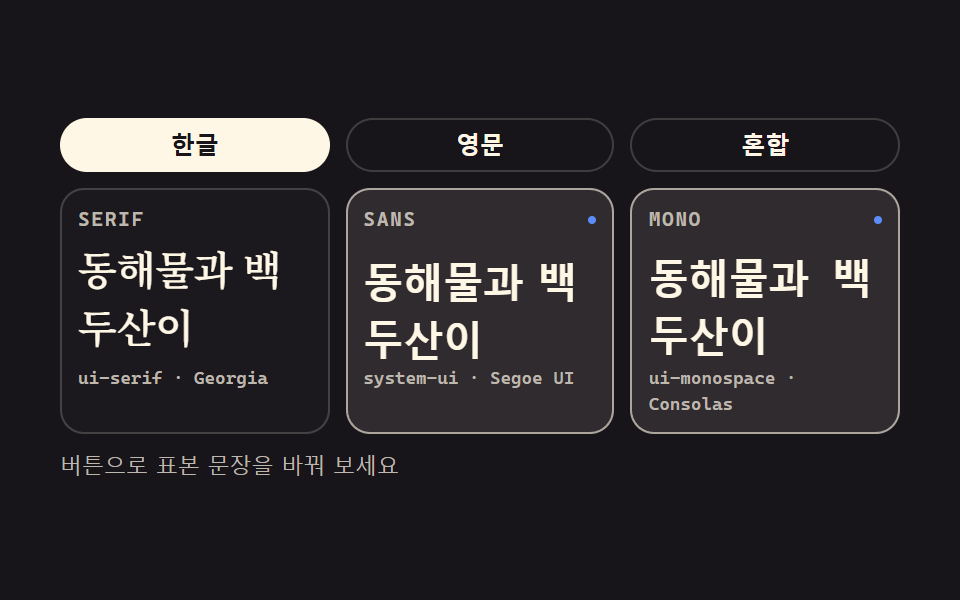 basecss typography 플레이그라운드 9종 — 웹폰트 한 줄도 없이
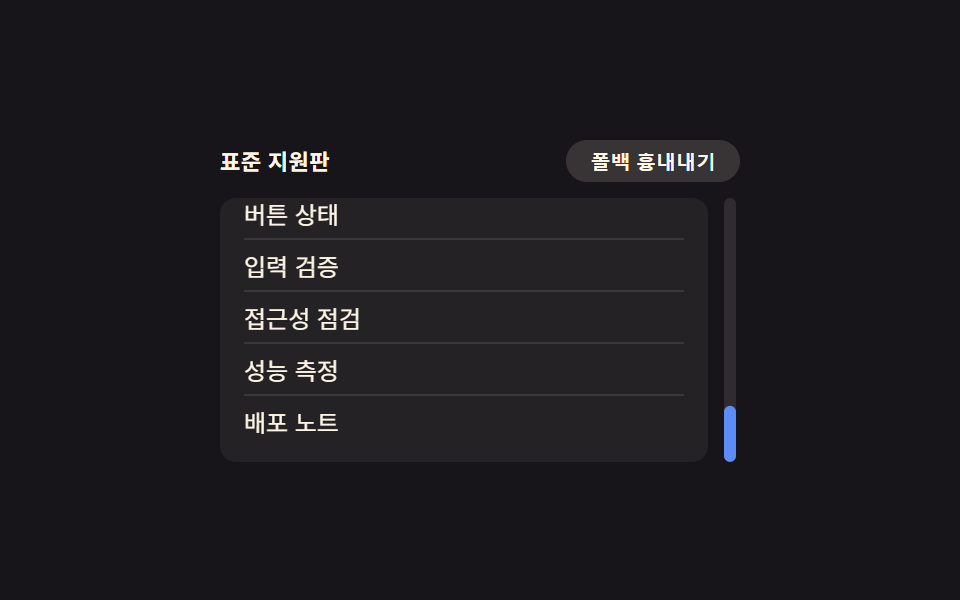 compatcss 브라우저 호환 9종 — 실제로 쓰는 폴백 트릭 모음
 피드백CSS 툴팁 말풍선 9종 — 한 줄 복붙으로
 피드백CSS 입력창 검색창 포커스 애니메이션 9종 — 한 줄 복붙으로
 갤러리포트폴리오 갤러리 UI 9종 — 드래그 정렬부터 모프 전환까지
 랜딩 섹션CSS 카드 디자인 9종 — 도시·팀원·바로가기부터
 대시보드 UI워드 클라우드 만들기 9종 — 나선 배치·모양 채우기·3D 구·실시간 투표
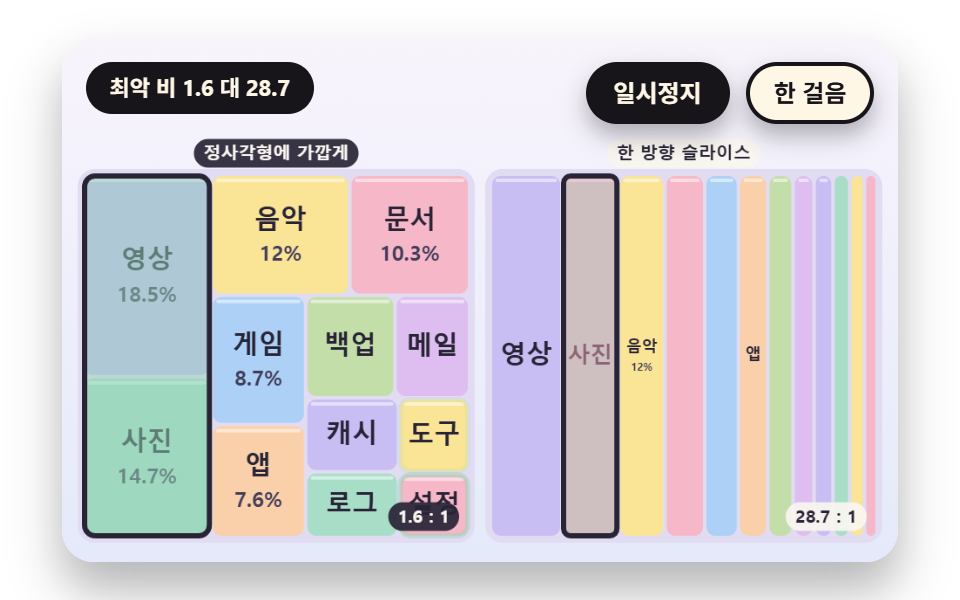 대시보드 UI트리맵 차트 9종 — 정사각형으로 쪼개는 배치부터 값 따라 흐르는 재배치까지