css typography 플레이그라운드 9종 — 웹폰트 한 줄도 없이
css typography 는 페이지의 글자 손질, 곧 어느 서체에 얼마나 굵게, 자간과 행간을 얼마나 벌리고, 크기를 어디까지 키울지를 정하는 일입니다. 이번 놀이터 아홉 개는 웹폰트 한 줄도 없이 이미 컴퓨터에 깔려 있는 서체만으로 지었고, 아래 격자에서 전부 움직입니다.
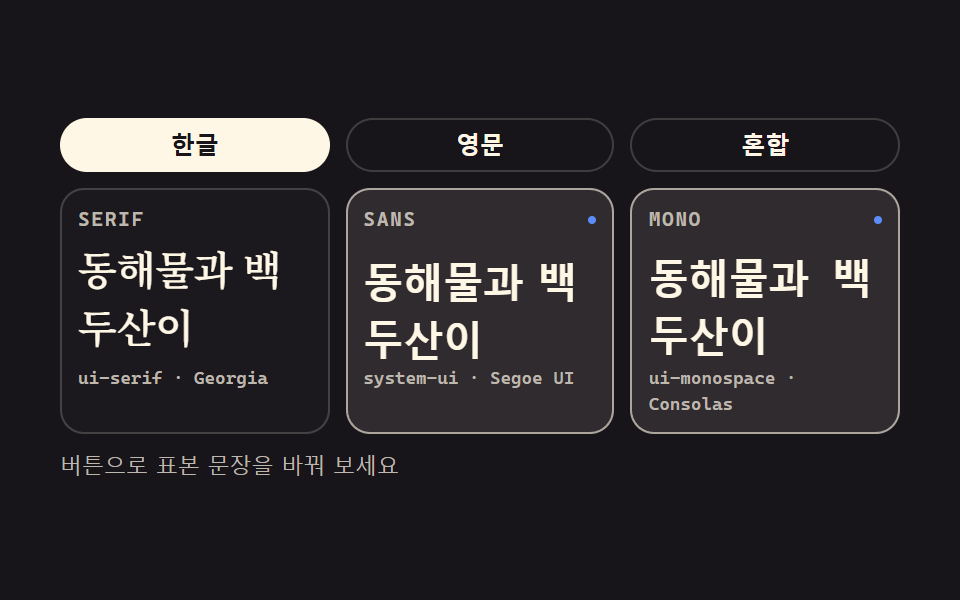 01 font-stack-compare
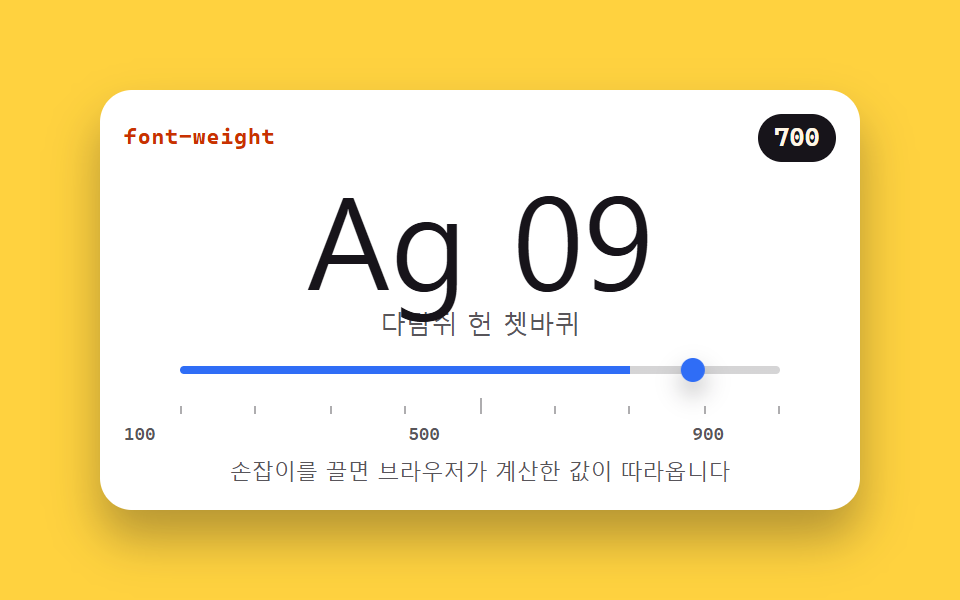 02 font-weight-slider
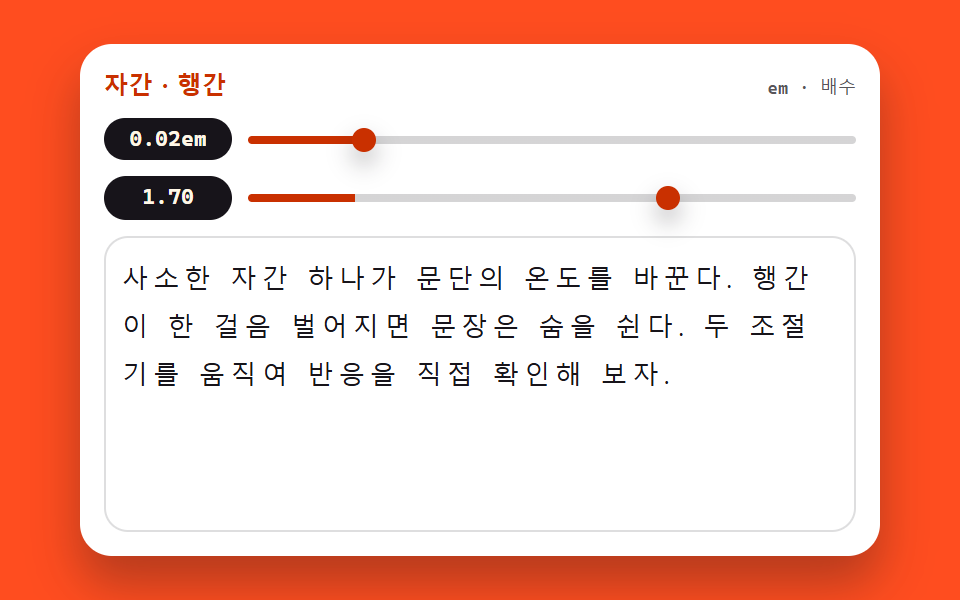 03 font-spacing-tuner
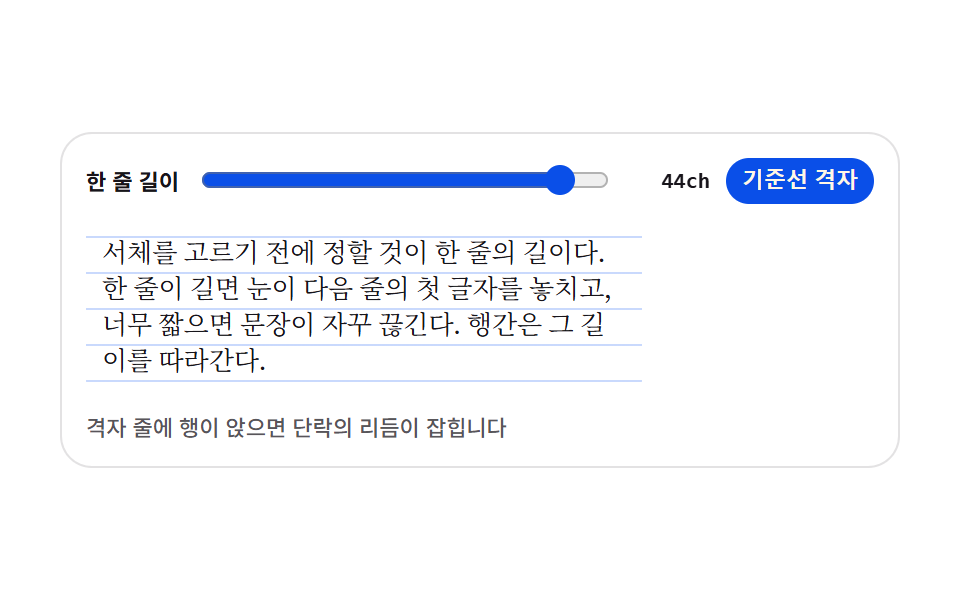 04 text-rhythm-preview
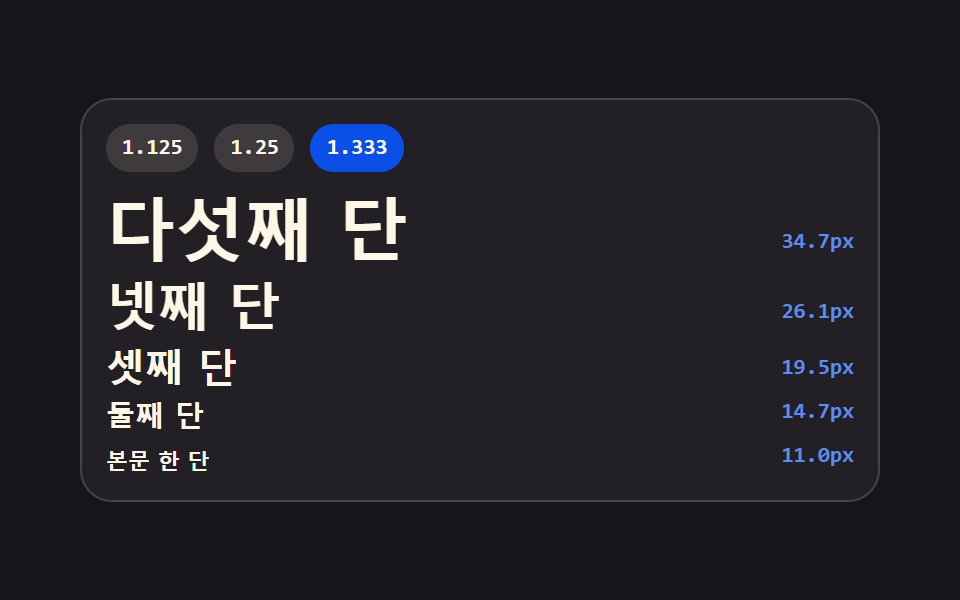 05 type-scale-ladder
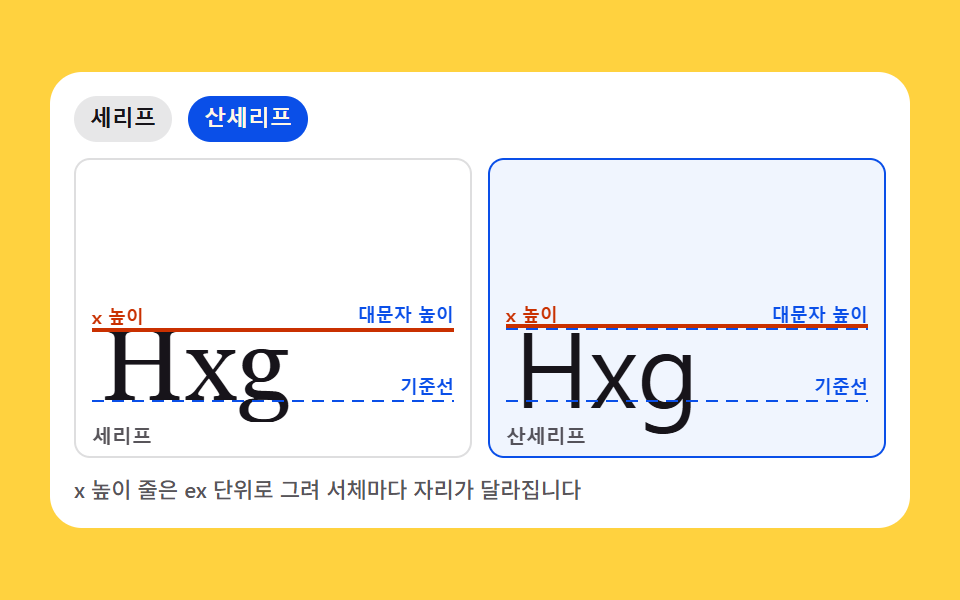 06 font-anatomy-cards
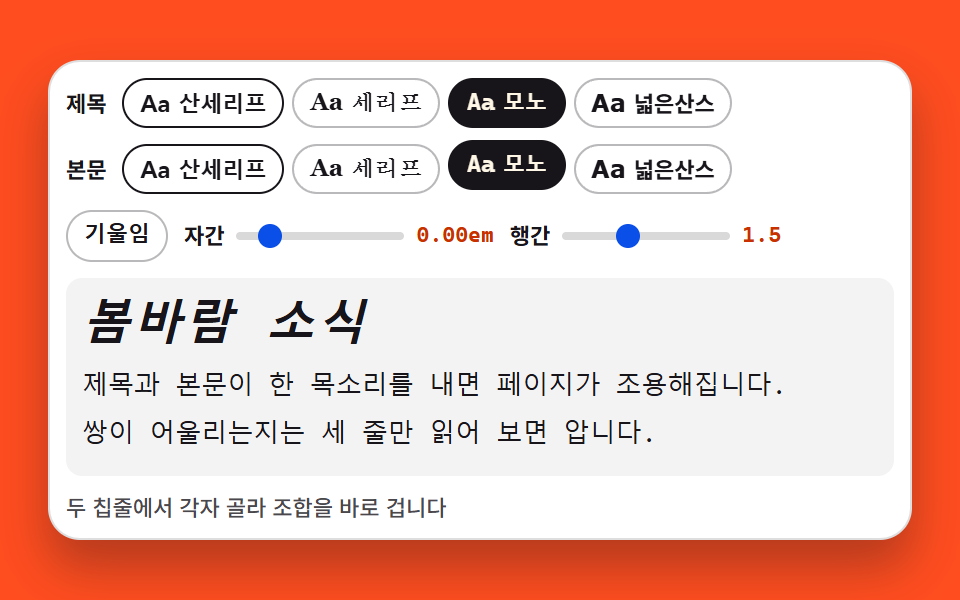 07 font-pairing-preview
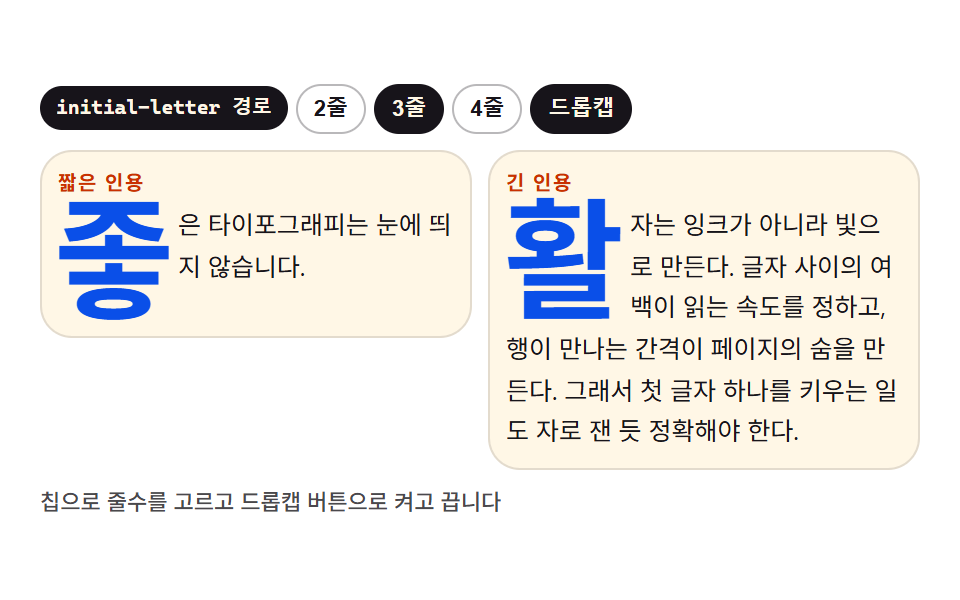 08 dropcap-quote
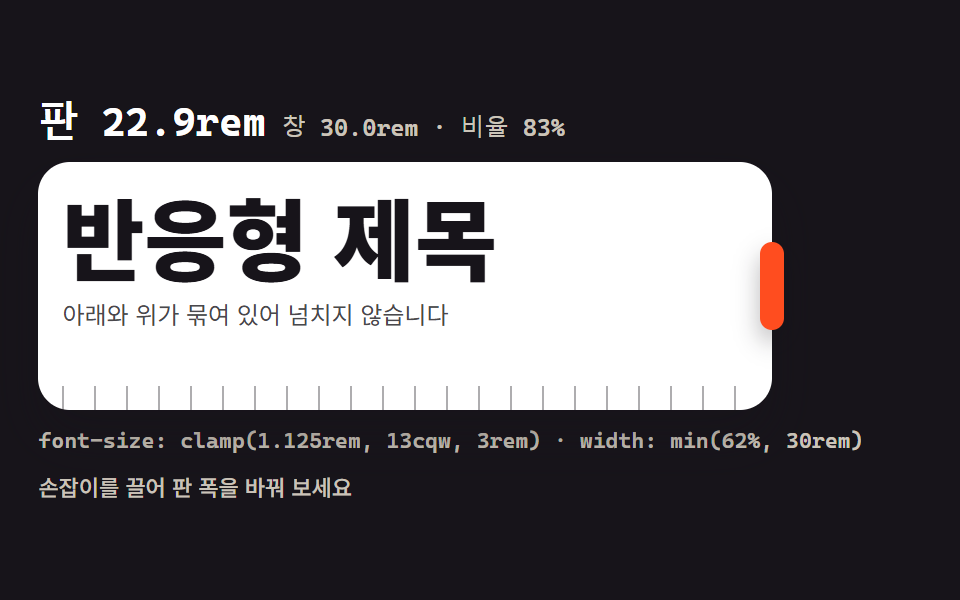 09 clamp-fluid-scale
자동 재생 · 눌러서 해당 항목으로 · 전부 한 zip
- 01 시스템 서체 스택 비교
- 02 굵기 축 슬라이더 (100~900)
- 03 자간·행간 조절기
- 04 단락 리듬 프리뷰
- 05 제목 스케일 사다리
- 06 폰트 해부 카드
- 07 제목·본문 페어링 프리뷰
- 08 드롭캡과 인용문 꾸미기
- 09 반응형 clamp() 스케일
순서는 글자 하나의 얼굴을 고르는 일에서 시작해 점점 넓은 설계로 나갑니다. 먼저 쓸 서체의 얼굴을 나란히 견주고(01), 굵기 축을 훑고(02), 자간과 행간을 두 손잡이로 만지고(03), 한 줄 길이와 바탕 격자로 리듬을 잡고(04), 단계 크기로 사다리를 쌓고(05), 서체의 뼈대를 해부하고(06), 제목과 본문의 짝을 견주고(07), 첫 글자와 인용을 꾸미고(08), 마지막에 화면 폭을 따라 크기를 흐르게 만듭니다(09). 시스템 서체만 쓴 까닭은 하나입니다 — 어느 기기에서 열어도 첫 화면부터 제 모양으로 떠야 이 실험의 값이 참이 되고, 받은 파일을 아무것도 더 내려받지 않고 열어도 그대로 돌아가기 때문입니다. 글자 자체에 움직임을 입히는 쪽이 궁금하면 키네틱 타이포그래피 랜딩과 css 텍스트 애니메이션 9종이 이 편의 이웃입니다.
01시스템 서체 스택 비교
같은 문장을 세 판에 나란히 놓고 serif·sans·mono 시스템 스택을 각각 입혀 보는, 디자인 시스템 문서의 서체 지정 페이지에 얹는 부품입니다.
<main class="stage">
<section class="fs is-demo" id="fs" aria-label="시스템 서체 스택 비교">
  <div class="fs__tabs">
    <button class="fs__tab" type="button" aria-pressed="true">한글</button>
    <button class="fs__tab" type="button" aria-pressed="false">영문</button>
    <button class="fs__tab" type="button" aria-pressed="false">혼합</button>
  </div>
  <div class="fs__grid">
    <article class="fs__pane">
      <header class="fs__head">
        <span class="fs__chip">SERIF</span>
        <span class="fs__mark" aria-hidden="true"></span>
      </header>
      <p class="fs__spec fs__spec--serif" id="specSerif">동해물과 백두산이</p>
      <p class="fs__stack">ui-serif · Georgia</p>
    </article>
    <article class="fs__pane">
      <header class="fs__head">
        <span class="fs__chip">SANS</span>
        <span class="fs__mark" aria-hidden="true"></span>
      </header>
      <p class="fs__spec fs__spec--sans" id="specSans">동해물과 백두산이</p>
      <p class="fs__stack">system-ui · Segoe UI</p>
    </article>
    <article class="fs__pane">
      <header class="fs__head">
        <span class="fs__chip">MONO</span>
        <span class="fs__mark" aria-hidden="true"></span>
      </header>
      <p class="fs__spec fs__spec--mono" id="specMono">동해물과 백두산이</p>
      <p class="fs__stack">ui-monospace · Consolas</p>
    </article>
  </div>
  <p class="fs__note">버튼으로 표본 문장을 바꿔 보세요</p>
</section>
</main>@use "../../../../site/static/demo-tokens" as *;
// 시스템 서체 스택 비교 — 같은 문장을 serif·sans·mono 세 판에 나란히 놓는다.
// 스택은 어느 OS 에나 깔려 있는 서체만 담는다: ui-serif·Georgia / system-ui·Segoe UI / ui-monospace·Consolas.
// 웹폰트는 한 줄도 없다 — 이 편의 주제 자체가 그것이다.
// 격자 미리보기(.is-demo)는 세 판을 steps(1, end) 컷으로 돌아가며 강조한다(반투명 유령 프레임 방지).
// 컷만으로는 움직인 프레임이 두세 장에 그치므로(함정표), 활성 판의 표본이 같은 창 안에서
// 살짝 떠오르는 transform 보조를 얹는다. 세 창이 2초를 꽉 채운다.
$duration: $dur-quick;
$easing: $ease-spring;
$color: $subject-blue-light;
$serif: ui-serif, Georgia, "Times New Roman", "Noto Serif KR", serif;
$sans: system-ui, -apple-system, "Segoe UI", "Noto Sans KR", sans-serif;
$mono: ui-monospace, "Cascadia Mono", Consolas, "Liberation Mono", monospace;
$line: rgba($subject-cream, .18);
$dim: #beb7ad;
@include stage($stage-ink);
.fs {
display: flex; flex-direction: column; gap: $sp-2;
box-sizing: border-box; width: min(100%, 420px);
}
// ── 표본 문장 탭 (실사용 경로). 미끄러지는 인디케이터가 없으니 flex 배분은 자유다
.fs__tabs { display: flex; gap: $sp-2; }
.fs__tab {
flex: 1 1 0; appearance: none; cursor: pointer;
padding: $sp-1 $sp-2; border: 1px solid $line; border-radius: $r-pill;
background: transparent; color: $subject-cream;
font-family: $sans; font-weight: 700; font-size: 12px; line-height: 1.4;
transition: background-color $duration $easing, color $duration $easing, border-color $duration $easing;
}
.fs__tab[aria-pressed="true"] {
border-color: $subject-cream; background: $subject-cream; color: $subject-ink;
}
.fs__tab:focus-visible { outline: 2px solid $color; outline-offset: 2px; }
// ── 세 판
.fs__grid { display: grid; grid-template-columns: repeat(3, 1fr); gap: $sp-2; }
.fs__pane {
display: flex; flex-direction: column; gap: $sp-1;
box-sizing: border-box; padding: $sp-2;
border: 1px solid $line; border-radius: $r-control;
background: rgba($subject-cream, .02);
}
.fs__head { display: flex; align-items: center; justify-content: space-between; }
.fs__chip {
font-family: $mono; font-weight: 700; font-size: 10px; line-height: 1.4;
letter-spacing: .08em; color: $dim;
}
// 활성 판 머리의 점 — 미리보기 루프에서만 보인다(정적 경로에서는 숨겨도 화면이 성립한다)
.fs__mark {
width: $sp-1; height: $sp-1; border-radius: 50%; background: $color;
opacity: 0;
}
// 표본. 세 판이 각자의 시스템 스택을 입는다 — 이 세 선언이 이 데모의 본체다
.fs__spec {
margin: 0; color: $subject-cream;
font-size: clamp(13px, 4.6vw, 20px); font-weight: 600; line-height: 1.45;
}
.fs__spec--serif { font-family: $serif; }
.fs__spec--sans { font-family: $sans; }
.fs__spec--mono { font-family: $mono; }
.fs__stack {
margin: 0; color: $dim;
font-family: $mono; font-weight: 500; font-size: 9px; line-height: 1.4;
}
.fs__note {
margin: 0; color: $dim;
font-family: $sans; font-weight: 500; font-size: 11px; line-height: 1.4;
}
// ── 격자 미리보기 루프 (2초). 세 판이 돌아가며 한 칸(약 33%)씩 강조 창을 받는다.
// 강조 교체는 steps(1, end) 컷, 표본의 떠오름은 같은 창 안의 부드러운 transform —
// 컷 + transform 보조 조합(함정표: 컷만 쓰면 움직인 프레임이 2~3장에 그친다).
.fs.is-demo .fs__pane {
animation-name: fsGlow;
animation-duration: $dur-loop;
animation-timing-function: steps(1, end);
animation-iteration-count: infinite;
animation-fill-mode: backwards;
}
.fs.is-demo .fs__pane:nth-child(2) { animation-delay: calc($dur-loop / 3); }
.fs.is-demo .fs__pane:nth-child(3) { animation-delay: calc($dur-loop * 2 / 3); }
.fs.is-demo .fs__spec {
animation-name: fsRise;
animation-duration: $dur-loop;
animation-timing-function: $easing;
animation-iteration-count: infinite;
animation-fill-mode: backwards;
}
.fs.is-demo .fs__pane:nth-child(2) .fs__spec { animation-delay: calc($dur-loop / 3); }
.fs.is-demo .fs__pane:nth-child(3) .fs__spec { animation-delay: calc($dur-loop * 2 / 3); }
.fs.is-demo .fs__mark {
animation-name: fsDot;
animation-duration: $dur-loop;
animation-timing-function: steps(1, end);
animation-iteration-count: infinite;
animation-fill-mode: backwards;
}
.fs.is-demo .fs__pane:nth-child(2) .fs__mark { animation-delay: calc($dur-loop / 3); }
.fs.is-demo .fs__pane:nth-child(3) .fs__mark { animation-delay: calc($dur-loop * 2 / 3); }
// steps(1, end) 는 구간 끝에서만 값이 바뀐다 — 0% 값이 한 창(33%) 내내 보이고 33% 에 내려앉는다.
// 경계 복귀는 루프 시작(0%)에서만 일어나 유령 프레임이 없다.
@keyframes fsGlow {
0% { background: rgba($subject-cream, .10); border-color: rgba($subject-cream, .60); }
33%, 100% { background: rgba($subject-cream, .02); border-color: rgba($subject-cream, .18); }
}
@keyframes fsRise {
0% { transform: translateY(5px); }
33% { transform: translateY(-1px); }
39%, 100% { transform: translateY(5px); }
}
@keyframes fsDot {
0% { opacity: 1; transform: scale(1); }
33%, 100% { opacity: 0; transform: scale(.4); }
}
// ── 좁은 화면: 글자와 여백을 내려 무대 안에 들어오게 한다 (올리지 않는다)
@media (max-width: 340px) {
.fs { gap: $sp-1; }
.fs__tabs { gap: $sp-1; }
.fs__tab { padding: $sp-1; font-size: 11px; }
.fs__pane { gap: 0; }
.fs__spec { font-size: 13px; line-height: 1.4; }
.fs__stack { font-size: 9px; }
.fs__note { font-size: 10px; }
}
@media (prefers-reduced-motion: reduce) {
.fs.is-demo .fs__pane,
.fs.is-demo .fs__spec,
.fs.is-demo .fs__mark {
animation: none !important;
transform: none !important;
opacity: 0 !important;
background: rgba($subject-cream, .02) !important;
border-color: rgba($subject-cream, .18) !important;
}
}html, body {
margin: 0;
overflow: hidden;
}
.stage {
box-sizing: border-box;
min-height: 100vh;
display: grid;
place-items: center;
margin: 0;
background: #17141a;
font-family: -apple-system, "Segoe UI", "Noto Sans KR", sans-serif;
padding: clamp(8px, 4vw, 24px);
}
.fs {
display: flex;
flex-direction: column;
gap: 8px;
box-sizing: border-box;
width: min(100%, 420px);
}
.fs__tabs {
display: flex;
gap: 8px;
}
.fs__tab {
flex: 1 1 0;
appearance: none;
cursor: pointer;
padding: 4px 8px;
border: 1px solid rgba(255, 247, 230, 0.18);
border-radius: 999px;
background: transparent;
color: #fff7e6;
font-family: system-ui, -apple-system, "Segoe UI", "Noto Sans KR", sans-serif;
font-weight: 700;
font-size: 12px;
line-height: 1.4;
transition: background-color 220ms cubic-bezier(0.2, 0.8, 0.2, 1), color 220ms cubic-bezier(0.2, 0.8, 0.2, 1), border-color 220ms cubic-bezier(0.2, 0.8, 0.2, 1);
}
.fs__tab[aria-pressed=true] {
border-color: #fff7e6;
background: #fff7e6;
color: #17141a;
}
.fs__tab:focus-visible {
outline: 2px solid #5b8cf8;
outline-offset: 2px;
}
.fs__grid {
display: grid;
grid-template-columns: repeat(3, 1fr);
gap: 8px;
}
.fs__pane {
display: flex;
flex-direction: column;
gap: 4px;
box-sizing: border-box;
padding: 8px;
border: 1px solid rgba(255, 247, 230, 0.18);
border-radius: 12px;
background: rgba(255, 247, 230, 0.02);
}
.fs__head {
display: flex;
align-items: center;
justify-content: space-between;
}
.fs__chip {
font-family: ui-monospace, "Cascadia Mono", Consolas, "Liberation Mono", monospace;
font-weight: 700;
font-size: 10px;
line-height: 1.4;
letter-spacing: 0.08em;
color: #beb7ad;
}
.fs__mark {
width: 4px;
height: 4px;
border-radius: 50%;
background: #5b8cf8;
opacity: 0;
}
.fs__spec {
margin: 0;
color: #fff7e6;
font-size: clamp(13px, 4.6vw, 20px);
font-weight: 600;
line-height: 1.45;
}
.fs__spec--serif {
font-family: ui-serif, Georgia, "Times New Roman", "Noto Serif KR", serif;
}
.fs__spec--sans {
font-family: system-ui, -apple-system, "Segoe UI", "Noto Sans KR", sans-serif;
}
.fs__spec--mono {
font-family: ui-monospace, "Cascadia Mono", Consolas, "Liberation Mono", monospace;
}
.fs__stack {
margin: 0;
color: #beb7ad;
font-family: ui-monospace, "Cascadia Mono", Consolas, "Liberation Mono", monospace;
font-weight: 500;
font-size: 9px;
line-height: 1.4;
}
.fs__note {
margin: 0;
color: #beb7ad;
font-family: system-ui, -apple-system, "Segoe UI", "Noto Sans KR", sans-serif;
font-weight: 500;
font-size: 11px;
line-height: 1.4;
}
.fs.is-demo .fs__pane {
animation-name: fsGlow;
animation-duration: 2s;
animation-timing-function: steps(1, end);
animation-iteration-count: infinite;
animation-fill-mode: backwards;
}
.fs.is-demo .fs__pane:nth-child(2) {
animation-delay: 0.6666666667s;
}
.fs.is-demo .fs__pane:nth-child(3) {
animation-delay: 1.3333333333s;
}
.fs.is-demo .fs__spec {
animation-name: fsRise;
animation-duration: 2s;
animation-timing-function: cubic-bezier(0.2, 0.8, 0.2, 1);
animation-iteration-count: infinite;
animation-fill-mode: backwards;
}
.fs.is-demo .fs__pane:nth-child(2) .fs__spec {
animation-delay: 0.6666666667s;
}
.fs.is-demo .fs__pane:nth-child(3) .fs__spec {
animation-delay: 1.3333333333s;
}
.fs.is-demo .fs__mark {
animation-name: fsDot;
animation-duration: 2s;
animation-timing-function: steps(1, end);
animation-iteration-count: infinite;
animation-fill-mode: backwards;
}
.fs.is-demo .fs__pane:nth-child(2) .fs__mark {
animation-delay: 0.6666666667s;
}
.fs.is-demo .fs__pane:nth-child(3) .fs__mark {
animation-delay: 1.3333333333s;
}
@keyframes fsGlow {
0% {
background: rgba(255, 247, 230, 0.1);
border-color: rgba(255, 247, 230, 0.6);
}
33%, 100% {
background: rgba(255, 247, 230, 0.02);
border-color: rgba(255, 247, 230, 0.18);
}
}
@keyframes fsRise {
0% {
transform: translateY(5px);
}
33% {
transform: translateY(-1px);
}
39%, 100% {
transform: translateY(5px);
}
}
@keyframes fsDot {
0% {
opacity: 1;
transform: scale(1);
}
33%, 100% {
opacity: 0;
transform: scale(0.4);
}
}
@media (max-width: 340px) {
.fs {
gap: 4px;
}
.fs__tabs {
gap: 4px;
}
.fs__tab {
padding: 4px;
font-size: 11px;
}
.fs__pane {
gap: 0;
}
.fs__spec {
font-size: 13px;
line-height: 1.4;
}
.fs__stack {
font-size: 9px;
}
.fs__note {
font-size: 10px;
}
}
@media (prefers-reduced-motion: reduce) {
.fs.is-demo .fs__pane,
.fs.is-demo .fs__spec,
.fs.is-demo .fs__mark {
animation: none !important;
transform: none !important;
opacity: 0 !important;
background: rgba(255, 247, 230, 0.02) !important;
border-color: rgba(255, 247, 230, 0.18) !important;
}
}var fs = document.getElementById('fs');
var tabs = Array.prototype.slice.call(document.querySelectorAll('.fs__tab'));
var specs = Array.prototype.slice.call(document.querySelectorAll('.fs__spec'));
var SAMPLES = ['동해물과 백두산이', 'Hello Type 0123', 'CSS 타이포 2026'];
// 탭을 누르면 세 판의 표본 문장이 한꺼번에 갈아 입는다 — 미리보기 루프는 여기서 뗀다
tabs.forEach(function (tab, i) {
tab.addEventListener('click', function () {
fs.classList.remove('is-demo');
tabs.forEach(function (t) { t.setAttribute('aria-pressed', String(t === tab)); });
specs.forEach(function (spec) { spec.textContent = SAMPLES[i]; });
});
});
fs.addEventListener('pointerdown', function () { fs.classList.remove('is-demo'); });// FontStackCompare — vanilla 판(run/074/demo/01-font-stack-compare/index.html) 의 React 포트.
// 같은 문장을 serif·sans·mono 세 판에 나란히 놓고 탭으로 표본 문장을 바꾼다.
// 스택 목록과 미리보기 루프의 키프레임은 vanilla 와 같은 글자다 (값을 다시 타이핑하지 않는다).
import { useState } from "react";
import type { CSSProperties } from "react";
import styles from "./FontStackCompare.module.scss";
export type FontStackCompareProps = {
duration?: number;
easing?: string;
color?: string;
samples?: string[];
};
type Vars = CSSProperties & { "--duration"?: string; "--easing"?: string; "--color"?: string };
const TAB_LABELS = ["한글", "영문", "혼합"];
const DEFAULT_SAMPLES = ["동해물과 백두산이", "Hello Type 0123", "CSS 타이포 2026"];
const NOTE = "버튼으로 표본 문장을 바꿔 보세요";
const ARIA_LABEL = "시스템 서체 스택 비교";
const PANES = [
{ chip: "SERIF", stack: "ui-serif · Georgia", spec: "serif" },
{ chip: "SANS", stack: "system-ui · Segoe UI", spec: "sans" },
{ chip: "MONO", stack: "ui-monospace · Consolas", spec: "mono" },
];
export default function FontStackCompare(props: FontStackCompareProps) {
const duration = props.duration ?? 220;
const easing = props.easing ?? "cubic-bezier(.2, .8, .2, 1)";
const color = props.color ?? "#5b8cf8";
const samples = props.samples ?? DEFAULT_SAMPLES;
const [active, setActive] = useState<number>(0);
const [preview, setPreview] = useState<boolean>(true);
const vars: Vars = { "--duration": duration + "ms", "--easing": easing, "--color": color };
return (
<main className={styles.stage}>
<section
className={styles.root + (preview ? " " + styles.isDemo : "")}
style={vars}
aria-label={ARIA_LABEL}
onPointerDown={() => setPreview(false)}
>
<div className={styles.tabs}>
{TAB_LABELS.map((label, i) => (
<button
key={label}
type="button"
className={styles.tab}
aria-pressed={String(i === active)}
onClick={() => {
setPreview(false);
setActive(i);
}}
>
{label}
</button>
))}
</div>
<div className={styles.grid}>
{PANES.map((pane) => (
<article key={pane.chip} className={styles.pane}>
<header className={styles.head}>
<span className={styles.chip}>{pane.chip}</span>
<span className={styles.mark} aria-hidden="true"></span>
</header>
<p className={styles.spec + " " + styles["spec--" + pane.spec]}>{samples[active]}</p>
<p className={styles.stack}>{pane.stack}</p>
</article>
))}
</div>
<p className={styles.note}>{NOTE}</p>
</section>
</main>
);
}01 · 시스템 서체 스택 비교 — 측정 누적면적 23.762% · 움직인 프레임 14/23GODRICH 원작 · zip 에 SCSS·React 포함 · 비밀번호 보기
세 판이 실제로 입은 스택
$serif: ui-serif, Georgia, "Times New Roman", "Noto Serif KR", serif;
$sans: system-ui, -apple-system, "Segoe UI", "Noto Sans KR", sans-serif;
$mono: ui-monospace, "Cascadia Mono", Consolas, "Liberation Mono", monospace;

.fs__spec {
  margin: 0; color: $subject-cream;
  font-size: clamp(13px, 4.6vw, 20px); font-weight: 600; line-height: 1.45;
}
.fs__spec--serif { font-family: $serif; }
.fs__spec--sans { font-family: $sans; }
.fs__spec--mono { font-family: $mono; }
세 판의 font-family 계산값은 각각 ui-serif 와 Georgia 짝, system-ui 와 Segoe UI 짝, ui-monospace 와 Consolas 짝으로 풀렸습니다.
탭 한 번에 표본 세 벌이 갈아 입는다
var SAMPLES = ['동해물과 백두산이', 'Hello Type 0123', 'CSS 타이포 2026'];
// 탭을 누르면 세 판의 표본 문장이 한꺼번에 갈아 입는다 — 미리보기 루프는 여기서 뗀다
tabs.forEach(function (tab, i) {
  tab.addEventListener('click', function () {
    fs.classList.remove('is-demo');
    tabs.forEach(function (t) { t.setAttribute('aria-pressed', String(t === tab)); });
    specs.forEach(function (spec) { spec.textContent = SAMPLES[i]; });
  });
});
영문 탭을 누르면 세 판의 문장이 한꺼번에 Hello Type 0123 으로 바뀌고, 누른 탭의 aria-pressed 만 true 로 남았습니다.
02굵기 축 슬라이더 (100~900)
슬라이더를 끌면 font-weight 가 100 에서 900 까지 움직이고, 화면에는 브라우저가 계산한 값이 따라오는, 도구의 글꼴 설정 패널에 얹는 부품입니다.
<main class="stage">
<section class="wt is-demo" id="wt" aria-label="굵기 축 슬라이더">
  <header class="wt__bar">
    <span class="wt__name">font-weight</span>
    <span class="wt__out" id="wtOut">700</span>
  </header>
  <div class="wt__spec">
    <p class="wt__big" id="wtBig">Ag 09</p>
    <p class="wt__hangul" id="wtHangul">다람쥐 헌 쳇바퀴</p>
  </div>
  <input class="wt__range" id="wtRange" type="range" min="100" max="900" step="100" value="700"
         aria-label="굵기 슬라이더" aria-valuemin="100" aria-valuemax="900" aria-valuenow="700">
  <div class="wt__ruler" aria-hidden="true">
    <i></i><i></i><i></i><i></i><i></i><i></i><i></i><i></i><i></i>
  </div>
  <p class="wt__scale"><span>100</span><span>500</span><span>900</span></p>
  <p class="wt__note">손잡이를 끌면 브라우저가 계산한 값이 따라옵니다</p>
</section>
</main>
@use "../../../../site/static/demo-tokens" as *;
// 굵기 축 슬라이더 — font-weight 를 100 에서 900 까지 움직인다.
// 화면 숫자는 브라우저가 실제로 계산한 값(getComputedStyle)을 다시 읽은 것이다.
// 가변 폰트 축은 font-variation-settings 'wght' 를 함께 건다 — 한쪽만 바꾸면
// 가변 서체에서는 다른 쪽 선언이 렌더링을 이긴다. 그래서 미리보기 루프의 키프레임도
// 두 속성을 같이 움직인다. latin(Ag 09)은 가변 축을 따라 부드럽게 움직이고
// 한글은 가변 축이 없는 시스템 서체로 떨어지며 가까운 굵기에 붙는다 — 그 차이가 이 데모의 이야기다.
$duration: $dur-quick;
$easing: $ease-spring;
$color: $subject-blue;
$sans: system-ui, -apple-system, "Segoe UI", "Noto Sans KR", sans-serif;
$mono: ui-monospace, "Cascadia Mono", Consolas, "Liberation Mono", monospace;
@include stage($stage-yellow);
.wt {
display: flex; flex-direction: column; gap: $sp-1;
box-sizing: border-box; width: min(100%, 380px); padding: $sp-3;
border-radius: $r-card; background: $stage-paper;
box-shadow: $shadow-raised;
}
// ── 속성 이름과 계산값 배지
.wt__bar { display: flex; align-items: center; justify-content: space-between; }
.wt__name {
color: $subject-orange-deep;
font-family: $mono; font-weight: 700; font-size: 11px; line-height: 1.4; letter-spacing: .04em;
}
.wt__out {
padding: $sp-1 $sp-2; border-radius: $r-pill;
background: $subject-ink; color: $subject-cream;
font-family: $mono; font-weight: 700; font-size: 13px; line-height: 1.2;
}
// ── 표본. 위 줄은 가변 축을 타는 latin, 아래 줄은 가까운 굵기에 붙는 한글
.wt__spec { margin: 0; display: flex; flex-direction: column; align-items: center; }
.wt__big {
margin: 0; color: $subject-ink;
font-family: $sans; font-weight: 700;
font-size: clamp(38px, 15vw, 64px); line-height: 1.05;
font-variation-settings: 'wght' var(--w, 700);
}
.wt__hangul {
margin: 0; color: rgba($subject-ink, .72);
font-family: $sans; font-weight: 700; font-size: 13px; line-height: 1.5;
font-variation-settings: 'wght' var(--w, 700);
}
// ── 슬라이더. 트랙 채움은 --fill(%) 로, 손잡이 위치는 브라우저가 맡는다
.wt__range {
--fill: 75%;
--travel: 288px;
appearance: none; -webkit-appearance: none;
display: block; width: 300px; max-width: 100%; margin: 0 auto;
height: 20px; background: transparent; cursor: pointer;
}
.wt__range::-webkit-slider-runnable-track {
height: 4px; border-radius: $r-pill;
background: linear-gradient(90deg, $color 0 var(--fill), rgba($subject-ink, .18) var(--fill) 100%);
}
.wt__range::-webkit-slider-thumb {
-webkit-appearance: none; appearance: none;
width: 12px; height: 12px; margin-top: -4px;
border: 0; border-radius: 50%; background: $color;
box-shadow: $shadow-press;
}
.wt__range::-moz-range-track {
height: 4px; border-radius: $r-pill; background: rgba($subject-ink, .18);
}
.wt__range::-moz-range-thumb {
width: 12px; height: 12px; border: 0; border-radius: 50%; background: $color;
}
.wt__range:focus-visible { outline: 2px solid $color; outline-offset: 4px; }
// ── 눈금자 9칸(100 부터 900 까지 100 간격)과 실측 라벨
.wt__ruler {
display: flex; justify-content: space-between; align-items: flex-end;
width: 300px; max-width: 100%; margin: 0 auto; padding: 0 $sp-1;
}
.wt__ruler i { width: 1px; height: 4px; background: rgba($subject-ink, .35); }
.wt__ruler i:nth-child(5) { height: 8px; }
.wt__scale {
display: flex; justify-content: space-between;
width: 300px; max-width: 100%; margin: 0;
color: rgba($subject-ink, .72);
font-family: $mono; font-weight: 500; font-size: 9px; line-height: 1.4;
}
.wt__note {
margin: 0; color: rgba($subject-ink, .72); text-align: center;
font-family: $sans; font-weight: 500; font-size: 11px; line-height: 1.4;
}
// ── 격자 미리보기 루프 (2초). font-weight 는 애니메이션 가능한 속성이다 —
// 100 에서 900 까지 갔다가 되돌아온다. 손잡이도 같은 리듬으로 translateX 하고
// 계산값 배지는 정점에서 한 번 부풀어 "값이 따라온다" 를 알린다(자기 중심).
.wt.is-demo .wt__big,
.wt.is-demo .wt__hangul {
animation-name: wtSweep;
animation-duration: $dur-loop;
animation-timing-function: ease-in-out;
animation-iteration-count: infinite;
}
.wt.is-demo .wt__out {
animation-name: wtPulse;
animation-duration: $dur-loop;
animation-timing-function: $easing;
animation-iteration-count: infinite;
transform-origin: 50% 50%;
}
.wt.is-demo .wt__range::-webkit-slider-thumb {
animation-name: wtThumb;
animation-duration: $dur-loop;
animation-timing-function: ease-in-out;
animation-iteration-count: infinite;
}
@keyframes wtSweep {
0% { font-weight: 100; font-variation-settings: 'wght' 100; }
45% { font-weight: 900; font-variation-settings: 'wght' 900; }
90%, 100% { font-weight: 100; font-variation-settings: 'wght' 100; }
}
@keyframes wtThumb {
0% { transform: translateX(0); }
45% { transform: translateX(var(--travel, 288px)); }
90%, 100% { transform: translateX(0); }
}
@keyframes wtPulse {
0%, 45% { transform: scale(1); }
50% { transform: scale(1.12); }
56%, 100% { transform: scale(1); }
}
// ── 좁은 화면: 표본과 눈금을 내린다 (올리지 않는다)
@media (max-width: 340px) {
.wt { padding: $sp-2; gap: $sp-1; }
.wt__big { font-size: 40px; }
.wt__hangul { font-size: 11px; }
.wt__range, .wt__ruler, .wt__scale { width: 240px; }
.wt__range { --travel: 228px; }
.wt__note { font-size: 10px; }
}
@media (prefers-reduced-motion: reduce) {
.wt.is-demo .wt__big,
.wt.is-demo .wt__hangul,
.wt.is-demo .wt__out,
.wt.is-demo .wt__range::-webkit-slider-thumb {
animation: none !important;
transform: none !important;
}
}html, body {
margin: 0;
overflow: hidden;
}
.stage {
box-sizing: border-box;
min-height: 100vh;
display: grid;
place-items: center;
margin: 0;
background: #ffd23f;
font-family: -apple-system, "Segoe UI", "Noto Sans KR", sans-serif;
padding: clamp(8px, 4vw, 24px);
}
.wt {
display: flex;
flex-direction: column;
gap: 4px;
box-sizing: border-box;
width: min(100%, 380px);
padding: 12px;
border-radius: 16px;
background: #ffffff;
box-shadow: 0 14px 24px rgba(23, 20, 26, 0.32);
}
.wt__bar {
display: flex;
align-items: center;
justify-content: space-between;
}
.wt__name {
color: #c93000;
font-family: ui-monospace, "Cascadia Mono", Consolas, "Liberation Mono", monospace;
font-weight: 700;
font-size: 11px;
line-height: 1.4;
letter-spacing: 0.04em;
}
.wt__out {
padding: 4px 8px;
border-radius: 999px;
background: #17141a;
color: #fff7e6;
font-family: ui-monospace, "Cascadia Mono", Consolas, "Liberation Mono", monospace;
font-weight: 700;
font-size: 13px;
line-height: 1.2;
}
.wt__spec {
margin: 0;
display: flex;
flex-direction: column;
align-items: center;
}
.wt__big {
margin: 0;
color: #17141a;
font-family: system-ui, -apple-system, "Segoe UI", "Noto Sans KR", sans-serif;
font-weight: 700;
font-size: clamp(38px, 15vw, 64px);
line-height: 1.05;
font-variation-settings: "wght" var(--w, 700);
}
.wt__hangul {
margin: 0;
color: rgba(23, 20, 26, 0.72);
font-family: system-ui, -apple-system, "Segoe UI", "Noto Sans KR", sans-serif;
font-weight: 700;
font-size: 13px;
line-height: 1.5;
font-variation-settings: "wght" var(--w, 700);
}
.wt__range {
--fill: 75%;
--travel: 288px;
appearance: none;
-webkit-appearance: none;
display: block;
width: 300px;
max-width: 100%;
margin: 0 auto;
height: 20px;
background: transparent;
cursor: pointer;
}
.wt__range::-webkit-slider-runnable-track {
height: 4px;
border-radius: 999px;
background: linear-gradient(90deg, #2f6df6 0 var(--fill), rgba(23, 20, 26, 0.18) var(--fill) 100%);
}
.wt__range::-webkit-slider-thumb {
-webkit-appearance: none;
appearance: none;
width: 12px;
height: 12px;
margin-top: -4px;
border: 0;
border-radius: 50%;
background: #2f6df6;
box-shadow: 0 6px 12px rgba(23, 20, 26, 0.32);
}
.wt__range::-moz-range-track {
height: 4px;
border-radius: 999px;
background: rgba(23, 20, 26, 0.18);
}
.wt__range::-moz-range-thumb {
width: 12px;
height: 12px;
border: 0;
border-radius: 50%;
background: #2f6df6;
}
.wt__range:focus-visible {
outline: 2px solid #2f6df6;
outline-offset: 4px;
}
.wt__ruler {
display: flex;
justify-content: space-between;
align-items: flex-end;
width: 300px;
max-width: 100%;
margin: 0 auto;
padding: 0 4px;
}
.wt__ruler i {
width: 1px;
height: 4px;
background: rgba(23, 20, 26, 0.35);
}
.wt__ruler i:nth-child(5) {
height: 8px;
}
.wt__scale {
display: flex;
justify-content: space-between;
width: 300px;
max-width: 100%;
margin: 0;
color: rgba(23, 20, 26, 0.72);
font-family: ui-monospace, "Cascadia Mono", Consolas, "Liberation Mono", monospace;
font-weight: 500;
font-size: 9px;
line-height: 1.4;
}
.wt__note {
margin: 0;
color: rgba(23, 20, 26, 0.72);
text-align: center;
font-family: system-ui, -apple-system, "Segoe UI", "Noto Sans KR", sans-serif;
font-weight: 500;
font-size: 11px;
line-height: 1.4;
}
.wt.is-demo .wt__big,
.wt.is-demo .wt__hangul {
animation-name: wtSweep;
animation-duration: 2s;
animation-timing-function: ease-in-out;
animation-iteration-count: infinite;
}
.wt.is-demo .wt__out {
animation-name: wtPulse;
animation-duration: 2s;
animation-timing-function: cubic-bezier(0.2, 0.8, 0.2, 1);
animation-iteration-count: infinite;
transform-origin: 50% 50%;
}
.wt.is-demo .wt__range::-webkit-slider-thumb {
animation-name: wtThumb;
animation-duration: 2s;
animation-timing-function: ease-in-out;
animation-iteration-count: infinite;
}
@keyframes wtSweep {
0% {
font-weight: 100;
font-variation-settings: "wght" 100;
}
45% {
font-weight: 900;
font-variation-settings: "wght" 900;
}
90%, 100% {
font-weight: 100;
font-variation-settings: "wght" 100;
}
}
@keyframes wtThumb {
0% {
transform: translateX(0);
}
45% {
transform: translateX(var(--travel, 288px));
}
90%, 100% {
transform: translateX(0);
}
}
@keyframes wtPulse {
0%, 45% {
transform: scale(1);
}
50% {
transform: scale(1.12);
}
56%, 100% {
transform: scale(1);
}
}
@media (max-width: 340px) {
.wt {
padding: 8px;
gap: 4px;
}
.wt__big {
font-size: 40px;
}
.wt__hangul {
font-size: 11px;
}
.wt__range, .wt__ruler, .wt__scale {
width: 240px;
}
.wt__range {
--travel: 228px;
}
.wt__note {
font-size: 10px;
}
}
@media (prefers-reduced-motion: reduce) {
.wt.is-demo .wt__big,
.wt.is-demo .wt__hangul,
.wt.is-demo .wt__out,
.wt.is-demo .wt__range::-webkit-slider-thumb {
animation: none !important;
transform: none !important;
}
}var wt = document.getElementById('wt');
var big = document.getElementById('wtBig');
var hangul = document.getElementById('wtHangul');
var range = document.getElementById('wtRange');
var out = document.getElementById('wtOut');
// oninput — 손잡이가 붙어 있는 동안 매번 따라온다.
// 화면 숫자는 작성값을 echo 하는 게 아니라 getComputedStyle 로 브라우저가 실제로 계산한
// font-weight 를 다시 읽은 값이다. 가변 축은 font-variation-settings 'wght' 를 함께 건다 —
// 한쪽만 바꾸면 가변 서체에서는 나머지 쪽 선언이 렌더링을 이긴다.
range.oninput = function () {
  wt.classList.remove('is-demo');
  var v = range.value;
  var pct = (v - 100) / 8;
  big.style.fontWeight = v;
  big.style.setProperty('--w', v);
  hangul.style.fontWeight = v;
  hangul.style.setProperty('--w', v);
  range.style.setProperty('--fill', pct + '%');
  range.setAttribute('aria-valuenow', v);
  out.textContent = getComputedStyle(big).fontWeight;
};
range.addEventListener('pointerdown', function () { wt.classList.remove('is-demo'); });
// 처음 연 순간의 계산값은 미리보기 루프가 돌던 중이면 보간 중간값(135 같은)을 읽는다 —
// 그때는 HTML 에 적어 둔 초기값(700)이 slider·CSS 와 이미 일치하니 그대로 둔다.
if (!wt.classList.contains('is-demo')) {
out.textContent = getComputedStyle(big).fontWeight;
}// FontWeightSlider — vanilla 판(run/074/demo/02-font-weight-slider/index.html) 의 React 포트.
// 슬라이더가 font-weight 100~900 을 움직이고 화면 숫자는 getComputedStyle 로 브라우저가 실제로
// 계산한 값을 다시 읽어 보여준다(vanilla 의 oninput 경로 대신 React 의 onInput 프롭).
// 가변 축은 font-variation-settings 'wght' 를 함께 건다 — 키프레임은 vanilla 와 같은 글자다.
import { useEffect, useRef, useState } from "react";
import type { CSSProperties } from "react";
import styles from "./FontWeightSlider.module.scss";
export type FontWeightSliderProps = {
duration?: number;
easing?: string;
color?: string;
initialWeight?: number;
};
type Vars = CSSProperties & {
"--duration"?: string;
"--easing"?: string;
"--color"?: string;
"--w"?: string;
};
type Box<T> = { current: T | null };
// 이벤트 핸들러 파라미터는 로컬 타입으로 — ambient 타입이 React 제네릭을 안 준다
type RangeEvt = { target: { value: string } };
const NOTE = "손잡이를 끌면 브라우저가 계산한 값이 따라옵니다";
const ARIA_LABEL = "굵기 슬라이더";
const BIG_TEXT = "Ag 09";
const HANGUL_TEXT = "다람쥐 헌 쳇바퀴";
const SCALE = ["100", "500", "900"];
export default function FontWeightSlider(props: FontWeightSliderProps) {
const duration = props.duration ?? 220;
const easing = props.easing ?? "cubic-bezier(.2, .8, .2, 1)";
const color = props.color ?? "#2f6df6";
const initial = props.initialWeight ?? 700;
const [weight, setWeight] = useState<number>(initial);
const [computed, setComputed] = useState<string>(String(initial));
const [preview, setPreview] = useState<boolean>(true);
const bigRef = useRef<HTMLParagraphElement>(null) as Box<HTMLParagraphElement>;
// 화면 숫자는 작성값이 아니라 브라우저가 계산한 값 — 렌더 뒤에 다시 읽는다.
// 미리보기 루프가 돌던 중이면 계산값이 보간 중간값이니 읽지 않고 초기값(700)을 유지한다.
useEffect(() => {
const big = bigRef.current;
if (big && !preview) setComputed(getComputedStyle(big).fontWeight);
}, [weight, preview]);
const vars: Vars = {
"--duration": duration + "ms",
"--easing": easing,
"--color": color,
"--w": String(weight),
};
const fill = ((weight - 100) / 8).toFixed(1) + "%";
return (
<main className={styles.stage}>
<section className={styles.root + (preview ? " " + styles.isDemo : "")} style={vars} aria-label={ARIA_LABEL}>
<header className={styles.bar}>
<span className={styles.name}>font-weight</span>
<span className={styles.out}>{computed}</span>
</header>
<div className={styles.spec}>
<p className={styles.big} ref={bigRef} style={{ fontWeight: weight }}>{BIG_TEXT}</p>
<p className={styles.hangul} style={{ fontWeight: weight }}>{HANGUL_TEXT}</p>
</div>
<input
className={styles.range}
type="range"
min="100"
max="900"
step="100"
value={weight}
aria-label={ARIA_LABEL}
aria-valuemin="100"
aria-valuemax="900"
aria-valuenow={weight}
style={{ "--fill": fill } as CSSProperties}
onPointerDown={() => setPreview(false)}
onInput={(e: RangeEvt) => {
setPreview(false);
setWeight(Number(e.target.value));
}}
/>
<div className={styles.ruler} aria-hidden="true">
{Array.from({ length: 9 }, (_, i) => (
<i key={i}></i>
))}
</div>
<p className={styles.scale}>
{SCALE.map((s) => (
<span key={s}>{s}</span>
))}
</p>
<p className={styles.note}>{NOTE}</p>
</section>
</main>
);
}02 · 굵기 축 슬라이더 (100~900) — 측정 누적면적 5.237% · 움직인 프레임 14/23GODRICH 원작 · zip 에 SCSS·React 포함 · 비밀번호 보기
숫자 칸은 계산값을 다시 읽는다
range.oninput = function () {
wt.classList.remove('is-demo');
var v = range.value;
var pct = (v - 100) / 8;
big.style.fontWeight = v;
big.style.setProperty('--w', v);
hangul.style.fontWeight = v;
hangul.style.setProperty('--w', v);
range.style.setProperty('--fill', pct + '%');
range.setAttribute('aria-valuenow', v);
out.textContent = getComputedStyle(big).fontWeight;
};
숫자 칸은 작성값을 그대로 옮겨 적지 않고 getComputedStyle 로 다시 읽어, 100 으로 내리면 100 이, 900 으로 올리면 900 이 찍혔습니다.
가변 축과 가까운 굵기의 갈림길
.wt__big {
  margin: 0; color: $subject-ink;
  font-family: $sans; font-weight: 700;
  font-size: clamp(38px, 15vw, 64px); line-height: 1.05;
  font-variation-settings: 'wght' var(--w, 700);
}

@keyframes wtSweep {
  0% { font-weight: 100; font-variation-settings: 'wght' 100; }
  45% { font-weight: 900; font-variation-settings: 'wght' 900; }
  90%, 100% { font-weight: 100; font-variation-settings: 'wght' 100; }
}
latin 표본 Ag 09 는 가변 축을 타고 부드럽게 흐르는 반면 한글 표본은 가까운 굵기에 붙는데, 화살표 키 오른쪽을 한 번 누른 실측에서는 정확히 600 을 가리켰습니다.
03자간·행간 조절기
자간은 em 으로, 행간은 단위 없는 배수로 각각 움직이며 값이 글 옆에 바로 붙는, 블로그 본문 설정 패널용 부품입니다.
<main class="stage">
<section class="st is-demo" id="st" aria-label="자간·행간 조절기">
  <header class="st__bar">
    <span class="st__name">자간 · 행간</span>
    <span class="st__hint">em · 배수</span>
  </header>
  <div class="st__ctrl">
    <span class="st__val" id="stTrackVal">0.02em</span>
    <input class="st__range" id="stTrack" type="range" min="-0.04" max="0.3" step="0.01" value="0.02"
           aria-label="자간 슬라이더">
  </div>
  <div class="st__ctrl">
    <span class="st__val" id="stLeadVal">1.70</span>
    <input class="st__range" id="stLead" type="range" min="1" max="2" step="0.05" value="1.7"
           aria-label="행간 슬라이더">
  </div>
  <div class="st__body">
    <p class="st__text" id="stText">사소한 자간 하나가 문단의 온도를 바꾼다. 행간이 한 걸음 벌어지면 문장은 숨을 쉰다. 두 조절기를 움직여 반응을 직접 확인해 보자.</p>
  </div>
</section>
</main>
@use "../../../../site/static/demo-tokens" as *;
// 자간·행간 조절기 — letter-spacing(em) 과 line-height(단위 없는 배수) 두 손잡이로
// 본문 표본을 직접 움직인다. 값은 textContent 로 글 옆에 즉시 붙는다.
// 이 데모는 layout 속성 자체가 주제라 다른 편의 "transform·opacity 만 움직인다" 원칙에 대한
// 명시적인 예외다 — 미리보기 루프도 두 속성을 키프레임으로 흔든다. 표본 상자를 높이 고정으로
// 두어 행간이 가장 벌어질 때도 무대를 넘지 않게 한다(넘침은 상자 안에서 잘리게).
$duration: $dur-quick;
$easing: $ease-spring;
$color: $subject-orange-deep;
$sans: system-ui, -apple-system, "Segoe UI", "Noto Sans KR", sans-serif;
$mono: ui-monospace, "Cascadia Mono", Consolas, "Liberation Mono", monospace;
@include stage($stage-orange);
.st {
display: flex; flex-direction: column; gap: $sp-2;
box-sizing: border-box; width: min(100%, 400px); padding: $sp-3;
border-radius: $r-card; background: $stage-paper;
box-shadow: $shadow-raised;
}
// ── 제목 줄
.st__bar { display: flex; align-items: baseline; justify-content: space-between; }
.st__name {
color: $subject-orange-deep;
font-family: $sans; font-weight: 800; font-size: 12px; line-height: 1.4; letter-spacing: .02em;
}
.st__hint {
color: rgba($subject-ink, .72);
font-family: $mono; font-weight: 500; font-size: 9px; line-height: 1.4;
}
// ── 조절기 두 줄. 값 배지가 왼쪽에 폭을 고정해 두 슬라이더의 시작이 반듯이 맞는다
.st__ctrl { display: flex; align-items: center; gap: $sp-2; }
.st__val {
flex: 0 0 64px; box-sizing: border-box; text-align: center;
padding: $sp-1 0; border-radius: $r-pill;
background: $subject-ink; color: $subject-cream;
font-family: $mono; font-weight: 700; font-size: 11px; line-height: 1.2;
}
.st__range {
--fill: 17.6%;
flex: 1 1 auto; appearance: none; -webkit-appearance: none;
display: block; height: 20px; margin: 0; background: transparent; cursor: pointer;
}
.st__range::-webkit-slider-runnable-track {
height: 4px; border-radius: $r-pill;
background: linear-gradient(90deg, $color 0 var(--fill), rgba($subject-ink, .18) var(--fill) 100%);
}
.st__range::-webkit-slider-thumb {
-webkit-appearance: none; appearance: none;
width: 12px; height: 12px; margin-top: -4px;
border: 0; border-radius: 50%; background: $color;
box-shadow: $shadow-press;
}
.st__range::-moz-range-track {
height: 4px; border-radius: $r-pill; background: rgba($subject-ink, .18);
}
.st__range::-moz-range-thumb {
width: 12px; height: 12px; border: 0; border-radius: 50%; background: $color;
}
.st__range:focus-visible { outline: 2px solid $color; outline-offset: 4px; }
// ── 본문 표본. 상자 높이를 고정한다 — 행간이 2.0 까지 벌어져도 무대 밖으로 못 나간다
.st__body {
height: 130px; overflow: hidden;
padding: $sp-2; border: 1px solid rgba($subject-ink, .14); border-radius: $r-control;
}
.st__text {
margin: 0; color: $subject-ink;
font-family: $sans; font-weight: 500;
font-size: clamp(10px, 3.2vw, 13px); line-height: 1.7; letter-spacing: 0.02em;
overflow-wrap: break-word;
}
// ── 격자 미리보기 루프 (2초). 두 속성을 같은 주기로 흔든다 —
// 자간이 벌어지며 행이 다시 짜이고 행간이 벌어지며 문단이 숨 쉬는 장면이 한 화면에서 겹친다.
.st.is-demo .st__text {
animation-name: stTrack, stLead;
animation-duration: $dur-loop, $dur-loop;
animation-timing-function: ease-in-out, ease-in-out;
animation-iteration-count: infinite, infinite;
}
@keyframes stTrack {
0% { letter-spacing: -0.02em; }
45% { letter-spacing: 0.24em; }
90%, 100% { letter-spacing: -0.02em; }
}
@keyframes stLead {
0% { line-height: 1.1; }
45% { line-height: 2.0; }
90%, 100% { line-height: 1.1; }
}
// ── 좁은 화면: 표본 상자와 글자를 내린다(올리지 않는다). 루프 폭도 상자에 맞춰 줄인다
@media (max-width: 340px) {
.st { padding: $sp-2; gap: $sp-1; }
.st__name { font-size: 11px; }
.st__val { flex-basis: 52px; font-size: 10px; }
.st__body { height: 78px; padding: $sp-1; }
.st.is-demo .st__text {
animation-name: stTrackN, stLeadN;
}
}
@keyframes stTrackN {
0% { letter-spacing: -0.02em; }
45% { letter-spacing: 0.18em; }
90%, 100% { letter-spacing: -0.02em; }
}
@keyframes stLeadN {
0% { line-height: 1.1; }
45% { line-height: 1.8; }
90%, 100% { line-height: 1.1; }
}
@media (prefers-reduced-motion: reduce) {
.st.is-demo .st__text {
animation: none !important;
letter-spacing: 0.02em !important;
line-height: 1.7 !important;
}
}html, body {
margin: 0;
overflow: hidden;
}
.stage {
box-sizing: border-box;
min-height: 100vh;
display: grid;
place-items: center;
margin: 0;
background: #ff4d1f;
font-family: -apple-system, "Segoe UI", "Noto Sans KR", sans-serif;
padding: clamp(8px, 4vw, 24px);
}
.st {
display: flex;
flex-direction: column;
gap: 8px;
box-sizing: border-box;
width: min(100%, 400px);
padding: 12px;
border-radius: 16px;
background: #ffffff;
box-shadow: 0 14px 24px rgba(23, 20, 26, 0.32);
}
.st__bar {
display: flex;
align-items: baseline;
justify-content: space-between;
}
.st__name {
color: #c93000;
font-family: system-ui, -apple-system, "Segoe UI", "Noto Sans KR", sans-serif;
font-weight: 800;
font-size: 12px;
line-height: 1.4;
letter-spacing: 0.02em;
}
.st__hint {
color: rgba(23, 20, 26, 0.72);
font-family: ui-monospace, "Cascadia Mono", Consolas, "Liberation Mono", monospace;
font-weight: 500;
font-size: 9px;
line-height: 1.4;
}
.st__ctrl {
display: flex;
align-items: center;
gap: 8px;
}
.st__val {
flex: 0 0 64px;
box-sizing: border-box;
text-align: center;
padding: 4px 0;
border-radius: 999px;
background: #17141a;
color: #fff7e6;
font-family: ui-monospace, "Cascadia Mono", Consolas, "Liberation Mono", monospace;
font-weight: 700;
font-size: 11px;
line-height: 1.2;
}
.st__range {
--fill: 17.6%;
flex: 1 1 auto;
appearance: none;
-webkit-appearance: none;
display: block;
height: 20px;
margin: 0;
background: transparent;
cursor: pointer;
}
.st__range::-webkit-slider-runnable-track {
height: 4px;
border-radius: 999px;
background: linear-gradient(90deg, #c93000 0 var(--fill), rgba(23, 20, 26, 0.18) var(--fill) 100%);
}
.st__range::-webkit-slider-thumb {
-webkit-appearance: none;
appearance: none;
width: 12px;
height: 12px;
margin-top: -4px;
border: 0;
border-radius: 50%;
background: #c93000;
box-shadow: 0 6px 12px rgba(23, 20, 26, 0.32);
}
.st__range::-moz-range-track {
height: 4px;
border-radius: 999px;
background: rgba(23, 20, 26, 0.18);
}
.st__range::-moz-range-thumb {
width: 12px;
height: 12px;
border: 0;
border-radius: 50%;
background: #c93000;
}
.st__range:focus-visible {
outline: 2px solid #c93000;
outline-offset: 4px;
}
.st__body {
height: 130px;
overflow: hidden;
padding: 8px;
border: 1px solid rgba(23, 20, 26, 0.14);
border-radius: 12px;
}
.st__text {
margin: 0;
color: #17141a;
font-family: system-ui, -apple-system, "Segoe UI", "Noto Sans KR", sans-serif;
font-weight: 500;
font-size: clamp(10px, 3.2vw, 13px);
line-height: 1.7;
letter-spacing: 0.02em;
overflow-wrap: break-word;
}
.st.is-demo .st__text {
animation-name: stTrack, stLead;
animation-duration: 2s, 2s;
animation-timing-function: ease-in-out, ease-in-out;
animation-iteration-count: infinite, infinite;
}
@keyframes stTrack {
0% {
letter-spacing: -0.02em;
}
45% {
letter-spacing: 0.24em;
}
90%, 100% {
letter-spacing: -0.02em;
}
}
@keyframes stLead {
0% {
line-height: 1.1;
}
45% {
line-height: 2;
}
90%, 100% {
line-height: 1.1;
}
}
@media (max-width: 340px) {
.st {
padding: 8px;
gap: 4px;
}
.st__name {
font-size: 11px;
}
.st__val {
flex-basis: 52px;
font-size: 10px;
}
.st__body {
height: 78px;
padding: 4px;
}
.st.is-demo .st__text {
animation-name: stTrackN, stLeadN;
}
}
@keyframes stTrackN {
0% {
letter-spacing: -0.02em;
}
45% {
letter-spacing: 0.18em;
}
90%, 100% {
letter-spacing: -0.02em;
}
}
@keyframes stLeadN {
0% {
line-height: 1.1;
}
45% {
line-height: 1.8;
}
90%, 100% {
line-height: 1.1;
}
}
@media (prefers-reduced-motion: reduce) {
.st.is-demo .st__text {
animation: none !important;
letter-spacing: 0.02em !important;
line-height: 1.7 !important;
}
}var st = document.getElementById('st');
var text = document.getElementById('stText');
var track = document.getElementById('stTrack');
var lead = document.getElementById('stLead');
var trackVal = document.getElementById('stTrackVal');
var leadVal = document.getElementById('stLeadVal');
// 값은 textContent 로 글자만 즉시 갈아 끼운다 — innerHTML 이 아니라 위조 여지가 없다.
// letter-spacing 은 em 단위, line-height 는 단위 없는 배수로 본문에 바로 닿는다.
track.oninput = function () {
  st.classList.remove('is-demo');
  var v = Number(track.value).toFixed(2);
  text.style.letterSpacing = v + 'em';
  track.style.setProperty('--fill', ((track.value + 0.04) / 0.34 * 100) + '%');
  trackVal.textContent = v + 'em';
};
lead.oninput = function () {
  st.classList.remove('is-demo');
  var m = Number(lead.value).toFixed(2);
  text.style.lineHeight = m;
  lead.style.setProperty('--fill', ((lead.value - 1) / 1 * 100) + '%');
  leadVal.textContent = m;
};
track.addEventListener('pointerdown', function () { st.classList.remove('is-demo'); });
lead.addEventListener('pointerdown', function () { st.classList.remove('is-demo'); });// FontSpacingTuner — vanilla 판(run/074/demo/03-font-spacing-tuner/index.html) 의 React 포트.
// letter-spacing(em)·line-height(배수) 두 슬라이더가 본문 표본을 움직이고 값은 글 옆에 즉시 붙는다
// (vanilla 의 textContent 경로 대신 JSX 텍스트 노드로 — 계산식은 같은 글자).
// 미리보기 중에는 keyframes 가 인라인 스타일보다 우선한다(cascade 규칙) — 손이 닿으면 isDemo 를 뗀다.
import { useState } from "react";
import type { CSSProperties } from "react";
import styles from "./FontSpacingTuner.module.scss";
export type FontSpacingTunerProps = {
duration?: number;
easing?: string;
color?: string;
initialTrack?: number;
initialLead?: number;
};
type Vars = CSSProperties & { "--duration"?: string; "--easing"?: string; "--color"?: string };
// 이벤트 핸들러 파라미터는 로컬 타입으로 — ambient 타입이 React 제네릭을 안 준다
type RangeEvt = { target: { value: string } };
const TITLE = "자간 · 행간";
const HINT = "em · 배수";
const TRACK_ARIA = "자간 슬라이더";
const LEAD_ARIA = "행간 슬라이더";
const BODY_TEXT =
"사소한 자간 하나가 문단의 온도를 바꾼다. 행간이 한 걸음 벌어지면 문장은 숨을 쉰다. 두 조절기를 움직여 반응을 직접 확인해 보자.";
export default function FontSpacingTuner(props: FontSpacingTunerProps) {
const duration = props.duration ?? 220;
const easing = props.easing ?? "cubic-bezier(.2, .8, .2, 1)";
const color = props.color ?? "#c93000";
const [track, setTrack] = useState<number>(props.initialTrack ?? 0.02);
const [lead, setLead] = useState<number>(props.initialLead ?? 1.7);
const [preview, setPreview] = useState<boolean>(true);
const vars: Vars = { "--duration": duration + "ms", "--easing": easing, "--color": color };
const trackFill = (((track + 0.04) / 0.34) * 100).toFixed(1) + "%";
const leadFill = (((lead - 1) / 1) * 100).toFixed(1) + "%";
return (
<main className={styles.stage}>
<section className={styles.root + (preview ? " " + styles.isDemo : "")} style={vars} aria-label="자간·행간 조절기">
<header className={styles.bar}>
<span className={styles.name}>{TITLE}</span>
<span className={styles.hint}>{HINT}</span>
</header>
<div className={styles.ctrl}>
<span className={styles.val}>{track.toFixed(2)}em</span>
<input
className={styles.range}
type="range"
min="-0.04"
max="0.3"
step="0.01"
value={track}
aria-label={TRACK_ARIA}
style={{ "--fill": trackFill } as CSSProperties}
onPointerDown={() => setPreview(false)}
onInput={(e: RangeEvt) => {
setPreview(false);
setTrack(Number(e.target.value));
}}
/>
</div>
<div className={styles.ctrl}>
<span className={styles.val}>{lead.toFixed(2)}</span>
<input
className={styles.range}
type="range"
min="1"
max="2"
step="0.05"
value={lead}
aria-label={LEAD_ARIA}
style={{ "--fill": leadFill } as CSSProperties}
onPointerDown={() => setPreview(false)}
onInput={(e: RangeEvt) => {
setPreview(false);
setLead(Number(e.target.value));
}}
/>
</div>
<div className={styles.body}>
<p className={styles.text} style={{ letterSpacing: track.toFixed(2) + "em", lineHeight: String(lead) }}>
{BODY_TEXT}
</p>
</div>
</section>
</main>
);
}03 · 자간·행간 조절기 — 측정 누적면적 13.345% · 움직인 프레임 22/23GODRICH 원작 · zip 에 SCSS·React 포함 · 비밀번호 보기
em 자간과 단위 없는 행간
track.oninput = function () {
st.classList.remove('is-demo');
var v = Number(track.value).toFixed(2);
text.style.letterSpacing = v + 'em';
track.style.setProperty('--fill', ((track.value + 0.04) / 0.34 * 100) + '%');
trackVal.textContent = v + 'em';
};
lead.oninput = function () {
st.classList.remove('is-demo');
var m = Number(lead.value).toFixed(2);
text.style.lineHeight = m;
lead.style.setProperty('--fill', ((lead.value - 1) / 1 * 100) + '%');
leadVal.textContent = m;
};
자간을 0.3em 으로 밀면 계산값이 3.9px 가 되고, -0.04em 으로 당기면 -0.52px 로 본문이 바로 반응합니다.
상자 높이가 무대를 지킨다
.st__body {
  height: 130px; overflow: hidden;
  padding: $sp-2; border: 1px solid rgba($subject-ink, .14); border-radius: $r-control;
}
.st__text {
  margin: 0; color: $subject-ink;
  font-family: $sans; font-weight: 500;
  font-size: clamp(10px, 3.2vw, 13px); line-height: 1.7; letter-spacing: 0.02em;
  overflow-wrap: break-word;
}

@keyframes stLead {
  0% { line-height: 1.1; }
  45% { line-height: 2.0; }
  90%, 100% { line-height: 1.1; }
}
행간을 2.0 까지 벌리면 13px 본문의 줄 간격이 26px 로 늘어나는데, 표본 상자가 높이 130px 로 고정돼 있어 무대 밖으로 나가지 않습니다.
04단락 리듬 프리뷰
한 줄 길이를 ch 로 정하고 바탕 격자를 켜면 행이 격자 줄에 앉는지 보이는, 뉴스·매거진 본문 프리뷰용 부품입니다.
<main class="stage">
<div class="tr is-demo" id="tr">
  <div class="tr__bar">
    <span class="tr__label">한 줄 길이</span>
    <input class="tr__range" id="measure" type="range" min="24" max="46" step="1" value="44" aria-label="한 줄 길이">
    <span class="tr__val" id="val">44ch</span>
    <button class="tr__toggle" id="grid" type="button" aria-pressed="true">기준선 격자</button>
  </div>
  <div class="tr__sheet is-grid" id="sheet">
    <p class="tr__p">서체를 고르기 전에 정할 것이 한 줄의 길이다. 한 줄이 길면 눈이 다음 줄의 첫 글자를 놓치고, 너무 짧으면 문장이 자꾸 끊긴다. 행간은 그 길이를 따라간다.</p>
  </div>
  <p class="tr__note">격자 줄에 행이 앉으면 단락의 리듬이 잡힙니다</p>
</div>
</main>
@use "../../../../site/static/demo-tokens" as *;
// 단락 리듬 프리뷰 — 한 줄 길이를 ch(그 서체의 0 글자 폭)로 정하고, 바탕에 기준선 격자를 깔아
// 행이 격자 줄에 앉는지 본다. 격자는 이미지가 아니라 repeating-linear-gradient 한 줄이다.
// 행간과 격자 간격은 같은 변수($lh)에서 나온다 — 둘이 어긋나면 격자가 뜻을 잃는다.
// 미리보기(.is-demo)는 한 줄 길이를 44ch ↔ 28ch 로 오가며 글이 다시 흐르는 모습을 보여준다.
$duration: $dur-base;
$easing: $ease-spring;
$color: $subject-blue-deep;
$serif: ui-serif, Georgia, "Times New Roman", "Noto Serif KR", serif;
$ink-soft: rgba($subject-ink, .72);
$lh: 18px;
@include stage($stage-paper);
// 무대의 자동 트랙은 항목의 max-content(표본 문장 44ch)만큼 벌어진다 — 320px 에서 트랙이 화면보다
// 커지며 조용히 넘친다(219 계열). 트랙을 minmax(0,1fr) 로 못박아 항목을 무대 안에 가둔다.
.stage { grid-template-columns: minmax(0, 1fr); }
.tr {
display: flex; flex-direction: column; gap: $sp-2;
box-sizing: border-box; width: 100%; max-width: 420px;
padding: $sp-3; border: 1px solid rgba($subject-ink, .12); border-radius: $r-card;
background: $stage-paper;
}
// ── 손잡이 줄
.tr__bar { display: flex; align-items: center; gap: $sp-2; }
.tr__label {
flex: 0 0 auto; color: $subject-ink;
font-weight: 700; font-size: 11px; line-height: 1.4;
}
.tr__range { flex: 1 1 auto; min-width: 0; accent-color: $color; }
.tr__val {
flex: 0 0 auto; min-width: 40px; color: $subject-ink; text-align: right;
font-family: ui-monospace, Consolas, monospace; font-weight: 700; font-size: 11px; line-height: 1.4;
}
.tr__toggle {
flex: 0 0 auto; padding: $sp-1 $sp-2; border: 0; border-radius: $r-pill;
background: $color; color: $subject-cream; cursor: pointer;
font-weight: 700; font-size: 11px; line-height: 1.4;
}
.tr__toggle[aria-pressed="false"] { background: rgba($subject-ink, .12); color: $subject-ink; }
.tr__toggle:focus-visible { outline: 2px solid $subject-ink; outline-offset: 2px; }
// ── 본문 판. 폭은 ch 배수라 서체가 바뀌면 같은 44ch 도 픽셀 폭이 달라진다
.tr__sheet {
  --measure: 44;
  box-sizing: border-box; width: calc(var(--measure) * 1ch); max-width: 100%;
  padding: $sp-2; border-radius: $r-sm;
}
// 격자 줄은 행간과 같은 $lh 간격으로 반복한다
.tr__sheet.is-grid {
  background-image: repeating-linear-gradient(
    to bottom,
    rgba($subject-blue, .26) 0, rgba($subject-blue, .26) 1px,
    transparent 1px, transparent $lh
  );
  background-position: 0 $sp-2;
}
.tr__p {
  margin: 0; color: $subject-ink;
  font-family: $serif; font-weight: 400; font-size: 13px; line-height: $lh;
  text-wrap: pretty;
}
.tr__note {
margin: 0; color: $ink-soft;
font-weight: 500; font-size: 11px; line-height: 1.4;
}
// ── 격자 미리보기 루프 (2초)
// 폭이 줄었다 늘며 글이 다시 흐른다. 글자가 움직이는 것이라 반투명 유령 프레임이 생기지 않는다
.tr.is-demo .tr__sheet {
animation-name: trMeasure; animation-duration: $dur-loop;
animation-timing-function: $easing; animation-iteration-count: infinite;
animation-fill-mode: both;
}
.tr.is-demo .tr__val {
animation-name: trVal; animation-duration: $dur-loop;
animation-timing-function: steps(1, end); animation-iteration-count: infinite;
animation-fill-mode: both;
}
@keyframes trMeasure {
0%, 8% { width: calc(44 * 1ch); }
46%, 54% { width: calc(28 * 1ch); }
92%, 100% { width: calc(44 * 1ch); }
}
// 숫자가 폭과 따로 놀지 않게 값 칸은 폭이 가장 좁아지는 구간에만 흐려 둔다
@keyframes trVal {
0%, 30% { opacity: 1; }
32%, 68% { opacity: .35; }
70%, 100% { opacity: 1; }
}
// ── 좁은 화면: 글자와 여백을 줄여 무대 안에 들어오게 한다
@media (max-width: 340px) {
.tr { gap: $sp-1; padding: $sp-2; }
.tr__sheet { padding: $sp-1; }
.tr__p { font-size: 12px; line-height: 16px; }
.tr__sheet.is-grid {
background-image: repeating-linear-gradient(
to bottom,
rgba($subject-blue, .26) 0, rgba($subject-blue, .26) 1px,
transparent 1px, transparent 16px
);
background-position: 0 $sp-1;
}
.tr__label, .tr__val, .tr__toggle, .tr__note { font-size: 10px; }
}
@media (prefers-reduced-motion: reduce) {
.tr.is-demo .tr__sheet,
.tr.is-demo .tr__val {
animation: none !important;
width: calc(44 * 1ch) !important;
opacity: 1 !important;
}
}html, body {
margin: 0;
overflow: hidden;
}
.stage {
box-sizing: border-box;
min-height: 100vh;
display: grid;
place-items: center;
margin: 0;
background: #ffffff;
font-family: -apple-system, "Segoe UI", "Noto Sans KR", sans-serif;
padding: clamp(8px, 4vw, 24px);
}
.stage {
grid-template-columns: minmax(0, 1fr);
}
.tr {
display: flex;
flex-direction: column;
gap: 8px;
box-sizing: border-box;
width: 100%;
max-width: 420px;
padding: 12px;
border: 1px solid rgba(23, 20, 26, 0.12);
border-radius: 16px;
background: #ffffff;
}
.tr__bar {
display: flex;
align-items: center;
gap: 8px;
}
.tr__label {
flex: 0 0 auto;
color: #17141a;
font-weight: 700;
font-size: 11px;
line-height: 1.4;
}
.tr__range {
flex: 1 1 auto;
min-width: 0;
accent-color: #0a4fe8;
}
.tr__val {
flex: 0 0 auto;
min-width: 40px;
color: #17141a;
text-align: right;
font-family: ui-monospace, Consolas, monospace;
font-weight: 700;
font-size: 11px;
line-height: 1.4;
}
.tr__toggle {
flex: 0 0 auto;
padding: 4px 8px;
border: 0;
border-radius: 999px;
background: #0a4fe8;
color: #fff7e6;
cursor: pointer;
font-weight: 700;
font-size: 11px;
line-height: 1.4;
}
.tr__toggle[aria-pressed=false] {
background: rgba(23, 20, 26, 0.12);
color: #17141a;
}
.tr__toggle:focus-visible {
outline: 2px solid #17141a;
outline-offset: 2px;
}
.tr__sheet {
--measure: 44;
box-sizing: border-box;
width: calc(var(--measure) * 1ch);
max-width: 100%;
padding: 8px;
border-radius: 8px;
}
.tr__sheet.is-grid {
background-image: repeating-linear-gradient(to bottom, rgba(47, 109, 246, 0.26) 0, rgba(47, 109, 246, 0.26) 1px, transparent 1px, transparent 18px);
background-position: 0 8px;
}
.tr__p {
margin: 0;
color: #17141a;
font-family: ui-serif, Georgia, "Times New Roman", "Noto Serif KR", serif;
font-weight: 400;
font-size: 13px;
line-height: 18px;
text-wrap: pretty;
}
.tr__note {
margin: 0;
color: rgba(23, 20, 26, 0.72);
font-weight: 500;
font-size: 11px;
line-height: 1.4;
}
.tr.is-demo .tr__sheet {
animation-name: trMeasure;
animation-duration: 2s;
animation-timing-function: cubic-bezier(0.2, 0.8, 0.2, 1);
animation-iteration-count: infinite;
animation-fill-mode: both;
}
.tr.is-demo .tr__val {
animation-name: trVal;
animation-duration: 2s;
animation-timing-function: steps(1, end);
animation-iteration-count: infinite;
animation-fill-mode: both;
}
@keyframes trMeasure {
0%, 8% {
width: 44ch;
}
46%, 54% {
width: 28ch;
}
92%, 100% {
width: 44ch;
}
}
@keyframes trVal {
0%, 30% {
opacity: 1;
}
32%, 68% {
opacity: 0.35;
}
70%, 100% {
opacity: 1;
}
}
@media (max-width: 340px) {
.tr {
gap: 4px;
padding: 8px;
}
.tr__sheet {
padding: 4px;
}
.tr__p {
font-size: 12px;
line-height: 16px;
}
.tr__sheet.is-grid {
background-image: repeating-linear-gradient(to bottom, rgba(47, 109, 246, 0.26) 0, rgba(47, 109, 246, 0.26) 1px, transparent 1px, transparent 16px);
background-position: 0 4px;
}
.tr__label, .tr__val, .tr__toggle, .tr__note {
font-size: 10px;
}
}
@media (prefers-reduced-motion: reduce) {
.tr.is-demo .tr__sheet,
.tr.is-demo .tr__val {
animation: none !important;
width: 44ch !important;
opacity: 1 !important;
}
}var tr = document.getElementById('tr');
var range = document.getElementById('measure');
var val = document.getElementById('val');
var sheet = document.getElementById('sheet');
var grid = document.getElementById('grid');
// 실사용 경로 — 슬라이더 값은 ch 배수로 그대로 들어간다. 미리보기 루프는 같은 값을 CSS 키프레임으로 흔든다
function applyMeasure() {
  sheet.style.setProperty('--measure', range.value);
  val.textContent = range.value + 'ch';
}
function stopLoop() { tr.classList.remove('is-demo'); }
range.addEventListener('input', function () { stopLoop(); applyMeasure(); });
grid.addEventListener('click', function () {
  stopLoop();
  var on = grid.getAttribute('aria-pressed') === 'true';
  grid.setAttribute('aria-pressed', on ? 'false' : 'true');
  sheet.classList.toggle('is-grid', !on);
});
applyMeasure();// TextRhythmPreview — vanilla 판(run/074/demo/04-text-rhythm-preview/index.html) 의 React 포트.
// 한 줄 길이를 ch 슬라이더로 정하고 기준선 격자를 토글한다. 슬라이더 값은 상태로, 판 폭은 --measure 로 흀러간다.
import { useState } from "react";
import type { ChangeEvent, FC } from "react";
import styles from "./TextRhythmPreview.module.scss";
export type TextRhythmPreviewProps = {
duration?: number;
easing?: string;
color?: string;
initialMeasure?: number;
initialGrid?: boolean;
};
const NOTE = "격자 줄에 행이 앉으면 단락의 리듬이 잡힙니다";
const SAMPLE =
"서체를 고르기 전에 정할 것이 한 줄의 길이다. 한 줄이 길면 눈이 다음 줄의 첫 글자를 놓치고, 너무 짧으면 문장이 자꾸 끊긴다. 행간은 그 길이를 따라간다.";
const TextRhythmPreview: FC<TextRhythmPreviewProps> = ({
duration,
easing,
color,
initialMeasure = 44,
initialGrid = true,
}) => {
const [measure, setMeasure] = useState(String(initialMeasure));
const [gridOn, setGridOn] = useState(initialGrid);
const [demo, setDemo] = useState(true);
const cls = [styles.tr, demo ? styles["is-demo"] : "", gridOn ? styles["is-grid"] : ""]
.filter(Boolean).join(" ");
const vars = {
"--measure": measure,
"--duration": duration != null ? duration + "ms" : undefined,
"--easing": easing,
"--color": color,
} as never;
return (
<div className={cls} style={vars}>
<div className={styles.tr__bar}>
<span className={styles.tr__label}>한 줄 길이</span>
<input
className={styles.tr__range}
type="range"
min="24"
max="46"
step="1"
value={measure}
aria-label="한 줄 길이"
onInput={() => setDemo(false)}
onChange={(e: ChangeEvent<HTMLInputElement>) => setMeasure(e.currentTarget.value)}
/>
<span className={styles.tr__val}>{measure}ch</span>
<button
type="button"
className={styles.tr__toggle}
aria-pressed={gridOn ? "true" : "false"}
onClick={() => {
setDemo(false);
setGridOn((g) => !g);
}}
>
기준선 격자
</button>
</div>
<div
className={[styles.tr__sheet, gridOn ? styles["is-grid"] : ""].filter(Boolean).join(" ")}
data-sheet
>
<p className={styles.tr__p}>{SAMPLE}</p>
</div>
<p className={styles.tr__note}>{NOTE}</p>
</div>
);
};
export default TextRhythmPreview;04 · 단락 리듬 프리뷰 — 측정 누적면적 17.881% · 움직인 프레임 17/23GODRICH 원작 · zip 에 SCSS·React 포함 · 비밀번호 보기
ch 폭과 같은 간격의 격자
.tr__sheet {
--measure: 44;
box-sizing: border-box; width: calc(var(--measure) * 1ch); max-width: 100%;
padding: $sp-2; border-radius: $r-sm;
}
// 격자 줄은 행간과 같은 $lh 간격으로 반복한다
.tr__sheet.is-grid {
background-image: repeating-linear-gradient(
to bottom,
rgba($subject-blue, .26) 0, rgba($subject-blue, .26) 1px,
transparent 1px, transparent $lh
);
background-position: 0 $sp-2;
}
.tr__p {
margin: 0; color: $subject-ink;
font-family: $serif; font-weight: 400; font-size: 13px; line-height: $lh;
text-wrap: pretty;
}
슬라이더를 28 로 내리면 표본 폭이 44ch 일 때의 326.6px 에서 241.5px 로 줄고 값 칸이 28ch 를 가리켰습니다.
토글은 배경 한 줄로 끝난다
function applyMeasure() {
sheet.style.setProperty('--measure', range.value);
val.textContent = range.value + 'ch';
}
function stopLoop() { tr.classList.remove('is-demo'); }
range.addEventListener('input', function () { stopLoop(); applyMeasure(); });
grid.addEventListener('click', function () {
stopLoop();
var on = grid.getAttribute('aria-pressed') === 'true';
grid.setAttribute('aria-pressed', on ? 'false' : 'true');
sheet.classList.toggle('is-grid', !on);
});
토글을 끄면 시트의 배경 계산값이 repeating-linear-gradient 에서 none 으로 바뀌어, 잉크가 지워지듯 줄이 사라졌습니다.
05제목 스케일 사다리
비율을 고르면 다섯 단의 크기가 calc() 사슬로 다시 계산되는, 이른바 css typography scale 을 비율 하나로 묶어 보는 스타일 가이드용 부품입니다.
<main class="stage">
<div class="ts is-demo is-b" id="ts">
  <div class="ts__bar" role="group" aria-label="비율 고르기">
    <button class="ts__pick" type="button" data-key="a" data-ratio="1.125" aria-pressed="false">1.125</button>
    <button class="ts__pick" type="button" data-key="b" data-ratio="1.25" aria-pressed="true">1.25</button>
    <button class="ts__pick" type="button" data-key="c" data-ratio="1.333" aria-pressed="false">1.333</button>
  </div>
  <ul class="ts__ladder" id="ladder">
    <li class="ts__rung ts__rung--5"><span class="ts__glyph">다섯째 단</span><span class="ts__px" data-step="4"></span></li>
    <li class="ts__rung ts__rung--4"><span class="ts__glyph">넷째 단</span><span class="ts__px" data-step="3"></span></li>
    <li class="ts__rung ts__rung--3"><span class="ts__glyph">셋째 단</span><span class="ts__px" data-step="2"></span></li>
    <li class="ts__rung ts__rung--2"><span class="ts__glyph">둘째 단</span><span class="ts__px" data-step="1"></span></li>
    <li class="ts__rung ts__rung--1"><span class="ts__glyph">본문 한 단</span><span class="ts__px" data-step="0"></span></li>
  </ul>
  <span class="ts__beam" aria-hidden="true"></span>
</div>
</main>
@use "../../../../site/static/demo-tokens" as *;
// 제목 스케일 사다리 — 본문 한 단(11px)에서 비율을 거듭 곱해 단을 쌓는다.
// 크기는 CSS 가 calc() 사슬로 계산하고(--ratio 하나만 바꾸면 다섯 단이 함께 움직인다),
// 화면의 px 숫자는 같은 식을 JS 가 toFixed 로 적어 둔 세 벌 중 지금 비율의 것만 보인다.
// 미리보기(.is-demo)는 1.125 → 1.25 → 1.333 을 컷으로 돌고, 빛줄기 하나가 사다리를 훑어 내려간다.
$duration: $dur-base;
$easing: $ease-spring;
$color: $subject-blue-light;
$sans: system-ui, -apple-system, "Segoe UI", "Noto Sans KR", sans-serif;
$mono: ui-monospace, Consolas, "Liberation Mono", monospace;
$cream-soft: rgba($subject-cream, .72);
$base: 11;
// 눌린 칩 면색. 값은 $subject-blue-deep (#7187b9) — 크림 글자와 5.98:1 로 AA 통과.
// 지역 이름으로 받는 이유는 BD25 정적검사가 변수명을 부분문자열로 훑어
// `$subject-blue-deep` 을 금지조합의 `$subject-blue` 로 오탐하기 때문이다.
$pick-on: $subject-blue-deep;
@include stage($stage-ink);
// 비율은 숫자로 등록해야 애니메이션이 보간·컷을 할 수 있다
@property --ratio {
syntax: "<number>";
inherits: true;
initial-value: 1.25;
}
.ts {
position: relative;
display: flex; flex-direction: column; gap: $sp-2;
box-sizing: border-box; width: min(100%, 400px);
padding: $sp-3; border: 1px solid rgba($subject-cream, .16); border-radius: $r-card;
background: rgba($subject-cream, .05); overflow: hidden;
}
// ── 비율 고르기
.ts__bar { display: flex; gap: $sp-2; }
.ts__pick {
flex: 0 0 auto; padding: $sp-1 $sp-2; border: 0; border-radius: $r-pill;
background: rgba($subject-cream, .12); color: $subject-cream; cursor: pointer;
font-family: $mono; font-weight: 700; font-size: 11px; line-height: 1.4;
}
.ts__pick[aria-pressed="true"] { background: $pick-on; color: $subject-cream; } // $pick-on = 눌린 칩 면색 (BD25 정적검사 오탐 회피용 지역이름, 아래 선언 참조)
.ts__pick:focus-visible { outline: 2px solid $stage-yellow; outline-offset: 2px; }
// ── 사다리. 단마다 크기가 비율의 거듭곱이다
.ts__ladder {
--base: #{$base};
--ratio: 1.25;
display: flex; flex-direction: column; gap: $sp-1;
margin: 0; padding: 0; list-style: none;
}
.ts__rung { display: flex; align-items: baseline; gap: $sp-2; }
.ts__glyph {
flex: 1 1 auto; min-width: 0; color: $subject-cream;
font-family: $sans; font-weight: 700; line-height: 1.15;
white-space: nowrap; overflow: hidden; text-overflow: ellipsis;
}
.ts__rung--1 .ts__glyph { font-size: calc(var(--base) * 1px); }
.ts__rung--2 .ts__glyph { font-size: calc(var(--base) * var(--ratio) * 1px); }
.ts__rung--3 .ts__glyph { font-size: calc(var(--base) * var(--ratio) * var(--ratio) * 1px); }
.ts__rung--4 .ts__glyph { font-size: calc(var(--base) * var(--ratio) * var(--ratio) * var(--ratio) * 1px); }
.ts__rung--5 .ts__glyph { font-size: calc(var(--base) * var(--ratio) * var(--ratio) * var(--ratio) * var(--ratio) * 1px); }
// 세 비율의 숫자를 겹쳐 두고 지금 것만 보인다 — 자리는 늘 같은 폭이라 사다리가 흔들리지 않는다
.ts__px {
position: relative; flex: 0 0 auto; width: 48px; height: 15px;
}
.ts__v {
position: absolute; top: 0; right: 0; opacity: 0;
color: $color; font-family: $mono; font-weight: 700; font-size: 11px; line-height: 15px;
}
.ts.is-a .ts__v--a, .ts.is-b .ts__v--b, .ts.is-c .ts__v--c { opacity: 1; }
// 사다리를 훑어 내려가는 빛줄기. 장식이라 정적 경로에서는 보이지 않는다
.ts__beam {
position: absolute; left: 0; right: 0; top: 0; height: 28px;
background: linear-gradient(180deg, rgba($subject-blue-light, 0), rgba($subject-blue-light, .22), rgba($subject-blue-light, 0));
opacity: 0; pointer-events: none;
}
// ── 격자 미리보기 루프 (2초)
// 비율은 세 구간 컷(steps(1, end))이라 중간 프레임에 어정쩡한 크기가 남지 않는다.
// 숫자 세 벌도 같은 시각에 컷으로 바뀌어 크기와 라벨이 늘 같은 비율을 가리킨다.
.ts.is-demo .ts__ladder {
animation-name: tsRatio; animation-duration: $dur-loop;
animation-timing-function: steps(1, end); animation-iteration-count: infinite;
animation-fill-mode: both;
}
.ts.is-demo .ts__v--a { animation-name: tsShowA; }
.ts.is-demo .ts__v--b { animation-name: tsShowB; }
.ts.is-demo .ts__v--c { animation-name: tsShowC; }
.ts.is-demo .ts__v {
animation-duration: $dur-loop; animation-timing-function: steps(1, end);
animation-iteration-count: infinite; animation-fill-mode: both;
}
.ts.is-demo .ts__pick:nth-child(1) { animation-name: tsPickA; }
.ts.is-demo .ts__pick:nth-child(2) { animation-name: tsPickB; }
.ts.is-demo .ts__pick:nth-child(3) { animation-name: tsPickC; }
.ts.is-demo .ts__pick {
animation-duration: $dur-loop; animation-timing-function: steps(1, end);
animation-iteration-count: infinite; animation-fill-mode: both;
}
.ts.is-demo .ts__beam {
animation-name: tsBeam; animation-duration: $dur-loop;
animation-timing-function: linear; animation-iteration-count: infinite;
animation-fill-mode: both;
}
@keyframes tsRatio {
0% { --ratio: 1.125; }
34% { --ratio: 1.25; }
67%, 100% { --ratio: 1.333; }
}
@keyframes tsShowA { 0% { opacity: 1; } 34%, 100% { opacity: 0; } }
@keyframes tsShowB { 0% { opacity: 0; } 34% { opacity: 1; } 67%, 100% { opacity: 0; } }
@keyframes tsShowC { 0% { opacity: 0; } 67%, 100% { opacity: 1; } }
// 눌린 칩은 색으로 표시한다 — 칩을 지우면 무엇을 고를 수 있는지가 사라진다
@keyframes tsPickA {
0% { background-color: $subject-blue-deep; }
34%, 100% { background-color: rgba($subject-cream, .12); }
}
@keyframes tsPickB {
0% { background-color: rgba($subject-cream, .12); }
34% { background-color: $subject-blue-deep; }
67%, 100% { background-color: rgba($subject-cream, .12); }
}
@keyframes tsPickC {
0% { background-color: rgba($subject-cream, .12); }
67%, 100% { background-color: $subject-blue-deep; }
}
@keyframes tsBeam {
0% { opacity: 0; transform: translateY(0); }
6% { opacity: 1; transform: translateY(0); }
86% { opacity: 1; transform: translateY(260px); }
92%, 100% { opacity: 0; transform: translateY(260px); }
}
// ── 좁은 화면: 사다리의 바닥 단과 여백을 줄여 무대 안에 들어오게 한다
@media (max-width: 340px) {
.ts { gap: $sp-1; padding: $sp-2; }
.ts__ladder { --base: 9; }
.ts__pick { font-size: 10px; }
.ts__px { width: 40px; }
.ts__v { font-size: 10px; }
}
@media (prefers-reduced-motion: reduce) {
.ts.is-demo .ts__ladder,
.ts.is-demo .ts__v,
.ts.is-demo .ts__pick,
.ts.is-demo .ts__beam {
animation: none !important;
}
.ts.is-demo .ts__beam { opacity: 0 !important; }
.ts.is-demo.is-b .ts__v--b { opacity: 1 !important; }
}html, body {
margin: 0;
overflow: hidden;
}
.stage {
box-sizing: border-box;
min-height: 100vh;
display: grid;
place-items: center;
margin: 0;
background: #17141a;
font-family: -apple-system, "Segoe UI", "Noto Sans KR", sans-serif;
padding: clamp(8px, 4vw, 24px);
}
@property --ratio {
syntax: "<number>";
inherits: true;
initial-value: 1.25;
}
.ts {
position: relative;
display: flex;
flex-direction: column;
gap: 8px;
box-sizing: border-box;
width: min(100%, 400px);
padding: 12px;
border: 1px solid rgba(255, 247, 230, 0.16);
border-radius: 16px;
background: rgba(255, 247, 230, 0.05);
overflow: hidden;
}
.ts__bar {
display: flex;
gap: 8px;
}
.ts__pick {
flex: 0 0 auto;
padding: 4px 8px;
border: 0;
border-radius: 999px;
background: rgba(255, 247, 230, 0.12);
color: #fff7e6;
cursor: pointer;
font-family: ui-monospace, Consolas, "Liberation Mono", monospace;
font-weight: 700;
font-size: 11px;
line-height: 1.4;
}
.ts__pick[aria-pressed=true] {
background: #0a4fe8;
color: #fff7e6;
}
.ts__pick:focus-visible {
outline: 2px solid #ffd23f;
outline-offset: 2px;
}
.ts__ladder {
--base: 11;
--ratio: 1.25;
display: flex;
flex-direction: column;
gap: 4px;
margin: 0;
padding: 0;
list-style: none;
}
.ts__rung {
display: flex;
align-items: baseline;
gap: 8px;
}
.ts__glyph {
flex: 1 1 auto;
min-width: 0;
color: #fff7e6;
font-family: system-ui, -apple-system, "Segoe UI", "Noto Sans KR", sans-serif;
font-weight: 700;
line-height: 1.15;
white-space: nowrap;
overflow: hidden;
text-overflow: ellipsis;
}
.ts__rung--1 .ts__glyph {
font-size: calc(var(--base) * 1px);
}
.ts__rung--2 .ts__glyph {
font-size: calc(var(--base) * var(--ratio) * 1px);
}
.ts__rung--3 .ts__glyph {
font-size: calc(var(--base) * var(--ratio) * var(--ratio) * 1px);
}
.ts__rung--4 .ts__glyph {
font-size: calc(var(--base) * var(--ratio) * var(--ratio) * var(--ratio) * 1px);
}
.ts__rung--5 .ts__glyph {
font-size: calc(var(--base) * var(--ratio) * var(--ratio) * var(--ratio) * var(--ratio) * 1px);
}
.ts__px {
position: relative;
flex: 0 0 auto;
width: 48px;
height: 15px;
}
.ts__v {
position: absolute;
top: 0;
right: 0;
opacity: 0;
color: #5b8cf8;
font-family: ui-monospace, Consolas, "Liberation Mono", monospace;
font-weight: 700;
font-size: 11px;
line-height: 15px;
}
.ts.is-a .ts__v--a, .ts.is-b .ts__v--b, .ts.is-c .ts__v--c {
opacity: 1;
}
.ts__beam {
position: absolute;
left: 0;
right: 0;
top: 0;
height: 28px;
background: linear-gradient(180deg, rgba(91, 140, 248, 0), rgba(91, 140, 248, 0.22), rgba(91, 140, 248, 0));
opacity: 0;
pointer-events: none;
}
.ts.is-demo .ts__ladder {
animation-name: tsRatio;
animation-duration: 2s;
animation-timing-function: steps(1, end);
animation-iteration-count: infinite;
animation-fill-mode: both;
}
.ts.is-demo .ts__v--a {
animation-name: tsShowA;
}
.ts.is-demo .ts__v--b {
animation-name: tsShowB;
}
.ts.is-demo .ts__v--c {
animation-name: tsShowC;
}
.ts.is-demo .ts__v {
animation-duration: 2s;
animation-timing-function: steps(1, end);
animation-iteration-count: infinite;
animation-fill-mode: both;
}
.ts.is-demo .ts__pick:nth-child(1) {
animation-name: tsPickA;
}
.ts.is-demo .ts__pick:nth-child(2) {
animation-name: tsPickB;
}
.ts.is-demo .ts__pick:nth-child(3) {
animation-name: tsPickC;
}
.ts.is-demo .ts__pick {
animation-duration: 2s;
animation-timing-function: steps(1, end);
animation-iteration-count: infinite;
animation-fill-mode: both;
}
.ts.is-demo .ts__beam {
animation-name: tsBeam;
animation-duration: 2s;
animation-timing-function: linear;
animation-iteration-count: infinite;
animation-fill-mode: both;
}
@keyframes tsRatio {
0% {
--ratio: 1.125;
}
34% {
--ratio: 1.25;
}
67%, 100% {
--ratio: 1.333;
}
}
@keyframes tsShowA {
0% {
opacity: 1;
}
34%, 100% {
opacity: 0;
}
}
@keyframes tsShowB {
0% {
opacity: 0;
}
34% {
opacity: 1;
}
67%, 100% {
opacity: 0;
}
}
@keyframes tsShowC {
0% {
opacity: 0;
}
67%, 100% {
opacity: 1;
}
}
@keyframes tsPickA {
0% {
background-color: #0a4fe8;
}
34%, 100% {
background-color: rgba(255, 247, 230, 0.12);
}
}
@keyframes tsPickB {
0% {
background-color: rgba(255, 247, 230, 0.12);
}
34% {
background-color: #0a4fe8;
}
67%, 100% {
background-color: rgba(255, 247, 230, 0.12);
}
}
@keyframes tsPickC {
0% {
background-color: rgba(255, 247, 230, 0.12);
}
67%, 100% {
background-color: #0a4fe8;
}
}
@keyframes tsBeam {
0% {
opacity: 0;
transform: translateY(0);
}
6% {
opacity: 1;
transform: translateY(0);
}
86% {
opacity: 1;
transform: translateY(260px);
}
92%, 100% {
opacity: 0;
transform: translateY(260px);
}
}
@media (max-width: 340px) {
.ts {
gap: 4px;
padding: 8px;
}
.ts__ladder {
--base: 9;
}
.ts__pick {
font-size: 10px;
}
.ts__px {
width: 40px;
}
.ts__v {
font-size: 10px;
}
}
@media (prefers-reduced-motion: reduce) {
.ts.is-demo .ts__ladder,
.ts.is-demo .ts__v,
.ts.is-demo .ts__pick,
.ts.is-demo .ts__beam {
animation: none !important;
}
.ts.is-demo .ts__beam {
opacity: 0 !important;
}
.ts.is-demo.is-b .ts__v--b {
opacity: 1 !important;
}
}var ts = document.getElementById('ts');
var ladder = document.getElementById('ladder');
var picks = ts.querySelectorAll('.ts__pick');
var boxes = ts.querySelectorAll('.ts__px');
var BASE = 11;
var RATIOS = { a: 1.125, b: 1.25, c: 1.333 };
// 단의 크기는 CSS 가 calc() 사슬로 계산한다. 라벨 숫자는 같은 식을 JS 로 한 번 더 풀어 toFixed 로 적는다.
// 세 비율의 값을 처음에 다 적어 두므로, 미리보기 루프가 비율을 바꿔도 화면 숫자가 따로 놀지 않는다
function buildLabels() {
boxes.forEach(function (box) {
var step = Number(box.getAttribute('data-step'));
Object.keys(RATIOS).forEach(function (key) {
var v = document.createElement('span');
v.className = 'ts__v ts__v--' + key;
v.textContent = (BASE * Math.pow(RATIOS[key], step)).toFixed(1) + 'px';
box.appendChild(v);
});
});
}
function choose(key) {
ladder.style.setProperty('--ratio', String(RATIOS[key]));
ts.classList.remove('is-a', 'is-b', 'is-c');
ts.classList.add('is-' + key);
picks.forEach(function (b) {
b.setAttribute('aria-pressed', b.getAttribute('data-key') === key ? 'true' : 'false');
});
}
picks.forEach(function (b) {
b.addEventListener('click', function () {
ts.classList.remove('is-demo');
choose(b.getAttribute('data-key'));
});
});
buildLabels();
choose('b');// TypeScaleLadder — vanilla 판(run/074/demo/05-type-scale-ladder/index.html) 의 React 포트.
// 비율을 고르면 --ratio 하나가 사다리 다섯 단의 calc() 사슬을 함께 움직이고,
// 화면 px 숫자는 세 비율의 값을 toFixed 로 미리 만들어 둔 것 중 지금 비율의 것만 보인다.
import { useState } from "react";
import type { FC } from "react";
import styles from "./TypeScaleLadder.module.scss";
export type TypeScaleLadderProps = {
duration?: number;
easing?: string;
color?: string;
base?: number;
};
type RatioKey = "a" | "b" | "c";
const RATIOS: Record<RatioKey, number> = { a: 1.125, b: 1.25, c: 1.333 };
const KEYS: RatioKey[] = ["a", "b", "c"];
const RUNGS: { step: number; label: string }[] = [
{ step: 4, label: "다섯째 단" },
{ step: 3, label: "넷째 단" },
{ step: 2, label: "셋째 단" },
{ step: 1, label: "둘째 단" },
{ step: 0, label: "본문 한 단" },
];
const TypeScaleLadder: FC<TypeScaleLadderProps> = ({
duration,
easing,
color,
base = 11,
}) => {
const [key, setKey] = useState<RatioKey>("b");
const [demo, setDemo] = useState(true);
const cls = [styles.ts, demo ? styles["is-demo"] : "", styles["is-" + key]]
.filter(Boolean).join(" ");
const vars = {
"--ratio": String(RATIOS[key]),
"--base": String(base),
"--duration": duration != null ? duration + "ms" : undefined,
"--easing": easing,
"--color": color,
} as never;
return (
<div className={cls} style={vars}>
<div className={styles.ts__bar} role="group" aria-label="비율 고르기">
{KEYS.map((k) => (
<button
key={k}
type="button"
className={styles.ts__pick}
aria-pressed={key === k ? "true" : "false"}
onClick={() => {
setDemo(false);
setKey(k);
}}
>
{RATIOS[k]}
</button>
))}
</div>
<ul className={styles.ts__ladder}>
{RUNGS.map((r) => (
<li
key={r.step}
className={[styles.ts__rung, styles["ts__rung--" + (r.step + 1)]].join(" ")}
>
<span className={styles.ts__glyph}>{r.label}</span>
<span className={styles.ts__px}>
{KEYS.map((k) => (
<span key={k} className={styles["ts__v--" + k]}>
{(base * Math.pow(RATIOS[k], r.step)).toFixed(1)}px
</span>
))}
</span>
</li>
))}
</ul>
<span className={styles.ts__beam} aria-hidden="true" />
</div>
);
};
export default TypeScaleLadder;05 · 제목 스케일 사다리 — 측정 누적면적 48.553% · 움직인 프레임 16/23GODRICH 원작 · zip 에 SCSS·React 포함 · 비밀번호 보기
비율은 calc 사슬이 계산한다
@property --ratio {
  syntax: "<number>";
  inherits: true;
  initial-value: 1.25;
}

.ts__rung--1 .ts__glyph { font-size: calc(var(--base) * 1px); }
.ts__rung--2 .ts__glyph { font-size: calc(var(--base) * var(--ratio) * 1px); }
.ts__rung--3 .ts__glyph { font-size: calc(var(--base) * var(--ratio) * var(--ratio) * 1px); }
.ts__rung--4 .ts__glyph { font-size: calc(var(--base) * var(--ratio) * var(--ratio) * var(--ratio) * 1px); }
.ts__rung--5 .ts__glyph { font-size: calc(var(--base) * var(--ratio) * var(--ratio) * var(--ratio) * var(--ratio) * 1px); }
비율 1.25 에서는 다섯 단이 11px 부터 26.86px 까지 쌓이고, 1.333 으로 바꾸면 최상단 라벨이 34.7px 를 가리켰습니다.
숫자 세 벌을 겹쳐 두는 이유
var BASE = 11;
var RATIOS = { a: 1.125, b: 1.25, c: 1.333 };

function buildLabels() {
  boxes.forEach(function (box) {
    var step = Number(box.getAttribute('data-step'));
    Object.keys(RATIOS).forEach(function (key) {
      var v = document.createElement('span');
      v.className = 'ts__v ts__v--' + key;
      v.textContent = (BASE * Math.pow(RATIOS[key], step)).toFixed(1) + 'px';
      box.appendChild(v);
    });
  });
}
숫자 라벨은 세 비율의 값을 처음에 전부 심어 두고 지금 비율의 것만 보여 주어, 칩을 바꿔도 크기와 숫자가 어긋나지 않습니다.
06폰트 해부 카드
큰 글자 위에 기준선·x 높이·대문자 높이 줄을 겹쳐 그리는, 타이포그래피 가이드와 강의 자료에 얹는 부품입니다.
<main class="stage">
<div class="fa is-demo is-serif" id="fa">
  <div class="fa__bar" role="group" aria-label="표본 고르기">
    <button class="fa__pick" type="button" data-face="serif" aria-pressed="true">세리프</button>
    <button class="fa__pick" type="button" data-face="sans" aria-pressed="false">산세리프</button>
  </div>
  <div class="fa__cards">
    <figure class="fa__card fa__card--serif">
      <span class="fa__sample" aria-hidden="true">Hxg</span>
      <span class="fa__rule fa__rule--cap"><span class="fa__tag">대문자 높이</span></span>
      <span class="fa__rule fa__rule--x"><span class="fa__tag">x 높이</span></span>
      <span class="fa__rule fa__rule--base"><span class="fa__tag">기준선</span></span>
      <figcaption class="fa__name">세리프</figcaption>
    </figure>
    <figure class="fa__card fa__card--sans">
      <span class="fa__sample" aria-hidden="true">Hxg</span>
      <span class="fa__rule fa__rule--cap"><span class="fa__tag">대문자 높이</span></span>
      <span class="fa__rule fa__rule--x"><span class="fa__tag">x 높이</span></span>
      <span class="fa__rule fa__rule--base"><span class="fa__tag">기준선</span></span>
      <figcaption class="fa__name">산세리프</figcaption>
    </figure>
  </div>
  <p class="fa__note">x 높이 줄은 ex 단위로 그려 서체마다 자리가 달라집니다</p>
</div>
</main>@use "../../../../site/static/demo-tokens" as *;
// 폰트 해부 카드 — 같은 글자를 세리프와 산세리프로 나란히 놓고 기준선·x 높이·대문자 높이 줄을 겹쳐 그린다.
// 줄은 요소를 더 만들지 않고 `::before` 한 겹에 linear-gradient 로 그린 파선이다.
// x 높이 줄만 진짜 서체 치수다 — `1ex` 는 그 서체의 소문자 x 높이라 카드마다 자리가 다르게 잡힌다.
// 기준선·대문자 높이 줄은 em 비율로 어림한 자리다(대부분의 라틴 서체에서 내림 .21em · 대문자 .70em).
// 미리보기(.is-demo)는 두 카드의 강조를 컷으로 주고받고, 그 사이를 재는 눈금 하나가 위아래로 움직인다.
$duration: $dur-base;
$easing: $ease-spring;
$color: $subject-blue-deep;
$serif: ui-serif, Georgia, "Times New Roman", "Noto Serif KR", serif;
$sans: system-ui, -apple-system, "Segoe UI", "Noto Sans KR", sans-serif;
$ink-soft: rgba($subject-ink, .72);
$desc: .21em;
$cap: .70em;
@include stage($stage-yellow);
.fa {
display: flex; flex-direction: column; gap: $sp-2;
box-sizing: border-box; width: min(100%, 430px);
padding: $sp-3; border-radius: $r-card;
background: $stage-paper;
}
// ── 표본 고르기
.fa__bar { display: flex; gap: $sp-2; }
.fa__pick {
padding: $sp-1 $sp-2; border: 0; border-radius: $r-pill;
background: rgba($subject-ink, .10); color: $subject-ink; cursor: pointer;
font-weight: 700; font-size: 11px; line-height: 1.4;
}
.fa__pick[aria-pressed="true"] { background: $color; color: $subject-cream; }
.fa__pick:focus-visible { outline: 2px solid $subject-ink; outline-offset: 2px; }
// ── 카드 두 장
.fa__cards { display: grid; grid-template-columns: 1fr 1fr; gap: $sp-2; }
.fa__card {
position: relative; box-sizing: border-box;
height: 150px; margin: 0; padding: $sp-2;
border: 1px solid rgba($subject-ink, .14); border-radius: $r-sm;
background: $stage-paper; overflow: hidden;
}
.fa__card--serif { font-family: $serif; }
.fa__card--sans { font-family: $sans; }
// 글자는 카드 아래쪽에 앉는다. line-height 1 이라 상자 바닥이 곧 내림 끝이다
.fa__sample {
position: absolute; left: $sp-3; bottom: $sp-4;
color: $subject-ink; font-weight: 400; font-size: 52px; line-height: 1;
}
// 줄 세 개. 위치는 글자 상자 바닥에서 올라온 거리로 잡는다
.fa__rule {
  position: absolute; left: $sp-2; right: $sp-2;
  font-size: 52px;                     // ex 가 이 크기의 서체 치수로 풀리게 한다
  pointer-events: none;
}
.fa__rule::before {
  content: ""; display: block; height: 1px;
  background: linear-gradient(90deg, $color 0 6px, transparent 6px 10px);
  background-size: 10px 1px;
}
.fa__rule--base { bottom: calc(#{$sp-4} + #{$desc}); }
.fa__rule--x    { bottom: calc(#{$sp-4} + #{$desc} + 1ex); }
.fa__rule--cap  { bottom: calc(#{$sp-4} + #{$desc} + #{$cap}); }
// x 높이 줄만 어림이 아니라 실제 서체 치수(ex)다 — 파선이 아니라 실선 한 줄로 갈라 둔다
.fa__rule--x::before {
height: 2px;
background: linear-gradient(90deg, $subject-orange-deep 0 100%);
}
.fa__tag {
position: absolute; right: 0; bottom: 2px;
color: $color; font-family: system-ui, sans-serif; font-weight: 700; font-size: 9px; line-height: 1.2;
}
// 줄 셋이 11px 안에 모이는 서체가 있어 라벨은 좌우로 갈라 놓는다
.fa__rule--x .fa__tag { right: auto; left: 0; color: $subject-orange-deep; }
.fa__name {
position: absolute; left: $sp-2; bottom: $sp-1;
color: $ink-soft; font-family: system-ui, sans-serif; font-weight: 700; font-size: 10px; line-height: 1.2;
}
// 지금 보고 있는 카드에만 테두리가 선다
.fa.is-serif .fa__card--serif,
.fa.is-sans .fa__card--sans { border-color: $color; background: rgba($subject-blue, .07); }
.fa__note {
margin: 0; color: $ink-soft;
font-weight: 500; font-size: 11px; line-height: 1.4;
}
// ── 격자 미리보기 루프 (2초)
// 강조는 steps(1, end) 컷이라 두 카드가 반투명하게 겹치는 프레임이 없다.
// 눈금 하나가 기준선에서 대문자 높이까지 오르내리며 줄 사이의 거리를 가리킨다.
.fa.is-demo .fa__card--serif { animation-name: faHoldA; }
.fa.is-demo .fa__card--sans { animation-name: faHoldB; }
.fa.is-demo .fa__card {
animation-duration: $dur-loop; animation-timing-function: steps(1, end);
animation-iteration-count: infinite; animation-fill-mode: both;
}
.fa.is-demo .fa__pick:nth-child(1) { animation-name: faPickA; }
.fa.is-demo .fa__pick:nth-child(2) { animation-name: faPickB; }
.fa.is-demo .fa__pick {
animation-duration: $dur-loop; animation-timing-function: steps(1, end);
animation-iteration-count: infinite; animation-fill-mode: both;
}
.fa.is-demo .fa__rule--x {
animation-name: faSlide; animation-duration: $dur-loop;
animation-timing-function: $easing; animation-iteration-count: infinite;
animation-fill-mode: both;
}
.fa.is-demo .fa__sample {
animation-name: faLift; animation-duration: $dur-loop;
animation-timing-function: $easing; animation-iteration-count: infinite;
animation-fill-mode: both;
}
@keyframes faHoldA {
0% { border-color: $color; background-color: rgba($subject-blue, .07); }
50%, 100% { border-color: rgba($subject-ink, .14); background-color: $stage-paper; }
}
@keyframes faHoldB {
0% { border-color: rgba($subject-ink, .14); background-color: $stage-paper; }
50%, 100% { border-color: $color; background-color: rgba($subject-blue, .07); }
}
@keyframes faPickA {
0% { background-color: $color; color: $subject-cream; }
50%, 100% { background-color: rgba($subject-ink, .10); color: $subject-ink; }
}
@keyframes faPickB {
0% { background-color: rgba($subject-ink, .10); color: $subject-ink; }
50%, 100% { background-color: $color; color: $subject-cream; }
}
// x 높이 줄이 한 번 짚었다 제자리로 — 두 서체의 x 높이 차이를 눈으로 견주게 한다
@keyframes faSlide {
0%, 10% { transform: translateY(0); }
40%, 60% { transform: translateY(-10px); }
90%, 100% { transform: translateY(0); }
}
@keyframes faLift {
0%, 10% { transform: translateY(0); }
40%, 60% { transform: translateY(-4px); }
90%, 100% { transform: translateY(0); }
}
// ── 좁은 화면: 글자와 카드 높이를 줄여 무대 안에 들어오게 한다
@media (max-width: 340px) {
.fa { gap: $sp-1; padding: $sp-2; }
.fa__card { height: 106px; padding: $sp-1; }
.fa__sample { font-size: 38px; left: $sp-2; bottom: $sp-3; }
.fa__rule { font-size: 38px; left: $sp-1; right: $sp-1; }
.fa__rule--base { bottom: calc(#{$sp-3} + #{$desc}); }
.fa__rule--x { bottom: calc(#{$sp-3} + #{$desc} + 1ex); }
.fa__rule--cap { bottom: calc(#{$sp-3} + #{$desc} + #{$cap}); }
.fa__pick, .fa__note { font-size: 10px; }
.fa__tag { font-size: 8px; }
}
@media (prefers-reduced-motion: reduce) {
.fa.is-demo .fa__card,
.fa.is-demo .fa__pick,
.fa.is-demo .fa__rule--x,
.fa.is-demo .fa__sample {
animation: none !important;
transform: none !important;
}
}html, body {
margin: 0;
overflow: hidden;
}
.stage {
box-sizing: border-box;
min-height: 100vh;
display: grid;
place-items: center;
margin: 0;
background: #ffd23f;
font-family: -apple-system, "Segoe UI", "Noto Sans KR", sans-serif;
padding: clamp(8px, 4vw, 24px);
}
.fa {
display: flex;
flex-direction: column;
gap: 8px;
box-sizing: border-box;
width: min(100%, 430px);
padding: 12px;
border-radius: 16px;
background: #ffffff;
}
.fa__bar {
display: flex;
gap: 8px;
}
.fa__pick {
padding: 4px 8px;
border: 0;
border-radius: 999px;
background: rgba(23, 20, 26, 0.1);
color: #17141a;
cursor: pointer;
font-weight: 700;
font-size: 11px;
line-height: 1.4;
}
.fa__pick[aria-pressed=true] {
background: #0a4fe8;
color: #fff7e6;
}
.fa__pick:focus-visible {
outline: 2px solid #17141a;
outline-offset: 2px;
}
.fa__cards {
display: grid;
grid-template-columns: 1fr 1fr;
gap: 8px;
}
.fa__card {
position: relative;
box-sizing: border-box;
height: 150px;
margin: 0;
padding: 8px;
border: 1px solid rgba(23, 20, 26, 0.14);
border-radius: 8px;
background: #ffffff;
overflow: hidden;
}
.fa__card--serif {
font-family: ui-serif, Georgia, "Times New Roman", "Noto Serif KR", serif;
}
.fa__card--sans {
font-family: system-ui, -apple-system, "Segoe UI", "Noto Sans KR", sans-serif;
}
.fa__sample {
position: absolute;
left: 12px;
bottom: 16px;
color: #17141a;
font-weight: 400;
font-size: 52px;
line-height: 1;
}
.fa__rule {
position: absolute;
left: 8px;
right: 8px;
font-size: 52px;
pointer-events: none;
}
.fa__rule::before {
content: "";
display: block;
height: 1px;
background: linear-gradient(90deg, #0a4fe8 0 6px, transparent 6px 10px);
background-size: 10px 1px;
}
.fa__rule--base {
bottom: calc(16px + 0.21em);
}
.fa__rule--x {
bottom: calc(16px + 0.21em + 1ex);
}
.fa__rule--cap {
bottom: calc(16px + 0.21em + 0.7em);
}
.fa__rule--x::before {
height: 2px;
background: linear-gradient(90deg, #c93000 0 100%);
}
.fa__tag {
position: absolute;
right: 0;
bottom: 2px;
color: #0a4fe8;
font-family: system-ui, sans-serif;
font-weight: 700;
font-size: 9px;
line-height: 1.2;
}
.fa__rule--x .fa__tag {
right: auto;
left: 0;
color: #c93000;
}
.fa__name {
position: absolute;
left: 8px;
bottom: 4px;
color: rgba(23, 20, 26, 0.72);
font-family: system-ui, sans-serif;
font-weight: 700;
font-size: 10px;
line-height: 1.2;
}
.fa.is-serif .fa__card--serif,
.fa.is-sans .fa__card--sans {
border-color: #0a4fe8;
background: rgba(47, 109, 246, 0.07);
}
.fa__note {
margin: 0;
color: rgba(23, 20, 26, 0.72);
font-weight: 500;
font-size: 11px;
line-height: 1.4;
}
.fa.is-demo .fa__card--serif {
animation-name: faHoldA;
}
.fa.is-demo .fa__card--sans {
animation-name: faHoldB;
}
.fa.is-demo .fa__card {
animation-duration: 2s;
animation-timing-function: steps(1, end);
animation-iteration-count: infinite;
animation-fill-mode: both;
}
.fa.is-demo .fa__pick:nth-child(1) {
animation-name: faPickA;
}
.fa.is-demo .fa__pick:nth-child(2) {
animation-name: faPickB;
}
.fa.is-demo .fa__pick {
animation-duration: 2s;
animation-timing-function: steps(1, end);
animation-iteration-count: infinite;
animation-fill-mode: both;
}
.fa.is-demo .fa__rule--x {
animation-name: faSlide;
animation-duration: 2s;
animation-timing-function: cubic-bezier(0.2, 0.8, 0.2, 1);
animation-iteration-count: infinite;
animation-fill-mode: both;
}
.fa.is-demo .fa__sample {
animation-name: faLift;
animation-duration: 2s;
animation-timing-function: cubic-bezier(0.2, 0.8, 0.2, 1);
animation-iteration-count: infinite;
animation-fill-mode: both;
}
@keyframes faHoldA {
0% {
border-color: #0a4fe8;
background-color: rgba(47, 109, 246, 0.07);
}
50%, 100% {
border-color: rgba(23, 20, 26, 0.14);
background-color: #ffffff;
}
}
@keyframes faHoldB {
0% {
border-color: rgba(23, 20, 26, 0.14);
background-color: #ffffff;
}
50%, 100% {
border-color: #0a4fe8;
background-color: rgba(47, 109, 246, 0.07);
}
}
@keyframes faPickA {
0% {
background-color: #0a4fe8;
color: #fff7e6;
}
50%, 100% {
background-color: rgba(23, 20, 26, 0.1);
color: #17141a;
}
}
@keyframes faPickB {
0% {
background-color: rgba(23, 20, 26, 0.1);
color: #17141a;
}
50%, 100% {
background-color: #0a4fe8;
color: #fff7e6;
}
}
@keyframes faSlide {
0%, 10% {
transform: translateY(0);
}
40%, 60% {
transform: translateY(-10px);
}
90%, 100% {
transform: translateY(0);
}
}
@keyframes faLift {
0%, 10% {
transform: translateY(0);
}
40%, 60% {
transform: translateY(-4px);
}
90%, 100% {
transform: translateY(0);
}
}
@media (max-width: 340px) {
.fa {
gap: 4px;
padding: 8px;
}
.fa__card {
height: 106px;
padding: 4px;
}
.fa__sample {
font-size: 38px;
left: 8px;
bottom: 12px;
}
.fa__rule {
font-size: 38px;
left: 4px;
right: 4px;
}
.fa__rule--base {
bottom: calc(12px + 0.21em);
}
.fa__rule--x {
bottom: calc(12px + 0.21em + 1ex);
}
.fa__rule--cap {
bottom: calc(12px + 0.21em + 0.7em);
}
.fa__pick, .fa__note {
font-size: 10px;
}
.fa__tag {
font-size: 8px;
}
}
@media (prefers-reduced-motion: reduce) {
.fa.is-demo .fa__card,
.fa.is-demo .fa__pick,
.fa.is-demo .fa__rule--x,
.fa.is-demo .fa__sample {
animation: none !important;
transform: none !important;
}
}var fa = document.getElementById('fa');
var picks = fa.querySelectorAll('.fa__pick');
// 실사용 경로 — 고른 표본 카드만 앞으로 나온다. 미리보기 루프는 같은 전환을 CSS 컷으로 돈다
picks.forEach(function (b) {
b.addEventListener('click', function () {
fa.classList.remove('is-demo');
var face = b.getAttribute('data-face');
fa.classList.toggle('is-serif', face === 'serif');
fa.classList.toggle('is-sans', face === 'sans');
picks.forEach(function (x) {
x.setAttribute('aria-pressed', x.getAttribute('data-face') === face ? 'true' : 'false');
});
});
});// FontAnatomyCards — vanilla 판(run/074/demo/06-font-anatomy-cards/index.html) 의 React 포트.
// 세리프와 산세리프 카드에 기준선·x 높이·대문자 높이 줄을 겹쳐 그린다.
// x 높이 줄만 1ex 로 그 실제 서체 치수에서 나온다 — 카드마다 자리가 달라진다.
import { useState } from "react";
import type { FC } from "react";
import styles from "./FontAnatomyCards.module.scss";
export type FontAnatomyCardsProps = {
duration?: number;
easing?: string;
color?: string;
};
type Face = "serif" | "sans";
const FACES: Face[] = ["serif", "sans"];
const FACE_LABEL: Record<Face, string> = { serif: "세리프", sans: "산세리프" };
const NOTE = "x 높이 줄은 ex 단위로 그려 서체마다 자리가 달라집니다";
const TAGS = ["대문자 높이", "x 높이", "기준선"] as const;
const RULE_CLASS: Record<(typeof TAGS)[number], string> = {
"대문자 높이": "fa__rule--cap",
"x 높이": "fa__rule--x",
"기준선": "fa__rule--base",
};
const Card: FC<{ face: Face }> = ({ face }) => (
<figure className={styles["fa__card--" + face]}>
<span className={styles.fa__sample} aria-hidden="true">Hxg</span>
{TAGS.map((t) => (
<span key={t} className={[styles.fa__rule, styles[RULE_CLASS[t]]].join(" ")}>
<span className={styles.fa__tag}>{t}</span>
</span>
))}
<figcaption className={styles.fa__name}>{FACE_LABEL[face]}</figcaption>
</figure>
);
const FontAnatomyCards: FC<FontAnatomyCardsProps> = ({ duration, easing, color }) => {
const [face, setFace] = useState<Face>("serif");
const [demo, setDemo] = useState(true);
const cls = [styles.fa, demo ? styles["is-demo"] : "", styles["is-" + face]]
.filter(Boolean).join(" ");
const vars = {
"--duration": duration != null ? duration + "ms" : undefined,
"--easing": easing,
"--color": color,
} as never;
return (
<div className={cls} style={vars}>
<div className={styles.fa__bar} role="group" aria-label="표본 고르기">
{FACES.map((f) => (
<button
key={f}
type="button"
className={styles.fa__pick}
aria-pressed={face === f ? "true" : "false"}
onClick={() => {
setDemo(false);
setFace(f);
}}
>
{FACE_LABEL[f]}
</button>
))}
</div>
<div className={styles.fa__cards}>
<Card face="serif" />
<Card face="sans" />
</div>
<p className={styles.fa__note}>{NOTE}</p>
</div>
);
};
export default FontAnatomyCards;06 · 폰트 해부 카드 — 측정 누적면적 41.664% · 움직인 프레임 15/23GODRICH 원작 · zip 에 SCSS·React 포함 · 비밀번호 보기
x 높이 줄만 진짜 치수다
.fa__rule {
position: absolute; left: $sp-2; right: $sp-2;
font-size: 52px; // ex 가 이 크기의 서체 치수로 풀리게 한다
pointer-events: none;
}
.fa__rule::before {
content: ""; display: block; height: 1px;
background: linear-gradient(90deg, $color 0 6px, transparent 6px 10px);
background-size: 10px 1px;
}
.fa__rule--base { bottom: calc(#{$sp-4} + #{$desc}); }
.fa__rule--x { bottom: calc(#{$sp-4} + #{$desc} + 1ex); }
.fa__rule--cap { bottom: calc(#{$sp-4} + #{$desc} + #{$cap}); }
같은 식으로 그린 x 높이 줄의 바닥 위치가 세리프 판에서 176.0px 로, 산세리프 판에서 174.4px 로 갈라집니다.
표본 글자의 바닥과 고른 카드의 강조
.fa__sample {
  position: absolute; left: $sp-3; bottom: $sp-4;
  color: $subject-ink; font-weight: 400; font-size: 52px; line-height: 1;
}

// 지금 보고 있는 카드에만 테두리가 선다
.fa.is-serif .fa__card--serif,
.fa.is-sans .fa__card--sans { border-color: $color; background: rgba($subject-blue, .07); }
표본 글자 Hxg 는 line-height: 1 로 카드 아래쪽에 앉아 상자 바닥이 곧 내림 끝이 되고, 고른 카드는 .fa.is-serif .fa__card--serif 한 줄로 테두리 색과 7% 파랑 바탕만 바뀌어 두 판의 자리는 그대로 둔 채 지금 보는 쪽만 도드라집니다.
07제목·본문 페어링 프리뷰
제목 서체와 본문 서체를 각자 골라 조합이 즉시 그려지는, 랜딩페이지를 짜기 전 폰트 짝을 검토하는 판입니다.
<main class="stage">
<div class="pp is-demo" id="pp">
  <div class="pp__row">
    <span class="pp__glabel">제목</span>
    <div class="pp__chips" role="group" aria-label="제목 서체 고르기">
      <button class="pp__chip pp__chip--sans is-on" type="button" data-row="head" aria-pressed="true"><span class="pp__spec" aria-hidden="true">Aa</span>산세리프</button>
      <button class="pp__chip pp__chip--serif" type="button" data-row="head" aria-pressed="false"><span class="pp__spec" aria-hidden="true">Aa</span>세리프</button>
      <button class="pp__chip pp__chip--mono" type="button" data-row="head" aria-pressed="false"><span class="pp__spec" aria-hidden="true">Aa</span>모노</button>
      <button class="pp__chip pp__chip--wide" type="button" data-row="head" aria-pressed="false"><span class="pp__spec" aria-hidden="true">Aa</span>넓은산스</button>
    </div>
  </div>
  <div class="pp__row">
    <span class="pp__glabel">본문</span>
    <div class="pp__chips" role="group" aria-label="본문 서체 고르기">
      <button class="pp__chip pp__chip--sans is-on" type="button" data-row="body" aria-pressed="true"><span class="pp__spec" aria-hidden="true">Aa</span>산세리프</button>
      <button class="pp__chip pp__chip--serif" type="button" data-row="body" aria-pressed="false"><span class="pp__spec" aria-hidden="true">Aa</span>세리프</button>
      <button class="pp__chip pp__chip--mono" type="button" data-row="body" aria-pressed="false"><span class="pp__spec" aria-hidden="true">Aa</span>모노</button>
      <button class="pp__chip pp__chip--wide" type="button" data-row="body" aria-pressed="false"><span class="pp__spec" aria-hidden="true">Aa</span>넓은산스</button>
    </div>
  </div>
  <div class="pp__knobs">
    <button class="pp__ital" id="ital" type="button" aria-pressed="false">기울임</button>
    <label class="pp__knob">자간
      <input class="pp__range" id="ls" type="range" min="-0.02" max="0.12" step="0.01" value="0" aria-label="제목 자간">
      <output class="pp__kval" id="lsVal">0.00em</output>
    </label>
    <label class="pp__knob">행간
      <input class="pp__range" id="lh" type="range" min="1.2" max="2" step="0.1" value="1.5" aria-label="본문 행간">
      <output class="pp__kval" id="lhVal">1.5</output>
    </label>
  </div>
  <div class="pp__sample">
    <h2 class="pp__head" id="head">봄바람 소식</h2>
    <p class="pp__body" id="body"><span class="pp__b1">제목과 본문이 한 목소리를 내면 페이지가 조용해집니다.</span><br><span class="pp__b2">쌍이 어울리는지는 세 줄만 읽어 보면 압니다.</span></p>
  </div>
  <p class="pp__note">두 칩줄에서 각자 골라 조합을 바로 겁니다</p>
</div>
</main>@use "../../../../site/static/demo-tokens" as *;
// 제목·본문 페어링 프리뷰 — 웹폰트 한 줄 없이 시스템 스택만으로 짝을 견준다.
// 두 칩줄(제목·본문)이 각자 font-family 를 고르고, 기울임·자간·행간 손잡이가 한 패널에 붙는다.
// 서체는 보간되지 않는 값이라 미리보기 루프에서도 steps 컷처럼 딱 바뀐다
// (실측 2026-09-13: Chrome 152 에서 font-family 키프레임은 이산 교체, 경계에 중간 유령이 없다).
// 이 편의 주제 자체가 "웹폰트 없이" 이므로 서체는 OS 가 기본으로 주는 스택만 쓴다.
$duration: $dur-quick;
$easing: $ease-spring;
$color: $subject-ink;
$mono: ui-monospace, "Cascadia Mono", Consolas, "Courier New", monospace;
$chip-line: rgba(23, 20, 26, .30);
$track: rgba(23, 20, 26, .16);
@include stage($stage-orange);
.pp {
--f-sans: system-ui, -apple-system, "Segoe UI", "Noto Sans KR", sans-serif;
--f-serif: Georgia, "Times New Roman", ui-serif, serif;
--f-mono: ui-monospace, "Cascadia Mono", Consolas, "Courier New", monospace;
--f-wide: Verdana, "Segoe UI", "Noto Sans KR", sans-serif;
display: flex; flex-direction: column; gap: $sp-2;
box-sizing: border-box; width: min(100%, 432px);
padding: $sp-2; border: 1px solid rgba(23, 20, 26, .14); border-radius: $r-card;
background: $stage-paper; box-shadow: $shadow-raised;
}
// ── 칩줄 두 개 (제목·본문)
.pp__row { display: flex; align-items: center; gap: $sp-2; }
.pp__glabel { flex: 0 0 auto; color: $subject-ink; font-weight: 700; font-size: 11px; line-height: 1.4; }
.pp__chips { display: flex; flex-wrap: wrap; gap: $sp-1; flex: 1 1 auto; min-width: 0; }
.pp__chip {
flex: 0 0 auto; display: inline-flex; align-items: baseline; gap: $sp-1;
padding: $sp-1 $sp-2; border: 1px solid $chip-line; border-radius: $r-pill;
background: transparent; color: $subject-ink; cursor: pointer;
font-weight: 600; font-size: 11px; line-height: 1.4;
}
// 칩 글자는 그 서체 자체로 찍힌다 — 이름과 견본(Aa)이 함께 그 서체의 얼굴이 된다
.pp__chip--sans { font-family: var(--f-sans); }
.pp__chip--serif { font-family: var(--f-serif); }
.pp__chip--mono { font-family: var(--f-mono); }
.pp__chip--wide { font-family: var(--f-wide); }
.pp__spec { font-weight: 700; font-size: 12px; line-height: 1; }
.pp__chip.is-on { background: $color; border-color: $color; color: $subject-cream; }
.pp__chip:focus-visible, .pp__ital:focus-visible { outline: 2px solid $subject-blue; outline-offset: 2px; }
// ── 손잡이 패널: 기울임 토글 + 자간·행간 슬라이더
.pp__knobs { display: flex; flex-wrap: wrap; align-items: center; gap: $sp-2; }
.pp__ital {
flex: 0 0 auto; padding: $sp-1 $sp-2; border: 1px solid $chip-line; border-radius: $r-pill;
background: transparent; color: $subject-ink; cursor: pointer;
font-weight: 600; font-size: 11px; line-height: 1.4;
}
.pp__ital.is-on { background: $color; border-color: $color; color: $subject-cream; }
.pp__knob { display: inline-flex; align-items: center; gap: $sp-1; color: $subject-ink; font-weight: 600; font-size: 11px; line-height: 1.4; }
.pp__kval { font-family: $mono; color: $subject-orange-deep; font-weight: 700; font-size: 11px; line-height: 1.4; }
.pp__range { appearance: none; -webkit-appearance: none; width: 84px; height: 16px; background: transparent; cursor: pointer; }
.pp__range::-webkit-slider-runnable-track { height: 4px; border-radius: $r-pill; background: $track; }
.pp__range::-webkit-slider-thumb {
-webkit-appearance: none; appearance: none; width: 12px; height: 12px; margin-top: -4px;
border: 0; border-radius: 50%; background: $subject-blue-deep;
}
.pp__range::-moz-range-track { height: 4px; border-radius: $r-pill; background: $track; }
.pp__range::-moz-range-thumb { width: 12px; height: 12px; border: 0; border-radius: 50%; background: $subject-blue-deep; }
// ── 견본 판: 고른 짝이 즉시 렌더된다
.pp__sample { display: flex; flex-direction: column; gap: $sp-1; padding: $sp-2; border-radius: $r-sm; background: rgba(23, 20, 26, .05); }
.pp__head {
margin: 0; color: $subject-ink;
font-family: var(--f-sans); font-weight: 800; font-size: clamp(18px, 5vw, 24px);
line-height: 1.25; letter-spacing: 0;
}
.pp__body {
margin: 0; color: $subject-ink;
font-family: var(--f-sans); font-weight: 400; font-size: 13px; line-height: 1.5;
}
.pp__note { margin: 0; color: rgba(23, 20, 26, .78); font-weight: 500; font-size: 11px; line-height: 1.4; }
// ── 격자 미리보기 루프 (2초)
// 여덟 구간마다 짝이 바뀐다: 산/산 → 세리프/산 → 세리프/넓은 → 모노/세리프(기울임) →
// 모노/모노(기울임·자간) → 산/모노(기울임·자간) → 넓은/산(행간) → 산/산.
// 서체·기울임·자간·행간 모두 경계 양쪽에 같은 값을 두 번 찍어 컷으로 바뀌게 한다(0.001% 차이).
.pp.is-demo .pp__head {
animation-name: ppHead; animation-duration: $dur-loop; animation-timing-function: linear;
animation-iteration-count: infinite;
}
.pp.is-demo .pp__body {
animation-name: ppBody; animation-duration: $dur-loop; animation-timing-function: linear;
animation-iteration-count: infinite;
}
// 칩은 켜질 때 배경 반전 + 위로 2px 살짝 떴다 앉는다 — 유령 없이 선택 이동을 보여 준다
.pp.is-demo .pp__chip { animation-duration: $dur-loop; animation-timing-function: $easing; animation-iteration-count: infinite; }
.pp.is-demo .pp__chip--sans[data-row="head"] { animation-name: ppHcSans; }
.pp.is-demo .pp__chip--serif[data-row="head"] { animation-name: ppHcSerif; }
.pp.is-demo .pp__chip--mono[data-row="head"] { animation-name: ppHcMono; }
.pp.is-demo .pp__chip--wide[data-row="head"] { animation-name: ppHcWide; }
.pp.is-demo .pp__chip--sans[data-row="body"] { animation-name: ppBcSans; }
.pp.is-demo .pp__chip--serif[data-row="body"] { animation-name: ppBcSerif; }
.pp.is-demo .pp__chip--mono[data-row="body"] { animation-name: ppBcMono; }
.pp.is-demo .pp__chip--wide[data-row="body"] { animation-name: ppBcWide; }
@keyframes ppHead {
0%, 12.499% { font-family: var(--f-sans); font-style: normal; letter-spacing: 0; }
12.5%, 24.999% { font-family: var(--f-serif); font-style: normal; letter-spacing: 0; }
25%, 37.499% { font-family: var(--f-serif); font-style: normal; letter-spacing: 0; }
37.5%, 49.999% { font-family: var(--f-mono); font-style: italic; letter-spacing: 0; }
50%, 62.499% { font-family: var(--f-mono); font-style: italic; letter-spacing: .06em; }
62.5%, 74.999% { font-family: var(--f-sans); font-style: italic; letter-spacing: .06em; }
75%, 87.499% { font-family: var(--f-wide); font-style: normal; letter-spacing: 0; }
87.5%, 100% { font-family: var(--f-sans); font-style: normal; letter-spacing: 0; }
}
@keyframes ppBody {
0%, 24.999% { font-family: var(--f-sans); line-height: 1.5; }
25%, 37.499% { font-family: var(--f-wide); line-height: 1.5; }
37.5%, 49.999% { font-family: var(--f-serif); line-height: 1.5; }
50%, 74.999% { font-family: var(--f-mono); line-height: 1.9; }
75%, 87.499% { font-family: var(--f-sans); line-height: 1.7; }
87.5%, 100% { font-family: var(--f-sans); line-height: 1.5; }
}
// 제목 칩 넷: 켜지는 구간이 서로 다르다 (산 0·62.5·87.5 / 세리프 12.5 / 모노 37.5 / 넓은 75)
@keyframes ppHcSans {
0%, 12.499% { background-color: $color; color: $subject-cream; transform: none; }
12.5%, 62.499% { background-color: transparent; color: $subject-ink; transform: none; }
62.5% { background-color: $color; color: $subject-cream; transform: translateY(-2px); }
70%, 74.999% { background-color: $color; color: $subject-cream; transform: none; }
75%, 87.499% { background-color: transparent; color: $subject-ink; transform: none; }
87.5% { background-color: $color; color: $subject-cream; transform: translateY(-2px); }
95%, 100% { background-color: $color; color: $subject-cream; transform: none; }
}
@keyframes ppHcSerif {
0%, 12.499% { background-color: transparent; color: $subject-ink; transform: none; }
12.5% { background-color: $color; color: $subject-cream; transform: translateY(-2px); }
20%, 37.499% { background-color: $color; color: $subject-cream; transform: none; }
37.5%, 100% { background-color: transparent; color: $subject-ink; transform: none; }
}
@keyframes ppHcMono {
0%, 37.499% { background-color: transparent; color: $subject-ink; transform: none; }
37.5% { background-color: $color; color: $subject-cream; transform: translateY(-2px); }
45%, 62.499% { background-color: $color; color: $subject-cream; transform: none; }
62.5%, 100% { background-color: transparent; color: $subject-ink; transform: none; }
}
@keyframes ppHcWide {
0%, 74.999% { background-color: transparent; color: $subject-ink; transform: none; }
75% { background-color: $color; color: $subject-cream; transform: translateY(-2px); }
83%, 100% { background-color: $color; color: $subject-cream; transform: none; }
}
// 본문 칩 넷: 산 0·75 / 넓은 25 / 세리프 37.5 / 모노 50
@keyframes ppBcSans {
0%, 24.999% { background-color: $color; color: $subject-cream; transform: none; }
25%, 74.999% { background-color: transparent; color: $subject-ink; transform: none; }
75% { background-color: $color; color: $subject-cream; transform: translateY(-2px); }
83%, 100% { background-color: $color; color: $subject-cream; transform: none; }
}
@keyframes ppBcSerif {
0%, 37.499% { background-color: transparent; color: $subject-ink; transform: none; }
37.5% { background-color: $color; color: $subject-cream; transform: translateY(-2px); }
45%, 49.999% { background-color: $color; color: $subject-cream; transform: none; }
50%, 100% { background-color: transparent; color: $subject-ink; transform: none; }
}
@keyframes ppBcMono {
0%, 49.999% { background-color: transparent; color: $subject-ink; transform: none; }
50% { background-color: $color; color: $subject-cream; transform: translateY(-2px); }
58%, 74.999% { background-color: $color; color: $subject-cream; transform: none; }
75%, 100% { background-color: transparent; color: $subject-ink; transform: none; }
}
@keyframes ppBcWide {
0%, 24.999% { background-color: transparent; color: $subject-ink; transform: none; }
25% { background-color: $color; color: $subject-cream; transform: translateY(-2px); }
33%, 37.499% { background-color: $color; color: $subject-cream; transform: none; }
37.5%, 100% { background-color: transparent; color: $subject-ink; transform: none; }
}
// ── 좁은 화면: 침 견본(Aa)·둘째 줄·안내문을 치우고 칩과 견본을 줄인다 (값을 올리지 않고 내린다)
@media (max-width: 340px) {
.pp { gap: $sp-1; padding: $sp-2; }
.pp__row { gap: $sp-1; }
.pp__glabel { font-size: 10px; }
.pp__chip { padding: $sp-1; font-size: 10px; }
.pp__spec { display: none; }
.pp__knobs { gap: $sp-1; }
.pp__range { width: 48px; }
.pp__kval { font-size: 10px; }
.pp__sample { padding: $sp-1; }
.pp__head { font-size: 15px; }
.pp__body { font-size: 10px; }
.pp__b2, .pp__body br { display: none; }
.pp__note { display: none; }
}
@media (prefers-reduced-motion: reduce) {
.pp.is-demo .pp__head,
.pp.is-demo .pp__body,
.pp.is-demo .pp__chip {
animation: none !important;
transform: none !important;
font-style: normal !important;
letter-spacing: 0 !important;
}
}html, body {
margin: 0;
overflow: hidden;
}
.stage {
box-sizing: border-box;
min-height: 100vh;
display: grid;
place-items: center;
margin: 0;
background: #ff4d1f;
font-family: -apple-system, "Segoe UI", "Noto Sans KR", sans-serif;
padding: clamp(8px, 4vw, 24px);
}
.pp {
--f-sans: system-ui, -apple-system, "Segoe UI", "Noto Sans KR", sans-serif;
--f-serif: Georgia, "Times New Roman", ui-serif, serif;
--f-mono: ui-monospace, "Cascadia Mono", Consolas, "Courier New", monospace;
--f-wide: Verdana, "Segoe UI", "Noto Sans KR", sans-serif;
display: flex;
flex-direction: column;
gap: 8px;
box-sizing: border-box;
width: min(100%, 432px);
padding: 8px;
border: 1px solid rgba(23, 20, 26, 0.14);
border-radius: 16px;
background: #ffffff;
box-shadow: 0 14px 24px rgba(23, 20, 26, 0.32);
}
.pp__row {
display: flex;
align-items: center;
gap: 8px;
}
.pp__glabel {
flex: 0 0 auto;
color: #17141a;
font-weight: 700;
font-size: 11px;
line-height: 1.4;
}
.pp__chips {
display: flex;
flex-wrap: wrap;
gap: 4px;
flex: 1 1 auto;
min-width: 0;
}
.pp__chip {
flex: 0 0 auto;
display: inline-flex;
align-items: baseline;
gap: 4px;
padding: 4px 8px;
border: 1px solid rgba(23, 20, 26, 0.3);
border-radius: 999px;
background: transparent;
color: #17141a;
cursor: pointer;
font-weight: 600;
font-size: 11px;
line-height: 1.4;
}
.pp__chip--sans {
font-family: var(--f-sans);
}
.pp__chip--serif {
font-family: var(--f-serif);
}
.pp__chip--mono {
font-family: var(--f-mono);
}
.pp__chip--wide {
font-family: var(--f-wide);
}
.pp__spec {
font-weight: 700;
font-size: 12px;
line-height: 1;
}
.pp__chip.is-on {
background: #17141a;
border-color: #17141a;
color: #fff7e6;
}
.pp__chip:focus-visible, .pp__ital:focus-visible {
outline: 2px solid #2f6df6;
outline-offset: 2px;
}
.pp__knobs {
display: flex;
flex-wrap: wrap;
align-items: center;
gap: 8px;
}
.pp__ital {
flex: 0 0 auto;
padding: 4px 8px;
border: 1px solid rgba(23, 20, 26, 0.3);
border-radius: 999px;
background: transparent;
color: #17141a;
cursor: pointer;
font-weight: 600;
font-size: 11px;
line-height: 1.4;
}
.pp__ital.is-on {
background: #17141a;
border-color: #17141a;
color: #fff7e6;
}
.pp__knob {
display: inline-flex;
align-items: center;
gap: 4px;
color: #17141a;
font-weight: 600;
font-size: 11px;
line-height: 1.4;
}
.pp__kval {
font-family: ui-monospace, "Cascadia Mono", Consolas, "Courier New", monospace;
color: #c93000;
font-weight: 700;
font-size: 11px;
line-height: 1.4;
}
.pp__range {
appearance: none;
-webkit-appearance: none;
width: 84px;
height: 16px;
background: transparent;
cursor: pointer;
}
.pp__range::-webkit-slider-runnable-track {
height: 4px;
border-radius: 999px;
background: rgba(23, 20, 26, 0.16);
}
.pp__range::-webkit-slider-thumb {
-webkit-appearance: none;
appearance: none;
width: 12px;
height: 12px;
margin-top: -4px;
border: 0;
border-radius: 50%;
background: #0a4fe8;
}
.pp__range::-moz-range-track {
height: 4px;
border-radius: 999px;
background: rgba(23, 20, 26, 0.16);
}
.pp__range::-moz-range-thumb {
width: 12px;
height: 12px;
border: 0;
border-radius: 50%;
background: #0a4fe8;
}
.pp__sample {
display: flex;
flex-direction: column;
gap: 4px;
padding: 8px;
border-radius: 8px;
background: rgba(23, 20, 26, 0.05);
}
.pp__head {
margin: 0;
color: #17141a;
font-family: var(--f-sans);
font-weight: 800;
font-size: clamp(18px, 5vw, 24px);
line-height: 1.25;
letter-spacing: 0;
}
.pp__body {
margin: 0;
color: #17141a;
font-family: var(--f-sans);
font-weight: 400;
font-size: 13px;
line-height: 1.5;
}
.pp__note {
margin: 0;
color: rgba(23, 20, 26, 0.78);
font-weight: 500;
font-size: 11px;
line-height: 1.4;
}
.pp.is-demo .pp__head {
animation-name: ppHead;
animation-duration: 2s;
animation-timing-function: linear;
animation-iteration-count: infinite;
}
.pp.is-demo .pp__body {
animation-name: ppBody;
animation-duration: 2s;
animation-timing-function: linear;
animation-iteration-count: infinite;
}
.pp.is-demo .pp__chip {
animation-duration: 2s;
animation-timing-function: cubic-bezier(0.2, 0.8, 0.2, 1);
animation-iteration-count: infinite;
}
.pp.is-demo .pp__chip--sans[data-row=head] {
animation-name: ppHcSans;
}
.pp.is-demo .pp__chip--serif[data-row=head] {
animation-name: ppHcSerif;
}
.pp.is-demo .pp__chip--mono[data-row=head] {
animation-name: ppHcMono;
}
.pp.is-demo .pp__chip--wide[data-row=head] {
animation-name: ppHcWide;
}
.pp.is-demo .pp__chip--sans[data-row=body] {
animation-name: ppBcSans;
}
.pp.is-demo .pp__chip--serif[data-row=body] {
animation-name: ppBcSerif;
}
.pp.is-demo .pp__chip--mono[data-row=body] {
animation-name: ppBcMono;
}
.pp.is-demo .pp__chip--wide[data-row=body] {
animation-name: ppBcWide;
}
@keyframes ppHead {
0%, 12.499% {
font-family: var(--f-sans);
font-style: normal;
letter-spacing: 0;
}
12.5%, 24.999% {
font-family: var(--f-serif);
font-style: normal;
letter-spacing: 0;
}
25%, 37.499% {
font-family: var(--f-serif);
font-style: normal;
letter-spacing: 0;
}
37.5%, 49.999% {
font-family: var(--f-mono);
font-style: italic;
letter-spacing: 0;
}
50%, 62.499% {
font-family: var(--f-mono);
font-style: italic;
letter-spacing: 0.06em;
}
62.5%, 74.999% {
font-family: var(--f-sans);
font-style: italic;
letter-spacing: 0.06em;
}
75%, 87.499% {
font-family: var(--f-wide);
font-style: normal;
letter-spacing: 0;
}
87.5%, 100% {
font-family: var(--f-sans);
font-style: normal;
letter-spacing: 0;
}
}
@keyframes ppBody {
0%, 24.999% {
font-family: var(--f-sans);
line-height: 1.5;
}
25%, 37.499% {
font-family: var(--f-wide);
line-height: 1.5;
}
37.5%, 49.999% {
font-family: var(--f-serif);
line-height: 1.5;
}
50%, 74.999% {
font-family: var(--f-mono);
line-height: 1.9;
}
75%, 87.499% {
font-family: var(--f-sans);
line-height: 1.7;
}
87.5%, 100% {
font-family: var(--f-sans);
line-height: 1.5;
}
}
@keyframes ppHcSans {
0%, 12.499% {
background-color: #17141a;
color: #fff7e6;
transform: none;
}
12.5%, 62.499% {
background-color: transparent;
color: #17141a;
transform: none;
}
62.5% {
background-color: #17141a;
color: #fff7e6;
transform: translateY(-2px);
}
70%, 74.999% {
background-color: #17141a;
color: #fff7e6;
transform: none;
}
75%, 87.499% {
background-color: transparent;
color: #17141a;
transform: none;
}
87.5% {
background-color: #17141a;
color: #fff7e6;
transform: translateY(-2px);
}
95%, 100% {
background-color: #17141a;
color: #fff7e6;
transform: none;
}
}
@keyframes ppHcSerif {
0%, 12.499% {
background-color: transparent;
color: #17141a;
transform: none;
}
12.5% {
background-color: #17141a;
color: #fff7e6;
transform: translateY(-2px);
}
20%, 37.499% {
background-color: #17141a;
color: #fff7e6;
transform: none;
}
37.5%, 100% {
background-color: transparent;
color: #17141a;
transform: none;
}
}
@keyframes ppHcMono {
0%, 37.499% {
background-color: transparent;
color: #17141a;
transform: none;
}
37.5% {
background-color: #17141a;
color: #fff7e6;
transform: translateY(-2px);
}
45%, 62.499% {
background-color: #17141a;
color: #fff7e6;
transform: none;
}
62.5%, 100% {
background-color: transparent;
color: #17141a;
transform: none;
}
}
@keyframes ppHcWide {
0%, 74.999% {
background-color: transparent;
color: #17141a;
transform: none;
}
75% {
background-color: #17141a;
color: #fff7e6;
transform: translateY(-2px);
}
83%, 100% {
background-color: #17141a;
color: #fff7e6;
transform: none;
}
}
@keyframes ppBcSans {
0%, 24.999% {
background-color: #17141a;
color: #fff7e6;
transform: none;
}
25%, 74.999% {
background-color: transparent;
color: #17141a;
transform: none;
}
75% {
background-color: #17141a;
color: #fff7e6;
transform: translateY(-2px);
}
83%, 100% {
background-color: #17141a;
color: #fff7e6;
transform: none;
}
}
@keyframes ppBcSerif {
0%, 37.499% {
background-color: transparent;
color: #17141a;
transform: none;
}
37.5% {
background-color: #17141a;
color: #fff7e6;
transform: translateY(-2px);
}
45%, 49.999% {
background-color: #17141a;
color: #fff7e6;
transform: none;
}
50%, 100% {
background-color: transparent;
color: #17141a;
transform: none;
}
}
@keyframes ppBcMono {
0%, 49.999% {
background-color: transparent;
color: #17141a;
transform: none;
}
50% {
background-color: #17141a;
color: #fff7e6;
transform: translateY(-2px);
}
58%, 74.999% {
background-color: #17141a;
color: #fff7e6;
transform: none;
}
75%, 100% {
background-color: transparent;
color: #17141a;
transform: none;
}
}
@keyframes ppBcWide {
0%, 24.999% {
background-color: transparent;
color: #17141a;
transform: none;
}
25% {
background-color: #17141a;
color: #fff7e6;
transform: translateY(-2px);
}
33%, 37.499% {
background-color: #17141a;
color: #fff7e6;
transform: none;
}
37.5%, 100% {
background-color: transparent;
color: #17141a;
transform: none;
}
}
@media (max-width: 340px) {
.pp {
gap: 4px;
padding: 8px;
}
.pp__row {
gap: 4px;
}
.pp__glabel {
font-size: 10px;
}
.pp__chip {
padding: 4px;
font-size: 10px;
}
.pp__spec {
display: none;
}
.pp__knobs {
gap: 4px;
}
.pp__range {
width: 48px;
}
.pp__kval {
font-size: 10px;
}
.pp__sample {
padding: 4px;
}
.pp__head {
font-size: 15px;
}
.pp__body {
font-size: 10px;
}
.pp__b2, .pp__body br {
display: none;
}
.pp__note {
display: none;
}
}
@media (prefers-reduced-motion: reduce) {
.pp.is-demo .pp__head,
.pp.is-demo .pp__body,
.pp.is-demo .pp__chip {
animation: none !important;
transform: none !important;
font-style: normal !important;
letter-spacing: 0 !important;
}
}var pp = document.getElementById('pp');
var head = document.getElementById('head');
var body = document.getElementById('body');
var ital = document.getElementById('ital');
var ls = document.getElementById('ls');
var lh = document.getElementById('lh');
var lsVal = document.getElementById('lsVal');
var lhVal = document.getElementById('lhVal');
// 칩은 제 저마다 해당 서체로 그 이름을 쓰고 있다 — 컴퓨티드 font-family 를 그대로 견본에 옮긴다
function stack(btn) { return getComputedStyle(btn).fontFamily; }

function pick(btn) {
  pp.classList.remove('is-demo');
  var target = btn.getAttribute('data-row') === 'head' ? head : body;
  target.style.fontFamily = stack(btn);
  var row = btn.parentNode;
  var chips = row.querySelectorAll('.pp__chip');
  for (var i = 0; i < chips.length; i++) {
    var on = chips[i] === btn;
    chips[i].classList.toggle('is-on', on);
    chips[i].setAttribute('aria-pressed', on ? 'true' : 'false');
  }
}
var allChips = document.querySelectorAll('.pp__chip');
for (var i = 0; i < allChips.length; i++) {
allChips[i].addEventListener('click', function () { pick(this); });
}
ital.addEventListener('click', function () {
pp.classList.remove('is-demo');
var on = ital.getAttribute('aria-pressed') !== 'true';
ital.setAttribute('aria-pressed', on ? 'true' : 'false');
ital.classList.toggle('is-on', on);
head.style.fontStyle = on ? 'italic' : 'normal';
});
ls.addEventListener('input', function () {
pp.classList.remove('is-demo');
head.style.letterSpacing = ls.value + 'em';
lsVal.textContent = Number(ls.value).toFixed(2) + 'em';
});
lh.addEventListener('input', function () {
pp.classList.remove('is-demo');
body.style.lineHeight = lh.value;
lhVal.textContent = lh.value;
});// FontPairingPreview — vanilla 판(run/074/demo/07-font-pairing-preview/index.html) 의 React 포트.
// 두 칩줄(제목·본문)이 각자 font-family 를 고르고 기울임·자간·행간 손잡이가 한 패널에 붙는다.
// 칩의 컴퓨티드 font-family 를 견본에 옮기는 방식도 vanilla 와 같다 — 서체 스택을 두 번 쓰지 않는다.
import { useState } from "react";
import type { CSSProperties } from "react";
import styles from "./FontPairingPreview.module.scss";
export type FontPairingPreviewProps = {
duration?: number;
easing?: string;
color?: string;
};
type Vars = CSSProperties & { "--duration"?: string; "--easing"?: string; "--color"?: string };
type ClickEvt = { currentTarget: HTMLButtonElement };
const FAMILIES = ["sans", "serif", "mono", "wide"] as const;
type Family = (typeof FAMILIES)[number];
const FAMILY_LABEL: Record<Family, string> = { sans: "산세리프", serif: "세리프", mono: "모노", wide: "넓은산스" };
const ROW_LABEL: Record<"head" | "body", string> = { head: "제목", body: "본문" };
const HEAD_SAMPLE = "봄바람 소식";
const BODY_SAMPLE = "제목과 본문이 한 목소리를 내면 페이지가 조용해집니다.";
const BODY_SAMPLE2 = "쌍이 어울리는지는 세 줄만 읽어 보면 압니다.";
const NOTE = "두 칩줄에서 각자 골라 조합을 바로 겁니다";
const ITALIC_LABEL = "기울임";
const TRACKING_LABEL = "자간";
const LEADING_LABEL = "행간";
const HEAD_ARIA = "제목 서체 고르기";
const BODY_ARIA = "본문 서체 고르기";
const TRACKING_ARIA = "제목 자간";
const LEADING_ARIA = "본문 행간";
const SPEC = "Aa";
export default function FontPairingPreview(props: FontPairingPreviewProps) {
const duration = props.duration ?? 220;
const easing = props.easing ?? "cubic-bezier(.2, .8, .2, 1)";
const color = props.color ?? "#17141a";
const [preview, setPreview] = useState<boolean>(true);
const [headFamily, setHeadFamily] = useState<Family>("sans");
const [bodyFamily, setBodyFamily] = useState<Family>("sans");
const [italic, setItalic] = useState<boolean>(false);
const [tracking, setTracking] = useState<number>(0);
const [leading, setLeading] = useState<number>(1.5);
const vars: Vars = { "--duration": duration + "ms", "--easing": easing, "--color": color };
const chip = (row: "head" | "body", f: Family) => {
const on = (row === "head" ? headFamily : bodyFamily) === f;
const cls = [
styles.chip,
styles["chip--" + f],
on ? styles.ison : "",
preview ? "" : "",
].filter(Boolean).join(" ");
return (
<button
key={row + f}
className={cls}
type="button"
data-row={row}
aria-pressed={on ? "true" : "false"}
onClick={(e: ClickEvt) => {
setPreview(false);
if (row === "head") setHeadFamily(f);
else setBodyFamily(f);
}}
>
<span className={styles.spec} aria-hidden="true">{SPEC}</span>
{FAMILY_LABEL[f]}
</button>
);
};
return (
<main className={styles.stage}>
<div className={styles.root + (preview ? " " + styles.isDemo : "")} style={vars}>
<div className={styles.row}>
<span className={styles.glabel}>{ROW_LABEL.head}</span>
<div className={styles.chips} role="group" aria-label={HEAD_ARIA}>
{FAMILIES.map((f) => chip("head", f))}
</div>
</div>
<div className={styles.row}>
<span className={styles.glabel}>{ROW_LABEL.body}</span>
<div className={styles.chips} role="group" aria-label={BODY_ARIA}>
{FAMILIES.map((f) => chip("body", f))}
</div>
</div>
<div className={styles.knobs}>
<button
className={styles.ital + (italic ? " " + styles.ison : "")}
type="button"
aria-pressed={italic ? "true" : "false"}
onClick={() => { setPreview(false); setItalic(!italic); }}
>
{ITALIC_LABEL}
</button>
<label className={styles.knob}>
{TRACKING_LABEL}
<input
className={styles.range}
type="range" min="-0.02" max="0.12" step="0.01" value={tracking}
aria-label={TRACKING_ARIA}
onChange={(e: { target: { value: string } }) => { setPreview(false); setTracking(Number(e.target.value)); }}
/>
<output className={styles.kval}>{tracking.toFixed(2) + "em"}</output>
</label>
<label className={styles.knob}>
{LEADING_LABEL}
<input
className={styles.range}
type="range" min="1.2" max="2" step="0.1" value={leading}
aria-label={LEADING_ARIA}
onChange={(e: { target: { value: string } }) => { setPreview(false); setLeading(Number(e.target.value)); }}
/>
<output className={styles.kval}>{String(leading)}</output>
</label>
</div>
<div className={styles.sample}>
<h2
className={styles.head + " " + styles["f-" + headFamily]}
style={{ fontStyle: italic ? "italic" : "normal", letterSpacing: tracking + "em" }}
>
{HEAD_SAMPLE}
</h2>
<p className={styles.body + " " + styles["f-" + bodyFamily]} style={{ lineHeight: String(leading) }}>
<span className={styles.b1}>{BODY_SAMPLE}</span>
<br />
<span className={styles.b2}>{BODY_SAMPLE2}</span>
</p>
</div>
<p className={styles.note}>{NOTE}</p>
</div>
</main>
);
}07 · 제목·본문 페어링 프리뷰 — 측정 누적면적 26.822% · 움직인 프레임 21/23GODRICH 원작 · zip 에 SCSS·React 포함 · 비밀번호 보기
칩의 얼굴을 견본에 옮긴다
// 칩은 제 저마다 해당 서체로 그 이름을 쓰고 있다 — 컴퓨티드 font-family 를 그대로 견본에 옮긴다
function stack(btn) { return getComputedStyle(btn).fontFamily; }
function pick(btn) {
pp.classList.remove('is-demo');
var target = btn.getAttribute('data-row') === 'head' ? head : body;
target.style.fontFamily = stack(btn);
var row = btn.parentNode;
var chips = row.querySelectorAll('.pp__chip');
for (var i = 0; i < chips.length; i++) {
var on = chips[i] === btn;
chips[i].classList.toggle('is-on', on);
chips[i].setAttribute('aria-pressed', on ? 'true' : 'false');
}
}
제목 칩으로 세리프를 고르면 견본 제목의 계산된 font-family 가 system-ui 에서 Georgia 로 갈아앉았습니다.
기울임과 두 손잡이의 값
.pp {
  --f-sans: system-ui, -apple-system, "Segoe UI", "Noto Sans KR", sans-serif;
  --f-serif: Georgia, "Times New Roman", ui-serif, serif;
  --f-mono: ui-monospace, "Cascadia Mono", Consolas, "Courier New", monospace;
  --f-wide: Verdana, "Segoe UI", "Noto Sans KR", sans-serif;
  display: flex; flex-direction: column; gap: $sp-2;
  box-sizing: border-box; width: min(100%, 432px);
  padding: $sp-2; border: 1px solid rgba(23, 20, 26, .14); border-radius: $r-card;
  background: $stage-paper; box-shadow: $shadow-raised;
}
기울임을 켜면 제목이 italic 로 서고, 자간 0.08em 에 행간 1.9 를 맞추면 자간이 1.92px · 행간이 24.7px 로 짝의 결이 잡힙니다.
08드롭캡과 인용문 꾸미기
::first-letter 를 float 으로 띄워 첫 글자를 키우고 initial-letter 를 아는 브라우저는 그 길로 보내는, 매거진형 블로그 본문 꾸미기용 부품입니다.
<main class="stage">
<div class="dq is-demo is-cap" id="dq">
  <div class="dq__bar">
    <span class="dq__badge" id="badge">float 경로</span>
    <div class="dq__sizes" role="group" aria-label="드롭캡 줄수">
      <button class="dq__size" type="button" data-lines="2" aria-pressed="false">2줄</button>
      <button class="dq__size is-on" type="button" data-lines="3" aria-pressed="true">3줄</button>
      <button class="dq__size" type="button" data-lines="4" aria-pressed="false">4줄</button>
    </div>
    <button class="dq__cap" id="capBtn" type="button" aria-pressed="true">드롭캡</button>
  </div>
  <div class="dq__board">
    <article class="dq__card dq__card--short">
      <span class="dq__label">짧은 인용</span>
      <p class="dq__text">좋은 타이포그래피는 눈에 띄지 않습니다.</p>
    </article>
    <article class="dq__card">
      <span class="dq__label">긴 인용</span>
      <p class="dq__text">활자는 잉크가 아니라 빛으로 만든다. 글자 사이의 여백이 읽는 속도를 정하고, 행이 만나는 간격이 페이지의 숨을 만든다. 그래서 첫 글자 하나를 키우는 일도 자로 잰 듯 정확해야 한다.</p>
    </article>
  </div>
  <p class="dq__note">칩으로 줄수를 고르고 드롭캡 버튼으로 켜고 끕니다</p>
</div>
</main>
@use "../../../../site/static/demo-tokens" as *;
// 드롭캡과 인용문 꾸미기 — ::first-letter 를 float 으로 띄워 첫 글자를 키우고,
// initial-letter 를 아는 브라우저에서는 @supports 안에서 그 경로로 넘어간다.
// 줄수는 --cap-lines 하나로 양쪽 경로가 같이 받는다: float 길은 calc(1.65em * 줄수),
// initial-letter 길은 initial-letter: 줄수. @property 에 숫자로 등록했으므로
// 미리보기 루프에서 2줄 → 3줄 → 4줄 로 부드럽게 자란다 (이산 컷이 아니다).
// 실측 2026-09-13: Chrome 152 는 initial-letter: var(--cap-lines) 를 그대로 계산한다.
$duration: $dur-base;
$easing: $ease-spring;
$color: $subject-ink;
$mono: ui-monospace, "Cascadia Mono", Consolas, "Courier New", monospace;
$chip-line: rgba(23, 20, 26, .30);
@property --cap-lines {
syntax: "<number>";
inherits: true;
initial-value: 3;
}
@include stage($stage-paper);
.dq {
--cap-lines: 3;
display: flex; flex-direction: column; gap: $sp-2;
box-sizing: border-box; width: min(100%, 440px);
}
// ── 도구 막대: 경로 배지 + 줄수 침 + 드롭캡 토글
.dq__bar { display: flex; flex-wrap: wrap; align-items: center; gap: $sp-1; }
.dq__badge {
padding: $sp-1 $sp-2; border-radius: $r-pill;
background: $color; color: $subject-cream;
font-family: $mono; font-weight: 700; font-size: 10px; line-height: 1.4;
}
.dq__sizes { display: flex; gap: $sp-1; }
.dq__size, .dq__cap {
flex: 0 0 auto; padding: $sp-1 $sp-2; border: 1px solid $chip-line; border-radius: $r-pill;
background: transparent; color: $subject-ink; cursor: pointer;
font-weight: 600; font-size: 11px; line-height: 1.4;
}
.dq__size.is-on, .dq__cap[aria-pressed="true"] {
background: $color; border-color: $color; color: $subject-cream;
}
.dq__size:focus-visible, .dq__cap:focus-visible { outline: 2px solid $subject-blue; outline-offset: 2px; }
// ── 견준 판: 짧은 인용과 긴 인용 두 벌
.dq__board { display: grid; grid-template-columns: 1fr 1fr; gap: $sp-2; align-items: start; }
.dq__card {
padding: $sp-2; border: 1px solid rgba(23, 20, 26, .12); border-radius: $r-card;
background: $subject-cream;
}
.dq__label { display: block; margin-bottom: $sp-1; color: $subject-orange-deep; font-weight: 700; font-size: 10px; line-height: 1.4; letter-spacing: .08em; }
.dq__text { margin: 0; color: $subject-ink; font-weight: 400; font-size: 12.5px; line-height: 1.65; }
// ── 드롭캡 두 경로. 기본은 float 길(모든 브라우저), 아는 브라우저는 initial-letter 길
.dq.is-cap .dq__text::first-letter {
  float: left;
  padding-right: $sp-1; padding-top: $sp-1;
  line-height: .82;
  font-weight: 700;
  font-size: calc(1.65em * var(--cap-lines));
  color: $subject-blue-deep;
}
@supports (initial-letter: 3) {
  .dq.is-cap .dq__text::first-letter {
    initial-letter: var(--cap-lines);
    float: none;
    padding-top: 0;
  }
}
.dq__note { margin: 0; color: rgba(23, 20, 26, .78); font-weight: 500; font-size: 11px; line-height: 1.4; }
// ── 격자 미리보기 루프 (2초)
// 줄수가 2 → 3(30%) → 4(70%) 로 자랐다가 100% 에서 2 로 되돌아와 루프가 이어진다.
// 등록된 숫자 속성이라 매 프레임 보간된다 — 첫 글자와 그 주위로 다시 앉는 줄이 함께 움직인다.
.dq.is-demo {
animation-name: dqLines; animation-duration: $dur-loop; animation-timing-function: $easing;
animation-iteration-count: infinite;
}
@keyframes dqLines {
0% { --cap-lines: 2; }
30%, 40% { --cap-lines: 3; }
70%, 80% { --cap-lines: 4; }
100% { --cap-lines: 2; }
}
// ── 좁은 화면: 긴 인용 한 벌만 남기고 판을 한 줄로 펴 여백을 줄인다 (값을 올리지 않고 내린다)
@media (max-width: 340px) {
.dq { gap: $sp-1; }
.dq__board { grid-template-columns: 1fr; }
.dq__card--short, .dq__note { display: none; }
.dq__card { padding: $sp-1; }
.dq__text { font-size: 11px; }
}
@media (prefers-reduced-motion: reduce) {
.dq.is-demo {
animation: none !important;
}
}@property --cap-lines {
syntax: "<number>";
inherits: true;
initial-value: 3;
}
html, body {
margin: 0;
overflow: hidden;
}
.stage {
box-sizing: border-box;
min-height: 100vh;
display: grid;
place-items: center;
margin: 0;
background: #ffffff;
font-family: -apple-system, "Segoe UI", "Noto Sans KR", sans-serif;
padding: clamp(8px, 4vw, 24px);
}
.dq {
--cap-lines: 3;
display: flex;
flex-direction: column;
gap: 8px;
box-sizing: border-box;
width: min(100%, 440px);
}
.dq__bar {
display: flex;
flex-wrap: wrap;
align-items: center;
gap: 4px;
}
.dq__badge {
padding: 4px 8px;
border-radius: 999px;
background: #17141a;
color: #fff7e6;
font-family: ui-monospace, "Cascadia Mono", Consolas, "Courier New", monospace;
font-weight: 700;
font-size: 10px;
line-height: 1.4;
}
.dq__sizes {
display: flex;
gap: 4px;
}
.dq__size, .dq__cap {
flex: 0 0 auto;
padding: 4px 8px;
border: 1px solid rgba(23, 20, 26, 0.3);
border-radius: 999px;
background: transparent;
color: #17141a;
cursor: pointer;
font-weight: 600;
font-size: 11px;
line-height: 1.4;
}
.dq__size.is-on, .dq__cap[aria-pressed=true] {
background: #17141a;
border-color: #17141a;
color: #fff7e6;
}
.dq__size:focus-visible, .dq__cap:focus-visible {
outline: 2px solid #2f6df6;
outline-offset: 2px;
}
.dq__board {
display: grid;
grid-template-columns: 1fr 1fr;
gap: 8px;
align-items: start;
}
.dq__card {
padding: 8px;
border: 1px solid rgba(23, 20, 26, 0.12);
border-radius: 16px;
background: #fff7e6;
}
.dq__label {
display: block;
margin-bottom: 4px;
color: #c93000;
font-weight: 700;
font-size: 10px;
line-height: 1.4;
letter-spacing: 0.08em;
}
.dq__text {
margin: 0;
color: #17141a;
font-weight: 400;
font-size: 12.5px;
line-height: 1.65;
}
.dq.is-cap .dq__text::first-letter {
float: left;
padding-right: 4px;
padding-top: 4px;
line-height: 0.82;
font-weight: 700;
font-size: calc(1.65em * var(--cap-lines));
color: #0a4fe8;
}
@supports (initial-letter: 3) {
.dq.is-cap .dq__text::first-letter {
initial-letter: var(--cap-lines);
float: none;
padding-top: 0;
}
}
.dq__note {
margin: 0;
color: rgba(23, 20, 26, 0.78);
font-weight: 500;
font-size: 11px;
line-height: 1.4;
}
.dq.is-demo {
animation-name: dqLines;
animation-duration: 2s;
animation-timing-function: cubic-bezier(0.2, 0.8, 0.2, 1);
animation-iteration-count: infinite;
}
@keyframes dqLines {
0% {
--cap-lines: 2;
}
30%, 40% {
--cap-lines: 3;
}
70%, 80% {
--cap-lines: 4;
}
100% {
--cap-lines: 2;
}
}
@media (max-width: 340px) {
.dq {
gap: 4px;
}
.dq__board {
grid-template-columns: 1fr;
}
.dq__card--short, .dq__note {
display: none;
}
.dq__card {
padding: 4px;
}
.dq__text {
font-size: 11px;
}
}
@media (prefers-reduced-motion: reduce) {
.dq.is-demo {
animation: none !important;
}
}var dq = document.getElementById('dq');
var capBtn = document.getElementById('capBtn');
var badge = document.getElementById('badge');
// initial-letter 를 아는 브라우저는 그 경로로 넘어간다 — 배지가 어느 쪽인지 알려 준다
if (window.CSS && CSS.supports && CSS.supports('(initial-letter: 3)')) {
badge.textContent = 'initial-letter 경로';
}
capBtn.addEventListener('click', function () {
dq.classList.remove('is-demo');
var on = dq.classList.toggle('is-cap');
capBtn.setAttribute('aria-pressed', on ? 'true' : 'false');
});
var sizes = document.querySelectorAll('.dq__size');
for (var i = 0; i < sizes.length; i++) {
sizes[i].addEventListener('click', function () {
dq.classList.remove('is-demo');
dq.style.setProperty('--cap-lines', this.getAttribute('data-lines'));
for (var j = 0; j < sizes.length; j++) {
var on = sizes[j] === this;
sizes[j].classList.toggle('is-on', on);
sizes[j].setAttribute('aria-pressed', on ? 'true' : 'false');
}
});
}// DropcapQuote — vanilla 판(run/074/demo/08-dropcap-quote/index.html) 의 React 포트.
// ::first-letter 를 float 으로 띄우고 initial-letter 를 아는 브라우저에서는 @supports 경로로 넘어간다.
// 줄수는 --cap-lines 하나로 양쪽 경로가 같이 받는다 — @property 등록 덕에 부드럽게 보간된다.
import { useEffect, useState } from "react";
import type { CSSProperties } from "react";
import styles from "./DropcapQuote.module.scss";
export type DropcapQuoteProps = {
duration?: number;
easing?: string;
color?: string;
};
type Vars = CSSProperties & { "--duration"?: string; "--easing"?: string; "--color"?: string; "--cap-lines"?: number };
const BADGE_FALLBACK = "float 경로";
const BADGE_INITIAL = "initial-letter 경로";
const SIZES = [2, 3, 4] as const;
const SHORT_LABEL = "짧은 인용";
const LONG_LABEL = "긴 인용";
const SHORT_TEXT = "좋은 타이포그래피는 눈에 띄지 않습니다.";
const LONG_TEXT = "활자는 잉크가 아니라 빛으로 만든다. 글자 사이의 여백이 읽는 속도를 정하고, 행이 만나는 간격이 페이지의 숨을 만든다. 그래서 첫 글자 하나를 키우는 일도 자로 잰 듯 정확해야 한다.";
const NOTE = "칩으로 줄수를 고르고 드롭캡 버튼으로 켜고 끕니다";
const CAP_LABEL = "드롭캡";
const SIZES_ARIA = "드롭캡 줄수";
export default function DropcapQuote(props: DropcapQuoteProps) {
const duration = props.duration ?? 300;
const easing = props.easing ?? "cubic-bezier(.2, .8, .2, 1)";
const color = props.color ?? "#17141a";
const [preview, setPreview] = useState<boolean>(true);
const [cap, setCap] = useState<boolean>(true);
const [lines, setLines] = useState<number>(3);
const [badge, setBadge] = useState<string>(BADGE_FALLBACK);
useEffect(() => {
// initial-letter 를 아는 브라우저는 그 경로로 넘어간다 — 배지가 어느 쪽인지 알려 준다
if (typeof CSS !== "undefined" && CSS.supports && CSS.supports("(initial-letter: 3)")) {
setBadge(BADGE_INITIAL);
}
}, []);
const vars: Vars = {
"--duration": duration + "ms",
"--easing": easing,
"--color": color,
"--cap-lines": lines,
};
return (
<main className={styles.stage}>
<div
className={[styles.root, preview ? " " + styles.isDemo : "", cap ? " " + styles.isCap : ""].filter(Boolean).join("")}
style={vars}
>
<div className={styles.bar}>
<span className={styles.badge}>{badge}</span>
<div className={styles.sizes} role="group" aria-label={SIZES_ARIA}>
{SIZES.map((n) => (
<button
key={n}
className={styles.size + (lines === n ? " " + styles.ison : "")}
type="button"
data-lines={n}
aria-pressed={lines === n ? "true" : "false"}
onClick={() => { setPreview(false); setLines(n); }}
>
{n + "줄"}
</button>
))}
</div>
<button
className={styles.capBtn}
type="button"
aria-pressed={cap ? "true" : "false"}
onClick={() => { setPreview(false); setCap(!cap); }}
>
{CAP_LABEL}
</button>
</div>
<div className={styles.board}>
<article className={styles.card + " " + styles.cardShort}>
<span className={styles.label}>{SHORT_LABEL}</span>
<p className={styles.text}>{SHORT_TEXT}</p>
</article>
<article className={styles.card}>
<span className={styles.label}>{LONG_LABEL}</span>
<p className={styles.text}>{LONG_TEXT}</p>
</article>
</div>
<p className={styles.note}>{NOTE}</p>
</div>
</main>
);
}08 · 드롭캡과 인용문 꾸미기 — 측정 누적면적 48.323% · 움직인 프레임 20/23GODRICH 원작 · zip 에 SCSS·React 포함 · 비밀번호 보기
두 경로를 가르는 supports 분기
.dq.is-cap .dq__text::first-letter {
float: left;
padding-right: $sp-1; padding-top: $sp-1;
line-height: .82;
font-weight: 700;
font-size: calc(1.65em * var(--cap-lines));
color: $subject-blue-deep;
}
@supports (initial-letter: 3) {
.dq.is-cap .dq__text::first-letter {
initial-letter: var(--cap-lines);
float: none;
padding-top: 0;
}
}
줄수를 3 으로 두면 첫 글자가 61.875px 로 커져 62px 너비에 83px 높이를 차지하고, 4 로 올리면 82.5px · 86px · 110px 로 자랐습니다.
줄수를 숫자 속성으로 등록한 값
// initial-letter 를 아는 브라우저는 그 경로로 넘어간다 — 배지가 어느 쪽인지 알려 준다
if (window.CSS && CSS.supports && CSS.supports('(initial-letter: 3)')) {
  badge.textContent = 'initial-letter 경로';
}

var sizes = document.querySelectorAll('.dq__size');
for (var i = 0; i < sizes.length; i++) {
  sizes[i].addEventListener('click', function () {
    dq.classList.remove('is-demo');
    dq.style.setProperty('--cap-lines', this.getAttribute('data-lines'));
    for (var j = 0; j < sizes.length; j++) {
      var on = sizes[j] === this;
      sizes[j].classList.toggle('is-on', on);
      sizes[j].setAttribute('aria-pressed', on ? 'true' : 'false');
    }
  });
}
측정 환경에서 이 판정이 참으로 나와 배지는 initial-letter 경로를 가리켰고, 그 경로에서는 float 이 none 으로 계산되었습니다.
09반응형 clamp() 스케일
창 가장자리를 끌면 판 폭이 rem 로 찍히고 제목이 clamp() 구간 안에서 따라오는, 중단점 없이 크기를 흘리는 css typography responsive 설계를 시험하는 판입니다.
<main class="stage">
<div class="cf is-demo" id="cf">
  <div class="cf__reads">
    <span class="cf__big" id="big">판 17.9rem</span>
    <span class="cf__sub" id="sub">창 30rem · 비율 62%</span>
  </div>
  <div class="cf__frame" id="frame">
    <div class="cf__inner">
      <h2 class="cf__title">반응형 제목</h2>
      <p class="cf__lede">아래와 위가 묶여 있어 넘치지 않습니다</p>
    </div>
    <span class="cf__ruler" aria-hidden="true"></span>
    <button class="cf__grip" id="grip" type="button" aria-label="판 폭 조절"></button>
  </div>
  <p class="cf__formula">font-size: clamp(1.125rem, 13cqw, 3rem) · width: min(62%, 30rem)</p>
  <p class="cf__note">손잡이를 끌어 판 폭을 바꿔 보세요</p>
</div>
</main>
@use "../../../../site/static/demo-tokens" as *;
// 반응형 clamp() 스케일 — 무대는 480×300 고정이라 "창" 대신 판 안의 리사이즈 상자로 흉내 낸다.
// 상자에 container-type: inline-size 를 걸어 제목 크기가 clamp(1.125rem, 13cqw, 3rem) 로
// 상자 폭을 따라가게 한다. 창 폭은 window.innerWidth 를 실제로 읽어 rem 로 환산해 함께 찍는다.
// min() 은 판 폭의 윗묶음(62% 와 30rem 중 작은 쪽)으로 함께 쓴다.
// 미리보기 루프는 판 폭을 % 로 부드럽게 늘였다 줄인다 — cqw 로 잰 제목이 구간 안에서 따라온다.
$duration: $dur-base;
$easing: $ease-spring;
$color: $stage-paper;
$mono: ui-monospace, "Cascadia Mono", Consolas, "Courier New", monospace;
$tick: rgba(23, 20, 26, .35);
@include stage($stage-ink);
.cf {
display: flex; flex-direction: column; gap: $sp-2;
box-sizing: border-box; width: min(100%, 448px);
}
// ── 판 숫자: 판 폭(rem) · 창 폭(innerWidth → rem) · 무대 대비 비율
.cf__reads { display: flex; flex-wrap: wrap; align-items: baseline; gap: $sp-2; }
.cf__big { color: $stage-paper; font-family: $mono; font-weight: 700; font-size: 20px; line-height: 1.2; }
.cf__sub { color: rgba(255, 247, 230, .78); font-family: $mono; font-weight: 500; font-size: 12px; line-height: 1.4; }
// ── 판: 이 상자가 곧 좁은 뷰포트 역할. cqw 단위가 이 상자 폭을 본다
.cf__frame {
  position: relative;
  container-type: inline-size;
  width: min(62%, 30rem);
  box-sizing: border-box;
  padding: $sp-3 $sp-3 0;
  border-radius: $r-card;
  background: $stage-paper; box-shadow: $shadow-raised;
}
.cf__inner { min-height: 92px; }
.cf__title {
  margin: 0; color: $subject-ink;
  font-weight: 800; font-size: clamp(1.125rem, 13cqw, 3rem); line-height: 1.15;
}
.cf__lede { margin: 0; margin-top: $sp-1; color: rgba(23, 20, 26, .78); font-weight: 400; font-size: clamp(.75rem, 3.4cqw, .875rem); line-height: 1.5; }
// 눈금자: 한 눈금이 1rem(16px) — 판이 늘면 눈금이 그만큼 더 보인다
.cf__ruler {
display: block; height: 12px; margin-top: $sp-2;
background: repeating-linear-gradient(90deg, $tick 0 1px, transparent 1px 16px);
}
// ── 끌기 손잡이: 판의 오른쪽 변에 붙는다
.cf__grip {
position: absolute; top: 50%; right: -6px;
width: 12px; height: 44px;
border: 0; border-radius: $r-pill;
background: $stage-orange; box-shadow: $shadow-press;
cursor: ew-resize; touch-action: none;
transform: translateY(-50%);
}
.cf__grip:focus-visible { outline: 2px solid $stage-yellow; outline-offset: 2px; }
.cf__formula { margin: 0; color: rgba(255, 247, 230, .78); font-family: $mono; font-weight: 500; font-size: 11px; line-height: 1.4; }
.cf__note { margin: 0; color: rgba(255, 247, 230, .78); font-weight: 500; font-size: 11px; line-height: 1.4; }
// ── 격자 미리보기 루프 (2초)
// 판 폭이 56% → 100% 로 자라 46% 로 줄어 56% 로 돌아온다. 폭은 % 로 — cqw 제목이 구간 안에서 따라온다.
.cf.is-demo .cf__frame {
animation-name: cfFrame; animation-duration: $dur-loop; animation-timing-function: $ease-out;
animation-iteration-count: infinite;
}
// 손잡이는 폭이 멈춰 있는 구간에 한 번씩 부풀어 "여기가 끌린다" 를 알린다 (자기 중심에서)
.cf.is-demo .cf__grip {
animation-name: cfGrip; animation-duration: $dur-loop; animation-timing-function: $easing;
animation-iteration-count: infinite;
}
@keyframes cfFrame {
0%, 6% { width: 56%; }
40%, 46% { width: 100%; }
86%, 92% { width: 46%; }
100% { width: 56%; }
}
@keyframes cfGrip {
0%, 41% { transform: translateY(-50%) scaleX(1); }
43.5% { transform: translateY(-50%) scaleX(1.4); }
46%, 100% { transform: translateY(-50%) scaleX(1); }
}
// ── 좁은 화면: 읽칸과 크기를 줄인다 (값을 올리지 않고 내린다)
@media (max-width: 340px) {
.cf { gap: $sp-1; }
.cf__big { font-size: 16px; }
.cf__sub, .cf__formula { font-size: 10px; }
.cf__note { display: none; }
.cf__frame { padding: $sp-2 $sp-2 0; }
.cf__inner { min-height: 64px; }
.cf__title { font-size: clamp(1rem, 11cqw, 2.25rem); }
.cf__grip { height: 36px; }
}
@media (prefers-reduced-motion: reduce) {
.cf.is-demo .cf__frame { animation: none !important; }
.cf.is-demo .cf__grip { animation: none !important; transform: translateY(-50%) !important; }
}html, body {
margin: 0;
overflow: hidden;
}
.stage {
box-sizing: border-box;
min-height: 100vh;
display: grid;
place-items: center;
margin: 0;
background: #17141a;
font-family: -apple-system, "Segoe UI", "Noto Sans KR", sans-serif;
padding: clamp(8px, 4vw, 24px);
}
.cf {
display: flex;
flex-direction: column;
gap: 8px;
box-sizing: border-box;
width: min(100%, 448px);
}
.cf__reads {
display: flex;
flex-wrap: wrap;
align-items: baseline;
gap: 8px;
}
.cf__big {
color: #ffffff;
font-family: ui-monospace, "Cascadia Mono", Consolas, "Courier New", monospace;
font-weight: 700;
font-size: 20px;
line-height: 1.2;
}
.cf__sub {
color: rgba(255, 247, 230, 0.78);
font-family: ui-monospace, "Cascadia Mono", Consolas, "Courier New", monospace;
font-weight: 500;
font-size: 12px;
line-height: 1.4;
}
.cf__frame {
position: relative;
container-type: inline-size;
width: min(62%, 30rem);
box-sizing: border-box;
padding: 12px 12px 0;
border-radius: 16px;
background: #ffffff;
box-shadow: 0 14px 24px rgba(23, 20, 26, 0.32);
}
.cf__inner {
min-height: 92px;
}
.cf__title {
margin: 0;
color: #17141a;
font-weight: 800;
font-size: clamp(1.125rem, 13cqw, 3rem);
line-height: 1.15;
}
.cf__lede {
margin: 0;
margin-top: 4px;
color: rgba(23, 20, 26, 0.78);
font-weight: 400;
font-size: clamp(0.75rem, 3.4cqw, 0.875rem);
line-height: 1.5;
}
.cf__ruler {
display: block;
height: 12px;
margin-top: 8px;
background: repeating-linear-gradient(90deg, rgba(23, 20, 26, 0.35) 0 1px, transparent 1px 16px);
}
.cf__grip {
position: absolute;
top: 50%;
right: -6px;
width: 12px;
height: 44px;
border: 0;
border-radius: 999px;
background: #ff4d1f;
box-shadow: 0 6px 12px rgba(23, 20, 26, 0.32);
cursor: ew-resize;
touch-action: none;
transform: translateY(-50%);
}
.cf__grip:focus-visible {
outline: 2px solid #ffd23f;
outline-offset: 2px;
}
.cf__formula {
margin: 0;
color: rgba(255, 247, 230, 0.78);
font-family: ui-monospace, "Cascadia Mono", Consolas, "Courier New", monospace;
font-weight: 500;
font-size: 11px;
line-height: 1.4;
}
.cf__note {
margin: 0;
color: rgba(255, 247, 230, 0.78);
font-weight: 500;
font-size: 11px;
line-height: 1.4;
}
.cf.is-demo .cf__frame {
animation-name: cfFrame;
animation-duration: 2s;
animation-timing-function: ease-out;
animation-iteration-count: infinite;
}
.cf.is-demo .cf__grip {
animation-name: cfGrip;
animation-duration: 2s;
animation-timing-function: cubic-bezier(0.2, 0.8, 0.2, 1);
animation-iteration-count: infinite;
}
@keyframes cfFrame {
0%, 6% {
width: 56%;
}
40%, 46% {
width: 100%;
}
86%, 92% {
width: 46%;
}
100% {
width: 56%;
}
}
@keyframes cfGrip {
0%, 41% {
transform: translateY(-50%) scaleX(1);
}
43.5% {
transform: translateY(-50%) scaleX(1.4);
}
46%, 100% {
transform: translateY(-50%) scaleX(1);
}
}
@media (max-width: 340px) {
.cf {
gap: 4px;
}
.cf__big {
font-size: 16px;
}
.cf__sub, .cf__formula {
font-size: 10px;
}
.cf__note {
display: none;
}
.cf__frame {
padding: 8px 8px 0;
}
.cf__inner {
min-height: 64px;
}
.cf__title {
font-size: clamp(1rem, 11cqw, 2.25rem);
}
.cf__grip {
height: 36px;
}
}
@media (prefers-reduced-motion: reduce) {
.cf.is-demo .cf__frame {
animation: none !important;
}
.cf.is-demo .cf__grip {
animation: none !important;
transform: translateY(-50%) !important;
}
}var cf = document.getElementById('cf');
var frame = document.getElementById('frame');
var big = document.getElementById('big');
var sub = document.getElementById('sub');
var grip = document.getElementById('grip');
var lastW = -1;
// 판 폭(rem)·창 폭(innerWidth 을 rem 으로 환산)·무대 대비 비율을 다시 쓴다.
// 루프가 판 폭을 움직일 때도 ResizeObserver 가 잡아 숫자가 따라온다.
function update() {
  var w = frame.offsetWidth;
  if (w === lastW) return;
  lastW = w;
  var winRem = window.innerWidth / 16;
  var ratio = Math.round(w / cf.clientWidth * 100);
  big.textContent = '판 ' + (w / 16).toFixed(1) + 'rem';
  sub.textContent = '창 ' + winRem.toFixed(1) + 'rem · 비율 ' + ratio + '%';
}

if ('ResizeObserver' in window) {
  new ResizeObserver(update).observe(frame);
  new ResizeObserver(update).observe(cf);
}
window.addEventListener('resize', update);
(function tick() { update(); requestAnimationFrame(tick); })();
update();
// 손잡이 드래그 — 포인터 캡처로 마우스·터치·펜이 같은 길을 쓴다
var dragging = false;
var startX = 0;
var startW = 0;
grip.addEventListener('pointerdown', function (e) {
dragging = true;
startX = e.clientX;
startW = frame.offsetWidth;
cf.classList.remove('is-demo');
grip.setPointerCapture(e.pointerId);
e.preventDefault();
});
grip.addEventListener('pointermove', function (e) {
if (!dragging) return;
var w = Math.min(Math.max(startW + (e.clientX - startX), 176), cf.clientWidth);
frame.style.width = w + 'px';
});
function endDrag() { dragging = false; }
grip.addEventListener('pointerup', endDrag);
grip.addEventListener('pointercancel', endDrag);
// 키보드는 한 칸에 1rem(16px) 씩
grip.addEventListener('keydown', function (e) {
var step = 0;
if (e.key === 'ArrowLeft' || e.key === 'ArrowDown') step = -16;
if (e.key === 'ArrowRight' || e.key === 'ArrowUp') step = 16;
if (!step) return;
cf.classList.remove('is-demo');
e.preventDefault();
var w = Math.min(Math.max(frame.offsetWidth + step, 176), cf.clientWidth);
frame.style.width = w + 'px';
});// ClampFluidScale — vanilla 판(run/074/demo/09-clamp-fluid-scale/index.html) 의 React 포트.
// 판(리사이즈 상자)에 container-type: inline-size 를 걸어 제목이 clamp(1.125rem, 13cqw, 3rem) 로
// 판 폭을 따라가게 한다. 창 폭은 window.innerWidth 를 실제로 읽어 rem 로 환산해 찍는다.
// 미리보기 루프가 판 폭을 움직일 때는 ResizeObserver 가 잡아 숫자가 따라온다.
import { useEffect, useRef, useState } from "react";
import type { CSSProperties } from "react";
import styles from "./ClampFluidScale.module.scss";
export type ClampFluidScaleProps = {
duration?: number;
easing?: string;
color?: string;
};
type Vars = CSSProperties & { "--duration"?: string; "--easing"?: string; "--color"?: string };
// useRef<T> 는 T | null 을 돌려준다 — ambient 타입에 맞춰 상자 타입을 따로 둔다
type Box<T> = { current: T | null };
type DragState = { on: boolean; x: number; w: number };
type DragBox = { current: DragState };
type PtrEvt = { clientX: number; pointerId: number; preventDefault(): void };
type KeyEvt = { key: string; preventDefault(): void };
type RO = { observe(t: unknown): void };
const BIG_PREFIX = "판 ";
const SUB_WIN = "창 ";
const SUB_RATIO = "rem · 비율 ";
const TITLE = "반응형 제목";
const LEDE = "아래와 위가 묶여 있어 넘치지 않습니다";
const FORMULA = "font-size: clamp(1.125rem, 13cqw, 3rem) · width: min(62%, 30rem)";
const NOTE = "손잡이를 끌어 판 폭을 바꿔 보세요";
const GRIP_ARIA = "판 폭 조절";
const MIN_W = 176;
export default function ClampFluidScale(props: ClampFluidScaleProps) {
const duration = props.duration ?? 300;
const easing = props.easing ?? "cubic-bezier(.2, .8, .2, 1)";
const color = props.color ?? "#ffffff";
const [preview, setPreview] = useState<boolean>(true);
const [reads, setReads] = useState<string>("판 17.9rem");
const [subReads, setSubReads] = useState<string>("창 30rem · 비율 62%");
const rootRef = useRef<HTMLDivElement>(null) as Box<HTMLDivElement>;
const frameRef = useRef<HTMLDivElement>(null) as Box<HTMLDivElement>;
const drag = useRef<DragState>({ on: false, x: 0, w: 0 }) as DragBox;
// 판 폭(rem)·창 폭(innerWidth → rem)·무대 대비 비율을 다시 쓴다
useEffect(() => {
const frame = frameRef.current;
const root = rootRef.current;
if (!frame || !root) return;
let lastW = -1;
const update = () => {
const w = frame.offsetWidth;
if (w === lastW || !root) return;
lastW = w;
const winRem = window.innerWidth / 16;
const ratio = Math.round((w / root.clientWidth) * 100);
setReads(BIG_PREFIX + (w / 16).toFixed(1) + "rem");
setSubReads(SUB_WIN + winRem.toFixed(1) + SUB_RATIO + ratio + "%");
};
update();
if (typeof ResizeObserver !== "undefined") {
const ro: RO = new ResizeObserver(update);
ro.observe(frame);
ro.observe(root);
}
window.addEventListener("resize", update);
let raf = 0;
const tick = () => { update(); raf = requestAnimationFrame(tick); };
raf = requestAnimationFrame(tick);
return () => {
window.removeEventListener("resize", update);
cancelAnimationFrame(raf);
};
}, []);
const setWidth = (w: number) => {
const frame = frameRef.current;
const root = rootRef.current;
if (!frame || !root) return;
frame.style.width = Math.min(Math.max(w, MIN_W), root.clientWidth) + "px";
};
const vars: Vars = { "--duration": duration + "ms", "--easing": easing, "--color": color };
return (
<main className={styles.stage}>
<div
ref={rootRef}
className={styles.root + (preview ? " " + styles.isDemo : "")}
style={vars}
>
<div className={styles.reads}>
<span className={styles.big}>{reads}</span>
<span className={styles.sub}>{subReads}</span>
</div>
<div ref={frameRef} className={styles.frame}>
<div className={styles.inner}>
<h2 className={styles.title}>{TITLE}</h2>
<p className={styles.lede}>{LEDE}</p>
</div>
<span className={styles.ruler} aria-hidden="true" />
<button
className={styles.grip}
type="button"
aria-label={GRIP_ARIA}
onPointerDown={(e: PtrEvt) => {
drag.current = { on: true, x: e.clientX, w: (frameRef.current as HTMLDivElement).offsetWidth };
setPreview(false);
e.preventDefault();
}}
onPointerMove={(e: PtrEvt) => {
if (!drag.current.on) return;
setWidth(drag.current.w + (e.clientX - drag.current.x));
}}
onPointerUp={() => { drag.current.on = false; }}
onPointerCancel={() => { drag.current.on = false; }}
onKeyDown={(e: KeyEvt) => {
let step = 0;
if (e.key === "ArrowLeft" || e.key === "ArrowDown") step = -16;
if (e.key === "ArrowRight" || e.key === "ArrowUp") step = 16;
if (!step) return;
setPreview(false);
e.preventDefault();
setWidth((frameRef.current as HTMLDivElement).offsetWidth + step);
}}
/>
</div>
<p className={styles.formula}>{FORMULA}</p>
<p className={styles.note}>{NOTE}</p>
</div>
</main>
);
}09 · 반응형 clamp() 스케일 — 측정 누적면적 30.844% · 움직인 프레임 21/23GODRICH 원작 · zip 에 SCSS·React 포함 · 비밀번호 보기
cqw 를 보는 상자 하나
.cf__frame {
position: relative;
container-type: inline-size;
width: min(62%, 30rem);
box-sizing: border-box;
padding: $sp-3 $sp-3 0;
border-radius: $r-card;
background: $stage-paper; box-shadow: $shadow-raised;
}
.cf__inner { min-height: 92px; }
.cf__title {
margin: 0; color: $subject-ink;
font-weight: 800; font-size: clamp(1.125rem, 13cqw, 3rem); line-height: 1.15;
}
판을 176px 에서 432px 까지 끌면 제목이 19.76px 에서 40.56px 를 지나 48px 에 멈추었습니다.
창 폭까지 함께 찍는 숫자
function update() {
var w = frame.offsetWidth;
if (w === lastW) return;
lastW = w;
var winRem = window.innerWidth / 16;
var ratio = Math.round(w / cf.clientWidth * 100);
big.textContent = '판 ' + (w / 16).toFixed(1) + 'rem';
sub.textContent = '창 ' + winRem.toFixed(1) + 'rem · 비율 ' + ratio + '%';
}
if ('ResizeObserver' in window) {
new ResizeObserver(update).observe(frame);
new ResizeObserver(update).observe(cf);
}
창 폭 숫자는 window.innerWidth 를 16 으로 나눈 rem 로 적히는데, 480px 창에서 30.0rem 이 찍혔습니다.
폰트 페어링은 시스템 서체만으로 어디까지 되나?
짝짓기 판(07)에서 나올 수 있는 조합은 제목 넷에 본문 넷, 모두 16가지입니다. 기울임과 자간·행간 손잡이까지 더하면 같은 짝 안에서도 결이 몇 갈래로 갈라집니다. 제목은 굵은 산스·본문은 세리프인 정석 짝은 물론, 모노 제목에 세리프 본문 같은 잡지 짝까지 판에서 바로 견줄 수 있습니다. 한계도 분명합니다 — OS 가 기본으로 주는 얼굴이 네 family 로 좁아, 개성 강한 디스플레이 서체를 앞세운 짝은 이 재료로는 나오지 않습니다. 대신 06 처럼 x 높이를 재어 보면 같은 크기로 찍어도 세리프와 산스의 얼굴이 달라 보이는 까닭을 알게 되고, 한쪽 크기를 살짝 올려 맞추는 보정까지가 이 재료로 할 수 있는 마지막 손질입니다.
어디서 깨지는가 — 함정
루프가 계산값을 오염시켰다
02 의 격자 미리보기는 font-weight 를 100 에서 900 까지 보간하는데, 그 한가운데서 계산값을 읽으면 실측에서 135.25 같은 중간값이 나옵니다. 그래서 루프가 붙어 있는 동안에는 숫자 칸을 HTML 의 초기값 700 그대로 두고, 손잡이에 닿는 순간 루프를 뗀 뒤에야 계산값을 읽도록 지켰습니다.
320px 에서 조용히 넘친 무대 트랙
04 의 표본은 폭이 44ch 인데, 무대의 자동 트랙이 이 너비만큼 벌어지며 320px 화면에서 화면 밖으로 조용히 넘쳤습니다. 항목 트랙을 minmax(0, 1fr) 로 못박아 무대 안에 가둔 뒤 320px 실측에서 넘침 0건으로 돌아왔습니다. 데모 아홉 판과 소스 전부가 든 zip 을 여는 여덟 글자는 rdv7unke 입니다.
천장에 닿은 제목은 자라지 않는다
09 에서 판을 끝까지 늘려도 제목이 멈춘다면 고장이 아니라 clamp() 의 최댓값에 닿은 것입니다. 실측에서 판 27.0rem 에 제목 48px, 손잡이로 120px 을 더 늘려 판이 27.6rem 이 되어도 제목은 48px 그대로였습니다.
변형 세 가지와 접근성
| 이름 | 바꾼 값 | 느낌 |
|---|---|---|
| 사다리 비율 | --ratio 1.25 → 1.333 |
최상단이 26.86px 에서 34.73px 로 가팔라진다 |
| 드롭캡 줄수 | --cap-lines 3 → 4 |
첫 글자가 61.875px 에서 82.5px 로 자란다 |
| 제목 천장 | clamp() 최댓값 3rem → 2.5rem | 판이 아무리 넓어도 제목이 40px 선에서 멈춘다 |
조작은 전부 진짜 range 와 button 이라 키보드와 스크린리더가 그대로 닿습니다. 02 는 슬라이더에 aria-valuenow 를 갱신하고 01 과 04~08 은 aria-pressed 로 눌림을 알리며, 09 의 손잡이는 button 이라 화살표 키로 한 칸에 1rem 씩 움직입니다. prefers-reduced-motion: reduce 에서는 01 이 세 판을 기본 상태로 멈춰 세우고, 02 는 굵기 스윕을 끄고, 03 은 자간 0.02em 과 행간 1.7 로 값을 고정하며, 04 는 폭을 44ch 로 되돌리고, 05 는 1.25 의 숫자만을 보이며, 07 은 기울임과 자간을 풀고, 08 은 3줄 드롭캡에 멈추고, 09 는 판 폭 순환을 끊어 각각 알맞은 정지 장면을 남깁니다. 대비는 아홉 판의 글자 59줄을 픽셀로 재어 AA 미달 0건이었고, 드롭캡 첫 글자는 #fff7e6 위 5.98:1, 06 의 x 높이 라벨은 #f0f5fe 위 4.91:1 이었습니다.
더 읽을거리: css 텍스트 그라디언트 샤인은 글자에 빛을 입히는 쪽이고, 코드 블록 UI 9종은 이웃한 읽기 전용 화면을 다룹니다. 명세는 MDN font-family와 MDN clamp(), MDN ::first-letter 문서가 원전입니다.
FAQ
시스템 서체만으로 쓸 폰트 페어링 추천 조합이 있나요
제목은 system-ui 계열의 800 굵기, 본문은 ui-serif 계열의 보통 굵기로 시작하는 짝이 무난합니다. 07 의 판에서 조합 16가지를 직접 견주고, 06 처럼 x 높이를 재어 한쪽 크기를 보정하면 짝이 더 단단해집니다.
font-weight 100 같은 얇은 굵기가 한글에서만 안 보이는 이유가 뭔가요
한글 시스템 서체에 그 축이 없어 브라우저가 가까운 굵기로 붙이기 때문입니다. 02 의 슬라이더에서 latin 표본은 축을 타고 부드럽게 흐르고 한글 표본은 계단처럼 붙는 것을 나란히 볼 수 있습니다.
clamp() 의 최솟값과 최댓값은 어떻게 정하면 좋나요
최솟값은 가장 좁은 화면에서 읽히는 크기, 최댓값은 레이아웃이 버티는 선에서 정합니다. 09 의 실측에서 제목은 19.76px 부터 자라 48px 천장에서 멈췄으니, 천장 감각은 이 판을 끌어 보며 익히면 됩니다.
이런 글이랑 어울려요
 임베드코드 블록 UI 9종 — 하이라이터 없이 붙여 쓰는 코드 창
 임베드터미널 UI 9종 — 설치 명령 상자부터 튜토리얼 창까지
 basecss corner-shape 9종 — border-radius 없이 깎는 모서리 모양
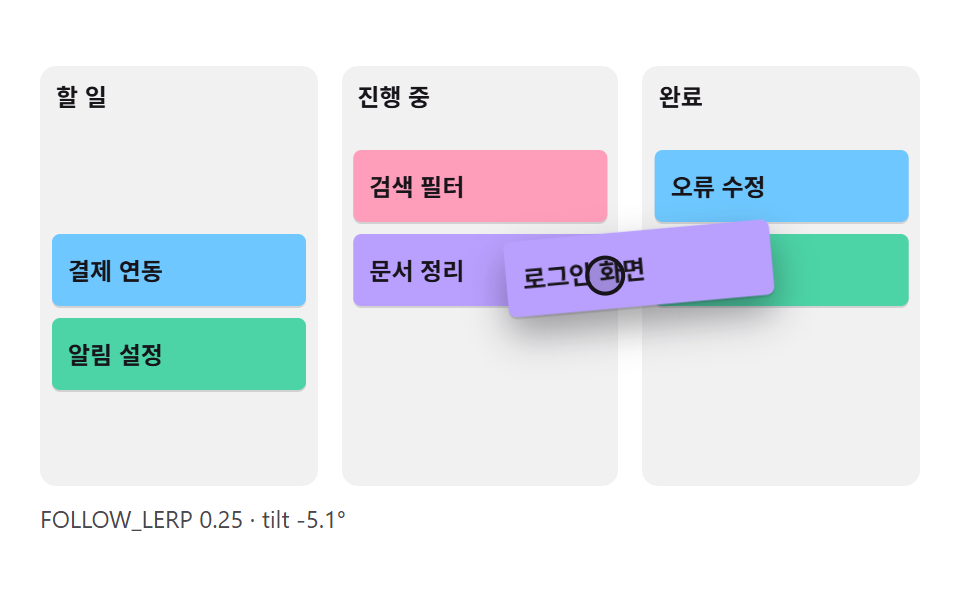 대시보드 UIcss kanban board 9가지 — 카드가 따라붙고 놓을 자리가 열리는 보드
 대시보드 UI대시보드 사이드바·위젯 UI 9종 — 완성 페이지 말고 이 조각 하나만
 대시보드 UI대시보드 컴포넌트 9종 — 화면 통째로 말고 이 부품만
 임베드블로그 위젯 디자인 9종 — 공유·후기·지도 임베드 카드
 대시보드 UI원형 프로그레스바 css 스탯 링 위젯 9종 — 숫자가 진짜 올라가는
 대시보드 UIcss 검색창 디자인 9종 — Cmd+K로 열리는 팔레트
 랜딩 섹션요금제 디자인 인터랙션 9종 — 토글부터 결제 버튼까지