CSS 글자 그라데이션 반짝이는 텍스트 9종 — 한 줄 복붙으로
css 글자 그라데이션은 글씨 위에 여러 색을 흘려 넣어 단색 글자보다 시선을 오래 붙잡는 효과입니다. 아홉 개 중 하나(03)는 같은 글자를 뒤에 한 겹 더 깔아 후광만 blur 로 만드는데, 부모에 isolation: isolate 를 빼먹으면 그 후광이 무대 배경 뒤로 완전히
아래 격자에서 아홉 개가 자동으로 도는 모습을 먼저 보고, 화면에 맞는 걸 찾으십시오.
 01 text-gradient-shine-gradient-text-flow
 02 text-gradient-shine-gradient-move
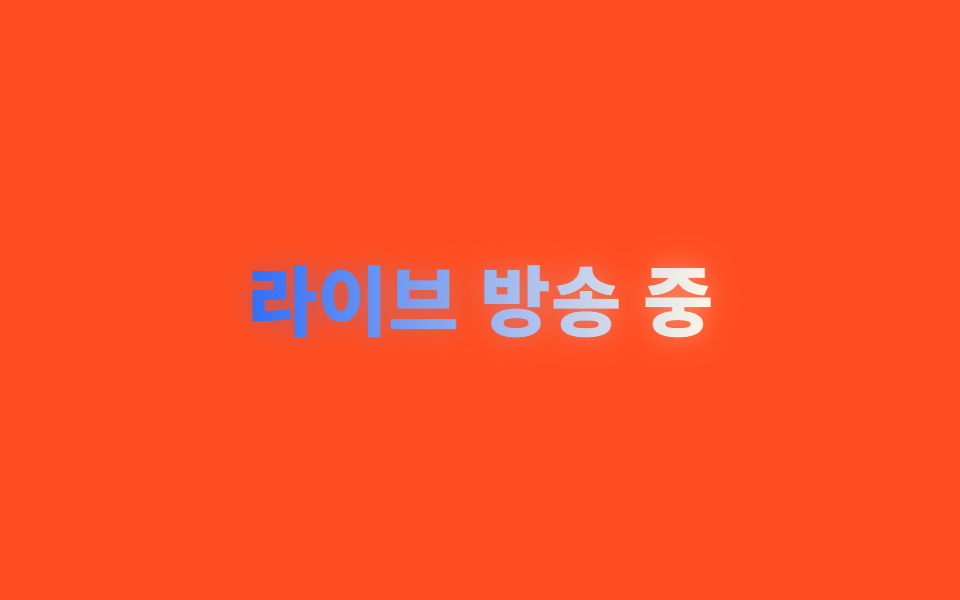 03 text-gradient-shine-neon-glow-text
 04 text-gradient-shine-shine-sweep-text
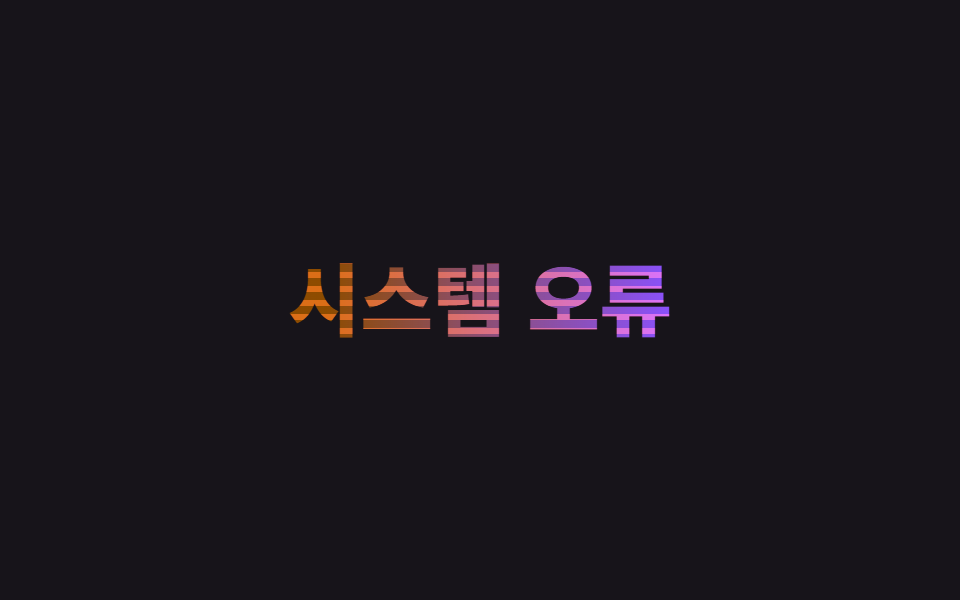 05 text-gradient-shine-glitch-text
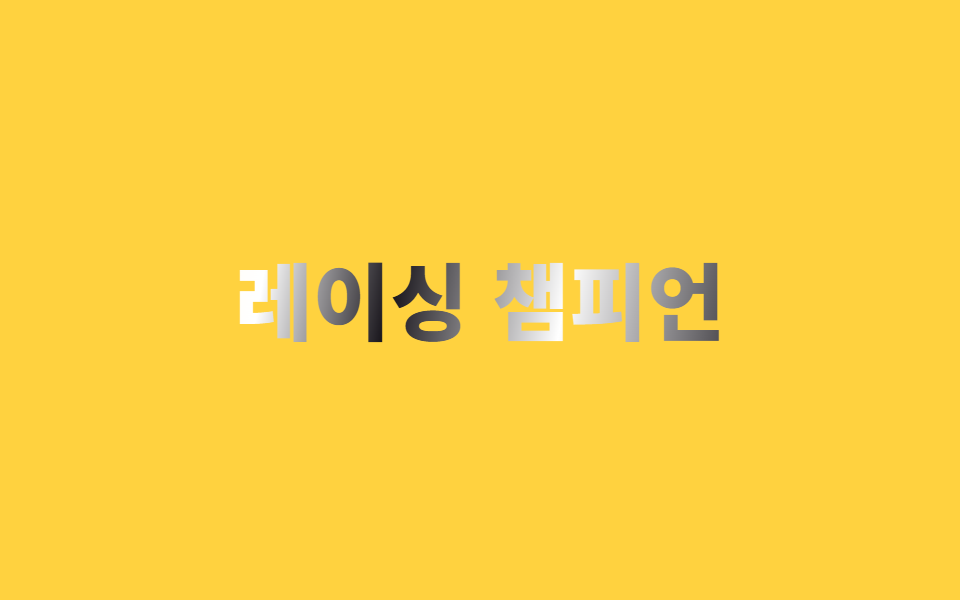 06 text-gradient-shine-chrome-metal-text
 07 text-gradient-shine-flicker-text
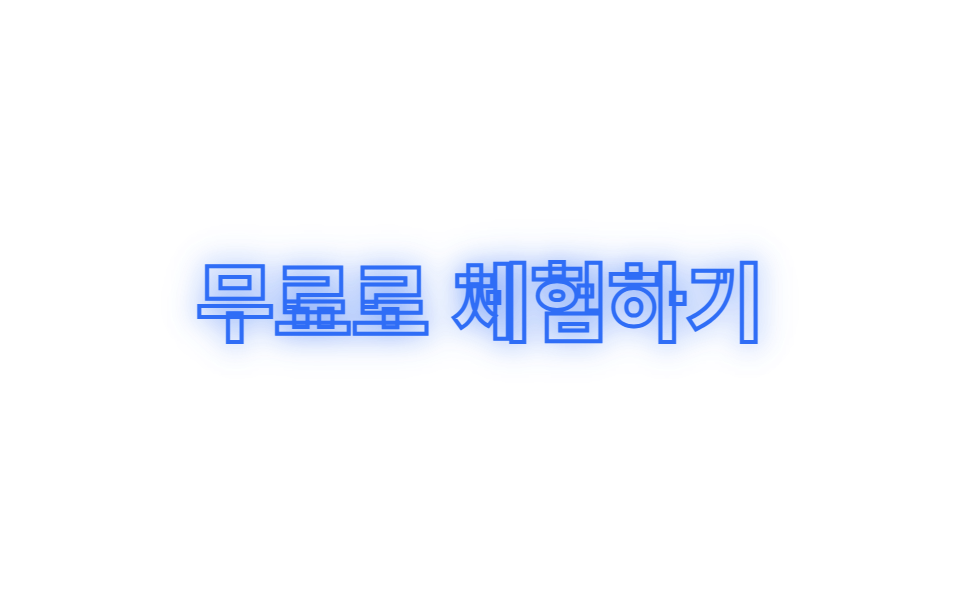 08 text-gradient-shine-outline-glow
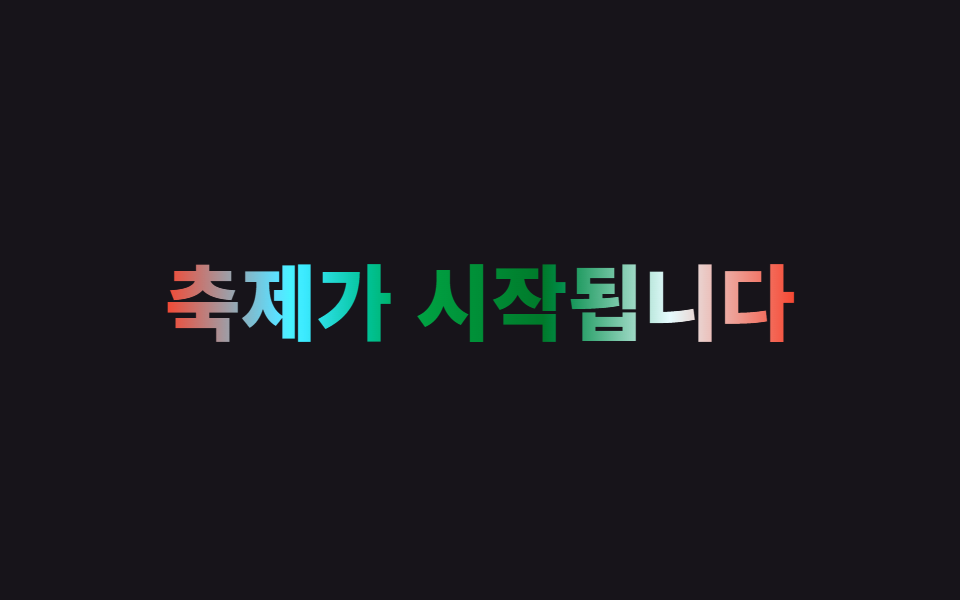 09 text-gradient-shine-rainbow-text
자동 재생 · 눌러서 해당 항목으로 · 전부 한 zip
- 01 흐르는 그라디언트 텍스트
- 02 그라디언트 각도 이동
- 03 네온 글로우 텍스트
- 04 광택 스윕 텍스트
- 05 글리치 텍스트
- 06 크롬 메탈 텍스트
- 07 깜빡임 텍스트
- 08 아웃라인 글로우
- 09 무지개 텍스트
아홉 개는 화려한 순서가 아니라 그러데이션이 글자 위에서 하는 일의 순서로 놓았습니다. 색이 흘러가는 것(01~02), 빛으로 강조하는 것(03~04), 화면이 어긋나거나 css 텍스트 반짝임이 표면에 도는 것(05~06), 글자 하나하나가 깜빡이거나 비워지는 것(07~08), 마지막으로 색상환 전체가 도는 것(09)입니다. 데모 글자는 예시 문구일 뿐이니, 실서비스에 쓸 때는 <h1> 안의 텍스트만 바꾸면 코드는 그대로 동작합니다. 이 글자를 얹을 바탕이 카드라면 CSS 카드 애니메이션 호버 효과를 먼저 고르고, 같은 그러데이션을 켜고 끄는 작은 컨트롤에 옮기고 싶다면 CSS 토글 스위치 쪽을 보십시오.
01흐르는 그라디언트 텍스트
css 글자 그라데이션 애니메이션이 어떻게 흐르나
파랑·크림 그러데이션을 background-clip: text로 글자에 채우고 background-size: 300% 100% 위에서 background-position을 0%에서 100%로 반복 이동시켜 색이 계속 흘러가는 것처럼 보이게 합니다.
<main class="stage">
  <h1 class="flow">여름 세일 시작</h1>
</main>
@use "../../../../site/static/demo-tokens" as *;
$duration: $dur-loop; // 흐름 한 바퀴가 도는 시간
$easing: linear; // 속도 변화 없이 일정하게 흘러야 끊김이 없다
$color: $subject-blue; // 그러데이션의 기준 색
@include stage($stage-ink);
.flow {
margin: 0;
font-weight: 800; font-size: clamp(28px, 8.6vw, 46px); line-height: 1.2; font-family: inherit;
text-align: center;
background: linear-gradient(90deg, $color, $subject-cream, $color, $subject-cream, $color);
background-size: 300% 100%;
-webkit-background-clip: text; // Chrome·Edge 119 이하, Safari 15.4 이하는 접두사가 있어야 한다
background-clip: text;
color: transparent;
-webkit-text-fill-color: transparent;
animation: flow $duration $easing infinite;
}
@keyframes flow {
0% { background-position: 0% 50%; }
100% { background-position: 100% 50%; }
}
@media (prefers-reduced-motion: reduce) {
.flow { animation: none; background-position: 40% 50%; }
}html, body {
margin: 0;
overflow: hidden;
}
.stage {
box-sizing: border-box;
min-height: 100vh;
display: grid;
place-items: center;
margin: 0;
background: #17141a;
font-family: -apple-system, "Segoe UI", "Noto Sans KR", sans-serif;
padding: clamp(8px, 4vw, 24px);
}
.flow {
margin: 0;
font-weight: 800;
font-size: clamp(28px, 8.6vw, 46px);
line-height: 1.2;
font-family: inherit;
text-align: center;
background: linear-gradient(90deg, #2f6df6, #fff7e6, #2f6df6, #fff7e6, #2f6df6);
background-size: 300% 100%;
-webkit-background-clip: text;
background-clip: text;
color: transparent;
-webkit-text-fill-color: transparent;
animation: flow 2s linear infinite;
}
@keyframes flow {
0% {
background-position: 0% 50%;
}
100% {
background-position: 100% 50%;
}
}
@media (prefers-reduced-motion: reduce) {
.flow {
animation: none;
background-position: 40% 50%;
}
}import type { CSSProperties } from "react";
import styles from "./GradientTextFlow.module.scss";
export type GradientTextFlowProps = {
text: string;
/** 흐름 한 바퀴가 도는 시간 (기본 2000ms) */
duration?: number;
easing?: string;
/** 그러데이션 기준 색 */
color?: string;
};
type Vars = CSSProperties & { "--duration"?: string; "--easing"?: string; "--color"?: string };
export default function GradientTextFlow({
text,
duration = 2000,
easing = "linear",
color = "#2f6df6",
}: GradientTextFlowProps) {
const vars: Vars = { "--duration": `${duration}ms`, "--easing": easing, "--color": color };
return <h1 className={styles.flow} style={vars}>{text}</h1>;
}01 · 흐르는 그라디언트 텍스트 — 측정 누적면적 3.461% · 움직인 프레임 23/23GODRICH 원작 · zip 에 SCSS·React 포함 · 비밀번호 보기
.flow {
  background: linear-gradient(90deg, $color, $subject-cream, $color, $subject-cream, $color);
  background-size: 300% 100%;
  -webkit-background-clip: text;
  background-clip: text;
  color: transparent;
  -webkit-text-fill-color: transparent;
  animation: flow $duration $easing infinite;
}
@keyframes flow {
  0%   { background-position: 0% 50%; }
  100% { background-position: 100% 50%; }
}
02그라디언트 각도 이동
어떻게 움직이나
@property로 <angle> 타입 커스텀 프로퍼티를 등록해 linear-gradient()의 각도 자리에 넣고, 그 값만 0deg에서 360deg로 keyframes 로 돌려 그러데이션 자체가 글자 안에서 회전합니다.
<main class="stage">
  <h1 class="spin">프리미엄 멤버십</h1>
</main>
@use "../../../../site/static/demo-tokens" as *;
$duration: $dur-loop; // 각도가 한 바퀴(360deg) 도는 시간
$easing: linear;
$color: $subject-ink; // 노란 무대와 대비되는 글자 기준 색
@include stage($stage-yellow);
// 각도 자체를 보간 가능한 값으로 등록해야 gradient() 각도 자리를 keyframes 로 돌릴 수 있다
@property --angle {
syntax: "<angle>";
inherits: false;
initial-value: 0deg;
}
.spin {
margin: 0;
font-weight: 800; font-size: clamp(28px, 8.6vw, 46px); line-height: 1.2; font-family: inherit;
text-align: center;
--angle: 0deg;
background: linear-gradient(var(--angle), $color, $stage-orange, $color);
-webkit-background-clip: text;
background-clip: text;
color: transparent;
-webkit-text-fill-color: transparent;
animation: rotate-angle $duration $easing infinite;
}
@keyframes rotate-angle {
from { --angle: 0deg; }
to { --angle: 360deg; }
}
@media (prefers-reduced-motion: reduce) {
.spin { animation: none; --angle: 45deg; }
}html, body {
margin: 0;
overflow: hidden;
}
.stage {
box-sizing: border-box;
min-height: 100vh;
display: grid;
place-items: center;
margin: 0;
background: #ffd23f;
font-family: -apple-system, "Segoe UI", "Noto Sans KR", sans-serif;
padding: clamp(8px, 4vw, 24px);
}
@property --angle {
syntax: "<angle>";
inherits: false;
initial-value: 0deg;
}
.spin {
margin: 0;
font-weight: 800;
font-size: clamp(28px, 8.6vw, 46px);
line-height: 1.2;
font-family: inherit;
text-align: center;
--angle: 0deg;
background: linear-gradient(var(--angle), #17141a, #ff4d1f, #17141a);
-webkit-background-clip: text;
background-clip: text;
color: transparent;
-webkit-text-fill-color: transparent;
animation: rotate-angle 2s linear infinite;
}
@keyframes rotate-angle {
from {
--angle: 0deg;
}
to {
--angle: 360deg;
}
}
@media (prefers-reduced-motion: reduce) {
.spin {
animation: none;
--angle: 45deg;
}
}import type { CSSProperties } from "react";
import styles from "./GradientAngleMove.module.scss";
export type GradientAngleMoveProps = {
text: string;
/** 각도가 360deg 한 바퀴 도는 시간 (기본 2000ms) */
duration?: number;
easing?: string;
/** 글자 기준 색 */
color?: string;
};
type Vars = CSSProperties & { "--duration"?: string; "--easing"?: string; "--color"?: string };
export default function GradientAngleMove({
text,
duration = 2000,
easing = "linear",
color = "#17141a",
}: GradientAngleMoveProps) {
const vars: Vars = { "--duration": `${duration}ms`, "--easing": easing, "--color": color };
return <h1 className={styles.spin} style={vars}>{text}</h1>;
}02 · 그라디언트 각도 이동 — 측정 누적면적 3.865% · 움직인 프레임 23/23GODRICH 원작 · zip 에 SCSS·React 포함 · 비밀번호 보기
@property --angle {
  syntax: "<angle>";
  inherits: false;
  initial-value: 0deg;
}
.spin {
  --angle: 0deg;
  background: linear-gradient(var(--angle), $color, $stage-orange, $color);
  -webkit-background-clip: text;
  background-clip: text;
  color: transparent;
  animation: rotate-angle $duration $easing infinite;
}
@keyframes rotate-angle { from { --angle: 0deg; } to { --angle: 360deg; } }
03네온 글로우 텍스트
어떻게 움직이나
같은 글자를 ::before로 한 겹 더 두고 background: inherit로 같은 그러데이션을 물려받게 한 뒤 filter: blur()만 걸어 후광을 만듭니다.
어디에 쓰나
반경과 투명도를 몇 차례 짧게 오가게 해 통째로 꺼졌다 켜지지 않고 숨 쉬듯 빛나게 했습니다.
<main class="stage">
  <h1 class="neon" data-text="라이브 방송 중">라이브 방송 중</h1>
</main>
@use "../../../../site/static/demo-tokens" as *;
$duration: $dur-loop; // 후광이 커졌다 작아지는 숨쉬기 한 주기
$easing: linear; // 일정한 속도라야 매 프레임이 이전 프레임과 확실히 달라진다
$color: $subject-blue; // 후광 색
@include stage($stage-orange);
.neon {
position: relative;
isolation: isolate; // 새 쌓임 맥락을 만들어 ::before(z-index:-1)가 무대 배경 뒤로 빠지지 않게 한다
margin: 0;
font-weight: 800; font-size: clamp(26px, 8vw, 42px); line-height: 1.2; font-family: inherit;
text-align: center;
background: linear-gradient(90deg, $color, $subject-cream);
-webkit-background-clip: text;
background-clip: text;
color: transparent;
-webkit-text-fill-color: transparent;
}
// 같은 글자를 뒤에 겹쳐 filter: blur 로만 후광을 만든다 (색은 글자와 같은 그러데이션)
.neon::before {
content: attr(data-text);
position: absolute;
inset: 0;
z-index: -1;
background: inherit;
-webkit-background-clip: text;
background-clip: text;
color: transparent;
-webkit-text-fill-color: transparent;
filter: blur(8px);
animation: breathe $duration $easing infinite; // on/off 로 꺼졌다 켜지지 않고, 흐림 반경만 숨쉬듯 오간다
}
// 부드러운 단일 곡선 대신 짧게 여러 번 오간다 — 프레임 간 변화폭을 충분히 크게 유지하기 위해서다
@keyframes breathe {
0%, 10% { filter: blur(4px); opacity: .28; }
15%, 25% { filter: blur(20px); opacity: 1; }
30%, 40% { filter: blur(4px); opacity: .28; }
45%, 55% { filter: blur(20px); opacity: 1; }
60%, 70% { filter: blur(4px); opacity: .28; }
75%, 85% { filter: blur(20px); opacity: 1; }
90%, 100% { filter: blur(4px); opacity: .28; }
}
@media (prefers-reduced-motion: reduce) {
.neon::before { animation: none; filter: blur(10px); opacity: .85; }
}html, body {
margin: 0;
overflow: hidden;
}
.stage {
box-sizing: border-box;
min-height: 100vh;
display: grid;
place-items: center;
margin: 0;
background: #ff4d1f;
font-family: -apple-system, "Segoe UI", "Noto Sans KR", sans-serif;
padding: clamp(8px, 4vw, 24px);
}
.neon {
position: relative;
isolation: isolate;
margin: 0;
font-weight: 800;
font-size: clamp(26px, 8vw, 42px);
line-height: 1.2;
font-family: inherit;
text-align: center;
background: linear-gradient(90deg, #2f6df6, #fff7e6);
-webkit-background-clip: text;
background-clip: text;
color: transparent;
-webkit-text-fill-color: transparent;
}
.neon::before {
content: attr(data-text);
position: absolute;
inset: 0;
z-index: -1;
background: inherit;
-webkit-background-clip: text;
background-clip: text;
color: transparent;
-webkit-text-fill-color: transparent;
filter: blur(8px);
animation: breathe 2s linear infinite;
}
@keyframes breathe {
0%, 10% {
filter: blur(4px);
opacity: 0.28;
}
15%, 25% {
filter: blur(20px);
opacity: 1;
}
30%, 40% {
filter: blur(4px);
opacity: 0.28;
}
45%, 55% {
filter: blur(20px);
opacity: 1;
}
60%, 70% {
filter: blur(4px);
opacity: 0.28;
}
75%, 85% {
filter: blur(20px);
opacity: 1;
}
90%, 100% {
filter: blur(4px);
opacity: 0.28;
}
}
@media (prefers-reduced-motion: reduce) {
.neon::before {
animation: none;
filter: blur(10px);
opacity: 0.85;
}
}import type { CSSProperties } from "react";
import styles from "./NeonGlowText.module.scss";
export type NeonGlowTextProps = {
text: string;
/** 후광이 숨쉬는 한 주기 (기본 2000ms) */
duration?: number;
easing?: string;
/** 후광 색 */
color?: string;
};
type Vars = CSSProperties & { "--duration"?: string; "--easing"?: string; "--color"?: string };
export default function NeonGlowText({
text,
duration = 2000,
easing = "linear",
color = "#2f6df6",
}: NeonGlowTextProps) {
const vars: Vars = { "--duration": `${duration}ms`, "--easing": easing, "--color": color };
return (
<h1 className={styles.neon} style={vars} data-text={text}>
{text}
</h1>
);
}03 · 네온 글로우 텍스트 — 측정 누적면적 10.16% · 움직인 프레임 12/23GODRICH 원작 · zip 에 SCSS·React 포함 · 비밀번호 보기
.neon { position: relative; isolation: isolate; }
.neon::before {
  content: attr(data-text);
  position: absolute; inset: 0; z-index: -1;
  background: inherit;
  -webkit-background-clip: text;
  background-clip: text;
  color: transparent;
  filter: blur(4px);
  animation: breathe $duration $easing infinite;
}
@keyframes breathe {
  0%, 10%  { filter: blur(4px); opacity: .28; }
  15%, 25% { filter: blur(20px); opacity: 1; }
}
04광택 스윕 텍스트
어떻게 움직이나
같은 문구를 두 겹 겹쳐 아래 겹은 단색으로, 위 겹만 좁고 밝은 대각선 띠를 background-clip: text로 채워 background-position으로 한 방향으로 한 번 훑고 지나가게 합니다.
<main class="stage">
  <h1 class="sheen">
    <span class="sheen__base">골드 멤버 전용</span>
    <span class="sheen__light" aria-hidden="true">골드 멤버 전용</span>
  </h1>
</main>
@use "../../../../site/static/demo-tokens" as *;
$duration: $dur-loop; // 빛 띠가 한 번 훑고 돌아오는 시간
$easing: $ease-out;
$color: $subject-ink; // 바탕 글자 색 (금속처럼 진하게)
@include stage($stage-paper);
.sheen {
position: relative;
margin: 0;
font-weight: 800; font-size: clamp(26px, 8vw, 42px); line-height: 1.2; font-family: inherit;
text-align: center;
}
.sheen__base, .sheen__light {
display: block;
grid-area: 1 / 1;
}
.sheen { display: grid; } // 두 겹을 같은 자리에 포갠다
.sheen__base { color: $color; }
.sheen__light {
background: linear-gradient(100deg, transparent 42%, rgba($stage-paper, .95) 50%, transparent 58%);
background-size: 260% 100%;
-webkit-background-clip: text;
background-clip: text;
color: transparent;
-webkit-text-fill-color: transparent;
animation: sweep $duration $easing infinite;
}
@keyframes sweep {
0% { background-position: 140% 50%; }
60% { background-position: -40% 50%; }
100% { background-position: -40% 50%; }
}
@media (prefers-reduced-motion: reduce) {
.sheen__light { animation: none; background-position: 50% 50%; }
}html, body {
margin: 0;
overflow: hidden;
}
.stage {
box-sizing: border-box;
min-height: 100vh;
display: grid;
place-items: center;
margin: 0;
background: #ffffff;
font-family: -apple-system, "Segoe UI", "Noto Sans KR", sans-serif;
padding: clamp(8px, 4vw, 24px);
}
.sheen {
position: relative;
margin: 0;
font-weight: 800;
font-size: clamp(26px, 8vw, 42px);
line-height: 1.2;
font-family: inherit;
text-align: center;
}
.sheen__base, .sheen__light {
display: block;
grid-area: 1/1;
}
.sheen {
display: grid;
}
.sheen__base {
color: #17141a;
}
.sheen__light {
background: linear-gradient(100deg, transparent 42%, rgba(255, 255, 255, 0.95) 50%, transparent 58%);
background-size: 260% 100%;
-webkit-background-clip: text;
background-clip: text;
color: transparent;
-webkit-text-fill-color: transparent;
animation: sweep 2s ease-out infinite;
}
@keyframes sweep {
0% {
background-position: 140% 50%;
}
60% {
background-position: -40% 50%;
}
100% {
background-position: -40% 50%;
}
}
@media (prefers-reduced-motion: reduce) {
.sheen__light {
animation: none;
background-position: 50% 50%;
}
}import type { CSSProperties } from "react";
import styles from "./ShineSweepText.module.scss";
export type ShineSweepTextProps = {
text: string;
/** 빛 띠가 한 번 훑고 돌아오는 시간 (기본 2000ms) */
duration?: number;
easing?: string;
/** 바탕 글자 색 */
color?: string;
};
type Vars = CSSProperties & { "--duration"?: string; "--easing"?: string; "--color"?: string };
export default function ShineSweepText({
text,
duration = 2000,
easing = "ease-out",
color = "#17141a",
}: ShineSweepTextProps) {
const vars: Vars = { "--duration": `${duration}ms`, "--easing": easing, "--color": color };
return (
<h1 className={styles.sheen} style={vars}>
<span className={styles.base}>{text}</span>
<span className={styles.light} aria-hidden="true">{text}</span>
</h1>
);
}04 · 광택 스윕 텍스트 — 측정 누적면적 2.915% · 움직인 프레임 6/23GODRICH 원작 · zip 에 SCSS·React 포함 · 비밀번호 보기
.light {
  background: linear-gradient(100deg, transparent 42%, rgba($stage-paper, .95) 50%, transparent 58%);
  background-size: 260% 100%;
  -webkit-background-clip: text;
  background-clip: text;
  color: transparent;
  animation: sweep $duration $easing infinite;
}
@keyframes sweep {
  0%  { background-position: 140% 50%; }
  60% { background-position: -40% 50%; }
}
05글리치 텍스트
어떻게 움직이나
색이 다른 두 겹을 포개고 가로줄 mask-image의 위치를 steps() 타이밍으로 뚝뚝 끊어 옮겨 스캔라인이 깨지는 느낌을 만듭니다.
어디에 쓰나
clip-path로 조각을 썰어 미는 방식은 쓰지 않고, 마스크와 filter: hue-rotate 의 순간적인 튐만으로 어긋남을 표현했습니다.
<main class="stage">
  <h1 class="glitch" data-text="시스템 오류">
    <span class="glitch__base">시스템 오류</span>
    <span class="glitch__r" aria-hidden="true">시스템 오류</span>
    <span class="glitch__b" aria-hidden="true">시스템 오류</span>
  </h1>
</main>
@use "../../../../site/static/demo-tokens" as *;
$duration: $dur-loop; // 스캔라인이 어긋났다 돌아오는 한 주기
$easing: steps(2, jump-none); // 부드럽게 잇지 않고 뚝뚝 끊겨야 글리치답다
$color: $error; // 어긋나는 레이어 한쪽 색
@include stage($stage-ink);
.glitch {
position: relative;
margin: 0;
font-weight: 800; font-size: clamp(26px, 8.2vw, 42px); line-height: 1.2; font-family: inherit;
text-align: center;
}
.glitch__base, .glitch__r, .glitch__b {
display: block;
grid-area: 1 / 1;
}
.glitch { display: grid; }
.glitch__base {
background: linear-gradient(90deg, $color, $subject-blue);
-webkit-background-clip: text;
background-clip: text;
color: transparent;
-webkit-text-fill-color: transparent;
animation: hue-jump $duration $easing infinite;
}
// clip-path 로 조각내 밀어내는 대신, 가로줄 mask 를 뚝뚝 끊어 옮겨 스캔라인이 깨지는 것처럼 보이게 한다
.glitch__r, .glitch__b {
position: absolute; inset: 0;
mix-blend-mode: screen;
-webkit-mask-image: repeating-linear-gradient(to bottom, #000 0 3px, transparent 3px 7px);
mask-image: repeating-linear-gradient(to bottom, #000 0 3px, transparent 3px 7px);
}
.glitch__r { color: $color; animation: mask-jump-r $duration $easing infinite; }
.glitch__b { color: $subject-blue; animation: mask-jump-b $duration $easing infinite; }
@keyframes mask-jump-r {
0%, 40%, 100% { -webkit-mask-position: 0 0; mask-position: 0 0; opacity: 0; }
45%, 55% { -webkit-mask-position: 0 3px; mask-position: 0 3px; opacity: .9; }
}
@keyframes mask-jump-b {
0%, 60%, 100% { -webkit-mask-position: 0 0; mask-position: 0 0; opacity: 0; }
65%, 75% { -webkit-mask-position: 0 -3px; mask-position: 0 -3px; opacity: .9; }
}
@keyframes hue-jump {
0%, 48%, 52%, 100% { filter: hue-rotate(0deg); }
50% { filter: hue-rotate(35deg); }
}
@media (prefers-reduced-motion: reduce) {
.glitch__base { animation: none; }
.glitch__r, .glitch__b { animation: none; opacity: 0; }
}html, body {
margin: 0;
overflow: hidden;
}
.stage {
box-sizing: border-box;
min-height: 100vh;
display: grid;
place-items: center;
margin: 0;
background: #17141a;
font-family: -apple-system, "Segoe UI", "Noto Sans KR", sans-serif;
padding: clamp(8px, 4vw, 24px);
}
.glitch {
position: relative;
margin: 0;
font-weight: 800;
font-size: clamp(26px, 8.2vw, 42px);
line-height: 1.2;
font-family: inherit;
text-align: center;
}
.glitch__base, .glitch__r, .glitch__b {
display: block;
grid-area: 1/1;
}
.glitch {
display: grid;
}
.glitch__base {
background: linear-gradient(90deg, #c2361a, #2f6df6);
-webkit-background-clip: text;
background-clip: text;
color: transparent;
-webkit-text-fill-color: transparent;
animation: hue-jump 2s steps(2, jump-none) infinite;
}
.glitch__r, .glitch__b {
position: absolute;
inset: 0;
mix-blend-mode: screen;
-webkit-mask-image: repeating-linear-gradient(to bottom, #000 0 3px, transparent 3px 7px);
mask-image: repeating-linear-gradient(to bottom, #000 0 3px, transparent 3px 7px);
}
.glitch__r {
color: #c2361a;
animation: mask-jump-r 2s steps(2, jump-none) infinite;
}
.glitch__b {
color: #2f6df6;
animation: mask-jump-b 2s steps(2, jump-none) infinite;
}
@keyframes mask-jump-r {
0%, 40%, 100% {
-webkit-mask-position: 0 0;
mask-position: 0 0;
opacity: 0;
}
45%, 55% {
-webkit-mask-position: 0 3px;
mask-position: 0 3px;
opacity: 0.9;
}
}
@keyframes mask-jump-b {
0%, 60%, 100% {
-webkit-mask-position: 0 0;
mask-position: 0 0;
opacity: 0;
}
65%, 75% {
-webkit-mask-position: 0 -3px;
mask-position: 0 -3px;
opacity: 0.9;
}
}
@keyframes hue-jump {
0%, 48%, 52%, 100% {
filter: hue-rotate(0deg);
}
50% {
filter: hue-rotate(35deg);
}
}
@media (prefers-reduced-motion: reduce) {
.glitch__base {
animation: none;
}
.glitch__r, .glitch__b {
animation: none;
opacity: 0;
}
}import type { CSSProperties } from "react";
import styles from "./GlitchText.module.scss";
export type GlitchTextProps = {
text: string;
/** 스캔라인이 어긋났다 돌아오는 한 주기 (기본 2000ms) */
duration?: number;
easing?: string;
/** 어긋나는 레이어 한쪽 색 */
color?: string;
};
type Vars = CSSProperties & { "--duration"?: string; "--easing"?: string; "--color"?: string };
export default function GlitchText({
text,
duration = 2000,
easing = "steps(2, jump-none)",
color = "#c2361a",
}: GlitchTextProps) {
const vars: Vars = { "--duration": `${duration}ms`, "--easing": easing, "--color": color };
return (
<h1 className={styles.glitch} style={vars}>
<span className={styles.base}>{text}</span>
<span className={styles.r} aria-hidden="true">{text}</span>
<span className={styles.b} aria-hidden="true">{text}</span>
</h1>
);
}05 · 글리치 텍스트 — 측정 누적면적 2.345% · 움직인 프레임 6/23GODRICH 원작 · zip 에 SCSS·React 포함 · 비밀번호 보기
.r, .b {
  position: absolute; inset: 0;
  mix-blend-mode: screen;
  -webkit-mask-image: repeating-linear-gradient(to bottom, #000 0 3px, transparent 3px 7px);
  mask-image: repeating-linear-gradient(to bottom, #000 0 3px, transparent 3px 7px);
  animation: mask-jump-r $duration $easing infinite;
}
@keyframes mask-jump-r {
  0%, 40%, 100% { -webkit-mask-position: 0 0; mask-position: 0 0; opacity: 0; }
  45%, 55%      { -webkit-mask-position: 0 3px; mask-position: 0 3px; opacity: .9; }
}
06크롬 메탈 텍스트
어떻게 움직이나
어두운 색과 흰색·크림색을 촘촘한 스톱으로 번갈아 넣은 그러데이션을 background-clip: text로 채우고 background-position을 느긋하게 이동시켜, 크롬 표면에 반사광이 지나가는 질감을 만듭니다.
<main class="stage">
  <h1 class="chrome">레이싱 챔피언</h1>
</main>
@use "../../../../site/static/demo-tokens" as *;
$duration: $dur-loop; // 반사광이 표면을 한 번 훑는 시간
$easing: $ease-out;
$color: $subject-ink; // 가장 어두운 밴드 색
@include stage($stage-yellow);
.chrome {
margin: 0;
font-weight: 900; font-size: clamp(28px, 8.8vw, 46px); line-height: 1.2; font-family: inherit;
text-align: center;
background: linear-gradient(
100deg,
$color 0%, $stage-paper 12%, $color 24%,
$subject-cream 40%, $stage-paper 52%, $color 64%,
$stage-paper 80%, $color 100%
);
background-size: 220% 100%;
-webkit-background-clip: text;
background-clip: text;
color: transparent;
-webkit-text-fill-color: transparent;
animation: reflect $duration $easing infinite;
}
@keyframes reflect {
0% { background-position: 100% 50%; }
100% { background-position: -20% 50%; }
}
@media (prefers-reduced-motion: reduce) {
.chrome { animation: none; background-position: 40% 50%; }
}html, body {
margin: 0;
overflow: hidden;
}
.stage {
box-sizing: border-box;
min-height: 100vh;
display: grid;
place-items: center;
margin: 0;
background: #ffd23f;
font-family: -apple-system, "Segoe UI", "Noto Sans KR", sans-serif;
padding: clamp(8px, 4vw, 24px);
}
.chrome {
margin: 0;
font-weight: 900;
font-size: clamp(28px, 8.8vw, 46px);
line-height: 1.2;
font-family: inherit;
text-align: center;
background: linear-gradient(100deg, #17141a 0%, #ffffff 12%, #17141a 24%, #fff7e6 40%, #ffffff 52%, #17141a 64%, #ffffff 80%, #17141a 100%);
background-size: 220% 100%;
-webkit-background-clip: text;
background-clip: text;
color: transparent;
-webkit-text-fill-color: transparent;
animation: reflect 2s ease-out infinite;
}
@keyframes reflect {
0% {
background-position: 100% 50%;
}
100% {
background-position: -20% 50%;
}
}
@media (prefers-reduced-motion: reduce) {
.chrome {
animation: none;
background-position: 40% 50%;
}
}import type { CSSProperties } from "react";
import styles from "./ChromeMetalText.module.scss";
export type ChromeMetalTextProps = {
text: string;
/** 반사광이 표면을 한 번 훑는 시간 (기본 2000ms) */
duration?: number;
easing?: string;
/** 가장 어두운 밴드 색 */
color?: string;
};
type Vars = CSSProperties & { "--duration"?: string; "--easing"?: string; "--color"?: string };
export default function ChromeMetalText({
text,
duration = 2000,
easing = "ease-out",
color = "#17141a",
}: ChromeMetalTextProps) {
const vars: Vars = { "--duration": `${duration}ms`, "--easing": easing, "--color": color };
return <h1 className={styles.chrome} style={vars}>{text}</h1>;
}06 · 크롬 메탈 텍스트 — 측정 누적면적 3.683% · 움직인 프레임 23/23GODRICH 원작 · zip 에 SCSS·React 포함 · 비밀번호 보기
.chrome {
  background: linear-gradient(
    100deg,
    $color 0%, $stage-paper 12%, $color 24%,
    $subject-cream 40%, $stage-paper 52%, $color 64%,
    $stage-paper 80%, $color 100%
  );
  background-size: 220% 100%;
  -webkit-background-clip: text;
  background-clip: text;
  color: transparent;
  animation: reflect $duration $easing infinite;
}
07깜빡임 텍스트
어떻게 움직이나
글자를 span으로 하나씩 나눠 --i 변수로 글자마다 다른 지연을 주고 opacity를 짧게 왕복시킵니다.
어디에 쓰나
네온 하나가 통째로 꺼졌다 켜지는 게 아니라, 낡은 전구 마퀴 간판처럼 글자마다 따로 깜빡입니다.
<main class="stage">
  <h1 class="marquee">
    <span style="--i:0">라</span><span style="--i:1">이</span><span style="--i:2">브</span><span class="marquee__gap" aria-hidden="true"></span><span style="--i:3">시</span><span style="--i:4">작</span>
  </h1>
</main>
@use "../../../../site/static/demo-tokens" as *;
$duration: $dur-loop; // 전구 하나가 어두워졌다 돌아오는 한 주기
$easing: linear;
$color: $subject-cream; // 전구 색
@include stage($stage-orange);
.marquee {
margin: 0;
font-weight: 800; font-size: clamp(28px, 9vw, 46px); line-height: 1.2; font-family: inherit;
text-align: center;
}
.marquee span {
display: inline-block;
color: $color;
animation: bulb $duration $easing infinite;
animation-delay: calc(var(--i, 0) * 120ms); // 글자마다 지연이 달라 하나씩 따로 깜빡인다
}
.marquee__gap { width: .3em; }
@keyframes bulb {
0%, 40%, 100% { opacity: 1; }
47% { opacity: .22; } // 통째로 꺼지는 네온과 달리 글자 하나만 잠깐 어두워진다
54% { opacity: 1; }
}
@media (prefers-reduced-motion: reduce) {
.marquee span { animation: none; }
}html, body {
margin: 0;
overflow: hidden;
}
.stage {
box-sizing: border-box;
min-height: 100vh;
display: grid;
place-items: center;
margin: 0;
background: #ff4d1f;
font-family: -apple-system, "Segoe UI", "Noto Sans KR", sans-serif;
padding: clamp(8px, 4vw, 24px);
}
.marquee {
margin: 0;
font-weight: 800;
font-size: clamp(28px, 9vw, 46px);
line-height: 1.2;
font-family: inherit;
text-align: center;
}
.marquee span {
display: inline-block;
color: #fff7e6;
animation: bulb 2s linear infinite;
animation-delay: calc(var(--i, 0) * 120ms);
}
.marquee__gap {
width: 0.3em;
}
@keyframes bulb {
0%, 40%, 100% {
opacity: 1;
}
47% {
opacity: 0.22;
}
54% {
opacity: 1;
}
}
@media (prefers-reduced-motion: reduce) {
.marquee span {
animation: none;
}
}import type { CSSProperties } from "react";
import styles from "./FlickerText.module.scss";
export type FlickerTextProps = {
/** 글자를 하나씩 나눠 넣는다 (공백은 별도 span 으로) */
letters: string[];
/** 전구 하나가 어두워졌다 돌아오는 한 주기 (기본 2000ms) */
duration?: number;
easing?: string;
/** 전구 색 */
color?: string;
};
type Vars = CSSProperties & { "--duration"?: string; "--easing"?: string; "--color"?: string };
type LetterVars = CSSProperties & { "--i"?: number };
export default function FlickerText({
letters,
duration = 2000,
easing = "linear",
color = "#fff7e6",
}: FlickerTextProps) {
const vars: Vars = { "--duration": `${duration}ms`, "--easing": easing, "--color": color };
return (
<h1 className={styles.marquee} style={vars}>
{letters.map((ch, i) =>
ch === " " ? (
<span key={i} className={styles.gap} aria-hidden="true" />
) : (
<span key={i} style={{ "--i": i } as LetterVars}>{ch}</span>
)
)}
</h1>
);
}07 · 깜빡임 텍스트 — 측정 누적면적 2.881% · 움직인 프레임 10/23GODRICH 원작 · zip 에 SCSS·React 포함 · 비밀번호 보기
.marquee span {
  display: inline-block;
  color: $color;
  animation: bulb $duration $easing infinite;
  animation-delay: calc(var(--i, 0) * 120ms);
}
@keyframes bulb {
  0%, 40%, 100% { opacity: 1; }
  47%           { opacity: .22; }
  54%           { opacity: 1; }
}
08아웃라인 글로우
어떻게 움직이나
글자 속을 color: transparent로 비우고 -webkit-text-stroke로 윤곽선만 남긴 뒤, filter: drop-shadow()의 반경을 키웠다 줄였다 반복해 윤곽선 둘레에 빛이 번지게 합니다.
<main class="stage">
  <h1 class="outline">무료로 체험하기</h1>
</main>
@use "../../../../site/static/demo-tokens" as *;
$duration: $dur-loop; // 빛이 커졌다 작아지는 숨쉬기 한 주기
$easing: $ease-spring;
$color: $subject-blue; // 윤곽선·빛 색
@include stage($stage-paper);
.outline {
margin: 0;
font-weight: 900; font-size: clamp(28px, 8.8vw, 46px); line-height: 1.2; font-family: inherit;
text-align: center;
color: transparent; // 속을 비워 윤곽선만 남긴다
-webkit-text-stroke: 2px $color;
text-stroke: 2px $color;
animation: glow $duration $easing infinite;
}
@keyframes glow {
0%, 100% { filter: drop-shadow(0 0 3px rgba($color, .5)); }
50% { filter: drop-shadow(0 0 14px rgba($color, .9)) drop-shadow(0 0 26px rgba($color, .5)); }
}
@media (prefers-reduced-motion: reduce) {
.outline { animation: none; filter: drop-shadow(0 0 10px rgba($color, .7)); }
}html, body {
margin: 0;
overflow: hidden;
}
.stage {
box-sizing: border-box;
min-height: 100vh;
display: grid;
place-items: center;
margin: 0;
background: #ffffff;
font-family: -apple-system, "Segoe UI", "Noto Sans KR", sans-serif;
padding: clamp(8px, 4vw, 24px);
}
.outline {
margin: 0;
font-weight: 900;
font-size: clamp(28px, 8.8vw, 46px);
line-height: 1.2;
font-family: inherit;
text-align: center;
color: transparent;
-webkit-text-stroke: 2px #2f6df6;
text-stroke: 2px #2f6df6;
animation: glow 2s cubic-bezier(0.2, 0.8, 0.2, 1) infinite;
}
@keyframes glow {
0%, 100% {
filter: drop-shadow(0 0 3px rgba(47, 109, 246, 0.5));
}
50% {
filter: drop-shadow(0 0 14px rgba(47, 109, 246, 0.9)) drop-shadow(0 0 26px rgba(47, 109, 246, 0.5));
}
}
@media (prefers-reduced-motion: reduce) {
.outline {
animation: none;
filter: drop-shadow(0 0 10px rgba(47, 109, 246, 0.7));
}
}import type { CSSProperties } from "react";
import styles from "./OutlineGlowText.module.scss";
export type OutlineGlowTextProps = {
text: string;
/** 빛이 커졌다 작아지는 숨쉬기 한 주기 (기본 2000ms) */
duration?: number;
easing?: string;
/** 윤곽선·빛 색 */
color?: string;
};
type Vars = CSSProperties & { "--duration"?: string; "--easing"?: string; "--color"?: string };
export default function OutlineGlowText({
text,
duration = 2000,
easing = "cubic-bezier(.2,.8,.2,1)",
color = "#2f6df6",
}: OutlineGlowTextProps) {
const vars: Vars = { "--duration": `${duration}ms`, "--easing": easing, "--color": color };
return <h1 className={styles.outline} style={vars}>{text}</h1>;
}08 · 아웃라인 글로우 — 측정 누적면적 15.976% · 움직인 프레임 7/23GODRICH 원작 · zip 에 SCSS·React 포함 · 비밀번호 보기
.outline {
  color: transparent;
  -webkit-text-stroke: 2px $color;
  animation: glow $duration $easing infinite;
}
@keyframes glow {
  0%, 100% { filter: drop-shadow(0 0 3px rgba($color, .5)); }
  50% {
    filter: drop-shadow(0 0 14px rgba($color, .9))
            drop-shadow(0 0 26px rgba($color, .5));
  }
}
09무지개 텍스트
어떻게 움직이나
고정된 무지개 다색 그러데이션을 background-clip: text로 채운 뒤, 위치나 각도가 아니라 filter: hue-rotate를 0deg에서 360deg로 계속 돌려 색상환 전체가 순환하게 합니다.
<main class="stage">
  <h1 class="rainbow">축제가 시작됩니다</h1>
</main>
@use "../../../../site/static/demo-tokens" as *;
$duration: $dur-loop; // 색상환이 360도 한 바퀴 도는 시간
$easing: linear;
$color: $subject-blue; // 그러데이션의 시작 색
@include stage($stage-ink);
.rainbow {
margin: 0;
font-weight: 800; font-size: clamp(28px, 8.6vw, 46px); line-height: 1.2; font-family: inherit;
text-align: center;
background: linear-gradient(90deg, $color, $stage-yellow, $stage-orange, $error, $subject-cream, $color);
-webkit-background-clip: text;
background-clip: text;
color: transparent;
-webkit-text-fill-color: transparent;
animation: hue-cycle $duration $easing infinite; // 위치가 아니라 색상환 자체를 돌린다
}
@keyframes hue-cycle {
from { filter: hue-rotate(0deg); }
to { filter: hue-rotate(360deg); }
}
@media (prefers-reduced-motion: reduce) {
.rainbow { animation: none; filter: hue-rotate(0deg); }
}html, body {
margin: 0;
overflow: hidden;
}
.stage {
box-sizing: border-box;
min-height: 100vh;
display: grid;
place-items: center;
margin: 0;
background: #17141a;
font-family: -apple-system, "Segoe UI", "Noto Sans KR", sans-serif;
padding: clamp(8px, 4vw, 24px);
}
.rainbow {
margin: 0;
font-weight: 800;
font-size: clamp(28px, 8.6vw, 46px);
line-height: 1.2;
font-family: inherit;
text-align: center;
background: linear-gradient(90deg, #2f6df6, #ffd23f, #ff4d1f, #c2361a, #fff7e6, #2f6df6);
-webkit-background-clip: text;
background-clip: text;
color: transparent;
-webkit-text-fill-color: transparent;
animation: hue-cycle 2s linear infinite;
}
@keyframes hue-cycle {
from {
filter: hue-rotate(0deg);
}
to {
filter: hue-rotate(360deg);
}
}
@media (prefers-reduced-motion: reduce) {
.rainbow {
animation: none;
filter: hue-rotate(0deg);
}
}import type { CSSProperties } from "react";
import styles from "./RainbowText.module.scss";
export type RainbowTextProps = {
text: string;
/** 색상환이 360도 한 바퀴 도는 시간 (기본 2000ms) */
duration?: number;
easing?: string;
/** 그러데이션 시작 색 */
color?: string;
};
type Vars = CSSProperties & { "--duration"?: string; "--easing"?: string; "--color"?: string };
export default function RainbowText({
text,
duration = 2000,
easing = "linear",
color = "#2f6df6",
}: RainbowTextProps) {
const vars: Vars = { "--duration": `${duration}ms`, "--easing": easing, "--color": color };
return <h1 className={styles.rainbow} style={vars}>{text}</h1>;
}09 · 무지개 텍스트 — 측정 누적면적 4.147% · 움직인 프레임 23/23GODRICH 원작 · zip 에 SCSS·React 포함 · 비밀번호 보기
.rainbow {
  background: linear-gradient(90deg, $color, $stage-yellow, $stage-orange, $error, $subject-cream, $color);
  -webkit-background-clip: text;
  background-clip: text;
  color: transparent;
  animation: hue-cycle $duration $easing infinite;
}
@keyframes hue-cycle {
  from { filter: hue-rotate(0deg); }
  to   { filter: hue-rotate(360deg); }
}
어디서 깨지는가 — 접두사와 @property 지원
접두사가 필요한 이유
01·02·03·04·05·06·09 일곱 개가 쓰는 background-clip: text는 오래도록 접두사가 필요했던 속성입니다. caniuse 의 background-clip-text 지원표를 확인해 보니 Chrome·Edge 는 120부터, Safari 는 15.5부터 접두사 없이 동작하고 그 이전 버전은 -webkit-background-clip: text 가 있어야 글자가 그러데이션으로 채워집니다. 그래서 이 일곱 개 코드 전부 -webkit-background-clip: text 와 -webkit-text-fill-color: transparent 를 접두사 없는 선언과 나란히 넣어 뒀습니다. 05 가 쓰는 mask-image 도 사정이 비슷해서, caniuse 의 CSS Masks 지원표를 보면 Chrome·Edge 는 120부터, Safari 는 15.4부터, Firefox 는 53부터 접두사 없이 동작하고 그 전 버전은 -webkit-mask-image 가 있어야 스캔라인이 보입니다.
후광이 사라지는 이유
03 의 isolation: isolate 는 접두사와는 다른 종류의 함정인데, 후광을 만드는 ::before(z-index: -1)가 부모의 쌓임 맥락 밖으로 빠지면 무대 배경 뒤에 완전히 가려집니다.
@property 가 없으면
02 의 @property는 지원 폭이 더 좁습니다. MDN 의 @property 문서가 정리한 대로 Chrome·Edge 는 85 부터, Safari 는 16.4 부터 지원하지만 Firefox 는 128 이후에야 정식으로 들어왔습니다. @property 가 없는 낡은 브라우저에서는 각도 값이 보간되지 않아 그러데이션이 회전 없이 정지된 채로 보이는데, 레이아웃이 깨지는 건 아니라서 실서비스에 쓸 때는 정지 상태를 기본값으로 여기고 회전은 덤으로 취급하는 편이 안전합니다. 06 크롬 메탈 텍스트를 화면 전체로 키운 Y2K 크롬·홀로그램 부품에서도 같은 이유로 회전 각도는 덤, 정지된 금속 질감이 기본값입니다.
압축 파일 열기
아홉 개 코드 전부를 담아 렌더 측정까지 마친 압축 파일을 열려면 비밀번호 5hzhmkcb 를 입력하십시오. 파일은 바로 아래 카드에서 받아 가시면 됩니다.
접근성
동작 줄이기에서
아홉 개 전부 prefers-reduced-motion: reduce를 처리해서, 운영체제에서 "동작 줄이기"를 켠 사람에게는 애니메이션이 꺼지고 그 순간의 색·투명도만 고정된 채 남습니다. 01·02·04·06처럼 위치나 각도가 움직이는 그러데이션은 중간 지점에서 멈추고, 09 는 색상환 회전만 꺼져 원래의 고정 무지개색 그대로 남습니다. 03·08처럼 빛이 숨 쉬는 효과는 은은한 밝기 하나로 고정되며, 05 의 어긋난 두 겹은 사라져 아래에 깔린 그러데이션 글자만 남고, 07 의 깜빡임은 아예 멈춰 모든 글자가 같은 밝기로 보입니다.
대비가 약해질 때
background-clip: text로 글자 속을 비운 효과들은 색약이나 저채도 모니터에서 대비가 약해질 수 있어, 실제 서비스 헤드라인에는 이 효과 하나만으로 정보를 전달하지 말고 옆에 일반 텍스트나 아이콘을 같이 두는 걸 권합니다. prefers-reduced-motion 자체는 MDN 문서에 정리돼 있습니다.
글자 말고 배경·이미지·버튼에 거는 CSS 효과까지 둘러보고 싶다면 CSS 카테고리 페이지에 더 많은 모음이 있습니다. 이 사이트가 어떤 기준으로 데모를 골라 올리는지는 소개 페이지에 적어 뒀습니다.
FAQ
css 텍스트 그라데이션에 -webkit- 접두사가 아직도 필요합니까?
방문자 대부분은 이미 Chrome 120·Safari 15.5 이후를 쓰고 있어 접두사 없는 background-clip: text 만으로도 충분합니다. 다만 접두사를 같이 넣는 비용이 거의 없고, 오래된 브라우저에서는 접두사가 없으면 그러데이션 대신 아무 글자도 안 보이는 것보다 나으니 background-clip: text를 쓰는 일곱 개 코드 모두 접두사를 남겨 뒀습니다.
09 번 무지개 텍스트는 색맹 사용자에게 이상하게 보이지 않습니까?
색상환을 도는 효과라 특정 두 색만 구별이 어려운 사람에게도 "색이 계속 바뀐다"는 사실 자체는 전달됩니다. 다만 색 차이로 의미(성공·실패 등)를 구분하는 용도로는 쓰지 말고, 장식적인 타이틀에만 쓰는 걸 권합니다.
아홉 개를 실제 헤드라인 하나에 겹쳐 써도 됩니까?
기술적으로는 가능하지만 권하지 않습니다. background-clip: text와 filter: blur()·mask-image를 동시에 여러 겹 겹치면 브라우저가 매 프레임 다시 그려야 할 레이어가 늘어나, 저사양 모바일에서 버벅임이 먼저 눈에 띕니다. 헤드라인 하나엔 아홉 개 중 하나만 고르는 걸 권합니다. 같은 색을 글자 대신 상자 둘레에 돌리고 싶으면 CSS 테두리 애니메이션으로 옮기는 편이 레이어가 덜 겹칩니다.
이런 글이랑 어울려요
 피드백CSS 배경 애니메이션 9종 — 한 줄 복붙으로
 피드백CSS 배경 애니메이션 효과 모음 9종 — 한 줄 복붙으로
 피드백CSS 마우스 커서 효과 9종 — 한 줄 복붙으로
 피드백CSS 타이핑 효과 9종 — 한 줄 복붙으로
 피드백CSS 텍스트 애니메이션 효과 9종 — 한 줄 복붙으로
 피드백CSS 키프레임 애니메이션 9종 — 한 줄 복붙으로
 피드백CSS 3D 큐브 캐러셀 틸트 9종 — 한 줄 복붙으로
 피드백CSS 텍스트 애니메이션 9종 — 등장·강조 모음
 피드백CSS 텍스트 효과 9종 — 해킹처럼 풀리는 디코드 연출
 피드백뱃지 디자인 UI 9종 — 신상·세일·인증 배지 코드