05콘텐츠 밀어내기
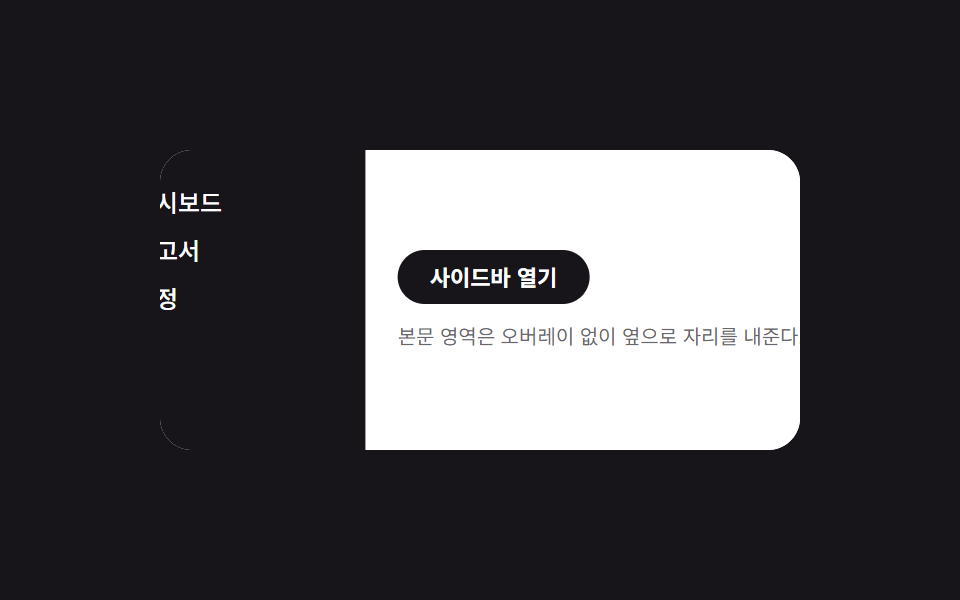
사이드바와 옆 콘텐츠가 같은 시간 동안 나란히 translateX 로 움직여, 오버레이 없이 자리를 나눠 쓴다.
쓰임데스크톱 문서 도구의 탐색 패널
콘텐츠 동반 이동translateX 쌍오버레이 없음
<main class="stage is-demo">
  <div class="layout">
    <nav class="drawer" aria-label="사이드 내비게이션" aria-hidden="true">
      <a class="drawer__link" href="#" tabindex="-1">대시보드</a>
      <a class="drawer__link" href="#" tabindex="-1">보고서</a>
      <a class="drawer__link" href="#" tabindex="-1">설정</a>
    </nav>
    <div class="content">
      <button class="trigger" type="button" aria-expanded="false">사이드바 열기</button>
      <p class="content__line">본문 영역은 오버레이 없이 옆으로 자리를 내준다.</p>
    </div>
  </div>
</main>
@use "../../../../site/static/demo-tokens" as *;
// ── 변수 3개 ──────────────────────────────────────────
$duration: $dur-enter; // 600ms — 사이드바·콘텐츠가 함께 이동하는 시간
$easing: $ease-spring;
$color: $subject-blue; // 링크 hover 강조색
// ── 데모 무대 ───────────────────────────────────────────
@include stage($stage-ink);
.stage { position: relative; }
.layout {
position: relative;
overflow: hidden;
width: min(88vw, 320px);
height: min(50vw, 150px);
border-radius: $r-card;
background: $stage-paper;
}
// 드로어는 콘텐츠 밑에 고정, 처음엔 왼쪽 밖으로 밀려 있다
.drawer {
position: absolute; inset: 0 auto 0 0;
width: 40%;
box-sizing: border-box;
display: flex; flex-direction: column; gap: $sp-1;
padding: $sp-4 $sp-2;
background: $stage-ink; color: $stage-paper;
transform: translateX(-100%);
transition: transform $duration $easing;
z-index: 1;
}
.drawer__link {
padding: $sp-1;
border-radius: $r-xs;
color: $stage-paper; text-decoration: none; font-weight: 500; font-size: 12px; line-height: 1; font-family: inherit;
&:hover, &:focus-visible { background: rgba($stage-paper, .16); color: $color; }
}
// 콘텐츠는 항상 레이아웃 전체 폭 — 오른쪽으로 밀려 드로어를 드러낸다(오버레이 없음)
.content {
position: relative;
height: 100%;
box-sizing: border-box;
display: flex; flex-direction: column; gap: $sp-2; justify-content: center;
padding: $sp-4;
background: $stage-paper; color: $stage-ink;
transform: translateX(0);
transition: transform $duration $easing;
z-index: 2;
}
.content__line { margin: 0; font-size: clamp(10px, 3vmin, 12px); color: rgba($stage-ink, .65); }
.trigger {
align-self: flex-start;
border: 0; border-radius: $r-pill;
padding: $sp-2 $sp-4;
font-weight: 600;
font-size: clamp(11px, 3.4vmin, 13px);
line-height: 1;
font-family: inherit;
color: $stage-paper; background: $stage-ink;
cursor: pointer; -webkit-tap-highlight-color: transparent;
}
.stage.is-open .drawer { transform: translateX(0); }
.stage.is-open .content { transform: translateX(40%); }
// 데모 루프: 닫힘 → 밀려남 → 닫힘 순으로 2초에 한 바퀴
.stage.is-demo .drawer { animation: drawer-loop $dur-loop $easing infinite; }
.stage.is-demo .content { animation: content-loop $dur-loop $easing infinite; }
@keyframes drawer-loop {
0%, 100% { transform: translateX(-100%); }
15%, 70% { transform: translateX(0); }
85% { transform: translateX(-100%); }
}
@keyframes content-loop {
0%, 100% { transform: translateX(0); }
15%, 70% { transform: translateX(40%); }
85% { transform: translateX(0); }
}
@media (prefers-reduced-motion: reduce) {
.stage.is-demo .drawer, .stage.is-demo .content { animation: none; }
.drawer, .content { transition-duration: 1ms; }
}html, body {
margin: 0;
overflow: hidden;
}
.stage {
box-sizing: border-box;
min-height: 100vh;
display: grid;
place-items: center;
margin: 0;
background: #17141a;
font-family: -apple-system, "Segoe UI", "Noto Sans KR", sans-serif;
padding: clamp(8px, 4vw, 24px);
}
.stage {
position: relative;
}
.layout {
position: relative;
overflow: hidden;
width: min(88vw, 320px);
height: min(50vw, 150px);
border-radius: 16px;
background: #ffffff;
}
.drawer {
position: absolute;
inset: 0 auto 0 0;
width: 40%;
box-sizing: border-box;
display: flex;
flex-direction: column;
gap: 4px;
padding: 16px 8px;
background: #17141a;
color: #ffffff;
transform: translateX(-100%);
transition: transform 600ms cubic-bezier(0.2, 0.8, 0.2, 1);
z-index: 1;
}
.drawer__link {
padding: 4px;
border-radius: 4px;
color: #ffffff;
text-decoration: none;
font-weight: 500;
font-size: 12px;
line-height: 1;
font-family: inherit;
}
.drawer__link:hover, .drawer__link:focus-visible {
background: rgba(255, 255, 255, 0.16);
color: #2f6df6;
}
.content {
position: relative;
height: 100%;
box-sizing: border-box;
display: flex;
flex-direction: column;
gap: 8px;
justify-content: center;
padding: 16px;
background: #ffffff;
color: #17141a;
transform: translateX(0);
transition: transform 600ms cubic-bezier(0.2, 0.8, 0.2, 1);
z-index: 2;
}
.content__line {
margin: 0;
font-size: clamp(10px, 3vmin, 12px);
color: rgba(23, 20, 26, 0.65);
}
.trigger {
align-self: flex-start;
border: 0;
border-radius: 999px;
padding: 8px 16px;
font-weight: 600;
font-size: clamp(11px, 3.4vmin, 13px);
line-height: 1;
font-family: inherit;
color: #ffffff;
background: #17141a;
cursor: pointer;
-webkit-tap-highlight-color: transparent;
}
.stage.is-open .drawer {
transform: translateX(0);
}
.stage.is-open .content {
transform: translateX(40%);
}
.stage.is-demo .drawer {
animation: drawer-loop 2s cubic-bezier(0.2, 0.8, 0.2, 1) infinite;
}
.stage.is-demo .content {
animation: content-loop 2s cubic-bezier(0.2, 0.8, 0.2, 1) infinite;
}
@keyframes drawer-loop {
0%, 100% {
transform: translateX(-100%);
}
15%, 70% {
transform: translateX(0);
}
85% {
transform: translateX(-100%);
}
}
@keyframes content-loop {
0%, 100% {
transform: translateX(0);
}
15%, 70% {
transform: translateX(40%);
}
85% {
transform: translateX(0);
}
}
@media (prefers-reduced-motion: reduce) {
.stage.is-demo .drawer, .stage.is-demo .content {
animation: none;
}
.drawer, .content {
transition-duration: 1ms;
}
}// 모달이 아니라 상시 내비게이션이라 inert 대신 aria-hidden·tabindex 로만 여닫힘을 알린다.
(function () {
var stage = document.querySelector('.stage');
var trigger = document.querySelector('.trigger');
var drawer = document.querySelector('.drawer');
var links = drawer.querySelectorAll('a');
function set(open) {
stage.classList.remove('is-demo');
stage.classList.toggle('is-open', open);
trigger.setAttribute('aria-expanded', String(open));
drawer.setAttribute('aria-hidden', String(!open));
links.forEach(function (a) { a.tabIndex = open ? 0 : -1; });
}
trigger.addEventListener('click', function () { set(!stage.classList.contains('is-open')); });
document.addEventListener('keydown', function (e) {
if (e.key === 'Escape' && stage.classList.contains('is-open')) { set(false); trigger.focus({ preventScroll: true }); }
});
})();import { useState } from "react";
import type { CSSProperties } from "react";
import styles from "./PushContentDrawer.module.scss";
export type PushContentDrawerProps = {
duration?: number;
easing?: string;
color?: string;
};
export default function PushContentDrawer({
duration = 600,
easing = "cubic-bezier(.2,.8,.2,1)",
color = "#2f6df6",
}: PushContentDrawerProps) {
const [open, setOpen] = useState(false);
const vars: CSSProperties = { "--duration": `${duration}ms`, "--easing": easing, "--color": color };
return (
<div className={styles.stage} style={vars}>
<div className={styles.layout}>
<nav className={styles.drawer} data-open={open} aria-label="사이드 내비게이션" aria-hidden={!open}>
<a className={styles.link} href="#" tabIndex={open ? 0 : -1}>대시보드</a>
<a className={styles.link} href="#" tabIndex={open ? 0 : -1}>보고서</a>
<a className={styles.link} href="#" tabIndex={open ? 0 : -1}>설정</a>
</nav>
<div className={styles.content} data-open={open}>
<button className={styles.trigger} type="button" aria-expanded={open} onClick={() => setOpen((v) => !v)}>
사이드바 열기
</button>
<p className={styles.line}>본문 영역은 오버레이 없이 옆으로 자리를 내준다.</p>
</div>
</div>
</div>
);
}05 콘텐츠 밀어내기 — 측정 누적면적 15.844% · 움직인 프레임 9/23GODRICH 원작 · zip 에 SCSS·React 포함 · CSS 사이드바 드로어 슬라이드 9종 — JS 최소로
이 데모가 속한 글
 CSS 사이드바 드로어 슬라이드 9종 — JS 최소로CSS 사이드바 드로어는 화면 가장자리에 붙어 있다가 트리거를 누르면 패널이 나타나는 내비게이션 UI로, 여기서는 transform과 opacity만으로 아홉 가지 여는 방식을 만들었습니다. 왼쪽에서 미끄러져 들어오 이 글의 데모 전부 보기