03탭 밑줄 스크롤 동기화
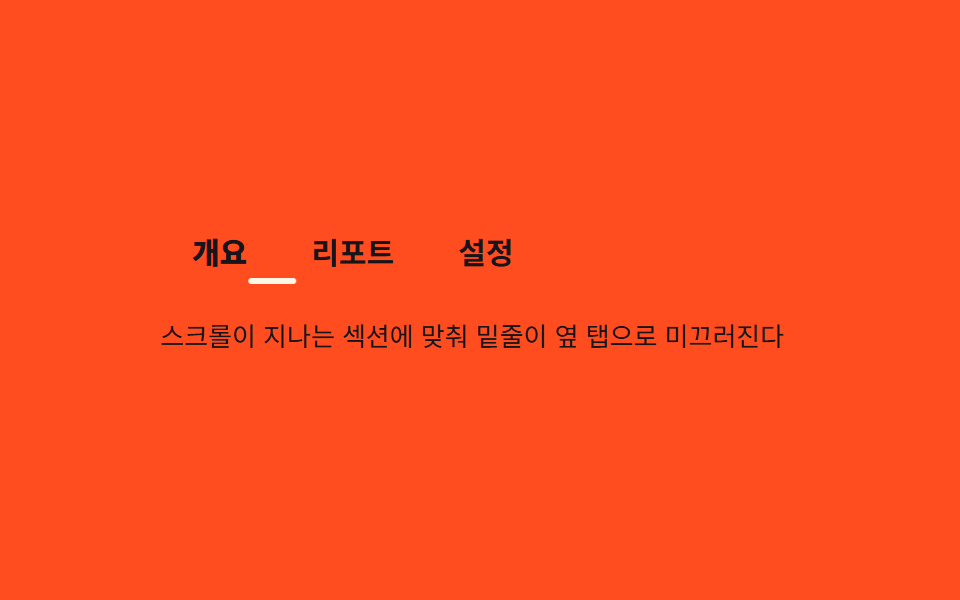
헤더 안에 나란히 놓인 앵커 탭들 아래로 밑줄 하나가 지금 지나가는 섹션에 맞춰 옆 탭으로 미끄러져 간다.
쓰임제품 상세 페이지 앵커 탭, 문서 사이트 섹션 내비
translateX 고정폭@keyframes tus-loopflex:0 0 auto
<main class="stage">
  <div class="tus is-demo">
    <nav class="tus__nav" id="tusNav">
      <a class="tus__tab is-active" href="#overview" data-i="0">개요</a>
      <a class="tus__tab" href="#report" data-i="1">리포트</a>
      <a class="tus__tab" href="#setting" data-i="2">설정</a>
      <span class="tus__underline" aria-hidden="true"></span>
    </nav>
    <div class="tus__panel">스크롤이 지나는 섹션에 맞춰 밑줄이 옆 탭으로 미끄러진다</div>
  </div>
</main>
@use "../../../../site/static/demo-tokens" as *;
// ── 변수 3개. 변형은 이것만 바꾼다 ──────────────────────────
$duration: $dur-base; // 밑줄이 미끄러지는 시간
$easing: $ease-spring;
$color: $subject-cream; // 밑줄·활성 탭 색
@include stage($stage-orange);
.tus { width: min(320px, 88vw); }
.tus__nav {
position: relative;
display: flex;
// 탭마다 내용 폭만큼만 차지해야 실측 offsetLeft·offsetWidth 가 의미 있다 (BD19) — 균등분배 금지
flex-wrap: nowrap;
}
.tus__tab {
flex: 0 0 auto;
padding: $sp-2 $sp-4;
text-decoration: none;
white-space: nowrap;
font-weight: 600;
font-size: clamp(13px, 3.6vw, 15px);
line-height: 1;
font-family: inherit;
color: $subject-ink; // 주황 무대 위 탭 글자 — AA 4.5 (rgba(cream,.65) 는 2.04:1 이었다)
&.is-active { color: $subject-ink; font-weight: 800; }
}
// 폭은 고정(칩 "translateX 고정폭") — 탭마다 넓어지지 않는다. translateX 만 탭 중심으로 움직인다
.tus__underline {
position: absolute; left: 0; bottom: 0;
width: 24px;
height: 3px;
background: $color;
border-radius: $r-pill;
transform: translateX(18.7265625px);
transition: transform $duration $easing;
}
// ── 데모(.is-demo): 세 탭 중심을 옮겨 다니는 2초 루프 ──────────────
// translateX 값 = 480×300 렌더에서 Playwright getBoundingClientRect 로 실측한 탭 left+width/2 - 밑줄폭/2
// (탭0 개요 left 0·폭 61.453125 / 탭1 리포트 left 61.453125·폭 76.171875 / 탭2 설정 left 137.625·폭 61.453125 — 짐작 56/76/56 류 금지, BD19)
.tus.is-demo .tus__underline { animation: tus-loop $dur-loop $easing infinite; }
@keyframes tus-loop {
0%, 15% { transform: translateX(18.7265625px); }
33%, 48% { transform: translateX(87.5390625px); }
66%, 81% { transform: translateX(156.3515625px); }
100% { transform: translateX(18.7265625px); }
}
.tus__panel {
margin-top: $sp-4;
min-height: 32px;
font-weight: 400;
font-size: clamp(12px, 3.2vw, 13px);
line-height: 1.5;
font-family: inherit;
color: $subject-ink; // 주황 무대 위 패널 글자 — AA 4.5
}
// ── 접근성 ──────────────────────────────────────────
@media (prefers-reduced-motion: reduce) {
.tus__underline { transition: none; }
.tus.is-demo .tus__underline { animation: none !important; transform: translateX(18.7265625px); }
}html, body {
margin: 0;
overflow: hidden;
}
.stage {
box-sizing: border-box;
min-height: 100vh;
display: grid;
place-items: center;
margin: 0;
background: #ff4d1f;
font-family: -apple-system, "Segoe UI", "Noto Sans KR", sans-serif;
padding: clamp(8px, 4vw, 24px);
}
.tus {
width: min(320px, 88vw);
}
.tus__nav {
position: relative;
display: flex;
flex-wrap: nowrap;
}
.tus__tab {
flex: 0 0 auto;
padding: 8px 16px;
text-decoration: none;
white-space: nowrap;
font-weight: 600;
font-size: clamp(13px, 3.6vw, 15px);
line-height: 1;
font-family: inherit;
color: #17141a;
}
.tus__tab.is-active {
color: #17141a;
font-weight: 800;
}
.tus__underline {
position: absolute;
left: 0;
bottom: 0;
width: 24px;
height: 3px;
background: #fff7e6;
border-radius: 999px;
transform: translateX(18.7265625px);
transition: transform 300ms cubic-bezier(0.2, 0.8, 0.2, 1);
}
.tus.is-demo .tus__underline {
animation: tus-loop 2s cubic-bezier(0.2, 0.8, 0.2, 1) infinite;
}
@keyframes tus-loop {
0%, 15% {
transform: translateX(18.7265625px);
}
33%, 48% {
transform: translateX(87.5390625px);
}
66%, 81% {
transform: translateX(156.3515625px);
}
100% {
transform: translateX(18.7265625px);
}
}
.tus__panel {
margin-top: 16px;
min-height: 32px;
font-weight: 400;
font-size: clamp(12px, 3.2vw, 13px);
line-height: 1.5;
font-family: inherit;
color: #17141a;
}
@media (prefers-reduced-motion: reduce) {
.tus__underline {
transition: none;
}
.tus.is-demo .tus__underline {
animation: none !important;
transform: translateX(18.7265625px);
}
}// 실제 페이지: IntersectionObserver 로 지금 통과 중인 섹션을 찾아 그 탭에 밑줄을 옮긴다.
// 탭 폭이 서로 달라 offsetLeft·offsetWidth 를 실측해 옮긴다 — 짐작 px 금지 (BD19)
var nav = document.getElementById('tusNav');
var tabs = nav.querySelectorAll('.tus__tab');
var underline = nav.querySelector('.tus__underline');
function moveTo(tab) {
var w = underline.offsetWidth;
underline.style.transform = 'translateX(' + (tab.offsetLeft + tab.offsetWidth / 2 - w / 2) + 'px)';
}
tabs.forEach(function (t) { t.addEventListener('click', function (e) { e.preventDefault(); document.querySelector('.tus').classList.remove('is-demo'); moveTo(t); }); });import { useEffect, useRef, useState } from "react";
import type { CSSProperties, MouseEvent } from "react";
import styles from "./TabUnderlineSync.module.scss";
export type TabUnderlineSyncTab = { key: string; label: string; href: string };
export type TabUnderlineSyncProps = {
tabs: TabUnderlineSyncTab[];
/** 밑줄이 미끄러지는 시간 (기본 300ms) */
duration?: number;
easing?: string;
color?: string;
};
type Vars = CSSProperties & { "--duration"?: string; "--easing"?: string; "--color"?: string };
export default function TabUnderlineSync({
tabs,
duration = 300,
easing = "cubic-bezier(.2,.8,.2,1)",
color = "#fff7e6",
}: TabUnderlineSyncProps) {
const navRef = useRef<HTMLElement>(null);
const [active, setActive] = useState(0);
const [x, setX] = useState(0);
const vars: Vars = { "--duration": `${duration}ms`, "--easing": easing, "--color": color };
// 탭 폭이 서로 달라 offsetLeft·offsetWidth 를 실측해 밑줄 중심을 옮긴다 — 짐작 px 금지 (BD19)
useEffect(() => {
const nav = navRef.current;
if (!nav) return;
const tab = nav.querySelectorAll("a")[active] as HTMLElement | undefined;
const underline = nav.querySelector<HTMLElement>("[data-underline]");
if (tab && underline) {
const w = underline.offsetWidth;
setX(tab.offsetLeft + tab.offsetWidth / 2 - w / 2);
}
}, [active, tabs]);
return (
<nav ref={navRef} className={styles.nav} style={vars}>
{tabs.map((t, i) => (
<a
key={t.key}
href={t.href}
className={i === active ? `${styles.tab} ${styles.isActive}` : styles.tab}
onClick={(e: MouseEvent<HTMLAnchorElement>) => { e.preventDefault(); setActive(i); }}
>
{t.label}
</a>
))}
<span data-underline className={styles.underline} style={{ transform: `translateX(${x}px)` }} />
</nav>
);
}03 탭 밑줄 스크롤 동기화 — 측정 누적면적 0.308% · 움직인 프레임 14/23GODRICH 원작 · zip 에 SCSS·React 포함 · CSS 헤더 고정 9가지 응용 — 검색바·CTA·배지까지
이 데모가 속한 글
 CSS 헤더 고정 9가지 응용 — 검색바·CTA·배지까지CSS 헤더 고정은 스크롤해도 페이지 위쪽 메뉴 줄이 화면에 그대로 붙어 있게 만드는 기능으로, position: sticky 한 줄이면 충분합니다. 여기 아홉 개는 그냥 붙어만 있는 헤더를 넘어, 스크롤하는 동안 이 글의 데모 전부 보기