07스티키+패럴랙스 조합
앞 텍스트는 화면에 붙박이로 고정되고 뒤 배경만 그 위로 계속 흘러간다.
쓰임스토리텔링 섹션, 제품 스펙 설명
position sticky배경만 이동고정+흐름
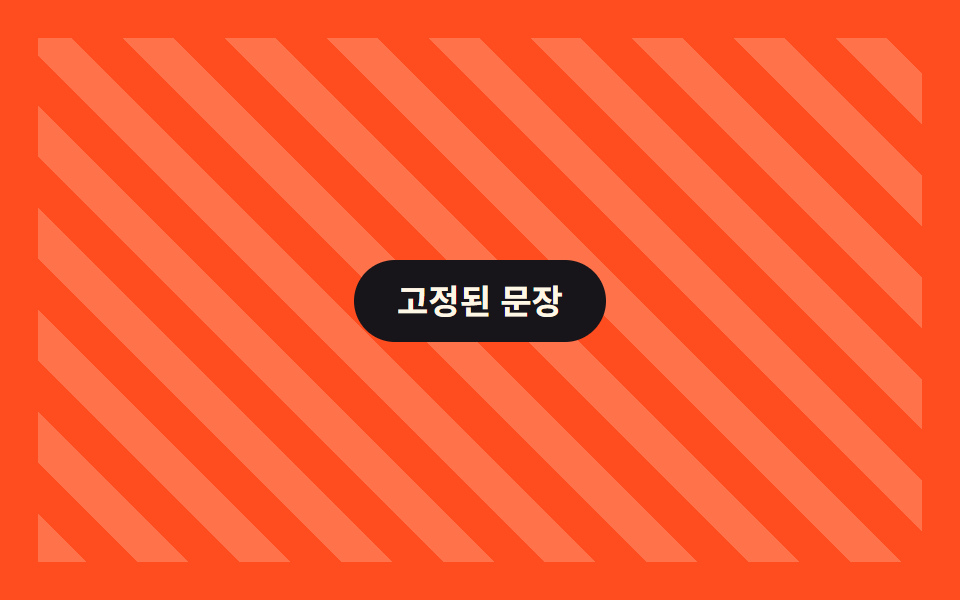
<main class="stage is-demo">
  <div class="stickypar">
    <div class="stickypar__bg" aria-hidden="true"></div>
    <p class="stickypar__caption">고정된 문장</p>
  </div>
</main>
@use "../../../../site/static/demo-tokens" as *;
// ── 변수 3개. 변형은 이것만 바꾼다 ──────────────────────────
$bg-shift: 40px; // 뒤 배경 이동량
$duration: $dur-loop; // 데모 왕복 주기
$color: $subject-cream; // 배경 결·문장 글자 색 (orange 무대라 cream)
@include stage($stage-orange);
.stickypar {
position: relative;
width: 100%;
height: 100%;
overflow: hidden;
display: grid;
place-items: center;
}
.stickypar__bg {
position: absolute;
inset: -20% 0;
background: repeating-linear-gradient(45deg, rgba($color, .22) 0 18px, transparent 18px 36px);
// ── 실제 사용 코드: 앞 문장은 sticky 로 붙박이, 뒤 배경만 흘러간다 ──
@supports (animation-timeline: scroll()) {
animation: bg-drift linear both;
animation-timeline: scroll(root);
}
@supports not (animation-timeline: scroll()) { transform: none; }
}
.stickypar__caption {
position: sticky;
top: 40%;
z-index: 1;
margin: 0;
padding: 12px 22px;
border-radius: $r-pill;
background: $stage-ink;
color: $color;
font: 700 clamp(14px, 4.4vw, 17px)/1 -apple-system, "Segoe UI", "Noto Sans KR", sans-serif;
}
@keyframes bg-drift { from { transform: translateY(0); } to { transform: translateY(-#{$bg-shift}); } }
// ── 데모(.is-demo): 왕복 루프로 흉내 ────────
.stage.is-demo .stickypar__bg { animation: bg-loop $duration ease-in-out infinite; }
@keyframes bg-loop { 0%, 100% { transform: translateY($bg-shift); } 50% { transform: translateY(-$bg-shift); } }
@media (prefers-reduced-motion: reduce) {
.stickypar__bg, .stage.is-demo .stickypar__bg { animation: none !important; transform: none; }
}html, body {
margin: 0;
overflow: hidden;
}
.stage {
box-sizing: border-box;
min-height: 100vh;
display: grid;
place-items: center;
margin: 0;
background: #ff4d1f;
font-family: -apple-system, "Segoe UI", "Noto Sans KR", sans-serif;
padding: clamp(8px, 4vw, 24px);
}
.stickypar {
position: relative;
width: 100%;
height: 100%;
overflow: hidden;
display: grid;
place-items: center;
}
.stickypar__bg {
position: absolute;
inset: -20% 0;
background: repeating-linear-gradient(45deg, rgba(255, 247, 230, 0.22) 0 18px, transparent 18px 36px);
}
@supports (animation-timeline: scroll()) {
.stickypar__bg {
animation: bg-drift linear both;
animation-timeline: scroll(root);
}
}
@supports not (animation-timeline: scroll()) {
.stickypar__bg {
transform: none;
}
}
.stickypar__caption {
position: sticky;
top: 40%;
z-index: 1;
margin: 0;
padding: 12px 22px;
border-radius: 999px;
background: #17141a;
color: #fff7e6;
font: 700 clamp(14px, 4.4vw, 17px)/1 -apple-system, "Segoe UI", "Noto Sans KR", sans-serif;
}
@keyframes bg-drift {
from {
transform: translateY(0);
}
to {
transform: translateY(-40px);
}
}
.stage.is-demo .stickypar__bg {
animation: bg-loop 2s ease-in-out infinite;
}
@keyframes bg-loop {
0%, 100% {
transform: translateY(40px);
}
50% {
transform: translateY(-40px);
}
}
@media (prefers-reduced-motion: reduce) {
.stickypar__bg, .stage.is-demo .stickypar__bg {
animation: none !important;
transform: none;
}
}import type { CSSProperties, ReactNode } from "react";
import styles from "./StickyParallax.module.scss";
export type StickyParallaxProps = {
children: ReactNode;
/** 뒤 배경 이동량 (기본 40px) */
bgShift?: number;
/** 배경 결·문장 글자 색 */
color?: string;
className?: string;
};
type Vars = CSSProperties & { "--bg-shift"?: string; "--color"?: string };
export default function StickyParallax({
children,
bgShift = 40,
color = "#fff7e6",
className = "",
}: StickyParallaxProps) {
const vars: Vars = { "--bg-shift": `${bgShift}px`, "--color": color };
return (
<div className={`${styles.wrap} ${className}`} style={vars}>
<div className={styles.bg} aria-hidden="true" />
<p className={styles.caption}>{children}</p>
</div>
);
}07 스티키+패럴랙스 조합 — 측정 누적면적 77.093% · 움직인 프레임 23/23GODRICH 원작 · zip 에 SCSS·React 포함 · CSS 패럴랙스 스크롤 9종 — AOS·GSAP 없이, JS 0줄
이 데모가 속한 글
 CSS 패럴랙스 스크롤 9종 — AOS·GSAP 없이, JS 0줄CSS 패럴랙스 스크롤 아홉 개를 모았습니다. 레이어마다 이동 속도를 다르게 주는 원리 하나로 배경이 내용보다 느리게 움직이는 착시를 만듭니다. 격자에서는 아홉 개가 2초 간격으로 자동 반복되니 먼저 눈으로 훑고 마 이 글의 데모 전부 보기