07섹션 제목 스티키
긴 목록을 스크롤하는 동안 헤더 자리에 지금 지나가는 구간의 제목만 표시되고 다음 구간에서 교체된다.
쓰임연락처·용어 사전처럼 알파벳 구간이 있는 목록, 긴 FAQ
IntersectionObserver센티넬 요소제목 교체
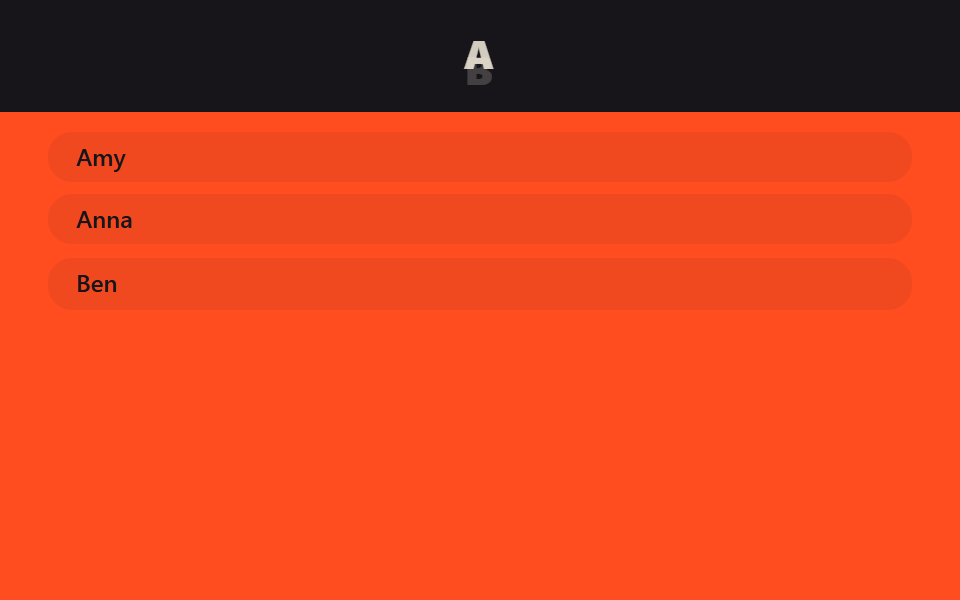
<main class="stage">
  <header class="head is-demo">
    <span class="head__label head__label--a">A</span>
    <span class="head__label head__label--b">B</span>
  </header>
  <div class="list">
    <p class="list__sentinel" data-label="A"></p>
    <p class="list__row">Amy</p>
    <p class="list__row">Anna</p>
    <p class="list__sentinel" data-label="B"></p>
    <p class="list__row">Ben</p>
  </div>
</main>
@use "../../../../site/static/demo-tokens" as *;
// ── 변수 3개 ──────────────────────────────────────────
$duration: $dur-quick; // 제목이 교체되는 시간
$easing: $ease-out;
$color: $stage-orange; // 헤더 배경
// ── 데모 무대 ──────────────────────────────────────────
html, body { margin: 0; overflow: hidden; }
.stage {
min-height: 100vh;
margin: 0;
background: $stage-orange;
font-family: -apple-system, "Segoe UI", "Noto Sans KR", sans-serif;
}
.head {
position: sticky;
top: 0;
height: 56px;
display: grid;
place-items: center;
background: $subject-ink;
overflow: hidden;
// 두 라벨을 겹쳐 두고 opacity + translateY 로 교체한다
&__label {
grid-area: 1 / 1;
color: $subject-cream;
font-weight: 800;
font-size: 20px;
line-height: 1;
font-family: inherit;
letter-spacing: .06em;
opacity: 0;
transform: translateY(8px);
transition: opacity $duration $easing, transform $duration $easing;
}
&__label.is-current { opacity: 1; transform: translateY(0); }
&__label--a.is-current ~ &__label--b { opacity: 0; }
}
// 기본 상태: A 가 보인다
.head__label--a { opacity: 1; transform: translateY(0); }
// ── 데모(.is-demo): A ↔ B 2초 루프로 교체 ─────────────────
.head.is-demo .head__label--a { animation: label-a-loop $dur-loop $easing infinite; }
.head.is-demo .head__label--b { animation: label-b-loop $dur-loop $easing infinite; }
@keyframes label-a-loop {
0%, 20% { opacity: 1; transform: translateY(0); }
45%, 75% { opacity: 0; transform: translateY(-8px); }
95%, 100% { opacity: 1; transform: translateY(0); }
}
@keyframes label-b-loop {
0%, 20% { opacity: 0; transform: translateY(8px); }
45%, 75% { opacity: 1; transform: translateY(0); }
95%, 100% { opacity: 0; transform: translateY(8px); }
}
// ── 목록: 알파벳 구간이 있는 연락처 흉내 (칸이 좁으면 줄인다) ───
.list { padding: clamp(4px, 3vh, 16px) 24px 0; }
.list__sentinel { height: 1px; margin: 0; }
.list__row {
margin: 0 0 clamp(3px, 2vh, 12px);
padding: clamp(3px, 2vh, 10px) 14px;
border-radius: $r-control;
background: rgba($subject-ink, .06);
color: $subject-ink;
font-weight: 600;
font-size: 12px;
line-height: 1.1;
font-family: inherit;
}
@media (prefers-reduced-motion: reduce) {
.head__label { transition: none; }
.head.is-demo .head__label--a, .head.is-demo .head__label--b { animation: none !important; }
}html, body {
margin: 0;
overflow: hidden;
}
.stage {
min-height: 100vh;
margin: 0;
background: #ff4d1f;
font-family: -apple-system, "Segoe UI", "Noto Sans KR", sans-serif;
}
.head {
position: sticky;
top: 0;
height: 56px;
display: grid;
place-items: center;
background: #17141a;
overflow: hidden;
}
.head__label {
grid-area: 1/1;
color: #fff7e6;
font-weight: 800;
font-size: 20px;
line-height: 1;
font-family: inherit;
letter-spacing: 0.06em;
opacity: 0;
transform: translateY(8px);
transition: opacity 220ms ease-out, transform 220ms ease-out;
}
.head__label.is-current {
opacity: 1;
transform: translateY(0);
}
.head__label--a.is-current ~ .head__label--b {
opacity: 0;
}
.head__label--a {
opacity: 1;
transform: translateY(0);
}
.head.is-demo .head__label--a {
animation: label-a-loop 2s ease-out infinite;
}
.head.is-demo .head__label--b {
animation: label-b-loop 2s ease-out infinite;
}
@keyframes label-a-loop {
0%, 20% {
opacity: 1;
transform: translateY(0);
}
45%, 75% {
opacity: 0;
transform: translateY(-8px);
}
95%, 100% {
opacity: 1;
transform: translateY(0);
}
}
@keyframes label-b-loop {
0%, 20% {
opacity: 0;
transform: translateY(8px);
}
45%, 75% {
opacity: 1;
transform: translateY(0);
}
95%, 100% {
opacity: 0;
transform: translateY(8px);
}
}
.list {
padding: clamp(4px, 3vh, 16px) 24px 0;
}
.list__sentinel {
height: 1px;
margin: 0;
}
.list__row {
margin: 0 0 clamp(3px, 2vh, 12px);
padding: clamp(3px, 2vh, 10px) 14px;
border-radius: 12px;
background: rgba(23, 20, 26, 0.06);
color: #17141a;
font-weight: 600;
font-size: 12px;
line-height: 1.1;
font-family: inherit;
}
@media (prefers-reduced-motion: reduce) {
.head__label {
transition: none;
}
.head.is-demo .head__label--a, .head.is-demo .head__label--b {
animation: none !important;
}
}// 실제 페이지: 지금 통과 중인 구간 센티넬의 글자를 헤더 라벨에 올린다 (IntersectionObserver, 7줄)
var labels = document.querySelectorAll('.head__label');
document.querySelectorAll('.list__sentinel').forEach(function (s) {
new IntersectionObserver(function (es) {
if (es[0].isIntersecting) labels.forEach(function (l) { l.classList.toggle('is-current', l.textContent === s.dataset.label); });
}, { rootMargin: '-56px 0px -80% 0px' }).observe(s);
});import { useEffect, useRef, useState } from "react";
import type { CSSProperties } from "react";
import styles from "./SectionTitleHeader.module.scss";
export type SectionTitleHeaderProps = {
/** 구간 이름과, 그 구간이 시작하는 지점의 센티넬 ref */
sections: { label: string; sentinelRef: { current: HTMLElement | null } }[];
duration?: number;
easing?: string;
};
type Vars = CSSProperties & { "--duration"?: string; "--easing"?: string };
export default function SectionTitleHeader({ sections, duration = 220, easing = "ease-out" }: SectionTitleHeaderProps) {
const [current, setCurrent] = useState(sections[0]?.label ?? "");
const vars: Vars = { "--duration": `${duration}ms`, "--easing": easing };
const observers = useRef<IntersectionObserver[]>([]);
useEffect(() => {
observers.current = sections.map(({ label, sentinelRef }) => {
const io = new IntersectionObserver(
([e]) => { if (e.isIntersecting) setCurrent(label); },
{ rootMargin: "-56px 0px -80% 0px" }
);
if (sentinelRef.current) io.observe(sentinelRef.current);
return io;
});
return () => observers.current?.forEach((io) => io.disconnect());
}, [sections]);
return (
<header className={styles.head} style={vars}>
<span key={current} className={styles.label}>{current}</span>
</header>
);
}07 섹션 제목 스티키 — 측정 누적면적 0.241% · 움직인 프레임 12/23GODRICH 원작 · zip 에 SCSS·React 포함 · CSS 헤더 고정 스티키 9종 — AOS·GSAP 없이, JS 0줄
이 데모가 속한 글
 CSS 헤더 고정 스티키 9종 — AOS·GSAP 없이, JS 0줄CSS 헤더 고정 스티키는 페이지를 스크롤해도 헤더가 화면 위에 계속 붙어 있게 만드는 방식입니다. 아홉 개 중 넷(04·05·08·09 중 04·05)은 자바스크립트 없이 CSS만으로 움직입니다. 아래 격자에서 자 이 글의 데모 전부 보기