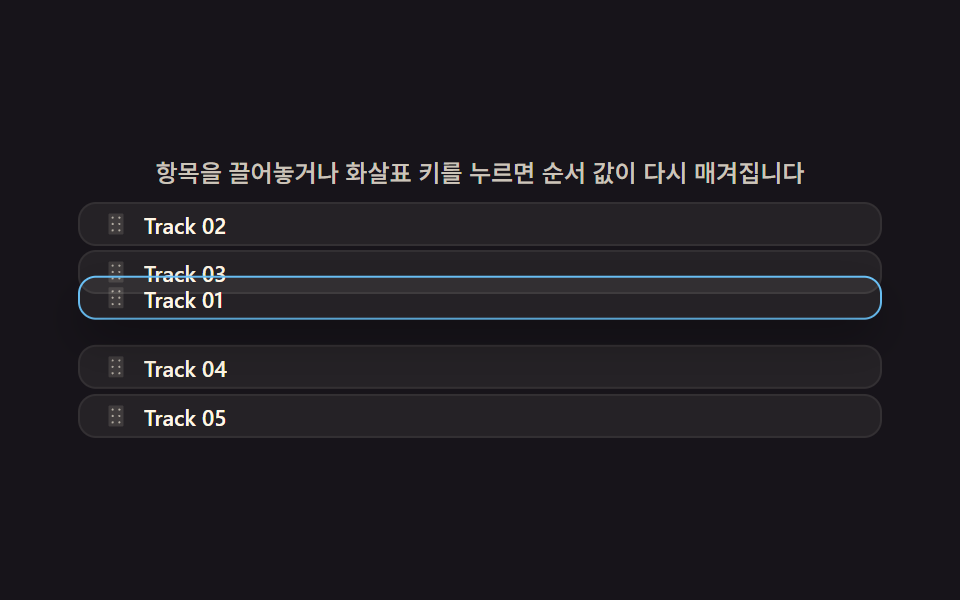
05순서 값을 다시 매기는 대기열 드래그 정렬
대기열 항목을 포인터로 끌어 놓는 위치의 세로 좌표를 다른 항목들의 위치 값과 비교해 순서를 다시 매기고, 놓일 자리가 정해지면 그 사이 항목들이 자기 위치 값만큼 밀려나며 자리를 비켜준다.
쓰임플레이리스트 편집·다음 곡 예약
SETTLE_RATEslotOfonPointerMove
<svg width="0" height="0" style="position:absolute" aria-hidden="true">
  <defs>
    <symbol id="ico-grip" viewBox="0 0 256 256"><g fill="currentColor"><path d="M208 32v192a16 16 0 0 1-16 16H64a16 16 0 0 1-16-16V32a16 16 0 0 1 16-16h128a16 16 0 0 1 16 16" opacity=".2"/><path d="M104 60a12 12 0 1 1-12-12a12 12 0 0 1 12 12m60 12a12 12 0 1 0-12-12a12 12 0 0 0 12 12m-72 44a12 12 0 1 0 12 12a12 12 0 0 0-12-12m72 0a12 12 0 1 0 12 12a12 12 0 0 0-12-12m-72 68a12 12 0 1 0 12 12a12 12 0 0 0-12-12m72 0a12 12 0 1 0 12 12a12 12 0 0 0-12-12"/></g></symbol>
  </defs>
</svg>
<main class="stage">
<div class="pl is-demo" id="pl">
  <p class="pl__hint"><span>항목을 끌어놓거나 화살표 키를 누르면 순서 값이 다시 매겨집니다</span></p>
  <ul class="pl__list" id="list" aria-label="대기열, 끌어서 순서 바꾸기">
    <li class="pl__row" data-i="0" tabindex="0" aria-label="Track 01, 끌어서 순서 바꾸기">
      <svg class="pl__handle" aria-hidden="true"><use href="#ico-grip"></use></svg>
      <span class="pl__label">Track 01</span>
    </li>
    <li class="pl__row" data-i="1" tabindex="0" aria-label="Track 02, 끌어서 순서 바꾸기">
      <svg class="pl__handle" aria-hidden="true"><use href="#ico-grip"></use></svg>
      <span class="pl__label">Track 02</span>
    </li>
    <li class="pl__row" data-i="2" tabindex="0" aria-label="Track 03, 끌어서 순서 바꾸기">
      <svg class="pl__handle" aria-hidden="true"><use href="#ico-grip"></use></svg>
      <span class="pl__label">Track 03</span>
    </li>
    <li class="pl__row" data-i="3" tabindex="0" aria-label="Track 04, 끌어서 순서 바꾸기">
      <svg class="pl__handle" aria-hidden="true"><use href="#ico-grip"></use></svg>
      <span class="pl__label">Track 04</span>
    </li>
    <li class="pl__row" data-i="4" tabindex="0" aria-label="Track 05, 끌어서 순서 바꾸기">
      <svg class="pl__handle" aria-hidden="true"><use href="#ico-grip"></use></svg>
      <span class="pl__label">Track 05</span>
    </li>
  </ul>
</div>
</main>@use "../../../../site/static/demo-tokens" as *;
// 계산 겹(순서 재계산·관성 lerp 정착)은 index.html 의 onPointerMove()/frame() 에 있다. 여기는 무대·레이아웃만.
// transition 을 두지 않는다 — 클래스 전환이 만드는 CSS 애니메이션이 렌더 캐처의 실시간 분기 판정을 깨뜨린다(document.getAnimations() 오탐).
$duration: $dur-quick;
$easing: $ease-out;
$color: $subject-sky;
@include stage($stage-ink);
.pl {
display: flex;
flex-direction: column;
align-items: center;
gap: $sp-2;
width: min(400px, 92vw);
}
.pl__hint {
margin: 0;
color: rgba($subject-cream, .78);
font-size: 12px;
font-weight: 500;
line-height: 1.35;
text-align: center;
}
.pl__list {
position: relative;
width: 100%;
list-style: none;
margin: 0;
padding: 0;
}
.pl__row {
position: absolute;
left: 0;
right: 0;
top: 0;
height: 20px;
display: flex;
align-items: center;
gap: $sp-2;
padding: 0 $sp-3;
border-radius: $r-sm;
background: rgba($subject-cream, .06);
box-shadow: 0 0 0 1px rgba($subject-cream, .12);
color: $subject-cream;
cursor: grab;
touch-action: none;
font-size: 11px;
}
.pl__row:focus-visible {
outline: 2px solid $color;
outline-offset: 2px;
}
.pl__row.is-dragging {
cursor: grabbing;
box-shadow: 0 10px 22px rgba(#000, .3), 0 0 0 1px $color;
z-index: 2;
}
.pl__handle {
flex: 0 0 auto;
width: 12px;
height: 12px;
color: rgba($subject-cream, .6);
}
.pl__label {
font-size: 11px;
font-weight: 600;
}
@media (prefers-reduced-motion: reduce) {
// transform 은 항상 index.html 의 render()/frame() 이 인라인으로 찍는다 — 여기 낮출 CSS transition 이 없다.
// BD5 는 이 블록 존재 자체(감쇠 인지)를 확인한다.
.pl { scroll-behavior: auto; }
}
@media (max-width: 340px) {
.pl__row { padding: 0 $sp-3; }
}html, body {
margin: 0;
overflow: hidden;
}
.stage {
box-sizing: border-box;
min-height: 100vh;
display: grid;
place-items: center;
margin: 0;
background: #17141a;
font-family: -apple-system, "Segoe UI", "Noto Sans KR", sans-serif;
padding: clamp(8px, 4vw, 24px);
}
.pl {
display: flex;
flex-direction: column;
align-items: center;
gap: 8px;
width: min(400px, 92vw);
}
.pl__hint {
margin: 0;
color: rgba(255, 247, 230, 0.78);
font-size: 12px;
font-weight: 500;
line-height: 1.35;
text-align: center;
}
.pl__list {
position: relative;
width: 100%;
list-style: none;
margin: 0;
padding: 0;
}
.pl__row {
position: absolute;
left: 0;
right: 0;
top: 0;
height: 20px;
display: flex;
align-items: center;
gap: 8px;
padding: 0 12px;
border-radius: 8px;
background: rgba(255, 247, 230, 0.06);
box-shadow: 0 0 0 1px rgba(255, 247, 230, 0.12);
color: #fff7e6;
cursor: grab;
touch-action: none;
font-size: 11px;
}
.pl__row:focus-visible {
outline: 2px solid #6ec8ff;
outline-offset: 2px;
}
.pl__row.is-dragging {
cursor: grabbing;
box-shadow: 0 10px 22px rgba(0, 0, 0, 0.3), 0 0 0 1px #6ec8ff;
z-index: 2;
}
.pl__handle {
flex: 0 0 auto;
width: 12px;
height: 12px;
color: rgba(255, 247, 230, 0.6);
}
.pl__label {
font-size: 11px;
font-weight: 600;
}
@media (prefers-reduced-motion: reduce) {
.pl {
scroll-behavior: auto;
}
}
@media (max-width: 340px) {
.pl__row {
padding: 0 12px;
}
}(function () {
var root = document.getElementById('pl');
var list = document.getElementById('list');
var rows = Array.prototype.slice.call(list.children);
var reduce = window.matchMedia('(prefers-reduced-motion: reduce)').matches;
var isDemo = true;
var ROW_H = 24; // 슬롯 간격(행 높이 + 사이 간격)
var SETTLE_RATE = 0.22; // 목표 위치로 매 프레임 다가가는 비율 — 관성 lerp 한 겹
var order = rows.map(function (_, i) { return i; }); // order[슬롯] = 행 인덱스
var y = rows.map(function (_, i) { return slotOf(i) * ROW_H; }); // 각 행의 현재(보간 중) y값
list.style.height = (rows.length * ROW_H) + 'px';
function slotOf(rowIndex) { return order.indexOf(rowIndex); }
function human() { if (isDemo) { root.classList.remove('is-demo'); isDemo = false; rows[DEMO_ROW].classList.remove('is-dragging'); } }
var dragIndex = -1, startClientY = 0, startSlotY = 0, dragY = 0;
function onPointerDown(e, i) {
human();
dragIndex = i;
startClientY = e.clientY;
startSlotY = slotOf(i) * ROW_H;
dragY = startSlotY;
rows[i].classList.add('is-dragging');
rows[i].setPointerCapture(e.pointerId);
}
function onPointerMove(e) {
if (dragIndex < 0) return;
dragY = startSlotY + (e.clientY - startClientY);
var toSlot = Math.max(0, Math.min(rows.length - 1, Math.round(dragY / ROW_H)));
var fromSlot = slotOf(dragIndex);
if (toSlot !== fromSlot) {
order.splice(fromSlot, 1);
order.splice(toSlot, 0, dragIndex);
}
}
function onPointerUp(e) {
if (dragIndex < 0) return;
rows[dragIndex].classList.remove('is-dragging');
try { rows[dragIndex].releasePointerCapture(e.pointerId); } catch (err) {}
dragIndex = -1;
}
var grabbedIndex = -1;
function onRowKeydown(e, i) {
if (e.key === 'Enter' || e.key === ' ') {
e.preventDefault(); human();
if (grabbedIndex === i) {
grabbedIndex = -1; rows[i].classList.remove('is-dragging');
} else {
if (grabbedIndex >= 0) rows[grabbedIndex].classList.remove('is-dragging');
grabbedIndex = i; rows[i].classList.add('is-dragging');
}
} else if ((e.key === 'ArrowUp' || e.key === 'ArrowDown') && grabbedIndex === i) {
e.preventDefault(); human();
var slot = slotOf(i);
var next = Math.max(0, Math.min(rows.length - 1, slot + (e.key === 'ArrowDown' ? 1 : -1)));
if (next !== slot) { order.splice(slot, 1); order.splice(next, 0, i); }
}
}
rows.forEach(function (row, i) {
row.addEventListener('pointerdown', function (e) { onPointerDown(e, i); });
row.addEventListener('keydown', function (e) { onRowKeydown(e, i); });
});
list.addEventListener('pointermove', onPointerMove);
list.addEventListener('pointerup', onPointerUp);
function triangle(frac) { return frac < 0.5 ? frac * 2 : 2 - frac * 2; }
var driveStart = 0, DEMO_ROW = 0;
function frame(now) {
if (isDemo) {
if (!driveStart) driveStart = now;
var DRIVE_PERIOD_MS = 2000; // 렌더 캐처 창(설정 초=2.0)과 같은 주기 — 시연 전용
var frac = ((now - driveStart) % DRIVE_PERIOD_MS) / DRIVE_PERIOD_MS;
dragY = triangle(frac) * (rows.length - 1) * ROW_H;
var toSlot = Math.max(0, Math.min(rows.length - 1, Math.round(dragY / ROW_H)));
var fromSlot = slotOf(DEMO_ROW);
if (toSlot !== fromSlot) { order.splice(fromSlot, 1); order.splice(toSlot, 0, DEMO_ROW); }
}
var activeDrag = isDemo ? DEMO_ROW : dragIndex;
rows.forEach(function (row, i) {
if (i === activeDrag) {
y[i] = dragY; // 잡은 항목은 lerp 없이 포인터를 그대로 따라간다
} else {
var target = slotOf(i) * ROW_H;
y[i] += (target - y[i]) * SETTLE_RATE; // 나머지 항목은 목표 자리로 관성 있게 다가간다
}
row.style.transform = 'translateY(' + y[i].toFixed(2) + 'px)';
});
requestAnimationFrame(frame);
}
if (reduce) {
root.classList.add('is-still');
rows.forEach(function (row, i) { row.style.transform = 'translateY(' + (slotOf(i) * ROW_H) + 'px)'; });
} else {
rows[DEMO_ROW].classList.add('is-dragging');
requestAnimationFrame(frame);
}
})();import { useEffect, useRef } from "react";
import styles from "./PlaylistQueue.module.scss";
const TRACK_NAMES = ["Track 01", "Track 02", "Track 03", "Track 04", "Track 05"];
export default function PlaylistQueue() {
const rootRef = useRef<HTMLDivElement | null>(null);
const listRef = useRef<HTMLUListElement | null>(null);
const rowRefs = useRef<(HTMLLIElement | null)[]>([]);
useEffect(() => {
const root = rootRef.current;
const list = listRef.current;
const rows = (rowRefs.current || []).filter((r): r is HTMLLIElement => !!r);
if (!root || !list || rows.length !== TRACK_NAMES.length) return;
const reduce = window.matchMedia("(prefers-reduced-motion: reduce)").matches;
let isDemo = true;
const ROW_H = 24; // 슬롯 간격(행 높이 + 사이 간격)
const SETTLE_RATE = 0.22; // 목표 위치로 매 프레임 다가가는 비율 — 관성 lerp 한 겹
const order = rows.map((_, i) => i); // order[슬롯] = 행 인덱스
function slotOf(rowIndex: number) { return order.indexOf(rowIndex); }
const y = rows.map((_, i) => slotOf(i) * ROW_H); // 각 행의 현재(보간 중) y값
list.style.height = rows.length * ROW_H + "px";
const DEMO_ROW = 0;
function human() {
if (isDemo) {
root!.classList.remove(styles["is-demo"]);
isDemo = false;
rows[DEMO_ROW].classList.remove(styles["is-dragging"]);
}
}
let dragIndex = -1, startClientY = 0, startSlotY = 0, dragY = 0;
function onPointerDown(e: PointerEvent, i: number) {
human();
dragIndex = i;
startClientY = e.clientY;
startSlotY = slotOf(i) * ROW_H;
dragY = startSlotY;
rows[i].classList.add(styles["is-dragging"]);
rows[i].setPointerCapture(e.pointerId);
}
function onPointerMove(e: PointerEvent) {
if (dragIndex < 0) return;
dragY = startSlotY + (e.clientY - startClientY);
const toSlot = Math.max(0, Math.min(rows.length - 1, Math.round(dragY / ROW_H)));
const fromSlot = slotOf(dragIndex);
if (toSlot !== fromSlot) {
order.splice(fromSlot, 1);
order.splice(toSlot, 0, dragIndex);
}
}
function onPointerUp(e: PointerEvent) {
if (dragIndex < 0) return;
rows[dragIndex].classList.remove(styles["is-dragging"]);
try { rows[dragIndex].releasePointerCapture(e.pointerId); } catch { /* noop */ }
dragIndex = -1;
}
let grabbedIndex = -1;
function onRowKeydown(e: KeyboardEvent, i: number) {
if (e.key === "Enter" || e.key === " ") {
e.preventDefault(); human();
if (grabbedIndex === i) {
grabbedIndex = -1; rows[i].classList.remove(styles["is-dragging"]);
} else {
if (grabbedIndex >= 0) rows[grabbedIndex].classList.remove(styles["is-dragging"]);
grabbedIndex = i; rows[i].classList.add(styles["is-dragging"]);
}
} else if ((e.key === "ArrowUp" || e.key === "ArrowDown") && grabbedIndex === i) {
e.preventDefault(); human();
const slot = slotOf(i);
const next = Math.max(0, Math.min(rows.length - 1, slot + (e.key === "ArrowDown" ? 1 : -1)));
if (next !== slot) { order.splice(slot, 1); order.splice(next, 0, i); }
}
}
const pointerDownHandlers = rows.map((_, i) => (e: PointerEvent) => onPointerDown(e, i));
const keydownHandlers = rows.map((_, i) => (e: KeyboardEvent) => onRowKeydown(e, i));
rows.forEach((row, i) => {
row.addEventListener("pointerdown", pointerDownHandlers[i] as EventListener);
row.addEventListener("keydown", keydownHandlers[i] as EventListener);
});
list.addEventListener("pointermove", onPointerMove as EventListener);
list.addEventListener("pointerup", onPointerUp as EventListener);
function triangle(frac: number) { return frac < 0.5 ? frac * 2 : 2 - frac * 2; }
let driveStart = 0;
let raf = 0;
function frame(now: number) {
if (isDemo) {
if (!driveStart) driveStart = now;
const DRIVE_PERIOD_MS = 2000; // 렌더 캐처 창(설정 초=2.0)과 같은 주기 — 시연 전용
const frac = ((now - driveStart) % DRIVE_PERIOD_MS) / DRIVE_PERIOD_MS;
dragY = triangle(frac) * (rows.length - 1) * ROW_H;
const toSlot = Math.max(0, Math.min(rows.length - 1, Math.round(dragY / ROW_H)));
const fromSlot = slotOf(DEMO_ROW);
if (toSlot !== fromSlot) { order.splice(fromSlot, 1); order.splice(toSlot, 0, DEMO_ROW); }
}
const activeDrag = isDemo ? DEMO_ROW : dragIndex;
rows.forEach((row, i) => {
if (i === activeDrag) {
y[i] = dragY; // 잡은 항목은 lerp 없이 포인터를 그대로 따라간다
} else {
const target = slotOf(i) * ROW_H;
y[i] += (target - y[i]) * SETTLE_RATE; // 나머지 항목은 목표 자리로 관성 있게 다가간다
}
row.style.transform = "translateY(" + y[i].toFixed(2) + "px)";
});
raf = requestAnimationFrame(frame);
}
if (reduce) {
root.classList.add(styles["is-still"]);
rows.forEach((row, i) => { row.style.transform = "translateY(" + slotOf(i) * ROW_H + "px)"; });
} else {
rows[DEMO_ROW].classList.add(styles["is-dragging"]);
raf = requestAnimationFrame(frame);
}
return () => {
cancelAnimationFrame(raf);
rows.forEach((row, i) => {
row.removeEventListener("pointerdown", pointerDownHandlers[i] as EventListener);
row.removeEventListener("keydown", keydownHandlers[i] as EventListener);
});
list.removeEventListener("pointermove", onPointerMove as EventListener);
list.removeEventListener("pointerup", onPointerUp as EventListener);
};
}, []);
return (
<main className={styles.stage}>
<div className={styles.pl + " " + styles["is-demo"]} ref={rootRef}>
<p className={styles.hint}><span>항목을 끌어놓거나 화살표 키를 누르면 순서 값이 다시 매겨집니다</span></p>
<ul className={styles.list} ref={listRef} aria-label="대기열, 끌어서 순서 바꾸기">
{TRACK_NAMES.map((name, i) => (
<li
key={name}
className={styles.row}
ref={(el: HTMLLIElement | null) => { if (rowRefs.current) rowRefs.current[i] = el; }}
data-i={i}
tabIndex={0}
aria-label={`${name}, 끌어서 순서 바꾸기`}
>
<svg className={styles.handle} aria-hidden="true"><use href="#ico-grip" /></svg>
<span className={styles.label}>{name}</span>
</li>
))}
</ul>
</div>
</main>
);
}05 순서 값을 다시 매기는 대기열 드래그 정렬 — 측정 누적면적 29.946% · 움직인 프레임 23/23GODRICH 원작 · zip 에 SCSS·React 포함 · css 오디오 플레이어 디자인 9종 — 계산으로 움직이는 플레이어 UI
이 데모가 속한 글
 css 오디오 플레이어 디자인 9종 — 계산으로 움직이는 플레이어 UIcss 오디오 플레이어 디자인 아홉 가지 가운데 하나는 여러 사인 곡선을 겹쳐 막대 높이를 미리 계산해 이퀄라이저처럼 흔들고, 하나는 각속도 값을 서서히 줄여 앨범판이 관성으로 멈추게 하며, 하나는 타임라인 값으로 이 글의 데모 전부 보기