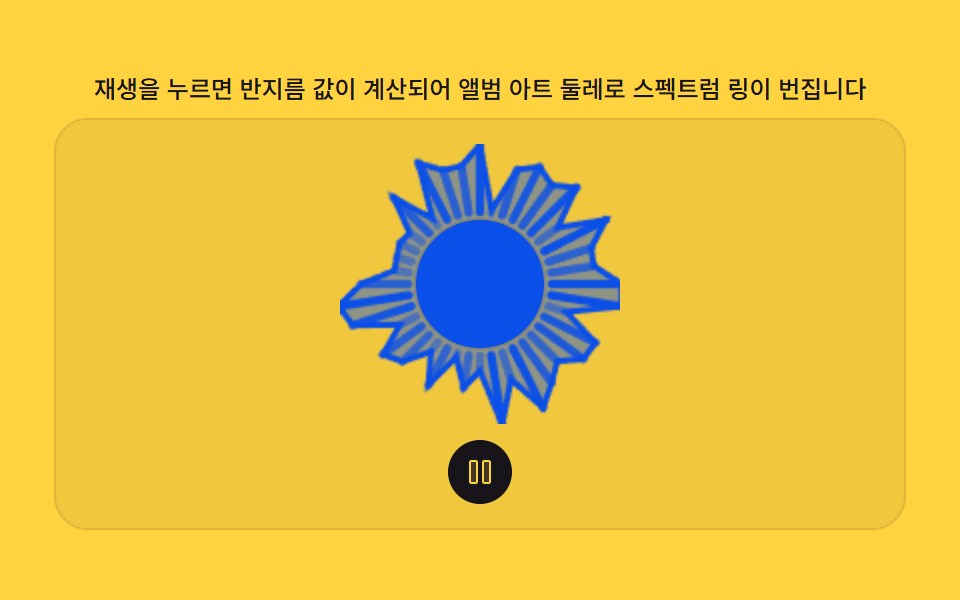
06반지름 값으로 번지는 원형 스펙트럼 링
앨범 아트 둘레를 감싸는 여러 개의 점마다 합성 진폭 값으로 중심에서의 반지름을 계산해, 재생 중에는 그 반지름이 시간에 따라 출렁이며 앨범 아트를 감싸는 원형 링이 맥동하듯 커졌다 줄었다 한다.
쓰임앨범 상세·풀스크린 플레이어 배경
makeLcgsynthRANGE_R
<svg width="0" height="0" style="position:absolute" aria-hidden="true">
  <defs>
    <symbol id="ico-play" viewBox="0 0 256 256"><g fill="currentColor"><path d="M228.23 134.69L84.15 222.81A8 8 0 0 1 72 216.12V39.88a8 8 0 0 1 12.15-6.69l144.08 88.12a7.82 7.82 0 0 1 0 13.38" opacity=".2"/><path d="M232.4 114.49L88.32 26.35a16 16 0 0 0-16.2-.3A15.86 15.86 0 0 0 64 39.87v176.26A15.94 15.94 0 0 0 80 232a16.07 16.07 0 0 0 8.36-2.35l144.04-88.14a15.81 15.81 0 0 0 0-27ZM80 215.94V40l143.83 88Z"/></g></symbol>
    <symbol id="ico-pause" viewBox="0 0 256 256"><g fill="currentColor"><path d="M208 48v160a8 8 0 0 1-8 8h-40a8 8 0 0 1-8-8V48a8 8 0 0 1 8-8h40a8 8 0 0 1 8 8M96 40H56a8 8 0 0 0-8 8v160a8 8 0 0 0 8 8h40a8 8 0 0 0 8-8V48a8 8 0 0 0-8-8" opacity=".2"/><path d="M200 32h-40a16 16 0 0 0-16 16v160a16 16 0 0 0 16 16h40a16 16 0 0 0 16-16V48a16 16 0 0 0-16-16m0 176h-40V48h40ZM96 32H56a16 16 0 0 0-16 16v160a16 16 0 0 0 16 16h40a16 16 0 0 0 16-16V48a16 16 0 0 0-16-16m0 176H56V48h40Z"/></g></symbol>
  </defs>
</svg>
<main class="stage">
<div class="viz is-demo is-playing" id="viz">
  <p class="viz__hint"><span>재생을 누르면 반지름 값이 계산되어 앨범 아트 둘레로 스펙트럼 링이 번집니다</span></p>
  <div class="viz__panel">
    <div class="viz__ring-wrap">
      <canvas class="viz__ring" id="ring" width="140" height="140" aria-hidden="true"></canvas>
      <div class="viz__art"></div>
      <span class="viz__colorref" aria-hidden="true"></span>
    </div>
    <button class="viz__play" id="play" type="button" aria-label="재생">
      <svg class="viz__ico viz__ico--play" aria-hidden="true"><use href="#ico-play"></use></svg>
      <svg class="viz__ico viz__ico--pause" aria-hidden="true"><use href="#ico-pause"></use></svg>
    </button>
  </div>
</div>
</main>
@use "../../../../site/static/demo-tokens" as *;
// 계산 겹(사인 합성 반지름 값)은 index.html 의 synth()/draw() 에 있다. 여기는 무대·레이아웃만.
$duration: $dur-base;
$easing: $ease-out;
$color: $subject-blue-deep;
@include stage($stage-yellow);
.viz {
display: flex;
flex-direction: column;
align-items: center;
gap: $sp-2;
width: min(400px, 92vw);
}
.viz__hint {
margin: 0;
color: $subject-ink;
font-size: 12px;
font-weight: 500;
line-height: 1.35;
text-align: center;
}
.viz__panel {
width: 100%;
border-radius: $r-card;
background: rgba($subject-ink, .06);
box-shadow: 0 0 0 1px rgba($subject-ink, .14);
padding: $sp-3;
display: flex;
flex-direction: column;
align-items: center;
gap: $sp-2;
}
.viz__ring-wrap {
position: relative;
width: 140px;
height: 140px;
display: grid;
place-items: center;
}
.viz__ring {
position: absolute;
inset: 0;
width: 100%;
height: 100%;
}
.viz__art {
width: 64px;
height: 64px;
border-radius: $r-pill;
background: $color;
box-shadow: 0 0 0 1px rgba($subject-ink, .18);
}
.viz__colorref {
display: none;
color: $color;
}
.viz__play {
flex: 0 0 auto;
width: $sp-8;
height: $sp-8;
border-radius: $r-pill;
border: none;
background: $subject-ink;
color: $stage-yellow;
display: flex;
align-items: center;
justify-content: center;
cursor: pointer;
transition: transform $duration $easing;
}
.viz__play:hover { transform: scale(1.06); }
.viz__play:focus-visible { outline: 2px solid $subject-ink; outline-offset: 2px; }
.viz__play:active { transform: scale(.96); }
.viz__ico { width: 16px; height: 16px; }
.viz__ico--pause { display: none; }
.is-playing .viz__ico--play { display: none; }
.is-playing .viz__ico--pause { display: block; }
@media (max-width: 340px) {
.viz__panel { padding: 4px; gap: 4px; }
.viz__ring-wrap { width: 92px; height: 92px; }
.viz__art { width: 42px; height: 42px; }
.viz__play { width: 28px; height: 28px; }
}
@media (prefers-reduced-motion: reduce) {
.viz__play { transition: none; }
}html, body {
margin: 0;
overflow: hidden;
}
.stage {
box-sizing: border-box;
min-height: 100vh;
display: grid;
place-items: center;
margin: 0;
background: #ffd23f;
font-family: -apple-system, "Segoe UI", "Noto Sans KR", sans-serif;
padding: clamp(8px, 4vw, 24px);
}
.viz {
display: flex;
flex-direction: column;
align-items: center;
gap: 8px;
width: min(400px, 92vw);
}
.viz__hint {
margin: 0;
color: #17141a;
font-size: 12px;
font-weight: 500;
line-height: 1.35;
text-align: center;
}
.viz__panel {
width: 100%;
border-radius: 16px;
background: rgba(23, 20, 26, 0.06);
box-shadow: 0 0 0 1px rgba(23, 20, 26, 0.14);
padding: 12px;
display: flex;
flex-direction: column;
align-items: center;
gap: 8px;
}
.viz__ring-wrap {
position: relative;
width: 140px;
height: 140px;
display: grid;
place-items: center;
}
.viz__ring {
position: absolute;
inset: 0;
width: 100%;
height: 100%;
}
.viz__art {
width: 64px;
height: 64px;
border-radius: 999px;
background: #0a4fe8;
box-shadow: 0 0 0 1px rgba(23, 20, 26, 0.18);
}
.viz__colorref {
display: none;
color: #0a4fe8;
}
.viz__play {
flex: 0 0 auto;
width: 32px;
height: 32px;
border-radius: 999px;
border: none;
background: #17141a;
color: #ffd23f;
display: flex;
align-items: center;
justify-content: center;
cursor: pointer;
transition: transform 300ms ease-out;
}
.viz__play:hover {
transform: scale(1.06);
}
.viz__play:focus-visible {
outline: 2px solid #17141a;
outline-offset: 2px;
}
.viz__play:active {
transform: scale(0.96);
}
.viz__ico {
width: 16px;
height: 16px;
}
.viz__ico--pause {
display: none;
}
.is-playing .viz__ico--play {
display: none;
}
.is-playing .viz__ico--pause {
display: block;
}
@media (max-width: 340px) {
.viz__panel {
padding: 4px;
gap: 4px;
}
.viz__ring-wrap {
width: 92px;
height: 92px;
}
.viz__art {
width: 42px;
height: 42px;
}
.viz__play {
width: 28px;
height: 28px;
}
}
@media (prefers-reduced-motion: reduce) {
.viz__play {
transition: none;
}
}(function () {
var root = document.getElementById('viz');
var playBtn = document.getElementById('play');
var canvas = document.getElementById('ring');
var ctx = canvas.getContext('2d');
var colorRef = document.querySelector('.viz__colorref');
var reduce = window.matchMedia('(prefers-reduced-motion: reduce)').matches;
var isDemo = true;
// 결정론 난수 — Math.random 을 쓰지 않는다. LCG(선형합동생성기) 하나로 점마다 다른 위상·주파수를 만든다.
function makeLcg(seed) {
var s = seed >>> 0;
return function () { s = (s * 1664525 + 1013904223) >>> 0; return s / 4294967296; };
}
var POINT_COUNT = 40;
var INNER_R = 36; // 앨범 아트 바깥 반지름 — 링이 시작되는 지점
var RANGE_R = 36; // 반지름 값이 늘어날 수 있는 최대 폭 — 변형: 진폭 배율, 값만 키움(20 → 출렁임이 보이도록)
var rng = makeLcg(4813);
var points = [];
for (var i = 0; i < POINT_COUNT; i++) {
points.push({
// 사인 곡선 두 겹을 겹쳐 점마다 다른 위상·주파수로 반지름 값을 합성한다 — 실제 소리를 분석해 얻는 값이 아니라
// 291 편의 AudioContext/AnalyserNode 분석과 달리 여기서는 사인 합성만으로 만든 장식용 값이다.
f1: 0.5 + rng() * 0.4,
p1: rng() * Math.PI * 2,
f2: 1.3 + rng() * 0.7,
p2: rng() * Math.PI * 2,
w2: 0.2 + rng() * 0.25,
idle: 0.08 + rng() * 0.06
});
}
function synth(pt, tSec) {
var s1 = Math.sin(tSec * pt.f1 * Math.PI * 2 + pt.p1);
var s2 = Math.sin(tSec * pt.f2 * Math.PI * 2 + pt.p2) * pt.w2;
var v = (s1 + s2) / (1 + pt.w2); // -1..1
return 0.5 + v * 0.5; // 0..1
}
function human() { if (isDemo) { root.classList.remove('is-demo'); isDemo = false; } }
var playing = true, t0 = 0;
var ringColor = '#3a3a3a';
function draw(now, playingNow) {
var w = canvas.width, h = canvas.height;
var cx = w / 2, cy = h / 2;
var tSec = (now - t0) / 1000;
ctx.clearRect(0, 0, w, h);
// 점마다 반지름 값을 먼저 계산해 아래 면·틱이 같은 값을 공유한다
var vals = [];
for (var i = 0; i < POINT_COUNT; i++) {
vals.push(playingNow ? synth(points[i], tSec) : points[i].idle);
}
// 출렁이는 반지름을 면으로 이어 진폭이 화면 면적으로 보이게 한다
ctx.beginPath();
for (var j = 0; j <= POINT_COUNT; j++) {
var k = j % POINT_COUNT;
var rj = INNER_R + RANGE_R * Math.max(0.04, vals[k]);
var aj = (k / POINT_COUNT) * Math.PI * 2 - Math.PI / 2;
var px = cx + Math.cos(aj) * rj, py = cy + Math.sin(aj) * rj;
if (j === 0) { ctx.moveTo(px, py); } else { ctx.lineTo(px, py); }
}
ctx.closePath();
ctx.fillStyle = ringColor;
ctx.globalAlpha = 0.42;
ctx.fill();
ctx.lineWidth = 3;
ctx.globalAlpha = 1;
ctx.strokeStyle = ringColor;
ctx.stroke();
ctx.lineCap = 'round';
ctx.strokeStyle = ringColor;
for (var i2 = 0; i2 < POINT_COUNT; i2++) {
var v = vals[i2];
var r1 = INNER_R;
var r2 = INNER_R + RANGE_R * Math.max(0.04, v);
var angle = (i2 / POINT_COUNT) * Math.PI * 2 - Math.PI / 2;
var cos = Math.cos(angle), sin = Math.sin(angle);
ctx.globalAlpha = 0.35 + v * 0.65;
ctx.lineWidth = 4.2;
ctx.beginPath();
ctx.moveTo(cx + cos * r1, cy + sin * r1);
ctx.lineTo(cx + cos * r2, cy + sin * r2);
ctx.stroke();
}
ctx.globalAlpha = 1;
}
function setPlaying(next) {
playing = next;
root.classList.toggle('is-playing', next);
}
function onPlayClick() { human(); setPlaying(!playing); }
function onPlayKeydown(e) {
if (e.key === 'Enter' || e.key === ' ') { e.preventDefault(); human(); setPlaying(!playing); }
}
function frame(now) {
if (!t0) t0 = now;
draw(now, isDemo ? true : playing);
requestAnimationFrame(frame);
}
ringColor = getComputedStyle(colorRef).color || ringColor;
if (reduce) {
root.classList.add('is-still');
t0 = performance.now();
draw(t0, false);
playBtn.addEventListener('click', function () {
human(); setPlaying(!playing);
draw(performance.now(), playing);
});
playBtn.addEventListener('keydown', function (e) {
if (e.key === 'Enter' || e.key === ' ') {
e.preventDefault(); human(); setPlaying(!playing);
draw(performance.now(), playing);
}
});
} else {
playBtn.addEventListener('click', onPlayClick);
playBtn.addEventListener('keydown', onPlayKeydown);
requestAnimationFrame(frame);
}
})();import { useEffect, useRef } from "react";
import styles from "./VisualizerCanvas.module.scss";
type Point = { f1: number; p1: number; f2: number; p2: number; w2: number; idle: number };
export default function VisualizerCanvas() {
const rootRef = useRef<HTMLDivElement | null>(null);
const playRef = useRef<HTMLButtonElement | null>(null);
const canvasRef = useRef<HTMLCanvasElement | null>(null);
const colorRefEl = useRef<HTMLSpanElement | null>(null);
useEffect(() => {
const root = rootRef.current;
const playBtn = playRef.current;
const canvas = canvasRef.current;
const colorRef = colorRefEl.current;
if (!root || !playBtn || !canvas || !colorRef) return;
const ctx = canvas.getContext("2d");
if (!ctx) return;
const reduce = window.matchMedia("(prefers-reduced-motion: reduce)").matches;
let isDemo = true;
// 결정론 난수 — Math.random 을 쓰지 않는다. LCG(선형합동생성기) 하나로 점마다 다른 위상·주파수를 만든다.
function makeLcg(seed: number) {
let s = seed >>> 0;
return function () { s = (s * 1664525 + 1013904223) >>> 0; return s / 4294967296; };
}
const POINT_COUNT = 40;
const INNER_R = 36; // 앨범 아트 바깥 반지름 — 링이 시작되는 지점
const RANGE_R = 36; // 반지름 값이 늘어날 수 있는 최대 폭 — 변형: 진폭 배율, 값만 키움(20 → 출렁임이 보이도록)
const rng = makeLcg(4813);
const points: Point[] = [];
for (let i = 0; i < POINT_COUNT; i++) {
points.push({
// 사인 곡선 두 겹을 겹쳐 점마다 다른 위상·주파수로 반지름 값을 합성한다 — 실제 소리를 분석해 얻는 값이 아니라
// 291 편의 AudioContext/AnalyserNode 분석과 달리 여기서는 사인 합성만으로 만든 장식용 값이다.
f1: 0.5 + rng() * 0.4,
p1: rng() * Math.PI * 2,
f2: 1.3 + rng() * 0.7,
p2: rng() * Math.PI * 2,
w2: 0.2 + rng() * 0.25,
idle: 0.08 + rng() * 0.06,
});
}
function synth(pt: Point, tSec: number) {
const s1 = Math.sin(tSec * pt.f1 * Math.PI * 2 + pt.p1);
const s2 = Math.sin(tSec * pt.f2 * Math.PI * 2 + pt.p2) * pt.w2;
const v = (s1 + s2) / (1 + pt.w2); // -1..1
return 0.5 + v * 0.5; // 0..1
}
function human() { if (isDemo) { root!.classList.remove(styles["is-demo"]); isDemo = false; } }
let playing = true, t0 = 0;
let ringColor = "#3a3a3a";
function draw(now: number, playingNow: boolean) {
const w = canvas!.width, h = canvas!.height;
const cx = w / 2, cy = h / 2;
const tSec = (now - t0) / 1000;
ctx!.clearRect(0, 0, w, h);
// 점마다 반지름 값을 먼저 계산해 아래 면·틱이 같은 값을 공유한다
const vals: number[] = [];
for (let i = 0; i < POINT_COUNT; i++) {
vals.push(playingNow ? synth(points[i], tSec) : points[i].idle);
}
// 출렁이는 반지름을 면으로 이어 진폭이 화면 면적으로 보이게 한다
ctx!.beginPath();
for (let j = 0; j <= POINT_COUNT; j++) {
const k = j % POINT_COUNT;
const rj = INNER_R + RANGE_R * Math.max(0.04, vals[k]);
const aj = (k / POINT_COUNT) * Math.PI * 2 - Math.PI / 2;
const px = cx + Math.cos(aj) * rj, py = cy + Math.sin(aj) * rj;
if (j === 0) { ctx!.moveTo(px, py); } else { ctx!.lineTo(px, py); }
}
ctx!.closePath();
ctx!.fillStyle = ringColor;
ctx!.globalAlpha = 0.42;
ctx!.fill();
ctx!.lineWidth = 3;
ctx!.globalAlpha = 1;
ctx!.strokeStyle = ringColor;
ctx!.stroke();
ctx!.lineCap = "round";
ctx!.strokeStyle = ringColor;
for (let i2 = 0; i2 < POINT_COUNT; i2++) {
const v = vals[i2];
const r1 = INNER_R;
const r2 = INNER_R + RANGE_R * Math.max(0.04, v);
const angle = (i2 / POINT_COUNT) * Math.PI * 2 - Math.PI / 2;
const cos = Math.cos(angle), sin = Math.sin(angle);
ctx!.globalAlpha = 0.35 + v * 0.65;
ctx!.lineWidth = 4.2;
ctx!.beginPath();
ctx!.moveTo(cx + cos * r1, cy + sin * r1);
ctx!.lineTo(cx + cos * r2, cy + sin * r2);
ctx!.stroke();
}
ctx!.globalAlpha = 1;
}
function setPlaying(next: boolean) {
playing = next;
root!.classList.toggle(styles["is-playing"], next);
}
function onPlayClick() { human(); setPlaying(!playing); }
function onPlayKeydown(e: KeyboardEvent) {
if (e.key === "Enter" || e.key === " ") { e.preventDefault(); human(); setPlaying(!playing); }
}
let raf = 0;
function frame(now: number) {
if (!t0) t0 = now;
draw(now, isDemo ? true : playing);
raf = requestAnimationFrame(frame);
}
ringColor = getComputedStyle(colorRef).color || ringColor;
function onReduceClick() { human(); setPlaying(!playing); draw(performance.now(), playing); }
function onReduceKeydown(e: KeyboardEvent) {
if (e.key === "Enter" || e.key === " ") {
e.preventDefault(); human(); setPlaying(!playing);
draw(performance.now(), playing);
}
}
if (reduce) {
root.classList.add(styles["is-still"]);
t0 = performance.now();
draw(t0, false);
playBtn.addEventListener("click", onReduceClick);
playBtn.addEventListener("keydown", onReduceKeydown);
} else {
playBtn.addEventListener("click", onPlayClick);
playBtn.addEventListener("keydown", onPlayKeydown);
raf = requestAnimationFrame(frame);
}
return () => {
cancelAnimationFrame(raf);
if (reduce) {
playBtn.removeEventListener("click", onReduceClick);
playBtn.removeEventListener("keydown", onReduceKeydown);
} else {
playBtn.removeEventListener("click", onPlayClick);
playBtn.removeEventListener("keydown", onPlayKeydown);
}
};
}, []);
return (
<main className={styles.stage}>
<div className={styles.viz + " " + styles["is-demo"] + " " + styles["is-playing"]} ref={rootRef}>
<p className={styles.hint}><span>재생을 누르면 반지름 값이 계산되어 앨범 아트 둘레로 스펙트럼 링이 번집니다</span></p>
<div className={styles.panel}>
<div className={styles.ringWrap}>
<canvas className={styles.ring} ref={canvasRef} width={140} height={140} aria-hidden="true" />
<div className={styles.art} />
<span className={styles.colorref} ref={colorRefEl} aria-hidden="true" />
</div>
<button className={styles.play} ref={playRef} type="button" aria-label="재생">
<svg className={`${styles.ico} ${styles.icoPlay}`} aria-hidden="true"><use href="#ico-play" /></svg>
<svg className={`${styles.ico} ${styles.icoPause}`} aria-hidden="true"><use href="#ico-pause" /></svg>
</button>
</div>
</div>
</main>
);
}06 반지름 값으로 번지는 원형 스펙트럼 링 — 측정 누적면적 8.062% · 움직인 프레임 23/23GODRICH 원작 · zip 에 SCSS·React 포함 · css 오디오 플레이어 디자인 9종 — 계산으로 움직이는 플레이어 UI
이 데모가 속한 글
 css 오디오 플레이어 디자인 9종 — 계산으로 움직이는 플레이어 UIcss 오디오 플레이어 디자인 아홉 가지 가운데 하나는 여러 사인 곡선을 겹쳐 막대 높이를 미리 계산해 이퀄라이저처럼 흔들고, 하나는 각속도 값을 서서히 줄여 앨범판이 관성으로 멈추게 하며, 하나는 타임라인 값으로 이 글의 데모 전부 보기