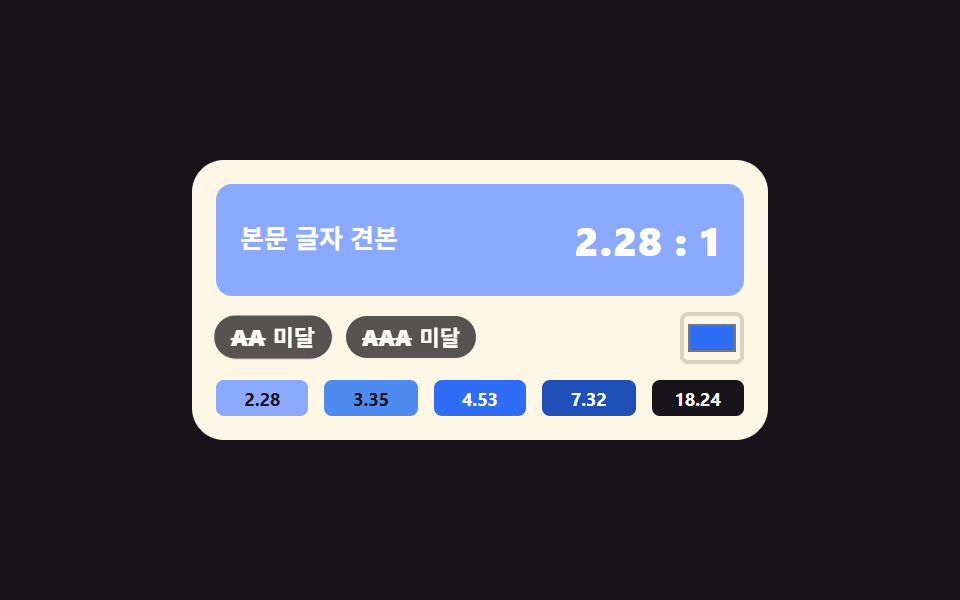
07두 색의 명암비를 재서 AA·AAA 를 붙이는 검사기
글자색과 배경색의 상대 휘도를 각각 구해 비율을 내고, 4.5 와 7 을 넘는 순간 배지가 켜집니다.
쓰임접근성 점검, 디자인 리뷰
Math.powcounter-setaria-live
<main class="stage">
  <div class="cc is-demo">
    <div class="cc__prev">
      <span class="cc__sample">본문 글자 견본</span>
      <span class="cc__ratio" aria-hidden="true"></span>
    </div>
    <div class="cc__row">
      <span class="cc__badge cc__badge--aa" aria-hidden="true">
        <b class="cc__grade">AA</b>
        <span class="cc__state"><i class="cc__pass">통과</i><i class="cc__fail">미달</i></span>
      </span>
      <span class="cc__badge cc__badge--aaa" aria-hidden="true">
        <b class="cc__grade">AAA</b>
        <span class="cc__state"><i class="cc__pass">통과</i><i class="cc__fail">미달</i></span>
      </span>
      <input class="cc__input" id="ccInput" type="color" value="#2f6df6" aria-label="배경색 직접 고르기">
    </div>
    <div class="cc__sws">
      <button type="button" class="cc__sw" data-bg="#8aa9ff">2.28</button>
      <button type="button" class="cc__sw" data-bg="#4d8bf0">3.35</button>
      <button type="button" class="cc__sw" data-bg="#2f6df6">4.53</button>
      <button type="button" class="cc__sw" data-bg="#1f4fb8">7.32</button>
      <button type="button" class="cc__sw" data-bg="#17141a">18.24</button>
    </div>
    <span class="cc__live" aria-live="polite"></span>
  </div>
</main>@use "../../../../site/static/demo-tokens" as *;
// 대비 검사기 — 흰 글자 고정, 배경만 다섯 단계로 바뀐다.
// 배경색(--bg)·비율 정수부(--rw)·소수 두 자리(--rf)·배지 두 개(--aa --aaa)를 **같은 퍼센트에서 한꺼번에**
// steps(1, end) 로 컷한다. 다섯 값이 한 키프레임 안에 같이 적혀 있으니 배경과 숫자와 배지가 갈릴 수가 없다.
// 숫자 글자는 계수기가 찍는다 — 4.53 도 18.24 도 정수부·소수부 두 계수기의 조합이다.
// 컷만 쓰면 움직인 프레임이 두세 장이라, 컷 직후 배지가 자기 중심에서 튀어올라 사이를 메운다.
$duration: $dur-loop;
$easing: $ease-pop;
$color: $subject-blue;
@include stage($stage-ink);
// 다섯 단계의 배경. 실제 WCAG 상대 휘도로 계산해 둔 값이라 아래 비율 숫자와 짝이 맞는다
$bg-1: #8aa9ff; // 흰 글자 대비 2.28 — AA 미달
$bg-2: #4d8bf0; // 3.35 — AA 미달
$bg-3: $subject-blue; // 4.53 — AA 통과
$bg-4: #1f4fb8; // 7.32 — AAA 통과
$bg-5: $stage-ink; // 18.24 — 넉넉히 통과
@property --bg { syntax: "<color>"; inherits: true; initial-value: #{$bg-3}; }
@property --rw { syntax: "<integer>"; inherits: true; initial-value: 4; }
@property --rf { syntax: "<integer>"; inherits: true; initial-value: 53; }
@property --aa { syntax: "<number>"; inherits: true; initial-value: 1; }
@property --aaa { syntax: "<number>"; inherits: true; initial-value: 0; }
// 소수 두 자리를 언제나 두 칸으로 찍는 눈금. pad 2 "0" 이 1.05 의 05 를 지켜 준다
@counter-style dd {
system: numeric;
symbols: "0" "1" "2" "3" "4" "5" "6" "7" "8" "9";
pad: 2 "0";
}
.cc {
position: relative;
box-sizing: border-box;
width: 288px;
max-width: 100%;
padding: $sp-3;
border-radius: $r-card;
background: $subject-cream;
color: $subject-ink;
font-family: inherit;
}
.cc * { box-sizing: border-box; }
.cc__prev {
display: flex;
align-items: center;
justify-content: space-between;
gap: $sp-2;
height: 56px;
padding: 0 $sp-3;
border-radius: $r-sm;
background: var(--bg);
color: #ffffff;
}
.cc__sample {
font-size: 13px;
font-weight: 600;
line-height: 1.3;
}
.cc__ratio {
counter-set: cw calc(var(--rw)) cf calc(var(--rf));
white-space: nowrap;
font-size: 20px;
font-weight: 800;
line-height: 1.1;
letter-spacing: .02em;
}
.cc__ratio::after { content: counter(cw) "." counter(cf, dd) " : 1"; }
.cc__row {
display: flex;
align-items: center;
gap: $sp-2;
margin-top: $sp-2;
}
.cc__badge {
position: relative;
display: flex;
align-items: center;
gap: $sp-1;
padding: $sp-1 $sp-2;
border-radius: $r-pill;
background: rgba(23, 20, 26, .72);
color: #ffffff;
}
// 통과하면 배지 알맹이가 파랗게 찬다. 켜짐은 색만이 아니라 아래 통과·미달 글자로도 알린다
.cc__badge::before {
content: "";
position: absolute;
inset: 0;
border-radius: inherit;
background: $color;
}
.cc__badge--aa::before { opacity: var(--aa); }
.cc__badge--aaa::before { opacity: var(--aaa); }
.cc__grade {
position: relative;
z-index: 1;
font-size: 11px;
font-weight: 800;
line-height: 1.2;
}
// 미달일 때 등급 글자에 취소선이 그어진다. 왼쪽 변에서 자라므로 transform-origin 을 변에 둔다
.cc__grade::after {
content: "";
position: absolute;
left: 0;
right: 0;
top: 50%;
height: 1px;
background: currentColor;
transform-origin: left center;
}
.cc__badge--aa .cc__grade::after { transform: scaleX(calc(1 - var(--aa))); }
.cc__badge--aaa .cc__grade::after { transform: scaleX(calc(1 - var(--aaa))); }
.cc__state {
position: relative;
z-index: 1;
display: grid;
font-size: 11px;
font-weight: 700;
line-height: 1.2;
}
.cc__state > i {
grid-area: 1 / 1;
font-style: normal;
white-space: nowrap;
}
.cc__badge--aa .cc__pass { opacity: var(--aa); }
.cc__badge--aa .cc__fail { opacity: calc(1 - var(--aa)); }
.cc__badge--aaa .cc__pass { opacity: var(--aaa); }
.cc__badge--aaa .cc__fail { opacity: calc(1 - var(--aaa)); }
.cc__input {
margin-left: auto;
width: 32px;
height: 26px;
padding: 0;
border: 2px solid rgba(23, 20, 26, .16);
border-radius: $r-xs;
background: transparent;
cursor: pointer;
}
.cc__sws {
display: grid;
grid-template-columns: repeat(5, 1fr);
gap: $sp-2;
margin-top: $sp-2;
}
// 칩에도 그 배경의 명암비를 적어 둔다 — 색만으로 상태를 전달하지 않는다
.cc__sw {
width: 100%;
padding: $sp-1 0;
border: 0;
border-radius: $r-xs;
background: rgba(23, 20, 26, .08);
color: $subject-ink;
cursor: pointer;
font-family: inherit;
font-size: 9px;
font-weight: 700;
line-height: 1.2;
}
.cc__sw:focus-visible { outline: 3px solid $color; outline-offset: 2px; }
// 화면에는 안 보이되 보조기술에는 읽히는 알림 줄
.cc__live {
position: absolute;
width: 1px;
height: 1px;
overflow: hidden;
clip-path: inset(50%);
white-space: nowrap;
}
// ── 미리보기 루프(정적 규칙 먼저, 그 위에 덧씌움) ─────────────────
.cc.is-demo {
animation-name: ccStep;
animation-duration: $duration;
animation-timing-function: steps(1, end);
animation-iteration-count: infinite;
}
// 배지는 자기 중심에서 튄다 — transform-origin 기본값(50% 50%)
.cc.is-demo .cc__badge {
animation-name: ccPop;
animation-duration: $duration;
animation-timing-function: $easing;
animation-iteration-count: infinite;
animation-fill-mode: backwards;
}
.cc.is-demo .cc__badge--aaa { animation-delay: 80ms; }
// 다섯 단계를 0 · 18 · 36 · 54 · 72% 에 두고 90% 에 첫 단계로 돌아온다.
// 24프레임의 마지막 장이 95.8% 지점이라 복귀가 90% 를 넘으면 촬영되지 않는다
@keyframes ccStep {
0% { --bg: #{$bg-1}; --rw: 2; --rf: 28; --aa: 0; --aaa: 0; }
18% { --bg: #{$bg-2}; --rw: 3; --rf: 35; --aa: 0; --aaa: 0; }
36% { --bg: #{$bg-3}; --rw: 4; --rf: 53; --aa: 1; --aaa: 0; }
54% { --bg: #{$bg-4}; --rw: 7; --rf: 32; --aa: 1; --aaa: 1; }
72% { --bg: #{$bg-5}; --rw: 18; --rf: 24; --aa: 1; --aaa: 1; }
90%, 100% { --bg: #{$bg-1}; --rw: 2; --rf: 28; --aa: 0; --aaa: 0; }
}
@keyframes ccPop {
0% { transform: scale(.8); }
6% { transform: scale(1.06); }
11%, 16% { transform: scale(1); }
18% { transform: scale(.8); }
24% { transform: scale(1.06); }
29%, 34% { transform: scale(1); }
36% { transform: scale(.8); }
42% { transform: scale(1.06); }
47%, 52% { transform: scale(1); }
54% { transform: scale(.8); }
60% { transform: scale(1.06); }
65%, 70% { transform: scale(1); }
72% { transform: scale(.8); }
78% { transform: scale(1.06); }
83%, 88% { transform: scale(1); }
90% { transform: scale(.8); }
96% { transform: scale(1.04); }
100% { transform: scale(1); }
}
@media (prefers-reduced-motion: reduce) {
.cc.is-demo,
.cc.is-demo .cc__badge {
animation: none !important;
}
}html, body {
margin: 0;
overflow: hidden;
}
.stage {
box-sizing: border-box;
min-height: 100vh;
display: grid;
place-items: center;
margin: 0;
background: #17141a;
font-family: -apple-system, "Segoe UI", "Noto Sans KR", sans-serif;
padding: clamp(8px, 4vw, 24px);
}
@property --bg {
syntax: "<color>";
inherits: true;
initial-value: #2f6df6;
}
@property --rw {
syntax: "<integer>";
inherits: true;
initial-value: 4;
}
@property --rf {
syntax: "<integer>";
inherits: true;
initial-value: 53;
}
@property --aa {
syntax: "<number>";
inherits: true;
initial-value: 1;
}
@property --aaa {
syntax: "<number>";
inherits: true;
initial-value: 0;
}
@counter-style dd {
system: numeric;
symbols: "0" "1" "2" "3" "4" "5" "6" "7" "8" "9";
pad: 2 "0";
}
.cc {
position: relative;
box-sizing: border-box;
width: 288px;
max-width: 100%;
padding: 12px;
border-radius: 16px;
background: #fff7e6;
color: #17141a;
font-family: inherit;
}
.cc * {
box-sizing: border-box;
}
.cc__prev {
display: flex;
align-items: center;
justify-content: space-between;
gap: 8px;
height: 56px;
padding: 0 12px;
border-radius: 8px;
background: var(--bg);
color: #ffffff;
}
.cc__sample {
font-size: 13px;
font-weight: 600;
line-height: 1.3;
}
.cc__ratio {
counter-set: cw calc(var(--rw)) cf calc(var(--rf));
white-space: nowrap;
font-size: 20px;
font-weight: 800;
line-height: 1.1;
letter-spacing: 0.02em;
}
.cc__ratio::after {
content: counter(cw) "." counter(cf, dd) " : 1";
}
.cc__row {
display: flex;
align-items: center;
gap: 8px;
margin-top: 8px;
}
.cc__badge {
position: relative;
display: flex;
align-items: center;
gap: 4px;
padding: 4px 8px;
border-radius: 999px;
background: rgba(23, 20, 26, 0.72);
color: #ffffff;
}
.cc__badge::before {
content: "";
position: absolute;
inset: 0;
border-radius: inherit;
background: #2f6df6;
}
.cc__badge--aa::before {
opacity: var(--aa);
}
.cc__badge--aaa::before {
opacity: var(--aaa);
}
.cc__grade {
position: relative;
z-index: 1;
font-size: 11px;
font-weight: 800;
line-height: 1.2;
}
.cc__grade::after {
content: "";
position: absolute;
left: 0;
right: 0;
top: 50%;
height: 1px;
background: currentColor;
transform-origin: left center;
}
.cc__badge--aa .cc__grade::after {
transform: scaleX(calc(1 - var(--aa)));
}
.cc__badge--aaa .cc__grade::after {
transform: scaleX(calc(1 - var(--aaa)));
}
.cc__state {
position: relative;
z-index: 1;
display: grid;
font-size: 11px;
font-weight: 700;
line-height: 1.2;
}
.cc__state > i {
grid-area: 1/1;
font-style: normal;
white-space: nowrap;
}
.cc__badge--aa .cc__pass {
opacity: var(--aa);
}
.cc__badge--aa .cc__fail {
opacity: calc(1 - var(--aa));
}
.cc__badge--aaa .cc__pass {
opacity: var(--aaa);
}
.cc__badge--aaa .cc__fail {
opacity: calc(1 - var(--aaa));
}
.cc__input {
margin-left: auto;
width: 32px;
height: 26px;
padding: 0;
border: 2px solid rgba(23, 20, 26, 0.16);
border-radius: 4px;
background: transparent;
cursor: pointer;
}
.cc__sws {
display: grid;
grid-template-columns: repeat(5, 1fr);
gap: 8px;
margin-top: 8px;
}
.cc__sw {
width: 100%;
padding: 4px 0;
border: 0;
border-radius: 4px;
background: rgba(23, 20, 26, 0.08);
color: #17141a;
cursor: pointer;
font-family: inherit;
font-size: 9px;
font-weight: 700;
line-height: 1.2;
}
.cc__sw:focus-visible {
outline: 3px solid #2f6df6;
outline-offset: 2px;
}
.cc__live {
position: absolute;
width: 1px;
height: 1px;
overflow: hidden;
clip-path: inset(50%);
white-space: nowrap;
}
.cc.is-demo {
animation-name: ccStep;
animation-duration: 2s;
animation-timing-function: steps(1, end);
animation-iteration-count: infinite;
}
.cc.is-demo .cc__badge {
animation-name: ccPop;
animation-duration: 2s;
animation-timing-function: cubic-bezier(0.2, 1.4, 0.4, 1);
animation-iteration-count: infinite;
animation-fill-mode: backwards;
}
.cc.is-demo .cc__badge--aaa {
animation-delay: 80ms;
}
@keyframes ccStep {
0% {
--bg: #8aa9ff;
--rw: 2;
--rf: 28;
--aa: 0;
--aaa: 0;
}
18% {
--bg: #4d8bf0;
--rw: 3;
--rf: 35;
--aa: 0;
--aaa: 0;
}
36% {
--bg: #2f6df6;
--rw: 4;
--rf: 53;
--aa: 1;
--aaa: 0;
}
54% {
--bg: #1f4fb8;
--rw: 7;
--rf: 32;
--aa: 1;
--aaa: 1;
}
72% {
--bg: #17141a;
--rw: 18;
--rf: 24;
--aa: 1;
--aaa: 1;
}
90%, 100% {
--bg: #8aa9ff;
--rw: 2;
--rf: 28;
--aa: 0;
--aaa: 0;
}
}
@keyframes ccPop {
0% {
transform: scale(0.8);
}
6% {
transform: scale(1.06);
}
11%, 16% {
transform: scale(1);
}
18% {
transform: scale(0.8);
}
24% {
transform: scale(1.06);
}
29%, 34% {
transform: scale(1);
}
36% {
transform: scale(0.8);
}
42% {
transform: scale(1.06);
}
47%, 52% {
transform: scale(1);
}
54% {
transform: scale(0.8);
}
60% {
transform: scale(1.06);
}
65%, 70% {
transform: scale(1);
}
72% {
transform: scale(0.8);
}
78% {
transform: scale(1.06);
}
83%, 88% {
transform: scale(1);
}
90% {
transform: scale(0.8);
}
96% {
transform: scale(1.04);
}
100% {
transform: scale(1);
}
}
@media (prefers-reduced-motion: reduce) {
.cc.is-demo,
.cc.is-demo .cc__badge {
animation: none !important;
}
}(function () {
var root = document.querySelector('.cc');
var input = document.getElementById('ccInput');
var live = root.querySelector('.cc__live');
var liveFormat = '명암비 %r 대 1, AA %a, AAA %b';
var passWord = '통과';
var failWord = '미달';
// WCAG 2.x 상대 휘도 — 채널마다 감마를 되돌린 뒤 사람 눈의 민감도로 가중한다
function channel(c) { return c <= 0.03928 ? c / 12.92 : Math.pow((c + 0.055) / 1.055, 2.4); }
function luminance(hex) {
var n = parseInt(hex.slice(1), 16);
var r = channel(((n >> 16) & 255) / 255);
var g = channel(((n >> 8) & 255) / 255);
var b = channel((n & 255) / 255);
return 0.2126 * r + 0.7152 * g + 0.0722 * b;
}
// 글자는 흰색 고정이므로 밝은 쪽 휘도는 언제나 1 이다
function ratioToWhite(hex) { return 1.05 / (luminance(hex) + 0.05); }
function ratioToInk(hex) { return (luminance(hex) + 0.05) / (luminance('#17141a') + 0.05); }
// 숫자 글자는 JS 가 쓰지 않는다 — 정수부와 소수 두 자리만 넘기면 계수기가 4.53 꼴로 찍는다
function setBg(hex) {
var ratio = ratioToWhite(hex);
var whole = Math.floor(ratio);
var frac = Math.round((ratio - whole) * 100);
if (frac === 100) { whole += 1; frac = 0; }
root.style.setProperty('--bg', hex);
root.style.setProperty('--rw', whole);
root.style.setProperty('--rf', frac);
root.style.setProperty('--aa', ratio >= 4.5 ? 1 : 0);
root.style.setProperty('--aaa', ratio >= 7 ? 1 : 0);
live.textContent = liveFormat
.replace('%r', whole + '.' + (frac < 10 ? '0' + frac : String(frac)))
.replace('%a', ratio >= 4.5 ? passWord : failWord)
.replace('%b', ratio >= 7 ? passWord : failWord);
}
[].slice.call(root.querySelectorAll('.cc__sw')).forEach(function (btn) {
var hex = btn.getAttribute('data-bg');
btn.style.background = hex;
btn.style.color = ratioToWhite(hex) >= ratioToInk(hex) ? '#ffffff' : '#17141a';
btn.addEventListener('click', function () {
root.classList.remove('is-demo');
input.value = hex;
setBg(hex);
});
});
input.addEventListener('input', function () {
root.classList.remove('is-demo');
setBg(input.value);
});
setBg(input.value);
})();// ContrastChecker — vanilla 판(run/286/demo/07-color-picker-contrast-checker) 의 React 포트.
// 변수 3개(duration·easing·color)는 props 로 받아 CSS 변수(var(--duration) 등)로 들어온다.
// 상태는 배경색 hex 문자열 하나뿐이다. 비율 숫자는 JS 가 글자로 쓰지 않는다 —
// 정수부(--rw)와 소수 두 자리(--rf)만 넘기면 module.scss 의 counter-set 이 4.53 꼴로 찍는다.
import { useState } from "react";
import type { CSSProperties, ChangeEvent } from "react";
import styles from "./ContrastChecker.module.scss";
export type ContrastCheckerProps = {
sampleText?: string;
passWord?: string;
failWord?: string;
inputLabel?: string;
/** "명암비 %r 대 1, AA %a, AAA %b" 처럼 자리표시자 셋을 가진 틀 */
liveFormat?: string;
/** 격자 미리보기용 2초 자동 루프. 사람이 손대면 꺼진다 */
demo?: boolean;
duration?: number;
easing?: string;
color?: string;
};
type Vars = CSSProperties & {
"--duration"?: string;
"--easing"?: string;
"--color"?: string;
"--bg"?: string;
"--rw"?: number;
"--rf"?: number;
"--aa"?: number;
"--aaa"?: number;
};
const SWATCHES = ["#8aa9ff", "#4d8bf0", "#2f6df6", "#1f4fb8", "#17141a"];
const INK = "#17141a";
// WCAG 2.x 상대 휘도 — 채널마다 감마를 되돌린 뒤 사람 눈의 민감도로 가중한다
function channel(c: number): number {
return c <= 0.03928 ? c / 12.92 : Math.pow((c + 0.055) / 1.055, 2.4);
}
function luminance(hex: string): number {
const n = parseInt(hex.slice(1), 16);
const r = channel(((n >> 16) & 255) / 255);
const g = channel(((n >> 8) & 255) / 255);
const b = channel((n & 255) / 255);
return 0.2126 * r + 0.7152 * g + 0.0722 * b;
}
// 글자는 흰색 고정이므로 밝은 쪽 휘도는 언제나 1 이다
function ratioToWhite(hex: string): number {
return 1.05 / (luminance(hex) + 0.05);
}
function ratioToInk(hex: string): number {
return (luminance(hex) + 0.05) / (luminance(INK) + 0.05);
}
function twoDigits(n: number): string {
return n < 10 ? `0${n}` : String(n);
}
export default function ContrastChecker({
sampleText = "본문 글자 견본",
passWord = "통과",
failWord = "미달",
inputLabel = "배경색 직접 고르기",
liveFormat = "명암비 %r 대 1, AA %a, AAA %b",
demo = true,
duration = 2000,
easing = "cubic-bezier(.2, 1.4, .4, 1)",
color = "#2f6df6",
}: ContrastCheckerProps) {
const [live, setLive] = useState(demo);
const [bg, setBg] = useState("#2f6df6");
const ratio = ratioToWhite(bg);
let whole = Math.floor(ratio);
let frac = Math.round((ratio - whole) * 100);
if (frac === 100) {
whole += 1;
frac = 0;
}
const passesAa = ratio >= 4.5;
const passesAaa = ratio >= 7;
const vars: Vars = {
"--duration": `${duration}ms`,
"--easing": easing,
"--color": color,
"--bg": bg,
"--rw": whole,
"--rf": frac,
"--aa": passesAa ? 1 : 0,
"--aaa": passesAaa ? 1 : 0,
};
const liveText = liveFormat
.replace("%r", `${whole}.${twoDigits(frac)}`)
.replace("%a", passesAa ? passWord : failWord)
.replace("%b", passesAaa ? passWord : failWord);
function pick(hex: string) {
setLive(false);
setBg(hex);
}
function onInput(e: ChangeEvent<HTMLInputElement>) {
setLive(false);
setBg(e.target.value);
}
function badge(kind: "aa" | "aaa", grade: string) {
return (
<span
className={[styles.badge, kind === "aa" ? styles.badgeAa : styles.badgeAaa].join(" ")}
aria-hidden="true"
>
<b className={styles.grade}>{grade}</b>
<span className={styles.state}>
<i className={styles.pass}>{passWord}</i>
<i className={styles.fail}>{failWord}</i>
</span>
</span>
);
}
return (
<div className={[styles.cc, live ? styles.isDemo : ""].filter(Boolean).join(" ")} style={vars}>
<div className={styles.prev}>
<span className={styles.sample}>{sampleText}</span>
<span className={styles.ratio} aria-hidden="true" />
</div>
<div className={styles.row}>
{badge("aa", "AA")}
{badge("aaa", "AAA")}
<input
className={styles.input}
type="color"
value={bg}
aria-label={inputLabel}
onChange={onInput}
/>
</div>
<div className={styles.sws}>
{SWATCHES.map((hex) => (
<button
key={hex}
type="button"
className={styles.sw}
style={{ background: hex, color: ratioToWhite(hex) >= ratioToInk(hex) ? "#ffffff" : INK }}
onClick={() => pick(hex)}
>
{`${Math.floor(ratioToWhite(hex))}.${twoDigits(Math.round((ratioToWhite(hex) % 1) * 100))}`}
</button>
))}
</div>
<span className={styles.liveRegion} aria-live="polite">
{liveText}
</span>
</div>
);
}07 두 색의 명암비를 재서 AA·AAA 를 붙이는 검사기 — 측정 누적면적 12.05% · 움직인 프레임 23/23GODRICH 원작 · zip 에 SCSS·React 포함 · 컬러 피커 직접 만들기 CSS+JS 9종 — 라이브러리 없이
이 데모가 속한 글
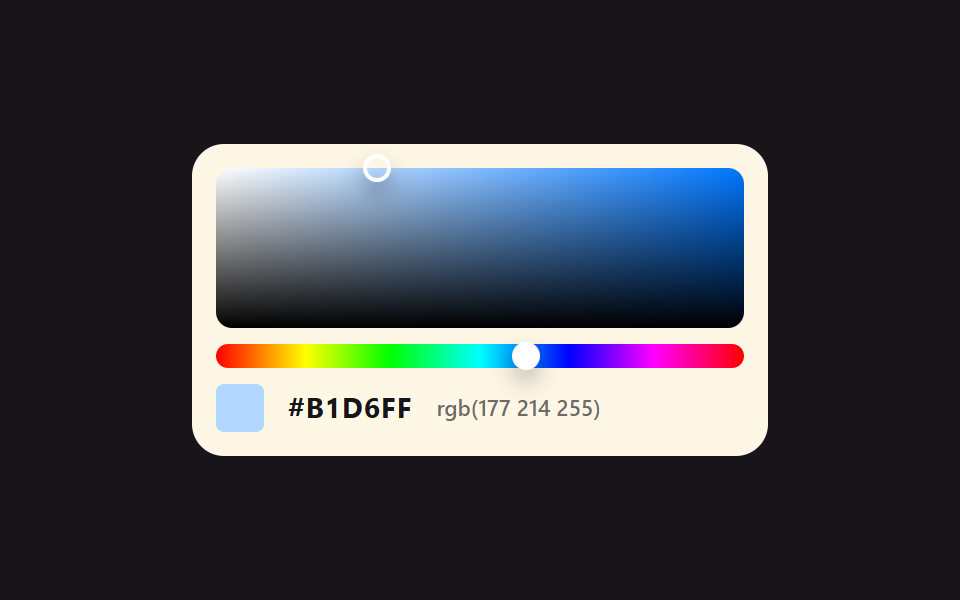 컬러 피커 직접 만들기 CSS+JS 9종 — 라이브러리 없이컬러 피커는 화면에서 색을 골라 HEX 코드로 돌려주는 선택 창입니다. 이 페이지에는 그 부품 아홉 벌이 라이브러리 없이 색 공간 계산까지 직접 짠 코드로 돌아가고 있고, 코드는 통째로 복사해 쓰면 됩니다. 채도·명 이 글의 데모 전부 보기