03드래그로 구간을 긁으면 요약 숫자가 바뀐다
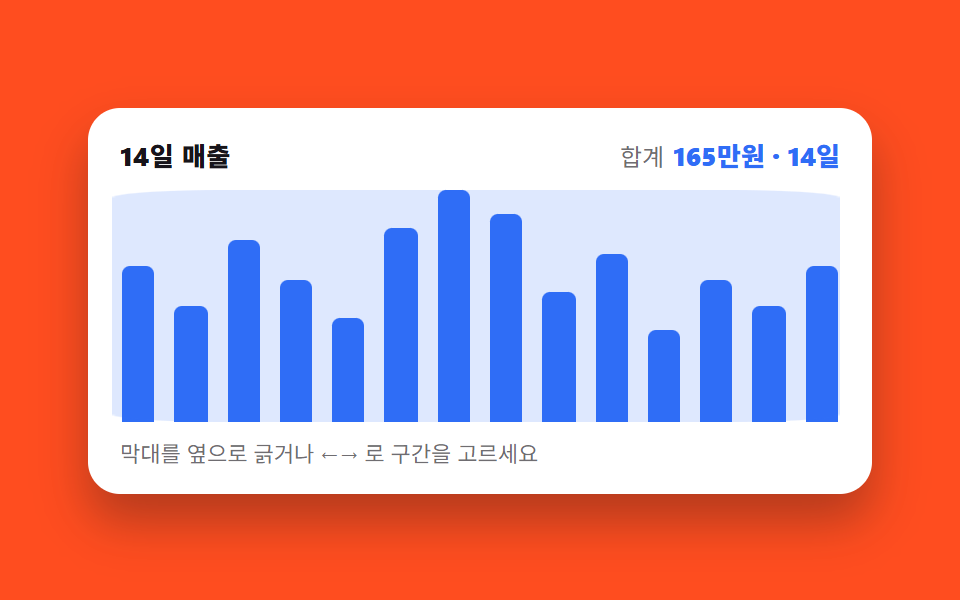
차트 위를 옆으로 긁으면 그 구간만 밝게 남고 바깥은 가라앉으며, 위쪽 합계와 일수가 긁는 동안 계속 다시 세어집니다.
쓰임기간을 눈으로 잡아 합계를 확인하는 매출·세션 리포트
pointerdownsetPointerCapturearia-live
<main class="stage">
  <figure class="br is-demo" id="br">
    <figcaption class="br__head">
      <span class="br__title">14일 매출</span>
      <span class="br__sum"><span class="br__lab">합계</span> <span class="br__val" aria-hidden="true"><i class="br__n"></i><span class="br__u">만원</span> · <i class="br__d"></i><span class="br__u">일</span></span></span>
    </figcaption>
    <div class="br__plot" role="img" aria-label="14일 매출 막대 그래프. 7일째 18만원이 가장 높고 11일째 7만원이 가장 낮다">
      <div class="br__track">
        <i class="br__bar" data-far="1" data-in="0" style="--b:66.7%"></i>
        <i class="br__bar" data-far="1" data-in="0" style="--b:50%"></i>
        <i class="br__bar" data-far="1" data-in="0" style="--b:77.8%"></i>
        <i class="br__bar" data-far="1" data-in="0" style="--b:61.1%"></i>
        <i class="br__bar" data-in="1" style="--b:44.4%"></i>
        <i class="br__bar" data-in="1" style="--b:83.3%"></i>
        <i class="br__bar" data-in="1" style="--b:100%"></i>
        <i class="br__bar" data-in="1" style="--b:88.9%"></i>
        <i class="br__bar" data-in="1" style="--b:55.6%"></i>
        <i class="br__bar" data-far="1" data-in="0" style="--b:72.2%"></i>
        <i class="br__bar" data-far="1" data-in="0" style="--b:38.9%"></i>
        <i class="br__bar" data-far="1" data-in="0" style="--b:61.1%"></i>
        <i class="br__bar" data-far="1" data-in="0" style="--b:50%"></i>
        <i class="br__bar" data-far="1" data-in="0" style="--b:66.7%"></i>
      </div>
      <i class="br__band" aria-hidden="true"></i>
      <button class="br__hot" type="button" id="br-hot" aria-label="구간 긁기 — 끝점은 ←→ · 시작점은 Shift+←→"></button>
    </div>
    <p class="br__hint">막대를 옆으로 긁거나 ←→ 로 구간을 고르세요</p>
    <span class="sr" aria-live="polite" id="br-live">67만원 · 5일</span>
    <div class="sr"><table>
      <caption>14일 일별 매출</caption>
      <thead><tr><th>날짜</th><th>매출</th></tr></thead>
      <tbody>
        <tr><th>1</th><td>12</td></tr><tr><th>2</th><td>9</td></tr><tr><th>3</th><td>14</td></tr><tr><th>4</th><td>11</td></tr>
        <tr><th>5</th><td>8</td></tr><tr><th>6</th><td>15</td></tr><tr><th>7</th><td>18</td></tr><tr><th>8</th><td>16</td></tr>
        <tr><th>9</th><td>10</td></tr><tr><th>10</th><td>13</td></tr><tr><th>11</th><td>7</td></tr><tr><th>12</th><td>11</td></tr>
        <tr><th>13</th><td>9</td></tr><tr><th>14</th><td>12</td></tr>
      </tbody>
    </table></div>
  </figure>
</main>@use "../../../../site/static/demo-tokens" as *;
// 브러시의 상태는 등록된 정수 네 개다. 등록해야 (1) 값이 교체돼도 transition 대상이 되고
// (2) 자동 루프의 keyframes 가 값을 컷으로 갈아끼울 수 있다.
@property --s { syntax: "<integer>"; initial-value: 4; inherits: true; } // 구간 시작칸
@property --e { syntax: "<integer>"; initial-value: 8; inherits: true; } // 구간 끝칸
@property --n { syntax: "<integer>"; initial-value: 67; inherits: true; } // 구간 합계(만원)
@property --d { syntax: "<integer>"; initial-value: 5; inherits: true; } // 구간 일수
$duration: $dur-quick;
$easing: $ease-out;
$color: $subject-blue;
$cell: 14; // 막대(칸) 수 — 띠 계산의 분모
@include stage($stage-orange);
.sr {
position: absolute;
width: 1px;
height: 1px;
overflow: hidden;
clip-path: inset(50%);
white-space: nowrap;
}
.br {
--s: 4;
--e: 8;
box-sizing: border-box;
width: min(392px, 88vw);
display: flex;
flex-direction: column;
gap: $sp-2;
margin: 0;
padding: $sp-3;
border-radius: $r-card;
background: $stage-paper;
box-shadow: $shadow-raised;
color: $subject-ink;
font-family: -apple-system, "Segoe UI", "Noto Sans KR", sans-serif;
}
.br__head {
display: flex;
align-items: baseline;
justify-content: space-between;
gap: $sp-2;
padding: 0 $sp-1;
}
.br__title { font-size: 13px; line-height: 18px; font-weight: 800; letter-spacing: .02em; }
.br__lab { font-size: 12px; line-height: 18px; color: rgba(23, 20, 26, .62); }
.br__val { font-size: 13px; line-height: 18px; font-weight: 800; color: $color; font-variant-numeric: tabular-nums; }
// 숫자는 텍스트가 아니라 카운터 — 루프에서도 --n 이 컷으로 갈아끼워지면 글자가 따라 바뀐다.
// 화면용 숫자라 aria-hidden 하고, 실제 알림은 아래 sr 낱말(aria-live)이 맡는다
.br__n { font-style: normal; counter-reset: n var(--n); }
.br__n::after { content: counter(n); }
.br__d { font-style: normal; counter-reset: d var(--d); }
.br__d::after { content: counter(d); }
.br__u { font-style: normal; }
// plot 은 1×1 격자 — 막대 트랙·밝은 띠·글기 버튼 세 겹을 같은 칸에 explicit 으로 겹친다.
// auto 배치로 두면 띠·버튼이 한 칸을 차지해 막대가 안 보이는 암시적 줄로 밀려난다 (실측)
.br__plot {
display: grid;
height: 116px;
}
.br__track,
.br__band,
.br__hot { grid-area: 1 / 1; }
// 칸 배분은 grid 균등 분할(flex 아님) — 칸 폭이 정확히 1/14 이어야 띠 계산이 맞는다
.br__track {
display: grid;
grid-template-columns: repeat($cell, 1fr);
grid-template-rows: 1fr;
}
.br__bar {
align-self: end;
justify-self: center;
width: 62%;
height: var(--b);
border-radius: $r-xs $r-xs 0 0;
background: $color;
}
// 구간 밖 막대는 가라앉는다 — 상태는 data-in 속성에만 있다
.br__bar[data-in="0"] { opacity: .3; }
// 밝은 띠: 절대배치가 아니라 그리드 칸 위의 겹침 요소. 폭 = 칸 하나 × scaleX(칸 수),
// 위치 = translateX(시작칸 × 칸 폭) — 둘 다 % 라 칸 폭이 몇 px 든 수식이 그대로 맞는다
.br__band {
display: block;
height: 100%;
width: calc(100% / $cell);
border-radius: $r-xs;
background: rgba(47, 109, 246, .16);
transform-origin: left center; // 규칙8: 칸수 scaleX 수식 계산
transform: translateX(calc(var(--s) * 100%)) scaleX(calc(var(--e) - var(--s) + 1));
}
.br__hot {
border: 0;
border-radius: $r-sm;
background: transparent;
cursor: col-resize;
}
.br__hot:focus-visible { outline: 2px solid $color; outline-offset: -2px; }
.br__hint { margin: 0; padding: 0 $sp-1; font-size: 11px; line-height: 16px; color: rgba(23, 20, 26, .62); }
// ── 사람이 만진 뒤(정적 경로): 띠는 짧게 쫓아가고 막대는 살짝 가라앉는다 ──
.br:not(.is-demo) .br__band {
transition-property: transform;
transition-duration: $duration;
transition-timing-function: $easing;
}
.br:not(.is-demo) .br__bar {
transition-property: opacity;
transition-duration: $dur-instant;
transition-timing-function: $easing;
}
// ── 자동 루프(2초): 좁은 구간[5~9일째] ↔ 전체 14일. 복귀는 88% 에 끝난다 ──
// 띠의 폭만 scaleX 로 부드럽게 늘어나고, 바깥 막대의 밝아짐과 합계 숫자는
// 띠가 **다 도착한 시각(40%)** 에 함께 컷 한다 — 세 가지 중 하나라도 시각이 어긋나면
// 「띠는 5칸인데 합계는 14일」 같은 프레임이 그대로 대표 이미지가 된다 (첫 판 실측)
.br.is-demo .br__band {
animation-name: br-band;
animation-duration: $dur-loop;
animation-timing-function: $easing;
animation-iteration-count: infinite;
}
@keyframes br-band {
0%, 15% { transform: translateX(calc(4 * 100%)) scaleX(5); }
40%, 70% { transform: translateX(0) scaleX(#{$cell}); }
88%, 100% { transform: translateX(calc(4 * 100%)) scaleX(5); }
}
// data-far 은 루프 연출용으로 미리 적어둔 표시(초기 구간[4,8] 밖의 막대) —
// 사람이 조작하면 data-in 이 진짜 상태고 이 애니메이션은 .is-demo 를 떼며 사라진다
.br.is-demo .br__bar[data-far="1"] {
animation-name: br-far;
animation-duration: $dur-loop;
animation-timing-function: steps(1, end);
animation-iteration-count: infinite;
}
@keyframes br-far {
0%, 39.99% { opacity: .3; }
40%, 87.99% { opacity: 1; }
88%, 100% { opacity: .3; }
}
// 합계·일수 카운터도 같은 박자의 컷 — 루프의 어느 장면이든 숫자는 그 장면과 맞는 값
.br.is-demo {
animation-name: br-nums;
animation-duration: $dur-loop;
animation-timing-function: steps(1, end);
animation-iteration-count: infinite;
}
@keyframes br-nums {
0%, 39.99% { --n: 67; --d: 5; }
40%, 87.99% { --n: 165; --d: #{$cell}; }
88%, 100% { --n: 67; --d: 5; }
}
@media (max-width: 340px) {
.br { padding: $sp-2; gap: $sp-1; }
.br__plot { height: 88px; }
.br__title, .br__val { font-size: 12px; line-height: 16px; }
.br__lab { font-size: 11px; line-height: 16px; }
.br__hint { display: none; }
}
@media (prefers-reduced-motion: reduce) {
.br.is-demo,
.br.is-demo .br__band,
.br.is-demo .br__bar[data-far="1"] { animation: none !important; }
.br:not(.is-demo) .br__band,
.br:not(.is-demo) .br__bar { transition: none !important; }
}@property --s {
syntax: "<integer>";
initial-value: 4;
inherits: true;
}
@property --e {
syntax: "<integer>";
initial-value: 8;
inherits: true;
}
@property --n {
syntax: "<integer>";
initial-value: 67;
inherits: true;
}
@property --d {
syntax: "<integer>";
initial-value: 5;
inherits: true;
}
html, body {
margin: 0;
overflow: hidden;
}
.stage {
box-sizing: border-box;
min-height: 100vh;
display: grid;
place-items: center;
margin: 0;
background: #ff4d1f;
font-family: -apple-system, "Segoe UI", "Noto Sans KR", sans-serif;
padding: clamp(8px, 4vw, 24px);
}
.sr {
position: absolute;
width: 1px;
height: 1px;
overflow: hidden;
clip-path: inset(50%);
white-space: nowrap;
}
.br {
--s: 4;
--e: 8;
box-sizing: border-box;
width: min(392px, 88vw);
display: flex;
flex-direction: column;
gap: 8px;
margin: 0;
padding: 12px;
border-radius: 16px;
background: #ffffff;
box-shadow: 0 14px 24px rgba(23, 20, 26, 0.32);
color: #17141a;
font-family: -apple-system, "Segoe UI", "Noto Sans KR", sans-serif;
}
.br__head {
display: flex;
align-items: baseline;
justify-content: space-between;
gap: 8px;
padding: 0 4px;
}
.br__title {
font-size: 13px;
line-height: 18px;
font-weight: 800;
letter-spacing: 0.02em;
}
.br__lab {
font-size: 12px;
line-height: 18px;
color: rgba(23, 20, 26, 0.62);
}
.br__val {
font-size: 13px;
line-height: 18px;
font-weight: 800;
color: #2f6df6;
font-variant-numeric: tabular-nums;
}
.br__n {
font-style: normal;
counter-reset: n var(--n);
}
.br__n::after {
content: counter(n);
}
.br__d {
font-style: normal;
counter-reset: d var(--d);
}
.br__d::after {
content: counter(d);
}
.br__u {
font-style: normal;
}
.br__plot {
display: grid;
height: 116px;
}
.br__track,
.br__band,
.br__hot {
grid-area: 1/1;
}
.br__track {
display: grid;
grid-template-columns: repeat(14, 1fr);
grid-template-rows: 1fr;
}
.br__bar {
align-self: end;
justify-self: center;
width: 62%;
height: var(--b);
border-radius: 4px 4px 0 0;
background: #2f6df6;
}
.br__bar[data-in="0"] {
opacity: 0.3;
}
.br__band {
display: block;
height: 100%;
width: 7.1428571429%;
border-radius: 4px;
background: rgba(47, 109, 246, 0.16);
transform-origin: left center;
transform: translateX(calc(var(--s) * 100%)) scaleX(calc(var(--e) - var(--s) + 1));
}
.br__hot {
border: 0;
border-radius: 8px;
background: transparent;
cursor: col-resize;
}
.br__hot:focus-visible {
outline: 2px solid #2f6df6;
outline-offset: -2px;
}
.br__hint {
margin: 0;
padding: 0 4px;
font-size: 11px;
line-height: 16px;
color: rgba(23, 20, 26, 0.62);
}
.br:not(.is-demo) .br__band {
transition-property: transform;
transition-duration: 220ms;
transition-timing-function: ease-out;
}
.br:not(.is-demo) .br__bar {
transition-property: opacity;
transition-duration: 140ms;
transition-timing-function: ease-out;
}
.br.is-demo .br__band {
animation-name: br-band;
animation-duration: 2s;
animation-timing-function: ease-out;
animation-iteration-count: infinite;
}
@keyframes br-band {
0%, 15% {
transform: translateX(400%) scaleX(5);
}
40%, 70% {
transform: translateX(0) scaleX(14);
}
88%, 100% {
transform: translateX(400%) scaleX(5);
}
}
.br.is-demo .br__bar[data-far="1"] {
animation-name: br-far;
animation-duration: 2s;
animation-timing-function: steps(1, end);
animation-iteration-count: infinite;
}
@keyframes br-far {
0%, 39.99% {
opacity: 0.3;
}
40%, 87.99% {
opacity: 1;
}
88%, 100% {
opacity: 0.3;
}
}
.br.is-demo {
animation-name: br-nums;
animation-duration: 2s;
animation-timing-function: steps(1, end);
animation-iteration-count: infinite;
}
@keyframes br-nums {
0%, 39.99% {
--n: 67;
--d: 5;
}
40%, 87.99% {
--n: 165;
--d: 14;
}
88%, 100% {
--n: 67;
--d: 5;
}
}
@media (max-width: 340px) {
.br {
padding: 8px;
gap: 4px;
}
.br__plot {
height: 88px;
}
.br__title, .br__val {
font-size: 12px;
line-height: 16px;
}
.br__lab {
font-size: 11px;
line-height: 16px;
}
.br__hint {
display: none;
}
}
@media (prefers-reduced-motion: reduce) {
.br.is-demo,
.br.is-demo .br__band,
.br.is-demo .br__bar[data-far="1"] {
animation: none !important;
}
.br:not(.is-demo) .br__band,
.br:not(.is-demo) .br__bar {
transition: none !important;
}
}// 브러시의 상태는 정수 두 개(--s 시작칸, --e 끝칸)뿐이다.
// 밝은 띠의 위치·폭은 CSS 가 이 두 값을 transform 으로 계산하고,
// 각 막대의 안팎은 data-in 속성만 읽어 칠한다 — JS 가 스타일을 직접 만지지 않는다.
var br = document.getElementById('br');
var hot = document.getElementById('br-hot');
var live = document.getElementById('br-live');
var bars = br.querySelectorAll('.br__bar');
var V = [12, 9, 14, 11, 8, 15, 18, 16, 10, 13, 7, 11, 9, 12];
var N = 14, s = 4, e = 8;
function idx(x) {
var r = hot.getBoundingClientRect();
var t = Math.min(Math.max((x - r.left) / r.width, 0), 1);
return Math.min(Math.max(Math.round(t * (N - 1)), 0), N - 1);
}
function apply() {
var sum = 0;
for (var i = 0; i < N; i++) {
var inn = i >= s && i <= e;
bars[i].setAttribute('data-in', inn ? '1' : '0');
if (inn) sum += V[i];
}
br.style.setProperty('--s', String(s));
br.style.setProperty('--e', String(e));
br.style.setProperty('--n', String(sum));
br.style.setProperty('--d', String(e - s + 1));
live.textContent = sum + '만원 · ' + (e - s + 1) + '일';
}
// 마우스·터치 공용: 누른 점을 붙잡고(pointer capture) 옆으로 긁는다
hot.addEventListener('pointerdown', function (ev) {
br.classList.remove('is-demo');
hot.setPointerCapture(ev.pointerId);
var a = idx(ev.clientX);
function move(m) { s = Math.min(a, idx(m.clientX)); e = Math.max(a, idx(m.clientX)); apply(); }
function up() { hot.removeEventListener('pointermove', move); hot.removeEventListener('pointerup', up); }
hot.addEventListener('pointermove', move);
hot.addEventListener('pointerup', up);
move(ev);
});
// 키보드: ←→ 는 끝점, Shift+←→ 는 시작점 — 벗어난 쪽이 반대편을 넘지 못하게 붙잡는다
hot.addEventListener('keydown', function (ev) {
var d = ev.key === 'ArrowRight' ? 1 : ev.key === 'ArrowLeft' ? -1 : 0;
if (!d) { if (ev.key === 'Home' || ev.key === 'End') { ev.preventDefault(); s = e = ev.key === 'Home' ? 0 : N - 1; apply(); } return; }
ev.preventDefault();
if (ev.shiftKey) { s = Math.min(Math.max(s + d, 0), e); } else { e = Math.min(Math.max(e + d, s), N - 1); }
apply();
hot.focus({ preventScroll: true });
});import { useState } from "react";
import type { CSSProperties } from "react";
import styles from "./BrushRange.module.scss";
// 브러시 구간 React 판 — vanilla(run/264/demo/03) 와 같은 동작.
// 상태는 정수 두 개(s, e). 띠의 위치·폭은 CSS 가 --s/--e 로 transform 계산하고,
// 막대의 안팎은 data-in 속성으로만 전달한다.
export type BrushRangeProps = {
title?: string;
totalLabel?: string;
unit?: string;
dayWord?: string;
values?: number[];
initS?: number;
initE?: number;
duration?: number;
easing?: string;
color?: string;
};
// ambient 타입이 빽약하다 — 이벤트는 파일 안에서 로컬 타입으로 선언
type PointerTarget = {
getBoundingClientRect(): DOMRect;
setPointerCapture(id: number): void;
addEventListener(t: string, f: EventListener): void;
removeEventListener(t: string, f: EventListener): void;
};
type PointerLike = {
clientX: number;
pointerId: number;
currentTarget: PointerTarget;
};
type KeyEvt = { key: string; shiftKey: boolean; preventDefault(): void };
type Vars = CSSProperties & {
"--duration"?: string;
"--easing"?: string;
"--color"?: string;
"--s"?: string;
"--e"?: string;
"--n"?: string;
"--d"?: string;
};
type BarVars = CSSProperties & { "--b"?: string };
export default function BrushRange({
title = "14일 매출",
totalLabel = "합계",
unit = "만원",
dayWord = "일",
values = [12, 9, 14, 11, 8, 15, 18, 16, 10, 13, 7, 11, 9, 12],
initS = 4,
initE = 8,
duration = 220,
easing = "ease-out",
color = "#2f6df6",
}: BrushRangeProps) {
const N = values.length;
const maxV = Math.max(...values);
const [demo, setDemo] = useState(true);
const [s, setS] = useState(initS);
const [e, setE] = useState(initE);
const sum = values.reduce((a, v, i) => a + (i >= s && i <= e ? v : 0), 0);
const days = e - s + 1;
const vars: Vars = {
"--duration": `${duration}ms`,
"--easing": easing,
"--color": color,
"--s": String(s),
"--e": String(e),
"--n": String(sum),
"--d": String(days),
};
function idx(clientX: number, r: DOMRect) {
const t = Math.min(Math.max((clientX - r.left) / r.width, 0), 1);
return Math.min(Math.max(Math.round(t * (N - 1)), 0), N - 1);
}
function onDown(ev: PointerLike) {
setDemo(false);
ev.currentTarget.setPointerCapture(ev.pointerId); // 마우스·터치 공용 붙잡기
const r = ev.currentTarget.getBoundingClientRect();
const a = idx(ev.clientX, r);
const move = (m: PointerLike) => {
const c = idx(m.clientX, r);
setS(Math.min(a, c));
setE(Math.max(a, c));
};
const target = ev.currentTarget;
const up = () => {
target.removeEventListener("pointermove", move as unknown as EventListener);
target.removeEventListener("pointerup", up as unknown as EventListener);
};
target.addEventListener("pointermove", move as unknown as EventListener);
target.addEventListener("pointerup", up as unknown as EventListener);
move(ev);
}
function onKey(ev: KeyEvt) {
const d = ev.key === "ArrowRight" ? 1 : ev.key === "ArrowLeft" ? -1 : 0;
if (!d) {
if (ev.key === "Home" || ev.key === "End") {
ev.preventDefault();
setS(ev.key === "Home" ? 0 : N - 1);
setE(ev.key === "Home" ? 0 : N - 1);
}
return;
}
ev.preventDefault();
setDemo(false);
if (ev.shiftKey) setS((v) => Math.min(Math.max(v + d, 0), e));
else setE((v) => Math.min(Math.max(v + d, s), N - 1));
}
return (
<figure className={`${styles.br} ${demo ? styles.isDemo : ""}`} style={vars}>
<figcaption className={styles.head}>
<span className={styles.title}>{title}</span>
<span className={styles.sum}>
<span className={styles.lab}>{totalLabel}</span>{" "}
<span className={styles.val} aria-hidden="true">
<i className={styles.n} />
<span className={styles.u}>{unit}</span> · <i className={styles.d} />
<span className={styles.u}>{dayWord}</span>
</span>
</span>
</figcaption>
<div
className={styles.plot}
role="img"
aria-label="14일 매출 막대 그래프. 7일째 18만원이 가장 높고 11일째 7만원이 가장 낮다"
>
<div className={styles.track}>
{values.map((v, i) => (
<i
className={styles.bar}
key={i}
data-far={i < initS || i > initE ? "1" : undefined}
data-in={i >= s && i <= e ? "1" : "0"}
style={{ "--b": `${((v / maxV) * 100).toFixed(1)}%` } as BarVars}
/>
))}
</div>
<i className={styles.band} aria-hidden="true" />
<button
type="button"
className={styles.hot}
aria-label="구간 긁기 — 끝점은 ←→ · 시작점은 Shift+←→"
onPointerDown={onDown}
onKeyDown={onKey}
/>
</div>
<p className={styles.hint}>막대를 옆으로 긁거나 ←→ 로 구간을 고르세요</p>
<span className={styles.sr} aria-live="polite">
{sum}
{unit} · {days}
{dayWord}
</span>
</figure>
);
}03 드래그로 구간을 긁으면 요약 숫자가 바뀐다 — 측정 누적면적 19.367% · 움직인 프레임 13/23GODRICH 원작 · zip 에 SCSS·React 포함 · 대시보드 차트 디자인 인터랙션 9종 — 호버부터 드릴다운까지
이 데모가 속한 글
 대시보드 차트 디자인 인터랙션 9종 — 호버부터 드릴다운까지대시보드 차트 디자인에서 진짜 일을 하는 건 그려진 선이 아니라 그 위에서 손이 하는 일입니다. 아홉 개 전부 차트 라이브러리 없이 CSS 막대와 인라인 SVG 위에 바닐라 JS만 얹었고, 만지면 숫자가 바뀌는 쪽으 이 글의 데모 전부 보기