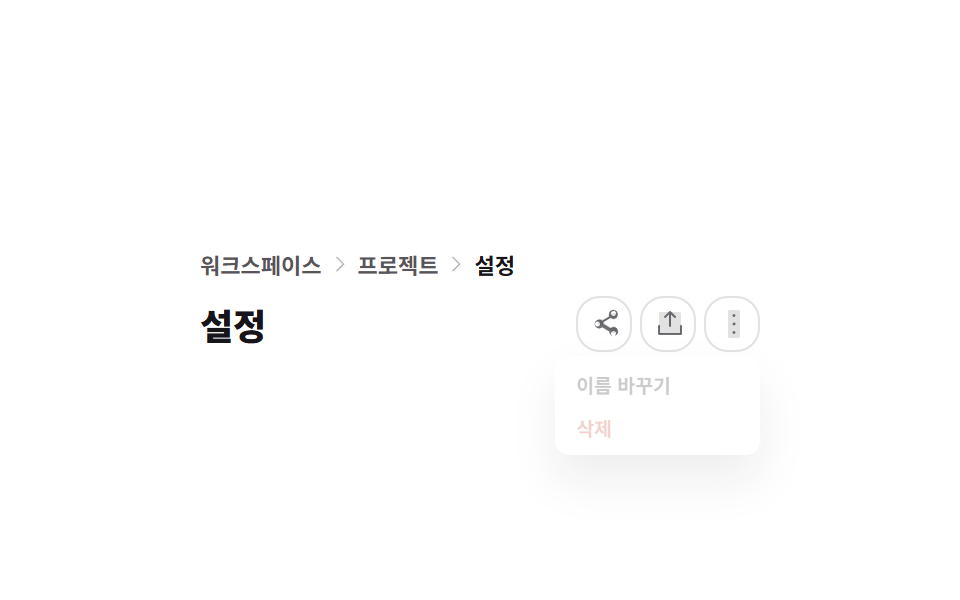
01브레드크럼 + 페이지 헤더
케밥(⋮) 버튼을 누르면 오른쪽 위 모서리를 기준으로 실제로 메뉴가 커지며 열리고, 바깥을 클릭하면 실제로 닫힙니다.
쓰임완성된 관리자 화면 없이 페이지 맨 위 경로 표시와 액션 메뉴만 내 프로젝트에 붙이고 싶을 때
transform-originclickaria-expanded

<main class="stage">
  <div class="ph is-demo">
    <nav class="ph__crumbs" aria-label="이동 경로">
      <a class="ph__crumb" href="#">워크스페이스</a>
      <span class="ph__sep" aria-hidden="true"><svg viewBox="0 0 256 256" width="10" height="10"><g fill="currentColor"><path d="M180 128a4 4 0 0 1-1.17 2.83l-88 88a4 4 0 1 1-5.66-5.66L167.51 128L85.17 45.83a4 4 0 1 1 5.66-5.66l88 88A4 4 0 0 1 180 128" opacity=".2"/><path d="M181.66 133.66l-88 88a8 8 0 0 1-11.32-11.32L163.31 128L82.34 47.66a8 8 0 0 1 11.32-11.32l88 88a8 8 0 0 1 0 11.32"/></g></svg></span>
      <a class="ph__crumb" href="#">프로젝트</a>
      <span class="ph__sep" aria-hidden="true"><svg viewBox="0 0 256 256" width="10" height="10"><g fill="currentColor"><path d="M180 128a4 4 0 0 1-1.17 2.83l-88 88a4 4 0 1 1-5.66-5.66L167.51 128L85.17 45.83a4 4 0 1 1 5.66-5.66l88 88A4 4 0 0 1 180 128" opacity=".2"/><path d="M181.66 133.66l-88 88a8 8 0 0 1-11.32-11.32L163.31 128L82.34 47.66a8 8 0 0 1 11.32-11.32l88 88a8 8 0 0 1 0 11.32"/></g></svg></span>
      <span class="ph__crumb ph__crumb--current" aria-current="page">설정</span>
    </nav>
    <div class="ph__row">
      <h2 class="ph__title">설정</h2>
      <div class="ph__actions">
        <button class="ph__icon-btn" type="button" aria-label="공유">
          <svg viewBox="0 0 256 256" width="16" height="16"><g fill="currentColor"><path d="M188 96a28 28 0 1 0-25.94-38.7l-58.66 34.36a28 28 0 1 0 0 44.68l58.66 34.36A28 28 0 1 0 176 148a27.7 27.7 0 0 0-1.63 9.4l-58.66-34.36a27.9 27.9 0 0 0 0-18.08l58.66-34.36A27.9 27.9 0 0 0 188 96" opacity=".2"/><path d="M188 152a35.7 35.7 0 0 0-23.6 8.9l-56.1-32.87a36.2 36.2 0 0 0 0-16l56.1-32.87A36 36 0 1 0 152 60a35.6 35.6 0 0 0 1.09 8.66l-56.1 32.87a36 36 0 1 0 0 52.94l56.1 32.87A36 36 0 1 0 188 152m0-128a20 20 0 1 1-20 20a20 20 0 0 1 20-20M60 148a20 20 0 1 1 20-20a20 20 0 0 1-20 20m128 76a20 20 0 1 1 20-20a20 20 0 0 1-20 20"/></g></svg>
        </button>
        <button class="ph__icon-btn" type="button" aria-label="내보내기">
          <svg viewBox="0 0 256 256" width="16" height="16"><g fill="currentColor"><path d="M216 48v160H40V48a16 16 0 0 1 16-16h144a16 16 0 0 1 16 16" opacity=".2"/><path d="M224 144v64a8 8 0 0 1-8 8H40a8 8 0 0 1-8-8v-64a8 8 0 0 1 16 0v56h160v-56a8 8 0 0 1 16 0M93.66 77.66L120 51.31V144a8 8 0 0 0 16 0V51.31l26.34 26.35a8 8 0 0 0 11.32-11.32l-40-40a8 8 0 0 0-11.32 0l-40 40a8 8 0 0 0 11.32 11.32"/></g></svg>
        </button>
        <div class="ph__menu-wrap">
          <button class="ph__kebab" type="button" aria-haspopup="true" aria-expanded="false" aria-label="더 보기">
            <svg viewBox="0 0 256 256" width="16" height="16"><g fill="currentColor"><path d="M176 32v192a16 16 0 0 1-16 16H96a16 16 0 0 1-16-16V32a16 16 0 0 1 16-16h64a16 16 0 0 1 16 16" opacity=".2"/><path d="M140 128a12 12 0 1 1-12-12a12 12 0 0 1 12 12m-12-56a12 12 0 1 0-12-12a12 12 0 0 0 12 12m0 112a12 12 0 1 0 12 12a12 12 0 0 0-12-12"/></g></svg>
          </button>
          <div class="ph__menu" role="menu">
            <button class="ph__menu-item" role="menuitem" type="button">이름 바꾸기</button>
            <button class="ph__menu-item ph__menu-item--danger" role="menuitem" type="button">삭제</button>
          </div>
        </div>
      </div>
    </div>
  </div>
</main>@use "../../../../site/static/demo-tokens" as *;
$duration: $dur-quick;
$easing: $ease-pop;
$color: $subject-blue;
@include stage($stage-paper);
.ph {
box-sizing: border-box;
width: min(280px, 88vw);
font-family: -apple-system, "Segoe UI", "Noto Sans KR", sans-serif;
color: $stage-ink;
}
.ph__crumbs { display: flex; align-items: center; gap: $sp-1; margin: 0 0 $sp-2; }
.ph__crumb {
font-size: 11px; font-weight: 600; color: rgba(23, 20, 26, .72);
text-decoration: none;
}
.ph__crumb--current { color: $stage-ink; }
.ph__sep { display: inline-flex; color: rgba(23, 20, 26, .3); }
.ph__row { display: flex; align-items: center; justify-content: space-between; gap: $sp-2; }
.ph__title { margin: 0; font-size: 18px; font-weight: 800; }
.ph__actions { display: flex; align-items: center; gap: $sp-1; position: relative; }
.ph__icon-btn, .ph__kebab {
box-sizing: border-box;
width: 28px; height: 28px;
display: grid; place-items: center;
border: 1px solid rgba(23, 20, 26, .12);
background: #fff;
border-radius: $r-control;
color: rgba(23, 20, 26, .6);
cursor: pointer;
transition: background $duration $easing, color $duration $easing;
}
.ph__icon-btn:hover, .ph__kebab:hover { background: rgba(47, 109, 246, .08); color: $color; }
.ph__menu-wrap { position: relative; }
.ph__menu {
position: absolute;
top: 30px; right: 0;
box-sizing: border-box;
width: 116px;
background: #fff;
border-radius: $r-sm;
box-shadow: $shadow-raised;
padding: $sp-1;
transform-origin: top right; // 규칙8: 케밥 오른쪽 변에서 팝
transform: scale(.85);
opacity: 0;
pointer-events: none;
transition: transform $duration $easing, opacity $duration $easing;
}
.ph__menu-wrap.is-open .ph__menu { transform: scale(1); opacity: 1; pointer-events: auto; }
.ph__menu-item {
display: block;
width: 100%;
box-sizing: border-box;
text-align: left;
border: 0; background: transparent; cursor: pointer;
font: inherit; font-size: 11px; font-weight: 600; color: $stage-ink;
padding: $sp-1 $sp-2;
border-radius: $r-xs;
}
.ph__menu-item:hover { background: rgba(23, 20, 26, .06); }
.ph__menu-item--danger { color: $error; }
// ── 자동 루프: 메뉴가 열렸다 닫혔다를 반복한다 (실제 상태와 별개) ──────────────
.ph.is-demo .ph__menu {
animation: ph-menu-loop 2s $easing infinite;
}
@keyframes ph-menu-loop {
0%, 100% { transform: scale(.85); opacity: 0; }
40% { transform: scale(1); opacity: 1; }
85% { transform: scale(1); opacity: 1; }
}
@media (max-width: 340px) {
.ph__title { font-size: 16px; }
.ph__menu { width: 116px; }
}
@media (prefers-reduced-motion: reduce) {
.ph.is-demo .ph__menu { animation: none !important; }
.ph__menu, .ph__icon-btn, .ph__kebab { transition: none; }
}html, body {
margin: 0;
overflow: hidden;
}
.stage {
box-sizing: border-box;
min-height: 100vh;
display: grid;
place-items: center;
margin: 0;
background: #ffffff;
font-family: -apple-system, "Segoe UI", "Noto Sans KR", sans-serif;
padding: clamp(8px, 4vw, 24px);
}
.ph {
box-sizing: border-box;
width: min(280px, 88vw);
font-family: -apple-system, "Segoe UI", "Noto Sans KR", sans-serif;
color: #17141a;
}
.ph__crumbs {
display: flex;
align-items: center;
gap: 4px;
margin: 0 0 8px;
}
.ph__crumb {
font-size: 11px;
font-weight: 600;
color: rgba(23, 20, 26, 0.72);
text-decoration: none;
}
.ph__crumb--current {
color: #17141a;
}
.ph__sep {
display: inline-flex;
color: rgba(23, 20, 26, 0.3);
}
.ph__row {
display: flex;
align-items: center;
justify-content: space-between;
gap: 8px;
}
.ph__title {
margin: 0;
font-size: 18px;
font-weight: 800;
}
.ph__actions {
display: flex;
align-items: center;
gap: 4px;
position: relative;
}
.ph__icon-btn, .ph__kebab {
box-sizing: border-box;
width: 28px;
height: 28px;
display: grid;
place-items: center;
border: 1px solid rgba(23, 20, 26, 0.12);
background: #fff;
border-radius: 12px;
color: rgba(23, 20, 26, 0.6);
cursor: pointer;
transition: background 220ms cubic-bezier(0.2, 1.4, 0.4, 1), color 220ms cubic-bezier(0.2, 1.4, 0.4, 1);
}
.ph__icon-btn:hover, .ph__kebab:hover {
background: rgba(47, 109, 246, 0.08);
color: #2f6df6;
}
.ph__menu-wrap {
position: relative;
}
.ph__menu {
position: absolute;
top: 30px;
right: 0;
box-sizing: border-box;
width: 116px;
background: #fff;
border-radius: 8px;
box-shadow: 0 14px 24px rgba(23, 20, 26, 0.32);
padding: 4px;
transform-origin: top right;
transform: scale(0.85);
opacity: 0;
pointer-events: none;
transition: transform 220ms cubic-bezier(0.2, 1.4, 0.4, 1), opacity 220ms cubic-bezier(0.2, 1.4, 0.4, 1);
}
.ph__menu-wrap.is-open .ph__menu {
transform: scale(1);
opacity: 1;
pointer-events: auto;
}
.ph__menu-item {
display: block;
width: 100%;
box-sizing: border-box;
text-align: left;
border: 0;
background: transparent;
cursor: pointer;
font: inherit;
font-size: 11px;
font-weight: 600;
color: #17141a;
padding: 4px 8px;
border-radius: 4px;
}
.ph__menu-item:hover {
background: rgba(23, 20, 26, 0.06);
}
.ph__menu-item--danger {
color: #c2361a;
}
.ph.is-demo .ph__menu {
animation: ph-menu-loop 2s cubic-bezier(0.2, 1.4, 0.4, 1) infinite;
}
@keyframes ph-menu-loop {
0%, 100% {
transform: scale(0.85);
opacity: 0;
}
40% {
transform: scale(1);
opacity: 1;
}
85% {
transform: scale(1);
opacity: 1;
}
}
@media (max-width: 340px) {
.ph__title {
font-size: 16px;
}
.ph__menu {
width: 116px;
}
}
@media (prefers-reduced-motion: reduce) {
.ph.is-demo .ph__menu {
animation: none !important;
}
.ph__menu, .ph__icon-btn, .ph__kebab {
transition: none;
}
}// 실제 동작: 케밥 버튼을 누르면 메뉴가 실제로 열리고, 바깥 클릭이나 Esc로 실제로 닫힌다.
var wrap = document.querySelector('.ph__menu-wrap');
var kebab = document.querySelector('.ph__kebab');
var menu = document.querySelector('.ph__menu');
function close() {
wrap.classList.remove('is-open');
kebab.setAttribute('aria-expanded', 'false');
}
kebab.addEventListener('click', function (e) {
document.querySelector('.ph').classList.remove('is-demo');
e.stopPropagation();
var open = wrap.classList.toggle('is-open');
kebab.setAttribute('aria-expanded', String(open));
});
document.addEventListener('click', function (e) {
if (!e.target.closest('.ph__menu-wrap')) close();
});
document.addEventListener('keydown', function (e) {
if (e.key === 'Escape') { close(); kebab.focus({ preventScroll: true }); }
});
menu.querySelectorAll('.ph__menu-item').forEach(function (it) {
it.addEventListener('click', close);
});import { useEffect, useRef, useState } from "react";
import type { CSSProperties } from "react";
import styles from "./PageHeader.module.scss";
export type PageHeaderProps = {
duration?: number;
easing?: string;
color?: string;
};
type Vars = CSSProperties & { "--duration"?: string; "--easing"?: string; "--color"?: string };
export default function PageHeader({ duration = 220, easing = "cubic-bezier(.2,1.4,.4,1)", color = "#2f6df6" }: PageHeaderProps) {
const [open, setOpen] = useState(false);
const wrapRef = useRef<HTMLDivElement>(null);
const kebabRef = useRef<HTMLButtonElement>(null);
const vars: Vars = { "--duration": `${duration}ms`, "--easing": easing, "--color": color };
useEffect(() => {
function onDocClick(e: MouseEvent) {
if (wrapRef.current && !wrapRef.current.contains(e.target as Node)) setOpen(false);
}
function onKey(e: KeyboardEvent) {
if (e.key === "Escape") { setOpen(false); kebabRef.current?.focus({ preventScroll: true }); }
}
document.addEventListener("click", onDocClick);
document.addEventListener("keydown", onKey);
return () => { document.removeEventListener("click", onDocClick); document.removeEventListener("keydown", onKey); };
}, []);
return (
<div className={styles.ph} style={vars}>
<nav className={styles.crumbs} aria-label="Breadcrumb">
<a className={styles.crumb} href="#">Workspace</a>
<span className={styles.sep} aria-hidden="true">›</span>
<a className={styles.crumb} href="#">Projects</a>
<span className={styles.sep} aria-hidden="true">›</span>
<span className={`${styles.crumb} ${styles.current}`} aria-current="page">Settings</span>
</nav>
<div className={styles.row}>
<h2 className={styles.title}>Settings</h2>
<div className={styles.actions} ref={wrapRef}>
<button type="button" className={styles.iconBtn} aria-label="Share">⇪</button>
<button type="button" className={styles.iconBtn} aria-label="Export">⇩</button>
<div className={styles.menuWrap}>
<button
ref={kebabRef}
type="button"
className={styles.kebab}
aria-haspopup="true"
aria-expanded={open}
aria-label="More actions"
onClick={() => setOpen((o) => !o)}
>
⋮
</button>
<div className={`${styles.menu} ${open ? styles.open : ""}`} role="menu">
<button className={styles.menuItem} role="menuitem" type="button" onClick={() => setOpen(false)}>Rename</button>
<button className={`${styles.menuItem} ${styles.danger}`} role="menuitem" type="button" onClick={() => setOpen(false)}>Delete</button>
</div>
</div>
</div>
</div>
</div>
);
}01 브레드크럼 + 페이지 헤더 — 측정 누적면적 4.097% · 움직인 프레임 12/23GODRICH 원작 · zip 에 SCSS·React 포함 · 대시보드 컴포넌트 9종 — 화면 통째로 말고 이 부품만
이 데모가 속한 글
 대시보드 컴포넌트 9종 — 화면 통째로 말고 이 부품만대시보드 컴포넌트는 완성된 관리자 화면을 통째로 붙이지 않고 헤더·피드·캘린더처럼 화면 조각 하나만 그대로 옮겨 쓰는 UI 부품입니다. 아홉 개 중 하나는 Ctrl(⌘)+K로 여는 커맨드 팔레트인데, 방향키로 실제로 이 글의 데모 전부 보기