04도넛 차트 카드 (가운데 카운터)
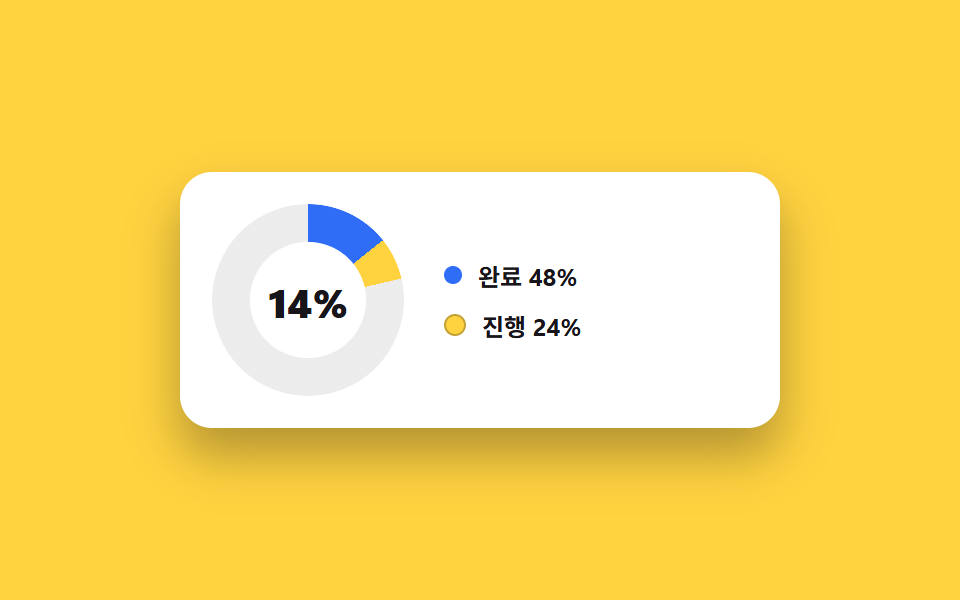
카드가 열리면 도넛 링이 실제로 그려지며 가운데 숫자가 0에서 목표값까지 올라가고, 아래 범례를 누르면 그 구간만 실제로 숨겨지며 링이 다시 채워집니다.
쓰임리포트 카드 하나에 핵심 비율 하나만 크게 보여주고 싶을 때
@propertyconic-gradientclick
<main class="stage">
  <div class="cc is-demo">
    <div class="cc__ring-wrap">
      <div class="cc__ring" aria-hidden="true"></div>
      <div class="cc__center">
        <span class="cc__num">0</span><span class="cc__unit">%</span>
        <span class="cc__ghost" aria-hidden="true"></span>
      </div>
    </div>
    <ul class="cc__legend">
      <li><button class="cc__legend-btn is-on" type="button" data-seg="a"><span class="cc__dot cc__dot--a" aria-hidden="true"></span>완료 48%</button></li>
      <li><button class="cc__legend-btn is-on" type="button" data-seg="b"><span class="cc__dot cc__dot--b" aria-hidden="true"></span>진행 24%</button></li>
    </ul>
  </div>
</main>
@use "../../../../site/static/demo-tokens" as *;
$duration: $dur-enter;
$easing: $ease-out;
$color: $subject-blue;
@include stage($stage-yellow);
@property --pct-a {
syntax: "<percentage>";
inherits: true;
initial-value: 0%;
}
@property --pct-b {
syntax: "<percentage>";
inherits: true;
initial-value: 0%;
}
@property --cc-n {
syntax: "<integer>";
inherits: true;
initial-value: 0;
}
.cc {
box-sizing: border-box;
width: min(300px, 88vw);
display: flex;
align-items: center;
gap: $sp-5;
border-radius: $r-card;
padding: $sp-4;
background: #fff;
box-shadow: $shadow-raised;
}
.cc__ring-wrap { position: relative; flex: 0 0 auto; width: 96px; height: 96px; }
.cc__ring {
--pct-a: 48%;
--pct-b: 72%;
width: 100%; height: 100%;
border-radius: 50%;
background: conic-gradient($color 0 var(--pct-a), $stage-yellow var(--pct-a) var(--pct-b), rgba(23, 20, 26, .08) var(--pct-b) 100%);
-webkit-mask: radial-gradient(farthest-side, transparent 60%, #000 61%);
mask: radial-gradient(farthest-side, transparent 60%, #000 61%);
transition: --pct-a $duration $easing, --pct-b $duration $easing;
}
.cc__center {
position: absolute; inset: 0;
display: flex; align-items: center; justify-content: center;
font-weight: 800; color: $stage-ink;
} // baseline 은 한 줄을 상자 위쪽에 붙여 숫자가 링 띠(파란 호) 위로 올라갔다 — % 가 잉크 on 파랑 4.03:1. 가운데로 내려 도넛 구멍(흰 카드 면) 위에서 15.58:1
.cc__num { font-size: 20px; }
.cc__unit { font-size: 12px; margin-left: $sp-1; }
.cc.is-demo .cc__num, .cc.is-demo .cc__unit { opacity: 0; }
.cc__ghost {
position: absolute; inset: 0;
display: none;
align-items: center; justify-content: center;
font-size: 20px; font-weight: 800; color: $stage-ink;
}
.cc__ghost::before { content: counter(cc) "%"; counter-reset: cc var(--cc-n); }
.cc.is-demo .cc__ghost { display: flex; }
.cc__legend { list-style: none; margin: 0; padding: 0; display: flex; flex-direction: column; gap: $sp-2; }
.cc__legend-btn {
display: flex; align-items: center; gap: $sp-2;
border: 0; background: transparent; cursor: pointer; padding: 0;
font: inherit; font-weight: 700; font-size: 12px; color: rgba(23, 20, 26, .4);
transition: color $dur-quick $easing;
}
.cc__legend-btn.is-on { color: $stage-ink; }
.cc__dot { width: 9px; height: 9px; border-radius: 50%; }
.cc__dot--a { background: $color; }
.cc__dot--b { background: $stage-yellow; border: 1px solid rgba(23, 20, 26, .25); }
// ── 자동 루프: 링이 0에서 실제 값까지 계속 그려지고 가운데 합계가 세어 올라간다 ──────────────
.cc.is-demo .cc__ring { animation: cc-draw 2s $easing infinite; }
.cc.is-demo .cc__ghost { animation: cc-count 2s linear infinite; }
@keyframes cc-draw {
0% { --pct-a: 0%; --pct-b: 0%; }
65%, 100% { --pct-a: 48%; --pct-b: 72%; }
}
@keyframes cc-count {
0% { --cc-n: 0; }
65%, 100% { --cc-n: 72; }
}
@media (max-width: 340px) {
.cc { flex-direction: column; align-items: flex-start; gap: $sp-3; }
.cc__ring-wrap { width: 80px; height: 80px; }
}
@media (prefers-reduced-motion: reduce) {
.cc.is-demo .cc__ring, .cc.is-demo .cc__ghost { animation: none !important; }
.cc.is-demo .cc__ring { --pct-a: 48%; --pct-b: 72%; }
.cc.is-demo .cc__ghost::before { content: "72%"; }
.cc__ring { transition: none; }
}html, body {
margin: 0;
overflow: hidden;
}
.stage {
box-sizing: border-box;
min-height: 100vh;
display: grid;
place-items: center;
margin: 0;
background: #ffd23f;
font-family: -apple-system, "Segoe UI", "Noto Sans KR", sans-serif;
padding: clamp(8px, 4vw, 24px);
}
@property --pct-a {
syntax: "<percentage>";
inherits: true;
initial-value: 0%;
}
@property --pct-b {
syntax: "<percentage>";
inherits: true;
initial-value: 0%;
}
@property --cc-n {
syntax: "<integer>";
inherits: true;
initial-value: 0;
}
.cc {
box-sizing: border-box;
width: min(300px, 88vw);
display: flex;
align-items: center;
gap: 20px;
border-radius: 16px;
padding: 16px;
background: #fff;
box-shadow: 0 14px 24px rgba(23, 20, 26, 0.32);
}
.cc__ring-wrap {
position: relative;
flex: 0 0 auto;
width: 96px;
height: 96px;
}
.cc__ring {
--pct-a: 48%;
--pct-b: 72%;
width: 100%;
height: 100%;
border-radius: 50%;
background: conic-gradient(#2f6df6 0 var(--pct-a), #ffd23f var(--pct-a) var(--pct-b), rgba(23, 20, 26, 0.08) var(--pct-b) 100%);
-webkit-mask: radial-gradient(farthest-side, transparent 60%, #000 61%);
mask: radial-gradient(farthest-side, transparent 60%, #000 61%);
transition: --pct-a 600ms ease-out, --pct-b 600ms ease-out;
}
.cc__center {
position: absolute;
inset: 0;
display: flex;
align-items: center;
justify-content: center;
font-weight: 800;
color: #17141a;
}
.cc__num {
font-size: 20px;
}
.cc__unit {
font-size: 12px;
margin-left: 4px;
}
.cc.is-demo .cc__num, .cc.is-demo .cc__unit {
opacity: 0;
}
.cc__ghost {
position: absolute;
inset: 0;
display: none;
align-items: center;
justify-content: center;
font-size: 20px;
font-weight: 800;
color: #17141a;
}
.cc__ghost::before {
content: counter(cc) "%";
counter-reset: cc var(--cc-n);
}
.cc.is-demo .cc__ghost {
display: flex;
}
.cc__legend {
list-style: none;
margin: 0;
padding: 0;
display: flex;
flex-direction: column;
gap: 8px;
}
.cc__legend-btn {
display: flex;
align-items: center;
gap: 8px;
border: 0;
background: transparent;
cursor: pointer;
padding: 0;
font: inherit;
font-weight: 700;
font-size: 12px;
color: rgba(23, 20, 26, 0.4);
transition: color 220ms ease-out;
}
.cc__legend-btn.is-on {
color: #17141a;
}
.cc__dot {
width: 9px;
height: 9px;
border-radius: 50%;
}
.cc__dot--a {
background: #2f6df6;
}
.cc__dot--b {
background: #ffd23f;
border: 1px solid rgba(23, 20, 26, 0.25);
}
.cc.is-demo .cc__ring {
animation: cc-draw 2s ease-out infinite;
}
.cc.is-demo .cc__ghost {
animation: cc-count 2s linear infinite;
}
@keyframes cc-draw {
0% {
--pct-a: 0%;
--pct-b: 0%;
}
65%, 100% {
--pct-a: 48%;
--pct-b: 72%;
}
}
@keyframes cc-count {
0% {
--cc-n: 0;
}
65%, 100% {
--cc-n: 72;
}
}
@media (max-width: 340px) {
.cc {
flex-direction: column;
align-items: flex-start;
gap: 12px;
}
.cc__ring-wrap {
width: 80px;
height: 80px;
}
}
@media (prefers-reduced-motion: reduce) {
.cc.is-demo .cc__ring, .cc.is-demo .cc__ghost {
animation: none !important;
}
.cc.is-demo .cc__ring {
--pct-a: 48%;
--pct-b: 72%;
}
.cc.is-demo .cc__ghost::before {
content: "72%";
}
.cc__ring {
transition: none;
}
}// 실제 동작: 범례를 누르면 그 구간이 실제로 링에서 빠지고 가운데 합계 숫자가 다시 계산된다.
var card = document.querySelector('.cc');
var ring = document.querySelector('.cc__ring');
var num = document.querySelector('.cc__num');
var segs = { a: 48, b: 24 };
var active = { a: true, b: true };
function paint() {
var a = active.a ? segs.a : 0;
var b = active.b ? segs.b : 0;
ring.style.setProperty('--pct-a', a + '%');
ring.style.setProperty('--pct-b', (a + b) + '%');
return a + b;
}
function countTo(target) {
var from = Number(num.textContent) || 0;
var start = null;
function step(ts) {
if (!start) start = ts;
var p = Math.min(1, (ts - start) / 300);
num.textContent = Math.round(from + (target - from) * p);
if (p < 1) requestAnimationFrame(step);
}
requestAnimationFrame(step);
}
document.querySelectorAll('.cc__legend-btn').forEach(function (btn) {
btn.addEventListener('click', function () {
card.classList.remove('is-demo');
var seg = btn.dataset.seg;
active[seg] = !active[seg];
btn.classList.toggle('is-on', active[seg]);
countTo(paint());
});
});import { useEffect, useRef, useState } from "react";
import type { CSSProperties } from "react";
import styles from "./ChartCard.module.scss";
export type ChartCardProps = {
duration?: number;
easing?: string;
color?: string;
};
type Vars = CSSProperties & { "--duration"?: string; "--easing"?: string; "--color"?: string; "--pct-a"?: string; "--pct-b"?: string };
const SEGS = { a: 48, b: 24 };
export default function ChartCard({ duration = 600, easing = "ease-out", color = "#2f6df6" }: ChartCardProps) {
const [active, setActive] = useState({ a: true, b: true });
const [shown, setShown] = useState(0);
const raf = useRef<number | null>(null);
const target = (active.a ? SEGS.a : 0) + (active.b ? SEGS.b : 0);
useEffect(() => {
const from = shown;
const start = performance.now();
function step(ts: number) {
const p = Math.min(1, (ts - start) / 300);
setShown(Math.round(from + (target - from) * p));
if (p < 1) raf.current = requestAnimationFrame(step);
}
raf.current = requestAnimationFrame(step);
return () => { if (raf.current) cancelAnimationFrame(raf.current); };
// eslint-disable-next-line react-hooks/exhaustive-deps
}, [target]);
const pctA = active.a ? SEGS.a : 0;
const pctAB = pctA + (active.b ? SEGS.b : 0);
const vars: Vars = {
"--duration": `${duration}ms`, "--easing": easing, "--color": color,
"--pct-a": `${pctA}%`, "--pct-b": `${pctAB}%`,
};
return (
<div className={styles.cc} style={vars}>
<div className={styles.ringWrap}>
<div className={styles.ring} />
<div className={styles.center}>
<span className={styles.num}>{shown}</span><span className={styles.unit}>%</span>
</div>
</div>
<ul className={styles.legend}>
<li>
<button type="button" className={active.a ? styles.on : undefined} onClick={() => setActive((s) => ({ ...s, a: !s.a }))}>
<span className={`${styles.dot} ${styles.dotA}`} />완료 {SEGS.a}%
</button>
</li>
<li>
<button type="button" className={active.b ? styles.on : undefined} onClick={() => setActive((s) => ({ ...s, b: !s.b }))}>
<span className={`${styles.dot} ${styles.dotB}`} />진행 {SEGS.b}%
</button>
</li>
</ul>
</div>
);
}04 도넛 차트 카드 (가운데 카운터) — 측정 누적면적 2.739% · 움직인 프레임 16/23GODRICH 원작 · zip 에 SCSS·React 포함 · 대시보드 사이드바·위젯 UI 9종 — 완성 페이지 말고 이 조각 하나만
이 데모가 속한 글
 대시보드 사이드바·위젯 UI 9종 — 완성 페이지 말고 이 조각 하나만대시보드 사이드바 하나, 통계 카드 한 줄, 알림 드롭다운 하나처럼 완성된 관리자 페이지 전체가 아니라 화면 한 조각만 그대로 가져다 붙이는 대시보드 위젯 아홉 개를 모았습니다. 아홉 개 중 하나는 숫자가 실제로 세 이 글의 데모 전부 보기