01마우스를 따라가며 가장 가까운 점에 달라붙는다
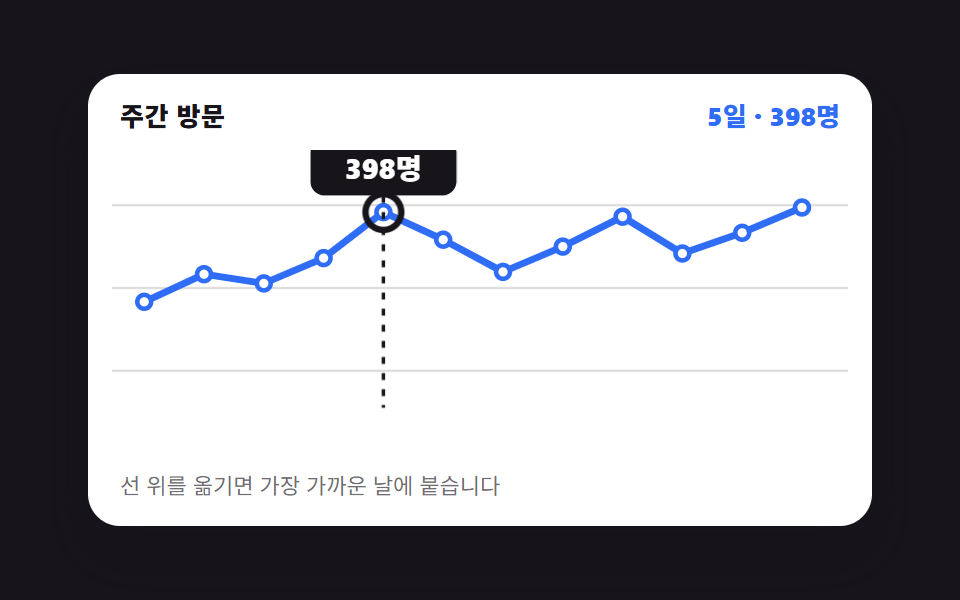
선 그래프 위에서 마우스를 옮기면 세로선이 아무 데나 서지 않고 가장 가까운 날짜 칸에 딱 달라붙고, 그 날의 값 툴팁이 같이 따라붙습니다.
쓰임하루 단위 지표를 훑어보는 트래픽·매출 추이 카드
@propertypointermovearia-live

<main class="stage">
  <figure class="ch is-demo" id="ch">
    <figcaption class="ch__head">
      <span class="ch__title">주간 방문</span>
      <span class="ch__val" aria-live="polite" id="ch-val">5일 · 398명</span>
    </figcaption>
    <div class="ch__plot">
      <svg class="ch__svg" viewBox="0 0 320 132" role="img" aria-label="12일간 방문자 추이 꺾은선. 5일 398명, 12일 401명이 높은 봉우리">
        <g class="ch__grid" aria-hidden="true">
          <line x1="0" y1="24" x2="320" y2="24"/><line x1="0" y1="60" x2="320" y2="60"/><line x1="0" y1="96" x2="320" y2="96"/>
        </g>
        <polyline class="ch__line" points="14,66 40,54 66,58 92,47 118,27 144,39 170,53 196,42 222,29 248,45 274,36 300,25"/>
        <g class="ch__dots" aria-hidden="true">
          <circle cx="14" cy="66" r="3"/><circle cx="40" cy="54" r="3"/><circle cx="66" cy="58" r="3"/><circle cx="92" cy="47" r="3"/><circle cx="118" cy="27" r="3"/><circle cx="144" cy="39" r="3"/><circle cx="170" cy="53" r="3"/><circle cx="196" cy="42" r="3"/><circle cx="222" cy="29" r="3"/><circle cx="248" cy="45" r="3"/><circle cx="274" cy="36" r="3"/><circle cx="300" cy="25" r="3"/>
        </g>
        <g class="ch__cursor" aria-hidden="true">
          <line class="ch__x" x1="0" y1="6" x2="0" y2="112"/>
          <g class="ch__mark"><circle class="ch__ring" r="7"/></g>
          <g class="ch__tip"><g class="ch__tipbox"><rect x="-31" y="-32" width="62" height="24" rx="6"/><text x="0" y="-15" text-anchor="middle">398명</text></g></g>
        </g>
      </svg>
      <button class="ch__hot" type="button" id="ch-hot" aria-label="꺾은선 위 이동 — 날짜별 값 읽기"></button>
    </div>
    <p class="ch__hint">선 위를 옮기면 가장 가까운 날에 붙습니다</p>
    <div class="sr"><table>
      <caption>12일간 방문자 수</caption>
      <tbody><tr><th>1일</th><td>220</td></tr><tr><th>2일</th><td>268</td></tr><tr><th>3일</th><td>254</td></tr><tr><th>4일</th><td>305</td></tr><tr><th>5일</th><td>398</td></tr><tr><th>6일</th><td>342</td></tr><tr><th>7일</th><td>287</td></tr><tr><th>8일</th><td>331</td></tr><tr><th>9일</th><td>376</td></tr><tr><th>10일</th><td>309</td></tr><tr><th>11일</th><td>352</td></tr><tr><th>12일</th><td>401</td></tr></tbody>
    </table></div>
  </figure>
</main>@use "../../../../site/static/demo-tokens" as *;
// 칸 번호와 그 점의 높이를 등록한다. <integer>·<length> 로 등록해야
// 두 값이 타입을 갖고, 정적 경로의 transition 이 칸 사이를 부드럽게 이어 준다.
// 등록하지 않으면 문자열이라 보간이 아예 일어나지 않는다
@property --i {
syntax: "<integer>";
initial-value: 4;
inherits: true;
}
@property --y {
syntax: "<length>";
initial-value: 27px;
inherits: true;
}
$duration: $dur-quick;
$easing: $ease-out;
$color: $subject-blue;
$step: 26px; // 칸 간격 = (300 - 14) / 11, viewBox 단위
@include stage($stage-ink);
.sr {
position: absolute;
width: 1px;
height: 1px;
overflow: hidden;
clip-path: inset(50%);
white-space: nowrap;
}
.ch {
--i: 4;
--y: 27px;
box-sizing: border-box;
width: min(392px, 88vw);
display: flex;
flex-direction: column;
gap: $sp-2;
margin: 0;
padding: $sp-3;
border-radius: $r-card;
background: $stage-paper;
box-shadow: $shadow-raised;
color: $subject-ink;
font-family: -apple-system, "Segoe UI", "Noto Sans KR", sans-serif;
}
.ch__head {
display: flex;
align-items: baseline;
justify-content: space-between;
gap: $sp-2;
padding: 0 $sp-1;
}
.ch__title { font-size: 13px; line-height: 18px; font-weight: 800; letter-spacing: .02em; }
.ch__val { font-size: 13px; line-height: 18px; font-weight: 800; color: $color; font-variant-numeric: tabular-nums; }
.ch__plot { position: relative; }
.ch__svg { display: block; width: 100%; height: auto; }
.ch__grid line { stroke: rgba(23, 20, 26, .14); stroke-width: 1; }
.ch__line {
fill: none;
stroke: $color;
stroke-width: 3;
stroke-linecap: round;
stroke-linejoin: round;
}
.ch__dots circle { fill: $stage-paper; stroke: $color; stroke-width: 2; }
// ── 커서 한 덩어리 ──
// 세로선·고리·툴팁을 **한 그룹** 안에 넣고 그룹만 옮긴다. 셋을 각자 옮기면
// 이징이 조금만 달라도 툴팁이 선을 앞질러 날아간다 (첫 판 실측)
.ch__cursor {
transform: translateX(calc(var(--i) * #{$step} + 14px));
opacity: 0;
}
.ch__x {
stroke: $subject-ink;
stroke-width: 1.5;
stroke-dasharray: 3 4;
}
.ch__mark { transform: translateY(var(--y)); }
.ch__ring {
fill: none;
stroke: $subject-ink;
stroke-width: 2.5;
}
// 툴팁은 커서 그룹 안에서 점 높이만 따라간다. 좌우 위치는 그룹이 이미 정했다
.ch__tip { transform: translateY(var(--y)); }
.ch__tipbox {
transform-box: fill-box;
transform-origin: center;
}
.ch__tipbox rect { fill: $subject-ink; }
.ch__tipbox text { fill: $stage-paper; font-size: 12px; font-weight: 800; }
.ch__hot {
position: absolute;
inset: 0;
margin: 0;
padding: 0;
border: 0;
border-radius: $r-sm;
background: transparent;
cursor: crosshair;
}
.ch__hot:focus-visible { outline: 2px solid $color; outline-offset: -2px; }
.ch__hint { margin: 0; padding: 0 $sp-1; font-size: 11px; line-height: 16px; color: rgba(23, 20, 26, .62); }
// ── 사람이 만진 뒤(정적 경로) — 커서가 보이고 칸 사이를 짧게 미끄러진다 ──
.ch:not(.is-demo) .ch__cursor {
opacity: 1;
transition-property: transform;
transition-duration: $duration;
transition-timing-function: $easing;
}
.ch:not(.is-demo) .ch__mark,
.ch:not(.is-demo) .ch__tip {
transition-property: transform;
transition-duration: $duration;
transition-timing-function: $easing;
}
// ── 자동 루프(2초): 5일 → 9일 → 12일 → 5일 칸을 짚는다 ──
// 칸 이동은 steps(1, end) 컷이다. 사람 손은 칸을 "건너뛰지" 않으므로
// 중간 프레임에 선이 점 사이에 떠 있으면 그 자체가 거짓말이 된다
.ch.is-demo .ch__cursor {
animation-name: ch-x;
animation-duration: $dur-loop;
animation-timing-function: steps(1, end);
animation-iteration-count: infinite;
opacity: 1;
}
@keyframes ch-x {
0% { transform: translateX(calc(4 * #{$step} + 14px)); }
28% { transform: translateX(calc(8 * #{$step} + 14px)); }
56% { transform: translateX(calc(11 * #{$step} + 14px)); }
84% { transform: translateX(calc(4 * #{$step} + 14px)); }
100% { transform: translateX(calc(4 * #{$step} + 14px)); }
}
.ch.is-demo .ch__mark,
.ch.is-demo .ch__tip {
animation-name: ch-y;
animation-duration: $dur-loop;
animation-timing-function: steps(1, end);
animation-iteration-count: infinite;
}
@keyframes ch-y {
0% { transform: translateY(27px); }
28% { transform: translateY(29px); }
56% { transform: translateY(25px); }
84% { transform: translateY(27px); }
100% { transform: translateY(27px); }
}
// 컷 옆에 **반투명이 안 생기는** 움직임을 붙여 프레임을 채운다 — 둘 다 transform 이다
.ch.is-demo .ch__ring {
animation-name: ch-ring;
animation-duration: $dur-loop;
animation-timing-function: $ease-pop;
animation-iteration-count: infinite;
}
@keyframes ch-ring {
0%, 28%, 56%, 84% { transform: scale(.45); }
14%, 42%, 70%, 96% { transform: scale(1.12); }
22%, 50%, 78%, 100% { transform: scale(1); }
}
.ch.is-demo .ch__tipbox {
animation-name: ch-tipbox;
animation-duration: $dur-loop;
animation-timing-function: $ease-pop;
animation-iteration-count: infinite;
}
@keyframes ch-tipbox {
0%, 28%, 56%, 84% { transform: translateY(7px) scale(.8); }
16%, 44%, 72%, 98% { transform: translateY(0) scale(1.04); }
24%, 52%, 80%, 100% { transform: translateY(0) scale(1); }
}
@media (max-width: 340px) {
.ch { padding: $sp-2; gap: $sp-1; }
.ch__hint { display: none; }
.ch__title, .ch__val { font-size: 12px; line-height: 16px; }
}
@media (prefers-reduced-motion: reduce) {
.ch.is-demo .ch__cursor,
.ch.is-demo .ch__mark,
.ch.is-demo .ch__tip,
.ch.is-demo .ch__ring,
.ch.is-demo .ch__tipbox { animation: none !important; }
.ch:not(.is-demo) .ch__cursor,
.ch:not(.is-demo) .ch__mark,
.ch:not(.is-demo) .ch__tip { transition: none !important; }
.ch.is-demo .ch__cursor { opacity: 1; transform: translateX(calc(4 * #{$step} + 14px)); }
.ch.is-demo .ch__mark,
.ch.is-demo .ch__tip { transform: translateY(27px); }
}@property --i {
syntax: "<integer>";
initial-value: 4;
inherits: true;
}
@property --y {
syntax: "<length>";
initial-value: 27px;
inherits: true;
}
html, body {
margin: 0;
overflow: hidden;
}
.stage {
box-sizing: border-box;
min-height: 100vh;
display: grid;
place-items: center;
margin: 0;
background: #17141a;
font-family: -apple-system, "Segoe UI", "Noto Sans KR", sans-serif;
padding: clamp(8px, 4vw, 24px);
}
.sr {
position: absolute;
width: 1px;
height: 1px;
overflow: hidden;
clip-path: inset(50%);
white-space: nowrap;
}
.ch {
--i: 4;
--y: 27px;
box-sizing: border-box;
width: min(392px, 88vw);
display: flex;
flex-direction: column;
gap: 8px;
margin: 0;
padding: 12px;
border-radius: 16px;
background: #ffffff;
box-shadow: 0 14px 24px rgba(23, 20, 26, 0.32);
color: #17141a;
font-family: -apple-system, "Segoe UI", "Noto Sans KR", sans-serif;
}
.ch__head {
display: flex;
align-items: baseline;
justify-content: space-between;
gap: 8px;
padding: 0 4px;
}
.ch__title {
font-size: 13px;
line-height: 18px;
font-weight: 800;
letter-spacing: 0.02em;
}
.ch__val {
font-size: 13px;
line-height: 18px;
font-weight: 800;
color: #2f6df6;
font-variant-numeric: tabular-nums;
}
.ch__plot {
position: relative;
}
.ch__svg {
display: block;
width: 100%;
height: auto;
}
.ch__grid line {
stroke: rgba(23, 20, 26, 0.14);
stroke-width: 1;
}
.ch__line {
fill: none;
stroke: #2f6df6;
stroke-width: 3;
stroke-linecap: round;
stroke-linejoin: round;
}
.ch__dots circle {
fill: #ffffff;
stroke: #2f6df6;
stroke-width: 2;
}
.ch__cursor {
transform: translateX(calc(var(--i) * 26px + 14px));
opacity: 0;
}
.ch__x {
stroke: #17141a;
stroke-width: 1.5;
stroke-dasharray: 3 4;
}
.ch__mark {
transform: translateY(var(--y));
}
.ch__ring {
fill: none;
stroke: #17141a;
stroke-width: 2.5;
}
.ch__tip {
transform: translateY(var(--y));
}
.ch__tipbox {
transform-box: fill-box;
transform-origin: center;
}
.ch__tipbox rect {
fill: #17141a;
}
.ch__tipbox text {
fill: #ffffff;
font-size: 12px;
font-weight: 800;
}
.ch__hot {
position: absolute;
inset: 0;
margin: 0;
padding: 0;
border: 0;
border-radius: 8px;
background: transparent;
cursor: crosshair;
}
.ch__hot:focus-visible {
outline: 2px solid #2f6df6;
outline-offset: -2px;
}
.ch__hint {
margin: 0;
padding: 0 4px;
font-size: 11px;
line-height: 16px;
color: rgba(23, 20, 26, 0.62);
}
.ch:not(.is-demo) .ch__cursor {
opacity: 1;
transition-property: transform;
transition-duration: 220ms;
transition-timing-function: ease-out;
}
.ch:not(.is-demo) .ch__mark,
.ch:not(.is-demo) .ch__tip {
transition-property: transform;
transition-duration: 220ms;
transition-timing-function: ease-out;
}
.ch.is-demo .ch__cursor {
animation-name: ch-x;
animation-duration: 2s;
animation-timing-function: steps(1, end);
animation-iteration-count: infinite;
opacity: 1;
}
@keyframes ch-x {
0% {
transform: translateX(calc(4 * 26px + 14px));
}
28% {
transform: translateX(calc(8 * 26px + 14px));
}
56% {
transform: translateX(calc(11 * 26px + 14px));
}
84% {
transform: translateX(calc(4 * 26px + 14px));
}
100% {
transform: translateX(calc(4 * 26px + 14px));
}
}
.ch.is-demo .ch__mark,
.ch.is-demo .ch__tip {
animation-name: ch-y;
animation-duration: 2s;
animation-timing-function: steps(1, end);
animation-iteration-count: infinite;
}
@keyframes ch-y {
0% {
transform: translateY(27px);
}
28% {
transform: translateY(29px);
}
56% {
transform: translateY(25px);
}
84% {
transform: translateY(27px);
}
100% {
transform: translateY(27px);
}
}
.ch.is-demo .ch__ring {
animation-name: ch-ring;
animation-duration: 2s;
animation-timing-function: cubic-bezier(0.2, 1.4, 0.4, 1);
animation-iteration-count: infinite;
}
@keyframes ch-ring {
0%, 28%, 56%, 84% {
transform: scale(0.45);
}
14%, 42%, 70%, 96% {
transform: scale(1.12);
}
22%, 50%, 78%, 100% {
transform: scale(1);
}
}
.ch.is-demo .ch__tipbox {
animation-name: ch-tipbox;
animation-duration: 2s;
animation-timing-function: cubic-bezier(0.2, 1.4, 0.4, 1);
animation-iteration-count: infinite;
}
@keyframes ch-tipbox {
0%, 28%, 56%, 84% {
transform: translateY(7px) scale(0.8);
}
16%, 44%, 72%, 98% {
transform: translateY(0) scale(1.04);
}
24%, 52%, 80%, 100% {
transform: translateY(0) scale(1);
}
}
@media (max-width: 340px) {
.ch {
padding: 8px;
gap: 4px;
}
.ch__hint {
display: none;
}
.ch__title, .ch__val {
font-size: 12px;
line-height: 16px;
}
}
@media (prefers-reduced-motion: reduce) {
.ch.is-demo .ch__cursor,
.ch.is-demo .ch__mark,
.ch.is-demo .ch__tip,
.ch.is-demo .ch__ring,
.ch.is-demo .ch__tipbox {
animation: none !important;
}
.ch:not(.is-demo) .ch__cursor,
.ch:not(.is-demo) .ch__mark,
.ch:not(.is-demo) .ch__tip {
transition: none !important;
}
.ch.is-demo .ch__cursor {
opacity: 1;
transform: translateX(calc(4 * 26px + 14px));
}
.ch.is-demo .ch__mark,
.ch.is-demo .ch__tip {
transform: translateY(27px);
}
}// 실제 동작: pointermove 의 x 를 12칸 중 가장 가까운 칸으로 반올림해 **스냅**한다.
// 결과는 커스텀 속성 두 개(--i 칸 번호, --y 그 점의 높이)로만 나가고,
// 세로선·고리·툴팁은 전부 그 두 값을 읽는 같은 그룹 안에 있다 — 그래서 절대 어긋나지 않는다.
var N = 12;
var ch = document.getElementById('ch');
var hot = document.getElementById('ch-hot');
var val = document.getElementById('ch-val');
var tip = ch.querySelector('.ch__tip text');
var ys = [66, 54, 58, 47, 27, 39, 53, 42, 29, 45, 36, 25];
var nums = [220, 268, 254, 305, 398, 342, 287, 331, 376, 309, 352, 401];
var cur = 4;
function snap(i) {
cur = Math.min(Math.max(i, 0), N - 1);
ch.classList.remove('is-demo');
ch.style.setProperty('--i', String(cur));
ch.style.setProperty('--y', ys[cur] + 'px');
tip.textContent = nums[cur] + '명';
val.textContent = (cur + 1) + '일 · ' + nums[cur] + '명';
}
hot.addEventListener('pointermove', function (e) {
var r = hot.getBoundingClientRect();
var t = Math.min(Math.max((e.clientX - r.left) / r.width, 0), 1);
snap(Math.round(t * (N - 1)));
});
hot.addEventListener('keydown', function (e) {
var d = e.key === 'ArrowRight' ? 1 : e.key === 'ArrowLeft' ? -1 : 0;
if (d) { e.preventDefault(); snap(cur + d); hot.focus({ preventScroll: true }); }
if (e.key === 'Home' || e.key === 'End') { e.preventDefault(); snap(e.key === 'Home' ? 0 : N - 1); }
});import { useState } from "react";
import type { CSSProperties } from "react";
import styles from "./CrosshairTooltip.module.scss";
export type CrosshairTooltipProps = {
title?: string;
hint?: string;
unit?: string;
dayLabel?: (i: number) => string;
chartLabel?: string;
hotLabel?: string;
tableCaption?: string;
duration?: number;
easing?: string;
color?: string;
};
type Vars = CSSProperties & {
"--duration"?: string;
"--easing"?: string;
"--color"?: string;
"--i"?: string;
"--y"?: string;
};
// ambient 타입에 React 이벤트 제네릭이 없어 필요한 모양만 직접 적는다
type PointerLike = { clientX: number; currentTarget: { getBoundingClientRect(): DOMRect } };
type KeyEvt = { key: string; preventDefault(): void };
const XS = [14, 40, 66, 92, 118, 144, 170, 196, 222, 248, 274, 300];
const YS = [66, 54, 58, 47, 27, 39, 53, 42, 29, 45, 36, 25];
const NUMS = [220, 268, 254, 305, 398, 342, 287, 331, 376, 309, 352, 401];
const N = NUMS.length;
export default function CrosshairTooltip({
title = "Weekly visits",
hint = "Move across the line and it snaps to the nearest day",
unit = "",
dayLabel = (i: number) => `Day ${i + 1}`,
chartLabel = "Visitor trend over 12 days. Day 5 at 398 and day 12 at 401 are the peaks",
hotLabel = "Move across the line to read each day",
tableCaption = "Visitors over 12 days",
duration = 220,
easing = "ease-out",
color = "#2f6df6",
}: CrosshairTooltipProps) {
const [demo, setDemo] = useState(true);
const [i, setI] = useState(4);
// 칸 번호와 그 점의 높이 두 값만 CSS 로 내보낸다 — 세로선·고리·툴팁이 같은 그룹 안에서 그 값을 읽는다
const vars: Vars = {
"--duration": `${duration}ms`,
"--easing": easing,
"--color": color,
"--i": String(i),
"--y": `${YS[i]}px`,
};
function snap(next: number) {
setDemo(false);
setI(Math.min(Math.max(next, 0), N - 1));
}
function onMove(e: PointerLike) {
const r = e.currentTarget.getBoundingClientRect();
const t = Math.min(Math.max((e.clientX - r.left) / r.width, 0), 1);
snap(Math.round(t * (N - 1)));
}
function onKey(e: KeyEvt) {
if (e.key === "ArrowRight") { e.preventDefault(); snap(i + 1); }
if (e.key === "ArrowLeft") { e.preventDefault(); snap(i - 1); }
if (e.key === "Home") { e.preventDefault(); snap(0); }
if (e.key === "End") { e.preventDefault(); snap(N - 1); }
}
const points = XS.map((x, k) => `${x},${YS[k]}`).join(" ");
return (
<figure className={`${styles.ch} ${demo ? styles.isDemo : ""}`} style={vars}>
<figcaption className={styles.head}>
<span className={styles.title}>{title}</span>
<span className={styles.val} aria-live="polite">
{dayLabel(i)} · {NUMS[i]}{unit}
</span>
</figcaption>
<div className={styles.plot}>
<svg className={styles.svg} viewBox="0 0 320 132" role="img" aria-label={chartLabel}>
<g className={styles.grid} aria-hidden="true">
<line x1="0" y1="24" x2="320" y2="24" /><line x1="0" y1="60" x2="320" y2="60" /><line x1="0" y1="96" x2="320" y2="96" />
</g>
<polyline className={styles.line} points={points} />
<g className={styles.dots} aria-hidden="true">
{XS.map((x, k) => <circle key={x} cx={x} cy={YS[k]} r="3" />)}
</g>
<g className={styles.cursor} aria-hidden="true">
<line className={styles.x} x1="0" y1="6" x2="0" y2="112" />
<g className={styles.mark}><circle className={styles.ring} r="7" /></g>
<g className={styles.tip}>
<g className={styles.tipbox}>
<rect x="-31" y="-32" width="62" height="24" rx="6" />
<text x="0" y="-15" textAnchor="middle">{NUMS[i]}{unit}</text>
</g>
</g>
</g>
</svg>
<button className={styles.hot} type="button" aria-label={hotLabel} onPointerMove={onMove} onKeyDown={onKey} />
</div>
<p className={styles.hint}>{hint}</p>
<div className={styles.sr}>
<table>
<caption>{tableCaption}</caption>
<tbody>
{NUMS.map((n, k) => <tr key={n + "-" + k}><th>{dayLabel(k)}</th><td>{n}</td></tr>)}
</tbody>
</table>
</div>
</figure>
);
}01 마우스를 따라가며 가장 가까운 점에 달라붙는다 — 측정 누적면적 4.833% · 움직인 프레임 23/23GODRICH 원작 · zip 에 SCSS·React 포함 · 대시보드 차트 디자인 인터랙션 9종 — 호버부터 드릴다운까지
이 데모가 속한 글
 대시보드 차트 디자인 인터랙션 9종 — 호버부터 드릴다운까지대시보드 차트 디자인에서 진짜 일을 하는 건 그려진 선이 아니라 그 위에서 손이 하는 일입니다. 아홉 개 전부 차트 라이브러리 없이 CSS 막대와 인라인 SVG 위에 바닐라 JS만 얹었고, 만지면 숫자가 바뀌는 쪽으 이 글의 데모 전부 보기