01색이 단계별로 번지는 점 난이도 선택기
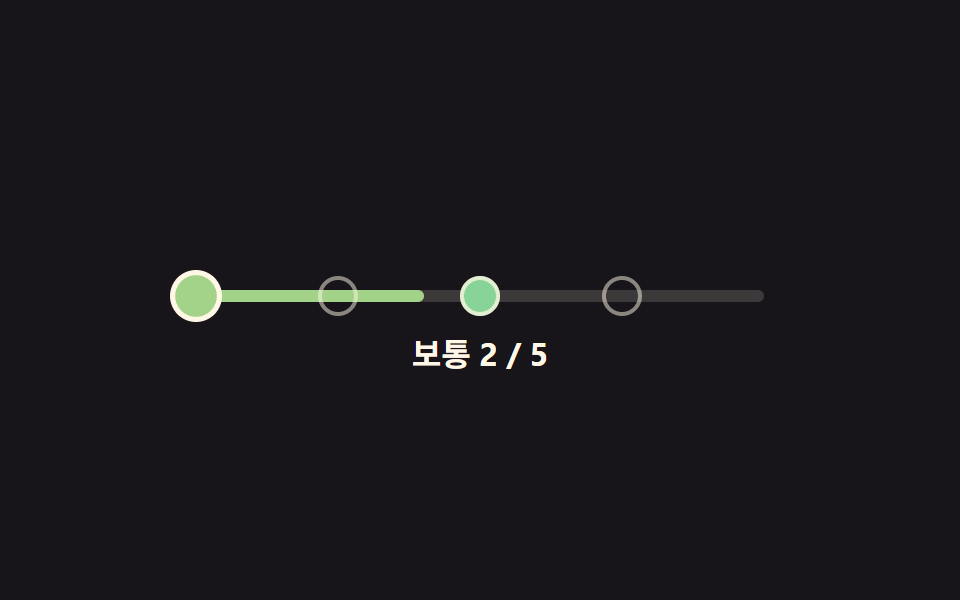
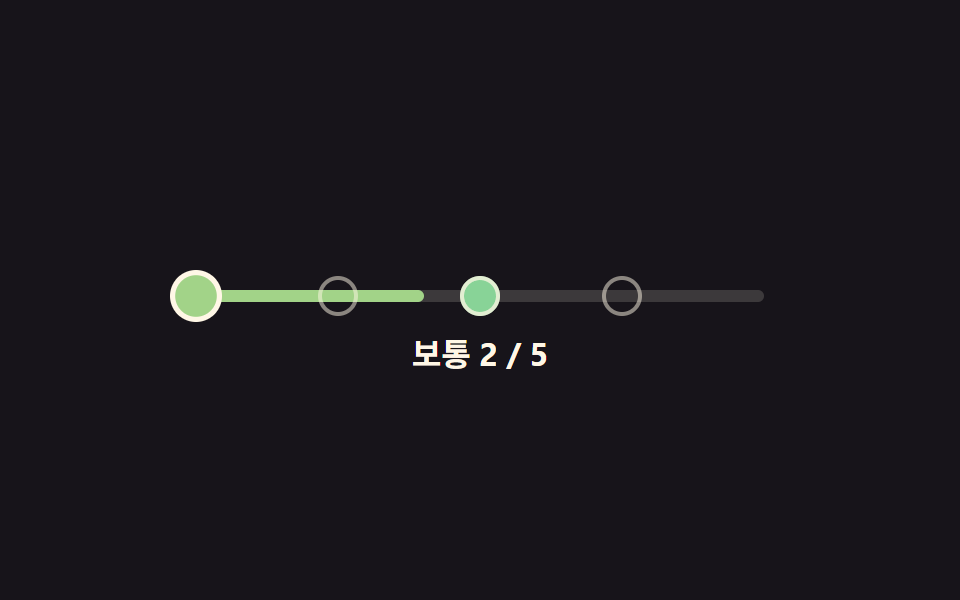
점을 하나씩 가리키면 그 점까지 색이 초록에서 빨강 쪽으로 계산되어 채워지고, 실제로 고른 점까지만 그 색이 남는다.
쓰임설문·퀴즈 앞에서 체감 난이도를 고르는 자리
dotHuedotColorpaintUpTo
<main class="stage">
<div class="dr is-demo" id="dr">
  <div class="dr__track" id="drTrack" role="radiogroup" aria-label="난이도">
    <div class="dr__fill" id="drFill"></div>
    <button type="button" class="dr__dot" role="radio" aria-checked="false" aria-label="쉬움" data-i="0" tabindex="0"></button>
    <button type="button" class="dr__dot" role="radio" aria-checked="false" aria-label="보통" data-i="1" tabindex="-1"></button>
    <button type="button" class="dr__dot" role="radio" aria-checked="false" aria-label="어려움" data-i="2" tabindex="-1"></button>
    <button type="button" class="dr__dot" role="radio" aria-checked="false" aria-label="매우 어려움" data-i="3" tabindex="-1"></button>
    <button type="button" class="dr__dot" role="radio" aria-checked="false" aria-label="최고" data-i="4" tabindex="-1"></button>
  </div>
  <p class="dr__label"><span id="drName">보통</span> <span id="drCount">2 / 5</span></p>
</div>
</main>
@use "../../../../site/static/demo-tokens" as *;
// 변수 3개
$duration: $dur-base;
$easing: $ease-spring;
$color: $subject-mint;
// 계산 겹: dotHue(i) 가 점 순서를 초록→빨강 색상각으로 바꾼다(JS). scss 는 배치·상태만 담당.
@include stage($stage-ink);
.dr { width: min(300px, 86vw); color: $subject-cream; text-align: center; }
.dr__track {
position: relative; height: 6px; border-radius: $r-pill;
background: rgba($subject-cream, .16); margin: $sp-8 $sp-2 $sp-4;
}
.dr__fill {
position: absolute; top: 0; bottom: 0; left: 0; width: 40%;
background: $color; border-radius: $r-pill; transition: width $duration $easing, background $duration $easing;
}
.dr__dot {
position: absolute; top: 50%; width: 20px; height: 20px;
appearance: none; border: 2px solid rgba($subject-cream, .5); border-radius: 50%;
background: transparent; padding: 0; cursor: pointer; transform: translate(-50%, -50%);
transition: background $duration $easing, transform $dur-quick $ease-pop, border-color $duration $easing;
}
.dr__dot:nth-of-type(2) { left: 0%; }
.dr__dot:nth-of-type(3) { left: 25%; }
.dr__dot:nth-of-type(4) { left: 50%; }
.dr__dot:nth-of-type(5) { left: 75%; }
.dr__dot:nth-of-type(6) { left: 100%; }
.dr__dot:focus-visible { outline: 2px solid $subject-cream; outline-offset: 2px; }
.dr__dot[aria-checked="true"] {
border-color: $subject-cream; transform: translate(-50%, -50%) scale(1.3);
}
.dr__label {
margin: $sp-3 0 0; font-weight: 700; font-size: 16px; line-height: 1.3;
font-variant-numeric: tabular-nums;
}
@media (max-width: 340px) {
.dr { width: min(250px, 82vw); }
.dr__dot { width: 16px; height: 16px; }
.dr__label { font-size: 14px; }
}
@media (prefers-reduced-motion: reduce) {
// 실사용 경로 적용: 실제로 눌러도 채움·점 색은 트랜지션 없이 즉시 바뀐다
.dr__fill, .dr__dot { transition: none; }
}html, body {
margin: 0;
overflow: hidden;
}
.stage {
box-sizing: border-box;
min-height: 100vh;
display: grid;
place-items: center;
margin: 0;
background: #17141a;
font-family: -apple-system, "Segoe UI", "Noto Sans KR", sans-serif;
padding: clamp(8px, 4vw, 24px);
}
.dr {
width: min(300px, 86vw);
color: #fff7e6;
text-align: center;
}
.dr__track {
position: relative;
height: 6px;
border-radius: 999px;
background: rgba(255, 247, 230, 0.16);
margin: 32px 8px 16px;
}
.dr__fill {
position: absolute;
top: 0;
bottom: 0;
left: 0;
width: 40%;
background: #4cd4a6;
border-radius: 999px;
transition: width 300ms cubic-bezier(0.2, 0.8, 0.2, 1), background 300ms cubic-bezier(0.2, 0.8, 0.2, 1);
}
.dr__dot {
position: absolute;
top: 50%;
width: 20px;
height: 20px;
appearance: none;
border: 2px solid rgba(255, 247, 230, 0.5);
border-radius: 50%;
background: transparent;
padding: 0;
cursor: pointer;
transform: translate(-50%, -50%);
transition: background 300ms cubic-bezier(0.2, 0.8, 0.2, 1), transform 220ms cubic-bezier(0.2, 1.4, 0.4, 1), border-color 300ms cubic-bezier(0.2, 0.8, 0.2, 1);
}
.dr__dot:nth-of-type(2) {
left: 0%;
}
.dr__dot:nth-of-type(3) {
left: 25%;
}
.dr__dot:nth-of-type(4) {
left: 50%;
}
.dr__dot:nth-of-type(5) {
left: 75%;
}
.dr__dot:nth-of-type(6) {
left: 100%;
}
.dr__dot:focus-visible {
outline: 2px solid #fff7e6;
outline-offset: 2px;
}
.dr__dot[aria-checked=true] {
border-color: #fff7e6;
transform: translate(-50%, -50%) scale(1.3);
}
.dr__label {
margin: 12px 0 0;
font-weight: 700;
font-size: 16px;
line-height: 1.3;
font-variant-numeric: tabular-nums;
}
@media (max-width: 340px) {
.dr {
width: min(250px, 82vw);
}
.dr__dot {
width: 16px;
height: 16px;
}
.dr__label {
font-size: 14px;
}
}
@media (prefers-reduced-motion: reduce) {
.dr__fill, .dr__dot {
transition: none;
}
}(function () {
var LEVELS = ['쉬움', '보통', '어려움', '매우 어려움', '최고'];
var HUE_LOW = 132, HUE_HIGH = 0, SAT = 46, LIGHT = 68;
var root = document.getElementById('dr');
var track = document.getElementById('drTrack');
var fill = document.getElementById('drFill');
var dots = Array.prototype.slice.call(track.querySelectorAll('.dr__dot'));
var nameOut = document.getElementById('drName');
var countOut = document.getElementById('drCount');
var selected = 1;
// 계산 겹: 점 순서(0~4)를 초록(132°)에서 빨강(0°)으로 이어지는 색상각 값으로 바꾼다
function dotHue(i) { return HUE_LOW + (HUE_HIGH - HUE_LOW) * (i / (LEVELS.length - 1)); }
function dotColor(i) { return 'hsl(' + dotHue(i).toFixed(1) + ', ' + SAT + '%, ' + LIGHT + '%)'; }
function paintUpTo(i) {
dots.forEach(function (d, idx) {
d.style.background = idx <= i ? dotColor(idx) : '';
});
fill.style.width = ((i + 1) / LEVELS.length * 100) + '%';
fill.style.background = dotColor(i);
}
function commit(i) {
selected = i;
dots.forEach(function (d, idx) {
d.setAttribute('aria-checked', idx === i ? 'true' : 'false');
d.setAttribute('tabindex', idx === i ? '0' : '-1');
});
paintUpTo(i);
nameOut.textContent = LEVELS[i];
countOut.textContent = (i + 1) + ' / ' + LEVELS.length;
}
function human() { root.classList.remove('is-demo'); clearInterval(timer); }
dots.forEach(function (d, i) {
d.addEventListener('pointerenter', function () { if (!root.classList.contains('is-demo')) paintUpTo(i); });
d.addEventListener('pointerleave', function () { if (!root.classList.contains('is-demo')) paintUpTo(selected); });
d.addEventListener('click', function () { human(); commit(i); });
d.addEventListener('keydown', function (e) {
if (e.key === 'ArrowRight' || e.key === 'ArrowUp') { e.preventDefault(); human(); commit(Math.min(LEVELS.length - 1, selected + 1)); dots[selected].focus({ preventScroll: true }); }
else if (e.key === 'ArrowLeft' || e.key === 'ArrowDown') { e.preventDefault(); human(); commit(Math.max(0, selected - 1)); dots[selected].focus({ preventScroll: true }); }
});
});
var sequence = [3, 0, 4, 1, 2];
var si = 0;
function tick() { commit(sequence[si % sequence.length]); si++; }
var reduce = window.matchMedia('(prefers-reduced-motion: reduce)').matches;
var timer = reduce ? null : setInterval(tick, 620);
commit(selected);
}());import { useEffect, useRef } from 'react';
import styles from './DifficultySelectorDotRamp.module.scss';
const LEVELS = ['쉬움', '보통', '어려움', '매우 어려움', '최고'];
const HUE_LOW = 132, HUE_HIGH = 0, SAT = 46, LIGHT = 68;
const SEQUENCE = [3, 0, 4, 1, 2];
const TICK_MS = 620;
export default function DifficultySelectorDotRamp() {
const rootRef = useRef<HTMLDivElement>(null);
const trackRef = useRef<HTMLDivElement>(null);
const fillRef = useRef<HTMLDivElement>(null);
const dotRefs = useRef<HTMLButtonElement[]>([]);
const nameRef = useRef<HTMLSpanElement>(null);
const countRef = useRef<HTMLSpanElement>(null);
useEffect(() => {
const root = rootRef.current;
const track = trackRef.current;
const fill = fillRef.current;
const nameOut = nameRef.current;
const countOut = countRef.current;
if (!root || !track || !fill || !nameOut || !countOut || !dotRefs.current) return undefined;
const dots = dotRefs.current;
if (dots.length !== LEVELS.length) return undefined;
let selected = 1;
// 계산 겹: 점 순서(0~4)를 초록(132°)에서 빨강(0°)으로 이어지는 색상각 값으로 바꾼다
function dotHue(i: number) { return HUE_LOW + (HUE_HIGH - HUE_LOW) * (i / (LEVELS.length - 1)); }
function dotColor(i: number) { return 'hsl(' + dotHue(i).toFixed(1) + ', ' + SAT + '%, ' + LIGHT + '%)'; }
function paintUpTo(i: number) {
dots.forEach((d, idx) => { d.style.background = idx <= i ? dotColor(idx) : ''; });
fill!.style.width = ((i + 1) / LEVELS.length * 100) + '%';
fill!.style.background = dotColor(i);
}
function commit(i: number) {
selected = i;
dots.forEach((d, idx) => {
d.setAttribute('aria-checked', idx === i ? 'true' : 'false');
d.setAttribute('tabindex', idx === i ? '0' : '-1');
});
paintUpTo(i);
nameOut!.textContent = LEVELS[i];
countOut!.textContent = (i + 1) + ' / ' + LEVELS.length;
}
let timer = 0;
function human() { root!.classList.remove(styles['is-demo']); window.clearInterval(timer); }
const offs = dots.map((d, i) => {
function onEnter() { if (root!.classList.contains(styles['is-demo'])) return; paintUpTo(i); }
function onLeave() { if (root!.classList.contains(styles['is-demo'])) return; paintUpTo(selected); }
function onClick() { human(); commit(i); }
function onKey(e: KeyboardEvent) {
if (e.key === 'ArrowRight' || e.key === 'ArrowUp') { e.preventDefault(); human(); commit(Math.min(LEVELS.length - 1, selected + 1)); dots[selected].focus({ preventScroll: true }); }
else if (e.key === 'ArrowLeft' || e.key === 'ArrowDown') { e.preventDefault(); human(); commit(Math.max(0, selected - 1)); dots[selected].focus({ preventScroll: true }); }
}
d.addEventListener('pointerenter', onEnter);
d.addEventListener('pointerleave', onLeave);
d.addEventListener('click', onClick);
d.addEventListener('keydown', onKey);
return () => {
d.removeEventListener('pointerenter', onEnter);
d.removeEventListener('pointerleave', onLeave);
d.removeEventListener('click', onClick);
d.removeEventListener('keydown', onKey);
};
});
let si = 0;
function tick() { commit(SEQUENCE[si % SEQUENCE.length]); si++; }
const reduce = window.matchMedia('(prefers-reduced-motion: reduce)').matches;
if (!reduce) timer = window.setInterval(tick, TICK_MS);
commit(selected);
return () => { offs.forEach((off) => off()); window.clearInterval(timer); };
}, []);
return (
<main className={styles.stage}>
<div className={styles.dr + ' ' + styles['is-demo']} ref={rootRef}>
<div className={styles.drTrack} ref={trackRef} role="radiogroup" aria-label="난이도">
<div className={styles.drFill} ref={fillRef} />
{LEVELS.map((label, i) => (
<button
key={label}
type="button"
className={styles.drDot}
ref={(el: HTMLButtonElement | null) => { if (el && dotRefs.current) dotRefs.current[i] = el; }}
role="radio"
aria-checked="false"
aria-label={label}
data-i={i}
tabIndex={i === 0 ? 0 : -1}
/>
))}
</div>
<p className={styles.drLabel}>
<span ref={nameRef}>보통</span> <span ref={countRef}>2 / 5</span>
</p>
</div>
</main>
);
}01 색이 단계별로 번지는 점 난이도 선택기 — 측정 누적면적 3.112% · 움직인 프레임 13/23GODRICH 원작 · zip 에 SCSS·React 포함 · 난이도 선택 ui 9종 — 드래그 각도로 값이 바뀌는 계산까지
이 데모가 속한 글
 난이도 선택 ui 9종 — 드래그 각도로 값이 바뀌는 계산까지난이도 선택 ui 아홉 가지 가운데 하나는 손을 떼면 슬라이더 손잡이가 단계를 살짝 지나쳤다가 스프링 계산으로 되튕겨 멈추고, 하나는 배지 다섯 개의 색을 고정값이 아니라 단계 번호를 넣은 색상각 수식으로 계산하며, 이 글의 데모 전부 보기