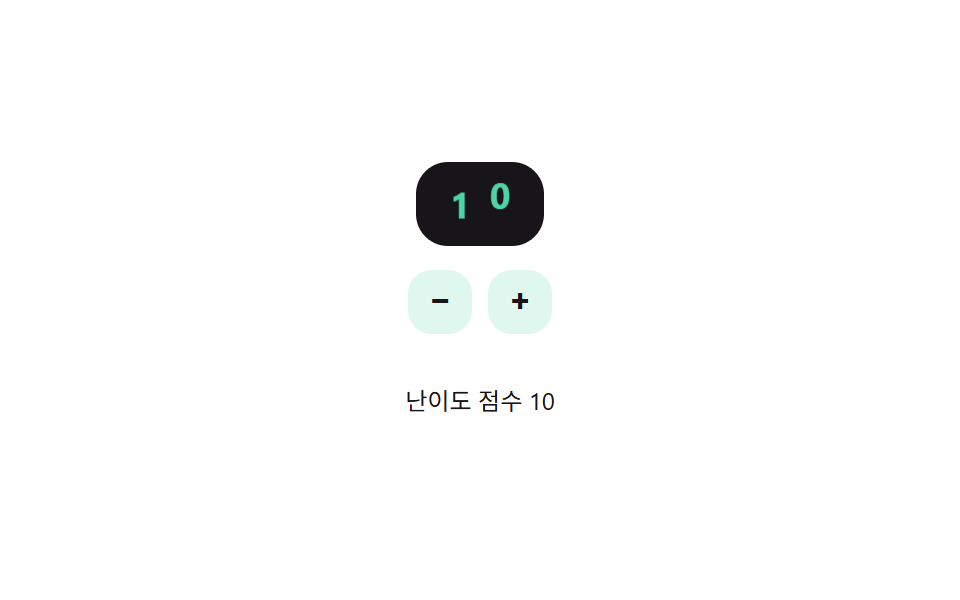
08숫자가 계기판처럼 굴러가는 난이도 스테퍼
+/- 버튼을 누르면 숫자 한 자리가 위아래로 회전하며 다음 값으로 넘어가는 위치를 그 자리의 자릿값 계산으로 얻어, 자리올림이 생기면 왼쪽 자리도 함께 돈다.
쓰임폼에서 문항 난이도 점수를 숫자로 직접 정하는 자리
placeDigitpaintset
<main class="stage">
<div class="nso is-demo" id="nso">
  <div class="nso__display" id="nsoDisplay" role="spinbutton" tabindex="0"
    aria-label="난이도 점수" aria-valuemin="1" aria-valuemax="12" aria-valuenow="5">
    <div class="nso__col"><div class="nso__strip" id="nsoTens">
      <span>0</span><span>1</span><span>2</span><span>3</span><span>4</span><span>5</span><span>6</span><span>7</span><span>8</span><span>9</span>
    </div></div>
    <div class="nso__col"><div class="nso__strip" id="nsoOnes">
      <span>0</span><span>1</span><span>2</span><span>3</span><span>4</span><span>5</span><span>6</span><span>7</span><span>8</span><span>9</span>
    </div></div>
  </div>
  <div class="nso__row">
    <button type="button" class="nso__btn" id="nsoMinus" aria-label="점수 낮추기">−</button>
    <button type="button" class="nso__btn" id="nsoPlus" aria-label="점수 높이기">+</button>
  </div>
  <p class="nso__label">난이도 점수 <span id="nsoOut">5</span></p>
</div>
</main>
@use "../../../../site/static/demo-tokens" as *;
// 변수 3개
$duration: $dur-base;
$easing: $ease-spring;
$color: $subject-mint;
// 계산 겹: placeDigit() 가 값을 10^자리로 나눈 몫의 일의 자리를 구해 그 자릿값 * 칸 높이만큼 릴을 밀어낸다(JS)
@include stage($stage-paper);
.nso { display: flex; flex-direction: column; align-items: center; gap: $sp-3; }
.nso__display {
display: flex; background: $subject-ink; border-radius: $r-card; padding: $sp-2 $sp-3;
cursor: pointer;
}
.nso__display:focus-visible { outline: 2px solid $subject-mint; outline-offset: 2px; }
.nso__col { width: 20px; height: 26px; overflow: hidden; position: relative; }
.nso__strip {
display: flex; flex-direction: column;
transition: transform $duration $easing;
}
.nso__strip span {
height: 26px; line-height: 26px; text-align: center; font-weight: 700; font-size: 18px;
color: $subject-mint; font-variant-numeric: tabular-nums;
}
.nso__row { display: flex; gap: $sp-2; }
.nso__btn {
appearance: none; border: 0; border-radius: $r-control; width: 32px; height: 32px;
background: rgba($subject-mint, .18); color: $subject-ink; font-weight: 700; font-size: 16px; cursor: pointer;
}
.nso__btn:focus-visible { outline: 2px solid $subject-mint; outline-offset: 2px; }
.nso__label { font-size: 12px; color: $subject-ink; }
@media (max-width: 340px) {
.nso__col { width: 18px; }
.nso__strip span { font-size: 16px; }
}
@media (prefers-reduced-motion: reduce) {
// 실사용 경로 적용: 실제로 +/-·화살표로 값을 바꿔도 릴은 트랜지션 없이 즉시 그 자리로 넘어간다
.nso__strip { transition: none; }
}html, body {
margin: 0;
overflow: hidden;
}
.stage {
box-sizing: border-box;
min-height: 100vh;
display: grid;
place-items: center;
margin: 0;
background: #ffffff;
font-family: -apple-system, "Segoe UI", "Noto Sans KR", sans-serif;
padding: clamp(8px, 4vw, 24px);
}
.nso {
display: flex;
flex-direction: column;
align-items: center;
gap: 12px;
}
.nso__display {
display: flex;
background: #17141a;
border-radius: 16px;
padding: 8px 12px;
cursor: pointer;
}
.nso__display:focus-visible {
outline: 2px solid #4cd4a6;
outline-offset: 2px;
}
.nso__col {
width: 20px;
height: 26px;
overflow: hidden;
position: relative;
}
.nso__strip {
display: flex;
flex-direction: column;
transition: transform 300ms cubic-bezier(0.2, 0.8, 0.2, 1);
}
.nso__strip span {
height: 26px;
line-height: 26px;
text-align: center;
font-weight: 700;
font-size: 18px;
color: #4cd4a6;
font-variant-numeric: tabular-nums;
}
.nso__row {
display: flex;
gap: 8px;
}
.nso__btn {
appearance: none;
border: 0;
border-radius: 12px;
width: 32px;
height: 32px;
background: rgba(76, 212, 166, 0.18);
color: #17141a;
font-weight: 700;
font-size: 16px;
cursor: pointer;
}
.nso__btn:focus-visible {
outline: 2px solid #4cd4a6;
outline-offset: 2px;
}
.nso__label {
font-size: 12px;
color: #17141a;
}
@media (max-width: 340px) {
.nso__col {
width: 18px;
}
.nso__strip span {
font-size: 16px;
}
}
@media (prefers-reduced-motion: reduce) {
.nso__strip {
transition: none;
}
}(function () {
var MIN = 1, MAX = 12, DIGIT_H = 26;
var root = document.getElementById('nso');
var display = document.getElementById('nsoDisplay');
var tensStrip = document.getElementById('nsoTens');
var onesStrip = document.getElementById('nsoOnes');
var out = document.getElementById('nsoOut');
var value = 5;
// 계산 겹: 값을 10^자리로 나눈 몫의 일의 자리(placeDigit)로 각 릴이 보여줄 숫자를 구하고,
// 그 자릿값 * 칸 높이만큼 릴을 밀어 그 숫자가 창에 걸리게 한다 — 자리올림은 몫이 바뀌면서 자연히 생긴다
function placeDigit(v, place) { return Math.floor(v / Math.pow(10, place)) % 10; }
function paint() {
var ones = placeDigit(value, 0), tens = placeDigit(value, 1);
onesStrip.style.transform = 'translateY(-' + (ones * DIGIT_H) + 'px)';
tensStrip.style.transform = 'translateY(-' + (tens * DIGIT_H) + 'px)';
display.setAttribute('aria-valuenow', String(value));
out.textContent = String(value);
}
function human() { root.classList.remove('is-demo'); clearInterval(timer); }
function set(v) { value = Math.max(MIN, Math.min(MAX, v)); paint(); }
document.getElementById('nsoPlus').addEventListener('click', function () { human(); set(value + 1); });
document.getElementById('nsoMinus').addEventListener('click', function () { human(); set(value - 1); });
display.addEventListener('keydown', function (e) {
if (e.key === 'ArrowUp' || e.key === 'ArrowRight') { e.preventDefault(); human(); set(value + 1); }
else if (e.key === 'ArrowDown' || e.key === 'ArrowLeft') { e.preventDefault(); human(); set(value - 1); }
});
var sequence = [9, 10, 3, 12, 1, 7];
var si = 0;
function tick() { set(sequence[si % sequence.length]); si++; }
var reduce = window.matchMedia('(prefers-reduced-motion: reduce)').matches;
var timer = reduce ? null : setInterval(tick, 850);
paint();
}());import { useEffect, useRef } from 'react';
import styles from './DifficultySelectorNumericStepperOdometer.module.scss';
const MIN = 1, MAX = 12, DIGIT_H = 26;
const DIGITS = [0, 1, 2, 3, 4, 5, 6, 7, 8, 9];
const SEQUENCE = [9, 10, 3, 12, 1, 7];
const TICK_MS = 850;
export default function DifficultySelectorNumericStepperOdometer() {
const rootRef = useRef<HTMLDivElement>(null);
const displayRef = useRef<HTMLDivElement>(null);
const tensRef = useRef<HTMLDivElement>(null);
const onesRef = useRef<HTMLDivElement>(null);
const outRef = useRef<HTMLSpanElement>(null);
const plusRef = useRef<HTMLButtonElement>(null);
const minusRef = useRef<HTMLButtonElement>(null);
useEffect(() => {
const root = rootRef.current;
const display = displayRef.current;
const tensStrip = tensRef.current;
const onesStrip = onesRef.current;
const out = outRef.current;
const plus = plusRef.current;
const minus = minusRef.current;
if (!root || !display || !tensStrip || !onesStrip || !out || !plus || !minus) return undefined;
let value = 5;
// 계산 겹: 값을 10^자리로 나눈 몫의 일의 자리(placeDigit)로 각 릴이 보여줄 숫자를 구하고,
// 그 자릿값 * 칸 높이만큼 릴을 밀어 그 숫자가 창에 걸리게 한다 — 자리올림은 몫이 바뀌면서 자연히 생긴다
function placeDigit(v: number, place: number) { return Math.floor(v / Math.pow(10, place)) % 10; }
function paint() {
const ones = placeDigit(value, 0), tens = placeDigit(value, 1);
onesStrip!.style.transform = 'translateY(-' + (ones * DIGIT_H) + 'px)';
tensStrip!.style.transform = 'translateY(-' + (tens * DIGIT_H) + 'px)';
display!.setAttribute('aria-valuenow', String(value));
out!.textContent = String(value);
}
let timer = 0;
function human() { root!.classList.remove(styles['is-demo']); window.clearInterval(timer); }
function set(v: number) { value = Math.max(MIN, Math.min(MAX, v)); paint(); }
function onPlus() { human(); set(value + 1); }
function onMinus() { human(); set(value - 1); }
function onKey(e: KeyboardEvent) {
if (e.key === 'ArrowUp' || e.key === 'ArrowRight') { e.preventDefault(); human(); set(value + 1); }
else if (e.key === 'ArrowDown' || e.key === 'ArrowLeft') { e.preventDefault(); human(); set(value - 1); }
}
plus.addEventListener('click', onPlus);
minus.addEventListener('click', onMinus);
display.addEventListener('keydown', onKey);
let si = 0;
function tick() { set(SEQUENCE[si % SEQUENCE.length]); si++; }
const reduce = window.matchMedia('(prefers-reduced-motion: reduce)').matches;
if (!reduce) timer = window.setInterval(tick, TICK_MS);
paint();
return () => {
plus!.removeEventListener('click', onPlus);
minus!.removeEventListener('click', onMinus);
display!.removeEventListener('keydown', onKey);
window.clearInterval(timer);
};
}, []);
return (
<main className={styles.stage}>
<div className={styles.nso + ' ' + styles['is-demo']} ref={rootRef}>
<div
className={styles.nsoDisplay}
ref={displayRef}
role="spinbutton"
tabIndex={0}
aria-label="난이도 점수"
aria-valuemin={1}
aria-valuemax={12}
aria-valuenow={5}
>
<div className={styles.nsoCol}>
<div className={styles.nsoStrip} ref={tensRef}>
{DIGITS.map((d) => <span key={d}>{d}</span>)}
</div>
</div>
<div className={styles.nsoCol}>
<div className={styles.nsoStrip} ref={onesRef}>
{DIGITS.map((d) => <span key={d}>{d}</span>)}
</div>
</div>
</div>
<div className={styles.nsoRow}>
<button type="button" className={styles.nsoBtn} ref={minusRef} aria-label="점수 낮추기">−</button>
<button type="button" className={styles.nsoBtn} ref={plusRef} aria-label="점수 높이기">+</button>
</div>
<p className={styles.nsoLabel}>난이도 점수 <span ref={outRef}>5</span></p>
</div>
</main>
);
}08 숫자가 계기판처럼 굴러가는 난이도 스테퍼 — 측정 누적면적 0.688% · 움직인 프레임 11/23GODRICH 원작 · zip 에 SCSS·React 포함 · 난이도 선택 ui 9종 — 드래그 각도로 값이 바뀌는 계산까지
이 데모가 속한 글
 난이도 선택 ui 9종 — 드래그 각도로 값이 바뀌는 계산까지난이도 선택 ui 아홉 가지 가운데 하나는 손을 떼면 슬라이더 손잡이가 단계를 살짝 지나쳤다가 스프링 계산으로 되튕겨 멈추고, 하나는 배지 다섯 개의 색을 고정값이 아니라 단계 번호를 넣은 색상각 수식으로 계산하며, 이 글의 데모 전부 보기