0710 단위로 눈금에 붙는 범위 슬라이더
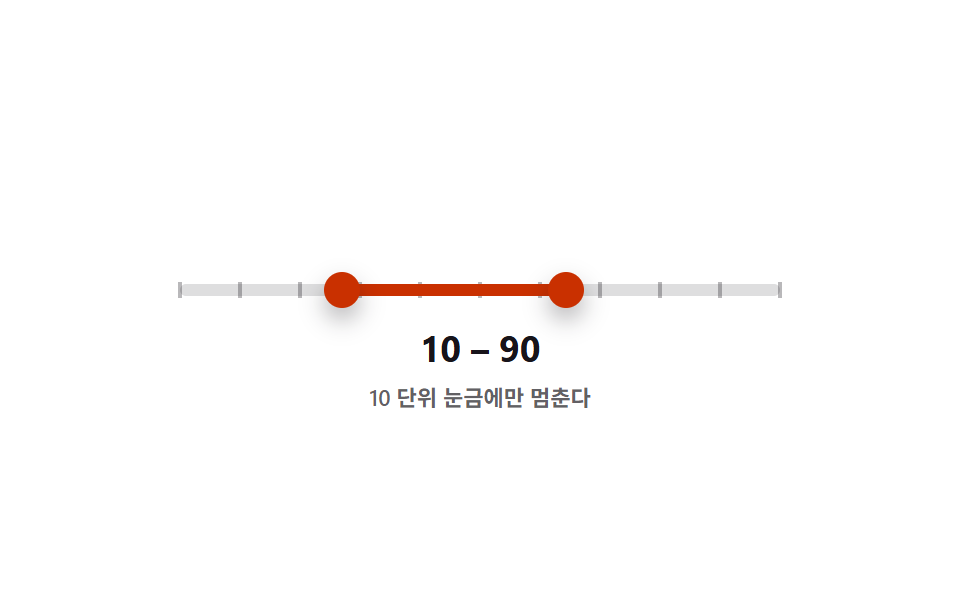
핸들을 움직이는 즉시 10 단위 눈금으로 반올림되어 멈추고, 낮은 핸들과 높은 핸들의 값은 서로를 넘어서지 않도록 항상 비교해 고정된다.
쓰임정해진 단위로만 값을 고르는 수량 필터
STEP=10getBoundingClientRectrole=slider
<main class="stage">
<div class="ds is-demo" id="ds">
  <div class="ds__track" id="track">
    <div class="ds__ticks" id="ticks" aria-hidden="true"></div>
    <div class="ds__fill" id="fill"></div>
    <button type="button" class="ds__thumb ds__thumb--lo" id="thumbLo" role="slider"
      aria-label="최소값" aria-valuemin="0" aria-valuemax="100" aria-valuenow="20" aria-valuetext="20" tabindex="0"></button>
    <button type="button" class="ds__thumb ds__thumb--hi" id="thumbHi" role="slider"
      aria-label="최대값" aria-valuemin="0" aria-valuemax="100" aria-valuenow="70" aria-valuetext="70" tabindex="0"></button>
  </div>
  <p class="ds__readout"><span id="loOut">20</span> – <span id="hiOut">70</span></p>
  <p class="ds__caption">10 단위 눈금에만 멈춘다</p>
</div>
</main>
@use "../../../../site/static/demo-tokens" as *;
// 변수 3개
$duration: $dur-loop;
$easing: $ease-pop;
$color: $subject-orange-deep;
// 계산 겹: 값을 STEP=10 단위로 반올림(snap)해 고정하고, 눈금은 getBoundingClientRect 실측 px 로 배치한다.
@include stage($stage-paper);
.ds { width: min(300px, 86vw); color: $subject-ink; text-align: center; }
.ds__track {
position: relative; height: 6px; border-radius: $r-pill;
background: rgba($subject-ink, .14); margin: $sp-12 0 $sp-4;
}
.ds__ticks { position: absolute; inset: 0; pointer-events: none; }
.ds__tick {
position: absolute; top: 50%; width: 2px; height: 8px;
background: rgba($subject-ink, .3); transform: translate(-50%, -50%);
}
.ds__fill {
position: absolute; top: 0; bottom: 0; left: 20%; width: 50%;
background: $color; border-radius: $r-pill;
}
.ds__thumb {
position: absolute; top: 50%; left: 20%; width: 18px; height: 18px;
appearance: none; border: 0; border-radius: 50%; background: $color;
box-shadow: $shadow-press; cursor: grab; touch-action: none; padding: 0;
transform: translate(-50%, -50%); z-index: 2;
}
.ds__thumb--hi { left: 70%; }
.ds__thumb:focus-visible { outline: 2px solid $subject-blue-deep; outline-offset: 2px; }
.ds__thumb:active { cursor: grabbing; }
.ds__readout { margin: 0; font-weight: 700; font-size: 18px; line-height: 1.2; font-variant-numeric: tabular-nums; }
.ds__caption { margin: $sp-1 0 0; font-weight: 600; font-size: 11px; color: rgba($subject-ink, .68); }
.ds.is-demo .ds__thumb,
.ds.is-demo .ds__fill {
transition: left $duration $easing, width $duration $easing;
}
@media (max-width: 340px) {
.ds { width: min(250px, 82vw); }
.ds__readout { font-size: 16px; }
}
@media (prefers-reduced-motion: reduce) {
.ds.is-demo .ds__thumb, .ds.is-demo .ds__fill { transition: none; }
}html, body {
margin: 0;
overflow: hidden;
}
.stage {
box-sizing: border-box;
min-height: 100vh;
display: grid;
place-items: center;
margin: 0;
background: #ffffff;
font-family: -apple-system, "Segoe UI", "Noto Sans KR", sans-serif;
padding: clamp(8px, 4vw, 24px);
}
.ds {
width: min(300px, 86vw);
color: #17141a;
text-align: center;
}
.ds__track {
position: relative;
height: 6px;
border-radius: 999px;
background: rgba(23, 20, 26, 0.14);
margin: 48px 0 16px;
}
.ds__ticks {
position: absolute;
inset: 0;
pointer-events: none;
}
.ds__tick {
position: absolute;
top: 50%;
width: 2px;
height: 8px;
background: rgba(23, 20, 26, 0.3);
transform: translate(-50%, -50%);
}
.ds__fill {
position: absolute;
top: 0;
bottom: 0;
left: 20%;
width: 50%;
background: #c93000;
border-radius: 999px;
}
.ds__thumb {
position: absolute;
top: 50%;
left: 20%;
width: 18px;
height: 18px;
appearance: none;
border: 0;
border-radius: 50%;
background: #c93000;
box-shadow: 0 6px 12px rgba(23, 20, 26, 0.32);
cursor: grab;
touch-action: none;
padding: 0;
transform: translate(-50%, -50%);
z-index: 2;
}
.ds__thumb--hi {
left: 70%;
}
.ds__thumb:focus-visible {
outline: 2px solid #0a4fe8;
outline-offset: 2px;
}
.ds__thumb:active {
cursor: grabbing;
}
.ds__readout {
margin: 0;
font-weight: 700;
font-size: 18px;
line-height: 1.2;
font-variant-numeric: tabular-nums;
}
.ds__caption {
margin: 4px 0 0;
font-weight: 600;
font-size: 11px;
color: rgba(23, 20, 26, 0.68);
}
.ds.is-demo .ds__thumb,
.ds.is-demo .ds__fill {
transition: left 2s cubic-bezier(0.2, 1.4, 0.4, 1), width 2s cubic-bezier(0.2, 1.4, 0.4, 1);
}
@media (max-width: 340px) {
.ds {
width: min(250px, 82vw);
}
.ds__readout {
font-size: 16px;
}
}
@media (prefers-reduced-motion: reduce) {
.ds.is-demo .ds__thumb, .ds.is-demo .ds__fill {
transition: none;
}
}(function () {
var MIN = 0, MAX = 100, STEP = 10;
var root = document.getElementById('ds');
var track = document.getElementById('track');
var ticksBox = document.getElementById('ticks');
var fill = document.getElementById('fill');
var lo = document.getElementById('thumbLo');
var hi = document.getElementById('thumbHi');
var loOut = document.getElementById('loOut');
var hiOut = document.getElementById('hiOut');
var v = { lo: 20, hi: 70 };
var ticks = [];
for (var n = MIN; n <= MAX; n += STEP) {
var t = document.createElement('span');
t.className = 'ds__tick';
ticksBox.appendChild(t);
ticks.push({ el: t, value: n });
}
// 계산 겹: 눈금을 %가 아니라 트랙의 실측 픽셀 폭(getBoundingClientRect)으로 위치를 다시 계산해 배치한다.
function layoutTicks() {
var r = track.getBoundingClientRect();
ticks.forEach(function (t) {
var x = r.width * (t.value - MIN) / (MAX - MIN);
t.el.style.left = Math.round(x) + 'px';
});
}
function snap(n) { return Math.max(MIN, Math.min(MAX, Math.round(n / STEP) * STEP)); }
function paint() {
lo.style.left = v.lo + '%'; hi.style.left = v.hi + '%';
fill.style.left = v.lo + '%'; fill.style.width = (v.hi - v.lo) + '%';
lo.setAttribute('aria-valuenow', String(v.lo)); hi.setAttribute('aria-valuenow', String(v.hi));
lo.setAttribute('aria-valuetext', String(v.lo)); hi.setAttribute('aria-valuetext', String(v.hi));
loOut.textContent = String(v.lo); hiOut.textContent = String(v.hi);
}
function setLo(n) { v.lo = Math.min(snap(n), v.hi); paint(); }
function setHi(n) { v.hi = Math.max(snap(n), v.lo); paint(); }
function pctFromX(x) {
var r = track.getBoundingClientRect();
return Math.round(Math.max(0, Math.min(100, ((x - r.left) / r.width) * 100)));
}
function human() { root.classList.remove('is-demo'); clearInterval(timer); }
function drag(thumb, setter, isLo) {
thumb.addEventListener('pointerdown', function (e) {
human(); thumb.setPointerCapture(e.pointerId);
function move(ev) { setter(pctFromX(ev.clientX)); }
function up() { thumb.removeEventListener('pointermove', move); thumb.removeEventListener('pointerup', up); }
thumb.addEventListener('pointermove', move); thumb.addEventListener('pointerup', up);
});
thumb.addEventListener('keydown', function (e) {
var step = { ArrowRight: STEP, ArrowLeft: -STEP, ArrowUp: STEP, ArrowDown: -STEP }[e.key];
if (step !== undefined) { e.preventDefault(); human(); setter((isLo ? v.lo : v.hi) + step); }
else if (e.key === 'Home') { e.preventDefault(); human(); setter(isLo ? MIN : v.lo); }
else if (e.key === 'End') { e.preventDefault(); human(); setter(isLo ? v.hi : MAX); }
});
}
drag(lo, setLo, true); drag(hi, setHi, false);
window.addEventListener('resize', layoutTicks);
var presets = [[0, 100], [30, 60], [10, 90], [40, 50], [20, 80]];
var pi = 0;
function tick() {
var p = presets[pi % presets.length]; pi++;
v.lo = p[0]; v.hi = p[1]; paint();
}
var reduce = window.matchMedia('(prefers-reduced-motion: reduce)').matches;
var timer = reduce ? null : setInterval(tick, 480);
layoutTicks();
paint();
}());import { useEffect, useRef } from 'react';
import styles from './DualSliderSnapStepTicks.module.scss';
const MIN = 0;
const MAX = 100;
const STEP = 10;
const TICK_MS = 480;
const TICK_VALUES: number[] = [];
for (let n = MIN; n <= MAX; n += STEP) TICK_VALUES.push(n);
const PRESETS: [number, number][] = [[0, 100], [30, 60], [10, 90], [40, 50], [20, 80]];
export default function DualSliderSnapStepTicks() {
const rootRef = useRef<HTMLDivElement>(null);
const trackRef = useRef<HTMLDivElement>(null);
const fillRef = useRef<HTMLDivElement>(null);
const loRef = useRef<HTMLButtonElement>(null);
const hiRef = useRef<HTMLButtonElement>(null);
const loOutRef = useRef<HTMLSpanElement>(null);
const hiOutRef = useRef<HTMLSpanElement>(null);
const tickRefs = useRef<HTMLSpanElement[]>([]);
useEffect(() => {
const root = rootRef.current;
const track = trackRef.current;
const fill = fillRef.current;
const lo = loRef.current;
const hi = hiRef.current;
const loOut = loOutRef.current;
const hiOut = hiOutRef.current;
if (!root || !track || !fill || !lo || !hi || !loOut || !hiOut || !tickRefs.current) return undefined;
const ticks = tickRefs.current;
const v = { lo: 20, hi: 70 };
// 계산 겹: 눈금을 %가 아니라 트랙의 실측 픽셀 폭(getBoundingClientRect)으로 위치를 다시 계산해 배치한다.
function layoutTicks() {
const r = track!.getBoundingClientRect();
ticks.forEach((el, i) => {
const x = r.width * (TICK_VALUES[i] - MIN) / (MAX - MIN);
el.style.left = Math.round(x) + 'px';
});
}
function snap(n: number) { return Math.max(MIN, Math.min(MAX, Math.round(n / STEP) * STEP)); }
function paint() {
lo!.style.left = v.lo + '%'; hi!.style.left = v.hi + '%';
fill!.style.left = v.lo + '%'; fill!.style.width = (v.hi - v.lo) + '%';
lo!.setAttribute('aria-valuenow', String(v.lo)); hi!.setAttribute('aria-valuenow', String(v.hi));
lo!.setAttribute('aria-valuetext', String(v.lo)); hi!.setAttribute('aria-valuetext', String(v.hi));
loOut!.textContent = String(v.lo); hiOut!.textContent = String(v.hi);
}
function setLo(n: number) { v.lo = Math.min(snap(n), v.hi); paint(); }
function setHi(n: number) { v.hi = Math.max(snap(n), v.lo); paint(); }
function pctFromX(x: number) {
const r = track!.getBoundingClientRect();
return Math.round(Math.max(0, Math.min(100, ((x - r.left) / r.width) * 100)));
}
let timer = 0;
function human() { root!.classList.remove(styles['is-demo']); window.clearInterval(timer); }
function bindDrag(thumb: HTMLButtonElement, setter: (n: number) => void, isLo: boolean) {
function onDown(e: PointerEvent) {
human(); thumb.setPointerCapture(e.pointerId);
function move(ev: PointerEvent) { setter(pctFromX(ev.clientX)); }
function up() { thumb.removeEventListener('pointermove', move); thumb.removeEventListener('pointerup', up); }
thumb.addEventListener('pointermove', move); thumb.addEventListener('pointerup', up);
}
function onKey(e: KeyboardEvent) {
const step = ({ ArrowRight: STEP, ArrowLeft: -STEP, ArrowUp: STEP, ArrowDown: -STEP } as Record<string, number>)[e.key];
if (step !== undefined) { e.preventDefault(); human(); setter((isLo ? v.lo : v.hi) + step); }
else if (e.key === 'Home') { e.preventDefault(); human(); setter(isLo ? MIN : v.lo); }
else if (e.key === 'End') { e.preventDefault(); human(); setter(isLo ? v.hi : MAX); }
}
thumb.addEventListener('pointerdown', onDown);
thumb.addEventListener('keydown', onKey);
return () => { thumb.removeEventListener('pointerdown', onDown); thumb.removeEventListener('keydown', onKey); };
}
const offLo = bindDrag(lo, setLo, true);
const offHi = bindDrag(hi, setHi, false);
window.addEventListener('resize', layoutTicks);
let pi = 0;
function tick() {
const p = PRESETS[pi % PRESETS.length]; pi++;
v.lo = p[0]; v.hi = p[1]; paint();
}
const reduce = window.matchMedia('(prefers-reduced-motion: reduce)').matches;
if (!reduce) timer = window.setInterval(tick, TICK_MS);
layoutTicks();
paint();
return () => { offLo(); offHi(); window.removeEventListener('resize', layoutTicks); window.clearInterval(timer); };
}, []);
return (
<main className={styles.stage}>
<div className={styles.ds + ' ' + styles['is-demo']} ref={rootRef}>
<div className={styles.dsTrack} ref={trackRef}>
<div className={styles.dsTicks} aria-hidden="true">
{TICK_VALUES.map((n, i) => (
<span key={n} className={styles.dsTick} ref={(el: HTMLSpanElement | null) => { if (el && tickRefs.current) tickRefs.current[i] = el; }} />
))}
</div>
<div className={styles.dsFill} ref={fillRef} />
<button type="button" className={styles.dsThumb + ' ' + styles.dsThumbLo} ref={loRef} role="slider"
aria-label="최소값" aria-valuemin={0} aria-valuemax={100} aria-valuenow={20} aria-valuetext="20" tabIndex={0} />
<button type="button" className={styles.dsThumb + ' ' + styles.dsThumbHi} ref={hiRef} role="slider"
aria-label="최대값" aria-valuemin={0} aria-valuemax={100} aria-valuenow={70} aria-valuetext="70" tabIndex={0} />
</div>
<p className={styles.dsReadout}><span ref={loOutRef}>20</span> – <span ref={hiOutRef}>70</span></p>
<p className={styles.dsCaption}>10 단위 눈금에만 멈춘다</p>
</div>
</main>
);
}07 10 단위로 눈금에 붙는 범위 슬라이더 — 측정 누적면적 5.147% · 움직인 프레임 21/23GODRICH 원작 · zip 에 SCSS·React 포함 · 범위 슬라이더 9종 — 핸들 두 개가 서로 못 넘어가는 계산까지
이 데모가 속한 글
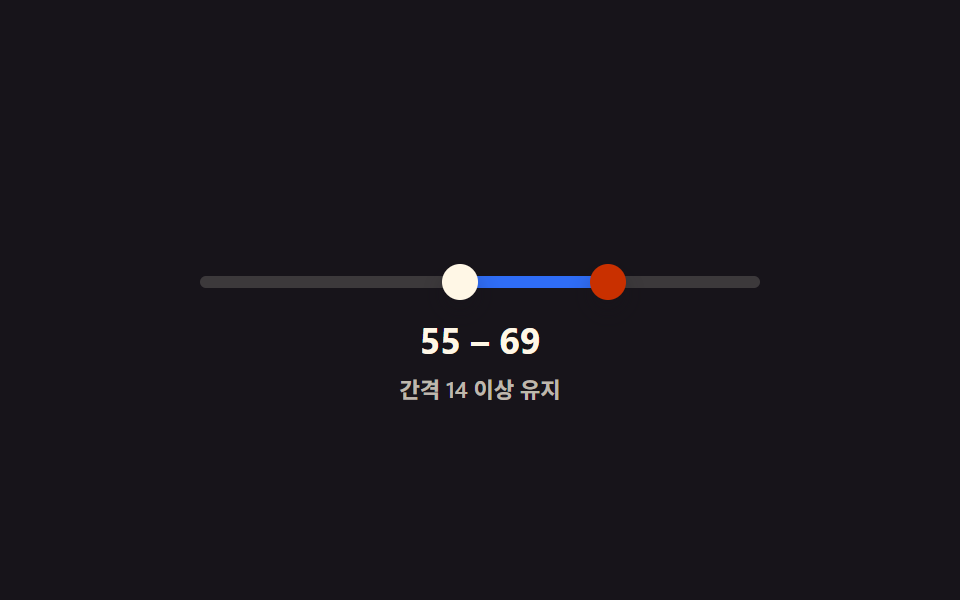 범위 슬라이더 9종 — 핸들 두 개가 서로 못 넘어가는 계산까지범위 슬라이더 9종 가운데 하나는 두 핸들이 최소 간격 아래로는 절대 겹치지 않게 계산으로 막고, 하나는 두 값이 가까워지면 풍선 라벨 두 개가 하나로 합쳐지며, 하나는 트랙 뒤에 막대 그래프가 깔려 값 분포를 함께 이 글의 데모 전부 보기