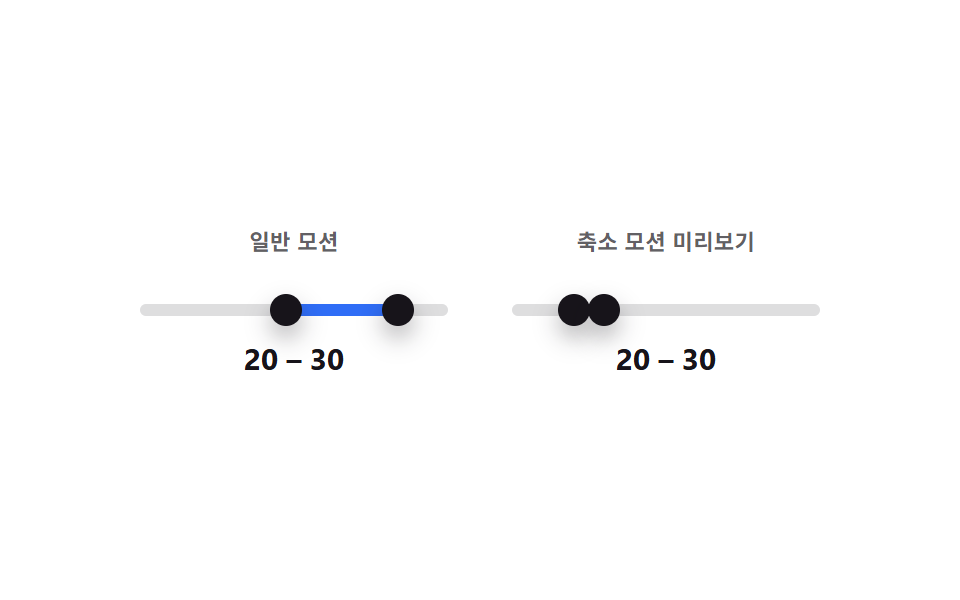
09모션 줄임과 일반 모션을 나란히 비교하는 범위 슬라이더
같은 두 핸들 값을 패널 두 개에 동시에 그리되, 왼쪽은 위치 변화에 트랜지션이 걸리고 오른쪽 미리보기는 트랜지션 없이 즉시 이동해 축소 모션 결과를 나란히 비교해 보여준다.
쓰임동작 민감 사용자를 위한 접근성 대체 모드
aria-hidden=trueprefers-reduced-motionrole=slider
<main class="stage">
<div class="cmp">
  <div class="cmp__panel">
    <p class="cmp__label">일반 모션</p>
    <div class="ds is-demo" id="dsA">
      <div class="ds__track" id="trackA">
        <div class="ds__fill" id="fillA"></div>
        <button type="button" class="ds__thumb ds__thumb--lo" id="thumbLoA" role="slider"
          aria-label="최소값" aria-valuemin="0" aria-valuemax="100" aria-valuenow="25" aria-valuetext="25" tabindex="0"></button>
        <button type="button" class="ds__thumb ds__thumb--hi" id="thumbHiA" role="slider"
          aria-label="최대값" aria-valuemin="0" aria-valuemax="100" aria-valuenow="70" aria-valuetext="70" tabindex="0"></button>
      </div>
      <p class="ds__readout"><span id="loOutA">25</span> – <span id="hiOutA">70</span></p>
    </div>
  </div>
  <div class="cmp__panel">
    <p class="cmp__label">축소 모션 미리보기</p>
    <div class="ds ds--mirror" id="dsB" aria-hidden="true">
      <div class="ds__track">
        <div class="ds__fill" id="fillB"></div>
        <span class="ds__thumb ds__thumb--lo" id="thumbLoB"></span>
        <span class="ds__thumb ds__thumb--hi" id="thumbHiB"></span>
      </div>
      <p class="ds__readout"><span id="loOutB">25</span> – <span id="hiOutB">70</span></p>
    </div>
  </div>
</div>
</main>@use "../../../../site/static/demo-tokens" as *;
// 변수 3개
$duration: $dur-loop;
$easing: $ease-pop;
$color: $subject-blue;
// 계산 겹: 오른쪽 미리보기 패널은 transition 규칙 자체가 없어 같은 상태값이 항상 즉시 이동으로 그려진다.
@include stage($stage-paper);
.cmp { display: flex; gap: $sp-8; width: min(340px, 92vw); }
.cmp__panel { flex: 1; text-align: center; }
.cmp__label {
margin: 0 0 $sp-2; font-weight: 700; font-size: 11px; color: rgba($subject-ink, .68);
text-transform: uppercase; letter-spacing: .02em;
}
.ds { color: $subject-ink; }
.ds__track {
position: relative; height: 6px; border-radius: $r-pill;
background: rgba($subject-ink, .14); margin: $sp-6 0 $sp-3;
}
.ds__fill {
position: absolute; top: 0; bottom: 0; left: 25%; width: 45%;
background: $color; border-radius: $r-pill;
}
.ds__thumb {
position: absolute; top: 50%; left: 25%; width: 16px; height: 16px;
appearance: none; border: 0; border-radius: 50%; background: $subject-ink;
box-shadow: $shadow-press; cursor: grab; touch-action: none; padding: 0;
transform: translate(-50%, -50%); z-index: 2;
}
.ds__thumb--hi { left: 70%; }
button.ds__thumb:focus-visible { outline: 2px solid $subject-blue-deep; outline-offset: 2px; }
button.ds__thumb:active { cursor: grabbing; }
.ds__readout { margin: 0; font-weight: 700; font-size: 15px; line-height: 1.2; font-variant-numeric: tabular-nums; }
.ds.is-demo .ds__thumb,
.ds.is-demo .ds__fill {
transition: left $duration $easing, width $duration $easing;
}
// 미리보기(.ds--mirror) 는 is-demo 여부와 상관없이 transition 이 없다 — "즉시 이동"이 이 패널의 핵심.
.ds--mirror .ds__thumb,
.ds--mirror .ds__fill { transition: none; }
.ds--mirror .ds__thumb { cursor: default; }
@media (max-width: 340px) {
.cmp { width: min(280px, 92vw); gap: $sp-4; }
.ds__readout { font-size: 13px; }
}
@media (prefers-reduced-motion: reduce) {
.ds.is-demo .ds__thumb, .ds.is-demo .ds__fill { transition: none; }
}html, body {
margin: 0;
overflow: hidden;
}
.stage {
box-sizing: border-box;
min-height: 100vh;
display: grid;
place-items: center;
margin: 0;
background: #ffffff;
font-family: -apple-system, "Segoe UI", "Noto Sans KR", sans-serif;
padding: clamp(8px, 4vw, 24px);
}
.cmp {
display: flex;
gap: 32px;
width: min(340px, 92vw);
}
.cmp__panel {
flex: 1;
text-align: center;
}
.cmp__label {
margin: 0 0 8px;
font-weight: 700;
font-size: 11px;
color: rgba(23, 20, 26, 0.68);
text-transform: uppercase;
letter-spacing: 0.02em;
}
.ds {
color: #17141a;
}
.ds__track {
position: relative;
height: 6px;
border-radius: 999px;
background: rgba(23, 20, 26, 0.14);
margin: 24px 0 12px;
}
.ds__fill {
position: absolute;
top: 0;
bottom: 0;
left: 25%;
width: 45%;
background: #2f6df6;
border-radius: 999px;
}
.ds__thumb {
position: absolute;
top: 50%;
left: 25%;
width: 16px;
height: 16px;
appearance: none;
border: 0;
border-radius: 50%;
background: #17141a;
box-shadow: 0 6px 12px rgba(23, 20, 26, 0.32);
cursor: grab;
touch-action: none;
padding: 0;
transform: translate(-50%, -50%);
z-index: 2;
}
.ds__thumb--hi {
left: 70%;
}
button.ds__thumb:focus-visible {
outline: 2px solid #0a4fe8;
outline-offset: 2px;
}
button.ds__thumb:active {
cursor: grabbing;
}
.ds__readout {
margin: 0;
font-weight: 700;
font-size: 15px;
line-height: 1.2;
font-variant-numeric: tabular-nums;
}
.ds.is-demo .ds__thumb,
.ds.is-demo .ds__fill {
transition: left 2s cubic-bezier(0.2, 1.4, 0.4, 1), width 2s cubic-bezier(0.2, 1.4, 0.4, 1);
}
.ds--mirror .ds__thumb,
.ds--mirror .ds__fill {
transition: none;
}
.ds--mirror .ds__thumb {
cursor: default;
}
@media (max-width: 340px) {
.cmp {
width: min(280px, 92vw);
gap: 16px;
}
.ds__readout {
font-size: 13px;
}
}
@media (prefers-reduced-motion: reduce) {
.ds.is-demo .ds__thumb, .ds.is-demo .ds__fill {
transition: none;
}
}(function () {
var MIN = 0, MAX = 100;
var root = document.getElementById('dsA');
var track = document.getElementById('trackA');
var fillA = document.getElementById('fillA');
var fillB = document.getElementById('fillB');
var lo = document.getElementById('thumbLoA');
var hi = document.getElementById('thumbHiA');
var loB = document.getElementById('thumbLoB');
var hiB = document.getElementById('thumbHiB');
var loOutA = document.getElementById('loOutA'); var hiOutA = document.getElementById('hiOutA');
var loOutB = document.getElementById('loOutB'); var hiOutB = document.getElementById('hiOutB');
var v = { lo: 25, hi: 70 };
// 계산 겹: 같은 상태값 하나를 두 패널에 동시에 그리되, 오른쪽 미리보기는 transition 을 원천적으로 갖지 않아
// "모션 줄임" 사용자가 보는 즉시-이동 결과를 항상 함께 보여준다 (실제 OS 설정과 무관한 비교용).
function paint() {
lo.style.left = v.lo + '%'; hi.style.left = v.hi + '%';
fillA.style.left = v.lo + '%'; fillA.style.width = (v.hi - v.lo) + '%';
loB.style.left = v.lo + '%'; hiB.style.left = v.hi + '%';
fillB.style.left = v.lo + '%'; fillB.style.width = (v.hi - v.lo) + '%';
lo.setAttribute('aria-valuenow', String(v.lo)); hi.setAttribute('aria-valuenow', String(v.hi));
lo.setAttribute('aria-valuetext', String(v.lo)); hi.setAttribute('aria-valuetext', String(v.hi));
loOutA.textContent = String(v.lo); hiOutA.textContent = String(v.hi);
loOutB.textContent = String(v.lo); hiOutB.textContent = String(v.hi);
}
function setLo(n) { v.lo = Math.max(MIN, Math.min(n, v.hi)); paint(); }
function setHi(n) { v.hi = Math.min(MAX, Math.max(n, v.lo)); paint(); }
function pctFromX(x) {
var r = track.getBoundingClientRect();
return Math.round(Math.max(0, Math.min(100, ((x - r.left) / r.width) * 100)));
}
function human() { root.classList.remove('is-demo'); clearInterval(timer); }
function drag(thumb, setter, isLo) {
thumb.addEventListener('pointerdown', function (e) {
human(); thumb.setPointerCapture(e.pointerId);
function move(ev) { setter(pctFromX(ev.clientX)); }
function up() { thumb.removeEventListener('pointermove', move); thumb.removeEventListener('pointerup', up); }
thumb.addEventListener('pointermove', move); thumb.addEventListener('pointerup', up);
});
thumb.addEventListener('keydown', function (e) {
var step = { ArrowRight: 1, ArrowLeft: -1, ArrowUp: 1, ArrowDown: -1 }[e.key];
if (step !== undefined) { e.preventDefault(); human(); setter((isLo ? v.lo : v.hi) + step); }
else if (e.key === 'Home') { e.preventDefault(); human(); setter(isLo ? MIN : v.lo); }
else if (e.key === 'End') { e.preventDefault(); human(); setter(isLo ? v.hi : MAX); }
});
}
drag(lo, setLo, true); drag(hi, setHi, false);
var presets = [[10, 40], [55, 95], [20, 30], [5, 85], [45, 60]];
var pi = 0;
function tick() {
var p = presets[pi % presets.length]; pi++;
v.lo = p[0]; v.hi = p[1]; paint();
}
var reduce = window.matchMedia('(prefers-reduced-motion: reduce)').matches;
var timer = reduce ? null : setInterval(tick, 480);
paint();
}());import { useEffect, useRef } from 'react';
import styles from './DualSliderReducedMotionStatic.module.scss';
const MIN = 0;
const MAX = 100;
const TICK_MS = 480;
const PRESETS: [number, number][] = [[10, 40], [55, 95], [20, 30], [5, 85], [45, 60]];
export default function DualSliderReducedMotionStatic() {
const rootRef = useRef<HTMLDivElement>(null);
const trackRef = useRef<HTMLDivElement>(null);
const fillARef = useRef<HTMLDivElement>(null);
const fillBRef = useRef<HTMLDivElement>(null);
const loRef = useRef<HTMLButtonElement>(null);
const hiRef = useRef<HTMLButtonElement>(null);
const loBRef = useRef<HTMLSpanElement>(null);
const hiBRef = useRef<HTMLSpanElement>(null);
const loOutARef = useRef<HTMLSpanElement>(null);
const hiOutARef = useRef<HTMLSpanElement>(null);
const loOutBRef = useRef<HTMLSpanElement>(null);
const hiOutBRef = useRef<HTMLSpanElement>(null);
useEffect(() => {
const root = rootRef.current;
const track = trackRef.current;
const fillA = fillARef.current;
const fillB = fillBRef.current;
const lo = loRef.current;
const hi = hiRef.current;
const loB = loBRef.current;
const hiB = hiBRef.current;
const loOutA = loOutARef.current; const hiOutA = hiOutARef.current;
const loOutB = loOutBRef.current; const hiOutB = hiOutBRef.current;
if (!root || !track || !fillA || !fillB || !lo || !hi || !loB || !hiB || !loOutA || !hiOutA || !loOutB || !hiOutB) return undefined;
const v = { lo: 25, hi: 70 };
// 계산 겹: 같은 상태값 하나를 두 패널에 동시에 그리되, 오른쪽 미리보기는 transition 을 원천적으로 갖지 않아
// "모션 줄임" 사용자가 보는 즉시-이동 결과를 항상 함께 보여준다 (실제 OS 설정과 무관한 비교용).
function paint() {
lo!.style.left = v.lo + '%'; hi!.style.left = v.hi + '%';
fillA!.style.left = v.lo + '%'; fillA!.style.width = (v.hi - v.lo) + '%';
loB!.style.left = v.lo + '%'; hiB!.style.left = v.hi + '%';
fillB!.style.left = v.lo + '%'; fillB!.style.width = (v.hi - v.lo) + '%';
lo!.setAttribute('aria-valuenow', String(v.lo)); hi!.setAttribute('aria-valuenow', String(v.hi));
lo!.setAttribute('aria-valuetext', String(v.lo)); hi!.setAttribute('aria-valuetext', String(v.hi));
loOutA!.textContent = String(v.lo); hiOutA!.textContent = String(v.hi);
loOutB!.textContent = String(v.lo); hiOutB!.textContent = String(v.hi);
}
function setLo(n: number) { v.lo = Math.max(MIN, Math.min(n, v.hi)); paint(); }
function setHi(n: number) { v.hi = Math.min(MAX, Math.max(n, v.lo)); paint(); }
function pctFromX(x: number) {
const r = track!.getBoundingClientRect();
return Math.round(Math.max(0, Math.min(100, ((x - r.left) / r.width) * 100)));
}
let timer = 0;
function human() { root!.classList.remove(styles['is-demo']); window.clearInterval(timer); }
function bindDrag(thumb: HTMLButtonElement, setter: (n: number) => void, isLo: boolean) {
function onDown(e: PointerEvent) {
human(); thumb.setPointerCapture(e.pointerId);
function move(ev: PointerEvent) { setter(pctFromX(ev.clientX)); }
function up() { thumb.removeEventListener('pointermove', move); thumb.removeEventListener('pointerup', up); }
thumb.addEventListener('pointermove', move); thumb.addEventListener('pointerup', up);
}
function onKey(e: KeyboardEvent) {
const step = ({ ArrowRight: 1, ArrowLeft: -1, ArrowUp: 1, ArrowDown: -1 } as Record<string, number>)[e.key];
if (step !== undefined) { e.preventDefault(); human(); setter((isLo ? v.lo : v.hi) + step); }
else if (e.key === 'Home') { e.preventDefault(); human(); setter(isLo ? MIN : v.lo); }
else if (e.key === 'End') { e.preventDefault(); human(); setter(isLo ? v.hi : MAX); }
}
thumb.addEventListener('pointerdown', onDown);
thumb.addEventListener('keydown', onKey);
return () => { thumb.removeEventListener('pointerdown', onDown); thumb.removeEventListener('keydown', onKey); };
}
const offLo = bindDrag(lo, setLo, true);
const offHi = bindDrag(hi, setHi, false);
let pi = 0;
function tick() {
const p = PRESETS[pi % PRESETS.length]; pi++;
v.lo = p[0]; v.hi = p[1]; paint();
}
const reduce = window.matchMedia('(prefers-reduced-motion: reduce)').matches;
if (!reduce) timer = window.setInterval(tick, TICK_MS);
paint();
return () => { offLo(); offHi(); window.clearInterval(timer); };
}, []);
return (
<main className={styles.stage}>
<div className={styles.cmp}>
<div className={styles.cmpPanel}>
<p className={styles.cmpLabel}>일반 모션</p>
<div className={styles.ds + ' ' + styles['is-demo']} ref={rootRef}>
<div className={styles.dsTrack} ref={trackRef}>
<div className={styles.dsFill} ref={fillARef} />
<button type="button" className={styles.dsThumb + ' ' + styles.dsThumbLo} ref={loRef} role="slider"
aria-label="최소값" aria-valuemin={0} aria-valuemax={100} aria-valuenow={25} aria-valuetext="25" tabIndex={0} />
<button type="button" className={styles.dsThumb + ' ' + styles.dsThumbHi} ref={hiRef} role="slider"
aria-label="최대값" aria-valuemin={0} aria-valuemax={100} aria-valuenow={70} aria-valuetext="70" tabIndex={0} />
</div>
<p className={styles.dsReadout}><span ref={loOutARef}>25</span> – <span ref={hiOutARef}>70</span></p>
</div>
</div>
<div className={styles.cmpPanel}>
<p className={styles.cmpLabel}>축소 모션 미리보기</p>
<div className={styles.ds + ' ' + styles.dsMirror} aria-hidden="true">
<div className={styles.dsTrack}>
<div className={styles.dsFill} ref={fillBRef} />
<span className={styles.dsThumb + ' ' + styles.dsThumbLo} ref={loBRef} />
<span className={styles.dsThumb + ' ' + styles.dsThumbHi} ref={hiBRef} />
</div>
<p className={styles.dsReadout}><span ref={loOutBRef}>25</span> – <span ref={hiOutBRef}>70</span></p>
</div>
</div>
</div>
</main>
);
}09 모션 줄임과 일반 모션을 나란히 비교하는 범위 슬라이더 — 측정 누적면적 5.484% · 움직인 프레임 21/23GODRICH 원작 · zip 에 SCSS·React 포함 · 범위 슬라이더 9종 — 핸들 두 개가 서로 못 넘어가는 계산까지
이 데모가 속한 글
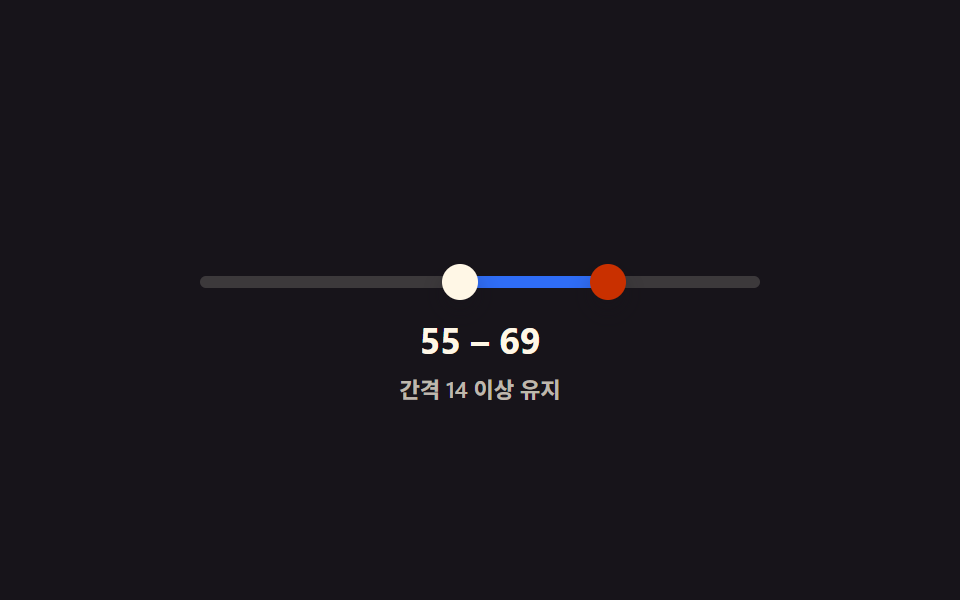 범위 슬라이더 9종 — 핸들 두 개가 서로 못 넘어가는 계산까지범위 슬라이더 9종 가운데 하나는 두 핸들이 최소 간격 아래로는 절대 겹치지 않게 계산으로 막고, 하나는 두 값이 가까워지면 풍선 라벨 두 개가 하나로 합쳐지며, 하나는 트랙 뒤에 막대 그래프가 깔려 값 분포를 함께 이 글의 데모 전부 보기