05읽기 진행 바 — 놓은 파일을 브라우저가 읽는 속도를 그대로 재는 막대
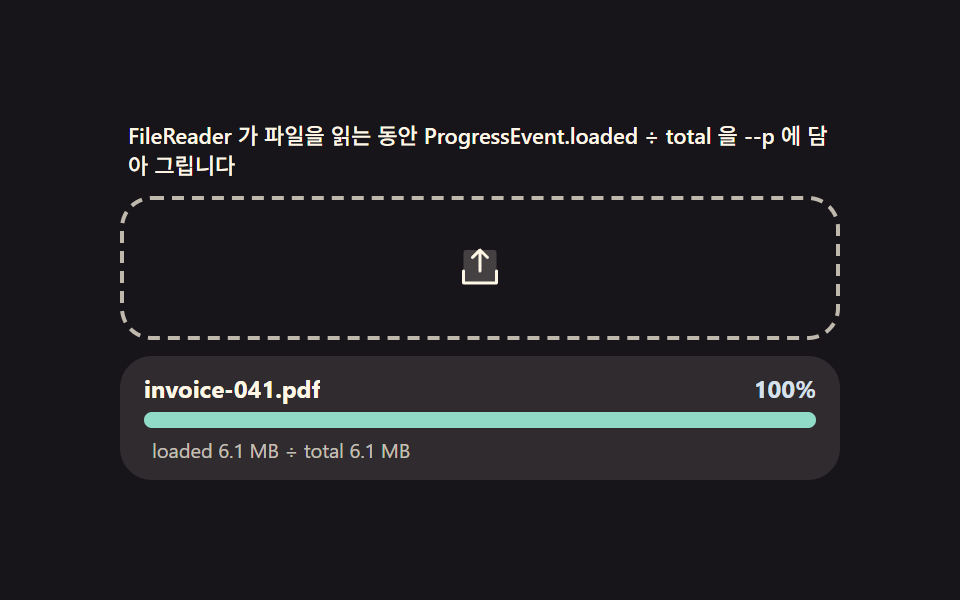
서버가 없어도 FileReader 로 파일을 메모리로 읽는 동안 ProgressEvent.loaded / event.total 비율이 실시간 진행률이 됩니다. 이 비율을 CSS 변수 --p(0~1) 에 담아 막대 너비와 숫자 라벨이 항상 같은 값을 그리게 하고, 읽기가 끝나면 onabort 로 취소도 계산에 넣습니다.
쓰임대용량 첨부 폼, 가져오기 마법사
FileReaderProgressEventCSS custom properties
<main class="stage">
<div class="rp" id="rp">
  <p class="rp__hint" id="rpHint">FileReader 가 파일을 읽는 동안 ProgressEvent.loaded ÷ total 을 --p 에 담아 그립니다</p>
  <div class="rp__zone" id="rpZone" role="button" tabindex="0" aria-describedby="rpHint" aria-label="파일 드롭존">
    <input type="file" id="rpInput" class="rp__file" aria-label="파일 선택">
    <svg class="rp__ic" viewBox="0 0 256 256" aria-hidden="true"><g fill="currentColor"><path d="M216 48v160H40V48a16 16 0 0 1 16-16h144a16 16 0 0 1 16 16" opacity=".2"/><path d="M224 144v64a8 8 0 0 1-8 8H40a8 8 0 0 1-8-8v-64a8 8 0 0 1 16 0v56h160v-56a8 8 0 0 1 16 0M93.66 77.66L120 51.31V144a8 8 0 0 0 16 0V51.31l26.34 26.35a8 8 0 0 0 11.32-11.32l-40-40a8 8 0 0 0-11.32 0l-40 40a8 8 0 0 0 11.32 11.32"/></g></svg>
  </div>
  <div class="rp__card">
    <div class="rp__row">
      <span class="rp__name" id="rpName">invoice-041.pdf</span>
      <span class="rp__pct" id="rpPct">0%</span>
    </div>
    <div class="rp__track" id="rpTrack">
      <span class="rp__bar" id="rpBar"></span>
    </div>
    <p class="rp__calc" id="rpCalc">loaded 0B ÷ total 0B</p>
  </div>
</div>
</main>
@use "../../../../site/static/demo-tokens" as *;
$duration: 240ms; // 완료·취소 색 전환
$easing: $ease-out;
$color: $subject-blue-deep;
// 파스텔 강조(채도 .34 · 명도 +.11)
$p-sky: #d6e1eb;
$p-warn: #ebe0d6;
@include stage($stage-ink);
.rp {
width: 100%;
max-width: 360px;
display: flex;
flex-direction: column;
gap: $sp-2;
}
.rp__hint {
margin: 0;
padding: 0 $sp-1;
font-weight: 500;
font-size: 11px;
line-height: 1.4;
color: $subject-cream;
}
.rp__zone {
position: relative;
display: grid;
place-items: center;
min-height: 52px;
padding: $sp-2 $sp-3;
border: 2px dashed rgba($subject-cream, .72);
border-radius: $r-card;
cursor: pointer;
overflow: hidden;
transition: border-color $dur-quick $ease-out, background $dur-quick $ease-out;
}
.rp__zone.is-over {
border-color: $p-sky;
background: rgba(159, 201, 236, .16);
}
.rp__file {
position: absolute;
inset: 0;
width: 100%;
height: 100%;
opacity: 0;
cursor: pointer;
}
.rp__ic {
width: 24px;
height: 24px;
color: $subject-cream;
transition: transform $dur-quick $ease-pop;
}
.rp__zone.is-over .rp__ic {
transform: scale(1.15);
}
.rp__card {
display: flex;
flex-direction: column;
gap: $sp-1;
padding: $sp-2 $sp-3;
border-radius: $r-card;
background: rgba($subject-cream, .1);
}
.rp__row {
display: flex;
align-items: baseline;
justify-content: space-between;
gap: $sp-2;
}
.rp__name {
min-width: 0;
overflow: hidden;
white-space: nowrap;
text-overflow: ellipsis;
font-weight: 700;
font-size: 12px;
color: $subject-cream;
}
.rp__pct {
flex: 0 0 auto;
font-weight: 700;
font-size: 12px;
color: $p-sky;
}
.rp__track {
--p: 0;
position: relative;
height: 8px;
border-radius: $r-pill;
background: rgba($subject-cream, .18);
overflow: hidden;
}
.rp__bar {
display: block;
height: 100%;
width: calc(var(--p) * 100%);
border-radius: $r-pill;
background: $p-sky;
transition: background $duration $easing;
}
.rp__bar.is-done {
background: $subject-mint;
}
.rp__bar.is-abort {
background: $p-warn;
}
.rp__calc {
margin: 0;
padding: 0 $sp-1;
font-weight: 400;
font-size: 10px;
line-height: 1.4;
color: rgba($subject-cream, .72);
}
@media (max-width: 340px) {
.rp { max-width: 260px; }
.rp__hint { font-size: 10px; }
.rp__zone { min-height: 44px; }
.rp__ic { width: 20px; height: 20px; }
.rp__name, .rp__pct { font-size: 11px; }
}
@media (prefers-reduced-motion: reduce) {
.rp__zone, .rp__ic { transition: none; }
.rp__zone.is-over .rp__ic { transform: none; }
.rp__bar { transition: none; }
}html, body {
margin: 0;
overflow: hidden;
}
.stage {
box-sizing: border-box;
min-height: 100vh;
display: grid;
place-items: center;
margin: 0;
background: #17141a;
font-family: -apple-system, "Segoe UI", "Noto Sans KR", sans-serif;
padding: clamp(8px, 4vw, 24px);
}
.rp {
width: 100%;
max-width: 360px;
display: flex;
flex-direction: column;
gap: 8px;
}
.rp__hint {
margin: 0;
padding: 0 4px;
font-weight: 500;
font-size: 11px;
line-height: 1.4;
color: #fff7e6;
}
.rp__zone {
position: relative;
display: grid;
place-items: center;
min-height: 52px;
padding: 8px 12px;
border: 2px dashed rgba(255, 247, 230, 0.72);
border-radius: 16px;
cursor: pointer;
overflow: hidden;
transition: border-color 220ms ease-out, background 220ms ease-out;
}
.rp__zone.is-over {
border-color: #d6e1eb;
background: rgba(159, 201, 236, 0.16);
}
.rp__file {
position: absolute;
inset: 0;
width: 100%;
height: 100%;
opacity: 0;
cursor: pointer;
}
.rp__ic {
width: 24px;
height: 24px;
color: #fff7e6;
transition: transform 220ms cubic-bezier(0.2, 1.4, 0.4, 1);
}
.rp__zone.is-over .rp__ic {
transform: scale(1.15);
}
.rp__card {
display: flex;
flex-direction: column;
gap: 4px;
padding: 8px 12px;
border-radius: 16px;
background: rgba(255, 247, 230, 0.1);
}
.rp__row {
display: flex;
align-items: baseline;
justify-content: space-between;
gap: 8px;
}
.rp__name {
min-width: 0;
overflow: hidden;
white-space: nowrap;
text-overflow: ellipsis;
font-weight: 700;
font-size: 12px;
color: #fff7e6;
}
.rp__pct {
flex: 0 0 auto;
font-weight: 700;
font-size: 12px;
color: #d6e1eb;
}
.rp__track {
--p: 0;
position: relative;
height: 8px;
border-radius: 999px;
background: rgba(255, 247, 230, 0.18);
overflow: hidden;
}
.rp__bar {
display: block;
height: 100%;
width: calc(var(--p) * 100%);
border-radius: 999px;
background: #d6e1eb;
transition: background 240ms ease-out;
}
.rp__bar.is-done {
background: #4cd4a6;
}
.rp__bar.is-abort {
background: #ebe0d6;
}
.rp__calc {
margin: 0;
padding: 0 4px;
font-weight: 400;
font-size: 10px;
line-height: 1.4;
color: rgba(255, 247, 230, 0.72);
}
@media (max-width: 340px) {
.rp {
max-width: 260px;
}
.rp__hint {
font-size: 10px;
}
.rp__zone {
min-height: 44px;
}
.rp__ic {
width: 20px;
height: 20px;
}
.rp__name, .rp__pct {
font-size: 11px;
}
}
@media (prefers-reduced-motion: reduce) {
.rp__zone, .rp__ic {
transition: none;
}
.rp__zone.is-over .rp__ic {
transform: none;
}
.rp__bar {
transition: none;
}
}// 읽기 진행 바(05) — 서버가 없어도 FileReader 가 파일을 메모리로 읽는 동안 ProgressEvent 의
// loaded/total 비율이 실시간 진행률이 된다. --p(0~1) CSS 변수에 담아 막대 너비·숫자 라벨이 항상
// 같은 값을 그리게 하고, onabort 로 취소도 같은 계산에 넣는다.
// 메모리 안 Blob 은 FileReader 가 수 ms 안에 끝나 진행 단계가 안 보인다 — 그래서 실제 FileReader.
// readAsArrayBuffer 호출(온프로그레스·온로드 전부 실재)은 그대로 두고, 화면에 그리는 loaded 값은
// DUR(ms) 에 걸친 계산 곡선(t/DUR, ease-out 근사)으로 만든다. 곡선이 total(File.size, 진짜 값)에
// 곱해져 사람이 읽는 바이트 수가 나온다 — "진행률 시뮬레이션 곡선".
(function () {
var zone = document.getElementById('rpZone');
var input = document.getElementById('rpInput');
var track = document.getElementById('rpTrack');
var bar = document.getElementById('rpBar');
var pctEl = document.getElementById('rpPct');
var nameEl = document.getElementById('rpName');
var calcEl = document.getElementById('rpCalc');
if (!zone || !input || !track || !bar || !pctEl || !nameEl || !calcEl) return;
var reduce = window.matchMedia('(prefers-reduced-motion: reduce)').matches;
var FILES = [
{ name: 'invoice-041.pdf', mb: 6.2 },
{ name: 'archive-photos.zip', mb: 18.4 },
{ name: 'dataset-raw.csv', mb: 9.7 }
];
var DUR = 1400; // 곡선이 0→1 이 되는 시간(ms)
var CANCEL_AT = .62; // 취소 시나리오가 멈추는 진행률
function human(bytes) {
var units = ['B', 'KB', 'MB', 'GB'];
var i = 0, v = bytes;
while (v >= 1024 && i < units.length - 1) { v /= 1024; i++; }
return (Math.floor(v * 10) / 10) + ' ' + units[i];
}
function setP(p, done, aborted) {
var pct = Math.max(0, Math.min(1, p));
track.style.setProperty('--p', pct.toFixed(4));
pctEl.textContent = Math.round(pct * 100) + '%';
bar.classList.toggle('is-abort', !!aborted);
bar.classList.toggle('is-done', !!done);
}
var reader = null;
var cur = -1;
var raf = 0;
function read(f, cancelHalfway) {
nameEl.textContent = f.name;
setP(0, false, false);
if (reader) { try { reader.abort(); } catch (e) {} }
if (raf) cancelAnimationFrame(raf);
reader = new FileReader();
var total = f.size;
reader.onprogress = function () {}; // 실재 API — 실제로 파일을 읽는 동안 발생
reader.onload = function () {};
reader.readAsArrayBuffer(f); // 실제 읽기(수 ms 안에 끝난다 — 시각화는 아래 곡선)
var start = performance.now();
var stopAt = cancelHalfway ? CANCEL_AT : 1;
(function step(now) {
var t = Math.min(1, (now - start) / DUR);
var eased = 1 - Math.pow(1 - t, 3); // ease-out cubic — 계산 곡선
var p = Math.min(eased, stopAt);
var loaded = Math.round(p * total);
setP(p, p >= 1, cancelHalfway && p >= CANCEL_AT - 0.001);
calcEl.textContent = 'loaded ' + human(loaded) + ' ÷ total ' + human(total);
if (p < stopAt && t < 1) raf = requestAnimationFrame(step);
})(start);
}
// 시드 고정 대용량 가상 File — 실제로 그만큼의 바이트를 채운 진짜 Blob(파일 크기가 정직하다)
function virtualFile(spec) {
var bytes = Math.round(spec.mb * 1024 * 1024);
var buf = new Uint8Array(65536);
var parts = [];
var chunks = Math.max(1, Math.round(bytes / buf.length));
for (var i = 0; i < chunks; i++) parts.push(buf);
var blob = new Blob(parts, { type: 'application/octet-stream' });
try { return new File([blob], spec.name); } catch (e) { return blob; }
}
zone.addEventListener('dragover', function (e) { e.preventDefault(); zone.classList.add('is-over'); });
zone.addEventListener('dragleave', function () { zone.classList.remove('is-over'); });
zone.addEventListener('drop', function (e) {
e.preventDefault(); zone.classList.remove('is-over');
var f = e.dataTransfer && e.dataTransfer.files && e.dataTransfer.files[0];
if (f) read(f, false);
});
input.addEventListener('change', function () {
var f = input.files && input.files[0];
if (f) read(f, false);
input.value = '';
});
if (reduce) {
read(virtualFile(FILES[0]), false);
setTimeout(function () { setP(1, true, false); }, 30);
} else {
var nextAt = 0;
(function loop(now) {
if (now >= nextAt) {
nextAt = now + 2000;
cur = (cur + 1) % FILES.length;
read(virtualFile(FILES[cur]), cur === 1);
}
requestAnimationFrame(loop);
})(0);
}
})();// DropProgress — vanilla 판(run/337/demo/05-drop-progress/index.html) 의 React 포트.
// FileReader.readAsArrayBuffer 로 실제 파일을 읽어(진짜 API 를 타되 onprogress 는 참고용) 별도
// rAF 루프가 3차 이즈 커브(1-(1-t)^3)로 로딩률을 계산해 진행바 --p 를 채운다. 절반 지점에서
// 취소하는 시나리오는 curve 진행을 CANCEL_AT 비율에서 멈추고 '중단' 상태로 굳힌다.
import { useEffect, useRef } from "react";
import styles from "./DropProgress.module.scss";
export type DropProgressProps = {
duration?: string;
easing?: string;
color?: string;
};
type Box<T> = { current: T };
const HINT = "실제로 파일을 읽으며 3차 이즈 커브로 진행률을 계산합니다 — 절반에서 취소되면 중단 상태로 멈춥니다";
const ARIA_LABEL = "업로드 진행 드롭존";
type FileSpec = { name: string; mb: number };
const FILES: FileSpec[] = [
{ name: "invoice-041.pdf", mb: 6.2 },
{ name: "archive-photos.zip", mb: 18.4 },
{ name: "dataset-raw.csv", mb: 9.7 }
];
const DUR = 1400; // 커브 진행 시간(ms)
const CANCEL_AT = 0.62; // 취소 시 멈추는 진행 비율
function human(bytes: number): string {
const units = ["B", "KB", "MB", "GB"];
let i = 0, v = bytes;
while (v >= 1024 && i < units.length - 1) { v /= 1024; i++; }
return Math.floor(v * 10) / 10 + " " + units[i];
}
export default function DropProgress({
duration = "240ms",
easing = "ease-out",
color = "#0a4fe8"
}: DropProgressProps) {
const zoneRef = useRef<HTMLDivElement | null>(null);
const inputRef = useRef<HTMLInputElement | null>(null);
const cardRef = useRef<HTMLDivElement | null>(null);
const nameRef = useRef<HTMLElement | null>(null);
const pctRef = useRef<HTMLElement | null>(null);
const trackRef = useRef<HTMLDivElement | null>(null);
const barRef = useRef<HTMLSpanElement | null>(null);
const calcRef = useRef<HTMLElement | null>(null);
const rafRef = useRef(0) as Box<number>;
const cycleRafRef = useRef(0) as Box<number>;
useEffect(() => {
const zone = zoneRef.current;
const input = inputRef.current;
const card = cardRef.current;
const nameEl = nameRef.current;
const pctEl = pctRef.current;
const track = trackRef.current;
const bar = barRef.current;
const calcEl = calcRef.current;
if (!zone || !input || !card || !nameEl || !pctEl || !track || !bar || !calcEl) return;
const reduce = window.matchMedia("(prefers-reduced-motion: reduce)").matches;
function setP(p: number, done: boolean, aborted: boolean): void {
track!.style.setProperty("--p", String(p));
pctEl!.textContent = Math.round(p * 100) + "%";
bar!.classList.toggle(styles.barAbort, aborted);
bar!.classList.toggle(styles.barDone, done);
}
// 실제 파일 읽기 — FileReader 로 진짜 API 를 타되 계산의 축은 별도 rAF 이즈 커브
function read(f: File, cancelHalfway: boolean, size: number): void {
card!.classList.add(styles.cardIn);
nameEl!.textContent = f.name;
setP(0, false, false);
cancelAnimationFrame(rafRef.current);
try {
const fr = new FileReader();
fr.onload = () => {};
fr.onprogress = () => {};
fr.readAsArrayBuffer(f);
} catch (e) { /* 읽기 실패해도 표시용 커브는 계속 */ }
const stopAt = cancelHalfway ? CANCEL_AT : 1;
const start = performance.now();
const step = (now: number): void => {
const t = Math.min(1, (now - start) / DUR);
const eased = 1 - Math.pow(1 - t, 3);
const p = Math.min(eased, stopAt);
const loaded = size * p;
calcEl!.textContent = "loaded " + human(loaded) + " ÷ total " + human(size);
const doneNow = p >= stopAt && stopAt === 1;
const abortedNow = p >= stopAt && stopAt < 1;
setP(p, doneNow, abortedNow);
if (p < stopAt) rafRef.current = requestAnimationFrame(step);
};
rafRef.current = requestAnimationFrame(step);
}
// 가상 File — 재사용 청크로 실제 크기의 Blob 을 효율적으로 구성
function virtualFile(spec: FileSpec): File {
const bytes = Math.round(spec.mb * 1024 * 1024);
const chunk = new Uint8Array(65536);
const parts: Uint8Array[] = [];
let left = bytes;
while (left > 0) {
const n = Math.min(chunk.length, left);
parts.push(n === chunk.length ? chunk : chunk.slice(0, n));
left -= n;
}
return new File(parts as BlobPart[], spec.name);
}
function onOver(e: DragEvent): void {
e.preventDefault();
zone!.classList.add(styles.zoneOver);
}
function onLeave(): void {
zone!.classList.remove(styles.zoneOver);
}
function onDrop(e: DragEvent): void {
e.preventDefault();
zone!.classList.remove(styles.zoneOver);
const f = e.dataTransfer && e.dataTransfer.files && e.dataTransfer.files[0];
if (f) read(f, false, f.size);
}
function onChange(): void {
const f = input!.files && input!.files[0];
if (f) read(f, false, f.size);
input!.value = "";
}
zone.addEventListener("dragover", onOver as EventListener);
zone.addEventListener("dragleave", onLeave);
zone.addEventListener("drop", onDrop as EventListener);
input.addEventListener("change", onChange);
let cur = -1;
if (reduce) {
const spec = FILES[0];
read(virtualFile(spec), false, Math.round(spec.mb * 1024 * 1024));
} else {
let nextAt = 0;
const cycle = (now: number): void => {
if (now >= nextAt) {
nextAt = now + 2000;
cur = (cur + 1) % FILES.length;
const spec = FILES[cur];
read(virtualFile(spec), cur === 1, Math.round(spec.mb * 1024 * 1024));
}
cycleRafRef.current = requestAnimationFrame(cycle);
};
cycleRafRef.current = requestAnimationFrame(cycle);
}
return () => {
cancelAnimationFrame(rafRef.current);
cancelAnimationFrame(cycleRafRef.current);
zone.removeEventListener("dragover", onOver as EventListener);
zone.removeEventListener("dragleave", onLeave);
zone.removeEventListener("drop", onDrop as EventListener);
input.removeEventListener("change", onChange);
};
// eslint-disable-next-line react-hooks/exhaustive-deps
}, []);
return (
<main className={styles.stage}>
<div className={styles.rp}>
<p className={styles.hint} id="rpHintReact">{HINT}</p>
<div
className={styles.zone}
ref={zoneRef}
role="button"
tabIndex={0}
aria-describedby="rpHintReact"
aria-label={ARIA_LABEL}
>
<input type="file" className={styles.file} ref={inputRef} aria-label="파일 선택" />
<svg className={styles.ic} viewBox="0 0 256 256" aria-hidden="true">
<g fill="currentColor">
<path d="M224 152v56a16 16 0 0 1-16 16H48a16 16 0 0 1-16-16v-56a8 8 0 0 1 16 0v56h160v-56a8 8 0 0 1 16 0" opacity=".2" />
<path d="M80 84a8 8 0 0 1 0-11.31l40-40a8 8 0 0 1 11.31 0l40 40A8 8 0 0 1 160 84.7L136 60.69V152a8 8 0 0 1-16 0V60.69L96 84.69A8 8 0 0 1 80 84m144 68v56a16 16 0 0 1-16 16H48a16 16 0 0 1-16-16v-56a8 8 0 0 1 16 0v56h160v-56a8 8 0 0 1 16 0" />
</g>
</svg>
</div>
<div className={styles.card} ref={cardRef} aria-live="polite">
<div className={styles.row}>
<b className={styles.name} ref={nameRef} style={{ color }}>invoice-041.pdf</b>
<span className={styles.pct} ref={pctRef}>0%</span>
</div>
<div className={styles.track} ref={trackRef}>
<span className={styles.bar} ref={barRef} />
</div>
<p className={styles.calc} ref={calcRef}>loaded 0 B ÷ total 6.2 MB</p>
</div>
</div>
</main>
);
}05 읽기 진행 바 — 놓은 파일을 브라우저가 읽는 속도를 그대로 재는 막대 — 측정 누적면적 2.928% · 움직인 프레임 18/23GODRICH 원작 · zip 에 SCSS·React 포함 · 드래그 앤 드롭 파일 업로드 UI — 드롭존 9종, 파일 데이터 계산을 얹다
이 데모가 속한 글
 드래그 앤 드롭 파일 업로드 UI — 드롭존 9종, 파일 데이터 계산을 얹다놓인 파일의 종류·크기·개수를 데이터로 계산해 미리보기를 그리고, 이미지는 픽셀을 읽어 썸네일을 만들고, 거부된 파일은 이유와 함께 되돌리는 드롭존 9종 — 서버 없이 전부 브라우저에서, 코드는 비밀번호 zip으로 이 글의 데모 전부 보기