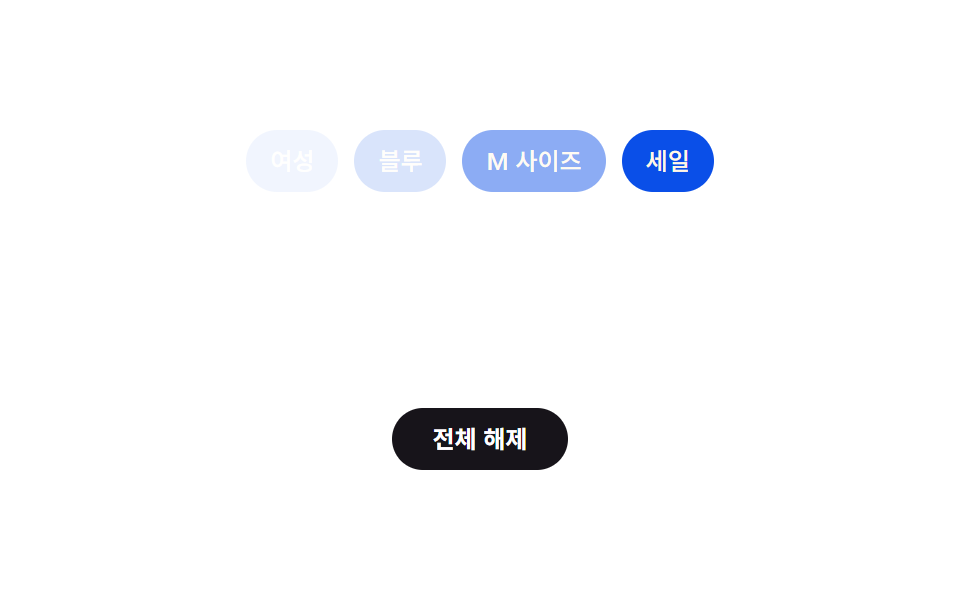
04전체 해제 캐스케이드 — 순서 값에 간격을 곱해 차례로 사라지는 칩
전체 해제 상태가 되면 각 칩이 사라지는 시작 시점을 그 칩의 순서 값에 고정 간격을 곱해 다시 구해, 앞에서부터 차례로 사라집니다.
쓰임필터 초기화 버튼이 있는 검색 결과 화면, 대시보드 조건 리셋
animation-delayclassList.removeopacity
<main class="stage">
  <div class="chips is-demo" id="chips">
    <span class="chip is-active" style="--i:0">여성</span>
    <span class="chip is-active" style="--i:1">블루</span>
    <span class="chip is-active" style="--i:2">M 사이즈</span>
    <span class="chip is-active" style="--i:3">세일</span>
  </div>
  <button class="clear-btn" id="clearBtn" type="button">전체 해제</button>
</main>
@use "../../../../site/static/demo-tokens" as *;
$duration: $dur-base;
$easing: $ease-spring;
$color: $subject-blue-deep;
$stagger: 90ms;
@include stage($stage-paper);
.chips {
display: flex;
align-items: center;
gap: $sp-2;
flex-wrap: wrap;
justify-content: center;
margin-bottom: $sp-4;
}
.chip {
padding: $sp-2 $sp-3;
border-radius: $r-pill;
background: $color;
color: $subject-cream;
font-weight: 500;
font-size: 12px;
line-height: 1.3;
opacity: 1;
transition: opacity $duration $easing;
transition-delay: calc(var(--i, 0) * #{$stagger});
}
.chip:not(.is-active) {
opacity: 0;
}
.clear-btn {
display: block;
margin: 0 auto;
border: 0;
border-radius: $r-pill;
padding: $sp-2 $sp-5;
background: $subject-ink;
color: $stage-paper;
font-family: inherit;
font-weight: 600;
font-size: 12px;
line-height: 1.3;
cursor: pointer;
}
.chips.is-demo .chip {
animation-name: chip-cascade;
animation-duration: $dur-loop;
animation-timing-function: $easing;
animation-iteration-count: infinite;
animation-delay: calc(var(--i, 0) * #{$stagger});
}
@keyframes chip-cascade {
0%, 25% { opacity: 1; }
50% { opacity: 0; }
75%, 100% { opacity: 1; }
}
@media (max-width: 340px) {
.chip { padding: $sp-1 $sp-2; }
.chips { gap: $sp-1; }
}
@media (prefers-reduced-motion: reduce) {
.chip { transition: none; }
.chips.is-demo .chip { animation: none; }
}html, body {
margin: 0;
overflow: hidden;
}
.stage {
box-sizing: border-box;
min-height: 100vh;
display: grid;
place-items: center;
margin: 0;
background: #ffffff;
font-family: -apple-system, "Segoe UI", "Noto Sans KR", sans-serif;
padding: clamp(8px, 4vw, 24px);
}
.chips {
display: flex;
align-items: center;
gap: 8px;
flex-wrap: wrap;
justify-content: center;
margin-bottom: 16px;
}
.chip {
padding: 8px 12px;
border-radius: 999px;
background: #0a4fe8;
color: #fff7e6;
font-weight: 500;
font-size: 12px;
line-height: 1.3;
opacity: 1;
transition: opacity 300ms cubic-bezier(0.2, 0.8, 0.2, 1);
transition-delay: calc(var(--i, 0) * 90ms);
}
.chip:not(.is-active) {
opacity: 0;
}
.clear-btn {
display: block;
margin: 0 auto;
border: 0;
border-radius: 999px;
padding: 8px 20px;
background: #17141a;
color: #ffffff;
font-family: inherit;
font-weight: 600;
font-size: 12px;
line-height: 1.3;
cursor: pointer;
}
.chips.is-demo .chip {
animation-name: chip-cascade;
animation-duration: 2s;
animation-timing-function: cubic-bezier(0.2, 0.8, 0.2, 1);
animation-iteration-count: infinite;
animation-delay: calc(var(--i, 0) * 90ms);
}
@keyframes chip-cascade {
0%, 25% {
opacity: 1;
}
50% {
opacity: 0;
}
75%, 100% {
opacity: 1;
}
}
@media (max-width: 340px) {
.chip {
padding: 4px 8px;
}
.chips {
gap: 4px;
}
}
@media (prefers-reduced-motion: reduce) {
.chip {
transition: none;
}
.chips.is-demo .chip {
animation: none;
}
}// 칩의 순서(index) 값에 고정 간격(ms)을 곱해 사라지는 시작 시점을 다시 구한다.
// 실제 클릭: 칩마다 그 시점에 classList.remove 로 is-active 를 떼면 opacity 전환이 순서대로 일어난다.
// 데모 루프는 같은 계산을 CSS animation-delay 로 옮겨 무한 반복한다.
(function () {
var STAGGER_MS = 90;
var chips = document.getElementById('chips');
var clearBtn = document.getElementById('clearBtn');
if (!chips || !clearBtn) return;
clearBtn.addEventListener('click', function () {
chips.classList.remove('is-demo');
var items = chips.querySelectorAll('.chip');
items.forEach(function (chip, i) {
setTimeout(function () {
chip.classList.remove('is-active');
}, i * STAGGER_MS);
});
});
})();import { useEffect, useRef } from "react";
import styles from "./ClearAllCascade.module.scss";
// 칩의 순서(index) 값에 고정 간격(ms)을 곱해 사라지는 시작 시점을 다시 구한다.
// 실제 클릭: 칩마다 그 시점에 classList.remove 로 is-active 를 떼면 opacity 전환이 순서대로 일어난다.
// 데모 루프는 같은 계산을 CSS animation-delay 로 옮겨 무한 반복한다.
const STAGGER_MS = 90;
export default function ClearAllCascade() {
const chipsRef = useRef<HTMLDivElement>(null);
const clearBtnRef = useRef<HTMLButtonElement>(null);
useEffect(() => {
const chips = chipsRef.current;
const clearBtn = clearBtnRef.current;
if (!chips || !clearBtn) return;
const timers: number[] = [];
function onClick() {
chips!.classList.remove(styles["is-demo"]);
const items = chips!.querySelectorAll<HTMLElement>("." + styles.chip);
items.forEach((chip, i) => {
const t = window.setTimeout(() => {
chip.classList.remove(styles["is-active"]);
}, i * STAGGER_MS);
timers.push(t);
});
}
clearBtn.addEventListener("click", onClick);
return () => {
clearBtn.removeEventListener("click", onClick);
timers.forEach((t) => window.clearTimeout(t));
};
}, []);
return (
<main className={styles.stage}>
<div ref={chipsRef} className={`${styles.chips} ${styles["is-demo"]}`}>
<span className={`${styles.chip} ${styles["is-active"]}`} style={{ "--i": 0 }}>
여성
</span>
<span className={`${styles.chip} ${styles["is-active"]}`} style={{ "--i": 1 }}>
블루
</span>
<span className={`${styles.chip} ${styles["is-active"]}`} style={{ "--i": 2 }}>
M 사이즈
</span>
<span className={`${styles.chip} ${styles["is-active"]}`} style={{ "--i": 3 }}>
세일
</span>
</div>
<button ref={clearBtnRef} className={styles["clear-btn"]} type="button">
전체 해제
</button>
</main>
);
}04 전체 해제 캐스케이드 — 순서 값에 간격을 곱해 차례로 사라지는 칩 — 측정 누적면적 4.054% · 움직인 프레임 12/23GODRICH 원작 · zip 에 SCSS·React 포함 · 필터 UI 9종 — 패널 슬라이드부터 칩 제거까지
이 데모가 속한 글
 필터 UI 9종 — 패널 슬라이드부터 칩 제거까지필터 UI 아홉 개 중 하나는 칩이 사라진 만큼 남은 칩들의 폭 합계를 다시 구해 자리를 좁히고, 하나는 활성 필터 개수 값이 바뀔 때마다 배지 크기를 그 차이만큼 부풀렸다 되돌리며, 또 하나는 두 슬라이더 값의 차 이 글의 데모 전부 보기