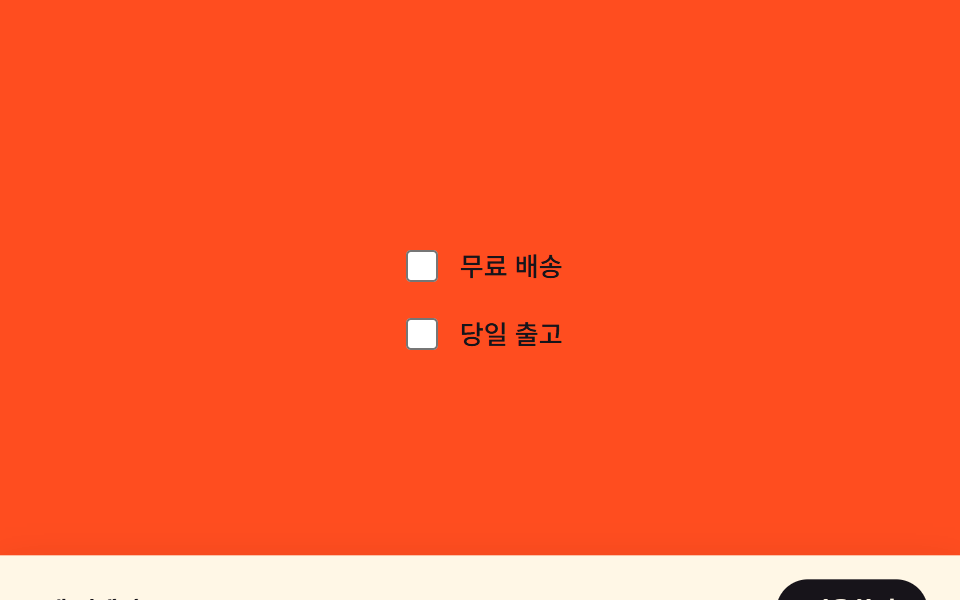
07적용 바 스티키 등장 — 선택 여부 값으로 위치를 다시 잡는 하단 바
선택된 필터가 하나 이상인 상태가 되면 화면 아래 숨어 있던 적용 바의 세로 위치 값이 화면 안으로 보간되어 나타나고, 선택이 없는 상태가 되면 다시 숨습니다.
쓰임모바일 필터 시트의 적용 버튼 바, 커머스 앱의 하단 고정 CTA
transformtranslateY(classList.toggle
<main class="stage" id="stage">
  <div class="options">
    <label class="option"><input class="option__input" type="checkbox" data-idx="0"> 무료 배송</label>
    <label class="option"><input class="option__input" type="checkbox" data-idx="1"> 당일 출고</label>
  </div>
  <div class="apply-bar is-demo" id="bar">
    <span class="apply-bar__label">2개 선택됨</span>
    <button class="apply-bar__btn" type="button">적용하기</button>
  </div>
</main>
@use "../../../../site/static/demo-tokens" as *;
$duration: $dur-enter;
$easing: $ease-spring;
$color: $subject-cream;
@include stage($stage-orange);
.stage {
position: relative;
overflow: hidden;
}
.options {
display: flex;
flex-direction: column;
gap: $sp-3;
}
.option {
display: flex;
align-items: center;
gap: $sp-2;
color: $subject-ink;
font-weight: 500;
font-size: 13px;
line-height: 1.4;
}
.option__input {
width: 16px;
height: 16px;
accent-color: $subject-ink;
}
.apply-bar {
box-sizing: border-box;
position: absolute;
left: 0;
right: 0;
bottom: 0;
display: flex;
align-items: center;
justify-content: space-between;
padding: $sp-3 $sp-4;
background: $color;
color: $subject-ink;
box-shadow: $shadow-raised;
transform: translateY(100%);
transition: transform $duration $easing;
}
.apply-bar__label {
font-weight: 600;
font-size: 12px;
line-height: 1.3;
}
.apply-bar__btn {
border: 0;
border-radius: $r-pill;
padding: $sp-2 $sp-4;
background: $subject-ink;
color: $color;
font-family: inherit;
font-weight: 600;
font-size: 12px;
line-height: 1.3;
cursor: pointer;
}
.stage.has-selection .apply-bar {
transform: translateY(0);
}
.apply-bar.is-demo {
animation-name: bar-loop;
animation-duration: $dur-loop;
animation-timing-function: $easing;
animation-iteration-count: infinite;
}
@keyframes bar-loop {
0%, 15% { transform: translateY(100%); }
40%, 75% { transform: translateY(0); }
100% { transform: translateY(100%); }
}
@media (max-width: 340px) {
.apply-bar { padding: $sp-2 $sp-3; }
.options { gap: $sp-2; }
}
@media (prefers-reduced-motion: reduce) {
.apply-bar { transition: none; }
.apply-bar.is-demo { animation: none; transform: translateY(0); opacity: .96; }
}html, body {
margin: 0;
overflow: hidden;
}
.stage {
box-sizing: border-box;
min-height: 100vh;
display: grid;
place-items: center;
margin: 0;
background: #ff4d1f;
font-family: -apple-system, "Segoe UI", "Noto Sans KR", sans-serif;
padding: clamp(8px, 4vw, 24px);
}
.stage {
position: relative;
overflow: hidden;
}
.options {
display: flex;
flex-direction: column;
gap: 12px;
}
.option {
display: flex;
align-items: center;
gap: 8px;
color: #17141a;
font-weight: 500;
font-size: 13px;
line-height: 1.4;
}
.option__input {
width: 16px;
height: 16px;
accent-color: #17141a;
}
.apply-bar {
box-sizing: border-box;
position: absolute;
left: 0;
right: 0;
bottom: 0;
display: flex;
align-items: center;
justify-content: space-between;
padding: 12px 16px;
background: #fff7e6;
color: #17141a;
box-shadow: 0 14px 24px rgba(23, 20, 26, 0.32);
transform: translateY(100%);
transition: transform 600ms cubic-bezier(0.2, 0.8, 0.2, 1);
}
.apply-bar__label {
font-weight: 600;
font-size: 12px;
line-height: 1.3;
}
.apply-bar__btn {
border: 0;
border-radius: 999px;
padding: 8px 16px;
background: #17141a;
color: #fff7e6;
font-family: inherit;
font-weight: 600;
font-size: 12px;
line-height: 1.3;
cursor: pointer;
}
.stage.has-selection .apply-bar {
transform: translateY(0);
}
.apply-bar.is-demo {
animation-name: bar-loop;
animation-duration: 2s;
animation-timing-function: cubic-bezier(0.2, 0.8, 0.2, 1);
animation-iteration-count: infinite;
}
@keyframes bar-loop {
0%, 15% {
transform: translateY(100%);
}
40%, 75% {
transform: translateY(0);
}
100% {
transform: translateY(100%);
}
}
@media (max-width: 340px) {
.apply-bar {
padding: 8px 12px;
}
.options {
gap: 8px;
}
}
@media (prefers-reduced-motion: reduce) {
.apply-bar {
transition: none;
}
.apply-bar.is-demo {
animation: none;
transform: translateY(0);
opacity: 0.96;
}
}// 필터가 하나라도 선택되어 있는지(불 값)만 보고 바 위치를 translateY 로 보간한다.
// 실제 체크박스 변경: classList.toggle 로 has-selection 상태를 뒤집는다.
(function () {
var stage = document.getElementById('stage');
var bar = document.getElementById('bar');
var inputs = document.querySelectorAll('.option__input');
if (!stage || !bar || !inputs.length) return;
function sync() {
bar.classList.remove('is-demo');
var any = Array.prototype.some.call(inputs, function (input) {
return input.checked;
});
stage.classList.toggle('has-selection', any);
}
inputs.forEach(function (input) {
input.addEventListener('change', sync);
});
})();import { useEffect, useRef } from "react";
import styles from "./StickyApplyBarReveal.module.scss";
// 필터가 하나라도 선택되어 있는지(불 값)만 보고 바 위치를 translateY 로 보간한다.
// 실제 체크박스 변경: classList.toggle 로 has-selection 상태를 뒤집는다.
export default function StickyApplyBarReveal() {
const stageRef = useRef<HTMLElement>(null);
const barRef = useRef<HTMLDivElement>(null);
const input0Ref = useRef<HTMLInputElement>(null);
const input1Ref = useRef<HTMLInputElement>(null);
useEffect(() => {
const stage = stageRef.current;
const bar = barRef.current;
const inputs = [input0Ref.current, input1Ref.current].filter(
(x): x is HTMLInputElement => x !== null
);
if (!stage || !bar || inputs.length === 0) return;
function sync() {
bar!.classList.remove(styles["is-demo"]);
const anySelected = inputs.some((input) => input.checked);
stage!.classList.toggle(styles["has-selection"], anySelected);
}
inputs.forEach((input) => input.addEventListener("change", sync));
return () => {
inputs.forEach((input) => input.removeEventListener("change", sync));
};
}, []);
return (
<main ref={stageRef} className={styles.stage}>
<div className={styles.options}>
<label className={styles.option}>
<input ref={input0Ref} className={styles.option__input} type="checkbox" /> 무료 배송
</label>
<label className={styles.option}>
<input ref={input1Ref} className={styles.option__input} type="checkbox" /> 당일 출고
</label>
</div>
<div ref={barRef} className={`${styles["apply-bar"]} ${styles["is-demo"]}`}>
<span className={styles["apply-bar__label"]}>2개 선택됨</span>
<button className={styles["apply-bar__btn"]} type="button">
적용하기
</button>
</div>
</main>
);
}07 적용 바 스티키 등장 — 선택 여부 값으로 위치를 다시 잡는 하단 바 — 측정 누적면적 19.0% · 움직인 프레임 12/23GODRICH 원작 · zip 에 SCSS·React 포함 · 필터 UI 9종 — 패널 슬라이드부터 칩 제거까지
이 데모가 속한 글
 필터 UI 9종 — 패널 슬라이드부터 칩 제거까지필터 UI 아홉 개 중 하나는 칩이 사라진 만큼 남은 칩들의 폭 합계를 다시 구해 자리를 좁히고, 하나는 활성 필터 개수 값이 바뀔 때마다 배지 크기를 그 차이만큼 부풀렸다 되돌리며, 또 하나는 두 슬라이더 값의 차 이 글의 데모 전부 보기