03자간·행간 조절기
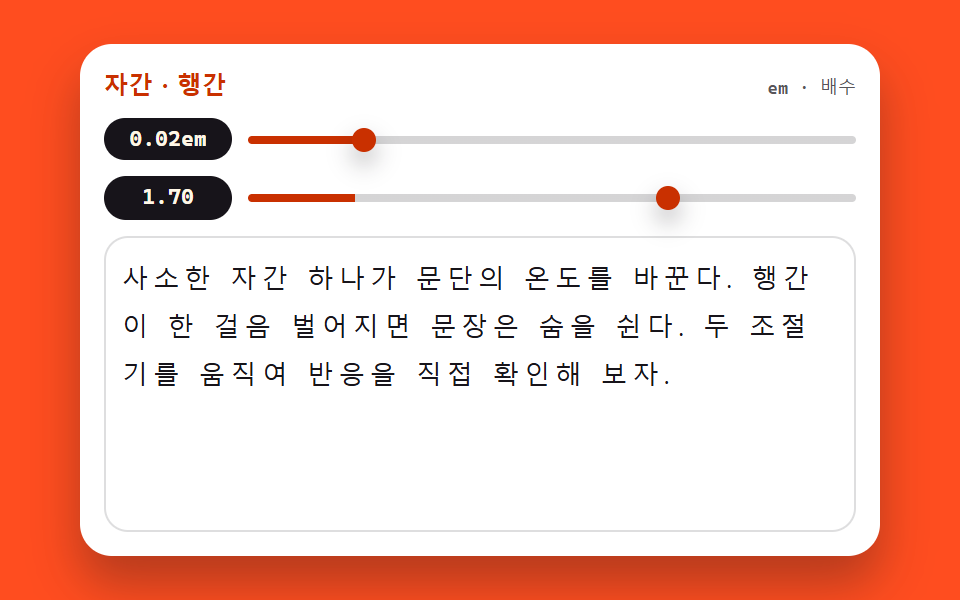
letter-spacing 슬라이더는 em 단위로, line-height 슬라이더는 단위 없는 배수로 움직이고 값이 글 옆에 바로 붙습니다. 본문 여러 줄이 두 손잡이에 어떻게 반응하는지 한 화면에서 겹쳐 봅니다.
쓰임블로그 본문 설정 패널
letter-spacingline-heighttextContent
<main class="stage">
<section class="st is-demo" id="st" aria-label="자간·행간 조절기">
  <header class="st__bar">
    <span class="st__name">자간 · 행간</span>
    <span class="st__hint">em · 배수</span>
  </header>
  <div class="st__ctrl">
    <span class="st__val" id="stTrackVal">0.02em</span>
    <input class="st__range" id="stTrack" type="range" min="-0.04" max="0.3" step="0.01" value="0.02"
           aria-label="자간 슬라이더">
  </div>
  <div class="st__ctrl">
    <span class="st__val" id="stLeadVal">1.70</span>
    <input class="st__range" id="stLead" type="range" min="1" max="2" step="0.05" value="1.7"
           aria-label="행간 슬라이더">
  </div>
  <div class="st__body">
    <p class="st__text" id="stText">사소한 자간 하나가 문단의 온도를 바꾼다. 행간이 한 걸음 벌어지면 문장은 숨을 쉰다. 두 조절기를 움직여 반응을 직접 확인해 보자.</p>
  </div>
</section>
</main>
@use "../../../../site/static/demo-tokens" as *;
// 자간·행간 조절기 — letter-spacing(em) 과 line-height(단위 없는 배수) 두 손잡이로
// 본문 표본을 직접 움직인다. 값은 textContent 로 글 옆에 즉시 붙는다.
// 이 데모는 layout 속성 자체가 주제라 다른 편의 "transform·opacity 만 움직인다" 원칙에 대한
// 명시적인 예외다 — 미리보기 루프도 두 속성을 키프레임으로 흔든다. 표본 상자를 높이 고정으로
// 두어 행간이 가장 벌어질 때도 무대를 넘지 않게 한다(넘침은 상자 안에서 잘리게).
$duration: $dur-quick;
$easing: $ease-spring;
$color: $subject-orange-deep;
$sans: system-ui, -apple-system, "Segoe UI", "Noto Sans KR", sans-serif;
$mono: ui-monospace, "Cascadia Mono", Consolas, "Liberation Mono", monospace;
@include stage($stage-orange);
.st {
display: flex; flex-direction: column; gap: $sp-2;
box-sizing: border-box; width: min(100%, 400px); padding: $sp-3;
border-radius: $r-card; background: $stage-paper;
box-shadow: $shadow-raised;
}
// ── 제목 줄
.st__bar { display: flex; align-items: baseline; justify-content: space-between; }
.st__name {
color: $subject-orange-deep;
font-family: $sans; font-weight: 800; font-size: 12px; line-height: 1.4; letter-spacing: .02em;
}
.st__hint {
color: rgba($subject-ink, .72);
font-family: $mono; font-weight: 500; font-size: 9px; line-height: 1.4;
}
// ── 조절기 두 줄. 값 배지가 왼쪽에 폭을 고정해 두 슬라이더의 시작이 반듯이 맞는다
.st__ctrl { display: flex; align-items: center; gap: $sp-2; }
.st__val {
flex: 0 0 64px; box-sizing: border-box; text-align: center;
padding: $sp-1 0; border-radius: $r-pill;
background: $subject-ink; color: $subject-cream;
font-family: $mono; font-weight: 700; font-size: 11px; line-height: 1.2;
}
.st__range {
--fill: 17.6%;
flex: 1 1 auto; appearance: none; -webkit-appearance: none;
display: block; height: 20px; margin: 0; background: transparent; cursor: pointer;
}
.st__range::-webkit-slider-runnable-track {
height: 4px; border-radius: $r-pill;
background: linear-gradient(90deg, $color 0 var(--fill), rgba($subject-ink, .18) var(--fill) 100%);
}
.st__range::-webkit-slider-thumb {
-webkit-appearance: none; appearance: none;
width: 12px; height: 12px; margin-top: -4px;
border: 0; border-radius: 50%; background: $color;
box-shadow: $shadow-press;
}
.st__range::-moz-range-track {
height: 4px; border-radius: $r-pill; background: rgba($subject-ink, .18);
}
.st__range::-moz-range-thumb {
width: 12px; height: 12px; border: 0; border-radius: 50%; background: $color;
}
.st__range:focus-visible { outline: 2px solid $color; outline-offset: 4px; }
// ── 본문 표본. 상자 높이를 고정한다 — 행간이 2.0 까지 벌어져도 무대 밖으로 못 나간다
.st__body {
height: 130px; overflow: hidden;
padding: $sp-2; border: 1px solid rgba($subject-ink, .14); border-radius: $r-control;
}
.st__text {
margin: 0; color: $subject-ink;
font-family: $sans; font-weight: 500;
font-size: clamp(10px, 3.2vw, 13px); line-height: 1.7; letter-spacing: 0.02em;
overflow-wrap: break-word;
}
// ── 격자 미리보기 루프 (2초). 두 속성을 같은 주기로 흔든다 —
// 자간이 벌어지며 행이 다시 짜이고 행간이 벌어지며 문단이 숨 쉬는 장면이 한 화면에서 겹친다.
.st.is-demo .st__text {
animation-name: stTrack, stLead;
animation-duration: $dur-loop, $dur-loop;
animation-timing-function: ease-in-out, ease-in-out;
animation-iteration-count: infinite, infinite;
}
@keyframes stTrack {
0% { letter-spacing: -0.02em; }
45% { letter-spacing: 0.24em; }
90%, 100% { letter-spacing: -0.02em; }
}
@keyframes stLead {
0% { line-height: 1.1; }
45% { line-height: 2.0; }
90%, 100% { line-height: 1.1; }
}
// ── 좁은 화면: 표본 상자와 글자를 내린다(올리지 않는다). 루프 폭도 상자에 맞춰 줄인다
@media (max-width: 340px) {
.st { padding: $sp-2; gap: $sp-1; }
.st__name { font-size: 11px; }
.st__val { flex-basis: 52px; font-size: 10px; }
.st__body { height: 78px; padding: $sp-1; }
.st.is-demo .st__text {
animation-name: stTrackN, stLeadN;
}
}
@keyframes stTrackN {
0% { letter-spacing: -0.02em; }
45% { letter-spacing: 0.18em; }
90%, 100% { letter-spacing: -0.02em; }
}
@keyframes stLeadN {
0% { line-height: 1.1; }
45% { line-height: 1.8; }
90%, 100% { line-height: 1.1; }
}
@media (prefers-reduced-motion: reduce) {
.st.is-demo .st__text {
animation: none !important;
letter-spacing: 0.02em !important;
line-height: 1.7 !important;
}
}html, body {
margin: 0;
overflow: hidden;
}
.stage {
box-sizing: border-box;
min-height: 100vh;
display: grid;
place-items: center;
margin: 0;
background: #ff4d1f;
font-family: -apple-system, "Segoe UI", "Noto Sans KR", sans-serif;
padding: clamp(8px, 4vw, 24px);
}
.st {
display: flex;
flex-direction: column;
gap: 8px;
box-sizing: border-box;
width: min(100%, 400px);
padding: 12px;
border-radius: 16px;
background: #ffffff;
box-shadow: 0 14px 24px rgba(23, 20, 26, 0.32);
}
.st__bar {
display: flex;
align-items: baseline;
justify-content: space-between;
}
.st__name {
color: #c93000;
font-family: system-ui, -apple-system, "Segoe UI", "Noto Sans KR", sans-serif;
font-weight: 800;
font-size: 12px;
line-height: 1.4;
letter-spacing: 0.02em;
}
.st__hint {
color: rgba(23, 20, 26, 0.72);
font-family: ui-monospace, "Cascadia Mono", Consolas, "Liberation Mono", monospace;
font-weight: 500;
font-size: 9px;
line-height: 1.4;
}
.st__ctrl {
display: flex;
align-items: center;
gap: 8px;
}
.st__val {
flex: 0 0 64px;
box-sizing: border-box;
text-align: center;
padding: 4px 0;
border-radius: 999px;
background: #17141a;
color: #fff7e6;
font-family: ui-monospace, "Cascadia Mono", Consolas, "Liberation Mono", monospace;
font-weight: 700;
font-size: 11px;
line-height: 1.2;
}
.st__range {
--fill: 17.6%;
flex: 1 1 auto;
appearance: none;
-webkit-appearance: none;
display: block;
height: 20px;
margin: 0;
background: transparent;
cursor: pointer;
}
.st__range::-webkit-slider-runnable-track {
height: 4px;
border-radius: 999px;
background: linear-gradient(90deg, #c93000 0 var(--fill), rgba(23, 20, 26, 0.18) var(--fill) 100%);
}
.st__range::-webkit-slider-thumb {
-webkit-appearance: none;
appearance: none;
width: 12px;
height: 12px;
margin-top: -4px;
border: 0;
border-radius: 50%;
background: #c93000;
box-shadow: 0 6px 12px rgba(23, 20, 26, 0.32);
}
.st__range::-moz-range-track {
height: 4px;
border-radius: 999px;
background: rgba(23, 20, 26, 0.18);
}
.st__range::-moz-range-thumb {
width: 12px;
height: 12px;
border: 0;
border-radius: 50%;
background: #c93000;
}
.st__range:focus-visible {
outline: 2px solid #c93000;
outline-offset: 4px;
}
.st__body {
height: 130px;
overflow: hidden;
padding: 8px;
border: 1px solid rgba(23, 20, 26, 0.14);
border-radius: 12px;
}
.st__text {
margin: 0;
color: #17141a;
font-family: system-ui, -apple-system, "Segoe UI", "Noto Sans KR", sans-serif;
font-weight: 500;
font-size: clamp(10px, 3.2vw, 13px);
line-height: 1.7;
letter-spacing: 0.02em;
overflow-wrap: break-word;
}
.st.is-demo .st__text {
animation-name: stTrack, stLead;
animation-duration: 2s, 2s;
animation-timing-function: ease-in-out, ease-in-out;
animation-iteration-count: infinite, infinite;
}
@keyframes stTrack {
0% {
letter-spacing: -0.02em;
}
45% {
letter-spacing: 0.24em;
}
90%, 100% {
letter-spacing: -0.02em;
}
}
@keyframes stLead {
0% {
line-height: 1.1;
}
45% {
line-height: 2;
}
90%, 100% {
line-height: 1.1;
}
}
@media (max-width: 340px) {
.st {
padding: 8px;
gap: 4px;
}
.st__name {
font-size: 11px;
}
.st__val {
flex-basis: 52px;
font-size: 10px;
}
.st__body {
height: 78px;
padding: 4px;
}
.st.is-demo .st__text {
animation-name: stTrackN, stLeadN;
}
}
@keyframes stTrackN {
0% {
letter-spacing: -0.02em;
}
45% {
letter-spacing: 0.18em;
}
90%, 100% {
letter-spacing: -0.02em;
}
}
@keyframes stLeadN {
0% {
line-height: 1.1;
}
45% {
line-height: 1.8;
}
90%, 100% {
line-height: 1.1;
}
}
@media (prefers-reduced-motion: reduce) {
.st.is-demo .st__text {
animation: none !important;
letter-spacing: 0.02em !important;
line-height: 1.7 !important;
}
}var st = document.getElementById('st');
var text = document.getElementById('stText');
var track = document.getElementById('stTrack');
var lead = document.getElementById('stLead');
var trackVal = document.getElementById('stTrackVal');
var leadVal = document.getElementById('stLeadVal');
// 값은 textContent 로 글자만 즉시 갈아 끼운다 — innerHTML 이 아니라 위조 여지가 없다.
// letter-spacing 은 em 단위, line-height 는 단위 없는 배수로 본문에 바로 닿는다.
track.oninput = function () {
st.classList.remove('is-demo');
var v = Number(track.value).toFixed(2);
text.style.letterSpacing = v + 'em';
track.style.setProperty('--fill', ((track.value + 0.04) / 0.34 * 100) + '%');
trackVal.textContent = v + 'em';
};
lead.oninput = function () {
st.classList.remove('is-demo');
var m = Number(lead.value).toFixed(2);
text.style.lineHeight = m;
lead.style.setProperty('--fill', ((lead.value - 1) / 1 * 100) + '%');
leadVal.textContent = m;
};
track.addEventListener('pointerdown', function () { st.classList.remove('is-demo'); });
lead.addEventListener('pointerdown', function () { st.classList.remove('is-demo'); });// FontSpacingTuner — vanilla 판(run/074/demo/03-font-spacing-tuner/index.html) 의 React 포트.
// letter-spacing(em)·line-height(배수) 두 슬라이더가 본문 표본을 움직이고 값은 글 옆에 즉시 붙는다
// (vanilla 의 textContent 경로 대신 JSX 텍스트 노드로 — 계산식은 같은 글자).
// 미리보기 중에는 keyframes 가 인라인 스타일보다 우선한다(cascade 규칙) — 손이 닿으면 isDemo 를 뗀다.
import { useState } from "react";
import type { CSSProperties } from "react";
import styles from "./FontSpacingTuner.module.scss";
export type FontSpacingTunerProps = {
duration?: number;
easing?: string;
color?: string;
initialTrack?: number;
initialLead?: number;
};
type Vars = CSSProperties & { "--duration"?: string; "--easing"?: string; "--color"?: string };
// 이벤트 핸들러 파라미터는 로컬 타입으로 — ambient 타입이 React 제네릭을 안 준다
type RangeEvt = { target: { value: string } };
const TITLE = "자간 · 행간";
const HINT = "em · 배수";
const TRACK_ARIA = "자간 슬라이더";
const LEAD_ARIA = "행간 슬라이더";
const BODY_TEXT =
"사소한 자간 하나가 문단의 온도를 바꾼다. 행간이 한 걸음 벌어지면 문장은 숨을 쉰다. 두 조절기를 움직여 반응을 직접 확인해 보자.";
export default function FontSpacingTuner(props: FontSpacingTunerProps) {
const duration = props.duration ?? 220;
const easing = props.easing ?? "cubic-bezier(.2, .8, .2, 1)";
const color = props.color ?? "#c93000";
const [track, setTrack] = useState<number>(props.initialTrack ?? 0.02);
const [lead, setLead] = useState<number>(props.initialLead ?? 1.7);
const [preview, setPreview] = useState<boolean>(true);
const vars: Vars = { "--duration": duration + "ms", "--easing": easing, "--color": color };
const trackFill = (((track + 0.04) / 0.34) * 100).toFixed(1) + "%";
const leadFill = (((lead - 1) / 1) * 100).toFixed(1) + "%";
return (
<main className={styles.stage}>
<section className={styles.root + (preview ? " " + styles.isDemo : "")} style={vars} aria-label="자간·행간 조절기">
<header className={styles.bar}>
<span className={styles.name}>{TITLE}</span>
<span className={styles.hint}>{HINT}</span>
</header>
<div className={styles.ctrl}>
<span className={styles.val}>{track.toFixed(2)}em</span>
<input
className={styles.range}
type="range"
min="-0.04"
max="0.3"
step="0.01"
value={track}
aria-label={TRACK_ARIA}
style={{ "--fill": trackFill } as CSSProperties}
onPointerDown={() => setPreview(false)}
onInput={(e: RangeEvt) => {
setPreview(false);
setTrack(Number(e.target.value));
}}
/>
</div>
<div className={styles.ctrl}>
<span className={styles.val}>{lead.toFixed(2)}</span>
<input
className={styles.range}
type="range"
min="1"
max="2"
step="0.05"
value={lead}
aria-label={LEAD_ARIA}
style={{ "--fill": leadFill } as CSSProperties}
onPointerDown={() => setPreview(false)}
onInput={(e: RangeEvt) => {
setPreview(false);
setLead(Number(e.target.value));
}}
/>
</div>
<div className={styles.body}>
<p className={styles.text} style={{ letterSpacing: track.toFixed(2) + "em", lineHeight: String(lead) }}>
{BODY_TEXT}
</p>
</div>
</section>
</main>
);
}03 자간·행간 조절기 — 측정 누적면적 13.345% · 움직인 프레임 22/23GODRICH 원작 · zip 에 SCSS·React 포함 · css typography 플레이그라운드 9종 — 웹폰트 한 줄도 없이
이 데모가 속한 글
 css typography 플레이그라운드 9종 — 웹폰트 한 줄도 없이css typography 는 페이지의 글자 손질, 곧 어느 서체에 얼마나 굵게, 자간과 행간을 얼마나 벌리고, 크기를 어디까지 키울지를 정하는 일입니다. 이번 놀이터 아홉 개는 웹폰트 한 줄도 없이 이미 컴퓨터에 이 글의 데모 전부 보기