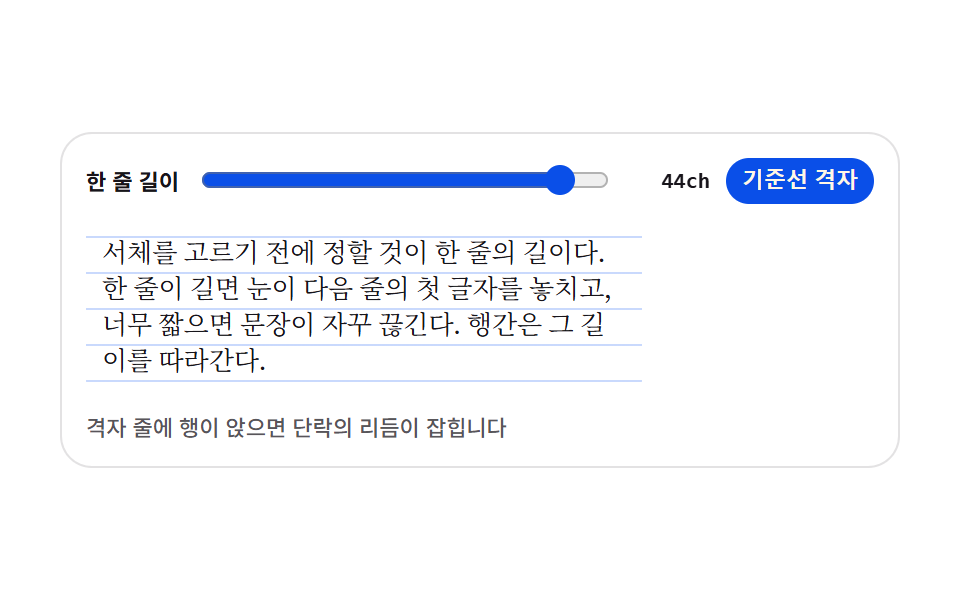
04단락 리듬 프리뷰
한 줄 길이를 ch 슬라이더로 정하고 바탕 격자를 켜면 본문의 행이 격자 줄에 앉는지 확인할 수 있습니다. text-wrap: pretty 로 문단 끝에 외톨이 낱말이 남는 것까지 손을 봅니다.
쓰임뉴스·매거진 본문 프리뷰
chrepeating-linear-gradienttext-wrap: pretty
<main class="stage">
<div class="tr is-demo" id="tr">
  <div class="tr__bar">
    <span class="tr__label">한 줄 길이</span>
    <input class="tr__range" id="measure" type="range" min="24" max="46" step="1" value="44" aria-label="한 줄 길이">
    <span class="tr__val" id="val">44ch</span>
    <button class="tr__toggle" id="grid" type="button" aria-pressed="true">기준선 격자</button>
  </div>
  <div class="tr__sheet is-grid" id="sheet">
    <p class="tr__p">서체를 고르기 전에 정할 것이 한 줄의 길이다. 한 줄이 길면 눈이 다음 줄의 첫 글자를 놓치고, 너무 짧으면 문장이 자꾸 끊긴다. 행간은 그 길이를 따라간다.</p>
  </div>
  <p class="tr__note">격자 줄에 행이 앉으면 단락의 리듬이 잡힙니다</p>
</div>
</main>
@use "../../../../site/static/demo-tokens" as *;
// 단락 리듬 프리뷰 — 한 줄 길이를 ch(그 서체의 0 글자 폭)로 정하고, 바탕에 기준선 격자를 깔아
// 행이 격자 줄에 앉는지 본다. 격자는 이미지가 아니라 repeating-linear-gradient 한 줄이다.
// 행간과 격자 간격은 같은 변수($lh)에서 나온다 — 둘이 어긋나면 격자가 뜻을 잃는다.
// 미리보기(.is-demo)는 한 줄 길이를 44ch ↔ 28ch 로 오가며 글이 다시 흐르는 모습을 보여준다.
$duration: $dur-base;
$easing: $ease-spring;
$color: $subject-blue-deep;
$serif: ui-serif, Georgia, "Times New Roman", "Noto Serif KR", serif;
$ink-soft: rgba($subject-ink, .72);
$lh: 18px;
@include stage($stage-paper);
// 무대의 자동 트랙은 항목의 max-content(표본 문장 44ch)만큼 벌어진다 — 320px 에서 트랙이 화면보다
// 커지며 조용히 넘친다(219 계열). 트랙을 minmax(0,1fr) 로 못박아 항목을 무대 안에 가둔다.
.stage { grid-template-columns: minmax(0, 1fr); }
.tr {
display: flex; flex-direction: column; gap: $sp-2;
box-sizing: border-box; width: 100%; max-width: 420px;
padding: $sp-3; border: 1px solid rgba($subject-ink, .12); border-radius: $r-card;
background: $stage-paper;
}
// ── 손잡이 줄
.tr__bar { display: flex; align-items: center; gap: $sp-2; }
.tr__label {
flex: 0 0 auto; color: $subject-ink;
font-weight: 700; font-size: 11px; line-height: 1.4;
}
.tr__range { flex: 1 1 auto; min-width: 0; accent-color: $color; }
.tr__val {
flex: 0 0 auto; min-width: 40px; color: $subject-ink; text-align: right;
font-family: ui-monospace, Consolas, monospace; font-weight: 700; font-size: 11px; line-height: 1.4;
}
.tr__toggle {
flex: 0 0 auto; padding: $sp-1 $sp-2; border: 0; border-radius: $r-pill;
background: $color; color: $subject-cream; cursor: pointer;
font-weight: 700; font-size: 11px; line-height: 1.4;
}
.tr__toggle[aria-pressed="false"] { background: rgba($subject-ink, .12); color: $subject-ink; }
.tr__toggle:focus-visible { outline: 2px solid $subject-ink; outline-offset: 2px; }
// ── 본문 판. 폭은 ch 배수라 서체가 바뀌면 같은 44ch 도 픽셀 폭이 달라진다
.tr__sheet {
--measure: 44;
box-sizing: border-box; width: calc(var(--measure) * 1ch); max-width: 100%;
padding: $sp-2; border-radius: $r-sm;
}
// 격자 줄은 행간과 같은 $lh 간격으로 반복한다
.tr__sheet.is-grid {
background-image: repeating-linear-gradient(
to bottom,
rgba($subject-blue, .26) 0, rgba($subject-blue, .26) 1px,
transparent 1px, transparent $lh
);
background-position: 0 $sp-2;
}
.tr__p {
margin: 0; color: $subject-ink;
font-family: $serif; font-weight: 400; font-size: 13px; line-height: $lh;
text-wrap: pretty;
}
.tr__note {
margin: 0; color: $ink-soft;
font-weight: 500; font-size: 11px; line-height: 1.4;
}
// ── 격자 미리보기 루프 (2초)
// 폭이 줄었다 늘며 글이 다시 흐른다. 글자가 움직이는 것이라 반투명 유령 프레임이 생기지 않는다
.tr.is-demo .tr__sheet {
animation-name: trMeasure; animation-duration: $dur-loop;
animation-timing-function: $easing; animation-iteration-count: infinite;
animation-fill-mode: both;
}
.tr.is-demo .tr__val {
animation-name: trVal; animation-duration: $dur-loop;
animation-timing-function: steps(1, end); animation-iteration-count: infinite;
animation-fill-mode: both;
}
@keyframes trMeasure {
0%, 8% { width: calc(44 * 1ch); }
46%, 54% { width: calc(28 * 1ch); }
92%, 100% { width: calc(44 * 1ch); }
}
// 숫자가 폭과 따로 놀지 않게 값 칸은 폭이 가장 좁아지는 구간에만 흐려 둔다
@keyframes trVal {
0%, 30% { opacity: 1; }
32%, 68% { opacity: .35; }
70%, 100% { opacity: 1; }
}
// ── 좁은 화면: 글자와 여백을 줄여 무대 안에 들어오게 한다
@media (max-width: 340px) {
.tr { gap: $sp-1; padding: $sp-2; }
.tr__sheet { padding: $sp-1; }
.tr__p { font-size: 12px; line-height: 16px; }
.tr__sheet.is-grid {
background-image: repeating-linear-gradient(
to bottom,
rgba($subject-blue, .26) 0, rgba($subject-blue, .26) 1px,
transparent 1px, transparent 16px
);
background-position: 0 $sp-1;
}
.tr__label, .tr__val, .tr__toggle, .tr__note { font-size: 10px; }
}
@media (prefers-reduced-motion: reduce) {
.tr.is-demo .tr__sheet,
.tr.is-demo .tr__val {
animation: none !important;
width: calc(44 * 1ch) !important;
opacity: 1 !important;
}
}html, body {
margin: 0;
overflow: hidden;
}
.stage {
box-sizing: border-box;
min-height: 100vh;
display: grid;
place-items: center;
margin: 0;
background: #ffffff;
font-family: -apple-system, "Segoe UI", "Noto Sans KR", sans-serif;
padding: clamp(8px, 4vw, 24px);
}
.stage {
grid-template-columns: minmax(0, 1fr);
}
.tr {
display: flex;
flex-direction: column;
gap: 8px;
box-sizing: border-box;
width: 100%;
max-width: 420px;
padding: 12px;
border: 1px solid rgba(23, 20, 26, 0.12);
border-radius: 16px;
background: #ffffff;
}
.tr__bar {
display: flex;
align-items: center;
gap: 8px;
}
.tr__label {
flex: 0 0 auto;
color: #17141a;
font-weight: 700;
font-size: 11px;
line-height: 1.4;
}
.tr__range {
flex: 1 1 auto;
min-width: 0;
accent-color: #0a4fe8;
}
.tr__val {
flex: 0 0 auto;
min-width: 40px;
color: #17141a;
text-align: right;
font-family: ui-monospace, Consolas, monospace;
font-weight: 700;
font-size: 11px;
line-height: 1.4;
}
.tr__toggle {
flex: 0 0 auto;
padding: 4px 8px;
border: 0;
border-radius: 999px;
background: #0a4fe8;
color: #fff7e6;
cursor: pointer;
font-weight: 700;
font-size: 11px;
line-height: 1.4;
}
.tr__toggle[aria-pressed=false] {
background: rgba(23, 20, 26, 0.12);
color: #17141a;
}
.tr__toggle:focus-visible {
outline: 2px solid #17141a;
outline-offset: 2px;
}
.tr__sheet {
--measure: 44;
box-sizing: border-box;
width: calc(var(--measure) * 1ch);
max-width: 100%;
padding: 8px;
border-radius: 8px;
}
.tr__sheet.is-grid {
background-image: repeating-linear-gradient(to bottom, rgba(47, 109, 246, 0.26) 0, rgba(47, 109, 246, 0.26) 1px, transparent 1px, transparent 18px);
background-position: 0 8px;
}
.tr__p {
margin: 0;
color: #17141a;
font-family: ui-serif, Georgia, "Times New Roman", "Noto Serif KR", serif;
font-weight: 400;
font-size: 13px;
line-height: 18px;
text-wrap: pretty;
}
.tr__note {
margin: 0;
color: rgba(23, 20, 26, 0.72);
font-weight: 500;
font-size: 11px;
line-height: 1.4;
}
.tr.is-demo .tr__sheet {
animation-name: trMeasure;
animation-duration: 2s;
animation-timing-function: cubic-bezier(0.2, 0.8, 0.2, 1);
animation-iteration-count: infinite;
animation-fill-mode: both;
}
.tr.is-demo .tr__val {
animation-name: trVal;
animation-duration: 2s;
animation-timing-function: steps(1, end);
animation-iteration-count: infinite;
animation-fill-mode: both;
}
@keyframes trMeasure {
0%, 8% {
width: 44ch;
}
46%, 54% {
width: 28ch;
}
92%, 100% {
width: 44ch;
}
}
@keyframes trVal {
0%, 30% {
opacity: 1;
}
32%, 68% {
opacity: 0.35;
}
70%, 100% {
opacity: 1;
}
}
@media (max-width: 340px) {
.tr {
gap: 4px;
padding: 8px;
}
.tr__sheet {
padding: 4px;
}
.tr__p {
font-size: 12px;
line-height: 16px;
}
.tr__sheet.is-grid {
background-image: repeating-linear-gradient(to bottom, rgba(47, 109, 246, 0.26) 0, rgba(47, 109, 246, 0.26) 1px, transparent 1px, transparent 16px);
background-position: 0 4px;
}
.tr__label, .tr__val, .tr__toggle, .tr__note {
font-size: 10px;
}
}
@media (prefers-reduced-motion: reduce) {
.tr.is-demo .tr__sheet,
.tr.is-demo .tr__val {
animation: none !important;
width: 44ch !important;
opacity: 1 !important;
}
}var tr = document.getElementById('tr');
var range = document.getElementById('measure');
var val = document.getElementById('val');
var sheet = document.getElementById('sheet');
var grid = document.getElementById('grid');
// 실사용 경로 — 슬라이더 값은 ch 배수로 그대로 들어간다. 미리보기 루프는 같은 값을 CSS 키프레임으로 흔든다
function applyMeasure() {
sheet.style.setProperty('--measure', range.value);
val.textContent = range.value + 'ch';
}
function stopLoop() { tr.classList.remove('is-demo'); }
range.addEventListener('input', function () { stopLoop(); applyMeasure(); });
grid.addEventListener('click', function () {
stopLoop();
var on = grid.getAttribute('aria-pressed') === 'true';
grid.setAttribute('aria-pressed', on ? 'false' : 'true');
sheet.classList.toggle('is-grid', !on);
});
applyMeasure();// TextRhythmPreview — vanilla 판(run/074/demo/04-text-rhythm-preview/index.html) 의 React 포트.
// 한 줄 길이를 ch 슬라이더로 정하고 기준선 격자를 토글한다. 슬라이더 값은 상태로, 판 폭은 --measure 로 흀러간다.
import { useState } from "react";
import type { ChangeEvent, FC } from "react";
import styles from "./TextRhythmPreview.module.scss";
export type TextRhythmPreviewProps = {
duration?: number;
easing?: string;
color?: string;
initialMeasure?: number;
initialGrid?: boolean;
};
const NOTE = "격자 줄에 행이 앉으면 단락의 리듬이 잡힙니다";
const SAMPLE =
"서체를 고르기 전에 정할 것이 한 줄의 길이다. 한 줄이 길면 눈이 다음 줄의 첫 글자를 놓치고, 너무 짧으면 문장이 자꾸 끊긴다. 행간은 그 길이를 따라간다.";
const TextRhythmPreview: FC<TextRhythmPreviewProps> = ({
duration,
easing,
color,
initialMeasure = 44,
initialGrid = true,
}) => {
const [measure, setMeasure] = useState(String(initialMeasure));
const [gridOn, setGridOn] = useState(initialGrid);
const [demo, setDemo] = useState(true);
const cls = [styles.tr, demo ? styles["is-demo"] : "", gridOn ? styles["is-grid"] : ""]
.filter(Boolean).join(" ");
const vars = {
"--measure": measure,
"--duration": duration != null ? duration + "ms" : undefined,
"--easing": easing,
"--color": color,
} as never;
return (
<div className={cls} style={vars}>
<div className={styles.tr__bar}>
<span className={styles.tr__label}>한 줄 길이</span>
<input
className={styles.tr__range}
type="range"
min="24"
max="46"
step="1"
value={measure}
aria-label="한 줄 길이"
onInput={() => setDemo(false)}
onChange={(e: ChangeEvent<HTMLInputElement>) => setMeasure(e.currentTarget.value)}
/>
<span className={styles.tr__val}>{measure}ch</span>
<button
type="button"
className={styles.tr__toggle}
aria-pressed={gridOn ? "true" : "false"}
onClick={() => {
setDemo(false);
setGridOn((g) => !g);
}}
>
기준선 격자
</button>
</div>
<div
className={[styles.tr__sheet, gridOn ? styles["is-grid"] : ""].filter(Boolean).join(" ")}
data-sheet
>
<p className={styles.tr__p}>{SAMPLE}</p>
</div>
<p className={styles.tr__note}>{NOTE}</p>
</div>
);
};
export default TextRhythmPreview;04 단락 리듬 프리뷰 — 측정 누적면적 17.881% · 움직인 프레임 17/23GODRICH 원작 · zip 에 SCSS·React 포함 · css typography 플레이그라운드 9종 — 웹폰트 한 줄도 없이
이 데모가 속한 글
 css typography 플레이그라운드 9종 — 웹폰트 한 줄도 없이css typography 는 페이지의 글자 손질, 곧 어느 서체에 얼마나 굵게, 자간과 행간을 얼마나 벌리고, 크기를 어디까지 키울지를 정하는 일입니다. 이번 놀이터 아홉 개는 웹폰트 한 줄도 없이 이미 컴퓨터에 이 글의 데모 전부 보기